What is Quantum?
The Quantum project was created to provide a rich and tenant-facing API
for defining network connectivity and addressing in the cloud.
Network
Subnet
Port
Flexibility to Choose Different Network Technologies
Open vSwitch
Cisco
Linux Bridge
Nicira NVP
Ryu
NEC OpenFlow
Different Components
•   quantum-server
•   plugin agent (quantum-*-agent)
•   dhcp agent (quantum-dhcp-agent)
•   l3 agent (quantum-l3-agent)
Use Case: Single Flat Network
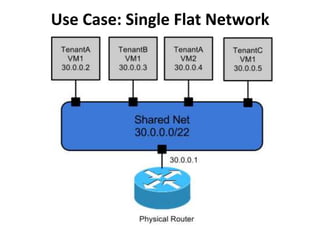
• This is a "shared" network, meaning it is
  visible to all tenants via the Quantum API.
  Tenant VMs have a single NIC, and receive a
  fixed IP address from the subnet(s) associated
  with that network. This essentially maps to
  the FlatManager and FlatDHCPManager
  models provided by Nova. Floating IPs are not
  supported.
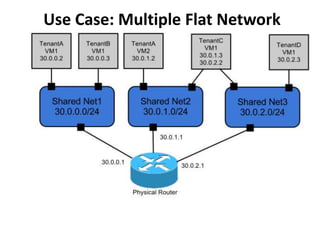
Use Case: Multiple Flat Network
• This use case is very similar to the above
  Single Flat Network use case, except that
  tenants see multiple shared networks
Use Case: Mixed Flat and Private Network
in which tenants also optionally have access to
private per-tenant networks. In addition to seeing
one or more shared networks via the quantum API,
tenants can create additional networks that are
only visible to users of that tenant. When creating
VMs, those VMs can have NICs on any of the shared
networks and/or any of the private networks
belonging to the tenant. This enables the creation
of "multi-tier" topologies using VMs with multiple
NICs. It also supports a model where a VM acting as
a gateway can provide services such as routing, NAT,
or load balancing.
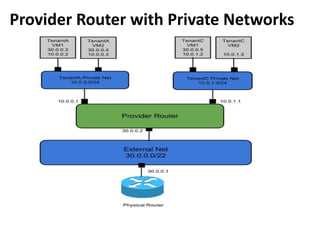
Provider Router with Private Networks
This use provides each tenant with one or more
private networks, which connect to the outside
world via a Quantum router. The case where
each tenant gets exactly one network in this
form maps to the same logical topology as the
VlanManager in Nova. Using the Quantum API,
the tenant would only see a network for each
private network assigned to that tenant. The
router object in the API is created and owned by
the cloud admin.
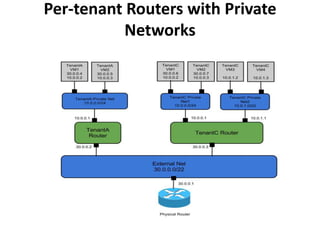
Per-tenant Routers with Private
           Networks
A more advanced router scenario in which each tenant
gets at least one router, and potentially has access to the
Quantum API to create additional routers. The tenant can
create their own networks, potentially unlinking those
networks to a router. This model enables tenant-defined
multi-tier applications, with each tier being a separate
network behind the router. Since there are multiple
routers, tenant subnets can be overlapping without
conflicting, since access to external networks all happens
via SNAT or Floating IPs. Each router uplink and floating IP
is allocated from the external network subnet.
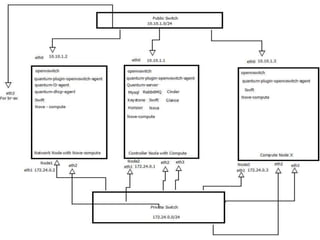
•   3 Servers
    Server 1 = > running network controller and nova-compute
    Server 2 = > running nova-compute, Cinder, rabbit-mq, mysql, keystone, glance, swift
    Server 3 = > running nova-compute
•   All servers are having 4 lan card, eth0 is connected to public switch and rest are connected to
    private switch.
    eth3 of Server 1 is also connected to public switch for br-ex. all node eth2 is for br-int
•   10.10.x.x is for public access
•   172.24.0.x is for private network
•   172.24.x.x is reserved for tenant Network
Network Node Setup
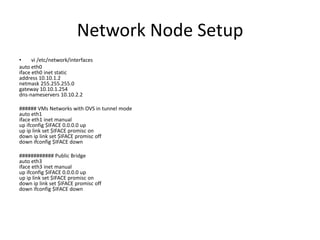
•     vi /etc/network/interfaces
auto eth0
iface eth0 inet static
address 10.10.1.2
netmask 255.255.255.0
gateway 10.10.1.254
dns-nameservers 10.10.2.2

###### VMs Networks with OVS in tunnel mode
auto eth1
iface eth1 inet manual
up ifconfig $IFACE 0.0.0.0 up
up ip link set $IFACE promisc on
down ip link set $IFACE promisc off
down ifconfig $IFACE down

############ Public Bridge
auto eth3
iface eth3 inet manual
up ifconfig $IFACE 0.0.0.0 up
up ip link set $IFACE promisc on
down ip link set $IFACE promisc off
down ifconfig $IFACE down
#virsh net-destroy default

#virsh net-undefine default

#vi /etc/libvirt/libvirtd.conf
listen_tls = 0
listen_tcp = 1
auth_tcp = “none”

#vi /etc/init/libvirt-bin.conf
env libvirtd_opts=”-d -l”

# vi /etc/default/libvirt-bin
libvirtd_opts=”-d -l”

# service libvirt-bin restart

#vi /etc/default/openvswitch-switch
BRCOMPAT=yes

#aptitude purge ebtables

#apt-get install -y openvswitch-datapath-source

#apt-get install -y quantum-server quantum-plugin-openvswitch

#module-assistant auto-install openvswitch-datapath

#service openvswitch-switch start

#lsmod |grep br

#rmmod bridge

#service openvswitch-switch restart

#service openvswitch-controller restart

#lsmod |grep br

#init 6
Network setup for Compute Nodes
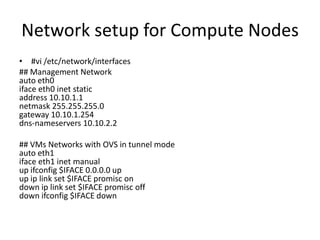
• #vi /etc/network/interfaces
## Management Network
auto eth0
iface eth0 inet static
address 10.10.1.1
netmask 255.255.255.0
gateway 10.10.1.254
dns-nameservers 10.10.2.2

## VMs Networks with OVS in tunnel mode
auto eth1
iface eth1 inet manual
up ifconfig $IFACE 0.0.0.0 up
up ip link set $IFACE promisc on
down ip link set $IFACE promisc off
down ifconfig $IFACE down
How to create Quantum Network
•   Internal Network
•   Internal Subnet
•   Router
•   External Network
•   External Subnet
•   Floating IP
Internal Network
# quantum net-create pvt_net1 --tenant_id
6415b015581c4506a46e97170395a598 --
provider:network_type gre --
provider:segmentation_id 1 --shared True
# quantum net-create pvt_net2 --tenant_id
6415b015581c4506a46e97170395a598 --
provider:network_type gre --
provider:segmentation_id 2 --shared True
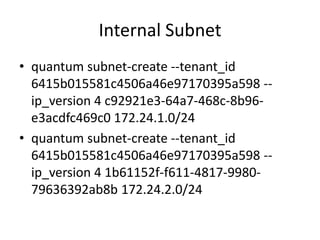
Internal Subnet
• quantum subnet-create --tenant_id
  6415b015581c4506a46e97170395a598 --
  ip_version 4 c92921e3-64a7-468c-8b96-
  e3acdfc469c0 172.24.1.0/24
• quantum subnet-create --tenant_id
  6415b015581c4506a46e97170395a598 --
  ip_version 4 1b61152f-f611-4817-9980-
  79636392ab8b 172.24.2.0/24
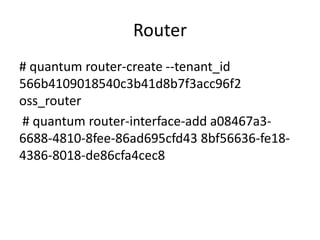
Router
# quantum router-create --tenant_id
566b4109018540c3b41d8b7f3acc96f2
oss_router
# quantum router-interface-add a08467a3-
6688-4810-8fee-86ad695cfd43 8bf56636-fe18-
4386-8018-de86cfa4cec8
External Router
# quantum net-create ext_net -- --
router:external=True
# quantum subnet-create --ip_version 4 --
allocation-pool
start=10.83.192.11,end=10.83.192.125 --
gateway 10.83.192.254 6377fc4c-9d0c-4690-
976b-09a9ddac9ef6 10.83.192.0/24 -- --
enable_dhcp=False
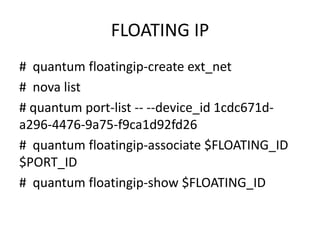
FLOATING IP
# quantum floatingip-create ext_net
# nova list
# quantum port-list -- --device_id 1cdc671d-
a296-4476-9a75-f9ca1d92fd26
# quantum floatingip-associate $FLOATING_ID
$PORT_ID
# quantum floatingip-show $FLOATING_ID

OpenStack Quantum

  • 1.
  • 2.
    The Quantum projectwas created to provide a rich and tenant-facing API for defining network connectivity and addressing in the cloud. Network Subnet Port
  • 3.
    Flexibility to ChooseDifferent Network Technologies Open vSwitch Cisco Linux Bridge Nicira NVP Ryu NEC OpenFlow
  • 5.
    Different Components • quantum-server • plugin agent (quantum-*-agent) • dhcp agent (quantum-dhcp-agent) • l3 agent (quantum-l3-agent)
  • 6.
    Use Case: SingleFlat Network
  • 7.
    • This isa "shared" network, meaning it is visible to all tenants via the Quantum API. Tenant VMs have a single NIC, and receive a fixed IP address from the subnet(s) associated with that network. This essentially maps to the FlatManager and FlatDHCPManager models provided by Nova. Floating IPs are not supported.
  • 8.
    Use Case: MultipleFlat Network
  • 9.
    • This usecase is very similar to the above Single Flat Network use case, except that tenants see multiple shared networks
  • 10.
    Use Case: MixedFlat and Private Network
  • 11.
    in which tenantsalso optionally have access to private per-tenant networks. In addition to seeing one or more shared networks via the quantum API, tenants can create additional networks that are only visible to users of that tenant. When creating VMs, those VMs can have NICs on any of the shared networks and/or any of the private networks belonging to the tenant. This enables the creation of "multi-tier" topologies using VMs with multiple NICs. It also supports a model where a VM acting as a gateway can provide services such as routing, NAT, or load balancing.
  • 12.
    Provider Router withPrivate Networks
  • 13.
    This use provideseach tenant with one or more private networks, which connect to the outside world via a Quantum router. The case where each tenant gets exactly one network in this form maps to the same logical topology as the VlanManager in Nova. Using the Quantum API, the tenant would only see a network for each private network assigned to that tenant. The router object in the API is created and owned by the cloud admin.
  • 14.
    Per-tenant Routers withPrivate Networks
  • 15.
    A more advancedrouter scenario in which each tenant gets at least one router, and potentially has access to the Quantum API to create additional routers. The tenant can create their own networks, potentially unlinking those networks to a router. This model enables tenant-defined multi-tier applications, with each tier being a separate network behind the router. Since there are multiple routers, tenant subnets can be overlapping without conflicting, since access to external networks all happens via SNAT or Floating IPs. Each router uplink and floating IP is allocated from the external network subnet.
  • 17.
    3 Servers Server 1 = > running network controller and nova-compute Server 2 = > running nova-compute, Cinder, rabbit-mq, mysql, keystone, glance, swift Server 3 = > running nova-compute • All servers are having 4 lan card, eth0 is connected to public switch and rest are connected to private switch. eth3 of Server 1 is also connected to public switch for br-ex. all node eth2 is for br-int • 10.10.x.x is for public access • 172.24.0.x is for private network • 172.24.x.x is reserved for tenant Network
  • 18.
    Network Node Setup • vi /etc/network/interfaces auto eth0 iface eth0 inet static address 10.10.1.2 netmask 255.255.255.0 gateway 10.10.1.254 dns-nameservers 10.10.2.2 ###### VMs Networks with OVS in tunnel mode auto eth1 iface eth1 inet manual up ifconfig $IFACE 0.0.0.0 up up ip link set $IFACE promisc on down ip link set $IFACE promisc off down ifconfig $IFACE down ############ Public Bridge auto eth3 iface eth3 inet manual up ifconfig $IFACE 0.0.0.0 up up ip link set $IFACE promisc on down ip link set $IFACE promisc off down ifconfig $IFACE down
  • 19.
    #virsh net-destroy default #virshnet-undefine default #vi /etc/libvirt/libvirtd.conf listen_tls = 0 listen_tcp = 1 auth_tcp = “none” #vi /etc/init/libvirt-bin.conf env libvirtd_opts=”-d -l” # vi /etc/default/libvirt-bin libvirtd_opts=”-d -l” # service libvirt-bin restart #vi /etc/default/openvswitch-switch BRCOMPAT=yes #aptitude purge ebtables #apt-get install -y openvswitch-datapath-source #apt-get install -y quantum-server quantum-plugin-openvswitch #module-assistant auto-install openvswitch-datapath #service openvswitch-switch start #lsmod |grep br #rmmod bridge #service openvswitch-switch restart #service openvswitch-controller restart #lsmod |grep br #init 6
  • 20.
    Network setup forCompute Nodes • #vi /etc/network/interfaces ## Management Network auto eth0 iface eth0 inet static address 10.10.1.1 netmask 255.255.255.0 gateway 10.10.1.254 dns-nameservers 10.10.2.2 ## VMs Networks with OVS in tunnel mode auto eth1 iface eth1 inet manual up ifconfig $IFACE 0.0.0.0 up up ip link set $IFACE promisc on down ip link set $IFACE promisc off down ifconfig $IFACE down
  • 21.
    How to createQuantum Network • Internal Network • Internal Subnet • Router • External Network • External Subnet • Floating IP
  • 22.
    Internal Network # quantumnet-create pvt_net1 --tenant_id 6415b015581c4506a46e97170395a598 -- provider:network_type gre -- provider:segmentation_id 1 --shared True # quantum net-create pvt_net2 --tenant_id 6415b015581c4506a46e97170395a598 -- provider:network_type gre -- provider:segmentation_id 2 --shared True
  • 23.
    Internal Subnet • quantumsubnet-create --tenant_id 6415b015581c4506a46e97170395a598 -- ip_version 4 c92921e3-64a7-468c-8b96- e3acdfc469c0 172.24.1.0/24 • quantum subnet-create --tenant_id 6415b015581c4506a46e97170395a598 -- ip_version 4 1b61152f-f611-4817-9980- 79636392ab8b 172.24.2.0/24
  • 24.
    Router # quantum router-create--tenant_id 566b4109018540c3b41d8b7f3acc96f2 oss_router # quantum router-interface-add a08467a3- 6688-4810-8fee-86ad695cfd43 8bf56636-fe18- 4386-8018-de86cfa4cec8
  • 25.
    External Router # quantumnet-create ext_net -- -- router:external=True # quantum subnet-create --ip_version 4 -- allocation-pool start=10.83.192.11,end=10.83.192.125 -- gateway 10.83.192.254 6377fc4c-9d0c-4690- 976b-09a9ddac9ef6 10.83.192.0/24 -- -- enable_dhcp=False
  • 26.
    FLOATING IP # quantumfloatingip-create ext_net # nova list # quantum port-list -- --device_id 1cdc671d- a296-4476-9a75-f9ca1d92fd26 # quantum floatingip-associate $FLOATING_ID $PORT_ID # quantum floatingip-show $FLOATING_ID