Envytee Info Solution
By Mr. RamaGangiReddy


Envytee Info Solution
   Integration Broker Introduction
   Integration Broker Architecture
   Integration Broker Set Up
   Integration Broker Scenario
   Integration Broker Monitoring


                  Envytee Info Solution
   Enables disparate systems to share information in
    common manner
   The central control and storage point that mediates
    events to and from applications, managing the
    essential queuing, routing, filtering and storing of
    information in an reliable and secure manner


                   Envytee Info Solution
   PeopleSoft was the first ERP vendor to adopt pure
    internet architecture and leader in web services
    area, even before the standards are existed
   Integration Broker is a proven SOA integration
    platform that delivers high performance, standards-
    based integration


                  Envytee Info Solution
   Enterprise Ready - Enterprise class performance and
    scalability
   Superior connectivity-Reduced cost and complexity
    with open standard support
    Standard Web Services - Component
    Interfaces, Appclass PeopleCode and Bulk Load are
    exposed as standards-based web services
   Technology Adapters and Adapter Toolkit - Powerful
    tool kit with an array of supported technology such as
    files, web, email and legacy PeopleSoft applications .
    You can build it yourself with the adapter SDK
                   Envytee Info Solution
   Integration Broker is a Middleware Technology
    platform to integrate data between PeopleSoft and/or
    non-PeopleSoft applications
   Facilitates both Synchronous & Asynchronous
    communication between systems
   PeopleSoft Integration Broker consists of two Sub-
    Systems:
     Integration Gateway - Resides on PeopleSoft
                                  web servers
     Integration Engine - Resides on Application
                                Server


                     Envytee Info Solution
Envytee Info Solution
   Integration Gateway
      Integration Gateway resides on the Web-Server
     Manages the Receipt & Delivery of Messages
     Supports most of the Communication & Network
       Protocols via connectors
     Basic Logging Information concerning Message
       Receipt, Delivery &Errors
     Transport protocol and message format management
      so that when messages reach the integration engine, they
      are in the PeopleSoft message format

                    Envytee Info Solution
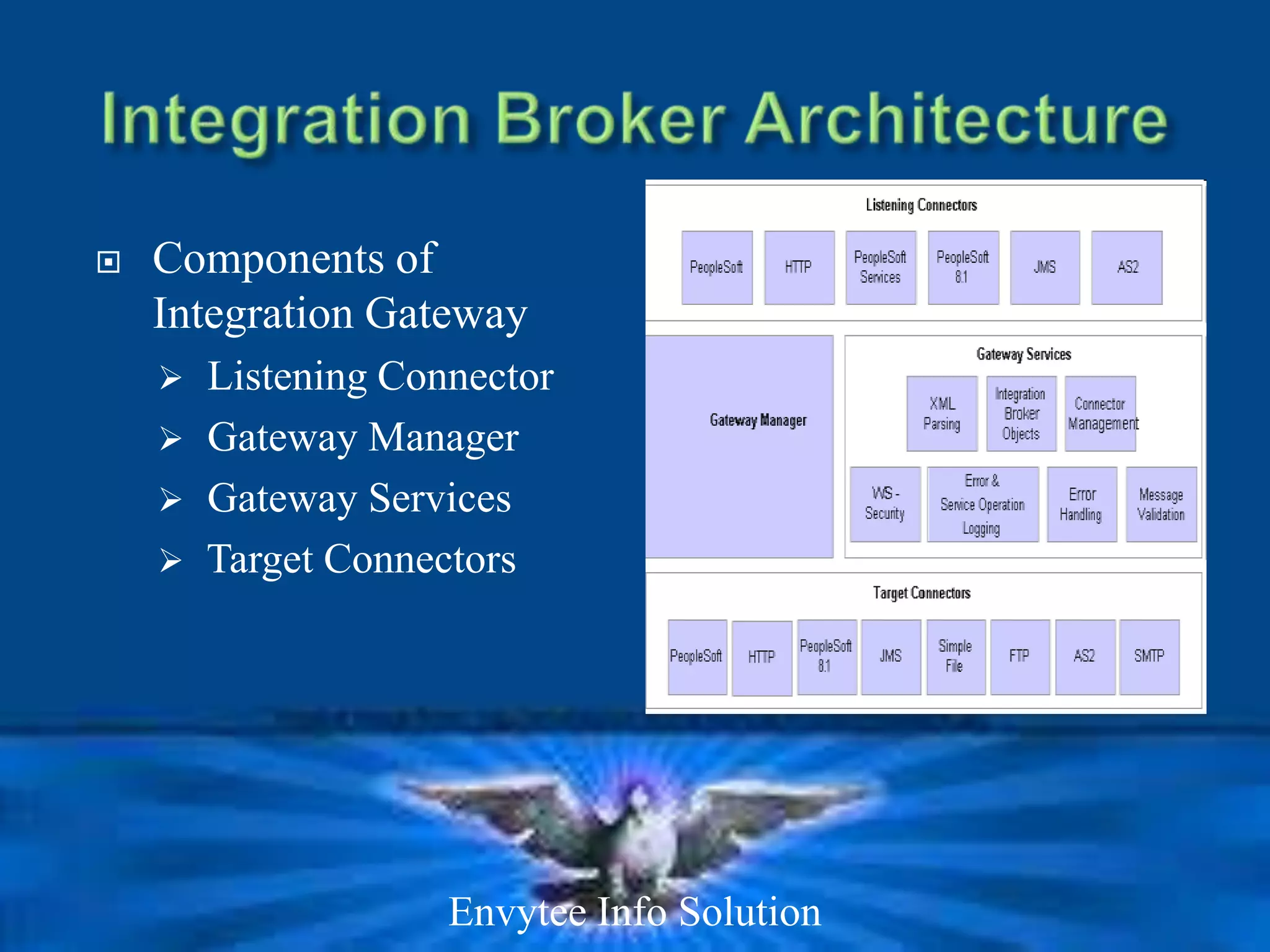
   Components of
    Integration Gateway
     Listening Connector
     Gateway Manager
     Gateway Services
     Target Connectors


                   Envytee Info Solution
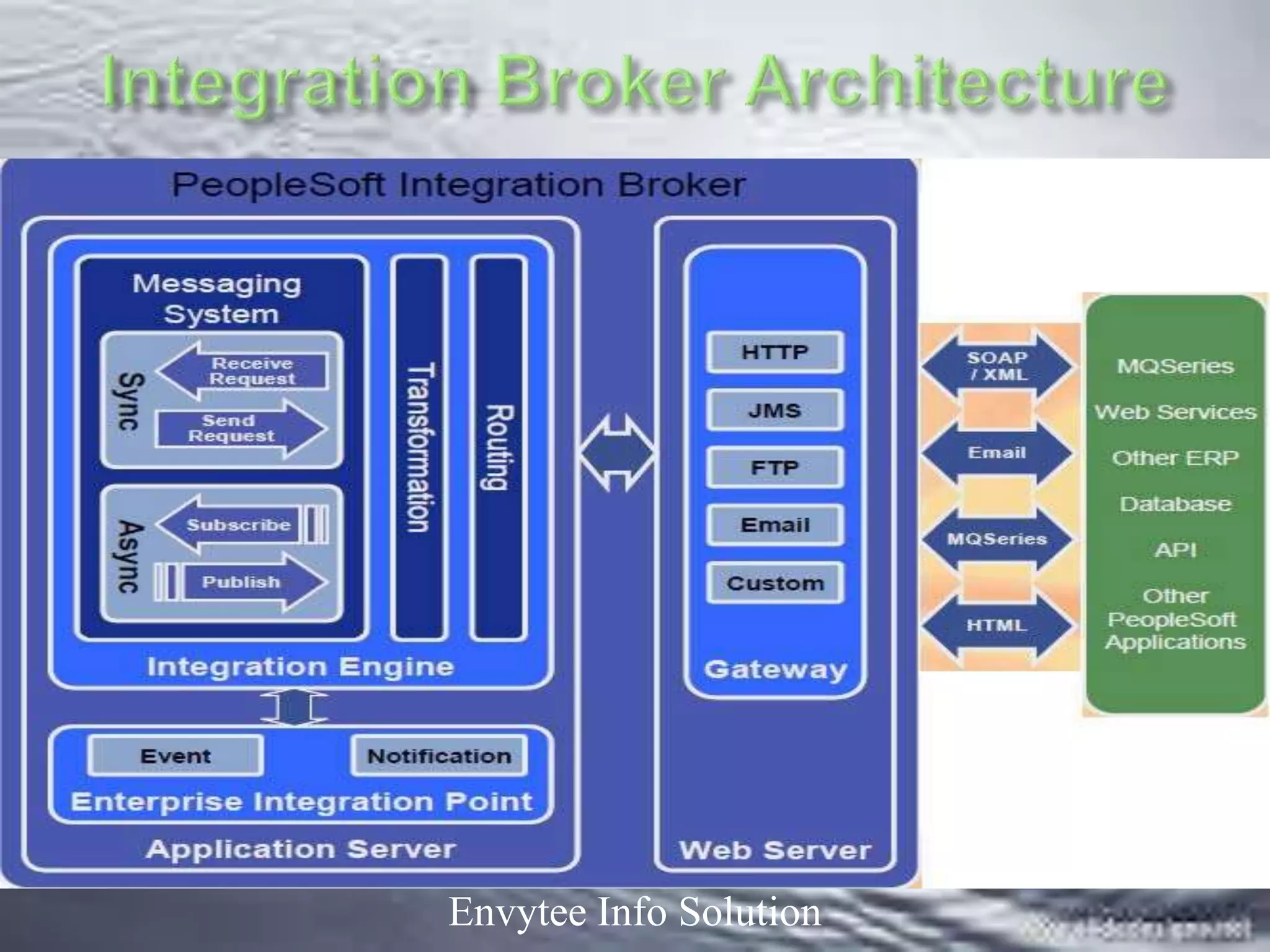
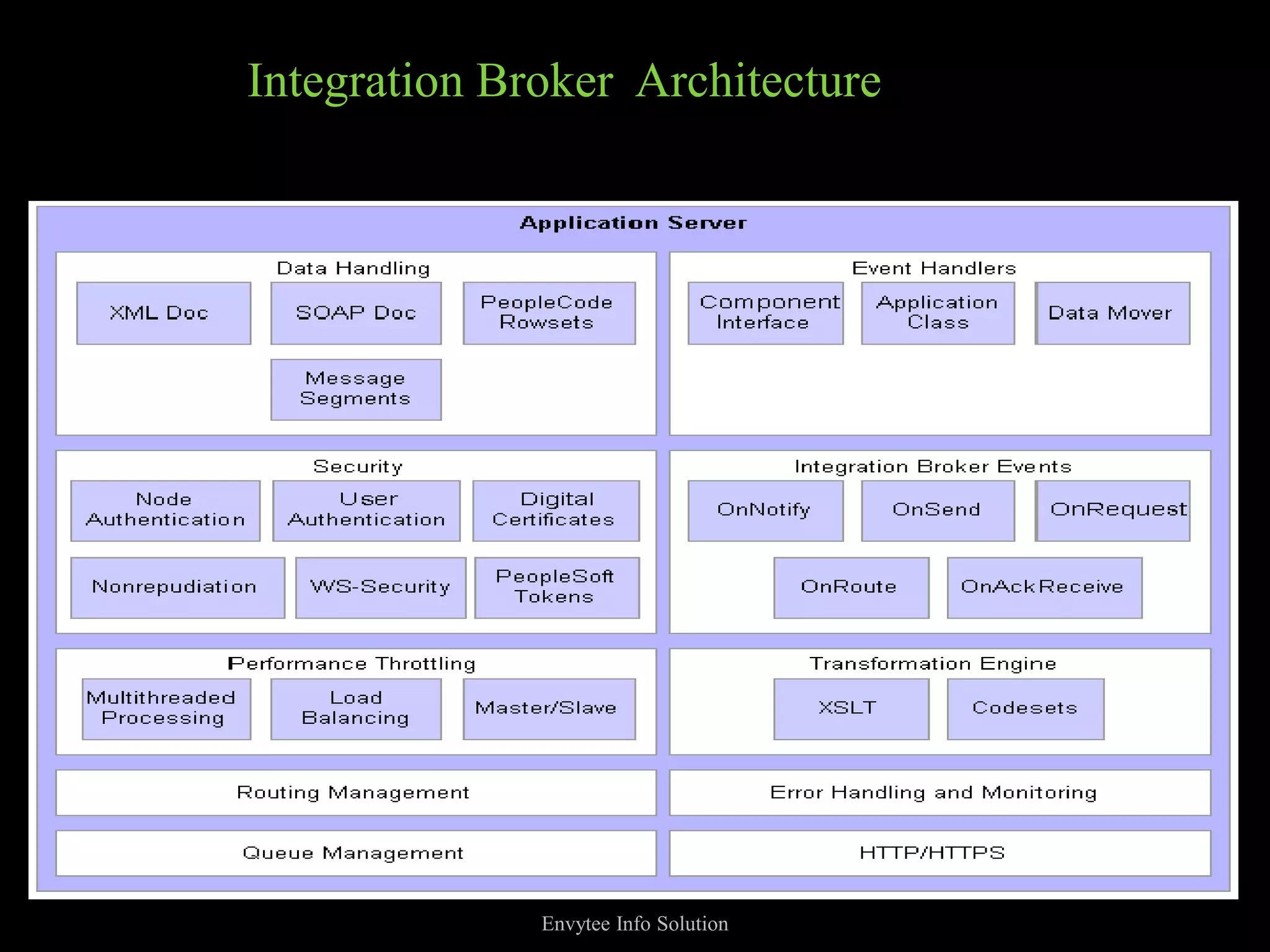
Integration Broker Architecture


              Envytee Info Solution
   Integration Engine
        Integration Engine runs on application server
        Integration Engine is a combination of Application Designer
        Objects, PeopleCode, PIA Definitions, XSLT Code along with
        underlying mechanisms that tie all the elements together
       Sends or Receives Messages. The Engine communicates
        through Integration Gateway
       Handles Messages in formats like; XML, SOAP, PS Rowset &
        PS Non-Rowset based Data
       Transforms the message, suiting the need of the Application
        Server.
       Handles security features for the incoming messages
        Supports Message Transaction like :
            Outbound Asynchronous
            Outbound Synchronous
            Inbound Asynchronous
            Inbound Synchronous
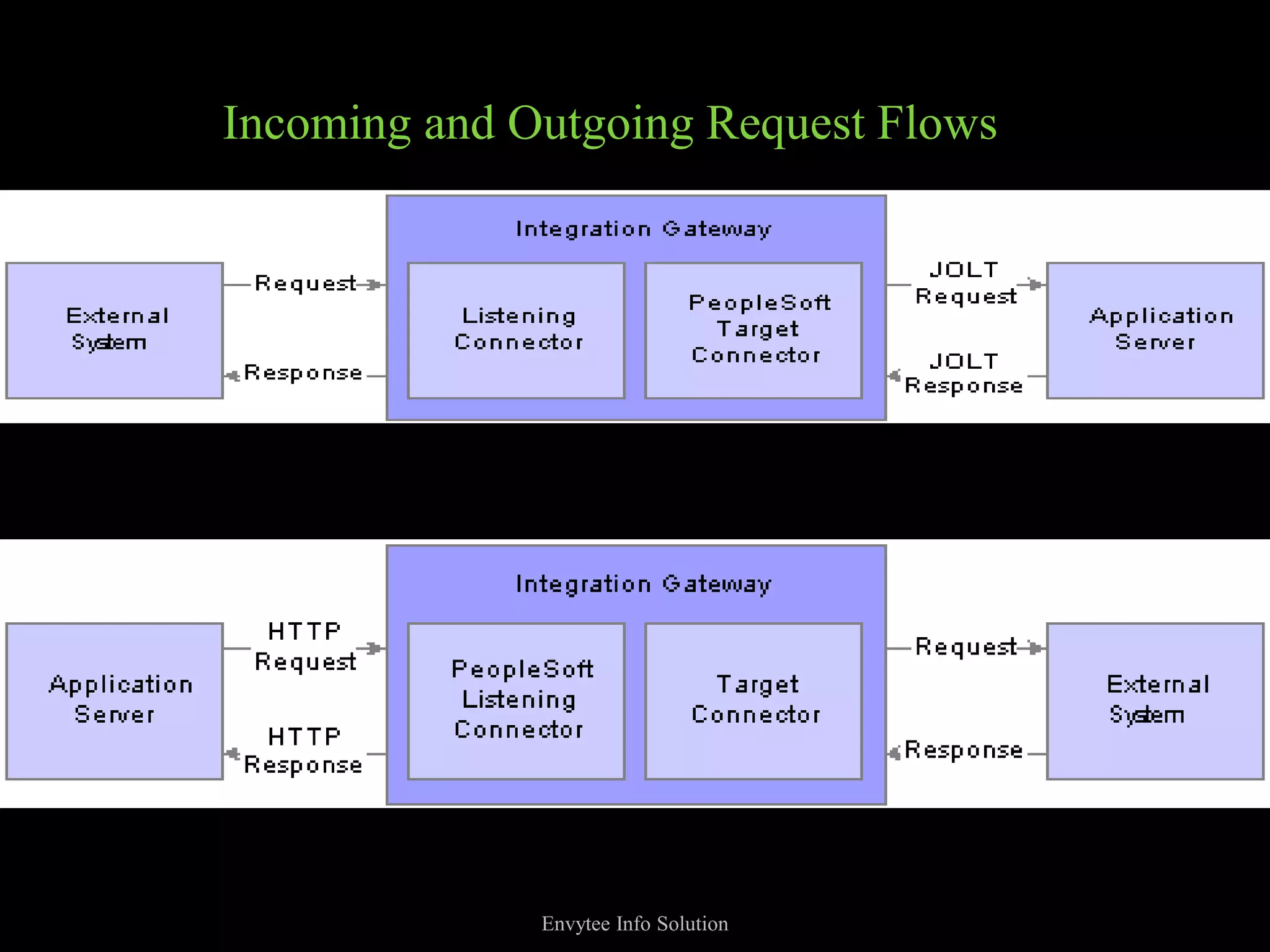
Incoming and Outgoing Request Flows


              Envytee Info Solution
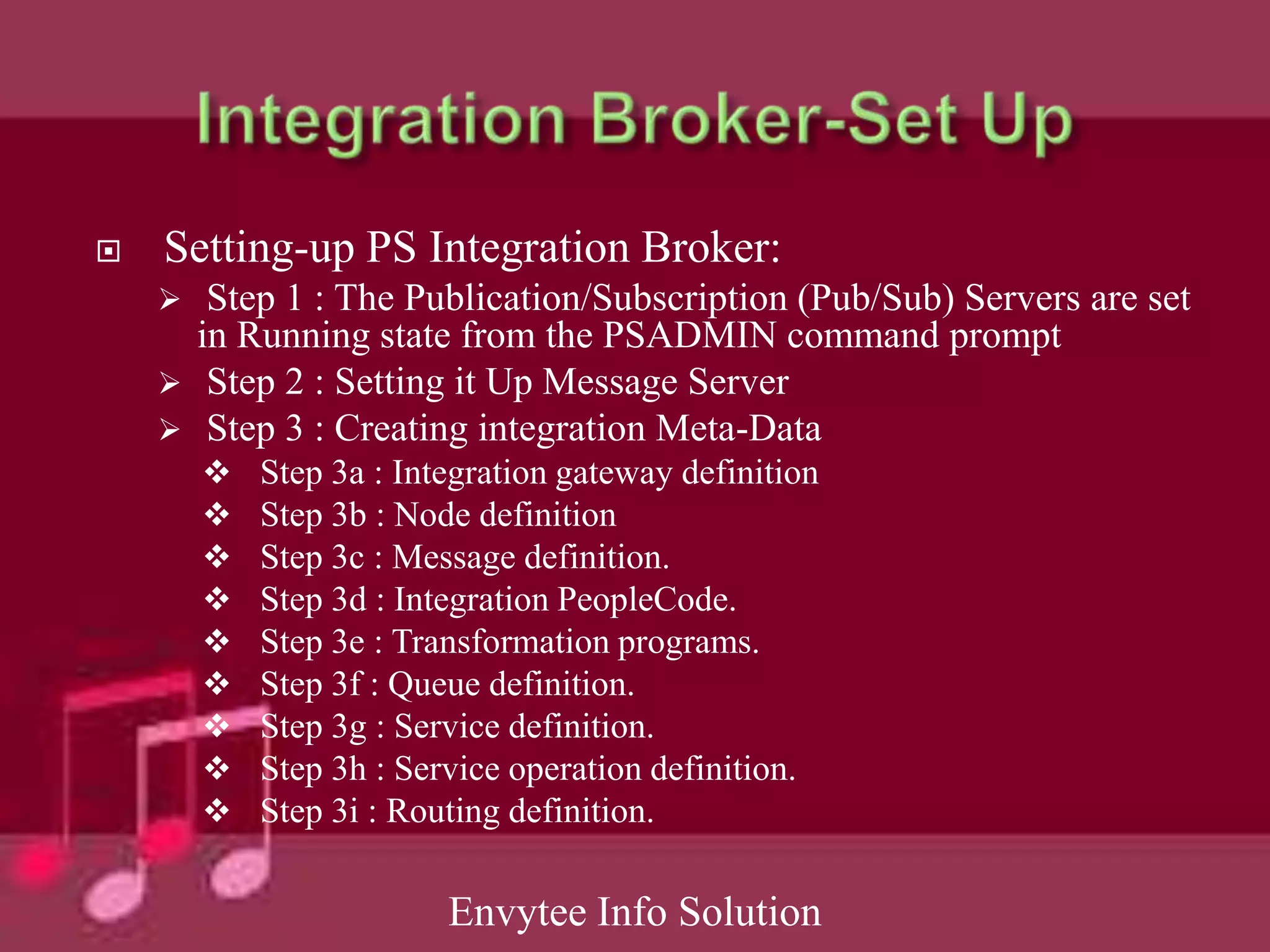
   Setting-up PS Integration Broker:
      Step 1 : The Publication/Subscription (Pub/Sub) Servers are set
      in Running state from the PSADMIN command prompt
     Step 2 : Setting it Up Message Server
     Step 3 : Creating integration Meta-Data
           Step 3a : Integration gateway definition
           Step 3b : Node definition
           Step 3c : Message definition.
           Step 3d : Integration PeopleCode.
           Step 3e : Transformation programs.
           Step 3f : Queue definition.
           Step 3g : Service definition.
           Step 3h : Service operation definition.
           Step 3i : Routing definition.

                         Envytee Info Solution
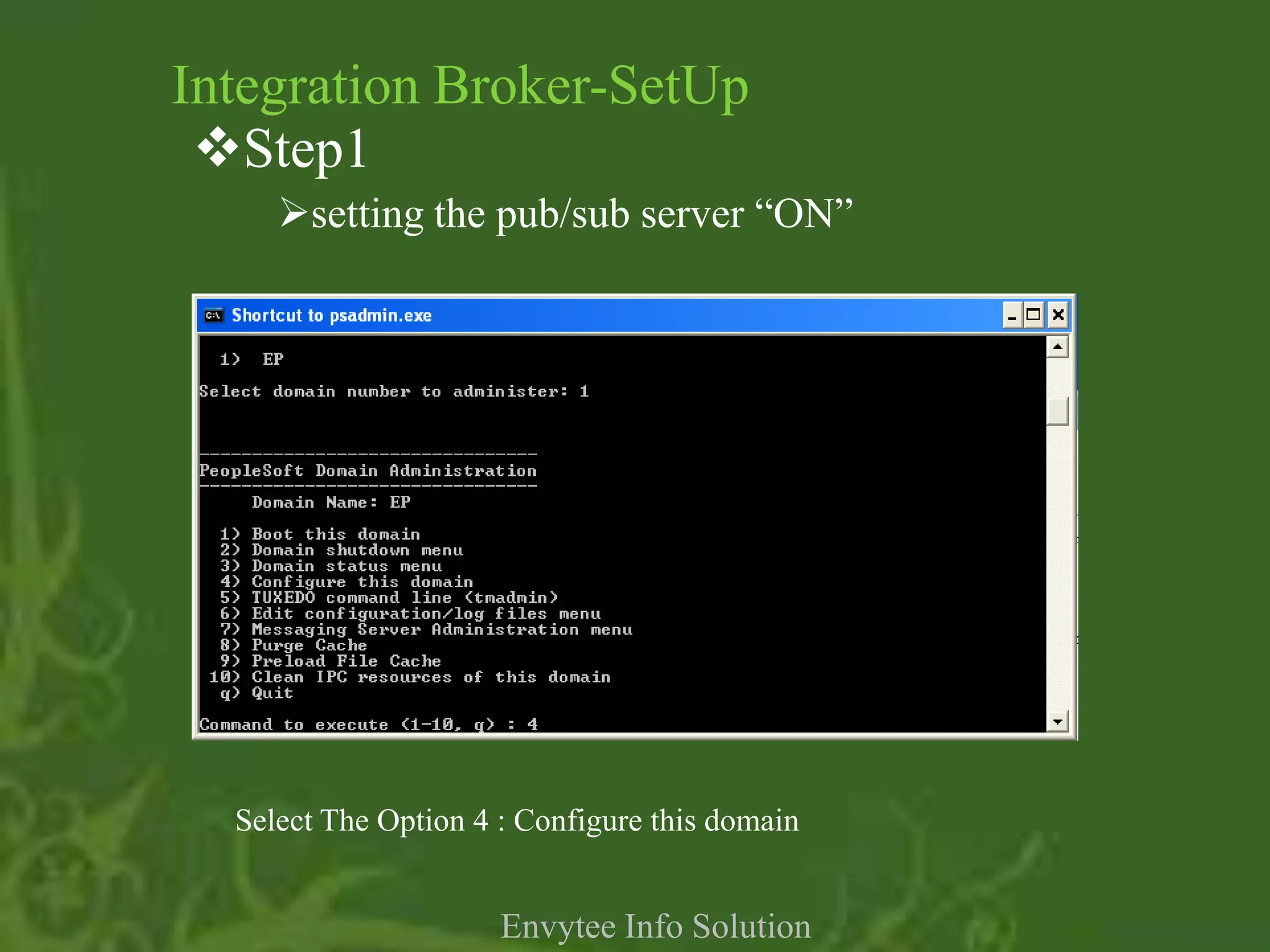
Integration Broker-SetUp
 Step1
     setting the pub/sub server “ON”


  Select The Option 4 : Configure this domain


                      Envytee Info Solution
Integration Broker - Setup
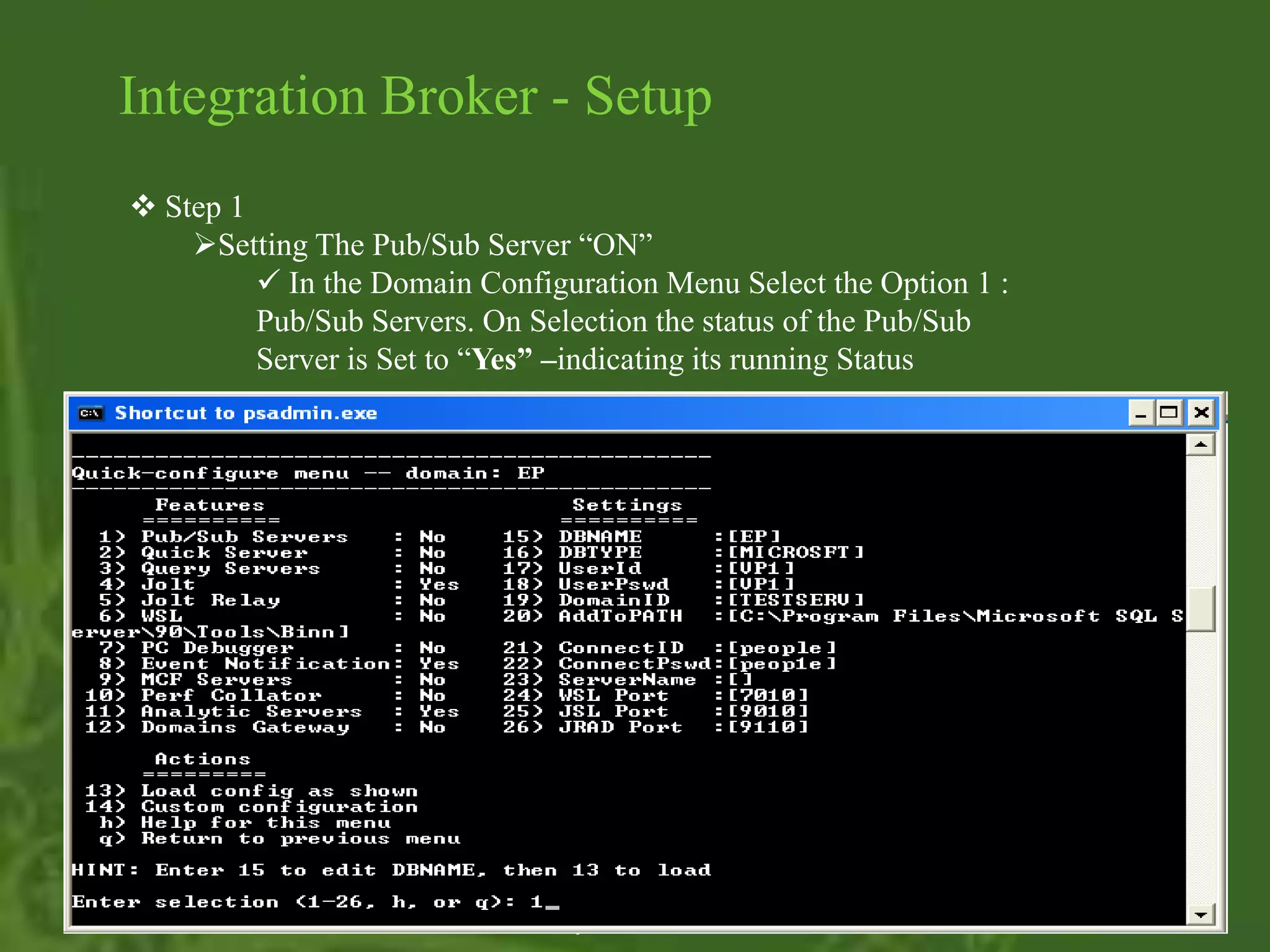
 Step 1
    Setting The Pub/Sub Server “ON”
          In the Domain Configuration Menu Select the Option 1 :
         Pub/Sub Servers. On Selection the status of the Pub/Sub
         Server is Set to “Yes” –indicating its running Status


                              Envytee Info Solution
Integration Broker - Setup

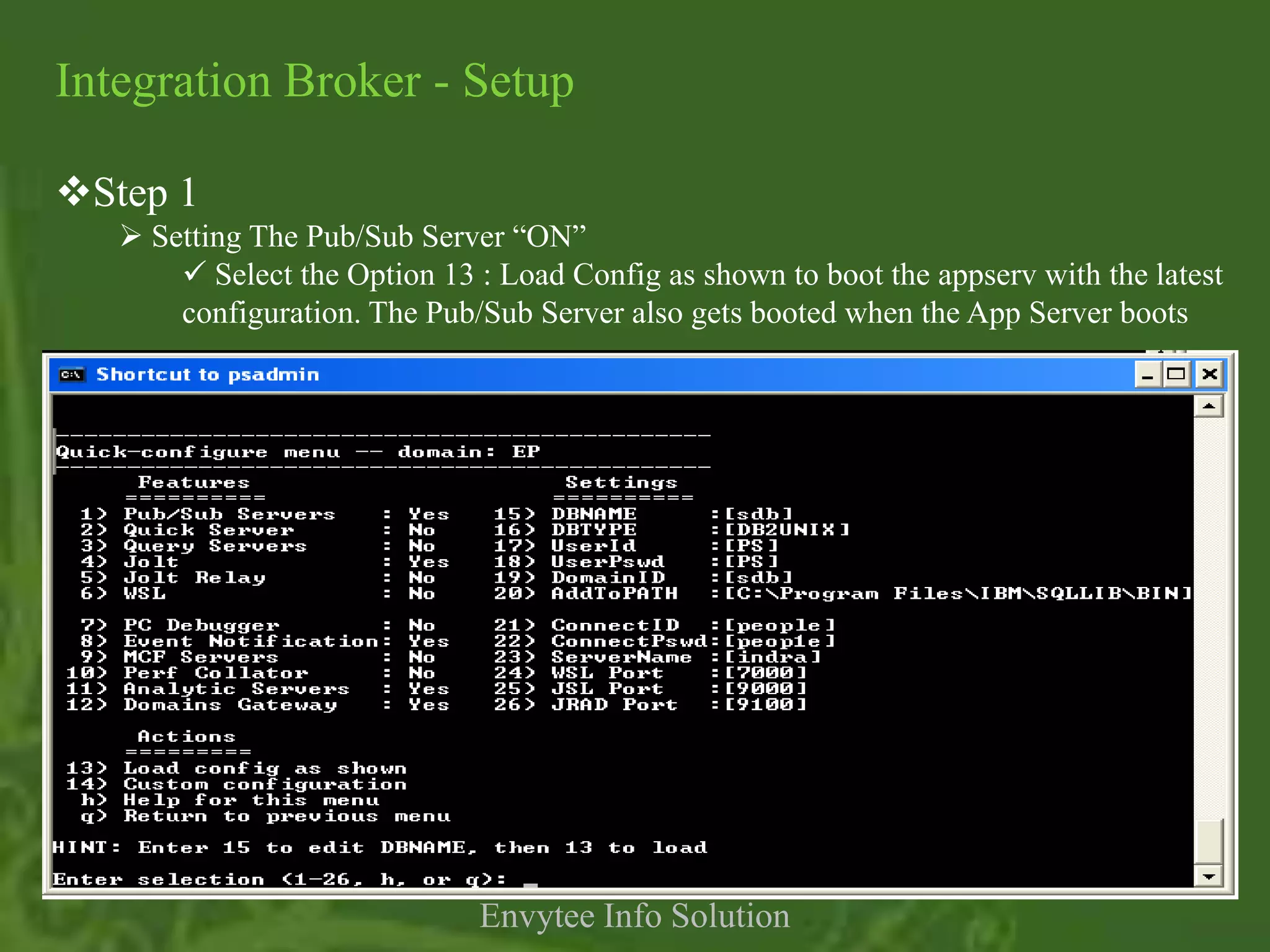
Step 1
    Setting The Pub/Sub Server “ON”
        Select the Option 13 : Load Config as shown to boot the appserv with the latest
       configuration. The Pub/Sub Server also gets booted when the App Server boots


                              Envytee Info Solution
Integration Broker - Setup

Step 2
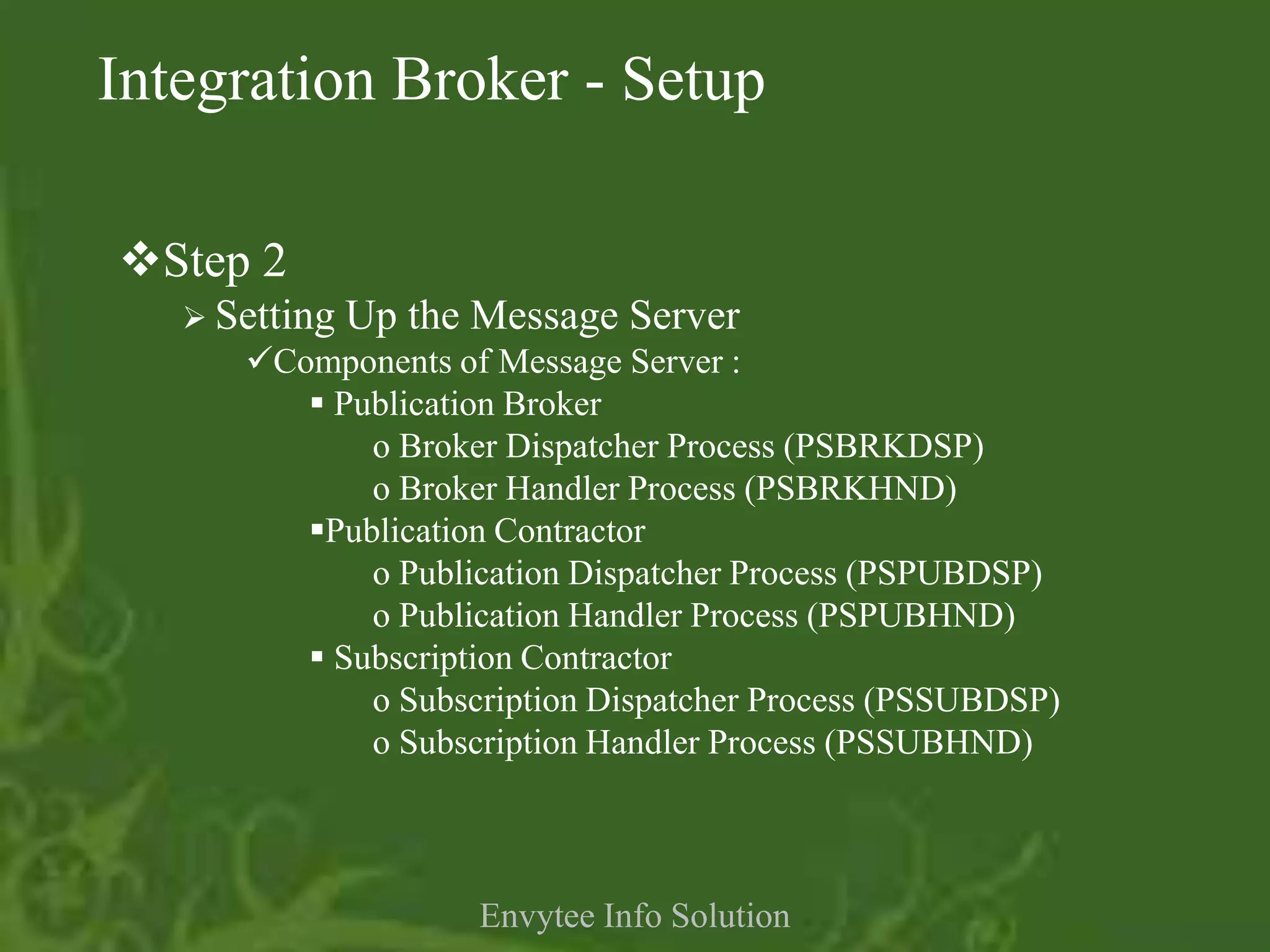
    Setting   Up the Message Server
      Components of Message Server :
          Publication Broker
             o Broker Dispatcher Process (PSBRKDSP)
             o Broker Handler Process (PSBRKHND)
         Publication Contractor
             o Publication Dispatcher Process (PSPUBDSP)
             o Publication Handler Process (PSPUBHND)
          Subscription Contractor
             o Subscription Dispatcher Process (PSSUBDSP)
             o Subscription Handler Process (PSSUBHND)


                      Envytee Info Solution
Integration Broker - Setup
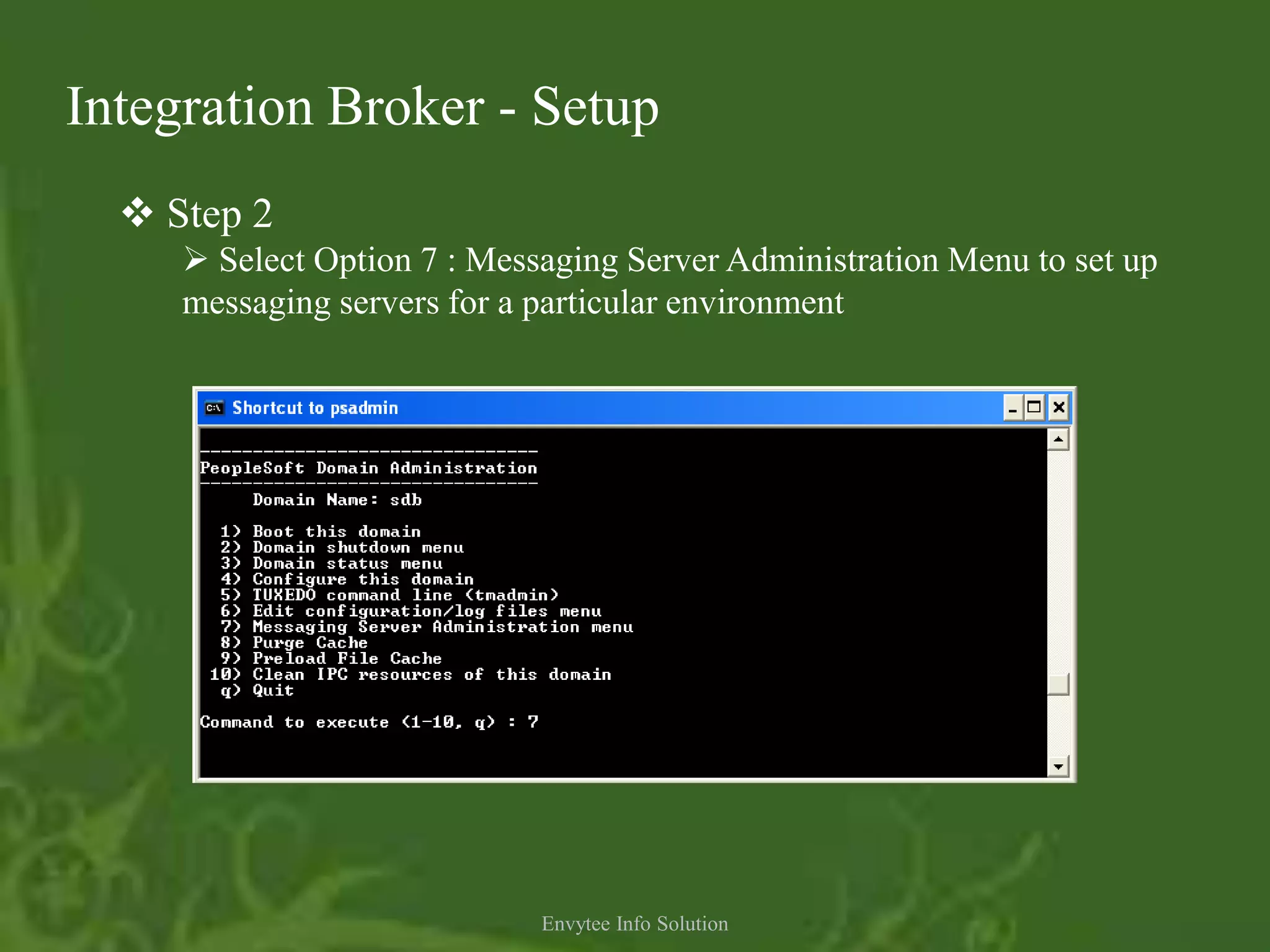
   Step 2
      Select Option 7 : Messaging Server Administration Menu to set up
     messaging servers for a particular environment


                             Envytee Info Solution
Integration Broker - Setup

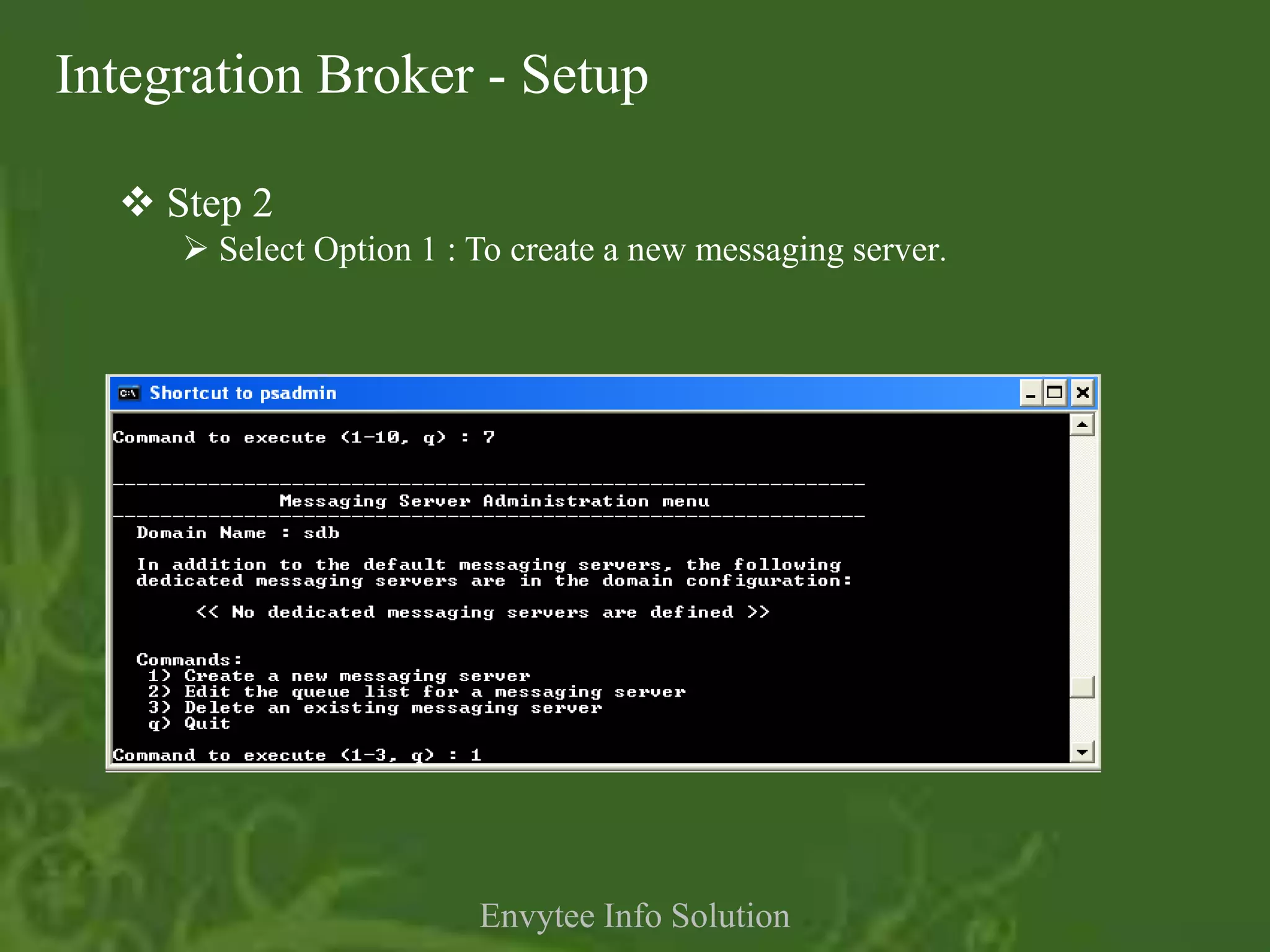
   Step 2
      Select Option 1 : To create a new messaging server.


                         Envytee Info Solution
Integration Broker - Setup
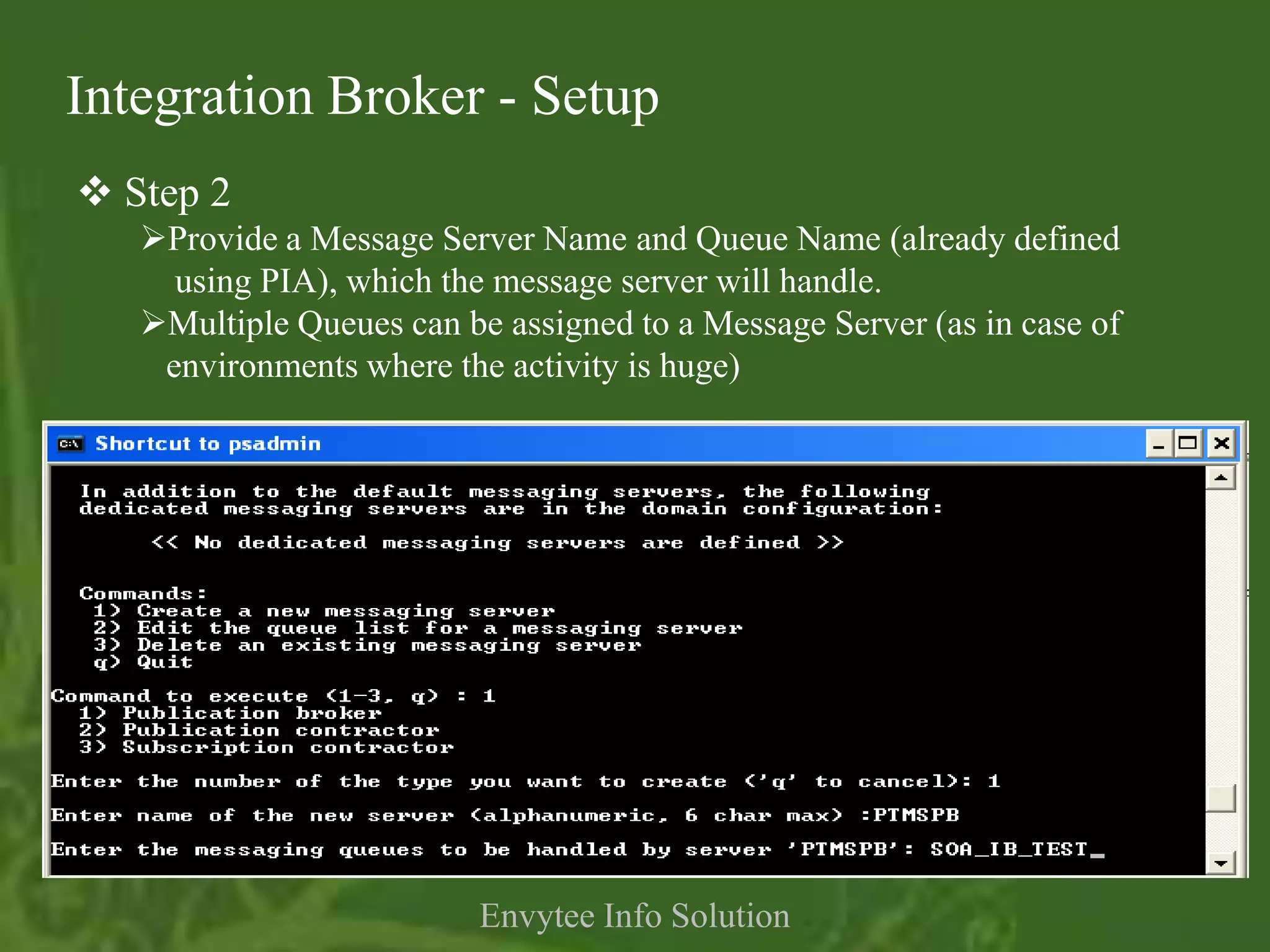
 Step 2
   Provide a Message Server Name and Queue Name (already defined
     using PIA), which the message server will handle.
   Multiple Queues can be assigned to a Message Server (as in case of
    environments where the activity is huge)


                          Envytee Info Solution
Integration Broker - Setup
   Step 3
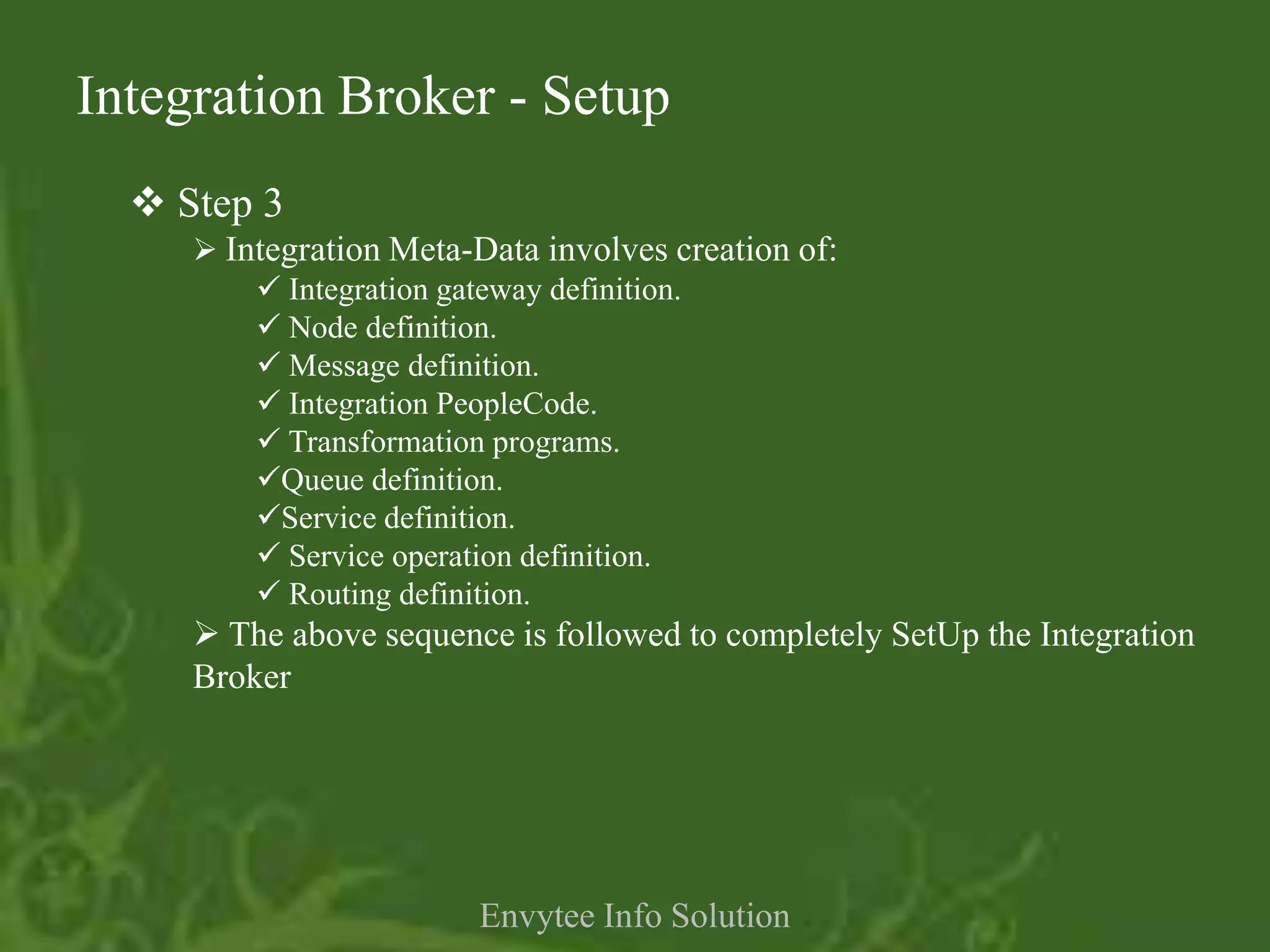
      Integration Meta-Data involves creation of:
          Integration gateway definition.
          Node definition.
          Message definition.
          Integration PeopleCode.
          Transformation programs.
         Queue definition.
         Service definition.
          Service operation definition.
          Routing definition.
      The above sequence is followed to completely SetUp the Integration
     Broker


                        Envytee Info Solution
Integration Broker - Setup
  Step 3 : Creating Integration MetaData
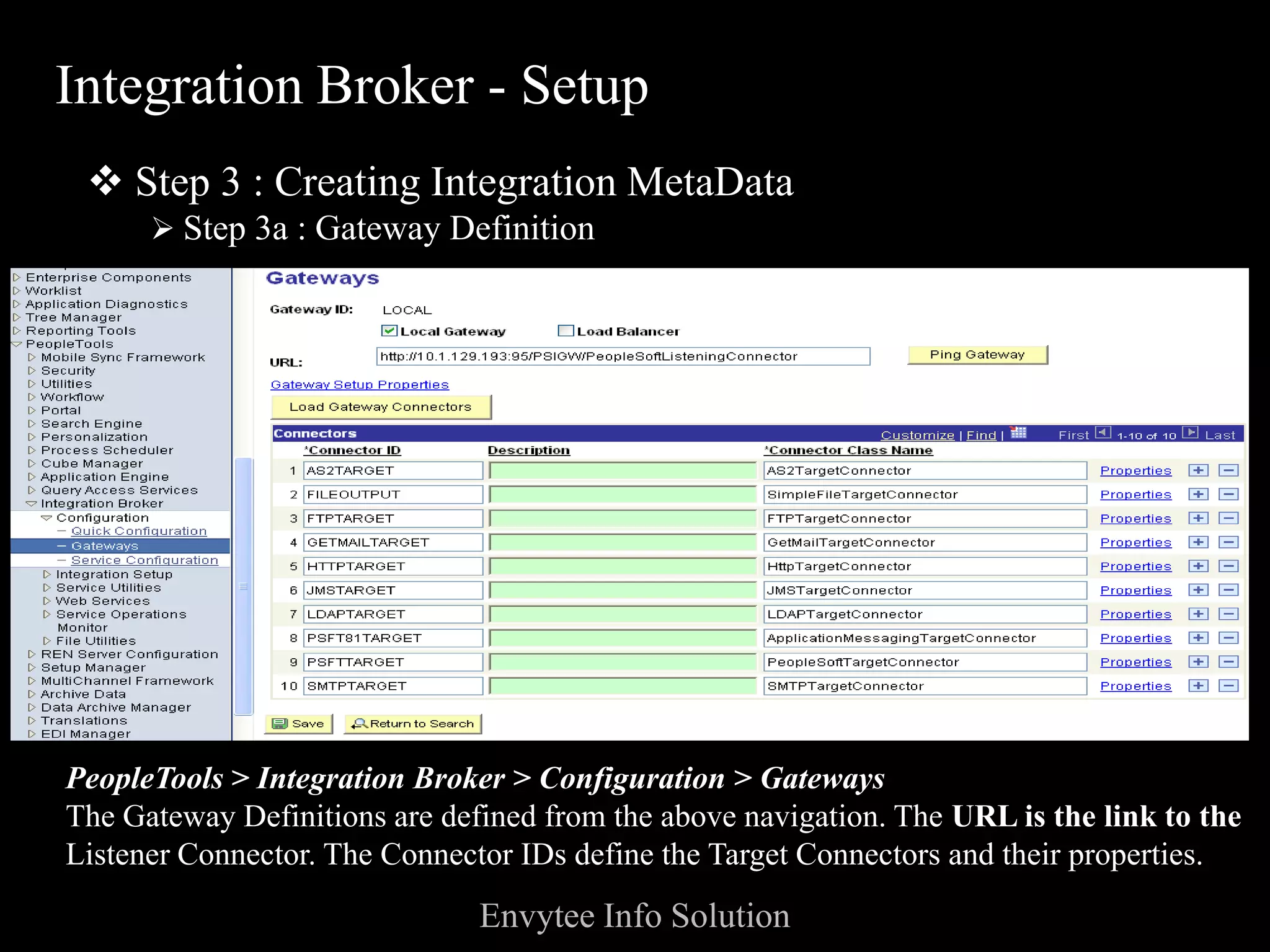
       Step 3a : Gateway Definition


PeopleTools > Integration Broker > Configuration > Gateways
The Gateway Definitions are defined from the above navigation. The URL is the link to the
Listener Connector. The Connector IDs define the Target Connectors and their properties.
                               Envytee Info Solution
Integration Broker - Setup
  Step 3 : Creating Integration MetaData
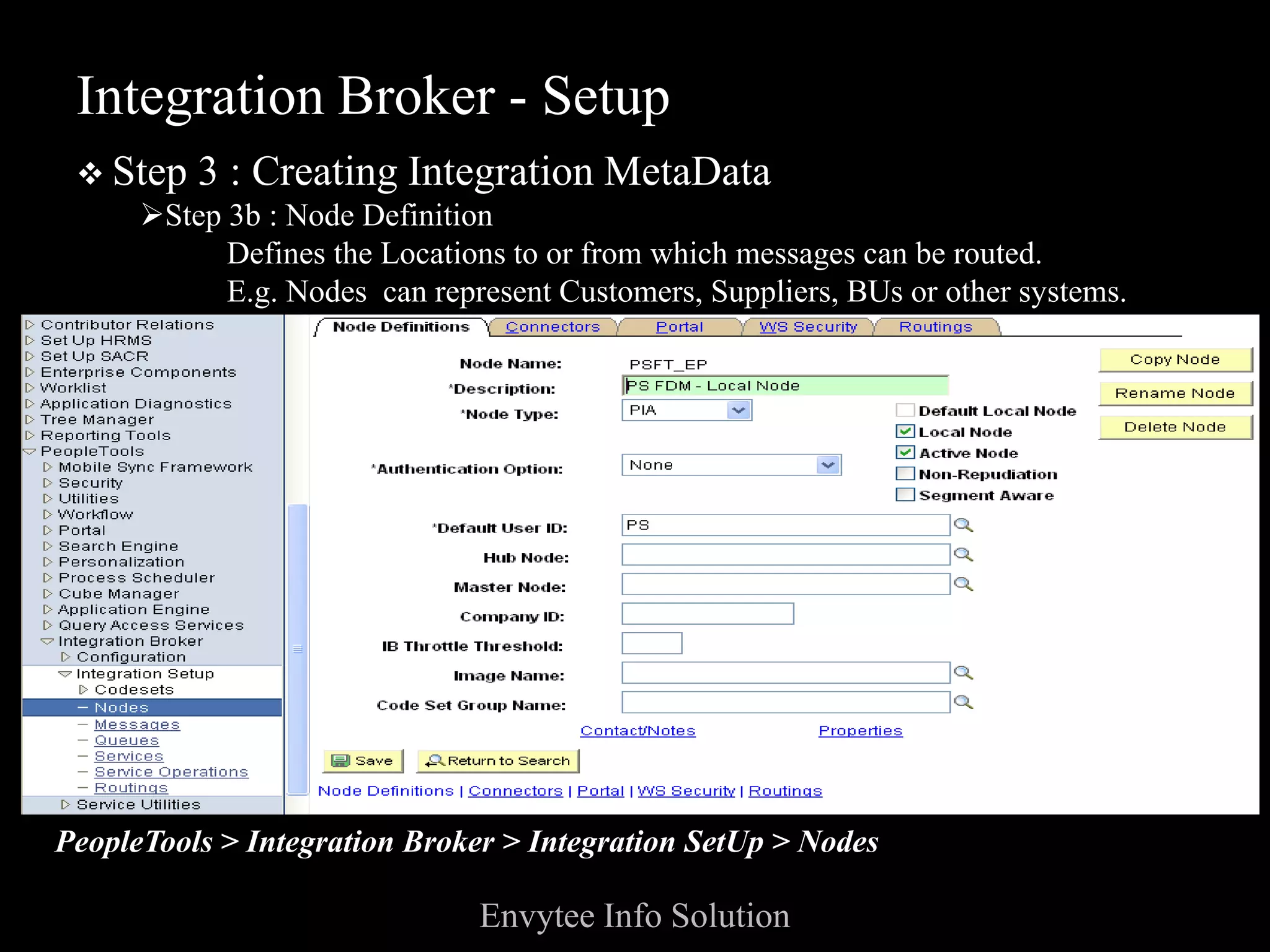
    Step 3b : Node Definition
          Defines the Locations to or from which messages can be routed.
          E.g. Nodes can represent Customers, Suppliers, BUs or other systems.


PeopleTools > Integration Broker > Integration SetUp > Nodes

                              Envytee Info Solution
Integration Broker - Setup
 Step 3 : Creating Integration MetaData
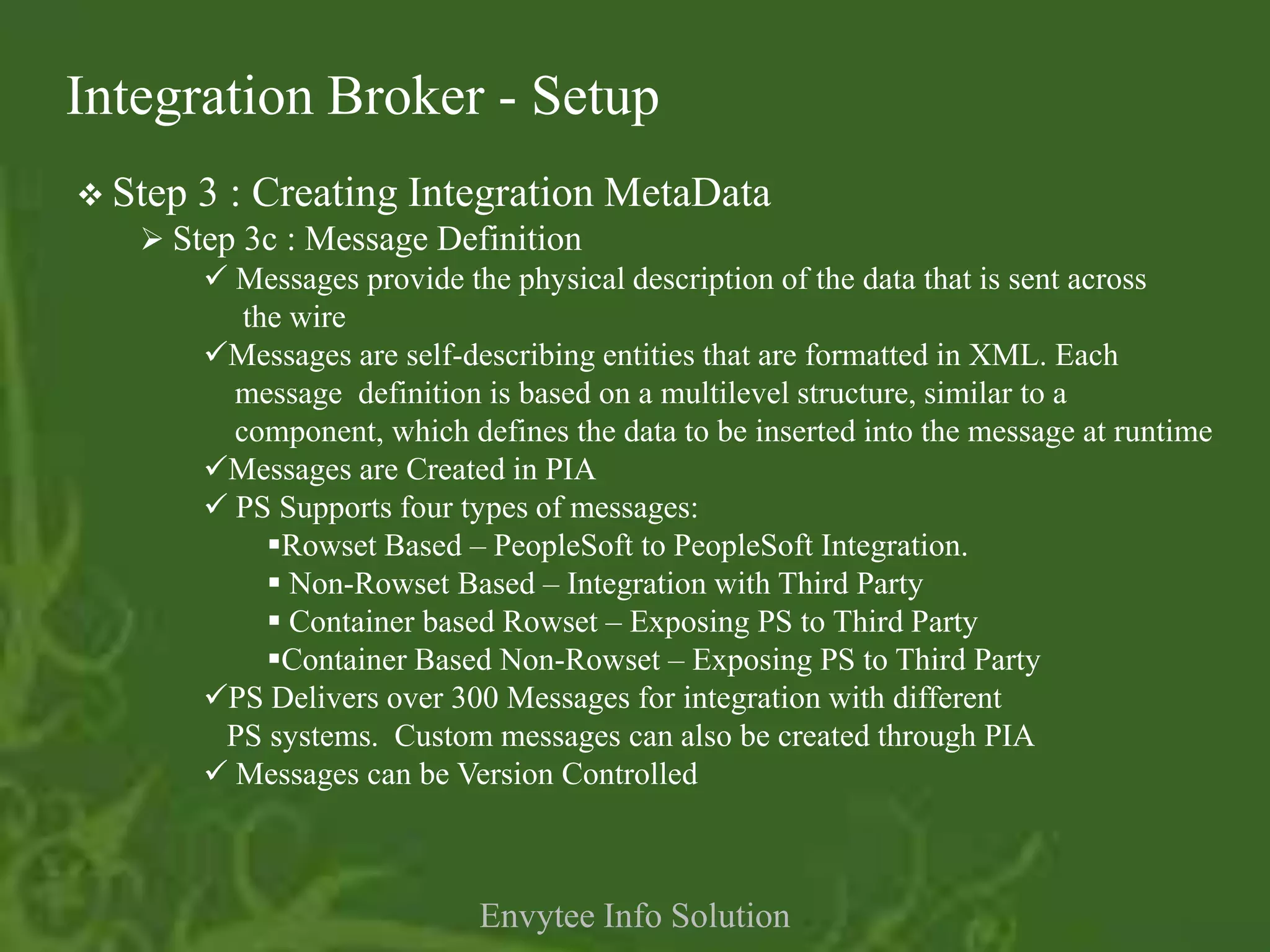
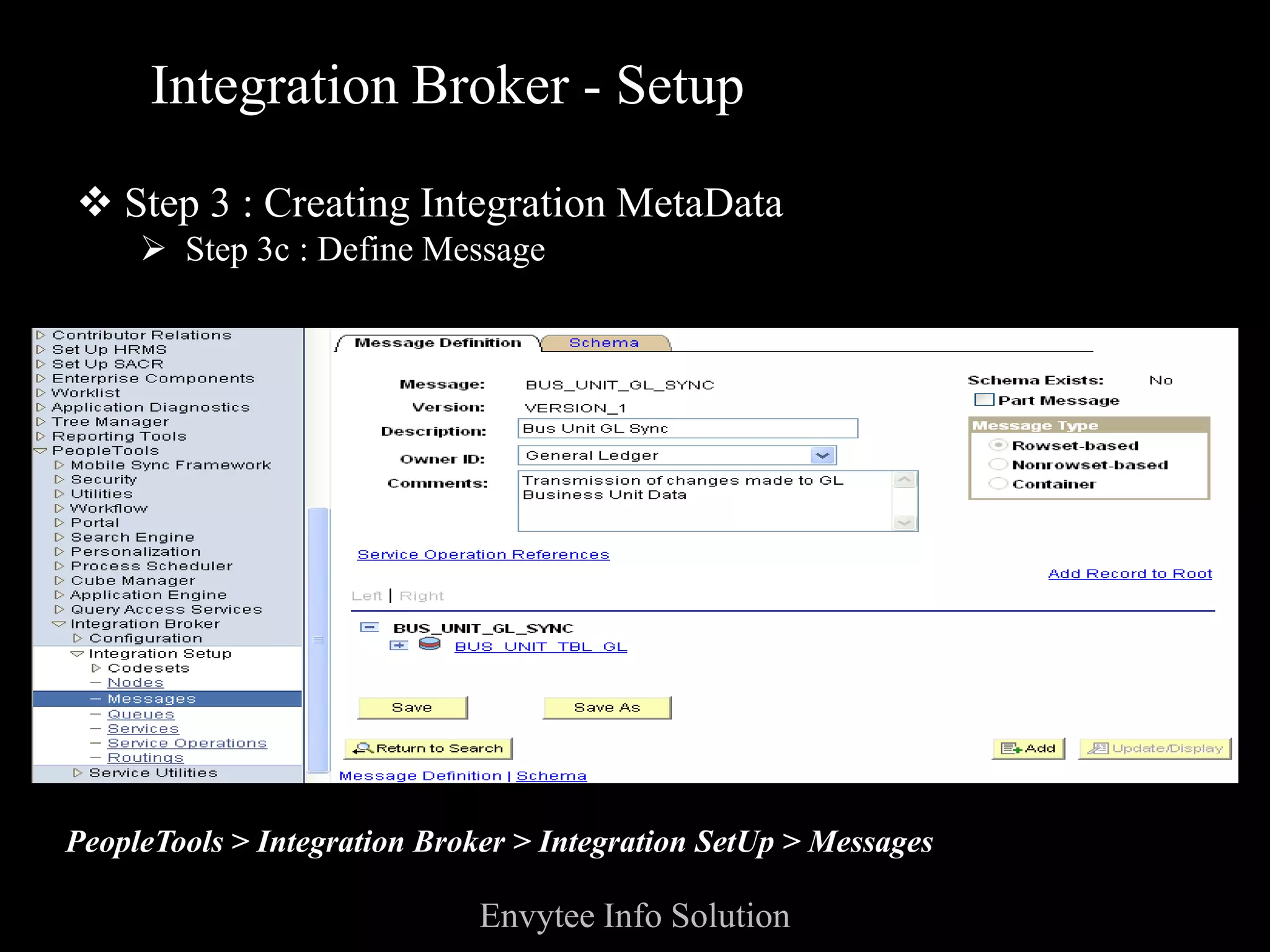
    Step 3c : Message Definition
        Messages provide the physical description of the data that is sent across
          the wire
       Messages are self-describing entities that are formatted in XML. Each
         message definition is based on a multilevel structure, similar to a
         component, which defines the data to be inserted into the message at runtime
       Messages are Created in PIA
        PS Supports four types of messages:
            Rowset Based – PeopleSoft to PeopleSoft Integration.
             Non-Rowset Based – Integration with Third Party
             Container based Rowset – Exposing PS to Third Party
            Container Based Non-Rowset – Exposing PS to Third Party
       PS Delivers over 300 Messages for integration with different
         PS systems. Custom messages can also be created through PIA
        Messages can be Version Controlled


                              Envytee Info Solution
Integration Broker - Setup

 Step 3 : Creating Integration MetaData
      Step 3c : Define Message


PeopleTools > Integration Broker > Integration SetUp > Messages

                              Envytee Info Solution
Integration Broker - Setup
 Step   3 : Creating Integration MetaData
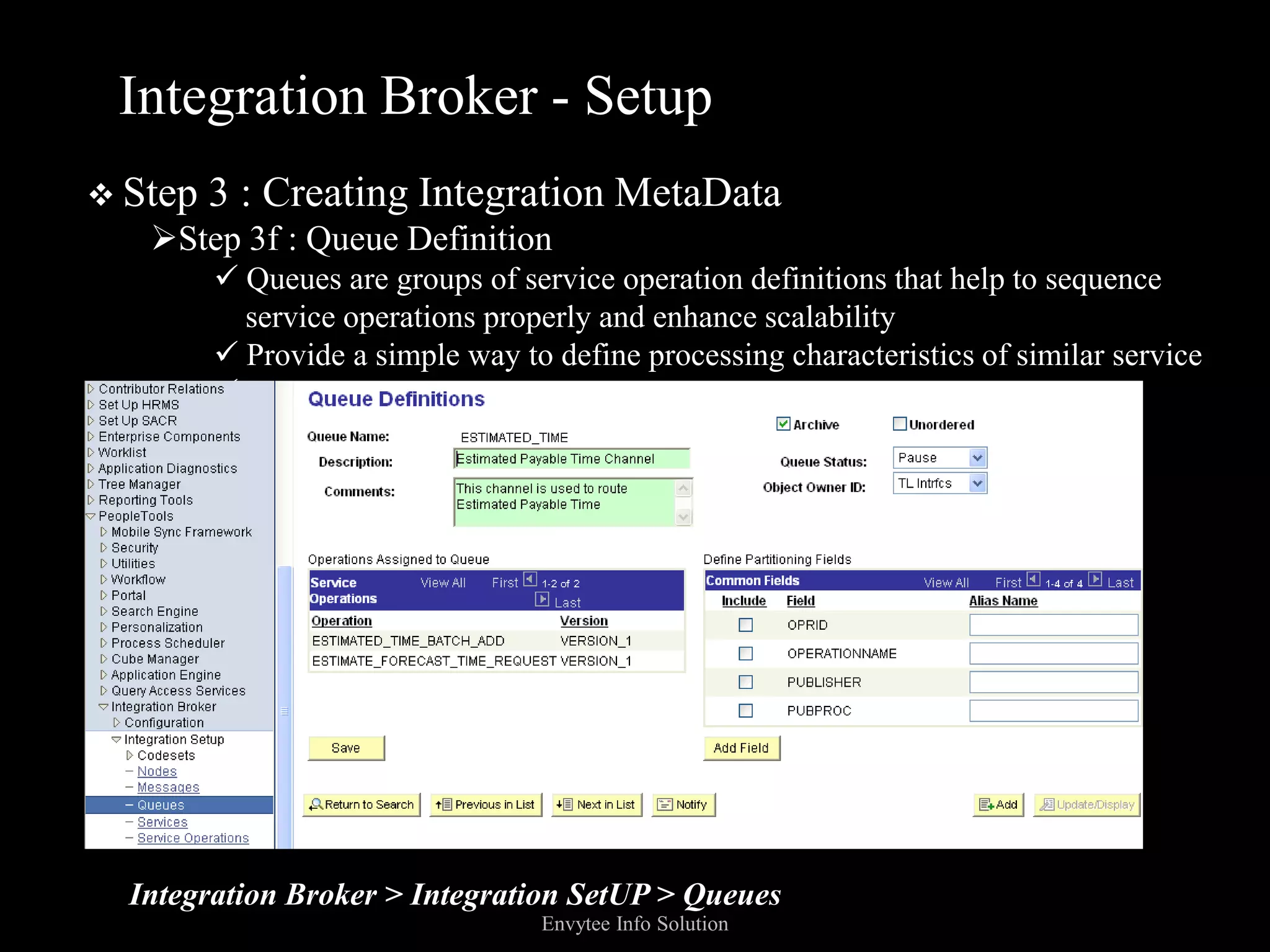
   Step 3f : Queue Definition
          Queues are groups of service operation definitions that help to sequence
           service operations properly and enhance scalability
          Provide a simple way to define processing characteristics of similar service
         operations as a single group


  Integration Broker > Integration SetUP > Queues
                                  Envytee Info Solution
Integration Broker - Setup
  Step   3 : Creating Integration MetaData
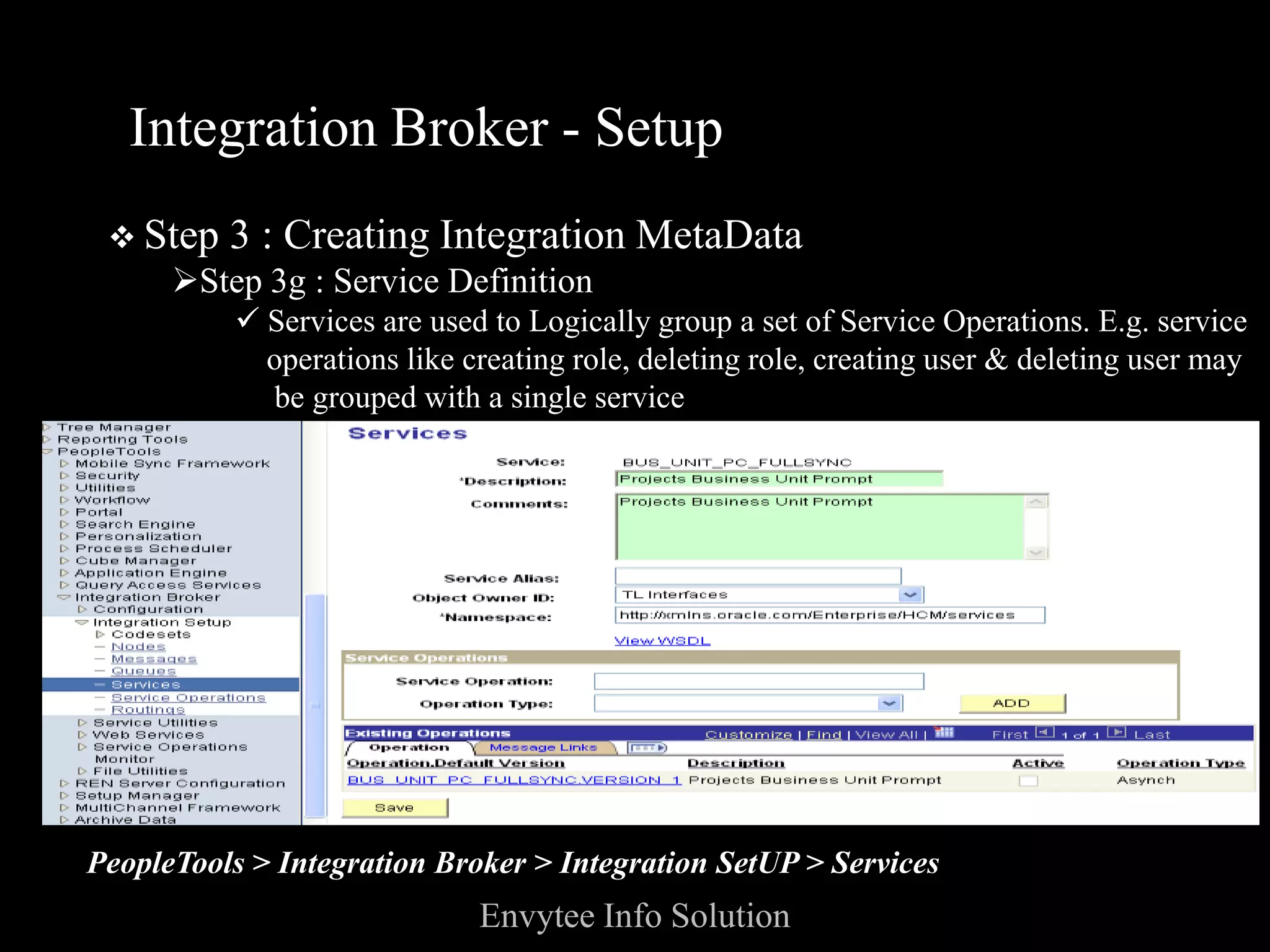
      Step 3g : Service Definition
          Services are used to Logically group a set of Service Operations. E.g. service
           operations like creating role, deleting role, creating user & deleting user may
            be grouped with a single service
  􀀹 Services expose a service operation to external parties


PeopleTools > Integration Broker > Integration SetUP > Services
                             Envytee Info Solution
Integration Broker - Setup

  Step 3 : Creating Integration MetaData
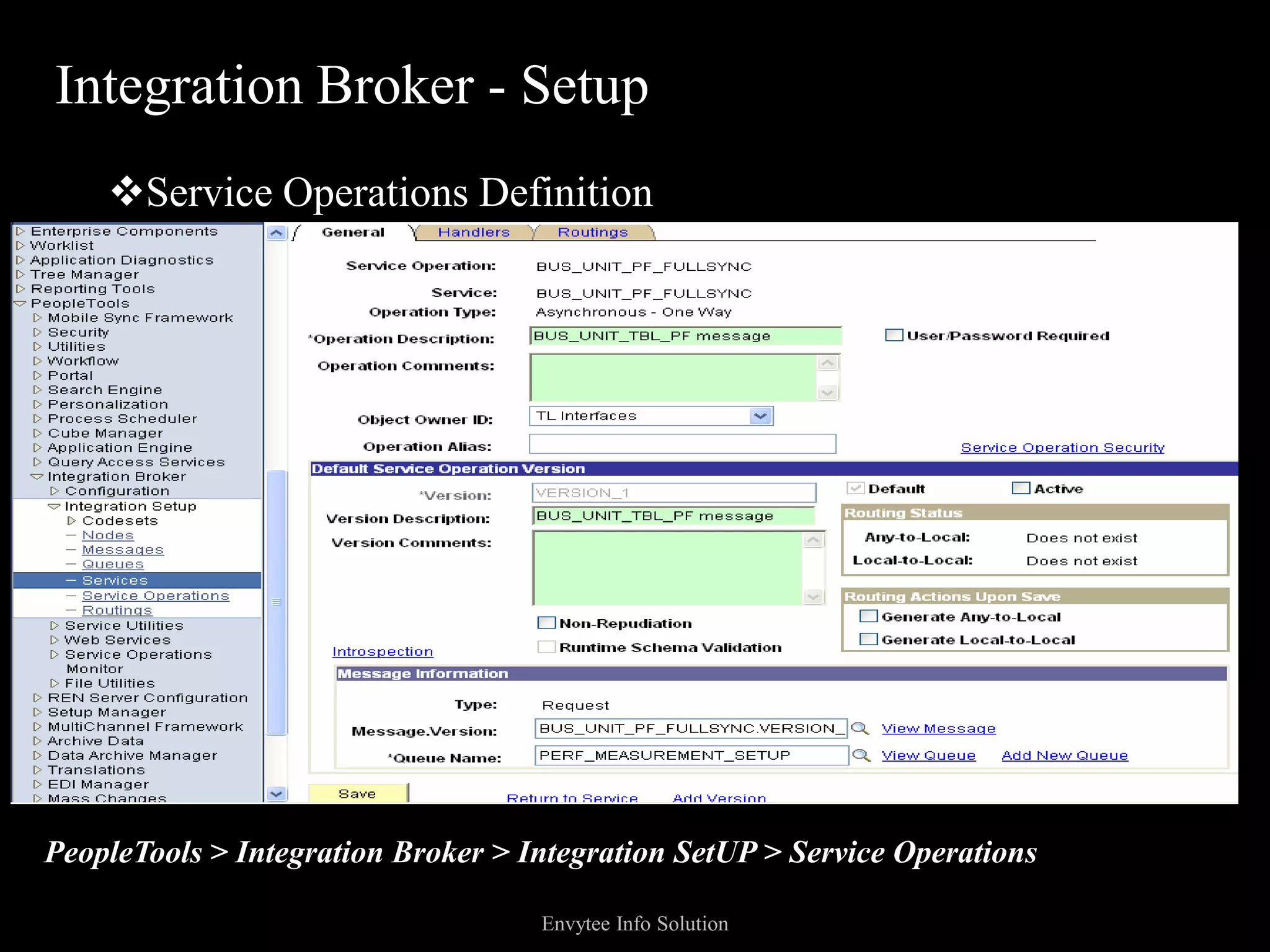
      Step 3h : Service Operations Definition

         Service operations provide applications within the PeopleSoft Enterprise
           product family with the ability to communicate synchronously or
          asynchronously with other PeopleSoft and third-party applications

          A service operation consists of general information about an operation,such
           as its name, description, and so on

          It also specifies an operation type, which determines how the operation is
           to be processed, synchronously or asynchronously

         In addition, it contains routings, which determine the direction, inbound or
           outbound, of the service operation
          A service operation has one or more handlers, which contain and run the
           programming logic for sending or receiving the message, manipulating
           message content, and so on

                            Envytee Info Solution
Integration Broker - Setup
    Service Operations Definition


PeopleTools > Integration Broker > Integration SetUP > Service Operations

                                    Envytee Info Solution
Integration Broker - Setup

  Step 3 : Creating Integration MetaData
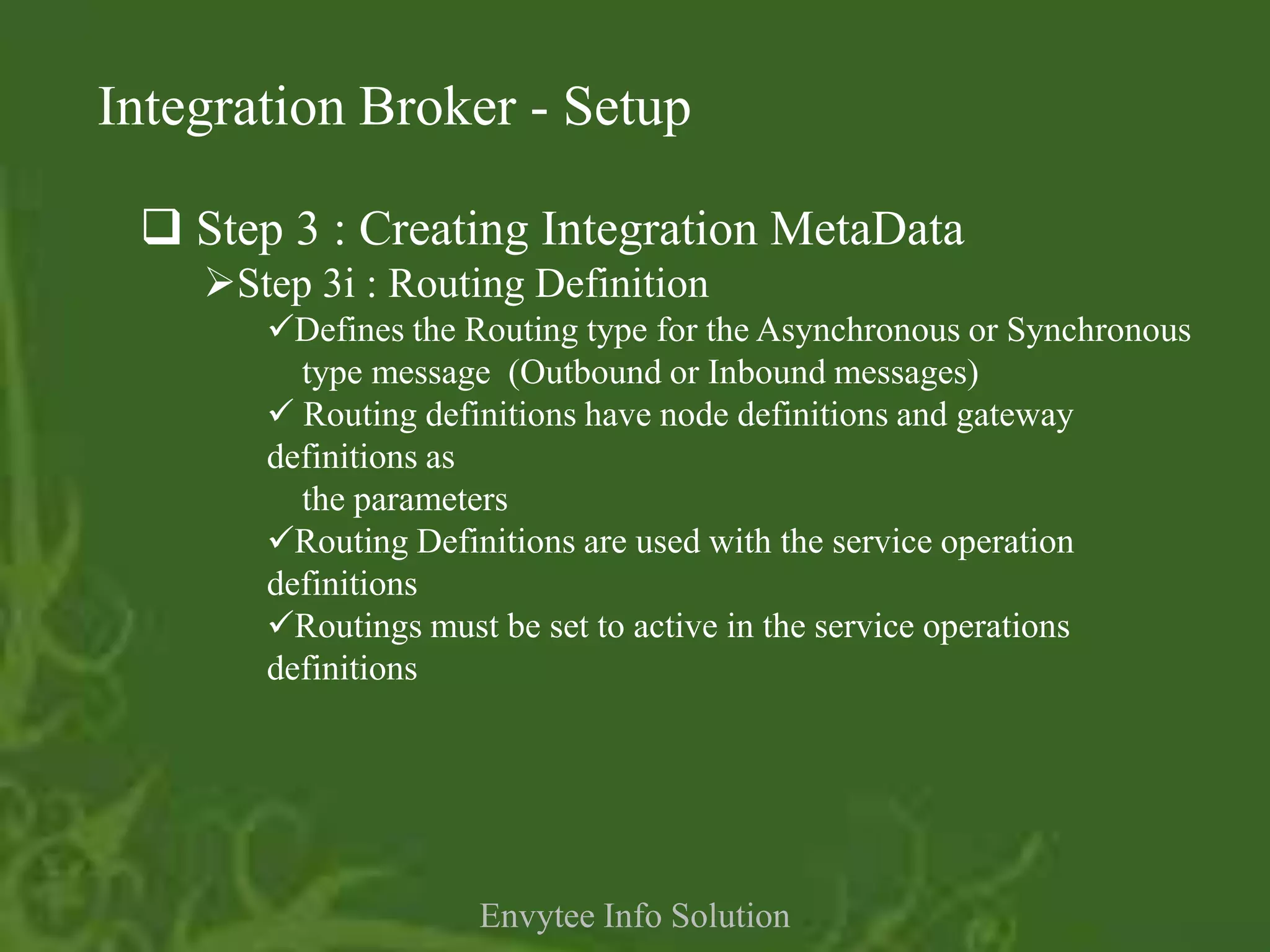
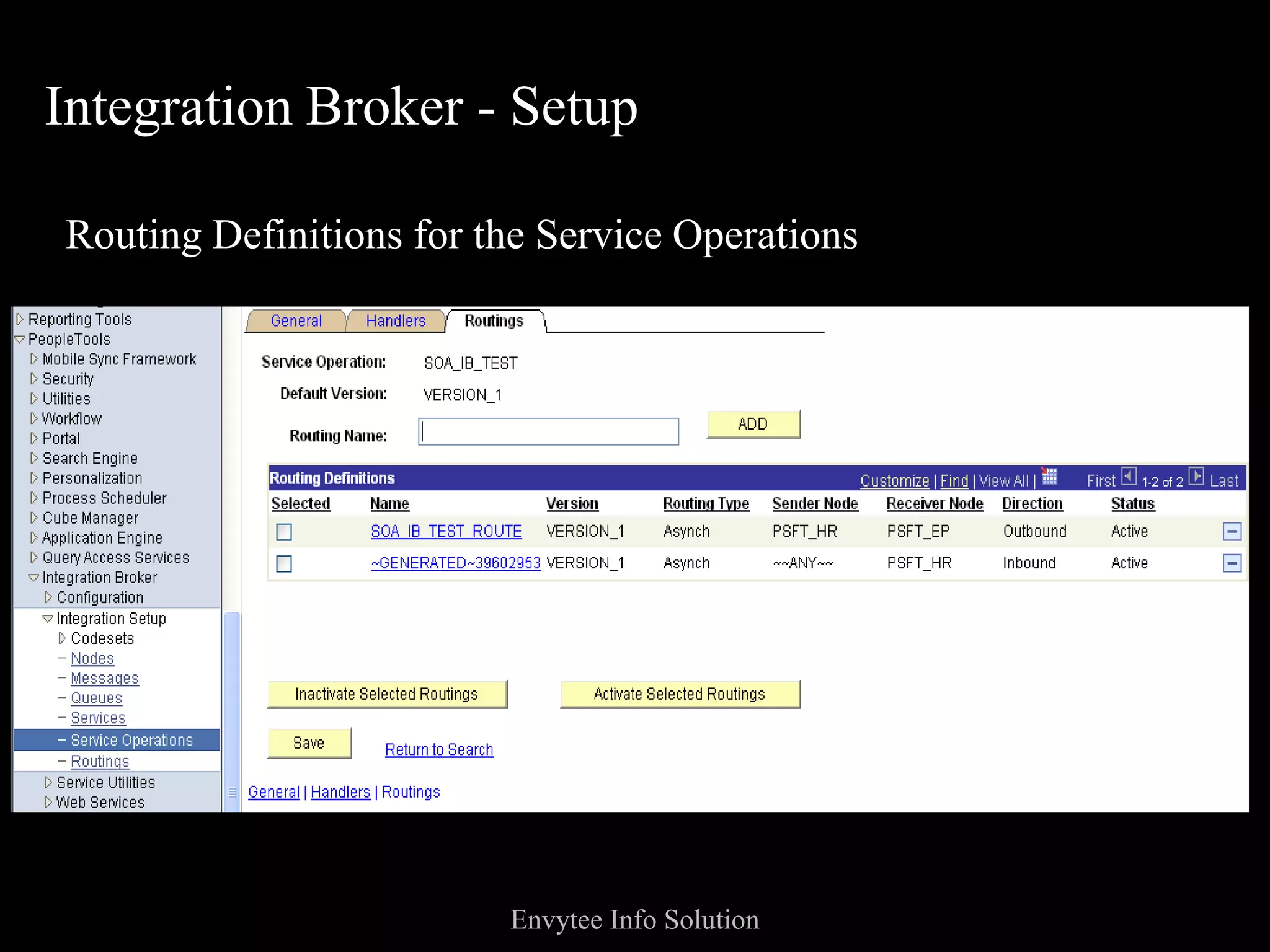
    Step 3i : Routing Definition
       Defines the Routing type for the Asynchronous or Synchronous
         type message (Outbound or Inbound messages)
        Routing definitions have node definitions and gateway
       definitions as
         the parameters
       Routing Definitions are used with the service operation
       definitions
       Routings must be set to active in the service operations
       definitions


                     Envytee Info Solution
Integration Broker - Setup

Routing Definitions for the Service Operations


                         Envytee Info Solution
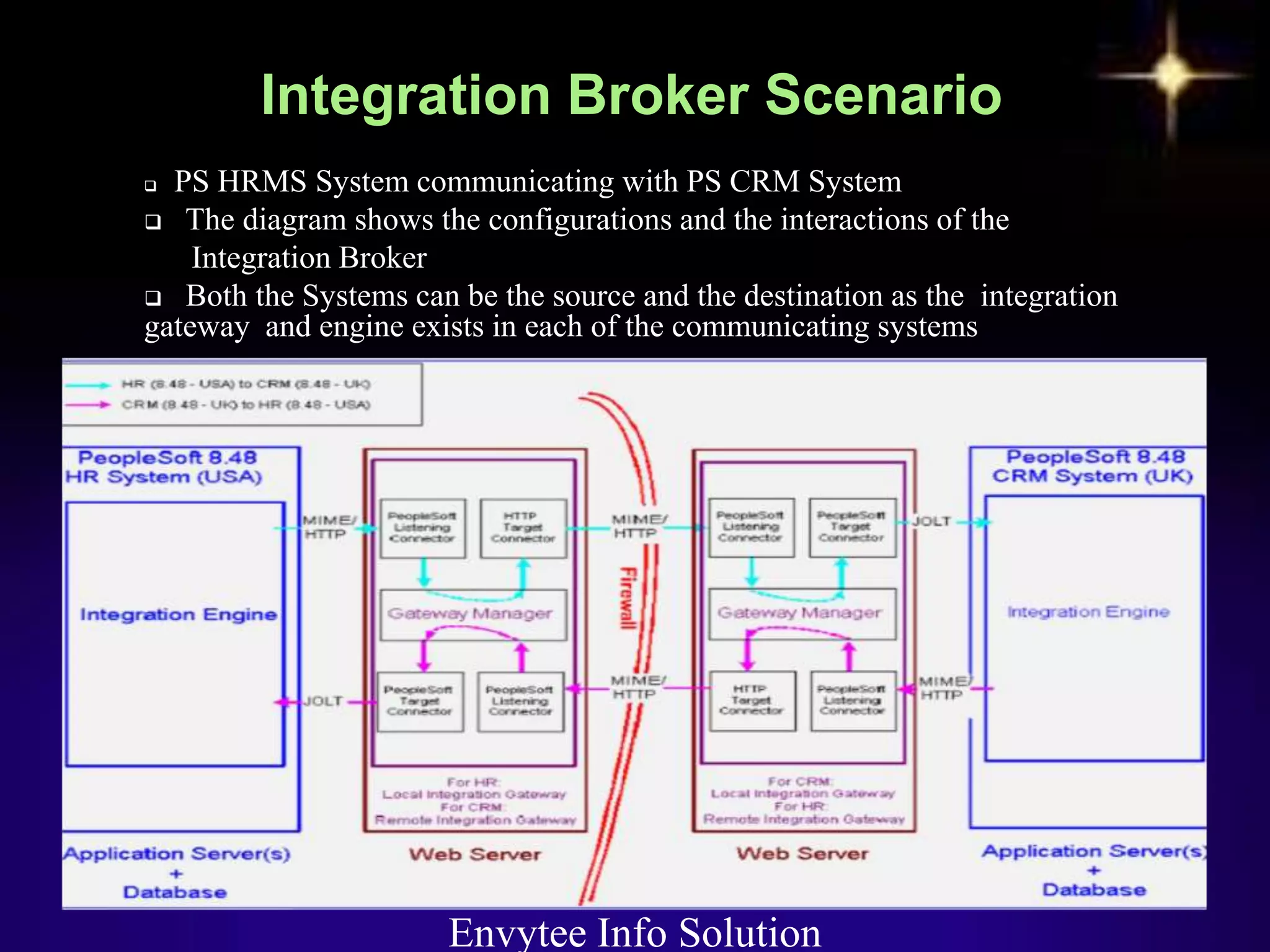
 PS HRMS System communicating with PS CRM System
 The diagram shows the configurations and the interactions of the
    Integration Broker
 Both the Systems can be the source and the destination as the integration
gateway and engine exists in each of the communicating systems


                       Envytee Info Solution
   Configuring the PS HRMS
       Define a Local Integration Gateway
     Define a Remote Integration Gateway – the remote gateway for the
        HRMS is the CRM
     Define the default Local Node
     Define a Remote Node – the remote node represents the CRM System.
      The gateway used for the remote node will be the remote Gateway.
     For Outbound integration, define a service operation, handler definition
       & outbound routing definition (The HR System is the sending node and
       the CRM System is the receiving node)
     For Inbound integration, the same service operation will be used with
      inbound routing definition (The CRM System is the sending node and
     the HR System is the receiving node)


                            Envytee Info Solution
   Configuring the PS CRM
      Define a Local Integration Gateway
      Define a Remote Integration Gateway – the remote gateway for the
       CRM is the HRMS
      Define the default Local Node
      Define a Remote Node – the remote node represents the HRMS
       System. The gateway used for the remote node will be the remote
       Gateway.
      For Outbound integration, define a service operation, handler
       definition & outbound routing definition (The CRM System is the
       sending node and the HR System is the receiving node)
      For Inbound integration, the same service operation will be used
       with inbound routing definition (The HR System is the sending
       node and the CRM System is the receiving node)
                        Envytee Info Solution
   Monitoring
     PS Delivers a separate package for IB monitoring.
     Monitoring Options include monitoring of asynchronous
     and synchronous service operations information, node
     status, queue status, manage domains and more.
     PS Integration Broker Monitoring is done by PS System
      Administrator


          Envytee Info Solution
   Navigate to PeopleTools > Integration Broker > Service Operations
    Monitor > Monitoring for all the monitoring options available with PS
      Integration Broker
    The pages offer filtering options, tracking of the status’ for a particular
    service & Error messages. Different Publish/Subscription Status’ include
             Error
             New
             Started
             Working
             Done
             Retry
             TimeOut
             Edited
             Cancelled
             Hold
             Error Messages logged at
   <PS_HOME>webservpeoplesoftapplicationspeoplesoftPSIGWerror
    Log.ht
      m

                              Envytee Info Solution
Envytee Info Solution

IntegrationBroker

  • 1.
  • 2.
  • 3.
    Integration Broker Introduction  Integration Broker Architecture  Integration Broker Set Up  Integration Broker Scenario  Integration Broker Monitoring Envytee Info Solution
  • 4.
    Enables disparate systems to share information in common manner  The central control and storage point that mediates events to and from applications, managing the essential queuing, routing, filtering and storing of information in an reliable and secure manner Envytee Info Solution
  • 5.
    PeopleSoft was the first ERP vendor to adopt pure internet architecture and leader in web services area, even before the standards are existed  Integration Broker is a proven SOA integration platform that delivers high performance, standards- based integration Envytee Info Solution
  • 6.
    Enterprise Ready - Enterprise class performance and scalability  Superior connectivity-Reduced cost and complexity with open standard support  Standard Web Services - Component Interfaces, Appclass PeopleCode and Bulk Load are exposed as standards-based web services  Technology Adapters and Adapter Toolkit - Powerful tool kit with an array of supported technology such as files, web, email and legacy PeopleSoft applications . You can build it yourself with the adapter SDK Envytee Info Solution
  • 7.
    Integration Broker is a Middleware Technology platform to integrate data between PeopleSoft and/or non-PeopleSoft applications  Facilitates both Synchronous & Asynchronous communication between systems  PeopleSoft Integration Broker consists of two Sub- Systems:  Integration Gateway - Resides on PeopleSoft web servers  Integration Engine - Resides on Application Server Envytee Info Solution
  • 8.
  • 9.
    Integration Gateway  Integration Gateway resides on the Web-Server  Manages the Receipt & Delivery of Messages  Supports most of the Communication & Network Protocols via connectors  Basic Logging Information concerning Message Receipt, Delivery &Errors  Transport protocol and message format management so that when messages reach the integration engine, they are in the PeopleSoft message format Envytee Info Solution
  • 10.
    Components of Integration Gateway  Listening Connector  Gateway Manager  Gateway Services  Target Connectors Envytee Info Solution
  • 11.
    Integration Broker Architecture Envytee Info Solution
  • 12.
    Integration Engine  Integration Engine runs on application server  Integration Engine is a combination of Application Designer Objects, PeopleCode, PIA Definitions, XSLT Code along with underlying mechanisms that tie all the elements together  Sends or Receives Messages. The Engine communicates through Integration Gateway  Handles Messages in formats like; XML, SOAP, PS Rowset & PS Non-Rowset based Data  Transforms the message, suiting the need of the Application Server.  Handles security features for the incoming messages  Supports Message Transaction like :  Outbound Asynchronous  Outbound Synchronous  Inbound Asynchronous  Inbound Synchronous
  • 13.
    Incoming and OutgoingRequest Flows Envytee Info Solution
  • 14.
    Setting-up PS Integration Broker:  Step 1 : The Publication/Subscription (Pub/Sub) Servers are set in Running state from the PSADMIN command prompt  Step 2 : Setting it Up Message Server  Step 3 : Creating integration Meta-Data  Step 3a : Integration gateway definition  Step 3b : Node definition  Step 3c : Message definition.  Step 3d : Integration PeopleCode.  Step 3e : Transformation programs.  Step 3f : Queue definition.  Step 3g : Service definition.  Step 3h : Service operation definition.  Step 3i : Routing definition. Envytee Info Solution
  • 15.
    Integration Broker-SetUp Step1 setting the pub/sub server “ON” Select The Option 4 : Configure this domain Envytee Info Solution
  • 16.
    Integration Broker -Setup  Step 1 Setting The Pub/Sub Server “ON”  In the Domain Configuration Menu Select the Option 1 : Pub/Sub Servers. On Selection the status of the Pub/Sub Server is Set to “Yes” –indicating its running Status Envytee Info Solution
  • 17.
    Integration Broker -Setup Step 1  Setting The Pub/Sub Server “ON”  Select the Option 13 : Load Config as shown to boot the appserv with the latest configuration. The Pub/Sub Server also gets booted when the App Server boots Envytee Info Solution
  • 18.
    Integration Broker -Setup Step 2  Setting Up the Message Server Components of Message Server :  Publication Broker o Broker Dispatcher Process (PSBRKDSP) o Broker Handler Process (PSBRKHND) Publication Contractor o Publication Dispatcher Process (PSPUBDSP) o Publication Handler Process (PSPUBHND)  Subscription Contractor o Subscription Dispatcher Process (PSSUBDSP) o Subscription Handler Process (PSSUBHND) Envytee Info Solution
  • 19.
    Integration Broker -Setup  Step 2  Select Option 7 : Messaging Server Administration Menu to set up messaging servers for a particular environment Envytee Info Solution
  • 20.
    Integration Broker -Setup  Step 2  Select Option 1 : To create a new messaging server. Envytee Info Solution
  • 21.
    Integration Broker -Setup  Step 2 Provide a Message Server Name and Queue Name (already defined using PIA), which the message server will handle. Multiple Queues can be assigned to a Message Server (as in case of environments where the activity is huge) Envytee Info Solution
  • 22.
    Integration Broker -Setup  Step 3  Integration Meta-Data involves creation of:  Integration gateway definition.  Node definition.  Message definition.  Integration PeopleCode.  Transformation programs. Queue definition. Service definition.  Service operation definition.  Routing definition.  The above sequence is followed to completely SetUp the Integration Broker Envytee Info Solution
  • 23.
    Integration Broker -Setup  Step 3 : Creating Integration MetaData  Step 3a : Gateway Definition PeopleTools > Integration Broker > Configuration > Gateways The Gateway Definitions are defined from the above navigation. The URL is the link to the Listener Connector. The Connector IDs define the Target Connectors and their properties. Envytee Info Solution
  • 24.
    Integration Broker -Setup  Step 3 : Creating Integration MetaData Step 3b : Node Definition Defines the Locations to or from which messages can be routed. E.g. Nodes can represent Customers, Suppliers, BUs or other systems. PeopleTools > Integration Broker > Integration SetUp > Nodes Envytee Info Solution


  • 25.
    Integration Broker -Setup  Step 3 : Creating Integration MetaData  Step 3c : Message Definition  Messages provide the physical description of the data that is sent across the wire Messages are self-describing entities that are formatted in XML. Each message definition is based on a multilevel structure, similar to a component, which defines the data to be inserted into the message at runtime Messages are Created in PIA  PS Supports four types of messages: Rowset Based – PeopleSoft to PeopleSoft Integration.  Non-Rowset Based – Integration with Third Party  Container based Rowset – Exposing PS to Third Party Container Based Non-Rowset – Exposing PS to Third Party PS Delivers over 300 Messages for integration with different PS systems. Custom messages can also be created through PIA  Messages can be Version Controlled Envytee Info Solution
  • 26.
    Integration Broker -Setup  Step 3 : Creating Integration MetaData  Step 3c : Define Message PeopleTools > Integration Broker > Integration SetUp > Messages Envytee Info Solution
  • 27.
    Integration Broker -Setup  Step 3 : Creating Integration MetaData Step 3f : Queue Definition  Queues are groups of service operation definitions that help to sequence service operations properly and enhance scalability  Provide a simple way to define processing characteristics of similar service operations as a single group Integration Broker > Integration SetUP > Queues Envytee Info Solution
  • 28.
    Integration Broker -Setup  Step 3 : Creating Integration MetaData Step 3g : Service Definition  Services are used to Logically group a set of Service Operations. E.g. service operations like creating role, deleting role, creating user & deleting user may be grouped with a single service 􀀹 Services expose a service operation to external parties PeopleTools > Integration Broker > Integration SetUP > Services Envytee Info Solution
  • 29.
    Integration Broker -Setup Step 3 : Creating Integration MetaData  Step 3h : Service Operations Definition Service operations provide applications within the PeopleSoft Enterprise product family with the ability to communicate synchronously or asynchronously with other PeopleSoft and third-party applications  A service operation consists of general information about an operation,such as its name, description, and so on  It also specifies an operation type, which determines how the operation is to be processed, synchronously or asynchronously In addition, it contains routings, which determine the direction, inbound or outbound, of the service operation  A service operation has one or more handlers, which contain and run the programming logic for sending or receiving the message, manipulating message content, and so on Envytee Info Solution
  • 30.
    Integration Broker -Setup Service Operations Definition PeopleTools > Integration Broker > Integration SetUP > Service Operations Envytee Info Solution
  • 31.
    Integration Broker -Setup  Step 3 : Creating Integration MetaData Step 3i : Routing Definition Defines the Routing type for the Asynchronous or Synchronous type message (Outbound or Inbound messages)  Routing definitions have node definitions and gateway definitions as the parameters Routing Definitions are used with the service operation definitions Routings must be set to active in the service operations definitions Envytee Info Solution
  • 32.
    Integration Broker -Setup Routing Definitions for the Service Operations Envytee Info Solution
  • 33.
     PS HRMSSystem communicating with PS CRM System  The diagram shows the configurations and the interactions of the Integration Broker  Both the Systems can be the source and the destination as the integration gateway and engine exists in each of the communicating systems Envytee Info Solution
  • 34.
    Configuring the PS HRMS  Define a Local Integration Gateway  Define a Remote Integration Gateway – the remote gateway for the HRMS is the CRM  Define the default Local Node  Define a Remote Node – the remote node represents the CRM System. The gateway used for the remote node will be the remote Gateway.  For Outbound integration, define a service operation, handler definition & outbound routing definition (The HR System is the sending node and the CRM System is the receiving node)  For Inbound integration, the same service operation will be used with inbound routing definition (The CRM System is the sending node and the HR System is the receiving node) Envytee Info Solution
  • 35.
    Configuring the PS CRM  Define a Local Integration Gateway  Define a Remote Integration Gateway – the remote gateway for the CRM is the HRMS  Define the default Local Node  Define a Remote Node – the remote node represents the HRMS System. The gateway used for the remote node will be the remote Gateway.  For Outbound integration, define a service operation, handler definition & outbound routing definition (The CRM System is the sending node and the HR System is the receiving node)  For Inbound integration, the same service operation will be used with inbound routing definition (The HR System is the sending node and the CRM System is the receiving node) Envytee Info Solution
  • 36.
    Monitoring  PS Delivers a separate package for IB monitoring.  Monitoring Options include monitoring of asynchronous and synchronous service operations information, node status, queue status, manage domains and more.  PS Integration Broker Monitoring is done by PS System Administrator Envytee Info Solution
  • 37.
    Navigate to PeopleTools > Integration Broker > Service Operations Monitor > Monitoring for all the monitoring options available with PS Integration Broker  The pages offer filtering options, tracking of the status’ for a particular service & Error messages. Different Publish/Subscription Status’ include  Error  New  Started  Working  Done  Retry  TimeOut  Edited  Cancelled  Hold  Error Messages logged at  <PS_HOME>webservpeoplesoftapplicationspeoplesoftPSIGWerror Log.ht m Envytee Info Solution
  • 38.
  • 39.