
Magento 2: Premium Performance with
PHP 7 and Varnish
•Full time traveler
•Magento Master 2016
•Meet Magento speaker
•Magento Certified Solution Specialist
•BBQ Certified Solution Specialist
Miguel Balparda
@mbalparda
Test overview
1. Magento 2 using PHP 5.6 vs Magento 2 using PHP 5.6 and Varnish
2. Magento 2 using PHP 7 vs Magento 2 using PHP 7 and Varnish
3. Magento 2 using PHP 5.6 vs Magento 2 using PHP 7
Hardware
Software
● Apache 2.2
● Redis 2.8.4
● PHP-FPM 5.6.15 (latest versions available at testing time)
● PHP-FPM 7.0.2 (latest versions available at testing time)
● Percona 5.6
● Varnish 4.0.1
● Centos 6.7 x86_64
● Siege 3.0.5
● Magento 2.0.2 with sample data and sample theme
Magento store specs
● Stores: 1
● SKU count: 2,046
● Categories: 8
● Subcategories: 1,173
Varnish
Magento env.php (redis)
'cache' =>
array(
'frontend' =>
array(
'default' =>
array(
'backend' => 'Cm_Cache_Backend_Redis',
'backend_options' =>
array(
'server' => '127.0.0.1',
'port' => '6379'
),
),
Magento env.php (redis)
'page_cache' =>
array(
'backend' => 'Cm_Cache_Backend_Redis',
'backend_options' =>
array(
'server' => '127.0.0.1',
'port' => '6379',
'database' => '1',
'compress_data' => '0'
)
)
)
)
Magento env.php (memcache)
(PHP memcache extension)
'session' =>
array (
'save' => 'memcache',
'save_path' => 'tcp://<memcache ip or host>:<memcache port>'
),
(PHP memcached extension)
'session' =>
array (
'save' => 'memcached’,
'save_path' => '<memcache ip or host>:<memcache port>'
),
Magento CLI
We enabled production mode by running:
magento deploy:mode:set production
Siege automation
#!/bin/sh
echo "Creating sitemap:"
curl $4 | sed 's/<url>/<url>n/g' | grep 0.5 | sed 's/.*loc>(.*)</loc.*/1/g' > urls.txt
curl $4 | sed 's/<url>/<url>n/g' | grep 1.0 | sed 's/.*loc>(.*)</loc.*/1/g' >>urls.txt
echo "Warming cache:"
Siege -i -c50 -t60s -f urls.txt
echo "Waiting 1 minute for the first test."
sleep 1m
echo "Starting tests:"
for i in `seq 1 $5`;
do
echo "Running test # $i / $5:"
Siege -i -c$1 -t$2s -f urls.txt
echo "Waiting 1 minute for the next test."
sleep 1m
done
echo "Removing urls.txt:"
rm urls.txt
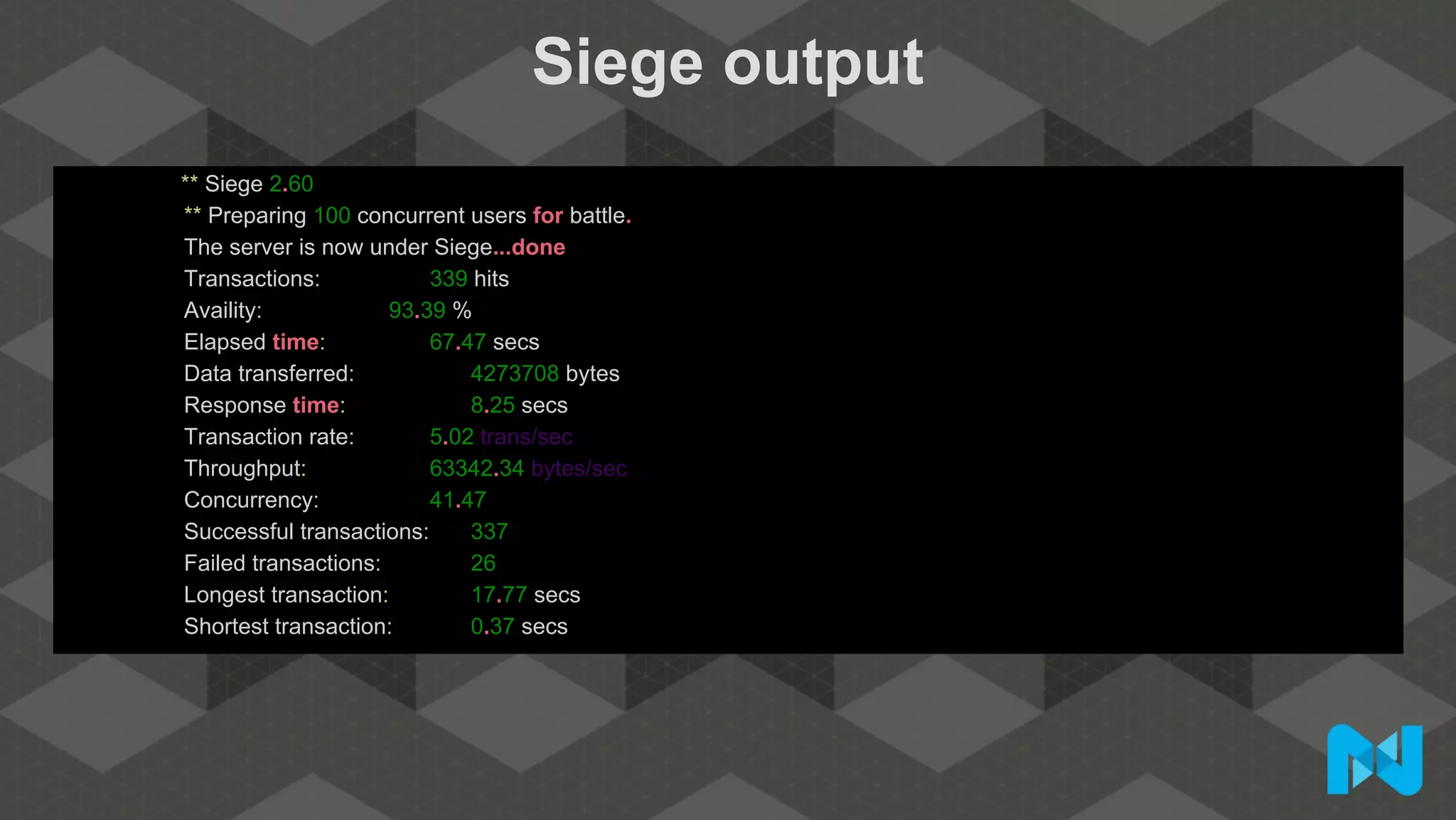
Siege output
** Siege 2.60
** Preparing 100 concurrent users for battle.
The server is now under Siege...done
Transactions: 339 hits
Availity: 93.39 %
Elapsed time: 67.47 secs
Data transferred: 4273708 bytes
Response time: 8.25 secs
Transaction rate: 5.02 trans/sec
Throughput: 63342.34 bytes/sec
Concurrency: 41.47
Successful transactions: 337
Failed transactions: 26
Longest transaction: 17.77 secs
Shortest transaction: 0.37 secs
PHP 5.6 transaction rate
PHP 5.6 transactions
PHP 5.6 response time
PHP 5.6 Varnish transaction rate
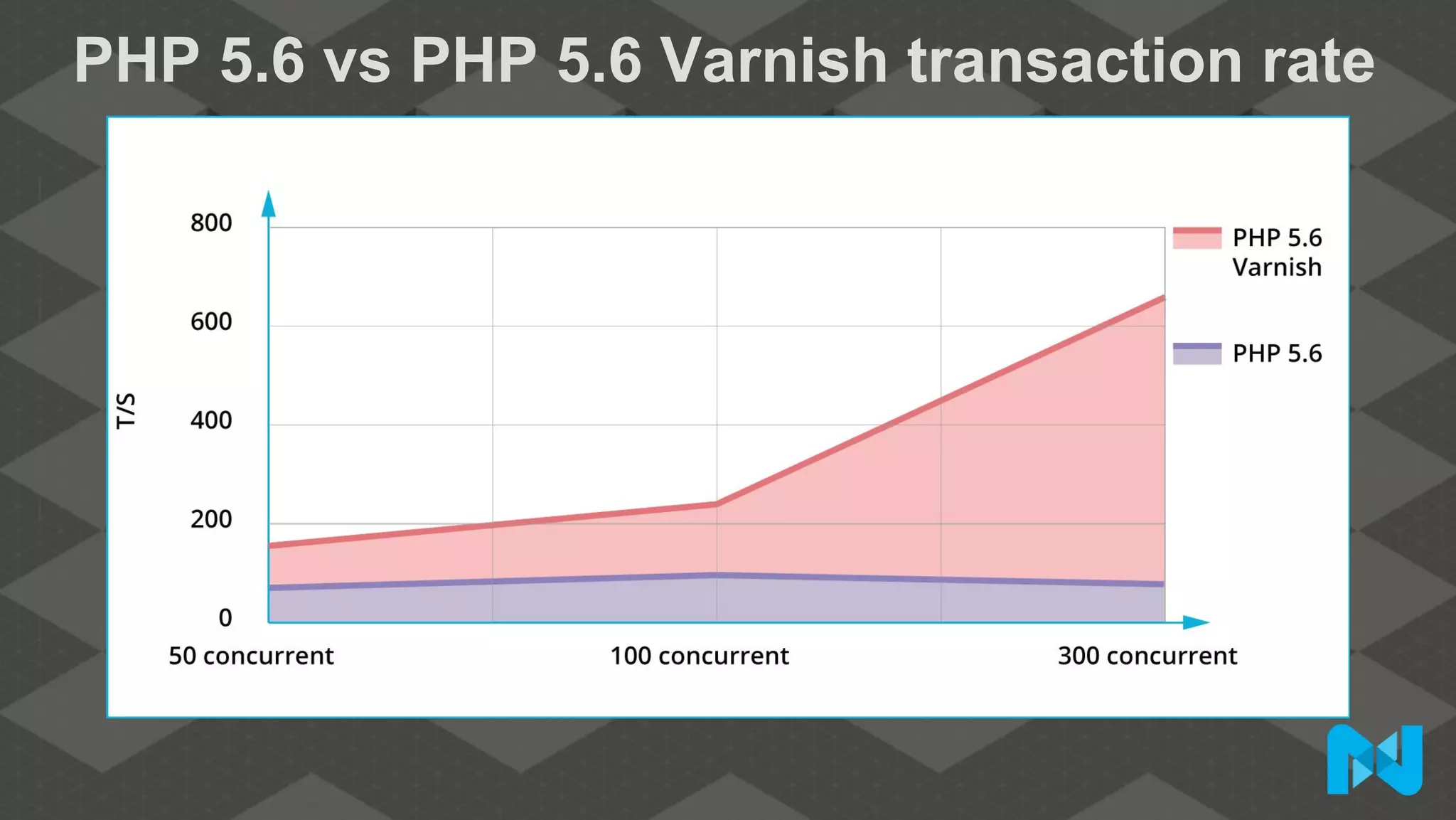
PHP 5.6 vs PHP 5.6 Varnish transaction rate
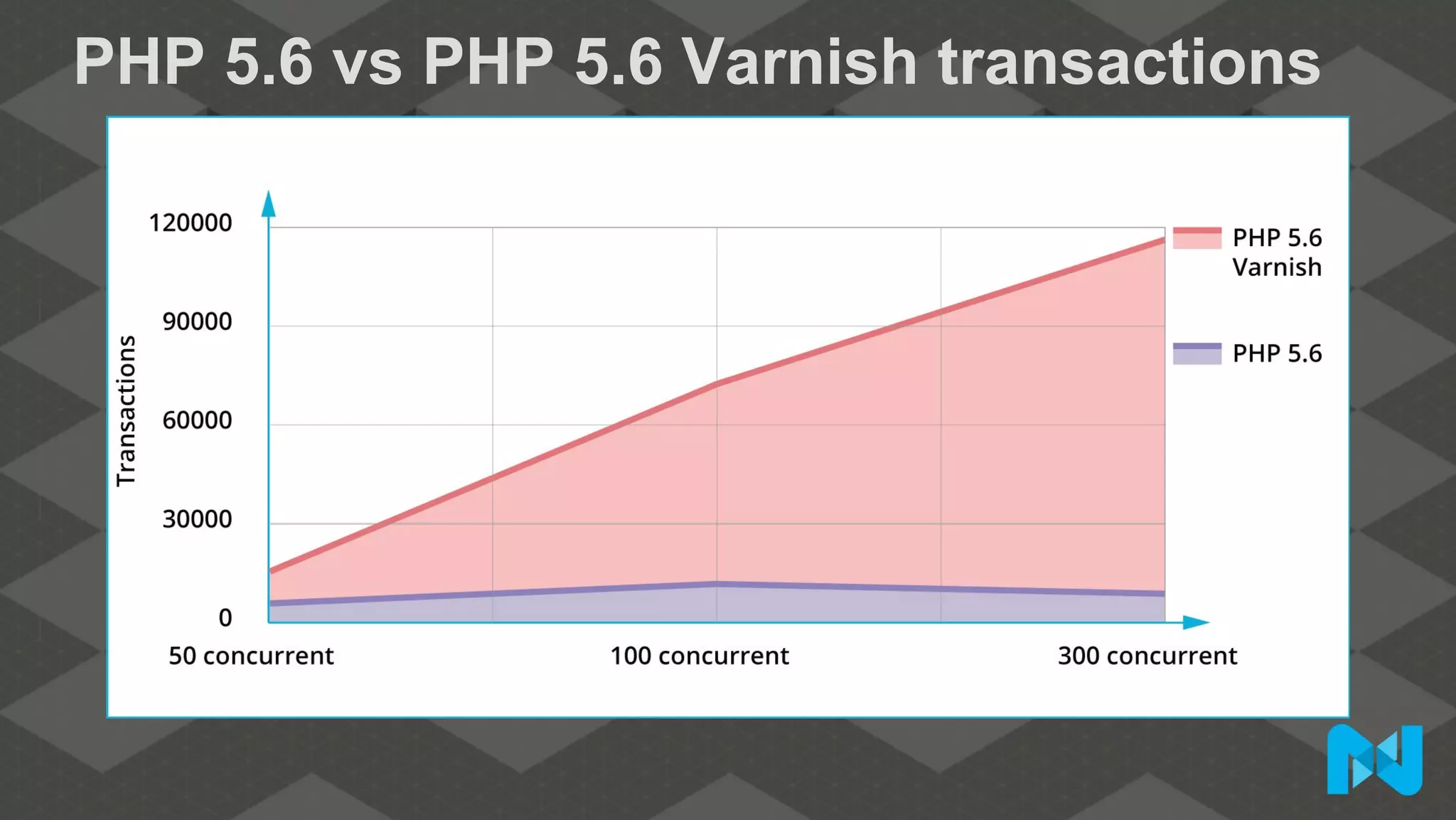
PHP 5.6 vs PHP 5.6 Varnish transactions
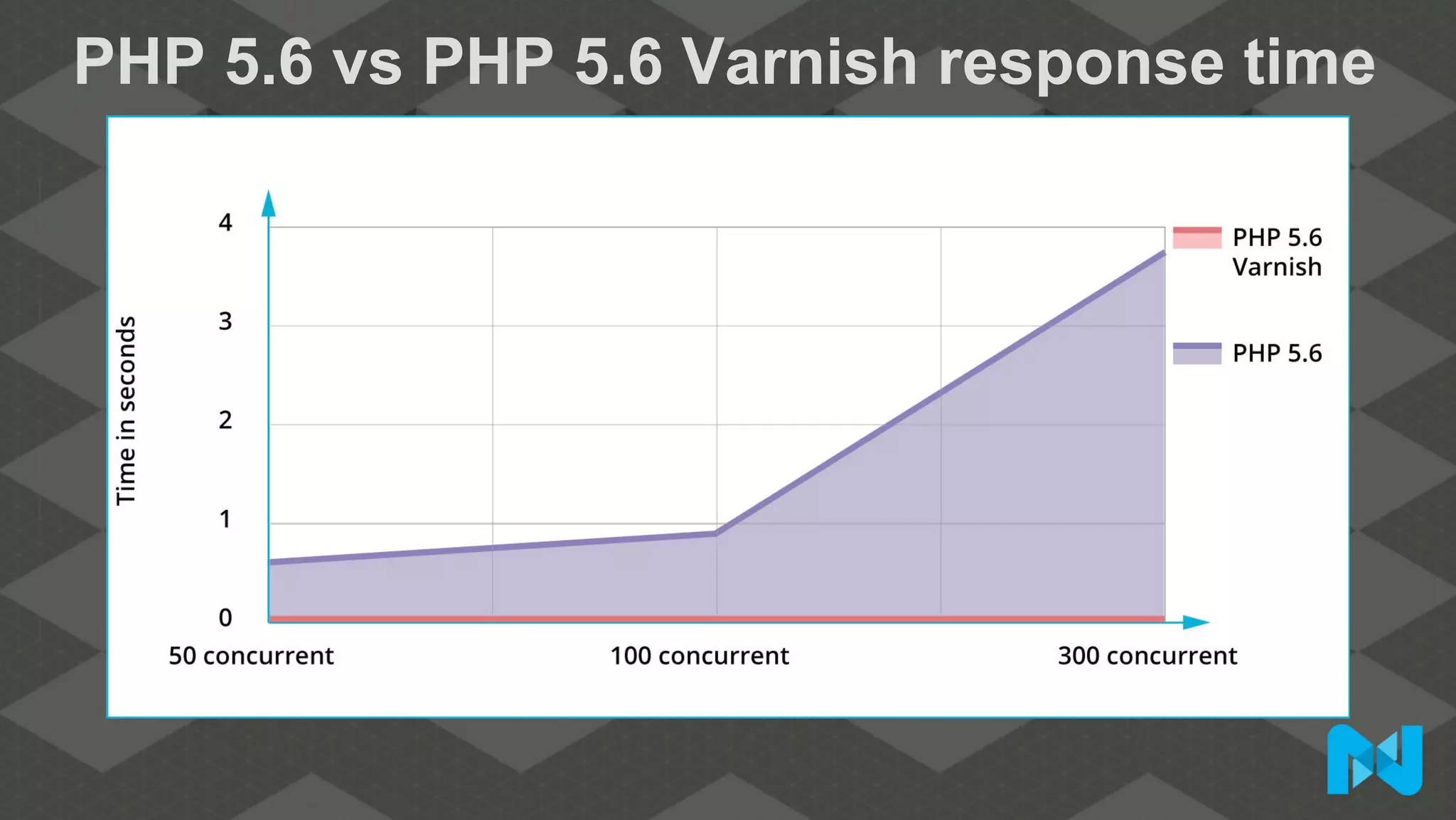
PHP 5.6 vs PHP 5.6 Varnish response time
PHP 7 transaction rate
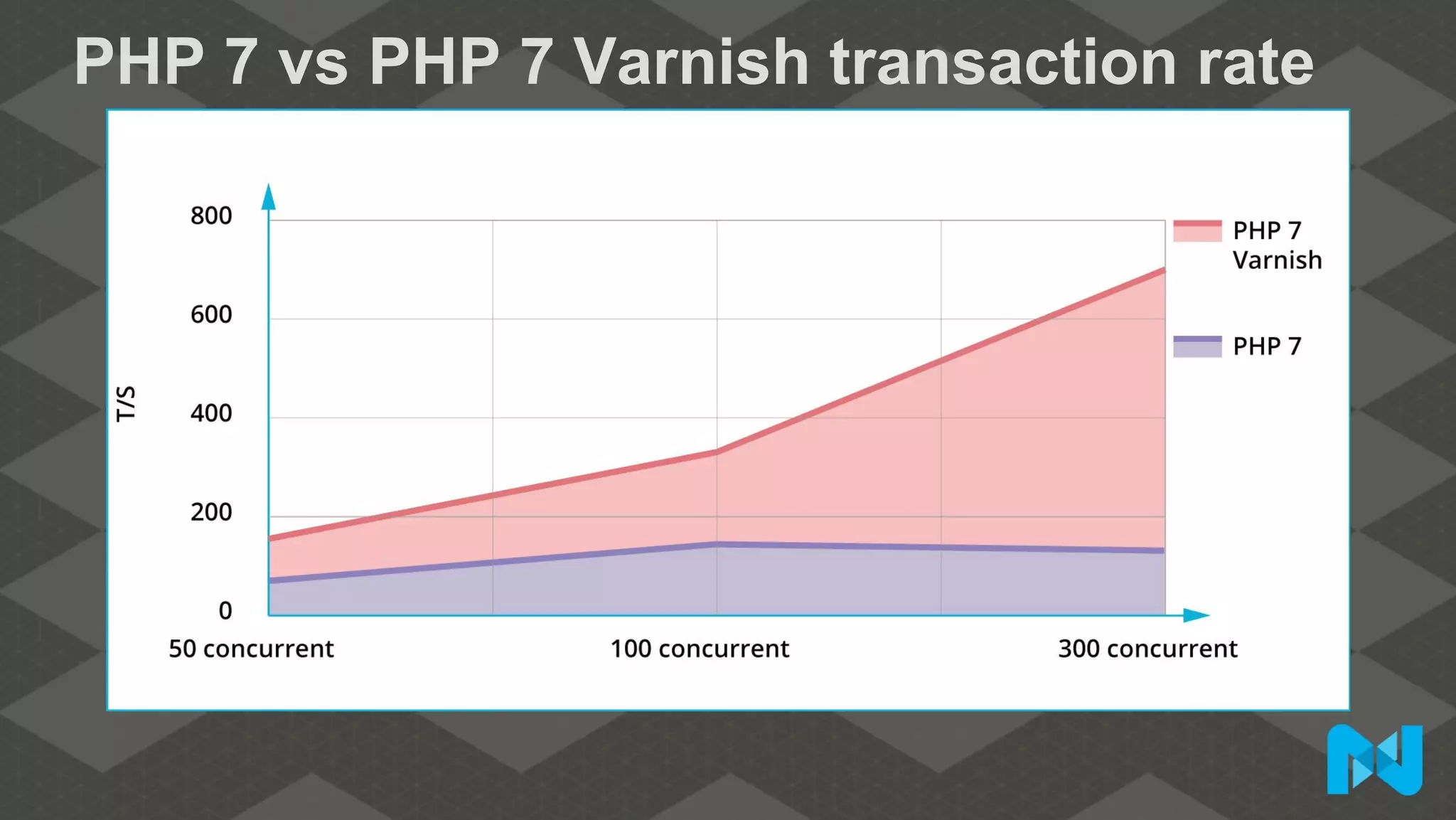
PHP 7 vs PHP 7 Varnish transaction rate
PHP 7 vs PHP 7 Varnish transactions
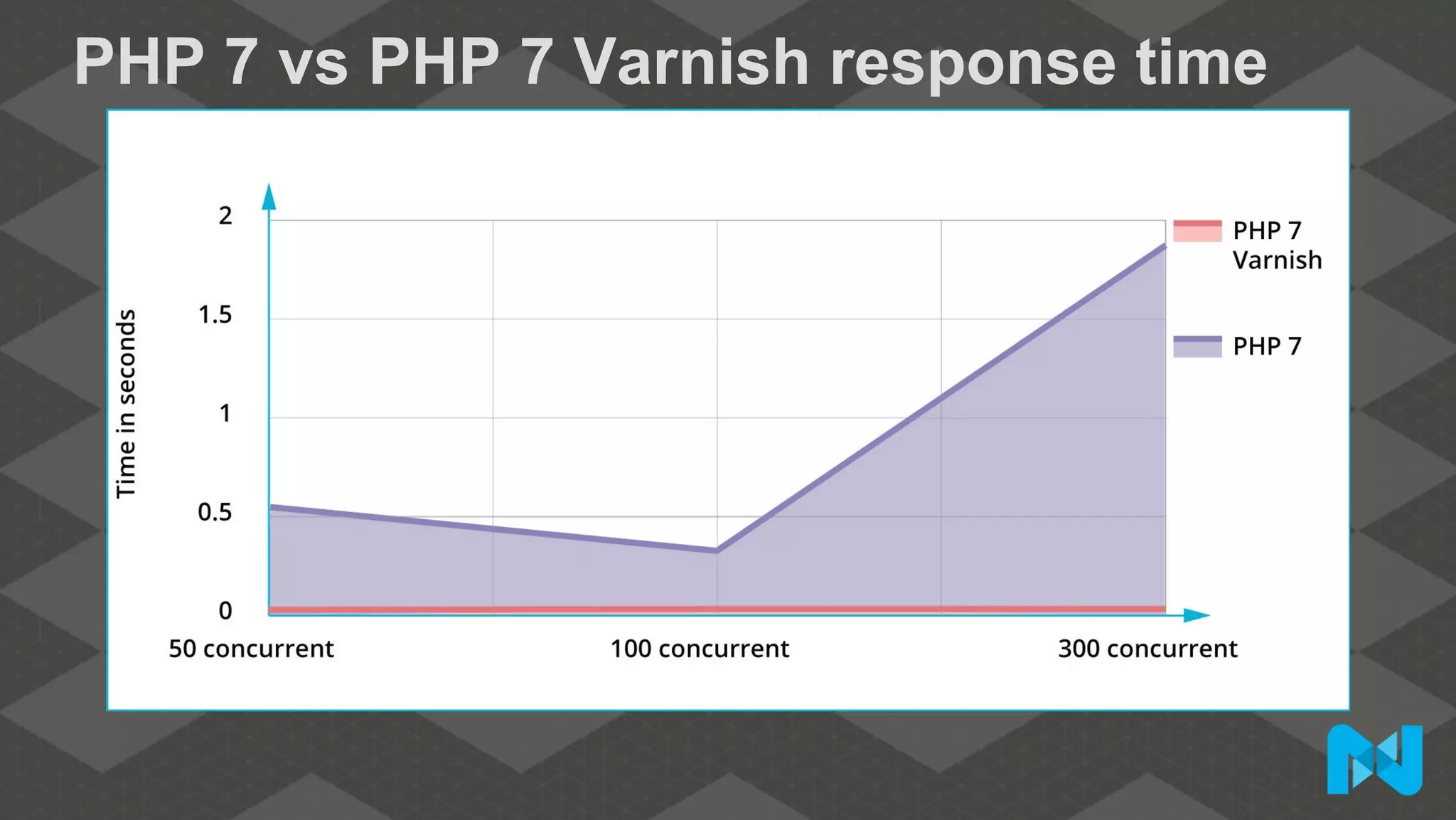
PHP 7 vs PHP 7 Varnish response time
PHP 5.6 vs PHP 7 transaction rate
PHP 5.6 vs PHP 7 transactions
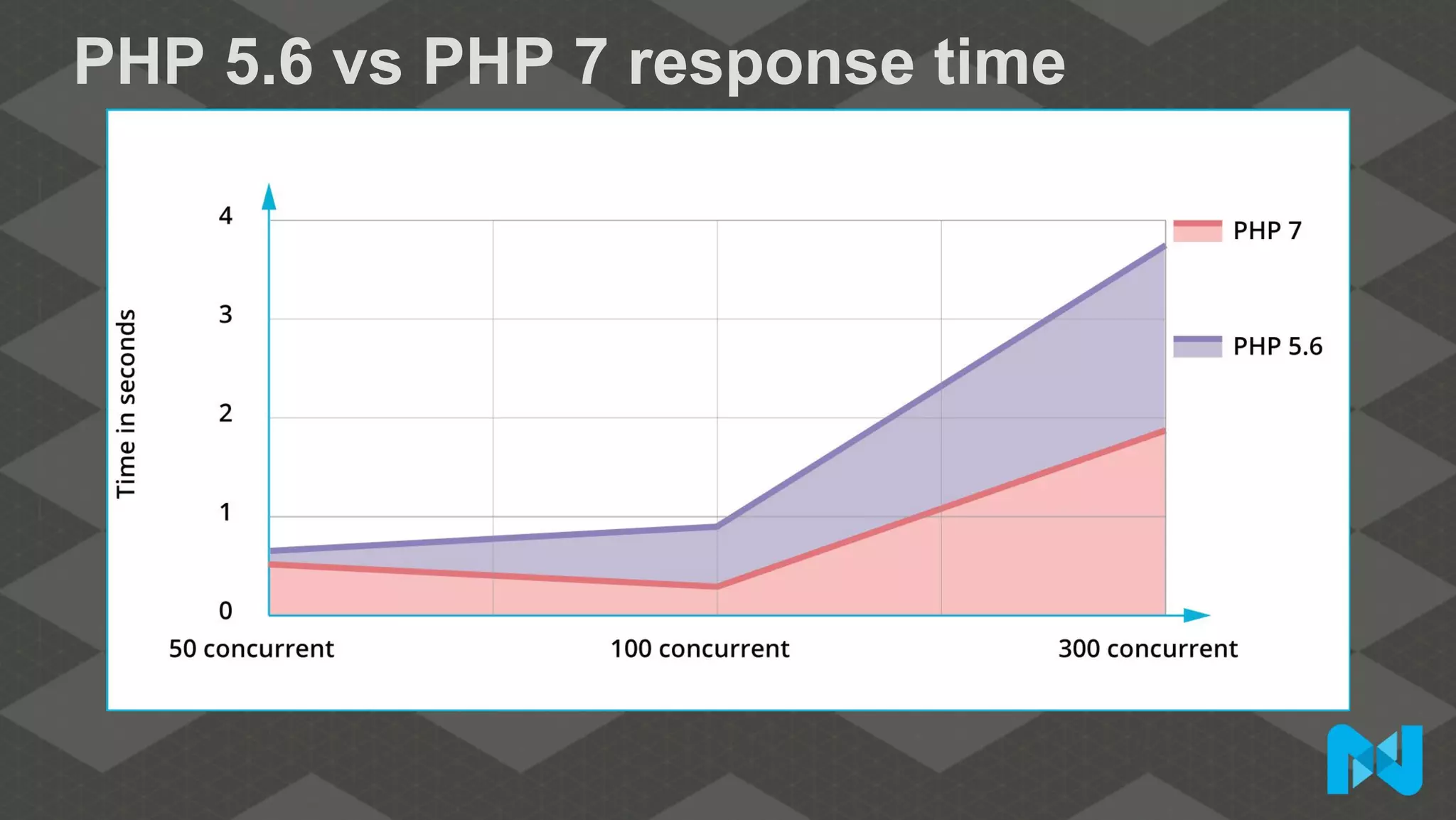
PHP 5.6 vs PHP 7 response time
Conclusion
Thank you for coming!

Mage Titans USA 2016 - Miguel Balparda - Magento 2: Premium Performance with PHP 7 and Varnish

  • 2.
    Magento 2: PremiumPerformance with PHP 7 and Varnish
  • 3.
    •Full time traveler •MagentoMaster 2016 •Meet Magento speaker •Magento Certified Solution Specialist •BBQ Certified Solution Specialist Miguel Balparda @mbalparda
  • 4.
    Test overview 1. Magento2 using PHP 5.6 vs Magento 2 using PHP 5.6 and Varnish 2. Magento 2 using PHP 7 vs Magento 2 using PHP 7 and Varnish 3. Magento 2 using PHP 5.6 vs Magento 2 using PHP 7
  • 5.
  • 6.
    Software ● Apache 2.2 ●Redis 2.8.4 ● PHP-FPM 5.6.15 (latest versions available at testing time) ● PHP-FPM 7.0.2 (latest versions available at testing time) ● Percona 5.6 ● Varnish 4.0.1 ● Centos 6.7 x86_64 ● Siege 3.0.5 ● Magento 2.0.2 with sample data and sample theme
  • 7.
    Magento store specs ●Stores: 1 ● SKU count: 2,046 ● Categories: 8 ● Subcategories: 1,173
  • 8.
  • 9.
    Magento env.php (redis) 'cache'=> array( 'frontend' => array( 'default' => array( 'backend' => 'Cm_Cache_Backend_Redis', 'backend_options' => array( 'server' => '127.0.0.1', 'port' => '6379' ), ),
  • 10.
    Magento env.php (redis) 'page_cache'=> array( 'backend' => 'Cm_Cache_Backend_Redis', 'backend_options' => array( 'server' => '127.0.0.1', 'port' => '6379', 'database' => '1', 'compress_data' => '0' ) ) ) )
  • 11.
    Magento env.php (memcache) (PHPmemcache extension) 'session' => array ( 'save' => 'memcache', 'save_path' => 'tcp://<memcache ip or host>:<memcache port>' ), (PHP memcached extension) 'session' => array ( 'save' => 'memcached’, 'save_path' => '<memcache ip or host>:<memcache port>' ),
  • 12.
    Magento CLI We enabledproduction mode by running: magento deploy:mode:set production
  • 13.
    Siege automation #!/bin/sh echo "Creatingsitemap:" curl $4 | sed 's/<url>/<url>n/g' | grep 0.5 | sed 's/.*loc>(.*)</loc.*/1/g' > urls.txt curl $4 | sed 's/<url>/<url>n/g' | grep 1.0 | sed 's/.*loc>(.*)</loc.*/1/g' >>urls.txt echo "Warming cache:" Siege -i -c50 -t60s -f urls.txt echo "Waiting 1 minute for the first test." sleep 1m echo "Starting tests:" for i in `seq 1 $5`; do echo "Running test # $i / $5:" Siege -i -c$1 -t$2s -f urls.txt echo "Waiting 1 minute for the next test." sleep 1m done echo "Removing urls.txt:" rm urls.txt
  • 14.
    Siege output ** Siege2.60 ** Preparing 100 concurrent users for battle. The server is now under Siege...done Transactions: 339 hits Availity: 93.39 % Elapsed time: 67.47 secs Data transferred: 4273708 bytes Response time: 8.25 secs Transaction rate: 5.02 trans/sec Throughput: 63342.34 bytes/sec Concurrency: 41.47 Successful transactions: 337 Failed transactions: 26 Longest transaction: 17.77 secs Shortest transaction: 0.37 secs
  • 15.
  • 16.
  • 17.
  • 18.
    PHP 5.6 Varnishtransaction rate
  • 19.
    PHP 5.6 vsPHP 5.6 Varnish transaction rate
  • 20.
    PHP 5.6 vsPHP 5.6 Varnish transactions
  • 21.
    PHP 5.6 vsPHP 5.6 Varnish response time
  • 22.
  • 23.
    PHP 7 vsPHP 7 Varnish transaction rate
  • 24.
    PHP 7 vsPHP 7 Varnish transactions
  • 25.
    PHP 7 vsPHP 7 Varnish response time
  • 26.
    PHP 5.6 vsPHP 7 transaction rate
  • 27.
    PHP 5.6 vsPHP 7 transactions
  • 28.
    PHP 5.6 vsPHP 7 response time
  • 29.
  • 30.