RTI QuickStart Training
Build it Fast:
5 Steps from Concept to Working
Distributed System
Rajive Joshi, Ph.D.
Principal Solution Architect
Webinar
Real-Time Innovations Inc.
September 25, 2013
Once Upon a Late Night …
Agenda
• Why is building distributed systems hard?
• The 5 Critical Steps – Best Practice
• The Prototyper – Separating Structure and
Behavior
• Defining structure using XML
• Coding behavior using Lua – A Small Fast Dynamic
Scripting Language
• Real-World Example
• Summary
Why is Building Distributed Systems Hard?
• Logical Design Considerations
– Data flows
– Data delivery: availability, timing, ordering, reliability, filtering,
fault tolerance, etc.
– Component behaviors
• Physical Design Considerations
– Platform Differences: CPU, OS, Programming Languages
– Discovery and Network configurations
– Low Level Device I/O
• Performance & Scalability Considerations
– # of data flows
– # of components/endpoints
– Latency vs. Throughput
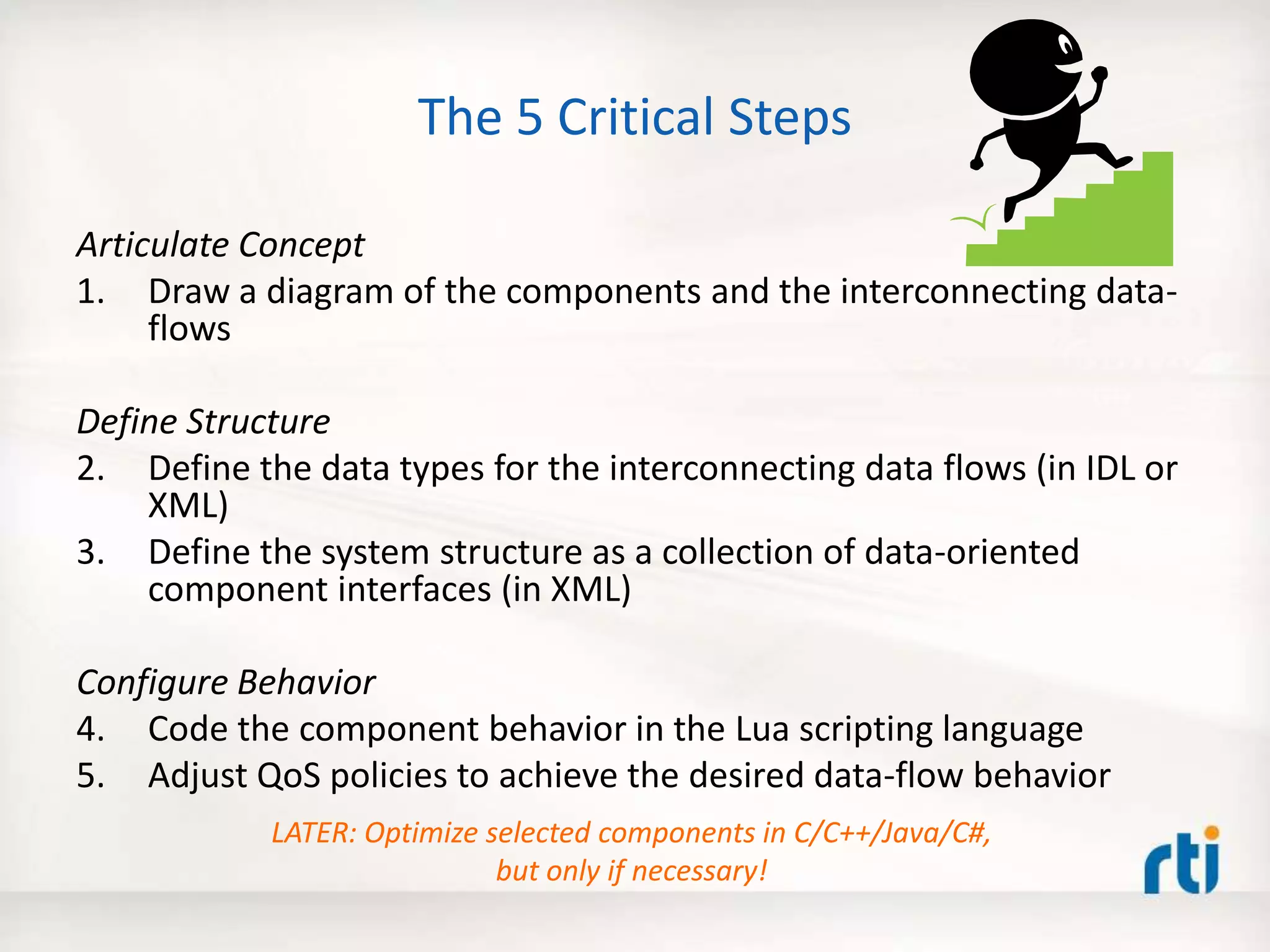
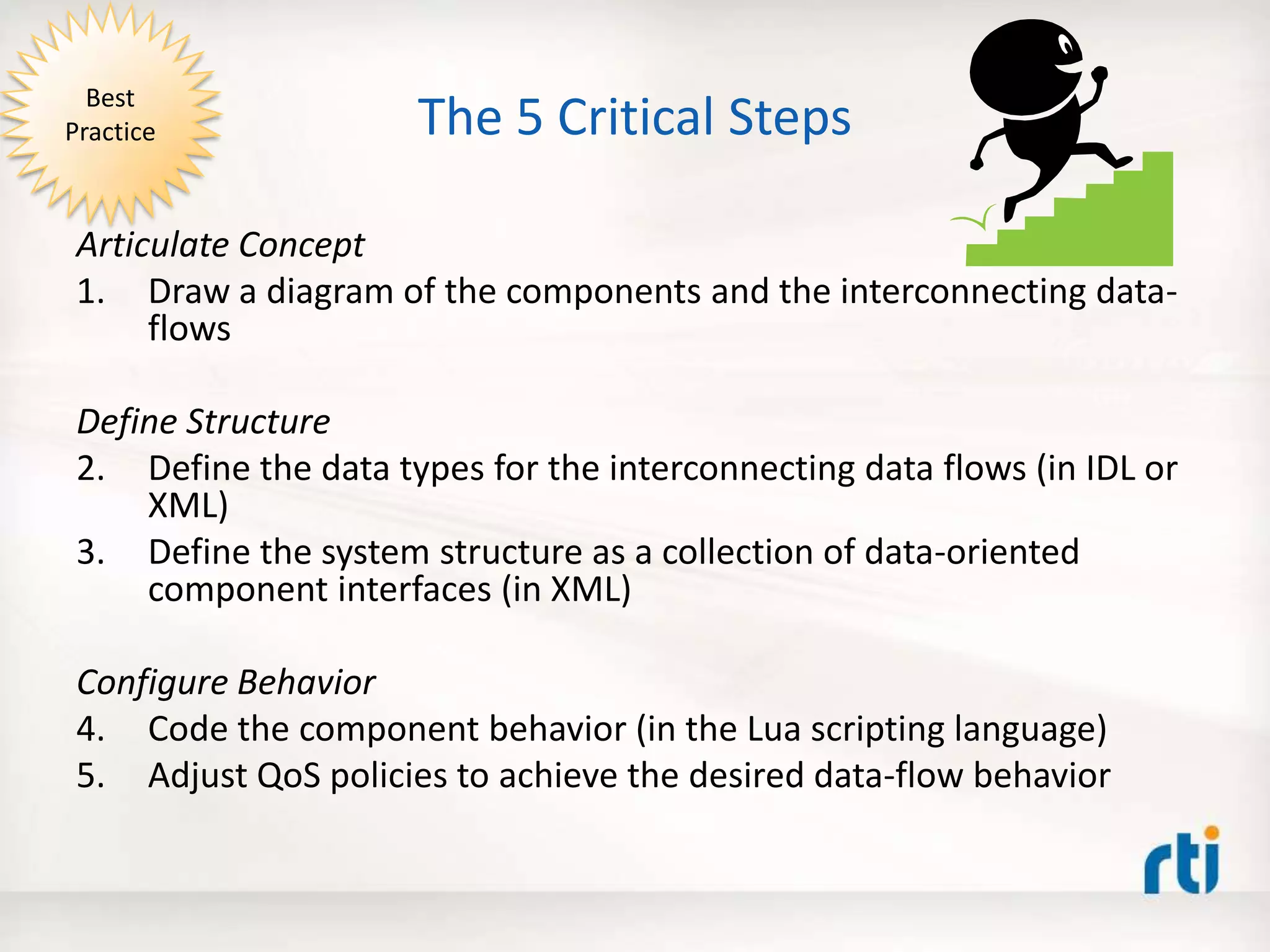
The 5 Critical Steps
Articulate Concept
1. Draw a diagram of the components and the interconnecting data-
flows
Define Structure
2. Define the data types for the interconnecting data flows (in IDL or
XML)
3. Define the system structure as a collection of data-oriented
component interfaces (in XML)
Configure Behavior
4. Code the component behavior (in the Lua scripting language)
5. Adjust QoS policies to achieve the desired data-flow behavior
Best
Practice
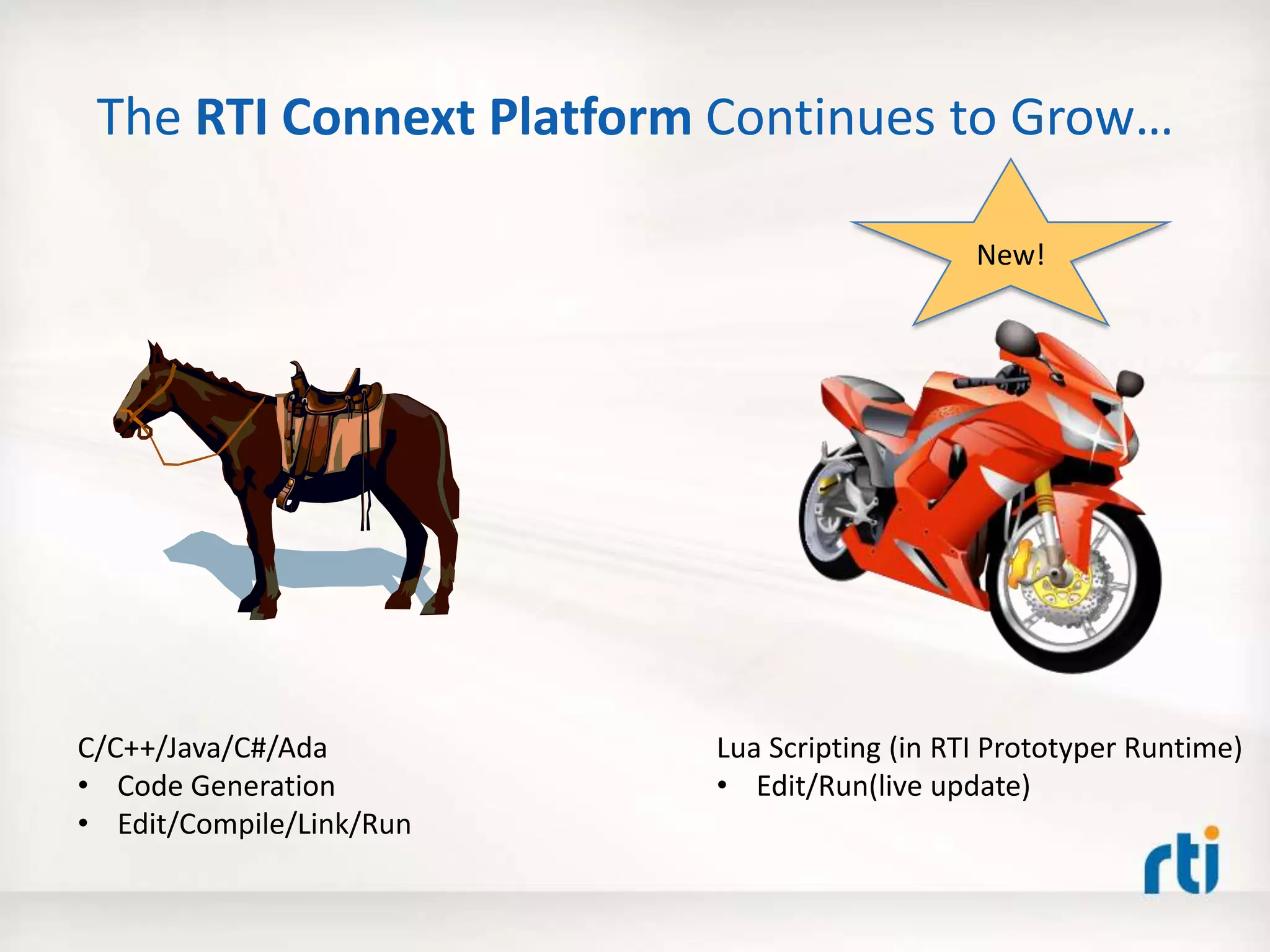
The RTI Connext Platform Continues to Grow…
C/C++/Java/C#/Ada
• Code Generation
• Edit/Compile/Link/Run
Lua Scripting (in RTI Prototyper Runtime)
• Edit/Run(live update)
New!
The RTI Prototyper with Lua
1. -- Interface: parameters, inputs, outputs
2. local A, B, C = 30, 30, 10 -- Change the 'C' parameter to to see various flower shapes
3. local ShapeWriter = CONTAINER.WRITER[3] -- Triangles
4.
5. -- Global counter (preserved across invocations)
6. if not count then count = 0 else count = count + 1 end
7.
8. local shape = ShapeWriter.instance;
9. local angle = count % 360;
10.
11. shape['x'] = 120 + (A+B) * math.cos(angle) + B * math.cos((A/B-C)*angle)
12. shape['y'] = 120 + (A+B) * math.sin(angle) + B * math.sin((A/B-C)*angle)
13.
14. shape['shapesize'] = 5
15. shape['color'] = "RED"
16.
17. ShapeWriter:write() Lua Component
N inputs M outputs
DDS
Prototyper (Container)
The RTI Prototyper with Lua
Lua Engine
1. -- Interface: parameters, inputs, outputs
2. local A, B, C = 30, 30, 10 -- Change the 'C' parameter to to see various flower shapes
3. local ShapeWriter = CONTAINER.WRITER[3] -- Triangles
4.
5. -- Global counter (preserved across invocations)
6. if not count then count = 0 else count = count + 1 end
7.
8. local shape = ShapeWriter.instance;
9. local angle = count % 360;
10.
11. shape['x'] = 120 + (A+B) * math.cos(angle) + B * math.cos((A/B-C)*angle)
12. shape['y'] = 120 + (A+B) * math.sin(angle) + B * math.sin((A/B-C)*angle)
13.
14. shape['shapesize'] = 5
15. shape['color'] = "RED"
16.
17. ShapeWriter:write()
DDS
Lua Component
Behavior
Prototyper (Container)
The RTI Prototyper with Lua
Lua Engine
1. -- Interface: parameters, inputs, outputs
2. local A, B, C = 30, 30, 10 -- Change the 'C' parameter to to see various flower shapes
3. local ShapeWriter = CONTAINER.WRITER[3] -- Triangles
4.
5. -- Global counter (preserved across invocations)
6. if not count then count = 0 else count = count + 1 end
7.
8. local shape = ShapeWriter.instance;
9. local angle = count % 360;
10.
11. shape['x'] = 120 + (A+B) * math.cos(angle) + B * math.cos((A/B-C)*angle)
12. shape['y'] = 120 + (A+B) * math.sin(angle) + B * math.sin((A/B-C)*angle)
13.
14. shape['shapesize'] = 5
15. shape['color'] = "RED"
16.
17. ShapeWriter:write()
Lua Component
Behavior
DDS
Settings
(Structure/
Wiring)
Bind the
Component
Interface
(to data-space)
Prototyper (Container)
The RTI Prototyper with Lua
Lua Engine
1. -- Interface: parameters, inputs, outputs
2. local A, B, C = 30, 30, 10 -- Change the 'C' parameter to to see various flower shapes
3. local ShapeWriter = CONTAINER.WRITER[3] -- Triangles
4.
5. -- Global counter (preserved across invocations)
6. if not count then count = 0 else count = count + 1 end
7.
8. local shape = ShapeWriter.instance;
9. local angle = count % 360;
10.
11. shape['x'] = 120 + (A+B) * math.cos(angle) + B * math.cos((A/B-C)*angle)
12. shape['y'] = 120 + (A+B) * math.sin(angle) + B * math.sin((A/B-C)*angle)
13.
14. shape['shapesize'] = 5
15. shape['color'] = "RED"
16.
17. ShapeWriter:write()
Lua Component
Behavior
DDS
Settings
(Structure/
Wiring)
Bind the
Component
Interface
(to data-space)
Prototyper
determines
when the
Lua Component
runs
Prototyper (Container)
The RTI Prototyper with Lua
Lua Engine
1. -- Interface: parameters, inputs, outputs
2. local A, B, C = 30, 30, 10 -- Change the 'C' parameter to to see various flower shapes
3. local ShapeWriter = CONTAINER.WRITER[3] -- Triangles
4.
5. -- Global counter (preserved across invocations)
6. if not count then count = 0 else count = count + 1 end
7.
8. local shape = ShapeWriter.instance;
9. local angle = count % 360;
10.
11. shape['x'] = 120 + (A+B) * math.cos(angle) + B * math.cos((A/B-C)*angle)
12. shape['y'] = 120 + (A+B) * math.sin(angle) + B * math.sin((A/B-C)*angle)
13.
14. shape['shapesize'] = 5
15. shape['color'] = "RED"
16.
17. ShapeWriter:write()
Lua Component
Behavior
DDS
Settings
(Structure/
Wiring)
Bind the
Component
Interface
(to data-space)
Prototyper
determines
when the
Lua Component
runs
Lua Component
state preserved
across runs
(code can change!)
Prototyper (Container)
The RTI Prototyper with Lua
Lua Engine
1. -- Interface: parameters, inputs, outputs
2. local A, B, C = 30, 30, 10 -- Change the 'C' parameter to to see various flower shapes
3. local ShapeWriter = CONTAINER.WRITER[3] -- Triangles
4.
5. -- Global counter (preserved across invocations)
6. if not count then count = 0 else count = count + 1 end
7.
8. local shape = ShapeWriter.instance;
9. local angle = count % 360;
10.
11. shape['x'] = 120 + (A+B) * math.cos(angle) + B * math.cos((A/B-C)*angle)
12. shape['y'] = 120 + (A+B) * math.sin(angle) + B * math.sin((A/B-C)*angle)
13.
14. shape['shapesize'] = 5
15. shape['color'] = "RED"
16.
17. ShapeWriter:write()
DDS
Settings
(Structure/
Wiring)
RTI
Community
Portal
Download
Lua Component
Behavior
For details, see:
Getting Started
Guide
Bind the
Component
Interface
(to data-space)
Dynamically Scriptable (in Lua)
Distributed Components
(using DDS)
Data Distribution Service (DDS)
1. -- Interface: parameters, inputs, outputs
2. local A, B, C = 30, 30, 10 -- Change the 'C' parameter to to see various flower shapes
3. local ShapeWriter = CONTAINER.WRITER[3] -- Triangles
4.
5. -- Global counter (preserved across invocations)
6. if not count then count = 0 else count = count + 1 end
7.
8. local shape = ShapeWriter.instance;
9. local angle = count % 360;
10.
11. shape['x'] = 120 + (A+B) * math.cos(angle) + B * math.cos((A/B-C)*angle)
12. shape['y'] = 120 + (A+B) * math.sin(angle) + B * math.sin((A/B-C)*angle)
13.
14. shape['shapesize'] = 5
15. shape['color'] = "RED"
16.
17. ShapeWriter:write()
1. -- Interface: parameters, inputs, outputs
2. local A, B, C = 30, 30, 10 -- Change the 'C' parameter to to see various flower shapes
3. local ShapeWriter = CONTAINER.WRITER[3] -- Triangles
4.
5. -- Global counter (preserved across invocations)
6. if not count then count = 0 else count = count + 1 end
7.
8. local shape = ShapeWriter.instance;
9. local angle = count % 360;
10.
11. shape['x'] = 120 + (A+B) * math.cos(angle) + B * math.cos((A/B-C)*angle)
12. shape['y'] = 120 + (A+B) * math.sin(angle) + B * math.sin((A/B-C)*angle)
13.
14. shape['shapesize'] = 5
15. shape['color'] = "RED"
16.
17. ShapeWriter:write()
1. -- Interface: parameters, inputs, outputs
2. local A, B, C = 30, 30, 10 -- Change the 'C' parameter to to see various flower shapes
3. local ShapeWriter = CONTAINER.WRITER[3] -- Triangles
4.
5. -- Global counter (preserved across invocations)
6. if not count then count = 0 else count = count + 1 end
7.
8. local shape = ShapeWriter.instance;
9. local angle = count % 360;
10.
11. shape['x'] = 120 + (A+B) * math.cos(angle) + B * math.cos((A/B-C)*angle)
12. shape['y'] = 120 + (A+B) * math.sin(angle) + B * math.sin((A/B-C)*angle)
13.
14. shape['shapesize'] = 5
15. shape['color'] = "RED"
16.
17. ShapeWriter:write()
1. -- Interface: parameters, inputs, outputs
2. local A, B, C = 30, 30, 10 -- Change the 'C' parameter to to see various flower shapes
3. local ShapeWriter = CONTAINER.WRITER[3] -- Triangles
4.
5. -- Global counter (preserved across invocations)
6. if not count then count = 0 else count = count + 1 end
7.
8. local shape = ShapeWriter.instance;
9. local angle = count % 360;
10.
11. shape['x'] = 120 + (A+B) * math.cos(angle) + B * math.cos((A/B-C)*angle)
12. shape['y'] = 120 + (A+B) * math.sin(angle) + B * math.sin((A/B-C)*angle)
13.
14. shape['shapesize'] = 5
15. shape['color'] = "RED"
16.
17. ShapeWriter:write()
The Outcome
Rapid
Application
Development
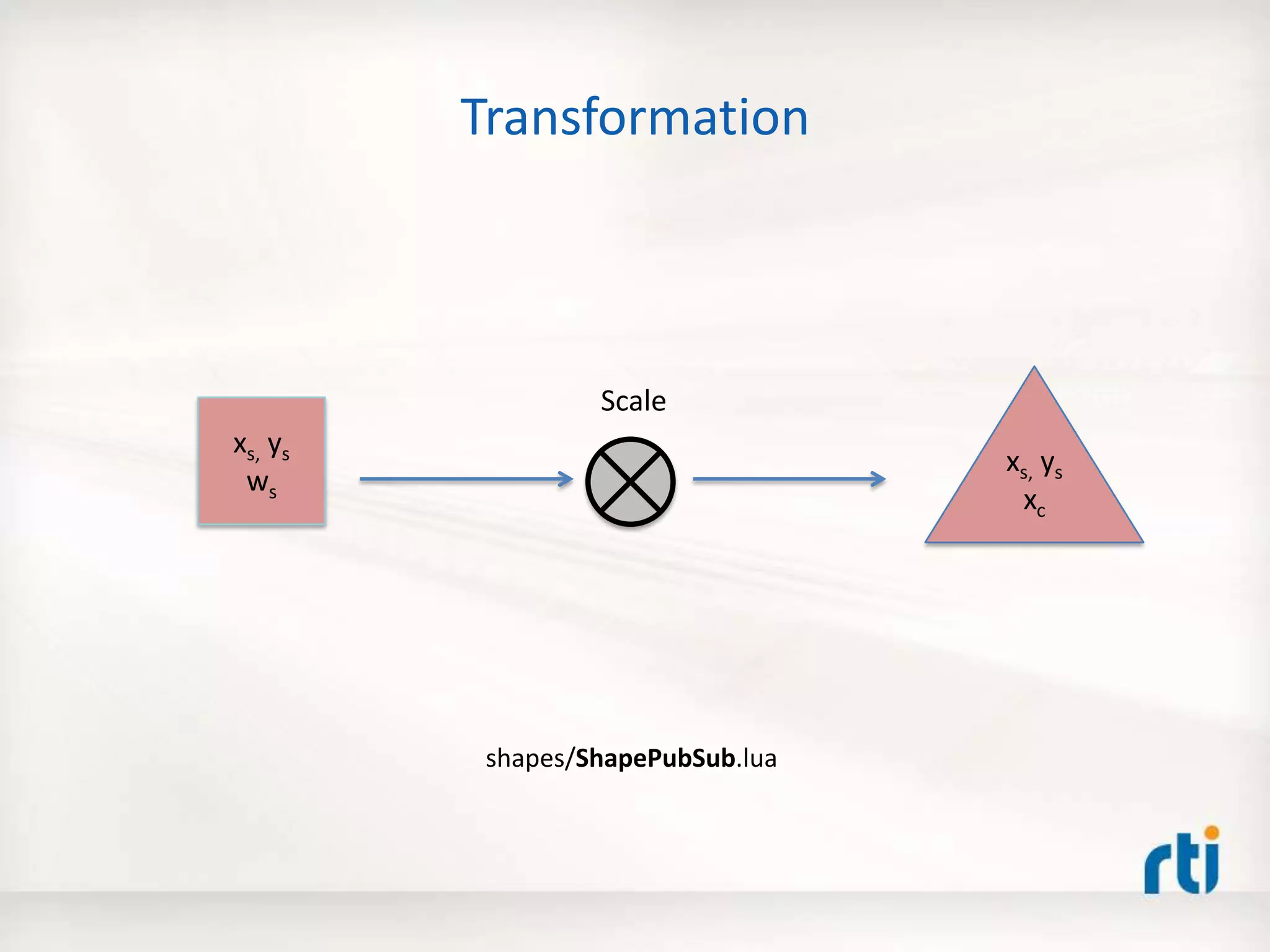
Transformation
xs, ys
ws
xs, ys
xc
shapes/ShapePubSub.lua
Scale
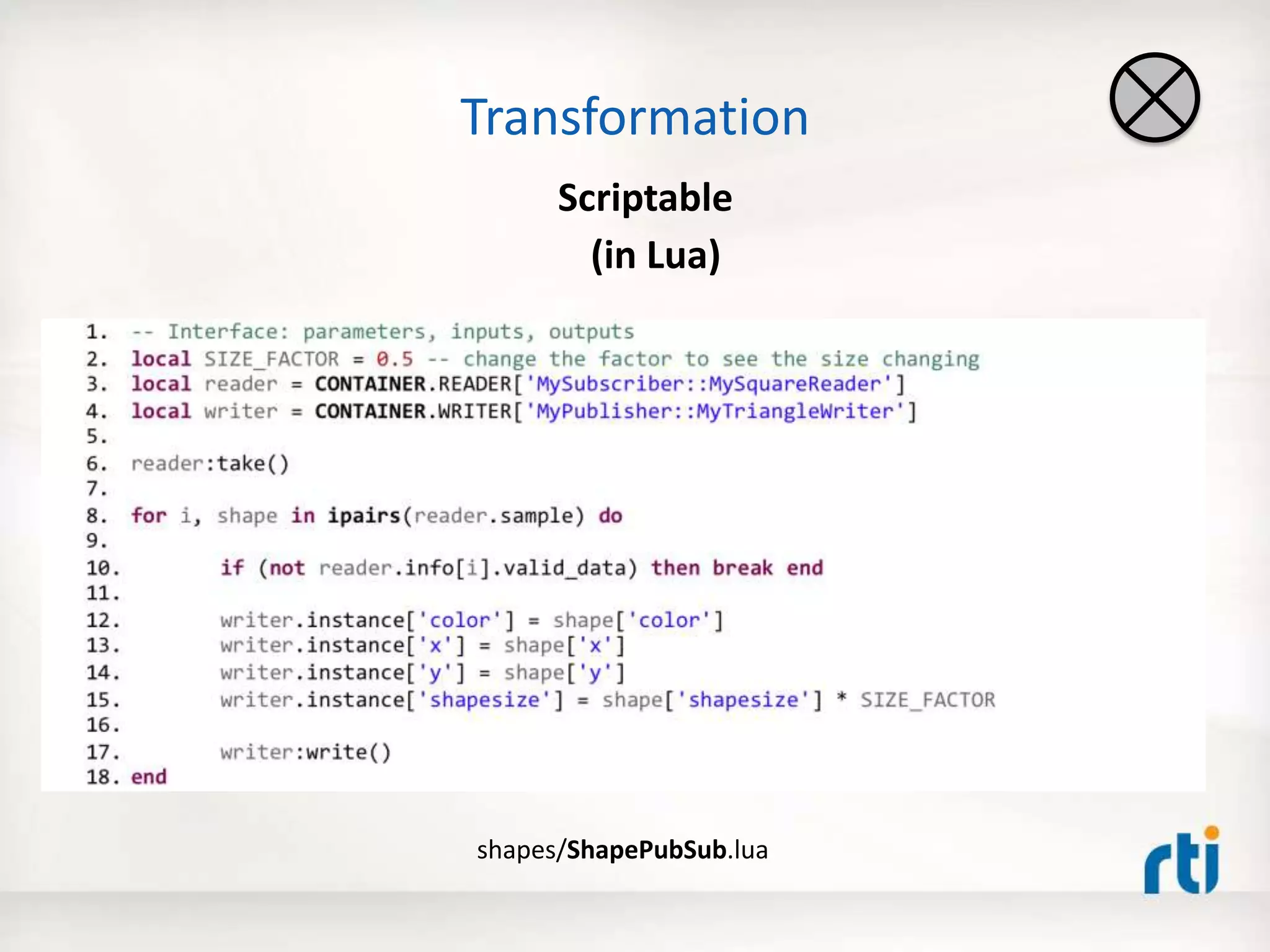
Transformation
Scriptable
(in Lua)
shapes/ShapePubSub.lua
Transformation - Try it Out Yourself
1. local SIZE_FACTOR = 0.5 -- change the factor to see the size changing
2. local reader = CONTAINER.READER[1] -- input
3. local writer = CONTAINER.WRITER[1] -- output
4.
5. reader:take() -- take all the samples on from the data-space
6.
7. for i, shape in ipairs(reader.sample) do -- iterate through all the samples
8.
9. if (not reader.info[i].valid_data) then break end -- skip invalid content
10.
11. writer.instance['color'] = shape['color']
12. writer.instance['x'] = shape['x']
13. writer.instance['y'] = shape['y']
14. writer.instance['shapesize'] = shape['shapesize'] * SIZE_FACTOR -- transform
15.
16. writer:write() -- output transformed sample
17. end
Data Distribution Service (DDS)
Prototyper:
shapes/ShapePubSub.lua
Subscriber
(Shapes Demo)
Publisher
(Shapes Demo)
Transformation - Try it Out Yourself
Dynamic
Live
Code
Update
1. local SIZE_FACTOR = 0.5 -- change the factor to see the size changing
2. local reader = CONTAINER.READER[1] -- input
3. local writer = CONTAINER.WRITER[1] -- output
4.
5. reader:take() -- take all the samples on from the data-space
6.
7. for i, shape in ipairs(reader.sample) do -- iterate through all the samples
8.
9. if (not reader.info[i].valid_data) then break end -- skip invalid content
10.
11. writer.instance['color'] = shape['color']
12. writer.instance['x'] = shape['x']
13. writer.instance['y'] = shape['y']
14. writer.instance['shapesize'] = shape['shapesize'] * SIZE_FACTOR -- transform
15.
16. writer:write() -- output transformed sample
17. end
1. local SIZE_FACTOR = 5 -- change the factor to see the size changing
2. local reader = CONTAINER.READER[1] -- input
3. local writer = CONTAINER.WRITER[1] -- output
4.
5. reader:take() -- take all the samples on from the data-space
6.
7. for i, shape in ipairs(reader.sample) do -- iterate through all the samples
8.
9. if (not reader.info[i].valid_data) then break end -- skip invalid content
10.
11. writer.instance['color'] = shape['color']
12. writer.instance['x'] = shape['x']
13. writer.instance['y'] = shape['y']
14. writer.instance['shapesize'] = shape['shapesize'] * SIZE_FACTOR -- transform
15.
16. writer:write() -- output transformed sample
17. end
before
after
shapes/ShapePubSub.lua
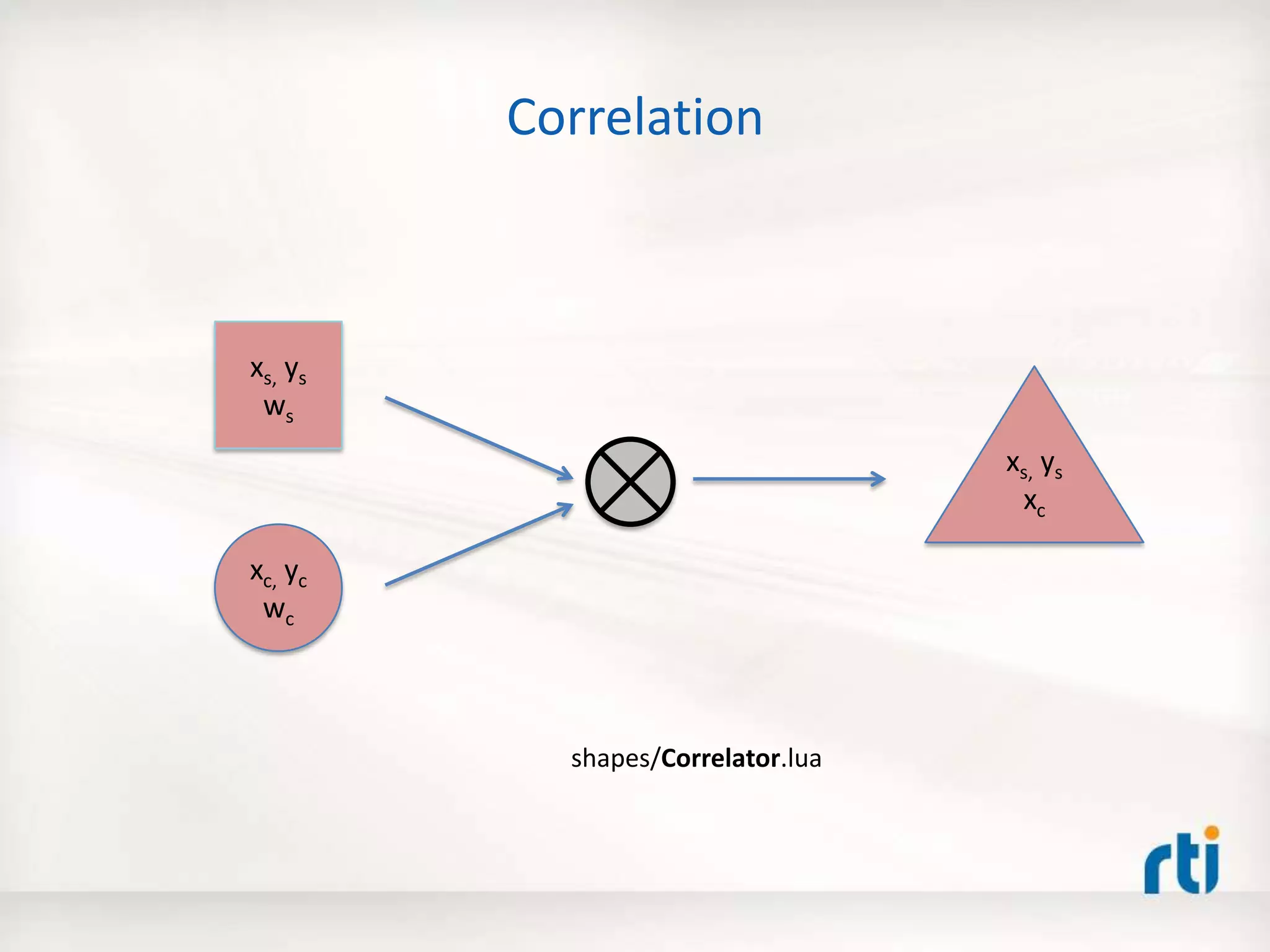
Correlation
xs, ys
ws
xc, yc
wc
xs, ys
xc
shapes/Correlator.lua
-- Interface: parameters, inputs, outputs
local reader1 = CONTAINER.READER[1]
local reader2 = CONTAINER.READER[2]
local writer = CONTAINER.WRITER[#CONTAINER.WRITER]
-- Globals (preserved across invocations)
if not shapesize then shapesize={} end -- shapesize of the output stream
-- Cache the 'shapesize' for a color from the 2nd input stream ---
reader2:take()
for i, shape in ipairs(reader2.sample) do
if (not reader2.info[i].valid_data) then break end
local color = shape['color']
shapesize[color] = shape['x']
end
-- Merge the 'shapesize' for a color with x and y from the 1st input stream ---
reader1:take()
for i, shape in ipairs(reader1.sample) do
if (not reader1.info[i].valid_data) then break end
local color = shape['color’]
writer.instance['color'] = color
writer.instance['x'] = shape['x']
writer.instance['y'] = shape['y']
writer.instance['shapesize'] = shapesize[color] or shape['shapesize']
writer:write()
end
shapes/Correlator.lua
How many lines of C/C++/Java
code would it take?
Correlation - Try it Out Yourself
1. local SIZE_FACTOR = 0.5 -- change the factor to see the size changing
2. local reader = CONTAINER.READER[1] -- input
3. local writer = CONTAINER.WRITER[1] -- output
4.
5. reader:take() -- take all the samples on from the data-space
6.
7. for i, shape in ipairs(reader.sample) do -- iterate through all the samples
8.
9. if (not reader.info[i].valid_data) then break end -- skip invalid content
10.
11. writer.instance['color'] = shape['color']
12. writer.instance['x'] = shape['x']
13. writer.instance['y'] = shape['y']
14. writer.instance['shapesize'] = shape['shapesize'] * SIZE_FACTOR -- transform
15.
16. writer:write() -- output transformed sample
17. end
Data Distribution Service (DDS)
Prototyper:
shapes/Correlator.lua
Subscriber
(Shapes Demo)
Publishers
(Shapes Demo)
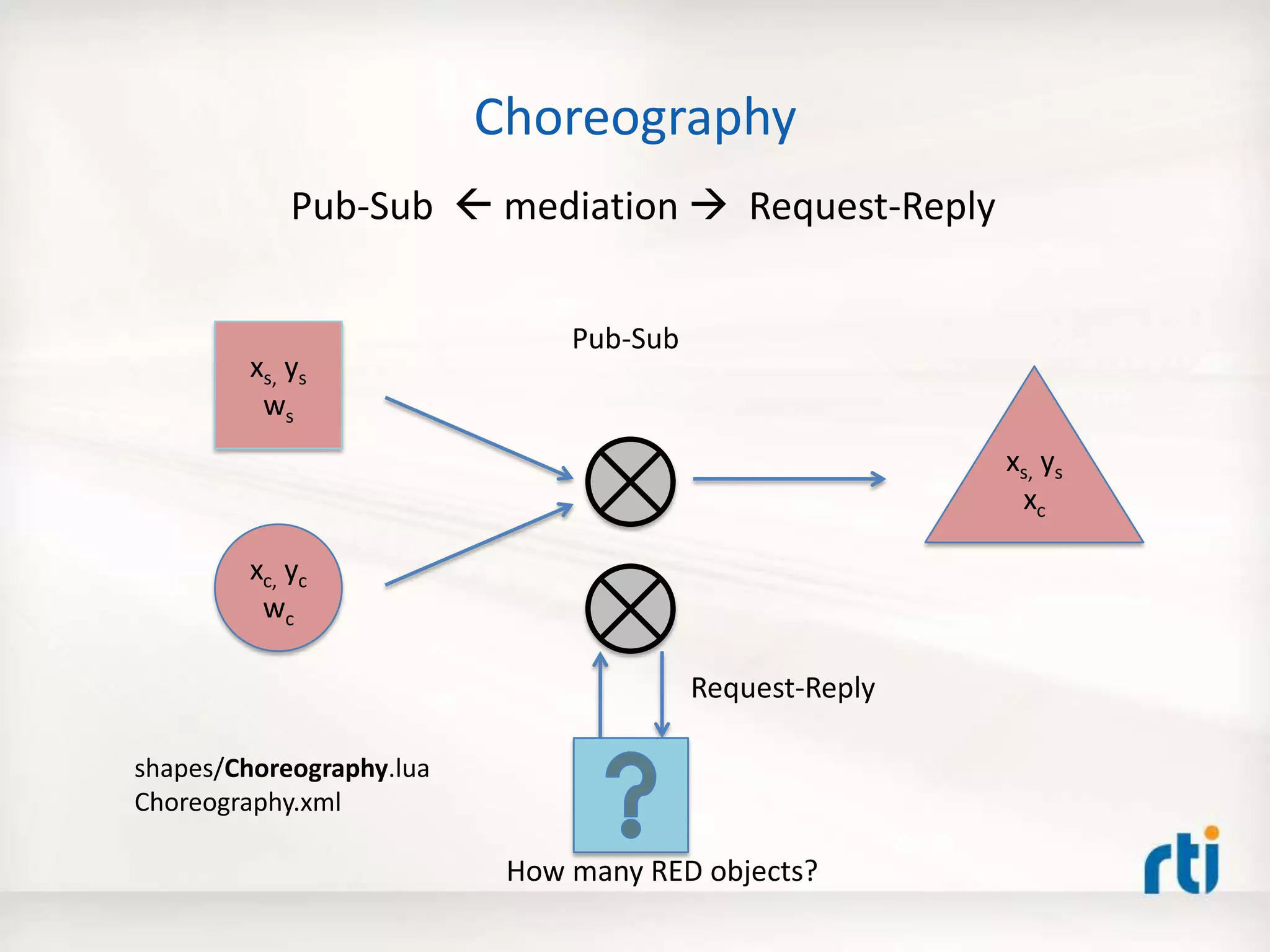
Choreography
xs, ys
ws
xc, yc
wc
xs, ys
xc
Pub-Sub  mediation  Request-Reply
Pub-Sub
Request-Reply
How many RED objects?
shapes/Choreography.lua
Choreography.xml
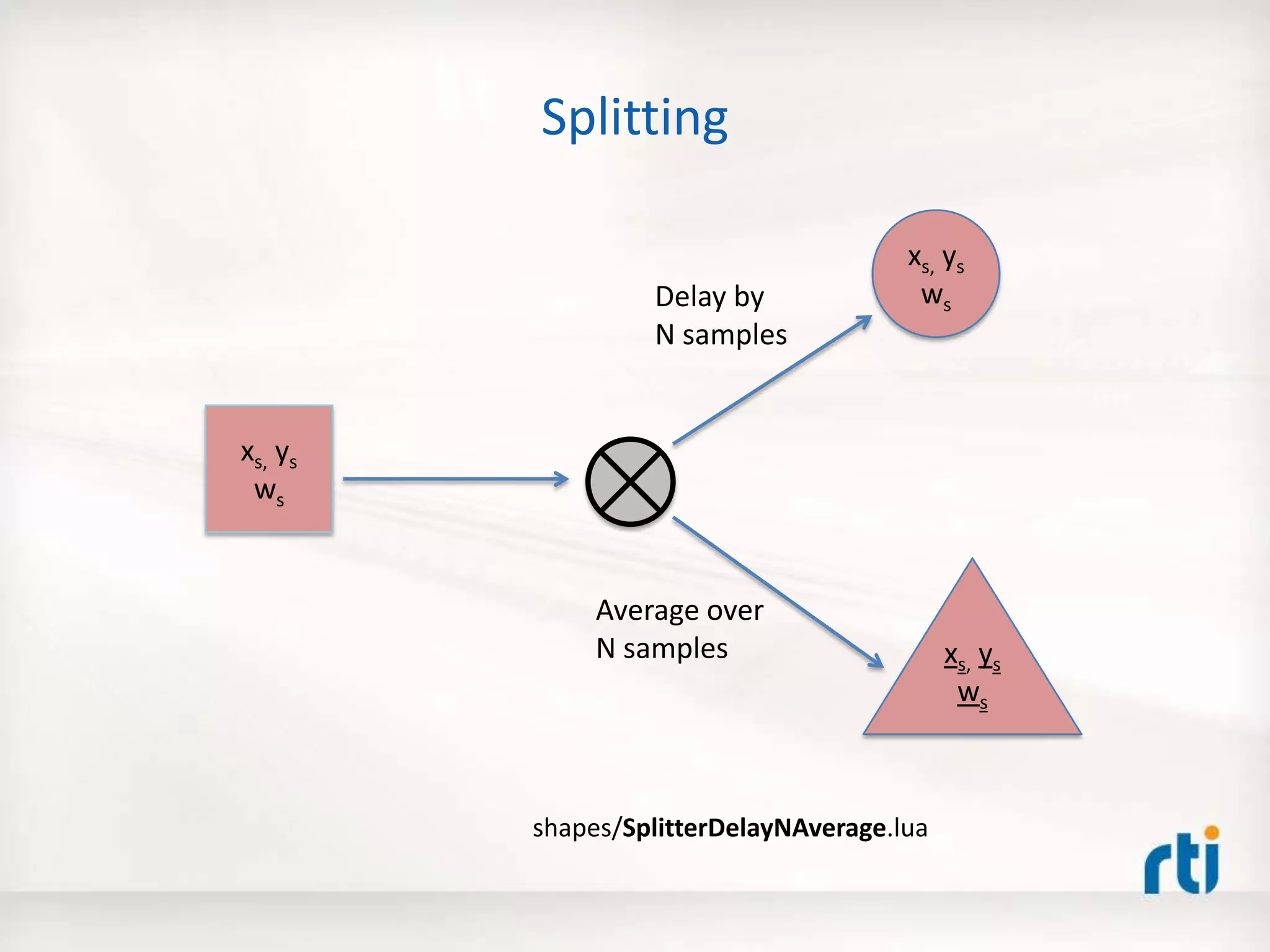
Splitting
xs, ys
ws
xs, ys
ws
xs, ys
ws
shapes/SplitterDelayNAverage.lua
Delay by
N samples
Average over
N samples
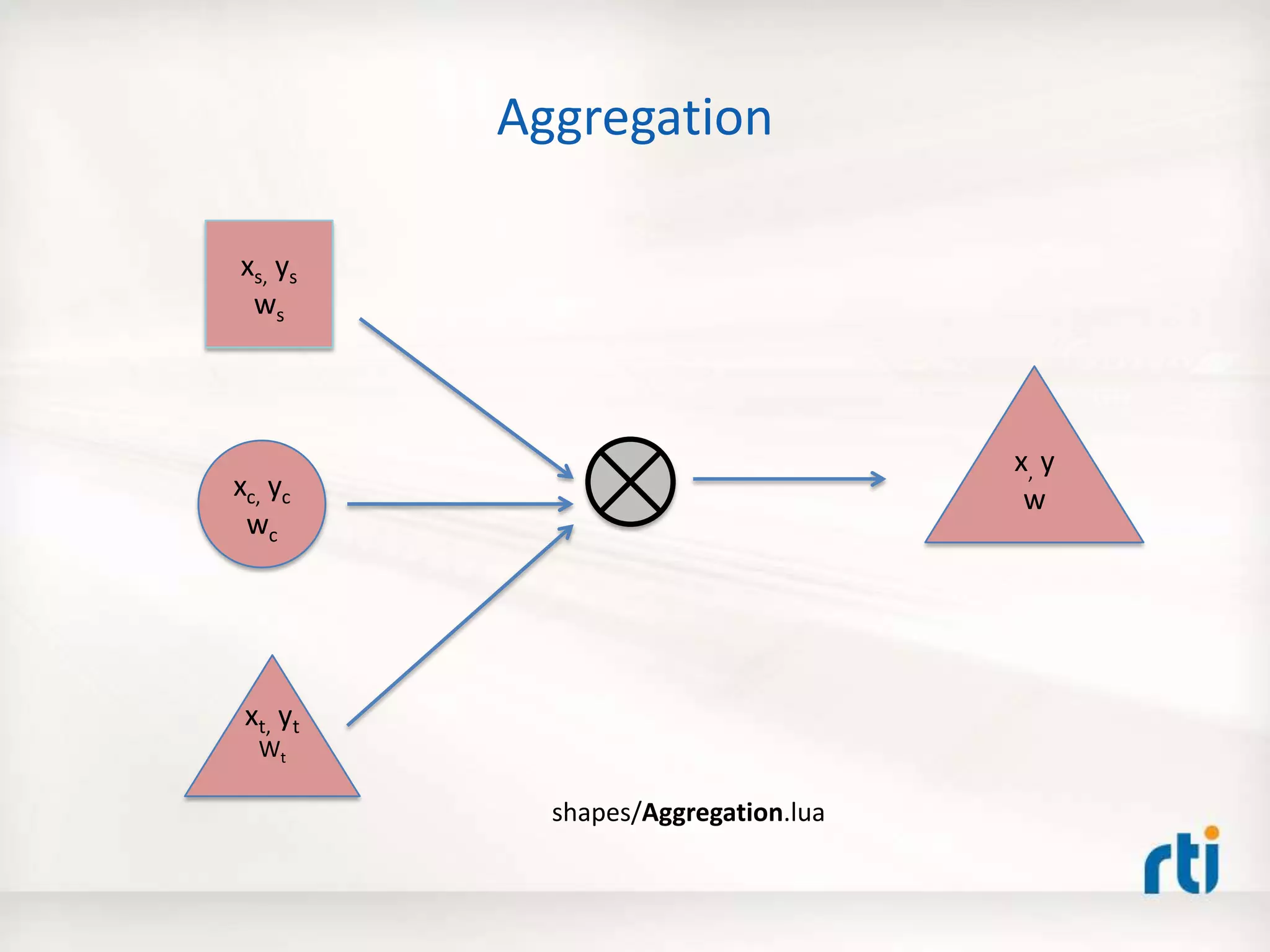
Aggregation
xs, ys
ws
xc, yc
wc
x, y
w
xt, yt
Wt
shapes/Aggregation.lua
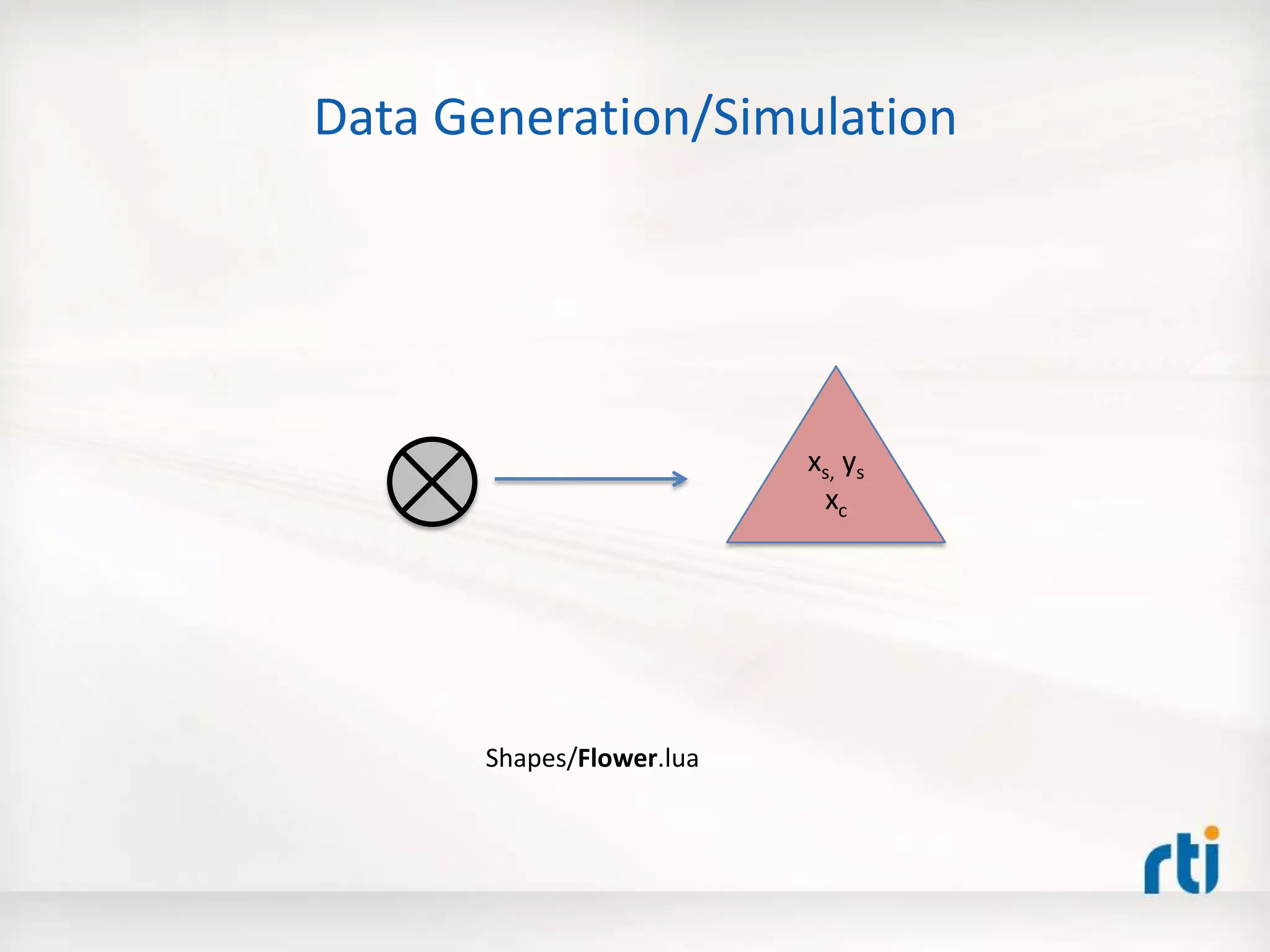
Data Generation/Simulation
Shapes/Flower.lua
xs, ys
xc
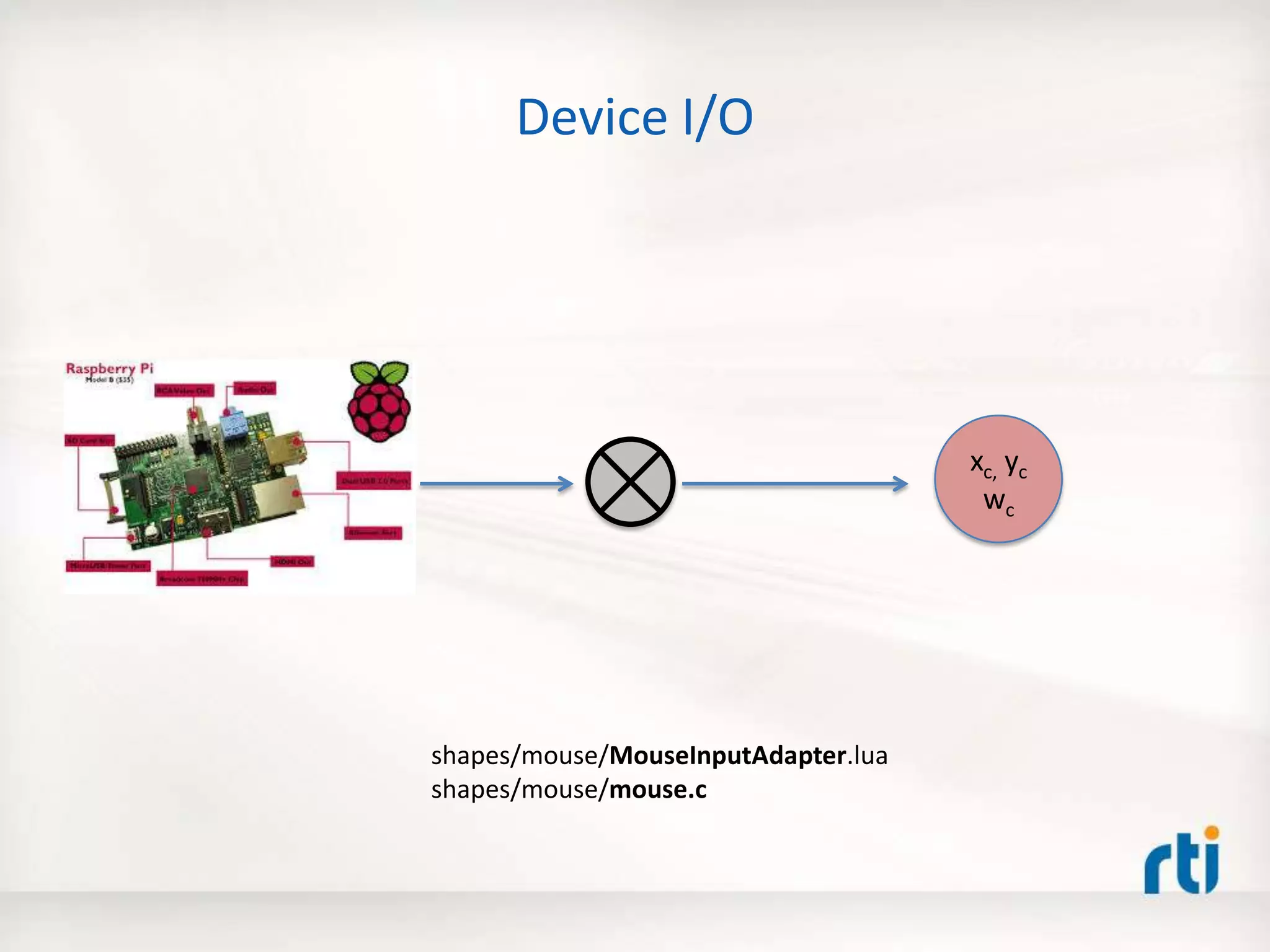
Device I/O
xc, yc
wc
shapes/mouse/MouseInputAdapter.lua
shapes/mouse/mouse.c
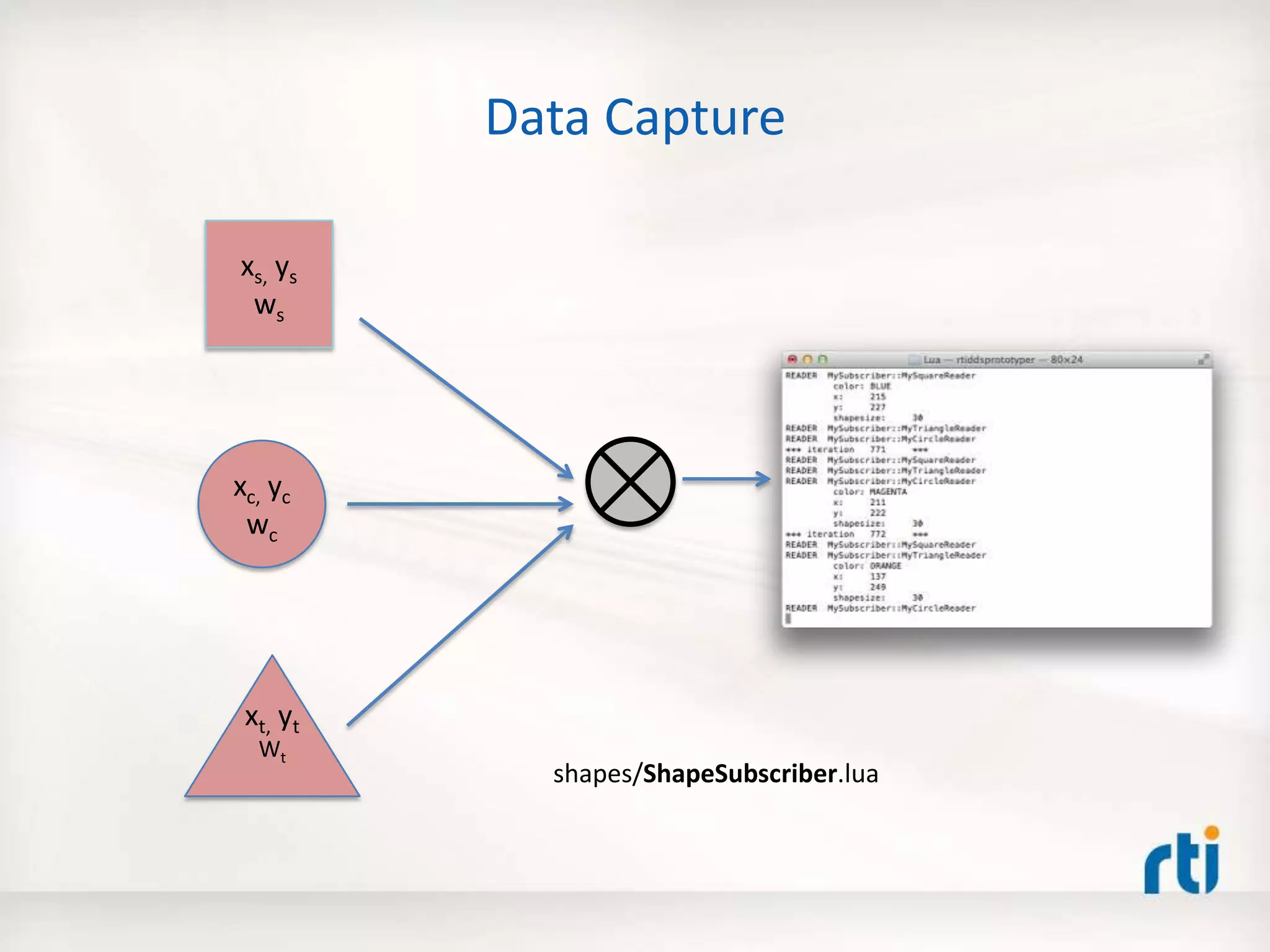
Data Capture
xs, ys
ws
xc, yc
wc
xt, yt
Wt
shapes/ShapeSubscriber.lua
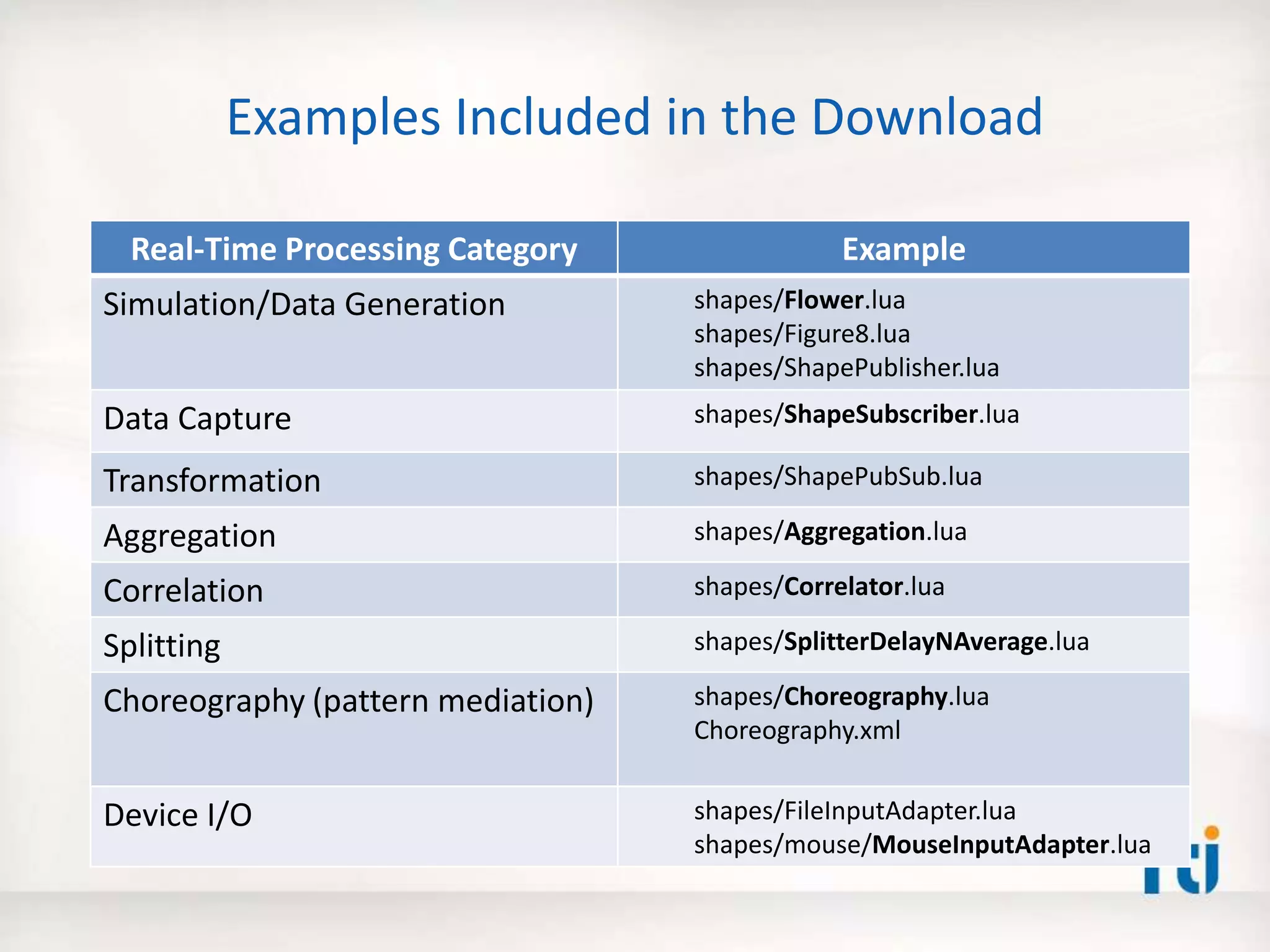
Examples Included in the Download
Real-Time Processing Category Example
Simulation/Data Generation shapes/Flower.lua
shapes/Figure8.lua
shapes/ShapePublisher.lua
Data Capture shapes/ShapeSubscriber.lua
Transformation shapes/ShapePubSub.lua
Aggregation shapes/Aggregation.lua
Correlation shapes/Correlator.lua
Splitting shapes/SplitterDelayNAverage.lua
Choreography (pattern mediation) shapes/Choreography.lua
Choreography.xml
Device I/O shapes/FileInputAdapter.lua
shapes/mouse/MouseInputAdapter.lua
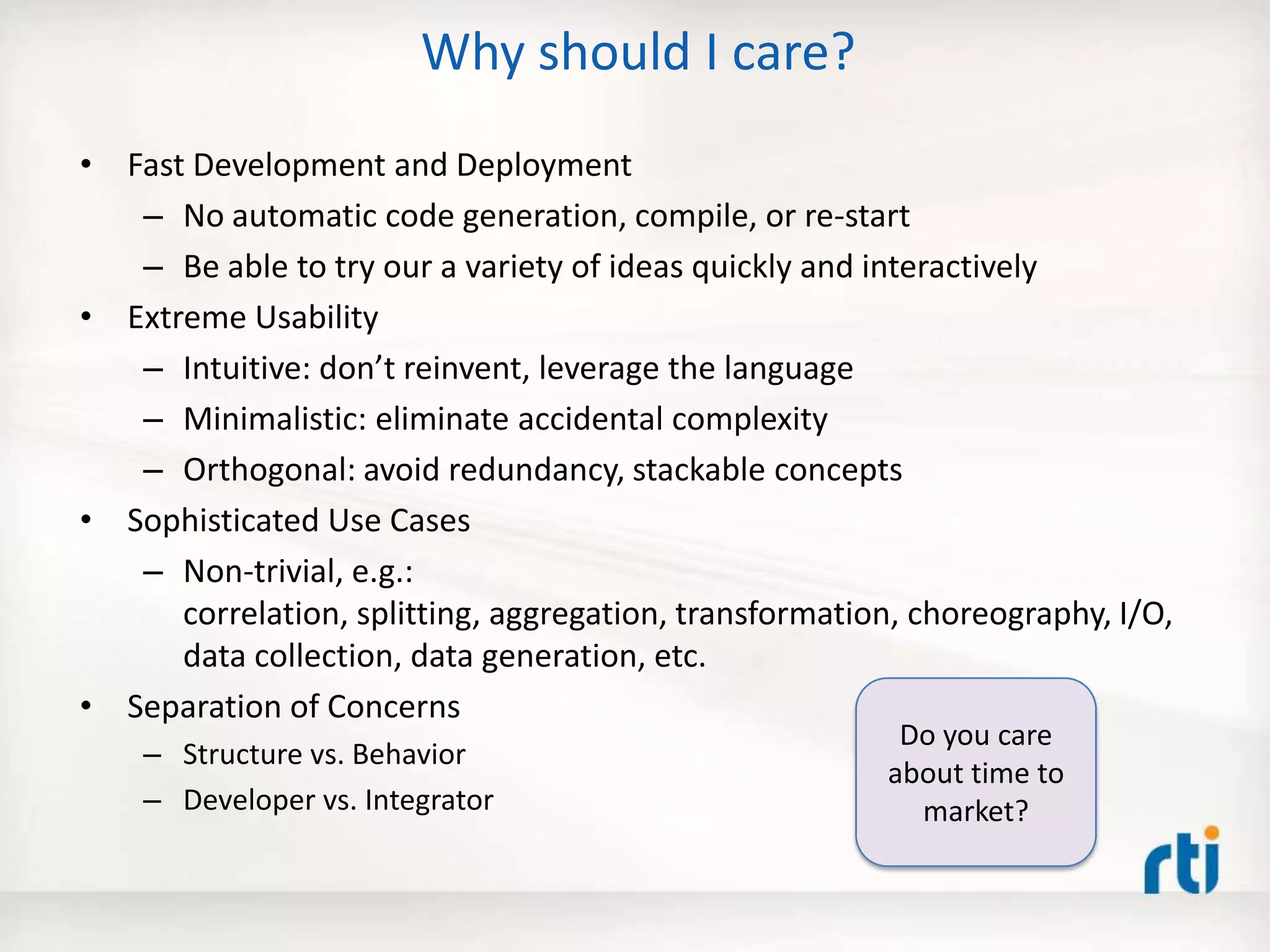
Why should I care?
• Fast Development and Deployment
– No automatic code generation, compile, or re-start
– Be able to try our a variety of ideas quickly and interactively
• Extreme Usability
– Intuitive: don’t reinvent, leverage the language
– Minimalistic: eliminate accidental complexity
– Orthogonal: avoid redundancy, stackable concepts
• Sophisticated Use Cases
– Non-trivial, e.g.:
correlation, splitting, aggregation, transformation, choreography, I/O,
data collection, data generation, etc.
• Separation of Concerns
– Structure vs. Behavior
– Developer vs. Integrator
Do you care
about time to
market?
Agenda
• Why is building distributed systems hard?
• The 5 Critical Steps – Best Practice
• The Prototyper – Separating Structure and
Behavior
• Defining structure using XML
• Coding behavior using Lua – A Small Fast Dynamic
Scripting Language
• Real-World Example
• Summary
Prototyper (Container)
The RTI Prototyper with Lua
Lua Engine
DDS
Settings
(Structure/
Wiring)
USER_QOS_PROFILES.xml
XML Based
Application
Configuration
RTI
Community
Portal
Download
1. -- Interface: parameters, inputs, outputs
2. local A, B, C = 30, 30, 10 -- Change the 'C' parameter to to see various flower shapes
3. local ShapeWriter = CONTAINER.WRITER[3] -- Triangles
4.
5. -- Global counter (preserved across invocations)
6. if not count then count = 0 else count = count + 1 end
7.
8. local shape = ShapeWriter.instance;
9. local angle = count % 360;
10.
11. shape['x'] = 120 + (A+B) * math.cos(angle) + B * math.cos((A/B-C)*angle)
12. shape['y'] = 120 + (A+B) * math.sin(angle) + B * math.sin((A/B-C)*angle)
13.
14. shape['shapesize'] = 5
15. shape['color'] = "RED"
16.
17. ShapeWriter:write()
Lua Component
Behavior
For details, see:
Getting Started
Guide
Structure
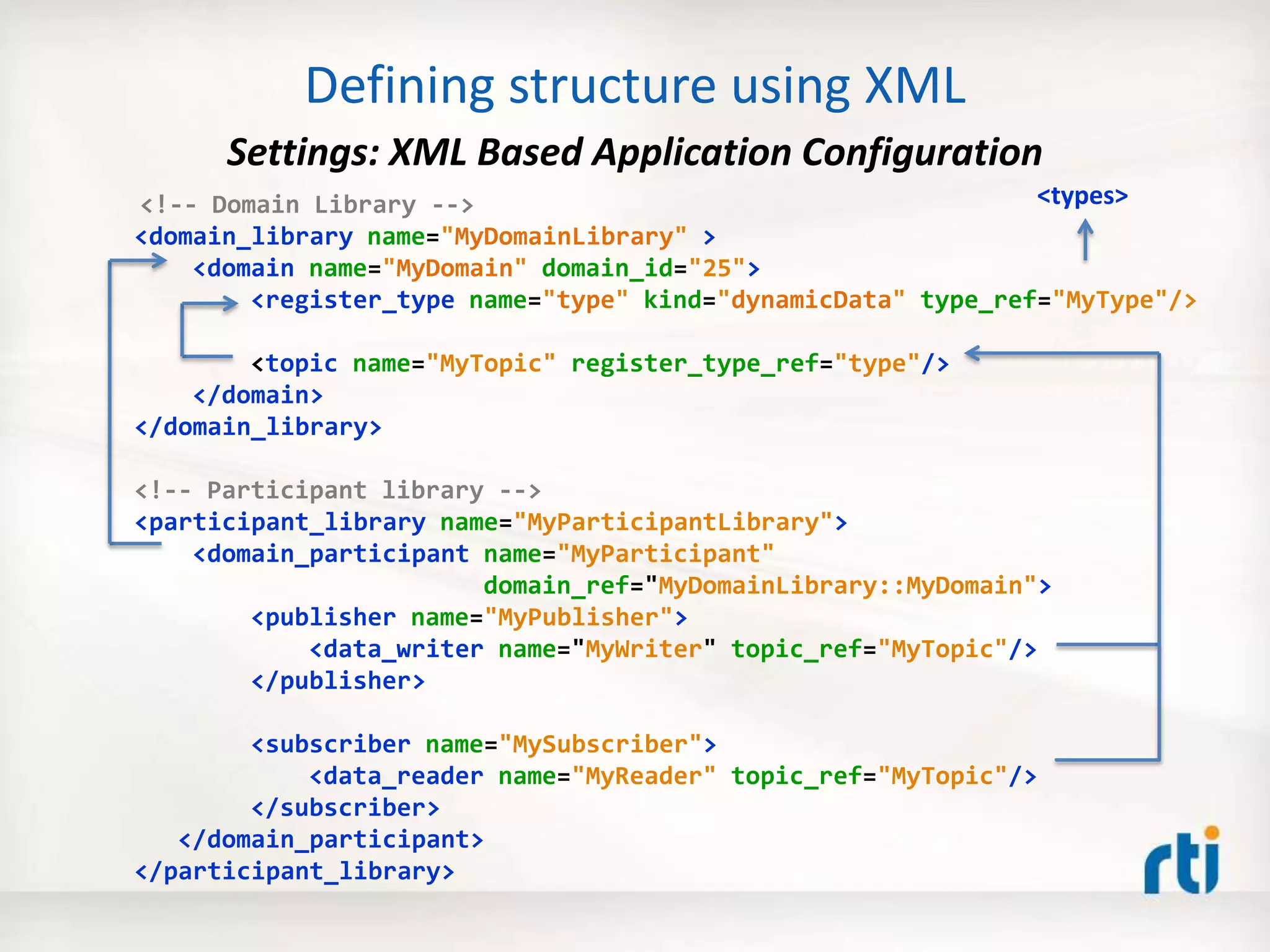
<!-- Domain Library -->
<domain_library name="MyDomainLibrary" >
<domain name="MyDomain" domain_id="25">
<register_type name="type" kind="dynamicData" type_ref="MyType"/>
<topic name="MyTopic" register_type_ref="type"/>
</domain>
</domain_library>
<!-- Participant library -->
<participant_library name="MyParticipantLibrary">
<domain_participant name="MyParticipant"
domain_ref="MyDomainLibrary::MyDomain">
<publisher name="MyPublisher">
<data_writer name="MyWriter" topic_ref="MyTopic"/>
</publisher>
<subscriber name="MySubscriber">
<data_reader name="MyReader" topic_ref="MyTopic"/>
</subscriber>
</domain_participant>
</participant_library>
<types>
Defining structure using XML
Settings: XML Based Application Configuration
Prototyper (Container)
The RTI Prototyper with Lua
Lua Engine
1. -- Interface: parameters, inputs, outputs
2. local A, B, C = 30, 30, 10 -- Change the 'C' parameter to to see various flower shapes
3. local ShapeWriter = CONTAINER.WRITER[3] -- Triangles
4.
5. -- Global counter (preserved across invocations)
6. if not count then count = 0 else count = count + 1 end
7.
8. local shape = ShapeWriter.instance;
9. local angle = count % 360;
10.
11. shape['x'] = 120 + (A+B) * math.cos(angle) + B * math.cos((A/B-C)*angle)
12. shape['y'] = 120 + (A+B) * math.sin(angle) + B * math.sin((A/B-C)*angle)
13.
14. shape['shapesize'] = 5
15. shape['color'] = "RED"
16.
17. ShapeWriter:write()
DDS
Settings
(Structure/
Wiring)
USER_QOS_PROFILES.xml
XML Based
Application
Configuration
RTI
Community
Portal
Download
Lua Component
Behavior
For details, see:
Getting Started
GuideBehavior
Why Lua?
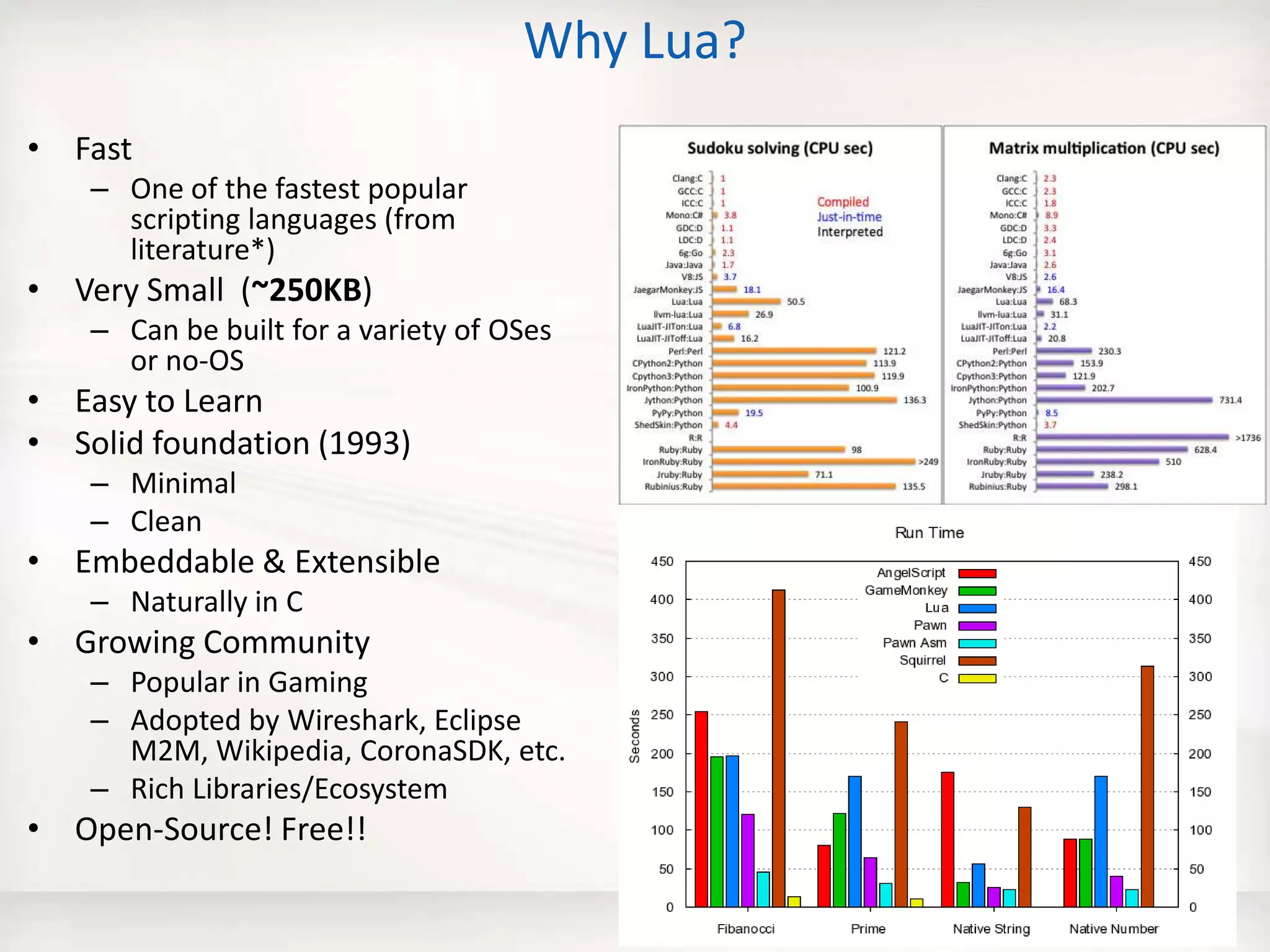
• Fast
– One of the fastest popular
scripting languages (from
literature*)
• Very Small (~250KB)
– Can be built for a variety of OSes
or no-OS
• Easy to Learn
• Solid foundation (1993)
– Minimal
– Clean
• Embeddable & Extensible
– Naturally in C
• Growing Community
– Popular in Gaming
– Adopted by Wireshark, Eclipse
M2M, Wikipedia, CoronaSDK, etc.
– Rich Libraries/Ecosystem
• Open-Source! Free!!
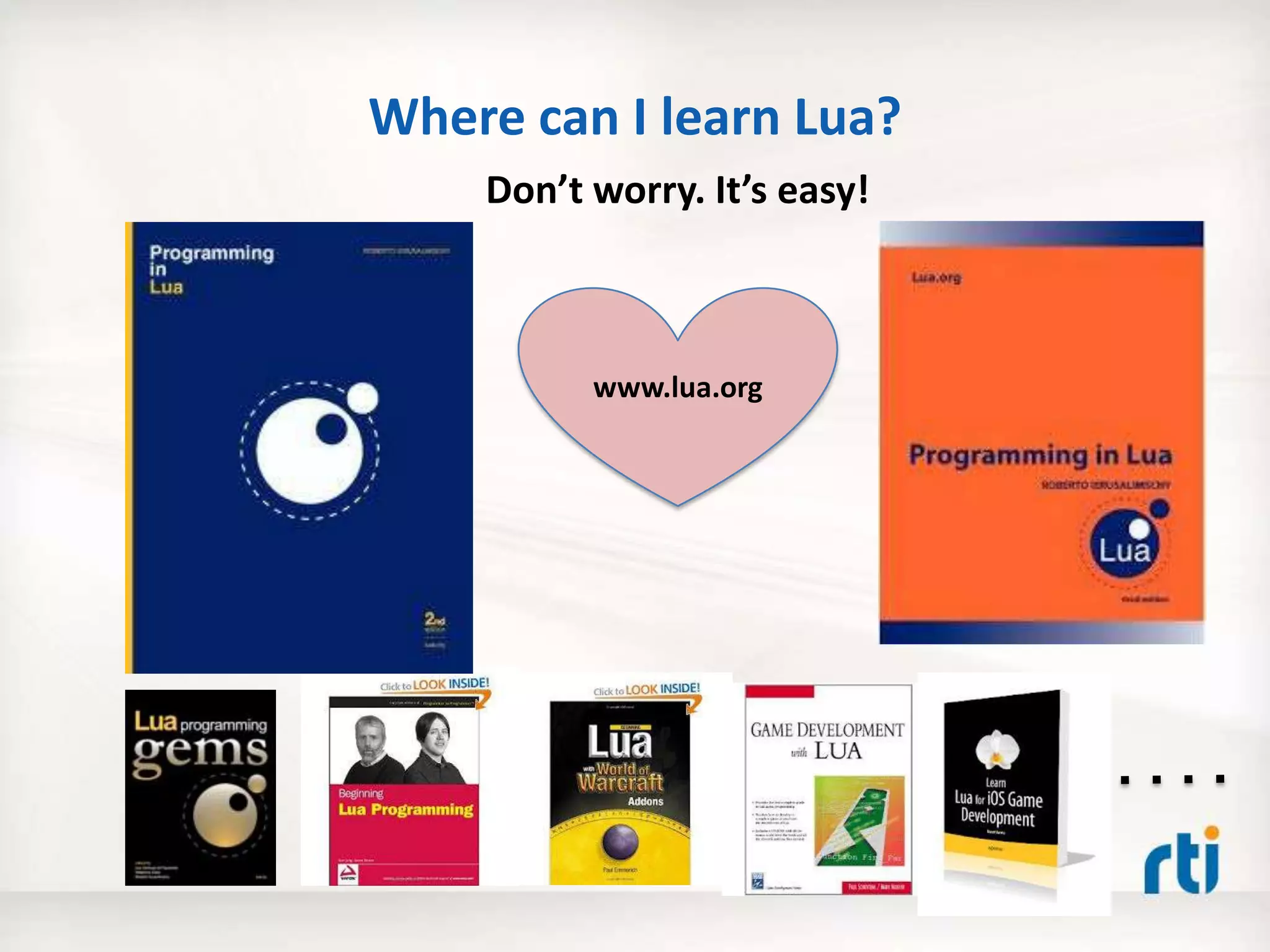
Where can I learn Lua?
www.lua.org
Don’t worry. It’s easy!
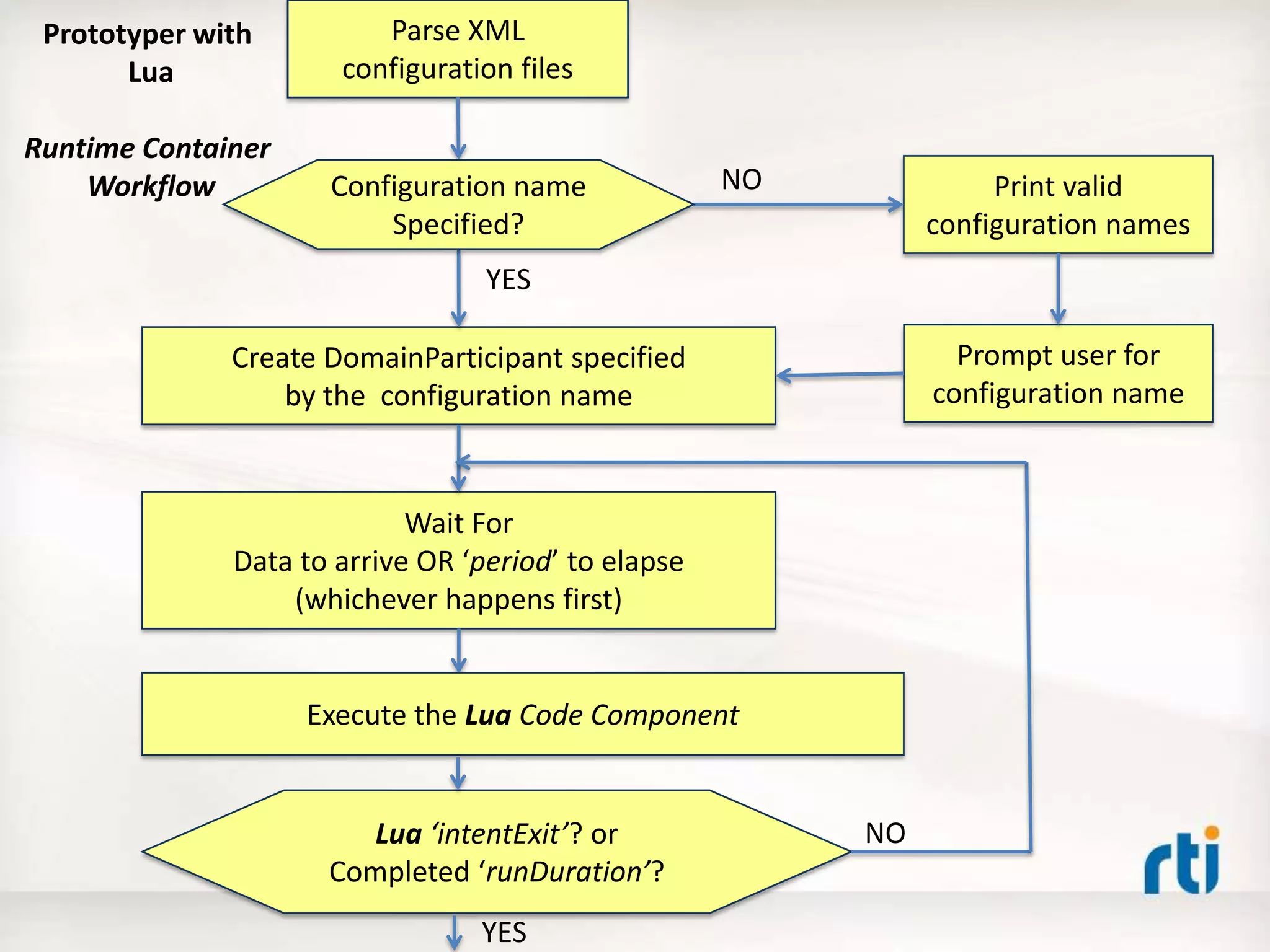
Parse XML
configuration files
Create DomainParticipant specified
by the configuration name
Print valid
configuration names
Prompt user for
configuration name
Wait For
Data to arrive OR ‘period’ to elapse
(whichever happens first)
Execute the Lua Code Component
Lua ‘intentExit’? or
Completed ‘runDuration’?
Configuration name
Specified?
NO
YES
NO
YES
Prototyper with
Lua
Runtime Container
Workflow
RTI Prototyper with Lua
Runtime Container
• When can the Lua Component run?
– On any one or more of the following events
• on Start
• on Data arrival
• on Period (timer)
• on Stop
– User Configurable, e.g.
• Data (Event) Driven : lua.onPeriod = false
• Timer (Polling) Driven : lua.onData = false
– Default: data + timer driven
1. -- Interface: parameters, inputs, outputs
2. local A, B, C = 30, 30, 10 -- Change the 'C' parameter to to see various flower shapes
3. local ShapeWriter = CONTAINER.WRITER[3] -- Triangles
4.
5. -- Global counter (preserved across invocations)
6. if not count then count = 0 else count = count + 1 end
7.
8. local shape = ShapeWriter.instance;
9. local angle = count % 360;
10.
11. shape['x'] = 120 + (A+B) * math.cos(angle) + B * math.cos((A/B-C)*angle)
12. shape['y'] = 120 + (A+B) * math.sin(angle) + B * math.sin((A/B-C)*angle)
13.
14. shape['shapesize'] = 5
15. shape['color'] = "RED"
16.
17. ShapeWriter:write()
Lua Component
Behavior
Lua Component Programming Model
Interface
• Incoming data is consumed using a
READER table
• Outgoing data is produced using a
WRITER table
• Container status and component’s
intents are communicated using a
CONTEXT table
N inputs M outputs
CONTAINER.
READER[1]
CONTAINER.
WRITER[1]
CONTAINER.
READER[N] CONTAINER.
WRITER[M]
-- Lua Component Code --
CONTAINER.CONTEXT
Lua Component Code
• Decides when to read/take incoming data
• Decides when to write outgoing data
• Maintains global state across invocations
• Dynamically Reconfigurable, i.e. code can
be changed while the container is running
Writing Data
local foo = 'HelloPublisher::HelloWriter’
-- or --
local foo = 1
local foo_writer = CONTAINER.WRITER[foo]
foo_writer.instance['x'] = 100
foo_writer.instance['y'] = 100
foo_writer.instance['shapesize'] = 30
foo_writer.instance['color'] = "BLUE"
foo_writer:write()
Reading Data
local foo = 'HelloPublisher::HelloReader’
-- or --
local foo = 1
local foo_reader = CONTAINER.READER[foo]
foo_reader:take()
for i, shape in ipairs(foo_reader.sample) do
print("t color:", shape['color']) – key
print("t x:", shape['x'])
print("t y:", shape['y'])
print("t shapesize:”, shape['shapesize'])
end
Agenda
• Why is building distributed systems hard?
• The 5 Critical Steps – Best Practice
• The Prototyper – Separating Structure and
Behavior
• Defining structure using XML
• Coding behavior using Lua – A Small Fast Dynamic
Scripting Language
• Real-World Example
• Summary
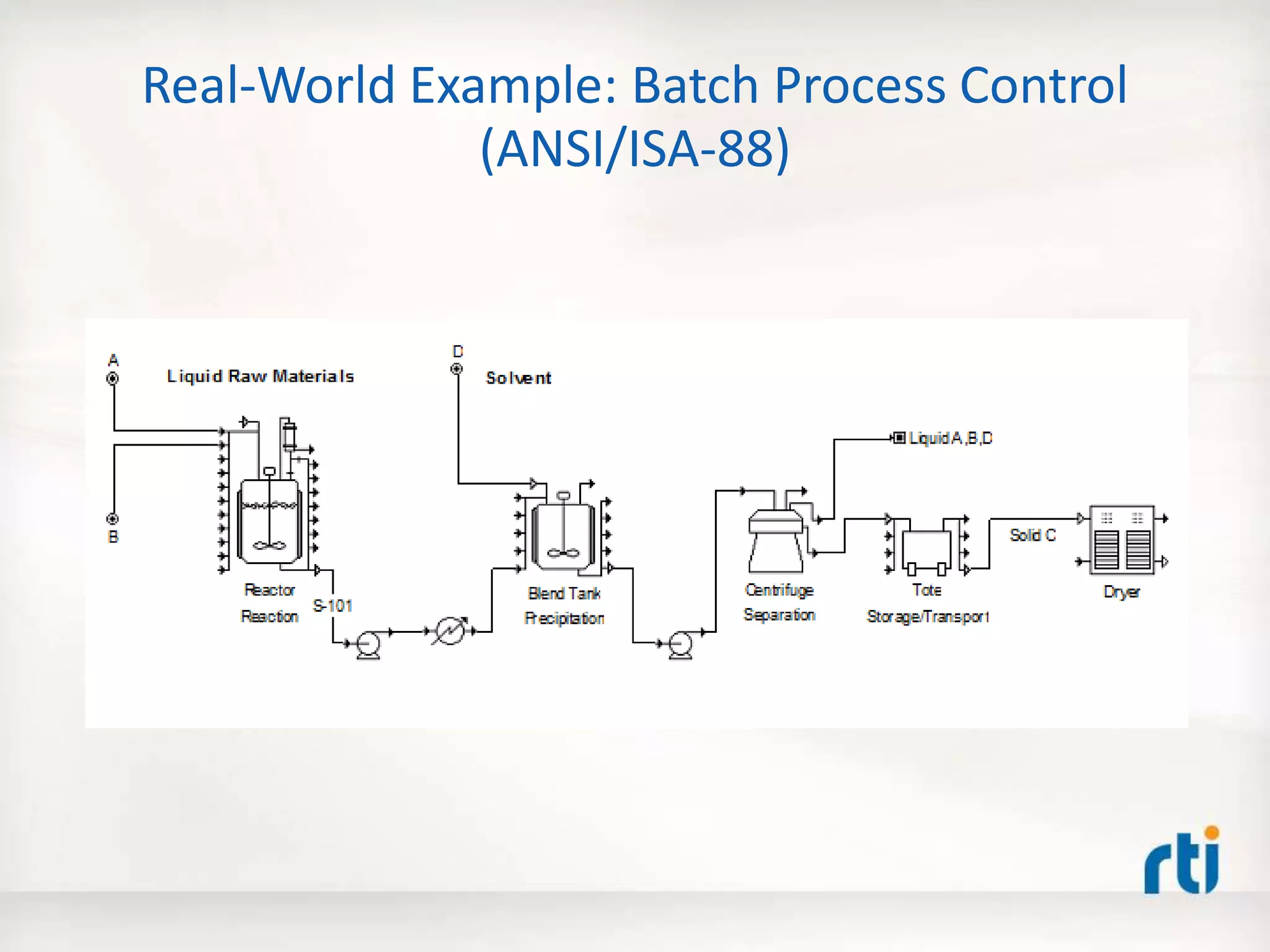
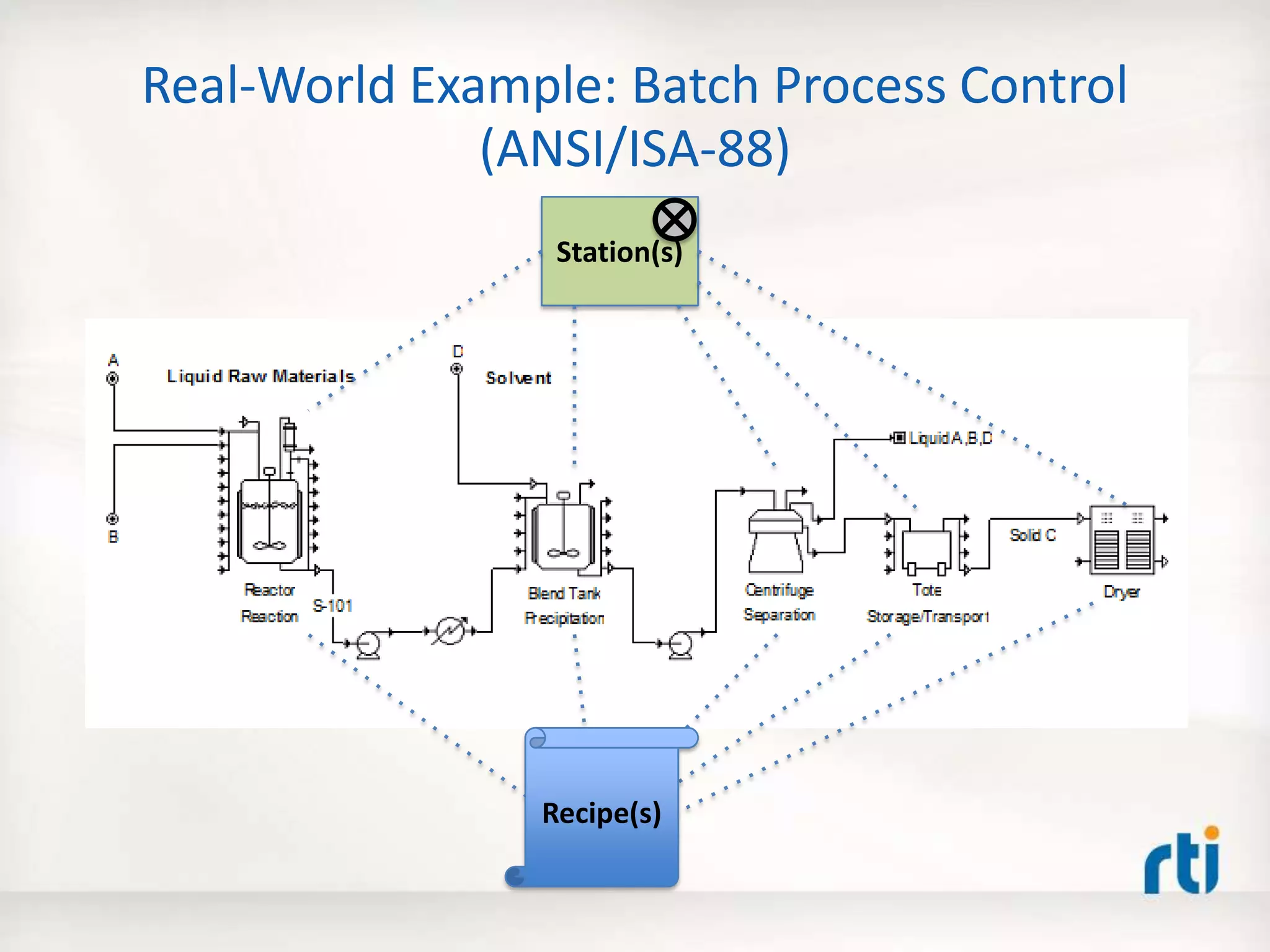
Real-World Example: Batch Process Control
(ANSI/ISA-88)
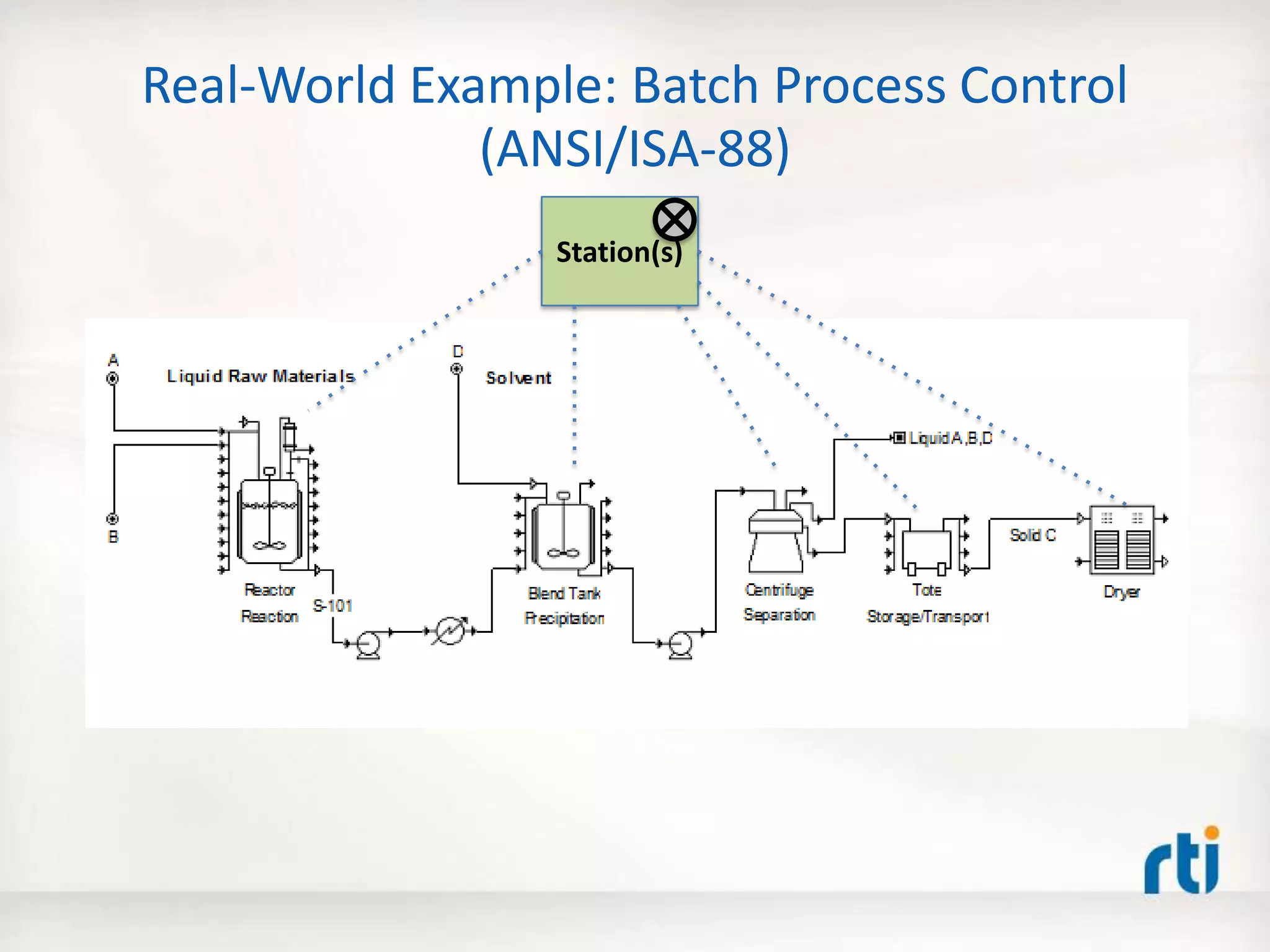
Real-World Example: Batch Process Control
(ANSI/ISA-88)
Station(s)
Real-World Example: Batch Process Control
(ANSI/ISA-88)
Station(s)
Recipe(s)
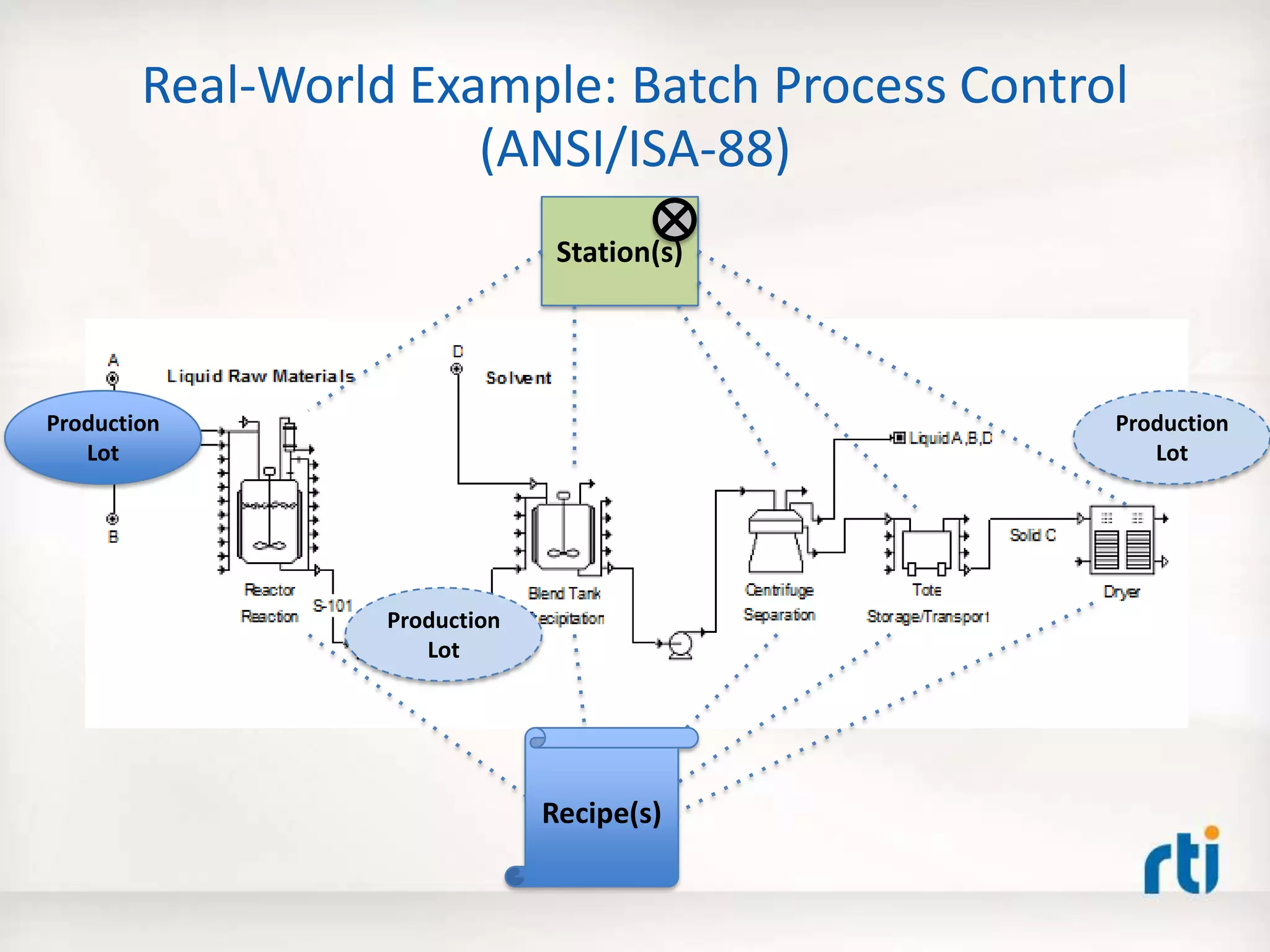
Real-World Example: Batch Process Control
(ANSI/ISA-88)
Station(s)
Recipe(s)
Production
Lot
Production
Lot
Production
Lot
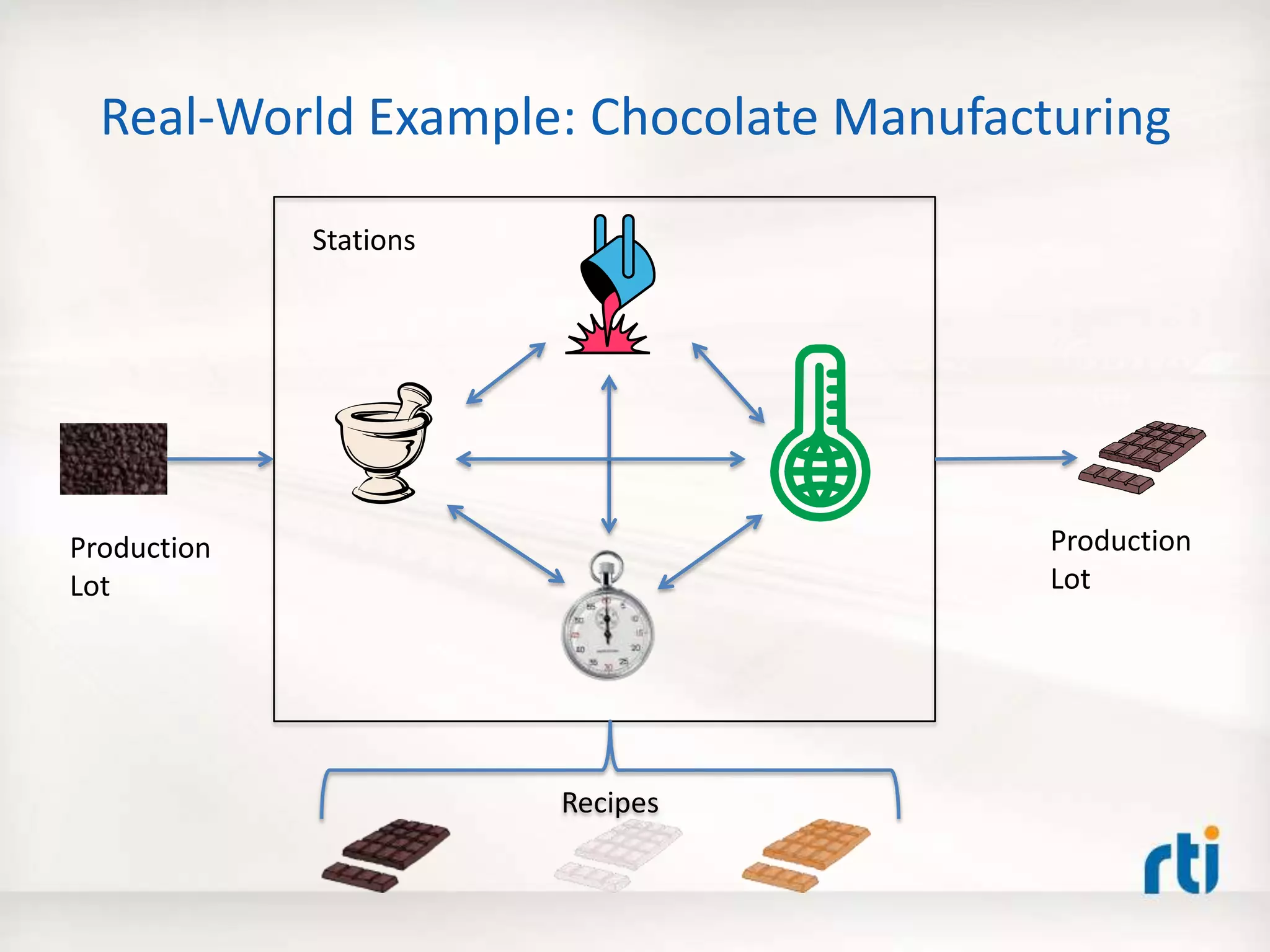
Real-World Example: Chocolate Manufacturing
Recipes
Production
Lot
Stations
Production
Lot
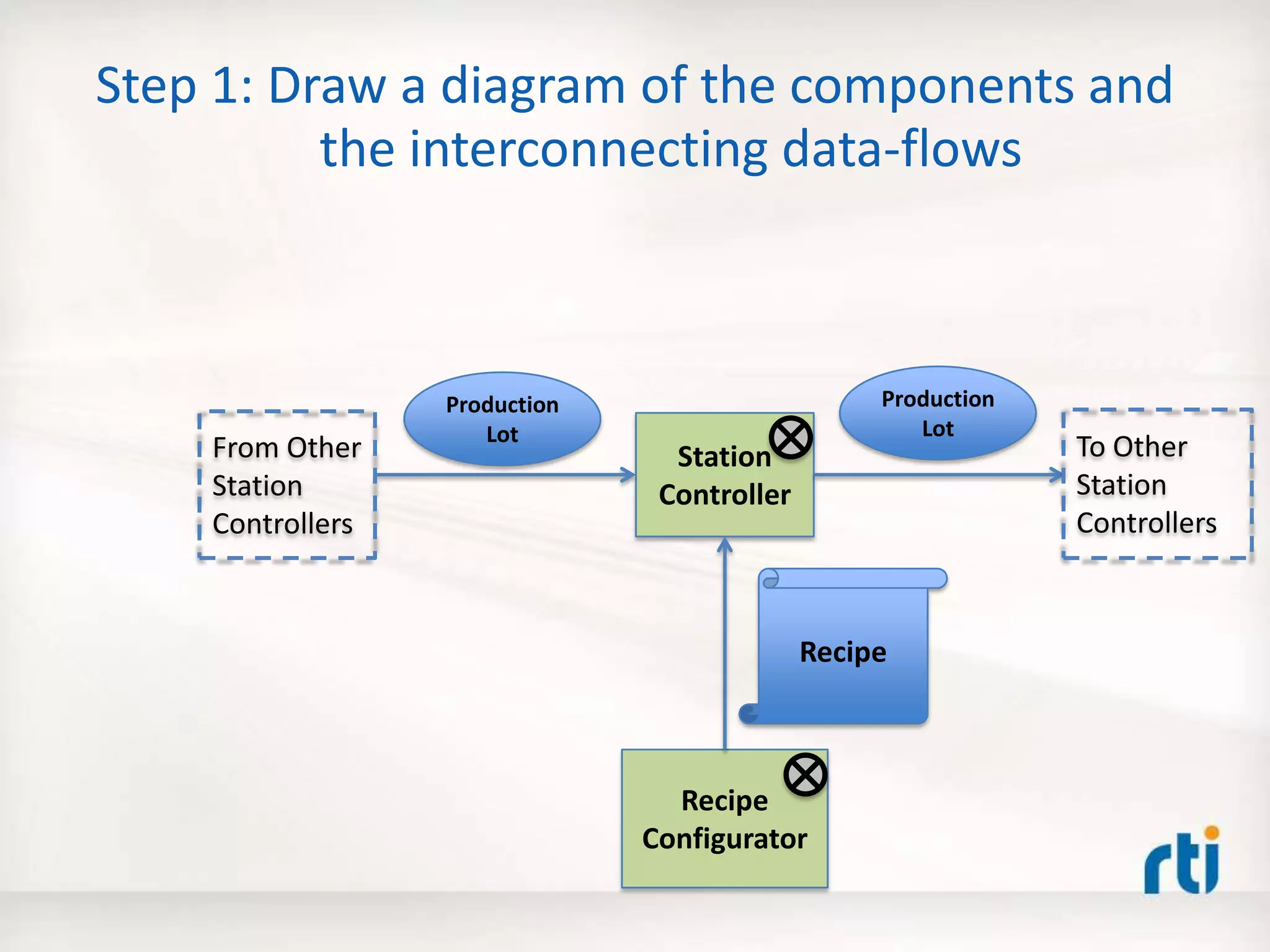
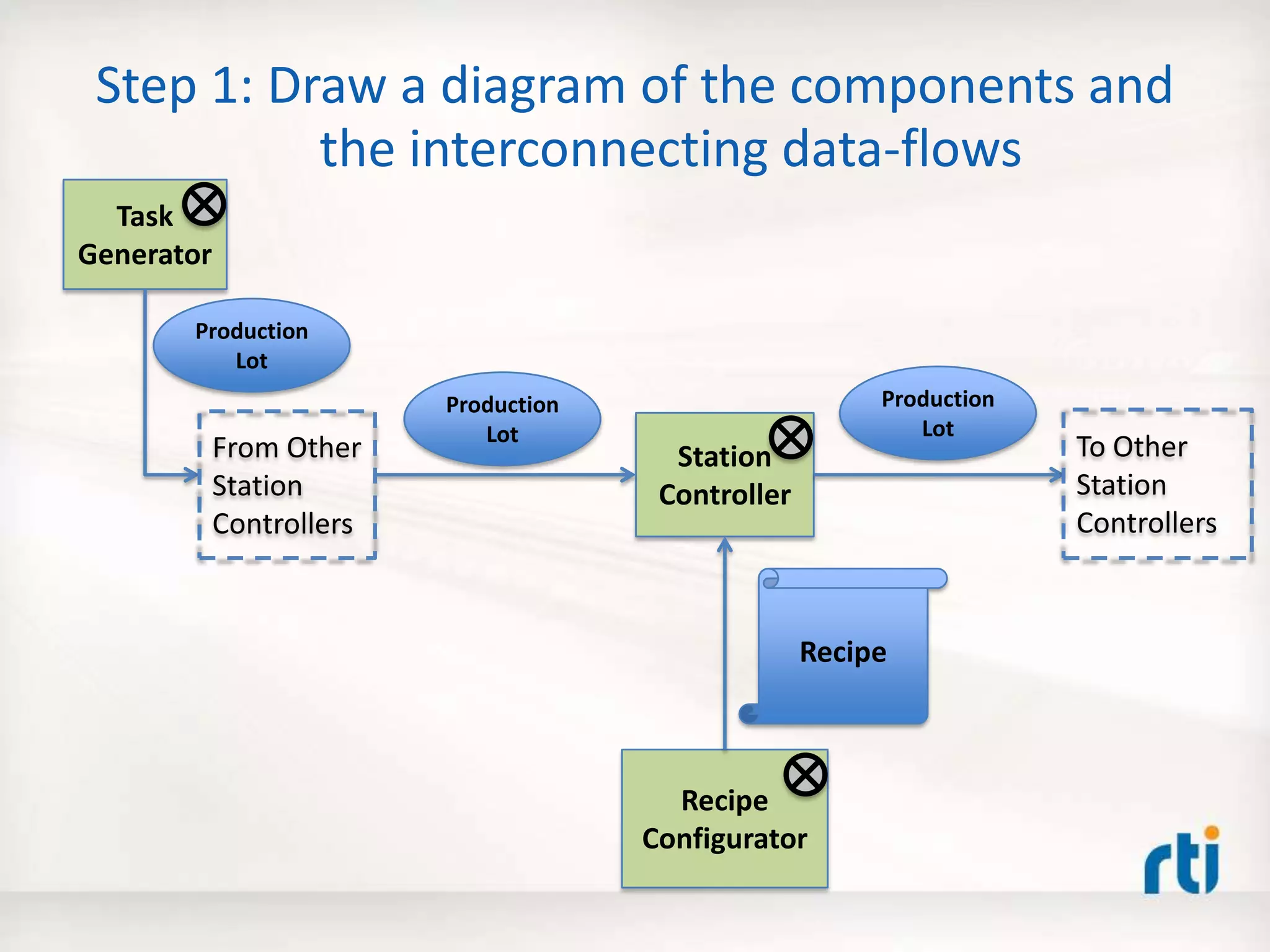
Step 1: Draw a diagram of the components and
the interconnecting data-flows
Station
Controller
Production
Lot
Recipe
Recipe
Configurator
To Other
Station
Controllers
From Other
Station
Controllers
Production
Lot
Step 1: Draw a diagram of the components and
the interconnecting data-flows
Station
Controller
Production
Lot
Recipe
Recipe
Configurator
Production
Lot
Task
Generator
Production
Lot
To Other
Station
Controllers
From Other
Station
Controllers
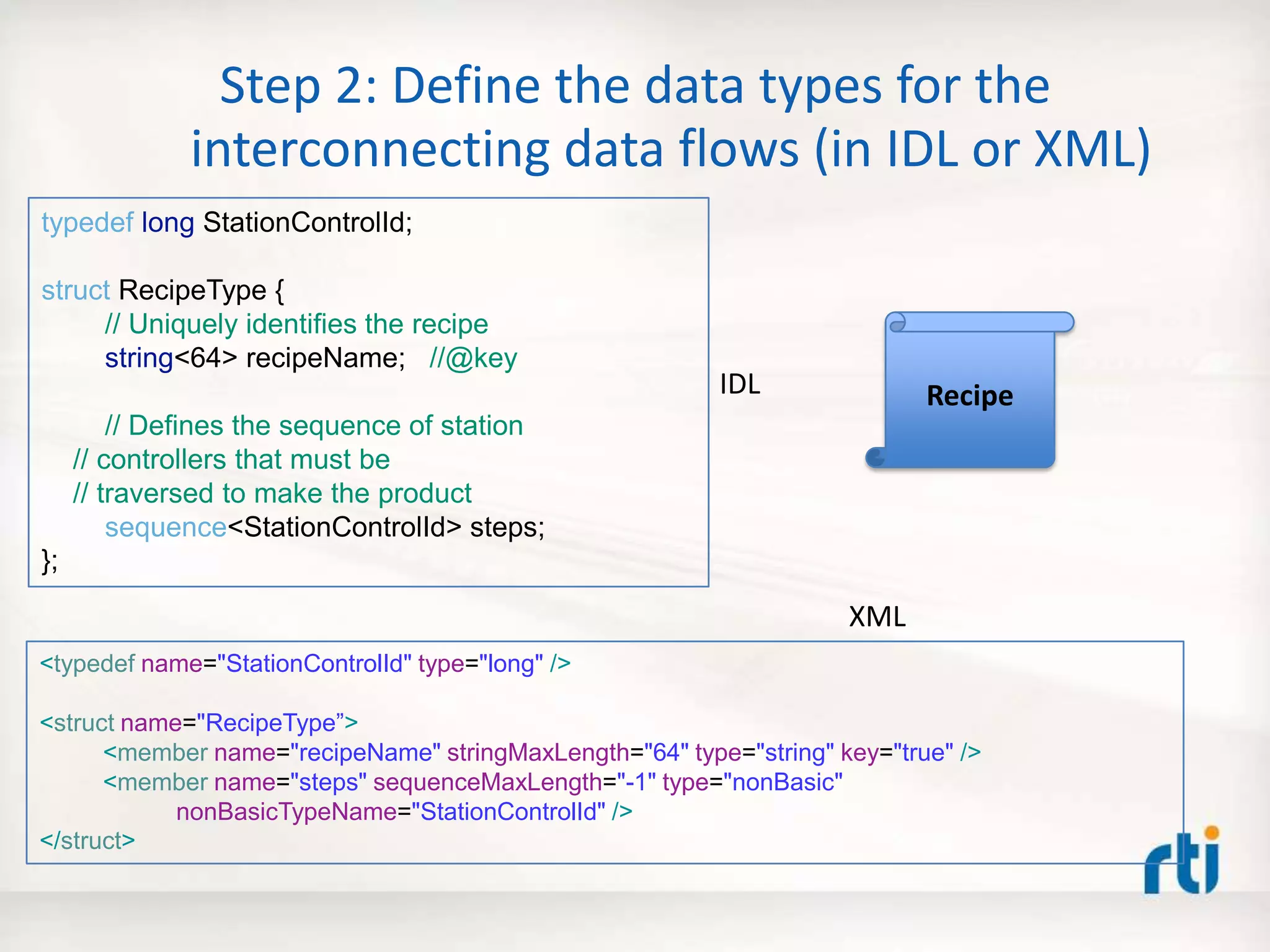
Step 2: Define the data types for the
interconnecting data flows (in IDL or XML)
Recipe
typedef long StationControlId;
struct RecipeType {
// Uniquely identifies the recipe
string<64> recipeName; //@key
// Defines the sequence of station
// controllers that must be
// traversed to make the product
sequence<StationControlId> steps;
};
<typedef name="StationControlId" type="long" />
<struct name="RecipeType”>
<member name="recipeName" stringMaxLength="64" type="string" key="true" />
<member name="steps" sequenceMaxLength="-1" type="nonBasic"
nonBasicTypeName="StationControlId" />
</struct>
XML
IDL
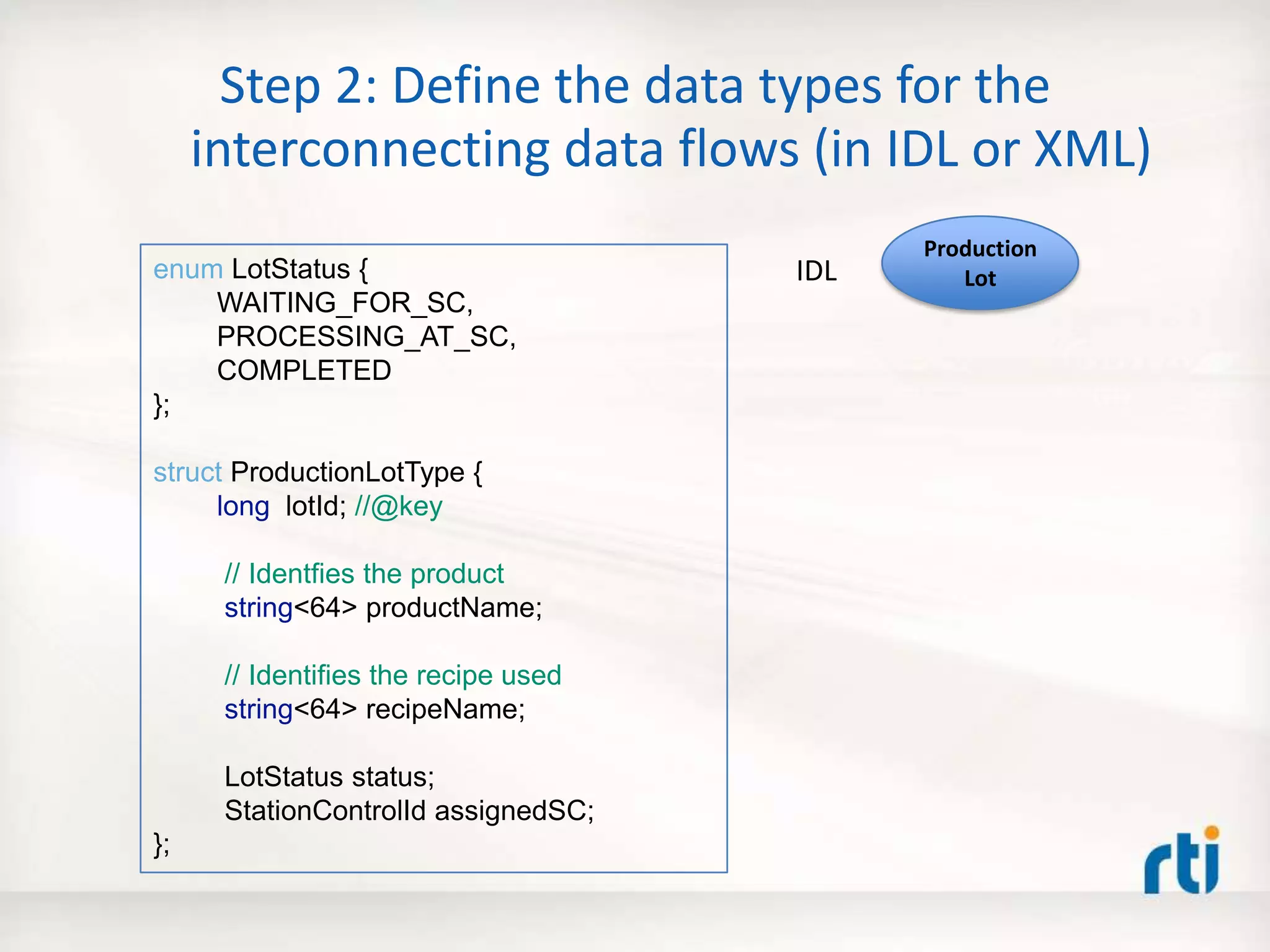
Step 2: Define the data types for the
interconnecting data flows (in IDL or XML)
enum LotStatus {
WAITING_FOR_SC,
PROCESSING_AT_SC,
COMPLETED
};
struct ProductionLotType {
long lotId; //@key
// Identfies the product
string<64> productName;
// Identifies the recipe used
string<64> recipeName;
LotStatus status;
StationControlId assignedSC;
};
Production
LotIDL
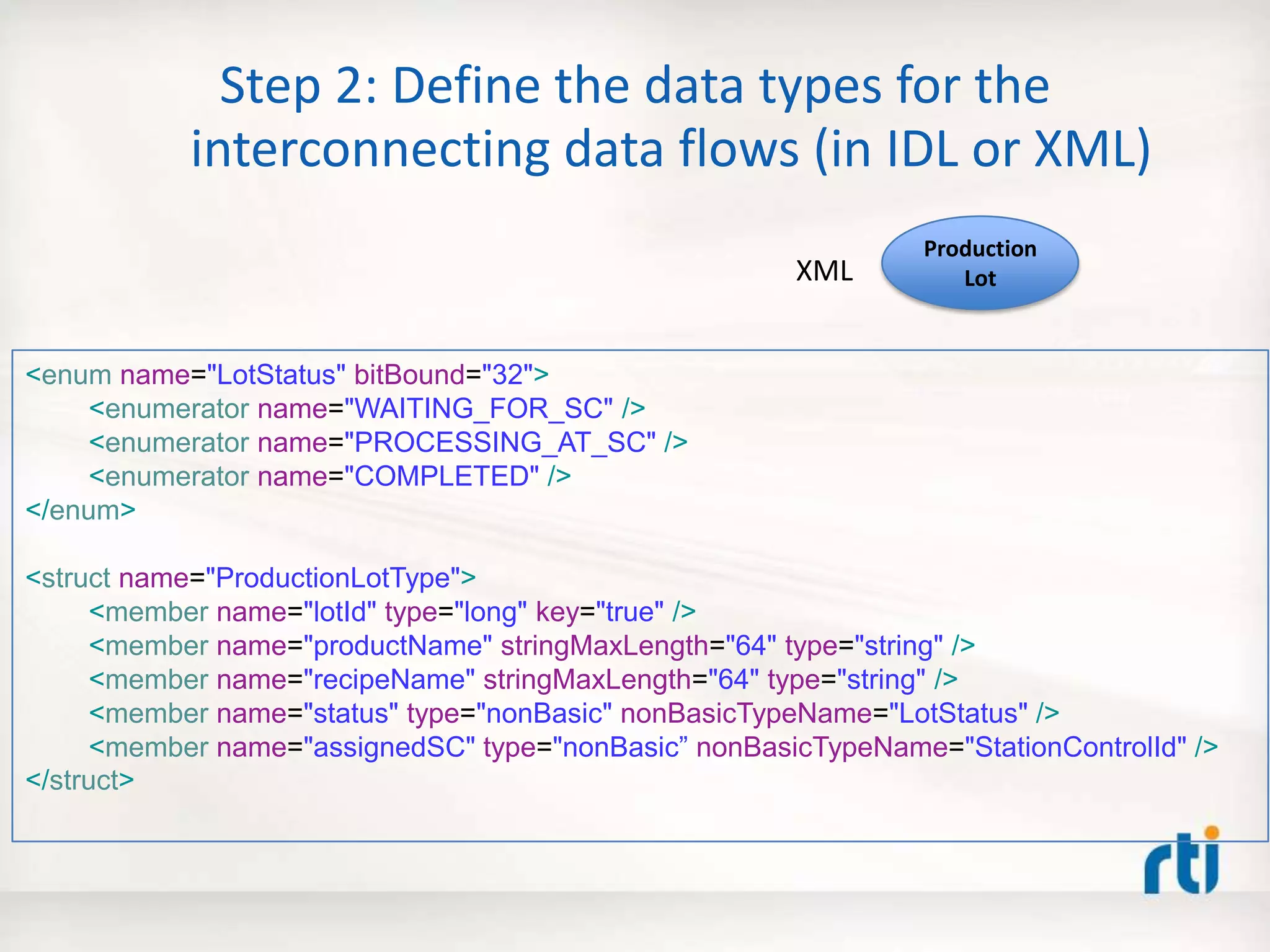
Step 2: Define the data types for the
interconnecting data flows (in IDL or XML)
<enum name="LotStatus" bitBound="32">
<enumerator name="WAITING_FOR_SC" />
<enumerator name="PROCESSING_AT_SC" />
<enumerator name="COMPLETED" />
</enum>
<struct name="ProductionLotType">
<member name="lotId" type="long" key="true" />
<member name="productName" stringMaxLength="64" type="string" />
<member name="recipeName" stringMaxLength="64" type="string" />
<member name="status" type="nonBasic" nonBasicTypeName="LotStatus" />
<member name="assignedSC" type="nonBasic” nonBasicTypeName="StationControlId" />
</struct>
Production
LotXML
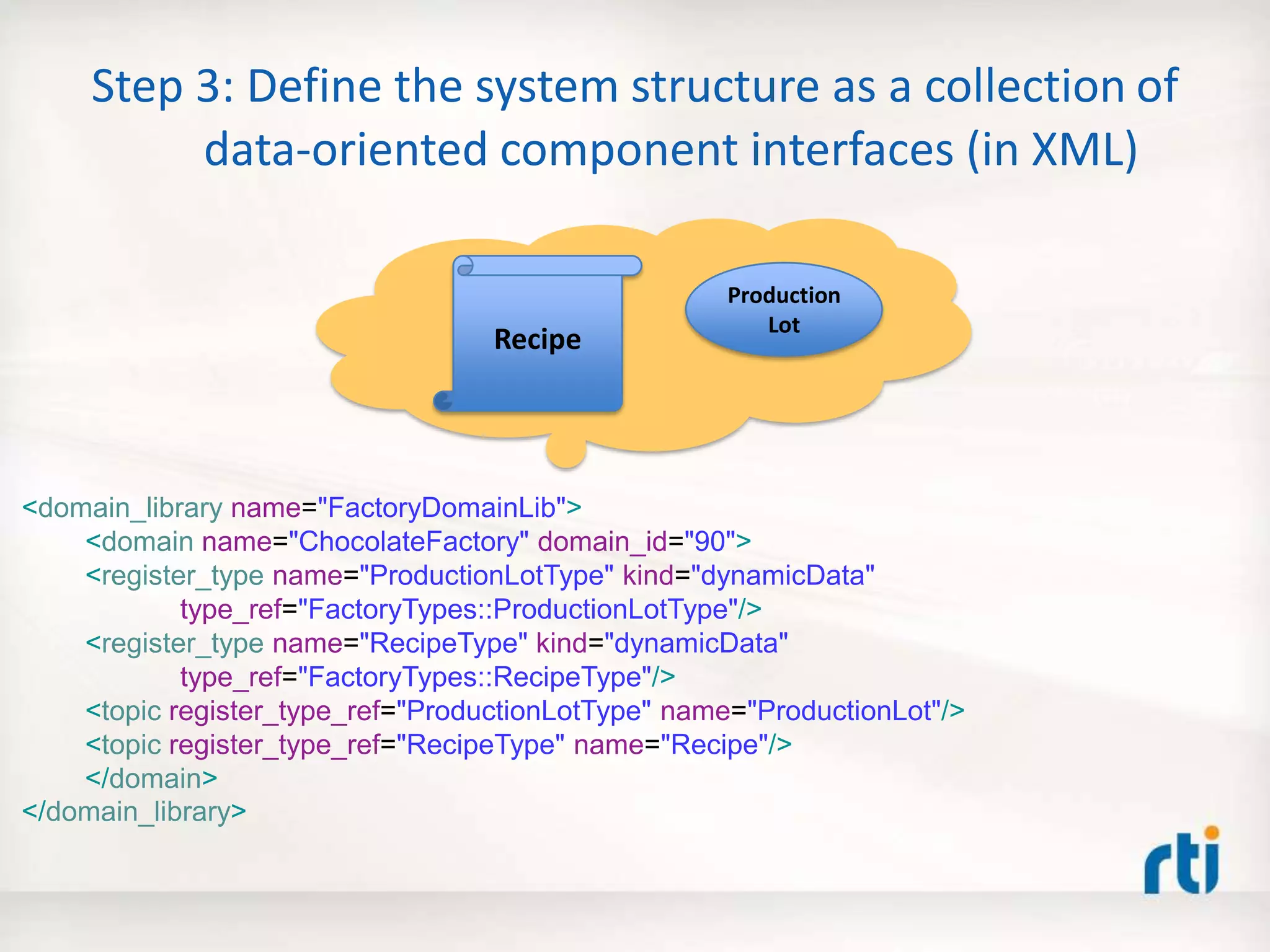
Step 3: Define the system structure as a collection of
data-oriented component interfaces (in XML)
<domain_library name="FactoryDomainLib">
<domain name="ChocolateFactory" domain_id="90">
<register_type name="ProductionLotType" kind="dynamicData"
type_ref="FactoryTypes::ProductionLotType"/>
<register_type name="RecipeType" kind="dynamicData"
type_ref="FactoryTypes::RecipeType"/>
<topic register_type_ref="ProductionLotType" name="ProductionLot"/>
<topic register_type_ref="RecipeType" name="Recipe"/>
</domain>
</domain_library>
Production
Lot
Recipe
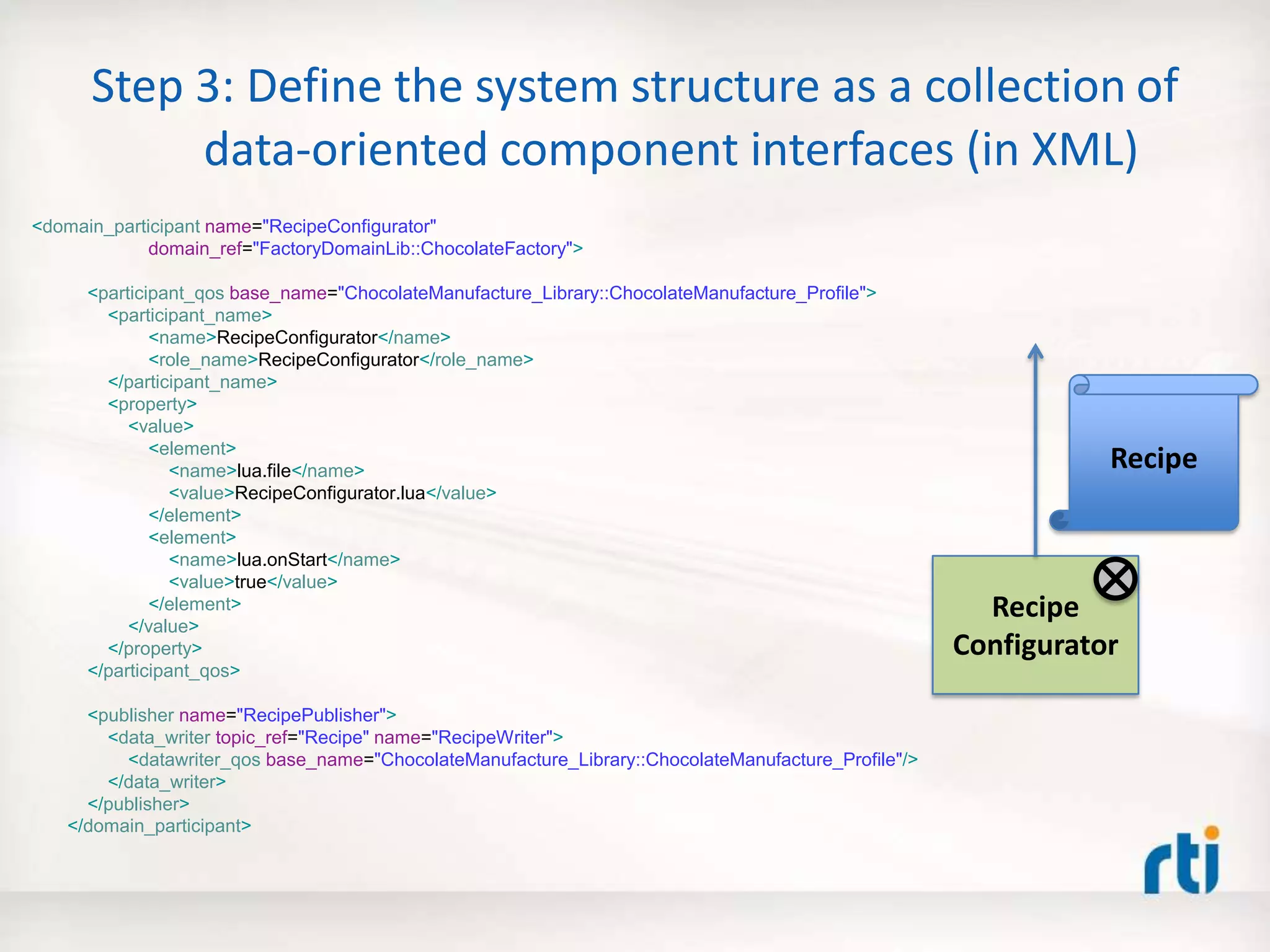
Step 3: Define the system structure as a collection of
data-oriented component interfaces (in XML)
<domain_participant name="RecipeConfigurator"
domain_ref="FactoryDomainLib::ChocolateFactory">
<participant_qos base_name="ChocolateManufacture_Library::ChocolateManufacture_Profile">
<participant_name>
<name>RecipeConfigurator</name>
<role_name>RecipeConfigurator</role_name>
</participant_name>
<property>
<value>
<element>
<name>lua.file</name>
<value>RecipeConfigurator.lua</value>
</element>
<element>
<name>lua.onStart</name>
<value>true</value>
</element>
</value>
</property>
</participant_qos>
<publisher name="RecipePublisher">
<data_writer topic_ref="Recipe" name="RecipeWriter">
<datawriter_qos base_name="ChocolateManufacture_Library::ChocolateManufacture_Profile"/>
</data_writer>
</publisher>
</domain_participant>
Recipe
Recipe
Configurator
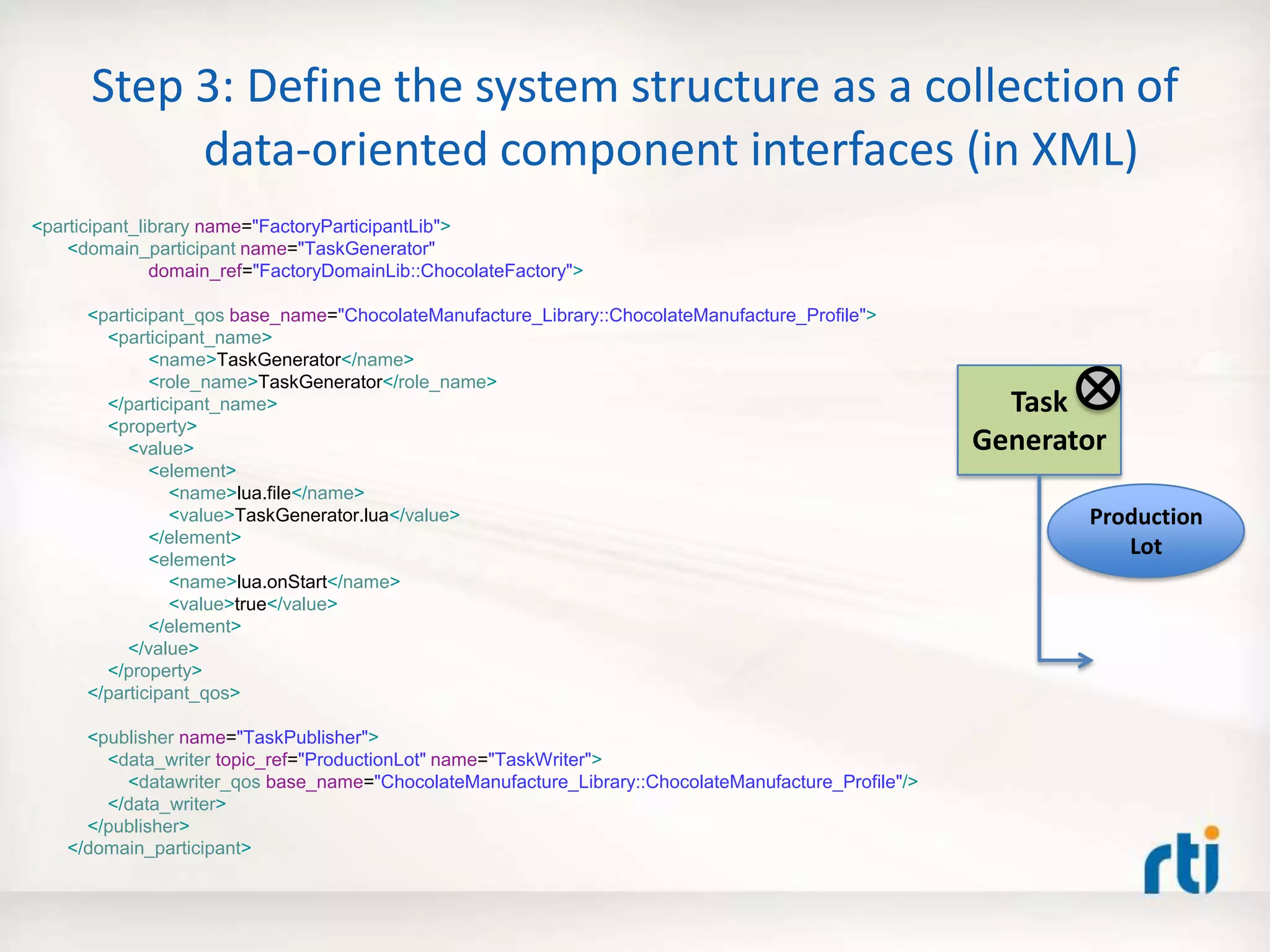
Step 3: Define the system structure as a collection of
data-oriented component interfaces (in XML)
<participant_library name="FactoryParticipantLib">
<domain_participant name="TaskGenerator"
domain_ref="FactoryDomainLib::ChocolateFactory">
<participant_qos base_name="ChocolateManufacture_Library::ChocolateManufacture_Profile">
<participant_name>
<name>TaskGenerator</name>
<role_name>TaskGenerator</role_name>
</participant_name>
<property>
<value>
<element>
<name>lua.file</name>
<value>TaskGenerator.lua</value>
</element>
<element>
<name>lua.onStart</name>
<value>true</value>
</element>
</value>
</property>
</participant_qos>
<publisher name="TaskPublisher">
<data_writer topic_ref="ProductionLot" name="TaskWriter">
<datawriter_qos base_name="ChocolateManufacture_Library::ChocolateManufacture_Profile"/>
</data_writer>
</publisher>
</domain_participant>
Task
Generator
Production
Lot
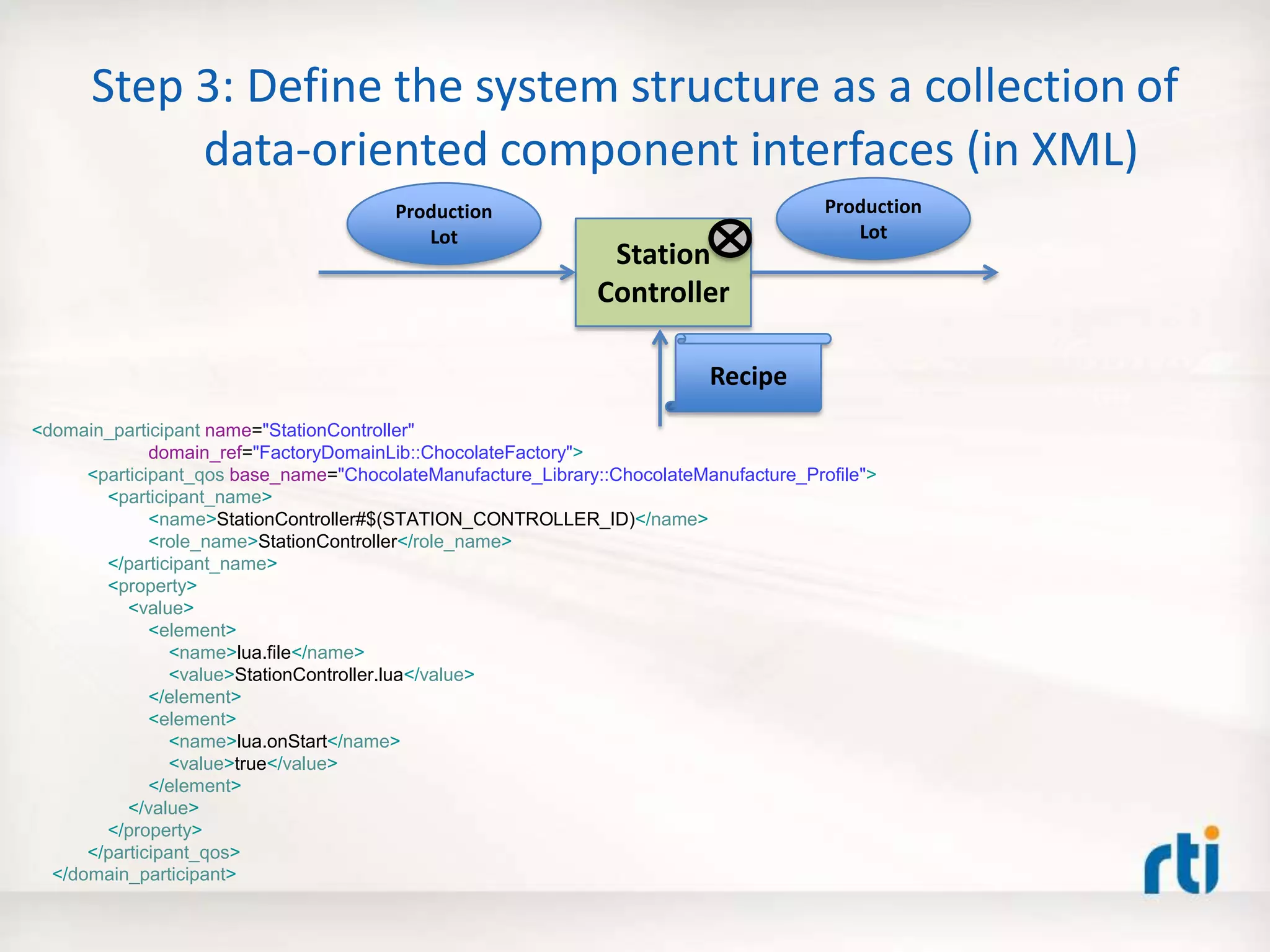
Step 3: Define the system structure as a collection of
data-oriented component interfaces (in XML)
<domain_participant name="StationController"
domain_ref="FactoryDomainLib::ChocolateFactory">
<participant_qos base_name="ChocolateManufacture_Library::ChocolateManufacture_Profile">
<participant_name>
<name>StationController#$(STATION_CONTROLLER_ID)</name>
<role_name>StationController</role_name>
</participant_name>
<property>
<value>
<element>
<name>lua.file</name>
<value>StationController.lua</value>
</element>
<element>
<name>lua.onStart</name>
<value>true</value>
</element>
</value>
</property>
</participant_qos>
</domain_participant>
Station
Controller
Production
Lot
Production
Lot
Recipe
Step 3: Define the system structure as a collection of
data-oriented component interfaces (in XML)
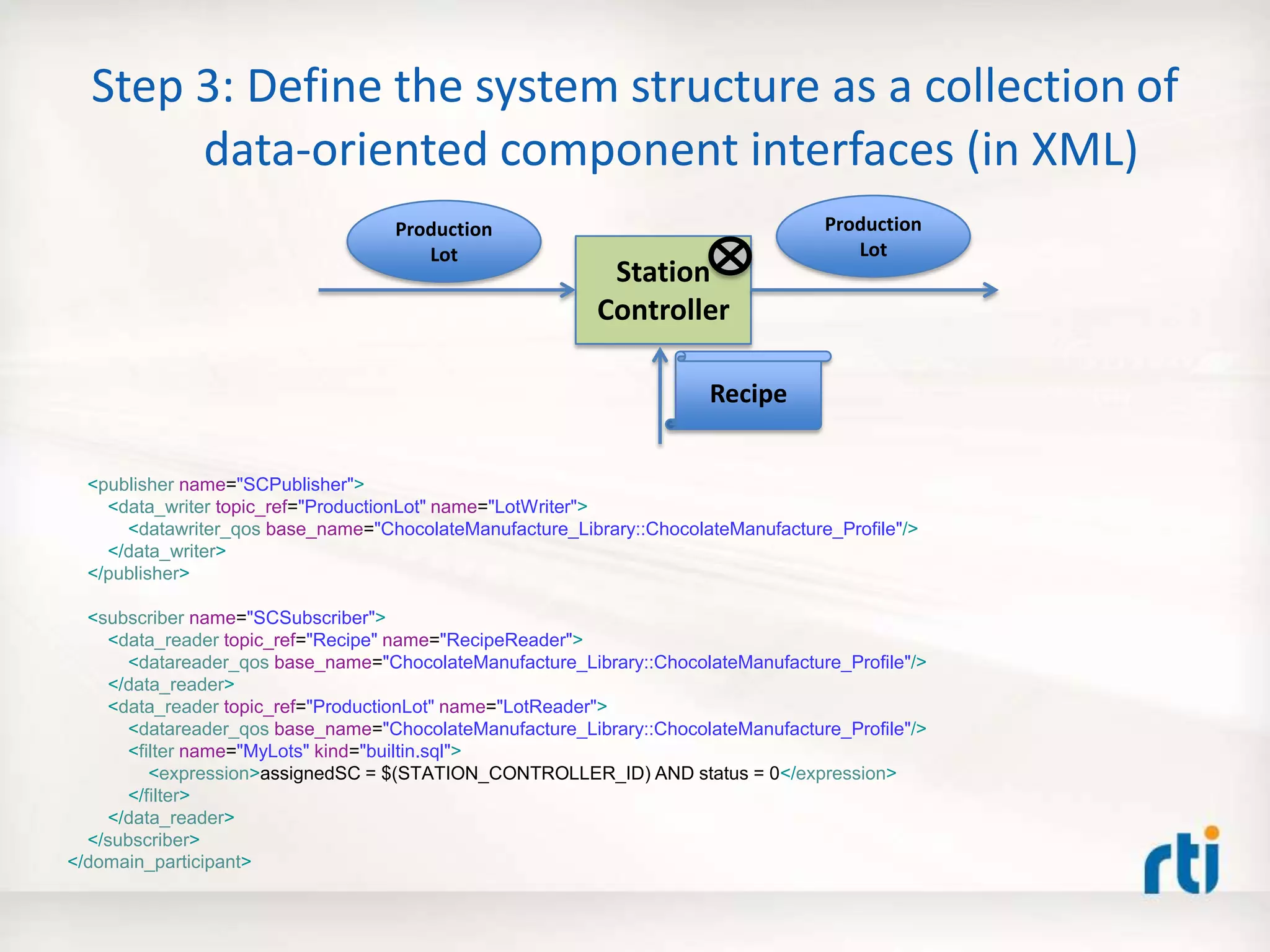
<publisher name="SCPublisher">
<data_writer topic_ref="ProductionLot" name="LotWriter">
<datawriter_qos base_name="ChocolateManufacture_Library::ChocolateManufacture_Profile"/>
</data_writer>
</publisher>
<subscriber name="SCSubscriber">
<data_reader topic_ref="Recipe" name="RecipeReader">
<datareader_qos base_name="ChocolateManufacture_Library::ChocolateManufacture_Profile"/>
</data_reader>
<data_reader topic_ref="ProductionLot" name="LotReader">
<datareader_qos base_name="ChocolateManufacture_Library::ChocolateManufacture_Profile"/>
<filter name="MyLots" kind="builtin.sql">
<expression>assignedSC = $(STATION_CONTROLLER_ID) AND status = 0</expression>
</filter>
</data_reader>
</subscriber>
</domain_participant>
Station
Controller
Production
Lot
Production
Lot
Recipe
Step 4: Code the component behavior in the Lua
scripting language
Recipe
Configurator
if ( CONTAINER.CONTEXT.onStartEvent ) then
print("Starting RecipeConfigurator")
ConfigWriter = PROTOTYPER.WRITER["RecipePublisher::RecipeWriter”]
outputRecipe = ConfigWriter.instance
outputRecipe.recipeName = "DarkChocolateRecipe"
local stations = { 1, 2, 3, 4, 6, 7, 8, 9, 11, 12, 13 }
for i, station in ipairs( stations ) do
step = "steps[".. i .."]"
outputRecipe[step] = station
end
ConfigWriter:write()
outputRecipe.recipeName = "WhiteChocolateRecipe"
local stations = { 1, 2, 4, 5, 6, 7, 8, 9, 11, 12, 13 }
for i, station in ipairs( stations ) do
step = "steps[".. i .."]"
outputRecipe[step] = station
end
ConfigWriter:write()
outputRecipe.recipeName = "MilkChocolateRecipe"
local stations = { 1, 2, 3, 4, 5, 6, 7, 8, 10, 11, 12, 13 }
for i, station in ipairs( stations ) do
step = "steps[".. i .."]"
outputRecipe[step] = station
end
ConfigWriter:write()
end
Step 4: Code the component behavior in the Lua
scripting language
if ( CONTAINER.CONTEXT.onStartEvent ) then
print("Starting TaskGenerator”)
TaskWriter = PROTOTYPER.WRITER["TaskPublisher::TaskWriter"]
count = 0
end
local taskLot = TaskWriter.instance
-- We use the count to simulate the continuous generation of tasks
count = count+1
taskLot.lotId = count
taskLot.status = 0
taskLot.assignedSC = 1
if (count <= 1) then
taskLot.productName = "DarkChocolate"
taskLot.recipeName = "DarkChocolateRecipe"
taskLot.assignedSC = 1
elseif (count <= 2) then
taskLot.productName = "WhiteChocolate"
taskLot.recipeName = "WhiteChocolateRecipe"
elseif (count <= 3) then
taskLot.productName = "MilkChocolate"
taskLot.recipeName = "MilkChocolateRecipe"
end
TaskWriter:write()
if ( count > 3 ) then
CONTAINER.CONTEXT.intentExit = true
end
Task
Generator
Step 4: Code the component behavior in the Lua
scripting language
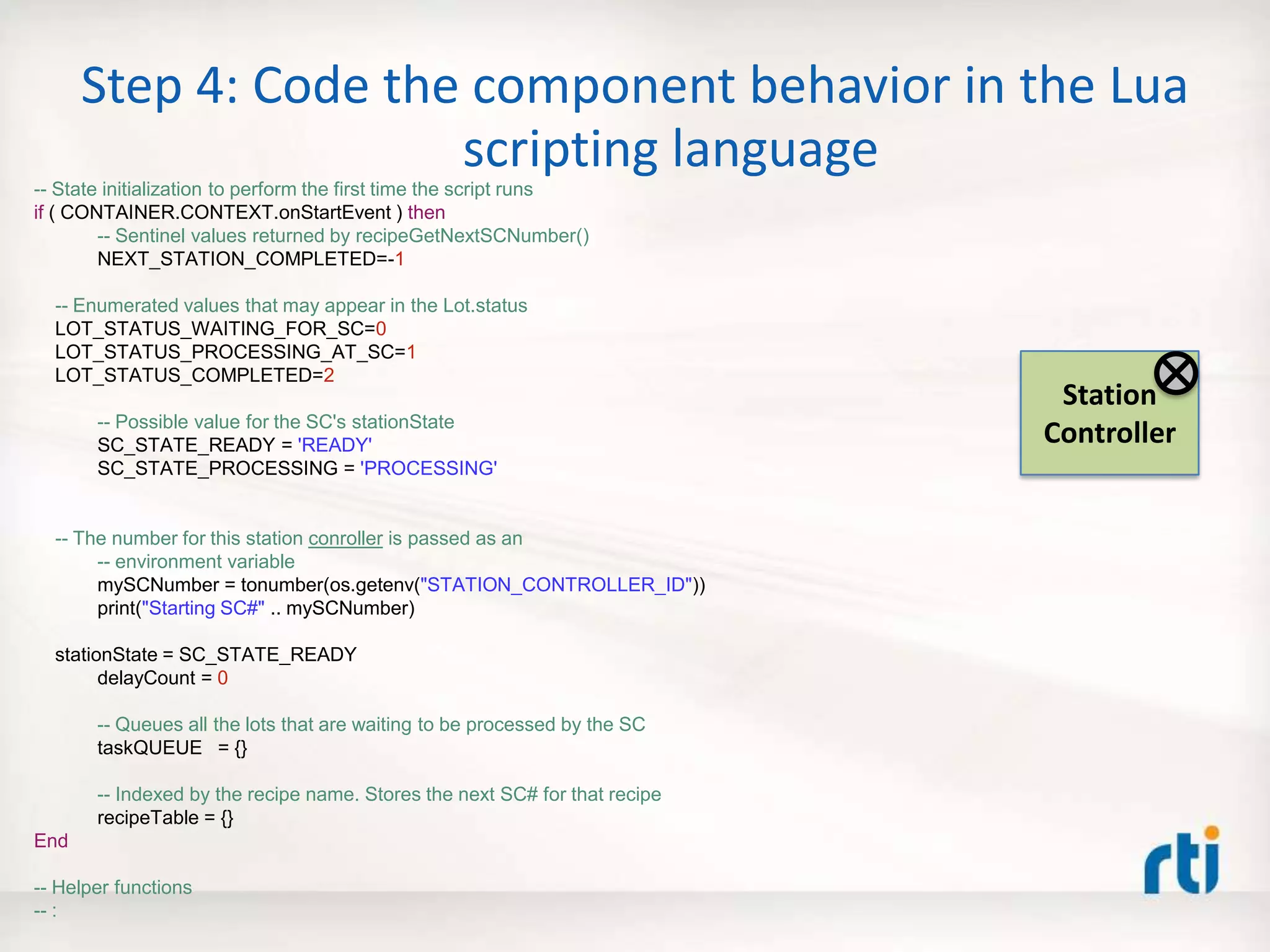
-- State initialization to perform the first time the script runs
if ( CONTAINER.CONTEXT.onStartEvent ) then
-- Sentinel values returned by recipeGetNextSCNumber()
NEXT_STATION_COMPLETED=-1
-- Enumerated values that may appear in the Lot.status
LOT_STATUS_WAITING_FOR_SC=0
LOT_STATUS_PROCESSING_AT_SC=1
LOT_STATUS_COMPLETED=2
-- Possible value for the SC's stationState
SC_STATE_READY = 'READY'
SC_STATE_PROCESSING = 'PROCESSING'
-- The number for this station conroller is passed as an
-- environment variable
mySCNumber = tonumber(os.getenv("STATION_CONTROLLER_ID"))
print("Starting SC#" .. mySCNumber)
stationState = SC_STATE_READY
delayCount = 0
-- Queues all the lots that are waiting to be processed by the SC
taskQUEUE = {}
-- Indexed by the recipe name. Stores the next SC# for that recipe
recipeTable = {}
End
-- Helper functions
-- :
Station
Controller
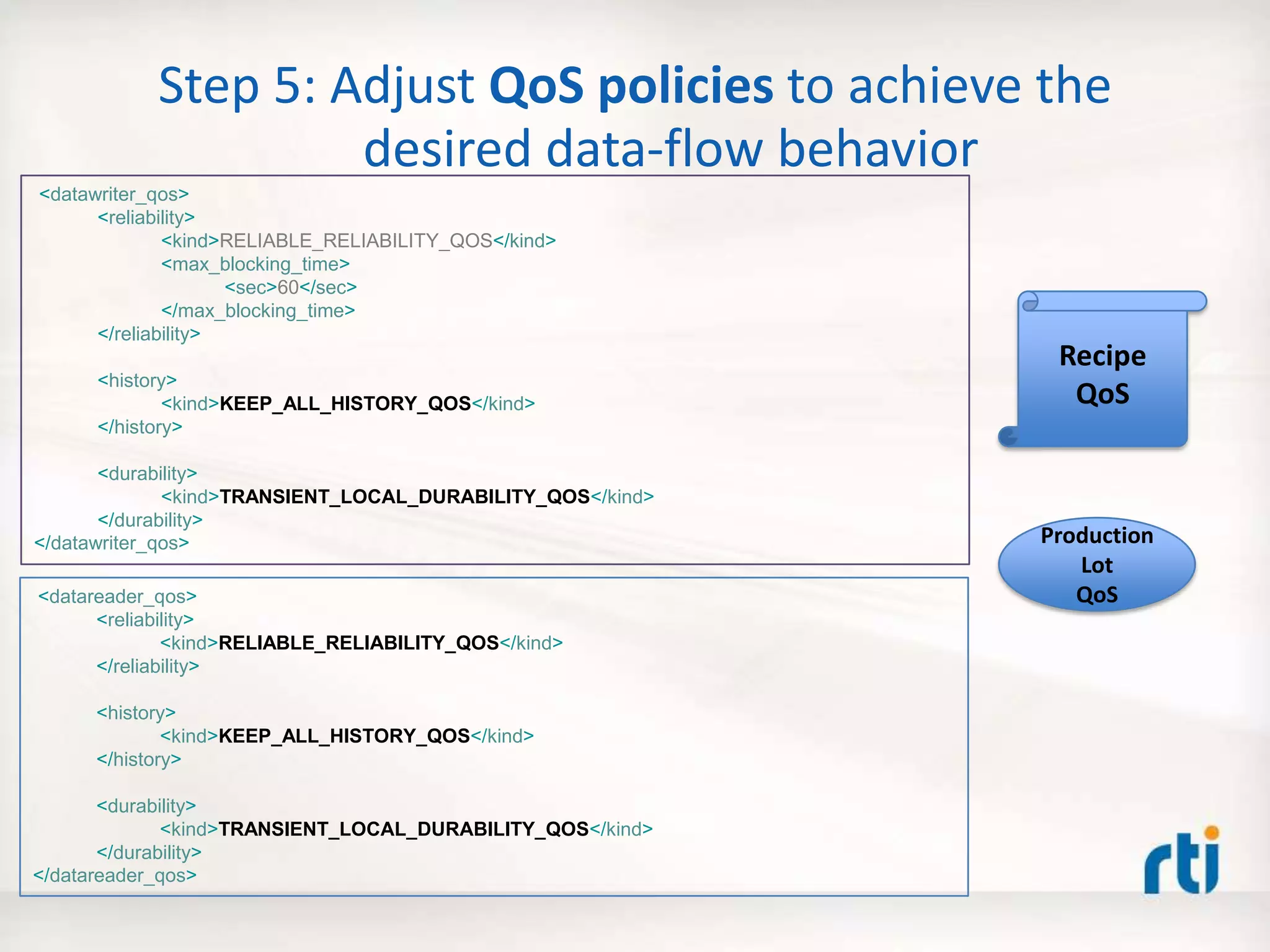
Step 5: Adjust QoS policies to achieve the
desired data-flow behavior
Recipe
QoS
<datawriter_qos>
<reliability>
<kind>RELIABLE_RELIABILITY_QOS</kind>
<max_blocking_time>
<sec>60</sec>
</max_blocking_time>
</reliability>
<history>
<kind>KEEP_ALL_HISTORY_QOS</kind>
</history>
<durability>
<kind>TRANSIENT_LOCAL_DURABILITY_QOS</kind>
</durability>
</datawriter_qos>
<datareader_qos>
<reliability>
<kind>RELIABLE_RELIABILITY_QOS</kind>
</reliability>
<history>
<kind>KEEP_ALL_HISTORY_QOS</kind>
</history>
<durability>
<kind>TRANSIENT_LOCAL_DURABILITY_QOS</kind>
</durability>
</datareader_qos>
Production
Lot
QoS
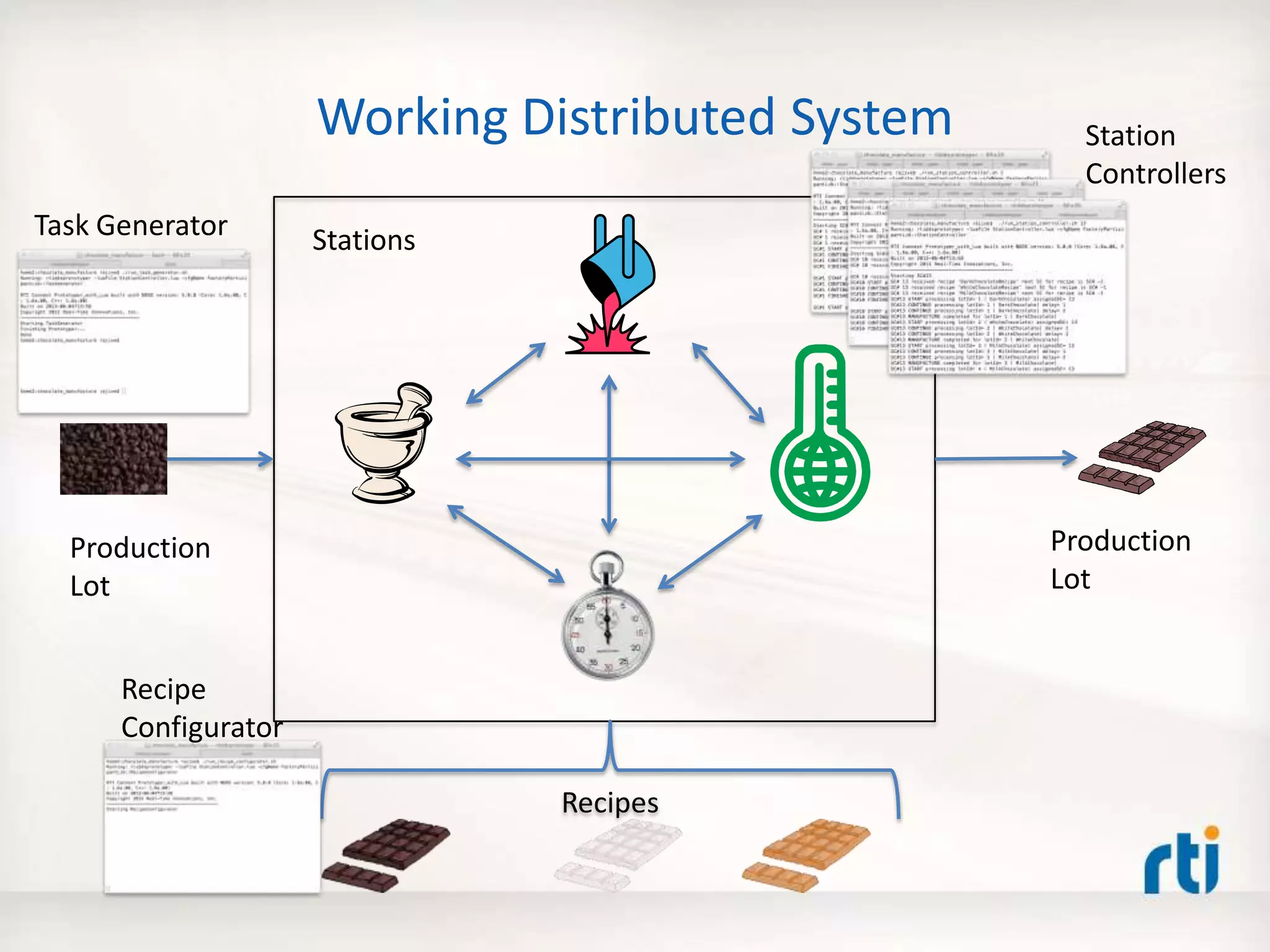
Working Distributed System
Recipes
Production
Lot
Stations
Production
Lot
Station
Controllers
Task Generator
Recipe
Configurator
Agenda
• Why is building distributed systems hard?
• The 5 Critical Steps – Best Practice
• The Prototyper – Separating Structure and
Behavior
• Defining structure using XML
• Coding behavior using Lua – A Small Fast Dynamic
Scripting Language
• Real-World Example
• Summary
Prototyper (Container)
The RTI Prototyper with Lua
Lua Engine
1. -- Interface: parameters, inputs, outputs
2. local A, B, C = 30, 30, 10 -- Change the 'C' parameter to to see various flower shapes
3. local ShapeWriter = CONTAINER.WRITER[3] -- Triangles
4.
5. -- Global counter (preserved across invocations)
6. if not count then count = 0 else count = count + 1 end
7.
8. local shape = ShapeWriter.instance;
9. local angle = count % 360;
10.
11. shape['x'] = 120 + (A+B) * math.cos(angle) + B * math.cos((A/B-C)*angle)
12. shape['y'] = 120 + (A+B) * math.sin(angle) + B * math.sin((A/B-C)*angle)
13.
14. shape['shapesize'] = 5
15. shape['color'] = "RED"
16.
17. ShapeWriter:write()
DDS
Settings
(Structure/
Wiring)
USER_QOS_PROFILES.xml
XML Based
Application
Configuration
RTI
Community
Portal
Download
Lua Component
Behavior
For details, see:
Getting Started
Guide
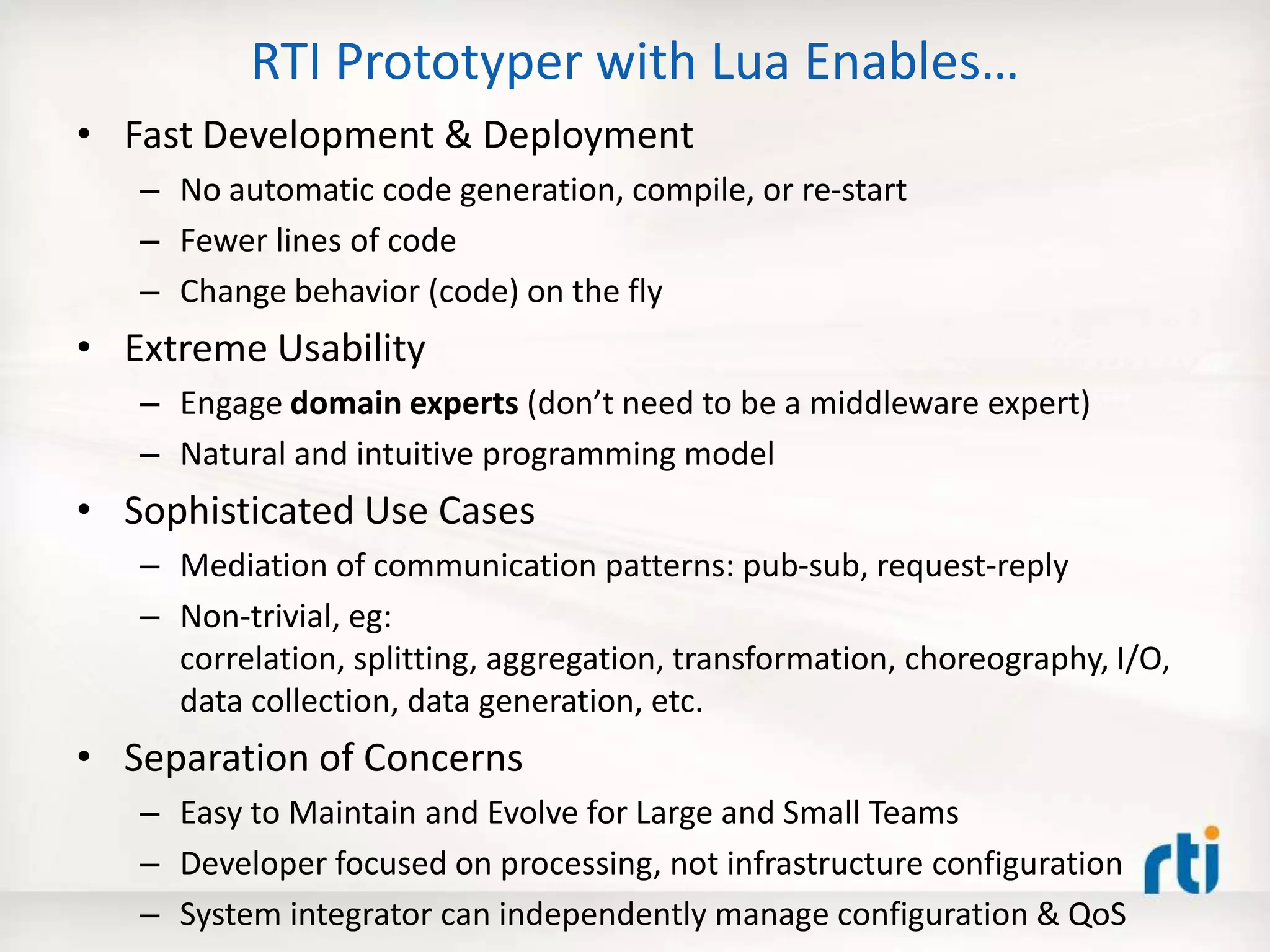
RTI Prototyper with Lua Enables…
• Fast Development & Deployment
– No automatic code generation, compile, or re-start
– Fewer lines of code
– Change behavior (code) on the fly
• Extreme Usability
– Engage domain experts (don’t need to be a middleware expert)
– Natural and intuitive programming model
• Sophisticated Use Cases
– Mediation of communication patterns: pub-sub, request-reply
– Non-trivial, eg:
correlation, splitting, aggregation, transformation, choreography, I/O,
data collection, data generation, etc.
• Separation of Concerns
– Easy to Maintain and Evolve for Large and Small Teams
– Developer focused on processing, not infrastructure configuration
– System integrator can independently manage configuration & QoS
The 5 Critical Steps
Articulate Concept
1. Draw a diagram of the components and the interconnecting data-
flows
Define Structure
2. Define the data types for the interconnecting data flows (in IDL or
XML)
3. Define the system structure as a collection of data-oriented
component interfaces (in XML)
Configure Behavior
4. Code the component behavior in the Lua scripting language
5. Adjust QoS policies to achieve the desired data-flow behavior
LATER: Optimize selected components in C/C++/Java/C#,
but only if necessary!
Key Benefits
• Get stuff done fast(er)!
• Quickly try out new ideas, and show a working proof
of concept.
• Get more done with the same staff.
• Ease into the learning curve of DDS by getting
something up and running first, and then learn more as
you need to.
• Explore tradeoff between data-model choices.
• Experiment with QoS policies for a given data model.
• Script test scenarios for existing DDS system!
• Test and validate an existing system. Build your own
test harness.
Ready to Ride?
• Download it (experimental version):
– community.rti.com  Downloads  RTI Prototyper with
Lua  Pick your flavor (Mac, Linux, Windows, Raspberry
pi)
• Install it:
– Windows: Unzip
– Others: Run the installer:
chmod +x rti_prototyper_with_lua-5-1.0.0-x64Darwin10gcc4.2.1.run
./rti_prototyper_with_lua-5-1.0.0-x64Darwin10gcc4.2.1.run
Choose an existing directory
• Try it:
– Apply the 5 Critical Steps to build your working distributed
system
…Late Nights No More!
THANK YOU
http://blogs.rti.com/tag/lua/
http://community.rti.com/search/site/lua

Build It Fast: 5 Steps from Concept to Working Distributed System

  • 1.
    RTI QuickStart Training Buildit Fast: 5 Steps from Concept to Working Distributed System Rajive Joshi, Ph.D. Principal Solution Architect Webinar Real-Time Innovations Inc. September 25, 2013
  • 2.
    Once Upon aLate Night …
  • 3.
    Agenda • Why isbuilding distributed systems hard? • The 5 Critical Steps – Best Practice • The Prototyper – Separating Structure and Behavior • Defining structure using XML • Coding behavior using Lua – A Small Fast Dynamic Scripting Language • Real-World Example • Summary
  • 4.
    Why is BuildingDistributed Systems Hard? • Logical Design Considerations – Data flows – Data delivery: availability, timing, ordering, reliability, filtering, fault tolerance, etc. – Component behaviors • Physical Design Considerations – Platform Differences: CPU, OS, Programming Languages – Discovery and Network configurations – Low Level Device I/O • Performance & Scalability Considerations – # of data flows – # of components/endpoints – Latency vs. Throughput
  • 5.
    The 5 CriticalSteps Articulate Concept 1. Draw a diagram of the components and the interconnecting data- flows Define Structure 2. Define the data types for the interconnecting data flows (in IDL or XML) 3. Define the system structure as a collection of data-oriented component interfaces (in XML) Configure Behavior 4. Code the component behavior (in the Lua scripting language) 5. Adjust QoS policies to achieve the desired data-flow behavior Best Practice
  • 6.
    The RTI ConnextPlatform Continues to Grow… C/C++/Java/C#/Ada • Code Generation • Edit/Compile/Link/Run Lua Scripting (in RTI Prototyper Runtime) • Edit/Run(live update) New!
  • 7.
    The RTI Prototyperwith Lua 1. -- Interface: parameters, inputs, outputs 2. local A, B, C = 30, 30, 10 -- Change the 'C' parameter to to see various flower shapes 3. local ShapeWriter = CONTAINER.WRITER[3] -- Triangles 4. 5. -- Global counter (preserved across invocations) 6. if not count then count = 0 else count = count + 1 end 7. 8. local shape = ShapeWriter.instance; 9. local angle = count % 360; 10. 11. shape['x'] = 120 + (A+B) * math.cos(angle) + B * math.cos((A/B-C)*angle) 12. shape['y'] = 120 + (A+B) * math.sin(angle) + B * math.sin((A/B-C)*angle) 13. 14. shape['shapesize'] = 5 15. shape['color'] = "RED" 16. 17. ShapeWriter:write() Lua Component N inputs M outputs DDS
  • 8.
    Prototyper (Container) The RTIPrototyper with Lua Lua Engine 1. -- Interface: parameters, inputs, outputs 2. local A, B, C = 30, 30, 10 -- Change the 'C' parameter to to see various flower shapes 3. local ShapeWriter = CONTAINER.WRITER[3] -- Triangles 4. 5. -- Global counter (preserved across invocations) 6. if not count then count = 0 else count = count + 1 end 7. 8. local shape = ShapeWriter.instance; 9. local angle = count % 360; 10. 11. shape['x'] = 120 + (A+B) * math.cos(angle) + B * math.cos((A/B-C)*angle) 12. shape['y'] = 120 + (A+B) * math.sin(angle) + B * math.sin((A/B-C)*angle) 13. 14. shape['shapesize'] = 5 15. shape['color'] = "RED" 16. 17. ShapeWriter:write() DDS Lua Component Behavior
  • 9.
    Prototyper (Container) The RTIPrototyper with Lua Lua Engine 1. -- Interface: parameters, inputs, outputs 2. local A, B, C = 30, 30, 10 -- Change the 'C' parameter to to see various flower shapes 3. local ShapeWriter = CONTAINER.WRITER[3] -- Triangles 4. 5. -- Global counter (preserved across invocations) 6. if not count then count = 0 else count = count + 1 end 7. 8. local shape = ShapeWriter.instance; 9. local angle = count % 360; 10. 11. shape['x'] = 120 + (A+B) * math.cos(angle) + B * math.cos((A/B-C)*angle) 12. shape['y'] = 120 + (A+B) * math.sin(angle) + B * math.sin((A/B-C)*angle) 13. 14. shape['shapesize'] = 5 15. shape['color'] = "RED" 16. 17. ShapeWriter:write() Lua Component Behavior DDS Settings (Structure/ Wiring) Bind the Component Interface (to data-space)
  • 10.
    Prototyper (Container) The RTIPrototyper with Lua Lua Engine 1. -- Interface: parameters, inputs, outputs 2. local A, B, C = 30, 30, 10 -- Change the 'C' parameter to to see various flower shapes 3. local ShapeWriter = CONTAINER.WRITER[3] -- Triangles 4. 5. -- Global counter (preserved across invocations) 6. if not count then count = 0 else count = count + 1 end 7. 8. local shape = ShapeWriter.instance; 9. local angle = count % 360; 10. 11. shape['x'] = 120 + (A+B) * math.cos(angle) + B * math.cos((A/B-C)*angle) 12. shape['y'] = 120 + (A+B) * math.sin(angle) + B * math.sin((A/B-C)*angle) 13. 14. shape['shapesize'] = 5 15. shape['color'] = "RED" 16. 17. ShapeWriter:write() Lua Component Behavior DDS Settings (Structure/ Wiring) Bind the Component Interface (to data-space) Prototyper determines when the Lua Component runs
  • 11.
    Prototyper (Container) The RTIPrototyper with Lua Lua Engine 1. -- Interface: parameters, inputs, outputs 2. local A, B, C = 30, 30, 10 -- Change the 'C' parameter to to see various flower shapes 3. local ShapeWriter = CONTAINER.WRITER[3] -- Triangles 4. 5. -- Global counter (preserved across invocations) 6. if not count then count = 0 else count = count + 1 end 7. 8. local shape = ShapeWriter.instance; 9. local angle = count % 360; 10. 11. shape['x'] = 120 + (A+B) * math.cos(angle) + B * math.cos((A/B-C)*angle) 12. shape['y'] = 120 + (A+B) * math.sin(angle) + B * math.sin((A/B-C)*angle) 13. 14. shape['shapesize'] = 5 15. shape['color'] = "RED" 16. 17. ShapeWriter:write() Lua Component Behavior DDS Settings (Structure/ Wiring) Bind the Component Interface (to data-space) Prototyper determines when the Lua Component runs Lua Component state preserved across runs (code can change!)
  • 12.
    Prototyper (Container) The RTIPrototyper with Lua Lua Engine 1. -- Interface: parameters, inputs, outputs 2. local A, B, C = 30, 30, 10 -- Change the 'C' parameter to to see various flower shapes 3. local ShapeWriter = CONTAINER.WRITER[3] -- Triangles 4. 5. -- Global counter (preserved across invocations) 6. if not count then count = 0 else count = count + 1 end 7. 8. local shape = ShapeWriter.instance; 9. local angle = count % 360; 10. 11. shape['x'] = 120 + (A+B) * math.cos(angle) + B * math.cos((A/B-C)*angle) 12. shape['y'] = 120 + (A+B) * math.sin(angle) + B * math.sin((A/B-C)*angle) 13. 14. shape['shapesize'] = 5 15. shape['color'] = "RED" 16. 17. ShapeWriter:write() DDS Settings (Structure/ Wiring) RTI Community Portal Download Lua Component Behavior For details, see: Getting Started Guide Bind the Component Interface (to data-space)
  • 13.
    Dynamically Scriptable (inLua) Distributed Components (using DDS) Data Distribution Service (DDS) 1. -- Interface: parameters, inputs, outputs 2. local A, B, C = 30, 30, 10 -- Change the 'C' parameter to to see various flower shapes 3. local ShapeWriter = CONTAINER.WRITER[3] -- Triangles 4. 5. -- Global counter (preserved across invocations) 6. if not count then count = 0 else count = count + 1 end 7. 8. local shape = ShapeWriter.instance; 9. local angle = count % 360; 10. 11. shape['x'] = 120 + (A+B) * math.cos(angle) + B * math.cos((A/B-C)*angle) 12. shape['y'] = 120 + (A+B) * math.sin(angle) + B * math.sin((A/B-C)*angle) 13. 14. shape['shapesize'] = 5 15. shape['color'] = "RED" 16. 17. ShapeWriter:write() 1. -- Interface: parameters, inputs, outputs 2. local A, B, C = 30, 30, 10 -- Change the 'C' parameter to to see various flower shapes 3. local ShapeWriter = CONTAINER.WRITER[3] -- Triangles 4. 5. -- Global counter (preserved across invocations) 6. if not count then count = 0 else count = count + 1 end 7. 8. local shape = ShapeWriter.instance; 9. local angle = count % 360; 10. 11. shape['x'] = 120 + (A+B) * math.cos(angle) + B * math.cos((A/B-C)*angle) 12. shape['y'] = 120 + (A+B) * math.sin(angle) + B * math.sin((A/B-C)*angle) 13. 14. shape['shapesize'] = 5 15. shape['color'] = "RED" 16. 17. ShapeWriter:write() 1. -- Interface: parameters, inputs, outputs 2. local A, B, C = 30, 30, 10 -- Change the 'C' parameter to to see various flower shapes 3. local ShapeWriter = CONTAINER.WRITER[3] -- Triangles 4. 5. -- Global counter (preserved across invocations) 6. if not count then count = 0 else count = count + 1 end 7. 8. local shape = ShapeWriter.instance; 9. local angle = count % 360; 10. 11. shape['x'] = 120 + (A+B) * math.cos(angle) + B * math.cos((A/B-C)*angle) 12. shape['y'] = 120 + (A+B) * math.sin(angle) + B * math.sin((A/B-C)*angle) 13. 14. shape['shapesize'] = 5 15. shape['color'] = "RED" 16. 17. ShapeWriter:write() 1. -- Interface: parameters, inputs, outputs 2. local A, B, C = 30, 30, 10 -- Change the 'C' parameter to to see various flower shapes 3. local ShapeWriter = CONTAINER.WRITER[3] -- Triangles 4. 5. -- Global counter (preserved across invocations) 6. if not count then count = 0 else count = count + 1 end 7. 8. local shape = ShapeWriter.instance; 9. local angle = count % 360; 10. 11. shape['x'] = 120 + (A+B) * math.cos(angle) + B * math.cos((A/B-C)*angle) 12. shape['y'] = 120 + (A+B) * math.sin(angle) + B * math.sin((A/B-C)*angle) 13. 14. shape['shapesize'] = 5 15. shape['color'] = "RED" 16. 17. ShapeWriter:write()
  • 14.
  • 15.
  • 16.
  • 17.
    Transformation - Tryit Out Yourself 1. local SIZE_FACTOR = 0.5 -- change the factor to see the size changing 2. local reader = CONTAINER.READER[1] -- input 3. local writer = CONTAINER.WRITER[1] -- output 4. 5. reader:take() -- take all the samples on from the data-space 6. 7. for i, shape in ipairs(reader.sample) do -- iterate through all the samples 8. 9. if (not reader.info[i].valid_data) then break end -- skip invalid content 10. 11. writer.instance['color'] = shape['color'] 12. writer.instance['x'] = shape['x'] 13. writer.instance['y'] = shape['y'] 14. writer.instance['shapesize'] = shape['shapesize'] * SIZE_FACTOR -- transform 15. 16. writer:write() -- output transformed sample 17. end Data Distribution Service (DDS) Prototyper: shapes/ShapePubSub.lua Subscriber (Shapes Demo) Publisher (Shapes Demo)
  • 18.
    Transformation - Tryit Out Yourself Dynamic Live Code Update 1. local SIZE_FACTOR = 0.5 -- change the factor to see the size changing 2. local reader = CONTAINER.READER[1] -- input 3. local writer = CONTAINER.WRITER[1] -- output 4. 5. reader:take() -- take all the samples on from the data-space 6. 7. for i, shape in ipairs(reader.sample) do -- iterate through all the samples 8. 9. if (not reader.info[i].valid_data) then break end -- skip invalid content 10. 11. writer.instance['color'] = shape['color'] 12. writer.instance['x'] = shape['x'] 13. writer.instance['y'] = shape['y'] 14. writer.instance['shapesize'] = shape['shapesize'] * SIZE_FACTOR -- transform 15. 16. writer:write() -- output transformed sample 17. end 1. local SIZE_FACTOR = 5 -- change the factor to see the size changing 2. local reader = CONTAINER.READER[1] -- input 3. local writer = CONTAINER.WRITER[1] -- output 4. 5. reader:take() -- take all the samples on from the data-space 6. 7. for i, shape in ipairs(reader.sample) do -- iterate through all the samples 8. 9. if (not reader.info[i].valid_data) then break end -- skip invalid content 10. 11. writer.instance['color'] = shape['color'] 12. writer.instance['x'] = shape['x'] 13. writer.instance['y'] = shape['y'] 14. writer.instance['shapesize'] = shape['shapesize'] * SIZE_FACTOR -- transform 15. 16. writer:write() -- output transformed sample 17. end before after shapes/ShapePubSub.lua
  • 19.
    Correlation xs, ys ws xc, yc wc xs,ys xc shapes/Correlator.lua
  • 20.
    -- Interface: parameters,inputs, outputs local reader1 = CONTAINER.READER[1] local reader2 = CONTAINER.READER[2] local writer = CONTAINER.WRITER[#CONTAINER.WRITER] -- Globals (preserved across invocations) if not shapesize then shapesize={} end -- shapesize of the output stream -- Cache the 'shapesize' for a color from the 2nd input stream --- reader2:take() for i, shape in ipairs(reader2.sample) do if (not reader2.info[i].valid_data) then break end local color = shape['color'] shapesize[color] = shape['x'] end -- Merge the 'shapesize' for a color with x and y from the 1st input stream --- reader1:take() for i, shape in ipairs(reader1.sample) do if (not reader1.info[i].valid_data) then break end local color = shape['color’] writer.instance['color'] = color writer.instance['x'] = shape['x'] writer.instance['y'] = shape['y'] writer.instance['shapesize'] = shapesize[color] or shape['shapesize'] writer:write() end shapes/Correlator.lua How many lines of C/C++/Java code would it take?
  • 21.
    Correlation - Tryit Out Yourself 1. local SIZE_FACTOR = 0.5 -- change the factor to see the size changing 2. local reader = CONTAINER.READER[1] -- input 3. local writer = CONTAINER.WRITER[1] -- output 4. 5. reader:take() -- take all the samples on from the data-space 6. 7. for i, shape in ipairs(reader.sample) do -- iterate through all the samples 8. 9. if (not reader.info[i].valid_data) then break end -- skip invalid content 10. 11. writer.instance['color'] = shape['color'] 12. writer.instance['x'] = shape['x'] 13. writer.instance['y'] = shape['y'] 14. writer.instance['shapesize'] = shape['shapesize'] * SIZE_FACTOR -- transform 15. 16. writer:write() -- output transformed sample 17. end Data Distribution Service (DDS) Prototyper: shapes/Correlator.lua Subscriber (Shapes Demo) Publishers (Shapes Demo)
  • 22.
    Choreography xs, ys ws xc, yc wc xs,ys xc Pub-Sub  mediation  Request-Reply Pub-Sub Request-Reply How many RED objects? shapes/Choreography.lua Choreography.xml
  • 23.
    Splitting xs, ys ws xs, ys ws xs,ys ws shapes/SplitterDelayNAverage.lua Delay by N samples Average over N samples
  • 24.
    Aggregation xs, ys ws xc, yc wc x,y w xt, yt Wt shapes/Aggregation.lua
  • 25.
  • 26.
  • 27.
    Data Capture xs, ys ws xc,yc wc xt, yt Wt shapes/ShapeSubscriber.lua
  • 28.
    Examples Included inthe Download Real-Time Processing Category Example Simulation/Data Generation shapes/Flower.lua shapes/Figure8.lua shapes/ShapePublisher.lua Data Capture shapes/ShapeSubscriber.lua Transformation shapes/ShapePubSub.lua Aggregation shapes/Aggregation.lua Correlation shapes/Correlator.lua Splitting shapes/SplitterDelayNAverage.lua Choreography (pattern mediation) shapes/Choreography.lua Choreography.xml Device I/O shapes/FileInputAdapter.lua shapes/mouse/MouseInputAdapter.lua
  • 29.
    Why should Icare? • Fast Development and Deployment – No automatic code generation, compile, or re-start – Be able to try our a variety of ideas quickly and interactively • Extreme Usability – Intuitive: don’t reinvent, leverage the language – Minimalistic: eliminate accidental complexity – Orthogonal: avoid redundancy, stackable concepts • Sophisticated Use Cases – Non-trivial, e.g.: correlation, splitting, aggregation, transformation, choreography, I/O, data collection, data generation, etc. • Separation of Concerns – Structure vs. Behavior – Developer vs. Integrator Do you care about time to market?
  • 30.
    Agenda • Why isbuilding distributed systems hard? • The 5 Critical Steps – Best Practice • The Prototyper – Separating Structure and Behavior • Defining structure using XML • Coding behavior using Lua – A Small Fast Dynamic Scripting Language • Real-World Example • Summary
  • 31.
    Prototyper (Container) The RTIPrototyper with Lua Lua Engine DDS Settings (Structure/ Wiring) USER_QOS_PROFILES.xml XML Based Application Configuration RTI Community Portal Download 1. -- Interface: parameters, inputs, outputs 2. local A, B, C = 30, 30, 10 -- Change the 'C' parameter to to see various flower shapes 3. local ShapeWriter = CONTAINER.WRITER[3] -- Triangles 4. 5. -- Global counter (preserved across invocations) 6. if not count then count = 0 else count = count + 1 end 7. 8. local shape = ShapeWriter.instance; 9. local angle = count % 360; 10. 11. shape['x'] = 120 + (A+B) * math.cos(angle) + B * math.cos((A/B-C)*angle) 12. shape['y'] = 120 + (A+B) * math.sin(angle) + B * math.sin((A/B-C)*angle) 13. 14. shape['shapesize'] = 5 15. shape['color'] = "RED" 16. 17. ShapeWriter:write() Lua Component Behavior For details, see: Getting Started Guide Structure
  • 32.
    <!-- Domain Library--> <domain_library name="MyDomainLibrary" > <domain name="MyDomain" domain_id="25"> <register_type name="type" kind="dynamicData" type_ref="MyType"/> <topic name="MyTopic" register_type_ref="type"/> </domain> </domain_library> <!-- Participant library --> <participant_library name="MyParticipantLibrary"> <domain_participant name="MyParticipant" domain_ref="MyDomainLibrary::MyDomain"> <publisher name="MyPublisher"> <data_writer name="MyWriter" topic_ref="MyTopic"/> </publisher> <subscriber name="MySubscriber"> <data_reader name="MyReader" topic_ref="MyTopic"/> </subscriber> </domain_participant> </participant_library> <types> Defining structure using XML Settings: XML Based Application Configuration
  • 33.
    Prototyper (Container) The RTIPrototyper with Lua Lua Engine 1. -- Interface: parameters, inputs, outputs 2. local A, B, C = 30, 30, 10 -- Change the 'C' parameter to to see various flower shapes 3. local ShapeWriter = CONTAINER.WRITER[3] -- Triangles 4. 5. -- Global counter (preserved across invocations) 6. if not count then count = 0 else count = count + 1 end 7. 8. local shape = ShapeWriter.instance; 9. local angle = count % 360; 10. 11. shape['x'] = 120 + (A+B) * math.cos(angle) + B * math.cos((A/B-C)*angle) 12. shape['y'] = 120 + (A+B) * math.sin(angle) + B * math.sin((A/B-C)*angle) 13. 14. shape['shapesize'] = 5 15. shape['color'] = "RED" 16. 17. ShapeWriter:write() DDS Settings (Structure/ Wiring) USER_QOS_PROFILES.xml XML Based Application Configuration RTI Community Portal Download Lua Component Behavior For details, see: Getting Started GuideBehavior
  • 34.
    Why Lua? • Fast –One of the fastest popular scripting languages (from literature*) • Very Small (~250KB) – Can be built for a variety of OSes or no-OS • Easy to Learn • Solid foundation (1993) – Minimal – Clean • Embeddable & Extensible – Naturally in C • Growing Community – Popular in Gaming – Adopted by Wireshark, Eclipse M2M, Wikipedia, CoronaSDK, etc. – Rich Libraries/Ecosystem • Open-Source! Free!!
  • 35.
    Where can Ilearn Lua? www.lua.org Don’t worry. It’s easy!
  • 36.
    Parse XML configuration files CreateDomainParticipant specified by the configuration name Print valid configuration names Prompt user for configuration name Wait For Data to arrive OR ‘period’ to elapse (whichever happens first) Execute the Lua Code Component Lua ‘intentExit’? or Completed ‘runDuration’? Configuration name Specified? NO YES NO YES Prototyper with Lua Runtime Container Workflow
  • 37.
    RTI Prototyper withLua Runtime Container • When can the Lua Component run? – On any one or more of the following events • on Start • on Data arrival • on Period (timer) • on Stop – User Configurable, e.g. • Data (Event) Driven : lua.onPeriod = false • Timer (Polling) Driven : lua.onData = false – Default: data + timer driven 1. -- Interface: parameters, inputs, outputs 2. local A, B, C = 30, 30, 10 -- Change the 'C' parameter to to see various flower shapes 3. local ShapeWriter = CONTAINER.WRITER[3] -- Triangles 4. 5. -- Global counter (preserved across invocations) 6. if not count then count = 0 else count = count + 1 end 7. 8. local shape = ShapeWriter.instance; 9. local angle = count % 360; 10. 11. shape['x'] = 120 + (A+B) * math.cos(angle) + B * math.cos((A/B-C)*angle) 12. shape['y'] = 120 + (A+B) * math.sin(angle) + B * math.sin((A/B-C)*angle) 13. 14. shape['shapesize'] = 5 15. shape['color'] = "RED" 16. 17. ShapeWriter:write() Lua Component Behavior
  • 38.
    Lua Component ProgrammingModel Interface • Incoming data is consumed using a READER table • Outgoing data is produced using a WRITER table • Container status and component’s intents are communicated using a CONTEXT table N inputs M outputs CONTAINER. READER[1] CONTAINER. WRITER[1] CONTAINER. READER[N] CONTAINER. WRITER[M] -- Lua Component Code -- CONTAINER.CONTEXT Lua Component Code • Decides when to read/take incoming data • Decides when to write outgoing data • Maintains global state across invocations • Dynamically Reconfigurable, i.e. code can be changed while the container is running
  • 39.
    Writing Data local foo= 'HelloPublisher::HelloWriter’ -- or -- local foo = 1 local foo_writer = CONTAINER.WRITER[foo] foo_writer.instance['x'] = 100 foo_writer.instance['y'] = 100 foo_writer.instance['shapesize'] = 30 foo_writer.instance['color'] = "BLUE" foo_writer:write()
  • 40.
    Reading Data local foo= 'HelloPublisher::HelloReader’ -- or -- local foo = 1 local foo_reader = CONTAINER.READER[foo] foo_reader:take() for i, shape in ipairs(foo_reader.sample) do print("t color:", shape['color']) – key print("t x:", shape['x']) print("t y:", shape['y']) print("t shapesize:”, shape['shapesize']) end
  • 41.
    Agenda • Why isbuilding distributed systems hard? • The 5 Critical Steps – Best Practice • The Prototyper – Separating Structure and Behavior • Defining structure using XML • Coding behavior using Lua – A Small Fast Dynamic Scripting Language • Real-World Example • Summary
  • 42.
    Real-World Example: BatchProcess Control (ANSI/ISA-88)
  • 43.
    Real-World Example: BatchProcess Control (ANSI/ISA-88) Station(s)
  • 44.
    Real-World Example: BatchProcess Control (ANSI/ISA-88) Station(s) Recipe(s)
  • 45.
    Real-World Example: BatchProcess Control (ANSI/ISA-88) Station(s) Recipe(s) Production Lot Production Lot Production Lot
  • 46.
    Real-World Example: ChocolateManufacturing Recipes Production Lot Stations Production Lot
  • 47.
    Step 1: Drawa diagram of the components and the interconnecting data-flows Station Controller Production Lot Recipe Recipe Configurator To Other Station Controllers From Other Station Controllers Production Lot
  • 48.
    Step 1: Drawa diagram of the components and the interconnecting data-flows Station Controller Production Lot Recipe Recipe Configurator Production Lot Task Generator Production Lot To Other Station Controllers From Other Station Controllers
  • 49.
    Step 2: Definethe data types for the interconnecting data flows (in IDL or XML) Recipe typedef long StationControlId; struct RecipeType { // Uniquely identifies the recipe string<64> recipeName; //@key // Defines the sequence of station // controllers that must be // traversed to make the product sequence<StationControlId> steps; }; <typedef name="StationControlId" type="long" /> <struct name="RecipeType”> <member name="recipeName" stringMaxLength="64" type="string" key="true" /> <member name="steps" sequenceMaxLength="-1" type="nonBasic" nonBasicTypeName="StationControlId" /> </struct> XML IDL
  • 50.
    Step 2: Definethe data types for the interconnecting data flows (in IDL or XML) enum LotStatus { WAITING_FOR_SC, PROCESSING_AT_SC, COMPLETED }; struct ProductionLotType { long lotId; //@key // Identfies the product string<64> productName; // Identifies the recipe used string<64> recipeName; LotStatus status; StationControlId assignedSC; }; Production LotIDL
  • 51.
    Step 2: Definethe data types for the interconnecting data flows (in IDL or XML) <enum name="LotStatus" bitBound="32"> <enumerator name="WAITING_FOR_SC" /> <enumerator name="PROCESSING_AT_SC" /> <enumerator name="COMPLETED" /> </enum> <struct name="ProductionLotType"> <member name="lotId" type="long" key="true" /> <member name="productName" stringMaxLength="64" type="string" /> <member name="recipeName" stringMaxLength="64" type="string" /> <member name="status" type="nonBasic" nonBasicTypeName="LotStatus" /> <member name="assignedSC" type="nonBasic” nonBasicTypeName="StationControlId" /> </struct> Production LotXML
  • 52.
    Step 3: Definethe system structure as a collection of data-oriented component interfaces (in XML) <domain_library name="FactoryDomainLib"> <domain name="ChocolateFactory" domain_id="90"> <register_type name="ProductionLotType" kind="dynamicData" type_ref="FactoryTypes::ProductionLotType"/> <register_type name="RecipeType" kind="dynamicData" type_ref="FactoryTypes::RecipeType"/> <topic register_type_ref="ProductionLotType" name="ProductionLot"/> <topic register_type_ref="RecipeType" name="Recipe"/> </domain> </domain_library> Production Lot Recipe
  • 53.
    Step 3: Definethe system structure as a collection of data-oriented component interfaces (in XML) <domain_participant name="RecipeConfigurator" domain_ref="FactoryDomainLib::ChocolateFactory"> <participant_qos base_name="ChocolateManufacture_Library::ChocolateManufacture_Profile"> <participant_name> <name>RecipeConfigurator</name> <role_name>RecipeConfigurator</role_name> </participant_name> <property> <value> <element> <name>lua.file</name> <value>RecipeConfigurator.lua</value> </element> <element> <name>lua.onStart</name> <value>true</value> </element> </value> </property> </participant_qos> <publisher name="RecipePublisher"> <data_writer topic_ref="Recipe" name="RecipeWriter"> <datawriter_qos base_name="ChocolateManufacture_Library::ChocolateManufacture_Profile"/> </data_writer> </publisher> </domain_participant> Recipe Recipe Configurator
  • 54.
    Step 3: Definethe system structure as a collection of data-oriented component interfaces (in XML) <participant_library name="FactoryParticipantLib"> <domain_participant name="TaskGenerator" domain_ref="FactoryDomainLib::ChocolateFactory"> <participant_qos base_name="ChocolateManufacture_Library::ChocolateManufacture_Profile"> <participant_name> <name>TaskGenerator</name> <role_name>TaskGenerator</role_name> </participant_name> <property> <value> <element> <name>lua.file</name> <value>TaskGenerator.lua</value> </element> <element> <name>lua.onStart</name> <value>true</value> </element> </value> </property> </participant_qos> <publisher name="TaskPublisher"> <data_writer topic_ref="ProductionLot" name="TaskWriter"> <datawriter_qos base_name="ChocolateManufacture_Library::ChocolateManufacture_Profile"/> </data_writer> </publisher> </domain_participant> Task Generator Production Lot
  • 55.
    Step 3: Definethe system structure as a collection of data-oriented component interfaces (in XML) <domain_participant name="StationController" domain_ref="FactoryDomainLib::ChocolateFactory"> <participant_qos base_name="ChocolateManufacture_Library::ChocolateManufacture_Profile"> <participant_name> <name>StationController#$(STATION_CONTROLLER_ID)</name> <role_name>StationController</role_name> </participant_name> <property> <value> <element> <name>lua.file</name> <value>StationController.lua</value> </element> <element> <name>lua.onStart</name> <value>true</value> </element> </value> </property> </participant_qos> </domain_participant> Station Controller Production Lot Production Lot Recipe
  • 56.
    Step 3: Definethe system structure as a collection of data-oriented component interfaces (in XML) <publisher name="SCPublisher"> <data_writer topic_ref="ProductionLot" name="LotWriter"> <datawriter_qos base_name="ChocolateManufacture_Library::ChocolateManufacture_Profile"/> </data_writer> </publisher> <subscriber name="SCSubscriber"> <data_reader topic_ref="Recipe" name="RecipeReader"> <datareader_qos base_name="ChocolateManufacture_Library::ChocolateManufacture_Profile"/> </data_reader> <data_reader topic_ref="ProductionLot" name="LotReader"> <datareader_qos base_name="ChocolateManufacture_Library::ChocolateManufacture_Profile"/> <filter name="MyLots" kind="builtin.sql"> <expression>assignedSC = $(STATION_CONTROLLER_ID) AND status = 0</expression> </filter> </data_reader> </subscriber> </domain_participant> Station Controller Production Lot Production Lot Recipe
  • 57.
    Step 4: Codethe component behavior in the Lua scripting language Recipe Configurator if ( CONTAINER.CONTEXT.onStartEvent ) then print("Starting RecipeConfigurator") ConfigWriter = PROTOTYPER.WRITER["RecipePublisher::RecipeWriter”] outputRecipe = ConfigWriter.instance outputRecipe.recipeName = "DarkChocolateRecipe" local stations = { 1, 2, 3, 4, 6, 7, 8, 9, 11, 12, 13 } for i, station in ipairs( stations ) do step = "steps[".. i .."]" outputRecipe[step] = station end ConfigWriter:write() outputRecipe.recipeName = "WhiteChocolateRecipe" local stations = { 1, 2, 4, 5, 6, 7, 8, 9, 11, 12, 13 } for i, station in ipairs( stations ) do step = "steps[".. i .."]" outputRecipe[step] = station end ConfigWriter:write() outputRecipe.recipeName = "MilkChocolateRecipe" local stations = { 1, 2, 3, 4, 5, 6, 7, 8, 10, 11, 12, 13 } for i, station in ipairs( stations ) do step = "steps[".. i .."]" outputRecipe[step] = station end ConfigWriter:write() end
  • 58.
    Step 4: Codethe component behavior in the Lua scripting language if ( CONTAINER.CONTEXT.onStartEvent ) then print("Starting TaskGenerator”) TaskWriter = PROTOTYPER.WRITER["TaskPublisher::TaskWriter"] count = 0 end local taskLot = TaskWriter.instance -- We use the count to simulate the continuous generation of tasks count = count+1 taskLot.lotId = count taskLot.status = 0 taskLot.assignedSC = 1 if (count <= 1) then taskLot.productName = "DarkChocolate" taskLot.recipeName = "DarkChocolateRecipe" taskLot.assignedSC = 1 elseif (count <= 2) then taskLot.productName = "WhiteChocolate" taskLot.recipeName = "WhiteChocolateRecipe" elseif (count <= 3) then taskLot.productName = "MilkChocolate" taskLot.recipeName = "MilkChocolateRecipe" end TaskWriter:write() if ( count > 3 ) then CONTAINER.CONTEXT.intentExit = true end Task Generator
  • 59.
    Step 4: Codethe component behavior in the Lua scripting language -- State initialization to perform the first time the script runs if ( CONTAINER.CONTEXT.onStartEvent ) then -- Sentinel values returned by recipeGetNextSCNumber() NEXT_STATION_COMPLETED=-1 -- Enumerated values that may appear in the Lot.status LOT_STATUS_WAITING_FOR_SC=0 LOT_STATUS_PROCESSING_AT_SC=1 LOT_STATUS_COMPLETED=2 -- Possible value for the SC's stationState SC_STATE_READY = 'READY' SC_STATE_PROCESSING = 'PROCESSING' -- The number for this station conroller is passed as an -- environment variable mySCNumber = tonumber(os.getenv("STATION_CONTROLLER_ID")) print("Starting SC#" .. mySCNumber) stationState = SC_STATE_READY delayCount = 0 -- Queues all the lots that are waiting to be processed by the SC taskQUEUE = {} -- Indexed by the recipe name. Stores the next SC# for that recipe recipeTable = {} End -- Helper functions -- : Station Controller
  • 60.
    Step 5: AdjustQoS policies to achieve the desired data-flow behavior Recipe QoS <datawriter_qos> <reliability> <kind>RELIABLE_RELIABILITY_QOS</kind> <max_blocking_time> <sec>60</sec> </max_blocking_time> </reliability> <history> <kind>KEEP_ALL_HISTORY_QOS</kind> </history> <durability> <kind>TRANSIENT_LOCAL_DURABILITY_QOS</kind> </durability> </datawriter_qos> <datareader_qos> <reliability> <kind>RELIABLE_RELIABILITY_QOS</kind> </reliability> <history> <kind>KEEP_ALL_HISTORY_QOS</kind> </history> <durability> <kind>TRANSIENT_LOCAL_DURABILITY_QOS</kind> </durability> </datareader_qos> Production Lot QoS
  • 61.
  • 62.
    Agenda • Why isbuilding distributed systems hard? • The 5 Critical Steps – Best Practice • The Prototyper – Separating Structure and Behavior • Defining structure using XML • Coding behavior using Lua – A Small Fast Dynamic Scripting Language • Real-World Example • Summary
  • 63.
    Prototyper (Container) The RTIPrototyper with Lua Lua Engine 1. -- Interface: parameters, inputs, outputs 2. local A, B, C = 30, 30, 10 -- Change the 'C' parameter to to see various flower shapes 3. local ShapeWriter = CONTAINER.WRITER[3] -- Triangles 4. 5. -- Global counter (preserved across invocations) 6. if not count then count = 0 else count = count + 1 end 7. 8. local shape = ShapeWriter.instance; 9. local angle = count % 360; 10. 11. shape['x'] = 120 + (A+B) * math.cos(angle) + B * math.cos((A/B-C)*angle) 12. shape['y'] = 120 + (A+B) * math.sin(angle) + B * math.sin((A/B-C)*angle) 13. 14. shape['shapesize'] = 5 15. shape['color'] = "RED" 16. 17. ShapeWriter:write() DDS Settings (Structure/ Wiring) USER_QOS_PROFILES.xml XML Based Application Configuration RTI Community Portal Download Lua Component Behavior For details, see: Getting Started Guide
  • 64.
    RTI Prototyper withLua Enables… • Fast Development & Deployment – No automatic code generation, compile, or re-start – Fewer lines of code – Change behavior (code) on the fly • Extreme Usability – Engage domain experts (don’t need to be a middleware expert) – Natural and intuitive programming model • Sophisticated Use Cases – Mediation of communication patterns: pub-sub, request-reply – Non-trivial, eg: correlation, splitting, aggregation, transformation, choreography, I/O, data collection, data generation, etc. • Separation of Concerns – Easy to Maintain and Evolve for Large and Small Teams – Developer focused on processing, not infrastructure configuration – System integrator can independently manage configuration & QoS
  • 65.
    The 5 CriticalSteps Articulate Concept 1. Draw a diagram of the components and the interconnecting data- flows Define Structure 2. Define the data types for the interconnecting data flows (in IDL or XML) 3. Define the system structure as a collection of data-oriented component interfaces (in XML) Configure Behavior 4. Code the component behavior in the Lua scripting language 5. Adjust QoS policies to achieve the desired data-flow behavior LATER: Optimize selected components in C/C++/Java/C#, but only if necessary!
  • 66.
    Key Benefits • Getstuff done fast(er)! • Quickly try out new ideas, and show a working proof of concept. • Get more done with the same staff. • Ease into the learning curve of DDS by getting something up and running first, and then learn more as you need to. • Explore tradeoff between data-model choices. • Experiment with QoS policies for a given data model. • Script test scenarios for existing DDS system! • Test and validate an existing system. Build your own test harness.
  • 67.
    Ready to Ride? •Download it (experimental version): – community.rti.com  Downloads  RTI Prototyper with Lua  Pick your flavor (Mac, Linux, Windows, Raspberry pi) • Install it: – Windows: Unzip – Others: Run the installer: chmod +x rti_prototyper_with_lua-5-1.0.0-x64Darwin10gcc4.2.1.run ./rti_prototyper_with_lua-5-1.0.0-x64Darwin10gcc4.2.1.run Choose an existing directory • Try it: – Apply the 5 Critical Steps to build your working distributed system
  • 68.
  • 69.