Practical Magic with DXL Stephan H. Wissel, Lotus Technology & Productivity Advisor, IBM Techworks AP AD215
 
 
Agenda What is DXL? Tools around DXL What can I do with DXL? Q & A
What is DXL? Representation of Note elements in XML First occurrence in R5 XML toolkit Constantly expanding Schema is available in <notesprogramdir>/xmlschemas domino_6_0.xsd,  domino_7_0_M3.xsd, domino_8_0_2.xsd, domino_8_0.xsd, domino_7_0_1.xsd, domino_7_0_M4.xsd, domino_8_0_M2.xsd, domino_8_5_M1.xsd, domino_7_0_2.xsd, domino_7_0_M6.xsd, domino_8_0_M3.xsd, domino_8_5_M2.xsd, domino_7_0_3.xsd, domino_7_0.xsd, domino_8_0_M4.xsd  domino_8_5.xsd, domino_7_0_M2.xsd, domino_8_0_1.xsd, domino_8_0_M5.xsd Comes with helper classes DXLExporter, NotesDXLExporter DXLImporter, NotesDXLImporter
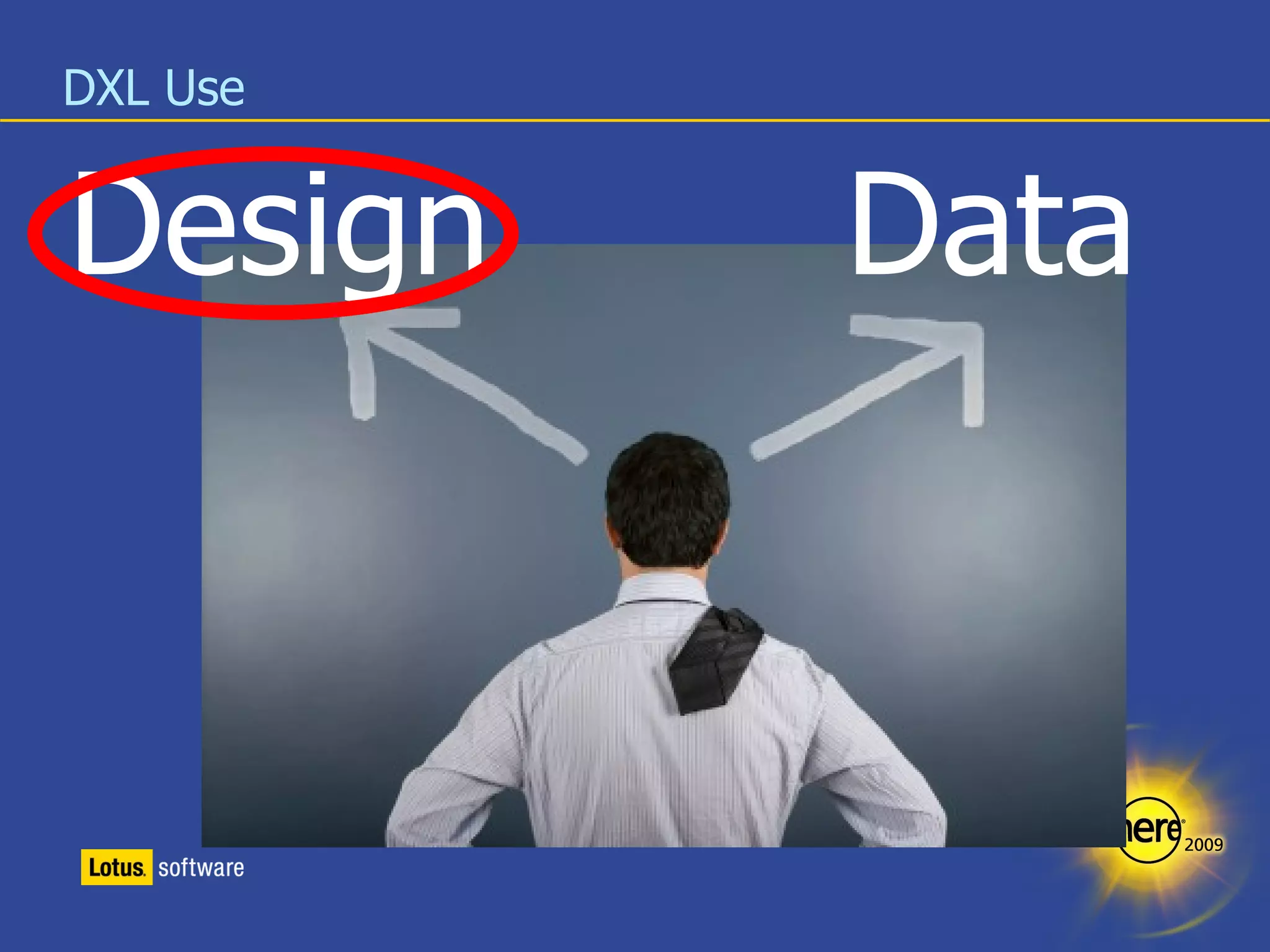
DXL Use Design Data
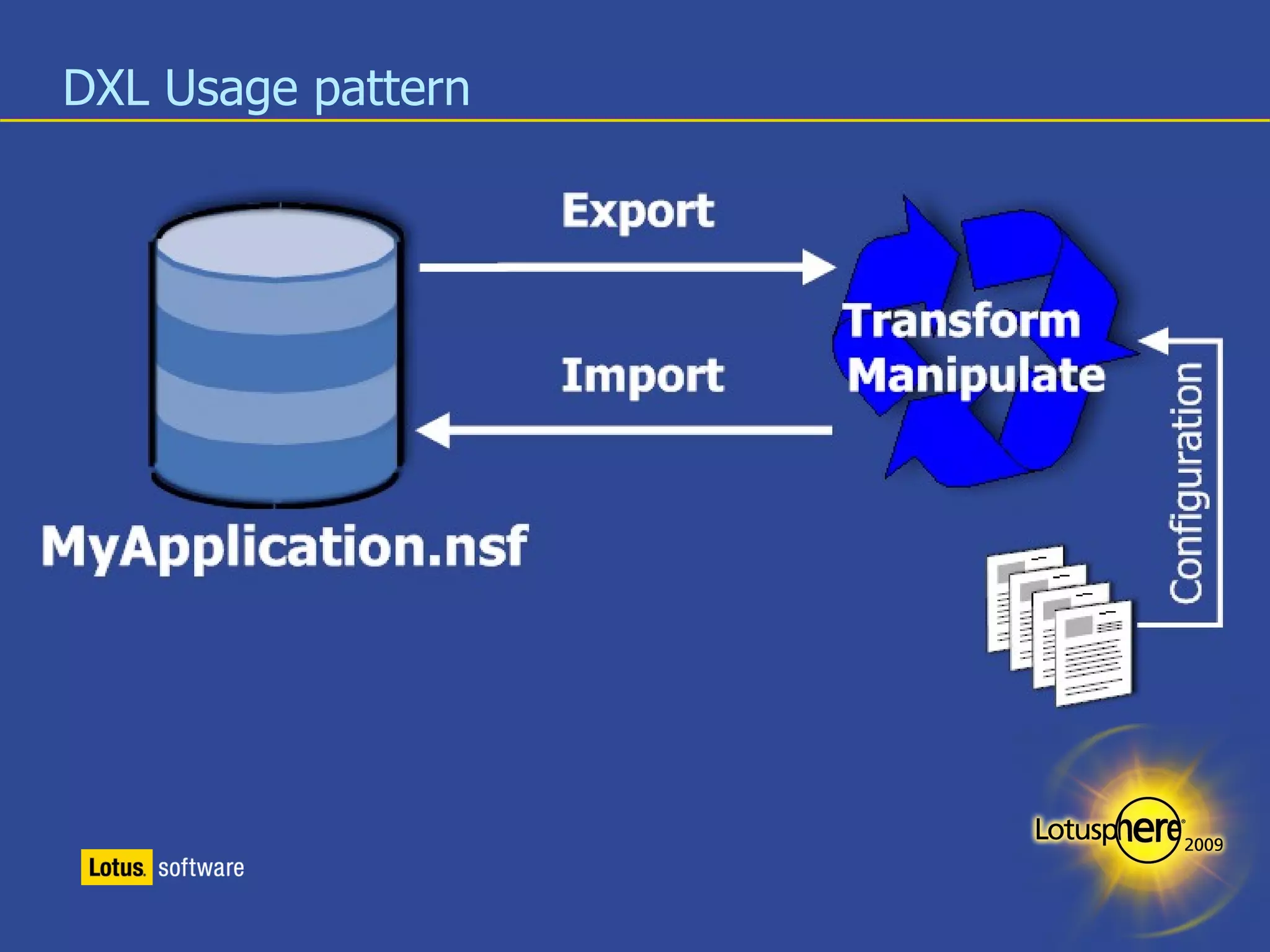
DXL Usage pattern
DXL Usage pattern
DXL Usage pattern
Tools around DXL LotusScript & Java Classes DXL Importer DXL Exporter NotesStream, DOMBrowser XSLT, XPath Code Snippets DXL Peek (OpenNTF.org) DXL Explorer (domiclipse.com) DXL Studio
Exporting a whole database design (Java Edition) NotesSession s = NotesFactory.createSession(); Database db = s.getDatabase(“YourServer”, “YourDB.nsf”); NoteCollection  nc = db.createNoteCollection(false); nc.selectAllNotes(true); // We select everything nc.selectAllDataNotes(false); // And de-select the data nc.buildCollection(); DxlExporter exporter = s.createDxlExporter(); exporter.setExitOnFirstFatalError(false); // continue on problems exporter.setOmitMiscFileObjects(true); exporter.setForceNoteFormat(false); // We omit the DocType to make sure XSLT doesn't complain exporter.setOutputDOCTYPE(false); String result = exporter.exportDxl(nc); Writer out = new OutputStreamWriter(new FileOutputStream( “yourfile.dxl”),  &quot;UTF-8&quot; ); out.write(output); out.close();
Caveats exporterSetForceNoteFormat(true/false) False exports forms/views as <form ..../> <view ..../> True exports forms/views as <note type=”form” ... /> <note type=”view” .../> You need different transformation strategies for both TRUE = roundtrip save (mostly) FALSE = more manipulation possibilities, smaller, crashes sometimes OutputStreamWriter(OutputStream, “UTF-8”) Writing directly to OutputStream is faster but format is anybody's guess Using OutputStreamWriter you can force UTF-8 Big issue when chaining in LotusScript Still work in progress
Importing Design back into Notes (LotusScript) Public Sub ImportDesignDXL(targetDB As NotesDatabase, newDXL As String) Dim s As New NotesSession Dim importer As NotesDXLImporter Set importer = s.CreateDXLImporter 'Create the importer importer.ACLImportOption = DXLIMPORTOPTION_IGNORE importer.CompileLotusScript = False 'We deal with Script later importer.DesignImportOption = DXLIMPORTOPTION_REPLACE_ELSE_CREATE  importer.DocumentImportOption = DXLIMPORTOPTION_IGNORE importer.ExitOnFirstFatalError = False importer.ReplaceDBProperties = True 'We also update DB properties importer.ReplicaRequiredForReplaceOrUpdate = False importer.UnknownTokenLogOption = DXLLOGOPTION_WARNING Call importer.Import(newDXL, targetDB) 'Execute the import Msgbox(importer.log) End Sub
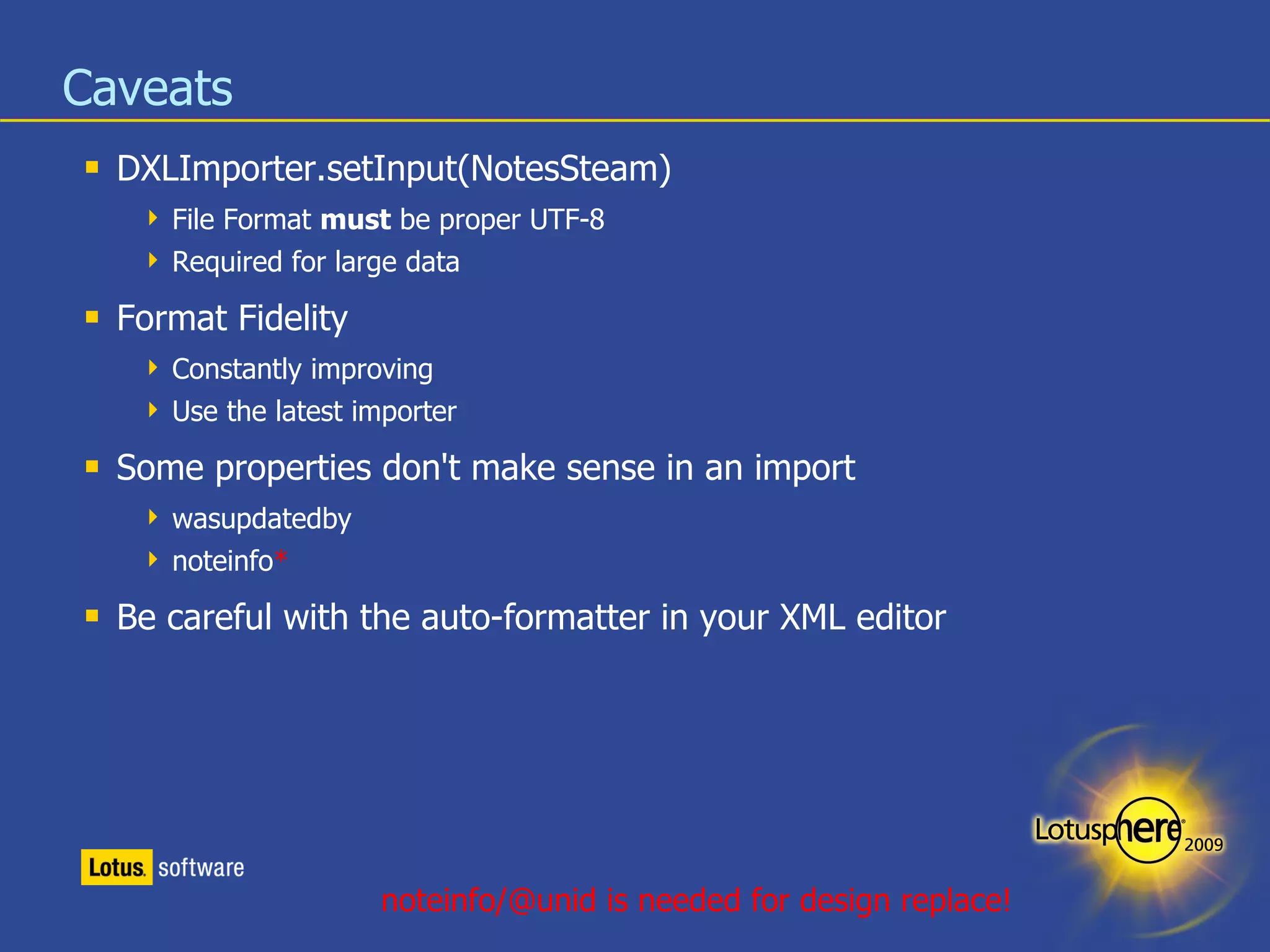
Caveats DXLImporter.setInput(NotesSteam) File Format  must  be proper UTF-8 Required for large data Format Fidelity Constantly improving Use the latest importer Some properties don't make sense in an import wasupdatedby noteinfo * Be careful with the auto-formatter in your XML editor noteinfo/@unid is needed for design replace!
Manipulate DXL Iterate through the DOM until you hit what you are looking for Use XPath expressions to find the element(s) /database/form[@name='Memo'] //column[@categorized='true'] //field[@name='Subject'] This is a good time to brush up your Java Skills*! For the die hard LotusScript developers: www.nsftools.com/tips/XmlNodeReader/ www-10.lotus.com/ldd/bpmpblog.nsf/dx/dom-for-output?opendocument * or borrow other peoples code!
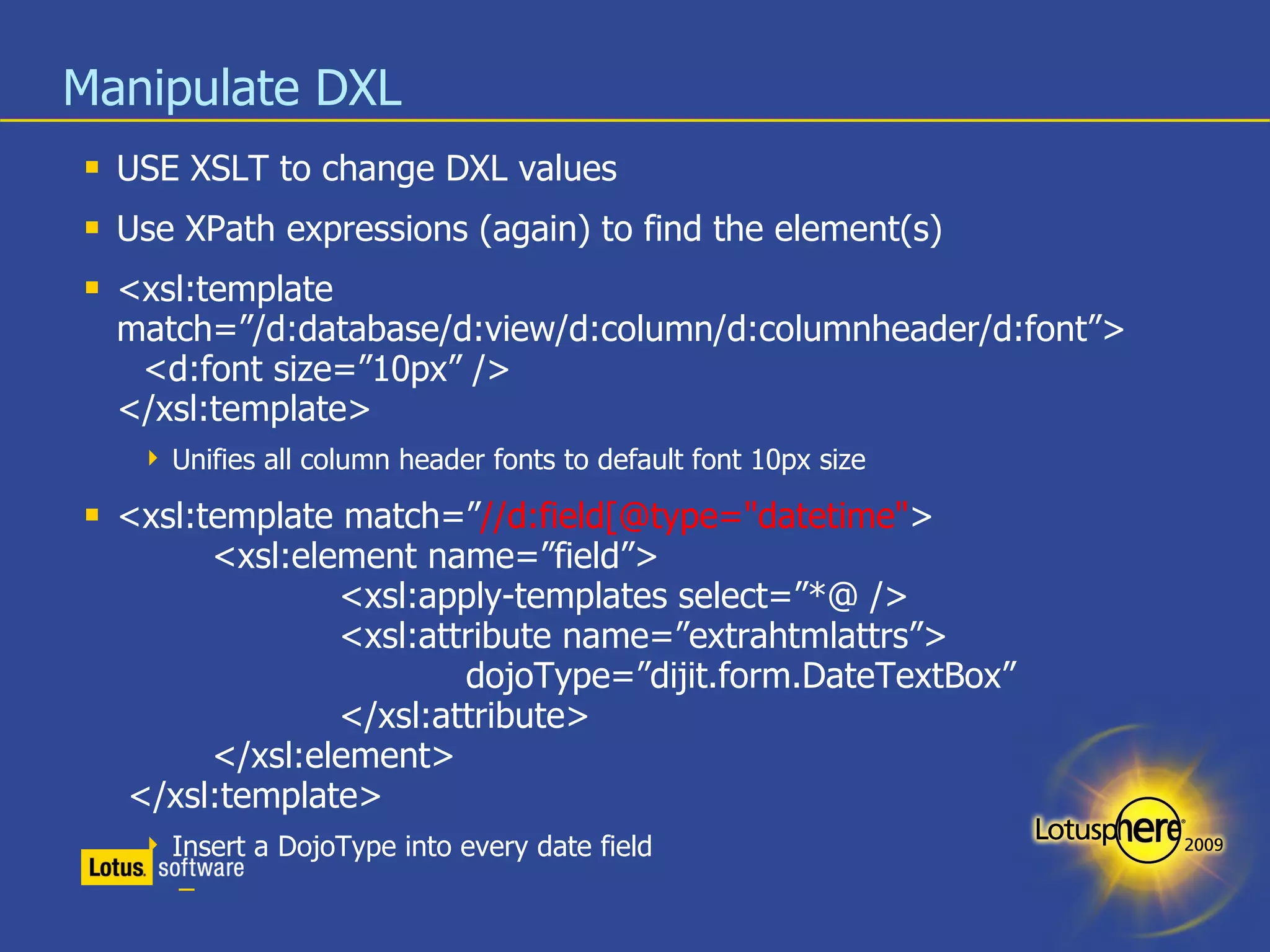
Manipulate DXL USE XSLT to change DXL values Use XPath expressions (again) to find the element(s) <xsl:template match=”/d:database/d:view/d:column/d:columnheader/d:font”> <d:font size=”10px” /> </xsl:template> Unifies all column header fonts to default font 10px size <xsl:template match=” //d:field[@type=&quot;datetime&quot; > <xsl:element name=”field”> <xsl:apply-templates select=”*@ /> <xsl:attribute name=”extrahtmlattrs”> dojoType=”dijit.form.DateTextBox” </xsl:attribute> </xsl:element>   </xsl:template> Insert a DojoType into every date field
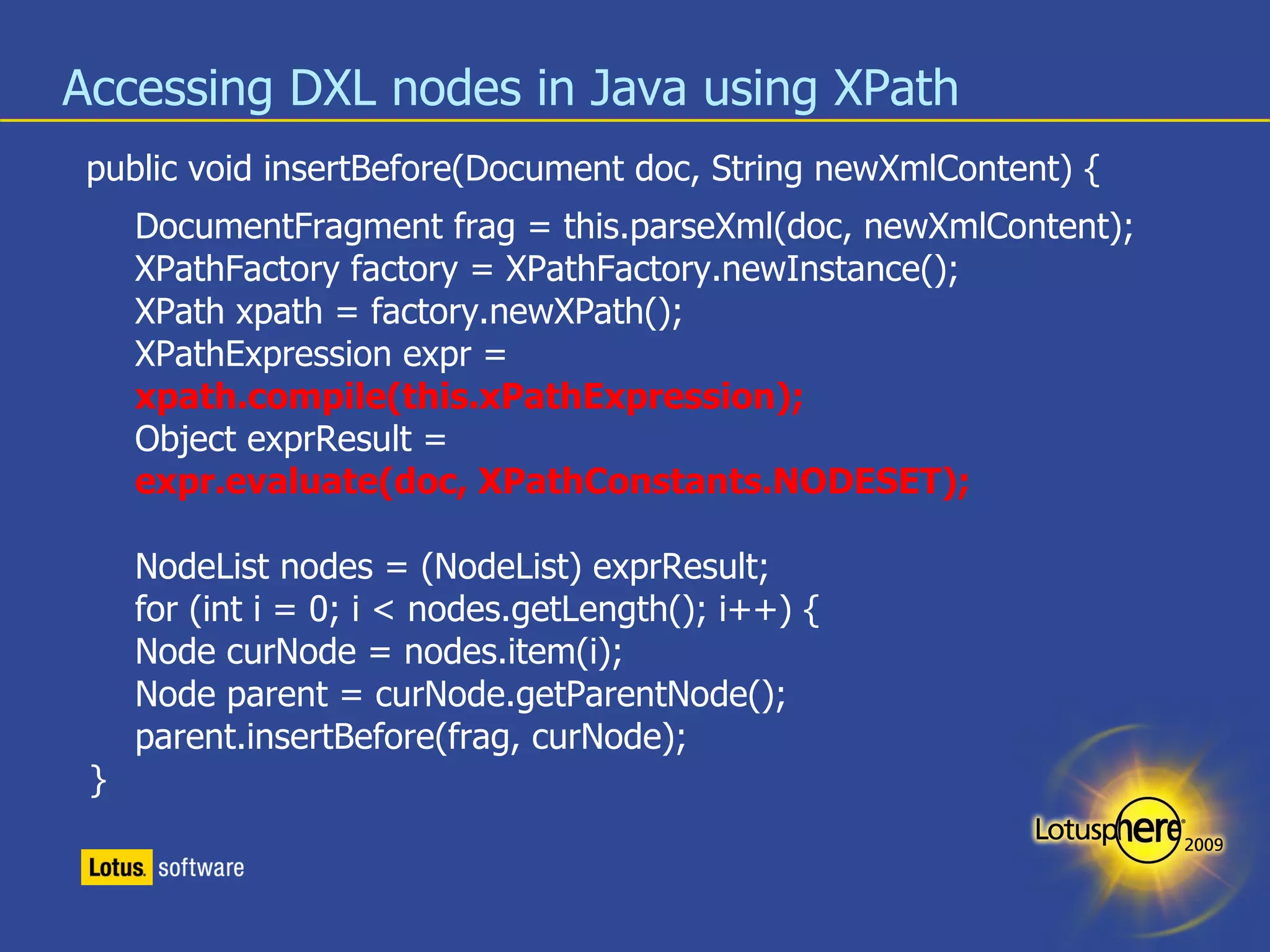
Accessing DXL nodes in Java using XPath public void  insertBefore (Document doc, String newXmlContent) { DocumentFragment frag = this.parseXml(doc, newXmlContent); XPathFactory factory = XPathFactory.newInstance(); XPath xpath = factory.newXPath(); XPathExpression expr = xpath.compile(this.xPathExpression); Object exprResult =  expr.evaluate(doc, XPathConstants.NODESET); NodeList nodes = (NodeList) exprResult; for (int i = 0; i < nodes.getLength(); i++) { Node curNode = nodes.item(i); Node parent = curNode.getParentNode(); parent.insertBefore(frag, curNode);  }
Converting a XML String into a NodeFragment private DocumentFragment parseXml(Document doc, String fragment) { fragment = &quot;<fragment>&quot;+fragment+&quot;</fragment>&quot;; DocumentBuilderFactory factory = DocumentBuilderFactory.newInstance(); InputSource source = new InputSource(new StringReader(fragment)); Document d = factory.newDocumentBuilder().parse(source); Node node = doc.importNode(d.getDocumentElement(), true); DocumentFragment docfrag = doc.createDocumentFragment(); while (node.hasChildNodes()) { docfrag.appendChild(node.removeChild(node.getFirstChild())); } // Return the fragment return docfrag; }
A bit messy isn't it? Enter DXLStudio
DXL Studio A collection of Java Classes* to be used in your programs or from the command line: DesignExporter [outputpath] [NsfName] [Server] DesignImporter [sourcepath] [NsfName]  (local only) DesignInjector [workfile] [NsfName] TransformXML [source] [style] [target] DocumentServer [outputpath] [Server] DXLStudio.nsf * com.ibm.sg.dxlmagic.*
Using the command line Java tools Copy DXLMagic.jar to <notesprogramdir>\jvm\lib\ext* Edit your CLASSPATH variable (or create one): Windows : CLASSPATH=.;<notesprogramdir> \jvm\lib\ext\Notes.jar; <notesprogramdir>\jvm\lib\ext\websvc.jar; <notesprogramdir>\jvm\lib\ext\DXLMagic.jar Linux : CLASSPATH=.:<notesprogramdir>/jvm/lib/ext/Notes.jar; <notesprogramdir>/jvm/lib/ext/websvc.jar; <notesprogramdir>/jvm/lib/ext/DXLMagic.jar Run your Notes client Run any of the tools: java com.ibm.sg.dxlmagic.<NameOfTheTool> Running without parameter gives you a short instruction. * or any other place you can remember
DXLStudio.nsf* * on OpenNTF
You still need to understand XPATH and XSLT
... more examples /d:database/d:form[@bgcolor] all forms with a background color /d:database/d:form//d:font[color=&quot;#f7f7f7&quot;] all font entries in light gray /d:database/d:form[not (descendant::table)] forms that don't have tables //d:form/d:code[@event=&quot;webqueryopen&quot;] all webqueryopen agent definitions //d:form[d:code/@event=&quot;webqueryopen&quot;] all forms with webqueryopen agent definitions
What can I do with DXL Documentation Magic Database Magic Form Magic View Magic XPages Magic
Documentation Magic Document your database (= Synapsis Deluxe) http://www.openntf.org/Projects/pmt.nsf/ProjectLookup/Comprehensive Report use of Hide-when formulas Usage of fields and formulas Inherited design report
Demo
Documentation Magic II Document your database(s) to extract # of design elements Down to the LOC level for LotusScript, Java, JavaScript Assign LOC equivalents to design artifacts (e.g. A field definition is worth 5 LOC) Run a COCOMO II Analysis how much time & $$$ your deployment is worth http://www.cms4site.ru/utility.php?utility=cocomoii
java DocumentServer [path] [Servername] java DocumentDesignTags java DocumentDesignMetrics java ExportDesign .csv .metric .metric .metric .metric .metric .dxl .dxl .dxl .dxl .dxl NSF NTF
Let us have a look
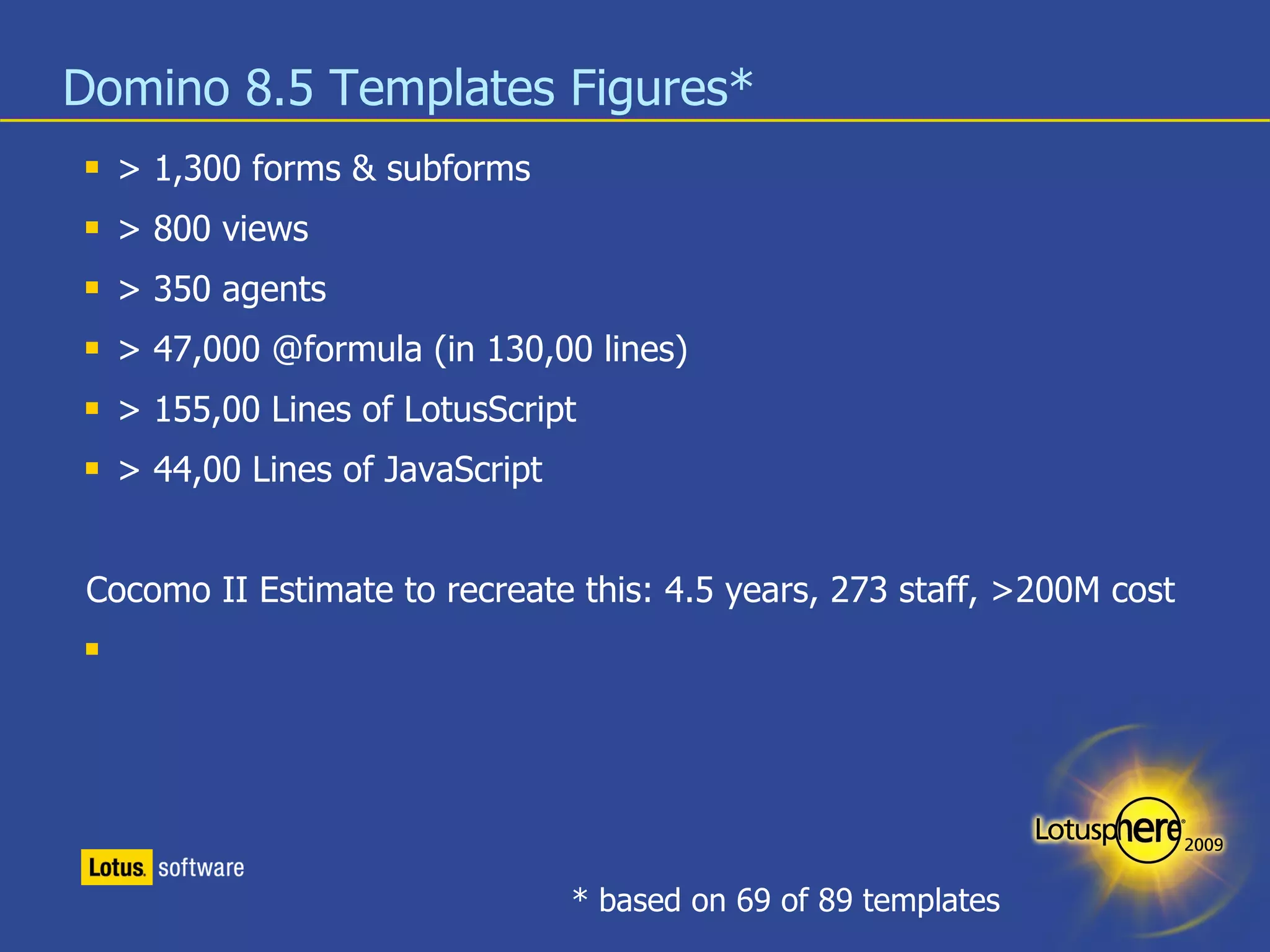
Domino 8.5 Templates Figures* > 1,300 forms & subforms > 800 views > 350 agents > 47,000 @formula (in 130,00 lines) > 155,00 Lines of LotusScript > 44,00 Lines of JavaScript Cocomo II Estimate to recreate this: 4.5 years, 273 staff, >200M cost * based on 69 of 89 templates
Database Magic Inject custom code into standard templates Cleanup Forms Importing forms HTML ODF
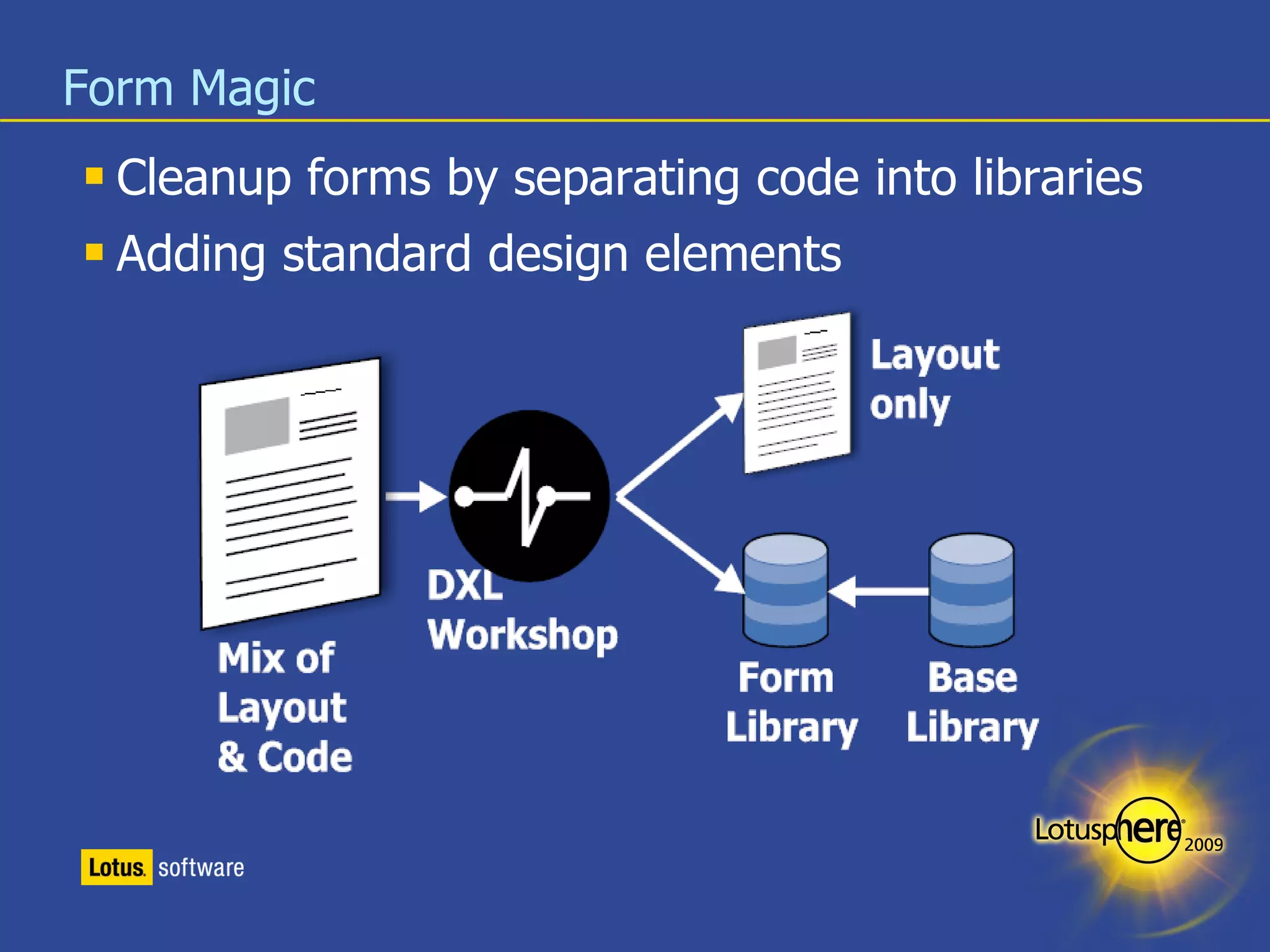
Form Magic Cleanup forms by separating code into libraries Adding standard design elements
Demo
View Magic Find views with similar selection formulas Unify the look & feel of your views http://www.openntf.org/Projects/pmt.nsf/ProjectLookup/Viewnify Create the one big view for XPages use
Demo
XPages Magic
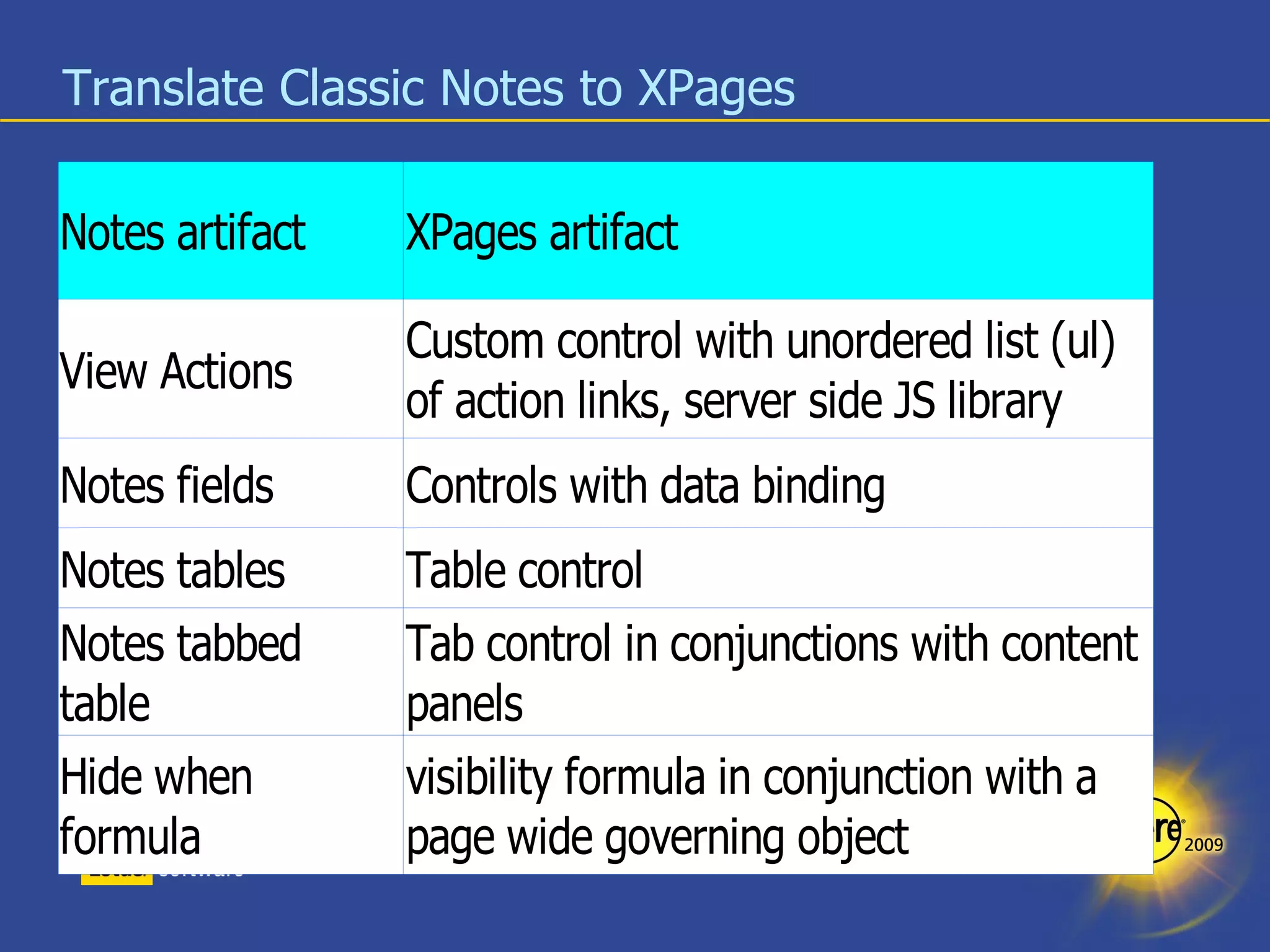
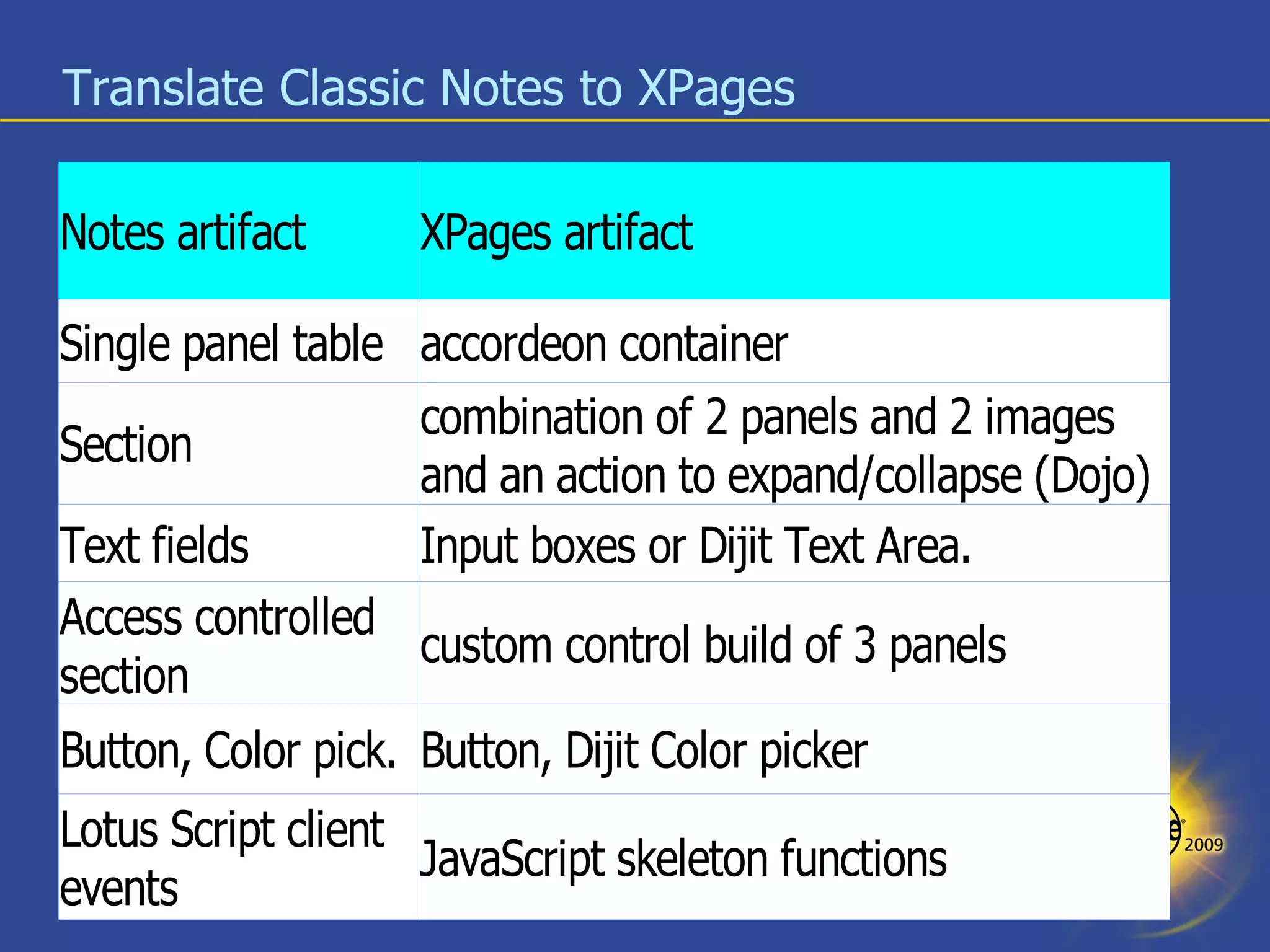
Classic Domino -> XPages Forms RichText -> XML / xHTML @Fomula / LotusScript -> JavaScript Tables = Tables Forms = Forms Fields = Fields Fonts = Fonts (or CSS?) Views $$ViewTemplate -> Xpage View -> DataSource
Translate Classic Notes to XPages
Demo
In Summary – What did we see Documentation Variation Management Code conversion
A few ideas Use a Stylesheet to transform your sample view/XPage/Form into a stylesheet Convert a spreadsheet table into an application Extract FieldNames and FieldHelp into a HTML form and push the updates back Store the DXL in DB/2 PureXML for cross-reference Populate “static” keyword fields instead of @DBColumn/@DBLookup Change text fields that contain CN=... into names fields Add @trim(@thisValue) to all empty text field Input Translations Update error messages of Input Validations
Reading Materials XML, XSLT, XPATH http://www.w3.org http://www.w3schools.com http://www.ibm.com/developerworks/library/x-wxxm35.html XML and Java http://www.xml.com/pub/rg/XML_and_Java_Tutorials http://www.exampledepot.com/egs/org.w3c.dom/pkg.html DXL http://www.ibm.com/developerworks/lotus/library/domino-dxl/ http://www.ferdychristant.com/blog/articles/DOMV-674NCF
Books Jeni Tennison Beginning XSLT 2.0: From Novice to Professional (Beginning: from Novice to Professional) XSLT and XPath On The Edge, Unlimited Edition Michael Kay XSLT 2.0 and XPath 2.0 Programmer's Reference (Programmer to Programmer) XSLT 2.0 Programmer's Reference (Programmer to Programmer) XPath 2.0 Programmer's Reference (Programmer to Programmer)
Q & A
[email_address] Twitter:notessensei Thank You!
Legal disclaimer  © IBM Corporation 2008. All Rights Reserved. The information contained in this publication is provided for informational purposes only. While efforts were made to verify the completeness and accuracy of the information contained in this publication, it is provided AS IS without warranty of any kind, express or implied. In addition, this information is based on IBM’s current product plans and strategy, which are subject to change by IBM without notice. IBM shall not be responsible for any damages arising out of the use of, or otherwise related to, this publication or any other materials. Nothing contained in this publication is intended to, nor shall have the effect of, creating any warranties or representations from IBM or its suppliers or licensors, or altering the terms and conditions of the applicable license agreement governing the use of IBM software. References in this presentation to IBM products, programs, or services do not imply that they will be available in all countries in which IBM operates. Product release dates and/or capabilities referenced in this presentation may change at any time at IBM’s sole discretion based on market opportunities or other factors, and are not intended to be a commitment to future product or feature availability in any way.  Nothing contained in these materials is intended to, nor shall have the effect of, stating or implying that any activities undertaken by you will result in any specific sales, revenue growth or other results.  Performance is based on measurements and projections using standard IBM benchmarks in a controlled environment.  The actual throughput or performance that any user will experience will vary depending upon many factors, including considerations such as the amount of multiprogramming in the user's job stream, the I/O configuration, the storage configuration, and the workload processed.  Therefore, no assurance can be given that an individual user will achieve results similar to those stated here. All customer examples described are presented as illustrations of how those customers have used IBM products and the results they may have achieved.  Actual environmental costs and performance characteristics may vary by customer. IBM, the IBM logo, Lotus, Lotus Notes, Notes, Domino, Quickr, Sametime, WebSphere, UC2,  PartnerWorld and Lotusphere are trademarks of International Business Machines Corporation in the United States, other countries, or both.  Unyte is a trademark of WebDialogs, Inc., in the United States, other countries, or both. Adobe, the Adobe logo, PostScript, and the PostScript logo are either registered trademarks or trademarks of Adobe Systems Incorporated in the United States, and/or other countries. Java and all Java-based trademarks are trademarks of Sun Microsystems, Inc. in the United States, other countries, or both. Microsoft and Windows are trademarks of Microsoft Corporation in the United States, other countries, or both. Intel, Intel Centrino, Celeron, Intel Xeon, Intel SpeedStep, Itanium, and Pentium are trademarks or registered trademarks of Intel Corporation or its subsidiaries in the United States and other countries. UNIX is a registered trademark of The Open Group in the United States and other countries. Linux is a registered trademark of Linus Torvalds in the United States, other countries, or both. Other company, product, or service names may be trademarks or service marks of others. All references to   ACME Corp   refer to a fictitious company and are used for illustration purposes only.

AD215 - Practical Magic with DXL

  • 1.
  • 2.
    Practical Magic withDXL Stephan H. Wissel, Lotus Technology & Productivity Advisor, IBM Techworks AP AD215
  • 3.
  • 4.
  • 5.
    Agenda What isDXL? Tools around DXL What can I do with DXL? Q & A
  • 6.
    What is DXL?Representation of Note elements in XML First occurrence in R5 XML toolkit Constantly expanding Schema is available in <notesprogramdir>/xmlschemas domino_6_0.xsd, domino_7_0_M3.xsd, domino_8_0_2.xsd, domino_8_0.xsd, domino_7_0_1.xsd, domino_7_0_M4.xsd, domino_8_0_M2.xsd, domino_8_5_M1.xsd, domino_7_0_2.xsd, domino_7_0_M6.xsd, domino_8_0_M3.xsd, domino_8_5_M2.xsd, domino_7_0_3.xsd, domino_7_0.xsd, domino_8_0_M4.xsd domino_8_5.xsd, domino_7_0_M2.xsd, domino_8_0_1.xsd, domino_8_0_M5.xsd Comes with helper classes DXLExporter, NotesDXLExporter DXLImporter, NotesDXLImporter
  • 7.
  • 8.
  • 9.
  • 10.
  • 11.
    Tools around DXLLotusScript & Java Classes DXL Importer DXL Exporter NotesStream, DOMBrowser XSLT, XPath Code Snippets DXL Peek (OpenNTF.org) DXL Explorer (domiclipse.com) DXL Studio
  • 12.
    Exporting a wholedatabase design (Java Edition) NotesSession s = NotesFactory.createSession(); Database db = s.getDatabase(“YourServer”, “YourDB.nsf”); NoteCollection nc = db.createNoteCollection(false); nc.selectAllNotes(true); // We select everything nc.selectAllDataNotes(false); // And de-select the data nc.buildCollection(); DxlExporter exporter = s.createDxlExporter(); exporter.setExitOnFirstFatalError(false); // continue on problems exporter.setOmitMiscFileObjects(true); exporter.setForceNoteFormat(false); // We omit the DocType to make sure XSLT doesn't complain exporter.setOutputDOCTYPE(false); String result = exporter.exportDxl(nc); Writer out = new OutputStreamWriter(new FileOutputStream( “yourfile.dxl”), &quot;UTF-8&quot; ); out.write(output); out.close();
  • 13.
    Caveats exporterSetForceNoteFormat(true/false) Falseexports forms/views as <form ..../> <view ..../> True exports forms/views as <note type=”form” ... /> <note type=”view” .../> You need different transformation strategies for both TRUE = roundtrip save (mostly) FALSE = more manipulation possibilities, smaller, crashes sometimes OutputStreamWriter(OutputStream, “UTF-8”) Writing directly to OutputStream is faster but format is anybody's guess Using OutputStreamWriter you can force UTF-8 Big issue when chaining in LotusScript Still work in progress
  • 14.
    Importing Design backinto Notes (LotusScript) Public Sub ImportDesignDXL(targetDB As NotesDatabase, newDXL As String) Dim s As New NotesSession Dim importer As NotesDXLImporter Set importer = s.CreateDXLImporter 'Create the importer importer.ACLImportOption = DXLIMPORTOPTION_IGNORE importer.CompileLotusScript = False 'We deal with Script later importer.DesignImportOption = DXLIMPORTOPTION_REPLACE_ELSE_CREATE importer.DocumentImportOption = DXLIMPORTOPTION_IGNORE importer.ExitOnFirstFatalError = False importer.ReplaceDBProperties = True 'We also update DB properties importer.ReplicaRequiredForReplaceOrUpdate = False importer.UnknownTokenLogOption = DXLLOGOPTION_WARNING Call importer.Import(newDXL, targetDB) 'Execute the import Msgbox(importer.log) End Sub
  • 15.
    Caveats DXLImporter.setInput(NotesSteam) FileFormat must be proper UTF-8 Required for large data Format Fidelity Constantly improving Use the latest importer Some properties don't make sense in an import wasupdatedby noteinfo * Be careful with the auto-formatter in your XML editor noteinfo/@unid is needed for design replace!
  • 16.
    Manipulate DXL Iteratethrough the DOM until you hit what you are looking for Use XPath expressions to find the element(s) /database/form[@name='Memo'] //column[@categorized='true'] //field[@name='Subject'] This is a good time to brush up your Java Skills*! For the die hard LotusScript developers: www.nsftools.com/tips/XmlNodeReader/ www-10.lotus.com/ldd/bpmpblog.nsf/dx/dom-for-output?opendocument * or borrow other peoples code!
  • 17.
    Manipulate DXL USEXSLT to change DXL values Use XPath expressions (again) to find the element(s) <xsl:template match=”/d:database/d:view/d:column/d:columnheader/d:font”> <d:font size=”10px” /> </xsl:template> Unifies all column header fonts to default font 10px size <xsl:template match=” //d:field[@type=&quot;datetime&quot; > <xsl:element name=”field”> <xsl:apply-templates select=”*@ /> <xsl:attribute name=”extrahtmlattrs”> dojoType=”dijit.form.DateTextBox” </xsl:attribute> </xsl:element> </xsl:template> Insert a DojoType into every date field
  • 18.
    Accessing DXL nodesin Java using XPath public void insertBefore (Document doc, String newXmlContent) { DocumentFragment frag = this.parseXml(doc, newXmlContent); XPathFactory factory = XPathFactory.newInstance(); XPath xpath = factory.newXPath(); XPathExpression expr = xpath.compile(this.xPathExpression); Object exprResult = expr.evaluate(doc, XPathConstants.NODESET); NodeList nodes = (NodeList) exprResult; for (int i = 0; i < nodes.getLength(); i++) { Node curNode = nodes.item(i); Node parent = curNode.getParentNode(); parent.insertBefore(frag, curNode); }
  • 19.
    Converting a XMLString into a NodeFragment private DocumentFragment parseXml(Document doc, String fragment) { fragment = &quot;<fragment>&quot;+fragment+&quot;</fragment>&quot;; DocumentBuilderFactory factory = DocumentBuilderFactory.newInstance(); InputSource source = new InputSource(new StringReader(fragment)); Document d = factory.newDocumentBuilder().parse(source); Node node = doc.importNode(d.getDocumentElement(), true); DocumentFragment docfrag = doc.createDocumentFragment(); while (node.hasChildNodes()) { docfrag.appendChild(node.removeChild(node.getFirstChild())); } // Return the fragment return docfrag; }
  • 20.
    A bit messyisn't it? Enter DXLStudio
  • 21.
    DXL Studio Acollection of Java Classes* to be used in your programs or from the command line: DesignExporter [outputpath] [NsfName] [Server] DesignImporter [sourcepath] [NsfName] (local only) DesignInjector [workfile] [NsfName] TransformXML [source] [style] [target] DocumentServer [outputpath] [Server] DXLStudio.nsf * com.ibm.sg.dxlmagic.*
  • 22.
    Using the commandline Java tools Copy DXLMagic.jar to <notesprogramdir>\jvm\lib\ext* Edit your CLASSPATH variable (or create one): Windows : CLASSPATH=.;<notesprogramdir> \jvm\lib\ext\Notes.jar; <notesprogramdir>\jvm\lib\ext\websvc.jar; <notesprogramdir>\jvm\lib\ext\DXLMagic.jar Linux : CLASSPATH=.:<notesprogramdir>/jvm/lib/ext/Notes.jar; <notesprogramdir>/jvm/lib/ext/websvc.jar; <notesprogramdir>/jvm/lib/ext/DXLMagic.jar Run your Notes client Run any of the tools: java com.ibm.sg.dxlmagic.<NameOfTheTool> Running without parameter gives you a short instruction. * or any other place you can remember
  • 23.
  • 24.
    You still needto understand XPATH and XSLT
  • 25.
    ... more examples/d:database/d:form[@bgcolor] all forms with a background color /d:database/d:form//d:font[color=&quot;#f7f7f7&quot;] all font entries in light gray /d:database/d:form[not (descendant::table)] forms that don't have tables //d:form/d:code[@event=&quot;webqueryopen&quot;] all webqueryopen agent definitions //d:form[d:code/@event=&quot;webqueryopen&quot;] all forms with webqueryopen agent definitions
  • 26.
    What can Ido with DXL Documentation Magic Database Magic Form Magic View Magic XPages Magic
  • 27.
    Documentation Magic Documentyour database (= Synapsis Deluxe) http://www.openntf.org/Projects/pmt.nsf/ProjectLookup/Comprehensive Report use of Hide-when formulas Usage of fields and formulas Inherited design report
  • 28.
  • 29.
    Documentation Magic IIDocument your database(s) to extract # of design elements Down to the LOC level for LotusScript, Java, JavaScript Assign LOC equivalents to design artifacts (e.g. A field definition is worth 5 LOC) Run a COCOMO II Analysis how much time & $$$ your deployment is worth http://www.cms4site.ru/utility.php?utility=cocomoii
  • 30.
    java DocumentServer [path][Servername] java DocumentDesignTags java DocumentDesignMetrics java ExportDesign .csv .metric .metric .metric .metric .metric .dxl .dxl .dxl .dxl .dxl NSF NTF
  • 31.
  • 32.
    Domino 8.5 TemplatesFigures* > 1,300 forms & subforms > 800 views > 350 agents > 47,000 @formula (in 130,00 lines) > 155,00 Lines of LotusScript > 44,00 Lines of JavaScript Cocomo II Estimate to recreate this: 4.5 years, 273 staff, >200M cost * based on 69 of 89 templates
  • 33.
    Database Magic Injectcustom code into standard templates Cleanup Forms Importing forms HTML ODF
  • 34.
    Form Magic Cleanupforms by separating code into libraries Adding standard design elements
  • 35.
  • 36.
    View Magic Findviews with similar selection formulas Unify the look & feel of your views http://www.openntf.org/Projects/pmt.nsf/ProjectLookup/Viewnify Create the one big view for XPages use
  • 37.
  • 38.
  • 39.
    Classic Domino ->XPages Forms RichText -> XML / xHTML @Fomula / LotusScript -> JavaScript Tables = Tables Forms = Forms Fields = Fields Fonts = Fonts (or CSS?) Views $$ViewTemplate -> Xpage View -> DataSource
  • 40.
  • 41.
  • 42.
  • 43.
  • 44.
  • 45.
    In Summary –What did we see Documentation Variation Management Code conversion
  • 46.
    A few ideasUse a Stylesheet to transform your sample view/XPage/Form into a stylesheet Convert a spreadsheet table into an application Extract FieldNames and FieldHelp into a HTML form and push the updates back Store the DXL in DB/2 PureXML for cross-reference Populate “static” keyword fields instead of @DBColumn/@DBLookup Change text fields that contain CN=... into names fields Add @trim(@thisValue) to all empty text field Input Translations Update error messages of Input Validations
  • 47.
    Reading Materials XML,XSLT, XPATH http://www.w3.org http://www.w3schools.com http://www.ibm.com/developerworks/library/x-wxxm35.html XML and Java http://www.xml.com/pub/rg/XML_and_Java_Tutorials http://www.exampledepot.com/egs/org.w3c.dom/pkg.html DXL http://www.ibm.com/developerworks/lotus/library/domino-dxl/ http://www.ferdychristant.com/blog/articles/DOMV-674NCF
  • 48.
    Books Jeni TennisonBeginning XSLT 2.0: From Novice to Professional (Beginning: from Novice to Professional) XSLT and XPath On The Edge, Unlimited Edition Michael Kay XSLT 2.0 and XPath 2.0 Programmer's Reference (Programmer to Programmer) XSLT 2.0 Programmer's Reference (Programmer to Programmer) XPath 2.0 Programmer's Reference (Programmer to Programmer)
  • 49.
  • 50.
  • 51.
    Legal disclaimer © IBM Corporation 2008. All Rights Reserved. The information contained in this publication is provided for informational purposes only. While efforts were made to verify the completeness and accuracy of the information contained in this publication, it is provided AS IS without warranty of any kind, express or implied. In addition, this information is based on IBM’s current product plans and strategy, which are subject to change by IBM without notice. IBM shall not be responsible for any damages arising out of the use of, or otherwise related to, this publication or any other materials. Nothing contained in this publication is intended to, nor shall have the effect of, creating any warranties or representations from IBM or its suppliers or licensors, or altering the terms and conditions of the applicable license agreement governing the use of IBM software. References in this presentation to IBM products, programs, or services do not imply that they will be available in all countries in which IBM operates. Product release dates and/or capabilities referenced in this presentation may change at any time at IBM’s sole discretion based on market opportunities or other factors, and are not intended to be a commitment to future product or feature availability in any way. Nothing contained in these materials is intended to, nor shall have the effect of, stating or implying that any activities undertaken by you will result in any specific sales, revenue growth or other results. Performance is based on measurements and projections using standard IBM benchmarks in a controlled environment. The actual throughput or performance that any user will experience will vary depending upon many factors, including considerations such as the amount of multiprogramming in the user's job stream, the I/O configuration, the storage configuration, and the workload processed. Therefore, no assurance can be given that an individual user will achieve results similar to those stated here. All customer examples described are presented as illustrations of how those customers have used IBM products and the results they may have achieved. Actual environmental costs and performance characteristics may vary by customer. IBM, the IBM logo, Lotus, Lotus Notes, Notes, Domino, Quickr, Sametime, WebSphere, UC2, PartnerWorld and Lotusphere are trademarks of International Business Machines Corporation in the United States, other countries, or both. Unyte is a trademark of WebDialogs, Inc., in the United States, other countries, or both. Adobe, the Adobe logo, PostScript, and the PostScript logo are either registered trademarks or trademarks of Adobe Systems Incorporated in the United States, and/or other countries. Java and all Java-based trademarks are trademarks of Sun Microsystems, Inc. in the United States, other countries, or both. Microsoft and Windows are trademarks of Microsoft Corporation in the United States, other countries, or both. Intel, Intel Centrino, Celeron, Intel Xeon, Intel SpeedStep, Itanium, and Pentium are trademarks or registered trademarks of Intel Corporation or its subsidiaries in the United States and other countries. UNIX is a registered trademark of The Open Group in the United States and other countries. Linux is a registered trademark of Linus Torvalds in the United States, other countries, or both. Other company, product, or service names may be trademarks or service marks of others. All references to ACME Corp refer to a fictitious company and are used for illustration purposes only.