TREE
 1. THE CONCEPT OF TREES
 2. BINARY TREE AND REPRESENTATION
 3. BINARY TREE TRAVERSAL
 4. BINARY SEARCH TREE
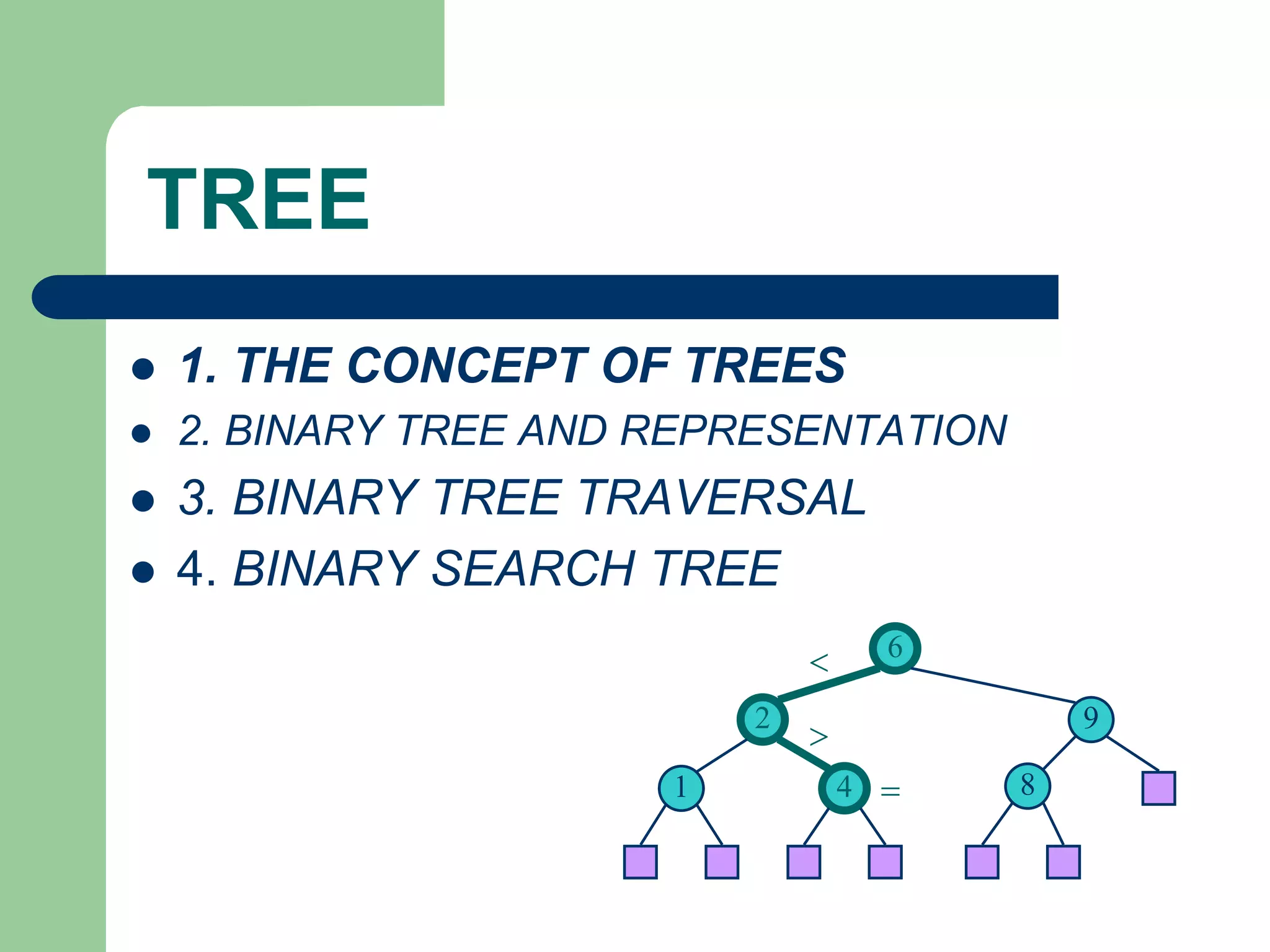
6
9
2
4
1 8
<
>
=
1. THE CONCEPT OF TREES
 A tree is a set of one or more nodes T:
– there is a specially designated node called a
root
– The remaining nodes are partitioned into n
disjointed set of nodes T1, T2,…,Tn, each of
which is a tree.
1. THE CONCEPT OF TREES
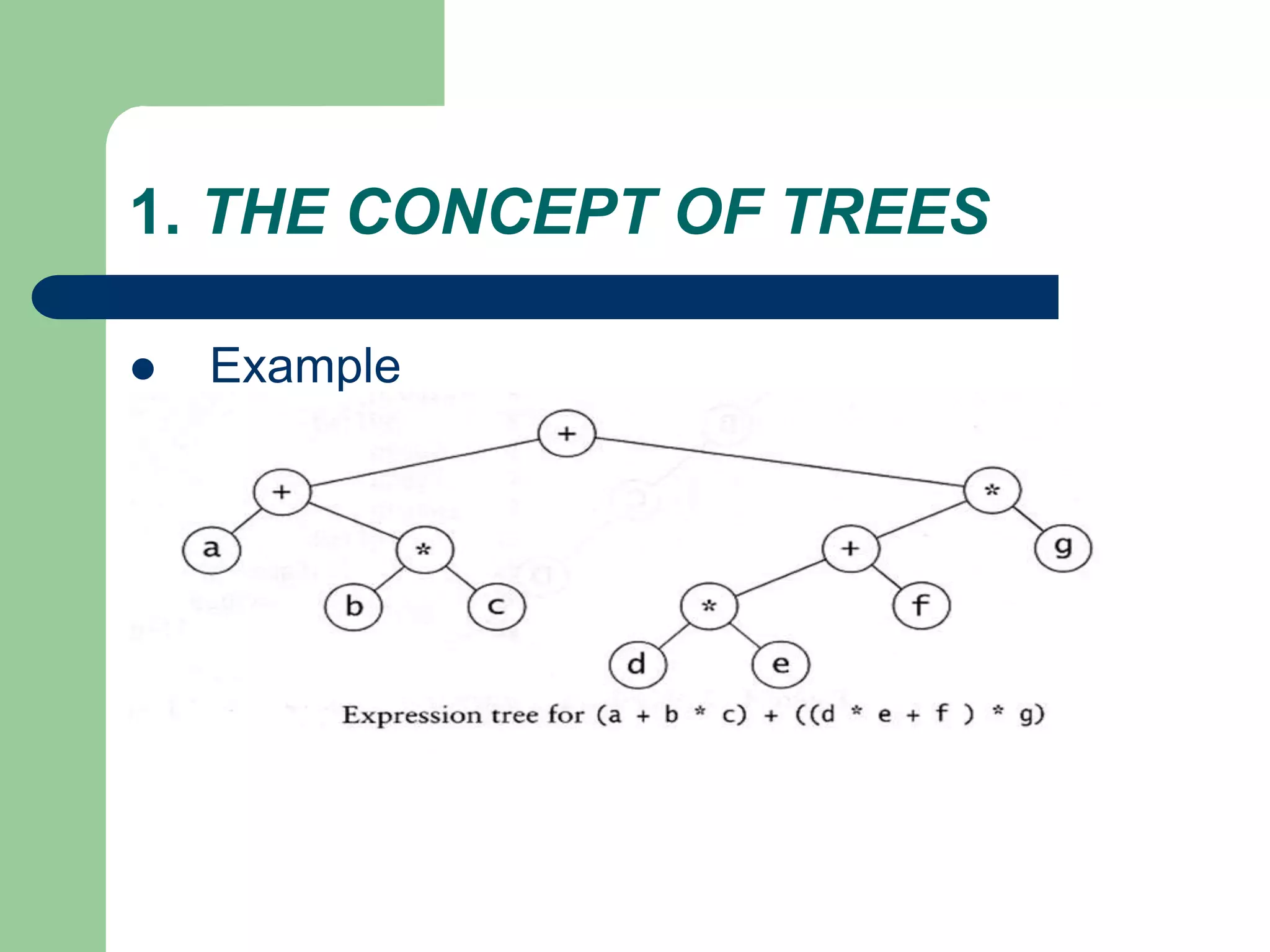
 Example
1. THE CONCEPT OF TREES
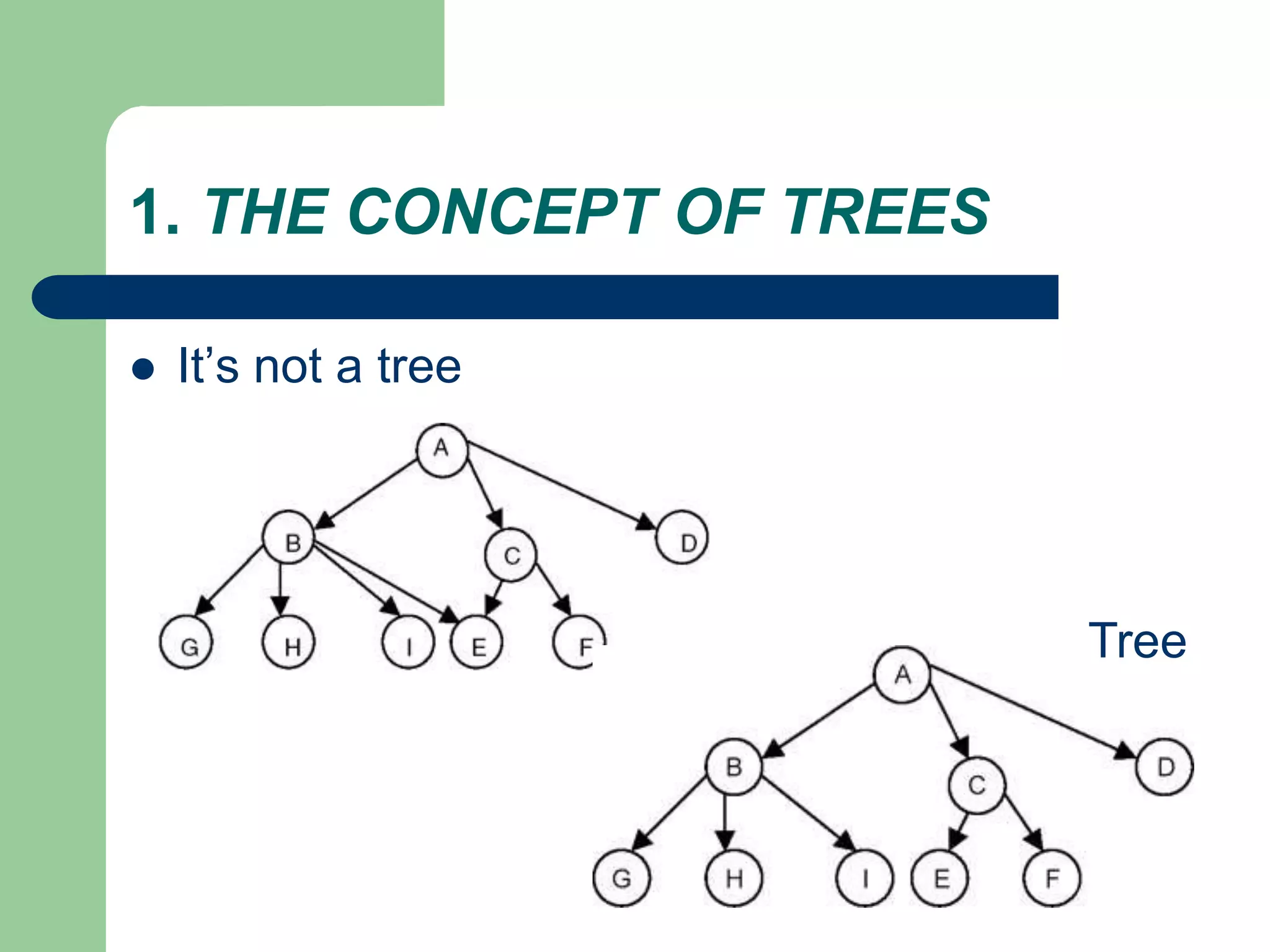
 It’s not a tree
Tree
1. THE CONCEPT OF TREES: Some
terminology
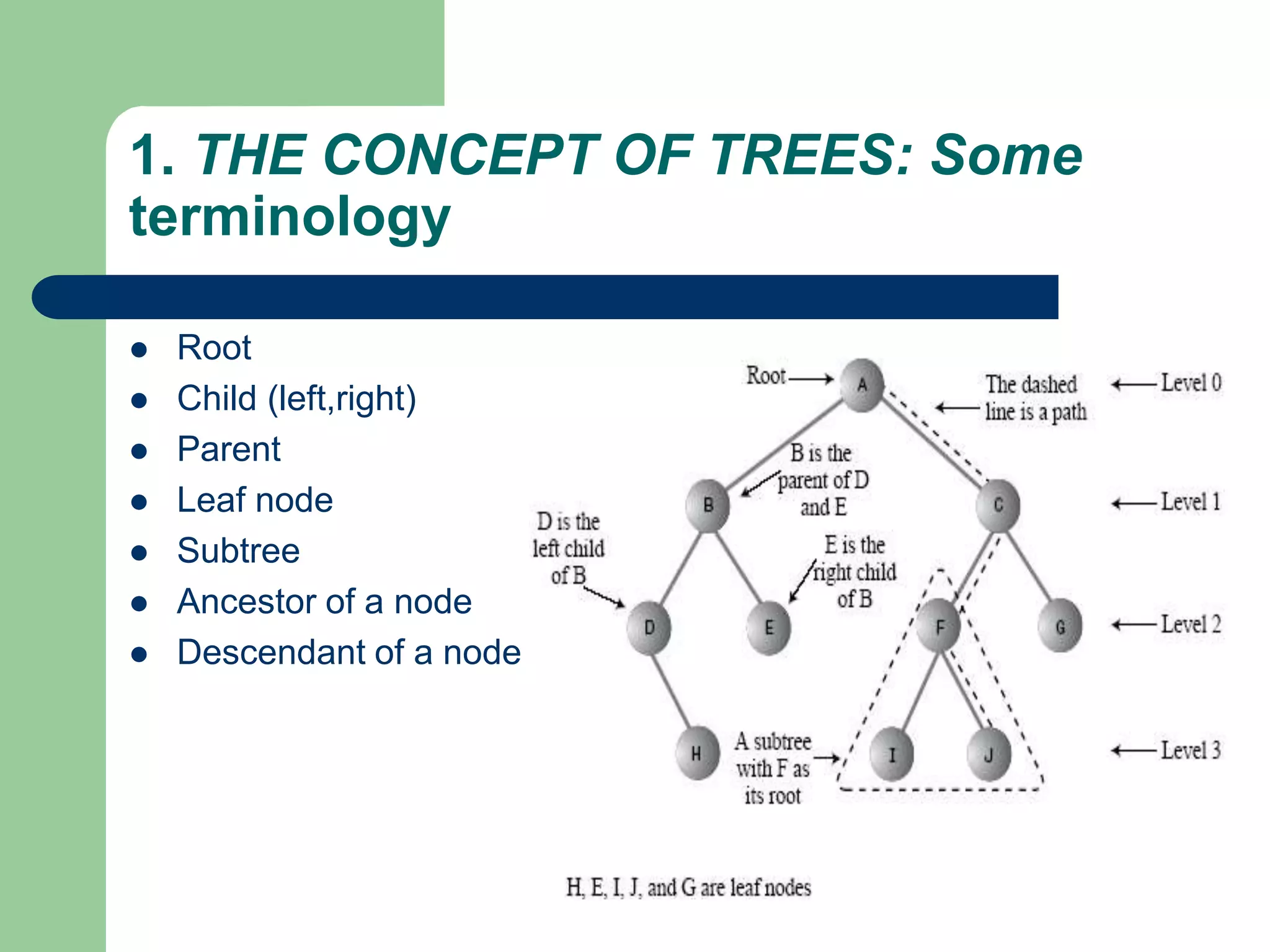
 Root
 Child (left,right)
 Parent
 Leaf node
 Subtree
 Ancestor of a node
 Descendant of a node
1. THE CONCEPT OF TREES
 Degree of a Node of a Tree
– The degree of a node of a tree is the number of subtrees
having this node as a root.
 Degree of a Tree
– The degree of a tree is defined as the maximum of degree
of the nodes of the tree
 Level of a Node
– level of the root node as 1, and incrementing it by 1 as we
move from the root towards the subtrees.
2. BINARY TREE AND REPRESENTATION
 BINARY TREE
– no node can have a degree of more than 2.
– The maximum number of nodes at level i will be
2i−1
– If k is the depth of the tree then the maximum
number of nodes that the tree can have is
– 2k − 1 = 2k−1 + 2k−2 + … + 20
2. BINARY TREE AND REPRESENTATION
 BINARY TREE
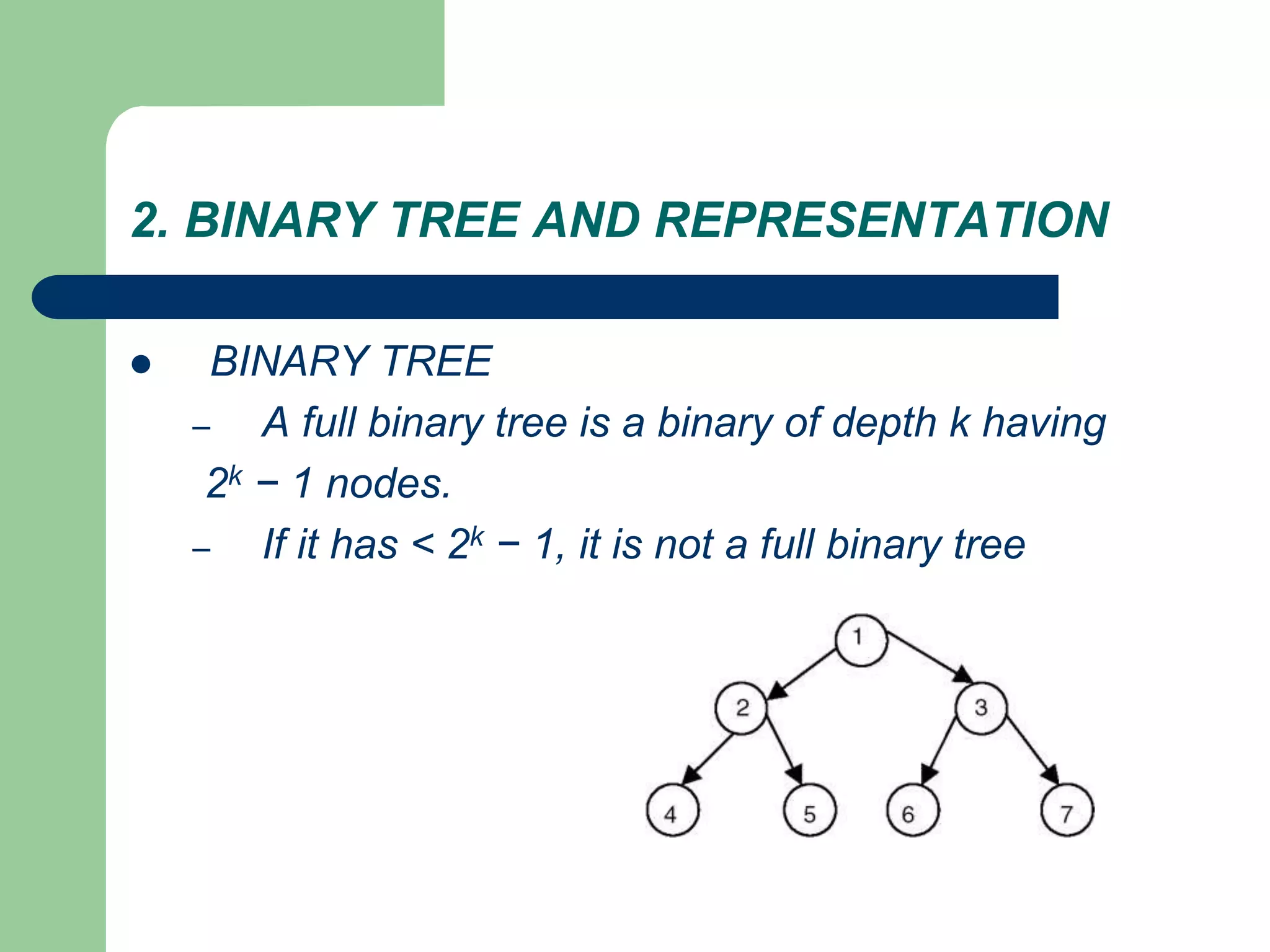
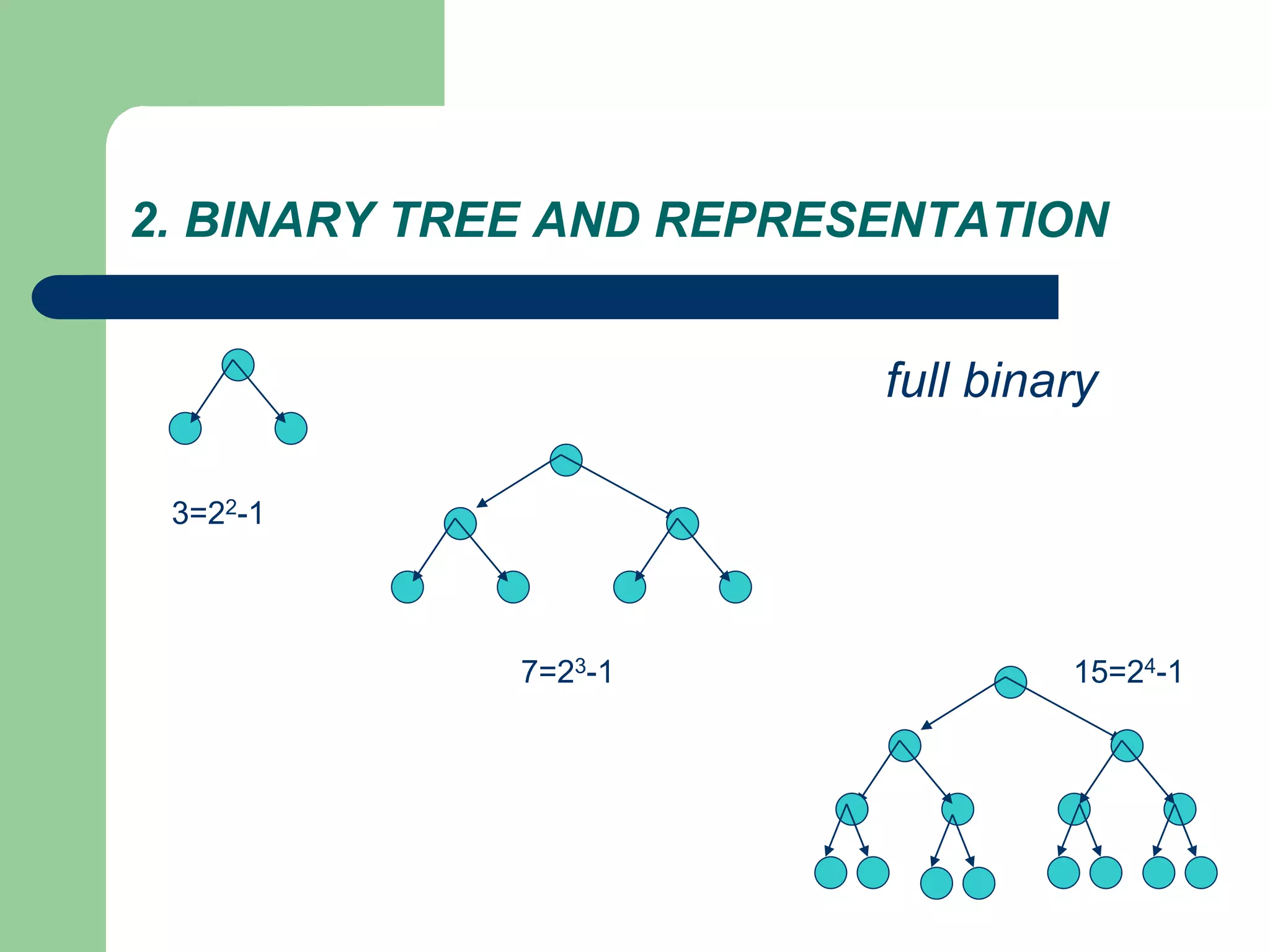
– A full binary tree is a binary of depth k having
2k − 1 nodes.
– If it has < 2k − 1, it is not a full binary tree
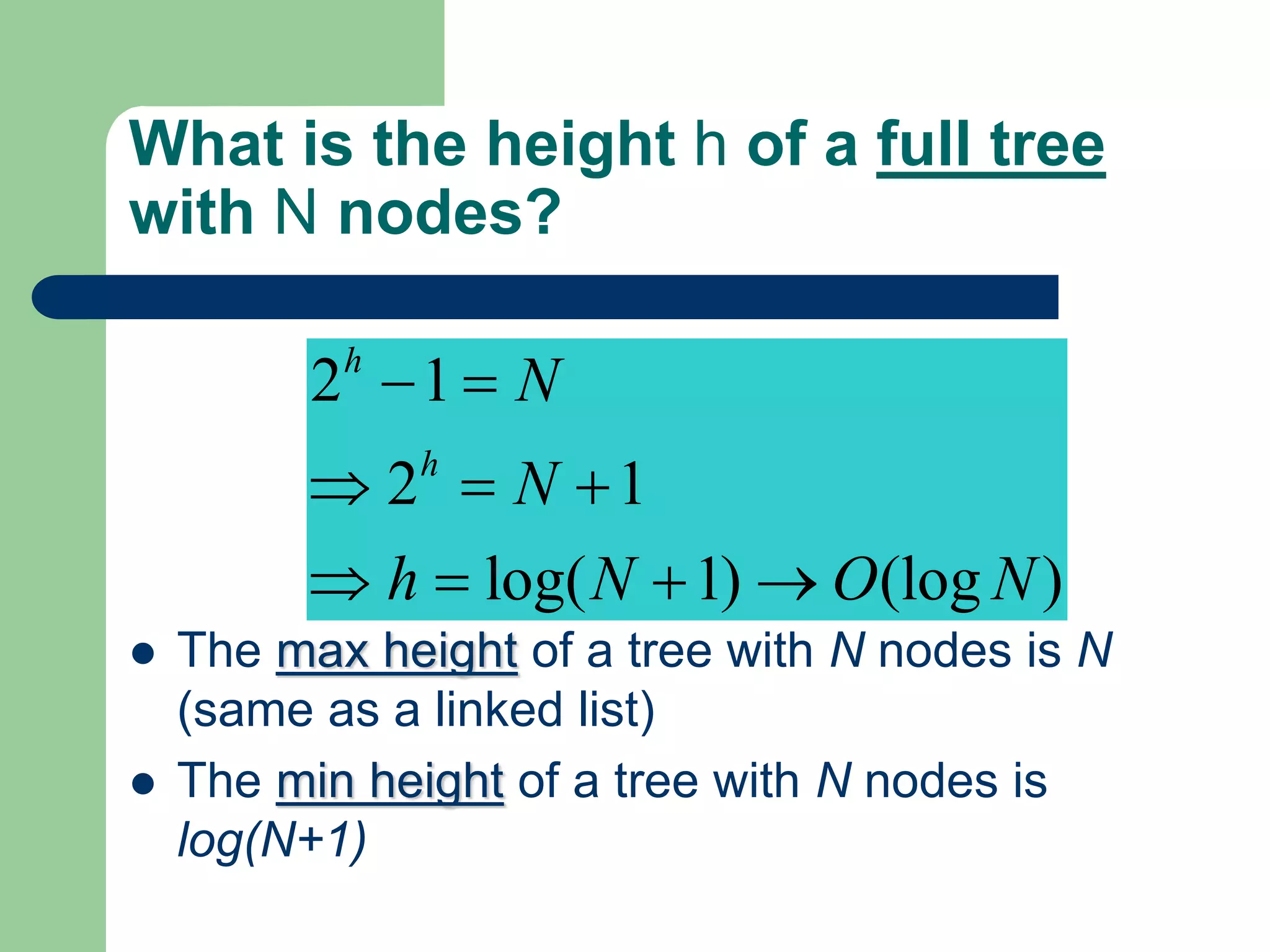
What is the height h of a full tree
with N nodes?
 The max height of a tree with N nodes is N
(same as a linked list)
 The min height of a tree with N nodes is
log(N+1)
2 1
2 1
log( 1) (log )
h
h
N
N
h N O N
 =
 = 
 =  
2. BINARY TREE AND REPRESENTATION
3=22-1
7=23-1 15=24-1
full binary
2. BINARY TREE AND REPRESENTATION
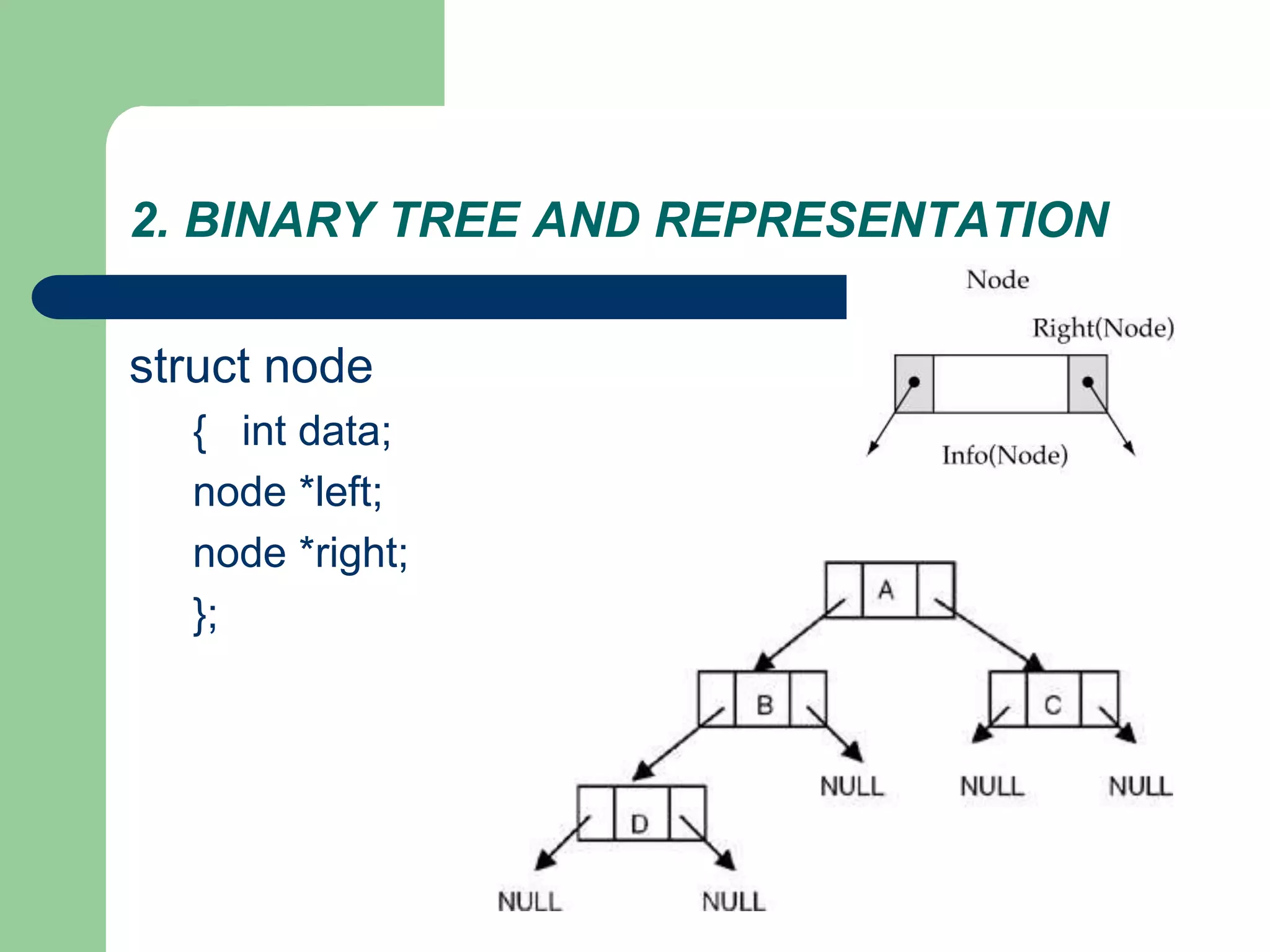
struct node
{ int data;
node *left;
node *right;
};
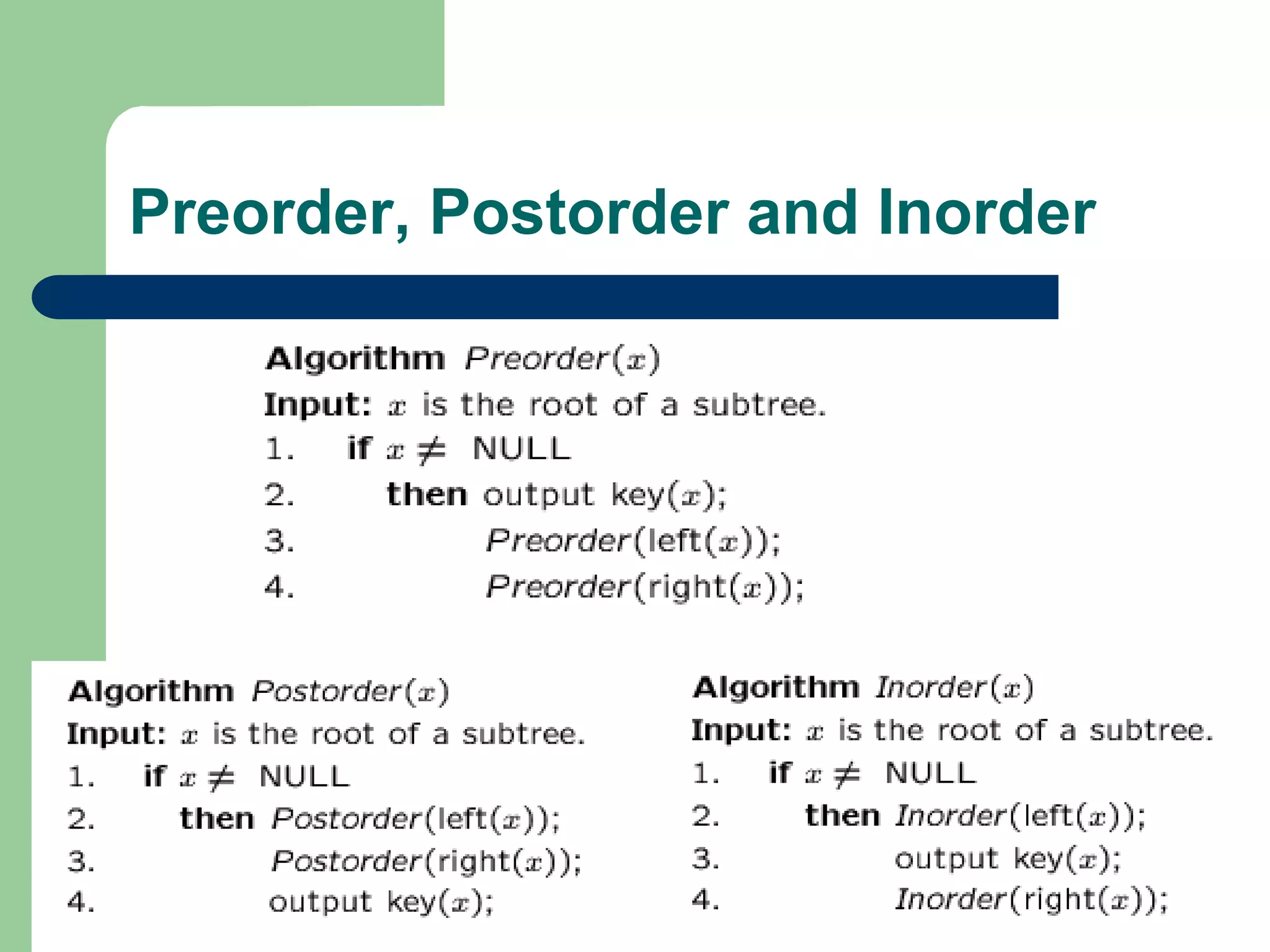
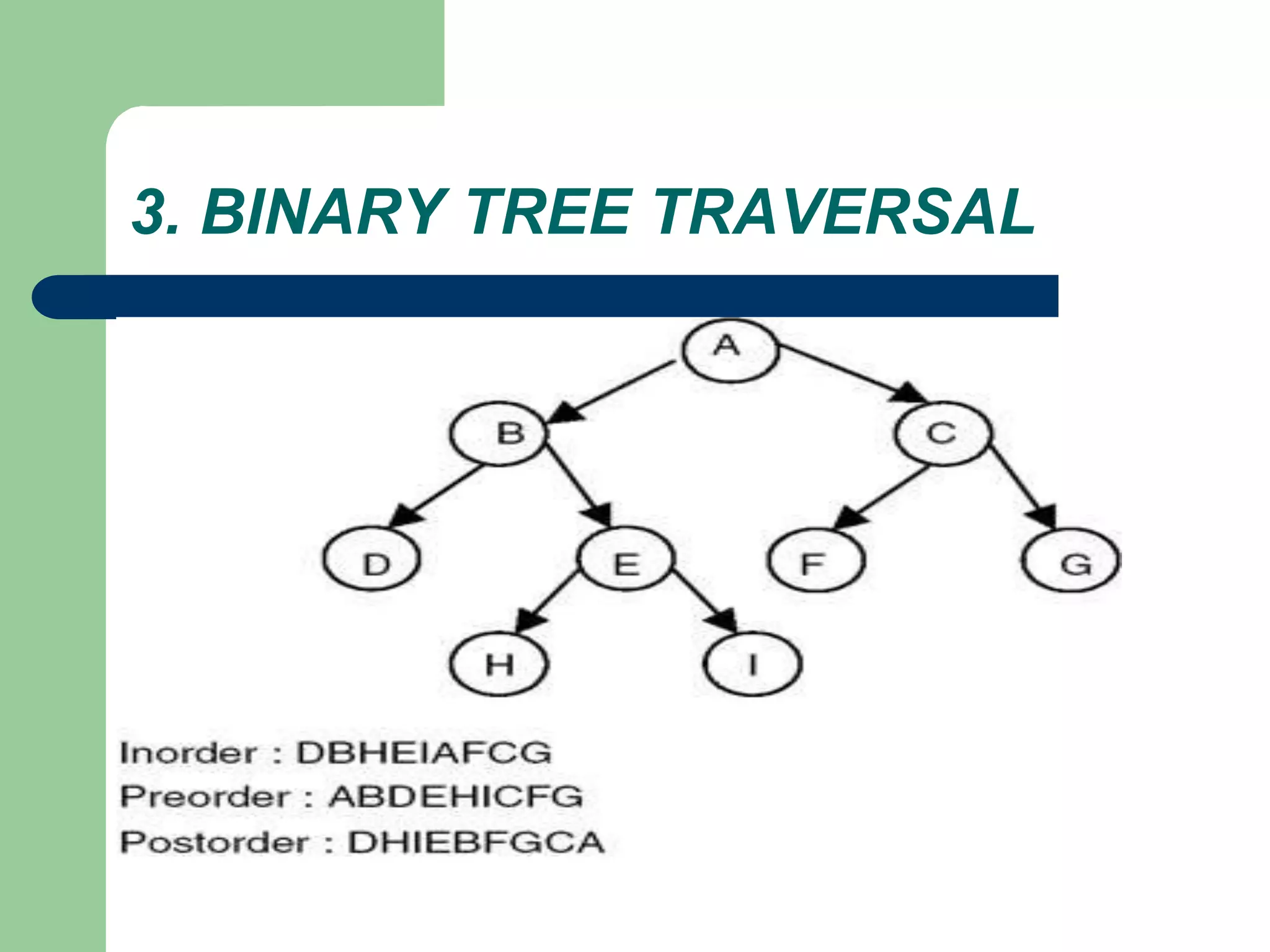
Tree traversal
 Used to print out the data in a tree in a certain order
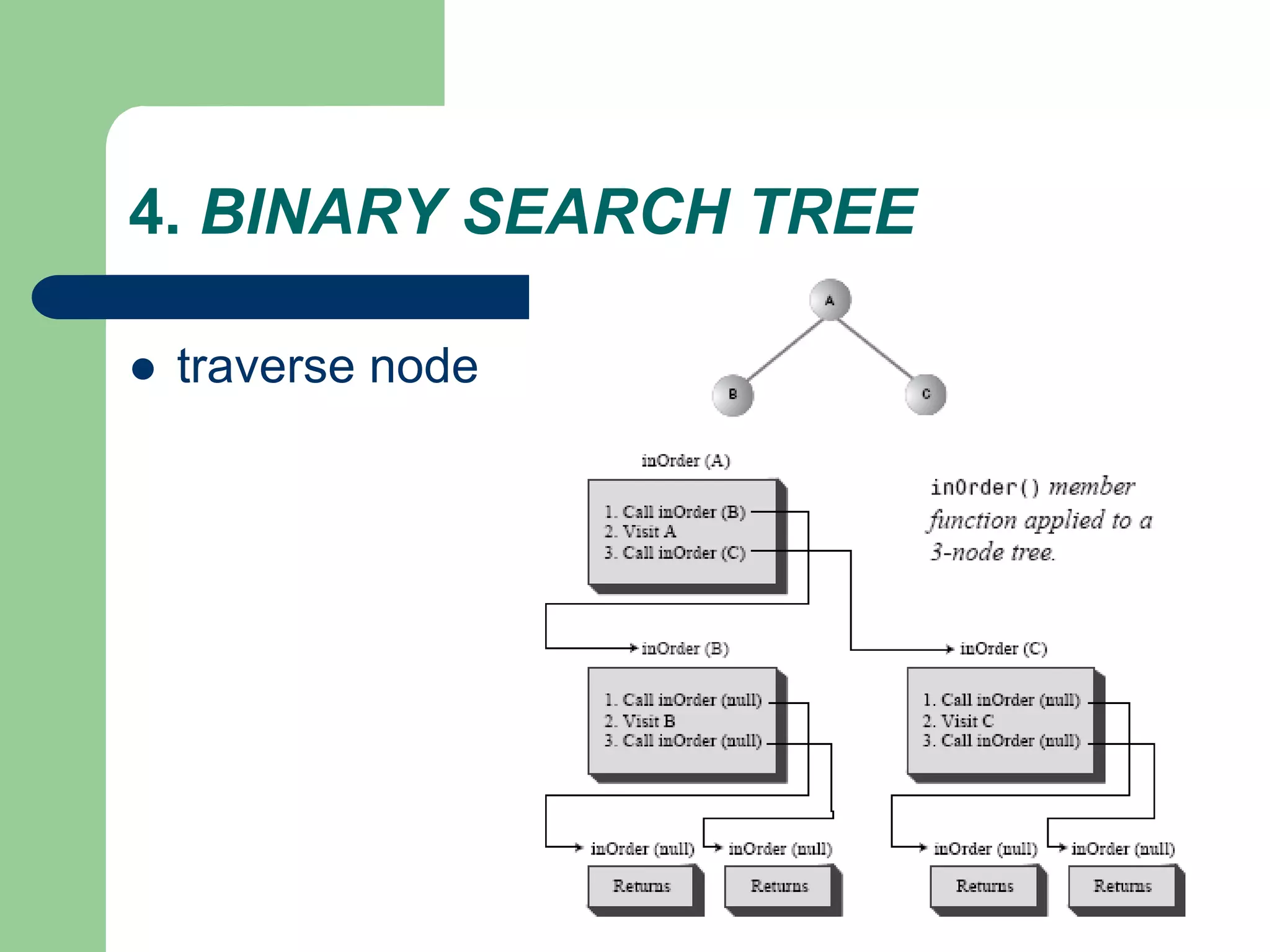
– inorder (LDR )
– Postorder (LRD )
– preorder (DLR )
 Pre-order traversal
– Print the data at the root
– Recursively print out all data in the left subtree
– Recursively print out all data in the right subtree
Preorder, Postorder and Inorder
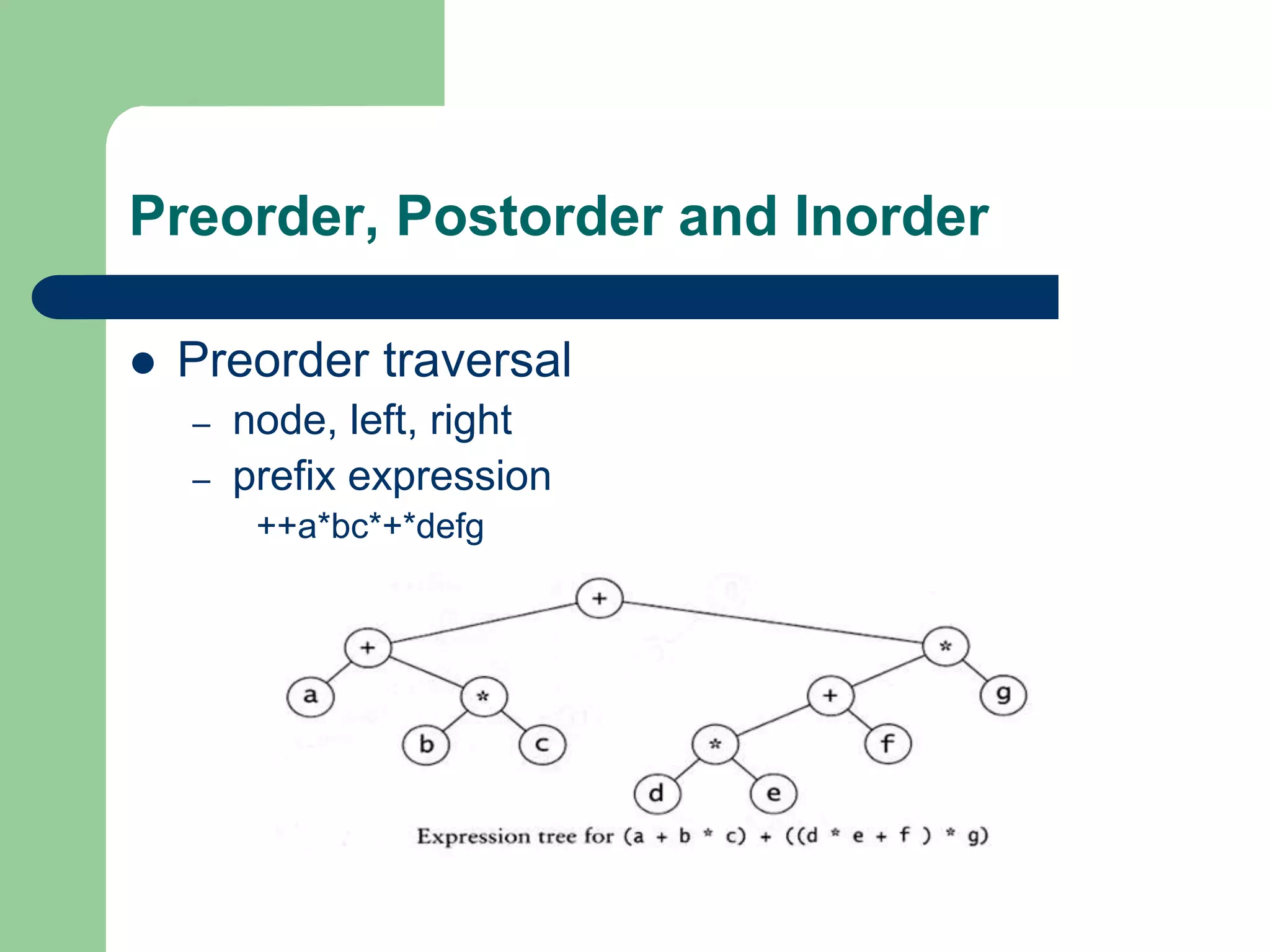
 Preorder traversal
– node, left, right
– prefix expression
++a*bc*+*defg
Preorder, Postorder and Inorder
 Postorder traversal
– left, right, node
– postfix expression
abc*+de*f+g*+
 Inorder traversal
– left, node, right.
– infix expression
a+b*c+d*e+f*g
Preorder, Postorder and Inorder
3. BINARY TREE TRAVERSAL
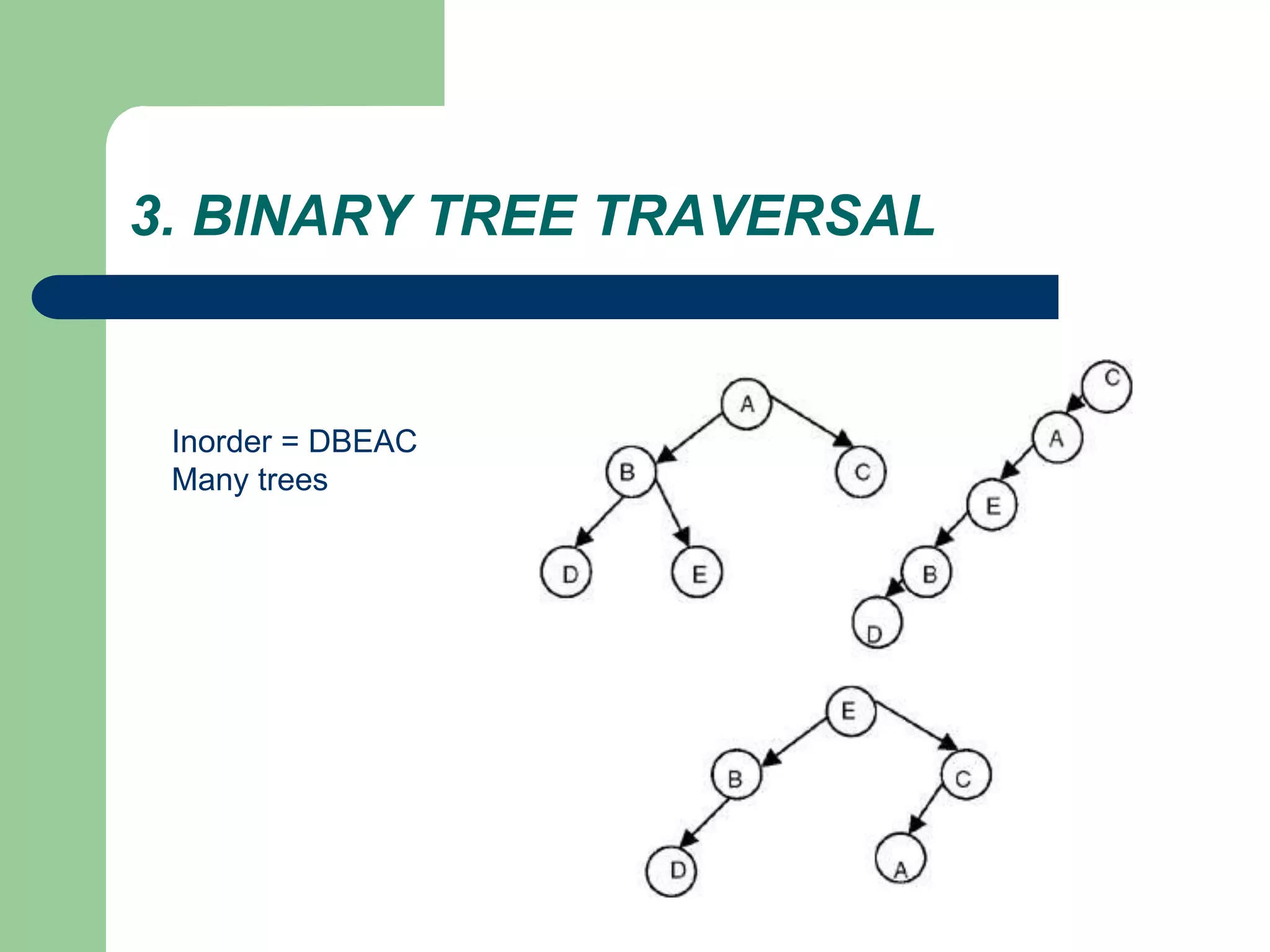
Inorder = DBEAC
Many trees
4. BINARY SEARCH TREE
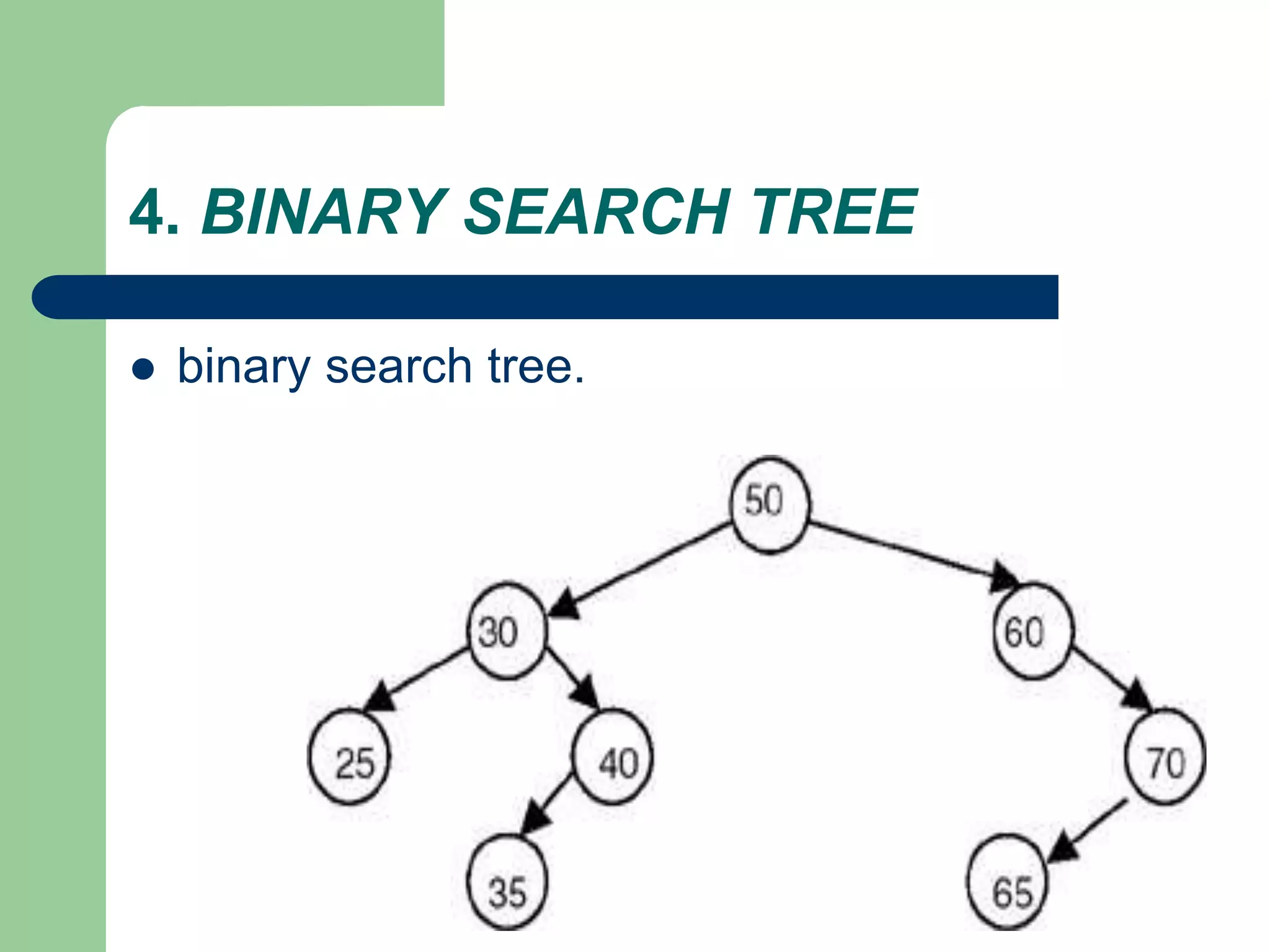
 A binary search tree
– is a binary tree (may be empty)
– every node must contain an identifier.
– An identifier of any node in the left subtree is less
than the identifier of the root.
– An identifier of any node in the right subtree is
greater than the identifier of the root.
– Both the left subtree and right subtree are binary
search trees.
4. BINARY SEARCH TREE
 binary search tree.
Binary Search Trees
A binary search tree Not a binary search tree
Performance
 Consider a dictionary with n
items implemented by
means of a binary search
tree of height h
– the space used is O(n)
– methods find, insert and
remove take O(h) time
 The height h is O(n) in the
worst case and O(log n) in
the best case
4. BINARY SEARCH TREE
 Why using binary search tree
– traverse in inorder: sorted list
– searching becomes faster
 But..
– Insert, delete: slow
 Important thing: Index in Database system
– Using the right way of Index property
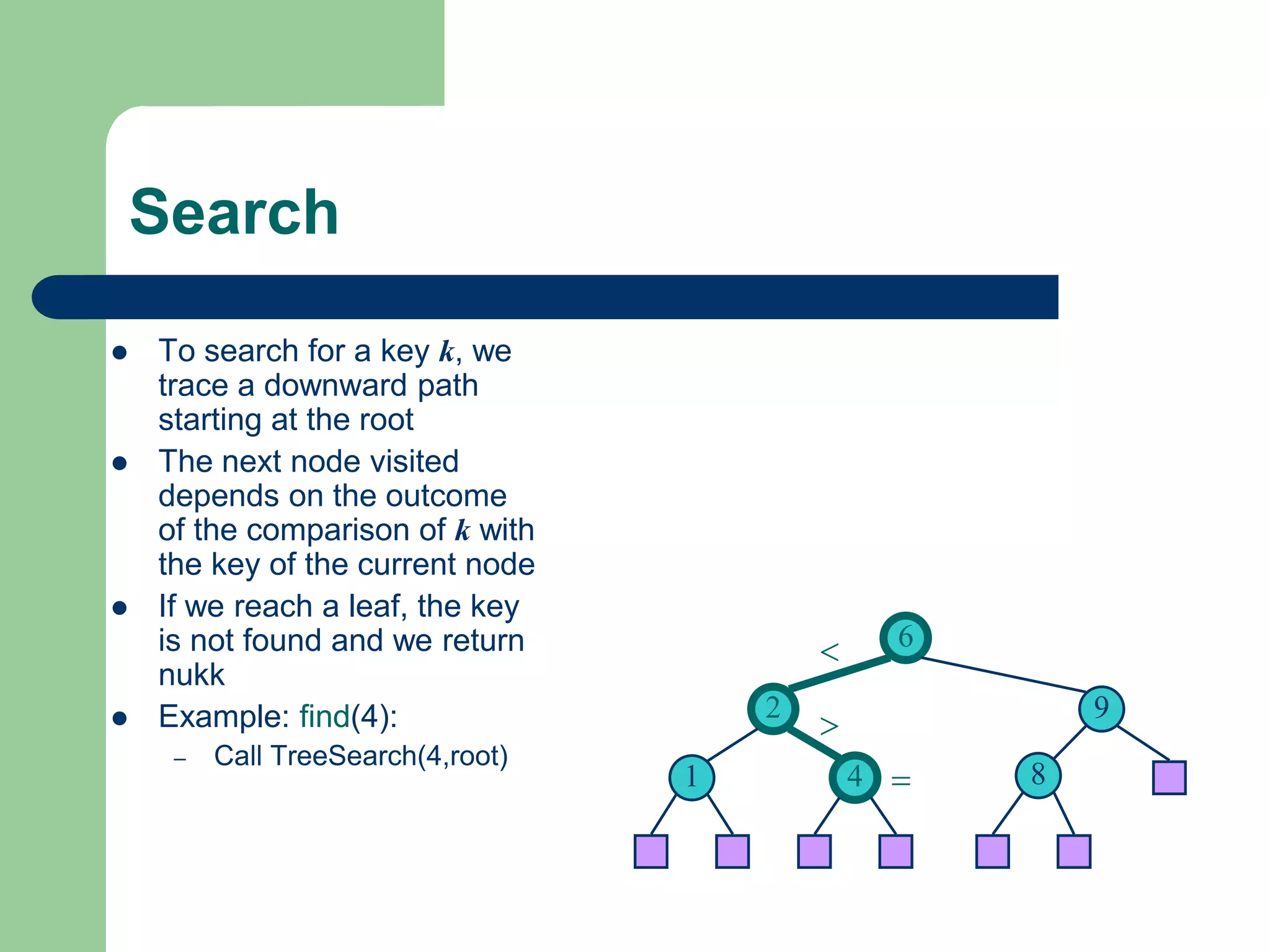
Search
 To search for a key k, we
trace a downward path
starting at the root
 The next node visited
depends on the outcome
of the comparison of k with
the key of the current node
 If we reach a leaf, the key
is not found and we return
nukk
 Example: find(4):
– Call TreeSearch(4,root)
6
9
2
4
1 8
<
>
=
Insertion
 To perform operation inser(k,
o), we search for key k (using
TreeSearch)
 Assume k is not already in the
tree, and let let w be the leaf
reached by the search
 We insert k at node w and
expand w into an internal node
 Example: insert 5
6
9
2
4
1 8
6
9
2
4
1 8
5
<
>
>
w
w
4. BINARY SEARCH TREE
 Insert new node
4. BINARY SEARCH TREE
 Insert new node
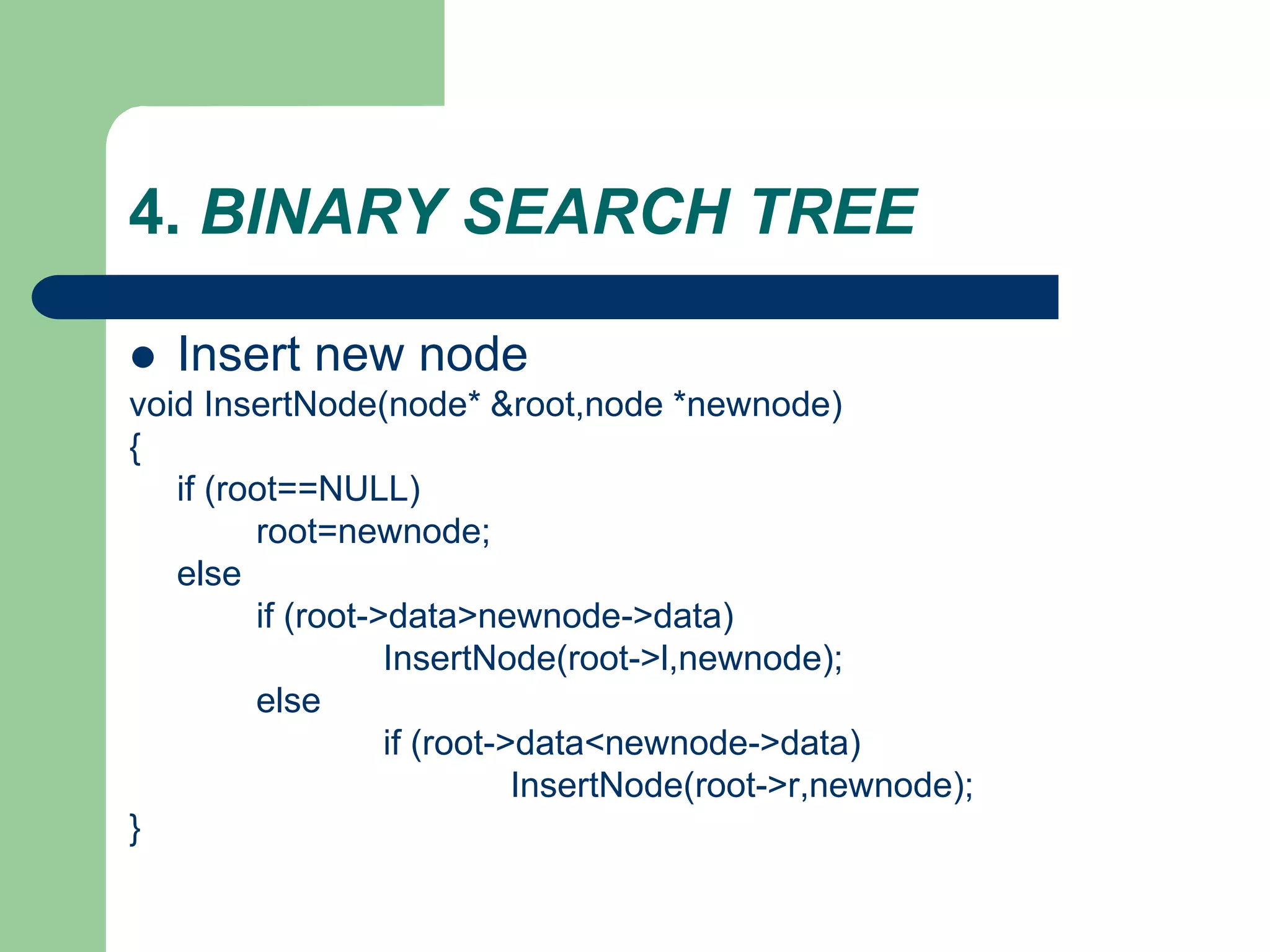
void InsertNode(node* &root,node *newnode)
{
if (root==NULL)
root=newnode;
else
if (root->data>newnode->data)
InsertNode(root->l,newnode);
else
if (root->data<newnode->data)
InsertNode(root->r,newnode);
}
4. BINARY SEARCH TREE
 traverse node
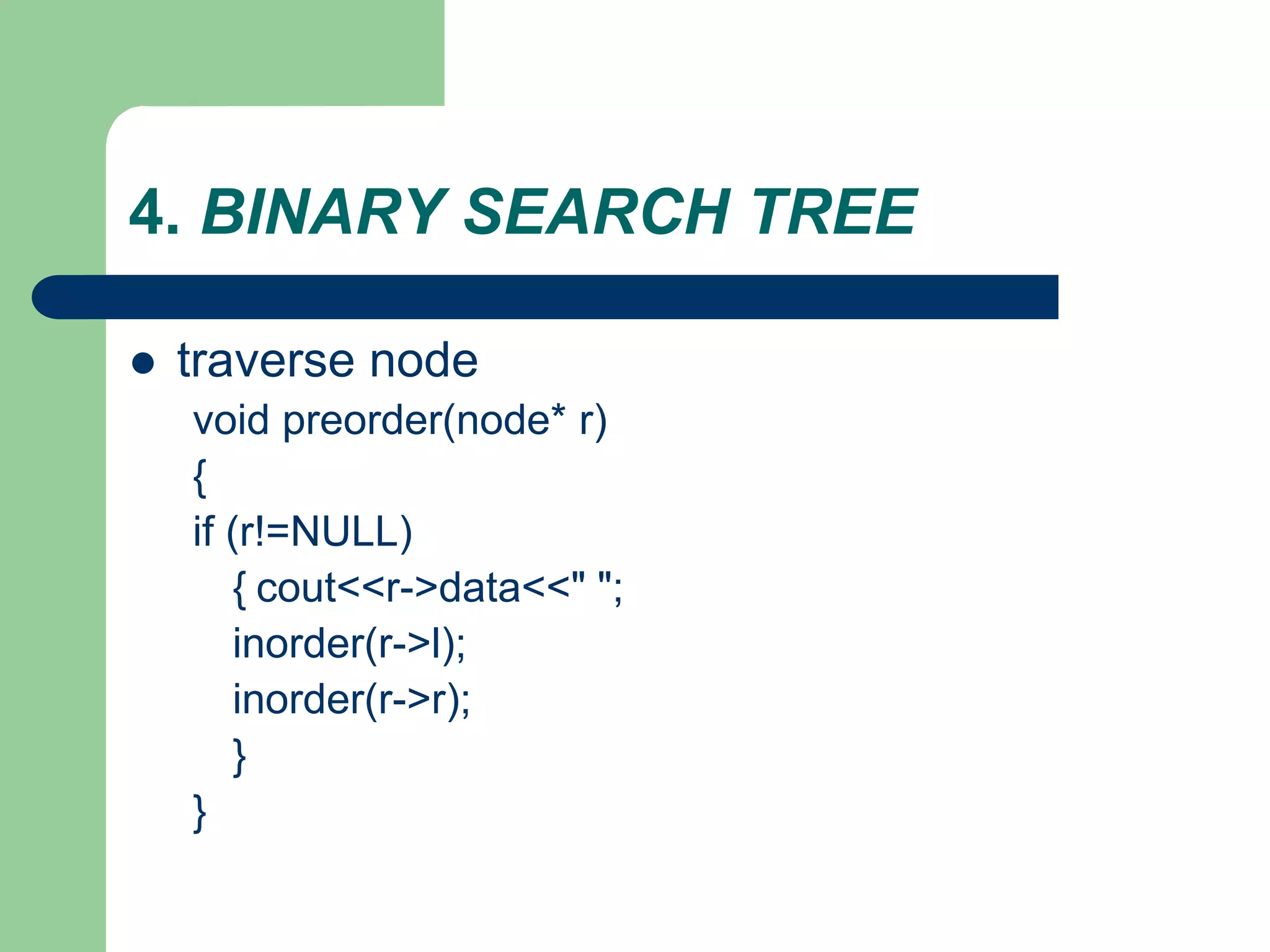
void preorder(node* r)
{
if (r!=NULL)
{ cout<<r->data<<" ";
inorder(r->l);
inorder(r->r);
}
}
4. BINARY SEARCH TREE
 traverse node
4. BINARY SEARCH TREE
 traverse node

tree.ppt

  • 1.
    TREE  1. THECONCEPT OF TREES  2. BINARY TREE AND REPRESENTATION  3. BINARY TREE TRAVERSAL  4. BINARY SEARCH TREE 6 9 2 4 1 8 < > =
  • 2.
    1. THE CONCEPTOF TREES  A tree is a set of one or more nodes T: – there is a specially designated node called a root – The remaining nodes are partitioned into n disjointed set of nodes T1, T2,…,Tn, each of which is a tree.
  • 3.
    1. THE CONCEPTOF TREES  Example
  • 4.
    1. THE CONCEPTOF TREES  It’s not a tree Tree
  • 5.
    1. THE CONCEPTOF TREES: Some terminology  Root  Child (left,right)  Parent  Leaf node  Subtree  Ancestor of a node  Descendant of a node
  • 6.
    1. THE CONCEPTOF TREES  Degree of a Node of a Tree – The degree of a node of a tree is the number of subtrees having this node as a root.  Degree of a Tree – The degree of a tree is defined as the maximum of degree of the nodes of the tree  Level of a Node – level of the root node as 1, and incrementing it by 1 as we move from the root towards the subtrees.
  • 7.
    2. BINARY TREEAND REPRESENTATION  BINARY TREE – no node can have a degree of more than 2. – The maximum number of nodes at level i will be 2i−1 – If k is the depth of the tree then the maximum number of nodes that the tree can have is – 2k − 1 = 2k−1 + 2k−2 + … + 20
  • 8.
    2. BINARY TREEAND REPRESENTATION  BINARY TREE – A full binary tree is a binary of depth k having 2k − 1 nodes. – If it has < 2k − 1, it is not a full binary tree
  • 9.
    What is theheight h of a full tree with N nodes?  The max height of a tree with N nodes is N (same as a linked list)  The min height of a tree with N nodes is log(N+1) 2 1 2 1 log( 1) (log ) h h N N h N O N  =  =   =  
  • 10.
    2. BINARY TREEAND REPRESENTATION 3=22-1 7=23-1 15=24-1 full binary
  • 11.
    2. BINARY TREEAND REPRESENTATION struct node { int data; node *left; node *right; };
  • 12.
    Tree traversal  Usedto print out the data in a tree in a certain order – inorder (LDR ) – Postorder (LRD ) – preorder (DLR )  Pre-order traversal – Print the data at the root – Recursively print out all data in the left subtree – Recursively print out all data in the right subtree
  • 13.
    Preorder, Postorder andInorder  Preorder traversal – node, left, right – prefix expression ++a*bc*+*defg
  • 14.
    Preorder, Postorder andInorder  Postorder traversal – left, right, node – postfix expression abc*+de*f+g*+  Inorder traversal – left, node, right. – infix expression a+b*c+d*e+f*g
  • 15.
  • 16.
    3. BINARY TREETRAVERSAL
  • 17.
    3. BINARY TREETRAVERSAL Inorder = DBEAC Many trees
  • 18.
    4. BINARY SEARCHTREE  A binary search tree – is a binary tree (may be empty) – every node must contain an identifier. – An identifier of any node in the left subtree is less than the identifier of the root. – An identifier of any node in the right subtree is greater than the identifier of the root. – Both the left subtree and right subtree are binary search trees.
  • 19.
    4. BINARY SEARCHTREE  binary search tree.
  • 20.
    Binary Search Trees Abinary search tree Not a binary search tree
  • 21.
    Performance  Consider adictionary with n items implemented by means of a binary search tree of height h – the space used is O(n) – methods find, insert and remove take O(h) time  The height h is O(n) in the worst case and O(log n) in the best case
  • 22.
    4. BINARY SEARCHTREE  Why using binary search tree – traverse in inorder: sorted list – searching becomes faster  But.. – Insert, delete: slow  Important thing: Index in Database system – Using the right way of Index property
  • 23.
    Search  To searchfor a key k, we trace a downward path starting at the root  The next node visited depends on the outcome of the comparison of k with the key of the current node  If we reach a leaf, the key is not found and we return nukk  Example: find(4): – Call TreeSearch(4,root) 6 9 2 4 1 8 < > =
  • 24.
    Insertion  To performoperation inser(k, o), we search for key k (using TreeSearch)  Assume k is not already in the tree, and let let w be the leaf reached by the search  We insert k at node w and expand w into an internal node  Example: insert 5 6 9 2 4 1 8 6 9 2 4 1 8 5 < > > w w
  • 25.
    4. BINARY SEARCHTREE  Insert new node
  • 26.
    4. BINARY SEARCHTREE  Insert new node void InsertNode(node* &root,node *newnode) { if (root==NULL) root=newnode; else if (root->data>newnode->data) InsertNode(root->l,newnode); else if (root->data<newnode->data) InsertNode(root->r,newnode); }
  • 27.
    4. BINARY SEARCHTREE  traverse node void preorder(node* r) { if (r!=NULL) { cout<<r->data<<" "; inorder(r->l); inorder(r->r); } }
  • 28.
    4. BINARY SEARCHTREE  traverse node
  • 29.
    4. BINARY SEARCHTREE  traverse node