Tree
Unit 5
2
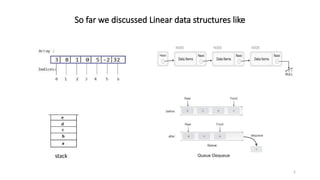
So far we discussed Linear data structures like
stack
3
Introduction to trees
• So far we have discussed mainly linear data structures – strings, arrays,
lists, stacks and queues
• Now we will discuss a non-linear data structure called tree.
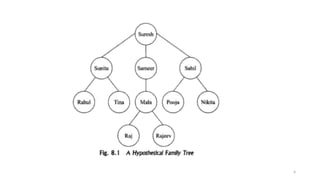
• Trees are mainly used to represent data containing a hierarchical
relationship between elements, for example, records, family trees and
table of contents.
• Consider a parent-child relationship
4
5
Tree
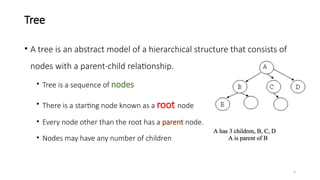
• A tree is an abstract model of a hierarchical structure that consists of
nodes with a parent-child relationship.
• Tree is a sequence of nodes
• There is a starting node known as a root node
• Every node other than the root has a parent node.
• Nodes may have any number of children
6
7
8
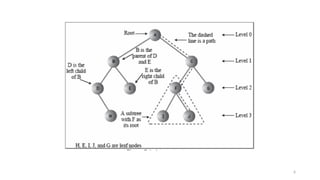
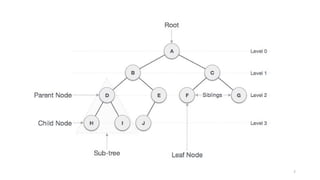
Some Key Terms:
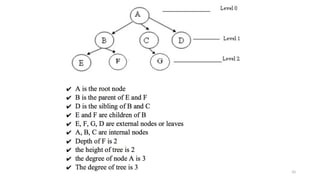
• Root − Node at the top of the tree is called root.
• Parent − Any node except root node has one edge upward to a node called parent.
• Child − Node below a given node connected by its edge downward is called its child node.
• Sibling – Child of same node are called siblings
• Leaf − Node which does not have any child node is called leaf node.
• Sub tree − Sub tree represents descendants of a node.
• Levels − Level of a node represents the generation of a node. If root node is at level 0, then its next child
node is at level 1, its grandchild is at level 2 and so on.
• keys − Key represents a value of a node based on which a search operation is to be carried out for a node.
9
Some Key Terms:
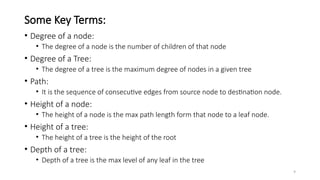
• Degree of a node:
• The degree of a node is the number of children of that node
• Degree of a Tree:
• The degree of a tree is the maximum degree of nodes in a given tree
• Path:
• It is the sequence of consecutive edges from source node to destination node.
• Height of a node:
• The height of a node is the max path length form that node to a leaf node.
• Height of a tree:
• The height of a tree is the height of the root
• Depth of a tree:
• Depth of a tree is the max level of any leaf in the tree
10
11
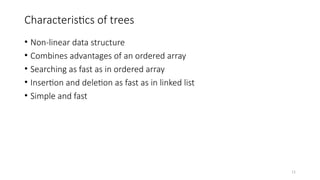
Characteristics of trees
• Non-linear data structure
• Combines advantages of an ordered array
• Searching as fast as in ordered array
• Insertion and deletion as fast as in linked list
• Simple and fast
12
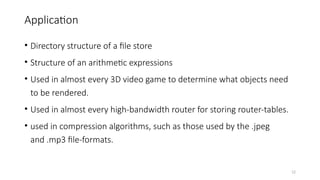
Application
• Directory structure of a file store
• Structure of an arithmetic expressions
• Used in almost every 3D video game to determine what objects need
to be rendered.
• Used in almost every high-bandwidth router for storing router-tables.
• used in compression algorithms, such as those used by the .jpeg
and .mp3 file-formats.
13
Introduction To Binary Trees
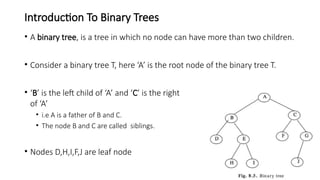
• A binary tree, is a tree in which no node can have more than two children.
• Consider a binary tree T, here ‘A’ is the root node of the binary tree T.
• ‘B’ is the left child of ‘A’ and ‘C’ is the right child
of ‘A’
• i.e A is a father of B and C.
• The node B and C are called siblings.
• Nodes D,H,I,F,J are leaf node
14
Binary Trees
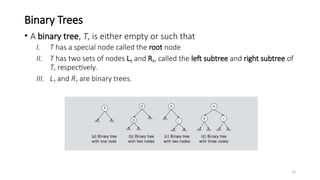
• A binary tree, T, is either empty or such that
I. T has a special node called the root node
II. T has two sets of nodes LT and RT, called the left subtree and right subtree of
T, respectively.
III. LT and RT are binary trees.
15
Binary Tree
• A binary tree is a finite set of elements that are either empty or is partitioned
into three disjoint subsets.
• The first subset contains a single element called the root of the tree.
• The other two subsets are themselves binary trees called the left and right
sub-trees of the original tree.
• A left or right sub-tree can be empty.
• Each element of a binary tree is called a node of the tree.
16
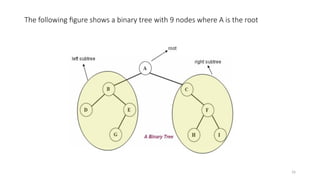
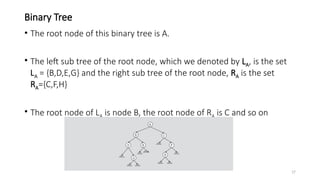
The following figure shows a binary tree with 9 nodes where A is the root
17
Binary Tree
• The root node of this binary tree is A.
• The left sub tree of the root node, which we denoted by LA, is the set
LA = {B,D,E,G} and the right sub tree of the root node, RA is the set
RA={C,F,H}
• The root node of LA is node B, the root node of RA is C and so on
18
Binary Tree Properties
• If a binary tree contains m nodes at level L, it contains at most 2m
nodes at level L+1
• Since a binary tree can contain at most 1 node at level 0 (the root), it
contains at most 2L nodes at level L.
19
Types of Binary Tree
• Complete binary tree
• Strictly binary tree
• Almost complete binary tree
20
Strictly binary tree
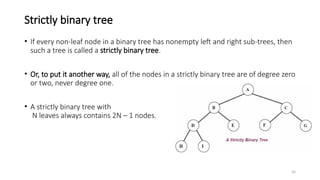
• If every non-leaf node in a binary tree has nonempty left and right sub-trees, then
such a tree is called a strictly binary tree.
• Or, to put it another way, all of the nodes in a strictly binary tree are of degree zero
or two, never degree one.
• A strictly binary tree with
N leaves always contains 2N – 1 nodes.
21
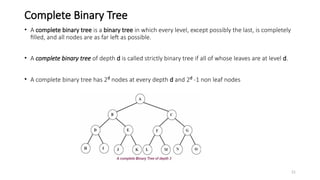
Complete Binary Tree
• A complete binary tree is a binary tree in which every level, except possibly the last, is completely
filled, and all nodes are as far left as possible.
• A complete binary tree of depth d is called strictly binary tree if all of whose leaves are at level d.
• A complete binary tree has 2d
nodes at every depth d and 2d
-1 non leaf nodes
22
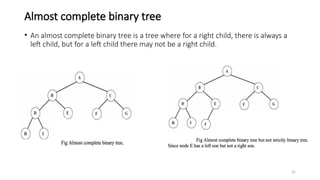
Almost complete binary tree
• An almost complete binary tree is a tree where for a right child, there is always a
left child, but for a left child there may not be a right child.
23
24
25
Tree traversal
• Traversal is a process to visit all the nodes of a tree and may print their values too.
• All nodes are connected via edges (links) we always start from the root (head)
node.
• There are three ways which we use to traverse a tree
• In-order Traversal
• Pre-order Traversal
• Post-order Traversal
• Generally we traverse a tree to search or locate given item or key in the tree or to
print all the values it contains.
26
Pre-order, In-order, Post-order
• Pre-order
<root><left><right>
• In-order
<left><root><right>
• Post-order
<left><right><root>
Ashim Lamichhane 27
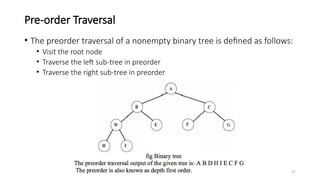
Pre-order Traversal
• The preorder traversal of a nonempty binary tree is defined as follows:
• Visit the root node
• Traverse the left sub-tree in preorder
• Traverse the right sub-tree in preorder
Ashim Lamichhane 28
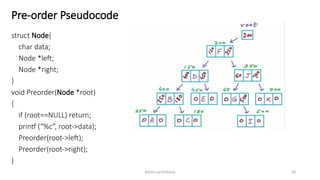
Pre-order Pseudocode
struct Node{
char data;
Node *left;
Node *right;
}
void Preorder(Node *root)
{
if (root==NULL) return;
printf (“%c”, root->data);
Preorder(root->left);
Preorder(root->right);
}
29
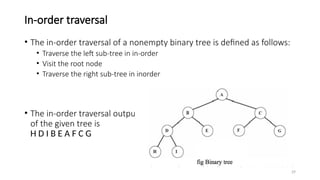
In-order traversal
• The in-order traversal of a nonempty binary tree is defined as follows:
• Traverse the left sub-tree in in-order
• Visit the root node
• Traverse the right sub-tree in inorder
• The in-order traversal output
of the given tree is
H D I B E A F C G
Ashim Lamichhane 30
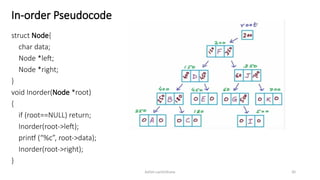
In-order Pseudocode
struct Node{
char data;
Node *left;
Node *right;
}
void Inorder(Node *root)
{
if (root==NULL) return;
Inorder(root->left);
printf (“%c”, root->data);
Inorder(root->right);
}
Ashim Lamichhane 31
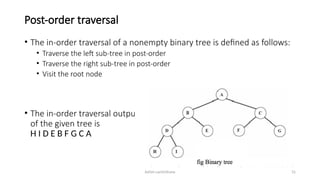
Post-order traversal
• The in-order traversal of a nonempty binary tree is defined as follows:
• Traverse the left sub-tree in post-order
• Traverse the right sub-tree in post-order
• Visit the root node
• The in-order traversal output
of the given tree is
H I D E B F G C A
Ashim Lamichhane 32
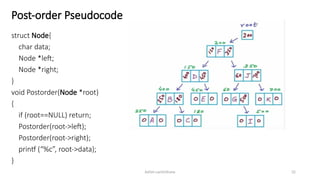
Post-order Pseudocode
struct Node{
char data;
Node *left;
Node *right;
}
void Postorder(Node *root)
{
if (root==NULL) return;
Postorder(root->left);
Postorder(root->right);
printf (“%c”, root->data);
}
Ashim Lamichhane 33
Binary Search Tree(BST)
• A binary search tree (BST) is a binary tree that is either empty or in
which every node contains a key (value) and satisfies the following
conditions:
• All keys in the left sub-tree of the root are smaller than the key in the root node
• All keys in the right sub-tree of the root are greater than the key in the root node
• The left and right sub-trees of the root are again binary search trees
Ashim Lamichhane 34
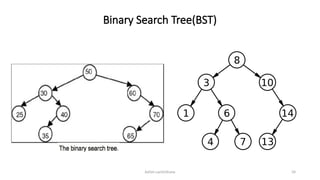
Binary Search Tree(BST)
Ashim Lamichhane 35
Binary Search Tree(BST)
• A binary search tree is basically a binary tree, and therefore it can be
traversed in inorder, preorder and postorder.
• If we traverse a binary search tree in inorder and print the identifiers
contained in the nodes of the tree, we get a sorted list of identifiers in
ascending order.
Ashim Lamichhane 36
Why Binary Search Tree?
• Let us consider a problem of searching a list.
• If a list is ordered searching becomes faster if we use contiguous
list(array).
• But if we need to make changes in the list, such as inserting new
entries or deleting old entries, (SLOWER!!!!) because insertion and
deletion in a contiguous list requires moving many of the entries every
time.
Ashim Lamichhane 37
Why Binary Search Tree?
• So we may think of using a linked list because it permits insertion and
deletion to be carried out by adjusting only few pointers.
• But in an n-linked list, there is no way to move through the list other
than one node at a time, permitting only sequential access.
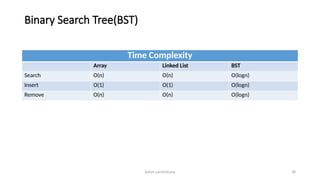
• Binary trees provide an excellent solution to this problem. By making
the entries of an ordered list into the nodes of a binary search tree, we
find that we can search for a key in O(logn)
Ashim Lamichhane 38
Binary Search Tree(BST)
Time Complexity
Array Linked List BST
Search O(n) O(n) O(logn)
Insert O(1) O(1) O(logn)
Remove O(n) O(n) O(logn)
Ashim Lamichhane 39
Operations on Binary Search Tree (BST)
• Following operations can be done in BST:
• Search(k, T): Search for key k in the tree T. If k is found in some node of tree then return
true otherwise return false.
• Insert(k, T): Insert a new node with value k in the info field in the tree T such that the
property of BST is maintained.
• Delete(k, T):Delete a node with value k in the info field from the tree T such that the
property of BST is maintained.
• FindMin(T), FindMax(T): Find minimum and maximum element from the given nonempty
BST.
Ashim Lamichhane 40
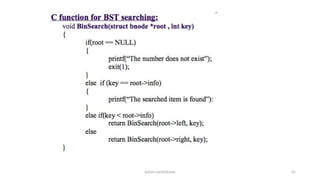
Searching Through The BST
• Compare the target value with the element in the root node
 If the target value is equal, the search is successful.
If target value is less, search the left subtree.
If target value is greater, search the right subtree.
If the subtree is empty, the search is unsuccessful.
Ashim Lamichhane 41
Ashim Lamichhane 42
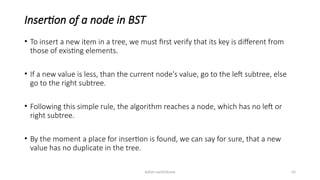
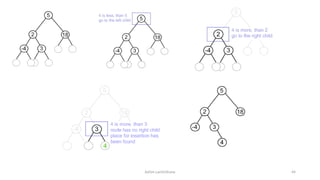
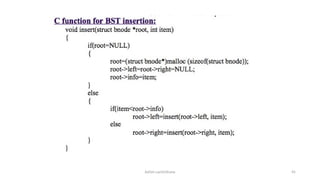
Insertion of a node in BST
• To insert a new item in a tree, we must first verify that its key is different from
those of existing elements.
• If a new value is less, than the current node's value, go to the left subtree, else
go to the right subtree.
• Following this simple rule, the algorithm reaches a node, which has no left or
right subtree.
• By the moment a place for insertion is found, we can say for sure, that a new
value has no duplicate in the tree.
Ashim Lamichhane 43
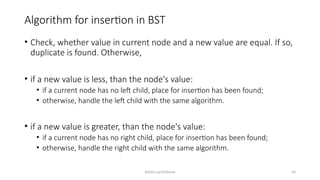
Algorithm for insertion in BST
• Check, whether value in current node and a new value are equal. If so,
duplicate is found. Otherwise,
• if a new value is less, than the node's value:
• if a current node has no left child, place for insertion has been found;
• otherwise, handle the left child with the same algorithm.
• if a new value is greater, than the node's value:
• if a current node has no right child, place for insertion has been found;
• otherwise, handle the right child with the same algorithm.
Ashim Lamichhane 44
Ashim Lamichhane 45
Ashim Lamichhane 46
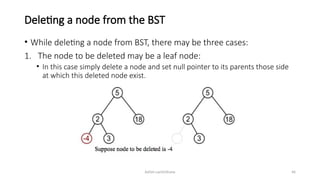
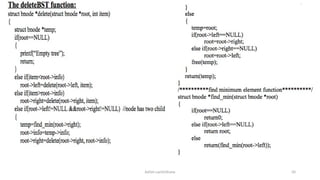
Deleting a node from the BST
• While deleting a node from BST, there may be three cases:
1. The node to be deleted may be a leaf node:
• In this case simply delete a node and set null pointer to its parents those side
at which this deleted node exist.
Ashim Lamichhane 47
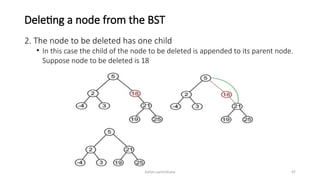
Deleting a node from the BST
2. The node to be deleted has one child
• In this case the child of the node to be deleted is appended to its parent node.
Suppose node to be deleted is 18
Ashim Lamichhane 48
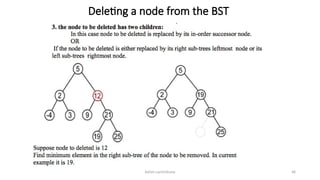
Deleting a node from the BST
Ashim Lamichhane 49
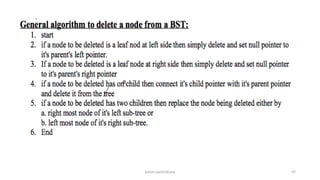
Ashim Lamichhane 50
Ashim Lamichhane 51
Huffman Algorithm
• Huffman algorithm is a method for building an extended binary tree
with a minimum weighted path length from a set of given weights.
• This is a method for the construction of minimum redundancy codes.
• Applicable to many forms of data transmission
Ashim Lamichhane 52
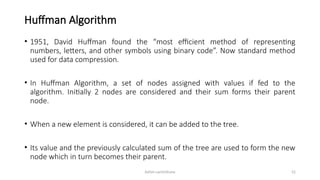
Huffman Algorithm
• 1951, David Huffman found the “most efficient method of representing
numbers, letters, and other symbols using binary code”. Now standard method
used for data compression.
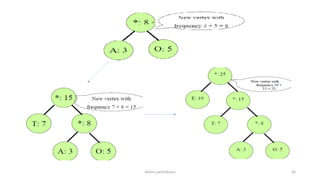
• In Huffman Algorithm, a set of nodes assigned with values if fed to the
algorithm. Initially 2 nodes are considered and their sum forms their parent
node.
• When a new element is considered, it can be added to the tree.
• Its value and the previously calculated sum of the tree are used to form the new
node which in turn becomes their parent.
Ashim Lamichhane 53
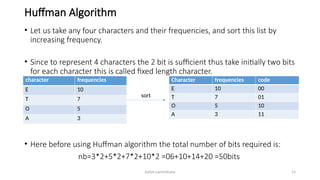
Huffman Algorithm
• Let us take any four characters and their frequencies, and sort this list by
increasing frequency.
• Since to represent 4 characters the 2 bit is sufficient thus take initially two bits
for each character this is called fixed length character.
• Here before using Huffman algorithm the total number of bits required is:
nb=3*2+5*2+7*2+10*2 =06+10+14+20 =50bits
character frequencies
E 10
T 7
O 5
A 3
Character frequencies code
E 10 00
T 7 01
O 5 10
A 3 11
sort
Ashim Lamichhane 54
Ashim Lamichhane 55
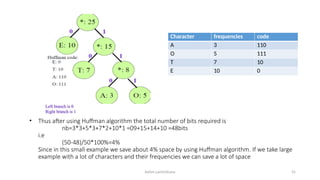
• Thus after using Huffman algorithm the total number of bits required is
nb=3*3+5*3+7*2+10*1 =09+15+14+10 =48bits
i.e
(50-48)/50*100%=4%
Since in this small example we save about 4% space by using Huffman algorithm. If we take large
example with a lot of characters and their frequencies we can save a lot of space
Character frequencies code
A 3 110
O 5 111
T 7 10
E 10 0
Ashim Lamichhane 56
Assignments
• Slides at myblog
http://www.slideshare.net/AshimLamichhane/linked-list-63790316
• Assignments at github
https://github.com/ashim888/dataStructureAndAlgorithm
Ashim Lamichhane 57
Reference
• https://
www.siggraph.org/education/materials/HyperGraph/video/mpeg/mpe
gfaq/huffman_tutorial.html
• https://en.wikipedia.org/wiki/Binary_search_tree
• https://www.cs.swarthmore.edu/~newhall/unixhelp/Java_bst.pdf
• https://www.cs.usfca.edu/~galles/visualization/BST.html
• https://www.cs.rochester.edu/~gildea/csc282/slides/C12-bst.pdf
• http://
www.tutorialspoint.com/data_structures_algorithms/tree_data_struct
ure.htm

BASIC TREE AND TYPES OF DI CONCEPTS.pptx

  • 1.
  • 2.
    2 So far wediscussed Linear data structures like stack
  • 3.
    3 Introduction to trees •So far we have discussed mainly linear data structures – strings, arrays, lists, stacks and queues • Now we will discuss a non-linear data structure called tree. • Trees are mainly used to represent data containing a hierarchical relationship between elements, for example, records, family trees and table of contents. • Consider a parent-child relationship
  • 4.
  • 5.
    5 Tree • A treeis an abstract model of a hierarchical structure that consists of nodes with a parent-child relationship. • Tree is a sequence of nodes • There is a starting node known as a root node • Every node other than the root has a parent node. • Nodes may have any number of children
  • 6.
  • 7.
  • 8.
    8 Some Key Terms: •Root − Node at the top of the tree is called root. • Parent − Any node except root node has one edge upward to a node called parent. • Child − Node below a given node connected by its edge downward is called its child node. • Sibling – Child of same node are called siblings • Leaf − Node which does not have any child node is called leaf node. • Sub tree − Sub tree represents descendants of a node. • Levels − Level of a node represents the generation of a node. If root node is at level 0, then its next child node is at level 1, its grandchild is at level 2 and so on. • keys − Key represents a value of a node based on which a search operation is to be carried out for a node.
  • 9.
    9 Some Key Terms: •Degree of a node: • The degree of a node is the number of children of that node • Degree of a Tree: • The degree of a tree is the maximum degree of nodes in a given tree • Path: • It is the sequence of consecutive edges from source node to destination node. • Height of a node: • The height of a node is the max path length form that node to a leaf node. • Height of a tree: • The height of a tree is the height of the root • Depth of a tree: • Depth of a tree is the max level of any leaf in the tree
  • 10.
  • 11.
    11 Characteristics of trees •Non-linear data structure • Combines advantages of an ordered array • Searching as fast as in ordered array • Insertion and deletion as fast as in linked list • Simple and fast
  • 12.
    12 Application • Directory structureof a file store • Structure of an arithmetic expressions • Used in almost every 3D video game to determine what objects need to be rendered. • Used in almost every high-bandwidth router for storing router-tables. • used in compression algorithms, such as those used by the .jpeg and .mp3 file-formats.
  • 13.
    13 Introduction To BinaryTrees • A binary tree, is a tree in which no node can have more than two children. • Consider a binary tree T, here ‘A’ is the root node of the binary tree T. • ‘B’ is the left child of ‘A’ and ‘C’ is the right child of ‘A’ • i.e A is a father of B and C. • The node B and C are called siblings. • Nodes D,H,I,F,J are leaf node
  • 14.
    14 Binary Trees • Abinary tree, T, is either empty or such that I. T has a special node called the root node II. T has two sets of nodes LT and RT, called the left subtree and right subtree of T, respectively. III. LT and RT are binary trees.
  • 15.
    15 Binary Tree • Abinary tree is a finite set of elements that are either empty or is partitioned into three disjoint subsets. • The first subset contains a single element called the root of the tree. • The other two subsets are themselves binary trees called the left and right sub-trees of the original tree. • A left or right sub-tree can be empty. • Each element of a binary tree is called a node of the tree.
  • 16.
    16 The following figureshows a binary tree with 9 nodes where A is the root
  • 17.
    17 Binary Tree • Theroot node of this binary tree is A. • The left sub tree of the root node, which we denoted by LA, is the set LA = {B,D,E,G} and the right sub tree of the root node, RA is the set RA={C,F,H} • The root node of LA is node B, the root node of RA is C and so on
  • 18.
    18 Binary Tree Properties •If a binary tree contains m nodes at level L, it contains at most 2m nodes at level L+1 • Since a binary tree can contain at most 1 node at level 0 (the root), it contains at most 2L nodes at level L.
  • 19.
    19 Types of BinaryTree • Complete binary tree • Strictly binary tree • Almost complete binary tree
  • 20.
    20 Strictly binary tree •If every non-leaf node in a binary tree has nonempty left and right sub-trees, then such a tree is called a strictly binary tree. • Or, to put it another way, all of the nodes in a strictly binary tree are of degree zero or two, never degree one. • A strictly binary tree with N leaves always contains 2N – 1 nodes.
  • 21.
    21 Complete Binary Tree •A complete binary tree is a binary tree in which every level, except possibly the last, is completely filled, and all nodes are as far left as possible. • A complete binary tree of depth d is called strictly binary tree if all of whose leaves are at level d. • A complete binary tree has 2d nodes at every depth d and 2d -1 non leaf nodes
  • 22.
    22 Almost complete binarytree • An almost complete binary tree is a tree where for a right child, there is always a left child, but for a left child there may not be a right child.
  • 23.
  • 24.
  • 25.
    25 Tree traversal • Traversalis a process to visit all the nodes of a tree and may print their values too. • All nodes are connected via edges (links) we always start from the root (head) node. • There are three ways which we use to traverse a tree • In-order Traversal • Pre-order Traversal • Post-order Traversal • Generally we traverse a tree to search or locate given item or key in the tree or to print all the values it contains.
  • 26.
    26 Pre-order, In-order, Post-order •Pre-order <root><left><right> • In-order <left><root><right> • Post-order <left><right><root>
  • 27.
    Ashim Lamichhane 27 Pre-orderTraversal • The preorder traversal of a nonempty binary tree is defined as follows: • Visit the root node • Traverse the left sub-tree in preorder • Traverse the right sub-tree in preorder
  • 28.
    Ashim Lamichhane 28 Pre-orderPseudocode struct Node{ char data; Node *left; Node *right; } void Preorder(Node *root) { if (root==NULL) return; printf (“%c”, root->data); Preorder(root->left); Preorder(root->right); }
  • 29.
    29 In-order traversal • Thein-order traversal of a nonempty binary tree is defined as follows: • Traverse the left sub-tree in in-order • Visit the root node • Traverse the right sub-tree in inorder • The in-order traversal output of the given tree is H D I B E A F C G
  • 30.
    Ashim Lamichhane 30 In-orderPseudocode struct Node{ char data; Node *left; Node *right; } void Inorder(Node *root) { if (root==NULL) return; Inorder(root->left); printf (“%c”, root->data); Inorder(root->right); }
  • 31.
    Ashim Lamichhane 31 Post-ordertraversal • The in-order traversal of a nonempty binary tree is defined as follows: • Traverse the left sub-tree in post-order • Traverse the right sub-tree in post-order • Visit the root node • The in-order traversal output of the given tree is H I D E B F G C A
  • 32.
    Ashim Lamichhane 32 Post-orderPseudocode struct Node{ char data; Node *left; Node *right; } void Postorder(Node *root) { if (root==NULL) return; Postorder(root->left); Postorder(root->right); printf (“%c”, root->data); }
  • 33.
    Ashim Lamichhane 33 BinarySearch Tree(BST) • A binary search tree (BST) is a binary tree that is either empty or in which every node contains a key (value) and satisfies the following conditions: • All keys in the left sub-tree of the root are smaller than the key in the root node • All keys in the right sub-tree of the root are greater than the key in the root node • The left and right sub-trees of the root are again binary search trees
  • 34.
  • 35.
    Ashim Lamichhane 35 BinarySearch Tree(BST) • A binary search tree is basically a binary tree, and therefore it can be traversed in inorder, preorder and postorder. • If we traverse a binary search tree in inorder and print the identifiers contained in the nodes of the tree, we get a sorted list of identifiers in ascending order.
  • 36.
    Ashim Lamichhane 36 WhyBinary Search Tree? • Let us consider a problem of searching a list. • If a list is ordered searching becomes faster if we use contiguous list(array). • But if we need to make changes in the list, such as inserting new entries or deleting old entries, (SLOWER!!!!) because insertion and deletion in a contiguous list requires moving many of the entries every time.
  • 37.
    Ashim Lamichhane 37 WhyBinary Search Tree? • So we may think of using a linked list because it permits insertion and deletion to be carried out by adjusting only few pointers. • But in an n-linked list, there is no way to move through the list other than one node at a time, permitting only sequential access. • Binary trees provide an excellent solution to this problem. By making the entries of an ordered list into the nodes of a binary search tree, we find that we can search for a key in O(logn)
  • 38.
    Ashim Lamichhane 38 BinarySearch Tree(BST) Time Complexity Array Linked List BST Search O(n) O(n) O(logn) Insert O(1) O(1) O(logn) Remove O(n) O(n) O(logn)
  • 39.
    Ashim Lamichhane 39 Operationson Binary Search Tree (BST) • Following operations can be done in BST: • Search(k, T): Search for key k in the tree T. If k is found in some node of tree then return true otherwise return false. • Insert(k, T): Insert a new node with value k in the info field in the tree T such that the property of BST is maintained. • Delete(k, T):Delete a node with value k in the info field from the tree T such that the property of BST is maintained. • FindMin(T), FindMax(T): Find minimum and maximum element from the given nonempty BST.
  • 40.
    Ashim Lamichhane 40 SearchingThrough The BST • Compare the target value with the element in the root node  If the target value is equal, the search is successful. If target value is less, search the left subtree. If target value is greater, search the right subtree. If the subtree is empty, the search is unsuccessful.
  • 41.
  • 42.
    Ashim Lamichhane 42 Insertionof a node in BST • To insert a new item in a tree, we must first verify that its key is different from those of existing elements. • If a new value is less, than the current node's value, go to the left subtree, else go to the right subtree. • Following this simple rule, the algorithm reaches a node, which has no left or right subtree. • By the moment a place for insertion is found, we can say for sure, that a new value has no duplicate in the tree.
  • 43.
    Ashim Lamichhane 43 Algorithmfor insertion in BST • Check, whether value in current node and a new value are equal. If so, duplicate is found. Otherwise, • if a new value is less, than the node's value: • if a current node has no left child, place for insertion has been found; • otherwise, handle the left child with the same algorithm. • if a new value is greater, than the node's value: • if a current node has no right child, place for insertion has been found; • otherwise, handle the right child with the same algorithm.
  • 44.
  • 45.
  • 46.
    Ashim Lamichhane 46 Deletinga node from the BST • While deleting a node from BST, there may be three cases: 1. The node to be deleted may be a leaf node: • In this case simply delete a node and set null pointer to its parents those side at which this deleted node exist.
  • 47.
    Ashim Lamichhane 47 Deletinga node from the BST 2. The node to be deleted has one child • In this case the child of the node to be deleted is appended to its parent node. Suppose node to be deleted is 18
  • 48.
    Ashim Lamichhane 48 Deletinga node from the BST
  • 49.
  • 50.
  • 51.
    Ashim Lamichhane 51 HuffmanAlgorithm • Huffman algorithm is a method for building an extended binary tree with a minimum weighted path length from a set of given weights. • This is a method for the construction of minimum redundancy codes. • Applicable to many forms of data transmission
  • 52.
    Ashim Lamichhane 52 HuffmanAlgorithm • 1951, David Huffman found the “most efficient method of representing numbers, letters, and other symbols using binary code”. Now standard method used for data compression. • In Huffman Algorithm, a set of nodes assigned with values if fed to the algorithm. Initially 2 nodes are considered and their sum forms their parent node. • When a new element is considered, it can be added to the tree. • Its value and the previously calculated sum of the tree are used to form the new node which in turn becomes their parent.
  • 53.
    Ashim Lamichhane 53 HuffmanAlgorithm • Let us take any four characters and their frequencies, and sort this list by increasing frequency. • Since to represent 4 characters the 2 bit is sufficient thus take initially two bits for each character this is called fixed length character. • Here before using Huffman algorithm the total number of bits required is: nb=3*2+5*2+7*2+10*2 =06+10+14+20 =50bits character frequencies E 10 T 7 O 5 A 3 Character frequencies code E 10 00 T 7 01 O 5 10 A 3 11 sort
  • 54.
  • 55.
    Ashim Lamichhane 55 •Thus after using Huffman algorithm the total number of bits required is nb=3*3+5*3+7*2+10*1 =09+15+14+10 =48bits i.e (50-48)/50*100%=4% Since in this small example we save about 4% space by using Huffman algorithm. If we take large example with a lot of characters and their frequencies we can save a lot of space Character frequencies code A 3 110 O 5 111 T 7 10 E 10 0
  • 56.
    Ashim Lamichhane 56 Assignments •Slides at myblog http://www.slideshare.net/AshimLamichhane/linked-list-63790316 • Assignments at github https://github.com/ashim888/dataStructureAndAlgorithm
  • 57.
    Ashim Lamichhane 57 Reference •https:// www.siggraph.org/education/materials/HyperGraph/video/mpeg/mpe gfaq/huffman_tutorial.html • https://en.wikipedia.org/wiki/Binary_search_tree • https://www.cs.swarthmore.edu/~newhall/unixhelp/Java_bst.pdf • https://www.cs.usfca.edu/~galles/visualization/BST.html • https://www.cs.rochester.edu/~gildea/csc282/slides/C12-bst.pdf • http:// www.tutorialspoint.com/data_structures_algorithms/tree_data_struct ure.htm