Software
Asset
Management
What is SAM?
“Software Asset Management (SAM) is
all of the infrastructure and processes
necessary for the effective
management, control and protection of
the software assets within an
organisation, throughout all stages of
their lifecycle.”
ITIL Best Practice Guide Software Asset Management, 2003
What is SAM?
• SAM helps with:
– Cost savings. Are you paying too much? With SAM you use the
licences you already have and acquire only the software you
need.
– Peace of mind. Have you got any out-of-date programs?
Perhaps you have software that you don't know about installed
on company machines. SAM helps you clear old servers or
programs that could jeopardise the security of your data.
– Staying legal. Are you under-licensed or are you unwittingly
running counterfeit software? It's important to stay legal and buy
your licences from authorised Microsoft resellers so that you can
enjoy the latest innovations and security updates to your
software and get the most from your investment.
What is SAM?
SAM helps you to:
•
•
•
•
•

Discover what software is installed, and where
Determine where your software is best used
Find out what licensing documentation you need
Plan for future technology investments
Establish the best licensing solution for your
organisation.
What is SAM?
SAM begins with a four-step process:
1. Perform a software inventory
-

manually
using automated discovery tools.

1. Match licences with software installed
-

find the licensing documentation for each
program
record the information in a report
compare this report with your software inventory.
What is SAM?
3. Review policies and procedures
-

establish new standards and guidelines

4. Develop an ongoing SAM plan
-

standardise software programs
retire obsolete PCs, laptops and servers
schedule spot-checks and inventories
establish ongoing employee training.
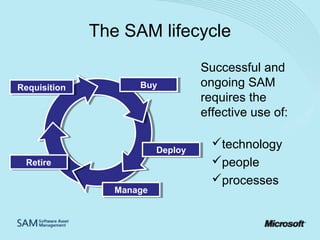
The SAM lifecycle
Requisition
Requisition

Buy
Buy

Deploy
Deploy
Retire
Retire
Manage
Manage

Successful and
ongoing SAM
requires the
effective use of:
technology
people
processes
How can SAM benefit your
organisation?
What are the benefits?
• Savings of up to 30% can be achieved
with SAM
Yet:
• Fewer than 50% of companies conduct
regular software audits
• 94% of companies are unaware of the
legal penalties for non-compliance
What are the benefits?
SAM helps your organisation:
• Save money
- use the licences you have
- acquire only the software you need.

• Stay secure
- gain control of the software installed on
company machines
- clear old servers or programs that could
jeopardise the security of your data.
What are the benefits?
SAM helps your organisation:
• Stay legal
- ensure you’re not under-licensed or unwittingly
running counterfeit software
- enjoy the latest innovations and security updates
that come with genuine software so you get the
most from your IT.
What are the risks?
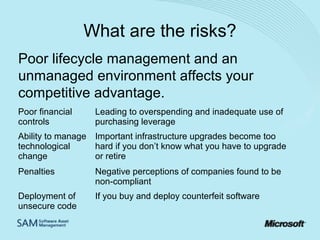
Poor lifecycle management and an
unmanaged environment affects your
competitive advantage.
Poor financial
controls

Leading to overspending and inadequate use of
purchasing leverage

Ability to manage Important infrastructure upgrades become too
technological
hard if you don’t know what you have to upgrade
change
or retire
Penalties

Negative perceptions of companies found to be
non-compliant

Deployment of
unsecure code

If you buy and deploy counterfeit software
Is your organisation at risk?
Can you be certain that:
• your systems are not at risk from counterfeit
software?
• your company is legally compliant?
Microsoft research in 2006 showed that 1 in 3
organisations have counterfeit software.
How can we help you with SAM?
How can Microsoft help?
Microsoft has a range of resources to help you
implement SAM in your organisation - the three
main choices are:
1. Work with a Microsoft SAM Certified partner to
implement SAM within your organisation
2. Access free SAM resources including tools, templates
and guides so you can manage the implementation
yourself
3. Enrol into the Microsoft SAM Programme by working
with a Certified SAM partner and receive free training
plus recognition for your SAM implementation
Microsoft SAM
Programme
(UK)
What is The Microsoft SAM
Programme?
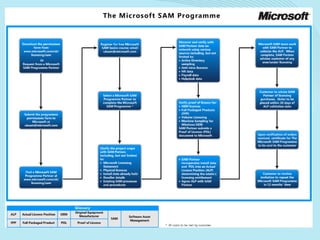
The Microsoft SAM Programme is a framework of steps to
complete the first and hardest part of implementing SAM
within your organisation - the software audit stage
The key steps are:
1.
Enrol into the programme by selecting a partner and giving them
permission to access your license data
2.
Attend free SAM Basics training or arrange a complimentary SAM
session with a registered Microsoft SAM Programme partner
3.
Complete a review of your software and licences with a SAM
Programme partner
4.
Receive confirmation of completion
5.
Implement policies and processes to continue SAM plan and stay
in control
Benefits of Microsoft SAM
Programme
•

•

•

•

SAM Plan
– It provides a licensing baseline for your SAM plan
– It increases your knowledge and helps you make more improved and
knowledgeable licensing choices in the future
Assistance
– It provides you access to free tools, reports and support from Microsoft to
complete the programme
– It allows you to work with registered SAM partners that have been trained to
deliver this programme
– It provides you access to Microsoft Financing offers so that you can fund your
SAM implementation and any licence shortfall you may encounter
Training
– It provides you free SAM Basics training and introductory sessions to evaluate
and start your organisation’s SAM plan
Recognition
– It provides you recognition for completing the programme with a certificate valid
for 12 months
Benefits of a Microsoft Certified
SAM Partner in The
Microsoft SAM Programme
•

•

All Microsoft SAM Certified Partners have:
– Attained the Microsoft SAM Competency in the Microsoft Partner
Programme by:
• Attending training and passing Microsoft Certified Professional
Exams
• Submitted case studies and proof of experience in implementing
SAM solutions for Microsoft customers
– Attended specialist training delivered by Microsoft on:
• Analysing customer licence reports
• Identifying Genuine product
• Identifying proof of licence
All Microsoft SAM Partners receive specialist support to manage queries
and escalations during licence reviews
How do I enrol in the Programme?
• Find out more from
www.microsoft.com.uk/licensing/sam
• Choose SAM Partner
• Complete Permission to Proceed Form and
submit to uksam@microsoft.com
2007 Microsoft Corporation. All rights reserved. Microsoft and the Microsoft logo are either registered trademarks or trademarks of Microsoft
Corporation in the United States and/or other countries. Registered Office, Microsoft Limited, Microsoft Campus, Thames Valley Park,
Reading, RG6 1WG. Registered in England no 124297 VAT no 724594615.

How SAM can help our company

  • 1.
  • 2.
    What is SAM? “SoftwareAsset Management (SAM) is all of the infrastructure and processes necessary for the effective management, control and protection of the software assets within an organisation, throughout all stages of their lifecycle.” ITIL Best Practice Guide Software Asset Management, 2003
  • 3.
    What is SAM? •SAM helps with: – Cost savings. Are you paying too much? With SAM you use the licences you already have and acquire only the software you need. – Peace of mind. Have you got any out-of-date programs? Perhaps you have software that you don't know about installed on company machines. SAM helps you clear old servers or programs that could jeopardise the security of your data. – Staying legal. Are you under-licensed or are you unwittingly running counterfeit software? It's important to stay legal and buy your licences from authorised Microsoft resellers so that you can enjoy the latest innovations and security updates to your software and get the most from your investment.
  • 4.
    What is SAM? SAMhelps you to: • • • • • Discover what software is installed, and where Determine where your software is best used Find out what licensing documentation you need Plan for future technology investments Establish the best licensing solution for your organisation.
  • 5.
    What is SAM? SAMbegins with a four-step process: 1. Perform a software inventory - manually using automated discovery tools. 1. Match licences with software installed - find the licensing documentation for each program record the information in a report compare this report with your software inventory.
  • 6.
    What is SAM? 3.Review policies and procedures - establish new standards and guidelines 4. Develop an ongoing SAM plan - standardise software programs retire obsolete PCs, laptops and servers schedule spot-checks and inventories establish ongoing employee training.
  • 7.
    The SAM lifecycle Requisition Requisition Buy Buy Deploy Deploy Retire Retire Manage Manage Successfuland ongoing SAM requires the effective use of: technology people processes
  • 8.
    How can SAMbenefit your organisation?
  • 9.
    What are thebenefits? • Savings of up to 30% can be achieved with SAM Yet: • Fewer than 50% of companies conduct regular software audits • 94% of companies are unaware of the legal penalties for non-compliance
  • 10.
    What are thebenefits? SAM helps your organisation: • Save money - use the licences you have - acquire only the software you need. • Stay secure - gain control of the software installed on company machines - clear old servers or programs that could jeopardise the security of your data.
  • 11.
    What are thebenefits? SAM helps your organisation: • Stay legal - ensure you’re not under-licensed or unwittingly running counterfeit software - enjoy the latest innovations and security updates that come with genuine software so you get the most from your IT.
  • 12.
    What are therisks? Poor lifecycle management and an unmanaged environment affects your competitive advantage. Poor financial controls Leading to overspending and inadequate use of purchasing leverage Ability to manage Important infrastructure upgrades become too technological hard if you don’t know what you have to upgrade change or retire Penalties Negative perceptions of companies found to be non-compliant Deployment of unsecure code If you buy and deploy counterfeit software
  • 13.
    Is your organisationat risk? Can you be certain that: • your systems are not at risk from counterfeit software? • your company is legally compliant? Microsoft research in 2006 showed that 1 in 3 organisations have counterfeit software.
  • 14.
    How can wehelp you with SAM?
  • 15.
    How can Microsofthelp? Microsoft has a range of resources to help you implement SAM in your organisation - the three main choices are: 1. Work with a Microsoft SAM Certified partner to implement SAM within your organisation 2. Access free SAM resources including tools, templates and guides so you can manage the implementation yourself 3. Enrol into the Microsoft SAM Programme by working with a Certified SAM partner and receive free training plus recognition for your SAM implementation
  • 16.
  • 17.
    What is TheMicrosoft SAM Programme? The Microsoft SAM Programme is a framework of steps to complete the first and hardest part of implementing SAM within your organisation - the software audit stage The key steps are: 1. Enrol into the programme by selecting a partner and giving them permission to access your license data 2. Attend free SAM Basics training or arrange a complimentary SAM session with a registered Microsoft SAM Programme partner 3. Complete a review of your software and licences with a SAM Programme partner 4. Receive confirmation of completion 5. Implement policies and processes to continue SAM plan and stay in control
  • 19.
    Benefits of MicrosoftSAM Programme • • • • SAM Plan – It provides a licensing baseline for your SAM plan – It increases your knowledge and helps you make more improved and knowledgeable licensing choices in the future Assistance – It provides you access to free tools, reports and support from Microsoft to complete the programme – It allows you to work with registered SAM partners that have been trained to deliver this programme – It provides you access to Microsoft Financing offers so that you can fund your SAM implementation and any licence shortfall you may encounter Training – It provides you free SAM Basics training and introductory sessions to evaluate and start your organisation’s SAM plan Recognition – It provides you recognition for completing the programme with a certificate valid for 12 months
  • 20.
    Benefits of aMicrosoft Certified SAM Partner in The Microsoft SAM Programme • • All Microsoft SAM Certified Partners have: – Attained the Microsoft SAM Competency in the Microsoft Partner Programme by: • Attending training and passing Microsoft Certified Professional Exams • Submitted case studies and proof of experience in implementing SAM solutions for Microsoft customers – Attended specialist training delivered by Microsoft on: • Analysing customer licence reports • Identifying Genuine product • Identifying proof of licence All Microsoft SAM Partners receive specialist support to manage queries and escalations during licence reviews
  • 21.
    How do Ienrol in the Programme? • Find out more from www.microsoft.com.uk/licensing/sam • Choose SAM Partner • Complete Permission to Proceed Form and submit to uksam@microsoft.com
  • 22.
    2007 Microsoft Corporation.All rights reserved. Microsoft and the Microsoft logo are either registered trademarks or trademarks of Microsoft Corporation in the United States and/or other countries. Registered Office, Microsoft Limited, Microsoft Campus, Thames Valley Park, Reading, RG6 1WG. Registered in England no 124297 VAT no 724594615.

Editor's Notes

  • #3 SAM is typically introduced using the ITIL best practice SAM definition
  • #6 SAM may seem complex at first. Following these steps will make it more manageable: SAM Step 1. Perform a software inventory The first step in SAM is to take a software inventory. If your business is small, you can do the inventory manually, or there are a number of automated discovery tools that can scan your entire network easily and efficiently. SAM Step 2. Match software licences with software installed Find the licensing documentation for each software program your organisation holds, record the information in a report, then compare this report with your software inventory report. Keep all your licence documentation in a software library.
  • #7 SAM Step 3: Review your policies and procedures Protect your software and hardware assets by establishing new standards and guidelines for all phases of your software lifecycle, from acquisition to storage and retirement. SAM Step 4: Develop a SAM plan Create an ongoing SAM plan. Standardise software programs and retire obsolete desktop PCs, laptops or servers, then make a plan to keep your SAM records up-to-date through spot checks, regularly scheduled software inventories and ongoing employee training.
  • #12 It’s important to buy Microsoft licences from authorised resellers only, so you can enjoy the latest innovations and security updates and get maximum value from your software assets.
  • #13 It’s important to buy Microsoft licences from authorised resellers only, so you can enjoy the latest innovations and security updates and get maximum value from your software assets.
  • #14 It’s important to buy Microsoft licences from authorised resellers only, so you can enjoy the latest innovations and security updates and get maximum value from your software assets.