Managing Software Entitlements in
Software Asset Management
Solutions from CA
Michel Avenel
IT Service Management
CA Technologies
Sr. Principal Product Manager
DO5X99E
#CAWorld
#ITSM
2 © 2015 CA. ALL RIGHTS RESERVED.@CAWORLD #CAWORLD
© 2015 CA. All rights reserved. All trademarks referenced herein belong to their respective companies.
The content provided in this CA World 2015 presentation is intended for informational purposes only and does not form any type of
warranty. The information provided by a CA partner and/or CA customer has not been reviewed for accuracy by CA.
CA does not provide legal advice. Neither this document nor any CA software product referenced herein shall serve as a substitute for your
compliance with any laws (including but not limited to any act, statute, regulation, rule, directive, policy, standard, guideline, measure,
requirement, administrative order, executive order, etc. (collectively, “Laws”)) referenced in this document. You should consult with
competent legal counsel regarding any Laws referenced herein.
For Informational Purposes Only
Terms of this Presentation
3 © 2015 CA. ALL RIGHTS RESERVED.@CAWORLD #CAWORLD
Abstract
This session will focus on the process of
registering software entitlements in Software
Asset Management solutions from CA.
Michel
Avenel
CA Technologies
Sr. Principal Product
Manager
4 © 2015 CA. ALL RIGHTS RESERVED.@CAWORLD #CAWORLD
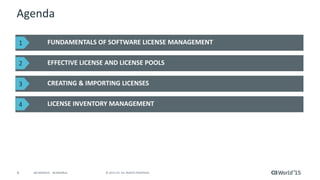
Agenda
FUNDAMENTALS OF SOFTWARE LICENSE MANAGEMENT
EFFECTIVE LICENSE AND LICENSE POOLS
CREATING & IMPORTING LICENSES
LICENSE INVENTORY MANAGEMENT
1
2
3
4
5 © 2015 CA. ALL RIGHTS RESERVED.@CAWORLD #CAWORLD
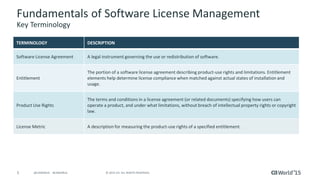
Fundamentals of Software License Management
Key Terminology
TERMINOLOGY DESCRIPTION
Software License Agreement A legal instrument governing the use or redistribution of software.
Entitlement
The portion of a software license agreement describing product-use rights and limitations. Entitlement
elements help determine license compliance when matched against actual states of installation and
usage.
Product Use Rights
The terms and conditions in a license agreement (or related documents) specifying how users can
operate a product, and under what limitations, without breach of intellectual property rights or copyright
law.
License Metric A description for measuring the product-use rights of a specified entitlement.
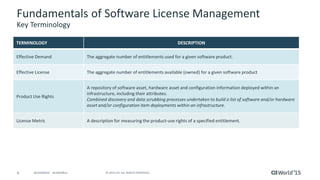
6 © 2015 CA. ALL RIGHTS RESERVED.@CAWORLD #CAWORLD
Fundamentals of Software License Management
Key Terminology
TERMINOLOGY DESCRIPTION
Effective Demand The aggregate number of entitlements used for a given software product.
Effective License The aggregate number of entitlements available (owned) for a given software product
Product Use Rights
A repository of software asset, hardware asset and configuration information deployed within an
infrastructure, including their attributes.
Combined discovery and data scrubbing processes undertaken to build a list of software and/or hardware
asset and/or configuration item deployments within an infrastructure.
License Metric A description for measuring the product-use rights of a specified entitlement.
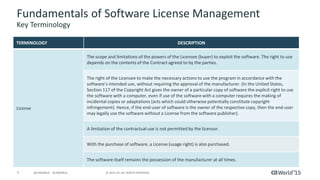
7 © 2015 CA. ALL RIGHTS RESERVED.@CAWORLD #CAWORLD
Fundamentals of Software License Management
Key Terminology
TERMINOLOGY DESCRIPTION
License
The scope and limitations of the powers of the Licensee (buyer) to exploit the software. The right to use
depends on the contents of the Contract agreed to by the parties.
The right of the Licensee to make the necessary actions to use the program in accordance with the
software’s intended use, without requiring the approval of the manufacturer. (In the United States,
Section 117 of the Copyright Act gives the owner of a particular copy of software the explicit right to use
the software with a computer, even if use of the software with a computer requires the making of
incidental copies or adaptations (acts which could otherwise potentially constitute copyright
infringement). Hence, if the end-user of software is the owner of the respective copy, then the end-user
may legally use the software without a License from the software publisher).
A limitation of the contractual use is not permitted by the licensor.
With the purchase of software, a License (usage right) is also purchased.
The software itself remains the possession of the manufacturer at all times.
8 © 2015 CA. ALL RIGHTS RESERVED.@CAWORLD #CAWORLD
Part 1: Introduction and Manually
Recording Licenses
9 © 2015 CA. ALL RIGHTS RESERVED.@CAWORLD #CAWORLD
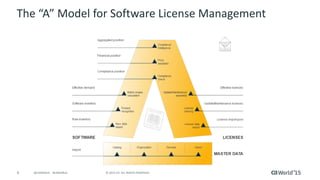
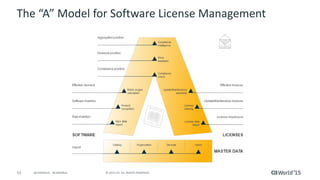
The “A” Model for Software License Management
10 © 2015 CA. ALL RIGHTS RESERVED.@CAWORLD #CAWORLD
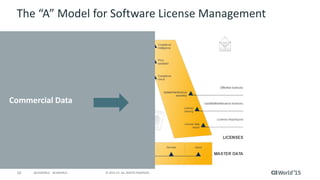
The “A” Model for Software License Management
Commercial Data
11 © 2015 CA. ALL RIGHTS RESERVED.@CAWORLD #CAWORLD
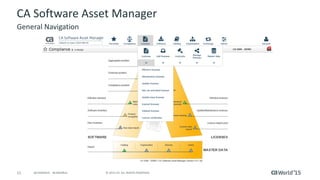
CA Software Asset Manager
General Navigation
12 © 2015 CA. ALL RIGHTS RESERVED.@CAWORLD #CAWORLD
CA Software Asset Manager
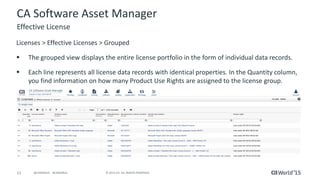
Licenses > Effective Licenses > Grouped
 The grouped view displays the entire license portfolio in the form of individual data records.
 Each line represents all license data records with identical properties. In the Quantity column,
you find information on how many Product Use Rights are assigned to the license group.
Effective License
13 © 2015 CA. ALL RIGHTS RESERVED.@CAWORLD #CAWORLD
CA Software Asset Manager
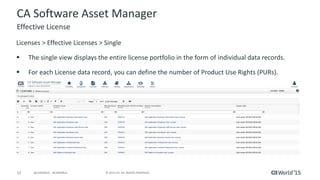
Licenses > Effective Licenses > Single
 The single view displays the entire license portfolio in the form of individual data records.
 For each License data record, you can define the number of Product Use Rights (PURs).
Effective License
14 © 2015 CA. ALL RIGHTS RESERVED.@CAWORLD #CAWORLD
CA Software Asset Manager
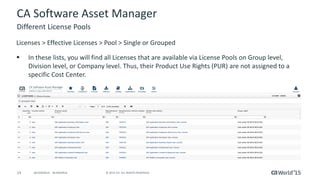
Licenses > Effective Licenses > Pool > Single or Grouped
 In these lists, you will find all Licenses that are available via License Pools on Group level,
Division level, or Company level. Thus, their Product Use Rights (PUR) are not assigned to a
specific Cost Center.
Different License Pools
15 © 2015 CA. ALL RIGHTS RESERVED.@CAWORLD #CAWORLD
CA Software Asset Manager
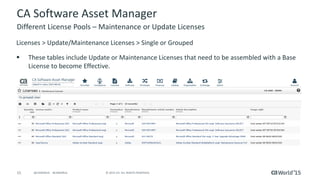
Licenses > Update/Maintenance Licenses > Single or Grouped
 These tables include Update or Maintenance Licenses that need to be assembled with a Base
License to become Effective.
Different License Pools – Maintenance or Update Licenses
16 © 2015 CA. ALL RIGHTS RESERVED.@CAWORLD #CAWORLD
CA Software Asset Manager
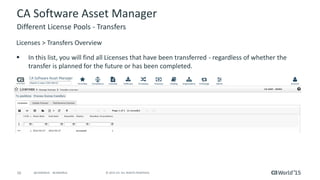
Licenses > Transfers Overview
 In this list, you will find all Licenses that have been transferred - regardless of whether the
transfer is planned for the future or has been completed.
Different License Pools - Transfers
17 © 2015 CA. ALL RIGHTS RESERVED.@CAWORLD #CAWORLD
CA Software Asset Manager
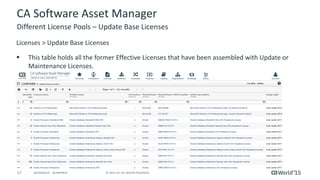
Licenses > Update Base Licenses
 This table holds all the former Effective Licenses that have been assembled with Update or
Maintenance Licenses.
Different License Pools – Update Base Licenses
18 © 2015 CA. ALL RIGHTS RESERVED.@CAWORLD #CAWORLD
CA Software Asset Manager
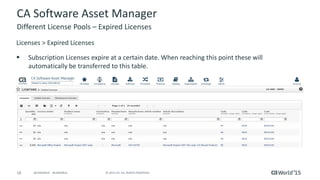
Licenses > Expired Licenses
 Subscription Licenses expire at a certain date. When reaching this point these will
automatically be transferred to this table.
Different License Pools – Expired Licenses
19 © 2015 CA. ALL RIGHTS RESERVED.@CAWORLD #CAWORLD
CA Software Asset Manager
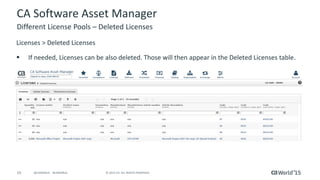
Licenses > Deleted Licenses
 If needed, Licenses can be also deleted. Those will then appear in the Deleted Licenses table.
Different License Pools – Deleted Licenses
20 © 2015 CA. ALL RIGHTS RESERVED.@CAWORLD #CAWORLD
CA Software Asset Manager
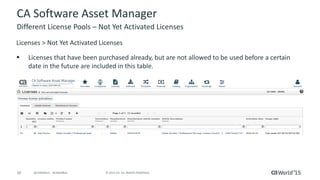
Licenses > Not Yet Activated Licenses
 Licenses that have been purchased already, but are not allowed to be used before a certain
date in the future are included in this table.
Different License Pools – Not Yet Activated Licenses
21 © 2015 CA. ALL RIGHTS RESERVED.@CAWORLD #CAWORLD
CA Software Asset Manager
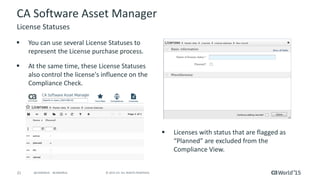
 You can use several License Statuses to
represent the License purchase process.
 At the same time, these License Statuses
also control the license's influence on the
Compliance Check.
License Statuses
 Licenses with status that are flagged as
“Planned” are excluded from the
Compliance View.
22 © 2015 CA. ALL RIGHTS RESERVED.@CAWORLD #CAWORLD
Manually Recording Licenses
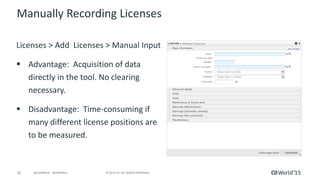
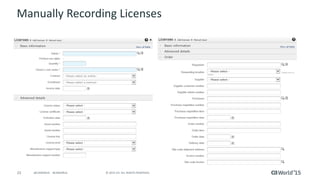
Licenses > Add Licenses > Manual Input
 Advantage: Acquisition of data
directly in the tool. No clearing
necessary.
 Disadvantage: Time-consuming if
many different license positions are
to be measured.
23 © 2015 CA. ALL RIGHTS RESERVED.@CAWORLD #CAWORLD
Manually Recording Licenses
24 © 2015 CA. ALL RIGHTS RESERVED.@CAWORLD #CAWORLD
Manually Recording Licenses
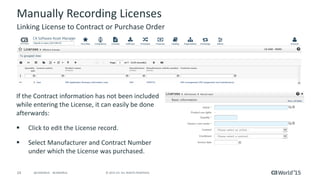
If the Contract information has not been included
while entering the License, it can easily be done
afterwards:
 Click to edit the License record.
 Select Manufacturer and Contract Number
under which the License was purchased.
Linking License to Contract or Purchase Order
25 © 2015 CA. ALL RIGHTS RESERVED.@CAWORLD #CAWORLD
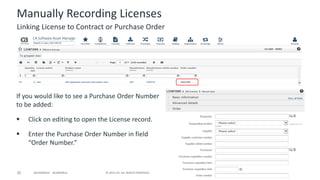
Manually Recording Licenses
If you would like to see a Purchase Order Number
to be added:
 Click on editing to open the License record.
 Enter the Purchase Order Number in field
“Order Number.”
Linking License to Contract or Purchase Order
26 © 2015 CA. ALL RIGHTS RESERVED.@CAWORLD #CAWORLD
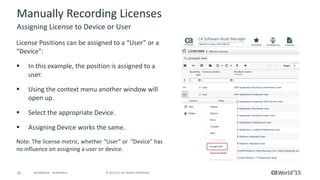
Manually Recording Licenses
License Positions can be assigned to a “User” or a
“Device”:
 In this example, the position is assigned to a
user.
 Using the context menu another window will
open up.
 Select the appropriate Device.
 Assigning Device works the same.
Note: The license metric, whether “User” or “Device” has
no influence on assigning a user or device.
Assigning License to Device or User
Demonstration:
Manually Recording a License
Part 3: License Inventory Management and
Automated License Data Exchange
29 © 2015 CA. ALL RIGHTS RESERVED.@CAWORLD #CAWORLD
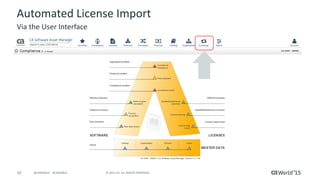
Automated License Import
Via the User Interface
30 © 2015 CA. ALL RIGHTS RESERVED.@CAWORLD #CAWORLD
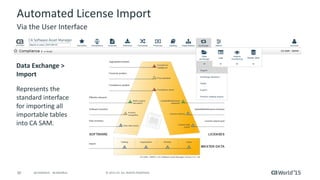
Automated License Import
Via the User Interface
Data Exchange >
Import
Represents the
standard interface
for importing all
importable tables
into CA SAM.
31 © 2015 CA. ALL RIGHTS RESERVED.@CAWORLD #CAWORLD
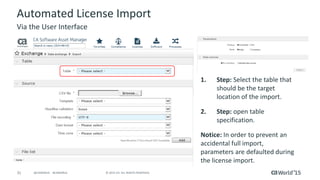
Automated License Import
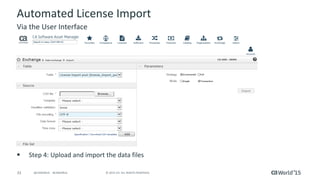
1. Step: Select the table that
should be the target
location of the import.
2. Step: open table
specification.
Notice: In order to prevent an
accidental full import,
parameters are defaulted during
the license import.
Via the User Interface
32 © 2015 CA. ALL RIGHTS RESERVED.@CAWORLD #CAWORLD
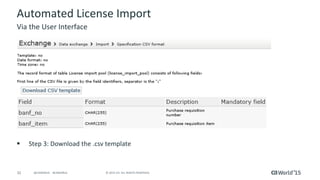
Automated License Import
 Step 3: Download the .csv template
Via the User Interface
33 © 2015 CA. ALL RIGHTS RESERVED.@CAWORLD #CAWORLD
Automated License Import
 Step 4: Upload and import the data files
Via the User Interface
34 © 2015 CA. ALL RIGHTS RESERVED.@CAWORLD #CAWORLD
License Clearing
 As no amount of data management can ensure 100% accuracy, a method is required to
identify errors in data to ensure correct information is entered into License Inventory.
 We call this “License Clearing”
 A license “clearing” method is essential to identify data errors, create a data remediation
plan and improve data accuracy.
 License “clearing” is the process of identifying any data elements that may be incorrect
and could impact the outcome of your compliance position.
 This activity should be completed by your License Managers.
35 © 2015 CA. ALL RIGHTS RESERVED.@CAWORLD #CAWORLD
License Clearing
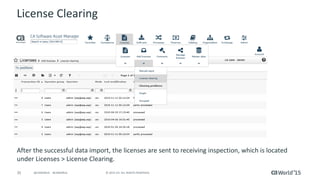
After the successful data import, the licenses are sent to receiving inspection, which is located
under Licenses > License Clearing.
36 © 2015 CA. ALL RIGHTS RESERVED.@CAWORLD #CAWORLD
License Clearing
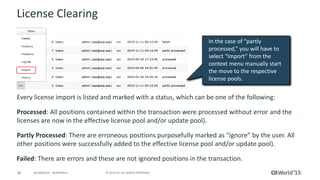
Every license import is listed and marked with a status, which can be one of the following:
Processed: All positions contained within the transaction were processed without error and the
licenses are now in the effective license pool and/or update pool).
Partly Processed: There are erroneous positions purposefully marked as “ignore” by the user. All
other positions were successfully added to the effective license pool and/or update pool).
Failed: There are errors and these are not ignored positions in the transaction.
In the case of “partly
processed,” you will have to
select “Import” from the
context menu manually start
the move to the respective
license pools.
37 © 2015 CA. ALL RIGHTS RESERVED.@CAWORLD #CAWORLD
License Clearing
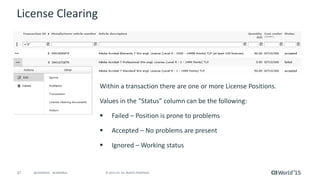
Within a transaction there are one or more License Positions.
Values in the “Status” column can be the following:
 Failed – Position is prone to problems
 Accepted – No problems are present
 Ignored – Working status
38 © 2015 CA. ALL RIGHTS RESERVED.@CAWORLD #CAWORLD
License Clearing Problems
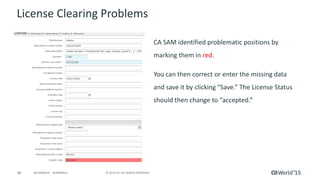
CA SAM identified problematic positions by
marking them in red.
You can then correct or enter the missing data
and save it by clicking “Save.” The License Status
should then change to “accepted.”
39 © 2015 CA. ALL RIGHTS RESERVED.@CAWORLD #CAWORLD
License Clearing Problems
 If only the Manufacturer Name is missing: This can be easily found in the Catalog by doing a
search with the Manufacturer Article Number. The same goes for the Article Name.
 If the Manufacturer Article Number is missing: You can attempt to figure it out using the
Article Name. To do so, you must search the Catalog.
 If the Article Number will be provided at a later date or another colleague is supposed to
determine this: You can mark the Clearing Status (e.g. “Manufacturer Article Number
missing”) and, if needed, add a note in the “Clearing Remarks” field.
40 © 2015 CA. ALL RIGHTS RESERVED.@CAWORLD #CAWORLD
License Clearing Problems
 If Cost Center is missing or you don’t know it: You can set the Clearing Status respectively
until the Cost Center is known.
 If a Cost Center is named that is not yet in the system yet: You must enter the new Cost
Center into the organizational structure under Organization > Cost Centers.
41 © 2015 CA. ALL RIGHTS RESERVED.@CAWORLD #CAWORLD
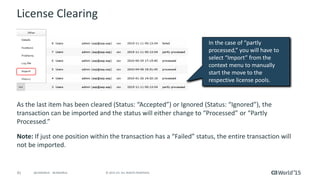
License Clearing
As the last item has been cleared (Status: “Accepted”) or Ignored (Status: “Ignored”), the
transaction can be imported and the status will either change to “Processed” or “Partly
Processed.”
Note: If just one position within the transaction has a “Failed” status, the entire transaction will
not be imported.
In the case of “partly
processed,” you will have to
select “Import” from the
context menu to manually
start the move to the
respective license pools.
42 © 2015 CA. ALL RIGHTS RESERVED.@CAWORLD #CAWORLD
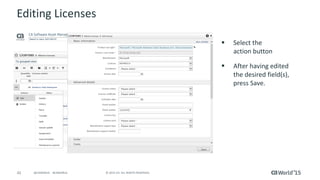
Editing Licenses
 Select the
action button
 After having edited
the desired field(s),
press Save.
43 © 2015 CA. ALL RIGHTS RESERVED.@CAWORLD #CAWORLD
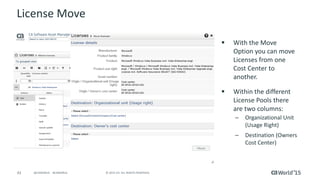
License Move
 With the Move
Option you can move
Licenses from one
Cost Center to
another.
 Within the different
License Pools there
are two columns:
– Organizational Unit
(Usage Right)
– Destination (Owners
Cost Center)
44 © 2015 CA. ALL RIGHTS RESERVED.@CAWORLD #CAWORLD
License Move (Bulk)
 Licenses > Manage Licenses > Mass Processing > Move
 You can use this script for large or Bulk License move operations. The script works with a
CSV-import and follows two general operating modes:
 Move quantity: A specified quantity of Licenses is moved.
 Target value: A specified quantity of Licenses is established as the target state and the
required quantity of licenses that have to be moved is determined independently.
 The source organization unit for the moving operations can either be determined for the
entire action (Selection) or can be specified line by line in the input file (Import).
 A related CSV-template can be downloaded.
IMPORTANT: This function is recommended for those who have expert knowledge.
45 © 2015 CA. ALL RIGHTS RESERVED.@CAWORLD #CAWORLD
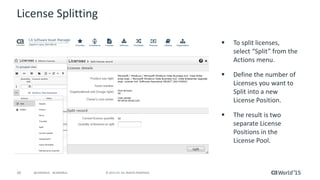
License Splitting
 To split licenses,
select “Split” from the
Actions menu.
 Define the number of
Licenses you want to
Split into a new
License Position.
 The result is two
separate License
Positions in the
License Pool.
46 © 2015 CA. ALL RIGHTS RESERVED.@CAWORLD #CAWORLD
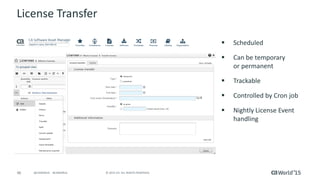
License Transfer
 Scheduled
 Can be temporary
or permanent
 Trackable
 Controlled by Cron job
 Nightly License Event
handling
47 © 2015 CA. ALL RIGHTS RESERVED.@CAWORLD #CAWORLD
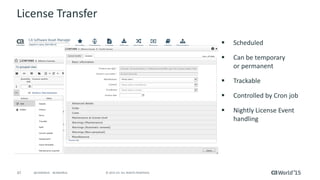
License Transfer
 Scheduled
 Can be temporary
or permanent
 Trackable
 Controlled by Cron job
 Nightly License Event
handling
48 © 2015 CA. ALL RIGHTS RESERVED.@CAWORLD #CAWORLD
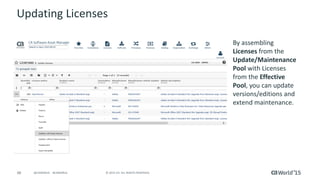
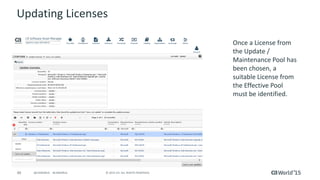
Updating Licenses
By assembling
Licenses from the
Update/Maintenance
Pool with Licenses
from the Effective
Pool, you can update
versions/editions and
extend maintenance.
49 © 2015 CA. ALL RIGHTS RESERVED.@CAWORLD #CAWORLD
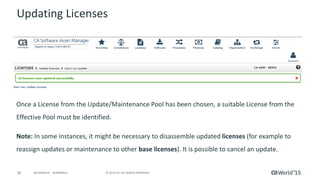
Updating Licenses
Once a License from
the Update /
Maintenance Pool has
been chosen, a
suitable License from
the Effective Pool
must be identified.
50 © 2015 CA. ALL RIGHTS RESERVED.@CAWORLD #CAWORLD
Updating Licenses
Once a License from the Update/Maintenance Pool has been chosen, a suitable License from the
Effective Pool must be identified.
Note: In some instances, it might be necessary to disassemble updated licenses (for example to
reassign updates or maintenance to other base licenses). It is possible to cancel an update.
51 © 2015 CA. ALL RIGHTS RESERVED.@CAWORLD #CAWORLD
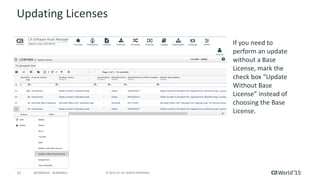
Updating Licenses
If you need to
perform an update
without a Base
License, mark the
check box “Update
Without Base
License” instead of
choosing the Base
License.
52 © 2015 CA. ALL RIGHTS RESERVED.@CAWORLD #CAWORLD
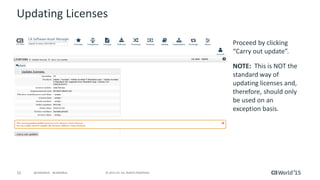
Updating Licenses
Proceed by clicking
“Carry out update”.
NOTE: This is NOT the
standard way of
updating licenses and,
therefore, should only
be used on an
exception basis.
53 © 2015 CA. ALL RIGHTS RESERVED.@CAWORLD #CAWORLD
The “A” Model for Software License Management
54 © 2015 CA. ALL RIGHTS RESERVED.@CAWORLD #CAWORLD
Q & A
55 © 2015 CA. ALL RIGHTS RESERVED.@CAWORLD #CAWORLD
Recommended Sessions
SESSION # TITLE DATE/TIME
DO5X98E A Day in the Life of a Software Asset Manager
11/17/15 at 9:00 am
Breakers E
DO5X101E
Get the Most From Your Software Licenses with CA
Software Asset Management
11/17/15 at 1:00 pm
Breakers D
DO5X165S
First Horizon National Corporation Succeeds at Software
Asset Management – Learn How to Get Your Life Back!
11/18/15 at 3:00 pm
Breakers L
DO5X169S 10 steps to help accelerate your SAM efforts
11/18/15 at 4:30 pm
Breakers L
DO5X161S
Save a Million Dollars in 15 Minutes with Software Asset
Management (and Not Go to Jail)
11/19/15 at 2:00 pm
Breakers L
DO5X168S Software Asset Management—The Tough Stuff
11/19/15 at 4:30 pm
Breakers L
56 © 2015 CA. ALL RIGHTS RESERVED.@CAWORLD #CAWORLD
Must-See Demos
Software Asset
Management
CA Software Asset
Manager (CA SAM)
Theater 5
Unified Self-
service
CA Service
Management
Theater 5
Asset
Management
CA IT Asset
Manager
Theater 5
Software License
Optimization
CA SAM Optimization
& Simulation
Theater 5
57 © 2015 CA. ALL RIGHTS RESERVED.@CAWORLD #CAWORLD
Follow Conversations At…
Smart Bar
CA Software Asset
Manager (CA SAM)
Theater 5
Smart Bar
CA SAM Optimization
& Simulation
Theater 5
58 © 2015 CA. ALL RIGHTS RESERVED.@CAWORLD #CAWORLD
For More Information
To learn more, please visit:
http://cainc.to/Nv2VOe
CA World ’15

Managing Software Entitlements in Software Asset Management Solutions from CA

  • 1.
    Managing Software Entitlementsin Software Asset Management Solutions from CA Michel Avenel IT Service Management CA Technologies Sr. Principal Product Manager DO5X99E #CAWorld #ITSM
  • 2.
    2 © 2015CA. ALL RIGHTS RESERVED.@CAWORLD #CAWORLD © 2015 CA. All rights reserved. All trademarks referenced herein belong to their respective companies. The content provided in this CA World 2015 presentation is intended for informational purposes only and does not form any type of warranty. The information provided by a CA partner and/or CA customer has not been reviewed for accuracy by CA. CA does not provide legal advice. Neither this document nor any CA software product referenced herein shall serve as a substitute for your compliance with any laws (including but not limited to any act, statute, regulation, rule, directive, policy, standard, guideline, measure, requirement, administrative order, executive order, etc. (collectively, “Laws”)) referenced in this document. You should consult with competent legal counsel regarding any Laws referenced herein. For Informational Purposes Only Terms of this Presentation
  • 3.
    3 © 2015CA. ALL RIGHTS RESERVED.@CAWORLD #CAWORLD Abstract This session will focus on the process of registering software entitlements in Software Asset Management solutions from CA. Michel Avenel CA Technologies Sr. Principal Product Manager
  • 4.
    4 © 2015CA. ALL RIGHTS RESERVED.@CAWORLD #CAWORLD Agenda FUNDAMENTALS OF SOFTWARE LICENSE MANAGEMENT EFFECTIVE LICENSE AND LICENSE POOLS CREATING & IMPORTING LICENSES LICENSE INVENTORY MANAGEMENT 1 2 3 4
  • 5.
    5 © 2015CA. ALL RIGHTS RESERVED.@CAWORLD #CAWORLD Fundamentals of Software License Management Key Terminology TERMINOLOGY DESCRIPTION Software License Agreement A legal instrument governing the use or redistribution of software. Entitlement The portion of a software license agreement describing product-use rights and limitations. Entitlement elements help determine license compliance when matched against actual states of installation and usage. Product Use Rights The terms and conditions in a license agreement (or related documents) specifying how users can operate a product, and under what limitations, without breach of intellectual property rights or copyright law. License Metric A description for measuring the product-use rights of a specified entitlement.
  • 6.
    6 © 2015CA. ALL RIGHTS RESERVED.@CAWORLD #CAWORLD Fundamentals of Software License Management Key Terminology TERMINOLOGY DESCRIPTION Effective Demand The aggregate number of entitlements used for a given software product. Effective License The aggregate number of entitlements available (owned) for a given software product Product Use Rights A repository of software asset, hardware asset and configuration information deployed within an infrastructure, including their attributes. Combined discovery and data scrubbing processes undertaken to build a list of software and/or hardware asset and/or configuration item deployments within an infrastructure. License Metric A description for measuring the product-use rights of a specified entitlement.
  • 7.
    7 © 2015CA. ALL RIGHTS RESERVED.@CAWORLD #CAWORLD Fundamentals of Software License Management Key Terminology TERMINOLOGY DESCRIPTION License The scope and limitations of the powers of the Licensee (buyer) to exploit the software. The right to use depends on the contents of the Contract agreed to by the parties. The right of the Licensee to make the necessary actions to use the program in accordance with the software’s intended use, without requiring the approval of the manufacturer. (In the United States, Section 117 of the Copyright Act gives the owner of a particular copy of software the explicit right to use the software with a computer, even if use of the software with a computer requires the making of incidental copies or adaptations (acts which could otherwise potentially constitute copyright infringement). Hence, if the end-user of software is the owner of the respective copy, then the end-user may legally use the software without a License from the software publisher). A limitation of the contractual use is not permitted by the licensor. With the purchase of software, a License (usage right) is also purchased. The software itself remains the possession of the manufacturer at all times.
  • 8.
    8 © 2015CA. ALL RIGHTS RESERVED.@CAWORLD #CAWORLD Part 1: Introduction and Manually Recording Licenses
  • 9.
    9 © 2015CA. ALL RIGHTS RESERVED.@CAWORLD #CAWORLD The “A” Model for Software License Management
  • 10.
    10 © 2015CA. ALL RIGHTS RESERVED.@CAWORLD #CAWORLD The “A” Model for Software License Management Commercial Data
  • 11.
    11 © 2015CA. ALL RIGHTS RESERVED.@CAWORLD #CAWORLD CA Software Asset Manager General Navigation
  • 12.
    12 © 2015CA. ALL RIGHTS RESERVED.@CAWORLD #CAWORLD CA Software Asset Manager Licenses > Effective Licenses > Grouped  The grouped view displays the entire license portfolio in the form of individual data records.  Each line represents all license data records with identical properties. In the Quantity column, you find information on how many Product Use Rights are assigned to the license group. Effective License
  • 13.
    13 © 2015CA. ALL RIGHTS RESERVED.@CAWORLD #CAWORLD CA Software Asset Manager Licenses > Effective Licenses > Single  The single view displays the entire license portfolio in the form of individual data records.  For each License data record, you can define the number of Product Use Rights (PURs). Effective License
  • 14.
    14 © 2015CA. ALL RIGHTS RESERVED.@CAWORLD #CAWORLD CA Software Asset Manager Licenses > Effective Licenses > Pool > Single or Grouped  In these lists, you will find all Licenses that are available via License Pools on Group level, Division level, or Company level. Thus, their Product Use Rights (PUR) are not assigned to a specific Cost Center. Different License Pools
  • 15.
    15 © 2015CA. ALL RIGHTS RESERVED.@CAWORLD #CAWORLD CA Software Asset Manager Licenses > Update/Maintenance Licenses > Single or Grouped  These tables include Update or Maintenance Licenses that need to be assembled with a Base License to become Effective. Different License Pools – Maintenance or Update Licenses
  • 16.
    16 © 2015CA. ALL RIGHTS RESERVED.@CAWORLD #CAWORLD CA Software Asset Manager Licenses > Transfers Overview  In this list, you will find all Licenses that have been transferred - regardless of whether the transfer is planned for the future or has been completed. Different License Pools - Transfers
  • 17.
    17 © 2015CA. ALL RIGHTS RESERVED.@CAWORLD #CAWORLD CA Software Asset Manager Licenses > Update Base Licenses  This table holds all the former Effective Licenses that have been assembled with Update or Maintenance Licenses. Different License Pools – Update Base Licenses
  • 18.
    18 © 2015CA. ALL RIGHTS RESERVED.@CAWORLD #CAWORLD CA Software Asset Manager Licenses > Expired Licenses  Subscription Licenses expire at a certain date. When reaching this point these will automatically be transferred to this table. Different License Pools – Expired Licenses
  • 19.
    19 © 2015CA. ALL RIGHTS RESERVED.@CAWORLD #CAWORLD CA Software Asset Manager Licenses > Deleted Licenses  If needed, Licenses can be also deleted. Those will then appear in the Deleted Licenses table. Different License Pools – Deleted Licenses
  • 20.
    20 © 2015CA. ALL RIGHTS RESERVED.@CAWORLD #CAWORLD CA Software Asset Manager Licenses > Not Yet Activated Licenses  Licenses that have been purchased already, but are not allowed to be used before a certain date in the future are included in this table. Different License Pools – Not Yet Activated Licenses
  • 21.
    21 © 2015CA. ALL RIGHTS RESERVED.@CAWORLD #CAWORLD CA Software Asset Manager  You can use several License Statuses to represent the License purchase process.  At the same time, these License Statuses also control the license's influence on the Compliance Check. License Statuses  Licenses with status that are flagged as “Planned” are excluded from the Compliance View.
  • 22.
    22 © 2015CA. ALL RIGHTS RESERVED.@CAWORLD #CAWORLD Manually Recording Licenses Licenses > Add Licenses > Manual Input  Advantage: Acquisition of data directly in the tool. No clearing necessary.  Disadvantage: Time-consuming if many different license positions are to be measured.
  • 23.
    23 © 2015CA. ALL RIGHTS RESERVED.@CAWORLD #CAWORLD Manually Recording Licenses
  • 24.
    24 © 2015CA. ALL RIGHTS RESERVED.@CAWORLD #CAWORLD Manually Recording Licenses If the Contract information has not been included while entering the License, it can easily be done afterwards:  Click to edit the License record.  Select Manufacturer and Contract Number under which the License was purchased. Linking License to Contract or Purchase Order
  • 25.
    25 © 2015CA. ALL RIGHTS RESERVED.@CAWORLD #CAWORLD Manually Recording Licenses If you would like to see a Purchase Order Number to be added:  Click on editing to open the License record.  Enter the Purchase Order Number in field “Order Number.” Linking License to Contract or Purchase Order
  • 26.
    26 © 2015CA. ALL RIGHTS RESERVED.@CAWORLD #CAWORLD Manually Recording Licenses License Positions can be assigned to a “User” or a “Device”:  In this example, the position is assigned to a user.  Using the context menu another window will open up.  Select the appropriate Device.  Assigning Device works the same. Note: The license metric, whether “User” or “Device” has no influence on assigning a user or device. Assigning License to Device or User
  • 27.
  • 28.
    Part 3: LicenseInventory Management and Automated License Data Exchange
  • 29.
    29 © 2015CA. ALL RIGHTS RESERVED.@CAWORLD #CAWORLD Automated License Import Via the User Interface
  • 30.
    30 © 2015CA. ALL RIGHTS RESERVED.@CAWORLD #CAWORLD Automated License Import Via the User Interface Data Exchange > Import Represents the standard interface for importing all importable tables into CA SAM.
  • 31.
    31 © 2015CA. ALL RIGHTS RESERVED.@CAWORLD #CAWORLD Automated License Import 1. Step: Select the table that should be the target location of the import. 2. Step: open table specification. Notice: In order to prevent an accidental full import, parameters are defaulted during the license import. Via the User Interface
  • 32.
    32 © 2015CA. ALL RIGHTS RESERVED.@CAWORLD #CAWORLD Automated License Import  Step 3: Download the .csv template Via the User Interface
  • 33.
    33 © 2015CA. ALL RIGHTS RESERVED.@CAWORLD #CAWORLD Automated License Import  Step 4: Upload and import the data files Via the User Interface
  • 34.
    34 © 2015CA. ALL RIGHTS RESERVED.@CAWORLD #CAWORLD License Clearing  As no amount of data management can ensure 100% accuracy, a method is required to identify errors in data to ensure correct information is entered into License Inventory.  We call this “License Clearing”  A license “clearing” method is essential to identify data errors, create a data remediation plan and improve data accuracy.  License “clearing” is the process of identifying any data elements that may be incorrect and could impact the outcome of your compliance position.  This activity should be completed by your License Managers.
  • 35.
    35 © 2015CA. ALL RIGHTS RESERVED.@CAWORLD #CAWORLD License Clearing After the successful data import, the licenses are sent to receiving inspection, which is located under Licenses > License Clearing.
  • 36.
    36 © 2015CA. ALL RIGHTS RESERVED.@CAWORLD #CAWORLD License Clearing Every license import is listed and marked with a status, which can be one of the following: Processed: All positions contained within the transaction were processed without error and the licenses are now in the effective license pool and/or update pool). Partly Processed: There are erroneous positions purposefully marked as “ignore” by the user. All other positions were successfully added to the effective license pool and/or update pool). Failed: There are errors and these are not ignored positions in the transaction. In the case of “partly processed,” you will have to select “Import” from the context menu manually start the move to the respective license pools.
  • 37.
    37 © 2015CA. ALL RIGHTS RESERVED.@CAWORLD #CAWORLD License Clearing Within a transaction there are one or more License Positions. Values in the “Status” column can be the following:  Failed – Position is prone to problems  Accepted – No problems are present  Ignored – Working status
  • 38.
    38 © 2015CA. ALL RIGHTS RESERVED.@CAWORLD #CAWORLD License Clearing Problems CA SAM identified problematic positions by marking them in red. You can then correct or enter the missing data and save it by clicking “Save.” The License Status should then change to “accepted.”
  • 39.
    39 © 2015CA. ALL RIGHTS RESERVED.@CAWORLD #CAWORLD License Clearing Problems  If only the Manufacturer Name is missing: This can be easily found in the Catalog by doing a search with the Manufacturer Article Number. The same goes for the Article Name.  If the Manufacturer Article Number is missing: You can attempt to figure it out using the Article Name. To do so, you must search the Catalog.  If the Article Number will be provided at a later date or another colleague is supposed to determine this: You can mark the Clearing Status (e.g. “Manufacturer Article Number missing”) and, if needed, add a note in the “Clearing Remarks” field.
  • 40.
    40 © 2015CA. ALL RIGHTS RESERVED.@CAWORLD #CAWORLD License Clearing Problems  If Cost Center is missing or you don’t know it: You can set the Clearing Status respectively until the Cost Center is known.  If a Cost Center is named that is not yet in the system yet: You must enter the new Cost Center into the organizational structure under Organization > Cost Centers.
  • 41.
    41 © 2015CA. ALL RIGHTS RESERVED.@CAWORLD #CAWORLD License Clearing As the last item has been cleared (Status: “Accepted”) or Ignored (Status: “Ignored”), the transaction can be imported and the status will either change to “Processed” or “Partly Processed.” Note: If just one position within the transaction has a “Failed” status, the entire transaction will not be imported. In the case of “partly processed,” you will have to select “Import” from the context menu to manually start the move to the respective license pools.
  • 42.
    42 © 2015CA. ALL RIGHTS RESERVED.@CAWORLD #CAWORLD Editing Licenses  Select the action button  After having edited the desired field(s), press Save.
  • 43.
    43 © 2015CA. ALL RIGHTS RESERVED.@CAWORLD #CAWORLD License Move  With the Move Option you can move Licenses from one Cost Center to another.  Within the different License Pools there are two columns: – Organizational Unit (Usage Right) – Destination (Owners Cost Center)
  • 44.
    44 © 2015CA. ALL RIGHTS RESERVED.@CAWORLD #CAWORLD License Move (Bulk)  Licenses > Manage Licenses > Mass Processing > Move  You can use this script for large or Bulk License move operations. The script works with a CSV-import and follows two general operating modes:  Move quantity: A specified quantity of Licenses is moved.  Target value: A specified quantity of Licenses is established as the target state and the required quantity of licenses that have to be moved is determined independently.  The source organization unit for the moving operations can either be determined for the entire action (Selection) or can be specified line by line in the input file (Import).  A related CSV-template can be downloaded. IMPORTANT: This function is recommended for those who have expert knowledge.
  • 45.
    45 © 2015CA. ALL RIGHTS RESERVED.@CAWORLD #CAWORLD License Splitting  To split licenses, select “Split” from the Actions menu.  Define the number of Licenses you want to Split into a new License Position.  The result is two separate License Positions in the License Pool.
  • 46.
    46 © 2015CA. ALL RIGHTS RESERVED.@CAWORLD #CAWORLD License Transfer  Scheduled  Can be temporary or permanent  Trackable  Controlled by Cron job  Nightly License Event handling
  • 47.
    47 © 2015CA. ALL RIGHTS RESERVED.@CAWORLD #CAWORLD License Transfer  Scheduled  Can be temporary or permanent  Trackable  Controlled by Cron job  Nightly License Event handling
  • 48.
    48 © 2015CA. ALL RIGHTS RESERVED.@CAWORLD #CAWORLD Updating Licenses By assembling Licenses from the Update/Maintenance Pool with Licenses from the Effective Pool, you can update versions/editions and extend maintenance.
  • 49.
    49 © 2015CA. ALL RIGHTS RESERVED.@CAWORLD #CAWORLD Updating Licenses Once a License from the Update / Maintenance Pool has been chosen, a suitable License from the Effective Pool must be identified.
  • 50.
    50 © 2015CA. ALL RIGHTS RESERVED.@CAWORLD #CAWORLD Updating Licenses Once a License from the Update/Maintenance Pool has been chosen, a suitable License from the Effective Pool must be identified. Note: In some instances, it might be necessary to disassemble updated licenses (for example to reassign updates or maintenance to other base licenses). It is possible to cancel an update.
  • 51.
    51 © 2015CA. ALL RIGHTS RESERVED.@CAWORLD #CAWORLD Updating Licenses If you need to perform an update without a Base License, mark the check box “Update Without Base License” instead of choosing the Base License.
  • 52.
    52 © 2015CA. ALL RIGHTS RESERVED.@CAWORLD #CAWORLD Updating Licenses Proceed by clicking “Carry out update”. NOTE: This is NOT the standard way of updating licenses and, therefore, should only be used on an exception basis.
  • 53.
    53 © 2015CA. ALL RIGHTS RESERVED.@CAWORLD #CAWORLD The “A” Model for Software License Management
  • 54.
    54 © 2015CA. ALL RIGHTS RESERVED.@CAWORLD #CAWORLD Q & A
  • 55.
    55 © 2015CA. ALL RIGHTS RESERVED.@CAWORLD #CAWORLD Recommended Sessions SESSION # TITLE DATE/TIME DO5X98E A Day in the Life of a Software Asset Manager 11/17/15 at 9:00 am Breakers E DO5X101E Get the Most From Your Software Licenses with CA Software Asset Management 11/17/15 at 1:00 pm Breakers D DO5X165S First Horizon National Corporation Succeeds at Software Asset Management – Learn How to Get Your Life Back! 11/18/15 at 3:00 pm Breakers L DO5X169S 10 steps to help accelerate your SAM efforts 11/18/15 at 4:30 pm Breakers L DO5X161S Save a Million Dollars in 15 Minutes with Software Asset Management (and Not Go to Jail) 11/19/15 at 2:00 pm Breakers L DO5X168S Software Asset Management—The Tough Stuff 11/19/15 at 4:30 pm Breakers L
  • 56.
    56 © 2015CA. ALL RIGHTS RESERVED.@CAWORLD #CAWORLD Must-See Demos Software Asset Management CA Software Asset Manager (CA SAM) Theater 5 Unified Self- service CA Service Management Theater 5 Asset Management CA IT Asset Manager Theater 5 Software License Optimization CA SAM Optimization & Simulation Theater 5
  • 57.
    57 © 2015CA. ALL RIGHTS RESERVED.@CAWORLD #CAWORLD Follow Conversations At… Smart Bar CA Software Asset Manager (CA SAM) Theater 5 Smart Bar CA SAM Optimization & Simulation Theater 5
  • 58.
    58 © 2015CA. ALL RIGHTS RESERVED.@CAWORLD #CAWORLD For More Information To learn more, please visit: http://cainc.to/Nv2VOe CA World ’15