Thin Template By Somenath Mukhopadhyay [email_address]
What is a Template Compile time polymorphism Use of a single declaration for multiple types provided the logic is the same for all of the supported types
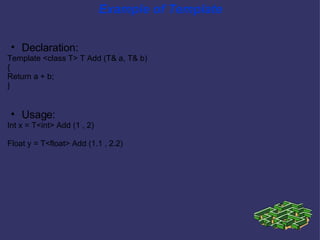
Example of Template Declaration: Template <class T> T Add (T& a, T& b)‏ { Return a + b; } Usage: Int x = T<int> Add (1 , 2)‏ Float y = T<float> Add (1.1 , 2.2)
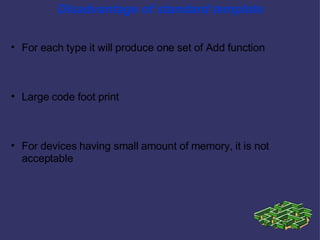
Disadvantage of standard template For each type it will produce one set of Add function Large code foot print For devices having small amount of memory, it is not acceptable
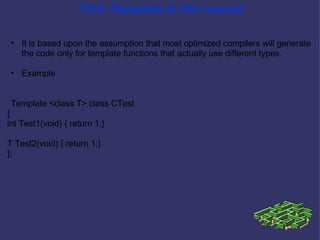
Thin Template in the rescue It is based upon the assumption that most optimized compilers will generate the code only for template functions that actually use different types. Example Template <class T> class CTest { int Test1(void) { return 1;} T Test2(void) { return 1;} };
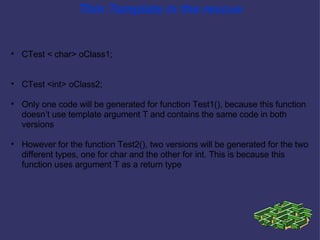
Thin Template in the rescue CTest < char> oClass1; CTest <int> oClass2; Only one code will be generated for function Test1(), because this function doesn’t use template argument T and contains the same code in both versions However for the function Test2(), two versions will be generated for the two different types, one for char and the other for int. This is because this function uses argument T as a return type
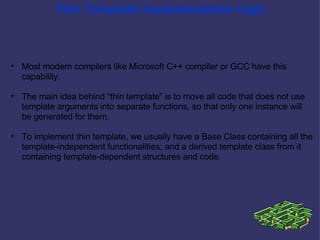
Thin Template implementation logic Most modern compilers like Microsoft C++ compiler or GCC have this capability. The main idea behind “thin template” is to move all code that does not use template arguments into separate functions, so that only one instance will be generated for them.  To implement thin template, we usually have a Base Class containing all the template-independent functionalities; and a derived template class from it containing template-dependent structures and code.
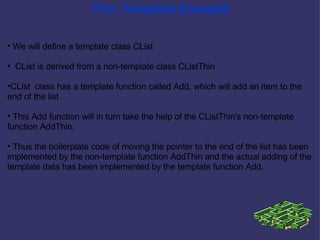
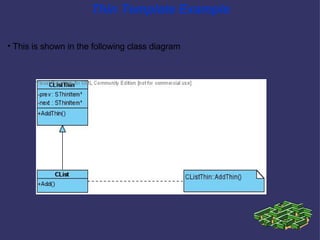
Thin Template Example We will define a template class CList CList is derived from a non-template class CListThin  CList  class has a template function called Add, which will add an item to the end of the list This Add function will in turn take the help of the CListThin's non-template function AddThin. Thus the boilerplate code of moving the pointer to the end of the list has been implemented by the non-template function AddThin and the actual adding of the template data has been implemented by the template function Add.
Thin Template Example This is shown in the following class diagram
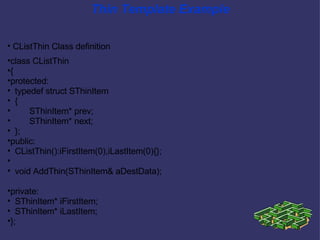
Thin Template Example CListThin Class definition class CListThin { protected: typedef struct SThinItem { SThinItem* prev; SThinItem* next; }; public: CListThin():iFirstItem(0),iLastItem(0){}; void AddThin(SThinItem& aDestData); private: SThinItem* iFirstItem; SThinItem* iLastItem; };
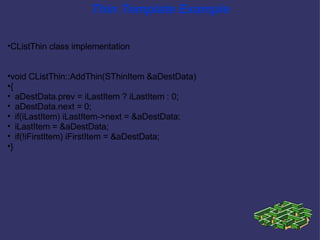
Thin Template Example CListThin class implementation void CListThin::AddThin(SThinItem &aDestData)‏ { aDestData.prev = iLastItem ? iLastItem : 0; aDestData.next = 0; if(iLastItem) iLastItem->next = &aDestData; iLastItem = &aDestData; if(!iFirstItem) iFirstItem = &aDestData; }
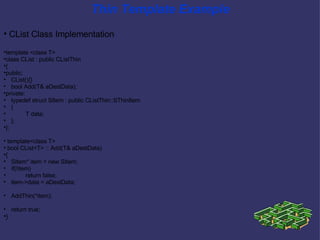
Thin Template Example CList Class Implementation template <class T> class CList : public CListThin { public: CList(){} bool Add(T& aDestData); private: typedef struct SItem : public CListThin::SThinItem { T data; }; }; template<class T> bool CList<T> :: Add(T& aDestData)‏ { SItem* item = new SItem; if(!item)  return false; item->data = aDestData; AddThin(*item); return true; }
Thin Template and Design Pattern Thin Template  is one of the applications of the Design Pattern called Template Method (please refer the GoF book for further information)‏
Reference Using &quot;Thin Templates&quot; to Reduce Application Size by  Gregor Petrov http://www.codeguru.com/cpp/cpp/cpp_mfc/tutorials/article.php/c7927/
Thank You

Thin Template Explained

  • 1.
    Thin Template BySomenath Mukhopadhyay [email_address]
  • 2.
    What is aTemplate Compile time polymorphism Use of a single declaration for multiple types provided the logic is the same for all of the supported types
  • 3.
    Example of TemplateDeclaration: Template <class T> T Add (T& a, T& b)‏ { Return a + b; } Usage: Int x = T<int> Add (1 , 2)‏ Float y = T<float> Add (1.1 , 2.2)
  • 4.
    Disadvantage of standardtemplate For each type it will produce one set of Add function Large code foot print For devices having small amount of memory, it is not acceptable
  • 5.
    Thin Template inthe rescue It is based upon the assumption that most optimized compilers will generate the code only for template functions that actually use different types. Example Template <class T> class CTest { int Test1(void) { return 1;} T Test2(void) { return 1;} };
  • 6.
    Thin Template inthe rescue CTest < char> oClass1; CTest <int> oClass2; Only one code will be generated for function Test1(), because this function doesn’t use template argument T and contains the same code in both versions However for the function Test2(), two versions will be generated for the two different types, one for char and the other for int. This is because this function uses argument T as a return type
  • 7.
    Thin Template implementationlogic Most modern compilers like Microsoft C++ compiler or GCC have this capability. The main idea behind “thin template” is to move all code that does not use template arguments into separate functions, so that only one instance will be generated for them. To implement thin template, we usually have a Base Class containing all the template-independent functionalities; and a derived template class from it containing template-dependent structures and code.
  • 8.
    Thin Template ExampleWe will define a template class CList CList is derived from a non-template class CListThin CList class has a template function called Add, which will add an item to the end of the list This Add function will in turn take the help of the CListThin's non-template function AddThin. Thus the boilerplate code of moving the pointer to the end of the list has been implemented by the non-template function AddThin and the actual adding of the template data has been implemented by the template function Add.
  • 9.
    Thin Template ExampleThis is shown in the following class diagram
  • 10.
    Thin Template ExampleCListThin Class definition class CListThin { protected: typedef struct SThinItem { SThinItem* prev; SThinItem* next; }; public: CListThin():iFirstItem(0),iLastItem(0){}; void AddThin(SThinItem& aDestData); private: SThinItem* iFirstItem; SThinItem* iLastItem; };
  • 11.
    Thin Template ExampleCListThin class implementation void CListThin::AddThin(SThinItem &aDestData)‏ { aDestData.prev = iLastItem ? iLastItem : 0; aDestData.next = 0; if(iLastItem) iLastItem->next = &aDestData; iLastItem = &aDestData; if(!iFirstItem) iFirstItem = &aDestData; }
  • 12.
    Thin Template ExampleCList Class Implementation template <class T> class CList : public CListThin { public: CList(){} bool Add(T& aDestData); private: typedef struct SItem : public CListThin::SThinItem { T data; }; }; template<class T> bool CList<T> :: Add(T& aDestData)‏ { SItem* item = new SItem; if(!item) return false; item->data = aDestData; AddThin(*item); return true; }
  • 13.
    Thin Template andDesign Pattern Thin Template is one of the applications of the Design Pattern called Template Method (please refer the GoF book for further information)‏
  • 14.
    Reference Using &quot;ThinTemplates&quot; to Reduce Application Size by Gregor Petrov http://www.codeguru.com/cpp/cpp/cpp_mfc/tutorials/article.php/c7927/
  • 15.