Security Testing

Security testing is a process to determine that an information system protects data and maintains functionality as intended.
Challenges



Skill set – for better results requires practice in this wide area



Effort – on going process which may require separate team



Tools – most likely are third party services or require deep understanding



Budget – for license or a team / third party



Automation – in most cases ST process requires Intelligence investigation
Introduction

The Zed Attack Proxy (ZAP) is an easy to use integrated penetration testing tool for finding vulnerabilities in web applications.
It is designed to be used by people with a wide range of security experience:


Developers



Functional Testers



Security Specialists



Those who are new to penetration testing.

ZAP provides automated scanners as well as a set of tools that allow you to find security vulnerabilities manually
1st Steps



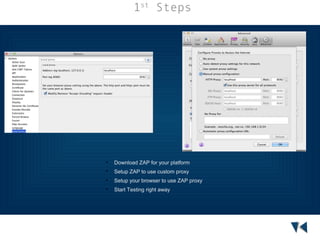
Download ZAP for your platform



Setup ZAP to use custom proxy



Setup your browser to use ZAP proxy



Start Testing right away
Passive Scan





Logs all found on the fly as you test within your Browser
Finds Small and Medium issues in Web context (cookies,
headers e.t.c)



Provides solution to fix



Provides Reports in number of formats



Candidate for CI pipeline process
Active Scan



Runs number of test against given URL



Goes through all possible vulnerabilities



Dynamically inserts URL parameters trying to inject Site under test



Reports and highlight areas for further analysis
Automation



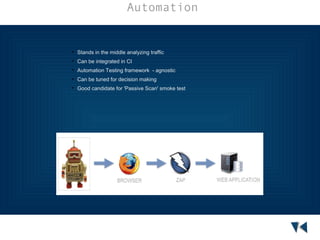
Stands in the middle analyzing traffic



Can be integrated in CI



Automation Testing framework - agnostic



Can be tuned for decision making



Good candidate for 'Passive Scan' smoke test
Conclusion


Cross-platform – easy to setup and start



Open source and actively develops



Doesn't require any special skills from the start



Continuous Integration - friendly



Supports automation at some levels



REST API friendly
Materials Used
Alan Parkinson Conference talks
http://lanyrd.com/profile/alan_parkinson/
OWASP ZAP Home Page
http://bit.ly/1fjloVy
Materials Used
Alan Parkinson Conference talks
http://lanyrd.com/profile/alan_parkinson/
OWASP ZAP Home Page
http://bit.ly/1fjloVy

Zap attack proxy

  • 1.
    Security Testing Security testingis a process to determine that an information system protects data and maintains functionality as intended.
  • 2.
    Challenges  Skill set –for better results requires practice in this wide area  Effort – on going process which may require separate team  Tools – most likely are third party services or require deep understanding  Budget – for license or a team / third party  Automation – in most cases ST process requires Intelligence investigation
  • 3.
    Introduction The Zed AttackProxy (ZAP) is an easy to use integrated penetration testing tool for finding vulnerabilities in web applications. It is designed to be used by people with a wide range of security experience:  Developers  Functional Testers  Security Specialists  Those who are new to penetration testing. ZAP provides automated scanners as well as a set of tools that allow you to find security vulnerabilities manually
  • 4.
    1st Steps  Download ZAPfor your platform  Setup ZAP to use custom proxy  Setup your browser to use ZAP proxy  Start Testing right away
  • 5.
    Passive Scan   Logs allfound on the fly as you test within your Browser Finds Small and Medium issues in Web context (cookies, headers e.t.c)  Provides solution to fix  Provides Reports in number of formats  Candidate for CI pipeline process
  • 6.
    Active Scan  Runs numberof test against given URL  Goes through all possible vulnerabilities  Dynamically inserts URL parameters trying to inject Site under test  Reports and highlight areas for further analysis
  • 7.
    Automation  Stands in themiddle analyzing traffic  Can be integrated in CI  Automation Testing framework - agnostic  Can be tuned for decision making  Good candidate for 'Passive Scan' smoke test
  • 8.
    Conclusion  Cross-platform – easyto setup and start  Open source and actively develops  Doesn't require any special skills from the start  Continuous Integration - friendly  Supports automation at some levels  REST API friendly
  • 9.
    Materials Used Alan ParkinsonConference talks http://lanyrd.com/profile/alan_parkinson/ OWASP ZAP Home Page http://bit.ly/1fjloVy
  • 10.
    Materials Used Alan ParkinsonConference talks http://lanyrd.com/profile/alan_parkinson/ OWASP ZAP Home Page http://bit.ly/1fjloVy