Youth Work Readiness
Assessments & Tools
Chelsea Jones & Lacey Pollock
Connections Conference
April 25, 2017
Illinois workNet® is a portal to connect individuals, employers,
and education, workforce and community partners to career
planning, education and training, and employment resources and
tools. The portal connects people to local and statewide in-person
and online services.
• Web Portal – http://www.illinoisworknet.com
jobPrep Mobile App includes capabilities that assist job seekers
with their employment needs, all from the convenience of a
smartphone. The free app is available for downloading from
iTunes, Google Play and Amazon.
• jobPrep Mobile App –
http://www.illinoisworknet.com/jobprep
Ways to Connect
Today you will get:
Lots of Information
+
Lots of Tools
+
Live Demo of Tools
To help your students
identify and reach their
career, training, and
employment goals.
Tools and Resources within Illinois workNet:
1. My Dashboard
• Accessing “My Tools” which includes Bookmarks, Employment 101, Resume
Builder and CIS Surveys
2. Career Exploration
• CIS Surveys
• Careers, Wages, and Trends
• Demand Occupations
• Illinois Pathways
• Assessments
3. College Preparation
• Training Programs
• Financial Aid & Scholarship Information
4. Job Preparation
• What is a Resume? Why do I need one?
• Resume Builder with Samples
• Interview Prep
Let’s Start with Some Background
All
FREE!
Top 4 Tips for Students:
1. Translate Skills &
Interests
2. Research Careers &
Complete Assessments
3. Research Training
4. Be Prepared for the Job
Market
Things to Consider:
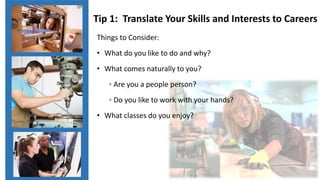
• What do you like to do and why?
• What comes naturally to you?
◦ Are you a people person?
◦ Do you like to work with your hands?
• What classes do you enjoy?
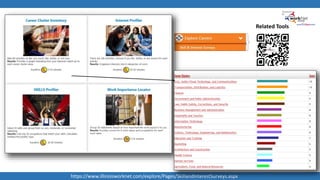
Tip 1: Translate Your Skills and Interests to Careers
https://www.illinoisworknet.com/explore/Pages/SkillandInterestSurveys.aspx
Related Tools
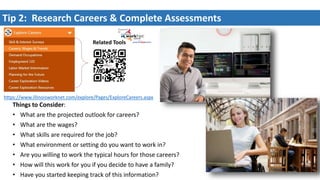
Tip 2: Research Careers & Complete Assessments
Things to Consider:
• What are the projected outlook for careers?
• What are the wages?
• What skills are required for the job?
• What environment or setting do you want to work in?
• Are you willing to work the typical hours for those careers?
• How will this work for you if you decide to have a family?
• Have you started keeping track of this information?
Related Tools
https://www.illinoisworknet.com/explore/Pages/ExploreCareers.aspx
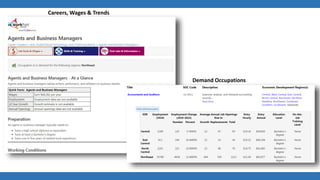
Careers, Wages & Trends
Demand Occupations
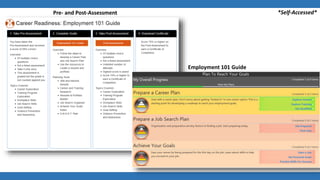
Pre- and Post-Assessment
Employment 101 Guide
*Self-Accessed*
Tip 3: Research Training
• Are you interested in a military career? Or careers
and other training programs?
• Where are the training programs?
• How long will it take to complete the training
program? Remember there are good jobs that do
not require a 4 year degree.
• How are you going to pay for training?
Related Tools
https://www.illinoisworknet.com/Training/Pages/TrainingProgramSearch.aspx
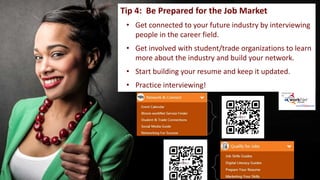
Tip 4: Be Prepared for the Job Market
• Get connected to your future industry by interviewing
people in the career field.
• Get involved with student/trade organizations to learn
more about the industry and build your network.
• Start building your resume and keep it updated.
• Practice interviewing!
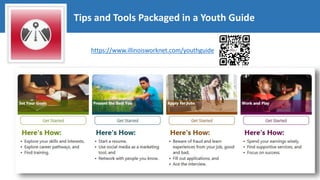
https://www.illinoisworknet.com/youthguide
Tips and Tools Packaged in a Youth Guide
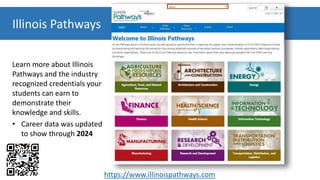
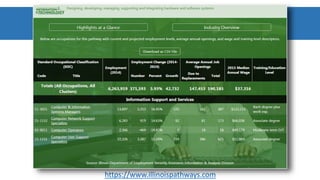
Illinois Pathways
Learn more about Illinois
Pathways and the industry
recognized credentials your
students can earn to
demonstrate their
knowledge and skills.
• Career data was updated
to show through 2024
https://www.illinoispathways.com
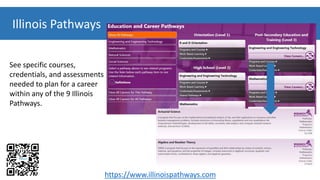
Illinois Pathways
See specific courses,
credentials, and assessments
needed to plan for a career
within any of the 9 Illinois
Pathways.
https://www.illinoispathways.com
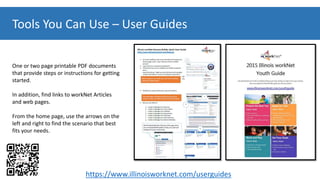
Tools You Can Use – User Guides
One or two page printable PDF documents
that provide steps or instructions for getting
started.
In addition, find links to workNet Articles
and web pages.
From the home page, use the arrows on the
left and right to find the scenario that best
fits your needs.
https://www.illinoisworknet.com/userguides
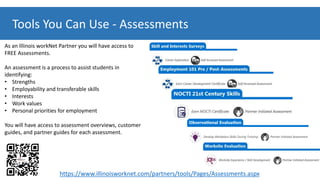
Tools You Can Use - Assessments
As an Illinois workNet Partner you will have access to
FREE Assessments.
An assessment is a process to assist students in
identifying:
• Strengths
• Employability and transferable skills
• Interests
• Work values
• Personal priorities for employment
You will have access to assessment overviews, customer
guides, and partner guides for each assessment.
https://www.illinoisworknet.com/partners/tools/Pages/Assessments.aspx
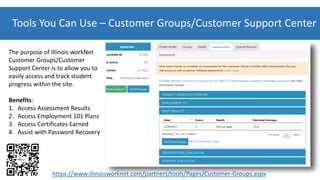
Tools You Can Use – Customer Groups/Customer Support Center
The purpose of Illinois workNet
Customer Groups/Customer
Support Center is to allow you to
easily access and track student
progress within the site.
Benefits:
1. Access Assessment Results
2. Access Employment 101 Plans
3. Access Certificates Earned
4. Assist with Password Recovery
https://www.illinoisworknet.com/partners/tools/Pages/Customer-Groups.aspx
Getting Students Started
1. Create a customer group invitation.
2. In a classroom computer lab, the students will follow the instructional handout to accept the invitation.
• If they do not have an Illinois workNet account, they will be prompted to set up an account.
3. Students will complete the pre-assessment questions and discuss the answers. They can also use the related links to
access additional resources for more information.
4. You will then work with students to complete Employment 101 while integrating resources provided, like the Job
Skill Guides.
5. Students will then select and complete the post-assessment questions available in Illinois workNet. You can then
use customer groups to view assessment and activity results.
6. Once students pass the post-assessment with a 70% or higher, they can save and print their Certificate of
Completion.
https://www.illinoisworknet.com/partners/topics/Pages/Guide-for-Helping-Individuals.aspx
Get the information you need to help students plan for the future.
Start sharing!
https://www.illinoisworknet.com
Thank you!
Illinois workNet®
Visit: www.illinoisworknet.com
Email: info@illinoisworknet.com
Monday – Friday
8:00 A.M. – 4:30 P.M.
Emails are checked and responded to each business day.
https://www.illinoisworknet.com/Pages/Contact-Us.aspx

Youth Work Readiness Assessments and Tools

  • 1.
    Youth Work Readiness Assessments& Tools Chelsea Jones & Lacey Pollock Connections Conference April 25, 2017
  • 2.
    Illinois workNet® isa portal to connect individuals, employers, and education, workforce and community partners to career planning, education and training, and employment resources and tools. The portal connects people to local and statewide in-person and online services. • Web Portal – http://www.illinoisworknet.com jobPrep Mobile App includes capabilities that assist job seekers with their employment needs, all from the convenience of a smartphone. The free app is available for downloading from iTunes, Google Play and Amazon. • jobPrep Mobile App – http://www.illinoisworknet.com/jobprep Ways to Connect
  • 3.
    Today you willget: Lots of Information + Lots of Tools + Live Demo of Tools To help your students identify and reach their career, training, and employment goals.
  • 4.
    Tools and Resourceswithin Illinois workNet: 1. My Dashboard • Accessing “My Tools” which includes Bookmarks, Employment 101, Resume Builder and CIS Surveys 2. Career Exploration • CIS Surveys • Careers, Wages, and Trends • Demand Occupations • Illinois Pathways • Assessments 3. College Preparation • Training Programs • Financial Aid & Scholarship Information 4. Job Preparation • What is a Resume? Why do I need one? • Resume Builder with Samples • Interview Prep Let’s Start with Some Background All FREE!
  • 5.
    Top 4 Tipsfor Students: 1. Translate Skills & Interests 2. Research Careers & Complete Assessments 3. Research Training 4. Be Prepared for the Job Market
  • 6.
    Things to Consider: •What do you like to do and why? • What comes naturally to you? ◦ Are you a people person? ◦ Do you like to work with your hands? • What classes do you enjoy? Tip 1: Translate Your Skills and Interests to Careers
  • 7.
  • 8.
    Tip 2: ResearchCareers & Complete Assessments Things to Consider: • What are the projected outlook for careers? • What are the wages? • What skills are required for the job? • What environment or setting do you want to work in? • Are you willing to work the typical hours for those careers? • How will this work for you if you decide to have a family? • Have you started keeping track of this information? Related Tools https://www.illinoisworknet.com/explore/Pages/ExploreCareers.aspx
  • 9.
    Careers, Wages &Trends Demand Occupations
  • 10.
    Pre- and Post-Assessment Employment101 Guide *Self-Accessed*
  • 11.
    Tip 3: ResearchTraining • Are you interested in a military career? Or careers and other training programs? • Where are the training programs? • How long will it take to complete the training program? Remember there are good jobs that do not require a 4 year degree. • How are you going to pay for training? Related Tools https://www.illinoisworknet.com/Training/Pages/TrainingProgramSearch.aspx
  • 12.
    Tip 4: BePrepared for the Job Market • Get connected to your future industry by interviewing people in the career field. • Get involved with student/trade organizations to learn more about the industry and build your network. • Start building your resume and keep it updated. • Practice interviewing!
  • 13.
  • 14.
    Illinois Pathways Learn moreabout Illinois Pathways and the industry recognized credentials your students can earn to demonstrate their knowledge and skills. • Career data was updated to show through 2024 https://www.illinoispathways.com
  • 15.
    Illinois Pathways See specificcourses, credentials, and assessments needed to plan for a career within any of the 9 Illinois Pathways. https://www.illinoispathways.com
  • 16.
  • 17.
    Tools You CanUse – User Guides One or two page printable PDF documents that provide steps or instructions for getting started. In addition, find links to workNet Articles and web pages. From the home page, use the arrows on the left and right to find the scenario that best fits your needs. https://www.illinoisworknet.com/userguides
  • 18.
    Tools You CanUse - Assessments As an Illinois workNet Partner you will have access to FREE Assessments. An assessment is a process to assist students in identifying: • Strengths • Employability and transferable skills • Interests • Work values • Personal priorities for employment You will have access to assessment overviews, customer guides, and partner guides for each assessment. https://www.illinoisworknet.com/partners/tools/Pages/Assessments.aspx
  • 19.
    Tools You CanUse – Customer Groups/Customer Support Center The purpose of Illinois workNet Customer Groups/Customer Support Center is to allow you to easily access and track student progress within the site. Benefits: 1. Access Assessment Results 2. Access Employment 101 Plans 3. Access Certificates Earned 4. Assist with Password Recovery https://www.illinoisworknet.com/partners/tools/Pages/Customer-Groups.aspx
  • 20.
    Getting Students Started 1.Create a customer group invitation. 2. In a classroom computer lab, the students will follow the instructional handout to accept the invitation. • If they do not have an Illinois workNet account, they will be prompted to set up an account. 3. Students will complete the pre-assessment questions and discuss the answers. They can also use the related links to access additional resources for more information. 4. You will then work with students to complete Employment 101 while integrating resources provided, like the Job Skill Guides. 5. Students will then select and complete the post-assessment questions available in Illinois workNet. You can then use customer groups to view assessment and activity results. 6. Once students pass the post-assessment with a 70% or higher, they can save and print their Certificate of Completion. https://www.illinoisworknet.com/partners/topics/Pages/Guide-for-Helping-Individuals.aspx
  • 21.
    Get the informationyou need to help students plan for the future. Start sharing! https://www.illinoisworknet.com
  • 22.
    Thank you! Illinois workNet® Visit:www.illinoisworknet.com Email: info@illinoisworknet.com Monday – Friday 8:00 A.M. – 4:30 P.M. Emails are checked and responded to each business day. https://www.illinoisworknet.com/Pages/Contact-Us.aspx