XPath (1.0) for web scraping
Paul Tremberth, 17 October 2015, PyCon FR
1
Who am I?
I’m currently Head of Support at
Scrapinghub.
I got introduced to Python through web
scraping.
You can find me on StackOverflow: “xpath”,
“scrapy”, “lxml” tags.
I have a few repos on Github.
XPath for web scraping - Paul Tremberth, 17 October 2015 - Scrapinghub ⓒ 2015 2
Talk outline
● What is XPath?
● Location paths
● HTML data extraction examples
● Advanced use-cases
XPath for web scraping - Paul Tremberth, 17 October 2015 - Scrapinghub ⓒ 2015 3
What is XPath?
4
XPath is a language
"XPath is a language for addressing parts of an
XML document" — XML Path Language 1.0
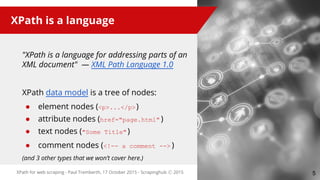
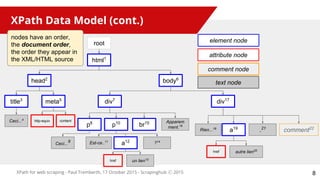
XPath data model is a tree of nodes:
● element nodes (<p>...</p>)
● attribute nodes (href="page.html" )
● text nodes ("Some Title")
● comment nodes (<!-- a comment --> )
(and 3 other types that we won’t cover here.)
XPath for web scraping - Paul Tremberth, 17 October 2015 - Scrapinghub ⓒ 2015 5
Why learn XPath?
● navigate everywhere inside a DOM tree
● a must-have skill for accurate web data
extraction
● more powerful than CSS selectors
○ fine-grained look at the text content
○ complex conditioning with axes
● extensible with custom functions
(we won’t cover that in this talk though)
Also, it’s kind of fun :-)
XPath for web scraping - Paul Tremberth, 17 October 2015 - Scrapinghub ⓒ 2015 6
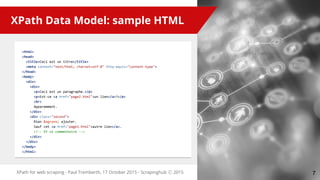
<html>
<head>
<title>Ceci est un titre</title>
<meta content="text/html; charset=utf-8" http-equiv="content-type">
</head>
<body>
<div>
<div>
<p>Ceci est un paragraphe.</p>
<p>Est-ce <a href="page2.html">un lien</a>?</p>
<br>
Apparemment.
</div>
<div class="second">
Rien &agrave; ajouter.
Sauf cet <a href="page3.html">autre lien</a>.
<!-- Et ce commentaire -->
</div>
</div>
</body>
</html>
XPath for web scraping - Paul Tremberth, 17 October 2015 - Scrapinghub ⓒ 2015
XPath Data Model: sample HTML
7
XPath Data Model (cont.)
XPath for web scraping - Paul Tremberth, 17 October 2015 - Scrapinghub ⓒ 2015
root
meta5
html1
head2
title3
body6
div7
p8
p10
br15 Apparem
ment.16
Ceci...
9 Est-ce..11
Ceci...4
div17
Rien...18
a19
.21
comment22
element node
http-equiv
a12 ?14
content
href
attribute node
un lien13
comment node
href autre lien20
text node
nodes have an order,
the document order,
the order they appear in
the XML/HTML source
8
XPath return types
XPath expressions can return different
things:
● node-sets (most common case, and
most often element nodes)
● strings
● numbers (floating point)
● booleans
XPath for web scraping - Paul Tremberth, 17 October 2015 - Scrapinghub ⓒ 2015 9
Example XPath expressions
<html>
<head>
<title>Ceci est un titre</title>
<meta content="text/html; charset=utf-8" http-equiv="content-type">
</head>
<body>
<div>
<div>
<p>Ceci est un paragraphe.</p>
<p>Est-ce <a href="page2.html">un lien</a>?</p>
<br>
Apparemment.
</div>
<div class="second">
Rien &agrave; ajouter.
Sauf cet <a href="page3.html">autre lien</a>.
<!-- Et ce commentaire -->
</div>
</div>
</body>
</html>
XPath for web scraping - Paul Tremberth, 17 October 2015 - Scrapinghub ⓒ 2015
/html/head/title
//meta/@content
//div/p
//div/a/@href
//div/a/text()
//div/div[@class="second"]
10
Location Paths:
how to move inside the document tree
11
Location Paths
Location path is the most common XPath
expression.
Used to move in any direction from a starting
point (the context node) to any node(s) in the
tree.
● a string, with a series of “steps”:
○ "step1 / step2 / step3 ..."
● represents selection & filtering of nodes,
processed step by step, from left to right
● each step is:
○ AXIS :: NODETEST [PREDICATE]*
XPath for web scraping - Paul Tremberth, 17 October 2015 - Scrapinghub ⓒ 2015 12
whitespace does NOT
matter,
except for “//”,
“/ /” is a syntax error.
So don’t be afraid of
indenting your
XPath expressions
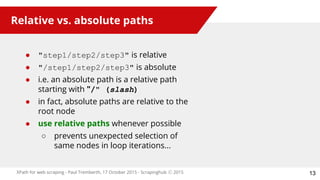
Relative vs. absolute paths
● "step1/step2/step3" is relative
● "/step1/step2/step3" is absolute
● i.e. an absolute path is a relative path
starting with "/" (slash)
● in fact, absolute paths are relative to the
root node
● use relative paths whenever possible
○ prevents unexpected selection of
same nodes in loop iterations...
XPath for web scraping - Paul Tremberth, 17 October 2015 - Scrapinghub ⓒ 2015 13
Location Paths: abbreviations
XPath for web scraping - Paul Tremberth, 17 October 2015 - Scrapinghub ⓒ 2015
Abbreviated syntax Full syntax (again, whitespace doesn’t matter)
/html/head/title /child:: html /child:: head /child:: title
//meta/@content /descendant-or-self::node()/child::meta/attribute::content
//div/div[@class="second"] /descendant-or-self::node()
/child::div
/child::div [ attribute::class = "second" ]
//div/a/text() /descendant-or-self::node()
/child::div/child::a/child::text()
What we’ve seen earlier is in fact “abbreviated syntax”.
Full syntax is quite verbose:
14
XPath for web scraping - Paul Tremberth, 17 October 2015 - Scrapinghub ⓒ 2015
*
Axes give the direction to go next.
● self (where you are)
● parent, child (direct hop)
● ancestor, ancestor-or-self, descendant,
descendant-or-self (multi-hop)
● following, following-sibling, preceding,
preceding-sibling (document order)
● attribute, namespace (non-element)
15
Axes: moving around
AXIS :: nodetest [predicate]*
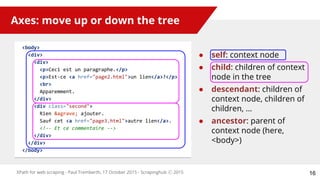
Axes: move up or down the tree
<body>
<div>
<div>
<p>Ceci est un paragraphe.</p>
<p>Est-ce <a href="page2.html">un lien</a>?</p>
<br>
Apparemment.
</div>
<div class="second">
Rien &agrave; ajouter.
Sauf cet <a href="page3.html">autre lien</a>.
<!-- Et ce commentaire -->
</div>
</div>
</body>
XPath for web scraping - Paul Tremberth, 17 October 2015 - Scrapinghub ⓒ 2015
● self: context node
● child: children of context
node in the tree
● descendant: children of
context node, children of
children, …
● ancestor: parent of
context node (here,
<body>)
16
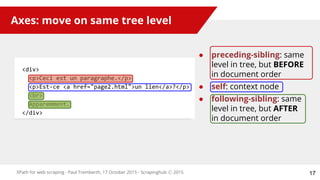
Axes: move on same tree level
XPath for web scraping - Paul Tremberth, 17 October 2015 - Scrapinghub ⓒ 2015
<div>
<p>Ceci est un paragraphe.</p>
<p>Est-ce <a href="page2.html">un lien</a>?</p>
<br>
Apparemment.
</div>
● preceding-sibling: same
level in tree, but BEFORE
in document order
● self: context node
● following-sibling: same
level in tree, but AFTER
in document order
17
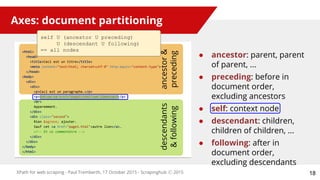
Axes: document partitioning
<html>
<head>
<title>Ceci est un titre</title>
<meta content="text/html; charset=utf-8" http-equiv="content-type">
</head>
<body>
<div>
<div>
<p>Ceci est un paragraphe.</p>
<p>Est-ce <a href="page2.html">un lien</a>?</p>
<br>
Apparemment.
</div>
<div class="second">
Rien &agrave; ajouter.
Sauf cet <a href="page3.html">autre lien</a>.
<!-- Et ce commentaire -->
</div>
</div>
</body>
</html>
XPath for web scraping - Paul Tremberth, 17 October 2015 - Scrapinghub ⓒ 2015
ancestor&
preceding
descendants
&following
● ancestor: parent, parent
of parent, ...
● preceding: before in
document order,
excluding ancestors
● self: context node
● descendant: children,
children of children, ...
● following: after in
document order,
excluding descendants
self U (ancestor U preceding)
U (descendant U following)
== all nodes
18
XPath for web scraping - Paul Tremberth, 17 October 2015 - Scrapinghub ⓒ 2015
Select nodes types along the axes:
● either a name test:
○ element names: “html”, “p”, ...
○ attribute names: “content-type”, “href”, …
● or a node type test:
○ node(): ALL nodes types
○ text(): text nodes, i.e. character data
○ comment(): comment nodes
○ or * (i.e. the axis’ principal node type)
19
Node tests
text() is not
a function call
axis :: NODETEST [predicate]*
XPath for web scraping - Paul Tremberth, 17 October 2015 - Scrapinghub ⓒ 2015
*
Additional node properties to filter on:
● simplest are positional (start at 1, not 0):
//div[3] (i.e. 3rd child div element)
● can be nested, can use location paths:
//div[p[a/@href="sample.html"]]
● ordered, from left to right:
//div[2][@class="content"]
vs.
//div[@class="content"][2]
20
Predicates
axis :: nodetest [PREDICATE]*
XPath for web scraping - Paul Tremberth, 17 October 2015 - Scrapinghub ⓒ 2015 21
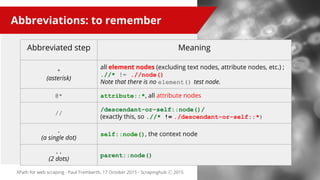
Abbreviations: to remember
Abbreviated step Meaning
*
(asterisk)
all element nodes (excluding text nodes, attribute nodes, etc.) ;
.//* != .//node()
Note that there is no element() test node.
@* attribute::*, all attribute nodes
//
/descendant-or-self::node()/
(exactly this, so .//* != ./descendant-or-self::*)
.
(a single dot)
self::node(), the context node
..
(2 dots)
parent::node()
Use cases:
“Show me some Python code!”
22
Text extraction
XPath for web scraping - Paul Tremberth, 17 October 2015 - Scrapinghub ⓒ 2015
>>> import lxml.html
>>> root = lxml.html.fromstring(htmlsource)
>>> root.xpath('//div[@class="second"]/text()') # you get back a text nodes node-set
[u'n Rien xe0 ajouter.n Sauf cet ', '. n ', 'n ']
>>> root.xpath('//div[@class="second"]//text()')
[u'n Rien xe0 ajouter.n Sauf cet ', 'autre lien', '. n ', 'n ']
>>> root.xpath('string(//div[@class="second"])') # you get back a single string
u'n Rien xe0 ajouter.n Sauf cet autre lien. n n '
<div class="second">
Rien &agrave; ajouter.
Sauf cet <a href="page3.html">autre lien</a>.
<!-- Et ce commentaire -->
</div>
23
Attributes extraction
XPath for web scraping - Paul Tremberth, 17 October 2015 - Scrapinghub ⓒ 2015
>>> import lxml.html
>>> root = lxml.html.fromstring(htmlsource)
>>> root.xpath('/html/head/meta/@content')
['text/html; charset=utf-8']
>>> root.xpath('/html/head/meta/@*')
['text/html; charset=utf-8', 'content-type']
<html><head>
<title>Ceci est un titre</title>
<meta content="text/html; charset=utf-8" http-equiv="content-type">
</head>...</html>
24
Attribute names extraction
XPath for web scraping - Paul Tremberth, 17 October 2015 - Scrapinghub ⓒ 2015
>>> for element in root.xpath('/html/head/meta'):
... attributes = []
...
... # loop over all attribute nodes of the element
... for index, attribute in enumerate(element.xpath('@*'), start=1):
...
... # use XPath's name() string function on each attribute,
... # using their position
... attribute_name = element.xpath('name(@*[%d])' % index)
... attributes.append((attribute_name, attribute))
...
>>> attributes
[('content', 'text/html; charset=utf-8'), ('http-equiv', 'content-type')]
>>> dict(attributes)
{'content': 'text/html; charset=utf-8', 'http-equiv': 'content-type'}
25
CSS Selectors
XPath for web scraping - Paul Tremberth, 17 October 2015 - Scrapinghub ⓒ 2015
>>> selector.css('html > body > ul > li:first-child').extract()
[u'<li class="a b">apple</li>']
>>> selector.css('ul li + li').extract()
[u'<li class="b c">banana</li>', u'<li class="c a lastone">carrot</li>']
<html>
<body>
<ul>
<li class="a b">apple</li>
<li class="b c">banana</li>
<li class="c a lastone">carrot</li>
</ul>
<body>
</html>
26
lxml, scrapy and parsel
use cssselect under
the hood
CSS Selectors (cont.)
XPath for web scraping - Paul Tremberth, 17 October 2015 - Scrapinghub ⓒ 2015
>>> selector.css('li.a').extract()
[u'<li class="a b">apple</li>', u'<li class="c a lastone">carrot</li>']
>>> selector.css('li.a.c').extract()
[u'<li class="c a lastone">carrot</li>']
>>> selector.css('li[class$="one"]').extract()
[u'<li class="c a lastone">carrot</li>']
<html>
<body>
<ul>
<li class="a b">apple</li>
<li class="b c">banana</li>
<li class="c a lastone">carrot</li>
</ul>
<body>
</html>
27
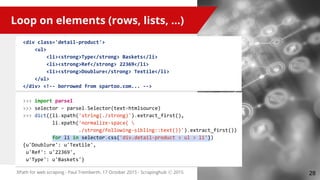
Loop on elements (rows, lists, ...)
XPath for web scraping - Paul Tremberth, 17 October 2015 - Scrapinghub ⓒ 2015
>>> import parsel
>>> selector = parsel.Selector(text=htmlsource)
>>> dict((li.xpath('string(./strong)').extract_first(),
li.xpath('normalize-space( 
./strong/following-sibling::text())').extract_first())
for li in selector.css('div.detail-product > ul > li'))
{u'Doublure': u'Textile',
u'Ref': u'22369',
u'Type': u'Baskets'}
<div class='detail-product'>
<ul>
<li><strong>Type</strong> Baskets</li>
<li><strong>Ref</strong> 22369</li>
<li><strong>Doublure</strong> Textile</li>
</ul>
</div> <!-- borrowed from spartoo.com... -->
28
XPath buckets
XPath for web scraping - Paul Tremberth, 17 October 2015 - Scrapinghub ⓒ 2015
>>> for cnt, h in enumerate(selector.css('h2'), start=1):
... print h.xpath('string()').extract_first()
... print [p.xpath('string()').extract_first()
... for p in h.xpath('''./following-sibling::p[
... count(preceding-sibling::h2) = %d]''' % cnt)]
...
My BBQ Invitees
[u'Joe', u'Jeff', u'Suzy']
My Dinner Invitees
[u'Dylan', u'Hobbes']
<h2>My BBQ Invitees</h2>
<p>Joe</p>
<p>Jeff</p>
<p>Suzy</p>
<h2>My Dinner Invitees</h2>
<p>Dylan</p>
<p>Hobbes</p>
29
All elements are at the same
level, all siblings.
The idea here is to select <p>
and filter them by how many
<h2> siblings came before
XPath buckets: generalization
XPath for web scraping - Paul Tremberth, 17 October 2015 - Scrapinghub ⓒ 2015
>>> all_elements = selector.css('h2, p')
>>> h2_elements = selector.css('h2')
>>> order = lambda e: int(float(e.xpath('count(preceding::*) 
... + count(ancestor::*)').extract_first()))
>>> boundaries = [order(h) for h in h2_elements]
>>> buckets = []
>>> for pos, e in sorted((order(e), e) for e in all_elements):
... if pos in boundaries:
... bucket = []
... buckets.append(bucket)
... bucket.append((e.xpath('name()').extract_first(),
... e.xpath('string()').extract_first()))
>>> buckets
[[(u'h2', u'My BBQ Invitees'),
(u'p', u'Joe'), (u'p', u'Jeff'), (u'p', u'Suzy')],
[(u'h2', u'My Dinner Invitees'), (u'p', u'Dylan'), (u'p', u'Hobbes')]]
30
counting ancestors and preceding
elements gives you the node
position in document order
EXSLT extensions
<div itemscope itemtype ="http://schema.org/Movie">
<h1 itemprop="name">Avatar</h1>
<div itemprop="director" itemscope itemtype="http://schema.org/Person">
Director: <span itemprop="name">James Cameron</span> (born <span itemprop="
birthDate">August 16, 1954</span>)
</div>
<span itemprop="genre">Science fiction</span>
<a href="../movies/avatar-theatrical-trailer.html" itemprop="trailer">Trailer</a>
</div>
XPath for web scraping - Paul Tremberth, 17 October 2015 - Scrapinghub ⓒ 2015
_xp_item = lxml.etree.XPath('descendant-or-self::*[@itemscope]')
_xp_prop = lxml.etree.XPath("""set:difference(.//*[@itemprop],
.//*[@itemscope]//*[@itemprop])""",
namespaces = {"set": "http://exslt.org/sets"})
31
EXSLT extensions (cont.)
{'items': [{'properties': {'director': {'properties': {'birthDate': u'August 16,
1954',
'name': u'James Cameron'},
'type': ['http://schema.org/Person']},
'genre': u'Science fiction',
'name': u'Avatar',
'trailer': 'http://www.example.com/../movies/avatar-
theatrical-trailer.html'},
'type': ['http://schema.org/Movie']}]}
XPath for web scraping - Paul Tremberth, 17 October 2015 - Scrapinghub ⓒ 2015 32
Scraping Javascript code
<div id="map"></div>
<script>
function initMap() {
var myLatLng = {lat: -25.363, lng: 131.044};
}
</script>
XPath for web scraping - Paul Tremberth, 17 October 2015 - Scrapinghub ⓒ 2015
>>> import js2xml
>>> import parsel
>>>
>>> selector = parsel.Selector(text=htmlsource)
>>> jssnippet = selector.css('div#map + script::text').extract_first()
>>> jstree = js2xml.parse(jssnippet)
>>> js2xml.jsonlike.make_dict(jstree.xpath('//object[1]')[0])
{'lat': -25.363, 'lng': 131.044}
33
XPath tips & tricks
● Use relative XPath expressions
whenever possible
● Know your axes
● Remember XPath has string() and
normalize-space()
● text() is a node test, not a function call
● CSS selectors are very handy, easier to
maintain, but also less powerful
● js2xml is easier than regex+json.loads()
XPath for web scraping - Paul Tremberth, 17 October 2015 - Scrapinghub ⓒ 2015 34
XPath resources
● Read http://www.w3.org/TR/xpath/
(it’s worth it!)
● XPath 1.0 tutorial by Zvon.org
● Concise XPath by Aristotle Pagaltzis
● XPath in lxml
● cssselect by Simon Sapin
● EXSLT extensions
XPath for web scraping - Paul Tremberth, 17 October 2015 - Scrapinghub ⓒ 2015 35
Thank you!
Paul Tremberth, 17 October 2015
paul@scrapinghub.com
https://github.com/redapple
http://linkedin.com/in/paultremberth
Oh, and we’re hiring!
http://scrapinghub.com/jobs
36

XPath for web scraping

  • 1.
    XPath (1.0) forweb scraping Paul Tremberth, 17 October 2015, PyCon FR 1
  • 2.
    Who am I? I’mcurrently Head of Support at Scrapinghub. I got introduced to Python through web scraping. You can find me on StackOverflow: “xpath”, “scrapy”, “lxml” tags. I have a few repos on Github. XPath for web scraping - Paul Tremberth, 17 October 2015 - Scrapinghub ⓒ 2015 2
  • 3.
    Talk outline ● Whatis XPath? ● Location paths ● HTML data extraction examples ● Advanced use-cases XPath for web scraping - Paul Tremberth, 17 October 2015 - Scrapinghub ⓒ 2015 3
  • 4.
  • 5.
    XPath is alanguage "XPath is a language for addressing parts of an XML document" — XML Path Language 1.0 XPath data model is a tree of nodes: ● element nodes (<p>...</p>) ● attribute nodes (href="page.html" ) ● text nodes ("Some Title") ● comment nodes (<!-- a comment --> ) (and 3 other types that we won’t cover here.) XPath for web scraping - Paul Tremberth, 17 October 2015 - Scrapinghub ⓒ 2015 5
  • 6.
    Why learn XPath? ●navigate everywhere inside a DOM tree ● a must-have skill for accurate web data extraction ● more powerful than CSS selectors ○ fine-grained look at the text content ○ complex conditioning with axes ● extensible with custom functions (we won’t cover that in this talk though) Also, it’s kind of fun :-) XPath for web scraping - Paul Tremberth, 17 October 2015 - Scrapinghub ⓒ 2015 6
  • 7.
    <html> <head> <title>Ceci est untitre</title> <meta content="text/html; charset=utf-8" http-equiv="content-type"> </head> <body> <div> <div> <p>Ceci est un paragraphe.</p> <p>Est-ce <a href="page2.html">un lien</a>?</p> <br> Apparemment. </div> <div class="second"> Rien &agrave; ajouter. Sauf cet <a href="page3.html">autre lien</a>. <!-- Et ce commentaire --> </div> </div> </body> </html> XPath for web scraping - Paul Tremberth, 17 October 2015 - Scrapinghub ⓒ 2015 XPath Data Model: sample HTML 7
  • 8.
    XPath Data Model(cont.) XPath for web scraping - Paul Tremberth, 17 October 2015 - Scrapinghub ⓒ 2015 root meta5 html1 head2 title3 body6 div7 p8 p10 br15 Apparem ment.16 Ceci... 9 Est-ce..11 Ceci...4 div17 Rien...18 a19 .21 comment22 element node http-equiv a12 ?14 content href attribute node un lien13 comment node href autre lien20 text node nodes have an order, the document order, the order they appear in the XML/HTML source 8
  • 9.
    XPath return types XPathexpressions can return different things: ● node-sets (most common case, and most often element nodes) ● strings ● numbers (floating point) ● booleans XPath for web scraping - Paul Tremberth, 17 October 2015 - Scrapinghub ⓒ 2015 9
  • 10.
    Example XPath expressions <html> <head> <title>Ceciest un titre</title> <meta content="text/html; charset=utf-8" http-equiv="content-type"> </head> <body> <div> <div> <p>Ceci est un paragraphe.</p> <p>Est-ce <a href="page2.html">un lien</a>?</p> <br> Apparemment. </div> <div class="second"> Rien &agrave; ajouter. Sauf cet <a href="page3.html">autre lien</a>. <!-- Et ce commentaire --> </div> </div> </body> </html> XPath for web scraping - Paul Tremberth, 17 October 2015 - Scrapinghub ⓒ 2015 /html/head/title //meta/@content //div/p //div/a/@href //div/a/text() //div/div[@class="second"] 10
  • 11.
    Location Paths: how tomove inside the document tree 11
  • 12.
    Location Paths Location pathis the most common XPath expression. Used to move in any direction from a starting point (the context node) to any node(s) in the tree. ● a string, with a series of “steps”: ○ "step1 / step2 / step3 ..." ● represents selection & filtering of nodes, processed step by step, from left to right ● each step is: ○ AXIS :: NODETEST [PREDICATE]* XPath for web scraping - Paul Tremberth, 17 October 2015 - Scrapinghub ⓒ 2015 12 whitespace does NOT matter, except for “//”, “/ /” is a syntax error. So don’t be afraid of indenting your XPath expressions
  • 13.
    Relative vs. absolutepaths ● "step1/step2/step3" is relative ● "/step1/step2/step3" is absolute ● i.e. an absolute path is a relative path starting with "/" (slash) ● in fact, absolute paths are relative to the root node ● use relative paths whenever possible ○ prevents unexpected selection of same nodes in loop iterations... XPath for web scraping - Paul Tremberth, 17 October 2015 - Scrapinghub ⓒ 2015 13
  • 14.
    Location Paths: abbreviations XPathfor web scraping - Paul Tremberth, 17 October 2015 - Scrapinghub ⓒ 2015 Abbreviated syntax Full syntax (again, whitespace doesn’t matter) /html/head/title /child:: html /child:: head /child:: title //meta/@content /descendant-or-self::node()/child::meta/attribute::content //div/div[@class="second"] /descendant-or-self::node() /child::div /child::div [ attribute::class = "second" ] //div/a/text() /descendant-or-self::node() /child::div/child::a/child::text() What we’ve seen earlier is in fact “abbreviated syntax”. Full syntax is quite verbose: 14
  • 15.
    XPath for webscraping - Paul Tremberth, 17 October 2015 - Scrapinghub ⓒ 2015 * Axes give the direction to go next. ● self (where you are) ● parent, child (direct hop) ● ancestor, ancestor-or-self, descendant, descendant-or-self (multi-hop) ● following, following-sibling, preceding, preceding-sibling (document order) ● attribute, namespace (non-element) 15 Axes: moving around AXIS :: nodetest [predicate]*
  • 16.
    Axes: move upor down the tree <body> <div> <div> <p>Ceci est un paragraphe.</p> <p>Est-ce <a href="page2.html">un lien</a>?</p> <br> Apparemment. </div> <div class="second"> Rien &agrave; ajouter. Sauf cet <a href="page3.html">autre lien</a>. <!-- Et ce commentaire --> </div> </div> </body> XPath for web scraping - Paul Tremberth, 17 October 2015 - Scrapinghub ⓒ 2015 ● self: context node ● child: children of context node in the tree ● descendant: children of context node, children of children, … ● ancestor: parent of context node (here, <body>) 16
  • 17.
    Axes: move onsame tree level XPath for web scraping - Paul Tremberth, 17 October 2015 - Scrapinghub ⓒ 2015 <div> <p>Ceci est un paragraphe.</p> <p>Est-ce <a href="page2.html">un lien</a>?</p> <br> Apparemment. </div> ● preceding-sibling: same level in tree, but BEFORE in document order ● self: context node ● following-sibling: same level in tree, but AFTER in document order 17
  • 18.
    Axes: document partitioning <html> <head> <title>Ceciest un titre</title> <meta content="text/html; charset=utf-8" http-equiv="content-type"> </head> <body> <div> <div> <p>Ceci est un paragraphe.</p> <p>Est-ce <a href="page2.html">un lien</a>?</p> <br> Apparemment. </div> <div class="second"> Rien &agrave; ajouter. Sauf cet <a href="page3.html">autre lien</a>. <!-- Et ce commentaire --> </div> </div> </body> </html> XPath for web scraping - Paul Tremberth, 17 October 2015 - Scrapinghub ⓒ 2015 ancestor& preceding descendants &following ● ancestor: parent, parent of parent, ... ● preceding: before in document order, excluding ancestors ● self: context node ● descendant: children, children of children, ... ● following: after in document order, excluding descendants self U (ancestor U preceding) U (descendant U following) == all nodes 18
  • 19.
    XPath for webscraping - Paul Tremberth, 17 October 2015 - Scrapinghub ⓒ 2015 Select nodes types along the axes: ● either a name test: ○ element names: “html”, “p”, ... ○ attribute names: “content-type”, “href”, … ● or a node type test: ○ node(): ALL nodes types ○ text(): text nodes, i.e. character data ○ comment(): comment nodes ○ or * (i.e. the axis’ principal node type) 19 Node tests text() is not a function call axis :: NODETEST [predicate]*
  • 20.
    XPath for webscraping - Paul Tremberth, 17 October 2015 - Scrapinghub ⓒ 2015 * Additional node properties to filter on: ● simplest are positional (start at 1, not 0): //div[3] (i.e. 3rd child div element) ● can be nested, can use location paths: //div[p[a/@href="sample.html"]] ● ordered, from left to right: //div[2][@class="content"] vs. //div[@class="content"][2] 20 Predicates axis :: nodetest [PREDICATE]*
  • 21.
    XPath for webscraping - Paul Tremberth, 17 October 2015 - Scrapinghub ⓒ 2015 21 Abbreviations: to remember Abbreviated step Meaning * (asterisk) all element nodes (excluding text nodes, attribute nodes, etc.) ; .//* != .//node() Note that there is no element() test node. @* attribute::*, all attribute nodes // /descendant-or-self::node()/ (exactly this, so .//* != ./descendant-or-self::*) . (a single dot) self::node(), the context node .. (2 dots) parent::node()
  • 22.
    Use cases: “Show mesome Python code!” 22
  • 23.
    Text extraction XPath forweb scraping - Paul Tremberth, 17 October 2015 - Scrapinghub ⓒ 2015 >>> import lxml.html >>> root = lxml.html.fromstring(htmlsource) >>> root.xpath('//div[@class="second"]/text()') # you get back a text nodes node-set [u'n Rien xe0 ajouter.n Sauf cet ', '. n ', 'n '] >>> root.xpath('//div[@class="second"]//text()') [u'n Rien xe0 ajouter.n Sauf cet ', 'autre lien', '. n ', 'n '] >>> root.xpath('string(//div[@class="second"])') # you get back a single string u'n Rien xe0 ajouter.n Sauf cet autre lien. n n ' <div class="second"> Rien &agrave; ajouter. Sauf cet <a href="page3.html">autre lien</a>. <!-- Et ce commentaire --> </div> 23
  • 24.
    Attributes extraction XPath forweb scraping - Paul Tremberth, 17 October 2015 - Scrapinghub ⓒ 2015 >>> import lxml.html >>> root = lxml.html.fromstring(htmlsource) >>> root.xpath('/html/head/meta/@content') ['text/html; charset=utf-8'] >>> root.xpath('/html/head/meta/@*') ['text/html; charset=utf-8', 'content-type'] <html><head> <title>Ceci est un titre</title> <meta content="text/html; charset=utf-8" http-equiv="content-type"> </head>...</html> 24
  • 25.
    Attribute names extraction XPathfor web scraping - Paul Tremberth, 17 October 2015 - Scrapinghub ⓒ 2015 >>> for element in root.xpath('/html/head/meta'): ... attributes = [] ... ... # loop over all attribute nodes of the element ... for index, attribute in enumerate(element.xpath('@*'), start=1): ... ... # use XPath's name() string function on each attribute, ... # using their position ... attribute_name = element.xpath('name(@*[%d])' % index) ... attributes.append((attribute_name, attribute)) ... >>> attributes [('content', 'text/html; charset=utf-8'), ('http-equiv', 'content-type')] >>> dict(attributes) {'content': 'text/html; charset=utf-8', 'http-equiv': 'content-type'} 25
  • 26.
    CSS Selectors XPath forweb scraping - Paul Tremberth, 17 October 2015 - Scrapinghub ⓒ 2015 >>> selector.css('html > body > ul > li:first-child').extract() [u'<li class="a b">apple</li>'] >>> selector.css('ul li + li').extract() [u'<li class="b c">banana</li>', u'<li class="c a lastone">carrot</li>'] <html> <body> <ul> <li class="a b">apple</li> <li class="b c">banana</li> <li class="c a lastone">carrot</li> </ul> <body> </html> 26 lxml, scrapy and parsel use cssselect under the hood
  • 27.
    CSS Selectors (cont.) XPathfor web scraping - Paul Tremberth, 17 October 2015 - Scrapinghub ⓒ 2015 >>> selector.css('li.a').extract() [u'<li class="a b">apple</li>', u'<li class="c a lastone">carrot</li>'] >>> selector.css('li.a.c').extract() [u'<li class="c a lastone">carrot</li>'] >>> selector.css('li[class$="one"]').extract() [u'<li class="c a lastone">carrot</li>'] <html> <body> <ul> <li class="a b">apple</li> <li class="b c">banana</li> <li class="c a lastone">carrot</li> </ul> <body> </html> 27
  • 28.
    Loop on elements(rows, lists, ...) XPath for web scraping - Paul Tremberth, 17 October 2015 - Scrapinghub ⓒ 2015 >>> import parsel >>> selector = parsel.Selector(text=htmlsource) >>> dict((li.xpath('string(./strong)').extract_first(), li.xpath('normalize-space( ./strong/following-sibling::text())').extract_first()) for li in selector.css('div.detail-product > ul > li')) {u'Doublure': u'Textile', u'Ref': u'22369', u'Type': u'Baskets'} <div class='detail-product'> <ul> <li><strong>Type</strong> Baskets</li> <li><strong>Ref</strong> 22369</li> <li><strong>Doublure</strong> Textile</li> </ul> </div> <!-- borrowed from spartoo.com... --> 28
  • 29.
    XPath buckets XPath forweb scraping - Paul Tremberth, 17 October 2015 - Scrapinghub ⓒ 2015 >>> for cnt, h in enumerate(selector.css('h2'), start=1): ... print h.xpath('string()').extract_first() ... print [p.xpath('string()').extract_first() ... for p in h.xpath('''./following-sibling::p[ ... count(preceding-sibling::h2) = %d]''' % cnt)] ... My BBQ Invitees [u'Joe', u'Jeff', u'Suzy'] My Dinner Invitees [u'Dylan', u'Hobbes'] <h2>My BBQ Invitees</h2> <p>Joe</p> <p>Jeff</p> <p>Suzy</p> <h2>My Dinner Invitees</h2> <p>Dylan</p> <p>Hobbes</p> 29 All elements are at the same level, all siblings. The idea here is to select <p> and filter them by how many <h2> siblings came before
  • 30.
    XPath buckets: generalization XPathfor web scraping - Paul Tremberth, 17 October 2015 - Scrapinghub ⓒ 2015 >>> all_elements = selector.css('h2, p') >>> h2_elements = selector.css('h2') >>> order = lambda e: int(float(e.xpath('count(preceding::*) ... + count(ancestor::*)').extract_first())) >>> boundaries = [order(h) for h in h2_elements] >>> buckets = [] >>> for pos, e in sorted((order(e), e) for e in all_elements): ... if pos in boundaries: ... bucket = [] ... buckets.append(bucket) ... bucket.append((e.xpath('name()').extract_first(), ... e.xpath('string()').extract_first())) >>> buckets [[(u'h2', u'My BBQ Invitees'), (u'p', u'Joe'), (u'p', u'Jeff'), (u'p', u'Suzy')], [(u'h2', u'My Dinner Invitees'), (u'p', u'Dylan'), (u'p', u'Hobbes')]] 30 counting ancestors and preceding elements gives you the node position in document order
  • 31.
    EXSLT extensions <div itemscopeitemtype ="http://schema.org/Movie"> <h1 itemprop="name">Avatar</h1> <div itemprop="director" itemscope itemtype="http://schema.org/Person"> Director: <span itemprop="name">James Cameron</span> (born <span itemprop=" birthDate">August 16, 1954</span>) </div> <span itemprop="genre">Science fiction</span> <a href="../movies/avatar-theatrical-trailer.html" itemprop="trailer">Trailer</a> </div> XPath for web scraping - Paul Tremberth, 17 October 2015 - Scrapinghub ⓒ 2015 _xp_item = lxml.etree.XPath('descendant-or-self::*[@itemscope]') _xp_prop = lxml.etree.XPath("""set:difference(.//*[@itemprop], .//*[@itemscope]//*[@itemprop])""", namespaces = {"set": "http://exslt.org/sets"}) 31
  • 32.
    EXSLT extensions (cont.) {'items':[{'properties': {'director': {'properties': {'birthDate': u'August 16, 1954', 'name': u'James Cameron'}, 'type': ['http://schema.org/Person']}, 'genre': u'Science fiction', 'name': u'Avatar', 'trailer': 'http://www.example.com/../movies/avatar- theatrical-trailer.html'}, 'type': ['http://schema.org/Movie']}]} XPath for web scraping - Paul Tremberth, 17 October 2015 - Scrapinghub ⓒ 2015 32
  • 33.
    Scraping Javascript code <divid="map"></div> <script> function initMap() { var myLatLng = {lat: -25.363, lng: 131.044}; } </script> XPath for web scraping - Paul Tremberth, 17 October 2015 - Scrapinghub ⓒ 2015 >>> import js2xml >>> import parsel >>> >>> selector = parsel.Selector(text=htmlsource) >>> jssnippet = selector.css('div#map + script::text').extract_first() >>> jstree = js2xml.parse(jssnippet) >>> js2xml.jsonlike.make_dict(jstree.xpath('//object[1]')[0]) {'lat': -25.363, 'lng': 131.044} 33
  • 34.
    XPath tips &tricks ● Use relative XPath expressions whenever possible ● Know your axes ● Remember XPath has string() and normalize-space() ● text() is a node test, not a function call ● CSS selectors are very handy, easier to maintain, but also less powerful ● js2xml is easier than regex+json.loads() XPath for web scraping - Paul Tremberth, 17 October 2015 - Scrapinghub ⓒ 2015 34
  • 35.
    XPath resources ● Readhttp://www.w3.org/TR/xpath/ (it’s worth it!) ● XPath 1.0 tutorial by Zvon.org ● Concise XPath by Aristotle Pagaltzis ● XPath in lxml ● cssselect by Simon Sapin ● EXSLT extensions XPath for web scraping - Paul Tremberth, 17 October 2015 - Scrapinghub ⓒ 2015 35
  • 36.
    Thank you! Paul Tremberth,17 October 2015 paul@scrapinghub.com https://github.com/redapple http://linkedin.com/in/paultremberth Oh, and we’re hiring! http://scrapinghub.com/jobs 36