Mohammad Elsheikh Salim Elsheikh Elgarrai
Lecturer - Shendi University (Sudan)
Mohammad_elgarrai@yahoo.com
 What is XML?
 History.
 Why XML?
 The Data Problem.
 Weaknesses of HTML.
 Key Features of XML.
 Extensibility
 Media and Presentation independence
 Separation of contents from presentation
 Structure
 Validation
 Definition:
 The Extensible Markup Language (XML) is a
subset of SGML (Standard Generalized Markup
Language). Its goal is to enable generic SGML to
be served, received, and processed on the Web
in the way that is now possible with HTML.
XML has been designed for ease of
implementation and for interoperability with
both SGML and HTML.
 Versions: XML 1.0, XML 1.1, XML 2.0
 The versatility for dynamic information display
was understood by early digital media
publishers in the late 1980s prior to the rise of
the Internet. In the mid-1990s some
practitioners of SGML had gained experience
with the then-new World Wide Web, and
believed that SGML offered solutions to some
of the problems the Web was likely to face as it
grew. SGML added to the list of W3C's
activities when he in 1995; work began in mid-
1996.
 XML was compiled by a working group of eleven
members, supported by an (approximately) 150-
member Interest Group. Technical debate took
place on the Interest Group mailing list and issues
were resolved by consensus or, when that failed,
majority vote of the Working Group.
 The name "XML“ has been selected. Other names
that had been put forward for consideration
included "MAGMA" (Minimal Architecture for Generalized
Markup Applications), "SLIM" (Structured Language for
Internet Markup) and "MGML" (Minimal Generalized
Markup Language).
 The XML Working Group never met face-to-
face. The major design decisions were reached
in twenty weeks of intense work between July
and November 1996, when the first Working
Draft of an XML specification was published.
Further design work continued through 1997,
and XML 1.0 became a W3C Recommendation
on February 10, 1998.
 How do I represent my “application” data?
 Performance (speed/time)
 Mutability
 Composition
 Security (encryption/identity)
 Open Information Management:
 Interpretation
 Presentation
 Interoperation
 Portability
 Interrogation
 Fixed set of tags
 Not user extensible
 Dependency to “markup language” definition process
 Dependency to vendors
 Vendor proprietary tags
 Implementation not in sync
 Netscape browser vs. IE
 Predefined semantics for each tag
 Predefined data structure
 No formal validation
 Does not support semantic search
 Based on solely on appearance (rendering)
NOT on content
 Formatting too simple
 Limited control
 Won’t do complex documents
 Poor support for print and other media
 Extensibility
 Media and Presentation independence
 Separation of contents from presentation
 Structure
 Validation
 You define your own markup languages (tags) for your
own problem domain
 Infinite number of tags can be defined
 Need for domain-specific standards
 Tags can be more than formatting
 Tags can be anything
 Data relationship
 Formatting
 Anything you want
 Many domain-specific markup languages
 Portable data within domain-specific
 industry
 Portable across the various domain
 Clear separation between contents and
presentation
 Contents of data
 What the data is
 Is represented by XML document
 Presentation of data
 What the data looks like
 Can be specified by stylesheet (like css)
 Same data can be presented to different
communication medium
 HTML browser
 Voice device
 Same data can be presented to different format
 Cell phone as WML
 Desktop as HTML
 Searching and retrieving data is easy and
efficient
 Tags give search’able information
 Many applications use the same data in
different ways
 Employee data can be used by
 Payroll application
 Facilities application
 Human resource application
 Enables portability of data
 Portable over time and space
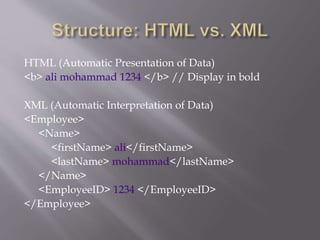
HTML (Automatic Presentation of Data)
<b> ali mohammad 1234 </b> // Display in bold
XML (Automatic Interpretation of Data)
<Employee>
<Name>
<firstName> ali</firstName>
<lastName> mohammad</lastName>
</Name>
<EmployeeID> 1234 </EmployeeID>
</Employee>
 Relationship
 Employee is made of Name and employ-ID
 Name is made of firstName and LastName
 Hierarchical (Tree-form)
 Faster to access
 Easier to rearrange
 Can be any number of depth
 Enables to build large and complex data
 Portability of relationship and hierarchical
structure
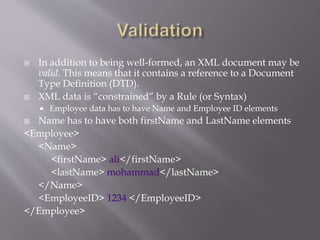
 In addition to being well-formed, an XML document may be
valid. This means that it contains a reference to a Document
Type Definition (DTD).
 XML data is “constrained” by a Rule (or Syntax)
 Employee data has to have Name and Employee ID elements
 Name has to have both firstName and LastName elements
<Employee>
<Name>
<firstName> ali</firstName>
<lastName> mohammad</lastName>
</Name>
<EmployeeID> 1234 </EmployeeID>
</Employee>
 An XML document must start with an XML
declaration.
 It can include comments, XML processing
instructions, etc.
 It also has (exactly) one XML node (the root
node), which can have other nodes as children.
 Note: XML is case-sensitive (unlike HTML)
<?xml version="1.0" encoding="ISO-8859-1"?>
<!-- Edited with XML Spy v4.2 -->
<!DOCTYPE Employees_list SYSTEM "example.dtd">
< Employees>
<Employee>
<Name>
<firstName> ali</firstName>
<lastName> mohammad</lastName>
</Name>
<EmployeeID> 1234 </EmployeeID>
</Employee>
<Employee>
<Name>
<firstName> ahmad</firstName>
<lastName> hassen</lastName>
</Name>
<EmployeeID> 2345 </EmployeeID>
</Employee>
</ Employees >
 XML declaration – specifies the version and
character encoding (e.g., UTF-8 or ISO-8859-1)
 Processing instructions – provide arbitrary
“extra” information about the document (e.g.,
printing options)
 Comments – who uses those, anyway?
 Tags – enclosed between < ... >
 Elements – include everything from the start
tag to the end tag
 Attributes – key=”value” pairs specified in the
start tag of an element
 Text nodes – special type of node that contains
(part of) text inside an element
 An XML document is really just a tree
Document
Employees
Employee Employee
Comment
EmployeeID Name EmployeeID Name
firstName lastNamefirstName lastName
Thank you for your patience

Xml Overview

  • 1.
    Mohammad Elsheikh SalimElsheikh Elgarrai Lecturer - Shendi University (Sudan) Mohammad_elgarrai@yahoo.com
  • 2.
     What isXML?  History.  Why XML?  The Data Problem.  Weaknesses of HTML.  Key Features of XML.  Extensibility  Media and Presentation independence  Separation of contents from presentation  Structure  Validation
  • 3.
     Definition:  TheExtensible Markup Language (XML) is a subset of SGML (Standard Generalized Markup Language). Its goal is to enable generic SGML to be served, received, and processed on the Web in the way that is now possible with HTML. XML has been designed for ease of implementation and for interoperability with both SGML and HTML.  Versions: XML 1.0, XML 1.1, XML 2.0
  • 4.
     The versatilityfor dynamic information display was understood by early digital media publishers in the late 1980s prior to the rise of the Internet. In the mid-1990s some practitioners of SGML had gained experience with the then-new World Wide Web, and believed that SGML offered solutions to some of the problems the Web was likely to face as it grew. SGML added to the list of W3C's activities when he in 1995; work began in mid- 1996.
  • 5.
     XML wascompiled by a working group of eleven members, supported by an (approximately) 150- member Interest Group. Technical debate took place on the Interest Group mailing list and issues were resolved by consensus or, when that failed, majority vote of the Working Group.  The name "XML“ has been selected. Other names that had been put forward for consideration included "MAGMA" (Minimal Architecture for Generalized Markup Applications), "SLIM" (Structured Language for Internet Markup) and "MGML" (Minimal Generalized Markup Language).
  • 6.
     The XMLWorking Group never met face-to- face. The major design decisions were reached in twenty weeks of intense work between July and November 1996, when the first Working Draft of an XML specification was published. Further design work continued through 1997, and XML 1.0 became a W3C Recommendation on February 10, 1998.
  • 7.
     How doI represent my “application” data?  Performance (speed/time)  Mutability  Composition  Security (encryption/identity)
  • 8.
     Open InformationManagement:  Interpretation  Presentation  Interoperation  Portability  Interrogation
  • 9.
     Fixed setof tags  Not user extensible  Dependency to “markup language” definition process  Dependency to vendors  Vendor proprietary tags  Implementation not in sync  Netscape browser vs. IE  Predefined semantics for each tag  Predefined data structure
  • 10.
     No formalvalidation  Does not support semantic search  Based on solely on appearance (rendering) NOT on content  Formatting too simple  Limited control  Won’t do complex documents  Poor support for print and other media
  • 11.
     Extensibility  Mediaand Presentation independence  Separation of contents from presentation  Structure  Validation
  • 12.
     You defineyour own markup languages (tags) for your own problem domain  Infinite number of tags can be defined  Need for domain-specific standards  Tags can be more than formatting  Tags can be anything  Data relationship  Formatting  Anything you want  Many domain-specific markup languages  Portable data within domain-specific  industry  Portable across the various domain
  • 13.
     Clear separationbetween contents and presentation  Contents of data  What the data is  Is represented by XML document  Presentation of data  What the data looks like  Can be specified by stylesheet (like css)
  • 14.
     Same datacan be presented to different communication medium  HTML browser  Voice device  Same data can be presented to different format  Cell phone as WML  Desktop as HTML
  • 15.
     Searching andretrieving data is easy and efficient  Tags give search’able information  Many applications use the same data in different ways  Employee data can be used by  Payroll application  Facilities application  Human resource application  Enables portability of data  Portable over time and space
  • 16.
    HTML (Automatic Presentationof Data) <b> ali mohammad 1234 </b> // Display in bold XML (Automatic Interpretation of Data) <Employee> <Name> <firstName> ali</firstName> <lastName> mohammad</lastName> </Name> <EmployeeID> 1234 </EmployeeID> </Employee>
  • 17.
     Relationship  Employeeis made of Name and employ-ID  Name is made of firstName and LastName  Hierarchical (Tree-form)  Faster to access  Easier to rearrange  Can be any number of depth  Enables to build large and complex data  Portability of relationship and hierarchical structure
  • 18.
     In additionto being well-formed, an XML document may be valid. This means that it contains a reference to a Document Type Definition (DTD).  XML data is “constrained” by a Rule (or Syntax)  Employee data has to have Name and Employee ID elements  Name has to have both firstName and LastName elements <Employee> <Name> <firstName> ali</firstName> <lastName> mohammad</lastName> </Name> <EmployeeID> 1234 </EmployeeID> </Employee>
  • 19.
     An XMLdocument must start with an XML declaration.  It can include comments, XML processing instructions, etc.  It also has (exactly) one XML node (the root node), which can have other nodes as children.  Note: XML is case-sensitive (unlike HTML)
  • 20.
    <?xml version="1.0" encoding="ISO-8859-1"?> <!--Edited with XML Spy v4.2 --> <!DOCTYPE Employees_list SYSTEM "example.dtd"> < Employees> <Employee> <Name> <firstName> ali</firstName> <lastName> mohammad</lastName> </Name> <EmployeeID> 1234 </EmployeeID> </Employee> <Employee> <Name> <firstName> ahmad</firstName> <lastName> hassen</lastName> </Name> <EmployeeID> 2345 </EmployeeID> </Employee> </ Employees >
  • 21.
     XML declaration– specifies the version and character encoding (e.g., UTF-8 or ISO-8859-1)  Processing instructions – provide arbitrary “extra” information about the document (e.g., printing options)  Comments – who uses those, anyway?
  • 22.
     Tags –enclosed between < ... >  Elements – include everything from the start tag to the end tag  Attributes – key=”value” pairs specified in the start tag of an element  Text nodes – special type of node that contains (part of) text inside an element  An XML document is really just a tree
  • 23.
    Document Employees Employee Employee Comment EmployeeID NameEmployeeID Name firstName lastNamefirstName lastName
  • 24.
    Thank you foryour patience