Wrench-
SmartProject-
Digital PMO
ADIPEC brought to you by
www.wrenchsp.com
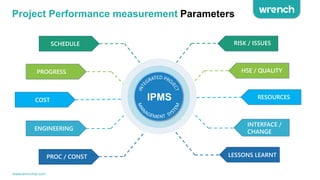
Project Performance measurement Parameters
www.wrenchsp.com
Circle Middle
IPMS
PROC / CONST
ENGINEERING
COST
PROGRESS
SCHEDULE RISK / ISSUES
HSE / QUALITY
RESOURCES
INTERFACE /
CHANGE
LESSONS LEARNT
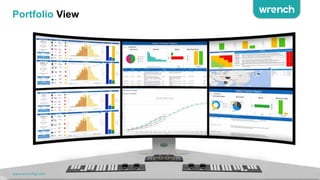
Portfolio View
www.wrenchsp.com
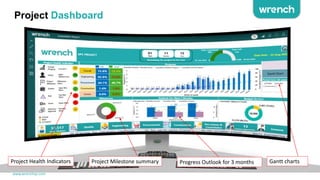
Project Dashboard
www.wrenchsp.com
Project Health Indicators Progress Outlook for 3 months Gantt charts
Project Milestone summary
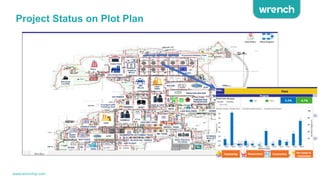
Project Status on Plot Plan
www.wrenchsp.com
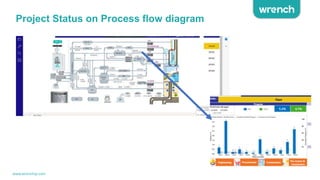
Project Status on Process flow diagram
www.wrenchsp.com
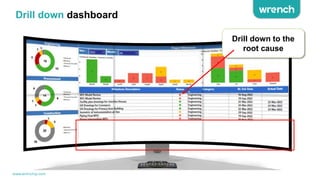
Drill down dashboard
Drill down to the
root cause
www.wrenchsp.com
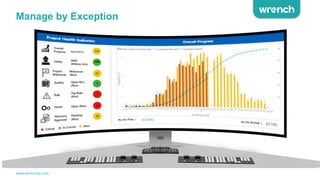
Manage by Exception
www.wrenchsp.com
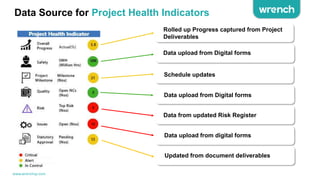
Data Source for Project Health Indicators
Rolled up Progress captured from Project
Deliverables
Data upload from Digital forms
Schedule updates
Data upload from Digital forms
Data from updated Risk Register
Data upload from digital forms
Updated from document deliverables
www.wrenchsp.com
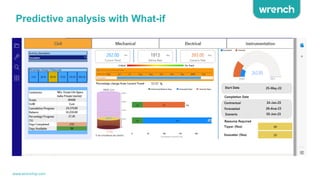
Predictive analysis with What-if
www.wrenchsp.com
www.wrenchsp.com
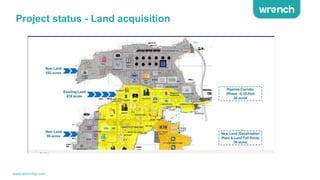
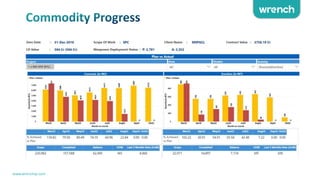
Project status - Land acquisition
www.wrenchsp.com
www.wrenchsp.com
www.wrenchsp.com
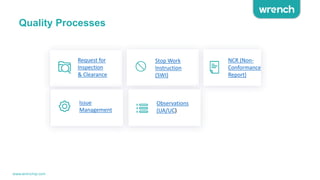
Quality Processes
Request for
Inspection
& Clearance
Stop Work
Instruction
(SWI)
NCR (Non-
Conformance
Report)
Observations
(UA/UC)
Issue
Management
www.wrenchsp.com
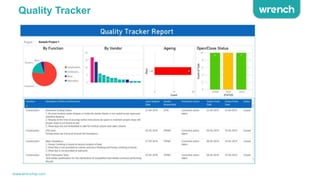
Quality Tracker
www.wrenchsp.com
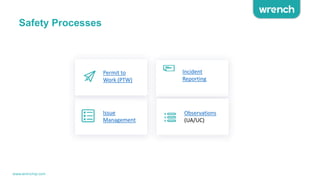
Safety Processes
Incident
Reporting
Observations
(UA/UC)
Issue
Management
Permit to
Work (PTW)
www.wrenchsp.com
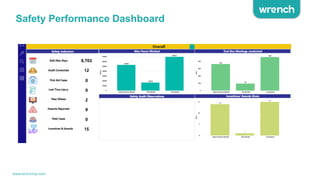
Safety Performance Dashboard
www.wrenchsp.com
Dataflow to Dashboard
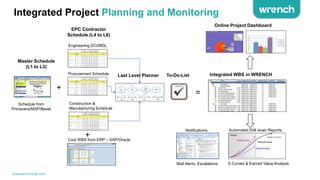
Integrated Project Planning and Monitoring
Integrated WBS in WRENCH
+
Engineering DCI/MDL
Procurement Schedule
Construction &
Manufacturing Schedule
=
Automated Drill down Reports
Online Project Dashboard
Notifications
Mail Alerts, Escalations
Master Schedule
(L1 to L3)
EPC Contractor
Schedule (L4 to L6)
Last Level Planner
Cost WBS from ERP – SAP/Oracle
Schedule from
Primavera/MSP/Bexel
+
S Curves & Earned Value Analysis
To-Do-List
www.wrenchsp.com
INTERFACE 
CHANGE
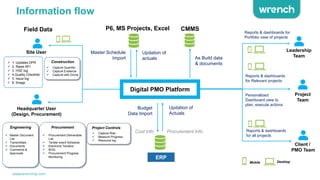
Information flow
P6, MS Projects, Excel
Digital PMO Platform
Master Schedule
Import
Updation of
actuals As Build data
& documents
CMMS
 1. Updates DPR
 2. Raise RFI
 3. HSE log
 4.Quality Checklist
 5. Issue log
 6. Snags
Site User
Headquarter User
(Design, Procurement)
Budget
Data Import
Cost Info Procurement Info
Updation of
Actuals
ERP
Engineering
 Master Document
List
 Transmittals
 Documents
 Comments &
Approvals
Procurement
 Procurement Deliverable
List
 Tender event Schedule
 Electronic Tenders
 BOQ
 Procurement Progress
Monitoring
 Capture Risk
 Measure Progress
 Resource log
 Capture Quantity
 Capture Evidence
 Capture with Drone
Leadership
Team
Project
Team
Client /
PMO Team
Reports & dashboards for
Portfolio view of projects
Reports & dashboards
for Relevant projects
Personalized
Dashboard view to
plan, execute actions
Reports & dashboards
for all projects
Mobile
Field Data
Project Controls
Desktop
Construction
www.wrenchsp.com
INTERFACE 
CHANGE
LESSONS LEARNT
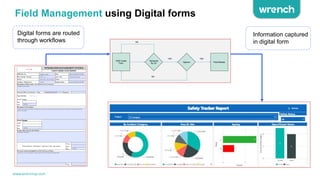
Field Management using Digital forms
Information captured
in digital form
Digital forms are routed
through workflows
www.wrenchsp.com
INTERFACE 
CHANGE
LESSONS LEARNT
Dashboard Architecture
Designing
dashboards Using
Power BI Desktop
Publishing to
Power bi
Cloud service
Data source
[Azure SQL]
Process
and
Transform
Processed
data
Product Database
Published
dashboards to
Stakeholders
Power BI
Gateway
service [Auto
scheduler]
Digital
Platform
www.wrenchsp.com
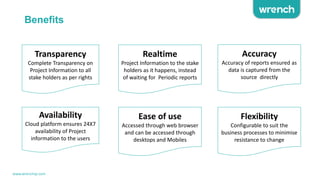
Benefits
Transparency
Complete Transparency on
Project Information to all
stake holders as per rights
Realtime
Project Information to the stake
holders as it happens, instead
of waiting for Periodic reports
Accuracy
Accuracy of reports ensured as
data is captured from the
source directly
Availability
Cloud platform ensures 24X7
availability of Project
information to the users
Ease of use
Accessed through web browser
and can be accessed through
desktops and Mobiles
Flexibility
Configurable to suit the
business processes to minimise
resistance to change
www.wrenchsp.com
THANK YOU
www.wrenchsp.com

Wrench Digital Project Management Office | Digital PMO Software Overview

  • 1.
  • 2.
    Project Performance measurementParameters www.wrenchsp.com Circle Middle IPMS PROC / CONST ENGINEERING COST PROGRESS SCHEDULE RISK / ISSUES HSE / QUALITY RESOURCES INTERFACE / CHANGE LESSONS LEARNT
  • 3.
  • 4.
    Project Dashboard www.wrenchsp.com Project HealthIndicators Progress Outlook for 3 months Gantt charts Project Milestone summary
  • 5.
    Project Status onPlot Plan www.wrenchsp.com
  • 6.
    Project Status onProcess flow diagram www.wrenchsp.com
  • 7.
    Drill down dashboard Drilldown to the root cause www.wrenchsp.com
  • 8.
  • 9.
    Data Source forProject Health Indicators Rolled up Progress captured from Project Deliverables Data upload from Digital forms Schedule updates Data upload from Digital forms Data from updated Risk Register Data upload from digital forms Updated from document deliverables www.wrenchsp.com
  • 10.
    Predictive analysis withWhat-if www.wrenchsp.com
  • 11.
  • 12.
    Project status -Land acquisition www.wrenchsp.com
  • 13.
  • 14.
  • 15.
    Quality Processes Request for Inspection &Clearance Stop Work Instruction (SWI) NCR (Non- Conformance Report) Observations (UA/UC) Issue Management www.wrenchsp.com
  • 16.
  • 17.
  • 18.
  • 19.
  • 20.
    Integrated Project Planningand Monitoring Integrated WBS in WRENCH + Engineering DCI/MDL Procurement Schedule Construction & Manufacturing Schedule = Automated Drill down Reports Online Project Dashboard Notifications Mail Alerts, Escalations Master Schedule (L1 to L3) EPC Contractor Schedule (L4 to L6) Last Level Planner Cost WBS from ERP – SAP/Oracle Schedule from Primavera/MSP/Bexel + S Curves & Earned Value Analysis To-Do-List www.wrenchsp.com
  • 21.
    INTERFACE CHANGE Information flow P6,MS Projects, Excel Digital PMO Platform Master Schedule Import Updation of actuals As Build data & documents CMMS  1. Updates DPR  2. Raise RFI  3. HSE log  4.Quality Checklist  5. Issue log  6. Snags Site User Headquarter User (Design, Procurement) Budget Data Import Cost Info Procurement Info Updation of Actuals ERP Engineering  Master Document List  Transmittals  Documents  Comments & Approvals Procurement  Procurement Deliverable List  Tender event Schedule  Electronic Tenders  BOQ  Procurement Progress Monitoring  Capture Risk  Measure Progress  Resource log  Capture Quantity  Capture Evidence  Capture with Drone Leadership Team Project Team Client / PMO Team Reports & dashboards for Portfolio view of projects Reports & dashboards for Relevant projects Personalized Dashboard view to plan, execute actions Reports & dashboards for all projects Mobile Field Data Project Controls Desktop Construction www.wrenchsp.com
  • 22.
    INTERFACE CHANGE LESSONS LEARNT FieldManagement using Digital forms Information captured in digital form Digital forms are routed through workflows www.wrenchsp.com
  • 23.
    INTERFACE CHANGE LESSONS LEARNT DashboardArchitecture Designing dashboards Using Power BI Desktop Publishing to Power bi Cloud service Data source [Azure SQL] Process and Transform Processed data Product Database Published dashboards to Stakeholders Power BI Gateway service [Auto scheduler] Digital Platform www.wrenchsp.com
  • 24.
    Benefits Transparency Complete Transparency on ProjectInformation to all stake holders as per rights Realtime Project Information to the stake holders as it happens, instead of waiting for Periodic reports Accuracy Accuracy of reports ensured as data is captured from the source directly Availability Cloud platform ensures 24X7 availability of Project information to the users Ease of use Accessed through web browser and can be accessed through desktops and Mobiles Flexibility Configurable to suit the business processes to minimise resistance to change www.wrenchsp.com
  • 25.