Password as The Weakest Authentication
Model!
Chinatu Uzuegbu
CISSP, CCISO, CISM, CISA, CEH, …..
Managing Cyber Security Consultant
RoseTech CyberCrime Solutions Limited
To Commemorate
Password Management Day, 2023
(May 4, 2023)
Password as The Weakest Authentication Model!
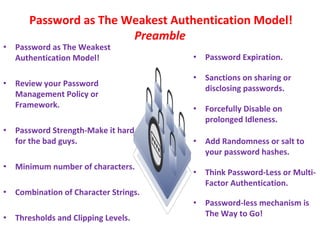
Preamble
• Password as The Weakest
Authentication Model!
• Review your Password
Management Policy or
Framework.
• Password Strength-Make it hard
for the bad guys.
• Minimum number of characters.
• Combination of Character Strings.
• Thresholds and Clipping Levels.
• Password Expiration.
• Sanctions on sharing or
disclosing passwords.
• Forcefully Disable on
prolonged Idleness.
• Add Randomness or salt to
your password hashes.
• Think Password-Less or Multi-
Factor Authentication.
• Password-less mechanism is
The Way to Go!
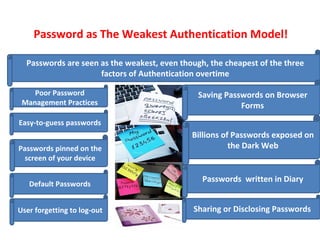
Password as The Weakest Authentication Model!
Passwords are seen as the weakest, even though, the cheapest of the three
factors of Authentication overtime
Poor Password
Management Practices
Easy-to-guess passwords
Passwords pinned on the
screen of your device
Default Passwords
User forgetting to log-out
Saving Passwords on Browser
Forms
Billions of Passwords exposed on
the Dark Web
Passwords written in Diary
Sharing or Disclosing Passwords
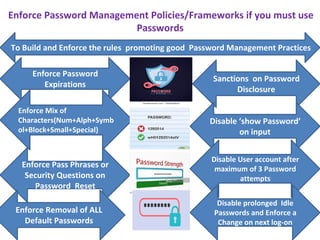
Enforce Password Management Policies/Frameworks if you must use
Passwords
To Build and Enforce the rules promoting good Password Management Practices
Sanctions on Password
Disclosure
Disable ‘show Password’
on input
Disable User account after
maximum of 3 Password
attempts
Enforce Password
Expirations
Enforce Mix of
Characters(Num+Alph+Symb
ol+Block+Small+Special)
Disable prolonged Idle
Passwords and Enforce a
Change on next log-on
Enforce Pass Phrases or
Security Questions on
Password Reset
Enforce Removal of ALL
Default Passwords
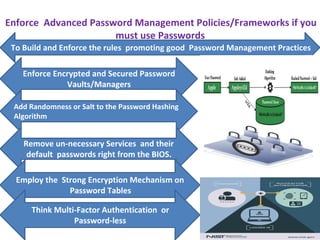
Enforce Advanced Password Management Policies/Frameworks if you
must use Passwords
To Build and Enforce the rules promoting good Password Management Practices
Enforce Encrypted and Secured Password
Vaults/Managers
Add Randomness or Salt to the Password Hashing
Algorithm
Remove un-necessary Services and their
default passwords right from the BIOS.
Employ the Strong Encryption Mechanism on
Password Tables
Think Multi-Factor Authentication or
Password-less
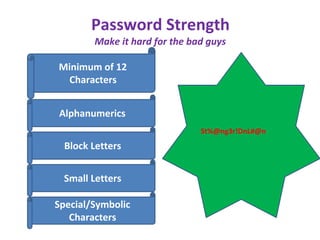
Password Strength
Make it hard for the bad guys
Minimum of 12
Characters
Alphanumerics
Block Letters
Small Letters
Special/Symbolic
Characters
St%@ng3r!DnL#@n
Minimum number of characters
Minimum Password Length
acceptable by the governance and
Policy of the organization. Some
organizations would go with the
minimum length of 8 or12 preferably,
while others would go as long as 18
depending on the criticality of the
Information you are calling to access.
Combination of Character Strings.
Leveraging on Passwords with a mix of
Characters such as Numbers, Alphabets,
Symbols, Special Characters, Block and
Small Letters and Others is a good
practice and will ensure that even though,
you can easily remember the password
with the mix of characters, the bad guys
would find it difficult and thus reduce the
easy-to-guess password vulnerabilities
posing a high risk on passwords across
the globe.
Thresholds and Clipping Levels
The password management policy should also
enforce the disabling of accounts when Log-in
Attempts exceed the clipping level or threshold set
on the System. To some Organizations, the
maximum clipping level is set to 3 attempts, this
means that any Password attempt that goes beyond
three would be blocked.
Password Expiration/Duration
Some Organizations, depending on the
criticality of the Information you are
accessing would enforce the password to
expire at Close-of-Business while some
would enforce the expiration in 14 days, 30
days, 72 days, 3 months or more.
Sanctions on sharing or disclosing
passwords.
Sanctions that must apply if Passwords are
unduly disclosed or shared. This would be a
good way of deterring the Entities from any
misuse or abuse of their passwords. The
Sanction should also apply in every Service
Level Agreement with other Parties or
Vendors.
Forcefully Disable on prolonged Idleness
Sanitize the system to ensure passwords are
revoked when idle for a predefined time-frame. For
example, if the User does not log-in or is idle for a
month or more, disable the password and enforce
the user to log-in with a new password when
required.
Disabling an Idle Session is also a good practice.
Secured Password Vaults/Managers
Leverage on Password Vaults and
Managers and ensure the vaults are
adequately encrypted and secured.
Administrator should not Initialize
Password on User Creation
Enforce the User to input password on initial
Log-in. Administrators should not initialize
Passwords for the User to change on initial
Log-on. This will promote a level of
accountability and assure that the
Administrator does not check-in with the
user’s credential.
Add Randomness or salt to your password hashes
Passwords of highly critical Information
should be salted and at random while
inputting it, to confuse the spying eye
directly or remotely and to minimize brute
force(https://www.fortinet.com/resources/c
yberglossary/brute-force-attack) password
guessing attacks.
Think Password-Less or Multi-Factor
Authentication
Organizations should think of building their
Policies to combine passwords with time-bound
tokens and Biometrics as the case may be. The
truth is that applying passwords alone does not
promote a strong authentication. Your
authentication process is only strong when you
combine it with something you have such as your
smart card or token device or stronger if you join
something you are such as Finger print enrollment
along side.
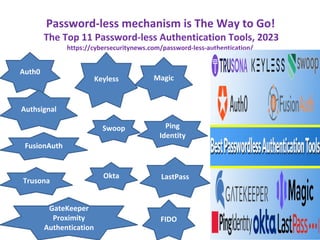
Password-less mechanism is The Way to Go!
The Top 11 Password-less Authentication Tools, 2023
https://cybersecuritynews.com/password-less-authentication/
Auth0
Okta
Swoop
Keyless
Authsignal
FusionAuth
Trusona
GateKeeper
Proximity
Authentication
LastPass
Ping
Identity
Magic
FIDO
In Conclusion
Good Password Management Processes with
Organizational Password Policies and Framework would
assure a reasonable level of security.
Going the Password-less or Multi-Factor Authentication
would mitigate a hail lot of risks around losses of
Passwords and Credentials round the Globe.
Happy Password Management Day, 2023!
Thank You!
Chinatu Uzuegbu
Managing Cyber Security Consultant
RoseTech CyberCrime solutions Ltd.
chinatuuzuegbu@outlook.com

World Password Management Day, 2023.pdf

  • 1.
    Password as TheWeakest Authentication Model! Chinatu Uzuegbu CISSP, CCISO, CISM, CISA, CEH, ….. Managing Cyber Security Consultant RoseTech CyberCrime Solutions Limited To Commemorate Password Management Day, 2023 (May 4, 2023)
  • 2.
    Password as TheWeakest Authentication Model! Preamble • Password as The Weakest Authentication Model! • Review your Password Management Policy or Framework. • Password Strength-Make it hard for the bad guys. • Minimum number of characters. • Combination of Character Strings. • Thresholds and Clipping Levels. • Password Expiration. • Sanctions on sharing or disclosing passwords. • Forcefully Disable on prolonged Idleness. • Add Randomness or salt to your password hashes. • Think Password-Less or Multi- Factor Authentication. • Password-less mechanism is The Way to Go!
  • 3.
    Password as TheWeakest Authentication Model! Passwords are seen as the weakest, even though, the cheapest of the three factors of Authentication overtime Poor Password Management Practices Easy-to-guess passwords Passwords pinned on the screen of your device Default Passwords User forgetting to log-out Saving Passwords on Browser Forms Billions of Passwords exposed on the Dark Web Passwords written in Diary Sharing or Disclosing Passwords
  • 4.
    Enforce Password ManagementPolicies/Frameworks if you must use Passwords To Build and Enforce the rules promoting good Password Management Practices Sanctions on Password Disclosure Disable ‘show Password’ on input Disable User account after maximum of 3 Password attempts Enforce Password Expirations Enforce Mix of Characters(Num+Alph+Symb ol+Block+Small+Special) Disable prolonged Idle Passwords and Enforce a Change on next log-on Enforce Pass Phrases or Security Questions on Password Reset Enforce Removal of ALL Default Passwords
  • 5.
    Enforce Advanced PasswordManagement Policies/Frameworks if you must use Passwords To Build and Enforce the rules promoting good Password Management Practices Enforce Encrypted and Secured Password Vaults/Managers Add Randomness or Salt to the Password Hashing Algorithm Remove un-necessary Services and their default passwords right from the BIOS. Employ the Strong Encryption Mechanism on Password Tables Think Multi-Factor Authentication or Password-less
  • 6.
    Password Strength Make ithard for the bad guys Minimum of 12 Characters Alphanumerics Block Letters Small Letters Special/Symbolic Characters St%@ng3r!DnL#@n
  • 7.
    Minimum number ofcharacters Minimum Password Length acceptable by the governance and Policy of the organization. Some organizations would go with the minimum length of 8 or12 preferably, while others would go as long as 18 depending on the criticality of the Information you are calling to access.
  • 8.
    Combination of CharacterStrings. Leveraging on Passwords with a mix of Characters such as Numbers, Alphabets, Symbols, Special Characters, Block and Small Letters and Others is a good practice and will ensure that even though, you can easily remember the password with the mix of characters, the bad guys would find it difficult and thus reduce the easy-to-guess password vulnerabilities posing a high risk on passwords across the globe.
  • 9.
    Thresholds and ClippingLevels The password management policy should also enforce the disabling of accounts when Log-in Attempts exceed the clipping level or threshold set on the System. To some Organizations, the maximum clipping level is set to 3 attempts, this means that any Password attempt that goes beyond three would be blocked.
  • 10.
    Password Expiration/Duration Some Organizations,depending on the criticality of the Information you are accessing would enforce the password to expire at Close-of-Business while some would enforce the expiration in 14 days, 30 days, 72 days, 3 months or more.
  • 11.
    Sanctions on sharingor disclosing passwords. Sanctions that must apply if Passwords are unduly disclosed or shared. This would be a good way of deterring the Entities from any misuse or abuse of their passwords. The Sanction should also apply in every Service Level Agreement with other Parties or Vendors.
  • 12.
    Forcefully Disable onprolonged Idleness Sanitize the system to ensure passwords are revoked when idle for a predefined time-frame. For example, if the User does not log-in or is idle for a month or more, disable the password and enforce the user to log-in with a new password when required. Disabling an Idle Session is also a good practice.
  • 13.
    Secured Password Vaults/Managers Leverageon Password Vaults and Managers and ensure the vaults are adequately encrypted and secured.
  • 14.
    Administrator should notInitialize Password on User Creation Enforce the User to input password on initial Log-in. Administrators should not initialize Passwords for the User to change on initial Log-on. This will promote a level of accountability and assure that the Administrator does not check-in with the user’s credential.
  • 15.
    Add Randomness orsalt to your password hashes Passwords of highly critical Information should be salted and at random while inputting it, to confuse the spying eye directly or remotely and to minimize brute force(https://www.fortinet.com/resources/c yberglossary/brute-force-attack) password guessing attacks.
  • 16.
    Think Password-Less orMulti-Factor Authentication Organizations should think of building their Policies to combine passwords with time-bound tokens and Biometrics as the case may be. The truth is that applying passwords alone does not promote a strong authentication. Your authentication process is only strong when you combine it with something you have such as your smart card or token device or stronger if you join something you are such as Finger print enrollment along side.
  • 17.
    Password-less mechanism isThe Way to Go! The Top 11 Password-less Authentication Tools, 2023 https://cybersecuritynews.com/password-less-authentication/ Auth0 Okta Swoop Keyless Authsignal FusionAuth Trusona GateKeeper Proximity Authentication LastPass Ping Identity Magic FIDO
  • 18.
    In Conclusion Good PasswordManagement Processes with Organizational Password Policies and Framework would assure a reasonable level of security. Going the Password-less or Multi-Factor Authentication would mitigate a hail lot of risks around losses of Passwords and Credentials round the Globe. Happy Password Management Day, 2023!
  • 19.
    Thank You! Chinatu Uzuegbu ManagingCyber Security Consultant RoseTech CyberCrime solutions Ltd. chinatuuzuegbu@outlook.com