Work with Microsoft
Forms (like a) Pro
#DPAFUG
Stefan Strube
11-11-2019 v1.0
Stefan Strube
• Solution Architect @ Strukton (NL)
• Co-founder Dutch D365CE user group CEProNL
• Co-founder Dutch PowerApps & Flow User Group
• Blogger, speaker at community events
Work with Microsoft Forms (like a) Pro
@StefanS3652die4it.com stefanstrube365
Agenda
1. Introducing Microsoft Forms Pro
2. Forms Pro versus Forms
3. Get started with Forms Pro
4. Survey life cycle
5. Demo
6. Wrap up
3Work with Microsoft Forms (like a) Pro
Introducing Microsoft Forms Pro
• General available since July 1st 2019
• Business version of Microsoft Forms
• Integrated in Common Data Service
• Replacing Voice of the Customer (D365CE)
• Licensing
• included with select Dynamics 365 subscriptions
• available as an upgrade for Office 365 subscriptions
€ 84,30 per 2.000 survey responses per tenant/month
4Work with Microsoft Forms (like a) Pro
Forms Pro versus Forms
• Common Data Service integration
• Microsoft Flow integration
• Personalize surveys
• Branching rules
• Emailing surveys
Detailed comparison table:
Forms VS Forms Pro – What Is The Difference?
5Work with Microsoft Forms (like a) Pro
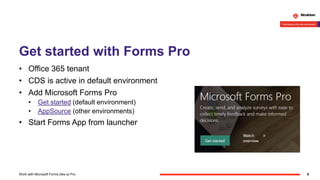
Get started with Forms Pro
• Office 365 tenant
• CDS is active in default environment
• Add Microsoft Forms Pro
• Get started (default environment)
• AppSource (other environments)
• Start Forms App from launcher
6Work with Microsoft Forms (like a) Pro
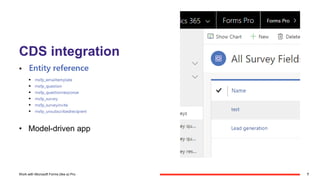
CDS integration
• Entity reference
• Model-driven app
7Work with Microsoft Forms (like a) Pro
Survey life cycle
• Collaborate on a survey
• Create a survey
• Distribute a survey
• Integrate with Flow
• Analyze responses and invitations
8Work with Microsoft Forms (like a) Pro
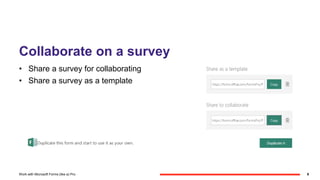
Collaborate on a survey
• Share a survey for collaborating
• Share a survey as a template
9Work with Microsoft Forms (like a) Pro
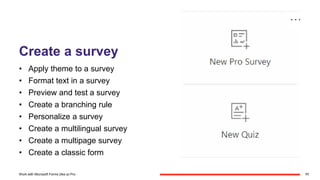
Create a survey
• Apply theme to a survey
• Format text in a survey
• Preview and test a survey
• Create a branching rule
• Personalize a survey
• Create a multilingual survey
• Create a multipage survey
• Create a classic form
11Work with Microsoft Forms (like a) Pro
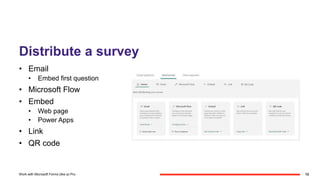
Distribute a survey
• Email
• Embed first question
• Microsoft Flow
• Embed
• Web page
• Power Apps
• Link
• QR code
12Work with Microsoft Forms (like a) Pro
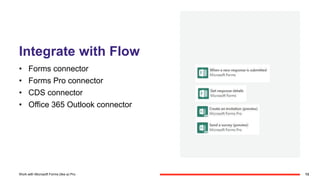
Integrate with Flow
• Forms connector
• Forms Pro connector
• CDS connector
• Office 365 Outlook connector
13Work with Microsoft Forms (like a) Pro
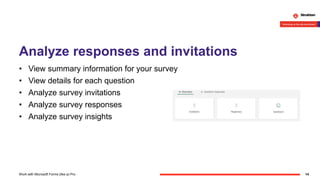
Analyze responses and invitations
• View summary information for your survey
• View details for each question
• Analyze survey invitations
• Analyze survey responses
• Analyze survey insights
14Work with Microsoft Forms (like a) Pro
Demo
Send survey with personalized QR code
15Work with Microsoft Forms (like a) Pro
Go Pro
• Personalized links
• Identifier without authentication
• Survey variables
• Piped
• Embedded
• Context Data field in Response
• PipeData
• EmbedContextParameters
16Work with Microsoft Forms (like a) Pro
Wrap up
Questions?
17Work with Microsoft Forms (like a) Pro
Resources
• Get started with Microsoft Forms Pro
• Documentation
• Community
• Ideas
• Megan Walker's blog
18Work with Microsoft Forms (like a) Pro
19Work with Microsoft Forms (like a) Pro

Work with Microsoft Forms (like a) Pro

  • 1.
    Work with Microsoft Forms(like a) Pro #DPAFUG Stefan Strube 11-11-2019 v1.0
  • 2.
    Stefan Strube • SolutionArchitect @ Strukton (NL) • Co-founder Dutch D365CE user group CEProNL • Co-founder Dutch PowerApps & Flow User Group • Blogger, speaker at community events Work with Microsoft Forms (like a) Pro @StefanS3652die4it.com stefanstrube365
  • 3.
    Agenda 1. Introducing MicrosoftForms Pro 2. Forms Pro versus Forms 3. Get started with Forms Pro 4. Survey life cycle 5. Demo 6. Wrap up 3Work with Microsoft Forms (like a) Pro
  • 4.
    Introducing Microsoft FormsPro • General available since July 1st 2019 • Business version of Microsoft Forms • Integrated in Common Data Service • Replacing Voice of the Customer (D365CE) • Licensing • included with select Dynamics 365 subscriptions • available as an upgrade for Office 365 subscriptions € 84,30 per 2.000 survey responses per tenant/month 4Work with Microsoft Forms (like a) Pro
  • 5.
    Forms Pro versusForms • Common Data Service integration • Microsoft Flow integration • Personalize surveys • Branching rules • Emailing surveys Detailed comparison table: Forms VS Forms Pro – What Is The Difference? 5Work with Microsoft Forms (like a) Pro
  • 6.
    Get started withForms Pro • Office 365 tenant • CDS is active in default environment • Add Microsoft Forms Pro • Get started (default environment) • AppSource (other environments) • Start Forms App from launcher 6Work with Microsoft Forms (like a) Pro
  • 7.
    CDS integration • Entityreference • Model-driven app 7Work with Microsoft Forms (like a) Pro
  • 8.
    Survey life cycle •Collaborate on a survey • Create a survey • Distribute a survey • Integrate with Flow • Analyze responses and invitations 8Work with Microsoft Forms (like a) Pro
  • 9.
    Collaborate on asurvey • Share a survey for collaborating • Share a survey as a template 9Work with Microsoft Forms (like a) Pro
  • 10.
    Create a survey •Apply theme to a survey • Format text in a survey • Preview and test a survey • Create a branching rule • Personalize a survey • Create a multilingual survey • Create a multipage survey • Create a classic form 11Work with Microsoft Forms (like a) Pro
  • 11.
    Distribute a survey •Email • Embed first question • Microsoft Flow • Embed • Web page • Power Apps • Link • QR code 12Work with Microsoft Forms (like a) Pro
  • 12.
    Integrate with Flow •Forms connector • Forms Pro connector • CDS connector • Office 365 Outlook connector 13Work with Microsoft Forms (like a) Pro
  • 13.
    Analyze responses andinvitations • View summary information for your survey • View details for each question • Analyze survey invitations • Analyze survey responses • Analyze survey insights 14Work with Microsoft Forms (like a) Pro
  • 14.
    Demo Send survey withpersonalized QR code 15Work with Microsoft Forms (like a) Pro
  • 15.
    Go Pro • Personalizedlinks • Identifier without authentication • Survey variables • Piped • Embedded • Context Data field in Response • PipeData • EmbedContextParameters 16Work with Microsoft Forms (like a) Pro
  • 16.
    Wrap up Questions? 17Work withMicrosoft Forms (like a) Pro
  • 17.
    Resources • Get startedwith Microsoft Forms Pro • Documentation • Community • Ideas • Megan Walker's blog 18Work with Microsoft Forms (like a) Pro
  • 18.
    19Work with MicrosoftForms (like a) Pro