Why Powerapps Is Replacing
Infopath Forms?
Whenever there is a new tool is launched, it replaces the existing
one. There is a dilemma in the user’s mind whether the new
product is functional and stable. When it comes to PowerApps
apps development replacing Infopath, the answer to the same is
yes.
Sharing specifications of previous Sharepoint, InfoPath became a
tool of choice in the Microsoft stack. It was preferential for
developing interactive forms and modifying the SharePoint list
and library dialogs. InfoPath still shares support until 2023, April
for legacy systems. It got replaced with PowerApps in Microsoft
365. PowerApps is not only restricted to Sharepoint. It helps in
stand-alone mobile applications. It could be connected through
different data sources integrated with Dynamics 365.
Who is the descendant?
● There are a few instances where InfoPath Forms is useful. For
instance, it can anonymously collecting information or can print
when required. On the other hand, PowerApps is specialized in
the digital formulation of data.
● PowerApps is continuously getting updated with new features,
creating strong functionality. It becomes highly responsive and
user-friendly. PowerApps developers optimize their applications
for reducing network traffic and enhanced performance on
different devices
● PowerApps has the power to interact with data through a
myriad of sources. It is not restricted like InfoPath. Making
changes to PowerApps is easier as it is centrally managed
and has automatic updates.
● Limitation to PowerApps is that this application is restricted
to regular users in your tenant. Guest users cannot access
it now. It is though available on Microsoft roadmap. If you
want to convert InfoPath forms to PowerApps, save by
collaborating with the powerapps app development
company.
Minimal But Powerful
● As a WYSIWYG tool, PowerApps editor has different control
options. This includes labels, buttons, and text boxes. These
can be easily added to the app canvas. Modification is an
application with a few clicks.
● It has an Excel-style formulaic language used for adding
core capability to your application. Microsoft presents
PowerApp player, available in iOS, Android and Microsoft
App Stores. So, your PowerApps does not need an addition
from the app store directly. It gets published in your tenant
and accessible through PowerApps player.
● It can also be embedded in SharePoint and PowerBI
dashboards and reports.
Breaking the Monotony
● There are different ways of creating new PowerApps. You
can navigate to Office365.com and click on the PowerApps
icon present on the list. This will take you to
PowerApps.com. Here you will find different options for
creating applications.
● In different cases, PowerApps automatically creates an
application based on your data. For instance, if you are
willing to connect to a SharePoint list, PowerApps will
formulate a default app through three scenes. One is
through going through the records in the list, second is
going through the details of the record and finally, adding
or modification of records.
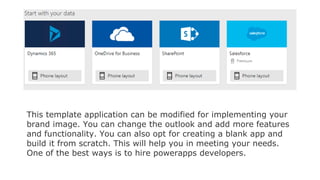
This template application can be modified for implementing your
brand image. You can change the outlook and add more features
and functionality. You can also opt for creating a blank app and
build it from scratch. This will help you in meeting your needs.
One of the best ways is to hire powerapps developers.
● PowerApps is useful is a modification of dialogs in both
Dynamic 365 and SharePoint Online. Customizing a list
form, the process is easier. It is like navigating to the list in
SharePoint. Just click on the PowerApps options and select
“Customize Forms.”
● The form is released in the PowerApps editor where you can
customize. Best for building stunning list forms for
enhancing user-experience for the app. In Dynamics 365,
you can easily edit entity forms through navigating the
same in the solution explorer.
● A lighter version of PowerApps Studio is launched in the
same phase of Dynamics. It will allow you to show and hide
fields and reorder the same.
The Functionality is Enhancing
● Microsoft is adding and enhancing the feature set of
PowerApps. It further gives you the right to access new
data sources, implementing visual elements. It makes it
easier for connecting to services like Azure.
● The base version of PowerApps is incorporated in all
licenses like Office 365 Business Essentials. For using
Premium Connectors, connecting to external services are
needed for further collaboration. External services include
Salesforce, DocuSign, Jira.
● The development of PowerApps was done keeping the non-
developer Power Users in mind. It was mainly conducted for
improving everyday business functionality. It also helps in
connecting data sources and creating rich applications with
less or no code.
● Developers can use PowerApps for the development of
responsive and complex applications. It will help in
leveraging multiple data sources and interactions.
Conclusion:
While PowerApps is still growing and formulating features, it is
ready to replace InfoPath Forms. It could be in the form of
creating interactive forms and modifying the SharePoint list and
library dialogs. There are so many things which could be done
with PowerApps. It could be considered by organizations for new
defining pathways.
Web & Mobile App Development Company
https://concettolabs.com
Global Network
USA
4811 N Harding Ave,
Chicago IL 60625
P: +1(903) 200-8801
CANADA
1445 Rennie St Oshawa,
Ontario, L1K 0N9,CANADA
P: (416) 272-0981
INDIA
609/610,City Center Science
City Road
Ahmedabad - 380060
P: +919586777575
UK
6 Hastings Avenue
Ilford , IG6 1DZ
P: +44(798)560 0352

Why powerapps is replacing infopath forms

  • 1.
    Why Powerapps IsReplacing Infopath Forms?
  • 2.
    Whenever there isa new tool is launched, it replaces the existing one. There is a dilemma in the user’s mind whether the new product is functional and stable. When it comes to PowerApps apps development replacing Infopath, the answer to the same is yes. Sharing specifications of previous Sharepoint, InfoPath became a tool of choice in the Microsoft stack. It was preferential for developing interactive forms and modifying the SharePoint list and library dialogs. InfoPath still shares support until 2023, April for legacy systems. It got replaced with PowerApps in Microsoft 365. PowerApps is not only restricted to Sharepoint. It helps in stand-alone mobile applications. It could be connected through different data sources integrated with Dynamics 365.
  • 3.
    Who is thedescendant? ● There are a few instances where InfoPath Forms is useful. For instance, it can anonymously collecting information or can print when required. On the other hand, PowerApps is specialized in the digital formulation of data. ● PowerApps is continuously getting updated with new features, creating strong functionality. It becomes highly responsive and user-friendly. PowerApps developers optimize their applications for reducing network traffic and enhanced performance on different devices
  • 4.
    ● PowerApps hasthe power to interact with data through a myriad of sources. It is not restricted like InfoPath. Making changes to PowerApps is easier as it is centrally managed and has automatic updates. ● Limitation to PowerApps is that this application is restricted to regular users in your tenant. Guest users cannot access it now. It is though available on Microsoft roadmap. If you want to convert InfoPath forms to PowerApps, save by collaborating with the powerapps app development company.
  • 5.
  • 6.
    ● As aWYSIWYG tool, PowerApps editor has different control options. This includes labels, buttons, and text boxes. These can be easily added to the app canvas. Modification is an application with a few clicks. ● It has an Excel-style formulaic language used for adding core capability to your application. Microsoft presents PowerApp player, available in iOS, Android and Microsoft App Stores. So, your PowerApps does not need an addition from the app store directly. It gets published in your tenant and accessible through PowerApps player. ● It can also be embedded in SharePoint and PowerBI dashboards and reports.
  • 7.
    Breaking the Monotony ●There are different ways of creating new PowerApps. You can navigate to Office365.com and click on the PowerApps icon present on the list. This will take you to PowerApps.com. Here you will find different options for creating applications. ● In different cases, PowerApps automatically creates an application based on your data. For instance, if you are willing to connect to a SharePoint list, PowerApps will formulate a default app through three scenes. One is through going through the records in the list, second is going through the details of the record and finally, adding or modification of records.
  • 8.
    This template applicationcan be modified for implementing your brand image. You can change the outlook and add more features and functionality. You can also opt for creating a blank app and build it from scratch. This will help you in meeting your needs. One of the best ways is to hire powerapps developers.
  • 9.
    ● PowerApps isuseful is a modification of dialogs in both Dynamic 365 and SharePoint Online. Customizing a list form, the process is easier. It is like navigating to the list in SharePoint. Just click on the PowerApps options and select “Customize Forms.” ● The form is released in the PowerApps editor where you can customize. Best for building stunning list forms for enhancing user-experience for the app. In Dynamics 365, you can easily edit entity forms through navigating the same in the solution explorer. ● A lighter version of PowerApps Studio is launched in the same phase of Dynamics. It will allow you to show and hide fields and reorder the same.
  • 10.
    The Functionality isEnhancing ● Microsoft is adding and enhancing the feature set of PowerApps. It further gives you the right to access new data sources, implementing visual elements. It makes it easier for connecting to services like Azure. ● The base version of PowerApps is incorporated in all licenses like Office 365 Business Essentials. For using Premium Connectors, connecting to external services are needed for further collaboration. External services include Salesforce, DocuSign, Jira.
  • 11.
    ● The developmentof PowerApps was done keeping the non- developer Power Users in mind. It was mainly conducted for improving everyday business functionality. It also helps in connecting data sources and creating rich applications with less or no code. ● Developers can use PowerApps for the development of responsive and complex applications. It will help in leveraging multiple data sources and interactions.
  • 12.
    Conclusion: While PowerApps isstill growing and formulating features, it is ready to replace InfoPath Forms. It could be in the form of creating interactive forms and modifying the SharePoint list and library dialogs. There are so many things which could be done with PowerApps. It could be considered by organizations for new defining pathways.
  • 13.
    Web & MobileApp Development Company https://concettolabs.com
  • 14.
    Global Network USA 4811 NHarding Ave, Chicago IL 60625 P: +1(903) 200-8801 CANADA 1445 Rennie St Oshawa, Ontario, L1K 0N9,CANADA P: (416) 272-0981 INDIA 609/610,City Center Science City Road Ahmedabad - 380060 P: +919586777575 UK 6 Hastings Avenue Ilford , IG6 1DZ P: +44(798)560 0352