As an example of my work I included a consulting proposal scenario project. In this
exercise we were required to overhaul and centralize a multi-site network for a number of
doctors’ office locations. The goal was to design for centralization, up-time, security and
scalability. I used these points as the measure for the existing and proposed networks.
The firm was requesting 5 offices be re-designed, each running a number of legacy or
proprietary solutions. The central office was the most modern, but had to be scaled up to
meet the new network user demands. The 4 satellite offices needed a full upgrade to meet
modern standards and typologies; including Ethernet cabling in the north and south offices.
Costs were lowered by setting up the client with the minimum network needs at deployment,
but still meeting network requirements and the option to scale in the future.
• The main issues with the existing networks:
• No site to site connectivity
• Outdated legacy network in remote sites
• Not HIPAA compliant
• No room to scale for growth
• Each office is using proprietary software
• The main over-all changes that needed to be addressed:
• Update remote sites’ infrastructure
• Establish a security policy
• Centralize & standardize administration
• All sites using the medical management servers
• Central office with high-speed internet access
• All sites are to have WAN links to the central office
• Remote sites are to have redundant WAN links
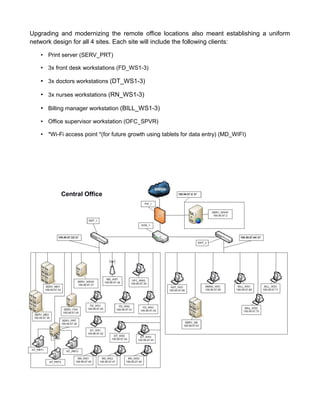
Using the client purchased 199.99.97.0/24 network I was able to design 7 usable subnets.
Each WAN connection being T-1 lines from remote site to central site and DSL lines from
remote site to remote site. The central office site is composed of the first 3 subnets in the
scheme. A hardware based firewall will be established between the site and the internet. The
199.99.97.0/27 subnet is reserved for the DMZ (demilitarized zone) which houses the
practices’ web server and internet presence (SERV_WWW). I established the 2 separate
LANs to keep billing data secure and control user access into that server. The primary server
will periodically sync the database with the stand-by server. Both servers will run in tandem
being used for load balancing during heavy network traffic. The 199.99.97.32/27 LAN is the
main office subnet for the client’s medical practice.
This LAN houses the bulk of the under lying infrastructure; as follows:
• Rack mount
• Linux medical management application server (SERV_MD1)
• Stand-by application server (SERV_MD2)
• Active directory server (SERV_MSAD)
• Fax server (SERV_FAX)
• Print server (SERV_PRT)
• QuickBooks server (SERV_QB)
• 3x front desk workstations (FD_WS1-3)
• 3x doctors workstations (DT_WS1-3)
• 3x nurses workstations (RN_WS1-3)
• Office manager workstation (OFC_MNG)
• Wi-Fi access point *(for future growth using tablets for data entry) (MD-WIFI)
The 199.99.97.64/27 subnet will only be used by the management team and billing
personnel. Keeping a high level of security and least-privileges was the main factor in this
design. This LAN is much smaller than the former. The clients are as follows:
• QuickBooks server (physically located in rack mount)
• 3x billing workstations (BILL_WS1-3)
• Billing manager workstation (BMNG_WS1)
• Collection agent workstation (AGT_WS1)
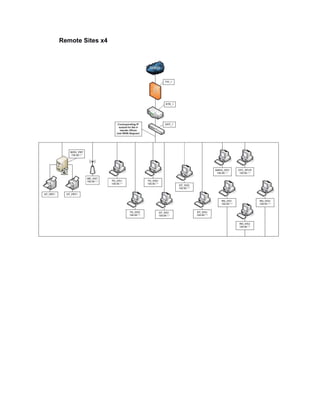
Upgrading and modernizing the remote office locations also meant establishing a uniform
network design for all 4 sites. Each site will include the following clients:
• Print server (SERV_PRT)
• 3x front desk workstations (FD_WS1-3)
• 3x doctors workstations (DT_WS1-3)
• 3x nurses workstations (RN_WS1-3)
• Billing manager workstation (BILL_WS1-3)
• Office supervisor workstation (OFC_SPVR)
• *Wi-Fi access point *(for future growth using tablets for data entry) (MD_WIFI)
Central Office
Remote Sites x4

work example

  • 1.
    As an exampleof my work I included a consulting proposal scenario project. In this exercise we were required to overhaul and centralize a multi-site network for a number of doctors’ office locations. The goal was to design for centralization, up-time, security and scalability. I used these points as the measure for the existing and proposed networks. The firm was requesting 5 offices be re-designed, each running a number of legacy or proprietary solutions. The central office was the most modern, but had to be scaled up to meet the new network user demands. The 4 satellite offices needed a full upgrade to meet modern standards and typologies; including Ethernet cabling in the north and south offices. Costs were lowered by setting up the client with the minimum network needs at deployment, but still meeting network requirements and the option to scale in the future. • The main issues with the existing networks: • No site to site connectivity • Outdated legacy network in remote sites • Not HIPAA compliant • No room to scale for growth • Each office is using proprietary software • The main over-all changes that needed to be addressed: • Update remote sites’ infrastructure • Establish a security policy • Centralize & standardize administration • All sites using the medical management servers • Central office with high-speed internet access • All sites are to have WAN links to the central office • Remote sites are to have redundant WAN links Using the client purchased 199.99.97.0/24 network I was able to design 7 usable subnets. Each WAN connection being T-1 lines from remote site to central site and DSL lines from remote site to remote site. The central office site is composed of the first 3 subnets in the scheme. A hardware based firewall will be established between the site and the internet. The 199.99.97.0/27 subnet is reserved for the DMZ (demilitarized zone) which houses the
  • 2.
    practices’ web serverand internet presence (SERV_WWW). I established the 2 separate LANs to keep billing data secure and control user access into that server. The primary server will periodically sync the database with the stand-by server. Both servers will run in tandem being used for load balancing during heavy network traffic. The 199.99.97.32/27 LAN is the main office subnet for the client’s medical practice. This LAN houses the bulk of the under lying infrastructure; as follows: • Rack mount • Linux medical management application server (SERV_MD1) • Stand-by application server (SERV_MD2) • Active directory server (SERV_MSAD) • Fax server (SERV_FAX) • Print server (SERV_PRT) • QuickBooks server (SERV_QB) • 3x front desk workstations (FD_WS1-3) • 3x doctors workstations (DT_WS1-3) • 3x nurses workstations (RN_WS1-3) • Office manager workstation (OFC_MNG) • Wi-Fi access point *(for future growth using tablets for data entry) (MD-WIFI) The 199.99.97.64/27 subnet will only be used by the management team and billing personnel. Keeping a high level of security and least-privileges was the main factor in this design. This LAN is much smaller than the former. The clients are as follows: • QuickBooks server (physically located in rack mount) • 3x billing workstations (BILL_WS1-3) • Billing manager workstation (BMNG_WS1) • Collection agent workstation (AGT_WS1)
  • 3.
    Upgrading and modernizingthe remote office locations also meant establishing a uniform network design for all 4 sites. Each site will include the following clients: • Print server (SERV_PRT) • 3x front desk workstations (FD_WS1-3) • 3x doctors workstations (DT_WS1-3) • 3x nurses workstations (RN_WS1-3) • Billing manager workstation (BILL_WS1-3) • Office supervisor workstation (OFC_SPVR) • *Wi-Fi access point *(for future growth using tablets for data entry) (MD_WIFI) Central Office
  • 4.