Winning the
Edit•Build•Test
     Cycle

  Rusty Klophaus • @rustyio
     Basho Technologies
The Edit•Build•Test Cycle
 determines how quickly
     you can see the
   results of new code
   in your application.
Developer Productivity
   How much progress can a developer make
    on a problem in some interval of time.

                  Intelligence
                        X
            Knowledge / Experience
                        X
                 Typing Speed
                        X
             Edit•Build•Test Cycle
                        =
            Developer Productivity
                  (Simplified)
                      3
Developer Productivity
     How much progress can a developer make
      on a problem in some interval of time.

      Intelligence
            X
Knowledge / Experience
            X
     Typing Speed
            X
 Edit•Build•Test Cycle
            =
Developer Productivity
      (Simplified)
                         4
Developer Productivity
     How much progress can a developer make
      on a problem in some interval of time.

      Intelligence
            X
Knowledge / Experience
            X
     Typing Speed
            X                Easy to improve
 Edit•Build•Test Cycle
            =
Developer Productivity
      (Simplified)
                         4
Developer Productivity
     How much progress can a developer make
      on a problem in some interval of time.

      Intelligence
            X
Knowledge / Experience
            X
     Typing Speed
            X                Easy to improve
 Edit•Build•Test Cycle
                             Transferrable to other projects
            =
Developer Productivity
      (Simplified)
                         4
Developer Productivity
     How much progress can a developer make
      on a problem in some interval of time.

      Intelligence
            X
Knowledge / Experience
            X
     Typing Speed
            X                Easy to improve
 Edit•Build•Test Cycle
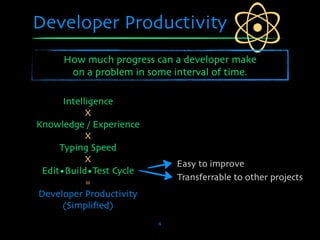
                             Transferrable to other projects
            =
Developer Productivity       Transferrable to other people
      (Simplified)
                         4
How do we “win” it?


         5
How do we win it?


SPEED


POWER


CONSISTENCY

              6
How do we win it?

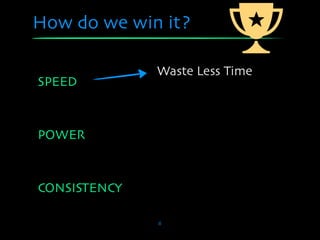
              Waste Less Time
SPEED


POWER


CONSISTENCY

              6
How do we win it?

              Waste Less Time
SPEED
              Shorter Iterations


POWER


CONSISTENCY

              6
How do we win it?

              Waste Less Time
SPEED
              Shorter Iterations
              Maintain Focus
POWER


CONSISTENCY

              6
How do we win it?

              Waste Less Time
SPEED
              Shorter Iterations
              Maintain Focus
POWER
              Find Points of Leverage


CONSISTENCY

              6
How do we win it?

              Waste Less Time
SPEED
              Shorter Iterations
              Maintain Focus
POWER
              Find Points of Leverage

              Avoid Re-invention
CONSISTENCY

              6
How do we win it?

              Waste Less Time
SPEED
              Shorter Iterations
              Maintain Focus
POWER
              Find Points of Leverage

              Avoid Re-invention
CONSISTENCY   Easy Onboarding

              6
Edit•Build•Test


       7
Tip 1: Navigating a Project
Tool
 • PeepOpen (Mac only, not free)
 • Works with BBEdit, Coda, Emacs, MacVim,
   TextMate, XCode
 • http://peepcode.com/products/peepopen

What It Does
 • Find and open files quickly


                        8
Tip 1: Navigating a Project


               9
Tip 2: Erlang Documentation
Tool
 • ErlDocs.com

What It Does
 • Searchable Erlang documentation
 • Offline version


                      10
Tip 2: Erlang Documentation


              11
Edit•Build•Test


       12
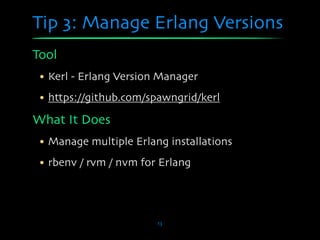
Tip 3: Manage Erlang Versions
Tool
 • Kerl - Erlang Version Manager
 • https://github.com/spawngrid/kerl

What It Does
 • Manage multiple Erlang installations
 • rbenv / rvm / nvm for Erlang


                        13
Tip 3: Manage Erlang Versions

# Install kerl utility...
curl -O https://raw.github.com/spawngrid/
kerl/master/kerl
chmod 755 kerl
sudo mv kerl /usr/local/bin

# Build and install the R14B03 release...
kerl build R14B03 r14b03
kerl install r14b03 /opt/erlang/r14b03

# Activate a release
. /opt/erlang/r14b03/activate
                       14
Tip 4: Simplify Your Makefile
Tool
 • Rebar - Simple-yet-sophisticated build tool
 • https://github.com/basho/rebar

What It Does
 • Simplify our Makefile
 • Will build *anything* if you follow OTP conventions
 • Fetch project dependencies
 • And more...

                            15
Tip 4: Simplify Your Makefile

# Rebar simplifies your Makefile.
# (NOTE: Include rebar in your repo.)

all: deps compile

compile:

 ./rebar get-deps compile

clean:

 ./rebar clean

rel:

 ./rebar generate
                          16
Dependencies


%% FILE: rebar.config
{sub_dirs, ["rel", "deps/myproject"]}.

{deps, [
    {webmachine, "1.9.0", {
       git,
       "git://github.com/basho/webmachine",
       {tag, "1.9.0"}
    }}
]}.


                           17
Tip 4: Simplify Your Makefile
$ make

./rebar get-deps compile
==> rel (get-deps)
==> myproject (get-deps)
==> MyProject (get-deps)
Pulling webmachine from {git,"git://github.com/basho/webmachine",
                  {tag,"1.9.0"}}
Cloning into webmachine...
==> webmachine (get-deps)
Pulling mochiweb from {git,"git://github.com/mochi/mochiweb",{tag,"1.5.1"}}
Cloning into mochiweb...
==> mochiweb (get-deps)
==> mochiweb (compile)
Compiled src/mochiweb_sup.erl
...snip...
==> webmachine (compile)
Compiled src/webmachine_util.erl
...snip...
==> rel (compile)
==> MyProject (compile)
Compiled src/myproject_app.erl
Compiled src/myproject_sup.erl
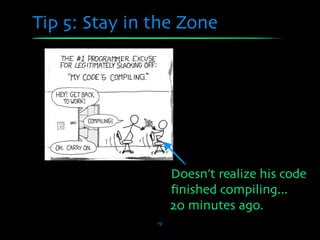
Tip 5: Stay in the Zone


               19
Tip 5: Stay in the Zone


                    Doesn’t realize his code
                    finished compiling...

               19
Tip 5: Stay in the Zone


                    Doesn’t realize his code
                    finished compiling...
                    20 minutes ago.
               19
Tip 5: Stay in the Zone


# Get alerted when `make` is finished.
# Drop this in your .bashrc

function make {
  /usr/bin/make "$@"
  say "Finished make $1"
}


                      20
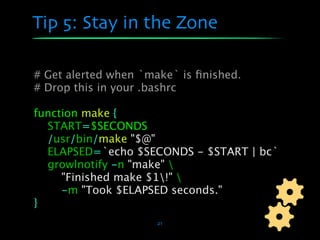
Tip 5: Stay in the Zone

# Get alerted when `make` is finished.
# Drop this in your .bashrc

function make {
  START=$SECONDS
  /usr/bin/make "$@"
  ELAPSED=`echo $SECONDS - $START | bc`
  growlnotify -n "make" 
     "Finished make $1!" 
     -m "Took $ELAPSED seconds."
}
                      21
Tip 6: Avoid VM Restarts
Tool
 • Mochiweb Reloader

What It Does
 • Automatically reload new beams


                       22
Tip 6: Avoid VM Restarts
$ erl -pa deps/*/ebin

Eshell V5.8.4 (abort with ^G)
1> % Start the reloader.
1> reloader:start().

2> % Ensure mymodule is loaded
2> code:ensure_loaded(mymodule).

3> % Edit and compile mymodule.erl
3> % and Mochiweb reloader will reload it.

Reloading myproject_sup ... ok.
                        23
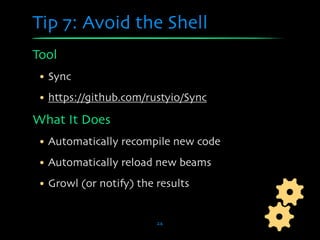
Tip 7: Avoid the Shell
Tool
 • Sync
 • https://github.com/rustyio/Sync

What It Does
 • Automatically recompile new code
 • Automatically reload new beams
 • Growl (or notify) the results


                         24
Tip 7: Avoid the Shell
%% Pull http://github.com/rustyio/Sync into
%% ERL_LIBS path and compile.

%% Then, start sync within your project.
%% Make sure erl is started with `-mode interactive`,
%% not `-mode embedded`.

sync:go().

Starting Sync (Automatic Code Compiler / Reloader)
Scanning source files...
ok

=INFO REPORT==== 10-Oct-2011::10:37:58 ===
/Users/rusty/Documents/Code/MyProject/src/
myproject_sup.erl:0: Recompiled.

=INFO REPORT==== 10-Oct-2011::10:37:58 ===
myproject_sup: Reloaded! (Beam changed.)
                                25
Reloading myproject_sup ... ok.
Tip 7: Avoid the Shell
Growl Notifications

         Success!


        Warning!


          Error!


                     26
Edit•Build•Test


       27
Tip 8: Unit Testing + Coverage
Tool
 • Rebar + EUnit + Cover

Goals
 • Run tests for all dependencies
 • Run tests for a specific dependency
 • Run tests for a specific module
 • Include a coverage report


                        28
Tip 8: Unit Testing + Coverage
./rebar eunit app=mochiweb suite=mochijson2

==> mochiweb (eunit)
======================== EUnit
========================
module 'mochijson2'
 mochijson2: decode_test...[0.001 s] ok
  ...snip...
 [done in 0.044 s]
===================================
====================
 All 14 tests passed.
Cover analysis: /Users/rusty/Documents/Code/
MyProject/deps/mochiweb/.eunit/index.html
==> webmachine (eunit)
==> rel (eunit)
==> myproject (eunit)       29
==> MyProject (eunit)
Tip 8: Unit Testing + Coverage


              30
In Closing...


      31
Think about your workflow.

   Fix the rough edges.

     You’re worth it.
Thanks!


Rusty Klophaus • @rustyio
   Basho Technologies

Winning the Erlang Edit•Build•Test Cycle

  • 1.
    Winning the Edit•Build•Test Cycle Rusty Klophaus • @rustyio Basho Technologies
  • 2.
    The Edit•Build•Test Cycle determines how quickly you can see the results of new code in your application.
  • 3.
    Developer Productivity How much progress can a developer make on a problem in some interval of time. Intelligence X Knowledge / Experience X Typing Speed X Edit•Build•Test Cycle = Developer Productivity (Simplified) 3
  • 4.
    Developer Productivity How much progress can a developer make on a problem in some interval of time. Intelligence X Knowledge / Experience X Typing Speed X Edit•Build•Test Cycle = Developer Productivity (Simplified) 4
  • 5.
    Developer Productivity How much progress can a developer make on a problem in some interval of time. Intelligence X Knowledge / Experience X Typing Speed X Easy to improve Edit•Build•Test Cycle = Developer Productivity (Simplified) 4
  • 6.
    Developer Productivity How much progress can a developer make on a problem in some interval of time. Intelligence X Knowledge / Experience X Typing Speed X Easy to improve Edit•Build•Test Cycle Transferrable to other projects = Developer Productivity (Simplified) 4
  • 7.
    Developer Productivity How much progress can a developer make on a problem in some interval of time. Intelligence X Knowledge / Experience X Typing Speed X Easy to improve Edit•Build•Test Cycle Transferrable to other projects = Developer Productivity Transferrable to other people (Simplified) 4
  • 8.
    How do we“win” it? 5
  • 9.
    How do wewin it? SPEED POWER CONSISTENCY 6
  • 10.
    How do wewin it? Waste Less Time SPEED POWER CONSISTENCY 6
  • 11.
    How do wewin it? Waste Less Time SPEED Shorter Iterations POWER CONSISTENCY 6
  • 12.
    How do wewin it? Waste Less Time SPEED Shorter Iterations Maintain Focus POWER CONSISTENCY 6
  • 13.
    How do wewin it? Waste Less Time SPEED Shorter Iterations Maintain Focus POWER Find Points of Leverage CONSISTENCY 6
  • 14.
    How do wewin it? Waste Less Time SPEED Shorter Iterations Maintain Focus POWER Find Points of Leverage Avoid Re-invention CONSISTENCY 6
  • 15.
    How do wewin it? Waste Less Time SPEED Shorter Iterations Maintain Focus POWER Find Points of Leverage Avoid Re-invention CONSISTENCY Easy Onboarding 6
  • 16.
  • 17.
    Tip 1: Navigatinga Project Tool • PeepOpen (Mac only, not free) • Works with BBEdit, Coda, Emacs, MacVim, TextMate, XCode • http://peepcode.com/products/peepopen What It Does • Find and open files quickly 8
  • 18.
    Tip 1: Navigatinga Project 9
  • 19.
    Tip 2: ErlangDocumentation Tool • ErlDocs.com What It Does • Searchable Erlang documentation • Offline version 10
  • 20.
    Tip 2: ErlangDocumentation 11
  • 21.
  • 22.
    Tip 3: ManageErlang Versions Tool • Kerl - Erlang Version Manager • https://github.com/spawngrid/kerl What It Does • Manage multiple Erlang installations • rbenv / rvm / nvm for Erlang 13
  • 23.
    Tip 3: ManageErlang Versions # Install kerl utility... curl -O https://raw.github.com/spawngrid/ kerl/master/kerl chmod 755 kerl sudo mv kerl /usr/local/bin # Build and install the R14B03 release... kerl build R14B03 r14b03 kerl install r14b03 /opt/erlang/r14b03 # Activate a release . /opt/erlang/r14b03/activate 14
  • 24.
    Tip 4: SimplifyYour Makefile Tool • Rebar - Simple-yet-sophisticated build tool • https://github.com/basho/rebar What It Does • Simplify our Makefile • Will build *anything* if you follow OTP conventions • Fetch project dependencies • And more... 15
  • 25.
    Tip 4: SimplifyYour Makefile # Rebar simplifies your Makefile. # (NOTE: Include rebar in your repo.) all: deps compile compile: ./rebar get-deps compile clean: ./rebar clean rel: ./rebar generate 16
  • 26.
    Dependencies %% FILE: rebar.config {sub_dirs,["rel", "deps/myproject"]}. {deps, [ {webmachine, "1.9.0", { git, "git://github.com/basho/webmachine", {tag, "1.9.0"} }} ]}. 17
  • 27.
    Tip 4: SimplifyYour Makefile $ make ./rebar get-deps compile ==> rel (get-deps) ==> myproject (get-deps) ==> MyProject (get-deps) Pulling webmachine from {git,"git://github.com/basho/webmachine", {tag,"1.9.0"}} Cloning into webmachine... ==> webmachine (get-deps) Pulling mochiweb from {git,"git://github.com/mochi/mochiweb",{tag,"1.5.1"}} Cloning into mochiweb... ==> mochiweb (get-deps) ==> mochiweb (compile) Compiled src/mochiweb_sup.erl ...snip... ==> webmachine (compile) Compiled src/webmachine_util.erl ...snip... ==> rel (compile) ==> MyProject (compile) Compiled src/myproject_app.erl Compiled src/myproject_sup.erl
  • 28.
    Tip 5: Stayin the Zone 19
  • 29.
    Tip 5: Stayin the Zone Doesn’t realize his code finished compiling... 19
  • 30.
    Tip 5: Stayin the Zone Doesn’t realize his code finished compiling... 20 minutes ago. 19
  • 31.
    Tip 5: Stayin the Zone # Get alerted when `make` is finished. # Drop this in your .bashrc function make { /usr/bin/make "$@" say "Finished make $1" } 20
  • 32.
    Tip 5: Stayin the Zone # Get alerted when `make` is finished. # Drop this in your .bashrc function make { START=$SECONDS /usr/bin/make "$@" ELAPSED=`echo $SECONDS - $START | bc` growlnotify -n "make" "Finished make $1!" -m "Took $ELAPSED seconds." } 21
  • 33.
    Tip 6: AvoidVM Restarts Tool • Mochiweb Reloader What It Does • Automatically reload new beams 22
  • 34.
    Tip 6: AvoidVM Restarts $ erl -pa deps/*/ebin Eshell V5.8.4 (abort with ^G) 1> % Start the reloader. 1> reloader:start(). 2> % Ensure mymodule is loaded 2> code:ensure_loaded(mymodule). 3> % Edit and compile mymodule.erl 3> % and Mochiweb reloader will reload it. Reloading myproject_sup ... ok. 23
  • 35.
    Tip 7: Avoidthe Shell Tool • Sync • https://github.com/rustyio/Sync What It Does • Automatically recompile new code • Automatically reload new beams • Growl (or notify) the results 24
  • 36.
    Tip 7: Avoidthe Shell %% Pull http://github.com/rustyio/Sync into %% ERL_LIBS path and compile. %% Then, start sync within your project. %% Make sure erl is started with `-mode interactive`, %% not `-mode embedded`. sync:go(). Starting Sync (Automatic Code Compiler / Reloader) Scanning source files... ok =INFO REPORT==== 10-Oct-2011::10:37:58 === /Users/rusty/Documents/Code/MyProject/src/ myproject_sup.erl:0: Recompiled. =INFO REPORT==== 10-Oct-2011::10:37:58 === myproject_sup: Reloaded! (Beam changed.) 25 Reloading myproject_sup ... ok.
  • 37.
    Tip 7: Avoidthe Shell Growl Notifications Success! Warning! Error! 26
  • 38.
  • 39.
    Tip 8: UnitTesting + Coverage Tool • Rebar + EUnit + Cover Goals • Run tests for all dependencies • Run tests for a specific dependency • Run tests for a specific module • Include a coverage report 28
  • 40.
    Tip 8: UnitTesting + Coverage ./rebar eunit app=mochiweb suite=mochijson2 ==> mochiweb (eunit) ======================== EUnit ======================== module 'mochijson2' mochijson2: decode_test...[0.001 s] ok ...snip... [done in 0.044 s] =================================== ==================== All 14 tests passed. Cover analysis: /Users/rusty/Documents/Code/ MyProject/deps/mochiweb/.eunit/index.html ==> webmachine (eunit) ==> rel (eunit) ==> myproject (eunit) 29 ==> MyProject (eunit)
  • 41.
    Tip 8: UnitTesting + Coverage 30
  • 42.
  • 43.
    Think about yourworkflow. Fix the rough edges. You’re worth it.
  • 44.
    Thanks! Rusty Klophaus •@rustyio Basho Technologies

Editor's Notes

  • #2 \n
  • #3 \n
  • #4 Of course, this is a simplified few, doesn’t mention anything about level of focus, or whether the developer is working on the *right* things. \n\nOr, maybe we can assume that that’s covered under “Intelligence” and “Knowledge”\n
  • #5 \n
  • #6 \n
  • #7 \n
  • #8 \n
  • #9 Waste Less Time - Don’t spend as long staring at screen, twiddling thumbs.\nShorter Iterations - Get feedback more often, make sure we are on the right track\nMaintain Focus - A byproduct of thumb twiddling is that you get distracted and start reading blogs.\n\nLeverage Points - Automation. Find ways to do a lot with a little. This leads to a feeling of traction, excitement, longer focus, and more productivity.\n\nConsistency - Repeatable process is faster than starting from scratch. Remove the temptation to fiddle with tools each time we start a new project.\nEasy Onboarding - Others can join in without having to relearn the system.\n
  • #10 Waste Less Time - Don’t spend as long staring at screen, twiddling thumbs.\nShorter Iterations - Get feedback more often, make sure we are on the right track\nMaintain Focus - A byproduct of thumb twiddling is that you get distracted and start reading blogs.\n\nLeverage Points - Automation. Find ways to do a lot with a little. This leads to a feeling of traction, excitement, longer focus, and more productivity.\n\nConsistency - Repeatable process is faster than starting from scratch. Remove the temptation to fiddle with tools each time we start a new project.\nEasy Onboarding - Others can join in without having to relearn the system.\n
  • #11 Waste Less Time - Don’t spend as long staring at screen, twiddling thumbs.\nShorter Iterations - Get feedback more often, make sure we are on the right track\nMaintain Focus - A byproduct of thumb twiddling is that you get distracted and start reading blogs.\n\nLeverage Points - Automation. Find ways to do a lot with a little. This leads to a feeling of traction, excitement, longer focus, and more productivity.\n\nConsistency - Repeatable process is faster than starting from scratch. Remove the temptation to fiddle with tools each time we start a new project.\nEasy Onboarding - Others can join in without having to relearn the system.\n
  • #12 Waste Less Time - Don’t spend as long staring at screen, twiddling thumbs.\nShorter Iterations - Get feedback more often, make sure we are on the right track\nMaintain Focus - A byproduct of thumb twiddling is that you get distracted and start reading blogs.\n\nLeverage Points - Automation. Find ways to do a lot with a little. This leads to a feeling of traction, excitement, longer focus, and more productivity.\n\nConsistency - Repeatable process is faster than starting from scratch. Remove the temptation to fiddle with tools each time we start a new project.\nEasy Onboarding - Others can join in without having to relearn the system.\n
  • #13 Waste Less Time - Don’t spend as long staring at screen, twiddling thumbs.\nShorter Iterations - Get feedback more often, make sure we are on the right track\nMaintain Focus - A byproduct of thumb twiddling is that you get distracted and start reading blogs.\n\nLeverage Points - Automation. Find ways to do a lot with a little. This leads to a feeling of traction, excitement, longer focus, and more productivity.\n\nConsistency - Repeatable process is faster than starting from scratch. Remove the temptation to fiddle with tools each time we start a new project.\nEasy Onboarding - Others can join in without having to relearn the system.\n
  • #14 Waste Less Time - Don’t spend as long staring at screen, twiddling thumbs.\nShorter Iterations - Get feedback more often, make sure we are on the right track\nMaintain Focus - A byproduct of thumb twiddling is that you get distracted and start reading blogs.\n\nLeverage Points - Automation. Find ways to do a lot with a little. This leads to a feeling of traction, excitement, longer focus, and more productivity.\n\nConsistency - Repeatable process is faster than starting from scratch. Remove the temptation to fiddle with tools each time we start a new project.\nEasy Onboarding - Others can join in without having to relearn the system.\n
  • #15 \n
  • #16 \n
  • #17 \n
  • #18 \n
  • #19 \n
  • #20 \n
  • #21 \n
  • #22 \n
  • #23 \n
  • #24 \n
  • #25 \n
  • #26 \n
  • #27 \n
  • #28 \n
  • #29 \n
  • #30 \n
  • #31 \n
  • #32 \n
  • #33 \n
  • #34 \n
  • #35 \n
  • #36 \n
  • #37 \n
  • #38 \n
  • #39 \n
  • #40 \n
  • #41 \n
  • #42 \n