Windows Server 2019 の
Hyper-Converged Infrastructure (HCI)
MICROSOFT MVP CLOUD AND DATACENTER MANAGEMENT
松本 裕志
2018年10月27日
Windows Server Community Meetup #02
自己紹介
• 松本 裕志 (Matsumoto, Hiroshi)
• ハードウェアメーカ 勤務
– Hyper-V、S2D の設計構築や Azure Stack のインストールなど。
• System Center User Group Japan メンバー
• ブログ:https://mhiroblog.wordpress.com/
• Facebook:https://www.facebook.com/people/Hiroshi-Matsumoto/100012360255052
Agenda
• Windows Server 2019
• Hyper Converged Infrastructure
• What’s New
• まとめ
Windows Server 2019
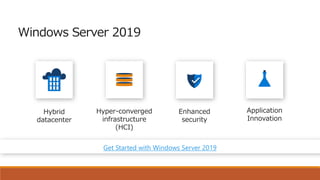
Windows Server 2019
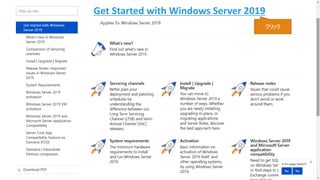
Get Started with Windows Server 2019
クリック
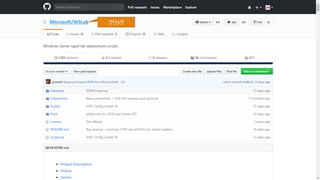
Microsoft/WSLab クリック
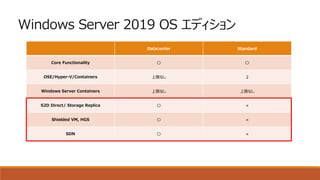
Windows Server 2019 OS エディション
Datacenter Standard
Core Functionality 〇 〇
OSE/Hyper-V/Containers 上限なし 2
Windows Server Containers 上限なし 上限なし
S2D Direct/ Storage Replica 〇 ×
Shielded VM, HGS 〇 ×
SDN 〇 ×
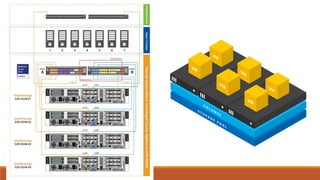
Hyper Converged Infrastructure
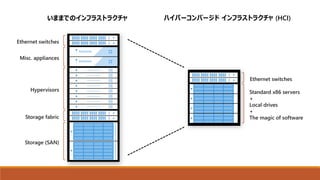
いままでのインフラストラクチャ ハイパーコンバージド インフラストラクチャ (HCI)
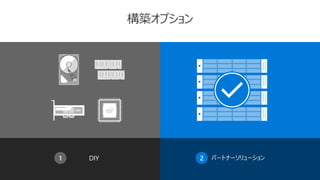
構築オプション
DIY1 2 パートナーソリューション
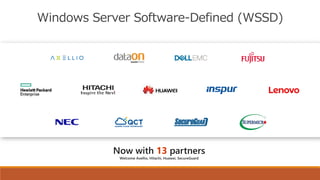
Windows Server Software-Defined (WSSD)
WSSD の GA 時期
WSSD General AvailabilityEcosystem Readiness Window
September 24-28, 2018 1月中旬, 2019
Microsoft Ignite 2018 WSSD Launch Event
Mid-October, 2018
Windows Server GA
Important Note: , ハードウェアが WSSD 認定されるまで、 Storage Spaces Direct 含む Software Defined の機能は有効化できません。
“Microsoft recommends deploying SDDC features on WSSD certified hardware […] available in the coming months.”
WSSD Launch Event の後、Windows Update にてリリースする予定です。
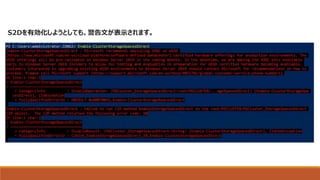
S2Dを有効化しようとしても、警告文が表示されます。
So many great stories of customer success
Read them at Microsoft.com/WSSD
What’s New
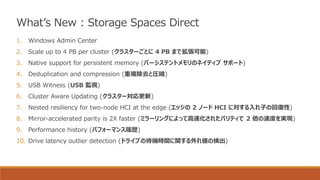
1. Windows Admin Center
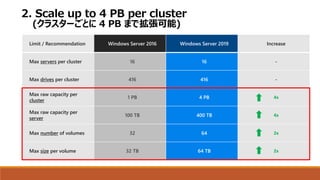
2. Scale up to 4 PB per cluster (クラスターごとに 4 PB まで拡張可能)
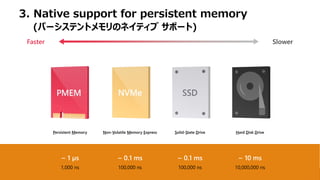
3. Native support for persistent memory (パーシステントメモリのネイティブ サポート)
4. Deduplication and compression (重複除去と圧縮)
5. USB Witness (USB 監視)
6. Cluster Aware Updating (クラスター対応更新)
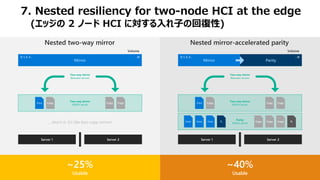
7. Nested resiliency for two-node HCI at the edge (エッジの 2 ノード HCI に対する入れ子の回復性)
8. Mirror-accelerated parity is 2X faster (ミラーリングによって高速化されたパリティで 2 倍の速度を実現)
9. Performance history (パフォーマンス履歴)
10. Drive latency outlier detection (ドライブの待機時間に関する外れ値の検出)
What’s New : Storage Spaces Direct
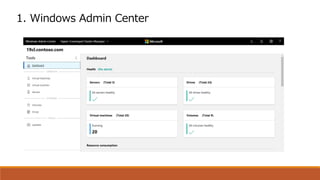
1. Windows Admin Center
Limit / Recommendation Windows Server 2016 Windows Server 2019 Increase
Max servers per cluster 16 16 -
Max drives per cluster 416 416 -
Max raw capacity per
cluster
1 PB 4 PB 4x
Max raw capacity per
server
100 TB 400 TB 4x
Max number of volumes 32 64 2x
Max size per volume 32 TB 64 TB 2x
2. Scale up to 4 PB per cluster
(クラスターごとに 4 PB まで拡張可能)
~ 10 ms
10,000,000 ns
~ 1 µs
1,000 ns
~ 0.1 ms
100,000 ns
~ 0.1 ms
100,000 ns
Faster Slower
Persistent Memory Non-Volatile Memory Express Solid-State Drive Hard Disk Drive
3. Native support for persistent memory
(パーシステントメモリのネイティブ サポート)
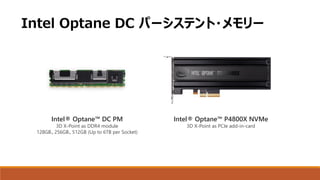
Intel® Optane™ DC PM
3D X-Point as DDR4 module
128GB、256GB、512GB (Up to 6TB per Socket)
Intel® Optane™ P4800X NVMe
3D X-Point as PCIe add-in-card
Intel Optane DC パーシステント・メモリー
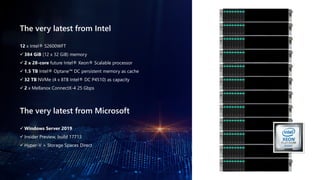
The very latest from Intel
12 x Intel® S2600WFT
✓ 384 GiB (12 x 32 GiB) memory
✓ 2 x 28-core future Intel® Xeon® Scalable processor
✓ 1.5 TB Intel® Optane™ DC persistent memory as cache
✓ 32 TB NVMe (4 x 8TB Intel® DC P4510) as capacity
✓ 2 x Mellanox ConnectX-4 25 Gbps
The very latest from Microsoft
✓ Windows Server 2019
✓ Insider Preview, build 17713
✓ Hyper-V + Storage Spaces Direct
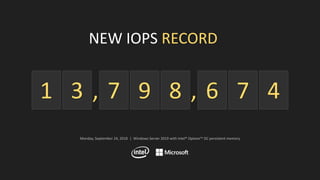
NEW IOPS RECORD
3 7 9 8 6 7 41 ,,
Monday, September 24, 2018 | Windows Server 2019 with Intel® Optane™ DC persistent memory
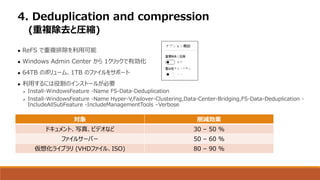
 ReFS で重複排除を利用可能
 Windows Admin Center から 1クリックで有効化
 64TB のボリューム、1TB のファイルをサポート
 利用するには役割のインストールが必要
➢ Install-WindowsFeature -Name FS-Data-Deduplication
➢ Install-WindowsFeature -Name Hyper-V,Failover-Clustering,Data-Center-Bridging,FS-Data-Deduplication -
IncludeAllSubFeature -IncludeManagementTools –Verbose
4. Deduplication and compression
(重複除去と圧縮)
対象 削減効果
ドキュメント、写真、ビデオなど 30 – 50 %
ファイルサーバー 50 – 60 %
仮想化ライブラリ (VHDファイル、ISO) 80 – 90 %
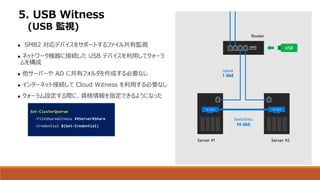
5. USB Witness
(USB 監視)
 SMB2 対応デバイスをサポートするファイル共有監視
 ネットワーク機器に接続した USB デバイスを利用してクォーラ
ムを構成
 他サーバーや AD に共有フォルダを作成する必要なし
 インターネット接続して Cloud Witness を利用する必要なし
 クォーラム設定する際に、資格情報を指定できるようになった
Set-ClusterQuorum
-FileShareWitness ¥¥Server¥Share
-Credential $(Get-Credential)
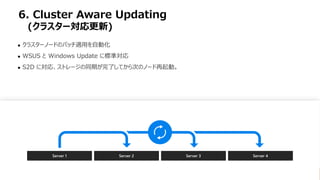
6. Cluster Aware Updating
(クラスター対応更新)
 クラスターノードのパッチ適用を自動化
 WSUS と Windows Update に標準対応
 S2D に対応、ストレージの同期が完了してから次のノード再起動。
Server 1 Server 2 Server 3 Server 4
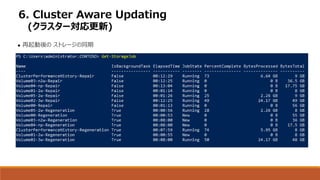
6. Cluster Aware Updating
(クラスター対応更新)
 再起動後の ストレージの同期
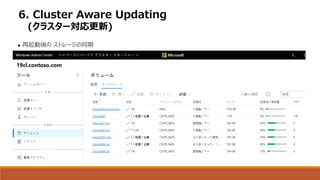
6. Cluster Aware Updating
(クラスター対応更新)
 再起動後の ストレージの同期
ParityMirror
0, 1, 2, 3… ...N
Data Data Data P1
Server 1 Server 2
Copy Copy Copy P1
Data Copy Copy Copy
Parity
Within server
Two-way mirror
Within server
Two-way mirror
Between servers
Volume
Mirror
0, 1, 2, 3… ...N
Server 1 Server 2
Data Copy Copy Copy
Two-way mirror
Within server
Two-way mirror
Between servers
Volume
…that’s it, it’s like four-copy mirror!
Nested two-way mirror Nested mirror-accelerated parity
~25%
Usable
~40%
Usable
7. Nested resiliency for two-node HCI at the edge
(エッジの 2 ノード HCI に対する入れ子の回復性)
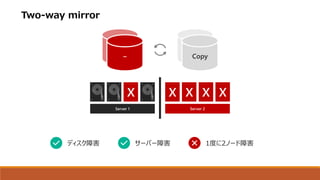
Two-way mirror
– Copy
Server 1 Server 2
ディスク障害 サーバー障害 1度に2ノード障害
Server 1 Server 2
0
1
0
1
0
1
0Data
0
1
0
1
0
1
0
0
1
0
1
0
1
0Copy
0
1
0
1
0
1
0
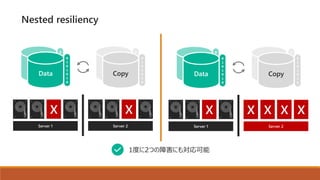
Nested resiliency
1度に2つの障害にも対応可能
Server 1 Server 2
0
1
0
1
0
1
0Data
0
1
0
1
0
1
0
0
1
0
1
0
1
0Copy
0
1
0
1
0
1
0
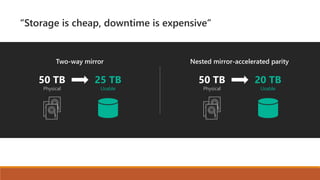
“Storage is cheap, downtime is expensive”
Two-way mirror Nested mirror-accelerated parity
50 TB
Physical
25 TB
Usable
50 TB
Physical
20 TB
Usable
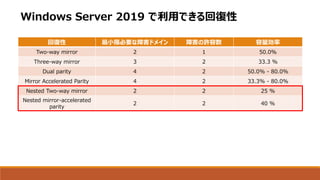
Windows Server 2019 で利用できる回復性
回復性 最小限必要な障害ドメイン 障害の許容数 容量効率
Two-way mirror 2 1 50.0%
Three-way mirror 3 2 33.3 %
Dual parity 4 2 50.0% - 80.0%
Mirror Accelerated Parity 4 2 33.3% - 80.0%
Nested Two-way mirror 2 2 25 %
Nested mirror-accelerated
parity
2 2 40 %
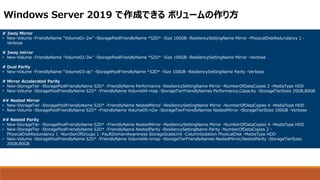
# 2way Mirror
• New-Volume -FriendlyName "Volume01-2w" -StoragePoolFriendlyName *S2D* -Size 100GB -ResiliencySettingName Mirror -PhysicalDiskRedundancy 1 -
Verbose
# 3way mirror
• New-Volume -FriendlyName "Volume02-3w" -StoragePoolFriendlyName *S2D* -Size 100GB -ResiliencySettingName Mirror -Verbose
# Dual Parity
• New-Volume -FriendlyName "Volume03-dp" -StoragePoolFriendlyName *S2D* -Size 100GB -ResiliencySettingName Parity -Verbose
# Mirror Accelerated Parity
• New-StorageTier -StoragePoolFriendlyName S2D* -FriendlyName Performance -ResiliencySettingName Mirror -NumberOfDataCopies 2 -MediaType HDD
• New-Volume -StoragePoolFriendlyName S2D* -FriendlyName Volume04-map -StorageTierFriendlyNames Performance,Capacity -StorageTierSizes 20GB,80GB
## Nested Mirror
• New-StorageTier -StoragePoolFriendlyName S2D* -FriendlyName NestedMirror -ResiliencySettingName Mirror -NumberOfDataCopies 4 -MediaType HDD
• New-Volume -StoragePoolFriendlyName S2D* -FriendlyName Volume05-n2w -StorageTierFriendlyNames NestedMirror -StorageTierSizes 100GB -Verbose
## Nested Parity
• New-StorageTier -StoragePoolFriendlyName S2D* -FriendlyName NestedMirror -ResiliencySettingName Mirror -NumberOfDataCopies 4 -MediaType HDD
• New-StorageTier -StoragePoolFriendlyName S2D* -FriendlyName NestedParity -ResiliencySettingName Parity -NumberOfDataCopies 2 -
PhysicalDiskRedundancy 1 -NumberOfGroups 1 -FaultDomainAwareness StorageScaleUnit -ColumnIsolation PhysicalDisk -MediaType HDD
• New-Volume -StoragePoolFriendlyName S2D* -FriendlyName Volume06-nmap -StorageTierFriendlyNames NestedMirror,NestedParity -StorageTierSizes
20GB,80GB
Windows Server 2019 で作成できる ボリュームの作り方
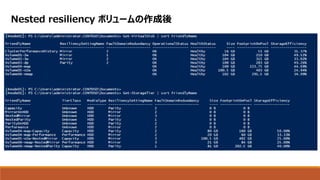
Nested resiliency ボリュームの作成後
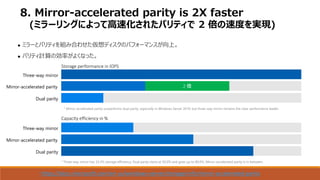
8. Mirror-accelerated parity is 2X faster
(ミラーリングによって高速化されたパリティで 2 倍の速度を実現)
 ミラーとパリティを組み合わせた仮想ディスクのパフォーマンスが向上。
 パリティ計算の効率がよくなった。
https://docs.microsoft.com/en-us/windows-server/storage/refs/mirror-accelerated-parity
Capacity efficiency in %
Storage performance in IOPS
* Mirror-accelerated parity outperforms dual parity, especially in Windows Server 2019, but three-way mirror remains the clear performance leader.
* Three-way mirror has 33.3% storage efficiency. Dual parity starts at 50.0% and goes up to 80.0%. Mirror-accelerated parity is in between.
Three-way mirror
Dual parity
Mirror-accelerated parity
Three-way mirror
Dual parity
Mirror-accelerated parity
2 倍
9. Performance history
(パフォーマンス履歴)
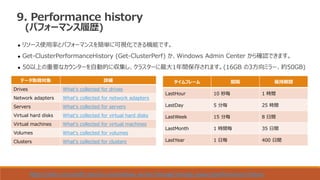
 リソース使用率とパフォーマンスを簡単に可視化できる機能です。
 Get-ClusterPerformanceHistory (Get-ClusterPerf) か、Windows Admin Center から確認できます。
 50以上の重要なカウンターを自動的に収集し、クラスターに最大1年間保存されます。(16GB の3方向ミラー、約50GB)
データ取得対象 詳細
Drives What's collected for drives
Network adapters What's collected for network adapters
Servers What's collected for servers
Virtual hard disks What's collected for virtual hard disks
Virtual machines What's collected for virtual machines
Volumes What's collected for volumes
Clusters What's collected for clusters
タイムフレーム 間隔 保持期間
LastHour 10 秒毎 1 時間
LastDay 5 分毎 25 時間
LastWeek 15 分毎 8 日間
LastMonth 1 時間毎 35 日間
LastYear 1 日毎 400 日間
https://docs.microsoft.com/en-us/windows-server/storage/storage-spaces/performance-history
9. Performance history
(パフォーマンス履歴)
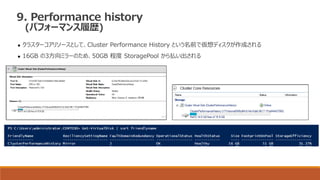
 クラスターコアリソースとして、Cluster Performance History という名前で仮想ディスクが作成される
 16GB の3方向ミラーのため、50GB 程度 StoragePool から払い出される
9. Performance history
(パフォーマンス履歴)
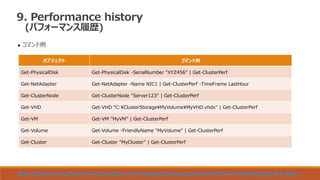
 コマンド例
オブジェクト コマンド例
Get-PhysicalDisk Get-PhysicalDisk -SerialNumber "XYZ456" | Get-ClusterPerf
Get-NetAdapter Get-NetAdapter -Name NIC1 | Get-ClusterPerf -TimeFrame LastHour
Get-ClusterNode Get-ClusterNode "Server123" | Get-ClusterPerf
Get-VHD Get-VHD "C:¥ClusterStorage¥MyVolume¥MyVHD.vhdx" | Get-ClusterPerf
Get-VM Get-VM "MyVM" | Get-ClusterPerf
Get-Volume Get-Volume -FriendlyName "MyVolume" | Get-ClusterPerf
Get-Cluster Get-Cluster "MyCluster" | Get-ClusterPerf
https://docs.microsoft.com/en-us/windows-server/storage/storage-spaces/performance-history#specify-the-object
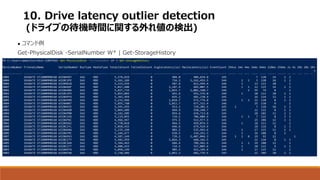
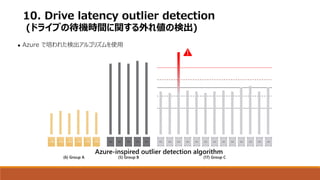
10. Drive latency outlier detection
(ドライブの待機時間に関する外れ値の検出)
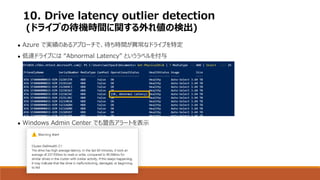
 Azure で実績のあるアプローチで、待ち時間が異常なドライブを特定
 低速ドライブには “Abnormal Latency” というラベルを付与
 Windows Admin Center でも警告アラートを表示
10. Drive latency outlier detection
(ドライブの待機時間に関する外れ値の検出)
 コマンド例
Get-PhysicalDisk -SerialNumber W* | Get-StorageHistory
Azure-inspired outlier detection algorithm
(6) Group A (5) Group B (17) Group C
Latency
10. Drive latency outlier detection
(ドライブの待機時間に関する外れ値の検出)
 Azure で培われた検出アルゴリズムを使用
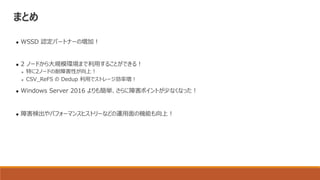
まとめ
 WSSD 認定パートナーの増加!
 2 ノードから大規模環境まで利用することができる!
➢ 特に2ノードの耐障害性が向上!
➢ CSV_ReFS の Dedup 利用でストレージ効率増!
 Windows Server 2016 よりも簡単、さらに障害ポイントが少なくなった!
 障害検出やパフォーマンスヒストリーなどの運用面の機能も向上!
Reference
• Be an IT hero with Storage Spaces Direct in Windows Server 2019 - BRK2231
– https://myignite.techcommunity.microsoft.com/sessions/65880#ignite-html-anchor
• Get Started with Windows Server 2019
– https://docs.microsoft.com/en-us/windows-server/get-started-19/get-started-19
• Hyper-converged infrastructure
– https://docs.microsoft.com/en-us/windows-server/get-started-19/whats-new-19#hyper-
converged-infrastructure
• Github:WSLab/Scenarios/S2D Volumes deep dive/
– https://github.com/Microsoft/WSLab/tree/master/Scenarios/S2D%20Volumes%20deep%20dive

Windows Server 2019 の Hyper-Converged Infrastructure (HCI)

  • 1.
    Windows Server 2019の Hyper-Converged Infrastructure (HCI) MICROSOFT MVP CLOUD AND DATACENTER MANAGEMENT 松本 裕志 2018年10月27日 Windows Server Community Meetup #02
  • 2.
    自己紹介 • 松本 裕志(Matsumoto, Hiroshi) • ハードウェアメーカ 勤務 – Hyper-V、S2D の設計構築や Azure Stack のインストールなど。 • System Center User Group Japan メンバー • ブログ:https://mhiroblog.wordpress.com/ • Facebook:https://www.facebook.com/people/Hiroshi-Matsumoto/100012360255052
  • 3.
    Agenda • Windows Server2019 • Hyper Converged Infrastructure • What’s New • まとめ
  • 4.
  • 5.
    Windows Server 2019 GetStarted with Windows Server 2019
  • 6.
    Get Started withWindows Server 2019 クリック
  • 7.
  • 8.
    Windows Server 2019OS エディション Datacenter Standard Core Functionality 〇 〇 OSE/Hyper-V/Containers 上限なし 2 Windows Server Containers 上限なし 上限なし S2D Direct/ Storage Replica 〇 × Shielded VM, HGS 〇 × SDN 〇 ×
  • 9.
  • 10.
  • 12.
  • 13.
  • 14.
    WSSD の GA時期 WSSD General AvailabilityEcosystem Readiness Window September 24-28, 2018 1月中旬, 2019 Microsoft Ignite 2018 WSSD Launch Event Mid-October, 2018 Windows Server GA Important Note: , ハードウェアが WSSD 認定されるまで、 Storage Spaces Direct 含む Software Defined の機能は有効化できません。 “Microsoft recommends deploying SDDC features on WSSD certified hardware […] available in the coming months.” WSSD Launch Event の後、Windows Update にてリリースする予定です。
  • 15.
  • 16.
    So many greatstories of customer success Read them at Microsoft.com/WSSD
  • 17.
  • 18.
    1. Windows AdminCenter 2. Scale up to 4 PB per cluster (クラスターごとに 4 PB まで拡張可能) 3. Native support for persistent memory (パーシステントメモリのネイティブ サポート) 4. Deduplication and compression (重複除去と圧縮) 5. USB Witness (USB 監視) 6. Cluster Aware Updating (クラスター対応更新) 7. Nested resiliency for two-node HCI at the edge (エッジの 2 ノード HCI に対する入れ子の回復性) 8. Mirror-accelerated parity is 2X faster (ミラーリングによって高速化されたパリティで 2 倍の速度を実現) 9. Performance history (パフォーマンス履歴) 10. Drive latency outlier detection (ドライブの待機時間に関する外れ値の検出) What’s New : Storage Spaces Direct
  • 19.
  • 20.
    Limit / RecommendationWindows Server 2016 Windows Server 2019 Increase Max servers per cluster 16 16 - Max drives per cluster 416 416 - Max raw capacity per cluster 1 PB 4 PB 4x Max raw capacity per server 100 TB 400 TB 4x Max number of volumes 32 64 2x Max size per volume 32 TB 64 TB 2x 2. Scale up to 4 PB per cluster (クラスターごとに 4 PB まで拡張可能)
  • 21.
    ~ 10 ms 10,000,000ns ~ 1 µs 1,000 ns ~ 0.1 ms 100,000 ns ~ 0.1 ms 100,000 ns Faster Slower Persistent Memory Non-Volatile Memory Express Solid-State Drive Hard Disk Drive 3. Native support for persistent memory (パーシステントメモリのネイティブ サポート)
  • 22.
    Intel® Optane™ DCPM 3D X-Point as DDR4 module 128GB、256GB、512GB (Up to 6TB per Socket) Intel® Optane™ P4800X NVMe 3D X-Point as PCIe add-in-card Intel Optane DC パーシステント・メモリー
  • 23.
    The very latestfrom Intel 12 x Intel® S2600WFT ✓ 384 GiB (12 x 32 GiB) memory ✓ 2 x 28-core future Intel® Xeon® Scalable processor ✓ 1.5 TB Intel® Optane™ DC persistent memory as cache ✓ 32 TB NVMe (4 x 8TB Intel® DC P4510) as capacity ✓ 2 x Mellanox ConnectX-4 25 Gbps The very latest from Microsoft ✓ Windows Server 2019 ✓ Insider Preview, build 17713 ✓ Hyper-V + Storage Spaces Direct
  • 24.
    NEW IOPS RECORD 37 9 8 6 7 41 ,, Monday, September 24, 2018 | Windows Server 2019 with Intel® Optane™ DC persistent memory
  • 25.
     ReFS で重複排除を利用可能 Windows Admin Center から 1クリックで有効化  64TB のボリューム、1TB のファイルをサポート  利用するには役割のインストールが必要 ➢ Install-WindowsFeature -Name FS-Data-Deduplication ➢ Install-WindowsFeature -Name Hyper-V,Failover-Clustering,Data-Center-Bridging,FS-Data-Deduplication - IncludeAllSubFeature -IncludeManagementTools –Verbose 4. Deduplication and compression (重複除去と圧縮) 対象 削減効果 ドキュメント、写真、ビデオなど 30 – 50 % ファイルサーバー 50 – 60 % 仮想化ライブラリ (VHDファイル、ISO) 80 – 90 %
  • 26.
    5. USB Witness (USB監視)  SMB2 対応デバイスをサポートするファイル共有監視  ネットワーク機器に接続した USB デバイスを利用してクォーラ ムを構成  他サーバーや AD に共有フォルダを作成する必要なし  インターネット接続して Cloud Witness を利用する必要なし  クォーラム設定する際に、資格情報を指定できるようになった Set-ClusterQuorum -FileShareWitness ¥¥Server¥Share -Credential $(Get-Credential)
  • 27.
    6. Cluster AwareUpdating (クラスター対応更新)  クラスターノードのパッチ適用を自動化  WSUS と Windows Update に標準対応  S2D に対応、ストレージの同期が完了してから次のノード再起動。 Server 1 Server 2 Server 3 Server 4
  • 28.
    6. Cluster AwareUpdating (クラスター対応更新)  再起動後の ストレージの同期
  • 29.
    6. Cluster AwareUpdating (クラスター対応更新)  再起動後の ストレージの同期
  • 30.
    ParityMirror 0, 1, 2,3… ...N Data Data Data P1 Server 1 Server 2 Copy Copy Copy P1 Data Copy Copy Copy Parity Within server Two-way mirror Within server Two-way mirror Between servers Volume Mirror 0, 1, 2, 3… ...N Server 1 Server 2 Data Copy Copy Copy Two-way mirror Within server Two-way mirror Between servers Volume …that’s it, it’s like four-copy mirror! Nested two-way mirror Nested mirror-accelerated parity ~25% Usable ~40% Usable 7. Nested resiliency for two-node HCI at the edge (エッジの 2 ノード HCI に対する入れ子の回復性)
  • 31.
    Two-way mirror – Copy Server1 Server 2 ディスク障害 サーバー障害 1度に2ノード障害
  • 32.
    Server 1 Server2 0 1 0 1 0 1 0Data 0 1 0 1 0 1 0 0 1 0 1 0 1 0Copy 0 1 0 1 0 1 0 Nested resiliency 1度に2つの障害にも対応可能 Server 1 Server 2 0 1 0 1 0 1 0Data 0 1 0 1 0 1 0 0 1 0 1 0 1 0Copy 0 1 0 1 0 1 0
  • 33.
    “Storage is cheap,downtime is expensive” Two-way mirror Nested mirror-accelerated parity 50 TB Physical 25 TB Usable 50 TB Physical 20 TB Usable
  • 34.
    Windows Server 2019で利用できる回復性 回復性 最小限必要な障害ドメイン 障害の許容数 容量効率 Two-way mirror 2 1 50.0% Three-way mirror 3 2 33.3 % Dual parity 4 2 50.0% - 80.0% Mirror Accelerated Parity 4 2 33.3% - 80.0% Nested Two-way mirror 2 2 25 % Nested mirror-accelerated parity 2 2 40 %
  • 35.
    # 2way Mirror •New-Volume -FriendlyName "Volume01-2w" -StoragePoolFriendlyName *S2D* -Size 100GB -ResiliencySettingName Mirror -PhysicalDiskRedundancy 1 - Verbose # 3way mirror • New-Volume -FriendlyName "Volume02-3w" -StoragePoolFriendlyName *S2D* -Size 100GB -ResiliencySettingName Mirror -Verbose # Dual Parity • New-Volume -FriendlyName "Volume03-dp" -StoragePoolFriendlyName *S2D* -Size 100GB -ResiliencySettingName Parity -Verbose # Mirror Accelerated Parity • New-StorageTier -StoragePoolFriendlyName S2D* -FriendlyName Performance -ResiliencySettingName Mirror -NumberOfDataCopies 2 -MediaType HDD • New-Volume -StoragePoolFriendlyName S2D* -FriendlyName Volume04-map -StorageTierFriendlyNames Performance,Capacity -StorageTierSizes 20GB,80GB ## Nested Mirror • New-StorageTier -StoragePoolFriendlyName S2D* -FriendlyName NestedMirror -ResiliencySettingName Mirror -NumberOfDataCopies 4 -MediaType HDD • New-Volume -StoragePoolFriendlyName S2D* -FriendlyName Volume05-n2w -StorageTierFriendlyNames NestedMirror -StorageTierSizes 100GB -Verbose ## Nested Parity • New-StorageTier -StoragePoolFriendlyName S2D* -FriendlyName NestedMirror -ResiliencySettingName Mirror -NumberOfDataCopies 4 -MediaType HDD • New-StorageTier -StoragePoolFriendlyName S2D* -FriendlyName NestedParity -ResiliencySettingName Parity -NumberOfDataCopies 2 - PhysicalDiskRedundancy 1 -NumberOfGroups 1 -FaultDomainAwareness StorageScaleUnit -ColumnIsolation PhysicalDisk -MediaType HDD • New-Volume -StoragePoolFriendlyName S2D* -FriendlyName Volume06-nmap -StorageTierFriendlyNames NestedMirror,NestedParity -StorageTierSizes 20GB,80GB Windows Server 2019 で作成できる ボリュームの作り方
  • 36.
  • 37.
    8. Mirror-accelerated parityis 2X faster (ミラーリングによって高速化されたパリティで 2 倍の速度を実現)  ミラーとパリティを組み合わせた仮想ディスクのパフォーマンスが向上。  パリティ計算の効率がよくなった。 https://docs.microsoft.com/en-us/windows-server/storage/refs/mirror-accelerated-parity Capacity efficiency in % Storage performance in IOPS * Mirror-accelerated parity outperforms dual parity, especially in Windows Server 2019, but three-way mirror remains the clear performance leader. * Three-way mirror has 33.3% storage efficiency. Dual parity starts at 50.0% and goes up to 80.0%. Mirror-accelerated parity is in between. Three-way mirror Dual parity Mirror-accelerated parity Three-way mirror Dual parity Mirror-accelerated parity 2 倍
  • 38.
    9. Performance history (パフォーマンス履歴) リソース使用率とパフォーマンスを簡単に可視化できる機能です。  Get-ClusterPerformanceHistory (Get-ClusterPerf) か、Windows Admin Center から確認できます。  50以上の重要なカウンターを自動的に収集し、クラスターに最大1年間保存されます。(16GB の3方向ミラー、約50GB) データ取得対象 詳細 Drives What's collected for drives Network adapters What's collected for network adapters Servers What's collected for servers Virtual hard disks What's collected for virtual hard disks Virtual machines What's collected for virtual machines Volumes What's collected for volumes Clusters What's collected for clusters タイムフレーム 間隔 保持期間 LastHour 10 秒毎 1 時間 LastDay 5 分毎 25 時間 LastWeek 15 分毎 8 日間 LastMonth 1 時間毎 35 日間 LastYear 1 日毎 400 日間 https://docs.microsoft.com/en-us/windows-server/storage/storage-spaces/performance-history
  • 39.
    9. Performance history (パフォーマンス履歴) クラスターコアリソースとして、Cluster Performance History という名前で仮想ディスクが作成される  16GB の3方向ミラーのため、50GB 程度 StoragePool から払い出される
  • 40.
    9. Performance history (パフォーマンス履歴) コマンド例 オブジェクト コマンド例 Get-PhysicalDisk Get-PhysicalDisk -SerialNumber "XYZ456" | Get-ClusterPerf Get-NetAdapter Get-NetAdapter -Name NIC1 | Get-ClusterPerf -TimeFrame LastHour Get-ClusterNode Get-ClusterNode "Server123" | Get-ClusterPerf Get-VHD Get-VHD "C:¥ClusterStorage¥MyVolume¥MyVHD.vhdx" | Get-ClusterPerf Get-VM Get-VM "MyVM" | Get-ClusterPerf Get-Volume Get-Volume -FriendlyName "MyVolume" | Get-ClusterPerf Get-Cluster Get-Cluster "MyCluster" | Get-ClusterPerf https://docs.microsoft.com/en-us/windows-server/storage/storage-spaces/performance-history#specify-the-object
  • 41.
    10. Drive latencyoutlier detection (ドライブの待機時間に関する外れ値の検出)  Azure で実績のあるアプローチで、待ち時間が異常なドライブを特定  低速ドライブには “Abnormal Latency” というラベルを付与  Windows Admin Center でも警告アラートを表示
  • 42.
    10. Drive latencyoutlier detection (ドライブの待機時間に関する外れ値の検出)  コマンド例 Get-PhysicalDisk -SerialNumber W* | Get-StorageHistory
  • 43.
    Azure-inspired outlier detectionalgorithm (6) Group A (5) Group B (17) Group C Latency 10. Drive latency outlier detection (ドライブの待機時間に関する外れ値の検出)  Azure で培われた検出アルゴリズムを使用
  • 44.
    まとめ  WSSD 認定パートナーの増加! 2 ノードから大規模環境まで利用することができる! ➢ 特に2ノードの耐障害性が向上! ➢ CSV_ReFS の Dedup 利用でストレージ効率増!  Windows Server 2016 よりも簡単、さらに障害ポイントが少なくなった!  障害検出やパフォーマンスヒストリーなどの運用面の機能も向上!
  • 45.
    Reference • Be anIT hero with Storage Spaces Direct in Windows Server 2019 - BRK2231 – https://myignite.techcommunity.microsoft.com/sessions/65880#ignite-html-anchor • Get Started with Windows Server 2019 – https://docs.microsoft.com/en-us/windows-server/get-started-19/get-started-19 • Hyper-converged infrastructure – https://docs.microsoft.com/en-us/windows-server/get-started-19/whats-new-19#hyper- converged-infrastructure • Github:WSLab/Scenarios/S2D Volumes deep dive/ – https://github.com/Microsoft/WSLab/tree/master/Scenarios/S2D%20Volumes%20deep%20dive