Network Controller
• Controlplane
• Highly available using
service fabric
• Public REST interface
• Where to install:
• 3 VMs
Network Virtualization
• Policy engine for SDN
• Virtual Switch Extension
and host agents
• Optimized for 40Gbit or
more
• Where to install:
• Hyper-V hosts
Remote Access (RAS)
• Router between physical
and virtual networks
• L3, VPN and GRE
• BGP with transit routing
• M:N redundancy
• Where to install:
• 2 or more VMs
Software Load Balancer
(SLB)
• Provides L3 & L4 load
balancing and NAT
• Role is the front-end of
load balancer
• High availability and
scale out via BGP and
ECMP
• Where to install:
• 2 or more VMs
Display Name Name Install State
------------ ---- -------------
[X] Network Controller NetworkController Installed
[X] Network Controller Management Tools RSAT-NetworkController Installed
[ ] Remote Access RemoteAccess Available
[ ] Network Virtualization NetworkVirtualization Available
[ ] Software Load Balancer SoftwareLoadBalancer Available
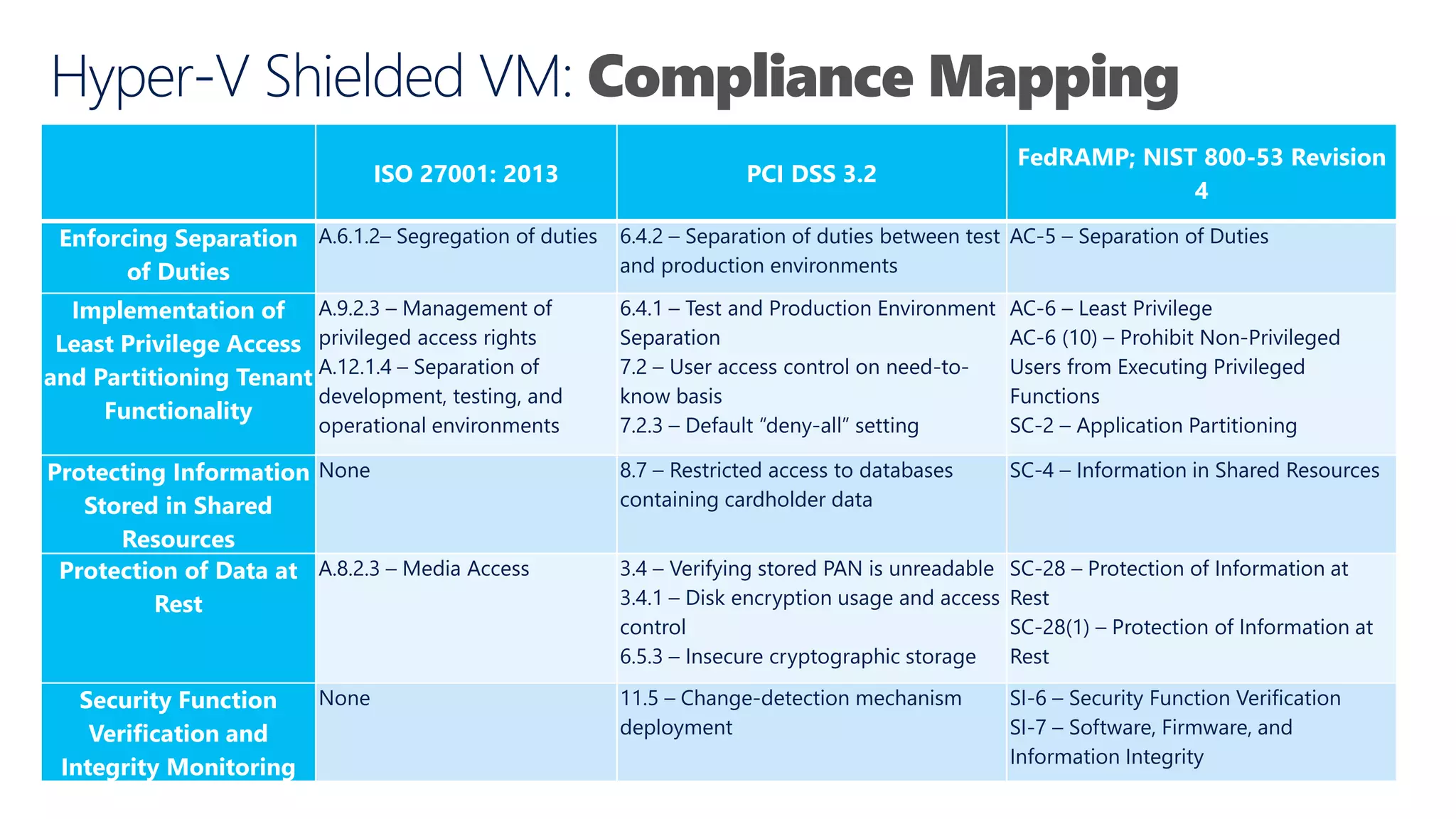
Compliance Mapping
ISO 27001:2013 PCI DSS 3.2
FedRAMP; NIST 800-53 Revision
4
Enforcing Separation
of Duties
A.6.1.2– Segregation of duties 6.4.2 – Separation of duties between test
and production environments
AC-5 – Separation of Duties
Implementation of
Least Privilege Access
and Partitioning Tenant
Functionality
A.9.2.3 – Management of
privileged access rights
A.12.1.4 – Separation of
development, testing, and
operational environments
6.4.1 – Test and Production Environment
Separation
7.2 – User access control on need-to-
know basis
7.2.3 – Default “deny-all” setting
AC-6 – Least Privilege
AC-6 (10) – Prohibit Non-Privileged
Users from Executing Privileged
Functions
SC-2 – Application Partitioning
Protecting Information
Stored in Shared
Resources
None 8.7 – Restricted access to databases
containing cardholder data
SC-4 – Information in Shared Resources
Protection of Data at
Rest
A.8.2.3 – Media Access 3.4 – Verifying stored PAN is unreadable
3.4.1 – Disk encryption usage and access
control
6.5.3 – Insecure cryptographic storage
SC-28 – Protection of Information at
Rest
SC-28(1) – Protection of Information at
Rest
Security Function
Verification and
Integrity Monitoring
None 11.5 – Change-detection mechanism
deployment
SI-6 – Security Function Verification
SI-7 – Software, Firmware, and
Information Integrity
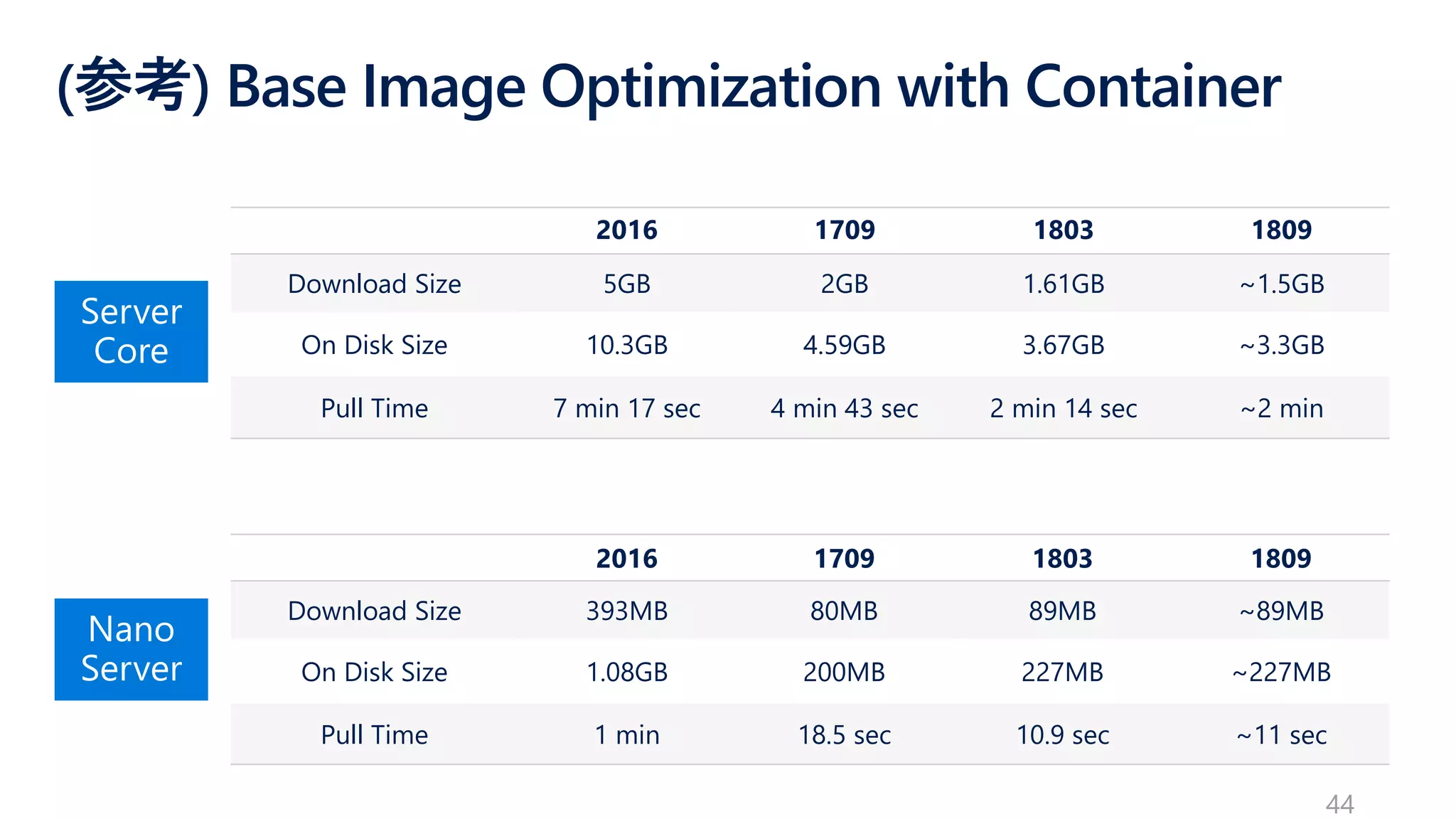
(参考) Base ImageOptimization with Container
2016 1709 1803 1809
Download Size 5GB 2GB 1.61GB ~1.5GB
On Disk Size 10.3GB 4.59GB 3.67GB ~3.3GB
Pull Time 7 min 17 sec 4 min 43 sec 2 min 14 sec ~2 min
2016 1709 1803 1809
Download Size 393MB 80MB 89MB ~89MB
On Disk Size 1.08GB 200MB 227MB ~227MB
Pull Time 1 min 18.5 sec 10.9 sec ~11 sec
44
45.
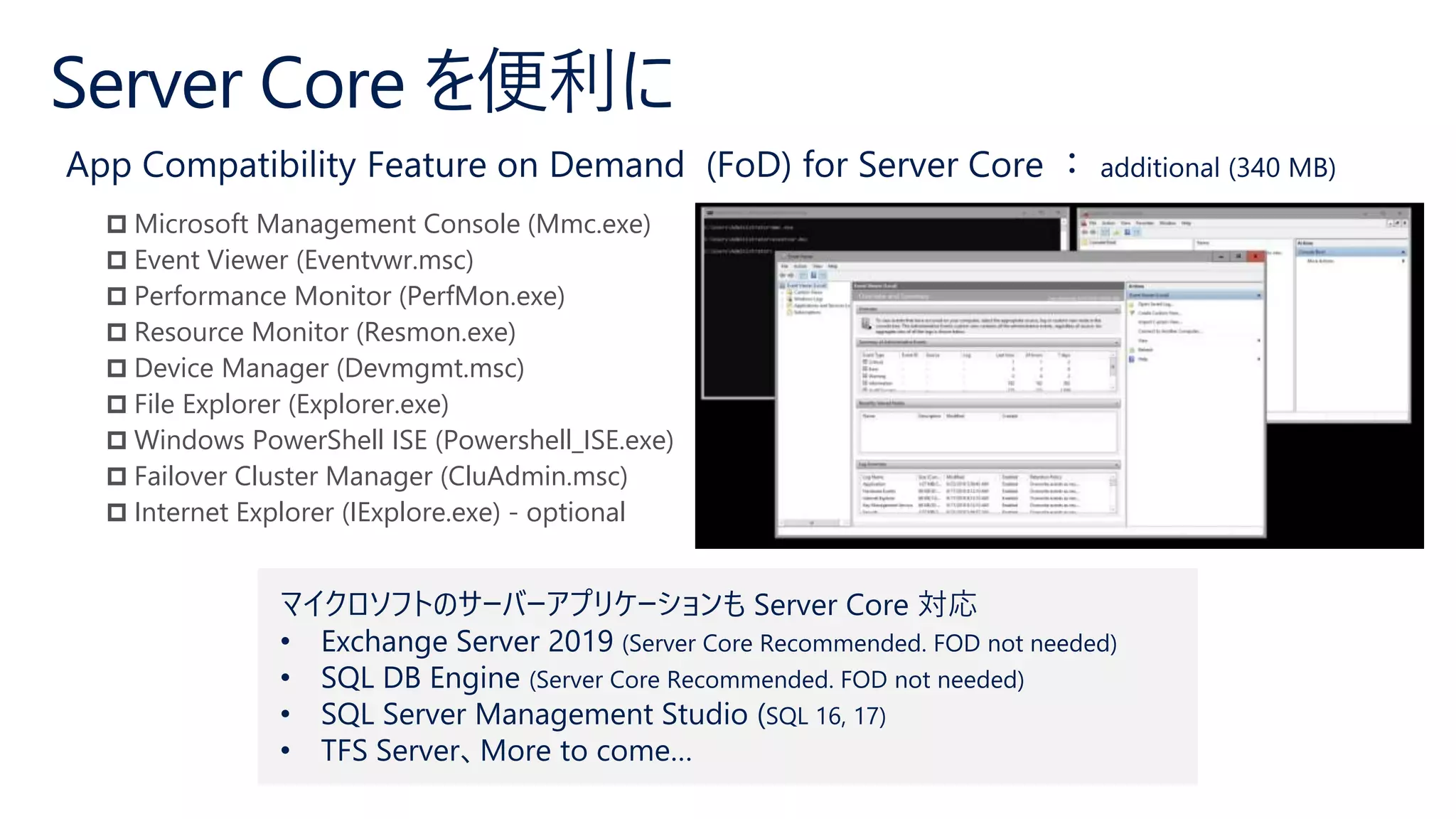
Microsoft ManagementConsole (Mmc.exe)
Event Viewer (Eventvwr.msc)
Performance Monitor (PerfMon.exe)
Resource Monitor (Resmon.exe)
Device Manager (Devmgmt.msc)
File Explorer (Explorer.exe)
Windows PowerShell ISE (Powershell_ISE.exe)
Failover Cluster Manager (CluAdmin.msc)
Internet Explorer (IExplore.exe) - optional
マイクロソフトのサーバーアプリケーションも Server Core 対応
• Exchange Server 2019 (Server Core Recommended. FOD not needed)
• SQL DB Engine (Server Core Recommended. FOD not needed)
• SQL Server Management Studio (SQL 16, 17)
• TFS Server、More to come…



![Network Controller
• Control plane
• Highly available using
service fabric
• Public REST interface
• Where to install:
• 3 VMs
Network Virtualization
• Policy engine for SDN
• Virtual Switch Extension
and host agents
• Optimized for 40Gbit or
more
• Where to install:
• Hyper-V hosts
Remote Access (RAS)
• Router between physical
and virtual networks
• L3, VPN and GRE
• BGP with transit routing
• M:N redundancy
• Where to install:
• 2 or more VMs
Software Load Balancer
(SLB)
• Provides L3 & L4 load
balancing and NAT
• Role is the front-end of
load balancer
• High availability and
scale out via BGP and
ECMP
• Where to install:
• 2 or more VMs
Display Name Name Install State
------------ ---- -------------
[X] Network Controller NetworkController Installed
[X] Network Controller Management Tools RSAT-NetworkController Installed
[ ] Remote Access RemoteAccess Available
[ ] Network Virtualization NetworkVirtualization Available
[ ] Software Load Balancer SoftwareLoadBalancer Available](https://image.slidesharecdn.com/20190629interactws2019public-190702012559/75/Interact-2019-CI01-Windows-Server-2019-29-2048.jpg)



![[Microsoft Tech Summit 2017] マイクロサービスだけじゃない! コンテナー オーケストレーターとしての「Azure Servic...](https://cdn.slidesharecdn.com/ss_thumbnails/20171108techsummitservicefabric-171109075108-thumbnail.jpg?width=640&height=640&fit=bounds)


![[Microsoft Tech Summit 2016] Linux の PaaS がついに登場! Azure App Service on Linux ...](https://cdn.slidesharecdn.com/ss_thumbnails/20161102techsummitapp011dahatake-161116131348-thumbnail.jpg?width=640&height=640&fit=bounds)


![[Japan Tech summit 2017] DAL 004](https://cdn.slidesharecdn.com/ss_thumbnails/techsummit2017pdfdal004-171115033144-thumbnail.jpg?width=640&height=640&fit=bounds)


![[DO05] システムの信頼性を上げるための新しい考え方 SRE ( Site Reliability Engineering ) in Azure, o...](https://cdn.slidesharecdn.com/ss_thumbnails/do05-170616023431-thumbnail.jpg?width=640&height=640&fit=bounds)


![[簡易提案書] Windows Server2019](https://cdn.slidesharecdn.com/ss_thumbnails/booklet-windowsserver2019-v1-181017145219-thumbnail.jpg?width=640&height=640&fit=bounds)


