Windows Filtering Platform And Winsock Kernel:  Next-Generation Kernel Networking APIs Madhurima Pawar Program Manager Windows Networking mpawar @ microsoft.com Microsoft Corporation Eric Stenson Development Lead Windows Networking ericsten @ microsoft.com Microsoft Corporation
Session Outline Windows Filtering Platform (WFP) WFP Introduction WFP Basics WFP Architecture WFP Configuration WFP Callout Drivers Case Study:  Data logging callout driver Winsock Kernel (WSK) Why WSK? TDI Shortcomings WSK Benefits WSK Versus TDI Scenario Comparison Questions
Session Goals Attendees should leave this session  with the following An introduction to Windows Firewall  Platform (WFP) An introduction to Winsock Kernel (WSK) Knowledge of where to find resources for WFP and WSK
Windows Filtering Platform (WFP)
WFP Introduction What is WFP? Windows Filtering Platform exposes a set of Application Programming Interfaces (APIs) to permit, block, modify and/or secure inbound and outbound traffic APIs are categorized as Management APIs Filter management, provider management, callout management IKE (Keying Module) Management APIs Internet Protocol Security (IPsec) Management APIs APIs are for user mode as well as kernel-mode components APIs can be used for Firewall Antivirus Parental control Diagnostics
WFP Basics Why WFP? Easier and cleaner interface to the network stack Filter hooks and firewall hooks are no longer supported Reduces and/or eliminates the use of Network Driver Interface Specification (NDIS) or LSP Callout drivers allow content inspection and data modification Provides rich set of filters in user and kernel mode Allows multiple providers to co-exist on  Windows Codename  Longhorn Supports both IPv4 and IPv6 Allows integration of IPsec and firewall policies Improves diagnostics and traceability Reduces firewall and anti-virus crashes 12% of all OS crashes
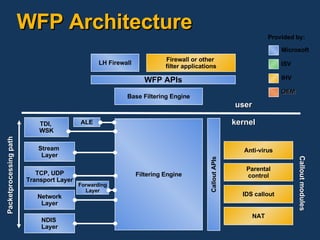
WFP Architecture Base Filtering Engine Filtering Engine TDI,  WSK NAT Firewall or other  filter applications LH Firewall WFP APIs ALE Stream  Layer TCP, UDP Transport Layer Network Layer NDIS  Layer Forwarding Layer Packetprocessing path Callout APIs IDS callout Parental control Anti-virus Callout modules user kernel Provided by: Microsoft ISV OEM IHV
WFP Configuration WFP can be configured using User mode components (applications and services)  for filtering operations Kernel mode components (callout drivers) for deep  packet inspection and modification User mode components can configure WFP by  plumbing appropriate filters Filters can be added by calling  FwpmFilterAdd0  function Filters can specify either permit or block action Filters can be plumbed at different layers in the stack Traffic can be secured by invoking IPsec callout Secure Socket APIs for socket level security
Callout Drivers Callout drivers can perform the following tasks Deep inspection  Packet modification Stream modification Data logging Callout drivers can be hooked at different layers in the stack, namely Network layer Forwarding layer Transport layer Stream layer ALE layer
Case Study:  Data Logging Callout Initializing a callout driver: Specify an Unload function in its driver entry Open a handle to the filter engine Add callout functions to the filter engine using  FwpmCalloutAdd0   Close the handle to the filter engine using  FwpmEngineClose0
Case Study:  Data Logging Callout Callout implements the following function Notifyfn()  is called by the Filtering Engine when a filter that specifies the callout driver’s callout function is added or deleted Classifyfn()  is called by the Filtering Engine when a filter that specifies the callout  driver’s callout  Flowdeletefn()  is called by the Filtering Engine to notify the callout driver  when the flow being processed by it is terminated
Case Study:  Data Logging Callout Initialize the callout driver in its Driver Entry function VOID   Unload(     IN PDRIVER_OBJECT DriverObject     ); NTSTATUS   DriverEntry(     IN PDRIVER_OBJECT DriverObject,     IN PUNICODE_STRING RegistryPath     ) {   ...   // Specify the callout driver's Unload function   DriverObject->DriverUnload = Unload;   ... }
Case Study:  Data Logging Callout Open handle to filtering Engine FWP_ENGINE_HANDLE engineHandle; NTSTATUS status; // Open a handle to the filter engine status =   FwpmEngineOpen0(     NULL,              // The filter engine on the local system     RPC_C_AUTHN_WINNT, // Use the Windows authentication service     NULL,              // Use the calling thread's credentials     NULL,              // There are no session-specific parameters     &engineHandle      // Pointer to a variable to receive the handle     );
Case Study:  Data Logging Callout Notifyfn() // notifyFn callout function NTSTATUS NTAPI   NotifyFn(     IN FWP_NOTIFY_TYPE  notifyType,     IN const GUID  *filterKey,     IN const FWPS_FILTER0  *filter     ) {   // Switch on the type of notification   switch(notifyType) {     // A filter is being added to the filter engine     case FWP_NOTIFY_ADD:       // Allocate the filter context structure       context =         (PFILTER_CONTEXT)ExAllocatePoolWithTag(           NonPagedPool,           sizeof(FILTER_CONTEXT),           FILTER_CONTEXT_POOL_TAG);
Case Study:  Data Logging Callout Notifyfn()   // Check the result of the memory allocation       if (context == NULL) {  // Return error   return STATUS_INSUFFICIENT_RESOURCES;    }   // Initialize the filter context structure   ...   // Associate the filter context structure with the filter   filter->context = (UINT64)context;   // Increment the filter count   InterlockedIncrement(&filterCount);       break;   }   return STATUS_SUCCESS; }    
Case Study:  Data Logging Callout Classifyfn()   // classifyFn callout function   VOID NTAPI   ClassifyFn(     IN const FWPS_INCOMING_VALUES0  *inFixedValues,     IN const FWPS_INCOMING_METADATA_VALUES0  *inMetaValues,     IN OUT VOID  *layerData,     IN const FWPS_FILTER0  *filter,     IN UINT64  flowContext,     OUT FWP_ACTION_TYPE  *action,     OUT UINT64  *outContext     ) {   UINT32 index;   // Increment the total count of discarded packets   InterlockedIncrement(&TotalDiscardCount);   // Loop through the metadata values   for (index = 0; index < inMetaValues->numMetadataValues; index++) {
Case Study:  Data Logging Callout Classifyfn()     // Check if this value is a general discard reason     if (inMetaValues->metadataValues[index].fieldId ==         FWPS_METADATA_FIELD_GENERAL_DISCARD) {       // Check if discarded by a filter       if (inMetaValues->metadataValues[index].value ==           FwpDiscardFirewallPolicy) {         // Increment the count of packets discarded by a filter         InterlockedIncrement(&FilterDiscardCount);       }       // Break out of the for loop       break;     }   }   // Take no action on the data   *action = FWP_ACTION_CONTINUE; }
Winsock Kernel (WSK)
WSK Goals Simple and consistent API Efficient and scalable Support serviceability of networking components Expose full power of the new transport stack Easy to port to for existing TDI client applications General Sockets programming concepts  Similar  to user-mode Sockets NOT  targeted to be API-compatible with  User Mode Winsock
Transport Driver Interface (TDI) Shortcomings TDI Deeply tied to the Windows I/O Manager and Object Manager All TDI Objects are File Objects TDI Objects must be created at PASSIVE_LEVEL  (IRQL) However, Transport may indicate new connections at DISPATCH_LEVEL    TDI Client must pre-create and manage a cache  of Connection Objects (CO) TDI Clients must use Windows Object Manager APIs to control TDI Objects    TDI Clients exposed to unnecessary complexity    TDI Clients use memory for File Objects for each Address Object (AO) and Connection Object (CO)
TDI Shortcomings Servicing TDI Providers requires reboot TDI Providers have no way of detaching  from TDI clients Each TDI Provider has unique mechanism  for surfacing  Options TDI Clients must have specific knowledge about  the underlying TDI Transport Provider Discovery of Transports is difficult TDI Clients specify bindings at install time and receive  transport-to-NIC binding  notifications Or:  TDI Clients must use hard-coded device names  (e.g., \Device\TCP, \Device\UDP, etc.)
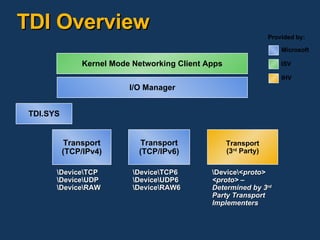
TDI Overview Kernel Mode Networking Client Apps Transport (TCP/IPv4) \Device\TCP \Device\UDP \Device\RAW Transport (TCP/IPv6) \Device\TCP6 \Device\UDP6 \Device\RAW6 Transport (3 rd  Party) \Device\< proto> <proto> – Determined by 3 rd  Party Transport Implementers I/O Manager TDI.SYS Provided by: Microsoft ISV IHV
Windows Codenamed “Longhorn” Stack Overview WFP WS2_32.DLL LSP #1 LSP #2 MSWSOCK.DLL AFD TDI Next Generation TCP/IP Stack NetBT 3 rd  Party TDX Private WSK HTTP.SYS Winsock 1.0/2.x SPI SPI SPI Winsock Catalog User Kernel WSK LSP = Winsock Layered Service Provider
WSK Benefits No file objects! Can create Sockets at DISPATCH_LEVEL Simplified, separate API Create Sockets by specifying {ST, AF, P} No more static Device string and cumbersome PFILE_FULL_EA_INFORMATION! Connect using SOCKADDR  No more cumbersome TA_ADDRESS cracking!
WSK Benefits No need to attach directly to Transport Device WSK handles Dynamic Transport Discovery  and Status Notifications via Network Module  Registration (NMR) Improved Serviceability! Only element from WDM is use of IRPs for completion mechanism  Insulated from many I/O Manager APIs! Still receive benefits Driver Verifier Existing kernel debugger extensions I/O request tracking Ease of porting existing TDI clients to WSK No need to attach directly to Transport Device WSK handles Dynamic Transport Discovery and Status Notifications via Network Module Registration ( NMR ) Improved Serviceability! Only element from WDM is use of IRPs for completion mechanism  Insulated from many I/O Manager APIs! Still receive benefits Driver Verifier Existing KD extensions I/O request tracking Ease of porting existing TDI clients to WSK
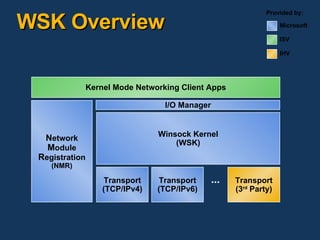
WSK Overview N etwork M odule R egistration (NMR) Winsock Kernel (WSK) Kernel Mode Networking Client Apps Transport (3 rd  Party) Transport (TCP/IPv4) Transport (TCP/IPv6) ... I/O Manager Provided by: Microsoft ISV IHV
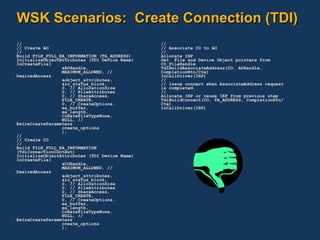
WSK Scenarios:  Create Connection (TDI) // // Create AO // Build FILE_FULL_EA_INFORMATION (TA_ADDRESS) InitializeObjectAttributes (TDI Device Name) IoCreateFile( &AOHandle, MAXIMUM_ALLOWED, // DesiredAccess &object_attributes, &io_status_block, 0, // AllocationSize 0, // FileAttributes 0, // ShareAccess, FILE_CREATE, 0, // CreateOptions. ea_buffer, ea_length, CreateFileTypeNone, NULL, // ExtraCreateParameters create_options ); // // Create CO // Build FILE_FULL_EA_INFORMATION (TdiConnectionContext) InitializeObjectAttributes (TDI Device Name) IoCreateFile( &COHandle, MAXIMUM_ALLOWED, // DesiredAccess &object_attributes, &io_status_block, 0, // AllocationSize 0, // FileAttributes 0, // ShareAccess, FILE_CREATE, 0, // CreateOptions. ea_buffer, ea_length, CreateFileTypeNone, NULL, // ExtraCreateParameters create_options ); // // Associate CO to AO // Allocate IRP Get  File and Device Object pointers from CO_FileHandle TdiBuildAssociateAddress(CO, AOHandle, CompletionRtn/Ctx) IoCallDriver(IRP) // // Issue connect when AssociateAddress request is completed. // Allocate IRP or reuse IRP from previous step TdiBuildConnect(CO, TA_ADDRESS, CompletionRtn/Ctx) IoCallDriver(IRP)
WSK Scenarios:  Create Connection (WSK) // // Create and connect a WSK socket in one call // Allocate IRP IoSetCompletionRoutine(IRP, CompletionRtn/Ctx); WskProviderDispatch->WskSocketConnect( WskClient, SOCK_STREAM, IPPROTO_TCP, LocalAddress, // SOCKADDR RemoteAddress, // SOCKADDR 0, // Flags SocketCallbackContext, SocketCallbackDispatch, Process, Thread, SecurityDescriptor, IRP );
WSK Scenarios:  WSK Socket Control // // Setting SO_RCVBUF socket option // ULONG rcvbufsize = 16384; Allocate IRP; IoSetCompletionRoutine(IRP, CompletionRtn/Ctx); WskSocketDispatch-> WskControlSocket ( WskSocket, WskSetOption, // RequestType: set, get, ioctl SO_RCVBUF,  // OptionName SOL_SOCKET,  // Level sizeof(rcvbufsize), // InputSize &rcvbufsize,  // InputBuffer 0,  // OutputSize NULL,  // OutputBuffer NULL,  // OutputSizeReturned IRP );
Call To Action WFP Explore WFP API documentation in the WDK  for kernel APIs and SDK for user APIs Use WFP APIs instead of filter and firewall hooks Consider using Callout drivers instead of NDIS  and LSPs WSK Explore the WSK API Documentation in the Windows Driver Kit (WDK) Sample WSK Client planned for Beta 2 WDK Consider using WSK for new KM networking needs Consider migrating old TDI client code to WSK
Community Resources Windows Hardware and Driver Central (WHDC) www.microsoft.com/whdc/default.mspx  Technical Communities www.microsoft.com/communities/products/default.mspx  Non-Microsoft Community Sites www.microsoft.com/communities/related/default.mspx   Microsoft Public Newsgroups www.microsoft.com/communities/newsgroups Technical Chats and Webcasts www.microsoft.com/communities/chats/default.mspx www.microsoft.com/webcasts Microsoft Blogs www.microsoft.com/communities/blogs
Additional Resources E-Mail WFP:  wfp @ microsoft.com WSK:  wskapi @ microsoft.com Web Resources Join the WFP beta program Go to  http:// beta.microsoft.com Choose the Guest ID sign-up option Enter the Guest ID:  WFPBeta5 Fill out the WFP beta program sign up survey

Windows Filtering Platform And Winsock Kernel

  • 1.
    Windows Filtering PlatformAnd Winsock Kernel: Next-Generation Kernel Networking APIs Madhurima Pawar Program Manager Windows Networking mpawar @ microsoft.com Microsoft Corporation Eric Stenson Development Lead Windows Networking ericsten @ microsoft.com Microsoft Corporation
  • 2.
    Session Outline WindowsFiltering Platform (WFP) WFP Introduction WFP Basics WFP Architecture WFP Configuration WFP Callout Drivers Case Study: Data logging callout driver Winsock Kernel (WSK) Why WSK? TDI Shortcomings WSK Benefits WSK Versus TDI Scenario Comparison Questions
  • 3.
    Session Goals Attendeesshould leave this session with the following An introduction to Windows Firewall Platform (WFP) An introduction to Winsock Kernel (WSK) Knowledge of where to find resources for WFP and WSK
  • 4.
  • 5.
    WFP Introduction Whatis WFP? Windows Filtering Platform exposes a set of Application Programming Interfaces (APIs) to permit, block, modify and/or secure inbound and outbound traffic APIs are categorized as Management APIs Filter management, provider management, callout management IKE (Keying Module) Management APIs Internet Protocol Security (IPsec) Management APIs APIs are for user mode as well as kernel-mode components APIs can be used for Firewall Antivirus Parental control Diagnostics
  • 6.
    WFP Basics WhyWFP? Easier and cleaner interface to the network stack Filter hooks and firewall hooks are no longer supported Reduces and/or eliminates the use of Network Driver Interface Specification (NDIS) or LSP Callout drivers allow content inspection and data modification Provides rich set of filters in user and kernel mode Allows multiple providers to co-exist on Windows Codename Longhorn Supports both IPv4 and IPv6 Allows integration of IPsec and firewall policies Improves diagnostics and traceability Reduces firewall and anti-virus crashes 12% of all OS crashes
  • 7.
    WFP Architecture BaseFiltering Engine Filtering Engine TDI, WSK NAT Firewall or other filter applications LH Firewall WFP APIs ALE Stream Layer TCP, UDP Transport Layer Network Layer NDIS Layer Forwarding Layer Packetprocessing path Callout APIs IDS callout Parental control Anti-virus Callout modules user kernel Provided by: Microsoft ISV OEM IHV
  • 8.
    WFP Configuration WFPcan be configured using User mode components (applications and services) for filtering operations Kernel mode components (callout drivers) for deep packet inspection and modification User mode components can configure WFP by plumbing appropriate filters Filters can be added by calling FwpmFilterAdd0 function Filters can specify either permit or block action Filters can be plumbed at different layers in the stack Traffic can be secured by invoking IPsec callout Secure Socket APIs for socket level security
  • 9.
    Callout Drivers Calloutdrivers can perform the following tasks Deep inspection Packet modification Stream modification Data logging Callout drivers can be hooked at different layers in the stack, namely Network layer Forwarding layer Transport layer Stream layer ALE layer
  • 10.
    Case Study: Data Logging Callout Initializing a callout driver: Specify an Unload function in its driver entry Open a handle to the filter engine Add callout functions to the filter engine using FwpmCalloutAdd0 Close the handle to the filter engine using FwpmEngineClose0
  • 11.
    Case Study: Data Logging Callout Callout implements the following function Notifyfn() is called by the Filtering Engine when a filter that specifies the callout driver’s callout function is added or deleted Classifyfn() is called by the Filtering Engine when a filter that specifies the callout driver’s callout Flowdeletefn() is called by the Filtering Engine to notify the callout driver when the flow being processed by it is terminated
  • 12.
    Case Study: Data Logging Callout Initialize the callout driver in its Driver Entry function VOID   Unload(     IN PDRIVER_OBJECT DriverObject     ); NTSTATUS   DriverEntry(     IN PDRIVER_OBJECT DriverObject,     IN PUNICODE_STRING RegistryPath     ) {   ...   // Specify the callout driver's Unload function   DriverObject->DriverUnload = Unload;   ... }
  • 13.
    Case Study: Data Logging Callout Open handle to filtering Engine FWP_ENGINE_HANDLE engineHandle; NTSTATUS status; // Open a handle to the filter engine status =   FwpmEngineOpen0(     NULL,              // The filter engine on the local system     RPC_C_AUTHN_WINNT, // Use the Windows authentication service     NULL,              // Use the calling thread's credentials     NULL,              // There are no session-specific parameters     &engineHandle      // Pointer to a variable to receive the handle     );
  • 14.
    Case Study: Data Logging Callout Notifyfn() // notifyFn callout function NTSTATUS NTAPI   NotifyFn(     IN FWP_NOTIFY_TYPE  notifyType,     IN const GUID  *filterKey,     IN const FWPS_FILTER0  *filter     ) {   // Switch on the type of notification   switch(notifyType) {     // A filter is being added to the filter engine     case FWP_NOTIFY_ADD:       // Allocate the filter context structure       context =         (PFILTER_CONTEXT)ExAllocatePoolWithTag(           NonPagedPool,           sizeof(FILTER_CONTEXT),           FILTER_CONTEXT_POOL_TAG);
  • 15.
    Case Study: Data Logging Callout Notifyfn()   // Check the result of the memory allocation       if (context == NULL) {  // Return error   return STATUS_INSUFFICIENT_RESOURCES;    }   // Initialize the filter context structure   ...   // Associate the filter context structure with the filter   filter->context = (UINT64)context;   // Increment the filter count   InterlockedIncrement(&filterCount);       break;   }   return STATUS_SUCCESS; }  
  • 16.
    Case Study: Data Logging Callout Classifyfn()   // classifyFn callout function VOID NTAPI   ClassifyFn(     IN const FWPS_INCOMING_VALUES0  *inFixedValues,     IN const FWPS_INCOMING_METADATA_VALUES0  *inMetaValues,     IN OUT VOID  *layerData,     IN const FWPS_FILTER0  *filter,     IN UINT64  flowContext,     OUT FWP_ACTION_TYPE  *action,     OUT UINT64  *outContext     ) {   UINT32 index;   // Increment the total count of discarded packets   InterlockedIncrement(&TotalDiscardCount);   // Loop through the metadata values   for (index = 0; index < inMetaValues->numMetadataValues; index++) {
  • 17.
    Case Study: Data Logging Callout Classifyfn()     // Check if this value is a general discard reason     if (inMetaValues->metadataValues[index].fieldId ==         FWPS_METADATA_FIELD_GENERAL_DISCARD) {       // Check if discarded by a filter       if (inMetaValues->metadataValues[index].value ==           FwpDiscardFirewallPolicy) {         // Increment the count of packets discarded by a filter         InterlockedIncrement(&FilterDiscardCount);       }       // Break out of the for loop       break;     }   }   // Take no action on the data   *action = FWP_ACTION_CONTINUE; }
  • 18.
  • 19.
    WSK Goals Simpleand consistent API Efficient and scalable Support serviceability of networking components Expose full power of the new transport stack Easy to port to for existing TDI client applications General Sockets programming concepts Similar to user-mode Sockets NOT targeted to be API-compatible with User Mode Winsock
  • 20.
    Transport Driver Interface(TDI) Shortcomings TDI Deeply tied to the Windows I/O Manager and Object Manager All TDI Objects are File Objects TDI Objects must be created at PASSIVE_LEVEL (IRQL) However, Transport may indicate new connections at DISPATCH_LEVEL  TDI Client must pre-create and manage a cache of Connection Objects (CO) TDI Clients must use Windows Object Manager APIs to control TDI Objects  TDI Clients exposed to unnecessary complexity  TDI Clients use memory for File Objects for each Address Object (AO) and Connection Object (CO)
  • 21.
    TDI Shortcomings ServicingTDI Providers requires reboot TDI Providers have no way of detaching from TDI clients Each TDI Provider has unique mechanism for surfacing Options TDI Clients must have specific knowledge about the underlying TDI Transport Provider Discovery of Transports is difficult TDI Clients specify bindings at install time and receive transport-to-NIC binding notifications Or: TDI Clients must use hard-coded device names (e.g., \Device\TCP, \Device\UDP, etc.)
  • 22.
    TDI Overview KernelMode Networking Client Apps Transport (TCP/IPv4) \Device\TCP \Device\UDP \Device\RAW Transport (TCP/IPv6) \Device\TCP6 \Device\UDP6 \Device\RAW6 Transport (3 rd Party) \Device\< proto> <proto> – Determined by 3 rd Party Transport Implementers I/O Manager TDI.SYS Provided by: Microsoft ISV IHV
  • 23.
    Windows Codenamed “Longhorn”Stack Overview WFP WS2_32.DLL LSP #1 LSP #2 MSWSOCK.DLL AFD TDI Next Generation TCP/IP Stack NetBT 3 rd Party TDX Private WSK HTTP.SYS Winsock 1.0/2.x SPI SPI SPI Winsock Catalog User Kernel WSK LSP = Winsock Layered Service Provider
  • 24.
    WSK Benefits Nofile objects! Can create Sockets at DISPATCH_LEVEL Simplified, separate API Create Sockets by specifying {ST, AF, P} No more static Device string and cumbersome PFILE_FULL_EA_INFORMATION! Connect using SOCKADDR No more cumbersome TA_ADDRESS cracking!
  • 25.
    WSK Benefits Noneed to attach directly to Transport Device WSK handles Dynamic Transport Discovery and Status Notifications via Network Module Registration (NMR) Improved Serviceability! Only element from WDM is use of IRPs for completion mechanism Insulated from many I/O Manager APIs! Still receive benefits Driver Verifier Existing kernel debugger extensions I/O request tracking Ease of porting existing TDI clients to WSK No need to attach directly to Transport Device WSK handles Dynamic Transport Discovery and Status Notifications via Network Module Registration ( NMR ) Improved Serviceability! Only element from WDM is use of IRPs for completion mechanism Insulated from many I/O Manager APIs! Still receive benefits Driver Verifier Existing KD extensions I/O request tracking Ease of porting existing TDI clients to WSK
  • 26.
    WSK Overview Network M odule R egistration (NMR) Winsock Kernel (WSK) Kernel Mode Networking Client Apps Transport (3 rd Party) Transport (TCP/IPv4) Transport (TCP/IPv6) ... I/O Manager Provided by: Microsoft ISV IHV
  • 27.
    WSK Scenarios: Create Connection (TDI) // // Create AO // Build FILE_FULL_EA_INFORMATION (TA_ADDRESS) InitializeObjectAttributes (TDI Device Name) IoCreateFile( &AOHandle, MAXIMUM_ALLOWED, // DesiredAccess &object_attributes, &io_status_block, 0, // AllocationSize 0, // FileAttributes 0, // ShareAccess, FILE_CREATE, 0, // CreateOptions. ea_buffer, ea_length, CreateFileTypeNone, NULL, // ExtraCreateParameters create_options ); // // Create CO // Build FILE_FULL_EA_INFORMATION (TdiConnectionContext) InitializeObjectAttributes (TDI Device Name) IoCreateFile( &COHandle, MAXIMUM_ALLOWED, // DesiredAccess &object_attributes, &io_status_block, 0, // AllocationSize 0, // FileAttributes 0, // ShareAccess, FILE_CREATE, 0, // CreateOptions. ea_buffer, ea_length, CreateFileTypeNone, NULL, // ExtraCreateParameters create_options ); // // Associate CO to AO // Allocate IRP Get File and Device Object pointers from CO_FileHandle TdiBuildAssociateAddress(CO, AOHandle, CompletionRtn/Ctx) IoCallDriver(IRP) // // Issue connect when AssociateAddress request is completed. // Allocate IRP or reuse IRP from previous step TdiBuildConnect(CO, TA_ADDRESS, CompletionRtn/Ctx) IoCallDriver(IRP)
  • 28.
    WSK Scenarios: Create Connection (WSK) // // Create and connect a WSK socket in one call // Allocate IRP IoSetCompletionRoutine(IRP, CompletionRtn/Ctx); WskProviderDispatch->WskSocketConnect( WskClient, SOCK_STREAM, IPPROTO_TCP, LocalAddress, // SOCKADDR RemoteAddress, // SOCKADDR 0, // Flags SocketCallbackContext, SocketCallbackDispatch, Process, Thread, SecurityDescriptor, IRP );
  • 29.
    WSK Scenarios: WSK Socket Control // // Setting SO_RCVBUF socket option // ULONG rcvbufsize = 16384; Allocate IRP; IoSetCompletionRoutine(IRP, CompletionRtn/Ctx); WskSocketDispatch-> WskControlSocket ( WskSocket, WskSetOption, // RequestType: set, get, ioctl SO_RCVBUF, // OptionName SOL_SOCKET, // Level sizeof(rcvbufsize), // InputSize &rcvbufsize, // InputBuffer 0, // OutputSize NULL, // OutputBuffer NULL, // OutputSizeReturned IRP );
  • 30.
    Call To ActionWFP Explore WFP API documentation in the WDK for kernel APIs and SDK for user APIs Use WFP APIs instead of filter and firewall hooks Consider using Callout drivers instead of NDIS and LSPs WSK Explore the WSK API Documentation in the Windows Driver Kit (WDK) Sample WSK Client planned for Beta 2 WDK Consider using WSK for new KM networking needs Consider migrating old TDI client code to WSK
  • 31.
    Community Resources WindowsHardware and Driver Central (WHDC) www.microsoft.com/whdc/default.mspx Technical Communities www.microsoft.com/communities/products/default.mspx Non-Microsoft Community Sites www.microsoft.com/communities/related/default.mspx Microsoft Public Newsgroups www.microsoft.com/communities/newsgroups Technical Chats and Webcasts www.microsoft.com/communities/chats/default.mspx www.microsoft.com/webcasts Microsoft Blogs www.microsoft.com/communities/blogs
  • 32.
    Additional Resources E-MailWFP: wfp @ microsoft.com WSK: wskapi @ microsoft.com Web Resources Join the WFP beta program Go to http:// beta.microsoft.com Choose the Guest ID sign-up option Enter the Guest ID: WFPBeta5 Fill out the WFP beta program sign up survey