Wiki-Do The Way of the Wiki Sean Yo Computing and Communications Services University of Guelph
What is a Wiki? A Wiki is a tool for creating and managing web-published content Articles are authored with simple text markup through the web Changes are tracked and can be rolled back Articles can link together, forming networks of information ALL  content can be changed by  EVERYONE Wikipedia is an popular example of a Wiki
What Do Wikis Deliver? Content becomes a partnership, a communal project  “ Instant” Authoring Updates, Corrections, Deletions & New Articles  Versioning Who Made an Edit, What was Edited, When was it Edited Easy to view or even roll back to any version of the article Easy to follow what’s new/changed Geek Street Cred
Why Do Wikis Matter? Obligatory Google Quote: “ This company runs on wikis.” - Shashi Seth, Sr. Product Manager at Google
Why Do Wikis Matter? Wikis deliver on the promise of the Web Original Design of the Web  Intended uses include Centralized Publishing & Collaborative Authoring Multi-user system where all users can edit pages Version Control – page “histories” Notification of New Content Wikis are a system where information is easily shared, where readers and authors are one and the same.
Why Do Wikis Matter? Easy and effective Make documenting simple and usable Designed for collaboration and coordination Make authoring content fast and easy Deliver  instant gratification  for updating and maintaining content Documentation Holy Grail
How do Wikis Work? informal, quick & accessible; remarkably easy to set up.  Wiki As Technology Reduces the barrier to entry to almost zero Designed from the ground up for  multiple authors Easy to access anywhere, making it remarkably useable Separates Content from Discussion Wiki Culture Creating an article becomes only as hard as it is to write No arcane CMS or being powerless to publish  Community of authors and readers “ Refactoring makes the work supple”
How Do Wikis Work? Open access to content.  ALL  content can be changed by  EVERYONE “ Well, nice idea, but it'll never work. People will just ruin it!”.  3 reasons Wikis don't just fall apart: Everyone can edit – if there is vandalism, you can just fix it! Wikis create communities which care for the Wiki Changes are tracked.  It takes trivial effort to repair damage
How do Wikis Not Work? Wiki as Technology Webserver outage User experience of using “wiki markup” for authoring Wiki as Culture Content Integrity Wikis have no editorial control Can lead to inaccurate or duplicate articles Content and style guides are essential Edit Wars If a community form around a point of view, it can lead to an article “tug-of-war”
Public Vs. Private Wikis The original Wiki idea is firmly grounded in public access.  Anonymity is an important factor as well Wikis can be configured to be private All the benefits of a Wiki  None of the potential complications Private wikis should be free from dealing with issues of vandalism and edit wars.
Why Use a Wiki? Wikis will work for A group or a team of authors Writing and maintaining centralized, authoritative documents Wikis enable fast, easy collaboration Wikis empower people to share in the ownership of content and the systems, services, processes, policies and procedures they document Wikis require collaboration – Wikis help build teams Wikis enable teams to be more productive, effective and agile by solving the documentation problem
Why Should You Use Wikis? How can Higher Ed IT best use a Wiki? Collaborative Technical Documentation  Original use case for Wikis Large, complex, ever-changing systems Prioritizing documentation is a challenge  Change management is a challenge Developing institutional memory is a challenge Content is intended for a small group or team
Why Should You Use Wikis? Large, complex, ever-changing systems Wikis are an organic system which can grow with whatever system it is documenting Prioritizing documentation is a challenge Wikis make documentation as painless as possible Change management is a challenge Easy to maintain documentation supports and encourages documenting change Developing institutional memory is a challenge Wikis provide an ongoing history that is easily accessible, using current documentation as the point of reference Content is intended for a small group or team Wikis can be “walled” off for private consumption only
Wiki Patterns for I.T. Collaborative Technical Documentation Service & Product documentation Installation/Migration notes Procedures, Recipes and How-To’s Meeting Minutes To Do tracking Other patterns include such use cases as project management and even an agile content management system
Wiki Patterns for I.T. Private Wiki Defined Content Schema  Service based content architecture Project tracking which becomes service pages Clear content and style guides Build value for the team to drive adoption Collaborative model No “owners” of an article
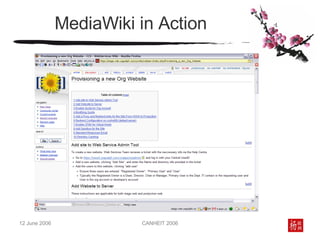
MediaWiki MediaWiki Software developed for Wikipedia Well positioned to become a standard, much like Apache for web hosting Open Source software Very well suited for teams MediaWiki Set Up LAMP Server (PHP & MySQL required) MediaWiki code  Install Script
MediaWiki in Action
How to Design a Wiki Every Wiki Needs A Plan Content Schema (Information Architecture) Use the MainPage as the Wiki Start Page Use Categories and Subcategories Remember: categories are like tags.  Articles can have multiple categories Use Subpages Allows a hierarchal organization of articles Breadcrumb style navigation
How to Work with Wikis Wikis work when they are driven by a community/team working toward the same goal Follow the Plan Recent Changes Page keeps users up to date Recent changes is syndicated out of the box RSS & ATOM Enforce separation of content and discussion Make changes as needed Wiki content is intended to be refactored whenever it is needed.  Don’t worry…you can always go back!
Planting Your Own Wiki Build Strong Buy-In Take the plunge and fix it as you go Wikis are  designed  to refactor content Convince by doing Use a “bite-size” project to prove “Wikis Work” Get people involved – assign articles to write or review to get them to take the plunge Once people start using a Wiki, they won’t want to stop
How to Care for your Wiki To thrive Wikis need to be watered, weeded and pruned A core team should be responsible for monitoring activity and supporting the use of content and style guides Clean up duplicate articles or misplaced articles Wabi-Sabi The beauty of things imperfect, impermanent, and incomplete.  Wikis are FUN!  Wikis are wide open spaces.  Make it your own and don’t forget to play
May The Wiki Be With You Wikis are a powerful community/team driven information management tool Wikis are informal, quick & accessible; remarkably easy to set up. Allows for process to be determined by how people work, not how the software works Want to talk Wikis? Sean Yo  [email_address]

Wiki Do

  • 1.
    Wiki-Do The Wayof the Wiki Sean Yo Computing and Communications Services University of Guelph
  • 2.
    What is aWiki? A Wiki is a tool for creating and managing web-published content Articles are authored with simple text markup through the web Changes are tracked and can be rolled back Articles can link together, forming networks of information ALL content can be changed by EVERYONE Wikipedia is an popular example of a Wiki
  • 3.
    What Do WikisDeliver? Content becomes a partnership, a communal project “ Instant” Authoring Updates, Corrections, Deletions & New Articles Versioning Who Made an Edit, What was Edited, When was it Edited Easy to view or even roll back to any version of the article Easy to follow what’s new/changed Geek Street Cred
  • 4.
    Why Do WikisMatter? Obligatory Google Quote: “ This company runs on wikis.” - Shashi Seth, Sr. Product Manager at Google
  • 5.
    Why Do WikisMatter? Wikis deliver on the promise of the Web Original Design of the Web Intended uses include Centralized Publishing & Collaborative Authoring Multi-user system where all users can edit pages Version Control – page “histories” Notification of New Content Wikis are a system where information is easily shared, where readers and authors are one and the same.
  • 6.
    Why Do WikisMatter? Easy and effective Make documenting simple and usable Designed for collaboration and coordination Make authoring content fast and easy Deliver instant gratification for updating and maintaining content Documentation Holy Grail
  • 7.
    How do WikisWork? informal, quick & accessible; remarkably easy to set up. Wiki As Technology Reduces the barrier to entry to almost zero Designed from the ground up for multiple authors Easy to access anywhere, making it remarkably useable Separates Content from Discussion Wiki Culture Creating an article becomes only as hard as it is to write No arcane CMS or being powerless to publish Community of authors and readers “ Refactoring makes the work supple”
  • 8.
    How Do WikisWork? Open access to content. ALL content can be changed by EVERYONE “ Well, nice idea, but it'll never work. People will just ruin it!”. 3 reasons Wikis don't just fall apart: Everyone can edit – if there is vandalism, you can just fix it! Wikis create communities which care for the Wiki Changes are tracked. It takes trivial effort to repair damage
  • 9.
    How do WikisNot Work? Wiki as Technology Webserver outage User experience of using “wiki markup” for authoring Wiki as Culture Content Integrity Wikis have no editorial control Can lead to inaccurate or duplicate articles Content and style guides are essential Edit Wars If a community form around a point of view, it can lead to an article “tug-of-war”
  • 10.
    Public Vs. PrivateWikis The original Wiki idea is firmly grounded in public access. Anonymity is an important factor as well Wikis can be configured to be private All the benefits of a Wiki None of the potential complications Private wikis should be free from dealing with issues of vandalism and edit wars.
  • 11.
    Why Use aWiki? Wikis will work for A group or a team of authors Writing and maintaining centralized, authoritative documents Wikis enable fast, easy collaboration Wikis empower people to share in the ownership of content and the systems, services, processes, policies and procedures they document Wikis require collaboration – Wikis help build teams Wikis enable teams to be more productive, effective and agile by solving the documentation problem
  • 12.
    Why Should YouUse Wikis? How can Higher Ed IT best use a Wiki? Collaborative Technical Documentation Original use case for Wikis Large, complex, ever-changing systems Prioritizing documentation is a challenge Change management is a challenge Developing institutional memory is a challenge Content is intended for a small group or team
  • 13.
    Why Should YouUse Wikis? Large, complex, ever-changing systems Wikis are an organic system which can grow with whatever system it is documenting Prioritizing documentation is a challenge Wikis make documentation as painless as possible Change management is a challenge Easy to maintain documentation supports and encourages documenting change Developing institutional memory is a challenge Wikis provide an ongoing history that is easily accessible, using current documentation as the point of reference Content is intended for a small group or team Wikis can be “walled” off for private consumption only
  • 14.
    Wiki Patterns forI.T. Collaborative Technical Documentation Service & Product documentation Installation/Migration notes Procedures, Recipes and How-To’s Meeting Minutes To Do tracking Other patterns include such use cases as project management and even an agile content management system
  • 15.
    Wiki Patterns forI.T. Private Wiki Defined Content Schema Service based content architecture Project tracking which becomes service pages Clear content and style guides Build value for the team to drive adoption Collaborative model No “owners” of an article
  • 16.
    MediaWiki MediaWiki Softwaredeveloped for Wikipedia Well positioned to become a standard, much like Apache for web hosting Open Source software Very well suited for teams MediaWiki Set Up LAMP Server (PHP & MySQL required) MediaWiki code Install Script
  • 17.
  • 18.
    How to Designa Wiki Every Wiki Needs A Plan Content Schema (Information Architecture) Use the MainPage as the Wiki Start Page Use Categories and Subcategories Remember: categories are like tags. Articles can have multiple categories Use Subpages Allows a hierarchal organization of articles Breadcrumb style navigation
  • 19.
    How to Workwith Wikis Wikis work when they are driven by a community/team working toward the same goal Follow the Plan Recent Changes Page keeps users up to date Recent changes is syndicated out of the box RSS & ATOM Enforce separation of content and discussion Make changes as needed Wiki content is intended to be refactored whenever it is needed. Don’t worry…you can always go back!
  • 20.
    Planting Your OwnWiki Build Strong Buy-In Take the plunge and fix it as you go Wikis are designed to refactor content Convince by doing Use a “bite-size” project to prove “Wikis Work” Get people involved – assign articles to write or review to get them to take the plunge Once people start using a Wiki, they won’t want to stop
  • 21.
    How to Carefor your Wiki To thrive Wikis need to be watered, weeded and pruned A core team should be responsible for monitoring activity and supporting the use of content and style guides Clean up duplicate articles or misplaced articles Wabi-Sabi The beauty of things imperfect, impermanent, and incomplete. Wikis are FUN! Wikis are wide open spaces. Make it your own and don’t forget to play
  • 22.
    May The WikiBe With You Wikis are a powerful community/team driven information management tool Wikis are informal, quick & accessible; remarkably easy to set up. Allows for process to be determined by how people work, not how the software works Want to talk Wikis? Sean Yo [email_address]

Editor's Notes

  • #2 Welcome & Intro – Please ask questions throughout… Who here has written documentation for code, a service, a system, process, procedure or policy? Who here was suppose to write documentation but ran out of time before the next project started or the next fire had to be put out? Who here has a fast, easy documentation system that is able to be used by every member of your team to create and maintain documentation? Well, don’t worry – you’re in the right session