It’s Wikiriffic: Wikis for Internal Communication Wikis are the online equivalent of a bulletin board or a ring binder—easy to use and to update by many contributors—and hyperlinked.  In this hands-on workshop, you'll learn how to set up a basic wiki page to share useful information with your colleagues. Karen Luik Houston Public Library [email_address] TLA District 8 Fall Meeting University of Houston at Sugar Land October 17, 2009
Wikis for Internal Communication Customer Service Compile community information FAQs Professional Development Training & conference calendars Procedures Program Coordination Share information
Why Wikis? Easy to access Via Internet Via internal network Easy to collaborate Accessible to multiple authors   Easy to Update Changes uploaded immediately Edits can traced to author
Why Wikis? Common Craft Wikis in Plain English   http://www.youtube.com/watch?v=-dnL00TdmLY
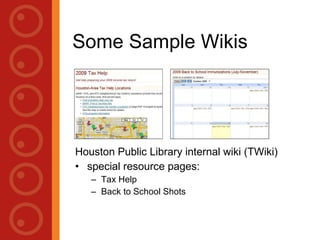
Some Sample Wikis Houston Public Library internal wiki (TWiki) Special resource pages: Tax Help  Back to School Shots
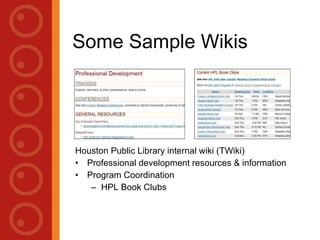
Some Sample Wikis Houston Public Library internal wiki (TWiki) Professional development resources & information Loudon County Public Library LoudounPedia,  http:// www.loudounpedia.org /  (moved to  http:// loudounpedia.wetpaint.com / )
Some Sample Wikis ALA Veteran’s Information @ your Library http://www.wo.ala.org/veteransinfo/index.php?title=Main_Page InfoToday wiki,  http://www.infotodaywiki.com/ Includes wikis for the Internet Librarian & Computers in Libraries conferences
Some Sample Wikis Jenny Levine, aka The Shifted Librarian  Wiki -  http://theshiftedlibrarian.pbworks.com/ Blog -  http://theshiftedlibrarian.com/
Why Wikis? “ Think of a wiki as a natural extension to the blogging concept, a classification-centric medium which allows for a freedom of content manipulation across a community of users that can’t be found in any other comparable technology. By engendering enthusiasm and commitment from every user, the wiki can become the perfect tool for the evolution of ideas.” Davey Winder, from  Library Stuff , “Wikis Inciting Collaboration,” by Steven M. Cohen, 12/23/07.
How to Create a Wiki Go to PB Works:  http:// pbworks.com / . Set up a free account. Online Help PB Works User Manual:  http://usermanual.pbworks.com/ . Organize Your Wiki:  http://usermanual.pbworks.com/Organizing-Your-Workspace . Editing tips:  http://usermanual.pbworks.com/Editing . Free webinar: "PBworks 101: Your Guide to the Basics,“ 1 st  Wednesday of the month, 1pm EST. sign up at  http:// pbworks.com /content/webinars .
Let’s Practice Go to:  tladistrict8fallmeeting.pbworks.com/Let's-Practice Pick a topic: Professional Development page Tax Help page Book clubs/program page District 8 Conference page Set up a main (“front”) page and 1 or 2 linked pages. Add some Internet links, tables, pictures or other enhancements.
Let’s Practice When you’re finished: In your PBWorks account, go to Settings> Access Controls> Workplace Security> Who can view this workspace? Select “Anyone” or “Only people I invite or approve” and add their email addresses and permission level. View each other’s wikis.
PB Works Online Help PB Works User Manual:  http://usermanual.pbworks.com/ . Organize Your Wiki:  http://usermanual.pbworks.com/Organizing-Your-Workspace . Editing tips:  http://usermanual.pbworks.com/Editing . Free webinar,  PBworks 101: Your Guide to the Basics , 1 st  Wednesday of the month, 1pm EST.  Sign up at:  http:// pbworks.com /content/webinars .
Other Wiki Providers MediaWiki,  www.mediawiki.org free software, originally created for Wikipedia Wikispaces.  www.wikispaces.com Free wikis for teachers
Other Wiki Providers Google Sites,  www.google.com , with a Google account But read this too: “ Free Wikis, Blogs & Website Ad Strings Attached” Ken Royal, The Educators’ Royal Treatment, 8-13-09,  http:// www.educatorsroyaltreatment.com /
Congratulations! You’ve created a wiki! Please share your wiki projects and your ideas for collaborative projects with me. Karen Luik Houston Public Library [email_address]

Its Wikiriffic

  • 1.
    It’s Wikiriffic: Wikisfor Internal Communication Wikis are the online equivalent of a bulletin board or a ring binder—easy to use and to update by many contributors—and hyperlinked. In this hands-on workshop, you'll learn how to set up a basic wiki page to share useful information with your colleagues. Karen Luik Houston Public Library [email_address] TLA District 8 Fall Meeting University of Houston at Sugar Land October 17, 2009
  • 2.
    Wikis for InternalCommunication Customer Service Compile community information FAQs Professional Development Training & conference calendars Procedures Program Coordination Share information
  • 3.
    Why Wikis? Easyto access Via Internet Via internal network Easy to collaborate Accessible to multiple authors Easy to Update Changes uploaded immediately Edits can traced to author
  • 4.
    Why Wikis? CommonCraft Wikis in Plain English http://www.youtube.com/watch?v=-dnL00TdmLY
  • 5.
    Some Sample WikisHouston Public Library internal wiki (TWiki) Special resource pages: Tax Help Back to School Shots
  • 6.
    Some Sample WikisHouston Public Library internal wiki (TWiki) Professional development resources & information Loudon County Public Library LoudounPedia, http:// www.loudounpedia.org / (moved to http:// loudounpedia.wetpaint.com / )
  • 7.
    Some Sample WikisALA Veteran’s Information @ your Library http://www.wo.ala.org/veteransinfo/index.php?title=Main_Page InfoToday wiki, http://www.infotodaywiki.com/ Includes wikis for the Internet Librarian & Computers in Libraries conferences
  • 8.
    Some Sample WikisJenny Levine, aka The Shifted Librarian Wiki - http://theshiftedlibrarian.pbworks.com/ Blog - http://theshiftedlibrarian.com/
  • 9.
    Why Wikis? “Think of a wiki as a natural extension to the blogging concept, a classification-centric medium which allows for a freedom of content manipulation across a community of users that can’t be found in any other comparable technology. By engendering enthusiasm and commitment from every user, the wiki can become the perfect tool for the evolution of ideas.” Davey Winder, from Library Stuff , “Wikis Inciting Collaboration,” by Steven M. Cohen, 12/23/07.
  • 10.
    How to Createa Wiki Go to PB Works: http:// pbworks.com / . Set up a free account. Online Help PB Works User Manual: http://usermanual.pbworks.com/ . Organize Your Wiki: http://usermanual.pbworks.com/Organizing-Your-Workspace . Editing tips: http://usermanual.pbworks.com/Editing . Free webinar: "PBworks 101: Your Guide to the Basics,“ 1 st Wednesday of the month, 1pm EST. sign up at http:// pbworks.com /content/webinars .
  • 11.
    Let’s Practice Goto: tladistrict8fallmeeting.pbworks.com/Let's-Practice Pick a topic: Professional Development page Tax Help page Book clubs/program page District 8 Conference page Set up a main (“front”) page and 1 or 2 linked pages. Add some Internet links, tables, pictures or other enhancements.
  • 12.
    Let’s Practice Whenyou’re finished: In your PBWorks account, go to Settings> Access Controls> Workplace Security> Who can view this workspace? Select “Anyone” or “Only people I invite or approve” and add their email addresses and permission level. View each other’s wikis.
  • 13.
    PB Works OnlineHelp PB Works User Manual: http://usermanual.pbworks.com/ . Organize Your Wiki: http://usermanual.pbworks.com/Organizing-Your-Workspace . Editing tips: http://usermanual.pbworks.com/Editing . Free webinar, PBworks 101: Your Guide to the Basics , 1 st Wednesday of the month, 1pm EST. Sign up at: http:// pbworks.com /content/webinars .
  • 14.
    Other Wiki ProvidersMediaWiki, www.mediawiki.org free software, originally created for Wikipedia Wikispaces. www.wikispaces.com Free wikis for teachers
  • 15.
    Other Wiki ProvidersGoogle Sites, www.google.com , with a Google account But read this too: “ Free Wikis, Blogs & Website Ad Strings Attached” Ken Royal, The Educators’ Royal Treatment, 8-13-09, http:// www.educatorsroyaltreatment.com /
  • 16.
    Congratulations! You’ve createda wiki! Please share your wiki projects and your ideas for collaborative projects with me. Karen Luik Houston Public Library [email_address]