MedTech
Dr. Lilia SFAXI
www.liliasfaxi.wix.com/liliasfaxi
Chp8- Mobile Development
Mobile development best practices
1
MedTech – Mediterranean Institute of Technology
CS-Web and Mobile Development
MedTech
MedTech
MOBILE APPLICATIONS STATE OF THE ART
2
Mobile Development
MedTech
10 Key Numbers to Know (2016)
• Users spend 90% of their time on mobile applications, in comparison with mobile web
• Users download an average of 8,8 applications a month
• Increase of 5% in comparison with previous year
• In Mai 2016, the average cost of installing an application is of $2,33 in Android (+93%
comparing with previous year) and $1,46 on iOS (-3%)
• 25% of the installed applications are never used
• 26% of the installed applications are abandoned after the first use
• 45% of mobile applications users do not appreciate their shopping experience, vs 47%
for web applications users
• An average Android application loses 77% of its daily active users in the 3 days
following its installation, and 90% in the 30 first days
• Among those who stop using an application, 30% can use it again if they are offered a
discount, and 24% will do it if they are offered an exclusive content or bonus
• 78% of companies use advertisement to increase applications downloads
3
Mobile Applications State of the Art
MedTech
Smartphones
• First mobile phone: 1983 by Motorola
• PDA: Personal Digital Assistant (PDA) in 1990
• Agenda, contacts list, notepad
• Synchronisation with a computer
• Smartphone = Mobile Phone + PDA
• In 2001 with Sagem
• Boost in 2005 with the first iPhone, and the purchase of Android by Google
• Mini mobile computer
• Possibilité to download and install applications
4
Mobile Applications State of the Art
MedTech
Some Mobile Operating Systems
• Old generation
• Symbian (Nokia)
• Blackberry OS (RIM)
• Windows Mobile (Microsoft)
• Bada (Samsung)
• Touch OS
• iOS (Apple)
• Android (Google)
• Windows Phone (Microsoft)
5
Mobile Applications State of the Art
MedTech
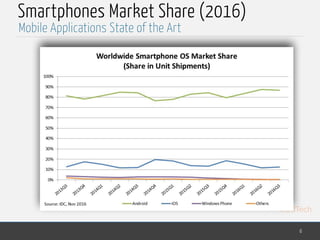
Smartphones Market Share (2016)
6
Mobile Applications State of the Art
MedTech
MOBILE DEVELOPMENT SPECIFICITIES
7
Mobile Development
MedTech
Hardware Constraints
• When developing applications for mobile devises, some hardware
constraints must be taken into consideration
• Limited Memory / Slow Processor
• Even though some new top-of-the-line devises can reach 3GB of RAM (even 4
for some phablets), most of them suffer from a long loading time
• Avoid long and complex processing, greedy in memory
• Limited Storage Capacity
• Some very top-of-the-line devises (iPhone6S, Nexus 6P) have a 128GB disk
capacity
• But a lot of models have only 4GB of storage (most of them have 16GB)
• You can think about storing in the cloud for example.
8
Mobile Development Specificities
MedTech
Hardware Constraints
• Autonomy
• Avoid applications that spend a lot of unnecessary energy
• Use the "Energy Saving" mode
• Small and Changing Screen Size
• Consider varying size from one device to another
• Exploit all the available space in an optimal manner
• Use responsive design (adaptable to the screen size)
• Think about HMI that ease the navigation (a fixed header, usage of icons
instead of words,…)
9
Mobile Development Specificities
MedTech
Hardware Constraints
• Connectivity Problems
• Due to mobility, connectivity is limited
• Usage of 3G/4G networks, which are paying
• Think of an offline mode for your applications
• Be careful with automatic updates
• Slower Download
• Because of slower internet connections, limited network latency and memory and
processor capacities
• Download speed is slower than computers
• 80% of users don't want to use their mobile devises to navigate the web
• 64% expect a web page to be available in 4s, when a smartphone displays it in an average
of 9s
• Use technologies that ease pages download, like exploiting the cache, or using CSS3
• Reduce the size of images, the number of files and the client-side processing
10
Mobile Development Specificities
MedTech
Hardware Constraints
• Delicate Handling
• Delicate use of the touch keyboard, risks of typing errors, and very
unpleasant for the user
• Minimize the number of input fields
• Favor pre-filled fields
• Auto-complete, auto-correct,…
• Invalid clicks, because of the FAT FINGER phenomenon
• Be careful with the size and proximity of the clickable elements
• think of a "Cancel" functionality almost everywhere
• No hovering effect
• Need for more links and buttons
• Use conventions for mobile design, such as "swipe" of "shake"
11
Mobile Development Specificities
MedTech
User Experience
• Represents the behaviour, attitude and emotions of a user when he handles a
certain product, system or service
• Includes the practical, experimental and emotional aspects of human-
machine interaction
• Concerns
• The utility
• The ease of use
• The efficiency
• Subjective notion, as it depends on the concerned person
• Dynamic notion, as it evolves constantly in time
• Change in the circumstances of use
• Change of the habits and trends
12
Mobile Development Specificities
of the product
MedTech
Monetization
• The creator of an application can sell it via download platforms (App Store, Google
Play, …)
• But it is not the only way to monetize your application
• Paying application
• Classical way of monetizing an application
• Very cheap applications (less than 1 dollar) have a lot of success
• In general, 70% for the developer, 30% for the platform
• The price varies depending on the OS
• Certain users are reluctant to buy applications (esp. on Android)
• Trial Version
• Provide a limited version, that gives an idea to the user about the application
• Well adapted for games
• But, there is a maintenability problem for the developers
13
Mobile Development Specificities
MedTech
Monetization
• Advertisements
• As a banner or
• Profitable for developers who want to be known and have some revenus
• Ads are generally pay per click: it's difficult to estimate the income
• Ads can deteriorate the UX (slowness, click by mistake,…)
• Ads must be well targeted
• … and ads are really, really annoying…
• Sponsoring
• Encourage users to perform an action in exchange with a virtual good
• Well adapted for games
• The audience is well targeted, thus chances for earning money are bigger
14
Mobile Development Specificities
MedTech
Monetization
• Freemium
• Offer virtual content for money
• Apple: in-app purchase
• Google: in-app billing
• Can be implemented on a paid or free application
• A quality application incites users to use it again and to buy some content
• The virtual content must be worth its price
• The experience must be limited, otherwise the user can be frustrated
15
Mobile Development Specificities
MedTech
CATEGORIES OF MOBILE APPLICATIONS
16
Mobile Development
MedTech
Native Applications
• Applications written in the programming language specific for a
particular platform
• Example: Objective C / Swift for iOS, Java for Android, …
• High performance and high reliability
• Can access all device functionalities: camera, contact list, …
• Can be used without any internet connection
• But, development costs are high, because these applications are
associated to a given platform, which means it must be re-written for
other platforms
17
Categories of Mobile Applications
MedTech
Web Applications
• Web sites adapted for mobile devices
• Accessible via the web browser of the mobile device
• Accessible only on-line, without any installation
• Any changes are applied only once, to the source web application, and
all users see it
• Need to make your web site "mobile friendly" for a better user
experience
• Usage of HTML, JavaScript, CSS…
18
Categories of Mobile Applications
MedTech
Hybrid Applications
• Expose the content of existing web sites as mobile applications
• The web browser is no longer part of the user experience
• The application is installed like any other native application
• Publishable in the applications stores
• Have more access to the device functionalities than web applications, but
are still limited compared to native ones
• Render the user interface using an embedded web browser
• Wrapped inside a native application that uses a mobile platform’s WebView
• You can think of the WebView as a chromeless browser window that’s typically
configured to run fullscreen.
• Most hybrid mobile applications leverage Apache Cordova (previously
called PhoneGap)
19
Categories of Mobile Applications
MedTech
Cross-Platform Applications
• Developed using an intermediate language (such as JavaScript) that is not
native to the device's operating system
• Different from HTML5 Hybrid apps, as hybrid apps incorporate both some web
and native code
• Cross-platform development create pure native applications, but generated
for multiple platforms from a unique code
• Generally, a third party vendor chooses a programming language and creates a
unified API on top of the native SDKs provided by the various OS vendors
• Using this unified API, it is possible to support multiple operating systems with a
single code base.
• The third-party vendor generally provides an IDE (Integrated Development
Environment) which handles the process of creating the native application bundle
for iOS and Android from the single cross-platform codebase.
• Examples: Xamarin (C#), NativeScript, React Native
20
Categories of Mobile Applications
MedTech
USER EXPERIENCE (UX)
21
Mobile Development
MedTech
Mobile UX
• Mobile UX
• Perceptions and feelings of users before, during and after their interaction
with the mobile application
• Need to rethink our acquired reflexes about the design of desktop
applications
• Consider:
• The small size of the screen
• The difference of functionalities between devices
• Usage and connectivity constraints
• The changing context
• A set of key components of the mobile user experience have been
defined
22
User Experience (UX)
MedTech
Component 1: Functionalities
• Select functionalities that are relevant to the user
• Guidelines
• Offer functionalities adapted for smartphones (ex: bar code reader)
• Prefer functionalities that are used in a mobile environment (ex: geolocation)
• Make sure that the fundamental functionalities are optimised for the mobile
(ex: clic-to-call phone numbers)
• Key functionalities must be available in all channels (application or web site)
23
User Experience (UX)
MedTech
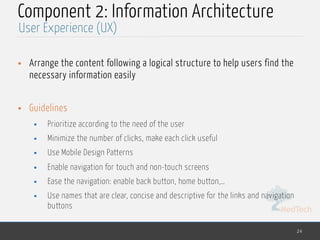
Component 2: Information Architecture
• Arrange the content following a logical structure to help users find the
necessary information easily
• Guidelines
• Prioritize according to the need of the user
• Minimize the number of clicks, make each click useful
• Use Mobile Design Patterns
• Enable navigation for touch and non-touch screens
• Ease the navigation: enable back button, home button,…
• Use names that are clear, concise and descriptive for the links and navigation
buttons
24
User Experience (UX)
MedTech
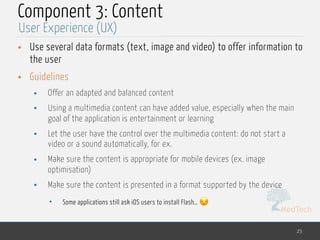
Component 3: Content
• Use several data formats (text, image and video) to offer information to
the user
• Guidelines
• Offer an adapted and balanced content
• Using a multimedia content can have added value, especially when the main
goal of the application is entertainment or learning
• Let the user have the control over the multimedia content: do not start a
video or a sound automatically, for ex.
• Make sure the content is appropriate for mobile devices (ex. image
optimisation)
• Make sure the content is presented in a format supported by the device
• Some applications still ask iOS users to install Flash… 😒
25
User Experience (UX)
MedTech
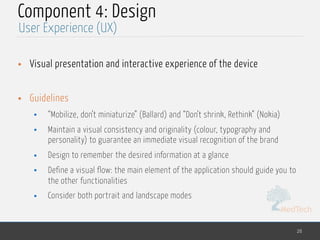
Component 4: Design
• Visual presentation and interactive experience of the device
• Guidelines
• “Mobilize, don’t miniaturize” (Ballard) and “Don’t shrink, Rethink” (Nokia)
• Maintain a visual consistency and originality (colour, typography and
personality) to guarantee an immediate visual recognition of the brand
• Design to remember the desired information at a glance
• Define a visual flow: the main element of the application should guide you to
the other functionalities
• Consider both portrait and landscape modes
26
User Experience (UX)
MedTech
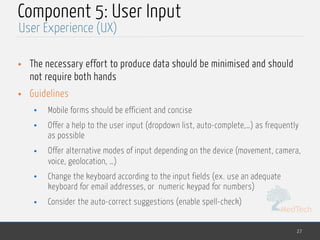
Component 5: User Input
• The necessary effort to produce data should be minimised and should
not require both hands
• Guidelines
• Mobile forms should be efficient and concise
• Offer a help to the user input (dropdown list, auto-complete,…) as frequently
as possible
• Offer alternative modes of input depending on the device (movement, camera,
voice, geolocation, …)
• Change the keyboard according to the input fields (ex. use an adequate
keyboard for email addresses, or numeric keypad for numbers)
• Consider the auto-correct suggestions (enable spell-check)
27
User Experience (UX)
MedTech
Component 6: Mobile Context
• The device can be used anywhere, anytime
• Take into consideration the changing environment
• Consider extremely inconfortable situations as much as extremely
confortable ones
• Guidelines
• Use the characteristics of the device to anticipate the needs of the user in the
context of the usage of the application
• Offer the possibility to navigate with the voice to go through cooking recipes
• Change the characteristics of the interface depending on the time of its usage
• Switch automatically to the Night Shift for ex.
• Use the user's location to display any proximity information
• Use the default UI according to the device, and authorise improvements later
28
User Experience (UX)
MedTech
Component 7: Usability
• To which extent do all the previous components (information
architecture, design, content,…) collaborate together?
• Guidelines
• Guide the user to what he should click on, select, or swipe
• Target elements must be of an adequate size and well spaced
• Target elements must be placed in adequate areas of the screen
• Some areas, difficult to access, can be used for deletion
• Reduce the learning curve by using conventions and patterns
• Avoid using technologies that are not supported by all the platforms
29
User Experience (UX)
MedTech
Component 8: Confidence
• Degree of confidence and confort the users feel when using the
application
• Guidelines
• Be careful to the security and respect of privacy
• Do not collect and use personal information without authorisation
• Let the user take control of the information he wants to share
• Clearly point out your business practices by offering explicit links to security
policies
30
User Experience (UX)
MedTech
Component 9: Feedback
• How to draw the attention of the user and display important
information?
• Guidelines
• Minimize the number of alerts and optimise their content
• Notifications must be brief, informative and easily deletable
• Offer a feedback and confirmation without interrupting the user
• If your application displays badges and notifications on the status bar
• Keep them up to date
• Delete them only when the user took notice of them
31
User Experience (UX)
MedTech
Component 10: Help
• Options, products and services available to assist the user when
handling the application
• Guidelines
• Make the access to the help easy, in a distinguishable place
• Offer several ways to get support
• FAQ, calls, tweets,…
• Offer a fast tutorial when first using the application
• Offer a contextual help and advises to guide the user when the application
introduces a new concept
• Offer support videos when necessary, but give the user control over them
32
User Experience (UX)
MedTech
Component 11: Social
• Content and functionalities enabling:
• Creation of a social participation
• Production of user interaction
• Sharing on social media
• Guidelines
• Maintain a presence in social media (facebook page for ex.)
• Incorporate your social activities in your mobile application by showing your
recent activities and offering an easy way to follow or like you
• Enable users to easily connect to their social network via your application
• Usage of provided APIs for sharing, tagging, liking and commenting
• Invite users to generate content about your brand/company for a potential
profit in return
33
User Experience (UX)
MedTech
Component 12: Marketing
• Methods used for the users to find the application or site
• Factors encouraging the repeated usage of the application
• Guidelines
• Insure your visibility by optimising your site/application for mobile research
• Offer a QR (Quick Response) code for your application
• Promote your application on other possible channels (TV, posters,..) and offer
promotions for its download/purchase
• Ask users to grade and comment your application, and to share their opinion
on social media
34
User Experience (UX)
MedTech
KEY DESIGN PRINCIPLES
35
Mobile Development
MedTech
Design Principles
• Key principles that help you design a mobile application that satisfies
the best practices, minimises costs and maintenance need, and help
usability and extensibility
• Separation of concerns
• Single Responsibility Principle
• DRY : Don't Repeat Yourself
• Do not start with a big design upfront
• Privilege composition over inheritance
36
Key Design Principles
MedTech
P1: Separation of Concerns
• Divide your application into distinct parts which functionalities overlap
the least possible
• Advantages
• Optimisation of a module or functionality independently from the others
• If a module fails, it doesn't impact the others
• Makes the application easier to understand and design
• Makes managing complex systems easier
• Divide and Conquer
37
Key Design Principles
MedTech
P2: Single Responsibility Principle
• Each component or module must be responsible of only one
functionality or characteristic
• Advantages
• Makes the components more cohesive
• Makes the components' optimisation easier if a characteristic changes
38
Key Design Principles
MedTech
P3: DRY (Don't Repeat Yourself)
• You must not duplicate a functionality in an application over multiple
modules
• Advantages
• Eases the implementation of changes
• Increases clarity
• Makes the code more consistant
39
Key Design Principles
MedTech
P4: Avoid Doing a Big Design Upfront
• If your needs are not clear, or if there are risks that the design will
evolve in time, avoid making too much effort in the design at the
beginning
• Makes your design evolve with your application
• Advantages
• Helps you embrace evolving requirements
• Avoid losing your morale at the beginning of the project
• Proceed step by step
40
Key Design Principles
MedTech
P5: Privilege Composition over Inheritance
• Classes should achieve polymorphic behaviour and code reuse by their
composition instead of inheritance if possible
• Advantages
• Inheritance increases the dependency between parent and child classes
• Child classes' reuse is more limited
• Reduces the inheritance hierarchy, which can be laborious
• It is better to compose what an object can do (HAS-A) rather than to extend
what it is (IS-A)
41
Key Design Principles
MedTech
But also…
• Use logical layers to "tidy up" your application's components
• Use design patterns, and be careful to use only compatible ones in the
same layer
• Use abstraction to implement loose coupling between layers
• Keep the data formats consistant in the same layer
• Separate as possible non-functional code (security, logging,..) from
business code
• Be consistant in naming conventions
• Establish your own standards to deal with exceptions
42
Key Design Principles
MedTech
Dr. Lilia SFAXI
www.liliasfaxi.wix.com/liliasfaxi
References
43
• Web Sites
• inoutput.io, Choosing the right mobile app for your project, http://
inoutput.io/articles/development/choosing-the-right-mobile-app-for-your-
project-native-vs-cross-platform-vs-hybrid, consulted 10/04/17
• InfoQ, Pros and Cons of Cross-Platform Mobile App Development, https://
www.infoq.com/articles/mobile-cross-platform-app-development, consulted
10/04/17

Mobile developement

  • 1.
    MedTech Dr. Lilia SFAXI www.liliasfaxi.wix.com/liliasfaxi Chp8-Mobile Development Mobile development best practices 1 MedTech – Mediterranean Institute of Technology CS-Web and Mobile Development MedTech
  • 2.
    MedTech MOBILE APPLICATIONS STATEOF THE ART 2 Mobile Development
  • 3.
    MedTech 10 Key Numbersto Know (2016) • Users spend 90% of their time on mobile applications, in comparison with mobile web • Users download an average of 8,8 applications a month • Increase of 5% in comparison with previous year • In Mai 2016, the average cost of installing an application is of $2,33 in Android (+93% comparing with previous year) and $1,46 on iOS (-3%) • 25% of the installed applications are never used • 26% of the installed applications are abandoned after the first use • 45% of mobile applications users do not appreciate their shopping experience, vs 47% for web applications users • An average Android application loses 77% of its daily active users in the 3 days following its installation, and 90% in the 30 first days • Among those who stop using an application, 30% can use it again if they are offered a discount, and 24% will do it if they are offered an exclusive content or bonus • 78% of companies use advertisement to increase applications downloads 3 Mobile Applications State of the Art
  • 4.
    MedTech Smartphones • First mobilephone: 1983 by Motorola • PDA: Personal Digital Assistant (PDA) in 1990 • Agenda, contacts list, notepad • Synchronisation with a computer • Smartphone = Mobile Phone + PDA • In 2001 with Sagem • Boost in 2005 with the first iPhone, and the purchase of Android by Google • Mini mobile computer • Possibilité to download and install applications 4 Mobile Applications State of the Art
  • 5.
    MedTech Some Mobile OperatingSystems • Old generation • Symbian (Nokia) • Blackberry OS (RIM) • Windows Mobile (Microsoft) • Bada (Samsung) • Touch OS • iOS (Apple) • Android (Google) • Windows Phone (Microsoft) 5 Mobile Applications State of the Art
  • 6.
    MedTech Smartphones Market Share(2016) 6 Mobile Applications State of the Art
  • 7.
  • 8.
    MedTech Hardware Constraints • Whendeveloping applications for mobile devises, some hardware constraints must be taken into consideration • Limited Memory / Slow Processor • Even though some new top-of-the-line devises can reach 3GB of RAM (even 4 for some phablets), most of them suffer from a long loading time • Avoid long and complex processing, greedy in memory • Limited Storage Capacity • Some very top-of-the-line devises (iPhone6S, Nexus 6P) have a 128GB disk capacity • But a lot of models have only 4GB of storage (most of them have 16GB) • You can think about storing in the cloud for example. 8 Mobile Development Specificities
  • 9.
    MedTech Hardware Constraints • Autonomy •Avoid applications that spend a lot of unnecessary energy • Use the "Energy Saving" mode • Small and Changing Screen Size • Consider varying size from one device to another • Exploit all the available space in an optimal manner • Use responsive design (adaptable to the screen size) • Think about HMI that ease the navigation (a fixed header, usage of icons instead of words,…) 9 Mobile Development Specificities
  • 10.
    MedTech Hardware Constraints • ConnectivityProblems • Due to mobility, connectivity is limited • Usage of 3G/4G networks, which are paying • Think of an offline mode for your applications • Be careful with automatic updates • Slower Download • Because of slower internet connections, limited network latency and memory and processor capacities • Download speed is slower than computers • 80% of users don't want to use their mobile devises to navigate the web • 64% expect a web page to be available in 4s, when a smartphone displays it in an average of 9s • Use technologies that ease pages download, like exploiting the cache, or using CSS3 • Reduce the size of images, the number of files and the client-side processing 10 Mobile Development Specificities
  • 11.
    MedTech Hardware Constraints • DelicateHandling • Delicate use of the touch keyboard, risks of typing errors, and very unpleasant for the user • Minimize the number of input fields • Favor pre-filled fields • Auto-complete, auto-correct,… • Invalid clicks, because of the FAT FINGER phenomenon • Be careful with the size and proximity of the clickable elements • think of a "Cancel" functionality almost everywhere • No hovering effect • Need for more links and buttons • Use conventions for mobile design, such as "swipe" of "shake" 11 Mobile Development Specificities
  • 12.
    MedTech User Experience • Representsthe behaviour, attitude and emotions of a user when he handles a certain product, system or service • Includes the practical, experimental and emotional aspects of human- machine interaction • Concerns • The utility • The ease of use • The efficiency • Subjective notion, as it depends on the concerned person • Dynamic notion, as it evolves constantly in time • Change in the circumstances of use • Change of the habits and trends 12 Mobile Development Specificities of the product
  • 13.
    MedTech Monetization • The creatorof an application can sell it via download platforms (App Store, Google Play, …) • But it is not the only way to monetize your application • Paying application • Classical way of monetizing an application • Very cheap applications (less than 1 dollar) have a lot of success • In general, 70% for the developer, 30% for the platform • The price varies depending on the OS • Certain users are reluctant to buy applications (esp. on Android) • Trial Version • Provide a limited version, that gives an idea to the user about the application • Well adapted for games • But, there is a maintenability problem for the developers 13 Mobile Development Specificities
  • 14.
    MedTech Monetization • Advertisements • Asa banner or • Profitable for developers who want to be known and have some revenus • Ads are generally pay per click: it's difficult to estimate the income • Ads can deteriorate the UX (slowness, click by mistake,…) • Ads must be well targeted • … and ads are really, really annoying… • Sponsoring • Encourage users to perform an action in exchange with a virtual good • Well adapted for games • The audience is well targeted, thus chances for earning money are bigger 14 Mobile Development Specificities
  • 15.
    MedTech Monetization • Freemium • Offervirtual content for money • Apple: in-app purchase • Google: in-app billing • Can be implemented on a paid or free application • A quality application incites users to use it again and to buy some content • The virtual content must be worth its price • The experience must be limited, otherwise the user can be frustrated 15 Mobile Development Specificities
  • 16.
    MedTech CATEGORIES OF MOBILEAPPLICATIONS 16 Mobile Development
  • 17.
    MedTech Native Applications • Applicationswritten in the programming language specific for a particular platform • Example: Objective C / Swift for iOS, Java for Android, … • High performance and high reliability • Can access all device functionalities: camera, contact list, … • Can be used without any internet connection • But, development costs are high, because these applications are associated to a given platform, which means it must be re-written for other platforms 17 Categories of Mobile Applications
  • 18.
    MedTech Web Applications • Websites adapted for mobile devices • Accessible via the web browser of the mobile device • Accessible only on-line, without any installation • Any changes are applied only once, to the source web application, and all users see it • Need to make your web site "mobile friendly" for a better user experience • Usage of HTML, JavaScript, CSS… 18 Categories of Mobile Applications
  • 19.
    MedTech Hybrid Applications • Exposethe content of existing web sites as mobile applications • The web browser is no longer part of the user experience • The application is installed like any other native application • Publishable in the applications stores • Have more access to the device functionalities than web applications, but are still limited compared to native ones • Render the user interface using an embedded web browser • Wrapped inside a native application that uses a mobile platform’s WebView • You can think of the WebView as a chromeless browser window that’s typically configured to run fullscreen. • Most hybrid mobile applications leverage Apache Cordova (previously called PhoneGap) 19 Categories of Mobile Applications
  • 20.
    MedTech Cross-Platform Applications • Developedusing an intermediate language (such as JavaScript) that is not native to the device's operating system • Different from HTML5 Hybrid apps, as hybrid apps incorporate both some web and native code • Cross-platform development create pure native applications, but generated for multiple platforms from a unique code • Generally, a third party vendor chooses a programming language and creates a unified API on top of the native SDKs provided by the various OS vendors • Using this unified API, it is possible to support multiple operating systems with a single code base. • The third-party vendor generally provides an IDE (Integrated Development Environment) which handles the process of creating the native application bundle for iOS and Android from the single cross-platform codebase. • Examples: Xamarin (C#), NativeScript, React Native 20 Categories of Mobile Applications
  • 21.
  • 22.
    MedTech Mobile UX • MobileUX • Perceptions and feelings of users before, during and after their interaction with the mobile application • Need to rethink our acquired reflexes about the design of desktop applications • Consider: • The small size of the screen • The difference of functionalities between devices • Usage and connectivity constraints • The changing context • A set of key components of the mobile user experience have been defined 22 User Experience (UX)
  • 23.
    MedTech Component 1: Functionalities •Select functionalities that are relevant to the user • Guidelines • Offer functionalities adapted for smartphones (ex: bar code reader) • Prefer functionalities that are used in a mobile environment (ex: geolocation) • Make sure that the fundamental functionalities are optimised for the mobile (ex: clic-to-call phone numbers) • Key functionalities must be available in all channels (application or web site) 23 User Experience (UX)
  • 24.
    MedTech Component 2: InformationArchitecture • Arrange the content following a logical structure to help users find the necessary information easily • Guidelines • Prioritize according to the need of the user • Minimize the number of clicks, make each click useful • Use Mobile Design Patterns • Enable navigation for touch and non-touch screens • Ease the navigation: enable back button, home button,… • Use names that are clear, concise and descriptive for the links and navigation buttons 24 User Experience (UX)
  • 25.
    MedTech Component 3: Content •Use several data formats (text, image and video) to offer information to the user • Guidelines • Offer an adapted and balanced content • Using a multimedia content can have added value, especially when the main goal of the application is entertainment or learning • Let the user have the control over the multimedia content: do not start a video or a sound automatically, for ex. • Make sure the content is appropriate for mobile devices (ex. image optimisation) • Make sure the content is presented in a format supported by the device • Some applications still ask iOS users to install Flash… 😒 25 User Experience (UX)
  • 26.
    MedTech Component 4: Design •Visual presentation and interactive experience of the device • Guidelines • “Mobilize, don’t miniaturize” (Ballard) and “Don’t shrink, Rethink” (Nokia) • Maintain a visual consistency and originality (colour, typography and personality) to guarantee an immediate visual recognition of the brand • Design to remember the desired information at a glance • Define a visual flow: the main element of the application should guide you to the other functionalities • Consider both portrait and landscape modes 26 User Experience (UX)
  • 27.
    MedTech Component 5: UserInput • The necessary effort to produce data should be minimised and should not require both hands • Guidelines • Mobile forms should be efficient and concise • Offer a help to the user input (dropdown list, auto-complete,…) as frequently as possible • Offer alternative modes of input depending on the device (movement, camera, voice, geolocation, …) • Change the keyboard according to the input fields (ex. use an adequate keyboard for email addresses, or numeric keypad for numbers) • Consider the auto-correct suggestions (enable spell-check) 27 User Experience (UX)
  • 28.
    MedTech Component 6: MobileContext • The device can be used anywhere, anytime • Take into consideration the changing environment • Consider extremely inconfortable situations as much as extremely confortable ones • Guidelines • Use the characteristics of the device to anticipate the needs of the user in the context of the usage of the application • Offer the possibility to navigate with the voice to go through cooking recipes • Change the characteristics of the interface depending on the time of its usage • Switch automatically to the Night Shift for ex. • Use the user's location to display any proximity information • Use the default UI according to the device, and authorise improvements later 28 User Experience (UX)
  • 29.
    MedTech Component 7: Usability •To which extent do all the previous components (information architecture, design, content,…) collaborate together? • Guidelines • Guide the user to what he should click on, select, or swipe • Target elements must be of an adequate size and well spaced • Target elements must be placed in adequate areas of the screen • Some areas, difficult to access, can be used for deletion • Reduce the learning curve by using conventions and patterns • Avoid using technologies that are not supported by all the platforms 29 User Experience (UX)
  • 30.
    MedTech Component 8: Confidence •Degree of confidence and confort the users feel when using the application • Guidelines • Be careful to the security and respect of privacy • Do not collect and use personal information without authorisation • Let the user take control of the information he wants to share • Clearly point out your business practices by offering explicit links to security policies 30 User Experience (UX)
  • 31.
    MedTech Component 9: Feedback •How to draw the attention of the user and display important information? • Guidelines • Minimize the number of alerts and optimise their content • Notifications must be brief, informative and easily deletable • Offer a feedback and confirmation without interrupting the user • If your application displays badges and notifications on the status bar • Keep them up to date • Delete them only when the user took notice of them 31 User Experience (UX)
  • 32.
    MedTech Component 10: Help •Options, products and services available to assist the user when handling the application • Guidelines • Make the access to the help easy, in a distinguishable place • Offer several ways to get support • FAQ, calls, tweets,… • Offer a fast tutorial when first using the application • Offer a contextual help and advises to guide the user when the application introduces a new concept • Offer support videos when necessary, but give the user control over them 32 User Experience (UX)
  • 33.
    MedTech Component 11: Social •Content and functionalities enabling: • Creation of a social participation • Production of user interaction • Sharing on social media • Guidelines • Maintain a presence in social media (facebook page for ex.) • Incorporate your social activities in your mobile application by showing your recent activities and offering an easy way to follow or like you • Enable users to easily connect to their social network via your application • Usage of provided APIs for sharing, tagging, liking and commenting • Invite users to generate content about your brand/company for a potential profit in return 33 User Experience (UX)
  • 34.
    MedTech Component 12: Marketing •Methods used for the users to find the application or site • Factors encouraging the repeated usage of the application • Guidelines • Insure your visibility by optimising your site/application for mobile research • Offer a QR (Quick Response) code for your application • Promote your application on other possible channels (TV, posters,..) and offer promotions for its download/purchase • Ask users to grade and comment your application, and to share their opinion on social media 34 User Experience (UX)
  • 35.
  • 36.
    MedTech Design Principles • Keyprinciples that help you design a mobile application that satisfies the best practices, minimises costs and maintenance need, and help usability and extensibility • Separation of concerns • Single Responsibility Principle • DRY : Don't Repeat Yourself • Do not start with a big design upfront • Privilege composition over inheritance 36 Key Design Principles
  • 37.
    MedTech P1: Separation ofConcerns • Divide your application into distinct parts which functionalities overlap the least possible • Advantages • Optimisation of a module or functionality independently from the others • If a module fails, it doesn't impact the others • Makes the application easier to understand and design • Makes managing complex systems easier • Divide and Conquer 37 Key Design Principles
  • 38.
    MedTech P2: Single ResponsibilityPrinciple • Each component or module must be responsible of only one functionality or characteristic • Advantages • Makes the components more cohesive • Makes the components' optimisation easier if a characteristic changes 38 Key Design Principles
  • 39.
    MedTech P3: DRY (Don'tRepeat Yourself) • You must not duplicate a functionality in an application over multiple modules • Advantages • Eases the implementation of changes • Increases clarity • Makes the code more consistant 39 Key Design Principles
  • 40.
    MedTech P4: Avoid Doinga Big Design Upfront • If your needs are not clear, or if there are risks that the design will evolve in time, avoid making too much effort in the design at the beginning • Makes your design evolve with your application • Advantages • Helps you embrace evolving requirements • Avoid losing your morale at the beginning of the project • Proceed step by step 40 Key Design Principles
  • 41.
    MedTech P5: Privilege Compositionover Inheritance • Classes should achieve polymorphic behaviour and code reuse by their composition instead of inheritance if possible • Advantages • Inheritance increases the dependency between parent and child classes • Child classes' reuse is more limited • Reduces the inheritance hierarchy, which can be laborious • It is better to compose what an object can do (HAS-A) rather than to extend what it is (IS-A) 41 Key Design Principles
  • 42.
    MedTech But also… • Uselogical layers to "tidy up" your application's components • Use design patterns, and be careful to use only compatible ones in the same layer • Use abstraction to implement loose coupling between layers • Keep the data formats consistant in the same layer • Separate as possible non-functional code (security, logging,..) from business code • Be consistant in naming conventions • Establish your own standards to deal with exceptions 42 Key Design Principles
  • 43.
    MedTech Dr. Lilia SFAXI www.liliasfaxi.wix.com/liliasfaxi References 43 •Web Sites • inoutput.io, Choosing the right mobile app for your project, http:// inoutput.io/articles/development/choosing-the-right-mobile-app-for-your- project-native-vs-cross-platform-vs-hybrid, consulted 10/04/17 • InfoQ, Pros and Cons of Cross-Platform Mobile App Development, https:// www.infoq.com/articles/mobile-cross-platform-app-development, consulted 10/04/17