“Where	
  did	
  my	
  CPU	
  go?”	
  
monitoring	
  &	
  capacity	
  planning	
  
adventures	
  on	
  a	
  consolidated	
  
environment	
  
Presented	
  by:	
  	
  
Karl	
  Arao	
  
1
whoami	
  
Karl	
  Arao	
  
•  Senior	
  Technical	
  Consultant	
  @	
  Enkitec	
  
•  Performance	
  and	
  Capacity	
  Planning	
  Enthusiast	


7	
  years	
  DBA	
  experience	
  
Oracle	
  ACE,	
  OCP-­‐DBA,	
  RHCE,	
  OakTable	
  
Blog:	
  karlarao.wordpress.com	
  
Wiki:	
  karlarao.Oddlyspot.com	
  
TwiPer:	
  @karlarao	


www.enkitec.com	
   2	
  
www.enkitec.com	
   3	
  
100+
3
Agenda	
  
•  HOWTO	
  compare	
  CPU	
  speeds	


•  Cores	
  vs	
  Threads	
  
•  The	
  different	
  CPU	
  events	
  
•  CPU	
  Monitoring/Capacity	
  Planning	
  on	
  consolidated	
  environments	


www.enkitec.com	
   4	
  
www.enkitec.com	
   5	
  
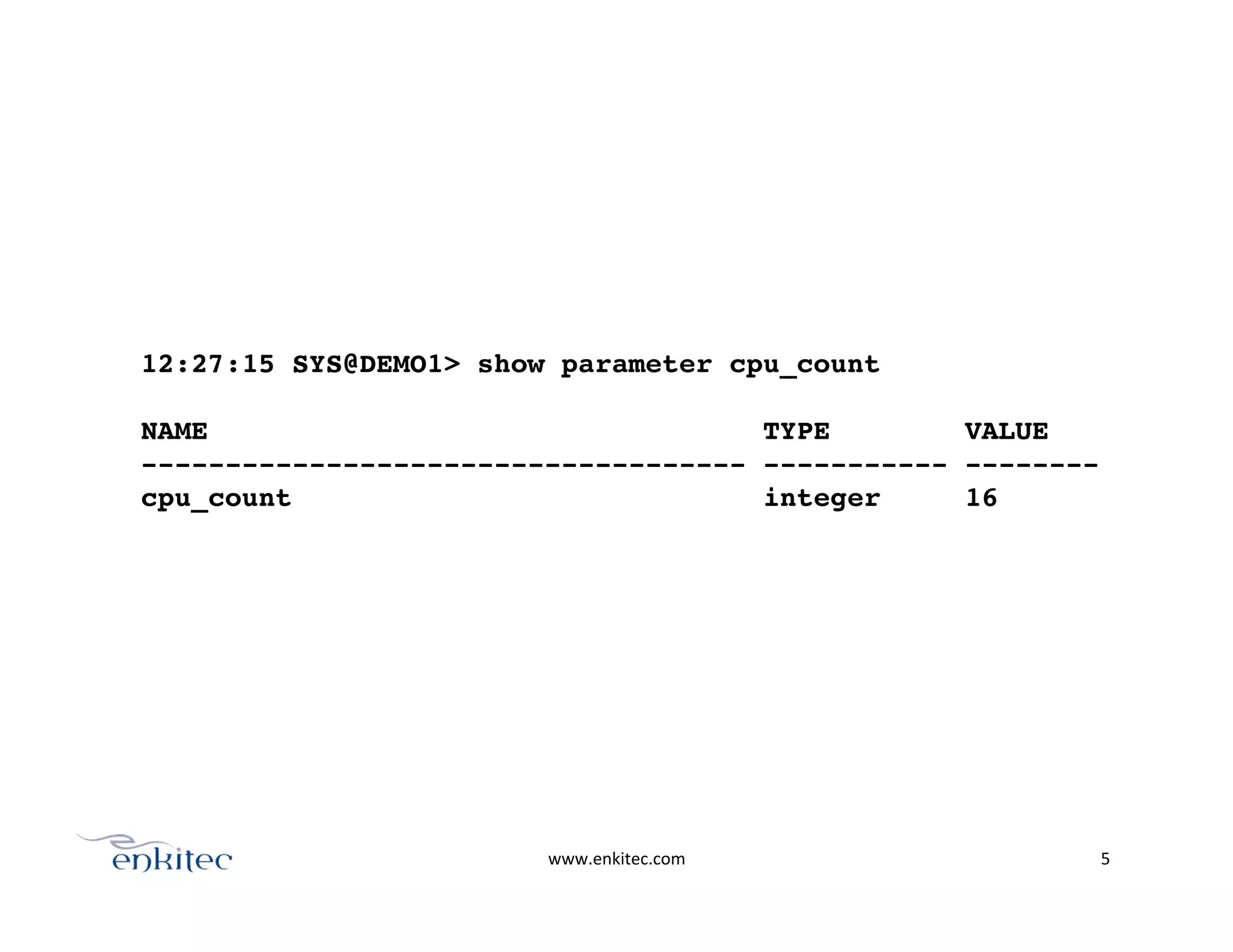
12:27:15 SYS@DEMO1> show parameter cpu_count!
!
NAME TYPE VALUE!
------------------------------------ ----------- --------!
cpu_count integer 16!
www.enkitec.com	
   6	
  
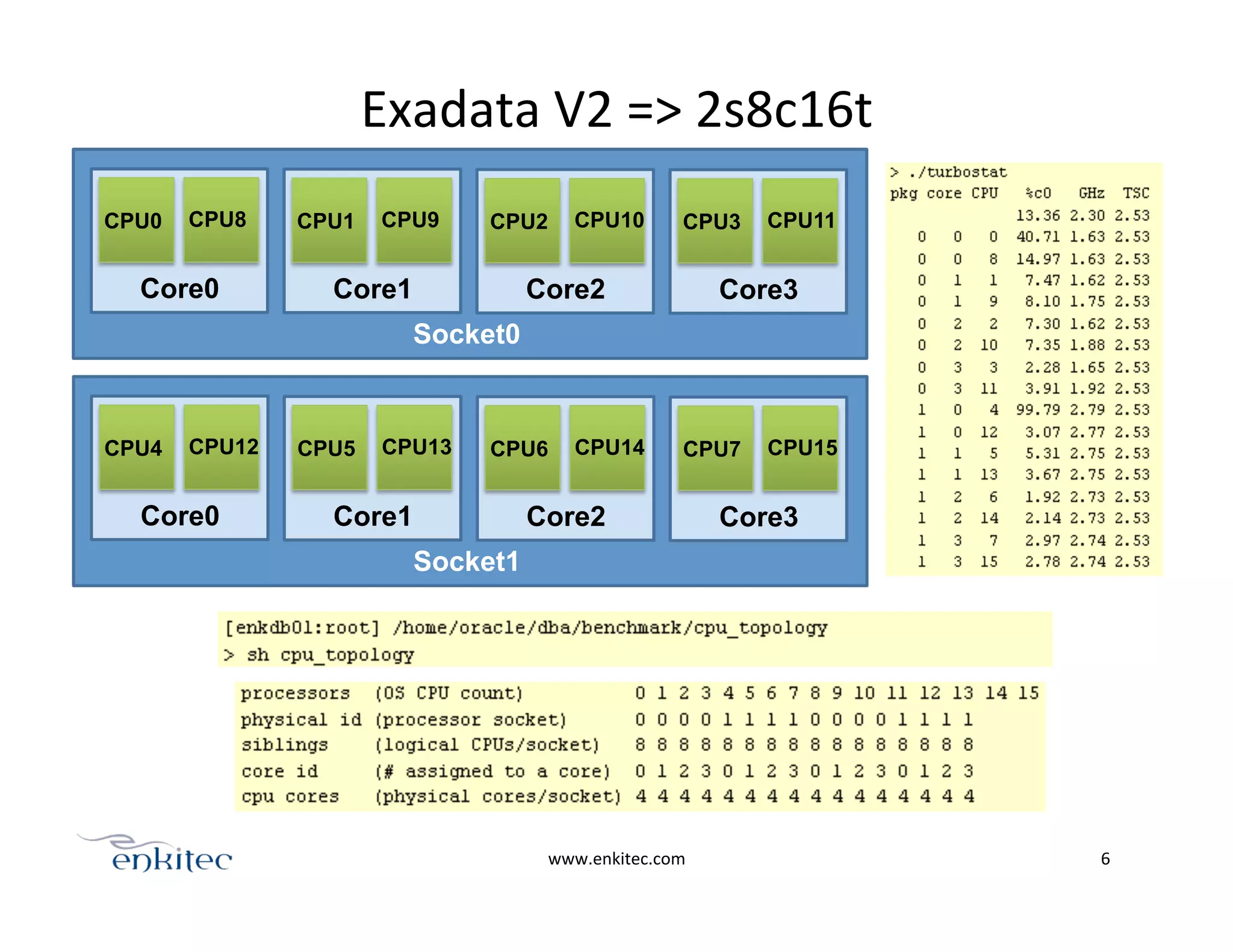
Socket0
Core0
CPU0 CPU8
Core1
CPU1 CPU9
Core2
CPU2 CPU10
Core3
CPU3 CPU11
Socket1
Core0
CPU4 CPU12
Core1
CPU5 CPU13
Core2
CPU6 CPU14
Core3
CPU7 CPU15
Exadata	
  V2	
  =>	
  2s8c16t	
  
PART1:	
  compare	
  CPU	
  speeds	
  
www.enkitec.com	
   7	
  
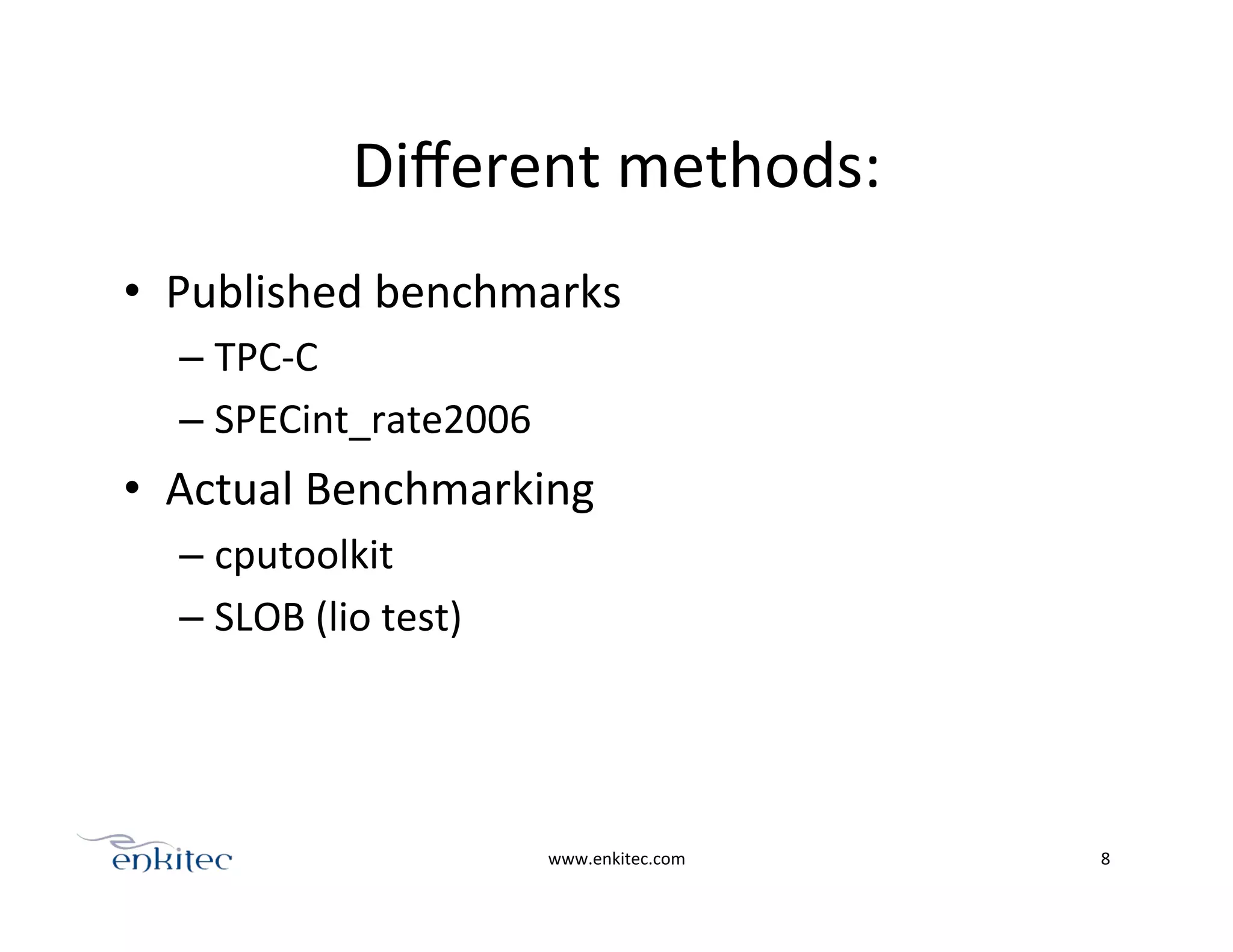
Different	
  methods:	
  
•  Published	
  benchmarks	
  
– TPC-­‐C	
  
– SPECint_rate2006	
  
•  Actual	
  Benchmarking	
  
– cputoolkit	
  
– SLOB	
  (lio	
  test)	
  
www.enkitec.com	
   8	
  
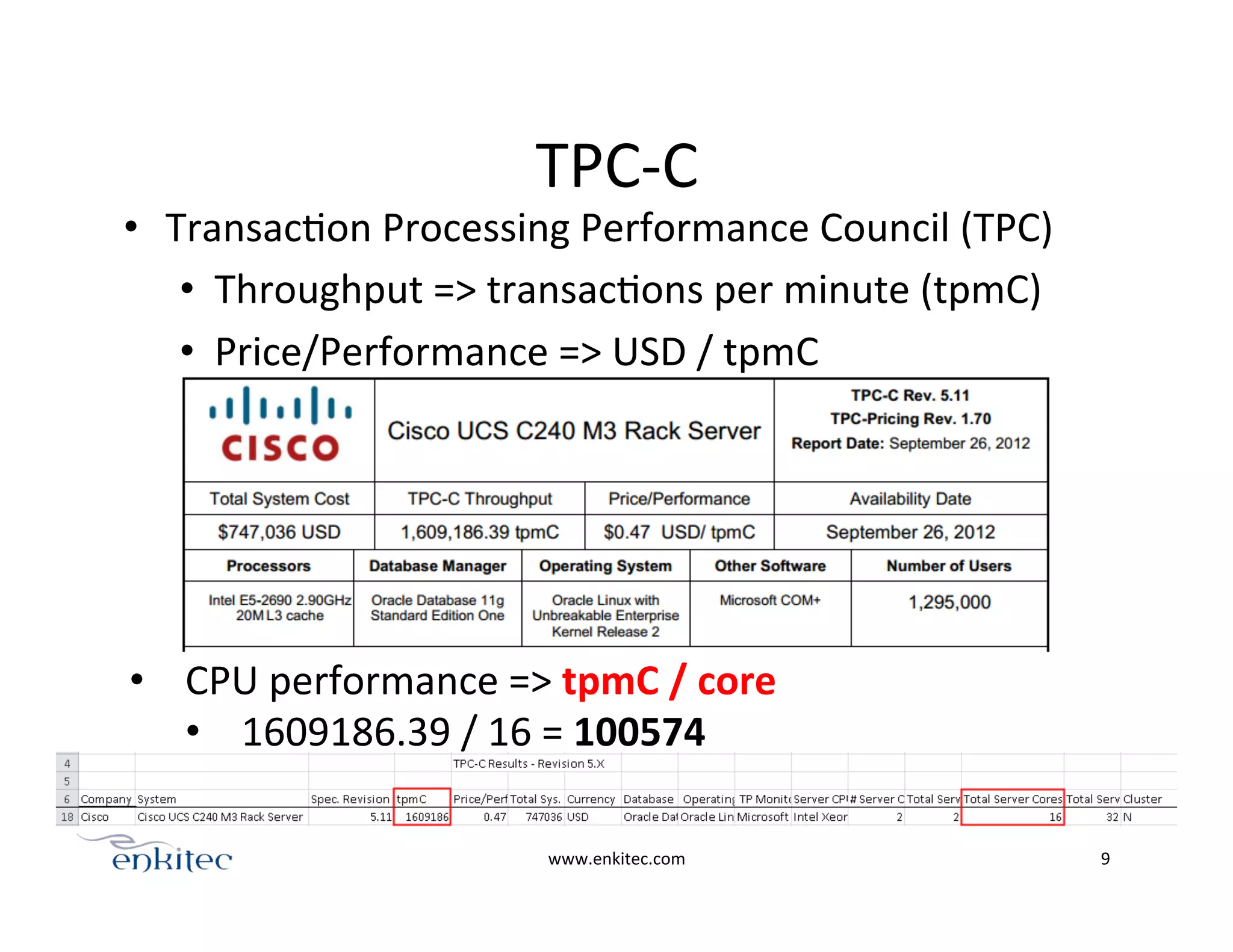
TPC-­‐C	
  
•  TransacOon	
  Processing	
  Performance	
  Council	
  (TPC)	
  
•  Throughput	
  =>	
  transacOons	
  per	
  minute	
  (tpmC)	
  
•  Price/Performance	
  =>	
  USD	
  /	
  tpmC	
  
www.enkitec.com	
   9	
  
•  CPU	
  performance	
  =>	
  tpmC	
  /	
  core	
  
•  1609186.39	
  /	
  16	
  =	
  100574	
  
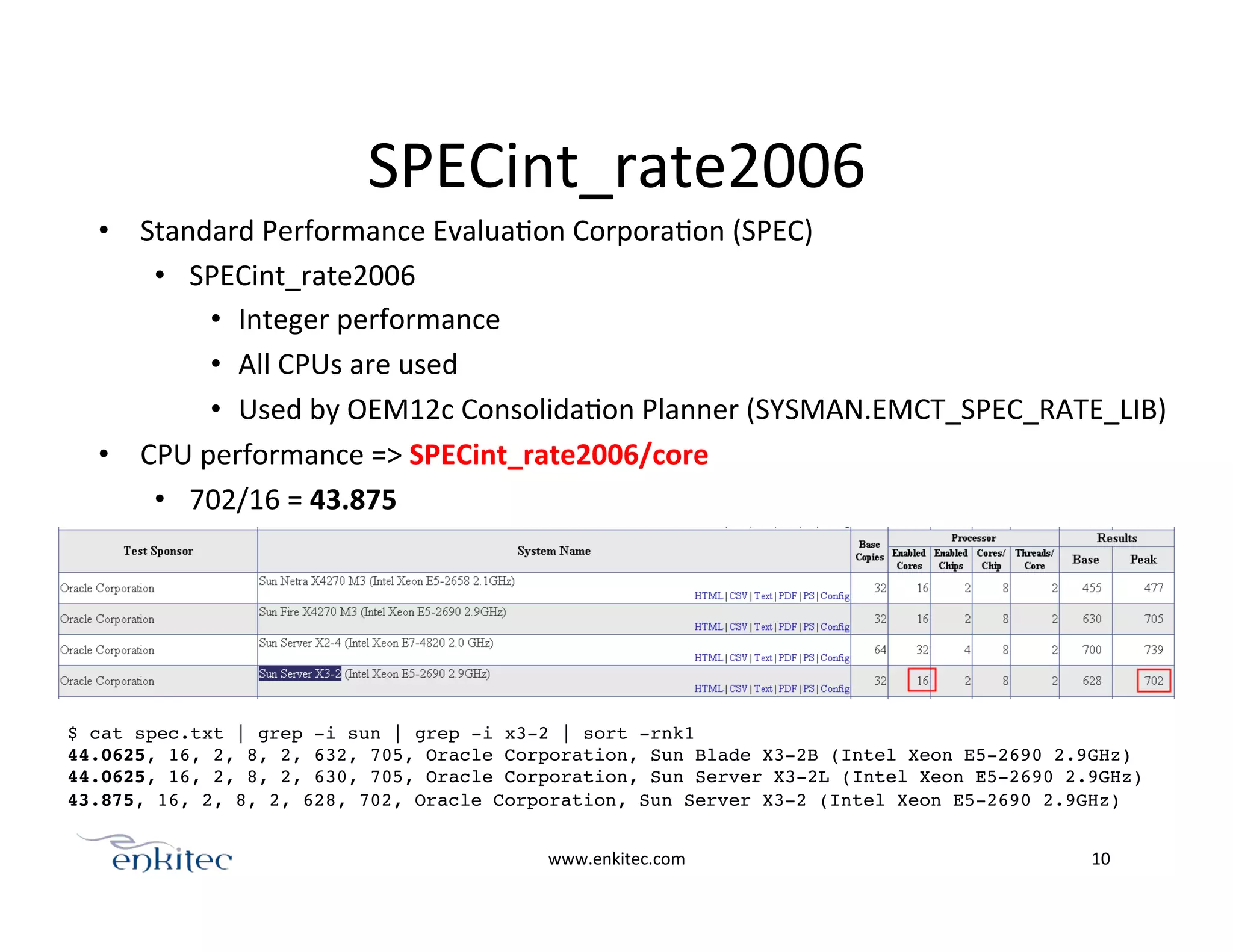
SPECint_rate2006	
  
•  Standard	
  Performance	
  EvaluaOon	
  CorporaOon	
  (SPEC)	
  
•  SPECint_rate2006	
  	
  
•  Integer	
  performance	
  
•  All	
  CPUs	
  are	
  used	
  
•  Used	
  by	
  OEM12c	
  ConsolidaOon	
  Planner	
  (SYSMAN.EMCT_SPEC_RATE_LIB)	
  
•  CPU	
  performance	
  =>	
  SPECint_rate2006/core	
  
•  702/16	
  =	
  43.875	
  
www.enkitec.com	
   10	
  
$ cat spec.txt | grep -i sun | grep -i x3-2 | sort -rnk1!
44.0625, 16, 2, 8, 2, 632, 705, Oracle Corporation, Sun Blade X3-2B (Intel Xeon E5-2690 2.9GHz)!
44.0625, 16, 2, 8, 2, 630, 705, Oracle Corporation, Sun Server X3-2L (Intel Xeon E5-2690 2.9GHz)!
43.875, 16, 2, 8, 2, 628, 702, Oracle Corporation, Sun Server X3-2 (Intel Xeon E5-2690 2.9GHz)!
!
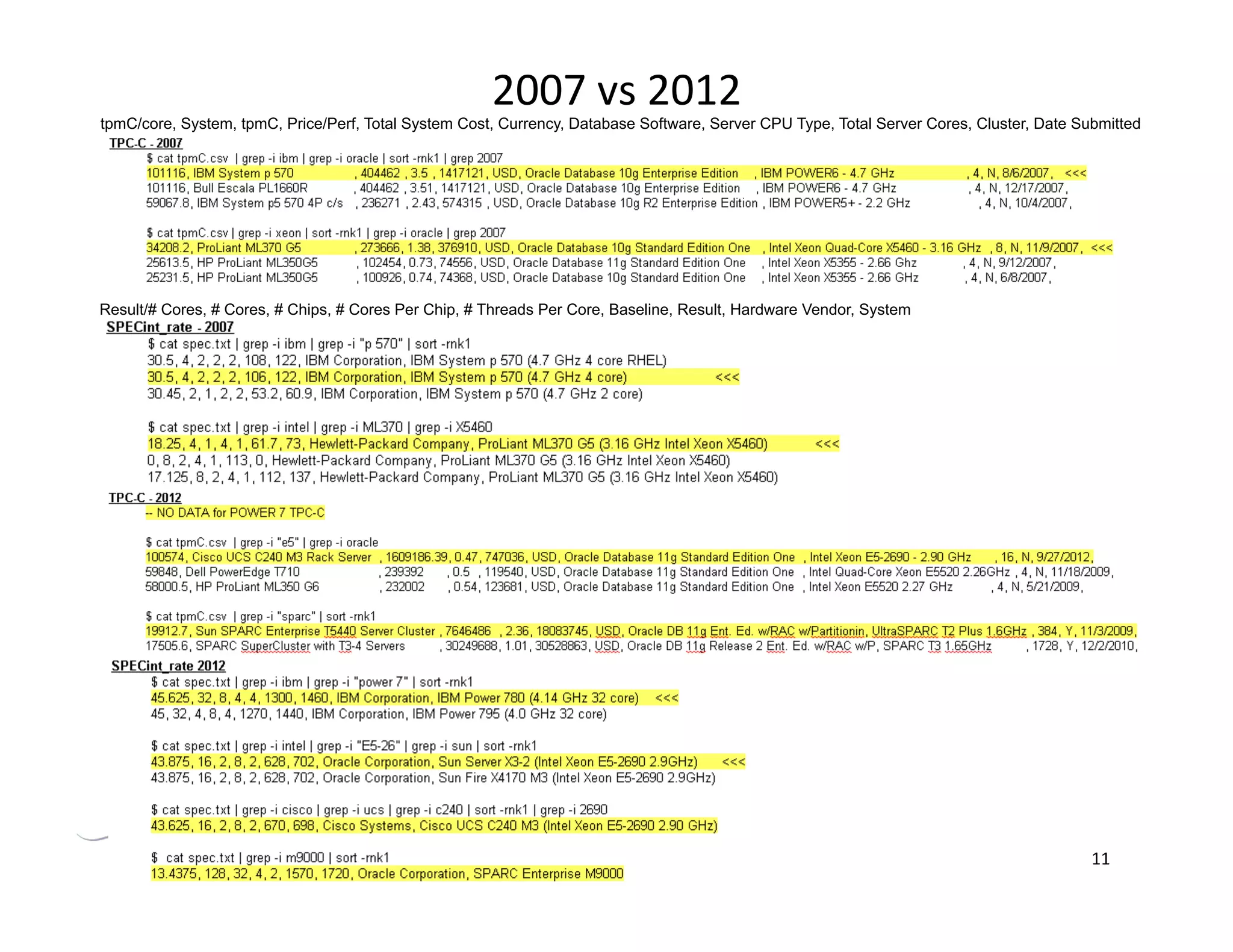
2007	
  vs	
  2012	
  
www.enkitec.com	
   11	
  
tpmC/core, System, tpmC, Price/Perf, Total System Cost, Currency, Database Software, Server CPU Type, Total Server Cores, Cluster, Date Submitted
Result/# Cores, # Cores, # Chips, # Cores Per Chip, # Threads Per Core, Baseline, Result, Hardware Vendor, System
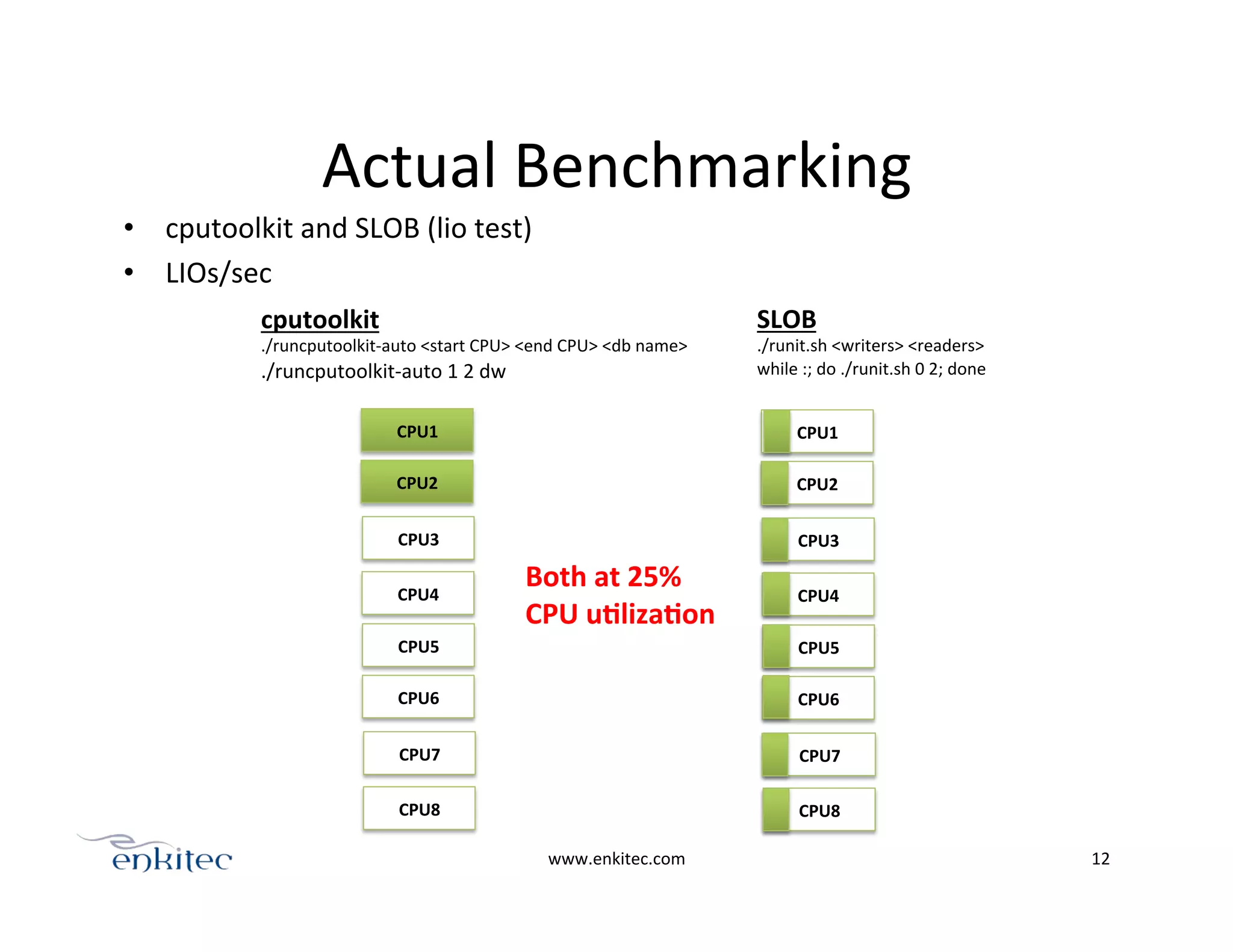
Actual	
  Benchmarking	
  
•  cputoolkit	
  and	
  SLOB	
  (lio	
  test)	
  
•  LIOs/sec	
  
www.enkitec.com	
   12	
  
CPU1	
  
CPU2	
  
CPU3	
  
CPU4	
  
CPU5	
  
CPU6	
  
CPU7	
  
CPU8	
  
CPU1	
  
CPU2	
  
CPU3	
  
CPU4	
  
CPU5	
  
CPU6	
  
CPU7	
  
CPU8	
  
cputoolkit	
  
./runcputoolkit-­‐auto	
  <start	
  CPU>	
  <end	
  CPU>	
  <db	
  name>	
  
./runcputoolkit-­‐auto	
  1	
  2	
  dw	
  
SLOB	
  
./runit.sh	
  <writers>	
  <readers>	
  
while	
  :;	
  do	
  ./runit.sh	
  0	
  2;	
  done	
  
Both	
  at	
  25%	
  	
  
CPU	
  uElizaEon	
  
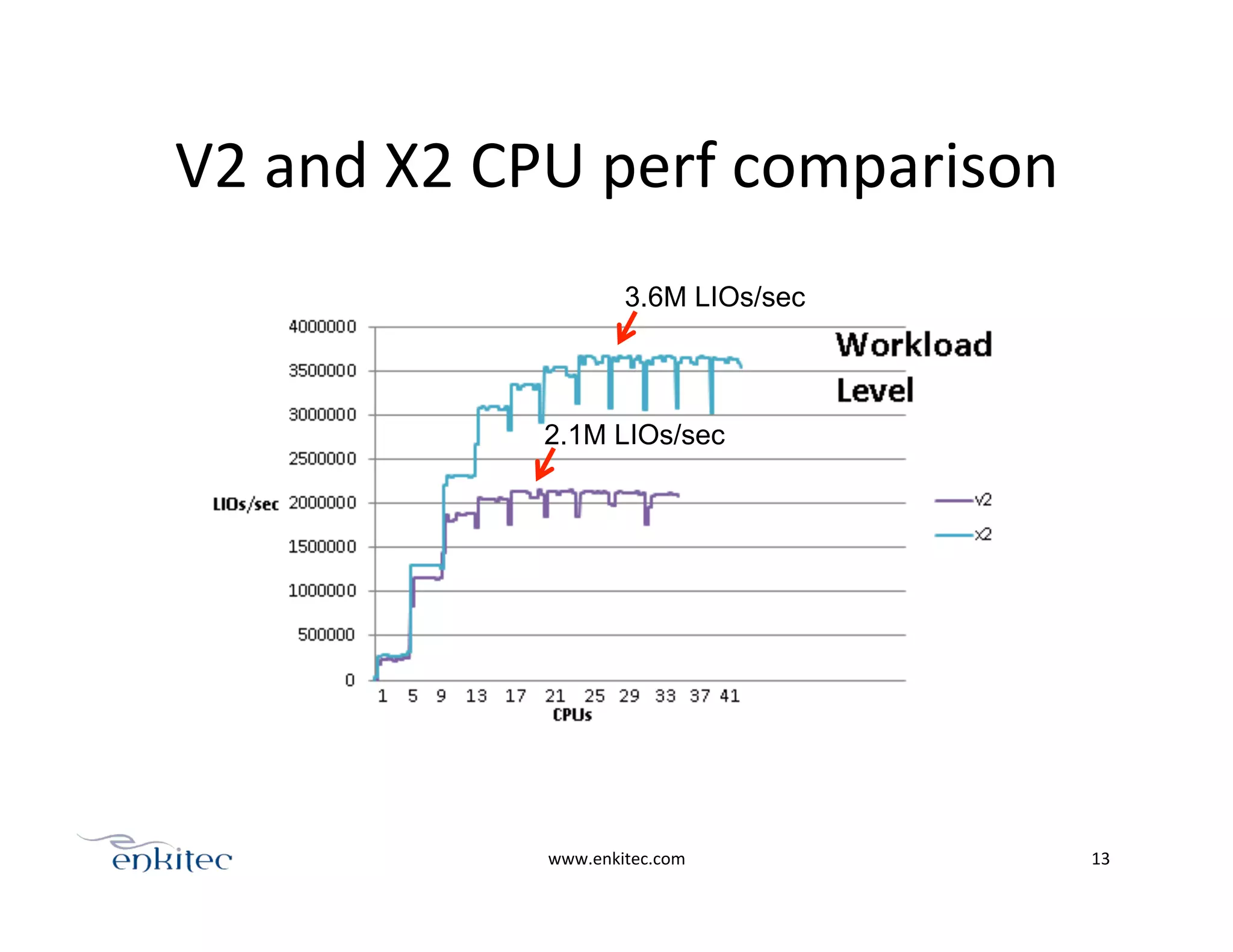
V2	
  and	
  X2	
  CPU	
  perf	
  comparison	
  
www.enkitec.com	
   13	
  
3.6M LIOs/sec
2.1M LIOs/sec
V2	
  -­‐>	
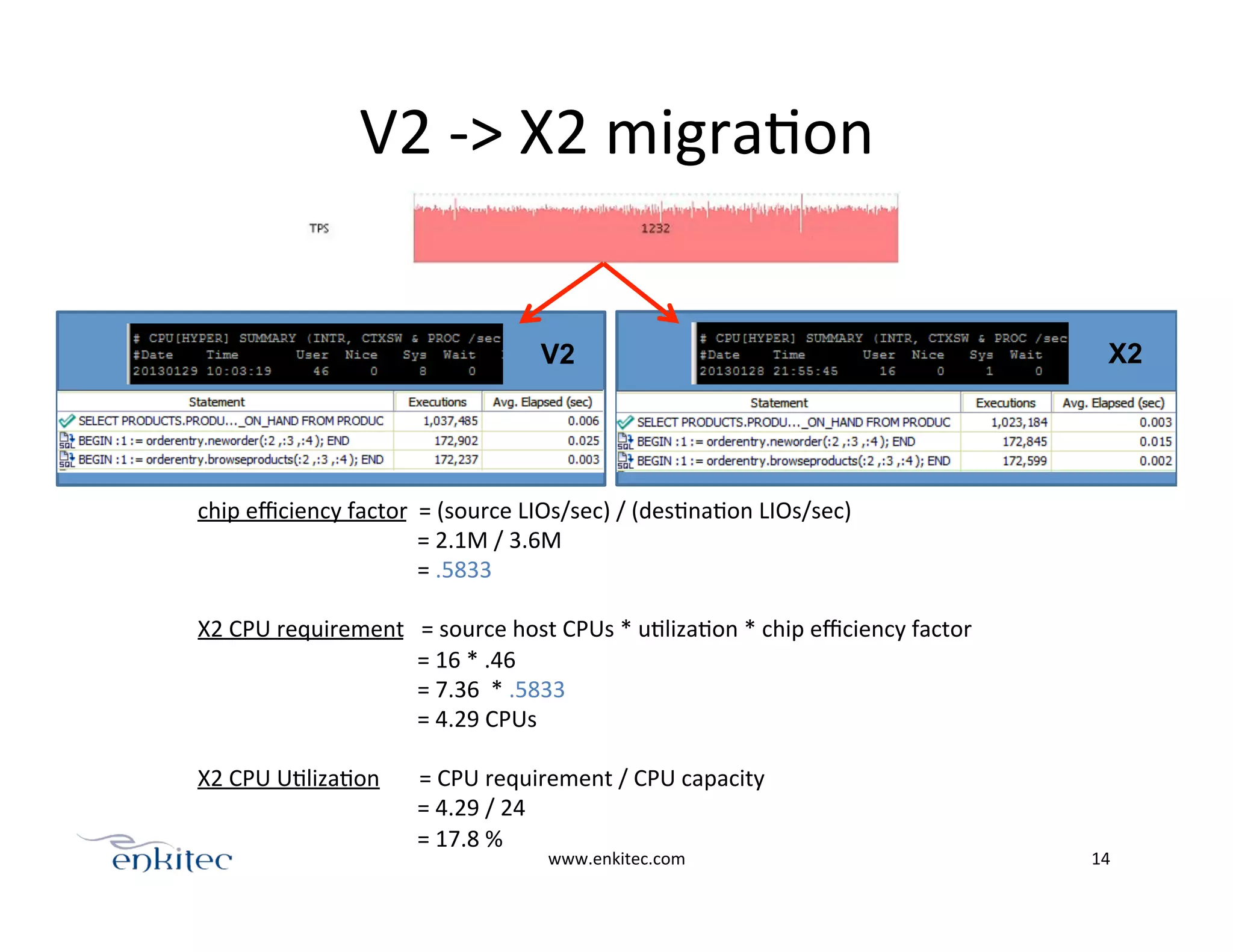
  X2	
  migraOon	
  
www.enkitec.com	
   14	
  
chip	
  efficiency	
  factor	
  	
  =	
  (source	
  LIOs/sec)	
  /	
  (desOnaOon	
  LIOs/sec)	


  =	
  2.1M	
  /	
  3.6M	


  =	
  .5833	


X2	
  CPU	
  requirement	
  	
  	
  =	
  source	
  host	
  CPUs	
  *	
  uOlizaOon	
  *	
  chip	
  efficiency	
  factor	


  =	
  16	
  *	
  .46	


  =	
  7.36	
  	
  *	
  .5833	


  =	
  4.29	
  CPUs	


X2	
  CPU	
  UOlizaOon	


  =	
  CPU	
  requirement	
  /	
  CPU	
  capacity	


  =	
  4.29	
  /	
  24	


  =	
  17.8	
  %	


V2 X2
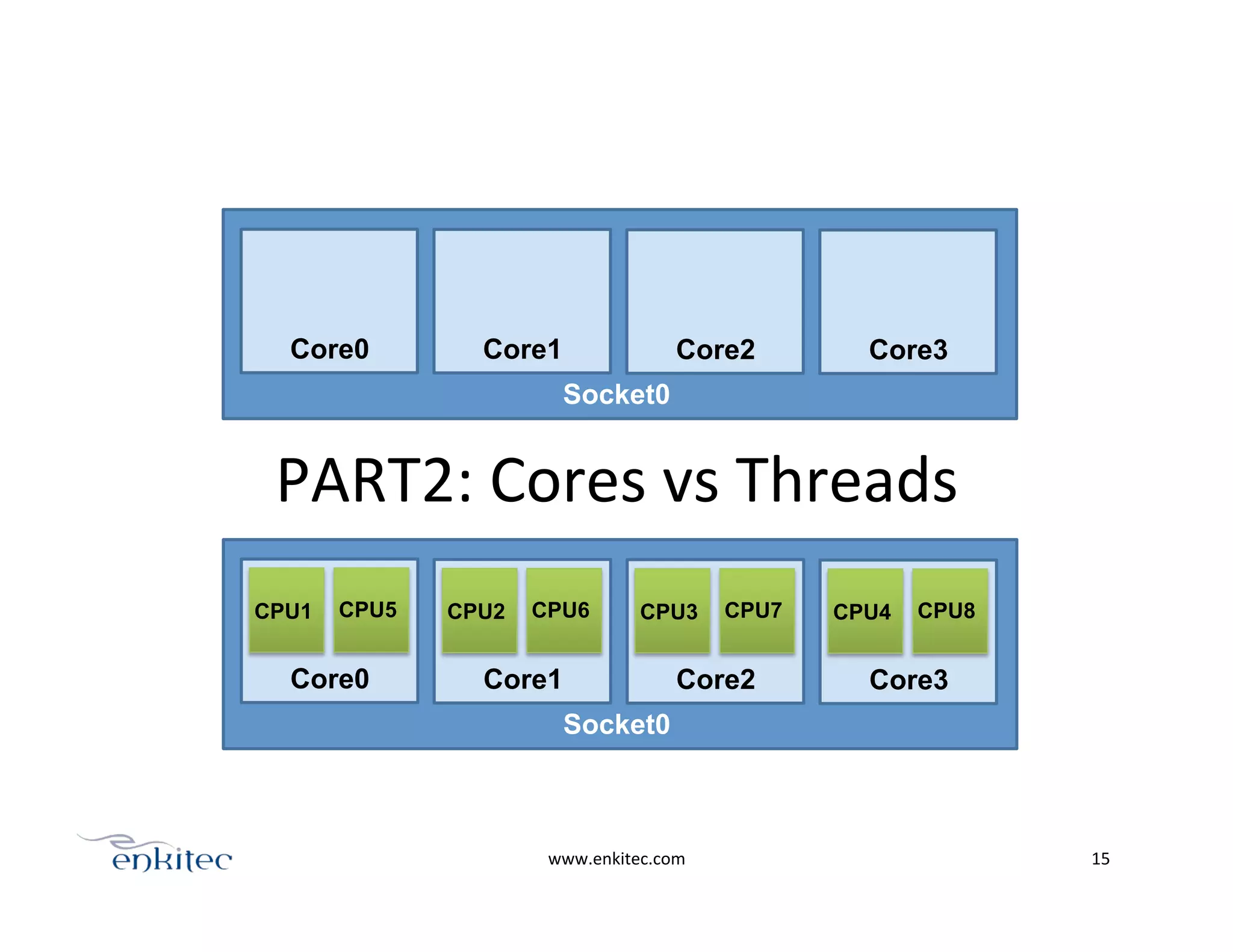
PART2:	
  Cores	
  vs	
  Threads	
  
www.enkitec.com	
   15	
  
Socket0
Core0 Core1 Core2 Core3
Socket0
Core0
CPU1 CPU5
Core1
CPU2 CPU6
Core2
CPU3 CPU7
Core3
CPU4 CPU8
www.enkitec.com	
   16	
  
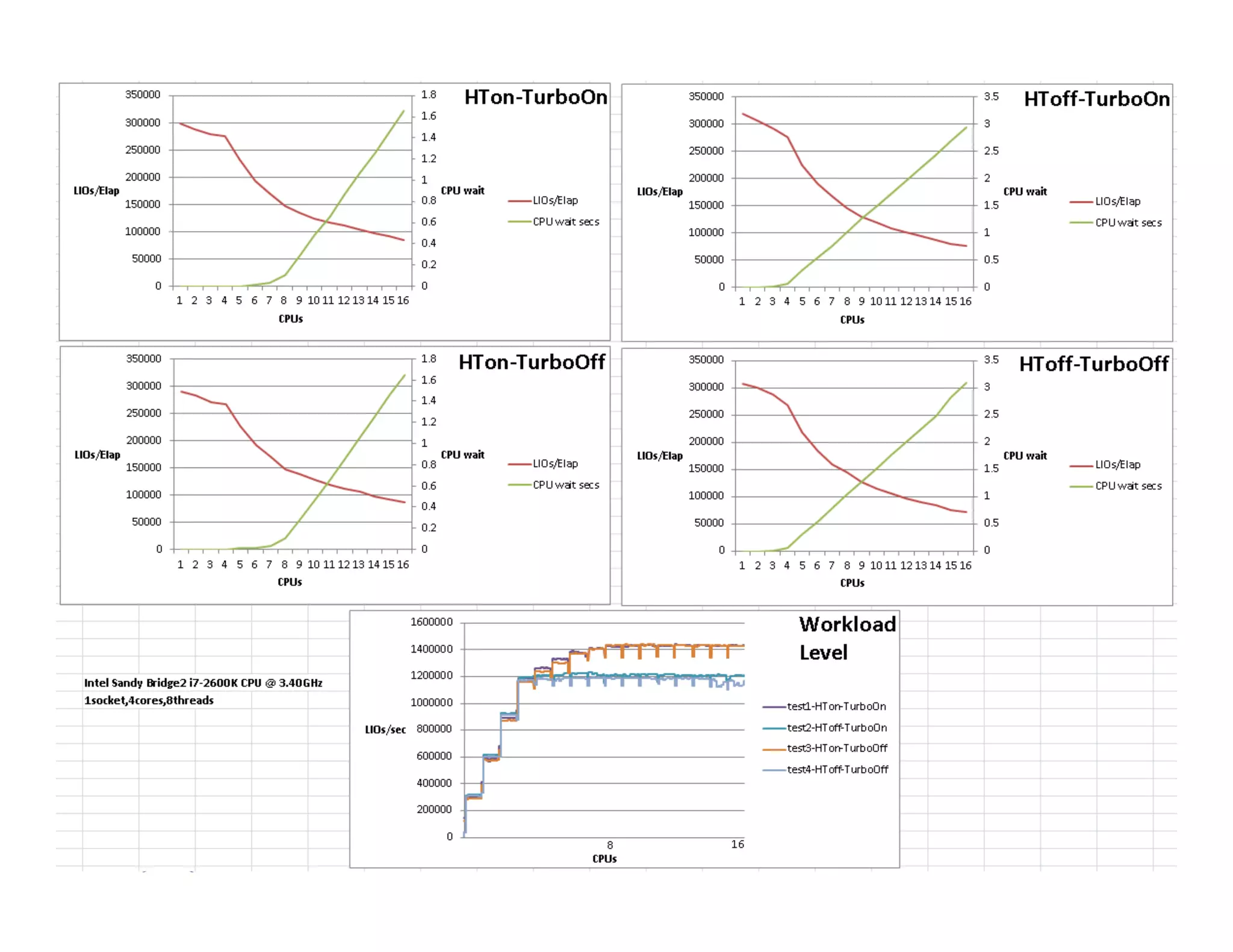
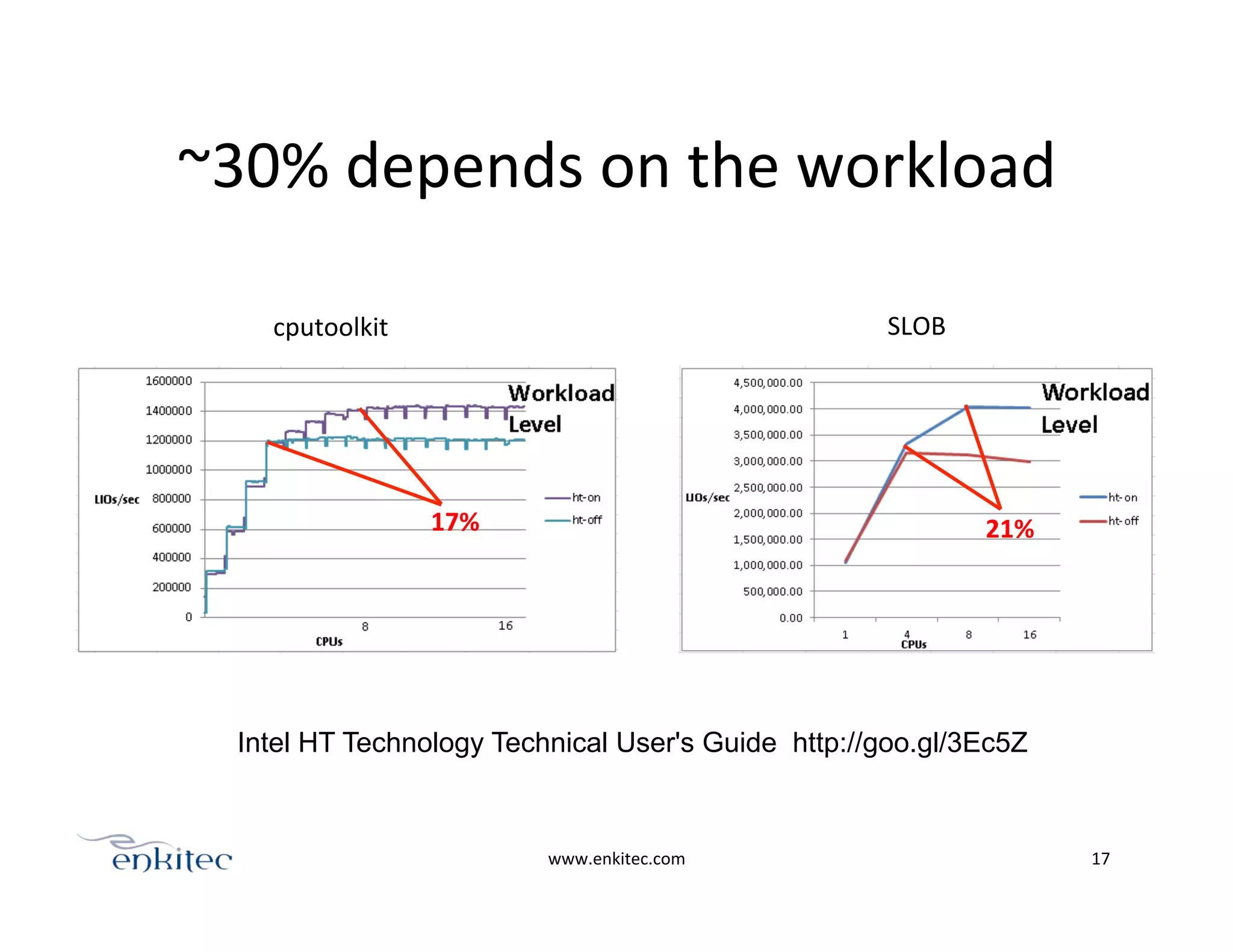
~30%	
  depends	
  on	
  the	
  workload	
  
www.enkitec.com	
   17	
  
cputoolkit	
   SLOB	
  
17%	
   21%	
  
Intel HT Technology Technical User's Guide http://goo.gl/3Ec5Z
PART3:	
  Different	
  CPU	
  events	
  
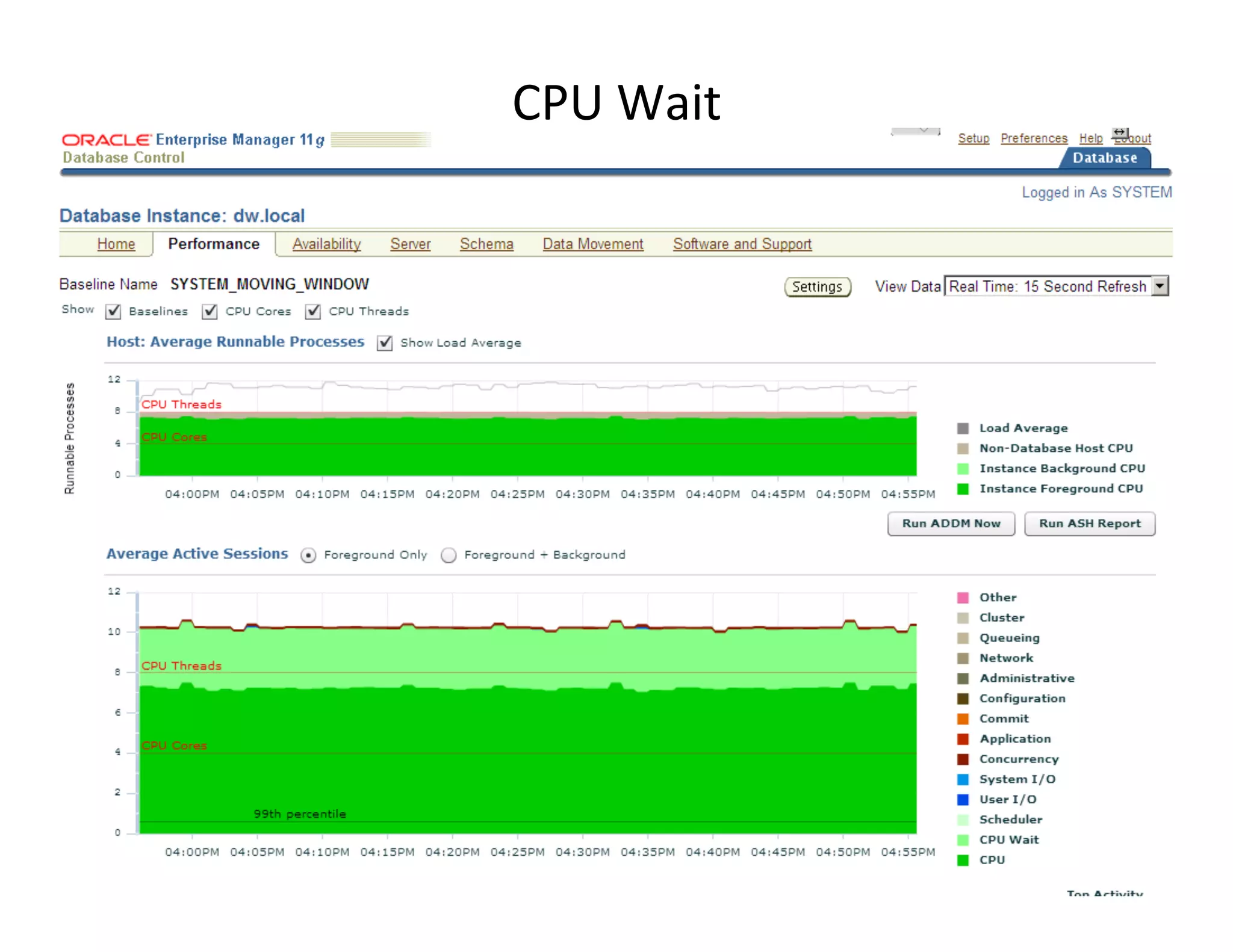
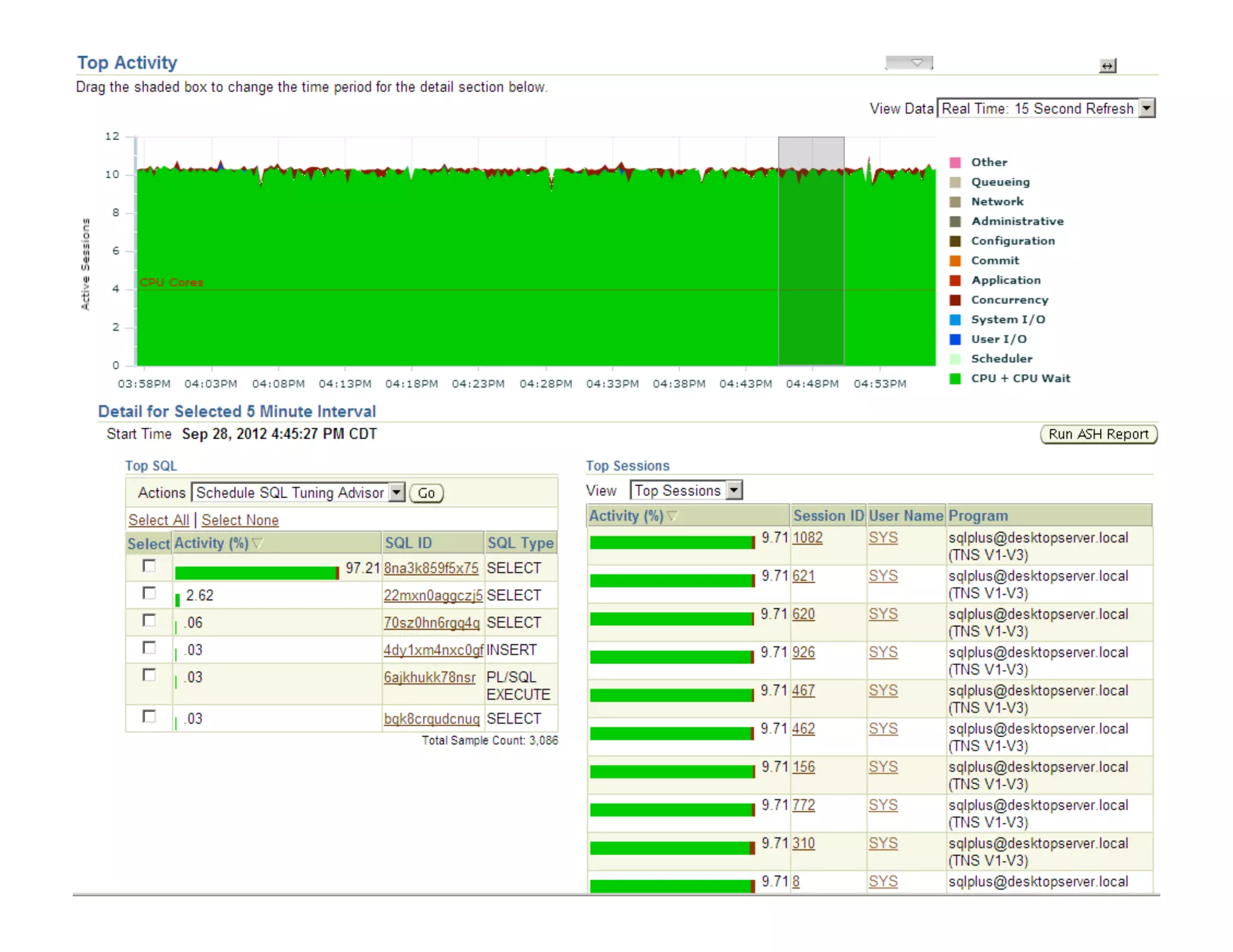
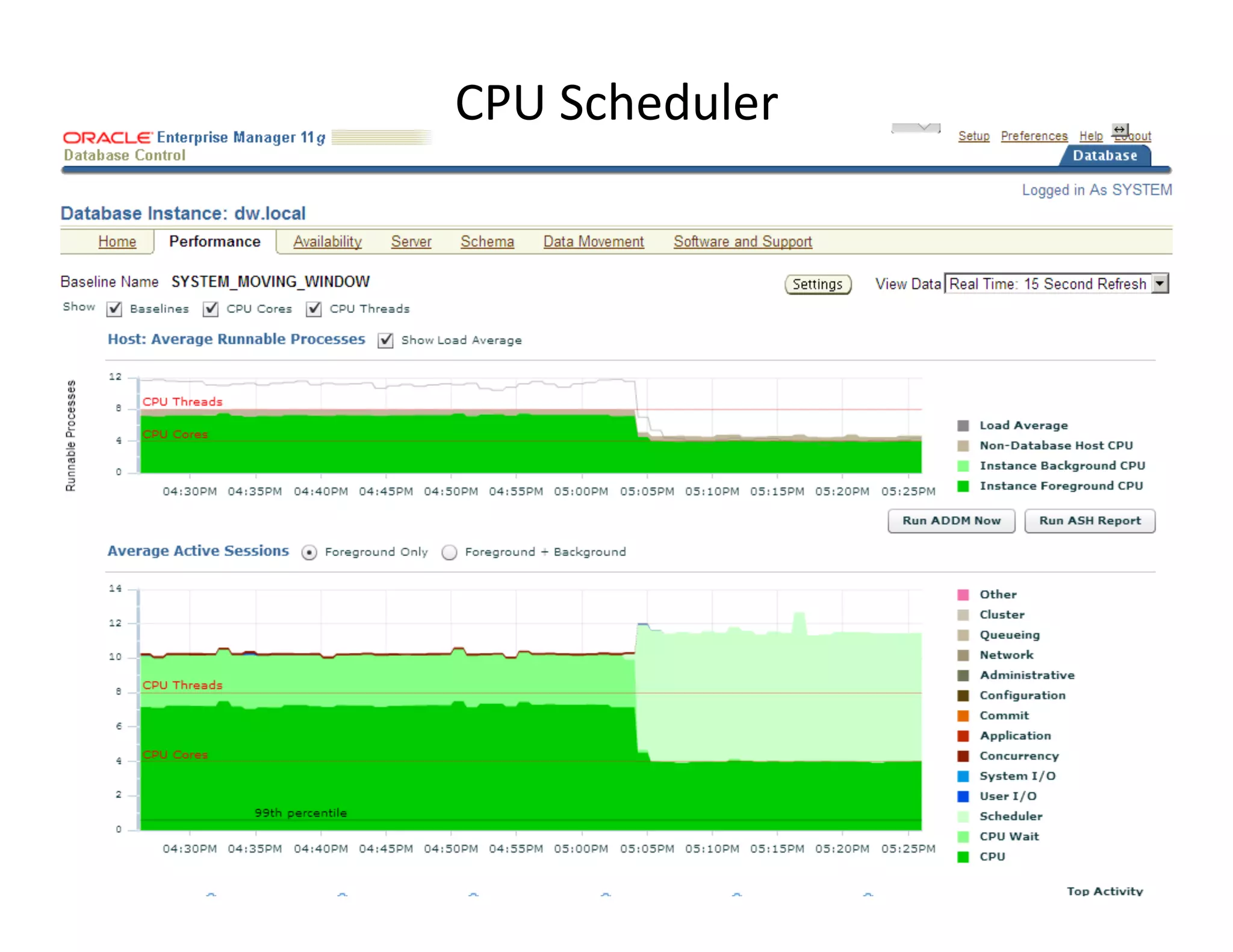
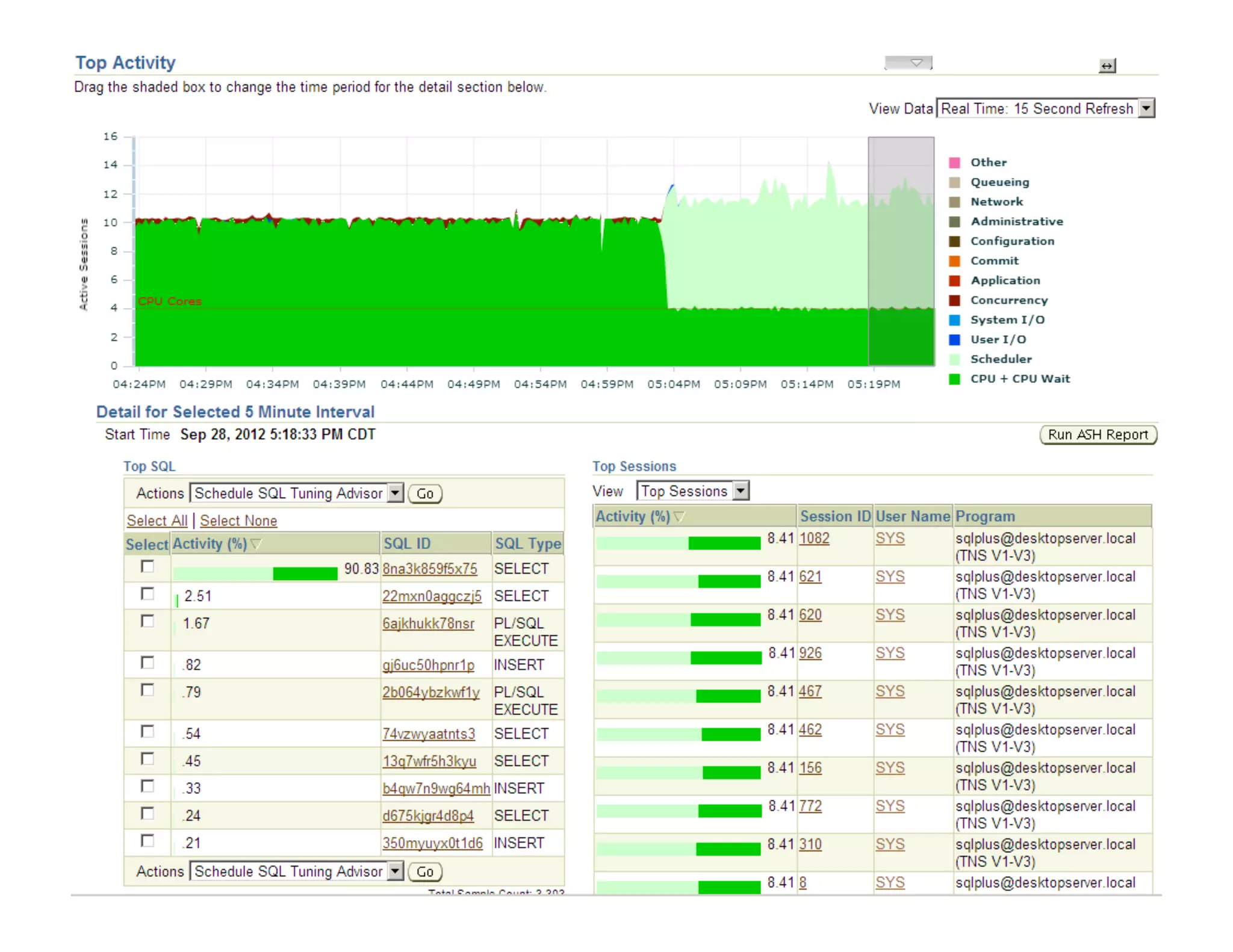
CPU	
  
CPU	
  Wait	
  
CPU	
  Scheduler	


www.enkitec.com	
   18	
  
www.enkitec.com	
   19	
  
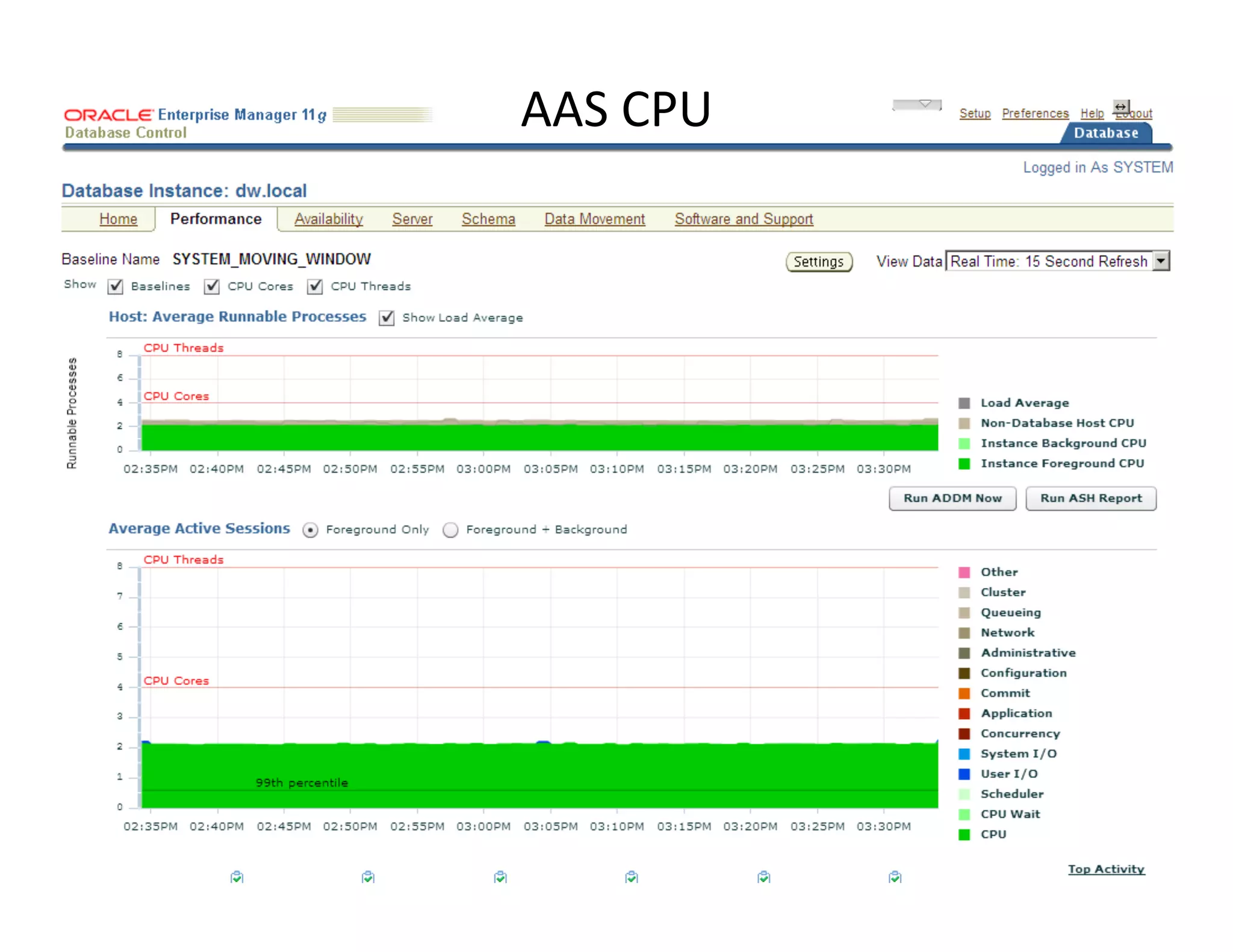
AAS	
  CPU	
  
www.enkitec.com	
   20	
  
CPU	
  Wait	
  
www.enkitec.com	
   21	
  
www.enkitec.com	
   22	
  
CPU	
  Scheduler	
  
www.enkitec.com	
   23	
  
www.enkitec.com	
   24	
  
www.enkitec.com	
   25	
  
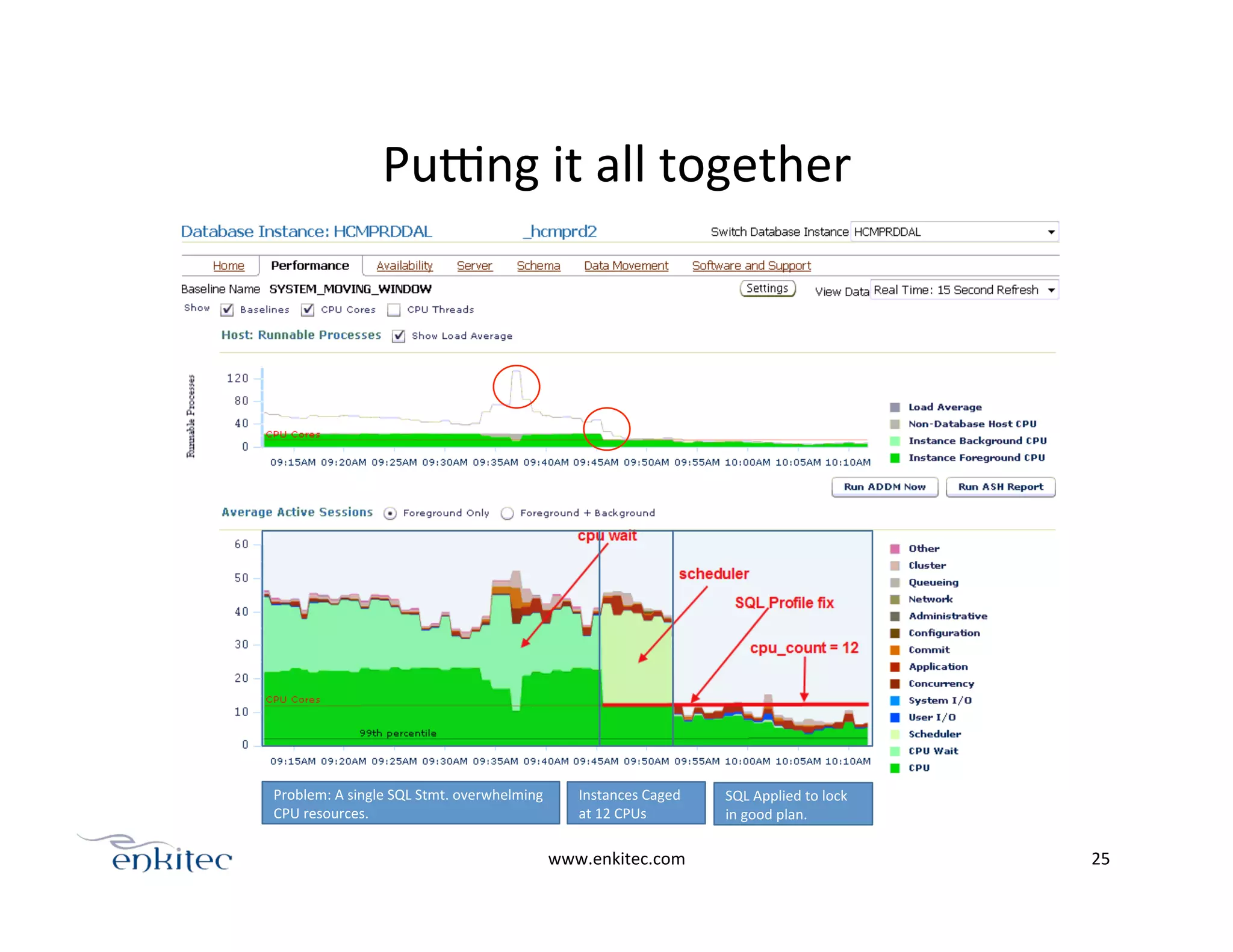
Pupng	
  it	
  all	
  together	
  
Instances	
  Caged	
  
at	
  12	
  CPUs	
  
SQL	
  Applied	
  to	
  lock	
  
in	
  good	
  plan.	
  
Problem:	
  A	
  single	
  SQL	
  Stmt.	
  overwhelming	
  
CPU	
  resources.	
  
PART4:	
  CPU	
  monitoring	
  and	
  
Capacity	
  Planning	


www.enkitec.com	
   26	
  
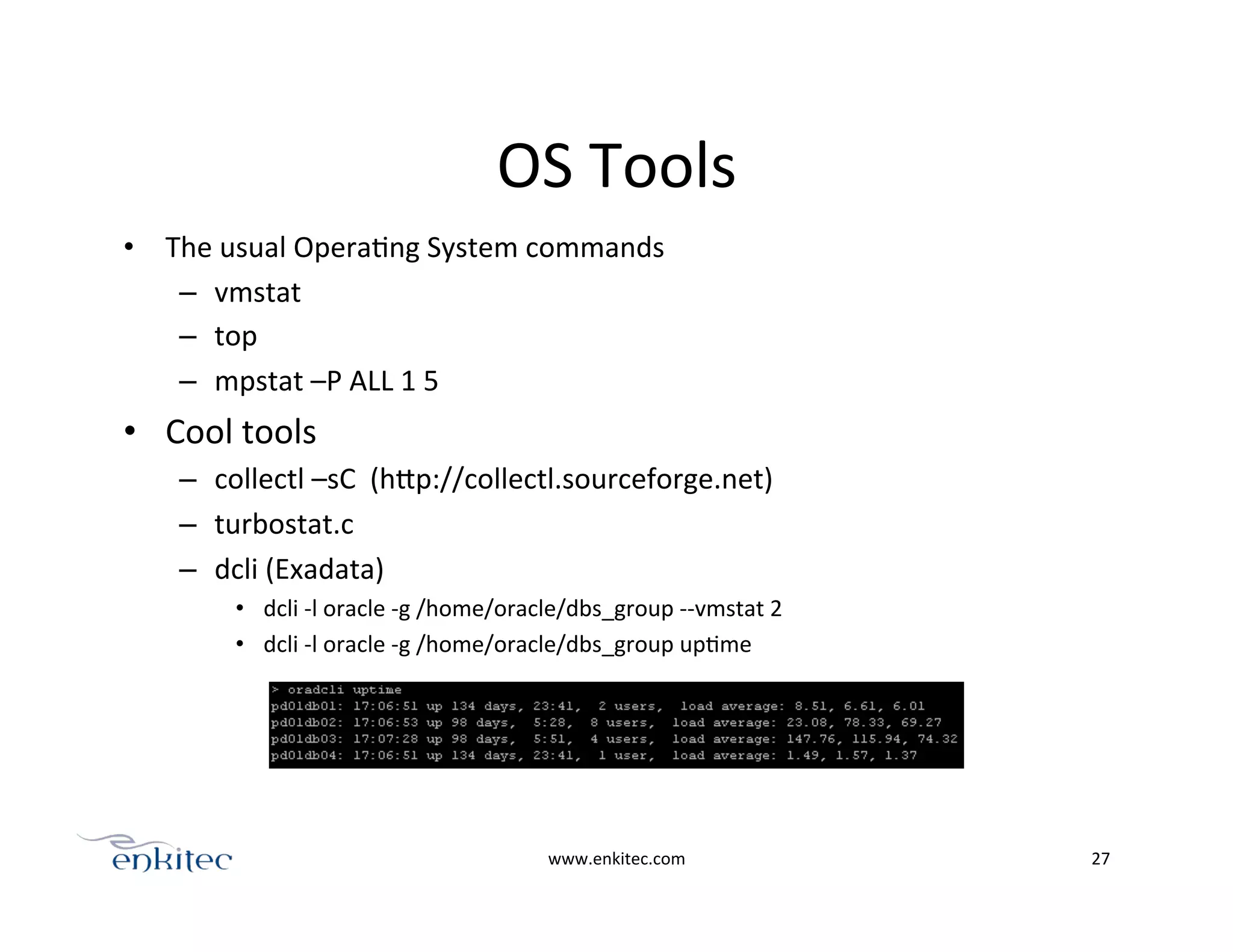
OS	
  Tools	
  
•  The	
  usual	
  OperaOng	
  System	
  commands	
  
–  vmstat	
  
–  top	
  
–  mpstat	
  –P	
  ALL	
  1	
  5	
  
•  Cool	
  tools	
  	
  
–  collectl	
  –sC	
  	
  (hPp://collectl.sourceforge.net)	
  
–  turbostat.c	
  
–  dcli	
  (Exadata)	
  
•  dcli	
  -­‐l	
  oracle	
  -­‐g	
  /home/oracle/dbs_group	
  -­‐-­‐vmstat	
  2	
  
•  dcli	
  -­‐l	
  oracle	
  -­‐g	
  /home/oracle/dbs_group	
  upOme	
  
www.enkitec.com	
   27	
  
www.enkitec.com	
   28	
  
Load	
  Map	
  
www.enkitec.com	
   29	
  
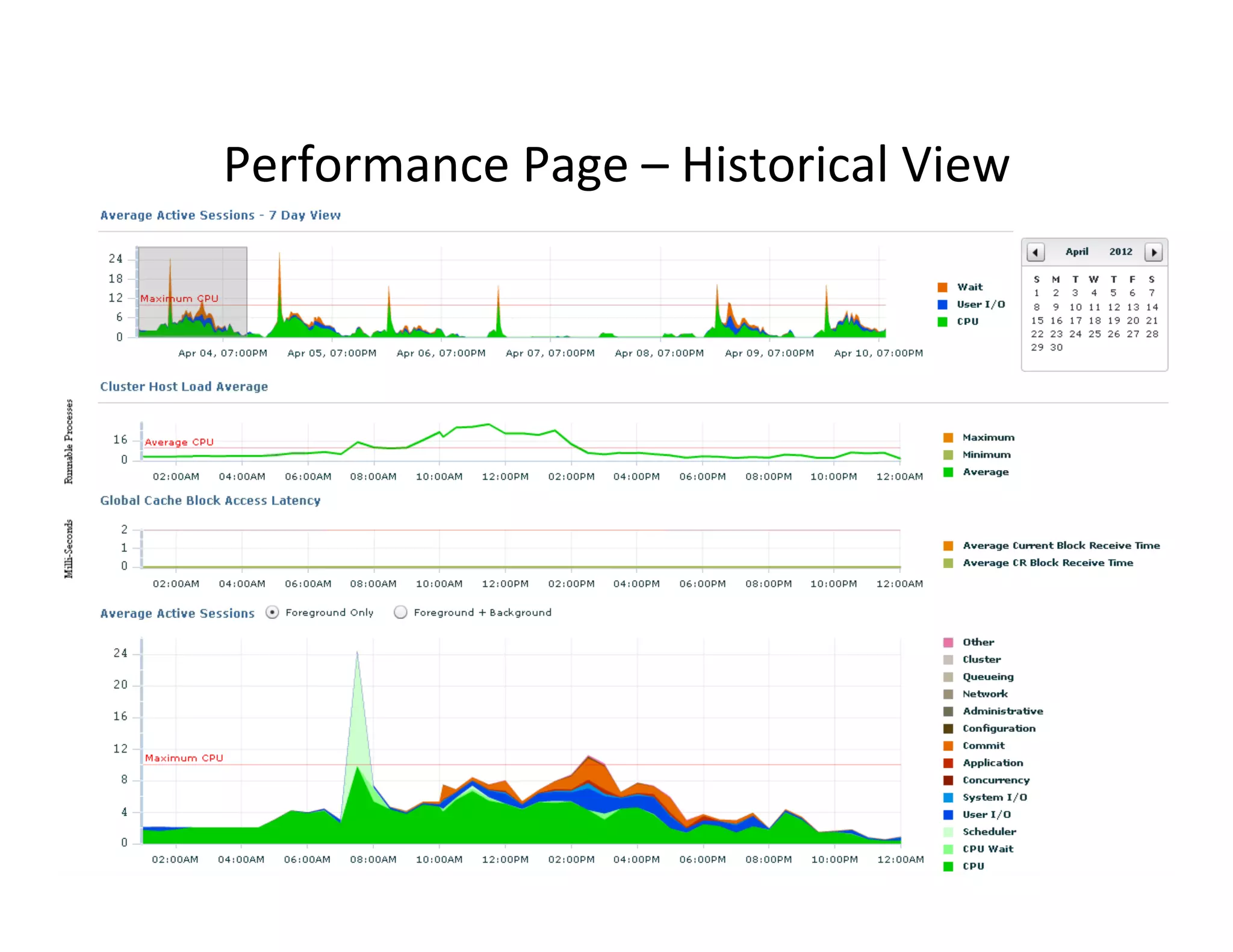
Performance	
  Page	
  –	
  Historical	
  View	
  
AWR	
  Toolkit	
  
•  DIY	
  performance	
  data	
  warehouse	
  
www.enkitec.com	
   30	
  
run_awr	
  
run_extract	
  
Extract	
  AWR	
  data	
  points	
  as	
  csv	
  files	
  
Package	
  all	
  the	
  csv	
  files	
  Customer	
  site	
  
FRESH_LOAD	
  
CHECK_LOAD	
  
DELTA_LOAD	
  
Create	
  new	
  client	
  “dimension”	
  tables	
  
Check	
  new	
  data	
  points	
  
Load	
  new	
  data	
  points	
  
DIY	
  DW	
  server	
  
awr_topevents_(ClientNameX)	
  
awr_cpuwl_(ClientNameX)	
  
awr_iowl_(ClientNameX)	
  
1
2
3 Tableau	
  AnalyOcs	
  
awr_topevents_(ClientNameY)	
  
awr_cpuwl_(ClientNameY)	
  
awr_iowl_(ClientNameY)	
  
awr_topevents_(ClientNameZ)	
  
awr_cpuwl_(ClientNameZ)	
  
awr_iowl_(ClientNameZ)	
  
www.enkitec.com	
   31	
  
•  Tableau	
  auto	
  creates	
  a	
  Ome	
  dimension	
  for	
  the	
  Ome	
  
column	
  “MM/DD/YY	
  HH24:MI:SS”	
  of	
  AWR	
  csv	
  
output	
  
www.enkitec.com	
   32	
  
www.enkitec.com	
   33	
  
•  Summary	
  and	
  Underlying	
  data	
  
1-­‐2AM	
  
2-­‐3AM	
  
www.enkitec.com	
   34	
  
CPU	
  usage	
  across	
  half	
  rack	
  Exadata	
  
www.enkitec.com	
   35	
  
CPU	
  usage	
  per	
  host	
  
www.enkitec.com	
   36	
  
CPU	
  redistribuOon	
  across	
  nodes	
  
Wrap	
  up!	
  
•  HOWTO	
  compare	
  CPU	
  speeds	
  
o  SPECint_rate2006,	
  TPC-­‐C,	
  Actual	
  benchmarking	


•  Cores	
  vs	
  Threads	
  
o  Always	
  have	
  HT	
  on	
  
o  ~30%	
  performance	
  benefit	
  auer	
  core	
  count	
  
•  The	
  different	
  CPU	
  events	
  
o  1	
  AAS	
  CPU	
  =	
  1	
  CPU	
  core	
  
o  Oracle	
  CPU	
  may	
  not	
  correlate	
  with	
  Host	
  CPU	
  if	
  you	
  have	
  a	
  lot	
  of	
  
CPU	
  acOvity	
  outside	
  of	
  the	
  database	


•  CPU	
  Monitoring/Capacity	
  Planning	
  on	
  consolidated	
  environments	
  
o  AWR	
  analyOcs	
  
www.enkitec.com	
   37	
  
Resources	
  
•  cputoolkit	
  -­‐	
  hPp://karlarao.wordpress.com/scripts-­‐resources/	
  
•  AWR	
  Tableau	
  and	
  R	
  toolkit	
  VisualizaOon	
  Examples	
  -­‐	
  hPp://goo.gl/xZHHY	
  
•  AAS	
  invesOgaOon	
  -­‐	
  hPp://goo.gl/5WaAg	
  
•  Cores	
  vs	
  Threads	
  -­‐	
  hPp://goo.gl/1MLFf	
  
•  Turbostat.c	
  -­‐	
  hPp://goo.gl/jDUKg	
  
•  cpu_topology	
  -­‐	
  hPp://goo.gl/EUDG7	
  
•  CPU	
  centric	
  benchmark	
  comparisons	
  -­‐	
  hPp://goo.gl/nR9Yy	
  
•  SLOB	
  -­‐	
  hPp://goo.gl/yKa45	
  
•  Kyle	
  Hailey	
  -­‐	
  hPp://dbopOmizer.com/2011/07/21/oracle-­‐cpu-­‐Ome/	
  
•  The	
  mindmap	
  of	
  this	
  presentaOon	
  -­‐	
  hPp://goo.gl/XeY0e	
  
www.enkitec.com	
   38	
  
karl.arao@enkitec.com	
  
39
Fastest Growing Companies
in Dallas

Where Did My Cpu Go?

  • 1.
    “Where  did  my  CPU  go?”   monitoring  &  capacity  planning   adventures  on  a  consolidated   environment   Presented  by:     Karl  Arao   1
  • 2.
    whoami   Karl  Arao   •  Senior  Technical  Consultant  @  Enkitec   •  Performance  and  Capacity  Planning  Enthusiast       7  years  DBA  experience   Oracle  ACE,  OCP-­‐DBA,  RHCE,  OakTable   Blog:  karlarao.wordpress.com   Wiki:  karlarao.Oddlyspot.com   TwiPer:  @karlarao     www.enkitec.com   2  
  • 3.
  • 4.
    Agenda   •  HOWTO  compare  CPU  speeds     •  Cores  vs  Threads   •  The  different  CPU  events   •  CPU  Monitoring/Capacity  Planning  on  consolidated  environments       www.enkitec.com   4  
  • 5.
    www.enkitec.com   5   12:27:15 SYS@DEMO1> show parameter cpu_count! ! NAME TYPE VALUE! ------------------------------------ ----------- --------! cpu_count integer 16!
  • 6.
    www.enkitec.com   6   Socket0 Core0 CPU0 CPU8 Core1 CPU1 CPU9 Core2 CPU2 CPU10 Core3 CPU3 CPU11 Socket1 Core0 CPU4 CPU12 Core1 CPU5 CPU13 Core2 CPU6 CPU14 Core3 CPU7 CPU15 Exadata  V2  =>  2s8c16t  
  • 7.
    PART1:  compare  CPU  speeds   www.enkitec.com   7  
  • 8.
    Different  methods:   • Published  benchmarks   – TPC-­‐C   – SPECint_rate2006   •  Actual  Benchmarking   – cputoolkit   – SLOB  (lio  test)   www.enkitec.com   8  
  • 9.
    TPC-­‐C   •  TransacOon  Processing  Performance  Council  (TPC)   •  Throughput  =>  transacOons  per  minute  (tpmC)   •  Price/Performance  =>  USD  /  tpmC   www.enkitec.com   9   •  CPU  performance  =>  tpmC  /  core   •  1609186.39  /  16  =  100574  
  • 10.
    SPECint_rate2006   •  Standard  Performance  EvaluaOon  CorporaOon  (SPEC)   •  SPECint_rate2006     •  Integer  performance   •  All  CPUs  are  used   •  Used  by  OEM12c  ConsolidaOon  Planner  (SYSMAN.EMCT_SPEC_RATE_LIB)   •  CPU  performance  =>  SPECint_rate2006/core   •  702/16  =  43.875   www.enkitec.com   10   $ cat spec.txt | grep -i sun | grep -i x3-2 | sort -rnk1! 44.0625, 16, 2, 8, 2, 632, 705, Oracle Corporation, Sun Blade X3-2B (Intel Xeon E5-2690 2.9GHz)! 44.0625, 16, 2, 8, 2, 630, 705, Oracle Corporation, Sun Server X3-2L (Intel Xeon E5-2690 2.9GHz)! 43.875, 16, 2, 8, 2, 628, 702, Oracle Corporation, Sun Server X3-2 (Intel Xeon E5-2690 2.9GHz)! !
  • 11.
    2007  vs  2012   www.enkitec.com   11   tpmC/core, System, tpmC, Price/Perf, Total System Cost, Currency, Database Software, Server CPU Type, Total Server Cores, Cluster, Date Submitted Result/# Cores, # Cores, # Chips, # Cores Per Chip, # Threads Per Core, Baseline, Result, Hardware Vendor, System
  • 12.
    Actual  Benchmarking   • cputoolkit  and  SLOB  (lio  test)   •  LIOs/sec   www.enkitec.com   12   CPU1   CPU2   CPU3   CPU4   CPU5   CPU6   CPU7   CPU8   CPU1   CPU2   CPU3   CPU4   CPU5   CPU6   CPU7   CPU8   cputoolkit   ./runcputoolkit-­‐auto  <start  CPU>  <end  CPU>  <db  name>   ./runcputoolkit-­‐auto  1  2  dw   SLOB   ./runit.sh  <writers>  <readers>   while  :;  do  ./runit.sh  0  2;  done   Both  at  25%     CPU  uElizaEon  
  • 13.
    V2  and  X2  CPU  perf  comparison   www.enkitec.com   13   3.6M LIOs/sec 2.1M LIOs/sec
  • 14.
    V2  -­‐>  X2  migraOon   www.enkitec.com   14   chip  efficiency  factor    =  (source  LIOs/sec)  /  (desOnaOon  LIOs/sec)                                                                                =  2.1M  /  3.6M                                                                                =  .5833     X2  CPU  requirement      =  source  host  CPUs  *  uOlizaOon  *  chip  efficiency  factor                                                                                =  16  *  .46                                                                                  =  7.36    *  .5833                                                                                =  4.29  CPUs     X2  CPU  UOlizaOon              =  CPU  requirement  /  CPU  capacity                                                                                =  4.29  /  24                                                                                =  17.8  %     V2 X2
  • 15.
    PART2:  Cores  vs  Threads   www.enkitec.com   15   Socket0 Core0 Core1 Core2 Core3 Socket0 Core0 CPU1 CPU5 Core1 CPU2 CPU6 Core2 CPU3 CPU7 Core3 CPU4 CPU8
  • 16.
  • 17.
    ~30%  depends  on  the  workload   www.enkitec.com   17   cputoolkit   SLOB   17%   21%   Intel HT Technology Technical User's Guide http://goo.gl/3Ec5Z
  • 18.
    PART3:  Different  CPU  events   CPU   CPU  Wait   CPU  Scheduler     www.enkitec.com   18  
  • 19.
    www.enkitec.com   19   AAS  CPU  
  • 20.
  • 21.
  • 22.
  • 23.
  • 24.
  • 25.
    www.enkitec.com   25   Pupng  it  all  together   Instances  Caged   at  12  CPUs   SQL  Applied  to  lock   in  good  plan.   Problem:  A  single  SQL  Stmt.  overwhelming   CPU  resources.  
  • 26.
    PART4:  CPU  monitoring  and   Capacity  Planning     www.enkitec.com   26  
  • 27.
    OS  Tools   • The  usual  OperaOng  System  commands   –  vmstat   –  top   –  mpstat  –P  ALL  1  5   •  Cool  tools     –  collectl  –sC    (hPp://collectl.sourceforge.net)   –  turbostat.c   –  dcli  (Exadata)   •  dcli  -­‐l  oracle  -­‐g  /home/oracle/dbs_group  -­‐-­‐vmstat  2   •  dcli  -­‐l  oracle  -­‐g  /home/oracle/dbs_group  upOme   www.enkitec.com   27  
  • 28.
    www.enkitec.com   28   Load  Map  
  • 29.
    www.enkitec.com   29   Performance  Page  –  Historical  View  
  • 30.
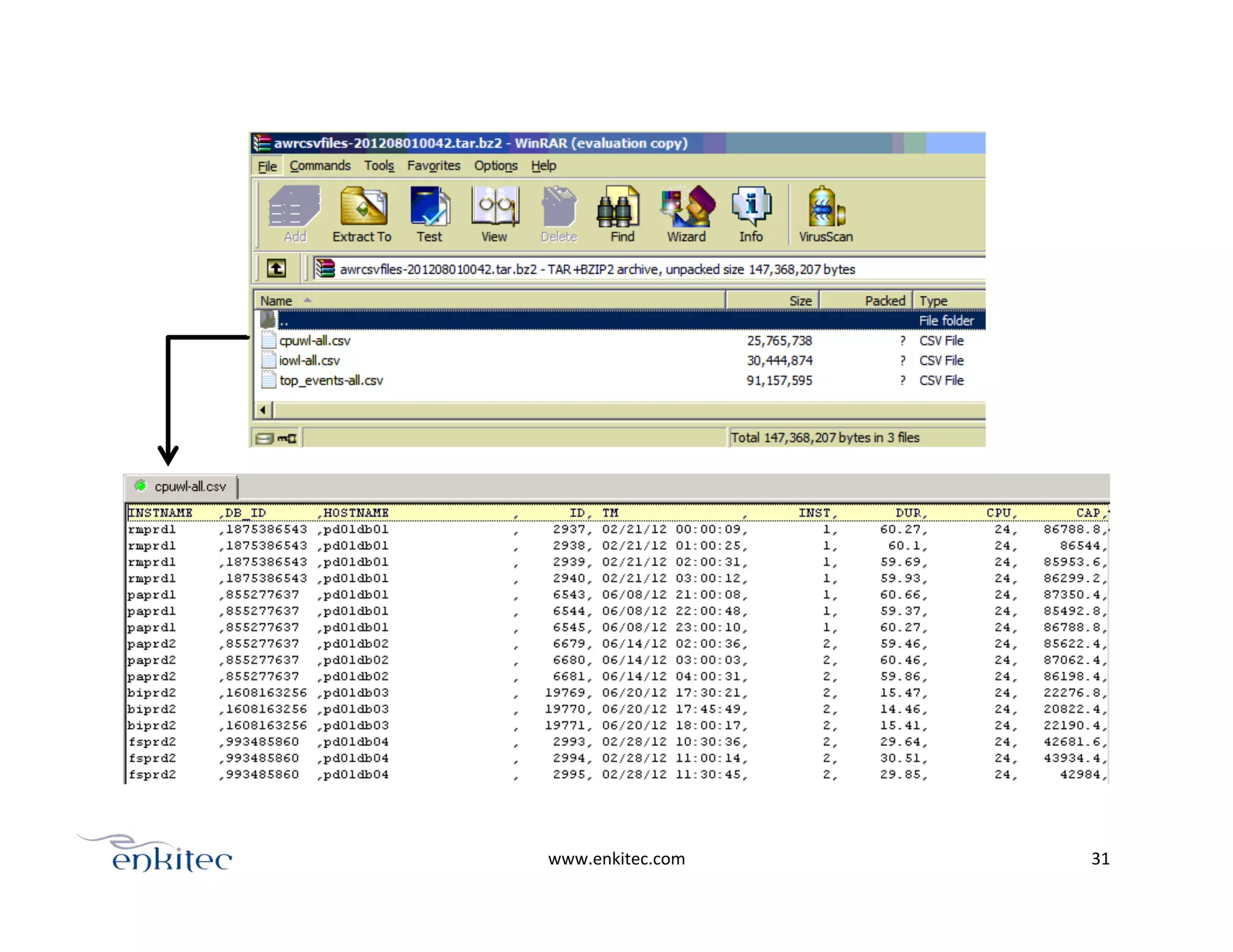
    AWR  Toolkit   • DIY  performance  data  warehouse   www.enkitec.com   30   run_awr   run_extract   Extract  AWR  data  points  as  csv  files   Package  all  the  csv  files  Customer  site   FRESH_LOAD   CHECK_LOAD   DELTA_LOAD   Create  new  client  “dimension”  tables   Check  new  data  points   Load  new  data  points   DIY  DW  server   awr_topevents_(ClientNameX)   awr_cpuwl_(ClientNameX)   awr_iowl_(ClientNameX)   1 2 3 Tableau  AnalyOcs   awr_topevents_(ClientNameY)   awr_cpuwl_(ClientNameY)   awr_iowl_(ClientNameY)   awr_topevents_(ClientNameZ)   awr_cpuwl_(ClientNameZ)   awr_iowl_(ClientNameZ)  
  • 31.
  • 32.
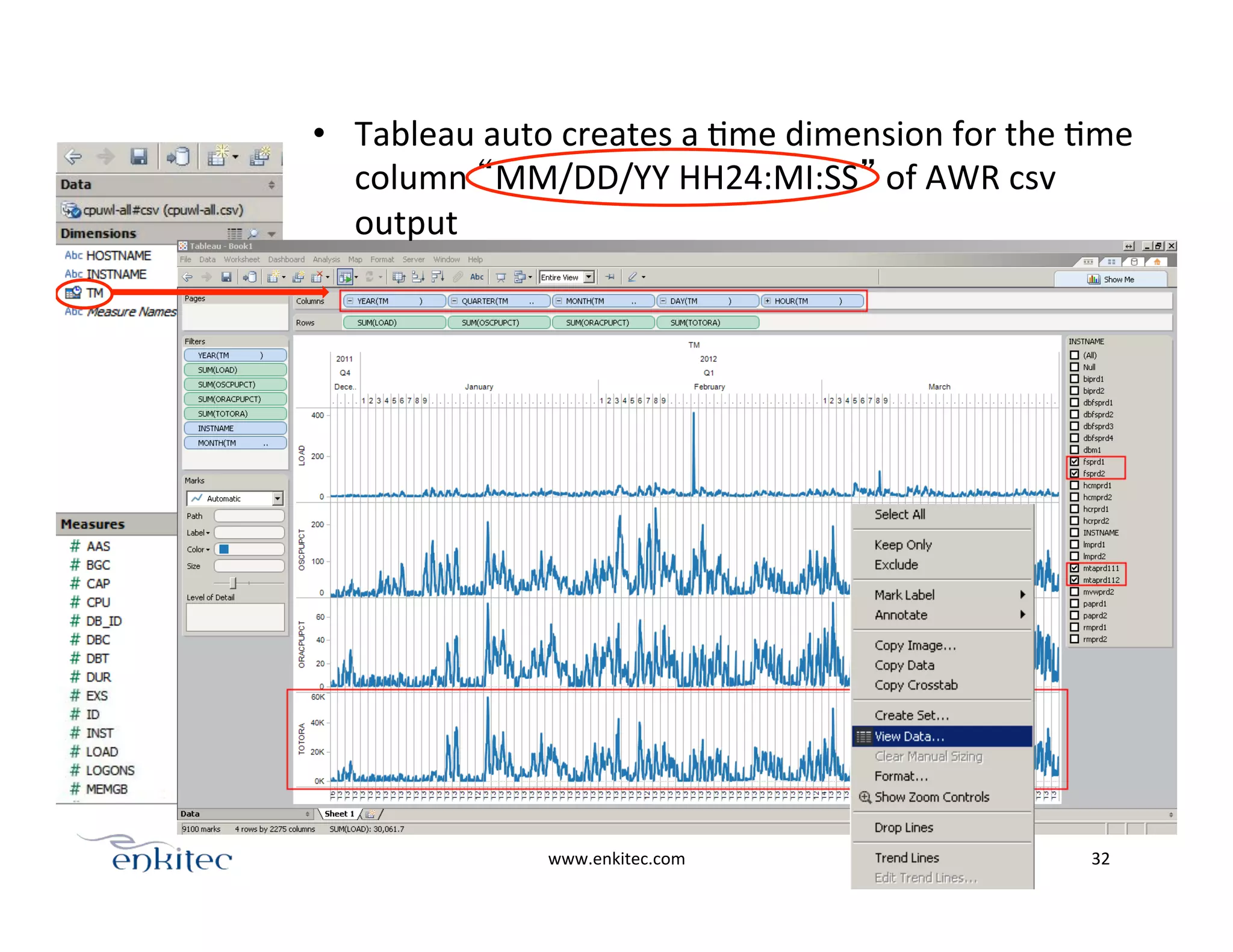
    •  Tableau  auto  creates  a  Ome  dimension  for  the  Ome   column  “MM/DD/YY  HH24:MI:SS”  of  AWR  csv   output   www.enkitec.com   32  
  • 33.
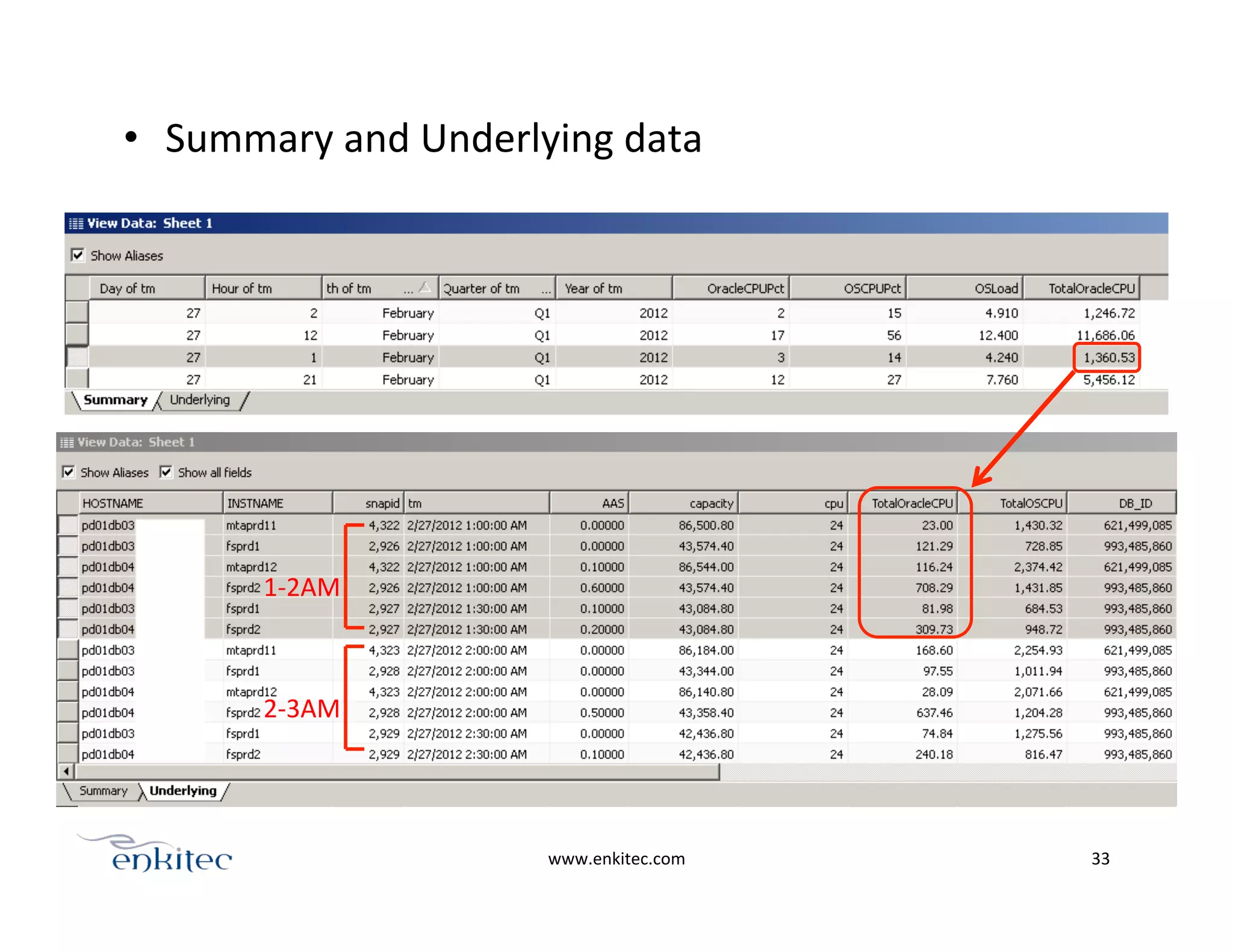
    www.enkitec.com   33   •  Summary  and  Underlying  data   1-­‐2AM   2-­‐3AM  
  • 34.
    www.enkitec.com   34   CPU  usage  across  half  rack  Exadata  
  • 35.
    www.enkitec.com   35   CPU  usage  per  host  
  • 36.
    www.enkitec.com   36   CPU  redistribuOon  across  nodes  
  • 37.
    Wrap  up!   • HOWTO  compare  CPU  speeds   o  SPECint_rate2006,  TPC-­‐C,  Actual  benchmarking     •  Cores  vs  Threads   o  Always  have  HT  on   o  ~30%  performance  benefit  auer  core  count   •  The  different  CPU  events   o  1  AAS  CPU  =  1  CPU  core   o  Oracle  CPU  may  not  correlate  with  Host  CPU  if  you  have  a  lot  of   CPU  acOvity  outside  of  the  database     •  CPU  Monitoring/Capacity  Planning  on  consolidated  environments   o  AWR  analyOcs   www.enkitec.com   37  
  • 38.
    Resources   •  cputoolkit  -­‐  hPp://karlarao.wordpress.com/scripts-­‐resources/   •  AWR  Tableau  and  R  toolkit  VisualizaOon  Examples  -­‐  hPp://goo.gl/xZHHY   •  AAS  invesOgaOon  -­‐  hPp://goo.gl/5WaAg   •  Cores  vs  Threads  -­‐  hPp://goo.gl/1MLFf   •  Turbostat.c  -­‐  hPp://goo.gl/jDUKg   •  cpu_topology  -­‐  hPp://goo.gl/EUDG7   •  CPU  centric  benchmark  comparisons  -­‐  hPp://goo.gl/nR9Yy   •  SLOB  -­‐  hPp://goo.gl/yKa45   •  Kyle  Hailey  -­‐  hPp://dbopOmizer.com/2011/07/21/oracle-­‐cpu-­‐Ome/   •  The  mindmap  of  this  presentaOon  -­‐  hPp://goo.gl/XeY0e   www.enkitec.com   38   karl.arao@enkitec.com  
  • 39.