Release 16 Enhancement
Pack 7 (EP7)
October 2019
What’s new in OpenText Legal Tech
OpenText Confidential. ©2019 All Rights Reserved. 2
OpenText is a global leader in legal technology, offering an unmatched breadth and depth
of solutions to help legal practitioners tackle eDiscovery and investigations, legal content
management, contract analysis and enterprise search. With an industry-leading enterprise
information management platform, pioneering analytics and machine learning capabilities
and experienced professional services teams, OpenText helps legal customers understand the
large volumes of data they collect, generate and oversee, while incorporating the benefits
of automation and AI.
OpenText Confidential. ©2019 All Rights Reserved. 3
What’s new in Release 16 EP7
for OpenText Legal Tech
OpenText Confidential. ©2019 All Rights Reserved. 4
OpenText Axcelerate
End-to-end eDiscovery and investigations technology for document
review, fact finding, and similar use cases complete with enterprise
data connectors, robust culling, processing, automated redactions, and
integrated analytics & AI.
OpenText Confidential. ©2019 All Rights Reserved. 5
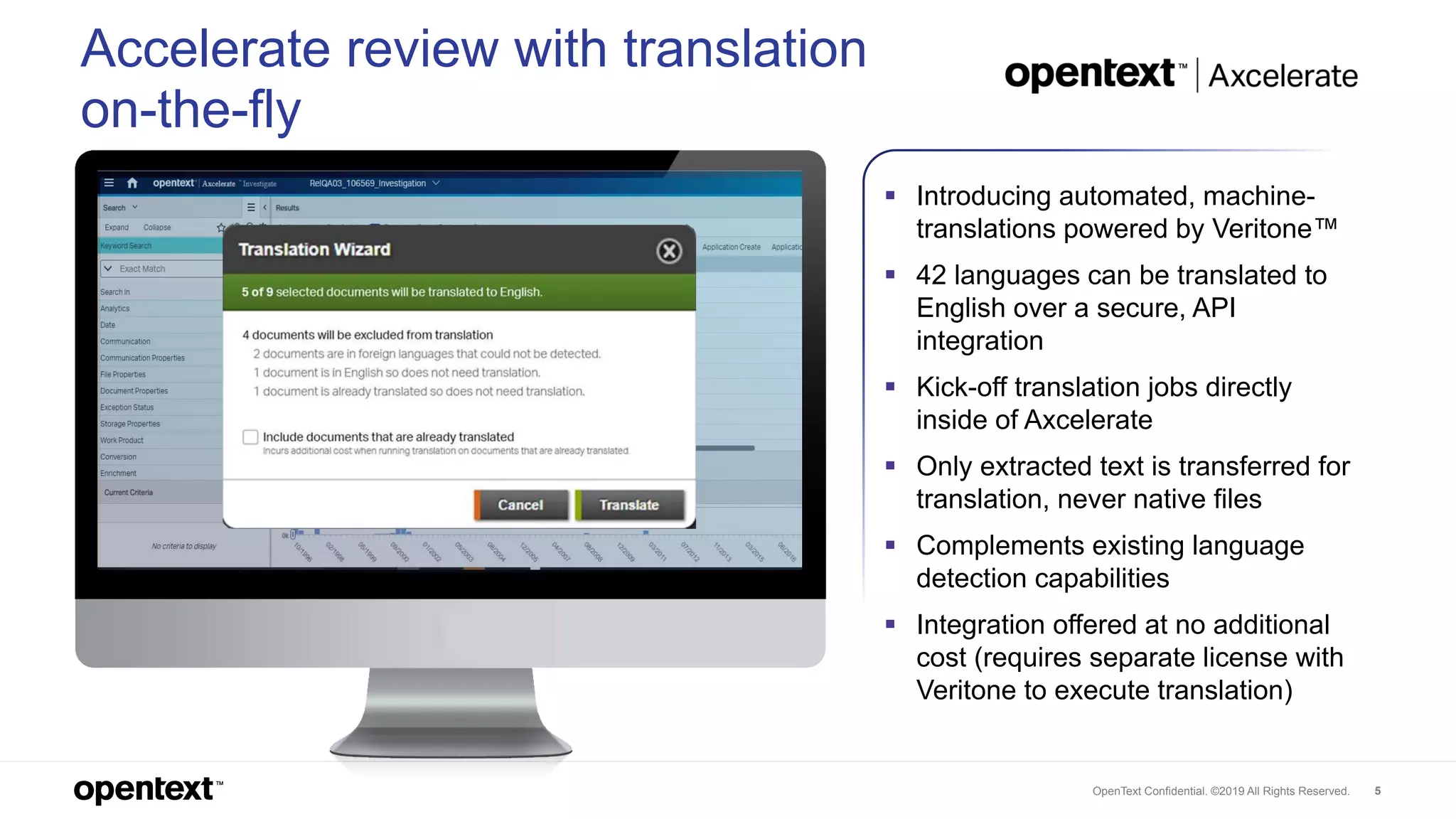
 Introducing automated, machine-
translations powered by Veritone™
 42 languages can be translated to
English over a secure, API
integration
 Kick-off translation jobs directly
inside of Axcelerate
 Only extracted text is transferred for
translation, never native files
 Complements existing language
detection capabilities
 Integration offered at no additional
cost (requires separate license with
Veritone to execute translation)
Accelerate review with translation
on-the-fly
OpenText Confidential. ©2019 All Rights Reserved. 6
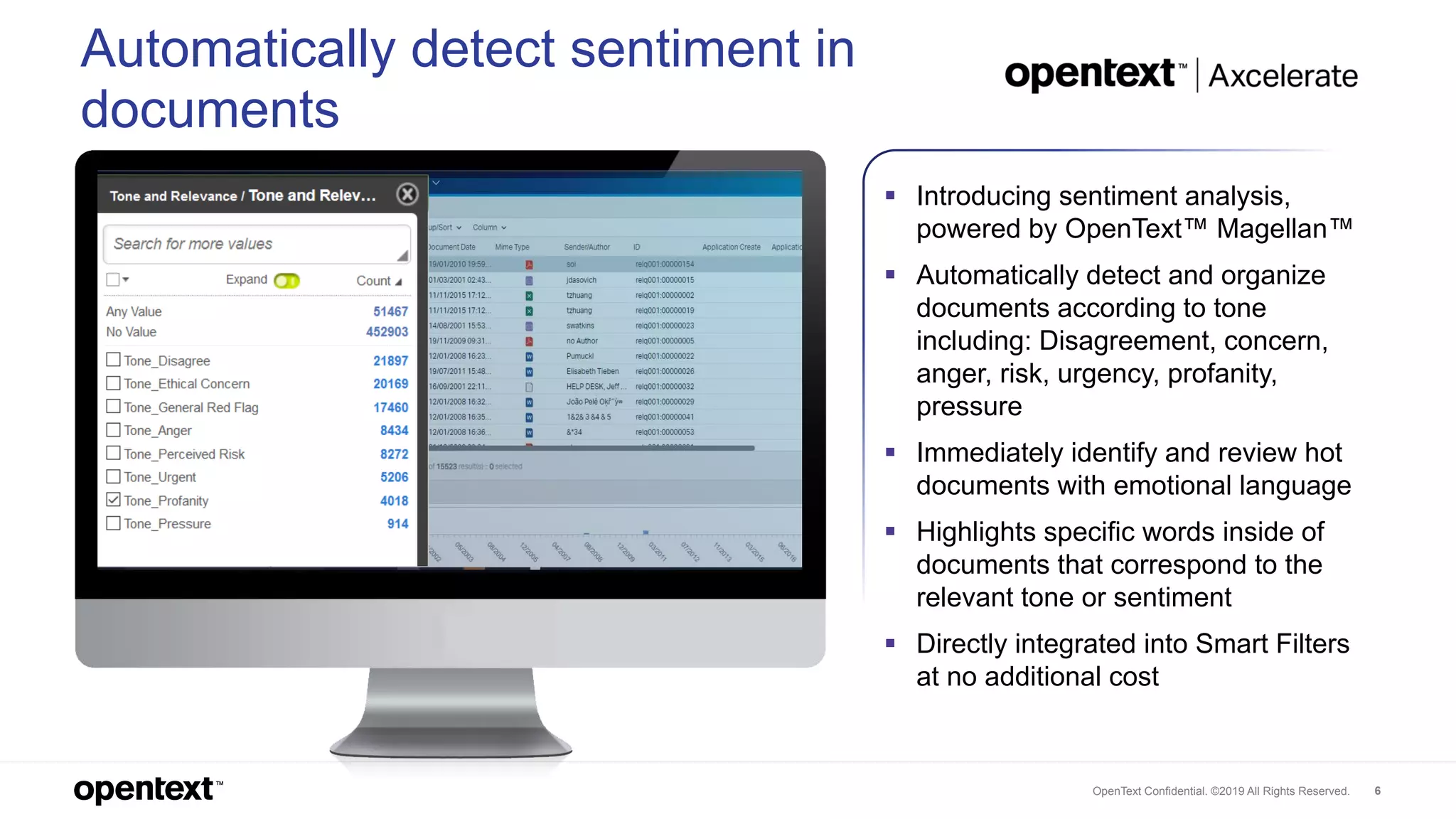
 Introducing sentiment analysis,
powered by OpenText™ Magellan™
 Automatically detect and organize
documents according to tone
including: Disagreement, concern,
anger, risk, urgency, profanity,
pressure
 Immediately identify and review hot
documents with emotional language
 Highlights specific words inside of
documents that correspond to the
relevant tone or sentiment
 Directly integrated into Smart Filters
at no additional cost
Automatically detect sentiment in
documents
OpenText Confidential. ©2019 All Rights Reserved. 7
OpenText eDOCS
Secure and centralized legal enterprise content (document)
management solution that helps capture, govern, find and
securely collaborate on sensitive legal work product.
OpenText Confidential. ©2019 All Rights Reserved. 8
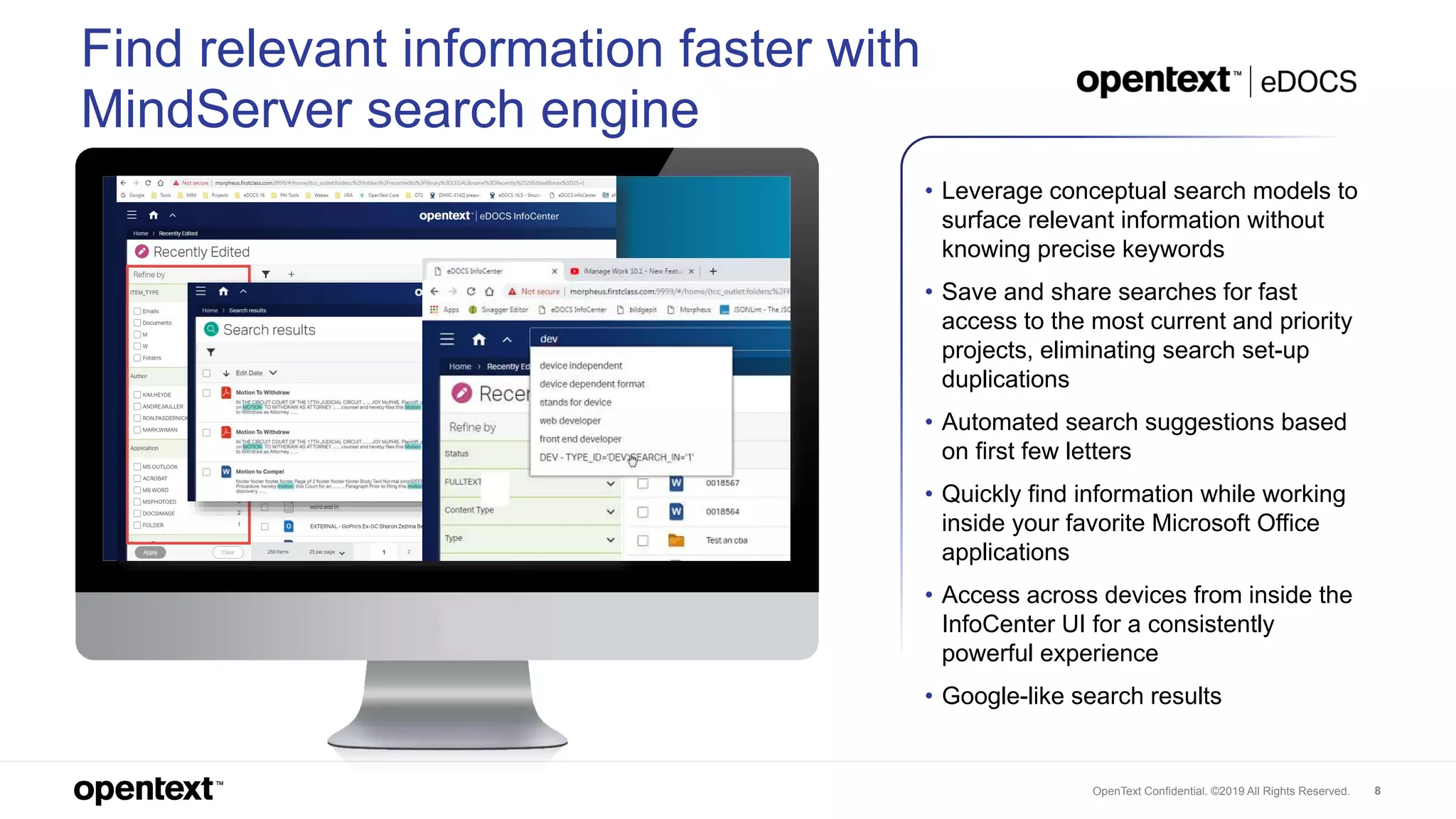
Find relevant information faster with
MindServer search engine
• Leverage conceptual search models to
surface relevant information without
knowing precise keywords
• Save and share searches for fast
access to the most current and priority
projects, eliminating search set-up
duplications
• Automated search suggestions based
on first few letters
• Quickly find information while working
inside your favorite Microsoft Office
applications
• Access across devices from inside the
InfoCenter UI for a consistently
powerful experience
• Google-like search results
OpenText Confidential. ©2019 All Rights Reserved. 9
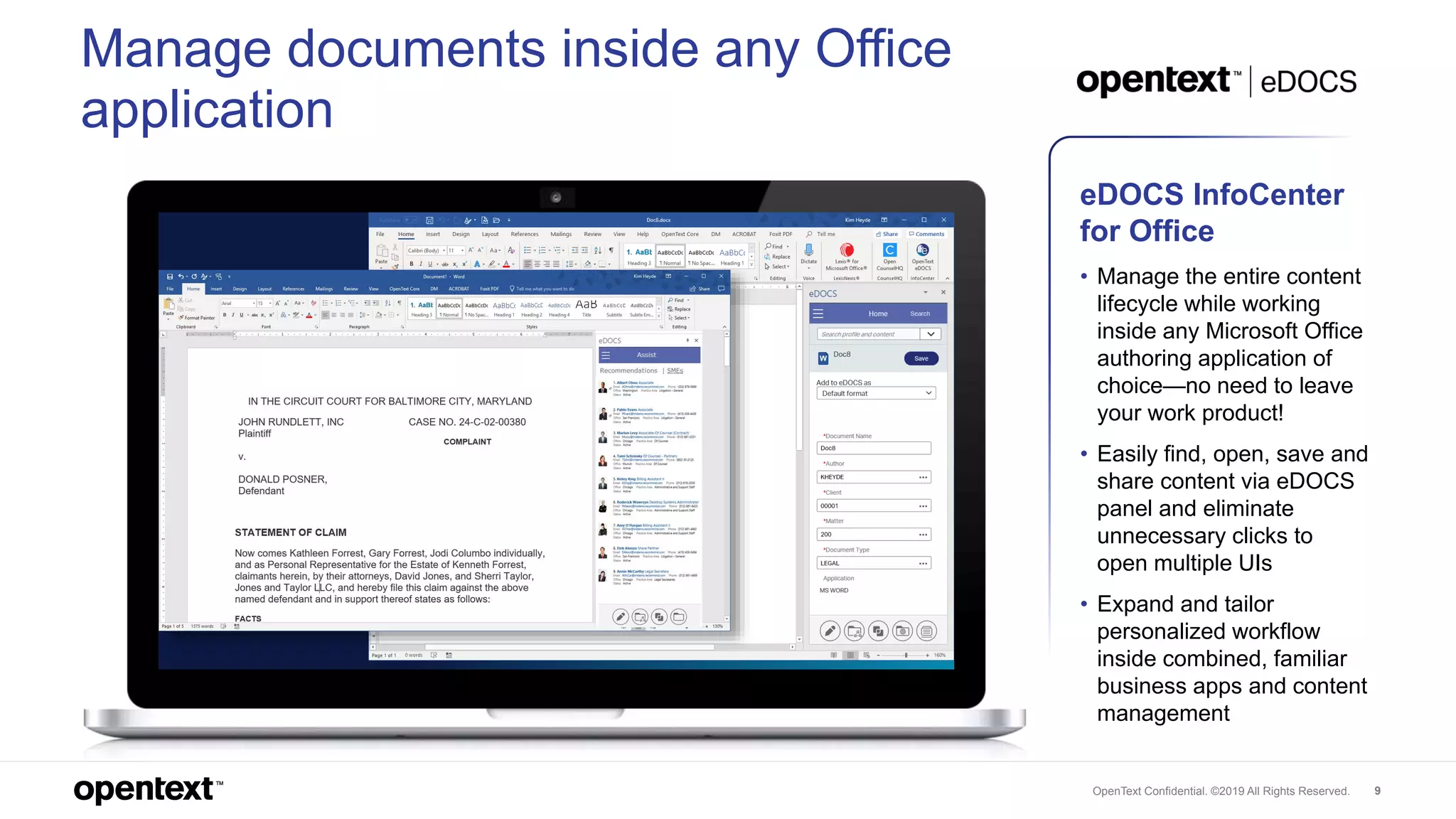
Manage documents inside any Office
application
eDOCS InfoCenter
for Office
• Manage the entire content
lifecycle while working
inside any Microsoft Office
authoring application of
choice—no need to leave
your work product!
• Easily find, open, save and
share content via eDOCS
panel and eliminate
unnecessary clicks to
open multiple UIs
• Expand and tailor
personalized workflow
inside combined, familiar
business apps and content
management
OpenText Confidential. ©2019 All Rights Reserved. 10
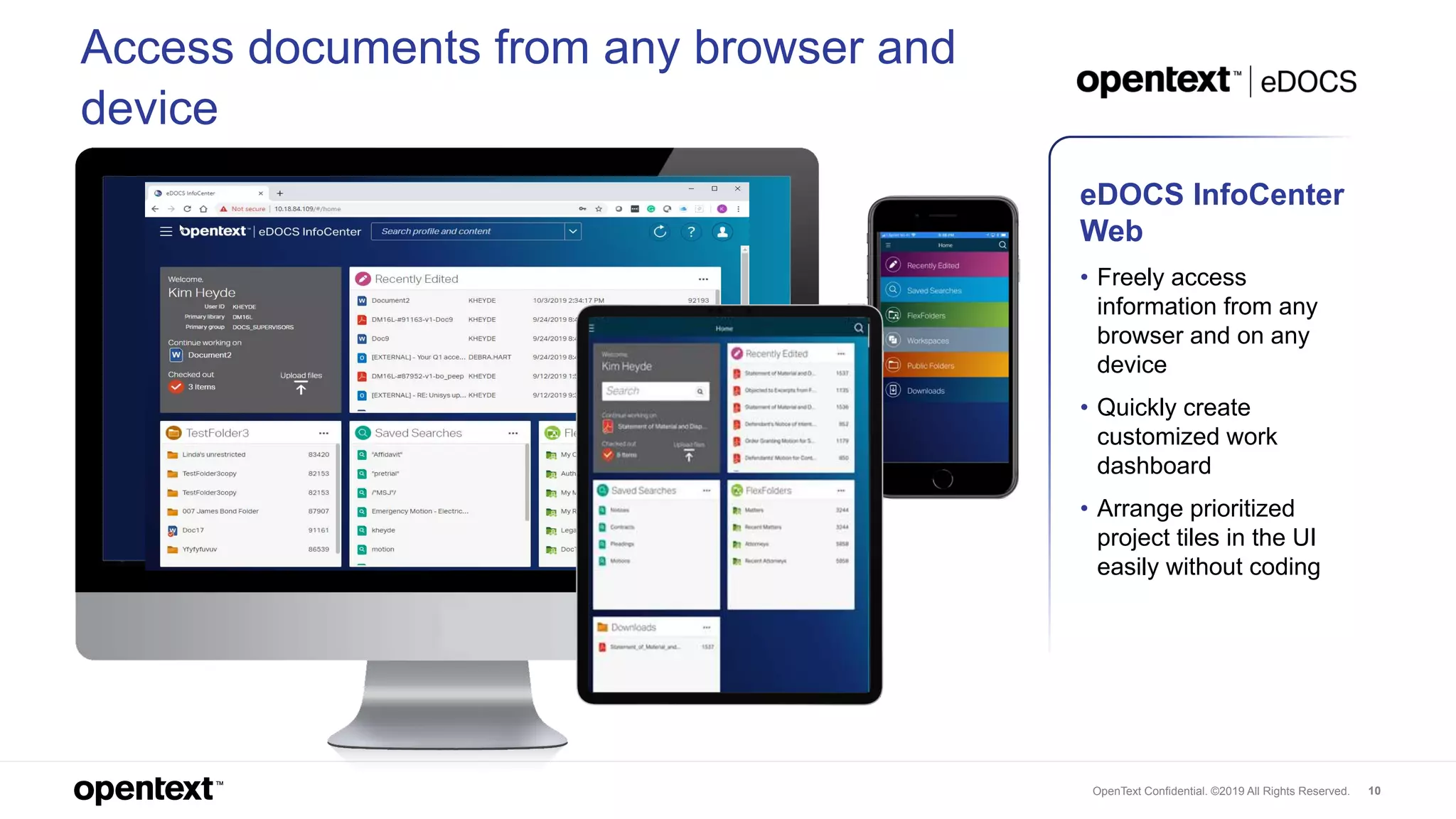
Access documents from any browser and
device
eDOCS InfoCenter
Web
• Freely access
information from any
browser and on any
device
• Quickly create
customized work
dashboard
• Arrange prioritized
project tiles in the UI
easily without coding
OpenText Confidential. ©2019 All Rights Reserved. 11
OpenText Decisiv
Unified, AI-enhanced search across the enterprise, to quickly find
documents, expertise, and projects needed from all sources and
locations.
OpenText Confidential. ©2019 All Rights Reserved. 12
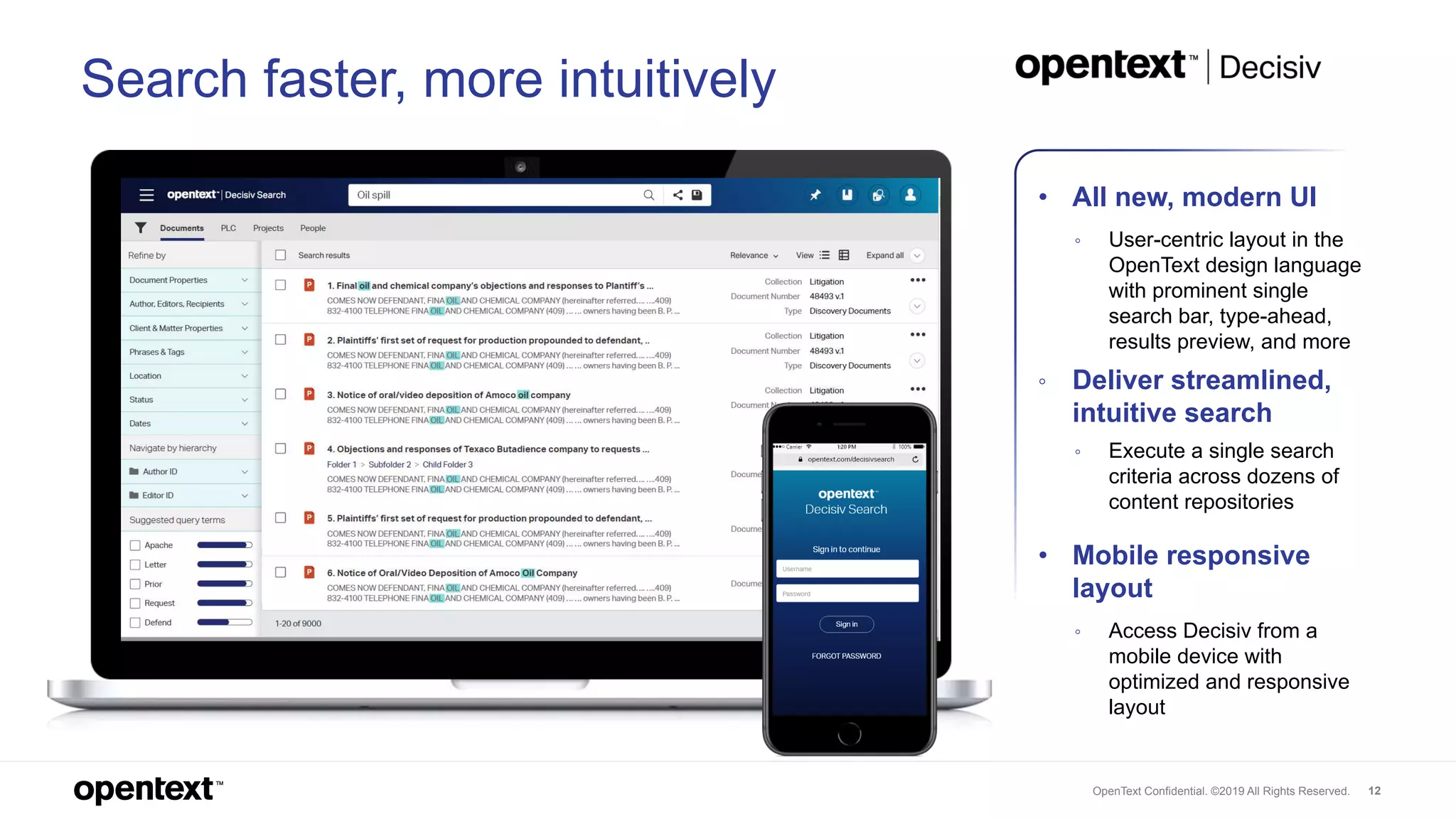
• All new, modern UI
◦ User-centric layout in the
OpenText design language
with prominent single
search bar, type-ahead,
results preview, and more
◦ Deliver streamlined,
intuitive search
◦ Execute a single search
criteria across dozens of
content repositories
• Mobile responsive
layout
◦ Access Decisiv from a
mobile device with
optimized and responsive
layout
Search faster, more intuitively
OpenText Confidential. ©2019 All Rights Reserved. 13
OpenText EnCase eDiscovery
A market-leading application that identifies, collects and analyzes
potentially relevant content across virtually any source in a forensically-
sound and defensible manner, for early and continuous case
assessment and analysis.
OpenText Confidential. ©2019 All Rights Reserved. 14
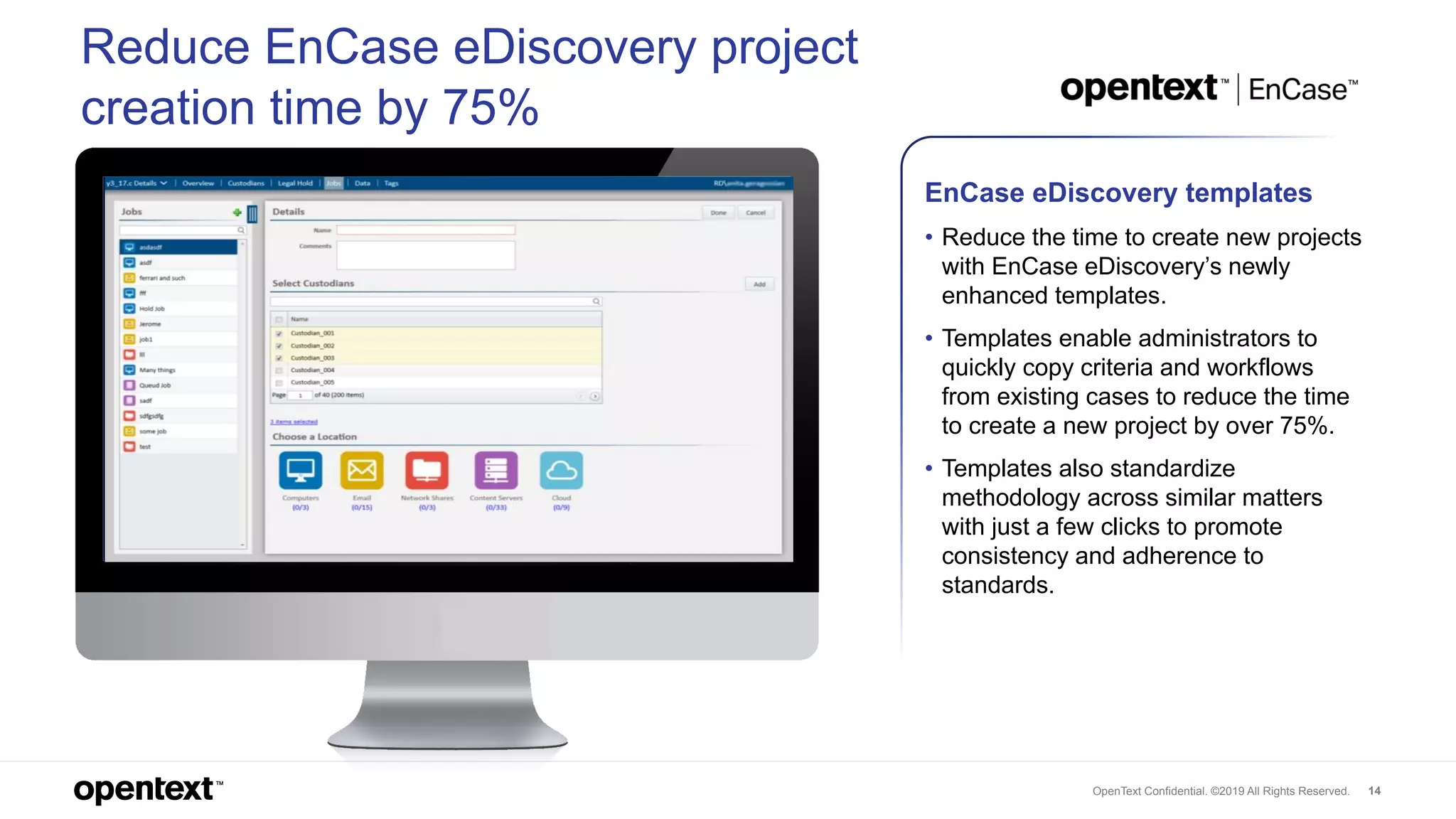
Reduce EnCase eDiscovery project
creation time by 75%
EnCase eDiscovery templates
• Reduce the time to create new projects
with EnCase eDiscovery’s newly
enhanced templates.
• Templates enable administrators to
quickly copy criteria and workflows
from existing cases to reduce the time
to create a new project by over 75%.
• Templates also standardize
methodology across similar matters
with just a few clicks to promote
consistency and adherence to
standards.
OpenText Confidential. ©2019 All Rights Reserved. 15
opentext.com
twitter.com/opentext
linkedin.com/company/opentext
Thank you

What's New in Release 16 EP7

  • 1.
    Release 16 Enhancement Pack7 (EP7) October 2019 What’s new in OpenText Legal Tech
  • 2.
    OpenText Confidential. ©2019All Rights Reserved. 2 OpenText is a global leader in legal technology, offering an unmatched breadth and depth of solutions to help legal practitioners tackle eDiscovery and investigations, legal content management, contract analysis and enterprise search. With an industry-leading enterprise information management platform, pioneering analytics and machine learning capabilities and experienced professional services teams, OpenText helps legal customers understand the large volumes of data they collect, generate and oversee, while incorporating the benefits of automation and AI.
  • 3.
    OpenText Confidential. ©2019All Rights Reserved. 3 What’s new in Release 16 EP7 for OpenText Legal Tech
  • 4.
    OpenText Confidential. ©2019All Rights Reserved. 4 OpenText Axcelerate End-to-end eDiscovery and investigations technology for document review, fact finding, and similar use cases complete with enterprise data connectors, robust culling, processing, automated redactions, and integrated analytics & AI.
  • 5.
    OpenText Confidential. ©2019All Rights Reserved. 5  Introducing automated, machine- translations powered by Veritone™  42 languages can be translated to English over a secure, API integration  Kick-off translation jobs directly inside of Axcelerate  Only extracted text is transferred for translation, never native files  Complements existing language detection capabilities  Integration offered at no additional cost (requires separate license with Veritone to execute translation) Accelerate review with translation on-the-fly
  • 6.
    OpenText Confidential. ©2019All Rights Reserved. 6  Introducing sentiment analysis, powered by OpenText™ Magellan™  Automatically detect and organize documents according to tone including: Disagreement, concern, anger, risk, urgency, profanity, pressure  Immediately identify and review hot documents with emotional language  Highlights specific words inside of documents that correspond to the relevant tone or sentiment  Directly integrated into Smart Filters at no additional cost Automatically detect sentiment in documents
  • 7.
    OpenText Confidential. ©2019All Rights Reserved. 7 OpenText eDOCS Secure and centralized legal enterprise content (document) management solution that helps capture, govern, find and securely collaborate on sensitive legal work product.
  • 8.
    OpenText Confidential. ©2019All Rights Reserved. 8 Find relevant information faster with MindServer search engine • Leverage conceptual search models to surface relevant information without knowing precise keywords • Save and share searches for fast access to the most current and priority projects, eliminating search set-up duplications • Automated search suggestions based on first few letters • Quickly find information while working inside your favorite Microsoft Office applications • Access across devices from inside the InfoCenter UI for a consistently powerful experience • Google-like search results
  • 9.
    OpenText Confidential. ©2019All Rights Reserved. 9 Manage documents inside any Office application eDOCS InfoCenter for Office • Manage the entire content lifecycle while working inside any Microsoft Office authoring application of choice—no need to leave your work product! • Easily find, open, save and share content via eDOCS panel and eliminate unnecessary clicks to open multiple UIs • Expand and tailor personalized workflow inside combined, familiar business apps and content management
  • 10.
    OpenText Confidential. ©2019All Rights Reserved. 10 Access documents from any browser and device eDOCS InfoCenter Web • Freely access information from any browser and on any device • Quickly create customized work dashboard • Arrange prioritized project tiles in the UI easily without coding
  • 11.
    OpenText Confidential. ©2019All Rights Reserved. 11 OpenText Decisiv Unified, AI-enhanced search across the enterprise, to quickly find documents, expertise, and projects needed from all sources and locations.
  • 12.
    OpenText Confidential. ©2019All Rights Reserved. 12 • All new, modern UI ◦ User-centric layout in the OpenText design language with prominent single search bar, type-ahead, results preview, and more ◦ Deliver streamlined, intuitive search ◦ Execute a single search criteria across dozens of content repositories • Mobile responsive layout ◦ Access Decisiv from a mobile device with optimized and responsive layout Search faster, more intuitively
  • 13.
    OpenText Confidential. ©2019All Rights Reserved. 13 OpenText EnCase eDiscovery A market-leading application that identifies, collects and analyzes potentially relevant content across virtually any source in a forensically- sound and defensible manner, for early and continuous case assessment and analysis.
  • 14.
    OpenText Confidential. ©2019All Rights Reserved. 14 Reduce EnCase eDiscovery project creation time by 75% EnCase eDiscovery templates • Reduce the time to create new projects with EnCase eDiscovery’s newly enhanced templates. • Templates enable administrators to quickly copy criteria and workflows from existing cases to reduce the time to create a new project by over 75%. • Templates also standardize methodology across similar matters with just a few clicks to promote consistency and adherence to standards.
  • 15.
    OpenText Confidential. ©2019All Rights Reserved. 15 opentext.com twitter.com/opentext linkedin.com/company/opentext Thank you

Editor's Notes

  • #6 Veritone is one of the leading machine-translation service providers with a robust translation library that merges dictionaries with machine learning to handle things like vernacular, slang, and foreign language typos; all leading to more accurate and automated translations. Foreign language documents can substantially hinder eDiscovery review progress and before the integration with Veritone the typical Axcelerate workflow would be to detect foreign language documents and simply batch them out to specially retained native-language document review attorneys. Native language document review attorneys are significantly more expensive to retain than English speaking review attorneys. This integration enables clients to use machine translations and kick off translation jobs directly from Axcelerate instead. Added benefits include: Machine translations are consistent—no difference in interpretation like there would be between different human speakers and the machine never gets tired or lazy Machine translations are fast—executed in a fraction of the time that it would take for manual translation or the aggregated time of having to hire specialized reviewers and design a workflow for them Machine translations can be tracked/audited—Human reviewers are the true “black box” in the equation; how do you know they translated documents correctly and consistently? Note limitations though: ONE way translation to English only Separate contract required with Veritone to actually execute the translations (we provide the integration and API free of charge) Cloud only Veritone only for now, but the API can be repurposed for other translation engines down the road
  • #9 (Elevator pitch – one sentence) Improve productivity with next generation search Theme: Modernization & usability Audience: Knowledge workers, eDOCS users, law firms, corporate law departments and industries with high-touch, high-volume product matter. The challenge to be solved. What is the user pain? What did they do before?: Lawyers lose precious time searching for information related to a time-sensitive case or client request. Searching for specific content with traditional file lists are as cumbersome as they are frustrating and time consuming while putting client matter and projects at risk by not finding the most current information. What we’ve done to solve it: What is MindServer? MindServer technology securely crawls and indexes information from inside eDOCS legal content management system. From the indices, MindServer creates concept models tailored to the legal information contained within the content management system based on content and extended metadata. These concept models significantly improve the accuracy of content search results by identifying related information and ranking search results by relevance. As documents change and new information is added, MindServer incrementally crawls and updates the models, ensuring that search results are current. What’s New in EP7:  With the introduction of MindServer into eDOCS in OpenText Release 16 EP7, an optional add-in, eDOCS users can quickly and automatically build search models they can reuse to find the most relevant information available, including related matters and authors. Users also can search metadata and document content for complete results.   As MindServer AI-powered search securely crawls and indexes information from inside eDOCS, legal teams can save valuable time while gaining more complete case, project and client knowledge. eDOCS MindServer features and benefits include: Leverage conceptual search models to surface relevant information without knowing precise keywords Save and share searches for fast access to the most current and priority projects, eliminating search set-up duplications Quickly find information while working inside your favorite Microsoft Office applications Access across devices from inside the InfoCenter UI for a consistently powerful experience Value to the customer: Overall value: Important to eDOCS installed base. With eDOCS MindServer, users can quickly and automatically produce search models that can scale to analyze increasingly bigger volumes of complex information. With faster, more accurate, “find” results, users don’t waste time searching improving overall strategic performance and business results.
  • #10 Feature – InfoCenter (IC) for Office (Elevator pitch – one sentence) Expedite productivity - access eDOCS within your favourite Office application Theme: Modernization & usability Audience: Knowledge workers, eDOCS users, law firms, corporate law departments and industries with high-touch, high-volume product matter. The challenge to be solved. What is the user pain? What do they do otherwise/without this personalization?: Users need access to their information and governed content while working daily in Microsoft Office business applications. While users have had access to eDOCS before from the ribbon view of their authoring applications – they had to inconveniently change their ribbon view to access eDOCS features and functionality. What we’ve done to solve it: What is InfoCenter (IC) for Microsoft Office add-in? Provides an eDOCS panel insert into MS Office (word, ppt and excel) Web based, modern interface leveraging the same InfoCenter code base and connecting the eDOCS repository with MS Office Don’t let “add-in” fool you. This is a full featured eDOCS client that can: Search Share Edit Security Create a Workspace Save a search and more… With the new IC Office add-in, users don’t need to leave their work in progress or go to another ribbon in Office to perform an action in eDOCS. Now, users can stay on the editing ribbon and perform eDOCS functions simultaneously. What’s New in EP7:  eDOCS IC user interface now provides an integration with Microsoft Office business applications (Word, Excel and PowerPoint). While users previously and still have access to their content with DM extensions, new personalization capabilities further streamline productivity by allowing users to remain inside their favorite Microsoft authoring application with the new add-in while accessing content from eDOCS with one-click. Value to the customer: Overall value: Users can work in one business application, side-by-side with both their MS work product of choice (Word, Excel or PowerPoint) and eDOCS. This increases efficient productivity by cutting down on clicks required to manage content throughout its lifecycle. Users are empowered to stay in their work environment of choice and save, find or share relevant information without having to leave Office and access a different UI. For organizations, this increases user adoption and compliant practices across the organization with use of eDOCS intuitive user interface across applications and devices. Supports mobile workers with access documents securely “anywhere, anytime”.
  • #11 Feature – InfoCenter (IC) for Web (Elevator pitch – one sentence) Increase user adoption with consistent, customizable web-UI across devices Theme: Modernization & usability Audience: Knowledge workers, eDOCS users, law firms, corporate law departments and industries with high-touch, high-volume product matter. The challenge to be solved. What is the user pain? What do they do otherwise/without this?: Many content management systems today are rigid, inflexible and don’t provide a seamless work experience - all contributing to content chaos and technology management overload. With competing client, project and matter priorities and volumes of information to manage daily, hourly and by the minute, users require access to Microsoft Office business applications and their eDOCS content libraries to work in environments that are most personally productive and compliant. What we’ve done to solve it: What is InfoCenter (IC) for Web? Is a web app with a web-based interface that allows users to: Easily access information from any browser and on any device Quickly create customized work dashboard by arranging prioritized project tiles in the UI without having to install development code or software Access InfoCenter from: Chrome Firefox Edge IE Safari - Easy to install, support, upgrade What’s New in EP7:  The same look and feel as IC Desktop Small footprint Requires the installation of sys tray tool for integration features Responsive UI Accessible across devices including: Computer Tablet Phone Value to the customer: Overall value: Increase user adoption and compliant practices across the organization with use of intuitive and easy to use web-based interface across devices. Supports flexible working environments across devices.
  • #15 (Elevator pitch – one sentence) Improve productivity with next generation search Theme: Modernization & usability Audience: Knowledge workers, eDOCS users, law firms, corporate law departments and industries with high-touch, high-volume product matter. The challenge to be solved. What is the user pain? What did they do before?: Lawyers lose precious time searching for information related to a time-sensitive case or client request. Searching for specific content with traditional file lists are as cumbersome as they are frustrating and time consuming while putting client matter and projects at risk by not finding the most current information. What we’ve done to solve it: What is MindServer? MindServer technology securely crawls and indexes information from inside eDOCS legal content management system. From the indices, MindServer creates concept models tailored to the legal information contained within the content management system based on content and extended metadata. These concept models significantly improve the accuracy of content search results by identifying related information and ranking search results by relevance. As documents change and new information is added, MindServer incrementally crawls and updates the models, ensuring that search results are current. What’s New in EP7:  With the introduction of MindServer into eDOCS in OpenText Release 16 EP7, an optional add-in, eDOCS users can quickly and automatically build search models they can reuse to find the most relevant information available, including related matters and authors. Users also can search metadata and document content for complete results.   As MindServer AI-powered search securely crawls and indexes information from inside eDOCS, legal teams can save valuable time while gaining more complete case, project and client knowledge. eDOCS MindServer features and benefits include: Leverage conceptual search models to surface relevant information without knowing precise keywords Save and share searches for fast access to the most current and priority projects, eliminating search set-up duplications Quickly find information while working inside your favorite Microsoft Office applications Access across devices from inside the InfoCenter UI for a consistently powerful experience Value to the customer: Overall value: Important to eDOCS installed base. With eDOCS MindServer, users can quickly and automatically produce search models that can scale to analyze increasingly bigger volumes of complex information. With faster, more accurate, “find” results, users don’t waste time searching improving overall strategic performance and business results.