
Network Configuration Manager 7.2
What’s New?

© 2013 SOLARWINDS WORLDWIDE, LLC. ALL RIGHTS RESERVED.
What Will You Learn?

SolarWinds Network Configuration Manager
Automated Network Configuration and Change Management

» What is SolarWinds Network
Configuration Manager?
» How Can NCM Help You?
» How Do I Know if I Need NCM?

» What’s New in NCM 7.2?
» System Requirements

» Pricing & Licensing
» Resources for Additional Learning

© 2013 SOLARWINDS WORLDWIDE, LLC. ALL RIGHTS RESERVED.

2
What is SolarWinds Network Configuration
Manager (NCM)?
A primary solution to establish & protect network device
configurations & manage configuration changes.
SolarWinds NCM enables:
• Efficient, Scalable, Standardized & Accountable
Configuration Management
• Help eliminate human errors and results in improved

network availability

© 2013 SOLARWINDS WORLDWIDE, LLC. ALL RIGHTS RESERVED.

3
Network Configuration Manager (NCM)
NCM as a part of SolarWinds Orion® Platform
» “Single pane of glass” to monitor & manage IT
Networks, Servers, Applications and more
» Can be purchased as a standalone product and add
monitoring & other management functionality when
needed

© 2013 SOLARWINDS WORLDWIDE, LLC. ALL RIGHTS RESERVED.

4
How Can NCM Help Me?
» Inventory and profile network devices
» Develop and deploy standardized device configurations
» Protect configurations against unauthorized changes
» Audit configurations for compliance to standards
» Use change controls to manage updates
» Tight integration with SolarWinds Network Performance
Monitor (NPM)

Value-add : Affordable, Feature Rich, Easy to Use, Low TCO
© 2013 SOLARWINDS WORLDWIDE, LLC. ALL RIGHTS RESERVED.

5
How Do I Know if I Need NCM?
I want to
» Reduce network downtime caused by device misconfiguration or
catastrophic failure
» Find an easier way to inventory devices, track and manage asset
details like: serial numbers, location, vendor end-of-life, etc.
» Be automatically notified when a critical configuration is changed &
to be able to restore it
» Have an easier and more accurate way to deploy bulk changes to
network devices
» Be able to review proposed configuration changes before they are
applied
© 2013 SOLARWINDS WORLDWIDE, LLC. ALL RIGHTS RESERVED.

6
What's NEW in NCM 7.2?
1. Device End-of-Life Management

2. Device Connection Profiles
3. Configuration Change Approval Workflow
Enhancements
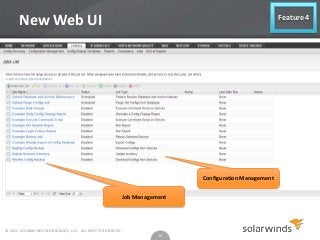
4. Web UI for Job Management, Configuration
Management and more
5. Improved Devices Support (Brocade and Palo Alto)

© 2013 SOLARWINDS WORLDWIDE, LLC. ALL RIGHTS RESERVED.

7
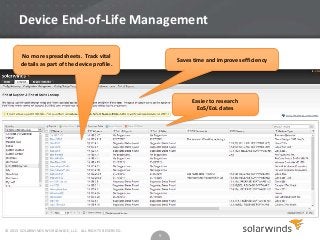
Device End-of-Life Management

Feature 1

» What it is it?
 Provides an integrated database of End-of-Sales (EoS) and End-of-Life
(EoL) dates for Cisco and Juniper® Devices
 View matching service dates for each device managed by NCM (using
fuzzy search)
 Select and import matching dates into your device profile
 Add optional custom information to device profile and manage asset
lifecycle milestones (e.g., replacement budget requested, budget
approved, scheduled replacement date, etc.)

» Use case:
 Audit and control annual maintenance costs
 Prepare financial and resource requests
 Track critical milestones
© 2013 SOLARWINDS WORLDWIDE, LLC. ALL RIGHTS RESERVED.

8
Device End-of-Life Management
No more spreadsheets. Track vital
details as part of the device profile.

Saves time and improves efficiency

Easier to research
EoS/EoL dates

» Use Cases

© 2013 SOLARWINDS WORLDWIDE, LLC. ALL RIGHTS RESERVED.

9
Device Connection Profiles

Feature 2

» What it is it ?
 Define device logon criteria (e.g., user name, password, remote
protocol, port, etc.)
 Apply a Device Connection Profile to one or more NCM managed
devices
 Define multiple Device Connection Profiles and use them as needed
 Alternately, NCM can also auto-detect and use the right connection
profile

» Use case:
 Standardize device access

© 2013 SOLARWINDS WORLDWIDE, LLC. ALL RIGHTS RESERVED.

10
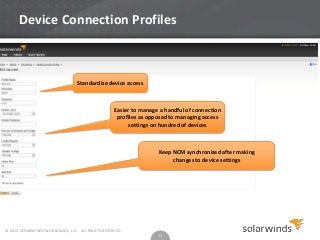
Device Connection Profiles

Standardize device access

Easier to manage a handful of connection
profiles as opposed to managing access
settings on hundred of devices

Keep NCM synchronized after making
changes to device settings

© 2013 SOLARWINDS WORLDWIDE, LLC. ALL RIGHTS RESERVED.

11
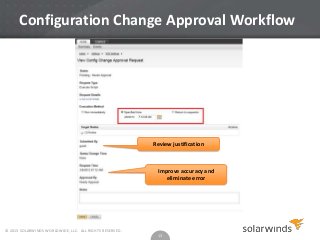
Configuration Change Approval
Workflow Enhancements

Feature 3

» What it is it ?
 Improvements to the configuration change approval workflow
• Approved requests to be executed at specified date/time
• Approved requests to be returned to requestor for execution
• Requesters can view history of what was requested
• Both Approvers and Requesters can view history of what was
approved

» Use case
 Experienced staff
implementation

© 2013 SOLARWINDS WORLDWIDE, LLC. ALL RIGHTS RESERVED.

approves

12

all

change

requests

before
Configuration Change Approval Workflow

Review justification

Improve accuracy and
eliminate error

© 2013 SOLARWINDS WORLDWIDE, LLC. ALL RIGHTS RESERVED.

13
New Web UI

Feature 4

Configuration Management

Job Management

© 2013 SOLARWINDS WORLDWIDE, LLC. ALL RIGHTS RESERVED.

14
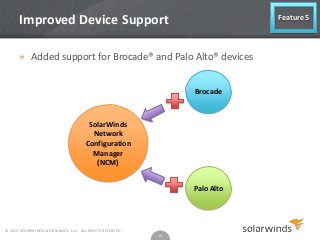
Improved Device Support

Feature 5

» Added support for Brocade® and Palo Alto® devices
Brocade

SolarWinds
Network
Configuration
Manager
(NCM)

Palo Alto

© 2013 SOLARWINDS WORLDWIDE, LLC. ALL RIGHTS RESERVED.

15
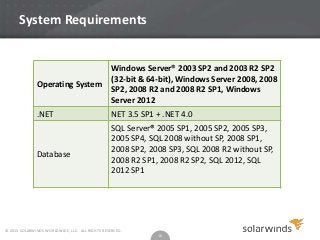
System Requirements

Operating System

Windows Server® 2003 SP2 and 2003 R2 SP2
(32-bit & 64-bit), Windows Server 2008, 2008
SP2, 2008 R2 and 2008 R2 SP1, Windows
Server 2012

.NET

NET 3.5 SP1 + .NET 4.0

Database

SQL Server® 2005 SP1, 2005 SP2, 2005 SP3,
2005 SP4, SQL 2008 without SP, 2008 SP1,
2008 SP2, 2008 SP3, SQL 2008 R2 without SP,
2008 R2 SP1, 2008 R2 SP2, SQL 2012, SQL
2012 SP1

© 2013 SOLARWINDS WORLDWIDE, LLC. ALL RIGHTS RESERVED.

16
Pricing and Licensing
» Pricing
 Pricing starts at 2,695 USD (50 nodes)**
 Node-based, tiered volume pricing model
» Licensing Keys
 NEW Licensing Manager -- no longer necessary to copy and
paste activation keys.
 New licensing system will automatically activate licenses via
Internet access.
**Pricing as of 9.3.13, SolarWinds reserves the right to change prices

© 2013 SOLARWINDS WORLDWIDE, LLC. ALL RIGHTS RESERVED.

17
SolarWinds Network Configuration Manager (NCM)
Use SolarWinds NCM to backup critical network device
configurations regularly and have a device recovery plan in place.
Ensure uptime for your critical devices!

Also see:
• How to Install NCM 7.2 (Video)
• 5 Best NCCM Practices: Network Configuration Management (Video)
• Customer Testimonial (Video)

© 2013 SOLARWINDS WORLDWIDE, LLC. ALL RIGHTS RESERVED.

18
Thank you!
The SOLARWINDS and SOLARWINDS & Design marks are the exclusive property of
SolarWinds Worldwide, LLC, are registered with the U.S. Patent and Trademark
Office, and may be registered or pending registration in other countries. All other
SolarWinds trademarks, service marks, and logos may be common law
marks, registered or pending registration in the United States or in other countries. All
other trademarks mentioned herein are used for identification purposes only and may
be or are trademarks or registered trademarks of their respective companies.

© 2013 SOLARWINDS WORLDWIDE, LLC. ALL RIGHTS RESERVED.

19

What's New in NCM 7.2

  • 1.
    Network Configuration Manager7.2 What’s New? © 2013 SOLARWINDS WORLDWIDE, LLC. ALL RIGHTS RESERVED.
  • 2.
    What Will YouLearn? SolarWinds Network Configuration Manager Automated Network Configuration and Change Management » What is SolarWinds Network Configuration Manager? » How Can NCM Help You? » How Do I Know if I Need NCM? » What’s New in NCM 7.2? » System Requirements » Pricing & Licensing » Resources for Additional Learning © 2013 SOLARWINDS WORLDWIDE, LLC. ALL RIGHTS RESERVED. 2
  • 3.
    What is SolarWindsNetwork Configuration Manager (NCM)? A primary solution to establish & protect network device configurations & manage configuration changes. SolarWinds NCM enables: • Efficient, Scalable, Standardized & Accountable Configuration Management • Help eliminate human errors and results in improved network availability © 2013 SOLARWINDS WORLDWIDE, LLC. ALL RIGHTS RESERVED. 3
  • 4.
    Network Configuration Manager(NCM) NCM as a part of SolarWinds Orion® Platform » “Single pane of glass” to monitor & manage IT Networks, Servers, Applications and more » Can be purchased as a standalone product and add monitoring & other management functionality when needed © 2013 SOLARWINDS WORLDWIDE, LLC. ALL RIGHTS RESERVED. 4
  • 5.
    How Can NCMHelp Me? » Inventory and profile network devices » Develop and deploy standardized device configurations » Protect configurations against unauthorized changes » Audit configurations for compliance to standards » Use change controls to manage updates » Tight integration with SolarWinds Network Performance Monitor (NPM) Value-add : Affordable, Feature Rich, Easy to Use, Low TCO © 2013 SOLARWINDS WORLDWIDE, LLC. ALL RIGHTS RESERVED. 5
  • 6.
    How Do IKnow if I Need NCM? I want to » Reduce network downtime caused by device misconfiguration or catastrophic failure » Find an easier way to inventory devices, track and manage asset details like: serial numbers, location, vendor end-of-life, etc. » Be automatically notified when a critical configuration is changed & to be able to restore it » Have an easier and more accurate way to deploy bulk changes to network devices » Be able to review proposed configuration changes before they are applied © 2013 SOLARWINDS WORLDWIDE, LLC. ALL RIGHTS RESERVED. 6
  • 7.
    What's NEW inNCM 7.2? 1. Device End-of-Life Management 2. Device Connection Profiles 3. Configuration Change Approval Workflow Enhancements 4. Web UI for Job Management, Configuration Management and more 5. Improved Devices Support (Brocade and Palo Alto) © 2013 SOLARWINDS WORLDWIDE, LLC. ALL RIGHTS RESERVED. 7
  • 8.
    Device End-of-Life Management Feature1 » What it is it?  Provides an integrated database of End-of-Sales (EoS) and End-of-Life (EoL) dates for Cisco and Juniper® Devices  View matching service dates for each device managed by NCM (using fuzzy search)  Select and import matching dates into your device profile  Add optional custom information to device profile and manage asset lifecycle milestones (e.g., replacement budget requested, budget approved, scheduled replacement date, etc.) » Use case:  Audit and control annual maintenance costs  Prepare financial and resource requests  Track critical milestones © 2013 SOLARWINDS WORLDWIDE, LLC. ALL RIGHTS RESERVED. 8
  • 9.
    Device End-of-Life Management Nomore spreadsheets. Track vital details as part of the device profile. Saves time and improves efficiency Easier to research EoS/EoL dates » Use Cases © 2013 SOLARWINDS WORLDWIDE, LLC. ALL RIGHTS RESERVED. 9
  • 10.
    Device Connection Profiles Feature2 » What it is it ?  Define device logon criteria (e.g., user name, password, remote protocol, port, etc.)  Apply a Device Connection Profile to one or more NCM managed devices  Define multiple Device Connection Profiles and use them as needed  Alternately, NCM can also auto-detect and use the right connection profile » Use case:  Standardize device access © 2013 SOLARWINDS WORLDWIDE, LLC. ALL RIGHTS RESERVED. 10
  • 11.
    Device Connection Profiles Standardizedevice access Easier to manage a handful of connection profiles as opposed to managing access settings on hundred of devices Keep NCM synchronized after making changes to device settings © 2013 SOLARWINDS WORLDWIDE, LLC. ALL RIGHTS RESERVED. 11
  • 12.
    Configuration Change Approval WorkflowEnhancements Feature 3 » What it is it ?  Improvements to the configuration change approval workflow • Approved requests to be executed at specified date/time • Approved requests to be returned to requestor for execution • Requesters can view history of what was requested • Both Approvers and Requesters can view history of what was approved » Use case  Experienced staff implementation © 2013 SOLARWINDS WORLDWIDE, LLC. ALL RIGHTS RESERVED. approves 12 all change requests before
  • 13.
    Configuration Change ApprovalWorkflow Review justification Improve accuracy and eliminate error © 2013 SOLARWINDS WORLDWIDE, LLC. ALL RIGHTS RESERVED. 13
  • 14.
    New Web UI Feature4 Configuration Management Job Management © 2013 SOLARWINDS WORLDWIDE, LLC. ALL RIGHTS RESERVED. 14
  • 15.
    Improved Device Support Feature5 » Added support for Brocade® and Palo Alto® devices Brocade SolarWinds Network Configuration Manager (NCM) Palo Alto © 2013 SOLARWINDS WORLDWIDE, LLC. ALL RIGHTS RESERVED. 15
  • 16.
    System Requirements Operating System WindowsServer® 2003 SP2 and 2003 R2 SP2 (32-bit & 64-bit), Windows Server 2008, 2008 SP2, 2008 R2 and 2008 R2 SP1, Windows Server 2012 .NET NET 3.5 SP1 + .NET 4.0 Database SQL Server® 2005 SP1, 2005 SP2, 2005 SP3, 2005 SP4, SQL 2008 without SP, 2008 SP1, 2008 SP2, 2008 SP3, SQL 2008 R2 without SP, 2008 R2 SP1, 2008 R2 SP2, SQL 2012, SQL 2012 SP1 © 2013 SOLARWINDS WORLDWIDE, LLC. ALL RIGHTS RESERVED. 16
  • 17.
    Pricing and Licensing »Pricing  Pricing starts at 2,695 USD (50 nodes)**  Node-based, tiered volume pricing model » Licensing Keys  NEW Licensing Manager -- no longer necessary to copy and paste activation keys.  New licensing system will automatically activate licenses via Internet access. **Pricing as of 9.3.13, SolarWinds reserves the right to change prices © 2013 SOLARWINDS WORLDWIDE, LLC. ALL RIGHTS RESERVED. 17
  • 18.
    SolarWinds Network ConfigurationManager (NCM) Use SolarWinds NCM to backup critical network device configurations regularly and have a device recovery plan in place. Ensure uptime for your critical devices! Also see: • How to Install NCM 7.2 (Video) • 5 Best NCCM Practices: Network Configuration Management (Video) • Customer Testimonial (Video) © 2013 SOLARWINDS WORLDWIDE, LLC. ALL RIGHTS RESERVED. 18
  • 19.
    Thank you! The SOLARWINDSand SOLARWINDS & Design marks are the exclusive property of SolarWinds Worldwide, LLC, are registered with the U.S. Patent and Trademark Office, and may be registered or pending registration in other countries. All other SolarWinds trademarks, service marks, and logos may be common law marks, registered or pending registration in the United States or in other countries. All other trademarks mentioned herein are used for identification purposes only and may be or are trademarks or registered trademarks of their respective companies. © 2013 SOLARWINDS WORLDWIDE, LLC. ALL RIGHTS RESERVED. 19