“ What on (Google) Earth is that ?” A quick update Alan Parkinson Geographical Association CENT, Rotherham – 9 th  Feb 2009 http://earth.google.com http://googlearthusersguide.blogspot.com [email_address]
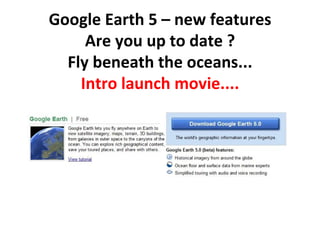
Google Earth 5 – new features Are you up to date ? Fly beneath the oceans... Intro launch movie....
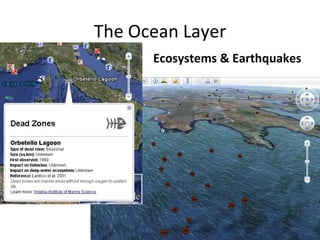
The Ocean Layer Ecosystems & Earthquakes
The Official Guide (Not completely up to date now...) http://earth.google.com/userguide/v4/   Contains video tutorials on most common tasks that can be done
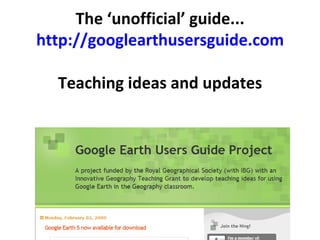
The ‘unofficial’ guide... http://googlearthusersguide.com Teaching ideas and updates
Other sites you need to use Google Outreach (different curriculum areas) e.g: Culture, Arts & Humanities   Environment and Science http://gearthblog.com  – the latest news on  GE from Frank Taylor http://earth.google.com/outreach/showcase.html
Digital Explorer Jamie Buchanan Dunlop http://digitalexplorer.co.uk/resources/manuals /   Booklets to download –  Basic and Advanced Ideas for fieldwork and activities in the school ground (‘virtual fieldwork’) Step by step user guides with screenshots
Placemarks Can have digital media included in them Can also choose your  own image  to have as the placemark WILL DEMONSTRATE THIS AS REQUIRED
Host your pictures / videos online... Why not use the GA’s NING networking site to host your images ? http://geographical.ning.com Over 430 geographers already there... Can then use the location of the image when adding the placemark code
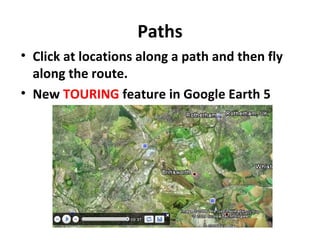
Paths Click at locations along a path and then fly along the route. New  TOURING  feature in Google Earth 5
Polygons Can be used to ‘shade in’ areas on a map, or to create boxes which mark the locations of buildings, events, data collection points. They can be flown round by adding a tour once created.
Ollie Bray  Learning Teaching Scotland Noel Jenkins http://www.olliebray.com http://www.digitalgeography.co.uk IDEAS FOR USING IN THE CLASSROOM http://www.digitalgeography.co.uk/archives/2009/02/teaching-with-google-earth-5-the-mystery-of-history-and-other-new-developments
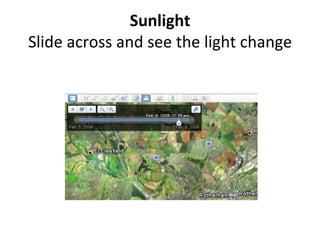
Sunlight Slide across and see the light change
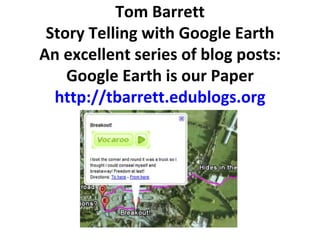
Tom Barrett Story Telling with Google Earth An excellent series of blog posts: Google Earth is our Paper http://tbarrett.edublogs.org
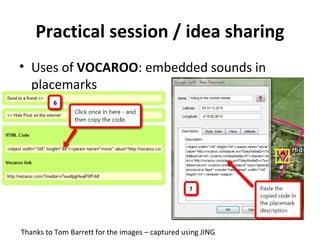
Practical session / idea sharing Uses of  VOCAROO : embedded sounds in placemarks Thanks to Tom Barrett for the images – captured using JING
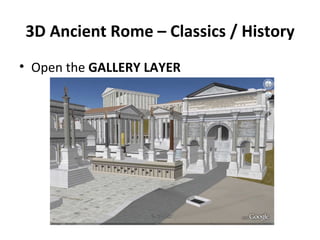
3D Ancient Rome – Classics / History Open the  GALLERY LAYER

What on (Google) Earth is that ?

  • 1.
    “ What on(Google) Earth is that ?” A quick update Alan Parkinson Geographical Association CENT, Rotherham – 9 th Feb 2009 http://earth.google.com http://googlearthusersguide.blogspot.com [email_address]
  • 2.
    Google Earth 5– new features Are you up to date ? Fly beneath the oceans... Intro launch movie....
  • 3.
    The Ocean LayerEcosystems & Earthquakes
  • 4.
    The Official Guide(Not completely up to date now...) http://earth.google.com/userguide/v4/ Contains video tutorials on most common tasks that can be done
  • 5.
    The ‘unofficial’ guide...http://googlearthusersguide.com Teaching ideas and updates
  • 6.
    Other sites youneed to use Google Outreach (different curriculum areas) e.g: Culture, Arts & Humanities Environment and Science http://gearthblog.com – the latest news on GE from Frank Taylor http://earth.google.com/outreach/showcase.html
  • 7.
    Digital Explorer JamieBuchanan Dunlop http://digitalexplorer.co.uk/resources/manuals / Booklets to download – Basic and Advanced Ideas for fieldwork and activities in the school ground (‘virtual fieldwork’) Step by step user guides with screenshots
  • 8.
    Placemarks Can havedigital media included in them Can also choose your own image to have as the placemark WILL DEMONSTRATE THIS AS REQUIRED
  • 9.
    Host your pictures/ videos online... Why not use the GA’s NING networking site to host your images ? http://geographical.ning.com Over 430 geographers already there... Can then use the location of the image when adding the placemark code
  • 10.
    Paths Click atlocations along a path and then fly along the route. New TOURING feature in Google Earth 5
  • 11.
    Polygons Can beused to ‘shade in’ areas on a map, or to create boxes which mark the locations of buildings, events, data collection points. They can be flown round by adding a tour once created.
  • 12.
    Ollie Bray Learning Teaching Scotland Noel Jenkins http://www.olliebray.com http://www.digitalgeography.co.uk IDEAS FOR USING IN THE CLASSROOM http://www.digitalgeography.co.uk/archives/2009/02/teaching-with-google-earth-5-the-mystery-of-history-and-other-new-developments
  • 13.
    Sunlight Slide acrossand see the light change
  • 14.
    Tom Barrett StoryTelling with Google Earth An excellent series of blog posts: Google Earth is our Paper http://tbarrett.edublogs.org
  • 15.
    Practical session /idea sharing Uses of VOCAROO : embedded sounds in placemarks Thanks to Tom Barrett for the images – captured using JING
  • 16.
    3D Ancient Rome– Classics / History Open the GALLERY LAYER