Library Lunchable:  Google Earth for EducatorsPresented by : Laura Wilson, Reference LibrarianFramingham State CollegeJuly 8, 2009
What is Google Earth?Free* (!) software program Download from the internet at:http://earth.google.com/download-earth.htmlA “virtual globe” that allows users to explore countless different features , including :Urban and rural terrain3D image models of popular terrain and buildingsPlaces of interestPhotos and videos related to a specific locationHistorical imagery, stars, celestial bodies, underwater terrain, and much, much more!
How does it work?The software displays high-resolution aerial photos and satellite imagery of the Earth’s surfaceVarying degrees of detailMore popular areas have better quality imagesUnited States and Europe images tend to be more detailedImages range in currency3 months – 5 years ago (not live images)
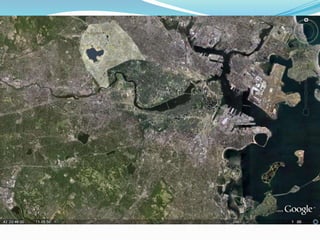
What are we looking at?
3D Buildings
A view of the Grand Canyon
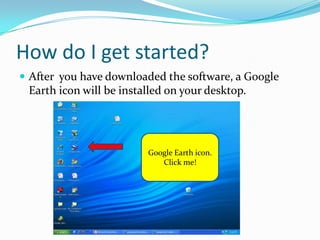
How do I get started?After  you have downloaded the software, a Google Earth icon will be installed on your desktop.Google Earth iconClick me!Google Earth icon.Click me!
This is your starting point:Type address, location name, or latitude / longitude  co-oridnates
Here is the location!Framingham State College
Notice the “Layers” feature…Layers
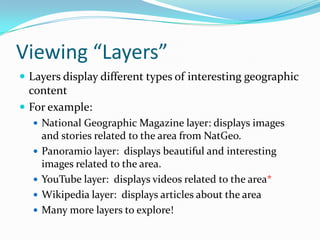
Viewing “Layers”Layers display different types of interesting geographic contentFor example:National Geographic Magazine layer: displays images and stories related to the area from NatGeo.Panoramio layer:  displays beautiful and interesting images related to the area.YouTube layer:  displays videos related to the area*Wikipedia layer:  displays articles about the areaMany more layers to explore!
Google Earth in the ClassroomGoogle Earth has been used to teach students in nearly every disciplineIt’s easyIt’s excitingIt’s fun!Allow students to explore and learn through Google Earth by themselves, or create a tour of your own!Tours can include images and audio that you input
Ideas for subject areas:	Geography – obvious!History – create your own overlay map for a particular siteOverlays are maps either scanned from a computer or taken from the web, and dropped over the siteEngraving showing London after the great fireConcentration camps around the 3rd ReichUsing GoogleSketchUp and historical overlays, students can recreate entire ancient citiesGoogle SketchUp is another software program that allows you to create, modify and share 3D modelsExplore Tutankhamun’s Tomb
Ideas… cont.Biology – Track routes of chimpanzees in Tanzania’s Gombe Forest, or migration patterns of sea turtlesGeology – Find images, links and descriptions of thousands of volcanoes around the worldLiterature – Take a virtual tour of the setting of a bookMath – Explore distance, velocity and wave properties of tsunamis
Content already availableUse the Google Earth Gallery to download tours made and rated by other Google Earth usersCathedrals 3D TourArt Museums 3D TourRising Sea Level animationSites of Ancient RomeWorld Oil ConsumptionHistoric Fort Monroe… and many more!
Teacher testimonies“To really teach about these places, we have to get beyond flat maps on a flat screen.”  - Diane Favro“The program provides opportunities for students to be curious, to explore, wonder, and discover beyond typically structured lessons.”  - Tom Stahley
For more information:Spring, T. (2009). Getting your feet wet with google ocean. PC World, 27(4), 24-24. Retrieved from http://search.ebscohost.com.fscproxy.framingham.edu/login.aspx?direct=true&db=tfh&AN=37035064&site=ehost-liveStahley, T. (2006). Earth from above.(google earth). The Science Teacher, , 44-48. Retrieved from http://find.galegroup.com.fscproxy.framingham.edu/gtx/infomark.do?&contentSet=IAC-Documents&type=retrieve&tabID=T002&prodId=EAIM&docId=A157773209&source=gale&srcprod=EAIM&userGroupName=fst&version=1.0Turner, W., & McLaughlin, C. (2009). ACTIVITY: The incredible shrinking earth: Google earth for today's adventurer. Technology & Children, 13(3), 4-5. Retrieved from http://search.ebscohost.com.fscproxy.framingham.edu/login.aspx?direct=true&db=tfh&AN=37218466&site=ehost-liveVergano, D. (2009). Egyptian temple virtually restored. USA Today, April 23 Retrieved from http://search.ebscohost.com.fscproxy.framingham.edu/login.aspx?direct=true&db=aph&AN=J0E301264223609&site=ehost-live
Useful sites:Google for Educators – Google Earth http://www.google.com/educators/p_earth.htmlGoogle Earth for Educators Discussion Group http://groups.google.com/group/google-for-educators?Ink=gschgGoogle Earth Lessons http://gelessons.com/lessons/Google Earth Gallery http://www.google.com/gadgets/directory?synd=earth&cat=featured Google Earth Blog http://www.gearthblog.com/reference.htmlCreating Content in Google Earth http://strengthofweakties.org/wp-content/uploads/2008/01/creating-content-in-google-earth.pdfCreating a Google Earth Tour http://googleearthdesign.blogspot.com/2009/02/howto-create-simple-tour.html

Google Earth

  • 1.
    Library Lunchable: Google Earth for EducatorsPresented by : Laura Wilson, Reference LibrarianFramingham State CollegeJuly 8, 2009
  • 2.
    What is GoogleEarth?Free* (!) software program Download from the internet at:http://earth.google.com/download-earth.htmlA “virtual globe” that allows users to explore countless different features , including :Urban and rural terrain3D image models of popular terrain and buildingsPlaces of interestPhotos and videos related to a specific locationHistorical imagery, stars, celestial bodies, underwater terrain, and much, much more!
  • 3.
    How does itwork?The software displays high-resolution aerial photos and satellite imagery of the Earth’s surfaceVarying degrees of detailMore popular areas have better quality imagesUnited States and Europe images tend to be more detailedImages range in currency3 months – 5 years ago (not live images)
  • 4.
    What are welooking at?
  • 9.
  • 10.
    A view ofthe Grand Canyon
  • 11.
    How do Iget started?After you have downloaded the software, a Google Earth icon will be installed on your desktop.Google Earth iconClick me!Google Earth icon.Click me!
  • 12.
    This is yourstarting point:Type address, location name, or latitude / longitude co-oridnates
  • 13.
    Here is thelocation!Framingham State College
  • 14.
    Notice the “Layers”feature…Layers
  • 15.
    Viewing “Layers”Layers displaydifferent types of interesting geographic contentFor example:National Geographic Magazine layer: displays images and stories related to the area from NatGeo.Panoramio layer: displays beautiful and interesting images related to the area.YouTube layer: displays videos related to the area*Wikipedia layer: displays articles about the areaMany more layers to explore!
  • 16.
    Google Earth inthe ClassroomGoogle Earth has been used to teach students in nearly every disciplineIt’s easyIt’s excitingIt’s fun!Allow students to explore and learn through Google Earth by themselves, or create a tour of your own!Tours can include images and audio that you input
  • 17.
    Ideas for subjectareas: Geography – obvious!History – create your own overlay map for a particular siteOverlays are maps either scanned from a computer or taken from the web, and dropped over the siteEngraving showing London after the great fireConcentration camps around the 3rd ReichUsing GoogleSketchUp and historical overlays, students can recreate entire ancient citiesGoogle SketchUp is another software program that allows you to create, modify and share 3D modelsExplore Tutankhamun’s Tomb
  • 18.
    Ideas… cont.Biology –Track routes of chimpanzees in Tanzania’s Gombe Forest, or migration patterns of sea turtlesGeology – Find images, links and descriptions of thousands of volcanoes around the worldLiterature – Take a virtual tour of the setting of a bookMath – Explore distance, velocity and wave properties of tsunamis
  • 19.
    Content already availableUsethe Google Earth Gallery to download tours made and rated by other Google Earth usersCathedrals 3D TourArt Museums 3D TourRising Sea Level animationSites of Ancient RomeWorld Oil ConsumptionHistoric Fort Monroe… and many more!
  • 20.
    Teacher testimonies“To reallyteach about these places, we have to get beyond flat maps on a flat screen.” - Diane Favro“The program provides opportunities for students to be curious, to explore, wonder, and discover beyond typically structured lessons.” - Tom Stahley
  • 21.
    For more information:Spring,T. (2009). Getting your feet wet with google ocean. PC World, 27(4), 24-24. Retrieved from http://search.ebscohost.com.fscproxy.framingham.edu/login.aspx?direct=true&db=tfh&AN=37035064&site=ehost-liveStahley, T. (2006). Earth from above.(google earth). The Science Teacher, , 44-48. Retrieved from http://find.galegroup.com.fscproxy.framingham.edu/gtx/infomark.do?&contentSet=IAC-Documents&type=retrieve&tabID=T002&prodId=EAIM&docId=A157773209&source=gale&srcprod=EAIM&userGroupName=fst&version=1.0Turner, W., & McLaughlin, C. (2009). ACTIVITY: The incredible shrinking earth: Google earth for today's adventurer. Technology & Children, 13(3), 4-5. Retrieved from http://search.ebscohost.com.fscproxy.framingham.edu/login.aspx?direct=true&db=tfh&AN=37218466&site=ehost-liveVergano, D. (2009). Egyptian temple virtually restored. USA Today, April 23 Retrieved from http://search.ebscohost.com.fscproxy.framingham.edu/login.aspx?direct=true&db=aph&AN=J0E301264223609&site=ehost-live
  • 22.
    Useful sites:Google forEducators – Google Earth http://www.google.com/educators/p_earth.htmlGoogle Earth for Educators Discussion Group http://groups.google.com/group/google-for-educators?Ink=gschgGoogle Earth Lessons http://gelessons.com/lessons/Google Earth Gallery http://www.google.com/gadgets/directory?synd=earth&cat=featured Google Earth Blog http://www.gearthblog.com/reference.htmlCreating Content in Google Earth http://strengthofweakties.org/wp-content/uploads/2008/01/creating-content-in-google-earth.pdfCreating a Google Earth Tour http://googleearthdesign.blogspot.com/2009/02/howto-create-simple-tour.html