Types of Computer
Hardware
MR. N. SEATON
Information Technology 8th Grade
Enter your name here
Enter subject & grade level here
As a result of this lesson, you should be able to:
Identify key Terms relating to computer hardware
Identify
Classify computer hardware in different categories
Classify
Explain the criteria used to categories each peripheral device.
Explain
Enter your name here
Enter subject & grade level here
What is a Computer?
A computer is an electronic programmable
device that:
 Accepts data and instructions from user (input)
 Process data (processing)
 Stores the information for later retrieval (storage)
 Produces result (output)
Enter your name here
Enter subject & grade level here
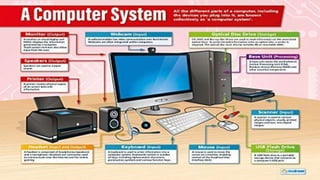
A Computer System
 A computer system refers to the complete
computer, which includes all the
hardware and software required for the
computer.
Enter your name here
Enter subject & grade level here
Enter your name here
Enter subject & grade level here
Hardware
and Software
A computer has two components;
hardware and software that makes up
the entire computer.
 Hardware are the physical parts of
the computer that you can touch;
these include monitor, mouse,
keyboard, etc.
 Software are the instructions that tell
the computer what to do, it also
controls the computer hardware.
Enter your name here
Enter subject & grade level here
Types of Hardware devices
Computer hardware is divided into:
 Input Devices
 Processing Devices
 Storage Devices
 Output Devices
Enter your name here
Enter subject & grade level here
Input
Devices
Input devices allow you to
enter data or instructions
into the computer.
Examples of input devices
include Keyboard, Mouse,
Joystick, Scanner, Touch
Pad, Light Pen, etc.
Enter your name here
Enter subject & grade level here
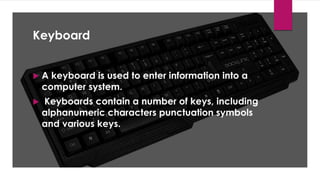
Keyboard
 A keyboard is used to enter information into a
computer system.
 Keyboards contain a number of keys, including
alphanumeric characters punctuation symbols
and various keys.
Enter your name here
Enter subject & grade level here
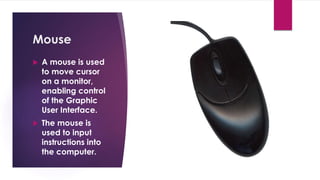
Mouse
 A mouse is used
to move cursor
on a monitor,
enabling control
of the Graphic
User Interface.
 The mouse is
used to input
instructions into
the computer.
Enter your name here
Enter subject & grade level here
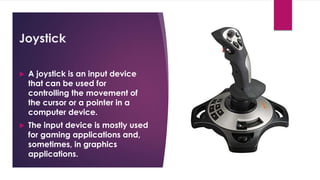
Joystick
 A joystick is an input device
that can be used for
controlling the movement of
the cursor or a pointer in a
computer device.
 The input device is mostly used
for gaming applications and,
sometimes, in graphics
applications.
Enter your name here
Enter subject & grade level here
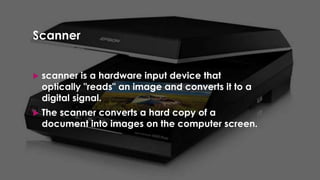
Scanner
 scanner is a hardware input device that
optically "reads" an image and converts it to a
digital signal.
 The scanner converts a hard copy of a
document into images on the computer screen.
Enter your name here
Enter subject & grade level here
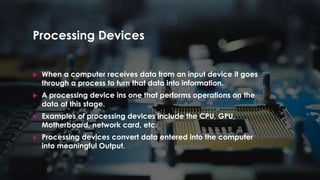
Processing Devices
 When a computer receives data from an input device it goes
through a process to turn that data into information.
 A processing device ins one that performs operations on the
data at this stage.
 Examples of processing devices include the CPU, GPU,
Motherboard, network card, etc.
 Processing devices convert data entered into the computer
into meaningful Output.
Enter your name here
Enter subject & grade level here
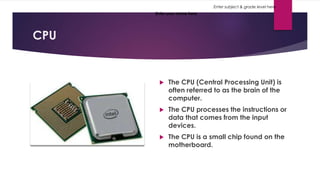
CPU
 The CPU (Central Processing Unit) is
often referred to as the brain of the
computer.
 The CPU processes the instructions or
data that comes from the input
devices.
 The CPU is a small chip found on the
motherboard.
Enter your name here
Enter subject & grade level here
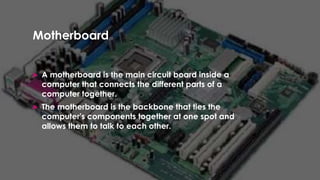
Motherboard
 A motherboard is the main circuit board inside a
computer that connects the different parts of a
computer together.
 The motherboard is the backbone that ties the
computer's components together at one spot and
allows them to talk to each other.
Enter your name here
Enter subject & grade level here
Storage Devices
A storage device is a
piece of hardware that
is primarily used for
storing data.
Some common storage
devices are hard disks,
Flash drive, CD ROM,
DVD ROM, Magnetic
Tape, Floppy disk, etc.
Enter your name here
Enter subject & grade level here
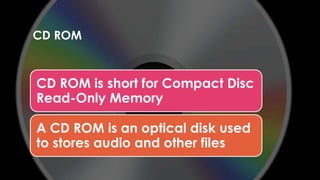
CD ROM
CD ROM is short for Compact Disc
Read-Only Memory
A CD ROM is an optical disk used
to stores audio and other files
Enter your name here
Enter subject & grade level here
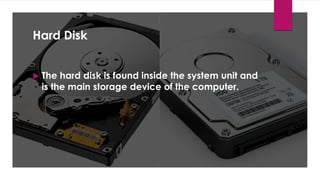
Hard Disk
 The hard disk is found inside the system unit and
is the main storage device of the computer.
Enter your name here
Enter subject & grade level here
Output devices
An output device is any device that receives information from a
computer, usually for display, projection, or physical reproduction.
Output devices gives information to the user through different
methods.
Examples of output devices include monitor, speakers, printers, etc.
Enter your name here
Enter subject & grade level here
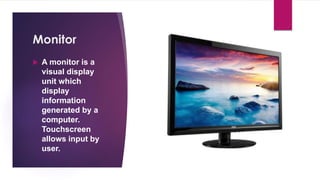
Monitor
 A monitor is a
visual display
unit which
display
information
generated by a
computer.
Touchscreen
allows input by
user.
Enter your name here
Enter subject & grade level here
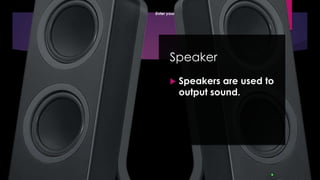
Speaker
 Speakers are used to
output sound.
Enter your name here
Enter subject & grade level here
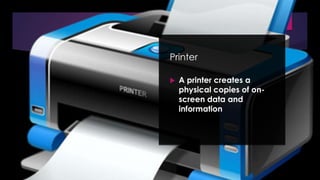
Printer
 A printer creates a
physical copies of on-
screen data and
information

Information Technology Types of Computer Hardware.pptx

  • 1.
    Types of Computer Hardware MR.N. SEATON Information Technology 8th Grade
  • 2.
    Enter your namehere Enter subject & grade level here As a result of this lesson, you should be able to: Identify key Terms relating to computer hardware Identify Classify computer hardware in different categories Classify Explain the criteria used to categories each peripheral device. Explain
  • 3.
    Enter your namehere Enter subject & grade level here What is a Computer? A computer is an electronic programmable device that:  Accepts data and instructions from user (input)  Process data (processing)  Stores the information for later retrieval (storage)  Produces result (output)
  • 4.
    Enter your namehere Enter subject & grade level here A Computer System  A computer system refers to the complete computer, which includes all the hardware and software required for the computer.
  • 5.
    Enter your namehere Enter subject & grade level here
  • 6.
    Enter your namehere Enter subject & grade level here Hardware and Software A computer has two components; hardware and software that makes up the entire computer.  Hardware are the physical parts of the computer that you can touch; these include monitor, mouse, keyboard, etc.  Software are the instructions that tell the computer what to do, it also controls the computer hardware.
  • 7.
    Enter your namehere Enter subject & grade level here Types of Hardware devices Computer hardware is divided into:  Input Devices  Processing Devices  Storage Devices  Output Devices
  • 8.
    Enter your namehere Enter subject & grade level here Input Devices Input devices allow you to enter data or instructions into the computer. Examples of input devices include Keyboard, Mouse, Joystick, Scanner, Touch Pad, Light Pen, etc.
  • 9.
    Enter your namehere Enter subject & grade level here Keyboard  A keyboard is used to enter information into a computer system.  Keyboards contain a number of keys, including alphanumeric characters punctuation symbols and various keys.
  • 10.
    Enter your namehere Enter subject & grade level here Mouse  A mouse is used to move cursor on a monitor, enabling control of the Graphic User Interface.  The mouse is used to input instructions into the computer.
  • 11.
    Enter your namehere Enter subject & grade level here Joystick  A joystick is an input device that can be used for controlling the movement of the cursor or a pointer in a computer device.  The input device is mostly used for gaming applications and, sometimes, in graphics applications.
  • 12.
    Enter your namehere Enter subject & grade level here Scanner  scanner is a hardware input device that optically "reads" an image and converts it to a digital signal.  The scanner converts a hard copy of a document into images on the computer screen.
  • 13.
    Enter your namehere Enter subject & grade level here Processing Devices  When a computer receives data from an input device it goes through a process to turn that data into information.  A processing device ins one that performs operations on the data at this stage.  Examples of processing devices include the CPU, GPU, Motherboard, network card, etc.  Processing devices convert data entered into the computer into meaningful Output.
  • 14.
    Enter your namehere Enter subject & grade level here CPU  The CPU (Central Processing Unit) is often referred to as the brain of the computer.  The CPU processes the instructions or data that comes from the input devices.  The CPU is a small chip found on the motherboard.
  • 15.
    Enter your namehere Enter subject & grade level here Motherboard  A motherboard is the main circuit board inside a computer that connects the different parts of a computer together.  The motherboard is the backbone that ties the computer's components together at one spot and allows them to talk to each other.
  • 16.
    Enter your namehere Enter subject & grade level here Storage Devices A storage device is a piece of hardware that is primarily used for storing data. Some common storage devices are hard disks, Flash drive, CD ROM, DVD ROM, Magnetic Tape, Floppy disk, etc.
  • 17.
    Enter your namehere Enter subject & grade level here CD ROM CD ROM is short for Compact Disc Read-Only Memory A CD ROM is an optical disk used to stores audio and other files
  • 18.
    Enter your namehere Enter subject & grade level here Hard Disk  The hard disk is found inside the system unit and is the main storage device of the computer.
  • 19.
    Enter your namehere Enter subject & grade level here Output devices An output device is any device that receives information from a computer, usually for display, projection, or physical reproduction. Output devices gives information to the user through different methods. Examples of output devices include monitor, speakers, printers, etc.
  • 20.
    Enter your namehere Enter subject & grade level here Monitor  A monitor is a visual display unit which display information generated by a computer. Touchscreen allows input by user.
  • 21.
    Enter your namehere Enter subject & grade level here Speaker  Speakers are used to output sound.
  • 22.
    Enter your namehere Enter subject & grade level here Printer  A printer creates a physical copies of on- screen data and information