WebPerformance
Why and How
Stefan Wintermeyer (@wintermeyer)
Two Hearts in
One Chest
What websites do not
have to care about
WebPerformance?
next-weeks-lottery-numbers.com
If you run the only page with this information!
What websites DO
have to care about
WebPerformance?
last-weeks-lottery-numbers.com
Because there are a lot of similar pages.
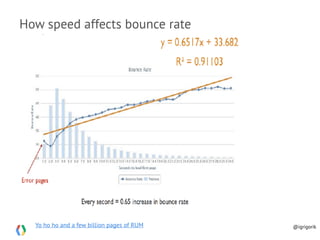
What's the impact of slow sites?
Lower conversions and engagement, higher bounce rates...
Ilya Grigorik @igrigorik
Make The Web Faster, Google
Yo ho ho and a few billion pages of RUM
How speed affects bounce rate
@igrigorik
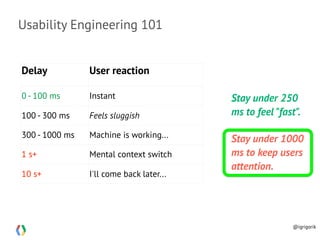
Usability Engineering 101
Delay User reaction
0 - 100 ms Instant
100 - 300 ms Feels sluggish
300 - 1000 ms Machine is working...
1 s+ Mental context switch
10 s+ I'll come back later...
Stay under 250
ms to feel "fast".
Stay under 1000
ms to keep users
attention.
@igrigorik
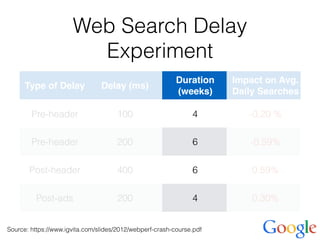
Web Search Delay
Experiment
Type of Delay Delay (ms)
Duration
(weeks)
Impact on Avg.
Daily Searches
Pre-header 100 4 -0.20 %
Pre-header 200 6 -0.59%
Post-header 400 6 0.59%
Post-ads 200 4 0.30%
Source: https://www.igvita.com/slides/2012/webperf-crash-course.pdf
For many, mobile is the one and only internet
device!
Country Mobile-only users
Egypt 70%
India 59%
South Africa 57%
Indonesia 44%
United States 25%
onDevice Research
@igrigorik
< 1.000 ms Page Loading Time on
3G ist der Mount Everest.
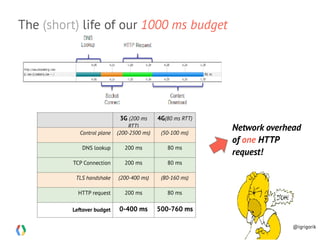
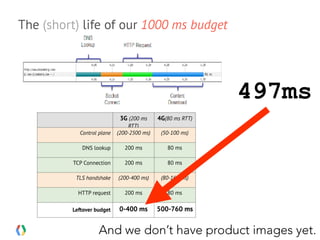
The (short) life of our 1000 ms budget
3G (200 ms
RTT)
4G(80 ms RTT)
Control plane (200-2500 ms) (50-100 ms)
DNS lookup 200 ms 80 ms
TCP Connection 200 ms 80 ms
TLS handshake (200-400 ms) (80-160 ms)
HTTP request 200 ms 80 ms
Leftover budget 0-400 ms 500-760 ms
Network overhead
of one HTTP
request!
@igrigorik
Some WebPerf Problems
can’t be fixed within Phoenix.
If your page initially loads 3
MB of JavaScript it will never
be fast.
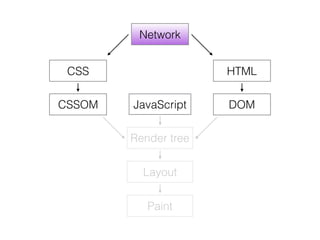
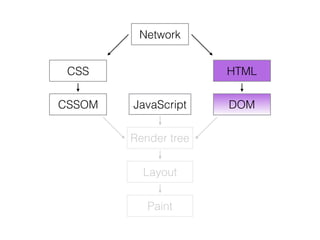
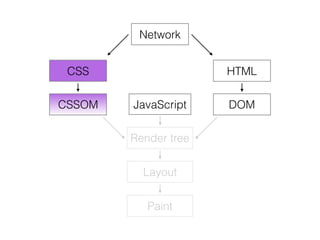
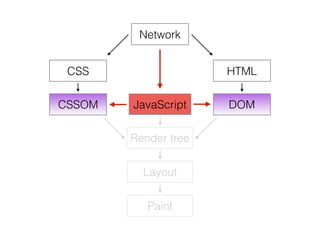
Webpage Rendering
Basics
Network
HTML
DOM
CSS
CSSOM JavaScript
Render tree
Layout
Paint
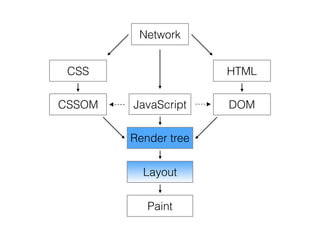
Network
HTML
DOM
CSS
CSSOM JavaScript
Render tree
Layout
Paint
Network
HTML
DOM
CSS
CSSOM JavaScript
Render tree
Layout
Paint
Network
HTML
DOM
CSS
CSSOM JavaScript
Render tree
Layout
Paint
Network
HTML
DOM
CSS
CSSOM JavaScript
Render tree
Layout
Paint
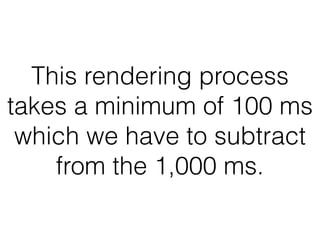
This rendering process
takes a minimum of 100 ms
which we have to subtract
from the 1,000 ms.
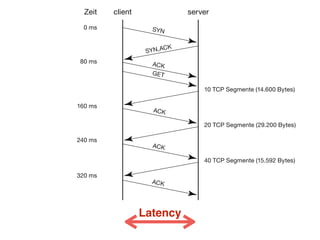
Download a file with
HTTP 1.1 over TCP
Latency
clientZeit
0 ms
80 ms
160 ms
240 ms
320 ms
10 TCP Segmente (14.600 Bytes)
20 TCP Segmente (29.200 Bytes)
40 TCP Segmente (15.592 Bytes)
server
SYN
ACK
ACK
GET
SYN,ACK
ACK
ACK
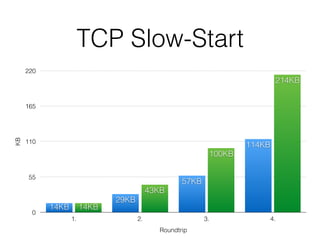
TCP Slow-Start
KB
0
55
110
165
220
Roundtrip
1. 2. 3. 4.
214KB
100KB
43KB
14KB
114KB
57KB
29KB
14KB
HTTP 2 you can parallel
download multiple files over
the same TCP connection.
Plus better header compression. Plus push, …
More on that later.
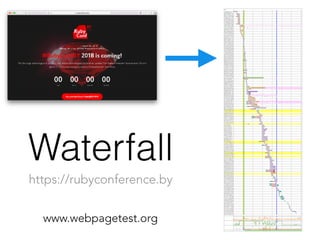
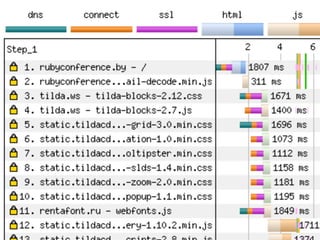
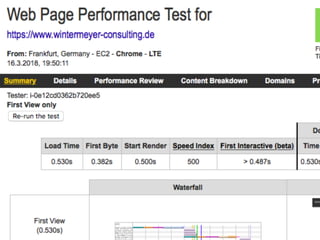
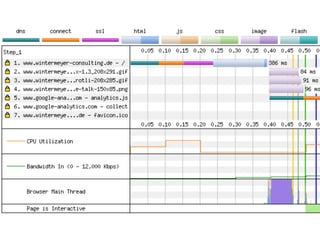
Waterfall
www.webpagetest.org
https://rubyconference.by
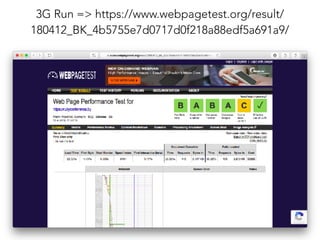
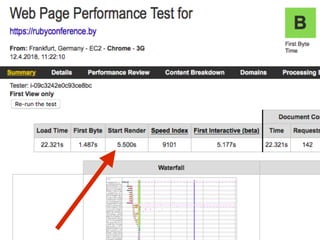
3G Run => https://www.webpagetest.org/result/
180412_BK_4b5755e7d0717d0f218a88edf5a691a9/
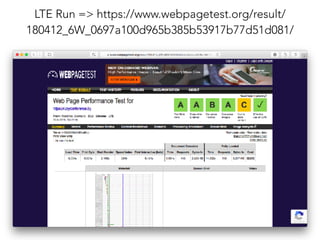
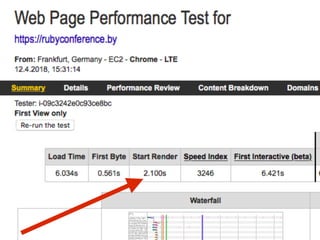
LTE Run => https://www.webpagetest.org/result/
180412_6W_0697a100d965b385b53917b77d51d081/
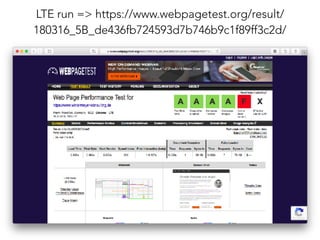
LTE run => https://www.webpagetest.org/result/
180316_5B_de436fb724593d7b746b9c1f89ff3c2d/
Can I interest you in a
Rails caching example?
It’s so much better in Phoenixland but we can learn from it.
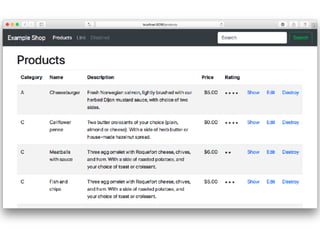
Example Online Shop
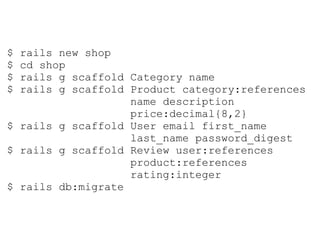
$ rails new shop
$ cd shop
$ rails g scaffold Category name
$ rails g scaffold Product category:references
name description
price:decimal{8,2}
$ rails g scaffold User email first_name
last_name password_digest
$ rails g scaffold Review user:references
product:references
rating:integer
$ rails db:migrate
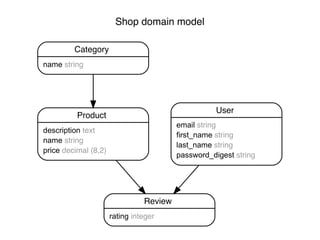
Shop domain model
Category
name string
Product
description text
name string
price decimal (8,2)
Review
rating integer
User
email string
first_name string
last_name string
password_digest string
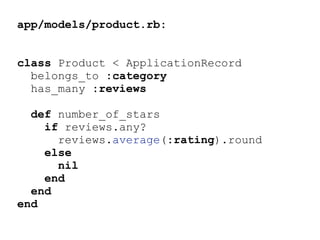
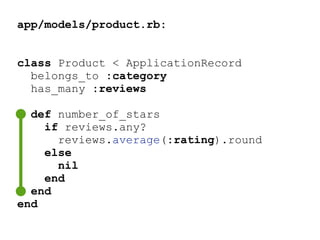
app/models/product.rb:
class Product < ApplicationRecord
belongs_to :category
has_many :reviews
def number_of_stars
if reviews.any?
reviews.average(:rating).round
else
nil
end
end
end
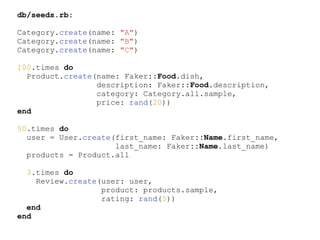
db/seeds.rb:
Category.create(name: "A")
Category.create(name: "B")
Category.create(name: "C")
100.times do
Product.create(name: Faker::Food.dish,
description: Faker::Food.description,
category: Category.all.sample,
price: rand(20))
end
50.times do
user = User.create(first_name: Faker::Name.first_name,
last_name: Faker::Name.last_name)
products = Product.all
3.times do
Review.create(user: user,
product: products.sample,
rating: rand(5))
end
end
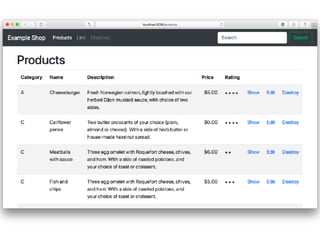
app/views/products/index.html.erb:
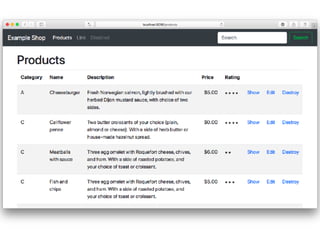
<table class="table table-striped">
[…]
<tbody>
<% @products.each do |product| %>
<tr>
<td><%= product.category.name %></td>
<td><%= product.name %></td>
<td><%= product.description %></td>
<td><%= number_to_currency(product.price) %></td>
<td>
<% product.number_of_stars.to_i.times do %>
<img src="<%= asset_path( 'star.svg' ) %>“ />
<% end %>
</td>
[…]
</tr>
<% end %>
</tbody>
</table>
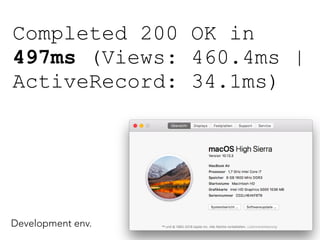
Completed 200 OK in
497ms (Views: 460.4ms |
ActiveRecord: 34.1ms)
Development env.
The (short) life of our 1000 ms budget
3G (200 ms
RTT)
4G(80 ms RTT)
Control plane (200-2500 ms) (50-100 ms)
DNS lookup 200 ms 80 ms
TCP Connection 200 ms 80 ms
TLS handshake (200-400 ms) (80-160 ms)
HTTP request 200 ms 80 ms
Leftover budget 0-400 ms 500-760 ms
Network overhead
of one HTTP
request!
@igrigorik
497ms
And we don’t have product images yet.
Development environment?
Are you crazy?!


Hold your horses!
I’ll switch to production
environment later.
Fragment Caching
$ rails dev:cache
Development mode is now being cached.
By default caching is disabled in dev env.
1. Step
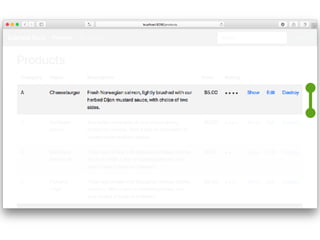
Single Row
app/views/products/index.html.erb:
<tbody>
<% @products.each do |product| %>
<% cache product do %>
<tr>
<td><%= product.category.name %></td>
<td><%= product.name %></td>
<td><%= product.description %></td>
<td><%= number_to_currency(product.price) %></td>
<td>
<% product.number_of_stars.to_i.times do %>
<img src="<%= asset_path( 'star.svg' ) %>" />
<% end %>
</td>
[...]
</tr>
<% end %>
<% end %>
</tbody>
app/views/products/index.html.erb:
<tbody>
<% @products.each do |product| %>
<% cache product do %>
<tr>
<td><%= product.category.name %></td>
<td><%= product.name %></td>
<td><%= product.description %></td>
<td><%= number_to_currency(product.price) %></td>
<td>
<% product.number_of_stars.to_i.times do %>
<img src="<%= asset_path( 'star.svg' ) %>" />
<% end %>
</td>
[...]
</tr>
<% end %>
<% end %>
</tbody>
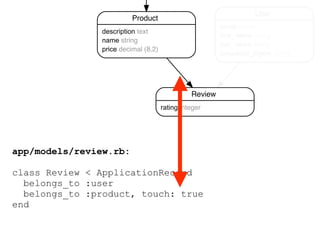
app/models/review.rb:
class Review < ApplicationRecord
belongs_to :user
belongs_to :product, touch: true
end
Product
description text
name string
price decimal (8,2)
Review
rating integer
User
email string
first_name string
last_name string
password_digest string
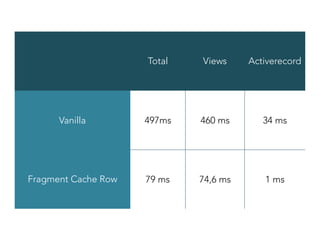
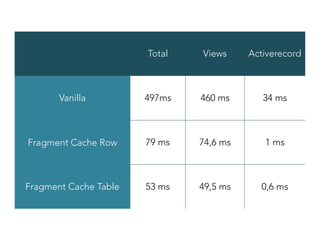
Total Views Activerecord
Vanilla 497ms 460 ms 34 ms
Fragment Cache Row 79 ms 74,6 ms 1 ms
2. Step
The Complete Table
=> Russian Doll
app/views/products/index.html.erb:
<tbody>
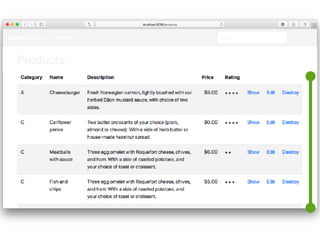
<% cache @products do %>
<% @products.each do |product| %>
<% cache product do %>
<tr>
<td><%= product.category.name %></td>
<td><%= product.name %></td>
<td><%= product.description %></td>
<td><%= number_to_currency(product.price) %></td>
<td>
<% product.number_of_stars.to_i.times do %>
<img src="<%= asset_path( 'star.svg' ) %>" />
<% end %>
</td>
[…]
</tr>
<% end %>
<% end %>
<% end %>
</tbody>
app/views/products/index.html.erb:
<tbody>
<% cache @products do %>
<% @products.each do |product| %>
<% cache product do %>
<tr>
<td><%= product.category.name %></td>
<td><%= product.name %></td>
<td><%= product.description %></td>
<td><%= number_to_currency(product.price) %></td>
<td>
<% product.number_of_stars.to_i.times do %>
<img src="<%= asset_path( 'star.svg' ) %>" />
<% end %>
</td>
[…]
</tr>
<% end %>
<% end %>
<% end %>
</tbody>
Total Views Activerecord
Vanilla 497ms 460 ms 34 ms
Fragment Cache Row 79 ms 74,6 ms 1 ms
Fragment Cache Table 53 ms 49,5 ms 0,6 ms
Use the Database!
app/models/product.rb:
class Product < ApplicationRecord
belongs_to :category
has_many :reviews
def number_of_stars
if reviews.any?
reviews.average(:rating).round
else
nil
end
end
end
app/models/product.rb:
class Product < ApplicationRecord
belongs_to :category
has_many :reviews
end
$ rails g migration AddNumberOfStarsToProduct
number_of_stars:integer
$ rails db:migrate
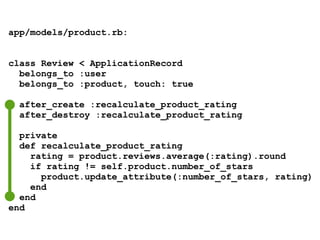
app/models/product.rb:
class Review < ApplicationRecord
belongs_to :user
belongs_to :product, touch: true
after_create :recalculate_product_rating
after_destroy :recalculate_product_rating
private
def recalculate_product_rating
rating = product.reviews.average(:rating).round
if rating != self.product.number_of_stars
product.update_attribute(:number_of_stars, rating)
end
end
end
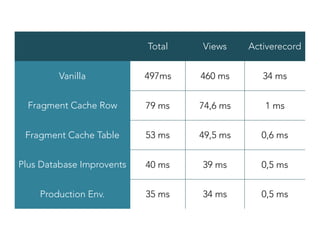
Total Views Activerecord
Vanilla 497ms 460 ms 34 ms
Fragment Cache Row 79 ms 74,6 ms 1 ms
Fragment Cache Table 53 ms 49,5 ms 0,6 ms
Plus Database Improvents 40 ms 39 ms 0,5 ms
Production Env. 35 ms 34 ms 0,5 ms
Warning: 

Fragment Caching is
slower the 1st request!
Why? Rails checks if the Fragment Cache exists.
When it doesn’t it renders the view and writes the cache
which is time consuming.
Need More Speed?
You are at the right place! ;-)
Have a look at http://phoenixframework.org
Phoenix takes 5 ms for the same page.
BTW: without caching
HTTP Caching
Web browsers and proxies
don‘t want to fetch identical
resources multiple times.
The idea of Etags and
Last-Modified
Web browser:
„My user wants to fetch xyz.html.
I cached a copy last week.
Is that still good?“
Web server:
„xyz.html hasn‘t changed since
last week.
Go a head with your copy!“
aka 304 Not Modified
> curl -I http://0.0.0.0:3000/products
HTTP/1.1 200 OK
Content-Type: text/html; charset=utf-8
X-Ua-Compatible: IE=Edge
Etag: "9a779b80e4b0ac3c60d29807e302deb7"
[...]
> curl -I http://0.0.0.0:3000/products
HTTP/1.1 200 OK
Content-Type: text/html; charset=utf-8
X-Ua-Compatible: IE=Edge
Etag: "fa8fc1e981833a6885b583d351c4d823"
> curl -I http://0.0.0.0:3000/products
HTTP/1.1 200 OK
Content-Type: text/html; charset=utf-8
X-Ua-Compatible: IE=Edge
Etag: "9a779b80e4b0ac3c60d29807e302deb7"
[...]
> curl -I http://0.0.0.0:3000/products
HTTP/1.1 200 OK
Content-Type: text/html; charset=utf-8
X-Ua-Compatible: IE=Edge
Etag: "fa8fc1e981833a6885b583d351c4d823"
Set the Etag
class ProductsController <
ApplicationController
# GET /products
def index
@products = Product.all
fresh_when :etag => @products
end
[...]

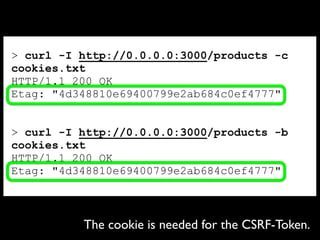
> curl -I http://0.0.0.0:3000/products -c
cookies.txt
HTTP/1.1 200 OK
Etag: "4d348810e69400799e2ab684c0ef4777"
> curl -I http://0.0.0.0:3000/products -b
cookies.txt
HTTP/1.1 200 OK
Etag: "4d348810e69400799e2ab684c0ef4777"
The cookie is needed for the CSRF-Token.
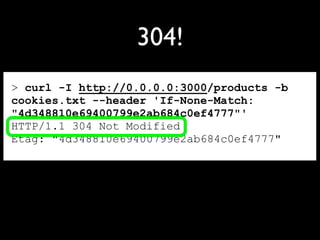
> curl -I http://0.0.0.0:3000/products -b
cookies.txt --header 'If-None-Match:
"4d348810e69400799e2ab684c0ef4777"'
HTTP/1.1 304 Not Modified
Etag: "4d348810e69400799e2ab684c0ef4777"
304!
Win-Win of a 304
• The Browser doesn’t have to
download everything.
• The Server doesn’t have to
render the view which is the
most time consuming bit.
Not good enough?
Writing the initial cache
wastes a lot of time.
Let‘s preheat the cache
in off business hours!
Cron is your friend.
Use the night to
preheat your cache.
And don‘t be afraid
of brute force!
A U T O B A H N
The fastest page is
delivered by Nginx
without ever contacting
Phoenix or Ruby on Rails.
├── Gemfile
├── [...]
├── public
│   ├── 404.html
│   ├── 422.html
│   ├── 500.html
│   ├── favicon.ico
│   └── robots.txt
├── [...]
That‘s already
done for the
files in the
public directory.
Add caches_page to your
controller to save views as static
gz files in your public directory:
caches_page :index, :show,
:gzip => :true
Add gem actionpack-page_caching for Rails 5.2
Brute Force is your friend!
During the night the server has a
hard time to stay awake any way.
Tricky part:
How to delete out of date
gz files?
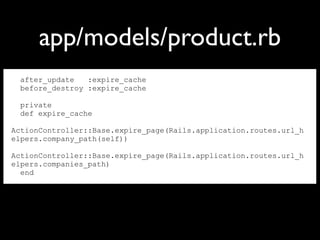
after_update :expire_cache
before_destroy :expire_cache
private
def expire_cache
ActionController::Base.expire_page(Rails.application.routes.url_h
elpers.company_path(self))
ActionController::Base.expire_page(Rails.application.routes.url_h
elpers.companies_path)
end
app/models/product.rb
caches_page
vs.
!current_user.nil?
???
caches_page is good to cache
customized user content too.
It just takes more thinking.
Let us assume a user base
of 10,000,000 people.
/tmp ᐅ wget http://www.railsconf.com/2013/talks
--2013-04-27 21:04:24-- http://www.railsconf.com/2013/talks
Resolving www.railsconf.com... 107.20.162.205
Connecting to www.railsconf.com|107.20.162.205|:80... connected.
HTTP request sent, awaiting response... 200 OK
Length: unspecified [text/html]
Saving to: ‘talks’
[ <=> ] 74,321 258KB/
s in 0.3s
2013-04-27 21:04:25 (258 KB/s) - ‘talks’ saved [74321]
/tmp ᐅ du -hs talks
76K talks
/tmp ᐅ gzip talks
/tmp ᐅ du -hs talks.gz
28K talks.gz
/tmp ᐅ
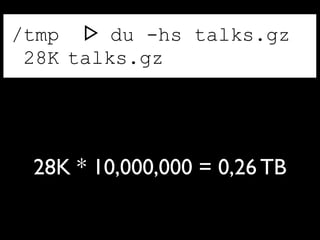
/tmp ᐅ du -hs talks.gz
28K talks.gz
28K * 10,000,000 = 0,26 TB
Harddrive space is cheap.
By saving the files non-gz and using
a data deduplication file system you
just need 5-10% of the 0,26 TB.
Nginx can gzip the files on the fly.
Nginx will happily read a
cookie and find the pre-
rendered page in a given
directory structure.
HTTP/1.1 vs. HTTP/2
HTTP/2 provides an average
WebPerformance improvement
of 20%.
It’s a no-brainer.
You have to use it!
CDNs, HTTP/2 and Rails 5.2
Long story short:

In most cases where a CDN made
sense with HTTP/1.1 it doesn’t
make sense any more.
Just deliver everything from your
Rails server!
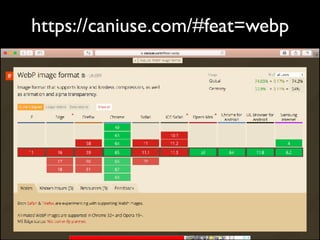
Image Formats
It is still an often underused way of saving bandwidth.
JPEG, PNG or WebP
https://caniuse.com/#feat=webp
CSS
Less CSS = Faster Webpages
Do not underestimate the WebPerformance impact of
optimized CSS.
Webfonts
If possible don’t use
Webfonts.
Apache vs. Nginx
It doesn’t matter!
Just use your favorite
one.
Brotli vs. gzip
Always offer both!
Brotli can be used to
save bandwidth and
CPU-Resources.
Heroku vs. Bare Metal
Heroku is good for a quick start
but has never been a good choice
for good WebPerformance. Bare
Metal is the way to go if you need
maximum WebPerformance.


BTW: It’s cheaper too.
P R E L O A D I N G U N D
P R E F E T C H I N G
P R E L O A D I N G U N D P R E F E T C H I N G
<link rel="dns-prefetch"...
<link rel="prefetch"...
DNS pre-resolution
TCP pre-connect
prefresh
preloader
M A N U A L D N S - P R E F E T C H
<link rel="dns-prefetch" href="//abc.com">
http://www.chromium.org/developers/design-documents/dns-prefetching
„Most common names like google.com and yahoo.com are resolved so
often that most local ISP's name resolvers can answer in closer to 80-120ms.
If the domain name in question is an uncommon name, then a query may
have to go through numerous resolvers up and down the hierarchy, and the
delay can average closer to 200-300ms.“
P R E F E T C H
<link rel="prefetch" href=„http://abc.com/important.js">
http://www.whatwg.org/specs/web-apps/current-work/#link-type-prefetch
„The prefetch keyword indicates that preemptively fetching and caching the
specified resource is likely to be beneficial, as it is highly likely that the user
will require this resource.“
T I P P : " A C C E P T - R A N G E S : B Y T E S “ H E A D E R
Y O U C A N T E L L N G I N X T O
P U S H T H O S E F I L E S V I A H T T P / 2 .
The Most
Important Tool?
Set a Time Budget!
If you run out of your time budget you have to
cancel features on your website.
Is WebPerformance really so hard?
The WebPerf Bible. => https://hpbn.co
@wintermeyer
sw@wintermeyer-consulting.de
last name | twitter | github
e-mail

WebPerformance: Why and How? – Stefan Wintermeyer

  • 1.
    WebPerformance Why and How StefanWintermeyer (@wintermeyer)
  • 2.
  • 3.
    What websites donot have to care about WebPerformance?
  • 4.
    next-weeks-lottery-numbers.com If you runthe only page with this information!
  • 5.
    What websites DO haveto care about WebPerformance?
  • 6.
  • 7.
    What's the impactof slow sites? Lower conversions and engagement, higher bounce rates... Ilya Grigorik @igrigorik Make The Web Faster, Google
  • 8.
    Yo ho hoand a few billion pages of RUM How speed affects bounce rate @igrigorik
  • 9.
    Usability Engineering 101 DelayUser reaction 0 - 100 ms Instant 100 - 300 ms Feels sluggish 300 - 1000 ms Machine is working... 1 s+ Mental context switch 10 s+ I'll come back later... Stay under 250 ms to feel "fast". Stay under 1000 ms to keep users attention. @igrigorik
  • 10.
    Web Search Delay Experiment Typeof Delay Delay (ms) Duration (weeks) Impact on Avg. Daily Searches Pre-header 100 4 -0.20 % Pre-header 200 6 -0.59% Post-header 400 6 0.59% Post-ads 200 4 0.30% Source: https://www.igvita.com/slides/2012/webperf-crash-course.pdf
  • 11.
    For many, mobileis the one and only internet device! Country Mobile-only users Egypt 70% India 59% South Africa 57% Indonesia 44% United States 25% onDevice Research @igrigorik


  • 12.
    < 1.000 msPage Loading Time on 3G ist der Mount Everest.
  • 13.
    The (short) lifeof our 1000 ms budget 3G (200 ms RTT) 4G(80 ms RTT) Control plane (200-2500 ms) (50-100 ms) DNS lookup 200 ms 80 ms TCP Connection 200 ms 80 ms TLS handshake (200-400 ms) (80-160 ms) HTTP request 200 ms 80 ms Leftover budget 0-400 ms 500-760 ms Network overhead of one HTTP request! @igrigorik
  • 14.
    Some WebPerf Problems can’tbe fixed within Phoenix. If your page initially loads 3 MB of JavaScript it will never be fast.
  • 15.
  • 16.
  • 17.
  • 18.
  • 19.
  • 20.
  • 21.
    This rendering process takesa minimum of 100 ms which we have to subtract from the 1,000 ms.
  • 22.
    Download a filewith HTTP 1.1 over TCP
  • 23.
    Latency clientZeit 0 ms 80 ms 160ms 240 ms 320 ms 10 TCP Segmente (14.600 Bytes) 20 TCP Segmente (29.200 Bytes) 40 TCP Segmente (15.592 Bytes) server SYN ACK ACK GET SYN,ACK ACK ACK
  • 24.
    TCP Slow-Start KB 0 55 110 165 220 Roundtrip 1. 2.3. 4. 214KB 100KB 43KB 14KB 114KB 57KB 29KB 14KB
  • 25.
    HTTP 2 youcan parallel download multiple files over the same TCP connection. Plus better header compression. Plus push, … More on that later.
  • 26.
  • 27.
    3G Run =>https://www.webpagetest.org/result/ 180412_BK_4b5755e7d0717d0f218a88edf5a691a9/
  • 31.
    LTE Run =>https://www.webpagetest.org/result/ 180412_6W_0697a100d965b385b53917b77d51d081/
  • 34.
    LTE run =>https://www.webpagetest.org/result/ 180316_5B_de436fb724593d7b746b9c1f89ff3c2d/
  • 38.
    Can I interestyou in a Rails caching example? It’s so much better in Phoenixland but we can learn from it.
  • 39.
  • 40.
    $ rails newshop $ cd shop $ rails g scaffold Category name $ rails g scaffold Product category:references name description price:decimal{8,2} $ rails g scaffold User email first_name last_name password_digest $ rails g scaffold Review user:references product:references rating:integer $ rails db:migrate
  • 41.
    Shop domain model Category namestring Product description text name string price decimal (8,2) Review rating integer User email string first_name string last_name string password_digest string
  • 42.
    app/models/product.rb: class Product <ApplicationRecord belongs_to :category has_many :reviews def number_of_stars if reviews.any? reviews.average(:rating).round else nil end end end
  • 43.
    db/seeds.rb: Category.create(name: "A") Category.create(name: "B") Category.create(name:"C") 100.times do Product.create(name: Faker::Food.dish, description: Faker::Food.description, category: Category.all.sample, price: rand(20)) end 50.times do user = User.create(first_name: Faker::Name.first_name, last_name: Faker::Name.last_name) products = Product.all 3.times do Review.create(user: user, product: products.sample, rating: rand(5)) end end
  • 44.
    app/views/products/index.html.erb: <table class="table table-striped"> […] <tbody> <%@products.each do |product| %> <tr> <td><%= product.category.name %></td> <td><%= product.name %></td> <td><%= product.description %></td> <td><%= number_to_currency(product.price) %></td> <td> <% product.number_of_stars.to_i.times do %> <img src="<%= asset_path( 'star.svg' ) %>“ /> <% end %> </td> […] </tr> <% end %> </tbody> </table>
  • 46.
    Completed 200 OKin 497ms (Views: 460.4ms | ActiveRecord: 34.1ms) Development env.
  • 47.
    The (short) lifeof our 1000 ms budget 3G (200 ms RTT) 4G(80 ms RTT) Control plane (200-2500 ms) (50-100 ms) DNS lookup 200 ms 80 ms TCP Connection 200 ms 80 ms TLS handshake (200-400 ms) (80-160 ms) HTTP request 200 ms 80 ms Leftover budget 0-400 ms 500-760 ms Network overhead of one HTTP request! @igrigorik 497ms And we don’t have product images yet.
  • 48.
    Development environment? Are youcrazy?!
 
 Hold your horses! I’ll switch to production environment later.
  • 49.
  • 50.
    $ rails dev:cache Developmentmode is now being cached. By default caching is disabled in dev env.
  • 51.
  • 54.
    app/views/products/index.html.erb: <tbody> <% @products.each do|product| %> <% cache product do %> <tr> <td><%= product.category.name %></td> <td><%= product.name %></td> <td><%= product.description %></td> <td><%= number_to_currency(product.price) %></td> <td> <% product.number_of_stars.to_i.times do %> <img src="<%= asset_path( 'star.svg' ) %>" /> <% end %> </td> [...] </tr> <% end %> <% end %> </tbody>
  • 55.
    app/views/products/index.html.erb: <tbody> <% @products.each do|product| %> <% cache product do %> <tr> <td><%= product.category.name %></td> <td><%= product.name %></td> <td><%= product.description %></td> <td><%= number_to_currency(product.price) %></td> <td> <% product.number_of_stars.to_i.times do %> <img src="<%= asset_path( 'star.svg' ) %>" /> <% end %> </td> [...] </tr> <% end %> <% end %> </tbody>
  • 56.
    app/models/review.rb: class Review <ApplicationRecord belongs_to :user belongs_to :product, touch: true end Product description text name string price decimal (8,2) Review rating integer User email string first_name string last_name string password_digest string
  • 57.
    Total Views Activerecord Vanilla497ms 460 ms 34 ms Fragment Cache Row 79 ms 74,6 ms 1 ms
  • 58.
    2. Step The CompleteTable => Russian Doll
  • 61.
    app/views/products/index.html.erb: <tbody> <% cache @productsdo %> <% @products.each do |product| %> <% cache product do %> <tr> <td><%= product.category.name %></td> <td><%= product.name %></td> <td><%= product.description %></td> <td><%= number_to_currency(product.price) %></td> <td> <% product.number_of_stars.to_i.times do %> <img src="<%= asset_path( 'star.svg' ) %>" /> <% end %> </td> […] </tr> <% end %> <% end %> <% end %> </tbody>
  • 62.
    app/views/products/index.html.erb: <tbody> <% cache @productsdo %> <% @products.each do |product| %> <% cache product do %> <tr> <td><%= product.category.name %></td> <td><%= product.name %></td> <td><%= product.description %></td> <td><%= number_to_currency(product.price) %></td> <td> <% product.number_of_stars.to_i.times do %> <img src="<%= asset_path( 'star.svg' ) %>" /> <% end %> </td> […] </tr> <% end %> <% end %> <% end %> </tbody>
  • 63.
    Total Views Activerecord Vanilla497ms 460 ms 34 ms Fragment Cache Row 79 ms 74,6 ms 1 ms Fragment Cache Table 53 ms 49,5 ms 0,6 ms
  • 64.
  • 65.
    app/models/product.rb: class Product <ApplicationRecord belongs_to :category has_many :reviews def number_of_stars if reviews.any? reviews.average(:rating).round else nil end end end
  • 66.
    app/models/product.rb: class Product <ApplicationRecord belongs_to :category has_many :reviews end $ rails g migration AddNumberOfStarsToProduct number_of_stars:integer $ rails db:migrate
  • 67.
    app/models/product.rb: class Review <ApplicationRecord belongs_to :user belongs_to :product, touch: true after_create :recalculate_product_rating after_destroy :recalculate_product_rating private def recalculate_product_rating rating = product.reviews.average(:rating).round if rating != self.product.number_of_stars product.update_attribute(:number_of_stars, rating) end end end
  • 68.
    Total Views Activerecord Vanilla497ms 460 ms 34 ms Fragment Cache Row 79 ms 74,6 ms 1 ms Fragment Cache Table 53 ms 49,5 ms 0,6 ms Plus Database Improvents 40 ms 39 ms 0,5 ms Production Env. 35 ms 34 ms 0,5 ms
  • 69.
    Warning: 
 Fragment Cachingis slower the 1st request! Why? Rails checks if the Fragment Cache exists. When it doesn’t it renders the view and writes the cache which is time consuming.
  • 70.
    Need More Speed? Youare at the right place! ;-) Have a look at http://phoenixframework.org Phoenix takes 5 ms for the same page. BTW: without caching
  • 71.
  • 72.
    Web browsers andproxies don‘t want to fetch identical resources multiple times.
  • 73.
    The idea ofEtags and Last-Modified
  • 74.
    Web browser: „My userwants to fetch xyz.html. I cached a copy last week. Is that still good?“
  • 75.
    Web server: „xyz.html hasn‘tchanged since last week. Go a head with your copy!“ aka 304 Not Modified
  • 76.
    > curl -Ihttp://0.0.0.0:3000/products HTTP/1.1 200 OK Content-Type: text/html; charset=utf-8 X-Ua-Compatible: IE=Edge Etag: "9a779b80e4b0ac3c60d29807e302deb7" [...] > curl -I http://0.0.0.0:3000/products HTTP/1.1 200 OK Content-Type: text/html; charset=utf-8 X-Ua-Compatible: IE=Edge Etag: "fa8fc1e981833a6885b583d351c4d823"
  • 77.
    > curl -Ihttp://0.0.0.0:3000/products HTTP/1.1 200 OK Content-Type: text/html; charset=utf-8 X-Ua-Compatible: IE=Edge Etag: "9a779b80e4b0ac3c60d29807e302deb7" [...] > curl -I http://0.0.0.0:3000/products HTTP/1.1 200 OK Content-Type: text/html; charset=utf-8 X-Ua-Compatible: IE=Edge Etag: "fa8fc1e981833a6885b583d351c4d823"
  • 78.
    Set the Etag classProductsController < ApplicationController # GET /products def index @products = Product.all fresh_when :etag => @products end [...]

  • 79.
    > curl -Ihttp://0.0.0.0:3000/products -c cookies.txt HTTP/1.1 200 OK Etag: "4d348810e69400799e2ab684c0ef4777" > curl -I http://0.0.0.0:3000/products -b cookies.txt HTTP/1.1 200 OK Etag: "4d348810e69400799e2ab684c0ef4777" The cookie is needed for the CSRF-Token.
  • 80.
    > curl -Ihttp://0.0.0.0:3000/products -b cookies.txt --header 'If-None-Match: "4d348810e69400799e2ab684c0ef4777"' HTTP/1.1 304 Not Modified Etag: "4d348810e69400799e2ab684c0ef4777" 304!
  • 81.
    Win-Win of a304 • The Browser doesn’t have to download everything. • The Server doesn’t have to render the view which is the most time consuming bit.
  • 82.
  • 83.
    Writing the initialcache wastes a lot of time.
  • 84.
    Let‘s preheat thecache in off business hours! Cron is your friend.
  • 85.
    Use the nightto preheat your cache. And don‘t be afraid of brute force!
  • 86.
    A U TO B A H N
  • 87.
    The fastest pageis delivered by Nginx without ever contacting Phoenix or Ruby on Rails.
  • 88.
    ├── Gemfile ├── [...] ├──public │   ├── 404.html │   ├── 422.html │   ├── 500.html │   ├── favicon.ico │   └── robots.txt ├── [...] That‘s already done for the files in the public directory.
  • 89.
    Add caches_page toyour controller to save views as static gz files in your public directory: caches_page :index, :show, :gzip => :true Add gem actionpack-page_caching for Rails 5.2
  • 90.
    Brute Force isyour friend! During the night the server has a hard time to stay awake any way.
  • 91.
    Tricky part: How todelete out of date gz files?
  • 92.
    after_update :expire_cache before_destroy :expire_cache private defexpire_cache ActionController::Base.expire_page(Rails.application.routes.url_h elpers.company_path(self)) ActionController::Base.expire_page(Rails.application.routes.url_h elpers.companies_path) end app/models/product.rb
  • 93.
  • 94.
    caches_page is goodto cache customized user content too. It just takes more thinking.
  • 95.
    Let us assumea user base of 10,000,000 people.
  • 96.
    /tmp ᐅ wgethttp://www.railsconf.com/2013/talks --2013-04-27 21:04:24-- http://www.railsconf.com/2013/talks Resolving www.railsconf.com... 107.20.162.205 Connecting to www.railsconf.com|107.20.162.205|:80... connected. HTTP request sent, awaiting response... 200 OK Length: unspecified [text/html] Saving to: ‘talks’ [ <=> ] 74,321 258KB/ s in 0.3s 2013-04-27 21:04:25 (258 KB/s) - ‘talks’ saved [74321] /tmp ᐅ du -hs talks 76K talks /tmp ᐅ gzip talks /tmp ᐅ du -hs talks.gz 28K talks.gz /tmp ᐅ
  • 97.
    /tmp ᐅ du-hs talks.gz 28K talks.gz 28K * 10,000,000 = 0,26 TB
  • 98.
    28K * 10,000,000= 0,26 TB Harddrive space is cheap. By saving the files non-gz and using a data deduplication file system you just need 5-10% of the 0,26 TB. Nginx can gzip the files on the fly.
  • 99.
    Nginx will happilyread a cookie and find the pre- rendered page in a given directory structure.
  • 100.
  • 101.
    HTTP/2 provides anaverage WebPerformance improvement of 20%. It’s a no-brainer. You have to use it!
  • 102.
  • 103.
    Long story short:
 Inmost cases where a CDN made sense with HTTP/1.1 it doesn’t make sense any more. Just deliver everything from your Rails server!
  • 104.
    Image Formats It isstill an often underused way of saving bandwidth.
  • 105.
  • 106.
  • 107.
  • 108.
    Less CSS =Faster Webpages Do not underestimate the WebPerformance impact of optimized CSS.
  • 109.
  • 110.
    If possible don’tuse Webfonts.
  • 111.
  • 112.
    It doesn’t matter! Justuse your favorite one.
  • 113.
  • 114.
    Always offer both! Brotlican be used to save bandwidth and CPU-Resources.
  • 115.
  • 116.
    Heroku is goodfor a quick start but has never been a good choice for good WebPerformance. Bare Metal is the way to go if you need maximum WebPerformance.
 
 BTW: It’s cheaper too.
  • 117.
    P R EL O A D I N G U N D P R E F E T C H I N G
  • 118.
    P R EL O A D I N G U N D P R E F E T C H I N G <link rel="dns-prefetch"... <link rel="prefetch"... DNS pre-resolution TCP pre-connect prefresh preloader
  • 119.
    M A NU A L D N S - P R E F E T C H <link rel="dns-prefetch" href="//abc.com"> http://www.chromium.org/developers/design-documents/dns-prefetching „Most common names like google.com and yahoo.com are resolved so often that most local ISP's name resolvers can answer in closer to 80-120ms. If the domain name in question is an uncommon name, then a query may have to go through numerous resolvers up and down the hierarchy, and the delay can average closer to 200-300ms.“
  • 120.
    P R EF E T C H <link rel="prefetch" href=„http://abc.com/important.js"> http://www.whatwg.org/specs/web-apps/current-work/#link-type-prefetch „The prefetch keyword indicates that preemptively fetching and caching the specified resource is likely to be beneficial, as it is highly likely that the user will require this resource.“ T I P P : " A C C E P T - R A N G E S : B Y T E S “ H E A D E R
  • 121.
    Y O UC A N T E L L N G I N X T O P U S H T H O S E F I L E S V I A H T T P / 2 .
  • 122.
  • 123.
    Set a TimeBudget! If you run out of your time budget you have to cancel features on your website.
  • 124.
  • 125.
    The WebPerf Bible.=> https://hpbn.co
  • 126.
  • 127.