Capacity Management for Web Operations John Allspaw Operations Engineering
the book I’m writing
???
Rules of Thumb Planning/Forecasting Stupid Capacity Tricks (with some Flickr statistics sprinkled in)
bugs  (disguised as capacity problems) edge cases  (disguised as capacity problems) security incidents real capacity problems* * (should be the  last  thing you need to worry about) Things that can cause downtime
Capacity != Performance Forget about performance for right now  Measure what you have right NOW Don’t count on it getting any better
Thank You HPC Industry! Automated Stuff  Scalable Metric Collection/Display a lot of great deployment and management tricks come from them, adopted by web ops
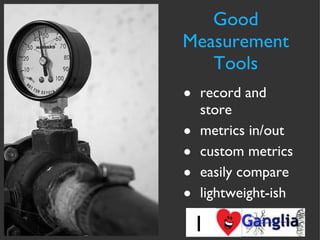
Good Measurement Tools record and store metrics in/out custom metrics easily compare lightweight-ish I
Clouds need planning too Makes deployment and procurement easy and quick But clouds are still resources with costs and limits, just like your own stuff Black-boxes: you may need to pay even  more  attention than before
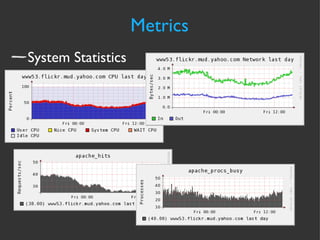
Metrics System Statistics
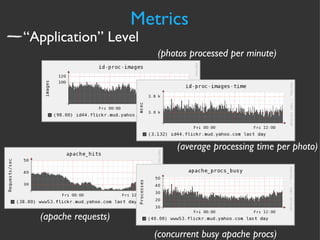
Metrics “Application” Level (photos processed per minute) (average processing time per photo) (apache requests) (concurrent busy apache procs)
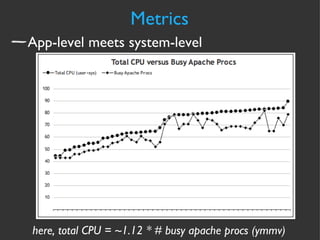
Metrics App-level meets system-level here, total CPU = ~1.12 * # busy apache procs (ymmv)
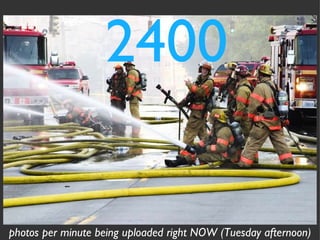
2400 photos per minute being uploaded right NOW (Tuesday afternoon)
Ceilings the most amount of “work” your resources will allow before degradation or failure
Forget Benchmarking
Find your ceilings what you have left The End
Use  real  live production data  to find ceilings Production:  “it’s like a lab, but bigger!”
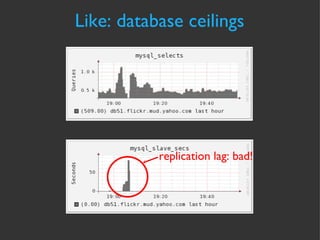
Like: database ceilings replication   lag: bad!
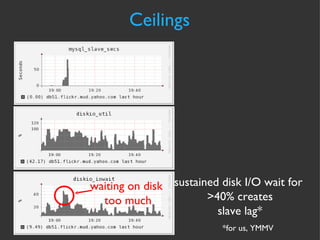
Ceilings waiting on disk  too much sustained disk I/O wait for  >40% creates slave lag* *for us, YMMV
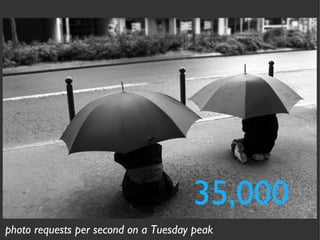
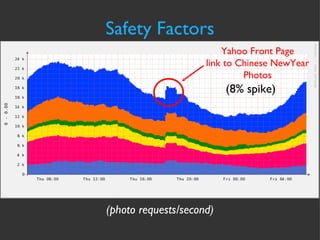
35,000 photo requests per second on a Tuesday peak
Safety Factors
Safety Factors Ceiling * Factor of Safety = UR LIMITZ
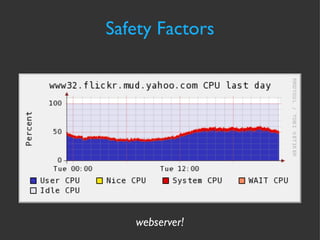
Safety Factors webserver!
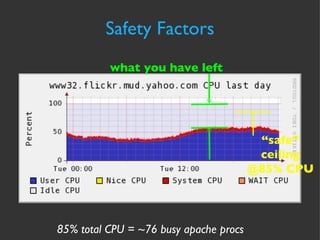
“ safe” ceiling @85% CPU Safety Factors 85% total CPU = ~76 busy apache procs what you have left
Safety Factors Yahoo Front Page link to Chinese NewYear Photos (photo requests/second) (8% spike)
Forecasting
Forecasting Fictional Example: webservers
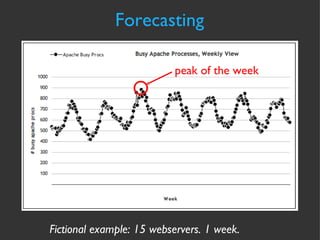
Forecasting Fictional example: 15 webservers. 1 week.  peak of the week
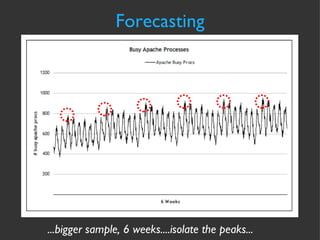
...bigger sample, 6 weeks....isolate the peaks... Forecasting
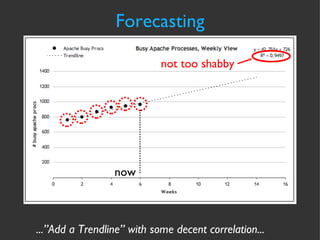
...”Add a Trendline” with some decent correlation... Forecasting now not too shabby
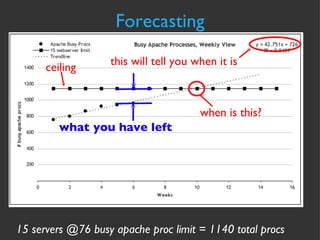
Forecasting 15 servers @76 busy apache proc limit = 1140 total procs when is this? this will tell you when it is ceiling what you have left
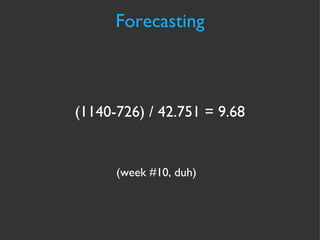
Forecasting (week #10, duh) (1140-726) / 42.751 = 9.68
Writing excel macros is boring All we want is “days remaining”, so all we need is the curve-fit Forecasting Automation Use  http://fityk.sf.net  to  automate the curve-fit
Forecasting Fictional Example: storage consumption
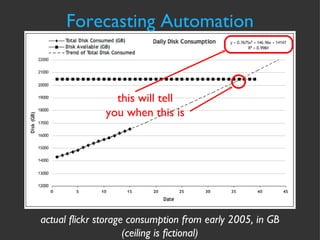
Forecasting Automation actual flickr storage consumption from early 2005, in GB (ceiling is fictional) this will tell you when this is
Forecasting Automation cmd line script output jallspaw:~]$cfityk ./fit-storage.fit 1> # Fityk script. Fityk version: 0.8.2 2>  @0 < '/home/jallspaw/storage-consumption.xy' 15 points. No explicit std. dev. Set as sqrt(y) 3>  guess Quadratic New function %_1 was created. 4>  fit Initial values:  lambda=0.001  WSSR=464.564 #1:  WSSR=0.90162  lambda=0.0001  d(WSSR)=-463.663  (99.8059%) #2:  WSSR=0.736787  lambda=1e-05  d(WSSR)=-0.164833  (18.2818%) #3:  WSSR=0.736763  lambda=1e-06  d(WSSR)=-2.45151e-05  (0.00332729%) #4:  WSSR=0.736763  lambda=1e-07  d(WSSR)=-3.84524e-11  (5.21909e-09%) Fit converged. Better fit found (WSSR = 0.736763, was 464.564, -99.8414%). 5> info formula in @0 # storage-consumption 14147.4+146.657*x+0.786854*x^2 6> quit bye...
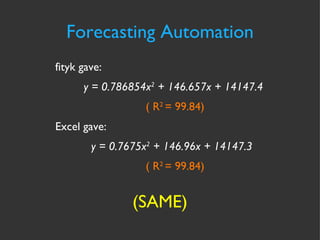
Forecasting Automation (SAME) fityk gave: y = 0.786854x 2  + 146.657x + 14147.4  ( R 2  = 99.84) Excel gave: y = 0.7675x 2  + 146.96x + 14147.3  ( R 2  = 99.84)
Capacity Health 12,629 nagios checks 1314 hosts 6 datacenters 4 photo “farms”  farm = 2 DCs (east/west)
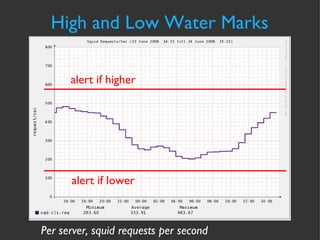
High and Low Water Marks alert if higher alert if lower Per server, squid requests per second
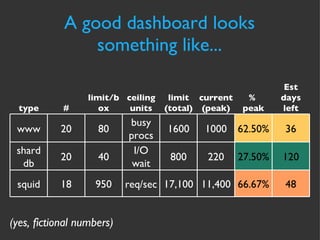
A good dashboard looks something like... (yes, fictional numbers) type # limit/box ceiling units limit (total) current (peak) %  peak Est days left www 20 80 busy procs 1600 1000 62.50% 36 shard db 20 40 I/O wait 800 220 27.50% 120 squid 18 950 req/sec 17,100 11,400 66.67% 48
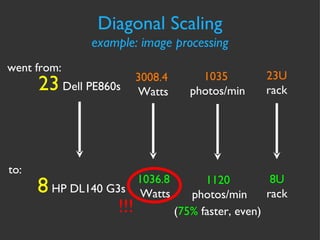
Diagonal Scaling  Image processing machines Replace Dell PE860s with HP DL140G3s vertically scaling your already horizontal nodes
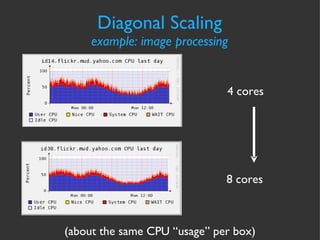
Diagonal Scaling example: image processing 4 cores 8 cores (about the same CPU “usage” per box)
~45  images/min @ peak ~140  images/min @ peak (same CPU usage, but ~3x more work) “ processing” means making 4 sizes from originals Diagonal Scaling example: image processing throughput
Diagonal Scaling example: image processing 3008.4   Watts 1036.8   Watts went from: 23  Dell PE860s 8  HP DL140 G3s to: 1035   photos/min 1120   photos/min ( 75%  faster, even) 23U rack 8U rack !!!
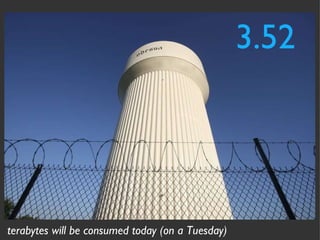
3.52 terabytes will be consumed today (on a Tuesday)
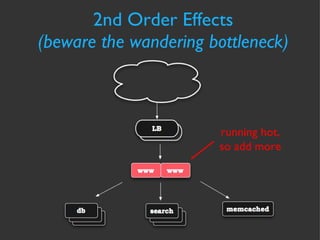
2nd Order Effects (beware the wandering bottleneck) running hot, so add more
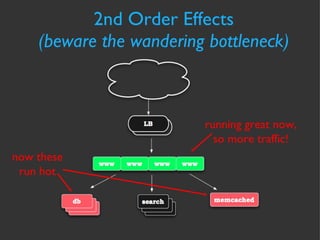
2nd Order Effects (beware the wandering bottleneck) running great now, so more traffic! now these run hot
Stupid Capacity Tricks
Stupid Capacity Tricks quick and dirty  management DSH http://freshmeat.net/projects/dsh [root@netmon101 ~]# cat group.of.servers www100 www118 dbcontacts3 admin1 admin2
Stupid Capacity Tricks quick and dirty management [root@netmon101 ~]# dsh -N group.of.servers dsh> date executing 'date' www100:  Mon Jun 23 14:14:53 UTC 2008 www118:  Mon Jun 23 14:14:53 UTC 2008 dbcontacts3:  Mon Jun 23 07:14:53 PDT 2008 admin1:  Mon Jun 23 14:14:53 UTC 2008 admin2:  Mon Jun 23 14:14:53 UTC 2008 dsh>
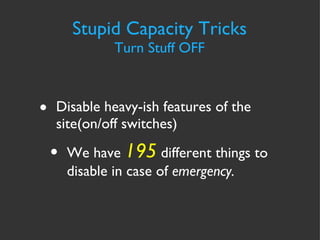
Stupid Capacity Tricks Turn Stuff OFF Disable heavy-ish features of the site(on/off switches) We have  195  different things to disable in case of  emergency.
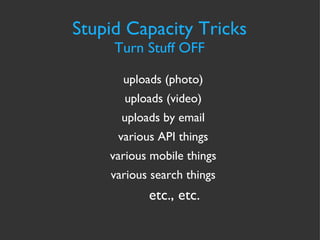
Stupid Capacity Tricks Turn Stuff OFF uploads (photo) uploads (video) uploads by email various API things various mobile things various search things etc., etc.
Host your outage/status/blog page in more than one datacenter. Tell your users WTF is going on, they’ll appreciate it. Stupid Capacity Tricks Outages Happen
Stupid Capacity Tricks Hit the Pause Button Bake the dynamic into static Some Y! properties have a big red button to instantly bake (and un-bake) at will
thanks http://flickr.com/photos/bondidwhat/402089763/ http://flickr.com/photos/74876632@N00/2394833962/ http://flickr.com/photos/42311564@N00/220394633/ http://flickr.com/photos/unloveable/2422483859/ http://flickr.com/photos/absolutwade/149702085/ http://flickr.com/photos/krawiec/521836276/ http://flickr.com/photos/eschipul/1560875648/ http://flickr.com/photos/library_of_congress/2179060841/ http://flickr.com/photos/jekkyl/511187885/ http://flickr.com/photos/ab8wn/368021672/ http://flickr.com/photos/jaxxon/165559708/ http://flickr.com/photos/sparktography/75499095/
We’re Hiring! flickr.com/jobs Come see me!
questions?

Capacity Management from Flickr

  • 1.
    Capacity Management forWeb Operations John Allspaw Operations Engineering
  • 2.
  • 3.
  • 4.
    Rules of ThumbPlanning/Forecasting Stupid Capacity Tricks (with some Flickr statistics sprinkled in)
  • 5.
    bugs (disguisedas capacity problems) edge cases (disguised as capacity problems) security incidents real capacity problems* * (should be the last thing you need to worry about) Things that can cause downtime
  • 6.
    Capacity != PerformanceForget about performance for right now Measure what you have right NOW Don’t count on it getting any better
  • 7.
    Thank You HPCIndustry! Automated Stuff Scalable Metric Collection/Display a lot of great deployment and management tricks come from them, adopted by web ops
  • 8.
    Good Measurement Toolsrecord and store metrics in/out custom metrics easily compare lightweight-ish I
  • 9.
    Clouds need planningtoo Makes deployment and procurement easy and quick But clouds are still resources with costs and limits, just like your own stuff Black-boxes: you may need to pay even more attention than before
  • 10.
  • 11.
    Metrics “Application” Level(photos processed per minute) (average processing time per photo) (apache requests) (concurrent busy apache procs)
  • 12.
    Metrics App-level meetssystem-level here, total CPU = ~1.12 * # busy apache procs (ymmv)
  • 13.
    2400 photos perminute being uploaded right NOW (Tuesday afternoon)
  • 14.
    Ceilings the mostamount of “work” your resources will allow before degradation or failure
  • 15.
  • 16.
    Find your ceilingswhat you have left The End
  • 17.
    Use real live production data to find ceilings Production: “it’s like a lab, but bigger!”
  • 18.
    Like: database ceilingsreplication lag: bad!
  • 19.
    Ceilings waiting ondisk too much sustained disk I/O wait for >40% creates slave lag* *for us, YMMV
  • 20.
    35,000 photo requestsper second on a Tuesday peak
  • 21.
  • 22.
    Safety Factors Ceiling* Factor of Safety = UR LIMITZ
  • 23.
  • 24.
    “ safe” ceiling@85% CPU Safety Factors 85% total CPU = ~76 busy apache procs what you have left
  • 25.
    Safety Factors YahooFront Page link to Chinese NewYear Photos (photo requests/second) (8% spike)
  • 26.
  • 27.
  • 28.
    Forecasting Fictional example:15 webservers. 1 week. peak of the week
  • 29.
    ...bigger sample, 6weeks....isolate the peaks... Forecasting
  • 30.
    ...”Add a Trendline”with some decent correlation... Forecasting now not too shabby
  • 31.
    Forecasting 15 servers@76 busy apache proc limit = 1140 total procs when is this? this will tell you when it is ceiling what you have left
  • 32.
    Forecasting (week #10,duh) (1140-726) / 42.751 = 9.68
  • 33.
    Writing excel macrosis boring All we want is “days remaining”, so all we need is the curve-fit Forecasting Automation Use http://fityk.sf.net to automate the curve-fit
  • 34.
    Forecasting Fictional Example:storage consumption
  • 35.
    Forecasting Automation actualflickr storage consumption from early 2005, in GB (ceiling is fictional) this will tell you when this is
  • 36.
    Forecasting Automation cmdline script output jallspaw:~]$cfityk ./fit-storage.fit 1> # Fityk script. Fityk version: 0.8.2 2> @0 < '/home/jallspaw/storage-consumption.xy' 15 points. No explicit std. dev. Set as sqrt(y) 3> guess Quadratic New function %_1 was created. 4> fit Initial values: lambda=0.001 WSSR=464.564 #1: WSSR=0.90162 lambda=0.0001 d(WSSR)=-463.663 (99.8059%) #2: WSSR=0.736787 lambda=1e-05 d(WSSR)=-0.164833 (18.2818%) #3: WSSR=0.736763 lambda=1e-06 d(WSSR)=-2.45151e-05 (0.00332729%) #4: WSSR=0.736763 lambda=1e-07 d(WSSR)=-3.84524e-11 (5.21909e-09%) Fit converged. Better fit found (WSSR = 0.736763, was 464.564, -99.8414%). 5> info formula in @0 # storage-consumption 14147.4+146.657*x+0.786854*x^2 6> quit bye...
  • 37.
    Forecasting Automation (SAME)fityk gave: y = 0.786854x 2 + 146.657x + 14147.4 ( R 2 = 99.84) Excel gave: y = 0.7675x 2 + 146.96x + 14147.3 ( R 2 = 99.84)
  • 38.
    Capacity Health 12,629nagios checks 1314 hosts 6 datacenters 4 photo “farms” farm = 2 DCs (east/west)
  • 39.
    High and LowWater Marks alert if higher alert if lower Per server, squid requests per second
  • 40.
    A good dashboardlooks something like... (yes, fictional numbers) type # limit/box ceiling units limit (total) current (peak) % peak Est days left www 20 80 busy procs 1600 1000 62.50% 36 shard db 20 40 I/O wait 800 220 27.50% 120 squid 18 950 req/sec 17,100 11,400 66.67% 48
  • 41.
    Diagonal Scaling Image processing machines Replace Dell PE860s with HP DL140G3s vertically scaling your already horizontal nodes
  • 42.
    Diagonal Scaling example:image processing 4 cores 8 cores (about the same CPU “usage” per box)
  • 43.
    ~45 images/min@ peak ~140 images/min @ peak (same CPU usage, but ~3x more work) “ processing” means making 4 sizes from originals Diagonal Scaling example: image processing throughput
  • 44.
    Diagonal Scaling example:image processing 3008.4 Watts 1036.8 Watts went from: 23 Dell PE860s 8 HP DL140 G3s to: 1035 photos/min 1120 photos/min ( 75% faster, even) 23U rack 8U rack !!!
  • 45.
    3.52 terabytes willbe consumed today (on a Tuesday)
  • 46.
    2nd Order Effects(beware the wandering bottleneck) running hot, so add more
  • 47.
    2nd Order Effects(beware the wandering bottleneck) running great now, so more traffic! now these run hot
  • 48.
  • 49.
    Stupid Capacity Tricksquick and dirty management DSH http://freshmeat.net/projects/dsh [root@netmon101 ~]# cat group.of.servers www100 www118 dbcontacts3 admin1 admin2
  • 50.
    Stupid Capacity Tricksquick and dirty management [root@netmon101 ~]# dsh -N group.of.servers dsh> date executing 'date' www100: Mon Jun 23 14:14:53 UTC 2008 www118: Mon Jun 23 14:14:53 UTC 2008 dbcontacts3: Mon Jun 23 07:14:53 PDT 2008 admin1: Mon Jun 23 14:14:53 UTC 2008 admin2: Mon Jun 23 14:14:53 UTC 2008 dsh>
  • 51.
    Stupid Capacity TricksTurn Stuff OFF Disable heavy-ish features of the site(on/off switches) We have 195 different things to disable in case of emergency.
  • 52.
    Stupid Capacity TricksTurn Stuff OFF uploads (photo) uploads (video) uploads by email various API things various mobile things various search things etc., etc.
  • 53.
    Host your outage/status/blogpage in more than one datacenter. Tell your users WTF is going on, they’ll appreciate it. Stupid Capacity Tricks Outages Happen
  • 54.
    Stupid Capacity TricksHit the Pause Button Bake the dynamic into static Some Y! properties have a big red button to instantly bake (and un-bake) at will
  • 55.
    thanks http://flickr.com/photos/bondidwhat/402089763/ http://flickr.com/photos/74876632@N00/2394833962/http://flickr.com/photos/42311564@N00/220394633/ http://flickr.com/photos/unloveable/2422483859/ http://flickr.com/photos/absolutwade/149702085/ http://flickr.com/photos/krawiec/521836276/ http://flickr.com/photos/eschipul/1560875648/ http://flickr.com/photos/library_of_congress/2179060841/ http://flickr.com/photos/jekkyl/511187885/ http://flickr.com/photos/ab8wn/368021672/ http://flickr.com/photos/jaxxon/165559708/ http://flickr.com/photos/sparktography/75499095/
  • 56.
  • 57.

Editor's Notes

  • #3 Only two more chapters to go. :)
  • #4 How many of you manage servers for your site? How many of you know how many servers you have? (databases, webservers, etc.) How many of you collect metrics for all of your capacity resources?
  • #5 I’ll be repeating some concepts that I’ve talked about in other presentations on the same topic... 1. Planning 2. Manage 3. Stupid Catastrophe Tricks with some random statistics from Flickr sprinkled throughout
  • #6 By “capacity problems” I mean NORMAL capacity trends, not spiking ones. By edge cases, I mean usage patterns that exist outside the realm of normal operation. Examples: users with 60,000 tags on 20 photos (not possible anymore)...search API calls with 60 ORs (not possible anymore)
  • #8 The High Performance Computing industry has created a lot of tools and deployment philosophies that web operations can learn from.
  • #9 It *DOESN’T* matter which tool you use, as long as it can satisfy these criteria.
  • #13 Knowing what system resources mean in terms of application usage puts the whole capacity shebang into context. Another example would be: Max QPS for a MySQL server = X users, Y photos.
  • #14 (that’s about 44 per second.)
  • #16 Artificial stress testing is rarely good for testing real capacity ceilings. It’s great for comparing two different hardware platforms, tho.
  • #17 How many of you know how many QPS your MySQL machines can do without degrading or failing? (slave lag, anyone?)
  • #18 Find ceilings by measuring *real* data from production. WHY?? 1. Development “cycles” are TIGHT, so code changes, so load characteristics change all the time. (sometimes in big ways) 2. Edge cases get shown in production, not in my imagination. (60k tags on 100 photos?) 3. Too much time wasted on artificial test setups to get accuracy that doesn’t matter.
  • #19 Sometimes you don’t have to increase load artificially, you bump up against the limits naturally...
  • #20 So, our ceiling is disk I/O wait, and it’s around 30-40% that we want to stay under... WHY does this happen? I don’t know, and I don’t care, not right now....
  • #21 Squid requests per second, at peak, on a Tuesday.
  • #22 Structural and mechanical engineering use a Factor of Safety (FoS) when designing components that experience load, both stress and strain: bridges, airbags, buildings, seatbelts, toasters. So should we, as web operations.
  • #23 Whether you express it as a “reserve”, or “overhead”, or some fraction/percentage of your ultimate limit, you should know what these are for ALL of your resources. Civil, mechanical engineers use them when designing bridges, airbags, buildings, seatbelts, toasters. So should we.
  • #24 Being a multi-core box, I know I can get up to 95% user CPU without performance degradation, but I don’t want to get that far. We’ll plan to have our webservers reach 85% so we have wiggle room for sporadic spikes above that.
  • #25 Being a multi-core box, I know I can get up to 95% user CPU without performance degradation, but I don’t want to get that far. We’ll plan to have our webservers reach 85% so we have wiggle room for sporadic spikes above that. Why 85%? Because that is what history has told me I could see spikes of (15%)
  • #26 Being a multi-core box, I know I can get up to 95% user CPU without performance degradation, but I don’t want to get that far. We’ll plan to have our webservers reach 85% so we have wiggle room for sporadic spikes above that.
  • #27 Forecasting capacity means making educated guesses about the future by using data from the past. Throw in any knowledge you have about: - timing of feature launches - seasonal differences - new hardware deployment
  • #28 We’ll just go through a simple example of using extrapolation and curve-fitting to make a prediction on how data (capacity metrics) will change in the future. THERE IS NO SUCH THING AS PREDICTING THE FUTURE.
  • #29 RRDtool data, put into Excel. Need a bigger sample than 1 week, not enough peaks....let’s try 6 weeks...
  • #30 ...try 6 weeks of data...
  • #31 “ Add a Trendline” is a feature in Excel. Note the # of weeks at the bottom. The R-squared number is the “coefficient of determination” which indicates how good of a “fit” the equation is to the data.
  • #32 This is a linear equation given for the curve-fitting function.
  • #34 Using Excel is time-consuming, you should be able to automate this so you can keep tabs on it easier. fityk has a command-line version, cfityk.
  • #36 Same drill with Excel.
  • #38 The same! Yay!
  • #39 High and low-water marks
  • #41 ADD THE ESTIMATED TIME LEFT ON HERE...
  • #45 Yay! Savings all around!
  • #46 Terabytes will be consumed today, not including video.
  • #47 Watch out for 2nd-order effects when deploying new/faster machines. When throttles are opened, the dam can get moved down the river.
  • #48 Watch out for 2nd-order effects when deploying new/faster machines. When throttles are opened, the dam can get moved down the river. Artur mentioned that faster pages = more traffic...we see the same thing.
  • #49 Some well-known tips and tricks for when the shit hits the fan.
  • #50 Before capistrano, before puppet, there was dsh. Quick and dirty.
  • #51 Running a command on any arbitrary number of hosts, interactively. Not revolutionary, but useful.
  • #52 Better to be mostly up than down for features that aren’t used much.
  • #54 Hosting is like $7.95 a month for a blog. Spend the cash.
  • #55 We have put squid in front of our search cluster and cached aggressively when we ran close to capacity.