Content Management System
Webiny Content Management System
Webiny CMS is developed by a team of web experts. The system
has been in closed development for over a year.

System is specially designed for multi-domain and multi-
language web sites with heavy traffic.

Providing state of the art caching mechanisms it can handle
very high peaks on any server. It provides a large set of built in
features, that can be easily expanded.


Webiny Content Management System
                                                                     2
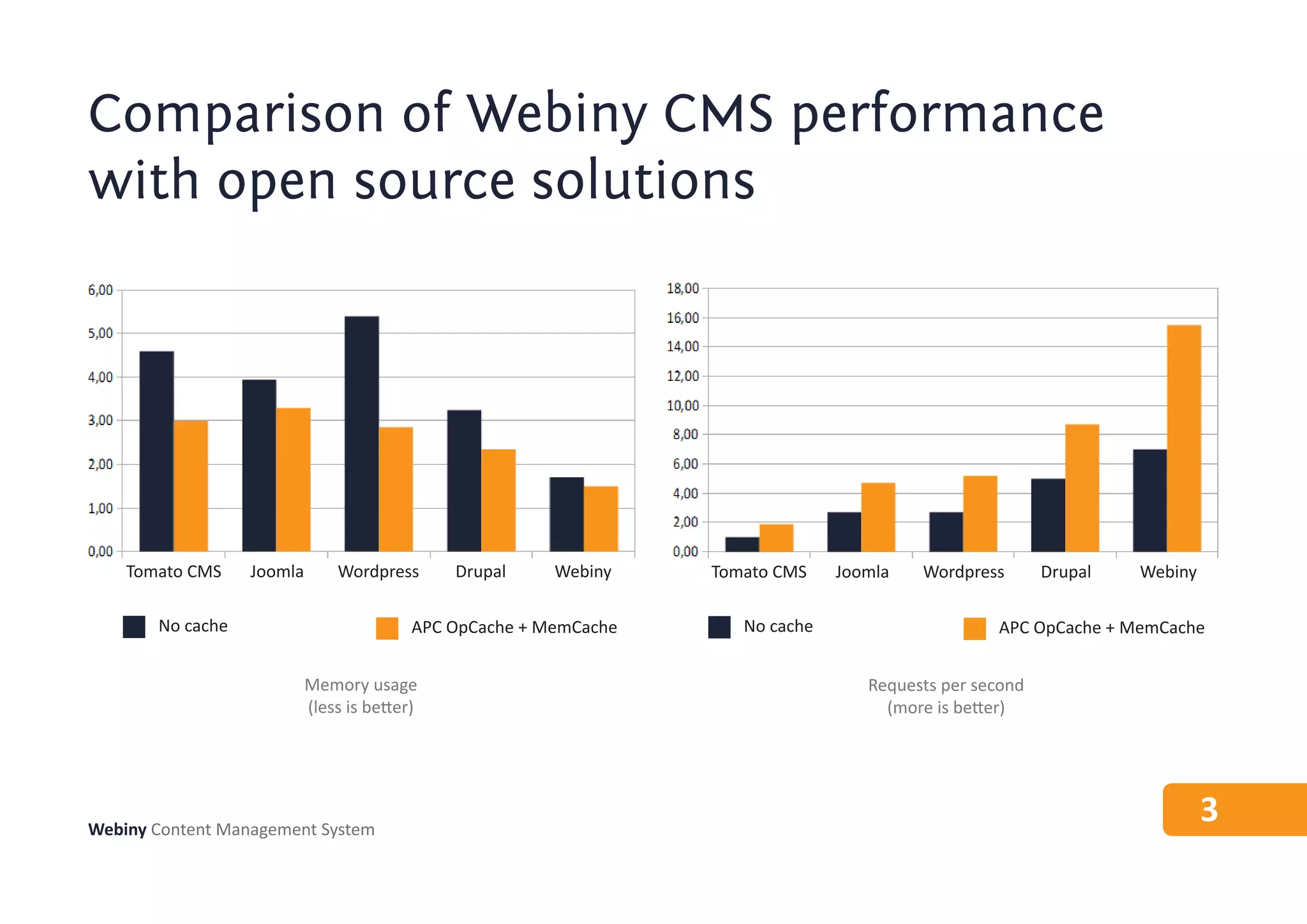
Comparison of Webiny CMS performance
with open source solutions


    Tomato CMS    Joomla       Wordpress      Drupal     Webiny    Tomato CMS    Joomla   Wordpress       Drupal   Webiny

       No cache                           APC OpCache + MemCache      No cache                     APC OpCache + MemCache


                           Memory usage                                             Requests per second
                           (less is better)                                           (more is better)


Webiny Content Management System
                                                                                                                            3
Webiny CMS features
Analytics
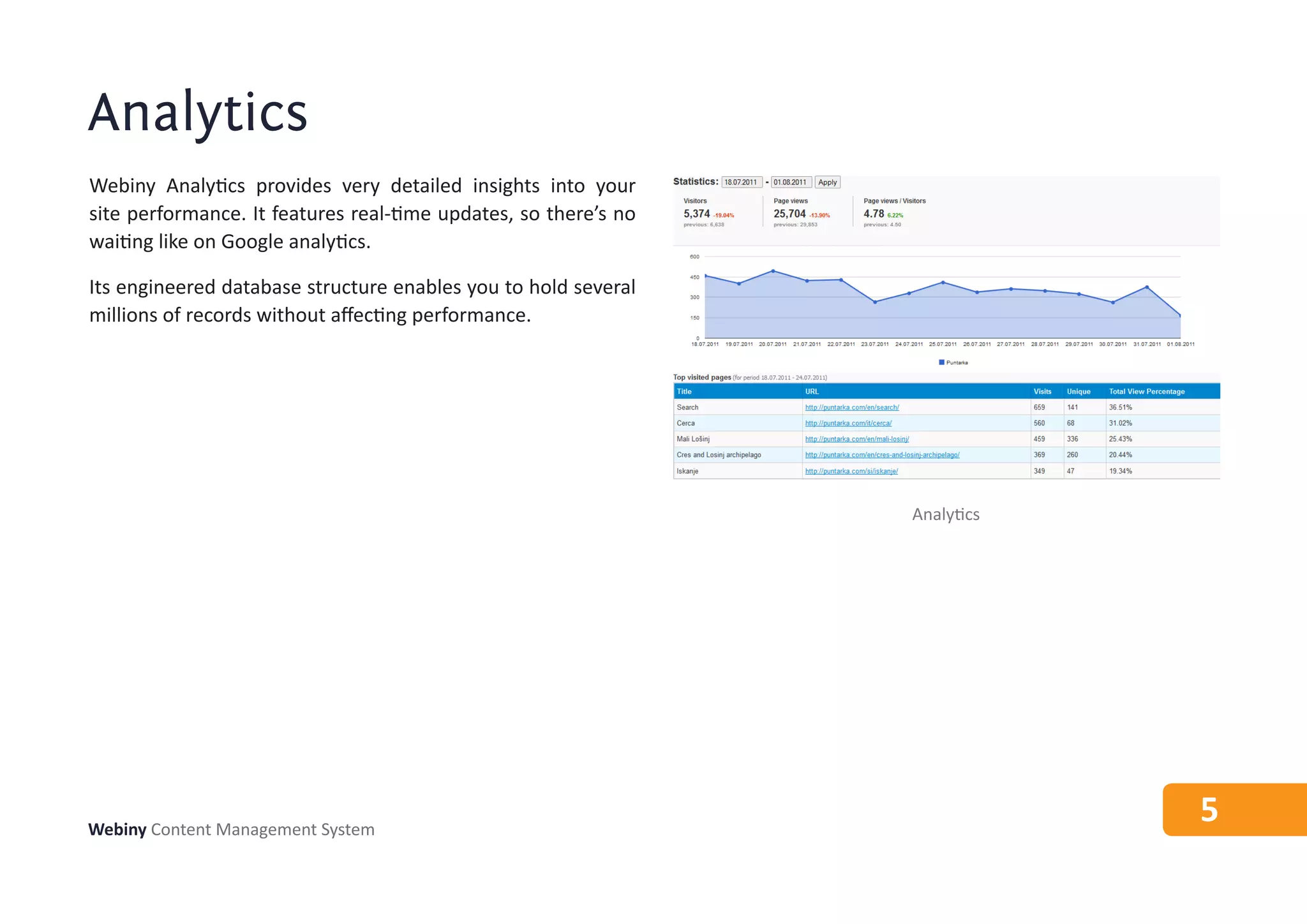
Webiny Analytics provides very detailed insights into your
site performance. It features real-time updates, so there’s no
waiting like on Google analytics.

Its engineered database structure enables you to hold several
millions of records without affecting performance.


                                                                 Analytics


Webiny Content Management System
                                                                             5
SEO & SMO
When creating content on other systems, you are very limited
to which aspects of your page you can control - but not on
Webiny.

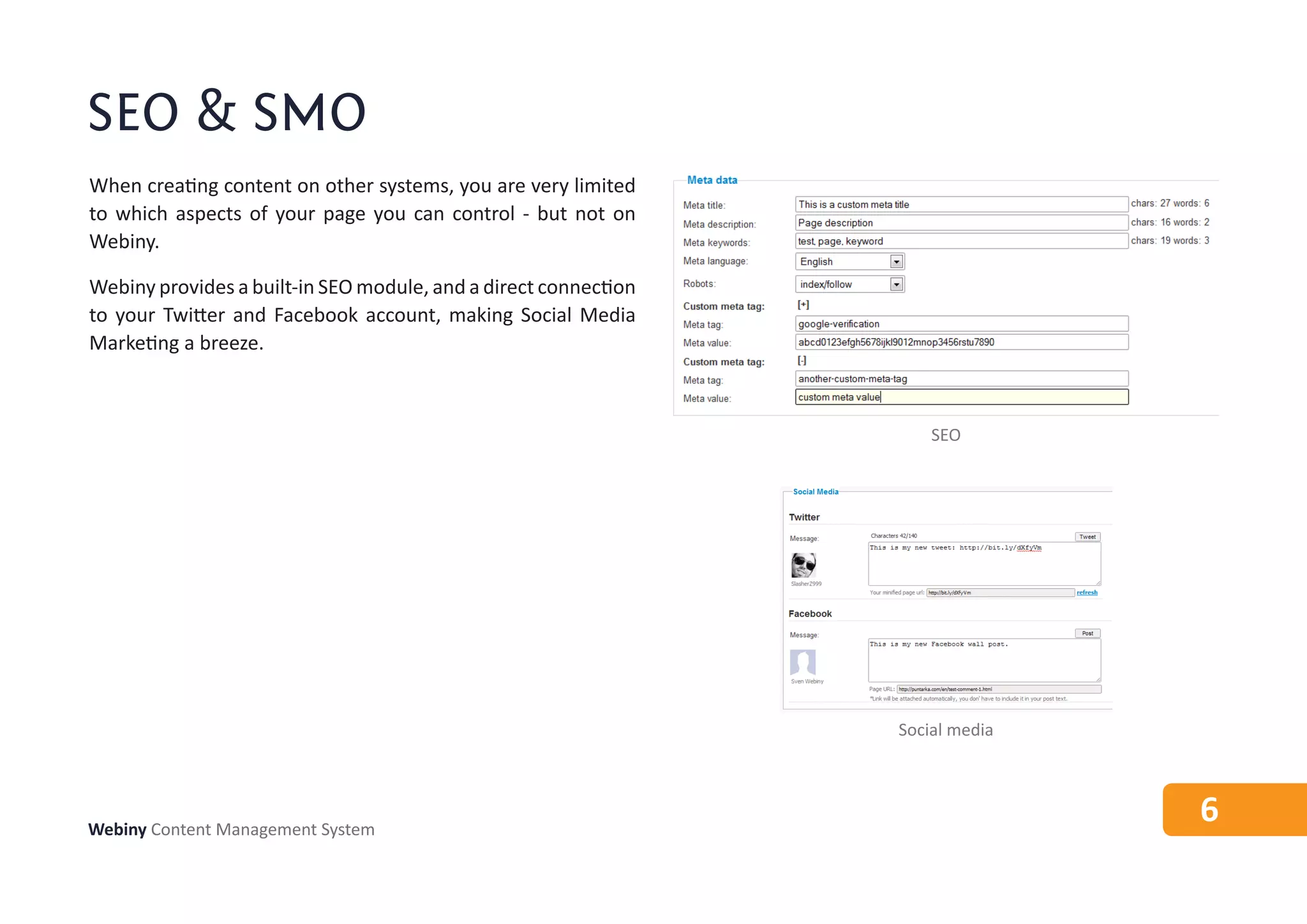
Webiny provides a built-in SEO module, and a direct connection
to your Twitter and Facebook account, making Social Media
Marketing a breeze.


                                                                     SEO


                                                                 Social media


Webiny Content Management System
                                                                                6
Content structure
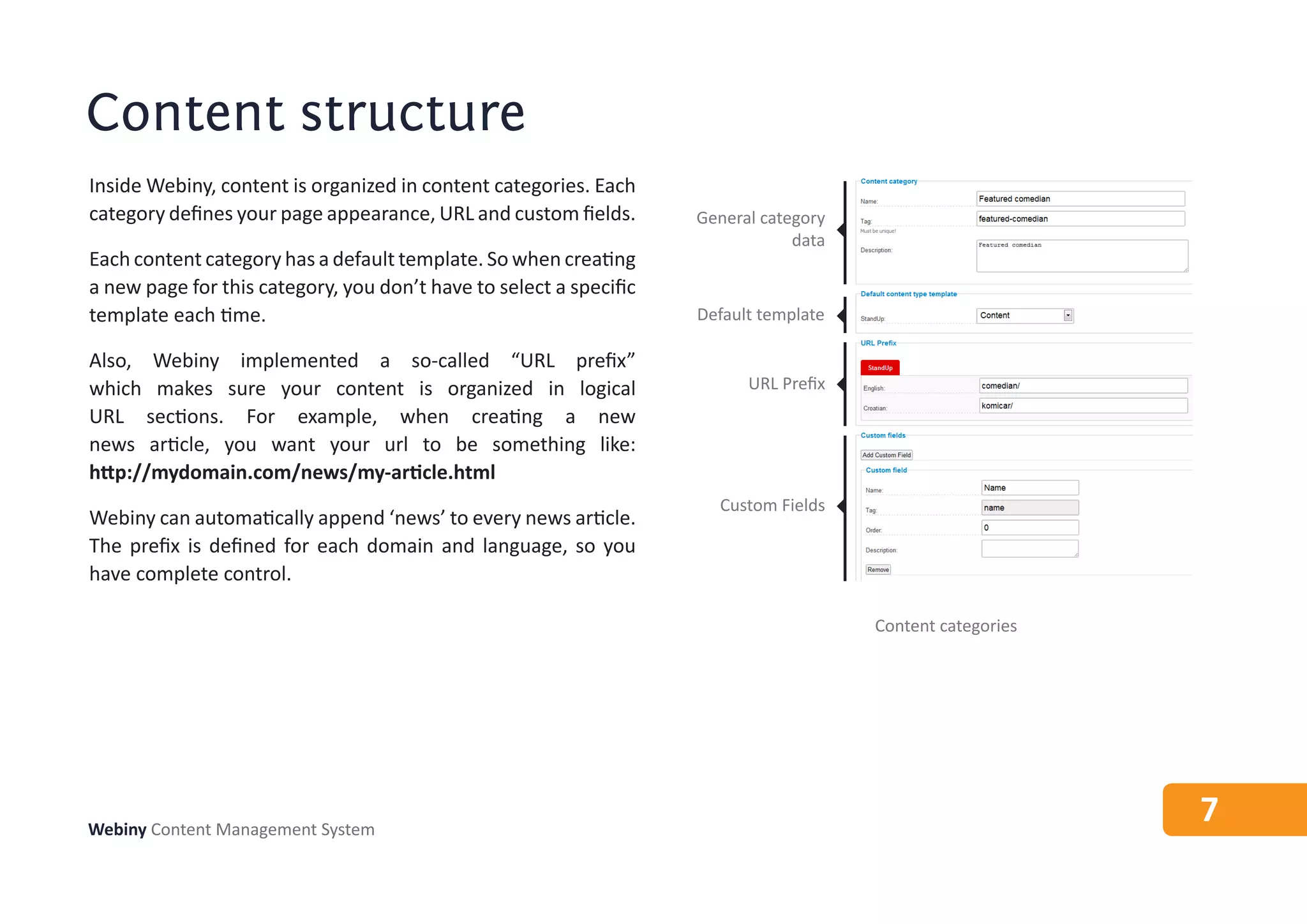
Inside Webiny, content is organized in content categories. Each
category defines your page appearance, URL and custom fields.       General category
                                                                                data
Each content category has a default template. So when creating
a new page for this category, you don’t have to select a specific
template each time.                                                 Default template

Also, Webiny implemented a so-called “URL prefix”
which makes sure your content is organized in logical                     URL Prefix
URL sections. For example, when creating a new
news article, you want your url to be something like:
http://mydomain.com/news/my-article.html
                                                                      Custom Fields
Webiny can automatically append ‘news’ to every news article.
The prefix is defined for each domain and language, so you
have complete control.

                                                                                       Content categories


Webiny Content Management System
                                                                                                            7
Page editor
Content is input using a special editor that provides all necessary
options on one screen.

Webiny is very careful when it comes to user experience, so
you won’t be overwhelmed with thousands of dialogs and
forms.

In order to create a new page in Webiny, you just have to enter
its title and some content. All other options are organized
across different tabs, so that they are not in your way.


                                                                      Page editor


Webiny Content Management System
                                                                                    8
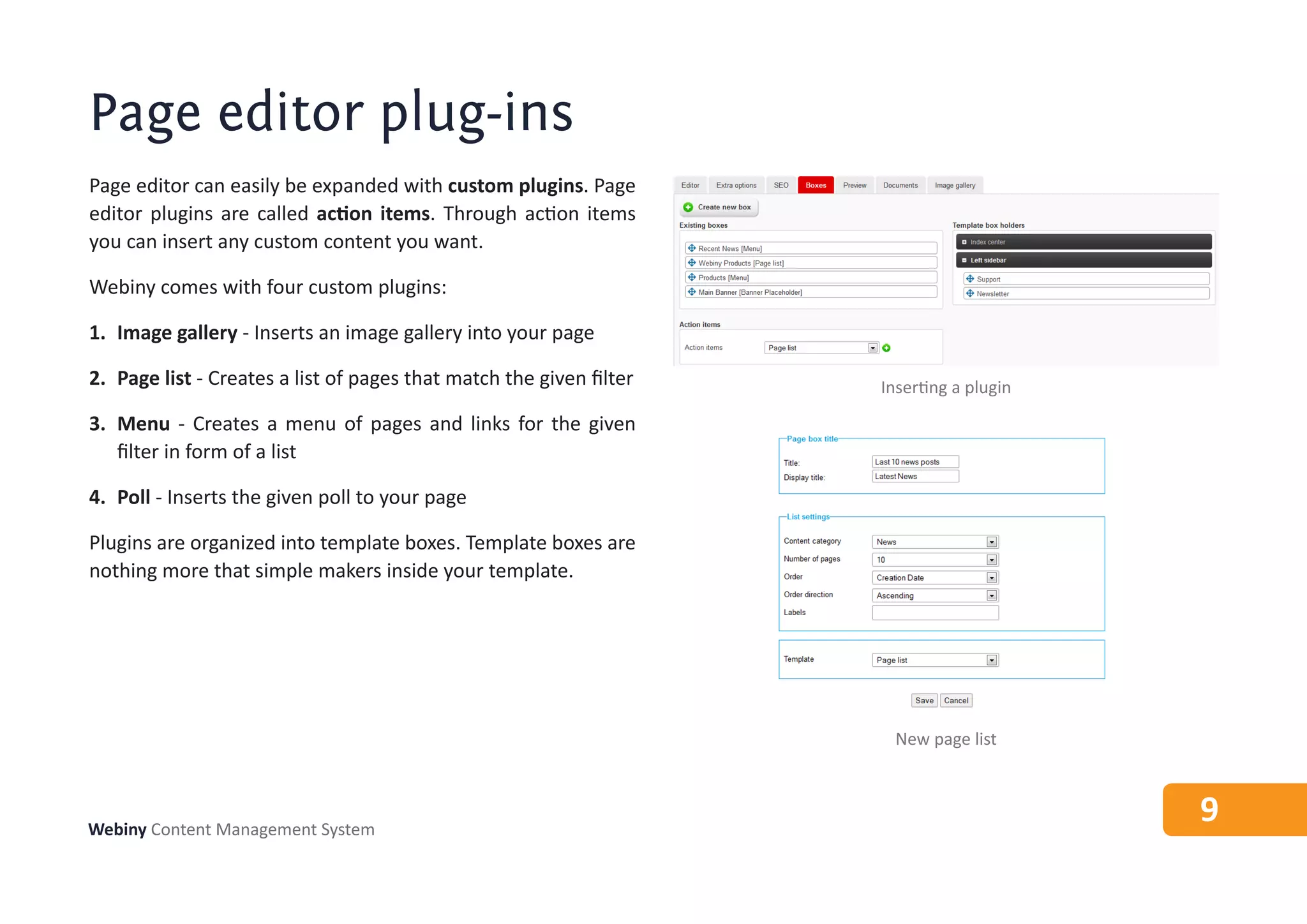
Page editor plug-ins
Page editor can easily be expanded with custom plugins. Page
editor plugins are called action items. Through action items
you can insert any custom content you want.

Webiny comes with four custom plugins:

1. Image gallery - Inserts an image gallery into your page

2. Page list - Creates a list of pages that match the given filter   Inserting a plugin
3. Menu - Creates a menu of pages and links for the given
   filter in form of a list

4. Poll - Inserts the given poll to your page

Plugins are organized into template boxes. Template boxes are
nothing more that simple makers inside your template.


                                                                       New page list


Webiny Content Management System
                                                                                          9
Menus
Menus play a large role in the display of your content, which
is why, when building Webiny, we were very mindful of
how to make this process as fluent as possible, but without
implementing any bigger restrictions.

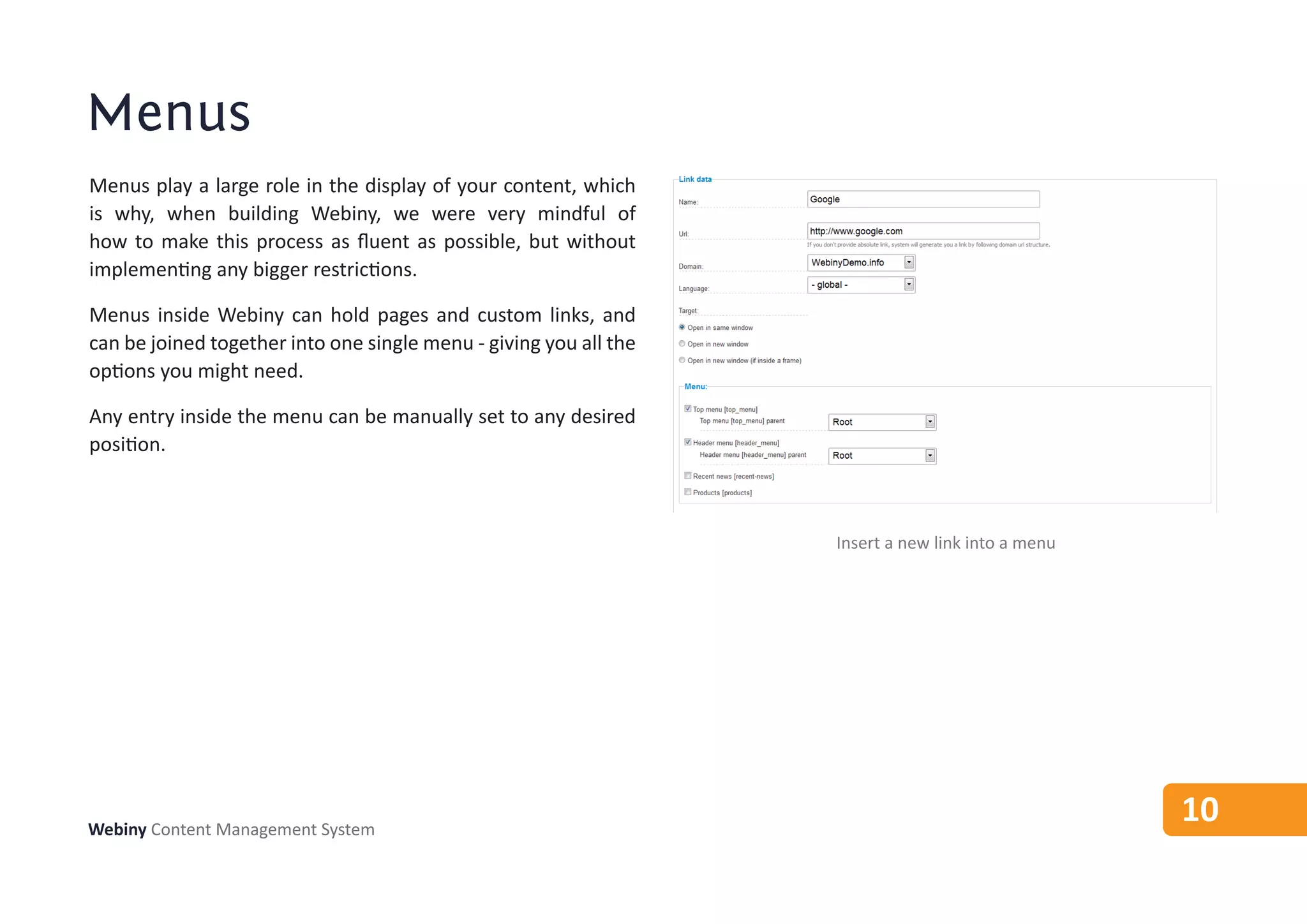
Menus inside Webiny can hold pages and custom links, and
can be joined together into one single menu - giving you all the
options you might need.

Any entry inside the menu can be manually set to any desired
position.


                                                                   Insert a new link into a menu


Webiny Content Management System
                                                                                                   10
Domains & languages
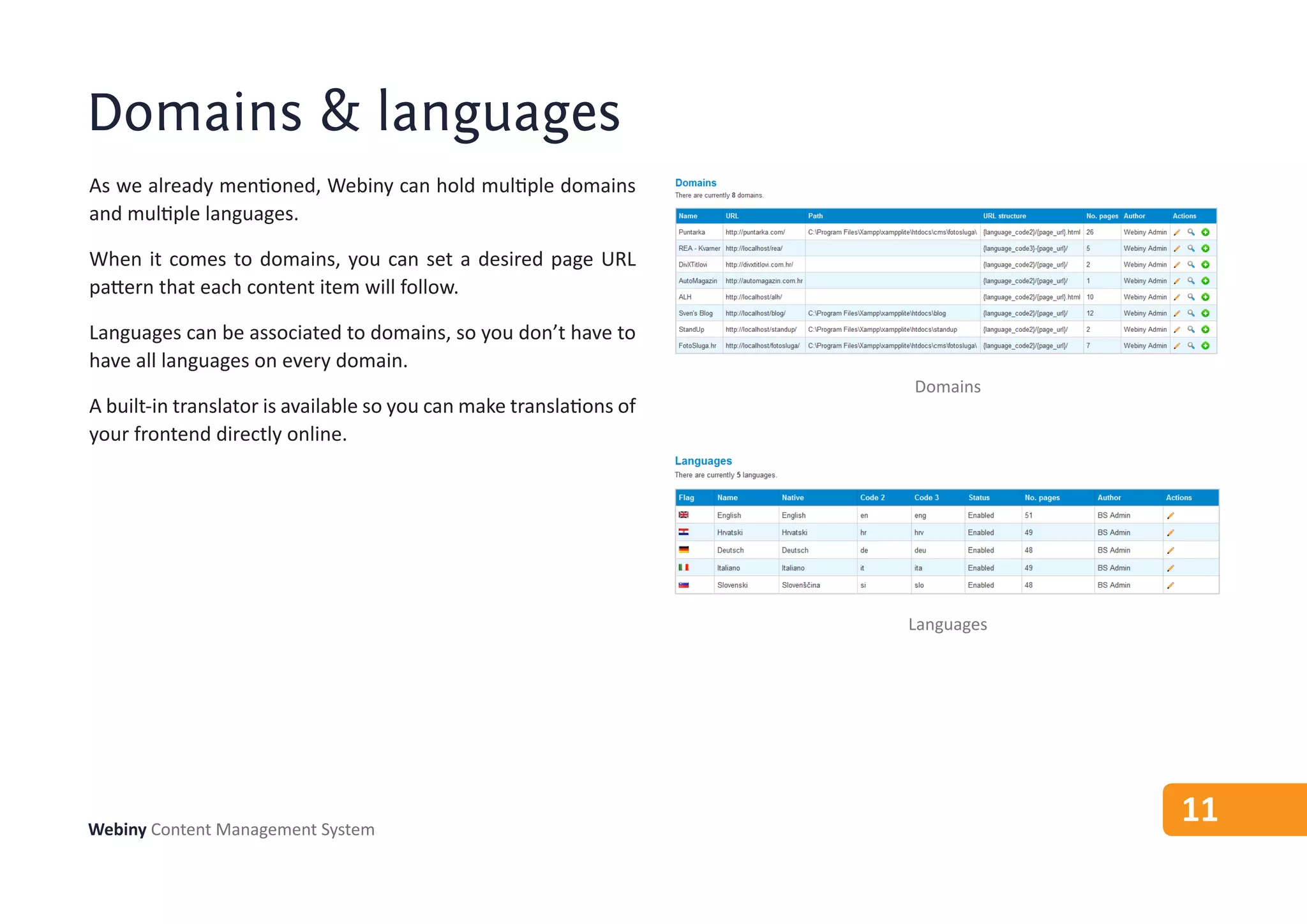
As we already mentioned, Webiny can hold multiple domains
and multiple languages.

When it comes to domains, you can set a desired page URL
pattern that each content item will follow.

Languages can be associated to domains, so you don’t have to
have all languages on every domain.
                                                                     Domains
A built-in translator is available so you can make translations of
your frontend directly online.


                                                                     Languages


Webiny Content Management System
                                                                                 11
Themes & templates
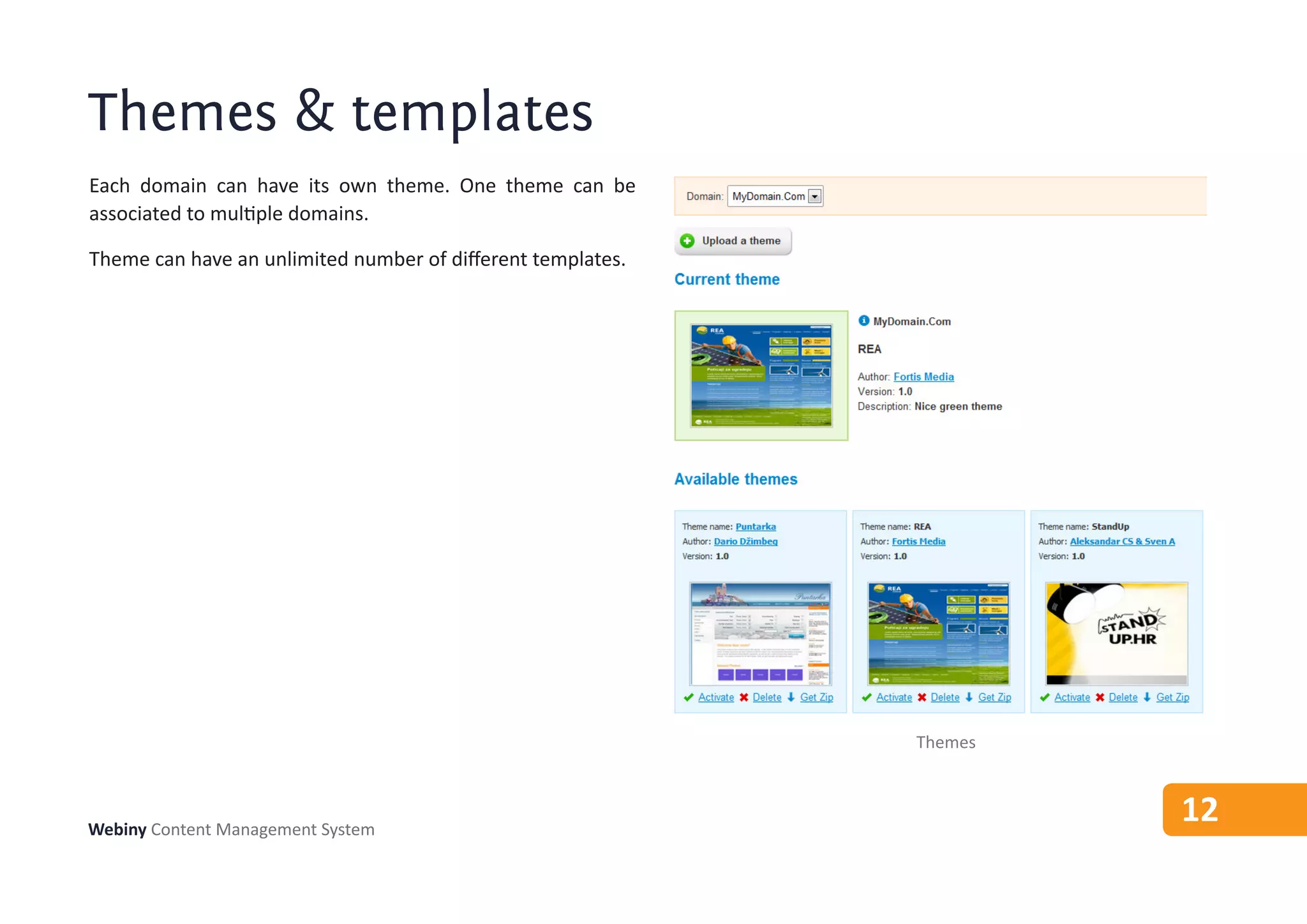
Each domain can have its own theme. One theme can be
associated to multiple domains.

Theme can have an unlimited number of different templates.


                                                             Themes


Webiny Content Management System
                                                                      12
Image gallery
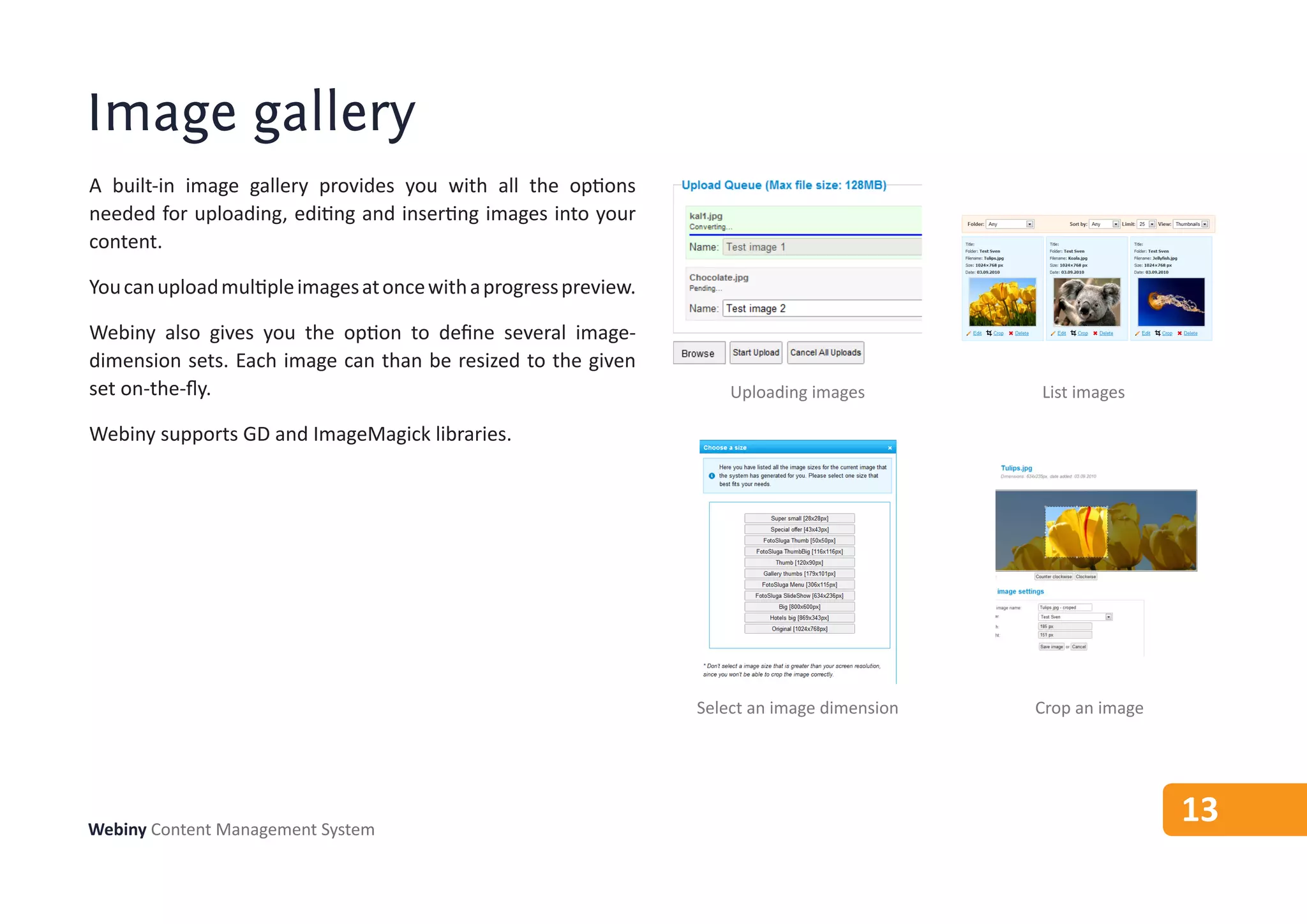
A built-in image gallery provides you with all the options
needed for uploading, editing and inserting images into your
content.

You can upload multiple images at once with a progress preview.

Webiny also gives you the option to define several image-
dimension sets. Each image can than be resized to the given
set on-the-fly.                                                       Uploading images        List images

Webiny supports GD and ImageMagick libraries.


                                                                  Select an image dimension   Crop an image


Webiny Content Management System
                                                                                                              13
Documents
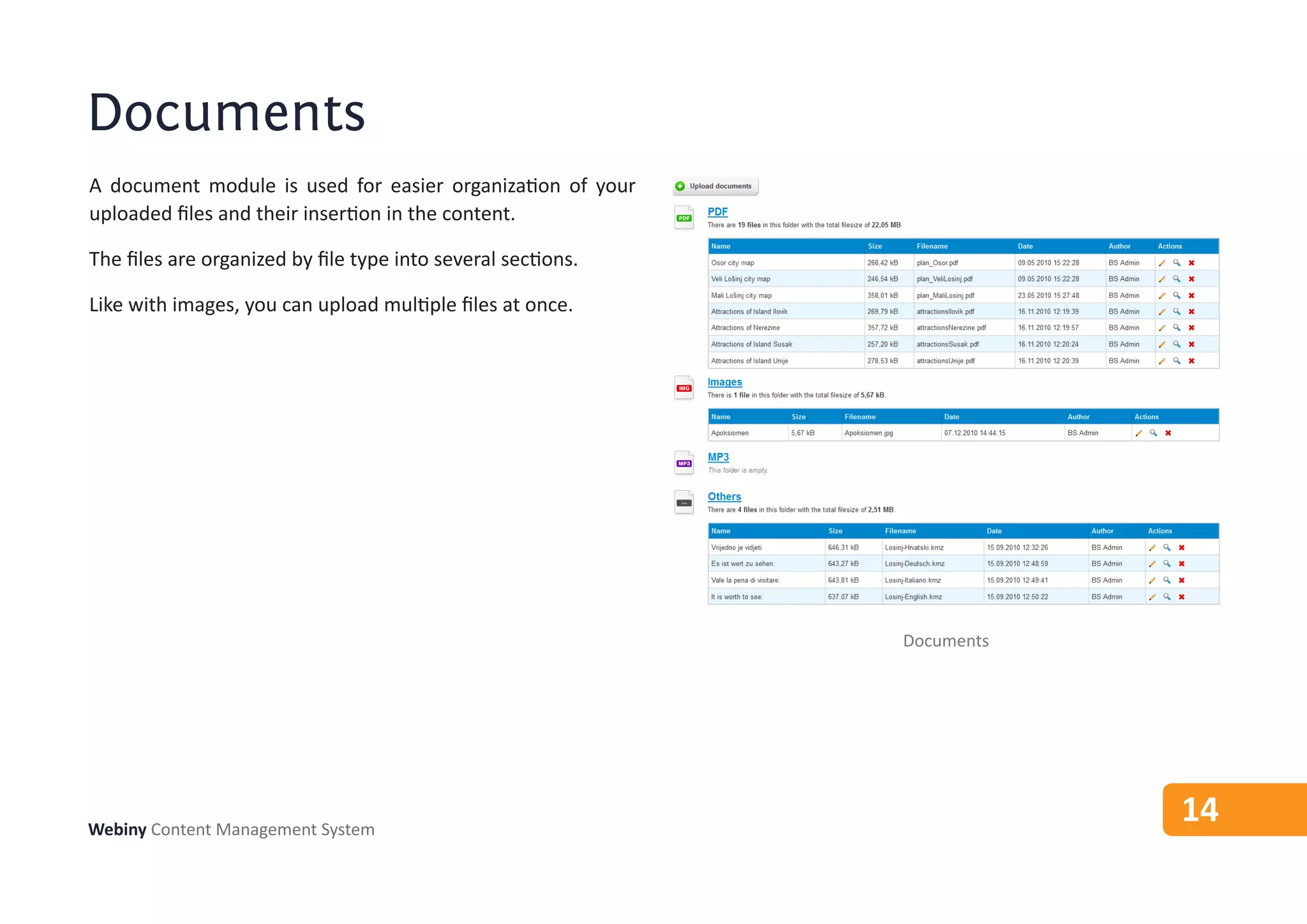
A document module is used for easier organization of your
uploaded files and their insertion in the content.

The files are organized by file type into several sections.

Like with images, you can upload multiple files at once.


                                                              Documents


Webiny Content Management System
                                                                          14
User manager
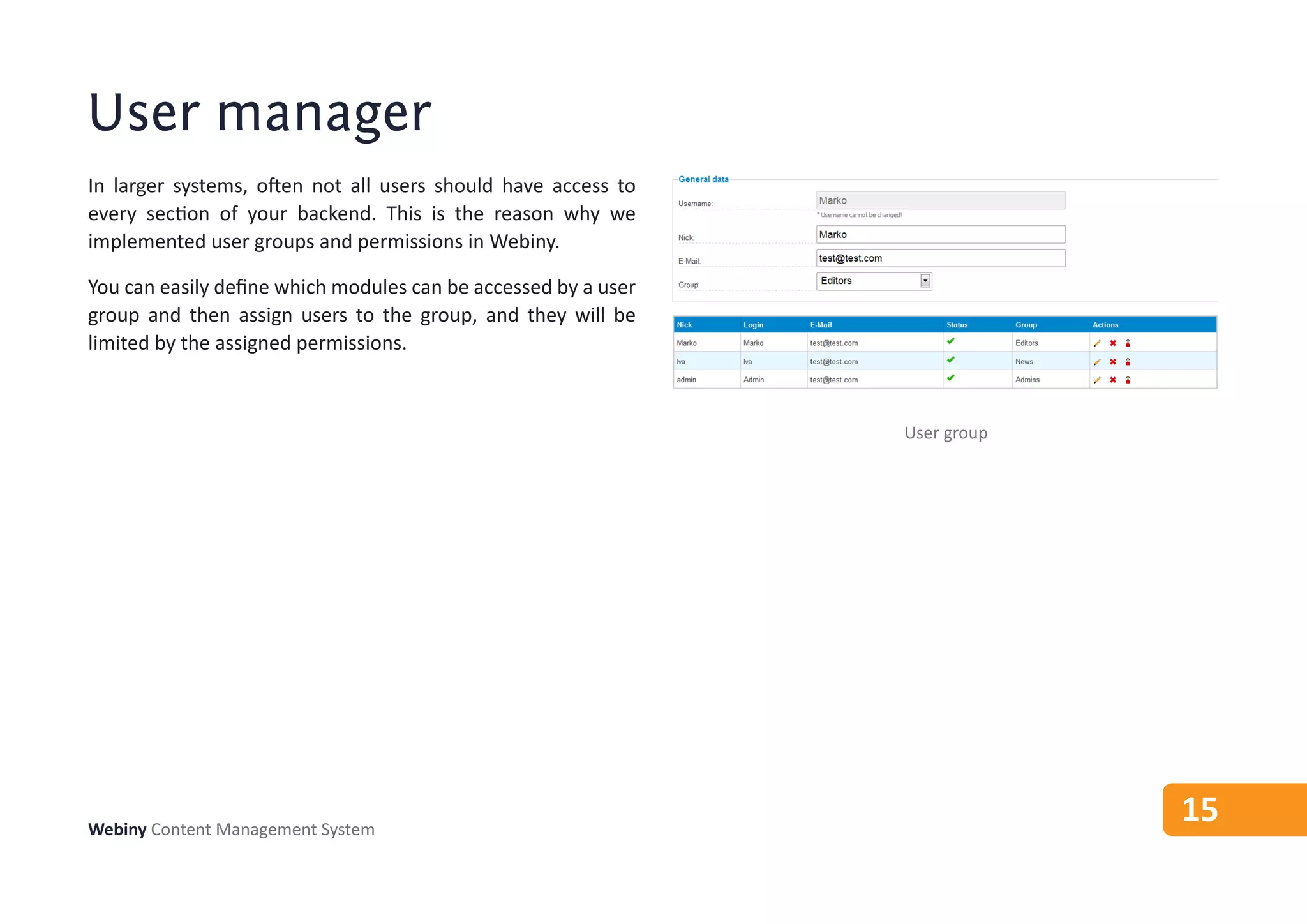
In larger systems, often not all users should have access to
every section of your backend. This is the reason why we
implemented user groups and permissions in Webiny.

You can easily define which modules can be accessed by a user
group and then assign users to the group, and they will be
limited by the assigned permissions.


                                                                User group


Webiny Content Management System
                                                                             15
Contact
E-mail: info@webiny.com
Tel:    +385 91 466 4531

Webiny Content Management System

  • 1.
  • 2.
    Webiny Content ManagementSystem Webiny CMS is developed by a team of web experts. The system has been in closed development for over a year. System is specially designed for multi-domain and multi- language web sites with heavy traffic. Providing state of the art caching mechanisms it can handle very high peaks on any server. It provides a large set of built in features, that can be easily expanded. Webiny Content Management System 2
  • 3.
    Comparison of WebinyCMS performance with open source solutions Tomato CMS Joomla Wordpress Drupal Webiny Tomato CMS Joomla Wordpress Drupal Webiny No cache APC OpCache + MemCache No cache APC OpCache + MemCache Memory usage Requests per second (less is better) (more is better) Webiny Content Management System 3
  • 4.
  • 5.
    Analytics Webiny Analytics providesvery detailed insights into your site performance. It features real-time updates, so there’s no waiting like on Google analytics. Its engineered database structure enables you to hold several millions of records without affecting performance. Analytics Webiny Content Management System 5
  • 6.
    SEO & SMO Whencreating content on other systems, you are very limited to which aspects of your page you can control - but not on Webiny. Webiny provides a built-in SEO module, and a direct connection to your Twitter and Facebook account, making Social Media Marketing a breeze. SEO Social media Webiny Content Management System 6
  • 7.
    Content structure Inside Webiny,content is organized in content categories. Each category defines your page appearance, URL and custom fields. General category data Each content category has a default template. So when creating a new page for this category, you don’t have to select a specific template each time. Default template Also, Webiny implemented a so-called “URL prefix” which makes sure your content is organized in logical URL Prefix URL sections. For example, when creating a new news article, you want your url to be something like: http://mydomain.com/news/my-article.html Custom Fields Webiny can automatically append ‘news’ to every news article. The prefix is defined for each domain and language, so you have complete control. Content categories Webiny Content Management System 7
  • 8.
    Page editor Content isinput using a special editor that provides all necessary options on one screen. Webiny is very careful when it comes to user experience, so you won’t be overwhelmed with thousands of dialogs and forms. In order to create a new page in Webiny, you just have to enter its title and some content. All other options are organized across different tabs, so that they are not in your way. Page editor Webiny Content Management System 8
  • 9.
    Page editor plug-ins Pageeditor can easily be expanded with custom plugins. Page editor plugins are called action items. Through action items you can insert any custom content you want. Webiny comes with four custom plugins: 1. Image gallery - Inserts an image gallery into your page 2. Page list - Creates a list of pages that match the given filter Inserting a plugin 3. Menu - Creates a menu of pages and links for the given filter in form of a list 4. Poll - Inserts the given poll to your page Plugins are organized into template boxes. Template boxes are nothing more that simple makers inside your template. New page list Webiny Content Management System 9
  • 10.
    Menus Menus play alarge role in the display of your content, which is why, when building Webiny, we were very mindful of how to make this process as fluent as possible, but without implementing any bigger restrictions. Menus inside Webiny can hold pages and custom links, and can be joined together into one single menu - giving you all the options you might need. Any entry inside the menu can be manually set to any desired position. Insert a new link into a menu Webiny Content Management System 10
  • 11.
    Domains & languages Aswe already mentioned, Webiny can hold multiple domains and multiple languages. When it comes to domains, you can set a desired page URL pattern that each content item will follow. Languages can be associated to domains, so you don’t have to have all languages on every domain. Domains A built-in translator is available so you can make translations of your frontend directly online. Languages Webiny Content Management System 11
  • 12.
    Themes & templates Eachdomain can have its own theme. One theme can be associated to multiple domains. Theme can have an unlimited number of different templates. Themes Webiny Content Management System 12
  • 13.
    Image gallery A built-inimage gallery provides you with all the options needed for uploading, editing and inserting images into your content. You can upload multiple images at once with a progress preview. Webiny also gives you the option to define several image- dimension sets. Each image can than be resized to the given set on-the-fly. Uploading images List images Webiny supports GD and ImageMagick libraries. Select an image dimension Crop an image Webiny Content Management System 13
  • 14.
    Documents A document moduleis used for easier organization of your uploaded files and their insertion in the content. The files are organized by file type into several sections. Like with images, you can upload multiple files at once. Documents Webiny Content Management System 14
  • 15.
    User manager In largersystems, often not all users should have access to every section of your backend. This is the reason why we implemented user groups and permissions in Webiny. You can easily define which modules can be accessed by a user group and then assign users to the group, and they will be limited by the assigned permissions. User group Webiny Content Management System 15
  • 16.