Webinar - How to to migrate mobile
workers to next generation mobility
6th December 2012

Mobility. Made simple.
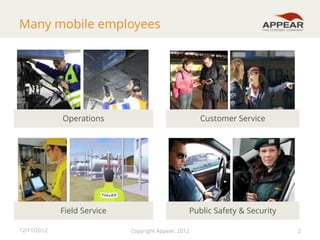
Many mobile employees

Operations

Field Service
12/11/2012

Customer Service

Public Safety & Security
Copyright Appear, 2012

2
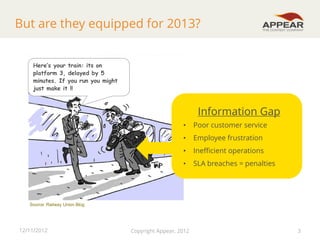
But are they equipped for 2013?
Here’s your train: its on
platform 3, delayed by 5
minutes. If you run you might
just make it !!

Information Gap
•

Poor customer service

•

Employee frustration

•

Inefficient operations

•

SLA breaches = penalties

Source: Railway Union Blog

12/11/2012

Copyright Appear, 2012

3
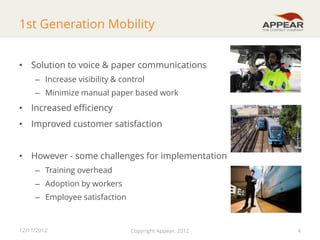
1st Generation Mobility
• Solution to voice & paper communications
– Increase visibility & control
– Minimize manual paper based work

• Increased efficiency
• Improved customer satisfaction
• However - some challenges for implementation
– Training overhead
– Adoption by workers
– Employee satisfaction

12/11/2012

Copyright Appear, 2012

4
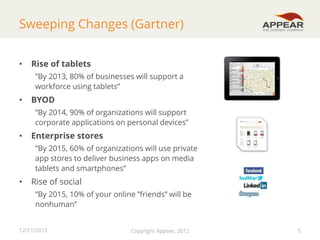
Sweeping Changes (Gartner)
•

Rise of tablets
”By 2013, 80% of businesses will support a
workforce using tablets”

•

BYOD
”By 2014, 90% of organizations will support
corporate applications on personal devices”

•

Enterprise stores
”By 2015, 60% of organizations will use private
app stores to deliver business apps on media
tablets and smartphones”

•

Rise of social
”By 2015, 10% of your online ”friends” will be
nonhuman”

12/11/2012

Copyright Appear, 2012

5
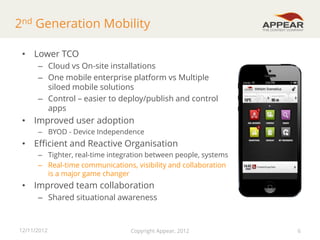
2nd Generation Mobility
• Lower TCO
– Cloud vs On-site installations
– One mobile enterprise platform vs Multiple
siloed mobile solutions
– Control – easier to deploy/publish and control
apps

• Improved user adoption
– BYOD - Device Independence

• Efficient and Reactive Organisation
– Tighter, real-time integration between people, systems
– Real-time communications, visibility and collaboration
is a major game changer

• Improved team collaboration
– Shared situational awareness

12/11/2012

Copyright Appear, 2012

6
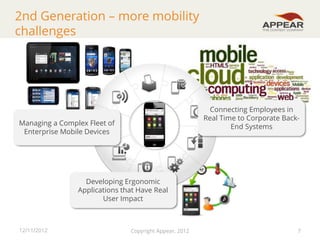
2nd Generation – more mobility
challenges

Connecting Employees in
Real Time to Corporate BackEnd Systems

Managing a Complex Fleet of
Enterprise Mobile Devices

Developing Ergonomic
Applications that Have Real
User Impact

12/11/2012

Copyright Appear, 2012

7
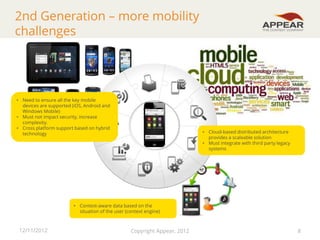
2nd Generation – more mobility
challenges

• Need to ensure all the key mobile
devices are supported (iOS, Android and
Windows Mobile)
• Must not impact security, increase
complexity.
• Cross platform support based on hybrid
technology

• Cloud-based distributed architecture
provides a scaleable solution
• Must integrate with third party legacy
systems

• Context-aware data based on the
situation of the user (context engine)

12/11/2012

Copyright Appear, 2012

8
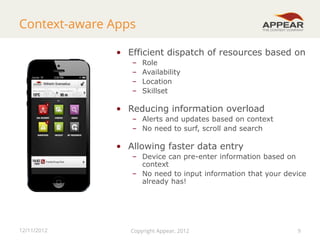
Context-aware Apps
• Efficient dispatch of resources based on
–
–
–
–

Role
Availability
Location
Skillset

• Reducing information overload
– Alerts and updates based on context
– No need to surf, scroll and search

• Allowing faster data entry
– Device can pre-enter information based on
context
– No need to input information that your device
already has!

12/11/2012

Copyright Appear, 2012

9

9
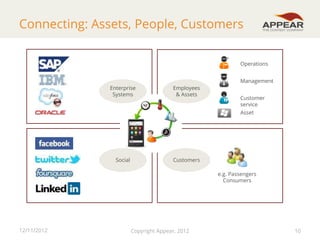
Connecting: Assets, People, Customers
Operations
Management
Enterprise
Systems

Employees
& Assets

Customer
service
Asset

Social

Customers
e.g. Passengers
Consumers

12/11/2012

Copyright Appear, 2012

10
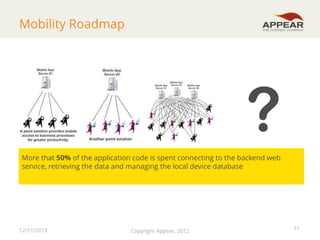
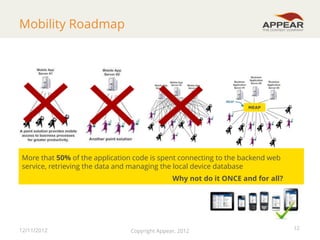
Mobility Roadmap

?
More that 50% of the application code is spent connecting to the backend web
service, retrieving the data and managing the local device database

12/11/2012

Copyright Appear, 2012

11
Mobility Roadmap

MEAP

More that 50% of the application code is spent connecting to the backend web
service, retrieving the data and managing the local device database
Why not do it ONCE and for all?

12/11/2012

Copyright Appear, 2012

12
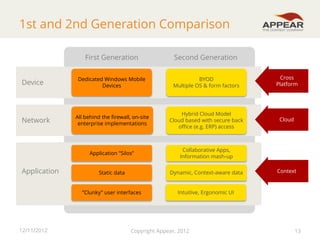
1st and 2nd Generation Comparison
First Generation

Application

12/11/2012

BYOD
Multiple OS & form factors

Cross
Platform

All behind the firewall, on-site
enterprise implementations

Hybrid Cloud Model
Cloud based with secure back
office (e.g. ERP) access

Cloud

Collaborative Apps,
Information mash-up

Static data

Dynamic, Context-aware data

”Clunky” user interfaces

Network

Dedicated Windows Mobile
Devices

Application ”Silos”

Device

Second Generation

Intuitive, Ergonomic UI

Copyright Appear, 2012

Context

13
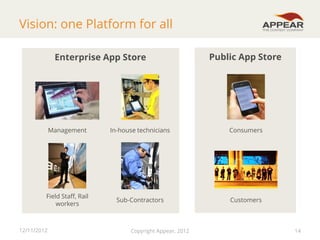
Vision: one Platform for all
Enterprise App Store

Public App Store

Management

In-house technicians

Consumers

Field Staff, Rail
workers

Sub-Contractors

Customers

12/11/2012

Copyright Appear, 2012

14
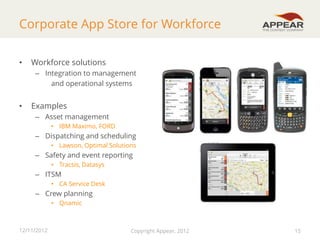
Corporate App Store for Workforce
•

Workforce solutions
– Integration to management
and operational systems

•

Examples
– Asset management
• IBM Maximo, FORD

– Dispatching and scheduling
• Lawson, Optimal Solutions

– Safety and event reporting
• Tracsis, Datasys

– ITSM
• CA Service Desk

– Crew planning
• Qnamic

12/11/2012

Copyright Appear, 2012

15
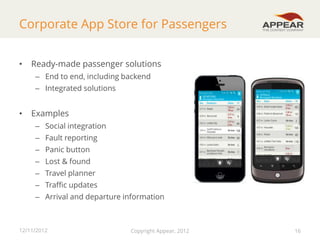
Corporate App Store for Passengers
•

Ready-made passenger solutions
– End to end, including backend
– Integrated solutions

•

Examples
– Social integration
– Fault reporting
– Panic button

– Lost & found
– Travel planner
– Traffic updates
– Arrival and departure information

12/11/2012

Copyright Appear, 2012

16
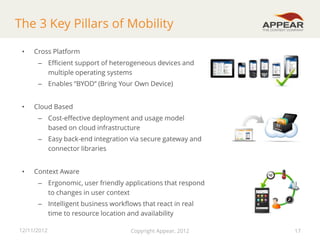
The 3 Key Pillars of Mobility
•

Cross Platform
– Efficient support of heterogeneous devices and
multiple operating systems
– Enables “BYOD” (Bring Your Own Device)

•

Cloud Based
– Cost-effective deployment and usage model
based on cloud infrastructure

– Easy back-end integration via secure gateway and
connector libraries
•

Context Aware

– Ergonomic, user friendly applications that respond
to changes in user context
– Intelligent business workflows that react in real
time to resource location and availability
12/11/2012

Copyright Appear, 2012

17
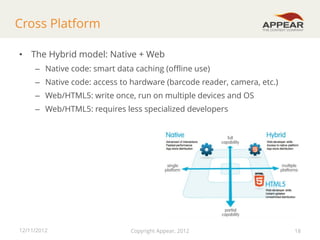
Cross Platform
• The Hybrid model: Native + Web
– Native code: smart data caching (offline use)
– Native code: access to hardware (barcode reader, camera, etc.)
– Web/HTML5: write once, run on multiple devices and OS
– Web/HTML5: requires less specialized developers

12/11/2012

Copyright Appear, 2012

18
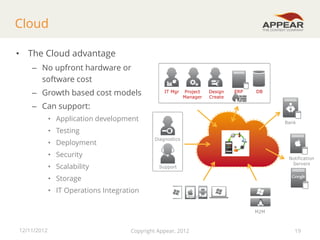
Cloud
• The Cloud advantage
– No upfront hardware or
software cost

– Growth based cost models

IT Mgr

Project
Manager

Design
Create

ERP

DB

– Can support:
• Application development

Bank

• Testing
Diagnostics

• Deployment
• Security
• Scalability

Notification
Servers

Support

• Storage
• IT Operations Integration

Devices
M2M

12/11/2012

Copyright Appear, 2012

19
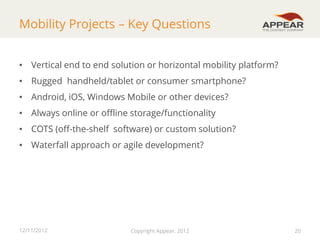
Mobility Projects – Key Questions
• Vertical end to end solution or horizontal mobility platform?
• Rugged handheld/tablet or consumer smartphone?
• Android, iOS, Windows Mobile or other devices?

• Always online or offline storage/functionality
• COTS (off-the-shelf software) or custom solution?
• Waterfall approach or agile development?

12/11/2012

Copyright Appear, 2012

20
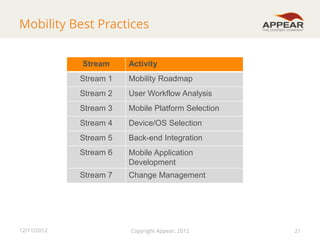
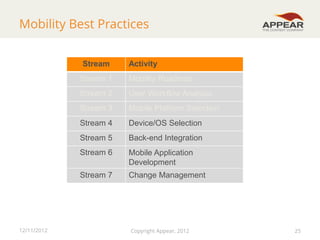
Mobility Best Practices
Stream

Activity

Stream 1
Stream 2

User Workflow Analysis

Stream 3

Mobile Platform Selection

Stream 4

Device/OS Selection

Stream 5

Back-end Integration

Stream 6

Mobile Application
Development

Stream 7

12/11/2012

Mobility Roadmap

Change Management

Copyright Appear, 2012

21
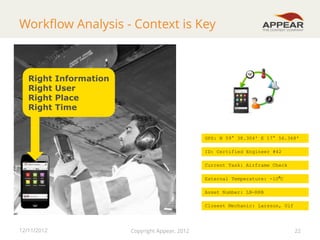
Workflow Analysis - Context is Key

Right
Right
Right
Right

Information
User
Place
Time

GPS: N 59° 38.304' E 17° 56.368'
ID: Certified Engineer #42
Current Task: Airframe Check
External Temperature: -10⁰C

Asset Number: LN-RRB
Closest Mechanic: Larsson, Ulf

12/11/2012

Copyright Appear, 2012

22
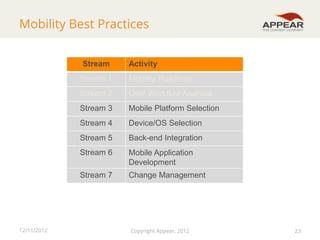
Mobility Best Practices
Stream

Activity

Stream 1
Stream 2

User Workflow Analysis

Stream 3

Mobile Platform Selection

Stream 4

Device/OS Selection

Stream 5

Back-end Integration

Stream 6

Mobile Application
Development

Stream 7

12/11/2012

Mobility Roadmap

Change Management

Copyright Appear, 2012

23
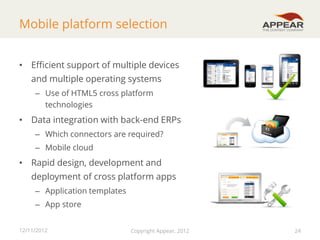
Mobile platform selection
• Efficient support of multiple devices
and multiple operating systems
– Use of HTML5 cross platform
technologies

• Data integration with back-end ERPs
– Which connectors are required?
– Mobile cloud

• Rapid design, development and
deployment of cross platform apps
– Application templates

– App store
12/11/2012

Copyright Appear, 2012

24
Mobility Best Practices
Stream

Activity

Stream 1
Stream 2

User Workflow Analysis

Stream 3

Mobile Platform Selection

Stream 4

Device/OS Selection

Stream 5

Back-end Integration

Stream 6

Mobile Application
Development

Stream 7

12/11/2012

Mobility Roadmap

Change Management

Copyright Appear, 2012

25
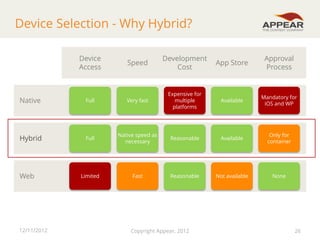
Device Selection - Why Hybrid?
Device
Access

Speed

Development
Cost

App Store

Approval
Process

Available

Mandatory for
iOS and WP

Native

Full

Very fast

Expensive for
multiple
platforms

Hybrid

Full

Native speed as
necessary

Reasonable

Available

Only for
container

Limited

Fast

Reasonable

Not available

None

Web

12/11/2012

Copyright Appear, 2012

26
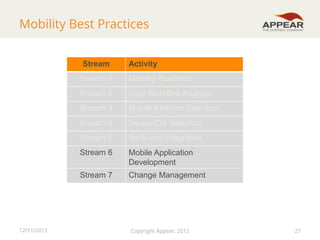
Mobility Best Practices
Stream

Activity

Stream 1
Stream 2

User Workflow Analysis

Stream 3

Mobile Platform Selection

Stream 4

Device/OS Selection

Stream 5

Back-end Integration

Stream 6

Mobile Application
Development

Stream 7

12/11/2012

Mobility Roadmap

Change Management

Copyright Appear, 2012

27
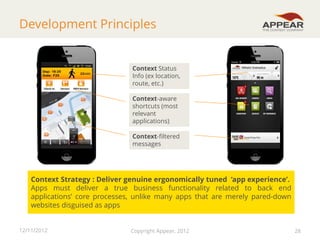
Development Principles

Context Status
Info (ex location,
route, etc.)
Context-aware
shortcuts (most
relevant
applications)

Context-filtered
messages

Context Strategy : Deliver genuine ergonomically tuned ‘app experience’.
Apps must deliver a true business functionality related to back end
applications’ core processes, unlike many apps that are merely pared-down
websites disguised as apps
12/11/2012

Copyright Appear, 2012

28

28
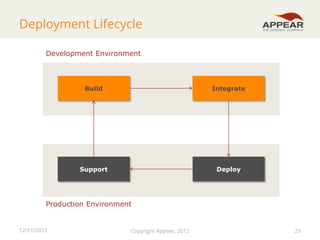
Deployment Lifecycle
Development Environment

Build

Integrate

Support

Deploy

Production Environment

12/11/2012

Copyright Appear, 2012

29
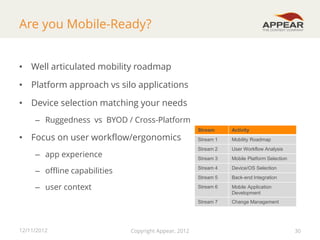
Are you Mobile-Ready?
• Well articulated mobility roadmap
• Platform approach vs silo applications
• Device selection matching your needs
– Ruggedness vs BYOD / Cross-Platform
Stream

Activity

Stream 1

Mobility Roadmap

– app experience

Stream 2

User Workflow Analysis

Stream 3

Mobile Platform Selection

– offline capabilities

Stream 4

Device/OS Selection

Stream 5

Back-end Integration

Stream 6

Mobile Application
Development

Stream 7

Change Management

• Focus on user workflow/ergonomics

– user context

12/11/2012

Copyright Appear, 2012

30
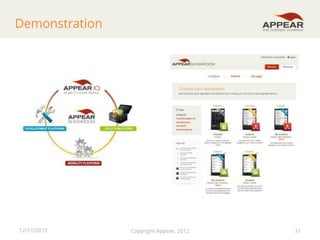
Demonstration

12/11/2012

Copyright Appear, 2012

31
Appear IQ 8

Thank you for
joining this webinar.

Mobility. Made simple.
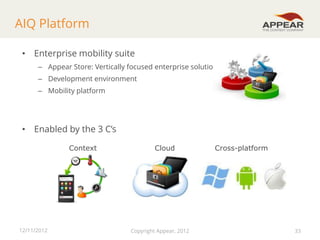
AIQ Platform
• Enterprise mobility suite
– Appear Store: Vertically focused enterprise solutions
– Development environment

– Mobility platform

• Enabled by the 3 C’s
Context

12/11/2012

Cloud

Copyright Appear, 2012

Cross-platform

33
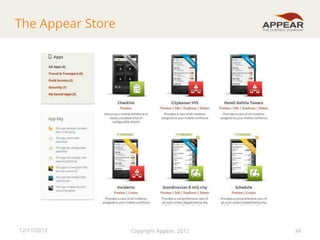
The Appear Store

12/11/2012

Copyright Appear, 2012

34
What we do
•

Appear develops a cloud-based mobile enterprise solution combining a
cross-platform development platform, a context-aware mobility platform
and a vertical application store

•

Enterprise mobility specialist
– Over 12 yrs R&D in mobile technology

•

Strong track record in Transport, Logistics, Field Service

•

Focus on developing eco systems
– Systems Integration
– Technology partners

– VAR

12/11/2012

Copyright Appear, 2012

35
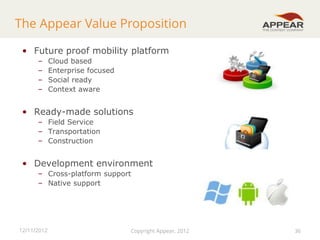
The Appear Value Proposition
• Future proof mobility platform
–
–
–
–

Cloud based
Enterprise focused
Social ready
Context aware

• Ready-made solutions
– Field Service
– Transportation
– Construction

• Development environment
– Cross-platform support
– Native support

12/11/2012

Copyright Appear, 2012

36
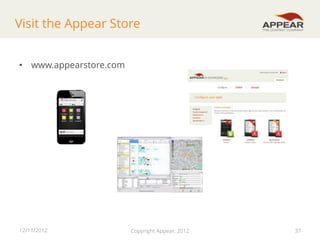
Visit the Appear Store
• www.appearstore.com

12/11/2012

Copyright Appear, 2012

37
Appear IQ 8

Mobility. Made simple.

Thank you

Webinar: Learn how to migrate mobile workers to next generation mobility

  • 1.
    Webinar - Howto to migrate mobile workers to next generation mobility 6th December 2012 Mobility. Made simple.
  • 2.
    Many mobile employees Operations FieldService 12/11/2012 Customer Service Public Safety & Security Copyright Appear, 2012 2
  • 3.
    But are theyequipped for 2013? Here’s your train: its on platform 3, delayed by 5 minutes. If you run you might just make it !! Information Gap • Poor customer service • Employee frustration • Inefficient operations • SLA breaches = penalties Source: Railway Union Blog 12/11/2012 Copyright Appear, 2012 3
  • 4.
    1st Generation Mobility •Solution to voice & paper communications – Increase visibility & control – Minimize manual paper based work • Increased efficiency • Improved customer satisfaction • However - some challenges for implementation – Training overhead – Adoption by workers – Employee satisfaction 12/11/2012 Copyright Appear, 2012 4
  • 5.
    Sweeping Changes (Gartner) • Riseof tablets ”By 2013, 80% of businesses will support a workforce using tablets” • BYOD ”By 2014, 90% of organizations will support corporate applications on personal devices” • Enterprise stores ”By 2015, 60% of organizations will use private app stores to deliver business apps on media tablets and smartphones” • Rise of social ”By 2015, 10% of your online ”friends” will be nonhuman” 12/11/2012 Copyright Appear, 2012 5
  • 6.
    2nd Generation Mobility •Lower TCO – Cloud vs On-site installations – One mobile enterprise platform vs Multiple siloed mobile solutions – Control – easier to deploy/publish and control apps • Improved user adoption – BYOD - Device Independence • Efficient and Reactive Organisation – Tighter, real-time integration between people, systems – Real-time communications, visibility and collaboration is a major game changer • Improved team collaboration – Shared situational awareness 12/11/2012 Copyright Appear, 2012 6
  • 7.
    2nd Generation –more mobility challenges Connecting Employees in Real Time to Corporate BackEnd Systems Managing a Complex Fleet of Enterprise Mobile Devices Developing Ergonomic Applications that Have Real User Impact 12/11/2012 Copyright Appear, 2012 7
  • 8.
    2nd Generation –more mobility challenges • Need to ensure all the key mobile devices are supported (iOS, Android and Windows Mobile) • Must not impact security, increase complexity. • Cross platform support based on hybrid technology • Cloud-based distributed architecture provides a scaleable solution • Must integrate with third party legacy systems • Context-aware data based on the situation of the user (context engine) 12/11/2012 Copyright Appear, 2012 8
  • 9.
    Context-aware Apps • Efficientdispatch of resources based on – – – – Role Availability Location Skillset • Reducing information overload – Alerts and updates based on context – No need to surf, scroll and search • Allowing faster data entry – Device can pre-enter information based on context – No need to input information that your device already has! 12/11/2012 Copyright Appear, 2012 9 9
  • 10.
    Connecting: Assets, People,Customers Operations Management Enterprise Systems Employees & Assets Customer service Asset Social Customers e.g. Passengers Consumers 12/11/2012 Copyright Appear, 2012 10
  • 11.
    Mobility Roadmap ? More that50% of the application code is spent connecting to the backend web service, retrieving the data and managing the local device database 12/11/2012 Copyright Appear, 2012 11
  • 12.
    Mobility Roadmap MEAP More that50% of the application code is spent connecting to the backend web service, retrieving the data and managing the local device database Why not do it ONCE and for all? 12/11/2012 Copyright Appear, 2012 12
  • 13.
    1st and 2ndGeneration Comparison First Generation Application 12/11/2012 BYOD Multiple OS & form factors Cross Platform All behind the firewall, on-site enterprise implementations Hybrid Cloud Model Cloud based with secure back office (e.g. ERP) access Cloud Collaborative Apps, Information mash-up Static data Dynamic, Context-aware data ”Clunky” user interfaces Network Dedicated Windows Mobile Devices Application ”Silos” Device Second Generation Intuitive, Ergonomic UI Copyright Appear, 2012 Context 13
  • 14.
    Vision: one Platformfor all Enterprise App Store Public App Store Management In-house technicians Consumers Field Staff, Rail workers Sub-Contractors Customers 12/11/2012 Copyright Appear, 2012 14
  • 15.
    Corporate App Storefor Workforce • Workforce solutions – Integration to management and operational systems • Examples – Asset management • IBM Maximo, FORD – Dispatching and scheduling • Lawson, Optimal Solutions – Safety and event reporting • Tracsis, Datasys – ITSM • CA Service Desk – Crew planning • Qnamic 12/11/2012 Copyright Appear, 2012 15
  • 16.
    Corporate App Storefor Passengers • Ready-made passenger solutions – End to end, including backend – Integrated solutions • Examples – Social integration – Fault reporting – Panic button – Lost & found – Travel planner – Traffic updates – Arrival and departure information 12/11/2012 Copyright Appear, 2012 16
  • 17.
    The 3 KeyPillars of Mobility • Cross Platform – Efficient support of heterogeneous devices and multiple operating systems – Enables “BYOD” (Bring Your Own Device) • Cloud Based – Cost-effective deployment and usage model based on cloud infrastructure – Easy back-end integration via secure gateway and connector libraries • Context Aware – Ergonomic, user friendly applications that respond to changes in user context – Intelligent business workflows that react in real time to resource location and availability 12/11/2012 Copyright Appear, 2012 17
  • 18.
    Cross Platform • TheHybrid model: Native + Web – Native code: smart data caching (offline use) – Native code: access to hardware (barcode reader, camera, etc.) – Web/HTML5: write once, run on multiple devices and OS – Web/HTML5: requires less specialized developers 12/11/2012 Copyright Appear, 2012 18
  • 19.
    Cloud • The Cloudadvantage – No upfront hardware or software cost – Growth based cost models IT Mgr Project Manager Design Create ERP DB – Can support: • Application development Bank • Testing Diagnostics • Deployment • Security • Scalability Notification Servers Support • Storage • IT Operations Integration Devices M2M 12/11/2012 Copyright Appear, 2012 19
  • 20.
    Mobility Projects –Key Questions • Vertical end to end solution or horizontal mobility platform? • Rugged handheld/tablet or consumer smartphone? • Android, iOS, Windows Mobile or other devices? • Always online or offline storage/functionality • COTS (off-the-shelf software) or custom solution? • Waterfall approach or agile development? 12/11/2012 Copyright Appear, 2012 20
  • 21.
    Mobility Best Practices Stream Activity Stream1 Stream 2 User Workflow Analysis Stream 3 Mobile Platform Selection Stream 4 Device/OS Selection Stream 5 Back-end Integration Stream 6 Mobile Application Development Stream 7 12/11/2012 Mobility Roadmap Change Management Copyright Appear, 2012 21
  • 22.
    Workflow Analysis -Context is Key Right Right Right Right Information User Place Time GPS: N 59° 38.304' E 17° 56.368' ID: Certified Engineer #42 Current Task: Airframe Check External Temperature: -10⁰C Asset Number: LN-RRB Closest Mechanic: Larsson, Ulf 12/11/2012 Copyright Appear, 2012 22
  • 23.
    Mobility Best Practices Stream Activity Stream1 Stream 2 User Workflow Analysis Stream 3 Mobile Platform Selection Stream 4 Device/OS Selection Stream 5 Back-end Integration Stream 6 Mobile Application Development Stream 7 12/11/2012 Mobility Roadmap Change Management Copyright Appear, 2012 23
  • 24.
    Mobile platform selection •Efficient support of multiple devices and multiple operating systems – Use of HTML5 cross platform technologies • Data integration with back-end ERPs – Which connectors are required? – Mobile cloud • Rapid design, development and deployment of cross platform apps – Application templates – App store 12/11/2012 Copyright Appear, 2012 24
  • 25.
    Mobility Best Practices Stream Activity Stream1 Stream 2 User Workflow Analysis Stream 3 Mobile Platform Selection Stream 4 Device/OS Selection Stream 5 Back-end Integration Stream 6 Mobile Application Development Stream 7 12/11/2012 Mobility Roadmap Change Management Copyright Appear, 2012 25
  • 26.
    Device Selection -Why Hybrid? Device Access Speed Development Cost App Store Approval Process Available Mandatory for iOS and WP Native Full Very fast Expensive for multiple platforms Hybrid Full Native speed as necessary Reasonable Available Only for container Limited Fast Reasonable Not available None Web 12/11/2012 Copyright Appear, 2012 26
  • 27.
    Mobility Best Practices Stream Activity Stream1 Stream 2 User Workflow Analysis Stream 3 Mobile Platform Selection Stream 4 Device/OS Selection Stream 5 Back-end Integration Stream 6 Mobile Application Development Stream 7 12/11/2012 Mobility Roadmap Change Management Copyright Appear, 2012 27
  • 28.
    Development Principles Context Status Info(ex location, route, etc.) Context-aware shortcuts (most relevant applications) Context-filtered messages Context Strategy : Deliver genuine ergonomically tuned ‘app experience’. Apps must deliver a true business functionality related to back end applications’ core processes, unlike many apps that are merely pared-down websites disguised as apps 12/11/2012 Copyright Appear, 2012 28 28
  • 29.
  • 30.
    Are you Mobile-Ready? •Well articulated mobility roadmap • Platform approach vs silo applications • Device selection matching your needs – Ruggedness vs BYOD / Cross-Platform Stream Activity Stream 1 Mobility Roadmap – app experience Stream 2 User Workflow Analysis Stream 3 Mobile Platform Selection – offline capabilities Stream 4 Device/OS Selection Stream 5 Back-end Integration Stream 6 Mobile Application Development Stream 7 Change Management • Focus on user workflow/ergonomics – user context 12/11/2012 Copyright Appear, 2012 30
  • 31.
  • 32.
    Appear IQ 8 Thankyou for joining this webinar. Mobility. Made simple.
  • 33.
    AIQ Platform • Enterprisemobility suite – Appear Store: Vertically focused enterprise solutions – Development environment – Mobility platform • Enabled by the 3 C’s Context 12/11/2012 Cloud Copyright Appear, 2012 Cross-platform 33
  • 34.
  • 35.
    What we do • Appeardevelops a cloud-based mobile enterprise solution combining a cross-platform development platform, a context-aware mobility platform and a vertical application store • Enterprise mobility specialist – Over 12 yrs R&D in mobile technology • Strong track record in Transport, Logistics, Field Service • Focus on developing eco systems – Systems Integration – Technology partners – VAR 12/11/2012 Copyright Appear, 2012 35
  • 36.
    The Appear ValueProposition • Future proof mobility platform – – – – Cloud based Enterprise focused Social ready Context aware • Ready-made solutions – Field Service – Transportation – Construction • Development environment – Cross-platform support – Native support 12/11/2012 Copyright Appear, 2012 36
  • 37.
    Visit the AppearStore • www.appearstore.com 12/11/2012 Copyright Appear, 2012 37
  • 38.
    Appear IQ 8 Mobility.Made simple. Thank you