
Palwinder Singh
Senior Systems Engineer
Steve Campbell
Practice Lead
Skype for Business
Cloud PBX
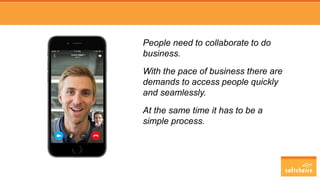
People need to collaborate to do
business.
With the pace of business there are
demands to access people quickly
and seamlessly.
At the same time it has to be a
simple process.
Presenters
Steve Campbell
Practice Lead
steve.campbell@softchoice.com
Palwinder Singh
Senior Systems Engineer
palwinder.singh@softchoice.com
What is Cloud PBX / PSTN Calling / PSTN Conferencing
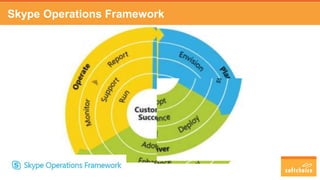
Skype Operations Framework
VoIP Readiness Assessment
Adoption Practices
Deployment Options
Licensing & Calling Plans
Next Steps
Questions & Answers
Agenda
Why Skype for Business?
Any Device, Anywhere, Anytime
Cohesive User Experience
Inter-organizational collaboration
Cost Savings
Cloud PBX Myths and Facts
Myth: Cloud PBX is only available in the US
Cloud PBX is available worldwide.
Fact: PSTN Calling is available in select countries
today.
US, Puerto Rico, UK, Ireland, Netherlands, France and Spain.
What is Microsoft Cloud PBX?
• Cloud PBX
• PSTN Calling
• PSTN Conferencing
Why Cloud PBX?
• Vendor longevity in question
• VoIP systems have been in production for
over 12 years
• Nearly 50% of all end points are still digital.
• Most legacy telephony systems have been out
of support for over 5 years
• Global phone systems in Office 365
Microsoft Cloud PBX Features
• Features
Call answer/initiate (by name and
number)
Device switching
Call delegation and call on-behalf Distinctive Ringing
Call forwarding and simultaneous ringing Do-not-disturb routing
Call history Make Skype for Business calls using your desk phone for
audio
Call hold/retrieve Integrated dial-pad
Call transfer (blind, consult, and mobile) Music on hold
Caller ID Team calling
Auto Attendant Video call monitor
Call Queues Voicemail
PSTN Calling
• Reduced complexity
• Number porting and E-911
• Simple calling plans
PSTN Conferencing
• Dial-in conferencing
• Dial-out conferencing
• Decrease costs
Maximizing value from voice
Below is a roadmap of the Skype for Business voice capabilities to adopt. The value increases
as you move through each step
Use Skype for Business
for all your voice needs
• One communication tool
• Lower TCO
• Avoid redundant systems
• Integrated and single directory
Connect to the PSTN
• More predictable pricing
• Ease of procurement
• Fast enablement of phone numbers
• PSTN Calling (coming soon)
• Hybrid/CCE deployments
• Simple and central management
Use Cloud PBX
321
IT
Value
Business
Value
• Single administration
• Ease of on/off-boarding
• Greater insights on usage and control
• Anywhere business phone
• Vendor consolidation
Q&A
Skype Operations Framework
VoIP Readiness Assessment
Identify potential network challenges
Skype for Business quality relies on
network quality
Manage risks
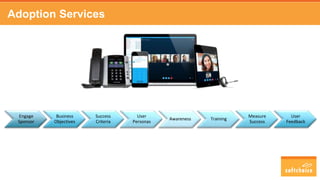
Adoption Services
Engage
Sponsor
Business
Objectives
Success
Criteria
User
Personas
Awareness Training
Measure
Success
User
Feedback
User Personas
PERSONA REQUIREMENTS DEVICE TYPE
Road warrior Portable and easily accessible devices that can be used in hotels,
airports, and remote offices
Bluetooth, earpiece headset
Executive admin Phone with transfer functions; transportable headset to quickly
roam the office without interruption
High-end desk phone, plus option for
wireless/USB headset
Information
worker
Comfortable device that can withstand many meetings
throughout the day
Headset and good quality webcam
User Devices
• Desktop clients
• Mobile clients (iOS/Android)
• Desk phones
• Headsets
• Speaker Phones
• Meeting-room systems
Find the latest and greatest approved Skype for Business devices at:
http://partnersolutions.skypeforbusiness.com/solutionscatalog
Large selection of end user devices
On-Premises Hybrid Online
Flexible Deployment Options
End-user features & customer PSTN
services integrated on-premises
• Control
• Integration
• Compliance
• Dedicated hardware
Users online or on-premises; integration
with PSTN services on-premises
• Flexibility and scale
• Increased functionalities
• Cloud connected
• Extend reach
Cloud PBX in Office 365;
PSTN services provided by Microsoft
• Reduced capital costs
• Reduced overhead
• O365 reliability
• Instant scale
Cloud Connector Edition Appliance
• Single appliance solution
• Simply connects Cloud PBX to your current PBX or telephone lines
• Deployed in your existing network closet or datacenter
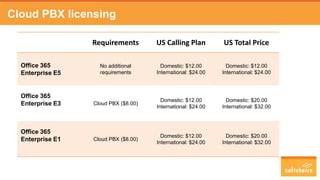
Cloud PBX licensing
Requirements US Calling Plan US Total Price
Office 365
Enterprise E5
No additional
requirements
Domestic: $12.00
International: $24.00
Domestic: $12.00
International: $24.00
Office 365
Enterprise E3 Cloud PBX ($8.00)
Domestic: $12.00
International: $24.00
Domestic: $20.00
International: $32.00
Office 365
Enterprise E1 Cloud PBX ($8.00)
Domestic: $12.00
International: $24.00
Domestic: $20.00
International: $32.00
Calling Plans
• Microsoft calling plans in US
– Domestic
– International
• Pooled Minutes
– Pooled minutes at tenant level
– Peer to peer calling does not use allocated minutes
• Consumption Billing
Is this right for you?
• Business Productivity
Assessment
• Customer Immersion
Experience
• Promo Package
Q&A
Presenters
Steve Campbell
Practice Lead
steve.campbell@softchoice.com
Palwinder Singh
Senior Systems Engineer
palwinder.singh@softchoice.com

Webinar | Cloud PBX and Skype

  • 1.
    Palwinder Singh Senior SystemsEngineer Steve Campbell Practice Lead Skype for Business Cloud PBX
  • 2.
    People need tocollaborate to do business. With the pace of business there are demands to access people quickly and seamlessly. At the same time it has to be a simple process.
  • 3.
    Presenters Steve Campbell Practice Lead steve.campbell@softchoice.com PalwinderSingh Senior Systems Engineer palwinder.singh@softchoice.com
  • 4.
    What is CloudPBX / PSTN Calling / PSTN Conferencing Skype Operations Framework VoIP Readiness Assessment Adoption Practices Deployment Options Licensing & Calling Plans Next Steps Questions & Answers Agenda
  • 5.
    Why Skype forBusiness? Any Device, Anywhere, Anytime Cohesive User Experience Inter-organizational collaboration Cost Savings
  • 6.
    Cloud PBX Mythsand Facts Myth: Cloud PBX is only available in the US Cloud PBX is available worldwide. Fact: PSTN Calling is available in select countries today. US, Puerto Rico, UK, Ireland, Netherlands, France and Spain.
  • 7.
    What is MicrosoftCloud PBX? • Cloud PBX • PSTN Calling • PSTN Conferencing
  • 8.
    Why Cloud PBX? •Vendor longevity in question • VoIP systems have been in production for over 12 years • Nearly 50% of all end points are still digital. • Most legacy telephony systems have been out of support for over 5 years • Global phone systems in Office 365
  • 9.
    Microsoft Cloud PBXFeatures • Features Call answer/initiate (by name and number) Device switching Call delegation and call on-behalf Distinctive Ringing Call forwarding and simultaneous ringing Do-not-disturb routing Call history Make Skype for Business calls using your desk phone for audio Call hold/retrieve Integrated dial-pad Call transfer (blind, consult, and mobile) Music on hold Caller ID Team calling Auto Attendant Video call monitor Call Queues Voicemail
  • 10.
    PSTN Calling • Reducedcomplexity • Number porting and E-911 • Simple calling plans
  • 11.
    PSTN Conferencing • Dial-inconferencing • Dial-out conferencing • Decrease costs
  • 12.
    Maximizing value fromvoice Below is a roadmap of the Skype for Business voice capabilities to adopt. The value increases as you move through each step Use Skype for Business for all your voice needs • One communication tool • Lower TCO • Avoid redundant systems • Integrated and single directory Connect to the PSTN • More predictable pricing • Ease of procurement • Fast enablement of phone numbers • PSTN Calling (coming soon) • Hybrid/CCE deployments • Simple and central management Use Cloud PBX 321 IT Value Business Value • Single administration • Ease of on/off-boarding • Greater insights on usage and control • Anywhere business phone • Vendor consolidation
  • 13.
  • 14.
  • 15.
    VoIP Readiness Assessment Identifypotential network challenges Skype for Business quality relies on network quality Manage risks
  • 16.
  • 17.
    User Personas PERSONA REQUIREMENTSDEVICE TYPE Road warrior Portable and easily accessible devices that can be used in hotels, airports, and remote offices Bluetooth, earpiece headset Executive admin Phone with transfer functions; transportable headset to quickly roam the office without interruption High-end desk phone, plus option for wireless/USB headset Information worker Comfortable device that can withstand many meetings throughout the day Headset and good quality webcam
  • 18.
    User Devices • Desktopclients • Mobile clients (iOS/Android) • Desk phones • Headsets • Speaker Phones • Meeting-room systems Find the latest and greatest approved Skype for Business devices at: http://partnersolutions.skypeforbusiness.com/solutionscatalog Large selection of end user devices
  • 19.
    On-Premises Hybrid Online FlexibleDeployment Options End-user features & customer PSTN services integrated on-premises • Control • Integration • Compliance • Dedicated hardware Users online or on-premises; integration with PSTN services on-premises • Flexibility and scale • Increased functionalities • Cloud connected • Extend reach Cloud PBX in Office 365; PSTN services provided by Microsoft • Reduced capital costs • Reduced overhead • O365 reliability • Instant scale
  • 20.
    Cloud Connector EditionAppliance • Single appliance solution • Simply connects Cloud PBX to your current PBX or telephone lines • Deployed in your existing network closet or datacenter
  • 21.
    Cloud PBX licensing RequirementsUS Calling Plan US Total Price Office 365 Enterprise E5 No additional requirements Domestic: $12.00 International: $24.00 Domestic: $12.00 International: $24.00 Office 365 Enterprise E3 Cloud PBX ($8.00) Domestic: $12.00 International: $24.00 Domestic: $20.00 International: $32.00 Office 365 Enterprise E1 Cloud PBX ($8.00) Domestic: $12.00 International: $24.00 Domestic: $20.00 International: $32.00
  • 22.
    Calling Plans • Microsoftcalling plans in US – Domestic – International • Pooled Minutes – Pooled minutes at tenant level – Peer to peer calling does not use allocated minutes • Consumption Billing
  • 23.
    Is this rightfor you? • Business Productivity Assessment • Customer Immersion Experience • Promo Package
  • 24.
  • 25.
    Presenters Steve Campbell Practice Lead steve.campbell@softchoice.com PalwinderSingh Senior Systems Engineer palwinder.singh@softchoice.com