Web Security
Web Security
 Web servers are relatively easy to
Web servers are relatively easy to
configure and manage.
 Web content is increasingly easy to
Web content is increasingly easy to
develop, the underlying software is
extraordinarily complex.
 A Web server can be exploited as a
A Web server can be exploited as a
launching pad into the corporation’s.
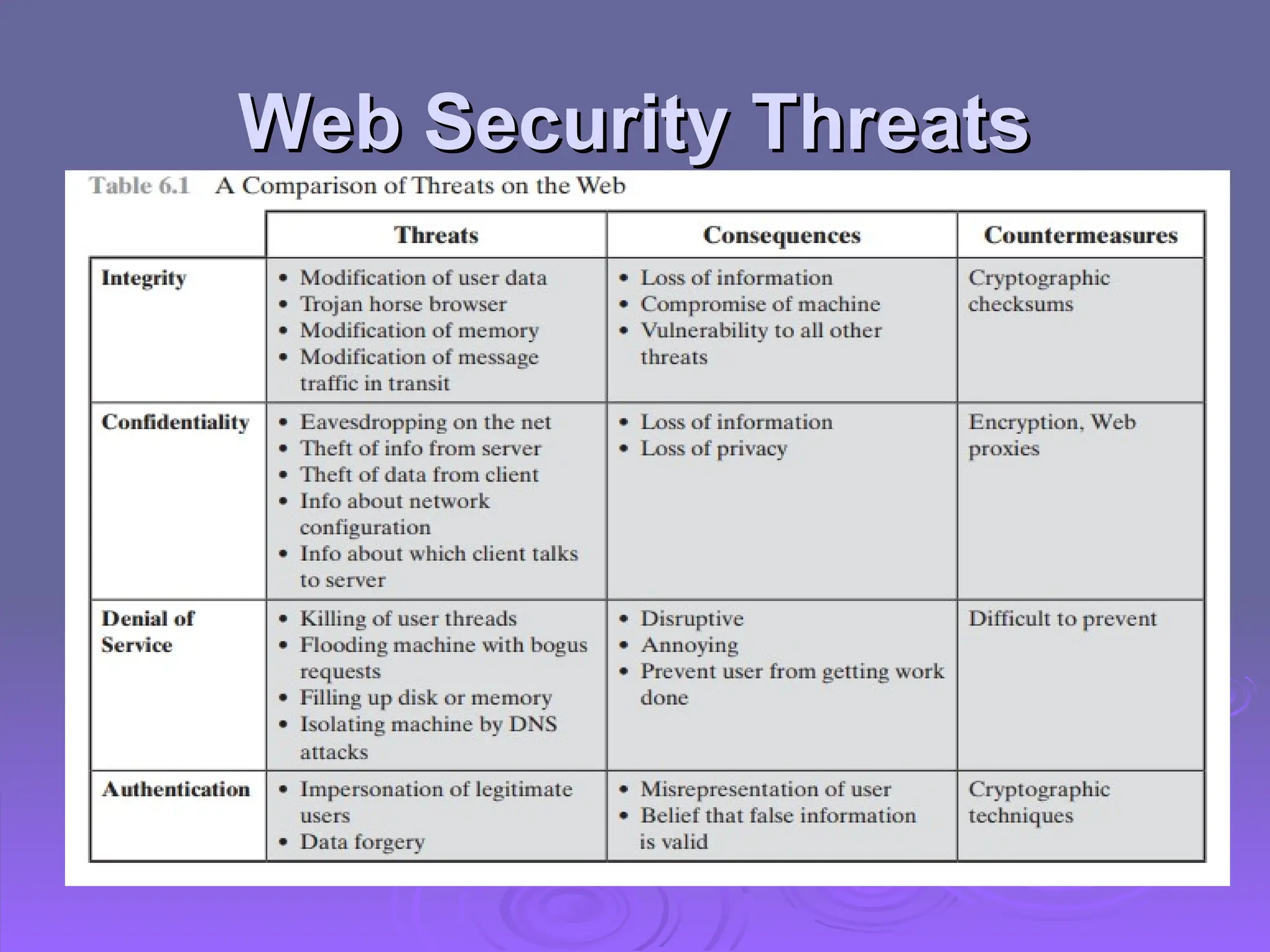
Web Security Threats
 Web now widely used by business,
Web now widely used by business,
government, individuals
 But Internet & Web are vulnerable, and
But Internet & Web are vulnerable, and
have a variety of threats

Integrity
Integrity

Confidentiality
Confidentiality

Denial of service
Denial of service

Authentication
Authentication
 Need added security mechanisms
Need added security mechanisms
Web Security Threats
 In terms of passive and active attacks
In terms of passive and active attacks

Eavesdropping
Eavesdropping

Impersonating a user, altering messages
 In terms of location of the threat
In terms of location of the threat

System: Web server, Web browser

Network: network traffic between browser and
server
server
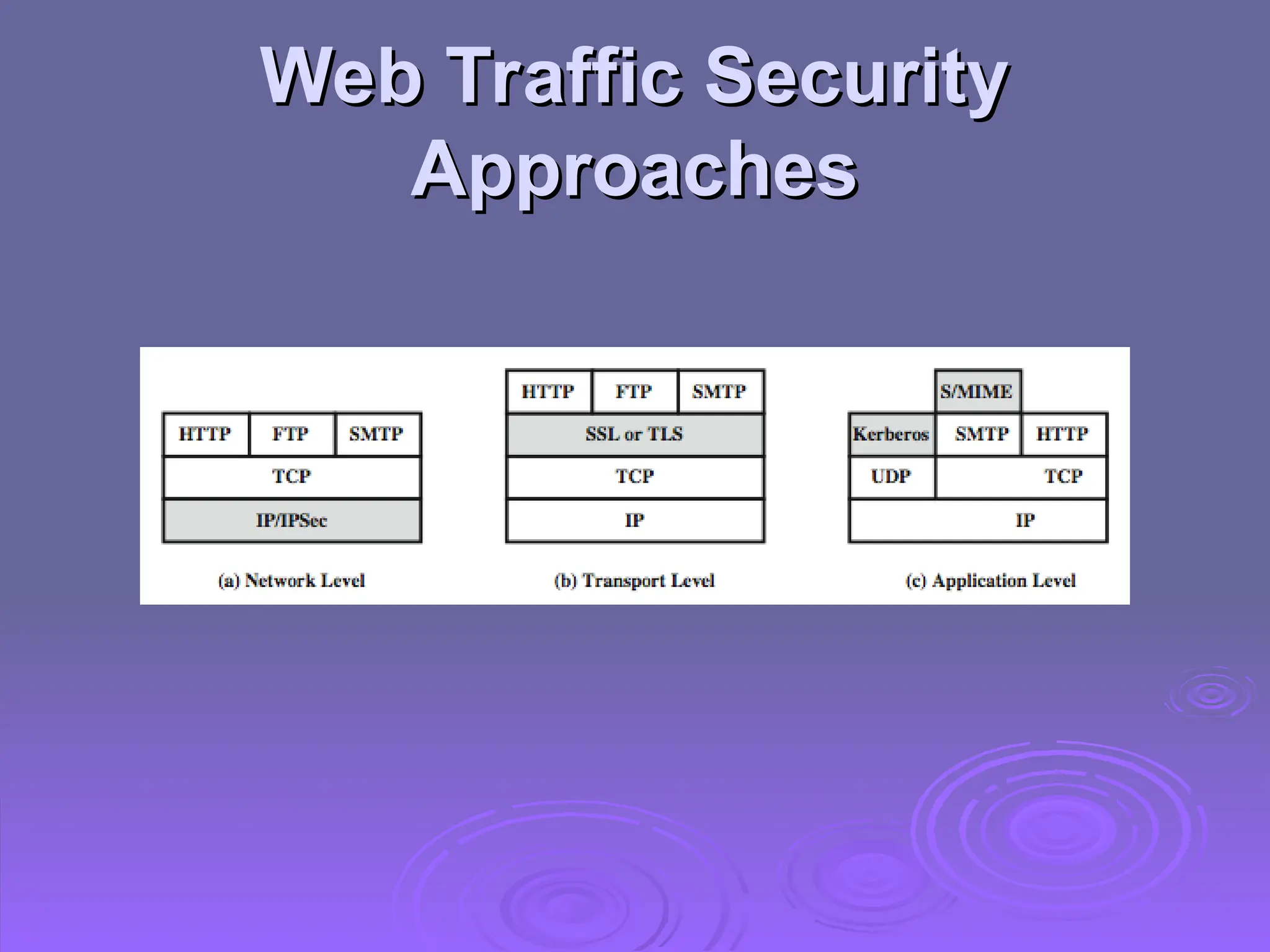
Web Traffic Security
Approaches
Approaches
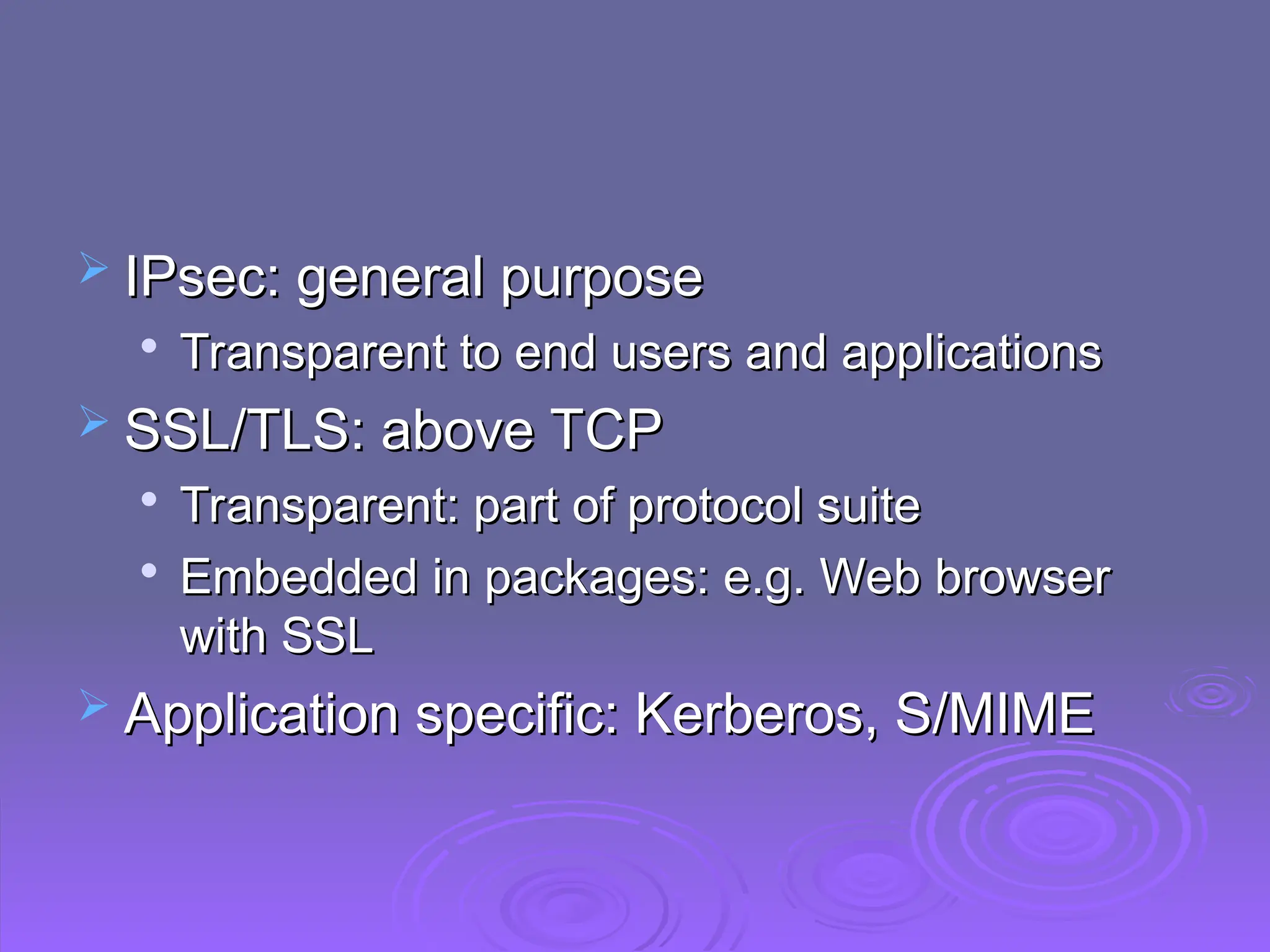
 IPsec: general purpose
IPsec: general purpose

Transparent to end users and applications
 SSL/TLS: above TCP
SSL/TLS: above TCP

Transparent: part of protocol suite

Embedded in packages: e.g. Web browser
with SSL
with SSL
 Application specific: Kerberos, S/MIME
Application specific: Kerberos, S/MIME
SSL (Secure Socket Layer)
 Transport layer security service
Transport layer security service
 Originally developed by Netscape
Originally developed by Netscape
 Version 3 designed with public input
Version 3 designed with public input
(Internet draft)
(Internet draft)
 Subsequently became Internet standard
Subsequently became Internet standard
known as TLS (Transport Layer Security)
 Uses TCP to provide a reliable end-to-end
Uses TCP to provide a reliable end-to-end
service
service
 SSL has two layers of protocols
SSL has two layers of protocols
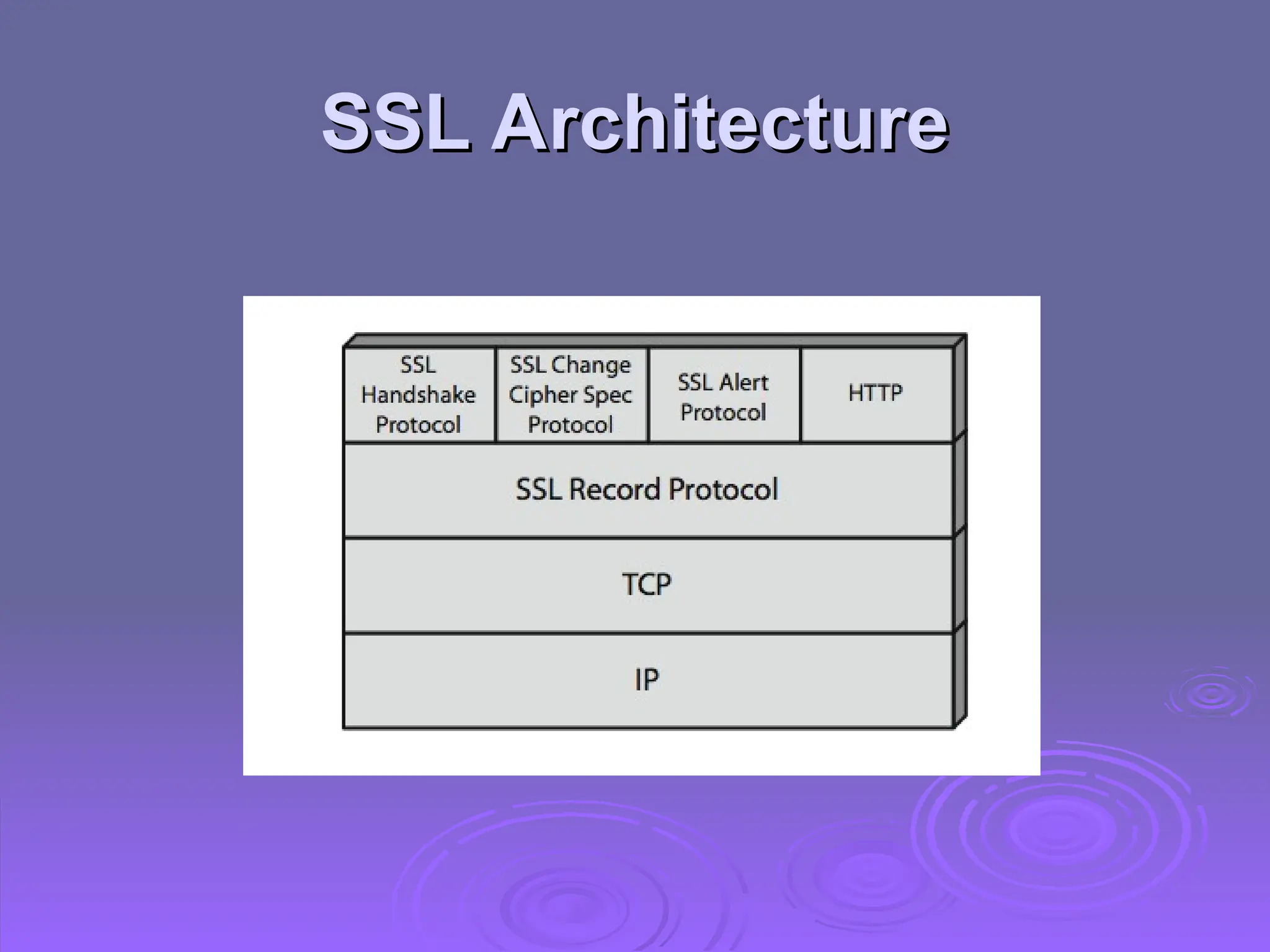
SSL Architecture
SSL Architecture
SSL Architecture
SSL Architecture
 SSL connection
SSL connection

A transient, peer-to-peer, communications link

Associated with 1 SSL session
 SSL session
SSL session

An association between client & server

Created by the Handshake Protocol

Define a set of cryptographic parameters

May be shared by multiple SSL connections
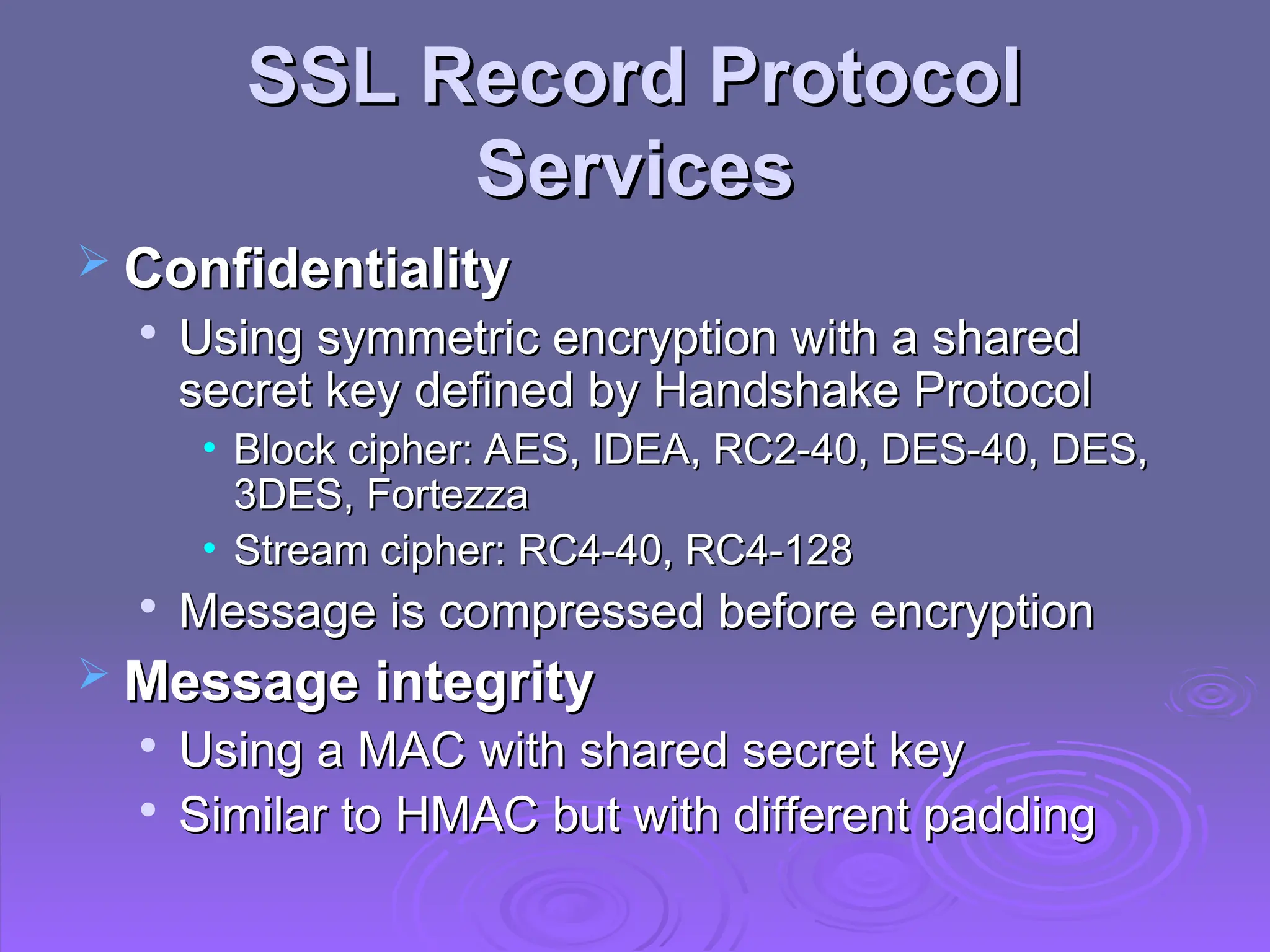
SSL Record Protocol
SSL Record Protocol
Services
Services
 Confidentiality
Confidentiality

Using symmetric encryption with a shared
secret key defined by Handshake Protocol
• Block cipher: AES, IDEA, RC2-40, DES-40, DES,
Block cipher: AES, IDEA, RC2-40, DES-40, DES,
3DES, Fortezza
3DES, Fortezza
• Stream cipher: RC4-40, RC4-128
Stream cipher: RC4-40, RC4-128

Message is compressed before encryption
 Message integrity
Message integrity

Using a MAC with shared secret key

Similar to HMAC but with different padding
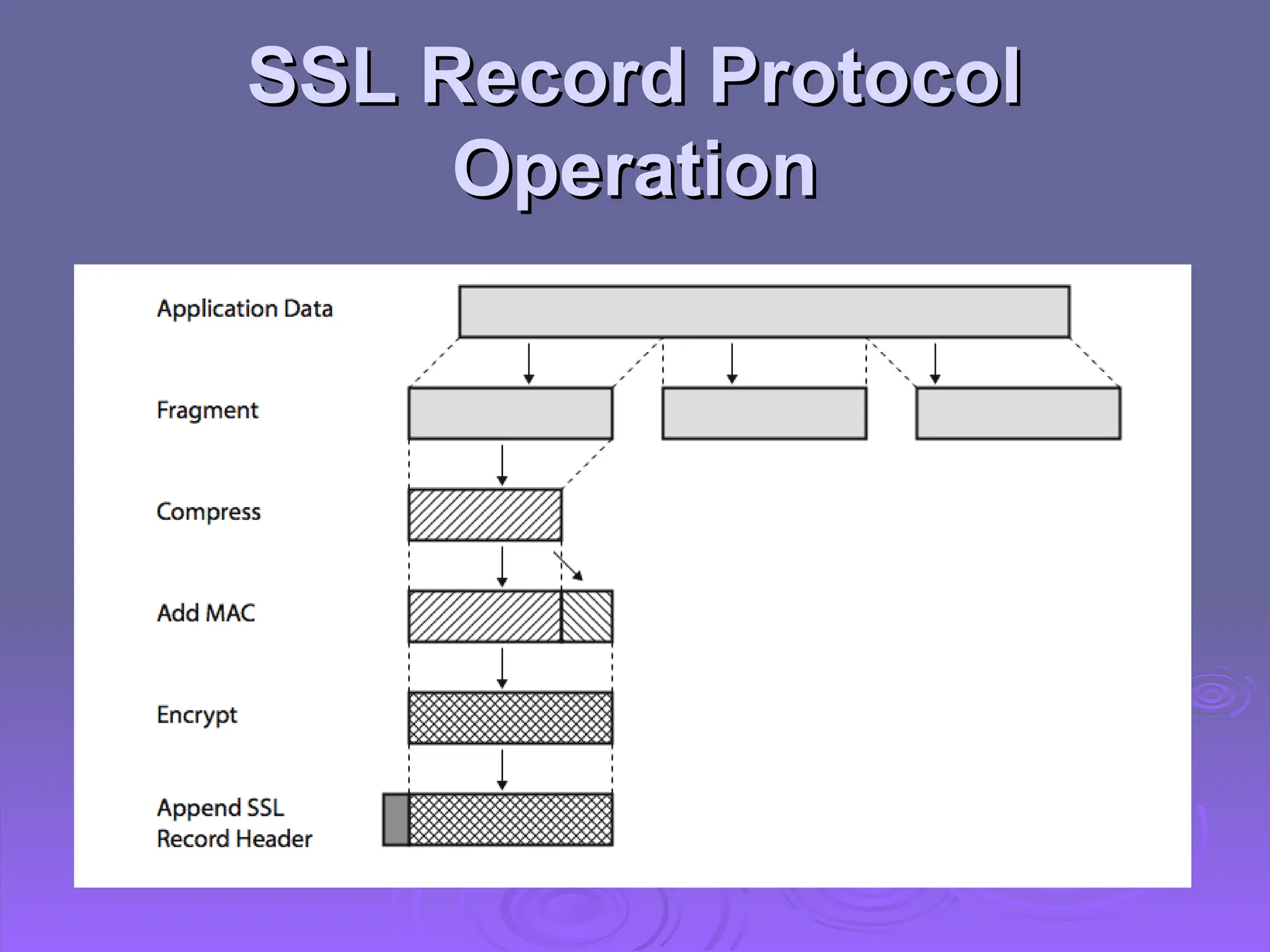
SSL Record Protocol
SSL Record Protocol
Operation
Operation
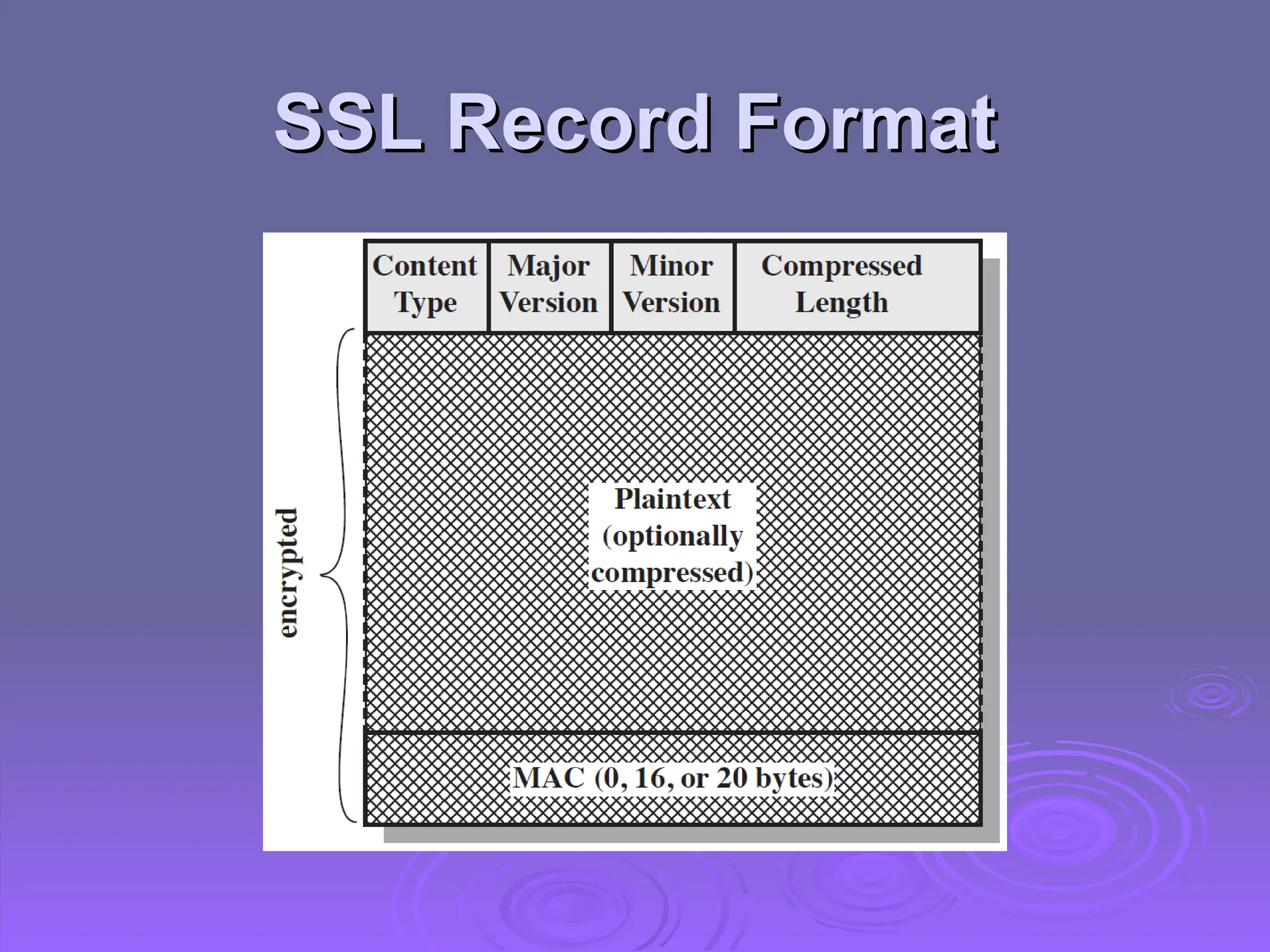
SSL Record Format
SSL Record Format
SSL Change Cipher Spec
Protocol
Protocol
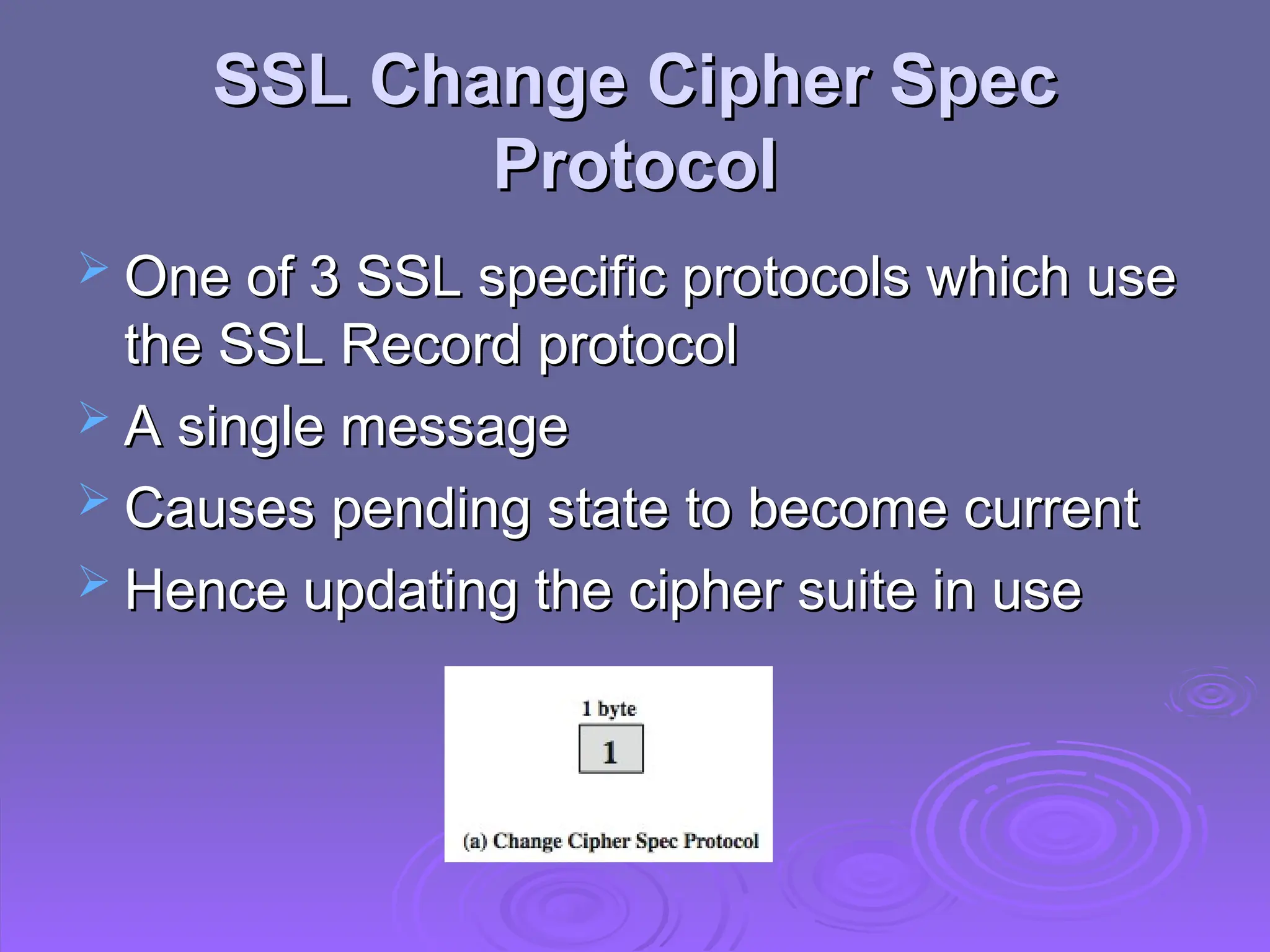
 One of 3 SSL specific protocols which use
One of 3 SSL specific protocols which use
the SSL Record protocol
 A single message
A single message
 Causes pending state to become current
Causes pending state to become current
 Hence updating the cipher suite in use
Hence updating the cipher suite in use
SSL Alert Protocol
SSL Alert Protocol
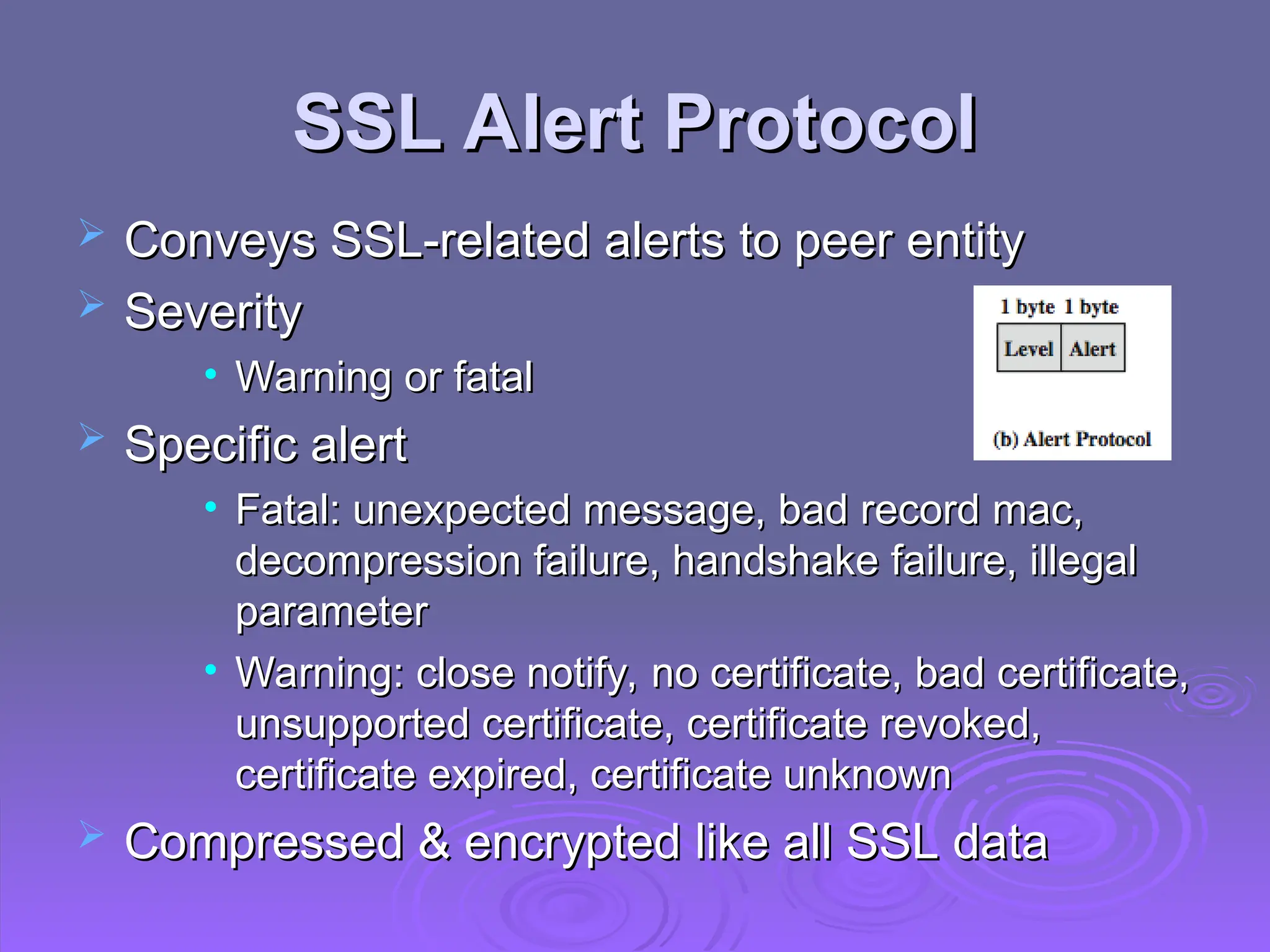
 Conveys SSL-related alerts to peer entity
Conveys SSL-related alerts to peer entity
 Severity
Severity
• Warning or fatal
Warning or fatal
 Specific alert
Specific alert
• Fatal: unexpected message, bad record mac,
Fatal: unexpected message, bad record mac,
decompression failure, handshake failure, illegal
parameter
parameter
• Warning: close notify, no certificate, bad certificate,
Warning: close notify, no certificate, bad certificate,
unsupported certificate, certificate revoked,
certificate expired, certificate unknown
 Compressed & encrypted like all SSL data
Compressed & encrypted like all SSL data
SSL Handshake Protocol
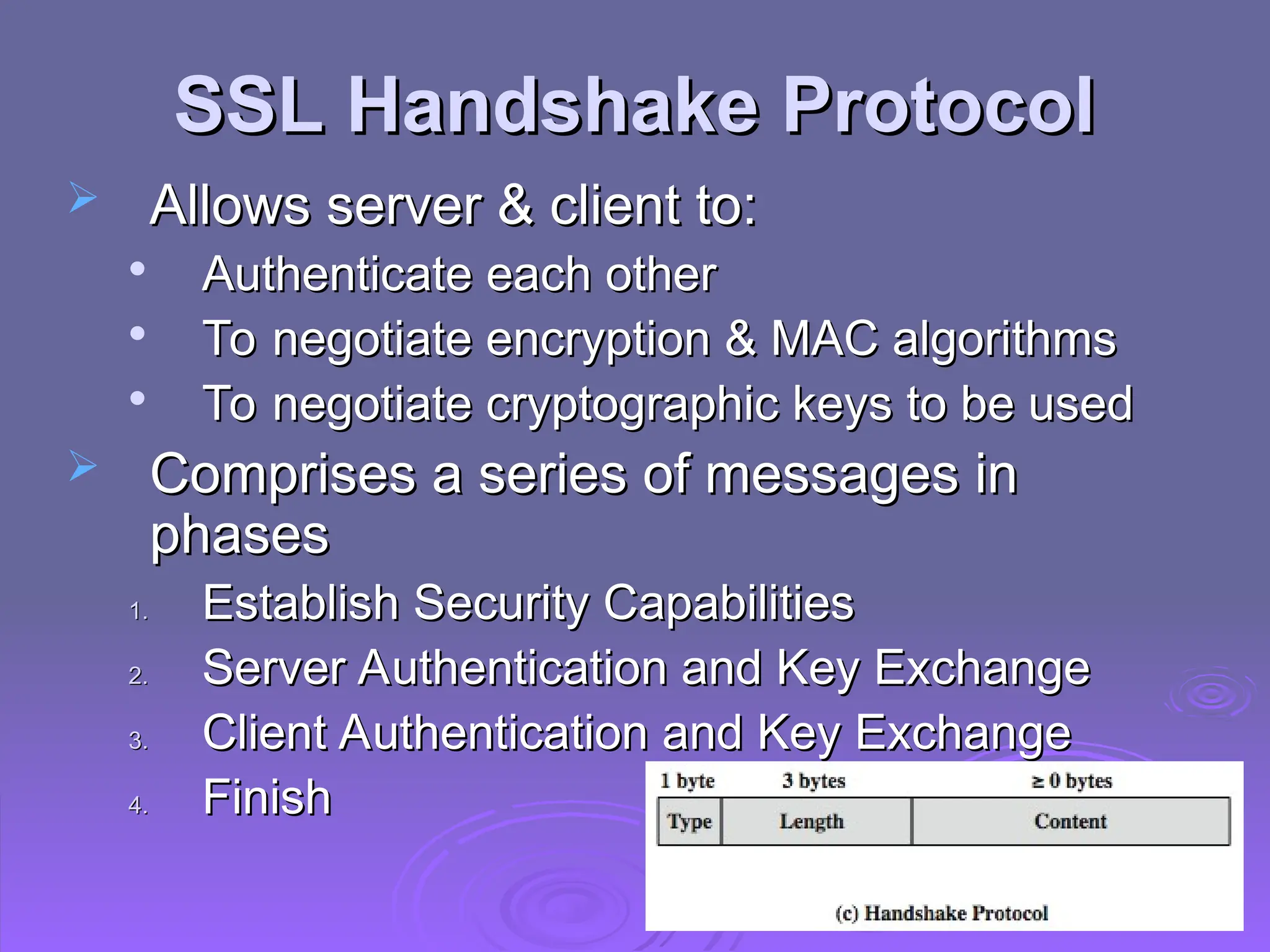
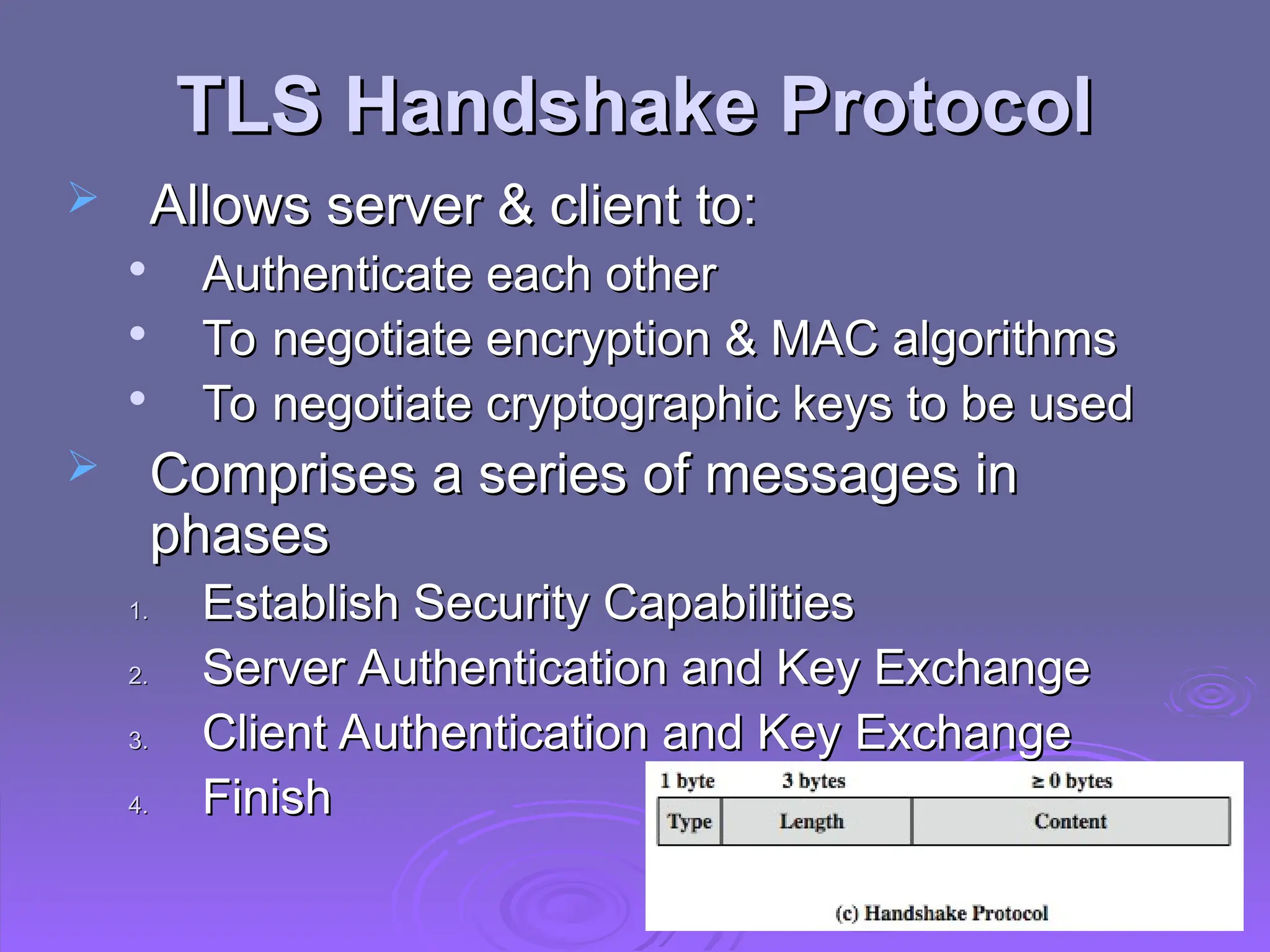
 Allows server & client to:
Allows server & client to:

Authenticate each other

To negotiate encryption & MAC algorithms

To negotiate cryptographic keys to be used
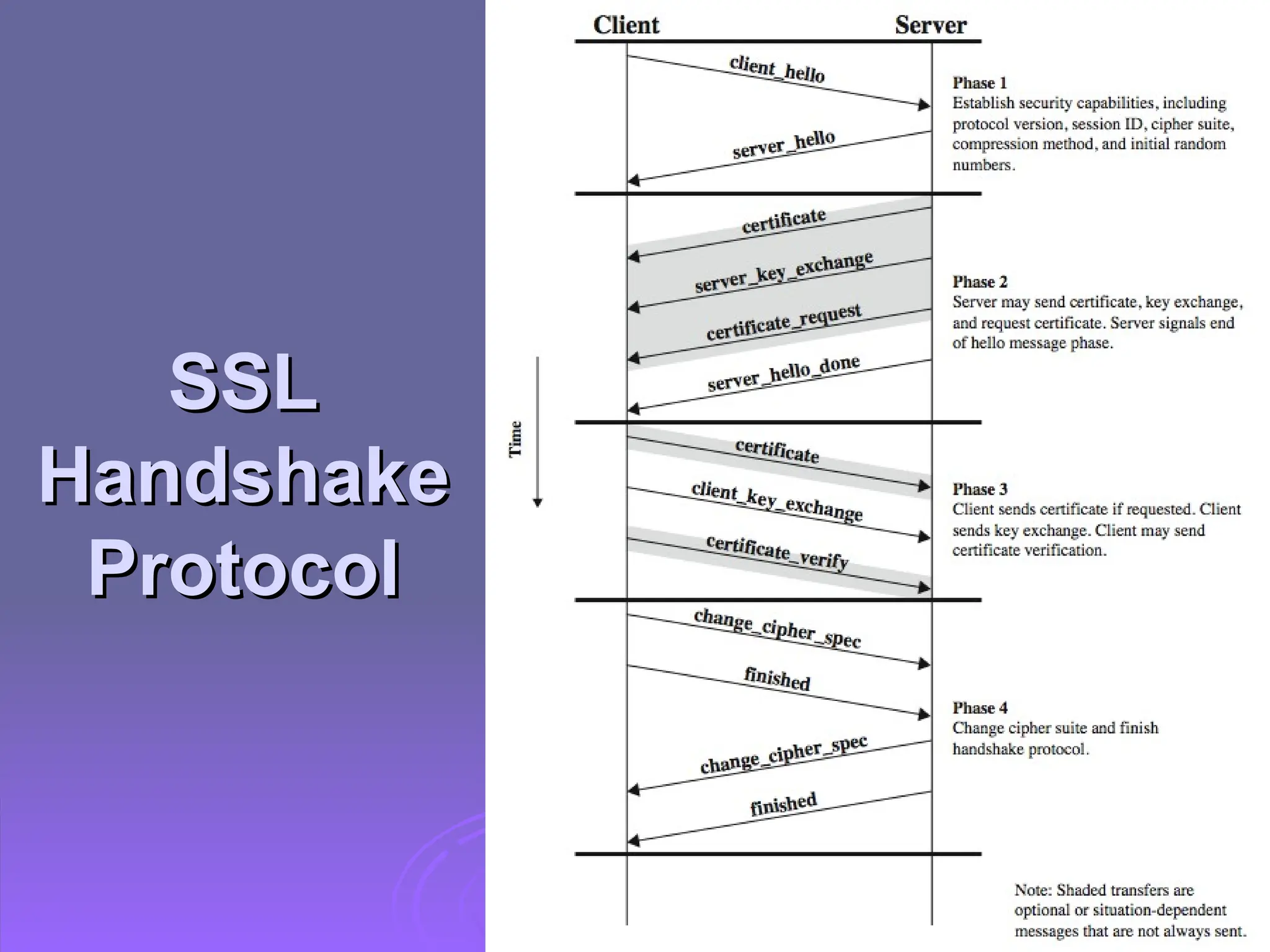
 Comprises a series of messages in
Comprises a series of messages in
phases
phases
1.
1. Establish Security Capabilities
Establish Security Capabilities
2.
2. Server Authentication and Key Exchange
Server Authentication and Key Exchange
3.
3. Client Authentication and Key Exchange
Client Authentication and Key Exchange
4.
4. Finish
Finish
SSL
SSL
Handshake
Handshake
Protocol
Protocol
Cryptographic Computations
 Master secret creation
Master secret creation

A one-time 48-byte value

Generated using secure key exchange (RSA /
Diffie-Hellman) and then hashing info
 Generation of cryptographic parameters
Generation of cryptographic parameters

Client write MAC secret, a server write MAC
secret, a client write key, a server write key, a
client write IV, and a server write IV

Generated by hashing master secret
TLS (Transport Layer
Security)
Security)
 IETF standard RFC 5246 similar to SSLv3
IETF standard RFC 5246 similar to SSLv3
with minor differences

In record format: version number (minor: 3)

Uses HMAC for MAC
Uses HMAC for MAC

A pseudo-random function expands secrets
• Based on HMAC using SHA-1 or MD5
Based on HMAC using SHA-1 or MD5

Has additional alert codes

Some changes in supported ciphers

Changes in certificate types & negotiations

Changes in crypto computations & padding
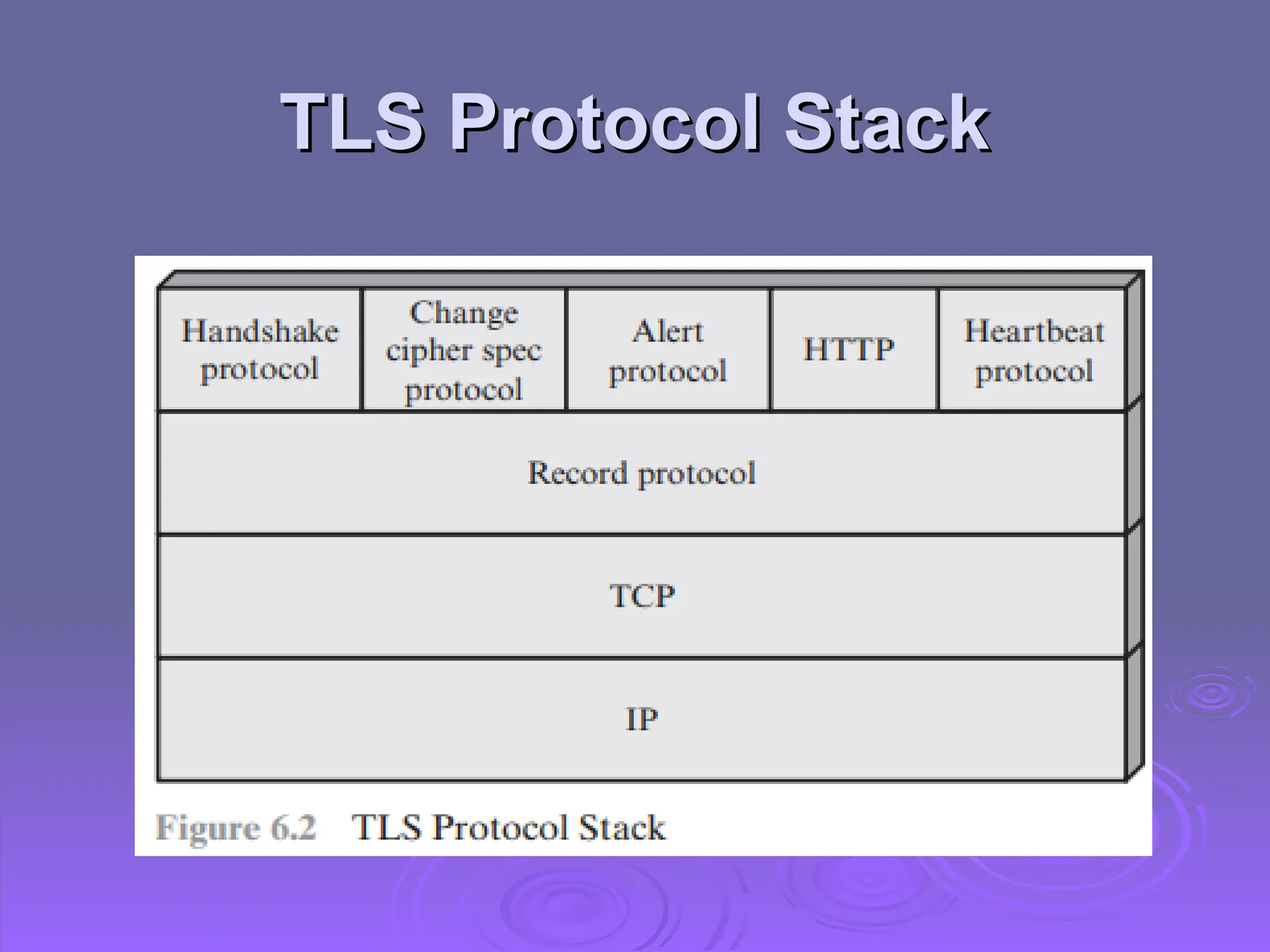
TLS Protocol Stack
TLS Protocol Stack
TLS Protocol Stack
TLS Protocol Stack
 TLS connection
TLS connection

A transient, peer-to-peer, communications link

Associated with 1 TLS session
 TLS session
TLS session

An association between client & server

Created by the Handshake Protocol

Define a set of cryptographic parameters

May be shared by multiple TLS connections
TLS Record Protocol
TLS Record Protocol
 Confidentiality
Confidentiality

Using symmetric encryption with a shared
secret key defined by Handshake Protocol
• Block cipher: AES, IDEA, RC2-40, DES-40, DES,
Block cipher: AES, IDEA, RC2-40, DES-40, DES,
3DES, Fortezza
3DES, Fortezza
• Stream cipher: RC4-40, RC4-128
Stream cipher: RC4-40, RC4-128

Message is compressed before encryption
 Message integrity
Message integrity

Using a MAC with shared secret key

Similar to HMAC but with different padding
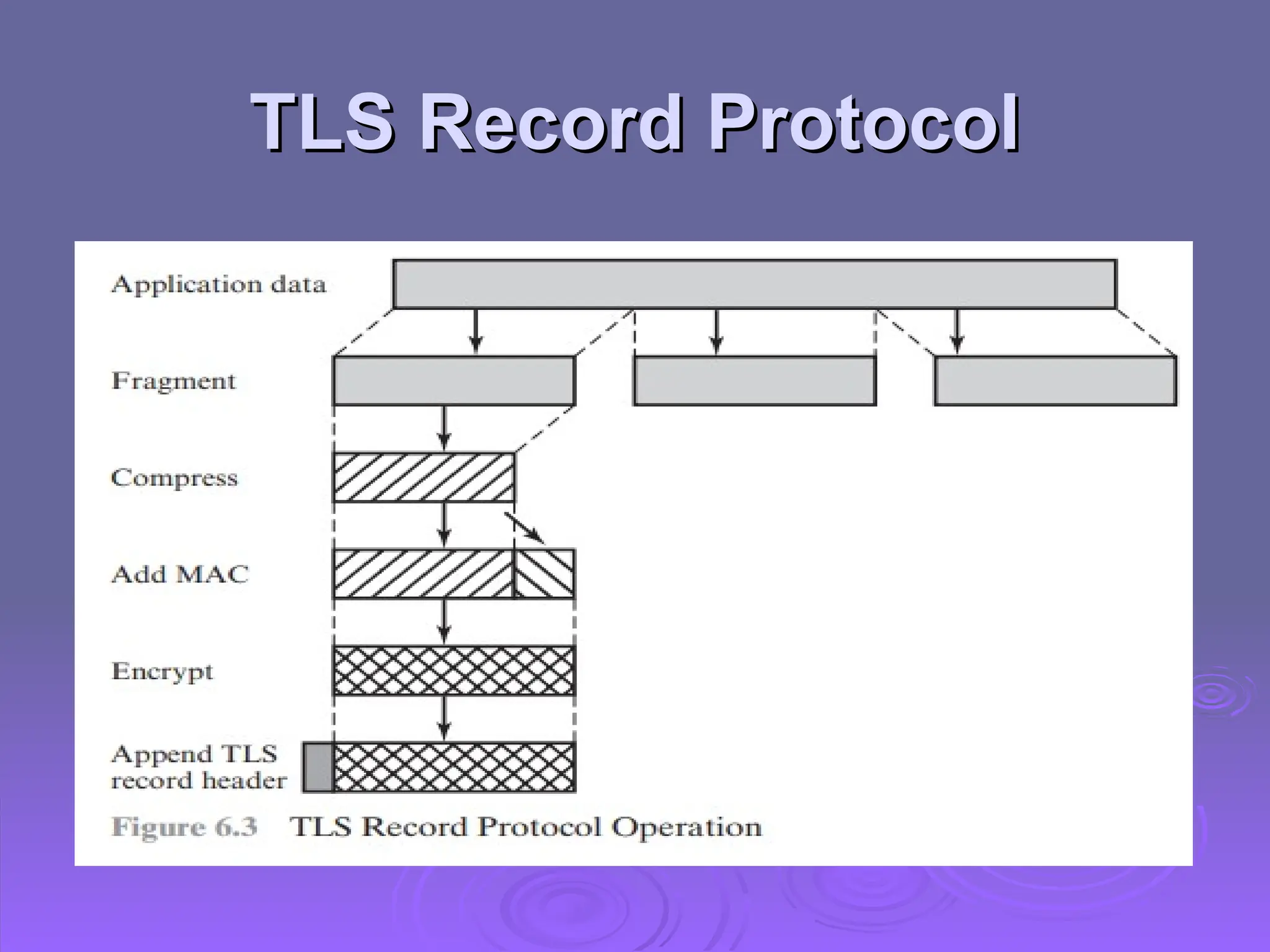
TLS Record Protocol
TLS Record Protocol
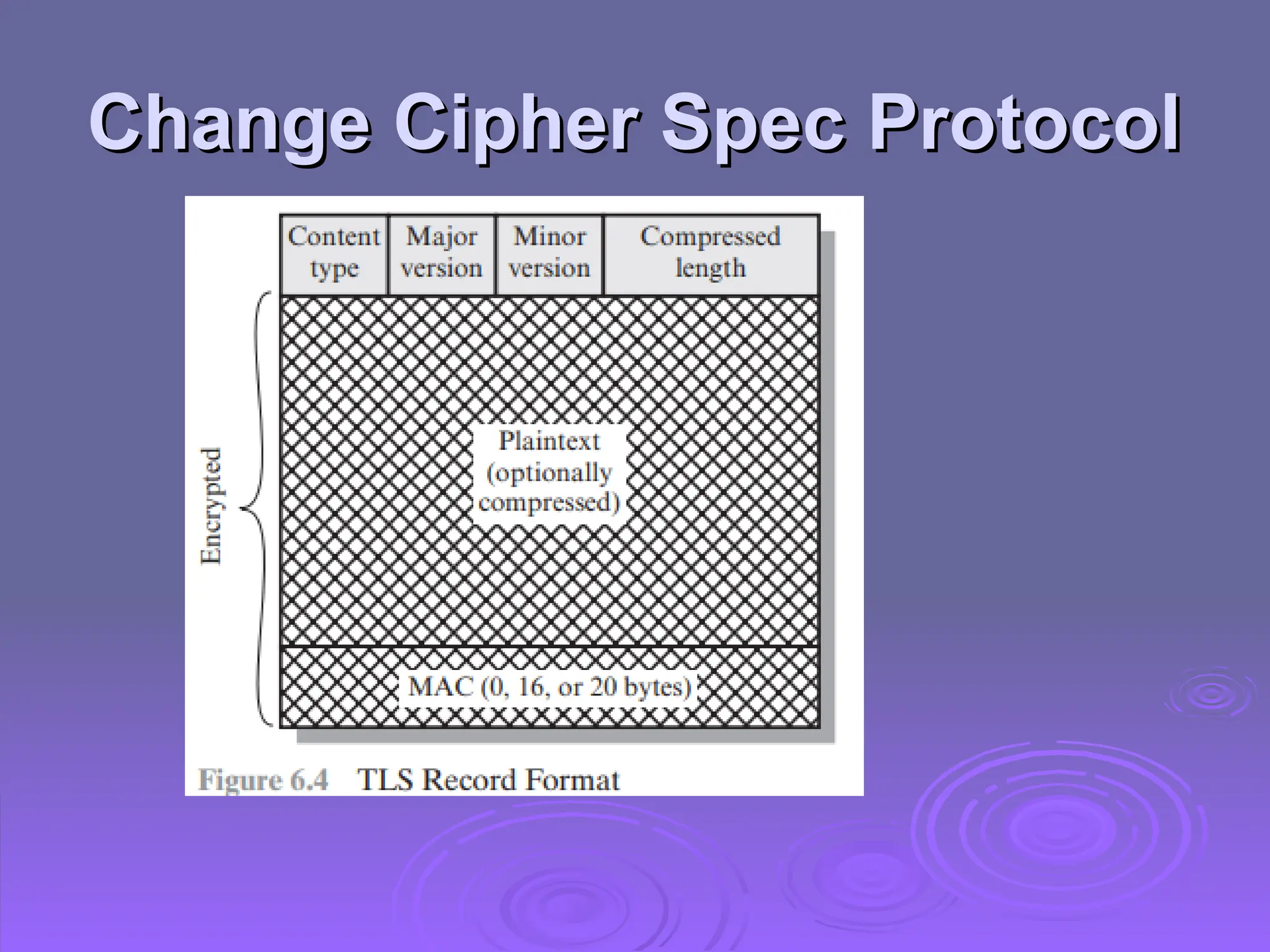
Change Cipher Spec Protocol
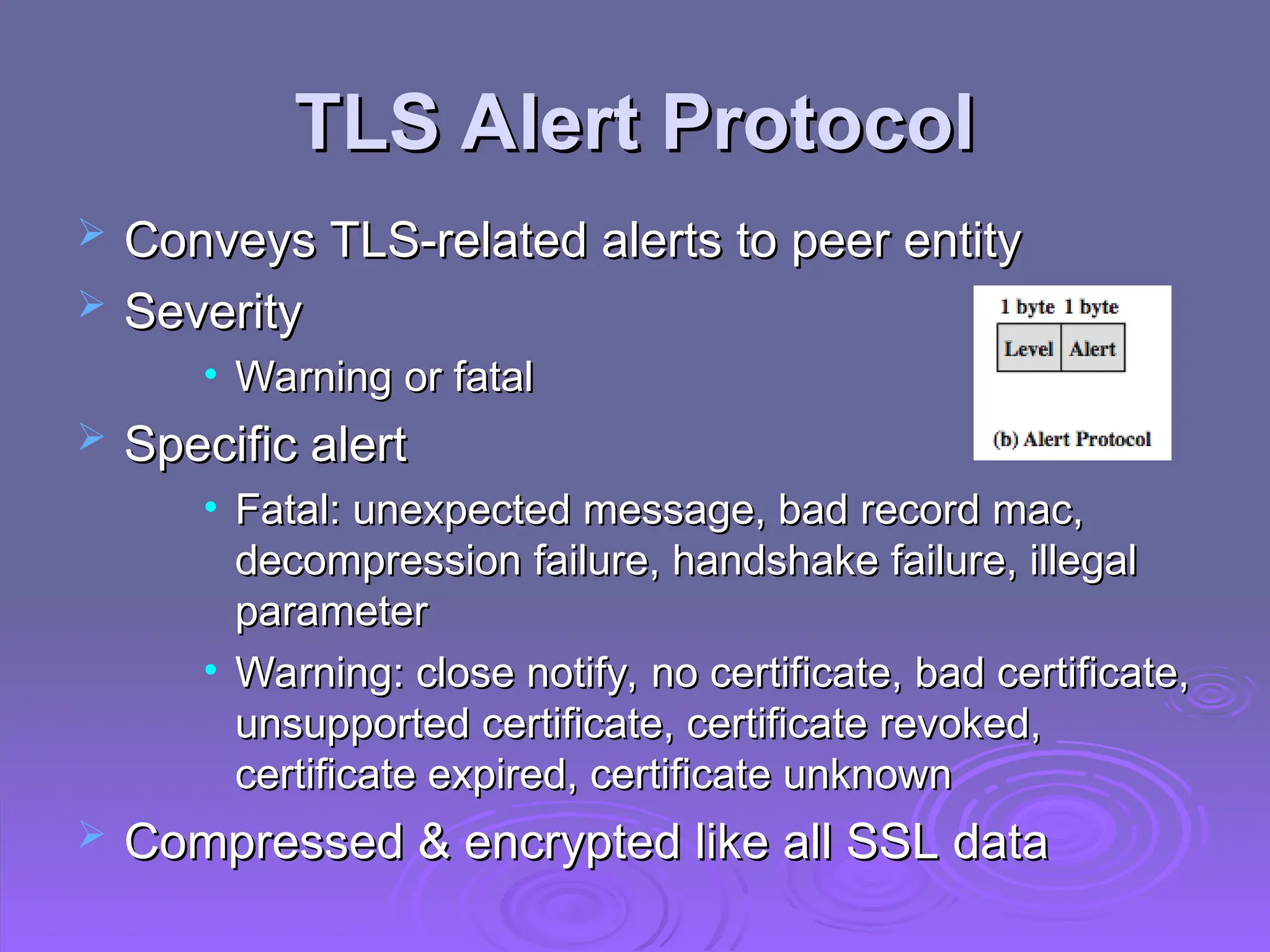
TLS Alert Protocol
TLS Alert Protocol
 Conveys TLS-related alerts to peer entity
Conveys TLS-related alerts to peer entity
 Severity
Severity
• Warning or fatal
Warning or fatal
 Specific alert
Specific alert
• Fatal: unexpected message, bad record mac,
Fatal: unexpected message, bad record mac,
decompression failure, handshake failure, illegal
parameter
parameter
• Warning: close notify, no certificate, bad certificate,
Warning: close notify, no certificate, bad certificate,
unsupported certificate, certificate revoked,
certificate expired, certificate unknown
 Compressed & encrypted like all SSL data
Compressed & encrypted like all SSL data
TLS Handshake Protocol
 Allows server & client to:
Allows server & client to:

Authenticate each other

To negotiate encryption & MAC algorithms

To negotiate cryptographic keys to be used
 Comprises a series of messages in
Comprises a series of messages in
phases
phases
1.
1. Establish Security Capabilities
Establish Security Capabilities
2.
2. Server Authentication and Key Exchange
Server Authentication and Key Exchange
3.
3. Client Authentication and Key Exchange
Client Authentication and Key Exchange
4.
4. Finish
Finish
TLS
TLS
Handshake
Handshake
Protocol
Protocol
Cryptographic Computations
 Master secret creation
Master secret creation

A one-time 48-byte value

Generated using secure key exchange (RSA /
Diffie-Hellman) and then hashing info
 Generation of cryptographic parameters
Generation of cryptographic parameters

Client write MAC secret, a server write MAC
secret, a client write key, a server write key, a
client write IV, and a server write IV

Generated by hashing master secret
HTTPS
HTTPS
 HTTPS (HTTP over SSL)
HTTPS (HTTP over SSL)

Combination of HTTP & SSL/TLS to secure
communications between browser & server
• Documented in RFC2818
Documented in RFC2818
• No fundamental change using either SSL or TLS
No fundamental change using either SSL or TLS
 Use https:// URL rather than http://
Use https:// URL rather than http://

And port 443 rather than 80
 Encrypts
Encrypts

URL, document contents, form data, cookies,
HTTP headers
HTTP headers
HTTPS
HTTPS
The following elements of the
communication are encrypted:
URL of the requested document
URL of the requested document
Contents of the document
Contents of the document
Contents of browser forms (filled in by
Contents of browser forms (filled in by
browser user)
browser user)
Cookies sent from browser to server and
Cookies sent from browser to server and
from server to browser
Contents of HTTP heade
Contents of HTTP heade
HTTPS Use
HTTPS Use
 Connection initiation
Connection initiation

TLS handshake then HTTP request(s)

At the HTTP level, an HTTP client requests a connection to an
HTTP server by sending a connection request to the next lowest
layer.
layer.

Typically, the next lowest layer is TCP, but it also may be
TLS/SSL.
TLS/SSL.

At the level of TLS, a session is established between a TLS
client and a TLS server.

A TLS request to establish a connection between the TCP entity
on the client side and the TCP entity on the server side.
HTTPS Use
HTTPS Use
 Connection closure
Connection closure

Have “Connection: close” in HTTP record

TLS level exchange close_notify alerts

Can then close TCP connection

Must handle TCP close before alert exchange
sent or completed
sent or completed
Secure Shell (SSH)
Secure Shell (SSH)
 Protocol for secure network communications
Protocol for secure network communications

Designed to be simple & inexpensive
 SSH1 provided secure remote logon facility
SSH1 provided secure remote logon facility

Replace TELNET & other insecure schemes

Also has more general client/server capability
 SSH2 fixes a number of security flaws
SSH2 fixes a number of security flaws

Documented in RFCs 4250 through 4256
 SSH clients & servers are widely available
SSH clients & servers are widely available
 Method of choice for remote login/ X tunnels
Method of choice for remote login/ X tunnels
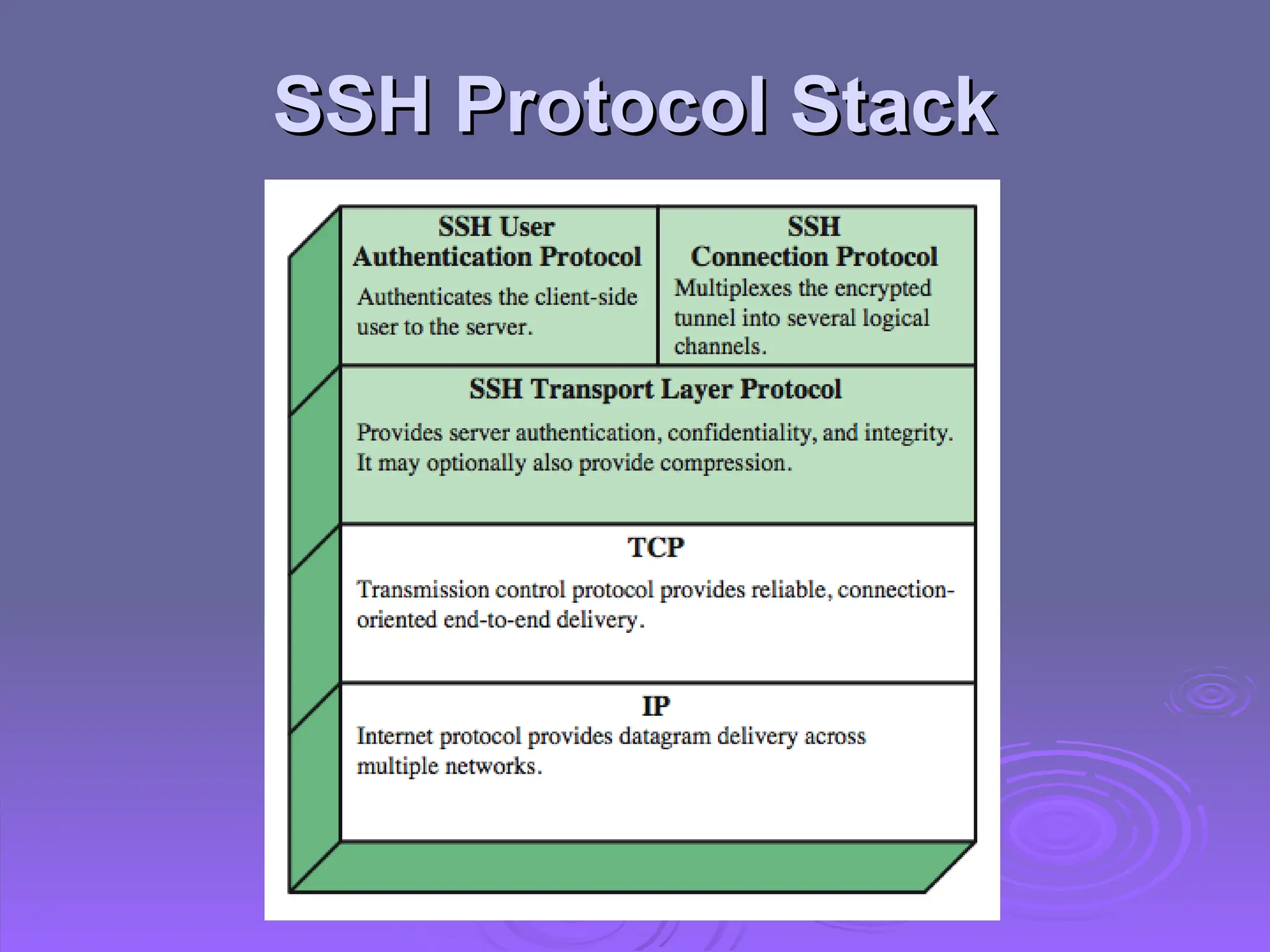
SSH Protocol Stack
SSH Protocol Stack
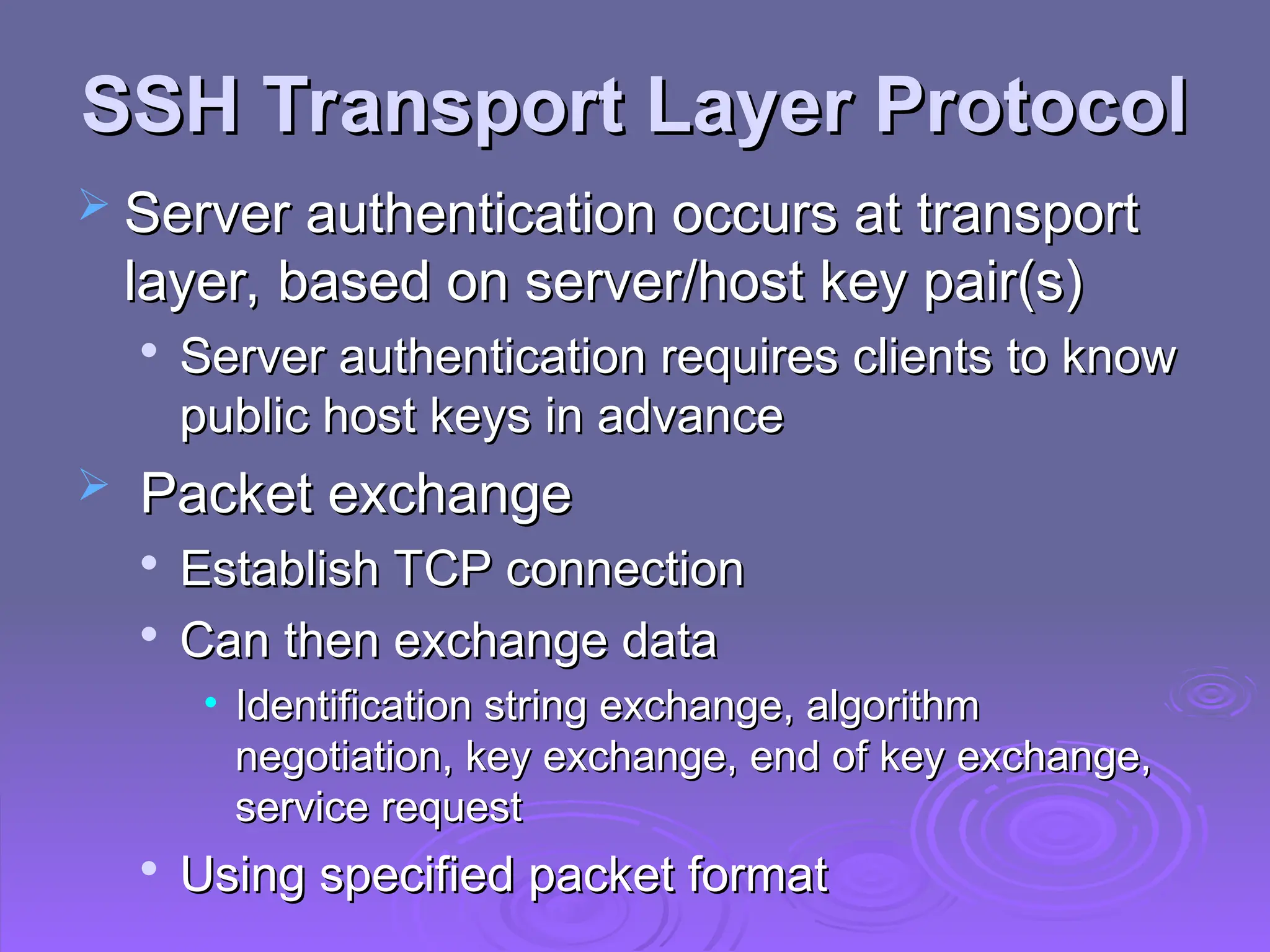
SSH Transport Layer Protocol
 Server authentication occurs at transport
Server authentication occurs at transport
layer, based on server/host key pair(s)

Server authentication requires clients to know
public host keys in advance
 Packet exchange
Packet exchange

Establish TCP connection

Can then exchange data
• Identification string exchange, algorithm
Identification string exchange, algorithm
negotiation, key exchange, end of key exchange,
service request
service request

Using specified packet format
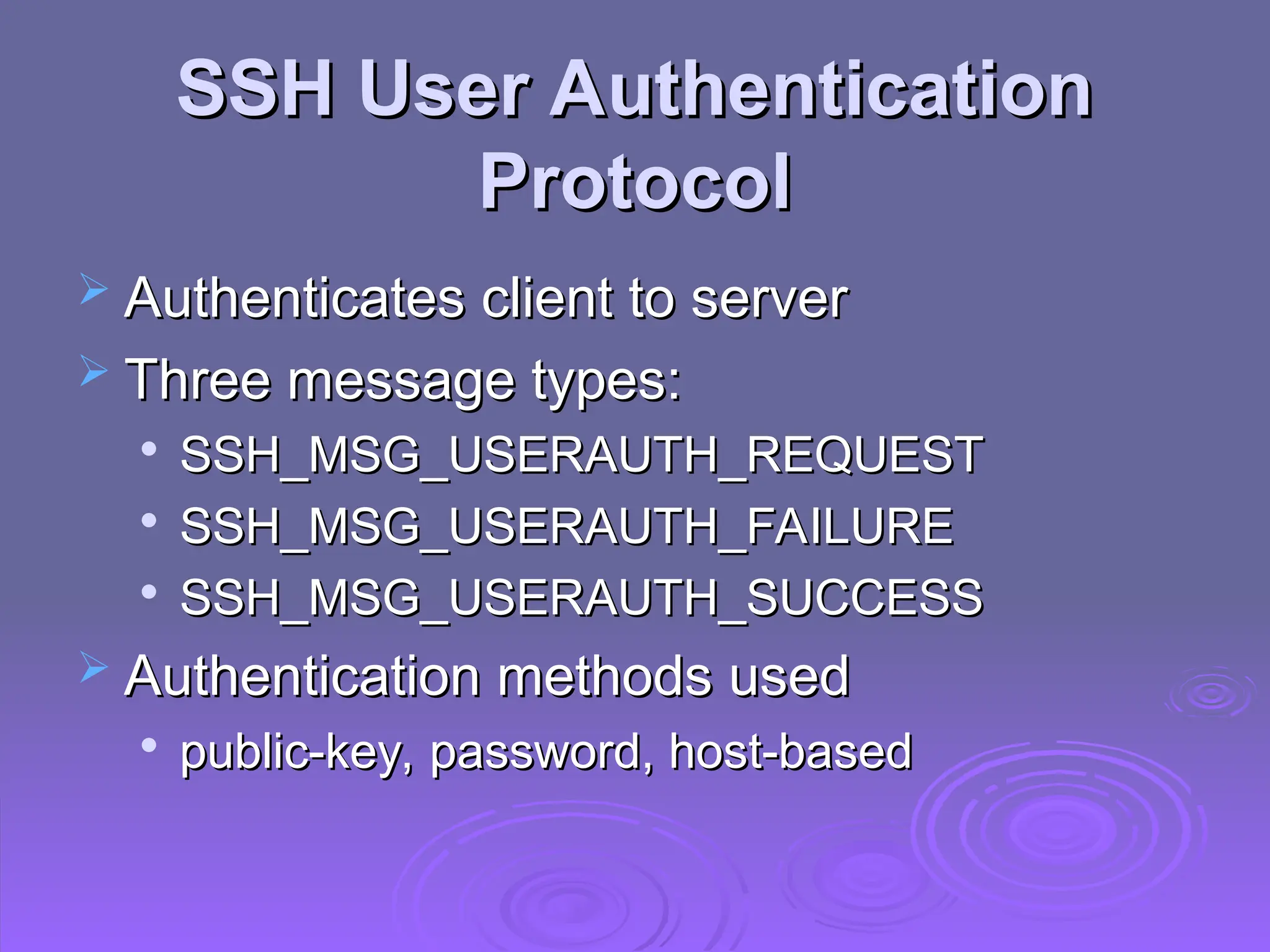
SSH User Authentication
Protocol
Protocol
 Authenticates client to server
Authenticates client to server
 Three message types:
Three message types:

SSH_MSG_USERAUTH_REQUEST

SSH_MSG_USERAUTH_FAILURE

SSH_MSG_USERAUTH_SUCCESS
 Authentication methods used
Authentication methods used

public-key, password, host-based
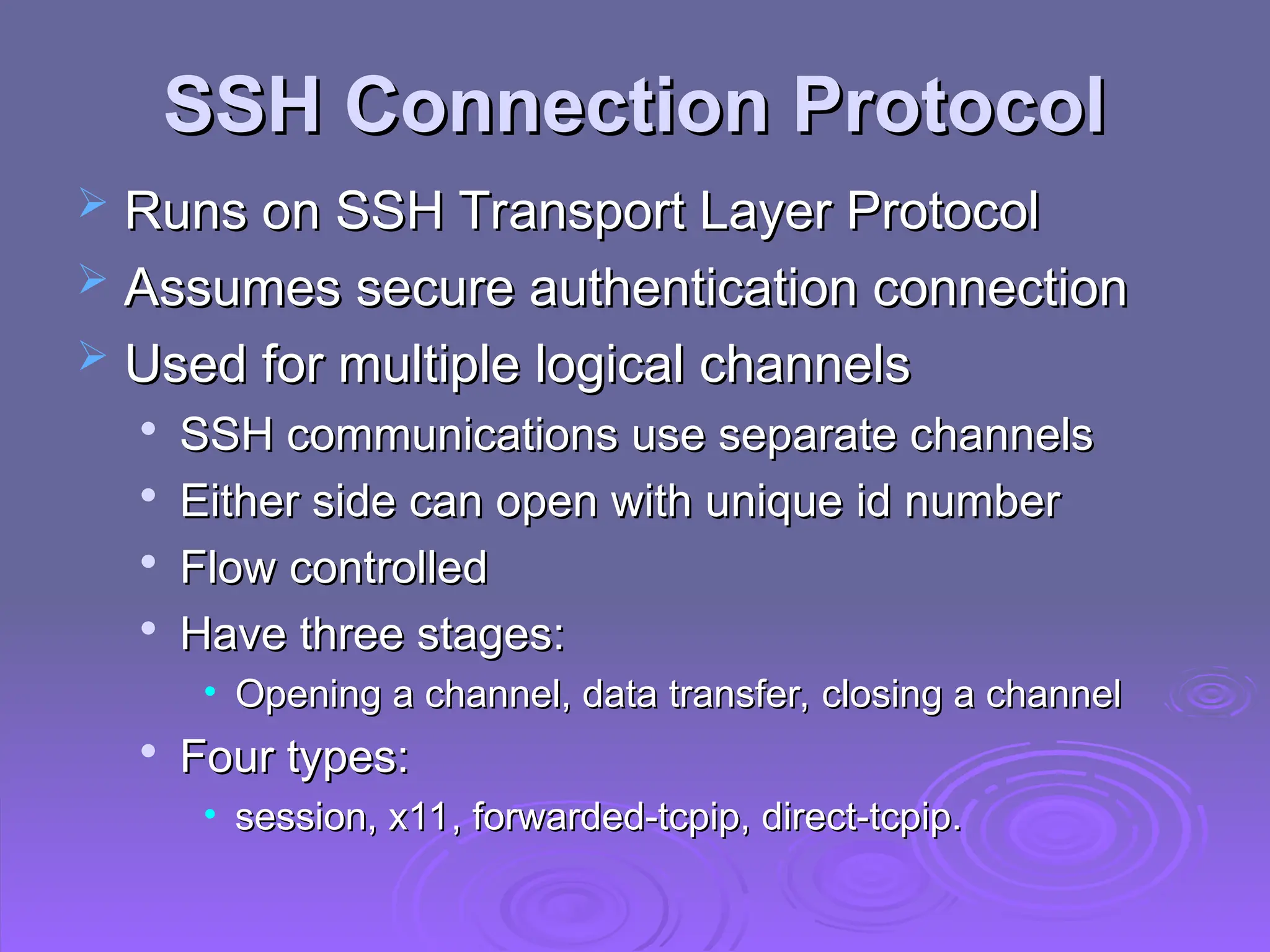
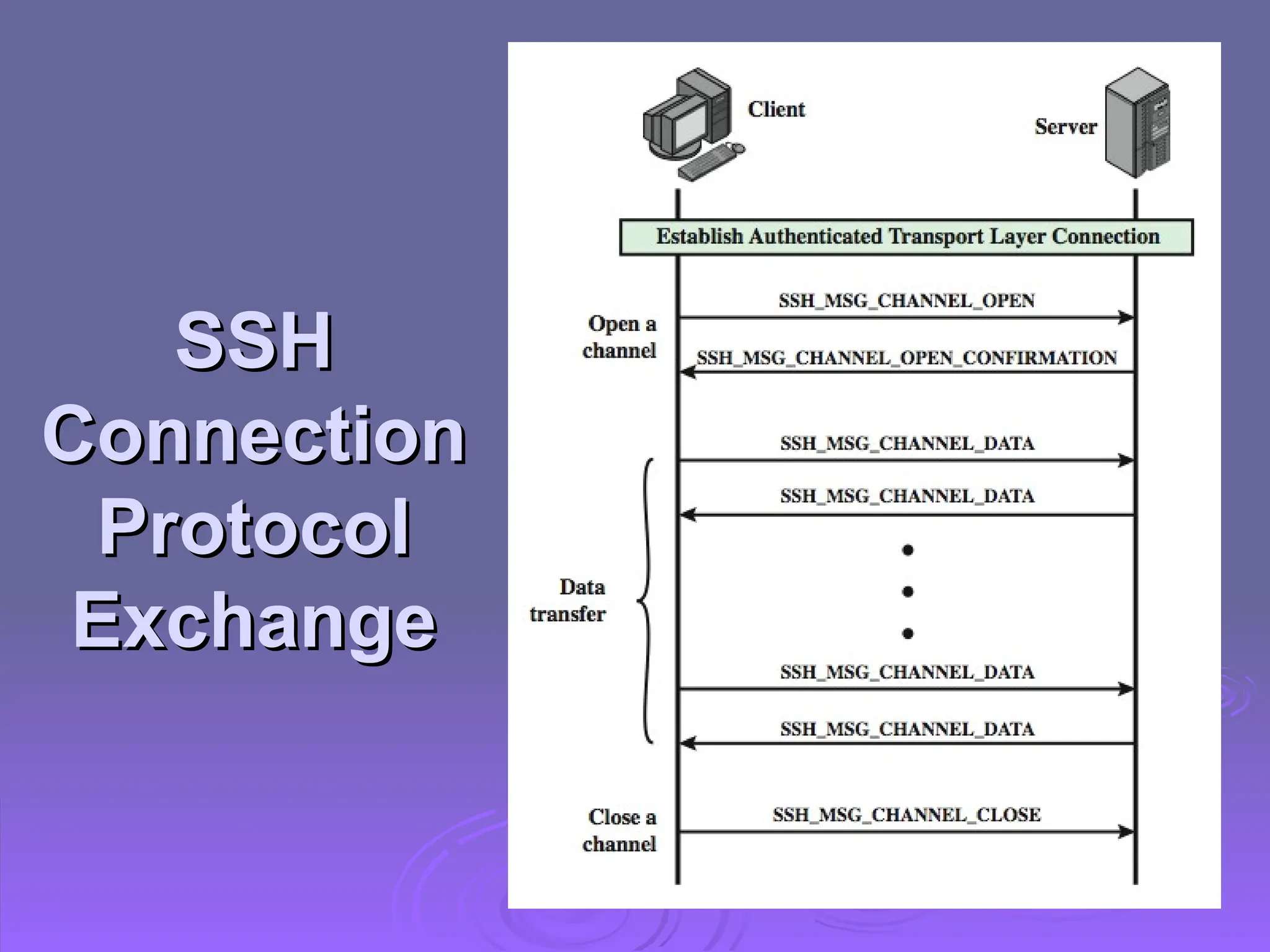
SSH Connection Protocol
 Runs on SSH Transport Layer Protocol
Runs on SSH Transport Layer Protocol
 Assumes secure authentication connection
Assumes secure authentication connection
 Used for multiple logical channels
Used for multiple logical channels

SSH communications use separate channels

Either side can open with unique id number

Flow controlled
Flow controlled

Have three stages:
Have three stages:
• Opening a channel, data transfer, closing a channel
Opening a channel, data transfer, closing a channel

Four types:
Four types:
• session, x11, forwarded-tcpip, direct-tcpip.
session, x11, forwarded-tcpip, direct-tcpip.
SSH
SSH
Connection
Connection
Protocol
Protocol
Exchange
Exchange
Port Forwarding
Port Forwarding
 Convert insecure TCP connection into a
Convert insecure TCP connection into a
secure SSH connection

SSH Transport Layer Protocol establishes a
TCP connection between SSH client & server

Client traffic redirected to local SSH, travels
via tunnel, then remote SSH delivers to server
 Supports two types of port forwarding
Supports two types of port forwarding

Local forwarding – hijacks selected traffic

Remote forwarding – client acts for server
Summary
Summary
 Have considered:
Have considered:

Need for web security

SSL/TLS transport layer security protocols

HTTPS
HTTPS

Secure shell (SSH)
Secure shell (SSH)

Web securiy - Network security essentials

  • 1.
    Web Security Web Security Web servers are relatively easy to Web servers are relatively easy to configure and manage. configure and manage.  Web content is increasingly easy to Web content is increasingly easy to develop, the underlying software is develop, the underlying software is extraordinarily complex. extraordinarily complex.  A Web server can be exploited as a A Web server can be exploited as a launching pad into the corporation’s. launching pad into the corporation’s.
  • 2.
    Web Security Threats WebSecurity Threats  Web now widely used by business, Web now widely used by business, government, individuals government, individuals  But Internet & Web are vulnerable, and But Internet & Web are vulnerable, and have a variety of threats have a variety of threats  Integrity Integrity  Confidentiality Confidentiality  Denial of service Denial of service  Authentication Authentication  Need added security mechanisms Need added security mechanisms
  • 3.
    Web Security Threats WebSecurity Threats
  • 4.
    Web Security Threats WebSecurity Threats  In terms of passive and active attacks In terms of passive and active attacks  Eavesdropping Eavesdropping  Impersonating a user, altering messages Impersonating a user, altering messages  In terms of location of the threat In terms of location of the threat  System: Web server, Web browser System: Web server, Web browser  Network: network traffic between browser and Network: network traffic between browser and server server
  • 5.
    Web Traffic Security WebTraffic Security Approaches Approaches
  • 6.
     IPsec: generalpurpose IPsec: general purpose  Transparent to end users and applications Transparent to end users and applications  SSL/TLS: above TCP SSL/TLS: above TCP  Transparent: part of protocol suite Transparent: part of protocol suite  Embedded in packages: e.g. Web browser Embedded in packages: e.g. Web browser with SSL with SSL  Application specific: Kerberos, S/MIME Application specific: Kerberos, S/MIME
  • 7.
    SSL (Secure SocketLayer) SSL (Secure Socket Layer)  Transport layer security service Transport layer security service  Originally developed by Netscape Originally developed by Netscape  Version 3 designed with public input Version 3 designed with public input (Internet draft) (Internet draft)  Subsequently became Internet standard Subsequently became Internet standard known as TLS (Transport Layer Security) known as TLS (Transport Layer Security)  Uses TCP to provide a reliable end-to-end Uses TCP to provide a reliable end-to-end service service  SSL has two layers of protocols SSL has two layers of protocols
  • 8.
  • 9.
    SSL Architecture SSL Architecture SSL connection SSL connection  A transient, peer-to-peer, communications link A transient, peer-to-peer, communications link  Associated with 1 SSL session Associated with 1 SSL session  SSL session SSL session  An association between client & server An association between client & server  Created by the Handshake Protocol Created by the Handshake Protocol  Define a set of cryptographic parameters Define a set of cryptographic parameters  May be shared by multiple SSL connections May be shared by multiple SSL connections
  • 10.
    SSL Record Protocol SSLRecord Protocol Services Services  Confidentiality Confidentiality  Using symmetric encryption with a shared Using symmetric encryption with a shared secret key defined by Handshake Protocol secret key defined by Handshake Protocol • Block cipher: AES, IDEA, RC2-40, DES-40, DES, Block cipher: AES, IDEA, RC2-40, DES-40, DES, 3DES, Fortezza 3DES, Fortezza • Stream cipher: RC4-40, RC4-128 Stream cipher: RC4-40, RC4-128  Message is compressed before encryption Message is compressed before encryption  Message integrity Message integrity  Using a MAC with shared secret key Using a MAC with shared secret key  Similar to HMAC but with different padding Similar to HMAC but with different padding
  • 11.
    SSL Record Protocol SSLRecord Protocol Operation Operation
  • 12.
    SSL Record Format SSLRecord Format
  • 13.
    SSL Change CipherSpec SSL Change Cipher Spec Protocol Protocol  One of 3 SSL specific protocols which use One of 3 SSL specific protocols which use the SSL Record protocol the SSL Record protocol  A single message A single message  Causes pending state to become current Causes pending state to become current  Hence updating the cipher suite in use Hence updating the cipher suite in use
  • 14.
    SSL Alert Protocol SSLAlert Protocol  Conveys SSL-related alerts to peer entity Conveys SSL-related alerts to peer entity  Severity Severity • Warning or fatal Warning or fatal  Specific alert Specific alert • Fatal: unexpected message, bad record mac, Fatal: unexpected message, bad record mac, decompression failure, handshake failure, illegal decompression failure, handshake failure, illegal parameter parameter • Warning: close notify, no certificate, bad certificate, Warning: close notify, no certificate, bad certificate, unsupported certificate, certificate revoked, unsupported certificate, certificate revoked, certificate expired, certificate unknown certificate expired, certificate unknown  Compressed & encrypted like all SSL data Compressed & encrypted like all SSL data
  • 15.
    SSL Handshake Protocol SSLHandshake Protocol  Allows server & client to: Allows server & client to:  Authenticate each other Authenticate each other  To negotiate encryption & MAC algorithms To negotiate encryption & MAC algorithms  To negotiate cryptographic keys to be used To negotiate cryptographic keys to be used  Comprises a series of messages in Comprises a series of messages in phases phases 1. 1. Establish Security Capabilities Establish Security Capabilities 2. 2. Server Authentication and Key Exchange Server Authentication and Key Exchange 3. 3. Client Authentication and Key Exchange Client Authentication and Key Exchange 4. 4. Finish Finish
  • 16.
  • 17.
    Cryptographic Computations Cryptographic Computations Master secret creation Master secret creation  A one-time 48-byte value A one-time 48-byte value  Generated using secure key exchange (RSA / Generated using secure key exchange (RSA / Diffie-Hellman) and then hashing info Diffie-Hellman) and then hashing info  Generation of cryptographic parameters Generation of cryptographic parameters  Client write MAC secret, a server write MAC Client write MAC secret, a server write MAC secret, a client write key, a server write key, a secret, a client write key, a server write key, a client write IV, and a server write IV client write IV, and a server write IV  Generated by hashing master secret Generated by hashing master secret
  • 18.
    TLS (Transport Layer TLS(Transport Layer Security) Security)  IETF standard RFC 5246 similar to SSLv3 IETF standard RFC 5246 similar to SSLv3 with minor differences with minor differences  In record format: version number (minor: 3) In record format: version number (minor: 3)  Uses HMAC for MAC Uses HMAC for MAC  A pseudo-random function expands secrets A pseudo-random function expands secrets • Based on HMAC using SHA-1 or MD5 Based on HMAC using SHA-1 or MD5  Has additional alert codes Has additional alert codes  Some changes in supported ciphers Some changes in supported ciphers  Changes in certificate types & negotiations Changes in certificate types & negotiations  Changes in crypto computations & padding Changes in crypto computations & padding
  • 19.
    TLS Protocol Stack TLSProtocol Stack
  • 20.
    TLS Protocol Stack TLSProtocol Stack  TLS connection TLS connection  A transient, peer-to-peer, communications link A transient, peer-to-peer, communications link  Associated with 1 TLS session Associated with 1 TLS session  TLS session TLS session  An association between client & server An association between client & server  Created by the Handshake Protocol Created by the Handshake Protocol  Define a set of cryptographic parameters Define a set of cryptographic parameters  May be shared by multiple TLS connections May be shared by multiple TLS connections
  • 21.
    TLS Record Protocol TLSRecord Protocol  Confidentiality Confidentiality  Using symmetric encryption with a shared Using symmetric encryption with a shared secret key defined by Handshake Protocol secret key defined by Handshake Protocol • Block cipher: AES, IDEA, RC2-40, DES-40, DES, Block cipher: AES, IDEA, RC2-40, DES-40, DES, 3DES, Fortezza 3DES, Fortezza • Stream cipher: RC4-40, RC4-128 Stream cipher: RC4-40, RC4-128  Message is compressed before encryption Message is compressed before encryption  Message integrity Message integrity  Using a MAC with shared secret key Using a MAC with shared secret key  Similar to HMAC but with different padding Similar to HMAC but with different padding
  • 22.
    TLS Record Protocol TLSRecord Protocol
  • 23.
    Change Cipher SpecProtocol Change Cipher Spec Protocol
  • 24.
    TLS Alert Protocol TLSAlert Protocol  Conveys TLS-related alerts to peer entity Conveys TLS-related alerts to peer entity  Severity Severity • Warning or fatal Warning or fatal  Specific alert Specific alert • Fatal: unexpected message, bad record mac, Fatal: unexpected message, bad record mac, decompression failure, handshake failure, illegal decompression failure, handshake failure, illegal parameter parameter • Warning: close notify, no certificate, bad certificate, Warning: close notify, no certificate, bad certificate, unsupported certificate, certificate revoked, unsupported certificate, certificate revoked, certificate expired, certificate unknown certificate expired, certificate unknown  Compressed & encrypted like all SSL data Compressed & encrypted like all SSL data
  • 25.
    TLS Handshake Protocol TLSHandshake Protocol  Allows server & client to: Allows server & client to:  Authenticate each other Authenticate each other  To negotiate encryption & MAC algorithms To negotiate encryption & MAC algorithms  To negotiate cryptographic keys to be used To negotiate cryptographic keys to be used  Comprises a series of messages in Comprises a series of messages in phases phases 1. 1. Establish Security Capabilities Establish Security Capabilities 2. 2. Server Authentication and Key Exchange Server Authentication and Key Exchange 3. 3. Client Authentication and Key Exchange Client Authentication and Key Exchange 4. 4. Finish Finish
  • 26.
  • 27.
    Cryptographic Computations Cryptographic Computations Master secret creation Master secret creation  A one-time 48-byte value A one-time 48-byte value  Generated using secure key exchange (RSA / Generated using secure key exchange (RSA / Diffie-Hellman) and then hashing info Diffie-Hellman) and then hashing info  Generation of cryptographic parameters Generation of cryptographic parameters  Client write MAC secret, a server write MAC Client write MAC secret, a server write MAC secret, a client write key, a server write key, a secret, a client write key, a server write key, a client write IV, and a server write IV client write IV, and a server write IV  Generated by hashing master secret Generated by hashing master secret
  • 28.
    HTTPS HTTPS  HTTPS (HTTPover SSL) HTTPS (HTTP over SSL)  Combination of HTTP & SSL/TLS to secure Combination of HTTP & SSL/TLS to secure communications between browser & server communications between browser & server • Documented in RFC2818 Documented in RFC2818 • No fundamental change using either SSL or TLS No fundamental change using either SSL or TLS  Use https:// URL rather than http:// Use https:// URL rather than http://  And port 443 rather than 80 And port 443 rather than 80  Encrypts Encrypts  URL, document contents, form data, cookies, URL, document contents, form data, cookies, HTTP headers HTTP headers
  • 29.
    HTTPS HTTPS The following elementsof the The following elements of the communication are encrypted: communication are encrypted: URL of the requested document URL of the requested document Contents of the document Contents of the document Contents of browser forms (filled in by Contents of browser forms (filled in by browser user) browser user) Cookies sent from browser to server and Cookies sent from browser to server and from server to browser from server to browser Contents of HTTP heade Contents of HTTP heade
  • 30.
    HTTPS Use HTTPS Use Connection initiation Connection initiation  TLS handshake then HTTP request(s) TLS handshake then HTTP request(s)  At the HTTP level, an HTTP client requests a connection to an At the HTTP level, an HTTP client requests a connection to an HTTP server by sending a connection request to the next lowest HTTP server by sending a connection request to the next lowest layer. layer.  Typically, the next lowest layer is TCP, but it also may be Typically, the next lowest layer is TCP, but it also may be TLS/SSL. TLS/SSL.  At the level of TLS, a session is established between a TLS At the level of TLS, a session is established between a TLS client and a TLS server. client and a TLS server.  A TLS request to establish a connection between the TCP entity A TLS request to establish a connection between the TCP entity on the client side and the TCP entity on the server side. on the client side and the TCP entity on the server side.
  • 31.
    HTTPS Use HTTPS Use Connection closure Connection closure  Have “Connection: close” in HTTP record Have “Connection: close” in HTTP record  TLS level exchange close_notify alerts TLS level exchange close_notify alerts  Can then close TCP connection Can then close TCP connection  Must handle TCP close before alert exchange Must handle TCP close before alert exchange sent or completed sent or completed
  • 32.
    Secure Shell (SSH) SecureShell (SSH)  Protocol for secure network communications Protocol for secure network communications  Designed to be simple & inexpensive Designed to be simple & inexpensive  SSH1 provided secure remote logon facility SSH1 provided secure remote logon facility  Replace TELNET & other insecure schemes Replace TELNET & other insecure schemes  Also has more general client/server capability Also has more general client/server capability  SSH2 fixes a number of security flaws SSH2 fixes a number of security flaws  Documented in RFCs 4250 through 4256 Documented in RFCs 4250 through 4256  SSH clients & servers are widely available SSH clients & servers are widely available  Method of choice for remote login/ X tunnels Method of choice for remote login/ X tunnels
  • 33.
    SSH Protocol Stack SSHProtocol Stack
  • 34.
    SSH Transport LayerProtocol SSH Transport Layer Protocol  Server authentication occurs at transport Server authentication occurs at transport layer, based on server/host key pair(s) layer, based on server/host key pair(s)  Server authentication requires clients to know Server authentication requires clients to know public host keys in advance public host keys in advance  Packet exchange Packet exchange  Establish TCP connection Establish TCP connection  Can then exchange data Can then exchange data • Identification string exchange, algorithm Identification string exchange, algorithm negotiation, key exchange, end of key exchange, negotiation, key exchange, end of key exchange, service request service request  Using specified packet format Using specified packet format
  • 35.
    SSH User Authentication SSHUser Authentication Protocol Protocol  Authenticates client to server Authenticates client to server  Three message types: Three message types:  SSH_MSG_USERAUTH_REQUEST SSH_MSG_USERAUTH_REQUEST  SSH_MSG_USERAUTH_FAILURE SSH_MSG_USERAUTH_FAILURE  SSH_MSG_USERAUTH_SUCCESS SSH_MSG_USERAUTH_SUCCESS  Authentication methods used Authentication methods used  public-key, password, host-based public-key, password, host-based
  • 36.
    SSH Connection Protocol SSHConnection Protocol  Runs on SSH Transport Layer Protocol Runs on SSH Transport Layer Protocol  Assumes secure authentication connection Assumes secure authentication connection  Used for multiple logical channels Used for multiple logical channels  SSH communications use separate channels SSH communications use separate channels  Either side can open with unique id number Either side can open with unique id number  Flow controlled Flow controlled  Have three stages: Have three stages: • Opening a channel, data transfer, closing a channel Opening a channel, data transfer, closing a channel  Four types: Four types: • session, x11, forwarded-tcpip, direct-tcpip. session, x11, forwarded-tcpip, direct-tcpip.
  • 37.
  • 38.
    Port Forwarding Port Forwarding Convert insecure TCP connection into a Convert insecure TCP connection into a secure SSH connection secure SSH connection  SSH Transport Layer Protocol establishes a SSH Transport Layer Protocol establishes a TCP connection between SSH client & server TCP connection between SSH client & server  Client traffic redirected to local SSH, travels Client traffic redirected to local SSH, travels via tunnel, then remote SSH delivers to server via tunnel, then remote SSH delivers to server  Supports two types of port forwarding Supports two types of port forwarding  Local forwarding – hijacks selected traffic Local forwarding – hijacks selected traffic  Remote forwarding – client acts for server Remote forwarding – client acts for server
  • 39.
    Summary Summary  Have considered: Haveconsidered:  Need for web security Need for web security  SSL/TLS transport layer security protocols SSL/TLS transport layer security protocols  HTTPS HTTPS  Secure shell (SSH) Secure shell (SSH)

Editor's Notes

  • #1 The World Wide Web is widely used by businesses, government agencies, and many individuals. But the Internet and the Web are extremely vulnerable to compromises of various sorts, with a range of threats as shown briefly above, and in detail in Stallings Table 5.1. These can be described as passive attacks including eavesdropping on network traffic between browser and server and gaining access to information on a Web site that is supposed to be restricted; and active attacks including impersonating another user, altering messages in transit between client and server, and altering information on a Web site. The web needs added security mechanisms to address these threats.
  • #2 The World Wide Web is widely used by businesses, government agencies, and many individuals. But the Internet and the Web are extremely vulnerable to compromises of various sorts, with a range of threats as shown briefly above, and in detail in Stallings Table 5.1. These can be described as passive attacks including eavesdropping on network traffic between browser and server and gaining access to information on a Web site that is supposed to be restricted; and active attacks including impersonating another user, altering messages in transit between client and server, and altering information on a Web site. The web needs added security mechanisms to address these threats.
  • #3 The World Wide Web is widely used by businesses, government agencies, and many individuals. But the Internet and the Web are extremely vulnerable to compromises of various sorts, with a range of threats as shown briefly above, and in detail in Stallings Table 5.1. These can be described as passive attacks including eavesdropping on network traffic between browser and server and gaining access to information on a Web site that is supposed to be restricted; and active attacks including impersonating another user, altering messages in transit between client and server, and altering information on a Web site. The web needs added security mechanisms to address these threats.
  • #5 A number of approaches to providing Web security are possible. The various approaches that have been considered are similar in the services they provide and, to some extent, in the mechanisms that they use, but they differ with respect to their scope of applicability and their relative location within the TCP/IP protocol stack. Stallings Figure 16.1 illustrates this difference. One way to provide Web security is to use IP Security (Figure 16.1a). The advantage of using IPSec is that it is transparent to end users and applications and provides a general-purpose solution. Further, IPSec includes a filtering capability so only selected traffic need incur the IPSec processing overhead. Another relatively general-purpose solution is to implement security just above TCP (Figure 16.1b). The foremost example of this approach is the Secure Sockets Layer (SSL) and the follow-on Internet standard known as Transport Layer Security (TLS). At this level, there are two implementation choices. For full generality, SSL (or TLS) could be provided as part of the underlying protocol suite and therefore be transparent to applications. Alternatively, SSL can be embedded in specific packages, e.g. both the Netscape and Microsoft Explorer browsers come with SSL, & most Web servers have implemented it. Application-specific security services are embedded within the particular application. Figure 16.1c shows examples of this architecture. The advantage of this approach is that the service can be tailored to the specific needs of a given application.
  • #7 SSL probably most widely used Web security mechanism, and it is implemented at the Transport layer (cf. figure 16.1b on previous slide). SSL is designed to make use of TCP to provide a reliable end-to-end secure service. Netscape originated SSL. Version 3 of the protocol was designed with public review and input from industry and was published as an Internet draft document. Subsequently, when a consensus was reached to submit the protocol for Internet standardization, the TLS working group was formed within IETF to develop a common standard. This first published version of TLS can be viewed as essentially an SSLv3.1 and is very close to and backward compatible with SSLv3. SSL is not a single protocol but rather two layers of protocol, as shown next.
  • #8 Stallings Figure 5.2 shows the SSL Protocol stack. The SSL Record Protocol provides basic security services to various higher-layer protocols. In particular, the Hypertext Transfer Protocol (HTTP), which provides the transfer service for Web client/server interaction, can operate on top of SSL. Three higher-layer protocols are also defined as part of SSL: the Handshake Protocol, Change Cipher Spec Protocol, and Alert Protocol. These SSL-specific protocols are used in the management of SSL exchanges.
  • #9 Two important SSL concepts are the SSL connection and the SSL session: • Connection: A connection is a network transport that provides a suitable type of service, such connections are transient, peer-to-peer relationships, associated with one session • Session: An SSL session is an association between a client and a server, created by the Handshake Protocol. Sessions define a set of cryptographic security parameters, which can be shared among multiple connections. Sessions are used to avoid the expensive negotiation of new security parameters for each connection. Between any pair of parties (applications such as HTTP on client and server), there may be multiple secure connections. In theory, there may also be multiple simultaneous sessions between parties, but this feature is not used in practice. There are a number of states associated with each session. Once a session is established, there is a current operating state for both read and write (i.e., receive and send). In addition, during the Handshake Protocol, pending read and write states are created. Upon successful conclusion of the Handshake Protocol, the pending states become the current states. A session state and a connection state are defined by sets of parameters, see text for details.
  • #10 SSL Record Protocol defines two services for SSL connections: • Confidentiality: The Handshake Protocol defines a shared secret key that is used for conventional encryption of SSL payloads. The message is compressed before being concatenated with the MAC and encrypted, with a range of ciphers being supported as shown. • Message Integrity: The Handshake Protocol also defines a shared secret key that is used to form a message authentication code (MAC), which is similar to HMAC
  • #11 Stallings Figure 5.3 shows the overall operation of the SSL Record Protocol. The Record Protocol takes an application message to be transmitted, fragments the data into manageable blocks, optionally compresses the data, computes and appends a MAC (using a hash very similar to HMAC), encrypts (using one of the symmetric algorithms listed on the previous slide), adds a header (with details of the SSL content type, major/minor version, and compressed length), and transmits the resulting unit in a TCP segment. Received data are decrypted, verified, decompressed, and reassembled and then delivered to higher-layer applications. See text for additional details.
  • #13 The Change Cipher Spec Protocol is one of the three SSL-specific protocols that use the SSL Record Protocol, and it is the simplest, consisting of a single message (shown in Stallings Figure 16.5a), which consists of a single byte with the value 1. The sole purpose of this message is to cause the pending state to be copied into the current state, which updates the cipher suite to be used on this connection.
  • #14 The Alert Protocol is used to convey SSL-related alerts to the peer entity. As with other applications that use SSL, alert messages are compressed and encrypted, as specified by the current state. Each message in this protocol consists of two bytes (as shown in Stallings Figure 16.5b), the first takes the value warning(1) or fatal(2) to convey the severity of the message. The second byte contains a code that indicates the specific alert. The first group shown are the fatal alerts, the others are warnings.
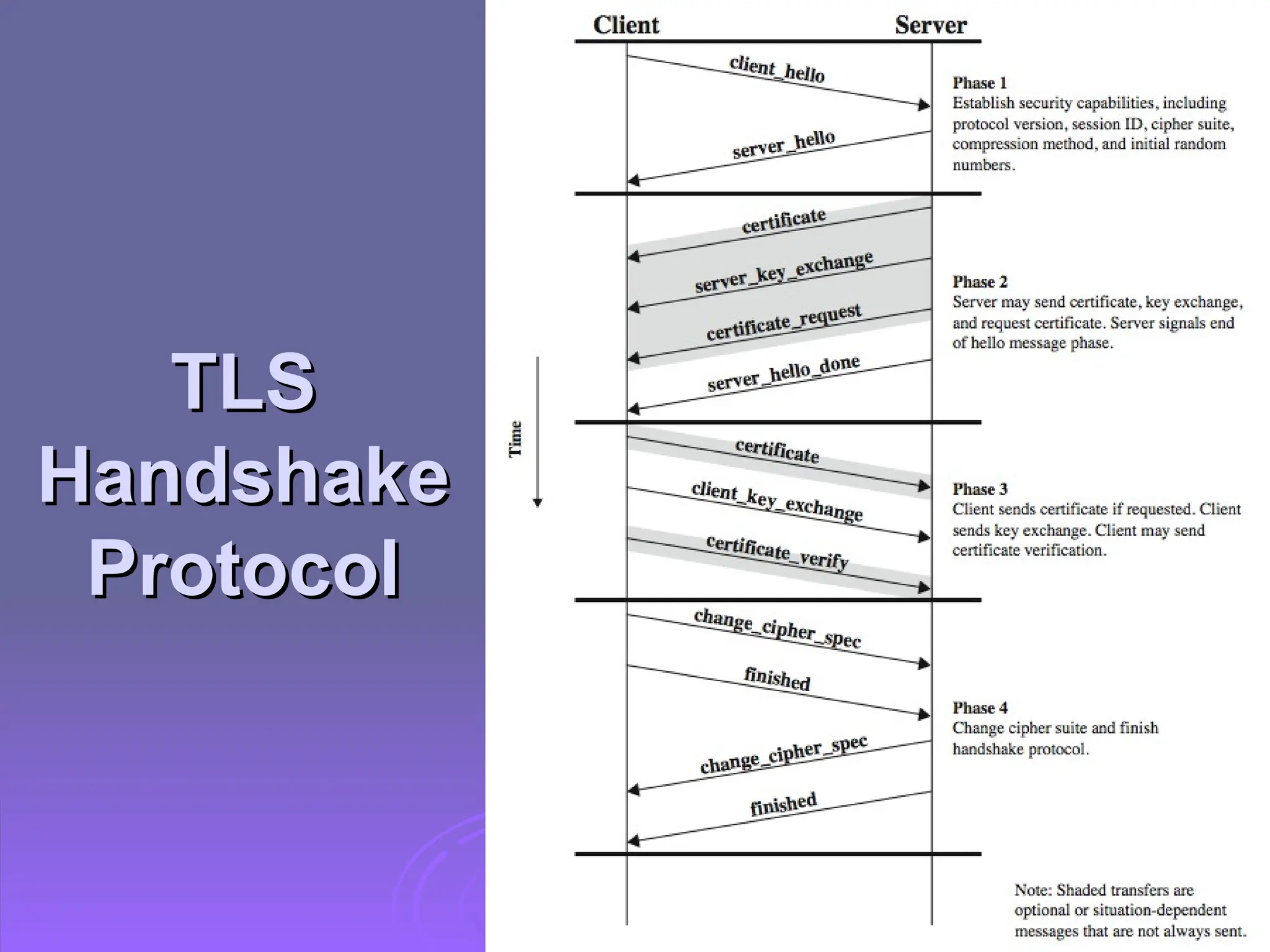
  • #15 The most complex part of SSL is the Handshake Protocol. This protocol allows the server and client to authenticate each other and to negotiate an encryption and MAC algorithm and cryptographic keys to be used to protect data sent in an SSL record. The Handshake Protocol is used before any application data is transmitted. The Handshake Protocol consists of a series of messages exchanged by client and server, which have the format shown in Stallings Figure 16.5c, and which can be viewed in 4 phases: Phase 1. Establish Security Capabilities - this phase is used by the client to initiate a logical connection and to establish the security capabilities that will be associated with it Phase 2. Server Authentication and Key Exchange - the server begins this phase by sending its certificate if it needs to be authenticated. Phase 3. Client Authentication and Key Exchange - the client should verify that the server provided a valid certificate if required and check that the server_hello parameters are acceptable Phase 4. Finish - this phase completes the setting up of a secure connection. The client sends a change_cipher_spec message and copies the pending CipherSpec into the current CipherSpec. At this point the handshake is complete and the client and server may begin to exchange application layer data.
  • #16 Stallings Figure 5.6 shows the initial exchange needed to establish a logical connection between client and server. The exchange can be viewed as having the four phases discussed previously. Additional details on the operation of these phases is given in the text.
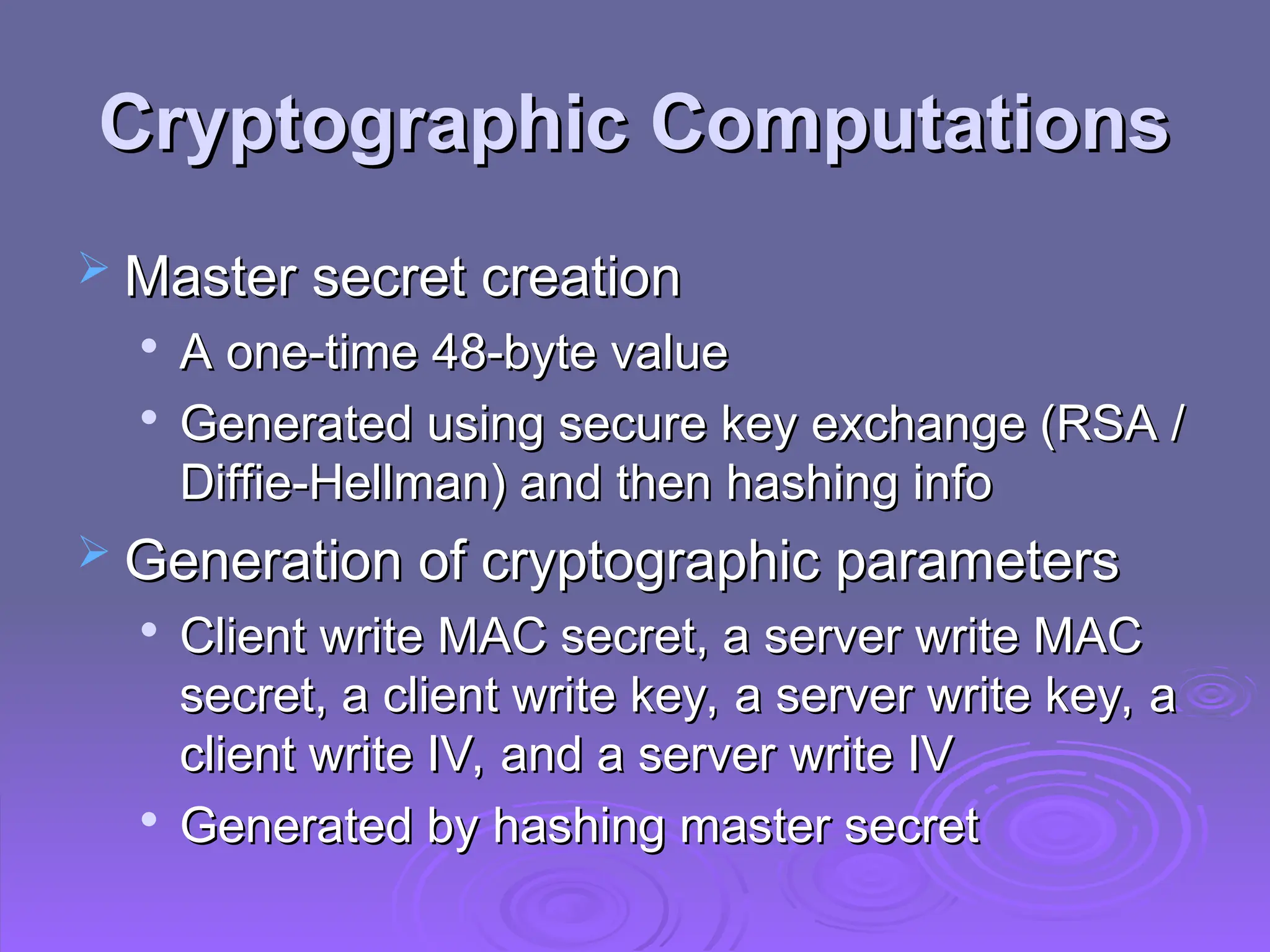
  • #17 Two further items are of interest: the creation of a shared master secret by means of the key exchange, and the generation of cryptographic parameters from the master secret. The shared master secret is a one-time 48-byte value (384 bits) generated for this session by means of secure key exchange. The creation is in two stages. First, a pre_master_secret is exchanged. Second, the master_secret is calculated by both parties. For pre_master_secret exchange, there are two possibilities, using either RSA or Diffie-Hellman. Both sides now compute the master_secret by hashing the relevant information, as detailed in the text. CipherSpecs require a client write MAC secret, a server write MAC secret, a client write key, a server write key, a client write IV, and a server write IV, which are generated from the master secret in that order. These parameters are generated from the master secret by hashing the master secret into a sequence of secure bytes of sufficient length for all needed parameters.
  • #18 TLS is an IETF standardization initiative whose goal is to produce an Internet standard version of SSL. TLS is defined as a Proposed Internet Standard in RFC 2246. RFC 2246 is very similar to SSLv3, but with a number of minor differences in the areas shown, as discussed in the text.
  • #19 TLS is an IETF standardization initiative whose goal is to produce an Internet standard version of SSL. TLS is defined as a Proposed Internet Standard in RFC 2246. RFC 2246 is very similar to SSLv3, but with a number of minor differences in the areas shown, as discussed in the text.
  • #20 TLS is an IETF standardization initiative whose goal is to produce an Internet standard version of SSL. TLS is defined as a Proposed Internet Standard in RFC 2246. RFC 2246 is very similar to SSLv3, but with a number of minor differences in the areas shown, as discussed in the text.
  • #21 TLS is an IETF standardization initiative whose goal is to produce an Internet standard version of SSL. TLS is defined as a Proposed Internet Standard in RFC 2246. RFC 2246 is very similar to SSLv3, but with a number of minor differences in the areas shown, as discussed in the text.
  • #22 TLS is an IETF standardization initiative whose goal is to produce an Internet standard version of SSL. TLS is defined as a Proposed Internet Standard in RFC 2246. RFC 2246 is very similar to SSLv3, but with a number of minor differences in the areas shown, as discussed in the text.
  • #23 TLS is an IETF standardization initiative whose goal is to produce an Internet standard version of SSL. TLS is defined as a Proposed Internet Standard in RFC 2246. RFC 2246 is very similar to SSLv3, but with a number of minor differences in the areas shown, as discussed in the text.
  • #24 The Alert Protocol is used to convey SSL-related alerts to the peer entity. As with other applications that use SSL, alert messages are compressed and encrypted, as specified by the current state. Each message in this protocol consists of two bytes (as shown in Stallings Figure 16.5b), the first takes the value warning(1) or fatal(2) to convey the severity of the message. The second byte contains a code that indicates the specific alert. The first group shown are the fatal alerts, the others are warnings.
  • #25 The most complex part of SSL is the Handshake Protocol. This protocol allows the server and client to authenticate each other and to negotiate an encryption and MAC algorithm and cryptographic keys to be used to protect data sent in an SSL record. The Handshake Protocol is used before any application data is transmitted. The Handshake Protocol consists of a series of messages exchanged by client and server, which have the format shown in Stallings Figure 16.5c, and which can be viewed in 4 phases: Phase 1. Establish Security Capabilities - this phase is used by the client to initiate a logical connection and to establish the security capabilities that will be associated with it Phase 2. Server Authentication and Key Exchange - the server begins this phase by sending its certificate if it needs to be authenticated. Phase 3. Client Authentication and Key Exchange - the client should verify that the server provided a valid certificate if required and check that the server_hello parameters are acceptable Phase 4. Finish - this phase completes the setting up of a secure connection. The client sends a change_cipher_spec message and copies the pending CipherSpec into the current CipherSpec. At this point the handshake is complete and the client and server may begin to exchange application layer data.
  • #26 Stallings Figure 5.6 shows the initial exchange needed to establish a logical connection between client and server. The exchange can be viewed as having the four phases discussed previously. Additional details on the operation of these phases is given in the text.
  • #27 Two further items are of interest: the creation of a shared master secret by means of the key exchange, and the generation of cryptographic parameters from the master secret. The shared master secret is a one-time 48-byte value (384 bits) generated for this session by means of secure key exchange. The creation is in two stages. First, a pre_master_secret is exchanged. Second, the master_secret is calculated by both parties. For pre_master_secret exchange, there are two possibilities, using either RSA or Diffie-Hellman. Both sides now compute the master_secret by hashing the relevant information, as detailed in the text. CipherSpecs require a client write MAC secret, a server write MAC secret, a client write key, a server write key, a client write IV, and a server write IV, which are generated from the master secret in that order. These parameters are generated from the master secret by hashing the master secret into a sequence of secure bytes of sufficient length for all needed parameters.
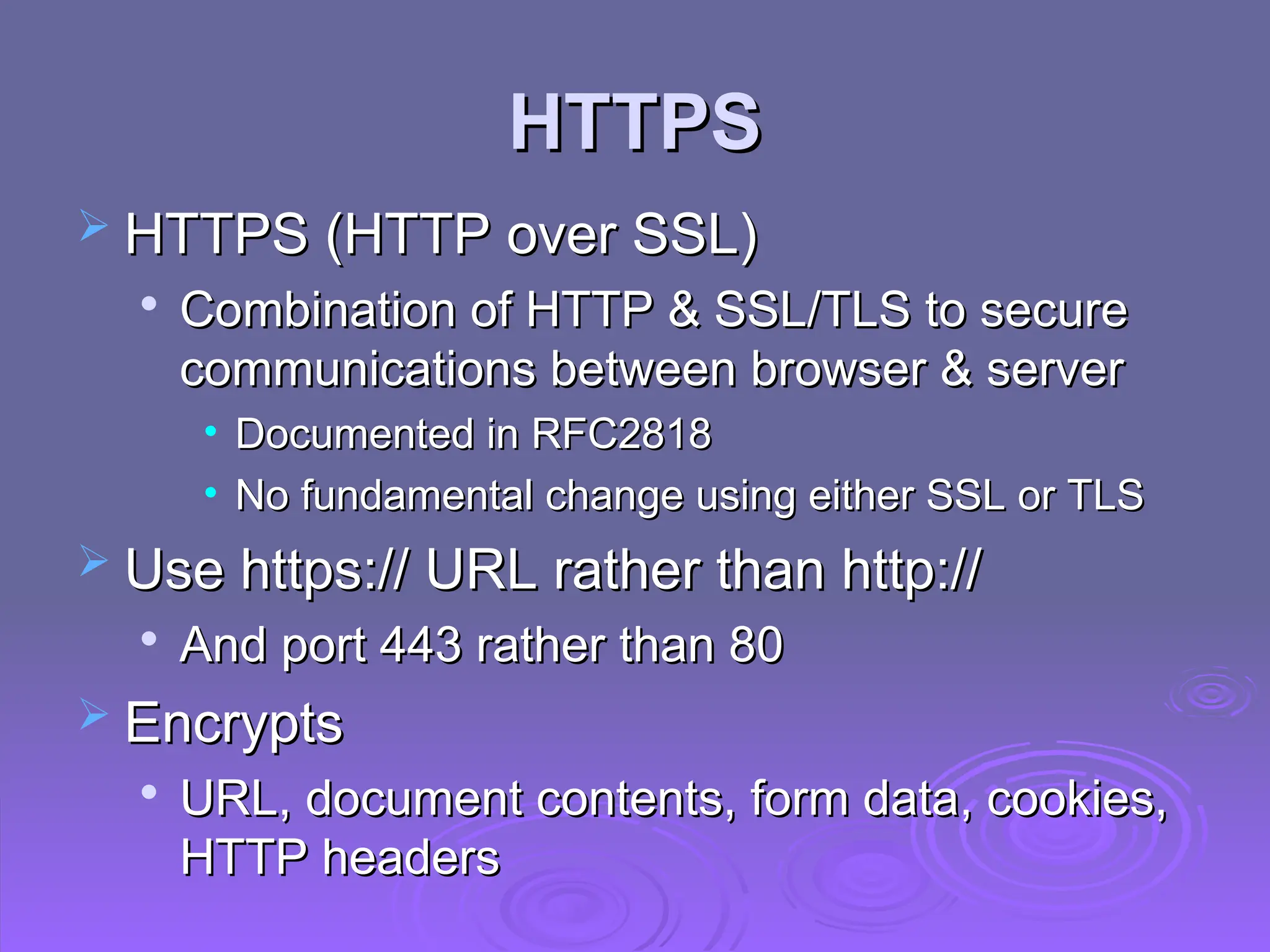
  • #28 HTTPS (HTTP over SSL) refers to the combination of HTTP and SSL to implement secure communication between a Web browser and a Web server. The HTTPS capability is built into all modern Web browsers. Its use depends on the Web server supporting HTTPS communication. The principal difference seen by a user of a web browser is that URL (uniform resource locator) addresses begin with https:// rather than http://. A normal HTTP connection uses port 80. If HTTPS is specified, port 443 is specified, which invokes SSL. When HTTPS is used, the following elements of the communication are encrypted: URL of the requested document, Contents of the document, Contents of browser forms (filled in by browser user), Cookies sent from browser to server and from server to browser, and Contents of HTTP header. HTTPS is documented in RFC 2818, HTTP Over TLS. There is no fundamental change in using HTTP over either SSL or TLS, and both implementations are referred to as HTTPS.
  • #29 HTTPS (HTTP over SSL) refers to the combination of HTTP and SSL to implement secure communication between a Web browser and a Web server. The HTTPS capability is built into all modern Web browsers. Its use depends on the Web server supporting HTTPS communication. The principal difference seen by a user of a web browser is that URL (uniform resource locator) addresses begin with https:// rather than http://. A normal HTTP connection uses port 80. If HTTPS is specified, port 443 is specified, which invokes SSL. When HTTPS is used, the following elements of the communication are encrypted: URL of the requested document, Contents of the document, Contents of browser forms (filled in by browser user), Cookies sent from browser to server and from server to browser, and Contents of HTTP header. HTTPS is documented in RFC 2818, HTTP Over TLS. There is no fundamental change in using HTTP over either SSL or TLS, and both implementations are referred to as HTTPS.
  • #30 For HTTPS, the agent acting as the HTTP client also acts as the TLS client. The client initiates a connection to the server on the appropriate port and then sends the TLS ClientHello to begin the TLS handshake. When the TLS handshake has finished. The client may then initiate the first HTTP request. All HTTP data is to be sent as TLS application data. Normal HTTP behavior, including retained connections is followed. An HTTP client or server can indicate the closing of a connection by including in an HTTP record: “Connection: close”. This indicates that the connection will be closed after this record is delivered. The closure of an HTTPS connection requires that TLS close the connection with the peer TLS entity on the remote side, which will involve closing the underlying TCP connection. At the TLS level, the proper way to close a connection is for each side to use the TLS alert protocol to send a close_notify alert. TLS implementations must initiate an exchange of closure alerts before closing a connection. A TLS implementation may, after sending a closure alert, close the connection without waiting for the peer to send its closure alert, generating an "incomplete close". Note that an implementation that does this may choose to reuse the session. This should only be done when the application knows (typically through detecting HTTP message boundaries) that it has received all the message data that it cares about. HTTP clients must also be able to cope with a situation in which the underlying TCP connection is terminated without a prior close_notify alert and without a Connection: close indicator. Such a situation could be due to a programming error on the server, or a communication error that causes the TCP connection to drop. However, the unannounced TCP closure could be evidence of some sort of attack. So the HTTPS client should issue some sort of security warning when this occurs.
  • #31 For HTTPS, the agent acting as the HTTP client also acts as the TLS client. The client initiates a connection to the server on the appropriate port and then sends the TLS ClientHello to begin the TLS handshake. When the TLS handshake has finished. The client may then initiate the first HTTP request. All HTTP data is to be sent as TLS application data. Normal HTTP behavior, including retained connections is followed. An HTTP client or server can indicate the closing of a connection by including in an HTTP record: “Connection: close”. This indicates that the connection will be closed after this record is delivered. The closure of an HTTPS connection requires that TLS close the connection with the peer TLS entity on the remote side, which will involve closing the underlying TCP connection. At the TLS level, the proper way to close a connection is for each side to use the TLS alert protocol to send a close_notify alert. TLS implementations must initiate an exchange of closure alerts before closing a connection. A TLS implementation may, after sending a closure alert, close the connection without waiting for the peer to send its closure alert, generating an "incomplete close". Note that an implementation that does this may choose to reuse the session. This should only be done when the application knows (typically through detecting HTTP message boundaries) that it has received all the message data that it cares about. HTTP clients must also be able to cope with a situation in which the underlying TCP connection is terminated without a prior close_notify alert and without a Connection: close indicator. Such a situation could be due to a programming error on the server, or a communication error that causes the TCP connection to drop. However, the unannounced TCP closure could be evidence of some sort of attack. So the HTTPS client should issue some sort of security warning when this occurs.
  • #32 Secure Shell (SSH) is a protocol for secure network communications designed to be relatively simple and inexpensive to implement. The initial version, SSH1 was focused on providing a secure remote logon facility to replace TELNET and other remote logon schemes that provided no security. SSH also provides a more general client/server capability and can be used for such network functions as file transfer and email. A new version, SSH2, fixes a number of security flaws in the original scheme. SSH2 is documented as a proposed standard in IETF RFCs 4250 through 4254. SSH client and server applications are widely available for most operating systems. It has become the method of choice for remote login and X tunneling and is a rapidly becoming one of the most pervasive applications for encryption technology outside of embedded systems.
  • #33 SSH is organized as three protocols that typically run on top of TCP (Stallings Figure 5.8): • Transport Layer Protocol: Provides server authentication, data confidentiality, and data integrity with forward secrecy (i.e., if a key is compromised during one session, the knowledge does not affect the security of earlier sessions). The transport layer may optionally provide compression. • User Authentication Protocol: Authenticates the user to the server. • Connection Protocol: Multiplexes multiple logical communications channels over a single underlying SSH connection.
  • #34 Server authentication occurs at the transport layer, based on the server possessing a public/private key pair. The server host key is used during key exchange to authenticate the identity of the host. For this to be possible, the client must have a priori knowledge of the server's public host key. Next, consider events in the SSH Transport Layer Protocol. First, a client establishes a TCP connection to the server. Once the connection is established, the client and server exchange data, referred to as packets, in the data field of a TCP segment. Each packet has the format shown in Stallings Figure 16.10 and described in the text. The SSH Transport Layer packet exchange consists of a sequence of steps. The first step, the identification string exchange, begins with the client sending a packet with an identification string. Next comes algorithm negotiation. Each side sends an SSH_MSG_KEXINIT containing lists of supported algorithms, one list for each type of cryptographic algorithm, in the order of preference to the sender. For each category, the algorithm chosen is the first algorithm on the client's list that is also supported by the server. The next step is key exchange. The specification allows for alternative methods of key exchange, but at present only two versions of Diffie-Hellman key exchange are specified. As a result of these steps, the two sides now share a master key K. In addition, the server has been authenticated to the client. The end of key exchange is signaled by the exchange of SSH_MSG_NEWKEYS packets. At this point, both sides may start using the keys generated from K, as discussed subsequently. The final step is service request. The client sends an SSH_MSG_SERVICE_REQUEST packet to request either the User Authentication or the Connection Protocol. Subsequent to this, all data is exchanged as the payload of an SSH Transport Layer packet, protected by encryption and MAC.
  • #35 The User Authentication Protocol provides the means by which the client is authenticated to the server. Three types of messages are always used in the User Authentication Protocol. Authentication requests from the client have type SSH_MSG_USERAUTH_REQUEST. If the server either (a) rejects the authentication request, or (b) accepts the request but requires one or more additional authentication methods, the server sends a SSH_MSG_USERAUTH_FAILURE message that includes a list of methods that may productively continue the dialog. If the server accepts authentication then it sends a single byte message, SSH_MSG_USERAUTH_SUCCESS. The server may require one or more of the following authentication methods: publickey - client sends a message to the server that contains the client's public key, with the message signed by the client's private key password - client sends a message containing a plaintext password, protected by TLS encryption hostbased - authentication is performed on the client's host, rather than the client itself
  • #36 The SSH Connection Protocol runs on top of the SSH Transport Layer Protocol and assumes that a secure authentication connection is in use. That secure authentication connection, referred to as a tunnel is used by the Connection Protocol to multiple a number of logical channels. All types of communication using SSH, such as a terminal session, are supported using separate channels. Either side may open a channel. For each channel, each side associates a unique channel number, which need not be the same on both ends. Channels are flow controlled using a window mechanism. No data may be sent to a channel until a message is received to indicate that window space is available. The life of a channel progresses through three stages: opening a channel, data transfer, and closing a channel. Four channel types are recognized in the SSH Connection Protocol specification: session - remote execution of a program x11 - X Window System display traffic forwarded-tcpip - remote port forwarding direct-tcpip - local port forwarding
  • #37 Stallings Figure 5.11 provides an example of Connection Protocol Exchange.
  • #38 One of the most useful features of SSH is port forwarding / tunneling. Port forwarding provides the ability to convert any insecure TCP connection into a secure SSH connection. Note that any application that runs on top of TCP has a port number. Incoming TCP traffic is delivered to the appropriate application on the basis of the port number. To secure such a connection, SSH is configured so that the SSH Transport Layer Protocol establishes a TCP connection between the SSH client and server entities, with TCP port numbers a and b, respectively. A secure SSH tunnel is established over this TCP connection. Traffic from the client at port x is redirected to the local SSH entity and travels through the tunnel where the remote SSH entity delivers the data to the server application on port y. Traffic in the other direction is similarly redirected. SSH supports two types of port forwarding: local forwarding and remote forwarding. Local forwarding allows the client to set up a "hijacker" process. This will intercept selected application level traffic and redirect it from an unsecured TCP connection to a secure SSH tunnel. This could be used to secure the traffic from an email client on your desktop that gets email from the mail server via POP, the Post Office Protocol. With remote forwarding, the user's SSH client acts on the server's behalf. The client receives traffic with a given destination port number, places the traffic on the correct port and sends it to the destination the user chooses. This could be used to securely access a server at work from a home computer.
  • #39 Chapter 5 summary.