Web Scraping in
Python with Scrapy
Kota Kato
@orangain
2015-09-08, 鮨会
Who am I?
• Kota Kato
• @orangain
• Software Engineer
• Interested in automation such as Jenkins,
Chef, Docker etc.
Definition: Web Scraping
• Web scraping (web harvesting or web data
extraction) is a computer software technique
of extracting information from websites.
Web scraping - Wikipedia, the free encyclopedia

https://en.wikipedia.org/wiki/Web_scraping
eBook-1
• Cross-store search engine for ebooks.
• Retrieve ebook data from 9 ebook stores.
http://ebook-1.com/
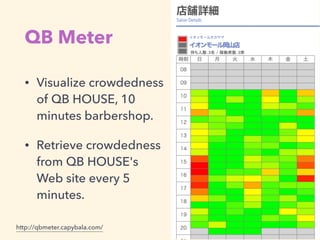
QB Meter
• Visualize crowdedness
of QB HOUSE, 10
minutes barbershop.
• Retrieve crowdedness
from QB HOUSE's
Web site every 5
minutes.
http://qbmeter.capybala.com/
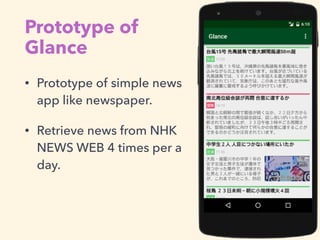
Prototype of
Glance
• Prototype of simple news
app like newspaper.
• Retrieve news from NHK
NEWS WEB 4 times per a
day.
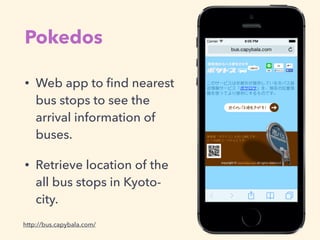
Pokedos
• Web app to find nearest
bus stops to see the
arrival information of
buses.
• Retrieve location of the
all bus stops in Kyoto-
city.
http://bus.capybala.com/
Why Web Scraping?
• For Web Developer:
• Develop mash-up application.
• For Data Analyst:
• Retrieve data to analyze.
• For Everybody:
• Automate operation of web sites.
Why Use Python?
• Easy to use
• Powerful libraries, especially Scrapy
• Seamlessness between data processing and
developing application
Web Scraping in Python
• Combination of lightweight libraries:
• Retrieving: Requests
• Scraping: lxml, Beautiful Soup
• Full stack framework:
• Scrapy Today's topic
Scrapy
Scrapy
• Fast, simple and extensible Web scraping
framework in Python
• Currently compatible only with Python 2.7
• In-progress Python 3 support
• Maintained by Scrapinghub
• BSD License
http://scrapy.org/
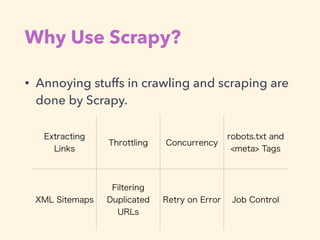
Why Use Scrapy?
• Annoying stuffs in crawling and scraping are
done by Scrapy.
Extracting
Links
Throttling Concurrency
robots.txt and
<meta> Tags
XML Sitemaps
Filtering
Duplicated
URLs
Retry on Error Job Control
Getting Started with Scrapy
$ pip install scrapy
$ cat > myspider.py <<EOF
import scrapy
class BlogSpider(scrapy.Spider):
name = 'blogspider'
start_urls = ['http://blog.scrapinghub.com']
def parse(self, response):
for url in response.css('ul li a::attr("href")').re(r'.*/dddd/dd/$'):
yield scrapy.Request(response.urljoin(url), self.parse_titles)
def parse_titles(self, response):
for post_title in response.css('div.entries > ul > li a::text').extract():
yield {'title': post_title}
EOF
$ scrapy runspider myspider.py
http://scrapy.org/Requirements: Python 2.7, libxml2 and libxslt
Let's Collect Sushi Images
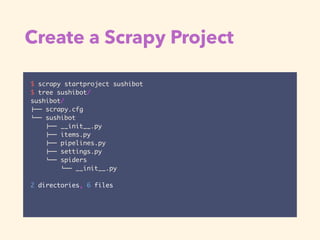
Create a Scrapy Project
$ scrapy startproject sushibot
$ tree sushibot/
sushibot/
!"" scrapy.cfg
#"" sushibot
!"" __init__.py
!"" items.py
!"" pipelines.py
!"" settings.py
#"" spiders
#"" __init__.py
2 directories, 6 files
Generate a Spider
$ cd sushibot
$ scrapy genspider sushi api.flickr.com
$ cat sushibot/spiders/sushi.py
# -*- coding: utf-8 -*-
import scrapy
class SushiSpider(scrapy.Spider):
name = "sushi"
allowed_domains = ["api.flickr.com"]
start_urls = (
'http://www.api.flickr.com/',
)
def parse(self, response):
pass
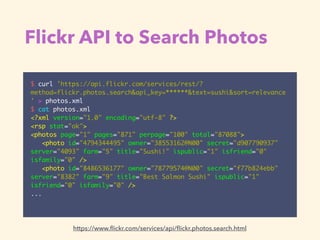
Flickr API to Search Photos
$ curl 'https://api.flickr.com/services/rest/?
method=flickr.photos.search&api_key=******&text=sushi&sort=relevance
' > photos.xml
$ cat photos.xml
<?xml version="1.0" encoding="utf-8" ?>
<rsp stat="ok">
<photos page="1" pages="871" perpage="100" total="87088">
<photo id="4794344495" owner="38553162@N00" secret="d907790937"
server="4093" farm="5" title="Sushi!" ispublic="1" isfriend="0"
isfamily="0" />
<photo id="8486536177" owner="78779574@N00" secret="f77b824ebb"
server="8382" farm="9" title="Best Salmon Sushi" ispublic="1"
isfriend="0" isfamily="0" />
...
https://www.flickr.com/services/api/flickr.photos.search.html
Construct Photo's URL
<photo id="4794344495" owner="38553162@N00" secret="d907790937"
server="4093" farm="5" title="Sushi!" ispublic="1" isfriend="0"
isfamily="0" />
https://farm{farm-id}.staticflickr.com/{server-id}/{id}_{secret}
_[mstzb].jpg
https://farm5.staticflickr.com/4093/4794344495_d907790937_b.jpg
https://www.flickr.com/services/api/misc.urls.html
Photo element:
Photo's URL template:
Result:
spider/sushi.py (Modified)
# -*- coding: utf-8 -*-
import os
import scrapy
from sushibot.items import SushibotItem
class SushiSpider(scrapy.Spider):
name = "sushi"
allowed_domains = ["api.flickr.com", "staticflickr.com"]
start_urls = (
'https://api.flickr.com/services/rest/?method=flickr.photos.search&api_key=' +
os.environ['FLICKR_KEY'] + '&text=sushi&sort=relevance',
)
def parse(self, response):
for photo in response.css('photo'):
yield scrapy.Request(photo_url(photo), self.handle_image)
def handle_image(self, response):
return SushibotItem(url=response.url, body=response.body)
def photo_url(photo):
return 'https://farm{farm}.staticflickr.com/{server}/{id}_{secret}_{size}.jpg'.format(
farm=photo.xpath('@farm').extract_first(),
server=photo.xpath('@server').extract_first(),
id=photo.xpath('@id').extract_first(),
secret=photo.xpath('@secret').extract_first(),
size='b',
)
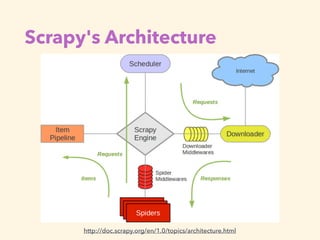
Scrapy's Architecture
http://doc.scrapy.org/en/1.0/topics/architecture.html
items.py
# -*- coding: utf-8 -*-
from pprint import pformat
import scrapy
class SushibotItem(scrapy.Item):
url = scrapy.Field()
body = scrapy.Field()
def __str__(self):
return pformat({
'url': self['url'],
'body': self['body'][:10] + '...',
})
pipelines.py
# -*- coding: utf-8 -*-
import os
class SaveImagePipeline(object):
def process_item(self, item, spider):
output_dir = 'images'
if not os.path.exists(output_dir):
os.makedirs(output_dir)
filename = item['url'].split('/')[-1]
with open(os.path.join(output_dir, filename), 'wb') as f:
f.write(item['body'])
return item
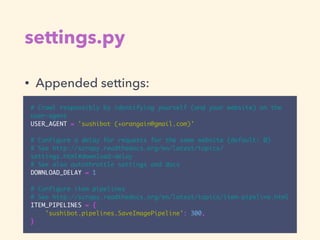
settings.py
• Appended settings:
# Crawl responsibly by identifying yourself (and your website) on the
user-agent
USER_AGENT = 'sushibot (+orangain@gmail.com)'
# Configure a delay for requests for the same website (default: 0)
# See http://scrapy.readthedocs.org/en/latest/topics/
settings.html#download-delay
# See also autothrottle settings and docs
DOWNLOAD_DELAY = 1
# Configure item pipelines
# See http://scrapy.readthedocs.org/en/latest/topics/item-pipeline.html
ITEM_PIPELINES = {
'sushibot.pipelines.SaveImagePipeline': 300,
}
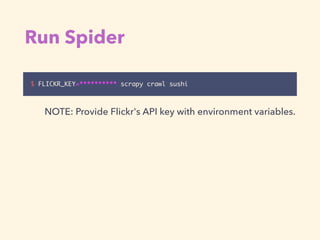
Run Spider
$ FLICKR_KEY=********** scrapy crawl sushi
NOTE: Provide Flickr's API key with environment variables.
Thank you!
• Web scraping has power to propose
improvement.
• Source code is available at

https://github.com/orangain/sushibot
@orangain

Web Scraping in Python with Scrapy

  • 1.
    Web Scraping in Pythonwith Scrapy Kota Kato @orangain 2015-09-08, 鮨会
  • 2.
    Who am I? •Kota Kato • @orangain • Software Engineer • Interested in automation such as Jenkins, Chef, Docker etc.
  • 3.
    Definition: Web Scraping •Web scraping (web harvesting or web data extraction) is a computer software technique of extracting information from websites. Web scraping - Wikipedia, the free encyclopedia
 https://en.wikipedia.org/wiki/Web_scraping
  • 4.
    eBook-1 • Cross-store searchengine for ebooks. • Retrieve ebook data from 9 ebook stores. http://ebook-1.com/
  • 5.
    QB Meter • Visualizecrowdedness of QB HOUSE, 10 minutes barbershop. • Retrieve crowdedness from QB HOUSE's Web site every 5 minutes. http://qbmeter.capybala.com/
  • 6.
    Prototype of Glance • Prototypeof simple news app like newspaper. • Retrieve news from NHK NEWS WEB 4 times per a day.
  • 7.
    Pokedos • Web appto find nearest bus stops to see the arrival information of buses. • Retrieve location of the all bus stops in Kyoto- city. http://bus.capybala.com/
  • 8.
    Why Web Scraping? •For Web Developer: • Develop mash-up application. • For Data Analyst: • Retrieve data to analyze. • For Everybody: • Automate operation of web sites.
  • 9.
    Why Use Python? •Easy to use • Powerful libraries, especially Scrapy • Seamlessness between data processing and developing application
  • 10.
    Web Scraping inPython • Combination of lightweight libraries: • Retrieving: Requests • Scraping: lxml, Beautiful Soup • Full stack framework: • Scrapy Today's topic
  • 11.
  • 12.
    Scrapy • Fast, simpleand extensible Web scraping framework in Python • Currently compatible only with Python 2.7 • In-progress Python 3 support • Maintained by Scrapinghub • BSD License http://scrapy.org/
  • 13.
    Why Use Scrapy? •Annoying stuffs in crawling and scraping are done by Scrapy. Extracting Links Throttling Concurrency robots.txt and <meta> Tags XML Sitemaps Filtering Duplicated URLs Retry on Error Job Control
  • 14.
    Getting Started withScrapy $ pip install scrapy $ cat > myspider.py <<EOF import scrapy class BlogSpider(scrapy.Spider): name = 'blogspider' start_urls = ['http://blog.scrapinghub.com'] def parse(self, response): for url in response.css('ul li a::attr("href")').re(r'.*/dddd/dd/$'): yield scrapy.Request(response.urljoin(url), self.parse_titles) def parse_titles(self, response): for post_title in response.css('div.entries > ul > li a::text').extract(): yield {'title': post_title} EOF $ scrapy runspider myspider.py http://scrapy.org/Requirements: Python 2.7, libxml2 and libxslt
  • 15.
  • 16.
    Create a ScrapyProject $ scrapy startproject sushibot $ tree sushibot/ sushibot/ !"" scrapy.cfg #"" sushibot !"" __init__.py !"" items.py !"" pipelines.py !"" settings.py #"" spiders #"" __init__.py 2 directories, 6 files
  • 17.
    Generate a Spider $cd sushibot $ scrapy genspider sushi api.flickr.com $ cat sushibot/spiders/sushi.py # -*- coding: utf-8 -*- import scrapy class SushiSpider(scrapy.Spider): name = "sushi" allowed_domains = ["api.flickr.com"] start_urls = ( 'http://www.api.flickr.com/', ) def parse(self, response): pass
  • 18.
    Flickr API toSearch Photos $ curl 'https://api.flickr.com/services/rest/? method=flickr.photos.search&api_key=******&text=sushi&sort=relevance ' > photos.xml $ cat photos.xml <?xml version="1.0" encoding="utf-8" ?> <rsp stat="ok"> <photos page="1" pages="871" perpage="100" total="87088"> <photo id="4794344495" owner="38553162@N00" secret="d907790937" server="4093" farm="5" title="Sushi!" ispublic="1" isfriend="0" isfamily="0" /> <photo id="8486536177" owner="78779574@N00" secret="f77b824ebb" server="8382" farm="9" title="Best Salmon Sushi" ispublic="1" isfriend="0" isfamily="0" /> ... https://www.flickr.com/services/api/flickr.photos.search.html
  • 19.
    Construct Photo's URL <photoid="4794344495" owner="38553162@N00" secret="d907790937" server="4093" farm="5" title="Sushi!" ispublic="1" isfriend="0" isfamily="0" /> https://farm{farm-id}.staticflickr.com/{server-id}/{id}_{secret} _[mstzb].jpg https://farm5.staticflickr.com/4093/4794344495_d907790937_b.jpg https://www.flickr.com/services/api/misc.urls.html Photo element: Photo's URL template: Result:
  • 20.
    spider/sushi.py (Modified) # -*-coding: utf-8 -*- import os import scrapy from sushibot.items import SushibotItem class SushiSpider(scrapy.Spider): name = "sushi" allowed_domains = ["api.flickr.com", "staticflickr.com"] start_urls = ( 'https://api.flickr.com/services/rest/?method=flickr.photos.search&api_key=' + os.environ['FLICKR_KEY'] + '&text=sushi&sort=relevance', ) def parse(self, response): for photo in response.css('photo'): yield scrapy.Request(photo_url(photo), self.handle_image) def handle_image(self, response): return SushibotItem(url=response.url, body=response.body) def photo_url(photo): return 'https://farm{farm}.staticflickr.com/{server}/{id}_{secret}_{size}.jpg'.format( farm=photo.xpath('@farm').extract_first(), server=photo.xpath('@server').extract_first(), id=photo.xpath('@id').extract_first(), secret=photo.xpath('@secret').extract_first(), size='b', )
  • 21.
  • 22.
    items.py # -*- coding:utf-8 -*- from pprint import pformat import scrapy class SushibotItem(scrapy.Item): url = scrapy.Field() body = scrapy.Field() def __str__(self): return pformat({ 'url': self['url'], 'body': self['body'][:10] + '...', })
  • 23.
    pipelines.py # -*- coding:utf-8 -*- import os class SaveImagePipeline(object): def process_item(self, item, spider): output_dir = 'images' if not os.path.exists(output_dir): os.makedirs(output_dir) filename = item['url'].split('/')[-1] with open(os.path.join(output_dir, filename), 'wb') as f: f.write(item['body']) return item
  • 24.
    settings.py • Appended settings: #Crawl responsibly by identifying yourself (and your website) on the user-agent USER_AGENT = 'sushibot (+orangain@gmail.com)' # Configure a delay for requests for the same website (default: 0) # See http://scrapy.readthedocs.org/en/latest/topics/ settings.html#download-delay # See also autothrottle settings and docs DOWNLOAD_DELAY = 1 # Configure item pipelines # See http://scrapy.readthedocs.org/en/latest/topics/item-pipeline.html ITEM_PIPELINES = { 'sushibot.pipelines.SaveImagePipeline': 300, }
  • 25.
    Run Spider $ FLICKR_KEY=**********scrapy crawl sushi NOTE: Provide Flickr's API key with environment variables.
  • 26.
    Thank you! • Webscraping has power to propose improvement. • Source code is available at
 https://github.com/orangain/sushibot @orangain