Web design continued
Disneyland
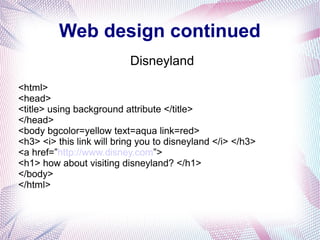
<html>
<head>
<title> using background attribute </title>
</head>
<body bgcolor=yellow text=aqua link=red>
<h3> <i> this link will bring you to disneyland </i> </h3>
<a href=”http://www.disney.com”>
<h1> how about visiting disneyland? </h1>
</body>
</html>
<html>
<head>
<title> using background attribute </title>
</head>
<body bgcolor=yellow text=aqua link=red>
<h3> <i> this link will bring you to disneyland </i> </h3>
<a href=”http://www.disney.com”>
<h1> how about visiting disneyland? </h1>
</body>
</html>
<html>
<head>
<title> using background attribute </title>
</head>
<body bgcolor=yellow text=aqua link=red>
<h3> <i> this link will bring you to disneyland </i> </h3>
<a href=”http://www.disney.com”>
<h1> how about visiting disneyland? </h1>
</body>
</html>
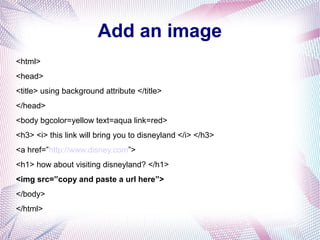
Add an image
<html>
<head>
<title> using background attribute </title>
</head>
<body bgcolor=yellow text=aqua link=red>
<h3> <i> this link will bring you to disneyland </i> </h3>
<a href=”http://www.disney.com”>
<h1> how about visiting disneyland? </h1>
<img src=”copy and paste a url here”>
</body>
</html>
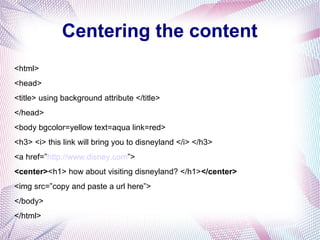
Centering the content
<html>
<head>
<title> using background attribute </title>
</head>
<body bgcolor=yellow text=aqua link=red>
<h3> <i> this link will bring you to disneyland </i> </h3>
<a href=”http://www.disney.com”>
<center><h1> how about visiting disneyland? </h1></center>
<img src=”copy and paste a url here”>
</body>
</html>
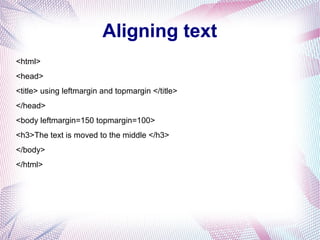
Aligning text
<html>
<head>
<title> using leftmargin and topmargin </title>
</head>
<body leftmargin=150 topmargin=100>
<h3>The text is moved to the middle </h3>
</body>
</html>
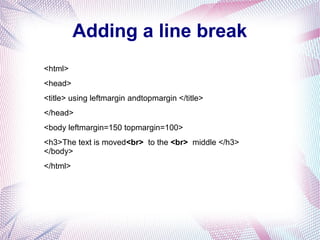
Adding a line break
<html>
<head>
<title> using leftmargin andtopmargin </title>
</head>
<body leftmargin=150 topmargin=100>
<h3>The text is moved<br> to the <br> middle </h3>
</body>
</html>
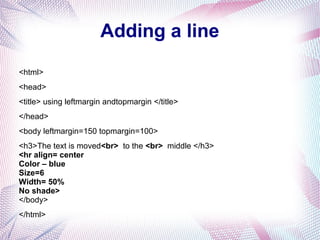
Adding a line
<html>
<head>
<title> using leftmargin andtopmargin </title>
</head>
<body leftmargin=150 topmargin=100>
<h3>The text is moved<br> to the <br> middle </h3>
<hr align= center
Color – blue
Size=6
Width= 50%
No shade>
</body>
</html>
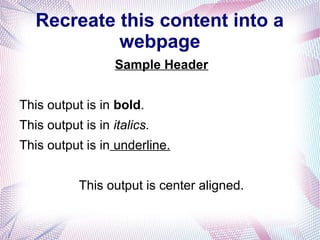
Recreate this content into a
webpage
Sample Header
This output is in bold.
This output is in italics.
This output is in underline.
This output is center aligned.
Recreate this content into a
webpage
Sample Header
This output is in bold.
This output is in italics.
This output is in underline.
This output is center aligned.

Web design

  • 1.
    Web design continued Disneyland <html> <head> <title>using background attribute </title> </head> <body bgcolor=yellow text=aqua link=red> <h3> <i> this link will bring you to disneyland </i> </h3> <a href=”http://www.disney.com”> <h1> how about visiting disneyland? </h1> </body> </html>
  • 2.
    <html> <head> <title> using backgroundattribute </title> </head> <body bgcolor=yellow text=aqua link=red> <h3> <i> this link will bring you to disneyland </i> </h3> <a href=”http://www.disney.com”> <h1> how about visiting disneyland? </h1> </body> </html>
  • 3.
    <html> <head> <title> using backgroundattribute </title> </head> <body bgcolor=yellow text=aqua link=red> <h3> <i> this link will bring you to disneyland </i> </h3> <a href=”http://www.disney.com”> <h1> how about visiting disneyland? </h1> </body> </html>
  • 4.
    Add an image <html> <head> <title>using background attribute </title> </head> <body bgcolor=yellow text=aqua link=red> <h3> <i> this link will bring you to disneyland </i> </h3> <a href=”http://www.disney.com”> <h1> how about visiting disneyland? </h1> <img src=”copy and paste a url here”> </body> </html>
  • 5.
    Centering the content <html> <head> <title>using background attribute </title> </head> <body bgcolor=yellow text=aqua link=red> <h3> <i> this link will bring you to disneyland </i> </h3> <a href=”http://www.disney.com”> <center><h1> how about visiting disneyland? </h1></center> <img src=”copy and paste a url here”> </body> </html>
  • 6.
    Aligning text <html> <head> <title> usingleftmargin and topmargin </title> </head> <body leftmargin=150 topmargin=100> <h3>The text is moved to the middle </h3> </body> </html>
  • 7.
    Adding a linebreak <html> <head> <title> using leftmargin andtopmargin </title> </head> <body leftmargin=150 topmargin=100> <h3>The text is moved<br> to the <br> middle </h3> </body> </html>
  • 8.
    Adding a line <html> <head> <title>using leftmargin andtopmargin </title> </head> <body leftmargin=150 topmargin=100> <h3>The text is moved<br> to the <br> middle </h3> <hr align= center Color – blue Size=6 Width= 50% No shade> </body> </html>
  • 9.
    Recreate this contentinto a webpage Sample Header This output is in bold. This output is in italics. This output is in underline. This output is center aligned.
  • 10.
    Recreate this contentinto a webpage Sample Header This output is in bold. This output is in italics. This output is in underline. This output is center aligned.