

Web components in
Angular (Angular Elements)
1
Copyright ©2019, Walking Tree Technologies
● An IT Software and Service provider company.
● We act as an extended team for the customers across the globe like Capgemini, Tech Mahindra, Tibco, HP,
Infosys, Qualcomm, TCS to name a few and deliver end-to-end products and solutions to ensure “Great User
Experience.”
● Specialized in technology solutions from designing, development, quality assurance, maintenance and
support, consulting, training and skill augmentation services
● Technical Expertise in Angular, Blockchain, Microservices, React, Sencha ExtJS, Xamarin.
● Recognized as 50 Best Indian founded companies by The Silicon Review.
WHAT DO WE DO?
2
Copyright ©2019, Walking Tree Technologies
About Me
Subbu Nama
Technical Lead
● Subbu has worked in the technology
industry for over 8 years.
● Has good exposure on different domains
● Subbu is a full stack developer, interested
in tools and techniques for visualization
on the web and enjoys working with web
technologies.
3
Copyright ©2019, Walking Tree Technologies
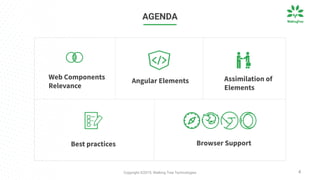
AGENDA
Assimilation of
Elements
Best practices Browser Support
4
Web Components
Relevance
Angular Elements
Copyright ©2019, Walking Tree Technologies 5
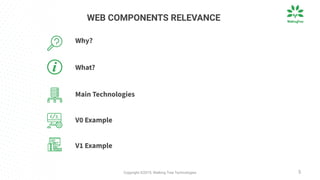
WEB COMPONENTS RELEVANCE
Main Technologies
Why?
What?
V0 Example
V1 Example
5
Copyright ©2019, Walking Tree Technologies
Why?
6
Copyright ©2019, Walking Tree Technologies 7
function numbersSum(even, ...numbers){
var sum=0;
if (!numbers){
numbers=[];
}
numbers.forEach( (number) => {
if (number%2 == 0 && even){
sum=sum+number;
}else if (number%2 != 0 && !even){
sum=sum+number;
}
});
return sum;
}
SUM OF EVEN/ODD NUMBERS
Copyright ©2019, Walking Tree Technologies 8
What?
Copyright ©2019, Walking Tree Technologies
Web component provides the much-needed relief, it’s a suite of different
technologies allowing you to create reusable custom elements with their
functionality encapsulated away from the rest of your code and utilize them in
your web apps.
9
Copyright ©2019, Walking Tree Technologies 10
Main Technologies
Copyright ©2019, Walking Tree Technologies
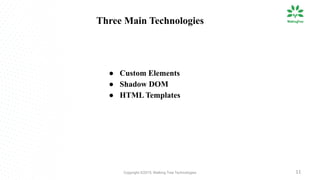
● Custom Elements
● Shadow DOM
● HTML Templates
11
Three Main Technologies
Copyright ©2019, Walking Tree Technologies 12
V0
Copyright ©2019, Walking Tree Technologies 13
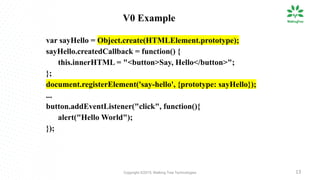
var sayHello = Object.create(HTMLElement.prototype);
sayHello.createdCallback = function() {
this.innerHTML = "<button>Say, Hello</button>";
};
document.registerElement('say-hello', {prototype: sayHello});
...
button.addEventListener("click", function(){
alert("Hello World");
});
V0 Example
Copyright ©2019, Walking Tree Technologies 14
V1
Copyright ©2019, Walking Tree Technologies 15
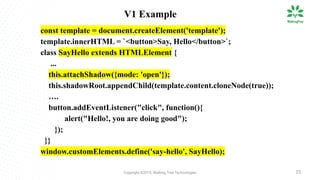
V1 Example
const template = document.createElement('template');
template.innerHTML = `<button>Say, Hello</button>`;
class SayHello extends HTMLElement {
...
this.attachShadow({mode: 'open'});
this.shadowRoot.appendChild(template.content.cloneNode(true));
….
button.addEventListener("click", function(){
alert("Hello!, you are doing good");
});
}}
window.customElements.define('say-hello', SayHello);
Copyright ©2019, Walking Tree Technologies 1616
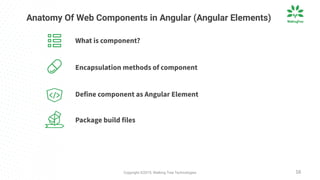
Anatomy Of Web Components in Angular (Angular Elements)
Define component as Angular Element
What is component?
Encapsulation methods of component
Package build files
16
Copyright ©2019, Walking Tree Technologies 17
What is Component?
Copyright ©2019, Walking Tree Technologies
Components are the most basic UI building block of an Angular
application. Angular component provides configuration metadata that
determines how the component should be processed, instantiated, and
used at runtime
18
Copyright ©2019, Walking Tree Technologies 19
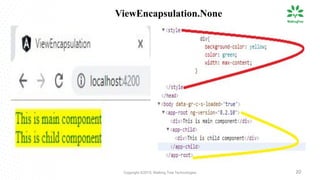
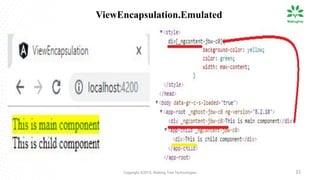
Encapsulation Methods
Copyright ©2019, Walking Tree Technologies 20
ViewEncapsulation.None
Copyright ©2019, Walking Tree Technologies 21
ViewEncapsulation.Emulated
Copyright ©2019, Walking Tree Technologies 22
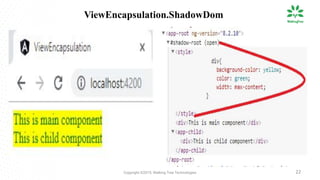
ViewEncapsulation.ShadowDom
Copyright ©2019, Walking Tree Technologies 23
Define Angular Elements
Copyright ©2019, Walking Tree Technologies
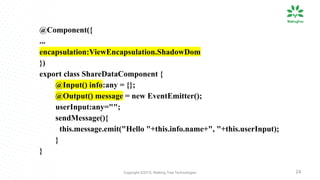
@Component({
...
encapsulation:ViewEncapsulation.ShadowDom
})
export class ShareDataComponent {
@Input() info:any = {};
@Output() message = new EventEmitter();
userInput:any="";
sendMessage(){
this.message.emit("Hello "+this.info.name+", "+this.userInput);
}
}
24
Copyright ©2019, Walking Tree Technologies 25
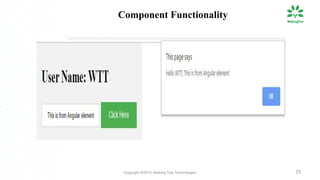
Component Functionality
Copyright ©2019, Walking Tree Technologies 26
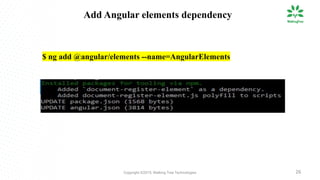
$ ng add @angular/elements --name=AngularElements
Add Angular elements dependency
Copyright ©2019, Walking Tree Technologies 27
@NgModule({
….
entryComponents: [ShareDataComponent]
})
export class AppModule {
constructor(private injector: Injector) {
const customElement = createCustomElement(ShareDataComponent, { injector });
customElements.define('input-output', customElement);
}
ngDoBootstrap() {}
}
Define Custom element
Copyright ©2019, Walking Tree Technologies 28
Packaging Build Files
Copyright ©2019, Walking Tree Technologies 29
...
(async function build() {
const files = [
'./dist/AngularElements/runtime.js',
'./dist/AngularElements/polyfills.js',
'./dist/AngularElements/scripts.js',
'./dist/AngularElements/main.js'
];
await fs.ensureDir('elements');
await concat(files, 'elements/input-output-element.js');
})();
Copyright ©2019, Walking Tree Technologies 30
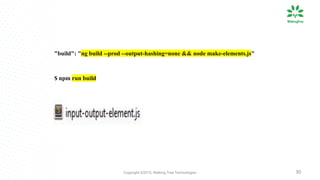
"build": "ng build --prod --output-hashing=none && node make-elements.js"
$ npm run build
Copyright ©2019, Walking Tree Technologies 31
Assimilation Of Angular Elements
Copyright ©2019, Walking Tree Technologies 32
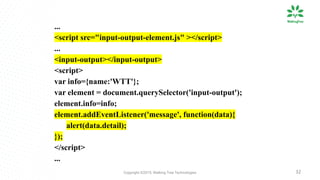
...
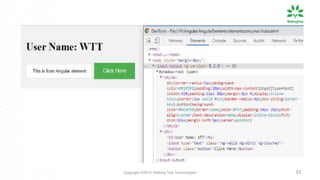
<script src="input-output-element.js" ></script>
...
<input-output></input-output>
<script>
var info={name:'WTT'};
var element = document.querySelector('input-output');
element.info=info;
element.addEventListener('message', function(data){
alert(data.detail);
});
</script>
...
Copyright ©2019, Walking Tree Technologies 33
Copyright ©2019, Walking Tree Technologies 34
Best Practices
Copyright ©2019, Walking Tree Technologies 35
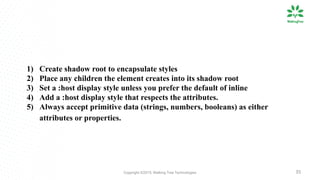
1) Create shadow root to encapsulate styles
2) Place any children the element creates into its shadow root
3) Set a :host display style unless you prefer the default of inline
4) Add a :host display style that respects the attributes.
5) Always accept primitive data (strings, numbers, booleans) as either
attributes or properties.
Copyright ©2019, Walking Tree Technologies 36
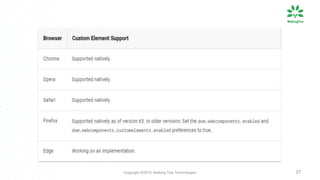
Browser Support
Copyright ©2019, Walking Tree Technologies 37
Copyright ©2019, Walking Tree Technologies
Questions and Answers
38
Copyright ©2019, Walking Tree Technologies
Thank You!
39

Web components in Angular (Angular Elements) | Walkingtree Technologies

  • 1.
    Web components in Angular(Angular Elements) 1
  • 2.
    Copyright ©2019, WalkingTree Technologies ● An IT Software and Service provider company. ● We act as an extended team for the customers across the globe like Capgemini, Tech Mahindra, Tibco, HP, Infosys, Qualcomm, TCS to name a few and deliver end-to-end products and solutions to ensure “Great User Experience.” ● Specialized in technology solutions from designing, development, quality assurance, maintenance and support, consulting, training and skill augmentation services ● Technical Expertise in Angular, Blockchain, Microservices, React, Sencha ExtJS, Xamarin. ● Recognized as 50 Best Indian founded companies by The Silicon Review. WHAT DO WE DO? 2
  • 3.
    Copyright ©2019, WalkingTree Technologies About Me Subbu Nama Technical Lead ● Subbu has worked in the technology industry for over 8 years. ● Has good exposure on different domains ● Subbu is a full stack developer, interested in tools and techniques for visualization on the web and enjoys working with web technologies. 3
  • 4.
    Copyright ©2019, WalkingTree Technologies AGENDA Assimilation of Elements Best practices Browser Support 4 Web Components Relevance Angular Elements
  • 5.
    Copyright ©2019, WalkingTree Technologies 5 WEB COMPONENTS RELEVANCE Main Technologies Why? What? V0 Example V1 Example 5
  • 6.
    Copyright ©2019, WalkingTree Technologies Why? 6
  • 7.
    Copyright ©2019, WalkingTree Technologies 7 function numbersSum(even, ...numbers){ var sum=0; if (!numbers){ numbers=[]; } numbers.forEach( (number) => { if (number%2 == 0 && even){ sum=sum+number; }else if (number%2 != 0 && !even){ sum=sum+number; } }); return sum; } SUM OF EVEN/ODD NUMBERS
  • 8.
    Copyright ©2019, WalkingTree Technologies 8 What?
  • 9.
    Copyright ©2019, WalkingTree Technologies Web component provides the much-needed relief, it’s a suite of different technologies allowing you to create reusable custom elements with their functionality encapsulated away from the rest of your code and utilize them in your web apps. 9
  • 10.
    Copyright ©2019, WalkingTree Technologies 10 Main Technologies
  • 11.
    Copyright ©2019, WalkingTree Technologies ● Custom Elements ● Shadow DOM ● HTML Templates 11 Three Main Technologies
  • 12.
    Copyright ©2019, WalkingTree Technologies 12 V0
  • 13.
    Copyright ©2019, WalkingTree Technologies 13 var sayHello = Object.create(HTMLElement.prototype); sayHello.createdCallback = function() { this.innerHTML = "<button>Say, Hello</button>"; }; document.registerElement('say-hello', {prototype: sayHello}); ... button.addEventListener("click", function(){ alert("Hello World"); }); V0 Example
  • 14.
    Copyright ©2019, WalkingTree Technologies 14 V1
  • 15.
    Copyright ©2019, WalkingTree Technologies 15 V1 Example const template = document.createElement('template'); template.innerHTML = `<button>Say, Hello</button>`; class SayHello extends HTMLElement { ... this.attachShadow({mode: 'open'}); this.shadowRoot.appendChild(template.content.cloneNode(true)); …. button.addEventListener("click", function(){ alert("Hello!, you are doing good"); }); }} window.customElements.define('say-hello', SayHello);
  • 16.
    Copyright ©2019, WalkingTree Technologies 1616 Anatomy Of Web Components in Angular (Angular Elements) Define component as Angular Element What is component? Encapsulation methods of component Package build files 16
  • 17.
    Copyright ©2019, WalkingTree Technologies 17 What is Component?
  • 18.
    Copyright ©2019, WalkingTree Technologies Components are the most basic UI building block of an Angular application. Angular component provides configuration metadata that determines how the component should be processed, instantiated, and used at runtime 18
  • 19.
    Copyright ©2019, WalkingTree Technologies 19 Encapsulation Methods
  • 20.
    Copyright ©2019, WalkingTree Technologies 20 ViewEncapsulation.None
  • 21.
    Copyright ©2019, WalkingTree Technologies 21 ViewEncapsulation.Emulated
  • 22.
    Copyright ©2019, WalkingTree Technologies 22 ViewEncapsulation.ShadowDom
  • 23.
    Copyright ©2019, WalkingTree Technologies 23 Define Angular Elements
  • 24.
    Copyright ©2019, WalkingTree Technologies @Component({ ... encapsulation:ViewEncapsulation.ShadowDom }) export class ShareDataComponent { @Input() info:any = {}; @Output() message = new EventEmitter(); userInput:any=""; sendMessage(){ this.message.emit("Hello "+this.info.name+", "+this.userInput); } } 24
  • 25.
    Copyright ©2019, WalkingTree Technologies 25 Component Functionality
  • 26.
    Copyright ©2019, WalkingTree Technologies 26 $ ng add @angular/elements --name=AngularElements Add Angular elements dependency
  • 27.
    Copyright ©2019, WalkingTree Technologies 27 @NgModule({ …. entryComponents: [ShareDataComponent] }) export class AppModule { constructor(private injector: Injector) { const customElement = createCustomElement(ShareDataComponent, { injector }); customElements.define('input-output', customElement); } ngDoBootstrap() {} } Define Custom element
  • 28.
    Copyright ©2019, WalkingTree Technologies 28 Packaging Build Files
  • 29.
    Copyright ©2019, WalkingTree Technologies 29 ... (async function build() { const files = [ './dist/AngularElements/runtime.js', './dist/AngularElements/polyfills.js', './dist/AngularElements/scripts.js', './dist/AngularElements/main.js' ]; await fs.ensureDir('elements'); await concat(files, 'elements/input-output-element.js'); })();
  • 30.
    Copyright ©2019, WalkingTree Technologies 30 "build": "ng build --prod --output-hashing=none && node make-elements.js" $ npm run build
  • 31.
    Copyright ©2019, WalkingTree Technologies 31 Assimilation Of Angular Elements
  • 32.
    Copyright ©2019, WalkingTree Technologies 32 ... <script src="input-output-element.js" ></script> ... <input-output></input-output> <script> var info={name:'WTT'}; var element = document.querySelector('input-output'); element.info=info; element.addEventListener('message', function(data){ alert(data.detail); }); </script> ...
  • 33.
    Copyright ©2019, WalkingTree Technologies 33
  • 34.
    Copyright ©2019, WalkingTree Technologies 34 Best Practices
  • 35.
    Copyright ©2019, WalkingTree Technologies 35 1) Create shadow root to encapsulate styles 2) Place any children the element creates into its shadow root 3) Set a :host display style unless you prefer the default of inline 4) Add a :host display style that respects the attributes. 5) Always accept primitive data (strings, numbers, booleans) as either attributes or properties.
  • 36.
    Copyright ©2019, WalkingTree Technologies 36 Browser Support
  • 37.
    Copyright ©2019, WalkingTree Technologies 37
  • 38.
    Copyright ©2019, WalkingTree Technologies Questions and Answers 38
  • 39.
    Copyright ©2019, WalkingTree Technologies Thank You! 39