Getting started with Angular
Workshop
Index
1. What is Typescript?
2. What is Angular?
3. Create Application
4. Project Structure
5. Building Blocks
6. Modules
7. Components
8. Templates
9. Directives
10. Routing
11. Quiz
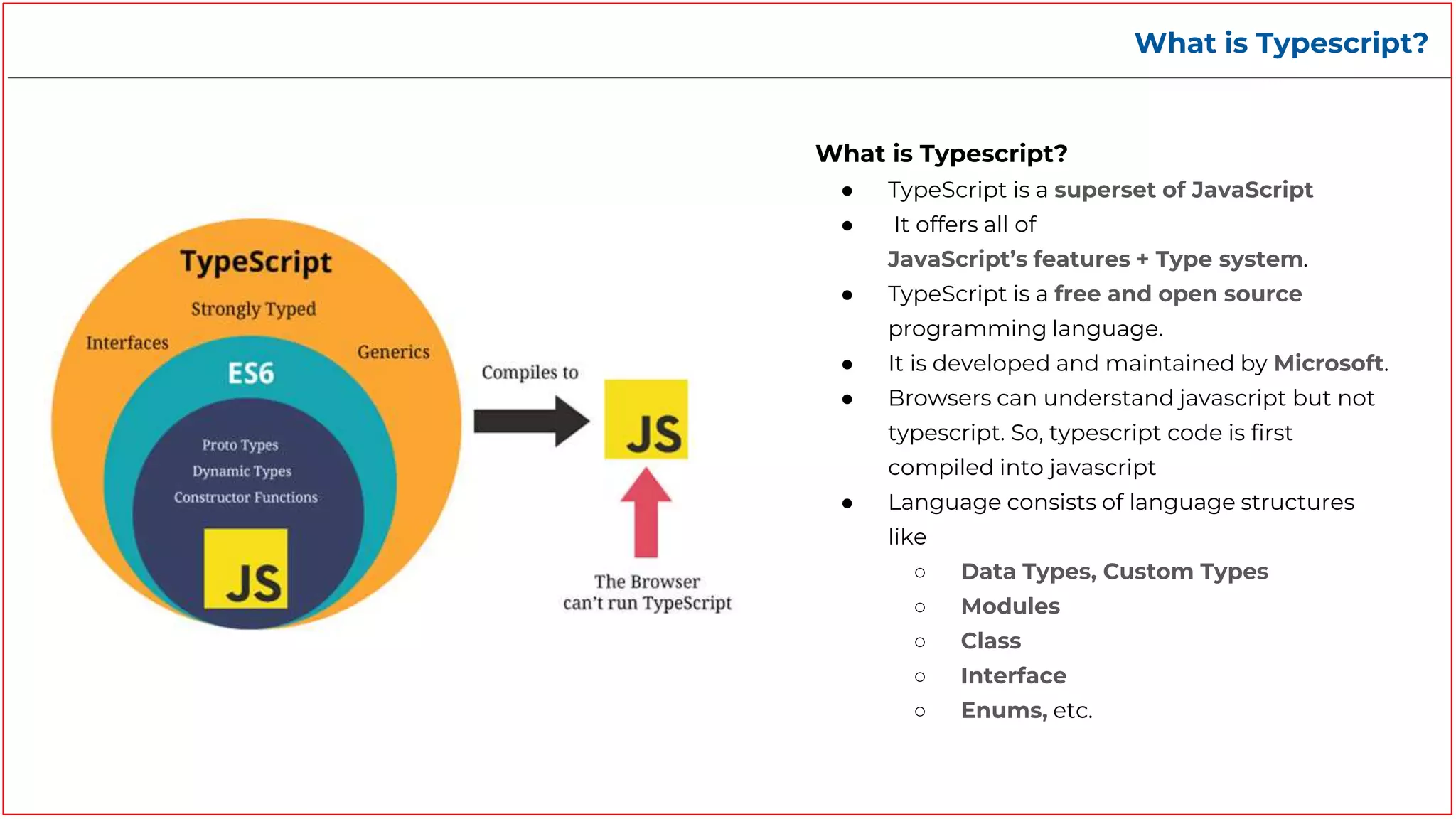
What is Typescript?
What is Typescript?
● TypeScript is a superset of JavaScript
● It offers all of
JavaScript’s features + Type system.
● TypeScript is a free and open source
programming language.
● It is developed and maintained by Microsoft.
● Browsers can understand javascript but not
typescript. So, typescript code is first
compiled into javascript
● Language consists of language structures
like
○ Data Types, Custom Types
○ Modules
○ Class
○ Interface
○ Enums, etc.
Typescript to Javascript
(TSC)Typescript compiler converts ts code to js code
app.ts app.js
Typescript vs Javascript
Pros
● Early spotted bugs
● Predictability
● Readability
● Fast refactoring
● Rich IDE support
● Power of OOP
Cons
● Not true static typing
● More learning curve on top of
Javascript
● Adding extra step — transpiling
Typescript in action - Some quick examples
Typescript - Data Types
Typescript - Basic Data Types
● Boolean - let isDone: boolean = false;
● String - let color: string = "blue";
● Number - let decimal: number = 6;
● Array - let list: number[] = [1, 2, 3];
● Tuples - let x: [string, number] = ["hello", 10]
● Enum - enum Color { Red, Green, Blue }
● Unknown - let not Sure: unknown = 4;
● Type Alias/Interface - interface Todo { title: string; description: string; }
● Classes - class Rectangle { width: number; height: number; }
Common Typescript Language Features used in Angular
Defining & Exporting an interface
called Hero
Creating & Exporting a class that implements
an interface & has props and constructor.
Importing classes declared in another typescript file
What is Angular?
What is Angular?
● Angular is a single-page application framework
developed by Google
● It primarily serves as a TypeScript framework for
building user interfaces.
● It provides building blocks to help you quickly set up a
maintainable, scalable app.
Features & Benefits of Angular
Features & Benefits
● Full development Story - Basic Building
Blocks (Modules, Components, Directives,
Pipes, Routing, Forms, Http Networking, etc.),
Material UI, Animations, Testing, Accessibility,
Dev tools.
● Speed, Performance & Productivity - Code
Generation, Code Splitting, Angular CLI, IDEs
● Cross platform - Progressive Web Apps, Apps
that live on the web, mobile, or the desktop.
● Scalability
● Maintainability
● Modular development structure
● Extensive documentation and support
● Timely upgradations
● Huge Community
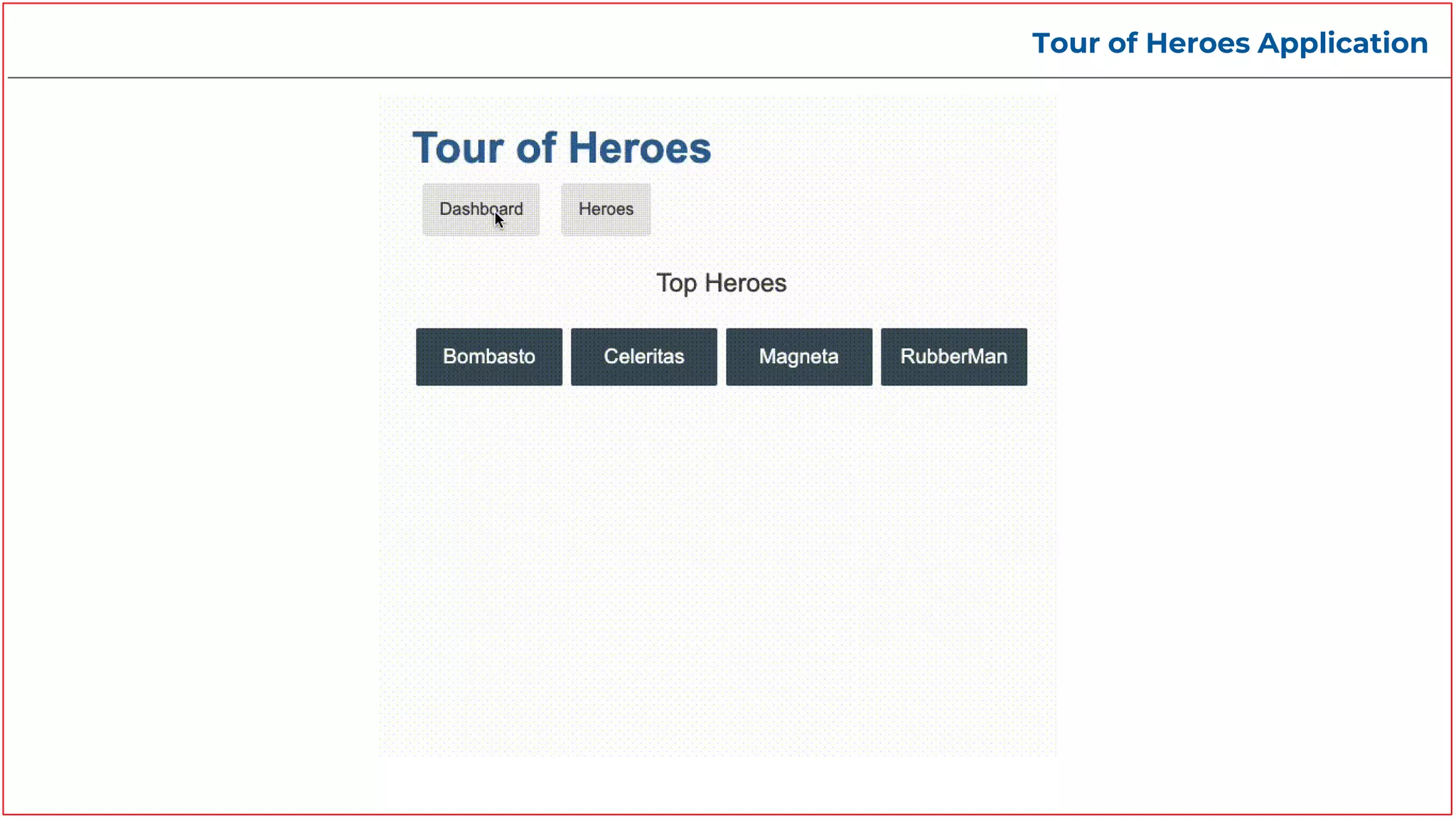
Tour of Heroes Application
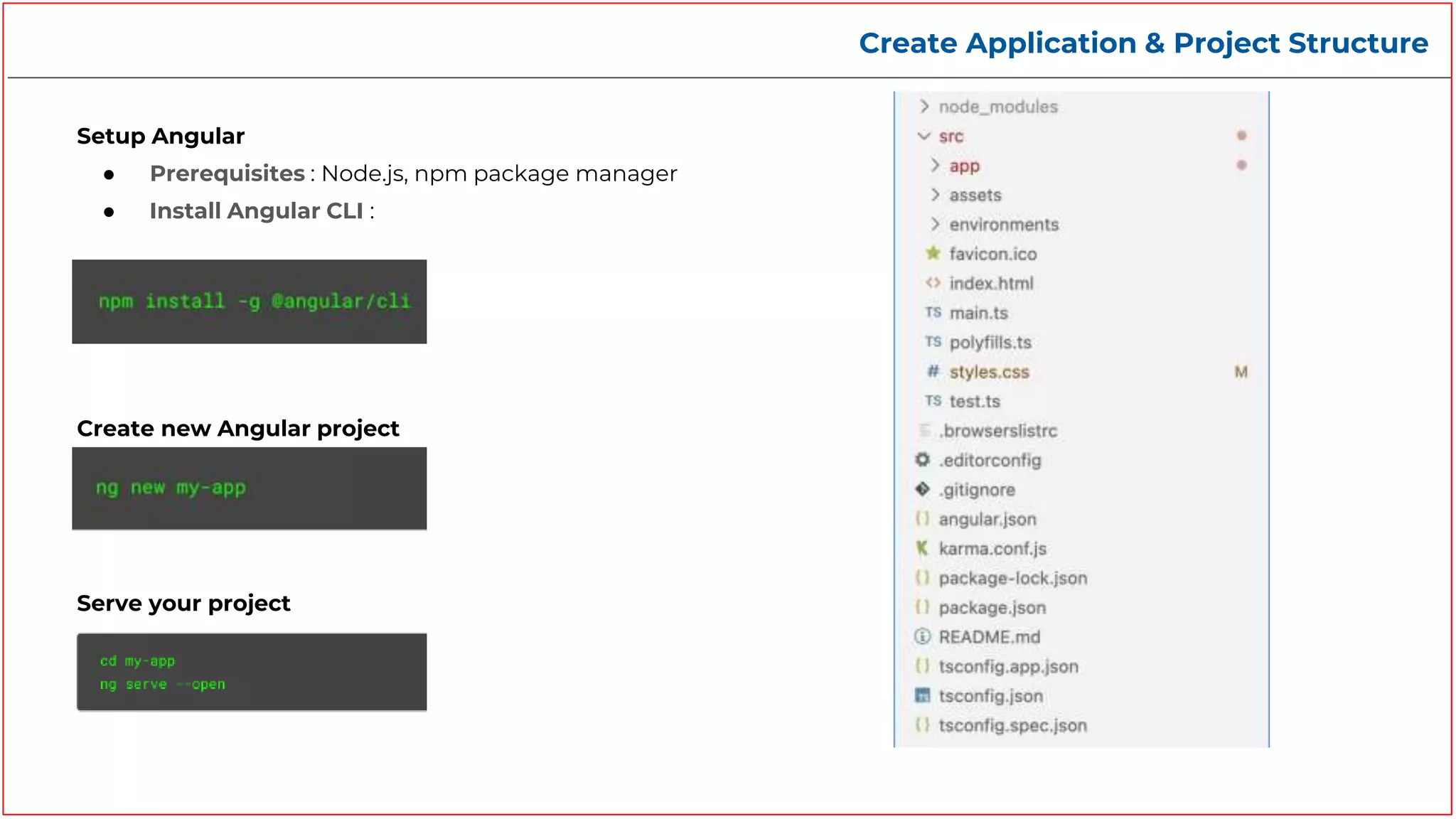
Create Application & Project Structure
Setup Angular
● Prerequisites : Node.js, npm package manager
● Install Angular CLI :
Create new Angular project
Serve your project
Angular - Building Blocks
Angular - Modules
Modules
● Modules are a great way to organize an
application and extend it with capabilities from
external libraries
● Angular libraries are NgModules, such as
RouterModule, FormsModule, HttpClientModule
● NgModules consolidate components, directives,
and pipes into cohesive blocks of functionality,
each focused on a feature area, application
business domain, workflow, or common collection
of utilities.
● Every Angular application has at least one module,
the root module.
● You bootstrap that module to launch the
application.
Angular - Modules
Decorator
@NgModule
Properties
● Declarations - The components, directives,
and pipes that belong to the NgModule.
● imports - Other NgModules you are using, so
that you can use their declarables
● Providers - Providers of services that
components in other NgModules can use
● Bootstrap - The entry component that Angular
creates and inserts into the index.html host
web page, thereby bootstrapping the
application.
Command
ng g m <module-name>
app.module.ts
Angular - Modules
Types
● Root Module
● Routing module
● Core Module
● Feature Module
● Shared Module, etc.
Angular - Components
Components
● Components are the main building block for Angular
applications.
● Each component consists of:
○ <component-name>.component.html - A html
template file, that declares what renders on the page
○ <component-name>.component.css - A CSS file
that contains the styling for the page.
○ <component-name>.component.ts - A typescript
file that contains class that defines the behaviour
○ <component-name>.component.spec.ts - A testing
specification file that defines the testing
specification for that page
Command
ng g c <component-name>
Ex: ng g c hero-list
Angular - Components
hero-list.component.ts
Decorator
@Component
Properties
● selector - ‘selector’ instructs
angular to instantiate this component
wherever it finds the corresponding
tag in template HTML
● templateUrl - Defines the template
file linked to this component
● styleUrls - Defines the style sheet
file linked to this component
Life Cycle
● ngOnInit - Called once when the
component is initialized
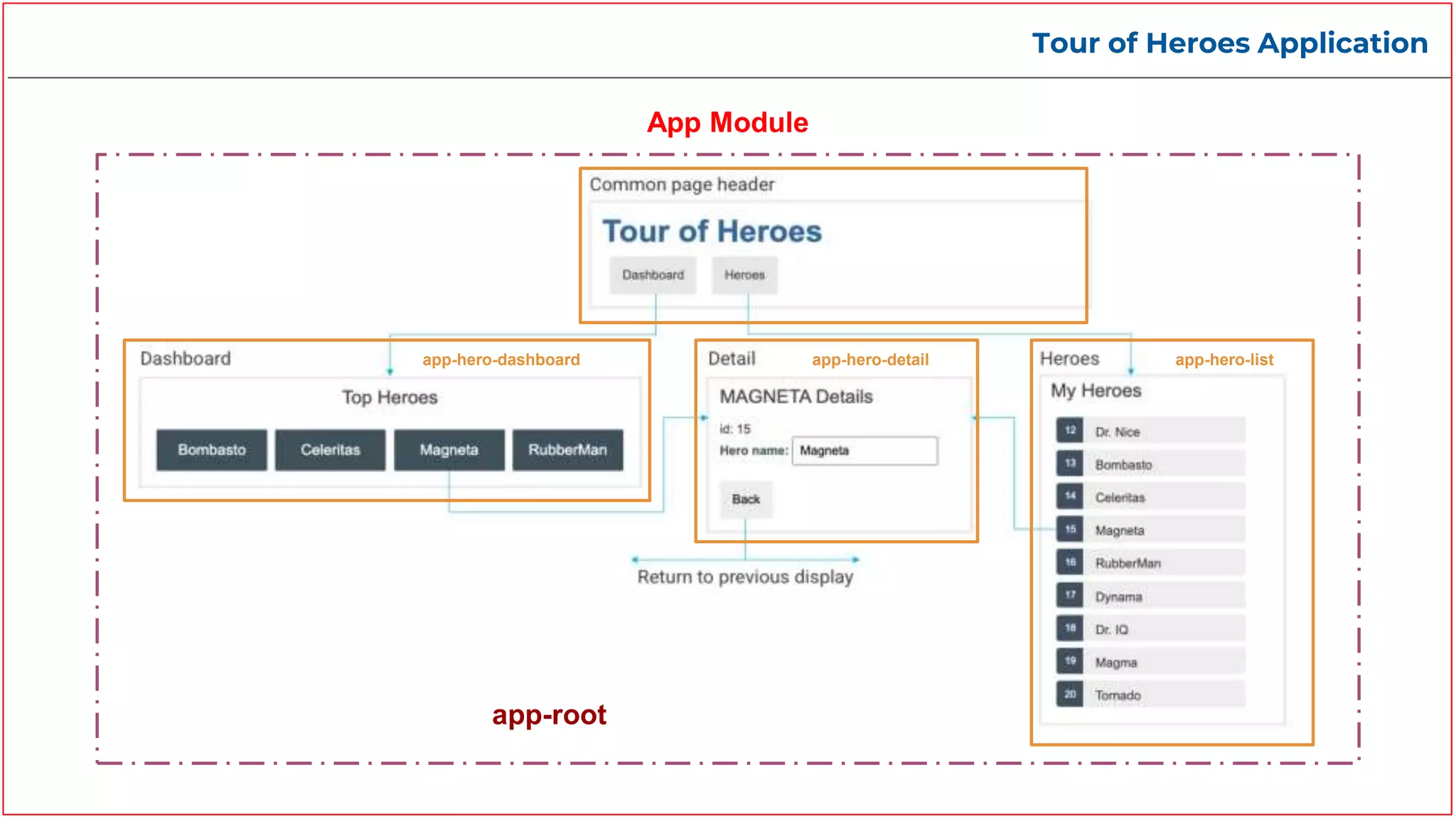
Tour of Heroes Application
app-root
app-hero-dashboard app-hero-detail app-hero-list
App Module
Angular - Template
Template
● A template is a chunk of HTML which renders a view, or
user interface, in the browser, just like regular HTML, but
with a lot more functionality.
● Each template in your application is a section of HTML to
include as a part of the page that the browser displays.
Binding
● A binding creates a live connection between a part of the
UI created from a template and the component instance
to which the template belongs
● This connection can be used to synchronize the view with
the component, to notify the component when an event or
user action takes place in the view, or both
Angular - Template
Text interpolation: Use interpolation to display the
value of this variable in the corresponding
component template.
SYNTAX : “{{variable_name}}”
Property binding: Setting an element property to a
component property value
SYNTAX : [element_property] = “variable_name”
Text Interpolation
Property binding
Angular - Template
Event binding: Event binding lets you listen for and
respond to user actions such as keystrokes, mouse
movements, clicks, and touches.
Event binding
Class binding: Use class to add and remove CSS class
names from an element's class attribute dynamically.
Class binding
Angular - Template
Two way binding: Two-way binding gives components in
your application a way to share data. Use two-way binding
to listen for events and update values simultaneously
between parent and child components.
Angular's two-way binding syntax is a combination of
square brackets and parentheses, [()].
Two way binding
Angular - Directives
Directives
● Directives are classes that add additional
behavior to elements in your Angular
applications.
● There are three type of directives in
Angular
○ Components
○ Structural
○ Attribute
● You can also create your own custom
attribute or structural directives
Structural
Change DOM by
adding/removing element.
Ex: *ngFor, *ngIf, *ngSwitch
Components
Directives with their own
templates .
Attribute
Change the behavior of HTML
elements, attributes,
properties, and components.
Ex: ngClass, ngStyle,
ngModel
Directives
Angular - Directives
Attribute
● Attribute directives listen to and modify the
behavior of other HTML elements, attributes,
properties, and components.
● Angular provides prebuilt attribute directives
such as
○ ngClass - Adds/removes a set of css
classes
○ ngStyle - Adds/removes a set of css styles
○ ngModel - Adds two way data binding to
an HTML form element
Angular - Directives
Structural
● Structural directives are directives which
change the DOM layout by adding and
removing DOM elements.
● You may apply only one structural directive to
an element.
● Angular provides a set of built-in structural
directives such as NgIf, NgForOf, NgSwitch and
others
● *ngFor - Used to repeat an element multiple
times
● *ngIf - Used to show an element conditionally.
● *ngSwitch - Used to show an element
conditionally.
‘div’ will get generated for each hero inside the heroes array
‘div’ will only get displayed if the hero value is non empty
Angular - Routing
app-routing.module.ts
Routing
● To handle the navigation from one view to the next,
you use the Angular Router
● When creating an angular application angular asks
whether routing is needed or not.
● If we allow it will create AppRoutingModule, which
is an NgModule where you can configure your
routes
app.component.html
Steps:
● Import RouterModule and Routes into your
routing module.
● Define your routes in your Routes array.
● Add your routes & router-outlet to your
application.
Angular - Routing
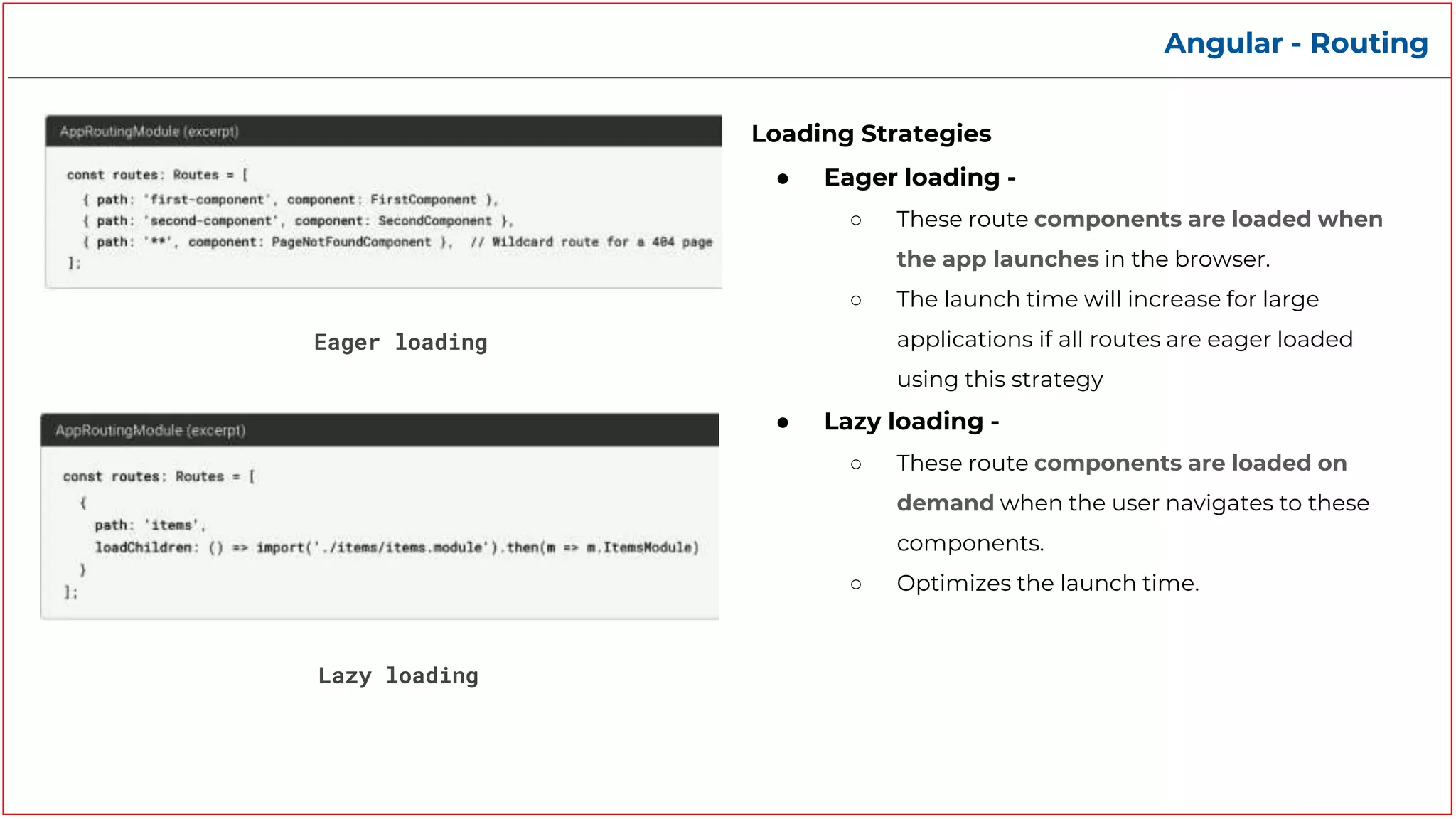
Eager loading
Loading Strategies
● Eager loading -
○ These route components are loaded when
the app launches in the browser.
○ The launch time will increase for large
applications if all routes are eager loaded
using this strategy
● Lazy loading -
○ These route components are loaded on
demand when the user navigates to these
components.
○ Optimizes the launch time.
Lazy loading
Quiz
1) TypeScript is a typed superset of JavaScript?
Yes No
2) Browsers can run typescript directly
Yes No
3) Angular is which type of framework?
SPA (Single Page Application) (MPA) Multi Page Application
4) Can you build cross platform app with Angular
No Yes
5) Every Angular application has at least one module
Yes (The root/app module) No
Quiz
6) To consolidate components, directives, and pipes into cohesive blocks of functionality, each
focused on a feature area what do we use in Angular?
Module Component
7) ________ in a Angular application is a section of HTML to include as a part of the page that the
browser displays.
Directive
8) For additional behavior to elements in your Angular applications what do you use?
Directive Routing
9) To Change DOM by adding/removing element you need
Attribute Directive (ngClass,ngModel) Structural Directive (*ngIf, *ngFor)
10) To optimize the loading time of your application you should use
Eager loading Lazy loading
Template
Any Questions?
Scan for Feedback

Foster - Getting started with Angular

  • 1.
    Getting started withAngular Workshop
  • 2.
    Index 1. What isTypescript? 2. What is Angular? 3. Create Application 4. Project Structure 5. Building Blocks 6. Modules 7. Components 8. Templates 9. Directives 10. Routing 11. Quiz
  • 3.
    What is Typescript? Whatis Typescript? ● TypeScript is a superset of JavaScript ● It offers all of JavaScript’s features + Type system. ● TypeScript is a free and open source programming language. ● It is developed and maintained by Microsoft. ● Browsers can understand javascript but not typescript. So, typescript code is first compiled into javascript ● Language consists of language structures like ○ Data Types, Custom Types ○ Modules ○ Class ○ Interface ○ Enums, etc.
  • 4.
    Typescript to Javascript (TSC)Typescriptcompiler converts ts code to js code app.ts app.js
  • 5.
    Typescript vs Javascript Pros ●Early spotted bugs ● Predictability ● Readability ● Fast refactoring ● Rich IDE support ● Power of OOP Cons ● Not true static typing ● More learning curve on top of Javascript ● Adding extra step — transpiling
  • 6.
    Typescript in action- Some quick examples
  • 7.
    Typescript - DataTypes Typescript - Basic Data Types ● Boolean - let isDone: boolean = false; ● String - let color: string = "blue"; ● Number - let decimal: number = 6; ● Array - let list: number[] = [1, 2, 3]; ● Tuples - let x: [string, number] = ["hello", 10] ● Enum - enum Color { Red, Green, Blue } ● Unknown - let not Sure: unknown = 4; ● Type Alias/Interface - interface Todo { title: string; description: string; } ● Classes - class Rectangle { width: number; height: number; }
  • 8.
    Common Typescript LanguageFeatures used in Angular Defining & Exporting an interface called Hero Creating & Exporting a class that implements an interface & has props and constructor. Importing classes declared in another typescript file
  • 9.
    What is Angular? Whatis Angular? ● Angular is a single-page application framework developed by Google ● It primarily serves as a TypeScript framework for building user interfaces. ● It provides building blocks to help you quickly set up a maintainable, scalable app.
  • 10.
    Features & Benefitsof Angular Features & Benefits ● Full development Story - Basic Building Blocks (Modules, Components, Directives, Pipes, Routing, Forms, Http Networking, etc.), Material UI, Animations, Testing, Accessibility, Dev tools. ● Speed, Performance & Productivity - Code Generation, Code Splitting, Angular CLI, IDEs ● Cross platform - Progressive Web Apps, Apps that live on the web, mobile, or the desktop. ● Scalability ● Maintainability ● Modular development structure ● Extensive documentation and support ● Timely upgradations ● Huge Community
  • 11.
    Tour of HeroesApplication
  • 12.
    Tour of HeroesApplication
  • 13.
    Create Application &Project Structure Setup Angular ● Prerequisites : Node.js, npm package manager ● Install Angular CLI : Create new Angular project Serve your project
  • 14.
  • 15.
    Angular - Modules Modules ●Modules are a great way to organize an application and extend it with capabilities from external libraries ● Angular libraries are NgModules, such as RouterModule, FormsModule, HttpClientModule ● NgModules consolidate components, directives, and pipes into cohesive blocks of functionality, each focused on a feature area, application business domain, workflow, or common collection of utilities. ● Every Angular application has at least one module, the root module. ● You bootstrap that module to launch the application.
  • 16.
    Angular - Modules Decorator @NgModule Properties ●Declarations - The components, directives, and pipes that belong to the NgModule. ● imports - Other NgModules you are using, so that you can use their declarables ● Providers - Providers of services that components in other NgModules can use ● Bootstrap - The entry component that Angular creates and inserts into the index.html host web page, thereby bootstrapping the application. Command ng g m <module-name> app.module.ts
  • 17.
    Angular - Modules Types ●Root Module ● Routing module ● Core Module ● Feature Module ● Shared Module, etc.
  • 18.
    Angular - Components Components ●Components are the main building block for Angular applications. ● Each component consists of: ○ <component-name>.component.html - A html template file, that declares what renders on the page ○ <component-name>.component.css - A CSS file that contains the styling for the page. ○ <component-name>.component.ts - A typescript file that contains class that defines the behaviour ○ <component-name>.component.spec.ts - A testing specification file that defines the testing specification for that page Command ng g c <component-name> Ex: ng g c hero-list
  • 19.
    Angular - Components hero-list.component.ts Decorator @Component Properties ●selector - ‘selector’ instructs angular to instantiate this component wherever it finds the corresponding tag in template HTML ● templateUrl - Defines the template file linked to this component ● styleUrls - Defines the style sheet file linked to this component Life Cycle ● ngOnInit - Called once when the component is initialized
  • 20.
    Tour of HeroesApplication app-root app-hero-dashboard app-hero-detail app-hero-list App Module
  • 21.
    Angular - Template Template ●A template is a chunk of HTML which renders a view, or user interface, in the browser, just like regular HTML, but with a lot more functionality. ● Each template in your application is a section of HTML to include as a part of the page that the browser displays. Binding ● A binding creates a live connection between a part of the UI created from a template and the component instance to which the template belongs ● This connection can be used to synchronize the view with the component, to notify the component when an event or user action takes place in the view, or both
  • 22.
    Angular - Template Textinterpolation: Use interpolation to display the value of this variable in the corresponding component template. SYNTAX : “{{variable_name}}” Property binding: Setting an element property to a component property value SYNTAX : [element_property] = “variable_name” Text Interpolation Property binding
  • 23.
    Angular - Template Eventbinding: Event binding lets you listen for and respond to user actions such as keystrokes, mouse movements, clicks, and touches. Event binding Class binding: Use class to add and remove CSS class names from an element's class attribute dynamically. Class binding
  • 24.
    Angular - Template Twoway binding: Two-way binding gives components in your application a way to share data. Use two-way binding to listen for events and update values simultaneously between parent and child components. Angular's two-way binding syntax is a combination of square brackets and parentheses, [()]. Two way binding
  • 25.
    Angular - Directives Directives ●Directives are classes that add additional behavior to elements in your Angular applications. ● There are three type of directives in Angular ○ Components ○ Structural ○ Attribute ● You can also create your own custom attribute or structural directives Structural Change DOM by adding/removing element. Ex: *ngFor, *ngIf, *ngSwitch Components Directives with their own templates . Attribute Change the behavior of HTML elements, attributes, properties, and components. Ex: ngClass, ngStyle, ngModel Directives
  • 26.
    Angular - Directives Attribute ●Attribute directives listen to and modify the behavior of other HTML elements, attributes, properties, and components. ● Angular provides prebuilt attribute directives such as ○ ngClass - Adds/removes a set of css classes ○ ngStyle - Adds/removes a set of css styles ○ ngModel - Adds two way data binding to an HTML form element
  • 27.
    Angular - Directives Structural ●Structural directives are directives which change the DOM layout by adding and removing DOM elements. ● You may apply only one structural directive to an element. ● Angular provides a set of built-in structural directives such as NgIf, NgForOf, NgSwitch and others ● *ngFor - Used to repeat an element multiple times ● *ngIf - Used to show an element conditionally. ● *ngSwitch - Used to show an element conditionally. ‘div’ will get generated for each hero inside the heroes array ‘div’ will only get displayed if the hero value is non empty
  • 28.
    Angular - Routing app-routing.module.ts Routing ●To handle the navigation from one view to the next, you use the Angular Router ● When creating an angular application angular asks whether routing is needed or not. ● If we allow it will create AppRoutingModule, which is an NgModule where you can configure your routes app.component.html Steps: ● Import RouterModule and Routes into your routing module. ● Define your routes in your Routes array. ● Add your routes & router-outlet to your application.
  • 29.
    Angular - Routing Eagerloading Loading Strategies ● Eager loading - ○ These route components are loaded when the app launches in the browser. ○ The launch time will increase for large applications if all routes are eager loaded using this strategy ● Lazy loading - ○ These route components are loaded on demand when the user navigates to these components. ○ Optimizes the launch time. Lazy loading
  • 30.
    Quiz 1) TypeScript isa typed superset of JavaScript? Yes No 2) Browsers can run typescript directly Yes No 3) Angular is which type of framework? SPA (Single Page Application) (MPA) Multi Page Application 4) Can you build cross platform app with Angular No Yes 5) Every Angular application has at least one module Yes (The root/app module) No
  • 31.
    Quiz 6) To consolidatecomponents, directives, and pipes into cohesive blocks of functionality, each focused on a feature area what do we use in Angular? Module Component 7) ________ in a Angular application is a section of HTML to include as a part of the page that the browser displays. Directive 8) For additional behavior to elements in your Angular applications what do you use? Directive Routing 9) To Change DOM by adding/removing element you need Attribute Directive (ngClass,ngModel) Structural Directive (*ngIf, *ngFor) 10) To optimize the loading time of your application you should use Eager loading Lazy loading Template
  • 32.
  • 33.

Editor's Notes

  • #12 https://stackblitz.com/run?file=src%2Fapp%2Fhero.service.ts
  • #13 https://stackblitz.com/run?file=src%2Fapp%2Fhero.service.ts
  • #21 https://stackblitz.com/run?file=src%2Fapp%2Fhero.service.ts