Web Browsing War Research in Competitive Features of Web Browsers. Student name: Rafeeah Sharara Alketbi ID #: U2804444
Introduction about Web Browser Definition: Software run on computer to display resources of World Wide Web by contacting to web server. Function: Requesting information after contacting to web server by which then web server can locate web browser and send the requested information  http://www.webopedia.com/TERM/B/browser.html
How Web Browser Works 1. Client software: Runs on your computer and displays home pages on the Web. 2. HTML  “Hypertext Markup Language”: Language that web browser uses to build home pages on the Web and display information. 3. HTML references:  Find the files (graphic, multimedia..) on the server and then display them on the home page. 4. HTML tags: Links to other websites
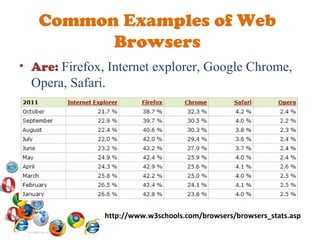
Common Examples of Web Browsers Are:  Firefox, Internet explorer, Google Chrome, Opera, Safari. http://www.w3schools.com/browsers/browsers_stats.asp
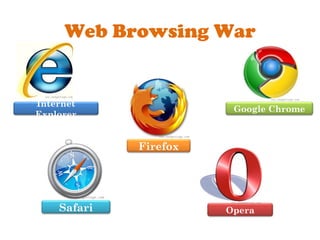
Web Browsing War Firefox Opera Safari Internet Explorer Google Chrome
Firefox Rank in 2011:  #1 History: Released in 2004 Speed: Initial Startup Time: 14 sec Navigation Time: 6.4 sec
Current features:  Smart Toolbar, Parental Controls, Spell Check.  Security:  Pop-up Block, Anti-Spyware, Anti-Virus, Anti-Phishing, Clear History, Private Mode Help and support:  Email Support, Online Help, Tutorials, User Manual/User Guide, FAQs, User Forums. Return
Google Chrome Rank in 2011:  #2 History: Released in 2008 Speed: Initial Startup Time: 8.1 sec Navigation Time: 7 sec
Current features:  Smart Toolbar, Spell Check, Thumbnail Preview, Synchronize Security:  Pop-up Block, Anti-Spyware, Anti-Virus, Anti-Phishing, Clear History, Private Mode Help and support:  Online Help, Tutorials, User Manual/User Guide, FAQs, User Forums. Return
Internet Explorer Rank in 2011:  #3 History: Released in 1995 Speed: Initial Startup Time: 8.5 sec Navigation Time: 7.4 sec
Current features:  Parental Controls, Thumbnail Preview, Synchronize Security : Pop-up Block, Anti-Spyware, Anti-Virus, Anti-Phishing, Clear History, Private Mode Help and support:  Email Support, Online Help, Tutorials, User Manual/User Guide, FAQs, User Forums, Telephone Support. Return
Opera Rank in 2011:  #4 History: Started in Norway's telecom company, Telenor as a research project in 1994. Speed: Initial Startup Time: 7.1 sec Navigation Time: 7.3 sec Return
Current features:  Smart Toolbar, Spell Check, Thumbnail Preview, Synchronize, Voice Interaction, Mouse Gestures Security:  Pop-up Block, Anti-Spyware, Anti-Virus, Anti-Phishing, Clear History. Help and support:  Email Support, Online Help, Tutorials, User Manual/User Guide, FAQs, User Forums.  Return
Safari Rank in 2011:  #5 History:  In 2005, Safari became the default browser for Mac systems Speed: Initial Startup Time: 10.6 sec Navigation Time: 7.8 sec
Current features:  Smart Toolbar, Spell Check  Security:  Pop-up Block, Anti-Spyware, Anti-Virus, Clear History. Help and support:  Online Help, Tutorials, User Manual/User Guide, FAQs, User Forums Return
Jing Video (Summary) http://screencast.com/t/kwvE9UrZrDr
Conclusion Benefits of Web Browsing War: Enhancing browsing experience. Considering our requirements like business and home requirements. Web development.
Gadgetcage (n.d.)  Top 10 web browsers to speed-up your browsing experience.  Retrieved October 24, 2011 from  http://www.gadgetcage.com/top-10-best-web-browsers/16197/ How the world wide web works (n.d.).  How web browsers work . Retrieved October 24, 2011 from  http://ptgmedia.pearsoncmg.com/images/9780789736260/samplechapter/0789736268_Sample_Chapter_18.pdf Top Ten Reviews (n.d.).  Internet browser software review.  Retrieved October 24, 2011 from  http://internet-browser-review.toptenreviews.com/ W3Schools.com  (n.d.).  Browser information.  Retrieved October 24, 2011 from  http://www.w3schools.com/browsers/default.asp Webopedid (n.d.).  Browser.  Retrieved October 24, 2011 from  http://www.webopedia.com/TERM/B/browser.html References

Web Browsing War

  • 1.
    Web Browsing WarResearch in Competitive Features of Web Browsers. Student name: Rafeeah Sharara Alketbi ID #: U2804444
  • 2.
    Introduction about WebBrowser Definition: Software run on computer to display resources of World Wide Web by contacting to web server. Function: Requesting information after contacting to web server by which then web server can locate web browser and send the requested information http://www.webopedia.com/TERM/B/browser.html
  • 3.
    How Web BrowserWorks 1. Client software: Runs on your computer and displays home pages on the Web. 2. HTML “Hypertext Markup Language”: Language that web browser uses to build home pages on the Web and display information. 3. HTML references: Find the files (graphic, multimedia..) on the server and then display them on the home page. 4. HTML tags: Links to other websites
  • 4.
    Common Examples ofWeb Browsers Are: Firefox, Internet explorer, Google Chrome, Opera, Safari. http://www.w3schools.com/browsers/browsers_stats.asp
  • 5.
    Web Browsing WarFirefox Opera Safari Internet Explorer Google Chrome
  • 6.
    Firefox Rank in2011: #1 History: Released in 2004 Speed: Initial Startup Time: 14 sec Navigation Time: 6.4 sec
  • 7.
    Current features: Smart Toolbar, Parental Controls, Spell Check. Security: Pop-up Block, Anti-Spyware, Anti-Virus, Anti-Phishing, Clear History, Private Mode Help and support: Email Support, Online Help, Tutorials, User Manual/User Guide, FAQs, User Forums. Return
  • 8.
    Google Chrome Rankin 2011: #2 History: Released in 2008 Speed: Initial Startup Time: 8.1 sec Navigation Time: 7 sec
  • 9.
    Current features: Smart Toolbar, Spell Check, Thumbnail Preview, Synchronize Security: Pop-up Block, Anti-Spyware, Anti-Virus, Anti-Phishing, Clear History, Private Mode Help and support: Online Help, Tutorials, User Manual/User Guide, FAQs, User Forums. Return
  • 10.
    Internet Explorer Rankin 2011: #3 History: Released in 1995 Speed: Initial Startup Time: 8.5 sec Navigation Time: 7.4 sec
  • 11.
    Current features: Parental Controls, Thumbnail Preview, Synchronize Security : Pop-up Block, Anti-Spyware, Anti-Virus, Anti-Phishing, Clear History, Private Mode Help and support: Email Support, Online Help, Tutorials, User Manual/User Guide, FAQs, User Forums, Telephone Support. Return
  • 12.
    Opera Rank in2011: #4 History: Started in Norway's telecom company, Telenor as a research project in 1994. Speed: Initial Startup Time: 7.1 sec Navigation Time: 7.3 sec Return
  • 13.
    Current features: Smart Toolbar, Spell Check, Thumbnail Preview, Synchronize, Voice Interaction, Mouse Gestures Security: Pop-up Block, Anti-Spyware, Anti-Virus, Anti-Phishing, Clear History. Help and support: Email Support, Online Help, Tutorials, User Manual/User Guide, FAQs, User Forums. Return
  • 14.
    Safari Rank in2011: #5 History: In 2005, Safari became the default browser for Mac systems Speed: Initial Startup Time: 10.6 sec Navigation Time: 7.8 sec
  • 15.
    Current features: Smart Toolbar, Spell Check Security: Pop-up Block, Anti-Spyware, Anti-Virus, Clear History. Help and support: Online Help, Tutorials, User Manual/User Guide, FAQs, User Forums Return
  • 16.
    Jing Video (Summary)http://screencast.com/t/kwvE9UrZrDr
  • 17.
    Conclusion Benefits ofWeb Browsing War: Enhancing browsing experience. Considering our requirements like business and home requirements. Web development.
  • 18.
    Gadgetcage (n.d.) Top 10 web browsers to speed-up your browsing experience. Retrieved October 24, 2011 from http://www.gadgetcage.com/top-10-best-web-browsers/16197/ How the world wide web works (n.d.). How web browsers work . Retrieved October 24, 2011 from http://ptgmedia.pearsoncmg.com/images/9780789736260/samplechapter/0789736268_Sample_Chapter_18.pdf Top Ten Reviews (n.d.). Internet browser software review. Retrieved October 24, 2011 from http://internet-browser-review.toptenreviews.com/ W3Schools.com (n.d.). Browser information. Retrieved October 24, 2011 from http://www.w3schools.com/browsers/default.asp Webopedid (n.d.). Browser. Retrieved October 24, 2011 from http://www.webopedia.com/TERM/B/browser.html References