Mohammad Imam Hossain, Lecturer, dept. of CSE, UIU. Email: imambuet11@gmail.com
PHP Data Objects(PDO)
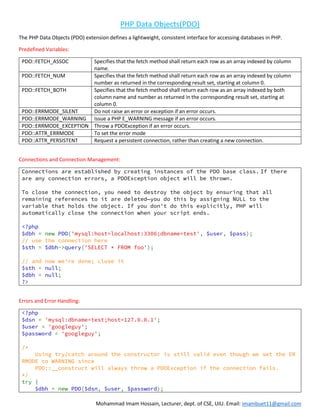
The PHP Data Objects (PDO) extension defines a lightweight, consistent interface for accessing databases in PHP.
Predefined Variables:
PDO::FETCH_ASSOC Specifies that the fetch method shall return each row as an array indexed by column
name.
PDO::FETCH_NUM Specifies that the fetch method shall return each row as an array indexed by column
number as returned in the corresponding result set, starting at column 0.
PDO::FETCH_BOTH Specifies that the fetch method shall return each row as an array indexed by both
column name and number as returned in the corresponding result set, starting at
column 0.
PDO::ERRMODE_SILENT Do not raise an error or exception if an error occurs.
PDO::ERRMODE_WARNING Issue a PHP E_WARNING message if an error occurs.
PDO::ERRMODE_EXCEPTION Throw a PDOException if an error occurs.
PDO::ATTR_ERRMODE To set the error mode
PDO::ATTR_PERSISTENT Request a persistent connection, rather than creating a new connection.
Connections and Connection Management:
Connections are established by creating instances of the PDO base class. If there
are any connection errors, a PDOException object will be thrown.
To close the connection, you need to destroy the object by ensuring that all
remaining references to it are deleted—you do this by assigning NULL to the
variable that holds the object. If you don't do this explicitly, PHP will
automatically close the connection when your script ends.
<?php
$dbh = new PDO('mysql:host=localhost:3306;dbname=test', $user, $pass);
// use the connection here
$sth = $dbh->query('SELECT * FROM foo');
// and now we're done; close it
$sth = null;
$dbh = null;
?>
Errors and Error Handling:
<?php
$dsn = 'mysql:dbname=test;host=127.0.0.1';
$user = 'googleguy';
$password = 'googleguy';
/*
Using try/catch around the constructor is still valid even though we set the ER
RMODE to WARNING since
PDO::__construct will always throw a PDOException if the connection fails.
*/
try {
$dbh = new PDO($dsn, $user, $password);
Mohammad Imam Hossain, Lecturer, dept. of CSE, UIU. Email: imambuet11@gmail.com
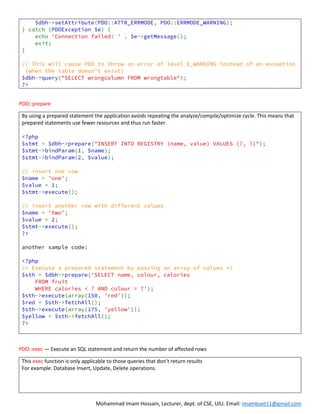
$dbh->setAttribute(PDO::ATTR_ERRMODE, PDO::ERRMODE_WARNING);
} catch (PDOException $e) {
echo 'Connection failed: ' . $e->getMessage();
exit;
}
// This will cause PDO to throw an error of level E_WARNING instead of an exception
(when the table doesn't exist)
$dbh->query("SELECT wrongcolumn FROM wrongtable");
?>
PDO::prepare
By using a prepared statement the application avoids repeating the analyze/compile/optimize cycle. This means that
prepared statements use fewer resources and thus run faster.
<?php
$stmt = $dbh->prepare("INSERT INTO REGISTRY (name, value) VALUES (?, ?)");
$stmt->bindParam(1, $name);
$stmt->bindParam(2, $value);
// insert one row
$name = 'one';
$value = 1;
$stmt->execute();
// insert another row with different values
$name = 'two';
$value = 2;
$stmt->execute();
?>
another sample code:
<?php
/* Execute a prepared statement by passing an array of values */
$sth = $dbh->prepare('SELECT name, colour, calories
FROM fruit
WHERE calories < ? AND colour = ?');
$sth->execute(array(150, 'red'));
$red = $sth->fetchAll();
$sth->execute(array(175, 'yellow'));
$yellow = $sth->fetchAll();
?>
PDO::exec — Execute an SQL statement and return the number of affected rows
This exec function is only applicable to those queries that don’t return results
For example: Database Insert, Update, Delete operations.
Mohammad Imam Hossain, Lecturer, dept. of CSE, UIU. Email: imambuet11@gmail.com
<?php
$servername = "localhost";
$username = "username";
$password = "password";
$dbname = "myDBPDO";
try {
$conn = new PDO("mysql:host=$servername;dbname=$dbname", $username, $password);
// set the PDO error mode to exception
$conn->setAttribute(PDO::ATTR_ERRMODE, PDO::ERRMODE_EXCEPTION);
$sql = "INSERT INTO MyGuests (firstname, lastname, email)
VALUES ('John', 'Doe', 'john@example.com')";
// use exec() because no results are returned
$conn->exec($sql);
echo "New record created successfully";
}
catch(PDOException $e)
{
echo $sql . "<br>" . $e->getMessage();
}
$conn = null;
?>
PDO::query -- executes an SQL statement, returning a result set as a PDOStatement object or FALSE
<?php
$sql = 'SELECT name, color, calories FROM fruit ORDER BY name';
foreach ($conn->query($sql) as $row) {
print $row['name'] . "t";
print $row['color'] . "t";
print $row['calories'] . "n";
}
?>
PDOStatement Object
PDOStatement::columnCount
— Returns the number of
columns in the result set
PDOStatement::rowCount
— Returns the number of rows
affected by the last SQL
statement
<?php
/* Delete all rows from the FRUIT table */
$del = $dbh->prepare('DELETE FROM fruit');
$del->execute();
/* Return number of rows that were deleted */
print("Return number of rows that were deleted:n");
$count = $del->rowCount();
print("Deleted $count rows.n");
?>
PDOStatement::setFetchMode
— Set the default fetch mode
for this statement
$stmt = $dbh->query($sql);
$result = $stmt->setFetchMode(PDO::FETCH_NUM);
PDOStatement::execute
— Executes a prepared
statement
<?php
/* Execute a prepared statement by binding PHP variables */
$calories = 150;
$colour = 'red';
$sth = $dbh->prepare('SELECT name, colour, calories
Mohammad Imam Hossain, Lecturer, dept. of CSE, UIU. Email: imambuet11@gmail.com
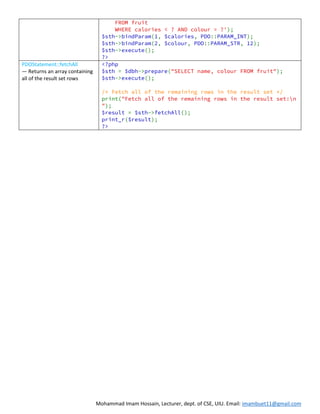
FROM fruit
WHERE calories < ? AND colour = ?');
$sth->bindParam(1, $calories, PDO::PARAM_INT);
$sth->bindParam(2, $colour, PDO::PARAM_STR, 12);
$sth->execute();
?>
PDOStatement::fetchAll
— Returns an array containing
all of the result set rows
<?php
$sth = $dbh->prepare("SELECT name, colour FROM fruit");
$sth->execute();
/* Fetch all of the remaining rows in the result set */
print("Fetch all of the remaining rows in the result set:n
");
$result = $sth->fetchAll();
print_r($result);
?>

Web 10 | PHP with MySQL

  • 1.
    Mohammad Imam Hossain,Lecturer, dept. of CSE, UIU. Email: imambuet11@gmail.com PHP Data Objects(PDO) The PHP Data Objects (PDO) extension defines a lightweight, consistent interface for accessing databases in PHP. Predefined Variables: PDO::FETCH_ASSOC Specifies that the fetch method shall return each row as an array indexed by column name. PDO::FETCH_NUM Specifies that the fetch method shall return each row as an array indexed by column number as returned in the corresponding result set, starting at column 0. PDO::FETCH_BOTH Specifies that the fetch method shall return each row as an array indexed by both column name and number as returned in the corresponding result set, starting at column 0. PDO::ERRMODE_SILENT Do not raise an error or exception if an error occurs. PDO::ERRMODE_WARNING Issue a PHP E_WARNING message if an error occurs. PDO::ERRMODE_EXCEPTION Throw a PDOException if an error occurs. PDO::ATTR_ERRMODE To set the error mode PDO::ATTR_PERSISTENT Request a persistent connection, rather than creating a new connection. Connections and Connection Management: Connections are established by creating instances of the PDO base class. If there are any connection errors, a PDOException object will be thrown. To close the connection, you need to destroy the object by ensuring that all remaining references to it are deleted—you do this by assigning NULL to the variable that holds the object. If you don't do this explicitly, PHP will automatically close the connection when your script ends. <?php $dbh = new PDO('mysql:host=localhost:3306;dbname=test', $user, $pass); // use the connection here $sth = $dbh->query('SELECT * FROM foo'); // and now we're done; close it $sth = null; $dbh = null; ?> Errors and Error Handling: <?php $dsn = 'mysql:dbname=test;host=127.0.0.1'; $user = 'googleguy'; $password = 'googleguy'; /* Using try/catch around the constructor is still valid even though we set the ER RMODE to WARNING since PDO::__construct will always throw a PDOException if the connection fails. */ try { $dbh = new PDO($dsn, $user, $password);
  • 2.
    Mohammad Imam Hossain,Lecturer, dept. of CSE, UIU. Email: imambuet11@gmail.com $dbh->setAttribute(PDO::ATTR_ERRMODE, PDO::ERRMODE_WARNING); } catch (PDOException $e) { echo 'Connection failed: ' . $e->getMessage(); exit; } // This will cause PDO to throw an error of level E_WARNING instead of an exception (when the table doesn't exist) $dbh->query("SELECT wrongcolumn FROM wrongtable"); ?> PDO::prepare By using a prepared statement the application avoids repeating the analyze/compile/optimize cycle. This means that prepared statements use fewer resources and thus run faster. <?php $stmt = $dbh->prepare("INSERT INTO REGISTRY (name, value) VALUES (?, ?)"); $stmt->bindParam(1, $name); $stmt->bindParam(2, $value); // insert one row $name = 'one'; $value = 1; $stmt->execute(); // insert another row with different values $name = 'two'; $value = 2; $stmt->execute(); ?> another sample code: <?php /* Execute a prepared statement by passing an array of values */ $sth = $dbh->prepare('SELECT name, colour, calories FROM fruit WHERE calories < ? AND colour = ?'); $sth->execute(array(150, 'red')); $red = $sth->fetchAll(); $sth->execute(array(175, 'yellow')); $yellow = $sth->fetchAll(); ?> PDO::exec — Execute an SQL statement and return the number of affected rows This exec function is only applicable to those queries that don’t return results For example: Database Insert, Update, Delete operations.
  • 3.
    Mohammad Imam Hossain,Lecturer, dept. of CSE, UIU. Email: imambuet11@gmail.com <?php $servername = "localhost"; $username = "username"; $password = "password"; $dbname = "myDBPDO"; try { $conn = new PDO("mysql:host=$servername;dbname=$dbname", $username, $password); // set the PDO error mode to exception $conn->setAttribute(PDO::ATTR_ERRMODE, PDO::ERRMODE_EXCEPTION); $sql = "INSERT INTO MyGuests (firstname, lastname, email) VALUES ('John', 'Doe', 'john@example.com')"; // use exec() because no results are returned $conn->exec($sql); echo "New record created successfully"; } catch(PDOException $e) { echo $sql . "<br>" . $e->getMessage(); } $conn = null; ?> PDO::query -- executes an SQL statement, returning a result set as a PDOStatement object or FALSE <?php $sql = 'SELECT name, color, calories FROM fruit ORDER BY name'; foreach ($conn->query($sql) as $row) { print $row['name'] . "t"; print $row['color'] . "t"; print $row['calories'] . "n"; } ?> PDOStatement Object PDOStatement::columnCount — Returns the number of columns in the result set PDOStatement::rowCount — Returns the number of rows affected by the last SQL statement <?php /* Delete all rows from the FRUIT table */ $del = $dbh->prepare('DELETE FROM fruit'); $del->execute(); /* Return number of rows that were deleted */ print("Return number of rows that were deleted:n"); $count = $del->rowCount(); print("Deleted $count rows.n"); ?> PDOStatement::setFetchMode — Set the default fetch mode for this statement $stmt = $dbh->query($sql); $result = $stmt->setFetchMode(PDO::FETCH_NUM); PDOStatement::execute — Executes a prepared statement <?php /* Execute a prepared statement by binding PHP variables */ $calories = 150; $colour = 'red'; $sth = $dbh->prepare('SELECT name, colour, calories
  • 4.
    Mohammad Imam Hossain,Lecturer, dept. of CSE, UIU. Email: imambuet11@gmail.com FROM fruit WHERE calories < ? AND colour = ?'); $sth->bindParam(1, $calories, PDO::PARAM_INT); $sth->bindParam(2, $colour, PDO::PARAM_STR, 12); $sth->execute(); ?> PDOStatement::fetchAll — Returns an array containing all of the result set rows <?php $sth = $dbh->prepare("SELECT name, colour FROM fruit"); $sth->execute(); /* Fetch all of the remaining rows in the result set */ print("Fetch all of the remaining rows in the result set:n "); $result = $sth->fetchAll(); print_r($result); ?>