




Cat. No. M071-E1-01


                      WD30-ME/-SE/-ME01/-SE01
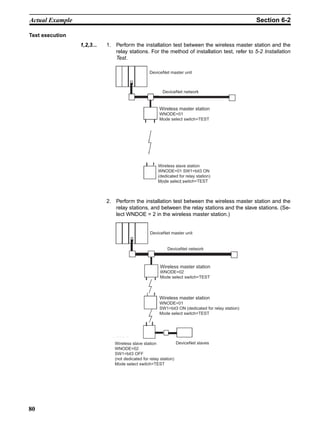
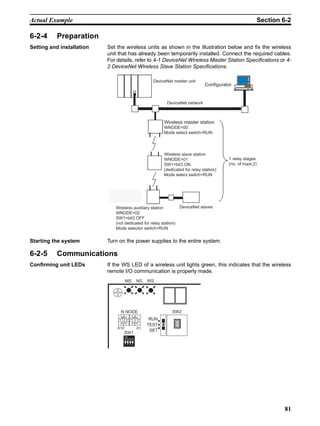
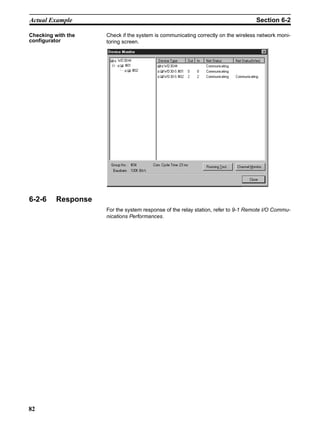
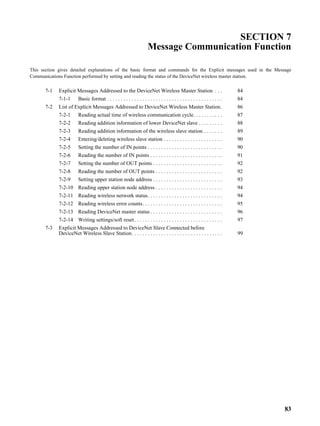
                      DeviceNet Wireless Units


                      OPERATION MANUAL
Notice


(1) This manual may not be copied, reproduced, or reprinted, in whole or in part, without permission.
(2) The specifications listed within this manual may be revised without prior notice.
(3) The information in this manual was compiled with the utmost care. However, if you should find any
    errors or inconsistencies, please contact the OMRON business office. Be sure to tell us the revi-
    sion number of the manual in which you found the error.


       Copyrights and Trademarks


DeviceNet is a registered trademark of the OpenDeviceNet Vendor Association (ODVA).


S-S Technologies, Inc. holds the copyrights for DeviceNet master unit and all software included with
the DeviceNet wireless slave station.
i
Introduction                                                                                              1

1       Introduction
                          Thank you for purchasing this DeviceNet wireless unit.
                          This DeviceNet wireless unit was developed based on OMRON’s advanced
                          control technology and experience.
                          Carefully read and understand the functions and performance of this device
                          before using the DeviceNet master and DeviceNet slave together as a struc-
                          tured system.

Personnel to whom this manual is directed
                          This User's Manual was designed for use by the following personnel.
                          Persons with a knowledge of electronics (electricians or those with similar
                          training) and who:
                            • are in charge of introducing FA equipment
                            • design FA system
                            • install and connect FA equipment
                            • manage FA sites

Precautions for use
                            • This equipment should be used as indicated in the general specifications.
                            • If this equipment is used under conditions or in an environment such as
                              those listed below, the user should contact the OMRON business office
                              for assistance. All uses and safety measures should be considered care-
                              fully according to the ratings and functions of the equipment.
                             1. Using the equipment under conditions or in environments not indicated
                                in this manual
                             2. Using the equipment to control nuclear power, for railway facilities, for
                                airline facilities, for automobiles, for combustion facilities, for medical
                                equipment, for entertainment equipment, or for safety equipment.
                             3. Using the equipment in a manner that is expected to have an effect on
                                human life or property, and particularly for applications that require safe-
                                ty measures
                            • The information contained in this manual is required for the correct use of
                              the DeviceNet wireless unit. Be sure to carefully read and understand this
                              User's Manual, the DeviceNet User's Manual, and the DeviceNet Slave
                              Manual before using this equipment. After reading this User's Manual,
                              store it in a safe location where it can be referred to at any time as neces-
                              sary. The frequency band used for this equipment is also used for the
                              manufacture of products such as microwave ovens, in scientific applica-
                              tions, and in medical equipment.

Countries where this product can be used
                          This product has been approved for wireless standards in the countries listed
                          below. Consult your OMRON representative before using this product in other
                          countries.
                          WD30-ME/-SE: Austria, Belgium, Canada, Denmark, Finland, France, Ger-
                          many, Greece, Iceland, Ireland, Italy, Japan, Luxembourg, Netherlands, Nor-
                          way, Portugal, Spain, Sweden, Switzerland, UK, USA
                          WD30-ME01/-SE01: Japan, USA


                                                                                                           i
Introduction                                                                                                 1

                          FCC Notice:
                          This device complies with part 15 of the FCC Rules. Operation is subject to
                          the following two conditions: (1) This device may not cause harmful interfer-
                          ence, and (2) this device must accept any interference received, including
                          interference that may cause undesired operation.
                          IC Notice:
                          To prevent radio interference to the licensed service, this device is intended to
                          be operated indoors and away from windows to provide maximum shielding.
                          Equipment (or its transmit antenna) that is installed outdoors is subject to
                          licensing.

               !Caution To ensure that the WLAN transmitter complies with current FCC regulations
                        limiting both maximum RF output power and human exposure to radio fre-
                        quency radiation, a separation distance of at least 20cm must be maintained
                        between the unit’s antenna and the body of the user and any nearby persons
                        at all times and in all applications and uses.

                          CE Notice
                           English         Hereby, Omron Corporation, declares that this WD30-ME/-SE is in
                                           compliance with the essential requirements and other relevant
                                           provisions of Directive 1999/5/EC.
                           Finnish         Omron Corporation vakuuttaa täten että WD30-ME/-SE tyyppinen
                                           laite on direktiivin 1999/5/EY oleellisten vaatimusten ja sitä
                                           koskevien direktiivin muiden ehtojen mukainen.
                           Dutch           Bij deze verklaart Omron Corporation dat deze WD30-ME/-SE
                                           voldoet aan de essentiële eisen en aan de overige relevante
                                           bepalingen van Richtlijn 1999/5/EC.
                           Swedish         Härmed intygar Omron Corporation att denna WD30-ME/-SE står I
                                           överensstämmelse med de väsentliga egenskapskrav och övriga
                                           relevanta bestämmelser som framgår av direktiv 1999/5/EG.
                           Danish          Undertegnede Omron Corporation erklærer herved, at følgende
                                           udstyr WD30-ME/-SE overholder de væsentlige krav og øvrige
                                           relevante krav i direktiv 1999/5/EF
                           German          Hiermit erklärt Omron Corporation die Übereinstimmung des
                                           Gerätes WD30-ME/-SE mit den grundlegenden Anforderungen und
                                           den anderen relevanten Festlegungen der Richtlinie 1999/5/EG.
                           Italian         Con la presente Omron Corporation dichiara che questo WD30-
                                           ME/-SE è conforme ai requisiti essenziali ed alle altre disposizioni
                                           pertinenti stabilite dalla direttiva 1999/5/CE.
                           Spanish         Por medio de la presente Omron Corporation declara que el
                                           WD30-ME/-SE cumple con los requisitos esenciales y cualesquiera
                                           otras disposiciones aplicables o exigibles de la Directiva 1999/5/CE
                           Portuguese      Omron Corporation declara que este WD30-ME/-SE está conforme
                                           com os requisitos essenciais e outras disposições da Directiva
                                           1999/5/CE.
                           Norwegian       Omron Corporation erklærer herved, at følgende utstyr WD30-ME/-
                                           SE overholder de vesentlige krav og øvrige relevante
                                           bestemmelser i direktiv 1999/5/EF
                           French          Par la Présente Omron Corporation déclare que l’appareil WD30-
                                           ME/-SE est conforme aux exigences essentielles et aux autres
                                           dispositions pertinentes de la directive 1999/5/CE.

                                           La France étant le seul pays ayant une directive locale qui
                                           différelégèrement de la directive Européenne, ce produit ne peut
                                           être utilisé en France.
                           Greek           ΜΕ ΤΗΝ ΠΑΡΟΥΣΑ Omron Corporation ∆ΗΛΩΝΕΙ ΟΤΙ WD30-ME/-
                                           SE ΣΥΜΜΟΡΦΩΝΕΤΑΙ ΠΡΟΣ ΤΙΣ ΟΥΣΙΩ∆ΕΙΣ ΑΠΑΙΤΗΣΕΙΣ ΚΑΙ
                                           ΤΙΣ ΛΟΙΠΕΣ ΣΧΕΤΙΚΕΣ ∆ΙΑΤΑΞΕΙΣ ΤΗΣ Ο∆ΗΓΙΑΣ 1999/5/EK

ii
Safety Precautions                                                                                 2

2       Safety Precautions
                     Observe the following points to ensure safe operation of this equipment.
                       • Do not use this equipment for real-time control (I/O control that requires a
                         response rate the same as that of DeviceNet).
                       • Do not apply excess vibrations or shock to this equipment. Do not drop
                         this equipment.
                       • Do not use this equipment in any of the following environments:
                         Areas with corrosive or combustible gasses
                         Areas with large amounts of dust or dirt
                         Areas containing water, oils, or chemical agents
                         Areas with severe fluctuations in humidity that results in condensation
                         Areas with static electricity or excessive noise
                       • Do not place the communications cables nearby other cables with high
                         voltage or strong currents.
                       • Do not attach connectors to the communications cables while they are
                         supplied by the power supply.
                       • Use the cables specified in this manual for connections with the communi-
                         cations cables.
                       • Prevent objects such as chips from getting inside the equipment while the
                         cover is open.
                       • Do not install this equipment in areas where it will be subject to excess
                         external force, or in walkways.
                       • Tighten installation screws at the rated torque specified in this User's
                         Manual.
                       • Do not use this equipment near other devices that may malfunction due to
                         the electronic waves emitted by the DeviceNet wireless unit.


                                                                                                   iii
Proper Use of This Equipment                                                                              3

3      Proper Use of This Equipment
                          1. Turn the power source OFF before performing any wiring work.
                          2. When adjusting the installation position, use double-sided tape or rope to
                             fix the equipment and prevent it from falling.
                          3. Do not use this equipment in areas exposed to direct sunlight, in areas of
                             very high humidity, near televisions or radios, near motors or drills that emit
                             sparks, near strong magnets, or near fluorescent lights.
                          4. Do not turn or bend the antennas. Do not wrap electric wires around the
                             antennas.
                          5. Install the equipment so that the antennas are not near any electric wires
                             or metal plates. Install the equipment as far away as possible from electric
                             wires and metal plates.
                          6. Communications performance will vary according to environment. Other
                             wireless devices that operate within the same frequency band may inter-
                             fere with this equipment. Be sure to perform the tests provided for this
                             equipment (such as the installation test) before operating it.


iv
DeviceNet Manuals                                                                                 4

4      DeviceNet Manuals
                    The following manuals are available for information relating to DeviceNet. Be
                    sure to thoroughly read and understand the applicable manuals before install-
                    ing or operating DeviceNet devices and make sure that you are using the
                    most recent version of the manual.
                    DeviceNet Operation Manual (W267)
                    Describes the functions and applications of DeviceNet including available
                    Master Units, their specifications, functions, operating procedures, and appli-
                    cations. Always read this manual thoroughly before installing or operating
                    DeviceNet devices.
                    DeviceNet Slaves Operation Manual (W347)
                    Describes available Slave Units, their specifications, functions, operating pro-
                    cedures, and applications. This manual has been separately produced in
                    response to the increase in Slave Unit models since the production of the
                    DeviceNet Operation Manual (W267). Use this manual in conjunction with the
                    DeviceNet Operation Manual (W267).
                    DeviceNet Configurator Operation Manual (W328)
                    Describes the operating procedures of the DeviceNet Configurator, which is
                    used to freely allocate remote I/O areas, and allows multiple Master Units to
                    be mounted to one PLC or connected to one DeviceNet Network to perform
                    independent remote I/O communications. Refer to this manual when operat-
                    ing a DeviceNet Network with a DeviceNet Configurator.
                    MULTIPLE I/O TERMINAL Operation Manual (W348)
                    Describes available MULTIPLE I/O TERMINALs, their specifications, func-
                    tions, operating procedures, and applications. This manual has been sepa-
                    rately produced in response to the increase in MULTIPLE I/O TERMINAL
                    models since the production of the DeviceNet Operation Manual (W267). Use
                    this manual in conjunction with the DeviceNet Operation Manual (W267).


                                                                                                  v
Manual Outline                                                                                                               5

5         Manual Outline
5-1         Outline of This Manual
Section 1 DeviceNet Wireless Unit
This section explains the features of the DeviceNet Wireless Unit, including system structure, types of units, basic func-
tions, and configurator outline.

Section 2 Hardware Settings and Checking of Operations
This section gives specific explanations of the operations and procedures necessary for you to use the DeviceNet wire-
less unit. Follow the explanations in this section to perform operation check procedures.

Section 3 Sample Program
This section contains an example program for monitoring the status of the DeviceNet wireless unit.


Section 4 DeviceNet Wireless Unit Station Specifications
This section explains the settings and installation procedures for the parts and switches of the DeviceNet wireless unit.


Section 5 Test
This section explains the procedures for the system tests required for using the DeviceNet wireless unit.


Section 6 Relay Function
This section gives detailed explanations of the relay function of the wireless slave stations used to enlarge the communi-
cations area.

Section 7 Message Communication Function
This section gives detailed explanations of the basic format and commands for the Explicit messages used in the Mes-
sage Communications Function performed by setting and reading the status of the DeviceNet wireless master station.

Section 8 Using the Configurator
This section explains how to monitor the conditions and make the various settings of the wireless network used for the
configurator.

Section 9 Communications Timing
This section explains the remote I/O communications response time and the delay time between wireless networks when
the DeviceNet wireless unit is connected.

Section 10 Troubleshooting
This section contains information regarding troubleshooting and inspection methods to be performed by daily inspectors
when errors occur.

Appendices
The appendices include DeviceNet wireless unit profiles and lists of connecting devices that are required when connect-
ing with a DeviceNet master manufactured by a different company.


vi
Manual Outline                                                                                               5

5-2      Instruction Markings:
      Instruction markings are used throughout this manual to indicate additional information.
      These markings are described below.
                              This mark indicates information/instructions that should be followed precisely.


                              This mark indicates additional information that the user would find constructive.


                                                                                                            vii
Manual Outline   5


viii
TABLE OF CONTENTS
  1     Introduction . . . . . . . . . . . . . . . . . . . . . . . . . . . . . . . . . . . . . . . . . . . . . . . . . . . . . . . . . . . . . . . . .        i
  2     Safety Precautions. . . . . . . . . . . . . . . . . . . . . . . . . . . . . . . . . . . . . . . . . . . . . . . . . . . . . . . . . . . .            iii
  3     Proper Use of This Equipment . . . . . . . . . . . . . . . . . . . . . . . . . . . . . . . . . . . . . . . . . . . . . . . . . .                     iv
  4     DeviceNet Manuals . . . . . . . . . . . . . . . . . . . . . . . . . . . . . . . . . . . . . . . . . . . . . . . . . . . . . . . . . . .               v
  5     Manual Outline . . . . . . . . . . . . . . . . . . . . . . . . . . . . . . . . . . . . . . . . . . . . . . . . . . . . . . . . . . . . . .           vi


SECTION 1
DeviceNet Wireless Unit. . . . . . . . . . . . . . . . . . . . . . . . . . . . . . . 1
  1-1   DeviceNet Wireless Unit. . . . . . . . . . . . . . . . . . . . . . . . . . . . . . . . . . . . . . . . . . . . . . . . . . . . . . .                  2
  1-2   Basic Functions of the DeviceNet Wireless Unit . . . . . . . . . . . . . . . . . . . . . . . . . . . . . . . . . . . .                                4
  1-3   Configurator Outline . . . . . . . . . . . . . . . . . . . . . . . . . . . . . . . . . . . . . . . . . . . . . . . . . . . . . . . . . .             10
  1-4   Application Limitations . . . . . . . . . . . . . . . . . . . . . . . . . . . . . . . . . . . . . . . . . . . . . . . . . . . . . . .                12
  1-5   Points for Consideration with Wireless Systems . . . . . . . . . . . . . . . . . . . . . . . . . . . . . . . . . . . .                               14


SECTION 2
Hardware Settings and Checking of Operations . . . . . . . . . . . 17
  2-1   Basic Operation Procedure . . . . . . . . . . . . . . . . . . . . . . . . . . . . . . . . . . . . . . . . . . . . . . . . . . . . .                  18
  2-2   Pre-work Preparations. . . . . . . . . . . . . . . . . . . . . . . . . . . . . . . . . . . . . . . . . . . . . . . . . . . . . . . . .               20
  2-3   Hardware Settings and Wiring . . . . . . . . . . . . . . . . . . . . . . . . . . . . . . . . . . . . . . . . . . . . . . . . . .                     22
  2-4   System Initial Setting and Starting Communications . . . . . . . . . . . . . . . . . . . . . . . . . . . . . . . . .                                 24
  2-5   Operation Confirmation . . . . . . . . . . . . . . . . . . . . . . . . . . . . . . . . . . . . . . . . . . . . . . . . . . . . . . .                 29
  2-6   Other Operations . . . . . . . . . . . . . . . . . . . . . . . . . . . . . . . . . . . . . . . . . . . . . . . . . . . . . . . . . . . . .           30
  2-7   Deciding the Antenna Installation Position . . . . . . . . . . . . . . . . . . . . . . . . . . . . . . . . . . . . . . . .                           36


SECTION 3
Sample Program . . . . . . . . . . . . . . . . . . . . . . . . . . . . . . . . . . . . . 41
  3-1   Status Monitoring Program Example . . . . . . . . . . . . . . . . . . . . . . . . . . . . . . . . . . . . . . . . . . . . .                          42
  3-2   Example of Using an Explicit Message . . . . . . . . . . . . . . . . . . . . . . . . . . . . . . . . . . . . . . . . . . .                           47


SECTION 4
DeviceNet Wireless Unit Station Specifications. . . . . . . . . . . . 53
  4-1   DeviceNet Wireless Master Station Specifications. . . . . . . . . . . . . . . . . . . . . . . . . . . . . . . . . . .                                54
  4-2   DeviceNet Wireless Slave Station Specifications . . . . . . . . . . . . . . . . . . . . . . . . . . . . . . . . . . . .                              61
  4-3   Common Specifications to All DeviceNet Wireless Units . . . . . . . . . . . . . . . . . . . . . . . . . . . . .                                      67


SECTION 5
Test. . . . . . . . . . . . . . . . . . . . . . . . . . . . . . . . . . . . . . . . . . . . . . . . 69
  5-1   Test . . . . . . . . . . . . . . . . . . . . . . . . . . . . . . . . . . . . . . . . . . . . . . . . . . . . . . . . . . . . . . . . . . . . . . .   70
  5-2   Installation Test . . . . . . . . . . . . . . . . . . . . . . . . . . . . . . . . . . . . . . . . . . . . . . . . . . . . . . . . . . . . . .        71
  5-3   Confirmation Test . . . . . . . . . . . . . . . . . . . . . . . . . . . . . . . . . . . . . . . . . . . . . . . . . . . . . . . . . . . .            73
  5-4   Wireless Channel Monitor . . . . . . . . . . . . . . . . . . . . . . . . . . . . . . . . . . . . . . . . . . . . . . . . . . . . .                   75


                                                                                                                                                                   ix
TABLE OF CONTENTS
    SECTION 6
    Relay Function . . . . . . . . . . . . . . . . . . . . . . . . . . . . . . . . . . . . . . 77
      6-1     Relay Function . . . . . . . . . . . . . . . . . . . . . . . . . . . . . . . . . . . . . . . . . . . . . . . . . . . . . . . . . . . . . .    78
      6-2     Actual Example. . . . . . . . . . . . . . . . . . . . . . . . . . . . . . . . . . . . . . . . . . . . . . . . . . . . . . . . . . . . . .     79


    SECTION 7
    Message Communication Function. . . . . . . . . . . . . . . . . . . . . . 83
      7-1     Explicit Messages Addressed to the DeviceNet Wireless Master Station . . . . . . . . . . . . . . . . .                                        84
      7-2     List of Explicit Messages Addressed to DeviceNet Wireless Master Station. . . . . . . . . . . . . . .                                         86
      7-3     Explicit Messages Addressed to DeviceNet Slave Connected before
              DeviceNet Wireless Slave Station. . . . . . . . . . . . . . . . . . . . . . . . . . . . . . . . . . . . . . . . . . . . . . . .               99


    SECTION 8
    Using the Configurator . . . . . . . . . . . . . . . . . . . . . . . . . . . . . . .105
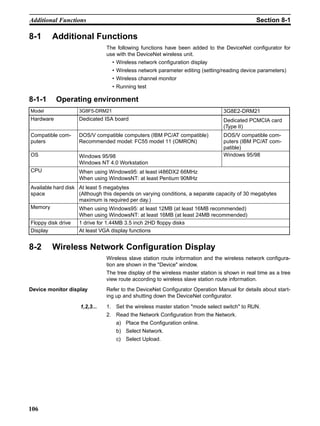
      8-1     Additional Functions. . . . . . . . . . . . . . . . . . . . . . . . . . . . . . . . . . . . . . . . . . . . . . . . . . . . . . . . . . 106
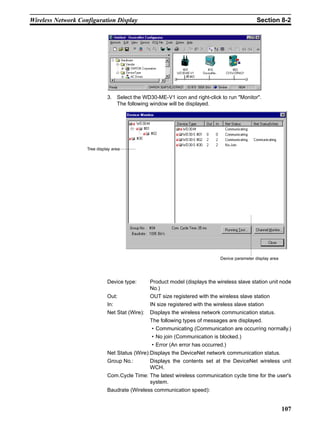
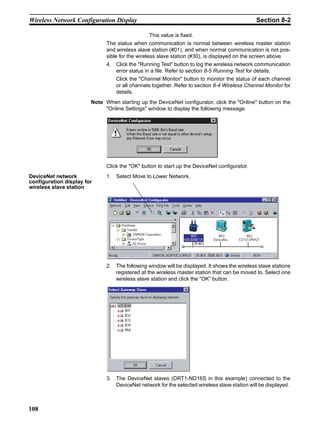
      8-2     Wireless Network Configuration Display . . . . . . . . . . . . . . . . . . . . . . . . . . . . . . . . . . . . . . . . . . 106
      8-3     Wireless Network Parameter Editing . . . . . . . . . . . . . . . . . . . . . . . . . . . . . . . . . . . . . . . . . . . . . 110
      8-4     Wireless Channel Monitor . . . . . . . . . . . . . . . . . . . . . . . . . . . . . . . . . . . . . . . . . . . . . . . . . . . . . 112
      8-5     Running Test . . . . . . . . . . . . . . . . . . . . . . . . . . . . . . . . . . . . . . . . . . . . . . . . . . . . . . . . . . . . . . . . 117


    SECTION 9
    Communications Timing . . . . . . . . . . . . . . . . . . . . . . . . . . . . . .121
      9-1     Remote I/O Communications Performances. . . . . . . . . . . . . . . . . . . . . . . . . . . . . . . . . . . . . . . . 122
      9-2     Message Communication Performance . . . . . . . . . . . . . . . . . . . . . . . . . . . . . . . . . . . . . . . . . . . 130


    SECTION 10
    Troubleshooting . . . . . . . . . . . . . . . . . . . . . . . . . . . . . . . . . . . . .137
      10-1 Normal Indication . . . . . . . . . . . . . . . . . . . . . . . . . . . . . . . . . . . . . . . . . . . . . . . . . . . . . . . . . . . . 138
      10-2 Troubleshooting . . . . . . . . . . . . . . . . . . . . . . . . . . . . . . . . . . . . . . . . . . . . . . . . . . . . . . . . . . . . . 140
      10-3 Maintenance . . . . . . . . . . . . . . . . . . . . . . . . . . . . . . . . . . . . . . . . . . . . . . . . . . . . . . . . . . . . . . . . 148


    Appendices
        A     Device Profiles . . . . . . . . . . . . . . . . . . . . . . . . . . . . . . . . . . . . . . . . . . . . . . . . . . . . . . . . . . .        151
        B     Connection-related Devices Model List . . . . . . . . . . . . . . . . . . . . . . . . . . . . . . . . . . . . . . . .                        157
        C     Current Consumption List . . . . . . . . . . . . . . . . . . . . . . . . . . . . . . . . . . . . . . . . . . . . . . . . . .                 159
        D     Optional Products List . . . . . . . . . . . . . . . . . . . . . . . . . . . . . . . . . . . . . . . . . . . . . . . . . . . . .             161


    Index . . . . . . . . . . . . . . . . . . . . . . . . . . . . . . . . . . . . . . . . . . . . . .163
    Revision History . . . . . . . . . . . . . . . . . . . . . . . . . . . . . . . . . . . . .167


x
SECTION 1
                                                                                                         DeviceNet Wireless Unit

This section explains the features of the DeviceNet Wireless Unit, including system structure, types of units, basic functions, and
configurator outline.


       1-1    DeviceNet Wireless Unit. . . . . . . . . . . . . . . . . . . . . . . . . . . . . . . . . . . . . . . . .             2
              1-1-1       System configuration . . . . . . . . . . . . . . . . . . . . . . . . . . . . . . . . . . . .             2
              1-1-2       Features. . . . . . . . . . . . . . . . . . . . . . . . . . . . . . . . . . . . . . . . . . . . . . .    2
              1-1-3       Types of units . . . . . . . . . . . . . . . . . . . . . . . . . . . . . . . . . . . . . . . . . .       3
              1-1-4       Model list . . . . . . . . . . . . . . . . . . . . . . . . . . . . . . . . . . . . . . . . . . . . .     4
       1-2    Basic Functions of the DeviceNet Wireless Unit . . . . . . . . . . . . . . . . . . . . . .                           4
              1-2-1       Replacing data . . . . . . . . . . . . . . . . . . . . . . . . . . . . . . . . . . . . . . . . .         4
              1-2-2       I/O allocation . . . . . . . . . . . . . . . . . . . . . . . . . . . . . . . . . . . . . . . . . .       6
              1-2-3       DeviceNet wireless unit status . . . . . . . . . . . . . . . . . . . . . . . . . . . . .                 8
              1-2-4       Slave error flag . . . . . . . . . . . . . . . . . . . . . . . . . . . . . . . . . . . . . . . . .       8
              1-2-5       DeviceNet node addresses . . . . . . . . . . . . . . . . . . . . . . . . . . . . . . . .                 9
              1-2-6       DeviceNet wireless unit default setting values . . . . . . . . . . . . . . . . .                        10
       1-3    Configurator Outline . . . . . . . . . . . . . . . . . . . . . . . . . . . . . . . . . . . . . . . . . . . .        10
              1-3-1       Configuration . . . . . . . . . . . . . . . . . . . . . . . . . . . . . . . . . . . . . . . . . .       10
              1-3-2       Operating environment . . . . . . . . . . . . . . . . . . . . . . . . . . . . . . . . . . .             11
              1-3-3       Outline of functions . . . . . . . . . . . . . . . . . . . . . . . . . . . . . . . . . . . . .          11
       1-4    Application Limitations . . . . . . . . . . . . . . . . . . . . . . . . . . . . . . . . . . . . . . . . .           12
       1-5    Points for Consideration with Wireless Systems . . . . . . . . . . . . . . . . . . . . . .                          14
              1-5-1       Construction of multiple wireless systems . . . . . . . . . . . . . . . . . . . .                       14


                                                                                                                                       1
DeviceNet Wireless Unit                                                                                                 Section 1-1

1-1     DeviceNet Wireless Unit
                          The DeviceNet wireless unit, consisting of a DeviceNet wireless master sta-
                          tion and a DeviceNet wireless slave station, allows wireless communication
                          with the DeviceNet slave.
                          Basically, the wireless master station is connected to the DeviceNet network
                          and acts as either a virtual DeviceNet slave or wireless network master station
                          for the DeviceNet master unit. The wireless slave station acts as either a wire-
                          less network slave station or a virtual DeviceNet master with the DeviceNet
                          slave unit.
                          This unit conforms to the following radio wave standards.
                          WD30-ME/-SE                     Japan: ARIB STD-T66
                                                          USA: FCC part 15.247
                                                          Canada: IC RSS 210
                                                          Europe: ETS 300 440
                          WD30-ME01/-SE01                 Japan: ARIB STD-T66
                                                          USA: FCC part 15.247

                          Conformance with these standards means that the antenna can be installed
                          separately. The unit can be purchased as a set with a pencil antenna (WD30-
                          ME/-SE) or with a magnet-base antenna (WD30-ME01/-SE01). (The dia-
                          grams in this manual are for the WD30-ME/-SE.)

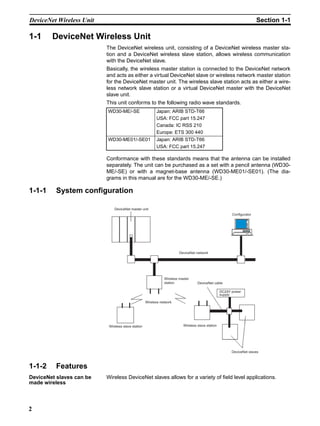
1-1-1     System configuration

                              DeviceNet master unit
                                                                                                         Configurator


                                                                        DeviceNet network


                                                               Wireless master
                                                               station             DeviceNet cable

                                                                                                   DC24V power
                                                                                                   supply

                                                    Wireless network


                           Wireless slave station                         Wireless slave station


                                                                                                         DeviceNet slaves


1-1-2     Features
DeviceNet slaves can be   Wireless DeviceNet slaves allows for a variety of field level applications.
made wireless


2
DeviceNet Wireless Unit                                                                                  Section 1-1

                            We recommend that this function be used for applications that are not
                            required to operate in real time (such as displays for indicators and manufac-
                            turing instruction data transmissions).
Errors can be monitored     DeviceNet slave error information (including errors in wireless slave stations)
                            can be assigned to two or four status words and monitored from the PLC.
Abundant number of          Since the wireless region is divided into 34 frequencies from 2,400 to
wireless channels allows    2,483.5MHz, you can select an unused frequency for building multiple sys-
the construction of         tems.
multiple systems in the
same area                   Using a spectral spread method (DS: direct spread) as a modulation method
                            achieves high-quality communications even in areas of excess noise.
Relay functions make        Although communications distances vary according to the installation environ-
possible an extension in    ment, the goal indoors is 60m in line of sight.
communications
distances                   The relay functions allow an increase in the communications area (to a maxi-
                            mum of 3 stages).
                            DeviceNet slaves may also be connected to the relay station.
                            However, relay station system settings can only be performed from the config-
                            urator.
Diversity functions         Multi-pass phasing is improved with a diversity system (which requires 2
                            antennas).
                            The effects of this function are observed when used in areas where variations
                            in radio waves (such as reflections) occur.
Maximum number of I/O       Depending on the switch settings of the wireless master station, the maximum
per wireless master         number of I/O per wireless master station can be increased to 100 words/
station increased           100 words (IN/OUT). The maximum number of wireless slave stations that
                            can be connected has increased to 64.
Magnet-base antenna         Using the magnet-base antenna, the station itself can be installed inside a
added to lineup             control panel with the antenna installed outside. Also, because it is mounted
                            with a magnet, the position of the antenna can be adjusted easily when, for
                            example, the control panel is moved. Attenuation in the antenna cable (2m),
                            however, limits the maximum communications distance to approximately 50m
                            indoors.

1-1-3     Types of units
DeviceNet wireless master     • Connects to the DeviceNet network and acts as a virtual DeviceNet slave.
station (Wireless master
station)                      • Maximum number of I/O as DeviceNet slave: IN/OUT = 32 words (512
                                points)/32 words (512 points) or 100 words (1,600 points)/100 words
                                (1,600 points) depending on the DIP switch setting. However, if Status is
                                selected, IN/OUT = 30 words (480 points)/32 words (512 points) or
                                96 words (1,536 points)/100 words (1,600 points) depending on the DIP
                                switch setting.
                              • As the wireless network master station, it controls a maximum of 64 wire-
                                less slave stations and sends remote I/O transmissions.
                              • The wireless master station was tested at the test laboratories of a third
                                part organization authorized by the ODVA. It is authorized as being in
                                conforming to ODVA conformance software.

          Multi-pass        Multi-pass phasing is the phenomenon of a radio wave being transmitted form a single point,
          phasing           passing through multiple propagation paths, and then arriving at a single point.


                                                                                                                          3
Basic Functions of the DeviceNet Wireless Unit                                                     Section 1-2

DeviceNet wireless slave            • As an slave station for the wireless network, it exchanges remote I/O
station (Wireless slave               Communications with the wireless master station via the wireless line.
station)
                                    • Acts as a virtual DeviceNet master with DeviceNet slaves.
                                    • Connects with a maximum of 63 DeviceNet slaves and performs a maxi-
                                      mum of 64 words (1,024 points) I/O control. (Even if multiple wireless
                                      slave stations are used, the maximum number of nodes for DeviceNet
                                      slaves is 63.)

1-1-4      Model list
    Type       No. of inputs/     No. of words in PLC I/O         I/O     Unit voltage Installation    Model
                 outputs                  memory               connection
                                       IN          OUT
DeviceNet      None             Status: 2 or   0 words         None         Supplied by Screws        Model
wireless                        4 words (See                                power for                 WD30-ME
master station                  note.)                                      external                  Model
                                                                            communica-                WD30-
                                                                            tions                     ME01
DeviceNet      None             0 words        0 words         None                                   Model
wireless slave                                                                                        WD30-SE
station                                                                                               Model
                                                                                                      WD30-
                                                                                                      SE01

                            Note When set to “status”
Accessories                       The following accessories are included with purchase of both wireless master
                                  station and slave station:
                                    • 2 antennas (ME/-SE: pencil antenna; ME01/-SE01: magnet-base
                                      antenna)
                                    • User’s manual
                                    • Sticker (Attach in a visible location.)
                                    • 2 installation screws (with nuts)
                                    • Declaration of Conformity (CE) (Provided with ME/-SE models only.)
Applicable connectors             Use DeviceNet micro-connectors for communications connectors. A list of
                                  recommended connectors in the appendix.


1-2        Basic Functions of the DeviceNet Wireless Unit
1-2-1      Replacing data
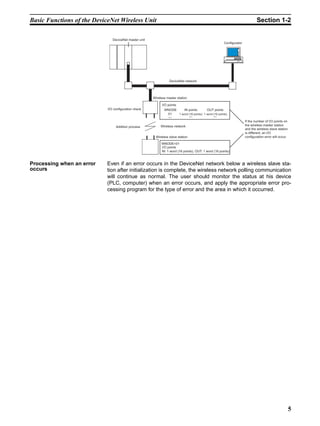
Initializing the wireless         When the power supply is turned on, the wireless master station adds each
master station                    registered wireless slave station. When wireless communication begins with
                                  an slave station, if the number of I/O points on the DeviceNet slave connected
                                  to the slave station and the I/O points registered for the wireless master sta-
                                  tion are identical, it is added. If they are not identical, an I/O configuration
                                  error will occur.


4
Basic Functions of the DeviceNet Wireless Unit                                                                                   Section 1-2

                               DeviceNet master unit
                                                                                                          Configurator


                                                                  DeviceNet network


                                                       Wireless master station

                                                             I/O points
                            I/O configuration check            WNODE       IN points         OUT points
                                                                 01     1 word (16 points) 1 word (16 points)
                                                                  ---          ---                ---
                                                                                                                         If the number of I/O points on
                                                            Wireless network                                             the wireless master station
                                 Addition process
                                                                                                                         and the wireless slave station
                                                                                                                         is different, an I/O
                                                        Wireless slave station                                           configuration error will occur.

                                                            WNODE=01
                                                            I/O points
                                                            IN: 1 word (16 points), OUT: 1 word (16 points)


Processing when an error    Even if an error occurs in the DeviceNet network below a wireless slave sta-
occurs                      tion after initialization is complete, the wireless network polling communication
                            will continue as normal. The user should monitor the status at his device
                            (PLC, computer) when an error occurs, and apply the appropriate error pro-
                            cessing program for the type of error and the area in which it occurred.


                                                                                                                                                           5
Basic Functions of the DeviceNet Wireless Unit                                                                                                                      Section 1-2

1-2-2    I/O allocation
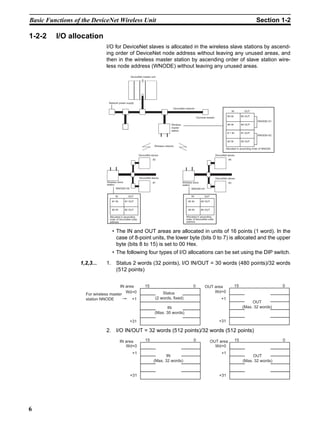
                              I/O for DeviceNet slaves is allocated in the wireless slave stations by ascend-
                              ing order of DeviceNet node address without leaving any unused areas, and
                              then in the wireless master station by ascending order of slave station wire-
                              less node address (WNODE) without leaving any unused areas.
                                                   DeviceNet master unit


                               Network power supply

                                                                                      DeviceNet network
                                                                                                                                                 IN          OUT

                                                                                                                                           #3 IN           #3 OUT
                                                                                                             Terminal resistor
                                                                                                                                                                    WNODE=01
                                                                                     Wireless                                              #4 IN           #4 OUT
                                                                                     master
                                                                                     station
                                                                                                                                           # 1 IN          #1 OUT
                                                                                                                                                                    WNODE=02

                                                                                                                                           #2 IN           #2 OUT
                                                                       Wireless network
                                                                                                                                         Allocated in ascending order of WNODE

                                                          DeviceNet slaves                                                       DeviceNet slaves
                                                                     #2                                                                     #4


                                                          DeviceNet slaves                                                       DeviceNet slaves
                              Wireless slave                         #1                         Wireless slave                              #3
                              station                                                           station
                                     WNODE=02                                                          WNODE=01


                                     IN          OUT                                                   IN           OUT

                                  #1 IN        #1 OUT                                                #3 IN       #3 OUT


                                  #2 IN        #2 OUT                                                #4 IN       #4 OUT

                                Allocated in ascending                                             Allocated in ascending
                                order of DeviceNet node                                            order of DeviceNet node
                                address                                                            address


                                  • The IN and OUT areas are allocated in units of 16 points (1 word). In the
                                    case of 8-point units, the lower byte (bits 0 to 7) is allocated and the upper
                                    byte (bits 8 to 15) is set to 00 Hex.
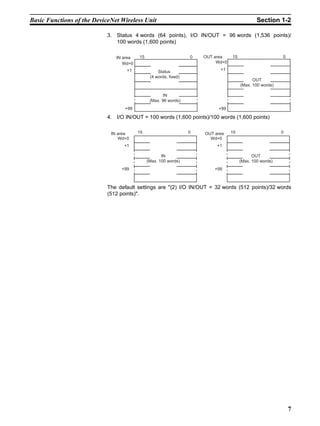
                                  • The following four types of I/O allocations can be set using the DIP switch.

                  1,2,3...    1. Status 2 words (32 points), I/O IN/OUT = 30 words (480 points)/32 words
                                 (512 points)


                                      IN area                  15                                        0           OUT area                         15                         0
                                         Wd+0                              Status                                        Wd+0
                    For wireless master
                    station NNODE           +1                         (2 words, fixed)                                               +1
                                                                                                                                                                OUT
                                                                              IN                                                                           (Max. 32 words)
                                                                       (Max. 30 words)

                                                  +31                                                                               +31

                              2. I/O IN/OUT = 32 words (512 points)/32 words (512 points)
                                          IN area              15                                        0                OUT area                    15                         0
                                             Wd+0                                                                           Wd+0
                                                    +1                                                                                +1
                                                                             IN                                                                                  OUT
                                                                      (Max. 32 words)                                                                       (Max. 32 words)


                                                  +31                                                                               +31


6
Basic Functions of the DeviceNet Wireless Unit                                                 Section 1-2

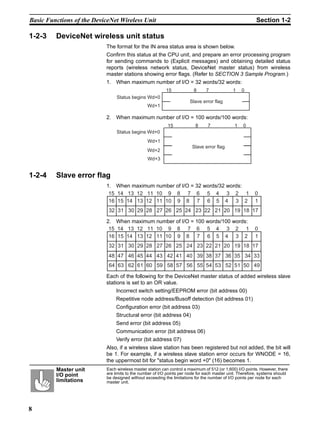
                            3. Status 4 words (64 points), I/O IN/OUT = 96 words (1,536 points)/
                               100 words (1,600 points)

                               IN area   15                       0   OUT area    15                      0
                                  Wd+0                                     Wd+0
                                   +1                                       +1
                                                   Status 
                                               (4 words, fixed)
                                                                                             OUT
                                                                                       (Max. 100 words)

                                                      IN
                                               (Max. 96 words)
                                   +99                                     +99

                            4. I/O IN/OUT = 100 words (1,600 points)/100 words (1,600 points)


                             IN area     15                       0   OUT area    15                      0
                                Wd+0                                    Wd+0
                                  +1                                       +1

                                                     IN                                      OUT
                                              (Max. 100 words)                         (Max. 100 words)
                                 +99                                      +99


                            The default settings are "(2) I/O IN/OUT = 32 words (512 points)/32 words
                            (512 points)".


                                                                                                              7
Basic Functions of the DeviceNet Wireless Unit                                                            Section 1-2

1-2-3    DeviceNet wireless unit status
                           The format for the IN area status area is shown below.
                           Confirm this status at the CPU unit, and prepare an error processing program
                           for sending commands to (Explicit messages) and obtaining detailed status
                           reports (wireless network status, DeviceNet master status) from wireless
                           master stations showing error flags. (Refer to SECTION 3 Sample Program.)
                           1. When maximum number of I/O = 32 words/32 words:
                                                           15            8      7             1    0
                                 Status begins Wd+0
                                                                       Slave error flag
                                                 Wd+1

                           2. When maximum number of I/O = 100 words/100 words:
                                                            15            8      7             1   0
                                 Status begins Wd+0
                                                 Wd+1
                                                                        Slave error flag
                                                 Wd+2
                                                 Wd+3


1-2-4    Slave error flag
                           1. When maximum number of I/O = 32 words/32 words:
                            15 14 13 12 11 10 9 8 7 6 5 4 3 2 1                                          0
                            16 15 14 13 12 11 10 9 8 7 6 5 4 3 2                                         1
                             32 31 30 29 28 27 26 25 24 23 22 21 20 19 18 17

                           2. When maximum number of I/O = 100 words/100 words:
                            15 14 13 12 11 10 9 8 7 6 5 4 3 2 1                                          0
                            16 15 14 13 12 11 10 9 8 7 6 5 4 3 2                                         1
                             32 31 30 29 28 27 26 25 24 23 22 21 20 19 18 17
                             48 47 46 45 44 43 42 41 40 39 38 37 36 35 34 33
                             64 63 62 61 60 59 58 57 56 55 54 53 52 51 50 49

                           Each of the following for the DeviceNet master status of added wireless slave
                           stations is set to an OR value.
                                Incorrect switch setting/EEPROM error (bit address 00)
                                Repetitive node address/Busoff detection (bit address 01)
                                Configuration error (bit address 03)
                                Structural error (bit address 04)
                                Send error (bit address 05)
                                Communication error (bit address 06)
                                Verify error (bit address 07)
                           Also, if a wireless slave station has been registered but not added, the bit will
                           be 1. For example, if a wireless slave station error occurs for WNODE = 16,
                           the uppermost bit for "status begin word +0" (16) becomes 1.
         Master unit        Each wireless master station can control a maximum of 512 (or 1,600) I/O points. However, there
         I/O point          are limits to the number of I/O points per node for each master unit. Therefore, systems should
                            be designed without exceeding the limitations for the number of I/O points per node for each
         limitations        master unit.


8
Basic Functions of the DeviceNet Wireless Unit                                                                                  Section 1-2

                            Refer to the "DeviceNet User’s Manual" for details concerning DeviceNet
                            master status errors.

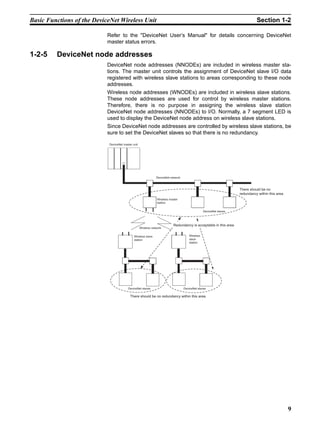
1-2-5    DeviceNet node addresses
                            DeviceNet node addresses (NNODEs) are included in wireless master sta-
                            tions. The master unit controls the assignment of DeviceNet slave I/O data
                            registered with wireless slave stations to areas corresponding to these node
                            addresses.
                            Wireless node addresses (WNODEs) are included in wireless slave stations.
                            These node addresses are used for control by wireless master stations.
                            Therefore, there is no purpose in assigning the wireless slave station
                            DeviceNet node addresses (NNODEs) to I/O. Normally, a 7 segment LED is
                            used to display the DeviceNet node address on wireless slave stations.
                            Since DeviceNet node addresses are controlled by wireless slave stations, be
                            sure to set the DeviceNet slaves so that there is no redundancy.

                            DeviceNet master unit


                                                                DeviceNet network


                                                                                                                      There should be no
                                                                                                                      redundancy within this area.
                                                                Wireless master
                                                                station

                                                                                                   DeviceNet slaves


                                                                            Redundancy is acceptable in this area.
                                                    Wireless network

                                              Wireless slave                            Wireless
                                              station                                   slave
                                                                                        station


                                          DeviceNet slaves                          DeviceNet slaves

                                           There should be no redundancy within this area.


                                                                                                                                                     9
Configurator Outline                                                                         Section 1-3

1-2-6    DeviceNet wireless unit default setting values
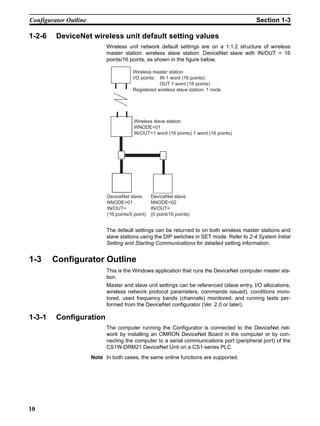
                             Wireless unit network default settings are on a 1:1:2 structure of wireless
                             master station: wireless slave station: DeviceNet slave with IN/OUT = 16
                             points/16 points, as shown in the figure below.

                                         Wireless master station
                                         I/O points: IN 1 word (16 points)
                                                     OUT 1 word (16 points)
                                         Registered wireless slave station: 1 node


                                          Wireless slave station
                                          WNODE=01
                                          IN/OUT=1 word (16 points) 1 word (16 points)


                             DeviceNet slave       DeviceNet slave
                             NNODE=01              NNODE=02
                             IN/OUT=               IN/OUT=
                             (16 points/0 point)   (0 point/16 points)


                             The default settings can be returned to on both wireless master stations and
                             slave stations using the DIP switches in SET mode. Refer to 2-4 System Initial
                             Setting and Starting Communications for detailed setting information.


1-3     Configurator Outline
                             This is the Windows application that runs the DeviceNet computer master sta-
                             tion.
                             Master and slave unit settings can be referenced (slave entry, I/O allocations,
                             wireless network protocol parameters, commands issued), conditions moni-
                             tored, used frequency bands (channels) monitored, and running tests per-
                             formed from the DeviceNet configurator (Ver. 2.0 or later).

1-3-1    Configuration
                             The computer running the Configurator is connected to the DeviceNet net-
                             work by installing an OMRON DeviceNet Board in the computer or by con-
                             necting the computer to a serial communications port (peripheral port) of the
                             CS1W-DRM21 DeviceNet Unit on a CS1-series PLC.
                       Note In both cases, the same online functions are supported.


10
Configurator Outline                                                                             Section 1-3

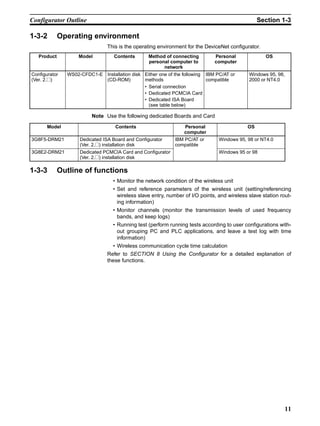
1-3-2        Operating environment
                               This is the operating environment for the DeviceNet configurator.
   Product         Model          Contents       Method of connecting         Personal              OS
                                                 personal computer to         computer
                                                       network
Configurator   WS02-CFDC1-E Installation disk Either one of the following IBM PC/AT or       Windows 95, 98,
(Ver. 2.@)                  (CD-ROM)          methods                     compatible         2000 or NT4.0
                                              • Serial connection
                                              • Dedicated PCMCIA Card
                                              • Dedicated ISA Board
                                                (see table below)

                         Note Use the following dedicated Boards and Card
       Model                       Contents                      Personal                   OS
                                                                 computer
3G8F5-DRM21         Dedicated ISA Board and Configurator     IBM PC/AT or       Windows 95, 98 or NT4.0
                    (Ver. 2.@) installation disk             compatible
3G8E2-DRM21         Dedicated PCMCIA Card and Configurator                      Windows 95 or 98
                    (Ver. 2.@) installation disk

1-3-3        Outline of functions
                                  • Monitor the network condition of the wireless unit
                                  • Set and reference parameters of the wireless unit (setting/referencing
                                    wireless slave entry, number of I/O points, and wireless slave station rout-
                                    ing information)
                                  • Monitor channels (monitor the transmission levels of used frequency
                                    bands, and keep logs)
                                  • Running test (perform running tests according to user configurations with-
                                    out grouping PC and PLC applications, and leave a test log with time
                                    information)
                                  • Wireless communication cycle time calculation
                               Refer to SECTION 8 Using the Configurator for a detailed explanation of
                               these functions.


                                                                                                               11
Application Limitations                                                                             Section 1-4

1-4     Application Limitations
                             The wireless unit is not designed to be compatible with every type of applica-
                             tion that uses DeviceNet. Do not use the unit with the following applications.

                  1,2,3...   1. Applications that require real-time control
                                   Do not use the unit with applications that require real-time control. In par-
                                   ticular, it cannot be used under conditions that require responsiveness
                                   greater than that outlined in "Section 9 Communications Timing".
                                   Applications that do not require real-time control, such as indicators, equip-
                                   ment error monitors, and parts picking operation, are recommended.
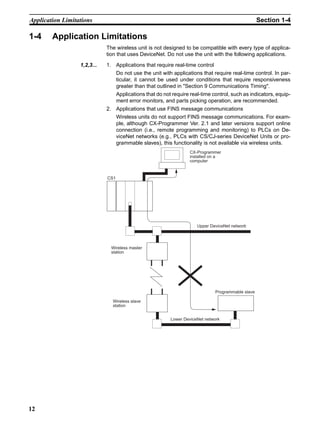
                             2. Applications that use FINS message communications
                                   Wireless units do not support FINS message communications. For exam-
                                   ple, although CX-Programmer Ver. 2.1 and later versions support online
                                   connection (i.e., remote programming and monitoring) to PLCs on De-
                                   viceNet networks (e.g., PLCs with CS/CJ-series DeviceNet Units or pro-
                                   grammable slaves), this functionality is not available via wireless units.
                                                                    CX-Programmer
                                                                    installed on a
                                                                    computer


                             CS1


                                                                       Upper DeviceNet network


                               Wireless master
                               station


                                                                               Programmable slave

                               Wireless slave
                               station


                                                           Lower DeviceNet network


12
Application Limitations                                                                             Section 1-4

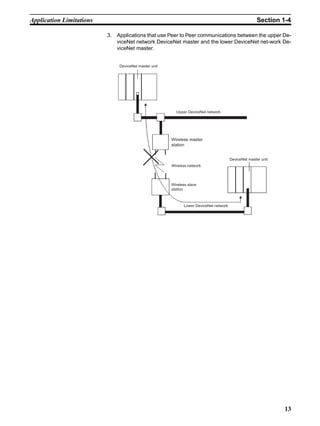
                          3. Applications that use Peer to Peer communications between the upper De-
                             viceNet network DeviceNet master and the lower DeviceNet net-work De-
                             viceNet master.


                              DeviceNet master unit


                                                        Upper DeviceNet network


                                                      Wireless master
                                                      station


                                                                                      DeviceNet master unit
                                                      Wireless network


                                                      Wireless slave
                                                      station


                                                            Lower DeviceNet network


                                                                                                              13
Points for Consideration with Wireless Systems                                                Section 1-5

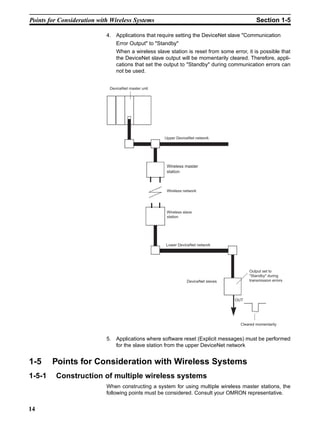
                            4. Applications that require setting the DeviceNet slave "Communication
                                Error Output" to "Standby"
                                When a wireless slave station is reset from some error, it is possible that
                                the DeviceNet slave output will be momentarily cleared. Therefore, appli-
                                cations that set the output to "Standby" during communication errors can
                                not be used.


                             DeviceNet master unit


                                                     Upper DeviceNet network


                                                      Wireless master
                                                      station


                                                      Wireless network


                                                      Wireless slave
                                                      station


                                                     Lower DeviceNet network


                                                                                          Output set to
                                                                                          "Standby" during
                                                                 DeviceNet slaves         transmission errors


                                                                                    OUT


                                                                                      Cleared momentarily


                            5. Applications where software reset (Explicit messages) must be performed
                               for the slave station from the upper DeviceNet network


1-5     Points for Consideration with Wireless Systems
1-5-1    Construction of multiple wireless systems
                            When constructing a system for using multiple wireless master stations, the
                            following points must be considered. Consult your OMRON representative.


14
Points for Consideration with Wireless Systems                                                              Section 1-5

Setting wireless channels   It is necessary to select frequencies for the wireless channels that are not
                            interfered with by radio waves. (Radio interference can be handled by retry
                            processes between the wireless networks, but will lengthen the system
                            response time.)
                            With this unit, 34 wireless channels can be selected from. Taking the following
                            points into consideration, however, the maximum number of wireless systems
                            usable in a single area without radio interference is, as a rough guide, 10.
                            1. It is possible that, for example, there is a wireless LAN on site that uses the
                               same frequency as this unit. Select an unused wireless channel using the
                               Configurator’s wireless channel monitor function.
                            2. Do not select neighboring wireless channels as they have a large amount
                               of interference.
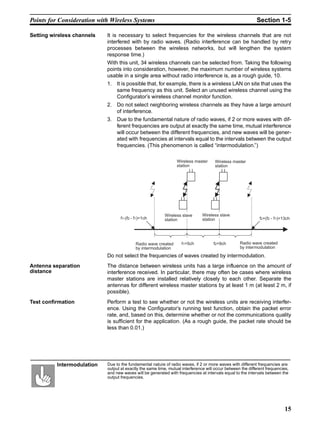
                            3. Due to the fundamental nature of radio waves, if 2 or more waves with dif-
                               ferent frequencies are output at exactly the same time, mutual interference
                               will occur between the different frequencies, and new waves will be gener-
                               ated with frequencies at intervals equal to the intervals between the output
                               frequencies. (This phenomenon is called “intermodulation.”)

                                                                 Wireless master      Wireless master
                                                                 station              station


                                                           Wireless slave      Wireless slave
                                   f1-(f2 - f1)=1ch        station             station                        f2+(f2 - f1)=13ch


                                            Radio wave created      f1=5ch           f2=9ch        Radio wave created
                                            by intermodulation                                     by intermodulation

                            Do not select the frequencies of waves created by intermodulation.
Antenna separation          The distance between wireless units has a large influence on the amount of
distance                    interference received. In particular, there may often be cases where wireless
                            master stations are installed relatively closely to each other. Separate the
                            antennas for different wireless master stations by at least 1 m (at least 2 m, if
                            possible).
Test confirmation           Perform a test to see whether or not the wireless units are receiving interfer-
                            ence. Using the Configurator’s running test function, obtain the packet error
                            rate, and, based on this, determine whether or not the communications quality
                            is sufficient for the application. (As a rough guide, the packet rate should be
                            less than 0.01.)


          Intermodulation   Due to the fundamental nature of radio waves, if 2 or more waves with different frequencies are
                            output at exactly the same time, mutual interference will occur between the different frequencies,
                            and new waves will be generated with frequencies at intervals equal to the intervals between the
                            output frequencies.


                                                                                                                            15
Points for Consideration with Wireless Systems                                             Section 1-5

                 !Caution Communications errors caused by intermodulation
                          Communications errors and retry processing may occur due to intermodula-
                          tion and consequently cause transmission delays. In very rare cases, inter-
                          modulation may result in the operation of wireless units with different channels
                          and the system will be unable to operate correctly. In order to eliminate the
                          influence of intermodulation, do not set the wireless channels for wireless
                          units in every system to frequencies at regular intervals.


16
SECTION 2
                                       Hardware Settings and Checking of Operations

This section gives specific explanations of the operations and procedures necessary for you to use the DeviceNet wireless unit. Follow
the explanations in this section to perform operation check procedures.


        2-1    Basic Operation Procedure . . . . . . . . . . . . . . . . . . . . . . . . . . . . . . . . . . . . . . .            18
               2-1-1        Basic operation procedures flowchart. . . . . . . . . . . . . . . . . . . . . . . .                   18
        2-2    Pre-work Preparations. . . . . . . . . . . . . . . . . . . . . . . . . . . . . . . . . . . . . . . . . . .         20
               2-2-1        Determination of system configuration . . . . . . . . . . . . . . . . . . . . . .                     20
               2-2-2        Confirmation of specifications . . . . . . . . . . . . . . . . . . . . . . . . . . . . .              20
               2-2-3        Temporary installation and installation test . . . . . . . . . . . . . . . . . . .                    21
        2-3    Hardware Settings and Wiring . . . . . . . . . . . . . . . . . . . . . . . . . . . . . . . . . . . .               22
               2-3-1        DeviceNet wireless master station settings and installation . . . . . . .                             22
               2-3-2        DeviceNet wireless slave station settings and installation . . . . . . . .                            22
               2-3-3        Installation of connection equipment . . . . . . . . . . . . . . . . . . . . . . . .                  23
               2-3-4        Cable connections. . . . . . . . . . . . . . . . . . . . . . . . . . . . . . . . . . . . . . .        23
        2-4    System Initial Setting and Starting Communications . . . . . . . . . . . . . . . . . . .                           24
               2-4-1        System start. . . . . . . . . . . . . . . . . . . . . . . . . . . . . . . . . . . . . . . . . . . .   24
               2-4-2        DeviceNet slave entry . . . . . . . . . . . . . . . . . . . . . . . . . . . . . . . . . . . .         25
               2-4-3        DeviceNet wireless slave station entry . . . . . . . . . . . . . . . . . . . . . . .                  27
               2-4-4        Scan list valid settings. . . . . . . . . . . . . . . . . . . . . . . . . . . . . . . . . . . .       29
        2-5    Operation Confirmation . . . . . . . . . . . . . . . . . . . . . . . . . . . . . . . . . . . . . . . . .           29
               2-5-1        Unit LED confirmation. . . . . . . . . . . . . . . . . . . . . . . . . . . . . . . . . . .            29
               2-5-2        Status confirmation . . . . . . . . . . . . . . . . . . . . . . . . . . . . . . . . . . . . . .       29
               2-5-3        Confirmation by reading/writing data . . . . . . . . . . . . . . . . . . . . . . .                    30
        2-6    Other Operations . . . . . . . . . . . . . . . . . . . . . . . . . . . . . . . . . . . . . . . . . . . . . . .     30
               2-6-1        DeviceNet wireless slave station deletion. . . . . . . . . . . . . . . . . . . . .                    30
               2-6-2        DeviceNet wireless master station initialization. . . . . . . . . . . . . . . .                       33
               2-6-3        DeviceNet wireless slave stations initialization . . . . . . . . . . . . . . . .                      34
        2-7    Deciding the Antenna Installation Position . . . . . . . . . . . . . . . . . . . . . . . . . .                     36
               2-7-1        Example of installation inside a control panel . . . . . . . . . . . . . . . . .                      39


                                                                                                                                       17
Basic Operation Procedure                                                                                   Section 2-1

2-1      Basic Operation Procedure
                            Specific examples illustrating the basic operation procedure of the DeviceNet
                            wireless unit are given in this section.

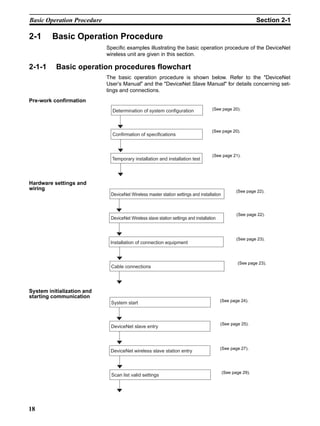
2-1-1     Basic operation procedures flowchart
                            The basic operation procedure is shown below. Refer to the "DeviceNet
                            User’s Manual" and the "DeviceNet Slave Manual" for details concerning set-
                            tings and connections.
Pre-work confirmation
                              Determination of system configuration                  (See page 20).


                                                                                    (See page 20).
                              Confirmation of specifications


                                                                                     (See page 21).
                              Temporary installation and installation test


Hardware settings and
wiring                                                                                            (See page 22).
                             DeviceNet Wireless master station settings and installation


                                                                                                  (See page 22).
                             DeviceNet Wireless slave station settings and installation


                                                                                                  (See page 23).
                             Installation of connection equipment


                                                                                                  (See page 23).
                             Cable connections


System initialization and
starting communication
                                                                                          (See page 24).
                             System start


                                                                                          (See page 25).
                             DeviceNet slave entry


                                                                                          (See page 27).
                             DeviceNet wireless slave station entry


                                                                                           (See page 29).
                              Scan list valid settings


18
Basic Operation Procedure                                                           Section 2-1

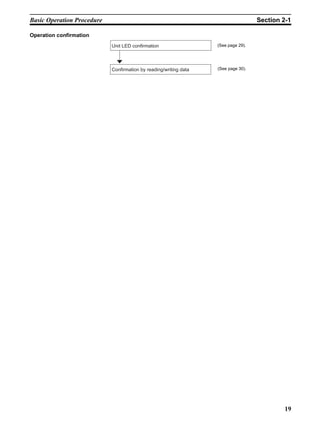
Operation confirmation
                            Unit LED confirmation                  (See page 29).


                            Confirmation by reading/writing data   (See page 30).


                                                                                            19
Pre-work Preparations                                                                                              Section 2-2

2-2     Pre-work Preparations
                                  Items to be checked before performing installation work are explained
                                  here.

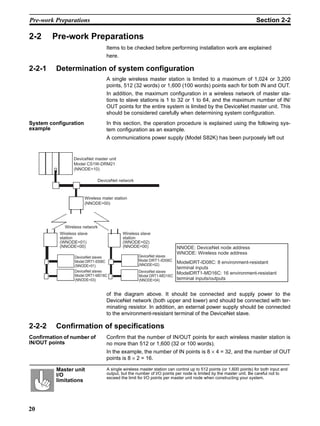
2-2-1     Determination of system configuration
                                  A single wireless master station is limited to a maximum of 1,024 or 3,200
                                  points, 512 (32 words) or 1,600 (100 words) points each for both IN and OUT.
                                  In addition, the maximum configuration in a wireless network of master sta-
                                  tions to slave stations is 1 to 32 or 1 to 64, and the maximum number of IN/
                                  OUT points for the entire system is limited by the DeviceNet master unit. This
                                  should be considered carefully when determining system configuration.
System configuration              In this section, the operation procedure is explained using the following sys-
example                           tem configuration as an example.
                                  A communications power supply (Model S82K) has been purposely left out


                  DeviceNet master unit
                  Model CS1W-DRM21
                  (NNODE=10)

                             DeviceNet network


                       Wireless mater station
                       (NNODE=00)


             Wireless network
           Wireless slave                 Wireless slave
           station                        station
           (WNODE=01)                     (WNODE=02)
           (NNODE=00)                     (NNODE=00)                   NNODE: DeviceNet node address
                                                                       WNODE: Wireless node address
                  DeviceNet slaves                 DeviceNet slaves
                                                    DRT1-ID08C
                  Model DRT1-ID08C                 Model DRT1-ID08C
                                                    NNODE=2
                                                   (NNODE=02)
                                                                    ModelDRT-ID08C: 8 environment-resistant
                  (NNODE=01)
                                                                    terminal inputs
                  DeviceNet slaves                 DeviceNet slaves
                  Model DRT1-MD16C
                                                                    ModelDRT1-MD16C: 16 environment-resistant
                                                   Model DRT1-MD16C
                  (NNODE=03)                       (NNODE=04)       terminal inputs/outputs


                                  of the diagram above. It should be connected and supply power to the
                                  DeviceNet network (both upper and lower) and should be connected with ter-
                                  minating resistor. In addition, an external power supply should be connected
                                  to the environment-resistant terminal of the DeviceNet slave.

2-2-2     Confirmation of specifications
Confirmation of number of         Confirm that the number of IN/OUT points for each wireless master station is
IN/OUT points                     no more than 512 or 1,600 (32 or 100 words).
                                  In the example, the number of IN points is 8 × 4 = 32, and the number of OUT
                                  points is 8 × 2 = 16.

          Master unit             A single wireless master station can control up to 512 points (or 1,600 points) for both input and
          I/O                     output, but the number of I/O points per node is limited by the master unit. Be careful not to
                                  exceed the limit for I/O points per master unit node when constructing your system.
          limitations


20
Pre-work Preparations                                                                                        Section 2-2

Confirmation of wiring        A special communications cable is required to connect to the DeviceNet
                              micro-connector on the wireless unit.
                              In addition, if multiple DeviceNet slaves are connected, branch taps should be
                              used as necessary. Terminators for the wireless slave station DeviceNet net-
                              work should also be prepared. Refer to the "DeviceNet User’s Manual" for
                              details.
Confirmation of               Since power is supplied to the wireless unit from an external communications
communications power          power supply, a communications power connection must be made.
supply
                              Taking the maximum current at startup into consideration, use a power supply
                              of at least 350mA. If using an OMRON S82K or S82J switching power supply,
                              use a model with a capacity of at least 30W (S82K) or 25W (S82J).

2-2-3     Temporary installation and installation test
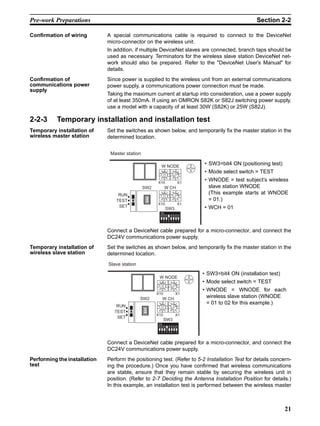
Temporary installation of     Set the switches as shown below, and temporarily fix the master station in the
wireless master station       determined location.


                               Master station

                                                           W NODE
                                                                                      • SW3=bit4 ON (positioning test)
                                                            901             901       • Mode select switch = TEST
                                                       78


                                                                       78
                                                                  23


                                                                                 23


                                                            456            456

                                                      X10                       X1
                                                                                      • WNODE = test subject’s wireless
                                                SW2             W CH                    slave station WNODE
                                   RUN
                                                            901            901          (This example starts at WNODE
                                                       78


                                                                       78
                                                                  23


                                                                                 23


                                  TEST
                                                            456            456
                                                                                        = 01.)
                                                      X10                       X1
                                   SET                                                • WCH = 01
                                                                SW3
                                                           ON


                                                           1 2 3 4 5 6 7 8


                              Connect a DeviceNet cable prepared for a micro-connector, and connect the
                              DC24V communications power supply.
Temporary installation of     Set the switches as shown below, and temporarily fix the master station in the
wireless slave station        determined location.
                              Slave station
                                                                                      • SW3=bit4 ON (installation test)
                                                       W NODE
                                                           901            901         • Mode select switch = TEST
                                                      78


                                                                     78
                                                                23


                                                                             23


                                                                                      • WNODE = WNODE for each
                                                       456             456

                                                      X10                    X1
                                              SW2           W CH
                                                                                        wireless slave station (WNODE
                                                       901             901              = 01 to 02 for this example.)
                                  RUN
                                                      78


                                                                     78
                                                                23


                                                                             23


                                                       456             456
                                 TEST
                                                      X10                    X1
                                  SET
                                                            SW3
                                                       ON


                                                       1 2 3 4 5 6 7 8


                              Connect a DeviceNet cable prepared for a micro-connector, and connect the
                              DC24V communications power supply.
Performing the installation   Perform the positioning test. (Refer to 5-2 Installation Test for details concern-
test                          ing the procedure.) Once you have confirmed that wireless communications
                              are stable, ensure that they remain stable by securing the wireless unit in
                              position. (Refer to 2-7 Deciding the Antenna Installation Position for details.)
                              In this example, an installation test is performed between the wireless master


                                                                                                                          21
Hardware Settings and Wiring                                                                               Section 2-3

                          station and slave station 1, and the wireless master station and slave station
                          2.


2-3        Hardware Settings and Wiring
                          Settings and wiring to be performed before turning on the power supply to the
                          system are explained in this section.

2-3-1      DeviceNet wireless master station settings and installation
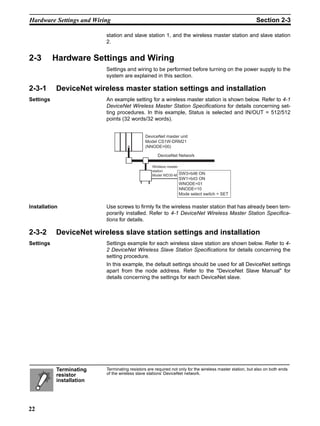
Settings                  An example setting for a wireless master station is shown below. Refer to 4-1
                          DeviceNet Wireless Master Station Specifications for details concerning set-
                          ting procedures. In this example, Status is selected and IN/OUT = 512/512
                          points (32 words/32 words).


                                              DeviceNet master unit
                                              Model CS1W-DRM21
                                              (NNODE=00)

                                                     DeviceNet Network

                                                  Wireless master
                                                  station
                                                  Model WD30-M SW3=bit6   ON
                                                                 SW1=bit3 ON
                                                                 WNODE=01
                                                                 NNODE=10
                                                                 Mode select switch = SET


Installation              Use screws to firmly fix the wireless master station that has already been tem-
                          porarily installed. Refer to 4-1 DeviceNet Wireless Master Station Specifica-
                          tions for details.

2-3-2      DeviceNet wireless slave station settings and installation
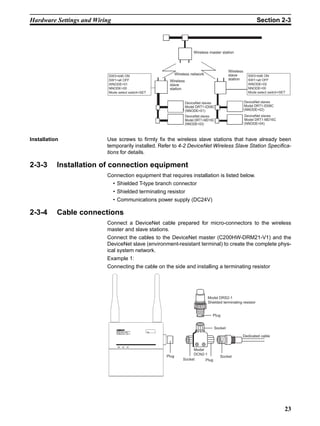
Settings                  Settings example for each wireless slave station are shown below. Refer to 4-
                          2 DeviceNet Wireless Slave Station Specifications for details concerning the
                          setting procedure.
                          In this example, the default settings should be used for all DeviceNet settings
                          apart from the node address. Refer to the "DeviceNet Slave Manual" for
                          details concerning the settings for each DeviceNet slave.


           Terminating    Terminating resistors are required not only for the wireless master station, but also on both ends
           resistor       of the wireless slave stations’ DeviceNet network.
           installation


22
Hardware Settings and Wiring                                                                                    Section 2-3


                                                                       Wireless master station


                                                                                            Wireless
                           SW3=bit6 ON
                                                             Wireless network               slave        SW3=bit6 ON
                           SW1=all OFF                 Wireless                             station      SW1=all OFF
                           WNODE=01                    slave                                             WNODE=02
                           NNODE=00                    station                                           NNODE=00
                           Mode select switch=SET                                                        Mode select switch=SET


                                                                  DeviceNet slaves                     DeviceNet slaves
                                                                  Model DRT1-ID08C                     Model DRT1-ID08C
                                                                  (NNODE=01)                           (NNODE=02)
                                                                  DeviceNet slaves                     DeviceNet slaves
                                                                  Model DRT1-MD16C                     Model DRT1-MD16C
                                                                  (NNODE=03)                           (NNODE=04)


Installation              Use screws to firmly fix the wireless slave stations that have already been
                          temporarily installed. Refer to 4-2 DeviceNet Wireless Slave Station Specifica-
                          tions for details.

2-3-3      Installation of connection equipment
                          Connection equipment that requires installation is listed below.
                               • Shielded T-type branch connector
                               • Shielded terminating resistor
                               • Communications power supply (DC24V)

2-3-4      Cable connections
                          Connect a DeviceNet cable prepared for micro-connectors to the wireless
                          master and slave stations.
                          Connect the cables to the DeviceNet master (C200HW-DRM21-V1) and the
                          DeviceNet slave (environment-resistant terminal) to create the complete phys-
                          ical system network.
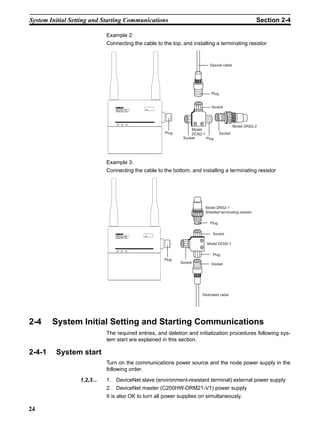
                          Example 1:
                          Connecting the cable on the side and installing a terminating resistor


                                                                                Model DRS2-1
                                                                                Shielded terminating resistor


                                                                                   Plug


                                                                                   Socket
                                WD30-SEV1
                                                                                                     Dedicated cable


                                                                      Model
                                                                      DCN2-1
                                                      Plug                             Socket
                                                                 Socket     Plug


                                                                                                                              23
System Initial Setting and Starting Communications                                                       Section 2-4

                             Example 2:
                             Connecting the cable to the top, and installing a terminating resistor


                                                                           Special cable


                                                                            Plug


                                                                            Socket
                                 WD30-SEV1


                                                                                            Model DRS2-2
                                                                  Model
                                                      Plug        DCN2-1           Socket
                                                              Socket     Plug


                             Example 3:
                             Connecting the cable to the bottom, and installing a terminating resistor


                                                                         Model DRS2-1
                                                                         Shielded terminating resistor

                                                                           Plug

                                                                             Socket
                                 WD30-SEV1

                                                                         Model DCN2-1

                                                                             Plug
                                                      Plug
                                                             Socket         Socket


                                                                       Dedicated cable


2-4     System Initial Setting and Starting Communications
                             The required entries, and deletion and initialization procedures following sys-
                             tem start are explained in this section.

2-4-1    System start
                             Turn on the communications power source and the node power supply in the
                             following order.

                  1,2,3...   1. DeviceNet slave (environment-resistant terminal) external power supply
                             2. DeviceNet master (C200HW-DRM21-V1) power supply
                             It is also OK to turn all power supplies on simultaneously.

24
System Initial Setting and Starting Communications                                                                Section 2-4

2-4-2    DeviceNet slave entry
                           Register the number of DeviceNet slave I/O points in the wireless slave sta-
                           tion.
                           If the same system configuration as for the network default settings (Refer to
                           1-2 Basic Functions of the DeviceNet Wireless Unit.) is used, there is no need
                           to do this registration.
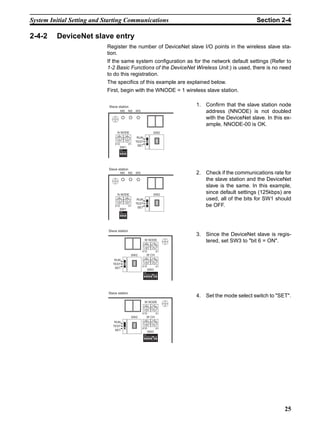
                           The specifics of this example are explained below.
                           First, begin with the WNODE = 1 wireless slave station.

                            Slave station                                                1. Confirm that the slave station node
                                      MS          NS       WS                               address (NNODE) is not doubled
                                                                                            with the DeviceNet slave. In this ex-
                                                                                            ample, NNODE-00 is OK.
                                 N NODE                                           SW2
                                  901         901
                                                            RUN
                                78


                                             78
                                        23


                                                    23


                                  456         456
                                                           TEST
                                X10               X1
                                                            SET
                                      SW1
                                      ON


                                      1 2 3 4


                            Slave station
                                      MS          NS       WS                            2. Check if the communications rate for
                                                                                            the slave station and the DeviceNet
                                                                                            slave is the same. In this example,
                                 N NODE                                           SW2
                                                                                            since default settings (125kbps) are
                                  901         901
                                                            RUN                             used, all of the bits for SW1 should
                                78


                                             78
                                        23


                                                    23


                                  456         456
                                                           TEST
                                X10               X1
                                                            SET
                                                                                            be OFF.
                                      SW1
                                      ON


                                      1 2 3 4


                            Slave station
                                                                                         3. Since the DeviceNet slave is regis-
                                                                  W NODE
                                                                     901          901
                                                                                            tered, set SW3 to "bit 6 = ON".
                                                                78


                                                                             78
                                                                        23


                                                                                    23


                                                                  456         456

                                                                X10                 X1
                                                         SW2           W CH
                                                                  901         901
                               RUN
                                                                78


                                                                             78
                                                                        23


                                                                                    23


                                                                  456         456
                              TEST
                                                                X10                 X1
                               SET
                                                                       SW3
                                                                  ON


                                                                  1 2 3 4 5 6 7 8


                            Slave station
                                                                                         4. Set the mode select switch to "SET".
                                                                  W NODE
                                                                     901          901
                                                                78


                                                                             78
                                                                        23


                                                                                    23


                                                                  456         456

                                                                X10                 X1
                                                         SW2           W CH
                                                                  901         901
                               RUN
                                                                78


                                                                             78
                                                                        23


                                                                                    23


                                                                  456         456
                              TEST
                                                                X10                 X1
                               SET
                                                                       SW3
                                                                  ON


                                                                  1 2 3 4 5 6 7 8


                                                                                                                              25
System Initial Setting and Starting Communications                                                                            Section 2-4

                            Slave station
                                       MS              NS WS
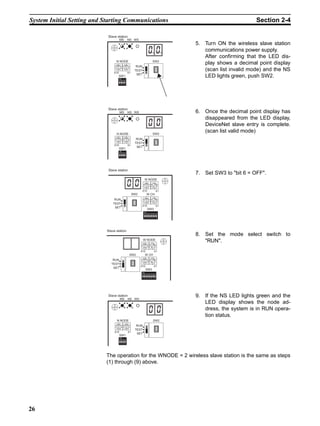
                                                                                                      5. Turn ON the wireless slave station
                                                                                                         communications power supply.
                                                                                                         After confirming that the LED dis-
                                 N NODE                                                    SW2
                                 901             901
                                                                                                         play shows a decimal point display
                                                                  RUN


                                78


                                                78
                                        23


                                                       23
                                 456

                               X10
                                                 456

                                                       X1
                                                                 TEST                                    (scan list invalid mode) and the NS
                                                                  SET
                                      SW1
                                      ON
                                                                                                         LED lights green, push SW2.
                                      1 2 3 4


                            Slave station
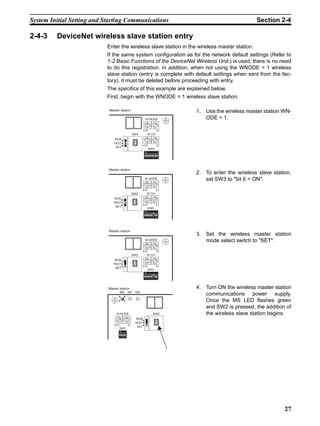
                                       MS              NS WS                                          6. Once the decimal point display has
                                                                                                         disappeared from the LED display,
                                                                                                         DeviceNet slave entry is complete.
                                     N NODE                                                SW2
                                                                                                         (scan list valid mode)
                                     901             901
                                                                  RUN
                                78


                                                78
                                           23


                                                           23


                                     456             456
                                                                 TEST
                                X10                    X1
                                                                  SET
                                      SW1
                                       ON


                                       1 2 3 4


                            Slave station
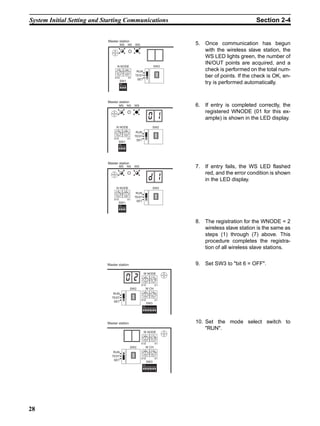
                                                                                                      7. Set SW3 to "bit 6 = OFF".
                                                                             W NODE
                                                                             901             901
                                                                        78


                                                                                        78
                                                                                   23


                                                                                                 23


                                                                             456           456

                                                                        X10                     X1
                                                                SW2             W CH
                                                                             901           901
                                RUN
                                                                        78


                                                                                        78
                                                                                   23


                                                                                                 23


                                                                             456           456
                               TEST
                                                                        X10                     X1
                                SET
                                                                                 SW3
                                                                           ON


                                                                           1 2 3 4 5 6 7 8


                           Slave station
                                                                                                      8. Set the mode select switch to
                                                                        W NODE
                                                                           901            901
                                                                                                         "RUN".
                                                                      78


                                                                                     78
                                                                                23


                                                                                              23


                                                                        456             456

                                                                      X10                    X1
                                                            SW2              W CH
                                                                        901             901
                               RUN
                                                                      78


                                                                                     78
                                                                                23


                                                                                              23


                                                                        456             456
                              TEST
                                                                      X10                    X1
                               SET
                                                                             SW3
                                                                        ON


                                                                        1 2 3 4 5 6 7 8


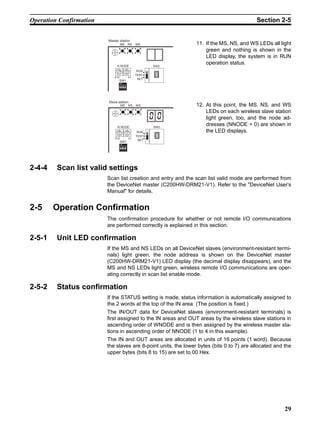
                            Slave station                                                             9. If the NS LED lights green and the
                                       MS              NS WS
                                                                                                         LED display shows the node ad-
                                                                                                         dress, the system is in RUN opera-
                                                                                                         tion status.
                                     N NODE                                                  SW2
                                     901             901
                                                                  RUN
                                78


                                                78
                                           23


                                                           23


                                     456             456
                                                                 TEST
                                X10                    X1
                                                                  SET
                                       SW1
                                       ON


                                       1 2 3 4


                           The operation for the WNODE = 2 wireless slave station is the same as steps
                           (1) through (9) above.


26
System Initial Setting and Starting Communications                                                                      Section 2-4

2-4-3    DeviceNet wireless slave station entry
                           Enter the wireless slave station in the wireless master station.
                           If the same system configuration as for the network default settings (Refer to
                           1-2 Basic Functions of the DeviceNet Wireless Unit.) is used, there is no need
                           to do this registration. In addition, when not using the WNODE = 1 wireless
                           slave station (entry is complete with default settings when sent from the fac-
                           tory), it must be deleted before proceeding with entry.
                           The specifics of this example are explained below.
                           First, begin with the WNODE = 1 wireless slave station.

                            Master station                                                      1. Use the wireless master station WN-
                                                                     W NODE                        ODE = 1.
                                                                     901             901


                                                                78


                                                                                78
                                                                           23


                                                                                           23
                                                                     456             456

                                                                X10                    X1
                                                        SW2           W CH
                                                                     901             901
                                RUN
                                                                78


                                                                                78
                                                                           23


                                                                                           23
                                                                     456             456
                               TEST
                                                                X10                    X1
                                SET
                                                                       SW3
                                                                 ON


                                                                 1 2 3 4 5 6 7 8


                            Master station
                                                                                                2. To enter the wireless slave station,
                                                                 W NODE
                                                                     901             901
                                                                                                   set SW3 to "bit 6 = ON".
                                                                78


                                                                                78
                                                                       23


                                                                                       23


                                                                 456             456

                                                                X10                    X1
                                                        SW2           W CH
                                                                 901             901
                                RUN
                                                                78


                                                                                78
                                                                       23


                                                                                       23


                                                                 456             456
                               TEST
                                                              X10                      X1
                                SET
                                                                      SW3
                                                                 ON


                                                                 1 2 3 4 5 6 7 8


                            Master station
                                                                                                3. Set the wireless master station
                                                                 W NODE
                                                                     901             901
                                                                                                   mode select switch to "SET".
                                                                78


                                                                                78
                                                                       23


                                                                                       23


                                                                 456             456

                                                                X10                    X1
                                                        SW2           W CH
                                                                 901             901
                                RUN
                                                                78


                                                                                78
                                                                       23


                                                                                       23


                                                                 456             456
                               TEST
                                                              X10                      X1
                                SET
                                                                      SW3
                                                                 ON


                                                                 1 2 3 4 5 6 7 8


                            Master station                                                      4. Turn ON the wireless master station
                                      MS         NS      WS
                                                                                                   communications power supply.
                                                                                                   Once the MS LED flashes green
                                                                                                   and SW2 is pressed, the addition of
                                 N NODE                                          SW2               the wireless slave station begins.
                                 901         901
                                                          RUN
                                78


                                            78
                                       23


                                                   23


                                 456         456
                                                         TEST
                                X10              X1
                                                          SET
                                      SW1
                                      ON


                                      1 2 3 4


                                                                                                                                    27
System Initial Setting and Starting Communications                                                                    Section 2-4


                            Master station
                                       MS            NS       WS                            5. Once communication has begun
                                                                                               with the wireless slave station, the
                                                                                               WS LED lights green, the number of
                                                                                               IN/OUT points are acquired, and a
                                     N NODE                                           SW2
                                     901          901
                                                               RUN                             check is performed on the total num-


                                 78


                                                78
                                           23


                                                        23
                                     456          456

                                X10                    X1
                                                              TEST                             ber of points. If the check is OK, en-
                                                               SET
                                      SW1
                                       ON                                                      try is performed automatically.
                                       1 2 3 4


                            Master station
                                      MS             NS       WS                            6. If entry is completed correctly, the
                                                                                               registered WNODE (01 for this ex-
                                                                                               ample) is shown in the LED display.
                                 N NODE                                              SW2
                                  901            901
                                                               RUN
                                78


                                             78
                                        23


                                                       23


                                  456            456
                                                              TEST
                                X10                  X1
                                                               SET
                                      SW1
                                      ON


                                      1 2 3 4


                            Master station
                                      MS             NS       WS                            7. If entry fails, the WS LED flashed
                                                                                               red, and the error condition is shown
                                                                                               in the LED display.
                                 N NODE                                              SW2
                                  901            901
                                                               RUN
                                78


                                             78
                                        23


                                                       23


                                  456            456
                                                              TEST
                                X10                  X1
                                                               SET
                                      SW1
                                      ON


                                      1 2 3 4


                                                                                            8. The registration for the WNODE = 2
                                                                                               wireless slave station is the same as
                                                                                               steps (1) through (7) above. This
                                                                                               procedure completes the registra-
                                                                                               tion of all wireless slave stations.


                            Master station                                                  9. Set SW3 to "bit 6 = OFF".
                                                                     W NODE
                                                                        901          901
                                                                   78


                                                                                78
                                                                           23


                                                                                       23


                                                                     456         456

                                                                   X10                 X1
                                                            SW2           W CH
                                                                     901         901
                               RUN
                                                                   78


                                                                                78
                                                                           23


                                                                                       23


                                                                     456         456
                              TEST
                                                                   X10                 X1
                               SET
                                                                          SW3
                                                                     ON


                                                                     1 2 3 4 5 6 7 8


                            Master station                                                  10. Set the mode select switch to
                                                                                                "RUN".
                                                                     W NODE
                                                                        901          901
                                                                   78


                                                                                78
                                                                           23


                                                                                       23


                                                                     456         456

                                                                   X10                 X1
                                                            SW2           W CH
                                                                     901         901
                               RUN
                                                                   78


                                                                                78
                                                                           23


                                                                                       23


                                                                     456         456
                              TEST
                                                                   X10                 X1
                               SET
                                                                          SW3
                                                                     ON


                                                                     1 2 3 4 5 6 7 8


28
Operation Confirmation                                                                             Section 2-5


                         Master station
                                   MS               NS       WS           11. If the MS, NS, and WS LEDs all light
                                                                              green and nothing is shown in the
                                                                              LED display, the system is in RUN
                              N NODE                                SW2
                                                                              operation status.
                              901             901
                                                              RUN


                             78


                                             78
                                    23


                                                    23
                              456             456
                                                             TEST
                             X10                    X1
                                                              SET
                                   SW1
                                   ON


                                   1 2 3 4


                         Slave station
                                    MS              NS       WS           12. At this point, the MS, NS, and WS
                                                                              LEDs on each wireless slave station
                                                                              light green, too, and the node ad-
                                  N NODE                            SW2
                                                                              dresses (NNODE = 0) are shown in
                                  901             901
                                                              RUN             the LED displays.
                             78


                                             78
                                        23


                                                        23


                                  456             456
                                                             TEST
                             X10                    X1
                                                              SET
                                   SW1
                                    ON


                                    1 2 3 4


2-4-4    Scan list valid settings
                         Scan list creation and entry and the scan list valid mode are performed from
                         the DeviceNet master (C200HW-DRM21-V1). Refer to the "DeviceNet User’s
                         Manual" for details.


2-5     Operation Confirmation
                         The confirmation procedure for whether or not remote I/O communications
                         are performed correctly is explained in this section.

2-5-1    Unit LED confirmation
                         If the MS and NS LEDs on all DeviceNet slaves (environment-resistant termi-
                         nals) light green, the node address is shown on the DeviceNet master
                         (C200HW-DRM21-V1) LED display (the decimal display disappears), and the
                         MS and NS LEDs light green, wireless remote I/O communications are oper-
                         ating correctly in scan list enable mode.

2-5-2    Status confirmation
                         If the STATUS setting is made, status information is automatically assigned to
                         the 2 words at the top of the IN area. (The position is fixed.)
                         The IN/OUT data for DeviceNet slaves (environment-resistant terminals) is
                         first assigned to the IN areas and OUT areas by the wireless slave stations in
                         ascending order of WNODE and is then assigned by the wireless master sta-
                         tions in ascending order of NNODE (1 to 4 in this example).
                         The IN and OUT areas are allocated in units of 16 points (1 word). Because
                         the slaves are 8-point units, the lower bytes (bits 0 to 7) are allocated and the
                         upper bytes (bits 8 to 15) are set to 00 Hex.


                                                                                                               29
Other Operations                                                                                           Section 2-6

                       IN area    15                          0       OUT area      15                       0
                         CH+0                Status                       CH+0                    NNODE=3: 8 points WNODE=01

                             +1        (fixed for 2 words)                                        NNODE=4: 8 points WNODE=02

                            +2                  NNODE=1: 8 points
                                                                      WNODE=01
                             +3                        =3: 8 points

                            +4                         =2: 8 points
                                                                      WNODE=02
                             +5                        =4: 8 points


                                                 indicates an open area


                                                   Master Unit
                                                   Model CS1W-DRM21
                                                   (NNODE=00)


                                                                  DeviceNet Network


                                                         Wireless master station
                                                         (NNODE=10)


                                             Wireless network

                                         Wireless slave                          Wireless slave
                                         station                                 station
                                         (WNODE=01)                              (WNODE=02)


                                                   DeviceNet slaves                      DeviceNet slaves
                                                   Model DRT1-ID08C                      Model DRT1-ID08C
                                                   (NNODE=01)                            (NNODE=02)
                                                   DeviceNet slaves                      DeviceNet slaves
                                                   Model DRT1-MD16C                      Model DRT1-MD16C
                                                   (NNODE=03)                            (NNODE=04)


2-5-3    Confirmation by reading/writing data
                       Connect the computer’s peripheral tools to the master, read and write from
                       and to the OUT and IN areas of the DeviceNet master unit (C200HW-
                       DRM21-V1), and confirm that this is reflected correctly on the DeviceNet slave
                       (environment-resistant terminal).


2-6     Other Operations
2-6-1    DeviceNet wireless slave station deletion
                       Wireless slave stations you want to remove from the system can be deleted.
                       When creating a system that does not use a WNODE = 1 wireless slave sta-
                       tion, the WNODE = 1 slave station (registered as the default before being
                       shipped from the factory) should be deleted before performing the entry pro-
                       cedure.


30
Other Operations                                                                                                                    Section 2-6

Deletion example   Delete the WNODE = 1 wireless slave station from the system shown below.

                                                                DeviceNet master unit


                                                                                           DeviceNet network


                                                                                Wireless master station


                                                        Wireless slave                                Wireless slave
                                                        station                                       station
                                                        (WNODE=1)                                     (WNODE=2)


Procedure           Master station
                                                                                                           1. Align with the wireless slave station
                                                                    W NODE
                                                                    901             901                       WNODE = 1 that will delete the wire-
                                                               78


                                                                               78
                                                                          23


                                                                                      23


                                                                                                              less master station WNODE.
                                                                    456         456

                                                               X10                    X1
                                                       SW2            W CH
                                                                    901         901
                       RUN
                                                               78


                                                                               78
                                                                          23


                                                                                      23


                                                                    456         456
                      TEST
                                                               X10                    X1
                       SET
                                                                      SW3
                                                                ON


                                                                1 2 3 4 5 6 7 8


                   Master station

                                                                W NODE
                                                                                                           2. To delete the wireless slave station,
                                                                    901         901                           set SW3 to "bit 7 = ON".
                                                               78


                                                                           78
                                                                      23


                                                                                      23


                                                                456             456

                                                              X10                    X1
                                                       SW2           W CH
                                                                901             901
                       RUN
                                                               78


                                                                           78
                                                                      23


                                                                                      23


                                                                456             456
                      TEST
                                                              X10                    X1
                       SET
                                                                     SW3
                                                                ON


                                                                1 2 3 4 5 6 7 8


                   Master station
                                              NS         WS
                                                                                                           3. Set the wireless master station
                                                                                                              mode select switch to "SET".
                                                                                                              The NS LED goes off, and the MS
                            N NODE                                              SW2
                            901             901
                                                         RUN
                                                                                                              LED flashes green.
                        78


                                       78
                                  23


                                                  23


                            456             456
                                                        TEST
                       X10                    X1
                                                         SET
                             SW1
                              ON


                              1 2 3 4


                   Master station
                             MS               NS        WS
                                                                                                           4. "01", the item to be deleted, will be
                                                                                                              shown in the LED display.

                         N NODE                                                 SW2
                         901            901
                                                         RUN
                       78


                                       78
                               23


                                              23


                         456            456
                                                        TEST
                       X10                    X1
                                                         SET
                             SW1
                             ON


                             1 2 3 4


                                                                                                                                                31
Other Operations                                                                                                       Section 2-6

                    Master station
                                                                                               5. Push SW2 to delete the item.
                               MS              NS         WS


                             N NODE                                                  SW2
                             901             901
                                                           RUN


                        78


                                        78
                                   23


                                                   23
                             456             456
                                                          TEST
                        X10                    X1
                                                           SET
                               SW1
                               ON


                               1 2 3 4


                   Master station
                               MS              NS        WS                                    6. Once deletion is complete, "--" is
                                                                                                  shown in the LED display.

                         N NODE                                                      SW2
                         901             901
                                                          RUN
                        78


                                        78
                                23


                                               23


                         456             456
                                                         TEST
                        X10                    X1
                                                          SET
                              SW1
                              ON


                               1 2 3 4


                   Master station
                                                                                               7. Set SW3 to "bit 7 = OFF".
                                                                    W NODE
                                                                     901             901
                                                                78


                                                                                78
                                                                           23


                                                                                          23


                                                                     456            456

                                                               X10                       X1
                                                        SW2              W CH
                                                                     901            901
                        RUN
                                                                78


                                                                                78
                                                                           23


                                                                                          23


                                                                     456            456
                       TEST
                                                               X10                       X1
                        SET
                                                                         SW3
                                                                    ON


                                                                    1 2 3 4 5 6 7 8


                   Master station
                                                                                               8. Set the mode select switch to
                                                                W NODE
                                                                    901            901
                                                                                                  "RUN".
                                                               78


                                                                              78
                                                                         23


                                                                                      23


                                                                 456            456

                                                               X10                    X1
                                                    SW2              W CH
                                                                 901            901
                       RUN
                                                               78


                                                                              78
                                                                         23


                                                                                      23


                                                                 456            456
                      TEST
                                                               X10                    X1
                       SET
                                                                     SW3
                                                                ON


                                                                1 2 3 4 5 6 7 8


                    Master station                                                             9. If all MS, NS, and WS LEDs light
                               MS              NS         WS
                                                                                                  green and the LED display goes off,
                                                                                                  the system is in RUN operation sta-
                                                                                                  tus.
                         N NODE                                                      SW2
                             901             901
                                                          RUN
                        78


                                        78
                                   23


                                                   23


                             456             456
                                                         TEST
                        X10                    X1
                                                          SET
                              SW1
                               ON


                               1 2 3 4


32
Other Operations                                                                                             Section 2-6

2-6-2       DeviceNet wireless master station initialization
                          Initialize all registered IN/OUT points to their default settings.
                                                       Wireless master station
                                                       I/O points: IN1 word (16 points)
                                                                   OUT1 word (16 points)
                                                       Registered wireless slave station: 1 node


                                                       Wireless slave station
                                                       WNODE=01
                                                       IN/OUT=1 word (16 points)/1 word (16 points)


                          DeviceNet slaves         DeviceNet slaves
                          NNODE=01                 NNODE=02
                          IN/OUT=16 points/0 point IN/OUT=0 point/16 points


Procedure
                          Master station
                                                                                      1. Set SW3 to "bit 8 = ON".
                                                              W NODE
                                                                901           901
                                                           78


                                                                         78
                                                                    23


                                                                                23


                                                              456         456

                                                          X10                   X1
                                                   SW2             W CH
                                                              901         901
                              RUN
                                                           78


                                                                         78
                                                                    23


                                                                                23


                                                              456         456
                             TEST
                                                          X10                   X1
                              SET
                                                                   SW3
                                                              ON


                                                              1 2 3 4 5 6 7 8


                           Master station
                                    MS          NS WS                                 2. While holding down SW2, set the
                                                                                         mode select switch to "SET".

                                N NODE                                        SW2
                                901         901
                                                        RUN
                               78


                                           78
                                      23


                                                  23


                                456         456
                                                       TEST
                              X10               X1
                                                        SET
                                    SW1
                                    ON


                                    1 2 3 4


                                                                                                                     33
Other Operations                                                                                                        Section 2-6


                        Master station
                                   MS            NS WS                                         3. Once initialization is complete, "dF"
                                                                                                  is shown in the LED display, the MS
                                                                                                  and WS LEDs flash green, and the
                             N NODE                                                 SW2
                                                                                                  NS LED goes off.
                              901            901
                                                           RUN


                            78


                                         78
                                    23


                                                   23
                              456            456
                                                          TEST
                            X10                  X1
                                                           SET
                                  SW1
                                  ON


                                  1 2 3 4


                        Master station                                                         4. Set SW3 to "bit 8 = OFF".
                                                                    W NODE
                                                                      901           901


                                                                 78


                                                                               78
                                                                          23


                                                                                          23
                                                                    456             456

                                                               X10                    X1
                                                        SW2            W CH
                                                                    901             901
                           RUN
                                                                 78


                                                                               78
                                                                          23


                                                                                          23
                                                                    456             456
                          TEST
                                                               X10                    X1
                           SET
                                                                       SW3
                                                                  ON


                                                                  1 2 3 4 5 6 7 8


                       Master station
                                                                                               5. Set the mode select switch to
                                                                  W NODE
                                                                    901             901
                                                                                                  "RUN".
                                                               78


                                                                               78
                                                                        23


                                                                                      23


                                                                  456           456

                                                               X10                    X1
                                                        SW2           W CH
                                                                  901           901
                           RUN
                                                               78


                                                                               78
                                                                        23


                                                                                      23


                                                                  456           456
                          TEST
                                                               X10                    X1
                           SET
                                                                       SW3
                                                                 ON


                                                                 1 2 3 4 5 6 7 8


                        Master station
                                    MS             NS     WS                                   6. If all MS and NS LEDs light green
                                                                                                  and the LED display goes off, the
                                                                                                  system is in RUN operation status.
                                 N NODE                                              SW2          However, while the WS LED lights
                                 901          901
                                                           RUN                                    green, "E2" is shown in the LED dis-
                             78


                                            78
                                       23


                                                    23


                                 456          456
                                                          TEST
                            X10
                                  SW1
                                                   X1
                                                           SET                                    play.
                                   ON


                                   1 2 3 4


2-6-3    DeviceNet wireless slave stations initialization
                       Initialize all registered IN/OUT points to their default settings.


34
Other Operations                                                                                                                 Section 2-6


                                                         Wireless slave station
                                                         IN/OUT=1 word (16 points)/1 word (16 points)


                   DeviceNet slave                                                     DeviceNet slave
                   NNODE=01                                                            NNODE=02
                   IN/OUT =16 points/0 point                                           IN/OUT =0 point/16 points


Procedure
                   Slave station
                                                                                                        1. Set SW3 to "bit 8 = ON".
                                                            W NODE
                                                              901           901
                                                         78


                                                                       78
                                                                  23


                                                                                  23


                                                            456             456

                                                       X10                    X1
                                                SW2            W CH
                                                            901             901
                       RUN
                                                         78


                                                                       78
                                                                  23


                                                                                  23


                                                            456             456
                      TEST
                                                       X10                    X1
                       SET
                                                               SW3
                                                          ON


                                                          1 2 3 4 5 6 7 8


                   Slave station
                             MS          NS       WS                                                    2. While holding down SW2, set the
                                                                                                           mode select switch to "SET".

                         N NODE                                             SW2
                         901         901
                                                   RUN
                       78


                                    78
                               23


                                           23


                         456         456
                                                  TEST
                       X10               X1
                                                   SET
                             SW1
                             ON


                             1 2 3 4


                   Slave station
                             MS          NS       WS                                                    3. Once initialization is complete, "dF"
                                                                                                           is shown in the LED display, the MS
                                                                                                           and WS LEDs flash green, and the
                         N NODE                                             SW2
                                                                                                           NS LED goes off.
                         901         901
                                                   RUN
                       78


                                    78
                               23


                                           23


                         456         456
                                                  TEST
                       X10               X1
                                                   SET
                             SW1
                             ON


                             1 2 3 4


                   Slave station                                                                        4. Set SW3 to "bit 8 = OFF".
                                                         W NODE
                                                            901           901
                                                       78


                                                                       78
                                                                23


                                                                              23


                                                          456           456

                                                       X10                   X1
                                                SW2           W CH
                                                          901           901
                      RUN
                                                       78


                                                                     78
                                                                23


                                                                              23


                                                          456           456
                     TEST
                                                       X10                   X1
                      SET
                                                               SW3
                                                         ON


                                                         1 2 3 4 5 6 7 8


                                                                                                                                             35
Deciding the Antenna Installation Position                                                                                         Section 2-7

                            Slave station
                                                                                                       5. Set the mode select switch to
                                                                W NODE
                                                                   901          901
                                                                                                          "RUN".


                                                              78


                                                                           78
                                                                      23


                                                                                  23
                                                                456         456

                                                              X10                 X1
                                                     SW2             W CH
                                                                901         901
                                RUN


                                                              78


                                                                           78
                                                                      23


                                                                                  23
                                                                456         456
                               TEST
                                                              X10                 X1
                                SET
                                                                     SW3
                                                                ON


                                                                1 2 3 4 5 6 7 8


                             Slave station
                                      MS NS              WS                                            6. If all MS and NS LEDs light green
                                                                                                          and the node address is shown in
                                                                                                          the LED display, the system is in
                                  N NODE                                         SW2
                                                                                                          RUN operation status.
                                  901         901
                                                          RUN
                                 78


                                             78
                                        23


                                                    23


                                  456         456
                                                         TEST
                                X10               X1
                                                          SET
                                      SW1
                                      ON


                                      1 2 3 4


2-7     Deciding the Antenna Installation Position
                            This unit uses radio waves of frequency 2.4GHz, which is very high. High-fre-
                            quency waves exhibit strong rectilinear propagation and are reflected easily.
                            For this reason, careful consideration of the antenna installation position is
                            required to achieve sufficient wireless performance.
                            1. If possible, install antennas so that there is a direct line of sight between
                               them.
                                 High-frequency waves, which exhibit strong rectilinear propagation, are
                                 used and so it is difficult for the waves to reach areas that are not in a direct
                                 line of sight, as shown in the following diagram. This is a particularly impor-
                                 tant point for communications at long distances (e.g., exceeding 50m or
                                 60m.)
                                                                                                  Area not in a direct line of
                                                                                                  sight from the antenna
                                                     Transmission                                                                  Antenna that
                                                     antenna                                             Antenna that is           waves will reach
                                                                                       Obstacle          difficult for the waves
                                                                                                         to reach


                                 If the antennas are installed in locations with relatively high ceilings and a
                                 lot of open space, even if there is no direct line of sight between the anten-
                                 nas, if one of the antennas is installed in a high location, communications
                                 may still be possible via radio waves that are reflected off the ceiling.
                            2. Install in as high a location as possible.
                                 As mentioned in the preceding paragraph, if the antennas are installed in
                                 high locations, because the space surrounding the antennas will be more
                                 open, there will be less influence from obstacles, and the radio waves will


36
Deciding the Antenna Installation Position                                                      Section 2-7

                                propagate more easily.
                                    High antenna


                                                                   Radio wave energy


                                                        Obstacle


                            3. Do not place obstacles (especially metal objects) near the antennas.
                                If there are obstacles near the antennas (in particular, in the direction of
                                radio wave propagation), the radio waves may not be propagated due to
                                the influence of the objects. Metal objects have the largest influence as
                                they reflect radio waves, whereas glass and plastic objects allow the waves
                                to pass through and so have the smallest influence. Ensure a distance of
                                at least 30cm between obstacles and antennas.
                            4. Cable loss in magnet-base antennas
                                With magnet-base antennas (WD30-ME01/-SE01), there is loss in the 2m
                                antenna cable. This means that the maximum communications distance is
                                shorter than with the pencil antennas. As a rough guide, the maximum
                                communications distance is approximately 50m indoors.
                            5. Cable bending radius for magnet-base antennas
                                The minimum bending radius for magnet-base antennas (WD30-ME01/
                                -SE01) is 38mm. Also, do not bend the cable at points less than 40mm
                                from the end connected to the station or at points less than 20mm from the
                                end connected to the antenna.
                            6. Separate different sets of antennas as much as possible.
                                If different sets of antennas are close to each other, they will influence each
                                other and thereby influence wireless communications, causing an increase
                                in the number of retries and a reduction in the possible communications
                                distance. Separate different sets of antennas by at least 1m (at least 2m if
                                possible).
                            7. Do not install the 2 magnet-base antennas close to each other.
                                If the 2 antennas are close to each other, the diversity effect will not be uti-
                                lized. Separate the antennas by at least 62mm (as with pencil antennas).
                                Magnet-mounting allows the positions to be adjusted easily. If possible,
                                separate the antennas by a greater distance than this.
                            8. Install the antennas with the same orientation.
                                Install antennas that are performing communications with the same orien-
                                tation, as shown in the following diagram. If they are installed at an angle
                                of 90° to each other, the possible communications distance will be short-
                                ened. (In this case, the waves are said to be “polarized.”)


                            9. Separate the antennas from ID tags by at least 3m.


                                                                                                             37
Deciding the Antenna Installation Position                                                  Section 2-7

                               The OMRON V690 microwave RF-ID system uses frequencies within the
                               range used by the wireless unit and so if they are used on the same floor,
                               observe the following points when installing.
                               • Separate the antennas and ID tags by at least 3m.
                               • Set frequencies outside the range 12CH to 30CH.
                            10. Direction of waves emitted from the antennas
                               Antennas emit waves in certain directions, and there are certain directions
                               in which waves are received easily. These directions are known as the “di-
                               rectional characteristics.” The directional characteristics for pencil anten-
                               nas and magnet-base antennas when they are installed vertically are
                               donut-shaped, spreading outwards horizontally. Radio waves are emitted
                               in every horizontal direction but are not emitted upwards or downwards.


                            11. Other points about magnet-base antennas
                               • The magnet on the magnet-base antenna is very strong. Do not remove
                                 the antenna by pulling on the cover or cable. Doing so may damage the
                                 antenna. Be sure to hold the base when handling the antenna.
                               • Twist the cable as little as possible.
                               • Before mounting the antenna to the wireless unit, check that the plug
                                 and jack are properly connected and then tighten them by twisting the
                                 ring nut. When mounting, twist only the ring nut; do not twist the cable.
                               • Design the hole for passing the cable through so that the cable is pro-
                                 tected.


38
Deciding the Antenna Installation Position                                                                          Section 2-7

2-7-1     Example of installation inside a control panel

                                                               Separate by at
                                                               least 62mm.             3. Magnet-base antennas
                                                                                          (The larger the separation distance
                                                                                          between the antennas, the greater
                                                                                          the utilization of the diversity effect.)
                     Antenna cable length: 2m

                                                                                                    Antennas attached to the control
                                                                                                    panel enclosure (metal surface)
                                                                                                    with powerful magnets.
                              R38 min.


     Hole diameter: 9mm min.                   R38 min.


                                                               Do not bend for 5. Shielded
                                                               40mm min.          terminating resistor
                                                                                  DRS2-1

          9-dia. connectors
                                                                                 4. Shielded T-branch
                                                                                    connector
                                                                                    DCN2-1
                                                                            85                               250mm min.
                                                                                 1. Wireless unit
                                                  80

                                                                                 6. Cable with one
                                                                                    connector
                                                                                    (0.5m)
                                                                                    DCA1-5CNC5F1
                                                                            54

                                                                                                                 PLC output
                                                                                                                 card (PNP)

              9. 24VDC, 1A                                                       2. 16-point input
                                                                                    terminal
                                                                                    DRT1-ID16
                                                   150

                                         7. Multi-drop          8. Terminal block with
                                           connection connector    terminating resistor
                                           XW4B-05C4-TF-D          DRS1-T

                                    1. The wireless unit (1) is installed in the control panel using the two M4
                                       screws provided.
                                    2. The 16-point input terminal (2) is installed in the control panel using DIN
                                       track or two M4 screws.
                                    3. The antennas are attached to the control panel with magnets and the an-
                                       tenna cables are fed into the control panel where they are connected to the
                                       wireless unit (1) with connectors.
                                    4. A shielded T-branch connector (4) is connected to the wireless unit (1), and
                                       a shielded terminating resistor (5) and a cable with one connector (6) are
                                       connected to it.
                                    5. Wire the DeviceNet cable (of 6), the terminal block with a terminating re-
                                       sistor (8), and the DC24V, 1A power supply (for the wireless unit (1) and
                                       the 16-point input terminal (2)) to the multi-drop connection connector (7).
                                    6. Wire the contact signals of the 16-point input terminal (2) to the PLC’s out-
                                       put card (PNP). Use a separate power supply for I/O.


                                                                                                                                      39
Deciding the Antenna Installation Position   Section 2-7


40
SECTION 3
                                                                                                            Sample Program

This section contains an example program for monitoring the status of the DeviceNet wireless unit.


       3-1    Status Monitoring Program Example . . . . . . . . . . . . . . . . . . . . . . . . . . . . . . .   42
              3-1-1      Reading the DeviceNet master status of the lower network . . . . . . .                 42
       3-2    Example of Using an Explicit Message . . . . . . . . . . . . . . . . . . . . . . . . . . . . .    47
              3-2-1      Reading reception data from port 1 of the DRT1-232C . . . . . . . . . .                48


                                                                                                                        41
Status Monitoring Program Example                                                                Section 3-1

3-1     Status Monitoring Program Example
                         An example of a status monitoring program for the DeviceNet wireless unit is
                         given below.
                         In this example, the status of the DeviceNet wireless unit is checked at the
                         PLC CPU unit. If an error flag has occurred, an Explicit message command to
                         read the DeviceNet master status in the lower network where the wireless
                         slave station is connected will be issued.
                         In order to assign a status to the IN area, bit 3 of SW1 on the wireless master
                         station should be turned ON beforehand.
                                               Maser unit
                                               CS1W-DRM21
                                                                    The DeviceNet node address is used for
                                                                    both the node address and the NNODE.


                                                            Node address = 63, device address = 01


                                                               Upper DeviceNet network

                         Wireless master station
                         NNODE = 02                    Wireless network


                          Wireless slave station
                          NNODE = 03
                                                                Lower DeviceNet network

                         The IN area allocation for the wireless master station at the CS1 is shown
                         below.
                                 15 14 13 12 11 10 9            8    7    6    5   4     3   2   1    0 Bit
                         Wd 3300 16 15 14 13 12 11 10           9    8    7    6   5     4   3   2    1 Status
                         Wd 3301   32 31 30 29 28 27 26 25 24 23 22 21 20 19 18 17 Status

                         Wd 3302   48 47 46 45 44 43 42 41 40 39 38 37 36 35 34 33 Status
                         Wd 3303   64 63 62 61 60 59 58 57 56 55 54 53 52 51 50 49 Status


3-1-1   Reading the DeviceNet master status of the lower network
                         The status assigned to the IN area of the master is monitored. Since the bit for
                         WNODE = 3 is 1, Instance ID is set to "03" and an Explicit message
                         (DeviceNet master status read) command is issued to the wireless slave sta-
                         tion.


42
Status Monitoring Program Example                                          Section 3-1

Ladder program


         Data work area name:                    Data memory
         Data work area beginning address:       D00000
         CMND command control data:              D00000
         CMND command transmission buffer:       D00006
         CMND command reception buffer:          D00011

         Bit work area name:                 I/O bits
         Bit work area beginning address:    0000.00
         Startup request bit:                0001.00
         Processing completion bit:          0001.03
         Normal completion bit:              0003.00
         Error completion bit:               0003.01
         Processing forced completion bit:   0000.00

         Channels allocated to the data work area:    D00000 to D00019
         Channels allocated to the bit work area:     0000.00 to 0003.15

         Read data beginning address:        D00015
         Number of read data bytes:          10

         Explicit message command format:
          2801 02 0E 00AA 0003 67
         Explicit message response format:
          2801 0000 0004 02 8E xxxx


       Interlock condition


       Always ON

       CMND command control data settings
        1) Number of command bytes (0x0009)
        2) Number of response bytes (0x000A)
        3) DNA (0x0000)
        4) DA1 (0x000), DA2 (0x11)
        5) Port number (0x07); number of retries (0x00)
        6) Response monitoring time (0x0032)


                                                                                   43
Status Monitoring Program Example                                             Section 3-1


             Explicit message setting
              2801 02 0E 00AA 0003 67


            Clear response storage channels (FINS command to service code).


            Explicit message transmission
            If A202.07 (Communications Port Enabled Flag)
            is ON and 1536.00 is on-line, the Explicit


            Response monitoring
             1) Response monitoring
             2) FINS completion code monitoring


44
Status Monitoring Program Example                                                                                    Section 3-1


           Compare results and transfer from channel 2 to channel 3 (Copy & Hold)
             1) 2.00: Success
             2) 2.01: Failure
             3) 2.02: Explicit error: Error code storage area (D15)
             4) 2.03: FINS error: Error code storage area (D12)


                                              Equals Flag


                                               Equals Flag


           If Explicit message communications are completed, clear the execution conditions.


           If the wireless status bit for WNODE = 3 is ON, turn ON the Explicit message communications conditions.


                                                                                                                             45
Status Monitoring Program Example   Section 3-1


46
Example of Using an Explicit Message                                                                              Section 3-2

Responses                        If reading is performed without error, the following responses are stored.
                                      Word          Contents (Hex)                             Definition
                                 DM00011           28 01                  Explicit message command code = 28 01 Hex
                                 DM00012           00 00                  End code (0000 Hex: normal end)
                                 DM00013           00 04                  Number of bytes received
                                                                          (data length after DM00014) = 4 bytes
                                 DM00014           00 8E                  Transmission source node address 00,
                                                                          ServiceCode = 8E Hex
                                 DM00015           XX XX                  Status of read DeviceNet master


3-2     Example of Using an Explicit Message
                                 An example of a program that transmits an Explicit message via the
                                 DeviceNet wireless unit is given below.
                                 In this example, an Explicit message is sent to the DRT1-232C to read data
                                 received by the DRT1-232C in the system configuration shown below.

                                      Maser unit
                                      CS1W-DRM21
                                                               The DeviceNet node address is used for both
                                                               the node address and the NNODE.


                                                        Node address = 63, device address = 01


                                                           Upper DeviceNet network

                Wireless master station
                NNODE = 02                        Wireless network


                                                                                DRT1-232C
                                                                                Node address = 04                 Bar code reader
                 Wireless slave station
                 NNODE = 03
                                                   Lower DeviceNet network                                RS-232C
                                 The IN area allocation for the DRT1-232C at the CS1 is shown below.

                            15    14 13   12 11   10   9   8    7     6    5    4    3    2    1     0      Bit
                   3300CH

                                                                                                         Transmission Ready Flag
                                                                                                    System Setting Error Flag
                                                                                              RS-232C Receiving Flag
                                                                                         RS-232C Reception Completed Flag
                                                                                    Parity Error Flag
                                                                               Overrun Error Flag

                                                                          Framing Error Flag

                                                                     Reception Buffer Overflow Flag


                                                                                                                                47
Example of Using an Explicit Message                                                                         Section 3-2

3-2-1      Reading reception data from port 1 of the DRT1-232C
                                              Data received at port 1 of the DRT1-232C and stored in the reception buffer is
                                              read to the DM Area. Data is read as soon as it is stored in the reception
                                              buffer. Response data for Explicit messages is stored after DM15.

Ladder program


          Data work area name:                     Data memory
          Data work area beginning address:        D00000
          CMND command control data:               D00000
          CMND command transmission buffer:        D00006
          CMND command reception buffer:           D00015

          Bit work area name:                   I/O bits
          Bit work area beginning address:      0000.00
          Startup request bit:                  0001.00
          Processing completion bit:            0001.03
          Normal completion bit:                0003.00
          Error completion bit:                 0003.01
          Processing forced completion bit:     0000.00

          Channels allocated to the data work area:    D00000 to D00024
          Channels allocated to the bit work area:     0000.00 to 0003.15

          Read data beginning address:        D00019
          Number of read data bytes:          12

          Explicit message command format:
           2801 02 34 00A5 0003 08 34 A5 04 04 0E 94 02 64
          Explicit message response format:
           2801 0000 0006 00B4 B4 8E xxxx


         Interlock condition


        Always ON

        CMND command control data settings
         1) Number of command bytes (0x0011)
         2) Number of response bytes (0x000C)
         3) DNA (0x0000)
         4) DA1 (0x000), DA2 (0x11)
         5) Port number (0x07); number of retries (0x00)
         6) Response monitoring time (0x0032)


48
Example of Using an Explicit Message                                           Section 3-2


             Explicit message setting
              2801 02 34 00A5 0003 08 34 A5 04 04 0E 94 02 64


             Clear response storage channels (FINS command to service code).


                                                                                       49
Example of Using an Explicit Message                                     Section 3-2


           Explicit message transmission
            If A202.07 (Communications Port Enabled Flag) is ON and
                        (                                   g)
            1536.00 is on-line, the Explicit message is transmitted.


           Response monitoring
            1) Response monitoring
            2) FINS completion code m


           Compare results and transfer from channel 2 to channel 3 (C
             1) 2.00: Success
             2) 2.01: Failure
              )
             3) 2.02: Explicit error: Error code storage area (
              )         p                             g       (D19)
             4) 2.03: FINS error: Error code storage area (D16)
           A219.07: Communications Port Enabled Flag


                                              Equals


                                              Equals


50
Example of Using an Explicit Message                                                            Section 3-2


                                                  Equals Flag


                                                  Equals Flag


            If Explicit message communications are completed, clear the execution conditions.


           If the DRT1-232C’s RS-232C Receiving Flag is OFF and the RS-232C Reception
           Completed Flag is ON, turn ON the Explicit message communications conditions.


                       RS-232C        RS-232C
                       Receiving      Reception
                       Flag           Completed


                                                                                                        51
Example of Using an Explicit Message                                                          Section 3-2

Responses                 If reading proceeds correctly, the response is stored as follows.
                                 Word    Contents                       Definition
                                           (Hex)
                           DM00015       28 01    Explicit message transmission command code= 28 01
                                                  Hex
                           DM00016       00 00    End code (0000 Hex: normal end)
                           DM00017       XX XX       Number of bytes received
                                                     (data length after DM00018)
                           DM00018       00 B4       Transmit service 2 byte = 00B4 Hex,
                           DM00019       B4 8E       Transmit service 1 byte = B4 Hex
                                                     "Receiving data reading" response service code = 8E
                                                     Hex
                           DM00015       XX XX       The data received at port 1 of the DRT1-232C is stored
                           −−−           −−−         in the order upper byte, lower byte.


52
SECTION 4
                                        DeviceNet Wireless Unit Station Specifications

This section explains the settings and installation procedures for the parts and switches of the DeviceNet wireless unit.


        4-1    DeviceNet Wireless Master Station Specifications. . . . . . . . . . . . . . . . . . . . .                          54
               4-1-1     Part identifications and functions . . . . . . . . . . . . . . . . . . . . . . . . . . .                 54
               4-1-2     Settings . . . . . . . . . . . . . . . . . . . . . . . . . . . . . . . . . . . . . . . . . . . . . . .   54
               4-1-3     Displays . . . . . . . . . . . . . . . . . . . . . . . . . . . . . . . . . . . . . . . . . . . . . .     57
               4-1-4     External terminals/connectors . . . . . . . . . . . . . . . . . . . . . . . . . . . . .                  58
               4-1-5     Installation . . . . . . . . . . . . . . . . . . . . . . . . . . . . . . . . . . . . . . . . . . . .     59
               4-1-6     Wiring . . . . . . . . . . . . . . . . . . . . . . . . . . . . . . . . . . . . . . . . . . . . . . . .   60
        4-2    DeviceNet Wireless Slave Station Specifications . . . . . . . . . . . . . . . . . . . . . .                        61
               4-2-1     Part identification and functions . . . . . . . . . . . . . . . . . . . . . . . . . . . .                61
               4-2-2     Settings . . . . . . . . . . . . . . . . . . . . . . . . . . . . . . . . . . . . . . . . . . . . . . .   62
               4-2-3     Display . . . . . . . . . . . . . . . . . . . . . . . . . . . . . . . . . . . . . . . . . . . . . . .    64
               4-2-4     External terminals/connectors . . . . . . . . . . . . . . . . . . . . . . . . . . . . .                  65
               4-2-5     Installation . . . . . . . . . . . . . . . . . . . . . . . . . . . . . . . . . . . . . . . . . . . .     65
               4-2-6     Wiring . . . . . . . . . . . . . . . . . . . . . . . . . . . . . . . . . . . . . . . . . . . . . . . .   66
        4-3    Common Specifications to All DeviceNet Wireless Units . . . . . . . . . . . . . . .                                67


                                                                                                                                       53
DeviceNet Wireless Master Station Specifications                                                                                                                Section 4-1

4-1        DeviceNet Wireless Master Station Specifications
4-1-1      Part identifications and functions
External
                   Antennas


                                                                                                                                   Try removing the cover. As
                                                    Main unit                                                                      shown in the figure on the left,
            WD30-MEV1                                                                                                              use a fingernail in the area
                                                                                                                                   shown to lift the cover in the
                                                                                                                                   direction of the arrow.

                                                    Micro-connector
                                                    (plug)                                                                         Pull here with your fingernail.
                                                     Cover


Internal (with cover removed)


                                                                 WD30-MEV1                                     No.
                                                                 WIRELESS UNIT


                        Status LEDs
                                                                   MS NS WS
                                                                                                                                      WNODE switch
                                                                                                    W NODE                             Set the wireless I/F node
                                                                                             88         901             901

                                                                                                                                       address here.
                                                                                                   78


                                                                                                                   78
                                                                                                              23


                                                                                                                              23


                       LED display                                                                  456              456


                                                                                                   X10                    X1
                   NNODE switch                              N NODE                          SW2         W CH
                                                                                                                                      WCH switch
                                                                 901            901    RUN                                             Set the wireless group
                    Set the DeviceNet                                                                   901             901
                                                            78


                                                                           78
                                                                      23


                                                                                  23


                                                                                                   78


                                                                                                                   78
                                                                                                             23


                                                                                                                           23


                                                                456         456
                                                                                     TEST           456             456
                                                                                                                                       frequency here.
                    node address here.                     X10                    X1 SET           X10                    X1
                                                                  SW1
                                                                   ON                                   ON
                                                                                                             SW3                      Wireless setting switch
            DeviceNet setting switch                               1 2 3 4                              1 2 3 4 5 6 7 8
                                                                                                                                       Make wireless settings
             Make settings other than                                                                                                  here.
             the node address here.
                                      Mode select switch                                     Push button
                                         Select between                                       Push for operations such
                                         RUN/TEST/SET here.                                   as parameter entry.


4-1-2      Settings
NNODE switch (DeviceNet             Set the DeviceNet interface node address here. Set the switches before turn-
node address setting                ing on the power supply. Only the setting values detected immediately after
switch)                             the power supply has been turned on are enabled. Changes to switch settings
                                    after the power supply has been turned on are ignored.
                                         N NODE
                                         901         901
                                      78


                                                    78
                                               23


                                                           23


                                         456         456

                                      X10                X1


54
DeviceNet Wireless Master Station Specifications                                                           Section 4-1

DeviceNet setting switch    Set the communication speed and status of the DeviceNet interface here.
(SW1)
                            Set the switches before turning on the power supply. Only the setting values
                            detected immediately after the power supply has been turned on are enabled.
                            Changes to switch settings after the power supply has been turned on are
                            ignored.
                            SW1
                            ON


                             1 2 3 4


                            No.        Contents
                            1          Communication       (MODE1)
                                       speed selection
                            2                              (MODE2)
                            3          Status/No status
                            4          Maximum number of I/O points

                                  • DeviceNet communication speed settings
                              Communication                    DIP switch status                        Remarks
                               speed (bps)                    1                 2
                                                            MODE1                 MODE2
                            125k                      OFF                 OFF                 Length of main line: 500m
                            250k                      ON                  OFF                 Length of main line: 250m
                            500k                      OFF                 ON                  Length of main line: 100m
                            -                         ON                  ON                  Settings prohibited, no
                                                                                              communication

                            No.                Contents                  ON                         OFF
                            3                  Status/No status          Status                     No status
                            4                  Maximum number of         1,600/1,600 points    512/512 points
                                               I/O points                (100 words/100 words) (32 words/32 words)

Wireless setting switch     Perform the various settings for TEST and SET modes. Set the switches
(SW3)                       before turning on the power supply. Only the setting values detected immedi-
                            ately after the power supply has been turned on are enabled.
                            Changes to switch settings after the power supply has been turned on are
                            ignored.
                                  SW3
                             ON


                             1 2 3 4 5 6 7 8


                            No.        Contents                            ON                   OFF
                            1          (Usually OFF)                       -                    -
                            2          (Usually OFF)                       -                    -
                            3          Wireless channel monitor            Performed            Not performed
                            4          Installation test                   Performed            Not performed
                            5          Confirmation test                   Performed            Not performed
                            6          Wireless slave station entry        Entries              Does not entry
                            7          Wireless slave station deletion     Deletes              Does not delete
                            8          Default configuration               Default settings     Default settings not
                                                                           used                 used

WCH switch                  Set the frequencies for the wireless interface group addresses. The settings
                            should be made in decimals in a range from 01 to 34 will result in a switch set-
                            ting error. For normal operation modes, settings outside of the valid range will


                                                                                                                        55
DeviceNet Wireless Master Station Specifications                                                Section 4-1

                            result in switch setting errors. Set the switches before turning on the power
                            supply. Only the setting values detected immediately after the power supply
                            has been turned on are enabled. Changes to switch settings after the power
                            supply has been turned on are ignored.
                                 W CH
                                901      901


                            78


                                        78
                                   23


                                               23
                             456         456

                            X10              X1

                                   SW status                  Group        Frequency     Remarks (center
                                10 s         1s              address                     frequency: MHz)
                              position    position
                            0           1               1              1               2401.0
                            0                       2   2              2               2403.4
                            0                       3   3              3               2405.8
                            0                       4   4              4               2408.2
                            0                       5   5              5               2410.6
                            0                       6   6              6               2413.0
                            0                       7   7              7               2415.4
                            0                       8   8              8               2417.8
                            0                       9   9              9               2420.2
                            0                       0   10             10              2422.6
                            1                       1   11             11              2425.0
                            1                       2   12             12              2427.4
                            1                       3   13             13              2429.8
                            1                       4   14             14              2432.2
                            1                       5   15             15              2434.6
                            1                       6   16             16              2437.0
                            1                       7   17             17              2439.4
                            1                       8   18             18              2441.8
                            1                       9   19             19              2444.2
                            2                       0   20             20              2446.6
                            2                       1   21             21              2449.0
                            2                       2   22             22              2451.4
                            2                       3   23             23              2453.8
                            2                       4   24             24              2456.2
                            2                       5   25             25              2458.6
                            2                       6   26             26              2461.0
                            2                       7   27             27              2463.4
                            2                       8   28             28              2465.8
                            2                       9   29             29              2468.2
                            3                       0   30             30              2470.6
                            3                       1   31             31              2473.0
                            3                       2   32             32              2475.4
                            3                       3   33             33              2477.8
                            3                       4   34             34              2480.2


56
DeviceNet Wireless Master Station Specifications                                                                  Section 4-1

WNODE switch                     Set the wireless interface node address. During normal operation, the setting
                                 for this switch is ignored by the wireless master station and a node address of
                                 00 is used for operation.
                                    W NODE
                                     901         901


                                   78


                                                78
                                           23


                                                       23
                                     456         456

                                   X10               X1


Mode select switch               Set the wireless master station operation mode (3 positions).

                                    RUN
                                   TEST
                                    SET

                                   Operation mode                   SW status
                                   Normal mode                      RUN
                                   Test mode                        TEST
                                   Setting mode                     SET

Push button "SW2"                Used as a trigger for making various settings while in Setting mode.
                                        SW2


4-1-3      Displays
Status LED
   LED          Color         Status                                                    Meaning (primary error)
MS           Green      On                           Normal conditions       Communication is normal.
(Module                 Flashing                     Test/Setting mode       Test mode or Setting mode has been activated.
Status)
             Red        On                           Critical malfunction    A critical error has occurred that can not be recov-
                                                                             ered. The unit must be replaced.
                        Flashing                     Minor malfunction       An error has occurred that can be recovered by
                                                                             resetting the system.
             -          Off                          No power supply         Power is not being supplied, or the system is reset-
                                                                             ting.
NS           Green      On                           Online/communication Remote I/O communications are established while
(Network                                             connection complete  online.
Status)                                                                   Or, message communications are established.
                        Flashing                     Online/communication    Although the system is online, remote I/O communi-
                                                     connection not com-     cations and message communications are not
                                                     plete                   established.
             Red        On                           Critical communica-     Communication is not possible.
                                                     tion error
                        Flashing                     Minor communication     Communication timeout
                                                     error
             -          Off                          Offline, power turned   The system is not online.
                                                     off


           Tips for using          The software is reset (switch settings are reread) when the mode select switch is changed. It
           the mode                should be used when you want to enable the switch changes on the main unit.
           select switch


                                                                                                                                   57
DeviceNet Wireless Master Station Specifications                                                        Section 4-1

   LED         Color         Status                                           Meaning (primary error)
WS          Green      On               Wireless communica-      Transmissions have been established between the
(Wireless                               tion connection com-     wireless systems.
Status)                                 plete
                       Flashing         Wireless communica-      Wireless systems are communicating when the sys-
                                        tion connection not      tem is started, or there are no wireless slave sta-
                                        complete                 tions.
            Red        On               Critical wireless com-   A critical error has occurred that can not be recov-
                                        munication error         ered.
                       Flashing         Minor wireless com-      An error has occurred that can be recovered.
                                        munication error
            -          Off              Current not sent         No current has been sent.

                                Refer to 10-2 Troubleshooting for troubleshooting details.
LED display                     Normally, this display is off. When an error occurs, error codes are shown in
                                the order of "error code +node where error occurred" and in the order that
                                they occurred. In addition, the level of reception is shown in the display during
                                tests.


                                        Error code
                                      Node where error      No information is displayed here if there
                                      occurred              is no node where the error occurred.


                                        Error code
                                      Node where error
                                      occurred


                                        Error code
                                      Node where error
                                      occurred


                                        Error code
                                      Node where error
                                      occurred


                        Note The MS LED, NS LED, WS LED, and LED display together show data con-
                             cerning errors. Refer to 10-2 Troubleshooting for details concerning the spe-
                             cific meanings of these displays.

4-1-4       External terminals/connectors
Antenna connector               RP-SMA connector. Included with the 2 antennas.
Communication                   DeviceNet transmission connector (plug) and DeviceNet micro-connector
connector                       accessory.


58
DeviceNet Wireless Master Station Specifications                                                 Section 4-1

4-1-5      Installation
Installation location         • Do not install this device in locations such as the following:
                              • Areas exposed to direct sunlight
                              • Areas with extremely high humidity
                              • Near devices that use electric waves, such as televisions and radios
                              • Near devices that emit sparks, such as motors and drills
                              • Near strong magnets
                              • Near fluorescent lights
Installation conditions     When tightening screws, be careful not to apply a torque of greater than
                            0.3N·m.
External dimensions         WD30-ME/-SE (unit itself)


                                                  62                                  16


                                                          15


                                                                                            74

                                                                                                   159
                                  WD30-MEV1
                                  WIRELESS UNIT


                                                                                            85
                                                                 59.5


                                                  80                             35


                                                                                                         59
DeviceNet Wireless Master Station Specifications                                                                   Section 4-1

                                WD30-AT001 magnet-base antenna provided with WD30-ME01/-SE01C


                                      94
                                115
                                           13.3
                                      20                                                     (Cable length: 2m)


                                                  35.8 dia.
                                                    39


                                                                    9


Installation method             Use the screws provided to fix the device in the 2 locations shown in the figure
                                below.


                                              Do not place any metal
                                              objects near the antennas.


                                                                                                         Metal board
                                              Metal board
                    WD30-MEV1


                                                                                      29.5                 Nut
                                                                           M4 screw
                                                                                                       Spring washer

                                                                                                     Flat washer


                                      7


              4.5


4-1-6      Wiring
DeviceNet communication         Use a special DeviceNet cable (with socket on one end). Refer to the appen-
cable                           dix for models.
Antennas                        Use the 2 antennas included. Both should be installed. If both are not
                                installed, diversity effects will not be attained.


60
DeviceNet Wireless Slave Station Specifications                                                                                                        Section 4-2

4-2        DeviceNet Wireless Slave Station Specifications
4-2-1      Part identification and functions
External
                     Antennas


                                                                                                                       Try removing the cover. As
                                                Body                                                                   shown in the figure on the left,
              WD30-SEV1
                                                                                                                       use a fingernail in the area
                                                                                                                       shown to lift the cover in the
                                                                                                                       direction of the arrow.


                                               Micro-connector
                                               (plug)                                                                  Pull here with your fingernail.
                                                 Cover


Internal (with cover removed)


                                                      WD30-SEV1                               No.
                                                      WIRELESS UNIT


                     Status LEDs
                                                      MS NS WS
                                                                                       W NODE                                WNODE switch
                                                                               88           901             901               Set the wireless I/F node
                                                                                       78


                                                                                                       78
                                                                                              23


                                                                                                              23


                          LED display                                                   456             456
                                                                                                                              address here.
                                                                                      X10                     X1
                NNODE switch                      N NODE                       SW2           W CH                            WCH switch
                  Set the DeviceNet node              901         901    RUN                901             901               Set the wireless group
                                                 78


                                                             78


                                                                                       78


                                                                                                       78
                                                        23


                                                                    23


                                                                                                  23


                                                                                                                  23


                  address here.                   456         456
                                                                      TEST
                                                                                            456             456
                                                                                                                              frequency here.
                                                 X10                X1 SET            X10                     X1
                                                       SW1
                                                       ON                               ON
                                                                                             SW3                             Wireless setting switch
            DeviceNet setting switch                                                                                          Make wireless settings
                                                       1 2 3 4

              Make settings other than
                                                                                        1 2 3 4 5 6 7 8
                                                                                                                              here.
              the node address here.

                                        Mode selection switch                  Push button
                                         Select between                         Press for operations such
                                         RUN/TEST/SET here.                     as parameter entry.


                                                                                                                                                               61
DeviceNet Wireless Slave Station Specifications                                                          Section 4-2

4-2-2     Settings
NNODE switch (DeviceNet     Set the DeviceNet interface node address here. Set the switches before turn-
node address setting        ing on the power supply. Only the setting values detected immediately after
switch)                     the power supply has been turned on are enabled. Changes to switch settings
                            after the power supply has been turned on are ignored.
                              N NODE
                                 901       901


                             78


                                          78
                                     23


                                                 23
                               456         456

                            X10                 X1


DeviceNet setting switch    Set the DeviceNet interface communication speed, relay station, and mea-
(SW1)                       sures for when communication errors occur.
                            "Maintain/Clear output when communication errors occur" is for setting
                            whether to maintain or clear the ON output when a wireless network error
                            occurs and while communication continues in the DeviceNet network that the
                            wireless slave station is connected to. (Although communication continues in
                            the wireless network when an error occurs in the DeviceNet network, the ON
                            input to the wireless master station at that time becomes "Maintain".)
                            Set the switches before turning on the power supply. Only the setting values
                            detected immediately after the power supply has been turned on are enabled.
                            Changes to switch settings after the power supply has been turned on are
                            ignored.
                             SW1
                             ON


                             1 2 3 4


                             No.               Contents
                             1                 Communication       MODE1
                             2                 speed selection     MODE2
                             3                 Relay station/No relay station
                                               selection
                             4                 Maintain/Clear output when
                                               communication errors occur

                                  • DeviceNet communication rate settings
                               Baud rate                    DIP-SW status               Remarks
                                                           1             2
                                                         MODE1         MODE2
                             125k                     OFF            OFF        Length of main line: 500m
                             250k                     ON             OFF        Length of main line: 250m
                             500k                     OFF            ON         Length of main line: 100m
                             -                        ON             ON         Settings prohibited, no
                                                                                communication


          Maintaining/      Applications that require the maintaining of output when a DeviceNet slave communication error
          Clearing output   occurs (if ON must be maintained when an error is occurred) cannot be used.
          when there is a
          DeviceNet slave
          communication
          error


62
DeviceNet Wireless Slave Station Specifications                                                                  Section 4-2

                             No.              Contents                            ON                     OFF
                             3                Relay station/No relay station      Relay station          No relay station
                                              selection
                             4                Maintain/Clear output when          Maintain               Clear
                                              transmission errors occur

Wireless setting switch     Perform the various settings for TEST and SET modes. Set the switches
(SW3)                       before turning on the power supply. Only the setting values detected immedi-
                            ately after the power supply has been turned on are enabled.
                            Changes to switch settings after the power supply has been turned on are
                            ignored.
                                  SW3
                             ON


                             1 2 3 4 5 6 7 8


                             No.          Contents                       ON                       OFF
                             1            (Usually OFF)                  -                        -
                             2            (Usually OFF)                  -                        -
                             3            Wireless channel monitor Performed                      Not performed
                             4            Installation test        Performed                      Not performed
                             5            (Usually OFF)                  -                        -
                             6            DeviceNet slave entry          Enters                   Does not enter
                             7            (Usually OFF)                  -                        -
                             8            Default configuration          Default settings         Default settings not
                                                                         used                     used

WCH switch                  Set the frequencies for the wireless interface group addresses. The settings
                            should be made in decimals in a range from "01" to "34". "00" will result in a
                            switch setting error. Settings are the same as for wireless master stations.
                                  W CH
                                 901      901
                             78


                                         78
                                    23


                                                23


                              456         456

                            X10                X1


WNODE switch                Set the wireless interface node address. The setting range is from "01" to
                            "64".
                              W NODE
                                 901      901
                             78


                                         78
                                    23


                                                23


                              456         456

                            X10                X1


Mode select switch          Set the wireless slave station operation mode.(3 positions)


          Tips for using    The software is reset (switch settings are reread) when the mode select switch is changed. It
          the mode select   should be used when you want to enable the switch changes on the main unit.
          switch


                                                                                                                            63
DeviceNet Wireless Slave Station Specifications                                                           Section 4-2

                                  RUN
                                 TEST
                                  SET

                                 Operation mode            SW status
                                 Normal mode               RUN
                                 Test mode                 TEST
                                 Setting mode              SET

Push button "SW2"                Used as a trigger for making various settings while in setting mode.
                                 Settings are the same as for wireless master stations.
                                   SW2


4-2-3       Display
Status LED
LED         Color     Status                                       Meaning (primary error)
MS          Green     On                Normal conditions          Communication is normal.
(Module               Flashing          Test/Setting mode          Test mode or Setting mode has been activated.
Status)
            Red       On                Critical malfunction    A critical error has occurred that can not be recov-
                                                                ered. The unit must be replaced.
                      Flashing          Minor malfunction       An error has occurred that can be recovered by reset-
                                                                ting the system.
            -         Off               No power supply         Power is not being supplied, or the system is reset-
                                                                ting.
NS          Green     On                Online/communication    Remote I/O communications are established while
(Network                                connection complete     online.
Status)                                                         Or, message communications are established.
                      Flashing          Online/communication    Although the system is online, remote I/O communi-
                                        connection not complete cations and message communications are not estab-
                                                                lished.
            Red       On                Critical communication     Communication is not possible.
                                        error
                      Flashing          Minor communication        Communication timeout
                                        error
            -         Off               Offline, power supply      The system is not online.
                                        turned off
WS          Green     On                Wireless network addi-     Wireless network addition approved
(Wireless                               tion
Status)               Flashing          A wireless network is      Approval has been received from the wireless master
                                        being added to the sys-    station to add a wireless network.
                                        tem.
            Red       On                Critical wireless commu-   A critical error has occurred that can not be recov-
                                        nication error             ered.
                      Flashing          Minor wireless commu-      An error has occurred that can be recovered.
                                        nication error
            -         Off               Current not sent           No current has been sent.

                                 Refer to 10-2 Troubleshooting for troubleshooting details.


64
DeviceNet Wireless Slave Station Specifications                                                        Section 4-2

LED display                     Normally, this displays a node address (NNODE). When an error occurs, error
                                codes are shown in the order of "error code +node where error occurred" and
                                in the order that they occurred. In addition, the receiving wave level is shown
                                in the display during tests.


                                        Error code
                                      Node where error     No information is displayed here if there
                                      occurred             is no node where the error occurred.


                                        Error code
                                      Node where error
                                      occurred


                                        Error code
                                      Node where error
                                      occurred


                                        Error code
                                      Node where error
                                      occurred


                          Note The MS LED, NS LED, WS LED, and LED display together show information
                               concerning errors. Refer to 10-2 Troubleshooting for details concerning the
                               specific meanings of these displays.

4-2-4      External terminals/connectors
Antenna connector               RP-SMA connector. Included with the 2 antennas.
Communication                   DeviceNet communication connector (plug) and DeviceNet microconnector
connector                       accessory.

4-2-5      Installation
Installation location           Do not install this device in locations such as the following:
                                  • Areas exposed to direct sunlight
                                  • Areas with extremely high humidity
                                  • Near devices that use electric waves, such as televisions and radios
                                  • Near devices that emit sparks, such as motors and drills
                                  • Near strong magnets
                                  • Near fluorescent lights
Installation conditions         When tightening screws, be careful not to apply a torque of greater than
                                0.3N·m.


                                                                                                               65
DeviceNet Wireless Slave Station Specifications                                                                            Section 4-2

External dimensions
                                                                                                               16
                                                        62


                                                                 15


                                                                                                                       74

                                                                                                                             159
                                                                                    156
                                        WD30-SEV1
                                        WIRELESS UNIT


                                                                                                                       85
                                                                             59.5                         35
                                                        80
Installation method         Use the screws provided to fix the device in the 2 locations shown in the figure
                            below.


                                                                  Do not place any metal
                                                                  objects near the antennas.


                                                                                                                                    Metal board
                                                                   Metal board
                                   WD30-SEV1


                                                                                                                    29.5              Nut
                                                                                               M4 screw
                                                                                                                                   Spring washer

                                                                                                                              Flat washer


                                                             7


                              4.5dia.


4-2-6      Wiring
DeviceNet communication     Use a special DeviceNet cable (with socket on one end). Refer to the appen-
cable                       dix for models.
Antennas                    Use the 2 antennas included. Both should be installed. If both are not
                            installed, diversity effects will not be attained.


66
Common Specifications to All DeviceNet Wireless Units                                               Section 4-3

4-3     Common Specifications to All DeviceNet Wireless Units
                           Table 1 General specifications
                            Item                      Specifications
                            DeviceNet transmis-       DC11 - 25V (Supplied from the Device Net net-
                            sion voltage              work power supply)
                            Current consumption       350mA maximum (at startup); average: 120mA
                            Ambient temperature -10 to +50°C
                            Ambient humidity    25 to 85%RH
                            Storage temperature -20 to +65°C
                            Weight              Approximately 200g

                           Table 2 Wireless interface specifications
                            Item                           Specifications
                            Wave type                      Spread Spectrum (direct sequence; DS-SS)
                            Communication method           Simplex (half duplex)
                            Frequency band                 2.4GHz (2401MHz-2480.2MHz)
                            Number of channels             34 channels (based on frequency division)
                            Antenna power                  10mW/MHz
                            Data transfer speed            100kbps
                            between wireless stations
                            Protocol between wire-         1:N polling selection method
                            less stations
                            Transmission format            Conform to HDLC
                            Transmission distance          Indoors: 60m maximum (approx. 50m with
                            (varies according to instal-   magnet-base antennas)
                            lation environment)            An increase in transmission distance is possi-
                                                           ble using relays. (3 stages maximum)
                            Max. number of wireless        64
                            slave stations

                           Table 3 DeviceNet interface specifications (general description)
                            Item               Specifications
                            Communication      Master/Slave       Remote I/O functions
                            functions          connections        Explicit message transmission function
                            Self-diagnosis     Unit          WDT errors, hardware errors (memory, CAN),
                            function                         setting errors
                                               DeviceNet     Duplicate node address errors, BUSoff detec-
                                               communication tion, connection timeout
                            Device profile     Communication IDs (vender, device type = communication
                                               control unit  adapter, product code, product revision, prod-
                                                             uct name, serial number, status, and I/O unit
                                                             IDs) can be found in the appendix.

                           All other specifications are the same as conventional DeviceNet slave unit and
                           DeviceNet communication specifications.


                                                                                                              67
Common Specifications to All DeviceNet Wireless Units   Section 4-3


68
SECTION 5
                                                                                                                                               Test

This section explains the procedures for the system tests required for using the DeviceNet wireless unit.


        5-1    Test . . . . . . . . . . . . . . . . . . . . . . . . . . . . . . . . . . . . . . . . . . . . . . . . . . . . . . . . .   70
        5-2    Installation Test . . . . . . . . . . . . . . . . . . . . . . . . . . . . . . . . . . . . . . . . . . . . . . . .        71
               5-2-1         Preparation . . . . . . . . . . . . . . . . . . . . . . . . . . . . . . . . . . . . . . . . . . . .        71
               5-2-2         Test procedure. . . . . . . . . . . . . . . . . . . . . . . . . . . . . . . . . . . . . . . . . .          71
        5-3    Confirmation Test . . . . . . . . . . . . . . . . . . . . . . . . . . . . . . . . . . . . . . . . . . . . . .            73
               5-3-1         Preparation . . . . . . . . . . . . . . . . . . . . . . . . . . . . . . . . . . . . . . . . . . . .        73
               5-3-2         Test procedure. . . . . . . . . . . . . . . . . . . . . . . . . . . . . . . . . . . . . . . . . .          73
        5-4    Wireless Channel Monitor . . . . . . . . . . . . . . . . . . . . . . . . . . . . . . . . . . . . . . .                   75
               5-4-1         Method without configurator . . . . . . . . . . . . . . . . . . . . . . . . . . . . . .                    75


                                                                                                                                                 69
Test                                                                                                       Section 5-1

5-1        Test
                                     • The test consists of the Installation test, confirmation test and wireless
                                       channel monitor.
                                     • The positioning test must be implemented on the system that uses this
                                       unit before operation.
                                     • Temporarily fix the unit till the test is finished, and then use screws to
                                       firmly fix the unit. While the unit is fixed only temporarily, pay attention so
                                       that the unit will not fall and be damaged.
                                     • The purpose of each test is as follows.
Test                       Content/Purpose                                                Test timing
Installation test          Adjusts the installation position (confirmation of receiving   At installation
                           wave, etc.) and the setup conditions (selection of available   At advance on-site test
                           frequencies).
                           Both master and slave stations require the switch
Confirmation test          Checks the wireless communication status with each slave       At confirmation after installation
                           station in a system in operation.                              At maintenance and inspection
                           This is a switch operation from the master station.
Wireless channel monitor Obtains the receiving wave level of the frequency band (all At installation
                         channels) to allow for the selection of the available channels At advance on-site test
                         (frequency band).


70
Installation Test                                                                                                                                 Section 5-2

5-2             Installation Test
                                                  This test is for adjusting the installation position (confirmation of receiving
                                                  wave, etc.) and the setup conditions (selection of unused frequencies, selec-
                                                  tion of transmission output, etc.) at installation. Both master and slave stations
                                                  require the switch operation.

5-2-1                   Preparation
                                                    • The DeviceNet master and DeviceNet slave do not need to be connected
                                                      for the installation test.
                                                    • Set the WNODE switch of the wireless master station to "00" and the
                                                      WNODE switch of a wireless slave station to "01" to "64", avoiding dupli-
                                                      cation.
                                                    • Since both the wireless master stations and wireless slave stations re-
                                                      quire the transmission power supply, connect them to the power supply
                                                      via the DeviceNet cable prepared for a micro-connector.

5-2-2                   Test procedure

                                                    Master station                                                      1. Set the mode select switch of the
                                                                                             W NODE
                                                                                                                           wireless master station to "TEST",
                                                                                                 901         901           and the WNODE switch to the WN-
                                                                                            78


                                                                                                        78
                                                                                                   23


                                                                                                                   23


                                                                                             456             456

                                                                                            X10                   X1       ODE number of the wireless slave
                                                                                    SW2           W CH
                                                                                             901             901
                                                                                                                           station to be tested. "01" is used for
                                                        RUN
                                                                                            78


                                                                                                        78
                                                                                                   23


                                                                                                                   23


                                                       TEST
                                                                                             456

                                                                                            X10
                                                                                                             456
                                                                                                                           this example.
                                                                                                                  X1
                                                        SET
                                                                                             ON
                                                                                                  SW3                      Set SW3 to "bit 4 = ON".
                                                                                             1 2 3 4 5 6 7 8


                                                     Slave station
                                                                                                                        2. Set the mode select switch of the
                                                                                                 W NODE
                                                                                                 901             901
                                                                                                                           wireless slave station to "TEST".
                                                                                            78


                                                                                                            78
                                                                                                       23


                                                                                                                   23


                                                                                                 456         456

                                                                                            X10                    X1
                                                                                    SW2           W CH
                                                                                                 901         901
                                                         RUN
                                                                                            78


                                                                                                            78
                                                                                                       23


                                                                                                                   23


                                                                                                 456         456
                                                        TEST
                                                                                            X10                    X1
                                                         SET
                                                                                                   SW3
                                                                                             ON


                                                                                             1 2 3 4 5 6 7 8


    Master station                                  Slave station
                MS             NS    WS                        MS             NS     WS
                                                                                                                        3. Turn on the communication power
                                                                                                                           supplies of the wireless master sta-
                                                                                                                           tion and all wireless slave stations.
             N NODE
             901          901
                                            SW2              N NODE                                          SW2           The system is in test operation sta-
                                                             901         901
                                      RUN
                                                                                                                           tus.
         78


                        78


                                                                                      RUN
                   23


                                23


                                                         78


                                                                        78
                                                                   23


                                                                               23


             456          456
                                     TEST
                                                             456         456

        X10                    X1
                                                                                     TEST
                                      SET               X10                   X1
              SW1                                                                     SET
                                                              SW1
               ON                                              ON

               1 2 3 4                                         1 2 3 4


    Master station                                  Slave station
              MS             NS      WS                       MS             NS      WS
                                                                                                                        4. The LED display shows the receiv-
                                                                                                                           ing wave level "L1 to L9", if the wire-
                                                                                                                           less master station and the wireless
         N NODE                             SW2          N NODE                                             SW2
          901            901
                                      RUN
                                                         901            901
                                                                                      RUN                                  slave station to be tested have been
                                                        78


                                                                    78
                                                               23


                                                                              23
        78


                     78
                23


                               23


                                                         456            456

                                                                                                                           installed within the distance where
          456            456
                                     TEST                                            TEST
        X10                  X1                         X10                  X1
                                      SET                                             SET
              SW1                                             SW1
              ON                                              ON                                                           both stations can receive the electric
              1 2 3 4                                         1 2 3 4                                                      wave from each other.


                                                                                                                                                               71
Installation Test                                                                                                                    Section 5-2

                                                                                                               If the WS LED lights green, this
                                                                                                               means that the wireless communi-
                                                                                                               cation link has been established.
                                                                                                               Position the devices so that the WS
                                                                                                               LED lights green. If the electric wave
                                                                                                               is weak, adjust the position of the
                                                                                                               wireless slave station so that receiv-
                                                                                                               ing wave level is stabilized in L5 or
                                                                                                               higher.

     Master station                           Slave station
               MS         NS     WS                     MS          NS       WS                                The LED display shows the
                                                                                                               receiving wave level "L0" if the
                                                                                                               devices have been installed
          N NODE                        SW2         N NODE                                          SW2
          901         901
                                  RUN
                                                    901         901
                                                                              RUN
                                                                                                               outside the distance where
         78


                     78
                23


                            23


                                                   78


                                                               78
                                                          23


                                                                      23


          456         456                           456         456
                                 TEST                                        TEST
         X10              X1
                                  SET
                                                  X10               X1
                                                                              SET                              they cannot receive the
               SW1                                      SW1
               ON                                       ON
                                                                                                               electric wave from each other.
               1 2 3 4                                  1 2 3 4


                                              Master station                                               5. Set the WNODE switch of the wire-
                                                                                    W NODE
                                                                                                              less master station to the WNODE
                                                                                       901          901
                                                                                                              number ("00" for this example) of the
                                                                                  78


                                                                                               78
                                                                                          23


                                                                                                      23


                                                                                    456         456

                                                                                  X10                 X1      wireless slave station to be tested
                                                                           SW2           W CH
                                                  RUN
                                                                                    901         901           next, and then press SW2.
                                                                                  78


                                                                                               78
                                                                                          23


                                                                                                      23


                                                                                    456         456
                                                 TEST
                                                  SET
                                                                                  X10                 X1       Repeat this procedure till the com-
                                                                                         SW3
                                                                                    ON                         munication with all wireless slave
                                                                                    1 2 3 4 5 6 7 8            stations is established and stabi-
                                                                                                               lized.


72
Confirmation Test                                                                                                Section 5-3

5-3     Confirmation Test
                       This test is for checking the wireless communication status with each slave
                       station in the system in operation after installation. The test can be imple-
                       mented by the switching operation from the master station.

5-3-1    Preparation
                          • The DeviceNet master does not need to be connected for the confirma-
                            tion test. (The DeviceNet slave needs to be connected.)
                          • The confirmation test is employed for the inspection work after installa-
                            tion. Thus, the system registration is assumed to be completed before-
                            hand.
                          • Leave the mode select switches of the wireless slave stations in the "Run"
                            position.

5-3-2    Test procedure
                          Master station
                                                                                       1. Set the mode select switch of the
                                                                W NODE                    wireless master station to "TEST",
                                                                   901          901
                                                                                          and the WNODE switch to the WN-
                                                              78


                                                                           78
                                                                      23


                                                                                  23


                                                                456         456

                                                              X10
                                                                     W CH
                                                                                  X1      ODE number of the wireless slave
                                                       SW2
                              RUN
                                                                901         901           station to be tested. "01" is used for
                                                              78


                                                                           78
                                                                      23


                                                                                  23


                                                                456         456
                             TEST
                              SET
                                                              X10                 X1      this example.
                                                                     SW3
                                                                ON                        Set SW3 to "bit 5 = ON".
                                                                1 2 3 4 5 6 7 8


                          Master station
                                    MS          NS       WS                            2. Turn on the communication power
                                                                                          supply to the wireless master sta-
                                                                                          tion. The system is in test operation
                                N NODE                                          SW2       status. The NS LED goes off and the
                                901         901
                                                          RUN                             MS LED flashes green.
                               78


                                           78
                                      23


                                                  23


                                456         456
                                                         TEST
                              X10               X1
                                                          SET
                                    SW1
                                    ON


                                    1 2 3 4


                          Master station
                                    MS          NS       WS                            3. The LED display shows the receiv-
                                                                                          ing wave level "L1 to L9" if the wire-
                                                                                          less master station and the wireless
                                N NODE                                          SW2       slave station to be tested have been
                                901         901
                                                          RUN                             installed within the distance where
                               78


                                           78
                                      23


                                                  23


                                456         456
                                                         TEST
                              X10               X1
                                                          SET                             both stations can receive the electric
                                    SW1
                                    ON                                                    wave from each other.
                                    1 2 3 4
                                                                                          If the WS LED lights green, the wire-
                                                                                          less communication link has been
                                                                                          established.
                                                                                          Position the devices so that the WS
                                                                                          LED lights green. If the electric wave
                                                                                          is weak, adjust the position of the
                                                                                          wireless slave station so that the re-
                                                                                          ceiving wave level is stabilized at L5
                                                                                          or higher.


                                                                                                                             73
Confirmation Test                                                                                          Section 5-3

                    Master station
                              MS          NS       WS
                                                                                     The LED display shows the receiv-
                                                                                     ing wave level "L0", if the devices
                                                                                     have been installed outside the dis-
                          N NODE
                          901         901
                                                                                     tance where they cannot receive the
                                                    RUN


                         78


                                     78
                                23


                                            23
                          456         456
                                                   TEST                              electric wave from each other.
                        X10               X1
                                                    SET
                              SW1
                              ON
                                                                          SW2
                              1 2 3 4


                    Master station

                                                          W NODE
                                                             901          901
                                                                                 4. Set the WNODE switch of the wire-


                                                        78


                                                                     78
                                                                23


                                                                            23
                                                          456         456
                                                                                    less master station to the WNODE
                                                        X10                 X1
                                                 SW2           W CH                 number ("02" for this example) of the
                                                          901         901
                        RUN                                                         wireless slave station to be tested
                                                        78


                                                                     78
                                                                23


                                                                            23
                                                          456         456
                       TEST
                        SET
                                                        X10
                                                               SW3
                                                                            X1      next, and then push SW2.
                                                          ON
                                                                                    Repeat this procedure till communi-
                                                          1 2 3 4 5 6 7 8
                                                                                    cation with all wireless slave stations
                                                                                    is established and stabilized.


74
Wireless Channel Monitor                                                                                                    Section 5-4

5-4     Wireless Channel Monitor
                           Obtains the receiving wave level of the frequency band (all channels) to allow
                           for the selection of the available channels (frequency band).

5-4-1    Method without configurator
Preparation                  • The DeviceNet master and DeviceNet slave do not need to be connected
                               for the positioning test.
                             • Prepare either the wireless master station or an slave station. (Either one
                               is acceptable.)
                             • The wireless unit requires a communication power supply. Connect the
                               unit to the power via the DeviceNet cable prepared for a micro-connector.
Test procedure
                                                                                                  1. Set the mode select switch to
                                                                       901             901
                                                                  78
                                                                                                     "TEST".
                                                                                  78
                                                                           23


                                                                                         23
                                                                     456           456


                                                           SW2            W CH
                                                                                                     Set SW3 to "bit 3 = ON".
                                 RUN
                                                                     901           901
                                                                                                     Set the WCH switch to the wireless
                                                                  78


                                                                                  78
                                                                           23


                                                                                         23


                                                                     456           456
                                TEST
                                 SET
                                                                  X10                    X1          channel to be monitored. "01" is
                                                                          SW3
                                                                    ON                               used for this example.
                                                                    1 2 3 4 5 6 7 8


                                         MS           NS     WS
                                                                                                  2. Turn on the communication power
                                                                                                     supply. The system is in test opera-
                                                                                                     tion status. The NS LED goes off
                                   N NODE                                              SW2
                                       901          901
                                                              RUN
                                                                                                     and the MS LED flashes green.
                                  78


                                               78
                                          23


                                                      23


                                   456          456
                                                             TEST
                                  X10                 X1
                                                              SET
                                        SW1
                                        ON


                                         1 2 3 4


                              Master station
                                         MS           NS     WS                                   3. The WS LED lights green and the
                                                                                                     LED display shows the receiving
                                                                                                     wave level "L1 to L9".
                                   N NODE                                              SW2
                                   901          901
                                                              RUN
                                  78


                                               78
                                          23


                                                      23


                                   456          456
                                                             TEST
                                  X10                 X1
                                                              SET
                                        SW1
                                        ON


                                         1 2 3 4


                                                                     W NODE
                                                                         901           901
                                                                                                  4. Set the WCH switch of the wireless
                                                                    78


                                                                                  78
                                                                             23


                                                                                             23


                                                                       456             456
                                                                                                     master station to the wireless chan-
                                                                  X10                    X1
                                                           SW2            W CH                       nel to be monitored next, and then
                                                                       901             901
                                 RUN                                                                 push SW2.
                                                                    78


                                                                                  78
                                                                             23


                                                                                             23


                                                                       456             456
                                TEST
                                 SET
                                                                  X10
                                                                          SW3
                                                                                         X1
                                                                                                     Repeat this procedure to search the
                                                                     ON
                                                                                                     available channel whose receiving
                                                                     1 2 3 4 5 6 7 8
                                                                                                     wave level is "L1"or lower. Select the
                                                                                                     wireless channel to be used among
                                                                                                     the unused channels.


                                                                                                                                        75
Wireless Channel Monitor   Section 5-4


76
SECTION 6
                                                                                                                                   Relay Function

This section gives detailed explanations of the relay function of the wireless slave stations used to enlarge the communications area.


        6-1    Relay Function . . . . . . . . . . . . . . . . . . . . . . . . . . . . . . . . . . . . . . . . . . . . . . . .        78
        6-2    Actual Example. . . . . . . . . . . . . . . . . . . . . . . . . . . . . . . . . . . . . . . . . . . . . . . .         79
               6-2-1        System configuration example . . . . . . . . . . . . . . . . . . . . . . . . . . . . .                   79
               6-2-2        System setting. . . . . . . . . . . . . . . . . . . . . . . . . . . . . . . . . . . . . . . . . .        79
               6-2-3        Installation test . . . . . . . . . . . . . . . . . . . . . . . . . . . . . . . . . . . . . . . . .      79
               6-2-4        Preparation . . . . . . . . . . . . . . . . . . . . . . . . . . . . . . . . . . . . . . . . . . . .      81
               6-2-5        Communications . . . . . . . . . . . . . . . . . . . . . . . . . . . . . . . . . . . . . . . .           81
               6-2-6        Response . . . . . . . . . . . . . . . . . . . . . . . . . . . . . . . . . . . . . . . . . . . . . .     82


                                                                                                                                               77
Relay Function                                                                                                        Section 6-1

6-1    Relay Function
                   A wireless slave station can be used as a relay station when expansion of the
                   communication area is intended but the direct communication is blocked by
                   obstacles.
                   The relay station can select either (1) the mode that does not connect the
                   DeviceNet slave (dedicated relay station mode) or (2) the mode functions as
                   both the DeviceNet master and the relay station by connecting the DeviceNet
                   slave (non-dedicated mode) using DIP switches.
                   For details, refer to 4-2 DeviceNet Wireless Slave Station Specifications.
                   The maximum number of relay stages is 3 (no. of hops: 4).
                   A configurator is used for the relay station system setting. When the wireless
                   slave station is used in the dedicated relay station mode, the DeviceNet slave
                   is not connected. However, since the communication power supply is
                   required, the communication cable needs to be connected.
                   Also, in the relay station system, the WCH switches of all wireless units must
                   be set to an identical frequency.


                                               DeviceNet master unit


                                                                                                       Configurator

                                                      DeviceNet network


                                                   Wireless master
                                                   station


                                                  Wireless slave station
                                                  (dedicated for relay station)


                                                                                                                  Max. of 3 relay stages
                                                                                                                  (no. of hops:4)
                              Wireless slave
                              station

                                                                        DeviceNet slaves


                                                                       Wireless slave station
                                                                       (dedicated for relay station)


                                                  Wireless slave
                                                                                                            DeviceNet slaves
                                                  station


                   The I/O connected with wireless slave stations are loaded first by ascending
                   order of DeviceNet node addresses in the wireless slave station, and then by
                   ascending order of wireless node addresses for the slave station (WNODE) in
                   the wireless master station.


78
Actual Example                                                                                                          Section 6-2

6-2      Actual Example
6-2-1     System configuration example

                                                                     DeviceNet master
                                                                     unit                        Configurator


                                                                              DeviceNet network


                                                                              Wireless master station
                                                                              WNODE=00


                                                                              Wireless slave station            1 relay stages
                                                                              WNODE=01 SW1=bit3 ON              (no. of hops:2)
                                                                              (dedicated for relay station)


                                          Wireless slave station                    DeviceNet slaves
                                          WNODE=02 SW1=bit3 OFF
                                          (not dedicated for relay station)


                         Although omitted in the above illustration, it is assumed that the communica-
                         tion power is supplied to all wireless units via the communication cables and
                         that terminators are installed.

6-2-2     System setting
Preparation              Connect the wireless master station and configurator with the DeviceNet net-
                         work. The wireless slave stations do not need to be prepared at this stage.
Setting from the         After starting up the configurator, set the system configuration of the relay sta-
configurator             tion and enter it in the wireless master station on the screen of the parameter
                         setting function of the wireless unit.

6-2-3     Installation test
Temporary installation        • Temporarily install the wireless master station, relay station, and slave
                                stations to the respective determined positions.
                              • Set the switches as described in the illustration of the system configura-
                                tion example.


                                                                                                                                  79
Actual Example                                                                                    Section 6-2

Text execution
                 1,2,3...   1. Perform the installation test between the wireless master station and the
                               relay stations. For the method of installation test, refer to 5-2 Installation
                               Test.

                                                 DeviceNet master unit


                                                        DeviceNet network


                                                      Wireless master station
                                                      WNODE=01
                                                      Mode select switch=TEST


                                                     Wireless slave station
                                                     WNODE=01 SW1=bit3 ON
                                                     (dedicated for relay station)
                                                     Mode select switch=TEST


                            2. Perform the installation test between the wireless master station and the
                               relay stations, and between the relay stations and the slave stations. (Se-
                               lect WNDOE = 2 in the wireless master station.)


                                                 DeviceNet master unit


                                                          DeviceNet network


                                                      Wireless master station
                                                      WNODE=02
                                                      Mode select switch=TEST


                                                      Wireless master station
                                                      WNODE=01
                                                      SW1=bit3 ON (dedicated for relay station)
                                                      Mode select switch=TEST


                               Wireless slave station            DeviceNet slaves
                               WNODE=02
                               SW1=bit3 OFF
                               (not dedicated for relay station)
                               Mode select switch=TEST


80
Actual Example                                                                                               Section 6-2

6-2-4      Preparation
Setting and installation   Set the wireless units as shown in the illustration below and fix the wireless
                           unit that has already been temporarily installed. Connect the required cables.
                           For details, refer to 4-1 DeviceNet Wireless Master Station Specifications or 4-
                           2 DeviceNet Wireless Slave Station Specifications.

                                                          DeviceNet master unit
                                                                                     Configurator


                                                                DeviceNet network


                                                               Wireless master station
                                                               WNODE=00
                                                               Mode select switch=RUN


                                                               Wireless slave station
                                                               WNODE=01                        1 relay stages
                                                               SW1=bit3 ON                     (no. of hops:2)
                                                               (dedicated for relay station)
                                                               Mode select switch=RUN


                              Wireless auxiliary station        DeviceNet slaves
                              WNODE=02
                              SW1=bit3 OFF
                              (not dedicated for relay station)
                              Mode selector switch=RUN


Starting the system        Turn on the power supplies to the entire system.

6-2-5      Communications
Confirming unit LEDs       If the WS LED of a wireless unit lights green, this indicates that the wireless
                           remote I/O communication is properly made.
                                     MS          NS     WS


                                N NODE                             SW2
                                 901         901
                                                         RUN
                               78


                                            78
                                       23


                                                   23


                                 456         456
                                                        TEST
                               X10               X1
                                                         SET
                                     SW1
                                     ON


                                     1 2 3 4


                                                                                                                     81
Actual Example                                                                    Section 6-2

Checking with the    Check if the system is communicating correctly on the wireless network moni-
configurator         toring screen.


6-2-6     Response
                     For the system response of the relay station, refer to 9-1 Remote I/O Commu-
                     nications Performances.


82
SECTION 7
                                                                       Message Communication Function

This section gives detailed explanations of the basic format and commands for the Explicit messages used in the Message
Communications Function performed by setting and reading the status of the DeviceNet wireless master station.


       7-1   Explicit Messages Addressed to the DeviceNet Wireless Master Station . . .                                      84
             7-1-1      Basic format . . . . . . . . . . . . . . . . . . . . . . . . . . . . . . . . . . . . . . . . . . .   84
       7-2   List of Explicit Messages Addressed to DeviceNet Wireless Master Station.                                       86
             7-2-1      Reading actual time of wireless communication cycle. . . . . . . . . . .                             87
             7-2-2      Reading addition information of lower DeviceNet slave . . . . . . . . .                              88
             7-2-3      Reading addition information of the wireless slave station . . . . . . .                             89
             7-2-4      Entering/deleting wireless slave station . . . . . . . . . . . . . . . . . . . . . .                 90
             7-2-5      Setting the number of IN points . . . . . . . . . . . . . . . . . . . . . . . . . . . .              90
             7-2-6      Reading the number of IN points . . . . . . . . . . . . . . . . . . . . . . . . . . .                91
             7-2-7      Setting the number of OUT points . . . . . . . . . . . . . . . . . . . . . . . . . .                 92
             7-2-8      Reading the number of OUT points . . . . . . . . . . . . . . . . . . . . . . . . .                   92
             7-2-9      Setting upper station node address . . . . . . . . . . . . . . . . . . . . . . . . . .               93
             7-2-10 Reading upper station node address . . . . . . . . . . . . . . . . . . . . . . . . .                     94
             7-2-11 Reading wireless network status. . . . . . . . . . . . . . . . . . . . . . . . . . . .                   94
             7-2-12 Reading wireless error counts. . . . . . . . . . . . . . . . . . . . . . . . . . . . . .                 95
             7-2-13 Reading DeviceNet master status . . . . . . . . . . . . . . . . . . . . . . . . . . .                    96
             7-2-14 Writing settings/soft reset . . . . . . . . . . . . . . . . . . . . . . . . . . . . . . . . .            97
       7-3   Explicit Messages Addressed to DeviceNet Slave Connected before
             DeviceNet Wireless Slave Station. . . . . . . . . . . . . . . . . . . . . . . . . . . . . . . . . .             99


                                                                                                                                  83
Explicit Messages Addressed to the DeviceNet Wireless Master Station                                               Section 7-1

7-1     Explicit Messages Addressed to the DeviceNet Wireless
        Master Station
                             The following items are possible by issuing Explicit messages to the wireless
                             master station from the PLC and PC on the DeviceNet network o which the
                             wireless master station is connected.
                               • Wireless master station parameter setting/reference
                               • Command transmissions to the wireless master station
                             The information in his section applies only to wireless units. For information
                             on other areas, refer to the DeviceNet User's Manual.


                                                          Master unit


                                                                           DeviceNet network


                                                                Wireless master station
                                                                (NNODE=**)


                                                   Wireless network


                                               Wirelss slave station                      Wireless slave station


7-1-1    Basic format
                             The following explains common parts in each command response.
                             The number of the specified byte of ClassID, InstanceID, and AttributeID may
                             be different depending on a master unit. In the case of the OMRON DeviceNet
                             master unit, 2 byte (4 digits) for ClassID and InstanceID, and 1 byte (2 digits)
                             for AttributeID.


         Parameter           The set data of he parent wireless station parameter settings take effect when the power supply
         setting timing to   is reset or a soft reset is executed in the Explicit message.
         become valid


84
Explicit Messages Addressed to the DeviceNet Wireless Master Station                              Section 7-1

Command format               "Destination node address"


                                 28    01                                                 Max. 238 bytes
                                              **

                             Command code                   ClassID       InstanceID       ServiceData
                                                    ServiceCode
                                             Destination node address

                             "Transmission destination node address"
                             Specifies the wireless master station node address (NNODE) controlled by
                             the Explicit message.
                             "ServiceCode", "ClassID", "InstanceID"
                             These are parameters to specify command types, processing objects, and the
                             details of the process.
                             "ServiceData"
                             This data is set as necessary. The maximum specifiable byte is 238.
Response format
                  1,2,3...   1. The issued Explicit message is normally responded to:


                                 28    01      00      00                    **            Max. 238 bytes


                             Command code      End code     No. of                          ServiceData
                                                            received bytes        ServiceCode

                                                                        Source node address

                             "No. of received bytes"
                             The number of bytes of the received data from the source node address and
                             after are responded to in hexadecimal.
                             "Communication source node address"
                             Specifies the wireless master station node address (NNODE) issued by the
                             command.
                             "ServiceCode"
                             If the system ends normally, the value resulting when the uppermost bit of the
                             ServiceCode specified by the command becomes ON is stored. Code 0004
                             Hex always results when an error is responded.
                             "ServiceData"
                             When a read command is issued, the read data is stored. 238 byte is the max-
                             imum.


                                                                                                            85
List of Explicit Messages Addressed to DeviceNet Wireless Master Station                                 Section 7-2

                                 2. The issued Explicit message is responded to with an error:


                                     28     01       00   00    00       04      **    94


                                 Command code End code         No. of                        ErrorCode
                                                               received bytes         ServiceCode
                                                                              Source node address

                                 "ErrorCode"
                                 This is the error code of the Explicit message. For details, refer to the
                                 DeviceNet specifications.


7-2      List of Explicit Messages Addressed to DeviceNet
         Wireless Master Station
                                 The following table shows the Explicit messages that can be processed by the
                                 wireless master station.
Explicit message    Function                          ServiceCode For-    ClassID      InstanceID AttributeID Page
                                                      mat in ( ) is
                                                      response
Reading actual      Reads the latest actual time      0E Hex (8E Hex) A7 Hex           01 Hex     65         87
time of wireless    of wireless communication
communication       cycle at a user system.
cycle
Reading addition    Reads the addition informa- 0E Hex (8E Hex) A7 Hex                 01 Hex     6A         88
information of      tion of the DeviceNet slave
lower DeviceNet     connected to a wireless slave
slave               station.
Reading addition    Reads the addition informa- 0E Hex (8E Hex) A7 Hex                 01 Hex     6B         89
information of      tion of wireless slave station.
wireless slave
station
Entering a speci-   Enters a specified wireless       10 Hex (90 Hex) A8 Hex           01 to 40   64         90
                                                                                       Hex
fied wireless       slave station to wireless net-
slave station       work.
Deleting a speci-   Deletes a specified wireless      10 Hex (90 Hex) A8 Hex           01 to 40   64         90
                                                                                       Hex
fied wireless       slave station from the net-
slave station       work.
Setting the No. of Sets the number of IN points 10 Hex (90 Hex)           A8 Hex       01 to 40   6D         90
                                                                                       Hex
IN points          of a specified wireless slave
                   station.
Reading the No. Reads the number of IN            0E Hex (8E Hex)         A8 Hex       01 to 40   6D         91
                                                                                       Hex
of IN points       points of a specified wireless
                   slave station.
Setting No. of     Sets the number of OUT         10 Hex (90 Hex)         A8 Hex       01 to 40   6E         92
                                                                                       Hex
OUT points         points of a specified wireless
                   slave station.
Reading the num- Reads the number of OUT          0E Hex (8E Hex)         A8 Hex       01 to 40   6E         92
                                                                                       Hex
ber of OUT points points of a specified wireless
                   slave station.


86
List of Explicit Messages Addressed to DeviceNet Wireless Master Station                                   Section 7-2

Explicit message    Function                         ServiceCode For-        ClassID   InstanceID AttributeID Page
                                                     mat in ( ) is
                                                     response
Setting upper sta- Sets the node address of the 10 Hex (90 Hex)              A8 Hex        01 to 40   6F       93
                                                                                           Hex
tion node address upper station on the relay
                   route of a specified wireless
                   slave station.
Reading upper      Reads the node address of      0E Hex (8E Hex)            A8 Hex        01 to 40   6E       94
                                                                                           Hex
station node       the upper station on the relay
address            route of a specified wireless
                   slave station.
Reading wireless Reads the status information 0E Hex (8E Hex)                AA Hex        01 to 40   64       94
                                                                                           Hex
network status     of wireless network between
                   the master station and a
                   specified wireless slave sta-
                   tion.
Reading wireless Reads the error counts           0E Hex (8E Hex)            AA Hex        01 to 40   65       95
                                                                                           Hex
error count         between the master station
                    and a specified wireless
                    slave station.
Reading             Reads the DeviceNet master 0E Hex (8E Hex) AA Hex                      01 to 40   67       96
                                                                                           Hex
DeviceNet mas-      status of a specified wireless
ter status          slave station.
Writing settings/   Writes settings in EEPROM 10 Hex (90 Hex) AC Hex                       01 Hex     64       97
soft reset          or executes soft reset.

                                The following pages explain each command. By the way, in the command
                                (response) format, the command codes and end codes in the header section
                                are omitted.

7-2-1      Reading actual time of wireless communication cycle
                                Reads the latest actual time of wireless communication cycle at a user sys-
                                tem.
Command format

                                   00    0E     00       A6     00    01       64


                                                ClassID         InstanceID
                                        ServiceCode

                                 Destination node address                    AttributeID

Response format


                                        00    04     00        8E


                                 No. of received bytes                 Data
                                                              ServiceCode

                                                   Source node address


                                                                                                                     87
List of Explicit Messages Addressed to DeviceNet Wireless Master Station                         Section 7-2

Parameter details           "Data" (response)
                            The read actual cycle time of wireless communication is stored. The data con-
                            sists of 2-byte character codes. Unit in ms.
                            Actual cycle time (lower)
                            Actual cycle time (upper)

7-2-2     Reading addition information of lower DeviceNet slave
                            Reads the addition information of the DeviceNet slave connected to a wireless
                            slave station.
Command format


                              00    0E       00         A7       00      01      6A


                                           ClassID               InstanceID
                                   ServiceCode

                            Destination node address                           AttributeID
Response format


                                   00       0A        00        8E            8 bytes


                            No. of received bytes                              Data
                                                               ServiceCode

                                                     Source node address
Parameter details           The read addition information of the lower DeviceNet slave is stored. The data
                            consists of 8-byte character codes.

                              D7     D6      D5         D4        D3     D2       D1     D0
                               7        6        5         4         3    2        1         0
                              15     14      13         12        11     10        9         8
                              23     22      21         20        19     18       17     16
                              31     30      29         28        27     26       25     24
                              39     38      37         36        35     34       33     32
                              47     46      45         44        43     42       41     40
                              55     54      53         52        51     50       49     48
                              63     62      61         60        59     58       57     56

                            If the DeviceNet slave of the above node address is 1, an slave station is
                            added, and if 0, not added.


88
List of Explicit Messages Addressed to DeviceNet Wireless Master Station                       Section 7-2

7-2-3     Reading addition information of the wireless slave station
                            Reads the addition information of the wireless slave station.
Command format


                              00      0E    00       A7     00    01       6B


                                             ClassID        InstanceID
                                     ServiceCode

                            Destination node address                     AttributeID


Response format


                                     00    06       00     8E           4 bytes


                            No. of received bytes                         Data
                                                          ServiceCode

                                                  Source node address

Parameter details           1. The read addition information of the wireless slave station is stored. If bit 4
                               of SW1 of the wireless master station is OFF, the data consists of 4-byte
                               character codes.

                              D7      D6     D5      D4     D3     D2       D1     D0

                               8       7     6        5      4     3        2      1

                              16      15     14      13      12    11       10     9
                              24      23     22      21     20     19       18    17
                              35      31     30      29     28     27       26    25

                                  If the wireless slave station of the above node address is 1, a slave station
                                  is added, and if it is 0, no slave station is added.
                            2. If bit 4 of SW1 of the wireless master station is ON, the data consists of 8-
                               byte character codes.
                              D7      D6    D5       D4     D3    D2       D1     D0

                              8        7     6        5      4     3        2      1

                              16      15    14       13     12    11       10      9
                              24      23    22       21     20    19       18     17
                              32      31    30       29     28    27       26     25
                              40      39    38       37     36    35       34     33
                              48      47    46       45     44    43       42     41

                              56      55    54       53     52    51       50     49
                              64      63    62       61     60    59       58     57


                                                                                                            89
List of Explicit Messages Addressed to DeviceNet Wireless Master Station                     Section 7-2

                                If the wireless slave station of the above node address is 1, a slave station
                                is added, and if it is 0, no slave station is added.


7-2-4     Entering/deleting wireless slave station
                            Enters or deletes a specified wireless slave station to or from the wireless net-
                            work.
Command format


                              00     10     00       A8                    64


                                           ClassID         InstanceID
                                   ServiceCode                                   Data

                            Destination node address                     AttributeID
Response format


                                   00     02       00      90


                             No. of received bytes
                                                          ServiceCode

                                                 Source node address


Parameter details           "InstanceID" (command)
                            Sets WNODE:01 - 40 Hex of a specified wireless slave station.
                            "Data" (command)
                            Select registration or deletion as follows. The data consists of 1-bit character
                            code.
                            80 Hex: Entry
                            00 Hex: Delete

7-2-5     Setting the number of IN points
                            Sets the number of IN points of a specified wireless slave station.
Command format


                              00     10     00       A8                    6D


                                            ClassID         InstanceID
                                    ServiceCode                                  Data

                            Destination node address                     AttributeID


90
List of Explicit Messages Addressed to DeviceNet Wireless Master Station                    Section 7-2

Response format


                                   00       02     00         90


                            No. of received bytes
                                                             ServiceCode

                                                 Source node address


Parameter details           "InstanceID" (command)
                            Sets WNODE:01 - 40 Hex of a specified wireless slave station.
                            "Data" (command)
                            Sets the IN points (512 points (32 words) at maximum) as follows. The data
                            consists of 1-byte character codes.

                              D7     D6      D5         D4      D3    D2      D1      D0

                               0        0           IN points (no. of channels)


7-2-6     Reading the number of IN points
                            Reads the number of IN points of a specified wireless slave station.
Command format


                              00     0E      00      A8                       6D


                                           ClassID             InstanceID
                                   ServiceCode

                            Destination node address                        AttributeID
Response format


                                   00       03     00         8E


                            No. of received bytes                Data
                                                          ServiceCode

                                                 Source node address
Parameter details           "InstanceID" (command)
                            Sets WNODE:01 - 40 Hex of a specified wireless slave station.
                            "Data" (response)
                            The read IN points (512 points (32 words) at maximum) are stored as follows.
                            The data consists of 1-byte character codes.

                              D7     D6      D5      D4         D3    D2      D1     D0

                               0        0           IN points (no. of channels)


                                                                                                     91
List of Explicit Messages Addressed to DeviceNet Wireless Master Station                    Section 7-2

7-2-7     Setting the number of OUT points
                            Sets the number of OUT points of a specified wireless slave station.
Command format


                              00    10     00       A8                    6E


                                           ClassID         InstanceID
                                   ServiceCode                                  Data

                            Destination node address                    AttributeID
Response format


                                   00    02       00      90


                            No. of received bytes
                                                         ServiceCode

                                                Source node address


Parameter details           "InstanceID" (command)
                            Sets WNODE:01 - 40 Hex of a specified wireless slave station.
                            "Data" (command)
                            Sets the OUT points (512 points (32 words) at maximum) as follows. The data
                            consists of 1-byte character codes.

                              D7    D6     D5       D4      D3    D2      D1      D0

                              0      0           OUT points (no. of channels)


7-2-8     Reading the number of OUT points
                            Reads the number of OUT points of a specified wireless slave station.
Command format


                              00    0E     00       A8                    6E


                                           ClassID         InstanceID
                                   ServiceCode

                            Destination node address                    AttributeID


92
List of Explicit Messages Addressed to DeviceNet Wireless Master Station                    Section 7-2

Response format


                                    00      03      00     8E


                             No. of received bytes               Data
                                                          ServiceCode

                                                  Source node address
Parameter details           "InstanceID" (command)
                            Sets WNODE:01 - 40 Hex of a specified wireless slave station.
                            "Data" (response)
                            The read number of OUT points (512 points (32 words) at maximum) are
                            stored as follows.
                            The data consists of 1-bit character codes.

                              D7     D6      D5      D4      D3    D2       D1     D0

                               0        0          OUT points (no. of channels)


7-2-9     Setting upper station node address
                            Sets the node address of the upper station on the relay route of a specified
                            wireless slave station.
Command format


                              00     10      00      A8                    6F


                                           ClassID          InstanceID
                                   ServiceCode                                   Date

                            Destination node address                     AttributeID
Response format


                                   00       02      00     90


                            No. of received bytes
                                                          ServiceCode

                                                  Source node address


Parameter details           "InstanceID" (command)
                            Sets WNODE:01 - 40 Hex of a specified wireless slave station.
                            "Data" (command)
                            Sets the node address of the upper station as follows. The data consists of 1-
                            byte character code.


                                                                                                       93
List of Explicit Messages Addressed to DeviceNet Wireless Master Station                    Section 7-2


                              D7    D6     D5       D4     D3    D2        D1    D0

                              0               Upper station node address


7-2-10 Reading upper station node address
                            Reads the node address of the upper station on the relay route of a specified
                            wireless slave station.
Command format


                              00    0E     00       A8                     6E


                                           ClassID         InstanceID
                                   ServiceCode

                            Destination node address                    AttributeID
Response format


                                   00    03       00      8E


                            No. of received bytes               Data
                                                         ServiceCode

                                                Source node address
Parameter details           "InstanceID" (command)
                            Sets WNODE:01 - 40 Hex of a specified wireless slave station.
                            "Data" (response)
                            The read node address of the upper station is stored as follows. The data con-
                            sists of 1-byte character codes.

                              D7    D6     D5       D4      D3    D2       D1     D0

                               0              Upper station node address


7-2-11 Reading wireless network status
                            Reads the status information of wireless network between the master station
                            and a specified wireless slave station.
Command format


                              00    0E     00       AA                    64


                                           ClassID         InstanceID
                                   ServiceCode

                            Destination node address                    AttributeID


94
List of Explicit Messages Addressed to DeviceNet Wireless Master Station                                      Section 7-2

Response format


                                   00     03         00        8E


                            No. of received bytes                    Data
                                                              ServiceCode

                                                   Source node address

Parameter details           "InstanceID" (command)
                            Sets WNODE:01 - 40 Hex of a specified wireless slave station.
                            "Data" (response)
                            The read wireless network status is stored as follows. The data consists of 1-
                            byte character codes.

                              D7   D6     D5        D4              D3                   D2            D1           D0

                              0     0     0          0        Routing error     I/O structural error   0    Addition/Separation


7-2-12 Reading wireless error counts
                            Reads the error counts between the master station and a specified wireless
                            slave station.
Command format


                              00     0E       00         AA                     65


                                           ClassID              InstanceID
                                   ServiceCode

                            Destination node address                          AttributeID


Response format


                                   00     04         00        8E


                            No. of received bytes                      Data
                                                              ServiceCode

                                                   Source node address


Parameter details           "InstanceID" (command)
                            Sets WNODE:01 - 40 Hex of a specified wireless slave station.
                            "Data" (response)
                            The number of the read wireless error counts is stored. The data consists of
                            2-byte character codes.


                                                                                                                            95
List of Explicit Messages Addressed to DeviceNet Wireless Master Station                    Section 7-2


                               Error count (lower)

                              Error count (upper)


7-2-13 Reading DeviceNet master status
                            Reads the DeviceNet master status of a specified wireless slave station.
Command format


                              00     0E    00        AA                   67


                                           ClassID         InstanceID
                                   ServiceCode

                            Destination node address                    AttributeID


Response format


                                   00     04     00       8E


                            No. of received bytes              Data
                                                      ServiceCode

                                               Source node address
Parameter details           "InstanceID" (command)
                            Sets WNODE:01 - 40 Hex of a specified wireless slave station.
                            "Data" (response)
                            The read DeviceNet master status is stored. The data consists of 2-byte char-
                            acter codes.


96
List of Explicit Messages Addressed to DeviceNet Wireless Master Station                                                                                        Section 7-2


                               15       14      13      12        11       10     9       8       7       6      5      4       3       2        1      0

                                                                                                                                                         Remote I/O communication
                                                                                                                                                         stop status
                                                                                                                                                     Scan list operation
                                                                                                                                                     completion

                                                                                                                                            Scan list operation error


                                                                                                                                    Communication error stop reset completion

                                                                                                                            Message communication enable flag

                                                                                                                     Scan list invalid mode is in operation


                                                                                                              Error/ Remote I/O communication is being stopped due to an error


                                                                                                      Remote I/O communication is in operation

                                                                                              Incorrect switch setting/EEPROM error


                                                                                      Node address duplication/Bus off detection

                                                                       Configuration error


                                                             Construction error

                                                     Send error


                                             Communication error

                                    Verify error


7-2-14 Writing settings/soft reset
                             Writes the settings in EEPROM or executes soft reset.
Command format


                                00             10            00            AC                      01           64


                                                     ClassID                          InstanceID
                                             ServiceCode                                                                    Data

                              Destination node address                                                        AttributeID


Response format (not for when executing soft reset)


                                          00            02              00         90


                             No. of received bytes                                     Data
                                                                                ServiceCode

                                                                  Source node address


                                                                                                                                                                                    97
List of Explicit Messages Addressed to DeviceNet Wireless Master Station                                                     Section 7-2

Parameter details
                            “Data” (command)                                           (response)

                              D7     D6     D5     D4     D3      D2     D1       D0      D7     D6     D5     D4     D3     D2     D1       D0

                                                    0      0      0      0        0               0             0     0      0      0        0

                                               1: Writing settings confirmation                            1: Writing settings completion/
                                        1: Soft reset                                                      0: EEPROM error
                            1: Writing settings                                        1: Settings check OK

Error code                  The error codes of when setting check NG are as shown in the following table.
                            Errors                             Error code                               Additional error code
                            I/O points error                   19 Hex                                   01 Hex
                            Routing error                      19 Hex                                   02 Hex


98
Explicit Messages Addressed to DeviceNet Slave Connected before DeviceNet Wireless Slave Station                                            Section 7-3

7-3       Explicit Messages Addressed to DeviceNet Slave
          Connected before DeviceNet Wireless Slave Station
                                 The following items are possible by issuing Explicit messages to a DeviceNet
                                 slave connected before the wireless slave station from the PLC and PC on the
                                 DeviceNet network to which the wireless master station is connected.
                                    • DeviceNet slave parameter settings/reference
                                    • Commands issued to the DeviceNet slave
                                 The transmission method for Explicit messages is shown below.
                                 By installing a relay class that relays messages to the wireless master and
                                 slave stations, specifying the relay destination node to the relay class with an
                                 Instance ID, and specifying the relay service with a Service Code, the value
                                 set to the Service Data area is relayed.
                                  ServiceCode                      Relay Service
                                  ClassID                          Relay Class
                                  InstanceID                       Relay destination node                    Wireless slave station WNODE
                                  ServiceData                      Data length                               Data length of the data area
                                                                   ServiceCode                               Explicit message relayed
                                                                   ClassID
                                                                   InstanceID
                                                                   AttributeID


                                                                             DeviceNet


                                   Wireless master station (NNODE=00)
                                                                 =0
                                                                                                             Install the Transmit Class that provides the relay
                                                            Transmit Class                                   service to wireless master and slave stations.
                                                                                                             Messages can be transmitted by specifying the
                                   Supports relay service                                                    transmission node with the InstanceID to the
                                                                                                             Transmit Class.


                                                                                           When providing wireless slave station
                                   Wireless slave station (WNODE=02)
                                                                 02                        (WNODE = 2) Class ID = B, Instance ID = C,
                                                                                           and Attribute ID = D with Service Code = A service
                                     Installation Class

                                         Attribute           Trasmit Class

                                                                                                                  Transmission destination node address
                                                                                                                  (NNODE = 00)

                                                                                                                  ServiceCode:34 Hex (Transmit service)

                                                                                                                  ClassID:A5 Hex (Transmit Class)

                                                                                                                  InstanceID:02
                                                                                                                  (Transmission destination WNODE)

                                                                                                                  Data length

                                                                                                                  ServiceCode:A

                                                                                     ServiceData
                                                                                                                  ClassID:B
                                                                              Capsulated in the data area
                                                                                                                  InstanceID:C

                                                                                                                  AttributeID:D


                                                                                                                                                                  99
Explicit Messages Addressed to DeviceNet Slave Connected before DeviceNet Wireless Slave Station                        Section 7-3

                                 For example, when providing Service Code = A service for wireless slave sta-
                                 tion (WNODE = 02) Class ID:B, Instance ID: C, and Attribute ID: D with a wire-
                                 less master station node address of NNODE = 00, the following is transmitted.
                                             ServiceCode                 34 Hex                   Transmit service
                                             ClassID                     00A5 Hex                 Transmit Obj
                                          InstanceID                     0002 Hex                 Wireless master station
                                                                                                  WNODE
                                                                         04 Hex                   Data length 4 bytes
                                                                         A                        ServiceCode
                                          ServiceData
                                                                         B                        ClassID
                                                                         C                        InstanceID
                                                                         D                        AttriubteID

                                 The command format is shown below.

                                     28 01 00 34 00 A5 00 02 04                         A     B       C     D


                                 Command code              Transmit Obj Wireless
                                                                        slave station
                                                   Transmit service NNODE                   ClassID       AttributeID

                                         Wireless master               Number of trans-       InstanceID
                                         station NNODE                 mission bytes
                                                                                    ServiceCode

                                 When performing multiple-staged relays, the message relayed to the Service
                                 Data area is capsulated before transmission. For example, when providing
                                 Service Code = A service for DeviceNet slave (WNODE = 03) Class ID:B,
                                 Instance ID: C, and Attribute ID: D connected before a wireless slave station
                                 (WNODE = 02), the following is transmitted.
                                   ServiceCode                34 Hex          Transmit service
                                   ClassID                    00A5 Hex        Transmit Obj
                                   InstanceID                 0002 Hex        Wireless slave
                                                                              station WNODE
                                                              08 Hex          Number of transmis-
                                                                              sion bytes 8 bytes
                                                              34 Hex          Transmit service
                                                              A5 Hex          Transmit Obj*
                                                              03 Hex          DeviceNet slave node
                                  ServiceData                                 address*                                        8 Byte
                                                              04 Hex          Data length 4 bytes
                                                              A               ServiceCode
                                                              B               ClassID*                            4 Byte

                                                              C               InstanceID*
                                                              D               AttributeID

                                 (*Class ID and Instance ID are 1 byte in capsulated areas.)
                                 The command format is shown below.


100
Explicit Messages Addressed to DeviceNet Slave Connected before DeviceNet Wireless Slave Station                                         Section 7-3


                                  28                             A5     00     02      08    34     A5    03      04        A        B        C        D

                                  Command               Transmit Obj Wireless
                                  code            Transmit           slave station    Transmit            Data      ClassID      AttributeID
                                                  service            WNODE            service             length
                                        Wireless master                        Number of      Transmit      ServiceCode
                                        station NNODE                          transmission Obj
                                                                               bytes                                     InstanceID
                                                                                                 DeviceNet slave
                                                                                                 node address


                                                                                                              ServiceData

                                 A representative example of the method for issuing Explicit messages to the
                                 RS232C unit (Model DRT1-232C2) is shown below.
                                 (Ex. 1)
                                 When transmitting an "RS232C receiving data read" command (specified to
                                 port 1) to the DRT1-232C with the system configuration shown below of a
                                 1:1:1 connection of wireless master station (NNODE = 00), wireless slave sta-
                                 tion (WNODE = 02), and DRT1-2332C2 (node address = 03):

                                             DeviceNet
                                             master unit


                                                                             Upper DeviceNet network


                                        Wireless
                                        master station
                                         NNODE=00


                                                                      Wireless network                     Model DRT1-232C2
                                                                                                            Node address = 03

                                        Wireless
                                        slave station
                                         WNODE=02


                                                                             Lower DeviceNet network


Command format
                                   28   01     00    34     00   A5     00     02      08   34     A5    03     04     0E       94       02       64

                                                                      Wireless slave
                                                                      station WNIDE                                                 AttributeII
                                           Wireless                                                DRT1-232C2          ClassID
                                           master station                           Number of      node address ServiceCode
                                                                                    transmission                            InstanceID
                                                                                    bytes                  Data length


                                                                                                                                                           101
Explicit Messages Addressed to DeviceNet Slave Connected before DeviceNet Wireless Slave Station                                            Section 7-3

Response format (when abcd is 4 bytes for receiving data)


                                   28   01     00      00       00    08      00        B4        B4    8E      a      b      c        d

                                    Command                  Number of                                              Transmitted data
                                    code                     receiving bytes                       ServiceCode
                                              Completion code            Transmit service
                                                                         (2 bytes)
                                                                                        Transmit service
                                                                                        (1 byte)

                                 (Ex. 2)
                                 When transmitting a "RS232C receiving data read" command (specified to
                                 port 1) to the DRT1-232C with the system configuration shown below of a
                                 1:1:1:1 connection of wireless master station (NNODE = 00), 1 relay station,
                                 wireless slave station (WNODE = 03), and DRT1-232C2 (node address = 04):

                                             DeviceNet
                                             Master unit


                                                                                   Upper DeviceNet network


                                        Wireless
                                        master station
                                         NNODE=00

                                                                                          Wireless network

                                                               Relay station
                                                                WNODE=02
                                                                                                                             Model DRT1-232C2
                                                                                                                              Node address = 04
                                        Wireless
                                        slave station
                                         WNODE=03


                                                                                    Lower DeviceNet network


Command format

                                   28   01    00     34        00    A5    00      03        08    34      A5    04     04    0E       94   02    64

                                   Command                                Wireless slave
                                   code                                   station WNODE                                                       AttributeID
                                                    Transmit                                                                     ClassID
                                                                                       Number of            DRT1-232C2
                                                    service
                                                                                       transmission         node address ServiceCode
                                        Wireless master                                bytes                                           InstanceID
                                        station NNODE                                                                Data length
                                                                                             Transmit service


102
Explicit Messages Addressed to DeviceNet Slave Connected before DeviceNet Wireless Slave Station                   Section 7-3

Response format (when abcd is 4 bytes for receiving data)


                                   28   01    00   00    00    08     00    B4    B4      8E     a       b     c      d

                                    Command              Number of                                   Receiving data
                                    code                 receiving
                                              Completion bytes     Transmit service    ServiceCode
                                              code                 (2 bytes)
                                                                             Transmit service
                                                                             (1 byte)

                                 Refer to Section 3-2 for an example of an Explicit message transmission sam-
                                 ple program.


                                                                                                                          103
Explicit Messages Addressed to DeviceNet Slave Connected before DeviceNet Wireless Slave Station   Section 7-3


104
SECTION 8
                                                                                                            Using the Configurator

This section explains how to monitor the conditions and make the various settings of the wireless network used for the configurator.


        8-1    Additional Functions. . . . . . . . . . . . . . . . . . . . . . . . . . . . . . . . . . . . . . . . . . . .        106
               8-1-1        Operating environment . . . . . . . . . . . . . . . . . . . . . . . . . . . . . . . . . . .           106
        8-2    Wireless Network Configuration Display . . . . . . . . . . . . . . . . . . . . . . . . . . . .                     106
        8-3    Wireless Network Parameter Editing . . . . . . . . . . . . . . . . . . . . . . . . . . . . . . .                   110
               8-3-1        Setting procedure flow . . . . . . . . . . . . . . . . . . . . . . . . . . . . . . . . . . .          110
               8-3-2        Setting procedure . . . . . . . . . . . . . . . . . . . . . . . . . . . . . . . . . . . . . . .       110
        8-4    Wireless Channel Monitor . . . . . . . . . . . . . . . . . . . . . . . . . . . . . . . . . . . . . . .             112
               8-4-1        Monitoring all channels . . . . . . . . . . . . . . . . . . . . . . . . . . . . . . . . . .           113
               8-4-2        Monitoring 1 channel . . . . . . . . . . . . . . . . . . . . . . . . . . . . . . . . . . . .          115
        8-5    Running Test . . . . . . . . . . . . . . . . . . . . . . . . . . . . . . . . . . . . . . . . . . . . . . . . . .   117
               8-5-1        Explanation of functions. . . . . . . . . . . . . . . . . . . . . . . . . . . . . . . . . .           117
               8-5-2        Test procedure. . . . . . . . . . . . . . . . . . . . . . . . . . . . . . . . . . . . . . . . . .     118


                                                                                                                                        105
Additional Functions                                                                           Section 8-1

8-1     Additional Functions
                               The following functions have been added to the DeviceNet configurator for
                               use with the DeviceNet wireless unit.
                                 • Wireless network configuration display
                                 • Wireless network parameter editing (setting/reading device parameters)
                                 • Wireless channel monitor
                                 • Running test

8-1-1      Operating environment
Model              3G8F5-DRM21                                                   3G8E2-DRM21
Hardware           Dedicated ISA board                                           Dedicated PCMCIA card
                                                                                 (Type II)
Compatible com-    DOS/V compatible computers (IBM PC/AT compatible)             DOS/V compatible com-
puters             Recommended model: FC55 model 11 (OMRON)                      puters (IBM PC/AT com-
                                                                                 patible)
OS                 Windows 95/98                                                 Windows 95/98
                   Windows NT 4.0 Workstation
CPU                When using Windows95: at least i486DX2 66MHz
                   When using WindowsNT: at least Pentium 90MHz
Available hard disk At least 5 megabytes
space               (Although this depends on varying conditions, a separate capacity of 30 megabytes
                    maximum is required per day.)
Memory              When using Windows95: at least 12MB (at least 16MB recommended)
                    When using WindowsNT: at least 16MB (at least 24MB recommended)
Floppy disk drive   1 drive for 1.44MB 3.5 inch 2HD floppy disks
Display             At least VGA display functions


8-2     Wireless Network Configuration Display
                               Wireless slave station route information and the wireless network configura-
                               tion are shown in the "Device" window.
                               The tree display of the wireless master station is shown in real time as a tree
                               view route according to wireless slave station route information.
Device monitor display         Refer to the DeviceNet Configurator Operation Manual for details about start-
                               ing up and shutting down the DeviceNet configurator.

                    1,2,3...   1. Set the wireless master station "mode select switch" to RUN.
                               2. Read the Network Configuration from the Network.
                                   a) Place the Configuration online.
                                   b) Select Network.
                                   c) Select Upload.


106
Wireless Network Configuration Display                                                           Section 8-2


                              3. Select the WD30-ME-V1 icon and right-click to run "Monitor".
                                 The following window will be displayed.


                    Tree display area


                                                                               Device parameter display area


                              Device type:       Product model (displays the wireless slave station unit node
                                                 No.)
                              Out:               OUT size registered with the wireless slave station
                              In:                IN size registered with the wireless slave station
                              Net Stat (Wire):   Displays the wireless network communication status.
                                                 The following types of messages are displayed.
                                                 • Communicating (Communication are occurring normally.)
                                                 • No join (Communication is blocked.)
                                                 • Error (An error has occurred.)
                              Net Status (Wire):Displays the DeviceNet network communication status.
                              Group No.:         Displays the contents set at the DeviceNet wireless unit
                                                 WCH.
                              Com.Cycle Time: The latest wireless communication cycle time for the user's
                                              system.
                              Baudrate (Wireless communication speed):


                                                                                                               107
Wireless Network Configuration Display                                                        Section 8-2

                                                This value is fixed.
                              The status when communication is normal between wireless master station
                              and wireless slave station (#01), and when normal communication is not pos-
                              sible for the wireless slave station (#30), is displayed on the screen above.
                              4. Click the "Running Test" button to log the wireless network communication
                                 error status in a file. Refer to section 8-5 Running Test for details.
                                  Click the "Channel Monitor" button to monitor the status of each channel
                                  or all channels together. Refer to section 8-4 Wireless Channel Monitor for
                                  details.
                        Note When starting up the DeviceNet configurator, click the "Online" button on the
                             "Online Settings" window to display the following message.


                              Click the "OK" button to start up the DeviceNet configurator.
DeviceNet network             1. Select Move to Lower Network.
configuration display for
wireless slave station


                              2. The following window will be displayed. It shows the wireless slave stations
                                 registered at the wireless master station that can be moved to. Select one
                                 wireless slave station and click the “OK” button.


                              3. The DeviceNet slaves (DRT1-ND16S in this example) connected to the
                                 DeviceNet network for the selected wireless slave station will be displayed.


108
Wireless Network Configuration Display                                                                    Section 8-2


                                                ▲


                           4. To return to the original window, select Move to Upper Network.


         Resetting the     Although the wireless master station has a reset function, the wireless slave station does not
         wireless slave    have this function. Executing the reset operation will have no effect.
         station


                                                                                                                        109
Wireless Network Parameter Editing                                                                   Section 8-3

8-3      Wireless Network Parameter Editing
                               This section covers the setting procedures for wireless network configuration
                               parameters, such as wireless slave station registration.

8-3-1     Setting procedure flow
                               The procedure for setting wireless network parameters is shown below.

                               Wireless slave station registration


                               Routing path settings (* only required when setting relay stations)


                               Writing to the device (wireless master station)


                               Resetting the wireless master station


8-3-2     Setting procedure
Wireless slave station         The wireless slave station to be registered on the wireless network should be
registration                   registered on the wireless master station.

                    1,2,3...   1. Set the wireless master station "mode select switch" to RUN.
                               2. Select the wireless master station to which the wireless slave station is to
                                  be registered from the "Network Configuration" window on the DeviceNet
                                  configurator.


                               3. Select "Edit Device Parameters" from "Edit" on the menu bar.
                                   The following screen is displayed.


110
Wireless Network Parameter Editing                                                              Section 8-3

                                4. Select the node No. of the wireless slave station unit you want to register
                                   from the drop down box. Click the box to the left of "Register Slave" so that
                                   a check mark appears.
                                5. Set the "OUT Size" and the "IN Size".
                                    Be careful to enter the byte number (even number), not the channel num-
                                    ber.
                                    Enter "0" to create a relay station.
Routing path settings           Set the wireless network configuration to be set with the wireless slave station
(* only required when           as a relay station.
setting relay stations)

                     1,2,3...   1. Set the wireless slave station (including relay stations) "mode select
                                   switch" to RUN.
                                2. Click the "Set Connection Routing" button in the "Edit Device Parameters"
                                   window.
                                    The following window will be displayed.


                                3. Drag and drop the wireless slave station to set the routing path.
                                    At this time, the wireless slave station (#01) becomes a relay station.


                                               Drag and drop


                                4. After completing the settings, click the "OK" button.
Writing to the device           Write the set parameters to the wireless master station.
(wireless master station)

                     1,2,3...   1. Click the "Download" button on the "Edit Device Parameters" window.
                                2. The following message will be displayed. Click "Yes".


                                                                                                              111
Wireless Channel Monitor                                                                       Section 8-4


                              3. The following window will be displayed during writing.
                                  Also, once writing begins, the wireless master station 7 segments LED will
                                  display "st".


                              4. When the window disappears, writing to the wireless master station is
                                 complete.
Resetting the wireless        Reset the wireless master station. The parameters written to the wireless
master station                master station will be followed.

                   1,2,3...   1. Click the "Reset" button in the "Edit Device Parameters" window.
                              2. The following message will be displayed. Click "Yes". The wireless master
                                 station will be reset.


8-4      Wireless Channel Monitor
                                • You can acquire the receiving wave level for the frequency bands used (all
                                  channels) to select a channel (frequency band) that can be used.
                                • You can log all channels or the temporal variation in the receiving wave
                                  level of a specified channel.
                                • While monitoring all channels, you can display a bar graph with the
                                  receiving wave level along the vertical axis and the wireless channels
                                  along the horizontal axis, with the current values and maximum values for
                                  each channel.
                                • While monitoring a single channel, you can display a broken line graph
                                  with the receiving wave level along the vertical axis and the time along the
                                  horizontal axis.
                                • The monitoring results can be saved as CSV files on the computer.


112
Wireless Channel Monitor                                                                                        Section 8-4

                                           90 bytes, when there are 10 wireless slave stations


        Clear    Clear     Clear    Cler        WNODE             ch                               ch          CR/LF


        Year     Month     Day      Time         PER            Level                             Level        CR/LF


        Year     Month     Day      Time         PER            Level                             Level        CR/LF


Item                     Meaning                          Data size (bytes)                  Value
ch                       Wireless channel number          2                                  01 to 34
Year                     Calendar year                    4                                  2001 or more
Month                    Month                            2                                  1 to 12
Day                      Day                              2                                  1 to 31
Time                     Time                             8                                  00:00:00 to 23:59:59
Level                    Receiving wave level             2                                  00 to 64
CR/LF                    Line feed                        2                                  * ASCII code indicating a line
                                                                                             return
Clear                    Space                            As appropriate                     * ASCII code indicating a
                                                                                             space

8-4-1          Monitoring all channels
                         1,2,3...    1. Set the wireless master station "mode select switch" to RUN.
                                     2. Click the "Channel Monitor" button on the "Device Monitor" screen.
                                     3. The following message will be displayed. Click "Yes".


                                     4. The channel monitor window will be displayed.


                                                                                                                              113
Wireless Channel Monitor                                                                                    Section 8-4


                           A few minutes after this window is opened, the graph display for monitoring all
                           channels will begin.


                           Maximum value (white):The maximum value of all acquired receiving wave
                                                 levels is displayed.
                           Current value (blue):          The latest receiving wave level is displayed.
                           Select a channel with a wave level of 5 or less (as a rough guide). A wave
                           level of approximately 5 may be displayed for 1CH due to small waves from
                           the wireless device itself. Do not, however, select this channel.
                           5. Click the "Clear Max Value" button to clear the maximum value.
Logging                    The results from monitoring all channels are saved in CSV format in the com-
                           puter.

          Caution when     Even while making logging settings, logging will end if the disk becomes too full to write
          logging          additional data.


114
Wireless Channel Monitor                                                                          Section 8-4

                 1,2,3...   1. Click the "Start Logging" button.
                            2. The following window is displayed.
                                Set the "Term", "Internal", "Filename", and "Save Folder", and then click
                                the "OK" button.
                                Logging will then begin.


                            The setting values and initial values are as shown below.
                                                          Possible setting values    Initial values
                            Interval (Logging interval)   5, 10, 30, 60 (seconds)    5 (seconds)
                            Term (Logging term)           1, 7, 15, 30 (days)        1 (days)
                            File name                     File names possible with   Ch_log##
                                                          Windows                    ## is the number in the
                                                                                     save directory.
                            Save Folder                   Directory names possible   C:Program Files Omron
                                                          with Windows               CompoBus/D Configura-
                                                                                     tor
                                                                                     (When the DeviceNet con-
                                                                                     figurator is installed in
                                                                                     default installation direc-
                                                                                     tory)

                            3. Click the "Stop Logging" button to stop logging.
                            4. The following message will be displayed. Click "Yes" to stop logging.


8-4-2    Monitoring 1 channel
                 1,2,3...   1. Click the "One Channel Mode" button in the "Channel Monitor" window.
                            2. The following window will be displayed.
                                Select the channel you want to monitor, and click the "OK" button.


                            3. A graph indicating the temporal variations in the transmission level of the
                               selected channel begins to appear.


                                                                                                            115
Wireless Channel Monitor                                                                            Section 8-4


Changing channels
                    1,2,3...   1. Click the "Change Channel" button to change the channel you want to
                                  monitor.
                               2. The "Select Target Channel" window will be displayed.
                                   Select the channel you want to monitor, and click the "OK" button.
                                   A graph indicating the transmission level of the selected channel begins to
                                   appear.
Logging                        The results from monitoring all channels are saved in CSV format in the com-
                               puter.

                    1,2,3...   1. Click the "Start Logging" button.
                               2. The following window is displayed.
                                   Set the "Term", "Interval", "Filename", and "Save Folder", and then click the
                                   "OK" button.
                                   Logging will then begin.


                               The setting values and initial values are as shown below.
                                                    Possible setting values        Initial values
                               Interval (Logging    5, 10, 30, 60 (seconds)       5 (seconds)
                               interval)
                               Term (Logging        1, 7, 15, 30 (days)           1 (days)
                               term)


116
Running Test                                                                                              Section 8-5

                                                   Possible setting values               Initial values
                        File name                  File names possible with             Ch_log##
                                                   Windows                              ##is the number in the
                                                                                        save directory.
                        Save Folder                Directory names possible             C:Program Files Omron
                                                   with Windows                         CompoBus/D Configura-
                                                                                        tor
                                                                                        (When the DeviceNet con-
                                                                                        figurator is installed in
                                                                                        default installation direc-
                                                                                        tory)

                        3. Click the "Stop Logging" button to stop logging.
                        4. The following message will be displayed. Click "Yes" to stop logging.


                        Click the "Close" button to end channel monitoring.
                        The "Channel Monitor" window will close.


8-5     Running Test
                        With a running test, you can log the wireless network transmission error sta-
                        tus into a file. This can be useful when performing maintenance on the user
                        systems.

8-5-1    Explanation of functions
                           • Multiple wireless slave stations can be specified for the test.
                           • The number of test packet transmissions and the number of test packet
                             receiving errors for each wireless station are acquired every 5 minutes to
                             calculate the packet error rate. This data is stored in CSV format in the
                             computer.
                             The wireless master station transmission and error counters are cleared by
                             the data acquisition message. Therefore, the latest acquired data is dis-
                             played for 10 seconds.
                           • Before performing a running test, complete wireless slave station registra-
                             tion, and then connect the registered I/O points.


         Packet error   The packet error rate is the ratio of receiving error packets to the number of test packet
         rate           transmissions.


                                                                                                                     117
Running Test                                                                                                         Section 8-5

                                             90 bytes, when there are 10 wireless slave stations


        Clear    Clear     Clear     Cler         WNODE           WNODE                            WNODE         CR/LF


        Year     Month     Day       Time          PER             PER                              PER          CR/LF


        Year     Month     Day       Time          PER             PER                              PER          CR/LF


Item                     Meaning                            Data size (bytes)                  Value
Year                     Calendar year                      4                                  2001 or more
Month                    Month                              2                                  1 to 12
Day                      Day                                2                                  1 to 31
Time                     Time                               8                                  00:00:00 to 23:59:59
WNODE                    Test match No.                     2                                  01 to 64
Level                    Packet error rate                  6                                  0, 0.0001 to 1.0000
CR/LF                    Line feed                          2                                  * ASCII code indicating a line
                                                                                               return
Clear                    Space                              As appropriate                     * ASCII code indicating a
                                                                                               space

8-5-2          Test procedure
                         1,2,3...     1. Set the wireless master station "mode select switch" to RUN.
                                      2. Click the "Running Test" button on the "Device Monitor".
                                      3. The running test window is displayed.


                                      4. Click the node address for the wireless slave station to be tested.
                                             The selected wireless slave station is displayed in blue in the "Register
                                             Slave" box on the right side of the screen.


118
Running Test                                                                                             Section 8-5


                        5. After wireless slave station selection is complete, click the "Start Test" but-
                           ton.
                        6. The following window is displayed.
                             Select the "Term", "Filename", and "Save Folder", and then click the "OK"
                             button.


                        The setting ranges and initial values are shown below.
                                                         Possible setting values        Initial values
                        Term (Logging term)              1, 7, 15, 30 (days)           1 (days)
                        File name                        File names possible           Ts_log##
                                                         with Windows                  ##is the number in the
                                                                                       save directory.
                        Save Folder                      Directory names pos- C:Program Files Omron
                                                         sible with Windows   CompoBus/D Configura-
                                                                              tor
                                                                              (When the DeviceNet con-
                                                                              figurator is installed in
                                                                              default installation direc-
                                                                              tory)

                        7. Start the running test and logging.
         Caution when   Even while making logging settings, logging will end if the disk becomes too full to write
         logging        additional data.


                                                                                                                     119
Running Test                                                                     Section 8-5


               The number of test packets and the number of error packets will be displayed
               on the screen. Although the criteria varies with the application, 10 or less error
               packets (i.e.,a packet error rate of 0.01 or less) indicates that communications
               are satisfactory.
               8. To stop the running test and logging, click the "Abort Test" button.
                   The running test and logging will stop.
               Click the "Close" button to close the "Running Test" window.


120
SECTION 9
                                                                                                 Communications Timing

This section explains the remote I/O communications response time and the delay time between wireless networks when the DeviceNet
wireless unit is connected.


       9-1    Remote I/O Communications Performances. . . . . . . . . . . . . . . . . . . . . . . . . .                    122
              9-1-1     I/O response time . . . . . . . . . . . . . . . . . . . . . . . . . . . . . . . . . . . . . . .    122
              9-1-2     Wireless communication cycle time (TWCY) . . . . . . . . . . . . . . . . . .                       108
              9-1-3     Actually measured reference data. . . . . . . . . . . . . . . . . . . . . . . . . . .              124
       9-2    Message Communication Performance . . . . . . . . . . . . . . . . . . . . . . . . . . . . .                  130
              9-2-1     Message communication time . . . . . . . . . . . . . . . . . . . . . . . . . . . . .               130
              9-2-2     Reference data . . . . . . . . . . . . . . . . . . . . . . . . . . . . . . . . . . . . . . . . .   131


                                                                                                                                 121
Remote I/O Communications Performances                                                     Section 9-1

9-1     Remote I/O Communications Performances
                         This section describes the performances of remote I/O communications when
                         the DeviceNet wireless unit is used. Specifying communications timing as cal-
                         culated is difficult in a wireless network compared to a wire communication
                         network. Thus, the timings presented here are in accordance with the stan-
                         dard expressions and the actually measured data resulting from the OMRON
                         system test. This unit is not applicable for applications requiring real time con-
                         trol. Instead, use this data as a scale to determine if this unit is applicable to
                         your need.
                         The equations provided here are valid under the following conditions:
                           • The DeviceNet Master Unit is an OMRON product.
                           • The Master Unit is operating with the scan list valid mode.
                           • All of the required wireless slave stations and DeviceNet slaves have
                             been added in communications.
                           • No errors are being indicated at either the DeviceNet master unit or wire-
                             less units.
                           • Messages are not being produced in the Network (from another com-
                             pany's configurator, for example).

                  Note   1. The values provided by these calculations may not be accurate if another
                            company’s DeviceNet Master or Slave unit is being used.
                         2. This manual only refers to parts related to the wireless unit. For details
                            about the DeviceNet Master unit or the entire DeviceNet system, refer to
                            the "DeviceNet User’s Manual", and for details about Slaves, refer to the
                            "DeviceNet Slave Manual".

9-1-1   I/O response time
                         The I/O response time is the time it takes from the reception of an input signal
                         at an Input Slave (REMOTE I/O TERMINAL) to the output of the correspond-
                         ing output signal at an Output Slave (REMOTE I/O TERMINAL) via the pro-
                         cess by the ladder program in the PLC module.
                         Since the wireless master station operates as a DeviceNet slave virtually, and
                         the wireless slave station operates as the DeviceNet master, also virtually, a
                         time delay among wireless network is not noticeable in the operation from the
                         PLC. However, the actual I/O response time depends on the number of wire-
                         less slave stations, and if relayed, on the number of relay stages due to the
                         time delay among wireless networks and 1:N polling communication.
                         The following describes the maximum I/O response time.


122
Remote I/O Communications Performances                                                                                               Section 9-1


                                                       DeviceNet master unit


                                                                DeviceNet network


                                                                Wireless master station (virtual slave)
                    Remote I/O communication


                                                              Wireless slave station
                                                              (relay station)


                                                                          Remote I/O communication
                    1:N polling communication


                                              Wireless slave station
                                                                                               DeviceNet slaves
                                              (virtual master)


                                                                       Command
      PLC                                                              execution


      Master unit


      Wireless master station


                                                                                                                    Depending on the number of
                                                                                                                    wireless slave stations and
                                                                                                                    number of relay stages
      Wireless slave station


      Input unit


      Output unit


                        TIN     TRM    TWCY      TRM      TPC           TPC        TRF   TRM   TWCY       TRM     TOUT


                                      TIN     : Input I/O unit ON (OFF) delay time
                                      TOUT    : Output I/O unit ON (OFF) delay time
                                      TRM     : Communication cycle time (DeviceNet)
                                      TWCY    : Wireless communication delay time
                                      TPLC    : Peripheral devices execution system cycle time at the PLC
                                      TRF     : DeviceNet unit refresh time at the PLC


                                                                                                                                                  123
Remote I/O Communications Performances                                                         Section 9-1

                    Note For details on the Input I/O Unit input delay time and the Output I/O Unit out-
                         put delay time, refer to the information in the "DeviceNet Slave Manual"; for
                         details on the communication cycle and refresh processing time, refer to the
                         information of the remote I/O communication performance in the "DeviceNet
                         User’s Manual". Refer to the PLC Operation Manual for details on the PLC
                         cycle time.
                          The maximum I/O response time (T MAX) can be obtained from the following
                          expression:
                          TMAX = TIN +TOUT +4 × TRM +2 × TWCY +2 × TPLC +TRF

9-1-2   Wireless communication cycle time (TWCY)
                          Wireless communication delay time occurs in a wireless network when using
                          wireless units. The wireless communication delay time becomes longer
                          depending on the increase in the number of wireless slave stations and relay
                          stages. The unit is ms.
                          TWCY =Σ (Total cycle time of wireless slave stations)
                               WNODE


                               =Σ [{(TX_LEN<WNODE>+RX_LEN<WNODE>)/12+2+2}          (No. of relay stages+1)]
                               WNODE
                                                   Command send overhead
                                                     Response send overhead


                               TX_LEN<WNODE>: Command data length
                               RX_LEN<WNODE>: Response data length

                          TX_LEN<WNODE>=29+OUTSIZE [byte] + No. of relay stages(No. of stages = byte)
                                         Command header

                          RX_LEN<WNODE>=41+INSIZE [byte] + No. of relay stages (No. of stages = byte)
                                         Response header


                              OUTSIZE [byte]: Add 1, if an odd number results when even numbers, slave 8-point
                              output, etc. are used.
                              INSIZE [byte]: Add 1, if an odd number results when even numbers, slave 8-point
                              input, etc. are used.


9-1-3   Actually measured reference data
                          Use the following values of the I/O response time (IN input -PLC processing -
                          OUT output) measured by the OMRON system test as reference.
                          The data described is the smallest and largest values resulting from 30 times
                          of continuous testing. The actual measurements could be longer than the
                          largest value depending on the environment where the measurements were
                          taken. Thus, use the results only as a reference.


124
Remote I/O Communications Performances                                                              Section 9-1

                         (Ex. 1)
                         1 wireless master station:1 slave station:2 DeviceNet slaves -->
                         Min. 21ms, Max. 33ms


                                            DeviceNet master unit
                                            CS1W-DRM21
                                            CPU unit: CS1
                                            (Ladder cycle time: 1ms)

                                                                 DeviceNet network


                                                   Wireless master station


                                                                       Wireless slave station


                                                                                                DeveceNet slave
                                                                                                DRT1-ID16


                                                                                                DeveceNet slave
                                                                                                DRT1-OD16


                                                                                                                  125
Remote I/O Communications Performances                                                          Section 9-1

                         (Ex. 2)
                         1 wireless master station: 4 slave station: 2 DeviceNet slaves -->
                         Min. 72ms, Max. 105ms
                                                    DeviceNet master unit
                                                    CS1W-DRM21
                                                    CPU unit: CS1
                                                    (Ladder cycle time: 1ms)


                                                                     DeviceNet network


                                                               Wireless master station


                                                   Wireless slave
                               Wireless slave                              Wireless slave     Wireless slave
                                                   station
                               station                                     station            station


                               DeveceNet slave     DeveceNet slave          DeveceNet slave     DeveceNet slave
                               DRT1-ID16           DRT1-ID16                DRT1-ID16           DRT1-ID16


                               DeveceNet slave     DeveceNet slave         DeveceNet slave     DeveceNet slave
                               DRT1-OD16           DRT1-OD16               DRT1-OD16           DRT1-OD16


126
Remote I/O Communications Performances                                                                    Section 9-1

                         (Ex. 3)
                         1 wireless master station: 1 relay station: 4 slave stations:
                         2 DeviceNet slaves -->Min. 155ms, Max. 225ms
                                              DeviceNet
                                             DeviceNet master unit
                                              C200HW-DRM21-V1
                                             CS1W-DRM21
                                              CPU200HX
                                             CPU unit: CS1
                                              10ms
                                             (Ladder cycle time: 1ms)


                                                                  DeviceNet network


                                                       Wireless master station


                                                                        Wireless slave station
                                                                        (relay station)


                                   Wireless slave            Wireless slave          Wireless slave      Wireless slave
                                   station                   station                 station             station


                                   DeveceNet slave            DeveceNet slave          DeveceNet slave      DeveceNet slave
                                   DRT1-ID16                  DRT1-ID16                DRT1-ID16            DRT1-ID16


                                   DeveceNet slave           DeveceNet slave           DeveceNet slave      DeveceNet slave
                                   DRT1-OD16                 DRT1-OD16                 DRT1-OD16            DRT1-OD16


                                                                                                                          127
Remote I/O Communications Performances                                                                         Section 9-1

                         (Ex. 4)
                         1 wireless master station: 2 relay station: 4 slave stations:
                         2 DeviceNet slaves -->Min. 250ms, Max. 365ms
                                       DeviceNet master unit
                                       CS1W-DRM21
                                       CPU unit: CS1
                                       (Ladder cycle time: 1ms)


                                                          DeviceNet network


                                                 Wireless master station


                                                              Wireless slave station
                                                              (1st stage relay station)


                                                                            Wireless slave station
                                                                            (2nd stage relay station)


                                     Wireless slave            Wireless slave             Wireless slave    Wireless slave
                                     station                   station                    station           station


                                     DeveceNet slave              DeveceNet slave         DeveceNet slave   DeveceNet slave
                                     DRT1-ID16                    DRT1-ID16               DRT1-ID16         DRT1-ID16


                                     DeveceNet slave              DeveceNet slave         DeveceNet slave   DeveceNet slave
                                     DRT1-OD16                    DRT1-OD16               DRT1-OD16         DRT1-OD16


128
Remote I/O Communications Performances                                                                                    Section 9-1

                         (Ex. 5)
                         1 wireless master station: 3 relay station: 4 slave stations:
                         2 DeviceNet slaves -->Min. 365ms, Max. 538ms
                           DeviceNet master unit
                           CS1W-DRM21
                           CPU unit: CS1
                           (Ladder cycle time: 1ms)


                                               DeviceNet network


                                    Wireless master station


                                                      Wireless slave station
                                                      (1st stage relay station)
                                                                      Wireless slave station
                                                                      (2nd stage relay station)


                                                                                          Wireless slave station
                                                                                          (3rd stage relay station)


                                               Wireless slave               Wireless slave             Wireless slave       Wireless slave
                                               station                      station                    station              station


                                               DeveceNet slave                    DeveceNet slave       DeveceNet slave     DeveceNet slave
                                               DRT1-ID16                          DRT1-ID16             DRT1-ID16           DRT1-ID16


                                               DeveceNet slave                    DeveceNet slave       DeveceNet slave     DeveceNet slave
                                               DRT1-OD16                          DRT1-OD16             DRT1-OD16           DRT1-OD16


                                                                                                                                        129
Message Communication Performance                                                                                 Section 9-2

9-2     Message Communication Performance
9-2-1   Message communication time
                         When issuing a message on the DeviceNet network from one node to another
                         (data and CMND for SEND/RECV commands, FINS command for IOWR
                         commands), the time from the start of the departure of the message from the
                         DeviceNet master on the network until the end of the departure of the mes-
                         sage is called the "message communication time". This is defined as the time
                         required for the message to reach the DeviceNet slave.
                         If a DeviceNet wireless unit is used, since the wireless master station works
                         temporarily as the DeviceNet slave and the wireless slave unit works tempo-
                         rarily as the DeviceNet master, this will be the total of the following 3 times.
                           • "Message communication time" from the DeviceNet master to the wire-
                             less master station
                           • "Message communication delay time" from the wireless slave station to
                             the DeviceNet slave
                           • "Wireless communication extension time" within the wireless network
                         However, regarding the actual message transmission time, since some
                         latency may occur within the wireless network and 1:N polling is performed,
                         when there are several wireless slave stations or a relay, there are relay
                         stages. Actual data is provided on the following page as a reference. Although
                         this can not be used with applications that require real time control, you
                         should determine whether or not this data can be used as a reference.

                                                         DeviceNet master unit


                                                                 DeviceNet network


                                                                 Wireless master station (virtual slave)
                         Message communication


                                                                         Wireless slave station (relay station)


                         1:N polling communication
                                                                         Message communication


                                                Wireless slave station
                                                                                             DeviceNet slaves (DRT1-232C, etc.)
                                                (virtual master)


                   Note Refer to the message communication capacity explanations in the DeviceNet
                        Slave Manual and the DeviceNet User’s Manual regarding message commu-
                        nication times on the DeviceNet network.


130
Message Communication Performance                                                                Section 9-2

9-2-2   Reference data
                        Actual measurements of message communication times on our system
                        (PLC CPU unit ->DeviceNet master ->wireless master station ->
                        DeviceNet slave (Model DRT1-232C2 back to back)->wireless slave station -
                        >wireless master station ->DeviceNet master ->PLC CPU unit) are shown
                        below for reference.
                        The specific Explicit message commands issued are:
                          • RS-232C data transmission
                          • RS-232C receiving data reading
                        128 bytes of data are returned by the Model DRT1-232C.
                        The data shows the minimum and maximum values of the results of 30 contin-
                        uous tests. Depending on the actual on-site environment, there may be cases
                        that take more time than the maximum value. These values are only for refer-
                        ence.
                        (Ex. 1)
                        Wireless master station 1: slave station 1: DRT1-232C2 1 -->
                        Min. 600ms, Max. 700ms

                                         CPU unit: Model CS1
                                         (Ladder cycle time: 1ms)
                                         Master unit: Model CS1W-DRM21


                                                                DeviceNet network


                                                 Wireless master station


                                                                     Wireless slave station


                                                                                              Model DRT1-232C2


                                                                                                            131
Message Communication Performance                                                                           Section 9-2

                        (Ex. 2)
                        Wireless master station 1: slave station 4: DRT1-232C2 1 -->
                        Min. 380ms, Max. 780ms

                                                            CPU unit: Model CS1
                                                            (Ladder cycle time: 1ms)
                                                            Master unit: Model CS1W-DRM21


                                                                             DeviceNet network


                                                                      Wireless master station


                                  Wireless                Wireless                  Wireless          Wireless
                                  slave station           slave station             slave station     slave station


                                     Model                    Model                     Model             Model
                                     DRT1-232C2               DRT1-232C2                DRT1-232C2        DRT1-232C2


                        (Ex. 3)
                        Wireless master station 1: relay station 1: slave station 4:
                        DRT1-232C2 1 -->Min. 500ms, Max. 1010ms

                                            CPU unit: Model CS1
                                            (Ladder cycle time: 1ms)
                                            Master unit: Model CS1W-DRM21


                                                               DeviceNet network


                                                   Wireless master station


                                                                    Wireless slave station
                                                                    (relay station)


                                  Wireless                Wireless                 Wireless          Wireless
                                  slave station           slave station            slave station     slave station


                                     Model                   Model                    Model             Model
                                     DRT1-232C2              DRT1-232C2               DRT1-232C2        DRT1-232C2


132
Message Communication Performance                                                                                         Section 9-2

                        (Ex. 4)
                        Wireless master station 1: relay station 2: slave station 4:
                        DRT1-232C2 1 -->Min. 600ms, Max. 1360ms

                                      CPU unit: Model CS1
                                      (Ladder cycle time: 1ms)
                                      Master unit: Model CS1W-DRM21


                                                            DeviceNet network


                                                     Wireless master station


                                                             Wireless slave station (relay station 1)


                                                                               Wireless slave station (relay station 2)


                                     Wireless                     Wireless                    Wireless                    Wireless
                                     slave station                slave station               slave station               slave station


                                        Model                         Model                       Model                      Model
                                        DRT1-232C2                    DRT1-232C2                  DRT1-232C2                 DRT1-232C2


                                                                                                                                          133
Message Communication Performance                                                                                              Section 9-2

                        (Ex. 5)
                        Wireless master station 1: relay station 3: slave station 4
                        DRT1-232C2 1 -->Min. 750ms, Max. 1690ms

                                  CPU unit: Model CS1
                                  (Ladder cycle time: 1ms)
                                  Master unit: Model CS1W-DRM21


                                                     DeviceNet network


                                          Wireless master station


                                                        Wireless slave station (relay station 1)


                                                                         Wireless slave station (relay station 2)


                                                                                           Wireless slave station (relay station 3)


                                                     Wireless                   Wireless                  Wireless                    Wireless
                                                     slave station              slave station             slave station               slave station


                                                        Model                       Model                    Model                       Model
                                                        DRT1-232C2                  DRT1-232C2               DRT1-232C2                  DRT1-232C2


134
Message Communication Performance                                                                                        Section 9-2

                        (Ex. 6)
                        Wireless master station 1: relay station 3: slave station 4:
                        DRT1-232C2, DRT1-ID16 -->Min. 840ms, Max. 2300ms

                            CPU unit: Model CS1
                            (Ladder cycle time: 1ms)
                            Master unit: Model CS1W-DRM21


                                              DeviceNet network


                                   Wireless master station


                                                 Wireless slave station (relay station 1)


                                                                  Wireless slave station (relay station 2)


                                                                                     Wireless slave station (relay station 3)


                                              Wireless                    Wireless                  Wireless                    Wireless
                                              slave station               slave station             slave station               slave station


                                                  Model                      Model                     Model                       Model
                                                  DRT1-232C2                 DRT1-232C2                DRT1-232C2                  DRT1-232C2


                                                  Model                      Model                     Model                        Model
                                                  DRT1-ID16                  DRT1-ID16                 DRT1-ID16                    DRT1-ID16


                                                  Model                      Model                     Model                        Model
                                                  DRT1-OD16                  DRT1-OD16                 DRT1-OD16                    DRT1-OD16


                                                                                                                                            135
Message Communication Performance   Section 9-2


136
SECTION 10
                                                                                                                              Troubleshooting

This section contains information regarding troubleshooting and inspection methods to be performed by daily inspectors when errors
occur.


       10-1 Normal Indication . . . . . . . . . . . . . . . . . . . . . . . . . . . . . . . . . . . . . . . . . . . . . .       138
               10-1-1 MS/NS/WS LED display . . . . . . . . . . . . . . . . . . . . . . . . . . . . . . . . .                    138
               10-1-2 LED display . . . . . . . . . . . . . . . . . . . . . . . . . . . . . . . . . . . . . . . . . . .         140
       10-2 Troubleshooting . . . . . . . . . . . . . . . . . . . . . . . . . . . . . . . . . . . . . . . . . . . . . . .       140
               10-2-1 How to locate errors when the system is having trouble . . . . . . . . .                                  140
               10-2-2 Check by LED display and remedy . . . . . . . . . . . . . . . . . . . . . . . . .                         143
               10-2-3 Check by status area and remedy . . . . . . . . . . . . . . . . . . . . . . . . . . .                     146
       10-3 Maintenance . . . . . . . . . . . . . . . . . . . . . . . . . . . . . . . . . . . . . . . . . . . . . . . . . .     148
               10-3-1 Cleaning . . . . . . . . . . . . . . . . . . . . . . . . . . . . . . . . . . . . . . . . . . . . . .      148
               10-3-2 Inspection . . . . . . . . . . . . . . . . . . . . . . . . . . . . . . . . . . . . . . . . . . . . .      148
               10-3-3 Replacing nodes . . . . . . . . . . . . . . . . . . . . . . . . . . . . . . . . . . . . . . . .           149


                                                                                                                                          137
Normal Indication                                                                                        Section 10-1

10-1 Normal Indication
                                When the DeviceNet wireless unit is operating normally, the status will be as
                                follows.

10-1-1 MS/NS/WS LED display
                                MS (Module Status) LED indicates the conditions of nodes.
                                NS (Network Status) LED indicates the conditions of the DeviceNet network.
                                WS (Wireless Status) LED indicates the conditions of the wireless zone.
                                In normal conditions, all three LEDs turn on green in both master and slave
                                stations.
Wireless master station LEDs
LED            Color   Status                                             Meaning (primary error)
MS (Module     Green    MS                     Normal conditions          Communication is normal.
Status)                          On

                        MS                     Test/Setting mode          Test mode or Setting mode has been activated.
                                 Flashing

               Red      MS                     Critical fault             A critical error has occurred that can not be recov-
                                 On                                       ered. The unit must be replaced.

                        MS                     Minor fault                An error has occurred that can be recovered by
                                 Flashing                                 resetting the system.

               -       MS                      No power supply            Power is not being supplied, or the system is
                                Off                                       resetting.
NS (Network    Green    NS                     Online/communication       If online, the remote I/O communication with the
Status)                          On            connection complete        slave registered on the scan list has been estab-
                                                                          lished. Or, the message communication has been
                                                                          established.
                        NS                     Online/communication       Although the system is online, remote I/O commu-
                                 Flashing      connection not complete    nications and message communications are not
                                                                          established.
               Red      NS                     Critical communication     Communication is not possible.
                                 On            error

                        NS                     Minor communication        Communication timeout
                                 Flashing      error

               -        NS      Off            Offline/power supply       The system is not online.
                                               turned off
WS (Wireless   Green    WS                     Wireless communication     Communications have been established between
Status)                          On            connection complete        the wireless systems.

                        WS                     Wireless communication     During startup, wireless master station is adding
                                 Flashing      connection not complete    an slave station or there is no remote I/O slave.

               Red      WS                     Critical wireless commu-   A critical error has occurred that can not be recov-
                                 On            nication error             ered.

                        WS                     Minor wireless communi-    An error has occurred that can be recovered.
                                 Flashing      cation error

               -        WS      Off            Radio wave not sent        No radio wave has been sent.


138
Normal Indication                                                                               Section 10-1

Wireless slave station LEDs
LED            Color   Status                                       Meaning (primary error)
MS (Module     Green    MS                 Normal conditions        Communication is normal.
Status)                         On


                        MS                 Test/Setting mode        Test mode or Setting mode has been acti-
                                Flashing                            vated.

               Red      MS                 Critical fault           A critical error has occurred that can not be
                                On                                  recovered. The unit must be replaced.


                        MS                 Minor fault              An error has occurred that can be recovered
                                Flashing                            by resetting the system.

               -       MS                  No power supply          Power is not being supplied, or the system is
                                Off
                                                                    resetting.
NS (Network Green       NS                 Online/communication If online, the remote I/O communication
Status)                         On         connection complete  slave registered on the scan list has been
                                                                established. Or, the message communica-
                                                                tion has been established.
                        NS                 Online/communication Although the system is online, remote I/O
                                Flashing   connection not com-  with the slave registered on the scan list has
                                           plete                been established. Or, the message commu-
                                                                nication has been established.
               Red      NS                 Critical communica-  Communication is not possible.
                                On         tion error


                        NS                 Minor communication      Communication timeout
                                Flashing   error

               -       NS       Off
                                           Offline/power supply     The system is not online.
                                           turned off
WS (Wire-      Green    WS                 Adding in the wireless   Communications have been established
less Status)                    On         network                  between the wireless systems


                        WS                 Waiting for permission The slave wireless station is waiting for per-
                                Flashing   to be added to wire-   mission to be added to wireless network.
                                           less network
               Red      WS                 Critical wireless com-   A critical error has occurred that can not be
                                On         munication error         recovered.


                        WS                 Minor wireless com-      An error has occurred that can be recov-
                                Flashing   munication error         ered.

               -        WS      Off        Radio wave not sent      No radio wave has been sent.


                                                                                                             139
Troubleshooting                                                                                  Section 10-2

10-1-2 LED display
                             Under normal conditions, the LED of the wireless master station goes off and
                             the wireless slave station displays the node numbers (NNODE). In the wire-
                             less slave station, the right and left dot LEDs come on in the scan list invalid
                             mode and go off in the scan list valid mode.
                             Under error conditions, "error code +error occurrence node" are displayed
                             sequentially, according to the error codes in the order of detection. The error
                             codes are conform to DeviceNet error codes. In addition, the receiving wave
                             level is displayed during the test.


                                      Error code

                                  Error occurrence node   This is omitted if there is no error
                                                          occurrence node.


                                      Error code

                                  Error occurrence node


                                      Error code

                                  Error occurrence node


                                      Error code

                                  Error occurrence node


10-2 Troubleshooting
                             This section explains the causes of errors, how to determine their locations,
                             and the actions to be taken when errors occur in a DeviceNet wireless unit.

10-2-1 How to locate errors when the system is having trouble
                             Trouble assumable in the system using the DeviceNet wireless can be roughly
                             classified into the following two cases.

                  1,2,3...   1. Hardware error in each unit
                             2. Communication error in each network (the upper DeviceNet network be-
                                tween the DeviceNet master unit and wireless master station, the wireless
                                network between the wireless master station and a wireless slave station,
                                the lower DeviceNet network between a wireless slave station and the De-
                                viceNet slave connected with a wireless slave station)
                             Hardware errors in each unit can be determined either by the LEDs of the unit
                             or by the fact that a unit is not added to the upper unit (this could be a wireless
                             slave station if it is a DeviceNet slave connected with the end of a wireless

140
Troubleshooting                                                                                                   Section 10-2

                  slave station, the wireless master station if it is a wireless slave station, or a
                  DeviceNet master if it is the wireless master station) to which the unit should
                  have been added.
                  (Ex. 1) A hardware error occurs in a DeviceNet slave:
                                    DeviceNet master


                                                           Upper DeviceNet network


                                               Wireless master
                                               station


                            Wireless network                                            Determined by the LEDs (NS
                                                                                        LED, LED display) of the
                                                                                        wireless slave station that is
                                                                                        the network master station.

                                                                       Wireless slave
                                                                       station
                                                                                                               The LED (MS) of the unit
                                                                                                               indicates a hardware error.


                                    Lower DeviceNet network                          DeviceNet slaves


                  (Ex. 2) A hardware error is present in a wireless slave station:

                                        DeviceNet master


                                                       Upper DeviceNet network


                                                   Wireless master
                                                   station


                                                                                                    The LED (MS) of the unit
                            Wireless network                                                        indicates a hardware error.


                                                                           Wireless slave
                                                                           station


                                    Lower DeviceNet network                                  DeviceNet slaves


                  Hardware errors in each unit can be determined either by the LEDs or the sta-
                  tus of the master station of each network (this could be a wireless slave sta-
                  tion if it is the lower DeviceNet network, the wireless master station if it is the
                  wireless network, or the DeviceNet master if it is the upper DeviceNet net-
                  work). When an error unit is found in each network, the cause can be pin


                                                                                                                                     141
Troubleshooting                                                                                           Section 10-2

                  down by implementing the communication test on each network after the set-
                  tings of the unit in concern have been checked.
                  (Ex. 3) A hardware error is present in the lower DeviceNet network:

                                       DeviceNet master


                                                   Upper DeviceNet network


                                                 Wireless master
                                                 station


                                                                                                  The error is determined by the
                                                                                                  LEDs (NS LED, LED display) of
                           Wireless network                                                       a wireless slave station, which
                                                                                                  is the network master station.


                                                                           Wireless slave
                                                                           station


                                    Lower DeviceNet network                                 DeviceNet slaves


                  (Ex. 4) A communication error is present in the wireless network:

                                     DeviceNet master
                                                                    When a wireless slave station is added during startup, the
                                                                    error can be determined by the LEDs (WS LED, LED display)
                                                                    of the wireless master station, which is the master station of
                                                                    the network. Since wireless communication errors cannot be
                                                                    determined by the LEDs due to the interference wave in the
                                                                    middle of communication, this is made possible by using the
                                                                    test function of the wireless unit, etc.
                                                                Upper DeviceNet network


                                                  Wireless master
                                                  station


                            Wireless network


                                                                       Wireless slave
                                                                       station


                                    Lower DeviceNet network                                 DeviceNet slaves


142
Troubleshooting                                                                                                 Section 10-2

10-2-2 Check by LED display and remedy
                                         The wireless unit has LEDs indicating its status.
                                         Inspecting the LEDs allows you to pinpoint the content and cause of the error.
Causes of wireless master station errors and remedies by MS LED
MS LED status                LED display      Condition             Cause                  Remedy
 MS     OFF                  OFF              Power OFF             The power is not being Check if the power is properly
                                                                    supplied.              supplied from the communica-
                                                                                           tion power supply.
 MS                          F8               Unrecoverable error   Hardware error during      Reset the power supply or initial-
        ON
                             F9                                     startup (EEPROM            ize the unit. If the error persists,
        (red)                FA                                     error, etc.)               contact our sales department for
                             F7                                                                assistance.
                             OFF
 MS                          F3               Recoverable error     Incorrect switch setting Check the switch setting and
        Flashing                                                                             reset correctly.
        (red)
                             F8                                     EEPROM SUM error         Initialize the unit. If the error per-
                                                                                             sists, the unit needs to be
                                                                                             replaced. Contact our sales
                                                                                             department for assistance.

Causes of wireless master station errors and remedies by NS LED
NS LED status      LED            Condition               Cause                        Remedy
                   display
 NS   ON
                   OFF            DeviceNet Busoff        Communication interrup-      After reviewing the following items,
      (red)        E2             detection error         tion due to multiple data    restart the unit.
                                                          errors DeviceNet node        • Communication speed
                                                          address duplicates.          • Cable length (main/branch)
                                                                                       • Broken or loose cable
                                                                                       • Terminating resistor should only be
                                                                                         installed on both ends of the main
                                                                                         line.
                                                                                       • Excessive noise
                                                                                       • Node address duplication
 NS                OFF            Recoverable error       Communication time out After reviewing the following items,
      Flashing     E2
      (red)                                                                      restart the unit.
                                                                                       • Communication speed
                                                                                       • Cable length (main/branch)
                                                                                       • Broken or loose cable
                                                                                       • Terminating resistor should only be
                                                                                         installed on both ends of the main
                                                                                         line.
                                                                                       • Excessive noise


                                                                                                                              143
Troubleshooting                                                                                             Section 10-2

Causes of wireless master station errors and remedies by WS LED
(LEDs with a "*" mark display error occurrence node addresses alternately.)
WS LED status LED          Condition                Cause                         Remedy
              display
 WS           E9           Unrecoverable error      Carrier sense error An        Reset the power supply or change the
      ON                                            electric wave of the other    WCH to the other wireless channel, and
      (red)                                         WD30-ME is output to the      then restart the system.
                                                    same wireless channel.
 WS              D1        Recoverable error        Total I/O size over           Check the switch setting and reset cor-
      Flashing             (wireless zone config-                                 rectly.
      (red)      D6*                                Routing pass
                           uration error)
                 E5*                                No registered slave
                 E8                                 Discrepancy I/O size          Check the switch setting and reset cor-
                                                                                  rectly. If normal operation is not
                                                                                  restored, it is possible that intermodula-
                                                                                  tion is the cause of the error. With refer-
                                                                                  ence to Points for Consideration with
                                                                                  Wireless Systems on page 14, reset the
                                                                                  frequency to a level for which intermod-
                                                                                  ulation does not occur.

Causes of wireless slave station errors and remedies by MS LED
(LEDs with a "*" mark display error occurrence node addresses alternately.)
MS LED status    LED       Condition                Cause                        Remedy
                 display
 MS              OFF       Power OFF                The power is not being       Check if the power is properly supplied
       OFF
                                                    supplied.                    from the communication power supply.

 MS              F8        Unrecoverable error      Hardware error during        Reset the power supply once or initialize
       ON
                 F9                                 startup (EEPROM error,       the unit. If the error persists, contact our
       (red)
                 FA                                 etc.)                        sales department for assistance.
                 F7
                 OFF
 MS              F3*       Recoverable error        Incorrect switch setting     Check the switch setting and reset cor-
      Flashing                                                                   rectly.
      (red)
                 E8                                 EEPROM SUM error             Initialize the unit. If the error persists, the
                                                                                 unit needs to be replaced. Contact our
                                                                                 sales department for assistance.


144
Troubleshooting                                                                                      Section 10-2

Causes of wireless slave station errors and remedies by NS LED
(LEDs with a "*" mark display error occurrence node addresses alternately.)
NS LED status    LED dis- Condition               Cause                      Remedy
                 play
 NS              F0*      Unrecoverable error     DeviceNet node address     Check the settings and reset correctly.
       ON
                          (DeviceNet node         duplication.
       (red)              address duplication.)
                 F1*      Unrecoverable error     Communication stop due     After reviewing the following items,
                          (Busoff status)         to multiple data errors
                                                                             restart the unit.
                                                                             • Communication speed
                                                                             • Cable length (main/branch)
                                                                             • Broken or loose cable
                                                                             • Terminating resistor should only be
                                                                               installed on both ends of the main line.
                                                                             • Excessive noise
 NS              D0*      Unrecoverable error     I/O area duplication       Reset node address of the slave.
      Flashing            (communication time-
      (red)      D1*                              I/O area zone over
                          out)
                 D2*                              Unsupported slave
                 D5*                              No slave                   After reviewing the following items,
                                                                             restart the unit.
                                                                             • Power supply to the slave
                                                                             • Communication speed
                                                                             • Cable length (main/branch)
                                                                             • Broken or loose cable
                                                                             • Terminating resistor should only be
                                                                               installed on both ends of the main line.
                                                                             • Excessive noise
                                                                             • Contents of registered DeviceNet slave
                 D6*                              Discrepancy slave I/O size After checking the slave, initialize the
                                                                             unit and register the slave again.
                 D9*                              Remote I/O communica-      After reviewing the following items,
                                                  tion timeout
                                                                             restart the unit.
                                                                             • Power supply to the slave
                                                                             • Communication speed
                                                                             • Cable length (main/branch)
                                                                             • Broken or loose cable
                                                                             • Terminating resistor should only be
                                                                               installed on both ends of the main line.
                                                                             • Excessive noise


                                                                                                                  145
Troubleshooting                                                                                                  Section 10-2

Causes of wireless slave station errors and remedies by WS LED
(LEDs with a "*" mark display error occurrence node addresses alternately.)
WS LED           LED display Condition            Cause                           Remedy
status
 WS   ON         NNODE       Unrecoverable error Node address duplication Check the switch setting and reset cor-
      (red)
                 E2                              in wireless zone         rectly. If normal operation is not restored,
                                                                          it is possible that intermodulation is the
                                                                          cause of the error. With reference to
                                                                          Points for Consideration with Wireless
                                                                          Systems on page 14, reset the frequency
                                                                          to a level for which intermodulation does
                                                                          not occur.
                                                  Verify error, routing error     Check the settings and reset correctly.
 WS              E2          Recoverable error    Wireless zone timeout           Set the unit so the wireless communica-
      Flashing                                                                    tion is stabilized by changing the fre-
      (red)
                                                                                  quency (WCH) or implementing the setup
                                                                                  test.
 WS              OFF         Unrecoverable error Relay station            Check the settings and reset correctly.
      ON
      (red)                                      Node address duplication
                                                 in wireless zone, verify
                                                 error, routing error
 WS              OFF         Unrecoverable error Relay station            Set the unit so the wireless communica-
      Flashing                                                            tion is stabilized by changing the fre-
      (red)                                      Wireless zone timeout
                                                                          quency (WCH) or implementing the setup
                                                                          test.

10-2-3 Check by status area and remedy
                                  When "Status" is selected in the DIP switch settings of the wireless master
                                  station, the status area that displays the wireless slave station status is avail-
                                  able in the first two or four words of the input area in the Master. The contents
                                  and causes of errors can be found by checking this area.
                                  To be concrete, an error flag is allocated for each wireless station in the status
                                  area, as shown in the following diagram.
                                  1. When maximum number of I/O = 32 words/32 words:
                                                               15                    8       7           1       0
                                   Status begins Wd + 0
                                                                                Slave error flag
                                   Status begins Wd + 1

                                    15 14 13 12 11 10 9              8    7      6       5   4   3   2       1       0
                                    16 15 14 13 12 11 10             9    8      7       6   5   4   3       2       1
                                    32 31 30 29 28 27 26 25 24 23 22 21 20 19 18 17

                                  2. When maximum number of I/O = 100 words/100 words:


146
Troubleshooting                                                                                               Section 10-2

                                                             15                   8       7           1       0
                                   Status begins Wd + 0
                                   Status begins Wd + 1
                                                                            Slave error flag
                                   Status begins Wd + 2
                                   Status begins Wd + 3

                                   15 14 13 12 11 10 9            8     7     6       5   4   3   2       1       0
                                   16 15 14 13 12 11 10           9     8     7       6   5   4   3       2       1
                                   32 31 30 29 28 27 26 25 24 23 22 21 20 19 18 17
                                   48 47 46 45 44 43 42 41 40 39 38 37 36 35 34 33
                                   64 63 62 61 60 59 58 57 56 55 54 53 52 51 50 49

                                   Each of the following for the DeviceNet master status of added wireless slave
                                   stations is set to an OR value.
                                       Incorrect switch setting/EEPROM error (bit address 00)
                                       Repetitive node address/Busoff detection (bit address 01)
                                       Configuration error (bit address 03)
                                       Structural error (bit address 04)
                                       Sending error (bit address 05)
                                       Communication error (bit address 06)
                                       Verify error (bit address 07)
                                   Also, if a wireless slave station has been registered by not added, the bit will
                                   be 1. For example, if a wireless slave station error occurs for WNODE = 16,
                                   the highest bit for "status begin word +0" (16) becomes 1.
                                   If you issue a command (Explicit message) to the wireless slave station to
                                   which an error flag is set, the detailed contents of the error can be obtained.
                                   (See SECTION 3 Sample Program.)
                                   After the details are obtained, take action according to the following table.
Error content        Bit address      Cause                            Remedy
Incorrect switch     00               Incorrect DIP switch setting Check the switch settings.
setting/EEPROM                        or EEPROM hardware           Reset the power supply. If the error persists,
error                                 error                        the unit needs to be replaced.
                                                                   Contact our sales window for assistance.
Node address         01               A node address (NNODE)           Check the node address of other nodes.
duplication/Busoff                    duplication or the unit is in    Review the following items.
detection                             Busoff status (Communica-        • Communication speed
                                      tion stop due to multiple        • Cable length (main/branch)
                                      data errors).                    • Broken or loose cable
                                                                       • Terminating resistor should only be
                                                                         installed on both ends of the main line.
                                                                       • Excessive noise
Configuration error 03                Configuration data error         Initialize the unit and register the slave
                                                                       again.
Structural error     04               I/O area duplication, I/O        Check the node address of the slave and
                                      area zone over, and              reset correctly.
                                      unsupported slave


                                                                                                                      147
Maintenance                                                                                     Section 10-3

Error content    Bit address      Cause                          Remedy
Send error       05               Network power supply           Check the network power supply and the
                                  error, send timeout            network cable wiring.
                                                                 Review the following items.
                                                                 • Communication speed
                                                                 • Cable length (main/branch)
                                                                 • Broken or loose cable
                                                                 • Terminating resistor should only be
                                                                   installed on both ends of the main line.
                                                                 • Excessive noise
Communication    06               Remote I/O communica-          Review the following items
error                             tion timeout                   • Communication speed
                                                                 • Cable length (main/branch)
                                                                 • Broken or loose cable
                                                                 • Terminating resistor should only be
                                                                   installed on both ends of the main line.
                                                                 • Excessive noise
Verify error     07               Discrepancy slave I/O size, After checking the slave, initialize the unit
                                  no slave                    and re-entry the slave again.
                                                              • Communication speed
                                                              • Cable length (main/branch)
                                                              • Broken or loose cable
                                                              • Terminating resistor should only be
                                                                installed on both ends of the main line.
                                                              • Excessive noise


10-3 Maintenance
                               This section describes the routine cleaning and inspection and the equipment
                               handling procedure for replacement.

10-3-1 Cleaning
                               Clean the network regularly as described below in order to keep it in its opti-
                               mal operating condition.
                                 • Wipe the Unit with a dry, soft cloth for regular cleaning.
                                 • When a spot cannot be removed with a dry cloth, dampen the cloth with a
                                   neutral cleaner (diluted to 2%), wring out the cloth, and wipe the Unit.
                                 • A smudge may remain on the Unit from gum, vinyl, or tape that was left on
                                   for a long time. Remove the smudge when cleaning.

                !Caution Never use volatile solvents such as paint thinner or benzene or chemical
                         wipes. These substances could damage the surface of the Unit.

10-3-2 Inspection
                               Be sure to inspect the system periodically to keep it in its optimal operating
                               condition. In general, inspect the system once every 6 to 12 months, but
                               inspect more frequently if the system is used at high temperatures or humidity
                               or under dirty/dusty conditions.

Inspection equipment           Prepare the following equipment before inspecting the system.
Required equipment               • Standard and Phillips screwdrivers
                                 • Multimeter (or digital volt meter)

148
Maintenance                                                                                      Section 10-3

                                   • Alcohol and all-cotton cloth
Equipment that could be            • Synchroscope
needed
                                   • Oscilloscope (pen-writing type)
                                   • Thermometer, hygrometer

Inspection item                 Check the items in the following table to make sure they meet the standard.
                                If they do not, improve the surrounding environment so they meet the stan-
                                dard or adjust this unit.
Item            Inspection contents                                 Standard               Inspection method
Environmental   Ambient and in-panel temperature                    See below.             Thermometer
conditions      Ambient and in-panel humidity                       See below.             Thermometer
                Dust/dirt accumulation                              None                   Visual
Installation    Are the units installed securely?                   No looseness
                Are the communications cables securely con-         No looseness
                nected?
                In the antenna tight?                               No looseness

The following table shows the operating ambient temperature and humidity ranges for each unit


                                 Unit                 Acceptable                 Acceptable humidity
                                 DeviceNet wireless   −10 to 50 ºC               25%to 85%
                                 master station
                                                                                 (with no condensa-
                                                                                 tion or icing)
                                 DeviceNet wireless   −10 to 50 ºC               25%to 85%
                                 slave station
                                                                                 (with no condensa-
                                                                                 tion or icing)

10-3-3 Replacing nodes
                                Each node (master, slave, wireless master station, wireless slave station)
                                makes up the network. The entire network is affected when a node is faulty, so
                                a faulty node must be repaired or replaced quickly. We recommend having
                                spare parts available to restore network operation as quickly as possible.

Precautions                     Observe the following precautions when replacing a faulty unit.
                                   • After replacement make sure there are no errors with the new unit.
                                   • When a unit is being returned for repair, attach a sheet of paper detailing
                                     the problem and return the unit to your OMRON dealer listed at the end of
                                     this manual.
                                   • If there is a faulty contact, try wiping the contact with a clean, lint-free
                                     cloth dampened with alcohol.

                 !Caution To prevent electric shock when replacing a unit, be sure to turn OFF the
                          power supplies to all of the nodes (master and slaves) before removing the
                          faulty unit.


                                                                                                            149
Maintenance   Section 10-3


150
Appendix A
                                          Device Profiles

Refer to the specifications and device profile in this manual when connecting an OMRON DeviceNet wireless
master station to another company’s master.


Device profile of DeviceNet wireless unit master station (WD30-
ME/-ME01)
General data        Applicable DeviceNet Specifi- Volume I-Release 2.0
                    cations                       Volume II-Release 2.0
                    Vender name                   OMRON Corporation         Vender ID = 47
                    Device profile                Slaves                    Device profile = 12
                                                  : Communication Adapter
                    Product catalog number        Manual number
                    Product revision              1.0
Physical conform-   Network current consumption
ance data           Connector type                Open plug
                    Physical insulation           Yes
                    Supported indicator           Module
                                                  Network
                                                  Wireless
                    MAC ID setting                Rotary switch
                    Default MAC ID                0
                    Transmission communication    DIP switch
                    speed setting
                    Supported transmission com-  125 kbps
                    munication speeds            250 kbps
                                                 500 kbps
Communications      Predefined Master/Slave con- Group 2 only server
data                nection set
                    Dynamic connection support No
                    (UCMM)
                    Explicit message fragmenta-   Yes
                    tion support


                                                                                                     151
Appendix

Object Loading
Identity Object (0 x 01)
Object class            Attribute            Not supported
                        Service              Not supported

Object instance         Attribute   ID content                          Get       Set       Value
                                    1 Vendor                            ❍         ✕         47
                                    2 Product type                      ❍         ✕         12
                                    3 Product code                      ❍         ✕         505
                                    4 Revision                          ❍         ✕         3.01
                                    5 Status (bits supported)           ❍         ✕         Unique for each unit
                                    6 Serial number                     ❍         ✕         Bit 0 only
                                    7 Product name                      ❍         ✕         WD30-ME-V1
                                    8 State                             ✕         ✕
                        Service     DeviceNet service                   Parameter option
                                    05 Reset                            No
                                    OE Get_Attribute_Single             No

Message Router Object (0 x 02)
Object class            Attribute            Not supported
                        Service              Not supported
Object instance         Attribute            Not supported
                        Service              Not supported
Vender fix specifica-                        No
tion addition

DeviceNet Object (0 x 03)
Object class            Attribute            Not supported
                        Service              Not supported

Object instance         Attribute            ID content                       Get       Set         Value
                                             1 MAC ID                         ❍         ✕
                                             2 Communication speed            ❍         ✕
                                             3 BOI                            ❍         ✕           00H
                                             4 Bus-off counter                ❍         ✕
                                             5 Allocation Information         ❍         ✕
                                             6 MAC ID switch changed          ✕         ✕
                                             7 Communication speed            ✕         ✕
                                               switch changed
                                             8 MAC ID switch value            ✕         ✕
                                             9 Communication speed            ✕         ✕
                                               switch
                        Service              DeviceNet service                Parameter option
                                             0E Get_Attribute_Single          No
                                             4B Allocate Master/              No
                                             Slave_Connection_Set
                                             Release_Master/                  No
                                             Slave_Connection_Set


152
Appendix

Connection Object (0 x 05)
Object class        Attribute                    Not supported
                    Service                      Not supported
                    Max. number of active con-   1
                    nections

Object instance 1   Section                      Information                    Max. number of instances
                    Instance type                Explicit Message               1
                    Production trigger           Cyclic
                    Transport type               Server
                    Transport class              3
                    Attribute                    ID content                     Get     Set        Value
                                                 1 State                        ❍       ✕
                                                 2 Instance type                ❍       ✕          0000H
                                                 3 Transport class trigger      ❍       ✕          8300H
                                                 4 Produced connection ID       ❍       ✕
                                                 5 Consumed connection ID        ❍      ✕
                                                 6 Initial comm. characteristics ❍      ✕          2100H
                                                 7 Produced connection size     ❍       ✕          FF00H
                                                 8 Consumed connection size     ❍       ✕          FF00H
                                                 9 Expected packet rate         ❍       ❍
                                                 12 Watchdog time-out action    ❍       ✕          0100H
                                                 13 Produced connection path    ❍       ✕          0000H
                                                    length
                                                 14 Produced connection path    ❍       ✕
                                                 15 Consumed connection         ❍       ✕          0000H
                                                    path length
                                                 16 Consumed connection         ❍       ❍
                                                    path
                    Service                      DeviceNet service              Parameter option
                                                 05 Reset                       No
                                                 0E Get_Attribute_Single        No
                                                 10 Set_Attribute_Single        No


                                                                                                           153
Appendix

Object instance 2    Section                      Information                    Max. number of instances
                     Instance type                Polled I/O                     1
                     Production trigger           Cyclic
                     Transport type               Server
                     Transport class              2
                     Attribute                    ID content                     Get     Set        Value
                                                  1 State                        ❍       ✕
                                                  2 Instance type                ❍       ✕          0100H
                                                  3 Transport class trigger      ❍       ✕          8200H
                                                  4 Produced connection ID       ❍       ✕
                                                  5 Consumed connection ID        ❍      ✕
                                                  6 Initial comm. characteristics ❍      ✕          0100H
                                                  7 Produced connection size     ❍       ✕          *1
                                                  8 Consumed connection size     ❍       ✕          *1
                                                  9 Expected packet rate         ❍       ❍
                                                  12 Watchdog time-out action    ❍       ✕          0000H
                                                  13 Produced connection path    ❍       ✕          0000H
                                                     length
                                                  14 Produced connection path    ❍       ✕
                                                  15 Consumed connection         ❍       ✕          0000H
                                                     path length
                                                  16 Consumed connection         ❍       ❍
                                                     path
                     Service                      DeviceNet service              Parameter option
                                                  05 Reset                       No
                                                  0E Get_Attribute_Single        No
                                                  10 Set_Attribute_Single        No

*1 This is the total number of DeviceNet slaves connected to the wireless slave station.


154
Appendix


Object instance 3   Section              Information                    Max. number of instances
                    Instance type        Polled I/O                     1
                    Production trigger   Cyclic
                    Transport type       Server
                    Transport class      2
                    Attribute            ID content                     Get     Set        Value
                                         1 State                        ❍       ✕
                                         2 Instance type                ❍       ✕          0100H
                                         3 Transport class trigger      ❍       ✕          8200H
                                         4 Produced connection ID       ❍       ✕
                                         5 Consumed connection ID        ❍      ✕
                                         6 Initial comm. characteristics ❍      ✕          0100H
                                         7 Produced connection size     ❍       ✕          0400H
                                         8 Consumed connection size     ❍       ✕          0800H
                                         9 Expected packet rate         ❍       ❍
                                         12 Watchdog time-out action    ❍       ✕          0000H
                                         13 Produced connection path    ❍       ✕          0000H
                                            length
                                         14 Produced connection path    ❍       ✕          No
                                         15 Consumed connection         ❍       ✕          0000H
                                            path length
                                         16 Consumed connection         ❍       ❍
                                            path
                    Service              DeviceNet service              Parameter option
                                         0E Get_Attribute_Single        No
                                         10 Set_Attribute_Single        No


                                                                                                     155
Appendix


156
Appendix B
                    Connection-related Devices Model List


Basic unit
Model              Specifications                                           Manufacturer
WD30-ME            DeviceNet wireless master station (pencil antenna)       OMRON
WD30-SE            DeviceNet wireless slave station (pencil antenna)       OMRON
WD30-ME01          DeviceNet wireless master station (magnet-base antenna) OMRON
WD30-SE01          DeviceNet wireless slave station (magnet-base antenna)   OMRON


Configurator
Model              Specifications                         Manufacturer
3G8F5-DRM21        ISA board compatible configurator      OMRON
3G8E2-DRM21        PCMCIA card compatible configurator OMRON
WS02-CFDC1-E       Installation disk (CD-ROM)          OMRON


Connection cable for DeviceNet
Model              Specifications                       Manufacturer
DCA1-5CNC01F1      Connection cable for DeviceNet Cable OMRON
DCA1-5CNC02F1      with connector at one side (socket
                   side)
DCA1-5CNC03F1
DCA1-5CNC05F1
DCA1-5CNC10F1


Power supply for communication
Model              Specifications                         Manufacturer
S82K-03024*1       Switching power supply                 OMRON
S82J-0224*2        Switching power supply                 OMRON
S82J-2224
S82J-5224
S82J-6224

*1: type of 30W or above
*2: type of 25W or above


Connector with terminating resistors
Model              Specifications                         Manufacturer
DRS2-1             Shielded terminating resistors (plug)   OMRON
DRS2-2             Shielded terminating resistors (socket) OMRON


T-branch connector
Model              Specifications                         Manufacturer
DCN2-1             Shielded T-branch connector            OMRON


                                                                                           157
Connection-related Devices Model List   Appendix B


158
Appendix C
                                  Current Consumption List


Current Consumption List
Model                *1 Total current consumption
WD30-ME/-ME01        Max. 350mA
WD30-SE/-SE01        Max. 350mA

*1 The wireless unit receives the total power supply from the communication power supply via the dedicated
DeviceNet cable. Thus, the total power supply listed here does not distinguish the internal circuit area from the
communication area. Taking the maximum current at startup into consideration, however, use a power supply
of at least 350mA. If using an OMRON S82K or S82J switching power supply, use a model with a capacity of at
least 30W (S82K) or 25W (S82J).


                                                                                                            159
Current Consumption List   Appendix C


160
Appendix D
                                 Optional Products List


WD30-AT001 magnet-base antenna
         94
   115


              13.3
                                                    Cable length: 2m
         20


                     35.8 dia.
                       39
                                  9


                                                                       161
Optional Products List   Appendix D


162
Index

                                                                Device profiles, 151
    A                                                           DeviceNet communication cable (wireless master station),
Accessories, 4                                                  60
Actually measured reference data, 124                           DeviceNet communication cable (wireless slave station), 66
Allocation, 6                                                   DeviceNet interface specifications, 67
Antenna connector (wireless master station), 58                 DeviceNet manuals, v
Antenna connector (wireless slave station), 65                  DeviceNet node addresses, 9
Antennas (wireless master station), 60                          DeviceNet setting switch (wireless master station), 55
Antennas (wireless slave station), 66                           DeviceNet setting switch (wireless slave station), 62
Applicable connectors, 4                                        DeviceNet slave entry, 25, 63
Application limitations, 12                                     DeviceNet wireless master station, 3
                                                                DeviceNet wireless master station initialization, 33
                                                                DeviceNet wireless master station settings and installation,
    B                                                           22
Basic format, 84                                                DeviceNet wireless master station specifications, 54
Basic operation procedure, 18                                   DeviceNet wireless slave station, 4
                                                                DeviceNet wireless slave station deletion, 30
                                                                DeviceNet wireless slave station entry, 27
    C                                                           DeviceNet wireless slave station initialization, 34
Cable connections, 23                                           DeviceNet wireless slave station settings and installation, 22
Caution when logging, 114, 119                                  DeviceNet wireless unit, 4
Certificate of conformance with technological standards, 3      DeviceNet wireless unit status, 8
Check by LED display and remedy, 143                            Diversity functions, 3
Cleaning, 148
Common specifications to all DeviceNet wireless units, 67
Communication connector (wireless master station), 58
                                                                     E
Communication connector (wireless slave station), 65            Example of using an explicit message, 47
Communication speed selection (wireless master station),        Explicit messages addressed to DeviceNet slave connected
55                                                              before DeviceNet wireless slave station, 99
Communication speed selection (wireless slave station), 62      Explicit messages addressed to DeviceNet wireless master
                                                                station, 84
Communications, 81
                                                                External dimensions (magnet-base antenna), 60
Communications error output, 14
                                                                External dimensions (wireless master station), 59
Communications power supply, 21
                                                                External dimensions (wireless slave station), 66
Configurator, 106
                                                                External terminals/connectors (wireless master station), 58
Confirmation of specifications, 20
                                                                External terminals/connectors (wireless slave station), 65
Confirmation test, 55, 70, 73
Connection-related devices, 157
Construction of multiple wireless systems, 14                        F
Current consumption list, 159
                                                                Features, 2


    D                                                                G
Default settings, 10, 55, 63
                                                                General specifications, 67
Determination of system configuration, 20
Device monitor display, 106


                                                                                                                         163
Index

                                                                       Monitoring 1 channel, 115
           H
                                                                       Monitoring all channels, 113
   Hardware settings and wiring, 22                                    MS LED (wireless master station), 58, 143
      How to locate errors when the system is having trouble, 140      MS LED (wireless slave station), 65, 144
                                                                       MS/NS/WS LED display, 138

           I                                                           Multi-pass phasing, 3

   I/O limitations, 20
      I/O response time, 122                                                N
   Initializing the wireless master station, 4                         NNODE switch (wireless master station), 54
  Inspection, 148                                                      NNODE switch (wireless slave station), 62
  Installation (wireless master station), 59                           Normal indication, 138
      Installation (wireless slave station), 65                        NS LED (wireless master station), 58, 143
  Installation conditions (wireless master station), 59                NS LED (wireless slave station), 65, 145
  Installation conditions (wireless slave station), 65
      Installation example, 39
  Installation location (wireless master station), 59                       O
  Installation location (wireless slave station), 65                   Operation confirmation, 29
  Installation method (wireless master station), 60
      Installation method (wireless slave station), 66
      Installation of connection equipment, 23                              P
      Installation test, 55, 63, 70, 71                                Packet error rate, 117
  Installation test (relay function), 79                               Peer to peer communications, 13
                                                                       Pre-work preparations, 20
                                                                       Processing when an error occurs, 5
           L                                                           Push button (wireless master station), 57
   Ladder program, 43                                                  Push button (wireless slave station), 64
      LED display, 140
  LED display (wireless master station), 58
   LED display (wireless slave station), 65                                 R
  List of explicit messages address to DeviceNet wireless mas-         Reading actual time of wireless communication cycle, 87
  ter station, 86
                                                                       Reading addition information of lower DeviceNet slave, 88
  Logging (monitoring 1 channel), 116
                                                                       Reading addition information of the wireless slave station,
  Logging (monitoring all channels), 114                               89
                                                                       Reading DeviceNet master status, 42, 96
                                                                       Reading receiving data to port 1 of the RS232C unit, 48
           M                                                           Reading the number of IN points, 91
   magnet-base antenna, 161                                            Reading the number of OUT points, 92
  Maintain/Clear output when communication errors occur,               Reading upper station node address, 94
  62, 63
                                                                       Reading wireless error counts, 95
  Maintenance, 148
                                                                       Reading wireless network status, 94
  Message communication performance, 130
                                                                       Relay function, 3, 78
   Message communication time, 130
                                                                       Relay station/No relay station selection, 62, 63
      Mode select switch (wireless master station), 57
                                                                       Remote I/O communications performances, 122
  Mode select switch (wireless slave station), 63
                                                                       Replacing data, 4
      Model list, 4
                                                                       Replacing nodes, 149


164
Index

Resetting the wireless master station, 112                       WS LED (wireless slave station), 65, 146
Routing path, 111
Running test, 117


     S
Setting the number of IN points, 90
Setting the number of OUT points, 92
Setting upper station node address, 93
Slave error flag, 8
Status confirmation, 29
Status LED (wireless master station), 57
Status LED (wireless slave station), 64
Status monitoring program example, 42
System configuration, 2
System initial setting and starting communications, 24
System start, 24


     T
Temporary installation and installation test, 21
Terminating resistor installation, 22
Test, 70
Troubleshooting, 140


     W
WCH switch (wireless master station), 55
WCH switch (wireless slave station), 63
Wireless channel monitor, 55, 63, 70, 75, 112
Wireless communication cycle time, 107, 124
Wireless interface specifications, 67
Wireless network configuration display, 106
Wireless setting switch (wireless master station), 55
Wireless setting switch (wireless slave station), 63
Wireless slave station, 4
Wireless slave station deletion, 55
Wireless slave station entry, 55
Wireless slave station entry/deletion, 90
Wireless slave station registration, 110
WNODE switch (wireless master station), 57
WNODE switch (wireless slave station), 63
Writing settings/soft reset, 97
Writing to the device, 111
WS LED (wireless master station), 58, 143


                                                                                                            165
Index


166
Revision History

A manual revision code appears as a suffix to the catalog number on the front cover of the manual.


                                         Cat. No. M071-E1-01


                                                                                        Revision code


The following table outlines the changes made to the manual during each revision. Page numbers refer to the
previous version.
 Revision code          Date                                     Revised content
       01             April 2002     Original production


                                                                                                        167
OMRON CORPORATION
FA Systems Division H.Q.
66 Matsumoto
Mishima-city, Shizuoka 411-8511
Japan
Tel: (81)559-77-9181/Fax: (81)559-77-9095
OMRON ELECTRONICS INC. (OEI)
After Sales Support
Engineering Services Department
1 East Commerce Drive, Schaumburg,
IL 60173-5302 U.S.A.
Phone:1-847-843-7900
Fax: 1-847-7787
OMRON CANADA INC. (OCI)
Technical Sales and Services-Toronto 885 Milner Avenue,
Scarborough, Ontario M1B 5V8 CANADA
Phone:1-416-286-6465
Fax: 1-416-286-6648
EUROPEAN H.Q. (OEE-HQ)
OMRON EUROPE B.V.
Wegalaan 67-69 P.O.BOX 13 2130AA Hoofddorp
THE NETHERLANDS
Phone:31-23-56-81-300
Fax: 31-23-56-81-388
Authorized Distributor:


Cat. No. M071-E1-01   Note: Specifications subject to change without notice.     Printed in Japan
                                                                                 0402-0.1M (0402) (B)
Cat. No. M071-E1-01   WD30-ME/-SE/-ME01/-SE01 DeviceNet Wireless Units   OPERATION MANUAL

Wd3_OMRON_jm

  • 1.
    Cat. No. M071-E1-01 WD30-ME/-SE/-ME01/-SE01 DeviceNet Wireless Units OPERATION MANUAL
  • 2.
    Notice (1) This manualmay not be copied, reproduced, or reprinted, in whole or in part, without permission. (2) The specifications listed within this manual may be revised without prior notice. (3) The information in this manual was compiled with the utmost care. However, if you should find any errors or inconsistencies, please contact the OMRON business office. Be sure to tell us the revi- sion number of the manual in which you found the error. Copyrights and Trademarks DeviceNet is a registered trademark of the OpenDeviceNet Vendor Association (ODVA). S-S Technologies, Inc. holds the copyrights for DeviceNet master unit and all software included with the DeviceNet wireless slave station.
  • 3.
  • 4.
    Introduction 1 1 Introduction Thank you for purchasing this DeviceNet wireless unit. This DeviceNet wireless unit was developed based on OMRON’s advanced control technology and experience. Carefully read and understand the functions and performance of this device before using the DeviceNet master and DeviceNet slave together as a struc- tured system. Personnel to whom this manual is directed This User's Manual was designed for use by the following personnel. Persons with a knowledge of electronics (electricians or those with similar training) and who: • are in charge of introducing FA equipment • design FA system • install and connect FA equipment • manage FA sites Precautions for use • This equipment should be used as indicated in the general specifications. • If this equipment is used under conditions or in an environment such as those listed below, the user should contact the OMRON business office for assistance. All uses and safety measures should be considered care- fully according to the ratings and functions of the equipment. 1. Using the equipment under conditions or in environments not indicated in this manual 2. Using the equipment to control nuclear power, for railway facilities, for airline facilities, for automobiles, for combustion facilities, for medical equipment, for entertainment equipment, or for safety equipment. 3. Using the equipment in a manner that is expected to have an effect on human life or property, and particularly for applications that require safe- ty measures • The information contained in this manual is required for the correct use of the DeviceNet wireless unit. Be sure to carefully read and understand this User's Manual, the DeviceNet User's Manual, and the DeviceNet Slave Manual before using this equipment. After reading this User's Manual, store it in a safe location where it can be referred to at any time as neces- sary. The frequency band used for this equipment is also used for the manufacture of products such as microwave ovens, in scientific applica- tions, and in medical equipment. Countries where this product can be used This product has been approved for wireless standards in the countries listed below. Consult your OMRON representative before using this product in other countries. WD30-ME/-SE: Austria, Belgium, Canada, Denmark, Finland, France, Ger- many, Greece, Iceland, Ireland, Italy, Japan, Luxembourg, Netherlands, Nor- way, Portugal, Spain, Sweden, Switzerland, UK, USA WD30-ME01/-SE01: Japan, USA i
  • 5.
    Introduction 1 FCC Notice: This device complies with part 15 of the FCC Rules. Operation is subject to the following two conditions: (1) This device may not cause harmful interfer- ence, and (2) this device must accept any interference received, including interference that may cause undesired operation. IC Notice: To prevent radio interference to the licensed service, this device is intended to be operated indoors and away from windows to provide maximum shielding. Equipment (or its transmit antenna) that is installed outdoors is subject to licensing. !Caution To ensure that the WLAN transmitter complies with current FCC regulations limiting both maximum RF output power and human exposure to radio fre- quency radiation, a separation distance of at least 20cm must be maintained between the unit’s antenna and the body of the user and any nearby persons at all times and in all applications and uses. CE Notice English Hereby, Omron Corporation, declares that this WD30-ME/-SE is in compliance with the essential requirements and other relevant provisions of Directive 1999/5/EC. Finnish Omron Corporation vakuuttaa täten että WD30-ME/-SE tyyppinen laite on direktiivin 1999/5/EY oleellisten vaatimusten ja sitä koskevien direktiivin muiden ehtojen mukainen. Dutch Bij deze verklaart Omron Corporation dat deze WD30-ME/-SE voldoet aan de essentiële eisen en aan de overige relevante bepalingen van Richtlijn 1999/5/EC. Swedish Härmed intygar Omron Corporation att denna WD30-ME/-SE står I överensstämmelse med de väsentliga egenskapskrav och övriga relevanta bestämmelser som framgår av direktiv 1999/5/EG. Danish Undertegnede Omron Corporation erklærer herved, at følgende udstyr WD30-ME/-SE overholder de væsentlige krav og øvrige relevante krav i direktiv 1999/5/EF German Hiermit erklärt Omron Corporation die Übereinstimmung des Gerätes WD30-ME/-SE mit den grundlegenden Anforderungen und den anderen relevanten Festlegungen der Richtlinie 1999/5/EG. Italian Con la presente Omron Corporation dichiara che questo WD30- ME/-SE è conforme ai requisiti essenziali ed alle altre disposizioni pertinenti stabilite dalla direttiva 1999/5/CE. Spanish Por medio de la presente Omron Corporation declara que el WD30-ME/-SE cumple con los requisitos esenciales y cualesquiera otras disposiciones aplicables o exigibles de la Directiva 1999/5/CE Portuguese Omron Corporation declara que este WD30-ME/-SE está conforme com os requisitos essenciais e outras disposições da Directiva 1999/5/CE. Norwegian Omron Corporation erklærer herved, at følgende utstyr WD30-ME/- SE overholder de vesentlige krav og øvrige relevante bestemmelser i direktiv 1999/5/EF French Par la Présente Omron Corporation déclare que l’appareil WD30- ME/-SE est conforme aux exigences essentielles et aux autres dispositions pertinentes de la directive 1999/5/CE. La France étant le seul pays ayant une directive locale qui différelégèrement de la directive Européenne, ce produit ne peut être utilisé en France. Greek ΜΕ ΤΗΝ ΠΑΡΟΥΣΑ Omron Corporation ∆ΗΛΩΝΕΙ ΟΤΙ WD30-ME/- SE ΣΥΜΜΟΡΦΩΝΕΤΑΙ ΠΡΟΣ ΤΙΣ ΟΥΣΙΩ∆ΕΙΣ ΑΠΑΙΤΗΣΕΙΣ ΚΑΙ ΤΙΣ ΛΟΙΠΕΣ ΣΧΕΤΙΚΕΣ ∆ΙΑΤΑΞΕΙΣ ΤΗΣ Ο∆ΗΓΙΑΣ 1999/5/EK ii
  • 6.
    Safety Precautions 2 2 Safety Precautions Observe the following points to ensure safe operation of this equipment. • Do not use this equipment for real-time control (I/O control that requires a response rate the same as that of DeviceNet). • Do not apply excess vibrations or shock to this equipment. Do not drop this equipment. • Do not use this equipment in any of the following environments: Areas with corrosive or combustible gasses Areas with large amounts of dust or dirt Areas containing water, oils, or chemical agents Areas with severe fluctuations in humidity that results in condensation Areas with static electricity or excessive noise • Do not place the communications cables nearby other cables with high voltage or strong currents. • Do not attach connectors to the communications cables while they are supplied by the power supply. • Use the cables specified in this manual for connections with the communi- cations cables. • Prevent objects such as chips from getting inside the equipment while the cover is open. • Do not install this equipment in areas where it will be subject to excess external force, or in walkways. • Tighten installation screws at the rated torque specified in this User's Manual. • Do not use this equipment near other devices that may malfunction due to the electronic waves emitted by the DeviceNet wireless unit. iii
  • 7.
    Proper Use ofThis Equipment 3 3 Proper Use of This Equipment 1. Turn the power source OFF before performing any wiring work. 2. When adjusting the installation position, use double-sided tape or rope to fix the equipment and prevent it from falling. 3. Do not use this equipment in areas exposed to direct sunlight, in areas of very high humidity, near televisions or radios, near motors or drills that emit sparks, near strong magnets, or near fluorescent lights. 4. Do not turn or bend the antennas. Do not wrap electric wires around the antennas. 5. Install the equipment so that the antennas are not near any electric wires or metal plates. Install the equipment as far away as possible from electric wires and metal plates. 6. Communications performance will vary according to environment. Other wireless devices that operate within the same frequency band may inter- fere with this equipment. Be sure to perform the tests provided for this equipment (such as the installation test) before operating it. iv
  • 8.
    DeviceNet Manuals 4 4 DeviceNet Manuals The following manuals are available for information relating to DeviceNet. Be sure to thoroughly read and understand the applicable manuals before install- ing or operating DeviceNet devices and make sure that you are using the most recent version of the manual. DeviceNet Operation Manual (W267) Describes the functions and applications of DeviceNet including available Master Units, their specifications, functions, operating procedures, and appli- cations. Always read this manual thoroughly before installing or operating DeviceNet devices. DeviceNet Slaves Operation Manual (W347) Describes available Slave Units, their specifications, functions, operating pro- cedures, and applications. This manual has been separately produced in response to the increase in Slave Unit models since the production of the DeviceNet Operation Manual (W267). Use this manual in conjunction with the DeviceNet Operation Manual (W267). DeviceNet Configurator Operation Manual (W328) Describes the operating procedures of the DeviceNet Configurator, which is used to freely allocate remote I/O areas, and allows multiple Master Units to be mounted to one PLC or connected to one DeviceNet Network to perform independent remote I/O communications. Refer to this manual when operat- ing a DeviceNet Network with a DeviceNet Configurator. MULTIPLE I/O TERMINAL Operation Manual (W348) Describes available MULTIPLE I/O TERMINALs, their specifications, func- tions, operating procedures, and applications. This manual has been sepa- rately produced in response to the increase in MULTIPLE I/O TERMINAL models since the production of the DeviceNet Operation Manual (W267). Use this manual in conjunction with the DeviceNet Operation Manual (W267). v
  • 9.
    Manual Outline 5 5 Manual Outline 5-1 Outline of This Manual Section 1 DeviceNet Wireless Unit This section explains the features of the DeviceNet Wireless Unit, including system structure, types of units, basic func- tions, and configurator outline. Section 2 Hardware Settings and Checking of Operations This section gives specific explanations of the operations and procedures necessary for you to use the DeviceNet wire- less unit. Follow the explanations in this section to perform operation check procedures. Section 3 Sample Program This section contains an example program for monitoring the status of the DeviceNet wireless unit. Section 4 DeviceNet Wireless Unit Station Specifications This section explains the settings and installation procedures for the parts and switches of the DeviceNet wireless unit. Section 5 Test This section explains the procedures for the system tests required for using the DeviceNet wireless unit. Section 6 Relay Function This section gives detailed explanations of the relay function of the wireless slave stations used to enlarge the communi- cations area. Section 7 Message Communication Function This section gives detailed explanations of the basic format and commands for the Explicit messages used in the Mes- sage Communications Function performed by setting and reading the status of the DeviceNet wireless master station. Section 8 Using the Configurator This section explains how to monitor the conditions and make the various settings of the wireless network used for the configurator. Section 9 Communications Timing This section explains the remote I/O communications response time and the delay time between wireless networks when the DeviceNet wireless unit is connected. Section 10 Troubleshooting This section contains information regarding troubleshooting and inspection methods to be performed by daily inspectors when errors occur. Appendices The appendices include DeviceNet wireless unit profiles and lists of connecting devices that are required when connect- ing with a DeviceNet master manufactured by a different company. vi
  • 10.
    Manual Outline 5 5-2 Instruction Markings: Instruction markings are used throughout this manual to indicate additional information. These markings are described below. This mark indicates information/instructions that should be followed precisely. This mark indicates additional information that the user would find constructive. vii
  • 11.
  • 12.
    TABLE OF CONTENTS 1 Introduction . . . . . . . . . . . . . . . . . . . . . . . . . . . . . . . . . . . . . . . . . . . . . . . . . . . . . . . . . . . . . . . . . i 2 Safety Precautions. . . . . . . . . . . . . . . . . . . . . . . . . . . . . . . . . . . . . . . . . . . . . . . . . . . . . . . . . . . . iii 3 Proper Use of This Equipment . . . . . . . . . . . . . . . . . . . . . . . . . . . . . . . . . . . . . . . . . . . . . . . . . . iv 4 DeviceNet Manuals . . . . . . . . . . . . . . . . . . . . . . . . . . . . . . . . . . . . . . . . . . . . . . . . . . . . . . . . . . . v 5 Manual Outline . . . . . . . . . . . . . . . . . . . . . . . . . . . . . . . . . . . . . . . . . . . . . . . . . . . . . . . . . . . . . . vi SECTION 1 DeviceNet Wireless Unit. . . . . . . . . . . . . . . . . . . . . . . . . . . . . . . 1 1-1 DeviceNet Wireless Unit. . . . . . . . . . . . . . . . . . . . . . . . . . . . . . . . . . . . . . . . . . . . . . . . . . . . . . . 2 1-2 Basic Functions of the DeviceNet Wireless Unit . . . . . . . . . . . . . . . . . . . . . . . . . . . . . . . . . . . . 4 1-3 Configurator Outline . . . . . . . . . . . . . . . . . . . . . . . . . . . . . . . . . . . . . . . . . . . . . . . . . . . . . . . . . . 10 1-4 Application Limitations . . . . . . . . . . . . . . . . . . . . . . . . . . . . . . . . . . . . . . . . . . . . . . . . . . . . . . . 12 1-5 Points for Consideration with Wireless Systems . . . . . . . . . . . . . . . . . . . . . . . . . . . . . . . . . . . . 14 SECTION 2 Hardware Settings and Checking of Operations . . . . . . . . . . . 17 2-1 Basic Operation Procedure . . . . . . . . . . . . . . . . . . . . . . . . . . . . . . . . . . . . . . . . . . . . . . . . . . . . . 18 2-2 Pre-work Preparations. . . . . . . . . . . . . . . . . . . . . . . . . . . . . . . . . . . . . . . . . . . . . . . . . . . . . . . . . 20 2-3 Hardware Settings and Wiring . . . . . . . . . . . . . . . . . . . . . . . . . . . . . . . . . . . . . . . . . . . . . . . . . . 22 2-4 System Initial Setting and Starting Communications . . . . . . . . . . . . . . . . . . . . . . . . . . . . . . . . . 24 2-5 Operation Confirmation . . . . . . . . . . . . . . . . . . . . . . . . . . . . . . . . . . . . . . . . . . . . . . . . . . . . . . . 29 2-6 Other Operations . . . . . . . . . . . . . . . . . . . . . . . . . . . . . . . . . . . . . . . . . . . . . . . . . . . . . . . . . . . . . 30 2-7 Deciding the Antenna Installation Position . . . . . . . . . . . . . . . . . . . . . . . . . . . . . . . . . . . . . . . . 36 SECTION 3 Sample Program . . . . . . . . . . . . . . . . . . . . . . . . . . . . . . . . . . . . . 41 3-1 Status Monitoring Program Example . . . . . . . . . . . . . . . . . . . . . . . . . . . . . . . . . . . . . . . . . . . . . 42 3-2 Example of Using an Explicit Message . . . . . . . . . . . . . . . . . . . . . . . . . . . . . . . . . . . . . . . . . . . 47 SECTION 4 DeviceNet Wireless Unit Station Specifications. . . . . . . . . . . . 53 4-1 DeviceNet Wireless Master Station Specifications. . . . . . . . . . . . . . . . . . . . . . . . . . . . . . . . . . . 54 4-2 DeviceNet Wireless Slave Station Specifications . . . . . . . . . . . . . . . . . . . . . . . . . . . . . . . . . . . . 61 4-3 Common Specifications to All DeviceNet Wireless Units . . . . . . . . . . . . . . . . . . . . . . . . . . . . . 67 SECTION 5 Test. . . . . . . . . . . . . . . . . . . . . . . . . . . . . . . . . . . . . . . . . . . . . . . . 69 5-1 Test . . . . . . . . . . . . . . . . . . . . . . . . . . . . . . . . . . . . . . . . . . . . . . . . . . . . . . . . . . . . . . . . . . . . . . . 70 5-2 Installation Test . . . . . . . . . . . . . . . . . . . . . . . . . . . . . . . . . . . . . . . . . . . . . . . . . . . . . . . . . . . . . . 71 5-3 Confirmation Test . . . . . . . . . . . . . . . . . . . . . . . . . . . . . . . . . . . . . . . . . . . . . . . . . . . . . . . . . . . . 73 5-4 Wireless Channel Monitor . . . . . . . . . . . . . . . . . . . . . . . . . . . . . . . . . . . . . . . . . . . . . . . . . . . . . 75 ix
  • 13.
    TABLE OF CONTENTS SECTION 6 Relay Function . . . . . . . . . . . . . . . . . . . . . . . . . . . . . . . . . . . . . . 77 6-1 Relay Function . . . . . . . . . . . . . . . . . . . . . . . . . . . . . . . . . . . . . . . . . . . . . . . . . . . . . . . . . . . . . . 78 6-2 Actual Example. . . . . . . . . . . . . . . . . . . . . . . . . . . . . . . . . . . . . . . . . . . . . . . . . . . . . . . . . . . . . . 79 SECTION 7 Message Communication Function. . . . . . . . . . . . . . . . . . . . . . 83 7-1 Explicit Messages Addressed to the DeviceNet Wireless Master Station . . . . . . . . . . . . . . . . . 84 7-2 List of Explicit Messages Addressed to DeviceNet Wireless Master Station. . . . . . . . . . . . . . . 86 7-3 Explicit Messages Addressed to DeviceNet Slave Connected before DeviceNet Wireless Slave Station. . . . . . . . . . . . . . . . . . . . . . . . . . . . . . . . . . . . . . . . . . . . . . . . 99 SECTION 8 Using the Configurator . . . . . . . . . . . . . . . . . . . . . . . . . . . . . . .105 8-1 Additional Functions. . . . . . . . . . . . . . . . . . . . . . . . . . . . . . . . . . . . . . . . . . . . . . . . . . . . . . . . . . 106 8-2 Wireless Network Configuration Display . . . . . . . . . . . . . . . . . . . . . . . . . . . . . . . . . . . . . . . . . . 106 8-3 Wireless Network Parameter Editing . . . . . . . . . . . . . . . . . . . . . . . . . . . . . . . . . . . . . . . . . . . . . 110 8-4 Wireless Channel Monitor . . . . . . . . . . . . . . . . . . . . . . . . . . . . . . . . . . . . . . . . . . . . . . . . . . . . . 112 8-5 Running Test . . . . . . . . . . . . . . . . . . . . . . . . . . . . . . . . . . . . . . . . . . . . . . . . . . . . . . . . . . . . . . . . 117 SECTION 9 Communications Timing . . . . . . . . . . . . . . . . . . . . . . . . . . . . . .121 9-1 Remote I/O Communications Performances. . . . . . . . . . . . . . . . . . . . . . . . . . . . . . . . . . . . . . . . 122 9-2 Message Communication Performance . . . . . . . . . . . . . . . . . . . . . . . . . . . . . . . . . . . . . . . . . . . 130 SECTION 10 Troubleshooting . . . . . . . . . . . . . . . . . . . . . . . . . . . . . . . . . . . . .137 10-1 Normal Indication . . . . . . . . . . . . . . . . . . . . . . . . . . . . . . . . . . . . . . . . . . . . . . . . . . . . . . . . . . . . 138 10-2 Troubleshooting . . . . . . . . . . . . . . . . . . . . . . . . . . . . . . . . . . . . . . . . . . . . . . . . . . . . . . . . . . . . . 140 10-3 Maintenance . . . . . . . . . . . . . . . . . . . . . . . . . . . . . . . . . . . . . . . . . . . . . . . . . . . . . . . . . . . . . . . . 148 Appendices A Device Profiles . . . . . . . . . . . . . . . . . . . . . . . . . . . . . . . . . . . . . . . . . . . . . . . . . . . . . . . . . . . 151 B Connection-related Devices Model List . . . . . . . . . . . . . . . . . . . . . . . . . . . . . . . . . . . . . . . . 157 C Current Consumption List . . . . . . . . . . . . . . . . . . . . . . . . . . . . . . . . . . . . . . . . . . . . . . . . . . 159 D Optional Products List . . . . . . . . . . . . . . . . . . . . . . . . . . . . . . . . . . . . . . . . . . . . . . . . . . . . . 161 Index . . . . . . . . . . . . . . . . . . . . . . . . . . . . . . . . . . . . . . . . . . . . . .163 Revision History . . . . . . . . . . . . . . . . . . . . . . . . . . . . . . . . . . . . .167 x
  • 14.
    SECTION 1 DeviceNet Wireless Unit This section explains the features of the DeviceNet Wireless Unit, including system structure, types of units, basic functions, and configurator outline. 1-1 DeviceNet Wireless Unit. . . . . . . . . . . . . . . . . . . . . . . . . . . . . . . . . . . . . . . . . 2 1-1-1 System configuration . . . . . . . . . . . . . . . . . . . . . . . . . . . . . . . . . . . . 2 1-1-2 Features. . . . . . . . . . . . . . . . . . . . . . . . . . . . . . . . . . . . . . . . . . . . . . . 2 1-1-3 Types of units . . . . . . . . . . . . . . . . . . . . . . . . . . . . . . . . . . . . . . . . . . 3 1-1-4 Model list . . . . . . . . . . . . . . . . . . . . . . . . . . . . . . . . . . . . . . . . . . . . . 4 1-2 Basic Functions of the DeviceNet Wireless Unit . . . . . . . . . . . . . . . . . . . . . . 4 1-2-1 Replacing data . . . . . . . . . . . . . . . . . . . . . . . . . . . . . . . . . . . . . . . . . 4 1-2-2 I/O allocation . . . . . . . . . . . . . . . . . . . . . . . . . . . . . . . . . . . . . . . . . . 6 1-2-3 DeviceNet wireless unit status . . . . . . . . . . . . . . . . . . . . . . . . . . . . . 8 1-2-4 Slave error flag . . . . . . . . . . . . . . . . . . . . . . . . . . . . . . . . . . . . . . . . . 8 1-2-5 DeviceNet node addresses . . . . . . . . . . . . . . . . . . . . . . . . . . . . . . . . 9 1-2-6 DeviceNet wireless unit default setting values . . . . . . . . . . . . . . . . . 10 1-3 Configurator Outline . . . . . . . . . . . . . . . . . . . . . . . . . . . . . . . . . . . . . . . . . . . . 10 1-3-1 Configuration . . . . . . . . . . . . . . . . . . . . . . . . . . . . . . . . . . . . . . . . . . 10 1-3-2 Operating environment . . . . . . . . . . . . . . . . . . . . . . . . . . . . . . . . . . . 11 1-3-3 Outline of functions . . . . . . . . . . . . . . . . . . . . . . . . . . . . . . . . . . . . . 11 1-4 Application Limitations . . . . . . . . . . . . . . . . . . . . . . . . . . . . . . . . . . . . . . . . . 12 1-5 Points for Consideration with Wireless Systems . . . . . . . . . . . . . . . . . . . . . . 14 1-5-1 Construction of multiple wireless systems . . . . . . . . . . . . . . . . . . . . 14 1
  • 15.
    DeviceNet Wireless Unit Section 1-1 1-1 DeviceNet Wireless Unit The DeviceNet wireless unit, consisting of a DeviceNet wireless master sta- tion and a DeviceNet wireless slave station, allows wireless communication with the DeviceNet slave. Basically, the wireless master station is connected to the DeviceNet network and acts as either a virtual DeviceNet slave or wireless network master station for the DeviceNet master unit. The wireless slave station acts as either a wire- less network slave station or a virtual DeviceNet master with the DeviceNet slave unit. This unit conforms to the following radio wave standards. WD30-ME/-SE Japan: ARIB STD-T66 USA: FCC part 15.247 Canada: IC RSS 210 Europe: ETS 300 440 WD30-ME01/-SE01 Japan: ARIB STD-T66 USA: FCC part 15.247 Conformance with these standards means that the antenna can be installed separately. The unit can be purchased as a set with a pencil antenna (WD30- ME/-SE) or with a magnet-base antenna (WD30-ME01/-SE01). (The dia- grams in this manual are for the WD30-ME/-SE.) 1-1-1 System configuration DeviceNet master unit Configurator DeviceNet network Wireless master station DeviceNet cable DC24V power supply Wireless network Wireless slave station Wireless slave station DeviceNet slaves 1-1-2 Features DeviceNet slaves can be Wireless DeviceNet slaves allows for a variety of field level applications. made wireless 2
  • 16.
    DeviceNet Wireless Unit Section 1-1 We recommend that this function be used for applications that are not required to operate in real time (such as displays for indicators and manufac- turing instruction data transmissions). Errors can be monitored DeviceNet slave error information (including errors in wireless slave stations) can be assigned to two or four status words and monitored from the PLC. Abundant number of Since the wireless region is divided into 34 frequencies from 2,400 to wireless channels allows 2,483.5MHz, you can select an unused frequency for building multiple sys- the construction of tems. multiple systems in the same area Using a spectral spread method (DS: direct spread) as a modulation method achieves high-quality communications even in areas of excess noise. Relay functions make Although communications distances vary according to the installation environ- possible an extension in ment, the goal indoors is 60m in line of sight. communications distances The relay functions allow an increase in the communications area (to a maxi- mum of 3 stages). DeviceNet slaves may also be connected to the relay station. However, relay station system settings can only be performed from the config- urator. Diversity functions Multi-pass phasing is improved with a diversity system (which requires 2 antennas). The effects of this function are observed when used in areas where variations in radio waves (such as reflections) occur. Maximum number of I/O Depending on the switch settings of the wireless master station, the maximum per wireless master number of I/O per wireless master station can be increased to 100 words/ station increased 100 words (IN/OUT). The maximum number of wireless slave stations that can be connected has increased to 64. Magnet-base antenna Using the magnet-base antenna, the station itself can be installed inside a added to lineup control panel with the antenna installed outside. Also, because it is mounted with a magnet, the position of the antenna can be adjusted easily when, for example, the control panel is moved. Attenuation in the antenna cable (2m), however, limits the maximum communications distance to approximately 50m indoors. 1-1-3 Types of units DeviceNet wireless master • Connects to the DeviceNet network and acts as a virtual DeviceNet slave. station (Wireless master station) • Maximum number of I/O as DeviceNet slave: IN/OUT = 32 words (512 points)/32 words (512 points) or 100 words (1,600 points)/100 words (1,600 points) depending on the DIP switch setting. However, if Status is selected, IN/OUT = 30 words (480 points)/32 words (512 points) or 96 words (1,536 points)/100 words (1,600 points) depending on the DIP switch setting. • As the wireless network master station, it controls a maximum of 64 wire- less slave stations and sends remote I/O transmissions. • The wireless master station was tested at the test laboratories of a third part organization authorized by the ODVA. It is authorized as being in conforming to ODVA conformance software. Multi-pass Multi-pass phasing is the phenomenon of a radio wave being transmitted form a single point, phasing passing through multiple propagation paths, and then arriving at a single point. 3
  • 17.
    Basic Functions ofthe DeviceNet Wireless Unit Section 1-2 DeviceNet wireless slave • As an slave station for the wireless network, it exchanges remote I/O station (Wireless slave Communications with the wireless master station via the wireless line. station) • Acts as a virtual DeviceNet master with DeviceNet slaves. • Connects with a maximum of 63 DeviceNet slaves and performs a maxi- mum of 64 words (1,024 points) I/O control. (Even if multiple wireless slave stations are used, the maximum number of nodes for DeviceNet slaves is 63.) 1-1-4 Model list Type No. of inputs/ No. of words in PLC I/O I/O Unit voltage Installation Model outputs memory connection IN OUT DeviceNet None Status: 2 or 0 words None Supplied by Screws Model wireless 4 words (See power for WD30-ME master station note.) external Model communica- WD30- tions ME01 DeviceNet None 0 words 0 words None Model wireless slave WD30-SE station Model WD30- SE01 Note When set to “status” Accessories The following accessories are included with purchase of both wireless master station and slave station: • 2 antennas (ME/-SE: pencil antenna; ME01/-SE01: magnet-base antenna) • User’s manual • Sticker (Attach in a visible location.) • 2 installation screws (with nuts) • Declaration of Conformity (CE) (Provided with ME/-SE models only.) Applicable connectors Use DeviceNet micro-connectors for communications connectors. A list of recommended connectors in the appendix. 1-2 Basic Functions of the DeviceNet Wireless Unit 1-2-1 Replacing data Initializing the wireless When the power supply is turned on, the wireless master station adds each master station registered wireless slave station. When wireless communication begins with an slave station, if the number of I/O points on the DeviceNet slave connected to the slave station and the I/O points registered for the wireless master sta- tion are identical, it is added. If they are not identical, an I/O configuration error will occur. 4
  • 18.
    Basic Functions ofthe DeviceNet Wireless Unit Section 1-2 DeviceNet master unit Configurator DeviceNet network Wireless master station I/O points I/O configuration check WNODE IN points OUT points 01 1 word (16 points) 1 word (16 points) --- --- --- If the number of I/O points on Wireless network the wireless master station Addition process and the wireless slave station is different, an I/O Wireless slave station configuration error will occur. WNODE=01 I/O points IN: 1 word (16 points), OUT: 1 word (16 points) Processing when an error Even if an error occurs in the DeviceNet network below a wireless slave sta- occurs tion after initialization is complete, the wireless network polling communication will continue as normal. The user should monitor the status at his device (PLC, computer) when an error occurs, and apply the appropriate error pro- cessing program for the type of error and the area in which it occurred. 5
  • 19.
    Basic Functions ofthe DeviceNet Wireless Unit Section 1-2 1-2-2 I/O allocation I/O for DeviceNet slaves is allocated in the wireless slave stations by ascend- ing order of DeviceNet node address without leaving any unused areas, and then in the wireless master station by ascending order of slave station wire- less node address (WNODE) without leaving any unused areas. DeviceNet master unit Network power supply DeviceNet network IN OUT #3 IN #3 OUT Terminal resistor WNODE=01 Wireless #4 IN #4 OUT master station # 1 IN #1 OUT WNODE=02 #2 IN #2 OUT Wireless network Allocated in ascending order of WNODE DeviceNet slaves DeviceNet slaves #2 #4 DeviceNet slaves DeviceNet slaves Wireless slave #1 Wireless slave #3 station station WNODE=02 WNODE=01 IN OUT IN OUT #1 IN #1 OUT #3 IN #3 OUT #2 IN #2 OUT #4 IN #4 OUT Allocated in ascending Allocated in ascending order of DeviceNet node order of DeviceNet node address address • The IN and OUT areas are allocated in units of 16 points (1 word). In the case of 8-point units, the lower byte (bits 0 to 7) is allocated and the upper byte (bits 8 to 15) is set to 00 Hex. • The following four types of I/O allocations can be set using the DIP switch. 1,2,3... 1. Status 2 words (32 points), I/O IN/OUT = 30 words (480 points)/32 words (512 points) IN area 15 0 OUT area 15 0 Wd+0 Status Wd+0 For wireless master station NNODE +1 (2 words, fixed) +1 OUT IN (Max. 32 words) (Max. 30 words) +31 +31 2. I/O IN/OUT = 32 words (512 points)/32 words (512 points) IN area 15 0 OUT area 15 0 Wd+0 Wd+0 +1 +1 IN OUT (Max. 32 words) (Max. 32 words) +31 +31 6
  • 20.
    Basic Functions ofthe DeviceNet Wireless Unit Section 1-2 3. Status 4 words (64 points), I/O IN/OUT = 96 words (1,536 points)/ 100 words (1,600 points) IN area 15 0 OUT area 15 0 Wd+0 Wd+0 +1 +1 Status  (4 words, fixed) OUT (Max. 100 words) IN (Max. 96 words) +99 +99 4. I/O IN/OUT = 100 words (1,600 points)/100 words (1,600 points) IN area 15 0 OUT area 15 0 Wd+0 Wd+0 +1 +1 IN OUT (Max. 100 words) (Max. 100 words) +99 +99 The default settings are "(2) I/O IN/OUT = 32 words (512 points)/32 words (512 points)". 7
  • 21.
    Basic Functions ofthe DeviceNet Wireless Unit Section 1-2 1-2-3 DeviceNet wireless unit status The format for the IN area status area is shown below. Confirm this status at the CPU unit, and prepare an error processing program for sending commands to (Explicit messages) and obtaining detailed status reports (wireless network status, DeviceNet master status) from wireless master stations showing error flags. (Refer to SECTION 3 Sample Program.) 1. When maximum number of I/O = 32 words/32 words: 15 8 7 1 0 Status begins Wd+0 Slave error flag Wd+1 2. When maximum number of I/O = 100 words/100 words: 15 8 7 1 0 Status begins Wd+0 Wd+1 Slave error flag Wd+2 Wd+3 1-2-4 Slave error flag 1. When maximum number of I/O = 32 words/32 words: 15 14 13 12 11 10 9 8 7 6 5 4 3 2 1 0 16 15 14 13 12 11 10 9 8 7 6 5 4 3 2 1 32 31 30 29 28 27 26 25 24 23 22 21 20 19 18 17 2. When maximum number of I/O = 100 words/100 words: 15 14 13 12 11 10 9 8 7 6 5 4 3 2 1 0 16 15 14 13 12 11 10 9 8 7 6 5 4 3 2 1 32 31 30 29 28 27 26 25 24 23 22 21 20 19 18 17 48 47 46 45 44 43 42 41 40 39 38 37 36 35 34 33 64 63 62 61 60 59 58 57 56 55 54 53 52 51 50 49 Each of the following for the DeviceNet master status of added wireless slave stations is set to an OR value. Incorrect switch setting/EEPROM error (bit address 00) Repetitive node address/Busoff detection (bit address 01) Configuration error (bit address 03) Structural error (bit address 04) Send error (bit address 05) Communication error (bit address 06) Verify error (bit address 07) Also, if a wireless slave station has been registered but not added, the bit will be 1. For example, if a wireless slave station error occurs for WNODE = 16, the uppermost bit for "status begin word +0" (16) becomes 1. Master unit Each wireless master station can control a maximum of 512 (or 1,600) I/O points. However, there I/O point are limits to the number of I/O points per node for each master unit. Therefore, systems should be designed without exceeding the limitations for the number of I/O points per node for each limitations master unit. 8
  • 22.
    Basic Functions ofthe DeviceNet Wireless Unit Section 1-2 Refer to the "DeviceNet User’s Manual" for details concerning DeviceNet master status errors. 1-2-5 DeviceNet node addresses DeviceNet node addresses (NNODEs) are included in wireless master sta- tions. The master unit controls the assignment of DeviceNet slave I/O data registered with wireless slave stations to areas corresponding to these node addresses. Wireless node addresses (WNODEs) are included in wireless slave stations. These node addresses are used for control by wireless master stations. Therefore, there is no purpose in assigning the wireless slave station DeviceNet node addresses (NNODEs) to I/O. Normally, a 7 segment LED is used to display the DeviceNet node address on wireless slave stations. Since DeviceNet node addresses are controlled by wireless slave stations, be sure to set the DeviceNet slaves so that there is no redundancy. DeviceNet master unit DeviceNet network There should be no redundancy within this area. Wireless master station DeviceNet slaves Redundancy is acceptable in this area. Wireless network Wireless slave Wireless station slave station DeviceNet slaves DeviceNet slaves There should be no redundancy within this area. 9
  • 23.
    Configurator Outline Section 1-3 1-2-6 DeviceNet wireless unit default setting values Wireless unit network default settings are on a 1:1:2 structure of wireless master station: wireless slave station: DeviceNet slave with IN/OUT = 16 points/16 points, as shown in the figure below. Wireless master station I/O points: IN 1 word (16 points) OUT 1 word (16 points) Registered wireless slave station: 1 node Wireless slave station WNODE=01 IN/OUT=1 word (16 points) 1 word (16 points) DeviceNet slave DeviceNet slave NNODE=01 NNODE=02 IN/OUT= IN/OUT= (16 points/0 point) (0 point/16 points) The default settings can be returned to on both wireless master stations and slave stations using the DIP switches in SET mode. Refer to 2-4 System Initial Setting and Starting Communications for detailed setting information. 1-3 Configurator Outline This is the Windows application that runs the DeviceNet computer master sta- tion. Master and slave unit settings can be referenced (slave entry, I/O allocations, wireless network protocol parameters, commands issued), conditions moni- tored, used frequency bands (channels) monitored, and running tests per- formed from the DeviceNet configurator (Ver. 2.0 or later). 1-3-1 Configuration The computer running the Configurator is connected to the DeviceNet net- work by installing an OMRON DeviceNet Board in the computer or by con- necting the computer to a serial communications port (peripheral port) of the CS1W-DRM21 DeviceNet Unit on a CS1-series PLC. Note In both cases, the same online functions are supported. 10
  • 24.
    Configurator Outline Section 1-3 1-3-2 Operating environment This is the operating environment for the DeviceNet configurator. Product Model Contents Method of connecting Personal OS personal computer to computer network Configurator WS02-CFDC1-E Installation disk Either one of the following IBM PC/AT or Windows 95, 98, (Ver. 2.@) (CD-ROM) methods compatible 2000 or NT4.0 • Serial connection • Dedicated PCMCIA Card • Dedicated ISA Board (see table below) Note Use the following dedicated Boards and Card Model Contents Personal OS computer 3G8F5-DRM21 Dedicated ISA Board and Configurator IBM PC/AT or Windows 95, 98 or NT4.0 (Ver. 2.@) installation disk compatible 3G8E2-DRM21 Dedicated PCMCIA Card and Configurator Windows 95 or 98 (Ver. 2.@) installation disk 1-3-3 Outline of functions • Monitor the network condition of the wireless unit • Set and reference parameters of the wireless unit (setting/referencing wireless slave entry, number of I/O points, and wireless slave station rout- ing information) • Monitor channels (monitor the transmission levels of used frequency bands, and keep logs) • Running test (perform running tests according to user configurations with- out grouping PC and PLC applications, and leave a test log with time information) • Wireless communication cycle time calculation Refer to SECTION 8 Using the Configurator for a detailed explanation of these functions. 11
  • 25.
    Application Limitations Section 1-4 1-4 Application Limitations The wireless unit is not designed to be compatible with every type of applica- tion that uses DeviceNet. Do not use the unit with the following applications. 1,2,3... 1. Applications that require real-time control Do not use the unit with applications that require real-time control. In par- ticular, it cannot be used under conditions that require responsiveness greater than that outlined in "Section 9 Communications Timing". Applications that do not require real-time control, such as indicators, equip- ment error monitors, and parts picking operation, are recommended. 2. Applications that use FINS message communications Wireless units do not support FINS message communications. For exam- ple, although CX-Programmer Ver. 2.1 and later versions support online connection (i.e., remote programming and monitoring) to PLCs on De- viceNet networks (e.g., PLCs with CS/CJ-series DeviceNet Units or pro- grammable slaves), this functionality is not available via wireless units. CX-Programmer installed on a computer CS1 Upper DeviceNet network Wireless master station Programmable slave Wireless slave station Lower DeviceNet network 12
  • 26.
    Application Limitations Section 1-4 3. Applications that use Peer to Peer communications between the upper De- viceNet network DeviceNet master and the lower DeviceNet net-work De- viceNet master. DeviceNet master unit Upper DeviceNet network Wireless master station DeviceNet master unit Wireless network Wireless slave station Lower DeviceNet network 13
  • 27.
    Points for Considerationwith Wireless Systems Section 1-5 4. Applications that require setting the DeviceNet slave "Communication Error Output" to "Standby" When a wireless slave station is reset from some error, it is possible that the DeviceNet slave output will be momentarily cleared. Therefore, appli- cations that set the output to "Standby" during communication errors can not be used. DeviceNet master unit Upper DeviceNet network Wireless master station Wireless network Wireless slave station Lower DeviceNet network Output set to "Standby" during DeviceNet slaves transmission errors OUT Cleared momentarily 5. Applications where software reset (Explicit messages) must be performed for the slave station from the upper DeviceNet network 1-5 Points for Consideration with Wireless Systems 1-5-1 Construction of multiple wireless systems When constructing a system for using multiple wireless master stations, the following points must be considered. Consult your OMRON representative. 14
  • 28.
    Points for Considerationwith Wireless Systems Section 1-5 Setting wireless channels It is necessary to select frequencies for the wireless channels that are not interfered with by radio waves. (Radio interference can be handled by retry processes between the wireless networks, but will lengthen the system response time.) With this unit, 34 wireless channels can be selected from. Taking the following points into consideration, however, the maximum number of wireless systems usable in a single area without radio interference is, as a rough guide, 10. 1. It is possible that, for example, there is a wireless LAN on site that uses the same frequency as this unit. Select an unused wireless channel using the Configurator’s wireless channel monitor function. 2. Do not select neighboring wireless channels as they have a large amount of interference. 3. Due to the fundamental nature of radio waves, if 2 or more waves with dif- ferent frequencies are output at exactly the same time, mutual interference will occur between the different frequencies, and new waves will be gener- ated with frequencies at intervals equal to the intervals between the output frequencies. (This phenomenon is called “intermodulation.”) Wireless master Wireless master station station Wireless slave Wireless slave f1-(f2 - f1)=1ch station station f2+(f2 - f1)=13ch Radio wave created f1=5ch f2=9ch Radio wave created by intermodulation by intermodulation Do not select the frequencies of waves created by intermodulation. Antenna separation The distance between wireless units has a large influence on the amount of distance interference received. In particular, there may often be cases where wireless master stations are installed relatively closely to each other. Separate the antennas for different wireless master stations by at least 1 m (at least 2 m, if possible). Test confirmation Perform a test to see whether or not the wireless units are receiving interfer- ence. Using the Configurator’s running test function, obtain the packet error rate, and, based on this, determine whether or not the communications quality is sufficient for the application. (As a rough guide, the packet rate should be less than 0.01.) Intermodulation Due to the fundamental nature of radio waves, if 2 or more waves with different frequencies are output at exactly the same time, mutual interference will occur between the different frequencies, and new waves will be generated with frequencies at intervals equal to the intervals between the output frequencies. 15
  • 29.
    Points for Considerationwith Wireless Systems Section 1-5 !Caution Communications errors caused by intermodulation Communications errors and retry processing may occur due to intermodula- tion and consequently cause transmission delays. In very rare cases, inter- modulation may result in the operation of wireless units with different channels and the system will be unable to operate correctly. In order to eliminate the influence of intermodulation, do not set the wireless channels for wireless units in every system to frequencies at regular intervals. 16
  • 30.
    SECTION 2 Hardware Settings and Checking of Operations This section gives specific explanations of the operations and procedures necessary for you to use the DeviceNet wireless unit. Follow the explanations in this section to perform operation check procedures. 2-1 Basic Operation Procedure . . . . . . . . . . . . . . . . . . . . . . . . . . . . . . . . . . . . . . . 18 2-1-1 Basic operation procedures flowchart. . . . . . . . . . . . . . . . . . . . . . . . 18 2-2 Pre-work Preparations. . . . . . . . . . . . . . . . . . . . . . . . . . . . . . . . . . . . . . . . . . . 20 2-2-1 Determination of system configuration . . . . . . . . . . . . . . . . . . . . . . 20 2-2-2 Confirmation of specifications . . . . . . . . . . . . . . . . . . . . . . . . . . . . . 20 2-2-3 Temporary installation and installation test . . . . . . . . . . . . . . . . . . . 21 2-3 Hardware Settings and Wiring . . . . . . . . . . . . . . . . . . . . . . . . . . . . . . . . . . . . 22 2-3-1 DeviceNet wireless master station settings and installation . . . . . . . 22 2-3-2 DeviceNet wireless slave station settings and installation . . . . . . . . 22 2-3-3 Installation of connection equipment . . . . . . . . . . . . . . . . . . . . . . . . 23 2-3-4 Cable connections. . . . . . . . . . . . . . . . . . . . . . . . . . . . . . . . . . . . . . . 23 2-4 System Initial Setting and Starting Communications . . . . . . . . . . . . . . . . . . . 24 2-4-1 System start. . . . . . . . . . . . . . . . . . . . . . . . . . . . . . . . . . . . . . . . . . . . 24 2-4-2 DeviceNet slave entry . . . . . . . . . . . . . . . . . . . . . . . . . . . . . . . . . . . . 25 2-4-3 DeviceNet wireless slave station entry . . . . . . . . . . . . . . . . . . . . . . . 27 2-4-4 Scan list valid settings. . . . . . . . . . . . . . . . . . . . . . . . . . . . . . . . . . . . 29 2-5 Operation Confirmation . . . . . . . . . . . . . . . . . . . . . . . . . . . . . . . . . . . . . . . . . 29 2-5-1 Unit LED confirmation. . . . . . . . . . . . . . . . . . . . . . . . . . . . . . . . . . . 29 2-5-2 Status confirmation . . . . . . . . . . . . . . . . . . . . . . . . . . . . . . . . . . . . . . 29 2-5-3 Confirmation by reading/writing data . . . . . . . . . . . . . . . . . . . . . . . 30 2-6 Other Operations . . . . . . . . . . . . . . . . . . . . . . . . . . . . . . . . . . . . . . . . . . . . . . . 30 2-6-1 DeviceNet wireless slave station deletion. . . . . . . . . . . . . . . . . . . . . 30 2-6-2 DeviceNet wireless master station initialization. . . . . . . . . . . . . . . . 33 2-6-3 DeviceNet wireless slave stations initialization . . . . . . . . . . . . . . . . 34 2-7 Deciding the Antenna Installation Position . . . . . . . . . . . . . . . . . . . . . . . . . . 36 2-7-1 Example of installation inside a control panel . . . . . . . . . . . . . . . . . 39 17
  • 31.
    Basic Operation Procedure Section 2-1 2-1 Basic Operation Procedure Specific examples illustrating the basic operation procedure of the DeviceNet wireless unit are given in this section. 2-1-1 Basic operation procedures flowchart The basic operation procedure is shown below. Refer to the "DeviceNet User’s Manual" and the "DeviceNet Slave Manual" for details concerning set- tings and connections. Pre-work confirmation Determination of system configuration (See page 20). (See page 20). Confirmation of specifications (See page 21). Temporary installation and installation test Hardware settings and wiring (See page 22). DeviceNet Wireless master station settings and installation (See page 22). DeviceNet Wireless slave station settings and installation (See page 23). Installation of connection equipment (See page 23). Cable connections System initialization and starting communication (See page 24). System start (See page 25). DeviceNet slave entry (See page 27). DeviceNet wireless slave station entry (See page 29). Scan list valid settings 18
  • 32.
    Basic Operation Procedure Section 2-1 Operation confirmation Unit LED confirmation (See page 29). Confirmation by reading/writing data (See page 30). 19
  • 33.
    Pre-work Preparations Section 2-2 2-2 Pre-work Preparations Items to be checked before performing installation work are explained here. 2-2-1 Determination of system configuration A single wireless master station is limited to a maximum of 1,024 or 3,200 points, 512 (32 words) or 1,600 (100 words) points each for both IN and OUT. In addition, the maximum configuration in a wireless network of master sta- tions to slave stations is 1 to 32 or 1 to 64, and the maximum number of IN/ OUT points for the entire system is limited by the DeviceNet master unit. This should be considered carefully when determining system configuration. System configuration In this section, the operation procedure is explained using the following sys- example tem configuration as an example. A communications power supply (Model S82K) has been purposely left out DeviceNet master unit Model CS1W-DRM21 (NNODE=10) DeviceNet network Wireless mater station (NNODE=00) Wireless network Wireless slave Wireless slave station station (WNODE=01) (WNODE=02) (NNODE=00) (NNODE=00) NNODE: DeviceNet node address WNODE: Wireless node address DeviceNet slaves DeviceNet slaves DRT1-ID08C Model DRT1-ID08C Model DRT1-ID08C NNODE=2 (NNODE=02) ModelDRT-ID08C: 8 environment-resistant (NNODE=01) terminal inputs DeviceNet slaves DeviceNet slaves Model DRT1-MD16C ModelDRT1-MD16C: 16 environment-resistant Model DRT1-MD16C (NNODE=03) (NNODE=04) terminal inputs/outputs of the diagram above. It should be connected and supply power to the DeviceNet network (both upper and lower) and should be connected with ter- minating resistor. In addition, an external power supply should be connected to the environment-resistant terminal of the DeviceNet slave. 2-2-2 Confirmation of specifications Confirmation of number of Confirm that the number of IN/OUT points for each wireless master station is IN/OUT points no more than 512 or 1,600 (32 or 100 words). In the example, the number of IN points is 8 × 4 = 32, and the number of OUT points is 8 × 2 = 16. Master unit A single wireless master station can control up to 512 points (or 1,600 points) for both input and I/O output, but the number of I/O points per node is limited by the master unit. Be careful not to exceed the limit for I/O points per master unit node when constructing your system. limitations 20
  • 34.
    Pre-work Preparations Section 2-2 Confirmation of wiring A special communications cable is required to connect to the DeviceNet micro-connector on the wireless unit. In addition, if multiple DeviceNet slaves are connected, branch taps should be used as necessary. Terminators for the wireless slave station DeviceNet net- work should also be prepared. Refer to the "DeviceNet User’s Manual" for details. Confirmation of Since power is supplied to the wireless unit from an external communications communications power power supply, a communications power connection must be made. supply Taking the maximum current at startup into consideration, use a power supply of at least 350mA. If using an OMRON S82K or S82J switching power supply, use a model with a capacity of at least 30W (S82K) or 25W (S82J). 2-2-3 Temporary installation and installation test Temporary installation of Set the switches as shown below, and temporarily fix the master station in the wireless master station determined location. Master station W NODE • SW3=bit4 ON (positioning test) 901 901 • Mode select switch = TEST 78 78 23 23 456 456 X10 X1 • WNODE = test subject’s wireless SW2 W CH slave station WNODE RUN 901 901 (This example starts at WNODE 78 78 23 23 TEST 456 456 = 01.) X10 X1 SET • WCH = 01 SW3 ON 1 2 3 4 5 6 7 8 Connect a DeviceNet cable prepared for a micro-connector, and connect the DC24V communications power supply. Temporary installation of Set the switches as shown below, and temporarily fix the master station in the wireless slave station determined location. Slave station • SW3=bit4 ON (installation test) W NODE 901 901 • Mode select switch = TEST 78 78 23 23 • WNODE = WNODE for each 456 456 X10 X1 SW2 W CH wireless slave station (WNODE 901 901 = 01 to 02 for this example.) RUN 78 78 23 23 456 456 TEST X10 X1 SET SW3 ON 1 2 3 4 5 6 7 8 Connect a DeviceNet cable prepared for a micro-connector, and connect the DC24V communications power supply. Performing the installation Perform the positioning test. (Refer to 5-2 Installation Test for details concern- test ing the procedure.) Once you have confirmed that wireless communications are stable, ensure that they remain stable by securing the wireless unit in position. (Refer to 2-7 Deciding the Antenna Installation Position for details.) In this example, an installation test is performed between the wireless master 21
  • 35.
    Hardware Settings andWiring Section 2-3 station and slave station 1, and the wireless master station and slave station 2. 2-3 Hardware Settings and Wiring Settings and wiring to be performed before turning on the power supply to the system are explained in this section. 2-3-1 DeviceNet wireless master station settings and installation Settings An example setting for a wireless master station is shown below. Refer to 4-1 DeviceNet Wireless Master Station Specifications for details concerning set- ting procedures. In this example, Status is selected and IN/OUT = 512/512 points (32 words/32 words). DeviceNet master unit Model CS1W-DRM21 (NNODE=00) DeviceNet Network Wireless master station Model WD30-M SW3=bit6 ON SW1=bit3 ON WNODE=01 NNODE=10 Mode select switch = SET Installation Use screws to firmly fix the wireless master station that has already been tem- porarily installed. Refer to 4-1 DeviceNet Wireless Master Station Specifica- tions for details. 2-3-2 DeviceNet wireless slave station settings and installation Settings Settings example for each wireless slave station are shown below. Refer to 4- 2 DeviceNet Wireless Slave Station Specifications for details concerning the setting procedure. In this example, the default settings should be used for all DeviceNet settings apart from the node address. Refer to the "DeviceNet Slave Manual" for details concerning the settings for each DeviceNet slave. Terminating Terminating resistors are required not only for the wireless master station, but also on both ends resistor of the wireless slave stations’ DeviceNet network. installation 22
  • 36.
    Hardware Settings andWiring Section 2-3 Wireless master station Wireless SW3=bit6 ON Wireless network slave SW3=bit6 ON SW1=all OFF Wireless station SW1=all OFF WNODE=01 slave WNODE=02 NNODE=00 station NNODE=00 Mode select switch=SET Mode select switch=SET DeviceNet slaves DeviceNet slaves Model DRT1-ID08C Model DRT1-ID08C (NNODE=01) (NNODE=02) DeviceNet slaves DeviceNet slaves Model DRT1-MD16C Model DRT1-MD16C (NNODE=03) (NNODE=04) Installation Use screws to firmly fix the wireless slave stations that have already been temporarily installed. Refer to 4-2 DeviceNet Wireless Slave Station Specifica- tions for details. 2-3-3 Installation of connection equipment Connection equipment that requires installation is listed below. • Shielded T-type branch connector • Shielded terminating resistor • Communications power supply (DC24V) 2-3-4 Cable connections Connect a DeviceNet cable prepared for micro-connectors to the wireless master and slave stations. Connect the cables to the DeviceNet master (C200HW-DRM21-V1) and the DeviceNet slave (environment-resistant terminal) to create the complete phys- ical system network. Example 1: Connecting the cable on the side and installing a terminating resistor Model DRS2-1 Shielded terminating resistor Plug Socket WD30-SEV1 Dedicated cable Model DCN2-1 Plug Socket Socket Plug 23
  • 37.
    System Initial Settingand Starting Communications Section 2-4 Example 2: Connecting the cable to the top, and installing a terminating resistor Special cable Plug Socket WD30-SEV1 Model DRS2-2 Model Plug DCN2-1 Socket Socket Plug Example 3: Connecting the cable to the bottom, and installing a terminating resistor Model DRS2-1 Shielded terminating resistor Plug Socket WD30-SEV1 Model DCN2-1 Plug Plug Socket Socket Dedicated cable 2-4 System Initial Setting and Starting Communications The required entries, and deletion and initialization procedures following sys- tem start are explained in this section. 2-4-1 System start Turn on the communications power source and the node power supply in the following order. 1,2,3... 1. DeviceNet slave (environment-resistant terminal) external power supply 2. DeviceNet master (C200HW-DRM21-V1) power supply It is also OK to turn all power supplies on simultaneously. 24
  • 38.
    System Initial Settingand Starting Communications Section 2-4 2-4-2 DeviceNet slave entry Register the number of DeviceNet slave I/O points in the wireless slave sta- tion. If the same system configuration as for the network default settings (Refer to 1-2 Basic Functions of the DeviceNet Wireless Unit.) is used, there is no need to do this registration. The specifics of this example are explained below. First, begin with the WNODE = 1 wireless slave station. Slave station 1. Confirm that the slave station node MS NS WS address (NNODE) is not doubled with the DeviceNet slave. In this ex- ample, NNODE-00 is OK. N NODE SW2 901 901 RUN 78 78 23 23 456 456 TEST X10 X1 SET SW1 ON 1 2 3 4 Slave station MS NS WS 2. Check if the communications rate for the slave station and the DeviceNet slave is the same. In this example, N NODE SW2 since default settings (125kbps) are 901 901 RUN used, all of the bits for SW1 should 78 78 23 23 456 456 TEST X10 X1 SET be OFF. SW1 ON 1 2 3 4 Slave station 3. Since the DeviceNet slave is regis- W NODE 901 901 tered, set SW3 to "bit 6 = ON". 78 78 23 23 456 456 X10 X1 SW2 W CH 901 901 RUN 78 78 23 23 456 456 TEST X10 X1 SET SW3 ON 1 2 3 4 5 6 7 8 Slave station 4. Set the mode select switch to "SET". W NODE 901 901 78 78 23 23 456 456 X10 X1 SW2 W CH 901 901 RUN 78 78 23 23 456 456 TEST X10 X1 SET SW3 ON 1 2 3 4 5 6 7 8 25
  • 39.
    System Initial Settingand Starting Communications Section 2-4 Slave station MS NS WS 5. Turn ON the wireless slave station communications power supply. After confirming that the LED dis- N NODE SW2 901 901 play shows a decimal point display RUN 78 78 23 23 456 X10 456 X1 TEST (scan list invalid mode) and the NS SET SW1 ON LED lights green, push SW2. 1 2 3 4 Slave station MS NS WS 6. Once the decimal point display has disappeared from the LED display, DeviceNet slave entry is complete. N NODE SW2 (scan list valid mode) 901 901 RUN 78 78 23 23 456 456 TEST X10 X1 SET SW1 ON 1 2 3 4 Slave station 7. Set SW3 to "bit 6 = OFF". W NODE 901 901 78 78 23 23 456 456 X10 X1 SW2 W CH 901 901 RUN 78 78 23 23 456 456 TEST X10 X1 SET SW3 ON 1 2 3 4 5 6 7 8 Slave station 8. Set the mode select switch to W NODE 901 901 "RUN". 78 78 23 23 456 456 X10 X1 SW2 W CH 901 901 RUN 78 78 23 23 456 456 TEST X10 X1 SET SW3 ON 1 2 3 4 5 6 7 8 Slave station 9. If the NS LED lights green and the MS NS WS LED display shows the node ad- dress, the system is in RUN opera- tion status. N NODE SW2 901 901 RUN 78 78 23 23 456 456 TEST X10 X1 SET SW1 ON 1 2 3 4 The operation for the WNODE = 2 wireless slave station is the same as steps (1) through (9) above. 26
  • 40.
    System Initial Settingand Starting Communications Section 2-4 2-4-3 DeviceNet wireless slave station entry Enter the wireless slave station in the wireless master station. If the same system configuration as for the network default settings (Refer to 1-2 Basic Functions of the DeviceNet Wireless Unit.) is used, there is no need to do this registration. In addition, when not using the WNODE = 1 wireless slave station (entry is complete with default settings when sent from the fac- tory), it must be deleted before proceeding with entry. The specifics of this example are explained below. First, begin with the WNODE = 1 wireless slave station. Master station 1. Use the wireless master station WN- W NODE ODE = 1. 901 901 78 78 23 23 456 456 X10 X1 SW2 W CH 901 901 RUN 78 78 23 23 456 456 TEST X10 X1 SET SW3 ON 1 2 3 4 5 6 7 8 Master station 2. To enter the wireless slave station, W NODE 901 901 set SW3 to "bit 6 = ON". 78 78 23 23 456 456 X10 X1 SW2 W CH 901 901 RUN 78 78 23 23 456 456 TEST X10 X1 SET SW3 ON 1 2 3 4 5 6 7 8 Master station 3. Set the wireless master station W NODE 901 901 mode select switch to "SET". 78 78 23 23 456 456 X10 X1 SW2 W CH 901 901 RUN 78 78 23 23 456 456 TEST X10 X1 SET SW3 ON 1 2 3 4 5 6 7 8 Master station 4. Turn ON the wireless master station MS NS WS communications power supply. Once the MS LED flashes green and SW2 is pressed, the addition of N NODE SW2 the wireless slave station begins. 901 901 RUN 78 78 23 23 456 456 TEST X10 X1 SET SW1 ON 1 2 3 4 27
  • 41.
    System Initial Settingand Starting Communications Section 2-4 Master station MS NS WS 5. Once communication has begun with the wireless slave station, the WS LED lights green, the number of IN/OUT points are acquired, and a N NODE SW2 901 901 RUN check is performed on the total num- 78 78 23 23 456 456 X10 X1 TEST ber of points. If the check is OK, en- SET SW1 ON try is performed automatically. 1 2 3 4 Master station MS NS WS 6. If entry is completed correctly, the registered WNODE (01 for this ex- ample) is shown in the LED display. N NODE SW2 901 901 RUN 78 78 23 23 456 456 TEST X10 X1 SET SW1 ON 1 2 3 4 Master station MS NS WS 7. If entry fails, the WS LED flashed red, and the error condition is shown in the LED display. N NODE SW2 901 901 RUN 78 78 23 23 456 456 TEST X10 X1 SET SW1 ON 1 2 3 4 8. The registration for the WNODE = 2 wireless slave station is the same as steps (1) through (7) above. This procedure completes the registra- tion of all wireless slave stations. Master station 9. Set SW3 to "bit 6 = OFF". W NODE 901 901 78 78 23 23 456 456 X10 X1 SW2 W CH 901 901 RUN 78 78 23 23 456 456 TEST X10 X1 SET SW3 ON 1 2 3 4 5 6 7 8 Master station 10. Set the mode select switch to "RUN". W NODE 901 901 78 78 23 23 456 456 X10 X1 SW2 W CH 901 901 RUN 78 78 23 23 456 456 TEST X10 X1 SET SW3 ON 1 2 3 4 5 6 7 8 28
  • 42.
    Operation Confirmation Section 2-5 Master station MS NS WS 11. If the MS, NS, and WS LEDs all light green and nothing is shown in the LED display, the system is in RUN N NODE SW2 operation status. 901 901 RUN 78 78 23 23 456 456 TEST X10 X1 SET SW1 ON 1 2 3 4 Slave station MS NS WS 12. At this point, the MS, NS, and WS LEDs on each wireless slave station light green, too, and the node ad- N NODE SW2 dresses (NNODE = 0) are shown in 901 901 RUN the LED displays. 78 78 23 23 456 456 TEST X10 X1 SET SW1 ON 1 2 3 4 2-4-4 Scan list valid settings Scan list creation and entry and the scan list valid mode are performed from the DeviceNet master (C200HW-DRM21-V1). Refer to the "DeviceNet User’s Manual" for details. 2-5 Operation Confirmation The confirmation procedure for whether or not remote I/O communications are performed correctly is explained in this section. 2-5-1 Unit LED confirmation If the MS and NS LEDs on all DeviceNet slaves (environment-resistant termi- nals) light green, the node address is shown on the DeviceNet master (C200HW-DRM21-V1) LED display (the decimal display disappears), and the MS and NS LEDs light green, wireless remote I/O communications are oper- ating correctly in scan list enable mode. 2-5-2 Status confirmation If the STATUS setting is made, status information is automatically assigned to the 2 words at the top of the IN area. (The position is fixed.) The IN/OUT data for DeviceNet slaves (environment-resistant terminals) is first assigned to the IN areas and OUT areas by the wireless slave stations in ascending order of WNODE and is then assigned by the wireless master sta- tions in ascending order of NNODE (1 to 4 in this example). The IN and OUT areas are allocated in units of 16 points (1 word). Because the slaves are 8-point units, the lower bytes (bits 0 to 7) are allocated and the upper bytes (bits 8 to 15) are set to 00 Hex. 29
  • 43.
    Other Operations Section 2-6 IN area 15 0 OUT area 15 0 CH+0 Status CH+0 NNODE=3: 8 points WNODE=01 +1 (fixed for 2 words) NNODE=4: 8 points WNODE=02 +2 NNODE=1: 8 points WNODE=01 +3 =3: 8 points +4 =2: 8 points WNODE=02 +5 =4: 8 points indicates an open area Master Unit Model CS1W-DRM21 (NNODE=00) DeviceNet Network Wireless master station (NNODE=10) Wireless network Wireless slave Wireless slave station station (WNODE=01) (WNODE=02) DeviceNet slaves DeviceNet slaves Model DRT1-ID08C Model DRT1-ID08C (NNODE=01) (NNODE=02) DeviceNet slaves DeviceNet slaves Model DRT1-MD16C Model DRT1-MD16C (NNODE=03) (NNODE=04) 2-5-3 Confirmation by reading/writing data Connect the computer’s peripheral tools to the master, read and write from and to the OUT and IN areas of the DeviceNet master unit (C200HW- DRM21-V1), and confirm that this is reflected correctly on the DeviceNet slave (environment-resistant terminal). 2-6 Other Operations 2-6-1 DeviceNet wireless slave station deletion Wireless slave stations you want to remove from the system can be deleted. When creating a system that does not use a WNODE = 1 wireless slave sta- tion, the WNODE = 1 slave station (registered as the default before being shipped from the factory) should be deleted before performing the entry pro- cedure. 30
  • 44.
    Other Operations Section 2-6 Deletion example Delete the WNODE = 1 wireless slave station from the system shown below. DeviceNet master unit DeviceNet network Wireless master station Wireless slave Wireless slave station station (WNODE=1) (WNODE=2) Procedure Master station 1. Align with the wireless slave station W NODE 901 901 WNODE = 1 that will delete the wire- 78 78 23 23 less master station WNODE. 456 456 X10 X1 SW2 W CH 901 901 RUN 78 78 23 23 456 456 TEST X10 X1 SET SW3 ON 1 2 3 4 5 6 7 8 Master station W NODE 2. To delete the wireless slave station, 901 901 set SW3 to "bit 7 = ON". 78 78 23 23 456 456 X10 X1 SW2 W CH 901 901 RUN 78 78 23 23 456 456 TEST X10 X1 SET SW3 ON 1 2 3 4 5 6 7 8 Master station NS WS 3. Set the wireless master station mode select switch to "SET". The NS LED goes off, and the MS N NODE SW2 901 901 RUN LED flashes green. 78 78 23 23 456 456 TEST X10 X1 SET SW1 ON 1 2 3 4 Master station MS NS WS 4. "01", the item to be deleted, will be shown in the LED display. N NODE SW2 901 901 RUN 78 78 23 23 456 456 TEST X10 X1 SET SW1 ON 1 2 3 4 31
  • 45.
    Other Operations Section 2-6 Master station 5. Push SW2 to delete the item. MS NS WS N NODE SW2 901 901 RUN 78 78 23 23 456 456 TEST X10 X1 SET SW1 ON 1 2 3 4 Master station MS NS WS 6. Once deletion is complete, "--" is shown in the LED display. N NODE SW2 901 901 RUN 78 78 23 23 456 456 TEST X10 X1 SET SW1 ON 1 2 3 4 Master station 7. Set SW3 to "bit 7 = OFF". W NODE 901 901 78 78 23 23 456 456 X10 X1 SW2 W CH 901 901 RUN 78 78 23 23 456 456 TEST X10 X1 SET SW3 ON 1 2 3 4 5 6 7 8 Master station 8. Set the mode select switch to W NODE 901 901 "RUN". 78 78 23 23 456 456 X10 X1 SW2 W CH 901 901 RUN 78 78 23 23 456 456 TEST X10 X1 SET SW3 ON 1 2 3 4 5 6 7 8 Master station 9. If all MS, NS, and WS LEDs light MS NS WS green and the LED display goes off, the system is in RUN operation sta- tus. N NODE SW2 901 901 RUN 78 78 23 23 456 456 TEST X10 X1 SET SW1 ON 1 2 3 4 32
  • 46.
    Other Operations Section 2-6 2-6-2 DeviceNet wireless master station initialization Initialize all registered IN/OUT points to their default settings. Wireless master station I/O points: IN1 word (16 points) OUT1 word (16 points) Registered wireless slave station: 1 node Wireless slave station WNODE=01 IN/OUT=1 word (16 points)/1 word (16 points) DeviceNet slaves DeviceNet slaves NNODE=01 NNODE=02 IN/OUT=16 points/0 point IN/OUT=0 point/16 points Procedure Master station 1. Set SW3 to "bit 8 = ON". W NODE 901 901 78 78 23 23 456 456 X10 X1 SW2 W CH 901 901 RUN 78 78 23 23 456 456 TEST X10 X1 SET SW3 ON 1 2 3 4 5 6 7 8 Master station MS NS WS 2. While holding down SW2, set the mode select switch to "SET". N NODE SW2 901 901 RUN 78 78 23 23 456 456 TEST X10 X1 SET SW1 ON 1 2 3 4 33
  • 47.
    Other Operations Section 2-6 Master station MS NS WS 3. Once initialization is complete, "dF" is shown in the LED display, the MS and WS LEDs flash green, and the N NODE SW2 NS LED goes off. 901 901 RUN 78 78 23 23 456 456 TEST X10 X1 SET SW1 ON 1 2 3 4 Master station 4. Set SW3 to "bit 8 = OFF". W NODE 901 901 78 78 23 23 456 456 X10 X1 SW2 W CH 901 901 RUN 78 78 23 23 456 456 TEST X10 X1 SET SW3 ON 1 2 3 4 5 6 7 8 Master station 5. Set the mode select switch to W NODE 901 901 "RUN". 78 78 23 23 456 456 X10 X1 SW2 W CH 901 901 RUN 78 78 23 23 456 456 TEST X10 X1 SET SW3 ON 1 2 3 4 5 6 7 8 Master station MS NS WS 6. If all MS and NS LEDs light green and the LED display goes off, the system is in RUN operation status. N NODE SW2 However, while the WS LED lights 901 901 RUN green, "E2" is shown in the LED dis- 78 78 23 23 456 456 TEST X10 SW1 X1 SET play. ON 1 2 3 4 2-6-3 DeviceNet wireless slave stations initialization Initialize all registered IN/OUT points to their default settings. 34
  • 48.
    Other Operations Section 2-6 Wireless slave station IN/OUT=1 word (16 points)/1 word (16 points) DeviceNet slave DeviceNet slave NNODE=01 NNODE=02 IN/OUT =16 points/0 point IN/OUT =0 point/16 points Procedure Slave station 1. Set SW3 to "bit 8 = ON". W NODE 901 901 78 78 23 23 456 456 X10 X1 SW2 W CH 901 901 RUN 78 78 23 23 456 456 TEST X10 X1 SET SW3 ON 1 2 3 4 5 6 7 8 Slave station MS NS WS 2. While holding down SW2, set the mode select switch to "SET". N NODE SW2 901 901 RUN 78 78 23 23 456 456 TEST X10 X1 SET SW1 ON 1 2 3 4 Slave station MS NS WS 3. Once initialization is complete, "dF" is shown in the LED display, the MS and WS LEDs flash green, and the N NODE SW2 NS LED goes off. 901 901 RUN 78 78 23 23 456 456 TEST X10 X1 SET SW1 ON 1 2 3 4 Slave station 4. Set SW3 to "bit 8 = OFF". W NODE 901 901 78 78 23 23 456 456 X10 X1 SW2 W CH 901 901 RUN 78 78 23 23 456 456 TEST X10 X1 SET SW3 ON 1 2 3 4 5 6 7 8 35
  • 49.
    Deciding the AntennaInstallation Position Section 2-7 Slave station 5. Set the mode select switch to W NODE 901 901 "RUN". 78 78 23 23 456 456 X10 X1 SW2 W CH 901 901 RUN 78 78 23 23 456 456 TEST X10 X1 SET SW3 ON 1 2 3 4 5 6 7 8 Slave station MS NS WS 6. If all MS and NS LEDs light green and the node address is shown in the LED display, the system is in N NODE SW2 RUN operation status. 901 901 RUN 78 78 23 23 456 456 TEST X10 X1 SET SW1 ON 1 2 3 4 2-7 Deciding the Antenna Installation Position This unit uses radio waves of frequency 2.4GHz, which is very high. High-fre- quency waves exhibit strong rectilinear propagation and are reflected easily. For this reason, careful consideration of the antenna installation position is required to achieve sufficient wireless performance. 1. If possible, install antennas so that there is a direct line of sight between them. High-frequency waves, which exhibit strong rectilinear propagation, are used and so it is difficult for the waves to reach areas that are not in a direct line of sight, as shown in the following diagram. This is a particularly impor- tant point for communications at long distances (e.g., exceeding 50m or 60m.) Area not in a direct line of sight from the antenna Transmission Antenna that antenna Antenna that is waves will reach Obstacle difficult for the waves to reach If the antennas are installed in locations with relatively high ceilings and a lot of open space, even if there is no direct line of sight between the anten- nas, if one of the antennas is installed in a high location, communications may still be possible via radio waves that are reflected off the ceiling. 2. Install in as high a location as possible. As mentioned in the preceding paragraph, if the antennas are installed in high locations, because the space surrounding the antennas will be more open, there will be less influence from obstacles, and the radio waves will 36
  • 50.
    Deciding the AntennaInstallation Position Section 2-7 propagate more easily. High antenna Radio wave energy Obstacle 3. Do not place obstacles (especially metal objects) near the antennas. If there are obstacles near the antennas (in particular, in the direction of radio wave propagation), the radio waves may not be propagated due to the influence of the objects. Metal objects have the largest influence as they reflect radio waves, whereas glass and plastic objects allow the waves to pass through and so have the smallest influence. Ensure a distance of at least 30cm between obstacles and antennas. 4. Cable loss in magnet-base antennas With magnet-base antennas (WD30-ME01/-SE01), there is loss in the 2m antenna cable. This means that the maximum communications distance is shorter than with the pencil antennas. As a rough guide, the maximum communications distance is approximately 50m indoors. 5. Cable bending radius for magnet-base antennas The minimum bending radius for magnet-base antennas (WD30-ME01/ -SE01) is 38mm. Also, do not bend the cable at points less than 40mm from the end connected to the station or at points less than 20mm from the end connected to the antenna. 6. Separate different sets of antennas as much as possible. If different sets of antennas are close to each other, they will influence each other and thereby influence wireless communications, causing an increase in the number of retries and a reduction in the possible communications distance. Separate different sets of antennas by at least 1m (at least 2m if possible). 7. Do not install the 2 magnet-base antennas close to each other. If the 2 antennas are close to each other, the diversity effect will not be uti- lized. Separate the antennas by at least 62mm (as with pencil antennas). Magnet-mounting allows the positions to be adjusted easily. If possible, separate the antennas by a greater distance than this. 8. Install the antennas with the same orientation. Install antennas that are performing communications with the same orien- tation, as shown in the following diagram. If they are installed at an angle of 90° to each other, the possible communications distance will be short- ened. (In this case, the waves are said to be “polarized.”) 9. Separate the antennas from ID tags by at least 3m. 37
  • 51.
    Deciding the AntennaInstallation Position Section 2-7 The OMRON V690 microwave RF-ID system uses frequencies within the range used by the wireless unit and so if they are used on the same floor, observe the following points when installing. • Separate the antennas and ID tags by at least 3m. • Set frequencies outside the range 12CH to 30CH. 10. Direction of waves emitted from the antennas Antennas emit waves in certain directions, and there are certain directions in which waves are received easily. These directions are known as the “di- rectional characteristics.” The directional characteristics for pencil anten- nas and magnet-base antennas when they are installed vertically are donut-shaped, spreading outwards horizontally. Radio waves are emitted in every horizontal direction but are not emitted upwards or downwards. 11. Other points about magnet-base antennas • The magnet on the magnet-base antenna is very strong. Do not remove the antenna by pulling on the cover or cable. Doing so may damage the antenna. Be sure to hold the base when handling the antenna. • Twist the cable as little as possible. • Before mounting the antenna to the wireless unit, check that the plug and jack are properly connected and then tighten them by twisting the ring nut. When mounting, twist only the ring nut; do not twist the cable. • Design the hole for passing the cable through so that the cable is pro- tected. 38
  • 52.
    Deciding the AntennaInstallation Position Section 2-7 2-7-1 Example of installation inside a control panel Separate by at least 62mm. 3. Magnet-base antennas (The larger the separation distance between the antennas, the greater the utilization of the diversity effect.) Antenna cable length: 2m Antennas attached to the control panel enclosure (metal surface) with powerful magnets. R38 min. Hole diameter: 9mm min. R38 min. Do not bend for 5. Shielded 40mm min. terminating resistor DRS2-1 9-dia. connectors 4. Shielded T-branch connector DCN2-1 85 250mm min. 1. Wireless unit 80 6. Cable with one connector (0.5m) DCA1-5CNC5F1 54 PLC output card (PNP) 9. 24VDC, 1A 2. 16-point input terminal DRT1-ID16 150 7. Multi-drop 8. Terminal block with connection connector terminating resistor XW4B-05C4-TF-D DRS1-T 1. The wireless unit (1) is installed in the control panel using the two M4 screws provided. 2. The 16-point input terminal (2) is installed in the control panel using DIN track or two M4 screws. 3. The antennas are attached to the control panel with magnets and the an- tenna cables are fed into the control panel where they are connected to the wireless unit (1) with connectors. 4. A shielded T-branch connector (4) is connected to the wireless unit (1), and a shielded terminating resistor (5) and a cable with one connector (6) are connected to it. 5. Wire the DeviceNet cable (of 6), the terminal block with a terminating re- sistor (8), and the DC24V, 1A power supply (for the wireless unit (1) and the 16-point input terminal (2)) to the multi-drop connection connector (7). 6. Wire the contact signals of the 16-point input terminal (2) to the PLC’s out- put card (PNP). Use a separate power supply for I/O. 39
  • 53.
    Deciding the AntennaInstallation Position Section 2-7 40
  • 54.
    SECTION 3 Sample Program This section contains an example program for monitoring the status of the DeviceNet wireless unit. 3-1 Status Monitoring Program Example . . . . . . . . . . . . . . . . . . . . . . . . . . . . . . . 42 3-1-1 Reading the DeviceNet master status of the lower network . . . . . . . 42 3-2 Example of Using an Explicit Message . . . . . . . . . . . . . . . . . . . . . . . . . . . . . 47 3-2-1 Reading reception data from port 1 of the DRT1-232C . . . . . . . . . . 48 41
  • 55.
    Status Monitoring ProgramExample Section 3-1 3-1 Status Monitoring Program Example An example of a status monitoring program for the DeviceNet wireless unit is given below. In this example, the status of the DeviceNet wireless unit is checked at the PLC CPU unit. If an error flag has occurred, an Explicit message command to read the DeviceNet master status in the lower network where the wireless slave station is connected will be issued. In order to assign a status to the IN area, bit 3 of SW1 on the wireless master station should be turned ON beforehand. Maser unit CS1W-DRM21 The DeviceNet node address is used for both the node address and the NNODE. Node address = 63, device address = 01 Upper DeviceNet network Wireless master station NNODE = 02 Wireless network Wireless slave station NNODE = 03 Lower DeviceNet network The IN area allocation for the wireless master station at the CS1 is shown below. 15 14 13 12 11 10 9 8 7 6 5 4 3 2 1 0 Bit Wd 3300 16 15 14 13 12 11 10 9 8 7 6 5 4 3 2 1 Status Wd 3301 32 31 30 29 28 27 26 25 24 23 22 21 20 19 18 17 Status Wd 3302 48 47 46 45 44 43 42 41 40 39 38 37 36 35 34 33 Status Wd 3303 64 63 62 61 60 59 58 57 56 55 54 53 52 51 50 49 Status 3-1-1 Reading the DeviceNet master status of the lower network The status assigned to the IN area of the master is monitored. Since the bit for WNODE = 3 is 1, Instance ID is set to "03" and an Explicit message (DeviceNet master status read) command is issued to the wireless slave sta- tion. 42
  • 56.
    Status Monitoring ProgramExample Section 3-1 Ladder program Data work area name: Data memory Data work area beginning address: D00000 CMND command control data: D00000 CMND command transmission buffer: D00006 CMND command reception buffer: D00011 Bit work area name: I/O bits Bit work area beginning address: 0000.00 Startup request bit: 0001.00 Processing completion bit: 0001.03 Normal completion bit: 0003.00 Error completion bit: 0003.01 Processing forced completion bit: 0000.00 Channels allocated to the data work area: D00000 to D00019 Channels allocated to the bit work area: 0000.00 to 0003.15 Read data beginning address: D00015 Number of read data bytes: 10 Explicit message command format: 2801 02 0E 00AA 0003 67 Explicit message response format: 2801 0000 0004 02 8E xxxx Interlock condition Always ON CMND command control data settings 1) Number of command bytes (0x0009) 2) Number of response bytes (0x000A) 3) DNA (0x0000) 4) DA1 (0x000), DA2 (0x11) 5) Port number (0x07); number of retries (0x00) 6) Response monitoring time (0x0032) 43
  • 57.
    Status Monitoring ProgramExample Section 3-1 Explicit message setting 2801 02 0E 00AA 0003 67 Clear response storage channels (FINS command to service code). Explicit message transmission If A202.07 (Communications Port Enabled Flag) is ON and 1536.00 is on-line, the Explicit Response monitoring 1) Response monitoring 2) FINS completion code monitoring 44
  • 58.
    Status Monitoring ProgramExample Section 3-1 Compare results and transfer from channel 2 to channel 3 (Copy & Hold) 1) 2.00: Success 2) 2.01: Failure 3) 2.02: Explicit error: Error code storage area (D15) 4) 2.03: FINS error: Error code storage area (D12) Equals Flag Equals Flag If Explicit message communications are completed, clear the execution conditions. If the wireless status bit for WNODE = 3 is ON, turn ON the Explicit message communications conditions. 45
  • 59.
    Status Monitoring ProgramExample Section 3-1 46
  • 60.
    Example of Usingan Explicit Message Section 3-2 Responses If reading is performed without error, the following responses are stored. Word Contents (Hex) Definition DM00011 28 01 Explicit message command code = 28 01 Hex DM00012 00 00 End code (0000 Hex: normal end) DM00013 00 04 Number of bytes received (data length after DM00014) = 4 bytes DM00014 00 8E Transmission source node address 00, ServiceCode = 8E Hex DM00015 XX XX Status of read DeviceNet master 3-2 Example of Using an Explicit Message An example of a program that transmits an Explicit message via the DeviceNet wireless unit is given below. In this example, an Explicit message is sent to the DRT1-232C to read data received by the DRT1-232C in the system configuration shown below. Maser unit CS1W-DRM21 The DeviceNet node address is used for both the node address and the NNODE. Node address = 63, device address = 01 Upper DeviceNet network Wireless master station NNODE = 02 Wireless network DRT1-232C Node address = 04 Bar code reader Wireless slave station NNODE = 03 Lower DeviceNet network RS-232C The IN area allocation for the DRT1-232C at the CS1 is shown below. 15 14 13 12 11 10 9 8 7 6 5 4 3 2 1 0 Bit 3300CH Transmission Ready Flag System Setting Error Flag RS-232C Receiving Flag RS-232C Reception Completed Flag Parity Error Flag Overrun Error Flag Framing Error Flag Reception Buffer Overflow Flag 47
  • 61.
    Example of Usingan Explicit Message Section 3-2 3-2-1 Reading reception data from port 1 of the DRT1-232C Data received at port 1 of the DRT1-232C and stored in the reception buffer is read to the DM Area. Data is read as soon as it is stored in the reception buffer. Response data for Explicit messages is stored after DM15. Ladder program Data work area name: Data memory Data work area beginning address: D00000 CMND command control data: D00000 CMND command transmission buffer: D00006 CMND command reception buffer: D00015 Bit work area name: I/O bits Bit work area beginning address: 0000.00 Startup request bit: 0001.00 Processing completion bit: 0001.03 Normal completion bit: 0003.00 Error completion bit: 0003.01 Processing forced completion bit: 0000.00 Channels allocated to the data work area: D00000 to D00024 Channels allocated to the bit work area: 0000.00 to 0003.15 Read data beginning address: D00019 Number of read data bytes: 12 Explicit message command format: 2801 02 34 00A5 0003 08 34 A5 04 04 0E 94 02 64 Explicit message response format: 2801 0000 0006 00B4 B4 8E xxxx Interlock condition Always ON CMND command control data settings 1) Number of command bytes (0x0011) 2) Number of response bytes (0x000C) 3) DNA (0x0000) 4) DA1 (0x000), DA2 (0x11) 5) Port number (0x07); number of retries (0x00) 6) Response monitoring time (0x0032) 48
  • 62.
    Example of Usingan Explicit Message Section 3-2 Explicit message setting 2801 02 34 00A5 0003 08 34 A5 04 04 0E 94 02 64 Clear response storage channels (FINS command to service code). 49
  • 63.
    Example of Usingan Explicit Message Section 3-2 Explicit message transmission If A202.07 (Communications Port Enabled Flag) is ON and ( g) 1536.00 is on-line, the Explicit message is transmitted. Response monitoring 1) Response monitoring 2) FINS completion code m Compare results and transfer from channel 2 to channel 3 (C 1) 2.00: Success 2) 2.01: Failure ) 3) 2.02: Explicit error: Error code storage area ( ) p g (D19) 4) 2.03: FINS error: Error code storage area (D16) A219.07: Communications Port Enabled Flag Equals Equals 50
  • 64.
    Example of Usingan Explicit Message Section 3-2 Equals Flag Equals Flag If Explicit message communications are completed, clear the execution conditions. If the DRT1-232C’s RS-232C Receiving Flag is OFF and the RS-232C Reception Completed Flag is ON, turn ON the Explicit message communications conditions. RS-232C RS-232C Receiving Reception Flag Completed 51
  • 65.
    Example of Usingan Explicit Message Section 3-2 Responses If reading proceeds correctly, the response is stored as follows. Word Contents Definition (Hex) DM00015 28 01 Explicit message transmission command code= 28 01 Hex DM00016 00 00 End code (0000 Hex: normal end) DM00017 XX XX Number of bytes received (data length after DM00018) DM00018 00 B4 Transmit service 2 byte = 00B4 Hex, DM00019 B4 8E Transmit service 1 byte = B4 Hex "Receiving data reading" response service code = 8E Hex DM00015 XX XX The data received at port 1 of the DRT1-232C is stored −−− −−− in the order upper byte, lower byte. 52
  • 66.
    SECTION 4 DeviceNet Wireless Unit Station Specifications This section explains the settings and installation procedures for the parts and switches of the DeviceNet wireless unit. 4-1 DeviceNet Wireless Master Station Specifications. . . . . . . . . . . . . . . . . . . . . 54 4-1-1 Part identifications and functions . . . . . . . . . . . . . . . . . . . . . . . . . . . 54 4-1-2 Settings . . . . . . . . . . . . . . . . . . . . . . . . . . . . . . . . . . . . . . . . . . . . . . . 54 4-1-3 Displays . . . . . . . . . . . . . . . . . . . . . . . . . . . . . . . . . . . . . . . . . . . . . . 57 4-1-4 External terminals/connectors . . . . . . . . . . . . . . . . . . . . . . . . . . . . . 58 4-1-5 Installation . . . . . . . . . . . . . . . . . . . . . . . . . . . . . . . . . . . . . . . . . . . . 59 4-1-6 Wiring . . . . . . . . . . . . . . . . . . . . . . . . . . . . . . . . . . . . . . . . . . . . . . . . 60 4-2 DeviceNet Wireless Slave Station Specifications . . . . . . . . . . . . . . . . . . . . . . 61 4-2-1 Part identification and functions . . . . . . . . . . . . . . . . . . . . . . . . . . . . 61 4-2-2 Settings . . . . . . . . . . . . . . . . . . . . . . . . . . . . . . . . . . . . . . . . . . . . . . . 62 4-2-3 Display . . . . . . . . . . . . . . . . . . . . . . . . . . . . . . . . . . . . . . . . . . . . . . . 64 4-2-4 External terminals/connectors . . . . . . . . . . . . . . . . . . . . . . . . . . . . . 65 4-2-5 Installation . . . . . . . . . . . . . . . . . . . . . . . . . . . . . . . . . . . . . . . . . . . . 65 4-2-6 Wiring . . . . . . . . . . . . . . . . . . . . . . . . . . . . . . . . . . . . . . . . . . . . . . . . 66 4-3 Common Specifications to All DeviceNet Wireless Units . . . . . . . . . . . . . . . 67 53
  • 67.
    DeviceNet Wireless MasterStation Specifications Section 4-1 4-1 DeviceNet Wireless Master Station Specifications 4-1-1 Part identifications and functions External Antennas Try removing the cover. As Main unit shown in the figure on the left, WD30-MEV1 use a fingernail in the area shown to lift the cover in the direction of the arrow. Micro-connector (plug) Pull here with your fingernail. Cover Internal (with cover removed) WD30-MEV1 No. WIRELESS UNIT Status LEDs MS NS WS WNODE switch W NODE Set the wireless I/F node 88 901 901 address here. 78 78 23 23 LED display 456 456 X10 X1 NNODE switch N NODE SW2 W CH WCH switch 901 901 RUN Set the wireless group Set the DeviceNet 901 901 78 78 23 23 78 78 23 23 456 456 TEST 456 456 frequency here. node address here. X10 X1 SET X10 X1 SW1 ON ON SW3 Wireless setting switch DeviceNet setting switch 1 2 3 4 1 2 3 4 5 6 7 8 Make wireless settings Make settings other than here. the node address here. Mode select switch Push button Select between Push for operations such RUN/TEST/SET here. as parameter entry. 4-1-2 Settings NNODE switch (DeviceNet Set the DeviceNet interface node address here. Set the switches before turn- node address setting ing on the power supply. Only the setting values detected immediately after switch) the power supply has been turned on are enabled. Changes to switch settings after the power supply has been turned on are ignored. N NODE 901 901 78 78 23 23 456 456 X10 X1 54
  • 68.
    DeviceNet Wireless MasterStation Specifications Section 4-1 DeviceNet setting switch Set the communication speed and status of the DeviceNet interface here. (SW1) Set the switches before turning on the power supply. Only the setting values detected immediately after the power supply has been turned on are enabled. Changes to switch settings after the power supply has been turned on are ignored. SW1 ON 1 2 3 4 No. Contents 1 Communication (MODE1) speed selection 2 (MODE2) 3 Status/No status 4 Maximum number of I/O points • DeviceNet communication speed settings Communication DIP switch status Remarks speed (bps) 1 2 MODE1 MODE2 125k OFF OFF Length of main line: 500m 250k ON OFF Length of main line: 250m 500k OFF ON Length of main line: 100m - ON ON Settings prohibited, no communication No. Contents ON OFF 3 Status/No status Status No status 4 Maximum number of 1,600/1,600 points 512/512 points I/O points (100 words/100 words) (32 words/32 words) Wireless setting switch Perform the various settings for TEST and SET modes. Set the switches (SW3) before turning on the power supply. Only the setting values detected immedi- ately after the power supply has been turned on are enabled. Changes to switch settings after the power supply has been turned on are ignored. SW3 ON 1 2 3 4 5 6 7 8 No. Contents ON OFF 1 (Usually OFF) - - 2 (Usually OFF) - - 3 Wireless channel monitor Performed Not performed 4 Installation test Performed Not performed 5 Confirmation test Performed Not performed 6 Wireless slave station entry Entries Does not entry 7 Wireless slave station deletion Deletes Does not delete 8 Default configuration Default settings Default settings not used used WCH switch Set the frequencies for the wireless interface group addresses. The settings should be made in decimals in a range from 01 to 34 will result in a switch set- ting error. For normal operation modes, settings outside of the valid range will 55
  • 69.
    DeviceNet Wireless MasterStation Specifications Section 4-1 result in switch setting errors. Set the switches before turning on the power supply. Only the setting values detected immediately after the power supply has been turned on are enabled. Changes to switch settings after the power supply has been turned on are ignored. W CH 901 901 78 78 23 23 456 456 X10 X1 SW status Group Frequency Remarks (center 10 s 1s address frequency: MHz) position position 0 1 1 1 2401.0 0 2 2 2 2403.4 0 3 3 3 2405.8 0 4 4 4 2408.2 0 5 5 5 2410.6 0 6 6 6 2413.0 0 7 7 7 2415.4 0 8 8 8 2417.8 0 9 9 9 2420.2 0 0 10 10 2422.6 1 1 11 11 2425.0 1 2 12 12 2427.4 1 3 13 13 2429.8 1 4 14 14 2432.2 1 5 15 15 2434.6 1 6 16 16 2437.0 1 7 17 17 2439.4 1 8 18 18 2441.8 1 9 19 19 2444.2 2 0 20 20 2446.6 2 1 21 21 2449.0 2 2 22 22 2451.4 2 3 23 23 2453.8 2 4 24 24 2456.2 2 5 25 25 2458.6 2 6 26 26 2461.0 2 7 27 27 2463.4 2 8 28 28 2465.8 2 9 29 29 2468.2 3 0 30 30 2470.6 3 1 31 31 2473.0 3 2 32 32 2475.4 3 3 33 33 2477.8 3 4 34 34 2480.2 56
  • 70.
    DeviceNet Wireless MasterStation Specifications Section 4-1 WNODE switch Set the wireless interface node address. During normal operation, the setting for this switch is ignored by the wireless master station and a node address of 00 is used for operation. W NODE 901 901 78 78 23 23 456 456 X10 X1 Mode select switch Set the wireless master station operation mode (3 positions). RUN TEST SET Operation mode SW status Normal mode RUN Test mode TEST Setting mode SET Push button "SW2" Used as a trigger for making various settings while in Setting mode. SW2 4-1-3 Displays Status LED LED Color Status Meaning (primary error) MS Green On Normal conditions Communication is normal. (Module Flashing Test/Setting mode Test mode or Setting mode has been activated. Status) Red On Critical malfunction A critical error has occurred that can not be recov- ered. The unit must be replaced. Flashing Minor malfunction An error has occurred that can be recovered by resetting the system. - Off No power supply Power is not being supplied, or the system is reset- ting. NS Green On Online/communication Remote I/O communications are established while (Network connection complete online. Status) Or, message communications are established. Flashing Online/communication Although the system is online, remote I/O communi- connection not com- cations and message communications are not plete established. Red On Critical communica- Communication is not possible. tion error Flashing Minor communication Communication timeout error - Off Offline, power turned The system is not online. off Tips for using The software is reset (switch settings are reread) when the mode select switch is changed. It the mode should be used when you want to enable the switch changes on the main unit. select switch 57
  • 71.
    DeviceNet Wireless MasterStation Specifications Section 4-1 LED Color Status Meaning (primary error) WS Green On Wireless communica- Transmissions have been established between the (Wireless tion connection com- wireless systems. Status) plete Flashing Wireless communica- Wireless systems are communicating when the sys- tion connection not tem is started, or there are no wireless slave sta- complete tions. Red On Critical wireless com- A critical error has occurred that can not be recov- munication error ered. Flashing Minor wireless com- An error has occurred that can be recovered. munication error - Off Current not sent No current has been sent. Refer to 10-2 Troubleshooting for troubleshooting details. LED display Normally, this display is off. When an error occurs, error codes are shown in the order of "error code +node where error occurred" and in the order that they occurred. In addition, the level of reception is shown in the display during tests. Error code Node where error No information is displayed here if there occurred is no node where the error occurred. Error code Node where error occurred Error code Node where error occurred Error code Node where error occurred Note The MS LED, NS LED, WS LED, and LED display together show data con- cerning errors. Refer to 10-2 Troubleshooting for details concerning the spe- cific meanings of these displays. 4-1-4 External terminals/connectors Antenna connector RP-SMA connector. Included with the 2 antennas. Communication DeviceNet transmission connector (plug) and DeviceNet micro-connector connector accessory. 58
  • 72.
    DeviceNet Wireless MasterStation Specifications Section 4-1 4-1-5 Installation Installation location • Do not install this device in locations such as the following: • Areas exposed to direct sunlight • Areas with extremely high humidity • Near devices that use electric waves, such as televisions and radios • Near devices that emit sparks, such as motors and drills • Near strong magnets • Near fluorescent lights Installation conditions When tightening screws, be careful not to apply a torque of greater than 0.3N·m. External dimensions WD30-ME/-SE (unit itself) 62 16 15 74 159 WD30-MEV1 WIRELESS UNIT 85 59.5 80 35 59
  • 73.
    DeviceNet Wireless MasterStation Specifications Section 4-1 WD30-AT001 magnet-base antenna provided with WD30-ME01/-SE01C 94 115 13.3 20 (Cable length: 2m) 35.8 dia. 39 9 Installation method Use the screws provided to fix the device in the 2 locations shown in the figure below. Do not place any metal objects near the antennas. Metal board Metal board WD30-MEV1 29.5 Nut M4 screw Spring washer Flat washer 7 4.5 4-1-6 Wiring DeviceNet communication Use a special DeviceNet cable (with socket on one end). Refer to the appen- cable dix for models. Antennas Use the 2 antennas included. Both should be installed. If both are not installed, diversity effects will not be attained. 60
  • 74.
    DeviceNet Wireless SlaveStation Specifications Section 4-2 4-2 DeviceNet Wireless Slave Station Specifications 4-2-1 Part identification and functions External Antennas Try removing the cover. As Body shown in the figure on the left, WD30-SEV1 use a fingernail in the area shown to lift the cover in the direction of the arrow. Micro-connector (plug) Pull here with your fingernail. Cover Internal (with cover removed) WD30-SEV1 No. WIRELESS UNIT Status LEDs MS NS WS W NODE WNODE switch 88 901 901 Set the wireless I/F node 78 78 23 23 LED display 456 456 address here. X10 X1 NNODE switch N NODE SW2 W CH WCH switch Set the DeviceNet node 901 901 RUN 901 901 Set the wireless group 78 78 78 78 23 23 23 23 address here. 456 456 TEST 456 456 frequency here. X10 X1 SET X10 X1 SW1 ON ON SW3 Wireless setting switch DeviceNet setting switch Make wireless settings 1 2 3 4 Make settings other than 1 2 3 4 5 6 7 8 here. the node address here. Mode selection switch Push button Select between Press for operations such RUN/TEST/SET here. as parameter entry. 61
  • 75.
    DeviceNet Wireless SlaveStation Specifications Section 4-2 4-2-2 Settings NNODE switch (DeviceNet Set the DeviceNet interface node address here. Set the switches before turn- node address setting ing on the power supply. Only the setting values detected immediately after switch) the power supply has been turned on are enabled. Changes to switch settings after the power supply has been turned on are ignored. N NODE 901 901 78 78 23 23 456 456 X10 X1 DeviceNet setting switch Set the DeviceNet interface communication speed, relay station, and mea- (SW1) sures for when communication errors occur. "Maintain/Clear output when communication errors occur" is for setting whether to maintain or clear the ON output when a wireless network error occurs and while communication continues in the DeviceNet network that the wireless slave station is connected to. (Although communication continues in the wireless network when an error occurs in the DeviceNet network, the ON input to the wireless master station at that time becomes "Maintain".) Set the switches before turning on the power supply. Only the setting values detected immediately after the power supply has been turned on are enabled. Changes to switch settings after the power supply has been turned on are ignored. SW1 ON 1 2 3 4 No. Contents 1 Communication MODE1 2 speed selection MODE2 3 Relay station/No relay station selection 4 Maintain/Clear output when communication errors occur • DeviceNet communication rate settings Baud rate DIP-SW status Remarks 1 2 MODE1 MODE2 125k OFF OFF Length of main line: 500m 250k ON OFF Length of main line: 250m 500k OFF ON Length of main line: 100m - ON ON Settings prohibited, no communication Maintaining/ Applications that require the maintaining of output when a DeviceNet slave communication error Clearing output occurs (if ON must be maintained when an error is occurred) cannot be used. when there is a DeviceNet slave communication error 62
  • 76.
    DeviceNet Wireless SlaveStation Specifications Section 4-2 No. Contents ON OFF 3 Relay station/No relay station Relay station No relay station selection 4 Maintain/Clear output when Maintain Clear transmission errors occur Wireless setting switch Perform the various settings for TEST and SET modes. Set the switches (SW3) before turning on the power supply. Only the setting values detected immedi- ately after the power supply has been turned on are enabled. Changes to switch settings after the power supply has been turned on are ignored. SW3 ON 1 2 3 4 5 6 7 8 No. Contents ON OFF 1 (Usually OFF) - - 2 (Usually OFF) - - 3 Wireless channel monitor Performed Not performed 4 Installation test Performed Not performed 5 (Usually OFF) - - 6 DeviceNet slave entry Enters Does not enter 7 (Usually OFF) - - 8 Default configuration Default settings Default settings not used used WCH switch Set the frequencies for the wireless interface group addresses. The settings should be made in decimals in a range from "01" to "34". "00" will result in a switch setting error. Settings are the same as for wireless master stations. W CH 901 901 78 78 23 23 456 456 X10 X1 WNODE switch Set the wireless interface node address. The setting range is from "01" to "64". W NODE 901 901 78 78 23 23 456 456 X10 X1 Mode select switch Set the wireless slave station operation mode.(3 positions) Tips for using The software is reset (switch settings are reread) when the mode select switch is changed. It the mode select should be used when you want to enable the switch changes on the main unit. switch 63
  • 77.
    DeviceNet Wireless SlaveStation Specifications Section 4-2 RUN TEST SET Operation mode SW status Normal mode RUN Test mode TEST Setting mode SET Push button "SW2" Used as a trigger for making various settings while in setting mode. Settings are the same as for wireless master stations. SW2 4-2-3 Display Status LED LED Color Status Meaning (primary error) MS Green On Normal conditions Communication is normal. (Module Flashing Test/Setting mode Test mode or Setting mode has been activated. Status) Red On Critical malfunction A critical error has occurred that can not be recov- ered. The unit must be replaced. Flashing Minor malfunction An error has occurred that can be recovered by reset- ting the system. - Off No power supply Power is not being supplied, or the system is reset- ting. NS Green On Online/communication Remote I/O communications are established while (Network connection complete online. Status) Or, message communications are established. Flashing Online/communication Although the system is online, remote I/O communi- connection not complete cations and message communications are not estab- lished. Red On Critical communication Communication is not possible. error Flashing Minor communication Communication timeout error - Off Offline, power supply The system is not online. turned off WS Green On Wireless network addi- Wireless network addition approved (Wireless tion Status) Flashing A wireless network is Approval has been received from the wireless master being added to the sys- station to add a wireless network. tem. Red On Critical wireless commu- A critical error has occurred that can not be recov- nication error ered. Flashing Minor wireless commu- An error has occurred that can be recovered. nication error - Off Current not sent No current has been sent. Refer to 10-2 Troubleshooting for troubleshooting details. 64
  • 78.
    DeviceNet Wireless SlaveStation Specifications Section 4-2 LED display Normally, this displays a node address (NNODE). When an error occurs, error codes are shown in the order of "error code +node where error occurred" and in the order that they occurred. In addition, the receiving wave level is shown in the display during tests. Error code Node where error No information is displayed here if there occurred is no node where the error occurred. Error code Node where error occurred Error code Node where error occurred Error code Node where error occurred Note The MS LED, NS LED, WS LED, and LED display together show information concerning errors. Refer to 10-2 Troubleshooting for details concerning the specific meanings of these displays. 4-2-4 External terminals/connectors Antenna connector RP-SMA connector. Included with the 2 antennas. Communication DeviceNet communication connector (plug) and DeviceNet microconnector connector accessory. 4-2-5 Installation Installation location Do not install this device in locations such as the following: • Areas exposed to direct sunlight • Areas with extremely high humidity • Near devices that use electric waves, such as televisions and radios • Near devices that emit sparks, such as motors and drills • Near strong magnets • Near fluorescent lights Installation conditions When tightening screws, be careful not to apply a torque of greater than 0.3N·m. 65
  • 79.
    DeviceNet Wireless SlaveStation Specifications Section 4-2 External dimensions 16 62 15 74 159 156 WD30-SEV1 WIRELESS UNIT 85 59.5 35 80 Installation method Use the screws provided to fix the device in the 2 locations shown in the figure below. Do not place any metal objects near the antennas. Metal board Metal board WD30-SEV1 29.5 Nut M4 screw Spring washer Flat washer 7 4.5dia. 4-2-6 Wiring DeviceNet communication Use a special DeviceNet cable (with socket on one end). Refer to the appen- cable dix for models. Antennas Use the 2 antennas included. Both should be installed. If both are not installed, diversity effects will not be attained. 66
  • 80.
    Common Specifications toAll DeviceNet Wireless Units Section 4-3 4-3 Common Specifications to All DeviceNet Wireless Units Table 1 General specifications Item Specifications DeviceNet transmis- DC11 - 25V (Supplied from the Device Net net- sion voltage work power supply) Current consumption 350mA maximum (at startup); average: 120mA Ambient temperature -10 to +50°C Ambient humidity 25 to 85%RH Storage temperature -20 to +65°C Weight Approximately 200g Table 2 Wireless interface specifications Item Specifications Wave type Spread Spectrum (direct sequence; DS-SS) Communication method Simplex (half duplex) Frequency band 2.4GHz (2401MHz-2480.2MHz) Number of channels 34 channels (based on frequency division) Antenna power 10mW/MHz Data transfer speed 100kbps between wireless stations Protocol between wire- 1:N polling selection method less stations Transmission format Conform to HDLC Transmission distance Indoors: 60m maximum (approx. 50m with (varies according to instal- magnet-base antennas) lation environment) An increase in transmission distance is possi- ble using relays. (3 stages maximum) Max. number of wireless 64 slave stations Table 3 DeviceNet interface specifications (general description) Item Specifications Communication Master/Slave Remote I/O functions functions connections Explicit message transmission function Self-diagnosis Unit WDT errors, hardware errors (memory, CAN), function setting errors DeviceNet Duplicate node address errors, BUSoff detec- communication tion, connection timeout Device profile Communication IDs (vender, device type = communication control unit adapter, product code, product revision, prod- uct name, serial number, status, and I/O unit IDs) can be found in the appendix. All other specifications are the same as conventional DeviceNet slave unit and DeviceNet communication specifications. 67
  • 81.
    Common Specifications toAll DeviceNet Wireless Units Section 4-3 68
  • 82.
    SECTION 5 Test This section explains the procedures for the system tests required for using the DeviceNet wireless unit. 5-1 Test . . . . . . . . . . . . . . . . . . . . . . . . . . . . . . . . . . . . . . . . . . . . . . . . . . . . . . . . . 70 5-2 Installation Test . . . . . . . . . . . . . . . . . . . . . . . . . . . . . . . . . . . . . . . . . . . . . . . . 71 5-2-1 Preparation . . . . . . . . . . . . . . . . . . . . . . . . . . . . . . . . . . . . . . . . . . . . 71 5-2-2 Test procedure. . . . . . . . . . . . . . . . . . . . . . . . . . . . . . . . . . . . . . . . . . 71 5-3 Confirmation Test . . . . . . . . . . . . . . . . . . . . . . . . . . . . . . . . . . . . . . . . . . . . . . 73 5-3-1 Preparation . . . . . . . . . . . . . . . . . . . . . . . . . . . . . . . . . . . . . . . . . . . . 73 5-3-2 Test procedure. . . . . . . . . . . . . . . . . . . . . . . . . . . . . . . . . . . . . . . . . . 73 5-4 Wireless Channel Monitor . . . . . . . . . . . . . . . . . . . . . . . . . . . . . . . . . . . . . . . 75 5-4-1 Method without configurator . . . . . . . . . . . . . . . . . . . . . . . . . . . . . . 75 69
  • 83.
    Test Section 5-1 5-1 Test • The test consists of the Installation test, confirmation test and wireless channel monitor. • The positioning test must be implemented on the system that uses this unit before operation. • Temporarily fix the unit till the test is finished, and then use screws to firmly fix the unit. While the unit is fixed only temporarily, pay attention so that the unit will not fall and be damaged. • The purpose of each test is as follows. Test Content/Purpose Test timing Installation test Adjusts the installation position (confirmation of receiving At installation wave, etc.) and the setup conditions (selection of available At advance on-site test frequencies). Both master and slave stations require the switch Confirmation test Checks the wireless communication status with each slave At confirmation after installation station in a system in operation. At maintenance and inspection This is a switch operation from the master station. Wireless channel monitor Obtains the receiving wave level of the frequency band (all At installation channels) to allow for the selection of the available channels At advance on-site test (frequency band). 70
  • 84.
    Installation Test Section 5-2 5-2 Installation Test This test is for adjusting the installation position (confirmation of receiving wave, etc.) and the setup conditions (selection of unused frequencies, selec- tion of transmission output, etc.) at installation. Both master and slave stations require the switch operation. 5-2-1 Preparation • The DeviceNet master and DeviceNet slave do not need to be connected for the installation test. • Set the WNODE switch of the wireless master station to "00" and the WNODE switch of a wireless slave station to "01" to "64", avoiding dupli- cation. • Since both the wireless master stations and wireless slave stations re- quire the transmission power supply, connect them to the power supply via the DeviceNet cable prepared for a micro-connector. 5-2-2 Test procedure Master station 1. Set the mode select switch of the W NODE wireless master station to "TEST", 901 901 and the WNODE switch to the WN- 78 78 23 23 456 456 X10 X1 ODE number of the wireless slave SW2 W CH 901 901 station to be tested. "01" is used for RUN 78 78 23 23 TEST 456 X10 456 this example. X1 SET ON SW3 Set SW3 to "bit 4 = ON". 1 2 3 4 5 6 7 8 Slave station 2. Set the mode select switch of the W NODE 901 901 wireless slave station to "TEST". 78 78 23 23 456 456 X10 X1 SW2 W CH 901 901 RUN 78 78 23 23 456 456 TEST X10 X1 SET SW3 ON 1 2 3 4 5 6 7 8 Master station Slave station MS NS WS MS NS WS 3. Turn on the communication power supplies of the wireless master sta- tion and all wireless slave stations. N NODE 901 901 SW2 N NODE SW2 The system is in test operation sta- 901 901 RUN tus. 78 78 RUN 23 23 78 78 23 23 456 456 TEST 456 456 X10 X1 TEST SET X10 X1 SW1 SET SW1 ON ON 1 2 3 4 1 2 3 4 Master station Slave station MS NS WS MS NS WS 4. The LED display shows the receiv- ing wave level "L1 to L9", if the wire- less master station and the wireless N NODE SW2 N NODE SW2 901 901 RUN 901 901 RUN slave station to be tested have been 78 78 23 23 78 78 23 23 456 456 installed within the distance where 456 456 TEST TEST X10 X1 X10 X1 SET SET SW1 SW1 ON ON both stations can receive the electric 1 2 3 4 1 2 3 4 wave from each other. 71
  • 85.
    Installation Test Section 5-2 If the WS LED lights green, this means that the wireless communi- cation link has been established. Position the devices so that the WS LED lights green. If the electric wave is weak, adjust the position of the wireless slave station so that receiv- ing wave level is stabilized in L5 or higher. Master station Slave station MS NS WS MS NS WS The LED display shows the receiving wave level "L0" if the devices have been installed N NODE SW2 N NODE SW2 901 901 RUN 901 901 RUN outside the distance where 78 78 23 23 78 78 23 23 456 456 456 456 TEST TEST X10 X1 SET X10 X1 SET they cannot receive the SW1 SW1 ON ON electric wave from each other. 1 2 3 4 1 2 3 4 Master station 5. Set the WNODE switch of the wire- W NODE less master station to the WNODE 901 901 number ("00" for this example) of the 78 78 23 23 456 456 X10 X1 wireless slave station to be tested SW2 W CH RUN 901 901 next, and then press SW2. 78 78 23 23 456 456 TEST SET X10 X1 Repeat this procedure till the com- SW3 ON munication with all wireless slave 1 2 3 4 5 6 7 8 stations is established and stabi- lized. 72
  • 86.
    Confirmation Test Section 5-3 5-3 Confirmation Test This test is for checking the wireless communication status with each slave station in the system in operation after installation. The test can be imple- mented by the switching operation from the master station. 5-3-1 Preparation • The DeviceNet master does not need to be connected for the confirma- tion test. (The DeviceNet slave needs to be connected.) • The confirmation test is employed for the inspection work after installa- tion. Thus, the system registration is assumed to be completed before- hand. • Leave the mode select switches of the wireless slave stations in the "Run" position. 5-3-2 Test procedure Master station 1. Set the mode select switch of the W NODE wireless master station to "TEST", 901 901 and the WNODE switch to the WN- 78 78 23 23 456 456 X10 W CH X1 ODE number of the wireless slave SW2 RUN 901 901 station to be tested. "01" is used for 78 78 23 23 456 456 TEST SET X10 X1 this example. SW3 ON Set SW3 to "bit 5 = ON". 1 2 3 4 5 6 7 8 Master station MS NS WS 2. Turn on the communication power supply to the wireless master sta- tion. The system is in test operation N NODE SW2 status. The NS LED goes off and the 901 901 RUN MS LED flashes green. 78 78 23 23 456 456 TEST X10 X1 SET SW1 ON 1 2 3 4 Master station MS NS WS 3. The LED display shows the receiv- ing wave level "L1 to L9" if the wire- less master station and the wireless N NODE SW2 slave station to be tested have been 901 901 RUN installed within the distance where 78 78 23 23 456 456 TEST X10 X1 SET both stations can receive the electric SW1 ON wave from each other. 1 2 3 4 If the WS LED lights green, the wire- less communication link has been established. Position the devices so that the WS LED lights green. If the electric wave is weak, adjust the position of the wireless slave station so that the re- ceiving wave level is stabilized at L5 or higher. 73
  • 87.
    Confirmation Test Section 5-3 Master station MS NS WS The LED display shows the receiv- ing wave level "L0", if the devices have been installed outside the dis- N NODE 901 901 tance where they cannot receive the RUN 78 78 23 23 456 456 TEST electric wave from each other. X10 X1 SET SW1 ON SW2 1 2 3 4 Master station W NODE 901 901 4. Set the WNODE switch of the wire- 78 78 23 23 456 456 less master station to the WNODE X10 X1 SW2 W CH number ("02" for this example) of the 901 901 RUN wireless slave station to be tested 78 78 23 23 456 456 TEST SET X10 SW3 X1 next, and then push SW2. ON Repeat this procedure till communi- 1 2 3 4 5 6 7 8 cation with all wireless slave stations is established and stabilized. 74
  • 88.
    Wireless Channel Monitor Section 5-4 5-4 Wireless Channel Monitor Obtains the receiving wave level of the frequency band (all channels) to allow for the selection of the available channels (frequency band). 5-4-1 Method without configurator Preparation • The DeviceNet master and DeviceNet slave do not need to be connected for the positioning test. • Prepare either the wireless master station or an slave station. (Either one is acceptable.) • The wireless unit requires a communication power supply. Connect the unit to the power via the DeviceNet cable prepared for a micro-connector. Test procedure 1. Set the mode select switch to 901 901 78 "TEST". 78 23 23 456 456 SW2 W CH Set SW3 to "bit 3 = ON". RUN 901 901 Set the WCH switch to the wireless 78 78 23 23 456 456 TEST SET X10 X1 channel to be monitored. "01" is SW3 ON used for this example. 1 2 3 4 5 6 7 8 MS NS WS 2. Turn on the communication power supply. The system is in test opera- tion status. The NS LED goes off N NODE SW2 901 901 RUN and the MS LED flashes green. 78 78 23 23 456 456 TEST X10 X1 SET SW1 ON 1 2 3 4 Master station MS NS WS 3. The WS LED lights green and the LED display shows the receiving wave level "L1 to L9". N NODE SW2 901 901 RUN 78 78 23 23 456 456 TEST X10 X1 SET SW1 ON 1 2 3 4 W NODE 901 901 4. Set the WCH switch of the wireless 78 78 23 23 456 456 master station to the wireless chan- X10 X1 SW2 W CH nel to be monitored next, and then 901 901 RUN push SW2. 78 78 23 23 456 456 TEST SET X10 SW3 X1 Repeat this procedure to search the ON available channel whose receiving 1 2 3 4 5 6 7 8 wave level is "L1"or lower. Select the wireless channel to be used among the unused channels. 75
  • 89.
    Wireless Channel Monitor Section 5-4 76
  • 90.
    SECTION 6 Relay Function This section gives detailed explanations of the relay function of the wireless slave stations used to enlarge the communications area. 6-1 Relay Function . . . . . . . . . . . . . . . . . . . . . . . . . . . . . . . . . . . . . . . . . . . . . . . . 78 6-2 Actual Example. . . . . . . . . . . . . . . . . . . . . . . . . . . . . . . . . . . . . . . . . . . . . . . . 79 6-2-1 System configuration example . . . . . . . . . . . . . . . . . . . . . . . . . . . . . 79 6-2-2 System setting. . . . . . . . . . . . . . . . . . . . . . . . . . . . . . . . . . . . . . . . . . 79 6-2-3 Installation test . . . . . . . . . . . . . . . . . . . . . . . . . . . . . . . . . . . . . . . . . 79 6-2-4 Preparation . . . . . . . . . . . . . . . . . . . . . . . . . . . . . . . . . . . . . . . . . . . . 81 6-2-5 Communications . . . . . . . . . . . . . . . . . . . . . . . . . . . . . . . . . . . . . . . . 81 6-2-6 Response . . . . . . . . . . . . . . . . . . . . . . . . . . . . . . . . . . . . . . . . . . . . . . 82 77
  • 91.
    Relay Function Section 6-1 6-1 Relay Function A wireless slave station can be used as a relay station when expansion of the communication area is intended but the direct communication is blocked by obstacles. The relay station can select either (1) the mode that does not connect the DeviceNet slave (dedicated relay station mode) or (2) the mode functions as both the DeviceNet master and the relay station by connecting the DeviceNet slave (non-dedicated mode) using DIP switches. For details, refer to 4-2 DeviceNet Wireless Slave Station Specifications. The maximum number of relay stages is 3 (no. of hops: 4). A configurator is used for the relay station system setting. When the wireless slave station is used in the dedicated relay station mode, the DeviceNet slave is not connected. However, since the communication power supply is required, the communication cable needs to be connected. Also, in the relay station system, the WCH switches of all wireless units must be set to an identical frequency. DeviceNet master unit Configurator DeviceNet network Wireless master station Wireless slave station (dedicated for relay station) Max. of 3 relay stages (no. of hops:4) Wireless slave station DeviceNet slaves Wireless slave station (dedicated for relay station) Wireless slave DeviceNet slaves station The I/O connected with wireless slave stations are loaded first by ascending order of DeviceNet node addresses in the wireless slave station, and then by ascending order of wireless node addresses for the slave station (WNODE) in the wireless master station. 78
  • 92.
    Actual Example Section 6-2 6-2 Actual Example 6-2-1 System configuration example DeviceNet master unit Configurator DeviceNet network Wireless master station WNODE=00 Wireless slave station 1 relay stages WNODE=01 SW1=bit3 ON (no. of hops:2) (dedicated for relay station) Wireless slave station DeviceNet slaves WNODE=02 SW1=bit3 OFF (not dedicated for relay station) Although omitted in the above illustration, it is assumed that the communica- tion power is supplied to all wireless units via the communication cables and that terminators are installed. 6-2-2 System setting Preparation Connect the wireless master station and configurator with the DeviceNet net- work. The wireless slave stations do not need to be prepared at this stage. Setting from the After starting up the configurator, set the system configuration of the relay sta- configurator tion and enter it in the wireless master station on the screen of the parameter setting function of the wireless unit. 6-2-3 Installation test Temporary installation • Temporarily install the wireless master station, relay station, and slave stations to the respective determined positions. • Set the switches as described in the illustration of the system configura- tion example. 79
  • 93.
    Actual Example Section 6-2 Text execution 1,2,3... 1. Perform the installation test between the wireless master station and the relay stations. For the method of installation test, refer to 5-2 Installation Test. DeviceNet master unit DeviceNet network Wireless master station WNODE=01 Mode select switch=TEST Wireless slave station WNODE=01 SW1=bit3 ON (dedicated for relay station) Mode select switch=TEST 2. Perform the installation test between the wireless master station and the relay stations, and between the relay stations and the slave stations. (Se- lect WNDOE = 2 in the wireless master station.) DeviceNet master unit DeviceNet network Wireless master station WNODE=02 Mode select switch=TEST Wireless master station WNODE=01 SW1=bit3 ON (dedicated for relay station) Mode select switch=TEST Wireless slave station DeviceNet slaves WNODE=02 SW1=bit3 OFF (not dedicated for relay station) Mode select switch=TEST 80
  • 94.
    Actual Example Section 6-2 6-2-4 Preparation Setting and installation Set the wireless units as shown in the illustration below and fix the wireless unit that has already been temporarily installed. Connect the required cables. For details, refer to 4-1 DeviceNet Wireless Master Station Specifications or 4- 2 DeviceNet Wireless Slave Station Specifications. DeviceNet master unit Configurator DeviceNet network Wireless master station WNODE=00 Mode select switch=RUN Wireless slave station WNODE=01 1 relay stages SW1=bit3 ON (no. of hops:2) (dedicated for relay station) Mode select switch=RUN Wireless auxiliary station DeviceNet slaves WNODE=02 SW1=bit3 OFF (not dedicated for relay station) Mode selector switch=RUN Starting the system Turn on the power supplies to the entire system. 6-2-5 Communications Confirming unit LEDs If the WS LED of a wireless unit lights green, this indicates that the wireless remote I/O communication is properly made. MS NS WS N NODE SW2 901 901 RUN 78 78 23 23 456 456 TEST X10 X1 SET SW1 ON 1 2 3 4 81
  • 95.
    Actual Example Section 6-2 Checking with the Check if the system is communicating correctly on the wireless network moni- configurator toring screen. 6-2-6 Response For the system response of the relay station, refer to 9-1 Remote I/O Commu- nications Performances. 82
  • 96.
    SECTION 7 Message Communication Function This section gives detailed explanations of the basic format and commands for the Explicit messages used in the Message Communications Function performed by setting and reading the status of the DeviceNet wireless master station. 7-1 Explicit Messages Addressed to the DeviceNet Wireless Master Station . . . 84 7-1-1 Basic format . . . . . . . . . . . . . . . . . . . . . . . . . . . . . . . . . . . . . . . . . . . 84 7-2 List of Explicit Messages Addressed to DeviceNet Wireless Master Station. 86 7-2-1 Reading actual time of wireless communication cycle. . . . . . . . . . . 87 7-2-2 Reading addition information of lower DeviceNet slave . . . . . . . . . 88 7-2-3 Reading addition information of the wireless slave station . . . . . . . 89 7-2-4 Entering/deleting wireless slave station . . . . . . . . . . . . . . . . . . . . . . 90 7-2-5 Setting the number of IN points . . . . . . . . . . . . . . . . . . . . . . . . . . . . 90 7-2-6 Reading the number of IN points . . . . . . . . . . . . . . . . . . . . . . . . . . . 91 7-2-7 Setting the number of OUT points . . . . . . . . . . . . . . . . . . . . . . . . . . 92 7-2-8 Reading the number of OUT points . . . . . . . . . . . . . . . . . . . . . . . . . 92 7-2-9 Setting upper station node address . . . . . . . . . . . . . . . . . . . . . . . . . . 93 7-2-10 Reading upper station node address . . . . . . . . . . . . . . . . . . . . . . . . . 94 7-2-11 Reading wireless network status. . . . . . . . . . . . . . . . . . . . . . . . . . . . 94 7-2-12 Reading wireless error counts. . . . . . . . . . . . . . . . . . . . . . . . . . . . . . 95 7-2-13 Reading DeviceNet master status . . . . . . . . . . . . . . . . . . . . . . . . . . . 96 7-2-14 Writing settings/soft reset . . . . . . . . . . . . . . . . . . . . . . . . . . . . . . . . . 97 7-3 Explicit Messages Addressed to DeviceNet Slave Connected before DeviceNet Wireless Slave Station. . . . . . . . . . . . . . . . . . . . . . . . . . . . . . . . . . 99 83
  • 97.
    Explicit Messages Addressedto the DeviceNet Wireless Master Station Section 7-1 7-1 Explicit Messages Addressed to the DeviceNet Wireless Master Station The following items are possible by issuing Explicit messages to the wireless master station from the PLC and PC on the DeviceNet network o which the wireless master station is connected. • Wireless master station parameter setting/reference • Command transmissions to the wireless master station The information in his section applies only to wireless units. For information on other areas, refer to the DeviceNet User's Manual. Master unit DeviceNet network Wireless master station (NNODE=**) Wireless network Wirelss slave station Wireless slave station 7-1-1 Basic format The following explains common parts in each command response. The number of the specified byte of ClassID, InstanceID, and AttributeID may be different depending on a master unit. In the case of the OMRON DeviceNet master unit, 2 byte (4 digits) for ClassID and InstanceID, and 1 byte (2 digits) for AttributeID. Parameter The set data of he parent wireless station parameter settings take effect when the power supply setting timing to is reset or a soft reset is executed in the Explicit message. become valid 84
  • 98.
    Explicit Messages Addressedto the DeviceNet Wireless Master Station Section 7-1 Command format "Destination node address" 28 01 Max. 238 bytes ** Command code ClassID InstanceID ServiceData ServiceCode Destination node address "Transmission destination node address" Specifies the wireless master station node address (NNODE) controlled by the Explicit message. "ServiceCode", "ClassID", "InstanceID" These are parameters to specify command types, processing objects, and the details of the process. "ServiceData" This data is set as necessary. The maximum specifiable byte is 238. Response format 1,2,3... 1. The issued Explicit message is normally responded to: 28 01 00 00 ** Max. 238 bytes Command code End code No. of ServiceData received bytes ServiceCode Source node address "No. of received bytes" The number of bytes of the received data from the source node address and after are responded to in hexadecimal. "Communication source node address" Specifies the wireless master station node address (NNODE) issued by the command. "ServiceCode" If the system ends normally, the value resulting when the uppermost bit of the ServiceCode specified by the command becomes ON is stored. Code 0004 Hex always results when an error is responded. "ServiceData" When a read command is issued, the read data is stored. 238 byte is the max- imum. 85
  • 99.
    List of ExplicitMessages Addressed to DeviceNet Wireless Master Station Section 7-2 2. The issued Explicit message is responded to with an error: 28 01 00 00 00 04 ** 94 Command code End code No. of ErrorCode received bytes ServiceCode Source node address "ErrorCode" This is the error code of the Explicit message. For details, refer to the DeviceNet specifications. 7-2 List of Explicit Messages Addressed to DeviceNet Wireless Master Station The following table shows the Explicit messages that can be processed by the wireless master station. Explicit message Function ServiceCode For- ClassID InstanceID AttributeID Page mat in ( ) is response Reading actual Reads the latest actual time 0E Hex (8E Hex) A7 Hex 01 Hex 65 87 time of wireless of wireless communication communication cycle at a user system. cycle Reading addition Reads the addition informa- 0E Hex (8E Hex) A7 Hex 01 Hex 6A 88 information of tion of the DeviceNet slave lower DeviceNet connected to a wireless slave slave station. Reading addition Reads the addition informa- 0E Hex (8E Hex) A7 Hex 01 Hex 6B 89 information of tion of wireless slave station. wireless slave station Entering a speci- Enters a specified wireless 10 Hex (90 Hex) A8 Hex 01 to 40 64 90 Hex fied wireless slave station to wireless net- slave station work. Deleting a speci- Deletes a specified wireless 10 Hex (90 Hex) A8 Hex 01 to 40 64 90 Hex fied wireless slave station from the net- slave station work. Setting the No. of Sets the number of IN points 10 Hex (90 Hex) A8 Hex 01 to 40 6D 90 Hex IN points of a specified wireless slave station. Reading the No. Reads the number of IN 0E Hex (8E Hex) A8 Hex 01 to 40 6D 91 Hex of IN points points of a specified wireless slave station. Setting No. of Sets the number of OUT 10 Hex (90 Hex) A8 Hex 01 to 40 6E 92 Hex OUT points points of a specified wireless slave station. Reading the num- Reads the number of OUT 0E Hex (8E Hex) A8 Hex 01 to 40 6E 92 Hex ber of OUT points points of a specified wireless slave station. 86
  • 100.
    List of ExplicitMessages Addressed to DeviceNet Wireless Master Station Section 7-2 Explicit message Function ServiceCode For- ClassID InstanceID AttributeID Page mat in ( ) is response Setting upper sta- Sets the node address of the 10 Hex (90 Hex) A8 Hex 01 to 40 6F 93 Hex tion node address upper station on the relay route of a specified wireless slave station. Reading upper Reads the node address of 0E Hex (8E Hex) A8 Hex 01 to 40 6E 94 Hex station node the upper station on the relay address route of a specified wireless slave station. Reading wireless Reads the status information 0E Hex (8E Hex) AA Hex 01 to 40 64 94 Hex network status of wireless network between the master station and a specified wireless slave sta- tion. Reading wireless Reads the error counts 0E Hex (8E Hex) AA Hex 01 to 40 65 95 Hex error count between the master station and a specified wireless slave station. Reading Reads the DeviceNet master 0E Hex (8E Hex) AA Hex 01 to 40 67 96 Hex DeviceNet mas- status of a specified wireless ter status slave station. Writing settings/ Writes settings in EEPROM 10 Hex (90 Hex) AC Hex 01 Hex 64 97 soft reset or executes soft reset. The following pages explain each command. By the way, in the command (response) format, the command codes and end codes in the header section are omitted. 7-2-1 Reading actual time of wireless communication cycle Reads the latest actual time of wireless communication cycle at a user sys- tem. Command format 00 0E 00 A6 00 01 64 ClassID InstanceID ServiceCode Destination node address AttributeID Response format 00 04 00 8E No. of received bytes Data ServiceCode Source node address 87
  • 101.
    List of ExplicitMessages Addressed to DeviceNet Wireless Master Station Section 7-2 Parameter details "Data" (response) The read actual cycle time of wireless communication is stored. The data con- sists of 2-byte character codes. Unit in ms. Actual cycle time (lower) Actual cycle time (upper) 7-2-2 Reading addition information of lower DeviceNet slave Reads the addition information of the DeviceNet slave connected to a wireless slave station. Command format 00 0E 00 A7 00 01 6A ClassID InstanceID ServiceCode Destination node address AttributeID Response format 00 0A 00 8E 8 bytes No. of received bytes Data ServiceCode Source node address Parameter details The read addition information of the lower DeviceNet slave is stored. The data consists of 8-byte character codes. D7 D6 D5 D4 D3 D2 D1 D0 7 6 5 4 3 2 1 0 15 14 13 12 11 10 9 8 23 22 21 20 19 18 17 16 31 30 29 28 27 26 25 24 39 38 37 36 35 34 33 32 47 46 45 44 43 42 41 40 55 54 53 52 51 50 49 48 63 62 61 60 59 58 57 56 If the DeviceNet slave of the above node address is 1, an slave station is added, and if 0, not added. 88
  • 102.
    List of ExplicitMessages Addressed to DeviceNet Wireless Master Station Section 7-2 7-2-3 Reading addition information of the wireless slave station Reads the addition information of the wireless slave station. Command format 00 0E 00 A7 00 01 6B ClassID InstanceID ServiceCode Destination node address AttributeID Response format 00 06 00 8E 4 bytes No. of received bytes Data ServiceCode Source node address Parameter details 1. The read addition information of the wireless slave station is stored. If bit 4 of SW1 of the wireless master station is OFF, the data consists of 4-byte character codes. D7 D6 D5 D4 D3 D2 D1 D0 8 7 6 5 4 3 2 1 16 15 14 13 12 11 10 9 24 23 22 21 20 19 18 17 35 31 30 29 28 27 26 25 If the wireless slave station of the above node address is 1, a slave station is added, and if it is 0, no slave station is added. 2. If bit 4 of SW1 of the wireless master station is ON, the data consists of 8- byte character codes. D7 D6 D5 D4 D3 D2 D1 D0 8 7 6 5 4 3 2 1 16 15 14 13 12 11 10 9 24 23 22 21 20 19 18 17 32 31 30 29 28 27 26 25 40 39 38 37 36 35 34 33 48 47 46 45 44 43 42 41 56 55 54 53 52 51 50 49 64 63 62 61 60 59 58 57 89
  • 103.
    List of ExplicitMessages Addressed to DeviceNet Wireless Master Station Section 7-2 If the wireless slave station of the above node address is 1, a slave station is added, and if it is 0, no slave station is added. 7-2-4 Entering/deleting wireless slave station Enters or deletes a specified wireless slave station to or from the wireless net- work. Command format 00 10 00 A8 64 ClassID InstanceID ServiceCode Data Destination node address AttributeID Response format 00 02 00 90 No. of received bytes ServiceCode Source node address Parameter details "InstanceID" (command) Sets WNODE:01 - 40 Hex of a specified wireless slave station. "Data" (command) Select registration or deletion as follows. The data consists of 1-bit character code. 80 Hex: Entry 00 Hex: Delete 7-2-5 Setting the number of IN points Sets the number of IN points of a specified wireless slave station. Command format 00 10 00 A8 6D ClassID InstanceID ServiceCode Data Destination node address AttributeID 90
  • 104.
    List of ExplicitMessages Addressed to DeviceNet Wireless Master Station Section 7-2 Response format 00 02 00 90 No. of received bytes ServiceCode Source node address Parameter details "InstanceID" (command) Sets WNODE:01 - 40 Hex of a specified wireless slave station. "Data" (command) Sets the IN points (512 points (32 words) at maximum) as follows. The data consists of 1-byte character codes. D7 D6 D5 D4 D3 D2 D1 D0 0 0 IN points (no. of channels) 7-2-6 Reading the number of IN points Reads the number of IN points of a specified wireless slave station. Command format 00 0E 00 A8 6D ClassID InstanceID ServiceCode Destination node address AttributeID Response format 00 03 00 8E No. of received bytes Data ServiceCode Source node address Parameter details "InstanceID" (command) Sets WNODE:01 - 40 Hex of a specified wireless slave station. "Data" (response) The read IN points (512 points (32 words) at maximum) are stored as follows. The data consists of 1-byte character codes. D7 D6 D5 D4 D3 D2 D1 D0 0 0 IN points (no. of channels) 91
  • 105.
    List of ExplicitMessages Addressed to DeviceNet Wireless Master Station Section 7-2 7-2-7 Setting the number of OUT points Sets the number of OUT points of a specified wireless slave station. Command format 00 10 00 A8 6E ClassID InstanceID ServiceCode Data Destination node address AttributeID Response format 00 02 00 90 No. of received bytes ServiceCode Source node address Parameter details "InstanceID" (command) Sets WNODE:01 - 40 Hex of a specified wireless slave station. "Data" (command) Sets the OUT points (512 points (32 words) at maximum) as follows. The data consists of 1-byte character codes. D7 D6 D5 D4 D3 D2 D1 D0 0 0 OUT points (no. of channels) 7-2-8 Reading the number of OUT points Reads the number of OUT points of a specified wireless slave station. Command format 00 0E 00 A8 6E ClassID InstanceID ServiceCode Destination node address AttributeID 92
  • 106.
    List of ExplicitMessages Addressed to DeviceNet Wireless Master Station Section 7-2 Response format 00 03 00 8E No. of received bytes Data ServiceCode Source node address Parameter details "InstanceID" (command) Sets WNODE:01 - 40 Hex of a specified wireless slave station. "Data" (response) The read number of OUT points (512 points (32 words) at maximum) are stored as follows. The data consists of 1-bit character codes. D7 D6 D5 D4 D3 D2 D1 D0 0 0 OUT points (no. of channels) 7-2-9 Setting upper station node address Sets the node address of the upper station on the relay route of a specified wireless slave station. Command format 00 10 00 A8 6F ClassID InstanceID ServiceCode Date Destination node address AttributeID Response format 00 02 00 90 No. of received bytes ServiceCode Source node address Parameter details "InstanceID" (command) Sets WNODE:01 - 40 Hex of a specified wireless slave station. "Data" (command) Sets the node address of the upper station as follows. The data consists of 1- byte character code. 93
  • 107.
    List of ExplicitMessages Addressed to DeviceNet Wireless Master Station Section 7-2 D7 D6 D5 D4 D3 D2 D1 D0 0 Upper station node address 7-2-10 Reading upper station node address Reads the node address of the upper station on the relay route of a specified wireless slave station. Command format 00 0E 00 A8 6E ClassID InstanceID ServiceCode Destination node address AttributeID Response format 00 03 00 8E No. of received bytes Data ServiceCode Source node address Parameter details "InstanceID" (command) Sets WNODE:01 - 40 Hex of a specified wireless slave station. "Data" (response) The read node address of the upper station is stored as follows. The data con- sists of 1-byte character codes. D7 D6 D5 D4 D3 D2 D1 D0 0 Upper station node address 7-2-11 Reading wireless network status Reads the status information of wireless network between the master station and a specified wireless slave station. Command format 00 0E 00 AA 64 ClassID InstanceID ServiceCode Destination node address AttributeID 94
  • 108.
    List of ExplicitMessages Addressed to DeviceNet Wireless Master Station Section 7-2 Response format 00 03 00 8E No. of received bytes Data ServiceCode Source node address Parameter details "InstanceID" (command) Sets WNODE:01 - 40 Hex of a specified wireless slave station. "Data" (response) The read wireless network status is stored as follows. The data consists of 1- byte character codes. D7 D6 D5 D4 D3 D2 D1 D0 0 0 0 0 Routing error I/O structural error 0 Addition/Separation 7-2-12 Reading wireless error counts Reads the error counts between the master station and a specified wireless slave station. Command format 00 0E 00 AA 65 ClassID InstanceID ServiceCode Destination node address AttributeID Response format 00 04 00 8E No. of received bytes Data ServiceCode Source node address Parameter details "InstanceID" (command) Sets WNODE:01 - 40 Hex of a specified wireless slave station. "Data" (response) The number of the read wireless error counts is stored. The data consists of 2-byte character codes. 95
  • 109.
    List of ExplicitMessages Addressed to DeviceNet Wireless Master Station Section 7-2 Error count (lower) Error count (upper) 7-2-13 Reading DeviceNet master status Reads the DeviceNet master status of a specified wireless slave station. Command format 00 0E 00 AA 67 ClassID InstanceID ServiceCode Destination node address AttributeID Response format 00 04 00 8E No. of received bytes Data ServiceCode Source node address Parameter details "InstanceID" (command) Sets WNODE:01 - 40 Hex of a specified wireless slave station. "Data" (response) The read DeviceNet master status is stored. The data consists of 2-byte char- acter codes. 96
  • 110.
    List of ExplicitMessages Addressed to DeviceNet Wireless Master Station Section 7-2 15 14 13 12 11 10 9 8 7 6 5 4 3 2 1 0 Remote I/O communication stop status Scan list operation completion Scan list operation error Communication error stop reset completion Message communication enable flag Scan list invalid mode is in operation Error/ Remote I/O communication is being stopped due to an error Remote I/O communication is in operation Incorrect switch setting/EEPROM error Node address duplication/Bus off detection Configuration error Construction error Send error Communication error Verify error 7-2-14 Writing settings/soft reset Writes the settings in EEPROM or executes soft reset. Command format 00 10 00 AC 01 64 ClassID InstanceID ServiceCode Data Destination node address AttributeID Response format (not for when executing soft reset) 00 02 00 90 No. of received bytes Data ServiceCode Source node address 97
  • 111.
    List of ExplicitMessages Addressed to DeviceNet Wireless Master Station Section 7-2 Parameter details “Data” (command) (response) D7 D6 D5 D4 D3 D2 D1 D0 D7 D6 D5 D4 D3 D2 D1 D0 0 0 0 0 0 0 0 0 0 0 0 1: Writing settings confirmation 1: Writing settings completion/ 1: Soft reset 0: EEPROM error 1: Writing settings 1: Settings check OK Error code The error codes of when setting check NG are as shown in the following table. Errors Error code Additional error code I/O points error 19 Hex 01 Hex Routing error 19 Hex 02 Hex 98
  • 112.
    Explicit Messages Addressedto DeviceNet Slave Connected before DeviceNet Wireless Slave Station Section 7-3 7-3 Explicit Messages Addressed to DeviceNet Slave Connected before DeviceNet Wireless Slave Station The following items are possible by issuing Explicit messages to a DeviceNet slave connected before the wireless slave station from the PLC and PC on the DeviceNet network to which the wireless master station is connected. • DeviceNet slave parameter settings/reference • Commands issued to the DeviceNet slave The transmission method for Explicit messages is shown below. By installing a relay class that relays messages to the wireless master and slave stations, specifying the relay destination node to the relay class with an Instance ID, and specifying the relay service with a Service Code, the value set to the Service Data area is relayed. ServiceCode Relay Service ClassID Relay Class InstanceID Relay destination node Wireless slave station WNODE ServiceData Data length Data length of the data area ServiceCode Explicit message relayed ClassID InstanceID AttributeID DeviceNet Wireless master station (NNODE=00) =0 Install the Transmit Class that provides the relay Transmit Class service to wireless master and slave stations. Messages can be transmitted by specifying the Supports relay service transmission node with the InstanceID to the Transmit Class. When providing wireless slave station Wireless slave station (WNODE=02) 02 (WNODE = 2) Class ID = B, Instance ID = C, and Attribute ID = D with Service Code = A service Installation Class Attribute Trasmit Class Transmission destination node address (NNODE = 00) ServiceCode:34 Hex (Transmit service) ClassID:A5 Hex (Transmit Class) InstanceID:02 (Transmission destination WNODE) Data length ServiceCode:A ServiceData ClassID:B Capsulated in the data area InstanceID:C AttributeID:D 99
  • 113.
    Explicit Messages Addressedto DeviceNet Slave Connected before DeviceNet Wireless Slave Station Section 7-3 For example, when providing Service Code = A service for wireless slave sta- tion (WNODE = 02) Class ID:B, Instance ID: C, and Attribute ID: D with a wire- less master station node address of NNODE = 00, the following is transmitted. ServiceCode 34 Hex Transmit service ClassID 00A5 Hex Transmit Obj InstanceID 0002 Hex Wireless master station WNODE 04 Hex Data length 4 bytes A ServiceCode ServiceData B ClassID C InstanceID D AttriubteID The command format is shown below. 28 01 00 34 00 A5 00 02 04 A B C D Command code Transmit Obj Wireless slave station Transmit service NNODE ClassID AttributeID Wireless master Number of trans- InstanceID station NNODE mission bytes ServiceCode When performing multiple-staged relays, the message relayed to the Service Data area is capsulated before transmission. For example, when providing Service Code = A service for DeviceNet slave (WNODE = 03) Class ID:B, Instance ID: C, and Attribute ID: D connected before a wireless slave station (WNODE = 02), the following is transmitted. ServiceCode 34 Hex Transmit service ClassID 00A5 Hex Transmit Obj InstanceID 0002 Hex Wireless slave station WNODE 08 Hex Number of transmis- sion bytes 8 bytes 34 Hex Transmit service A5 Hex Transmit Obj* 03 Hex DeviceNet slave node ServiceData address* 8 Byte 04 Hex Data length 4 bytes A ServiceCode B ClassID* 4 Byte C InstanceID* D AttributeID (*Class ID and Instance ID are 1 byte in capsulated areas.) The command format is shown below. 100
  • 114.
    Explicit Messages Addressedto DeviceNet Slave Connected before DeviceNet Wireless Slave Station Section 7-3 28 A5 00 02 08 34 A5 03 04 A B C D Command Transmit Obj Wireless code Transmit slave station Transmit Data ClassID AttributeID service WNODE service length Wireless master Number of Transmit ServiceCode station NNODE transmission Obj bytes InstanceID DeviceNet slave node address ServiceData A representative example of the method for issuing Explicit messages to the RS232C unit (Model DRT1-232C2) is shown below. (Ex. 1) When transmitting an "RS232C receiving data read" command (specified to port 1) to the DRT1-232C with the system configuration shown below of a 1:1:1 connection of wireless master station (NNODE = 00), wireless slave sta- tion (WNODE = 02), and DRT1-2332C2 (node address = 03): DeviceNet master unit Upper DeviceNet network Wireless master station NNODE=00 Wireless network Model DRT1-232C2 Node address = 03 Wireless slave station WNODE=02 Lower DeviceNet network Command format 28 01 00 34 00 A5 00 02 08 34 A5 03 04 0E 94 02 64 Wireless slave station WNIDE AttributeII Wireless DRT1-232C2 ClassID master station Number of node address ServiceCode transmission InstanceID bytes Data length 101
  • 115.
    Explicit Messages Addressedto DeviceNet Slave Connected before DeviceNet Wireless Slave Station Section 7-3 Response format (when abcd is 4 bytes for receiving data) 28 01 00 00 00 08 00 B4 B4 8E a b c d Command Number of Transmitted data code receiving bytes ServiceCode Completion code Transmit service (2 bytes) Transmit service (1 byte) (Ex. 2) When transmitting a "RS232C receiving data read" command (specified to port 1) to the DRT1-232C with the system configuration shown below of a 1:1:1:1 connection of wireless master station (NNODE = 00), 1 relay station, wireless slave station (WNODE = 03), and DRT1-232C2 (node address = 04): DeviceNet Master unit Upper DeviceNet network Wireless master station NNODE=00 Wireless network Relay station WNODE=02 Model DRT1-232C2 Node address = 04 Wireless slave station WNODE=03 Lower DeviceNet network Command format 28 01 00 34 00 A5 00 03 08 34 A5 04 04 0E 94 02 64 Command Wireless slave code station WNODE AttributeID Transmit ClassID Number of DRT1-232C2 service transmission node address ServiceCode Wireless master bytes InstanceID station NNODE Data length Transmit service 102
  • 116.
    Explicit Messages Addressedto DeviceNet Slave Connected before DeviceNet Wireless Slave Station Section 7-3 Response format (when abcd is 4 bytes for receiving data) 28 01 00 00 00 08 00 B4 B4 8E a b c d Command Number of Receiving data code receiving Completion bytes Transmit service ServiceCode code (2 bytes) Transmit service (1 byte) Refer to Section 3-2 for an example of an Explicit message transmission sam- ple program. 103
  • 117.
    Explicit Messages Addressedto DeviceNet Slave Connected before DeviceNet Wireless Slave Station Section 7-3 104
  • 118.
    SECTION 8 Using the Configurator This section explains how to monitor the conditions and make the various settings of the wireless network used for the configurator. 8-1 Additional Functions. . . . . . . . . . . . . . . . . . . . . . . . . . . . . . . . . . . . . . . . . . . . 106 8-1-1 Operating environment . . . . . . . . . . . . . . . . . . . . . . . . . . . . . . . . . . . 106 8-2 Wireless Network Configuration Display . . . . . . . . . . . . . . . . . . . . . . . . . . . . 106 8-3 Wireless Network Parameter Editing . . . . . . . . . . . . . . . . . . . . . . . . . . . . . . . 110 8-3-1 Setting procedure flow . . . . . . . . . . . . . . . . . . . . . . . . . . . . . . . . . . . 110 8-3-2 Setting procedure . . . . . . . . . . . . . . . . . . . . . . . . . . . . . . . . . . . . . . . 110 8-4 Wireless Channel Monitor . . . . . . . . . . . . . . . . . . . . . . . . . . . . . . . . . . . . . . . 112 8-4-1 Monitoring all channels . . . . . . . . . . . . . . . . . . . . . . . . . . . . . . . . . . 113 8-4-2 Monitoring 1 channel . . . . . . . . . . . . . . . . . . . . . . . . . . . . . . . . . . . . 115 8-5 Running Test . . . . . . . . . . . . . . . . . . . . . . . . . . . . . . . . . . . . . . . . . . . . . . . . . . 117 8-5-1 Explanation of functions. . . . . . . . . . . . . . . . . . . . . . . . . . . . . . . . . . 117 8-5-2 Test procedure. . . . . . . . . . . . . . . . . . . . . . . . . . . . . . . . . . . . . . . . . . 118 105
  • 119.
    Additional Functions Section 8-1 8-1 Additional Functions The following functions have been added to the DeviceNet configurator for use with the DeviceNet wireless unit. • Wireless network configuration display • Wireless network parameter editing (setting/reading device parameters) • Wireless channel monitor • Running test 8-1-1 Operating environment Model 3G8F5-DRM21 3G8E2-DRM21 Hardware Dedicated ISA board Dedicated PCMCIA card (Type II) Compatible com- DOS/V compatible computers (IBM PC/AT compatible) DOS/V compatible com- puters Recommended model: FC55 model 11 (OMRON) puters (IBM PC/AT com- patible) OS Windows 95/98 Windows 95/98 Windows NT 4.0 Workstation CPU When using Windows95: at least i486DX2 66MHz When using WindowsNT: at least Pentium 90MHz Available hard disk At least 5 megabytes space (Although this depends on varying conditions, a separate capacity of 30 megabytes maximum is required per day.) Memory When using Windows95: at least 12MB (at least 16MB recommended) When using WindowsNT: at least 16MB (at least 24MB recommended) Floppy disk drive 1 drive for 1.44MB 3.5 inch 2HD floppy disks Display At least VGA display functions 8-2 Wireless Network Configuration Display Wireless slave station route information and the wireless network configura- tion are shown in the "Device" window. The tree display of the wireless master station is shown in real time as a tree view route according to wireless slave station route information. Device monitor display Refer to the DeviceNet Configurator Operation Manual for details about start- ing up and shutting down the DeviceNet configurator. 1,2,3... 1. Set the wireless master station "mode select switch" to RUN. 2. Read the Network Configuration from the Network. a) Place the Configuration online. b) Select Network. c) Select Upload. 106
  • 120.
    Wireless Network ConfigurationDisplay Section 8-2 3. Select the WD30-ME-V1 icon and right-click to run "Monitor". The following window will be displayed. Tree display area Device parameter display area Device type: Product model (displays the wireless slave station unit node No.) Out: OUT size registered with the wireless slave station In: IN size registered with the wireless slave station Net Stat (Wire): Displays the wireless network communication status. The following types of messages are displayed. • Communicating (Communication are occurring normally.) • No join (Communication is blocked.) • Error (An error has occurred.) Net Status (Wire):Displays the DeviceNet network communication status. Group No.: Displays the contents set at the DeviceNet wireless unit WCH. Com.Cycle Time: The latest wireless communication cycle time for the user's system. Baudrate (Wireless communication speed): 107
  • 121.
    Wireless Network ConfigurationDisplay Section 8-2 This value is fixed. The status when communication is normal between wireless master station and wireless slave station (#01), and when normal communication is not pos- sible for the wireless slave station (#30), is displayed on the screen above. 4. Click the "Running Test" button to log the wireless network communication error status in a file. Refer to section 8-5 Running Test for details. Click the "Channel Monitor" button to monitor the status of each channel or all channels together. Refer to section 8-4 Wireless Channel Monitor for details. Note When starting up the DeviceNet configurator, click the "Online" button on the "Online Settings" window to display the following message. Click the "OK" button to start up the DeviceNet configurator. DeviceNet network 1. Select Move to Lower Network. configuration display for wireless slave station 2. The following window will be displayed. It shows the wireless slave stations registered at the wireless master station that can be moved to. Select one wireless slave station and click the “OK” button. 3. The DeviceNet slaves (DRT1-ND16S in this example) connected to the DeviceNet network for the selected wireless slave station will be displayed. 108
  • 122.
    Wireless Network ConfigurationDisplay Section 8-2 ▲ 4. To return to the original window, select Move to Upper Network. Resetting the Although the wireless master station has a reset function, the wireless slave station does not wireless slave have this function. Executing the reset operation will have no effect. station 109
  • 123.
    Wireless Network ParameterEditing Section 8-3 8-3 Wireless Network Parameter Editing This section covers the setting procedures for wireless network configuration parameters, such as wireless slave station registration. 8-3-1 Setting procedure flow The procedure for setting wireless network parameters is shown below. Wireless slave station registration Routing path settings (* only required when setting relay stations) Writing to the device (wireless master station) Resetting the wireless master station 8-3-2 Setting procedure Wireless slave station The wireless slave station to be registered on the wireless network should be registration registered on the wireless master station. 1,2,3... 1. Set the wireless master station "mode select switch" to RUN. 2. Select the wireless master station to which the wireless slave station is to be registered from the "Network Configuration" window on the DeviceNet configurator. 3. Select "Edit Device Parameters" from "Edit" on the menu bar. The following screen is displayed. 110
  • 124.
    Wireless Network ParameterEditing Section 8-3 4. Select the node No. of the wireless slave station unit you want to register from the drop down box. Click the box to the left of "Register Slave" so that a check mark appears. 5. Set the "OUT Size" and the "IN Size". Be careful to enter the byte number (even number), not the channel num- ber. Enter "0" to create a relay station. Routing path settings Set the wireless network configuration to be set with the wireless slave station (* only required when as a relay station. setting relay stations) 1,2,3... 1. Set the wireless slave station (including relay stations) "mode select switch" to RUN. 2. Click the "Set Connection Routing" button in the "Edit Device Parameters" window. The following window will be displayed. 3. Drag and drop the wireless slave station to set the routing path. At this time, the wireless slave station (#01) becomes a relay station. Drag and drop 4. After completing the settings, click the "OK" button. Writing to the device Write the set parameters to the wireless master station. (wireless master station) 1,2,3... 1. Click the "Download" button on the "Edit Device Parameters" window. 2. The following message will be displayed. Click "Yes". 111
  • 125.
    Wireless Channel Monitor Section 8-4 3. The following window will be displayed during writing. Also, once writing begins, the wireless master station 7 segments LED will display "st". 4. When the window disappears, writing to the wireless master station is complete. Resetting the wireless Reset the wireless master station. The parameters written to the wireless master station master station will be followed. 1,2,3... 1. Click the "Reset" button in the "Edit Device Parameters" window. 2. The following message will be displayed. Click "Yes". The wireless master station will be reset. 8-4 Wireless Channel Monitor • You can acquire the receiving wave level for the frequency bands used (all channels) to select a channel (frequency band) that can be used. • You can log all channels or the temporal variation in the receiving wave level of a specified channel. • While monitoring all channels, you can display a bar graph with the receiving wave level along the vertical axis and the wireless channels along the horizontal axis, with the current values and maximum values for each channel. • While monitoring a single channel, you can display a broken line graph with the receiving wave level along the vertical axis and the time along the horizontal axis. • The monitoring results can be saved as CSV files on the computer. 112
  • 126.
    Wireless Channel Monitor Section 8-4 90 bytes, when there are 10 wireless slave stations Clear Clear Clear Cler WNODE ch ch CR/LF Year Month Day Time PER Level Level CR/LF Year Month Day Time PER Level Level CR/LF Item Meaning Data size (bytes) Value ch Wireless channel number 2 01 to 34 Year Calendar year 4 2001 or more Month Month 2 1 to 12 Day Day 2 1 to 31 Time Time 8 00:00:00 to 23:59:59 Level Receiving wave level 2 00 to 64 CR/LF Line feed 2 * ASCII code indicating a line return Clear Space As appropriate * ASCII code indicating a space 8-4-1 Monitoring all channels 1,2,3... 1. Set the wireless master station "mode select switch" to RUN. 2. Click the "Channel Monitor" button on the "Device Monitor" screen. 3. The following message will be displayed. Click "Yes". 4. The channel monitor window will be displayed. 113
  • 127.
    Wireless Channel Monitor Section 8-4 A few minutes after this window is opened, the graph display for monitoring all channels will begin. Maximum value (white):The maximum value of all acquired receiving wave levels is displayed. Current value (blue): The latest receiving wave level is displayed. Select a channel with a wave level of 5 or less (as a rough guide). A wave level of approximately 5 may be displayed for 1CH due to small waves from the wireless device itself. Do not, however, select this channel. 5. Click the "Clear Max Value" button to clear the maximum value. Logging The results from monitoring all channels are saved in CSV format in the com- puter. Caution when Even while making logging settings, logging will end if the disk becomes too full to write logging additional data. 114
  • 128.
    Wireless Channel Monitor Section 8-4 1,2,3... 1. Click the "Start Logging" button. 2. The following window is displayed. Set the "Term", "Internal", "Filename", and "Save Folder", and then click the "OK" button. Logging will then begin. The setting values and initial values are as shown below. Possible setting values Initial values Interval (Logging interval) 5, 10, 30, 60 (seconds) 5 (seconds) Term (Logging term) 1, 7, 15, 30 (days) 1 (days) File name File names possible with Ch_log## Windows ## is the number in the save directory. Save Folder Directory names possible C:Program Files Omron with Windows CompoBus/D Configura- tor (When the DeviceNet con- figurator is installed in default installation direc- tory) 3. Click the "Stop Logging" button to stop logging. 4. The following message will be displayed. Click "Yes" to stop logging. 8-4-2 Monitoring 1 channel 1,2,3... 1. Click the "One Channel Mode" button in the "Channel Monitor" window. 2. The following window will be displayed. Select the channel you want to monitor, and click the "OK" button. 3. A graph indicating the temporal variations in the transmission level of the selected channel begins to appear. 115
  • 129.
    Wireless Channel Monitor Section 8-4 Changing channels 1,2,3... 1. Click the "Change Channel" button to change the channel you want to monitor. 2. The "Select Target Channel" window will be displayed. Select the channel you want to monitor, and click the "OK" button. A graph indicating the transmission level of the selected channel begins to appear. Logging The results from monitoring all channels are saved in CSV format in the com- puter. 1,2,3... 1. Click the "Start Logging" button. 2. The following window is displayed. Set the "Term", "Interval", "Filename", and "Save Folder", and then click the "OK" button. Logging will then begin. The setting values and initial values are as shown below. Possible setting values Initial values Interval (Logging 5, 10, 30, 60 (seconds) 5 (seconds) interval) Term (Logging 1, 7, 15, 30 (days) 1 (days) term) 116
  • 130.
    Running Test Section 8-5 Possible setting values Initial values File name File names possible with Ch_log## Windows ##is the number in the save directory. Save Folder Directory names possible C:Program Files Omron with Windows CompoBus/D Configura- tor (When the DeviceNet con- figurator is installed in default installation direc- tory) 3. Click the "Stop Logging" button to stop logging. 4. The following message will be displayed. Click "Yes" to stop logging. Click the "Close" button to end channel monitoring. The "Channel Monitor" window will close. 8-5 Running Test With a running test, you can log the wireless network transmission error sta- tus into a file. This can be useful when performing maintenance on the user systems. 8-5-1 Explanation of functions • Multiple wireless slave stations can be specified for the test. • The number of test packet transmissions and the number of test packet receiving errors for each wireless station are acquired every 5 minutes to calculate the packet error rate. This data is stored in CSV format in the computer. The wireless master station transmission and error counters are cleared by the data acquisition message. Therefore, the latest acquired data is dis- played for 10 seconds. • Before performing a running test, complete wireless slave station registra- tion, and then connect the registered I/O points. Packet error The packet error rate is the ratio of receiving error packets to the number of test packet rate transmissions. 117
  • 131.
    Running Test Section 8-5 90 bytes, when there are 10 wireless slave stations Clear Clear Clear Cler WNODE WNODE WNODE CR/LF Year Month Day Time PER PER PER CR/LF Year Month Day Time PER PER PER CR/LF Item Meaning Data size (bytes) Value Year Calendar year 4 2001 or more Month Month 2 1 to 12 Day Day 2 1 to 31 Time Time 8 00:00:00 to 23:59:59 WNODE Test match No. 2 01 to 64 Level Packet error rate 6 0, 0.0001 to 1.0000 CR/LF Line feed 2 * ASCII code indicating a line return Clear Space As appropriate * ASCII code indicating a space 8-5-2 Test procedure 1,2,3... 1. Set the wireless master station "mode select switch" to RUN. 2. Click the "Running Test" button on the "Device Monitor". 3. The running test window is displayed. 4. Click the node address for the wireless slave station to be tested. The selected wireless slave station is displayed in blue in the "Register Slave" box on the right side of the screen. 118
  • 132.
    Running Test Section 8-5 5. After wireless slave station selection is complete, click the "Start Test" but- ton. 6. The following window is displayed. Select the "Term", "Filename", and "Save Folder", and then click the "OK" button. The setting ranges and initial values are shown below. Possible setting values Initial values Term (Logging term) 1, 7, 15, 30 (days) 1 (days) File name File names possible Ts_log## with Windows ##is the number in the save directory. Save Folder Directory names pos- C:Program Files Omron sible with Windows CompoBus/D Configura- tor (When the DeviceNet con- figurator is installed in default installation direc- tory) 7. Start the running test and logging. Caution when Even while making logging settings, logging will end if the disk becomes too full to write logging additional data. 119
  • 133.
    Running Test Section 8-5 The number of test packets and the number of error packets will be displayed on the screen. Although the criteria varies with the application, 10 or less error packets (i.e.,a packet error rate of 0.01 or less) indicates that communications are satisfactory. 8. To stop the running test and logging, click the "Abort Test" button. The running test and logging will stop. Click the "Close" button to close the "Running Test" window. 120
  • 134.
    SECTION 9 Communications Timing This section explains the remote I/O communications response time and the delay time between wireless networks when the DeviceNet wireless unit is connected. 9-1 Remote I/O Communications Performances. . . . . . . . . . . . . . . . . . . . . . . . . . 122 9-1-1 I/O response time . . . . . . . . . . . . . . . . . . . . . . . . . . . . . . . . . . . . . . . 122 9-1-2 Wireless communication cycle time (TWCY) . . . . . . . . . . . . . . . . . . 108 9-1-3 Actually measured reference data. . . . . . . . . . . . . . . . . . . . . . . . . . . 124 9-2 Message Communication Performance . . . . . . . . . . . . . . . . . . . . . . . . . . . . . 130 9-2-1 Message communication time . . . . . . . . . . . . . . . . . . . . . . . . . . . . . 130 9-2-2 Reference data . . . . . . . . . . . . . . . . . . . . . . . . . . . . . . . . . . . . . . . . . 131 121
  • 135.
    Remote I/O CommunicationsPerformances Section 9-1 9-1 Remote I/O Communications Performances This section describes the performances of remote I/O communications when the DeviceNet wireless unit is used. Specifying communications timing as cal- culated is difficult in a wireless network compared to a wire communication network. Thus, the timings presented here are in accordance with the stan- dard expressions and the actually measured data resulting from the OMRON system test. This unit is not applicable for applications requiring real time con- trol. Instead, use this data as a scale to determine if this unit is applicable to your need. The equations provided here are valid under the following conditions: • The DeviceNet Master Unit is an OMRON product. • The Master Unit is operating with the scan list valid mode. • All of the required wireless slave stations and DeviceNet slaves have been added in communications. • No errors are being indicated at either the DeviceNet master unit or wire- less units. • Messages are not being produced in the Network (from another com- pany's configurator, for example). Note 1. The values provided by these calculations may not be accurate if another company’s DeviceNet Master or Slave unit is being used. 2. This manual only refers to parts related to the wireless unit. For details about the DeviceNet Master unit or the entire DeviceNet system, refer to the "DeviceNet User’s Manual", and for details about Slaves, refer to the "DeviceNet Slave Manual". 9-1-1 I/O response time The I/O response time is the time it takes from the reception of an input signal at an Input Slave (REMOTE I/O TERMINAL) to the output of the correspond- ing output signal at an Output Slave (REMOTE I/O TERMINAL) via the pro- cess by the ladder program in the PLC module. Since the wireless master station operates as a DeviceNet slave virtually, and the wireless slave station operates as the DeviceNet master, also virtually, a time delay among wireless network is not noticeable in the operation from the PLC. However, the actual I/O response time depends on the number of wire- less slave stations, and if relayed, on the number of relay stages due to the time delay among wireless networks and 1:N polling communication. The following describes the maximum I/O response time. 122
  • 136.
    Remote I/O CommunicationsPerformances Section 9-1 DeviceNet master unit DeviceNet network Wireless master station (virtual slave) Remote I/O communication Wireless slave station (relay station) Remote I/O communication 1:N polling communication Wireless slave station DeviceNet slaves (virtual master) Command PLC execution Master unit Wireless master station Depending on the number of wireless slave stations and number of relay stages Wireless slave station Input unit Output unit TIN TRM TWCY TRM TPC TPC TRF TRM TWCY TRM TOUT TIN : Input I/O unit ON (OFF) delay time TOUT : Output I/O unit ON (OFF) delay time TRM : Communication cycle time (DeviceNet) TWCY : Wireless communication delay time TPLC : Peripheral devices execution system cycle time at the PLC TRF : DeviceNet unit refresh time at the PLC 123
  • 137.
    Remote I/O CommunicationsPerformances Section 9-1 Note For details on the Input I/O Unit input delay time and the Output I/O Unit out- put delay time, refer to the information in the "DeviceNet Slave Manual"; for details on the communication cycle and refresh processing time, refer to the information of the remote I/O communication performance in the "DeviceNet User’s Manual". Refer to the PLC Operation Manual for details on the PLC cycle time. The maximum I/O response time (T MAX) can be obtained from the following expression: TMAX = TIN +TOUT +4 × TRM +2 × TWCY +2 × TPLC +TRF 9-1-2 Wireless communication cycle time (TWCY) Wireless communication delay time occurs in a wireless network when using wireless units. The wireless communication delay time becomes longer depending on the increase in the number of wireless slave stations and relay stages. The unit is ms. TWCY =Σ (Total cycle time of wireless slave stations) WNODE =Σ [{(TX_LEN<WNODE>+RX_LEN<WNODE>)/12+2+2} (No. of relay stages+1)] WNODE Command send overhead Response send overhead TX_LEN<WNODE>: Command data length RX_LEN<WNODE>: Response data length TX_LEN<WNODE>=29+OUTSIZE [byte] + No. of relay stages(No. of stages = byte) Command header RX_LEN<WNODE>=41+INSIZE [byte] + No. of relay stages (No. of stages = byte) Response header OUTSIZE [byte]: Add 1, if an odd number results when even numbers, slave 8-point output, etc. are used. INSIZE [byte]: Add 1, if an odd number results when even numbers, slave 8-point input, etc. are used. 9-1-3 Actually measured reference data Use the following values of the I/O response time (IN input -PLC processing - OUT output) measured by the OMRON system test as reference. The data described is the smallest and largest values resulting from 30 times of continuous testing. The actual measurements could be longer than the largest value depending on the environment where the measurements were taken. Thus, use the results only as a reference. 124
  • 138.
    Remote I/O CommunicationsPerformances Section 9-1 (Ex. 1) 1 wireless master station:1 slave station:2 DeviceNet slaves --> Min. 21ms, Max. 33ms DeviceNet master unit CS1W-DRM21 CPU unit: CS1 (Ladder cycle time: 1ms) DeviceNet network Wireless master station Wireless slave station DeveceNet slave DRT1-ID16 DeveceNet slave DRT1-OD16 125
  • 139.
    Remote I/O CommunicationsPerformances Section 9-1 (Ex. 2) 1 wireless master station: 4 slave station: 2 DeviceNet slaves --> Min. 72ms, Max. 105ms DeviceNet master unit CS1W-DRM21 CPU unit: CS1 (Ladder cycle time: 1ms) DeviceNet network Wireless master station Wireless slave Wireless slave Wireless slave Wireless slave station station station station DeveceNet slave DeveceNet slave DeveceNet slave DeveceNet slave DRT1-ID16 DRT1-ID16 DRT1-ID16 DRT1-ID16 DeveceNet slave DeveceNet slave DeveceNet slave DeveceNet slave DRT1-OD16 DRT1-OD16 DRT1-OD16 DRT1-OD16 126
  • 140.
    Remote I/O CommunicationsPerformances Section 9-1 (Ex. 3) 1 wireless master station: 1 relay station: 4 slave stations: 2 DeviceNet slaves -->Min. 155ms, Max. 225ms DeviceNet DeviceNet master unit C200HW-DRM21-V1 CS1W-DRM21 CPU200HX CPU unit: CS1 10ms (Ladder cycle time: 1ms) DeviceNet network Wireless master station Wireless slave station (relay station) Wireless slave Wireless slave Wireless slave Wireless slave station station station station DeveceNet slave DeveceNet slave DeveceNet slave DeveceNet slave DRT1-ID16 DRT1-ID16 DRT1-ID16 DRT1-ID16 DeveceNet slave DeveceNet slave DeveceNet slave DeveceNet slave DRT1-OD16 DRT1-OD16 DRT1-OD16 DRT1-OD16 127
  • 141.
    Remote I/O CommunicationsPerformances Section 9-1 (Ex. 4) 1 wireless master station: 2 relay station: 4 slave stations: 2 DeviceNet slaves -->Min. 250ms, Max. 365ms DeviceNet master unit CS1W-DRM21 CPU unit: CS1 (Ladder cycle time: 1ms) DeviceNet network Wireless master station Wireless slave station (1st stage relay station) Wireless slave station (2nd stage relay station) Wireless slave Wireless slave Wireless slave Wireless slave station station station station DeveceNet slave DeveceNet slave DeveceNet slave DeveceNet slave DRT1-ID16 DRT1-ID16 DRT1-ID16 DRT1-ID16 DeveceNet slave DeveceNet slave DeveceNet slave DeveceNet slave DRT1-OD16 DRT1-OD16 DRT1-OD16 DRT1-OD16 128
  • 142.
    Remote I/O CommunicationsPerformances Section 9-1 (Ex. 5) 1 wireless master station: 3 relay station: 4 slave stations: 2 DeviceNet slaves -->Min. 365ms, Max. 538ms DeviceNet master unit CS1W-DRM21 CPU unit: CS1 (Ladder cycle time: 1ms) DeviceNet network Wireless master station Wireless slave station (1st stage relay station) Wireless slave station (2nd stage relay station) Wireless slave station (3rd stage relay station) Wireless slave Wireless slave Wireless slave Wireless slave station station station station DeveceNet slave DeveceNet slave DeveceNet slave DeveceNet slave DRT1-ID16 DRT1-ID16 DRT1-ID16 DRT1-ID16 DeveceNet slave DeveceNet slave DeveceNet slave DeveceNet slave DRT1-OD16 DRT1-OD16 DRT1-OD16 DRT1-OD16 129
  • 143.
    Message Communication Performance Section 9-2 9-2 Message Communication Performance 9-2-1 Message communication time When issuing a message on the DeviceNet network from one node to another (data and CMND for SEND/RECV commands, FINS command for IOWR commands), the time from the start of the departure of the message from the DeviceNet master on the network until the end of the departure of the mes- sage is called the "message communication time". This is defined as the time required for the message to reach the DeviceNet slave. If a DeviceNet wireless unit is used, since the wireless master station works temporarily as the DeviceNet slave and the wireless slave unit works tempo- rarily as the DeviceNet master, this will be the total of the following 3 times. • "Message communication time" from the DeviceNet master to the wire- less master station • "Message communication delay time" from the wireless slave station to the DeviceNet slave • "Wireless communication extension time" within the wireless network However, regarding the actual message transmission time, since some latency may occur within the wireless network and 1:N polling is performed, when there are several wireless slave stations or a relay, there are relay stages. Actual data is provided on the following page as a reference. Although this can not be used with applications that require real time control, you should determine whether or not this data can be used as a reference. DeviceNet master unit DeviceNet network Wireless master station (virtual slave) Message communication Wireless slave station (relay station) 1:N polling communication Message communication Wireless slave station DeviceNet slaves (DRT1-232C, etc.) (virtual master) Note Refer to the message communication capacity explanations in the DeviceNet Slave Manual and the DeviceNet User’s Manual regarding message commu- nication times on the DeviceNet network. 130
  • 144.
    Message Communication Performance Section 9-2 9-2-2 Reference data Actual measurements of message communication times on our system (PLC CPU unit ->DeviceNet master ->wireless master station -> DeviceNet slave (Model DRT1-232C2 back to back)->wireless slave station - >wireless master station ->DeviceNet master ->PLC CPU unit) are shown below for reference. The specific Explicit message commands issued are: • RS-232C data transmission • RS-232C receiving data reading 128 bytes of data are returned by the Model DRT1-232C. The data shows the minimum and maximum values of the results of 30 contin- uous tests. Depending on the actual on-site environment, there may be cases that take more time than the maximum value. These values are only for refer- ence. (Ex. 1) Wireless master station 1: slave station 1: DRT1-232C2 1 --> Min. 600ms, Max. 700ms CPU unit: Model CS1 (Ladder cycle time: 1ms) Master unit: Model CS1W-DRM21 DeviceNet network Wireless master station Wireless slave station Model DRT1-232C2 131
  • 145.
    Message Communication Performance Section 9-2 (Ex. 2) Wireless master station 1: slave station 4: DRT1-232C2 1 --> Min. 380ms, Max. 780ms CPU unit: Model CS1 (Ladder cycle time: 1ms) Master unit: Model CS1W-DRM21 DeviceNet network Wireless master station Wireless Wireless Wireless Wireless slave station slave station slave station slave station Model Model Model Model DRT1-232C2 DRT1-232C2 DRT1-232C2 DRT1-232C2 (Ex. 3) Wireless master station 1: relay station 1: slave station 4: DRT1-232C2 1 -->Min. 500ms, Max. 1010ms CPU unit: Model CS1 (Ladder cycle time: 1ms) Master unit: Model CS1W-DRM21 DeviceNet network Wireless master station Wireless slave station (relay station) Wireless Wireless Wireless Wireless slave station slave station slave station slave station Model Model Model Model DRT1-232C2 DRT1-232C2 DRT1-232C2 DRT1-232C2 132
  • 146.
    Message Communication Performance Section 9-2 (Ex. 4) Wireless master station 1: relay station 2: slave station 4: DRT1-232C2 1 -->Min. 600ms, Max. 1360ms CPU unit: Model CS1 (Ladder cycle time: 1ms) Master unit: Model CS1W-DRM21 DeviceNet network Wireless master station Wireless slave station (relay station 1) Wireless slave station (relay station 2) Wireless Wireless Wireless Wireless slave station slave station slave station slave station Model Model Model Model DRT1-232C2 DRT1-232C2 DRT1-232C2 DRT1-232C2 133
  • 147.
    Message Communication Performance Section 9-2 (Ex. 5) Wireless master station 1: relay station 3: slave station 4 DRT1-232C2 1 -->Min. 750ms, Max. 1690ms CPU unit: Model CS1 (Ladder cycle time: 1ms) Master unit: Model CS1W-DRM21 DeviceNet network Wireless master station Wireless slave station (relay station 1) Wireless slave station (relay station 2) Wireless slave station (relay station 3) Wireless Wireless Wireless Wireless slave station slave station slave station slave station Model Model Model Model DRT1-232C2 DRT1-232C2 DRT1-232C2 DRT1-232C2 134
  • 148.
    Message Communication Performance Section 9-2 (Ex. 6) Wireless master station 1: relay station 3: slave station 4: DRT1-232C2, DRT1-ID16 -->Min. 840ms, Max. 2300ms CPU unit: Model CS1 (Ladder cycle time: 1ms) Master unit: Model CS1W-DRM21 DeviceNet network Wireless master station Wireless slave station (relay station 1) Wireless slave station (relay station 2) Wireless slave station (relay station 3) Wireless Wireless Wireless Wireless slave station slave station slave station slave station Model Model Model Model DRT1-232C2 DRT1-232C2 DRT1-232C2 DRT1-232C2 Model Model Model Model DRT1-ID16 DRT1-ID16 DRT1-ID16 DRT1-ID16 Model Model Model Model DRT1-OD16 DRT1-OD16 DRT1-OD16 DRT1-OD16 135
  • 149.
  • 150.
    SECTION 10 Troubleshooting This section contains information regarding troubleshooting and inspection methods to be performed by daily inspectors when errors occur. 10-1 Normal Indication . . . . . . . . . . . . . . . . . . . . . . . . . . . . . . . . . . . . . . . . . . . . . . 138 10-1-1 MS/NS/WS LED display . . . . . . . . . . . . . . . . . . . . . . . . . . . . . . . . . 138 10-1-2 LED display . . . . . . . . . . . . . . . . . . . . . . . . . . . . . . . . . . . . . . . . . . . 140 10-2 Troubleshooting . . . . . . . . . . . . . . . . . . . . . . . . . . . . . . . . . . . . . . . . . . . . . . . 140 10-2-1 How to locate errors when the system is having trouble . . . . . . . . . 140 10-2-2 Check by LED display and remedy . . . . . . . . . . . . . . . . . . . . . . . . . 143 10-2-3 Check by status area and remedy . . . . . . . . . . . . . . . . . . . . . . . . . . . 146 10-3 Maintenance . . . . . . . . . . . . . . . . . . . . . . . . . . . . . . . . . . . . . . . . . . . . . . . . . . 148 10-3-1 Cleaning . . . . . . . . . . . . . . . . . . . . . . . . . . . . . . . . . . . . . . . . . . . . . . 148 10-3-2 Inspection . . . . . . . . . . . . . . . . . . . . . . . . . . . . . . . . . . . . . . . . . . . . . 148 10-3-3 Replacing nodes . . . . . . . . . . . . . . . . . . . . . . . . . . . . . . . . . . . . . . . . 149 137
  • 151.
    Normal Indication Section 10-1 10-1 Normal Indication When the DeviceNet wireless unit is operating normally, the status will be as follows. 10-1-1 MS/NS/WS LED display MS (Module Status) LED indicates the conditions of nodes. NS (Network Status) LED indicates the conditions of the DeviceNet network. WS (Wireless Status) LED indicates the conditions of the wireless zone. In normal conditions, all three LEDs turn on green in both master and slave stations. Wireless master station LEDs LED Color Status Meaning (primary error) MS (Module Green MS Normal conditions Communication is normal. Status) On MS Test/Setting mode Test mode or Setting mode has been activated. Flashing Red MS Critical fault A critical error has occurred that can not be recov- On ered. The unit must be replaced. MS Minor fault An error has occurred that can be recovered by Flashing resetting the system. - MS No power supply Power is not being supplied, or the system is Off resetting. NS (Network Green NS Online/communication If online, the remote I/O communication with the Status) On connection complete slave registered on the scan list has been estab- lished. Or, the message communication has been established. NS Online/communication Although the system is online, remote I/O commu- Flashing connection not complete nications and message communications are not established. Red NS Critical communication Communication is not possible. On error NS Minor communication Communication timeout Flashing error - NS Off Offline/power supply The system is not online. turned off WS (Wireless Green WS Wireless communication Communications have been established between Status) On connection complete the wireless systems. WS Wireless communication During startup, wireless master station is adding Flashing connection not complete an slave station or there is no remote I/O slave. Red WS Critical wireless commu- A critical error has occurred that can not be recov- On nication error ered. WS Minor wireless communi- An error has occurred that can be recovered. Flashing cation error - WS Off Radio wave not sent No radio wave has been sent. 138
  • 152.
    Normal Indication Section 10-1 Wireless slave station LEDs LED Color Status Meaning (primary error) MS (Module Green MS Normal conditions Communication is normal. Status) On MS Test/Setting mode Test mode or Setting mode has been acti- Flashing vated. Red MS Critical fault A critical error has occurred that can not be On recovered. The unit must be replaced. MS Minor fault An error has occurred that can be recovered Flashing by resetting the system. - MS No power supply Power is not being supplied, or the system is Off resetting. NS (Network Green NS Online/communication If online, the remote I/O communication Status) On connection complete slave registered on the scan list has been established. Or, the message communica- tion has been established. NS Online/communication Although the system is online, remote I/O Flashing connection not com- with the slave registered on the scan list has plete been established. Or, the message commu- nication has been established. Red NS Critical communica- Communication is not possible. On tion error NS Minor communication Communication timeout Flashing error - NS Off Offline/power supply The system is not online. turned off WS (Wire- Green WS Adding in the wireless Communications have been established less Status) On network between the wireless systems WS Waiting for permission The slave wireless station is waiting for per- Flashing to be added to wire- mission to be added to wireless network. less network Red WS Critical wireless com- A critical error has occurred that can not be On munication error recovered. WS Minor wireless com- An error has occurred that can be recov- Flashing munication error ered. - WS Off Radio wave not sent No radio wave has been sent. 139
  • 153.
    Troubleshooting Section 10-2 10-1-2 LED display Under normal conditions, the LED of the wireless master station goes off and the wireless slave station displays the node numbers (NNODE). In the wire- less slave station, the right and left dot LEDs come on in the scan list invalid mode and go off in the scan list valid mode. Under error conditions, "error code +error occurrence node" are displayed sequentially, according to the error codes in the order of detection. The error codes are conform to DeviceNet error codes. In addition, the receiving wave level is displayed during the test. Error code Error occurrence node This is omitted if there is no error occurrence node. Error code Error occurrence node Error code Error occurrence node Error code Error occurrence node 10-2 Troubleshooting This section explains the causes of errors, how to determine their locations, and the actions to be taken when errors occur in a DeviceNet wireless unit. 10-2-1 How to locate errors when the system is having trouble Trouble assumable in the system using the DeviceNet wireless can be roughly classified into the following two cases. 1,2,3... 1. Hardware error in each unit 2. Communication error in each network (the upper DeviceNet network be- tween the DeviceNet master unit and wireless master station, the wireless network between the wireless master station and a wireless slave station, the lower DeviceNet network between a wireless slave station and the De- viceNet slave connected with a wireless slave station) Hardware errors in each unit can be determined either by the LEDs of the unit or by the fact that a unit is not added to the upper unit (this could be a wireless slave station if it is a DeviceNet slave connected with the end of a wireless 140
  • 154.
    Troubleshooting Section 10-2 slave station, the wireless master station if it is a wireless slave station, or a DeviceNet master if it is the wireless master station) to which the unit should have been added. (Ex. 1) A hardware error occurs in a DeviceNet slave: DeviceNet master Upper DeviceNet network Wireless master station Wireless network Determined by the LEDs (NS LED, LED display) of the wireless slave station that is the network master station. Wireless slave station The LED (MS) of the unit indicates a hardware error. Lower DeviceNet network DeviceNet slaves (Ex. 2) A hardware error is present in a wireless slave station: DeviceNet master Upper DeviceNet network Wireless master station The LED (MS) of the unit Wireless network indicates a hardware error. Wireless slave station Lower DeviceNet network DeviceNet slaves Hardware errors in each unit can be determined either by the LEDs or the sta- tus of the master station of each network (this could be a wireless slave sta- tion if it is the lower DeviceNet network, the wireless master station if it is the wireless network, or the DeviceNet master if it is the upper DeviceNet net- work). When an error unit is found in each network, the cause can be pin 141
  • 155.
    Troubleshooting Section 10-2 down by implementing the communication test on each network after the set- tings of the unit in concern have been checked. (Ex. 3) A hardware error is present in the lower DeviceNet network: DeviceNet master Upper DeviceNet network Wireless master station The error is determined by the LEDs (NS LED, LED display) of Wireless network a wireless slave station, which is the network master station. Wireless slave station Lower DeviceNet network DeviceNet slaves (Ex. 4) A communication error is present in the wireless network: DeviceNet master When a wireless slave station is added during startup, the error can be determined by the LEDs (WS LED, LED display) of the wireless master station, which is the master station of the network. Since wireless communication errors cannot be determined by the LEDs due to the interference wave in the middle of communication, this is made possible by using the test function of the wireless unit, etc. Upper DeviceNet network Wireless master station Wireless network Wireless slave station Lower DeviceNet network DeviceNet slaves 142
  • 156.
    Troubleshooting Section 10-2 10-2-2 Check by LED display and remedy The wireless unit has LEDs indicating its status. Inspecting the LEDs allows you to pinpoint the content and cause of the error. Causes of wireless master station errors and remedies by MS LED MS LED status LED display Condition Cause Remedy MS OFF OFF Power OFF The power is not being Check if the power is properly supplied. supplied from the communica- tion power supply. MS F8 Unrecoverable error Hardware error during Reset the power supply or initial- ON F9 startup (EEPROM ize the unit. If the error persists, (red) FA error, etc.) contact our sales department for F7 assistance. OFF MS F3 Recoverable error Incorrect switch setting Check the switch setting and Flashing reset correctly. (red) F8 EEPROM SUM error Initialize the unit. If the error per- sists, the unit needs to be replaced. Contact our sales department for assistance. Causes of wireless master station errors and remedies by NS LED NS LED status LED Condition Cause Remedy display NS ON OFF DeviceNet Busoff Communication interrup- After reviewing the following items, (red) E2 detection error tion due to multiple data restart the unit. errors DeviceNet node • Communication speed address duplicates. • Cable length (main/branch) • Broken or loose cable • Terminating resistor should only be installed on both ends of the main line. • Excessive noise • Node address duplication NS OFF Recoverable error Communication time out After reviewing the following items, Flashing E2 (red) restart the unit. • Communication speed • Cable length (main/branch) • Broken or loose cable • Terminating resistor should only be installed on both ends of the main line. • Excessive noise 143
  • 157.
    Troubleshooting Section 10-2 Causes of wireless master station errors and remedies by WS LED (LEDs with a "*" mark display error occurrence node addresses alternately.) WS LED status LED Condition Cause Remedy display WS E9 Unrecoverable error Carrier sense error An Reset the power supply or change the ON electric wave of the other WCH to the other wireless channel, and (red) WD30-ME is output to the then restart the system. same wireless channel. WS D1 Recoverable error Total I/O size over Check the switch setting and reset cor- Flashing (wireless zone config- rectly. (red) D6* Routing pass uration error) E5* No registered slave E8 Discrepancy I/O size Check the switch setting and reset cor- rectly. If normal operation is not restored, it is possible that intermodula- tion is the cause of the error. With refer- ence to Points for Consideration with Wireless Systems on page 14, reset the frequency to a level for which intermod- ulation does not occur. Causes of wireless slave station errors and remedies by MS LED (LEDs with a "*" mark display error occurrence node addresses alternately.) MS LED status LED Condition Cause Remedy display MS OFF Power OFF The power is not being Check if the power is properly supplied OFF supplied. from the communication power supply. MS F8 Unrecoverable error Hardware error during Reset the power supply once or initialize ON F9 startup (EEPROM error, the unit. If the error persists, contact our (red) FA etc.) sales department for assistance. F7 OFF MS F3* Recoverable error Incorrect switch setting Check the switch setting and reset cor- Flashing rectly. (red) E8 EEPROM SUM error Initialize the unit. If the error persists, the unit needs to be replaced. Contact our sales department for assistance. 144
  • 158.
    Troubleshooting Section 10-2 Causes of wireless slave station errors and remedies by NS LED (LEDs with a "*" mark display error occurrence node addresses alternately.) NS LED status LED dis- Condition Cause Remedy play NS F0* Unrecoverable error DeviceNet node address Check the settings and reset correctly. ON (DeviceNet node duplication. (red) address duplication.) F1* Unrecoverable error Communication stop due After reviewing the following items, (Busoff status) to multiple data errors restart the unit. • Communication speed • Cable length (main/branch) • Broken or loose cable • Terminating resistor should only be installed on both ends of the main line. • Excessive noise NS D0* Unrecoverable error I/O area duplication Reset node address of the slave. Flashing (communication time- (red) D1* I/O area zone over out) D2* Unsupported slave D5* No slave After reviewing the following items, restart the unit. • Power supply to the slave • Communication speed • Cable length (main/branch) • Broken or loose cable • Terminating resistor should only be installed on both ends of the main line. • Excessive noise • Contents of registered DeviceNet slave D6* Discrepancy slave I/O size After checking the slave, initialize the unit and register the slave again. D9* Remote I/O communica- After reviewing the following items, tion timeout restart the unit. • Power supply to the slave • Communication speed • Cable length (main/branch) • Broken or loose cable • Terminating resistor should only be installed on both ends of the main line. • Excessive noise 145
  • 159.
    Troubleshooting Section 10-2 Causes of wireless slave station errors and remedies by WS LED (LEDs with a "*" mark display error occurrence node addresses alternately.) WS LED LED display Condition Cause Remedy status WS ON NNODE Unrecoverable error Node address duplication Check the switch setting and reset cor- (red) E2 in wireless zone rectly. If normal operation is not restored, it is possible that intermodulation is the cause of the error. With reference to Points for Consideration with Wireless Systems on page 14, reset the frequency to a level for which intermodulation does not occur. Verify error, routing error Check the settings and reset correctly. WS E2 Recoverable error Wireless zone timeout Set the unit so the wireless communica- Flashing tion is stabilized by changing the fre- (red) quency (WCH) or implementing the setup test. WS OFF Unrecoverable error Relay station Check the settings and reset correctly. ON (red) Node address duplication in wireless zone, verify error, routing error WS OFF Unrecoverable error Relay station Set the unit so the wireless communica- Flashing tion is stabilized by changing the fre- (red) Wireless zone timeout quency (WCH) or implementing the setup test. 10-2-3 Check by status area and remedy When "Status" is selected in the DIP switch settings of the wireless master station, the status area that displays the wireless slave station status is avail- able in the first two or four words of the input area in the Master. The contents and causes of errors can be found by checking this area. To be concrete, an error flag is allocated for each wireless station in the status area, as shown in the following diagram. 1. When maximum number of I/O = 32 words/32 words: 15 8 7 1 0 Status begins Wd + 0 Slave error flag Status begins Wd + 1 15 14 13 12 11 10 9 8 7 6 5 4 3 2 1 0 16 15 14 13 12 11 10 9 8 7 6 5 4 3 2 1 32 31 30 29 28 27 26 25 24 23 22 21 20 19 18 17 2. When maximum number of I/O = 100 words/100 words: 146
  • 160.
    Troubleshooting Section 10-2 15 8 7 1 0 Status begins Wd + 0 Status begins Wd + 1 Slave error flag Status begins Wd + 2 Status begins Wd + 3 15 14 13 12 11 10 9 8 7 6 5 4 3 2 1 0 16 15 14 13 12 11 10 9 8 7 6 5 4 3 2 1 32 31 30 29 28 27 26 25 24 23 22 21 20 19 18 17 48 47 46 45 44 43 42 41 40 39 38 37 36 35 34 33 64 63 62 61 60 59 58 57 56 55 54 53 52 51 50 49 Each of the following for the DeviceNet master status of added wireless slave stations is set to an OR value. Incorrect switch setting/EEPROM error (bit address 00) Repetitive node address/Busoff detection (bit address 01) Configuration error (bit address 03) Structural error (bit address 04) Sending error (bit address 05) Communication error (bit address 06) Verify error (bit address 07) Also, if a wireless slave station has been registered by not added, the bit will be 1. For example, if a wireless slave station error occurs for WNODE = 16, the highest bit for "status begin word +0" (16) becomes 1. If you issue a command (Explicit message) to the wireless slave station to which an error flag is set, the detailed contents of the error can be obtained. (See SECTION 3 Sample Program.) After the details are obtained, take action according to the following table. Error content Bit address Cause Remedy Incorrect switch 00 Incorrect DIP switch setting Check the switch settings. setting/EEPROM or EEPROM hardware Reset the power supply. If the error persists, error error the unit needs to be replaced. Contact our sales window for assistance. Node address 01 A node address (NNODE) Check the node address of other nodes. duplication/Busoff duplication or the unit is in Review the following items. detection Busoff status (Communica- • Communication speed tion stop due to multiple • Cable length (main/branch) data errors). • Broken or loose cable • Terminating resistor should only be installed on both ends of the main line. • Excessive noise Configuration error 03 Configuration data error Initialize the unit and register the slave again. Structural error 04 I/O area duplication, I/O Check the node address of the slave and area zone over, and reset correctly. unsupported slave 147
  • 161.
    Maintenance Section 10-3 Error content Bit address Cause Remedy Send error 05 Network power supply Check the network power supply and the error, send timeout network cable wiring. Review the following items. • Communication speed • Cable length (main/branch) • Broken or loose cable • Terminating resistor should only be installed on both ends of the main line. • Excessive noise Communication 06 Remote I/O communica- Review the following items error tion timeout • Communication speed • Cable length (main/branch) • Broken or loose cable • Terminating resistor should only be installed on both ends of the main line. • Excessive noise Verify error 07 Discrepancy slave I/O size, After checking the slave, initialize the unit no slave and re-entry the slave again. • Communication speed • Cable length (main/branch) • Broken or loose cable • Terminating resistor should only be installed on both ends of the main line. • Excessive noise 10-3 Maintenance This section describes the routine cleaning and inspection and the equipment handling procedure for replacement. 10-3-1 Cleaning Clean the network regularly as described below in order to keep it in its opti- mal operating condition. • Wipe the Unit with a dry, soft cloth for regular cleaning. • When a spot cannot be removed with a dry cloth, dampen the cloth with a neutral cleaner (diluted to 2%), wring out the cloth, and wipe the Unit. • A smudge may remain on the Unit from gum, vinyl, or tape that was left on for a long time. Remove the smudge when cleaning. !Caution Never use volatile solvents such as paint thinner or benzene or chemical wipes. These substances could damage the surface of the Unit. 10-3-2 Inspection Be sure to inspect the system periodically to keep it in its optimal operating condition. In general, inspect the system once every 6 to 12 months, but inspect more frequently if the system is used at high temperatures or humidity or under dirty/dusty conditions. Inspection equipment Prepare the following equipment before inspecting the system. Required equipment • Standard and Phillips screwdrivers • Multimeter (or digital volt meter) 148
  • 162.
    Maintenance Section 10-3 • Alcohol and all-cotton cloth Equipment that could be • Synchroscope needed • Oscilloscope (pen-writing type) • Thermometer, hygrometer Inspection item Check the items in the following table to make sure they meet the standard. If they do not, improve the surrounding environment so they meet the stan- dard or adjust this unit. Item Inspection contents Standard Inspection method Environmental Ambient and in-panel temperature See below. Thermometer conditions Ambient and in-panel humidity See below. Thermometer Dust/dirt accumulation None Visual Installation Are the units installed securely? No looseness Are the communications cables securely con- No looseness nected? In the antenna tight? No looseness The following table shows the operating ambient temperature and humidity ranges for each unit Unit Acceptable Acceptable humidity DeviceNet wireless −10 to 50 ºC 25%to 85% master station (with no condensa- tion or icing) DeviceNet wireless −10 to 50 ºC 25%to 85% slave station (with no condensa- tion or icing) 10-3-3 Replacing nodes Each node (master, slave, wireless master station, wireless slave station) makes up the network. The entire network is affected when a node is faulty, so a faulty node must be repaired or replaced quickly. We recommend having spare parts available to restore network operation as quickly as possible. Precautions Observe the following precautions when replacing a faulty unit. • After replacement make sure there are no errors with the new unit. • When a unit is being returned for repair, attach a sheet of paper detailing the problem and return the unit to your OMRON dealer listed at the end of this manual. • If there is a faulty contact, try wiping the contact with a clean, lint-free cloth dampened with alcohol. !Caution To prevent electric shock when replacing a unit, be sure to turn OFF the power supplies to all of the nodes (master and slaves) before removing the faulty unit. 149
  • 163.
    Maintenance Section 10-3 150
  • 164.
    Appendix A Device Profiles Refer to the specifications and device profile in this manual when connecting an OMRON DeviceNet wireless master station to another company’s master. Device profile of DeviceNet wireless unit master station (WD30- ME/-ME01) General data Applicable DeviceNet Specifi- Volume I-Release 2.0 cations Volume II-Release 2.0 Vender name OMRON Corporation Vender ID = 47 Device profile Slaves Device profile = 12 : Communication Adapter Product catalog number Manual number Product revision 1.0 Physical conform- Network current consumption ance data Connector type Open plug Physical insulation Yes Supported indicator Module Network Wireless MAC ID setting Rotary switch Default MAC ID 0 Transmission communication DIP switch speed setting Supported transmission com- 125 kbps munication speeds 250 kbps 500 kbps Communications Predefined Master/Slave con- Group 2 only server data nection set Dynamic connection support No (UCMM) Explicit message fragmenta- Yes tion support 151
  • 165.
    Appendix Object Loading Identity Object(0 x 01) Object class Attribute Not supported Service Not supported Object instance Attribute ID content Get Set Value 1 Vendor ❍ ✕ 47 2 Product type ❍ ✕ 12 3 Product code ❍ ✕ 505 4 Revision ❍ ✕ 3.01 5 Status (bits supported) ❍ ✕ Unique for each unit 6 Serial number ❍ ✕ Bit 0 only 7 Product name ❍ ✕ WD30-ME-V1 8 State ✕ ✕ Service DeviceNet service Parameter option 05 Reset No OE Get_Attribute_Single No Message Router Object (0 x 02) Object class Attribute Not supported Service Not supported Object instance Attribute Not supported Service Not supported Vender fix specifica- No tion addition DeviceNet Object (0 x 03) Object class Attribute Not supported Service Not supported Object instance Attribute ID content Get Set Value 1 MAC ID ❍ ✕ 2 Communication speed ❍ ✕ 3 BOI ❍ ✕ 00H 4 Bus-off counter ❍ ✕ 5 Allocation Information ❍ ✕ 6 MAC ID switch changed ✕ ✕ 7 Communication speed ✕ ✕ switch changed 8 MAC ID switch value ✕ ✕ 9 Communication speed ✕ ✕ switch Service DeviceNet service Parameter option 0E Get_Attribute_Single No 4B Allocate Master/ No Slave_Connection_Set Release_Master/ No Slave_Connection_Set 152
  • 166.
    Appendix Connection Object (0x 05) Object class Attribute Not supported Service Not supported Max. number of active con- 1 nections Object instance 1 Section Information Max. number of instances Instance type Explicit Message 1 Production trigger Cyclic Transport type Server Transport class 3 Attribute ID content Get Set Value 1 State ❍ ✕ 2 Instance type ❍ ✕ 0000H 3 Transport class trigger ❍ ✕ 8300H 4 Produced connection ID ❍ ✕ 5 Consumed connection ID ❍ ✕ 6 Initial comm. characteristics ❍ ✕ 2100H 7 Produced connection size ❍ ✕ FF00H 8 Consumed connection size ❍ ✕ FF00H 9 Expected packet rate ❍ ❍ 12 Watchdog time-out action ❍ ✕ 0100H 13 Produced connection path ❍ ✕ 0000H length 14 Produced connection path ❍ ✕ 15 Consumed connection ❍ ✕ 0000H path length 16 Consumed connection ❍ ❍ path Service DeviceNet service Parameter option 05 Reset No 0E Get_Attribute_Single No 10 Set_Attribute_Single No 153
  • 167.
    Appendix Object instance 2 Section Information Max. number of instances Instance type Polled I/O 1 Production trigger Cyclic Transport type Server Transport class 2 Attribute ID content Get Set Value 1 State ❍ ✕ 2 Instance type ❍ ✕ 0100H 3 Transport class trigger ❍ ✕ 8200H 4 Produced connection ID ❍ ✕ 5 Consumed connection ID ❍ ✕ 6 Initial comm. characteristics ❍ ✕ 0100H 7 Produced connection size ❍ ✕ *1 8 Consumed connection size ❍ ✕ *1 9 Expected packet rate ❍ ❍ 12 Watchdog time-out action ❍ ✕ 0000H 13 Produced connection path ❍ ✕ 0000H length 14 Produced connection path ❍ ✕ 15 Consumed connection ❍ ✕ 0000H path length 16 Consumed connection ❍ ❍ path Service DeviceNet service Parameter option 05 Reset No 0E Get_Attribute_Single No 10 Set_Attribute_Single No *1 This is the total number of DeviceNet slaves connected to the wireless slave station. 154
  • 168.
    Appendix Object instance 3 Section Information Max. number of instances Instance type Polled I/O 1 Production trigger Cyclic Transport type Server Transport class 2 Attribute ID content Get Set Value 1 State ❍ ✕ 2 Instance type ❍ ✕ 0100H 3 Transport class trigger ❍ ✕ 8200H 4 Produced connection ID ❍ ✕ 5 Consumed connection ID ❍ ✕ 6 Initial comm. characteristics ❍ ✕ 0100H 7 Produced connection size ❍ ✕ 0400H 8 Consumed connection size ❍ ✕ 0800H 9 Expected packet rate ❍ ❍ 12 Watchdog time-out action ❍ ✕ 0000H 13 Produced connection path ❍ ✕ 0000H length 14 Produced connection path ❍ ✕ No 15 Consumed connection ❍ ✕ 0000H path length 16 Consumed connection ❍ ❍ path Service DeviceNet service Parameter option 0E Get_Attribute_Single No 10 Set_Attribute_Single No 155
  • 169.
  • 170.
    Appendix B Connection-related Devices Model List Basic unit Model Specifications Manufacturer WD30-ME DeviceNet wireless master station (pencil antenna) OMRON WD30-SE DeviceNet wireless slave station (pencil antenna) OMRON WD30-ME01 DeviceNet wireless master station (magnet-base antenna) OMRON WD30-SE01 DeviceNet wireless slave station (magnet-base antenna) OMRON Configurator Model Specifications Manufacturer 3G8F5-DRM21 ISA board compatible configurator OMRON 3G8E2-DRM21 PCMCIA card compatible configurator OMRON WS02-CFDC1-E Installation disk (CD-ROM) OMRON Connection cable for DeviceNet Model Specifications Manufacturer DCA1-5CNC01F1 Connection cable for DeviceNet Cable OMRON DCA1-5CNC02F1 with connector at one side (socket side) DCA1-5CNC03F1 DCA1-5CNC05F1 DCA1-5CNC10F1 Power supply for communication Model Specifications Manufacturer S82K-03024*1 Switching power supply OMRON S82J-0224*2 Switching power supply OMRON S82J-2224 S82J-5224 S82J-6224 *1: type of 30W or above *2: type of 25W or above Connector with terminating resistors Model Specifications Manufacturer DRS2-1 Shielded terminating resistors (plug) OMRON DRS2-2 Shielded terminating resistors (socket) OMRON T-branch connector Model Specifications Manufacturer DCN2-1 Shielded T-branch connector OMRON 157
  • 171.
  • 172.
    Appendix C Current Consumption List Current Consumption List Model *1 Total current consumption WD30-ME/-ME01 Max. 350mA WD30-SE/-SE01 Max. 350mA *1 The wireless unit receives the total power supply from the communication power supply via the dedicated DeviceNet cable. Thus, the total power supply listed here does not distinguish the internal circuit area from the communication area. Taking the maximum current at startup into consideration, however, use a power supply of at least 350mA. If using an OMRON S82K or S82J switching power supply, use a model with a capacity of at least 30W (S82K) or 25W (S82J). 159
  • 173.
    Current Consumption List Appendix C 160
  • 174.
    Appendix D Optional Products List WD30-AT001 magnet-base antenna 94 115 13.3 Cable length: 2m 20 35.8 dia. 39 9 161
  • 175.
    Optional Products List Appendix D 162
  • 176.
    Index Device profiles, 151 A DeviceNet communication cable (wireless master station), Accessories, 4 60 Actually measured reference data, 124 DeviceNet communication cable (wireless slave station), 66 Allocation, 6 DeviceNet interface specifications, 67 Antenna connector (wireless master station), 58 DeviceNet manuals, v Antenna connector (wireless slave station), 65 DeviceNet node addresses, 9 Antennas (wireless master station), 60 DeviceNet setting switch (wireless master station), 55 Antennas (wireless slave station), 66 DeviceNet setting switch (wireless slave station), 62 Applicable connectors, 4 DeviceNet slave entry, 25, 63 Application limitations, 12 DeviceNet wireless master station, 3 DeviceNet wireless master station initialization, 33 DeviceNet wireless master station settings and installation, B 22 Basic format, 84 DeviceNet wireless master station specifications, 54 Basic operation procedure, 18 DeviceNet wireless slave station, 4 DeviceNet wireless slave station deletion, 30 DeviceNet wireless slave station entry, 27 C DeviceNet wireless slave station initialization, 34 Cable connections, 23 DeviceNet wireless slave station settings and installation, 22 Caution when logging, 114, 119 DeviceNet wireless unit, 4 Certificate of conformance with technological standards, 3 DeviceNet wireless unit status, 8 Check by LED display and remedy, 143 Diversity functions, 3 Cleaning, 148 Common specifications to all DeviceNet wireless units, 67 Communication connector (wireless master station), 58 E Communication connector (wireless slave station), 65 Example of using an explicit message, 47 Communication speed selection (wireless master station), Explicit messages addressed to DeviceNet slave connected 55 before DeviceNet wireless slave station, 99 Communication speed selection (wireless slave station), 62 Explicit messages addressed to DeviceNet wireless master station, 84 Communications, 81 External dimensions (magnet-base antenna), 60 Communications error output, 14 External dimensions (wireless master station), 59 Communications power supply, 21 External dimensions (wireless slave station), 66 Configurator, 106 External terminals/connectors (wireless master station), 58 Confirmation of specifications, 20 External terminals/connectors (wireless slave station), 65 Confirmation test, 55, 70, 73 Connection-related devices, 157 Construction of multiple wireless systems, 14 F Current consumption list, 159 Features, 2 D G Default settings, 10, 55, 63 General specifications, 67 Determination of system configuration, 20 Device monitor display, 106 163
  • 177.
    Index Monitoring 1 channel, 115 H Monitoring all channels, 113 Hardware settings and wiring, 22 MS LED (wireless master station), 58, 143 How to locate errors when the system is having trouble, 140 MS LED (wireless slave station), 65, 144 MS/NS/WS LED display, 138 I Multi-pass phasing, 3 I/O limitations, 20 I/O response time, 122 N Initializing the wireless master station, 4 NNODE switch (wireless master station), 54 Inspection, 148 NNODE switch (wireless slave station), 62 Installation (wireless master station), 59 Normal indication, 138 Installation (wireless slave station), 65 NS LED (wireless master station), 58, 143 Installation conditions (wireless master station), 59 NS LED (wireless slave station), 65, 145 Installation conditions (wireless slave station), 65 Installation example, 39 Installation location (wireless master station), 59 O Installation location (wireless slave station), 65 Operation confirmation, 29 Installation method (wireless master station), 60 Installation method (wireless slave station), 66 Installation of connection equipment, 23 P Installation test, 55, 63, 70, 71 Packet error rate, 117 Installation test (relay function), 79 Peer to peer communications, 13 Pre-work preparations, 20 Processing when an error occurs, 5 L Push button (wireless master station), 57 Ladder program, 43 Push button (wireless slave station), 64 LED display, 140 LED display (wireless master station), 58 LED display (wireless slave station), 65 R List of explicit messages address to DeviceNet wireless mas- Reading actual time of wireless communication cycle, 87 ter station, 86 Reading addition information of lower DeviceNet slave, 88 Logging (monitoring 1 channel), 116 Reading addition information of the wireless slave station, Logging (monitoring all channels), 114 89 Reading DeviceNet master status, 42, 96 Reading receiving data to port 1 of the RS232C unit, 48 M Reading the number of IN points, 91 magnet-base antenna, 161 Reading the number of OUT points, 92 Maintain/Clear output when communication errors occur, Reading upper station node address, 94 62, 63 Reading wireless error counts, 95 Maintenance, 148 Reading wireless network status, 94 Message communication performance, 130 Relay function, 3, 78 Message communication time, 130 Relay station/No relay station selection, 62, 63 Mode select switch (wireless master station), 57 Remote I/O communications performances, 122 Mode select switch (wireless slave station), 63 Replacing data, 4 Model list, 4 Replacing nodes, 149 164
  • 178.
    Index Resetting the wirelessmaster station, 112 WS LED (wireless slave station), 65, 146 Routing path, 111 Running test, 117 S Setting the number of IN points, 90 Setting the number of OUT points, 92 Setting upper station node address, 93 Slave error flag, 8 Status confirmation, 29 Status LED (wireless master station), 57 Status LED (wireless slave station), 64 Status monitoring program example, 42 System configuration, 2 System initial setting and starting communications, 24 System start, 24 T Temporary installation and installation test, 21 Terminating resistor installation, 22 Test, 70 Troubleshooting, 140 W WCH switch (wireless master station), 55 WCH switch (wireless slave station), 63 Wireless channel monitor, 55, 63, 70, 75, 112 Wireless communication cycle time, 107, 124 Wireless interface specifications, 67 Wireless network configuration display, 106 Wireless setting switch (wireless master station), 55 Wireless setting switch (wireless slave station), 63 Wireless slave station, 4 Wireless slave station deletion, 55 Wireless slave station entry, 55 Wireless slave station entry/deletion, 90 Wireless slave station registration, 110 WNODE switch (wireless master station), 57 WNODE switch (wireless slave station), 63 Writing settings/soft reset, 97 Writing to the device, 111 WS LED (wireless master station), 58, 143 165
  • 179.
  • 180.
    Revision History A manualrevision code appears as a suffix to the catalog number on the front cover of the manual. Cat. No. M071-E1-01 Revision code The following table outlines the changes made to the manual during each revision. Page numbers refer to the previous version. Revision code Date Revised content 01 April 2002 Original production 167
  • 182.
    OMRON CORPORATION FA SystemsDivision H.Q. 66 Matsumoto Mishima-city, Shizuoka 411-8511 Japan Tel: (81)559-77-9181/Fax: (81)559-77-9095 OMRON ELECTRONICS INC. (OEI) After Sales Support Engineering Services Department 1 East Commerce Drive, Schaumburg, IL 60173-5302 U.S.A. Phone:1-847-843-7900 Fax: 1-847-7787 OMRON CANADA INC. (OCI) Technical Sales and Services-Toronto 885 Milner Avenue, Scarborough, Ontario M1B 5V8 CANADA Phone:1-416-286-6465 Fax: 1-416-286-6648 EUROPEAN H.Q. (OEE-HQ) OMRON EUROPE B.V. Wegalaan 67-69 P.O.BOX 13 2130AA Hoofddorp THE NETHERLANDS Phone:31-23-56-81-300 Fax: 31-23-56-81-388
  • 183.
    Authorized Distributor: Cat. No.M071-E1-01 Note: Specifications subject to change without notice. Printed in Japan 0402-0.1M (0402) (B)
  • 184.
    Cat. No. M071-E1-01 WD30-ME/-SE/-ME01/-SE01 DeviceNet Wireless Units OPERATION MANUAL