Servomotors/Servo Drivers
Cat. No. I533-E1-04
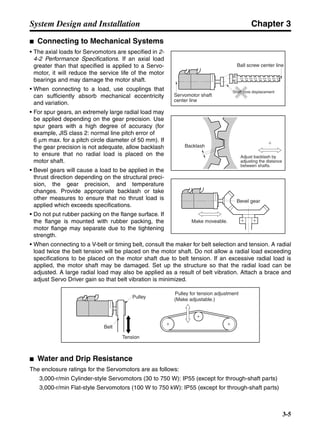
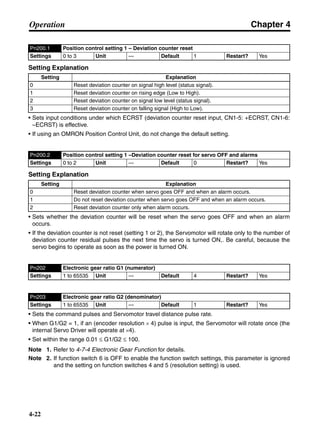
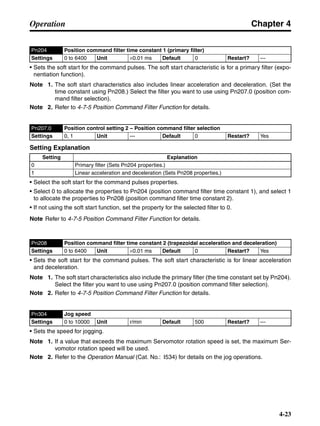
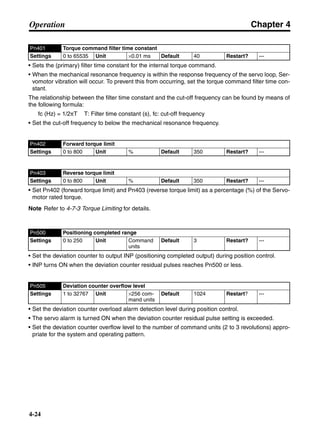
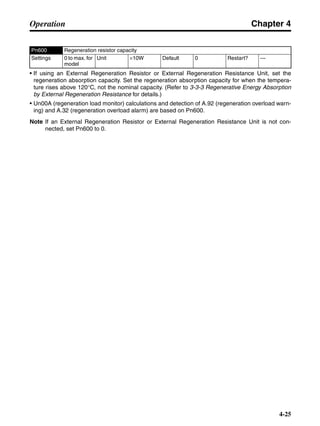
SMARTSTEP A SERIES
R7M-A@ (Servomotors)
R7D-AP@ (Servo Drivers)
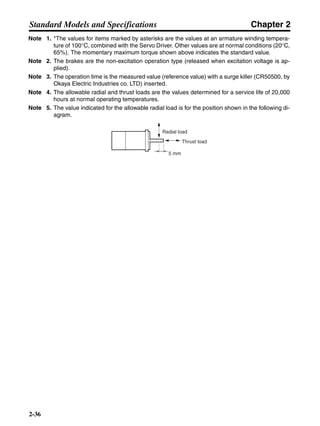
USER’S MANUAL
Thank you for choosing this SMARTSTEP A-series product. Proper use and handling
of the product will ensure proper product performance, will lengthen product life, and
may prevent possible accidents.
Please read this manual thoroughly and handle and operate the product with care.
Please keep this manual handy for reference after reading it.
1.To ensure safe and proper use of the OMRON Inverters, please read this USER'S MANUAL (Cat. No.
I533-E1) to gain sufficient knowledge of the devices, safety information, and precautions before actual
use.
2.The products are illustrated without covers and shieldings for closer look in this USER'S MANUAL. For
actual use of the products, make sure to use the covers and shieldings as specified.
3.This USER'S MANUAL and other related user's manuals are to be delivered to the actual end users of the
products.
4.Please keep this manual close at hand for future reference.
5.If the product has been left unused for a long time, please inquire at our sales representative.
Items to Check Before Unpacking
1.Check the following items before removing the product from the package:
• Has the correct product been delivered (i.e., the correct model number and specifications)?
• Has the product been damaged in shipping?
2.Check that the following accessories have been delivered.
• Safety Precautions
No connectors or mounting screws are provided. Obtain these separately.
NOTICE
1.This manual describes information about installation, wiring, switch setting, and troubleshooting of the
SMARTSTEP A-series Servomotors and Servo Drivers. For information about actual operating proce-
dures using a Parameter Unit, refer to the SMARTSTEP A Series Operation Manual (I534).
2.Be sure that this manual accompanies the product to its final user.
3.Although care has been given in documenting the product, please contact your OMRON representative
if you have any suggestions on improving this manual.
4.Assume that anything not specifically described in this manual is not possible.
5.Do not allow the Servomotor or Servo Driver to be wired, set, or operated (from a Parameter Unit) by
anyone that is not a profession electrical engineer or the equivalent.
6.We recommend that you add the following precautions to any instruction manuals you prepare for the
system into which the product is being installed.
• Precautions on the dangers of high-voltage equipment.
• Precautions on touching the terminals of the product even after power has been turned OFF. (These
terminals are live even with the power turned OFF.)
7.Specifications and functions may be changed without notice in order to improve product performance.
8.Positive and negative rotation of AC Servomotors described in this manual are defined as looking at the
end of the output shaft of the motor as follows: Counterclockwise rotation is positive and clockwise rota-
tion is negative.
9.Do not perform withstand-voltage or other megameter tests on the product. Doing so may damage inter-
nal components.
10.Servomotors and Servo Drivers have a finite service life. Be sure to keep replacement products on hand
and to consider the operating environment and other conditions affecting the service life.
11.Do not set values for any parameters not described in this manual. Operating errors may result. Consult
your OMRON representative if you have questions.
12.Before using the product under conditions which are not described in the manual or applying the product
to nuclear control systems, railroad systems, aviation systems, vehicles, combustion systems, medical
equipment, amusement machines, safety equipment, and other systems, machines, and equipment that
may have a serious influence on lives and property if used improperly, consult your OMRON represen-
tative.
USER’S MANUAL
SMARTSTEP ASERIES
MODELS R7M-A@ (Servomotors)
R7D-AP@ (Servo Drivers)
Servomotors/Servo Drivers
Notice:
OMRON products are manufactured for use according to proper procedures by a qualified operator
and only for the purposes described in this manual.
The following conventions are used to indicate and classify precautions in this manual. Always heed
the information provided with them. Failure to heed precautions can result in injury to people or dam-
age to property.
!DANGER Indicates an imminently hazardous situation which, if not avoided, will result in
death or serious injury. Additionally, there may be severe property damage.
!WARNING Indicates a potentially hazardous situation which, if not avoided, could result in
death or serious injury. Additionally, there may be severe property damage.
!Caution Indicates a potentially hazardous situation which, if not avoided, may result in
minor or moderate injury, or property damage.
OMRON Product References
All OMRON products are capitalized in this manual. The word “Unit” is also capitalized when it refers to
an OMRON product, regardless of whether or not it appears in the proper name of the product.
The abbreviation “Ch,” which appears in some displays and on some OMRON products, often means
“word” and is abbreviated “Wd” in documentation in this sense.
The abbreviation “PC” means Programmable Controller and is not used as an abbreviation for anything
else.
Visual Aids
The following headings appear in the left column of the manual to help you locate different types of
information.
Note Indicates information of particular interest for efficient and convenient operation of the product.
 OMRON, 2001
All rights reserved. No part of this publication may be reproduced, stored in a retrieval system, or transmitted, in any form, or
by any means, mechanical, electronic, photocopying, recording, or otherwise, without the prior written permission of
OMRON.
No patent liability is assumed with respect to the use of the information contained herein. Moreover, because OMRON is con-
stantly striving to improve its high-quality products, the information contained in this manual is subject to change without
notice. Every precaution has been taken in the preparation of this manual. Nevertheless, OMRON assumes no responsibility
for errors or omissions. Neither is any liability assumed for damages resulting from the use of the information contained in
this publication.
General Warnings
Observe the following warnings when using the SMARTSTEP Servomotor and Servo Driver and all
connected or peripheral devices.
This manual may include illustrations of the product with protective covers removed in order to
describe the components of the product in detail. Make sure that these protective covers are on the
product before use.
Consult your OMRON representative when using the product after a long period of storage.
!WARNING Always connect the frame ground terminals of the Servo Driver and the Servomo-
tor to a class-3 ground (to 100 Ω or less). Not connecting to a class-3 ground may
result in electric shock.
!WARNING Do not touch the inside of the Servo Driver. Doing so may result in electric shock.
!WARNING Do not remove the front cover, terminal covers, cables, or optional items while the
power is being supplied. Doing so may result in electric shock.
!WARNING Installation, operation, maintenance, or inspection must be performed by autho-
rized personnel. Not doing so may result in electric shock or injury.
!WARNING Wiring or inspection must not be performed for at least five minutes after turning
OFF the power supply. Doing so may result in electric shock.
!WARNING Do not damage, press, or put excessive stress or heavy objects on the cables.
Doing so may result in electric shock.
!WARNING Do not touch the rotating parts of the Servomotor in operation. Doing so may
result in injury.
!WARNING Do not modify the product. Doing so may result in injury or damage to the product.
!WARNING Provide a stopping mechanism on the machine to ensure safety. The holding
brake is not designed as a stopping mechanism for safety purposes.
!WARNING Provide an external emergency stopping mechanism that can stop operation and
shutting off the power supply immediately. Not doing so may result in injury.
!WARNING Do not come close to the machine immediately after resetting momentary power
interruption to avoid an unexpected restart. (Take appropriate measures to secure
safety against an unexpected restart.) Doing so may result in injury.
!Caution Use the Servomotors and Servo Drivers in a specified combination. Using them
incorrectly may result in fire or damage to the products.
!Caution Do not store or install the product in the following places. Doing so may result in
fire, electric shock, or damage to the product.
• Locations subject to direct sunlight.
• Locations subject to temperatures or humidity outside the range specified in the
specifications.
• Locations subject to condensation as the result of severe changes in tempera-
ture.
• Locations subject to corrosive or flammable gases.
• Locations subject to dust (especially iron dust) or salts.
• Locations subject to shock or vibration.
• Locations subject to exposure to water, oil, or chemicals.
!Caution Do not touch the Servo Driver radiator, Servo Driver regeneration resistor, or Ser-
vomotor while the power is being supplied or soon after the power is turned OFF.
Doing so may result in a skin burn due to the hot surface.
Storage and Transportation Precautions
!Caution Do not hold the product by the cables or motor shaft while transporting it. Doing so
may result in injury or malfunction.
!Caution Do not place any load exceeding the figure indicated on the product. Doing so
may result in injury or malfunction.
Installation and Wiring Precautions
!Caution Do not step on or place a heavy object on the product. Doing so may result in
injury.
!Caution Do not cover the inlet or outlet ports and prevent any foreign objects from entering
the product. Doing so may result in fire.
!Caution Be sure to install the product in the correct direction. Not doing so may result in
malfunction.
!Caution Provide the specified clearances between the Servo Driver and the control panel
or with other devices. Not doing so may result in fire or malfunction.
!Caution Do not apply any strong impact. Doing so may result in malfunction.
!Caution Be sure to wire correctly and securely. Not doing so may result in motor runaway,
injury, or malfunction.
!Caution Be sure that all the mounting screws, terminal screws, and cable connector
screws are tightened to the torque specified in the relevant manuals. Incorrect
tightening torque may result in malfunction.
!Caution Use crimp terminals for wiring. Do not connect bare stranded wires directly to ter-
minals. Connection of bare stranded wires may result in burning.
!Caution Always use the power supply voltage specified in the User’s Manual. An incorrect
voltage may result in malfunction or burning.
!Caution Take appropriate measures to ensure that the specified power with the rated volt-
age and frequency is supplied. Be particularly careful in places where the power
supply is unstable. An incorrect power supply may result in malfunction.
!Caution Install external breakers and take other safety measures against short-circuiting in
external wiring. Insufficient safety measures against short-circuiting may result in
burning.
!Caution Take appropriate and sufficient countermeasures when installing systems in the
following locations. Failure to do so may result in damage to the product.
• Locations subject to static electricity or other forms of noise.
• Locations subject to strong electromagnetic fields and magnetic fields.
• Locations subject to possible exposure to radioactivity.
• Locations close to power supplies.
Operation and Adjustment Precautions
!Caution Confirm that no adverse effects will occur in the system before performing the test
operation. Not doing so may result in equipment damage.
!Caution Check the newly set parameters and switches for proper execution before actually
running them. Not doing so may result in equipment damage.
!Caution Do not make any extreme adjustments or setting changes. Doing so may result in
unstable operation and injury.
!Caution Separate the Servomotor from the machine, check for proper operation, and then
connect to the machine. Not doing so may cause injury.
!Caution When an alarm occurs, remove the cause, reset the alarm after confirming safety,
and then resume operation. Not doing so may result in injury.
!Caution Do not use the built-in brake of the Servomotor for ordinary braking. Doing so may
result in malfunction.
Maintenance and Inspection Precautions
!WARNING Do not attempt to disassemble, repair, or modify any Units. Any attempt to do so
may result in malfunction, fire, or electric shock.
!Caution Resume operation only after transferring to the new Unit the contents of the data
required for operation. Not doing so may result in an unexpected operation.
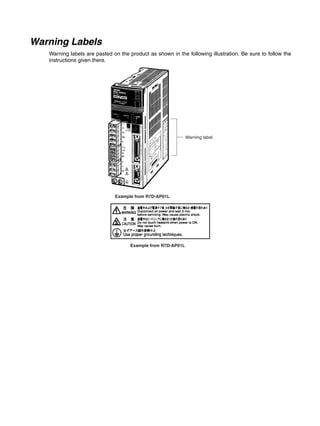
Warning Labels
Warning labels are pasted on the product as shown in the following illustration. Be sure to follow the
instructions given there.
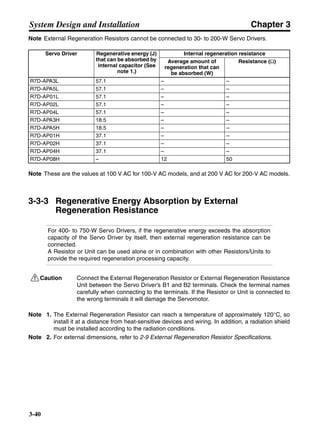
Warning label
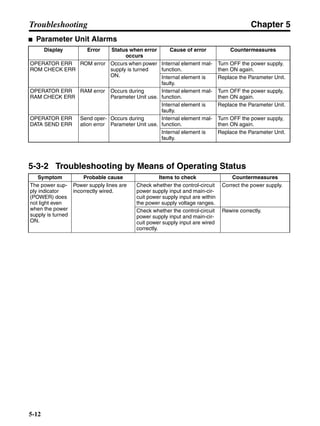
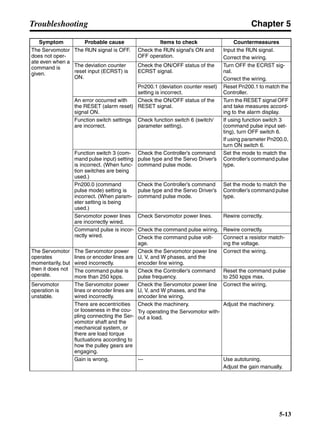
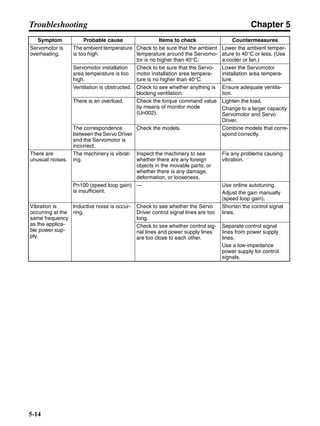
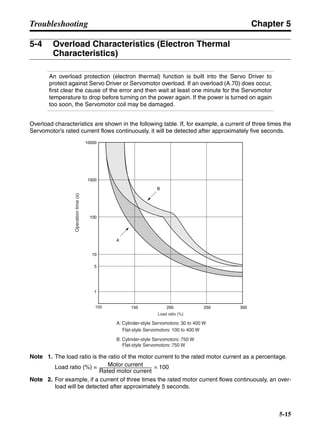
Example from R7D-AP01L
Read and Understand this Manual
Please read and understand this manual before using the product. Please consult your OMRON
representative if you have any questions or comments.
Warranty and Limitations of Liability
WARRANTY
OMRON's exclusive warranty is that the products are free from defects in materials and workmanship for a
period of one year (or other period if specified) from date of sale by OMRON.
OMRON MAKES NO WARRANTY OR REPRESENTATION, EXPRESS OR IMPLIED, REGARDING NON-
INFRINGEMENT, MERCHANTABILITY, OR FITNESS FOR PARTICULAR PURPOSE OF THE
PRODUCTS. ANY BUYER OR USER ACKNOWLEDGES THAT THE BUYER OR USER ALONE HAS
DETERMINED THAT THE PRODUCTS WILL SUITABLY MEET THE REQUIREMENTS OF THEIR
INTENDED USE. OMRON DISCLAIMS ALL OTHER WARRANTIES, EXPRESS OR IMPLIED.
LIMITATIONS OF LIABILITY
OMRON SHALL NOT BE RESPONSIBLE FOR SPECIAL, INDIRECT, OR CONSEQUENTIAL DAMAGES,
LOSS OF PROFITS OR COMMERCIAL LOSS IN ANY WAY CONNECTED WITH THE PRODUCTS,
WHETHER SUCH CLAIM IS BASED ON CONTRACT, WARRANTY, NEGLIGENCE, OR STRICT
LIABILITY.
In no event shall the responsibility of OMRON for any act exceed the individual price of the product on which
liability is asserted.
IN NO EVENT SHALL OMRON BE RESPONSIBLE FOR WARRANTY, REPAIR, OR OTHER CLAIMS
REGARDING THE PRODUCTS UNLESS OMRON'S ANALYSIS CONFIRMS THAT THE PRODUCTS
WERE PROPERLY HANDLED, STORED, INSTALLED, AND MAINTAINED AND NOT SUBJECT TO
CONTAMINATION, ABUSE, MISUSE, OR INAPPROPRIATE MODIFICATION OR REPAIR.
Application Considerations
SUITABILITY FOR USE
OMRON shall not be responsible for conformity with any standards, codes, or regulations that apply to the
combination of products in the customer's application or use of the products.
At the customer's request, OMRON will provide applicable third party certification documents identifying
ratings and limitations of use that apply to the products. This information by itself is not sufficient for a
complete determination of the suitability of the products in combination with the end product, machine,
system, or other application or use.
The following are some examples of applications for which particular attention must be given. This is not
intended to be an exhaustive list of all possible uses of the products, nor is it intended to imply that the uses
listed may be suitable for the products:
• Outdoor use, uses involving potential chemical contamination or electrical interference, or conditions or
uses not described in this manual.
• Nuclear energy control systems, combustion systems, railroad systems, aviation systems, medical
equipment, amusement machines, vehicles, safety equipment, and installations subject to separate
industry or government regulations.
• Systems, machines, and equipment that could present a risk to life or property.
Please know and observe all prohibitions of use applicable to the products.
NEVER USE THE PRODUCTS FOR AN APPLICATION INVOLVING SERIOUS RISK TO LIFE OR
PROPERTY WITHOUT ENSURING THAT THE SYSTEM AS A WHOLE HAS BEEN DESIGNED TO
ADDRESS THE RISKS, AND THAT THE OMRON PRODUCTS ARE PROPERLY RATED AND
INSTALLED FOR THE INTENDED USE WITHIN THE OVERALL EQUIPMENT OR SYSTEM.
PROGRAMMABLE PRODUCTS
OMRON shall not be responsible for the user's programming of a programmable product, or any
consequence thereof.
Disclaimers
CHANGE IN SPECIFICATIONS
Product specifications and accessories may be changed at any time based on improvements and other
reasons.
It is our practice to change model numbers when published ratings or features are changed, or when
significant construction changes are made. However, some specifications of the products may be changed
without any notice. When in doubt, special model numbers may be assigned to fix or establish key
specifications for your application on your request. Please consult with your OMRON representative at any
time to confirm actual specifications of purchased products.
DIMENSIONS AND WEIGHTS
Dimensions and weights are nominal and are not to be used for manufacturing purposes, even when
tolerances are shown.
PERFORMANCE DATA
Performance data given in this manual is provided as a guide for the user in determining suitability and does
not constitute a warranty. It may represent the result of OMRON's test conditions, and the users must
correlate it to actual application requirements. Actual performance is subject to the OMRON Warranty and
Limitations of Liability.
ERRORS AND OMISSIONS
The information in this manual has been carefully checked and is believed to be accurate; however, no
responsibility is assumed for clerical, typographical, or proofreading errors, or omissions.
Table of Contents
Chapter 1. Introduction. . . . . . . . . . . . . . . . . . . . . . . . . . . . . . . . . . . . 1-1
1-1 Features. . . . . . . . . . . . . . . . . . . . . . . . . . . . . . . . . . . . . . . . . . . . . . . . . . . . . . . . . . . . . . . . . . 1-2
1-2 System Configuration. . . . . . . . . . . . . . . . . . . . . . . . . . . . . . . . . . . . . . . . . . . . . . . . . . . . . . . 1-4
1-3 Servo Driver Nomenclature . . . . . . . . . . . . . . . . . . . . . . . . . . . . . . . . . . . . . . . . . . . . . . . . . . 1-5
1-4 Applicable Standards . . . . . . . . . . . . . . . . . . . . . . . . . . . . . . . . . . . . . . . . . . . . . . . . . . . . . . . 1-6
1-5 System Block Diagrams . . . . . . . . . . . . . . . . . . . . . . . . . . . . . . . . . . . . . . . . . . . . . . . . . . . . . 1-7
Chapter 2. Standard Models and Specifications. . . . . . . . . . . . . . . . 2-1
2-1 Standard Models. . . . . . . . . . . . . . . . . . . . . . . . . . . . . . . . . . . . . . . . . . . . . . . . . . . . . . . . . . . 2-2
2-2 External and Mounted Dimensions . . . . . . . . . . . . . . . . . . . . . . . . . . . . . . . . . . . . . . . . . . . . 2-6
2-3 Servo Driver Specifications . . . . . . . . . . . . . . . . . . . . . . . . . . . . . . . . . . . . . . . . . . . . . . . . . . 2-17
2-4 Servomotor Specifications . . . . . . . . . . . . . . . . . . . . . . . . . . . . . . . . . . . . . . . . . . . . . . . . . . . 2-31
2-5 Reduction Gear Specifications . . . . . . . . . . . . . . . . . . . . . . . . . . . . . . . . . . . . . . . . . . . . . . . . 2-39
2-6 Cable and Connector Specifications. . . . . . . . . . . . . . . . . . . . . . . . . . . . . . . . . . . . . . . . . . . . 2-43
2-7 Servo Relay Units and Cable Specifications . . . . . . . . . . . . . . . . . . . . . . . . . . . . . . . . . . . . . 2-58
2-8 Parameter Unit Specifications . . . . . . . . . . . . . . . . . . . . . . . . . . . . . . . . . . . . . . . . . . . . . . . . 2-111
2-9 External Regeneration Resistor Specifications. . . . . . . . . . . . . . . . . . . . . . . . . . . . . . . . . . . . 2-113
2-10 DC Reactors . . . . . . . . . . . . . . . . . . . . . . . . . . . . . . . . . . . . . . . . . . . . . . . . . . . . . . . . . . . . . . 2-114
Chapter 3. System Design and Installation . . . . . . . . . . . . . . . . . . . . 3-1
3-1 Installation Conditions . . . . . . . . . . . . . . . . . . . . . . . . . . . . . . . . . . . . . . . . . . . . . . . . . . . . . . 3-3
3-2 Wiring. . . . . . . . . . . . . . . . . . . . . . . . . . . . . . . . . . . . . . . . . . . . . . . . . . . . . . . . . . . . . . . . . . . 3-8
3-3 Regenerative Energy Absorption . . . . . . . . . . . . . . . . . . . . . . . . . . . . . . . . . . . . . . . . . . . . . . 3-37
Chapter 4. Operation. . . . . . . . . . . . . . . . . . . . . . . . . . . . . . . . . . . . . . 4-1
4-1 Operational Procedure . . . . . . . . . . . . . . . . . . . . . . . . . . . . . . . . . . . . . . . . . . . . . . . . . . . . . . 4-3
4-2 Switch Settings . . . . . . . . . . . . . . . . . . . . . . . . . . . . . . . . . . . . . . . . . . . . . . . . . . . . . . . . . . . . 4-4
4-3 Preparing for Operation . . . . . . . . . . . . . . . . . . . . . . . . . . . . . . . . . . . . . . . . . . . . . . . . . . . . . 4-7
4-4 Trial Operation . . . . . . . . . . . . . . . . . . . . . . . . . . . . . . . . . . . . . . . . . . . . . . . . . . . . . . . . . . . . 4-9
4-5 Gain Adjustments . . . . . . . . . . . . . . . . . . . . . . . . . . . . . . . . . . . . . . . . . . . . . . . . . . . . . . . . . . 4-11
4-6 User Parameters . . . . . . . . . . . . . . . . . . . . . . . . . . . . . . . . . . . . . . . . . . . . . . . . . . . . . . . . . . . 4-15
4-7 Operating Functions . . . . . . . . . . . . . . . . . . . . . . . . . . . . . . . . . . . . . . . . . . . . . . . . . . . . . . . . 4-26
Chapter 5. Troubleshooting . . . . . . . . . . . . . . . . . . . . . . . . . . . . . . . . 5-1
5-1 Measures when Trouble Occurs . . . . . . . . . . . . . . . . . . . . . . . . . . . . . . . . . . . . . . . . . . . . . . . 5-2
5-2 Alarms . . . . . . . . . . . . . . . . . . . . . . . . . . . . . . . . . . . . . . . . . . . . . . . . . . . . . . . . . . . . . . . . . . 5-5
5-3 Troubleshooting . . . . . . . . . . . . . . . . . . . . . . . . . . . . . . . . . . . . . . . . . . . . . . . . . . . . . . . . . . . 5-7
5-4 Overload Characteristics (Electron Thermal Characteristics) . . . . . . . . . . . . . . . . . . . . . . . . 5-15
5-5 Periodic Maintenance . . . . . . . . . . . . . . . . . . . . . . . . . . . . . . . . . . . . . . . . . . . . . . . . . . . . . . . 5-16
Chapter 6. Appendix . . . . . . . . . . . . . . . . . . . . . . . . . . . . . . . . . . . . . . 6-1
6-1 Connection Examples. . . . . . . . . . . . . . . . . . . . . . . . . . . . . . . . . . . . . . . . . . . . . . . . . . . . . . . 6-2
Revision History. . . . . . . . . . . . . . . . . . . . . . . . . . . . . . . . . . . . . . . . . . R-1
Chapter 1
Introduction
1-1 Features
1-2 System Configuration
1-3 Servo Driver Nomenclature
1-4 Applicable Standards
1-5 System Block Diagrams
Chapter 1
1-2
Introduction
1-1 Features
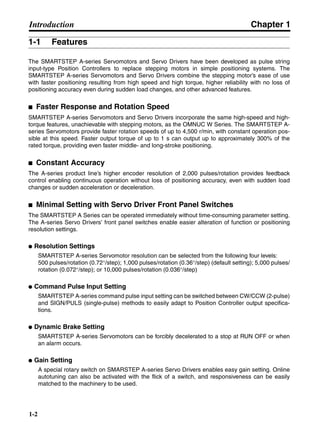
The SMARTSTEP A-series Servomotors and Servo Drivers have been developed as pulse string
input-type Position Controllers to replace stepping motors in simple positioning systems. The
SMARTSTEP A-series Servomotors and Servo Drivers combine the stepping motor’s ease of use
with faster positioning resulting from high speed and high torque, higher reliability with no loss of
positioning accuracy even during sudden load changes, and other advanced features.
■ Faster Response and Rotation Speed
SMARTSTEP A-series Servomotors and Servo Drivers incorporate the same high-speed and high-
torque features, unachievable with stepping motors, as the OMNUC W Series. The SMARTSTEP A-
series Servomotors provide faster rotation speeds of up to 4,500 r/min, with constant operation pos-
sible at this speed. Faster output torque of up to 1 s can output up to approximately 300% of the
rated torque, providing even faster middle- and long-stroke positioning.
■ Constant Accuracy
The A-series product line’s higher encoder resolution of 2,000 pulses/rotation provides feedback
control enabling continuous operation without loss of positioning accuracy, even with sudden load
changes or sudden acceleration or deceleration.
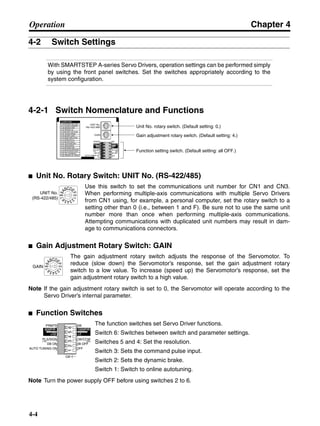
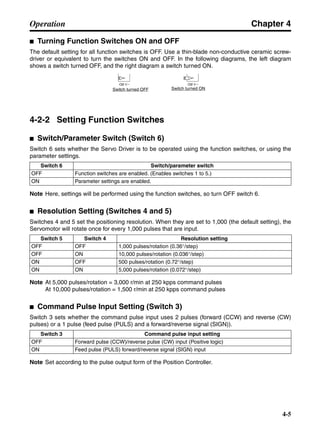
■ Minimal Setting with Servo Driver Front Panel Switches
The SMARTSTEP A Series can be operated immediately without time-consuming parameter setting.
The A-series Servo Drivers’ front panel switches enable easier alteration of function or positioning
resolution settings.
● Resolution Settings
SMARTSTEP A-series Servomotor resolution can be selected from the following four levels:
500 pulses/rotation (0.72°/step); 1,000 pulses/rotation (0.36°/step) (default setting); 5,000 pulses/
rotation (0.072°/step); or 10,000 pulses/rotation (0.036°/step)
● Command Pulse Input Setting
SMARTSTEP A-series command pulse input setting can be switched between CW/CCW (2-pulse)
and SIGN/PULS (single-pulse) methods to easily adapt to Position Controller output specifica-
tions.
● Dynamic Brake Setting
SMARTSTEP A-series Servomotors can be forcibly decelerated to a stop at RUN OFF or when
an alarm occurs.
● Gain Setting
A special rotary switch on SMARSTEP A-series Servo Drivers enables easy gain setting. Online
autotuning can also be activated with the flick of a switch, and responsiveness can be easily
matched to the machinery to be used.
Chapter 1
1-3
Introduction
Note Using a Parameter Unit or personal computer enables operation with parameter settings.
■ Cylinder-style and Flat-style Servomotors
The SMARTSTEP A Series offers Flanged Cylinder-style Servomotors, with a smaller mounting
area, and Flat-style Servomotors, with a shorter overall length. The Flat Servomotor depth dimen-
sions are approximately the same as those of stepping motors of the same output capacity. Servo-
motors can be selected by size, thereby making equipment more compact.
■ A Wider Selection of Programming Devices
Special SMARTSTEP A-series Parameter Units and personal computer monitoring software are
available. The special monitoring software enables performing parameter setting, speed and current
monitoring, speed and current waveform displays, I/O monitoring, autotuning, jogging, and other
operations from a computer. It is also possible to perform multiple-axis communications that set the
parameters and monitor operations for multiple Servo Drivers. For details, refer to the Servo Driver
Personal Computer Monitor Software (CD-ROM) for Windows 95/98, Version 2.0 (WMON Win
Ver.2.0) (Catalog No.: SBCE-011).
Chapter 1
1-4
Introduction
1-2 System Configuration
MACHINE
No.
RUN
ERROR
SENS
DATA
X
Y
Z
U
NC413
CN1
CN2
A24
A1
B24
B1
No.
MS
NS
M0
M1
M2
3F88M-DRT1411 AXIS POSITIONER
NA
×10
×1
DR0
DR1
L/R
123
ON↓
01
2 3
456
78
901
2 3
456
78
9
DIPSW
ITC
H
DIPSW
ITC
H
L/R
DR0
DR1
ON
ON
ON
ON
OFF
OFF
OFF
ON
OF
F
OF
F
COMM
UNICATION
SPEED
125kbps
250kbps
500kbps
−
LOCAL/R
EM
OTE
REMO
TE
MO
DE
LOCAL MO
DE
ALARM
LS
SOFTLIMIT
ORGSRHNG
ENCODERALM
STOP
DRIVERALM
OTHER
M0
M1
M2
(RED
:
)
CCW
CW
OPEN
LINE
OPEN
LINE
I/O
PA203
POWER
/
SCROLLSCROLL MODE/SETMODE/SET
DATADATA
RESET
JOGJOG
RUNRUN
DRIVER PRDRIVER PR PR DRIVERPR DRIVER
READREAD WRITEWRITE
R7A–PR02A PARAMETER UNIT
B.BB.B INPINP
VCMPVCMP
TGONTGON REFREF POWERPOWER
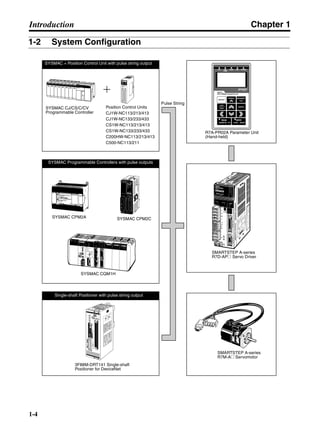
SYSMAC CJ/CS/C/CV
Programmable Controller
Position Control Units
CJ1W-NC113/213/413
CJ1W-NC133/233/433
CS1W-NC113/213/413
CS1W-NC133/233/433
C200HW-NC113/213/413
C500-NC113/211
R7A-PR02A Parameter Unit
(Hand-held)
Pulse String
SMARTSTEP A-series
R7D-AP@ Servo Driver
SMARTSTEP A-series
R7M-A@ Servomotor
3F88M-DRT141 Single-shaft
Positioner for DeviceNet
SYSMAC CQM1H
SYSMAC CPM2CSYSMAC CPM2A
SYSMAC + Position Control Unit with pulse string output
SYSMAC Programmable Controllers with pulse outputs
Single-shaft Positioner with pulse string output
Chapter 1
1-5
Introduction
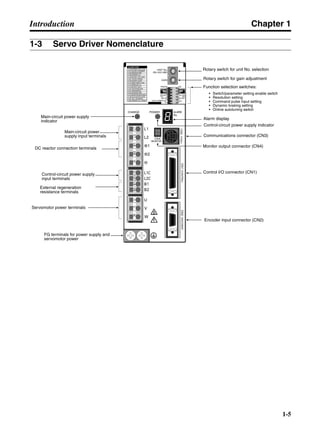
1-3 Servo Driver Nomenclature
Rotary switch for unit No. selection
Rotary switch for gain adjustment
Function selection switches:
Alarm display
Control-circuit power supply indicator
Communications connector (CN3)
Monitor output connector (CN4)
Control I/O connector (CN1)
Encoder input connector (CN2)
Main-circuit power supply
indicator
Main-circuit power
supply input terminals
DC reactor connection terminals
Control-circuit power supply
input terminals
Servomotor power terminals
FG terminals for power supply and
servomotor power
External regeneration
resistance terminals
• Switch/parameter setting enable switch
• Resolution setting
• Command pulse input setting
• Dynamic braking setting
• Online autotuning switch
Chapter 1
1-6
Introduction
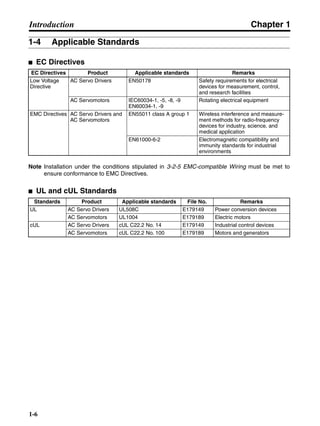
1-4 Applicable Standards
■ EC Directives
Note Installation under the conditions stipulated in 3-2-5 EMC-compatible Wiring must be met to
ensure conformance to EMC Directives.
■ UL and cUL Standards
EC Directives Product Applicable standards Remarks
Low Voltage
Directive
AC Servo Drivers EN50178 Safety requirements for electrical
devices for measurement, control,
and research facilities
AC Servomotors IEC60034-1, -5, -8, -9
EN60034-1, -9
Rotating electrical equipment
EMC Directives AC Servo Drivers and
AC Servomotors
EN55011 class A group 1 Wireless interference and measure-
ment methods for radio-frequency
devices for industry, science, and
medical application
EN61000-6-2 Electromagnetic compatibility and
immunity standards for industrial
environments
Standards Product Applicable standards File No. Remarks
UL AC Servo Drivers UL508C E179149 Power conversion devices
AC Servomotors UL1004 E179189 Electric motors
cUL AC Servo Drivers cUL C22.2 No. 14 E179149 Industrial control devices
AC Servomotors cUL C22.2 No. 100 E179189 Motors and generators
Chapter 1
1-7
Introduction
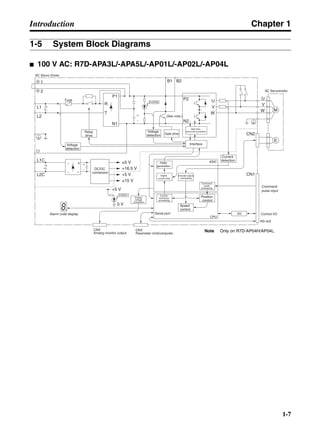
1-5 System Block Diagrams
■ 100 V AC: R7D-APA3L/-APA5L/-AP01L/-AP02L/-AP04L
AC Servo Driver
Command
pulse input
Control I/OSerial port
Speed
control
Current
command
processing
Position
control
Encoder signal
processing
Digital
current amp
PWM
generation
Current
detection
Interface
Gate drive
overcurrent protection
Gate drive
Voltage
detection
Relay
drive
Fuse
DC/DC
conversion
Analog
voltage
conversion
CN4
Analog monitor output
CN3
Parameter Unit/computer
Voltage
detection
1
2
L1
L2
L2C
L1C
R
T
P1
N1
+∼
∼
+
−
±5 V
+16.5 V
+5 V
±15 V
+
−
M
E
CHARGE
B1 B2
P2
N2
U
V
W
U
V
W
CN2
CN1
I/O
CPU
ASIC
+5 V
POWER
0 V
(See note.)
RS-422
AC Servomotor
Alarm code display
−
Command
pulse
processing
Note Only on R7D-AP04H/AP04L.
Chapter 1
1-8
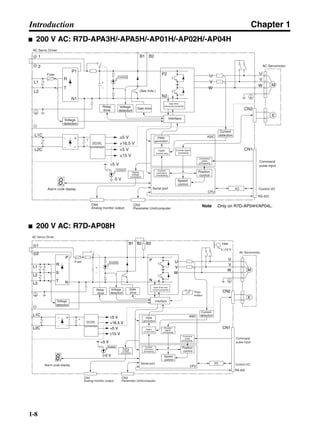
Introduction
■ 200 V AC: R7D-APA3H/-APA5H/-AP01H/-AP02H/-AP04H
■ 200 V AC: R7D-AP08H
AC Servo Driver
Command
pulse input
Control I/OSerial port
Speed
control
Current
command
processing
Position
control
Encoder signal
processing
Digital
current amp
PWM
generation
Current
detection
Interface
Gate drive
overcurrent protection
Gate driveVoltage
detection
Relay
drive
Fuse
DC/DC
conversion
Analog
voltage
conversion
CN4
Analog monitor output
CN3
Parameter Unit/computer
Voltage
detection
1
2
L1
L2
L2C
L1C
R
T
P1
N1
+∼
∼
+
−
±5 V
+16.5 V
+5 V
±15 V
+
−
M
E
CHARGE
B1 B2
P2
N2
U
V
W
U
V
W
CN2
CN1
I/O
CPU
ASIC
+5 V
POWER
0 V
(See note.)
RS-422
AC Servomotor
Alarm code display
−
Command
pulse
processing
Note Only on R7D-AP04H/AP04L.
AC Servo Driver
Ther-
mistor
AC Servomotor
Command
pulse input
Control I/OSerial port
Speed
control
Current
command
processing
Position
control
Command
pulse
processing
Encoder
signal
processing
Digital
current amp
PWM
generation
Interface
Gate drive over-
current protectionGate
drive
Voltage
detection
Relay
drive
Fuse
DC/DC
conversion
Analog
voltage
conversion
Alarm code display
CN4
Analog monitor output
CN3
Parameter Unit/computer
Voltage
detection
1
2
L1
L2
L3
L2C
L1C
R
S
T
P
N
+∼
∼
+
−
±5 V
+16.5 V
+5 V
±15 V
+
−
M
E
CHARGE
B1 B2 B3
P
N
U
V
W
U
V
W
CN2
CN1
RS-422
I/O
CPU
ASIC
+5 V
POWER
0 V
±12 V
FAN
Current
detection
−
Chapter 2
Standard Models and
Specifications
2-1 Standard Models
2-2 External and Mounted Dimensions
2-3 Servo Driver Specifications
2-4 Servomotor Specifications
2-5 Reduction Gear Specifications
2-6 Cable and Connector Specifications
2-7 Servo Relay Units and Cable Specifications
2-8 Parameter Unit Specifications
2-9 External Regeneration Resistor Specifications
2-10 DC Reactors
Chapter 2
2-2
Standard Models and Specifications
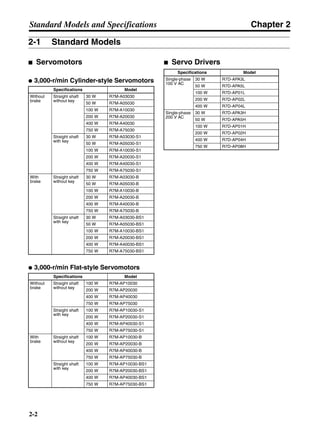
2-1 Standard Models
■ Servomotors
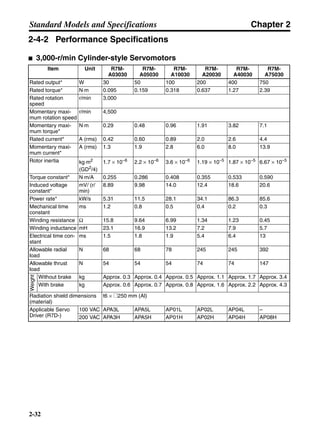
● 3,000-r/min Cylinder-style Servomotors
● 3,000-r/min Flat-style Servomotors
■ Servo Drivers
Specifications Model
Without
brake
Straight shaft
without key
30 W R7M-A03030
50 W R7M-A05030
100 W R7M-A10030
200 W R7M-A20030
400 W R7M-A40030
750 W R7M-A75030
Straight shaft
with key
30 W R7M-A03030-S1
50 W R7M-A05030-S1
100 W R7M-A10030-S1
200 W R7M-A20030-S1
400 W R7M-A40030-S1
750 W R7M-A75030-S1
With
brake
Straight shaft
without key
30 W R7M-A03030-B
50 W R7M-A05030-B
100 W R7M-A10030-B
200 W R7M-A20030-B
400 W R7M-A40030-B
750 W R7M-A75030-B
Straight shaft
with key
30 W R7M-A03030-BS1
50 W R7M-A05030-BS1
100 W R7M-A10030-BS1
200 W R7M-A20030-BS1
400 W R7M-A40030-BS1
750 W R7M-A75030-BS1
Specifications Model
Without
brake
Straight shaft
without key
100 W R7M-AP10030
200 W R7M-AP20030
400 W R7M-AP40030
750 W R7M-AP75030
Straight shaft
with key
100 W R7M-AP10030-S1
200 W R7M-AP20030-S1
400 W R7M-AP40030-S1
750 W R7M-AP75030-S1
With
brake
Straight shaft
without key
100 W R7M-AP10030-B
200 W R7M-AP20030-B
400 W R7M-AP40030-B
750 W R7M-AP75030-B
Straight shaft
with key
100 W R7M-AP10030-BS1
200 W R7M-AP20030-BS1
400 W R7M-AP40030-BS1
750 W R7M-AP75030-BS1
Specifications Model
Single-phase
100 V AC
30 W R7D-APA3L
50 W R7D-APA5L
100 W R7D-AP01L
200 W R7D-AP02L
400 W R7D-AP04L
Single-phase
200 V AC
30 W R7D-APA3H
50 W R7D-APA5H
100 W R7D-AP01H
200 W R7D-AP02H
400 W R7D-AP04H
750 W R7D-AP08H
Chapter 2
2-3
Standard Models and Specifications
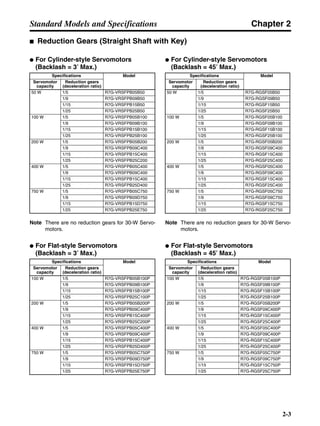
■ Reduction Gears (Straight Shaft with Key)
● For Cylinder-style Servomotors
(Backlash = 3′ Max.)
Note There are no reduction gears for 30-W Servo-
motors.
● For Flat-style Servomotors
(Backlash = 3′ Max.)
● For Cylinder-style Servomotors
(Backlash = 45′ Max.)
Note There are no reduction gears for 30-W Servo-
motors.
● For Flat-style Servomotors
(Backlash = 45′ Max.)
Specifications Model
Servomotor
capacity
Reduction gears
(deceleration ratio)
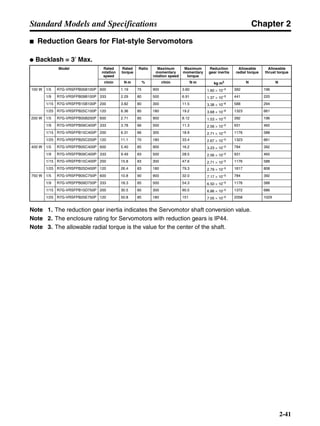
50 W 1/5 R7G-VRSFPB05B50
1/9 R7G-VRSFPB09B50
1/15 R7G-VRSFPB15B50
1/25 R7G-VRSFPB25B50
100 W 1/5 R7G-VRSFPB05B100
1/9 R7G-VRSFPB09B100
1/15 R7G-VRSFPB15B100
1/25 R7G-VRSFPB25B100
200 W 1/5 R7G-VRSFPB05B200
1/9 R7G-VRSFPB09C400
1/15 R7G-VRSFPB15C400
1/25 R7G-VRSFPB25C200
400 W 1/5 R7G-VRSFPB05C400
1/9 R7G-VRSFPB09C400
1/15 R7G-VRSFPB15C400
1/25 R7G-VRSFPB25D400
750 W 1/5 R7G-VRSFPB05C750
1/9 R7G-VRSFPB09D750
1/15 R7G-VRSFPB15D750
1/25 R7G-VRSFPB25E750
Specifications Model
Servomotor
capacity
Reduction gears
(deceleration ratio)
100 W 1/5 R7G-VRSFPB05B100P
1/9 R7G-VRSFPB09B100P
1/15 R7G-VRSFPB15B100P
1/25 R7G-VRSFPB25C100P
200 W 1/5 R7G-VRSFPB05B200P
1/9 R7G-VRSFPB09C400P
1/15 R7G-VRSFPB15C400P
1/25 R7G-VRSFPB25C200P
400 W 1/5 R7G-VRSFPB05C400P
1/9 R7G-VRSFPB09C400P
1/15 R7G-VRSFPB15C400P
1/25 R7G-VRSFPB25D400P
750 W 1/5 R7G-VRSFPB05C750P
1/9 R7G-VRSFPB09D750P
1/15 R7G-VRSFPB15D750P
1/25 R7G-VRSFPB25E750P
Specifications Model
Servomotor
capacity
Reduction gears
(deceleration ratio)
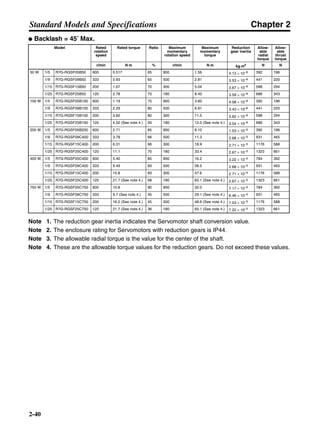
50 W 1/5 R7G-RGSF05B50
1/9 R7G-RGSF09B50
1/15 R7G-RGSF15B50
1/25 R7G-RGSF25B50
100 W 1/5 R7G-RGSF05B100
1/9 R7G-RGSF09B100
1/15 R7G-RGSF15B100
1/25 R7G-RGSF25B100
200 W 1/5 R7G-RGSF05B200
1/9 R7G-RGSF09C400
1/15 R7G-RGSF15C400
1/25 R7G-RGSF25C400
400 W 1/5 R7G-RGSF05C400
1/9 R7G-RGSF09C400
1/15 R7G-RGSF15C400
1/25 R7G-RGSF25C400
750 W 1/5 R7G-RGSF05C750
1/9 R7G-RGSF09C750
1/15 R7G-RGSF15C750
1/25 R7G-RGSF25C750
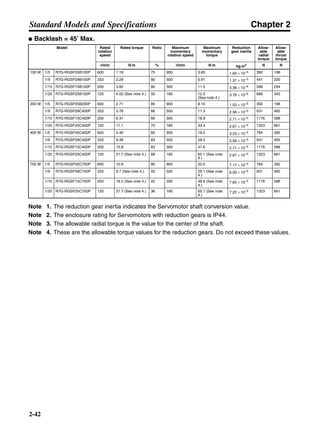
Specifications Model
Servomotor
capacity
Reduction gears
(deceleration ratio)
100 W 1/5 R7G-RGSF05B100P
1/9 R7G-RGSF09B100P
1/15 R7G-RGSF15B100P
1/25 R7G-RGSF25B100P
200 W 1/5 R7G-RGSF05B200P
1/9 R7G-RGSF09C400P
1/15 R7G-RGSF15C400P
1/25 R7G-RGSF25C400P
400 W 1/5 R7G-RGSF05C400P
1/9 R7G-RGSF09C400P
1/15 R7G-RGSF15C400P
1/25 R7G-RGSF25C400P
750 W 1/5 R7G-RGSF05C750P
1/9 R7G-RGSF09C750P
1/15 R7G-RGSF15C750P
1/25 R7G-RGSF25C750P
Chapter 2
2-4
Standard Models and Specifications
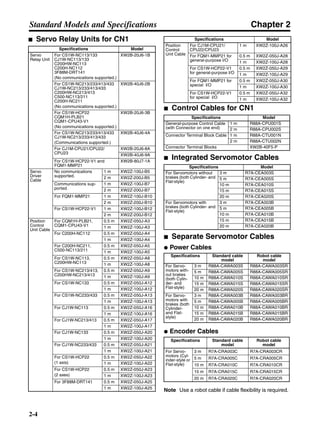
■ Servo Relay Units for CN1
■ Control Cables for CN1
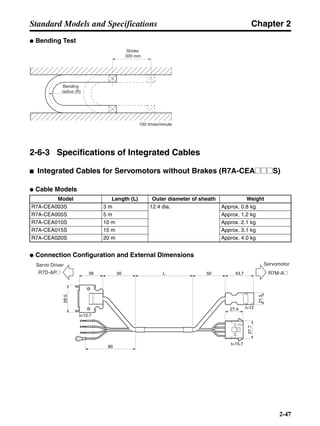
■ Integrated Servomotor Cables
■ Separate Servomotor Cables
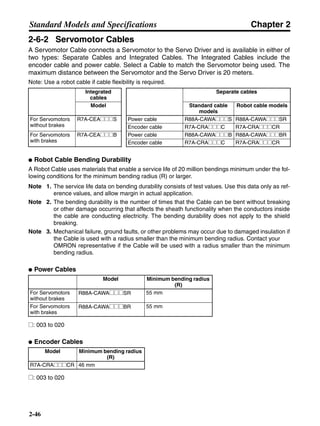
● Power Cables
● Encoder Cables
Note Use a robot cable if cable flexibility is required.
Specifications Model
Servo
Relay Unit
For CS1W-NC113/133
CJ1W-NC113/133
C200HW-NC113
C200H-NC112
3F88M-DRT141
(No communications supported.)
XW2B-20J6-1B
For CS1W-NC213/233/413/433
CJ1W-NC213/233/413/433
C200HW-NC213/413
C500-NC113/211
C200H-NC211
(No communications supported.)
XW2B-40J6-2B
For CS1W-HCP22
CQM1H-PLB21
CQM1-CPU43-V1
(No communications supported.)
XW2B-20J6-3B
For CS1W-NC213/233/413/433
CJ1W-NC213/233/413/433
(Communications supported.)
XW2B-40J6-4A
For CJ1M-CPU21/CPU22/
CPU23
XW2B-20J6-8A
XW2B-40J6-9A
For CS1W-HCP22-V1 and
FQM1-MMP21
XW2B-80J7-1A
Servo
Driver
Cable
No communications
supported.
1 m XW2Z-100J-B5
2 m XW2Z-200J-B5
Communications sup-
ported.
1 m XW2Z-100J-B7
2 m XW2Z-200J-B7
For FQM1-MMP21 1 m XW2Z-100J-B10
2 m XW2Z-200J-B10
For CS1W-HCP22-V1 1 m XW2Z-100J-B12
2 m XW2Z-200J-B12
Position
Control
Unit Cable
For CQM1H-PLB21,
CQM1-CPU43-V1
0.5 m XW2Z-050J-A3
1 m XW2Z-100J-A3
For C200H-NC112 0.5 m XW2Z-050J-A4
1 m XW2Z-100J-A4
For C200H-NC211,
C500-NC113/211
0.5 m XW2Z-050J-A5
1 m XW2Z-100J-A5
For CS1W-NC113,
C200HW-NC113
0.5 m XW2Z-050J-A8
1 m XW2Z-100J-A8
For CS1W-NC213/413,
C200HW-NC213/413
0.5 m XW2Z-050J-A9
1 m XW2Z-100J-A9
For CS1W-NC133 0.5 m XW2Z-050J-A12
1 m XW2Z-100J-A12
For CS1W-NC233/433 0.5 m XW2Z-050J-A13
1 m XW2Z-100J-A13
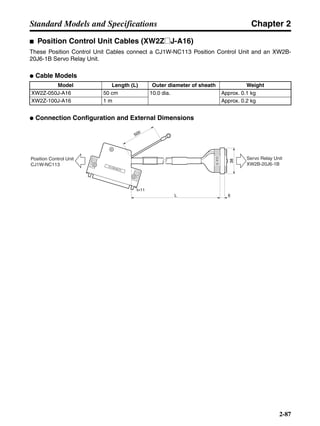
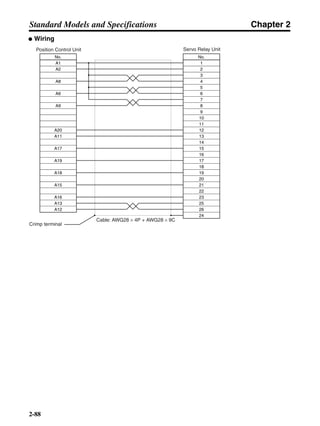
For CJ1W-NC113 0.5 m XW2Z-050J-A16
1 m XW2Z-100J-A16
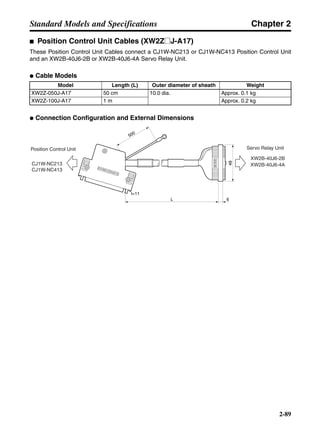
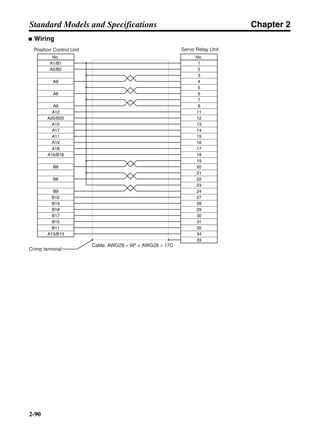
For CJ1W-NC213/413 0.5 m XW2Z-050J-A17
1 m XW2Z-100J-A17
For CJ1W-NC133 0.5 m XW2Z-050J-A20
1 m XW2Z-100J-A20
For CJ1W-NC233/433 0.5 m XW2Z-050J-A21
1 m XW2Z-100J-A21
For CS1W-HCP22
(1 axis)
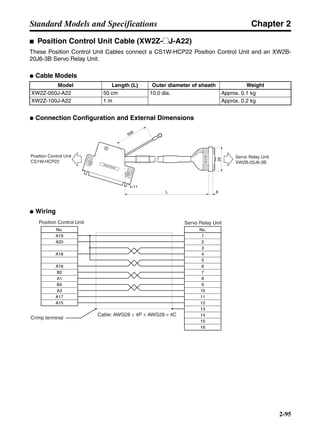
0.5 m XW2Z-050J-A22
1 m XW2Z-100J-A22
For CS1W-HCP22
(2 axes)
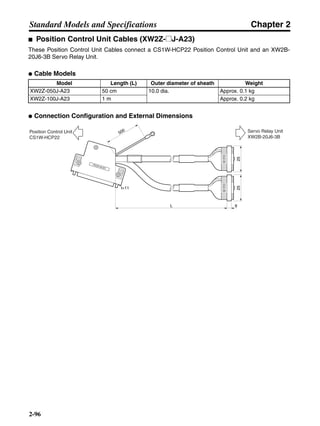
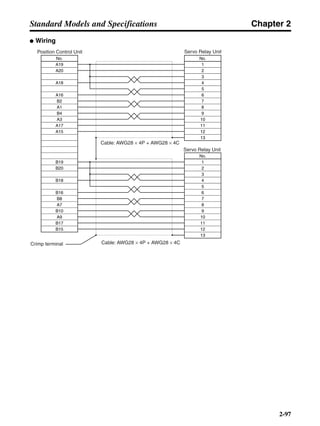
0.5 m XW2Z-050J-A23
1 m XW2Z-100J-A23
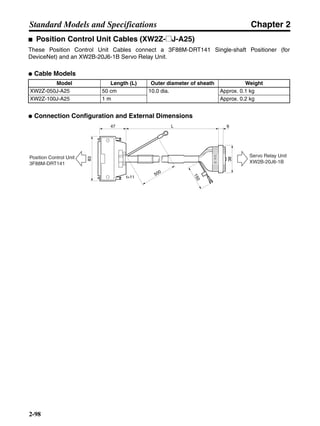
For 3F88M-DRT141 0.5 m XW2Z-050J-A25
1 m XW2Z-100J-A25
Position
Control
Unit Cable
For CJ1M-CPU21/
CPU22/CPU23
1 m XW2Z-100J-A26
For FQM1-MMP21 for
general-purpose I/O
0.5 m XW2Z-050J-A28
1 m XW2Z-100J-A28
For CS1W-HCP22-V1
for general-purpose I/O
0.5 m XW2Z-050J-A29
1 m XW2Z-100J-A29
For FQM1-MMP21 for
special I/O
0.5 m XW2Z-050J-A30
1 m XW2Z-100J-A30
For CS1W-HCP22-V1
for special I/O
0.5 m XW2Z-050J-A32
1 m XW2Z-100J-A32
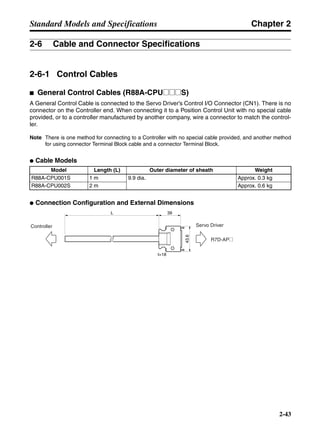
Specifications Model
General-purpose Control Cable
(with Connector on one end)
1 m R88A-CPU001S
2 m R88A-CPU002S
Connector Terminal Block Cable 1 m R88A-CTU001N
2 m R88A-CTU002N
Connector Terminal Blocks XW2B-40F5-P
Specifications Model
For Servomotors without
brakes (both Cylinder- and
Flat-style)
3 m R7A-CEA003S
5 m R7A-CEA005S
10 m R7A-CEA010S
15 m R7A-CEA015S
20 m R7A-CEA020S
For Servomotors with
brakes (both Cylinder- and
Flat-style)
3 m R7A-CEA003B
5 m R7A-CEA005B
10 m R7A-CEA010B
15 m R7A-CEA015B
20 m R7A-CEA020B
Specifications Standard cable
model
Robot cable
model
For Servo-
motors with-
out brakes
(both Cylin-
der- and
Flat-style)
3 m R88A-CAWA003S R88A-CAWA003SR
5 m R88A-CAWA005S R88A-CAWA005SR
10 m R88A-CAWA010S R88A-CAWA010SR
15 m R88A-CAWA015S R88A-CAWA015SR
20 m R88A-CAWA020S R88A-CAWA020SR
For Servo-
motors with
brakes (both
Cylinder-
and Flat-
style)
3 m R88A-CAWA003B R88A-CAWA003BR
5 m R88A-CAWA005B R88A-CAWA005BR
10 m R88A-CAWA010B R88A-CAWA010BR
15 m R88A-CAWA015B R88A-CAWA015BR
20 m R88A-CAWA020B R88A-CAWA020BR
Specifications Standard cable
model
Robot cable
model
For Servo-
motors (Cyl-
inder-style or
Flat-style)
3 m R7A-CRA003C R7A-CRA003CR
5 m R7A-CRA005C R7A-CRA005CR
10 m R7A-CRA010C R7A-CRA010CR
15 m R7A-CRA015C R7A-CRA015CR
20 m R7A-CRA020C R7A-CRA020CR
Specifications Model
Chapter 2
2-5
Standard Models and Specifications
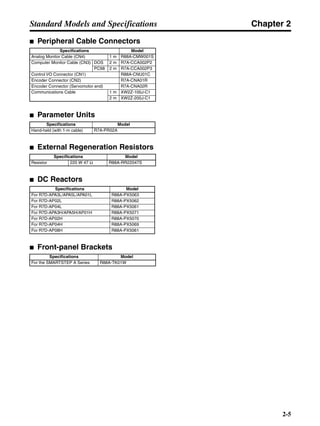
■ Peripheral Cable Connectors
■ Parameter Units
■ External Regeneration Resistors
■ DC Reactors
■ Front-panel Brackets
Specifications Model
Analog Monitor Cable (CN4) 1 m R88A-CMW001S
Computer Monitor Cable (CN3) DOS 2 m R7A-CCA002P2
PC98 2 m R7A-CCA002P3
Control I/O Connector (CN1) R88A-CNU01C
Encoder Connector (CN2) R7A-CNA01R
Encoder Connector (Servomotor end) R7A-CNA02R
Communications Cable 1 m XW2Z-100J-C1
2 m XW2Z-200J-C1
Specifications Model
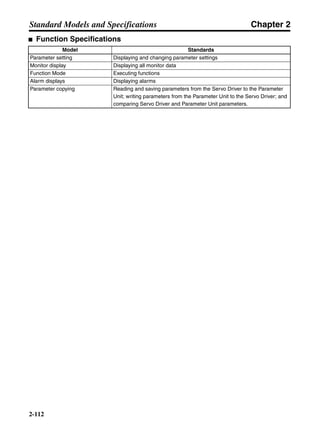
Hand-held (with 1-m cable) R7A-PR02A
Specifications Model
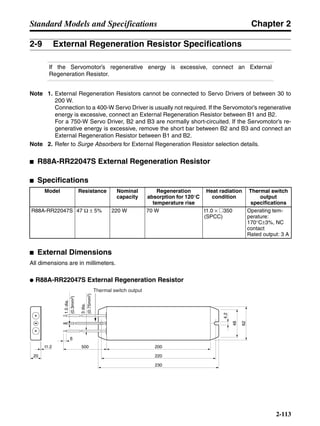
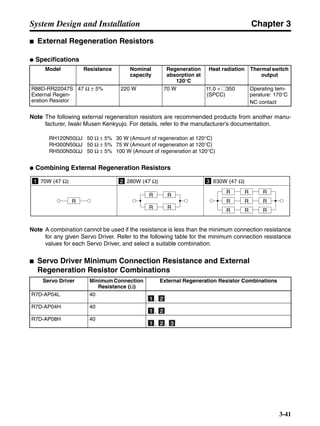
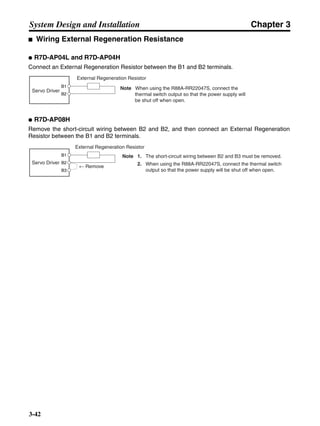
Resistor 220 W 47 Ω R88A-RR22047S
Specifications Model
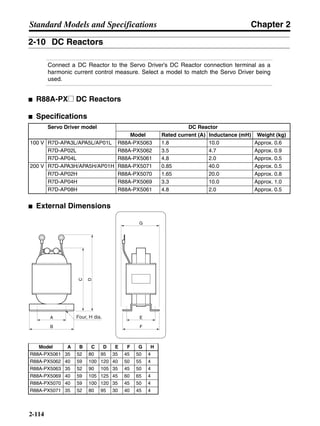
For R7D-APA3L/APA5L/APA01L R88A-PX5063
For R7D-AP02L R88A-PX5062
For R7D-AP04L R88A-PX5061
For R7D-APA3H/APA5H/AP01H R88A-PX5071
For R7D-AP02H R88A-PX5070
For R7D-AP04H R88A-PX5069
For R7D-AP08H R88A-PX5061
Specifications Model
For the SMARTSTEP A Series R88A-TK01W
Chapter 2
2-6
Standard Models and Specifications
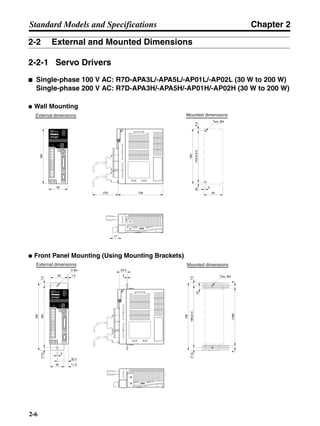
2-2 External and Mounted Dimensions
2-2-1 Servo Drivers
■ Single-phase 100 V AC: R7D-APA3L/-APA5L/-AP01L/-AP02L (30 W to 200 W)
Single-phase 200 V AC: R7D-APA3H/-APA5H/-AP01H/-AP02H (30 W to 200 W)
● Wall Mounting
● Front Panel Mounting (Using Mounting Brackets)
External dimensions Mounted dimensions
55
160
(75) 130
Two, M4
(5)
5
5.5
160
55
149.5±0.5
17
External dimensions Mounted dimensions
180
195
7.5(7.5)
180±0.5
195
7.5(7.5)
5 dia. 24.5
2 Two, M4
(168)
10
52
66
1.5
5
11.542
32.5
Chapter 2
2-7
Standard Models and Specifications
■ Single-phase 100 V AC: R7D-AP04L (400 W)
Single-phase 200 V AC: R7D-AP04H (400 W)
● Wall Mounting
● Front Panel Mounting (Using Mounting Brackets)
External dimensions Mounted dimensions
160
149.55.5(5)
5 dia.
5
12
75
(75) 130
17
Two, M4
149.5±0.5
160
5.5(5)
75
12
External dimensions Mounted dimensions
24.5
2
5 dia.
(7.5)
5
11.542
180
195
7.5
32.5
180±0.5
195
7.5(7.5)
Two, M4
10
52 1.5
(168)66
Chapter 2
2-8
Standard Models and Specifications
■ Single-phase/Three-phase 200 V AC: R7D-AP08H (750 W)
● Wall Mounting
● Front Panel Mounting (Using Mounting Brackets)
External dimensions Mounted dimensions
5 dia.
90
160
(75) 180
17
Two, M4
149.5±0.5
160
5.5(5)
90
27
149.55.5(5)
External dimensions Mounted dimensions
5 dia.
7.5(7.5)
5
42
24.5
2
180
195
180±0.5
195
7.5(7.5)
Two, M4
10
22.5
43.5
52 12.5
(168)66
Chapter 2
2-9
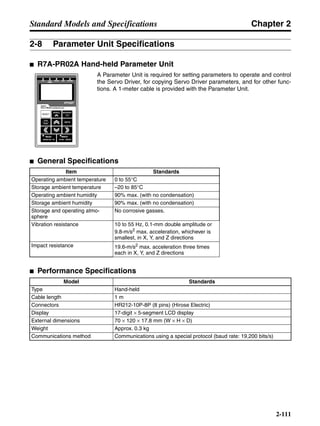
Standard Models and Specifications
2-2-2 Parameter Unit
■ R7A-PR02A Hand-held Parameter Unit
SCROLL MODE/SET
DATA
RESET
JOG
RUN
DRIVER PRDRIVER PR PR DRIVERPR DRIVER
READ WRITEWRITE
R7A–PR02A PARAMETER UNIT
B.BB.B INPINP
VCMPVCMP
TGONTGON REFREF POWERPOWER
70
120100042
6
13.2 dia.
17 0.8
1.5
4.8 dia.
Chapter 2
2-10
Standard Models and Specifications
2-2-3 Servomotors
■ Cylinder-style Servomotors without a Brake
● 30 W/50 W/100 W R7M-A03030(-S1)/-A05030(-S1)/-A10030(-S1)
■ Cylinder-style Servomotors with a Brake
● 30 W/50 W/100 W R7M-A03030-B(S1)/-A05030-B(S1)/-A10030-B(S1)
Model Dimensions (mm)
LL S b h t1
R7M-A03030-@ 69.5 6h6 2 2 1.2
R7M-A05030-@ 77 6h6 2 2 1.2
R7M-A10030-@ 94.5 8h6 3 3 1.8
Model Dimensions (mm)
LL S b h t1
R7M-A03030-B@ 101 6h6 2 2 1.2
R7M-A05030-B@ 108.5 6h6 2 2 1.2
R7M-A10030-B@ 135 8h6 3 3 1.8
Dimensions of shaft end with key (-S1)Two, 4.3 dia.
LL 25
405 2.5
Sdia.
30h7dia.
300±30
300±30
40 14
h
t1
b
6 dia. 7 dia.
9.5
19.5 20
11
21.5 5
46 dia.
Dimensions of shaft end with key (-BS1)
14
Two, 4.3 dia.
LL 25
405 2.5
Sdia.
30h7dia.
300±30
300±30
46 dia.
40
h
t1
b
6 dia. 7 dia.
9.5
19.5 27
11
21.5 5
Chapter 2
2-11
Standard Models and Specifications
■ Cylinder-style Servomotors without a Brake
● 200 W/400 W/750 W R7M-A20030(-S1)/-A40030(-S1)/-A75030(-S1)
■ Cylinder-style Servomotors with a Brake
● 200 W/400 W/750 W R7M-A20030-B(S1)/-A40030-B(S1)/-A75030-B(S1)
Model Dimensions (mm)
LL LR C D1 D2 G Z S QK
R7M-A20030-@ 96.5 30 60 70 50h7 6 5.5 14h6 20
R7M-A40030-@ 124.5 30 60 70 50h7 6 5.5 14h6 20
R7M-A75030-@ 145 40 80 90 70h7 8 7 16h6 30
Model Dimensions (mm)
LL LR C D1 D2 G Z S QK
R7M-A20030-B@ 136 30 60 70 50h7 6 5.5 14h6 20
R7M-A40030-B@ 164 30 60 70 50h7 6 5.5 14h6 20
R7M-A75030-B@ 189.5 40 80 90 70h7 8 7 16h6 30
Dimensions of output section of 750-W Servomotors
Dimensions of shaft end with key (-S1)
300±30
300±30
Sdia.
D2dia.
LL LR
G 3
C
C
Four, Z dia.
QK
2
5
5
3
6 dia.
7 dia.
20
11
13
9
21.5
D1 dia.
Dimensions of output section of
750-W Servomotors
Dimensions of shaft end with key (-BS1)
300±30
300±30
Sdia.
D2dia.
LL LR
G 3
C
C
Four, Z dia.
D1 dia.
6 dia. 7 dia.
21.5
9
13 27
11
QK
2
5
5
3
Chapter 2
2-12
Standard Models and Specifications
■ Flat-style Servomotors without a Brake
● 100 W/200 W/400 W/750 W R7M-AP10030(-S1)/-AP20030(-S1)/-AP40030(-S1)/AP75030(-S1)
■ Flat-style Servomotors with a Brake
● 100 W/200 W/400 W/750 W R7M-AP10030-B(S1)/-AP20030-B(S1)/-AP40030-B(S1)/AP75030-B(S1)
Model Dimensions (mm)
Basic servomotor dimensions With key (shaft
end dimensions)
Cable outlet dimensions
LL LR C D1 D2 F G Z S QK b h t1 A1 A2 A3 A4 A5
R7M-AP10030-@ 62 25 60 70 50h7 3 6 5.5 8h6 14 3 3 1.8 9 18 25 21 14
R7M-AP20030-@ 67 30 80 90 70h7 3 8 7 14h6 16 5 5 3
R7M-AP40030-@ 87
R7M-AP75030-@ 86.5 40 120 145 110h7 3.5 10 10 16h6 22 5 5 3 28 38 19
Model Dimensions (mm)
Basic servomotor dimensions With key (shaft
end dimensions)
Cable outlet dimensions
LL LR C D1 D2 F G Z S QK b h t1 A1 A2 A3 A4 A5
R7M-AP10030-B@ 91 25 60 70 50h7 3 6 5.5 8h6 14 3 3 1.8 9 18 25 21 23
R7M-AP20030-B@ 98.5 30 80 90 70h7 3 8 7 14h6 16 5 5 3
R7M-AP40030-B@ 118.5
R7M-AP75030-B@ 120 40 120 145 110h7 3.5 10 10 16h6 22 5 5 3 28 38 26
Dimensions of shaft end with key (-S1)
G F
LL LR
Sdia.
D2dia.
C
C
300±30
300±30
Four, Z dia.
QK
h
t1
b
6dia.7dia.
A1
A2
13
A5
A3
A4
D1 dia.
Dimensions of shaft end with key (-BS1)
G F
LL LR
Sdia.
D2dia.
300±30
300±30
C
C Four, Z dia.
D1 dia.
QK
h
t1
b
6dia.7dia.
A3
A4
A1
13
A2
A5
Chapter 2
2-13
Standard Models and Specifications
2-2-4 Reduction Gears
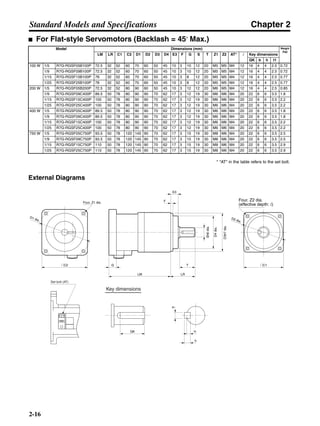
■ For Cylinder-style Servomotors (Backlash = 3′ Max.)
* "AT" in the table refers to the set bolt.
External Diagrams
Model Dimensions (mm) Weight
(kg)
LM LR C1 C2 D1 D2 D3 D4 E3 F G S T Z1 Z2 AT* l Key dimensions
QK b h t1
50 W 1/5 R7G-VRSFPB05B50 67.5 32 52 40 46 60 50 45 10 3 6 12 20 M4 M5 M3 12 16 4 4 2.5 0.55
1/9 R7G-VRSFPB09B50 67.5 32 52 40 46 60 50 45 10 3 6 12 20 M4 M5 M3 12 16 4 4 2.5 0.55
1/15 R7G-VRSFPB15B50 78 32 52 40 46 60 50 45 10 3 6 12 20 M4 M5 M3 12 16 4 4 2.5 0.7
1/25 R7G-VRSFPB25B50 78 32 52 40 46 60 50 45 10 3 6 12 20 M4 M5 M3 12 16 4 4 2.5 0.7
100 W 1/5 R7G-VRSFPB05B100 67.5 32 52 40 46 60 50 45 10 3 6 12 20 M4 M5 M3 12 16 4 4 2.5 0.55
1/9 R7G-VRSFPB09B100 67.5 32 52 40 46 60 50 45 10 3 6 12 20 M4 M5 M3 12 16 4 4 2.5 0.55
1/15 R7G-VRSFPB15B100 78 32 52 40 46 60 50 45 10 3 6 12 20 M4 M5 M3 12 16 4 4 2.5 0.7
1/25 R7G-VRSFPB25C100 92 50 78 40 46 90 70 62 17 3 6 19 30 M4 M6 M3 20 22 6 6 3.5 1.7
200 W 1/5 R7G-VRSFPB05B200 72.5 32 52 60 70 60 50 45 10 3 10 12 20 M5 M5 M4 12 16 4 4 2.5 0.72
1/9 R7G-VRSFPB09C400 89.5 50 78 60 70 90 70 62 17 3 8 19 30 M5 M6 M4 20 22 6 6 3.5 1.7
1/15 R7G-VRSFPB15C400 100 50 78 60 70 90 70 62 17 3 8 19 30 M5 M6 M4 20 22 6 6 3.5 2.1
1/25 R7G-VRSFPB25C400 100 50 78 60 70 90 70 62 17 3 8 19 30 M5 M6 M4 20 22 6 6 3.5 2.1
400 W 1/5 R7G-VRSFPB05C400 89.5 50 78 60 70 90 70 62 17 3 8 19 30 M5 M6 M4 20 22 6 6 3.5 1.7
1/9 R7G-VRSFPB09C400 89.5 50 78 60 70 90 70 62 17 3 8 19 30 M5 M6 M4 20 22 6 6 3.5 1.7
1/15 R7G-VRSFPB15C400 100 50 78 60 70 90 70 62 17 3 8 19 30 M5 M6 M4 20 22 6 6 3.5 2.1
1/25 R7G-VRSFPB25D400 104 61 98 60 70 115 90 75 18 5 8 24 40 M5 M8 M4 20 30 8 7 4 3.2
750 W 1/5 R7G-VRSFPB05C750 93.5 50 78 80 90 90 70 62 17 3 10 19 30 M6 M6 M4 20 22 6 6 3.5 2.1
1/9 R7G-VRSFPB09D750 97.5 61 98 80 90 115 90 75 18 5 10 24 40 M6 M8 M4 20 30 8 7 4 3.4
1/15 R7G-VRSFPB15D750 110 61 98 80 90 115 90 75 18 5 10 24 40 M6 M8 M4 20 30 8 7 4 3.8
1/25 R7G-VRSFPB25E750 135 75 125 80 90 135 110 98 17 5 10 32 55 M6 M10 M4 20 45 10 8 5 7.2
Key dimensions
QK
b
h
t1
D1 dia.
Four, Z1 dia.
@C2
LM
G
LR
T
F
E3
D4dia.
D3h7dia.
Sh6dia.
@C1
D2 dia.
Set bolt (AT)
Four, Z2 dia.
(effective depth: l)
Chapter 2
2-14
Standard Models and Specifications
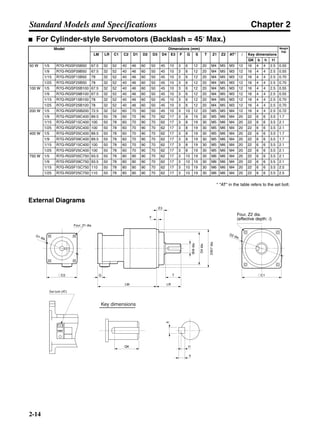
■ For Cylinder-style Servomotors (Backlash = 45′ Max.)
* "AT" in the table refers to the set bolt.
External Diagrams
Model Dimensions (mm) Weight
(kg)
LM LR C1 C2 D1 D2 D3 D4 E3 F G S T Z1 Z2 AT* l Key dimensions
QK b h t1
50 W 1/5 R7G-RGSF05B50 67.5 32 52 40 46 60 50 45 10 3 6 12 20 M4 M5 M3 12 16 4 4 2.5 0.55
1/9 R7G-RGSF09B50 67.5 32 52 40 46 60 50 45 10 3 6 12 20 M4 M5 M3 12 16 4 4 2.5 0.55
1/15 R7G-RGSF15B50 78 32 52 40 46 60 50 45 10 3 6 12 20 M4 M5 M3 12 16 4 4 2.5 0.70
1/25 R7G-RGSF25B50 78 32 52 40 46 60 50 45 10 3 6 12 20 M4 M5 M3 12 16 4 4 2.5 0.70
100 W 1/5 R7G-RGSF05B100 67.5 32 52 40 46 60 50 45 10 3 6 12 20 M4 M5 M3 12 16 4 4 2.5 0.55
1/9 R7G-RGSF09B100 67.5 32 52 40 46 60 50 45 10 3 6 12 20 M4 M5 M3 12 16 4 4 2.5 0.55
1/15 R7G-RGSF15B100 78 32 52 40 46 60 50 45 10 3 6 12 20 M4 M5 M3 12 16 4 4 2.5 0.70
1/25 R7G-RGSF25B100 78 32 52 40 46 60 50 45 10 3 6 12 20 M4 M5 M3 12 16 4 4 2.5 0.70
200 W 1/5 R7G-RGSF05B200 72.5 32 52 60 70 60 50 45 10 3 10 12 20 M5 M5 M4 12 16 4 4 2.5 0.72
1/9 R7G-RGSF09C400 89.5 50 78 60 70 90 70 62 17 3 8 19 30 M5 M6 M4 20 22 6 6 3.5 1.7
1/15 R7G-RGSF15C400 100 50 78 60 70 90 70 62 17 3 8 19 30 M5 M6 M4 20 22 6 6 3.5 2.1
1/25 R7G-RGSF25C400 100 50 78 60 70 90 70 62 17 3 8 19 30 M5 M6 M4 20 22 6 6 3.5 2.1
400 W 1/5 R7G-RGSF05C400 89.5 50 78 60 70 90 70 62 17 3 8 19 30 M5 M6 M4 20 22 6 6 3.5 1.7
1/9 R7G-RGSF09C400 89.5 50 78 60 70 90 70 62 17 3 8 19 30 M5 M6 M4 20 22 6 6 3.5 1.7
1/15 R7G-RGSF15C400 100 50 78 60 70 90 70 62 17 3 8 19 30 M5 M6 M4 20 22 6 6 3.5 2.1
1/25 R7G-RGSF25C400 100 50 78 60 70 90 70 62 17 3 8 19 30 M5 M6 M4 20 22 6 6 3.5 2.1
750 W 1/5 R7G-RGSF05C750 93.5 50 78 80 90 90 70 62 17 3 10 19 30 M6 M6 M4 20 22 6 6 3.5 2.1
1/9 R7G-RGSF09C750 93.5 50 78 80 90 90 70 62 17 3 10 19 30 M6 M6 M4 20 22 6 6 3.5 2.1
1/15 R7G-RGSF15C750 110 50 78 80 90 90 70 62 17 3 10 19 30 M6 M6 M4 20 22 6 6 3.5 2.5
1/25 R7G-RGSF25C750 110 50 78 80 90 90 70 62 17 3 10 19 30 M6 M6 M4 20 22 6 6 3.5 2.5
Key dimensions
QK
b
h
t1
D1 dia.
Four, Z1 dia.
@C2
LM
G
LR
T
F
E3
D4dia.
D3h7dia.
Sh6dia.
@C1
D2 dia.
Set bolt (AT)
Four, Z2 dia.
(effective depth: l)
Chapter 2
2-15
Standard Models and Specifications
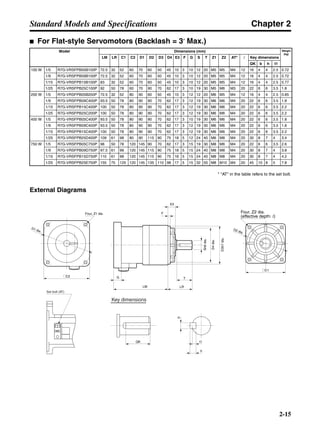
■ For Flat-style Servomotors (Backlash = 3′ Max.)
* "AT" in the table refers to the set bolt.
External Diagrams
Model Dimensions (mm) Weight
(kg)
LM LR C1 C2 D1 D2 D3 D4 E3 F G S T Z1 Z2 AT* l Key dimensions
QK b h t1
100 W 1/5 R7G-VRSFPB05B100P 72.5 32 52 60 70 60 50 45 10 3 10 12 20 M5 M5 M4 12 16 4 4 2.5 0.72
1/9 R7G-VRSFPB09B100P 72.5 32 52 60 70 60 50 45 10 3 10 12 20 M5 M5 M4 12 16 4 4 2.5 0.72
1/15 R7G-VRSFPB15B100P 83 32 52 60 70 60 50 45 10 3 10 12 20 M5 M5 M4 12 16 4 4 2.5 0.77
1/25 R7G-VRSFPB25C100P 92 50 78 60 70 90 70 62 17 3 10 19 30 M5 M6 M3 20 22 6 6 3.5 1.8
200 W 1/5 R7G-VRSFPB05B200P 72.5 32 52 80 90 60 50 45 10 3 12 12 20 M6 M5 M4 12 16 4 4 2.5 0.85
1/9 R7G-VRSFPB09C400P 93.5 50 78 80 90 90 70 62 17 3 12 19 30 M6 M6 M4 20 22 6 6 3.5 1.8
1/15 R7G-VRSFPB15C400P 100 50 78 80 90 90 70 62 17 3 12 19 30 M6 M6 M4 20 22 6 6 3.5 2.2
1/25 R7G-VRSFPB25C200P 100 50 78 80 90 90 70 62 17 3 12 19 30 M6 M6 M4 20 22 6 6 3.5 2.2
400 W 1/5 R7G-VRSFPB05C400P 93.5 50 78 80 90 90 70 62 17 3 10 19 30 M6 M6 M4 20 22 6 6 3.5 1.8
1/9 R7G-VRSFPB09C400P 93.5 50 78 80 90 90 70 62 17 3 12 19 30 M6 M6 M4 20 22 6 6 3.5 1.8
1/15 R7G-VRSFPB15C400P 100 50 78 80 90 90 70 62 17 3 12 19 30 M6 M6 M4 20 22 6 6 3.5 2.2
1/25 R7G-VRSFPB25D400P 109 61 98 80 90 115 90 75 18 5 12 24 40 M6 M8 M4 20 30 8 7 4 3.4
750 W 1/5 R7G-VRSFPB05C750P 98 50 78 120 145 90 70 62 17 3 15 19 30 M8 M6 M4 20 22 6 6 3.5 2.6
1/9 R7G-VRSFPB09D750P 97.5 61 98 120 145 115 90 75 18 5 15 24 40 M8 M8 M4 20 30 8 7 4 3.8
1/15 R7G-VRSFPB15D750P 110 61 98 120 145 115 90 75 18 5 15 24 40 M8 M8 M4 20 30 8 7 4 4.2
1/25 R7G-VRSFPB25E750P 155 75 125 120 145 135 110 98 17 5 15 32 55 M8 M10 M4 20 45 10 8 5 7.8
Key dimensions
QK
b
h
t1
LM
G
D1 dia.
Four, Z1 dia.
@C2
@C1
D2 dia.
LR
T
F
E3
D4dia.
D3h7dia.
Sh6dia.
Set bolt (AT)
Four, Z2 dia.
(effective depth: l)
Chapter 2
2-16
Standard Models and Specifications
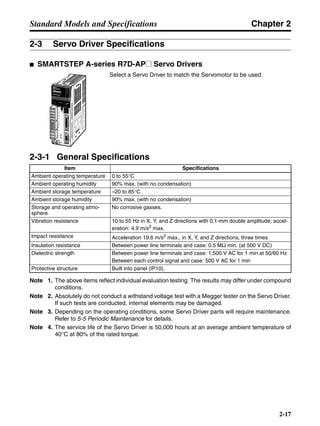
■ For Flat-style Servomotors (Backlash = 45′ Max.)
* "AT" in the table refers to the set bolt.
External Diagrams
Model Dimensions (mm) Weight
(kg)
LM LR C1 C2 D1 D2 D3 D4 E3 F G S T Z1 Z2 AT* l Key dimensions
QK b h t1
100 W 1/5 R7G-RGSF05B100P 72.5 32 52 60 70 60 50 45 10 3 10 12 20 M5 M5 M4 12 16 4 4 2.5 0.72
1/9 R7G-RGSF09B100P 72.5 32 52 60 70 60 50 45 10 3 10 12 20 M5 M5 M4 12 16 4 4 2.5 0.72
1/15 R7G-RGSF15B100P 78 32 52 60 70 60 50 45 10 3 8 12 20 M5 M5 M4 12 16 4 4 2.5 0.77
1/25 R7G-RGSF25B100P 78 32 52 60 70 60 50 45 10 3 8 12 20 M5 M5 M4 12 16 4 4 2.5 0.77
200 W 1/5 R7G-RGSF05B200P 72.5 32 52 80 90 60 50 45 10 3 12 12 20 M6 M5 M4 12 16 4 4 2.5 0.85
1/9 R7G-RGSF09C400P 89.5 50 78 80 90 90 70 62 17 3 12 19 30 M6 M6 M4 20 22 6 6 3.5 1.8
1/15 R7G-RGSF15C400P 100 50 78 80 90 90 70 62 17 3 12 19 30 M6 M6 M4 20 22 6 6 3.5 2.2
1/25 R7G-RGSF25C400P 100 50 78 80 90 90 70 62 17 3 12 19 30 M6 M6 M4 20 22 6 6 3.5 2.2
400 W 1/5 R7G-RGSF05C400P 89.5 50 78 80 90 90 70 62 17 3 12 19 30 M6 M6 M4 20 22 6 6 3.5 1.8
1/9 R7G-RGSF09C400P 89.5 50 78 80 90 90 70 62 17 3 12 19 30 M6 M6 M4 20 22 6 6 3.5 1.8
1/15 R7G-RGSF15C400P 100 50 78 80 90 90 70 62 17 3 12 19 30 M6 M6 M4 20 22 6 6 3.5 2.2
1/25 R7G-RGSF25C400P 100 50 78 80 90 90 70 62 17 3 12 19 30 M6 M6 M4 20 22 6 6 3.5 2.2
750 W 1/5 R7G-RGSF05C750P 93.5 50 78 120 145 90 70 62 17 3 15 19 30 M8 M6 M4 20 22 6 6 3.5 2.5
1/9 R7G-RGSF09C750P 93.5 50 78 120 145 90 70 62 17 3 15 19 30 M8 M6 M4 20 22 6 6 3.5 2.5
1/15 R7G-RGSF15C750P 110 50 78 120 145 90 70 62 17 3 15 19 30 M8 M6 M4 20 22 6 6 3.5 2.9
1/25 R7G-RGSF25C750P 110 50 78 120 145 90 70 62 17 3 15 19 30 M8 M6 M4 20 22 6 6 3.5 2.9
Key dimensions
QK
b
h
t1
LM
G
LR
T
F
E3
D4dia.
D3h7dia.
Sh6dia.
@C1
D2 dia.
D1 dia.
Four, Z1 dia.
@C2
Set bolt (AT)
Four, Z2 dia.
(effective depth: l)
Chapter 2
2-17
Standard Models and Specifications
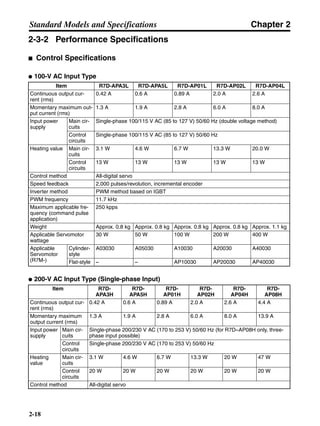
2-3 Servo Driver Specifications
■ SMARTSTEP A-series R7D-AP@ Servo Drivers
Select a Servo Driver to match the Servomotor to be used.
2-3-1 General Specifications
Note 1. The above items reflect individual evaluation testing. The results may differ under compound
conditions.
Note 2. Absolutely do not conduct a withstand voltage test with a Megger tester on the Servo Driver.
If such tests are conducted, internal elements may be damaged.
Note 3. Depending on the operating conditions, some Servo Driver parts will require maintenance.
Refer to 5-5 Periodic Maintenance for details.
Note 4. The service life of the Servo Driver is 50,000 hours at an average ambient temperature of
40°C at 80% of the rated torque.
Item Specifications
Ambient operating temperature 0 to 55°C
Ambient operating humidity 90% max. (with no condensation)
Ambient storage temperature –20 to 85°C
Ambient storage humidity 90% max. (with no condensation)
Storage and operating atmo-
sphere
No corrosive gasses.
Vibration resistance 10 to 55 Hz in X, Y, and Z directions with 0.1-mm double amplitude; accel-
eration: 4.9 m/s2
max.
Impact resistance Acceleration 19.6 m/s2
max., in X, Y, and Z directions, three times
Insulation resistance Between power line terminals and case: 0.5 MΩ min. (at 500 V DC)
Dielectric strength Between power line terminals and case: 1,500 V AC for 1 min at 50/60 Hz
Between each control signal and case: 500 V AC for 1 min
Protective structure Built into panel (IP10).
Chapter 2
2-18
Standard Models and Specifications
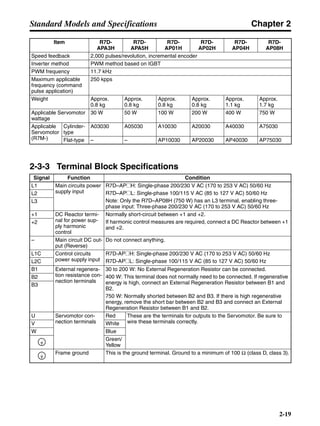
2-3-2 Performance Specifications
■ Control Specifications
● 100-V AC Input Type
● 200-V AC Input Type (Single-phase Input)
Item R7D-APA3L R7D-APA5L R7D-AP01L R7D-AP02L R7D-AP04L
Continuous output cur-
rent (rms)
0.42 A 0.6 A 0.89 A 2.0 A 2.6 A
Momentary maximum out-
put current (rms)
1.3 A 1.9 A 2.8 A 6.0 A 8.0 A
Input power
supply
Main cir-
cuits
Single-phase 100/115 V AC (85 to 127 V) 50/60 Hz (double voltage method)
Control
circuits
Single-phase 100/115 V AC (85 to 127 V) 50/60 Hz
Heating value Main cir-
cuits
3.1 W 4.6 W 6.7 W 13.3 W 20.0 W
Control
circuits
13 W 13 W 13 W 13 W 13 W
Control method All-digital servo
Speed feedback 2,000 pulses/revolution, incremental encoder
Inverter method PWM method based on IGBT
PWM frequency 11.7 kHz
Maximum applicable fre-
quency (command pulse
application)
250 kpps
Weight Approx. 0.8 kg Approx. 0.8 kg Approx. 0.8 kg Approx. 0.8 kg Approx. 1.1 kg
Applicable Servomotor
wattage
30 W 50 W 100 W 200 W 400 W
Applicable
Servomotor
(R7M-)
Cylinder-
style
A03030 A05030 A10030 A20030 A40030
Flat-style – – AP10030 AP20030 AP40030
Item R7D-
APA3H
R7D-
APA5H
R7D-
AP01H
R7D-
AP02H
R7D-
AP04H
R7D-
AP08H
Continuous output cur-
rent (rms)
0.42 A 0.6 A 0.89 A 2.0 A 2.6 A 4.4 A
Momentary maximum
output current (rms)
1.3 A 1.9 A 2.8 A 6.0 A 8.0 A 13.9 A
Input power
supply
Main cir-
cuits
Single-phase 200/230 V AC (170 to 253 V) 50/60 Hz (for R7D–AP08H only, three-
phase input possible)
Control
circuits
Single-phase 200/230 V AC (170 to 253 V) 50/60 Hz
Heating
value
Main cir-
cuits
3.1 W 4.6 W 6.7 W 13.3 W 20 W 47 W
Control
circuits
20 W 20 W 20 W 20 W 20 W 20 W
Control method All-digital servo
Chapter 2
2-19
Standard Models and Specifications
2-3-3 Terminal Block Specifications
Speed feedback 2,000 pulses/revolution, incremental encoder
Inverter method PWM method based on IGBT
PWM frequency 11.7 kHz
Maximum applicable
frequency (command
pulse application)
250 kpps
Weight Approx.
0.8 kg
Approx.
0.8 kg
Approx.
0.8 kg
Approx.
0.8 kg
Approx.
1.1 kg
Approx.
1.7 kg
Applicable Servomotor
wattage
30 W 50 W 100 W 200 W 400 W 750 W
Applicable
Servomotor
(R7M-)
Cylinder-
type
A03030 A05030 A10030 A20030 A40030 A75030
Flat-type – – AP10030 AP20030 AP40030 AP75030
Signal Function Condition
L1 Main circuits power
supply input
R7D–AP@H: Single-phase 200/230 V AC (170 to 253 V AC) 50/60 Hz
R7D–AP@L: Single-phase 100/115 V AC (85 to 127 V AC) 50/60 Hz
Note: Only the R7D–AP08H (750 W) has an L3 terminal, enabling three-
phase input: Three-phase 200/230 V AC (170 to 253 V AC) 50/60 Hz
L2
L3
+1 DC Reactor termi-
nal for power sup-
ply harmonic
control
Normally short-circuit between +1 and +2.
If harmonic control measures are required, connect a DC Reactor between +1
and +2.
+2
– Main circuit DC out-
put (Reverse)
Do not connect anything.
L1C Control circuits
power supply input
R7D-AP@H: Single-phase 200/230 V AC (170 to 253 V AC) 50/60 Hz
R7D-AP@L: Single-phase 100/115 V AC (85 to 127 V AC) 50/60 HzL2C
B1 External regenera-
tion resistance con-
nection terminals
30 to 200 W: No External Regeneration Resistor can be connected.
400 W: This terminal does not normally need to be connected. If regenerative
energy is high, connect an External Regeneration Resistor between B1 and
B2.
750 W: Normally shorted between B2 and B3. If there is high regenerative
energy, remove the short bar between B2 and B3 and connect an External
Regeneration Resistor between B1 and B2.
B2
B3
U Servomotor con-
nection terminals
Red These are the terminals for outputs to the Servomotor. Be sure to
wire these terminals correctly.V White
W Blue
Green/
Yellow
Frame ground This is the ground terminal. Ground to a minimum of 100 Ω (class D, class 3).
Item R7D-
APA3H
R7D-
APA5H
R7D-
AP01H
R7D-
AP02H
R7D-
AP04H
R7D-
AP08H
Chapter 2
2-20
Standard Models and Specifications
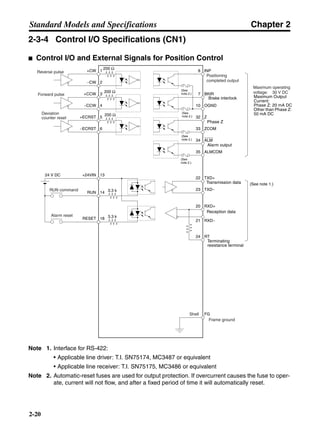
2-3-4 Control I/O Specifications (CN1)
■ Control I/O and External Signals for Position Control
Note 1. Interface for RS-422:
• Applicable line driver: T.I. SN75174, MC3487 or equivalent
• Applicable line receiver: T.I. SN75175, MC3486 or equivalent
Note 2. Automatic-reset fuses are used for output protection. If overcurrent causes the fuse to oper-
ate, current will not flow, and after a fixed period of time it will automatically reset.
Maximum operating
voltage: 30 V DC
RUN command
Alarm reset
Reverse pulse
Forward pulse
Deviation
counter reset
Positioning
completed output
Frame ground
Shell
200 Ω
4
5
6
200 Ω
200 Ω
+CW
−CW
+CCW
−CCW
+ECRST
−ECRST
1
2
3
INP8
OGND
BKIR7
10
18RESET
3.3 k14RUN
13+24VIN24 V DC
FG
(See note 1.)
3.3 k
ZCOM
Z32
33
ALMCOM
ALM34
35
22
23 TXD−
TXD+
20 RXD+
21 RXD−
24 RT
(See
note 2.)
(See
note 2.)
(See
note 2.)
(See
note 2.)
Maximum Output
Current:
Phase Z: 20 mA DC
Other than Phase Z:
50 mA DC
Brake interlock
Phase Z
Alarm output
Transmission data
Reception data
Terminating
resistance terminal
Chapter 2
2-21
Standard Models and Specifications
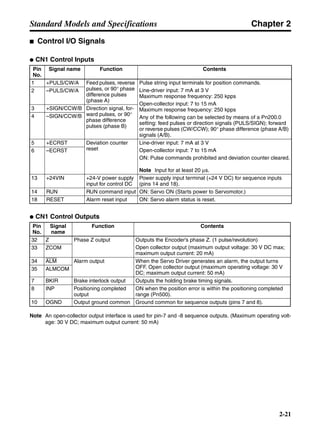
■ Control I/O Signals
● CN1 Control Inputs
● CN1 Control Outputs
Note An open-collector output interface is used for pin-7 and -8 sequence outputs. (Maximum operating volt-
age: 30 V DC; maximum output current: 50 mA)
Pin
No.
Signal name Function Contents
1 +PULS/CW/A Feed pulses, reverse
pulses, or 90° phase
difference pulses
(phase A)
Pulse string input terminals for position commands.
Line-driver input: 7 mA at 3 V
Maximum response frequency: 250 kpps
Open-collector input: 7 to 15 mA
Maximum response frequency: 250 kpps
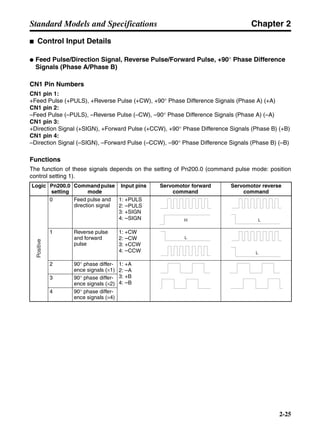
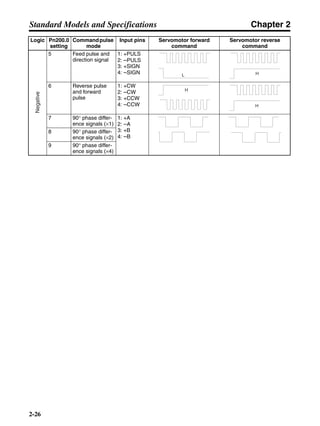
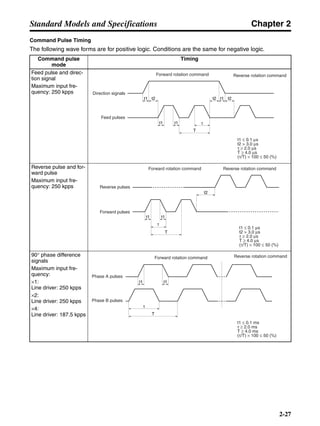
Any of the following can be selected by means of a Pn200.0
setting: feed pulses or direction signals (PULS/SIGN); forward
or reverse pulses (CW/CCW); 90° phase difference (phase A/B)
signals (A/B).
2 –PULS/CW/A
3 +SIGN/CCW/B Direction signal, for-
ward pulses, or 90°
phase difference
pulses (phase B)
4 –SIGN/CCW/B
5 +ECRST Deviation counter
reset
Line-driver input: 7 mA at 3 V
Open-collector input: 7 to 15 mA
ON: Pulse commands prohibited and deviation counter cleared.
Note Input for at least 20 µs.
6 –ECRST
13 +24VIN +24-V power supply
input for control DC
Power supply input terminal (+24 V DC) for sequence inputs
(pins 14 and 18).
14 RUN RUN command input ON: Servo ON (Starts power to Servomotor.)
18 RESET Alarm reset input ON: Servo alarm status is reset.
Pin
No.
Signal
name
Function Contents
32 Z Phase Z output Outputs the Encoder’s phase Z. (1 pulse/revolution)
Open collector output (maximum output voltage: 30 V DC max;
maximum output current: 20 mA)
33 ZCOM
34 ALM Alarm output When the Servo Driver generates an alarm, the output turns
OFF. Open collector output (maximum operating voltage: 30 V
DC; maximum output current: 50 mA)
35 ALMCOM
7 BKIR Brake interlock output Outputs the holding brake timing signals.
8 INP Positioning completed
output
ON when the position error is within the positioning completed
range (Pn500).
10 OGND Output ground common Ground common for sequence outputs (pins 7 and 8).
Chapter 2
2-22
Standard Models and Specifications
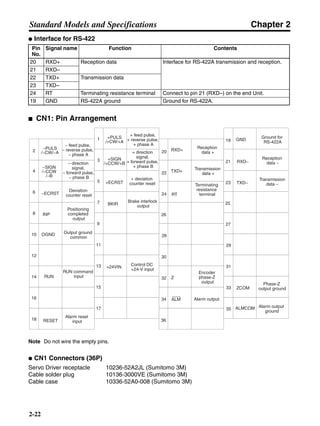
● Interface for RS-422
■ CN1: Pin Arrangement
Note Do not wire the empty pins.
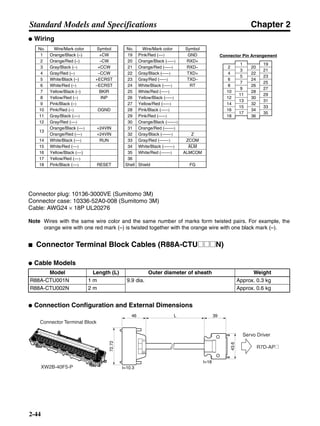
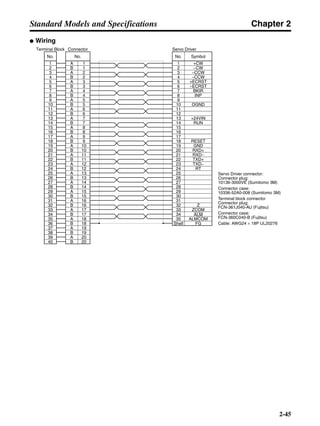
● CN1 Connectors (36P)
Servo Driver receptacle 10236-52A2JL (Sumitomo 3M)
Cable solder plug 10136-3000VE (Sumitomo 3M)
Cable case 10336-52A0-008 (Sumitomo 3M)
Pin
No.
Signal name Function Contents
20 RXD+ Reception data Interface for RS-422A transmission and reception.
21 RXD–
22 TXD+ Transmission data
23 TXD–
24 RT Terminating resistance terminal Connect to pin 21 (RXD–) on the end Unit.
19 GND RS-422A ground Ground for RS-422A.
2
4
6
8
−PULS
/−CW/−A
10 OGND
12
−SIGN
/−CCW
/−B
14
−ECRST
16
18
1
3
5
7
+PULS
/+CW/+A
9
11
+SIGN
/+CCW/+B
13
15
+ECRST
17
28
RXD+
29
TXD+
33
35
31
ALM
ALMCOM
RUN
− feed pulse,
− reverse pulse,
− phase A
Output ground
common
− direction
signal,
− forward pulse,
− phase B
Deviation
counter reset
+ feed pulse,
+ reverse pulse,
+ phase A
+ direction
signal,
+ forward pulse,
+ phase B
Reception
data +
Transmission
data +
Alarm output
Alarm output
ground
RUN command
input Z
Encoder
phase-Z
output
20
22
24
26INP
+ deviation
counter reset
Positioning
completed
output
+24VIN
Control DC
+24-V input
36RESET
Alarm reset
input
BKIR
Brake interlock
output
RT
Terminating
resistance
terminal
27
19
21
23
25
32
34
30
GND
Ground for
RS-422A
RXD−
TXD−
Transmission
data −
Reception
data −
ZCOM
Phase-Z
output ground
Chapter 2
2-23
Standard Models and Specifications
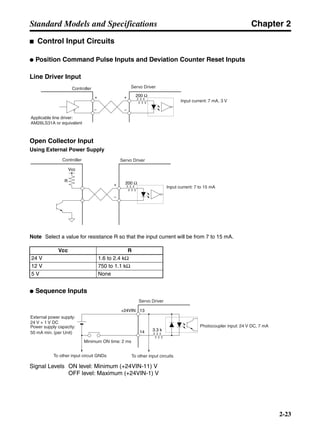
■ Control Input Circuits
● Position Command Pulse Inputs and Deviation Counter Reset Inputs
Line Driver Input
Open Collector Input
Using External Power Supply
Note Select a value for resistance R so that the input current will be from 7 to 15 mA.
● Sequence Inputs
Signal Levels ON level: Minimum (+24VIN-11) V
OFF level: Maximum (+24VIN-1) V
Vcc R
24 V 1.6 to 2.4 kΩ
12 V 750 to 1.1 kΩ
5 V None
Controller Servo Driver
Applicable line driver:
AM26LS31A or equivalent
Input current: 7 mA, 3 V
200 Ω+
−
+
−
Controller Servo Driver
Input current: 7 to 15 mA
200 Ω+
−
Vcc
R
External power supply:
24 V + 1 V DC
Power supply capacity:
50 mA min. (per Unit)
To other input circuit GNDs To other input circuits
Photocoupler input: 24 V DC, 7 mA
Servo Driver
13+24VIN
14 3.3 k
Minimum ON time: 2 ms
Chapter 2
2-24
Standard Models and Specifications
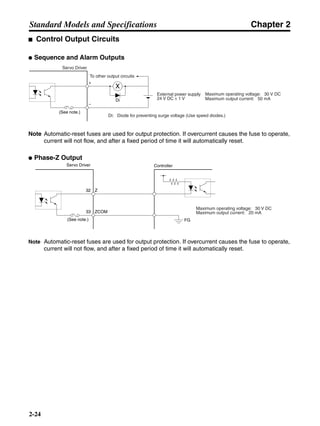
■ Control Output Circuits
● Sequence and Alarm Outputs
Note Automatic-reset fuses are used for output protection. If overcurrent causes the fuse to operate,
current will not flow, and after a fixed period of time it will automatically reset.
● Phase-Z Output
Note Automatic-reset fuses are used for output protection. If overcurrent causes the fuse to operate,
current will not flow, and after a fixed period of time it will automatically reset.
To other output circuits
Di: Diode for preventing surge voltage (Use speed diodes.)
External power supply
24 V DC ± 1 V
Maximum operating voltage: 30 V DC
Maximum output current: 50 mA
Servo Driver
+
−
X
Di
(See note.)
Maximum operating voltage: 30 V DC
Maximum output current: 20 mA
(See note.) FG
ZCOM
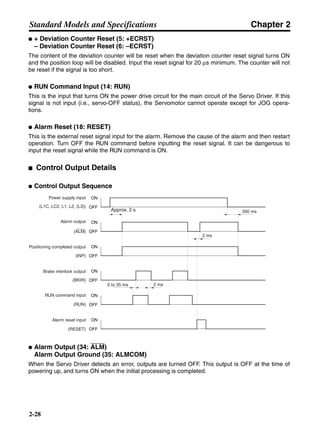
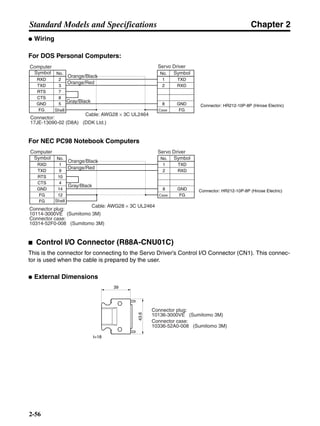
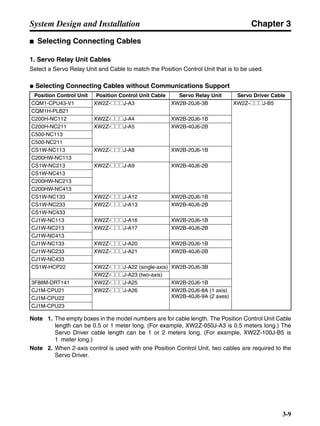
Z32
33
Servo Driver Controller
Chapter 2
2-25
Standard Models and Specifications
■ Control Input Details
● Feed Pulse/Direction Signal, Reverse Pulse/Forward Pulse, +90° Phase Difference
Signals (Phase A/Phase B)
CN1 Pin Numbers
CN1 pin 1:
+Feed Pulse (+PULS), +Reverse Pulse (+CW), +90° Phase Difference Signals (Phase A) (+A)
CN1 pin 2:
–Feed Pulse (–PULS), –Reverse Pulse (–CW), –90° Phase Difference Signals (Phase A) (–A)
CN1 pin 3:
+Direction Signal (+SIGN), +Forward Pulse (+CCW), +90° Phase Difference Signals (Phase B) (+B)
CN1 pin 4:
–Direction Signal (–SIGN), –Forward Pulse (–CCW), –90° Phase Difference Signals (Phase B) (–B)
Functions
The function of these signals depends on the setting of Pn200.0 (command pulse mode: position
control setting 1).
Logic Pn200.0
setting
Commandpulse
mode
Input pins Servomotor forward
command
Servomotor reverse
command
0 Feed pulse and
direction signal
1: +PULS
2: –PULS
3: +SIGN
4: –SIGN
1 Reverse pulse
and forward
pulse
1: +CW
2: –CW
3: +CCW
4: –CCW
2 90° phase differ-
ence signals (×1)
1: +A
2: –A
3: +B
4: –B
3 90° phase differ-
ence signals (×2)
4 90° phase differ-
ence signals (×4)
Positive
H L
L
L
Chapter 2
2-26
Standard Models and Specifications
5 Feed pulse and
direction signal
1: +PULS
2: –PULS
3: +SIGN
4: –SIGN
6 Reverse pulse
and forward
pulse
1: +CW
2: –CW
3: +CCW
4: –CCW
7 90° phase differ-
ence signals (×1)
1: +A
2: –A
3: +B
4: –B
8 90° phase differ-
ence signals (×2)
9 90° phase differ-
ence signals (×4)
Logic Pn200.0
setting
Commandpulse
mode
Input pins Servomotor forward
command
Servomotor reverse
command
Negative
L H
H
H
Chapter 2
2-27
Standard Models and Specifications
Command Pulse Timing
The following wave forms are for positive logic. Conditions are the same for negative logic.
Command pulse
mode
Timing
Feed pulse and direc-
tion signal
Maximum input fre-
quency: 250 kpps
Reverse pulse and for-
ward pulse
Maximum input fre-
quency: 250 kpps
90° phase difference
signals
Maximum input fre-
quency:
×1:
Line driver: 250 kpps
×2:
Line driver: 250 kpps
×4:
Line driver: 187.5 kpps
Direction signals
Feed pulses
Forward rotation command Reverse rotation command
t1 ≤ 0.1 µs
t2 > 3.0 µs
τ ≥ 2.0 µs
T ≥ 4.0 µs
(τ/T) × 100 ≤ 50 (%)
t1 t1t2 t2 t2
t1 t1
T
τ
Reverse pulses
Forward pulses
Forward rotation command Reverse rotation command
t1 ≤ 0.1 µs
t2 > 3.0 µs
τ ≥ 2.0 µs
T ≥ 4.0 µs
(τ/T) × 100 ≤ 50 (%)
T
τ
t2
t1 t1
Phase A pulses
Phase B pulses
Forward rotation command Reverse rotation command
t1 ≤ 0.1 ms
τ ≥ 2.0 ms
T ≥ 4.0 ms
(τ/T) × 100 ≤ 50 (%)
t1 t1
T
τ
Chapter 2
2-28
Standard Models and Specifications
● + Deviation Counter Reset (5: +ECRST)
– Deviation Counter Reset (6: –ECRST)
The content of the deviation counter will be reset when the deviation counter reset signal turns ON
and the position loop will be disabled. Input the reset signal for 20 µs minimum. The counter will not
be reset if the signal is too short.
● RUN Command Input (14: RUN)
This is the input that turns ON the power drive circuit for the main circuit of the Servo Driver. If this
signal is not input (i.e., servo-OFF status), the Servomotor cannot operate except for JOG opera-
tions.
● Alarm Reset (18: RESET)
This is the external reset signal input for the alarm. Remove the cause of the alarm and then restart
operation. Turn OFF the RUN command before inputting the reset signal. It can be dangerous to
input the reset signal while the RUN command is ON.
■ Control Output Details
● Control Output Sequence
● Alarm Output (34: ALM)
Alarm Output Ground (35: ALMCOM)
When the Servo Driver detects an error, outputs are turned OFF. This output is OFF at the time of
powering up, and turns ON when the initial processing is completed.
Power supply input
(L1C, LC2, L1, L2, (L3))
Alarm output
(ALM)
Brake interlock output
(BKIR)
RUN command input
(RUN)
Alarm reset input
(RESET)
2 ms
0 to 35 ms
300 ms
Positioning completed output
(INP)
Approx. 2 s
ON
OFF
ON
OFF
ON
OFF
ON
OFF
ON
OFF
ON
OFF
2 ms
Chapter 2
2-29
Standard Models and Specifications
● Positioning Completed Output (8: INP)
The INP signal turns ON when the number of accumulated pulses in the deviation counter is less
than Pn500 (positioning completed range).
● Brake Interlock Output (7: BKIR)
External brake timing signals are output.
2-3-5 Encoder Input Connector Specifications (CN2)
● CN2 Connectors Used (14P)
Servo Driver receptacle: 10214-52A2JL (Sumitomo 3M)
Cable solder plug: 10114-3000VE (Sumitomo 3M)
Cable case: 10314-52A0-008 (Sumitomo 3M)
2-3-6 Communications Connector Specifications (CN3)
● CN3 Connectors Used (8P)
Servo Driver receptacle: HR12-10R-8 SDL (Hirose Electric)
Cable connector: HR212-10P-8P (Hirose Electric)
Pin No. Symbol Signal name Function/Interface
1, 2, 3 E0V Encoder power supply GND Power supply outlet for encoder: 5 V, 180 mA
4, 5, 6 E5V Encoder power supply +5 V
8 S+ Encoder + phase-S input Line driver input (conforming to EIARS-422A)
(Input impedance: 300 Ω±5%)9 S– Encoder – phase-S input
10 A+ Encoder + phase-A input Line driver input (conforming to EIARS-422A)
(Input impedance: 300 Ω±5%)11 A– Encoder – phase-A input
12 B+ Encoder + phase-B input Line driver input (conforming to EIARS-422A)
(Input impedance: 300 Ω±5%)13 B– Encoder – phase-B input
Shell FG Shield ground Cable shield ground
Pin No. Symbol Signal name Function/Interface
1 /TXD Transmission data Transmission data, RS-232C output
Reception data, RS-232C input2 /RXD Reception data
3 PRMU Unit switching This is the switching terminal for a Parameter
Unit or personal computer.
7 +5V +5 V output This is the +5-V power supply output to the
Parameter Unit.8 GND Ground
Shell FG Shield ground Cable shield ground
Chapter 2
2-30
Standard Models and Specifications
2-3-7 Monitor Output Connector Specifications (CN4)
● CN4 Connectors Used (4P)
Servo Driver receptacle: DF11-4DP-2DSA (01) (Hirose Electric)
Cable connector socket: DF11-4DS-2C (Hirose Electric)
Cable connector contact: DF11-2428SCF (Hirose Electric)
Pin No. Symbol Signal name Function/Interface
1 NM Speed monitor Speed monitor output: 1 V per 1,000 r/min
Forward rotation: – voltage; reverse rotation: + voltage
The output accuracy is approximately ±15%.
2 AM Current monitor Current monitor output: 1 V / rated torque
Forward rotation: – voltage; reverse rotation: + voltage
The output accuracy is approximately ±15%.
3 GND Monitor ground Grounds for monitor output
4 GND Monitor ground
Chapter 2
2-31
Standard Models and Specifications
2-4 Servomotor Specifications
■ SMARTSTEP A-series Servomotors (R7M-A@)
There are two kinds of SMARTSTEP A-series Servomotor:
• 3,000-r/min Cylinder-style Servomotors
• 3,000-r/min Flat-style Servomotors
These Servomotors also have optional specifications, such as
the shaft type, brake, etc. Select the appropriate Servomotor
for your system according to the load conditions and installa-
tion environment.
2-4-1 General Specifications
Note 1. Vibration may be amplified due to sympathetic resonance of machinery, so use the Servo-
motor Driver under conditions that will not exceed 80% of the specification values over a
long period of time.
Note 2. The above items reflect individual evaluation testing. The results may differ under compound
conditions.
Note 3. The Servomotors cannot be used in misty environments.
Item Specification
Ambient operating temperature 0 to 40°C
Ambient operating humidity 20% to 80% (with no condensation)
Storage ambient temperature –20 to 60°C
Ambient storage temperature 20% to 80% (with no condensation)
Storage and operating atmo-
sphere
No corrosive gasses.
Vibration resistance
(See note 1.)
10 to 2,500 Hz, 0.2-mm double amplitude or 24.5 m/s2
max. acceleration,
whichever is smallest, in X, Y, and Z directions.
Impact resistance Acceleration 98 m/s2
max., in X, Y, and Z directions, two times
Insulation resistance Between power line terminals and FG: 10 MΩ min. (via 500-V DC Megger
Tester)
Dielectric strength Between power line terminals and FG: 1,500 V AC for 1 min at 50/60 Hz
Run position All directions
Insulation grade Type B
Structure Totally-enclosed self-cooling
Protective structure IP55 (Excluding through-shaft portion)
Vibration grade V-15
Mounting method Flange-mounting
Chapter 2
2-32
Standard Models and Specifications
2-4-2 Performance Specifications
■ 3,000-r/min Cylinder-style Servomotors
Item Unit R7M-
A03030
R7M-
A05030
R7M-
A10030
R7M-
A20030
R7M-
A40030
R7M-
A75030
Rated output* W 30 50 100 200 400 750
Rated torque* N⋅m 0.095 0.159 0.318 0.637 1.27 2.39
Rated rotation
speed
r/min 3,000
Momentary maxi-
mum rotation speed
r/min 4,500
Momentary maxi-
mum torque*
N⋅m 0.29 0.48 0.96 1.91 3.82 7.1
Rated current* A (rms) 0.42 0.60 0.89 2.0 2.6 4.4
Momentary maxi-
mum current*
A (rms) 1.3 1.9 2.8 6.0 8.0 13.9
Rotor inertia kg⋅m2
(GD2
/4)
1.7 × 10⁻⁶
2.2 × 10⁻⁶
3.6 × 10⁻⁶
1.19 × 10⁻⁵
1.87 × 10⁻⁵
6.67 × 10⁻⁵
Torque constant* N⋅m/A 0.255 0.286 0.408 0.355 0.533 0.590
Induced voltage
constant*
mV/ (r/
min)
8.89 9.98 14.0 12.4 18.6 20.6
Power rate* kW/s 5.31 11.5 28.1 34.1 86.3 85.6
Mechanical time
constant
ms 1.2 0.8 0.5 0.4 0.2 0.3
Winding resistance Ω 15.8 9.64 6.99 1.34 1.23 0.45
Winding inductance mH 23.1 16.9 13.2 7.2 7.9 5.7
Electrical time con-
stant
ms 1.5 1.8 1.9 5.4 6.4 13
Allowable radial
load
N 68 68 78 245 245 392
Allowable thrust
load
N 54 54 54 74 74 147
Weight
Without brake kg Approx. 0.3 Approx. 0.4 Approx. 0.5 Approx. 1.1 Approx. 1.7 Approx. 3.4
With brake kg Approx. 0.6 Approx. 0.7 Approx. 0.8 Approx. 1.6 Approx. 2.2 Approx. 4.3
Radiation shield dimensions
(material)
t6 × @250 mm (Al)
Applicable Servo
Driver (R7D-)
100 VAC APA3L APA5L AP01L AP02L AP04L –
200 VAC APA3H APA5H AP01H AP02H AP04H AP08H
Chapter 2
2-33
Standard Models and Specifications
Note 1. *The values for items marked by asterisks are the values at an armature winding tempera-
ture of 100°C, combined with the Servo Driver. Other values are at normal conditions (20°C,
65%). The momentary maximum torque shown above indicates the standard value.
Note 2. The brakes are the non-excitation operation type (released when excitation voltage is ap-
plied).
Note 3. The operation time is the measured value (reference value) with a surge killer (CR50500, by
Okaya Electric Industries co. LTD) inserted.
Note 4. The allowable radial and thrust loads are the values determined for a service life of 20,000
hours at normal operating temperatures.
Note 5. The value indicated for the allowable radial load is for the positions shown in the diagrams
following the next table.
Brakespecifications
Brake inertia kg⋅m2
(GD2
/4)
8.5 × 10⁻⁷
8.5 × 10⁻⁷
8.5 × 10⁻⁷
6.4 × 10⁻⁶
6.4 × 10⁻⁶
1.71 × 10⁻⁵
Excitation volt-
age
V 24 V DC ±10%
Power con-
sumption (at
20°C)
W 6 6 6 7 7 7.7
Current con-
sumption (at
20°C)
A 0.25 0.25 0.25 0.29 0.29 0.32
Static friction
torque
N⋅m 0.2 min. 0.2 min. 0.34 min. 1.47 min. 1.47 min. 2.45 min.
Attraction time
(See note 3.)
ms 30 max. 30 max. 30 max. 60 max. 60 max. 60 max.
Release time
(See note 3.)
ms 60 max. 60 max. 60 max. 20 max. 20 max. 20 max.
Backlash 1° (reference value)
Rating – Continuous
Insulation grade – Type F
Item Unit R7M-
A03030
R7M-
A05030
R7M-
A10030
R7M-
A20030
R7M-
A40030
R7M-
A75030
Radial load
Thrust load
5 mm
Chapter 2
2-34
Standard Models and Specifications
● 3,000-r/min Cylinder-style Servomotors: Torque and Rotation Speed Characteristics
The following graphs show the characteristics with a 3-m standard cable, and a 100-V AC input for
R7D-AP@L Servo Drivers, or a 200-V AC input for R7D-AP@H Servo Drivers.
R7M-A03030 (30 W)
Repeated usage
Continuous usage
R7M-A05030 (50 W)
Repeated usage
Continuous usage
R7M-A10030 (100 W)
Repeated usage
Continuous usage
R7M-A20030 (200 W)
Repeated usage
Continuous usage
R7M-A40030 (400 W)
Repeated usage
Continuous usage
R7M-A75030 (750 W)
Repeated usage
Continuous usage
0.1
1000 2000 3000
0.1590.159
0.107
4000 5000
0
0.2
0.3
0.4
0.5 0.48 0.48
(N·m)
(r/min)
0.1
0.2
0.3
1000 2000 3000
0.0950.095
0.069
4000 5000
0
0.29 0.29
(N·m)
(r/min)
0.2
1000 2000 3000
0.96
(3600)
0.3180.318
0.91
0.222
4000 5000
0
0.4
0.6
0.8
1.0 0.96
(N·m)
(r/min)
0.5
1.0
1.5
1000 2000 3000
1.91
(3650)
0.6370.637
1.33
0.452
4000 5000
0
2.0 1.91
(N·m)
(r/min)
1.0
2.0
3.0
1000 2000 3000
3.82
(2900)
(2000)
1.271.27
1.45
0.89
4000 5000
0
4.0 3.82
(N·m)
(r/min)
2.0
4.0
6.0
1000 2000 3000
7.1
(2225)
2.392.39
1.24
4000 5000
0
8.0
7.1
(N·m)
(r/min)
1.24
100-V AC
input
Chapter 2
2-35
Standard Models and Specifications
■ 3,000-r/min Flat-style Servomotors
Item Unit R7M-
AP10030
R7M-
AP20030
R7M-
AP40030
R7M-
AP75030
Rated output* W 100 200 400 750
Rated torque* N⋅m 0.318 0.637 1.27 2.39
Rated rotation speed r/min 3,000
Momentary maximum
rotation speed
r/min 4,500
Momentary maximum
torque*
N⋅m 0.96 1.91 3.82 7.1
Rated current* A (rms) 0.89 2.0 2.6 4.1
Momentary maximum
current*
A (rms) 2.8 6.0 8.0 13.9
Rotor inertia kg⋅m2
(GD2
/4) 6.5 × 10⁻⁶
2.09 × 10⁻⁵
3.47 × 10⁻⁵
2.11 × 10⁻⁴
Torque constant* N⋅m/A 0.392 0.349 0.535 0.641
Induced voltage con-
stant*
mV/ (r/min) 13.7 12.2 18.7 22.4
Power rate* kW/s 15.7 19.4 46.8 26.9
Mechanical time con-
stant
ms 0.7 0.6 0.4 0.7
Winding resistance Ω 5.53 1.13 1.04 0.43
Winding inductance mH 20.7 8.4 8.9 7.7
Electrical time con-
stant
ms 3.7 7.4 8.5 18
Allowable radial load N 78 245 245 392
Allowable thrust load N 49 68 68 147
Weight
Without brake kg Approx. 0.7 Approx. 1.4 Approx. 2.1 Approx. 4.2
With brake kg Approx. 0.9 Approx. 1.9 Approx. 2.6 Approx. 5.7
Radiation shield dimensions (mate-
rial)
t6 × @250 mm (Al) t12 × @300 mm
(Al)
Applicable Servo
Driver (R7D-)
100 VAC AP01L AP02L AP04L –
200 VAC AP01H AP02H AP04H AP08H
Brakespecifications
Brake inertia kg⋅m2
(GD2
/4) 2.9 × 10⁻⁶
1.09 × 10⁻⁵
1.09 × 10⁻⁵
8.75 × 10⁻⁵
Excitation voltage V 24 V DC ±10%
Power consump-
tion (at 20°C)
W 6 5 7.6 7.5
Current consump-
tion (at 20°C)
A 0.25 0.21 0.32 0.31
Static friction
torque
N⋅m 0.4 min. 0.9 min. 1.9 min. 3.5 min.
Attraction time
(See note 3.)
ms 40 max. 40 max. 40 max. 40 max.
Release time (See
note 3.)
ms 20 max. 20 max. 20 max. 20 max.
Backlash 1° (reference value)
Rating – Continuous
Insulation
grade
– Type F
Chapter 2
2-36
Standard Models and Specifications
Note 1. *The values for items marked by asterisks are the values at an armature winding tempera-
ture of 100°C, combined with the Servo Driver. Other values are at normal conditions (20°C,
65%). The momentary maximum torque shown above indicates the standard value.
Note 2. The brakes are the non-excitation operation type (released when excitation voltage is ap-
plied).
Note 3. The operation time is the measured value (reference value) with a surge killer (CR50500, by
Okaya Electric Industries co. LTD) inserted.
Note 4. The allowable radial and thrust loads are the values determined for a service life of 20,000
hours at normal operating temperatures.
Note 5. The value indicated for the allowable radial load is for the position shown in the following di-
agram.
Radial load
5 mm
Thrust load
Chapter 2
2-37
Standard Models and Specifications
3,000-r/min Flat-style Servomotors: Torque and Rotation Speed Characteristics
The following graphs show the characteristics with a 3-m standard cable, and a 100-V AC input for R7D-AP@L
Servo Drivers, or a 200-V AC input for R7D-AP@H Servo Drivers.
R7M-AP10030 (100 W)
Repeated usage
Continuous usage
R7M-AP20030 (200 W)
Repeated usage
Continuous usage
R7M-AP40030 (400 W)
Repeated usage
Continuous usage
R7M-AP75030 (750 W)
Repeated usage
Continuous usage
0.2
1000 2000 3000
0.96
(3725)
0.3180.318
0.800
0.222
4000 5000
0
0.4
0.6
0.8
1.0 0.96
(N·m)
(r/min)
0.5
1.0
1.5
1000 2000 3000
1.91
(3600)
0.6370.637
1.40
0.452
4000 5000
0
2.0 1.91
(N·m)
(r/min)
1.0
2.0
3.0
1000 2000 3000
1.271.27
1.77
1.22
0.87
4000 5000
0
4.0 3.82
(N·m)
(r/min)
2.0
4.0
6.0
1000 2000 3000
7.1
(3200)
2.392.39
1.54
1.64
2.45
4000 5000
0
8.0
7.1
(N·m)
(r/min)
3.82
(3250)
(2350)
Three-phase
200-V AC input
(2500)
100-V AC input
Single-phase
200-V AC input
Chapter 2
2-38
Standard Models and Specifications
● Servomotor and Mechanical System Temperature Characteristics
• SMARTSTEP A-series Servomotors use rare earth magnets (neodymium-iron magnets). The tem-
perature coefficient for these magnets is approximately –0.13%/°C. As the temperature drops, the
Servomotor’s momentary maximum torque increases, and as the temperature rises the Servomo-
tor’s momentary maximum torque decreases. When the normal temperature of 20°C and –10°C
are compared, the momentary maximum torque increases by approximately 4%. Conversely, when
the magnet warms up to 80°C from the normal temperature of 20°C, the momentary maximum
torque decreases by approximately 8%.
• Generally, in a mechanical system, when the temperature drops the friction torque increases and
the load torque becomes larger. For that reason, overloading may occur at low temperatures. In
particular, in systems which use reduction gear, the load torque at low temperatures may be nearly
twice the load torque at normal temperatures. Check with a current monitor to see whether over-
loading is occurring at low temperatures, and how much the load torque is. Likewise, check to see
whether there abnormal Servomotor overheating or alarms are occurring at high temperatures.
• An increase in load friction torque visibly increases load inertia. Therefore, even if the Servo Driver
parameters are adjusted at a normal temperature, there may not be optimal operation at low tem-
peratures. Check to see whether there is optimal operation at low temperatures too.
2-4-3 Encoder Specifications
Item Specification
Cylinder-style Servomotors Flat-style Servomotors
Encoder method Optical encoder (incremental) Magnetic encoder
(incremental)
Number of output pulses Phase A, B: 2,000 pulses/revolution
Phase Z: 1 pulse/revolution
Power supply voltage 5 V DC±5%
Power supply current 150 mA max.
Maximum rotation speed 4,500 r/min
Output signals +A, –A, +B, –B, +S, –S
Output interface Conforming to EIA RS-422A.
Output based on AM26LS31CN or equivalent.
Serial communications data Phase Z, poll sensor, phases U, V, W
Serial communications method Combined communications method using phases A, B, and S.
Chapter 2
2-39
Standard Models and Specifications
2-5 Reduction Gear Specifications
■ Reduction Gears for SMARTSTEP A-series Servomotors (R7G-@)
There are two kinds of reduction gears for SMARTSTEP A-series Servomotors:
• Reduction gears for 3,000-r/min Cylinder-style Servomotors
(Backlash 3′ max. and backlash 45′ max.)
• Reduction gears for 3,000-r/min Flat-style Servomotors
(Backlash 3′ max. and backlash 45′ max.)
There are four reduction ratios: 1/5, 1/9, 1/15, and 1/25. Select a reduction ratio to match the ca-
pacity of the Servomotor.
Note There are no 30-W reduction gears for Cylinder-style Servomotors.
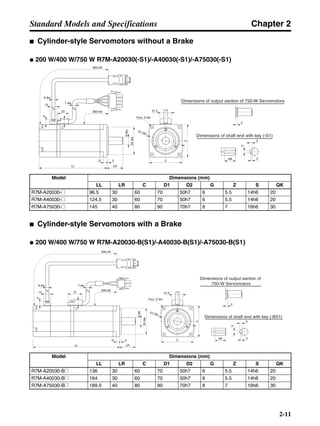
■ Reduction Gears for Cylinder-style Servomotors
● Backlash = 3′ Max.
Note 1. The reduction gear inertia indicates the Servomotor shaft conversion value.
Note 2. The enclosure rating for Servomotors with reduction gears is IP44.
Note 3. The allowable radial torque is the value for the center of the shaft.
Model Rated
rotation
speed
Rated
torque
Ratio Maximum
momentary
rotation speed
Maximum
momentary
torque
Reduction
gear inertia
Allowable
radial torque
Allowable
thrust torque
r/min N⋅m % r/min N⋅m kg⋅m2 N N
50 W 1/5 R7G-VRSFPB05B50 600 0.517 65 900 1.56 4.13 × 10⁻⁶ 392 196
1/9 R7G-VRSFPB09B50 333 0.93 65 500 2.81 3.53 × 10⁻⁶ 441 220
1/15 R7G-VRSFPB15B50 200 1.67 70 300 5.04 3.67 × 10⁻⁶ 588 294
1/25 R7G-VRSFPB25B50 120 2.78 70 180 8.40 3.59 × 10⁻⁶ 686 343
100 W 1/5 R7G-VRSFPB05B100 600 1.19 75 900 3.60 4.08 × 10⁻⁶ 392 196
1/9 R7G-VRSFPB09B100 333 2.29 80 500 6.91 3.43 × 10⁻⁶ 441 220
1/15 R7G-VRSFPB15B100 200 3.82 80 300 11.5 3.62 × 10⁻⁶ 588 294
1/25 R7G-VRSFPB25C100 120 6.36 80 180 19.2 3.92 × 10⁻⁶ 1323 661
200 W 1/5 R7G-VRSFPB05B200 600 2.71 85 900 8.12 1.53 × 10⁻⁵ 392 196
1/9 R7G-VRSFPB09C400 333 3.78 66 500 11.3 2.68 × 10⁻⁵ 931 465
1/15 R7G-VRSFPB15C400 200 6.31 66 300 18.9 2.71 × 10⁻⁵ 1176 588
1/25 R7G-VRSFPB25C200 120 11.1 70 180 33.4 2.67 × 10⁻⁵ 1323 661
400 W 1/5 R7G-VRSFPB05C400 600 5.40 85 900 16.2 3.22 × 10⁻⁵ 784 392
1/9 R7G-VRSFPB09C400 333 9.49 83 500 28.5 2.68 × 10⁻⁵ 931 465
1/15 R7G-VRSFPB15C400 200 15.8 83 300 47.6 2.71 × 10⁻⁵ 1176 588
1/25 R7G-VRSFPB25D400 120 26.4 83 180 79.3 2.79 × 10⁻⁵ 1617 808
750 W 1/5 R7G-VRSFPB05C750 600 10.8 90 900 32.0 7.17 × 10⁻⁵ 784 392
1/9 R7G-VRSFPB09D750 333 18.3 85 500 54.3 6.50 × 10⁻⁵ 1176 588
1/15 R7G-VRSFPB15D750 200 30.5 85 300 90.5 7.09 × 10⁻⁵ 1372 686
1/25 R7G-VRSFPB25E750 120 50.8 85 180 151 7.05 × 10⁻⁵ 2058 1029
Chapter 2
2-40
Standard Models and Specifications
● Backlash = 45′ Max.
Note 1. The reduction gear inertia indicates the Servomotor shaft conversion value.
Note 2. The enclosure rating for Servomotors with reduction gears is IP44.
Note 3. The allowable radial torque is the value for the center of the shaft.
Note 4. These are the allowable torque values for the reduction gears. Do not exceed these values.
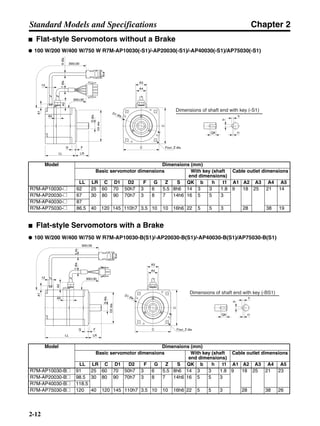
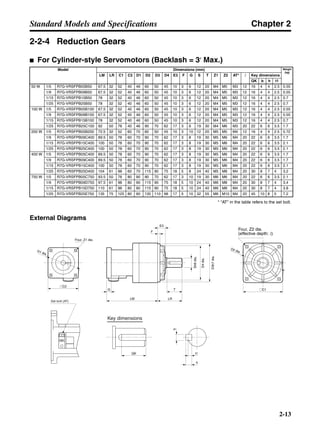
Model Rated
rotation
speed
Rated torque Ratio Maximum
momentary
rotation speed
Maximum
momentary
torque
Reduction
gear inertia
Allow-
able
radial
torque
Allow-
able
thrust
torque
r/min N⋅m % r/min N⋅m kg⋅m2 N N
50 W 1/5 R7G-RGSF05B50 600 0.517 65 900 1.56 4.13 × 10⁻⁶ 392 196
1/9 R7G-RGSF09B50 333 0.93 65 500 2.81 3.53 × 10⁻⁶ 441 220
1/15 R7G-RGSF15B50 200 1.67 70 300 5.04 3.67 × 10⁻⁶ 588 294
1/25 R7G-RGSF25B50 120 2.78 70 180 8.40 3.59 × 10⁻⁶ 686 343
100 W 1/5 R7G-RGSF05B100 600 1.19 75 900 3.60 4.08 × 10⁻⁶ 392 196
1/9 R7G-RGSF09B100 333 2.29 80 500 6.91 3.43 × 10⁻⁶ 441 220
1/15 R7G-RGSF15B100 200 3.82 80 300 11.5 3.62 × 10⁻⁶ 588 294
1/25 R7G-RGSF25B100 120 4.02 (See note 4.) 50 180 12.0 (See note 4.) 3.54 × 10⁻⁶ 686 343
200 W 1/5 R7G-RGSF05B200 600 2.71 85 900 8.10 1.53 × 10⁻⁵ 392 196
1/9 R7G-RGSF09C400 333 3.78 66 500 11.3 2.68 × 10⁻⁵ 931 465
1/15 R7G-RGSF15C400 200 6.31 66 300 18.9 2.71 × 10⁻⁵ 1176 588
1/25 R7G-RGSF25C400 120 11.1 70 180 33.4 2.67 × 10⁻⁵ 1323 661
400 W 1/5 R7G-RGSF05C400 600 5.40 85 900 16.2 3.22 × 10⁻⁵ 784 392
1/9 R7G-RGSF09C400 333 9.49 83 500 28.5 2.68 × 10⁻⁵ 931 465
1/15 R7G-RGSF15C400 200 15.8 83 300 47.6 2.71 × 10⁻⁵ 1176 588
1/25 R7G-RGSF25C400 120 21.7 (See note 4.) 68 180 65.1 (See note 4.) 2.67 × 10⁻⁵ 1323 661
750 W 1/5 R7G-RGSF05C750 600 10.8 90 900 32.0 7.17 × 10⁻⁵ 784 392
1/9 R7G-RGSF09C750 333 9.7 (See note 4.) 45 500 29.1 (See note 4.) 6.46 × 10⁻⁵ 931 465
1/15 R7G-RGSF15C750 200 16.2 (See note 4.) 45 300 48.6 (See note 4.) 7.53 × 10⁻⁵ 1176 588
1/25 R7G-RGSF25C750 120 21.7 (See note 4.) 36 180 65.1 (See note 4.) 7.22 × 10⁻⁵ 1323 661
Chapter 2
2-41
Standard Models and Specifications
■ Reduction Gears for Flat-style Servomotors
● Backlash = 3′ Max.
Note 1. The reduction gear inertia indicates the Servomotor shaft conversion value.
Note 2. The enclosure rating for Servomotors with reduction gears is IP44.
Note 3. The allowable radial torque is the value for the center of the shaft.
Model Rated
rotation
speed
Rated
torque
Ratio Maximum
momentary
rotation speed
Maximum
momentary
torque
Reduction
gear inertia
Allowable
radial torque
Allowable
thrust torque
r/min N⋅m % r/min N⋅m kg⋅m2 N N
100 W 1/5 R7G-VRSFPB05B100P 600 1.19 75 900 3.60 1.60 × 10⁻⁵ 392 196
1/9 R7G-VRSFPB09B100P 333 2.29 80 500 6.91 1.37 × 10⁻⁵ 441 220
1/15 R7G-VRSFPB15B100P 200 3.82 80 300 11.5 3.38 × 10⁻⁶ 588 294
1/25 R7G-VRSFPB25C100P 120 6.36 80 180 19.2 3.68 × 10⁻⁶ 1323 661
200 W 1/5 R7G-VRSFPB05B200P 600 2.71 85 900 8.12 1.53 × 10⁻⁵ 392 196
1/9 R7G-VRSFPB09C400P 333 3.78 66 500 11.3 2.56 × 10⁻⁵ 931 465
1/15 R7G-VRSFPB15C400P 200 6.31 66 300 18.9 2.71 × 10⁻⁵ 1176 588
1/25 R7G-VRSFPB25C200P 120 11.1 70 180 33.4 2.67 × 10⁻⁵ 1323 661
400 W 1/5 R7G-VRSFPB05C400P 600 5.40 85 900 16.2 3.23 × 10⁻⁵ 784 392
1/9 R7G-VRSFPB09C400P 333 9.49 83 500 28.5 2.56 × 10⁻⁵ 931 465
1/15 R7G-VRSFPB15C400P 200 15.8 83 300 47.6 2.71 × 10⁻⁵ 1176 588
1/25 R7G-VRSFPB25D400P 120 26.4 83 180 79.3 2.79 × 10⁻⁵ 1617 808
750 W 1/5 R7G-VRSFPB05C750P 600 10.8 90 900 32.0 7.17 × 10⁻⁵ 784 392
1/9 R7G-VRSFPB09D750P 333 18.3 85 500 54.3 6.50 × 10⁻⁵ 1176 588
1/15 R7G-VRSFPB15D750P 200 30.5 85 300 90.5 6.86 × 10⁻⁵ 1372 686
1/25 R7G-VRSFPB25E750P 120 50.8 85 180 151 7.05 × 10⁻⁵ 2058 1029
Chapter 2
2-42
Standard Models and Specifications
● Backlash = 45′ Max.
Note 1. The reduction gear inertia indicates the Servomotor shaft conversion value.
Note 2. The enclosure rating for Servomotors with reduction gears is IP44.
Note 3. The allowable radial torque is the value for the center of the shaft.
Note 4. These are the allowable torque values for the reduction gears. Do not exceed these values.
Model Rated
rotation
speed
Rated torque Ratio Maximum
momentary
rotation speed
Maximum
momentary
torque
Reduction
gear inertia
Allow-
able
radial
torque
Allow-
able
thrust
torque
r/min N⋅m % r/min N⋅m kg⋅m2 N N
100 W 1/5 R7G-RGSF05B100P 600 1.19 75 900 3.60 1.60 × 10⁻⁵ 392 196
1/9 R7G-RGSF09B100P 333 2.29 80 500 6.91 1.37 × 10⁻⁵ 441 220
1/15 R7G-RGSF15B100P 200 3.82 80 300 11.5 3.38 × 10⁻⁶ 588 294
1/25 R7G-RGSF25B100P 120 4.02 (See note 4.) 50 180 12.0
(See note 4.)
3.78 × 10⁻⁶ 686 343
200 W 1/5 R7G-RGSF05B200P 600 2.71 85 900 8.10 1.53 × 10⁻⁵ 392 196
1/9 R7G-RGSF09C400P 333 3.78 66 500 11.3 2.56 × 10⁻⁵ 931 465
1/15 R7G-RGSF15C400P 200 6.31 66 300 18.9 2.71 × 10⁻⁵ 1176 588
1/25 R7G-RGSF25C400P 120 11.1 70 180 33.4 2.67 × 10⁻⁵ 1323 661
400 W 1/5 R7G-RGSF05C400P 600 5.40 85 900 16.2 3.23 × 10⁻⁵ 784 392
1/9 R7G-RGSF09C400P 333 9.49 83 500 28.5 2.56 × 10⁻⁵ 931 465
1/15 R7G-RGSF15C400P 200 15.8 83 300 47.6 2.71 × 10⁻⁵ 1176 588
1/25 R7G-RGSF25C400P 120 21.7 (See note 4.) 68 180 65.1 (See note
4.)
2.67 × 10⁻⁵ 1323 661
750 W 1/5 R7G-RGSF05C750P 600 10.8 90 900 32.0 7.17 × 10⁻⁵ 784 392
1/9 R7G-RGSF09C750P 333 9.7 (See note 4.) 45 500 29.1 (See note
4.)
6.00 × 10⁻⁵ 931 465
1/15 R7G-RGSF15C750P 200 16.2 (See note 4.) 45 300 48.6 (See note
4.)
7.65 × 10⁻⁵ 1176 588
1/25 R7G-RGSF25C750P 120 21.7 (See note 4.) 36 180 65.1 (See note
4.)
7.22 × 10⁻⁵ 1323 661
Chapter 2
2-43
Standard Models and Specifications
2-6 Cable and Connector Specifications
2-6-1 Control Cables
■ General Control Cables (R88A-CPU@@@S)
A General Control Cable is connected to the Servo Driver’s Control I/O Connector (CN1). There is no
connector on the Controller end. When connecting it to a Position Control Unit with no special cable
provided, or to a controller manufactured by another company, wire a connector to match the control-
ler.
Note There is one method for connecting to a Controller with no special cable provided, and another method
for using connector Terminal Block cable and a connector Terminal Block.
● Cable Models
● Connection Configuration and External Dimensions
Model Length (L) Outer diameter of sheath Weight
R88A-CPU001S 1 m 9.9 dia. Approx. 0.3 kg
R88A-CPU002S 2 m Approx. 0.6 kg
Controller Servo Driver
R7D-AP@
43.6
39L
t=18
Chapter 2
2-44
Standard Models and Specifications
● Wiring
Connector plug: 10136-3000VE (Sumitomo 3M)
Connector case: 10336-52A0-008 (Sumitomo 3M)
Cable: AWG24 × 18P UL20276
Note Wires with the same wire color and the same number of marks form twisted pairs. For example, the
orange wire with one red mark (–) is twisted together with the orange wire with one black mark (–).
■ Connector Terminal Block Cables (R88A-CTU@@@N)
● Cable Models
● Connection Configuration and External Dimensions
Model Length (L) Outer diameter of sheath Weight
R88A-CTU001N 1 m 9.9 dia. Approx. 0.3 kg
R88A-CTU002N 2 m Approx. 0.6 kg
Wire/Mark colorNo. Symbol
1 Orange/Black (−) +CW
2 Orange/Red (−) −CW
3 Gray/Black (−) +CCW
4 Gray/Red (−) −CCW
5 White/Black (−)
6 White/Red (−)
7 Yellow/Black (−) BKIR
8 Yellow/Red (−) INP
9 Pink/Black (−)
10 Pink/Red (−)
11 Gray/Black (−−)
12 Gray/Red (−−)
+24VIN
13
Orange/Black (−−)
+24VINOrange/Red (−−)
RUN14 White/Black (−−)
15 White/Red (−−)
16 Yellow/Black (−−)
17 Yellow/Red (−−)
18 Pink/Black (−−) RESET
Wire/Mark colorNo. Symbol
27 Yellow/Red (−−−)
28 Pink/Black (−−−)
29 Pink/Red (−−−)
30 Orange/Black (−−−−)
31 Orange/Red (−−−−)
32 Gray/Black (−−−−) Z
ALM
33 Gray/Red (−−−−) ZCOM
34 White/Black (−−−−)
35
36
White/Red (−−−−) ALMCOM
Shell Shield FG
20 Orange/Black (−−−) RXD+
GND
21 Orange/Red (−−−) RXD−
22 Gray/Black (−−−) TXD+
TXD−
RT
23 Gray/Red (−−−)
24 White/Black (−−−)
25 White/Red (−−−)
26 Yellow/Black (−−−)
19 Pink/Red (−−)
+ECRST
−ECRST
OGND
1
2
3
4
5
6
7
8
9
10
11
12
13
14
15
16
17
18
27
28
29
30
31
32
33
34
35
36
20
21
22
23
24
25
26
19
Connector Pin Arrangement
Connector Terminal Block
Servo Driver
R7D-AP@
XW2B-40F5-P
43.6
39L46
72.72
t=18
t=10.3
Chapter 2
2-45
Standard Models and Specifications
● Wiring
No.
1
2
3
4
5
6
7
8
9
10
11
12
13
14
15
16
17
18
19
20
1
2
3
4
5
6
7
8
9
10
11
12
13
14
15
16
17
18
19
20
No.
1
2
3
4
5
6
7
8
9
10
11
12
13
14
15
16
17
18
19
20
21
22
23
24
25
26
27
28
29
30
31
32
33
34
37
38
35
36
39
40
Terminal Block Connector
A
B
A
B
A
B
A
B
A
B
A
B
A
B
A
B
A
B
A
B
A
B
A
B
A
B
A
B
A
B
A
B
A
B
A
B
A
B
A
B
No.
Servo Driver
+CW
−CW
−CCW
−CCW
BKIR
INP
+24VIN
RUN
RESET
GND
+ECRST
−ECRST
OGND
1
2
3
4
5
6
7
8
9
10
11
12
13
14
15
16
17
18
27
28
29
30
31
32 Z
ALM
33 ZCOM
34
35 ALMCOM
Shell FG
20 RXD+
21 RXD−
22 TXD+
TXD−
RT
23
24
25
26
19
Symbol
Servo Driver connector:
Connector plug:
10136-3000VE (Sumitomo 3M)
Connector case:
10336-52A0-008 (Sumitomo 3M)
Terminal block connector
Connector plug:
FCN-361J040-AU (Fujitsu)
Connector case:
FCN-360C040-B (Fujitsu)
Cable: AWG24 × 18P UL20276
Chapter 2
2-46
Standard Models and Specifications
2-6-2 Servomotor Cables
A Servomotor Cable connects a Servomotor to the Servo Driver and is available in either of
two types: Separate Cables and Integrated Cables. The Integrated Cables include the
encoder cable and power cable. Select a Cable to match the Servomotor being used. The
maximum distance between the Servomotor and the Servo Driver is 20 meters.
Note: Use a robot cable if cable flexibility is required.
● Robot Cable Bending Durability
A Robot Cable uses materials that enable a service life of 20 million bendings minimum under the fol-
lowing conditions for the minimum bending radius (R) or larger.
Note 1. The service life data on bending durability consists of test values. Use this data only as ref-
erence values, and allow margin in actual application.
Note 2. The bending durability is the number of times that the Cable can be bent without breaking
or other damage occurring that affects the sheath functionality when the conductors inside
the cable are conducting electricity. The bending durability does not apply to the shield
breaking.
Note 3. Mechanical failure, ground faults, or other problems may occur due to damaged insulation if
the Cable is used with a radius smaller than the minimum bending radius. Contact your
OMRON representative if the Cable will be used with a radius smaller than the minimum
bending radius.
● Power Cables
@: 003 to 020
● Encoder Cables
@: 003 to 020
Integrated
cables
Separate cables
Model Standard cable
models
Robot cable models
For Servomotors
without brakes
R7A-CEA@@@S Power cable R88A-CAWA@@@S R88A-CAWA@@@SR
Encoder cable R7A-CRA@@@C R7A-CRA@@@CR
For Servomotors
with brakes
R7A-CEA@@@B Power cable R88A-CAWA@@@B R88A-CAWA@@@BR
Encoder cable R7A-CRA@@@C R7A-CRA@@@CR
Model Minimum bending radius
(R)
For Servomotors
without brakes
R88A-CAWA@@@SR 55 mm
For Servomotors
with brakes
R88A-CAWA@@@BR 55 mm
Model Minimum bending radius
(R)
R7A-CRA@@@CR 46 mm
Chapter 2
2-47
Standard Models and Specifications
● Bending Test
2-6-3 Specifications of Integrated Cables
■ Integrated Cables for Servomotors without Brakes (R7A-CEA@@@S)
● Cable Models
● Connection Configuration and External Dimensions
Model Length (L) Outer diameter of sheath Weight
R7A-CEA003S 3 m 12.4 dia. Approx. 0.8 kg
R7A-CEA005S 5 m Approx. 1.2 kg
R7A-CEA010S 10 m Approx. 2.1 kg
R7A-CEA015S 15 m Approx. 3.1 kg
R7A-CEA020S 20 m Approx. 4.0 kg
Stroke
320 mm
Bending
radius (R)
100 times/minute
Servo Driver Servomotor
R7D-AP@ R7M-A@5039 50L
80
t=15.7
27.7
27.4 t=12
43.7
21.5
t=12.7
29.5
Chapter 2
2-48
Standard Models and Specifications
● Wiring
■ Integrated Cables for Servomotors with Brakes (R7A-CEA@@@B)
● Cable Models
Model Length (L) Outer diameter of sheath Weight
R7A-CEA003B 3 m 12.4 dia. Approx. 0.8 kg
R7A-CEA005B 5 m Approx. 1.2 kg
R7A-CEA010B 10 m Approx. 2.1 kg
R7A-CEA015B 15 m Approx. 3.1 kg
R7A-CEA020B 20 m Approx. 4.0 kg
Symbol No.
Servo Driver
E0V 1
E0V 2
E0V 3
E5V 4
E5V 5
E5V 6
− 7
S+ 8
S− 9
A+ 10
A− 11
B+ 12
B− 13
− 14
FG Shell
SymbolNo.
Servomotor
7 E0V
8 E5V
5
6
1
2
3
4
S+
S−
A+
A−
B+
B−
Shell FG
AWG22 Black
AWG22 Red
AWG24 Green
AWG24 Green/White
AWG24 Blue
AWG24 Blue/White
AWG24 Yellow
AWG24 Yellow/White
SymbolNo.
1 U phase
2 V phase
3
4
W phase
FG
AWG20 Red
AWG20 White
AWG20 Blue
AWG20 Green/Yellow
M4 crimp terminal
Connector kit:
54280-0800 (Molex Japan)
Connector cap:
350780-1 (Tyco Electronics AMP)
Connector socket:
350570-3 (Tyco Electronics AMP)
Connector plug:
10114-3000VE (Sumitomo 3M)
Connector case:
10314-52A0-008 (Sumitomo 3M)
Chapter 2
2-49
Standard Models and Specifications
● Connection Configuration and External Dimensions
● Wiring
Servo Driver Servomotor
R7D-AP@ R7M-A@5039 50L
80
t=28.4
14
27.4
t=12
43.7
21.5
t=12.7
29.5
Symbol No.
Servo Driver
E0V 1
E0V 2
E0V 3
E5V 4
E5V 5
E5V 6
− 7
S+ 8
S− 9
A+ 10
A− 11
B+ 12
B− 13
− 14
FG Shell
SymbolNo.
Servomotor
7 E0V
8 E5V
5
6
1
2
3
4
S+
S−
A+
A−
B+
B−
Shell FG
AWG22 Black
AWG22 Red
AWG24 Green
AWG24 Green/White
AWG24 Blue
AWG24 Blue/White
AWG24 Yellow
AWG24 Yellow/White
SymbolNo.
1 U phase
2 V phase
3
4
W phase
FG
5 Brake
6 Brake
AWG20 Red
AWG20 White
AWG20 Blue
AWG20 Green/Yellow
M4 crimp terminal
AWG20 Black
M4 crimp terminal
AWG20 Brown
M4 crimp terminal
Connector kit:
54280-0800 (Molex Japan)
Connector cap:
350781-1 (Tyco Electronics AMP)
Connector socket
350570-3 (Tyco Electronics AMP)
Connector plug:
10114-3000VE (Sumitomo 3M)
Connector case:
10314-52A0-008 (Sumitomo 3M)
Chapter 2
2-50
Standard Models and Specifications
2-6-4 Specifications of Separate Cables
■ Specifications of Standard Power Cables (R88A-CAWA@@@@)
Select a Power Cable to match the Servomotor being used. The cable length is 3 to 20 m.
(The maximum distance between the Servomotor and the Servo Driver is 20 m.)
● Connection Configuration and External Dimensions
● Wiring
Power Cables for Servomotors without Brakes
Power Cables for Servomotors without Brakes Power Cables for Servomotors with Brakes
Model Length
(L)
Outer
diameter
of sheath
Weight Model Length
(L)
Outer
diameter
of sheath
Weight
R88A-CAWA003S 3 m 6.2 dia. Approx.
0.2 kg
R88A-CAWA003B 3 m 7.4 dia. Approx.
0.3 kg
R88A-CAWA005S 5 m Approx.
0.3 kg
R88A-CAWA005B 5 m Approx.
0.5 kg
R88A-CAWA010S 10 m Approx.
0.6 kg
R88A-CAWA010B 10 m Approx.
0.9 kg
R88A-CAWA015S 15 m Approx.
0.9 kg
R88A-CAWA015B 15 m Approx.
1.3 kg
R88A-CAWA020S 20 m Approx.
1.2 kg
R88A-CAWA020B 20 m Approx.
1.7 kg
50
50 L
L 27.4
27.4
Servo Driver Servomotor
R7D-AP@
R7D-AP@
t=15.7
t=28.4
1426.7
R7M-A@
R7M-A@
Power Cables for Servomotors without Brakes
Power Cables for Servomotors with Brakes
Servo Driver
Red
White
Blue
Green/Yellow
M4 crimp terminal
Cable: AWG20 x 4C, UL2464
Servomotor
Symbol
U phase
V phase
W phase
FG
No.
1
2
3
4
Cable side:
Connector cap: 350780-1 (Tyco Electronics AMP)
Connector socket: 350689-3 (Tyco Electronics AMP)
Servomotor side:
Connector plug: 350779-1 (Tyco Electronics AMP)
Contact pin:
350690-3: Pin No. 1 to 3 (Tyco Electronics AMP)
770210-1: Pin No. 4 (Tyco Electronics AMP)
Chapter 2
2-51
Standard Models and Specifications
Power Cables for Servomotors with Brakes
■ Specifications of Robot Power Cables (R88A-CAWA@@@R)
Use one of the following Robot Power Cables if the cable will be used in an environment that requires
cable flexibility or if it will be used with moving parts.
● Connection Configuration and External Dimensions
Power Cables for Servomotors without Brakes Power Cables for Servomotors with Brakes
Model Length
(L)
Outer
diameter
of sheath
Weight Model Length
(L)
Outer
diameter
of sheath
Weight
R88A-
CAWA003SR
3 m 7.4 dia. Approx.
0.2 kg
R88A-
CAWA003BR
3 m 7.0 dia. Approx.
0.3 kg
R88A-
CAWA005SR
5 m Approx.
0.3 kg
R88A-
CAWA005BR
5 m Approx.
0.4 kg
R88A-
CAWA010SR
10 m Approx.
0.7 kg
R88A-
CAWA010BR
10 m Approx.
0.9 kg
R88A-
CAWA015SR
15 m Approx.
1.0 kg
R88A-
CAWA015BR
15 m Approx.
1.3 kg
R88A-
CAWA020SR
20 m Approx.
1.3 kg
R88A-
CAWA020BR
20 m Approx.
1.7 kg
Servo Driver
Red
White
Blue
Green/Yellow
M4 crimp terminal
Cable: AWG20 x 6C, UL2464
Servomotor
Symbol
U phase
V phase
W phase
FG
Brake
Brake
No.
1
2
3
4
5
6
Black
Brown
Cable side:
Connector cap: 350781-1 (Tyco Electronics AMP)
Connector socket: 350689-3 (Tyco Electronics AMP)
Servomotor side:
Connector plug: 350715-1 (Tyco Electronics AMP)
Contact pin:
350690-3: Pin No. 1 to 3, 5, and 6
(Tyco Electronics AMP)
770210-1: Pin No. 4 (Tyco Electronics AMP)
50
50 L
L 27.4
27.4
Servo Driver Servomotor
R7D-AP@
R7D-AP@
t=15.7
t=28.4
1426.7
R7M-A@
R7M-A@
Power Cables for Servomotors without Brakes
Power Cables for Servomotors with Brakes
Chapter 2
2-52
Standard Models and Specifications
● Wiring
Power Cables for Servomotors without Brakes
Power Cables for Servomotors with Brakes
■ Specifications of Standard Encoder Cables (R7A-CRA@@@C)
■ Specifications of Robot Encoder Cables (R7A-CRA@@@CR)
Note The connection configuration, external dimensions, and wiring are the same for both Standard Cables
and Robot Cables.
Model Length (L) Outer diameter of
sheath
Weight
R7A-CRA003C 3 m 7.4 dia. Approx. 0.2 kg
R7A-CRA005C 5 m Approx. 0.3 kg
R7A-CRA010C 10 m Approx. 0.7 kg
R7A-CRA015C 15 m Approx. 1.0 kg
R7A-CRA020C 20 m Approx. 1.3 kg
Model Length (L) Outer diameter of
sheath
Weight
R7A-CRA003CR 3 m 7.0 dia. Approx. 0.3 kg
R7A-CRA005CR 5 m Approx. 0.4 kg
R7A-CRA010CR 10 m Approx. 0.9 kg
R7A-CRA015CR 15 m Approx. 1.3 kg
R7A-CRA020CR 20 m Approx. 1.7 kg
Servo Driver
Red
White
Blue
Green/Yellow
M4 crimp terminal
Cable: AWG21 x 4C, UL2464
Servomotor
Symbol
U phase
V phase
W phase
FG
No.
1
2
3
4
Cable side:
Connector cap: 350780-1 (Tyco Electronics AMP)
Connector socket: 350689-3 (Tyco Electronics AMP)
Servomotor side:
Connector plug: 350779-1 (Tyco Electronics AMP)
Contact pin:
350690-3: Pin No. 1 to 3 (Tyco Electronics AMP)
770210-1: Pin No. 4 (Tyco Electronics AMP)
Servo Driver
Red
White
Blue
Green/Yellow
M4 crimp terminal
Cable: AWG21 x 6C, UL2464
Servomotor
Symbol
U phase
V phase
W phase
FG
Brake
Brake
No.
1
2
3
4
5
6
Black
Brown
Cable side:
Connector cap: 350781-1 (Tyco Electronics AMP)
Connector socket: 350689-3 (Tyco Electronics AMP)
Servomotor side:
Connector plug: 350715-1 (Tyco Electronics AMP)
Contact pin:
350690-3: Pin No. 1 to 3, 5, and 6
(Tyco Electronics AMP)
770210-1: Pin No. 4 (Tyco Electronics AMP)
Chapter 2
2-53
Standard Models and Specifications
● Connection Configuration and External Dimensions
● Wiring
39 L 43.7
Servo Driver Servomotor
R7D-AP@
t=12.7
21.5
R7M-A@
t=12
29.5
No.
E0V
E0V
E0V
E5V
E5V
E5V
−
S+
S−
A+
A−
B+
B−
−
FG Shell
SymbolNo.
Servomotor
E0V
E5V
S+
S−
A+
A−
B+
B−
Shell FG
AWG22 Black
AWG22 Red
AWG24 Green
AWG24 Green/White
AWG24 Blue
AWG24 Blue/White
AWG24 Yellow
AWG24 Yellow/White
Connector kit:
54280-0800 (Molex Japan)
Connector plug:
10114-3000VE (Sumitomo 3M)
Connector case:
10314-52A0-008 (Sumitomo 3M)
Servo Driver
Symbol
1
2
3
4
5
6
7
8
9
10
11
12
13
14
7
8
5
6
1
2
3
4
Chapter 2
2-54
Standard Models and Specifications
2-6-5 Peripheral Cables and Connector Specifications
■ Analog Monitor Cable (R88A-CMW001S)
This is cable for connecting to the Servo Driver’s Monitor Output Connector (CN4). It is required for
connecting monitor outputs to external devices such as measuring instruments.
● Cable Model
● Connection Configuration and External Dimensions
● Wiring
Model Length (L) Weight
R88A-CMW001S 1 m Approx. 0.1 kg
Servo Driver External device
R7D-AP@
1.7dia.7.3 L
5
t=6
Connector socket:
DF11-4DS-2C (Hirose Electric)
Connector contacts:
DF11-2428SCF (Hirose Electric)
Cable: AW24 × 4C UL1007
Servo Driver
Red
White
Black
Black
Symbol No.
1
2
3
4
NM
AM
GND
GND
Chapter 2
2-55
Standard Models and Specifications
■ Computer Monitor Cables (R7A-CCA002P@)
Computer Monitor Cable and Computer Monitoring Software (run on Windows, Cat. No. SBCE-011)
for Servo Drivers are required to use a personal computer for monitoring and setting parameters for a
Servo Driver. There are two kinds of cable, one for DOS personal computers, and the other for NEC
PC98 notebook computers (but not for PC98 desktop computers).
● Cable Models
For DOS Computers
For NEC PC98 Notebook Computers
● Connection Configuration and External Dimensions
For DOS Personal Computers:
For NEC PC98 Notebook Computers
Model Length (L) Outer diameter of sheath Weight
R7A-CCA002P2 2 m 4.2 dia. Approx. 0.1 kg
Model Length (L) Outer diameter of sheath Weight
R7A-CCA002P3 2 m 4.2 dia. Approx. 0.1 kg
Personal computer
(DOS)
Servo Driver
R7D-AP@
39 42L
32.2
t=15
13.2dia.
6
Servo Driver
R7D-AP@
Notebook computer
(NEC PC98)
L
t=12.7
39
29.5
42
13.2dia.
6
Chapter 2
2-56
Standard Models and Specifications
● Wiring
For DOS Personal Computers:
For NEC PC98 Notebook Computers
■ Control I/O Connector (R88A-CNU01C)
This is the connector for connecting to the Servo Driver’s Control I/O Connector (CN1). This connec-
tor is used when the cable is prepared by the user.
● External Dimensions
Computer
Symbol
Connector:
17JE-13090-02 (D8A) (DDK Ltd.)
Gray/Black
Orange/Black
Orange/Red
Cable: AWG28 × 3C UL2464
Servo Driver
Shell
No. No.
2 1
2
8
3
7
8
5
RXD
RXDTXD
TXD
RTS
CTS
GND
FG
GND
FG
Symbol
Case
Connector: HR212-10P-8P (Hirose Electric)
Computer
Symbol Symbol
Gray/Black
Orange/Black
Orange/Red
Cable: AWG28 × 3C UL2464
Servo Driver
Shell
Connector plug:
10114-3000VE (Sumitomo 3M)
Connector case:
10314-52F0-008 (Sumitomo 3M)
No. No.
1 1
2
8
9
10
4
14
12
RXD
RXDTXD
TXD
RTS
CTS
GND
FG
FG
GND
FGCase
Connector: HR212-10P-8P (Hirose Electric)
Connector plug:
10136-3000VE (Sumitomo 3M)
Connector case:
10336-52A0-008 (Sumitomo 3M)
43.6
39
t=18
Chapter 2
2-57
Standard Models and Specifications
■ Encoder Connector (R7A-CNA0@R)
This is the connector for the Encoder Cable. This connector is used when the cable is prepared by
the user. It is a soldered-type connector, and the applicable cable is as follows.
• Applicable cable: AWG16 max.
• Outer diameter of coating: 2.1 mm dia. max.
• Outer diameter of sheath: 6.7 ± 0.5 mm dia.
● External Dimensions
R7A-CNA01R (Servo Driver CN2)
R7A-CNA02R (Servomotor)
29.5
39
t=12.7
Connector plug:
10114-3000VE (Sumitomo 3M)
Connector case:
10314-52A0-008 (Sumitomo 3M)
t=12
43.7
21.5
Connector kit:
54280-0800 (Molex Japan)
Chapter 2
2-58
Standard Models and Specifications
2-7 Servo Relay Units and Cable Specifications
This section provides the specifications for the Servo Relay Units and cables used for
connecting to OMRON Position Control Units. Select the models that match the
Position Control Unit being used. For details, refer to 3-2-1 Connecting Cable.
All dimensions are in millimeters unless otherwise specified.
2-7-1 Servo Relay Units
■ XW2B-20J6-1B
This Servo Relay Unit connects to the following OMRON
Position Control Units. Communications are not supported.
• CS1W-NC113/-NC133
• CJ1W-NC113/-NC133
• C200HW-NC113
• C200H-NC112
• 3F88M-DRT141
● External Dimensions
0
1
2
3
4
5
6
7
8
9
10
11
12
13
14
15
16
17
18
19
Position Control Unit connector Servo Driver connector
Two, 3.5 dia.
Note Terminal Block pitch: 7.62 mm
29.5
7
3.5
7
3.5135
15.5
45
20.5
(46)
44.3
2
0
10
9
19
Chapter 2
2-59
Standard Models and Specifications
● Wiring
■ XW2B-40J6-2B
This Servo Relay Unit connects to the following OMRON
Position Control Units. Communications are not supported.
• CS1W-NC213/-NC233/-NC413/-NC433
• CJ1W-NC213/-NC233/-NC413/-NC433
• C200HW-NC213/-NC413
• C500-NC113/-NC211
• C200H-NC211
● External Dimensions
Note 1. The XB contact is used to turn ON/OFF
the electromagnetic brake.
2. Do not connect unused terminals.
3. The 0 V terminal is internally connected to
the common terminals.
4. The following crimp terminal is applicable:
R1.25-3 (round with open end).
Emergency stop
CW
limit
CCW
limit
Origin proximity
Com-
mon
External
interrupt
(See note 1.)
+24 V
0 V
RUN ALM BKIR10
0
19
9RESET ALMCOM FG
X1 XB
24 V DC
X1
24 V DC
Com-
mon
Com-
mon
Com-
mon
Com-
mon
0
1
2
3
4
5
6
7
8
9
10
11
12
13
14
15
16
17
18
19
20
21
22
23
24
25
26
27
28
29
30
31
32
33
34
35
36
37
38
39
Position Control Unit connector
X-axis Servo
Driver connector
Two, 3.5 dia.
Note Terminal Block pitch: 7.62 mm
Y-axis Servo Driver connector
29.5
7
3.5 180 3.5
7
45
15.5
0
20
19
39
20.5
(46)
44.3
2
Chapter 2
2-60
Standard Models and Specifications
● Wiring
■ XW2B-20J6-3B
This Servo Relay Unit connects to the following OMRON Pro-
grammable Controllers. Communications are not supported.
• CQM1-CPU43-V1
• CQM1H-PLB21
(Pulse I/O Board for CQM1H-CPU51/-CPU61)
• CS1W-HCP22
● External Dimensions
X/Y-axis emergency stop
X-axis
CW
limit
X-axis
CCW
limit
X-axis origin proximity
X-axis
RUN
X-axis
ALM
X-axis
BKIR
Y-axis
CW
limit
Y-axis
CCW
limit
Y-axis origin proximity
Y-axis
RUN
Y-axis
ALM
Y-axis
BKIR
X-axis
external
interrupt
X-axis
RESET
X-axis
ALMCOM
Y-axis
external
interrupt
Y-axis
RESET
Y-axis ALMCOM
Note 1. The XB contact is used to turn ON/OFF the electromagnetic brake.
2. Do not connect unused terminals.
3. The 0 V terminal is internally connected to the common terminals.
4. The following crimp terminal is applicable: R1.25-3 (round with open end).
+24 V
0 V
20
0
39
19FG
24 V DC
X1 XB
24 V DC
(See note 1.)
Y1 YB
24 V DC
X1 Y1
(See note 1.)
Com-
mon
Com-
mon
Com-
mon
Com-
mon
Com-
mon
Com-
mon
Com-
mon
Com-
mon
Com-
mon
0
1
2
3
4
5
6
7
8
9
10
11
12
13
14
15
16
17
18
19
29.5
7
3.5
7
3.5135
15.5
45
20.5
(46)
44.3
2
0
10
9
19
Two, 3.5 dia.
Note Terminal Block pitch: 7.62 mm
CQM1 connector Servo Driver connector
Chapter 2
2-61
Standard Models and Specifications
● Wiring
+24 V
0 V
CW CCW RUN INP ALM BKIR10
0
19
9CW CCW Com-
mon
ECRST Z RESET ALMCOM FG
24 V DC
X1 XB
24 V DC
(See note 3.)
(See note 2.)
(See
note 1.)
X1
Com-
mon
(See
note 1.)
CQM1Input
Unit
Note 1. If these signals are input, the CQM1 output pulse can be input into the High-
speed Counter.
Note 2. Input this output signal to the CQM1 Input Unit.
Note 3. The XB contact is used to turn ON/OFF the electromagnetic brake.
Note 4. Phase Z is an open-collector output.
Note 5. Do not connect unused terminals.
Note 6. The 0-V terminal is internally connected to the common terminals.
Note 7. The following crimp terminal is applicable: R1.25-3 (round with open end).
Chapter 2
2-62
Standard Models and Specifications
■ XW2B-40J6-4A
This Servo Relay Unit connects to the following OMRON Position Control Units. Communications are
supported.
• CS1W-NC213/-NC233/-NC413/-NC433
• CJ1W-NC213/-NC233/-NC413/-NC433
● External Dimensions
Note Terminal Block pitch: 7.62 mm.
● Wiring
Two, 3.5 dia.
29.5
7
3.5 3.5
7
45
15.5
Y-axis Servo
Driver connector
X-axis Servo
Driver connectorPosition Control Unit connector
0
20
19
39
247.5
2.8
20.5
(46)
44.3
2.8
X/Y-axis emergency stop
X-axis
CW
limit
X-axis
CCW
limit
X-axis origin proximity
X-axis
RUN
X-axis
ALM
X-axis
BKIR
Y-axis
CW
limit
Y-axis
CCW
limit
Y-axis origin proximity
Y-axis
RUN
Y-axis
ALM
Y-axis
BKIR
X-axis
external
interrupt
X-axis
RESET
X-axis
ALMCOM
Y-axis
external
interrupt
Y-axis
RESET
Y-axis ALMCOM
Note 1. The XB contact is used to turn ON/OFF the electromagnetic brake.
2. Do not connect unused terminals.
3. The 0 V terminal is internally connected to the common terminals.
4. The following crimp terminal is applicable: R1.25-3 (round with open end).
+24 V
0 V
20
0
39
19FG
24 V DC
X1 XB
24 V DC
(See note 1.)
Y1 YB
24 V DC
X1 Y1
(See note 1.)
Com-
mon
Com-
mon
Com-
mon
Com-
mon
Com-
mon
Com-
mon
Com-
mon
Com-
mon
Com-
mon
Chapter 2
2-63
Standard Models and Specifications
■ XW2B-20J6-8A
● External Dimensions
● Wiring
This Servo Relay Unit connects to the following OMRON
Programmable Controllers. Communications are not sup-
ported.
• CJ1M-CPU21/-CPU22/-CPU23
CJ1M-CPU connector Servo Driver connector
135
3.5
7
3.5
7
Two, 3.5 dia.
45
15.5
(46)
44.3
2
20.529.5
Note Terminal pitch: 7.62 mm
Origin
prox-
imity
+24 V10
0
24 V DC
24
V DC
Com-
mon
Com-
mon
Com-
mon
0 V
RUN ALM BKIR
FGALMCOMRESETCom-
mon
Com-
mon
IN9
X1
(See note 2.)
9
19IN6 IN8IN7
CW limit
(See note 1.)
(CIO: 2960.06)
CCW limit
(See note 1.)
(CIO: 2960.07)
Example: 2960.06
A540.08
XBX1
Note1. The CW limit input signal and CCW limit input signal can be
input through an Input Unit. The following flags function as
the CW/CCW limit input signals in the CJ1M:
Pulse Output 0: CW: A540.08, CCW: A540.09
Pulse Output 1: CW: A541.08, CCW: A541.09
Program the actual inputs from the Input Unit to control these
flags as ladder program outputs as shown below.
Note2. The XB contacts are used to turn ON/OFF the electromag-
netic brake.
a) Do not connect anything to unused terminals.
b) The 0 V terminal is internally connected to the common
terminals.
c) The following crimp terminal is applicable:
R1.25-3 (round with open end).
Chapter 2
2-64
Standard Models and Specifications
■ XW2B-40J6-9A
● External Dimensions
This Servo Relay Unit connects to the following OMRON
Programmable Controllers. Communications are not sup-
ported.
• CJ1M-CPU21/-CPU22/-CPU23
CJ1M-CPU connector X-axis Servo Driver connector
1803.5
7
3.5
7
Two, 3.5 dia.
45
15.5
(46)
44.3
2
20.529.5
Y-axis Servo Driver connector
Note Terminal pitch: 7.62 mm
Chapter 2
2-65
Standard Models and Specifications
● Wiring
■ XW2B-80J7-1A
X-axis
origin
proximity
+24 V20
0
24 V DC
24
V DC
Com-
mon
Com-
mon
Com-
mon
0 V FGCom-
mon
Com-
mon
IN9
X1
(See note 2.)
39
19
IN6 IN8IN7
X-axis
CW limit
(See note 1.)
(CIO 2960.06)
X-axis
CCW limit
(See note 1.)
(CIO 2960.07)
Example: 2960.06
A540.08
Com-
mon
XBX1 YBY1
24
V DC
(See note 2.)
Y1
Com-
mon
Com-
mon
Com-
mon
Com-
mon
Com-
mon
X-axis
RUN
X-axis
ALM
X-axis
BKIR
Y-axis
origin
proximity
Y-axis
RUN
Y-axis
ALM
Y-axis
BKIR
X-axis
RESET
X-axis
ALMCOM
Y-axis
RESET
Y-axis
ALMCOM
Y-axis
CW limit
(See note 1.)
(CIO 2960.08)
Y-axis
CCW limit
(See note 1.)
(CIO 2960.09)
Note1. The CW limit input signal and CCW limit input signal can be input through an Input Unit. The follow-
ing flags function as the CW/CCW limit input signals in the CJ1M:
Pulse Output 0: CW: A540.08, CCW: A540.09
Pulse Output 1: CW: A541.08, CCW: A541.09
Program the actual inputs from the Input Unit to control these flags as ladder program outputs as
shown below.
Note2. The XB contacts are used to turn ON/OFF the electromagnetic brake.
a) Do not connect anything to unused terminals.
b) The 0 V terminal is internally connected to the common terminals.
c) The following crimp terminal is applicable: R1.25-3 (round with open end).
INC
se
rvo1
ABS _C
W-
0
19
This Servo Relay Unit connects to the following OMRON
Programmable Controllers.
• CS1W-HCP22-V1
• FQM1-MMP21
Chapter 2
2-66
Standard Models and Specifications
● External Dimensions
Signal selectors
Communications support connectors
160
Controller general-purpose I/O
Controller special I/O
Servo B phase selectors
4.5 dia.
10041.7
Terminating resistance selector
9015.9
30.7
Y-axis Servo Driver
X-axis Servo Driver
Chapter 2
2-67
Standard Models and Specifications
● Terminal Block Connection
1. RS-422 Connector
2. Screwless Clamp Terminal Blocks
Use the screwless clamp terminal blocks to wire controller general-purpose I/O and Servo Driver
control signals.
Upper Terminal Block Pin Arrangement
Connect to an RS-422 line. Pin No. Signal name
1 TXD−
2 TXD+
3 ---
4 ---
5 ---
6 RXD−
7 ---
8 RXD+
9 ---
Shell FG
60
Upper terminal block
Lower terminal block
0
79
19
0 1 2 3 4 5 6 7 8 9
0 1 2 3 4 5 6 7 8 9
0 1 2 3 4 5 6 7 8 9
0 1 2 3 4 5 6 7 8 9
0 1 2 3 4 5 6 7 8 9
0 1 2 3 4 5 6 7 8 9
0 1 2 3 4 5 6 7 8 9
0 1 2 3 4 5 6 7 8 9
SignalnameSignalname
5V(Seenote1.)
Latchsignalinput1
Latchsignalinput2
CNT1AphaseLD
+input
CNT1BphaseLD
+input
ServoDriver#1
ZphaseLD+output
Voltageinput(+)
ServoDriver#1ALM
---
IN4
IN5
IN6
IN7
---
ServoDriver#1RUN
ServoDriver#1
RESET
ServoDriver#1
ECRST
---
TXD+
RXD+
No.
No.
60 61 62 63
Latchsignal1
common(0V)
Latchsignal2
common(0V)
CNT1AphaseLD−
CNT1BphaseLD−
ServoDriver#1
ZphaseLD−
Voltageinput(−)
Common(0V)
---
Common(0V)
Common(0V)
Common(0V)
Common(0V)
---
TXD−
RXD−
OUT0
OUT1
OUT2
OUT3
0V
64 65 66 67 68 69 70 71 72 73 74 75 76 77 78 79
40 41 42 43 44 45 46 47 48 49 50 51 52 53 54 55 56 57 58 59
Chapter 2
2-68
Standard Models and Specifications
Lower Terminal Block Pin Arrangement
Note 1. Used for the pulse output power supply for the FQM1-MMP21.
Note 2. IN4 to IN11 and OUT0 to OUT7 are used for the Servo control power supply.
Note 3. IN0 to IN3 are used for the latch input power supply.
3. Signal Selectors
4. Terminating Resistance Selector
Set this selector to ON if there is no wiring from port 2 of the Servo Relay Unit to port 1 of another
Servo Relay Unit when the Servo Relay Unit is positioned at the end of an RS-422 line.
Selector Setting description
CNT1 SER_A SER_A Not used.
TER_A Connects phase A of an external encoder to the CNT1 phase A of the
controller.
CNT1 SER_B SER_B Not used.
TER_B Connects phase A of an external encoder to the CNT1 phase B of the
controller.
CNT1 SER_Z SER_Z Connects phase Z of Servo Driver #1 to the CNT1 phase Z of the control-
ler.
TER_Z Outputs the phase-Z output of Servo Driver #1 from the terminals.
DA2 --- Not used. (Always set to the Y axis.)
AD --- Not used.
SignalnameSignalname
+24V(Seenote2.)
+24V(Seenote3.)
ServoDriver#2ALM
ServoDriver#2TGON
IN8
IN9
IN10
IN11
---
ServoDriver#2RUN
ServoDriver#2RESET
ServoDriver#2ECRST
ServoDriver#2MING
No.
No.
20 21 22 23Common(0V)
ServoDriver#2INP
Common(0V)
Common(0V)
Common(0V)
Common(0V)
---
FG
OUT6
OUT7
OUT4
OUT5
0V
24 25 26 27 28 29 30 31 32 33 34 35 36 37 38 39
0 1 2 3 4 5 6 7 8 9 10 11 12 13 14 15 16 17 18 19
0V
Common(0V)
Common(0V)
Common(0V)
Common(0V)
---
---
IN0
IN1
IN2
IN3
---
FG
---
TER_A TER_B TER_Z X axis CUR
SER_A
CNT1
SER_B
CNT1
SER_Z
CNT1
VOL
AD
Y axis
DA2
TERM
ON
OFF
SW6
Chapter 2
2-69
Standard Models and Specifications
5. Servo Phase-B Selectors (Not Used)
Leave these selectors set to INC mode.
■ Wiring to Screwless Clamp Terminal Blocks
Screwless clamp terminal blocks enable wiring without securing the wires with screws. Special fer-
rules must be attached to the cables for sensors or external devices if sensors or external devices
are also to be connected when wiring the Servo Driver and the control signal.
The following ferrules are applicable.
● Wiring Procedure
Inserting a Wire
Fully insert the ferrule all the way into the desired terminal hole.
Releasing a Wire
Insert a small flathead screwdriver into the release button above the terminal hole, and pull out the
wire while pressing the button.
Manufacturer Model Applicable wire
Phoenix Contact AI-0.5-10 0.5 mm2
(20 AWG)
AI-0.75-10 0.75 mm2
(18 AWG)
AI-1.5-10 1.25 mm2
(16 AWG)
Nihon Weidmuller H 0.5/16 D 0.5 mm2
(20 AWG)
H 0.75/16 D 0.75 mm2
(18 AWG)
H 1.5/16 D 1.25 mm2
(16 AWG)
Servo #2 phase-B
selector servo2
ABS_CW-
INC
SW7
SW8
Servo #1 phase-B
selector servo1
ABS_CW-
INC
Small flathead screwdriver
Release button
Chapter 2
2-70
Standard Models and Specifications
The following screwdriver can be used to release wires.
Recommended Screwdriver
■ Servo Relay Unit Wiring Example
I/O power is supplied from terminals 20-0, 21-1, and 60-40 when a Servo Relay Unit is used. As
shown in the following example, wiring can be performed by simply connecting the signals.
Upper Terminal Block Pin Arrangement
Model Manufacturer
SZF1 Phoenix Contact
Side view Front view
0.6 mm 3.5 mm
60
Upper terminal block
Lower terminal block
0
79
19
0 1 2 3 4 5 6 7 8 9
0 1 2 3 4 5 6 7 8 9
0 1 2 3 4 5 6 7 8 9
0 1 2 3 4 5 6 7 8 9
0 1 2 3 4 5 6 7 8 9
0 1 2 3 4 5 6 7 8 9
0 1 2 3 4 5 6 7 8 9
0 1 2 3 4 5 6 7 8 9
5 V
24 V
5V
Latchsignalinput1
Latchsignalinput2
CNT1AphaseLD
+input
CNT1BphaseLD
+input
ServoDriver#1
ZphaseLD+output
---
ServoDriver#1ALM
---
IN4
IN5
IN6
IN7
---
ServoDriver#1RUN
ServoDriver#1
RESET
ServoDriver#1
ECRST
---
TXD+
RXD+
60 61 62 63
Latchsignal1
common(0V)
Latchsignal2
common(0V)
CNT1Aphase
LD-/-0V
CNT1Bphase
LD-/0V
ServoDriver#1
ZphaseLD-/0V
---
Common(0V)
ServoDriver#1INP
Common(0V)
Common(0V)
Common(0V)
Common(0V)
---
TXD-
RXD-
OUT0
OUT1
OUT2
OUT3
0V
64 65 66 67 68 69 70 71 72 73 74 75 76 77 78 79
40 41 42 43 44 45 46 47 48 49 50 51 52 53 54 55 56 57 58 595 V
Chapter 2
2-71
Standard Models and Specifications
Lower Terminal Block Pin Arrangement+24V
+24V
ServoDriver#2ALM
---
IN8
IN9
IN10
IN11
---
ServoDriver#2RUN
ServoDriver#2RESET
ServoDriver#2ECRST
20 21 22 23
Common(0V)
ServoDriver#2INP
Common(0V)
Common(0V)
Common(0V)
Common(0V)
---
FG
OUT6
OUT7
OUT4
OUT5
0V
24 25 26 27 28 29 30 31 32 33 34 35 36 37 38 39
0 1 2 3 4 5 6 7 8 9 10 11 12 13 14 15 16 17 18 19
0V
Common(0V)
Common(0V)
Common(0V)
Common(0V)
---
---
IN0
IN1
IN2
IN3
---
FG
---
24 V
---
Chapter 2
2-72
Standard Models and Specifications
2-7-2 Cables for Servo Relay Units
■ Servo Driver Cables (XW2Z-@J-B5)
These Servo Driver Cables connect a Servo Driver and a Servo Relay Unit. These Cables are
used when connecting a Servo Relay Unit that does not support communications.
● Cable Models
● Connection Configuration and External Dimensions
● Wiring
Model Length (L) Outer diameter of sheath Weight
XW2Z-100J-B5 1 m 8.0 dia. Approx. 0.1 kg
XW2Z-200J-B5 2 m Approx. 0.2 kg
Servo Relay Unit Servo Driver
R7D-AP@
XW2B-20J6-1B
XW2B-40J6-2B
XW2B-20J6-3B
43.6
30
39L6
t=18
Servo Relay Unit
Symbol
Connector plug:
10136-3000VE (Sumitomo 3M)
Connector case:
10336-52A0-008 (Sumitomo 3M)
Cable: AWG28 × 4P + AWG28 × 9C
Servo Driver
Shell
No.
1
2
3
4
5
6
7
8
9
10
11
12
13
14
15
16
17
18
19
20
No.
13 +24VIN
OGND10
+CCW3
−CCW4
1 +CW
2 −CW
−ECRST6
+ECRST5
33 ZCOM
32 Z
INP8
14 RUN
15
18 RESET
7 BKIR
34 ALM
35 ALMCOM
FG
Chapter 2
2-73
Standard Models and Specifications
■ Servo Driver Cables (XW2Z-@J-B7)
These Servo Driver Cables connect a Servo Driver and a Servo Relay Unit. These Cables are
used when connecting a Servo Relay Unit that supports communications (XW2B-40J6-4A).
● Cable Models
● Connection Configuration and External Dimensions
● Wiring
Model Length (L) Outer diameter of sheath Weight
XW2Z-100J-B7 1 m 8.0 dia. Approx. 0.1 kg
XW2Z-200J-B7 2 m Approx. 0.2 kg
Servo Relay Unit
XW2B-40J60-4A
Servo Driver
R7D-AP@
43.6
30
39L6
t=18
No.
Servo Relay Unit
1
2
3
4
5
6
7
8
9
10
11
12
13
14
15
16
17
18
19
21
22
23
24
25
26
20
SymbolNo.
Servo Driver
13 +24VIN
OGND10
+CCW3
−CCW4
1 +CW
2 −CW
−ECRST6
+ECRST5
33 ZCOM
32 Z
INP8
14 RUN
15
18 RESET
7 BKIR
34 ALM
35 ALMCOM
20 RXD+
21 RXD−
22 TXD+
23 TXD−
Shell
Connector plug:
10136-3000VE (Sumitomo 3M)
Connector case:
10336-52A0-008 (Sumitomo 3M)
Cable: AWG28×6P+AWG28×9C
FG
Chapter 2
2-74
Standard Models and Specifications
■ Servo Driver Cables (XW2Z-@@@J-B12)
These Servo Driver Cables connect a Servo Driver and a Servo Relay Unit. Use these cables to con-
nect to a Customizable Counter Unit (CSW-HCP22-V1) or Servo Relay Unit (XW2B-80J7-1A).
● Cable Models
● Connection Configuration and External Dimensions
Model Length (L) Outer diameter of sheath Weight
XW2Z-100J-B12 1 m 8.0 dia. Approx. 0.1 kg
XW2Z-200J-B12 2 m Approx. 0.2 kg
Servo Relay Unit
XW2B-80J7-1A
Servo Driver
R7D-AP@
43.6
48
39L6
Chapter 2
2-75
Standard Models and Specifications
● Wiring
■ Servo Driver Cables (XW2Z-@@@J-B10)
These Servo Driver Cables connect a Servo Driver and a Servo Relay Unit. Use these cables to con-
nect to a Customizable Counter Unit (FQM1-MMP21) or Servo Relay Unit (XW2B-80J7-1A).
Servo Relay Unit
Symbol
Connector plug:
10136-3000VE (Sumitomo 3M)
Connector case:
10336-52A0-008 (Sumitomo 3M)
Cable: AWG28 × 6P + AWG28 × 9C
Servo Driver
Shell
No.
1
2
3
4
5
6
7
8
9
10
11
12
13
14
15
16
17
18
19
20
No.
13 +24VIN
OGND10
+CCW3
−CCW4
1 +CW
2 −CW
−ECRST6
+ECRST5
33 ZCOM
32 Z
INP8
14 RUN
18 RESET
7 BKIR
34 ALM
35 ALMCOM
FG
20
21
22
23
RXD+
RXD-
TXD+
TXD-
21
22
23
24
25
26
27
28
29
30
Chapter 2
2-76
Standard Models and Specifications
● Cable Models
● Connection Configuration and External Dimensions
● Wiring
Model Length (L) Outer diameter of sheath Weight
XW2Z-100J-B10 1 m 8.0 dia. Approx. 0.1 kg
XW2Z-200J-B10 2 m Approx. 0.2 kg
Servo Relay Unit
XW2B-80J7-1A
Servo Driver
R7D-AP@
43.6
48
39L6
Servo Relay Unit
Symbol
Connector plug:
10136-3000VE (Sumitomo 3M)
Connector case:
10336-52A0-008 (Sumitomo 3M)
Cable: AWG28 × 6P + AWG28 × 9C
Servo Driver
Shell
No.
1
2
3
4
5
6
7
8
9
10
11
12
13
14
15
16
17
18
19
20
No.
13 +24VIN
OGND10
+CCW3
−CCW4
1 +CW
2 −CW
−ECRST6
+ECRST5
33 ZCOM
32 Z
INP8
14 RUN
18 RESET
7 BKIR
34 ALM
35 ALMCOM
FG
20
21
22
23
RXD+
RXD-
TXD+
TXD-
21
22
23
24
25
26
27
28
29
30
Chapter 2
2-77
Standard Models and Specifications
■ Position Control Unit Cables (XW2Z-@J-A3)
These Position Control Unit Cables connect a CQM1-CPU43-V1 or CQM1H-PLB21 Programma-
ble Controller and an XW2B-20J6-3B Servo Relay Unit.
● Cable Models
● Connection Configuration and External Dimensions
● Wiring
Model Length (L) Outer diameter of sheath Weight
XW2Z-050J-A3 50 cm 7.5 dia. Approx. 0.1 kg
XW2Z-100J-A3 1 m Approx. 0.1 kg
CQM1
CQM1-CPU43-V1
CQM1H-PLB21
L
Servo Relay Unit
XW2B-20J6-3B
25
639
32.2
t=15
Servo Relay Unit
Cable: AWG28×4P+AWG28×4C
No.
1
2
3
4
5
6
7
8
9
10
11
12
13
14
15
16
No.
CQM1
15
12
13
14
3
1
4
5
6
Hood cover
Chapter 2
2-78
Standard Models and Specifications
■ Position Control Unit Cables (XW2Z-@J-A4)
These Position Control Unit Cables connect a C200H-NC112 Position Control Unit and an XW2B-
20J6-1B Servo Relay Unit.
● Cable Models
● Connection Configuration and External Dimensions
● Wiring
Model Length (L) Outer diameter of sheath Weight
XW2Z-050J-A1 50 cm 8.0 dia. Approx. 0.1 kg
XW2Z-100J-A1 1 m Approx. 0.1 kg
Position Control Unit
C200H-NC112
Servo Relay Unit
XW2B-20J6-1B
8 L 6
69.5
38
Position Control Unit
Cable: AWG28 × 4P + AWG28 ×15C
Servo Relay Unit
No.
A1
A5
A3
A4
A6
A7
A8
B8
A9
B9
A10
B10
A12
B12
A13
B13
A19
B19
A20
B20
A11
B11
No.
1
2
3
4
5
6
7
8
9
10
11
12
13
14
15
16
17
18
19
20
21
22
23
24
25
26
Chapter 2
2-79
Standard Models and Specifications
■ Position Control Unit Cable (XW2Z-@J-A5)
These Position Control Unit Cables connect a C200H-NC211, C500-NC113, or C500-NC211 Posi-
tion Control Unit and an XW2B-40J6-2B Servo Relay Unit.
● Cable Models
● Connection Configuration and External Dimensions
Model Length (L) Outer diameter of sheath Weight
XW2Z-050J-A5 50 cm 10.0 dia. Approx. 0.1 kg
XW2Z-100J-A5 1 m Approx. 0.2 kg
Position Control Unit
Servo Relay Unit
C200H-NC211
C500-NC113
C500-NC211
XW2B-40J6-2B
40.5 L 6
52.3
38
t=18
Chapter 2
2-80
Standard Models and Specifications
● Wiring
Position Control Unit
Cable: AWG28 × 6P + AWG28 × 19C
Servo Relay Unit
No.
1
23
13
2
4
5
9
11
22
6
7
8
17
18
19
15
24
26
27
31
33
20
21
29
28
30
10
32
12
No.
1
2
3
4
5
6
7
8
9
10
11
12
13
14
15
16
17
18
19
20
21
22
23
24
25
26
27
28
29
30
31
32
34
33
Chapter 2
2-81
Standard Models and Specifications
■ Position Control Unit Cables (XW2Z-@J-A8)
These Position Control Unit Cables connect a CS1W-NC113 or C200HW-NC113 Position Control
Unit and an XW2B-20J6-1B Servo Relay Unit.
● Cable Models
● Connection Configuration and External Dimensions
● Wiring
Model Length (L) Outer diameter of sheath Weight
XW2Z-050J-A8 50 cm 8.0 dia. Approx. 0.1 kg
XW2Z-100J-A8 1 m Approx. 0.1 kg
Position Control Unit
CS1W-NC113
C200HW-NC113
Servo Relay Unit
XW2B-20J6-1B
38
L 647
83
t=11
Position Control Unit
Cable: AWG28 × 4P + AWG28 × 9C
Servo Relay Unit
Crimp terminal
No.
A1
A2
A8
A6
A10
A24
A12
A21
A23
A22
A19
A20
No.
1
2
3
4
5
6
7
8
9
10
11
12
13
14
15
16
17
18
19
20
21
22
23
25
26
24
A15
A14
Chapter 2
2-82
Standard Models and Specifications
■ Position Control Unit Cables (XW2Z-@J-A9)
These Position Control Unit Cables connect a CS1W-NC213, CS1W-NC413, C200HW-NC213 or
C200HW-NC413 Position Control Unit and an XW2B-40J6-2B or XW2B-40J6-4A Servo Relay Unit.
● Cable Models
● Connection Configuration and External Dimensions
Model Length (L) Outer diameter of sheath Weight
XW2Z-050J-A9 50 cm 10.0 dia. Approx. 0.1 kg
XW2Z-100J-A9 1 m Approx. 0.2 kg
Position Control Unit
CS1W-NC213
CS1W-NC413
C200HW-NC213
C200HW-NC413
Servo Relay Unit
XW2B-40J6-2B
XW2B-40J6-4A
48
L 647
83
t=11
Chapter 2
2-83
Standard Models and Specifications
● Wiring
Position Control Unit
Cable: AWG28 × 6P + AWG28 ×17C
Servo Relay Unit
Crimp terminal
No.
1
2
3
4
5
6
7
8
9
10
11
12
13
14
15
16
17
18
19
20
21
22
23
24
25
26
27
28
29
30
31
32
34
33
No.
A1/B1
A2/B2
A8
A6
A10
A14
A24/B24
A19
A21
A12
A23
A22
A20/B20
B8
B6
B10
B14
B23
B22
B21
B19
B12
A15/B15
Chapter 2
2-84
Standard Models and Specifications
■ Position Control Unit Cables (XW2Z-@J-A12)
These Position Control Unit Cables connect a CS1W-NC133 Position Control Unit and an XW2B-
20J6-1B Servo Relay Unit.
● Cable Models
● Connection Configuration and External Dimensions
● Wiring
Model Length (L) Outer diameter of sheath Weight
XW2Z-050J-A12 50 cm 10.0 dia. Approx. 0.1 kg
XW2Z-100J-A12 1 m Approx. 0.2 kg
Position Control Unit
CS1W-NC133 Servo Relay Unit
XW2B-20J6-1B
48
L 647
83
t=11 1000
Servo Relay Unit
Cable: AWG28 × 4P + AWG28 × 9C
No.
1
2
3
4
5
6
7
8
9
10
11
12
13
14
15
16
17
18
19
20
21
22
23
24
No.
Position Control Unit
A1
A2
A7
A8
A5
A6
A10
A24
A12
A21
A23
A15
A14
Crimp terminal
25
26
A20
A19
A22
A3
A4
AWG20 Black
AWG20 Red
Chapter 2
2-85
Standard Models and Specifications
■ Position Control Unit Cables (XW2Z-@J-A13)
These Position Control Unit Cables connect a CS1W-NC233 or CS1W-NC433 Position Control Unit
and an XW2B-40J6-2B or XW2B-40J6-4A Servo Relay Unit.
● Cable Models
● Connection Configuration and External Dimensions
Model Length (L) Outer diameter of sheath Weight
XW2Z-050J-A13 50 cm 10.0 dia. Approx. 0.1 kg
XW2Z-100J-A13 1 m Approx. 0.2 kg
Position Control Unit
CS1W-NC233
CS1W-NC433
Servo Relay Unit
XW2B-40J6-2B
XW2B-40J6-4A
48
L 647
83
t=11 1000
Chapter 2
2-86
Standard Models and Specifications
● Wiring
Servo Relay Unit
Cable: AWG28 × 6P + AWG28 × 17C
No.
1
2
3
4
5
6
7
8
9
10
11
12
13
14
15
16
17
18
19
20
21
22
23
24
25
26
27
28
29
30
31
32
34
33
No.
Position Control Unit
A1/B1
A2/B2
A8
A7
A6
A5
A10
A14
A24/B24
A19
A21
A12
A23
A22
A20/B20
B8
B6
B7
B5
B10
B14
B23
B22
B21
B19
B12
A15/B15
Crimp terminal
A3/B3
A4/B4
AWG20 Black
AWG20 Red
Chapter 2
2-87
Standard Models and Specifications
■ Position Control Unit Cables (XW2Z@J-A16)
These Position Control Unit Cables connect a CJ1W-NC113 Position Control Unit and an XW2B-
20J6-1B Servo Relay Unit.
● Cable Models
● Connection Configuration and External Dimensions
Model Length (L) Outer diameter of sheath Weight
XW2Z-050J-A16 50 cm 10.0 dia. Approx. 0.1 kg
XW2Z-100J-A16 1 m Approx. 0.2 kg
Position Control Unit
CJ1W-NC113
Servo Relay Unit
XW2B-20J6-1B
20J6-1B
CJ1W-NC113
L 6
38
t=11
500
Chapter 2
2-88
Standard Models and Specifications
● Wiring
Position Control Unit
Cable: AWG28 × 4P + AWG28 × 9C
Servo Relay Unit
Crimp terminal
No.
A1
A2
A8
A6
A9
A20
A11
A17
A19
A18
A15
A16
A13
A12
No.
1
2
3
4
5
6
7
8
9
10
11
12
13
14
15
16
17
18
19
20
21
22
23
24
25
26
Chapter 2
2-89
Standard Models and Specifications
■ Position Control Unit Cables (XW2Z@J-A17)
These Position Control Unit Cables connect a CJ1W-NC213 or CJ1W-NC413 Position Control Unit
and an XW2B-40J6-2B or XW2B-40J6-4A Servo Relay Unit.
● Cable Models
● Connection Configuration and External Dimensions
Model Length (L) Outer diameter of sheath Weight
XW2Z-050J-A17 50 cm 10.0 dia. Approx. 0.1 kg
XW2Z-100J-A17 1 m Approx. 0.2 kg
Position Control Unit
CJ1W-NC213
CJ1W-NC413
XW2B-40J6-2B
XW2B-40J6-4A
L 6
t=11
500
40J6-2B
CJ1W-NC213/NC413
48
Servo Relay Unit
Chapter 2
2-90
Standard Models and Specifications
● Wiring
Position Control Unit
Cable: AWG28 × 6P + AWG28 × 17C
Servo Relay Unit
Crimp terminal
No.
A1/B1
A2/B2
A8
A6
A9
A20/B20
A15
A17
A11
A19
A18
B8
A16/B16
No.
1
2
3
4
5
6
7
8
11
12
13
14
15
16
17
18
19
20
21
22
23
24
27
30
28
31
32
34
33
29
A12
B6
B9
B12
B19
B18
B17
B15
B11
A13/B13
Chapter 2
2-91
Standard Models and Specifications
■ Position Control Unit Cables (XW2Z-@J-A20)
These Position Control Unit Cables connect a CJ1W-NC133 Position Control Unit and an XW2B-
20J6-1B Servo Relay Unit.
● Cable Models
● Connection Configuration and External Dimensions
Model Length (L) Outer diameter of sheath Weight
XW2Z-050J-A20 50 cm 10.0 dia. Approx. 0.1 kg
XW2Z-100J-A20 1 m Approx. 0.2 kg
Position Control Unit
CJ1W-NC133
Servo Relay Unit
XW2B-20J6-1B
L 6
38
t=11
500
20J6-1B
CJ1W-NC133
1000
Chapter 2
2-92
Standard Models and Specifications
● Wiring
Position Control Unit
Cable: AWG28 × 4P + AWG28 × 9C
Servo Relay Unit
Crimp terminal
No.
A1
A2
A8
A6
A7
A5
A9
A20
A11
A17
A19
A18
A15
A16
A13
A12
No.
1
2
3
4
5
6
7
8
9
10
11
12
13
14
15
16
17
18
19
20
21
22
23
24
25
26
A3
A4
AWG20 Black
AWG20 Red
Chapter 2
2-93
Standard Models and Specifications
■ Position Control Unit Cables (XW2Z-@J-A21)
These Position Control Unit Cables connect a CJ1W-NC233 or CJ1W-NC433 Position Control Unit
and an XW2B-40J6-2B or XW2B-40J6-4A Servo Relay Unit.
● Cable Models
● Connection Configuration and External Dimensions
Model Length (L) Outer diameter of sheath Weight
XW2Z-050J-A21 50 cm 10.0 dia. Approx. 0.1 kg
XW2Z-100J-A21 1 m Approx. 0.2 kg
Position Control Unit
CJ1W-NC233
CJ1W-NC433
XW2B-40J6-2B
XW2B-40J6-4A
CJ1W-NC233/NC433
40J6-2B
L 6
t=11
500
48
1000
Servo Relay Unit
Chapter 2
2-94
Standard Models and Specifications
● Wiring
Position Control Unit
Cable: AWG28 × 6P + AWG28 × 17C
Servo Relay Unit
Crimp terminal
No.
A3/B3
A4/B4
A1/B1
A2/B2
A8
A6
A7
A5
A9
A20/B20
A15
A17
A11
A19
A18
B8
A16
No.
1
2
3
4
5
6
7
8
11
12
13
14
15
16
17
18
19
20
21
22
23
24
27
30
28
31
32
34
33
29
A12
B6
B7
B5
B9
B12
B19
B18
B17
B15
B11
A13/B13
B16
AWG20 Black
AWG20 Red
Chapter 2
2-95
Standard Models and Specifications
■ Position Control Unit Cable (XW2Z-@J-A22)
These Position Control Unit Cables connect a CS1W-HCP22 Position Control Unit and an XW2B-
20J6-3B Servo Relay Unit.
● Cable Models
● Connection Configuration and External Dimensions
● Wiring
Model Length (L) Outer diameter of sheath Weight
XW2Z-050J-A22 50 cm 10.0 dia. Approx. 0.1 kg
XW2Z-100J-A22 1 m Approx. 0.2 kg
Position Control Unit
CS1W-HCP22
Servo Relay Unit
XW2B-20J6-3B
20J6-3B
CS1W-HCP22
L 6
25
t=11
500
Position Control Unit
Cable: AWG28 × 4P + AWG28 × 4C
Servo Relay Unit
Crimp terminal
No.
A19
A20
A18
A16
A15
A17
No.
1
2
3
4
5
6
7
8
9
10
11
12
13
14
15
16
B2
A1
B4
A3
Chapter 2
2-96
Standard Models and Specifications
■ Position Control Unit Cables (XW2Z-@J-A23)
These Position Control Unit Cables connect a CS1W-HCP22 Position Control Unit and an XW2B-
20J6-3B Servo Relay Unit.
● Cable Models
● Connection Configuration and External Dimensions
Model Length (L) Outer diameter of sheath Weight
XW2Z-050J-A23 50 cm 10.0 dia. Approx. 0.1 kg
XW2Z-100J-A23 1 m Approx. 0.2 kg
Position Control Unit
CS1W-HCP22
Servo Relay Unit
XW2B-20J6-3B
20J6-3B
CS1W-HCP22
20J6-3B
L 6
2525
t=11
500
Chapter 2
2-97
Standard Models and Specifications
● Wiring
Position Control Unit
Cable: AWG28 × 4P + AWG28 × 4C
Servo Relay Unit
Crimp terminal
No.
A19
A20
A18
A16
A15
A17
No.
1
2
3
4
5
6
7
8
9
10
11
12
13
B2
A1
B4
A3
No.
1
2
3
4
5
6
7
8
9
10
11
12
13
B19
B20
B18
B16
B15
B17
B8
A7
B10
A9
Cable: AWG28 × 4P + AWG28 × 4C
Servo Relay Unit
Chapter 2
2-98
Standard Models and Specifications
■ Position Control Unit Cables (XW2Z-@J-A25)
These Position Control Unit Cables connect a 3F88M-DRT141 Single-shaft Positioner (for
DeviceNet) and an XW2B-20J6-1B Servo Relay Unit.
● Cable Models
● Connection Configuration and External Dimensions
Model Length (L) Outer diameter of sheath Weight
XW2Z-050J-A25 50 cm 10.0 dia. Approx. 0.1 kg
XW2Z-100J-A25 1 m Approx. 0.2 kg
Position Control Unit
3F88M-DRT141
Servo Relay Unit
XW2B-20J6-1B
38
L 647
83
t=11
20J6-1B
500
150
Chapter 2
2-99
Standard Models and Specifications
● Wiring
Position Control Unit
Cable: AWG28 × 8P + AWG28 ×16C
Servo Relay Unit
Crimp terminal
(Round)
No.No.
A24
B24
B21
B22
A21
A22
A20
B20
A1
B10
A16/B16
A10
B9
A9
B8
B2
A11
B11
B19
1
2
3
4
5
6
7
8
9
10
11
12
13
14
15
16
17
18
19
20
21
22
23
24
25
26
Crimp terminal
(Y-type)
Chapter 2
2-100
Standard Models and Specifications
■ CJ1M-CPU Unit Cables (XW2Z-100J-A26)
These CJ1M-CPU Unit Cables connect a CJ1M Unit with built-in pulse I/O (CJ1M-CPU21/-CPU22/-
CPU23) and a Servo Relay Unit (XW2B-20J6-8A and XW2B-40J6-9A).
● Cable Models
● Connection Configuration and External Dimensions
Model Length (L) Outer diameter of sheath Weight
XW2Z-100J-A26 1 m 10.0 dia. Approx. 0.1 kg
500
L
56
6
CJ1M-CPU Unit
CJ1M-CPU21
CJ1M-CPU22
CJ1M-CPU23
CJ1M-CPU22/23
6
48
20J6-8A/40J6-9A
Servo Relay Unit
XW2B-20J6-8A
XW2B-40J6-9A
Chapter 2
2-101
Standard Models and Specifications
● Wiring
Cable: AWG28 × 6P + AWG28 ×17C
Servo Relay Unit
No.
1
2
3
4
5
6
7
8
9
10
11
12
13
14
15
16
17
18
19
20
21
22
23
24
25
26
27
28
29
30
FG
CJ1M-CPU Unit
No.
37
39
40
32
31
35
5
17
6
1
23
24
34
33
36
11
18
12
7
29
30
2
8
13
14
19
20
25
26
Chapter 2
2-102
Standard Models and Specifications
■ Customizable Counter Unit Cables for Special I/O
These Customizable Counter Unit Cables connect a Customizable Counter Unit (CS1W-HCP22-V1)
and a Servo Relay Unit (XW2B-80J7-1A).
● Cable Models
● Connection Configuration and External Dimensions
Model Length (L) Outer diameter of sheath Weight
XW2Z-050J-A32 50 cm 10.0 dia. Approx. 0.1 kg
XW2Z-100J-A32 1 m Approx. 0.2 kg
Customizable Counter Unit
L
t=11
6
Servo Relay Unit
55
500
CS1W-HCP22
80J7-1A
CS1W-HCP22-V1 XW2B-80J7-1A
Chapter 2
2-103
Standard Models and Specifications
● Wiring
Cable: AWG28 × 6P + AWG28 ×17C
Servo Relay Unit
No.No.
B1
A1
B3
A3
B5
A5
A19
A13
B6
A16
A18
A20
B7
A7
B9
A9
B11
A11
B19
1
2
3
4
5
6
8
9
10
14
16
19
21
22
23
24
25
26
27
28
29
30
31
32
33
34
35
36
40
FG
Customizable Counter Unit
Crimp terminals
B12
B14
B13
B16
B18
B20
Chapter 2
2-104
Standard Models and Specifications
■ Customizable Counter Unit Cables for General-purpose I/O
These Customizable Counter Unit Cables a Customizable Counter Unit (CS1W-HCP22-V1) and the
general-purpose I/O of a Servo Relay Unit (XW2B-80J7-1A).
● Cable Models
● Connection Configuration and External Dimensions
Model Length (L) Outer diameter of sheath Weight
XW2Z-050J-A29 50 cm 10.0 dia. Approx. 0.1 kg
XW2Z-100J-A29 1 m Approx. 0.2 kg
Customizable Counter Unit
L
t=11
6
Servo Relay Unit
55
500
CS1W-HCP22
80J7-1A
CS1W-HCP22-V1 XW2B-80J7-1A
Chapter 2
2-105
Standard Models and Specifications
● Wiring
Cable: AWG28 × 6P + AWG28 ×17C
Servo Relay Unit
No.No.
B1
B2
B3
B4
B5
A11
B9
B8
B10
A12
B11
B12
A1
A2
A3
A4
A5
A10
A6
2
4
6
8
10
12
14
16
18
20
22
24
1
3
5
7
9
11
13
15
17
19
21
23
25
27
29
31
FG
Customizable Counter Unit
Crimp terminals
A7
A8
A9
B6
B7
33
Chapter 2
2-106
Standard Models and Specifications
■ Motion Controller Cables for Special I/O
These Motion Controller Cables connect a Motion Control Module (FQM1-MMP21) and the special I/
O of a Servo Relay Unit (XW2B-80J7-1A).
● Cable Models
● Connection Configuration and External Dimensions
Model Length (L) Outer diameter of sheath Weight
XW2Z-050J-A30 50 cm 10.0 dia. Approx. 0.1 kg
XW2Z-100J-A30 1 m Approx. 0.2 kg
Motion Control Module
L 6
Servo Relay Unit
55
80J7-1A
FQM1-MMP21 XW2B-80J7-1A
55
6
FQM1-MMP21
Chapter 2
2-107
Standard Models and Specifications
● Wiring
Servo Relay Unit
No.No.
3
5
9
11
15
17
21
23
13
27
31
35
4
6
10
16
1
2
3
4
5
6
8
9
10
11
13
14
15
22
23
24
25
26
27
28
29
30
31
32
33
34
35
36
40
FG
Motion Control Module
20
22
24
26
28
34
7
12
16
17
18
19
20
21
Crimp terminals
19
25
29
33
12
18
14
30
32
36
37
38
39
Chapter 2
2-108
Standard Models and Specifications
■ Motion Controller Cable for General-purpose I/O
These Motion Controller Cables connect a Motion Control Module (FQM1-MMP21) and the general-
purpose I/O of a Servo Relay Unit (XW2B-80J7-1A).
● Cable Models
● Connection Configuration and External Dimensions
Model Length (L) Outer diameter of sheath Weight
XW2Z-050J-A28 50 cm 10.0 dia. Approx. 0.1 kg
XW2Z-100J-A28 1 m Approx. 0.2 kg
Motion Control Module
L 6
Servo Relay Unit
48
80J7-1A
FQM1-MMP21 XW2B-80J7-1A
38
6
FQM1-MMP21
Chapter 2
2-109
Standard Models and Specifications
● Wiring
Servo Relay Unit
No.No.
1
3
5
7
9
11
15
17
19
23
4
6
10
16
1
2
3
4
5
6
8
9
10
11
22
23
24
25
26
27
28
29
30
31
32
33
34
FG
Motion Control Module
20
22
24
7
12
17
18
19
20
21
Crimp terminals
13
21
2
8
12
18
14
Chapter 2
2-110
Standard Models and Specifications
■ Communications Cables (XW2Z-@J-C1)
These Communications Cables connect the communications port of an XW2B-40J6-4A Servo Relay
Unit that supports communications and a Programmable Controller Serial Communications Unit or
Board.
● Cable Models
● Connection Configuration and External Dimensions
● Wiring
Model Length (L) Outer diameter of sheath Weight
XW2Z-100J-C1 1 m 10.0 dia. Approx. 0.1 kg
XW2Z-200J-C1 2 m Approx. 0.2 kg
39 L
32.2
t=15
39
t=15 32.2
Symbol No. SymbolNo.
Shell
2
1
8
6
Shell
SDB
SDA
RDB
RDA
FG FG
Connector:
XM2A-0901 (OMRON)
Connector Hood:
XM2S-0911 (OMRON)
2
1
8
6
SDB
SDA
RDB
RDA
Connector:
XM2A-0901 (OMRON)
Connector Hood
XM2S-0911 (OMRON)
Cable: AWG28×2P UL2464
Chapter 2
2-111
Standard Models and Specifications
2-8 Parameter Unit Specifications
■ R7A-PR02A Hand-held Parameter Unit
A Parameter Unit is required for setting parameters to operate and control
the Servo Driver, for copying Servo Driver parameters, and for other func-
tions. A 1-meter cable is provided with the Parameter Unit.
■ General Specifications
■ Performance Specifications
Item Standards
Operating ambient temperature 0 to 55°C
Storage ambient temperature –20 to 85°C
Operating ambient humidity 90% max. (with no condensation)
Storage ambient humidity 90% max. (with no condensation)
Storage and operating atmo-
sphere
No corrosive gasses.
Vibration resistance 10 to 55 Hz, 0.1-mm double amplitude or
9.8-m/s2
max. acceleration, whichever is
smallest, in X, Y, and Z directions
Impact resistance 19.6-m/s2
max. acceleration three times
each in X, Y, and Z directions
Model Standards
Type Hand-held
Cable length 1 m
Connectors HR212-10P-8P (8 pins) (Hirose Electric)
Display 17-digit × 5-segment LCD display
External dimensions 70 × 120 × 17.8 mm (W × H × D)
Weight Approx. 0.3 kg
Communications method Communications using a special protocol (baud rate: 19,200 bits/s)
SCROLLSCROLL MODE/SETMODE/SET
DATADATA
RESET
JOGJOG
RUNRUN
DRIVER PRDRIVER PR PR DRIVERPR DRIVER
READREAD WRITE
R7A–PR02A PARAMETER UNIT
B.BB.B INPINP
VCMPVCMP
TGONTGON REFREF POWERPOWER
Chapter 2
2-112
Standard Models and Specifications
■ Function Specifications
Model Standards
Parameter setting Displaying and changing parameter settings
Monitor display Displaying all monitor data
Function Mode Executing functions
Alarm displays Displaying alarms
Parameter copying Reading and saving parameters from the Servo Driver to the Parameter
Unit; writing parameters from the Parameter Unit to the Servo Driver; and
comparing Servo Driver and Parameter Unit parameters.
Chapter 2
2-113
Standard Models and Specifications
2-9 External Regeneration Resistor Specifications
If the Servomotor’s regenerative energy is excessive, connect an External
Regeneration Resistor.
Note 1. External Regeneration Resistors cannot be connected to Servo Drivers of between 30 to
200 W.
Connection to a 400-W Servo Driver is usually not required. If the Servomotor’s regenerative
energy is excessive, connect an External Regeneration Resistor between B1 and B2.
For a 750-W Servo Driver, B2 and B3 are normally short-circuited. If the Servomotor’s re-
generative energy is excessive, remove the short bar between B2 and B3 and connect an
External Regeneration Resistor between B1 and B2.
Note 2. Refer to Surge Absorbers for External Regeneration Resistor selection details.
■ R88A-RR22047S External Regeneration Resistor
■ Specifications
■ External Dimensions
All dimensions are in millimeters.
● R88A-RR22047S External Regeneration Resistor
Model Resistance Nominal
capacity
Regeneration
absorption for 120°C
temperature rise
Heat radiation
condition
Thermal switch
output
specifications
R88A-RR22047S 47 Ω ± 5% 220 W 70 W t1.0 × @350
(SPCC)
Operating tem-
perature:
170°C±3%, NC
contact
Rated output: 3 A
Thermal switch output
20
t1.2 200
220
230
62
48
4.2
6
500
1.5dia.
(0.3mm2)
3dia.
(0.75mm2)
Chapter 2
2-114
Standard Models and Specifications
2-10 DC Reactors
Connect a DC Reactor to the Servo Driver’s DC Reactor connection terminal as a
harmonic current control measure. Select a model to match the Servo Driver being
used.
■ R88A-PX@ DC Reactors
■ Specifications
■ External Dimensions
Servo Driver model DC Reactor
Model Rated current (A) Inductance (mH) Weight (kg)
100 V R7D-APA3L/APA5L/AP01L R88A-PX5063 1.8 10.0 Approx. 0.6
R7D-AP02L R88A-PX5062 3.5 4.7 Approx. 0.9
R7D-AP04L R88A-PX5061 4.8 2.0 Approx. 0.5
200 V R7D-APA3H/APA5H/AP01H R88A-PX5071 0.85 40.0 Approx. 0.5
R7D-AP02H R88A-PX5070 1.65 20.0 Approx. 0.8
R7D-AP04H R88A-PX5069 3.3 10.0 Approx. 1.0
R7D-AP08H R88A-PX5061 4.8 2.0 Approx. 0.5
Model A B C D E F G H
R88A-PX5061 35 52 80 95 35 45 50 4
R88A-PX5062 40 59 100 120 40 50 55 4
R88A-PX5063 35 52 90 105 35 45 50 4
R88A-PX5069 40 59 105 125 45 60 65 4
R88A-PX5070 40 59 100 120 35 45 50 4
R88A-PX5071 35 52 80 95 30 40 45 4
Four, H dia.A
B
C
D
E
F
G
Chapter 3
System Design and
Installation
3-1 Installation Conditions
3-2 Wiring
3-3 Regenerative Energy Absorption
Chapter 3
3-2
System Design and Installation
Installation and Wiring Precautions
!Caution Do not step on or place a heavy object on the product. Doing so may result in
injury.
!Caution Do not cover the inlet or outlet ports and prevent any foreign objects from entering
the product. Failure to observe this may result in fire.
!Caution Be sure to install the product in the correct direction. Not doing so may result in
malfunction.
!Caution Provide the specified clearances between the Servo Driver and the control box or
other devices. Not doing so may result in fire or malfunction.
!Caution Do not apply any strong impact. Doing so may result in malfunction.
!Caution Be sure to wire correctly and securely. Not doing so may result in motor runaway,
injury, or malfunction.
!Caution Be sure that all the mounting screws, terminal screws, and cable connector
screws are tightened to the torque specified in the relevant manuals. Incorrect
tightening torque may result in malfunction.
!Caution Use crimp terminals for wiring. Do not connect bare stranded wires directly to ter-
minals. Connection of bare stranded wires may result in burning.
!Caution Always use the power supply voltages specified in the this manual. An incorrect
voltage may result in malfunctioning or burning.
!Caution Take appropriate measures to ensure that the specified power with the rated volt-
age and frequency is supplied. Be particularly careful in places where the power
supply is unstable. An incorrect power supply may result in malfunctioning.
!Caution Install external breakers and take other safety measures against short-circuiting in
external wiring. Insufficient safety measures against short-circuiting may result in
burning.
!Caution To avoid damage to the product, take appropriate and sufficient countermeasures
when installing systems in the following locations:
• Locations subject to static electricity or other sources of noise.
• Locations subject to strong electromagnetic fields and magnetic fields.
• Locations subject to possible exposure to radiation.
• Locations close to power supply lines.
Chapter 3
3-3
System Design and Installation
3-1 Installation Conditions
3-1-1 Servo Drivers
■ Space around Drivers
• Install Servo Drivers according to the dimensions shown in the following illustration to ensure
proper heat dispersion and convection inside the panel. Also install a fan for circulation if Servo
Drivers are installed side by side to prevent uneven temperatures from developing inside the panel.
• Take the control cable’s connector direction into account when installing the Servo Drivers.
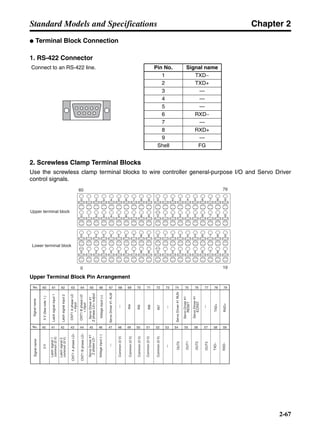
■ Mounting Direction
Mount the Servo Drivers in a direction (perpendicular) such that the lettering for the model number,
and so on, can be seen.
■ Operating Environment
The environment in which Servo Drivers are operated must meet the following conditions.
• Ambient operating temperature: 0 to 55°C (Take into account temperature rises in the individual
Servo Drivers themselves.)
• Ambient operating humidity: 90% max. (with no condensation)
• Atmosphere: No corrosive gases.
■ Ambient Temperature
• Servo Drivers should be operated in environments in which there is minimal temperature rise to
maintain a high level of reliability.
• Temperature rise in any Unit installed in a closed space, such as a control box, will cause the Servo
Driver’s ambient temperature to rise. Use a fan or air conditioner to prevent the Servo Driver’s ambi-
ent temperature from exceeding 55°C.
• Servo Driver surface temperatures may rise to as much as 30°C above the ambient temperature.
Use heat-resistant materials for wiring, and keep separate any devices or wiring that are sensitive
to heat.
50 mm min.
30 mm min.
Fan Fan
W = 10 mm min.
Side
panel
ServoDriver Air
Air
50 mm min.
W W
ServoDriver
ServoDriver
Chapter 3
3-4
System Design and Installation
• The service life of a Servo Driver is largely determined by the temperature around the internal elec-
trolytic capacitors. The service life of an electrolytic capacitor is affected by a drop in electrolytic vol-
ume and an increase in internal resistance, which can result in overvoltage alarms, malfunctioning
due to noise, and damage to individual elements. If a Servo Driver is always operated at the maxi-
mum ambient temperature of 40°C and at 80% of the rated torque, then a service life of approxi-
mately 50,000 hours can be expected. A drop of 10°C in the ambient temperature will double the
expected service life.
■ Keeping Foreign Objects Out of Units
• Place a cover over the Units or take other preventative measures to prevent foreign objects, such as
drill filings, from getting into the Units during installation. Be sure to remove the cover after installa-
tion is complete. If the cover is left on during operation, heat buildup may damage the Units.
• Take measures during installation and operation to prevent foreign objects such as metal particles,
oil, machining oil, dust, or water from getting inside of Servo Drivers.
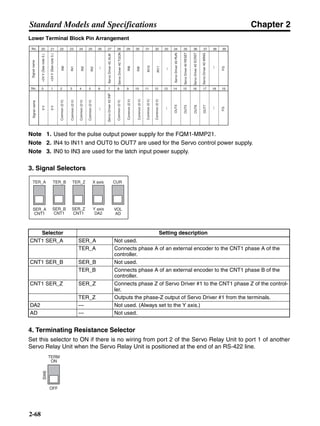
3-1-2 Servomotors
■ Operating Environment
The environment in which the Servomotor is operated must meet the following conditions. Operating
the Servomotor outside of the following ranges may result in malfunction of the Servomotor.
• Ambient operating temperature: 0 to +40°C
• Ambient operating humidity: 20% to 80% (with no condensation)
• Atmosphere: No corrosive gases.
■ Impact and Load
• The Servomotor is resistant to impacts of up to
98 m/s2
. Do not subject it to heavy impacts or loads
during transport, installation, or removal. When
transporting it, hold onto the Servomotor itself, and
do not hold onto the encoder, cable, or connector
areas. Holding onto weaker areas such as these
can damage the Servomotor.
• Always use a pulley remover to remove pulleys,
couplings, or other objects from the shaft.
• Secure cables so that there is no impact or load placed on the cable connector areas.
Chapter 3
3-5
System Design and Installation
■ Connecting to Mechanical Systems
• The axial loads for Servomotors are specified in 2-
4-2 Performance Specifications. If an axial load
greater than that specified is applied to a Servo-
motor, it will reduce the service life of the motor
bearings and may damage the motor shaft.
• When connecting to a load, use couplings that
can sufficiently absorb mechanical eccentricity
and variation.
• For spur gears, an extremely large radial load may
be applied depending on the gear precision. Use
spur gears with a high degree of accuracy (for
example, JIS class 2: normal line pitch error of
6 µm max. for a pitch circle diameter of 50 mm). If
the gear precision is not adequate, allow backlash
to ensure that no radial load is placed on the
motor shaft.
• Bevel gears will cause a load to be applied in the
thrust direction depending on the structural preci-
sion, the gear precision, and temperature
changes. Provide appropriate backlash or take
other measures to ensure that no thrust load is
applied which exceeds specifications.
• Do not put rubber packing on the flange surface. If
the flange is mounted with rubber packing, the
motor flange may separate due to the tightening
strength.
• When connecting to a V-belt or timing belt, consult the maker for belt selection and tension. A radial
load twice the belt tension will be placed on the motor shaft. Do not allow a radial load exceeding
specifications to be placed on the motor shaft due to belt tension. If an excessive radial load is
applied, the motor shaft may be damaged. Set up the structure so that the radial load can be
adjusted. A large radial load may also be applied as a result of belt vibration. Attach a brace and
adjust Servo Driver gain so that belt vibration is minimized.
■ Water and Drip Resistance
The enclosure ratings for the Servomotors are as follows:
3,000-r/min Cylinder-style Servomotors (30 to 750 W): IP55 (except for through-shaft parts)
3,000-r/min Flat-style Servomotors (100 W to 750 kW): IP55 (except for through-shaft parts)
Ball screw center line
Servomotor shaft
center line
Shaft core displacement
Backlash
Adjust backlash by
adjusting the distance
between shafts.
Make moveable.
Bevel gear
Tension
Pulley for tension adjustment
(Make adjustable.)Pulley
Belt
Chapter 3
3-6
System Design and Installation
■ Other Precautions
• Do not apply commercial power directly to the Servomotor. The Servomotors run on synchronous
AC and use permanent magnets. Applying commercial power directly will burn out the motor coils.
• Take measures to prevent the shaft from rusting. The shafts are coated with anti-rust oil when
shipped, but anti-rust oil or grease should also be applied when connecting the shaft to a load.
• Absolutely do not remove the encoder cover or take the motor apart. The magnet and the encoder
are aligned in the AC Servomotor. If they become misaligned, the motor will not operate.
3-1-3 Reduction Gears
■ Installation
• Use only the specified combinations of Servomotors and reduction gears. Using a combination that
is not specified, or using in combination with another company’s reductions gears or Servomotor
may result in a reduction in the service life of the motor bearings.
• The dimensions of the Servomotor mounting flange on the reduction gears differ for each Servomo-
tor. Do not install reduction gears on a Servomotor other than the one specified.
• Use a Servomotor with a straight shaft and without a key when installing reduction gears.
• Install reduction gears on the Servomotor using the following procedure.
1. Remove the rubber cap and check that the set bolt is loose.
2. Insert the Servomotor shaft into the input shaft.
3. Tighten the Servomotor installation bolt according to the tightening torque specified in the follow-
ing table.
4. Tighten the set bolt according to the tightening torque specified in the following table.
5. After tightening the set bolt, replace the rubber cap.
Servomotor installation bolt Tightening torque (N·m)
M4 2.9
M5 5.8
M6 9.8
M8 19.6
M10 39.2
Set bolt Tightening torque (N·m)
M3 1.0 to 1.5
M4 2.9 to 3.5
Input shaft
Rubber cap
Set bolt
Servomotor installation bolt
Chapter 3
3-7
System Design and Installation
■ Using Reduction Gears from Other Companies (Reference Information)
If the system configuration requires that a SMARTSTEP A-series Motor be used in combination with
a reduction gear from another company, select the reduction gear so that the loads on the motor
shaft (i.e., both the radial and thrust loads) are with the allowable values. (Refer to 2-4-2 Performance
Specifications for details on the allowable loads for motors.) Also, control the motor speed and output
torque so that the allowable input speed and allowable input torque of the reduction gear is not
exceeded.
Chapter 3
3-8
System Design and Installation
3-2 Wiring
3-2-1 Connecting Cable
This section shows the types of connecting cable used in a SMARTSTEP A-series
system. The wide selection of cables provided for configuring a servo system using a
Position Control Unit makes wiring simple.
Servo Driver
Cable
CN3 (Communications Connector)
Computer Monitor Cable Analog Monitor Cable
Position Control
Unit Cable
Servo Relay Unit Cable
Servo Relay Unit
Terminal Block Cable
Connector Terminal Block
Terminal Block Cable
General Control Cable and
Control I/O Connector
Position Control Unit
DOS personal
computers
CN1 (Control I/O Connector)
Parameter Unit
System Configuration
Servo Driver
Servomotor
MACHINE
No.
RUN
ERROR
SENS
DATA
X
Y
Z
U
NC413
CN1
CN2
A24
A1
B24
B1
0
1
2
3
4
5
6
7
8
9
10
11
12
13
14
15
16
17
18
19
CN2
(Encoder Input Connector)
Servomotor Power Terminal
CJ1W-NC113/133
CJ1W-NC213/233
CJ1W-NC413/433
CS1W-NC113/133
CS1W-NC213/233
CS1W-NC413/433
C200HW-NC113
C200HW-NC213
C200HW-NC413
C500-NC113
C500-NC211
C200H-NC112
C200H-NC211
2
3
1
R7D-AP@
R7M-A@
5 6
CN4
Note: A 1-meter cable is provided
with the Parameter Unit.
SCROLLSCROLL MODE/SETMODE/SET
DATA
RESET
JOGJOG
RUNRUN
DRIVER PRDRIVER PR PR DRIVERPR DRIVER
READ WRITEWRITE
R7A–PR02A PARAMETER UNIT
B.BB.B INPINP
VCMPVCMP
TGONTGON REFREF POWERPOWER
Position Control Unit with a
pulse string output
SYSMAC PLC with
pulse string output
CQM1-CPU43-V1
CQM1H-PLB21
CS1W-HCP22
CJ1M-CPU21/22/23
Single-axis Positioner with
pulse string output
3F88M-DRT141
Note: If using a Servo Relay Unit that
supports communications, a
communications cable is
required to connect the Servo
Relay Unit's communications
port and the Programmable
Controller's Serial
Communications Unit or Board.
R7A-PR02A
Computer Monitor Software
Controller
NEC PC98 notebook
computer
Other Controllers
Flexible Motion Controller
FQM1-MMP21/22
Servomotor Cables4
Integrated Cables Separate Cables
Power
cable
Encoder
cable
Note Use a robot cable if flexibility is required when
using separate cables. (Refer to pages 2-51 and
2-52.)
Chapter 3
3-9
System Design and Installation
■ Selecting Connecting Cables
1. Servo Relay Unit Cables
Select a Servo Relay Unit and Cable to match the Position Control Unit that is to be used.
● Selecting Connecting Cables without Communications Support
Note 1. The empty boxes in the model numbers are for cable length. The Position Control Unit Cable
length can be 0.5 or 1 meter long. (For example, XW2Z-050J-A3 is 0.5 meters long.) The
Servo Driver cable length can be 1 or 2 meters long. (For example, XW2Z-100J-B5 is
1 meter long.)
Note 2. When 2-axis control is used with one Position Control Unit, two cables are required to the
Servo Driver.
Position Control Unit Position Control Unit Cable Servo Relay Unit Servo Driver Cable
CQM1-CPU43-V1 XW2Z-@@@J-A3 XW2B-20J6-3B XW2Z-@@@J-B5
CQM1H-PLB21
C200H-NC112 XW2Z-@@@J-A4 XW2B-20J6-1B
C200H-NC211 XW2Z-@@@J-A5 XW2B-40J6-2B
C500-NC113
C500-NC211
CS1W-NC113 XW2Z-@@@J-A8 XW2B-20J6-1B
C200HW-NC113
CS1W-NC213 XW2Z-@@@J-A9 XW2B-40J6-2B
CS1W-NC413
C200HW-NC213
C200HW-NC413
CS1W-NC133 XW2Z-@@@J-A12 XW2B-20J6-1B
CS1W-NC233 XW2Z-@@@J-A13 XW2B-40J6-2B
CS1W-NC433
CJ1W-NC113 XW2Z-@@@J-A16 XW2B-20J6-1B
CJ1W-NC213 XW2Z-@@@J-A17 XW2B-40J6-2B
CJ1W-NC413
CJ1W-NC133 XW2Z-@@@J-A20 XW2B-20J6-1B
CJ1W-NC233 XW2Z-@@@J-A21 XW2B-40J6-2B
CJ1W-NC433
CS1W-HCP22 XW2Z-@@@J-A22 (single-axis) XW2B-20J6-3B
XW2Z-@@@J-A23 (two-axis)
3F88M-DRT141 XW2Z-@@@J-A25 XW2B-20J6-1B
CJ1M-CPU21 XW2Z-@@@J-A26 XW2B-20J6-8A (1 axis)
XW2B-40J6-9A (2 axes)CJ1M-CPU22
CJ1M-CPU23
Chapter 3
3-10
System Design and Installation
● Selecting Connecting Cables with Communications Support
Note 1. The empty boxes in the model numbers are for cable length. The Position Control Unit cable
length can be 0.5 or 1 meter long. (For example, XW2Z-050J-A9 is 0.5 meters long.) The
Servo Driver cable length can be 1 or 2 meters long. (For example, XW2Z-100J-B7 is
1 meter long.)
Note 2. When 2-axis control is used with one Position Control Unit, two cables are required to the
Servo Driver.
Note 3. When using the communications, an XW2Z-@@@J-C1 communications cable is required to
connect the Servo Relay Unit’s communications port and the Programmable Controller Se-
rial Communications Unit or Board. The communications cable length can be 1 or 2 meters
long. (For example, XW2Z-100J-C1 is 1 meter long.)
2. Connector-Terminal Block and Cables
These cables are used for connecting to Controllers for which no special cable is provided. The
cables and terminal block convert the Servo Driver’s Control I/O Connector (CN1) signals to terminal
block connections.
Position Control Unit Position Control Unit Cable Servo Relay Unit Servo Driver Cable
CS1W-NC213 XW2Z-@@@J-A9 XW2B-40J6-4A XW2Z-@@@J-B7
CS1W-NC413
CS1W-NC233 XW2Z-@@@J-A13
CS1W-NC433
CJ1W-NC213 XW2Z-@@@J-A17
CJ1W-NC413
CJ1W-NC233 XW2Z-@@@J-A21
CJ1W-NC433
C200HW-NC213 XW2Z-@@@J-A9
C200HW-NC413
CS1W-HCP22-V1 XW2Z-@@@J-A32 XW2B-80J7-1A XW2Z-@@@J-B12
XW2Z-@@@J-A29
FQM1-MMP21 XW2Z-@@@J-A30 XW2Z-@@@J-B10
XW2Z-@@@J-A28
Connector Terminal Block Cable Remarks
XW2B-40F5-P R88A-CTU@@@N The empty boxes in the model numbers are for
cable length. The cables can be 1 or 2 meters
long. (For example, R88A-CTU002N is 2
meters long.)
Chapter 3
3-11
System Design and Installation
3. General Control Cables and Control I/O Connector
These cables and connector are used for connecting to Controllers for which no special cable is pro-
vided, and when the cable for the Servo Driver’s control I/O connector is prepared by the user.
4. Servomotor Cables
Servomotor Cables come in two types: Cables for Servomotors without brakes and Cables for Servo-
motors with brakes. Select the Cable to match the Servomotor being used. Integrated Cables com-
bine an encoder cable and power cable, or separate Power Cables and Encoder Cables are
available.
One Power Cable and one Encoder Cable are required if separate cables are used.
Separate cables are also available with robot cables. Use a robot cable if cable flexibility is required.
● Integrated Cables
● Separate Cables
Power Cables
Name Cable Remarks
General Control Cable R88A-CPU@@@S The cable is attached to a connector that con-
nects to the Control I/O Connector (CN1). The
empty boxes in the model numbers are for
cable length. The cables can be 1 or 2 meters
long. (For example, R88A-CPU001S is 1 meter
long.)
Control I/O Connector R88A-CNU01C This is the connector for connecting to the Con-
trol I/O Connector (CN1). (This item is a con-
nector only.)
Specifications Cable model number Remarks
Cable for Servomotors with-
out brakes (both Cylinder-
style and Flat-style)
R7A-CEA@@@S Insert the cable length in the @@@ of the model
number. There are five cable lengths: 3 m, 5 m,
10 m, 15 m, and 20 m. (Model number exam-
ple: R7A-CEA003S for a 3-m cable)Cable for Servomotors with
brakes (both Cylinder-style
and Flat-style)
R7A-CEA@@@B
Specifications Cable model number Remarks
Cable for Servomotors with-
out brakes (both Cylinder-
style and Flat-style)
R88A-CAWA@@@S Insert the cable length in the @@@ of the model
number. There are five cable lengths: 3 m, 5 m,
10 m, 15 m, and 20 m. (Model number exam-
ple: R88A-CAWA003S for a 3-m cable)Cable for Servomotors with
brakes (both Cylinder-style
and Flat-style)
R88A-CAWA@@@B
Robot Cable for Servomotors
without brakes (both Cylin-
der-style and Flat-style)
R88A-CAWA@@@SR Insert the cable length in the @@@ of the model
number. There are five cable lengths: 3 m, 5 m,
10 m, 15 m, and 20 m. (Model number exam-
ple: R88A-CAWA003SR for a 3-m cable)
Use a Robot Cable if cable flexibility is required.
Robot Cable for Servomotors
with brakes (both Cylinder-
style and Flat-style)
R88A-CAWA@@@BR
Chapter 3
3-12
System Design and Installation
Encoder Cables
5. Computer Monitor Cable
A Computer Monitor Cable and the Computer Monitor Software for Servo Drivers (run on Windows)
are required to make Servo Driver parameter settings and perform monitoring from a personal com-
puter.
6. Analog Monitor Cable
This is the cable for connecting to the Servo Driver’s analog monitor connector (CN4). It is required
for connecting analog monitor outputs to an external device (such as a measuring instrument).
Specifications Cable model number Remarks
Cable for Servomotors with
or without brakes (both Cylin-
der-style and Flat-style)
R7A-CRA@@@C Insert the cable length in the @@@@ of the
model number. There are five cable lengths: 3
m, 5 m, 10 m, 15 m, and 20 m. (Model number
example: R7A-CRA003C for a 3-m cable)
Robot Cable for Servomotors
with or without brakes (both
Cylinder-style and Flat-style)
R7A-CRA@@@CR Insert the cable length in the @@@@ of the
model number. There are four cable lengths: 3
m, 5 m, 15 m, and 20 m. (Model number exam-
ple: R7A-CRA003CR for a 3-m cable)
Use a Robot Cable if cable flexibility is required.
Name/specifications Model Remarks
Computer Monitor
Cable
For DOS personal
computers
2 m R7A-CCA002P2 Only 2-meter cables are available.
NEC PC98 note-
book computer
2 m R7A-CCA002P3 Only 2-meter cables are available.
Name/specifications Model Remarks
Analog Monitor Cable 1 m R88A-CMW001S Only 1-meter cables are available.
Chapter 3
3-13
System Design and Installation
3-2-2 Peripheral Device Connection Examples
■ Single-phase Input:
R7D-APA3L; R7D-APA5L; R7D-AP01L; R7D-AP02L; R7D-AP04L; R7D-APA3H; R7D-APA5H;
R7D-AP01H; R7D-AP02H; R7D-AP04H; and R7D-AP08H
Single-phase 100/115 V AC, 50/60 Hz: R7D-AP@@L
Single-phase 200/230 V AC, 50/60 Hz: R7D-AP@@H
Noise filter (See note 1.)
Main-circuit power supply
Main-circuit contactor (See note 1.)
Surge killer (See note 1.)
Servo error display
Class D ground
(Class 3 ground:
100 Ω or less)
Class D ground
(Class 3 ground:
100 Ω or less)
User
control
device
Control cable
DC Reactor
Note 1. Recommended product in 3-2-4 Wiring for Noise Resistance.
2. Recommended relay: MY Relay (24 V), by OMRON.
3. For 400-W and 750-W Servo Drivers, an R88A-RR22047S
External Regeneration Resistor may be connected. Connect if the
regenerative energy exceeds the individual Servo Driver's
regenerative capacity. Also, connect a thermal switch output so that
the power supply will be turned OFF when open.
4. If an External Regeneration Resistor is to be connected to a 750-W
Servo Driver, remove the short bar between B2 and B3.
5. When either the main-circuit power supply or the control circuit
power supply is OFF, the dynamic brake will operate.
R T
NFB
1 2
3 4
E NF
OFF
X
ON
1MC X
1MC
PL
L1
L2
L1C
L2C
SMARTSTEP A-series Servo Driver
1MC
CN1
X
SMARTSTEP A-series Servomotor
W
V
U
B
E
M
CN2
Servomotor cable
24 V DC
XB
+ 1
+ 2
B1
B2
External Regeneration Resistor
(See note 3.)
B3
ALMCOM
ALM34
35
X
24 V DC
CN1
(See note 2.)
OGND
BKIR7
10
24 V DC
CN1
XB
(See note 4.)
Chapter 3
3-14
System Design and Installation
■ Three-phase Input: R7D-AP08H
Three-phase 200/230 V AC, 50/60 Hz
Noise filter (See note 1.)
Main-circuit power supply
Main-circuit contactor (See note 2.)
Surge killer (See note 2.)
Servo error display
Class D ground
(Class 3 ground:
100 Ω or less)
Class D ground
(Class 3 ground:
100 Ω or less)
User
control
device
Control cable
DC Reactor
Note 1. Recommended product in 3-2-4 Wiring for Noise Resistance.
2. Recommended relay: MY Relay (24 V), by OMRON.
3. An R88A-RR22047S External Regeneration Resistor may be connected.
Connect if the regenerative energy exceeds the individual Servo Driver's
regenerative capacity. Also, connect the thermal switch
output so that the power supply will be turned OFF when open.
4. If an External Regeneration Resistor is to be connected,
remove the short bar between B2 and B3.
5. When either the main-circuit power supply or the control-circuit
power supply is OFF, the dynamic brake will operate.
SMARTSTEP A-series Servo Driver SMARTSTEP A-series Servomotor
R T
NFB
S
1 2 3
4 5 6
E NF
OFF
X
ON
1MC X
1MC
PL
L1
L2
1MC
W
V
U
B
E
M
CN2
Servomotor cable
24 V DC
XB
CN1
X
ALMCOM
ALM34
35
X
24 V DC
CN1
(See note 2.)
OGND
BKIR7
10
24 V DC
CN1
XB
L1C
L3
L2C
1
2
B1
B2
B3
(See note 4.)
External Regeneration Resistor
(See note 3.)
+
+
Chapter 3
3-15
System Design and Installation
3-2-3 Terminal Block Wiring
When wiring a Terminal Block, pay attention to wire sizes, grounding systems, and anti-
noise measures.
■ Terminal Block Names and Functions
Terminal
label
Name Function
L1 Main circuit
power supply
input
R7D-AP@H:
Single-phase 200/230 V AC (170 to 253 V), 50/60 Hz
R7D-AP@L:
Single-phase 100/115 V AC (85 to 127 V), 50/60 Hz
Note Only the R7D–AP08H (750 W) has an L3 terminal, enabling three-phase
input: Three-phase 200/230 V AC (170 to 253 V AC) 50/60 Hz
L2
L3
1 Connection ter-
minals for DC
Reactor for
power supply
harmonic control
Normally short between +1 and +2.
When harmonic control is required, connect a DC Reactor between +1 and +2.
2
Main circuit DC
output (negative)
Do not connect anything to this terminal.
L1C Control circuit
power supply
input
R7D-AP@H:
Single-phase 200/230 V AC (170 to 253 V), 50/60 Hz
R7D-AP@L:
Single-phase 100/115 V AC (85 to 127 V), 50/60 Hz
L2C
B1 External regener-
ation resistance
connection termi-
nals
30 to 200 W: An External Regeneration Resistor cannot be connected to these
terminals.
400 W: These terminals normally do not need to be connected. If there is high
regenerative energy, connect an External Regeneration Resistor between B1
and B2.
750 W: Normally shorted between B2 and B3. If there is high regenerative
energy, remove the short bar between B2 and B3 and connect an External
Regeneration Resistor between B1 and B2.
B2
B3
U Servomotor con-
nection terminals
Red These are the output terminals to the Servomotor. Be careful to wire
them correctly.V White
W Blue
Green/
Yellow
Frame ground This is the ground terminal. Ground to a minimum of Class D ground
(Class 3 ground: 100 Ω or less).
+
+
−
Chapter 3
3-16
System Design and Installation
■ Terminal Block Wire Sizes
● 100-V AC Input (R7D-AP@L)
Note 1. Use the same wire sizes for 1, 2, B1, and B2.
Note 2. Connect an OMRON Servomotor Cable to the Servomotor connection terminals.
Item Model
Unit
R7D-APA3L R7D-APA5L R7D-AP01L R7D-AP02L R7D-AP04L
Power supply capacity kVA 0.2 0.25 0.4 0.75 1.2
Main circuit
power supply
input (L1, L2)
(See note 1.)
Effective
current
A (rms) 1.64 2.2 4.0 6.8 11
Wire size mm2 1.25 1.25 1.25 2 2
Control circuit
power supply
input (L1C,
L2C)
Effective
current
A (rms) 0.13 0.13 0.13 0.13 0.13
Wire size mm2 1.25 1.25 1.25 1.25 1.25
Effective
current
A (rms) 0.42 0.6 0.89 2.0 2.6
Wire size mm2 1.25 1.25 1.25 1.25 1.25
Wire size mm2 2 2 2 2 2
Screw
size
– M4 M4 M4 M4 M4
Torque N⋅m 1.2 1.2 1.2 1.2 1.2
No-fuse breaker or fuse
capacity
A (rms) 8 8 8 10 13
Servomotor
connection ter-
minal (U, V, W,
)
(See note 2.)
Frame ground
( )
+ +
Chapter 3
3-17
System Design and Installation
● 200V AC Input (R7D-AP@H)
Note 1. Use the same wire sizes and tightening torques for 1, 2, B1, and B2.
Note 2. Connect an OMRON Servomotor Cable to the Servomotor connection terminals.
■ Wire Sizes and Allowable Current
The following table shows the allowable current for when there are three wires.
● 600-V Heat-resistant Vinyl Wiring (HIV) (Reference Values)
Item Model
Unit
R7D-
APA3H
R7D-
APA5H
R7D-
AP01H
R7D-
AP02H
R7D-
AP04H
R7D-
AP08H
Power supply capacity kVA 0.2 0.25 0.4 0.75 1.2 2.1
Main circuit
power supply
input (L1, L2)
(See note 1.)
Effective
current
A (rms) 0.82 1.1 2.0 3.4 5.5 9.4
Wire size mm2 1.25 1.25 1.25 1.25 2 2
Control circuit
power supply
input (L1C, L2C)
Effective
current
A (rms) 0.1 0.1 0.1 0.1 0.1 0.1
Wire size mm2 1.25 1.25 1.25 1.25 1.25 1.25
Effective
current
A (rms) 0.42 0.6 0.89 2.0 2.6 4.4
Wire size mm2 1.25 1.25 1.25 1.25 1.25 2
Wire size mm2 2 2 2 2 2 2
Screw size – M4 M4 M4 M4 M4 M4
Torque N⋅m 1.2 1.2 1.2 1.2 1.2 1.2
No-fuse breaker or fuse
capacity
A (rms) 4 4 4 4 8 11
AWG size Nominal cross-
sectional area
(mm2
)
Configuration
(wires/mm2
)
Conductive
resistance (Ω/
km)
Allowable current (A) for
ambient temperature
30°C 40°C 50°C
20 0.5 19/0.18 39.5 6.6 5.6 4.5
– 0.75 30/0.18 26.0 8.8 7.0 5.5
18 0.9 37/0.18 24.4 9.0 7.7 6.0
16 1.25 50/0.18 15.6 12.0 11.0 8.5
14 2.0 7/0.6 9.53 23 20 16
12 3.5 7/0.8 5.41 33 29 24
10 5.5 7/1.0 3.47 43 38 31
8 8.0 7/1.2 2.41 55 49 40
6 14.0 7/1.6 1.35 79 70 57
Servomotor
connection ter-
minal (U, V, W,
)
(See note 2.)
Frame ground
( )
+ +
Chapter 3
3-18
System Design and Installation
■ Terminal Block Wiring Procedure
Connector-type Terminal Blocks are used for SMARTSTEP A-series Servo Drivers. The procedure
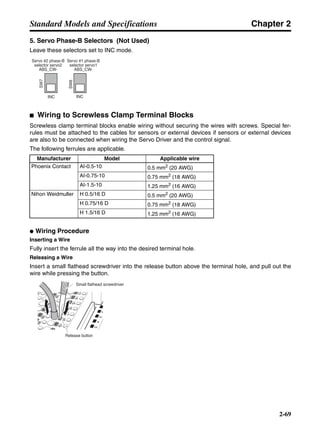
for wiring these Terminal Blocks is explained below.
1. Remove the Terminal Block from the Servo Driver.
!Caution The Terminal Block must be removed from the Servo Driver before being wired.
The Servo Driver will be damaged if the wiring is done with the Terminal Block in
place.
2. Strip the covering off the ends of the wires.
Prepare wires of the right sizes, according to the tables provided under Terminal Block Wire Sizes
above, and strip off 8 or 9 mm of the covering from the end of each wire.
3. Open the wire insertion slots in the Terminal Block
There are two ways to open the wire insertion slots, as follows:
• Pry the slot open using the lever that comes with the Servo Driver (as in Fig. A).
• Insert a flat-blade screwdriver (end width: 3.0 to 3.5 mm) into the opening for Servo Driver in-
stallation, and press down firmly to open the slot (as in Fig. B).
Connector-type Terminal Block
(Example: R7D-AP01L)
8 to 9 mm
231-131 Lever
(Wago Company of Japan)
Fig. A Fig. B
210-120J Screwdriver
(Wago Company of Japan)
Chapter 3
3-19
System Design and Installation
4. Insert the wire into the slot.
With the slot held open, insert the end of the wire. Then let the slot close by releasing the pressure
from the lever or the screwdriver.
5. Mount the Terminal Block to the Servo Driver.
After all of the terminals have been wired, return the Terminal Block to its original position on the
Servo Driver.
3-2-4 Wiring for Noise Resistance
System noise resistance will vary greatly depending on the wiring method used. This
section explains how to reduce noise through proper wiring.
■ Wiring Method
● Single-phase Power Supply Input
NFB
AC power
supply Surge absorber
Noise filter
Contactor
X1 Metal duct
Fuse
Class D ground
(Class 3 ground:
100 Ω or less)
Controller power supply
Thick power line (3.5 mm2)
Machine ground
Ground plate
Ground control box
3.5 mm2
1
2
3
4E
NF
TB
L1
L2
L1C
L2C
U
V
W
TB
CN2
R7D-AP@ R7M-A@
E
M
2 mm2
Chapter 3
3-20
System Design and Installation
● Three-phase Power Supply Input (R7D-AP08H)
• Ground the motor’s frame to the machine ground when the motor is on a movable shaft.
• Use a grounding plate for the frame ground for each Unit, as shown in the above diagrams, and
ground to a single point.
• Use ground lines with a minimum thickness of 3.5 mm2, and arrange the wiring so that the ground
lines are as short as possible.
• If no-fuse breakers are installed at the top and the power supply line is wired from the lower duct,
use metal tubes for wiring and make sure that there is adequate distance between the input lines
and the internal wiring. If input and output lines are wired together, noise resistance will decrease.
• No-fuse breakers, surge absorbers, and noise filters (NF) should be positioned near the input termi-
nal block (ground plate), and I/O lines should be isolated and wired using the shortest distance pos-
sible.
• Insert a fuse for short-circuit failure protection if a surge absorber is installed. As a guideline, select
a fuse with three times the maximum instantaneous current.
• Wire the noise filter as shown at the left in the following illustration. The noise filter should be
installed at the entrance to the control box whenever possible.
• Use twisted-pair cables for the power supply cables whenever possible, or bind the cables.
NFBAC power
supply Surge absorber Noise filter
Contactor
X1 Metal duct
Fuse
Controller power supply
Thick power line (3.5 mm2)
Machine ground
Ground plate
Ground control box
3.5 mm2
1
2
3
4
5
6E
NF
TB
L1
L2
L3
L1C
L2C
U
V
W
TB
CN2
R7D-AP@ R7M-A@
E
M
2 mm2
Class D ground
(Class 3 ground:
100 Ω or less)
Correct: Separate input and output Wrong: Noise not filtered effectively
AC outputAC input AC input
AC output
Ground
NF1
2
3
4
5
6E
NF1
2
3
4
5
6E
Ground
Chapter 3
3-21
System Design and Installation
• Separate power supply cables and signal cables when wiring.
■ Selecting Components
This section explains the criteria for selecting the connection components required for
improving noise resistance. These criteria include capacity performance, applicable
range, and so on. For more details, contact the manufacturers directly.
● No-fuse Breakers (NFB)
When selecting no-fuse breakers, take into consideration the maximum output current and the inrush
current.
Maximum input current:
The momentary maximum output for a Servo Driver is approximately three times that of the rated
output, and a maximum output of three seconds can be executed. Therefore, select no-fuse breakers
with an operating time of at least five seconds at 300% of the rated maximum output. General-pur-
pose and low-speed no-fuse breakers are generally suitable. The table in 3-2-3 Terminal Block Wir-
ing shows the rated power supply input currents for each Servomotor. Select a no-fuse-breaker with
a rated current greater than the total effective load current (when multiple Servomotors are used).
When making the selection, add in the current consumption of other controllers, and so on.
Servo Driver inrush current:
With low-speed no-fuse breakers, an inrush current 10 times the rated current flows for 0.02 sec-
onds. For a simultaneous inrush for multiple Servo Drivers, select a no-fuse-breaker with a 20-ms
allowable current greater than the total inrush current shown in the following table for the applicable
Servomotor models.
Smart
Servo
Driver
Power
supply
voltage
V
Servo
Driver
model
(R7D-)
Capacity Rated
current
A (rms)
Inrush
current
circuit
A (0-p)
125% of
rated
current
NFB model
Single-
phase
100 APA3L 30 W 1.64 90 2.05 NF30-SW 10A
100 APA5L 50 W 2.2 90 2.75 NF30-SW 10A
100 AP01L 100 W 4 90 5 NF30-SW 10A
100 AP02L 200 W 6.8 90 8.5 NF30-SW 10A
100 AP04L 400 W 11 90 13.75 NF30-SW 15A
Driver
Binding
or
Driver
Correct: Properly twisted Correct: Cables are bound.
L1C
L1
L2
L3
L2C
Chapter 3
3-22
System Design and Installation
● Surge Absorbers
Use surge absorbers to absorb surges from power supply input lines due to lightning, abnormal volt-
ages, etc. When selecting surge absorbers, take into account the varistor voltage, the amount of
surge immunity, and the amount of energy resistance. The surge absorbers shown in the following
table are recommended.
Note 1. The (W) for the Matsushita models indicates that they are UL and CSA certified.
Note 2. Refer to the manufacturers’ documentation for operating details.
Note 3. The surge immunity is for a standard impulse current of 8/20 µs. If pulses are wide, either
decrease the current or change to a larger-capacity surge absorber.
Note 4. The energy resistance is the value for 2 ms. It may not be possible to retard high-energy
pulses at less than 700 V. In that case, absorb surges with an insulated transformer or reac-
tor.
● Noise Filters for Power Supply Input
Use a noise filter to attenuate extraneous noise and to diminish noise radiation from the Servo Driver.
Select a noise filter with a load current of at least twice the rated current. The following table shows
noise filters that reduce by 40 dB noise between 200 kHz and 30 MHz.
Single-
phase
200 APA3H 30 W 0.82 90 1.025 NF30-SW 10A
200 APA5H 50 W 1.1 90 1.375 NF30-SW 10A
200 AP01H 100 W 2 90 2.5 NF30-SW 10A
200 AP02H 200 W 3.4 90 4.25 NF30-SW 10A
200 AP04H 400 W 5.5 90 6.875 NF30-SW 10A
200 AP08H 750 W 9.4 130 11.75 NF30-SW 15A
Maker Model Varistor
voltage
Max. limit
voltage
Surge
immunity
Energy
resistance
Type
Matsushita Electric ERZC20EK471(W) 470 V 775 V 5,000 A 150 J Block
ERZC25EK471(W) 470 V 775 V 10,000 A 225 J
ERZC32EK471(W) 470 V 775 V 20,000 A 405 J
Ishizuka Electronics
Co.
Z25M471S 470 V 775 V 10,000A 235 J Block
Z33M471S 470 V 775 V 20,000 A 385 J
Type Model Rated current Maker
Single-phase GT-2050 5 A Tokin
LF-210N 10 A
LF-215N 15 A
LF-220N 20 A
Smart
Servo
Driver
Power
supply
voltage
V
Servo
Driver
model
(R7D-)
Capacity Rated
current
A (rms)
Inrush
current
circuit
A (0-p)
125% of
rated
current
NFB model
Chapter 3
3-23
System Design and Installation
Note 1. To attenuate noise at frequencies of 200 kHz or less, use an insulated transformer and a
noise filter.
Note 2. For high frequencies of 30 MHz or more, use a ferrite core and a high-frequency noise filter
with a through-type capacitor.
Note 3. If multiple Servo Drivers are to be connected to a single noise filter, select a noise filter with
a rated current at least two times the total rated current of all the Servo Drivers.
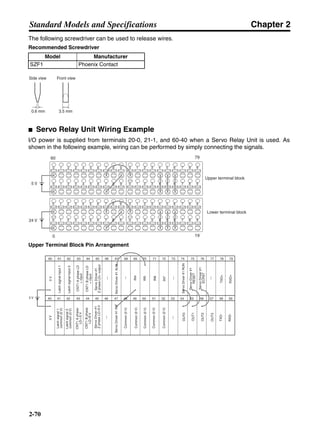
● Noise Filters for Servomotor Output
Use noise filters without built-in capacitors on the Servomotor output lines. Select a noise filter with a
rated current at least two times the total rated current of the Servo Driver’s continuous output current.
The following table shows the noise filters that are recommended for Servomotor output.
Note 1. Servomotor output lines cannot use the same noise filters used for power supplies.
Note 2. Typical noise filters are used with power supply frequencies of 50/60 Hz. If these noise filters
are connected to outputs of 11.7 kHz (the Servo Driver’s PWM frequency), a very large
(about 100 times larger) leakage current will flow through the noise filter’s condenser and
the Servo Driver could be damaged.
● Surge Killers
Install surge killers for loads that have induction coils, such as relays, solenoids, brakes, clutches,
etc. The following table shows types of surge killers and recommended products.
Three-phase LF-315K 15 A Tokin
LF-325K 25 A
LF-335K 35 A
ZCW2210-01 10 A TDK
ZCW2220-01 20 A
ZCW2230-01 30 A
ZCW2240-01 40 A
Maker Model Rated current Remarks
Tokin LF-310KA 10 A Three-phase block noise filter
LF-320KA 20 A
Type Features Recommended products
Diode Diodes are relatively small devices such as relays used
for loads when reset time is not an issue. The reset time
is increased because the surge voltage is the lowest
when power is cut off. Used for 24/48-V DC systems.
Use a fast-recovery diode with a short
reverse recovery time.
Fuji Electric Co., ERB44-06 or equiv-
alent
Thyristor
or
Varistor
Thyristor and varistor are used for loads when induction
coils are large, as in electromagnetic brakes, solenoids,
etc., and when reset time is an issue. The surge voltage
when power is cut off is approximately 1.5 times that of
the varistor.
Select varistor voltage as follows:
24-V DC system: 39 V
100-V DC system: 200 V
100-V AC system: 270 V
200-V AC system: 470 V
Capacitor
+ resistor
Use capacitors and resistors for vibration absorption of
surge when power is cut off. The reset time can be short-
ened by proper selection of the capacitor or resistor.
Okaya Electric Industries Co., Ltd.
CR-50500 0.5 µF-50 Ω
CRE-50500 0.5 µF-50 Ω
S2-A-0 0.2 µF-500 Ω
Type Model Rated current Maker
Chapter 3
3-24
System Design and Installation
Note Thyristors and varistors are made by the following companies. Refer to manufacturers docu-
mentation for operating details.Thyristors: Ishizuka Electronics Co.
Varistors: Ishizuka Electronics Co., Matsushita Electric Industrial Co.
● Contactors
When selecting contactors, take into consideration the circuit’s inrush current and the maximum
momentary current. The Servo Driver inrush current is covered in the preceding explanation of no-
fuse-breaker selection, and the maximum momentary current is approximately twice the rated cur-
rent. The following table shows the recommended contactors.
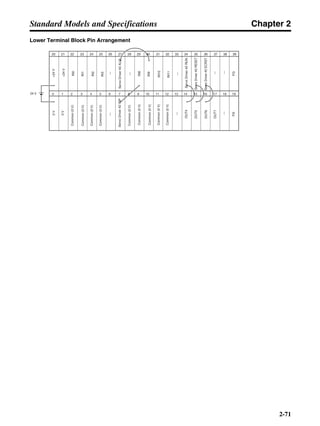
● Leakage Breakers
Select leakage breakers designed for inverters.
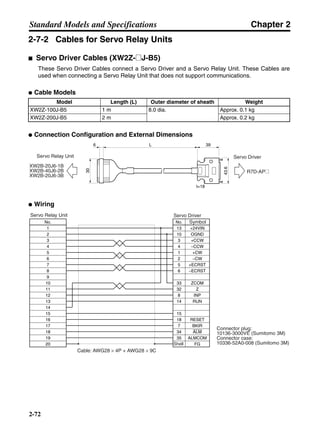
Since switching takes place inside the Servo Drivers, harmonic current leaks from the armature of
the motor. With inverter leakage breakers, harmonic current is not detected, preventing the breaker
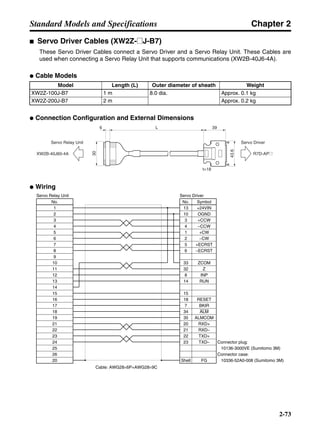
from operating due to leakage current.
When selecting leakage breakers, remember to also add the leakage current from devices other than
the Servomotor, such as machines using a switching power supply, noise filters, inverters, and so on.
For details on leakage breakers, refer to the manufacturer’s catalog.
The following table shows the Servomotor leakage current for each Servo Driver model.
Note 1. The above leakage current is for cases where Servomotor power line length is less than 5
meters. (It varies depending on the Servomotor cable length and the insulation.)
Note 2. The above leakage current is for normal temperature and humidity. (It varies depending on
the temperature and humidity.)
Leakage Breaker Connection Example
Maker Model Rated current Coil voltage
OMRON LC1-D093A60 11 A 200 V AC
LC1D25106 26 A
LC1D40116 35 A
LC1D50116 50 A
LC1-D093A60 11 A 24 V DC
LP1D25106 26 A
LP1D40116 35 A
LP1D50116 50 A
Driver Leakage current (direct measurement)
(including high-frequency current)
R7D-APA3L to -AP04L 29 mA
R7D-APA3H to -AP04H 14 mA
R7D-AP08H 16 mA
AC power supply side
No-fuse breaker
Surge absorber
Leakage breaker
Noise filter Servo Driver side
1
2
3
4
5
6E
NF
Chapter 3
3-25
System Design and Installation
● Harmonic Current Countermeasures (DC Reactor)
The DC Reactor is used for suppressing harmonic currents. It suppresses sudden and quick
changes in electric currents.
In September 1994, the Ministry of International Trade and Industry established guidelines for the
suppression of harmonic waves emitted from home and general electric appliances. To comply with
the guidelines, appropriate measures are required to suppress the influence of harmonic waves on
power supply lines.
Select the proper DC Reactor model according to the Servo Driver that is to be used.
■ Improving Encoder Cable Noise Resistance
In order to improve the encoder’s noise resistance, take the following measures for wiring and instal-
lation.
• Always use the specified Encoder Cables.
• If lines are interrupted in the middle, be sure to connect them with connectors, making sure that the
cable insulation is not peeled off for more than 50 mm. In addition, always use shielded cable.
• Do not coil cables. If cables are long and are coiled, mutual induction and inductance will increase
and will cause malfunctions. Always use cables fully extended.
• When installing noise filters for Encoder Cables, use clamp filters. The following table shows the
recommended clamp filter models.
• Do not place the Encoder Cable in the same duct as Control Cables for brakes, solenoids, clutches,
and valves.
Servo Driver DC Reactor
Model number Rated current (A) Inductance (mH) Weight (kg)
100 V R7D-APA3L/APA5L/AP01L R88A-PX5063 1.8 10.0 Approx. 0.6
R7D-AP02L R88A-PX5062 3.5 4.7 Approx. 0.9
R7D-AP04L R88A-PX5061 4.8 2.0 Approx. 0.5
200 V R7D-APA3H/APA5H/AP01H R88A-PX5071 0.85 40.0 Approx. 0.5
R7D-AP02H R88A-PX5070 1.65 20.0 Approx. 0.8
R7D-AP04H R88A-PX5069 3.3 10.0 Approx. 1.0
R7D-AP08H R88A-PX5061 4.8 2.0 Approx. 0.5
Maker Name Model
Tokin EMI core ESD-QR-25-1
TDK Clamp filter ZCAT2032-0930
ZCAT3035-1330
ZCAT2035-0930A
DC Reactor Connection Example
DC Reactor
Servo Driver
+ 1
+ 2
Chapter 3
3-26
System Design and Installation
■ Improving Control I/O Signal Noise Resistance
Positioning can be affected and I/O signals can error if control I/O is influenced by noise. Follow the
methods outlined below for the power supply and wiring.
• Use completely separate power supplies for the control power supply (especially 24 V DC) and the
external operation power supply. In particular, be careful not to connect the two power supply
ground wires. Install a noise filter on the primary side of the control power supply.
• If Servomotors with brakes are used, do not share the 24-V DC power supply for brakes with the
24-V DC power supply for control I/O. Additionally, do not connect ground wires. Connecting ground
wires may cause I/O signal errors.
• As much as possible, keep the power supply for pulse command and deviation counter reset input
lines separate from the control power supply. Be particularly careful not to connect the two power
supply ground lines.
• It is recommended that a line driver be used for pulse command and deviation counter reset out-
puts.
• Always use twisted-pair shielded cable for pulse command and deviation counter reset signal lines,
and connect both ends of the shield to frame grounds.
• If the control power supply wiring is long, noise resistance can be improved by adding 1-µF lami-
nated ceramic capacitors between the control power supply and ground at the Servo Driver input
section or the controller output section.
• For open-collector specifications, keep the length of wires to within two meters.
3-2-5 Conforming to EMC Directives
Conformance to EMC Directives (EN55011 class A group 1 (EMI) and EN61000-6-2
(EMS)) can be ensured by wiring under the conditions described below. These
conditions are for conformance of SMARTSTEP A-series products to EMC Directives.
EMC-related performance of these products, however, will vary depending on the
configuration, wiring, and other conditions of the equipment in which the products are
installed. The customer must, therefore, perform final checks to confirm that devices
and the overall installation conform to EMC Directives.
The following conditions must be met to conform to EMC Directives.
• The Servo Driver must be installed in a metal case (control panel). (The Servo Motor does not,
however, have to be covered with a metal plate.)
• Noise filters and surge absorbers must be installed on all power supply lines.
• Shielded cables must be used for all I/O signal lines and encoder lines. (Use tin-plated, soft copper
wires for the shield weaving.)
• All cables leaving the control panel must be wired in metal ducts or conduits with blades. (The 30-
cm power cable, encoder cable, and connector do not have to be inserted in metal ducts or con-
duits.)
• Ferrite cores must be attached to the shielded cable and the shield must be clamped directly to the
ground plate to ground it.
Chapter 3
3-27
System Design and Installation
■ Wiring Method
● Single-phase Power Supply Input
NFB
L1
L2
U
V
W
CN2
CN1
R7D-A@
E
M
B
R7M-A@
L1C
L2C
2 m max.
2 m max.
Control panel
Metal plate
AC
power
supply
Metal
duct or
conduit
Surge
absorber
Class D
ground
(Class 3
ground:
100 Ω or
less)
Noise
filter
Brake
power
supply
Noise
filter
Contactor
Ground
plate
Controller
power supply
Ferrite
core
Ferrite
core
Clamp
Ferrite core
Clamp
Ferrite core
Controller
Metal
duct or
conduit
Installationincorporating
Servo Motor
Ferrite
core
Ferrite
core
Note 1. The cable wiring for the ferrite core must be 1.5 turns.
Note 2. Remove the sheath from the cable and ground it directly to the metal plate at the clamps.
Chapter 3
3-28
System Design and Installation
● Three-phase Power Supply Input (R7D-AP08H)
• Ground the motor’s frame to the machine ground when the motor is on a movable shaft.
• Use a grounding plate for the frame ground for each Unit, as shown in the above diagrams, and
ground to a single point.
• Use ground lines with a minimum thickness of 3.5 mm2
, and arrange the wiring so that the ground
lines are as short as possible.
• If no-fuse breakers are installed at the top and the power supply line is wired from the lower duct,
use metal tubes for wiring and make sure that there is adequate distance between the input lines
and the internal wiring. If input and output lines are wired together, noise resistance will decrease.
• No-fuse breakers, surge absorbers, and noise filters (NF) should be positioned near the input termi-
nal block (ground plate), and I/O lines should be isolated and wired using the shortest distance pos-
sible.
• Wire the noise filter as shown at the left in the following illustration. The noise filter should be
installed at the entrance to the control box whenever possible.
NFB
L1
L2
U
V
W
CN2
CN1
R7D-A@
E
M
B
R7M-A@
L3
L1C
L2C
2 m max.
2 m max.
Control panel
Metal plate
AC
power
supply
Metal
duct or
conduit
Surge
absorber
Class D
ground
(Class 3
ground:
100 Ω or
less)
Noise
filter
Brake
power
supply
Noise
filter
Contactor
Ground
plate
Controller
power supply
Ferrite
core
Ferrite
core
Clamp
Ferrite core
Clamp
Ferrite core
Controller
Metal
duct or
conduit
Installation incorporating
Servo Motor
Ferrite
core
Ferrite
core
Note 1. The cable wiring for the ferrite core must be 1.5 turns.
Note 2. Remove the sheath from the cable and ground it directly to the metal plate at the clamps.
NF1
2
3
4
5
6E
NF1
2
3
4
5
6E
Correct: Separate input and output Wrong: Noise not filtered effectively
AC input
Ground
AC input
Ground
AC output
AC output
Chapter 3
3-29
System Design and Installation
• Use twisted-pair cables for the power supply cables whenever possible, or bind the cables.
• Separate power supply cables and signal cables when wiring.
■ Control Panel Structure
Any gaps in the cable entrances, mounting holes, covers, or other parts of a control
panel can allow electromagnetic waves to leak from or enter the control panel. Observe
the following items for panel design and selection to ensure that electromagnetic waves
cannot leak from or enter the control panel.
● Case Structure
• Use a metal control panel with welded joints on the top, bottom, and all sides. The case must be
electrically conductive.
• When assembling the control panel, remove the coating from all joints (or mask the joints when
coating) to ensure electrical conductivity.
• Be sure that no gaps are created when installing the control panel, as gaps can be caused by dis-
tortion when tightening screws.
• Be sure there are not any electrically conductive parts that are not in electrical contact.
• Ground all Units mounted in the control panel to the panel case.
● Cover Structure
• Use a metal cover.
• Use a water-proof structure, as shown in the following diagram, and be sure there are no gaps.
• Use electrically conductive packing between the cover and the case, as shown in the following dia-
gram. (Remove the coating from the contact points of the packing (or mask the contact points when
coating) to ensure electrical conductivity.)
Driver
Binding
or
Driver
Correct: Properly twisted Correct: Cables are bound.
L1C
L1
L2
L3
L2C
Chapter 3
3-30
System Design and Installation
• Be sure that no gaps are created when installing the cover, as gaps can be caused by distortion
when tightening screws.
■ Selecting Components
This section explains the criteria for selecting the connection components required for
improving noise resistance. These criteria include capacity performance, applicable
range, and so on. For more details, contact the manufacturers directly.
● No-fuse Breakers (NFB)
When selecting no-fuse breakers, take into consideration the maximum output current and the inrush
current.
Maximum input current:
The momentary maximum output for a Servo Driver is approximately three times that of the rated
output, and a maximum output of three seconds can be executed. Therefore, select no-fuse breakers
with an operating time of at least five seconds at 300% of the rated maximum output. General-pur-
pose and low-speed no-fuse breakers are generally suitable. The table in 3-2-3 Terminal Block Wir-
ing shows the rated power supply input currents for each Servomotor. Select a no-fuse-breaker with
a rated current greater than the total effective load current (when multiple Servomotors are used).
When making the selection, add in the current consumption of other controllers, and so on.
A
B
Case
Cover
Control Panel
Case (Inside)
Oil-proof packing Conductive packing
Cover
A-B Cross-section
Oil-proof packing
Conductive packing
Chapter 3
3-31
System Design and Installation
Servo Driver inrush current:
With low-speed no-fuse breakers, an inrush current 10 times the rated current flows for 0.02 sec-
onds. For a simultaneous inrush for multiple Servo Drivers, select a no-fuse-breaker with a 20-ms
allowable current greater than the total inrush current shown in the following table for the applicable
Servomotor models.
● Surge Absorbers
Use surge absorbers to absorb surges from power supply input lines due to lightning, abnormal volt-
ages, etc. When selecting surge absorbers, take into account the varistor voltage, the amount of
surge immunity, and the amount of energy resistance. The surge absorbers shown in the following
table are recommended.
Note 1. Refer to the manufacturers’ documentation for operating details.
Note 2. The surge immunity is for a standard impulse current of 8/20 µs. If pulses are wide, either
decrease the current or change to a larger-capacity surge absorber.
● Noise Filters for Power Supply Input
Use the appropriate noise filter from among those in the following table for the Servo Driver power
supply.
Note The last 2 digits in the noise filter’s model number indicate the type of connection terminals
used. “07” indicates lead-wire terminals. There are also models with soldered faston terminals
(“06”) and screw terminals (“08”). Use the appropriate noise filter for the application. For
details, contact the manufacturer.
Servo Driver Inrush current (A0-p)
Control-circuit power supply Main-circuit power supply
R7D-APA3L to -AP02L 30 90
R7D-AP04L 30 90
R7D-APA3H to -AP04H 60 90
R7D-AP08H 60 130
Maker Model Max. limit
voltage
Surge
immunity
Type Remarks
Okaya Electric Indus-
tries Co., Ltd.
R·A·V-781BYZ-2 783 V 1,000 A Block For power supply
line
R·A·V-781BXZ-4 78 V 1,000 A For power supply
line ground
Servo Driver Noise filter for power supply input
Model Rated
current
Rated
voltage
Leakage current* Manufacturer
R7D-APA3L to -AP01L FN2070-10/07 10 A 250 V 0.4 mA/phase Schaffner
R7D-AP02L to -AP04L FN2070-16/07 16 A
R7D-APA3H to -AP02H FN2070-6/07 6 A 250 V 0.4 mA/phase Schaffner
R7D-AP04H FN2070-10/07 10 A
R7D-AP08H Single-phase FN2070-16/07 16 A 250 V 0.4 mA/phase Schaffner
Three-phase FN258L-16/07 16 A 480 V 2.5 mA (at
250 Vrms, 50 Hz)
Chapter 3
3-32
System Design and Installation
Dimensions
(The dimensions given below are for noise filters with lead-wire terminals. For the dimensions of
noise filters with different types of terminals, contact the manufacturer.)
For single-phase input (FN2070-6/07, FN2070-10/07)
For single-phase input (FN2070-16/07)
Model A B C
FN2070-6/07 94 mm 103 mm 113.6 mm
FN2070-10/07 130.5 mm 143 mm 156 mm
45.4
56
57.5
18
0.9
8.4
140 +5
0 140 +5
0A
B
C
64.4
57.6 140 +5
0
1.2
8.6
84.5
85.5
140 +5
098.5
51
66
4.4
109
119
7.4
Chapter 3
3-33
System Design and Installation
For three-phase input (FN258L-16/07)
● Noise filter for brake power supply
Use the following noise filter for the brake power supply.
Dimensions
Noise filter for brake power supply (SUP-P5H-EPR)
Model Rated current Rated voltage Leakage current Manufacturer
SUP-P5H-EPR 5 A 250 V 0.6 mA (at 250 Vrms, 60 Hz) Okaya Electric Industries
Co., Ltd.
275 300±10
290
305
142
M5
30
6.5
55
38±1 63.5±1
74.7±1
84±1
100±2
50.8±1
24±1
Five, M4
Two, 4.8 dia.
Chapter 3
3-34
System Design and Installation
● Surge Killers
Install surge killers for loads that have induction coils, such as relays, solenoids, brakes, clutches,
etc. The following table shows types of surge killers and recommended products.
Note Thyristors and varistors are made by the following companies. Refer to manufacturers docu-
mentation for operating details.Thyristors: Ishizuka Electronics Co.
Varistors: Ishizuka Electronics Co., Matsushita Electric Industrial Co.
● Contactors
When selecting contactors, take into consideration the circuit’s inrush current and the maximum
momentary current. The Servo Driver inrush current is covered in the preceding explanation of no-
fuse-breaker selection, and the maximum momentary current is approximately twice the rated cur-
rent. The following table shows the recommended contactors.
● Leakage Breakers
Select leakage breakers designed for inverters.
Since switching takes place inside the Servo Drivers, harmonic current leaks from the armature of
the motor. With inverter leakage breakers, harmonic current is not detected, preventing the breaker
from operating due to leakage current.
When selecting leakage breakers, remember to also add the leakage current from devices other than
the Servomotor, such as machines using a switching power supply, noise filters, inverters, and so on.
For details on leakage breakers, refer to the manufacturer’s catalog.
Type Features Recommended products
Diode Diodes are relatively small devices such as relays used
for loads when reset time is not an issue. The reset time
is increased because the surge voltage is the lowest
when power is cut off. Used for 24/48-V DC systems.
Use a fast-recovery diode with a short
reverse recovery time.
Fuji Electric Co., ERB44-06 or equiv-
alent
Thyristor
or
Varistor
Thyristor and varistor are used for loads when induction
coils are large, as in electromagnetic brakes, solenoids,
etc., and when reset time is an issue. The surge voltage
when power is cut off is approximately 1.5 times that of
the varistor.
Select varistor voltage as follows:
24-V DC system: 39 V
100-V DC system: 200 V
100-V AC system: 270 V
200-V AC system: 470 V
Capacitor
+ resistor
Use capacitors and resistors for vibration absorption of
surge when power is cut off. The reset time can be short-
ened by proper selection of the capacitor or resistor.
Okaya Electric Industries Co., Ltd.
CR-50500 0.5 µF-50 Ω
CRE-50500 0.5 µF-50 Ω
S2-A-0 0.2 µF-500 Ω
Maker Model Rated current Coil voltage
OMRON LC1-D093A60 11 A 200 V AC
LC1D25106 26 A
LC1D40116 35 A
LC1D50116 50 A
LC1-D093A60 11 A 24 V DC
LP1D25106 26 A
LP1D40116 35 A
LP1D50116 50 A
Chapter 3
3-35
System Design and Installation
The following table shows the Servomotor leakage current for each Servo Driver model.
Note 1. The above leakage current is for cases where Servomotor power line length is less than 5
meters. (It varies depending on the Servomotor cable length and the insulation.)
Note 2. The above leakage current is for normal temperature and humidity. (It varies depending on
the temperature and humidity.)
Leakage Breaker Connection Example
■ Improving Encoder Cable Noise Resistance
In order to improve the encoder’s noise resistance, take the following measures for wiring and instal-
lation.
• Always use the specified Encoder Cables.
• If lines are interrupted in the middle, be sure to connect them with connectors, making sure that the
cable insulation is not peeled off for more than 50 mm. In addition, always use shielded cable.
• Do not coil cables. If cables are long and are coiled, mutual induction and inductance will increase
and will cause malfunctions. Always use cables fully extended.
• When installing noise filters for Encoder Cables, use clamp filters. The following table shows the
recommended clamp filter models.
• Do not place the Encoder Cable in the same duct as Control Cables for brakes, solenoids, clutches,
and valves.
■ Improving Control I/O Signal Noise Resistance
Positioning can be affected and I/O signals can error if control I/O is influenced by noise. Follow the
methods outlined below for the power supply and wiring.
• Use completely separate power supplies for the control power supply (especially 24 V DC) and the
external operation power supply. In particular, be careful not to connect the two power supply
ground wires. Install a noise filter on the primary side of the control power supply.
Driver Leakage current (direct measurement)
(including high-frequency current)
R7D-APA3L to -AP04L 29 mA
R7D-APA3H to -AP04H 14 mA
R7D-AP08H 16 mA
Maker Name Model
Tokin EMI core ESD-SR-25
TDK Clamp filter ZCAT2032-0930
ZCAT3035-1330
ZCAT2035-0930A
AC power supply side
No-fuse breaker
Surge absorber
Leakage breaker
Noise filter Servo Driver side
1
2
3
4
5
6E
NF
Chapter 3
3-36
System Design and Installation
• If Servomotors with brakes are used, do not share the 24-V DC power supply for brakes with the
24-V DC power supply for control I/O. Additionally, do not connect ground wires. Connecting ground
wires may cause I/O signal errors.
• As much as possible, keep the power supply for pulse command and deviation counter reset input
lines separate from the control power supply. Be particularly careful not to connect the two power
supply ground lines.
• It is recommended that a line driver be used for pulse command and deviation counter reset out-
puts.
• Always use twisted-pair shielded cable for pulse command and deviation counter reset signal lines,
and connect both ends of the shield to frame grounds.
• If the control power supply wiring is long, noise resistance can be improved by adding 1-µF lami-
nated ceramic capacitors between the control power supply and ground at the Servo Driver input
section or the controller output section.
• For open-collector specifications, keep the length of wires to within two meters.
Chapter 3
3-37
System Design and Installation
3-3 Regenerative Energy Absorption
The Servo Drivers have internal regenerative energy absorption circuitry for absorbing
the regenerative energy produced during time such as Servomotor deceleration, and
thus preventing the DC voltage from increasing. An overvoltage error is generated,
however, if the amount of regenerative energy from the Servomotor is too large. If this
occurs, measures must be taken to reduce the regenerative energy produced by
changing operating patterns, and so on, or to improve the regenerative energy
absorption capacity by connecting external regeneration resistance.
3-3-1 Regenerative Energy Calculation
■ Horizontal Axis
Note In the output torque graph, acceleration in the positive direction is shown as positive, and
acceleration in the negative direction is shown as negative.
• The regenerative energy values for Eg1 and Eg2 are derived from the following equations.
Servomotor operation
Servomotor output torque
+N1
−N2
TD1
TD2
t1 t2
T
Eg1
Eg2
N1, N2: Rotation speed at beginning of deceleration [r/min]
TD1, TD2: Deceleration torque [N·m]
t1, t2: Deceleration time [s]
• Eg1 = • • N1 • TD1 • t1 [J] = 0.0524 • N1 • TD1 • t1 [J]
2 60
60
2π
2π
1
• Eg2 = • • N2 • TD2 • t2 [J] = 0.0524 • N2 • TD2 • t2 [J]
2
1
Chapter 3
3-38
System Design and Installation
Note There is some loss due to winding resistance, so the actual regenerative energy will be approx-
imately 90% of the values derived from these equations.
• For Servo Driver models with internal capacitors for absorbing regenerative energy (i.e., models of
400 W or less.), the values for both Eg1 or Eg2 (unit: J) must be lower than the Servo Driver’s
regenerative energy absorption capacity. (The capacity varies depending on the model. For details,
refer to 3-3-2 Servo Driver Regenerative Energy Absorption Capacity.)
• For Servo Driver models with internal regeneration resistance for absorbing regenerative energy
(i.e., models of 750 W), the average amount of regeneration Pr (unit: W) must be calculated, and
this value must be lower than the Servo Driver’s regenerative energy absorption capacity. (For
details, refer to 3-3-2 Servo Driver Regenerative Energy Absorption Capacity.)
The average amount of regeneration (Pr) is the power consumed by regeneration resistance in
one cycle of operation.
Pr = (Eg1 + Eg2)/T [W]
T: Operation cycle [s]
■ Vertical Axis
Note In the output torque graph, acceleration in the positive direction (rise) is shown as positive, and
acceleration in the negative direction (fall) is shown as negative.
• The regenerative energy values for Eg1, Eg2, and Eg3 are derived from the following equations.
Fall
Rise
Servomotor operation
Servomotor output torque
+N1
−N2
t1 t2 t3
T
Eg1
Eg3Eg3
TD2
TL2
TD1
Eg2
Chapter 3
3-39
System Design and Installation
Note There is some loss due to winding resistance, so the actual regenerative energy will be approx-
imately 90% of the values derived from these equations.
• For Servo Driver models with internal capacitors for absorbing regenerative energy (i.e., models of
400 W or less.), the values for both Eg1 or [Eg2+Eg3] (unit: J) must be lower than the Servo Driver’s
regenerative energy absorption capacity. (For details, refer to 3-3-2 Servo Driver Regenerative
Energy Absorption Capacity.)
• For Servo Driver models with internal regeneration resistance for absorbing regenerative energy
(i.e., models of 750 W), the average amount of regeneration Pr (unit: W) must be calculated, and
this value must be lower than the Servo Driver’s regenerative energy absorption capacity. (For
details, refer to 3-3-2 Servo Driver Regenerative Energy Absorption Capacity.)
The average amount of regeneration (Pr) is the power consumed by regeneration resistance in
one cycle of operation.
Pr = (Eg1 + Eg2+ Eg3)/T [W]
T: Operation cycle [s]
3-3-2 Servo Driver Regenerative Energy Absorption Capacity
■ Amount of Internal Regeneration Resistance in Servo Drivers
SMARTSTEP A-series Servo Drivers absorb regenerative energy by means of internal capacitors or
resistors. If the regenerative energy is more than can be processed internally, an overvoltage error is
generated and operation cannot continue. The following table shows the regenerative energy (and
amount of regeneration) that the individual Servo Drivers themselves can absorb. If these values are
exceeded, take the following measures.
• Connect external regeneration resistance (to improve the regeneration processing capacity).
• Reduce the operating rotation speed. (The amount of regeneration is proportional to the square of
the rotation speed.)
• Lengthen the deceleration time (to decrease the regenerative energy produced per time unit).
• Lengthen the operation cycle, i.e., the cycle time (to decrease the average regenerative power).
N1, N2: Rotation speed at beginning of deceleration [r/min]
TD1, TD2: Deceleration torque [N·m]
TL2: Torque when falling [N·m]
t1, t3: Deceleration time [s]
t2: Constant-velocity travel time when falling [s]
• Eg1 = • • N1 • TD1 • t1 [J] = 0.0524 • N1 • TD1 • t1 [J]
2 60
60
2π
2π
1
• Eg2 = • N2 • TL2 • t2 [J] = 0.105 • N2 • TL2 • t2 [J]
60
2π
• Eg3 = • • N2 • TD2 • t3 [J] = 0.0524 • N2 • TD2 • t3 [J]
2
1
Chapter 3
3-40
System Design and Installation
Note External Regeneration Resistors cannot be connected to 30- to 200-W Servo Drivers.
Note These are the values at 100 V AC for 100-V AC models, and at 200 V AC for 200-V AC models.
3-3-3 Regenerative Energy Absorption by External
Regeneration Resistance
For 400- to 750-W Servo Drivers, if the regenerative energy exceeds the absorption
capacity of the Servo Driver by itself, then external regeneration resistance can be
connected.
A Resistor or Unit can be used alone or in combination with other Resistors/Units to
provide the required regeneration processing capacity.
!Caution Connect the External Regeneration Resistor or External Regeneration Resistance
Unit between the Servo Driver’s B1 and B2 terminals. Check the terminal names
carefully when connecting to the terminals. If the Resistor or Unit is connected to
the wrong terminals it will damage the Servomotor.
Note 1. The External Regeneration Resistor can reach a temperature of approximately 120°C, so
install it at a distance from heat-sensitive devices and wiring. In addition, a radiation shield
must be installed according to the radiation conditions.
Note 2. For external dimensions, refer to 2-9 External Regeneration Resistor Specifications.
Servo Driver Regenerative energy (J)
that can be absorbed by
internal capacitor (See
note 1.)
Internal regeneration resistance
Average amount of
regeneration that can
be absorbed (W)
Resistance (Ω)
R7D-APA3L 57.1 – –
R7D-APA5L 57.1 – –
R7D-AP01L 57.1 – –
R7D-AP02L 57.1 – –
R7D-AP04L 57.1 – –
R7D-APA3H 18.5 – –
R7D-APA5H 18.5 – –
R7D-AP01H 37.1 – –
R7D-AP02H 37.1 – –
R7D-AP04H 37.1 – –
R7D-AP08H – 12 50
Chapter 3
3-41
System Design and Installation
■ External Regeneration Resistors
● Specifications
Note The following external regeneration resistors are recommended products from another manu-
facturer, Iwaki Musen Kenkyujo. For details, refer to the manufacturer’s documentation.
RH120N50ΩJ 50 Ω ± 5% 30 W (Amount of regeneration at 120°C)
RH300N50ΩJ 50 Ω ± 5% 75 W (Amount of regeneration at 120°C)
RH500N50ΩJ 50 Ω ± 5% 100 W (Amount of regeneration at 120°C)
● Combining External Regeneration Resistors
Note A combination cannot be used if the resistance is less than the minimum connection resistance
for any given Servo Driver. Refer to the following table for the minimum connection resistance
values for each Servo Driver, and select a suitable combination.
■ Servo Driver Minimum Connection Resistance and External
Regeneration Resistor Combinations
Model Resistance Nominal
capacity
Regeneration
absorption at
120°C
Heat radiation Thermal switch
output
R88D-RR22047S
External Regen-
eration Resistor
47 Ω ± 5% 220 W 70 W t1.0 × @350
(SPCC)
Operating tem-
perature: 170°C
NC contact
Servo Driver Minimum Connection
Resistance (Ω)
External Regeneration Resistor Combinations
R7D-AP04L 40
,
R7D-AP04H 40
,
R7D-AP08H 40
, ,
1 70W (47 Ω) 2 280W (47 Ω) 3 630W (47 Ω)
R
R R
R R
R R
R
R
R RR
R R
11 22
11 22
11 22 33
Chapter 3
3-42
System Design and Installation
■ Wiring External Regeneration Resistance
● R7D-AP04L and R7D-AP04H
Connect an External Regeneration Resistor between the B1 and B2 terminals.
● R7D-AP08H
Remove the short-circuit wiring between B2 and B2, and then connect an External Regeneration
Resistor between the B1 and B2 terminals.
Servo Driver
External Regeneration Resistor
Note When using the R88A-RR22047S, connect the
thermal switch output so that the power supply will
be shut off when open.
B1
B2
Note 1. The short-circuit wiring between B2 and B3 must be removed.
2. When using the R88A-RR22047S, connect the thermal switch
output so that the power supply will be shut off when open.
← Remove
Servo Driver
External Regeneration Resistor
B1
B2
B3
Chapter 4
Operation
4-1 Operational Procedure
4-2 Switch Settings
4-3 Preparing for Operation
4-4 Trial Operation
4-5 Gain Adjustments
4-6 User Parameters
4-7 Operating Functions
Chapter 4
4-2
Operation
Precautions
!Caution Confirm that there will be no effect on the equipment, and then perform a test
operation. Not doing so may result in equipment damage.
!Caution Check the newly set parameters and switches with their switches for proper exe-
cution before actually running them. Not doing so may result in equipment dam-
age.
!Caution Do not make any extreme adjustments or setting changes. Doing so may result in
unstable operation and injury.
!Caution Separate the Servomotor from the machine, check for proper operation, and then
connect to the machine. Not doing so may cause injury.
!Caution When an alarm occurs, remove the cause, reset the alarm after confirming safety,
and then resume operation. Not doing so may result in injury.
!Caution Do not use the built-in brake of the Servomotor for ordinary braking. Doing so may
result in a malfunction.
Chapter 4
4-3
Operation
4-1 Operational Procedure
After mounting, wiring, and connecting a power supply, check the operation of the
Servomotor and Servo Driver. This section describes operating methods using the
Servo Driver’s front panel switches only.
Note For operating and adjustment methods using an R7A-PR02A Parameter Unit, refer to the
Parameter Unit Operation Manual (Cat. No. I534).
1. Mounting and installation
Install the Servomotor and Servo Driver according to the installation conditions. (Do not connect
the Servomotor to the mechanical system before checking the no-load operation.) Refer to 3-1 In-
stallation Conditions.
2. Wiring and connections
Connect to power supply and peripheral devices. Specified installation and wiring requirements
must be satisfied, particularly for models conforming to the EC Directives. Refer to 3-2 Wiring.
3. Switch settings
Make sure that the power supply is turned OFF, and set the Servo Driver’s front panel switches.
Refer to 4-2 Switch Settings.
4. Preparing for operation
After checking the necessary items, turn ON the Unit’s power supply. Check to see whether there
are any internal errors in the Servo Driver. Refer to 4-3 Preparing for Operation.
5. Trial operation
Firstly, check the Servomotor’s no-load operation. Next, turn the power OFF then ON again, and
connect the Servomotor to the mechanical system. Turn ON the power, and check to see whether
protective functions such as emergency stop and operational limits are working reliably. Check op-
eration at both low speed and high speed, with either no workpiece or a dummy workpiece. Refer
to 4-4 Trial Operation.
6. Adjustments
Manually adjust the gain as required. Refer to 4-5 Gain Adjustments.
7. Operation
Operation can now begin. If any trouble should occur, refer to 5 Troubleshooting.
Chapter 4
4-4
Operation
4-2 Switch Settings
With SMARTSTEP A-series Servo Drivers, operation settings can be performed simply
by using the front panel switches. Set the switches appropriately according to the
system configuration.
4-2-1 Switch Nomenclature and Functions
■ Unit No. Rotary Switch: UNIT No. (RS-422/485)
Use this switch to set the communications unit number for CN1 and CN3.
When performing multiple-axis communications with multiple Servo Drivers
from CN1 using, for example, a personal computer, set the rotary switch to a
setting other than 0 (i.e., between 1 and F). Be sure not to use the same unit
number more than once when performing multiple-axis communications.
Attempting communications with duplicated unit numbers may result in dam-
age to communications connectors.
■ Gain Adjustment Rotary Switch: GAIN
The gain adjustment rotary switch adjusts the response of the Servomotor. To
reduce (slow down) the Servomotor’s response, set the gain adjustment rotary
switch to a low value. To increase (speed up) the Servomotor’s response, set the
gain adjustment rotary switch to a high value.
Note If the gain adjustment rotary switch is set to 0, the Servomotor will operate according to the
Servo Driver’s internal parameter.
■ Function Switches
The function switches set Servo Driver functions.
Switch 6: Switches between switch and parameter settings.
Switches 5 and 4: Set the resolution.
Switch 3: Sets the command pulse input.
Switch 2: Sets the dynamic brake.
Switch 1: Switch to online autotuning.
Note Turn the power supply OFF before using switches 2 to 6.
Unit No. rotary switch. (Default setting: 0.)
Gain adjustment rotary switch. (Default setting: 4.)
Function setting switch. (Default setting: all OFF.)
012
345
6789A
BCDE
F
UNIT No.
(RS-422/485)
012
345
6789A
BCDE
F
GAIN
123456
PRMTR
PLS/SIGN
DB ON
AUTO TUNING ON
SW
CW/CCW
DB OFF
OFF
500P/R
×10 ×1
1000P/R
O
N
(1P) (2P)
Chapter 4
4-5
Operation
■ Turning Function Switches ON and OFF
The default setting for all function switches is OFF. Use a thin-blade non-conductive ceramic screw-
driver or equivalent to turn the switches ON and OFF. In the following diagrams, the left diagram
shows a switch turned OFF, and the right diagram a switch turned ON.
4-2-2 Setting Function Switches
■ Switch/Parameter Switch (Switch 6)
Switch 6 sets whether the Servo Driver is to be operated using the function switches, or using the
parameter settings.
Note Here, settings will be performed using the function switches, so turn OFF switch 6.
■ Resolution Setting (Switches 4 and 5)
Switches 4 and 5 set the positioning resolution. When they are set to 1,000 (the default setting), the
Servomotor will rotate once for every 1,000 pulses that are input.
Note At 5,000 pulses/rotation = 3,000 r/min at 250 kpps command pulses
At 10,000 pulses/rotation = 1,500 r/min at 250 kpps command pulses
■ Command Pulse Input Setting (Switch 3)
Switch 3 sets whether the command pulse input uses 2 pulses (forward (CCW) and reverse (CW)
pulses) or a 1 pulse (feed pulse (PULS) and a forward/reverse signal (SIGN)).
Note Set according to the pulse output form of the Position Controller.
Switch 6 Switch/parameter switch
OFF Function switches are enabled. (Enables switches 1 to 5.)
ON Parameter settings are enabled.
Switch 5 Switch 4 Resolution setting
OFF OFF 1,000 pulses/rotation (0.36°/step)
OFF ON 10,000 pulses/rotation (0.036°/step)
ON OFF 500 pulses/rotation (0.72°/step)
ON ON 5,000 pulses/rotation (0.072°/step)
Switch 3 Command pulse input setting
OFF Forward pulse (CCW)/reverse pulse (CW) input (Positive logic)
ON Feed pulse (PULS) forward/reverse signal (SIGN) input
1
1
O
N
O
N
Switch turned OFF Switch turned ON
Chapter 4
4-6
Operation
■ Dynamic Brake Setting (Switch 2)
Switch 2 sets dynamic brake operation. When dynamic braking is enabled, the Servomotor is
stopped rapidly when the RUN command is turned OFF or when an alarm occurs.
Note Regardless of the setting, when the main-circuit power supply or control-circuit power supply is
turned OFF, dynamic braking will operate.
■ Online Autotuning Switch
The online autotuning switch function adjusts the gain automatically during operation.
Note Operation of the online autotuning switch is described in 4-5 Gain Adjustments.
Switch 2 Dynamic brake setting
OFF Dynamic braking is disabled. (When the RUN command is turned OFF or when an alarm
occurs, the Servomotor will coast to a stop.)
ON Dynamic braking is enabled.
Switch 1 Online autotuning switch
OFF Ends online autotuning and stores the tuning results to the Servo Driver’s internal inertia
ratio parameter (Pn103).
ON Executes online autotuning.
Chapter 4
4-7
Operation
4-3 Preparing for Operation
This section explains the procedure following installation, wiring, and switch setting of
the Servomotor and Servo Driver, to prepare the mechanical system for trial operation.
It explains what you need to check both before and after turning ON the power.
4-3-1 Turning Power ON and Checking Indicators
■ Items to Check Before Turning ON the Power
● Checking Power Supply Voltage
• Check to be sure that the power supply voltage is within the ranges shown below.
R7D-AP@L (Single-phase 100-V AC input)
Main-circuit power supply: Single-phase 100/115 V AC (85 to 127 V) 50/60 Hz
Control-circuit power supply: Single-phase 100/115 V AC (85 to 127 V) 50/60 Hz
R7D-AP@H (Single-phase 200-V AC input)
Main-circuit power supply: Single-phase 200/230 V AC (170 to 253 V) 50/60 Hz
Control-circuit power supply: Single-phase 200/230 V AC (170 to 253 V) 50/60 Hz
R7D-AP08H (Three-phase input)
Main-circuit power supply: Three-phase 200/230 V AC (170 to 253 V) 50/60 Hz
Control-circuit power supply: Single-phase 200/230 V AC (170 to 253 V) 50/60 Hz
● Checking Terminal Block Wiring
• The main-circuit power supply inputs (L1/L2 or L1/L2/L3) and the control-circuit power supply inputs
(L1C/L2C) must be properly connected to the terminal block.
• The Servomotor’s red (U), white (V), and blue (W) power lines and the yellow/green ground wire ( )
must be properly connected to the terminal block.
● Checking the Servomotor
• There should be no load on the Servomotor. (Do not connect to the mechanical system.)
• The power lines at the Servomotor must be securely connected.
• The Encoder Cable must be securely connected to the Encoder Connector (CN2) at the Servo
Driver.
• The Encoder Cable must be securely connected to the Encoder Connector at the Servomotor.
● Checking the Control Connectors
• The Control Cable must be securely connected to the I/O Control Connector (CN1).
• The RUN command (RUN) must be OFF.
Chapter 4
4-8
Operation
■ Turning ON Power
• First carry out the preliminary checks, and then turn ON the control-circuit power supply. It makes
no difference whether or not the main-circuit power supply is also turned ON.
• The ALM output will take approximately 2 seconds to turn ON after the power has been turned ON.
Do not attempt to detect an alarm using the Host Controller during this time (when power is being
supplied with the Host Controller connected).
■ Checking Displays
• When the power is turned ON, one of the codes shown below will appear on the alarm display.
Note 1. When connecting a flat-style Servomotor, when the power is turned on P will be displayed,
and after approximately two seconds “–” will be displayed. “–” shows that the servo is OFF.
When the RUN command is input and the servo turns ON, the display will disappear.
Note 2. The alarm code (the number displayed when an error occurs) changes depending on the
contents of the error.
• If an error (A.@@) is displayed when the power supply is turned ON, refer to 5 Troubleshooting and
apply the appropriate countermeasures.
Normal (with cylinder-style Servomotor
connection)
Error (when Error A.C2 occurs)
Approx.
2 s ...
Approx.
1 s
Approx.
1 s
Approx.
1 s
Approx.
1 s
Chapter 4
4-9
Operation
4-4 Trial Operation
Once mounting, wiring, switch setting, and connecting a power supply have been
finished and normal status has been confirmed, perform trial operation. The main
purpose of trial operation is to confirm that the servo system is operating correctly
electrically. First no-load operation and then loaded operation is checked.
Note 1. If an error occurs during the trial operation, refer to 5 Troubleshooting to eliminate the cause.
Then check for safety, reset the alarm, and then retry the trial operation.
Note 2. If the system vibrates due to improper gain adjustment, making it difficult to check operation,
refer to 4-5 Gain Adjustments and adjust the gain.
■ Preparing for Trial Operation
● Switch Settings
After turning OFF the power supply, set the following switches.
Gain adjustment rotary switch: Set to 1 (to prevent Servomotor vibration).
Online autotuning switch (function switch 6): Set to OFF.
● Turning OFF the Servomotor
Set up the system so that the power and the RUN command can be turned OFF so that the Ser-
vomotor can be immediately turned OFF if an abnormality occurs in the system.
■ Trial Operation
1. No-load Operation
• Turn ON the power supply to the control circuits, main circuits, and peripheral devices.
• Turn ON the RUN command.
• Check that Servomotor is ON.
• Send a command from the Host Controller to rotate the Servomotor and confirm that Servomotor
rotation direction is correct and that the rotation speed and rotation amount match the command
that was sent.
2. Power OFF, Mechanical Device Connection, Power ON
• Turn OFF the power supply.
• Connect the mechanical device to the Servomotor shaft.
• Turn ON the power supply.
Chapter 4
4-10
Operation
3. Loaded Low-speed Operation
• Send a low-speed command from the Host Controller to rotate the Servomotor. (The definition of
low speed varies depending on the mechanical system, but a rough estimate is 1/10 to 1/5 of the
normal operating speed.)
• Check the following items.
Is the emergency stop operating correctly?
Are the limit switches operating correctly?
Is the operating direction of the machinery correct?
Are the operating sequences correct?
Are there any abnormal sounds or vibration?
Is any error (or alarm) generated?
Note 1. If anything abnormal occurs, refer to 5 Troubleshooting and apply the appropriate counter-
measures.
Note 2. If the system vibrates due to insufficient gain adjustment, making it difficult to check the op-
eration, refer to 4-5 Gain Adjustments, and adjust the gain.
4. Operation under Actual Conditions
• Operate the Servomotor in a regular pattern and check the following items.
Is the operating speed correct? (Use the speed feedback monitor.)
Is the load torque roughly equivalent to the measured value? (Use the torque command monitor
and the accumulated load monitor.)
Are the positioning points correct?
When an operation is repeated, is there any discrepancy in positioning?
Are there any abnormal sounds or vibration?
Is either the Servomotor or the Servo Driver abnormally overheating?
Is any error (or alarm) generated?
Note 1. If anything abnormal occurs, refer to 5 Troubleshooting and apply the appropriate counter-
measures.
Note 2. If the system vibrates due to improper gain adjustment, making it difficult to check operation,
refer to 4-5 Gain Adjustments and adjust the gain.
5. Completing the Trial Operation
• Performing the above procedures completes the trial operation. Next, adjust the gain to improve
command efficiency. (Refer to 4-5 Gain Adjustments for details.)
Chapter 4
4-11
Operation
4-5 Gain Adjustments
The SMARTSTEP A-series Servo Driver is equipped with an online autotuning
function. Use this function to easily adjust the gain even if using a servo system for the
first time.
4-5-1 Online Autotuning
■ What Is Online Autotuning?
• Online autotuning is a control function that measures the driver’s load inertia during operation, and
attempts to maintain the target speed loop gain and position loop gain.
Note Autotuning is disabled in the following cases. In these cases or if online autotuning does not
operating properly during autotuning procedures, do not use online autotuning but adjust using
only the gain adjustment rotary switch. (Refer to 4-5-2 Manual Tuning.)
• When the load inertia fluctuates below 200 ms
• When the rotation speed does not exceed 500 r/min, or when the output torque does not ex-
ceed 50% of the rated torque
• When an external force is always imposed, such as with a vertical axis
• When the load rigidity is low, or when the adhesive friction is high
Chapter 4
4-12
Operation
■ Online Autotuning Procedure
Note 1. When the online autotuning switch is turned OFF, the tuning results will be stored in param-
eter Pn103 (inertia ratio). Operation from this point will run according to the value stored in
Pn103.
Note 2. If the online autotuning switch is set to always ON, the Servomotor may become unstable
due to extreme vibration when the load fluctuates. It is recommended that you perform on-
line autotuning once, write the results (inertia ratio) to the user parameter, then operate with
the online autotuning turned OFF.
Turn ON the online autotuning switch.
Set the gain adjustment rotary switch.
(Refer to the next page for setting the gain adjustment rotary switch.)
Turn ON the power.
Run the operation with a normal operating pattern and load.
If an error occurs, reset the gain adjustment rotary switch and
perform the operation again.
Start
N
Y
Turn OFF the power.
Y
N
If no errors occur, turn OFF the online autotuning switch.
(See note 1 and note 2.)
Stop operation.
End
Do not perform extreme adjustment
and setting changes as they may
destablize the operation. Adjust the
gain a little at a time while checking
the Servomotor operation.
Operating properly?
Operating properly?
Chapter 4
4-13
Operation
■ Setting the Gain Adjustment Rotary Switch during Online Autotuning
• Setting the gain adjustment rotary switch during online autotuning sets the servo system’s target
speed loop gain and position loop gain.
• Select a switch setting from the following 10 levels (switches A to F are the same setting) to suit the
mechanical system.
Note The servo system loop gain will increase in response to a higher switch setting value, shorten-
ing positioning time. If the setting is too large, however, the machinery may vibrate. Reduce the
setting if vibration is a problem.
4-5-2 Manual Tuning
■ Manually Tuning
• If online autotuning operations are not effective, tune the system using only the gain adjustment
rotary switch.
• When the load inertia fluctuates below 200 ms or less
• When the rotation speed does not exceed 500 r/min, or when the output torque does not ex-
ceed 50% of the rated torque
• When an external force is always imposed, such as with a vertical axis
• When the load rigidity is low, or when the adhesive friction is high
Response Switch
setting
Position
loop gain
(s–1
)
Speed
loop gain
(Hz)
Speed loop integral
time constant
(×0.01 ms)
Torque command
filter time constant
(×0.01 ms)
Typical applications
(mechanical system)
Low 1 15 15 4,000 250 Articulated robots, harmonic drives,
chain drives, belt drives, rack and
pinion drives, etc.2 20 20 3,500 200
3 30 30 3,000 150
Medium 4 40 40 2,000 100 XY tables, orthogonal robots, gen-
eral-purpose mechanical systems,
etc.
High 5 60 60 1,500 70 Ball screws (direct couplings), feed-
ers, etc.
6 85 85 1,000 50
7 120 120 800 30
8 160 160 600 20
9 200 200 500 15
A 250 250 400 10
B 250 250 400 10
C 250 250 400 10
D 250 250 400 10
E 250 250 400 10
F 250 250 400 10
Chapter 4
4-14
Operation
■ Manual Tuning Procedure
Turn OFF the online autotuning switch.
Set the gain adjustment rotary switch.
(Refer to the previous page for setting the gain adjustment rotary switch.)
Turn ON the power.
Run the operation with a normal operating pattern and load.
If an error occurs, reset the gain adjustment rotary switch
and perform the operation again.
Start
N
Y
Turn OFF the power.
Y
N
If no errors occur, stop operation.
End
Do not perform extreme adjustment
and setting changes as they may
destablize the operation. Adjust the
gain a little at a time while checking
the Servomotor operation.
Operating properly?
Operating properly?
Chapter 4
4-15
Operation
4-6 User Parameters
This section describes the Servo Driver internal user parameters. Even if operating
using the Servo Driver’s front panel switch settings, be sure to understand the kinds of
functions that are set with the parameters.
Note R7A-PR02A Parameter Unit is required to change user parameters. Refer to Operation Manual
(I534) for detailed operation procedures.
4-6-1 Parameter Tables
• The parameters for which each digit number must be set separately are given with the digit number
added to the parameter number. For example, Pn001.0 (i.e., digit 0 of parameter Pn001).
• The default setting for parameters set using 5 digits are given in the table without leading zeros
(e.g., if the default setting is 00080, 80 is given in the table).
Parameter
No.
Parameter name Description for parameters set with 5 digits Default Unit Setting
range
Restart?
Digit
No.
Name Setting Description for parameters
with individually set digits
Pn000 Basic switches 1 0 Reverse rotation
mode
0 CCW direction is taken for posi-
tive command.
0010 – – Yes
1 CW direction is taken for posi-
tive command.
1 Control mode
selection
1 Position control by pulse train
command
2 Not used. 0 –
3 Not used. 0 –
Pn001 Basic switches 2 0 Stop selection if
an alarm occurs
when servo is
OFF
0 Servomotor stopped by
dynamic brake.
1002 – – Yes
1 Servomotor stopped by
dynamic brake.
Dynamic brake released after
Servomotor stops.
2 Servomotor stopped with free
run.
1 Not used. 0 –
2 Not used. 0 –
3 Not used. 1 –
Pn100 Speed loop gain Speed loop response adjustment 80 Hz 1 to 2000 –
Pn101 Speed loop inte-
gral time constant
Speed loop integral time constant 2000 ×0.01 ms 15 to 51200 –
Pn102 Position loop gain Adjusts position loop responsiveness. 40 1/s 1 to 2000 –
Pn103 Inertia ratio The ratio between the machine system inertia and the Servomotor rotor
inertia
300 % 0 to 10000 –
Pn109 Feed-forward
amount
Position control feed-forward compensation 0 % 0 to 100 –
Pn10A Feed-forward
command filter
The position control feed-forward command filter 0 ×0.01 ms 0 to 6400 –
Chapter 4
4-16
Operation
Pn110 Online autotuning
setting
0 Online autotun-
ing selection
0 Autotunes initial operations only
after power is turned ON.
0012 – – Yes
The
power
supply
does not
need to
be
restarted.
for
Pn110.2.
1 Always autotunes.
2 No autotuning
1 Not used. 1 –
2 Adhesive friction
compensation
selection
0 Friction compensation: OFF
1 Friction compensation: Rated
torque ratio small
2 Friction compensation: Rated
torque ratio large
3 Not used. 0 –
Pn200 Position control
setting 1
0 Command pulse
mode
0 Feed pulse forward and reverse
signal, positive logic
1011 – – Yes
1 Forward pulse and reverse
pulse, positive logic
2 90° phase difference (phase
A/B) signal (×1), positive logic
3 90° phase difference (phase
A/B) signal (×2), positive logic
4 90° phase difference (phase
A/B) signal (×4), positive logic
5 Feed pulses forward and
reverse signal, negative logic
6 Forward pulse and reverse
pulse, negative logic
7 90° phase difference (phase
A/B) signal (×1), negative logic
8 90° phase difference (phase
A/B) signal (×2), negative logic
9 90° phase difference (phase
A/B) signal (×4), negative logic
1 Deviation counter
reset
0 Signal high level
1 Rising edge (low to high)
2 Signal low level
3 Falling signal (high to low)
2 Deviation counter
reset for alarms
and when servo is
turned OFF
0 Deviation counter reset when
an alarm occurs and when Ser-
vomotor is OFF.
1 Deviation counter not reset
when an alarm occurs nor when
Servomotor is OFF.
2 Deviation counter reset only
when an alarm occurs.
3 Not used. 1 –
Pn202 Electronic gear
ratio G1 (numera-
tor)
The pulse rate for the command pulses and Servo Servomotor travel dis-
tance
0.01 ≤ G1/G2 ≤ 100
4 – 1 to 65535 Yes
Pn203 Electronic gear
ratio G2 (denomi-
nator)
1 – 1 to 65535 Yes
Pn204 Position com-
mand filter time
constant 1 (pri-
mary filter)
Soft start setting for command pulses (Soft start characteristics are for
the primary filter.)
0 ×0.01 ms 0 to 6400 –
Pn207 Position control
setting 2
0 Selects position
command filter.
0 Primary filter (Pn204) 0000 – – Yes
1 Linear acceleration and decel-
eration (Pn208)
1 to 3 Not used. 0 –
Pn208 Position com-
mand filter time
constant 2
(Linear accelera-
tion and deceler-
ation)
Soft start setting for command pulses (Soft start characteristics are for
the linear acceleration and deceleration.)
0 ×0.01 ms 0 to 6400 Yes
Pn304 Jog speed Rotation speed during jog operation 500 r/min 0 to 10000 –
Pn401 Torque com-
mand filter time
constant
The constant when filtering the internal torque command 40 ×0.01 ms 0 to 65535 –
Parameter
No.
Parameter name Description for parameters set with 5 digits Default Unit Setting
range
Restart?
Digit
No.
Name Setting Description for parameters
with individually set digits
Chapter 4
4-17
Operation
4-6-2 Parameter Details
Setting Explanation
• This parameter sets the Servomotor’s direction of rotation.
Setting Explanation
• Select the stopping method for when the servo is turned OFF or an alarm occurs.
Note 1. If function switch 6 is OFF to enable the function switch settings, this parameter is ignored
and the setting on function switch 2 (dynamic brake setting) is used.
Note 2. If the parameter is set to 0 or 1 and the Servomotor is turned by an external force to 20 r/min
or faster after the dynamic brake has stopped the Servomotor, the Servo ON status will not
be entered even if the RUN signal turns ON.
Note 3. The dynamic brake will operate when the main circuit power supply or the control power sup-
ply is OFF regardless of the setting of this parameter.
Pn402 Forward torque
limit
Forward rotation output torque limit (rated torque ratio) 350 % 0 to 800 –
Pn403 Reverse torque
limit
Reverse rotation output torque limit (rated torque ratio) 350 % 0 to 800 –
Pn500 Positioning com-
pleted range
The range of positioning completed output (INP) 3 Command
units
0 to 250 –
Pn505 Deviation counter
overflow level
The detection level for a deviation counter overflow alarm 1024 ×256 com-
mand units
1 to 32767 –
Pn600 Regeneration
resistor capacity
Setting for regeneration resistance load ratio monitoring calculations
Note: If using an External Regeneration Resistor, set the regeneration
capacity for when the temperature rises above 120°C. If not using an
External Regeneration Resistor, set Pn600 to 0.
0 ×10 W From 0
(Varies by
Unit.)
–
Pn000.0 Basic switches 1 – Reverse rotation mode
Settings 0, 1 Unit --- Default 0 Restart? Yes
Setting Explanation
0 CCW direction is taken for positive command (counterclockwise seen from the Servomotor output
shaft)
1 CW direction is taken for positive command (clockwise seen from the Servomotor output shaft)
Pn001.0 Basic switches 2 – Stop selection for alarm and servo OFF
Settings 0 to 2 Unit --- Default 2 Restart? Yes
Setting Explanation
0 Stop Servomotor using dynamic brake, dynamic brake stays ON after Servomotor has stopped.
1 Stop Servomotor using dynamic brake, dynamic brake released after Servomotor has stopped.
2 Stop Servomotor using free run.
Parameter
No.
Parameter name Description for parameters set with 5 digits Default Unit Setting
range
Restart?
Digit
No.
Name Setting Description for parameters
with individually set digits
Chapter 4
4-18
Operation
• This gain adjusts the speed loop response.
• Increase the setting (i.e., increase the gain) to increase servo rigidity. Generally, the greater the
inertia ratio, the higher the setting. There is a risk of vibration, however, if the gain is too high.
When the speed loop gain is manipulated, the response will change as shown in the following dia-
gram.
Note This parameter is enabled only if the gain adjustment rotary switch is set to 0.
• Sets the speed loop integral time constant.
• The higher the setting, the lower the response, and the lower the resilience to external force. There
is a risk of vibration if the setting is too low.
When the speed loop integral time constant is manipulated, the response changes as shown in the
following diagram.
Note This parameter is enabled only if the gain adjustment rotary switch has been set to 0.
Pn100 Speed loop gain
Settings 1 to 2000 Unit Hz Default 80 Restart? ---
Pn101 Speed loop integral time constant
Settings 15 to 51200 Unit ×0.01 ms Default 2000 Restart? ---
Servomotor speed
Time
Overshoots when speed loop gain is high. (Vibrates when gain is too high.)
When speed loop gain is low.
Servomotor speed
Time
Overshoots when speed loop integration constant is short.
When speed loop integration
constant is long.
Chapter 4
4-19
Operation
• Adjust the position loop response to suit the mechanical rigidity of the system.
• Servo system response is determined by the position loop gain. Servo systems with a high loop
gain have a high response, and positioning is fast. To increase the position loop gain, you must
improve mechanical rigidity and increase the specific oscillation. This should be 50 to 70 (1/s) for
ordinary machine tools, 30 to 50 (1/s) for general-use and assembly machines, and 10 to 30 (1/s)
for production robots. The default position loop gain is 40 (1/s), so be sure to lower the setting for
machines with low rigidity.
• Raising the position loop gain in systems with low mechanical rigidity or systems with low specific
oscillation may result in machine resonance, causing an overload alarm to occur.
• If the position loop gain is low, you can shorten the positioning time using feed forward. You can
also shorten the positioning time using the bias function.
• Position loop gain is generally expressed as follows.
When the position loop gain is manipulated, the response is as shown in the following diagram.
Note This parameter is enabled only if the gain adjustment rotary switch has been set to 0.
• Set the mechanical system inertia (load inertia for Servomotor shaft conversion) using the ratio (%)
of the Servomotor rotor inertia. If the inertia ratio is set incorrectly, Pn100 (speed loop gain) will also
be incorrect.
• This parameter is the initial online autotuning value. After performing online autotuning, the correct
value will be written to Pn103 if the tuning results are saved. Refer to 4-5-1 Online Autotuning for
details.
Pn102 Position loop gain
Settings 1 to 2000 Unit 1/s Default 40 Restart? ---
Pn103 Inertia ratio
Settings 0 to 10000 Unit % Default 300 Restart? ---
Position loop gain (Kp) = (1/s)
Command pulse frequency (pulses/s)
Deviation counter residual pulses (pulses)
Servomotor speed
Time
When position loop gain is high.
When position loop gain is low.
Chapter 4
4-20
Operation
• Sets the feed-forward compensation value during positioning.
• When performing feed-forward compensation, the effective servo gain increases, improving respon-
siveness. There is almost no effect, however, on systems where the position loop gain is sufficiently
high.
• Use this parameter to shorten positioning time.
Note Setting a high value may result in machine vibration. Set the feed-forward amount for general
machinery to 80% maximum. (Check and adjust machine response.)
• Sets the feed-forward primary (lag) command filter during position control.
• If the positioning completed signal is interrupted (i.e., repeatedly turns ON and OFF) because of
performing feed-forward compensation, and speed overshooting is generated, solve the problem by
setting the primary lag filter.
Setting Explanation
• Select the autotuning function you want to use.
• 0: After the power is turned ON, execute autotuning and, when the load inertia calculations are
complete, use the data for control. Thereafter, do not perform autotuning again whenever the power
is turned ON. Make this setting if load inertia fluctuation is small.
• 1: Constantly refresh the load inertia calculation data and constantly store the responses. Make this
setting if load inertia fluctuates constantly.
• 2: Do not execute autotuning. (This setting is recommended for general operation.)
Note If function switch 6 is OFF to enable the function switch settings, this parameter is ignored and
the setting on function switch 1 (online autotuning setting) is used.
Pn109 Feed-forward amount
Settings 0 to 100 Unit % Default 0 Restart? ---
Pn10A Feed-forward command filter
Settings 0 to 6400 Unit ×0.01 ms Default 0 Restart? ---
Pn110.0 Online autotuning setting – Online autotuning selection
Settings 0 to 2 Unit --- Default 2 Restart? Yes
Setting Explanation
0 After the power is turned ON, autotuning is only performed for the initial operation.
1 Autotuning is always performed.
2 Autotuning is not used.
Chapter 4
4-21
Operation
Setting Explanation
• When calculating load inertia using online autotuning, set whether the effects of adhesive friction
(load torque proportional to rotation speed) on the servo system should be considered.
• If adhesive friction is to be considered, set whether the adhesive friction is large or small to improve
the accuracy of the load inertia calculations.
Note If the adhesive friction on the rated rotation speed is 10% max. of the rated torque, set this
parameter to 0 (no friction compensation).
Setting Explanation
• If using position control, select the command pulse mode to suit the Host Controller’s command
pulse format.
• If inputting 90° phase difference signals, select either ×1, ×2, or ×4. If you select ×4, the input pulse
will be multiplied by 4, so the number of Servomotor rotations (speed and angle) will be four times
that of the ×1 selection.
Note If function switch 6 is OFF to enable the function switch settings, this parameter is ignored and
the setting on function switch 3 (command pulse input setting) is used.
Pn110.2 Online autotuning function – Adhesive friction compensation selection
Settings 0 to 2 Unit --- Default 0 Restart? ---
Setting Explanation
0 No friction compensation (when adhesive friction for rated revolutions is 10% max. of rated torque)
1 Small ratio between friction compensation and rated torque (when adhesive friction for rated rota-
tion speed is 10% to 30% of rated torque)
2 Large ratio between friction compensation and rated torque (when adhesive friction for rated rota-
tion speed is 30% to 50% of rated torque)
Pn200 Position control setting 1 –- Command Pulse Mode (Position)
Settings 0 to 9 Unit --- Default 1 Restart? Yes
Setting Explanation
0 Feed pulse/forward signal, positive logic
1 Forward pulse/reverse pulse, positive logic
2 90° phase difference (phase A/B) signal (×1), positive logic
3 90° phase difference (phase A/B) signal (×2), positive logic
4 90° phase difference (phase A/B) signal (×4), positive logic
5 Feed pulses/Forward/reverse signal, negative logic
6 Forward pulse/reverse pulse, negative logic
7 90° phase difference (phase A/B) signal (×1), negative logic
8 90° phase difference (phase A/B) signal (×2), negative logic
9 90° phase difference (phase A/B) signal (×4), negative logic
Chapter 4
4-22
Operation
Setting Explanation
• Sets input conditions under which ECRST (deviation counter reset input, CN1-5: +ECRST, CN1-6:
–ECRST) is effective.
• If using an OMRON Position Control Unit, do not change the default setting.
Setting Explanation
• Sets whether the deviation counter will be reset when the servo goes OFF and when an alarm
occurs.
• If the deviation counter is not reset (setting 1 or 2), the Servomotor will rotate only to the number of
deviation counter residual pulses the next time the servo is turned ON,. Be careful, because the
servo begins to operate as soon as the power is turned ON.
• Sets the command pulses and Servomotor travel distance pulse rate.
• When G1/G2 = 1, if an (encoder resolution × 4) pulse is input, the Servomotor will rotate once (the
internal Servo Driver will operate at ×4).
• Set within the range 0.01 ≤ G1/G2 ≤ 100.
Note 1. Refer to 4-7-4 Electronic Gear Function for details.
Note 2. If function switch 6 is OFF to enable the function switch settings, this parameter is ignored
and the setting on function switches 4 and 5 (resolution setting) is used.
Pn200.1 Position control setting 1 – Deviation counter reset
Settings 0 to 3 Unit --- Default 1 Restart? Yes
Setting Explanation
0 Reset deviation counter on signal high level (status signal).
1 Reset deviation counter on rising edge (Low to High).
2 Reset deviation counter on signal low level (status signal).
3 Reset deviation counter on falling signal (High to Low).
Pn200.2 Position control setting 1 –Deviation counter reset for servo OFF and alarms
Settings 0 to 2 Unit --- Default 0 Restart? Yes
Setting Explanation
0 Reset deviation counter when servo goes OFF and when an alarm occurs.
1 Do not reset deviation counter when servo goes OFF and when an alarm occurs.
2 Reset deviation counter only when alarm occurs.
Pn202 Electronic gear ratio G1 (numerator)
Settings 1 to 65535 Unit --- Default 4 Restart? Yes
Pn203 Electronic gear ratio G2 (denominator)
Settings 1 to 65535 Unit --- Default 1 Restart? Yes
Chapter 4
4-23
Operation
• Sets the soft start for the command pulses. The soft start characteristic is for a primary filter (expo-
nentiation function).
Note 1. The soft start characteristics also includes linear acceleration and deceleration. (Set the
time constant using Pn208.) Select the filter you want to use using Pn207.0 (position com-
mand filter selection).
Note 2. Refer to 4-7-5 Position Command Filter Function for details.
Setting Explanation
• Select the soft start for the command pulses properties.
• Select 0 to allocate the properties to Pn204 (position command filter time constant 1), and select 1
to allocate the properties to Pn208 (position command filter time constant 2).
• If not using the soft start function, set the property for the selected filter to 0.
Note Refer to 4-7-5 Position Command Filter Function for details.
• Sets the soft start for the command pulses. The soft start characteristic is for linear acceleration
and deceleration.
Note 1. The soft start characteristics also include the primary filter (the time constant set by Pn204).
Select the filter you want to use using Pn207.0 (position command filter selection).
Note 2. Refer to 4-7-5 Position Command Filter Function for details.
• Sets the speed for jogging.
Note 1. If a value that exceeds the maximum Servomotor rotation speed is set, the maximum Ser-
vomotor rotation speed will be used.
Note 2. Refer to the Operation Manual (Cat. No.: I534) for details on the jog operations.
Pn204 Position command filter time constant 1 (primary filter)
Settings 0 to 6400 Unit ×0.01 ms Default 0 Restart? ---
Pn207.0 Position control setting 2 – Position command filter selection
Settings 0, 1 Unit --- Default 0 Restart? Yes
Setting Explanation
0 Primary filter (Sets Pn204 properties.)
1 Linear acceleration and deceleration (Sets Pn208 properties.)
Pn208 Position command filter time constant 2 (trapezoidal acceleration and deceleration)
Settings 0 to 6400 Unit ×0.01 ms Default 0 Restart? Yes
Pn304 Jog speed
Settings 0 to 10000 Unit r/min Default 500 Restart? ---
Chapter 4
4-24
Operation
• Sets the (primary) filter time constant for the internal torque command.
• When the mechanical resonance frequency is within the response frequency of the servo loop, Ser-
vomotor vibration will occur. To prevent this from occurring, set the torque command filter time con-
stant.
The relationship between the filter time constant and the cut-off frequency can be found by means of
the following formula:
fc (Hz) = 1/2πT T: Filter time constant (s), fc: cut-off frequency
• Set the cut-off frequency to below the mechanical resonance frequency.
• Set Pn402 (forward torque limit) and Pn403 (reverse torque limit) as a percentage (%) of the Servo-
motor rated torque.
Note Refer to 4-7-3 Torque Limiting for details.
• Set the deviation counter to output INP (positioning completed output) during position control.
• INP turns ON when the deviation counter residual pulses reaches Pn500 or less.
• Set the deviation counter overload alarm detection level during position control.
• The servo alarm is turned ON when the deviation counter residual pulse setting is exceeded.
• Set the deviation counter overflow level to the number of command units (2 to 3 revolutions) appro-
priate for the system and operating pattern.
Pn401 Torque command filter time constant
Settings 0 to 65535 Unit ×0.01 ms Default 40 Restart? ---
Pn402 Forward torque limit
Settings 0 to 800 Unit % Default 350 Restart? ---
Pn403 Reverse torque limit
Settings 0 to 800 Unit % Default 350 Restart? ---
Pn500 Positioning completed range
Settings 0 to 250 Unit Command
units
Default 3 Restart? ---
Pn505 Deviation counter overflow level
Settings 1 to 32767 Unit ×256 com-
mand units
Default 1024 Restart? ---
Chapter 4
4-25
Operation
• If using an External Regeneration Resistor or External Regeneration Resistance Unit, set the
regeneration absorption capacity. Set the regeneration absorption capacity for when the tempera-
ture rises above 120°C, not the nominal capacity. (Refer to 3-3-3 Regenerative Energy Absorption
by External Regeneration Resistance for details.)
• Un00A (regeneration load monitor) calculations and detection of A.92 (regeneration overload warn-
ing) and A.32 (regeneration overload alarm) are based on Pn600.
Note If an External Regeneration Resistor or External Regeneration Resistance Unit is not con-
nected, set Pn600 to 0.
Pn600 Regeneration resistor capacity
Settings 0 to max. for
model
Unit ×10W Default 0 Restart? ---
Chapter 4
4-26
Operation
4-7 Operating Functions
4-7-1 Position Control
■ Functions
• Perform position control using the pulse train input from CN1-1,2 for CW and CN1-3,4 for CCW.
• The Servomotor rotates using the value of the pulse train input multiplied by the electronic gear
ratio (Pn202, Pn203).
Note If function switch 6 is OFF to enable the function switch settings, this parameter is ignored and
the setting on function switches 4 and 5 (resolution setting) is used.
■ Settings
● Using Function Switches (Function Switch 6 Turned OFF)
● Using Parameters (Function Switch 6 Turned ON)
Function switch Explanation
Command pulse input setting (switch 3) Set to match the Controller command pulse type.
Resolution setting (switches 4 and 5) Set to 500, 1,000, 5,000, or 10,000.
Parameter No. Parameter name Explanation
Pn200.0 Position control setting 1
Command pulse mode
Set to match the controller command pulse status.
Pn202 Electronic gear ratio G1 (numerator) Set the pulse routes for the command pulse and
Servomotor travel amount. 0.01 ≤ G1/G2 ≤ 100Pn203 Electronic gear ratio G2 (denominator)
Controller with pulse train output
Position Control Unit
Pulse train
SMARTSTEP A-series Servo Driver
Position Control Mode
Electronic gear ratio
(Pn202, Pn203)
G1/G2
SMARTSTEP A-series
Servomotor
+CW
−CW
+CCW
−CCW
1
2
3
4
Chapter 4
4-27
Operation
4-7-2 Brake Interlock
■ Precautions for Using Electromagnetic Brake
• The electromagnetic brake Servomotor with a brake is a non-excitation brake especially for holding.
If the brake is applied while the Servomotor is operating, the brake disk may become damaged or
malfunction due to friction, causing damage to the Servomotor.
■ Function
• Outputs the BKIR (brake interlock) signal to turn ON and OFF the electromagnetic brake.
■ Operation
● RUN Timing (Servomotor Stopped)
Note 1. The time from turning ON the brake power supply to the brake being released is 200 ms
max. Set the speed command (pulse command) to be given after the brake has been re-
leased, taking this delay into account.
Note 2. The time from turning OFF the brake power supply to the brake engaging is 100 ms max.
● Power Supply Timing (Servomotor Stopped)
Note The time from turning OFF the brake power supply to the brake engaging is 100 ms max.
RUN
BKIR (brake interlock)
Brake power supply
Brake operation
Pulse command
Servomotor
energizing
200 ms max.
Approx. 2 ms
100 ms max.
200 ms
0 to 35 ms
See note 1.
Deenergized
Energized
ON
OFF
ON
OFF
ON
OFF
ON
OFF
+Speed
−Speed
Power supply
BKIR (brake interlock)
Servomotor
energized
25 to 35 ms
Deenergized
Energized
ON
OFF
ON
OFF
200 ms
Chapter 4
4-28
Operation
● RUN, Error, and Power Supply Timing (Servomotor Rotating)
Note 1. During the approximately 10 ms from the Servomotor de-energizing to the dynamic brake
being applied, the Servomotor will continue to rotate due to its momentum.
Note 2. If the Servomotor rotation speed falls below 100 r/min, the BKIR (brake interlock) signal is
turned OFF.
● Power Supply Timing (Servomotor Rotating)
Note 1. During the approximately 10 ms from the Servomotor de-energizing to the dynamic brake
being applied, the Servomotor will continue to rotate due to its momentum.
Note 2. If the Servomotor rotation speed falls below 100 r/min, the BKIR (brake interlock) signal is turned
OFF.
Note 3. When the main-circuit power supply or control-circuit power supply is turned OFF, the Ser-
vomotor will be stopped using dynamic braking regardless of the setting of the parameter.
ALM (alarm output)
Servomotor
energized
(See note 2.)
Braking using dynamic brake (when Pn001.0 = 0)
Deenergized
Approx. 10 ms (See note 1.)
RUN
BKIR (brake interlock)
Servomotor
rotation speed
Energized
ON
OFF
ON
OFF
ON
OFF
100 r/min
Power supply
Servomotor
energized
(See note 2.)
Braking using dynamic brake (See note 3.)
Deenergized
Approx. 10 ms (See note 1.)
BKIR (brake interlock)
Servomotor
rotation speed
Energized
ON
OFF
ON
OFF
100r/min
Chapter 4
4-29
Operation
4-7-3 Torque Limiting
■ Functions
• The torque limit function limits the Servomotor’s output torque.
• This function can be used to protect the Servomotor and mechanical system by preventing exces-
sive force or torque on the mechanical system when the machine (moving part) pushes against the
workpiece with a steady force, such as in a bending machine.
• The steady force applied during normal operation is limited with user parameters Pn402 (forward
torque limit) and Pn403 (reverse torque limit).
■ Parameters Requiring Settings
● Limiting the Steady Force Applied during Normal Operation
Note 1. Set these parameters to 350 (the default setting) when the torque limit function is not being
used.
Note 2. If the connected Servomotor is set to a value greater than the maximum momentary torque,
the maximum momentary torque will become the set limit.
4-7-4 Electronic Gear Function
■ Functions
• This function rotates the Servomotor for the number of pulses obtained by multiplying the command
pulses by the electronic gear ratio.
• This function is enabled under the following conditions.
When fine-tuning the position and speed of two lines that are to be synchronous.
When using a position controller with a low command pulse frequency.
When you want to set the travel distance for machinery per pulse to 0.01 mm, for example.
Note If function switch 6 is OFF to enable the function switch settings, this parameter is ignored and
the setting on function switches 4 and 5 (resolution setting) is used.
Parameter No. Parameter name Explanation
Pn402 Forward torque
limit
Set the output torque limit for the forward direction as a percentage of
the rated torque (setting range: 0% to 800%).
Pn403 Reverse torque
limit
Set the output torque limit for the reverse direction as a percentage of
the rated torque (setting range: 0% to 800%).
Chapter 4
4-30
Operation
■ Parameters Requiring Settings
Note 1. Set within the range 0.01 ≤ G1/G2 ≤ 100.
Note 2. These parameters become effective when the power is turned ON again after having been
turned OFF. (Check to see that the LED display has gone OFF.)
Note 3. With the default setting (G1/G2 = 4), the Servomotor will rotate once when 2,000 pulses are
input.
Note 4. One position deviation (deviation counter) display and positioning completed range pulse
make one input pulse. (This is called a command unit.)
■ Operation
• When set to G1/G2 = 8,000/1,000, operation is the same as for a 1,000-pulses/rotation Servomotor.
Parameter No. Parameter name Explanation
Pn202 Electronic gear ratio
G1 (numerator)
Set the pulse rate for the command pulse and Servomotor travel dis-
tance. When G1/G2 = 1, if the pulse (encoder resolution × 4) is
input, the Servomotor will rotate once (i.e., the internal driver will
rotate × 4). (See note 1.)
Pn203 Electronic gear ratio
G2 (denominator)
1,000 pulses
Electronic
gear 8,000 pulses
Servo Driver
Servomotor
(Encoder resolution:
2,000 pulses/rotation)
1 rotation (2,000 pulses)
G1
G2
8000
1000
=
Chapter 4
4-31
Operation
4-7-5 Position Command Filter Function
■ Functions
• Perform soft start processing for the command pulses using the selected filter to gently accelerate
and decelerate.
• Select the filter characteristics using Pn207.0 (position command filter selection).
• When Pn204 (position command filter time constant 1) is selected, acceleration and deceleration
are performed using the primary filter (exponentiation function).
• When Pn208 (position command filter time constant 2) is selected, acceleration and deceleration
are linear.
• This function is effective in the following cases:
There is no acceleration/deceleration function in the command pulse (controller).
The command pulse frequency changes rapidly, causing the machinery to vibrate during acceler-
ation and deceleration.
The electronic gear setting is high (G1/G2 ≥ 10).
■ Parameters Requiring Settings
Note If not using the position command filter function, set each to 0 (i.e., the default setting).
■ Operation
• The characteristics for each filter are shown below.
• Servomotor acceleration and deceleration are delayed further than the characteristics shown below
due to position loop gain delay.
Acceleration: 2/Kp (s); Deceleration: 3/Kp (s); Kp: Position loop gain (Pn102)
● Primary Filter
Parameter No. Parameter name Explanation
Pn207.0 Select position control filter Select either primary filter (setting: 0), or linear acceleration
and deceleration (setting: 1).
Pn204 Position control filter time
constant 1 (primary filter)
Enabled when Pn207.0 = 0. Be sure to set the primary filter
time constant (setting range = 0 to 6400 (× 0.01 ms)).
Pn208 Position control filter time
constant 2 (linear acceler-
ation and deceleration)
Enabled when Pn207.0 = 1. Be sure to set the acceleration and
deceleration times (setting range = 0 to 6400 (× 0.01 ms)).
Speed
Command pulse
input frequency
Input frequency x 0.63
Input frequency x 0.37
Time
Pn204 Pn204
Chapter 4
4-32
Operation
● Linear Acceleration and Deceleration
Speed
Command pulse
input frequency
Time
Pn208 Pn208
Chapter 5
Troubleshooting
5-1 Measures when Trouble Occurs
5-2 Alarms
5-3 Troubleshooting
5-4 Overload Characteristics (Electron Thermal Char-
acteristics)
5-5 Periodic Maintenance
Chapter 5
5-2
Troubleshooting
5-1 Measures when Trouble Occurs
5-1-1 Preventive Checks Before Trouble Occurs
This section explains the preventive checks and analysis tools required to determine
the cause of troubles if they occurs.
■ Check the Power Supply Voltage
• Check the voltage to the power supply input terminals.
Main-circuit Power Supply Input Terminals (L1, L2, (L3))
R7D-AP@H: Single-phase 200/230 V AC (170 to 253 V) 50/60 Hz
Using R7D-AP08H with three-phase input: Three-phase 200/230 V AC (170 to 253 V) 50/60 Hz
R7D-AP@L: Single-phase 100/115 V AC (85 to 127 V) 50/60 Hz
Control-circuit Power Supply Input Terminals (L1C, L2C)
R7D-AP@H: Single-phase 200/230 V AC (170 to 253 V) 50/60 Hz
R7D-AP@L: Single-phase 100/115 V AC (85 to 127 V) 50/60 Hz
If the voltage falls outside of this range, there is a risk of malfunction, so make sure that the power
supply is correct.
• Make sure that the voltage of the sequence input power supply (+24 VIN Terminal (pin CN1-13)) is
within the range 23 to 25 VDC. If the voltage falls outside of this range, there is a risk of malfunc-
tion, so make sure that the power supply is correct.
■ Selecting Analysis Tools
● Check Whether an Alarm Has Occurred
• If an alarm has occurred, check the alarm code (A.@@) and perform analysis depending on the
alarm code.
• If an alarm has not occurred, perform analysis depending on the error.
Note Refer to 5-3 Troubleshooting in either case.
● Types of Analysis Tools
• The types of analysis tools are as follows:
Servo Driver Indicators and Parameter Unit
• Perform analysis using the display (7-segment LED) on the front panel of the Servo Driver.
Analysis can also be performed using the R7A-PR02A Parameter Unit’s alarm history display
function. This manual explains analysis using these methods.
Chapter 5
5-3
Troubleshooting
Computer Monitor Software
• Install and use the SMARTSTEP A-series Servo Driver Computer Monitor Software for Win-
dows version 2.0 (WMON Win Ver. 2.0) (Cat. No.: SBCE-011). The following three items are
required: A Windows-compatible computer, the Computer Monitor Software, and a Connecting
Cable (R7A-CCA002P@).
• Refer to the SMARTSTEP A-series Servo Driver Computer Monitor Software for operation de-
tails.
5-1-2 Precautions
When checking and verifying I/O after trouble has occurred, the Servo Driver may
suddenly start to operate or suddenly stop, so take precautions. Also, do not attempt
operations not specified in this manual.
■ Precautions
• Disconnect any cables before checking if they have burned out. Even if you have checked the con-
duction of the wiring, there is a risk of conduction due to the return circuit.
• If the encoder signal is lost, the Servomotor may run away, or an error may be generated. Make
sure the Servomotor is disconnected from the mechanical system before checking the encoder sig-
nal.
• When performing tests, first check that there are no personnel inside the machine facilities, and that
the facilities will not be damaged even if the Servomotor runs away. Also, check that even if the Ser-
vomotor runs away, you can immediately stop the machine using an emergency stop before per-
forming the tests.
Chapter 5
5-4
Troubleshooting
5-1-3 Replacing the Servomotor and Servo Driver
Perform the following procedure to replace the Servomotor or Servo Driver.
■ Replacing the Servomotor
1. Replace the Servomotor.
2. Perform origin teaching.
• When replacing the Servomotor, the Servomotor’s specific origin position (Z-phase) may slip,
so be sure to perform origin teaching.
• Refer to the manual for the position controller you use for how to perform origin teaching.
■ Replacing the Servo Driver
1. Make a note of the parameters.
• If using a Parameter Unit, transfer all of the parameter settings to the Parameter Unit using the
Parameter Unit’s copy function. You can also use the Parameter Unit and write down all of the
parameter settings.
• If using Computer Monitor Software, start the program, and transfer and save all the parame-
ters in the Servo Driver to the computer.
2. Replace the Servo Driver.
3. Match the switch settings.
• Set the new Servo Driver’s switches (Unit No. selection rotary switch, gain adjustment rotary
switch, and function switches) to match the old Servo Driver’s switch settings.
4. Set the parameters.
• If using a Parameter Unit, either use the Parameter Unit copy function to transfer the stored
parameters to the Servo Driver and then confirm that the parameters have been transferred,
or use the Parameter Unit to set all the parameters.
• If not using Computer Monitor Software, set all the parameters using a Parameter Unit or Ser-
vo Driver operation keys.
Chapter 5
5-5
Troubleshooting
5-2 Alarms
If the Servo Driver detects an error, ALM (alarm output) will be output, the power drive
circuit in the Servo Driver will turn OFF, and the alarm will be displayed. If the Servo
Driver detects a warning (e.g., overload warning or regenerative overload warning), a
warning code will be displayed, but operation will continue.)
Note 1. Refer to 5-3-1 Error Diagnosis Using Alarm Display for appropriate alarm countermeasures.
Note 2. Cancel the alarm using one of the following methods.
• Input a RESET (alarm reset) signal.
• Turn OFF the power supply, then turn it ON again.
• Reset the alarm using the Parameter Unit keys.
The following alarms can only be cancelled by turning OFF and ON the power supply: A.04,
A.10, A.bF, A.C2, and A.C3.
Note 3. If an alarm is canceled while RUN is turned ON, the Servo Driver will start as soon as the
alarm is cleared, which is dangerous. Be sure to turn OFF the RUN command before can-
celing the alarm.
■ Servo Driver Alarm Display
If an error is detected, an alarm code will be displayed one segment at a time on the Servo Driver’s
front-panel alarm display, as shown in the following example.
Example: Alarm Code A.C2
...
After
approx. 1 s
After
approx. 1 s
After
approx. 1 s
After
approx. 1 s
Chapter 5
5-6
Troubleshooting
■ Alarm Table
Note These alarms are not displayed on the alarm indicator on the front of the Servo Driver. They
appears on the display of the Parameter Unit.
Code ALM Error detection function Cause of error
Alarm A.04 OFF Parameter setting error The Servomotor does not match the
Servo Driver.
A.10 OFF Overcurrent Overcurrent detected, or improper radi-
ation shield temperature rise detected.
A.30 OFF Regeneration error Regeneration circuit damaged due to
large amount of regenerative energy.
A.32 OFF Regeneration overload Regenerative energy exceeded the
regeneration resistance.
A.40 OFF Overvoltage/undervoltage Main circuit DC voltage outside the
allowable range.
A.51 OFF Overspeed Servomotor rotation speed exceeded
the maximum speed.
A.70 OFF Overload Output torque exceeded 120% of rated
torque.
A.73 OFF Dynamic brake overload Regenerative energy exceeded the
dynamic brake resistance during
dynamic brake operation.
A.74 OFF Inrush resistance over-
load
Inrush current exceeded the inrush
resistance during power supply inrush.
A.7A OFF Overheat Abnormal temperature rise detected in
radiation shield.
A.bF OFF System error A control circuit system error was
detected.
A.C1 OFF Runaway detected The Servomotor rotated in the opposite
direction from the command.
A.C2 OFF Phase error detected The Servomotor’s electrical angle was
incorrectly detected
A.C3 OFF Encoder disconnection
detected
Encoder phase A, B, or S is discon-
nected or shorted.
A.d0 OFF Deviation counter over-
flow
Deviation counter’s residual pulses
exceeded the deviation counter over-
flow level set in Pn505.
CPF00 --- Parameter Unit transmis-
sion error 1
Data could not be transmitted after the
power supply was turned ON. (See
note.)
CPF01 --- Parameter Unit transmis-
sion error 2
Transmission timeout error (See note.)
Warning A.91 --- Overload A warning occurs before the overload
alarm (A.70) is reached. An alarm may
be generated if the Servomotor contin-
ues to operate.
A.92 --- Regeneration overload A warning occurs before the regenera-
tion overload alarm (A.32) is reached.
An alarm may be generated if the Ser-
vomotor continues to operate.
Chapter 5
5-7
Troubleshooting
5-3 Troubleshooting
If an error occurs in the machinery, check the type of error using the alarm indicators
and operation status, verify the cause, and take appropriate countermeasures.
5-3-1 Error Diagnosis Using Alarm Display
Display Error Status when
error occurs
Cause of error Countermeasures
Parameter
setting error
Occurs when con-
trol circuit power
supply is turned
ON.
A value outside of the set-
ting range was previously
set in the parameters.
Reset the parameters within
the setting range.
Control panel error Replace the Servo Driver.
Overcurrent Occurs when
power supply is
turned ON.
Control panel error
Main circuit transistor mod-
ule error
Replace the Servo Driver.
Occurs when
servo is turned
ON.
Current feedback circuit
error
Main circuit transistor mod-
ule error
Replace the Servo Driver.
Servomotor power line is
short-circuited or grounded
between phases.
Repair the short-circuited or
grounded wire.
Measure the insulation resis-
tance at the Servomotor and, if
there is a short-circuit, replace
the Servomotor.
Miswiring between U-
phase, V-phase, W-phase,
and ground.
Correct the wiring.
Servomotor winding is
burned out.
Measure the winding resis-
tance, and if the winding is
burned out, replace the Servo-
motor.
Operating above rated out-
put.
Lighten the load.
Regeneration
error
Occurs during
operation.
Error in the regenerative
circuit parts.
Replace the Servo Driver.
External Regeneration
Resistor is disconnected.
Replace the External Regener-
ation Resistor.
There is a short-circuit
missing between B2 and
B3, but the external circuit
resistor is not connected.
Correctly connect the external
circuit resistor (between B1
and B2).
Setting error in Pn600
(regeneration resistor
capacity).
Set Pn600 correctly.
Chapter 5
5-8
Troubleshooting
Regeneration
overload
Occurs during
operation.
Regenerative energy
exceeds tolerance.
Calculate the regenerative
energy, and connect an exter-
nal Regeneration Resistor with
the required regeneration
absorption capacity.
Setting error in Pn600
(regeneration resistor
capacity)
Set Pn600 correctly.
Main-circuit power supply
voltage is outside toler-
ance range.
Change the main-circuit power
supply voltage to within toler-
ance range.
Overvoltage Occurs when
power supply is
turned ON.
Main circuit power supply
voltage is outside toler-
ance range.
Change the main circuit power
supply voltage to within toler-
ance range.
Main-circuit power supply is
damaged.
Replace the Servo Driver.
Occurs when Ser-
vomotor is decel-
erating.
Load inertia is too great. Deceleration time is too long.
Calculate the regenerative
energy, and connect an exter-
nal Regeneration Resistor with
the required regeneration
absorption capacity.
Main circuit power supply
voltage exceeds tolerance
range.
Reduce main circuit power
supply voltage to within toler-
ance range.
Occurs during
descent (vertical
axis)
Gravitational torque is too
large.
Add a counterbalance to the
machinery to lower gravita-
tional torque.
Slow the descent speed.
Calculate the regenerative
energy, and connect and exter-
nal Regeneration Resistor with
the required regeneration
absorption capacity.
Low voltage Occurs when the
control circuit
power supply only
is turned ON.
Control panel error Replace the Servo Driver.
Occurs when the
main circuit power
supply is turned
ON.
Main circuit power supply
voltage is outside toler-
ance range.
Change the main circuit power
supply voltage to within toler-
ance range.
Main circuit power supply is
damaged.
Replace the Servo Driver.
Display Error Status when
error occurs
Cause of error Countermeasures
Chapter 5
5-9
Troubleshooting
Overspeed Occurs when the
servo is ON.
Encoder signal between
controllers is wired incor-
rectly.
Rewire correctly.
Servomotor power line is
wired incorrectly.
Rewire correctly.
Occurs along with
high-speed rota-
tion when a com-
mand is input.
Position command input
exceeds 4,500 r/min.
Input command values cor-
rectly.
Pn202 and Pn203 (elec-
tronic gear ratio) setting is
too large.
Set the parameters correctly.
Resolution setting switch
(switches 4 and 5) setting is
too low.
Reset the switches correctly.
Rotation limit has been
exceeded due to over-
shooting.
Adjust the gain.
Lower the maximum specified
speed.
Overload Occurs during
operation.
Running at over 120% of
rated torque (effective
torque).
Repair the Servomotor shaft if
it is locked.
If the Servomotor power line is
wired incorrectly, rewire it cor-
rectly.
Lighten the load.
Lengthen the acceleration and
deceleration times.
Adjust the gain.
Power supply voltage has
fallen.
Check the power supply volt-
age, and lower to within toler-
ance range.
Servomotor winding is
burned out.
Check the winding resistance.
Replace the Servomotor if the
winding is burned out.
Servo Driver is burned out. Replace the Servo Driver.
Dynamic
brake over-
load
Occurs when the
servo is turned
OFF after operat-
ing.
Energy required for stop-
ping exceeds the dynamic
brake resistor tolerance.
Lower the rotation speed.
Reduce the load inertia.
Reduce the frequency of
dynamic brake use.
Occurs when the
power supply is
turned ON.
Control panel error Replace the Servo Driver.
Inrush resis-
tance overload
Occurs when the
main circuit power
supply is turned
ON.
The frequency by which
main-circuit power supply is
turned ON and OFF
exceeds 5 times/min.
Reduce the frequency by which
the main circuit power supply is
turned ON and OFF.
Occurs when the
control circuit
power supply only
is turned ON.
Control panel error Replace the Servo Driver.
Display Error Status when
error occurs
Cause of error Countermeasures
a.7 0
Chapter 5
5-10
Troubleshooting
Overheat Occurs when the
control circuit
power supply only
is turned ON.
Control panel error Replace the Servo Driver.
Occurs during
operation
Ambient Servo Driver tem-
perature exceeds 55°C.
Lower the Servo Driver’s ambi-
ent temperature to 55°C or
less.
Radiation shield sink air
convection is poor.
Mount according to mounting
conditions.
The fan has stopped. Replace the Servo Driver.
Operating above rated out-
put.
Lighten the load.
System error Occurs during
operation.
Control panel error Replace the Servo Driver.
Power supply was turned
OFF during parameter
operations or the Parame-
ter Unit was disconnected.
Initialize user parameters
(Fn005) to reset the parame-
ters.
Automatic Servomotor cur-
rent detection offset was
adjusted (Fn00E) during
pulse input.
Turn OFF the power supply,
then ON again.
Internal memory error Replace the Servo Driver.
Runaway
detected
Occurs when
there is a slight
movement upon
startup.
Encoder is wired incor-
rectly.
Servomotor power line is
wired incorrectly.
Correct the wiring.
Servo turned ON when the
Servomotor was rotated
from the outside.
Adjust servo ON timing.
Servo Driver is burned out. Replace the Servo Driver.
Phase error
detected.
Occurs when
there is a slight
movement upon
startup.
Encoder is wired incor-
rectly.
Faulty Connector contact
Rewire correctly.
Plug the Connector in securely.
Occurs when the
power supply is
turned ON.
Encoder is burned out. Replace the Servomotor.
Servo Driver is burned out. Replace the Servo Driver.
Encoder dis-
connection
detected.
Occurs when
there is a slight
movement upon
startup.
Encoder wiring is discon-
nected or shorted.
Faulty Connector contact.
Correct the disconnected or
shorted part.
Plug the Connector in securely.
Encoder is wired incor-
rectly.
Rewire correctly.
Encoder is burned out. Replace the Servomotor.
Servo Driver is burned out. Replace the Servo Driver.
Locked mechanically. Repair the Servomotor shaft if
it is locked.
Display Error Status when
error occurs
Cause of error Countermeasures
a.c2
a.c3
Chapter 5
5-11
Troubleshooting
Deviation
counter over-
flow
Servomotor will
not rotate even
when command
pulses are input.
Servomotor power or
encoder line is wired incor-
rectly.
Rewire correctly.
Locked mechanically Repair if the Servomotor shaft
is locked
Control panel error Replace the Servo Driver.
Occurs when
rotating at high
speed
Servomotor power or
encoder line is miswired.
Rewire correctly.
Occurs when long
command pulses
are sent
Gain adjustment is insuffi-
cient.
Adjust the gain.
Acceleration and decelera-
tion is too violent.
Lengthen acceleration and
deceleration time.
Use position command filter
(Pn207.0, Pn204, and Pn208).
Load is too large. Lighten the load.
Reselect the Servomotor.
Pn505 (deviation counter
overflow level) setting is too
large.
Reset the parameter correctly.
Resolution setting switch
(switches 4 and 5) setting is
too low.
Reset the switches correctly.
Pn202 and Pn203 (elec-
tronic gear ratio) setting is
too large.
Reset the parameters correctly.
Parameter
Unit transmis-
sion error 1
Occurs when
power supply is
turned ON.
Faulty Connector contact. Plug the Connector in securely.
Internal element malfunc-
tion.
Turn OFF the power supply,
then ON again.
Internal element is faulty. Replace the Servo Driver.
Replace the Parameter Unit.
Parameter
Unit transmis-
sion error 2
Occurs when
Parameter Unit is
in use.
Faulty Connector contact. Plug the Connector in securely.
Internal element malfunc-
tion
Turn OFF the power supply,
then ON again.
Internal element is faulty Replace the Servo Driver.
Replace the Parameter Unit.
Display Error Status when
error occurs
Cause of error Countermeasures
Chapter 5
5-12
Troubleshooting
■ Parameter Unit Alarms
5-3-2 Troubleshooting by Means of Operating Status
Display Error Status when error
occurs
Cause of error Countermeasures
OPERATOR ERR
ROM CHECK ERR
ROM error Occurs when power
supply is turned
ON.
Internal element mal-
function.
Turn OFF the power supply,
then ON again.
Internal element is
faulty.
Replace the Parameter Unit.
OPERATOR ERR
RAM CHECK ERR
RAM error Occurs during
Parameter Unit use.
Internal element mal-
function.
Turn OFF the power supply,
then ON again.
Internal element is
faulty.
Replace the Parameter Unit.
OPERATOR ERR
DATA SEND ERR
Send oper-
ation error
Occurs during
Parameter Unit use.
Internal element mal-
function.
Turn OFF the power supply,
then ON again.
Internal element is
faulty.
Replace the Parameter Unit.
Symptom Probable cause Items to check Countermeasures
The power sup-
ply indicator
(POWER) does
not light even
when the power
supply is turned
ON.
Power supply lines are
incorrectly wired.
Check whether the control-circuit
power supply input and main-cir-
cuit power supply input are within
the power supply voltage ranges.
Correct the power supply.
Check whether the control-circuit
power supply input and main-cir-
cuit power supply input are wired
correctly.
Rewire correctly.
Chapter 5
5-13
Troubleshooting
The Servomotor
does not oper-
ate even when a
command is
given.
The RUN signal is OFF. Check the RUN signal’s ON and
OFF operation.
Input the RUN signal.
Correct the wiring.
The deviation counter
reset input (ECRST) is
ON.
Check the ON/OFF status of the
ECRST signal.
Turn OFF the ECRST sig-
nal.
Correct the wiring.
Pn200.1 (deviation counter reset)
setting is incorrect.
Reset Pn200.1 to match the
Controller.
An error occurred with
the RESET (alarm reset)
signal ON.
Check the ON/OFF status of the
RESET signal.
Turn the RESET signal OFF
and take measures accord-
ing to the alarm display.
Function switch settings
are incorrect.
Check function switch 6 (switch/
parameter setting).
If using function switch 3
(command pulse input set-
ting), turn OFF switch 6.
If using parameter Pn200.0,
turn ON switch 6.
Function switch 3 (com-
mand pulse input) setting
is incorrect. (When func-
tion switches are being
used.)
Check the Controller’s command
pulse type and the Servo Driver’s
command pulse mode.
Set the mode to match the
Controller’s command pulse
type.
Pn200.0 (command
pulse mode) setting is
incorrect. (When param-
eter setting is being
used.)
Check the Controller’s command
pulse type and the Servo Driver’s
command pulse mode.
Set the mode to match the
Controller’s command pulse
type.
Servomotor power lines
are incorrectly wired.
Check Servomotor power lines. Rewire correctly.
Command pulse is incor-
rectly wired.
Check the command pulse wiring. Rewire correctly.
Check the command pulse volt-
age.
Connect a resistor match-
ing the voltage.
The Servomotor
operates
momentarily, but
then it does not
operate.
The Servomotor power
lines or encoder lines are
wired incorrectly.
Check the Servomotor power line
U, V, and W phases, and the
encoder line wiring.
Correct the wiring.
The command pulse is
more than 250 kpps.
Check the Controller’s command
pulse frequency.
Reset the command pulse
to 250 kpps max.
Servomotor
operation is
unstable.
The Servomotor power
lines or encoder lines are
wired incorrectly.
Check the Servomotor power line
U, V, and W phases, and the
encoder line wiring.
Correct the wiring.
There are eccentricities
or looseness in the cou-
pling connecting the Ser-
vomotor shaft and the
mechanical system, or
there are load torque
fluctuations according to
how the pulley gears are
engaging.
Check the machinery.
Try operating the Servomotor with-
out a load.
Adjust the machinery.
Gain is wrong. --- Use autotuning.
Adjust the gain manually.
Symptom Probable cause Items to check Countermeasures
Chapter 5
5-14
Troubleshooting
Servomotor is
overheating.
The ambient temperature
is too high.
Check to be sure that the ambient
temperature around the Servomo-
tor is no higher than 40°C.
Lower the ambient temper-
ature to 40°C or less. (Use
a cooler or fan.)
Servomotor installation
area temperature is too
high.
Check to be sure that the Servo-
motor installation area tempera-
ture is no higher than 40°C.
Lower the Servomotor
installation area tempera-
ture.
Ventilation is obstructed. Check to see whether anything is
blocking ventilation.
Ensure adequate ventila-
tion.
There is an overload. Check the torque command value
by means of monitor mode
(Un002).
Lighten the load.
Change to a larger capacity
Servomotor and Servo
Driver.
The correspondence
between the Servo Driver
and the Servomotor is
incorrect.
Check the models. Combine models that corre-
spond correctly.
There are
unusual noises.
The machinery is vibrat-
ing.
Inspect the machinery to see
whether there are any foreign
objects in the movable parts, or
whether there is any damage,
deformation, or looseness.
Fix any problems causing
vibration.
Pn100 (speed loop gain)
is insufficient.
--- Use online autotuning.
Adjust the gain manually
(speed loop gain).
Vibration is
occurring at the
same frequency
as the applica-
ble power sup-
ply.
Inductive noise is occur-
ring.
Check to see whether the Servo
Driver control signal lines are too
long.
Shorten the control signal
lines.
Check to see whether control sig-
nal lines and power supply lines
are too close to each other.
Separate control signal
lines from power supply
lines.
Use a low-impedance
power supply for control
signals.
Symptom Probable cause Items to check Countermeasures
Chapter 5
5-15
Troubleshooting
5-4 Overload Characteristics (Electron Thermal
Characteristics)
An overload protection (electron thermal) function is built into the Servo Driver to
protect against Servo Driver or Servomotor overload. If an overload (A.70) does occur,
first clear the cause of the error and then wait at least one minute for the Servomotor
temperature to drop before turning on the power again. If the power is turned on again
too soon, the Servomotor coil may be damaged.
Overload characteristics are shown in the following table. If, for example, a current of three times the
Servomotor’s rated current flows continuously, it will be detected after approximately five seconds.
Note 1. The load ratio is the ratio of the motor current to the rated motor current as a percentage.
Load ratio (%) = × 100
Note 2. For example, if a current of three times the rated motor current flows continuously, an over-
load will be detected after approximately 5 seconds.
Operationtime(s)
A: Cylinder-style Servomotors: 30 to 400 W
Flat-style Servomotors: 100 to 400 W
B: Cylinder-style Servomotors: 750 W
Flat-style Servomotors: 750 W
150 300
10000
1000
100
10
5
1
A
B
100 200 250
Load ratio (%)
Motor current
Rated motor current
Chapter 5
5-16
Troubleshooting
5-5 Periodic Maintenance
Maintenance and Inspection Precautions
!WARNING Do not attempt to disassemble, repair, or modify any Units. Any attempt to do so
may result in malfunction, fire, or electric shock.
!Caution Resume operation only after transferring to the new Unit the contents of the data
required for operation. Not doing so may result in an unexpected operation.
Servomotors and Servo Drivers contain many components and will operate properly
only when each of the individual components is operating properly. Some of the
electrical and mechanical components require maintenance depending on application
conditions. In order to ensure proper long-term operation of Servomotors and Drivers,
periodic inspection and part replacement is required according to the life of the
components.
The periodic maintenance cycle depends on the installation environment and application conditions
of the Servomotor or Servo Driver. Recommended maintenance times are listed below for Servomo-
tors and Servo Drivers. Use these for reference in determining actual maintenance schedules.
■ Servomotors
• Recommended Periodic Maintenance
Bearings: 20,000 hours
Reduction gear: 20,000 hours
Oil seal: 5,000 hours
Application Conditions: Ambient Servomotor operating temperature of 40°C, within allowable shaft
load, rated operation (rated torque and r/min), installed as described in operation manual.
• The radial loads during operation (rotation) on timing pulleys and other components contacting
belts is twice the still load. Consult with the belt and pulley manufacturers and adjust designs and
system settings so that the allowable shaft load is not exceeded even during operation. If a Servo-
motor is used under a shaft load exceeding the allowable limit, the Servomotor shaft can break, the
bearings can burn out, and other problems can occur.
• When requesting repairs or investigations, separate them into Servomotors and reduction gears,
and make separate requests for each product.
■ Servo Drivers
• Recommended Periodic Maintenance
Aluminum analytical capacitors: 50,000 hours, at an ambient Servo Driver operating temperature
of 40°C, 80% output of the rated operation (rated torque), installed as described in operation man-
ual.
Axle fan: 30,000 hours, at an ambient Servo Driver operating temperature of 40°C and an ambient
humidity of 65%.
Chapter 5
5-17
Troubleshooting
• When using the Servo Driver under the continuous operation mode, cool the Servo Driver with fans
and air conditioners to maintain an ambient operating temperature below 40°C.
• The life of aluminum analytical capacitors is greatly affected by the ambient operating temperature.
Generally speaking, an increase of 10°C in the ambient operating temperature will reduce capacitor
life by 50%. We recommend that ambient operating temperature be lowered and the power supply
time be reduced as much as possible to lengthen the maintenance times for Servo Drivers.
• If the Servomotor or Servo Driver is not to be used for a long time, or if they are to be used under
conditions worse than those described above, a periodic inspection schedule of five years is recom-
mended. Please consult with OMRON to determine whether or not components need to be
replaced.
Chapter 6
Appendix
6-1 Connection Examples
Chapter 6
6-2
Appendix
6-1 Connection Examples
■ Connection Example 1: Connecting to SYSMAC CS1W-NC113/213/413
or C200HW-NC113/213/413 Position Control Units
Note 1. Incorrect signal wiring can cause damage to Units and the Servo Driver.
Note 2. Leave unused signal lines open and do not wire them.
Note 3. Use mode 2 for origin search.
Note 4. Use the 24-V DC power supply for command pulse signals as a dedicated power supply.
Note 5. The diode recommended for surge absorption is the ERB44-02 (Fuji Electric) or equivalent.
Note 6. Do not use the 24-V DC brake power supply for the 24-V DC control power.
CS1W-NC113/213/413
C200HW-NC113/213/413 R7D-AP@
R7M-A@
Contents No.
CN1 TB
24-V input (for output) A1
0-V input (for output)
CCW (with a resistor)
CCW (without a resistor)
CW (with a resistor)
CW (without a resistor)
X-axis dev. cntr. reset output
X-axis origin input (24 V)
X-axis origin common
X-axis positioning completed input
Input common
X-axis external interrupt input
X-axis origin proximity input
X-axis CCW limit input
X-axis CW limit input
X-axis emerg. stop input
A2
4
1
2
5
6
33
32
8
13
14
18
10
35
34
7
Shell
3 +CCW
L1C
L2C
L1
L2
B1
B2
U
V
W
1
2
−CCW
+CW
−CW
+ECRST
−ECRST
ZCOM
INP
+24VIN
RUN
RESET
OGND
ALMCOM
ALM
FG
Z
A8
A7
A6
A5
A11
A15
A14
A12
A24
A19
A21
A23
A22
A20
X-axis
pulse
output
CN2
M
E
X1
XB
24 V DC
24 V DC
Red
White
Blue
Green/
Yellow
Servomotor cable
• Integrated
• Separate
(power and
encoder)
Noisefilter
R
T
Single-phase 200/230 V AC 50/60 Hz
Single-phase 100/115 V AC 50/60 Hz
MC
MC
SUP
NFB ONOFF
X1
X1MC
Main-circuit power supply
Main-circuit contact
Servo error display
Surge killer
Class D ground
(Class 3 ground:
100 Ω or less)
X1
24 V DC
DC reactor
PL
B
24 V DC
XB
BKIR
R88A-CPU@S
+
+
+
−
Chapter 6
6-3
Appendix
■ Connection Example 2: Connecting to SYSMAC CS1W-NC133/233/433
Note 1. Incorrect signal wiring can cause damage to Units and the Servo Driver.
Note 2. Leave unused signal lines open and do not wire them.
Note 3. Use mode 2 for origin search.
Note 4. Use the 5-V DC power supply for command pulse signals as a dedicated power supply.
Note 5. The diode recommended for surge absorption is the ERB44-02 (Fuji Electric) or equivalent.
Note 6. Do not use the 24-V DC brake power supply for the 24-V DC control power.
CS1W-NC133/233/433 R7D-AP@
R7M-A@
Contents No.
CN1 TB
5-V power supply for pulse output A4
5-V ground for pulse output
CW (+) output
CW (−) output
CCW (+) output
CCW (−) output
X-axis dev. cntr. reset output
X-axis origin input (24 V)
X-axis origin common
X-axis positioning completed input
Input common
X-axis external interrupt input
X-axis origin proximity input
X-axis CCW limit input
X-axis CW limit input
X-axis emerg. stop input
A3
1
2
5
6
33
32
8
13
14
18
10
35
34
7
Shell
L1C
L2C
L1
L2
B1
B2
U
V
W
2
+CW
−CW
+ECRST
−ECRST
ZCOM
INP
+24VIN
RUN
RESET
OGND
ALMCOM
ALM
FG
Z
A5
A6
A7
A8
A11
A15
A14
A12
A24
A19
A21
A23
A22
A20
X-axis
pulse
output
CN2
M
E
X1
XB
5 V DC
24 V DC
Red
White
Blue
Green/
Yellow
Noisefilter
R
T
Single-phase 200/230 V AC 50/60 Hz
Single-phase 100/115 V AC 50/60 Hz
MC
MC
SUP
NFB ONOFF
X1
X1MC
Main-circuit power supply
Main-circuit contact
Servo error display
Surge killer
X1
24 V DC
DC reactor
PL
B
24 V DC
XB
BKIR
R88A-CPU@S
4
3 +CCW
−CCW
24-V power supply for output A1
0-V power supply for output A2
Class D ground
(Class 3 ground:
100 Ω or less)
+
+
+
−
1
Servomotor cable
• Integrated
• Separate
(power and
encoder)
Chapter 6
6-4
Appendix
■ Connection Example 3: Connecting to SYSMAC CJ1W-NC113/213/413
Note 1. Incorrect signal wiring can cause damage to Units and the Servo Driver.
Note 2. Leave unused signal lines open and do not wire them.
Note 3. Use mode 2 for origin search.
Note 4. Use the 24-V DC power supply for command pulse signals as a dedicated power supply.
Note 5. The diode recommended for surge absorption is the ERB44-02 (Fuji Electric) or equivalent.
Note 6. Do not use the 24-V DC brake power supply for the 24-V DC control power.
CJ1W-NC113/213/413 R7D-AP@
R7M-A@
Contents No.
CN1 TB
24-V input (for output) A1
0-V input (for output)
CCW (with a resistor)
CCW (without a resistor)
CW (with a resistor)
CW (without a resistor)
X-axis dev. cntr. reset output
X-axis origin input (24 V)
X-axis origin common
X-axis positioning completed input
Input common
X-axis external interrupt input
X-axis origin proximity input
X-axis CCW limit input
X-axis CW limit input
X-axis emerg. stop input
A2
4
1
2
5
6
33
32
8
13
14
18
10
35
34
7
Shell
3 +CCW
L1C
L2C
L1
L2
B1
B2
U
V
W
1
2
−CCW
+CW
−CW
+ECRST
−ECRST
ZCOM
INP
+24VIN
RUN
RESET
OGND
ALMCOM
ALM
FG
Z
A8
A7
A6
A5
A10
A13
A12
A11
A20
A15
A17
A19
A18
A16
X-axis
pulse
output
CN2
M
E
X1
XB
24 V DC
24 V DC
Red
White
Blue
Green/
Yellow
Noisefilter
R
T
Single-phase 200/230 V AC 50/60 Hz
Single-phase 100/115 V AC 50/60 Hz
MC
MC
SUP
NFB ONOFF
X1
X1MC
Main-circuit power supply
Main-circuit contact
Servo error display
Surge killer
X1
24 V DC
DC reactor
PL
B
24 V DC
XB
BKIR
R88A-CPU@S
Class D ground
(Class 3 ground:
100 Ω or less)
+
+
+
−
Servomotor cable
• Integrated
• Separate
(power and
encoder)
Chapter 6
6-5
Appendix
■ Connection Example 4: Connecting to SYSMAC CJ1W-NC133/233/433
Note 1. Incorrect signal wiring can cause damage to Units and the Servo Driver.
Note 2. Leave unused signal lines open and do not wire them.
Note 3. Use mode 2 for origin search.
Note 4. Use the 5-V DC power supply for command pulse signals as a dedicated power supply.
Note 5. The diode recommended for surge absorption is the ERB44-02 (Fuji Electric) or equivalent.
Note 6. Do not use the 24-V DC brake power supply for the 24-V DC control power.
CJ1W-NC133/233/433 R7D-AP@
R7M-A@
Contents No.
CN1 TB
5-V power supply for pulse output A4
5-V ground for pulse output
X-axis dev. cntr. reset output
X-axis origin input (24 V)
X-axis origin common
X-axis positioning completed input
Input common
X-axis external interrupt input
X-axis origin proximity input
X-axis CCW limit input
X-axis CW limit input
X-axis emerg. stop input
A3
1
2
5
6
33
32
8
13
14
18
10
35
34
7
Shell
L1C
L2C
L1
L2
B1
B2
U
V
W
1
2
+CW
−CW
+ECRST
−ECRST
ZCOM
INP
+24VIN
RUN
RESET
OGND
ALMCOM
ALM
FG
Z
A10
A13
A12
A11
A20
A15
A17
A19
A18
A16
X-axis
pulse
output
CN2
M
E
X1
XB
5 V DC
24 V DC
Red
White
Blue
Green/
Yellow
Noisefilter
R
T
Single-phase 200/230 V AC 50/60 Hz
Single-phase 100/115 V AC 50/60 Hz
MC
MC
SUP
NFB ONOFF
X1
X1MC
Main-circuit power supply
Main-circuit contact
Servo error display
Surge killer
X1
24 V DC
DC reactor
PL
B
24 V DC
XB
BKIR
R88A-CPU@S
CW (+) output
CW (−) output
CCW (+) output
CCW (−) output
A5
A6
A7
A8 4
3 +CCW
−CCW
24-V power supply for output A1
0-V power supply for output A2
Class D ground
(Class 3 ground:
100 Ω or less)
+
+
+
− Servomotor cable
• Integrated
• Separate
(power and
encoder)
Chapter 6
6-6
Appendix
■ Connection Example 5: Connecting to SYSMAC CS1W-HCP22
Note 1. Incorrect signal wiring can cause damage to Units and the Servo Driver.
Note 2. Leave unused signal lines open and do not wire them.
Note 3. Use the 24-V DC power supply for command pulse signals as a dedicated power supply.
Note 4. The diode recommended for surge absorption is the ERB44-02 (Fuji Electric) or equivalent.
Note 5. Do not use the 24-V DC brake power supply for the 24-V DC control power.
CS1W-HCP22 R7D-AP@
R7M-A@
Contents No.
CN1 TB
24-V input (for output) A19
Common
CCW (1.6 kΩ)
CW (1.6 kΩ)
A20
4
1
2
5
6
33
32
8
13
14
18
10
35
34
7
Shell
3 +CCW
L1C
L2C
L1
L2
B1
B2
U
V
W
1
2
−CCW
+CW
−CW
+ECRST
−ECRST
ZCOM
INP
+24VIN
RUN
RESET
OGND
ALMCOM
ALM
FG
Z
A18
A16
Pulse
output
1
CN2
M
E
X1
XB
24 V DC
24 V DC
Red
White
Blue
Green/
Yellow
Noisefilter
R
T
Single-phase 200/230 V AC 50/60 Hz
Single-phase 100/115 V AC 50/60 Hz
MC
MC
SUP
NFB ONOFF
X1
X1MC
Main-circuit power supply
Main-circuit contact
Servo error display
Surge killer
X1
24 V DC
DC reactor
PL
B
24 V DC
XB
BKIR
R88A-CPU@S
Class D ground
(Class 3 ground:
100 Ω or less)
+
+
+
− Servomotor cable
• Integrated
• Separate
(power and
encoder)
Chapter 6
6-7
Appendix
■ Connection Example 6: Connecting to 3F88M-DRT141 Single-axis
Positioner for DeviceNet
Note 1. Incorrect signal wiring can cause damage to Units and the Servo Driver.
Note 2. Leave unused signal lines open and do not wire them.
Note 3. The diode recommended for surge absorption is the ERB44-02 (Fuji Electric) or equivalent.
Note 4. Do not use the 24-V DC brake power supply for the 24-V DC control power.
Note 5. General-purpose I/O is one allocation example. The emergency stop and limit input contacts
are NC and the driver in-position and origin proximity contacts are NO.
3F88M-DRT141 R7D-AP@
R7M-A@
Contents No.
CN1 TB
+24-V power supply
(power supply for Unit) A24
VDD ground
(power supply for Unit)
CCW pulse (+)
CCW pulse (−)
CW pulse (+)
CW pulse (−)
Power supply for origin 24 V
Deviation counter reset (+)
Deviation counter reset (−)
Origin sensor input
Driver in-position
+24-V power supply (for general input)
Origin proximity
+ Limit input
− Limit input
Emergency stop
B24
4
1
2
5
6
33
32
8
13
14
18
10
35
34
7
Shell
3 +CCW
L1C
L2C
L1
L2
B1
B2
U
V
W
1
2
−CCW
+CW
−CW
+ECRST
−ECRST
ZCOM
INP
+24VIN
RUN
RESET
OGND
ALMCOM
ALM
FG
Z
B21
B22
A21
A22
A11
A20
B20
B11
B10
A1
A10
A9
B9
B2
CN2
M
E
X1
XB
24 V DC
24 V DC
Red
White
Blue
Green/
Yellow
Noisefilter
R
T
Single-phase 200/230 V AC 50/60 Hz
Single-phase 100/115 V AC 50/60 Hz
MC
MC
SUP
NFB ONOFF
X1
X1MC
Main-circuit power supply
Main-circuit contact
Servo error display
Surge killer
X1
24 V DC
DC reactor
PL
B
24 V DC
XB
BKIR
R88A-CPU@S
24 V DC
1.6 kΩ
Class D ground
(Class 3 ground:
100 Ω or less)
+
+
+
−
Servomotor cable
• Integrated
• Separate
(power and
encoder)
Chapter 6
6-8
Appendix
■ Connection Example 7: Connecting to SYSMAC C200H-NC112
Note 1. Incorrect signal wiring can cause damage to Units and the Servo Driver.
Note 2. Leave unused signal lines open and do not wire them.
Note 3. Use mode 2 for origin search.
Note 4. Use the 24-V DC power supply for command pulse signals as a dedicated power supply.
Note 5. The diode recommended for surge absorption is the ERB44-02 (Fuji Electric) or equivalent.
Note 6. Do not use the 24-V DC brake power supply for the 24-V DC control power.
C200H-NC112 R7D-AP@
R7M-A@
CN1 TB
4
1
2
5
6
33
32
8
13
14
18
10
35
34
7
Shell
3 +CCW
L1C
L2C
L1
L2
B1
B2
U
V
W
1
2
−CCW
+CW
−CW
+ECRST
−ECRST
ZCOM
INP
+24VIN
RUN
RESET
OGND
ALMCOM
ALM
FG
Z
CN2
M
E
X1
XB
24 V DC
Red
White
Blue
Green/
Yellow
Noisefilter
R
T
Single-phase 200/230 V AC 50/60 Hz
Single-phase 100/115 V AC 50/60 Hz
MC
MC
SUP
NFB ONOFF
X1
X1MC
Main-circuit power supply
Main-circuit contact
Servo error display
Surge Killer
X1
DC reactor
PL
B
24 V DC
XB
BKIR
R88A-CPU@SContents No.
24-V DC input (for output)
5-V DC input (for output)
CCW (with a resistor)
CCW (without a resistor)
CW (with a resistor)
CW (without a resistor)
Pulse
output
A
B
A
B
A
B
A
B
A
B
A
B
A
B
A
B
A
B
A
B
A
B
A
B
A
B
1
2
3
4
5
6
11
9
10
12
13
19
20Emergency stop input
External interrupt input
CW limit input
Origin proximity input
CCW limit input
Positioning completed input
Origin input
Deviation counter reset output
0 V
0 V
24 V DC
2.2 kΩ
24 V DC
Class D ground
(Class 3 ground:
100 Ω or less)
+
+
+
−
Servomotor cable
• Integrated
• Separate
(power and
encoder)
Chapter 6
6-9
Appendix
■ Connection Example 8: Connecting to SYSMAC C500-NC113/211 or
C200H-NC211
Note 1. Incorrect signal wiring can cause damage to Units and the Servo Driver.
Note 2. Leave unused signal lines open and do not wire them.
Note 3. Use mode 2 for origin search.
Note 4. Use the 24-V DC power supply for command pulse signals as a dedicated power supply.
Note 5. The diode recommended for surge absorption is the ERB44-02 (Fuji Electric) or equivalent.
Note 6. Do not use the 24-V DC brake power supply for the 24-V DC control power.
C500-NC113/211
C200H-NC211 R7D-AP@
R7M-A@
CN1 TB
4
1
2
5
6
33
32
8
13
14
18
10
35
34
7
Shell
3 +CCW
L1C
L2C
L1
L2
B1
B2
U
V
W
1
2
−CCW
+CW
−CW
+ECRST
−ECRST
ZCOM
INP
+24VIN
RUN
RESET
OGND
ALMCOM
ALM
FG
Z
CN2
M
E
X1
XB
24 V DC
24 V DC
Red
White
Blue
Green/
Yellow
Noisefilter
R
T
Single-phase 200/230 V AC 50/60 Hz
Single-phase 100/115 V AC 50/60 Hz
MC
MC
SUP
NFB ONOFF
X1
X1MC
Main-circuit power supply
Main-circuit contact
Servo error display
Surge killer
X1
24 V DC
DC reactor
PL
B
24 V DC
XB
BKIR
R88A-CPU@SContents No.
24-V DC input (for output) 1
0-V input (for output)
CCW (with a resistor)
CCW (without a resistor)
CW (with a resistor)
CW (without a resistor)
X-axis dev. cntr. reset output
X-axis origin input (24 V)
X-axis origin common
X-axis positioning completed input
X-/Y-axis input common
X-axis external interrupt input
X-axis origin proximity input
X-axis CCW limit input
X-axis CW limit input
X-/Y-axis emerg. stop input
FG
23
13
14
2
3
4
10
11
8
22
6
7
17
18
19
12
X-axis
pulse
output
2.2 kΩ
Class D ground
(Class 3 ground:
100 Ω or less)
+
+
+
− Servomotor cable
• Integrated
• Separate
(power and
encoder)
Chapter 6
6-10
Appendix
■ Connection Example 9: Connecting to Oriental XG8200S
Note 1. Incorrect signal wiring can cause damage to Units and the Servo Driver.
Note 2. Leave unused signal lines open and do not wire them.
Note 3. The diode recommended for surge absorption is the ERB44-02 (Fuji Electric) or equivalent.
Note 4. Do not use the 24-V DC brake power supply for the 24-V DC control power.
XG8200S (Oriental) R7D-AP@
R7M-A@
Contents No.
CN1 TB
+5OUT A-1
+5OUT B-1
CCW-PULSE
CW-PULSE
CCR
−COM
ZSG
END
−COM
CWLS
CCWLS
HOMELS
4
1
2
5
6
33
32
8
13
14
18
10
35
34
7
Shell
3 +CCW
L1C
L2C
L1
L2
B1
B2
U
V
W
1
2
−CCW
+CW
−CW
+ECRST
−ECRST
ZCOM
INP
+24VIN
RUN
RESET
OGND
ALMCOM
ALM
FG
Z
B-2
A-2
A-3
B-6
A-4
B-5
B-8
A-7
B-7
A-6
Pulse
output
CN2
M
E
X1
XB
24 V DC
Red
White
Blue
Green/
Yellow
Noisefilter
R
T
Single-phase 200/230 V AC 50/60 Hz
Single-phase 100/115 V AC 50/60 Hz
MC
MC
SUP
NFB ONOFF
X1
X1MC
Main-circuit power supply
Main-circuit contact
Servo error display
Surge killer
X1
24 V DC
DC reactor
PL
B
24 V DC
XB
BKIR
R88A-CPU@S
Class D ground
(Class 3 ground:
100 Ω or less)
+
+
+
− Servomotor cable
• Integrated
• Separate
(power and
encoder)
Chapter 6
6-11
Appendix
■ Connection Example 10: Connecting to Oriental SG8030J
Note 1. Incorrect signal wiring can cause damage to Units and the Servo Driver.
Note 2. Leave unused signal lines open and do not wire them.
Note 3. The diode recommended for surge absorption is the ERB44-02 (Fuji Electric) or equivalent.
Note 4. Do not use the 24-V DC brake power supply for the 24-V DC control power.
SG8030J (Oriental) R7D-AP@
R7M-A@
Contents No.
CN1 TB
+24V 3
GND
CCW pulse/rotation direction
CW pulse/pulse
Operation mode switching
HOMELS
Start
M0 [CW scan]
M1 [CCW scan]
Emergency stop
2
4
1
2
5
6
33
32
8
13
14
18
10
35
34
7
Shell
3 +CCW
L1C
L2C
L1
L2
B1
B2
U
V
W
1
2
−CCW
+CW
−CW
+ECRST
−ECRST
ZCOM
INP
+24VIN
RUN
RESET
OGND
ALMCOM
ALM
FG
Z
8
7
1
5
6
10
11
9
CN2
M
E
X1
XB
24 V DC
Red
White
Blue
Green/
Yellow
Noisefilter
R
T
Single-phase 200/230 V AC 50/60 Hz
Single-phase 100/115 V AC 50/60 Hz
MC
MC
SUP
NFB ONOFF
X1
X1MC
Main-circuit power supply
Main-circuit contact
Servo error display
Surge killer
X1
24 V DC
DC reactor
PL
B
24 V DC
XB
BKIR
R88A-CPU@S
Class D ground
(Class 3 ground:
100 Ω or less)
+
+
+
− Servomotor cable
• Integrated
• Separate
(power and
encoder)
Chapter 6
6-12
Appendix
■ Connection Example 11: Connecting to Keyence HC-50
Note 1. Incorrect signal wiring can cause damage to Units and the Servo Driver.
Note 2. Leave unused signal lines open and do not wire them.
Note 3. The diode recommended for surge absorption is the ERB44-02 (Fuji Electric) or equivalent.
Note 4. Do not use the 24-V DC brake power supply for the 24-V DC control power.
HC-50 (Keyence) R7D-AP@
R7M-A@
Contents No.
CN1 TB
CCW+
CCW−
CW+
CW−
CLR
0 V
ZER−
ZERV
TIM
STP
+ELS
−ELS
4
1
2
5
6
33
32
8
13
14
18
10
35
34
7
Shell
3 +CCW
L1C
L2C
L1
L2
B1
B2
U
V
W
−CCW
+CW
−CW
+ECRST
−ECRST
ZCOM
INP
+24VIN
RUN
RESET
OGND
ALMCOM
ALM
FG
Z
25
COM1 26
24
21
COIN 19
22
ZER+ 23
OLS 29
30
31
27
28
Pulse
output
CN2
M
E
X1
XB
24 V DC
Red
White
Blue
Green/
Yellow
Noisefilter
R
T
Single-phase 200/230 V AC 50/60 Hz
Single-phase 100/115 V AC 50/60 Hz
MC
MC
SUP
NFB ONOFF
X1
X1MC
Main-circuit power supply
Main-circuit contact
Servo error display
Surge killer
X1
24 V DC
DC reactor
PL
B
24 V DC
XB
BKIR
R88A-CPU@S
24 V DC
1.6 kΩ
Class D ground
(Class 3 ground:
100 Ω or less)
+
+
+
−
1
2
Servomotor cable
• Integrated
• Separate
(power and
encoder)
Chapter 6
6-13
Appendix
■ Connection Example 12: Connecting to Melec C-870V1
Note 1. Incorrect signal wiring can cause damage to Units and the Servo Driver.
Note 2. Leave unused signal lines open and do not wire them.
Note 3. The diode recommended for surge absorption is the ERB44-02 (Fuji Electric) or equivalent.
Note 4. Do not use the 24-V DC brake power supply for the 24-V DC control power.
Note 5. Do not use XDRST as a general-purpose output.
R7D-AP@
R7M-A@
Contents No.
CN1 TB
XCCWP
XCCWP
XCWP
XCWP
XDRST
XZORG
XZORG
XDEND
EXTV
EXTVGND
XNORG
XCWLM
XCCWLM
FSSTOP
4
1
2
5
6
33
32
8
13
14
18
10
35
34
7
Shell
3 +CCW
L1C
L2C
L1
L2
B1
B2
U
V
W
1
2
−CCW
+CW
−CW
+ECRST
−ECRST
ZCOM
INP
+24VIN
RUN
RESET
OGND
ALMCOM
ALM
FG
Z
19
20
17
18
22
XDRSTCOM 21
29
30
23
14/15
64/65
1
3
2
48
X-axis
pulse
output
CN2
M
E
X1
XB
24 V DC
Red
White
Blue
Green/
Yellow
Noisefilter
R
T
Single-phase 200/230 V AC 50/60 Hz
Single-phase 100/115 V AC 50/60 Hz
MC
MC
SUP
NFB ONOFF
X1
X1MC
Main-circuit power supply
Main-circuit contact
Servo error display
Surge killer
X1
24 V DC
DC reactor
PL
B
24 V DC
XB
BKIR
R88A-CPU@S
2.2 kΩ
Class D ground
(Class 3 ground:
100 Ω or less)
+
+
+
− Servomotor cable
• Integrated
• Separate
(power and
encoder)
C-870V1 (Melec)
Chapter 6
6-14
Appendix
■ Connection Example 13: Connecting to SYSMAC CQM1H-PLB21
Note 1. Incorrect signal wiring can cause damage to Units and the Servo Driver.
Note 2. Leave unused signal lines open and do not wire them.
Note 3. Use the 24-V DC power supply for command pulse signals as a dedicated power supply.
Note 4. The diode recommended for surge absorption is the ERB44-02 (Fuji Electric) or equivalent.
Note 5. Do not use the 24-V DC brake power supply for the 24-V DC control power.
CQMIH-PLB21 R7D-AP@
R7M-A@
Contents No.
CN1 TB
24-V input (for output) 15
0-V input (for output)
CCW (with a resistor)
CCW (without a resistor)
CW (with a resistor)
CW (without a resistor)
12
4
1
2
5
6
33
32
8
13
14
18
10
35
34
7
Shell
3 +CCW
L1C
L2C
L1
L2
B1
B2
U
V
W
1
2
−CCW
+CW
−CW
+ECRST
−ECRST
ZCOM
INP
+24VIN
RUN
RESET
OGND
ALMCOM
ALM
FG
Z
13
5
14
6
CN2
M
E
X1
XB
24 V DC
24 V DC
Red
White
Blue
Green/
Yellow
Noisefilter
R
T
Single-phase 200/230 V AC 50/60 Hz
Single-phase 100/115 V AC 50/60 Hz
MC
MC
SUP
NFB ONOFF
X1
X1MC
Main-circuit power supply
Main-circuit contact
Servo error display
Surge killer
X1
24 V DC
DC reactor
PL
B
24 V DC
XB
BKIR
R88A-CPU@S
Class D ground
(Class 3 ground:
100 Ω or less)
+
+
+
−
Servomotor cable
• Integrated
• Separate
(power and
encoder)
Chapter 6
6-15
Appendix
■ Connection Example 14: Connecting to SYSMAC CPM2C
This diagram shows an example using a 10-point CPU Unit with transistor outputs (sinking).
Note 1. Incorrect signal wiring can cause damage to Units and the Servo Driver.
Note 2. Leave unused signal lines open and do not wire them.
Note 3. Use the 24-V DC power supply for command pulse signals as a dedicated power supply.
Note 4. The diode recommended for surge absorption is the ERB44-02 (Fuji Electric) or equivalent.
Note 5. Do not use the 24-V DC brake power supply for the 24-V DC control power.
CPM2C R7D-AP@
R7M-A@
Contents No.
CN1 TB
24 V A10
COM (−)
OUT01 CCW pulse output
OUT00 CW pulse output
A9
4
1
2
5
6
33
32
8
13
14
18
10
35
34
7
Shell
3 +CCW
L1C
L2C
L1
L2
B1
B2
U
V
W
1
2
−CCW
+CW
−CW
+ECRST
−ECRST
ZCOM
INP
+24VIN
RUN
RESET
OGND
ALMCOM
ALM
FG
Z
A2
A1
CN2
M
E
X1
XB
24 V DC
24 V DC
Red
White
Blue
Green/
Yellow
Noisefilter
R
T
Single-phase 200/230 V AC 50/60 Hz
Single-phase 100/115 V AC 50/60 Hz
MC
MC
SUP
NFB ONOFF
X1
X1MC
Main-circuit power supply
Main-circuit contact
Servo error display
Surge killer
X1
24 V DC
DC reactor
PL
B
24 V DC
XB
BKIR
R88A-CPU@S
1.6 kΩ
1.6 kΩ
Class D ground
(Class 3 ground:
100 Ω or less)
+
+
+
−
Servomotor cable
• Integrated
• Separate
(power and
encoder)
R-1
Revision History
A manual revision code appears as a suffix to the catalog number on the front cover of the manual.
The following table outlines the changes made to the manual during each revision. Page numbers
refer to the previous version.
Revision code Date Revised content
01 November 2001 Original production
02 July 2005 Following changes made to front matter.
General precautionary notes added to the first page.
Items to Check Before Unpacking: Moved to the first page.
Notice: Information on general precautions notation added.
Read and Understand this Manual: Information on liability and warranty added.
Page 3-40: Wattage values corrected in note (changed 70 W to 30 W, 200 W to 75
W, and 300 W to 100 W).
03 October 2007 Pages 1-7 and 1-8: Diagrams changed.
Page 2-4: Following models added: XW2B-20J6-8A, XW2B-40J6-9A, XW2B-
80J7-1A, XW2Z-100J-B10, XW2Z-200J-B10, XW2Z-100J-B12, XW2Z-200J-B12,
XW2Z-100J-A26, XW2Z-050J-A28, XW2Z-100J-A28, XW2Z-050J-A29, XW2Z-
100J-A29, XW2Z-050J-A30, XW2Z-100J-A30, XW2Z-050J-A32, XW2Z-100J-
A32, and Separate Servomotor Cables.
Pages 2-12 to 2-15: Diagrams corrected (including adding set bolt diagrams),
dimensions corrected, and set bolt (AT) dimensions added.
Pages 2-31 and 2-34: Applicable load inertia row deleted.
Pages 2-38 to 2-41: Reduction gear inertias corrected.
Page 2-45: First paragraph replaced and expanded. Following heading changed.
Page 2-47: Section added.
Page 2-56, 2-58, and 2-81: Sections added.
Page 3-6: CJ1M-CPU21/22/23 and FQM1-MMP21/22 added and motor cable
part of diagram changed.
Pages 3-9 and 3-10: Models added to ends of table.
Page 3-11: Servomotor Cable section rewritten.
Pages 3-12 and 3-13: Parts of diagrams including L1, L2, L3, L1C, and L2C cor-
rected.
Page 3-17: Callout added to bottom diagram.
Page 3-19: Bulleted paragraph added.
Page 3-20: Bottom table replaced.
Page 3-30: Sentence starting “for 200-VAC systems” deleted.
Page 4-24: Bulleted paragraph added at bottom of page.
Page 4-27: Sentence starting “first stop the Servomotor” deleted.
Page 5-15: Text beneath diagram changed.
Pages 6-2 to 6-15: Information on Servomotor cables changed in diagram.
04 June 2008 Page 2-52: Changed diameter in top table.
Page 2-114: Changed right side of figure.
Page 5-15: Changed text under graph.
Cat. No. I533-E1-04
Revision code

Datasheet r7 m a10030_s1

  • 1.
    Servomotors/Servo Drivers Cat. No.I533-E1-04 SMARTSTEP A SERIES R7M-A@ (Servomotors) R7D-AP@ (Servo Drivers) USER’S MANUAL
  • 2.
    Thank you forchoosing this SMARTSTEP A-series product. Proper use and handling of the product will ensure proper product performance, will lengthen product life, and may prevent possible accidents. Please read this manual thoroughly and handle and operate the product with care. Please keep this manual handy for reference after reading it. 1.To ensure safe and proper use of the OMRON Inverters, please read this USER'S MANUAL (Cat. No. I533-E1) to gain sufficient knowledge of the devices, safety information, and precautions before actual use. 2.The products are illustrated without covers and shieldings for closer look in this USER'S MANUAL. For actual use of the products, make sure to use the covers and shieldings as specified. 3.This USER'S MANUAL and other related user's manuals are to be delivered to the actual end users of the products. 4.Please keep this manual close at hand for future reference. 5.If the product has been left unused for a long time, please inquire at our sales representative. Items to Check Before Unpacking 1.Check the following items before removing the product from the package: • Has the correct product been delivered (i.e., the correct model number and specifications)? • Has the product been damaged in shipping? 2.Check that the following accessories have been delivered. • Safety Precautions No connectors or mounting screws are provided. Obtain these separately. NOTICE 1.This manual describes information about installation, wiring, switch setting, and troubleshooting of the SMARTSTEP A-series Servomotors and Servo Drivers. For information about actual operating proce- dures using a Parameter Unit, refer to the SMARTSTEP A Series Operation Manual (I534). 2.Be sure that this manual accompanies the product to its final user. 3.Although care has been given in documenting the product, please contact your OMRON representative if you have any suggestions on improving this manual. 4.Assume that anything not specifically described in this manual is not possible. 5.Do not allow the Servomotor or Servo Driver to be wired, set, or operated (from a Parameter Unit) by anyone that is not a profession electrical engineer or the equivalent. 6.We recommend that you add the following precautions to any instruction manuals you prepare for the system into which the product is being installed. • Precautions on the dangers of high-voltage equipment. • Precautions on touching the terminals of the product even after power has been turned OFF. (These terminals are live even with the power turned OFF.) 7.Specifications and functions may be changed without notice in order to improve product performance. 8.Positive and negative rotation of AC Servomotors described in this manual are defined as looking at the end of the output shaft of the motor as follows: Counterclockwise rotation is positive and clockwise rota- tion is negative. 9.Do not perform withstand-voltage or other megameter tests on the product. Doing so may damage inter- nal components. 10.Servomotors and Servo Drivers have a finite service life. Be sure to keep replacement products on hand and to consider the operating environment and other conditions affecting the service life. 11.Do not set values for any parameters not described in this manual. Operating errors may result. Consult your OMRON representative if you have questions. 12.Before using the product under conditions which are not described in the manual or applying the product to nuclear control systems, railroad systems, aviation systems, vehicles, combustion systems, medical equipment, amusement machines, safety equipment, and other systems, machines, and equipment that may have a serious influence on lives and property if used improperly, consult your OMRON represen- tative.
  • 3.
    USER’S MANUAL SMARTSTEP ASERIES MODELSR7M-A@ (Servomotors) R7D-AP@ (Servo Drivers) Servomotors/Servo Drivers
  • 5.
    Notice: OMRON products aremanufactured for use according to proper procedures by a qualified operator and only for the purposes described in this manual. The following conventions are used to indicate and classify precautions in this manual. Always heed the information provided with them. Failure to heed precautions can result in injury to people or dam- age to property. !DANGER Indicates an imminently hazardous situation which, if not avoided, will result in death or serious injury. Additionally, there may be severe property damage. !WARNING Indicates a potentially hazardous situation which, if not avoided, could result in death or serious injury. Additionally, there may be severe property damage. !Caution Indicates a potentially hazardous situation which, if not avoided, may result in minor or moderate injury, or property damage. OMRON Product References All OMRON products are capitalized in this manual. The word “Unit” is also capitalized when it refers to an OMRON product, regardless of whether or not it appears in the proper name of the product. The abbreviation “Ch,” which appears in some displays and on some OMRON products, often means “word” and is abbreviated “Wd” in documentation in this sense. The abbreviation “PC” means Programmable Controller and is not used as an abbreviation for anything else. Visual Aids The following headings appear in the left column of the manual to help you locate different types of information. Note Indicates information of particular interest for efficient and convenient operation of the product.  OMRON, 2001 All rights reserved. No part of this publication may be reproduced, stored in a retrieval system, or transmitted, in any form, or by any means, mechanical, electronic, photocopying, recording, or otherwise, without the prior written permission of OMRON. No patent liability is assumed with respect to the use of the information contained herein. Moreover, because OMRON is con- stantly striving to improve its high-quality products, the information contained in this manual is subject to change without notice. Every precaution has been taken in the preparation of this manual. Nevertheless, OMRON assumes no responsibility for errors or omissions. Neither is any liability assumed for damages resulting from the use of the information contained in this publication.
  • 7.
    General Warnings Observe thefollowing warnings when using the SMARTSTEP Servomotor and Servo Driver and all connected or peripheral devices. This manual may include illustrations of the product with protective covers removed in order to describe the components of the product in detail. Make sure that these protective covers are on the product before use. Consult your OMRON representative when using the product after a long period of storage. !WARNING Always connect the frame ground terminals of the Servo Driver and the Servomo- tor to a class-3 ground (to 100 Ω or less). Not connecting to a class-3 ground may result in electric shock. !WARNING Do not touch the inside of the Servo Driver. Doing so may result in electric shock. !WARNING Do not remove the front cover, terminal covers, cables, or optional items while the power is being supplied. Doing so may result in electric shock. !WARNING Installation, operation, maintenance, or inspection must be performed by autho- rized personnel. Not doing so may result in electric shock or injury. !WARNING Wiring or inspection must not be performed for at least five minutes after turning OFF the power supply. Doing so may result in electric shock. !WARNING Do not damage, press, or put excessive stress or heavy objects on the cables. Doing so may result in electric shock. !WARNING Do not touch the rotating parts of the Servomotor in operation. Doing so may result in injury. !WARNING Do not modify the product. Doing so may result in injury or damage to the product. !WARNING Provide a stopping mechanism on the machine to ensure safety. The holding brake is not designed as a stopping mechanism for safety purposes. !WARNING Provide an external emergency stopping mechanism that can stop operation and shutting off the power supply immediately. Not doing so may result in injury. !WARNING Do not come close to the machine immediately after resetting momentary power interruption to avoid an unexpected restart. (Take appropriate measures to secure safety against an unexpected restart.) Doing so may result in injury. !Caution Use the Servomotors and Servo Drivers in a specified combination. Using them incorrectly may result in fire or damage to the products.
  • 8.
    !Caution Do notstore or install the product in the following places. Doing so may result in fire, electric shock, or damage to the product. • Locations subject to direct sunlight. • Locations subject to temperatures or humidity outside the range specified in the specifications. • Locations subject to condensation as the result of severe changes in tempera- ture. • Locations subject to corrosive or flammable gases. • Locations subject to dust (especially iron dust) or salts. • Locations subject to shock or vibration. • Locations subject to exposure to water, oil, or chemicals. !Caution Do not touch the Servo Driver radiator, Servo Driver regeneration resistor, or Ser- vomotor while the power is being supplied or soon after the power is turned OFF. Doing so may result in a skin burn due to the hot surface. Storage and Transportation Precautions !Caution Do not hold the product by the cables or motor shaft while transporting it. Doing so may result in injury or malfunction. !Caution Do not place any load exceeding the figure indicated on the product. Doing so may result in injury or malfunction. Installation and Wiring Precautions !Caution Do not step on or place a heavy object on the product. Doing so may result in injury. !Caution Do not cover the inlet or outlet ports and prevent any foreign objects from entering the product. Doing so may result in fire. !Caution Be sure to install the product in the correct direction. Not doing so may result in malfunction. !Caution Provide the specified clearances between the Servo Driver and the control panel or with other devices. Not doing so may result in fire or malfunction. !Caution Do not apply any strong impact. Doing so may result in malfunction. !Caution Be sure to wire correctly and securely. Not doing so may result in motor runaway, injury, or malfunction.
  • 9.
    !Caution Be surethat all the mounting screws, terminal screws, and cable connector screws are tightened to the torque specified in the relevant manuals. Incorrect tightening torque may result in malfunction. !Caution Use crimp terminals for wiring. Do not connect bare stranded wires directly to ter- minals. Connection of bare stranded wires may result in burning. !Caution Always use the power supply voltage specified in the User’s Manual. An incorrect voltage may result in malfunction or burning. !Caution Take appropriate measures to ensure that the specified power with the rated volt- age and frequency is supplied. Be particularly careful in places where the power supply is unstable. An incorrect power supply may result in malfunction. !Caution Install external breakers and take other safety measures against short-circuiting in external wiring. Insufficient safety measures against short-circuiting may result in burning. !Caution Take appropriate and sufficient countermeasures when installing systems in the following locations. Failure to do so may result in damage to the product. • Locations subject to static electricity or other forms of noise. • Locations subject to strong electromagnetic fields and magnetic fields. • Locations subject to possible exposure to radioactivity. • Locations close to power supplies. Operation and Adjustment Precautions !Caution Confirm that no adverse effects will occur in the system before performing the test operation. Not doing so may result in equipment damage. !Caution Check the newly set parameters and switches for proper execution before actually running them. Not doing so may result in equipment damage. !Caution Do not make any extreme adjustments or setting changes. Doing so may result in unstable operation and injury. !Caution Separate the Servomotor from the machine, check for proper operation, and then connect to the machine. Not doing so may cause injury. !Caution When an alarm occurs, remove the cause, reset the alarm after confirming safety, and then resume operation. Not doing so may result in injury. !Caution Do not use the built-in brake of the Servomotor for ordinary braking. Doing so may result in malfunction.
  • 10.
    Maintenance and InspectionPrecautions !WARNING Do not attempt to disassemble, repair, or modify any Units. Any attempt to do so may result in malfunction, fire, or electric shock. !Caution Resume operation only after transferring to the new Unit the contents of the data required for operation. Not doing so may result in an unexpected operation.
  • 11.
    Warning Labels Warning labelsare pasted on the product as shown in the following illustration. Be sure to follow the instructions given there. Warning label Example from R7D-AP01L Example from R7D-AP01L
  • 13.
    Read and Understandthis Manual Please read and understand this manual before using the product. Please consult your OMRON representative if you have any questions or comments. Warranty and Limitations of Liability WARRANTY OMRON's exclusive warranty is that the products are free from defects in materials and workmanship for a period of one year (or other period if specified) from date of sale by OMRON. OMRON MAKES NO WARRANTY OR REPRESENTATION, EXPRESS OR IMPLIED, REGARDING NON- INFRINGEMENT, MERCHANTABILITY, OR FITNESS FOR PARTICULAR PURPOSE OF THE PRODUCTS. ANY BUYER OR USER ACKNOWLEDGES THAT THE BUYER OR USER ALONE HAS DETERMINED THAT THE PRODUCTS WILL SUITABLY MEET THE REQUIREMENTS OF THEIR INTENDED USE. OMRON DISCLAIMS ALL OTHER WARRANTIES, EXPRESS OR IMPLIED. LIMITATIONS OF LIABILITY OMRON SHALL NOT BE RESPONSIBLE FOR SPECIAL, INDIRECT, OR CONSEQUENTIAL DAMAGES, LOSS OF PROFITS OR COMMERCIAL LOSS IN ANY WAY CONNECTED WITH THE PRODUCTS, WHETHER SUCH CLAIM IS BASED ON CONTRACT, WARRANTY, NEGLIGENCE, OR STRICT LIABILITY. In no event shall the responsibility of OMRON for any act exceed the individual price of the product on which liability is asserted. IN NO EVENT SHALL OMRON BE RESPONSIBLE FOR WARRANTY, REPAIR, OR OTHER CLAIMS REGARDING THE PRODUCTS UNLESS OMRON'S ANALYSIS CONFIRMS THAT THE PRODUCTS WERE PROPERLY HANDLED, STORED, INSTALLED, AND MAINTAINED AND NOT SUBJECT TO CONTAMINATION, ABUSE, MISUSE, OR INAPPROPRIATE MODIFICATION OR REPAIR.
  • 14.
    Application Considerations SUITABILITY FORUSE OMRON shall not be responsible for conformity with any standards, codes, or regulations that apply to the combination of products in the customer's application or use of the products. At the customer's request, OMRON will provide applicable third party certification documents identifying ratings and limitations of use that apply to the products. This information by itself is not sufficient for a complete determination of the suitability of the products in combination with the end product, machine, system, or other application or use. The following are some examples of applications for which particular attention must be given. This is not intended to be an exhaustive list of all possible uses of the products, nor is it intended to imply that the uses listed may be suitable for the products: • Outdoor use, uses involving potential chemical contamination or electrical interference, or conditions or uses not described in this manual. • Nuclear energy control systems, combustion systems, railroad systems, aviation systems, medical equipment, amusement machines, vehicles, safety equipment, and installations subject to separate industry or government regulations. • Systems, machines, and equipment that could present a risk to life or property. Please know and observe all prohibitions of use applicable to the products. NEVER USE THE PRODUCTS FOR AN APPLICATION INVOLVING SERIOUS RISK TO LIFE OR PROPERTY WITHOUT ENSURING THAT THE SYSTEM AS A WHOLE HAS BEEN DESIGNED TO ADDRESS THE RISKS, AND THAT THE OMRON PRODUCTS ARE PROPERLY RATED AND INSTALLED FOR THE INTENDED USE WITHIN THE OVERALL EQUIPMENT OR SYSTEM. PROGRAMMABLE PRODUCTS OMRON shall not be responsible for the user's programming of a programmable product, or any consequence thereof.
  • 15.
    Disclaimers CHANGE IN SPECIFICATIONS Productspecifications and accessories may be changed at any time based on improvements and other reasons. It is our practice to change model numbers when published ratings or features are changed, or when significant construction changes are made. However, some specifications of the products may be changed without any notice. When in doubt, special model numbers may be assigned to fix or establish key specifications for your application on your request. Please consult with your OMRON representative at any time to confirm actual specifications of purchased products. DIMENSIONS AND WEIGHTS Dimensions and weights are nominal and are not to be used for manufacturing purposes, even when tolerances are shown. PERFORMANCE DATA Performance data given in this manual is provided as a guide for the user in determining suitability and does not constitute a warranty. It may represent the result of OMRON's test conditions, and the users must correlate it to actual application requirements. Actual performance is subject to the OMRON Warranty and Limitations of Liability. ERRORS AND OMISSIONS The information in this manual has been carefully checked and is believed to be accurate; however, no responsibility is assumed for clerical, typographical, or proofreading errors, or omissions.
  • 17.
    Table of Contents Chapter1. Introduction. . . . . . . . . . . . . . . . . . . . . . . . . . . . . . . . . . . . 1-1 1-1 Features. . . . . . . . . . . . . . . . . . . . . . . . . . . . . . . . . . . . . . . . . . . . . . . . . . . . . . . . . . . . . . . . . . 1-2 1-2 System Configuration. . . . . . . . . . . . . . . . . . . . . . . . . . . . . . . . . . . . . . . . . . . . . . . . . . . . . . . 1-4 1-3 Servo Driver Nomenclature . . . . . . . . . . . . . . . . . . . . . . . . . . . . . . . . . . . . . . . . . . . . . . . . . . 1-5 1-4 Applicable Standards . . . . . . . . . . . . . . . . . . . . . . . . . . . . . . . . . . . . . . . . . . . . . . . . . . . . . . . 1-6 1-5 System Block Diagrams . . . . . . . . . . . . . . . . . . . . . . . . . . . . . . . . . . . . . . . . . . . . . . . . . . . . . 1-7 Chapter 2. Standard Models and Specifications. . . . . . . . . . . . . . . . 2-1 2-1 Standard Models. . . . . . . . . . . . . . . . . . . . . . . . . . . . . . . . . . . . . . . . . . . . . . . . . . . . . . . . . . . 2-2 2-2 External and Mounted Dimensions . . . . . . . . . . . . . . . . . . . . . . . . . . . . . . . . . . . . . . . . . . . . 2-6 2-3 Servo Driver Specifications . . . . . . . . . . . . . . . . . . . . . . . . . . . . . . . . . . . . . . . . . . . . . . . . . . 2-17 2-4 Servomotor Specifications . . . . . . . . . . . . . . . . . . . . . . . . . . . . . . . . . . . . . . . . . . . . . . . . . . . 2-31 2-5 Reduction Gear Specifications . . . . . . . . . . . . . . . . . . . . . . . . . . . . . . . . . . . . . . . . . . . . . . . . 2-39 2-6 Cable and Connector Specifications. . . . . . . . . . . . . . . . . . . . . . . . . . . . . . . . . . . . . . . . . . . . 2-43 2-7 Servo Relay Units and Cable Specifications . . . . . . . . . . . . . . . . . . . . . . . . . . . . . . . . . . . . . 2-58 2-8 Parameter Unit Specifications . . . . . . . . . . . . . . . . . . . . . . . . . . . . . . . . . . . . . . . . . . . . . . . . 2-111 2-9 External Regeneration Resistor Specifications. . . . . . . . . . . . . . . . . . . . . . . . . . . . . . . . . . . . 2-113 2-10 DC Reactors . . . . . . . . . . . . . . . . . . . . . . . . . . . . . . . . . . . . . . . . . . . . . . . . . . . . . . . . . . . . . . 2-114 Chapter 3. System Design and Installation . . . . . . . . . . . . . . . . . . . . 3-1 3-1 Installation Conditions . . . . . . . . . . . . . . . . . . . . . . . . . . . . . . . . . . . . . . . . . . . . . . . . . . . . . . 3-3 3-2 Wiring. . . . . . . . . . . . . . . . . . . . . . . . . . . . . . . . . . . . . . . . . . . . . . . . . . . . . . . . . . . . . . . . . . . 3-8 3-3 Regenerative Energy Absorption . . . . . . . . . . . . . . . . . . . . . . . . . . . . . . . . . . . . . . . . . . . . . . 3-37 Chapter 4. Operation. . . . . . . . . . . . . . . . . . . . . . . . . . . . . . . . . . . . . . 4-1 4-1 Operational Procedure . . . . . . . . . . . . . . . . . . . . . . . . . . . . . . . . . . . . . . . . . . . . . . . . . . . . . . 4-3 4-2 Switch Settings . . . . . . . . . . . . . . . . . . . . . . . . . . . . . . . . . . . . . . . . . . . . . . . . . . . . . . . . . . . . 4-4 4-3 Preparing for Operation . . . . . . . . . . . . . . . . . . . . . . . . . . . . . . . . . . . . . . . . . . . . . . . . . . . . . 4-7 4-4 Trial Operation . . . . . . . . . . . . . . . . . . . . . . . . . . . . . . . . . . . . . . . . . . . . . . . . . . . . . . . . . . . . 4-9 4-5 Gain Adjustments . . . . . . . . . . . . . . . . . . . . . . . . . . . . . . . . . . . . . . . . . . . . . . . . . . . . . . . . . . 4-11 4-6 User Parameters . . . . . . . . . . . . . . . . . . . . . . . . . . . . . . . . . . . . . . . . . . . . . . . . . . . . . . . . . . . 4-15 4-7 Operating Functions . . . . . . . . . . . . . . . . . . . . . . . . . . . . . . . . . . . . . . . . . . . . . . . . . . . . . . . . 4-26 Chapter 5. Troubleshooting . . . . . . . . . . . . . . . . . . . . . . . . . . . . . . . . 5-1 5-1 Measures when Trouble Occurs . . . . . . . . . . . . . . . . . . . . . . . . . . . . . . . . . . . . . . . . . . . . . . . 5-2 5-2 Alarms . . . . . . . . . . . . . . . . . . . . . . . . . . . . . . . . . . . . . . . . . . . . . . . . . . . . . . . . . . . . . . . . . . 5-5 5-3 Troubleshooting . . . . . . . . . . . . . . . . . . . . . . . . . . . . . . . . . . . . . . . . . . . . . . . . . . . . . . . . . . . 5-7 5-4 Overload Characteristics (Electron Thermal Characteristics) . . . . . . . . . . . . . . . . . . . . . . . . 5-15 5-5 Periodic Maintenance . . . . . . . . . . . . . . . . . . . . . . . . . . . . . . . . . . . . . . . . . . . . . . . . . . . . . . . 5-16 Chapter 6. Appendix . . . . . . . . . . . . . . . . . . . . . . . . . . . . . . . . . . . . . . 6-1 6-1 Connection Examples. . . . . . . . . . . . . . . . . . . . . . . . . . . . . . . . . . . . . . . . . . . . . . . . . . . . . . . 6-2 Revision History. . . . . . . . . . . . . . . . . . . . . . . . . . . . . . . . . . . . . . . . . . R-1
  • 19.
    Chapter 1 Introduction 1-1 Features 1-2System Configuration 1-3 Servo Driver Nomenclature 1-4 Applicable Standards 1-5 System Block Diagrams
  • 20.
    Chapter 1 1-2 Introduction 1-1 Features TheSMARTSTEP A-series Servomotors and Servo Drivers have been developed as pulse string input-type Position Controllers to replace stepping motors in simple positioning systems. The SMARTSTEP A-series Servomotors and Servo Drivers combine the stepping motor’s ease of use with faster positioning resulting from high speed and high torque, higher reliability with no loss of positioning accuracy even during sudden load changes, and other advanced features. ■ Faster Response and Rotation Speed SMARTSTEP A-series Servomotors and Servo Drivers incorporate the same high-speed and high- torque features, unachievable with stepping motors, as the OMNUC W Series. The SMARTSTEP A- series Servomotors provide faster rotation speeds of up to 4,500 r/min, with constant operation pos- sible at this speed. Faster output torque of up to 1 s can output up to approximately 300% of the rated torque, providing even faster middle- and long-stroke positioning. ■ Constant Accuracy The A-series product line’s higher encoder resolution of 2,000 pulses/rotation provides feedback control enabling continuous operation without loss of positioning accuracy, even with sudden load changes or sudden acceleration or deceleration. ■ Minimal Setting with Servo Driver Front Panel Switches The SMARTSTEP A Series can be operated immediately without time-consuming parameter setting. The A-series Servo Drivers’ front panel switches enable easier alteration of function or positioning resolution settings. ● Resolution Settings SMARTSTEP A-series Servomotor resolution can be selected from the following four levels: 500 pulses/rotation (0.72°/step); 1,000 pulses/rotation (0.36°/step) (default setting); 5,000 pulses/ rotation (0.072°/step); or 10,000 pulses/rotation (0.036°/step) ● Command Pulse Input Setting SMARTSTEP A-series command pulse input setting can be switched between CW/CCW (2-pulse) and SIGN/PULS (single-pulse) methods to easily adapt to Position Controller output specifica- tions. ● Dynamic Brake Setting SMARTSTEP A-series Servomotors can be forcibly decelerated to a stop at RUN OFF or when an alarm occurs. ● Gain Setting A special rotary switch on SMARSTEP A-series Servo Drivers enables easy gain setting. Online autotuning can also be activated with the flick of a switch, and responsiveness can be easily matched to the machinery to be used.
  • 21.
    Chapter 1 1-3 Introduction Note Usinga Parameter Unit or personal computer enables operation with parameter settings. ■ Cylinder-style and Flat-style Servomotors The SMARTSTEP A Series offers Flanged Cylinder-style Servomotors, with a smaller mounting area, and Flat-style Servomotors, with a shorter overall length. The Flat Servomotor depth dimen- sions are approximately the same as those of stepping motors of the same output capacity. Servo- motors can be selected by size, thereby making equipment more compact. ■ A Wider Selection of Programming Devices Special SMARTSTEP A-series Parameter Units and personal computer monitoring software are available. The special monitoring software enables performing parameter setting, speed and current monitoring, speed and current waveform displays, I/O monitoring, autotuning, jogging, and other operations from a computer. It is also possible to perform multiple-axis communications that set the parameters and monitor operations for multiple Servo Drivers. For details, refer to the Servo Driver Personal Computer Monitor Software (CD-ROM) for Windows 95/98, Version 2.0 (WMON Win Ver.2.0) (Catalog No.: SBCE-011).
  • 22.
    Chapter 1 1-4 Introduction 1-2 SystemConfiguration MACHINE No. RUN ERROR SENS DATA X Y Z U NC413 CN1 CN2 A24 A1 B24 B1 No. MS NS M0 M1 M2 3F88M-DRT1411 AXIS POSITIONER NA ×10 ×1 DR0 DR1 L/R 123 ON↓ 01 2 3 456 78 901 2 3 456 78 9 DIPSW ITC H DIPSW ITC H L/R DR0 DR1 ON ON ON ON OFF OFF OFF ON OF F OF F COMM UNICATION SPEED 125kbps 250kbps 500kbps − LOCAL/R EM OTE REMO TE MO DE LOCAL MO DE ALARM LS SOFTLIMIT ORGSRHNG ENCODERALM STOP DRIVERALM OTHER M0 M1 M2 (RED : ) CCW CW OPEN LINE OPEN LINE I/O PA203 POWER / SCROLLSCROLL MODE/SETMODE/SET DATADATA RESET JOGJOG RUNRUN DRIVER PRDRIVER PR PR DRIVERPR DRIVER READREAD WRITEWRITE R7A–PR02A PARAMETER UNIT B.BB.B INPINP VCMPVCMP TGONTGON REFREF POWERPOWER SYSMAC CJ/CS/C/CV Programmable Controller Position Control Units CJ1W-NC113/213/413 CJ1W-NC133/233/433 CS1W-NC113/213/413 CS1W-NC133/233/433 C200HW-NC113/213/413 C500-NC113/211 R7A-PR02A Parameter Unit (Hand-held) Pulse String SMARTSTEP A-series R7D-AP@ Servo Driver SMARTSTEP A-series R7M-A@ Servomotor 3F88M-DRT141 Single-shaft Positioner for DeviceNet SYSMAC CQM1H SYSMAC CPM2CSYSMAC CPM2A SYSMAC + Position Control Unit with pulse string output SYSMAC Programmable Controllers with pulse outputs Single-shaft Positioner with pulse string output
  • 23.
    Chapter 1 1-5 Introduction 1-3 ServoDriver Nomenclature Rotary switch for unit No. selection Rotary switch for gain adjustment Function selection switches: Alarm display Control-circuit power supply indicator Communications connector (CN3) Monitor output connector (CN4) Control I/O connector (CN1) Encoder input connector (CN2) Main-circuit power supply indicator Main-circuit power supply input terminals DC reactor connection terminals Control-circuit power supply input terminals Servomotor power terminals FG terminals for power supply and servomotor power External regeneration resistance terminals • Switch/parameter setting enable switch • Resolution setting • Command pulse input setting • Dynamic braking setting • Online autotuning switch
  • 24.
    Chapter 1 1-6 Introduction 1-4 ApplicableStandards ■ EC Directives Note Installation under the conditions stipulated in 3-2-5 EMC-compatible Wiring must be met to ensure conformance to EMC Directives. ■ UL and cUL Standards EC Directives Product Applicable standards Remarks Low Voltage Directive AC Servo Drivers EN50178 Safety requirements for electrical devices for measurement, control, and research facilities AC Servomotors IEC60034-1, -5, -8, -9 EN60034-1, -9 Rotating electrical equipment EMC Directives AC Servo Drivers and AC Servomotors EN55011 class A group 1 Wireless interference and measure- ment methods for radio-frequency devices for industry, science, and medical application EN61000-6-2 Electromagnetic compatibility and immunity standards for industrial environments Standards Product Applicable standards File No. Remarks UL AC Servo Drivers UL508C E179149 Power conversion devices AC Servomotors UL1004 E179189 Electric motors cUL AC Servo Drivers cUL C22.2 No. 14 E179149 Industrial control devices AC Servomotors cUL C22.2 No. 100 E179189 Motors and generators
  • 25.
    Chapter 1 1-7 Introduction 1-5 SystemBlock Diagrams ■ 100 V AC: R7D-APA3L/-APA5L/-AP01L/-AP02L/-AP04L AC Servo Driver Command pulse input Control I/OSerial port Speed control Current command processing Position control Encoder signal processing Digital current amp PWM generation Current detection Interface Gate drive overcurrent protection Gate drive Voltage detection Relay drive Fuse DC/DC conversion Analog voltage conversion CN4 Analog monitor output CN3 Parameter Unit/computer Voltage detection 1 2 L1 L2 L2C L1C R T P1 N1 +∼ ∼ + − ±5 V +16.5 V +5 V ±15 V + − M E CHARGE B1 B2 P2 N2 U V W U V W CN2 CN1 I/O CPU ASIC +5 V POWER 0 V (See note.) RS-422 AC Servomotor Alarm code display − Command pulse processing Note Only on R7D-AP04H/AP04L.
  • 26.
    Chapter 1 1-8 Introduction ■ 200V AC: R7D-APA3H/-APA5H/-AP01H/-AP02H/-AP04H ■ 200 V AC: R7D-AP08H AC Servo Driver Command pulse input Control I/OSerial port Speed control Current command processing Position control Encoder signal processing Digital current amp PWM generation Current detection Interface Gate drive overcurrent protection Gate driveVoltage detection Relay drive Fuse DC/DC conversion Analog voltage conversion CN4 Analog monitor output CN3 Parameter Unit/computer Voltage detection 1 2 L1 L2 L2C L1C R T P1 N1 +∼ ∼ + − ±5 V +16.5 V +5 V ±15 V + − M E CHARGE B1 B2 P2 N2 U V W U V W CN2 CN1 I/O CPU ASIC +5 V POWER 0 V (See note.) RS-422 AC Servomotor Alarm code display − Command pulse processing Note Only on R7D-AP04H/AP04L. AC Servo Driver Ther- mistor AC Servomotor Command pulse input Control I/OSerial port Speed control Current command processing Position control Command pulse processing Encoder signal processing Digital current amp PWM generation Interface Gate drive over- current protectionGate drive Voltage detection Relay drive Fuse DC/DC conversion Analog voltage conversion Alarm code display CN4 Analog monitor output CN3 Parameter Unit/computer Voltage detection 1 2 L1 L2 L3 L2C L1C R S T P N +∼ ∼ + − ±5 V +16.5 V +5 V ±15 V + − M E CHARGE B1 B2 B3 P N U V W U V W CN2 CN1 RS-422 I/O CPU ASIC +5 V POWER 0 V ±12 V FAN Current detection −
  • 27.
    Chapter 2 Standard Modelsand Specifications 2-1 Standard Models 2-2 External and Mounted Dimensions 2-3 Servo Driver Specifications 2-4 Servomotor Specifications 2-5 Reduction Gear Specifications 2-6 Cable and Connector Specifications 2-7 Servo Relay Units and Cable Specifications 2-8 Parameter Unit Specifications 2-9 External Regeneration Resistor Specifications 2-10 DC Reactors
  • 28.
    Chapter 2 2-2 Standard Modelsand Specifications 2-1 Standard Models ■ Servomotors ● 3,000-r/min Cylinder-style Servomotors ● 3,000-r/min Flat-style Servomotors ■ Servo Drivers Specifications Model Without brake Straight shaft without key 30 W R7M-A03030 50 W R7M-A05030 100 W R7M-A10030 200 W R7M-A20030 400 W R7M-A40030 750 W R7M-A75030 Straight shaft with key 30 W R7M-A03030-S1 50 W R7M-A05030-S1 100 W R7M-A10030-S1 200 W R7M-A20030-S1 400 W R7M-A40030-S1 750 W R7M-A75030-S1 With brake Straight shaft without key 30 W R7M-A03030-B 50 W R7M-A05030-B 100 W R7M-A10030-B 200 W R7M-A20030-B 400 W R7M-A40030-B 750 W R7M-A75030-B Straight shaft with key 30 W R7M-A03030-BS1 50 W R7M-A05030-BS1 100 W R7M-A10030-BS1 200 W R7M-A20030-BS1 400 W R7M-A40030-BS1 750 W R7M-A75030-BS1 Specifications Model Without brake Straight shaft without key 100 W R7M-AP10030 200 W R7M-AP20030 400 W R7M-AP40030 750 W R7M-AP75030 Straight shaft with key 100 W R7M-AP10030-S1 200 W R7M-AP20030-S1 400 W R7M-AP40030-S1 750 W R7M-AP75030-S1 With brake Straight shaft without key 100 W R7M-AP10030-B 200 W R7M-AP20030-B 400 W R7M-AP40030-B 750 W R7M-AP75030-B Straight shaft with key 100 W R7M-AP10030-BS1 200 W R7M-AP20030-BS1 400 W R7M-AP40030-BS1 750 W R7M-AP75030-BS1 Specifications Model Single-phase 100 V AC 30 W R7D-APA3L 50 W R7D-APA5L 100 W R7D-AP01L 200 W R7D-AP02L 400 W R7D-AP04L Single-phase 200 V AC 30 W R7D-APA3H 50 W R7D-APA5H 100 W R7D-AP01H 200 W R7D-AP02H 400 W R7D-AP04H 750 W R7D-AP08H
  • 29.
    Chapter 2 2-3 Standard Modelsand Specifications ■ Reduction Gears (Straight Shaft with Key) ● For Cylinder-style Servomotors (Backlash = 3′ Max.) Note There are no reduction gears for 30-W Servo- motors. ● For Flat-style Servomotors (Backlash = 3′ Max.) ● For Cylinder-style Servomotors (Backlash = 45′ Max.) Note There are no reduction gears for 30-W Servo- motors. ● For Flat-style Servomotors (Backlash = 45′ Max.) Specifications Model Servomotor capacity Reduction gears (deceleration ratio) 50 W 1/5 R7G-VRSFPB05B50 1/9 R7G-VRSFPB09B50 1/15 R7G-VRSFPB15B50 1/25 R7G-VRSFPB25B50 100 W 1/5 R7G-VRSFPB05B100 1/9 R7G-VRSFPB09B100 1/15 R7G-VRSFPB15B100 1/25 R7G-VRSFPB25B100 200 W 1/5 R7G-VRSFPB05B200 1/9 R7G-VRSFPB09C400 1/15 R7G-VRSFPB15C400 1/25 R7G-VRSFPB25C200 400 W 1/5 R7G-VRSFPB05C400 1/9 R7G-VRSFPB09C400 1/15 R7G-VRSFPB15C400 1/25 R7G-VRSFPB25D400 750 W 1/5 R7G-VRSFPB05C750 1/9 R7G-VRSFPB09D750 1/15 R7G-VRSFPB15D750 1/25 R7G-VRSFPB25E750 Specifications Model Servomotor capacity Reduction gears (deceleration ratio) 100 W 1/5 R7G-VRSFPB05B100P 1/9 R7G-VRSFPB09B100P 1/15 R7G-VRSFPB15B100P 1/25 R7G-VRSFPB25C100P 200 W 1/5 R7G-VRSFPB05B200P 1/9 R7G-VRSFPB09C400P 1/15 R7G-VRSFPB15C400P 1/25 R7G-VRSFPB25C200P 400 W 1/5 R7G-VRSFPB05C400P 1/9 R7G-VRSFPB09C400P 1/15 R7G-VRSFPB15C400P 1/25 R7G-VRSFPB25D400P 750 W 1/5 R7G-VRSFPB05C750P 1/9 R7G-VRSFPB09D750P 1/15 R7G-VRSFPB15D750P 1/25 R7G-VRSFPB25E750P Specifications Model Servomotor capacity Reduction gears (deceleration ratio) 50 W 1/5 R7G-RGSF05B50 1/9 R7G-RGSF09B50 1/15 R7G-RGSF15B50 1/25 R7G-RGSF25B50 100 W 1/5 R7G-RGSF05B100 1/9 R7G-RGSF09B100 1/15 R7G-RGSF15B100 1/25 R7G-RGSF25B100 200 W 1/5 R7G-RGSF05B200 1/9 R7G-RGSF09C400 1/15 R7G-RGSF15C400 1/25 R7G-RGSF25C400 400 W 1/5 R7G-RGSF05C400 1/9 R7G-RGSF09C400 1/15 R7G-RGSF15C400 1/25 R7G-RGSF25C400 750 W 1/5 R7G-RGSF05C750 1/9 R7G-RGSF09C750 1/15 R7G-RGSF15C750 1/25 R7G-RGSF25C750 Specifications Model Servomotor capacity Reduction gears (deceleration ratio) 100 W 1/5 R7G-RGSF05B100P 1/9 R7G-RGSF09B100P 1/15 R7G-RGSF15B100P 1/25 R7G-RGSF25B100P 200 W 1/5 R7G-RGSF05B200P 1/9 R7G-RGSF09C400P 1/15 R7G-RGSF15C400P 1/25 R7G-RGSF25C400P 400 W 1/5 R7G-RGSF05C400P 1/9 R7G-RGSF09C400P 1/15 R7G-RGSF15C400P 1/25 R7G-RGSF25C400P 750 W 1/5 R7G-RGSF05C750P 1/9 R7G-RGSF09C750P 1/15 R7G-RGSF15C750P 1/25 R7G-RGSF25C750P
  • 30.
    Chapter 2 2-4 Standard Modelsand Specifications ■ Servo Relay Units for CN1 ■ Control Cables for CN1 ■ Integrated Servomotor Cables ■ Separate Servomotor Cables ● Power Cables ● Encoder Cables Note Use a robot cable if cable flexibility is required. Specifications Model Servo Relay Unit For CS1W-NC113/133 CJ1W-NC113/133 C200HW-NC113 C200H-NC112 3F88M-DRT141 (No communications supported.) XW2B-20J6-1B For CS1W-NC213/233/413/433 CJ1W-NC213/233/413/433 C200HW-NC213/413 C500-NC113/211 C200H-NC211 (No communications supported.) XW2B-40J6-2B For CS1W-HCP22 CQM1H-PLB21 CQM1-CPU43-V1 (No communications supported.) XW2B-20J6-3B For CS1W-NC213/233/413/433 CJ1W-NC213/233/413/433 (Communications supported.) XW2B-40J6-4A For CJ1M-CPU21/CPU22/ CPU23 XW2B-20J6-8A XW2B-40J6-9A For CS1W-HCP22-V1 and FQM1-MMP21 XW2B-80J7-1A Servo Driver Cable No communications supported. 1 m XW2Z-100J-B5 2 m XW2Z-200J-B5 Communications sup- ported. 1 m XW2Z-100J-B7 2 m XW2Z-200J-B7 For FQM1-MMP21 1 m XW2Z-100J-B10 2 m XW2Z-200J-B10 For CS1W-HCP22-V1 1 m XW2Z-100J-B12 2 m XW2Z-200J-B12 Position Control Unit Cable For CQM1H-PLB21, CQM1-CPU43-V1 0.5 m XW2Z-050J-A3 1 m XW2Z-100J-A3 For C200H-NC112 0.5 m XW2Z-050J-A4 1 m XW2Z-100J-A4 For C200H-NC211, C500-NC113/211 0.5 m XW2Z-050J-A5 1 m XW2Z-100J-A5 For CS1W-NC113, C200HW-NC113 0.5 m XW2Z-050J-A8 1 m XW2Z-100J-A8 For CS1W-NC213/413, C200HW-NC213/413 0.5 m XW2Z-050J-A9 1 m XW2Z-100J-A9 For CS1W-NC133 0.5 m XW2Z-050J-A12 1 m XW2Z-100J-A12 For CS1W-NC233/433 0.5 m XW2Z-050J-A13 1 m XW2Z-100J-A13 For CJ1W-NC113 0.5 m XW2Z-050J-A16 1 m XW2Z-100J-A16 For CJ1W-NC213/413 0.5 m XW2Z-050J-A17 1 m XW2Z-100J-A17 For CJ1W-NC133 0.5 m XW2Z-050J-A20 1 m XW2Z-100J-A20 For CJ1W-NC233/433 0.5 m XW2Z-050J-A21 1 m XW2Z-100J-A21 For CS1W-HCP22 (1 axis) 0.5 m XW2Z-050J-A22 1 m XW2Z-100J-A22 For CS1W-HCP22 (2 axes) 0.5 m XW2Z-050J-A23 1 m XW2Z-100J-A23 For 3F88M-DRT141 0.5 m XW2Z-050J-A25 1 m XW2Z-100J-A25 Position Control Unit Cable For CJ1M-CPU21/ CPU22/CPU23 1 m XW2Z-100J-A26 For FQM1-MMP21 for general-purpose I/O 0.5 m XW2Z-050J-A28 1 m XW2Z-100J-A28 For CS1W-HCP22-V1 for general-purpose I/O 0.5 m XW2Z-050J-A29 1 m XW2Z-100J-A29 For FQM1-MMP21 for special I/O 0.5 m XW2Z-050J-A30 1 m XW2Z-100J-A30 For CS1W-HCP22-V1 for special I/O 0.5 m XW2Z-050J-A32 1 m XW2Z-100J-A32 Specifications Model General-purpose Control Cable (with Connector on one end) 1 m R88A-CPU001S 2 m R88A-CPU002S Connector Terminal Block Cable 1 m R88A-CTU001N 2 m R88A-CTU002N Connector Terminal Blocks XW2B-40F5-P Specifications Model For Servomotors without brakes (both Cylinder- and Flat-style) 3 m R7A-CEA003S 5 m R7A-CEA005S 10 m R7A-CEA010S 15 m R7A-CEA015S 20 m R7A-CEA020S For Servomotors with brakes (both Cylinder- and Flat-style) 3 m R7A-CEA003B 5 m R7A-CEA005B 10 m R7A-CEA010B 15 m R7A-CEA015B 20 m R7A-CEA020B Specifications Standard cable model Robot cable model For Servo- motors with- out brakes (both Cylin- der- and Flat-style) 3 m R88A-CAWA003S R88A-CAWA003SR 5 m R88A-CAWA005S R88A-CAWA005SR 10 m R88A-CAWA010S R88A-CAWA010SR 15 m R88A-CAWA015S R88A-CAWA015SR 20 m R88A-CAWA020S R88A-CAWA020SR For Servo- motors with brakes (both Cylinder- and Flat- style) 3 m R88A-CAWA003B R88A-CAWA003BR 5 m R88A-CAWA005B R88A-CAWA005BR 10 m R88A-CAWA010B R88A-CAWA010BR 15 m R88A-CAWA015B R88A-CAWA015BR 20 m R88A-CAWA020B R88A-CAWA020BR Specifications Standard cable model Robot cable model For Servo- motors (Cyl- inder-style or Flat-style) 3 m R7A-CRA003C R7A-CRA003CR 5 m R7A-CRA005C R7A-CRA005CR 10 m R7A-CRA010C R7A-CRA010CR 15 m R7A-CRA015C R7A-CRA015CR 20 m R7A-CRA020C R7A-CRA020CR Specifications Model
  • 31.
    Chapter 2 2-5 Standard Modelsand Specifications ■ Peripheral Cable Connectors ■ Parameter Units ■ External Regeneration Resistors ■ DC Reactors ■ Front-panel Brackets Specifications Model Analog Monitor Cable (CN4) 1 m R88A-CMW001S Computer Monitor Cable (CN3) DOS 2 m R7A-CCA002P2 PC98 2 m R7A-CCA002P3 Control I/O Connector (CN1) R88A-CNU01C Encoder Connector (CN2) R7A-CNA01R Encoder Connector (Servomotor end) R7A-CNA02R Communications Cable 1 m XW2Z-100J-C1 2 m XW2Z-200J-C1 Specifications Model Hand-held (with 1-m cable) R7A-PR02A Specifications Model Resistor 220 W 47 Ω R88A-RR22047S Specifications Model For R7D-APA3L/APA5L/APA01L R88A-PX5063 For R7D-AP02L R88A-PX5062 For R7D-AP04L R88A-PX5061 For R7D-APA3H/APA5H/AP01H R88A-PX5071 For R7D-AP02H R88A-PX5070 For R7D-AP04H R88A-PX5069 For R7D-AP08H R88A-PX5061 Specifications Model For the SMARTSTEP A Series R88A-TK01W
  • 32.
    Chapter 2 2-6 Standard Modelsand Specifications 2-2 External and Mounted Dimensions 2-2-1 Servo Drivers ■ Single-phase 100 V AC: R7D-APA3L/-APA5L/-AP01L/-AP02L (30 W to 200 W) Single-phase 200 V AC: R7D-APA3H/-APA5H/-AP01H/-AP02H (30 W to 200 W) ● Wall Mounting ● Front Panel Mounting (Using Mounting Brackets) External dimensions Mounted dimensions 55 160 (75) 130 Two, M4 (5) 5 5.5 160 55 149.5±0.5 17 External dimensions Mounted dimensions 180 195 7.5(7.5) 180±0.5 195 7.5(7.5) 5 dia. 24.5 2 Two, M4 (168) 10 52 66 1.5 5 11.542 32.5
  • 33.
    Chapter 2 2-7 Standard Modelsand Specifications ■ Single-phase 100 V AC: R7D-AP04L (400 W) Single-phase 200 V AC: R7D-AP04H (400 W) ● Wall Mounting ● Front Panel Mounting (Using Mounting Brackets) External dimensions Mounted dimensions 160 149.55.5(5) 5 dia. 5 12 75 (75) 130 17 Two, M4 149.5±0.5 160 5.5(5) 75 12 External dimensions Mounted dimensions 24.5 2 5 dia. (7.5) 5 11.542 180 195 7.5 32.5 180±0.5 195 7.5(7.5) Two, M4 10 52 1.5 (168)66
  • 34.
    Chapter 2 2-8 Standard Modelsand Specifications ■ Single-phase/Three-phase 200 V AC: R7D-AP08H (750 W) ● Wall Mounting ● Front Panel Mounting (Using Mounting Brackets) External dimensions Mounted dimensions 5 dia. 90 160 (75) 180 17 Two, M4 149.5±0.5 160 5.5(5) 90 27 149.55.5(5) External dimensions Mounted dimensions 5 dia. 7.5(7.5) 5 42 24.5 2 180 195 180±0.5 195 7.5(7.5) Two, M4 10 22.5 43.5 52 12.5 (168)66
  • 35.
    Chapter 2 2-9 Standard Modelsand Specifications 2-2-2 Parameter Unit ■ R7A-PR02A Hand-held Parameter Unit SCROLL MODE/SET DATA RESET JOG RUN DRIVER PRDRIVER PR PR DRIVERPR DRIVER READ WRITEWRITE R7A–PR02A PARAMETER UNIT B.BB.B INPINP VCMPVCMP TGONTGON REFREF POWERPOWER 70 120100042 6 13.2 dia. 17 0.8 1.5 4.8 dia.
  • 36.
    Chapter 2 2-10 Standard Modelsand Specifications 2-2-3 Servomotors ■ Cylinder-style Servomotors without a Brake ● 30 W/50 W/100 W R7M-A03030(-S1)/-A05030(-S1)/-A10030(-S1) ■ Cylinder-style Servomotors with a Brake ● 30 W/50 W/100 W R7M-A03030-B(S1)/-A05030-B(S1)/-A10030-B(S1) Model Dimensions (mm) LL S b h t1 R7M-A03030-@ 69.5 6h6 2 2 1.2 R7M-A05030-@ 77 6h6 2 2 1.2 R7M-A10030-@ 94.5 8h6 3 3 1.8 Model Dimensions (mm) LL S b h t1 R7M-A03030-B@ 101 6h6 2 2 1.2 R7M-A05030-B@ 108.5 6h6 2 2 1.2 R7M-A10030-B@ 135 8h6 3 3 1.8 Dimensions of shaft end with key (-S1)Two, 4.3 dia. LL 25 405 2.5 Sdia. 30h7dia. 300±30 300±30 40 14 h t1 b 6 dia. 7 dia. 9.5 19.5 20 11 21.5 5 46 dia. Dimensions of shaft end with key (-BS1) 14 Two, 4.3 dia. LL 25 405 2.5 Sdia. 30h7dia. 300±30 300±30 46 dia. 40 h t1 b 6 dia. 7 dia. 9.5 19.5 27 11 21.5 5
  • 37.
    Chapter 2 2-11 Standard Modelsand Specifications ■ Cylinder-style Servomotors without a Brake ● 200 W/400 W/750 W R7M-A20030(-S1)/-A40030(-S1)/-A75030(-S1) ■ Cylinder-style Servomotors with a Brake ● 200 W/400 W/750 W R7M-A20030-B(S1)/-A40030-B(S1)/-A75030-B(S1) Model Dimensions (mm) LL LR C D1 D2 G Z S QK R7M-A20030-@ 96.5 30 60 70 50h7 6 5.5 14h6 20 R7M-A40030-@ 124.5 30 60 70 50h7 6 5.5 14h6 20 R7M-A75030-@ 145 40 80 90 70h7 8 7 16h6 30 Model Dimensions (mm) LL LR C D1 D2 G Z S QK R7M-A20030-B@ 136 30 60 70 50h7 6 5.5 14h6 20 R7M-A40030-B@ 164 30 60 70 50h7 6 5.5 14h6 20 R7M-A75030-B@ 189.5 40 80 90 70h7 8 7 16h6 30 Dimensions of output section of 750-W Servomotors Dimensions of shaft end with key (-S1) 300±30 300±30 Sdia. D2dia. LL LR G 3 C C Four, Z dia. QK 2 5 5 3 6 dia. 7 dia. 20 11 13 9 21.5 D1 dia. Dimensions of output section of 750-W Servomotors Dimensions of shaft end with key (-BS1) 300±30 300±30 Sdia. D2dia. LL LR G 3 C C Four, Z dia. D1 dia. 6 dia. 7 dia. 21.5 9 13 27 11 QK 2 5 5 3
  • 38.
    Chapter 2 2-12 Standard Modelsand Specifications ■ Flat-style Servomotors without a Brake ● 100 W/200 W/400 W/750 W R7M-AP10030(-S1)/-AP20030(-S1)/-AP40030(-S1)/AP75030(-S1) ■ Flat-style Servomotors with a Brake ● 100 W/200 W/400 W/750 W R7M-AP10030-B(S1)/-AP20030-B(S1)/-AP40030-B(S1)/AP75030-B(S1) Model Dimensions (mm) Basic servomotor dimensions With key (shaft end dimensions) Cable outlet dimensions LL LR C D1 D2 F G Z S QK b h t1 A1 A2 A3 A4 A5 R7M-AP10030-@ 62 25 60 70 50h7 3 6 5.5 8h6 14 3 3 1.8 9 18 25 21 14 R7M-AP20030-@ 67 30 80 90 70h7 3 8 7 14h6 16 5 5 3 R7M-AP40030-@ 87 R7M-AP75030-@ 86.5 40 120 145 110h7 3.5 10 10 16h6 22 5 5 3 28 38 19 Model Dimensions (mm) Basic servomotor dimensions With key (shaft end dimensions) Cable outlet dimensions LL LR C D1 D2 F G Z S QK b h t1 A1 A2 A3 A4 A5 R7M-AP10030-B@ 91 25 60 70 50h7 3 6 5.5 8h6 14 3 3 1.8 9 18 25 21 23 R7M-AP20030-B@ 98.5 30 80 90 70h7 3 8 7 14h6 16 5 5 3 R7M-AP40030-B@ 118.5 R7M-AP75030-B@ 120 40 120 145 110h7 3.5 10 10 16h6 22 5 5 3 28 38 26 Dimensions of shaft end with key (-S1) G F LL LR Sdia. D2dia. C C 300±30 300±30 Four, Z dia. QK h t1 b 6dia.7dia. A1 A2 13 A5 A3 A4 D1 dia. Dimensions of shaft end with key (-BS1) G F LL LR Sdia. D2dia. 300±30 300±30 C C Four, Z dia. D1 dia. QK h t1 b 6dia.7dia. A3 A4 A1 13 A2 A5
  • 39.
    Chapter 2 2-13 Standard Modelsand Specifications 2-2-4 Reduction Gears ■ For Cylinder-style Servomotors (Backlash = 3′ Max.) * "AT" in the table refers to the set bolt. External Diagrams Model Dimensions (mm) Weight (kg) LM LR C1 C2 D1 D2 D3 D4 E3 F G S T Z1 Z2 AT* l Key dimensions QK b h t1 50 W 1/5 R7G-VRSFPB05B50 67.5 32 52 40 46 60 50 45 10 3 6 12 20 M4 M5 M3 12 16 4 4 2.5 0.55 1/9 R7G-VRSFPB09B50 67.5 32 52 40 46 60 50 45 10 3 6 12 20 M4 M5 M3 12 16 4 4 2.5 0.55 1/15 R7G-VRSFPB15B50 78 32 52 40 46 60 50 45 10 3 6 12 20 M4 M5 M3 12 16 4 4 2.5 0.7 1/25 R7G-VRSFPB25B50 78 32 52 40 46 60 50 45 10 3 6 12 20 M4 M5 M3 12 16 4 4 2.5 0.7 100 W 1/5 R7G-VRSFPB05B100 67.5 32 52 40 46 60 50 45 10 3 6 12 20 M4 M5 M3 12 16 4 4 2.5 0.55 1/9 R7G-VRSFPB09B100 67.5 32 52 40 46 60 50 45 10 3 6 12 20 M4 M5 M3 12 16 4 4 2.5 0.55 1/15 R7G-VRSFPB15B100 78 32 52 40 46 60 50 45 10 3 6 12 20 M4 M5 M3 12 16 4 4 2.5 0.7 1/25 R7G-VRSFPB25C100 92 50 78 40 46 90 70 62 17 3 6 19 30 M4 M6 M3 20 22 6 6 3.5 1.7 200 W 1/5 R7G-VRSFPB05B200 72.5 32 52 60 70 60 50 45 10 3 10 12 20 M5 M5 M4 12 16 4 4 2.5 0.72 1/9 R7G-VRSFPB09C400 89.5 50 78 60 70 90 70 62 17 3 8 19 30 M5 M6 M4 20 22 6 6 3.5 1.7 1/15 R7G-VRSFPB15C400 100 50 78 60 70 90 70 62 17 3 8 19 30 M5 M6 M4 20 22 6 6 3.5 2.1 1/25 R7G-VRSFPB25C400 100 50 78 60 70 90 70 62 17 3 8 19 30 M5 M6 M4 20 22 6 6 3.5 2.1 400 W 1/5 R7G-VRSFPB05C400 89.5 50 78 60 70 90 70 62 17 3 8 19 30 M5 M6 M4 20 22 6 6 3.5 1.7 1/9 R7G-VRSFPB09C400 89.5 50 78 60 70 90 70 62 17 3 8 19 30 M5 M6 M4 20 22 6 6 3.5 1.7 1/15 R7G-VRSFPB15C400 100 50 78 60 70 90 70 62 17 3 8 19 30 M5 M6 M4 20 22 6 6 3.5 2.1 1/25 R7G-VRSFPB25D400 104 61 98 60 70 115 90 75 18 5 8 24 40 M5 M8 M4 20 30 8 7 4 3.2 750 W 1/5 R7G-VRSFPB05C750 93.5 50 78 80 90 90 70 62 17 3 10 19 30 M6 M6 M4 20 22 6 6 3.5 2.1 1/9 R7G-VRSFPB09D750 97.5 61 98 80 90 115 90 75 18 5 10 24 40 M6 M8 M4 20 30 8 7 4 3.4 1/15 R7G-VRSFPB15D750 110 61 98 80 90 115 90 75 18 5 10 24 40 M6 M8 M4 20 30 8 7 4 3.8 1/25 R7G-VRSFPB25E750 135 75 125 80 90 135 110 98 17 5 10 32 55 M6 M10 M4 20 45 10 8 5 7.2 Key dimensions QK b h t1 D1 dia. Four, Z1 dia. @C2 LM G LR T F E3 D4dia. D3h7dia. Sh6dia. @C1 D2 dia. Set bolt (AT) Four, Z2 dia. (effective depth: l)
  • 40.
    Chapter 2 2-14 Standard Modelsand Specifications ■ For Cylinder-style Servomotors (Backlash = 45′ Max.) * "AT" in the table refers to the set bolt. External Diagrams Model Dimensions (mm) Weight (kg) LM LR C1 C2 D1 D2 D3 D4 E3 F G S T Z1 Z2 AT* l Key dimensions QK b h t1 50 W 1/5 R7G-RGSF05B50 67.5 32 52 40 46 60 50 45 10 3 6 12 20 M4 M5 M3 12 16 4 4 2.5 0.55 1/9 R7G-RGSF09B50 67.5 32 52 40 46 60 50 45 10 3 6 12 20 M4 M5 M3 12 16 4 4 2.5 0.55 1/15 R7G-RGSF15B50 78 32 52 40 46 60 50 45 10 3 6 12 20 M4 M5 M3 12 16 4 4 2.5 0.70 1/25 R7G-RGSF25B50 78 32 52 40 46 60 50 45 10 3 6 12 20 M4 M5 M3 12 16 4 4 2.5 0.70 100 W 1/5 R7G-RGSF05B100 67.5 32 52 40 46 60 50 45 10 3 6 12 20 M4 M5 M3 12 16 4 4 2.5 0.55 1/9 R7G-RGSF09B100 67.5 32 52 40 46 60 50 45 10 3 6 12 20 M4 M5 M3 12 16 4 4 2.5 0.55 1/15 R7G-RGSF15B100 78 32 52 40 46 60 50 45 10 3 6 12 20 M4 M5 M3 12 16 4 4 2.5 0.70 1/25 R7G-RGSF25B100 78 32 52 40 46 60 50 45 10 3 6 12 20 M4 M5 M3 12 16 4 4 2.5 0.70 200 W 1/5 R7G-RGSF05B200 72.5 32 52 60 70 60 50 45 10 3 10 12 20 M5 M5 M4 12 16 4 4 2.5 0.72 1/9 R7G-RGSF09C400 89.5 50 78 60 70 90 70 62 17 3 8 19 30 M5 M6 M4 20 22 6 6 3.5 1.7 1/15 R7G-RGSF15C400 100 50 78 60 70 90 70 62 17 3 8 19 30 M5 M6 M4 20 22 6 6 3.5 2.1 1/25 R7G-RGSF25C400 100 50 78 60 70 90 70 62 17 3 8 19 30 M5 M6 M4 20 22 6 6 3.5 2.1 400 W 1/5 R7G-RGSF05C400 89.5 50 78 60 70 90 70 62 17 3 8 19 30 M5 M6 M4 20 22 6 6 3.5 1.7 1/9 R7G-RGSF09C400 89.5 50 78 60 70 90 70 62 17 3 8 19 30 M5 M6 M4 20 22 6 6 3.5 1.7 1/15 R7G-RGSF15C400 100 50 78 60 70 90 70 62 17 3 8 19 30 M5 M6 M4 20 22 6 6 3.5 2.1 1/25 R7G-RGSF25C400 100 50 78 60 70 90 70 62 17 3 8 19 30 M5 M6 M4 20 22 6 6 3.5 2.1 750 W 1/5 R7G-RGSF05C750 93.5 50 78 80 90 90 70 62 17 3 10 19 30 M6 M6 M4 20 22 6 6 3.5 2.1 1/9 R7G-RGSF09C750 93.5 50 78 80 90 90 70 62 17 3 10 19 30 M6 M6 M4 20 22 6 6 3.5 2.1 1/15 R7G-RGSF15C750 110 50 78 80 90 90 70 62 17 3 10 19 30 M6 M6 M4 20 22 6 6 3.5 2.5 1/25 R7G-RGSF25C750 110 50 78 80 90 90 70 62 17 3 10 19 30 M6 M6 M4 20 22 6 6 3.5 2.5 Key dimensions QK b h t1 D1 dia. Four, Z1 dia. @C2 LM G LR T F E3 D4dia. D3h7dia. Sh6dia. @C1 D2 dia. Set bolt (AT) Four, Z2 dia. (effective depth: l)
  • 41.
    Chapter 2 2-15 Standard Modelsand Specifications ■ For Flat-style Servomotors (Backlash = 3′ Max.) * "AT" in the table refers to the set bolt. External Diagrams Model Dimensions (mm) Weight (kg) LM LR C1 C2 D1 D2 D3 D4 E3 F G S T Z1 Z2 AT* l Key dimensions QK b h t1 100 W 1/5 R7G-VRSFPB05B100P 72.5 32 52 60 70 60 50 45 10 3 10 12 20 M5 M5 M4 12 16 4 4 2.5 0.72 1/9 R7G-VRSFPB09B100P 72.5 32 52 60 70 60 50 45 10 3 10 12 20 M5 M5 M4 12 16 4 4 2.5 0.72 1/15 R7G-VRSFPB15B100P 83 32 52 60 70 60 50 45 10 3 10 12 20 M5 M5 M4 12 16 4 4 2.5 0.77 1/25 R7G-VRSFPB25C100P 92 50 78 60 70 90 70 62 17 3 10 19 30 M5 M6 M3 20 22 6 6 3.5 1.8 200 W 1/5 R7G-VRSFPB05B200P 72.5 32 52 80 90 60 50 45 10 3 12 12 20 M6 M5 M4 12 16 4 4 2.5 0.85 1/9 R7G-VRSFPB09C400P 93.5 50 78 80 90 90 70 62 17 3 12 19 30 M6 M6 M4 20 22 6 6 3.5 1.8 1/15 R7G-VRSFPB15C400P 100 50 78 80 90 90 70 62 17 3 12 19 30 M6 M6 M4 20 22 6 6 3.5 2.2 1/25 R7G-VRSFPB25C200P 100 50 78 80 90 90 70 62 17 3 12 19 30 M6 M6 M4 20 22 6 6 3.5 2.2 400 W 1/5 R7G-VRSFPB05C400P 93.5 50 78 80 90 90 70 62 17 3 10 19 30 M6 M6 M4 20 22 6 6 3.5 1.8 1/9 R7G-VRSFPB09C400P 93.5 50 78 80 90 90 70 62 17 3 12 19 30 M6 M6 M4 20 22 6 6 3.5 1.8 1/15 R7G-VRSFPB15C400P 100 50 78 80 90 90 70 62 17 3 12 19 30 M6 M6 M4 20 22 6 6 3.5 2.2 1/25 R7G-VRSFPB25D400P 109 61 98 80 90 115 90 75 18 5 12 24 40 M6 M8 M4 20 30 8 7 4 3.4 750 W 1/5 R7G-VRSFPB05C750P 98 50 78 120 145 90 70 62 17 3 15 19 30 M8 M6 M4 20 22 6 6 3.5 2.6 1/9 R7G-VRSFPB09D750P 97.5 61 98 120 145 115 90 75 18 5 15 24 40 M8 M8 M4 20 30 8 7 4 3.8 1/15 R7G-VRSFPB15D750P 110 61 98 120 145 115 90 75 18 5 15 24 40 M8 M8 M4 20 30 8 7 4 4.2 1/25 R7G-VRSFPB25E750P 155 75 125 120 145 135 110 98 17 5 15 32 55 M8 M10 M4 20 45 10 8 5 7.8 Key dimensions QK b h t1 LM G D1 dia. Four, Z1 dia. @C2 @C1 D2 dia. LR T F E3 D4dia. D3h7dia. Sh6dia. Set bolt (AT) Four, Z2 dia. (effective depth: l)
  • 42.
    Chapter 2 2-16 Standard Modelsand Specifications ■ For Flat-style Servomotors (Backlash = 45′ Max.) * "AT" in the table refers to the set bolt. External Diagrams Model Dimensions (mm) Weight (kg) LM LR C1 C2 D1 D2 D3 D4 E3 F G S T Z1 Z2 AT* l Key dimensions QK b h t1 100 W 1/5 R7G-RGSF05B100P 72.5 32 52 60 70 60 50 45 10 3 10 12 20 M5 M5 M4 12 16 4 4 2.5 0.72 1/9 R7G-RGSF09B100P 72.5 32 52 60 70 60 50 45 10 3 10 12 20 M5 M5 M4 12 16 4 4 2.5 0.72 1/15 R7G-RGSF15B100P 78 32 52 60 70 60 50 45 10 3 8 12 20 M5 M5 M4 12 16 4 4 2.5 0.77 1/25 R7G-RGSF25B100P 78 32 52 60 70 60 50 45 10 3 8 12 20 M5 M5 M4 12 16 4 4 2.5 0.77 200 W 1/5 R7G-RGSF05B200P 72.5 32 52 80 90 60 50 45 10 3 12 12 20 M6 M5 M4 12 16 4 4 2.5 0.85 1/9 R7G-RGSF09C400P 89.5 50 78 80 90 90 70 62 17 3 12 19 30 M6 M6 M4 20 22 6 6 3.5 1.8 1/15 R7G-RGSF15C400P 100 50 78 80 90 90 70 62 17 3 12 19 30 M6 M6 M4 20 22 6 6 3.5 2.2 1/25 R7G-RGSF25C400P 100 50 78 80 90 90 70 62 17 3 12 19 30 M6 M6 M4 20 22 6 6 3.5 2.2 400 W 1/5 R7G-RGSF05C400P 89.5 50 78 80 90 90 70 62 17 3 12 19 30 M6 M6 M4 20 22 6 6 3.5 1.8 1/9 R7G-RGSF09C400P 89.5 50 78 80 90 90 70 62 17 3 12 19 30 M6 M6 M4 20 22 6 6 3.5 1.8 1/15 R7G-RGSF15C400P 100 50 78 80 90 90 70 62 17 3 12 19 30 M6 M6 M4 20 22 6 6 3.5 2.2 1/25 R7G-RGSF25C400P 100 50 78 80 90 90 70 62 17 3 12 19 30 M6 M6 M4 20 22 6 6 3.5 2.2 750 W 1/5 R7G-RGSF05C750P 93.5 50 78 120 145 90 70 62 17 3 15 19 30 M8 M6 M4 20 22 6 6 3.5 2.5 1/9 R7G-RGSF09C750P 93.5 50 78 120 145 90 70 62 17 3 15 19 30 M8 M6 M4 20 22 6 6 3.5 2.5 1/15 R7G-RGSF15C750P 110 50 78 120 145 90 70 62 17 3 15 19 30 M8 M6 M4 20 22 6 6 3.5 2.9 1/25 R7G-RGSF25C750P 110 50 78 120 145 90 70 62 17 3 15 19 30 M8 M6 M4 20 22 6 6 3.5 2.9 Key dimensions QK b h t1 LM G LR T F E3 D4dia. D3h7dia. Sh6dia. @C1 D2 dia. D1 dia. Four, Z1 dia. @C2 Set bolt (AT) Four, Z2 dia. (effective depth: l)
  • 43.
    Chapter 2 2-17 Standard Modelsand Specifications 2-3 Servo Driver Specifications ■ SMARTSTEP A-series R7D-AP@ Servo Drivers Select a Servo Driver to match the Servomotor to be used. 2-3-1 General Specifications Note 1. The above items reflect individual evaluation testing. The results may differ under compound conditions. Note 2. Absolutely do not conduct a withstand voltage test with a Megger tester on the Servo Driver. If such tests are conducted, internal elements may be damaged. Note 3. Depending on the operating conditions, some Servo Driver parts will require maintenance. Refer to 5-5 Periodic Maintenance for details. Note 4. The service life of the Servo Driver is 50,000 hours at an average ambient temperature of 40°C at 80% of the rated torque. Item Specifications Ambient operating temperature 0 to 55°C Ambient operating humidity 90% max. (with no condensation) Ambient storage temperature –20 to 85°C Ambient storage humidity 90% max. (with no condensation) Storage and operating atmo- sphere No corrosive gasses. Vibration resistance 10 to 55 Hz in X, Y, and Z directions with 0.1-mm double amplitude; accel- eration: 4.9 m/s2 max. Impact resistance Acceleration 19.6 m/s2 max., in X, Y, and Z directions, three times Insulation resistance Between power line terminals and case: 0.5 MΩ min. (at 500 V DC) Dielectric strength Between power line terminals and case: 1,500 V AC for 1 min at 50/60 Hz Between each control signal and case: 500 V AC for 1 min Protective structure Built into panel (IP10).
  • 44.
    Chapter 2 2-18 Standard Modelsand Specifications 2-3-2 Performance Specifications ■ Control Specifications ● 100-V AC Input Type ● 200-V AC Input Type (Single-phase Input) Item R7D-APA3L R7D-APA5L R7D-AP01L R7D-AP02L R7D-AP04L Continuous output cur- rent (rms) 0.42 A 0.6 A 0.89 A 2.0 A 2.6 A Momentary maximum out- put current (rms) 1.3 A 1.9 A 2.8 A 6.0 A 8.0 A Input power supply Main cir- cuits Single-phase 100/115 V AC (85 to 127 V) 50/60 Hz (double voltage method) Control circuits Single-phase 100/115 V AC (85 to 127 V) 50/60 Hz Heating value Main cir- cuits 3.1 W 4.6 W 6.7 W 13.3 W 20.0 W Control circuits 13 W 13 W 13 W 13 W 13 W Control method All-digital servo Speed feedback 2,000 pulses/revolution, incremental encoder Inverter method PWM method based on IGBT PWM frequency 11.7 kHz Maximum applicable fre- quency (command pulse application) 250 kpps Weight Approx. 0.8 kg Approx. 0.8 kg Approx. 0.8 kg Approx. 0.8 kg Approx. 1.1 kg Applicable Servomotor wattage 30 W 50 W 100 W 200 W 400 W Applicable Servomotor (R7M-) Cylinder- style A03030 A05030 A10030 A20030 A40030 Flat-style – – AP10030 AP20030 AP40030 Item R7D- APA3H R7D- APA5H R7D- AP01H R7D- AP02H R7D- AP04H R7D- AP08H Continuous output cur- rent (rms) 0.42 A 0.6 A 0.89 A 2.0 A 2.6 A 4.4 A Momentary maximum output current (rms) 1.3 A 1.9 A 2.8 A 6.0 A 8.0 A 13.9 A Input power supply Main cir- cuits Single-phase 200/230 V AC (170 to 253 V) 50/60 Hz (for R7D–AP08H only, three- phase input possible) Control circuits Single-phase 200/230 V AC (170 to 253 V) 50/60 Hz Heating value Main cir- cuits 3.1 W 4.6 W 6.7 W 13.3 W 20 W 47 W Control circuits 20 W 20 W 20 W 20 W 20 W 20 W Control method All-digital servo
  • 45.
    Chapter 2 2-19 Standard Modelsand Specifications 2-3-3 Terminal Block Specifications Speed feedback 2,000 pulses/revolution, incremental encoder Inverter method PWM method based on IGBT PWM frequency 11.7 kHz Maximum applicable frequency (command pulse application) 250 kpps Weight Approx. 0.8 kg Approx. 0.8 kg Approx. 0.8 kg Approx. 0.8 kg Approx. 1.1 kg Approx. 1.7 kg Applicable Servomotor wattage 30 W 50 W 100 W 200 W 400 W 750 W Applicable Servomotor (R7M-) Cylinder- type A03030 A05030 A10030 A20030 A40030 A75030 Flat-type – – AP10030 AP20030 AP40030 AP75030 Signal Function Condition L1 Main circuits power supply input R7D–AP@H: Single-phase 200/230 V AC (170 to 253 V AC) 50/60 Hz R7D–AP@L: Single-phase 100/115 V AC (85 to 127 V AC) 50/60 Hz Note: Only the R7D–AP08H (750 W) has an L3 terminal, enabling three- phase input: Three-phase 200/230 V AC (170 to 253 V AC) 50/60 Hz L2 L3 +1 DC Reactor termi- nal for power sup- ply harmonic control Normally short-circuit between +1 and +2. If harmonic control measures are required, connect a DC Reactor between +1 and +2. +2 – Main circuit DC out- put (Reverse) Do not connect anything. L1C Control circuits power supply input R7D-AP@H: Single-phase 200/230 V AC (170 to 253 V AC) 50/60 Hz R7D-AP@L: Single-phase 100/115 V AC (85 to 127 V AC) 50/60 HzL2C B1 External regenera- tion resistance con- nection terminals 30 to 200 W: No External Regeneration Resistor can be connected. 400 W: This terminal does not normally need to be connected. If regenerative energy is high, connect an External Regeneration Resistor between B1 and B2. 750 W: Normally shorted between B2 and B3. If there is high regenerative energy, remove the short bar between B2 and B3 and connect an External Regeneration Resistor between B1 and B2. B2 B3 U Servomotor con- nection terminals Red These are the terminals for outputs to the Servomotor. Be sure to wire these terminals correctly.V White W Blue Green/ Yellow Frame ground This is the ground terminal. Ground to a minimum of 100 Ω (class D, class 3). Item R7D- APA3H R7D- APA5H R7D- AP01H R7D- AP02H R7D- AP04H R7D- AP08H
  • 46.
    Chapter 2 2-20 Standard Modelsand Specifications 2-3-4 Control I/O Specifications (CN1) ■ Control I/O and External Signals for Position Control Note 1. Interface for RS-422: • Applicable line driver: T.I. SN75174, MC3487 or equivalent • Applicable line receiver: T.I. SN75175, MC3486 or equivalent Note 2. Automatic-reset fuses are used for output protection. If overcurrent causes the fuse to oper- ate, current will not flow, and after a fixed period of time it will automatically reset. Maximum operating voltage: 30 V DC RUN command Alarm reset Reverse pulse Forward pulse Deviation counter reset Positioning completed output Frame ground Shell 200 Ω 4 5 6 200 Ω 200 Ω +CW −CW +CCW −CCW +ECRST −ECRST 1 2 3 INP8 OGND BKIR7 10 18RESET 3.3 k14RUN 13+24VIN24 V DC FG (See note 1.) 3.3 k ZCOM Z32 33 ALMCOM ALM34 35 22 23 TXD− TXD+ 20 RXD+ 21 RXD− 24 RT (See note 2.) (See note 2.) (See note 2.) (See note 2.) Maximum Output Current: Phase Z: 20 mA DC Other than Phase Z: 50 mA DC Brake interlock Phase Z Alarm output Transmission data Reception data Terminating resistance terminal
  • 47.
    Chapter 2 2-21 Standard Modelsand Specifications ■ Control I/O Signals ● CN1 Control Inputs ● CN1 Control Outputs Note An open-collector output interface is used for pin-7 and -8 sequence outputs. (Maximum operating volt- age: 30 V DC; maximum output current: 50 mA) Pin No. Signal name Function Contents 1 +PULS/CW/A Feed pulses, reverse pulses, or 90° phase difference pulses (phase A) Pulse string input terminals for position commands. Line-driver input: 7 mA at 3 V Maximum response frequency: 250 kpps Open-collector input: 7 to 15 mA Maximum response frequency: 250 kpps Any of the following can be selected by means of a Pn200.0 setting: feed pulses or direction signals (PULS/SIGN); forward or reverse pulses (CW/CCW); 90° phase difference (phase A/B) signals (A/B). 2 –PULS/CW/A 3 +SIGN/CCW/B Direction signal, for- ward pulses, or 90° phase difference pulses (phase B) 4 –SIGN/CCW/B 5 +ECRST Deviation counter reset Line-driver input: 7 mA at 3 V Open-collector input: 7 to 15 mA ON: Pulse commands prohibited and deviation counter cleared. Note Input for at least 20 µs. 6 –ECRST 13 +24VIN +24-V power supply input for control DC Power supply input terminal (+24 V DC) for sequence inputs (pins 14 and 18). 14 RUN RUN command input ON: Servo ON (Starts power to Servomotor.) 18 RESET Alarm reset input ON: Servo alarm status is reset. Pin No. Signal name Function Contents 32 Z Phase Z output Outputs the Encoder’s phase Z. (1 pulse/revolution) Open collector output (maximum output voltage: 30 V DC max; maximum output current: 20 mA) 33 ZCOM 34 ALM Alarm output When the Servo Driver generates an alarm, the output turns OFF. Open collector output (maximum operating voltage: 30 V DC; maximum output current: 50 mA) 35 ALMCOM 7 BKIR Brake interlock output Outputs the holding brake timing signals. 8 INP Positioning completed output ON when the position error is within the positioning completed range (Pn500). 10 OGND Output ground common Ground common for sequence outputs (pins 7 and 8).
  • 48.
    Chapter 2 2-22 Standard Modelsand Specifications ● Interface for RS-422 ■ CN1: Pin Arrangement Note Do not wire the empty pins. ● CN1 Connectors (36P) Servo Driver receptacle 10236-52A2JL (Sumitomo 3M) Cable solder plug 10136-3000VE (Sumitomo 3M) Cable case 10336-52A0-008 (Sumitomo 3M) Pin No. Signal name Function Contents 20 RXD+ Reception data Interface for RS-422A transmission and reception. 21 RXD– 22 TXD+ Transmission data 23 TXD– 24 RT Terminating resistance terminal Connect to pin 21 (RXD–) on the end Unit. 19 GND RS-422A ground Ground for RS-422A. 2 4 6 8 −PULS /−CW/−A 10 OGND 12 −SIGN /−CCW /−B 14 −ECRST 16 18 1 3 5 7 +PULS /+CW/+A 9 11 +SIGN /+CCW/+B 13 15 +ECRST 17 28 RXD+ 29 TXD+ 33 35 31 ALM ALMCOM RUN − feed pulse, − reverse pulse, − phase A Output ground common − direction signal, − forward pulse, − phase B Deviation counter reset + feed pulse, + reverse pulse, + phase A + direction signal, + forward pulse, + phase B Reception data + Transmission data + Alarm output Alarm output ground RUN command input Z Encoder phase-Z output 20 22 24 26INP + deviation counter reset Positioning completed output +24VIN Control DC +24-V input 36RESET Alarm reset input BKIR Brake interlock output RT Terminating resistance terminal 27 19 21 23 25 32 34 30 GND Ground for RS-422A RXD− TXD− Transmission data − Reception data − ZCOM Phase-Z output ground
  • 49.
    Chapter 2 2-23 Standard Modelsand Specifications ■ Control Input Circuits ● Position Command Pulse Inputs and Deviation Counter Reset Inputs Line Driver Input Open Collector Input Using External Power Supply Note Select a value for resistance R so that the input current will be from 7 to 15 mA. ● Sequence Inputs Signal Levels ON level: Minimum (+24VIN-11) V OFF level: Maximum (+24VIN-1) V Vcc R 24 V 1.6 to 2.4 kΩ 12 V 750 to 1.1 kΩ 5 V None Controller Servo Driver Applicable line driver: AM26LS31A or equivalent Input current: 7 mA, 3 V 200 Ω+ − + − Controller Servo Driver Input current: 7 to 15 mA 200 Ω+ − Vcc R External power supply: 24 V + 1 V DC Power supply capacity: 50 mA min. (per Unit) To other input circuit GNDs To other input circuits Photocoupler input: 24 V DC, 7 mA Servo Driver 13+24VIN 14 3.3 k Minimum ON time: 2 ms
  • 50.
    Chapter 2 2-24 Standard Modelsand Specifications ■ Control Output Circuits ● Sequence and Alarm Outputs Note Automatic-reset fuses are used for output protection. If overcurrent causes the fuse to operate, current will not flow, and after a fixed period of time it will automatically reset. ● Phase-Z Output Note Automatic-reset fuses are used for output protection. If overcurrent causes the fuse to operate, current will not flow, and after a fixed period of time it will automatically reset. To other output circuits Di: Diode for preventing surge voltage (Use speed diodes.) External power supply 24 V DC ± 1 V Maximum operating voltage: 30 V DC Maximum output current: 50 mA Servo Driver + − X Di (See note.) Maximum operating voltage: 30 V DC Maximum output current: 20 mA (See note.) FG ZCOM Z32 33 Servo Driver Controller
  • 51.
    Chapter 2 2-25 Standard Modelsand Specifications ■ Control Input Details ● Feed Pulse/Direction Signal, Reverse Pulse/Forward Pulse, +90° Phase Difference Signals (Phase A/Phase B) CN1 Pin Numbers CN1 pin 1: +Feed Pulse (+PULS), +Reverse Pulse (+CW), +90° Phase Difference Signals (Phase A) (+A) CN1 pin 2: –Feed Pulse (–PULS), –Reverse Pulse (–CW), –90° Phase Difference Signals (Phase A) (–A) CN1 pin 3: +Direction Signal (+SIGN), +Forward Pulse (+CCW), +90° Phase Difference Signals (Phase B) (+B) CN1 pin 4: –Direction Signal (–SIGN), –Forward Pulse (–CCW), –90° Phase Difference Signals (Phase B) (–B) Functions The function of these signals depends on the setting of Pn200.0 (command pulse mode: position control setting 1). Logic Pn200.0 setting Commandpulse mode Input pins Servomotor forward command Servomotor reverse command 0 Feed pulse and direction signal 1: +PULS 2: –PULS 3: +SIGN 4: –SIGN 1 Reverse pulse and forward pulse 1: +CW 2: –CW 3: +CCW 4: –CCW 2 90° phase differ- ence signals (×1) 1: +A 2: –A 3: +B 4: –B 3 90° phase differ- ence signals (×2) 4 90° phase differ- ence signals (×4) Positive H L L L
  • 52.
    Chapter 2 2-26 Standard Modelsand Specifications 5 Feed pulse and direction signal 1: +PULS 2: –PULS 3: +SIGN 4: –SIGN 6 Reverse pulse and forward pulse 1: +CW 2: –CW 3: +CCW 4: –CCW 7 90° phase differ- ence signals (×1) 1: +A 2: –A 3: +B 4: –B 8 90° phase differ- ence signals (×2) 9 90° phase differ- ence signals (×4) Logic Pn200.0 setting Commandpulse mode Input pins Servomotor forward command Servomotor reverse command Negative L H H H
  • 53.
    Chapter 2 2-27 Standard Modelsand Specifications Command Pulse Timing The following wave forms are for positive logic. Conditions are the same for negative logic. Command pulse mode Timing Feed pulse and direc- tion signal Maximum input fre- quency: 250 kpps Reverse pulse and for- ward pulse Maximum input fre- quency: 250 kpps 90° phase difference signals Maximum input fre- quency: ×1: Line driver: 250 kpps ×2: Line driver: 250 kpps ×4: Line driver: 187.5 kpps Direction signals Feed pulses Forward rotation command Reverse rotation command t1 ≤ 0.1 µs t2 > 3.0 µs τ ≥ 2.0 µs T ≥ 4.0 µs (τ/T) × 100 ≤ 50 (%) t1 t1t2 t2 t2 t1 t1 T τ Reverse pulses Forward pulses Forward rotation command Reverse rotation command t1 ≤ 0.1 µs t2 > 3.0 µs τ ≥ 2.0 µs T ≥ 4.0 µs (τ/T) × 100 ≤ 50 (%) T τ t2 t1 t1 Phase A pulses Phase B pulses Forward rotation command Reverse rotation command t1 ≤ 0.1 ms τ ≥ 2.0 ms T ≥ 4.0 ms (τ/T) × 100 ≤ 50 (%) t1 t1 T τ
  • 54.
    Chapter 2 2-28 Standard Modelsand Specifications ● + Deviation Counter Reset (5: +ECRST) – Deviation Counter Reset (6: –ECRST) The content of the deviation counter will be reset when the deviation counter reset signal turns ON and the position loop will be disabled. Input the reset signal for 20 µs minimum. The counter will not be reset if the signal is too short. ● RUN Command Input (14: RUN) This is the input that turns ON the power drive circuit for the main circuit of the Servo Driver. If this signal is not input (i.e., servo-OFF status), the Servomotor cannot operate except for JOG opera- tions. ● Alarm Reset (18: RESET) This is the external reset signal input for the alarm. Remove the cause of the alarm and then restart operation. Turn OFF the RUN command before inputting the reset signal. It can be dangerous to input the reset signal while the RUN command is ON. ■ Control Output Details ● Control Output Sequence ● Alarm Output (34: ALM) Alarm Output Ground (35: ALMCOM) When the Servo Driver detects an error, outputs are turned OFF. This output is OFF at the time of powering up, and turns ON when the initial processing is completed. Power supply input (L1C, LC2, L1, L2, (L3)) Alarm output (ALM) Brake interlock output (BKIR) RUN command input (RUN) Alarm reset input (RESET) 2 ms 0 to 35 ms 300 ms Positioning completed output (INP) Approx. 2 s ON OFF ON OFF ON OFF ON OFF ON OFF ON OFF 2 ms
  • 55.
    Chapter 2 2-29 Standard Modelsand Specifications ● Positioning Completed Output (8: INP) The INP signal turns ON when the number of accumulated pulses in the deviation counter is less than Pn500 (positioning completed range). ● Brake Interlock Output (7: BKIR) External brake timing signals are output. 2-3-5 Encoder Input Connector Specifications (CN2) ● CN2 Connectors Used (14P) Servo Driver receptacle: 10214-52A2JL (Sumitomo 3M) Cable solder plug: 10114-3000VE (Sumitomo 3M) Cable case: 10314-52A0-008 (Sumitomo 3M) 2-3-6 Communications Connector Specifications (CN3) ● CN3 Connectors Used (8P) Servo Driver receptacle: HR12-10R-8 SDL (Hirose Electric) Cable connector: HR212-10P-8P (Hirose Electric) Pin No. Symbol Signal name Function/Interface 1, 2, 3 E0V Encoder power supply GND Power supply outlet for encoder: 5 V, 180 mA 4, 5, 6 E5V Encoder power supply +5 V 8 S+ Encoder + phase-S input Line driver input (conforming to EIARS-422A) (Input impedance: 300 Ω±5%)9 S– Encoder – phase-S input 10 A+ Encoder + phase-A input Line driver input (conforming to EIARS-422A) (Input impedance: 300 Ω±5%)11 A– Encoder – phase-A input 12 B+ Encoder + phase-B input Line driver input (conforming to EIARS-422A) (Input impedance: 300 Ω±5%)13 B– Encoder – phase-B input Shell FG Shield ground Cable shield ground Pin No. Symbol Signal name Function/Interface 1 /TXD Transmission data Transmission data, RS-232C output Reception data, RS-232C input2 /RXD Reception data 3 PRMU Unit switching This is the switching terminal for a Parameter Unit or personal computer. 7 +5V +5 V output This is the +5-V power supply output to the Parameter Unit.8 GND Ground Shell FG Shield ground Cable shield ground
  • 56.
    Chapter 2 2-30 Standard Modelsand Specifications 2-3-7 Monitor Output Connector Specifications (CN4) ● CN4 Connectors Used (4P) Servo Driver receptacle: DF11-4DP-2DSA (01) (Hirose Electric) Cable connector socket: DF11-4DS-2C (Hirose Electric) Cable connector contact: DF11-2428SCF (Hirose Electric) Pin No. Symbol Signal name Function/Interface 1 NM Speed monitor Speed monitor output: 1 V per 1,000 r/min Forward rotation: – voltage; reverse rotation: + voltage The output accuracy is approximately ±15%. 2 AM Current monitor Current monitor output: 1 V / rated torque Forward rotation: – voltage; reverse rotation: + voltage The output accuracy is approximately ±15%. 3 GND Monitor ground Grounds for monitor output 4 GND Monitor ground
  • 57.
    Chapter 2 2-31 Standard Modelsand Specifications 2-4 Servomotor Specifications ■ SMARTSTEP A-series Servomotors (R7M-A@) There are two kinds of SMARTSTEP A-series Servomotor: • 3,000-r/min Cylinder-style Servomotors • 3,000-r/min Flat-style Servomotors These Servomotors also have optional specifications, such as the shaft type, brake, etc. Select the appropriate Servomotor for your system according to the load conditions and installa- tion environment. 2-4-1 General Specifications Note 1. Vibration may be amplified due to sympathetic resonance of machinery, so use the Servo- motor Driver under conditions that will not exceed 80% of the specification values over a long period of time. Note 2. The above items reflect individual evaluation testing. The results may differ under compound conditions. Note 3. The Servomotors cannot be used in misty environments. Item Specification Ambient operating temperature 0 to 40°C Ambient operating humidity 20% to 80% (with no condensation) Storage ambient temperature –20 to 60°C Ambient storage temperature 20% to 80% (with no condensation) Storage and operating atmo- sphere No corrosive gasses. Vibration resistance (See note 1.) 10 to 2,500 Hz, 0.2-mm double amplitude or 24.5 m/s2 max. acceleration, whichever is smallest, in X, Y, and Z directions. Impact resistance Acceleration 98 m/s2 max., in X, Y, and Z directions, two times Insulation resistance Between power line terminals and FG: 10 MΩ min. (via 500-V DC Megger Tester) Dielectric strength Between power line terminals and FG: 1,500 V AC for 1 min at 50/60 Hz Run position All directions Insulation grade Type B Structure Totally-enclosed self-cooling Protective structure IP55 (Excluding through-shaft portion) Vibration grade V-15 Mounting method Flange-mounting
  • 58.
    Chapter 2 2-32 Standard Modelsand Specifications 2-4-2 Performance Specifications ■ 3,000-r/min Cylinder-style Servomotors Item Unit R7M- A03030 R7M- A05030 R7M- A10030 R7M- A20030 R7M- A40030 R7M- A75030 Rated output* W 30 50 100 200 400 750 Rated torque* N⋅m 0.095 0.159 0.318 0.637 1.27 2.39 Rated rotation speed r/min 3,000 Momentary maxi- mum rotation speed r/min 4,500 Momentary maxi- mum torque* N⋅m 0.29 0.48 0.96 1.91 3.82 7.1 Rated current* A (rms) 0.42 0.60 0.89 2.0 2.6 4.4 Momentary maxi- mum current* A (rms) 1.3 1.9 2.8 6.0 8.0 13.9 Rotor inertia kg⋅m2 (GD2 /4) 1.7 × 10⁻⁶ 2.2 × 10⁻⁶ 3.6 × 10⁻⁶ 1.19 × 10⁻⁵ 1.87 × 10⁻⁵ 6.67 × 10⁻⁵ Torque constant* N⋅m/A 0.255 0.286 0.408 0.355 0.533 0.590 Induced voltage constant* mV/ (r/ min) 8.89 9.98 14.0 12.4 18.6 20.6 Power rate* kW/s 5.31 11.5 28.1 34.1 86.3 85.6 Mechanical time constant ms 1.2 0.8 0.5 0.4 0.2 0.3 Winding resistance Ω 15.8 9.64 6.99 1.34 1.23 0.45 Winding inductance mH 23.1 16.9 13.2 7.2 7.9 5.7 Electrical time con- stant ms 1.5 1.8 1.9 5.4 6.4 13 Allowable radial load N 68 68 78 245 245 392 Allowable thrust load N 54 54 54 74 74 147 Weight Without brake kg Approx. 0.3 Approx. 0.4 Approx. 0.5 Approx. 1.1 Approx. 1.7 Approx. 3.4 With brake kg Approx. 0.6 Approx. 0.7 Approx. 0.8 Approx. 1.6 Approx. 2.2 Approx. 4.3 Radiation shield dimensions (material) t6 × @250 mm (Al) Applicable Servo Driver (R7D-) 100 VAC APA3L APA5L AP01L AP02L AP04L – 200 VAC APA3H APA5H AP01H AP02H AP04H AP08H
  • 59.
    Chapter 2 2-33 Standard Modelsand Specifications Note 1. *The values for items marked by asterisks are the values at an armature winding tempera- ture of 100°C, combined with the Servo Driver. Other values are at normal conditions (20°C, 65%). The momentary maximum torque shown above indicates the standard value. Note 2. The brakes are the non-excitation operation type (released when excitation voltage is ap- plied). Note 3. The operation time is the measured value (reference value) with a surge killer (CR50500, by Okaya Electric Industries co. LTD) inserted. Note 4. The allowable radial and thrust loads are the values determined for a service life of 20,000 hours at normal operating temperatures. Note 5. The value indicated for the allowable radial load is for the positions shown in the diagrams following the next table. Brakespecifications Brake inertia kg⋅m2 (GD2 /4) 8.5 × 10⁻⁷ 8.5 × 10⁻⁷ 8.5 × 10⁻⁷ 6.4 × 10⁻⁶ 6.4 × 10⁻⁶ 1.71 × 10⁻⁵ Excitation volt- age V 24 V DC ±10% Power con- sumption (at 20°C) W 6 6 6 7 7 7.7 Current con- sumption (at 20°C) A 0.25 0.25 0.25 0.29 0.29 0.32 Static friction torque N⋅m 0.2 min. 0.2 min. 0.34 min. 1.47 min. 1.47 min. 2.45 min. Attraction time (See note 3.) ms 30 max. 30 max. 30 max. 60 max. 60 max. 60 max. Release time (See note 3.) ms 60 max. 60 max. 60 max. 20 max. 20 max. 20 max. Backlash 1° (reference value) Rating – Continuous Insulation grade – Type F Item Unit R7M- A03030 R7M- A05030 R7M- A10030 R7M- A20030 R7M- A40030 R7M- A75030 Radial load Thrust load 5 mm
  • 60.
    Chapter 2 2-34 Standard Modelsand Specifications ● 3,000-r/min Cylinder-style Servomotors: Torque and Rotation Speed Characteristics The following graphs show the characteristics with a 3-m standard cable, and a 100-V AC input for R7D-AP@L Servo Drivers, or a 200-V AC input for R7D-AP@H Servo Drivers. R7M-A03030 (30 W) Repeated usage Continuous usage R7M-A05030 (50 W) Repeated usage Continuous usage R7M-A10030 (100 W) Repeated usage Continuous usage R7M-A20030 (200 W) Repeated usage Continuous usage R7M-A40030 (400 W) Repeated usage Continuous usage R7M-A75030 (750 W) Repeated usage Continuous usage 0.1 1000 2000 3000 0.1590.159 0.107 4000 5000 0 0.2 0.3 0.4 0.5 0.48 0.48 (N·m) (r/min) 0.1 0.2 0.3 1000 2000 3000 0.0950.095 0.069 4000 5000 0 0.29 0.29 (N·m) (r/min) 0.2 1000 2000 3000 0.96 (3600) 0.3180.318 0.91 0.222 4000 5000 0 0.4 0.6 0.8 1.0 0.96 (N·m) (r/min) 0.5 1.0 1.5 1000 2000 3000 1.91 (3650) 0.6370.637 1.33 0.452 4000 5000 0 2.0 1.91 (N·m) (r/min) 1.0 2.0 3.0 1000 2000 3000 3.82 (2900) (2000) 1.271.27 1.45 0.89 4000 5000 0 4.0 3.82 (N·m) (r/min) 2.0 4.0 6.0 1000 2000 3000 7.1 (2225) 2.392.39 1.24 4000 5000 0 8.0 7.1 (N·m) (r/min) 1.24 100-V AC input
  • 61.
    Chapter 2 2-35 Standard Modelsand Specifications ■ 3,000-r/min Flat-style Servomotors Item Unit R7M- AP10030 R7M- AP20030 R7M- AP40030 R7M- AP75030 Rated output* W 100 200 400 750 Rated torque* N⋅m 0.318 0.637 1.27 2.39 Rated rotation speed r/min 3,000 Momentary maximum rotation speed r/min 4,500 Momentary maximum torque* N⋅m 0.96 1.91 3.82 7.1 Rated current* A (rms) 0.89 2.0 2.6 4.1 Momentary maximum current* A (rms) 2.8 6.0 8.0 13.9 Rotor inertia kg⋅m2 (GD2 /4) 6.5 × 10⁻⁶ 2.09 × 10⁻⁵ 3.47 × 10⁻⁵ 2.11 × 10⁻⁴ Torque constant* N⋅m/A 0.392 0.349 0.535 0.641 Induced voltage con- stant* mV/ (r/min) 13.7 12.2 18.7 22.4 Power rate* kW/s 15.7 19.4 46.8 26.9 Mechanical time con- stant ms 0.7 0.6 0.4 0.7 Winding resistance Ω 5.53 1.13 1.04 0.43 Winding inductance mH 20.7 8.4 8.9 7.7 Electrical time con- stant ms 3.7 7.4 8.5 18 Allowable radial load N 78 245 245 392 Allowable thrust load N 49 68 68 147 Weight Without brake kg Approx. 0.7 Approx. 1.4 Approx. 2.1 Approx. 4.2 With brake kg Approx. 0.9 Approx. 1.9 Approx. 2.6 Approx. 5.7 Radiation shield dimensions (mate- rial) t6 × @250 mm (Al) t12 × @300 mm (Al) Applicable Servo Driver (R7D-) 100 VAC AP01L AP02L AP04L – 200 VAC AP01H AP02H AP04H AP08H Brakespecifications Brake inertia kg⋅m2 (GD2 /4) 2.9 × 10⁻⁶ 1.09 × 10⁻⁵ 1.09 × 10⁻⁵ 8.75 × 10⁻⁵ Excitation voltage V 24 V DC ±10% Power consump- tion (at 20°C) W 6 5 7.6 7.5 Current consump- tion (at 20°C) A 0.25 0.21 0.32 0.31 Static friction torque N⋅m 0.4 min. 0.9 min. 1.9 min. 3.5 min. Attraction time (See note 3.) ms 40 max. 40 max. 40 max. 40 max. Release time (See note 3.) ms 20 max. 20 max. 20 max. 20 max. Backlash 1° (reference value) Rating – Continuous Insulation grade – Type F
  • 62.
    Chapter 2 2-36 Standard Modelsand Specifications Note 1. *The values for items marked by asterisks are the values at an armature winding tempera- ture of 100°C, combined with the Servo Driver. Other values are at normal conditions (20°C, 65%). The momentary maximum torque shown above indicates the standard value. Note 2. The brakes are the non-excitation operation type (released when excitation voltage is ap- plied). Note 3. The operation time is the measured value (reference value) with a surge killer (CR50500, by Okaya Electric Industries co. LTD) inserted. Note 4. The allowable radial and thrust loads are the values determined for a service life of 20,000 hours at normal operating temperatures. Note 5. The value indicated for the allowable radial load is for the position shown in the following di- agram. Radial load 5 mm Thrust load
  • 63.
    Chapter 2 2-37 Standard Modelsand Specifications 3,000-r/min Flat-style Servomotors: Torque and Rotation Speed Characteristics The following graphs show the characteristics with a 3-m standard cable, and a 100-V AC input for R7D-AP@L Servo Drivers, or a 200-V AC input for R7D-AP@H Servo Drivers. R7M-AP10030 (100 W) Repeated usage Continuous usage R7M-AP20030 (200 W) Repeated usage Continuous usage R7M-AP40030 (400 W) Repeated usage Continuous usage R7M-AP75030 (750 W) Repeated usage Continuous usage 0.2 1000 2000 3000 0.96 (3725) 0.3180.318 0.800 0.222 4000 5000 0 0.4 0.6 0.8 1.0 0.96 (N·m) (r/min) 0.5 1.0 1.5 1000 2000 3000 1.91 (3600) 0.6370.637 1.40 0.452 4000 5000 0 2.0 1.91 (N·m) (r/min) 1.0 2.0 3.0 1000 2000 3000 1.271.27 1.77 1.22 0.87 4000 5000 0 4.0 3.82 (N·m) (r/min) 2.0 4.0 6.0 1000 2000 3000 7.1 (3200) 2.392.39 1.54 1.64 2.45 4000 5000 0 8.0 7.1 (N·m) (r/min) 3.82 (3250) (2350) Three-phase 200-V AC input (2500) 100-V AC input Single-phase 200-V AC input
  • 64.
    Chapter 2 2-38 Standard Modelsand Specifications ● Servomotor and Mechanical System Temperature Characteristics • SMARTSTEP A-series Servomotors use rare earth magnets (neodymium-iron magnets). The tem- perature coefficient for these magnets is approximately –0.13%/°C. As the temperature drops, the Servomotor’s momentary maximum torque increases, and as the temperature rises the Servomo- tor’s momentary maximum torque decreases. When the normal temperature of 20°C and –10°C are compared, the momentary maximum torque increases by approximately 4%. Conversely, when the magnet warms up to 80°C from the normal temperature of 20°C, the momentary maximum torque decreases by approximately 8%. • Generally, in a mechanical system, when the temperature drops the friction torque increases and the load torque becomes larger. For that reason, overloading may occur at low temperatures. In particular, in systems which use reduction gear, the load torque at low temperatures may be nearly twice the load torque at normal temperatures. Check with a current monitor to see whether over- loading is occurring at low temperatures, and how much the load torque is. Likewise, check to see whether there abnormal Servomotor overheating or alarms are occurring at high temperatures. • An increase in load friction torque visibly increases load inertia. Therefore, even if the Servo Driver parameters are adjusted at a normal temperature, there may not be optimal operation at low tem- peratures. Check to see whether there is optimal operation at low temperatures too. 2-4-3 Encoder Specifications Item Specification Cylinder-style Servomotors Flat-style Servomotors Encoder method Optical encoder (incremental) Magnetic encoder (incremental) Number of output pulses Phase A, B: 2,000 pulses/revolution Phase Z: 1 pulse/revolution Power supply voltage 5 V DC±5% Power supply current 150 mA max. Maximum rotation speed 4,500 r/min Output signals +A, –A, +B, –B, +S, –S Output interface Conforming to EIA RS-422A. Output based on AM26LS31CN or equivalent. Serial communications data Phase Z, poll sensor, phases U, V, W Serial communications method Combined communications method using phases A, B, and S.
  • 65.
    Chapter 2 2-39 Standard Modelsand Specifications 2-5 Reduction Gear Specifications ■ Reduction Gears for SMARTSTEP A-series Servomotors (R7G-@) There are two kinds of reduction gears for SMARTSTEP A-series Servomotors: • Reduction gears for 3,000-r/min Cylinder-style Servomotors (Backlash 3′ max. and backlash 45′ max.) • Reduction gears for 3,000-r/min Flat-style Servomotors (Backlash 3′ max. and backlash 45′ max.) There are four reduction ratios: 1/5, 1/9, 1/15, and 1/25. Select a reduction ratio to match the ca- pacity of the Servomotor. Note There are no 30-W reduction gears for Cylinder-style Servomotors. ■ Reduction Gears for Cylinder-style Servomotors ● Backlash = 3′ Max. Note 1. The reduction gear inertia indicates the Servomotor shaft conversion value. Note 2. The enclosure rating for Servomotors with reduction gears is IP44. Note 3. The allowable radial torque is the value for the center of the shaft. Model Rated rotation speed Rated torque Ratio Maximum momentary rotation speed Maximum momentary torque Reduction gear inertia Allowable radial torque Allowable thrust torque r/min N⋅m % r/min N⋅m kg⋅m2 N N 50 W 1/5 R7G-VRSFPB05B50 600 0.517 65 900 1.56 4.13 × 10⁻⁶ 392 196 1/9 R7G-VRSFPB09B50 333 0.93 65 500 2.81 3.53 × 10⁻⁶ 441 220 1/15 R7G-VRSFPB15B50 200 1.67 70 300 5.04 3.67 × 10⁻⁶ 588 294 1/25 R7G-VRSFPB25B50 120 2.78 70 180 8.40 3.59 × 10⁻⁶ 686 343 100 W 1/5 R7G-VRSFPB05B100 600 1.19 75 900 3.60 4.08 × 10⁻⁶ 392 196 1/9 R7G-VRSFPB09B100 333 2.29 80 500 6.91 3.43 × 10⁻⁶ 441 220 1/15 R7G-VRSFPB15B100 200 3.82 80 300 11.5 3.62 × 10⁻⁶ 588 294 1/25 R7G-VRSFPB25C100 120 6.36 80 180 19.2 3.92 × 10⁻⁶ 1323 661 200 W 1/5 R7G-VRSFPB05B200 600 2.71 85 900 8.12 1.53 × 10⁻⁵ 392 196 1/9 R7G-VRSFPB09C400 333 3.78 66 500 11.3 2.68 × 10⁻⁵ 931 465 1/15 R7G-VRSFPB15C400 200 6.31 66 300 18.9 2.71 × 10⁻⁵ 1176 588 1/25 R7G-VRSFPB25C200 120 11.1 70 180 33.4 2.67 × 10⁻⁵ 1323 661 400 W 1/5 R7G-VRSFPB05C400 600 5.40 85 900 16.2 3.22 × 10⁻⁵ 784 392 1/9 R7G-VRSFPB09C400 333 9.49 83 500 28.5 2.68 × 10⁻⁵ 931 465 1/15 R7G-VRSFPB15C400 200 15.8 83 300 47.6 2.71 × 10⁻⁵ 1176 588 1/25 R7G-VRSFPB25D400 120 26.4 83 180 79.3 2.79 × 10⁻⁵ 1617 808 750 W 1/5 R7G-VRSFPB05C750 600 10.8 90 900 32.0 7.17 × 10⁻⁵ 784 392 1/9 R7G-VRSFPB09D750 333 18.3 85 500 54.3 6.50 × 10⁻⁵ 1176 588 1/15 R7G-VRSFPB15D750 200 30.5 85 300 90.5 7.09 × 10⁻⁵ 1372 686 1/25 R7G-VRSFPB25E750 120 50.8 85 180 151 7.05 × 10⁻⁵ 2058 1029
  • 66.
    Chapter 2 2-40 Standard Modelsand Specifications ● Backlash = 45′ Max. Note 1. The reduction gear inertia indicates the Servomotor shaft conversion value. Note 2. The enclosure rating for Servomotors with reduction gears is IP44. Note 3. The allowable radial torque is the value for the center of the shaft. Note 4. These are the allowable torque values for the reduction gears. Do not exceed these values. Model Rated rotation speed Rated torque Ratio Maximum momentary rotation speed Maximum momentary torque Reduction gear inertia Allow- able radial torque Allow- able thrust torque r/min N⋅m % r/min N⋅m kg⋅m2 N N 50 W 1/5 R7G-RGSF05B50 600 0.517 65 900 1.56 4.13 × 10⁻⁶ 392 196 1/9 R7G-RGSF09B50 333 0.93 65 500 2.81 3.53 × 10⁻⁶ 441 220 1/15 R7G-RGSF15B50 200 1.67 70 300 5.04 3.67 × 10⁻⁶ 588 294 1/25 R7G-RGSF25B50 120 2.78 70 180 8.40 3.59 × 10⁻⁶ 686 343 100 W 1/5 R7G-RGSF05B100 600 1.19 75 900 3.60 4.08 × 10⁻⁶ 392 196 1/9 R7G-RGSF09B100 333 2.29 80 500 6.91 3.43 × 10⁻⁶ 441 220 1/15 R7G-RGSF15B100 200 3.82 80 300 11.5 3.62 × 10⁻⁶ 588 294 1/25 R7G-RGSF25B100 120 4.02 (See note 4.) 50 180 12.0 (See note 4.) 3.54 × 10⁻⁶ 686 343 200 W 1/5 R7G-RGSF05B200 600 2.71 85 900 8.10 1.53 × 10⁻⁵ 392 196 1/9 R7G-RGSF09C400 333 3.78 66 500 11.3 2.68 × 10⁻⁵ 931 465 1/15 R7G-RGSF15C400 200 6.31 66 300 18.9 2.71 × 10⁻⁵ 1176 588 1/25 R7G-RGSF25C400 120 11.1 70 180 33.4 2.67 × 10⁻⁵ 1323 661 400 W 1/5 R7G-RGSF05C400 600 5.40 85 900 16.2 3.22 × 10⁻⁵ 784 392 1/9 R7G-RGSF09C400 333 9.49 83 500 28.5 2.68 × 10⁻⁵ 931 465 1/15 R7G-RGSF15C400 200 15.8 83 300 47.6 2.71 × 10⁻⁵ 1176 588 1/25 R7G-RGSF25C400 120 21.7 (See note 4.) 68 180 65.1 (See note 4.) 2.67 × 10⁻⁵ 1323 661 750 W 1/5 R7G-RGSF05C750 600 10.8 90 900 32.0 7.17 × 10⁻⁵ 784 392 1/9 R7G-RGSF09C750 333 9.7 (See note 4.) 45 500 29.1 (See note 4.) 6.46 × 10⁻⁵ 931 465 1/15 R7G-RGSF15C750 200 16.2 (See note 4.) 45 300 48.6 (See note 4.) 7.53 × 10⁻⁵ 1176 588 1/25 R7G-RGSF25C750 120 21.7 (See note 4.) 36 180 65.1 (See note 4.) 7.22 × 10⁻⁵ 1323 661
  • 67.
    Chapter 2 2-41 Standard Modelsand Specifications ■ Reduction Gears for Flat-style Servomotors ● Backlash = 3′ Max. Note 1. The reduction gear inertia indicates the Servomotor shaft conversion value. Note 2. The enclosure rating for Servomotors with reduction gears is IP44. Note 3. The allowable radial torque is the value for the center of the shaft. Model Rated rotation speed Rated torque Ratio Maximum momentary rotation speed Maximum momentary torque Reduction gear inertia Allowable radial torque Allowable thrust torque r/min N⋅m % r/min N⋅m kg⋅m2 N N 100 W 1/5 R7G-VRSFPB05B100P 600 1.19 75 900 3.60 1.60 × 10⁻⁵ 392 196 1/9 R7G-VRSFPB09B100P 333 2.29 80 500 6.91 1.37 × 10⁻⁵ 441 220 1/15 R7G-VRSFPB15B100P 200 3.82 80 300 11.5 3.38 × 10⁻⁶ 588 294 1/25 R7G-VRSFPB25C100P 120 6.36 80 180 19.2 3.68 × 10⁻⁶ 1323 661 200 W 1/5 R7G-VRSFPB05B200P 600 2.71 85 900 8.12 1.53 × 10⁻⁵ 392 196 1/9 R7G-VRSFPB09C400P 333 3.78 66 500 11.3 2.56 × 10⁻⁵ 931 465 1/15 R7G-VRSFPB15C400P 200 6.31 66 300 18.9 2.71 × 10⁻⁵ 1176 588 1/25 R7G-VRSFPB25C200P 120 11.1 70 180 33.4 2.67 × 10⁻⁵ 1323 661 400 W 1/5 R7G-VRSFPB05C400P 600 5.40 85 900 16.2 3.23 × 10⁻⁵ 784 392 1/9 R7G-VRSFPB09C400P 333 9.49 83 500 28.5 2.56 × 10⁻⁵ 931 465 1/15 R7G-VRSFPB15C400P 200 15.8 83 300 47.6 2.71 × 10⁻⁵ 1176 588 1/25 R7G-VRSFPB25D400P 120 26.4 83 180 79.3 2.79 × 10⁻⁵ 1617 808 750 W 1/5 R7G-VRSFPB05C750P 600 10.8 90 900 32.0 7.17 × 10⁻⁵ 784 392 1/9 R7G-VRSFPB09D750P 333 18.3 85 500 54.3 6.50 × 10⁻⁵ 1176 588 1/15 R7G-VRSFPB15D750P 200 30.5 85 300 90.5 6.86 × 10⁻⁵ 1372 686 1/25 R7G-VRSFPB25E750P 120 50.8 85 180 151 7.05 × 10⁻⁵ 2058 1029
  • 68.
    Chapter 2 2-42 Standard Modelsand Specifications ● Backlash = 45′ Max. Note 1. The reduction gear inertia indicates the Servomotor shaft conversion value. Note 2. The enclosure rating for Servomotors with reduction gears is IP44. Note 3. The allowable radial torque is the value for the center of the shaft. Note 4. These are the allowable torque values for the reduction gears. Do not exceed these values. Model Rated rotation speed Rated torque Ratio Maximum momentary rotation speed Maximum momentary torque Reduction gear inertia Allow- able radial torque Allow- able thrust torque r/min N⋅m % r/min N⋅m kg⋅m2 N N 100 W 1/5 R7G-RGSF05B100P 600 1.19 75 900 3.60 1.60 × 10⁻⁵ 392 196 1/9 R7G-RGSF09B100P 333 2.29 80 500 6.91 1.37 × 10⁻⁵ 441 220 1/15 R7G-RGSF15B100P 200 3.82 80 300 11.5 3.38 × 10⁻⁶ 588 294 1/25 R7G-RGSF25B100P 120 4.02 (See note 4.) 50 180 12.0 (See note 4.) 3.78 × 10⁻⁶ 686 343 200 W 1/5 R7G-RGSF05B200P 600 2.71 85 900 8.10 1.53 × 10⁻⁵ 392 196 1/9 R7G-RGSF09C400P 333 3.78 66 500 11.3 2.56 × 10⁻⁵ 931 465 1/15 R7G-RGSF15C400P 200 6.31 66 300 18.9 2.71 × 10⁻⁵ 1176 588 1/25 R7G-RGSF25C400P 120 11.1 70 180 33.4 2.67 × 10⁻⁵ 1323 661 400 W 1/5 R7G-RGSF05C400P 600 5.40 85 900 16.2 3.23 × 10⁻⁵ 784 392 1/9 R7G-RGSF09C400P 333 9.49 83 500 28.5 2.56 × 10⁻⁵ 931 465 1/15 R7G-RGSF15C400P 200 15.8 83 300 47.6 2.71 × 10⁻⁵ 1176 588 1/25 R7G-RGSF25C400P 120 21.7 (See note 4.) 68 180 65.1 (See note 4.) 2.67 × 10⁻⁵ 1323 661 750 W 1/5 R7G-RGSF05C750P 600 10.8 90 900 32.0 7.17 × 10⁻⁵ 784 392 1/9 R7G-RGSF09C750P 333 9.7 (See note 4.) 45 500 29.1 (See note 4.) 6.00 × 10⁻⁵ 931 465 1/15 R7G-RGSF15C750P 200 16.2 (See note 4.) 45 300 48.6 (See note 4.) 7.65 × 10⁻⁵ 1176 588 1/25 R7G-RGSF25C750P 120 21.7 (See note 4.) 36 180 65.1 (See note 4.) 7.22 × 10⁻⁵ 1323 661
  • 69.
    Chapter 2 2-43 Standard Modelsand Specifications 2-6 Cable and Connector Specifications 2-6-1 Control Cables ■ General Control Cables (R88A-CPU@@@S) A General Control Cable is connected to the Servo Driver’s Control I/O Connector (CN1). There is no connector on the Controller end. When connecting it to a Position Control Unit with no special cable provided, or to a controller manufactured by another company, wire a connector to match the control- ler. Note There is one method for connecting to a Controller with no special cable provided, and another method for using connector Terminal Block cable and a connector Terminal Block. ● Cable Models ● Connection Configuration and External Dimensions Model Length (L) Outer diameter of sheath Weight R88A-CPU001S 1 m 9.9 dia. Approx. 0.3 kg R88A-CPU002S 2 m Approx. 0.6 kg Controller Servo Driver R7D-AP@ 43.6 39L t=18
  • 70.
    Chapter 2 2-44 Standard Modelsand Specifications ● Wiring Connector plug: 10136-3000VE (Sumitomo 3M) Connector case: 10336-52A0-008 (Sumitomo 3M) Cable: AWG24 × 18P UL20276 Note Wires with the same wire color and the same number of marks form twisted pairs. For example, the orange wire with one red mark (–) is twisted together with the orange wire with one black mark (–). ■ Connector Terminal Block Cables (R88A-CTU@@@N) ● Cable Models ● Connection Configuration and External Dimensions Model Length (L) Outer diameter of sheath Weight R88A-CTU001N 1 m 9.9 dia. Approx. 0.3 kg R88A-CTU002N 2 m Approx. 0.6 kg Wire/Mark colorNo. Symbol 1 Orange/Black (−) +CW 2 Orange/Red (−) −CW 3 Gray/Black (−) +CCW 4 Gray/Red (−) −CCW 5 White/Black (−) 6 White/Red (−) 7 Yellow/Black (−) BKIR 8 Yellow/Red (−) INP 9 Pink/Black (−) 10 Pink/Red (−) 11 Gray/Black (−−) 12 Gray/Red (−−) +24VIN 13 Orange/Black (−−) +24VINOrange/Red (−−) RUN14 White/Black (−−) 15 White/Red (−−) 16 Yellow/Black (−−) 17 Yellow/Red (−−) 18 Pink/Black (−−) RESET Wire/Mark colorNo. Symbol 27 Yellow/Red (−−−) 28 Pink/Black (−−−) 29 Pink/Red (−−−) 30 Orange/Black (−−−−) 31 Orange/Red (−−−−) 32 Gray/Black (−−−−) Z ALM 33 Gray/Red (−−−−) ZCOM 34 White/Black (−−−−) 35 36 White/Red (−−−−) ALMCOM Shell Shield FG 20 Orange/Black (−−−) RXD+ GND 21 Orange/Red (−−−) RXD− 22 Gray/Black (−−−) TXD+ TXD− RT 23 Gray/Red (−−−) 24 White/Black (−−−) 25 White/Red (−−−) 26 Yellow/Black (−−−) 19 Pink/Red (−−) +ECRST −ECRST OGND 1 2 3 4 5 6 7 8 9 10 11 12 13 14 15 16 17 18 27 28 29 30 31 32 33 34 35 36 20 21 22 23 24 25 26 19 Connector Pin Arrangement Connector Terminal Block Servo Driver R7D-AP@ XW2B-40F5-P 43.6 39L46 72.72 t=18 t=10.3
  • 71.
    Chapter 2 2-45 Standard Modelsand Specifications ● Wiring No. 1 2 3 4 5 6 7 8 9 10 11 12 13 14 15 16 17 18 19 20 1 2 3 4 5 6 7 8 9 10 11 12 13 14 15 16 17 18 19 20 No. 1 2 3 4 5 6 7 8 9 10 11 12 13 14 15 16 17 18 19 20 21 22 23 24 25 26 27 28 29 30 31 32 33 34 37 38 35 36 39 40 Terminal Block Connector A B A B A B A B A B A B A B A B A B A B A B A B A B A B A B A B A B A B A B A B No. Servo Driver +CW −CW −CCW −CCW BKIR INP +24VIN RUN RESET GND +ECRST −ECRST OGND 1 2 3 4 5 6 7 8 9 10 11 12 13 14 15 16 17 18 27 28 29 30 31 32 Z ALM 33 ZCOM 34 35 ALMCOM Shell FG 20 RXD+ 21 RXD− 22 TXD+ TXD− RT 23 24 25 26 19 Symbol Servo Driver connector: Connector plug: 10136-3000VE (Sumitomo 3M) Connector case: 10336-52A0-008 (Sumitomo 3M) Terminal block connector Connector plug: FCN-361J040-AU (Fujitsu) Connector case: FCN-360C040-B (Fujitsu) Cable: AWG24 × 18P UL20276
  • 72.
    Chapter 2 2-46 Standard Modelsand Specifications 2-6-2 Servomotor Cables A Servomotor Cable connects a Servomotor to the Servo Driver and is available in either of two types: Separate Cables and Integrated Cables. The Integrated Cables include the encoder cable and power cable. Select a Cable to match the Servomotor being used. The maximum distance between the Servomotor and the Servo Driver is 20 meters. Note: Use a robot cable if cable flexibility is required. ● Robot Cable Bending Durability A Robot Cable uses materials that enable a service life of 20 million bendings minimum under the fol- lowing conditions for the minimum bending radius (R) or larger. Note 1. The service life data on bending durability consists of test values. Use this data only as ref- erence values, and allow margin in actual application. Note 2. The bending durability is the number of times that the Cable can be bent without breaking or other damage occurring that affects the sheath functionality when the conductors inside the cable are conducting electricity. The bending durability does not apply to the shield breaking. Note 3. Mechanical failure, ground faults, or other problems may occur due to damaged insulation if the Cable is used with a radius smaller than the minimum bending radius. Contact your OMRON representative if the Cable will be used with a radius smaller than the minimum bending radius. ● Power Cables @: 003 to 020 ● Encoder Cables @: 003 to 020 Integrated cables Separate cables Model Standard cable models Robot cable models For Servomotors without brakes R7A-CEA@@@S Power cable R88A-CAWA@@@S R88A-CAWA@@@SR Encoder cable R7A-CRA@@@C R7A-CRA@@@CR For Servomotors with brakes R7A-CEA@@@B Power cable R88A-CAWA@@@B R88A-CAWA@@@BR Encoder cable R7A-CRA@@@C R7A-CRA@@@CR Model Minimum bending radius (R) For Servomotors without brakes R88A-CAWA@@@SR 55 mm For Servomotors with brakes R88A-CAWA@@@BR 55 mm Model Minimum bending radius (R) R7A-CRA@@@CR 46 mm
  • 73.
    Chapter 2 2-47 Standard Modelsand Specifications ● Bending Test 2-6-3 Specifications of Integrated Cables ■ Integrated Cables for Servomotors without Brakes (R7A-CEA@@@S) ● Cable Models ● Connection Configuration and External Dimensions Model Length (L) Outer diameter of sheath Weight R7A-CEA003S 3 m 12.4 dia. Approx. 0.8 kg R7A-CEA005S 5 m Approx. 1.2 kg R7A-CEA010S 10 m Approx. 2.1 kg R7A-CEA015S 15 m Approx. 3.1 kg R7A-CEA020S 20 m Approx. 4.0 kg Stroke 320 mm Bending radius (R) 100 times/minute Servo Driver Servomotor R7D-AP@ R7M-A@5039 50L 80 t=15.7 27.7 27.4 t=12 43.7 21.5 t=12.7 29.5
  • 74.
    Chapter 2 2-48 Standard Modelsand Specifications ● Wiring ■ Integrated Cables for Servomotors with Brakes (R7A-CEA@@@B) ● Cable Models Model Length (L) Outer diameter of sheath Weight R7A-CEA003B 3 m 12.4 dia. Approx. 0.8 kg R7A-CEA005B 5 m Approx. 1.2 kg R7A-CEA010B 10 m Approx. 2.1 kg R7A-CEA015B 15 m Approx. 3.1 kg R7A-CEA020B 20 m Approx. 4.0 kg Symbol No. Servo Driver E0V 1 E0V 2 E0V 3 E5V 4 E5V 5 E5V 6 − 7 S+ 8 S− 9 A+ 10 A− 11 B+ 12 B− 13 − 14 FG Shell SymbolNo. Servomotor 7 E0V 8 E5V 5 6 1 2 3 4 S+ S− A+ A− B+ B− Shell FG AWG22 Black AWG22 Red AWG24 Green AWG24 Green/White AWG24 Blue AWG24 Blue/White AWG24 Yellow AWG24 Yellow/White SymbolNo. 1 U phase 2 V phase 3 4 W phase FG AWG20 Red AWG20 White AWG20 Blue AWG20 Green/Yellow M4 crimp terminal Connector kit: 54280-0800 (Molex Japan) Connector cap: 350780-1 (Tyco Electronics AMP) Connector socket: 350570-3 (Tyco Electronics AMP) Connector plug: 10114-3000VE (Sumitomo 3M) Connector case: 10314-52A0-008 (Sumitomo 3M)
  • 75.
    Chapter 2 2-49 Standard Modelsand Specifications ● Connection Configuration and External Dimensions ● Wiring Servo Driver Servomotor R7D-AP@ R7M-A@5039 50L 80 t=28.4 14 27.4 t=12 43.7 21.5 t=12.7 29.5 Symbol No. Servo Driver E0V 1 E0V 2 E0V 3 E5V 4 E5V 5 E5V 6 − 7 S+ 8 S− 9 A+ 10 A− 11 B+ 12 B− 13 − 14 FG Shell SymbolNo. Servomotor 7 E0V 8 E5V 5 6 1 2 3 4 S+ S− A+ A− B+ B− Shell FG AWG22 Black AWG22 Red AWG24 Green AWG24 Green/White AWG24 Blue AWG24 Blue/White AWG24 Yellow AWG24 Yellow/White SymbolNo. 1 U phase 2 V phase 3 4 W phase FG 5 Brake 6 Brake AWG20 Red AWG20 White AWG20 Blue AWG20 Green/Yellow M4 crimp terminal AWG20 Black M4 crimp terminal AWG20 Brown M4 crimp terminal Connector kit: 54280-0800 (Molex Japan) Connector cap: 350781-1 (Tyco Electronics AMP) Connector socket 350570-3 (Tyco Electronics AMP) Connector plug: 10114-3000VE (Sumitomo 3M) Connector case: 10314-52A0-008 (Sumitomo 3M)
  • 76.
    Chapter 2 2-50 Standard Modelsand Specifications 2-6-4 Specifications of Separate Cables ■ Specifications of Standard Power Cables (R88A-CAWA@@@@) Select a Power Cable to match the Servomotor being used. The cable length is 3 to 20 m. (The maximum distance between the Servomotor and the Servo Driver is 20 m.) ● Connection Configuration and External Dimensions ● Wiring Power Cables for Servomotors without Brakes Power Cables for Servomotors without Brakes Power Cables for Servomotors with Brakes Model Length (L) Outer diameter of sheath Weight Model Length (L) Outer diameter of sheath Weight R88A-CAWA003S 3 m 6.2 dia. Approx. 0.2 kg R88A-CAWA003B 3 m 7.4 dia. Approx. 0.3 kg R88A-CAWA005S 5 m Approx. 0.3 kg R88A-CAWA005B 5 m Approx. 0.5 kg R88A-CAWA010S 10 m Approx. 0.6 kg R88A-CAWA010B 10 m Approx. 0.9 kg R88A-CAWA015S 15 m Approx. 0.9 kg R88A-CAWA015B 15 m Approx. 1.3 kg R88A-CAWA020S 20 m Approx. 1.2 kg R88A-CAWA020B 20 m Approx. 1.7 kg 50 50 L L 27.4 27.4 Servo Driver Servomotor Servo Driver Servomotor R7D-AP@ R7D-AP@ t=15.7 t=28.4 1426.7 R7M-A@ R7M-A@ Power Cables for Servomotors without Brakes Power Cables for Servomotors with Brakes Servo Driver Red White Blue Green/Yellow M4 crimp terminal Cable: AWG20 x 4C, UL2464 Servomotor Symbol U phase V phase W phase FG No. 1 2 3 4 Cable side: Connector cap: 350780-1 (Tyco Electronics AMP) Connector socket: 350689-3 (Tyco Electronics AMP) Servomotor side: Connector plug: 350779-1 (Tyco Electronics AMP) Contact pin: 350690-3: Pin No. 1 to 3 (Tyco Electronics AMP) 770210-1: Pin No. 4 (Tyco Electronics AMP)
  • 77.
    Chapter 2 2-51 Standard Modelsand Specifications Power Cables for Servomotors with Brakes ■ Specifications of Robot Power Cables (R88A-CAWA@@@R) Use one of the following Robot Power Cables if the cable will be used in an environment that requires cable flexibility or if it will be used with moving parts. ● Connection Configuration and External Dimensions Power Cables for Servomotors without Brakes Power Cables for Servomotors with Brakes Model Length (L) Outer diameter of sheath Weight Model Length (L) Outer diameter of sheath Weight R88A- CAWA003SR 3 m 7.4 dia. Approx. 0.2 kg R88A- CAWA003BR 3 m 7.0 dia. Approx. 0.3 kg R88A- CAWA005SR 5 m Approx. 0.3 kg R88A- CAWA005BR 5 m Approx. 0.4 kg R88A- CAWA010SR 10 m Approx. 0.7 kg R88A- CAWA010BR 10 m Approx. 0.9 kg R88A- CAWA015SR 15 m Approx. 1.0 kg R88A- CAWA015BR 15 m Approx. 1.3 kg R88A- CAWA020SR 20 m Approx. 1.3 kg R88A- CAWA020BR 20 m Approx. 1.7 kg Servo Driver Red White Blue Green/Yellow M4 crimp terminal Cable: AWG20 x 6C, UL2464 Servomotor Symbol U phase V phase W phase FG Brake Brake No. 1 2 3 4 5 6 Black Brown Cable side: Connector cap: 350781-1 (Tyco Electronics AMP) Connector socket: 350689-3 (Tyco Electronics AMP) Servomotor side: Connector plug: 350715-1 (Tyco Electronics AMP) Contact pin: 350690-3: Pin No. 1 to 3, 5, and 6 (Tyco Electronics AMP) 770210-1: Pin No. 4 (Tyco Electronics AMP) 50 50 L L 27.4 27.4 Servo Driver Servomotor Servo Driver Servomotor R7D-AP@ R7D-AP@ t=15.7 t=28.4 1426.7 R7M-A@ R7M-A@ Power Cables for Servomotors without Brakes Power Cables for Servomotors with Brakes
  • 78.
    Chapter 2 2-52 Standard Modelsand Specifications ● Wiring Power Cables for Servomotors without Brakes Power Cables for Servomotors with Brakes ■ Specifications of Standard Encoder Cables (R7A-CRA@@@C) ■ Specifications of Robot Encoder Cables (R7A-CRA@@@CR) Note The connection configuration, external dimensions, and wiring are the same for both Standard Cables and Robot Cables. Model Length (L) Outer diameter of sheath Weight R7A-CRA003C 3 m 7.4 dia. Approx. 0.2 kg R7A-CRA005C 5 m Approx. 0.3 kg R7A-CRA010C 10 m Approx. 0.7 kg R7A-CRA015C 15 m Approx. 1.0 kg R7A-CRA020C 20 m Approx. 1.3 kg Model Length (L) Outer diameter of sheath Weight R7A-CRA003CR 3 m 7.0 dia. Approx. 0.3 kg R7A-CRA005CR 5 m Approx. 0.4 kg R7A-CRA010CR 10 m Approx. 0.9 kg R7A-CRA015CR 15 m Approx. 1.3 kg R7A-CRA020CR 20 m Approx. 1.7 kg Servo Driver Red White Blue Green/Yellow M4 crimp terminal Cable: AWG21 x 4C, UL2464 Servomotor Symbol U phase V phase W phase FG No. 1 2 3 4 Cable side: Connector cap: 350780-1 (Tyco Electronics AMP) Connector socket: 350689-3 (Tyco Electronics AMP) Servomotor side: Connector plug: 350779-1 (Tyco Electronics AMP) Contact pin: 350690-3: Pin No. 1 to 3 (Tyco Electronics AMP) 770210-1: Pin No. 4 (Tyco Electronics AMP) Servo Driver Red White Blue Green/Yellow M4 crimp terminal Cable: AWG21 x 6C, UL2464 Servomotor Symbol U phase V phase W phase FG Brake Brake No. 1 2 3 4 5 6 Black Brown Cable side: Connector cap: 350781-1 (Tyco Electronics AMP) Connector socket: 350689-3 (Tyco Electronics AMP) Servomotor side: Connector plug: 350715-1 (Tyco Electronics AMP) Contact pin: 350690-3: Pin No. 1 to 3, 5, and 6 (Tyco Electronics AMP) 770210-1: Pin No. 4 (Tyco Electronics AMP)
  • 79.
    Chapter 2 2-53 Standard Modelsand Specifications ● Connection Configuration and External Dimensions ● Wiring 39 L 43.7 Servo Driver Servomotor R7D-AP@ t=12.7 21.5 R7M-A@ t=12 29.5 No. E0V E0V E0V E5V E5V E5V − S+ S− A+ A− B+ B− − FG Shell SymbolNo. Servomotor E0V E5V S+ S− A+ A− B+ B− Shell FG AWG22 Black AWG22 Red AWG24 Green AWG24 Green/White AWG24 Blue AWG24 Blue/White AWG24 Yellow AWG24 Yellow/White Connector kit: 54280-0800 (Molex Japan) Connector plug: 10114-3000VE (Sumitomo 3M) Connector case: 10314-52A0-008 (Sumitomo 3M) Servo Driver Symbol 1 2 3 4 5 6 7 8 9 10 11 12 13 14 7 8 5 6 1 2 3 4
  • 80.
    Chapter 2 2-54 Standard Modelsand Specifications 2-6-5 Peripheral Cables and Connector Specifications ■ Analog Monitor Cable (R88A-CMW001S) This is cable for connecting to the Servo Driver’s Monitor Output Connector (CN4). It is required for connecting monitor outputs to external devices such as measuring instruments. ● Cable Model ● Connection Configuration and External Dimensions ● Wiring Model Length (L) Weight R88A-CMW001S 1 m Approx. 0.1 kg Servo Driver External device R7D-AP@ 1.7dia.7.3 L 5 t=6 Connector socket: DF11-4DS-2C (Hirose Electric) Connector contacts: DF11-2428SCF (Hirose Electric) Cable: AW24 × 4C UL1007 Servo Driver Red White Black Black Symbol No. 1 2 3 4 NM AM GND GND
  • 81.
    Chapter 2 2-55 Standard Modelsand Specifications ■ Computer Monitor Cables (R7A-CCA002P@) Computer Monitor Cable and Computer Monitoring Software (run on Windows, Cat. No. SBCE-011) for Servo Drivers are required to use a personal computer for monitoring and setting parameters for a Servo Driver. There are two kinds of cable, one for DOS personal computers, and the other for NEC PC98 notebook computers (but not for PC98 desktop computers). ● Cable Models For DOS Computers For NEC PC98 Notebook Computers ● Connection Configuration and External Dimensions For DOS Personal Computers: For NEC PC98 Notebook Computers Model Length (L) Outer diameter of sheath Weight R7A-CCA002P2 2 m 4.2 dia. Approx. 0.1 kg Model Length (L) Outer diameter of sheath Weight R7A-CCA002P3 2 m 4.2 dia. Approx. 0.1 kg Personal computer (DOS) Servo Driver R7D-AP@ 39 42L 32.2 t=15 13.2dia. 6 Servo Driver R7D-AP@ Notebook computer (NEC PC98) L t=12.7 39 29.5 42 13.2dia. 6
  • 82.
    Chapter 2 2-56 Standard Modelsand Specifications ● Wiring For DOS Personal Computers: For NEC PC98 Notebook Computers ■ Control I/O Connector (R88A-CNU01C) This is the connector for connecting to the Servo Driver’s Control I/O Connector (CN1). This connec- tor is used when the cable is prepared by the user. ● External Dimensions Computer Symbol Connector: 17JE-13090-02 (D8A) (DDK Ltd.) Gray/Black Orange/Black Orange/Red Cable: AWG28 × 3C UL2464 Servo Driver Shell No. No. 2 1 2 8 3 7 8 5 RXD RXDTXD TXD RTS CTS GND FG GND FG Symbol Case Connector: HR212-10P-8P (Hirose Electric) Computer Symbol Symbol Gray/Black Orange/Black Orange/Red Cable: AWG28 × 3C UL2464 Servo Driver Shell Connector plug: 10114-3000VE (Sumitomo 3M) Connector case: 10314-52F0-008 (Sumitomo 3M) No. No. 1 1 2 8 9 10 4 14 12 RXD RXDTXD TXD RTS CTS GND FG FG GND FGCase Connector: HR212-10P-8P (Hirose Electric) Connector plug: 10136-3000VE (Sumitomo 3M) Connector case: 10336-52A0-008 (Sumitomo 3M) 43.6 39 t=18
  • 83.
    Chapter 2 2-57 Standard Modelsand Specifications ■ Encoder Connector (R7A-CNA0@R) This is the connector for the Encoder Cable. This connector is used when the cable is prepared by the user. It is a soldered-type connector, and the applicable cable is as follows. • Applicable cable: AWG16 max. • Outer diameter of coating: 2.1 mm dia. max. • Outer diameter of sheath: 6.7 ± 0.5 mm dia. ● External Dimensions R7A-CNA01R (Servo Driver CN2) R7A-CNA02R (Servomotor) 29.5 39 t=12.7 Connector plug: 10114-3000VE (Sumitomo 3M) Connector case: 10314-52A0-008 (Sumitomo 3M) t=12 43.7 21.5 Connector kit: 54280-0800 (Molex Japan)
  • 84.
    Chapter 2 2-58 Standard Modelsand Specifications 2-7 Servo Relay Units and Cable Specifications This section provides the specifications for the Servo Relay Units and cables used for connecting to OMRON Position Control Units. Select the models that match the Position Control Unit being used. For details, refer to 3-2-1 Connecting Cable. All dimensions are in millimeters unless otherwise specified. 2-7-1 Servo Relay Units ■ XW2B-20J6-1B This Servo Relay Unit connects to the following OMRON Position Control Units. Communications are not supported. • CS1W-NC113/-NC133 • CJ1W-NC113/-NC133 • C200HW-NC113 • C200H-NC112 • 3F88M-DRT141 ● External Dimensions 0 1 2 3 4 5 6 7 8 9 10 11 12 13 14 15 16 17 18 19 Position Control Unit connector Servo Driver connector Two, 3.5 dia. Note Terminal Block pitch: 7.62 mm 29.5 7 3.5 7 3.5135 15.5 45 20.5 (46) 44.3 2 0 10 9 19
  • 85.
    Chapter 2 2-59 Standard Modelsand Specifications ● Wiring ■ XW2B-40J6-2B This Servo Relay Unit connects to the following OMRON Position Control Units. Communications are not supported. • CS1W-NC213/-NC233/-NC413/-NC433 • CJ1W-NC213/-NC233/-NC413/-NC433 • C200HW-NC213/-NC413 • C500-NC113/-NC211 • C200H-NC211 ● External Dimensions Note 1. The XB contact is used to turn ON/OFF the electromagnetic brake. 2. Do not connect unused terminals. 3. The 0 V terminal is internally connected to the common terminals. 4. The following crimp terminal is applicable: R1.25-3 (round with open end). Emergency stop CW limit CCW limit Origin proximity Com- mon External interrupt (See note 1.) +24 V 0 V RUN ALM BKIR10 0 19 9RESET ALMCOM FG X1 XB 24 V DC X1 24 V DC Com- mon Com- mon Com- mon Com- mon 0 1 2 3 4 5 6 7 8 9 10 11 12 13 14 15 16 17 18 19 20 21 22 23 24 25 26 27 28 29 30 31 32 33 34 35 36 37 38 39 Position Control Unit connector X-axis Servo Driver connector Two, 3.5 dia. Note Terminal Block pitch: 7.62 mm Y-axis Servo Driver connector 29.5 7 3.5 180 3.5 7 45 15.5 0 20 19 39 20.5 (46) 44.3 2
  • 86.
    Chapter 2 2-60 Standard Modelsand Specifications ● Wiring ■ XW2B-20J6-3B This Servo Relay Unit connects to the following OMRON Pro- grammable Controllers. Communications are not supported. • CQM1-CPU43-V1 • CQM1H-PLB21 (Pulse I/O Board for CQM1H-CPU51/-CPU61) • CS1W-HCP22 ● External Dimensions X/Y-axis emergency stop X-axis CW limit X-axis CCW limit X-axis origin proximity X-axis RUN X-axis ALM X-axis BKIR Y-axis CW limit Y-axis CCW limit Y-axis origin proximity Y-axis RUN Y-axis ALM Y-axis BKIR X-axis external interrupt X-axis RESET X-axis ALMCOM Y-axis external interrupt Y-axis RESET Y-axis ALMCOM Note 1. The XB contact is used to turn ON/OFF the electromagnetic brake. 2. Do not connect unused terminals. 3. The 0 V terminal is internally connected to the common terminals. 4. The following crimp terminal is applicable: R1.25-3 (round with open end). +24 V 0 V 20 0 39 19FG 24 V DC X1 XB 24 V DC (See note 1.) Y1 YB 24 V DC X1 Y1 (See note 1.) Com- mon Com- mon Com- mon Com- mon Com- mon Com- mon Com- mon Com- mon Com- mon 0 1 2 3 4 5 6 7 8 9 10 11 12 13 14 15 16 17 18 19 29.5 7 3.5 7 3.5135 15.5 45 20.5 (46) 44.3 2 0 10 9 19 Two, 3.5 dia. Note Terminal Block pitch: 7.62 mm CQM1 connector Servo Driver connector
  • 87.
    Chapter 2 2-61 Standard Modelsand Specifications ● Wiring +24 V 0 V CW CCW RUN INP ALM BKIR10 0 19 9CW CCW Com- mon ECRST Z RESET ALMCOM FG 24 V DC X1 XB 24 V DC (See note 3.) (See note 2.) (See note 1.) X1 Com- mon (See note 1.) CQM1Input Unit Note 1. If these signals are input, the CQM1 output pulse can be input into the High- speed Counter. Note 2. Input this output signal to the CQM1 Input Unit. Note 3. The XB contact is used to turn ON/OFF the electromagnetic brake. Note 4. Phase Z is an open-collector output. Note 5. Do not connect unused terminals. Note 6. The 0-V terminal is internally connected to the common terminals. Note 7. The following crimp terminal is applicable: R1.25-3 (round with open end).
  • 88.
    Chapter 2 2-62 Standard Modelsand Specifications ■ XW2B-40J6-4A This Servo Relay Unit connects to the following OMRON Position Control Units. Communications are supported. • CS1W-NC213/-NC233/-NC413/-NC433 • CJ1W-NC213/-NC233/-NC413/-NC433 ● External Dimensions Note Terminal Block pitch: 7.62 mm. ● Wiring Two, 3.5 dia. 29.5 7 3.5 3.5 7 45 15.5 Y-axis Servo Driver connector X-axis Servo Driver connectorPosition Control Unit connector 0 20 19 39 247.5 2.8 20.5 (46) 44.3 2.8 X/Y-axis emergency stop X-axis CW limit X-axis CCW limit X-axis origin proximity X-axis RUN X-axis ALM X-axis BKIR Y-axis CW limit Y-axis CCW limit Y-axis origin proximity Y-axis RUN Y-axis ALM Y-axis BKIR X-axis external interrupt X-axis RESET X-axis ALMCOM Y-axis external interrupt Y-axis RESET Y-axis ALMCOM Note 1. The XB contact is used to turn ON/OFF the electromagnetic brake. 2. Do not connect unused terminals. 3. The 0 V terminal is internally connected to the common terminals. 4. The following crimp terminal is applicable: R1.25-3 (round with open end). +24 V 0 V 20 0 39 19FG 24 V DC X1 XB 24 V DC (See note 1.) Y1 YB 24 V DC X1 Y1 (See note 1.) Com- mon Com- mon Com- mon Com- mon Com- mon Com- mon Com- mon Com- mon Com- mon
  • 89.
    Chapter 2 2-63 Standard Modelsand Specifications ■ XW2B-20J6-8A ● External Dimensions ● Wiring This Servo Relay Unit connects to the following OMRON Programmable Controllers. Communications are not sup- ported. • CJ1M-CPU21/-CPU22/-CPU23 CJ1M-CPU connector Servo Driver connector 135 3.5 7 3.5 7 Two, 3.5 dia. 45 15.5 (46) 44.3 2 20.529.5 Note Terminal pitch: 7.62 mm Origin prox- imity +24 V10 0 24 V DC 24 V DC Com- mon Com- mon Com- mon 0 V RUN ALM BKIR FGALMCOMRESETCom- mon Com- mon IN9 X1 (See note 2.) 9 19IN6 IN8IN7 CW limit (See note 1.) (CIO: 2960.06) CCW limit (See note 1.) (CIO: 2960.07) Example: 2960.06 A540.08 XBX1 Note1. The CW limit input signal and CCW limit input signal can be input through an Input Unit. The following flags function as the CW/CCW limit input signals in the CJ1M: Pulse Output 0: CW: A540.08, CCW: A540.09 Pulse Output 1: CW: A541.08, CCW: A541.09 Program the actual inputs from the Input Unit to control these flags as ladder program outputs as shown below. Note2. The XB contacts are used to turn ON/OFF the electromag- netic brake. a) Do not connect anything to unused terminals. b) The 0 V terminal is internally connected to the common terminals. c) The following crimp terminal is applicable: R1.25-3 (round with open end).
  • 90.
    Chapter 2 2-64 Standard Modelsand Specifications ■ XW2B-40J6-9A ● External Dimensions This Servo Relay Unit connects to the following OMRON Programmable Controllers. Communications are not sup- ported. • CJ1M-CPU21/-CPU22/-CPU23 CJ1M-CPU connector X-axis Servo Driver connector 1803.5 7 3.5 7 Two, 3.5 dia. 45 15.5 (46) 44.3 2 20.529.5 Y-axis Servo Driver connector Note Terminal pitch: 7.62 mm
  • 91.
    Chapter 2 2-65 Standard Modelsand Specifications ● Wiring ■ XW2B-80J7-1A X-axis origin proximity +24 V20 0 24 V DC 24 V DC Com- mon Com- mon Com- mon 0 V FGCom- mon Com- mon IN9 X1 (See note 2.) 39 19 IN6 IN8IN7 X-axis CW limit (See note 1.) (CIO 2960.06) X-axis CCW limit (See note 1.) (CIO 2960.07) Example: 2960.06 A540.08 Com- mon XBX1 YBY1 24 V DC (See note 2.) Y1 Com- mon Com- mon Com- mon Com- mon Com- mon X-axis RUN X-axis ALM X-axis BKIR Y-axis origin proximity Y-axis RUN Y-axis ALM Y-axis BKIR X-axis RESET X-axis ALMCOM Y-axis RESET Y-axis ALMCOM Y-axis CW limit (See note 1.) (CIO 2960.08) Y-axis CCW limit (See note 1.) (CIO 2960.09) Note1. The CW limit input signal and CCW limit input signal can be input through an Input Unit. The follow- ing flags function as the CW/CCW limit input signals in the CJ1M: Pulse Output 0: CW: A540.08, CCW: A540.09 Pulse Output 1: CW: A541.08, CCW: A541.09 Program the actual inputs from the Input Unit to control these flags as ladder program outputs as shown below. Note2. The XB contacts are used to turn ON/OFF the electromagnetic brake. a) Do not connect anything to unused terminals. b) The 0 V terminal is internally connected to the common terminals. c) The following crimp terminal is applicable: R1.25-3 (round with open end). INC se rvo1 ABS _C W- 0 19 This Servo Relay Unit connects to the following OMRON Programmable Controllers. • CS1W-HCP22-V1 • FQM1-MMP21
  • 92.
    Chapter 2 2-66 Standard Modelsand Specifications ● External Dimensions Signal selectors Communications support connectors 160 Controller general-purpose I/O Controller special I/O Servo B phase selectors 4.5 dia. 10041.7 Terminating resistance selector 9015.9 30.7 Y-axis Servo Driver X-axis Servo Driver
  • 93.
    Chapter 2 2-67 Standard Modelsand Specifications ● Terminal Block Connection 1. RS-422 Connector 2. Screwless Clamp Terminal Blocks Use the screwless clamp terminal blocks to wire controller general-purpose I/O and Servo Driver control signals. Upper Terminal Block Pin Arrangement Connect to an RS-422 line. Pin No. Signal name 1 TXD− 2 TXD+ 3 --- 4 --- 5 --- 6 RXD− 7 --- 8 RXD+ 9 --- Shell FG 60 Upper terminal block Lower terminal block 0 79 19 0 1 2 3 4 5 6 7 8 9 0 1 2 3 4 5 6 7 8 9 0 1 2 3 4 5 6 7 8 9 0 1 2 3 4 5 6 7 8 9 0 1 2 3 4 5 6 7 8 9 0 1 2 3 4 5 6 7 8 9 0 1 2 3 4 5 6 7 8 9 0 1 2 3 4 5 6 7 8 9 SignalnameSignalname 5V(Seenote1.) Latchsignalinput1 Latchsignalinput2 CNT1AphaseLD +input CNT1BphaseLD +input ServoDriver#1 ZphaseLD+output Voltageinput(+) ServoDriver#1ALM --- IN4 IN5 IN6 IN7 --- ServoDriver#1RUN ServoDriver#1 RESET ServoDriver#1 ECRST --- TXD+ RXD+ No. No. 60 61 62 63 Latchsignal1 common(0V) Latchsignal2 common(0V) CNT1AphaseLD− CNT1BphaseLD− ServoDriver#1 ZphaseLD− Voltageinput(−) Common(0V) --- Common(0V) Common(0V) Common(0V) Common(0V) --- TXD− RXD− OUT0 OUT1 OUT2 OUT3 0V 64 65 66 67 68 69 70 71 72 73 74 75 76 77 78 79 40 41 42 43 44 45 46 47 48 49 50 51 52 53 54 55 56 57 58 59
  • 94.
    Chapter 2 2-68 Standard Modelsand Specifications Lower Terminal Block Pin Arrangement Note 1. Used for the pulse output power supply for the FQM1-MMP21. Note 2. IN4 to IN11 and OUT0 to OUT7 are used for the Servo control power supply. Note 3. IN0 to IN3 are used for the latch input power supply. 3. Signal Selectors 4. Terminating Resistance Selector Set this selector to ON if there is no wiring from port 2 of the Servo Relay Unit to port 1 of another Servo Relay Unit when the Servo Relay Unit is positioned at the end of an RS-422 line. Selector Setting description CNT1 SER_A SER_A Not used. TER_A Connects phase A of an external encoder to the CNT1 phase A of the controller. CNT1 SER_B SER_B Not used. TER_B Connects phase A of an external encoder to the CNT1 phase B of the controller. CNT1 SER_Z SER_Z Connects phase Z of Servo Driver #1 to the CNT1 phase Z of the control- ler. TER_Z Outputs the phase-Z output of Servo Driver #1 from the terminals. DA2 --- Not used. (Always set to the Y axis.) AD --- Not used. SignalnameSignalname +24V(Seenote2.) +24V(Seenote3.) ServoDriver#2ALM ServoDriver#2TGON IN8 IN9 IN10 IN11 --- ServoDriver#2RUN ServoDriver#2RESET ServoDriver#2ECRST ServoDriver#2MING No. No. 20 21 22 23Common(0V) ServoDriver#2INP Common(0V) Common(0V) Common(0V) Common(0V) --- FG OUT6 OUT7 OUT4 OUT5 0V 24 25 26 27 28 29 30 31 32 33 34 35 36 37 38 39 0 1 2 3 4 5 6 7 8 9 10 11 12 13 14 15 16 17 18 19 0V Common(0V) Common(0V) Common(0V) Common(0V) --- --- IN0 IN1 IN2 IN3 --- FG --- TER_A TER_B TER_Z X axis CUR SER_A CNT1 SER_B CNT1 SER_Z CNT1 VOL AD Y axis DA2 TERM ON OFF SW6
  • 95.
    Chapter 2 2-69 Standard Modelsand Specifications 5. Servo Phase-B Selectors (Not Used) Leave these selectors set to INC mode. ■ Wiring to Screwless Clamp Terminal Blocks Screwless clamp terminal blocks enable wiring without securing the wires with screws. Special fer- rules must be attached to the cables for sensors or external devices if sensors or external devices are also to be connected when wiring the Servo Driver and the control signal. The following ferrules are applicable. ● Wiring Procedure Inserting a Wire Fully insert the ferrule all the way into the desired terminal hole. Releasing a Wire Insert a small flathead screwdriver into the release button above the terminal hole, and pull out the wire while pressing the button. Manufacturer Model Applicable wire Phoenix Contact AI-0.5-10 0.5 mm2 (20 AWG) AI-0.75-10 0.75 mm2 (18 AWG) AI-1.5-10 1.25 mm2 (16 AWG) Nihon Weidmuller H 0.5/16 D 0.5 mm2 (20 AWG) H 0.75/16 D 0.75 mm2 (18 AWG) H 1.5/16 D 1.25 mm2 (16 AWG) Servo #2 phase-B selector servo2 ABS_CW- INC SW7 SW8 Servo #1 phase-B selector servo1 ABS_CW- INC Small flathead screwdriver Release button
  • 96.
    Chapter 2 2-70 Standard Modelsand Specifications The following screwdriver can be used to release wires. Recommended Screwdriver ■ Servo Relay Unit Wiring Example I/O power is supplied from terminals 20-0, 21-1, and 60-40 when a Servo Relay Unit is used. As shown in the following example, wiring can be performed by simply connecting the signals. Upper Terminal Block Pin Arrangement Model Manufacturer SZF1 Phoenix Contact Side view Front view 0.6 mm 3.5 mm 60 Upper terminal block Lower terminal block 0 79 19 0 1 2 3 4 5 6 7 8 9 0 1 2 3 4 5 6 7 8 9 0 1 2 3 4 5 6 7 8 9 0 1 2 3 4 5 6 7 8 9 0 1 2 3 4 5 6 7 8 9 0 1 2 3 4 5 6 7 8 9 0 1 2 3 4 5 6 7 8 9 0 1 2 3 4 5 6 7 8 9 5 V 24 V 5V Latchsignalinput1 Latchsignalinput2 CNT1AphaseLD +input CNT1BphaseLD +input ServoDriver#1 ZphaseLD+output --- ServoDriver#1ALM --- IN4 IN5 IN6 IN7 --- ServoDriver#1RUN ServoDriver#1 RESET ServoDriver#1 ECRST --- TXD+ RXD+ 60 61 62 63 Latchsignal1 common(0V) Latchsignal2 common(0V) CNT1Aphase LD-/-0V CNT1Bphase LD-/0V ServoDriver#1 ZphaseLD-/0V --- Common(0V) ServoDriver#1INP Common(0V) Common(0V) Common(0V) Common(0V) --- TXD- RXD- OUT0 OUT1 OUT2 OUT3 0V 64 65 66 67 68 69 70 71 72 73 74 75 76 77 78 79 40 41 42 43 44 45 46 47 48 49 50 51 52 53 54 55 56 57 58 595 V
  • 97.
    Chapter 2 2-71 Standard Modelsand Specifications Lower Terminal Block Pin Arrangement+24V +24V ServoDriver#2ALM --- IN8 IN9 IN10 IN11 --- ServoDriver#2RUN ServoDriver#2RESET ServoDriver#2ECRST 20 21 22 23 Common(0V) ServoDriver#2INP Common(0V) Common(0V) Common(0V) Common(0V) --- FG OUT6 OUT7 OUT4 OUT5 0V 24 25 26 27 28 29 30 31 32 33 34 35 36 37 38 39 0 1 2 3 4 5 6 7 8 9 10 11 12 13 14 15 16 17 18 19 0V Common(0V) Common(0V) Common(0V) Common(0V) --- --- IN0 IN1 IN2 IN3 --- FG --- 24 V ---
  • 98.
    Chapter 2 2-72 Standard Modelsand Specifications 2-7-2 Cables for Servo Relay Units ■ Servo Driver Cables (XW2Z-@J-B5) These Servo Driver Cables connect a Servo Driver and a Servo Relay Unit. These Cables are used when connecting a Servo Relay Unit that does not support communications. ● Cable Models ● Connection Configuration and External Dimensions ● Wiring Model Length (L) Outer diameter of sheath Weight XW2Z-100J-B5 1 m 8.0 dia. Approx. 0.1 kg XW2Z-200J-B5 2 m Approx. 0.2 kg Servo Relay Unit Servo Driver R7D-AP@ XW2B-20J6-1B XW2B-40J6-2B XW2B-20J6-3B 43.6 30 39L6 t=18 Servo Relay Unit Symbol Connector plug: 10136-3000VE (Sumitomo 3M) Connector case: 10336-52A0-008 (Sumitomo 3M) Cable: AWG28 × 4P + AWG28 × 9C Servo Driver Shell No. 1 2 3 4 5 6 7 8 9 10 11 12 13 14 15 16 17 18 19 20 No. 13 +24VIN OGND10 +CCW3 −CCW4 1 +CW 2 −CW −ECRST6 +ECRST5 33 ZCOM 32 Z INP8 14 RUN 15 18 RESET 7 BKIR 34 ALM 35 ALMCOM FG
  • 99.
    Chapter 2 2-73 Standard Modelsand Specifications ■ Servo Driver Cables (XW2Z-@J-B7) These Servo Driver Cables connect a Servo Driver and a Servo Relay Unit. These Cables are used when connecting a Servo Relay Unit that supports communications (XW2B-40J6-4A). ● Cable Models ● Connection Configuration and External Dimensions ● Wiring Model Length (L) Outer diameter of sheath Weight XW2Z-100J-B7 1 m 8.0 dia. Approx. 0.1 kg XW2Z-200J-B7 2 m Approx. 0.2 kg Servo Relay Unit XW2B-40J60-4A Servo Driver R7D-AP@ 43.6 30 39L6 t=18 No. Servo Relay Unit 1 2 3 4 5 6 7 8 9 10 11 12 13 14 15 16 17 18 19 21 22 23 24 25 26 20 SymbolNo. Servo Driver 13 +24VIN OGND10 +CCW3 −CCW4 1 +CW 2 −CW −ECRST6 +ECRST5 33 ZCOM 32 Z INP8 14 RUN 15 18 RESET 7 BKIR 34 ALM 35 ALMCOM 20 RXD+ 21 RXD− 22 TXD+ 23 TXD− Shell Connector plug: 10136-3000VE (Sumitomo 3M) Connector case: 10336-52A0-008 (Sumitomo 3M) Cable: AWG28×6P+AWG28×9C FG
  • 100.
    Chapter 2 2-74 Standard Modelsand Specifications ■ Servo Driver Cables (XW2Z-@@@J-B12) These Servo Driver Cables connect a Servo Driver and a Servo Relay Unit. Use these cables to con- nect to a Customizable Counter Unit (CSW-HCP22-V1) or Servo Relay Unit (XW2B-80J7-1A). ● Cable Models ● Connection Configuration and External Dimensions Model Length (L) Outer diameter of sheath Weight XW2Z-100J-B12 1 m 8.0 dia. Approx. 0.1 kg XW2Z-200J-B12 2 m Approx. 0.2 kg Servo Relay Unit XW2B-80J7-1A Servo Driver R7D-AP@ 43.6 48 39L6
  • 101.
    Chapter 2 2-75 Standard Modelsand Specifications ● Wiring ■ Servo Driver Cables (XW2Z-@@@J-B10) These Servo Driver Cables connect a Servo Driver and a Servo Relay Unit. Use these cables to con- nect to a Customizable Counter Unit (FQM1-MMP21) or Servo Relay Unit (XW2B-80J7-1A). Servo Relay Unit Symbol Connector plug: 10136-3000VE (Sumitomo 3M) Connector case: 10336-52A0-008 (Sumitomo 3M) Cable: AWG28 × 6P + AWG28 × 9C Servo Driver Shell No. 1 2 3 4 5 6 7 8 9 10 11 12 13 14 15 16 17 18 19 20 No. 13 +24VIN OGND10 +CCW3 −CCW4 1 +CW 2 −CW −ECRST6 +ECRST5 33 ZCOM 32 Z INP8 14 RUN 18 RESET 7 BKIR 34 ALM 35 ALMCOM FG 20 21 22 23 RXD+ RXD- TXD+ TXD- 21 22 23 24 25 26 27 28 29 30
  • 102.
    Chapter 2 2-76 Standard Modelsand Specifications ● Cable Models ● Connection Configuration and External Dimensions ● Wiring Model Length (L) Outer diameter of sheath Weight XW2Z-100J-B10 1 m 8.0 dia. Approx. 0.1 kg XW2Z-200J-B10 2 m Approx. 0.2 kg Servo Relay Unit XW2B-80J7-1A Servo Driver R7D-AP@ 43.6 48 39L6 Servo Relay Unit Symbol Connector plug: 10136-3000VE (Sumitomo 3M) Connector case: 10336-52A0-008 (Sumitomo 3M) Cable: AWG28 × 6P + AWG28 × 9C Servo Driver Shell No. 1 2 3 4 5 6 7 8 9 10 11 12 13 14 15 16 17 18 19 20 No. 13 +24VIN OGND10 +CCW3 −CCW4 1 +CW 2 −CW −ECRST6 +ECRST5 33 ZCOM 32 Z INP8 14 RUN 18 RESET 7 BKIR 34 ALM 35 ALMCOM FG 20 21 22 23 RXD+ RXD- TXD+ TXD- 21 22 23 24 25 26 27 28 29 30
  • 103.
    Chapter 2 2-77 Standard Modelsand Specifications ■ Position Control Unit Cables (XW2Z-@J-A3) These Position Control Unit Cables connect a CQM1-CPU43-V1 or CQM1H-PLB21 Programma- ble Controller and an XW2B-20J6-3B Servo Relay Unit. ● Cable Models ● Connection Configuration and External Dimensions ● Wiring Model Length (L) Outer diameter of sheath Weight XW2Z-050J-A3 50 cm 7.5 dia. Approx. 0.1 kg XW2Z-100J-A3 1 m Approx. 0.1 kg CQM1 CQM1-CPU43-V1 CQM1H-PLB21 L Servo Relay Unit XW2B-20J6-3B 25 639 32.2 t=15 Servo Relay Unit Cable: AWG28×4P+AWG28×4C No. 1 2 3 4 5 6 7 8 9 10 11 12 13 14 15 16 No. CQM1 15 12 13 14 3 1 4 5 6 Hood cover
  • 104.
    Chapter 2 2-78 Standard Modelsand Specifications ■ Position Control Unit Cables (XW2Z-@J-A4) These Position Control Unit Cables connect a C200H-NC112 Position Control Unit and an XW2B- 20J6-1B Servo Relay Unit. ● Cable Models ● Connection Configuration and External Dimensions ● Wiring Model Length (L) Outer diameter of sheath Weight XW2Z-050J-A1 50 cm 8.0 dia. Approx. 0.1 kg XW2Z-100J-A1 1 m Approx. 0.1 kg Position Control Unit C200H-NC112 Servo Relay Unit XW2B-20J6-1B 8 L 6 69.5 38 Position Control Unit Cable: AWG28 × 4P + AWG28 ×15C Servo Relay Unit No. A1 A5 A3 A4 A6 A7 A8 B8 A9 B9 A10 B10 A12 B12 A13 B13 A19 B19 A20 B20 A11 B11 No. 1 2 3 4 5 6 7 8 9 10 11 12 13 14 15 16 17 18 19 20 21 22 23 24 25 26
  • 105.
    Chapter 2 2-79 Standard Modelsand Specifications ■ Position Control Unit Cable (XW2Z-@J-A5) These Position Control Unit Cables connect a C200H-NC211, C500-NC113, or C500-NC211 Posi- tion Control Unit and an XW2B-40J6-2B Servo Relay Unit. ● Cable Models ● Connection Configuration and External Dimensions Model Length (L) Outer diameter of sheath Weight XW2Z-050J-A5 50 cm 10.0 dia. Approx. 0.1 kg XW2Z-100J-A5 1 m Approx. 0.2 kg Position Control Unit Servo Relay Unit C200H-NC211 C500-NC113 C500-NC211 XW2B-40J6-2B 40.5 L 6 52.3 38 t=18
  • 106.
    Chapter 2 2-80 Standard Modelsand Specifications ● Wiring Position Control Unit Cable: AWG28 × 6P + AWG28 × 19C Servo Relay Unit No. 1 23 13 2 4 5 9 11 22 6 7 8 17 18 19 15 24 26 27 31 33 20 21 29 28 30 10 32 12 No. 1 2 3 4 5 6 7 8 9 10 11 12 13 14 15 16 17 18 19 20 21 22 23 24 25 26 27 28 29 30 31 32 34 33
  • 107.
    Chapter 2 2-81 Standard Modelsand Specifications ■ Position Control Unit Cables (XW2Z-@J-A8) These Position Control Unit Cables connect a CS1W-NC113 or C200HW-NC113 Position Control Unit and an XW2B-20J6-1B Servo Relay Unit. ● Cable Models ● Connection Configuration and External Dimensions ● Wiring Model Length (L) Outer diameter of sheath Weight XW2Z-050J-A8 50 cm 8.0 dia. Approx. 0.1 kg XW2Z-100J-A8 1 m Approx. 0.1 kg Position Control Unit CS1W-NC113 C200HW-NC113 Servo Relay Unit XW2B-20J6-1B 38 L 647 83 t=11 Position Control Unit Cable: AWG28 × 4P + AWG28 × 9C Servo Relay Unit Crimp terminal No. A1 A2 A8 A6 A10 A24 A12 A21 A23 A22 A19 A20 No. 1 2 3 4 5 6 7 8 9 10 11 12 13 14 15 16 17 18 19 20 21 22 23 25 26 24 A15 A14
  • 108.
    Chapter 2 2-82 Standard Modelsand Specifications ■ Position Control Unit Cables (XW2Z-@J-A9) These Position Control Unit Cables connect a CS1W-NC213, CS1W-NC413, C200HW-NC213 or C200HW-NC413 Position Control Unit and an XW2B-40J6-2B or XW2B-40J6-4A Servo Relay Unit. ● Cable Models ● Connection Configuration and External Dimensions Model Length (L) Outer diameter of sheath Weight XW2Z-050J-A9 50 cm 10.0 dia. Approx. 0.1 kg XW2Z-100J-A9 1 m Approx. 0.2 kg Position Control Unit CS1W-NC213 CS1W-NC413 C200HW-NC213 C200HW-NC413 Servo Relay Unit XW2B-40J6-2B XW2B-40J6-4A 48 L 647 83 t=11
  • 109.
    Chapter 2 2-83 Standard Modelsand Specifications ● Wiring Position Control Unit Cable: AWG28 × 6P + AWG28 ×17C Servo Relay Unit Crimp terminal No. 1 2 3 4 5 6 7 8 9 10 11 12 13 14 15 16 17 18 19 20 21 22 23 24 25 26 27 28 29 30 31 32 34 33 No. A1/B1 A2/B2 A8 A6 A10 A14 A24/B24 A19 A21 A12 A23 A22 A20/B20 B8 B6 B10 B14 B23 B22 B21 B19 B12 A15/B15
  • 110.
    Chapter 2 2-84 Standard Modelsand Specifications ■ Position Control Unit Cables (XW2Z-@J-A12) These Position Control Unit Cables connect a CS1W-NC133 Position Control Unit and an XW2B- 20J6-1B Servo Relay Unit. ● Cable Models ● Connection Configuration and External Dimensions ● Wiring Model Length (L) Outer diameter of sheath Weight XW2Z-050J-A12 50 cm 10.0 dia. Approx. 0.1 kg XW2Z-100J-A12 1 m Approx. 0.2 kg Position Control Unit CS1W-NC133 Servo Relay Unit XW2B-20J6-1B 48 L 647 83 t=11 1000 Servo Relay Unit Cable: AWG28 × 4P + AWG28 × 9C No. 1 2 3 4 5 6 7 8 9 10 11 12 13 14 15 16 17 18 19 20 21 22 23 24 No. Position Control Unit A1 A2 A7 A8 A5 A6 A10 A24 A12 A21 A23 A15 A14 Crimp terminal 25 26 A20 A19 A22 A3 A4 AWG20 Black AWG20 Red
  • 111.
    Chapter 2 2-85 Standard Modelsand Specifications ■ Position Control Unit Cables (XW2Z-@J-A13) These Position Control Unit Cables connect a CS1W-NC233 or CS1W-NC433 Position Control Unit and an XW2B-40J6-2B or XW2B-40J6-4A Servo Relay Unit. ● Cable Models ● Connection Configuration and External Dimensions Model Length (L) Outer diameter of sheath Weight XW2Z-050J-A13 50 cm 10.0 dia. Approx. 0.1 kg XW2Z-100J-A13 1 m Approx. 0.2 kg Position Control Unit CS1W-NC233 CS1W-NC433 Servo Relay Unit XW2B-40J6-2B XW2B-40J6-4A 48 L 647 83 t=11 1000
  • 112.
    Chapter 2 2-86 Standard Modelsand Specifications ● Wiring Servo Relay Unit Cable: AWG28 × 6P + AWG28 × 17C No. 1 2 3 4 5 6 7 8 9 10 11 12 13 14 15 16 17 18 19 20 21 22 23 24 25 26 27 28 29 30 31 32 34 33 No. Position Control Unit A1/B1 A2/B2 A8 A7 A6 A5 A10 A14 A24/B24 A19 A21 A12 A23 A22 A20/B20 B8 B6 B7 B5 B10 B14 B23 B22 B21 B19 B12 A15/B15 Crimp terminal A3/B3 A4/B4 AWG20 Black AWG20 Red
  • 113.
    Chapter 2 2-87 Standard Modelsand Specifications ■ Position Control Unit Cables (XW2Z@J-A16) These Position Control Unit Cables connect a CJ1W-NC113 Position Control Unit and an XW2B- 20J6-1B Servo Relay Unit. ● Cable Models ● Connection Configuration and External Dimensions Model Length (L) Outer diameter of sheath Weight XW2Z-050J-A16 50 cm 10.0 dia. Approx. 0.1 kg XW2Z-100J-A16 1 m Approx. 0.2 kg Position Control Unit CJ1W-NC113 Servo Relay Unit XW2B-20J6-1B 20J6-1B CJ1W-NC113 L 6 38 t=11 500
  • 114.
    Chapter 2 2-88 Standard Modelsand Specifications ● Wiring Position Control Unit Cable: AWG28 × 4P + AWG28 × 9C Servo Relay Unit Crimp terminal No. A1 A2 A8 A6 A9 A20 A11 A17 A19 A18 A15 A16 A13 A12 No. 1 2 3 4 5 6 7 8 9 10 11 12 13 14 15 16 17 18 19 20 21 22 23 24 25 26
  • 115.
    Chapter 2 2-89 Standard Modelsand Specifications ■ Position Control Unit Cables (XW2Z@J-A17) These Position Control Unit Cables connect a CJ1W-NC213 or CJ1W-NC413 Position Control Unit and an XW2B-40J6-2B or XW2B-40J6-4A Servo Relay Unit. ● Cable Models ● Connection Configuration and External Dimensions Model Length (L) Outer diameter of sheath Weight XW2Z-050J-A17 50 cm 10.0 dia. Approx. 0.1 kg XW2Z-100J-A17 1 m Approx. 0.2 kg Position Control Unit CJ1W-NC213 CJ1W-NC413 XW2B-40J6-2B XW2B-40J6-4A L 6 t=11 500 40J6-2B CJ1W-NC213/NC413 48 Servo Relay Unit
  • 116.
    Chapter 2 2-90 Standard Modelsand Specifications ● Wiring Position Control Unit Cable: AWG28 × 6P + AWG28 × 17C Servo Relay Unit Crimp terminal No. A1/B1 A2/B2 A8 A6 A9 A20/B20 A15 A17 A11 A19 A18 B8 A16/B16 No. 1 2 3 4 5 6 7 8 11 12 13 14 15 16 17 18 19 20 21 22 23 24 27 30 28 31 32 34 33 29 A12 B6 B9 B12 B19 B18 B17 B15 B11 A13/B13
  • 117.
    Chapter 2 2-91 Standard Modelsand Specifications ■ Position Control Unit Cables (XW2Z-@J-A20) These Position Control Unit Cables connect a CJ1W-NC133 Position Control Unit and an XW2B- 20J6-1B Servo Relay Unit. ● Cable Models ● Connection Configuration and External Dimensions Model Length (L) Outer diameter of sheath Weight XW2Z-050J-A20 50 cm 10.0 dia. Approx. 0.1 kg XW2Z-100J-A20 1 m Approx. 0.2 kg Position Control Unit CJ1W-NC133 Servo Relay Unit XW2B-20J6-1B L 6 38 t=11 500 20J6-1B CJ1W-NC133 1000
  • 118.
    Chapter 2 2-92 Standard Modelsand Specifications ● Wiring Position Control Unit Cable: AWG28 × 4P + AWG28 × 9C Servo Relay Unit Crimp terminal No. A1 A2 A8 A6 A7 A5 A9 A20 A11 A17 A19 A18 A15 A16 A13 A12 No. 1 2 3 4 5 6 7 8 9 10 11 12 13 14 15 16 17 18 19 20 21 22 23 24 25 26 A3 A4 AWG20 Black AWG20 Red
  • 119.
    Chapter 2 2-93 Standard Modelsand Specifications ■ Position Control Unit Cables (XW2Z-@J-A21) These Position Control Unit Cables connect a CJ1W-NC233 or CJ1W-NC433 Position Control Unit and an XW2B-40J6-2B or XW2B-40J6-4A Servo Relay Unit. ● Cable Models ● Connection Configuration and External Dimensions Model Length (L) Outer diameter of sheath Weight XW2Z-050J-A21 50 cm 10.0 dia. Approx. 0.1 kg XW2Z-100J-A21 1 m Approx. 0.2 kg Position Control Unit CJ1W-NC233 CJ1W-NC433 XW2B-40J6-2B XW2B-40J6-4A CJ1W-NC233/NC433 40J6-2B L 6 t=11 500 48 1000 Servo Relay Unit
  • 120.
    Chapter 2 2-94 Standard Modelsand Specifications ● Wiring Position Control Unit Cable: AWG28 × 6P + AWG28 × 17C Servo Relay Unit Crimp terminal No. A3/B3 A4/B4 A1/B1 A2/B2 A8 A6 A7 A5 A9 A20/B20 A15 A17 A11 A19 A18 B8 A16 No. 1 2 3 4 5 6 7 8 11 12 13 14 15 16 17 18 19 20 21 22 23 24 27 30 28 31 32 34 33 29 A12 B6 B7 B5 B9 B12 B19 B18 B17 B15 B11 A13/B13 B16 AWG20 Black AWG20 Red
  • 121.
    Chapter 2 2-95 Standard Modelsand Specifications ■ Position Control Unit Cable (XW2Z-@J-A22) These Position Control Unit Cables connect a CS1W-HCP22 Position Control Unit and an XW2B- 20J6-3B Servo Relay Unit. ● Cable Models ● Connection Configuration and External Dimensions ● Wiring Model Length (L) Outer diameter of sheath Weight XW2Z-050J-A22 50 cm 10.0 dia. Approx. 0.1 kg XW2Z-100J-A22 1 m Approx. 0.2 kg Position Control Unit CS1W-HCP22 Servo Relay Unit XW2B-20J6-3B 20J6-3B CS1W-HCP22 L 6 25 t=11 500 Position Control Unit Cable: AWG28 × 4P + AWG28 × 4C Servo Relay Unit Crimp terminal No. A19 A20 A18 A16 A15 A17 No. 1 2 3 4 5 6 7 8 9 10 11 12 13 14 15 16 B2 A1 B4 A3
  • 122.
    Chapter 2 2-96 Standard Modelsand Specifications ■ Position Control Unit Cables (XW2Z-@J-A23) These Position Control Unit Cables connect a CS1W-HCP22 Position Control Unit and an XW2B- 20J6-3B Servo Relay Unit. ● Cable Models ● Connection Configuration and External Dimensions Model Length (L) Outer diameter of sheath Weight XW2Z-050J-A23 50 cm 10.0 dia. Approx. 0.1 kg XW2Z-100J-A23 1 m Approx. 0.2 kg Position Control Unit CS1W-HCP22 Servo Relay Unit XW2B-20J6-3B 20J6-3B CS1W-HCP22 20J6-3B L 6 2525 t=11 500
  • 123.
    Chapter 2 2-97 Standard Modelsand Specifications ● Wiring Position Control Unit Cable: AWG28 × 4P + AWG28 × 4C Servo Relay Unit Crimp terminal No. A19 A20 A18 A16 A15 A17 No. 1 2 3 4 5 6 7 8 9 10 11 12 13 B2 A1 B4 A3 No. 1 2 3 4 5 6 7 8 9 10 11 12 13 B19 B20 B18 B16 B15 B17 B8 A7 B10 A9 Cable: AWG28 × 4P + AWG28 × 4C Servo Relay Unit
  • 124.
    Chapter 2 2-98 Standard Modelsand Specifications ■ Position Control Unit Cables (XW2Z-@J-A25) These Position Control Unit Cables connect a 3F88M-DRT141 Single-shaft Positioner (for DeviceNet) and an XW2B-20J6-1B Servo Relay Unit. ● Cable Models ● Connection Configuration and External Dimensions Model Length (L) Outer diameter of sheath Weight XW2Z-050J-A25 50 cm 10.0 dia. Approx. 0.1 kg XW2Z-100J-A25 1 m Approx. 0.2 kg Position Control Unit 3F88M-DRT141 Servo Relay Unit XW2B-20J6-1B 38 L 647 83 t=11 20J6-1B 500 150
  • 125.
    Chapter 2 2-99 Standard Modelsand Specifications ● Wiring Position Control Unit Cable: AWG28 × 8P + AWG28 ×16C Servo Relay Unit Crimp terminal (Round) No.No. A24 B24 B21 B22 A21 A22 A20 B20 A1 B10 A16/B16 A10 B9 A9 B8 B2 A11 B11 B19 1 2 3 4 5 6 7 8 9 10 11 12 13 14 15 16 17 18 19 20 21 22 23 24 25 26 Crimp terminal (Y-type)
  • 126.
    Chapter 2 2-100 Standard Modelsand Specifications ■ CJ1M-CPU Unit Cables (XW2Z-100J-A26) These CJ1M-CPU Unit Cables connect a CJ1M Unit with built-in pulse I/O (CJ1M-CPU21/-CPU22/- CPU23) and a Servo Relay Unit (XW2B-20J6-8A and XW2B-40J6-9A). ● Cable Models ● Connection Configuration and External Dimensions Model Length (L) Outer diameter of sheath Weight XW2Z-100J-A26 1 m 10.0 dia. Approx. 0.1 kg 500 L 56 6 CJ1M-CPU Unit CJ1M-CPU21 CJ1M-CPU22 CJ1M-CPU23 CJ1M-CPU22/23 6 48 20J6-8A/40J6-9A Servo Relay Unit XW2B-20J6-8A XW2B-40J6-9A
  • 127.
    Chapter 2 2-101 Standard Modelsand Specifications ● Wiring Cable: AWG28 × 6P + AWG28 ×17C Servo Relay Unit No. 1 2 3 4 5 6 7 8 9 10 11 12 13 14 15 16 17 18 19 20 21 22 23 24 25 26 27 28 29 30 FG CJ1M-CPU Unit No. 37 39 40 32 31 35 5 17 6 1 23 24 34 33 36 11 18 12 7 29 30 2 8 13 14 19 20 25 26
  • 128.
    Chapter 2 2-102 Standard Modelsand Specifications ■ Customizable Counter Unit Cables for Special I/O These Customizable Counter Unit Cables connect a Customizable Counter Unit (CS1W-HCP22-V1) and a Servo Relay Unit (XW2B-80J7-1A). ● Cable Models ● Connection Configuration and External Dimensions Model Length (L) Outer diameter of sheath Weight XW2Z-050J-A32 50 cm 10.0 dia. Approx. 0.1 kg XW2Z-100J-A32 1 m Approx. 0.2 kg Customizable Counter Unit L t=11 6 Servo Relay Unit 55 500 CS1W-HCP22 80J7-1A CS1W-HCP22-V1 XW2B-80J7-1A
  • 129.
    Chapter 2 2-103 Standard Modelsand Specifications ● Wiring Cable: AWG28 × 6P + AWG28 ×17C Servo Relay Unit No.No. B1 A1 B3 A3 B5 A5 A19 A13 B6 A16 A18 A20 B7 A7 B9 A9 B11 A11 B19 1 2 3 4 5 6 8 9 10 14 16 19 21 22 23 24 25 26 27 28 29 30 31 32 33 34 35 36 40 FG Customizable Counter Unit Crimp terminals B12 B14 B13 B16 B18 B20
  • 130.
    Chapter 2 2-104 Standard Modelsand Specifications ■ Customizable Counter Unit Cables for General-purpose I/O These Customizable Counter Unit Cables a Customizable Counter Unit (CS1W-HCP22-V1) and the general-purpose I/O of a Servo Relay Unit (XW2B-80J7-1A). ● Cable Models ● Connection Configuration and External Dimensions Model Length (L) Outer diameter of sheath Weight XW2Z-050J-A29 50 cm 10.0 dia. Approx. 0.1 kg XW2Z-100J-A29 1 m Approx. 0.2 kg Customizable Counter Unit L t=11 6 Servo Relay Unit 55 500 CS1W-HCP22 80J7-1A CS1W-HCP22-V1 XW2B-80J7-1A
  • 131.
    Chapter 2 2-105 Standard Modelsand Specifications ● Wiring Cable: AWG28 × 6P + AWG28 ×17C Servo Relay Unit No.No. B1 B2 B3 B4 B5 A11 B9 B8 B10 A12 B11 B12 A1 A2 A3 A4 A5 A10 A6 2 4 6 8 10 12 14 16 18 20 22 24 1 3 5 7 9 11 13 15 17 19 21 23 25 27 29 31 FG Customizable Counter Unit Crimp terminals A7 A8 A9 B6 B7 33
  • 132.
    Chapter 2 2-106 Standard Modelsand Specifications ■ Motion Controller Cables for Special I/O These Motion Controller Cables connect a Motion Control Module (FQM1-MMP21) and the special I/ O of a Servo Relay Unit (XW2B-80J7-1A). ● Cable Models ● Connection Configuration and External Dimensions Model Length (L) Outer diameter of sheath Weight XW2Z-050J-A30 50 cm 10.0 dia. Approx. 0.1 kg XW2Z-100J-A30 1 m Approx. 0.2 kg Motion Control Module L 6 Servo Relay Unit 55 80J7-1A FQM1-MMP21 XW2B-80J7-1A 55 6 FQM1-MMP21
  • 133.
    Chapter 2 2-107 Standard Modelsand Specifications ● Wiring Servo Relay Unit No.No. 3 5 9 11 15 17 21 23 13 27 31 35 4 6 10 16 1 2 3 4 5 6 8 9 10 11 13 14 15 22 23 24 25 26 27 28 29 30 31 32 33 34 35 36 40 FG Motion Control Module 20 22 24 26 28 34 7 12 16 17 18 19 20 21 Crimp terminals 19 25 29 33 12 18 14 30 32 36 37 38 39
  • 134.
    Chapter 2 2-108 Standard Modelsand Specifications ■ Motion Controller Cable for General-purpose I/O These Motion Controller Cables connect a Motion Control Module (FQM1-MMP21) and the general- purpose I/O of a Servo Relay Unit (XW2B-80J7-1A). ● Cable Models ● Connection Configuration and External Dimensions Model Length (L) Outer diameter of sheath Weight XW2Z-050J-A28 50 cm 10.0 dia. Approx. 0.1 kg XW2Z-100J-A28 1 m Approx. 0.2 kg Motion Control Module L 6 Servo Relay Unit 48 80J7-1A FQM1-MMP21 XW2B-80J7-1A 38 6 FQM1-MMP21
  • 135.
    Chapter 2 2-109 Standard Modelsand Specifications ● Wiring Servo Relay Unit No.No. 1 3 5 7 9 11 15 17 19 23 4 6 10 16 1 2 3 4 5 6 8 9 10 11 22 23 24 25 26 27 28 29 30 31 32 33 34 FG Motion Control Module 20 22 24 7 12 17 18 19 20 21 Crimp terminals 13 21 2 8 12 18 14
  • 136.
    Chapter 2 2-110 Standard Modelsand Specifications ■ Communications Cables (XW2Z-@J-C1) These Communications Cables connect the communications port of an XW2B-40J6-4A Servo Relay Unit that supports communications and a Programmable Controller Serial Communications Unit or Board. ● Cable Models ● Connection Configuration and External Dimensions ● Wiring Model Length (L) Outer diameter of sheath Weight XW2Z-100J-C1 1 m 10.0 dia. Approx. 0.1 kg XW2Z-200J-C1 2 m Approx. 0.2 kg 39 L 32.2 t=15 39 t=15 32.2 Symbol No. SymbolNo. Shell 2 1 8 6 Shell SDB SDA RDB RDA FG FG Connector: XM2A-0901 (OMRON) Connector Hood: XM2S-0911 (OMRON) 2 1 8 6 SDB SDA RDB RDA Connector: XM2A-0901 (OMRON) Connector Hood XM2S-0911 (OMRON) Cable: AWG28×2P UL2464
  • 137.
    Chapter 2 2-111 Standard Modelsand Specifications 2-8 Parameter Unit Specifications ■ R7A-PR02A Hand-held Parameter Unit A Parameter Unit is required for setting parameters to operate and control the Servo Driver, for copying Servo Driver parameters, and for other func- tions. A 1-meter cable is provided with the Parameter Unit. ■ General Specifications ■ Performance Specifications Item Standards Operating ambient temperature 0 to 55°C Storage ambient temperature –20 to 85°C Operating ambient humidity 90% max. (with no condensation) Storage ambient humidity 90% max. (with no condensation) Storage and operating atmo- sphere No corrosive gasses. Vibration resistance 10 to 55 Hz, 0.1-mm double amplitude or 9.8-m/s2 max. acceleration, whichever is smallest, in X, Y, and Z directions Impact resistance 19.6-m/s2 max. acceleration three times each in X, Y, and Z directions Model Standards Type Hand-held Cable length 1 m Connectors HR212-10P-8P (8 pins) (Hirose Electric) Display 17-digit × 5-segment LCD display External dimensions 70 × 120 × 17.8 mm (W × H × D) Weight Approx. 0.3 kg Communications method Communications using a special protocol (baud rate: 19,200 bits/s) SCROLLSCROLL MODE/SETMODE/SET DATADATA RESET JOGJOG RUNRUN DRIVER PRDRIVER PR PR DRIVERPR DRIVER READREAD WRITE R7A–PR02A PARAMETER UNIT B.BB.B INPINP VCMPVCMP TGONTGON REFREF POWERPOWER
  • 138.
    Chapter 2 2-112 Standard Modelsand Specifications ■ Function Specifications Model Standards Parameter setting Displaying and changing parameter settings Monitor display Displaying all monitor data Function Mode Executing functions Alarm displays Displaying alarms Parameter copying Reading and saving parameters from the Servo Driver to the Parameter Unit; writing parameters from the Parameter Unit to the Servo Driver; and comparing Servo Driver and Parameter Unit parameters.
  • 139.
    Chapter 2 2-113 Standard Modelsand Specifications 2-9 External Regeneration Resistor Specifications If the Servomotor’s regenerative energy is excessive, connect an External Regeneration Resistor. Note 1. External Regeneration Resistors cannot be connected to Servo Drivers of between 30 to 200 W. Connection to a 400-W Servo Driver is usually not required. If the Servomotor’s regenerative energy is excessive, connect an External Regeneration Resistor between B1 and B2. For a 750-W Servo Driver, B2 and B3 are normally short-circuited. If the Servomotor’s re- generative energy is excessive, remove the short bar between B2 and B3 and connect an External Regeneration Resistor between B1 and B2. Note 2. Refer to Surge Absorbers for External Regeneration Resistor selection details. ■ R88A-RR22047S External Regeneration Resistor ■ Specifications ■ External Dimensions All dimensions are in millimeters. ● R88A-RR22047S External Regeneration Resistor Model Resistance Nominal capacity Regeneration absorption for 120°C temperature rise Heat radiation condition Thermal switch output specifications R88A-RR22047S 47 Ω ± 5% 220 W 70 W t1.0 × @350 (SPCC) Operating tem- perature: 170°C±3%, NC contact Rated output: 3 A Thermal switch output 20 t1.2 200 220 230 62 48 4.2 6 500 1.5dia. (0.3mm2) 3dia. (0.75mm2)
  • 140.
    Chapter 2 2-114 Standard Modelsand Specifications 2-10 DC Reactors Connect a DC Reactor to the Servo Driver’s DC Reactor connection terminal as a harmonic current control measure. Select a model to match the Servo Driver being used. ■ R88A-PX@ DC Reactors ■ Specifications ■ External Dimensions Servo Driver model DC Reactor Model Rated current (A) Inductance (mH) Weight (kg) 100 V R7D-APA3L/APA5L/AP01L R88A-PX5063 1.8 10.0 Approx. 0.6 R7D-AP02L R88A-PX5062 3.5 4.7 Approx. 0.9 R7D-AP04L R88A-PX5061 4.8 2.0 Approx. 0.5 200 V R7D-APA3H/APA5H/AP01H R88A-PX5071 0.85 40.0 Approx. 0.5 R7D-AP02H R88A-PX5070 1.65 20.0 Approx. 0.8 R7D-AP04H R88A-PX5069 3.3 10.0 Approx. 1.0 R7D-AP08H R88A-PX5061 4.8 2.0 Approx. 0.5 Model A B C D E F G H R88A-PX5061 35 52 80 95 35 45 50 4 R88A-PX5062 40 59 100 120 40 50 55 4 R88A-PX5063 35 52 90 105 35 45 50 4 R88A-PX5069 40 59 105 125 45 60 65 4 R88A-PX5070 40 59 100 120 35 45 50 4 R88A-PX5071 35 52 80 95 30 40 45 4 Four, H dia.A B C D E F G
  • 141.
    Chapter 3 System Designand Installation 3-1 Installation Conditions 3-2 Wiring 3-3 Regenerative Energy Absorption
  • 142.
    Chapter 3 3-2 System Designand Installation Installation and Wiring Precautions !Caution Do not step on or place a heavy object on the product. Doing so may result in injury. !Caution Do not cover the inlet or outlet ports and prevent any foreign objects from entering the product. Failure to observe this may result in fire. !Caution Be sure to install the product in the correct direction. Not doing so may result in malfunction. !Caution Provide the specified clearances between the Servo Driver and the control box or other devices. Not doing so may result in fire or malfunction. !Caution Do not apply any strong impact. Doing so may result in malfunction. !Caution Be sure to wire correctly and securely. Not doing so may result in motor runaway, injury, or malfunction. !Caution Be sure that all the mounting screws, terminal screws, and cable connector screws are tightened to the torque specified in the relevant manuals. Incorrect tightening torque may result in malfunction. !Caution Use crimp terminals for wiring. Do not connect bare stranded wires directly to ter- minals. Connection of bare stranded wires may result in burning. !Caution Always use the power supply voltages specified in the this manual. An incorrect voltage may result in malfunctioning or burning. !Caution Take appropriate measures to ensure that the specified power with the rated volt- age and frequency is supplied. Be particularly careful in places where the power supply is unstable. An incorrect power supply may result in malfunctioning. !Caution Install external breakers and take other safety measures against short-circuiting in external wiring. Insufficient safety measures against short-circuiting may result in burning. !Caution To avoid damage to the product, take appropriate and sufficient countermeasures when installing systems in the following locations: • Locations subject to static electricity or other sources of noise. • Locations subject to strong electromagnetic fields and magnetic fields. • Locations subject to possible exposure to radiation. • Locations close to power supply lines.
  • 143.
    Chapter 3 3-3 System Designand Installation 3-1 Installation Conditions 3-1-1 Servo Drivers ■ Space around Drivers • Install Servo Drivers according to the dimensions shown in the following illustration to ensure proper heat dispersion and convection inside the panel. Also install a fan for circulation if Servo Drivers are installed side by side to prevent uneven temperatures from developing inside the panel. • Take the control cable’s connector direction into account when installing the Servo Drivers. ■ Mounting Direction Mount the Servo Drivers in a direction (perpendicular) such that the lettering for the model number, and so on, can be seen. ■ Operating Environment The environment in which Servo Drivers are operated must meet the following conditions. • Ambient operating temperature: 0 to 55°C (Take into account temperature rises in the individual Servo Drivers themselves.) • Ambient operating humidity: 90% max. (with no condensation) • Atmosphere: No corrosive gases. ■ Ambient Temperature • Servo Drivers should be operated in environments in which there is minimal temperature rise to maintain a high level of reliability. • Temperature rise in any Unit installed in a closed space, such as a control box, will cause the Servo Driver’s ambient temperature to rise. Use a fan or air conditioner to prevent the Servo Driver’s ambi- ent temperature from exceeding 55°C. • Servo Driver surface temperatures may rise to as much as 30°C above the ambient temperature. Use heat-resistant materials for wiring, and keep separate any devices or wiring that are sensitive to heat. 50 mm min. 30 mm min. Fan Fan W = 10 mm min. Side panel ServoDriver Air Air 50 mm min. W W ServoDriver ServoDriver
  • 144.
    Chapter 3 3-4 System Designand Installation • The service life of a Servo Driver is largely determined by the temperature around the internal elec- trolytic capacitors. The service life of an electrolytic capacitor is affected by a drop in electrolytic vol- ume and an increase in internal resistance, which can result in overvoltage alarms, malfunctioning due to noise, and damage to individual elements. If a Servo Driver is always operated at the maxi- mum ambient temperature of 40°C and at 80% of the rated torque, then a service life of approxi- mately 50,000 hours can be expected. A drop of 10°C in the ambient temperature will double the expected service life. ■ Keeping Foreign Objects Out of Units • Place a cover over the Units or take other preventative measures to prevent foreign objects, such as drill filings, from getting into the Units during installation. Be sure to remove the cover after installa- tion is complete. If the cover is left on during operation, heat buildup may damage the Units. • Take measures during installation and operation to prevent foreign objects such as metal particles, oil, machining oil, dust, or water from getting inside of Servo Drivers. 3-1-2 Servomotors ■ Operating Environment The environment in which the Servomotor is operated must meet the following conditions. Operating the Servomotor outside of the following ranges may result in malfunction of the Servomotor. • Ambient operating temperature: 0 to +40°C • Ambient operating humidity: 20% to 80% (with no condensation) • Atmosphere: No corrosive gases. ■ Impact and Load • The Servomotor is resistant to impacts of up to 98 m/s2 . Do not subject it to heavy impacts or loads during transport, installation, or removal. When transporting it, hold onto the Servomotor itself, and do not hold onto the encoder, cable, or connector areas. Holding onto weaker areas such as these can damage the Servomotor. • Always use a pulley remover to remove pulleys, couplings, or other objects from the shaft. • Secure cables so that there is no impact or load placed on the cable connector areas.
  • 145.
    Chapter 3 3-5 System Designand Installation ■ Connecting to Mechanical Systems • The axial loads for Servomotors are specified in 2- 4-2 Performance Specifications. If an axial load greater than that specified is applied to a Servo- motor, it will reduce the service life of the motor bearings and may damage the motor shaft. • When connecting to a load, use couplings that can sufficiently absorb mechanical eccentricity and variation. • For spur gears, an extremely large radial load may be applied depending on the gear precision. Use spur gears with a high degree of accuracy (for example, JIS class 2: normal line pitch error of 6 µm max. for a pitch circle diameter of 50 mm). If the gear precision is not adequate, allow backlash to ensure that no radial load is placed on the motor shaft. • Bevel gears will cause a load to be applied in the thrust direction depending on the structural preci- sion, the gear precision, and temperature changes. Provide appropriate backlash or take other measures to ensure that no thrust load is applied which exceeds specifications. • Do not put rubber packing on the flange surface. If the flange is mounted with rubber packing, the motor flange may separate due to the tightening strength. • When connecting to a V-belt or timing belt, consult the maker for belt selection and tension. A radial load twice the belt tension will be placed on the motor shaft. Do not allow a radial load exceeding specifications to be placed on the motor shaft due to belt tension. If an excessive radial load is applied, the motor shaft may be damaged. Set up the structure so that the radial load can be adjusted. A large radial load may also be applied as a result of belt vibration. Attach a brace and adjust Servo Driver gain so that belt vibration is minimized. ■ Water and Drip Resistance The enclosure ratings for the Servomotors are as follows: 3,000-r/min Cylinder-style Servomotors (30 to 750 W): IP55 (except for through-shaft parts) 3,000-r/min Flat-style Servomotors (100 W to 750 kW): IP55 (except for through-shaft parts) Ball screw center line Servomotor shaft center line Shaft core displacement Backlash Adjust backlash by adjusting the distance between shafts. Make moveable. Bevel gear Tension Pulley for tension adjustment (Make adjustable.)Pulley Belt
  • 146.
    Chapter 3 3-6 System Designand Installation ■ Other Precautions • Do not apply commercial power directly to the Servomotor. The Servomotors run on synchronous AC and use permanent magnets. Applying commercial power directly will burn out the motor coils. • Take measures to prevent the shaft from rusting. The shafts are coated with anti-rust oil when shipped, but anti-rust oil or grease should also be applied when connecting the shaft to a load. • Absolutely do not remove the encoder cover or take the motor apart. The magnet and the encoder are aligned in the AC Servomotor. If they become misaligned, the motor will not operate. 3-1-3 Reduction Gears ■ Installation • Use only the specified combinations of Servomotors and reduction gears. Using a combination that is not specified, or using in combination with another company’s reductions gears or Servomotor may result in a reduction in the service life of the motor bearings. • The dimensions of the Servomotor mounting flange on the reduction gears differ for each Servomo- tor. Do not install reduction gears on a Servomotor other than the one specified. • Use a Servomotor with a straight shaft and without a key when installing reduction gears. • Install reduction gears on the Servomotor using the following procedure. 1. Remove the rubber cap and check that the set bolt is loose. 2. Insert the Servomotor shaft into the input shaft. 3. Tighten the Servomotor installation bolt according to the tightening torque specified in the follow- ing table. 4. Tighten the set bolt according to the tightening torque specified in the following table. 5. After tightening the set bolt, replace the rubber cap. Servomotor installation bolt Tightening torque (N·m) M4 2.9 M5 5.8 M6 9.8 M8 19.6 M10 39.2 Set bolt Tightening torque (N·m) M3 1.0 to 1.5 M4 2.9 to 3.5 Input shaft Rubber cap Set bolt Servomotor installation bolt
  • 147.
    Chapter 3 3-7 System Designand Installation ■ Using Reduction Gears from Other Companies (Reference Information) If the system configuration requires that a SMARTSTEP A-series Motor be used in combination with a reduction gear from another company, select the reduction gear so that the loads on the motor shaft (i.e., both the radial and thrust loads) are with the allowable values. (Refer to 2-4-2 Performance Specifications for details on the allowable loads for motors.) Also, control the motor speed and output torque so that the allowable input speed and allowable input torque of the reduction gear is not exceeded.
  • 148.
    Chapter 3 3-8 System Designand Installation 3-2 Wiring 3-2-1 Connecting Cable This section shows the types of connecting cable used in a SMARTSTEP A-series system. The wide selection of cables provided for configuring a servo system using a Position Control Unit makes wiring simple. Servo Driver Cable CN3 (Communications Connector) Computer Monitor Cable Analog Monitor Cable Position Control Unit Cable Servo Relay Unit Cable Servo Relay Unit Terminal Block Cable Connector Terminal Block Terminal Block Cable General Control Cable and Control I/O Connector Position Control Unit DOS personal computers CN1 (Control I/O Connector) Parameter Unit System Configuration Servo Driver Servomotor MACHINE No. RUN ERROR SENS DATA X Y Z U NC413 CN1 CN2 A24 A1 B24 B1 0 1 2 3 4 5 6 7 8 9 10 11 12 13 14 15 16 17 18 19 CN2 (Encoder Input Connector) Servomotor Power Terminal CJ1W-NC113/133 CJ1W-NC213/233 CJ1W-NC413/433 CS1W-NC113/133 CS1W-NC213/233 CS1W-NC413/433 C200HW-NC113 C200HW-NC213 C200HW-NC413 C500-NC113 C500-NC211 C200H-NC112 C200H-NC211 2 3 1 R7D-AP@ R7M-A@ 5 6 CN4 Note: A 1-meter cable is provided with the Parameter Unit. SCROLLSCROLL MODE/SETMODE/SET DATA RESET JOGJOG RUNRUN DRIVER PRDRIVER PR PR DRIVERPR DRIVER READ WRITEWRITE R7A–PR02A PARAMETER UNIT B.BB.B INPINP VCMPVCMP TGONTGON REFREF POWERPOWER Position Control Unit with a pulse string output SYSMAC PLC with pulse string output CQM1-CPU43-V1 CQM1H-PLB21 CS1W-HCP22 CJ1M-CPU21/22/23 Single-axis Positioner with pulse string output 3F88M-DRT141 Note: If using a Servo Relay Unit that supports communications, a communications cable is required to connect the Servo Relay Unit's communications port and the Programmable Controller's Serial Communications Unit or Board. R7A-PR02A Computer Monitor Software Controller NEC PC98 notebook computer Other Controllers Flexible Motion Controller FQM1-MMP21/22 Servomotor Cables4 Integrated Cables Separate Cables Power cable Encoder cable Note Use a robot cable if flexibility is required when using separate cables. (Refer to pages 2-51 and 2-52.)
  • 149.
    Chapter 3 3-9 System Designand Installation ■ Selecting Connecting Cables 1. Servo Relay Unit Cables Select a Servo Relay Unit and Cable to match the Position Control Unit that is to be used. ● Selecting Connecting Cables without Communications Support Note 1. The empty boxes in the model numbers are for cable length. The Position Control Unit Cable length can be 0.5 or 1 meter long. (For example, XW2Z-050J-A3 is 0.5 meters long.) The Servo Driver cable length can be 1 or 2 meters long. (For example, XW2Z-100J-B5 is 1 meter long.) Note 2. When 2-axis control is used with one Position Control Unit, two cables are required to the Servo Driver. Position Control Unit Position Control Unit Cable Servo Relay Unit Servo Driver Cable CQM1-CPU43-V1 XW2Z-@@@J-A3 XW2B-20J6-3B XW2Z-@@@J-B5 CQM1H-PLB21 C200H-NC112 XW2Z-@@@J-A4 XW2B-20J6-1B C200H-NC211 XW2Z-@@@J-A5 XW2B-40J6-2B C500-NC113 C500-NC211 CS1W-NC113 XW2Z-@@@J-A8 XW2B-20J6-1B C200HW-NC113 CS1W-NC213 XW2Z-@@@J-A9 XW2B-40J6-2B CS1W-NC413 C200HW-NC213 C200HW-NC413 CS1W-NC133 XW2Z-@@@J-A12 XW2B-20J6-1B CS1W-NC233 XW2Z-@@@J-A13 XW2B-40J6-2B CS1W-NC433 CJ1W-NC113 XW2Z-@@@J-A16 XW2B-20J6-1B CJ1W-NC213 XW2Z-@@@J-A17 XW2B-40J6-2B CJ1W-NC413 CJ1W-NC133 XW2Z-@@@J-A20 XW2B-20J6-1B CJ1W-NC233 XW2Z-@@@J-A21 XW2B-40J6-2B CJ1W-NC433 CS1W-HCP22 XW2Z-@@@J-A22 (single-axis) XW2B-20J6-3B XW2Z-@@@J-A23 (two-axis) 3F88M-DRT141 XW2Z-@@@J-A25 XW2B-20J6-1B CJ1M-CPU21 XW2Z-@@@J-A26 XW2B-20J6-8A (1 axis) XW2B-40J6-9A (2 axes)CJ1M-CPU22 CJ1M-CPU23
  • 150.
    Chapter 3 3-10 System Designand Installation ● Selecting Connecting Cables with Communications Support Note 1. The empty boxes in the model numbers are for cable length. The Position Control Unit cable length can be 0.5 or 1 meter long. (For example, XW2Z-050J-A9 is 0.5 meters long.) The Servo Driver cable length can be 1 or 2 meters long. (For example, XW2Z-100J-B7 is 1 meter long.) Note 2. When 2-axis control is used with one Position Control Unit, two cables are required to the Servo Driver. Note 3. When using the communications, an XW2Z-@@@J-C1 communications cable is required to connect the Servo Relay Unit’s communications port and the Programmable Controller Se- rial Communications Unit or Board. The communications cable length can be 1 or 2 meters long. (For example, XW2Z-100J-C1 is 1 meter long.) 2. Connector-Terminal Block and Cables These cables are used for connecting to Controllers for which no special cable is provided. The cables and terminal block convert the Servo Driver’s Control I/O Connector (CN1) signals to terminal block connections. Position Control Unit Position Control Unit Cable Servo Relay Unit Servo Driver Cable CS1W-NC213 XW2Z-@@@J-A9 XW2B-40J6-4A XW2Z-@@@J-B7 CS1W-NC413 CS1W-NC233 XW2Z-@@@J-A13 CS1W-NC433 CJ1W-NC213 XW2Z-@@@J-A17 CJ1W-NC413 CJ1W-NC233 XW2Z-@@@J-A21 CJ1W-NC433 C200HW-NC213 XW2Z-@@@J-A9 C200HW-NC413 CS1W-HCP22-V1 XW2Z-@@@J-A32 XW2B-80J7-1A XW2Z-@@@J-B12 XW2Z-@@@J-A29 FQM1-MMP21 XW2Z-@@@J-A30 XW2Z-@@@J-B10 XW2Z-@@@J-A28 Connector Terminal Block Cable Remarks XW2B-40F5-P R88A-CTU@@@N The empty boxes in the model numbers are for cable length. The cables can be 1 or 2 meters long. (For example, R88A-CTU002N is 2 meters long.)
  • 151.
    Chapter 3 3-11 System Designand Installation 3. General Control Cables and Control I/O Connector These cables and connector are used for connecting to Controllers for which no special cable is pro- vided, and when the cable for the Servo Driver’s control I/O connector is prepared by the user. 4. Servomotor Cables Servomotor Cables come in two types: Cables for Servomotors without brakes and Cables for Servo- motors with brakes. Select the Cable to match the Servomotor being used. Integrated Cables com- bine an encoder cable and power cable, or separate Power Cables and Encoder Cables are available. One Power Cable and one Encoder Cable are required if separate cables are used. Separate cables are also available with robot cables. Use a robot cable if cable flexibility is required. ● Integrated Cables ● Separate Cables Power Cables Name Cable Remarks General Control Cable R88A-CPU@@@S The cable is attached to a connector that con- nects to the Control I/O Connector (CN1). The empty boxes in the model numbers are for cable length. The cables can be 1 or 2 meters long. (For example, R88A-CPU001S is 1 meter long.) Control I/O Connector R88A-CNU01C This is the connector for connecting to the Con- trol I/O Connector (CN1). (This item is a con- nector only.) Specifications Cable model number Remarks Cable for Servomotors with- out brakes (both Cylinder- style and Flat-style) R7A-CEA@@@S Insert the cable length in the @@@ of the model number. There are five cable lengths: 3 m, 5 m, 10 m, 15 m, and 20 m. (Model number exam- ple: R7A-CEA003S for a 3-m cable)Cable for Servomotors with brakes (both Cylinder-style and Flat-style) R7A-CEA@@@B Specifications Cable model number Remarks Cable for Servomotors with- out brakes (both Cylinder- style and Flat-style) R88A-CAWA@@@S Insert the cable length in the @@@ of the model number. There are five cable lengths: 3 m, 5 m, 10 m, 15 m, and 20 m. (Model number exam- ple: R88A-CAWA003S for a 3-m cable)Cable for Servomotors with brakes (both Cylinder-style and Flat-style) R88A-CAWA@@@B Robot Cable for Servomotors without brakes (both Cylin- der-style and Flat-style) R88A-CAWA@@@SR Insert the cable length in the @@@ of the model number. There are five cable lengths: 3 m, 5 m, 10 m, 15 m, and 20 m. (Model number exam- ple: R88A-CAWA003SR for a 3-m cable) Use a Robot Cable if cable flexibility is required. Robot Cable for Servomotors with brakes (both Cylinder- style and Flat-style) R88A-CAWA@@@BR
  • 152.
    Chapter 3 3-12 System Designand Installation Encoder Cables 5. Computer Monitor Cable A Computer Monitor Cable and the Computer Monitor Software for Servo Drivers (run on Windows) are required to make Servo Driver parameter settings and perform monitoring from a personal com- puter. 6. Analog Monitor Cable This is the cable for connecting to the Servo Driver’s analog monitor connector (CN4). It is required for connecting analog monitor outputs to an external device (such as a measuring instrument). Specifications Cable model number Remarks Cable for Servomotors with or without brakes (both Cylin- der-style and Flat-style) R7A-CRA@@@C Insert the cable length in the @@@@ of the model number. There are five cable lengths: 3 m, 5 m, 10 m, 15 m, and 20 m. (Model number example: R7A-CRA003C for a 3-m cable) Robot Cable for Servomotors with or without brakes (both Cylinder-style and Flat-style) R7A-CRA@@@CR Insert the cable length in the @@@@ of the model number. There are four cable lengths: 3 m, 5 m, 15 m, and 20 m. (Model number exam- ple: R7A-CRA003CR for a 3-m cable) Use a Robot Cable if cable flexibility is required. Name/specifications Model Remarks Computer Monitor Cable For DOS personal computers 2 m R7A-CCA002P2 Only 2-meter cables are available. NEC PC98 note- book computer 2 m R7A-CCA002P3 Only 2-meter cables are available. Name/specifications Model Remarks Analog Monitor Cable 1 m R88A-CMW001S Only 1-meter cables are available.
  • 153.
    Chapter 3 3-13 System Designand Installation 3-2-2 Peripheral Device Connection Examples ■ Single-phase Input: R7D-APA3L; R7D-APA5L; R7D-AP01L; R7D-AP02L; R7D-AP04L; R7D-APA3H; R7D-APA5H; R7D-AP01H; R7D-AP02H; R7D-AP04H; and R7D-AP08H Single-phase 100/115 V AC, 50/60 Hz: R7D-AP@@L Single-phase 200/230 V AC, 50/60 Hz: R7D-AP@@H Noise filter (See note 1.) Main-circuit power supply Main-circuit contactor (See note 1.) Surge killer (See note 1.) Servo error display Class D ground (Class 3 ground: 100 Ω or less) Class D ground (Class 3 ground: 100 Ω or less) User control device Control cable DC Reactor Note 1. Recommended product in 3-2-4 Wiring for Noise Resistance. 2. Recommended relay: MY Relay (24 V), by OMRON. 3. For 400-W and 750-W Servo Drivers, an R88A-RR22047S External Regeneration Resistor may be connected. Connect if the regenerative energy exceeds the individual Servo Driver's regenerative capacity. Also, connect a thermal switch output so that the power supply will be turned OFF when open. 4. If an External Regeneration Resistor is to be connected to a 750-W Servo Driver, remove the short bar between B2 and B3. 5. When either the main-circuit power supply or the control circuit power supply is OFF, the dynamic brake will operate. R T NFB 1 2 3 4 E NF OFF X ON 1MC X 1MC PL L1 L2 L1C L2C SMARTSTEP A-series Servo Driver 1MC CN1 X SMARTSTEP A-series Servomotor W V U B E M CN2 Servomotor cable 24 V DC XB + 1 + 2 B1 B2 External Regeneration Resistor (See note 3.) B3 ALMCOM ALM34 35 X 24 V DC CN1 (See note 2.) OGND BKIR7 10 24 V DC CN1 XB (See note 4.)
  • 154.
    Chapter 3 3-14 System Designand Installation ■ Three-phase Input: R7D-AP08H Three-phase 200/230 V AC, 50/60 Hz Noise filter (See note 1.) Main-circuit power supply Main-circuit contactor (See note 2.) Surge killer (See note 2.) Servo error display Class D ground (Class 3 ground: 100 Ω or less) Class D ground (Class 3 ground: 100 Ω or less) User control device Control cable DC Reactor Note 1. Recommended product in 3-2-4 Wiring for Noise Resistance. 2. Recommended relay: MY Relay (24 V), by OMRON. 3. An R88A-RR22047S External Regeneration Resistor may be connected. Connect if the regenerative energy exceeds the individual Servo Driver's regenerative capacity. Also, connect the thermal switch output so that the power supply will be turned OFF when open. 4. If an External Regeneration Resistor is to be connected, remove the short bar between B2 and B3. 5. When either the main-circuit power supply or the control-circuit power supply is OFF, the dynamic brake will operate. SMARTSTEP A-series Servo Driver SMARTSTEP A-series Servomotor R T NFB S 1 2 3 4 5 6 E NF OFF X ON 1MC X 1MC PL L1 L2 1MC W V U B E M CN2 Servomotor cable 24 V DC XB CN1 X ALMCOM ALM34 35 X 24 V DC CN1 (See note 2.) OGND BKIR7 10 24 V DC CN1 XB L1C L3 L2C 1 2 B1 B2 B3 (See note 4.) External Regeneration Resistor (See note 3.) + +
  • 155.
    Chapter 3 3-15 System Designand Installation 3-2-3 Terminal Block Wiring When wiring a Terminal Block, pay attention to wire sizes, grounding systems, and anti- noise measures. ■ Terminal Block Names and Functions Terminal label Name Function L1 Main circuit power supply input R7D-AP@H: Single-phase 200/230 V AC (170 to 253 V), 50/60 Hz R7D-AP@L: Single-phase 100/115 V AC (85 to 127 V), 50/60 Hz Note Only the R7D–AP08H (750 W) has an L3 terminal, enabling three-phase input: Three-phase 200/230 V AC (170 to 253 V AC) 50/60 Hz L2 L3 1 Connection ter- minals for DC Reactor for power supply harmonic control Normally short between +1 and +2. When harmonic control is required, connect a DC Reactor between +1 and +2. 2 Main circuit DC output (negative) Do not connect anything to this terminal. L1C Control circuit power supply input R7D-AP@H: Single-phase 200/230 V AC (170 to 253 V), 50/60 Hz R7D-AP@L: Single-phase 100/115 V AC (85 to 127 V), 50/60 Hz L2C B1 External regener- ation resistance connection termi- nals 30 to 200 W: An External Regeneration Resistor cannot be connected to these terminals. 400 W: These terminals normally do not need to be connected. If there is high regenerative energy, connect an External Regeneration Resistor between B1 and B2. 750 W: Normally shorted between B2 and B3. If there is high regenerative energy, remove the short bar between B2 and B3 and connect an External Regeneration Resistor between B1 and B2. B2 B3 U Servomotor con- nection terminals Red These are the output terminals to the Servomotor. Be careful to wire them correctly.V White W Blue Green/ Yellow Frame ground This is the ground terminal. Ground to a minimum of Class D ground (Class 3 ground: 100 Ω or less). + + −
  • 156.
    Chapter 3 3-16 System Designand Installation ■ Terminal Block Wire Sizes ● 100-V AC Input (R7D-AP@L) Note 1. Use the same wire sizes for 1, 2, B1, and B2. Note 2. Connect an OMRON Servomotor Cable to the Servomotor connection terminals. Item Model Unit R7D-APA3L R7D-APA5L R7D-AP01L R7D-AP02L R7D-AP04L Power supply capacity kVA 0.2 0.25 0.4 0.75 1.2 Main circuit power supply input (L1, L2) (See note 1.) Effective current A (rms) 1.64 2.2 4.0 6.8 11 Wire size mm2 1.25 1.25 1.25 2 2 Control circuit power supply input (L1C, L2C) Effective current A (rms) 0.13 0.13 0.13 0.13 0.13 Wire size mm2 1.25 1.25 1.25 1.25 1.25 Effective current A (rms) 0.42 0.6 0.89 2.0 2.6 Wire size mm2 1.25 1.25 1.25 1.25 1.25 Wire size mm2 2 2 2 2 2 Screw size – M4 M4 M4 M4 M4 Torque N⋅m 1.2 1.2 1.2 1.2 1.2 No-fuse breaker or fuse capacity A (rms) 8 8 8 10 13 Servomotor connection ter- minal (U, V, W, ) (See note 2.) Frame ground ( ) + +
  • 157.
    Chapter 3 3-17 System Designand Installation ● 200V AC Input (R7D-AP@H) Note 1. Use the same wire sizes and tightening torques for 1, 2, B1, and B2. Note 2. Connect an OMRON Servomotor Cable to the Servomotor connection terminals. ■ Wire Sizes and Allowable Current The following table shows the allowable current for when there are three wires. ● 600-V Heat-resistant Vinyl Wiring (HIV) (Reference Values) Item Model Unit R7D- APA3H R7D- APA5H R7D- AP01H R7D- AP02H R7D- AP04H R7D- AP08H Power supply capacity kVA 0.2 0.25 0.4 0.75 1.2 2.1 Main circuit power supply input (L1, L2) (See note 1.) Effective current A (rms) 0.82 1.1 2.0 3.4 5.5 9.4 Wire size mm2 1.25 1.25 1.25 1.25 2 2 Control circuit power supply input (L1C, L2C) Effective current A (rms) 0.1 0.1 0.1 0.1 0.1 0.1 Wire size mm2 1.25 1.25 1.25 1.25 1.25 1.25 Effective current A (rms) 0.42 0.6 0.89 2.0 2.6 4.4 Wire size mm2 1.25 1.25 1.25 1.25 1.25 2 Wire size mm2 2 2 2 2 2 2 Screw size – M4 M4 M4 M4 M4 M4 Torque N⋅m 1.2 1.2 1.2 1.2 1.2 1.2 No-fuse breaker or fuse capacity A (rms) 4 4 4 4 8 11 AWG size Nominal cross- sectional area (mm2 ) Configuration (wires/mm2 ) Conductive resistance (Ω/ km) Allowable current (A) for ambient temperature 30°C 40°C 50°C 20 0.5 19/0.18 39.5 6.6 5.6 4.5 – 0.75 30/0.18 26.0 8.8 7.0 5.5 18 0.9 37/0.18 24.4 9.0 7.7 6.0 16 1.25 50/0.18 15.6 12.0 11.0 8.5 14 2.0 7/0.6 9.53 23 20 16 12 3.5 7/0.8 5.41 33 29 24 10 5.5 7/1.0 3.47 43 38 31 8 8.0 7/1.2 2.41 55 49 40 6 14.0 7/1.6 1.35 79 70 57 Servomotor connection ter- minal (U, V, W, ) (See note 2.) Frame ground ( ) + +
  • 158.
    Chapter 3 3-18 System Designand Installation ■ Terminal Block Wiring Procedure Connector-type Terminal Blocks are used for SMARTSTEP A-series Servo Drivers. The procedure for wiring these Terminal Blocks is explained below. 1. Remove the Terminal Block from the Servo Driver. !Caution The Terminal Block must be removed from the Servo Driver before being wired. The Servo Driver will be damaged if the wiring is done with the Terminal Block in place. 2. Strip the covering off the ends of the wires. Prepare wires of the right sizes, according to the tables provided under Terminal Block Wire Sizes above, and strip off 8 or 9 mm of the covering from the end of each wire. 3. Open the wire insertion slots in the Terminal Block There are two ways to open the wire insertion slots, as follows: • Pry the slot open using the lever that comes with the Servo Driver (as in Fig. A). • Insert a flat-blade screwdriver (end width: 3.0 to 3.5 mm) into the opening for Servo Driver in- stallation, and press down firmly to open the slot (as in Fig. B). Connector-type Terminal Block (Example: R7D-AP01L) 8 to 9 mm 231-131 Lever (Wago Company of Japan) Fig. A Fig. B 210-120J Screwdriver (Wago Company of Japan)
  • 159.
    Chapter 3 3-19 System Designand Installation 4. Insert the wire into the slot. With the slot held open, insert the end of the wire. Then let the slot close by releasing the pressure from the lever or the screwdriver. 5. Mount the Terminal Block to the Servo Driver. After all of the terminals have been wired, return the Terminal Block to its original position on the Servo Driver. 3-2-4 Wiring for Noise Resistance System noise resistance will vary greatly depending on the wiring method used. This section explains how to reduce noise through proper wiring. ■ Wiring Method ● Single-phase Power Supply Input NFB AC power supply Surge absorber Noise filter Contactor X1 Metal duct Fuse Class D ground (Class 3 ground: 100 Ω or less) Controller power supply Thick power line (3.5 mm2) Machine ground Ground plate Ground control box 3.5 mm2 1 2 3 4E NF TB L1 L2 L1C L2C U V W TB CN2 R7D-AP@ R7M-A@ E M 2 mm2
  • 160.
    Chapter 3 3-20 System Designand Installation ● Three-phase Power Supply Input (R7D-AP08H) • Ground the motor’s frame to the machine ground when the motor is on a movable shaft. • Use a grounding plate for the frame ground for each Unit, as shown in the above diagrams, and ground to a single point. • Use ground lines with a minimum thickness of 3.5 mm2, and arrange the wiring so that the ground lines are as short as possible. • If no-fuse breakers are installed at the top and the power supply line is wired from the lower duct, use metal tubes for wiring and make sure that there is adequate distance between the input lines and the internal wiring. If input and output lines are wired together, noise resistance will decrease. • No-fuse breakers, surge absorbers, and noise filters (NF) should be positioned near the input termi- nal block (ground plate), and I/O lines should be isolated and wired using the shortest distance pos- sible. • Insert a fuse for short-circuit failure protection if a surge absorber is installed. As a guideline, select a fuse with three times the maximum instantaneous current. • Wire the noise filter as shown at the left in the following illustration. The noise filter should be installed at the entrance to the control box whenever possible. • Use twisted-pair cables for the power supply cables whenever possible, or bind the cables. NFBAC power supply Surge absorber Noise filter Contactor X1 Metal duct Fuse Controller power supply Thick power line (3.5 mm2) Machine ground Ground plate Ground control box 3.5 mm2 1 2 3 4 5 6E NF TB L1 L2 L3 L1C L2C U V W TB CN2 R7D-AP@ R7M-A@ E M 2 mm2 Class D ground (Class 3 ground: 100 Ω or less) Correct: Separate input and output Wrong: Noise not filtered effectively AC outputAC input AC input AC output Ground NF1 2 3 4 5 6E NF1 2 3 4 5 6E Ground
  • 161.
    Chapter 3 3-21 System Designand Installation • Separate power supply cables and signal cables when wiring. ■ Selecting Components This section explains the criteria for selecting the connection components required for improving noise resistance. These criteria include capacity performance, applicable range, and so on. For more details, contact the manufacturers directly. ● No-fuse Breakers (NFB) When selecting no-fuse breakers, take into consideration the maximum output current and the inrush current. Maximum input current: The momentary maximum output for a Servo Driver is approximately three times that of the rated output, and a maximum output of three seconds can be executed. Therefore, select no-fuse breakers with an operating time of at least five seconds at 300% of the rated maximum output. General-pur- pose and low-speed no-fuse breakers are generally suitable. The table in 3-2-3 Terminal Block Wir- ing shows the rated power supply input currents for each Servomotor. Select a no-fuse-breaker with a rated current greater than the total effective load current (when multiple Servomotors are used). When making the selection, add in the current consumption of other controllers, and so on. Servo Driver inrush current: With low-speed no-fuse breakers, an inrush current 10 times the rated current flows for 0.02 sec- onds. For a simultaneous inrush for multiple Servo Drivers, select a no-fuse-breaker with a 20-ms allowable current greater than the total inrush current shown in the following table for the applicable Servomotor models. Smart Servo Driver Power supply voltage V Servo Driver model (R7D-) Capacity Rated current A (rms) Inrush current circuit A (0-p) 125% of rated current NFB model Single- phase 100 APA3L 30 W 1.64 90 2.05 NF30-SW 10A 100 APA5L 50 W 2.2 90 2.75 NF30-SW 10A 100 AP01L 100 W 4 90 5 NF30-SW 10A 100 AP02L 200 W 6.8 90 8.5 NF30-SW 10A 100 AP04L 400 W 11 90 13.75 NF30-SW 15A Driver Binding or Driver Correct: Properly twisted Correct: Cables are bound. L1C L1 L2 L3 L2C
  • 162.
    Chapter 3 3-22 System Designand Installation ● Surge Absorbers Use surge absorbers to absorb surges from power supply input lines due to lightning, abnormal volt- ages, etc. When selecting surge absorbers, take into account the varistor voltage, the amount of surge immunity, and the amount of energy resistance. The surge absorbers shown in the following table are recommended. Note 1. The (W) for the Matsushita models indicates that they are UL and CSA certified. Note 2. Refer to the manufacturers’ documentation for operating details. Note 3. The surge immunity is for a standard impulse current of 8/20 µs. If pulses are wide, either decrease the current or change to a larger-capacity surge absorber. Note 4. The energy resistance is the value for 2 ms. It may not be possible to retard high-energy pulses at less than 700 V. In that case, absorb surges with an insulated transformer or reac- tor. ● Noise Filters for Power Supply Input Use a noise filter to attenuate extraneous noise and to diminish noise radiation from the Servo Driver. Select a noise filter with a load current of at least twice the rated current. The following table shows noise filters that reduce by 40 dB noise between 200 kHz and 30 MHz. Single- phase 200 APA3H 30 W 0.82 90 1.025 NF30-SW 10A 200 APA5H 50 W 1.1 90 1.375 NF30-SW 10A 200 AP01H 100 W 2 90 2.5 NF30-SW 10A 200 AP02H 200 W 3.4 90 4.25 NF30-SW 10A 200 AP04H 400 W 5.5 90 6.875 NF30-SW 10A 200 AP08H 750 W 9.4 130 11.75 NF30-SW 15A Maker Model Varistor voltage Max. limit voltage Surge immunity Energy resistance Type Matsushita Electric ERZC20EK471(W) 470 V 775 V 5,000 A 150 J Block ERZC25EK471(W) 470 V 775 V 10,000 A 225 J ERZC32EK471(W) 470 V 775 V 20,000 A 405 J Ishizuka Electronics Co. Z25M471S 470 V 775 V 10,000A 235 J Block Z33M471S 470 V 775 V 20,000 A 385 J Type Model Rated current Maker Single-phase GT-2050 5 A Tokin LF-210N 10 A LF-215N 15 A LF-220N 20 A Smart Servo Driver Power supply voltage V Servo Driver model (R7D-) Capacity Rated current A (rms) Inrush current circuit A (0-p) 125% of rated current NFB model
  • 163.
    Chapter 3 3-23 System Designand Installation Note 1. To attenuate noise at frequencies of 200 kHz or less, use an insulated transformer and a noise filter. Note 2. For high frequencies of 30 MHz or more, use a ferrite core and a high-frequency noise filter with a through-type capacitor. Note 3. If multiple Servo Drivers are to be connected to a single noise filter, select a noise filter with a rated current at least two times the total rated current of all the Servo Drivers. ● Noise Filters for Servomotor Output Use noise filters without built-in capacitors on the Servomotor output lines. Select a noise filter with a rated current at least two times the total rated current of the Servo Driver’s continuous output current. The following table shows the noise filters that are recommended for Servomotor output. Note 1. Servomotor output lines cannot use the same noise filters used for power supplies. Note 2. Typical noise filters are used with power supply frequencies of 50/60 Hz. If these noise filters are connected to outputs of 11.7 kHz (the Servo Driver’s PWM frequency), a very large (about 100 times larger) leakage current will flow through the noise filter’s condenser and the Servo Driver could be damaged. ● Surge Killers Install surge killers for loads that have induction coils, such as relays, solenoids, brakes, clutches, etc. The following table shows types of surge killers and recommended products. Three-phase LF-315K 15 A Tokin LF-325K 25 A LF-335K 35 A ZCW2210-01 10 A TDK ZCW2220-01 20 A ZCW2230-01 30 A ZCW2240-01 40 A Maker Model Rated current Remarks Tokin LF-310KA 10 A Three-phase block noise filter LF-320KA 20 A Type Features Recommended products Diode Diodes are relatively small devices such as relays used for loads when reset time is not an issue. The reset time is increased because the surge voltage is the lowest when power is cut off. Used for 24/48-V DC systems. Use a fast-recovery diode with a short reverse recovery time. Fuji Electric Co., ERB44-06 or equiv- alent Thyristor or Varistor Thyristor and varistor are used for loads when induction coils are large, as in electromagnetic brakes, solenoids, etc., and when reset time is an issue. The surge voltage when power is cut off is approximately 1.5 times that of the varistor. Select varistor voltage as follows: 24-V DC system: 39 V 100-V DC system: 200 V 100-V AC system: 270 V 200-V AC system: 470 V Capacitor + resistor Use capacitors and resistors for vibration absorption of surge when power is cut off. The reset time can be short- ened by proper selection of the capacitor or resistor. Okaya Electric Industries Co., Ltd. CR-50500 0.5 µF-50 Ω CRE-50500 0.5 µF-50 Ω S2-A-0 0.2 µF-500 Ω Type Model Rated current Maker
  • 164.
    Chapter 3 3-24 System Designand Installation Note Thyristors and varistors are made by the following companies. Refer to manufacturers docu- mentation for operating details.Thyristors: Ishizuka Electronics Co. Varistors: Ishizuka Electronics Co., Matsushita Electric Industrial Co. ● Contactors When selecting contactors, take into consideration the circuit’s inrush current and the maximum momentary current. The Servo Driver inrush current is covered in the preceding explanation of no- fuse-breaker selection, and the maximum momentary current is approximately twice the rated cur- rent. The following table shows the recommended contactors. ● Leakage Breakers Select leakage breakers designed for inverters. Since switching takes place inside the Servo Drivers, harmonic current leaks from the armature of the motor. With inverter leakage breakers, harmonic current is not detected, preventing the breaker from operating due to leakage current. When selecting leakage breakers, remember to also add the leakage current from devices other than the Servomotor, such as machines using a switching power supply, noise filters, inverters, and so on. For details on leakage breakers, refer to the manufacturer’s catalog. The following table shows the Servomotor leakage current for each Servo Driver model. Note 1. The above leakage current is for cases where Servomotor power line length is less than 5 meters. (It varies depending on the Servomotor cable length and the insulation.) Note 2. The above leakage current is for normal temperature and humidity. (It varies depending on the temperature and humidity.) Leakage Breaker Connection Example Maker Model Rated current Coil voltage OMRON LC1-D093A60 11 A 200 V AC LC1D25106 26 A LC1D40116 35 A LC1D50116 50 A LC1-D093A60 11 A 24 V DC LP1D25106 26 A LP1D40116 35 A LP1D50116 50 A Driver Leakage current (direct measurement) (including high-frequency current) R7D-APA3L to -AP04L 29 mA R7D-APA3H to -AP04H 14 mA R7D-AP08H 16 mA AC power supply side No-fuse breaker Surge absorber Leakage breaker Noise filter Servo Driver side 1 2 3 4 5 6E NF
  • 165.
    Chapter 3 3-25 System Designand Installation ● Harmonic Current Countermeasures (DC Reactor) The DC Reactor is used for suppressing harmonic currents. It suppresses sudden and quick changes in electric currents. In September 1994, the Ministry of International Trade and Industry established guidelines for the suppression of harmonic waves emitted from home and general electric appliances. To comply with the guidelines, appropriate measures are required to suppress the influence of harmonic waves on power supply lines. Select the proper DC Reactor model according to the Servo Driver that is to be used. ■ Improving Encoder Cable Noise Resistance In order to improve the encoder’s noise resistance, take the following measures for wiring and instal- lation. • Always use the specified Encoder Cables. • If lines are interrupted in the middle, be sure to connect them with connectors, making sure that the cable insulation is not peeled off for more than 50 mm. In addition, always use shielded cable. • Do not coil cables. If cables are long and are coiled, mutual induction and inductance will increase and will cause malfunctions. Always use cables fully extended. • When installing noise filters for Encoder Cables, use clamp filters. The following table shows the recommended clamp filter models. • Do not place the Encoder Cable in the same duct as Control Cables for brakes, solenoids, clutches, and valves. Servo Driver DC Reactor Model number Rated current (A) Inductance (mH) Weight (kg) 100 V R7D-APA3L/APA5L/AP01L R88A-PX5063 1.8 10.0 Approx. 0.6 R7D-AP02L R88A-PX5062 3.5 4.7 Approx. 0.9 R7D-AP04L R88A-PX5061 4.8 2.0 Approx. 0.5 200 V R7D-APA3H/APA5H/AP01H R88A-PX5071 0.85 40.0 Approx. 0.5 R7D-AP02H R88A-PX5070 1.65 20.0 Approx. 0.8 R7D-AP04H R88A-PX5069 3.3 10.0 Approx. 1.0 R7D-AP08H R88A-PX5061 4.8 2.0 Approx. 0.5 Maker Name Model Tokin EMI core ESD-QR-25-1 TDK Clamp filter ZCAT2032-0930 ZCAT3035-1330 ZCAT2035-0930A DC Reactor Connection Example DC Reactor Servo Driver + 1 + 2
  • 166.
    Chapter 3 3-26 System Designand Installation ■ Improving Control I/O Signal Noise Resistance Positioning can be affected and I/O signals can error if control I/O is influenced by noise. Follow the methods outlined below for the power supply and wiring. • Use completely separate power supplies for the control power supply (especially 24 V DC) and the external operation power supply. In particular, be careful not to connect the two power supply ground wires. Install a noise filter on the primary side of the control power supply. • If Servomotors with brakes are used, do not share the 24-V DC power supply for brakes with the 24-V DC power supply for control I/O. Additionally, do not connect ground wires. Connecting ground wires may cause I/O signal errors. • As much as possible, keep the power supply for pulse command and deviation counter reset input lines separate from the control power supply. Be particularly careful not to connect the two power supply ground lines. • It is recommended that a line driver be used for pulse command and deviation counter reset out- puts. • Always use twisted-pair shielded cable for pulse command and deviation counter reset signal lines, and connect both ends of the shield to frame grounds. • If the control power supply wiring is long, noise resistance can be improved by adding 1-µF lami- nated ceramic capacitors between the control power supply and ground at the Servo Driver input section or the controller output section. • For open-collector specifications, keep the length of wires to within two meters. 3-2-5 Conforming to EMC Directives Conformance to EMC Directives (EN55011 class A group 1 (EMI) and EN61000-6-2 (EMS)) can be ensured by wiring under the conditions described below. These conditions are for conformance of SMARTSTEP A-series products to EMC Directives. EMC-related performance of these products, however, will vary depending on the configuration, wiring, and other conditions of the equipment in which the products are installed. The customer must, therefore, perform final checks to confirm that devices and the overall installation conform to EMC Directives. The following conditions must be met to conform to EMC Directives. • The Servo Driver must be installed in a metal case (control panel). (The Servo Motor does not, however, have to be covered with a metal plate.) • Noise filters and surge absorbers must be installed on all power supply lines. • Shielded cables must be used for all I/O signal lines and encoder lines. (Use tin-plated, soft copper wires for the shield weaving.) • All cables leaving the control panel must be wired in metal ducts or conduits with blades. (The 30- cm power cable, encoder cable, and connector do not have to be inserted in metal ducts or con- duits.) • Ferrite cores must be attached to the shielded cable and the shield must be clamped directly to the ground plate to ground it.
  • 167.
    Chapter 3 3-27 System Designand Installation ■ Wiring Method ● Single-phase Power Supply Input NFB L1 L2 U V W CN2 CN1 R7D-A@ E M B R7M-A@ L1C L2C 2 m max. 2 m max. Control panel Metal plate AC power supply Metal duct or conduit Surge absorber Class D ground (Class 3 ground: 100 Ω or less) Noise filter Brake power supply Noise filter Contactor Ground plate Controller power supply Ferrite core Ferrite core Clamp Ferrite core Clamp Ferrite core Controller Metal duct or conduit Installationincorporating Servo Motor Ferrite core Ferrite core Note 1. The cable wiring for the ferrite core must be 1.5 turns. Note 2. Remove the sheath from the cable and ground it directly to the metal plate at the clamps.
  • 168.
    Chapter 3 3-28 System Designand Installation ● Three-phase Power Supply Input (R7D-AP08H) • Ground the motor’s frame to the machine ground when the motor is on a movable shaft. • Use a grounding plate for the frame ground for each Unit, as shown in the above diagrams, and ground to a single point. • Use ground lines with a minimum thickness of 3.5 mm2 , and arrange the wiring so that the ground lines are as short as possible. • If no-fuse breakers are installed at the top and the power supply line is wired from the lower duct, use metal tubes for wiring and make sure that there is adequate distance between the input lines and the internal wiring. If input and output lines are wired together, noise resistance will decrease. • No-fuse breakers, surge absorbers, and noise filters (NF) should be positioned near the input termi- nal block (ground plate), and I/O lines should be isolated and wired using the shortest distance pos- sible. • Wire the noise filter as shown at the left in the following illustration. The noise filter should be installed at the entrance to the control box whenever possible. NFB L1 L2 U V W CN2 CN1 R7D-A@ E M B R7M-A@ L3 L1C L2C 2 m max. 2 m max. Control panel Metal plate AC power supply Metal duct or conduit Surge absorber Class D ground (Class 3 ground: 100 Ω or less) Noise filter Brake power supply Noise filter Contactor Ground plate Controller power supply Ferrite core Ferrite core Clamp Ferrite core Clamp Ferrite core Controller Metal duct or conduit Installation incorporating Servo Motor Ferrite core Ferrite core Note 1. The cable wiring for the ferrite core must be 1.5 turns. Note 2. Remove the sheath from the cable and ground it directly to the metal plate at the clamps. NF1 2 3 4 5 6E NF1 2 3 4 5 6E Correct: Separate input and output Wrong: Noise not filtered effectively AC input Ground AC input Ground AC output AC output
  • 169.
    Chapter 3 3-29 System Designand Installation • Use twisted-pair cables for the power supply cables whenever possible, or bind the cables. • Separate power supply cables and signal cables when wiring. ■ Control Panel Structure Any gaps in the cable entrances, mounting holes, covers, or other parts of a control panel can allow electromagnetic waves to leak from or enter the control panel. Observe the following items for panel design and selection to ensure that electromagnetic waves cannot leak from or enter the control panel. ● Case Structure • Use a metal control panel with welded joints on the top, bottom, and all sides. The case must be electrically conductive. • When assembling the control panel, remove the coating from all joints (or mask the joints when coating) to ensure electrical conductivity. • Be sure that no gaps are created when installing the control panel, as gaps can be caused by dis- tortion when tightening screws. • Be sure there are not any electrically conductive parts that are not in electrical contact. • Ground all Units mounted in the control panel to the panel case. ● Cover Structure • Use a metal cover. • Use a water-proof structure, as shown in the following diagram, and be sure there are no gaps. • Use electrically conductive packing between the cover and the case, as shown in the following dia- gram. (Remove the coating from the contact points of the packing (or mask the contact points when coating) to ensure electrical conductivity.) Driver Binding or Driver Correct: Properly twisted Correct: Cables are bound. L1C L1 L2 L3 L2C
  • 170.
    Chapter 3 3-30 System Designand Installation • Be sure that no gaps are created when installing the cover, as gaps can be caused by distortion when tightening screws. ■ Selecting Components This section explains the criteria for selecting the connection components required for improving noise resistance. These criteria include capacity performance, applicable range, and so on. For more details, contact the manufacturers directly. ● No-fuse Breakers (NFB) When selecting no-fuse breakers, take into consideration the maximum output current and the inrush current. Maximum input current: The momentary maximum output for a Servo Driver is approximately three times that of the rated output, and a maximum output of three seconds can be executed. Therefore, select no-fuse breakers with an operating time of at least five seconds at 300% of the rated maximum output. General-pur- pose and low-speed no-fuse breakers are generally suitable. The table in 3-2-3 Terminal Block Wir- ing shows the rated power supply input currents for each Servomotor. Select a no-fuse-breaker with a rated current greater than the total effective load current (when multiple Servomotors are used). When making the selection, add in the current consumption of other controllers, and so on. A B Case Cover Control Panel Case (Inside) Oil-proof packing Conductive packing Cover A-B Cross-section Oil-proof packing Conductive packing
  • 171.
    Chapter 3 3-31 System Designand Installation Servo Driver inrush current: With low-speed no-fuse breakers, an inrush current 10 times the rated current flows for 0.02 sec- onds. For a simultaneous inrush for multiple Servo Drivers, select a no-fuse-breaker with a 20-ms allowable current greater than the total inrush current shown in the following table for the applicable Servomotor models. ● Surge Absorbers Use surge absorbers to absorb surges from power supply input lines due to lightning, abnormal volt- ages, etc. When selecting surge absorbers, take into account the varistor voltage, the amount of surge immunity, and the amount of energy resistance. The surge absorbers shown in the following table are recommended. Note 1. Refer to the manufacturers’ documentation for operating details. Note 2. The surge immunity is for a standard impulse current of 8/20 µs. If pulses are wide, either decrease the current or change to a larger-capacity surge absorber. ● Noise Filters for Power Supply Input Use the appropriate noise filter from among those in the following table for the Servo Driver power supply. Note The last 2 digits in the noise filter’s model number indicate the type of connection terminals used. “07” indicates lead-wire terminals. There are also models with soldered faston terminals (“06”) and screw terminals (“08”). Use the appropriate noise filter for the application. For details, contact the manufacturer. Servo Driver Inrush current (A0-p) Control-circuit power supply Main-circuit power supply R7D-APA3L to -AP02L 30 90 R7D-AP04L 30 90 R7D-APA3H to -AP04H 60 90 R7D-AP08H 60 130 Maker Model Max. limit voltage Surge immunity Type Remarks Okaya Electric Indus- tries Co., Ltd. R·A·V-781BYZ-2 783 V 1,000 A Block For power supply line R·A·V-781BXZ-4 78 V 1,000 A For power supply line ground Servo Driver Noise filter for power supply input Model Rated current Rated voltage Leakage current* Manufacturer R7D-APA3L to -AP01L FN2070-10/07 10 A 250 V 0.4 mA/phase Schaffner R7D-AP02L to -AP04L FN2070-16/07 16 A R7D-APA3H to -AP02H FN2070-6/07 6 A 250 V 0.4 mA/phase Schaffner R7D-AP04H FN2070-10/07 10 A R7D-AP08H Single-phase FN2070-16/07 16 A 250 V 0.4 mA/phase Schaffner Three-phase FN258L-16/07 16 A 480 V 2.5 mA (at 250 Vrms, 50 Hz)
  • 172.
    Chapter 3 3-32 System Designand Installation Dimensions (The dimensions given below are for noise filters with lead-wire terminals. For the dimensions of noise filters with different types of terminals, contact the manufacturer.) For single-phase input (FN2070-6/07, FN2070-10/07) For single-phase input (FN2070-16/07) Model A B C FN2070-6/07 94 mm 103 mm 113.6 mm FN2070-10/07 130.5 mm 143 mm 156 mm 45.4 56 57.5 18 0.9 8.4 140 +5 0 140 +5 0A B C 64.4 57.6 140 +5 0 1.2 8.6 84.5 85.5 140 +5 098.5 51 66 4.4 109 119 7.4
  • 173.
    Chapter 3 3-33 System Designand Installation For three-phase input (FN258L-16/07) ● Noise filter for brake power supply Use the following noise filter for the brake power supply. Dimensions Noise filter for brake power supply (SUP-P5H-EPR) Model Rated current Rated voltage Leakage current Manufacturer SUP-P5H-EPR 5 A 250 V 0.6 mA (at 250 Vrms, 60 Hz) Okaya Electric Industries Co., Ltd. 275 300±10 290 305 142 M5 30 6.5 55 38±1 63.5±1 74.7±1 84±1 100±2 50.8±1 24±1 Five, M4 Two, 4.8 dia.
  • 174.
    Chapter 3 3-34 System Designand Installation ● Surge Killers Install surge killers for loads that have induction coils, such as relays, solenoids, brakes, clutches, etc. The following table shows types of surge killers and recommended products. Note Thyristors and varistors are made by the following companies. Refer to manufacturers docu- mentation for operating details.Thyristors: Ishizuka Electronics Co. Varistors: Ishizuka Electronics Co., Matsushita Electric Industrial Co. ● Contactors When selecting contactors, take into consideration the circuit’s inrush current and the maximum momentary current. The Servo Driver inrush current is covered in the preceding explanation of no- fuse-breaker selection, and the maximum momentary current is approximately twice the rated cur- rent. The following table shows the recommended contactors. ● Leakage Breakers Select leakage breakers designed for inverters. Since switching takes place inside the Servo Drivers, harmonic current leaks from the armature of the motor. With inverter leakage breakers, harmonic current is not detected, preventing the breaker from operating due to leakage current. When selecting leakage breakers, remember to also add the leakage current from devices other than the Servomotor, such as machines using a switching power supply, noise filters, inverters, and so on. For details on leakage breakers, refer to the manufacturer’s catalog. Type Features Recommended products Diode Diodes are relatively small devices such as relays used for loads when reset time is not an issue. The reset time is increased because the surge voltage is the lowest when power is cut off. Used for 24/48-V DC systems. Use a fast-recovery diode with a short reverse recovery time. Fuji Electric Co., ERB44-06 or equiv- alent Thyristor or Varistor Thyristor and varistor are used for loads when induction coils are large, as in electromagnetic brakes, solenoids, etc., and when reset time is an issue. The surge voltage when power is cut off is approximately 1.5 times that of the varistor. Select varistor voltage as follows: 24-V DC system: 39 V 100-V DC system: 200 V 100-V AC system: 270 V 200-V AC system: 470 V Capacitor + resistor Use capacitors and resistors for vibration absorption of surge when power is cut off. The reset time can be short- ened by proper selection of the capacitor or resistor. Okaya Electric Industries Co., Ltd. CR-50500 0.5 µF-50 Ω CRE-50500 0.5 µF-50 Ω S2-A-0 0.2 µF-500 Ω Maker Model Rated current Coil voltage OMRON LC1-D093A60 11 A 200 V AC LC1D25106 26 A LC1D40116 35 A LC1D50116 50 A LC1-D093A60 11 A 24 V DC LP1D25106 26 A LP1D40116 35 A LP1D50116 50 A
  • 175.
    Chapter 3 3-35 System Designand Installation The following table shows the Servomotor leakage current for each Servo Driver model. Note 1. The above leakage current is for cases where Servomotor power line length is less than 5 meters. (It varies depending on the Servomotor cable length and the insulation.) Note 2. The above leakage current is for normal temperature and humidity. (It varies depending on the temperature and humidity.) Leakage Breaker Connection Example ■ Improving Encoder Cable Noise Resistance In order to improve the encoder’s noise resistance, take the following measures for wiring and instal- lation. • Always use the specified Encoder Cables. • If lines are interrupted in the middle, be sure to connect them with connectors, making sure that the cable insulation is not peeled off for more than 50 mm. In addition, always use shielded cable. • Do not coil cables. If cables are long and are coiled, mutual induction and inductance will increase and will cause malfunctions. Always use cables fully extended. • When installing noise filters for Encoder Cables, use clamp filters. The following table shows the recommended clamp filter models. • Do not place the Encoder Cable in the same duct as Control Cables for brakes, solenoids, clutches, and valves. ■ Improving Control I/O Signal Noise Resistance Positioning can be affected and I/O signals can error if control I/O is influenced by noise. Follow the methods outlined below for the power supply and wiring. • Use completely separate power supplies for the control power supply (especially 24 V DC) and the external operation power supply. In particular, be careful not to connect the two power supply ground wires. Install a noise filter on the primary side of the control power supply. Driver Leakage current (direct measurement) (including high-frequency current) R7D-APA3L to -AP04L 29 mA R7D-APA3H to -AP04H 14 mA R7D-AP08H 16 mA Maker Name Model Tokin EMI core ESD-SR-25 TDK Clamp filter ZCAT2032-0930 ZCAT3035-1330 ZCAT2035-0930A AC power supply side No-fuse breaker Surge absorber Leakage breaker Noise filter Servo Driver side 1 2 3 4 5 6E NF
  • 176.
    Chapter 3 3-36 System Designand Installation • If Servomotors with brakes are used, do not share the 24-V DC power supply for brakes with the 24-V DC power supply for control I/O. Additionally, do not connect ground wires. Connecting ground wires may cause I/O signal errors. • As much as possible, keep the power supply for pulse command and deviation counter reset input lines separate from the control power supply. Be particularly careful not to connect the two power supply ground lines. • It is recommended that a line driver be used for pulse command and deviation counter reset out- puts. • Always use twisted-pair shielded cable for pulse command and deviation counter reset signal lines, and connect both ends of the shield to frame grounds. • If the control power supply wiring is long, noise resistance can be improved by adding 1-µF lami- nated ceramic capacitors between the control power supply and ground at the Servo Driver input section or the controller output section. • For open-collector specifications, keep the length of wires to within two meters.
  • 177.
    Chapter 3 3-37 System Designand Installation 3-3 Regenerative Energy Absorption The Servo Drivers have internal regenerative energy absorption circuitry for absorbing the regenerative energy produced during time such as Servomotor deceleration, and thus preventing the DC voltage from increasing. An overvoltage error is generated, however, if the amount of regenerative energy from the Servomotor is too large. If this occurs, measures must be taken to reduce the regenerative energy produced by changing operating patterns, and so on, or to improve the regenerative energy absorption capacity by connecting external regeneration resistance. 3-3-1 Regenerative Energy Calculation ■ Horizontal Axis Note In the output torque graph, acceleration in the positive direction is shown as positive, and acceleration in the negative direction is shown as negative. • The regenerative energy values for Eg1 and Eg2 are derived from the following equations. Servomotor operation Servomotor output torque +N1 −N2 TD1 TD2 t1 t2 T Eg1 Eg2 N1, N2: Rotation speed at beginning of deceleration [r/min] TD1, TD2: Deceleration torque [N·m] t1, t2: Deceleration time [s] • Eg1 = • • N1 • TD1 • t1 [J] = 0.0524 • N1 • TD1 • t1 [J] 2 60 60 2π 2π 1 • Eg2 = • • N2 • TD2 • t2 [J] = 0.0524 • N2 • TD2 • t2 [J] 2 1
  • 178.
    Chapter 3 3-38 System Designand Installation Note There is some loss due to winding resistance, so the actual regenerative energy will be approx- imately 90% of the values derived from these equations. • For Servo Driver models with internal capacitors for absorbing regenerative energy (i.e., models of 400 W or less.), the values for both Eg1 or Eg2 (unit: J) must be lower than the Servo Driver’s regenerative energy absorption capacity. (The capacity varies depending on the model. For details, refer to 3-3-2 Servo Driver Regenerative Energy Absorption Capacity.) • For Servo Driver models with internal regeneration resistance for absorbing regenerative energy (i.e., models of 750 W), the average amount of regeneration Pr (unit: W) must be calculated, and this value must be lower than the Servo Driver’s regenerative energy absorption capacity. (For details, refer to 3-3-2 Servo Driver Regenerative Energy Absorption Capacity.) The average amount of regeneration (Pr) is the power consumed by regeneration resistance in one cycle of operation. Pr = (Eg1 + Eg2)/T [W] T: Operation cycle [s] ■ Vertical Axis Note In the output torque graph, acceleration in the positive direction (rise) is shown as positive, and acceleration in the negative direction (fall) is shown as negative. • The regenerative energy values for Eg1, Eg2, and Eg3 are derived from the following equations. Fall Rise Servomotor operation Servomotor output torque +N1 −N2 t1 t2 t3 T Eg1 Eg3Eg3 TD2 TL2 TD1 Eg2
  • 179.
    Chapter 3 3-39 System Designand Installation Note There is some loss due to winding resistance, so the actual regenerative energy will be approx- imately 90% of the values derived from these equations. • For Servo Driver models with internal capacitors for absorbing regenerative energy (i.e., models of 400 W or less.), the values for both Eg1 or [Eg2+Eg3] (unit: J) must be lower than the Servo Driver’s regenerative energy absorption capacity. (For details, refer to 3-3-2 Servo Driver Regenerative Energy Absorption Capacity.) • For Servo Driver models with internal regeneration resistance for absorbing regenerative energy (i.e., models of 750 W), the average amount of regeneration Pr (unit: W) must be calculated, and this value must be lower than the Servo Driver’s regenerative energy absorption capacity. (For details, refer to 3-3-2 Servo Driver Regenerative Energy Absorption Capacity.) The average amount of regeneration (Pr) is the power consumed by regeneration resistance in one cycle of operation. Pr = (Eg1 + Eg2+ Eg3)/T [W] T: Operation cycle [s] 3-3-2 Servo Driver Regenerative Energy Absorption Capacity ■ Amount of Internal Regeneration Resistance in Servo Drivers SMARTSTEP A-series Servo Drivers absorb regenerative energy by means of internal capacitors or resistors. If the regenerative energy is more than can be processed internally, an overvoltage error is generated and operation cannot continue. The following table shows the regenerative energy (and amount of regeneration) that the individual Servo Drivers themselves can absorb. If these values are exceeded, take the following measures. • Connect external regeneration resistance (to improve the regeneration processing capacity). • Reduce the operating rotation speed. (The amount of regeneration is proportional to the square of the rotation speed.) • Lengthen the deceleration time (to decrease the regenerative energy produced per time unit). • Lengthen the operation cycle, i.e., the cycle time (to decrease the average regenerative power). N1, N2: Rotation speed at beginning of deceleration [r/min] TD1, TD2: Deceleration torque [N·m] TL2: Torque when falling [N·m] t1, t3: Deceleration time [s] t2: Constant-velocity travel time when falling [s] • Eg1 = • • N1 • TD1 • t1 [J] = 0.0524 • N1 • TD1 • t1 [J] 2 60 60 2π 2π 1 • Eg2 = • N2 • TL2 • t2 [J] = 0.105 • N2 • TL2 • t2 [J] 60 2π • Eg3 = • • N2 • TD2 • t3 [J] = 0.0524 • N2 • TD2 • t3 [J] 2 1
  • 180.
    Chapter 3 3-40 System Designand Installation Note External Regeneration Resistors cannot be connected to 30- to 200-W Servo Drivers. Note These are the values at 100 V AC for 100-V AC models, and at 200 V AC for 200-V AC models. 3-3-3 Regenerative Energy Absorption by External Regeneration Resistance For 400- to 750-W Servo Drivers, if the regenerative energy exceeds the absorption capacity of the Servo Driver by itself, then external regeneration resistance can be connected. A Resistor or Unit can be used alone or in combination with other Resistors/Units to provide the required regeneration processing capacity. !Caution Connect the External Regeneration Resistor or External Regeneration Resistance Unit between the Servo Driver’s B1 and B2 terminals. Check the terminal names carefully when connecting to the terminals. If the Resistor or Unit is connected to the wrong terminals it will damage the Servomotor. Note 1. The External Regeneration Resistor can reach a temperature of approximately 120°C, so install it at a distance from heat-sensitive devices and wiring. In addition, a radiation shield must be installed according to the radiation conditions. Note 2. For external dimensions, refer to 2-9 External Regeneration Resistor Specifications. Servo Driver Regenerative energy (J) that can be absorbed by internal capacitor (See note 1.) Internal regeneration resistance Average amount of regeneration that can be absorbed (W) Resistance (Ω) R7D-APA3L 57.1 – – R7D-APA5L 57.1 – – R7D-AP01L 57.1 – – R7D-AP02L 57.1 – – R7D-AP04L 57.1 – – R7D-APA3H 18.5 – – R7D-APA5H 18.5 – – R7D-AP01H 37.1 – – R7D-AP02H 37.1 – – R7D-AP04H 37.1 – – R7D-AP08H – 12 50
  • 181.
    Chapter 3 3-41 System Designand Installation ■ External Regeneration Resistors ● Specifications Note The following external regeneration resistors are recommended products from another manu- facturer, Iwaki Musen Kenkyujo. For details, refer to the manufacturer’s documentation. RH120N50ΩJ 50 Ω ± 5% 30 W (Amount of regeneration at 120°C) RH300N50ΩJ 50 Ω ± 5% 75 W (Amount of regeneration at 120°C) RH500N50ΩJ 50 Ω ± 5% 100 W (Amount of regeneration at 120°C) ● Combining External Regeneration Resistors Note A combination cannot be used if the resistance is less than the minimum connection resistance for any given Servo Driver. Refer to the following table for the minimum connection resistance values for each Servo Driver, and select a suitable combination. ■ Servo Driver Minimum Connection Resistance and External Regeneration Resistor Combinations Model Resistance Nominal capacity Regeneration absorption at 120°C Heat radiation Thermal switch output R88D-RR22047S External Regen- eration Resistor 47 Ω ± 5% 220 W 70 W t1.0 × @350 (SPCC) Operating tem- perature: 170°C NC contact Servo Driver Minimum Connection Resistance (Ω) External Regeneration Resistor Combinations R7D-AP04L 40 , R7D-AP04H 40 , R7D-AP08H 40 , , 1 70W (47 Ω) 2 280W (47 Ω) 3 630W (47 Ω) R R R R R R R R R R RR R R 11 22 11 22 11 22 33
  • 182.
    Chapter 3 3-42 System Designand Installation ■ Wiring External Regeneration Resistance ● R7D-AP04L and R7D-AP04H Connect an External Regeneration Resistor between the B1 and B2 terminals. ● R7D-AP08H Remove the short-circuit wiring between B2 and B2, and then connect an External Regeneration Resistor between the B1 and B2 terminals. Servo Driver External Regeneration Resistor Note When using the R88A-RR22047S, connect the thermal switch output so that the power supply will be shut off when open. B1 B2 Note 1. The short-circuit wiring between B2 and B3 must be removed. 2. When using the R88A-RR22047S, connect the thermal switch output so that the power supply will be shut off when open. ← Remove Servo Driver External Regeneration Resistor B1 B2 B3
  • 183.
    Chapter 4 Operation 4-1 OperationalProcedure 4-2 Switch Settings 4-3 Preparing for Operation 4-4 Trial Operation 4-5 Gain Adjustments 4-6 User Parameters 4-7 Operating Functions
  • 184.
    Chapter 4 4-2 Operation Precautions !Caution Confirmthat there will be no effect on the equipment, and then perform a test operation. Not doing so may result in equipment damage. !Caution Check the newly set parameters and switches with their switches for proper exe- cution before actually running them. Not doing so may result in equipment dam- age. !Caution Do not make any extreme adjustments or setting changes. Doing so may result in unstable operation and injury. !Caution Separate the Servomotor from the machine, check for proper operation, and then connect to the machine. Not doing so may cause injury. !Caution When an alarm occurs, remove the cause, reset the alarm after confirming safety, and then resume operation. Not doing so may result in injury. !Caution Do not use the built-in brake of the Servomotor for ordinary braking. Doing so may result in a malfunction.
  • 185.
    Chapter 4 4-3 Operation 4-1 OperationalProcedure After mounting, wiring, and connecting a power supply, check the operation of the Servomotor and Servo Driver. This section describes operating methods using the Servo Driver’s front panel switches only. Note For operating and adjustment methods using an R7A-PR02A Parameter Unit, refer to the Parameter Unit Operation Manual (Cat. No. I534). 1. Mounting and installation Install the Servomotor and Servo Driver according to the installation conditions. (Do not connect the Servomotor to the mechanical system before checking the no-load operation.) Refer to 3-1 In- stallation Conditions. 2. Wiring and connections Connect to power supply and peripheral devices. Specified installation and wiring requirements must be satisfied, particularly for models conforming to the EC Directives. Refer to 3-2 Wiring. 3. Switch settings Make sure that the power supply is turned OFF, and set the Servo Driver’s front panel switches. Refer to 4-2 Switch Settings. 4. Preparing for operation After checking the necessary items, turn ON the Unit’s power supply. Check to see whether there are any internal errors in the Servo Driver. Refer to 4-3 Preparing for Operation. 5. Trial operation Firstly, check the Servomotor’s no-load operation. Next, turn the power OFF then ON again, and connect the Servomotor to the mechanical system. Turn ON the power, and check to see whether protective functions such as emergency stop and operational limits are working reliably. Check op- eration at both low speed and high speed, with either no workpiece or a dummy workpiece. Refer to 4-4 Trial Operation. 6. Adjustments Manually adjust the gain as required. Refer to 4-5 Gain Adjustments. 7. Operation Operation can now begin. If any trouble should occur, refer to 5 Troubleshooting.
  • 186.
    Chapter 4 4-4 Operation 4-2 SwitchSettings With SMARTSTEP A-series Servo Drivers, operation settings can be performed simply by using the front panel switches. Set the switches appropriately according to the system configuration. 4-2-1 Switch Nomenclature and Functions ■ Unit No. Rotary Switch: UNIT No. (RS-422/485) Use this switch to set the communications unit number for CN1 and CN3. When performing multiple-axis communications with multiple Servo Drivers from CN1 using, for example, a personal computer, set the rotary switch to a setting other than 0 (i.e., between 1 and F). Be sure not to use the same unit number more than once when performing multiple-axis communications. Attempting communications with duplicated unit numbers may result in dam- age to communications connectors. ■ Gain Adjustment Rotary Switch: GAIN The gain adjustment rotary switch adjusts the response of the Servomotor. To reduce (slow down) the Servomotor’s response, set the gain adjustment rotary switch to a low value. To increase (speed up) the Servomotor’s response, set the gain adjustment rotary switch to a high value. Note If the gain adjustment rotary switch is set to 0, the Servomotor will operate according to the Servo Driver’s internal parameter. ■ Function Switches The function switches set Servo Driver functions. Switch 6: Switches between switch and parameter settings. Switches 5 and 4: Set the resolution. Switch 3: Sets the command pulse input. Switch 2: Sets the dynamic brake. Switch 1: Switch to online autotuning. Note Turn the power supply OFF before using switches 2 to 6. Unit No. rotary switch. (Default setting: 0.) Gain adjustment rotary switch. (Default setting: 4.) Function setting switch. (Default setting: all OFF.) 012 345 6789A BCDE F UNIT No. (RS-422/485) 012 345 6789A BCDE F GAIN 123456 PRMTR PLS/SIGN DB ON AUTO TUNING ON SW CW/CCW DB OFF OFF 500P/R ×10 ×1 1000P/R O N (1P) (2P)
  • 187.
    Chapter 4 4-5 Operation ■ TurningFunction Switches ON and OFF The default setting for all function switches is OFF. Use a thin-blade non-conductive ceramic screw- driver or equivalent to turn the switches ON and OFF. In the following diagrams, the left diagram shows a switch turned OFF, and the right diagram a switch turned ON. 4-2-2 Setting Function Switches ■ Switch/Parameter Switch (Switch 6) Switch 6 sets whether the Servo Driver is to be operated using the function switches, or using the parameter settings. Note Here, settings will be performed using the function switches, so turn OFF switch 6. ■ Resolution Setting (Switches 4 and 5) Switches 4 and 5 set the positioning resolution. When they are set to 1,000 (the default setting), the Servomotor will rotate once for every 1,000 pulses that are input. Note At 5,000 pulses/rotation = 3,000 r/min at 250 kpps command pulses At 10,000 pulses/rotation = 1,500 r/min at 250 kpps command pulses ■ Command Pulse Input Setting (Switch 3) Switch 3 sets whether the command pulse input uses 2 pulses (forward (CCW) and reverse (CW) pulses) or a 1 pulse (feed pulse (PULS) and a forward/reverse signal (SIGN)). Note Set according to the pulse output form of the Position Controller. Switch 6 Switch/parameter switch OFF Function switches are enabled. (Enables switches 1 to 5.) ON Parameter settings are enabled. Switch 5 Switch 4 Resolution setting OFF OFF 1,000 pulses/rotation (0.36°/step) OFF ON 10,000 pulses/rotation (0.036°/step) ON OFF 500 pulses/rotation (0.72°/step) ON ON 5,000 pulses/rotation (0.072°/step) Switch 3 Command pulse input setting OFF Forward pulse (CCW)/reverse pulse (CW) input (Positive logic) ON Feed pulse (PULS) forward/reverse signal (SIGN) input 1 1 O N O N Switch turned OFF Switch turned ON
  • 188.
    Chapter 4 4-6 Operation ■ DynamicBrake Setting (Switch 2) Switch 2 sets dynamic brake operation. When dynamic braking is enabled, the Servomotor is stopped rapidly when the RUN command is turned OFF or when an alarm occurs. Note Regardless of the setting, when the main-circuit power supply or control-circuit power supply is turned OFF, dynamic braking will operate. ■ Online Autotuning Switch The online autotuning switch function adjusts the gain automatically during operation. Note Operation of the online autotuning switch is described in 4-5 Gain Adjustments. Switch 2 Dynamic brake setting OFF Dynamic braking is disabled. (When the RUN command is turned OFF or when an alarm occurs, the Servomotor will coast to a stop.) ON Dynamic braking is enabled. Switch 1 Online autotuning switch OFF Ends online autotuning and stores the tuning results to the Servo Driver’s internal inertia ratio parameter (Pn103). ON Executes online autotuning.
  • 189.
    Chapter 4 4-7 Operation 4-3 Preparingfor Operation This section explains the procedure following installation, wiring, and switch setting of the Servomotor and Servo Driver, to prepare the mechanical system for trial operation. It explains what you need to check both before and after turning ON the power. 4-3-1 Turning Power ON and Checking Indicators ■ Items to Check Before Turning ON the Power ● Checking Power Supply Voltage • Check to be sure that the power supply voltage is within the ranges shown below. R7D-AP@L (Single-phase 100-V AC input) Main-circuit power supply: Single-phase 100/115 V AC (85 to 127 V) 50/60 Hz Control-circuit power supply: Single-phase 100/115 V AC (85 to 127 V) 50/60 Hz R7D-AP@H (Single-phase 200-V AC input) Main-circuit power supply: Single-phase 200/230 V AC (170 to 253 V) 50/60 Hz Control-circuit power supply: Single-phase 200/230 V AC (170 to 253 V) 50/60 Hz R7D-AP08H (Three-phase input) Main-circuit power supply: Three-phase 200/230 V AC (170 to 253 V) 50/60 Hz Control-circuit power supply: Single-phase 200/230 V AC (170 to 253 V) 50/60 Hz ● Checking Terminal Block Wiring • The main-circuit power supply inputs (L1/L2 or L1/L2/L3) and the control-circuit power supply inputs (L1C/L2C) must be properly connected to the terminal block. • The Servomotor’s red (U), white (V), and blue (W) power lines and the yellow/green ground wire ( ) must be properly connected to the terminal block. ● Checking the Servomotor • There should be no load on the Servomotor. (Do not connect to the mechanical system.) • The power lines at the Servomotor must be securely connected. • The Encoder Cable must be securely connected to the Encoder Connector (CN2) at the Servo Driver. • The Encoder Cable must be securely connected to the Encoder Connector at the Servomotor. ● Checking the Control Connectors • The Control Cable must be securely connected to the I/O Control Connector (CN1). • The RUN command (RUN) must be OFF.
  • 190.
    Chapter 4 4-8 Operation ■ TurningON Power • First carry out the preliminary checks, and then turn ON the control-circuit power supply. It makes no difference whether or not the main-circuit power supply is also turned ON. • The ALM output will take approximately 2 seconds to turn ON after the power has been turned ON. Do not attempt to detect an alarm using the Host Controller during this time (when power is being supplied with the Host Controller connected). ■ Checking Displays • When the power is turned ON, one of the codes shown below will appear on the alarm display. Note 1. When connecting a flat-style Servomotor, when the power is turned on P will be displayed, and after approximately two seconds “–” will be displayed. “–” shows that the servo is OFF. When the RUN command is input and the servo turns ON, the display will disappear. Note 2. The alarm code (the number displayed when an error occurs) changes depending on the contents of the error. • If an error (A.@@) is displayed when the power supply is turned ON, refer to 5 Troubleshooting and apply the appropriate countermeasures. Normal (with cylinder-style Servomotor connection) Error (when Error A.C2 occurs) Approx. 2 s ... Approx. 1 s Approx. 1 s Approx. 1 s Approx. 1 s
  • 191.
    Chapter 4 4-9 Operation 4-4 TrialOperation Once mounting, wiring, switch setting, and connecting a power supply have been finished and normal status has been confirmed, perform trial operation. The main purpose of trial operation is to confirm that the servo system is operating correctly electrically. First no-load operation and then loaded operation is checked. Note 1. If an error occurs during the trial operation, refer to 5 Troubleshooting to eliminate the cause. Then check for safety, reset the alarm, and then retry the trial operation. Note 2. If the system vibrates due to improper gain adjustment, making it difficult to check operation, refer to 4-5 Gain Adjustments and adjust the gain. ■ Preparing for Trial Operation ● Switch Settings After turning OFF the power supply, set the following switches. Gain adjustment rotary switch: Set to 1 (to prevent Servomotor vibration). Online autotuning switch (function switch 6): Set to OFF. ● Turning OFF the Servomotor Set up the system so that the power and the RUN command can be turned OFF so that the Ser- vomotor can be immediately turned OFF if an abnormality occurs in the system. ■ Trial Operation 1. No-load Operation • Turn ON the power supply to the control circuits, main circuits, and peripheral devices. • Turn ON the RUN command. • Check that Servomotor is ON. • Send a command from the Host Controller to rotate the Servomotor and confirm that Servomotor rotation direction is correct and that the rotation speed and rotation amount match the command that was sent. 2. Power OFF, Mechanical Device Connection, Power ON • Turn OFF the power supply. • Connect the mechanical device to the Servomotor shaft. • Turn ON the power supply.
  • 192.
    Chapter 4 4-10 Operation 3. LoadedLow-speed Operation • Send a low-speed command from the Host Controller to rotate the Servomotor. (The definition of low speed varies depending on the mechanical system, but a rough estimate is 1/10 to 1/5 of the normal operating speed.) • Check the following items. Is the emergency stop operating correctly? Are the limit switches operating correctly? Is the operating direction of the machinery correct? Are the operating sequences correct? Are there any abnormal sounds or vibration? Is any error (or alarm) generated? Note 1. If anything abnormal occurs, refer to 5 Troubleshooting and apply the appropriate counter- measures. Note 2. If the system vibrates due to insufficient gain adjustment, making it difficult to check the op- eration, refer to 4-5 Gain Adjustments, and adjust the gain. 4. Operation under Actual Conditions • Operate the Servomotor in a regular pattern and check the following items. Is the operating speed correct? (Use the speed feedback monitor.) Is the load torque roughly equivalent to the measured value? (Use the torque command monitor and the accumulated load monitor.) Are the positioning points correct? When an operation is repeated, is there any discrepancy in positioning? Are there any abnormal sounds or vibration? Is either the Servomotor or the Servo Driver abnormally overheating? Is any error (or alarm) generated? Note 1. If anything abnormal occurs, refer to 5 Troubleshooting and apply the appropriate counter- measures. Note 2. If the system vibrates due to improper gain adjustment, making it difficult to check operation, refer to 4-5 Gain Adjustments and adjust the gain. 5. Completing the Trial Operation • Performing the above procedures completes the trial operation. Next, adjust the gain to improve command efficiency. (Refer to 4-5 Gain Adjustments for details.)
  • 193.
    Chapter 4 4-11 Operation 4-5 GainAdjustments The SMARTSTEP A-series Servo Driver is equipped with an online autotuning function. Use this function to easily adjust the gain even if using a servo system for the first time. 4-5-1 Online Autotuning ■ What Is Online Autotuning? • Online autotuning is a control function that measures the driver’s load inertia during operation, and attempts to maintain the target speed loop gain and position loop gain. Note Autotuning is disabled in the following cases. In these cases or if online autotuning does not operating properly during autotuning procedures, do not use online autotuning but adjust using only the gain adjustment rotary switch. (Refer to 4-5-2 Manual Tuning.) • When the load inertia fluctuates below 200 ms • When the rotation speed does not exceed 500 r/min, or when the output torque does not ex- ceed 50% of the rated torque • When an external force is always imposed, such as with a vertical axis • When the load rigidity is low, or when the adhesive friction is high
  • 194.
    Chapter 4 4-12 Operation ■ OnlineAutotuning Procedure Note 1. When the online autotuning switch is turned OFF, the tuning results will be stored in param- eter Pn103 (inertia ratio). Operation from this point will run according to the value stored in Pn103. Note 2. If the online autotuning switch is set to always ON, the Servomotor may become unstable due to extreme vibration when the load fluctuates. It is recommended that you perform on- line autotuning once, write the results (inertia ratio) to the user parameter, then operate with the online autotuning turned OFF. Turn ON the online autotuning switch. Set the gain adjustment rotary switch. (Refer to the next page for setting the gain adjustment rotary switch.) Turn ON the power. Run the operation with a normal operating pattern and load. If an error occurs, reset the gain adjustment rotary switch and perform the operation again. Start N Y Turn OFF the power. Y N If no errors occur, turn OFF the online autotuning switch. (See note 1 and note 2.) Stop operation. End Do not perform extreme adjustment and setting changes as they may destablize the operation. Adjust the gain a little at a time while checking the Servomotor operation. Operating properly? Operating properly?
  • 195.
    Chapter 4 4-13 Operation ■ Settingthe Gain Adjustment Rotary Switch during Online Autotuning • Setting the gain adjustment rotary switch during online autotuning sets the servo system’s target speed loop gain and position loop gain. • Select a switch setting from the following 10 levels (switches A to F are the same setting) to suit the mechanical system. Note The servo system loop gain will increase in response to a higher switch setting value, shorten- ing positioning time. If the setting is too large, however, the machinery may vibrate. Reduce the setting if vibration is a problem. 4-5-2 Manual Tuning ■ Manually Tuning • If online autotuning operations are not effective, tune the system using only the gain adjustment rotary switch. • When the load inertia fluctuates below 200 ms or less • When the rotation speed does not exceed 500 r/min, or when the output torque does not ex- ceed 50% of the rated torque • When an external force is always imposed, such as with a vertical axis • When the load rigidity is low, or when the adhesive friction is high Response Switch setting Position loop gain (s–1 ) Speed loop gain (Hz) Speed loop integral time constant (×0.01 ms) Torque command filter time constant (×0.01 ms) Typical applications (mechanical system) Low 1 15 15 4,000 250 Articulated robots, harmonic drives, chain drives, belt drives, rack and pinion drives, etc.2 20 20 3,500 200 3 30 30 3,000 150 Medium 4 40 40 2,000 100 XY tables, orthogonal robots, gen- eral-purpose mechanical systems, etc. High 5 60 60 1,500 70 Ball screws (direct couplings), feed- ers, etc. 6 85 85 1,000 50 7 120 120 800 30 8 160 160 600 20 9 200 200 500 15 A 250 250 400 10 B 250 250 400 10 C 250 250 400 10 D 250 250 400 10 E 250 250 400 10 F 250 250 400 10
  • 196.
    Chapter 4 4-14 Operation ■ ManualTuning Procedure Turn OFF the online autotuning switch. Set the gain adjustment rotary switch. (Refer to the previous page for setting the gain adjustment rotary switch.) Turn ON the power. Run the operation with a normal operating pattern and load. If an error occurs, reset the gain adjustment rotary switch and perform the operation again. Start N Y Turn OFF the power. Y N If no errors occur, stop operation. End Do not perform extreme adjustment and setting changes as they may destablize the operation. Adjust the gain a little at a time while checking the Servomotor operation. Operating properly? Operating properly?
  • 197.
    Chapter 4 4-15 Operation 4-6 UserParameters This section describes the Servo Driver internal user parameters. Even if operating using the Servo Driver’s front panel switch settings, be sure to understand the kinds of functions that are set with the parameters. Note R7A-PR02A Parameter Unit is required to change user parameters. Refer to Operation Manual (I534) for detailed operation procedures. 4-6-1 Parameter Tables • The parameters for which each digit number must be set separately are given with the digit number added to the parameter number. For example, Pn001.0 (i.e., digit 0 of parameter Pn001). • The default setting for parameters set using 5 digits are given in the table without leading zeros (e.g., if the default setting is 00080, 80 is given in the table). Parameter No. Parameter name Description for parameters set with 5 digits Default Unit Setting range Restart? Digit No. Name Setting Description for parameters with individually set digits Pn000 Basic switches 1 0 Reverse rotation mode 0 CCW direction is taken for posi- tive command. 0010 – – Yes 1 CW direction is taken for posi- tive command. 1 Control mode selection 1 Position control by pulse train command 2 Not used. 0 – 3 Not used. 0 – Pn001 Basic switches 2 0 Stop selection if an alarm occurs when servo is OFF 0 Servomotor stopped by dynamic brake. 1002 – – Yes 1 Servomotor stopped by dynamic brake. Dynamic brake released after Servomotor stops. 2 Servomotor stopped with free run. 1 Not used. 0 – 2 Not used. 0 – 3 Not used. 1 – Pn100 Speed loop gain Speed loop response adjustment 80 Hz 1 to 2000 – Pn101 Speed loop inte- gral time constant Speed loop integral time constant 2000 ×0.01 ms 15 to 51200 – Pn102 Position loop gain Adjusts position loop responsiveness. 40 1/s 1 to 2000 – Pn103 Inertia ratio The ratio between the machine system inertia and the Servomotor rotor inertia 300 % 0 to 10000 – Pn109 Feed-forward amount Position control feed-forward compensation 0 % 0 to 100 – Pn10A Feed-forward command filter The position control feed-forward command filter 0 ×0.01 ms 0 to 6400 –
  • 198.
    Chapter 4 4-16 Operation Pn110 Onlineautotuning setting 0 Online autotun- ing selection 0 Autotunes initial operations only after power is turned ON. 0012 – – Yes The power supply does not need to be restarted. for Pn110.2. 1 Always autotunes. 2 No autotuning 1 Not used. 1 – 2 Adhesive friction compensation selection 0 Friction compensation: OFF 1 Friction compensation: Rated torque ratio small 2 Friction compensation: Rated torque ratio large 3 Not used. 0 – Pn200 Position control setting 1 0 Command pulse mode 0 Feed pulse forward and reverse signal, positive logic 1011 – – Yes 1 Forward pulse and reverse pulse, positive logic 2 90° phase difference (phase A/B) signal (×1), positive logic 3 90° phase difference (phase A/B) signal (×2), positive logic 4 90° phase difference (phase A/B) signal (×4), positive logic 5 Feed pulses forward and reverse signal, negative logic 6 Forward pulse and reverse pulse, negative logic 7 90° phase difference (phase A/B) signal (×1), negative logic 8 90° phase difference (phase A/B) signal (×2), negative logic 9 90° phase difference (phase A/B) signal (×4), negative logic 1 Deviation counter reset 0 Signal high level 1 Rising edge (low to high) 2 Signal low level 3 Falling signal (high to low) 2 Deviation counter reset for alarms and when servo is turned OFF 0 Deviation counter reset when an alarm occurs and when Ser- vomotor is OFF. 1 Deviation counter not reset when an alarm occurs nor when Servomotor is OFF. 2 Deviation counter reset only when an alarm occurs. 3 Not used. 1 – Pn202 Electronic gear ratio G1 (numera- tor) The pulse rate for the command pulses and Servo Servomotor travel dis- tance 0.01 ≤ G1/G2 ≤ 100 4 – 1 to 65535 Yes Pn203 Electronic gear ratio G2 (denomi- nator) 1 – 1 to 65535 Yes Pn204 Position com- mand filter time constant 1 (pri- mary filter) Soft start setting for command pulses (Soft start characteristics are for the primary filter.) 0 ×0.01 ms 0 to 6400 – Pn207 Position control setting 2 0 Selects position command filter. 0 Primary filter (Pn204) 0000 – – Yes 1 Linear acceleration and decel- eration (Pn208) 1 to 3 Not used. 0 – Pn208 Position com- mand filter time constant 2 (Linear accelera- tion and deceler- ation) Soft start setting for command pulses (Soft start characteristics are for the linear acceleration and deceleration.) 0 ×0.01 ms 0 to 6400 Yes Pn304 Jog speed Rotation speed during jog operation 500 r/min 0 to 10000 – Pn401 Torque com- mand filter time constant The constant when filtering the internal torque command 40 ×0.01 ms 0 to 65535 – Parameter No. Parameter name Description for parameters set with 5 digits Default Unit Setting range Restart? Digit No. Name Setting Description for parameters with individually set digits
  • 199.
    Chapter 4 4-17 Operation 4-6-2 ParameterDetails Setting Explanation • This parameter sets the Servomotor’s direction of rotation. Setting Explanation • Select the stopping method for when the servo is turned OFF or an alarm occurs. Note 1. If function switch 6 is OFF to enable the function switch settings, this parameter is ignored and the setting on function switch 2 (dynamic brake setting) is used. Note 2. If the parameter is set to 0 or 1 and the Servomotor is turned by an external force to 20 r/min or faster after the dynamic brake has stopped the Servomotor, the Servo ON status will not be entered even if the RUN signal turns ON. Note 3. The dynamic brake will operate when the main circuit power supply or the control power sup- ply is OFF regardless of the setting of this parameter. Pn402 Forward torque limit Forward rotation output torque limit (rated torque ratio) 350 % 0 to 800 – Pn403 Reverse torque limit Reverse rotation output torque limit (rated torque ratio) 350 % 0 to 800 – Pn500 Positioning com- pleted range The range of positioning completed output (INP) 3 Command units 0 to 250 – Pn505 Deviation counter overflow level The detection level for a deviation counter overflow alarm 1024 ×256 com- mand units 1 to 32767 – Pn600 Regeneration resistor capacity Setting for regeneration resistance load ratio monitoring calculations Note: If using an External Regeneration Resistor, set the regeneration capacity for when the temperature rises above 120°C. If not using an External Regeneration Resistor, set Pn600 to 0. 0 ×10 W From 0 (Varies by Unit.) – Pn000.0 Basic switches 1 – Reverse rotation mode Settings 0, 1 Unit --- Default 0 Restart? Yes Setting Explanation 0 CCW direction is taken for positive command (counterclockwise seen from the Servomotor output shaft) 1 CW direction is taken for positive command (clockwise seen from the Servomotor output shaft) Pn001.0 Basic switches 2 – Stop selection for alarm and servo OFF Settings 0 to 2 Unit --- Default 2 Restart? Yes Setting Explanation 0 Stop Servomotor using dynamic brake, dynamic brake stays ON after Servomotor has stopped. 1 Stop Servomotor using dynamic brake, dynamic brake released after Servomotor has stopped. 2 Stop Servomotor using free run. Parameter No. Parameter name Description for parameters set with 5 digits Default Unit Setting range Restart? Digit No. Name Setting Description for parameters with individually set digits
  • 200.
    Chapter 4 4-18 Operation • Thisgain adjusts the speed loop response. • Increase the setting (i.e., increase the gain) to increase servo rigidity. Generally, the greater the inertia ratio, the higher the setting. There is a risk of vibration, however, if the gain is too high. When the speed loop gain is manipulated, the response will change as shown in the following dia- gram. Note This parameter is enabled only if the gain adjustment rotary switch is set to 0. • Sets the speed loop integral time constant. • The higher the setting, the lower the response, and the lower the resilience to external force. There is a risk of vibration if the setting is too low. When the speed loop integral time constant is manipulated, the response changes as shown in the following diagram. Note This parameter is enabled only if the gain adjustment rotary switch has been set to 0. Pn100 Speed loop gain Settings 1 to 2000 Unit Hz Default 80 Restart? --- Pn101 Speed loop integral time constant Settings 15 to 51200 Unit ×0.01 ms Default 2000 Restart? --- Servomotor speed Time Overshoots when speed loop gain is high. (Vibrates when gain is too high.) When speed loop gain is low. Servomotor speed Time Overshoots when speed loop integration constant is short. When speed loop integration constant is long.
  • 201.
    Chapter 4 4-19 Operation • Adjustthe position loop response to suit the mechanical rigidity of the system. • Servo system response is determined by the position loop gain. Servo systems with a high loop gain have a high response, and positioning is fast. To increase the position loop gain, you must improve mechanical rigidity and increase the specific oscillation. This should be 50 to 70 (1/s) for ordinary machine tools, 30 to 50 (1/s) for general-use and assembly machines, and 10 to 30 (1/s) for production robots. The default position loop gain is 40 (1/s), so be sure to lower the setting for machines with low rigidity. • Raising the position loop gain in systems with low mechanical rigidity or systems with low specific oscillation may result in machine resonance, causing an overload alarm to occur. • If the position loop gain is low, you can shorten the positioning time using feed forward. You can also shorten the positioning time using the bias function. • Position loop gain is generally expressed as follows. When the position loop gain is manipulated, the response is as shown in the following diagram. Note This parameter is enabled only if the gain adjustment rotary switch has been set to 0. • Set the mechanical system inertia (load inertia for Servomotor shaft conversion) using the ratio (%) of the Servomotor rotor inertia. If the inertia ratio is set incorrectly, Pn100 (speed loop gain) will also be incorrect. • This parameter is the initial online autotuning value. After performing online autotuning, the correct value will be written to Pn103 if the tuning results are saved. Refer to 4-5-1 Online Autotuning for details. Pn102 Position loop gain Settings 1 to 2000 Unit 1/s Default 40 Restart? --- Pn103 Inertia ratio Settings 0 to 10000 Unit % Default 300 Restart? --- Position loop gain (Kp) = (1/s) Command pulse frequency (pulses/s) Deviation counter residual pulses (pulses) Servomotor speed Time When position loop gain is high. When position loop gain is low.
  • 202.
    Chapter 4 4-20 Operation • Setsthe feed-forward compensation value during positioning. • When performing feed-forward compensation, the effective servo gain increases, improving respon- siveness. There is almost no effect, however, on systems where the position loop gain is sufficiently high. • Use this parameter to shorten positioning time. Note Setting a high value may result in machine vibration. Set the feed-forward amount for general machinery to 80% maximum. (Check and adjust machine response.) • Sets the feed-forward primary (lag) command filter during position control. • If the positioning completed signal is interrupted (i.e., repeatedly turns ON and OFF) because of performing feed-forward compensation, and speed overshooting is generated, solve the problem by setting the primary lag filter. Setting Explanation • Select the autotuning function you want to use. • 0: After the power is turned ON, execute autotuning and, when the load inertia calculations are complete, use the data for control. Thereafter, do not perform autotuning again whenever the power is turned ON. Make this setting if load inertia fluctuation is small. • 1: Constantly refresh the load inertia calculation data and constantly store the responses. Make this setting if load inertia fluctuates constantly. • 2: Do not execute autotuning. (This setting is recommended for general operation.) Note If function switch 6 is OFF to enable the function switch settings, this parameter is ignored and the setting on function switch 1 (online autotuning setting) is used. Pn109 Feed-forward amount Settings 0 to 100 Unit % Default 0 Restart? --- Pn10A Feed-forward command filter Settings 0 to 6400 Unit ×0.01 ms Default 0 Restart? --- Pn110.0 Online autotuning setting – Online autotuning selection Settings 0 to 2 Unit --- Default 2 Restart? Yes Setting Explanation 0 After the power is turned ON, autotuning is only performed for the initial operation. 1 Autotuning is always performed. 2 Autotuning is not used.
  • 203.
    Chapter 4 4-21 Operation Setting Explanation •When calculating load inertia using online autotuning, set whether the effects of adhesive friction (load torque proportional to rotation speed) on the servo system should be considered. • If adhesive friction is to be considered, set whether the adhesive friction is large or small to improve the accuracy of the load inertia calculations. Note If the adhesive friction on the rated rotation speed is 10% max. of the rated torque, set this parameter to 0 (no friction compensation). Setting Explanation • If using position control, select the command pulse mode to suit the Host Controller’s command pulse format. • If inputting 90° phase difference signals, select either ×1, ×2, or ×4. If you select ×4, the input pulse will be multiplied by 4, so the number of Servomotor rotations (speed and angle) will be four times that of the ×1 selection. Note If function switch 6 is OFF to enable the function switch settings, this parameter is ignored and the setting on function switch 3 (command pulse input setting) is used. Pn110.2 Online autotuning function – Adhesive friction compensation selection Settings 0 to 2 Unit --- Default 0 Restart? --- Setting Explanation 0 No friction compensation (when adhesive friction for rated revolutions is 10% max. of rated torque) 1 Small ratio between friction compensation and rated torque (when adhesive friction for rated rota- tion speed is 10% to 30% of rated torque) 2 Large ratio between friction compensation and rated torque (when adhesive friction for rated rota- tion speed is 30% to 50% of rated torque) Pn200 Position control setting 1 –- Command Pulse Mode (Position) Settings 0 to 9 Unit --- Default 1 Restart? Yes Setting Explanation 0 Feed pulse/forward signal, positive logic 1 Forward pulse/reverse pulse, positive logic 2 90° phase difference (phase A/B) signal (×1), positive logic 3 90° phase difference (phase A/B) signal (×2), positive logic 4 90° phase difference (phase A/B) signal (×4), positive logic 5 Feed pulses/Forward/reverse signal, negative logic 6 Forward pulse/reverse pulse, negative logic 7 90° phase difference (phase A/B) signal (×1), negative logic 8 90° phase difference (phase A/B) signal (×2), negative logic 9 90° phase difference (phase A/B) signal (×4), negative logic
  • 204.
    Chapter 4 4-22 Operation Setting Explanation •Sets input conditions under which ECRST (deviation counter reset input, CN1-5: +ECRST, CN1-6: –ECRST) is effective. • If using an OMRON Position Control Unit, do not change the default setting. Setting Explanation • Sets whether the deviation counter will be reset when the servo goes OFF and when an alarm occurs. • If the deviation counter is not reset (setting 1 or 2), the Servomotor will rotate only to the number of deviation counter residual pulses the next time the servo is turned ON,. Be careful, because the servo begins to operate as soon as the power is turned ON. • Sets the command pulses and Servomotor travel distance pulse rate. • When G1/G2 = 1, if an (encoder resolution × 4) pulse is input, the Servomotor will rotate once (the internal Servo Driver will operate at ×4). • Set within the range 0.01 ≤ G1/G2 ≤ 100. Note 1. Refer to 4-7-4 Electronic Gear Function for details. Note 2. If function switch 6 is OFF to enable the function switch settings, this parameter is ignored and the setting on function switches 4 and 5 (resolution setting) is used. Pn200.1 Position control setting 1 – Deviation counter reset Settings 0 to 3 Unit --- Default 1 Restart? Yes Setting Explanation 0 Reset deviation counter on signal high level (status signal). 1 Reset deviation counter on rising edge (Low to High). 2 Reset deviation counter on signal low level (status signal). 3 Reset deviation counter on falling signal (High to Low). Pn200.2 Position control setting 1 –Deviation counter reset for servo OFF and alarms Settings 0 to 2 Unit --- Default 0 Restart? Yes Setting Explanation 0 Reset deviation counter when servo goes OFF and when an alarm occurs. 1 Do not reset deviation counter when servo goes OFF and when an alarm occurs. 2 Reset deviation counter only when alarm occurs. Pn202 Electronic gear ratio G1 (numerator) Settings 1 to 65535 Unit --- Default 4 Restart? Yes Pn203 Electronic gear ratio G2 (denominator) Settings 1 to 65535 Unit --- Default 1 Restart? Yes
  • 205.
    Chapter 4 4-23 Operation • Setsthe soft start for the command pulses. The soft start characteristic is for a primary filter (expo- nentiation function). Note 1. The soft start characteristics also includes linear acceleration and deceleration. (Set the time constant using Pn208.) Select the filter you want to use using Pn207.0 (position com- mand filter selection). Note 2. Refer to 4-7-5 Position Command Filter Function for details. Setting Explanation • Select the soft start for the command pulses properties. • Select 0 to allocate the properties to Pn204 (position command filter time constant 1), and select 1 to allocate the properties to Pn208 (position command filter time constant 2). • If not using the soft start function, set the property for the selected filter to 0. Note Refer to 4-7-5 Position Command Filter Function for details. • Sets the soft start for the command pulses. The soft start characteristic is for linear acceleration and deceleration. Note 1. The soft start characteristics also include the primary filter (the time constant set by Pn204). Select the filter you want to use using Pn207.0 (position command filter selection). Note 2. Refer to 4-7-5 Position Command Filter Function for details. • Sets the speed for jogging. Note 1. If a value that exceeds the maximum Servomotor rotation speed is set, the maximum Ser- vomotor rotation speed will be used. Note 2. Refer to the Operation Manual (Cat. No.: I534) for details on the jog operations. Pn204 Position command filter time constant 1 (primary filter) Settings 0 to 6400 Unit ×0.01 ms Default 0 Restart? --- Pn207.0 Position control setting 2 – Position command filter selection Settings 0, 1 Unit --- Default 0 Restart? Yes Setting Explanation 0 Primary filter (Sets Pn204 properties.) 1 Linear acceleration and deceleration (Sets Pn208 properties.) Pn208 Position command filter time constant 2 (trapezoidal acceleration and deceleration) Settings 0 to 6400 Unit ×0.01 ms Default 0 Restart? Yes Pn304 Jog speed Settings 0 to 10000 Unit r/min Default 500 Restart? ---
  • 206.
    Chapter 4 4-24 Operation • Setsthe (primary) filter time constant for the internal torque command. • When the mechanical resonance frequency is within the response frequency of the servo loop, Ser- vomotor vibration will occur. To prevent this from occurring, set the torque command filter time con- stant. The relationship between the filter time constant and the cut-off frequency can be found by means of the following formula: fc (Hz) = 1/2πT T: Filter time constant (s), fc: cut-off frequency • Set the cut-off frequency to below the mechanical resonance frequency. • Set Pn402 (forward torque limit) and Pn403 (reverse torque limit) as a percentage (%) of the Servo- motor rated torque. Note Refer to 4-7-3 Torque Limiting for details. • Set the deviation counter to output INP (positioning completed output) during position control. • INP turns ON when the deviation counter residual pulses reaches Pn500 or less. • Set the deviation counter overload alarm detection level during position control. • The servo alarm is turned ON when the deviation counter residual pulse setting is exceeded. • Set the deviation counter overflow level to the number of command units (2 to 3 revolutions) appro- priate for the system and operating pattern. Pn401 Torque command filter time constant Settings 0 to 65535 Unit ×0.01 ms Default 40 Restart? --- Pn402 Forward torque limit Settings 0 to 800 Unit % Default 350 Restart? --- Pn403 Reverse torque limit Settings 0 to 800 Unit % Default 350 Restart? --- Pn500 Positioning completed range Settings 0 to 250 Unit Command units Default 3 Restart? --- Pn505 Deviation counter overflow level Settings 1 to 32767 Unit ×256 com- mand units Default 1024 Restart? ---
  • 207.
    Chapter 4 4-25 Operation • Ifusing an External Regeneration Resistor or External Regeneration Resistance Unit, set the regeneration absorption capacity. Set the regeneration absorption capacity for when the tempera- ture rises above 120°C, not the nominal capacity. (Refer to 3-3-3 Regenerative Energy Absorption by External Regeneration Resistance for details.) • Un00A (regeneration load monitor) calculations and detection of A.92 (regeneration overload warn- ing) and A.32 (regeneration overload alarm) are based on Pn600. Note If an External Regeneration Resistor or External Regeneration Resistance Unit is not con- nected, set Pn600 to 0. Pn600 Regeneration resistor capacity Settings 0 to max. for model Unit ×10W Default 0 Restart? ---
  • 208.
    Chapter 4 4-26 Operation 4-7 OperatingFunctions 4-7-1 Position Control ■ Functions • Perform position control using the pulse train input from CN1-1,2 for CW and CN1-3,4 for CCW. • The Servomotor rotates using the value of the pulse train input multiplied by the electronic gear ratio (Pn202, Pn203). Note If function switch 6 is OFF to enable the function switch settings, this parameter is ignored and the setting on function switches 4 and 5 (resolution setting) is used. ■ Settings ● Using Function Switches (Function Switch 6 Turned OFF) ● Using Parameters (Function Switch 6 Turned ON) Function switch Explanation Command pulse input setting (switch 3) Set to match the Controller command pulse type. Resolution setting (switches 4 and 5) Set to 500, 1,000, 5,000, or 10,000. Parameter No. Parameter name Explanation Pn200.0 Position control setting 1 Command pulse mode Set to match the controller command pulse status. Pn202 Electronic gear ratio G1 (numerator) Set the pulse routes for the command pulse and Servomotor travel amount. 0.01 ≤ G1/G2 ≤ 100Pn203 Electronic gear ratio G2 (denominator) Controller with pulse train output Position Control Unit Pulse train SMARTSTEP A-series Servo Driver Position Control Mode Electronic gear ratio (Pn202, Pn203) G1/G2 SMARTSTEP A-series Servomotor +CW −CW +CCW −CCW 1 2 3 4
  • 209.
    Chapter 4 4-27 Operation 4-7-2 BrakeInterlock ■ Precautions for Using Electromagnetic Brake • The electromagnetic brake Servomotor with a brake is a non-excitation brake especially for holding. If the brake is applied while the Servomotor is operating, the brake disk may become damaged or malfunction due to friction, causing damage to the Servomotor. ■ Function • Outputs the BKIR (brake interlock) signal to turn ON and OFF the electromagnetic brake. ■ Operation ● RUN Timing (Servomotor Stopped) Note 1. The time from turning ON the brake power supply to the brake being released is 200 ms max. Set the speed command (pulse command) to be given after the brake has been re- leased, taking this delay into account. Note 2. The time from turning OFF the brake power supply to the brake engaging is 100 ms max. ● Power Supply Timing (Servomotor Stopped) Note The time from turning OFF the brake power supply to the brake engaging is 100 ms max. RUN BKIR (brake interlock) Brake power supply Brake operation Pulse command Servomotor energizing 200 ms max. Approx. 2 ms 100 ms max. 200 ms 0 to 35 ms See note 1. Deenergized Energized ON OFF ON OFF ON OFF ON OFF +Speed −Speed Power supply BKIR (brake interlock) Servomotor energized 25 to 35 ms Deenergized Energized ON OFF ON OFF 200 ms
  • 210.
    Chapter 4 4-28 Operation ● RUN,Error, and Power Supply Timing (Servomotor Rotating) Note 1. During the approximately 10 ms from the Servomotor de-energizing to the dynamic brake being applied, the Servomotor will continue to rotate due to its momentum. Note 2. If the Servomotor rotation speed falls below 100 r/min, the BKIR (brake interlock) signal is turned OFF. ● Power Supply Timing (Servomotor Rotating) Note 1. During the approximately 10 ms from the Servomotor de-energizing to the dynamic brake being applied, the Servomotor will continue to rotate due to its momentum. Note 2. If the Servomotor rotation speed falls below 100 r/min, the BKIR (brake interlock) signal is turned OFF. Note 3. When the main-circuit power supply or control-circuit power supply is turned OFF, the Ser- vomotor will be stopped using dynamic braking regardless of the setting of the parameter. ALM (alarm output) Servomotor energized (See note 2.) Braking using dynamic brake (when Pn001.0 = 0) Deenergized Approx. 10 ms (See note 1.) RUN BKIR (brake interlock) Servomotor rotation speed Energized ON OFF ON OFF ON OFF 100 r/min Power supply Servomotor energized (See note 2.) Braking using dynamic brake (See note 3.) Deenergized Approx. 10 ms (See note 1.) BKIR (brake interlock) Servomotor rotation speed Energized ON OFF ON OFF 100r/min
  • 211.
    Chapter 4 4-29 Operation 4-7-3 TorqueLimiting ■ Functions • The torque limit function limits the Servomotor’s output torque. • This function can be used to protect the Servomotor and mechanical system by preventing exces- sive force or torque on the mechanical system when the machine (moving part) pushes against the workpiece with a steady force, such as in a bending machine. • The steady force applied during normal operation is limited with user parameters Pn402 (forward torque limit) and Pn403 (reverse torque limit). ■ Parameters Requiring Settings ● Limiting the Steady Force Applied during Normal Operation Note 1. Set these parameters to 350 (the default setting) when the torque limit function is not being used. Note 2. If the connected Servomotor is set to a value greater than the maximum momentary torque, the maximum momentary torque will become the set limit. 4-7-4 Electronic Gear Function ■ Functions • This function rotates the Servomotor for the number of pulses obtained by multiplying the command pulses by the electronic gear ratio. • This function is enabled under the following conditions. When fine-tuning the position and speed of two lines that are to be synchronous. When using a position controller with a low command pulse frequency. When you want to set the travel distance for machinery per pulse to 0.01 mm, for example. Note If function switch 6 is OFF to enable the function switch settings, this parameter is ignored and the setting on function switches 4 and 5 (resolution setting) is used. Parameter No. Parameter name Explanation Pn402 Forward torque limit Set the output torque limit for the forward direction as a percentage of the rated torque (setting range: 0% to 800%). Pn403 Reverse torque limit Set the output torque limit for the reverse direction as a percentage of the rated torque (setting range: 0% to 800%).
  • 212.
    Chapter 4 4-30 Operation ■ ParametersRequiring Settings Note 1. Set within the range 0.01 ≤ G1/G2 ≤ 100. Note 2. These parameters become effective when the power is turned ON again after having been turned OFF. (Check to see that the LED display has gone OFF.) Note 3. With the default setting (G1/G2 = 4), the Servomotor will rotate once when 2,000 pulses are input. Note 4. One position deviation (deviation counter) display and positioning completed range pulse make one input pulse. (This is called a command unit.) ■ Operation • When set to G1/G2 = 8,000/1,000, operation is the same as for a 1,000-pulses/rotation Servomotor. Parameter No. Parameter name Explanation Pn202 Electronic gear ratio G1 (numerator) Set the pulse rate for the command pulse and Servomotor travel dis- tance. When G1/G2 = 1, if the pulse (encoder resolution × 4) is input, the Servomotor will rotate once (i.e., the internal driver will rotate × 4). (See note 1.) Pn203 Electronic gear ratio G2 (denominator) 1,000 pulses Electronic gear 8,000 pulses Servo Driver Servomotor (Encoder resolution: 2,000 pulses/rotation) 1 rotation (2,000 pulses) G1 G2 8000 1000 =
  • 213.
    Chapter 4 4-31 Operation 4-7-5 PositionCommand Filter Function ■ Functions • Perform soft start processing for the command pulses using the selected filter to gently accelerate and decelerate. • Select the filter characteristics using Pn207.0 (position command filter selection). • When Pn204 (position command filter time constant 1) is selected, acceleration and deceleration are performed using the primary filter (exponentiation function). • When Pn208 (position command filter time constant 2) is selected, acceleration and deceleration are linear. • This function is effective in the following cases: There is no acceleration/deceleration function in the command pulse (controller). The command pulse frequency changes rapidly, causing the machinery to vibrate during acceler- ation and deceleration. The electronic gear setting is high (G1/G2 ≥ 10). ■ Parameters Requiring Settings Note If not using the position command filter function, set each to 0 (i.e., the default setting). ■ Operation • The characteristics for each filter are shown below. • Servomotor acceleration and deceleration are delayed further than the characteristics shown below due to position loop gain delay. Acceleration: 2/Kp (s); Deceleration: 3/Kp (s); Kp: Position loop gain (Pn102) ● Primary Filter Parameter No. Parameter name Explanation Pn207.0 Select position control filter Select either primary filter (setting: 0), or linear acceleration and deceleration (setting: 1). Pn204 Position control filter time constant 1 (primary filter) Enabled when Pn207.0 = 0. Be sure to set the primary filter time constant (setting range = 0 to 6400 (× 0.01 ms)). Pn208 Position control filter time constant 2 (linear acceler- ation and deceleration) Enabled when Pn207.0 = 1. Be sure to set the acceleration and deceleration times (setting range = 0 to 6400 (× 0.01 ms)). Speed Command pulse input frequency Input frequency x 0.63 Input frequency x 0.37 Time Pn204 Pn204
  • 214.
    Chapter 4 4-32 Operation ● LinearAcceleration and Deceleration Speed Command pulse input frequency Time Pn208 Pn208
  • 215.
    Chapter 5 Troubleshooting 5-1 Measureswhen Trouble Occurs 5-2 Alarms 5-3 Troubleshooting 5-4 Overload Characteristics (Electron Thermal Char- acteristics) 5-5 Periodic Maintenance
  • 216.
    Chapter 5 5-2 Troubleshooting 5-1 Measureswhen Trouble Occurs 5-1-1 Preventive Checks Before Trouble Occurs This section explains the preventive checks and analysis tools required to determine the cause of troubles if they occurs. ■ Check the Power Supply Voltage • Check the voltage to the power supply input terminals. Main-circuit Power Supply Input Terminals (L1, L2, (L3)) R7D-AP@H: Single-phase 200/230 V AC (170 to 253 V) 50/60 Hz Using R7D-AP08H with three-phase input: Three-phase 200/230 V AC (170 to 253 V) 50/60 Hz R7D-AP@L: Single-phase 100/115 V AC (85 to 127 V) 50/60 Hz Control-circuit Power Supply Input Terminals (L1C, L2C) R7D-AP@H: Single-phase 200/230 V AC (170 to 253 V) 50/60 Hz R7D-AP@L: Single-phase 100/115 V AC (85 to 127 V) 50/60 Hz If the voltage falls outside of this range, there is a risk of malfunction, so make sure that the power supply is correct. • Make sure that the voltage of the sequence input power supply (+24 VIN Terminal (pin CN1-13)) is within the range 23 to 25 VDC. If the voltage falls outside of this range, there is a risk of malfunc- tion, so make sure that the power supply is correct. ■ Selecting Analysis Tools ● Check Whether an Alarm Has Occurred • If an alarm has occurred, check the alarm code (A.@@) and perform analysis depending on the alarm code. • If an alarm has not occurred, perform analysis depending on the error. Note Refer to 5-3 Troubleshooting in either case. ● Types of Analysis Tools • The types of analysis tools are as follows: Servo Driver Indicators and Parameter Unit • Perform analysis using the display (7-segment LED) on the front panel of the Servo Driver. Analysis can also be performed using the R7A-PR02A Parameter Unit’s alarm history display function. This manual explains analysis using these methods.
  • 217.
    Chapter 5 5-3 Troubleshooting Computer MonitorSoftware • Install and use the SMARTSTEP A-series Servo Driver Computer Monitor Software for Win- dows version 2.0 (WMON Win Ver. 2.0) (Cat. No.: SBCE-011). The following three items are required: A Windows-compatible computer, the Computer Monitor Software, and a Connecting Cable (R7A-CCA002P@). • Refer to the SMARTSTEP A-series Servo Driver Computer Monitor Software for operation de- tails. 5-1-2 Precautions When checking and verifying I/O after trouble has occurred, the Servo Driver may suddenly start to operate or suddenly stop, so take precautions. Also, do not attempt operations not specified in this manual. ■ Precautions • Disconnect any cables before checking if they have burned out. Even if you have checked the con- duction of the wiring, there is a risk of conduction due to the return circuit. • If the encoder signal is lost, the Servomotor may run away, or an error may be generated. Make sure the Servomotor is disconnected from the mechanical system before checking the encoder sig- nal. • When performing tests, first check that there are no personnel inside the machine facilities, and that the facilities will not be damaged even if the Servomotor runs away. Also, check that even if the Ser- vomotor runs away, you can immediately stop the machine using an emergency stop before per- forming the tests.
  • 218.
    Chapter 5 5-4 Troubleshooting 5-1-3 Replacingthe Servomotor and Servo Driver Perform the following procedure to replace the Servomotor or Servo Driver. ■ Replacing the Servomotor 1. Replace the Servomotor. 2. Perform origin teaching. • When replacing the Servomotor, the Servomotor’s specific origin position (Z-phase) may slip, so be sure to perform origin teaching. • Refer to the manual for the position controller you use for how to perform origin teaching. ■ Replacing the Servo Driver 1. Make a note of the parameters. • If using a Parameter Unit, transfer all of the parameter settings to the Parameter Unit using the Parameter Unit’s copy function. You can also use the Parameter Unit and write down all of the parameter settings. • If using Computer Monitor Software, start the program, and transfer and save all the parame- ters in the Servo Driver to the computer. 2. Replace the Servo Driver. 3. Match the switch settings. • Set the new Servo Driver’s switches (Unit No. selection rotary switch, gain adjustment rotary switch, and function switches) to match the old Servo Driver’s switch settings. 4. Set the parameters. • If using a Parameter Unit, either use the Parameter Unit copy function to transfer the stored parameters to the Servo Driver and then confirm that the parameters have been transferred, or use the Parameter Unit to set all the parameters. • If not using Computer Monitor Software, set all the parameters using a Parameter Unit or Ser- vo Driver operation keys.
  • 219.
    Chapter 5 5-5 Troubleshooting 5-2 Alarms Ifthe Servo Driver detects an error, ALM (alarm output) will be output, the power drive circuit in the Servo Driver will turn OFF, and the alarm will be displayed. If the Servo Driver detects a warning (e.g., overload warning or regenerative overload warning), a warning code will be displayed, but operation will continue.) Note 1. Refer to 5-3-1 Error Diagnosis Using Alarm Display for appropriate alarm countermeasures. Note 2. Cancel the alarm using one of the following methods. • Input a RESET (alarm reset) signal. • Turn OFF the power supply, then turn it ON again. • Reset the alarm using the Parameter Unit keys. The following alarms can only be cancelled by turning OFF and ON the power supply: A.04, A.10, A.bF, A.C2, and A.C3. Note 3. If an alarm is canceled while RUN is turned ON, the Servo Driver will start as soon as the alarm is cleared, which is dangerous. Be sure to turn OFF the RUN command before can- celing the alarm. ■ Servo Driver Alarm Display If an error is detected, an alarm code will be displayed one segment at a time on the Servo Driver’s front-panel alarm display, as shown in the following example. Example: Alarm Code A.C2 ... After approx. 1 s After approx. 1 s After approx. 1 s After approx. 1 s
  • 220.
    Chapter 5 5-6 Troubleshooting ■ AlarmTable Note These alarms are not displayed on the alarm indicator on the front of the Servo Driver. They appears on the display of the Parameter Unit. Code ALM Error detection function Cause of error Alarm A.04 OFF Parameter setting error The Servomotor does not match the Servo Driver. A.10 OFF Overcurrent Overcurrent detected, or improper radi- ation shield temperature rise detected. A.30 OFF Regeneration error Regeneration circuit damaged due to large amount of regenerative energy. A.32 OFF Regeneration overload Regenerative energy exceeded the regeneration resistance. A.40 OFF Overvoltage/undervoltage Main circuit DC voltage outside the allowable range. A.51 OFF Overspeed Servomotor rotation speed exceeded the maximum speed. A.70 OFF Overload Output torque exceeded 120% of rated torque. A.73 OFF Dynamic brake overload Regenerative energy exceeded the dynamic brake resistance during dynamic brake operation. A.74 OFF Inrush resistance over- load Inrush current exceeded the inrush resistance during power supply inrush. A.7A OFF Overheat Abnormal temperature rise detected in radiation shield. A.bF OFF System error A control circuit system error was detected. A.C1 OFF Runaway detected The Servomotor rotated in the opposite direction from the command. A.C2 OFF Phase error detected The Servomotor’s electrical angle was incorrectly detected A.C3 OFF Encoder disconnection detected Encoder phase A, B, or S is discon- nected or shorted. A.d0 OFF Deviation counter over- flow Deviation counter’s residual pulses exceeded the deviation counter over- flow level set in Pn505. CPF00 --- Parameter Unit transmis- sion error 1 Data could not be transmitted after the power supply was turned ON. (See note.) CPF01 --- Parameter Unit transmis- sion error 2 Transmission timeout error (See note.) Warning A.91 --- Overload A warning occurs before the overload alarm (A.70) is reached. An alarm may be generated if the Servomotor contin- ues to operate. A.92 --- Regeneration overload A warning occurs before the regenera- tion overload alarm (A.32) is reached. An alarm may be generated if the Ser- vomotor continues to operate.
  • 221.
    Chapter 5 5-7 Troubleshooting 5-3 Troubleshooting Ifan error occurs in the machinery, check the type of error using the alarm indicators and operation status, verify the cause, and take appropriate countermeasures. 5-3-1 Error Diagnosis Using Alarm Display Display Error Status when error occurs Cause of error Countermeasures Parameter setting error Occurs when con- trol circuit power supply is turned ON. A value outside of the set- ting range was previously set in the parameters. Reset the parameters within the setting range. Control panel error Replace the Servo Driver. Overcurrent Occurs when power supply is turned ON. Control panel error Main circuit transistor mod- ule error Replace the Servo Driver. Occurs when servo is turned ON. Current feedback circuit error Main circuit transistor mod- ule error Replace the Servo Driver. Servomotor power line is short-circuited or grounded between phases. Repair the short-circuited or grounded wire. Measure the insulation resis- tance at the Servomotor and, if there is a short-circuit, replace the Servomotor. Miswiring between U- phase, V-phase, W-phase, and ground. Correct the wiring. Servomotor winding is burned out. Measure the winding resis- tance, and if the winding is burned out, replace the Servo- motor. Operating above rated out- put. Lighten the load. Regeneration error Occurs during operation. Error in the regenerative circuit parts. Replace the Servo Driver. External Regeneration Resistor is disconnected. Replace the External Regener- ation Resistor. There is a short-circuit missing between B2 and B3, but the external circuit resistor is not connected. Correctly connect the external circuit resistor (between B1 and B2). Setting error in Pn600 (regeneration resistor capacity). Set Pn600 correctly.
  • 222.
    Chapter 5 5-8 Troubleshooting Regeneration overload Occurs during operation. Regenerativeenergy exceeds tolerance. Calculate the regenerative energy, and connect an exter- nal Regeneration Resistor with the required regeneration absorption capacity. Setting error in Pn600 (regeneration resistor capacity) Set Pn600 correctly. Main-circuit power supply voltage is outside toler- ance range. Change the main-circuit power supply voltage to within toler- ance range. Overvoltage Occurs when power supply is turned ON. Main circuit power supply voltage is outside toler- ance range. Change the main circuit power supply voltage to within toler- ance range. Main-circuit power supply is damaged. Replace the Servo Driver. Occurs when Ser- vomotor is decel- erating. Load inertia is too great. Deceleration time is too long. Calculate the regenerative energy, and connect an exter- nal Regeneration Resistor with the required regeneration absorption capacity. Main circuit power supply voltage exceeds tolerance range. Reduce main circuit power supply voltage to within toler- ance range. Occurs during descent (vertical axis) Gravitational torque is too large. Add a counterbalance to the machinery to lower gravita- tional torque. Slow the descent speed. Calculate the regenerative energy, and connect and exter- nal Regeneration Resistor with the required regeneration absorption capacity. Low voltage Occurs when the control circuit power supply only is turned ON. Control panel error Replace the Servo Driver. Occurs when the main circuit power supply is turned ON. Main circuit power supply voltage is outside toler- ance range. Change the main circuit power supply voltage to within toler- ance range. Main circuit power supply is damaged. Replace the Servo Driver. Display Error Status when error occurs Cause of error Countermeasures
  • 223.
    Chapter 5 5-9 Troubleshooting Overspeed Occurswhen the servo is ON. Encoder signal between controllers is wired incor- rectly. Rewire correctly. Servomotor power line is wired incorrectly. Rewire correctly. Occurs along with high-speed rota- tion when a com- mand is input. Position command input exceeds 4,500 r/min. Input command values cor- rectly. Pn202 and Pn203 (elec- tronic gear ratio) setting is too large. Set the parameters correctly. Resolution setting switch (switches 4 and 5) setting is too low. Reset the switches correctly. Rotation limit has been exceeded due to over- shooting. Adjust the gain. Lower the maximum specified speed. Overload Occurs during operation. Running at over 120% of rated torque (effective torque). Repair the Servomotor shaft if it is locked. If the Servomotor power line is wired incorrectly, rewire it cor- rectly. Lighten the load. Lengthen the acceleration and deceleration times. Adjust the gain. Power supply voltage has fallen. Check the power supply volt- age, and lower to within toler- ance range. Servomotor winding is burned out. Check the winding resistance. Replace the Servomotor if the winding is burned out. Servo Driver is burned out. Replace the Servo Driver. Dynamic brake over- load Occurs when the servo is turned OFF after operat- ing. Energy required for stop- ping exceeds the dynamic brake resistor tolerance. Lower the rotation speed. Reduce the load inertia. Reduce the frequency of dynamic brake use. Occurs when the power supply is turned ON. Control panel error Replace the Servo Driver. Inrush resis- tance overload Occurs when the main circuit power supply is turned ON. The frequency by which main-circuit power supply is turned ON and OFF exceeds 5 times/min. Reduce the frequency by which the main circuit power supply is turned ON and OFF. Occurs when the control circuit power supply only is turned ON. Control panel error Replace the Servo Driver. Display Error Status when error occurs Cause of error Countermeasures a.7 0
  • 224.
    Chapter 5 5-10 Troubleshooting Overheat Occurswhen the control circuit power supply only is turned ON. Control panel error Replace the Servo Driver. Occurs during operation Ambient Servo Driver tem- perature exceeds 55°C. Lower the Servo Driver’s ambi- ent temperature to 55°C or less. Radiation shield sink air convection is poor. Mount according to mounting conditions. The fan has stopped. Replace the Servo Driver. Operating above rated out- put. Lighten the load. System error Occurs during operation. Control panel error Replace the Servo Driver. Power supply was turned OFF during parameter operations or the Parame- ter Unit was disconnected. Initialize user parameters (Fn005) to reset the parame- ters. Automatic Servomotor cur- rent detection offset was adjusted (Fn00E) during pulse input. Turn OFF the power supply, then ON again. Internal memory error Replace the Servo Driver. Runaway detected Occurs when there is a slight movement upon startup. Encoder is wired incor- rectly. Servomotor power line is wired incorrectly. Correct the wiring. Servo turned ON when the Servomotor was rotated from the outside. Adjust servo ON timing. Servo Driver is burned out. Replace the Servo Driver. Phase error detected. Occurs when there is a slight movement upon startup. Encoder is wired incor- rectly. Faulty Connector contact Rewire correctly. Plug the Connector in securely. Occurs when the power supply is turned ON. Encoder is burned out. Replace the Servomotor. Servo Driver is burned out. Replace the Servo Driver. Encoder dis- connection detected. Occurs when there is a slight movement upon startup. Encoder wiring is discon- nected or shorted. Faulty Connector contact. Correct the disconnected or shorted part. Plug the Connector in securely. Encoder is wired incor- rectly. Rewire correctly. Encoder is burned out. Replace the Servomotor. Servo Driver is burned out. Replace the Servo Driver. Locked mechanically. Repair the Servomotor shaft if it is locked. Display Error Status when error occurs Cause of error Countermeasures a.c2 a.c3
  • 225.
    Chapter 5 5-11 Troubleshooting Deviation counter over- flow Servomotorwill not rotate even when command pulses are input. Servomotor power or encoder line is wired incor- rectly. Rewire correctly. Locked mechanically Repair if the Servomotor shaft is locked Control panel error Replace the Servo Driver. Occurs when rotating at high speed Servomotor power or encoder line is miswired. Rewire correctly. Occurs when long command pulses are sent Gain adjustment is insuffi- cient. Adjust the gain. Acceleration and decelera- tion is too violent. Lengthen acceleration and deceleration time. Use position command filter (Pn207.0, Pn204, and Pn208). Load is too large. Lighten the load. Reselect the Servomotor. Pn505 (deviation counter overflow level) setting is too large. Reset the parameter correctly. Resolution setting switch (switches 4 and 5) setting is too low. Reset the switches correctly. Pn202 and Pn203 (elec- tronic gear ratio) setting is too large. Reset the parameters correctly. Parameter Unit transmis- sion error 1 Occurs when power supply is turned ON. Faulty Connector contact. Plug the Connector in securely. Internal element malfunc- tion. Turn OFF the power supply, then ON again. Internal element is faulty. Replace the Servo Driver. Replace the Parameter Unit. Parameter Unit transmis- sion error 2 Occurs when Parameter Unit is in use. Faulty Connector contact. Plug the Connector in securely. Internal element malfunc- tion Turn OFF the power supply, then ON again. Internal element is faulty Replace the Servo Driver. Replace the Parameter Unit. Display Error Status when error occurs Cause of error Countermeasures
  • 226.
    Chapter 5 5-12 Troubleshooting ■ ParameterUnit Alarms 5-3-2 Troubleshooting by Means of Operating Status Display Error Status when error occurs Cause of error Countermeasures OPERATOR ERR ROM CHECK ERR ROM error Occurs when power supply is turned ON. Internal element mal- function. Turn OFF the power supply, then ON again. Internal element is faulty. Replace the Parameter Unit. OPERATOR ERR RAM CHECK ERR RAM error Occurs during Parameter Unit use. Internal element mal- function. Turn OFF the power supply, then ON again. Internal element is faulty. Replace the Parameter Unit. OPERATOR ERR DATA SEND ERR Send oper- ation error Occurs during Parameter Unit use. Internal element mal- function. Turn OFF the power supply, then ON again. Internal element is faulty. Replace the Parameter Unit. Symptom Probable cause Items to check Countermeasures The power sup- ply indicator (POWER) does not light even when the power supply is turned ON. Power supply lines are incorrectly wired. Check whether the control-circuit power supply input and main-cir- cuit power supply input are within the power supply voltage ranges. Correct the power supply. Check whether the control-circuit power supply input and main-cir- cuit power supply input are wired correctly. Rewire correctly.
  • 227.
    Chapter 5 5-13 Troubleshooting The Servomotor doesnot oper- ate even when a command is given. The RUN signal is OFF. Check the RUN signal’s ON and OFF operation. Input the RUN signal. Correct the wiring. The deviation counter reset input (ECRST) is ON. Check the ON/OFF status of the ECRST signal. Turn OFF the ECRST sig- nal. Correct the wiring. Pn200.1 (deviation counter reset) setting is incorrect. Reset Pn200.1 to match the Controller. An error occurred with the RESET (alarm reset) signal ON. Check the ON/OFF status of the RESET signal. Turn the RESET signal OFF and take measures accord- ing to the alarm display. Function switch settings are incorrect. Check function switch 6 (switch/ parameter setting). If using function switch 3 (command pulse input set- ting), turn OFF switch 6. If using parameter Pn200.0, turn ON switch 6. Function switch 3 (com- mand pulse input) setting is incorrect. (When func- tion switches are being used.) Check the Controller’s command pulse type and the Servo Driver’s command pulse mode. Set the mode to match the Controller’s command pulse type. Pn200.0 (command pulse mode) setting is incorrect. (When param- eter setting is being used.) Check the Controller’s command pulse type and the Servo Driver’s command pulse mode. Set the mode to match the Controller’s command pulse type. Servomotor power lines are incorrectly wired. Check Servomotor power lines. Rewire correctly. Command pulse is incor- rectly wired. Check the command pulse wiring. Rewire correctly. Check the command pulse volt- age. Connect a resistor match- ing the voltage. The Servomotor operates momentarily, but then it does not operate. The Servomotor power lines or encoder lines are wired incorrectly. Check the Servomotor power line U, V, and W phases, and the encoder line wiring. Correct the wiring. The command pulse is more than 250 kpps. Check the Controller’s command pulse frequency. Reset the command pulse to 250 kpps max. Servomotor operation is unstable. The Servomotor power lines or encoder lines are wired incorrectly. Check the Servomotor power line U, V, and W phases, and the encoder line wiring. Correct the wiring. There are eccentricities or looseness in the cou- pling connecting the Ser- vomotor shaft and the mechanical system, or there are load torque fluctuations according to how the pulley gears are engaging. Check the machinery. Try operating the Servomotor with- out a load. Adjust the machinery. Gain is wrong. --- Use autotuning. Adjust the gain manually. Symptom Probable cause Items to check Countermeasures
  • 228.
    Chapter 5 5-14 Troubleshooting Servomotor is overheating. Theambient temperature is too high. Check to be sure that the ambient temperature around the Servomo- tor is no higher than 40°C. Lower the ambient temper- ature to 40°C or less. (Use a cooler or fan.) Servomotor installation area temperature is too high. Check to be sure that the Servo- motor installation area tempera- ture is no higher than 40°C. Lower the Servomotor installation area tempera- ture. Ventilation is obstructed. Check to see whether anything is blocking ventilation. Ensure adequate ventila- tion. There is an overload. Check the torque command value by means of monitor mode (Un002). Lighten the load. Change to a larger capacity Servomotor and Servo Driver. The correspondence between the Servo Driver and the Servomotor is incorrect. Check the models. Combine models that corre- spond correctly. There are unusual noises. The machinery is vibrat- ing. Inspect the machinery to see whether there are any foreign objects in the movable parts, or whether there is any damage, deformation, or looseness. Fix any problems causing vibration. Pn100 (speed loop gain) is insufficient. --- Use online autotuning. Adjust the gain manually (speed loop gain). Vibration is occurring at the same frequency as the applica- ble power sup- ply. Inductive noise is occur- ring. Check to see whether the Servo Driver control signal lines are too long. Shorten the control signal lines. Check to see whether control sig- nal lines and power supply lines are too close to each other. Separate control signal lines from power supply lines. Use a low-impedance power supply for control signals. Symptom Probable cause Items to check Countermeasures
  • 229.
    Chapter 5 5-15 Troubleshooting 5-4 OverloadCharacteristics (Electron Thermal Characteristics) An overload protection (electron thermal) function is built into the Servo Driver to protect against Servo Driver or Servomotor overload. If an overload (A.70) does occur, first clear the cause of the error and then wait at least one minute for the Servomotor temperature to drop before turning on the power again. If the power is turned on again too soon, the Servomotor coil may be damaged. Overload characteristics are shown in the following table. If, for example, a current of three times the Servomotor’s rated current flows continuously, it will be detected after approximately five seconds. Note 1. The load ratio is the ratio of the motor current to the rated motor current as a percentage. Load ratio (%) = × 100 Note 2. For example, if a current of three times the rated motor current flows continuously, an over- load will be detected after approximately 5 seconds. Operationtime(s) A: Cylinder-style Servomotors: 30 to 400 W Flat-style Servomotors: 100 to 400 W B: Cylinder-style Servomotors: 750 W Flat-style Servomotors: 750 W 150 300 10000 1000 100 10 5 1 A B 100 200 250 Load ratio (%) Motor current Rated motor current
  • 230.
    Chapter 5 5-16 Troubleshooting 5-5 PeriodicMaintenance Maintenance and Inspection Precautions !WARNING Do not attempt to disassemble, repair, or modify any Units. Any attempt to do so may result in malfunction, fire, or electric shock. !Caution Resume operation only after transferring to the new Unit the contents of the data required for operation. Not doing so may result in an unexpected operation. Servomotors and Servo Drivers contain many components and will operate properly only when each of the individual components is operating properly. Some of the electrical and mechanical components require maintenance depending on application conditions. In order to ensure proper long-term operation of Servomotors and Drivers, periodic inspection and part replacement is required according to the life of the components. The periodic maintenance cycle depends on the installation environment and application conditions of the Servomotor or Servo Driver. Recommended maintenance times are listed below for Servomo- tors and Servo Drivers. Use these for reference in determining actual maintenance schedules. ■ Servomotors • Recommended Periodic Maintenance Bearings: 20,000 hours Reduction gear: 20,000 hours Oil seal: 5,000 hours Application Conditions: Ambient Servomotor operating temperature of 40°C, within allowable shaft load, rated operation (rated torque and r/min), installed as described in operation manual. • The radial loads during operation (rotation) on timing pulleys and other components contacting belts is twice the still load. Consult with the belt and pulley manufacturers and adjust designs and system settings so that the allowable shaft load is not exceeded even during operation. If a Servo- motor is used under a shaft load exceeding the allowable limit, the Servomotor shaft can break, the bearings can burn out, and other problems can occur. • When requesting repairs or investigations, separate them into Servomotors and reduction gears, and make separate requests for each product. ■ Servo Drivers • Recommended Periodic Maintenance Aluminum analytical capacitors: 50,000 hours, at an ambient Servo Driver operating temperature of 40°C, 80% output of the rated operation (rated torque), installed as described in operation man- ual. Axle fan: 30,000 hours, at an ambient Servo Driver operating temperature of 40°C and an ambient humidity of 65%.
  • 231.
    Chapter 5 5-17 Troubleshooting • Whenusing the Servo Driver under the continuous operation mode, cool the Servo Driver with fans and air conditioners to maintain an ambient operating temperature below 40°C. • The life of aluminum analytical capacitors is greatly affected by the ambient operating temperature. Generally speaking, an increase of 10°C in the ambient operating temperature will reduce capacitor life by 50%. We recommend that ambient operating temperature be lowered and the power supply time be reduced as much as possible to lengthen the maintenance times for Servo Drivers. • If the Servomotor or Servo Driver is not to be used for a long time, or if they are to be used under conditions worse than those described above, a periodic inspection schedule of five years is recom- mended. Please consult with OMRON to determine whether or not components need to be replaced.
  • 233.
  • 234.
    Chapter 6 6-2 Appendix 6-1 ConnectionExamples ■ Connection Example 1: Connecting to SYSMAC CS1W-NC113/213/413 or C200HW-NC113/213/413 Position Control Units Note 1. Incorrect signal wiring can cause damage to Units and the Servo Driver. Note 2. Leave unused signal lines open and do not wire them. Note 3. Use mode 2 for origin search. Note 4. Use the 24-V DC power supply for command pulse signals as a dedicated power supply. Note 5. The diode recommended for surge absorption is the ERB44-02 (Fuji Electric) or equivalent. Note 6. Do not use the 24-V DC brake power supply for the 24-V DC control power. CS1W-NC113/213/413 C200HW-NC113/213/413 R7D-AP@ R7M-A@ Contents No. CN1 TB 24-V input (for output) A1 0-V input (for output) CCW (with a resistor) CCW (without a resistor) CW (with a resistor) CW (without a resistor) X-axis dev. cntr. reset output X-axis origin input (24 V) X-axis origin common X-axis positioning completed input Input common X-axis external interrupt input X-axis origin proximity input X-axis CCW limit input X-axis CW limit input X-axis emerg. stop input A2 4 1 2 5 6 33 32 8 13 14 18 10 35 34 7 Shell 3 +CCW L1C L2C L1 L2 B1 B2 U V W 1 2 −CCW +CW −CW +ECRST −ECRST ZCOM INP +24VIN RUN RESET OGND ALMCOM ALM FG Z A8 A7 A6 A5 A11 A15 A14 A12 A24 A19 A21 A23 A22 A20 X-axis pulse output CN2 M E X1 XB 24 V DC 24 V DC Red White Blue Green/ Yellow Servomotor cable • Integrated • Separate (power and encoder) Noisefilter R T Single-phase 200/230 V AC 50/60 Hz Single-phase 100/115 V AC 50/60 Hz MC MC SUP NFB ONOFF X1 X1MC Main-circuit power supply Main-circuit contact Servo error display Surge killer Class D ground (Class 3 ground: 100 Ω or less) X1 24 V DC DC reactor PL B 24 V DC XB BKIR R88A-CPU@S + + + −
  • 235.
    Chapter 6 6-3 Appendix ■ ConnectionExample 2: Connecting to SYSMAC CS1W-NC133/233/433 Note 1. Incorrect signal wiring can cause damage to Units and the Servo Driver. Note 2. Leave unused signal lines open and do not wire them. Note 3. Use mode 2 for origin search. Note 4. Use the 5-V DC power supply for command pulse signals as a dedicated power supply. Note 5. The diode recommended for surge absorption is the ERB44-02 (Fuji Electric) or equivalent. Note 6. Do not use the 24-V DC brake power supply for the 24-V DC control power. CS1W-NC133/233/433 R7D-AP@ R7M-A@ Contents No. CN1 TB 5-V power supply for pulse output A4 5-V ground for pulse output CW (+) output CW (−) output CCW (+) output CCW (−) output X-axis dev. cntr. reset output X-axis origin input (24 V) X-axis origin common X-axis positioning completed input Input common X-axis external interrupt input X-axis origin proximity input X-axis CCW limit input X-axis CW limit input X-axis emerg. stop input A3 1 2 5 6 33 32 8 13 14 18 10 35 34 7 Shell L1C L2C L1 L2 B1 B2 U V W 2 +CW −CW +ECRST −ECRST ZCOM INP +24VIN RUN RESET OGND ALMCOM ALM FG Z A5 A6 A7 A8 A11 A15 A14 A12 A24 A19 A21 A23 A22 A20 X-axis pulse output CN2 M E X1 XB 5 V DC 24 V DC Red White Blue Green/ Yellow Noisefilter R T Single-phase 200/230 V AC 50/60 Hz Single-phase 100/115 V AC 50/60 Hz MC MC SUP NFB ONOFF X1 X1MC Main-circuit power supply Main-circuit contact Servo error display Surge killer X1 24 V DC DC reactor PL B 24 V DC XB BKIR R88A-CPU@S 4 3 +CCW −CCW 24-V power supply for output A1 0-V power supply for output A2 Class D ground (Class 3 ground: 100 Ω or less) + + + − 1 Servomotor cable • Integrated • Separate (power and encoder)
  • 236.
    Chapter 6 6-4 Appendix ■ ConnectionExample 3: Connecting to SYSMAC CJ1W-NC113/213/413 Note 1. Incorrect signal wiring can cause damage to Units and the Servo Driver. Note 2. Leave unused signal lines open and do not wire them. Note 3. Use mode 2 for origin search. Note 4. Use the 24-V DC power supply for command pulse signals as a dedicated power supply. Note 5. The diode recommended for surge absorption is the ERB44-02 (Fuji Electric) or equivalent. Note 6. Do not use the 24-V DC brake power supply for the 24-V DC control power. CJ1W-NC113/213/413 R7D-AP@ R7M-A@ Contents No. CN1 TB 24-V input (for output) A1 0-V input (for output) CCW (with a resistor) CCW (without a resistor) CW (with a resistor) CW (without a resistor) X-axis dev. cntr. reset output X-axis origin input (24 V) X-axis origin common X-axis positioning completed input Input common X-axis external interrupt input X-axis origin proximity input X-axis CCW limit input X-axis CW limit input X-axis emerg. stop input A2 4 1 2 5 6 33 32 8 13 14 18 10 35 34 7 Shell 3 +CCW L1C L2C L1 L2 B1 B2 U V W 1 2 −CCW +CW −CW +ECRST −ECRST ZCOM INP +24VIN RUN RESET OGND ALMCOM ALM FG Z A8 A7 A6 A5 A10 A13 A12 A11 A20 A15 A17 A19 A18 A16 X-axis pulse output CN2 M E X1 XB 24 V DC 24 V DC Red White Blue Green/ Yellow Noisefilter R T Single-phase 200/230 V AC 50/60 Hz Single-phase 100/115 V AC 50/60 Hz MC MC SUP NFB ONOFF X1 X1MC Main-circuit power supply Main-circuit contact Servo error display Surge killer X1 24 V DC DC reactor PL B 24 V DC XB BKIR R88A-CPU@S Class D ground (Class 3 ground: 100 Ω or less) + + + − Servomotor cable • Integrated • Separate (power and encoder)
  • 237.
    Chapter 6 6-5 Appendix ■ ConnectionExample 4: Connecting to SYSMAC CJ1W-NC133/233/433 Note 1. Incorrect signal wiring can cause damage to Units and the Servo Driver. Note 2. Leave unused signal lines open and do not wire them. Note 3. Use mode 2 for origin search. Note 4. Use the 5-V DC power supply for command pulse signals as a dedicated power supply. Note 5. The diode recommended for surge absorption is the ERB44-02 (Fuji Electric) or equivalent. Note 6. Do not use the 24-V DC brake power supply for the 24-V DC control power. CJ1W-NC133/233/433 R7D-AP@ R7M-A@ Contents No. CN1 TB 5-V power supply for pulse output A4 5-V ground for pulse output X-axis dev. cntr. reset output X-axis origin input (24 V) X-axis origin common X-axis positioning completed input Input common X-axis external interrupt input X-axis origin proximity input X-axis CCW limit input X-axis CW limit input X-axis emerg. stop input A3 1 2 5 6 33 32 8 13 14 18 10 35 34 7 Shell L1C L2C L1 L2 B1 B2 U V W 1 2 +CW −CW +ECRST −ECRST ZCOM INP +24VIN RUN RESET OGND ALMCOM ALM FG Z A10 A13 A12 A11 A20 A15 A17 A19 A18 A16 X-axis pulse output CN2 M E X1 XB 5 V DC 24 V DC Red White Blue Green/ Yellow Noisefilter R T Single-phase 200/230 V AC 50/60 Hz Single-phase 100/115 V AC 50/60 Hz MC MC SUP NFB ONOFF X1 X1MC Main-circuit power supply Main-circuit contact Servo error display Surge killer X1 24 V DC DC reactor PL B 24 V DC XB BKIR R88A-CPU@S CW (+) output CW (−) output CCW (+) output CCW (−) output A5 A6 A7 A8 4 3 +CCW −CCW 24-V power supply for output A1 0-V power supply for output A2 Class D ground (Class 3 ground: 100 Ω or less) + + + − Servomotor cable • Integrated • Separate (power and encoder)
  • 238.
    Chapter 6 6-6 Appendix ■ ConnectionExample 5: Connecting to SYSMAC CS1W-HCP22 Note 1. Incorrect signal wiring can cause damage to Units and the Servo Driver. Note 2. Leave unused signal lines open and do not wire them. Note 3. Use the 24-V DC power supply for command pulse signals as a dedicated power supply. Note 4. The diode recommended for surge absorption is the ERB44-02 (Fuji Electric) or equivalent. Note 5. Do not use the 24-V DC brake power supply for the 24-V DC control power. CS1W-HCP22 R7D-AP@ R7M-A@ Contents No. CN1 TB 24-V input (for output) A19 Common CCW (1.6 kΩ) CW (1.6 kΩ) A20 4 1 2 5 6 33 32 8 13 14 18 10 35 34 7 Shell 3 +CCW L1C L2C L1 L2 B1 B2 U V W 1 2 −CCW +CW −CW +ECRST −ECRST ZCOM INP +24VIN RUN RESET OGND ALMCOM ALM FG Z A18 A16 Pulse output 1 CN2 M E X1 XB 24 V DC 24 V DC Red White Blue Green/ Yellow Noisefilter R T Single-phase 200/230 V AC 50/60 Hz Single-phase 100/115 V AC 50/60 Hz MC MC SUP NFB ONOFF X1 X1MC Main-circuit power supply Main-circuit contact Servo error display Surge killer X1 24 V DC DC reactor PL B 24 V DC XB BKIR R88A-CPU@S Class D ground (Class 3 ground: 100 Ω or less) + + + − Servomotor cable • Integrated • Separate (power and encoder)
  • 239.
    Chapter 6 6-7 Appendix ■ ConnectionExample 6: Connecting to 3F88M-DRT141 Single-axis Positioner for DeviceNet Note 1. Incorrect signal wiring can cause damage to Units and the Servo Driver. Note 2. Leave unused signal lines open and do not wire them. Note 3. The diode recommended for surge absorption is the ERB44-02 (Fuji Electric) or equivalent. Note 4. Do not use the 24-V DC brake power supply for the 24-V DC control power. Note 5. General-purpose I/O is one allocation example. The emergency stop and limit input contacts are NC and the driver in-position and origin proximity contacts are NO. 3F88M-DRT141 R7D-AP@ R7M-A@ Contents No. CN1 TB +24-V power supply (power supply for Unit) A24 VDD ground (power supply for Unit) CCW pulse (+) CCW pulse (−) CW pulse (+) CW pulse (−) Power supply for origin 24 V Deviation counter reset (+) Deviation counter reset (−) Origin sensor input Driver in-position +24-V power supply (for general input) Origin proximity + Limit input − Limit input Emergency stop B24 4 1 2 5 6 33 32 8 13 14 18 10 35 34 7 Shell 3 +CCW L1C L2C L1 L2 B1 B2 U V W 1 2 −CCW +CW −CW +ECRST −ECRST ZCOM INP +24VIN RUN RESET OGND ALMCOM ALM FG Z B21 B22 A21 A22 A11 A20 B20 B11 B10 A1 A10 A9 B9 B2 CN2 M E X1 XB 24 V DC 24 V DC Red White Blue Green/ Yellow Noisefilter R T Single-phase 200/230 V AC 50/60 Hz Single-phase 100/115 V AC 50/60 Hz MC MC SUP NFB ONOFF X1 X1MC Main-circuit power supply Main-circuit contact Servo error display Surge killer X1 24 V DC DC reactor PL B 24 V DC XB BKIR R88A-CPU@S 24 V DC 1.6 kΩ Class D ground (Class 3 ground: 100 Ω or less) + + + − Servomotor cable • Integrated • Separate (power and encoder)
  • 240.
    Chapter 6 6-8 Appendix ■ ConnectionExample 7: Connecting to SYSMAC C200H-NC112 Note 1. Incorrect signal wiring can cause damage to Units and the Servo Driver. Note 2. Leave unused signal lines open and do not wire them. Note 3. Use mode 2 for origin search. Note 4. Use the 24-V DC power supply for command pulse signals as a dedicated power supply. Note 5. The diode recommended for surge absorption is the ERB44-02 (Fuji Electric) or equivalent. Note 6. Do not use the 24-V DC brake power supply for the 24-V DC control power. C200H-NC112 R7D-AP@ R7M-A@ CN1 TB 4 1 2 5 6 33 32 8 13 14 18 10 35 34 7 Shell 3 +CCW L1C L2C L1 L2 B1 B2 U V W 1 2 −CCW +CW −CW +ECRST −ECRST ZCOM INP +24VIN RUN RESET OGND ALMCOM ALM FG Z CN2 M E X1 XB 24 V DC Red White Blue Green/ Yellow Noisefilter R T Single-phase 200/230 V AC 50/60 Hz Single-phase 100/115 V AC 50/60 Hz MC MC SUP NFB ONOFF X1 X1MC Main-circuit power supply Main-circuit contact Servo error display Surge Killer X1 DC reactor PL B 24 V DC XB BKIR R88A-CPU@SContents No. 24-V DC input (for output) 5-V DC input (for output) CCW (with a resistor) CCW (without a resistor) CW (with a resistor) CW (without a resistor) Pulse output A B A B A B A B A B A B A B A B A B A B A B A B A B 1 2 3 4 5 6 11 9 10 12 13 19 20Emergency stop input External interrupt input CW limit input Origin proximity input CCW limit input Positioning completed input Origin input Deviation counter reset output 0 V 0 V 24 V DC 2.2 kΩ 24 V DC Class D ground (Class 3 ground: 100 Ω or less) + + + − Servomotor cable • Integrated • Separate (power and encoder)
  • 241.
    Chapter 6 6-9 Appendix ■ ConnectionExample 8: Connecting to SYSMAC C500-NC113/211 or C200H-NC211 Note 1. Incorrect signal wiring can cause damage to Units and the Servo Driver. Note 2. Leave unused signal lines open and do not wire them. Note 3. Use mode 2 for origin search. Note 4. Use the 24-V DC power supply for command pulse signals as a dedicated power supply. Note 5. The diode recommended for surge absorption is the ERB44-02 (Fuji Electric) or equivalent. Note 6. Do not use the 24-V DC brake power supply for the 24-V DC control power. C500-NC113/211 C200H-NC211 R7D-AP@ R7M-A@ CN1 TB 4 1 2 5 6 33 32 8 13 14 18 10 35 34 7 Shell 3 +CCW L1C L2C L1 L2 B1 B2 U V W 1 2 −CCW +CW −CW +ECRST −ECRST ZCOM INP +24VIN RUN RESET OGND ALMCOM ALM FG Z CN2 M E X1 XB 24 V DC 24 V DC Red White Blue Green/ Yellow Noisefilter R T Single-phase 200/230 V AC 50/60 Hz Single-phase 100/115 V AC 50/60 Hz MC MC SUP NFB ONOFF X1 X1MC Main-circuit power supply Main-circuit contact Servo error display Surge killer X1 24 V DC DC reactor PL B 24 V DC XB BKIR R88A-CPU@SContents No. 24-V DC input (for output) 1 0-V input (for output) CCW (with a resistor) CCW (without a resistor) CW (with a resistor) CW (without a resistor) X-axis dev. cntr. reset output X-axis origin input (24 V) X-axis origin common X-axis positioning completed input X-/Y-axis input common X-axis external interrupt input X-axis origin proximity input X-axis CCW limit input X-axis CW limit input X-/Y-axis emerg. stop input FG 23 13 14 2 3 4 10 11 8 22 6 7 17 18 19 12 X-axis pulse output 2.2 kΩ Class D ground (Class 3 ground: 100 Ω or less) + + + − Servomotor cable • Integrated • Separate (power and encoder)
  • 242.
    Chapter 6 6-10 Appendix ■ ConnectionExample 9: Connecting to Oriental XG8200S Note 1. Incorrect signal wiring can cause damage to Units and the Servo Driver. Note 2. Leave unused signal lines open and do not wire them. Note 3. The diode recommended for surge absorption is the ERB44-02 (Fuji Electric) or equivalent. Note 4. Do not use the 24-V DC brake power supply for the 24-V DC control power. XG8200S (Oriental) R7D-AP@ R7M-A@ Contents No. CN1 TB +5OUT A-1 +5OUT B-1 CCW-PULSE CW-PULSE CCR −COM ZSG END −COM CWLS CCWLS HOMELS 4 1 2 5 6 33 32 8 13 14 18 10 35 34 7 Shell 3 +CCW L1C L2C L1 L2 B1 B2 U V W 1 2 −CCW +CW −CW +ECRST −ECRST ZCOM INP +24VIN RUN RESET OGND ALMCOM ALM FG Z B-2 A-2 A-3 B-6 A-4 B-5 B-8 A-7 B-7 A-6 Pulse output CN2 M E X1 XB 24 V DC Red White Blue Green/ Yellow Noisefilter R T Single-phase 200/230 V AC 50/60 Hz Single-phase 100/115 V AC 50/60 Hz MC MC SUP NFB ONOFF X1 X1MC Main-circuit power supply Main-circuit contact Servo error display Surge killer X1 24 V DC DC reactor PL B 24 V DC XB BKIR R88A-CPU@S Class D ground (Class 3 ground: 100 Ω or less) + + + − Servomotor cable • Integrated • Separate (power and encoder)
  • 243.
    Chapter 6 6-11 Appendix ■ ConnectionExample 10: Connecting to Oriental SG8030J Note 1. Incorrect signal wiring can cause damage to Units and the Servo Driver. Note 2. Leave unused signal lines open and do not wire them. Note 3. The diode recommended for surge absorption is the ERB44-02 (Fuji Electric) or equivalent. Note 4. Do not use the 24-V DC brake power supply for the 24-V DC control power. SG8030J (Oriental) R7D-AP@ R7M-A@ Contents No. CN1 TB +24V 3 GND CCW pulse/rotation direction CW pulse/pulse Operation mode switching HOMELS Start M0 [CW scan] M1 [CCW scan] Emergency stop 2 4 1 2 5 6 33 32 8 13 14 18 10 35 34 7 Shell 3 +CCW L1C L2C L1 L2 B1 B2 U V W 1 2 −CCW +CW −CW +ECRST −ECRST ZCOM INP +24VIN RUN RESET OGND ALMCOM ALM FG Z 8 7 1 5 6 10 11 9 CN2 M E X1 XB 24 V DC Red White Blue Green/ Yellow Noisefilter R T Single-phase 200/230 V AC 50/60 Hz Single-phase 100/115 V AC 50/60 Hz MC MC SUP NFB ONOFF X1 X1MC Main-circuit power supply Main-circuit contact Servo error display Surge killer X1 24 V DC DC reactor PL B 24 V DC XB BKIR R88A-CPU@S Class D ground (Class 3 ground: 100 Ω or less) + + + − Servomotor cable • Integrated • Separate (power and encoder)
  • 244.
    Chapter 6 6-12 Appendix ■ ConnectionExample 11: Connecting to Keyence HC-50 Note 1. Incorrect signal wiring can cause damage to Units and the Servo Driver. Note 2. Leave unused signal lines open and do not wire them. Note 3. The diode recommended for surge absorption is the ERB44-02 (Fuji Electric) or equivalent. Note 4. Do not use the 24-V DC brake power supply for the 24-V DC control power. HC-50 (Keyence) R7D-AP@ R7M-A@ Contents No. CN1 TB CCW+ CCW− CW+ CW− CLR 0 V ZER− ZERV TIM STP +ELS −ELS 4 1 2 5 6 33 32 8 13 14 18 10 35 34 7 Shell 3 +CCW L1C L2C L1 L2 B1 B2 U V W −CCW +CW −CW +ECRST −ECRST ZCOM INP +24VIN RUN RESET OGND ALMCOM ALM FG Z 25 COM1 26 24 21 COIN 19 22 ZER+ 23 OLS 29 30 31 27 28 Pulse output CN2 M E X1 XB 24 V DC Red White Blue Green/ Yellow Noisefilter R T Single-phase 200/230 V AC 50/60 Hz Single-phase 100/115 V AC 50/60 Hz MC MC SUP NFB ONOFF X1 X1MC Main-circuit power supply Main-circuit contact Servo error display Surge killer X1 24 V DC DC reactor PL B 24 V DC XB BKIR R88A-CPU@S 24 V DC 1.6 kΩ Class D ground (Class 3 ground: 100 Ω or less) + + + − 1 2 Servomotor cable • Integrated • Separate (power and encoder)
  • 245.
    Chapter 6 6-13 Appendix ■ ConnectionExample 12: Connecting to Melec C-870V1 Note 1. Incorrect signal wiring can cause damage to Units and the Servo Driver. Note 2. Leave unused signal lines open and do not wire them. Note 3. The diode recommended for surge absorption is the ERB44-02 (Fuji Electric) or equivalent. Note 4. Do not use the 24-V DC brake power supply for the 24-V DC control power. Note 5. Do not use XDRST as a general-purpose output. R7D-AP@ R7M-A@ Contents No. CN1 TB XCCWP XCCWP XCWP XCWP XDRST XZORG XZORG XDEND EXTV EXTVGND XNORG XCWLM XCCWLM FSSTOP 4 1 2 5 6 33 32 8 13 14 18 10 35 34 7 Shell 3 +CCW L1C L2C L1 L2 B1 B2 U V W 1 2 −CCW +CW −CW +ECRST −ECRST ZCOM INP +24VIN RUN RESET OGND ALMCOM ALM FG Z 19 20 17 18 22 XDRSTCOM 21 29 30 23 14/15 64/65 1 3 2 48 X-axis pulse output CN2 M E X1 XB 24 V DC Red White Blue Green/ Yellow Noisefilter R T Single-phase 200/230 V AC 50/60 Hz Single-phase 100/115 V AC 50/60 Hz MC MC SUP NFB ONOFF X1 X1MC Main-circuit power supply Main-circuit contact Servo error display Surge killer X1 24 V DC DC reactor PL B 24 V DC XB BKIR R88A-CPU@S 2.2 kΩ Class D ground (Class 3 ground: 100 Ω or less) + + + − Servomotor cable • Integrated • Separate (power and encoder) C-870V1 (Melec)
  • 246.
    Chapter 6 6-14 Appendix ■ ConnectionExample 13: Connecting to SYSMAC CQM1H-PLB21 Note 1. Incorrect signal wiring can cause damage to Units and the Servo Driver. Note 2. Leave unused signal lines open and do not wire them. Note 3. Use the 24-V DC power supply for command pulse signals as a dedicated power supply. Note 4. The diode recommended for surge absorption is the ERB44-02 (Fuji Electric) or equivalent. Note 5. Do not use the 24-V DC brake power supply for the 24-V DC control power. CQMIH-PLB21 R7D-AP@ R7M-A@ Contents No. CN1 TB 24-V input (for output) 15 0-V input (for output) CCW (with a resistor) CCW (without a resistor) CW (with a resistor) CW (without a resistor) 12 4 1 2 5 6 33 32 8 13 14 18 10 35 34 7 Shell 3 +CCW L1C L2C L1 L2 B1 B2 U V W 1 2 −CCW +CW −CW +ECRST −ECRST ZCOM INP +24VIN RUN RESET OGND ALMCOM ALM FG Z 13 5 14 6 CN2 M E X1 XB 24 V DC 24 V DC Red White Blue Green/ Yellow Noisefilter R T Single-phase 200/230 V AC 50/60 Hz Single-phase 100/115 V AC 50/60 Hz MC MC SUP NFB ONOFF X1 X1MC Main-circuit power supply Main-circuit contact Servo error display Surge killer X1 24 V DC DC reactor PL B 24 V DC XB BKIR R88A-CPU@S Class D ground (Class 3 ground: 100 Ω or less) + + + − Servomotor cable • Integrated • Separate (power and encoder)
  • 247.
    Chapter 6 6-15 Appendix ■ ConnectionExample 14: Connecting to SYSMAC CPM2C This diagram shows an example using a 10-point CPU Unit with transistor outputs (sinking). Note 1. Incorrect signal wiring can cause damage to Units and the Servo Driver. Note 2. Leave unused signal lines open and do not wire them. Note 3. Use the 24-V DC power supply for command pulse signals as a dedicated power supply. Note 4. The diode recommended for surge absorption is the ERB44-02 (Fuji Electric) or equivalent. Note 5. Do not use the 24-V DC brake power supply for the 24-V DC control power. CPM2C R7D-AP@ R7M-A@ Contents No. CN1 TB 24 V A10 COM (−) OUT01 CCW pulse output OUT00 CW pulse output A9 4 1 2 5 6 33 32 8 13 14 18 10 35 34 7 Shell 3 +CCW L1C L2C L1 L2 B1 B2 U V W 1 2 −CCW +CW −CW +ECRST −ECRST ZCOM INP +24VIN RUN RESET OGND ALMCOM ALM FG Z A2 A1 CN2 M E X1 XB 24 V DC 24 V DC Red White Blue Green/ Yellow Noisefilter R T Single-phase 200/230 V AC 50/60 Hz Single-phase 100/115 V AC 50/60 Hz MC MC SUP NFB ONOFF X1 X1MC Main-circuit power supply Main-circuit contact Servo error display Surge killer X1 24 V DC DC reactor PL B 24 V DC XB BKIR R88A-CPU@S 1.6 kΩ 1.6 kΩ Class D ground (Class 3 ground: 100 Ω or less) + + + − Servomotor cable • Integrated • Separate (power and encoder)
  • 249.
    R-1 Revision History A manualrevision code appears as a suffix to the catalog number on the front cover of the manual. The following table outlines the changes made to the manual during each revision. Page numbers refer to the previous version. Revision code Date Revised content 01 November 2001 Original production 02 July 2005 Following changes made to front matter. General precautionary notes added to the first page. Items to Check Before Unpacking: Moved to the first page. Notice: Information on general precautions notation added. Read and Understand this Manual: Information on liability and warranty added. Page 3-40: Wattage values corrected in note (changed 70 W to 30 W, 200 W to 75 W, and 300 W to 100 W). 03 October 2007 Pages 1-7 and 1-8: Diagrams changed. Page 2-4: Following models added: XW2B-20J6-8A, XW2B-40J6-9A, XW2B- 80J7-1A, XW2Z-100J-B10, XW2Z-200J-B10, XW2Z-100J-B12, XW2Z-200J-B12, XW2Z-100J-A26, XW2Z-050J-A28, XW2Z-100J-A28, XW2Z-050J-A29, XW2Z- 100J-A29, XW2Z-050J-A30, XW2Z-100J-A30, XW2Z-050J-A32, XW2Z-100J- A32, and Separate Servomotor Cables. Pages 2-12 to 2-15: Diagrams corrected (including adding set bolt diagrams), dimensions corrected, and set bolt (AT) dimensions added. Pages 2-31 and 2-34: Applicable load inertia row deleted. Pages 2-38 to 2-41: Reduction gear inertias corrected. Page 2-45: First paragraph replaced and expanded. Following heading changed. Page 2-47: Section added. Page 2-56, 2-58, and 2-81: Sections added. Page 3-6: CJ1M-CPU21/22/23 and FQM1-MMP21/22 added and motor cable part of diagram changed. Pages 3-9 and 3-10: Models added to ends of table. Page 3-11: Servomotor Cable section rewritten. Pages 3-12 and 3-13: Parts of diagrams including L1, L2, L3, L1C, and L2C cor- rected. Page 3-17: Callout added to bottom diagram. Page 3-19: Bulleted paragraph added. Page 3-20: Bottom table replaced. Page 3-30: Sentence starting “for 200-VAC systems” deleted. Page 4-24: Bulleted paragraph added at bottom of page. Page 4-27: Sentence starting “first stop the Servomotor” deleted. Page 5-15: Text beneath diagram changed. Pages 6-2 to 6-15: Information on Servomotor cables changed in diagram. 04 June 2008 Page 2-52: Changed diameter in top table. Page 2-114: Changed right side of figure. Page 5-15: Changed text under graph. Cat. No. I533-E1-04 Revision code