THIS PRESENTATION
BYTELIFE PREPARED
VMware View
IS
Failover Automation

December 2013

www.bytelife.com
Agenda
• Challenge and Solutions
• View Automation Features

• Technical overview
• Demo
• Wrap-up

www.bytelife.com
Challenge
• Virtual desktops not suitable for highly available
workplaces
• Additional complicated service to recover during
disaster

www.bytelife.com
Solution1 – Virtual Storage
• Storage virutalization layer
handles the access to the storage
• If on site storage is down, other
site will be used, with no
interuption for applications
• If the hosts are also down,
standard VMware HA will start the
service in other site

www.bytelife.com
Solution2 – VMware SRM
• Not supported for VMware View
• Failover for VM-s, not linked
clones
• User assignment information is
lost

www.bytelife.com
Solution3 – VMware Mirage
• Mirage for View not yet available
• Only handles the persistent
desktops

www.bytelife.com
Solution4 – Manual Work
• Quite complex
• Another headache during disaster

www.bytelife.com
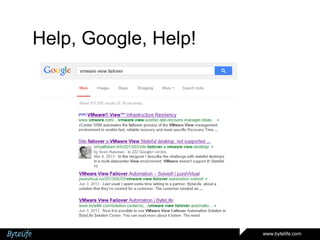
Help, Google, Help!

www.bytelife.com
Value Proposition

Extend the VDI use case to
mission critical workplaces

www.bytelife.com
Key Features
• General
• Persistent and non-persistent pool desktop failover
• Option for using more than 2 sites

• Active-active approach
• Based on VMware vCenter Orchestrator workflows
• No VMware vCenter Site Recovery Manager needed
• No changes in VMware View administration
• Simple protection configuration wizard
• No overhead – it’s rather automating the manual tasks

www.bytelife.com
Key Functions
• Failover
• Automated failover within minutes after launch
• Minimum effort during failover

• Migration
• Load balancing and failback possibility
• Minimized downtime window for recompose large environments

www.bytelife.com
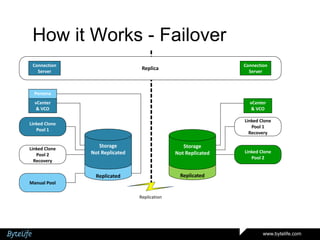
How it Works - Failover
Connection
Server

Connection
Server

Replica

Persona
vCenter
& VCO

vCenter
& VCO

Linked Clone
Pool 1

Linked Clone
Pool 1
Recovery

Storage
Not Replicated

Storage
Not Replicated

Replicated

Linked Clone
Pool 2
Recovery

Replicated

Linked Clone
Pool 2

Manual Pool
Replication

www.bytelife.com
How it Works - Failover
Connection
Server

Connection
Server

Replica

Persona
vCenter
& VCO

vCenter
& VCO

Linked Clone
Pool 1

Linked Clone
Pool 1
Recovery

Storage
Not Replicated

Storage
Not Replicated

Replicated

Linked Clone
Pool 2
Recovery

Replicated

Linked Clone
Pool 2

Manual Pool

www.bytelife.com
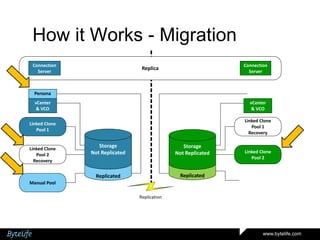
How it Works - Migration
Connection
Server

Connection
Server

Replica

Persona
vCenter
& VCO

vCenter
& VCO

Linked Clone
Pool 1

Linked Clone
Pool 1
Recovery

Storage
Not Replicated

Storage
Not Replicated

Replicated

Linked Clone
Pool 2
Recovery

Replicated

Linked Clone
Pool 2

Manual Pool
Replication

www.bytelife.com
DEMO

www.bytelife.com
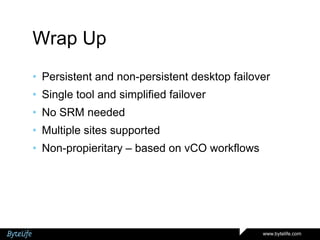
Wrap Up
• Persistent and non-persistent desktop failover
• Single tool and simplified failover

• No SRM needed
• Multiple sites supported
• Non-propieritary – based on vCO workflows

www.bytelife.com
Conclusion
• DR for VMware View is possible and it can be
automated
• Orchestrator platform can be used for further
automation initiatives

www.bytelife.com
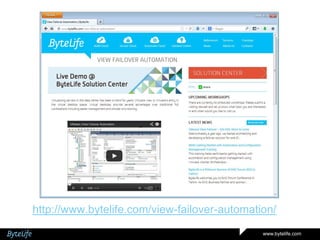
http://www.bytelife.com/view-failover-automation/
www.bytelife.com
Questions?

www.bytelife.com
Thank You!
www.bytelife.com
sales@bytelife.com

www.bytelife.com

VMware View Failover - SOLVED

  • 1.
    THIS PRESENTATION BYTELIFE PREPARED VMwareView IS Failover Automation December 2013 www.bytelife.com
  • 2.
    Agenda • Challenge andSolutions • View Automation Features • Technical overview • Demo • Wrap-up www.bytelife.com
  • 3.
    Challenge • Virtual desktopsnot suitable for highly available workplaces • Additional complicated service to recover during disaster www.bytelife.com
  • 4.
    Solution1 – VirtualStorage • Storage virutalization layer handles the access to the storage • If on site storage is down, other site will be used, with no interuption for applications • If the hosts are also down, standard VMware HA will start the service in other site www.bytelife.com
  • 5.
    Solution2 – VMwareSRM • Not supported for VMware View • Failover for VM-s, not linked clones • User assignment information is lost www.bytelife.com
  • 6.
    Solution3 – VMwareMirage • Mirage for View not yet available • Only handles the persistent desktops www.bytelife.com
  • 7.
    Solution4 – ManualWork • Quite complex • Another headache during disaster www.bytelife.com
  • 8.
  • 9.
    Value Proposition Extend theVDI use case to mission critical workplaces www.bytelife.com
  • 10.
    Key Features • General •Persistent and non-persistent pool desktop failover • Option for using more than 2 sites • Active-active approach • Based on VMware vCenter Orchestrator workflows • No VMware vCenter Site Recovery Manager needed • No changes in VMware View administration • Simple protection configuration wizard • No overhead – it’s rather automating the manual tasks www.bytelife.com
  • 11.
    Key Functions • Failover •Automated failover within minutes after launch • Minimum effort during failover • Migration • Load balancing and failback possibility • Minimized downtime window for recompose large environments www.bytelife.com
  • 12.
    How it Works- Failover Connection Server Connection Server Replica Persona vCenter & VCO vCenter & VCO Linked Clone Pool 1 Linked Clone Pool 1 Recovery Storage Not Replicated Storage Not Replicated Replicated Linked Clone Pool 2 Recovery Replicated Linked Clone Pool 2 Manual Pool Replication www.bytelife.com
  • 13.
    How it Works- Failover Connection Server Connection Server Replica Persona vCenter & VCO vCenter & VCO Linked Clone Pool 1 Linked Clone Pool 1 Recovery Storage Not Replicated Storage Not Replicated Replicated Linked Clone Pool 2 Recovery Replicated Linked Clone Pool 2 Manual Pool www.bytelife.com
  • 14.
    How it Works- Migration Connection Server Connection Server Replica Persona vCenter & VCO vCenter & VCO Linked Clone Pool 1 Linked Clone Pool 1 Recovery Storage Not Replicated Storage Not Replicated Replicated Linked Clone Pool 2 Recovery Replicated Linked Clone Pool 2 Manual Pool Replication www.bytelife.com
  • 15.
  • 16.
    Wrap Up • Persistentand non-persistent desktop failover • Single tool and simplified failover • No SRM needed • Multiple sites supported • Non-propieritary – based on vCO workflows www.bytelife.com
  • 17.
    Conclusion • DR forVMware View is possible and it can be automated • Orchestrator platform can be used for further automation initiatives www.bytelife.com
  • 18.
  • 19.
  • 20.

Editor's Notes

  • #3 OurpresentationisaboutVMwareViewdisasterrecovery.First I will talk aboutthechallenges and solutions on the market today.Then I will list thefeatures, thatmakeoursolutionunique.Jarkko willfollow me upwiththetechnicaloverview and a demo.
  • #4 Thechallencecustomerswithvirtualdekstopinfrastructureface, istomakeithighlyavailable. Oneofourkeyaccounts, a bankintheBaltics, turnedtouswiththeproblemto solve. TheyplannedtoimplementVMwareViewfor all theiremployees. Includingtherepresentatives, marketspeopleaswellasthemanagement and IT. Youcanimagine, what are thefaulttoleranceaswellastechnicalrequirementsinsuchusecase.Whatwe soon figuredout, wasthatthereis no built-inoradd-onfunctionalityto fail overbothpersistent and non-persistentdesktopsincaseofsitedisaster and thisadds a lotofcomplexitytothedisasterrecoveryprocedures
  • #5 There are somesolutionsinthe market, thatdo part ofthejob.Firstof all, itispossibletousestoragevirtualization.
  • #6 There are somesolutionsinthe market, thatdo part ofthejob.ForexamplethereisVMwareMirage, butthishandlesonlypersistentdesktops, itdoesnotsupportlinkedclones. And thesolutionisquitecomplextodeploy too.VMware SRM alsodoes part ofthejob, butagain, itcanratherbeusedforpersistentdesktops and thenyou need scriptstoactually sort outwhichdesktopwillbeassignedtowhichuser.Sowhatwehave – wehavetheFailoverAutomation, thatcovers all theVMwareViewfailovertasks.
  • #7 There are somesolutionsinthe market, thatdo part ofthejob.ForexamplethereisVMwareMirage, butthishandlesonlypersistentdesktops, itdoesnotsupportlinkedclones. And thesolutionisquitecomplextodeploy too.VMware SRM alsodoes part ofthejob, butagain, itcanratherbeusedforpersistentdesktops and thenyou need scriptstoactually sort outwhichdesktopwillbeassignedtowhichuser.Sowhatwehave – wehavetheFailoverAutomation, thatcovers all theVMwareViewfailovertasks.
  • #8 There are somesolutionsinthe market, thatdo part ofthejob.ForexamplethereisVMwareMirage, butthishandlesonlypersistentdesktops, itdoesnotsupportlinkedclones. And thesolutionisquitecomplextodeploy too.VMware SRM alsodoes part ofthejob, butagain, itcanratherbeusedforpersistentdesktops and thenyou need scriptstoactually sort outwhichdesktopwillbeassignedtowhichuser.Sowhatwehave – wehavetheFailoverAutomation, thatcovers all theVMwareViewfailovertasks.
  • #9 There are somesolutionsinthe market, thatdo part ofthejob.ForexamplethereisVMwareMirage, butthishandlesonlypersistentdesktops, itdoesnotsupportlinkedclones. And thesolutionisquitecomplextodeploy too.VMware SRM alsodoes part ofthejob, butagain, itcanratherbeusedforpersistentdesktops and thenyou need scriptstoactually sort outwhichdesktopwillbeassignedtowhichuser.Sowhatwehave – wehavetheFailoverAutomation, thatcovers all theVMwareViewfailovertasks.
  • #10 DR ispossiblewithVMware and itcanbe automated.Wediditwith VCO
  • #11 OK, let’shave a closer look tothekeyfeaturesthatdescribeoursolution:Themainfeatureisthesupportforbothpersistentdesktopsincludingmanualpools and non-persistendesktopswhichislinkedclonepoolsWecanhandlemorethe 2 sites – thismeansthatifyouhaveforexampletwoprimarysites and a recoverysite, thatcouldtakeoverworkloadfromoneoranotherprimarysite, youcan manage therecoveryinonesystem.Wehavetheactive-activeapproach – duringthefailover, someofthepoolsinrecoverysitecanbedisabledforresourceoptimizationOursolutionisbased on vCenter OrchestratorWorkflows,meaningitisnon-propieritary and canbeeasilycustomizedforspecificcustomerneedsWedonot need additional DR software, likeSiteRecovery Manager. Theonlythingwedo need – storagetobereplicatedbetweensitesforuserdata and persistentdesktops. Ifyouhave a storage, thatcandothat, that’sbasically all we needVMwareViewwillstillbeadministreditsoriginalway, no changesthere, fortheprotectionconfigurationwe just have a wizardtoclickthrough. Jarkko will show youthisduringthe demo.
  • #12 Regardingthejobs, oursolutionhandles – wedothefailoverwithinminutes – thismeansthatfirstuserscan start usingtheirdesktopsalreadyasquickas 10 minutesafterthelaunchofthefailover. Theexactamountoftime, thefailovertakesfor all users, depends on thetype, size and configurationofVMwareViewpools. Itisfasterforlinkedclones, especiallyifwehavethedesktopsalreadyprovisioned and powered on at therecoverysite.Afterthefailoverislaunched, the rest isfully automated, administratorcantakecareoftheotherburningissues – itisthesitedisastersituationafter all Whentalkingaboutthemigration, thenthiscouldbeusedforfailingsitebackafterthedisaster. Alsoonecouldre-balancetheworkloadbetweenthesites, incasesomepoolsgrowfasterthantheothersovertime.Wehavealso seen thescenario, wherelargeenvironmentscouldbenefitfromreducingtheservicewindowforrecomposingtheirdesktops. Ifnewdesktop image must bedeployedinthelinkedclone pool, itcanbepreparedintherecoverysite and thenitswitchingtheusersoverwithfewminutesofdowntimebecomespossibleDoesitmakesense?Good. Jarkko willnow takeitover and giveyoumoreinsight, howtherecoveryworkflowsactuallywork.
  • #13 The usual production state:2 separate vCenter environmentsSingle Vmware View environment on top on vCentersLinked Clone pools active in one site and configured, but not active, in other siteManual pool in one site
  • #14 One site fails:Persona Server is brought up in other site (like SRM would do)Linked Clone recovery pools are enabled in surviving siteManual pool desktops are brought up in other site (like SRM would do, if these items were servers)
  • #15 In this use case we have decided to:Move over persona – shut down, register in other site, power onMove linked clone pool 2 to site A – disable user access in site B and enable it in site AMove over manual pool – shut down the desktops, register in other site, power on.
  • #17 Great!So just towrapitup, whatwesawtoday.Thereis a solutionavailableforfailingoverbothpersistent and non-persistentdesktops, thisisourVMwareViewFailoverAutomation.Thereis no SiteRecovery Manager neededtofailover and wehaveoptiontosupportmorethattwositescenarios.Last butnotleast – thisis all built on vCenter Orcestratorworkflows, makesiteasytocustomizetheautomationtomeetspecificcustomerrequirements
  • #20 We are nowopento allthequestions, youmighthave!Please!