© 2009 VMware Inc. All rights reserved
PowerCLI & Onyx
Vladimir Goranov, Manager R&D, Resource & Policy Management
Yavor Boychev, Manager R&D, VIM Platform and Solutions QA
2
Agenda
VMware vSphereТМ PowerCLI
Tips and tricks
VMware Project Onyx
Q&A
3
Disclaimer
This session may contain product features that are
currently under development.
This session/overview of the new technology represents
no commitment from VMware to deliver these features in
any generally available product.
Features are subject to change, and must not be included in
contracts, purchase orders, or sales agreements of any kind.
Technical feasibility and market demand will affect final delivery.
Pricing and packaging for any new technologies or features
discussed or presented have not been determined.
“THESE FEATURES ARE REPRESENTATIVE OF FEATURE AREAS UNDER
DEVELOPMENT. FEATURE COMMITMENTS ARE SUBJECT TO CHANGE, AND
MUST NOT BE INCLUDED IN CONTRACTS, PURCHASE ORDERS, OR SALES
AGREEMENTS OF ANY KIND. TECHNICAL FEASIBILITY AND MARKET
DEMAND WILL AFFECT FINAL.”
4
VMware vSphereТМ PowerCLI
Windows PowerShell interface for managing vSphereTM
5
VMware vSphereТМ PowerCLI
PowerCLI will save you a ton of time.
PowerCLI is the easiest way to automate.
PowerCLI will help you identify problems
before they become crises.
PowerCLI can automate anything you care
about in your virtual environment.
PowerCLI lets you make large scale changes
in a consistent and auditable way.
6
VMware vSphereТМ PowerCLI
Official community
http://vmware.com/go/powershell
• Registered users - 1 382
• Discussions - 2 481
• Documents - 48
Official blog
http://blogs.vmware.com/vipowershell/
• Blog posts - 125
• Comments - 177
Extensions project
http://vitoolkitextensions.codeplex.com/
• More than 100 functions
• Page views - 118 577
• Visits - 15 261
• Downloads - 3 638
7
VMware vSphereТМ PowerCLI
Blog ecosystem
• http://blogs.vmware.com/vipowershell
• http://www.van-lieshout.com/powercli
• http://get-admin.com/blog
• http://ict-freak.nl
• http://www.lucd.info
• http://www.ntpro.nl/blog
• http://poshoholic.com
• http://professionalvmware.com
8
VMware vSphereТМ PowerCLI
Software ecosystem
• PowerGUI - http://powergui.org
• PowerShell Plus - http://www.idera.com
• PowerWF for VMware - http://powerwf.com
• VI PowerScripter - http://www.icomasoft.com
• vEcoShell -
http://vcommunity.vizioncore.com/administration/vecoshell/default.aspx
9
VMware vSphereТМ PowerCLI
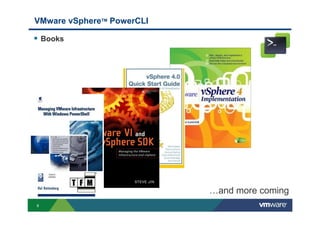
Books
…and more coming
10
Resources
Developer Support
• Dedicated support for your organization when building solutions using
vSphere APIs, PowerCLI, vSphere Web Services SDKs and many more
VMware SDKs
• http://vmware.com/go/sdksupport
PowerCLI Training
• 2 day instructor led training, 40% lecture, 60% lab
• http://vmware.com/go/vsphereautomation
VMware Developer Community
• SDK Downloads, Documentation, Sample Code, Forums, Blogs
• http://developer.vmware.com
Technology Alliance Partner (TAP) Program
• Updated partner benefits
• http://www.vmware.com/partners/alliances/programs/
11
VMware vSphereТМ PowerCLI
Large and Small customers around the world in different
industry areas
• Education
• Energy
• Finance
• Government
• Health Care
• Manufacturing
• Retail
• Transportation
Roadmap and solutions exposure
12
Tips and Tricks
The art of being efficient
13
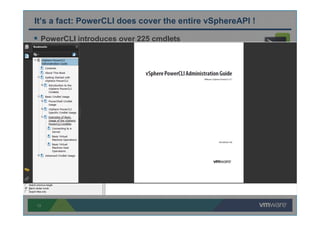
It’s a fact: PowerCLI does cover the entire vSphereAPI !
PowerCLI introduces over 225 cmdlets
and 170 automation objects
•Designed to be fast and easy to use
•vSphere API has close to 500 operations and over 2000 objects
.Net toolkit expose the entire vSphereAPI
•Client side .Net library distributed with PowerCLI
•Could be used in .Net applications and Powershell scripts
•Powershell interface – Get-View cmdlet
Get started with .Net toolkit
14
Retrieving views in PowerCLI
Get-View – the entry point to the .Net toolkit
View – static copy of a server side managed object
15
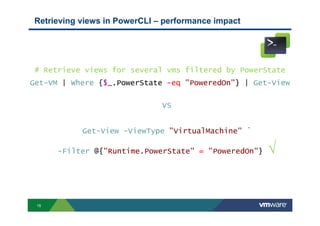
Retrieving views in PowerCLI – performance impact
# Retrieve views for several vms filtered by PowerState
Get-VM | Where {$_.PowerState -eq "PoweredOn"} | Get-View
VS
Get-View -ViewType "VirtualMachine" `
-Filter @{"Runtime.PowerState" = "PoweredOn"} √
16
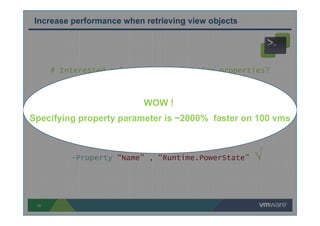
# Interested only in few of the view properties?
Get-View -ViewType “VirtualMachine”
VS
Get-View -ViewType “VirtualMachine” `
-Property “Name” , “Runtime.PowerState” √
Increase performance when retrieving view objects
WOW !
Specifying property parameter is ~2000% faster on 100 vms
17
MoRef - Managed Object Reference
Most API method invocations require MoRef as a parameter
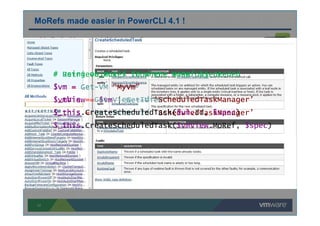
MoRefs made easier in PowerCLI 4.1 !
# Retrieve MoRef from the view object
$vm = Get-VM “MyVm”
$vmView = $vm | Get-View
$_this = Get-View -Id ‘ScheduledTaskManager’
$_this.CreateScheduledTask($vmView.MoRef, $spec)
# Using object’s Id where MoRef is needed
$vm = Get-VM “MyVm”
$_this = Get-View -Id ‘ScheduledTaskManager’
$_this.CreateScheduledTask($vm.Id, $spec)
18
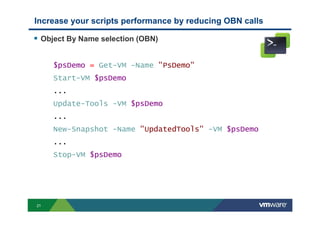
Increase your scripts performance by reducing OBN calls
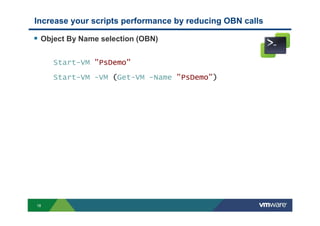
Object By Name selection (OBN)
Start-VM "PsDemo"
Start-VM -VM (Get-VM -Name "PsDemo")
19
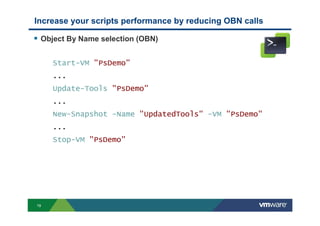
Object By Name selection (OBN)
Start-VM "PsDemo"
...
Update-Tools "PsDemo"
...
New-Snapshot -Name "UpdatedTools" -VM "PsDemo"
...
Stop-VM "PsDemo"
Increase your scripts performance by reducing OBN calls
20
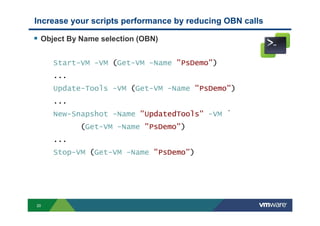
Object By Name selection (OBN)
Start-VM -VM (Get-VM -Name "PsDemo")
...
Update-Tools -VM (Get-VM -Name "PsDemo")
...
New-Snapshot -Name "UpdatedTools" -VM `
(Get-VM -Name "PsDemo")
...
Stop-VM (Get-VM -Name "PsDemo")
Increase your scripts performance by reducing OBN calls
21
Object By Name selection (OBN)
$psDemo = Get-VM -Name "PsDemo"
Start-VM $psDemo
...
Update-Tools -VM $psDemo
...
New-Snapshot -Name "UpdatedTools" -VM $psDemo
...
Stop-VM $psDemo
Increase your scripts performance by reducing OBN calls
22
VMware Project Onyx
What is happening behind the covers
23
What is Project Onyx?
Serves as a proxy between vSphere Client and vCenter Server
Monitors the network communication and translates it into a reusable
Powershell code
vSphere Client vCenter ServerOnyx
24
Onyx history
VMWorld 2009 San Francisco - Onyx announced as a prototype
November 2009 – Onyx available for download as Technology preview on
blogs.vmware.com
January 2010 – Official launch of Onyx community forum:
vmware.com/go/onyx
Vmworld 2010 San Francisco Onyx 2.0 released
• C# 2.0 and raw SOAP messaging code generation
• Connection usability enhancements
• Configurable obfuscation of methods with sensitive data
25
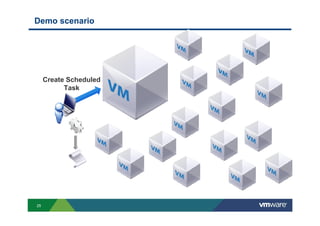
Demo scenario
a
Create Scheduled
Task
26
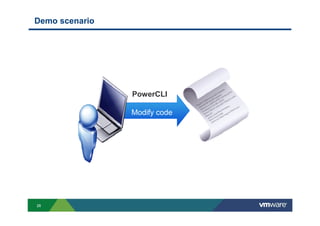
Demo scenario
a
Modify code
PowerCLI
27
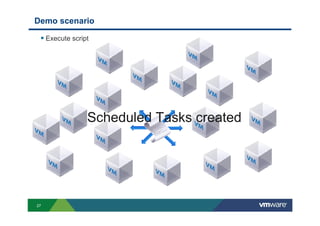
Demo scenario
Execute script
a
Scheduled Tasks created
28
Q&A
Its your time

PowerCLI & Onyx

  • 1.
    © 2009 VMwareInc. All rights reserved PowerCLI & Onyx Vladimir Goranov, Manager R&D, Resource & Policy Management Yavor Boychev, Manager R&D, VIM Platform and Solutions QA
  • 2.
    2 Agenda VMware vSphereТМ PowerCLI Tipsand tricks VMware Project Onyx Q&A
  • 3.
    3 Disclaimer This session maycontain product features that are currently under development. This session/overview of the new technology represents no commitment from VMware to deliver these features in any generally available product. Features are subject to change, and must not be included in contracts, purchase orders, or sales agreements of any kind. Technical feasibility and market demand will affect final delivery. Pricing and packaging for any new technologies or features discussed or presented have not been determined. “THESE FEATURES ARE REPRESENTATIVE OF FEATURE AREAS UNDER DEVELOPMENT. FEATURE COMMITMENTS ARE SUBJECT TO CHANGE, AND MUST NOT BE INCLUDED IN CONTRACTS, PURCHASE ORDERS, OR SALES AGREEMENTS OF ANY KIND. TECHNICAL FEASIBILITY AND MARKET DEMAND WILL AFFECT FINAL.”
  • 4.
    4 VMware vSphereТМ PowerCLI WindowsPowerShell interface for managing vSphereTM
  • 5.
    5 VMware vSphereТМ PowerCLI PowerCLIwill save you a ton of time. PowerCLI is the easiest way to automate. PowerCLI will help you identify problems before they become crises. PowerCLI can automate anything you care about in your virtual environment. PowerCLI lets you make large scale changes in a consistent and auditable way.
  • 6.
    6 VMware vSphereТМ PowerCLI Officialcommunity http://vmware.com/go/powershell • Registered users - 1 382 • Discussions - 2 481 • Documents - 48 Official blog http://blogs.vmware.com/vipowershell/ • Blog posts - 125 • Comments - 177 Extensions project http://vitoolkitextensions.codeplex.com/ • More than 100 functions • Page views - 118 577 • Visits - 15 261 • Downloads - 3 638
  • 7.
    7 VMware vSphereТМ PowerCLI Blogecosystem • http://blogs.vmware.com/vipowershell • http://www.van-lieshout.com/powercli • http://get-admin.com/blog • http://ict-freak.nl • http://www.lucd.info • http://www.ntpro.nl/blog • http://poshoholic.com • http://professionalvmware.com
  • 8.
    8 VMware vSphereТМ PowerCLI Softwareecosystem • PowerGUI - http://powergui.org • PowerShell Plus - http://www.idera.com • PowerWF for VMware - http://powerwf.com • VI PowerScripter - http://www.icomasoft.com • vEcoShell - http://vcommunity.vizioncore.com/administration/vecoshell/default.aspx
  • 9.
  • 10.
    10 Resources Developer Support • Dedicatedsupport for your organization when building solutions using vSphere APIs, PowerCLI, vSphere Web Services SDKs and many more VMware SDKs • http://vmware.com/go/sdksupport PowerCLI Training • 2 day instructor led training, 40% lecture, 60% lab • http://vmware.com/go/vsphereautomation VMware Developer Community • SDK Downloads, Documentation, Sample Code, Forums, Blogs • http://developer.vmware.com Technology Alliance Partner (TAP) Program • Updated partner benefits • http://www.vmware.com/partners/alliances/programs/
  • 11.
    11 VMware vSphereТМ PowerCLI Largeand Small customers around the world in different industry areas • Education • Energy • Finance • Government • Health Care • Manufacturing • Retail • Transportation Roadmap and solutions exposure
  • 12.
    12 Tips and Tricks Theart of being efficient
  • 13.
    13 It’s a fact:PowerCLI does cover the entire vSphereAPI ! PowerCLI introduces over 225 cmdlets and 170 automation objects •Designed to be fast and easy to use •vSphere API has close to 500 operations and over 2000 objects .Net toolkit expose the entire vSphereAPI •Client side .Net library distributed with PowerCLI •Could be used in .Net applications and Powershell scripts •Powershell interface – Get-View cmdlet Get started with .Net toolkit
  • 14.
    14 Retrieving views inPowerCLI Get-View – the entry point to the .Net toolkit View – static copy of a server side managed object
  • 15.
    15 Retrieving views inPowerCLI – performance impact # Retrieve views for several vms filtered by PowerState Get-VM | Where {$_.PowerState -eq "PoweredOn"} | Get-View VS Get-View -ViewType "VirtualMachine" ` -Filter @{"Runtime.PowerState" = "PoweredOn"} √
  • 16.
    16 # Interested onlyin few of the view properties? Get-View -ViewType “VirtualMachine” VS Get-View -ViewType “VirtualMachine” ` -Property “Name” , “Runtime.PowerState” √ Increase performance when retrieving view objects WOW ! Specifying property parameter is ~2000% faster on 100 vms
  • 17.
    17 MoRef - ManagedObject Reference Most API method invocations require MoRef as a parameter MoRefs made easier in PowerCLI 4.1 ! # Retrieve MoRef from the view object $vm = Get-VM “MyVm” $vmView = $vm | Get-View $_this = Get-View -Id ‘ScheduledTaskManager’ $_this.CreateScheduledTask($vmView.MoRef, $spec) # Using object’s Id where MoRef is needed $vm = Get-VM “MyVm” $_this = Get-View -Id ‘ScheduledTaskManager’ $_this.CreateScheduledTask($vm.Id, $spec)
  • 18.
    18 Increase your scriptsperformance by reducing OBN calls Object By Name selection (OBN) Start-VM "PsDemo" Start-VM -VM (Get-VM -Name "PsDemo")
  • 19.
    19 Object By Nameselection (OBN) Start-VM "PsDemo" ... Update-Tools "PsDemo" ... New-Snapshot -Name "UpdatedTools" -VM "PsDemo" ... Stop-VM "PsDemo" Increase your scripts performance by reducing OBN calls
  • 20.
    20 Object By Nameselection (OBN) Start-VM -VM (Get-VM -Name "PsDemo") ... Update-Tools -VM (Get-VM -Name "PsDemo") ... New-Snapshot -Name "UpdatedTools" -VM ` (Get-VM -Name "PsDemo") ... Stop-VM (Get-VM -Name "PsDemo") Increase your scripts performance by reducing OBN calls
  • 21.
    21 Object By Nameselection (OBN) $psDemo = Get-VM -Name "PsDemo" Start-VM $psDemo ... Update-Tools -VM $psDemo ... New-Snapshot -Name "UpdatedTools" -VM $psDemo ... Stop-VM $psDemo Increase your scripts performance by reducing OBN calls
  • 22.
    22 VMware Project Onyx Whatis happening behind the covers
  • 23.
    23 What is ProjectOnyx? Serves as a proxy between vSphere Client and vCenter Server Monitors the network communication and translates it into a reusable Powershell code vSphere Client vCenter ServerOnyx
  • 24.
    24 Onyx history VMWorld 2009San Francisco - Onyx announced as a prototype November 2009 – Onyx available for download as Technology preview on blogs.vmware.com January 2010 – Official launch of Onyx community forum: vmware.com/go/onyx Vmworld 2010 San Francisco Onyx 2.0 released • C# 2.0 and raw SOAP messaging code generation • Connection usability enhancements • Configurable obfuscation of methods with sensitive data
  • 25.
  • 26.
  • 27.
  • 28.