Accelerating and optimizing the Virtual Infrastructure Howard Samuels, Sales Engineering Manager [email_address]
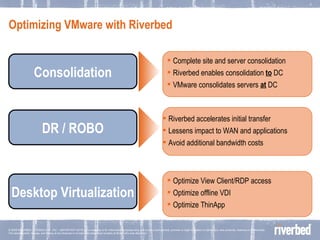
Optimizing VMware with Riverbed  Complete site and server consolidation Riverbed enables consolidation  to  DC VMware consolidates servers  at  DC Consolidation DR / ROBO Desktop Virtualization Riverbed accelerates initial transfer Lessens impact to WAN and applications Avoid additional bandwidth costs Optimize View Client/RDP access Optimize offline VDI Optimize ThinApp
Data Protection in virtual environment
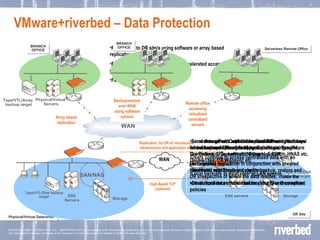
VMware+riverbed – Data Protection Physical/Virtual Datacenter Storage Tape/VTL/Disk backup target ESX Servers SAN/NAS Local storage with replication used between the arrays for backup and DR. e.g NetApp, Equallogic, Exagrid, Compellent, 3Par, Lefthand, Exagrid, Sepaton. HNAS etc. Accelerated replication in conjunction with lowered bandwidth with Steelhead appliances Local data servers with backup and DR using software based backup/replication to central site using software like Platespin, Commvault, Netbackup, TSM, DoubleTake, CA Wansync etc Steelhead appliances accelerate backup, restore and DR irrespective of where the data resides; inside the virtual machine or the virtual machine files themselves.  Serverless office. Consolidate file/email and other local infrastructure to the virtual/physical datacenter Users continue to access centralized data with no performance impact Local backups at datacenter at LAN speeds.  Centralized data enables better security and compliant policies Replication to DR site/s using software or array based replication. Failover site continues to provide accelerated access to data via Steelheads during a failover Faster recovery of primary site. WAN  Storage Tape/VTL/Disk backup target SAN/NAS DR Site ESX servers High-Speed TCP (optional) Replication  for DR of virtualization infrastructure and application data WAN Physical/Virtual  Servers BRANCH OFFICE Tape/VTL/Array  backup target Array based replication BRANCH OFFICE Backup/restore over WAN using software options Serverless Remote Office Remote office accessing virtualized centralized servers
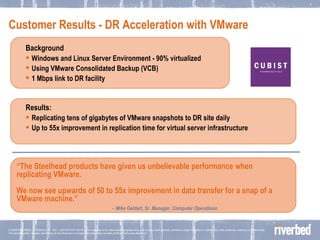
Customer Results - DR Acceleration with VMware Background Windows and Linux Server Environment - 90% virtualized Using VMware Consolidated Backup (VCB) 1 Mbps link to DR facility Results: Replicating tens of gigabytes of VMware snapshots to DR site daily Up to 55x improvement in replication time for virtual server infrastructure “ The Steelhead products have given us unbelievable performance when replicating VMware.  We now see upwards of 50 to 55x improvement in data transfer for a snap of a VMware machine.”  -   Mike Geldart, Sr. Manager, Computer Operations
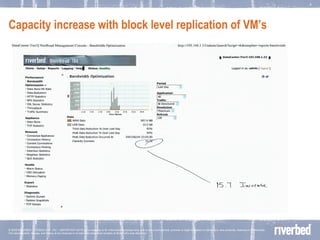
Capacity increase with block level replication of VM’s
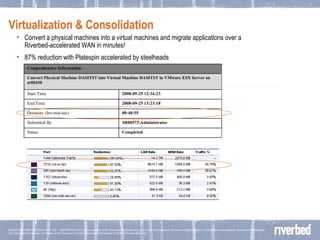
Virtualization & Consolidation Convert a physical machines into a virtual machines and migrate applications over a Riverbed-accelerated WAN in minutes!  87% reduction with Platespin accelerated by steelheads Completed Status SR00572\Administrator Submitted By 00:48:55 Duration: (hrs:min:sec) 2008-09-25 13:23:18 End Time 2008-09-25 12:34:23 Start Time Convert Physical Machine DASITST into Virtual Machine DASITST in VMware ESX Server on sr00430 Comprehensive Information
ROBO and server consolidation
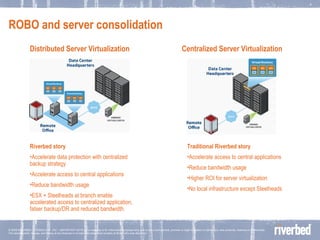
ROBO and server consolidation Distributed Server Virtualization Centralized Server Virtualization Traditional Riverbed story Accelerate access to central applications Reduce bandwidth usage Higher ROI for server virtualization No local infrastructure except Steelheads Riverbed story Accelerate data protection with centralized backup strategy Accelerate access to central applications Reduce bandwidth usage ESX + Steelheads at branch enable accelerated access to centralized application, fatser backup/DR and reduced bandwidth.
Customer Results – Consolidation with VMware Background DoD supplier management agency overseeing 322,000+ contracts 60 Contract Management Offices, over 900 employee duty stations worldwide Consolidated 18 datacenters down to 2 primary sites  Consolidated 625 servers down to 200 with VMware User complaints about performance Results Achieved global consolidation without sacrificing performance $720,000 annual ROI "If we had it to do over again, we'd install WAN optimizers before starting consolidation.  We ended up having to play 'catch up,' and doing it fast…Our users are much happier now. No one notices or cares anymore that we've consolidated our datacenters.  It's completely a non-issue now."   -- Mike Williams, CIO
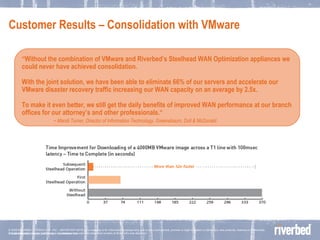
Customer Results – Consolidation with VMware © 2006 RIVERBED TECHOLOGY, INC – CONFIDENTIAL “ Without the combination of VMware and Riverbed’s Steelhead WAN Optimization appliances we could never have achieved consolidation. With the joint solution, we have been able to eliminate 66% of our servers and accelerate our VMware disaster recovery traffic increasing our WAN capacity on an average by 2.5x.  To make it even better, we still get the daily benefits of improved WAN performance at our branch offices for our attorney’s and other professionals.“ -  Mandi Turner, Director of Information Technology, Greenebaum, Doll & McDonald
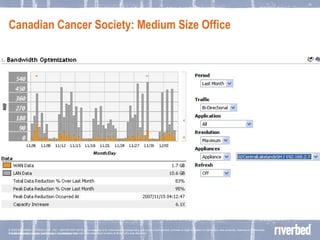
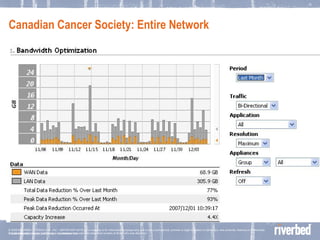
Canadian Cancer Society  © 2006 RIVERBED TECHOLOGY, INC – CONFIDENTIAL The Challenge Server refresh needed at branches throughout the organization Wanted to take advantage of server virtualization to consolidate Bandwidth constraints and application latency made   consolidation impossible The Solution Riverbed Steelhead appliances & VMware ESX servers Consolidated 48 servers down to 5 in an N+1 configuration Avoided costly server and network upgrades
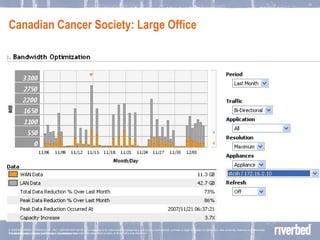
Canadian Cancer Society:  Large Office  © 2006 RIVERBED TECHOLOGY, INC – CONFIDENTIAL
Canadian Cancer Society:  Medium Size Office © 2006 RIVERBED TECHOLOGY, INC – CONFIDENTIAL
Canadian Cancer Society:  Entire Network © 2006 RIVERBED TECHOLOGY, INC – CONFIDENTIAL
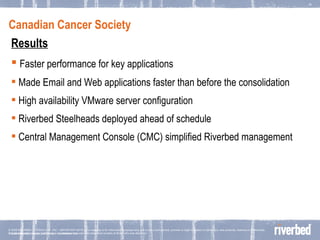
Canadian Cancer Society  © 2006 RIVERBED TECHOLOGY, INC – CONFIDENTIAL Results Faster performance for key applications Made Email and Web applications faster than before the consolidation High availability VMware server configuration Riverbed Steelheads deployed ahead of schedule Central Management Console (CMC) simplified Riverbed management
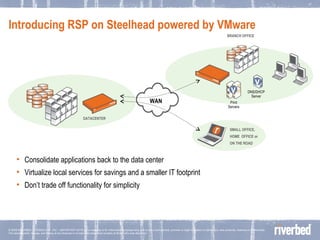
Introducing RSP on Steelhead powered by VMware Consolidate applications back to the data center Virtualize local services for savings and a smaller IT footprint Don’t trade off functionality for simplicity WAN BRANCH OFFICE SMALL OFFICE, HOME  OFFICE or  ON THE ROAD DATACENTER Print Servers v DNS/DHCP Server v
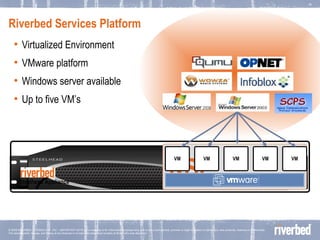
Riverbed Services Platform Virtualized Environment VMware platform Windows server available Up to five VM’s RSP VM VM VM VM VM Steelhead Appliance
Customer Proof Point Background US-based engineering firm with 11 offices and almost 400 employees Already accelerating applications and consolidating file servers with Steelhead Appliances Challenges Looking to more effectively provision branches Wanted to leverage Steelhead appliances further Results Able to eliminate $10K to 15K per office with RSP Benefits are  in addition  to WAN optimization  “ With the RSP, Strand can run local branch services like print servers on the Steelhead appliance without the need for a dedicated server.  This will save us  $10 to $15k in equipment  costs for new offices, and that doesn't include the continued cost of maintaining additional servers. “ Justin Marthaler IT, Strand
Desktop virtualization and Riverbed
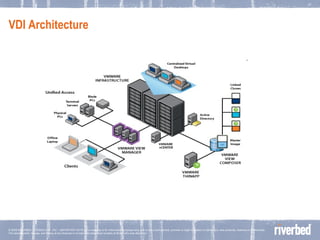
VDI Architecture
What can we do? What will deployments look like? Scenario 1: Hybrid env (native + thin client)  Scenario 2: Thin client only Solution  Option 1: Stay native.  Option 2: RDP/VDM client acceleration Provide TCP optimization for compressed RDP Turn of compression and encryption and provide full optimization for RDP Option n: Combine one or more of the above architectures
Option 1 – Stay Native We can enable this with full data consolidation at the DC for all application and file services  Data is secured at the DC via consolidation and protected via accelerated DR RSP enables flexibility at the edge for running basic services locally including SMS/Print server Desktop manageability is greatly enhanced by Steelheads Applications performance is accelerated for the branch and the mobile worker No major re-architecture Results discussed in case studies presented earlier
Option 2: RDP compressed  Steelhead configuration Remove RDP from default pass through In-path rule with no nagle and no optimization Enable QoS on 3389 with MxTCP Lab Results 10-40% user response time improvement Reduce the impact of print traffic Potential business impact Improved RDP performance More sessions in a hybrid env for RDP by reducing impact of native traffic
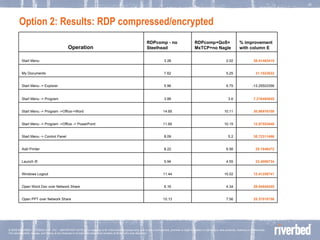
Option 2: Results: RDP compressed/encrypted  25.37018756 7.56 10.13 Open PPT over Network Share 29.54545455 4.34 6.16 Open Word Doc over Network Share 12.41258741 10.02 11.44 Windows Logout 23.4006734 4.55 5.94 Launch IE 20.1946472 6.56 8.22 Add Printer 35.72311496 5.2 8.09 Start Menu -> Control Panel 12.87553648 10.15 11.65 Start Menu -> Program ->Office -> PowerPoint 30.98976109 10.11 14.65 Start Menu -> Program ->Office->Word 7.216494845 3.6 3.88 Start Menu -> Program -13.25503356 6.75 5.96 Start Menu -> Explorer 31.1023622 5.25 7.62 My Documents 38.41463415 2.02 3.28 Start Menu % improvement with column E RDPcomp+QoS+MxTCP+no Nagle RDPcomp - no Steelhead  Operation  
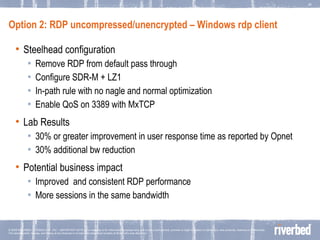
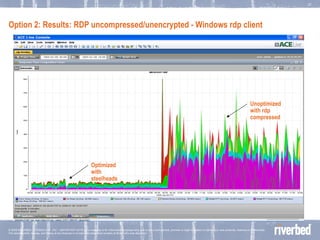
Option 2: RDP uncompressed/unencrypted – Windows rdp client Steelhead configuration Remove RDP from default pass through Configure SDR-M + LZ1 In-path rule with no nagle and normal optimization Enable QoS on 3389 with MxTCP Lab Results 30% or greater improvement in user response time as reported by Opnet 30% additional bw reduction  Potential business impact Improved  and consistent RDP performance More sessions in the same bandwidth
Option 2: Results: RDP uncompressed/unencrypted - Windows rdp client Optimized with steelheads Unoptimized with rdp compressed
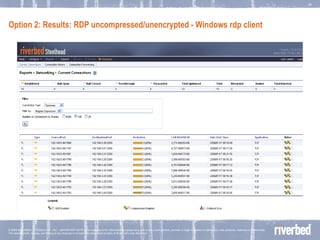
Option 2: Results: RDP uncompressed/unencrypted - Windows rdp client
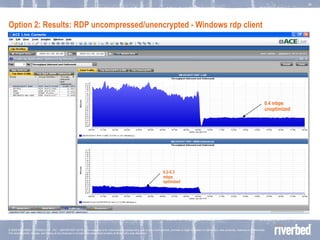
Option 2: Results: RDP uncompressed/unencrypted - Windows rdp client 0.2-0.3 mbps optimized 0.4 mbps unoptimized
What is View client (thick client) ? View client is a new interface to connect to the desktop from VMware  Thick client that sits on the end user desktop Web interface to access desktop from anyhwhere View client interfaces with the View connection server at the DC by default over 443 but can be changed to port 80 RDP tunneled over these ports What does it look like?
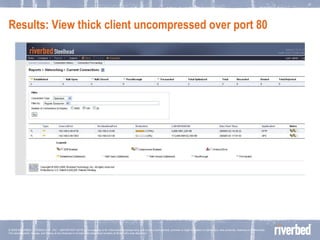
Results: View thick client uncompressed over port 80
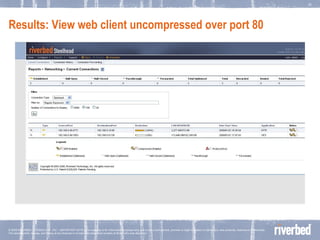
Results: View web client uncompressed over port 80
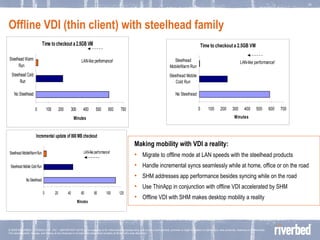
Offline VDI (thin client) with steelhead family Making mobility with VDI a reality: Migrate to offline mode at LAN speeds with the steelhead products Handle incremental syncs seamlessly while at home, office or on the road SHM addresses app performance besides syncing while on the road Use ThinApp in conjunction with offline VDI accelerated by SHM Offline VDI with SHM makes desktop mobility a reality
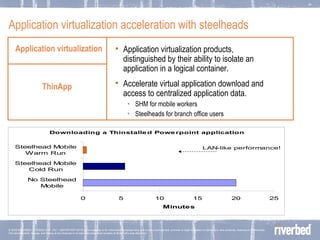
Application virtualization acceleration with steelheads Application virtualization Application virtualization products, distinguished by their ability to isolate an application in a logical container.   Accelerate virtual application download and access to centralized application data. SHM for mobile workers Steelheads for branch office users ThinApp
Thanks

VMware & Riverbed

  • 1.
    Accelerating and optimizingthe Virtual Infrastructure Howard Samuels, Sales Engineering Manager [email_address]
  • 2.
    Optimizing VMware withRiverbed Complete site and server consolidation Riverbed enables consolidation to DC VMware consolidates servers at DC Consolidation DR / ROBO Desktop Virtualization Riverbed accelerates initial transfer Lessens impact to WAN and applications Avoid additional bandwidth costs Optimize View Client/RDP access Optimize offline VDI Optimize ThinApp
  • 3.
    Data Protection invirtual environment
  • 4.
    VMware+riverbed – DataProtection Physical/Virtual Datacenter Storage Tape/VTL/Disk backup target ESX Servers SAN/NAS Local storage with replication used between the arrays for backup and DR. e.g NetApp, Equallogic, Exagrid, Compellent, 3Par, Lefthand, Exagrid, Sepaton. HNAS etc. Accelerated replication in conjunction with lowered bandwidth with Steelhead appliances Local data servers with backup and DR using software based backup/replication to central site using software like Platespin, Commvault, Netbackup, TSM, DoubleTake, CA Wansync etc Steelhead appliances accelerate backup, restore and DR irrespective of where the data resides; inside the virtual machine or the virtual machine files themselves. Serverless office. Consolidate file/email and other local infrastructure to the virtual/physical datacenter Users continue to access centralized data with no performance impact Local backups at datacenter at LAN speeds. Centralized data enables better security and compliant policies Replication to DR site/s using software or array based replication. Failover site continues to provide accelerated access to data via Steelheads during a failover Faster recovery of primary site. WAN Storage Tape/VTL/Disk backup target SAN/NAS DR Site ESX servers High-Speed TCP (optional) Replication for DR of virtualization infrastructure and application data WAN Physical/Virtual Servers BRANCH OFFICE Tape/VTL/Array backup target Array based replication BRANCH OFFICE Backup/restore over WAN using software options Serverless Remote Office Remote office accessing virtualized centralized servers
  • 5.
    Customer Results -DR Acceleration with VMware Background Windows and Linux Server Environment - 90% virtualized Using VMware Consolidated Backup (VCB) 1 Mbps link to DR facility Results: Replicating tens of gigabytes of VMware snapshots to DR site daily Up to 55x improvement in replication time for virtual server infrastructure “ The Steelhead products have given us unbelievable performance when replicating VMware. We now see upwards of 50 to 55x improvement in data transfer for a snap of a VMware machine.” - Mike Geldart, Sr. Manager, Computer Operations
  • 6.
    Capacity increase withblock level replication of VM’s
  • 7.
    Virtualization & ConsolidationConvert a physical machines into a virtual machines and migrate applications over a Riverbed-accelerated WAN in minutes! 87% reduction with Platespin accelerated by steelheads Completed Status SR00572\Administrator Submitted By 00:48:55 Duration: (hrs:min:sec) 2008-09-25 13:23:18 End Time 2008-09-25 12:34:23 Start Time Convert Physical Machine DASITST into Virtual Machine DASITST in VMware ESX Server on sr00430 Comprehensive Information
  • 8.
    ROBO and serverconsolidation
  • 9.
    ROBO and serverconsolidation Distributed Server Virtualization Centralized Server Virtualization Traditional Riverbed story Accelerate access to central applications Reduce bandwidth usage Higher ROI for server virtualization No local infrastructure except Steelheads Riverbed story Accelerate data protection with centralized backup strategy Accelerate access to central applications Reduce bandwidth usage ESX + Steelheads at branch enable accelerated access to centralized application, fatser backup/DR and reduced bandwidth.
  • 10.
    Customer Results –Consolidation with VMware Background DoD supplier management agency overseeing 322,000+ contracts 60 Contract Management Offices, over 900 employee duty stations worldwide Consolidated 18 datacenters down to 2 primary sites Consolidated 625 servers down to 200 with VMware User complaints about performance Results Achieved global consolidation without sacrificing performance $720,000 annual ROI "If we had it to do over again, we'd install WAN optimizers before starting consolidation. We ended up having to play 'catch up,' and doing it fast…Our users are much happier now. No one notices or cares anymore that we've consolidated our datacenters. It's completely a non-issue now." -- Mike Williams, CIO
  • 11.
    Customer Results –Consolidation with VMware © 2006 RIVERBED TECHOLOGY, INC – CONFIDENTIAL “ Without the combination of VMware and Riverbed’s Steelhead WAN Optimization appliances we could never have achieved consolidation. With the joint solution, we have been able to eliminate 66% of our servers and accelerate our VMware disaster recovery traffic increasing our WAN capacity on an average by 2.5x. To make it even better, we still get the daily benefits of improved WAN performance at our branch offices for our attorney’s and other professionals.“ - Mandi Turner, Director of Information Technology, Greenebaum, Doll & McDonald
  • 12.
    Canadian Cancer Society © 2006 RIVERBED TECHOLOGY, INC – CONFIDENTIAL The Challenge Server refresh needed at branches throughout the organization Wanted to take advantage of server virtualization to consolidate Bandwidth constraints and application latency made consolidation impossible The Solution Riverbed Steelhead appliances & VMware ESX servers Consolidated 48 servers down to 5 in an N+1 configuration Avoided costly server and network upgrades
  • 13.
    Canadian Cancer Society: Large Office © 2006 RIVERBED TECHOLOGY, INC – CONFIDENTIAL
  • 14.
    Canadian Cancer Society: Medium Size Office © 2006 RIVERBED TECHOLOGY, INC – CONFIDENTIAL
  • 15.
    Canadian Cancer Society: Entire Network © 2006 RIVERBED TECHOLOGY, INC – CONFIDENTIAL
  • 16.
    Canadian Cancer Society © 2006 RIVERBED TECHOLOGY, INC – CONFIDENTIAL Results Faster performance for key applications Made Email and Web applications faster than before the consolidation High availability VMware server configuration Riverbed Steelheads deployed ahead of schedule Central Management Console (CMC) simplified Riverbed management
  • 17.
    Introducing RSP onSteelhead powered by VMware Consolidate applications back to the data center Virtualize local services for savings and a smaller IT footprint Don’t trade off functionality for simplicity WAN BRANCH OFFICE SMALL OFFICE, HOME OFFICE or ON THE ROAD DATACENTER Print Servers v DNS/DHCP Server v
  • 18.
    Riverbed Services PlatformVirtualized Environment VMware platform Windows server available Up to five VM’s RSP VM VM VM VM VM Steelhead Appliance
  • 19.
    Customer Proof PointBackground US-based engineering firm with 11 offices and almost 400 employees Already accelerating applications and consolidating file servers with Steelhead Appliances Challenges Looking to more effectively provision branches Wanted to leverage Steelhead appliances further Results Able to eliminate $10K to 15K per office with RSP Benefits are in addition to WAN optimization “ With the RSP, Strand can run local branch services like print servers on the Steelhead appliance without the need for a dedicated server. This will save us $10 to $15k in equipment costs for new offices, and that doesn't include the continued cost of maintaining additional servers. “ Justin Marthaler IT, Strand
  • 20.
  • 21.
  • 22.
    What can wedo? What will deployments look like? Scenario 1: Hybrid env (native + thin client) Scenario 2: Thin client only Solution Option 1: Stay native. Option 2: RDP/VDM client acceleration Provide TCP optimization for compressed RDP Turn of compression and encryption and provide full optimization for RDP Option n: Combine one or more of the above architectures
  • 23.
    Option 1 –Stay Native We can enable this with full data consolidation at the DC for all application and file services Data is secured at the DC via consolidation and protected via accelerated DR RSP enables flexibility at the edge for running basic services locally including SMS/Print server Desktop manageability is greatly enhanced by Steelheads Applications performance is accelerated for the branch and the mobile worker No major re-architecture Results discussed in case studies presented earlier
  • 24.
    Option 2: RDPcompressed Steelhead configuration Remove RDP from default pass through In-path rule with no nagle and no optimization Enable QoS on 3389 with MxTCP Lab Results 10-40% user response time improvement Reduce the impact of print traffic Potential business impact Improved RDP performance More sessions in a hybrid env for RDP by reducing impact of native traffic
  • 25.
    Option 2: Results:RDP compressed/encrypted 25.37018756 7.56 10.13 Open PPT over Network Share 29.54545455 4.34 6.16 Open Word Doc over Network Share 12.41258741 10.02 11.44 Windows Logout 23.4006734 4.55 5.94 Launch IE 20.1946472 6.56 8.22 Add Printer 35.72311496 5.2 8.09 Start Menu -> Control Panel 12.87553648 10.15 11.65 Start Menu -> Program ->Office -> PowerPoint 30.98976109 10.11 14.65 Start Menu -> Program ->Office->Word 7.216494845 3.6 3.88 Start Menu -> Program -13.25503356 6.75 5.96 Start Menu -> Explorer 31.1023622 5.25 7.62 My Documents 38.41463415 2.02 3.28 Start Menu % improvement with column E RDPcomp+QoS+MxTCP+no Nagle RDPcomp - no Steelhead Operation  
  • 26.
    Option 2: RDPuncompressed/unencrypted – Windows rdp client Steelhead configuration Remove RDP from default pass through Configure SDR-M + LZ1 In-path rule with no nagle and normal optimization Enable QoS on 3389 with MxTCP Lab Results 30% or greater improvement in user response time as reported by Opnet 30% additional bw reduction Potential business impact Improved and consistent RDP performance More sessions in the same bandwidth
  • 27.
    Option 2: Results:RDP uncompressed/unencrypted - Windows rdp client Optimized with steelheads Unoptimized with rdp compressed
  • 28.
    Option 2: Results:RDP uncompressed/unencrypted - Windows rdp client
  • 29.
    Option 2: Results:RDP uncompressed/unencrypted - Windows rdp client 0.2-0.3 mbps optimized 0.4 mbps unoptimized
  • 30.
    What is Viewclient (thick client) ? View client is a new interface to connect to the desktop from VMware Thick client that sits on the end user desktop Web interface to access desktop from anyhwhere View client interfaces with the View connection server at the DC by default over 443 but can be changed to port 80 RDP tunneled over these ports What does it look like?
  • 31.
    Results: View thickclient uncompressed over port 80
  • 32.
    Results: View webclient uncompressed over port 80
  • 33.
    Offline VDI (thinclient) with steelhead family Making mobility with VDI a reality: Migrate to offline mode at LAN speeds with the steelhead products Handle incremental syncs seamlessly while at home, office or on the road SHM addresses app performance besides syncing while on the road Use ThinApp in conjunction with offline VDI accelerated by SHM Offline VDI with SHM makes desktop mobility a reality
  • 34.
    Application virtualization accelerationwith steelheads Application virtualization Application virtualization products, distinguished by their ability to isolate an application in a logical container. Accelerate virtual application download and access to centralized application data. SHM for mobile workers Steelheads for branch office users ThinApp
  • 35.