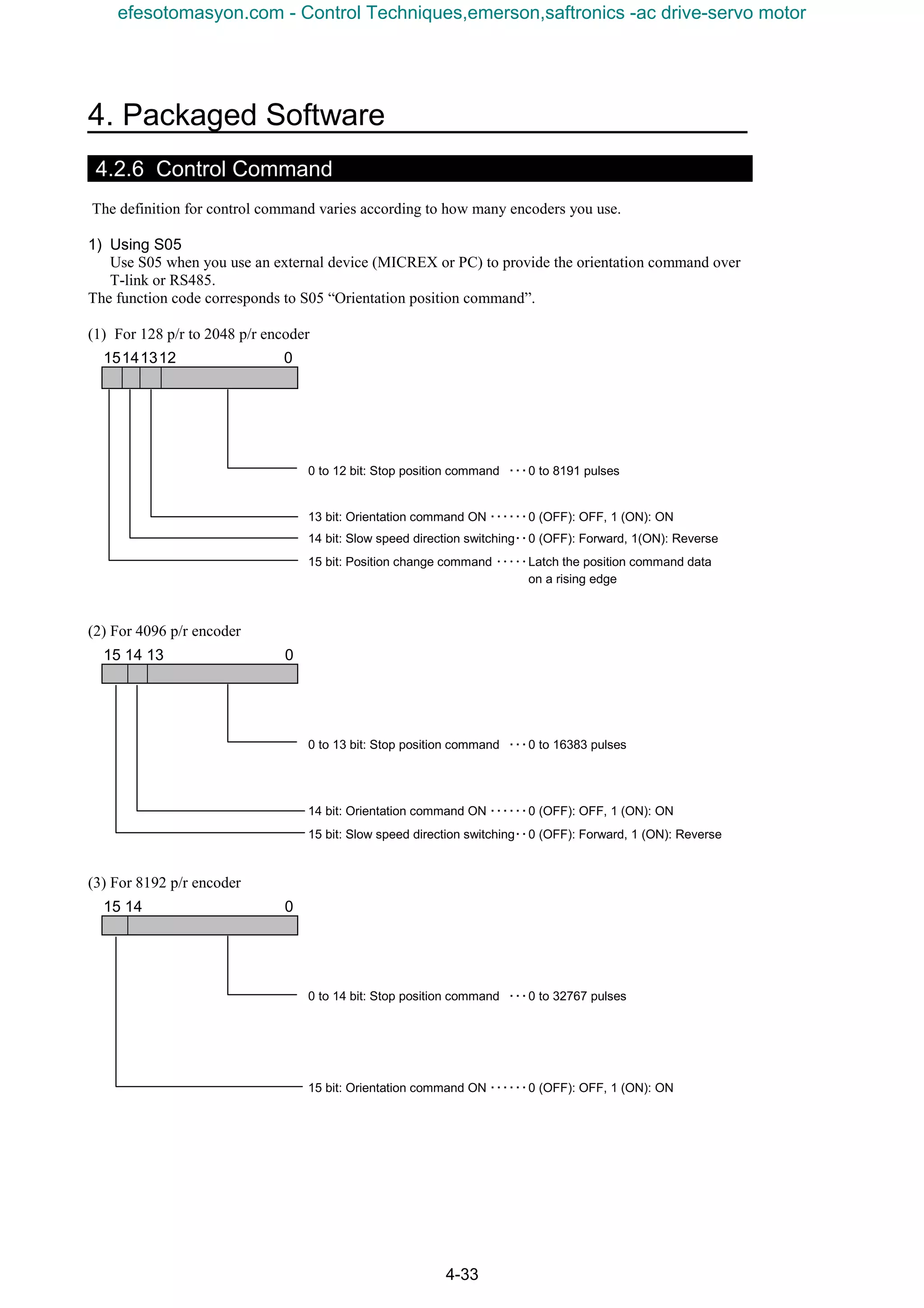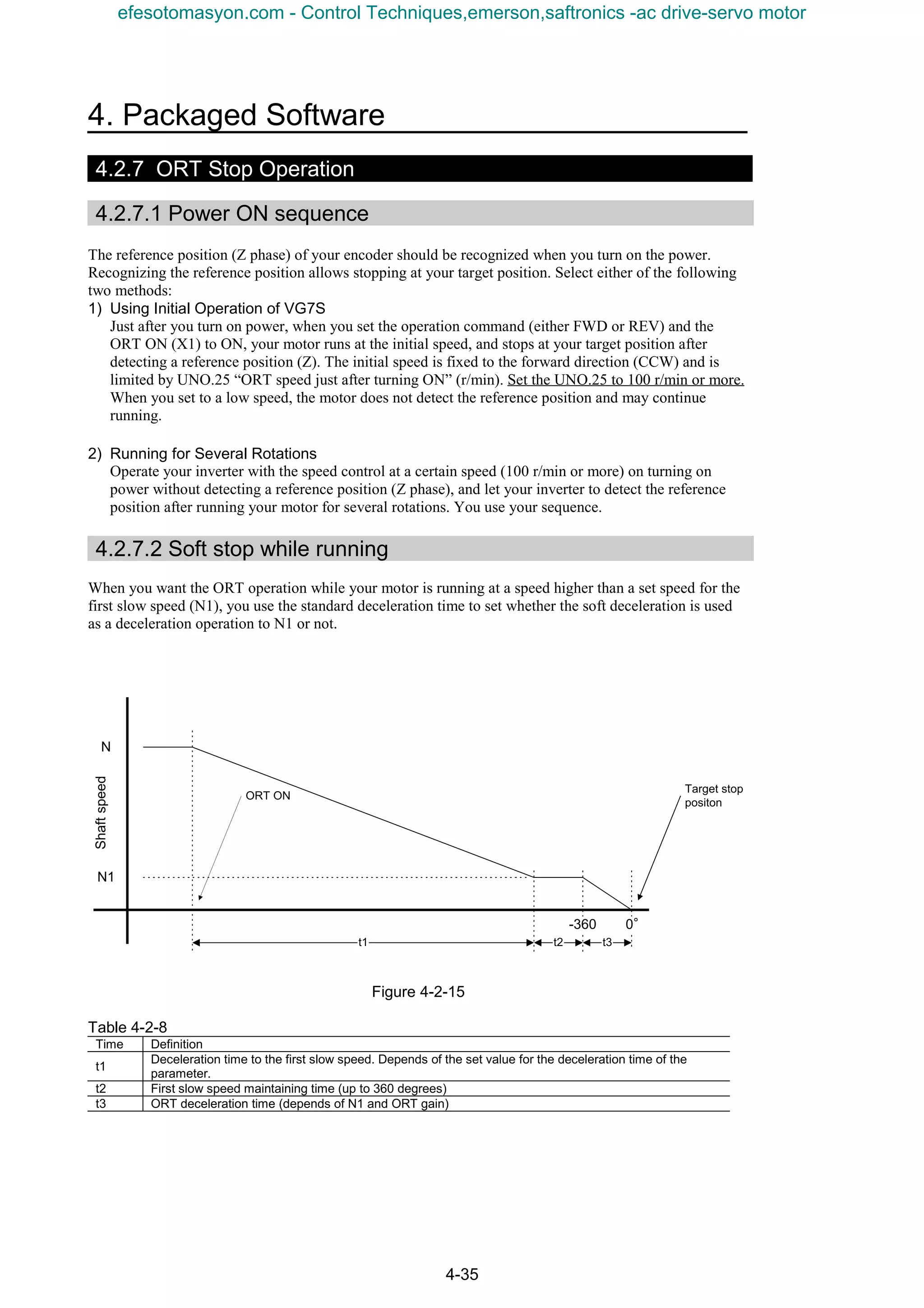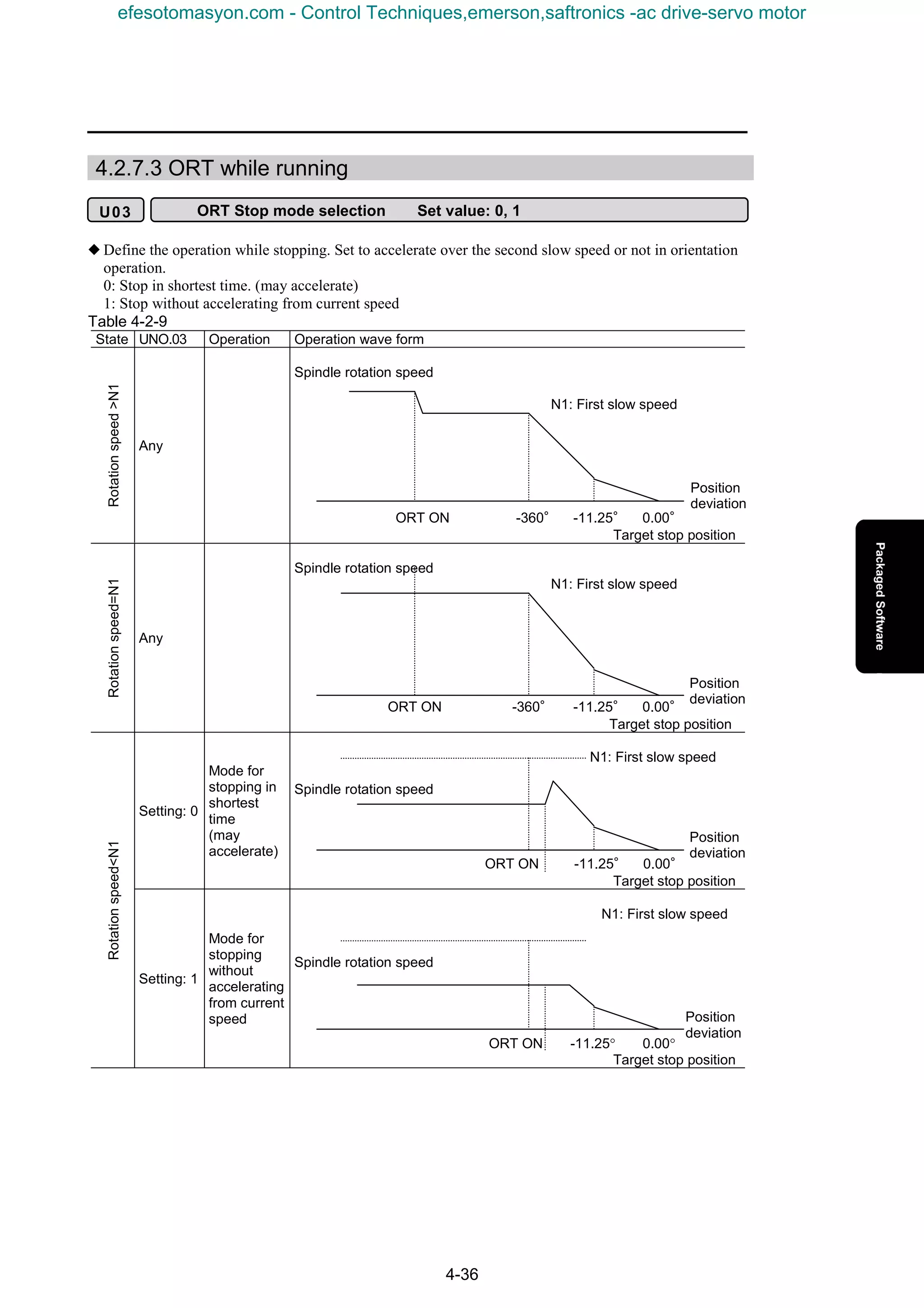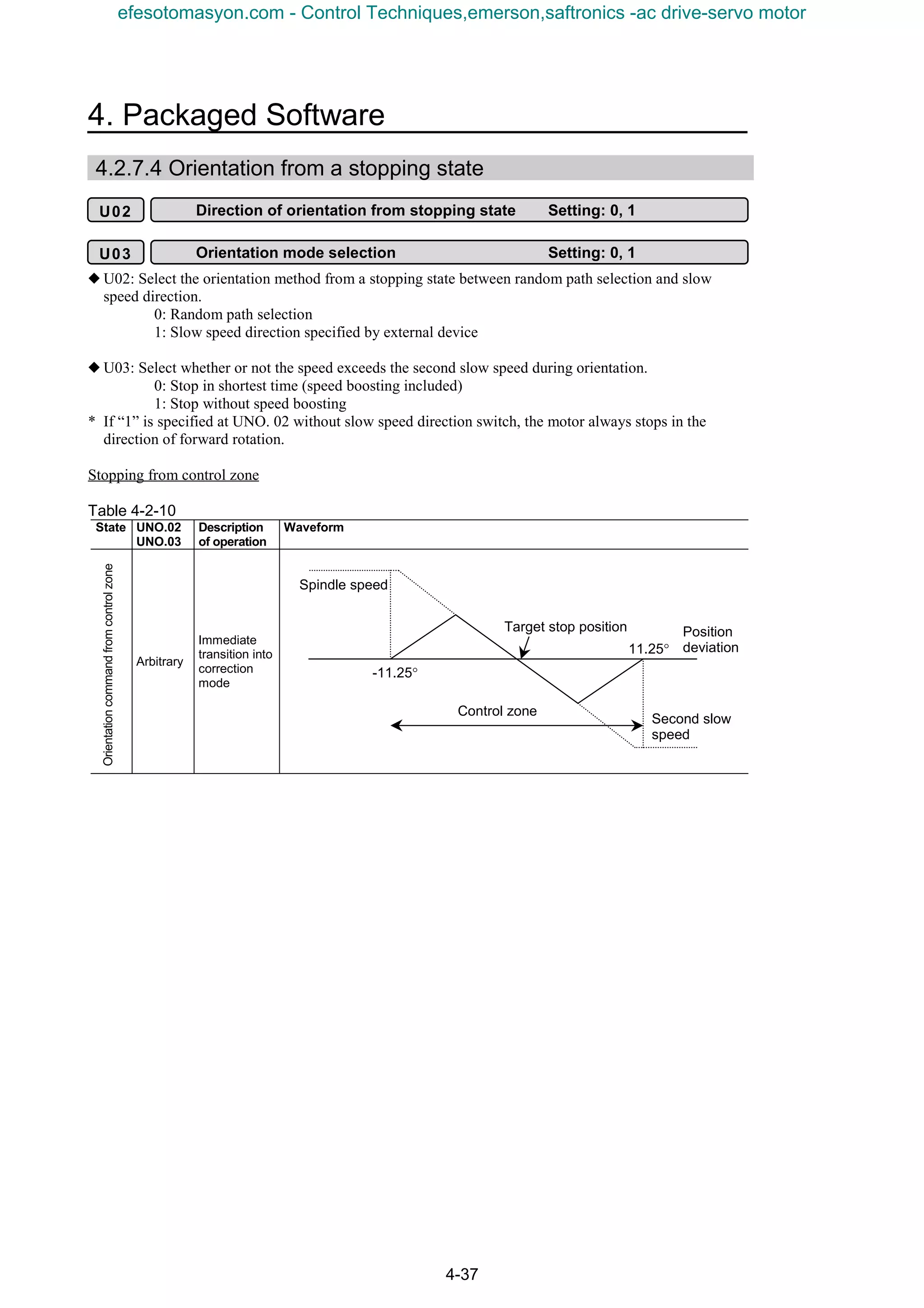



efesotomasyon.com - Control Techniques,emerson,saftronics -ac drive-servo motor
Introduction
1
Introduction
Thank you for purchasing option OPC-VG7-UPAC (hereinafter referred to as UPAC) and OPC-VG7-SI
(hereinafter referred to as Optical Link) of Fuji’s general-purpose vector inverter FRENIC 5000 VG7S
(hereinafter referred to as VG7S).
This User’s Manual describes the procedure for operating VG7S using UPAC only or UPAC and Optical
Link. Read through this User’s Manual for correct operation.
This manual is prepared for those familiar with the operation methods of the D300win software and
VG7S hardware. Therefore the operation method of each piece of software and the unit itself is not
described in this manual. Refer to the following relevant manuals together with this manual.
Reference document
Reference
document No.
Remarks
1
High performance vector
control inverter
FRENIC5000VG7S Series
MEH405 Catalog
2
Instruction manual
FRENIC5000VG7S
INR-HF51306-E
Instruction manual attached to product
Description concerning test operation
and connection only (attached to
purchased product)
3
FRENIC5000VG7S
USER’S MANUAL
MEH407 Main manual for VG7S
4
User’s manual for MICREX-
SX Series SPH, instruction
volume
FEH200
Explanation of memory, language,
system definition and other items of
MICREX-SX Series
5
User’s manual for MICREX-
SX Series SPH, <elementary
volume> for D300win
FEH250
Explanation of basic operation of
D300win and programming and
monitoring methods of MICREX-SX
Series
6
User’s manual for MICREX-
SX Series SPH, <reference
volume> for D300win
FEH254
Description of menus and icons of
D300win and explanation of all
operation methods
(1) No part of this manual may be reproduced or transmitted without the prior permission from
the publisher.
(2) Description in this manual is subject to change for improvement without prior notice.
(3) Though description in this manual is carefully prepared, contact our sales outlet for any
uncertainties or errors.
* Microsoft and Windows are registered or mere trademarks of Microsoft Corp.
* Intel 486 and Pentium are registered or mere trademarks of Intel Corp.
efesotomasyon.com - Control Techniques,emerson,saftronics -ac drive-servo motor
Introduction
2
This product is an optional unit for variable speed operation of the three-phase induction motor. Before
using our product, read through “Safety Precautions” for correct operation.
As well, ensure that these “Safety Precautions” are delivered to the final person in charge of maintenance.
Safety Precautions
Read this manual carefully before installing, connecting (wiring), operating, servicing, or inspecting the
inverter.
Familiarize yourself with all safety features before using the inverter.
In this manual, safety messages are classified as follows:
WARNING
Improper operation may result in serious personal injury or death.
CAUTION
Improper operation may result in slight to medium personal injury or property
damage.
Situations more serious than those covered by CAUTION will depend on prevailing circumstances.
Always follow instructions.
Instructions on use
WARNING
• This inverter is designed to drive a 3-phase induction motor and is not suitable for a single-phase
motor or others, as fire may result.
• This inverter may not be used (as is) as a component of a life-support system or other medical
device directly affecting the personal welfare of the user.
• This inverter is manufactured under strict quality control standards. However, safety equipment
must be installed if the failure of this device may result in personal injury and/or property damage.
There is a risk of accident.
Instructions on installation
CAUTION
• Mount this inverter on an incombustible material such as metal.
There is a risk of fire.
• Do not place combustible or flammable material near this inverter, as fire may result.
• The inverter housed in IP00 (18.5kW or over) should be installed in a place where no one can touch
it easily.
Electric shock or injury may result.
CAUTION
• Do not hold or carry this inverter by the surface cover. Inverter may be dropped causing injury.
• Ensure that the inverter and heat sink surfaces are kept free from foreign matter (lint, paper dust,
small chips of wood or metal chips), as fire or accident may result.
• Do not install or operate a damaged inverter or an inverter with missing parts, as injury may result.
• When changing installation bracket position, use the attached screws, as injury may result.
efesotomasyon.com - Control Techniques,emerson,saftronics -ac drive-servo motor
3
Instructions on wiring
WARNING
• Connect the inverter to power via a line-protection molded-case circuit breaker or earth-leakage
circuit breaker, as fire may result.
• Use the cables of the specified size, as fire may result.
• Always connect a ground wire, as electric shock or fire may result.
• A licensed specialist must perform the wiring works, as electric shock may result.
• Turn off the power before starting the wiring work, as electric shock may result.
• Wire the inverter after installation is complete, as electric shock or injury may occur.
• Do not supply power to any inverter of which parts are broken, omitted, or damage in
transportation, as electrical shock or fire may result.
CAUTION
• Confirm that the phases and rated voltage of this product match those of the AC power supply, as
injury may result.
• Do not connect the AC power supply to the output terminals (U, V, and W), as injury may result.
• Do not connect a braking resistor directly to the DC terminals (P(+) and N(−)), as fire may result.
• When using DC power input, ensure that the fan power switching connector (CNRXTX) is correctly
engaged in the inverter as a trouble may occur.
• When using DC power input of 18.5kW or larger inverter, be sure to connect AC power to terminals
R0 and T0 for a power supply of fan as a trouble may occur.
• Ensure that the noise generated by the inverter, motor, or wiring does not adversely affect peripheral
sensors and equipment, as accident may result.
efesotomasyon.com - Control Techniques,emerson,saftronics -ac drive-servo motor
Introduction
4
Instructions on operation
WARNING
• Be sure to install the surface cover before turning on the power (closed). Do not remove the cover
while power to the inverter is turned on.
Electric shock may occur.
• Do not operate switches with wet hands, as electric shock may result.
• When the retry function is selected, the inverter may restart automatically after tripping. (Design
the machine to ensure personal safety in the event of restart)
Accident may result.
• When the torque limiting function is selected, operating conditions may differ from preset
conditions (acceleration/deceleration time or speed). In this case, personal safety must be assured.
Accident may result.
• As the STOP key is effective only when a function setting has been established, install an
emergency switch independently, and when an operation via the external signal terminal is
selected, the STOP key on the keypad panel will be disabled.
Accident may result.
• As operations start suddenly if alarm is reset with a running signal input, confirm that no running
signal is input before resetting alarm.
Accident may result.
• When an alarm is activated, the motor coasts. If the motor needs to be stopped in such a case, install
a brake to the machine with the motor.
Accident may result.
• If AUTO RESTART is selected in the restart mode after momentary power failure (function code
F14), the inverter restarts automatically starting the motor rotation when the power is recovered.
Accident may result.
• When the tuning (function code H01) is started, the motor, machine or equipment starts and stops
repeatedly. Ensure safety before performing tuning.
Accident may result.
• If the user set the function codes wrongly or without completely understanding this user’s manual,
the motor may rotate with a torque or at a speed not permitted for the machine.
Accident or injury may result.
• Do not touch inverter terminals when energized even if inverter has stopped.
Electric shock may result.
CAUTION
• Do not start or stop the inverter using the main circuit power.
Failure may result.
• Do not touch the heat sink or braking resistor because they become very hot.
Burns may result.
• As the inverter can set high speed operation easily, carefully check the performance of motor or
machine before changing speed settings.
Injury may result.
• Do not use the inverter braking function for mechanical holding.
Injury may result.
• During pre-excitation, the speed adjuster does not function and the motor may be rotated by load
disturbance. When using pre-excitation, therefore, also use the mechanical brake.
Injury may result.
• If improper data is set at the function code related with speed adjuster as in the case of setting high
gain abruptly, the motor may hunt.
Injury may result.
efesotomasyon.com - Control Techniques,emerson,saftronics -ac drive-servo motor
5
Instructions on maintenance, inspection, and replacement
WARNING
• Wait a minimum of five minutes (15kW or less) or ten minutes (18.5kW or more) after power has
been turned off (open) before starting inspection. (Also confirm that the charge lamp is off and that
DC voltage between terminals P(+) and N(−) does not exceed 25V.)
Electric shock may result.
• Only authorized personnel should perform maintenance, inspection, and replacement operations.
(Take off metal jewelry, such as watches and rings. Use insulated tools.)
Electric shock or injury may result.
Instructions on disposal
CAUTION
• Treat as industrial waste when disposing it.
Injury may result.
Other instructions
WARNING
• Never modify the product.
Electric shock or injury may result.
Conformity to Low Voltage Directive in Europe
CAUTION
• The contact capacity of alarm output for any fault (30A, B, C) and relay signal output (Y5A, Y5C)
is 0.5A at 48V DC.
• The inverter must be securely grounded. Besides installation of the earth leakage circuit breaker
(ELCB), this grounding work is necessary for protection against electrical shock.
• Use a crimp terminal to connect a cable to the main circuit terminal or inverter ground terminal.
• Use a single cable to connect the z G inverter ground terminal. (Do not connect two or more
cables to the inverter ground terminal.)
• Use a molded-case circuit breaker (MCCB) and magnetic contactor (MC) that conform to EN or
IEC standards.
• Use the inverter under over-voltage category III conditions and maintain Pollution degree 2 or
better as specified in IEC664. To maintain Pollution degree 2 or more, install the inverter in the
control panel (IP54 or higher level) having structure free from water, oil, carbon, dust, etc.
• For the input-output wiring of the inverter, use cable (diameter and type) as specified in Appendix
C in EN60204.
• To ensure safety, install an optional AC reactor, DC REACTOR, or external braking resistor as
follows:
1) Install inside an IP4X cabinet or barrier if electrical parts are exposed.
2) Install inside an IP2X cabinet or barrier if electrical parts are not exposed.
General Instructions
Although figures in this manual may show the inverter with covers and safety screens removed for
explanation purposes, do not operate the device until all such covers and screens have been replaced.
efesotomasyon.com - Control Techniques,emerson,saftronics -ac drive-servo motor
Introduction
6
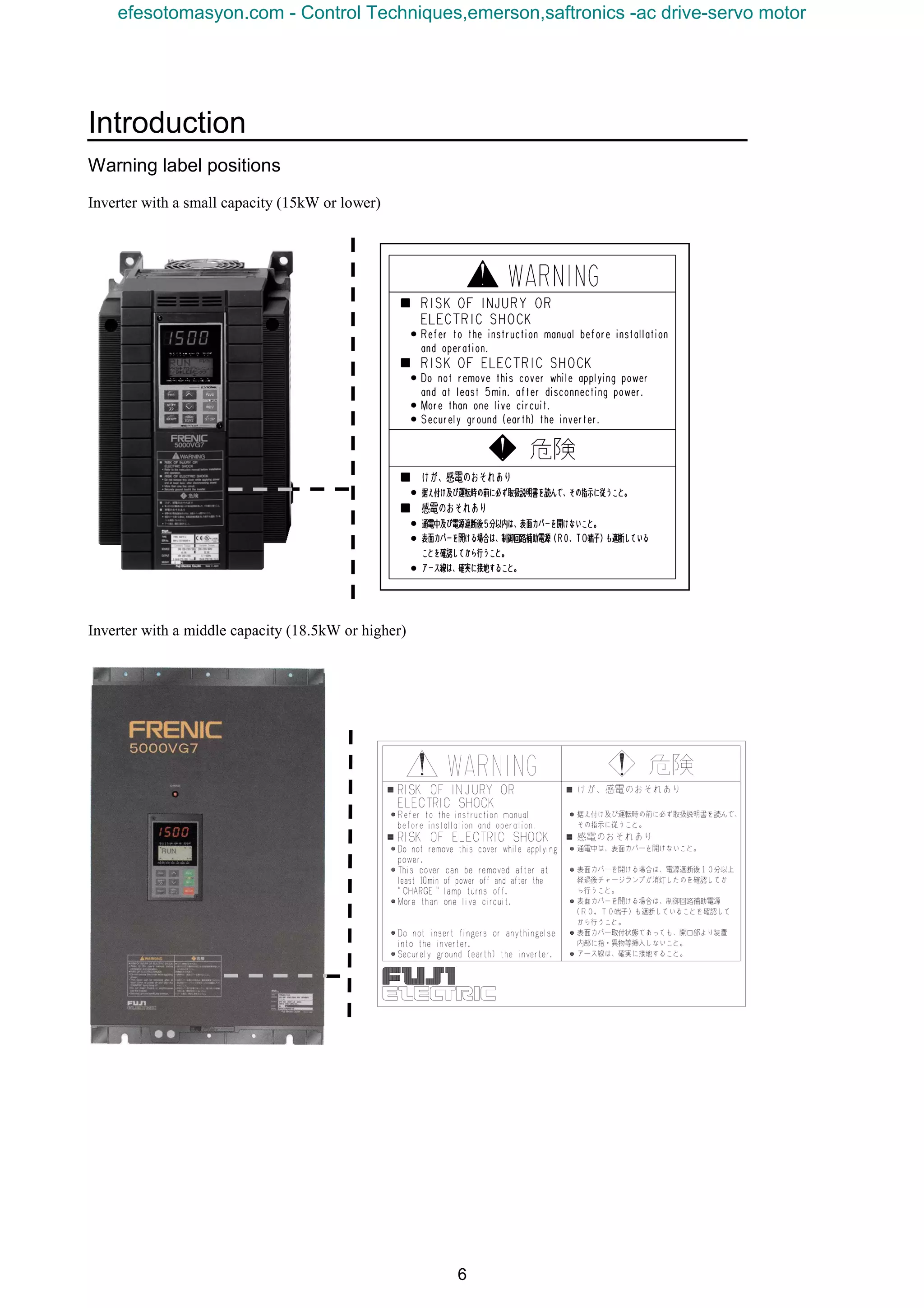
Warning label positions
Inverter with a small capacity (15kW or lower)
Inverter with a middle capacity (18.5kW or higher)
efesotomasyon.com - Control Techniques,emerson,saftronics -ac drive-servo motor
7
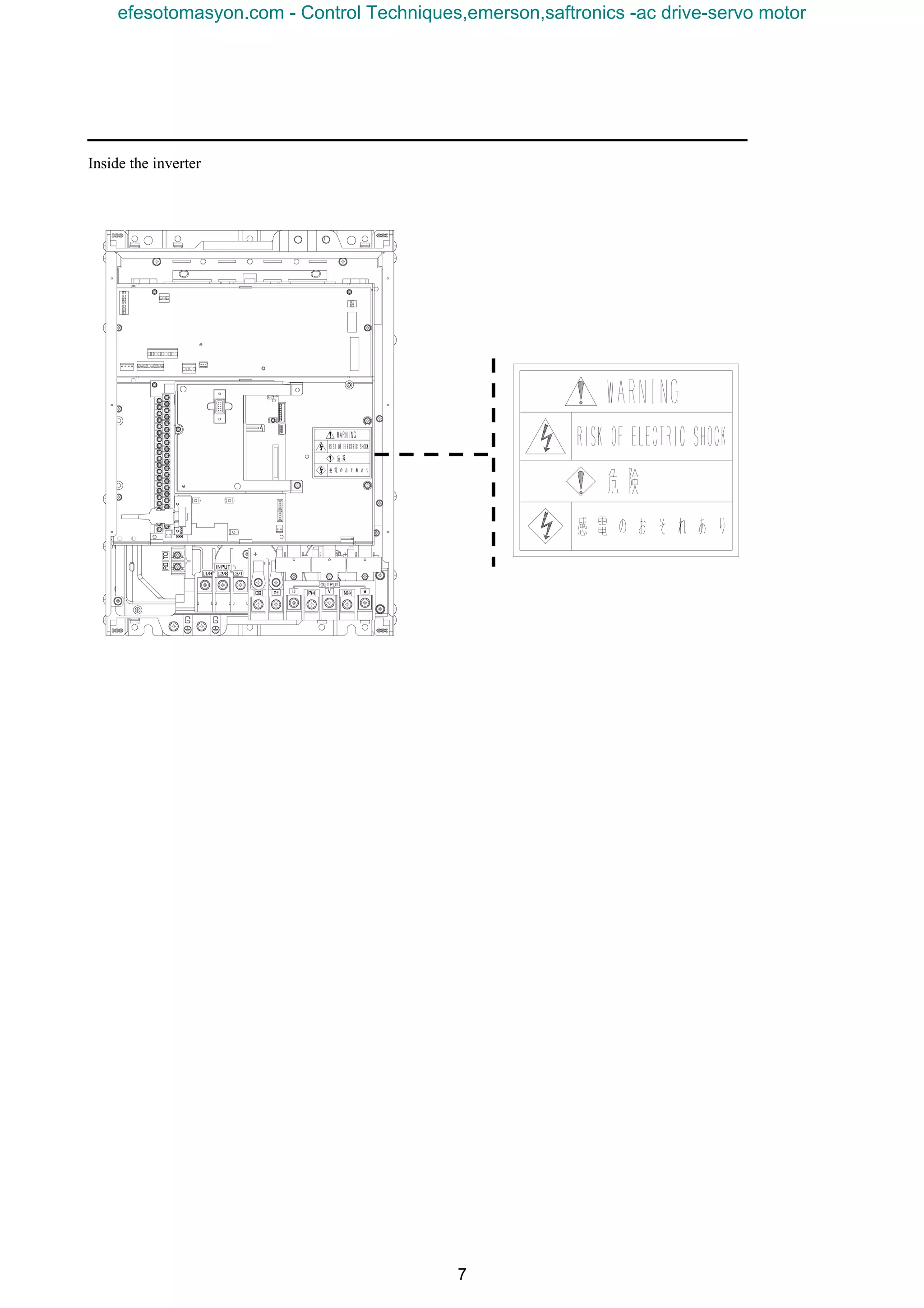
Inside the inverter
efesotomasyon.com - Control Techniques,emerson,saftronics -ac drive-servo motor
Introduction
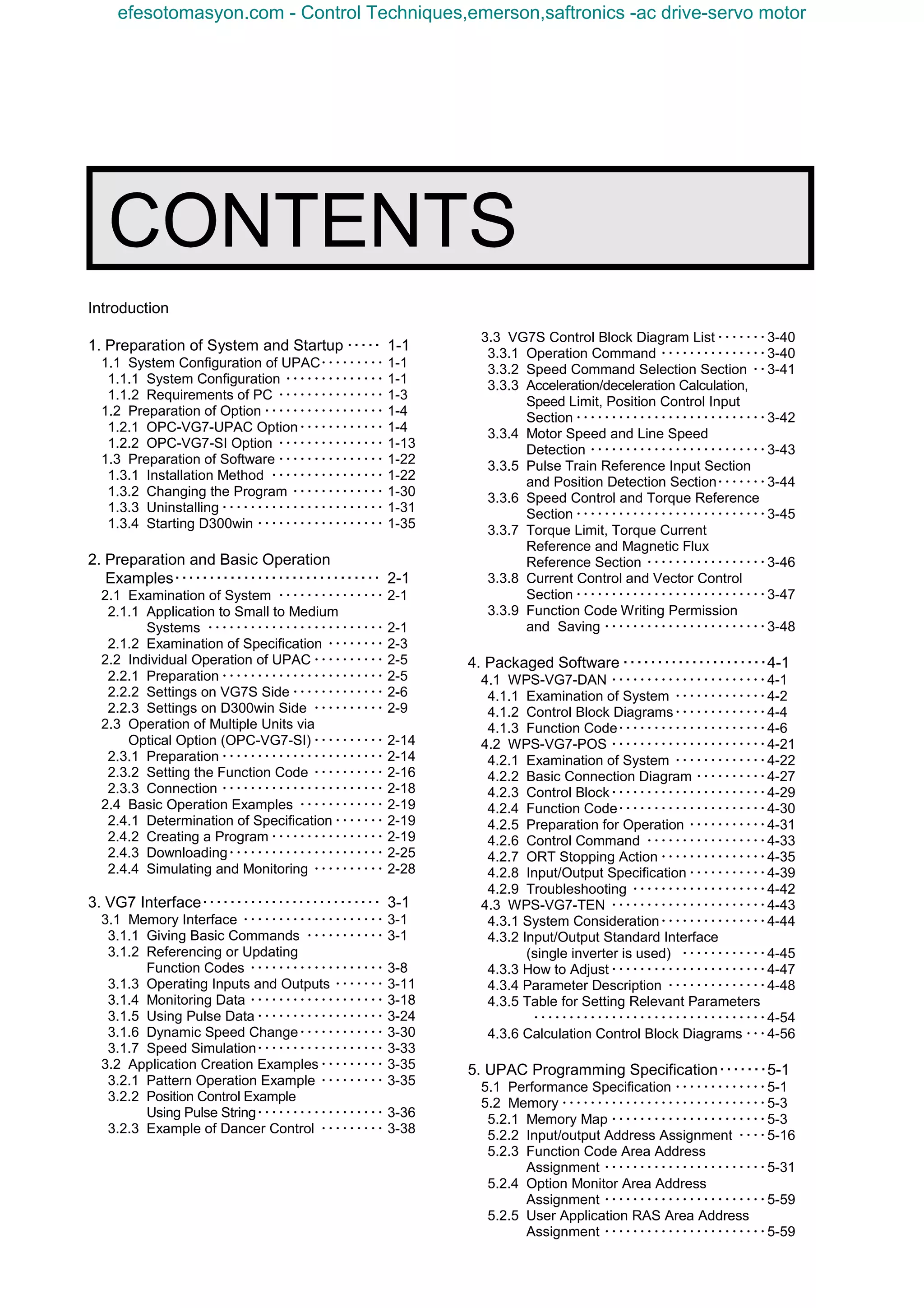
1. Preparation of System and Startup ・・・・・ 1-1
1.1 System Configuration of UPAC・・・・・・・・・ 1-1
1.1.1 System Configuration ・・・・・・・・・・・・・・ 1-1
1.1.2 Requirements of PC ・・・・・・・・・・・・・・・ 1-3
1.2 Preparation of Option ・・・・・・・・・・・・・・・・・ 1-4
1.2.1 OPC-VG7-UPAC Option・・・・・・・・・・・・ 1-4
1.2.2 OPC-VG7-SI Option ・・・・・・・・・・・・・・・ 1-13
1.3 Preparation of Software ・・・・・・・・・・・・・・・ 1-22
1.3.1 Installation Method ・・・・・・・・・・・・・・・・ 1-22
1.3.2 Changing the Program ・・・・・・・・・・・・・ 1-30
1.3.3 Uninstalling ・・・・・・・・・・・・・・・・・・・・・・・ 1-31
1.3.4 Starting D300win ・・・・・・・・・・・・・・・・・・ 1-35
2. Preparation and Basic Operation
Examples・・・・・・・・・・・・・・・・・・・・・・・・・・・・・・ 2-1
2.1 Examination of System ・・・・・・・・・・・・・・・ 2-1
2.1.1 Application to Small to Medium
Systems ・・・・・・・・・・・・・・・・・・・・・・・・・ 2-1
2.1.2 Examination of Specification ・・・・・・・・ 2-3
2.2 Individual Operation of UPAC ・・・・・・・・・・ 2-5
2.2.1 Preparation ・・・・・・・・・・・・・・・・・・・・・・・ 2-5
2.2.2 Settings on VG7S Side ・・・・・・・・・・・・・ 2-6
2.2.3 Settings on D300win Side ・・・・・・・・・・ 2-9
2.3 Operation of Multiple Units via
Optical Option (OPC-VG7-SI) ・・・・・・・・・・ 2-14
2.3.1 Preparation ・・・・・・・・・・・・・・・・・・・・・・・ 2-14
2.3.2 Setting the Function Code ・・・・・・・・・・ 2-16
2.3.3 Connection ・・・・・・・・・・・・・・・・・・・・・・・ 2-18
2.4 Basic Operation Examples ・・・・・・・・・・・・ 2-19
2.4.1 Determination of Specification・・・・・・・ 2-19
2.4.2 Creating a Program ・・・・・・・・・・・・・・・・ 2-19
2.4.3 Downloading・・・・・・・・・・・・・・・・・・・・・・ 2-25
2.4.4 Simulating and Monitoring ・・・・・・・・・・ 2-28
3. VG7 Interface・・・・・・・・・・・・・・・・・・・・・・・・・・ 3-1
3.1 Memory Interface ・・・・・・・・・・・・・・・・・・・・ 3-1
3.1.1 Giving Basic Commands ・・・・・・・・・・・ 3-1
3.1.2 Referencing or Updating
Function Codes ・・・・・・・・・・・・・・・・・・・ 3-8
3.1.3 Operating Inputs and Outputs ・・・・・・・ 3-11
3.1.4 Monitoring Data ・・・・・・・・・・・・・・・・・・・ 3-18
3.1.5 Using Pulse Data・・・・・・・・・・・・・・・・・・ 3-24
3.1.6 Dynamic Speed Change・・・・・・・・・・・・ 3-30
3.1.7 Speed Simulation・・・・・・・・・・・・・・・・・・ 3-33
3.2 Application Creation Examples・・・・・・・・・ 3-35
3.2.1 Pattern Operation Example ・・・・・・・・・ 3-35
3.2.2 Position Control Example
Using Pulse String・・・・・・・・・・・・・・・・・・ 3-36
3.2.3 Example of Dancer Control ・・・・・・・・・ 3-38
3.3 VG7S Control Block Diagram List・・・・・・・3-40
3.3.1 Operation Command ・・・・・・・・・・・・・・・3-40
3.3.2 Speed Command Selection Section ・・3-41
3.3.3 Acceleration/deceleration Calculation,
Speed Limit, Position Control Input
Section ・・・・・・・・・・・・・・・・・・・・・・・・・・・3-42
3.3.4 Motor Speed and Line Speed
Detection ・・・・・・・・・・・・・・・・・・・・・・・・・3-43
3.3.5 Pulse Train Reference Input Section
and Position Detection Section・・・・・・・3-44
3.3.6 Speed Control and Torque Reference
Section ・・・・・・・・・・・・・・・・・・・・・・・・・・・3-45
3.3.7 Torque Limit, Torque Current
Reference and Magnetic Flux
Reference Section ・・・・・・・・・・・・・・・・・3-46
3.3.8 Current Control and Vector Control
Section ・・・・・・・・・・・・・・・・・・・・・・・・・・・3-47
3.3.9 Function Code Writing Permission
and Saving ・・・・・・・・・・・・・・・・・・・・・・・3-48
4. Packaged Software ・・・・・・・・・・・・・・・・・・・・・4-1
4.1 WPS-VG7-DAN ・・・・・・・・・・・・・・・・・・・・・・4-1
4.1.1 Examination of System ・・・・・・・・・・・・・4-2
4.1.2 Control Block Diagrams・・・・・・・・・・・・・4-4
4.1.3 Function Code・・・・・・・・・・・・・・・・・・・・・4-6
4.2 WPS-VG7-POS ・・・・・・・・・・・・・・・・・・・・・・4-21
4.2.1 Examination of System ・・・・・・・・・・・・・4-22
4.2.2 Basic Connection Diagram ・・・・・・・・・・4-27
4.2.3 Control Block・・・・・・・・・・・・・・・・・・・・・・4-29
4.2.4 Function Code・・・・・・・・・・・・・・・・・・・・・4-30
4.2.5 Preparation for Operation ・・・・・・・・・・・4-31
4.2.6 Control Command ・・・・・・・・・・・・・・・・・4-33
4.2.7 ORT Stopping Action ・・・・・・・・・・・・・・・4-35
4.2.8 Input/Output Specification・・・・・・・・・・・4-39
4.2.9 Troubleshooting ・・・・・・・・・・・・・・・・・・・4-42
4.3 WPS-VG7-TEN ・・・・・・・・・・・・・・・・・・・・・・4-43
4.3.1 System Consideration・・・・・・・・・・・・・・・4-44
4.3.2 Input/Output Standard Interface
(single inverter is used) ・・・・・・・・・・・・4-45
4.3.3 How to Adjust・・・・・・・・・・・・・・・・・・・・・・4-47
4.3.4 Parameter Description ・・・・・・・・・・・・・・4-48
4.3.5 Table for Setting Relevant Parameters
・・・・・・・・・・・・・・・・・・・・・・・・・・・・・・・・・4-54
4.3.6 Calculation Control Block Diagrams ・・・4-56
5. UPAC Programming Specification・・・・・・・5-1
5.1 Performance Specification ・・・・・・・・・・・・・5-1
5.2 Memory ・・・・・・・・・・・・・・・・・・・・・・・・・・・・・5-3
5.2.1 Memory Map ・・・・・・・・・・・・・・・・・・・・・・5-3
5.2.2 Input/output Address Assignment ・・・・5-16
5.2.3 Function Code Area Address
Assignment ・・・・・・・・・・・・・・・・・・・・・・・5-31
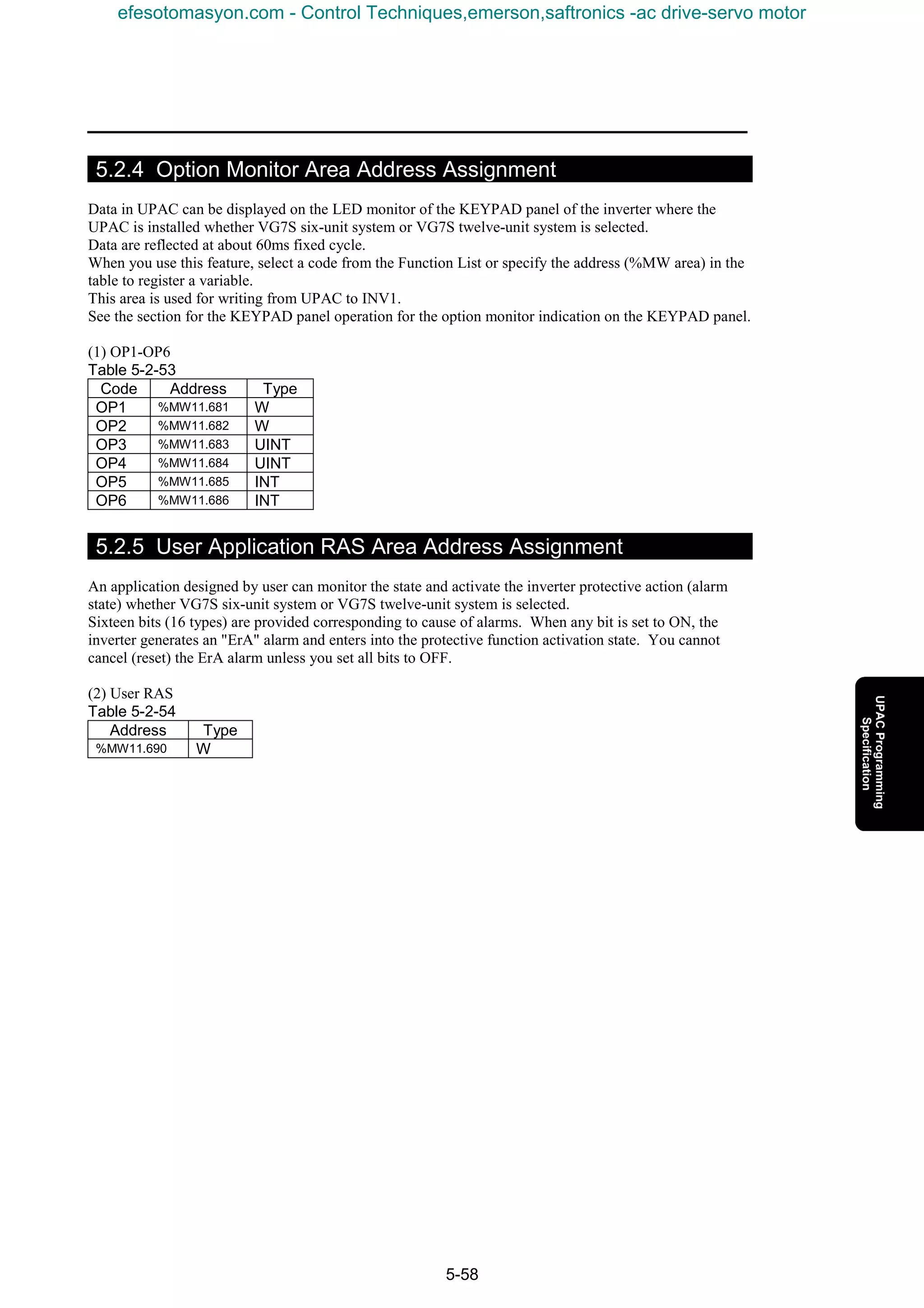
5.2.4 Option Monitor Area Address
Assignment ・・・・・・・・・・・・・・・・・・・・・・・5-59
5.2.5 User Application RAS Area Address
Assignment ・・・・・・・・・・・・・・・・・・・・・・・5-59
efesotomasyon.com - Control Techniques,emerson,saftronics -ac drive-servo motor
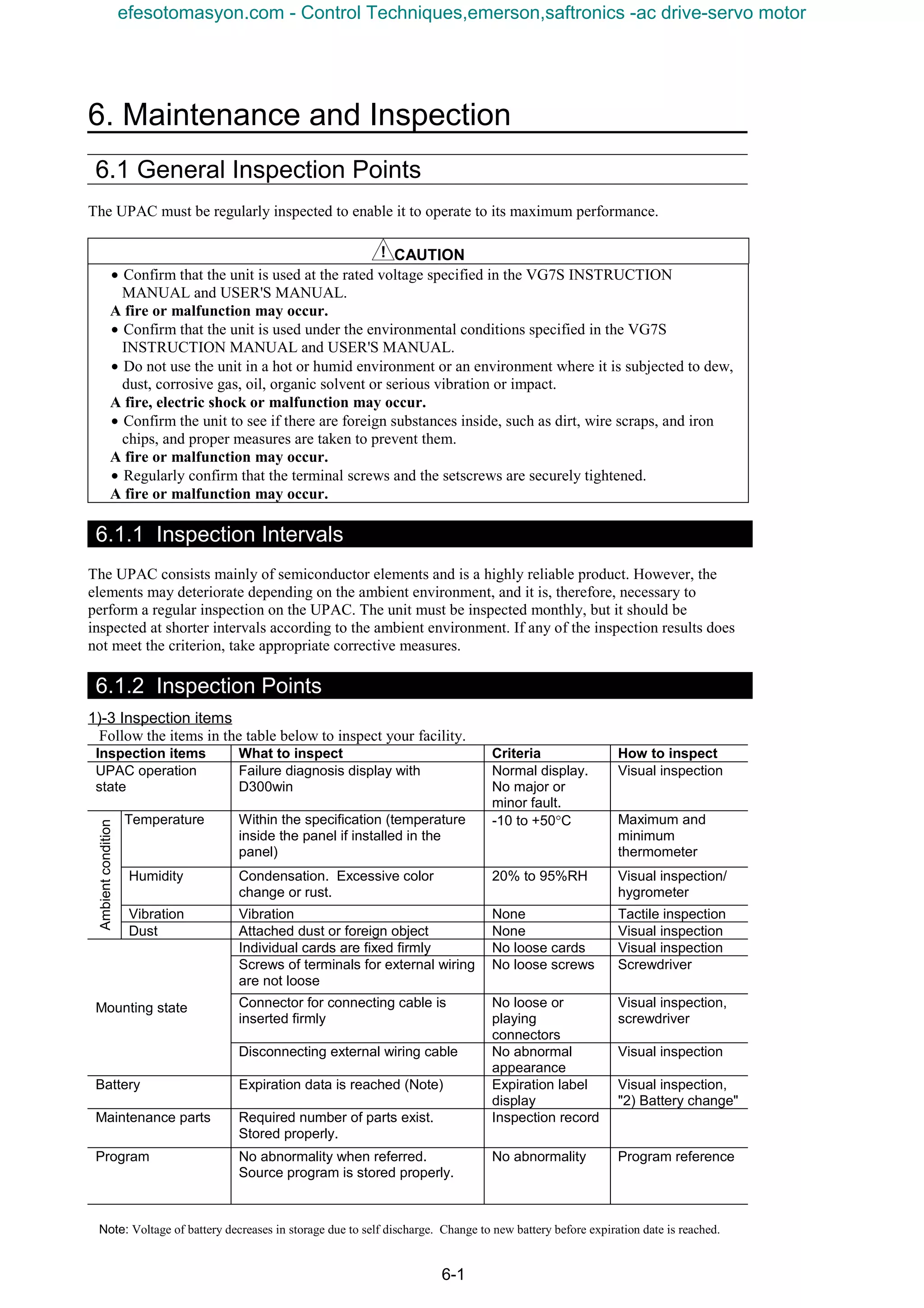
6. Maintenance and Inspection ・・・・・・・・・・・ 6-1
6.1 General Inspection Items・・・・・・・・・・・・・・ 6-1
6.1.1 Inspection Interval ・・・・・・・・・・・・・・・・・ 6-1
6.1.2 Inspection Item・・・・・・・・・・・・・・・・・・・・ 6-1
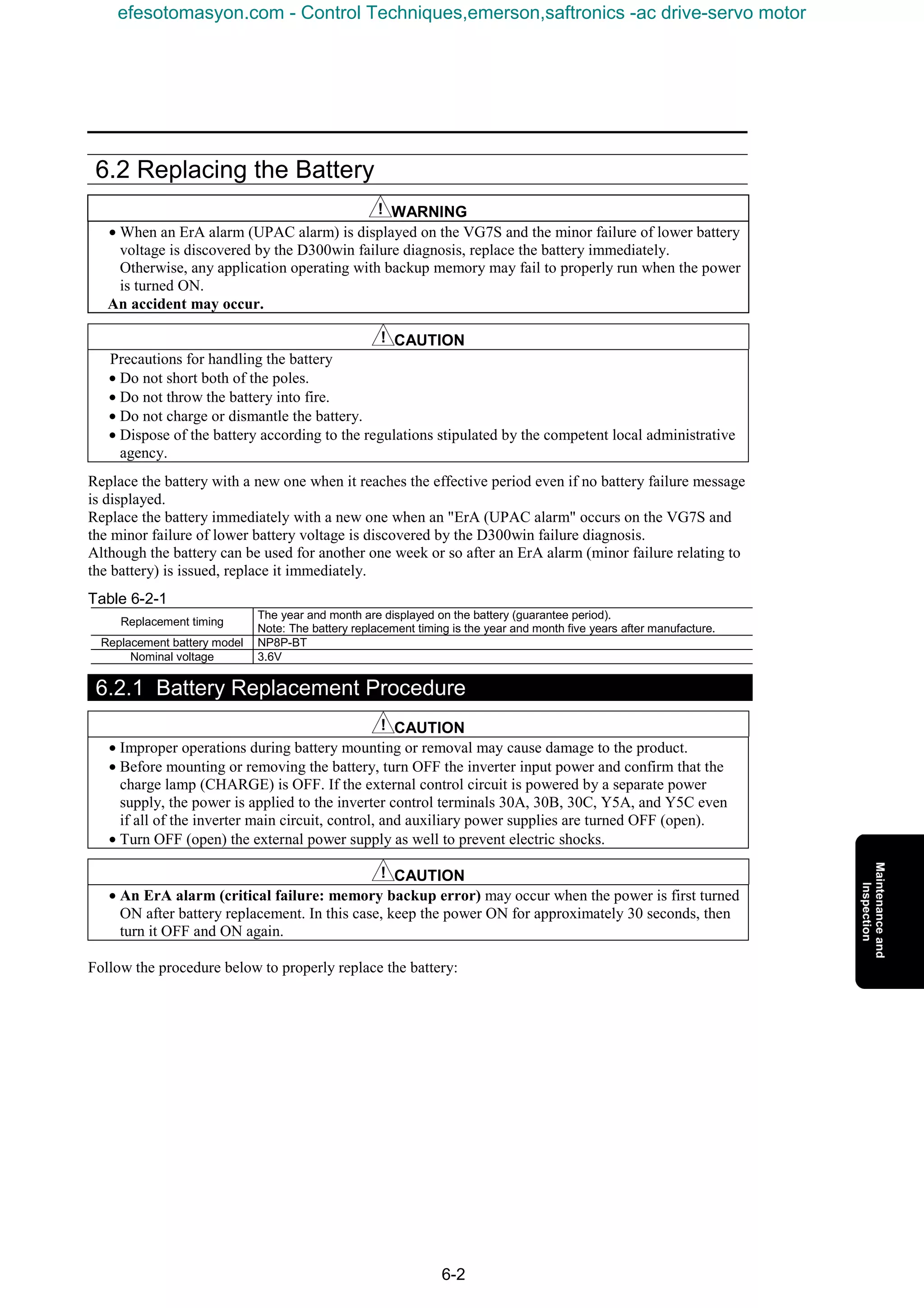
6.2 Battery Change ・・・・・・・・・・・・・・・・・・・・・・ 6-2
6.2.1 Batter Changing Procedure ・・・・・・・・・ 6-2
efesotomasyon.com - Control Techniques,emerson,saftronics -ac drive-servo motor
1. Preparation of System and Startup
1-1
1.1 System Configuration of UPAC
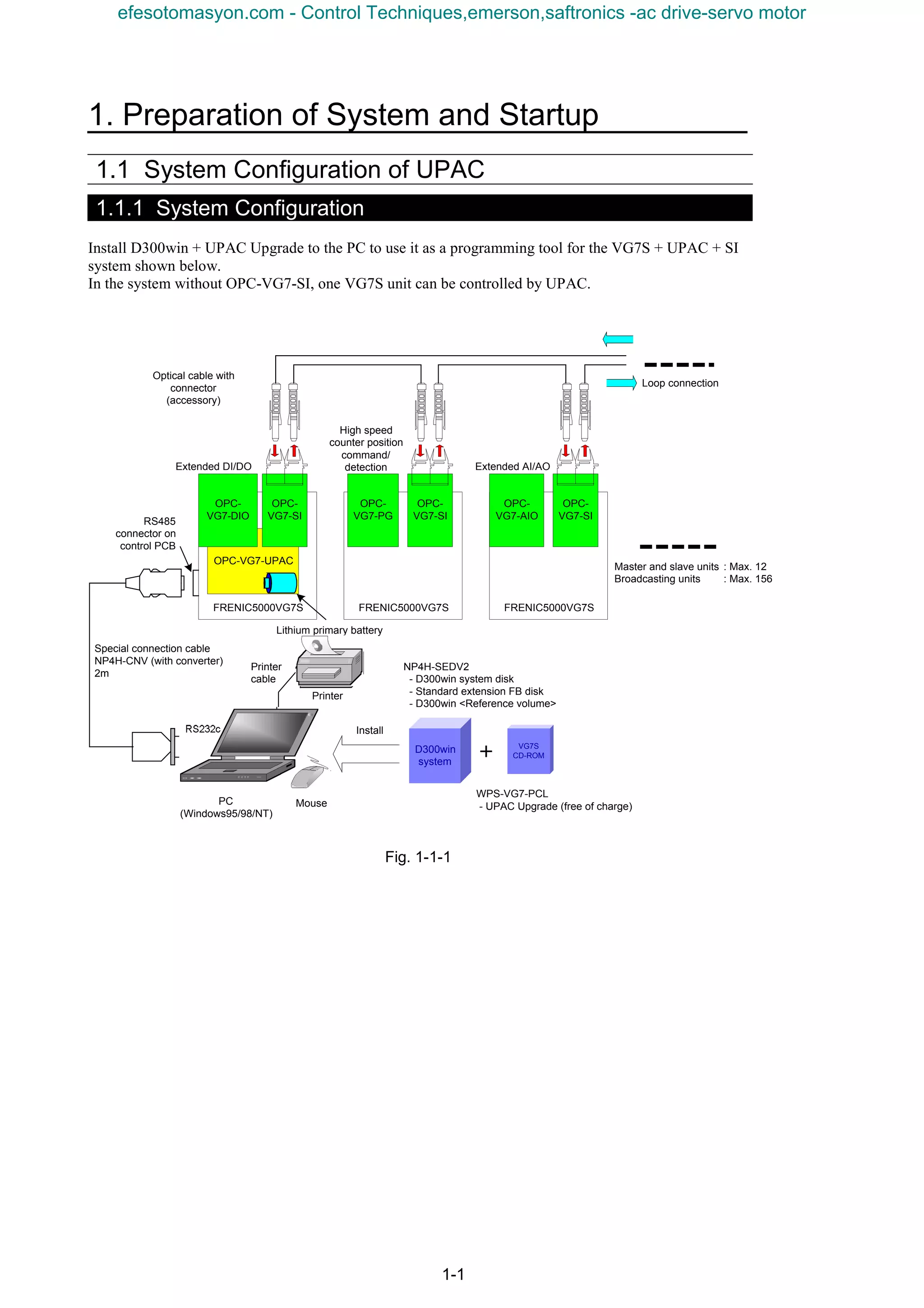
1.1.1 System Configuration
Install D300win + UPAC Upgrade to the PC to use it as a programming tool for the VG7S + UPAC + SI
system shown below.
In the system without OPC-VG7-SI, one VG7S unit can be controlled by UPAC.
Fig. 1-1-1
Printer
D300win
system
VG7S
CD-ROM
NP4H-SEDV2
- D300win system disk
- Standard extension FB disk
- D300win <Reference volume>
WPS-VG7-PCL
- UPAC Upgrade (free of charge)PC
(Windows95/98/NT)
FRENIC5000VG7S FRENIC5000VG7S
RS232c
Special connection cable
NP4H-CNV (with converter)
2m
Printer
cable
++++
Install
Mouse
OPC-
VG7-SI
OPC-VG7-UPAC
OPC-
VG7-SI
RS485
connector on
control PCB
Optical cable with
connector
(accessory)
Master and slave units : Max. 12
Broadcasting units : Max. 156
Lithium primary battery
Loop connection
OPC-
VG7-DIO
OPC-
VG7-PG
FRENIC5000VG7S
OPC-
VG7-SI
OPC-
VG7-AIO
Extended DI/DO
High speed
counter position
command/
detection Extended AI/AO
efesotomasyon.com - Control Techniques,emerson,saftronics -ac drive-servo motor
1-2
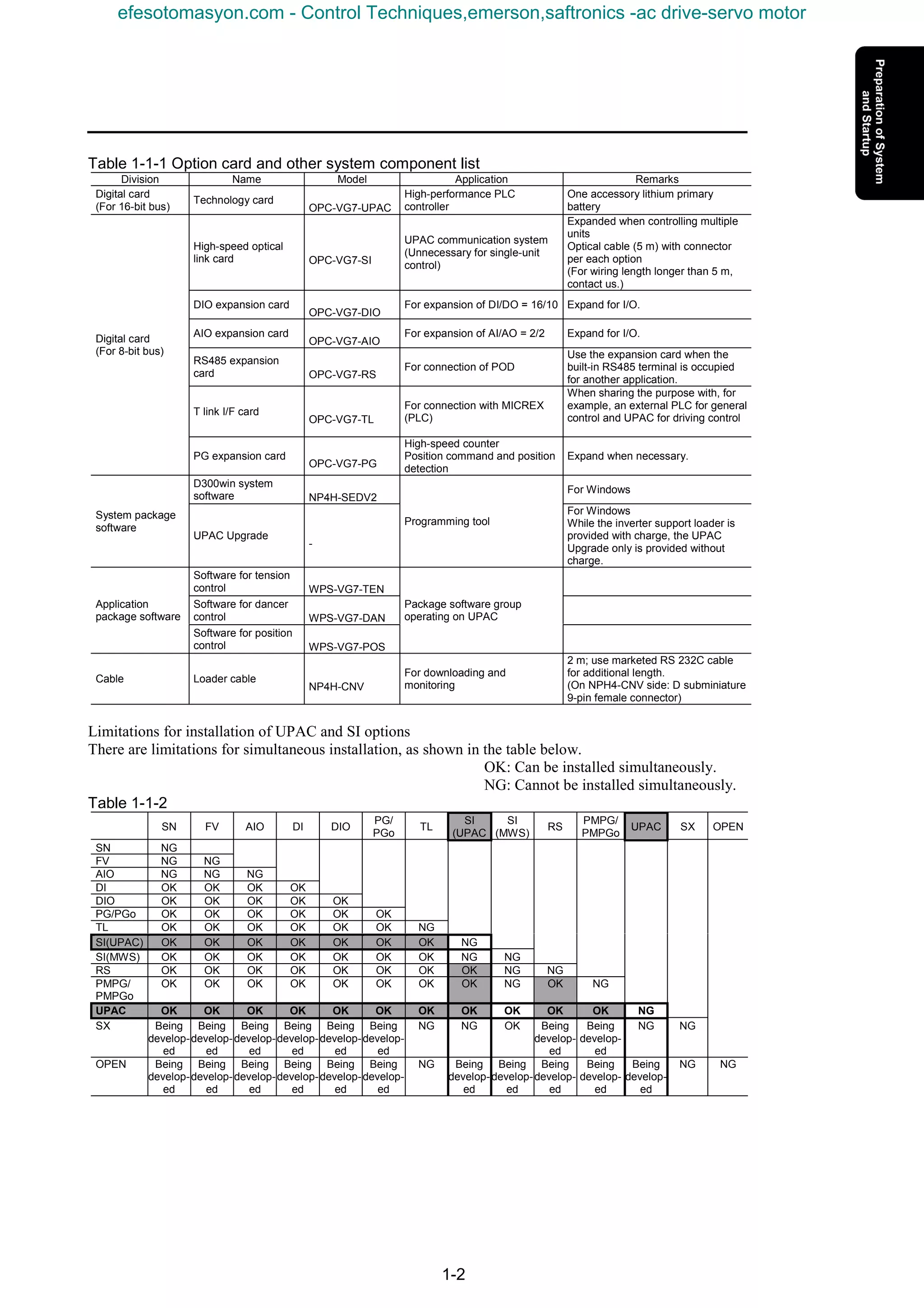
Table 1-1-1 Option card and other system component list
Division Name Model Application Remarks
Digital card
(For 16-bit bus)
Technology card
OPC-VG7-UPAC
High-performance PLC
controller
One accessory lithium primary
battery
High-speed optical
link card OPC-VG7-SI
UPAC communication system
(Unnecessary for single-unit
control)
Expanded when controlling multiple
units
Optical cable (5 m) with connector
per each option
(For wiring length longer than 5 m,
contact us.)
DIO expansion card
OPC-VG7-DIO
For expansion of DI/DO = 16/10 Expand for I/O.
AIO expansion card
OPC-VG7-AIO
For expansion of AI/AO = 2/2 Expand for I/O.
RS485 expansion
card OPC-VG7-RS
For connection of POD
Use the expansion card when the
built-in RS485 terminal is occupied
for another application.
T link I/F card
OPC-VG7-TL
For connection with MICREX
(PLC)
When sharing the purpose with, for
example, an external PLC for general
control and UPAC for driving control
Digital card
(For 8-bit bus)
PG expansion card
OPC-VG7-PG
High-speed counter
Position command and position
detection
Expand when necessary.
D300win system
software NP4H-SEDV2
For Windows
System package
software
UPAC Upgrade
-
Programming tool
For Windows
While the inverter support loader is
provided with charge, the UPAC
Upgrade only is provided without
charge.
Software for tension
control WPS-VG7-TEN
Software for dancer
control WPS-VG7-DAN
Application
package software
Software for position
control WPS-VG7-POS
Package software group
operating on UPAC
Cable Loader cable
NP4H-CNV
For downloading and
monitoring
2 m; use marketed RS 232C cable
for additional length.
(On NPH4-CNV side: D subminiature
9-pin female connector)
Limitations for installation of UPAC and SI options
There are limitations for simultaneous installation, as shown in the table below.
OK: Can be installed simultaneously.
NG: Cannot be installed simultaneously.
Table 1-1-2
SN FV AIO DI DIO
PG/
PGo
TL
SI
(UPAC
SI
(MWS)
RS
PMPG/
PMPGo
UPAC SX OPEN
SN NG
FV NG NG
AIO NG NG NG
DI OK OK OK OK
DIO OK OK OK OK OK
PG/PGo OK OK OK OK OK OK
TL OK OK OK OK OK OK NG
SI(UPAC) OK OK OK OK OK OK OK NG
SI(MWS) OK OK OK OK OK OK OK NG NG
RS OK OK OK OK OK OK OK OK NG NG
PMPG/
PMPGo
OK OK OK OK OK OK OK OK NG OK NG
UPAC OK OK OK OK OK OK OK OK OK OK OK NG
SX Being
develop-
ed
Being
develop-
ed
Being
develop-
ed
Being
develop-
ed
Being
develop-
ed
Being
develop-
ed
NG NG OK Being
develop-
ed
Being
develop-
ed
NG NG
OPEN Being
develop-
ed
Being
develop-
ed
Being
develop-
ed
Being
develop-
ed
Being
develop-
ed
Being
develop-
ed
NG Being
develop-
ed
Being
develop-
ed
Being
develop-
ed
Being
develop-
ed
Being
develop-
ed
NG NG
efesotomasyon.com - Control Techniques,emerson,saftronics -ac drive-servo motor
1. Preparation of System and Startup
1-3
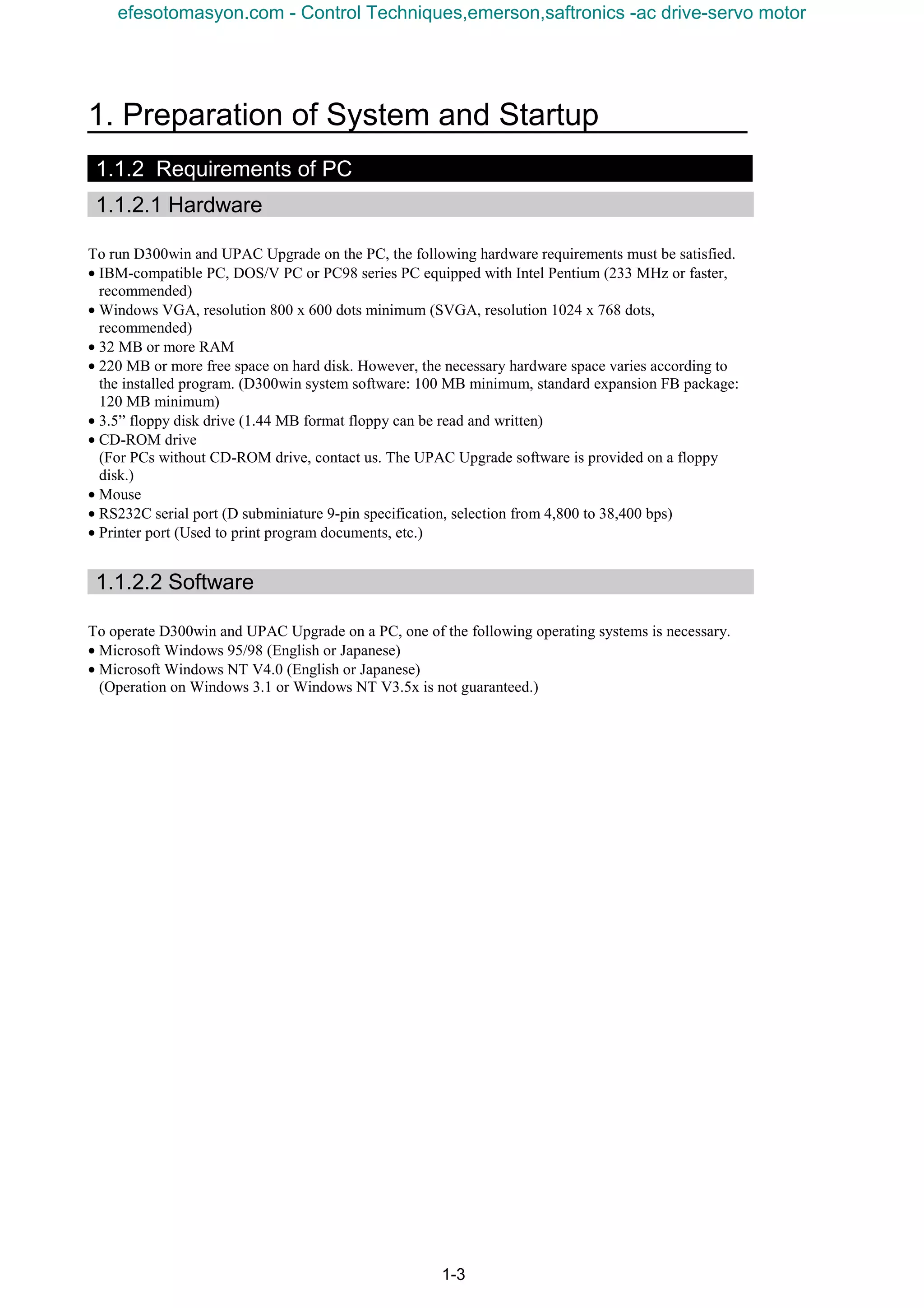
1.1.2 Requirements of PC
1.1.2.1 Hardware
To run D300win and UPAC Upgrade on the PC, the following hardware requirements must be satisfied.
• IBM-compatible PC, DOS/V PC or PC98 series PC equipped with Intel Pentium (233 MHz or faster,
recommended)
• Windows VGA, resolution 800 x 600 dots minimum (SVGA, resolution 1024 x 768 dots,
recommended)
• 32 MB or more RAM
• 220 MB or more free space on hard disk. However, the necessary hardware space varies according to
the installed program. (D300win system software: 100 MB minimum, standard expansion FB package:
120 MB minimum)
• 3.5” floppy disk drive (1.44 MB format floppy can be read and written)
• CD-ROM drive
(For PCs without CD-ROM drive, contact us. The UPAC Upgrade software is provided on a floppy
disk.)
• Mouse
• RS232C serial port (D subminiature 9-pin specification, selection from 4,800 to 38,400 bps)
• Printer port (Used to print program documents, etc.)
1.1.2.2 Software
To operate D300win and UPAC Upgrade on a PC, one of the following operating systems is necessary.
• Microsoft Windows 95/98 (English or Japanese)
• Microsoft Windows NT V4.0 (English or Japanese)
(Operation on Windows 3.1 or Windows NT V3.5x is not guaranteed.)
efesotomasyon.com - Control Techniques,emerson,saftronics -ac drive-servo motor
1-4
1.2 Preparation of Option
1.2.1 OPC-VG7-UPAC Option
1.2.1.1 Description of product
This card (User Programmable Application Card, UPAC hereafter) is an optional card for the inverter
control installed on FRENIC5000VG7S (VG7S hereafter). This card gives you an additional higher level
control over your inverter. You can also use engineering support tool D300win to facilitate programming
the control applications being used for this card.
UPAC is an optional PLC card integrated into the inverter conforming to MICREX-SX series high
performance CPU module (NP1PS-32). Since UPAC is slightly different in programming specification
such as memory map and available instructions from that for the high performance CPU module, refer to
"5) Programming Specifications" for more information. We recommend you to refer to "MICREX-SX
Series USER’S MANUAL–INSTRUCTIONS" when you design your application program.
n Main features
(1) Application execution function
Executes an application program
Controls tasks for application program (default, fixed period, event)
(2) Support tool interface
RS485 (included in UPAC-VG7S connection bus) 1 channel
(3) RAS functions
Executes self-diagnosis and notifies to the inverter.
(4) Other
Data memory backup with battery
This card enables you to realize controls such as dancer control, tension control, and orientation control
easily.
With inverter link option (OPC-VG7-SI), you can designate an inverter with UPAC installed as a
master and connect up to twelve slave inverters (156 inverters for broadcasting) to control these
individual inverters.
An application program of UPAC runs at minimum execution period of 1ms. The execution period
increases to 2, 3, 4, ... or 32000ms depending on the size of a program.
You can assign up to 64W from static variables used in an application program to the function codes U01
to U64 (user area) of VG7. When you assign parameters for adjustment to this user area, you can use the
KEYPAD panel of VG7 to refer to or change the data without personal computer.
UPAC has some restrictions over SX series high performance CPU module (NP1PS-32). The calendar
function is not available and SX specific instructions are removed. Read this document thoroughly for
complete understanding.
[Limitations]
UPAC is equipped with a high-performance CPU installed in MICREX-SX, but the functions of UPAC
are not fully equivalent. There are limitations in the following functions.
• Calendar and clock function
Because of this, nothing is displayed in the “major failure time information” and “power shutdown
history information” of detail RAS.
The calendar/clock function of D300win always shows “January 01, 1970, 00:00:00.”
• Because UPAC is not equipped with the key switch of MICREX-SX, the key state is always “TERM.”
• HELP of UPAC system definition of D300win is not supported.
• “MICREX-SX” is displayed as the title of each dialog box of D300win.
• Battery change in the live-line state is impossible.
efesotomasyon.com - Control Techniques,emerson,saftronics -ac drive-servo motor
1. Preparation of System and Startup
1-5
1.2.1.2 Specifications
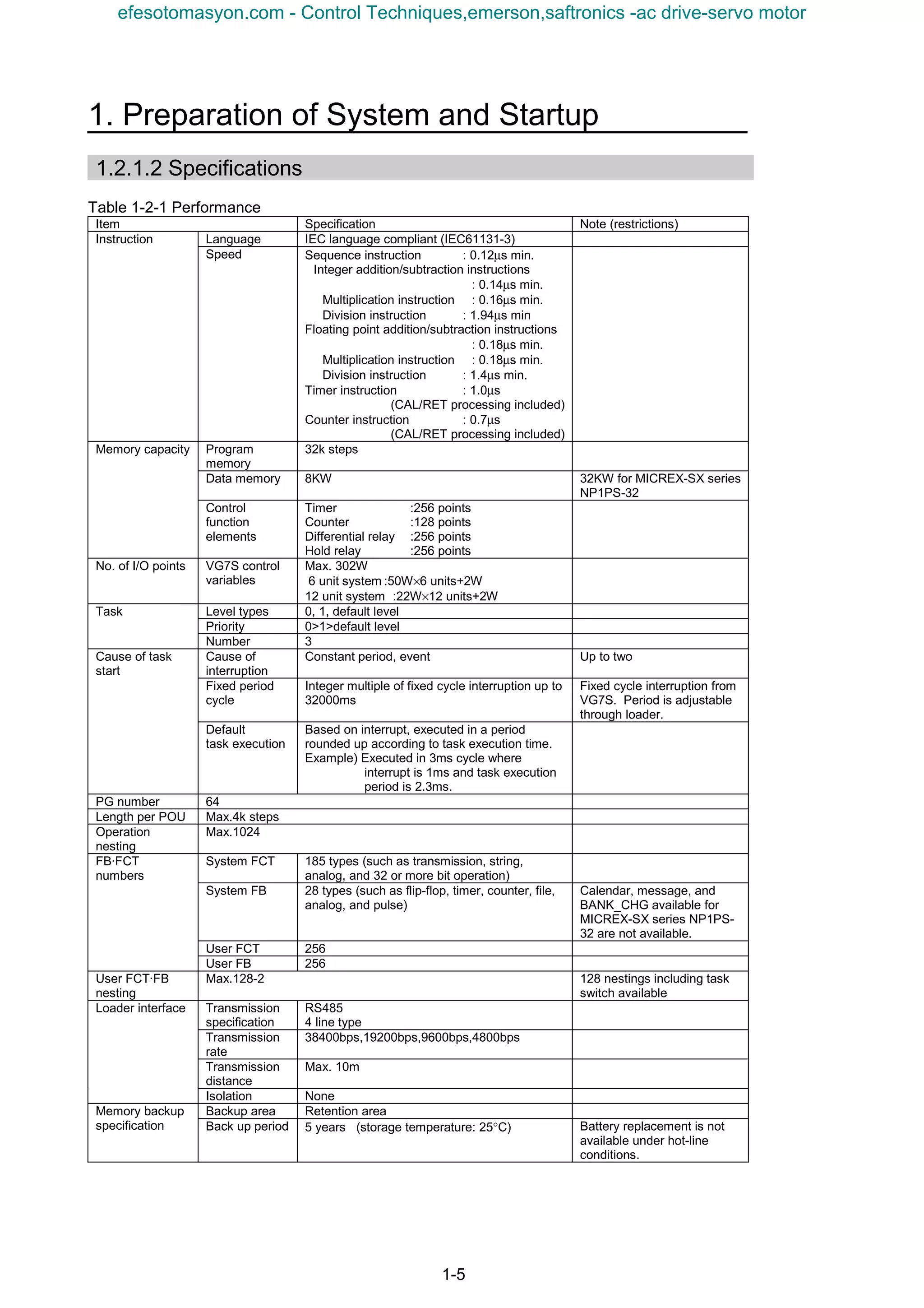
Table 1-2-1 Performance
Item Specification Note (restrictions)
Language IEC language compliant (IEC61131-3)Instruction
Speed Sequence instruction : 0.12µs min.
Integer addition/subtraction instructions
: 0.14µs min.
Multiplication instruction : 0.16µs min.
Division instruction : 1.94µs min
Floating point addition/subtraction instructions
: 0.18µs min.
Multiplication instruction : 0.18µs min.
Division instruction : 1.4µs min.
Timer instruction : 1.0µs
(CAL/RET processing included)
Counter instruction : 0.7µs
(CAL/RET processing included)
Program
memory
32k steps
Data memory 8KW 32KW for MICREX-SX series
NP1PS-32
Memory capacity
Control
function
elements
Timer :256 points
Counter :128 points
Differential relay :256 points
Hold relay :256 points
No. of I/O points VG7S control
variables
Max. 302W
6 unit system :50W×6 units+2W
12 unit system :22W×12 units+2W
Level types 0, 1, default level
Priority 0>1>default level
Task
Number 3
Cause of
interruption
Constant period, event Up to two
Fixed period
cycle
Integer multiple of fixed cycle interruption up to
32000ms
Fixed cycle interruption from
VG7S. Period is adjustable
through loader.
Cause of task
start
Default
task execution
Based on interrupt, executed in a period
rounded up according to task execution time.
Example) Executed in 3ms cycle where
interrupt is 1ms and task execution
period is 2.3ms.
PG number 64
Length per POU Max.4k steps
Operation
nesting
Max.1024
System FCT 185 types (such as transmission, string,
analog, and 32 or more bit operation)
System FB 28 types (such as flip-flop, timer, counter, file,
analog, and pulse)
Calendar, message, and
BANK_CHG available for
MICREX-SX series NP1PS-
32 are not available.
User FCT 256
FB·FCT
numbers
User FB 256
User FCT·FB
nesting
Max.128-2 128 nestings including task
switch available
Transmission
specification
RS485
4 line type
Transmission
rate
38400bps,19200bps,9600bps,4800bps
Transmission
distance
Max. 10m
Loader interface
Isolation None
Backup area Retention areaMemory backup
specification Back up period 5 years (storage temperature: 25°C) Battery replacement is not
available under hot-line
conditions.
efesotomasyon.com - Control Techniques,emerson,saftronics -ac drive-servo motor
1-6
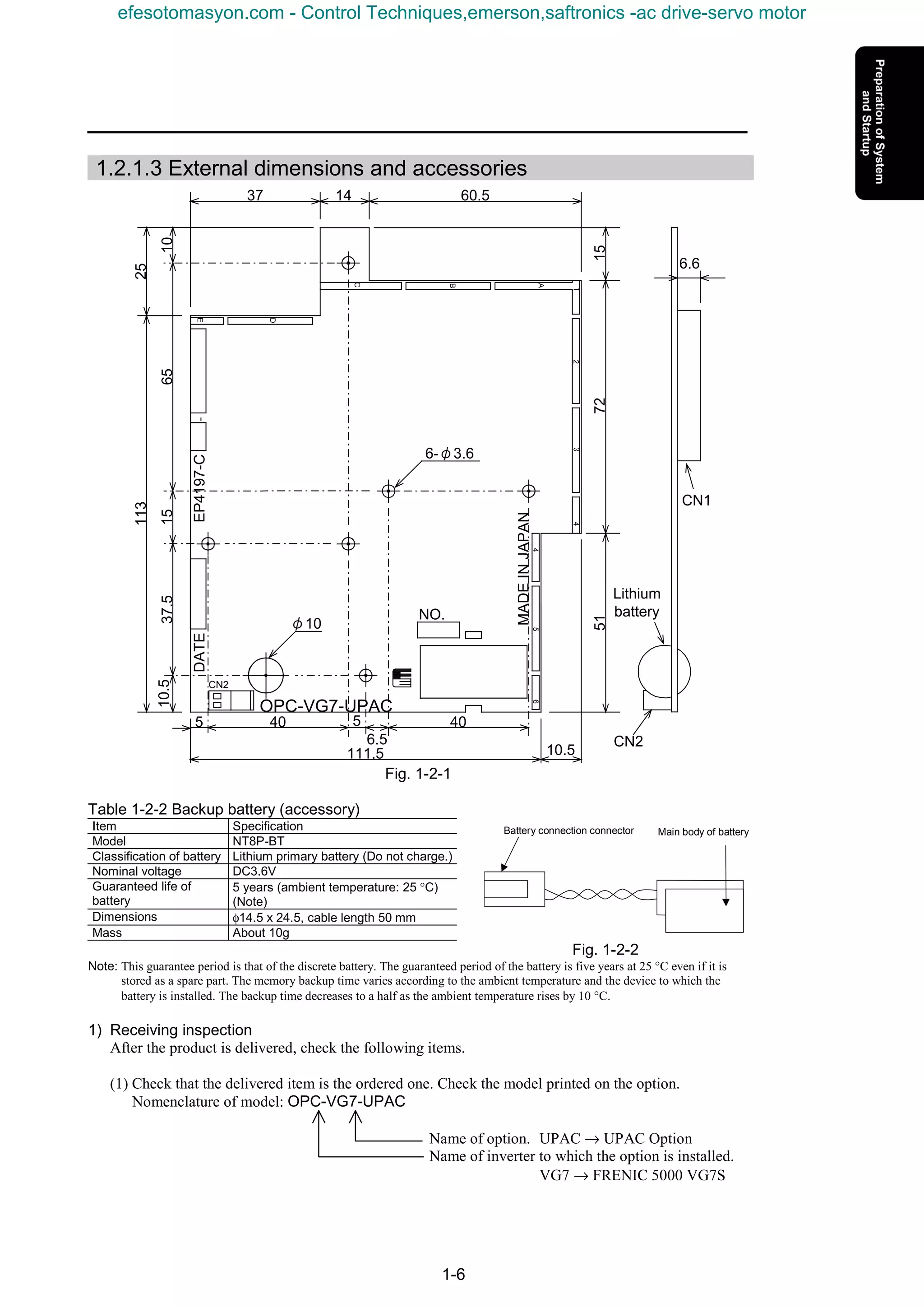
1.2.1.3 External dimensions and accessories
Fig. 1-2-1
Table 1-2-2 Backup battery (accessory)
Item Specification
Model NT8P-BT
Classification of battery Lithium primary battery (Do not charge.)
Nominal voltage DC3.6V
Guaranteed life of
battery
5 years (ambient temperature: 25 °C)
(Note)
Dimensions φ14.5 x 24.5, cable length 50 mm
Mass About 10g
Fig. 1-2-2
Note: This guarantee period is that of the discrete battery. The guaranteed period of the battery is five years at 25 °C even if it is
stored as a spare part. The memory backup time varies according to the ambient temperature and the device to which the
battery is installed. The backup time decreases to a half as the ambient temperature rises by 10 °C.
1) Receiving inspection
After the product is delivered, check the following items.
(1) Check that the delivered item is the ordered one. Check the model printed on the option.
Nomenclature of model: OPC-VG7-UPAC
Name of option. UPAC → UPAC Option
Name of inverter to which the option is installed.
VG7 → FRENIC 5000 VG7S
EP4197-CDATE
MADEINJAPAN654
4321
A
B
C
D
E
NO.
CN2
40 5
6.5
5 40
111.5 10.5
37 14 60.5
157251
25
1065
113
1537.510.5
Lithium
battery
CN2
6.6
CN1
6-φ3.6
φ10
OPC-VG7-UPAC
Battery connection connector Main body of battery
efesotomasyon.com - Control Techniques,emerson,saftronics -ac drive-servo motor
1. Preparation of System and Startup
1-7
(2) Check for damage given during transportation.
(3) Check if all the accessories are contained.
Accessories: 5 spacers
1 M3 screw
1 backup battery (installed to product)
CAUTION
• Do not operate the product with damaged or missing parts.
Otherwise injuries or material losses may be caused.
1.2.1.4 Operating environment
Operate the option in the same environment as that of the main body of VG7S.
Table 1-2-3 Operating environment
Item Specification
Site Indoors
Ambient
temperature
-10 to +50°C
Relative humidity 5 to 95% (no dew)
Atmosphere Free from dust, direct sunshine, corrosive gases, oil mist, vapor or
water drops.
Little salt inclusion.
No dew or icing caused by abrupt temperature changes.
Altitude 1000 m maximum
Vibration 5.9 m/s2
[0.6 G] maximum
Note: Failure to satisfy the above environmental conditions will cause poor performance, reduced life and failures.
Checkup of ROM version of main body
CAUTION
• Some of options are not compatible with VG7S of early ROM versions. Correct operation is not
ensured with early versions. Be sure to check the ROM version in the maintenance information
given at the keypad panel. If the version is uncertain, contact us.
Check the ROM version of the main body before installing the option.
If the option is already installed, check the ROM version of the main body in the
state.
To check, view the information displayed on the right of “MAIN” and “MTR” in
the maintenance information of the keypad panel.
The screen shown on the right is displayed on page five of the maintenance
information. Press the key of the keypad panel to open page five.
Table 1-2-4
ROM version
Model of option
MAIN MTR
OPC-VG7-UPAC H1003D or later H2003D or later
MAIN=H1xxxx
MTR =H2xxxx
KP =K xxxx
1500
∨∨∨∨
efesotomasyon.com - Control Techniques,emerson,saftronics -ac drive-servo motor
1-8
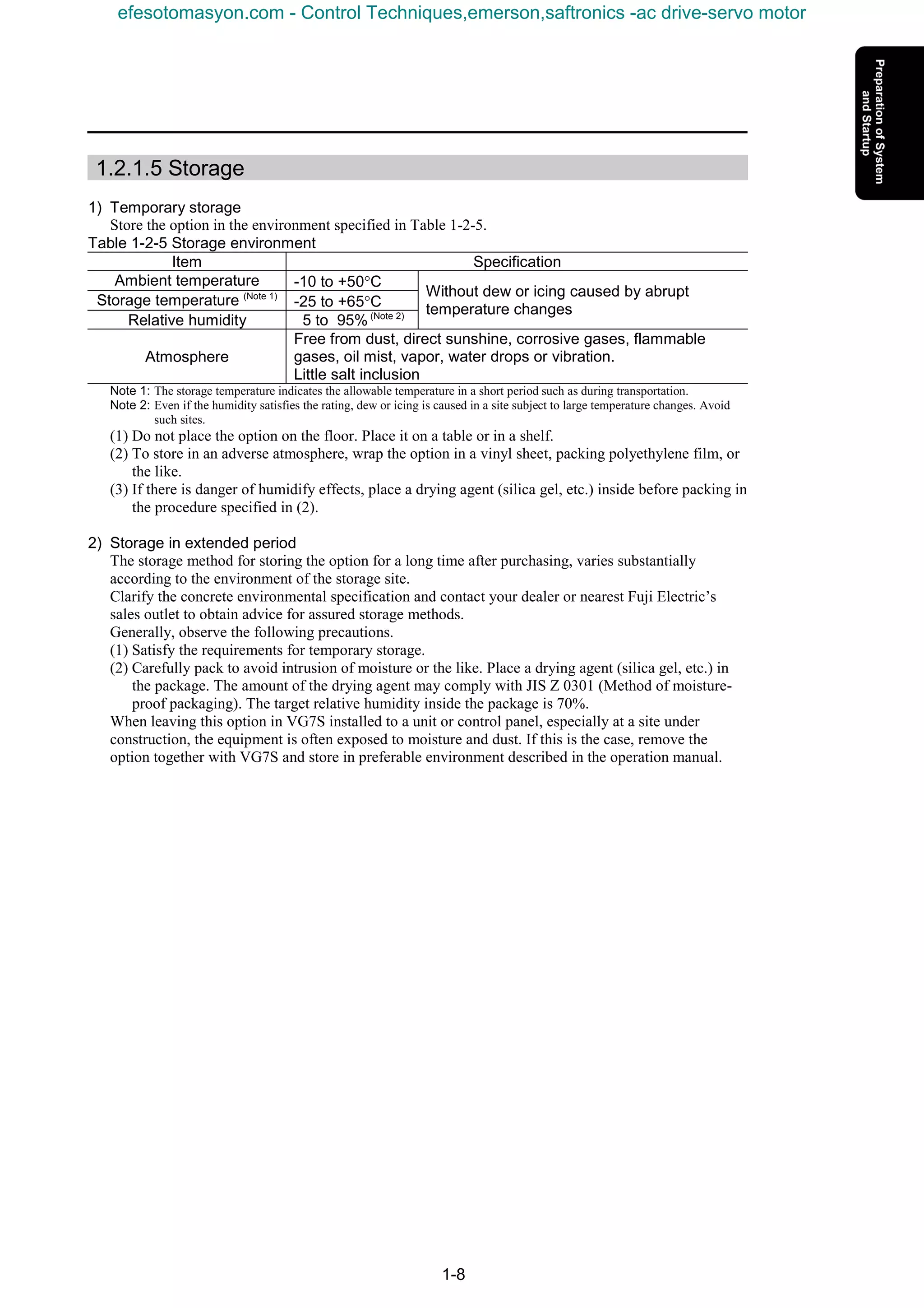
1.2.1.5 Storage
1) Temporary storage
Store the option in the environment specified in Table 1-2-5.
Table 1-2-5 Storage environment
Item Specification
Ambient temperature -10 to +50°C
Storage temperature (Note 1)
-25 to +65°C
Relative humidity 5 to 95% (Note 2)
Without dew or icing caused by abrupt
temperature changes
Atmosphere
Free from dust, direct sunshine, corrosive gases, flammable
gases, oil mist, vapor, water drops or vibration.
Little salt inclusion
Note 1: The storage temperature indicates the allowable temperature in a short period such as during transportation.
Note 2: Even if the humidity satisfies the rating, dew or icing is caused in a site subject to large temperature changes. Avoid
such sites.
(1) Do not place the option on the floor. Place it on a table or in a shelf.
(2) To store in an adverse atmosphere, wrap the option in a vinyl sheet, packing polyethylene film, or
the like.
(3) If there is danger of humidify effects, place a drying agent (silica gel, etc.) inside before packing in
the procedure specified in (2).
2) Storage in extended period
The storage method for storing the option for a long time after purchasing, varies substantially
according to the environment of the storage site.
Clarify the concrete environmental specification and contact your dealer or nearest Fuji Electric’s
sales outlet to obtain advice for assured storage methods.
Generally, observe the following precautions.
(1) Satisfy the requirements for temporary storage.
(2) Carefully pack to avoid intrusion of moisture or the like. Place a drying agent (silica gel, etc.) in
the package. The amount of the drying agent may comply with JIS Z 0301 (Method of moisture-
proof packaging). The target relative humidity inside the package is 70%.
When leaving this option in VG7S installed to a unit or control panel, especially at a site under
construction, the equipment is often exposed to moisture and dust. If this is the case, remove the
option together with VG7S and store in preferable environment described in the operation manual.
efesotomasyon.com - Control Techniques,emerson,saftronics -ac drive-servo motor
1. Preparation of System and Startup
1-9
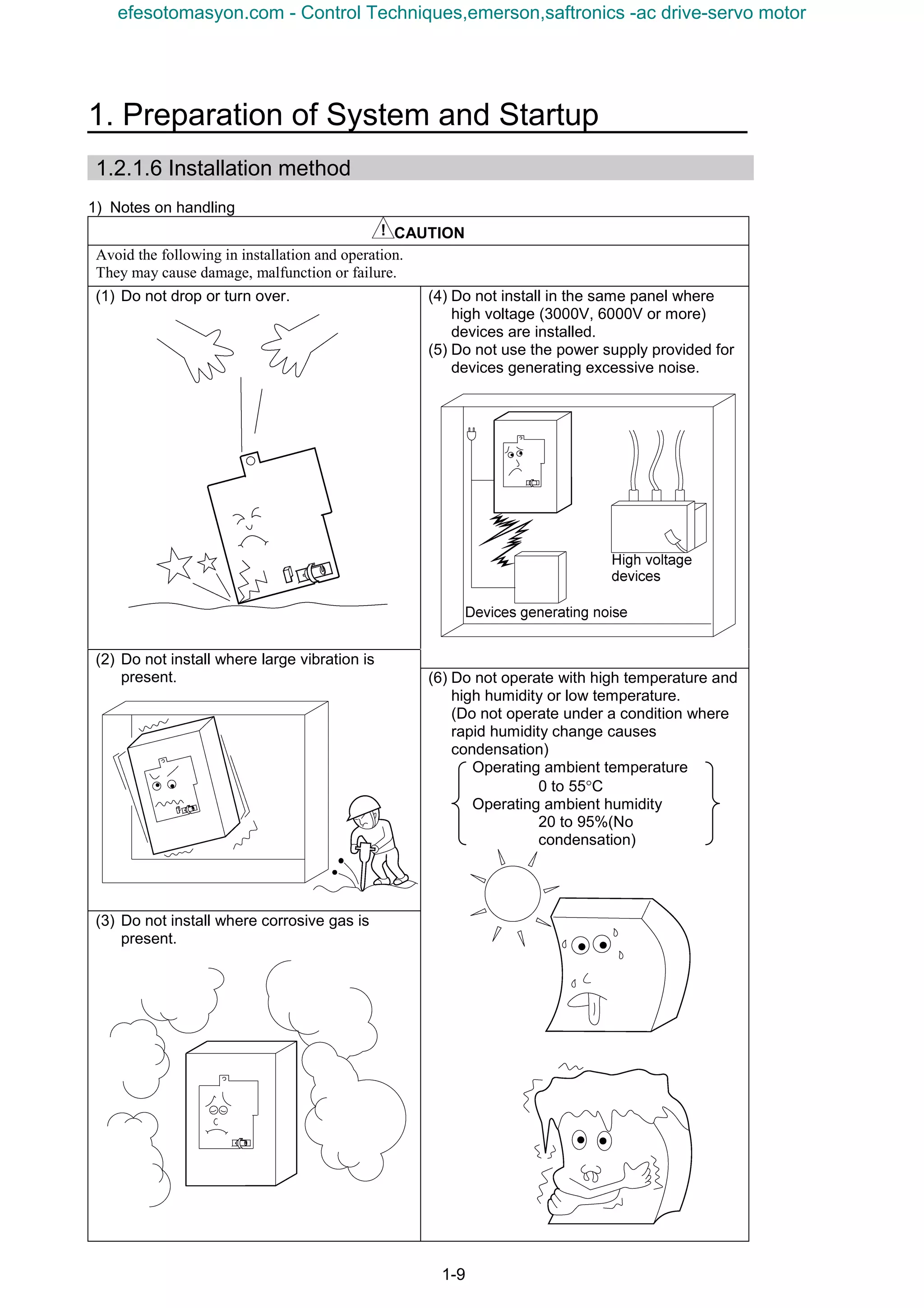
1.2.1.6 Installation method
1) Notes on handling
CAUTION
Avoid the following in installation and operation.
They may cause damage, malfunction or failure.
(1) Do not drop or turn over. (4) Do not install in the same panel where
high voltage (3000V, 6000V or more)
devices are installed.
(5) Do not use the power supply provided for
devices generating excessive noise.
(2) Do not install where large vibration is
present.
(3) Do not install where corrosive gas is
present.
(6) Do not operate with high temperature and
high humidity or low temperature.
(Do not operate under a condition where
rapid humidity change causes
condensation)
Operating ambient temperature
0 to 55°C
Operating ambient humidity
20 to 95%(No
condensation)
efesotomasyon.com - Control Techniques,emerson,saftronics -ac drive-servo motor
1-10
2) Before starting installation
(1) Confirmation of product
When unpacking the delivered product, make sure of the following items.
1) Check if the product is what you have ordered.
2) Check if the product is free from damage.
3) Check if all the accessories (spacers, screws, and battery. The battery is connected to the
product.) are delivered.
CAUTION
• The product may be broken due to inadequate work during installation or removal.
• Before installing or removing the option, turn the inverter off and check that the CHARGE lamp is
unlit. Even if all the main circuit, control and auxiliary power supply of the inverter are turned off,
control terminals 30A, 30B, 30C, Y5A and Y5C of the inverter are live when the external control
circuit is powered by another power supply.
• Turn the external power supply off to avoid electric shock.
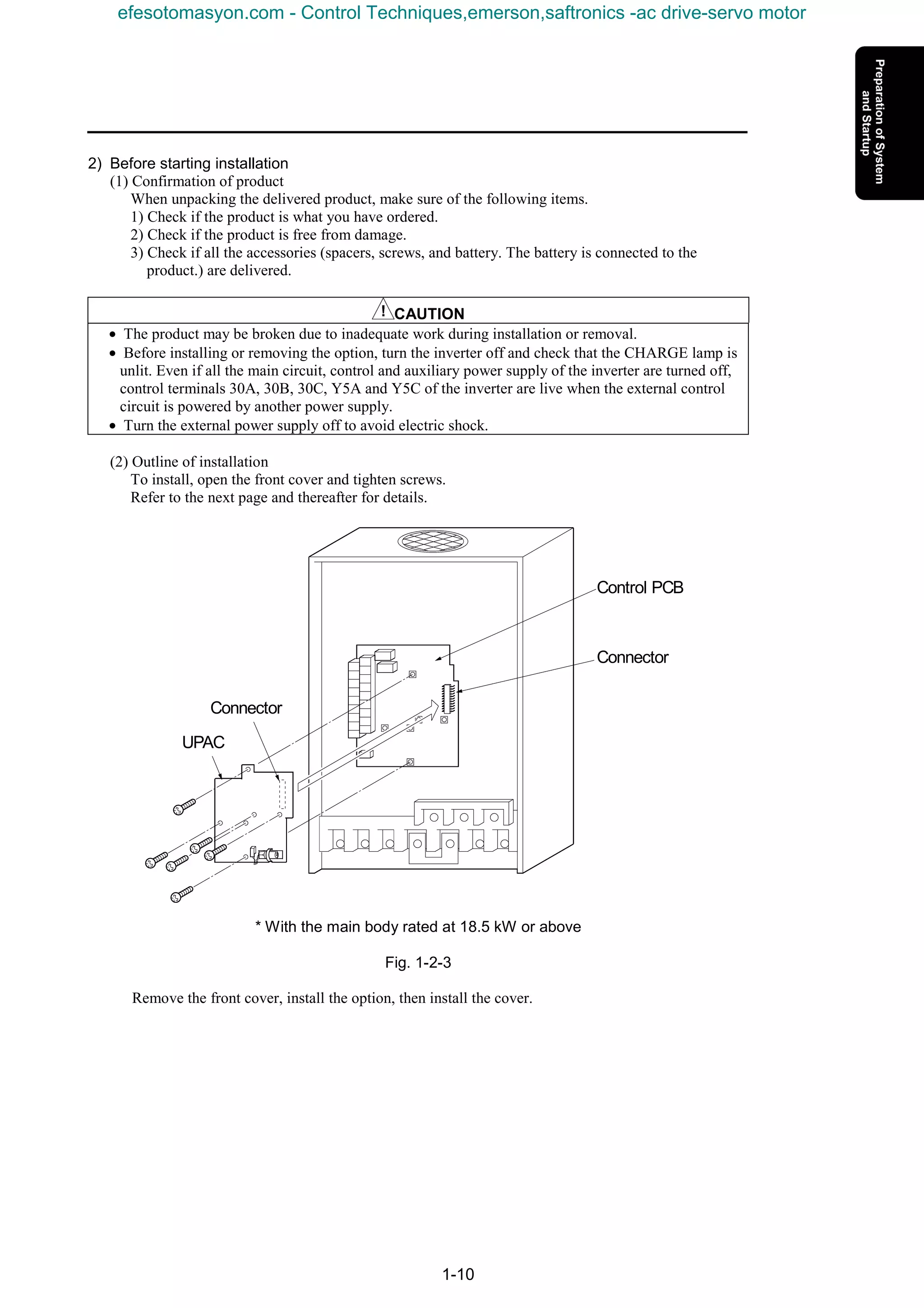
(2) Outline of installation
To install, open the front cover and tighten screws.
Refer to the next page and thereafter for details.
* With the main body rated at 18.5 kW or above
Fig. 1-2-3
Remove the front cover, install the option, then install the cover.
Control PCB
Connector
Connector
UPAC
efesotomasyon.com - Control Techniques,emerson,saftronics -ac drive-servo motor
1. Preparation of System and Startup
1-11
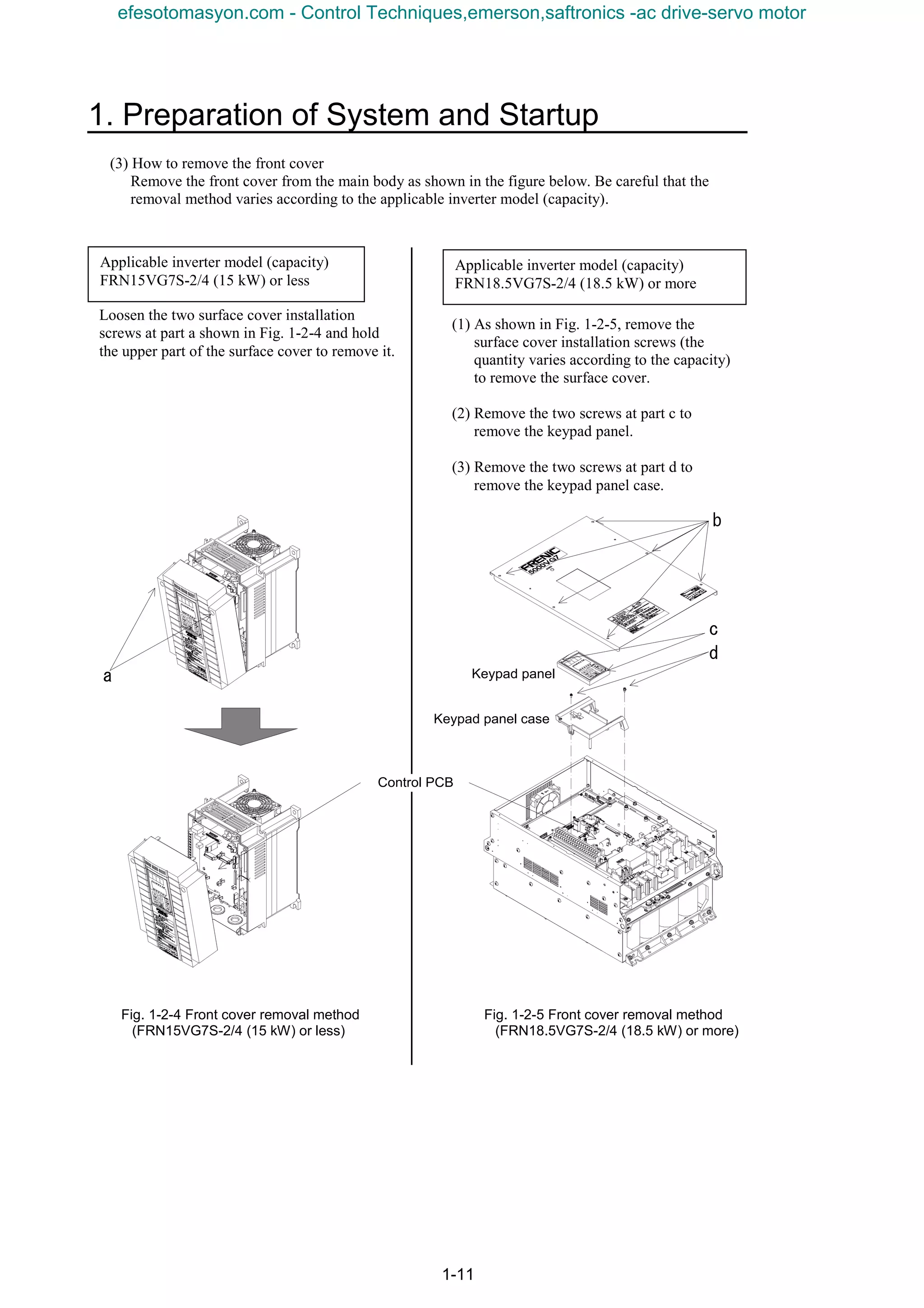
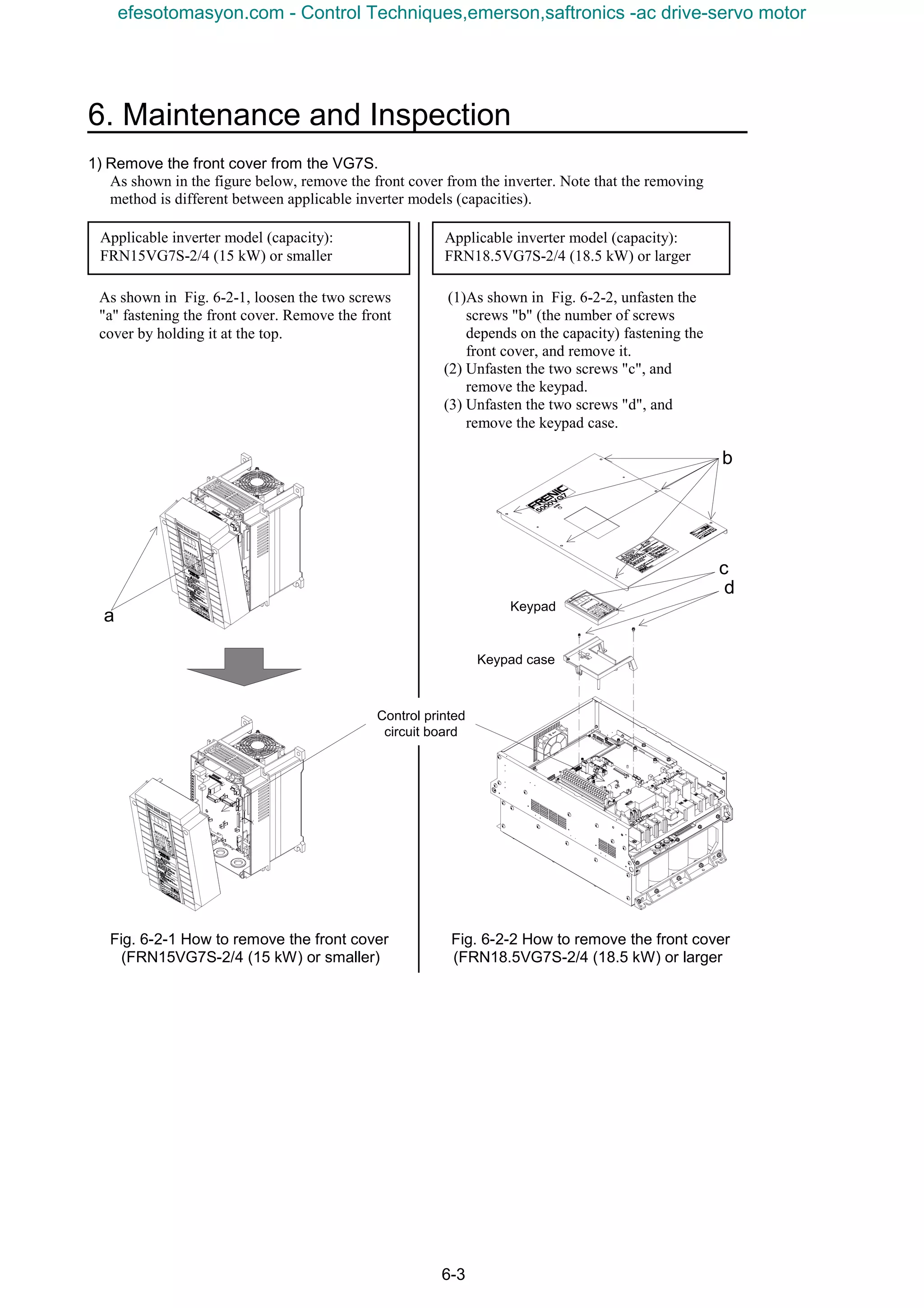
(3) How to remove the front cover
Remove the front cover from the main body as shown in the figure below. Be careful that the
removal method varies according to the applicable inverter model (capacity).
Fig. 1-2-4 Front cover removal method Fig. 1-2-5 Front cover removal method
(FRN15VG7S-2/4 (15 kW) or less) (FRN18.5VG7S-2/4 (18.5 kW) or more)
(1) As shown in Fig. 1-2-5, remove the
surface cover installation screws (the
quantity varies according to the capacity)
to remove the surface cover.
(2) Remove the two screws at part c to
remove the keypad panel.
(3) Remove the two screws at part d to
remove the keypad panel case.
Applicable inverter model (capacity)
FRN15VG7S-2/4 (15 kW) or less
Loosen the two surface cover installation
screws at part a shown in Fig. 1-2-4 and hold
the upper part of the surface cover to remove it.
Applicable inverter model (capacity)
FRN18.5VG7S-2/4 (18.5 kW) or more
a
b
d
Keypad panel
Keypad panel case
c
Control PCB
efesotomasyon.com - Control Techniques,emerson,saftronics -ac drive-servo motor
1-12
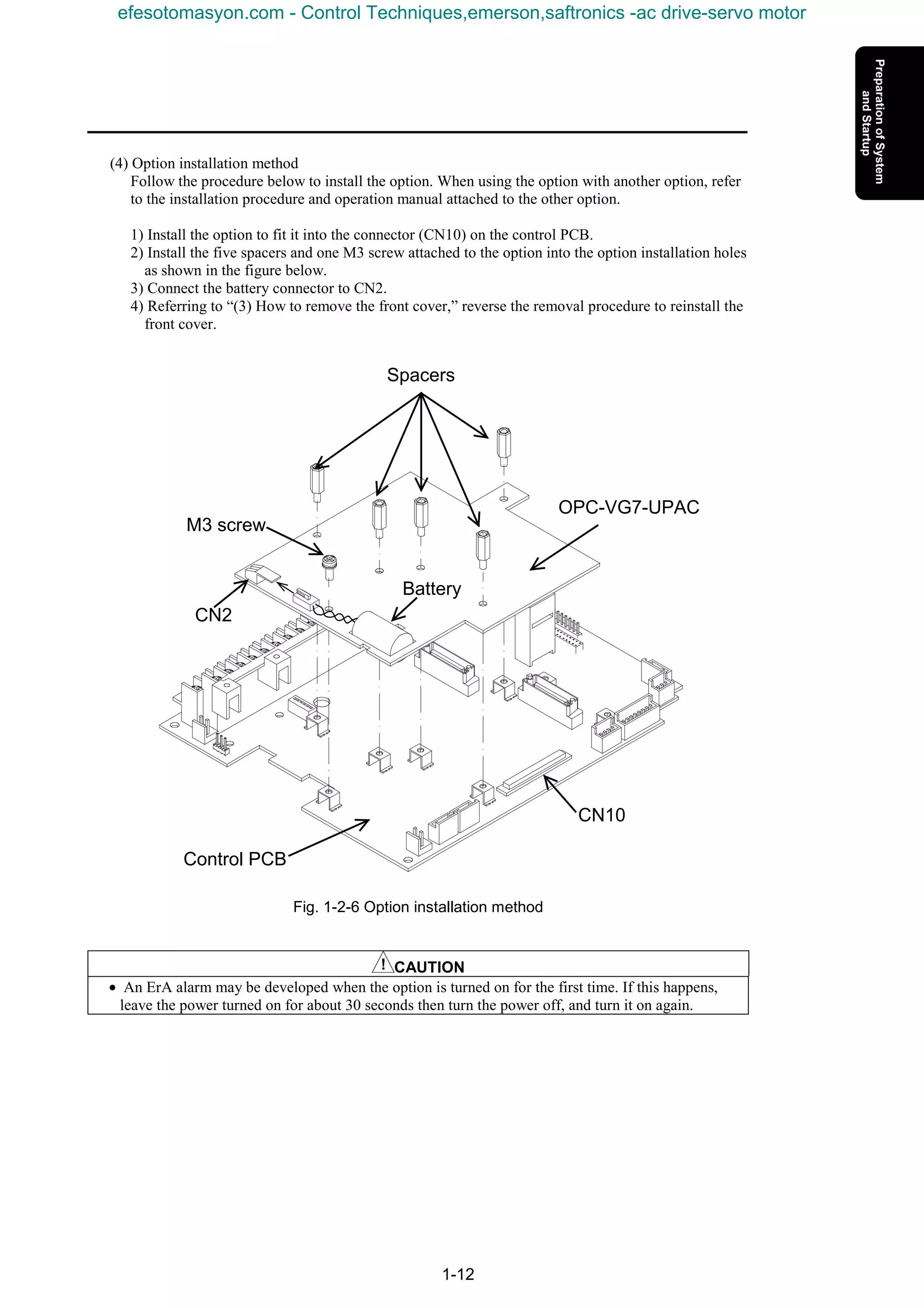
(4) Option installation method
Follow the procedure below to install the option. When using the option with another option, refer
to the installation procedure and operation manual attached to the other option.
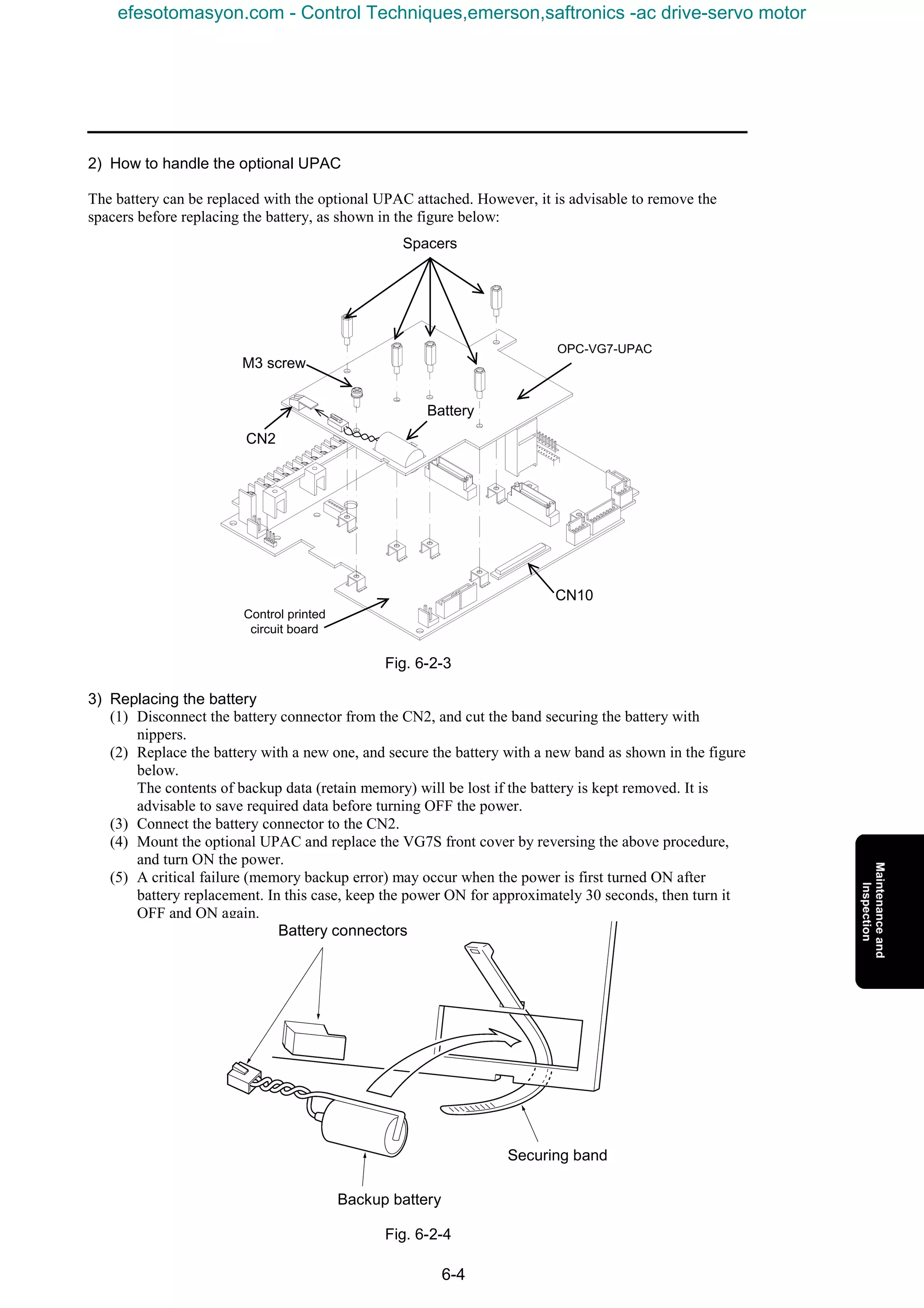
1) Install the option to fit it into the connector (CN10) on the control PCB.
2) Install the five spacers and one M3 screw attached to the option into the option installation holes
as shown in the figure below.
3) Connect the battery connector to CN2.
4) Referring to “(3) How to remove the front cover,” reverse the removal procedure to reinstall the
front cover.
Fig. 1-2-6 Option installation method
CAUTION
• An ErA alarm may be developed when the option is turned on for the first time. If this happens,
leave the power turned on for about 30 seconds then turn the power off, and turn it on again.
Control PCB
CN10
Spacers
OPC-VG7-UPAC
M3 screw
CN2
Battery
efesotomasyon.com - Control Techniques,emerson,saftronics -ac drive-servo motor
1. Preparation of System and Startup
1-13
1.2.2 OPC-VG7-SI Option
1.2.2.1 Description of product
The UPAC option is designed for a small to medium system for generalizing and
driving about 10 inverters.
UPAC is installed on an arbitrary VG7S inverter. As a means to control the second
and later VG7Ss from UPAC, this optical option OPC-VG7-SI (hereinafter
referred to as optical option) is necessary.
Rigid digital system configured through optical communication
In conventional small to medium systems, a PLC, computer board or the like is
installed externally and each inverter is generalized and driven through
input/output basis or analog basis. When network connection is possible, digital
control via the network (including open and private ones) can be made.
Using this optical option, the control based on inputs and outputs or analog signals
can be replaced with a rigid high-speed maintenance-free digital system where a
small wiring length can result in a reduced cost and noise immunity is high.
Load distribution system
The UPAC control group can be placed as a subordinate system in a system where the host PLC or
computer board takes charge of generalization and control of each driving control group. In this system,
the load of the CPU can be reduced and a distributed system consisting of host and subordinate devices
can be configured. High-response control dedicated to the driving control becomes possible in the
subordinate system and the CPU of the host can be dedicated to generalization and control of various data
sent from each driving control group.
Here, preparation for operation of multiple inverters using a link (optical link) connected via optical fiber
cable (hereinafter referred to as optical cable) with UPAC being the master, is described, for customers
having purchased the optical option of the FRENIC 5000 VG7S inverter.
Read through this manual carefully before operating because there are some limitations in operation.
efesotomasyon.com - Control Techniques,emerson,saftronics -ac drive-servo motor
1-14
* The reading period is
twice the value
written on the left.
1.2.2.2 Specifications
Table 1-2-6 Hardware specifications
Item Specification Remarks
Model OPC-VG7-SI
Optical option
(High-speed serial link)
Connector Transmission (TX) / reception (RX) connector
Definition
Define “SI (UPAC)” using SW 1 and SW 2 on the option.
(SW1, SW2) = (ON, OFF)
Power supply The power is supplied through the connector.
Accessory Plastic optical fiber cable (5 m)
Communication specifications
Item Specification Remarks
Connection style Loop-back connection through plastic optical fiber cable
Communication
speed
4Mbps
Communication
distance
Max. extension distance: 20 m (distance between adjacent inverters)
For systems exceeding 20 m, contact us.
The accessory cable attached to
the product is 5 m long.
Connection
method
Master-slave method (Max. 12 units)
Broadcasting method (Max. 156 units)
Selection with function code
Number of
connected
inverters
Master-slave method
6-unit system: Max. 6 units (50 W inputs/outputs per unit)
12-unit system: Max. 12 units (22W inputs/outputs per unit)
Broadcasting method
Max. 156 units (32 W outputs per unit)
Selection in D300win screen.
The “broadcasting method”
indicates the function where the
same data is written from the
master to all inverters.
Writing time
Master-slave method
Time = (n-1) x 2 (ms)
(n: n > 1; number of units)
2 units: 2 ms
3 units: 4 ms
4 units: 6 ms
5 units: 8 ms
6 units: 10 ms
7 units: 12 ms
8 units: 14 ms
9 units: 16 ms
10 units: 18 ms
11 units: 20 ms
12 units: 22 ms
Broadcasting method:
1 ms
Communication
link
establishment
confirmation
Blinking green LED on option
The digital output indicates the communication state.
The lamp blinking at 500 ms
interval indicates establishment
of the communication link.
[0-D07] is used: “1” indicates
establishment of the
communication link.
Protective
function
Inverter being stopped;
The protective function does not work if the communication link is not
established.
Inverter running;
Protective function “inverter-to-inverter link error” is developed if the
communication link is not established.
The conditions for failure of
establishment of the
communication link are:
- Illegal setting (function code,
System Definition)
- Broken wire in communication
link (broken wire, bending at 35
mm or a smaller curvature, etc.)
Fail-soft
operation
The option is not compatible with degeneracy operation.
→ When inverters are connected via optical link in a system consisting of
total n units (2 ≤ n ≤ 156: n is an integer), the communication link is lost if
x (1 ≤ x ≤ n-1: x is an integer) units of inverters are turned off. Turn on all
n units of inverters (or control power of the inverters).
Software specifications
Item Specification Remarks
ROM version
H10060 or later, H20060 or later
Operate at the above ROM versions. (Use the I/O check at the keypad
panel to check the ROM version).
Definition of
connection
- Master-slave function code o35, o36
- o36 set only at master
If these settings are wrong, the
communication link is not
established.
Input/output data
Master-slave method
I/Q area; selection between 50W and 22W
Function code area;
All codes can be read or written only at the master inverter (equipped
with UPAC). Only the 4W function code data can be written at the slave
inverter.
Broadcasting method
Q area only; 32W (Only the master can refer to 18W in the I area.)
Selected in 6-/12-unit system
With the broadcasting method,
only the output selection of
inverter 1 of a 6-unit system can
be used.
efesotomasyon.com - Control Techniques,emerson,saftronics -ac drive-servo motor
1. Preparation of System and Startup
1-15
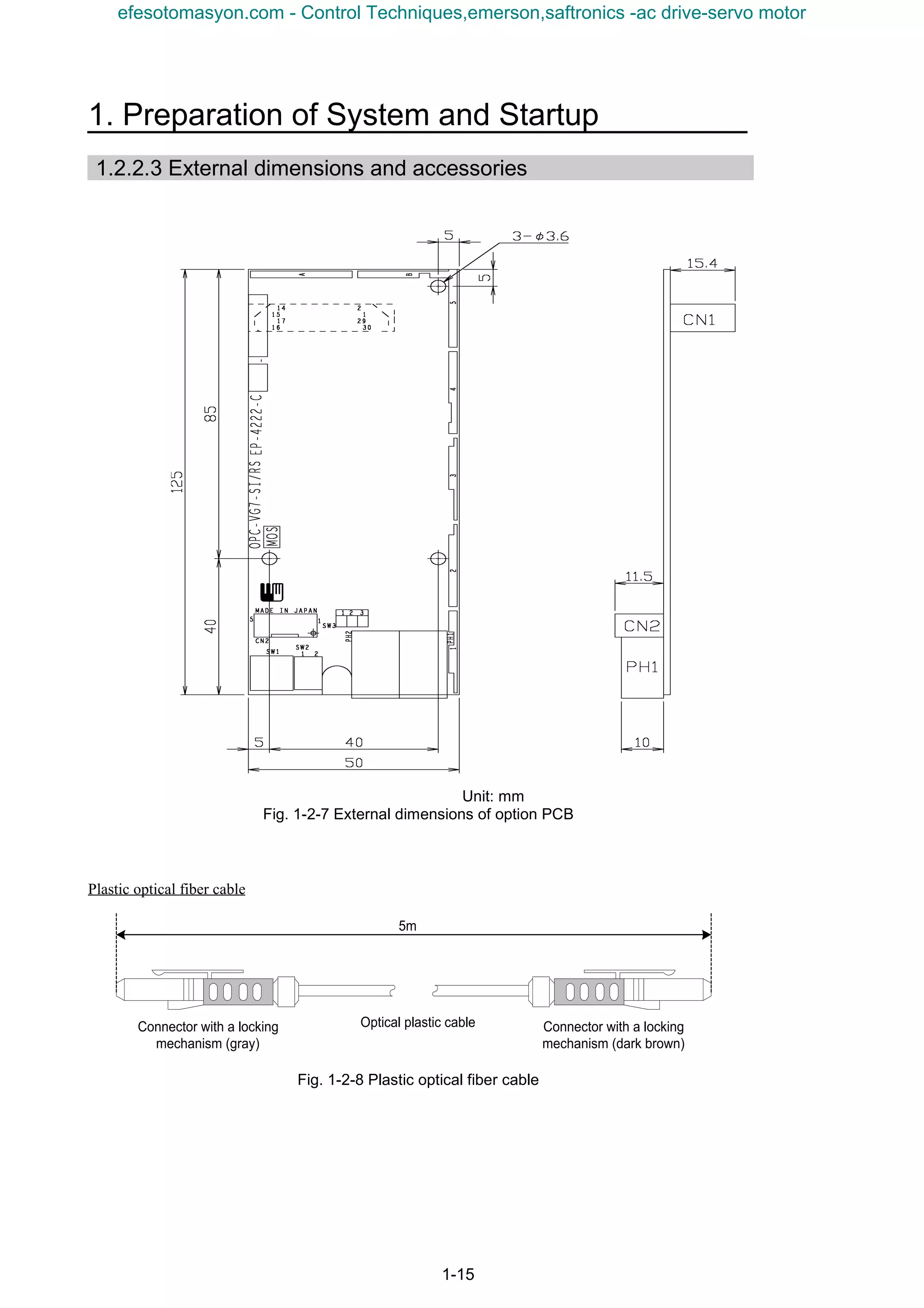
1.2.2.3 External dimensions and accessories
Unit: mm
Fig. 1-2-7 External dimensions of option PCB
Plastic optical fiber cable
Fig. 1-2-8 Plastic optical fiber cable
Connector with a locking
mechanism (gray)
Connector with a locking
mechanism (dark brown)
5m
Optical plastic cable
efesotomasyon.com - Control Techniques,emerson,saftronics -ac drive-servo motor
1-16
1) Receiving inspection
When the product is delivered, check the following items.
(1) Check if the product is what you have ordered. Check the model printed on the option.
Nomenclature of model: OPC-VG7-SI
Name of option SI → Optical ink option
(Abbreviation of Serial Interface)
Name of inverter to which VG7 → FRENIC5000VG7S
the option is installed
(2) Check if the product is damaged during transportation.
(3) Check that all the accessories are included.
3 spacers
3 screws (M3)
1 plastic optical fiber cable (for transmission and reception)
CAUTION
• Do not use the option with damaged or missing parts.
• Otherwise injuries or material losses may be caused.
1.2.2.4 Operating environment
Use the option in the same environment as that of the VG7S main body.
Table 1-2-7 Operating environment
Item Specification
Site Indoors
Ambient temperature -10 to +50°C
Relative humidity 5 to 95% (no dew)
Atmosphere
Free from dust, direct sunshine, corrosive gases, oil mist, vapor or water drops.
Little salt inclusion.
No dew or icing caused by abrupt temperature changes.
Altitude 1000 m maximum
Vibration 5.9 m/s2
[0.6 G] maximum
Note: Failure to satisfy the above environmental conditions will cause poor performance, reduced life and failures.
Checkup of ROM version of main body
CAUTION
• Some of options are not compatible with VG7S of early ROM versions. Correct operation is not
ensured with early versions. Be sure to check the ROM version in the maintenance information
given at the keypad panel. If the version is uncertain, contact us.
Check the ROM version of the main body before installing the option.
If the option is already installed, check the ROM version of the main body in the
state.
Check the ROM version of the main body of VG7 (not optical option or keypad
panel).
To check, view the information displayed on the right of “MAIN” and “MTR” in
the maintenance information of the keypad panel.
The screen shown on the right is displayed on page five of the maintenance information. Press the
key of the keypad panel to open page five.
MAIN=H1xxxx
MTR =H2xxxx
KP =K xxxx
1500
∨∨∨∨
efesotomasyon.com - Control Techniques,emerson,saftronics -ac drive-servo motor
1. Preparation of System and Startup
1-17
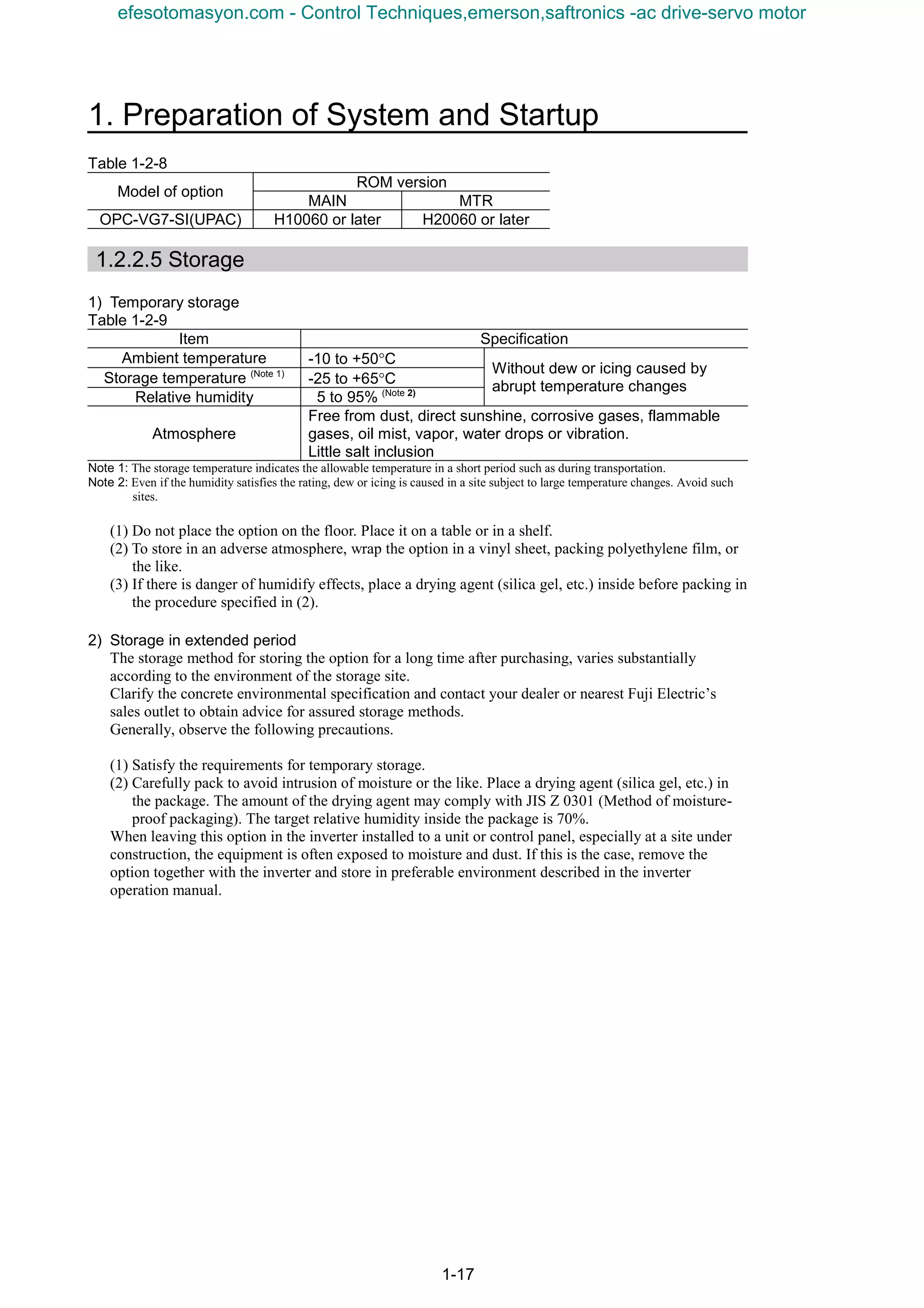
Table 1-2-8
ROM version
Model of option
MAIN MTR
OPC-VG7-SI(UPAC) H10060 or later H20060 or later
1.2.2.5 Storage
1) Temporary storage
Table 1-2-9
Item Specification
Ambient temperature -10 to +50°C
Storage temperature (Note 1)
-25 to +65°C
Relative humidity 5 to 95% (Note 2)
Without dew or icing caused by
abrupt temperature changes
Atmosphere
Free from dust, direct sunshine, corrosive gases, flammable
gases, oil mist, vapor, water drops or vibration.
Little salt inclusion
Note 1: The storage temperature indicates the allowable temperature in a short period such as during transportation.
Note 2: Even if the humidity satisfies the rating, dew or icing is caused in a site subject to large temperature changes. Avoid such
sites.
(1) Do not place the option on the floor. Place it on a table or in a shelf.
(2) To store in an adverse atmosphere, wrap the option in a vinyl sheet, packing polyethylene film, or
the like.
(3) If there is danger of humidify effects, place a drying agent (silica gel, etc.) inside before packing in
the procedure specified in (2).
2) Storage in extended period
The storage method for storing the option for a long time after purchasing, varies substantially
according to the environment of the storage site.
Clarify the concrete environmental specification and contact your dealer or nearest Fuji Electric’s
sales outlet to obtain advice for assured storage methods.
Generally, observe the following precautions.
(1) Satisfy the requirements for temporary storage.
(2) Carefully pack to avoid intrusion of moisture or the like. Place a drying agent (silica gel, etc.) in
the package. The amount of the drying agent may comply with JIS Z 0301 (Method of moisture-
proof packaging). The target relative humidity inside the package is 70%.
When leaving this option in the inverter installed to a unit or control panel, especially at a site under
construction, the equipment is often exposed to moisture and dust. If this is the case, remove the
option together with the inverter and store in preferable environment described in the inverter
operation manual.
efesotomasyon.com - Control Techniques,emerson,saftronics -ac drive-servo motor
1-18
1.2.2.6 Installation method
CAUTION
• The product may be broken due to inadequate work during installation or removal.
• Before installing or removing the option, turn the inverter off and check that the CHARGE lamp is
unlit. Even if all the main circuit, control and auxiliary power supply of the inverter are turned off,
control terminals 30A, 30B, 30C, Y5A and Y5C of the inverter are live when the external control
circuit is powered by another power supply.
• Turn the external power supply off to avoid electric shock.
There are the following limitations in installation of the option.
K If the option is for a slave unit in an inverter without OPC-VG7-UPAC, refer to [1) Installation
method on slave side] to install on either installation position (CN2 on the left side or CN3 on the
right side) on the control PCB. However, when the analog option is installed, too, be sure to install the
option on the CN2 side and install the analog option on the CN3 side.
K If the option is for a master unit in an inverter with OPC-VG7-UPAC, refer to [2) Installation method
on master side] to install on either installation position (CN2 on the left side or CN3 on the right side)
on the control PCB.
1) Installation method on slave side
(For slave unit in inverter with OPC-VG7-UPAC)
Fig. 1-2-9 Option installation method Fig. 1-2-10 Option installation method
(Installation to CN2) (Installation to CN3)
(Installation to CN3 on right side)
(1) Install the three accessory spacers g to
the option installation fittings (d, e and
f) on the control PCB.
(2) Install the option so that the connector
(CN1; on the back) of the option fits the
connector (CN3) on the control PCB.
(3) Tighten the three accessory screws h in
the installation holes of the option to fix
the option.
(4) While referring to “How to remove the
front cover,” reverse the removal
procedure to reinstall the front cover.
(Installation to CN2 on left side)
(1) Install the three accessory spacers g to the
option installation fittings (a, b and c) on the
control PCB.
(2) Install the option so that the connector
(CN1; on the back) of the option fits the
connector (CN2) on the control PCB.
(3) Tighten the three accessory screws h in the
installation holes of the option to fix the
option.
(4) While referring to “How to remove the front
cover,” reverse the removal procedure to
reinstall the front cover.
Control PCB
Option
a
b c
g
h
d
e
f
g
h
CN2
CN3
efesotomasyon.com - Control Techniques,emerson,saftronics -ac drive-servo motor
1. Preparation of System and Startup
1-19
Control PCB
Option
OPC-VG7-UPACa
b
c
h
CN2
d
e
f
i
CN10
k
a
b
c
d e f g
j
CN10
CN3
k
h
i
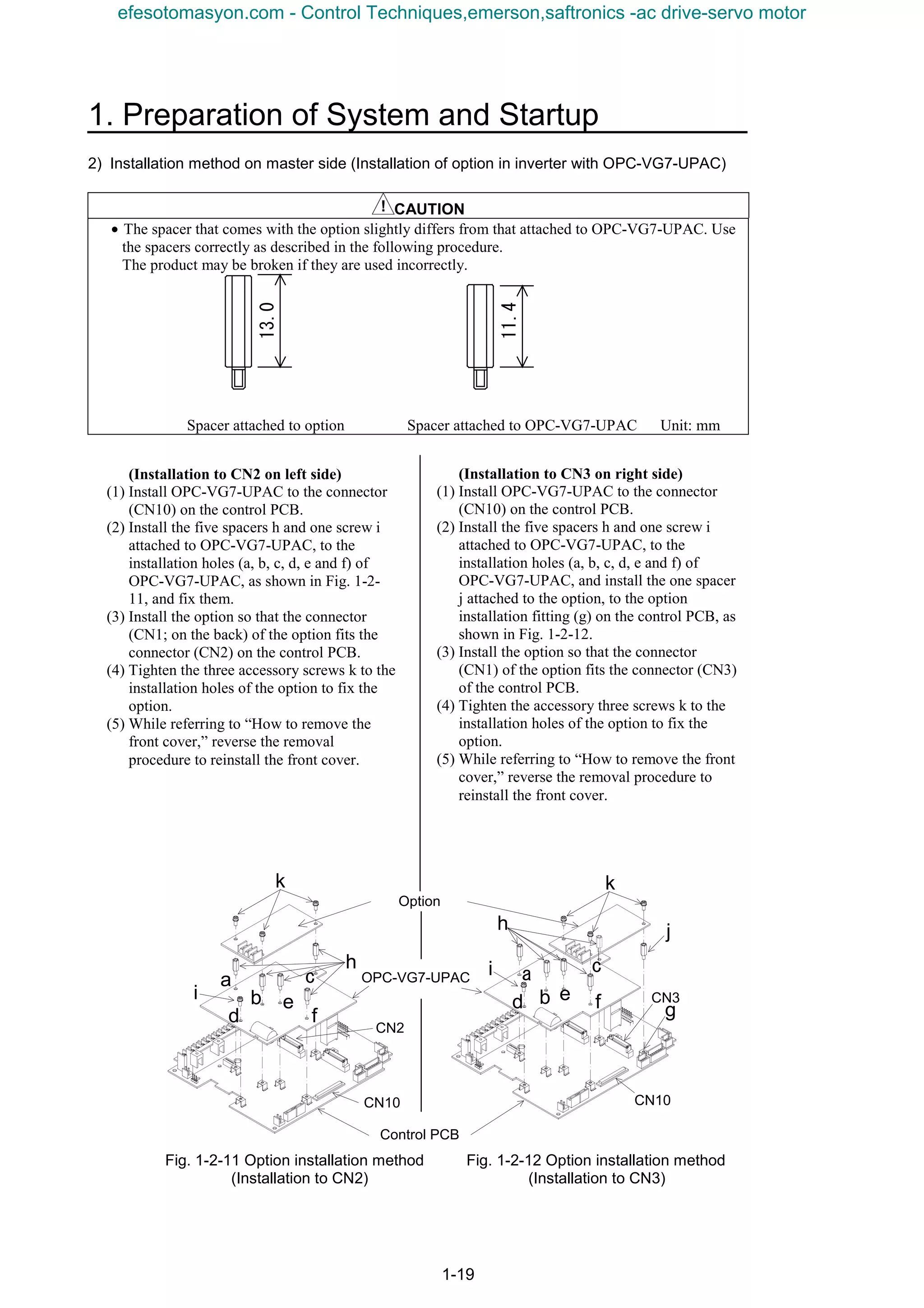
2) Installation method on master side (Installation of option in inverter with OPC-VG7-UPAC)
CAUTION
• The spacer that comes with the option slightly differs from that attached to OPC-VG7-UPAC. Use
the spacers correctly as described in the following procedure.
The product may be broken if they are used incorrectly.
Spacer attached to option Spacer attached to OPC-VG7-UPAC Unit: mm
Fig. 1-2-11 Option installation method Fig. 1-2-12 Option installation method
(Installation to CN2) (Installation to CN3)
13.0
11.4
(Installation to CN2 on left side)
(1) Install OPC-VG7-UPAC to the connector
(CN10) on the control PCB.
(2) Install the five spacers h and one screw i
attached to OPC-VG7-UPAC, to the
installation holes (a, b, c, d, e and f) of
OPC-VG7-UPAC, as shown in Fig. 1-2-
11, and fix them.
(3) Install the option so that the connector
(CN1; on the back) of the option fits the
connector (CN2) on the control PCB.
(4) Tighten the three accessory screws k to the
installation holes of the option to fix the
option.
(5) While referring to “How to remove the
front cover,” reverse the removal
procedure to reinstall the front cover.
(Installation to CN3 on right side)
(1) Install OPC-VG7-UPAC to the connector
(CN10) on the control PCB.
(2) Install the five spacers h and one screw i
attached to OPC-VG7-UPAC, to the
installation holes (a, b, c, d, e and f) of
OPC-VG7-UPAC, and install the one spacer
j attached to the option, to the option
installation fitting (g) on the control PCB, as
shown in Fig. 1-2-12.
(3) Install the option so that the connector
(CN1) of the option fits the connector (CN3)
of the control PCB.
(4) Tighten the accessory three screws k to the
installation holes of the option to fix the
option.
(5) While referring to “How to remove the front
cover,” reverse the removal procedure to
reinstall the front cover.
efesotomasyon.com - Control Techniques,emerson,saftronics -ac drive-servo motor
1-20
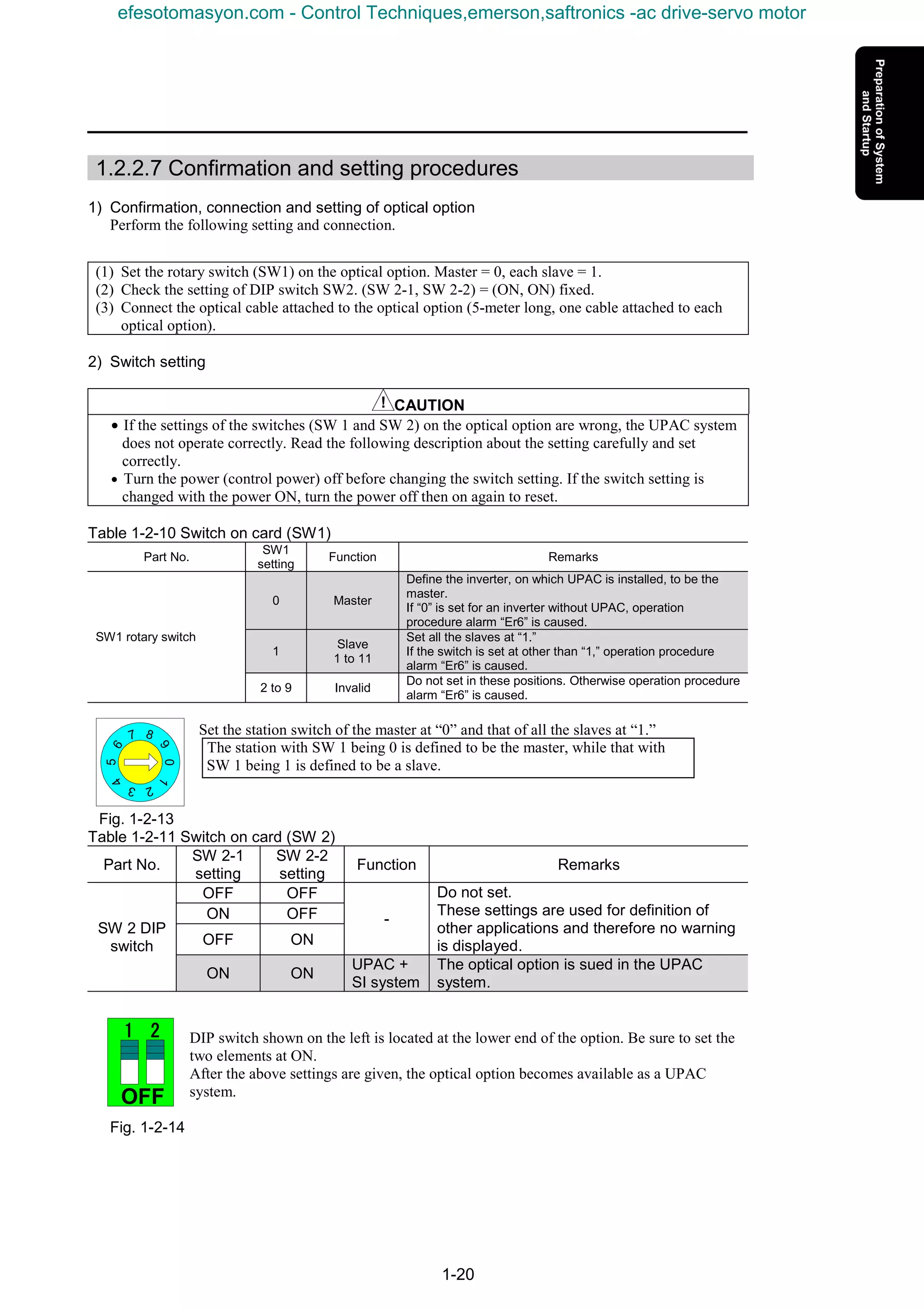
1.2.2.7 Confirmation and setting procedures
1) Confirmation, connection and setting of optical option
Perform the following setting and connection.
(1) Set the rotary switch (SW1) on the optical option. Master = 0, each slave = 1.
(2) Check the setting of DIP switch SW2. (SW 2-1, SW 2-2) = (ON, ON) fixed.
(3) Connect the optical cable attached to the optical option (5-meter long, one cable attached to each
optical option).
2) Switch setting
CAUTION
• If the settings of the switches (SW 1 and SW 2) on the optical option are wrong, the UPAC system
does not operate correctly. Read the following description about the setting carefully and set
correctly.
• Turn the power (control power) off before changing the switch setting. If the switch setting is
changed with the power ON, turn the power off then on again to reset.
Table 1-2-10 Switch on card (SW1)
Part No.
SW1
setting
Function Remarks
0 Master
Define the inverter, on which UPAC is installed, to be the
master.
If “0” is set for an inverter without UPAC, operation
procedure alarm “Er6” is caused.
1
Slave
1 to 11
Set all the slaves at “1.”
If the switch is set at other than “1,” operation procedure
alarm “Er6” is caused.
SW1 rotary switch
2 to 9 Invalid
Do not set in these positions. Otherwise operation procedure
alarm “Er6” is caused.
Set the station switch of the master at “0” and that of all the slaves at “1.”
The station with SW 1 being 0 is defined to be the master, while that with
SW 1 being 1 is defined to be a slave.
Fig. 1-2-13
Table 1-2-11 Switch on card (SW 2)
Part No.
SW 2-1
setting
SW 2-2
setting
Function Remarks
OFF OFF
ON OFF
OFF ON
-
Do not set.
These settings are used for definition of
other applications and therefore no warning
is displayed.
SW 2 DIP
switch
ON ON
UPAC +
SI system
The optical option is sued in the UPAC
system.
DIP switch shown on the left is located at the lower end of the option. Be sure to set the
two elements at ON.
After the above settings are given, the optical option becomes available as a UPAC
system.
Fig. 1-2-14
0
5
9
87
64
3 2
1
OFF
1111 2222
efesotomasyon.com - Control Techniques,emerson,saftronics -ac drive-servo motor
1. Preparation of System and Startup
1-21
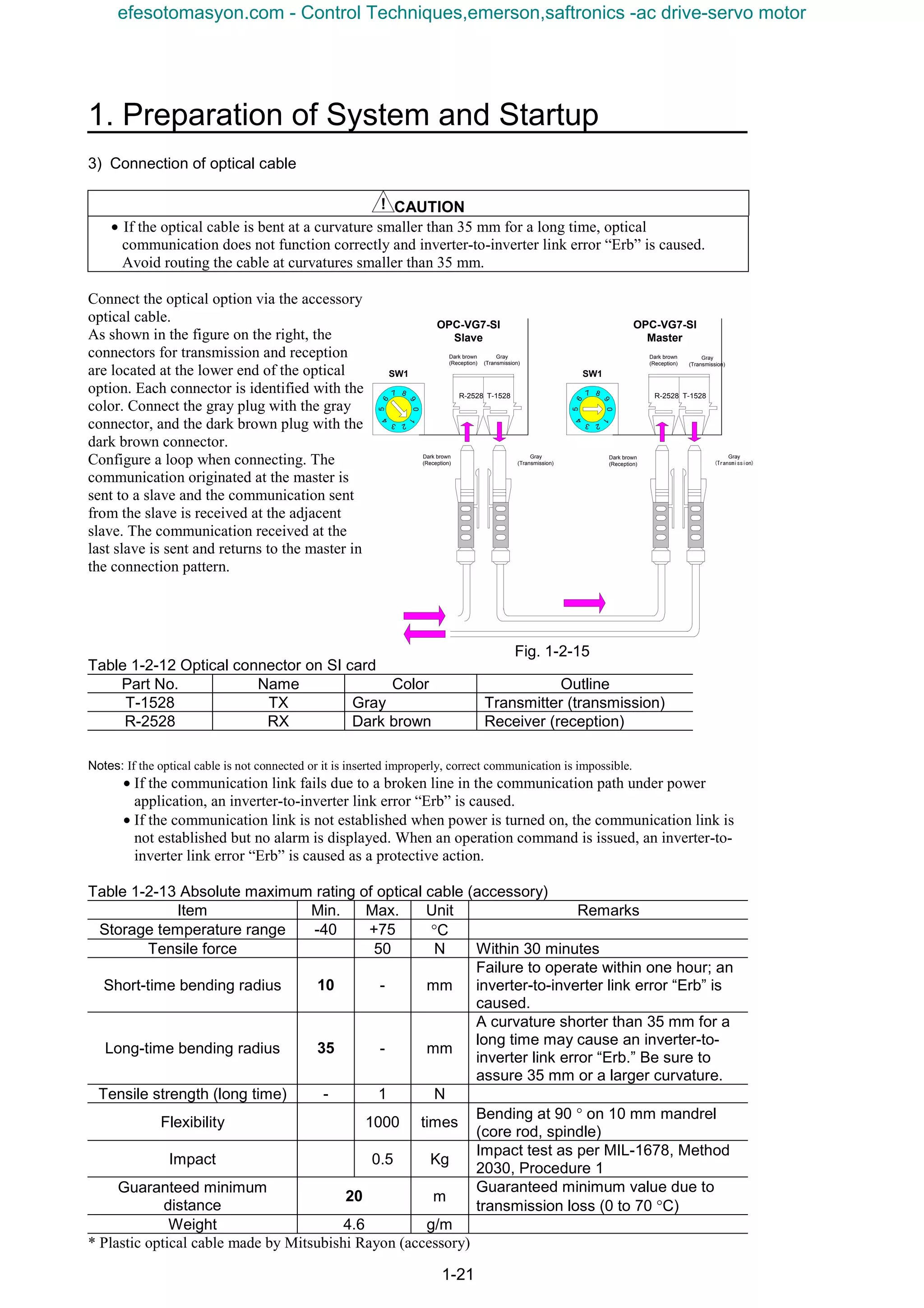
3) Connection of optical cable
CAUTION
• If the optical cable is bent at a curvature smaller than 35 mm for a long time, optical
communication does not function correctly and inverter-to-inverter link error “Erb” is caused.
Avoid routing the cable at curvatures smaller than 35 mm.
Connect the optical option via the accessory
optical cable.
As shown in the figure on the right, the
connectors for transmission and reception
are located at the lower end of the optical
option. Each connector is identified with the
color. Connect the gray plug with the gray
connector, and the dark brown plug with the
dark brown connector.
Configure a loop when connecting. The
communication originated at the master is
sent to a slave and the communication sent
from the slave is received at the adjacent
slave. The communication received at the
last slave is sent and returns to the master in
the connection pattern.
Table 1-2-12 Optical connector on SI card
Part No. Name Color Outline
T-1528 TX Gray Transmitter (transmission)
R-2528 RX Dark brown Receiver (reception)
Notes: If the optical cable is not connected or it is inserted improperly, correct communication is impossible.
• If the communication link fails due to a broken line in the communication path under power
application, an inverter-to-inverter link error “Erb” is caused.
• If the communication link is not established when power is turned on, the communication link is
not established but no alarm is displayed. When an operation command is issued, an inverter-to-
inverter link error “Erb” is caused as a protective action.
Table 1-2-13 Absolute maximum rating of optical cable (accessory)
Item Min. Max. Unit Remarks
Storage temperature range -40 +75 °C
Tensile force 50 N Within 30 minutes
Short-time bending radius 10 - mm
Failure to operate within one hour; an
inverter-to-inverter link error “Erb” is
caused.
Long-time bending radius 35 - mm
A curvature shorter than 35 mm for a
long time may cause an inverter-to-
inverter link error “Erb.” Be sure to
assure 35 mm or a larger curvature.
Tensile strength (long time) - 1 N
Flexibility 1000 times
Bending at 90 ° on 10 mm mandrel
(core rod, spindle)
Impact 0.5 Kg
Impact test as per MIL-1678, Method
2030, Procedure 1
Guaranteed minimum
distance
20 m
Guaranteed minimum value due to
transmission loss (0 to 70 °C)
Weight 4.6 g/m
* Plastic optical cable made by Mitsubishi Rayon (accessory)
R-2528 T-1528
Dark brown
(Reception)
Gray
(Transmission)
Dark brown
(Reception)
Gray
(Transmission)
OPC-VG7-SI
Slave
R-2528 T-1528
0
5
9
87
64
3 2
1
0
5
9
87
64
3 2
1
Dark brown
(Reception)
Gray
(Transmission)
OPC-VG7-SI
Master
Dark brown
(Reception)
Gray
(Transmission)
SW1 SW1
Fig. 1-2-15
efesotomasyon.com - Control Techniques,emerson,saftronics -ac drive-servo motor
1-22
1.3 Preparation of Software
1.3.1 Installation Method
1.3.1.1 Installing the D300win software package
The D300win software package is delivered in multiple floppy disks. Installation disks contain an install
program which automatically proceeds necessary actions for installation, icon registration and so on.
When installation is made via a network, copying or installation may not proceed correctly according
to some network environment and operating environment.
(1) Inactivate the virus detection software and screen saver.
(2) Select [Control Panel (C) ...] from the [Settings (S) ...] submenu in the [Start] menu of Windows
95/98/NT4.0. (The case of Windows 98 is described in the following description as a typical
example.)
(3) Double-click the left mouse button on the “Add/Remove Programs” icon in the “Control Panel” dialog
box.
(4) Click the left mouse button on the [Install (I) ...] button.
(5) Insert the System Disk No. 1 containing the install program into the floppy disk drive.
(6) Click the left mouse button on the [Next (N) >] button.
(7) Check that <A:Setup.exe> is displayed in the [Command line (C) of install program:] text box. If not,
click the left mouse button on the [Browse (R) ...] button, select the drive in which the floppy disk is
inserted, and select [Setup.exe] as a file name. Click the left mouse button on the [Finish (F)] button.
(8) A dialog box showing information for installation and program handling is displayed.
Click the left mouse button on the [Next (N)>] button.
The [Choose Folder] dialog box is displayed.
(9) To change the default destination folder “C:D300win,” click the left mouse button on the [Browse
(R) ...] button, designate the desired folder in the [Choose Folder] dialog box, and click the left mouse
button on the [OK] button.
Fig. 1-3-1
Designate the folder name and path
within eight characters. Do not use
space.
efesotomasyon.com - Control Techniques,emerson,saftronics -ac drive-servo motor
1. Preparation of System and Startup
1-23
(10) Click the left mouse button on the [Next (N)>] button further.
The “Setup Type” dialog box is displayed.
Fig. 1-3-2
Select the [Typical (T)], [Compact (C)] or [Custom (U)] method for setup, then click the left mouse
button on the [Next (N)>] button.
1) If custom installation is selected
If [Custom] is selected, the “Select Components” dialog box is displayed.
Place a check box for the desired installation items.
Fig. 1-3-3
Click on the [Next (N)>] button.
efesotomasyon.com - Control Techniques,emerson,saftronics -ac drive-servo motor
1-24
2) Description of selection items
• D300win program
Basic program of D300win. Be sure to select to install.
• MICREX-SX
Select to create programs for MICREX-SX Series.
• SX simulator (Sample)
Select to simulate MICREX-SX Series program on the PC (D300win). This function is being
developed and provided as a sample.
• Page Layout
Select to use five page layout samples necessary for printing a project, worksheet or the like.
(The introduced page layout file (DEFAULT.plt) is installed without fail.)
• POD cooperated support
Function for establishing association in variable allocation and so on in a system of our POD
(programmable operation display) UG210/UG400 series and MICREX-SX series
• Import & Export of variable name
Function for inputting or outputting variable names from/to a CSV file (text file)
• Easy operation menu
Basic operations of D300win are selected from a menu (selection of purpose) to execute
operations ranging from project creation to debugging.
(11) The “Select program folder” dialog box is displayed. To change default “D300win,” enter the
desired program folder name in the text box.
Click the left mouse button on the [Next (N)>] button.
(12) The “Start file copy” dialog box is displayed. Confirm the description and click the left mouse
button on the [Next (N)>] button.
Files are copied.
(13) After installation with the first system disk is finished, an “Setup Needs The Next Disk” dialog box
is displayed as shown in the figure below.
Insert the second disk and click the left mouse button on the [OK] button. Similarly install the third
and the remaining disks.
Fig. 1-3-4
efesotomasyon.com - Control Techniques,emerson,saftronics -ac drive-servo motor
1. Preparation of System and Startup
1-25
(14) After all disks are installed, an “Question” dialog box shown below is displayed.
Fig. 1-3-5
Click the left mouse button on the “No (N)” button.
If the left mouse button is clicked on the [Yes (Y)] button, the “Backup utility” dialog box is
displayed and you can back up the project files created using “Ver 1.*” D300win system.
(15) If [SX simulator] has been selected using “Custom” installation, the following message box is
displayed after all system disks are installed.
Fig. 1-3-6
(16) After setup is completed, the following screen is displayed.
Fig. 1-3-7
(17) After confirming that there is no problem even if the computer is restarted, select the [Yes, I want to
restart my computer now.] option button and click the left mouse button on the [Finish] button. The
computer restarts itself to complete setup of D300win.
Select this option button
and click the left mouse
button on the [Finish]
button. The PC starts again.
efesotomasyon.com - Control Techniques,emerson,saftronics -ac drive-servo motor
1-26
1.3.1.2 Installing UPAC support function
Use an installation program to install.
The installation program executes the following process.
• Adds the UPAC support function to D300win.
• Adds an uninstall icon for the UPAC support function to the program folder.
1) Before installing
CAUTION
• Before installing the UPAC support function, you need to install D300win. Install D300win first if
you have not installed D300win. See " MICREX - SX Series USER’S MANUAL D300win
<GUIDE>" for installing D300win.
If you have installed the UPAC support function, uninstall the UPAC support function for safety.
Though you can overwrite to install without uninstalling, you will have such a problem as you cannot
uninstall the UPAC support function completely. When you upgrade the version, we recommend that
you uninstall first and then install again.
2) Installing
This process adds the UPAC support function to installed D300win. Follow the procedure below.
(1) Stop your virus detection software and screen saver.
(2) Click the [Start] button, point to [Settings (S)], and then click [Control Panel (C)] of Windows.
(3) Click the [Add/Remove Programs] icon in the Control Panel window.
(4) Click the [Install (I)] button.
(5) Insert a recording media (CD-ROM, WPS-VG7-PCL) containing the installation program into the
drive.
(6) Click the [Next (N)>] button.
(7) Check if "A:SETUP.EXE" is displayed in the text box of Command line for installation program
(C): ("A:" depends on the recording device you are using). Otherwise, click the [Browse (R)…]
button to specify the drive and the folder.
(8) Left-click the [Finish] button.
Note: • The menu names and the dialog box names in step (2) to (7) depend on the OS you are using. Substitute them if needed.
• You can use Explorer to left-double click the SETUP.EXE in the recording media containing the installation program
instead of executing the operation from (2) to (7).
efesotomasyon.com - Control Techniques,emerson,saftronics -ac drive-servo motor
1. Preparation of System and Startup
1-27
(9) A while after [InstallShield Wizard]
working box is displayed, a dialog box
showing the information on installation
and how to handle this program appears.
Click the [Next (N) >] button after you
are satisfied.
Fig. 1-3-8
(10) If an already installed UPAC support
function is found, a dialog box for
modifying, editing or deleting the
program is displayed. Select [Repair
(E) ] and click on the [Next (N) >]
button to install again. Settings in
steps 11 through 14 cannot be given in
this case.
Fig. 1-3-9
(11) A dialog box for choosing Destination
Location appears.
The Destination Folder contains the
directory where D300win is installed
(if D300win is not found, "C:
D300win" is displayed).
Confirm the destination directory and
left-click the [Next (N) >].
Fig. 1-3-10
efesotomasyon.com - Control Techniques,emerson,saftronics -ac drive-servo motor
1-28
“Choose Folder” dialog box appears.
If you want to change this folder, click the [Brouse
(R)… ] button in the Choose Destination Location dialog
box, and specify another folder where D300win is
installed, and click [OK].
Fig. 1-3-11
The left message box appears when D300win was not
found in the folder you specified.
Left-click the [OK] button to close the message and
specify the folder again.
Fig. 1-3-12
(12) The “Select Components” dialog box is
displayed.
Select the desired components to be
installed, and click the left mouse button
on the [Next (N)>] button.
Fig. 1-3-13
(13) The “Select Program Folder” dialog box
appears.
If you change the default D300win
folder, enter the program folder name in
the text box.
Note: Though you can specify a folder other than the
folder where D300win is installed, the same folder
is convenient for uninstalling.
Fig. 1-3-14
efesotomasyon.com - Control Techniques,emerson,saftronics -ac drive-servo motor
1. Preparation of System and Startup
1-29
(14) Click the [Next (N) >] button. The
“Start Copying Files” dialog box
appears.
Confirm the installation setting and
click the [Next (N) >] button.
Fig. 1-3-15
(15) Files are copied and the icon is
registered to the Program folder.
You can click the [Cancel] button to
pause the operation to select to retry
or to stop during the installation.
Fig. 1-3-16
Before you click the [Next (N) >] button in the Start Copying Files dialog box, you can click the
[<Back (B)] button to return to the previous dialog box and change the setting.
(16) When the setup has been completed,
the dialog box on the left appears.
Click the [Finish] button to restart
the computer.
Fig. 1-3-17
efesotomasyon.com - Control Techniques,emerson,saftronics -ac drive-servo motor
1-30
1.3.2 Changing the Program
Option programs can be added or deleted to/from the D300win system having been installed, or the
program having been set up can be installed again.
(1) Click the left mouse button on the [Start] button of the Windows system and select [D300win]
program group from the [Programs (P)] menu, then click the left mouse button on the [D300win
setup] program icon.
* Click the left mouse button on the [UPAC setup] program icon to add,
delete or reinstall the UPAC support function program in the same
procedure as shown.
Fig. 1-3-18
(2) The dialog box for modifying, repairing or removing the program is displayed.
Fig. 1-3-19
(3) Select the [Modify (M)] option button and click the left mouse button on the [Next (N)>] button.
The “Select components” dialog box is displayed.
Fig. 1-3-20
(4) Place a check mark for component list items to be added, and clear the check box for those to be
removed, and click the left mouse button on the [Next (N)>] button.
(5) If additional components are marked, a [Change disk] dialog box is displayed. Insert the prompted
disk and click the left mouse button on the [Next (N)>] button.
(6) After installation is completed, the [Maintenance Complete] dialog box shown in the next subsection
is displayed.
Click the left mouse button on the [Finish] button to close the dialog box.
efesotomasyon.com - Control Techniques,emerson,saftronics -ac drive-servo motor
1. Preparation of System and Startup
1-31
1.3.3 Uninstalling
1.3.3.1 Uninstalling the UPAC support function
To delete the UPAC support function from the hard disk, follow the procedure below.
(1) After selecting the [D300win] program folder from the [Programs (P) ...] submenu in the [Start] menu
of Windows, click on the [UPAC setup] (use the program folder having been designated during
installation).
Fig. 1-3-21
(2) A dialog box for modifying, repairing or removing the program is displayed.
Select [Remove (R)] and click on the
[Next (N)>] button.
Fig. 1-3-22
(3) The “Confirm File Deletion” message box is displayed.
To proceed, click on the
[OK] button. Deletion is
executed.
Fig. 1-3-23
(4) The following dialog box is displayed during deletion.
Fig. 1-3-24
efesotomasyon.com - Control Techniques,emerson,saftronics -ac drive-servo motor
1-32
(5) Finish the procedure.
Click on the [Finish] button to
close the dialog box.
Fig. 1-3-25
Reference
• Files created and saved by the user are not deleted during program deletion.
• If D300win is uninstalled without uninstalling the UPAC support function, file deletion does not
function correctly. Uninstall the UPAC support function before uninstalling D300win.
• You can uninstall similarly, using [Add/Remove Programs] in the “Control Panel” window.
efesotomasyon.com - Control Techniques,emerson,saftronics -ac drive-servo motor
1. Preparation of System and Startup
1-33
1.3.3.2 Uninstalling D300win
To delete the D300win system file from the hard disk, follow the procedure below.
(1) Click on the [Start] button of the Windows system and select the [D300win] program group from the
[Programs (P)] menu, and click the left mouse button on the [D300win setup] program icon.
Fig. 1-3-26
(2) A dialog box for modifying, repairing or removing the program is displayed.
Fig. 1-3-27
(3) Select the [Remove (R)] option button and click the left mouse button on the [Next (N)>] button.
The “Confirm File Deletion” message box is displayed.
Fig. 1-3-28
To proceed, click the left mouse button on the [OK] button.
(4) Deletion is executed.
A “Shared File Detected” dialog box may be displayed during operation. Deletion of a shared file may
cause another program to fail to function or Windows may not start in the worst case. Select [No (N)]
usually.
Fig. 1-3-29
efesotomasyon.com - Control Techniques,emerson,saftronics -ac drive-servo motor
1-34
Finish the procedure.
Fig. 1-3-30
(5) Click the left mouse button on the [Finish] button to close the [Setup] dialog box.
Files created and saved by the user are not deleted during program deletion.
efesotomasyon.com - Control Techniques,emerson,saftronics -ac drive-servo motor
1. Preparation of System and Startup
1-35
1.3.4 Starting D300win
1.3.4.1 D300win starting method
There are the following two methods to start D300win. Do not start D300win in other methods.
1) Start from the [Start] menu
After the D300win system is installed, a new program group having the icon shown below is created.
The program group is registered to the [Start] menu.
Fig. 1-3-31
* Click the left mouse button on the [Start] button, select the [D300win] program group from the
[Programs (P)] menu, and click the left mouse button on the [D300win] program icon.
After the D300win system starts, the screen shown in section 1.3.4.2 is displayed.
<Description of icon in program group>
The [D300win] icon is the icon for starting the D300win system.
The [SX Control Utility] icon is the icon for starting the SX control utility of the
MICREX-SX Series. Using the SX control utility, the input/output data of the basic
input/output module on the MICREX-SX system can be monitored and outputs can
be checked.
The [File Divide & Merge] icon is the icon for starting the file divide & merge
function. Use the file divide & merge function to divide and save one compressed
project file (file larger than floppy disk capacity) or join the separate files into one.
The [Backup Utility] icon starts the program for backing the project file created
using an earlier version of D300win. (The project file created with Ver 1.* and
opened with Ver 2.* cannot be opened with Ver 1.*.)
To start D300win, select this
command.
efesotomasyon.com - Control Techniques,emerson,saftronics -ac drive-servo motor
1-36
The [Easy operation menu] icon is the icon for displaying a menu containing basic
operation items of D300win. Your can execute operation ranging from project
development to debugging from the menu.
The [SX simulator] icon is the icon for starting the MICREX-SX simulator. Use the
simulator to simulate the MICREX-SX Series programs offline (on the PC). (This
function is installed through custom installation.)
The [D300win Help] icon is the icon for displaying the basic help of D300win
(offline mode help). The table of contents of help topics is displayed.
Cautionary items for operation of D300win are described in the text opened through
double-clicking of the left mouse button on the [Notes on use of D300win] icon.
Read through the description before starting D300win.
Use the [D300win Setup] icon to add or delete option programs to/from D300win or
to start the setup program for uninstalling the D300win system.
2) Starting from shortcut icon
You can create a short cut of the [D300win] program icon with which D300win is started.
Do not create the shortcut icon in methods other than that described below.
The short-cut icon creation method is described below.
(1) Click the right mouse button on the [Start] button of Windows.
Fig. 1-3-32
(2) Select the [Open (O)] command.
The [Start menu] folder is displayed.
(3) Double-click the left mouse button on the [Programs] folder icon in the [Start menu] folder.
(4) Double-click the left mouse button on the [D300win] folder icon in the [Programs] folder.
(5) Click the right mouse button on the [D300win] starting icon and select the [Create Shortcut (S)]
command from the shortcut menu.
Fig. 1-3-33
Click the right mouse button.
Click the left mouse button.
efesotomasyon.com - Control Techniques,emerson,saftronics -ac drive-servo motor
1. Preparation of System and Startup
1-37
(6) The [D300win (2)] shortcut icon is created in the [D300win] program folder.
Fig. 1-3-34
(7) Drag the [D300win (2)] shortcut icon to the desktop of Windows.
Click the left mouse button on the shotcut icon moved to the desktop to start D300win.
1.3.4.2 Screen immediately after D300win is started
After D300win is started, the screen shown below is displayed.
Fig. 1-3-35
The project (tree) called last time or nothing is displayed.
Shortcut icon of
D300win
Move
efesotomasyon.com - Control Techniques,emerson,saftronics -ac drive-servo motor
1-38
You can uninstall similarly, using [Add/Remove Programs] in the “Control Panel” window.
n Opening UPAC Project
The first step after you have installed and started D300win is to produce a new UPAC project or to
open an existing UPAC project. This section describes steps required to create a new UPAC project.
1) Creating new project using UPAC template
If you use this method to create a new project, D300win will copy the selected template to project as
"Untitled". The template consists of POUs, worksheets, and configuration elements required for the
PLC type.
You can edit the project "Untitled" and save it as a name you want to use.
(1) Creating new project with mouse
Select the New Project menu item from the File submenu. The New Project dialog box appears.
(2) Creating new project with keyboard
Press ALT + F to open the File submenu and press N. The New Project dialog box appears.
Fig. 1-3-36. New Project dialog box containing available project templates
(3) Using New Project dialog box
Left-click to select "VG7_6 UPAC" or "VG7_12 UPAC" template.
efesotomasyon.com - Control Techniques,emerson,saftronics -ac drive-servo motor
1. Preparation of System and Startup
1-39
(4) A new project named "Untitled" is created
and the project tree to the left appears.
Libraries:
Register a project used as a library. No
libraries are registered in the template of
UPAC.
Data Types:
Declare user-defined data types in addition to
basic data types defined in IEC1131-3. No
user-defined data types are registered in the
template of UPAC.
Logical POUs:
The project "Untitled" includes one POU - a
program "LADDER" as default.
There are three worksheets.
• Description worksheet for POU document (optional), "LADDERT"
• Variable worksheet for declaring variables and FB instances, "LADDERV"
• Code body worksheet for defining code body, "LADDER"
You can change some of the properties of this program. The default language for the first program
inserted automatically is LD and you cannot change it. If you need a program in other language, insert
a new POU.
Physical Hardware:
This node defines the UPAC constitution.
Use icons under the Physical Hardware node
in the project tree in Fig. 1-3-38 to define the
constitution.
Fig. 1-3-38 Icons for Physical Hardware
• Configuration: A configuration corresponds to one programmable logic controller system such as a
rack.
• System definition: Sets system components in detail.
• Resources: A resource, for example, corresponds to a CPU that you can insert to the rack.
Fig. 1-3-37 Project "Untitled" including program
"LADDER" and its worksheets
efesotomasyon.com - Control Techniques,emerson,saftronics -ac drive-servo motor
1-40
• Tasks: Tasks determine the time scheduling of programs that are associated with the tasks.
• Global variables: Declares global variables valid in a resource.
• Control variables: Global variables listed in IQ memory of VG7S.
• Function variables: Global variables listed in MW memory of VG7S.
Double-click the individual icons to display and set dialog boxes if you need. The following section
describes items required for UPAC.
2) PC type and CPU type of UPAC
The dialog boxes displayed when you display or insert the properties of the individual icons contain
fields for the PC type and the CPU type when needed. Set as below according to the hardware you
use.
Table 1-3-1 PC type and CPU type of UPAC
Hardware used
Number of inverters Inter-inverter link type
PC Type CPU Type
1 to 6 units VG7_6
1 to 12 units
Optical link (OPC-VG7-S1)
VG7_12
UPAC
n Resource setting
Resource setting for UPAC is the same as the standard setting steps except for the following three
points.
• You use the communication setting dialog box that appears when you click the [Communication
setting] button in the Resource setting dialog box to set the communication between the personal
computer and UPAC, and use the system definition to set the station number on RS485 of UPAC.
See "System definition" in this manual for more information.
• UPAC operates based on the commands from VG7S regardless of the specified action when turned
on.
Use the Running specification at power on radio
button in the CPU running definition dialog box
to specify the action when you turn on. However,
UPAC starts based on the command mode from
VG7S regardless of your selection.
Fig. 1-3-39 CPU running definition dialog box
• One resource of UPAC can exist for one configuration.
UPAC cannot handle multiple resources in one
configuration.
When you try to open the system definition in a
project with multiple resources, you will get the
following error message and cannot conduct the
system definition.
Delete unnecessary resources to remove the error
in the system definition.
Fig. 1-3-40 Error message displayed when you
open system definition with multiple
resources
efesotomasyon.com - Control Techniques,emerson,saftronics -ac drive-servo motor
1. Preparation of System and Startup
1-41
n Registering task and program
If you run a program, you should insert a task and associate the program with the task, or determine
on which task you run the program.
Though inserting a task and associating a program with the task is the same as that in the standard
procedure, the setting range is different in UPAC. You can select 0 to 3 in the Priority field in the
Task setting dialog box in the following figure, but UPAC can execute only 0 or 1.
•When you try to open a system definition of a
project including tasks with priority 2 or 3, you
will get an error message in Fig. 1-3-42, and you
will not be able to conduct the system definition.
Fig. 1-3-41 Task setting dialog box
•To remove the system definition error, delete
tasks that have priorities other than default, 0, or
1, or change the priorities.
Fig. 1-3-42 Error message when you open a
System definition with invalid task setting
n System definition
1) Starting system definition
When you double-click the System_Definition icon in the project tree, the UPAC system definition
screen appears.
⇒Double click⇒
Fig. 1-3-43 How to start system definition
efesotomasyon.com - Control Techniques,emerson,saftronics -ac drive-servo motor
1-42
The UPAC system definition screen includes the following property sheet with five property pages
classified by the setting item.
• System configration definition
• CPU operation definition
• Memory boundary definition
• I/O group setting
• Communication setting
2) System configration definition
The first property page of the UPAC system definition screen.
You define the hardware constitution such as inverter to be used and type of inter-inverter link on this
sheet.
Fig. 1-3-44 System configration definition screen
The following table describes the operation.
Table 1-3-2 Operation on System configration definition screen
Item Description
Number of inverters Displays whether six-inverter system or twelve-inverter system.
Equipment Mark the check box of a device you use (an inverter without check
mark will be considered as "not installed"). You can not remove
the last check mark.
SX station Displays the SX station number of inverters.
[HOLD mode change]
button (or double click
inverter list)
Specifies the HOLD mode of the inverter selected in the list
(HOLD mode/Reset mode).
You cannot select this button if the selected inverter is not
installed.
Tact cycle The normal value displays standard value (1ms to 3 ms)
automatically according to the number of inverters to be used.
Click the ↓ button to copy the normal value to the setting.
You can select the ↓ button only if the normal value and the
setting are different.
"Default (1.0ms), 1.0ms, 2.0ms, 3.0ms"are listed both for optical
link and simplified RS485 in the setting combo box and select
from them.
Smaller values than the normal value are masked and are not
available.
Link type between
inverters
Select "Optical link".
Initialization method
selection
Sets whether to execute the advanced memory diagnosis or not.
efesotomasyon.com - Control Techniques,emerson,saftronics -ac drive-servo motor
1. Preparation of System and Startup
1-43
3) CPU operation definition
The second property page of the UPAC
system definition screen.
The watch dog timer setting in the Resource
setting dialog box is displayed as in the left
figure.
Fig. 1-3-45 CPU operation definition screen
4) Memory boundary definition
The third property page of the UPAC
system definition screen.
The memory boundary set in the Resource
setting dialog box is displayed as in the left
figure.
Fig. 1-3-46 Memory boundary definition screen
efesotomasyon.com - Control Techniques,emerson,saftronics -ac drive-servo motor
1-44
5) I/O group setting
The fourth property page of the UPAC
system definition screen.
This screen associates the UPAC task level
with the I/O data area of inverter and defines
refresh timing.
Fig. 1-3-47 I/O group setting screen
The following table describes the operation.
Table 1-3-3 Operation on I/O group setting screen
Item Description
Level Lists priorities of tasks included in the resource.
If you select (the priority of) a task, current setting will be
displayed.
Input selection Lists usage state of the I/O of the inverter under input signal,
output signal, and option I/O.
Sets the usage of input devices used as input for all points of
inverter input, inverter output, and option I/O at once.
Output selection Sets the mask of output devices used as output for all points of
inverter output and option I/O at once.
Selected
Sets the number of signals whose usage is ON for selected
devices.
[Details] button
(or double click an item)
Sets individual words for selected devices to enabled/disabled.
* You can set all devices whether a device is installed or not installed.
efesotomasyon.com - Control Techniques,emerson,saftronics -ac drive-servo motor
1. Preparation of System and Startup
1-45
Detailed operation on selection check boxes
Display and use as described below.
Advanced setting for individual words
If you click the [Details] button or
double click an item, the following
screen for the advanced setting
appears.
Fig. 1-3-48 Advanced setting screen for individual words
The following table describes the operation.
Table 1-3-4 Operation on Details setting screen
Item Description
Use check box Sets individual words to enabled/disabled.
Word No. Shows word number beginning with 1.
Name Shows signal name.
All button Set all points to ON/OFF at once. If more than half of all buttons are set to
OFF, then all buttons are set to ON at once, or otherwise set to OFF at
once.
• If all usage states are ON, displayed as ON .
• If some usage states are ON, displayed as gray .
• If all usage states are OFF, displayed as OFF .
• Each time you click the check box, the state changes as follows.
→ → → → →…
→ → → → →…
→ → → → →…
efesotomasyon.com - Control Techniques,emerson,saftronics -ac drive-servo motor
1-46
6) Communication setting
The fifth property page of the UPAC
system definition screen.
Sets the UPAC station number on
RS485 in the range from 1 to 255.
In addition to this, the setting in the
Communication setting dialog box
displayed when you click the
[Communication setting] button in the
Resource setting dialog box is
displayed.
Make sure to conform to the set value
of o40 "UPAC address" of VG7.
The factory setting of o40 is "100". If
the change is not necessary, you can
use the setting for RS485 station No.
of "100" on the screen to connect.
At H34, set the same communication
baud rate as the one shown on the left
screen.
Fig. 1-3-49 Communication setting screen
efesotomasyon.com - Control Techniques,emerson,saftronics -ac drive-servo motor
1. Preparation of System and Startup
1-47
n Printing UPAC system definition
You use the Properties of printer screen
displayed when you click the [Print (P)]
button on the property sheet to print the
system definition of UPAC.
When you click [Print (P)], the following
dialog box will appear.
To print other items than the system
definition, follow the standard procedure
using the menu item Print or Print Project.
Fig. 1-3-50 Printing system definition
efesotomasyon.com - Control Techniques,emerson,saftronics -ac drive-servo motor
1-48
Printed example of system definition
A printed example for twelve-unit system is listed below.
Project : UNTITLED C : D300WINUNTITLED
Update : 2000/03/09 13:21:21
Printed : 9/14/01 6:35:28 PM
----------------------------------------------------------------------------------------------------
[System configuration]
: Number of Inverters = 12
[Equipment] SX station No. mode
* Inverter 1 1 HOLD mode
Inverter 2 2 HOLD mode
* Inverter 3 3 RESET mode
* Inverter 4 4 HOLD mode
* Inverter 5 5 HOLD mode
* Inverter 6 6 HOLD mode
* Inverter 7 7 RESET mode
* Inverter 8 8 HOLD mode
* Inverter 9 9 HOLD mode
* Inverter 10 10 HOLD mode
* Inverter 11 11 HOLD mode
* Inverter 12 12 HOLD mode
* Option I/O 13 RESET mode
: Tact cycle = 3.0 ms
: Link type between inverters = Simple RS485 links
: Initialization method selection = Memory diagnosis execute
[CPU operation definition]
: Watch dog timer setting = Default
[Memory boundary definition] (AT Range)
: Non retain memory = 2.0 KW None (High)
None (Normal)
: Reatin memory = 1.0 KW None
: User FB memory = 1.0 KW None
: System FB memory = 4.0 KW None
: System FB memory detail
Edge detect = 256 × 2 W = 512 W
Counter = 64 × 4 W = 256 W
Addition timer = 32 × 8 W = 256 W
Timer = 128 × 8 W = 1024 W
Other system FB area = 2048 W
: Reserve memory size per POU
Use reserve memory = Not use
Non retain memory = 0
Retain memory = 0
User FB memory = 0
[I/O group setting] - Default
[Input selection - Input signal] Use inverter
1 2 3 4 5 6 7 8 9 10 11 12
1 Speed setting 4/frequency reference monitor o × × × × o × × × × × ×
2 Torque reference 2 o o × o × o × × × × × ×
3 Real speed (detected speed value) o × × × × o × × × × × ×
4 Control data (CW) (standard + DIOA option ; 16bit) o × × o × o × × × × × ×
5 Operation status (SW) o × × × × o × × × × × ×
6 Line speed input o × × o × o × × × × × ×
7 Ai of INV (Ai1) o × × × × o × × × × × ×
8 Ai of INV (Ai2) o × × o × o × × × × × ×
[Input selection - Option I/O input] Use
1 I/O Module DI 16 points ×
efesotomasyon.com - Control Techniques,emerson,saftronics -ac drive-servo motor
1. Preparation of System and Startup
1-49
[Output selection - Output signal] Use inverter
1 2 3 4 5 6 7 8 9 10 11 12
1 Speed setting 1/frequency reference (V/f) o × × o × × o × × × × ×
2 Torque reference 1 o × × o × × × × × × × ×
3 Control data (CW) o × × o × × × × × × × ×
4 Universal DO1 (standard + DIOA option ; 13bit) o × × o × × × × × × × ×
5 Acceleration time o × × o × × × × × × × ×
6 Deceleration time o × × o × × × × × × × ×
7 Torque limiter level 1 o × × o × × o × × × × ×
8 Torque limiter level 2 o × × o × × × × × × × ×
9 Speed setting 4/frequency reference (V/f) o × × o × × × × × × × ×
10 AO of INV (AO1) o × × o × × × × × × × ×
11 AO of INV (AO2) o × × o × × × × × × × ×
12 AO of INV (AO3) o × × o × × × × × × × ×
13 Dynamic switch 1 (DSW1) o × × o × × × × × × × ×
14 Dynamic switch 2 (DSW2) o × × o × × × × × × × ×
[Output selection - Option I/O output] Use
1 I/O Module DO 16 points ×
[Communication setting]
: RS485 station No. = 2
: Port = COM1
: Baudrate = 38400
: Stop bit = 1
: Data length = 8
: Parity = Even
: Timeout = 3000 ms
Fig. 1-3-51 Example of printed system definition
efesotomasyon.com - Control Techniques,emerson,saftronics -ac drive-servo motor
2. Preparation and Basic Operation Examples
2-1
2.1 Examination of System
2.1.1 Application to Small to Medium Systems
CAUTION
• UPAC has been developed for small to medium systems driving and controlling maximum about
10 inverters. It is not for large systems where several tens of inverters are generalized and
controlled. When applying UPAC, carefully examine the specifications of UPAC and design a
system while allowing an extra room in the specifications.
UPAC has been developed for small to medium systems (for from one to about ten inverters) controlling
winding (dancer, tension), ratio (draw), position and synchronization and so on. A system having been
controlled by an external PLC can be transformed into a rigid and high-speed entirely digital system,
using the UPAC.
On the other hand, in a medium system, a distributed control system can be configured where driving
control groups requiring high-speed control are generalized through the UPAC and the host PLC
generalizes and controls each group with operation commands and initial value setup or the like.
When compared with large systems, the above-mentioned system may not satisfy all the requirements
because of lack of a control distribution function for two or more UPACs, poor I/O point count, and poor
trace memory. Deliberate system examination is necessary according to the size of the system. Refer to
this section for approximate guidelines useful for the first examination of specifications.
1) Example of application to small system
The following figure indicates an example where three units of VG7S are linked via SI (optical link)
option for tension control.
If I/O points are insufficient, an extension I/O option (DIO in the figure below) is used and the PG
option (high-speed pulse counter) is applied for line speed detection. The built-in I/O is used to
control I/O of general-purpose inverters.
Tension commands and line speed commands are given in a digital or analog quantity from the
external PLC or computer. One unit of UPAC is sufficient to control this type of a small tension
control system.
Fig. 2-1-1
General-
purpose
INV
I/O
operation
M M
Tension
pickup
PG
Line
speed
detection
Tension
pickup
M
Winding sideFeeding side
Tension
command
Tension
command
PGPG PG
Line
speed
command
FRENIC5000
VG7
SI UPAC
FRENIC5000
VG7
SI PG
FRENIC5000
VG7
SIDIO
efesotomasyon.com - Control Techniques,emerson,saftronics -ac drive-servo motor
2-2
2) Application to medium system
The figure shown below indicates a schematic drawing of multiple VG7S units linked via the SI
(optical link) option to form a small driving control group, which are generalized and controlled
together with other driving control groups by a host PLC or computer working as a system controller.
Digital commands issued by the PLC are sent to each inverter while commands issued by UPAC are
sent to each VG7S unit in the driving control group via the SI (optical link) option.
At this time, the generalizing and controlling PLC or computer sends operation commands and initial
settings to each driving control group while receiving monitor data from each group. UPAC functions
as a master station in each control group and sends various commands for driving the motor via a
high-speed optical link that is superior in noise immunity.
A distributed control system can be configured in this way where the host and subordinate units play
clearly divided roles.
Fig. 2-1-2
FRENIC5000
VG7
SI
FRENIC5000
VG7
UPAC SI
PLC or
Process Controller
POD (Programmable Operation Display)
PIO
OPEN
Opennetwork
Driving control group 1
Driving control group 2
Driving control group n
efesotomasyon.com - Control Techniques,emerson,saftronics -ac drive-servo motor
2. Preparation and Basic Operation Examples
2-3
2.1.2 Examination of Specification
CAUTION
Be aware of the following limitations when examining the specifications.
• If the system (VG7_6UPAC, VG7_12UPAC) of the project is determined first, modification to the
other system becomes impossible.
• Function codes cannot be read from slave VG7S (VG7S without UPAC) connected via the optical
link.
2.1.2.1 System selection
After project creation is selected from D300win, the
dialog box shown on the right is displayed.
The UPAC system has the following system options
from which you can select the desired one.
If the system is selected first, modification to the other
system becomes impossible. Examine the system first
before selecting.
Table 2-1-1
System Selection
Broadcasting
System consisting of 6 or fewer units
VG7_6 UPAC
Broadcasting
System consisting of 1 to 12 units
VG7_12 UPAC
Examine the applicable system specification and controllability according to the number of VG7S
inverter units controlled by UPAC, controlling method, number of operated I/O points, refresh time and
other particulars. A general guideline for examination is indicated here. Read the description of each part
for details to avoid errors during first examination of specifications.
Table 2-1-2
Broadcasting
6-unit system (VG7_6)
(6 units of master and
slaves)
12-unit system (VG7_12)
(12 units of master and
slaves)
Remarks
Number of
connected units
1 to 156 1 to 6 1 to 12
Number of pieces
of OPC-VG7-
UPAC
1 Two or more UPACs cannot be
installed inside the system.
Number of pieces
of OPC-VG7-SI
Number of units (number > 1) Unnecessary for a system consisting
of only one unit
I/Q memory All 32W/14W All 50W x 6 units All 22W x 12 units Memory for high-speed data exchange
Number of
memories
32W/14W
UPAC→VG7S: 32W
(Master only: 32/18W)
50W
UPAC→VG7S: 32W
VG7S→UPAC: 18W
22W
UPAC→VG7S: 14W
VG7S→UPAC: 8W
In the master-slave link, data can be
written or referenced for each slave.
Type Operation command, speed setting 1, 4, torque reference, torque current
reference, magnetic flux reference, torque limiter 1, 2, acceleration /
deceleration time, PG pulse count, position command, torque bias, auxiliary
speed reference, function code 4W, standard and extended inputs and
outputs, etc.
Writing time Minimum 1 ms
Writing same data to
slave
1 unit: minimum 1 ms
2 units: minimum 2 ms
...
12 units: minimum 22 ms.
Minimum time (ms) = (number of units - 1) x 2
Even if the task operates at 1 ms, the
refresh time between VG7S and
UPAC becomes as specified on the
left, according to the number of
connected units.
IO points (DI) Standard 11 points + extended I/O Standard 11 points
IO points (AI) Standard 3 points + extended I/O Standard 3 points
IO points (DO) Standard 5 points + extended I/O Standard 5 points
IO points (AO) Standard 3 points + extended I/O Standard 3 points
Extended I/O (OPC-VG7-DIOB, OPC-
VG7-AIO) cannot be accessed in the
12-unit system.
High-speed
counter
Built-in PG
OPC-VG7-PG (PGo)
Impossible The counter function (position,
synchronization, and winding control)
is unavailable in the 12-unit system.
Function code
Access to
master
Writing to or reading from all areas (F, E, C, P, H, A, o, L, U)
60 ms refresh
Function for master only (VG7S
equipped with UPAC)
Access to
slave
4W writing possible
Reading impossible
4W writing possible
Reading impossible
Writing and reading
impossible
High-speed exchange using I/O area
of both master and slave
Fig. 2-1-3
* The two-fold time is
necessary for reading.
efesotomasyon.com - Control Techniques,emerson,saftronics -ac drive-servo motor
2-4
2.1.2.2 Designing the number of inputs and outputs
CAUTION
Examine the following items in advance when designing the number of inputs and outputs.
• The number of I/O expansion cards installed in each units of VG7S is two. An optical link
connected to the SI card reduces the number of expansion cards by one.
• The synchronous motor drive (PMPG card necessary) and position control (PG card necessary)
reduces the number of expansion cards by one, too.
• In the 12-unit system, the I/O expansion option cannot be operated (DIOA card can be operated).
The standard I/O and the I/O of the expansion card can be operated from the UPAC.
Two expansion cards can be installed. The number of inputs and outputs is restricted in this capacity.
One SI (optical link) card reduces the number of installed cards by one, though all the inputs and outputs
of the linked VG7S become accessible. However, the I/O expansion option cannot be operated in a 12-
unit system.
Table 2-1-3 Maximum number of inputs and outputs controlled with one unit of VG7S
Combination of option (Total I/O points)
Standard DIOA DIOB AIO
DIOA+DIOB DIOA+AIO DIOB+AIO SI+DIOA SI+DIOB SI+AIO
DI 9 4 16 - 29 13 25 13+α 25+α 9+α
DO 5 8 10 - 23 13 15 13+α 15+α 5+α
AI
3
(12 inputs)
- - 2 3 3 5 3+α 3+α 5+α
AO 3 - - 2 3 3 5 3+α 3+α 5+α
The maximum number of inputs and outputs controlled from the UPAC is shown in the table below for a
system consisting of three units (α = 3).
Combination of option (DIOB, AIO) (Total I/O points)
(3,0) (2,1) (1,2) (0,3)
DI 75 (9*3+16*3) 59 (9*3+16*2) 43 (9*3+16*1) 27 (9*3+16*0)
DO 45 (5*3+10*3) 35 (5*3+10*2) 25 (5*3+10*1) 15 (5*3+10*0)
AI 9 (3*3+2*0) 11 (3*3+2*1) 13 (3*3+2*2) 15 (3*3+2*3)
AO 9 (3*3+2*0) 11 (3*3+2*1) 13 (3*3+2*2) 15 (3*3+2*3)
In the above table, the maximum number of inputs and outputs with one high-speed pulse counter (PG
card) is as shown in the table below.
Combination of option (DIOB, AIO) (Total I/O points)
(2,0) (1,1) (0,2)
DI 59 (9*3+16*2) 43 (9*3+16*1) 27 (9*3+16*0)
DO 35 (5*3+10*2) 25 (5*3+10*1) 15 (5*3+10*0)
AI 9 (3*3+2*0) 11 (3*3+2*1) 13 (3*3+2*2)
AO 9 (3*3+2*0) 11 (3*3+2*1) 13 (3*3+2*2)
PG 1 1 1
* Design the number of inputs and outputs with some spare points.
If the number of inputs and outputs is in shortage or there is no spare points, installation of an external
PLC is recommended.
efesotomasyon.com - Control Techniques,emerson,saftronics -ac drive-servo motor
2. Preparation and Basic Operation Examples
2-5
2.2 Individual Operation of UPAC
Basic operation and test operation in a system consisting of one unit of VG7S without optical option are
described here.
2.2.1 Preparation
CAUTION
After finishing installation, wiring and switch setting, check the following items before turning the
inverter on.
• Check if wiring is correct.
• Check if wire dust, screws or the like is left.
• Check if the screws and terminals are tight.
• Check if some element wires at the crimp terminal are in contact with another terminal.
• Check if the SW1 and SW2 settings are correct.
The following preparation, confirmation and setting are necessary.
(1) Turn on the main power supply (R/L1, S/L2, T/L3) or auxiliary power supply (R0, T0).
(2) The UPAC option is recognized.
(3) Set the function codes.
Refer to Chapter 3 “Preparation for Operation and Test Operation” for preparation for operation of the
VG7S inverter.
1) Power-on
CAUTION
• If the option is turned on for the first time, the ErA alarm may be displayed. If this happens, leave
the power turned on for about 30 seconds, and turn the power off then on again.
(1) Recognition of UPAC option
If the UPAC option is installed, “nUPAC” is displayed in the I/O check
screen of the keypad panel. The screen shown on the right is page 9 of I/O
check. Press the key on the keypad panel to go to page 9.
If “¨UPAC” is displayed, the inverter does not recognize the UPAC option.
Check the installation state of the UPAC option in this case.
(2) Confirmation of ROM version
CAUTION
• Some of options are not compatible with early ROM versions of VG7S. The operation does not
function correctly with early versions. Be sure to check the ROM version shown in maintenance
information of the keypad panel. If the version is uncertain, contact us.
Before installing the option, check the ROM version of the main body.
If the option is already installed, check the ROM version of the main body in
that state.
See the information displayed on the right of MAIN and MTR in the
maintenance information of the keypad panel.
The screen shown on the right is page 5 in the maintenance information. Press
the key at the keypad panel to go to page 5.
Table 2-2-1
ROM version
Model of option
MAIN MTR
OPC-VG7-UPAC H1003D or later H2003D or later
MAIN=H1xxxx
MTR =H2xxxx
KP =K xxxx
1500
¨PG-PR ¨PG-SD
nUPAC ¨SX
¨TL ¨FIELD
¨SI-UP ¨SI-MW
1500
∨∨∨∨
∨∨∨∨
efesotomasyon.com - Control Techniques,emerson,saftronics -ac drive-servo motor
2-6
2.2.2 Settings on VG7S Side
CAUTION
• When “0” is set at o38 “UPAC start/stop” or a “stop (S)” command is issued form the control of
D300win, data exchange does not occur between UPAC and VG7S.
• o38 cannot be controlled from the UPAC program.
• If the break point is set in the monitor screen of D300win and, in a broken state, “0” (stop) is set at
o38, UPAC alarm “ErA” is caused. Do not operate o38 during break operation.
• Do not select zero clear at o39 “UPAC memory mode” for the FM and SFM areas.
2.2.2.1 Starting or stopping UPAC
Though the CPU of UPAC is always active without relations to the setting of the o38 function code
(UPAC start/stop) and the control state of D300win, set “1” or “2” at o38 and give a “start (W)”
command from the control of D300win to arrange the data exchange state between UPAC system and
VG7S. This data exchange state is defined in the table below as “startup.”
The user must select and prepare the pieces of data exchanged actually; in the pre-process, the user must
select in the System Definition (UPAC system definition) screen of D300win whether to use or not. The
System Definition is described in details in section 2.2.3 “Settings on D300win side” and in Chapter 3.
Table 2-2-2 Starting and stopping condition of UPAC
Function
code o38
D300win control UPAC system Outline of action
“Stop (S)” command
0
“Start (W)” command
“Stop (S)” command
Stop
(data exchange)
Data exchange between UPAC and
VG7S is stopped.
1
Hot start “Start (W)” command
Start
(data exchange)
Data exchange between UPAC and
VG7S is possible. Started with memory
retention when UPAC starts.
“Stop (S)” command
Stop
(data exchange)
Data exchange between UPAC and
VG7S is stopped.
2
Cold start
“Start (W)” command
Start
(data exchange)
Data exchange between UPAC and
VG7S is possible. Started with cleared
memory when UPAC starts.
In a system using UPAC, make it a rule to set “1” or “2” at o38 and start or stop from the control of
D300win.
This is important when UPAC is temporarily stopped for system definition downloading or reset
command issuance. In such an instance, do not manipulate o38 but control the D300win control.
Because function code o38 controls UPAC directly, UPAC cannot operate o38.
efesotomasyon.com - Control Techniques,emerson,saftronics -ac drive-servo motor
2. Preparation and Basic Operation Examples
2-7
2.2.2.2 UPAC memory mode
You can select whether to clear the memory to zero or to hold at the state immediately before a stop, in
the stopping state of UPAC. The memory area of UPAC includes the IQ, M, RM, FM and SFM areas.
Clear/hold selection can be made for each memory area individually.
The o39 setting is reflected when UPAC is being stopped and the starting UPAC is stopped.
The I area (VG7S → UPAC) of the IQ memory is updated immediately after it is cleared by VG7S, so
that it cannot be cleared.
Leave the “hold” setting for the FM and SFM areas.
Definition of function code o39 “UPAC memory mode”
15 87 0
* The IQ area is the control data area for speed, torque and other data items exchanged at a high speed.
* Items related directly to the user in the M area is the function code area (F, E, C, P, H, A, o, L, U).
* The RM area is the retain memory area assigned by the user for applications.
Bit 0: IQ area. 0: Hold, 1: Clear (OR condition with
definition of D300win)
Bit 1: M area. 0: Hold, 1: Clear
Bit 2: RM area. 0: Hold, 1: Clear
Bit 3: FM area. 0: Hold, 1: Clear (Set at “0.”)
Bit 4: SFM area. 0: Hold, 1: Clear (Set at “0.”)
efesotomasyon.com - Control Techniques,emerson,saftronics -ac drive-servo motor
2-8
The IQ memory is determined through combination with the coupled HOLD definition in System
Definition of D300win as shown in the figure.
Fig. 2-2-1
1) IQ area
The IQ area is defined through combination between function code o39 “UPAC memory mode” and
the coupled HOLD definition in System Definition.
Table 2-2-3 IQ memory clearing condition
IQ area bit of function
code o39
System Definition Description of memory Outline of operation
HOLD mode Hold
The IQ memory is held in the
state before stoppage of
UPAC.
0
Reset mode
HOLD mode
1
Reset mode
Clear
The IQ memory is cleared to
zero upon stoppage of UPAC.
2) M, RM, FM and SFM areas
The M, RM, FM, and SFM areas are defined with function code o39 “UPAC memory mode.”
Table 2-2-4 M, RM, FM and SFM memory clearing condition
Bit of M, RM, FM or SFM
area of function code o39
Description of memory Outline of operation
0 Hold
The corresponding memory is held at the
state before stoppage of UPAC.
1 Clear
The corresponding memory is cleared to zero
upon stoppage of UPAC.
efesotomasyon.com - Control Techniques,emerson,saftronics -ac drive-servo motor
2. Preparation and Basic Operation Examples
2-9
2.2.3 Settings on D300win Side
Preparation has been made in section 2.2.2 to operate UPAC through the settings on the VG7S side.
To reflect the data calculated by UPAC to VG7S or to refer to the data on the VG7S side, definition must
be given to the System Definition of D300win.
The concrete example for giving a “speed setting from UPAC to VG7” is described below. Read the
description carefully to fully understand it.
2.2.3.1 VG7S interface
Determine the destination of connection of the UPAC’s speed setting to the VG7S control.
Suppose that you want to select speed setting 1
among speed setting 1 (before acceleration /
deceleration calculation) and speed setting 4
(ASR input).
To register the definition to D300win, place a
check mark at Speed setting 1 / frequency
reference (V/f) in the output selection screen
(screen shown on the right) in the I/O Group
setting of the System Definition.
After clicking on OK, download the system
definition when a speed command program
(program is omitted) is compiled and downloaded,
and give a reset command.
Upon this, the control on the VG7S side changes
as shown in the figure below.
Fig. 2-2-3
OPC-VG7-UPAC
UP/DOWN
initial value;
zero
=0
=1
=2
=3
=1,3
=0,2
H30
(0~±10V)
(0~+10V)
Link function
ON
OFF
∨
∧ FUNC
DATA
C25
F01Speed setting N1
Speed setting N2
OFF
ON
UP
command
DOWN command
17【UP】
18【DOWNN】
×
ゲイン
F17
バイアス
F18
+ -【12】
Speed setting 1 sent
from UPAC
UPAC SW
System definition setting,
downloading and resetting
%QW1.18
Program
UPAC SW selection
Program compilation
and downloading
Speed setting of other
than UPAC
Fig. 2-2-2
efesotomasyon.com - Control Techniques,emerson,saftronics -ac drive-servo motor
2-10
2.2.3.2 I/O group setting
I/O group setting is on the fourth property sheet of the UPAC system definition screen. The setting
method is described here.
Associate the task level of UPAC with the I/O data area of the inverter and define the refresh timing.
Fig. 2-2-4. I/O group setting screen
The operation method is described in the table below.
Table 2-2-5 Operation method in I/O group setting screen
Item Description Initial value
Level
The priority of the task included in the resource is listed.
Select the desired task (priority) to display the current setting.
Input selection
The I/O service state of the inverter is displayed in a list for each of
input signals, output signals, and option I/O.
The service state of the input devices used for inputting is set in a
batch for all inverter input points, all inverter output points or all option
I/O points.
All OFF
Output selection
The mask of the output devices used for outputting is set in a batch for
all inverter output points or option I/O points.
In a 6-unit system, up to 18W can be set; in a 12-unit system, up to 8W
can be set.
All OFF
Selected number The number of signals being used is displayed for the selected device.
[Details (D)] button
(Or double-click on
the item.)
Use and no use of each word can be set for the selected device.
* All devices can be set without relations to installation of each device.
efesotomasyon.com - Control Techniques,emerson,saftronics -ac drive-servo motor
2. Preparation and Basic Operation Examples
2-11
Detail operation method of selection check box
The check box is displayed or operated as described below.
• A check mark is placed ( ) if the service state of all devices is ON.
• A check mark is placed in the gray check box ( ) if the service state of some devices is ON.
• No check mark is placed if the service state of all devices is OFF.
• When clicked on, the state of the check box changes as shown below.
→ → → → →⋅⋅⋅
→ → → → →⋅⋅⋅
→ → → → →⋅⋅⋅
Detail setting method of each word
Press the [Details (D)] button or double-click on the item to display the detail setting screen shown in the
figure below.
Fig. 2-2-5 Detail setting screen for each word
The operation method is described as shown in the table below.
Table 2-2-6 Operation method of detail setting screen
Item Description
[Use] check box Set use or no use for each word.
Word No. The word number starting at “1” is displayed.
Name The signal name is displayed.
[All] button
All points are turned on or off in a batch. If OFF buttons are more than
half, all words are turned on; if not, all words are turned off.
efesotomasyon.com - Control Techniques,emerson,saftronics -ac drive-servo motor
2-12
2.2.3.3 Precautions for I/O group setting
CAUTION
• If output selection exceeds the predetermined number of words (6-unit system: 19W or more, 12-
unit system: 9W or more) in the I/O group setting of the system definition of D300win, an illegal
setting is judged and operation procedure alarm “Er6” is issued as a warning sign for safety.
In this section, cases in which an operation procedure alarm is developed are described. For the operation
method of D300win or UPAC and VG7 interface setting, refer to the corresponding manual.
1) 6-unit system
In the 6-unit system, 19W or more outputs
cannot be selected for the output selection in the
I/O group setting of the system definition.
The data sent from UPAC to VG7 does not
exceed 19W during regular operation. If 19W or
more items are selected (check marks are
placed), a setting error of the user is probable. In
this state, VG7 may cause illegal actions,
accompanying danger.
For this reason an operation procedure alarm is
output to disable inverter operation.
In the case of input selection, UPAC can refer to
all the information of VG7 connected via the
optical link.
Fig. 2-2-6
2) 12-unit system
In the 12-unit system, 9W or more outputs
cannot be selected for the output selection in the
I/O group setting of the system definition.
The data sent from UPAC to VG7 does not
exceed 9W during regular operation. If 9W or
more items are selected (check marks are
placed), a setting error of the user is probable. In
this state, VG7 may cause illegal actions,
accompanying danger.
For this reason an operation procedure alarm is
output to disable inverter operation.
In the case of input selection, UPAC can refer to
all the information of VG7 connected via the
optical link.
Fig. 2-2-7
Selection
exceeding 19W
is made; illegal.
All 18W can
be selected.
All 8W can
be selected.
Selection
exceeding 9W is
made; illegal.
efesotomasyon.com - Control Techniques,emerson,saftronics -ac drive-servo motor
2. Preparation and Basic Operation Examples
2-13
2.2.3.4 Downloading
CAUTION
• Download programs and system definition from D300win during stoppage of the inverter. The data
is not downloaded during operation of the inverter.
• Be sure to issue a reset command to allow data referencing and updating between VG7S and UPAC
after downloading system definition from D300win. As well, wait for about five seconds after
resetting before starting UPAC.
Refer to the MICREX-SX reference manual for details of downloading of programs and system definition.
In this section, conditions characteristic to UPAC are described.
1) Downloading and resetting conditions
The program and system definition can be downloaded or reset during stoppage of both the inverter
and UPAC. Mere deactivation of operation commands is not judged to be stoppage of the inverter.
Operation commands must be deactivated and the speed must be zero, and the inverter output must be
shut off (with voltage output tuned off) before stoppage is judged.
To stop the UPAC, function code o38 may be set to “0” at the keypad panel; however, when
considering operability, do not operate the keypad panel but give a stop (S) command from the control
of D300win to stop. Stop the UPAC system after arranging the downloading and resetting conditions
described in the table below.
Table 2-2-7 UPAC downloading and resetting condition
Function
code o38
D300win control UPAC system VG7S
Downloading and resetting
conditions
Output shutoff (stop) Possible“Stop (S)
command Operating Impossible *1)
Output shutoff (stop) Possible
0
“Start (W)”
command Operating Impossible *1)
Output shutoff (stop) Possible (recommended)Stop (S)”
command
Stop
(data exchange)
Operating Impossible *1)
Output shutoff (stop) Impossible *2)
1
“Start (W)”
command
Start
(data exchange) Operating Impossible *1)
Output shutoff (stop) Possible (recommended)“Stop (S)”
command
Stop
(data exchange) Operating Impossible *1)
Output shutoff (stop) Impossible *2)
2
“Start (W)”
command
Start
(data exchange) Operating Impossible *1)
*1:Downloading and resetting are impossible during operation of VG7S. Stop VG7S temporarily.
*2:Downloading and resetting are impossible after UPAC has started. Issue a stop command from
D300win temporarily.
2) Reset command
When a reset command is issued from D300win to UPAC, no response for confirmation of resetting
may be displayed on the screen of the PC or it may be invisible even if displayed. UPAC takes about
five seconds to process a reset command. Wait for five seconds after a reset command is issued before
starting UPAC.
efesotomasyon.com - Control Techniques,emerson,saftronics -ac drive-servo motor
2-14
2.3 Operation of Multiple Units via Optical Option
(OPC-VG7-SI)
Basic operation and test operation of two or more units of VG7S linked with the optical option under
control of UPAC are described. Operation methods are based on description in section
2.2 Individual Operation of UPAC. Read section 2.2 first.
2.3.1 Preparation
CAUTION
After finishing installation, wiring and switch setting, inspect the following items before turning the
inverter on.
• Check for wiring errors.
• Check for remaining cable dust, screws and so on.
• Check if screws and terminals are tight.
• Check if element wires at the crimp terminals make contact with another terminal.
• Check if SW1 and SW2 settings are correct.
The following preparation, confirmation and setting are necessary.
Refer to Chapter 3 “Operation Preparation and Test Operation” in the User’s Manual of the main body for
operation preparation of the main body of VG7S.
1) Power-on
CAUTION
• If operation is started without turning even one unit on in the UPAC system, an inverter-to-inverter
link error “Erb” is caused. Because optical communication is not compatible with fail-soft
operation, turn on all the units linked via optical cables.
Power-on sequence
The master and slave units may not be turned on simultaneously. As well, there is no definite power-
on sequence. However, all the units linked via optical cables must be turned on before operation is
started. If even one unit is not turned on in the system, optical communication does not function
correctly.
As well, units do not issue warning display (alarm state output) until an operation command (FWD or
REV) is issued. Use the following two methods to check if the optical communication link is
established.
If the master is turned off then on after the communication link is established, an alarm is caused.
(1) Check using LED on optical option
Check the blinking state of the green LED on the optical option to check the communication state.
In this method, open the cover of the unit so that the printed circuit board of the optical option is
visible.
(1) Turn the main power supply (R/L1, S/L2, T/L3) or auxiliary power supply (R0, T0) on.
(2) Confirm that the optical option is recognized and check the ROM version.
(3) Set the function codes.
efesotomasyon.com - Control Techniques,emerson,saftronics -ac drive-servo motor
2. Preparation and Basic Operation Examples
2-15
Table 2-3-1 LED blink and communication state
No. LED blinking pattern State of operation State transition
1 Blink at 500 ms intervals Correct operation
Optical communication is in correct operation
state.
When the option is turned on for the first time
after purchase, the function code setting is not
accurate and the No. 2 state is caused without
correct operation.
2
Three blinks at 100 ms
intervals then 500 ms OFF
Correct operation
(Communication link
not established)
Optical communication is not in correct operation
state.
• If the setting at switches SW1 or SW2 is wrong,
turn the power off and correct the setting, and
then turn the power on.
• For setting errors of function codes, correct the
settings and turn the power off then on again.
• If there is a broken wire in the communication
link, remove the cause of the broken wire.
3 Always ON (OFF) Option CPU error
An early ROM version of the main body of VG7 is
probable. Contact us.
(2) UPAC application check
CAUTION
• If the communication link is broken due to a broken wire or the like after the link is established
when the power is turned on, the inverter-to-inverter link error “Erb” is caused at all units. If the
communication link is broken before the power is turned on, the protective function is not effective
during stoppage. When the operation command (FWD or REV) is issued, the inverter-to-inverter
link error (Erb) is issued to activate the protective function, but design the UPAC application to
monitor the communication link to assure safety.
The communication state can be checked on the UPAC application side.
Use this function for confirmation upon system startup or for assurance of reliability of the
application during system stoppage.
Digital output
A digital output is issued in a UPAC + SI system when the communication link between optical
options is established.
Select one out of digital output terminals Y1 to Y5 and Y11 to Y18 (DIOA option) of the master
inverter where UPAC is installed, and assign 45; [0-D07].
45; [0-D07] 1: Communication link established (Correct operation in UPAC + SI)
0: Not established
Monitor the information of function code M14 “output terminal Y1 to Y18” at UPAC or connect
the DO output at the terminal block (DIOA: connector) to an external device.
Setting example
To assign the Y1 terminal for the check of communication link establishment, set 45;[0-D07] at
function code E15 “Y1 function selection” at the keypad panel.
The communication link is established without relations to the o38 “UPAC start/stop” stetting or
D300win control command if connection is correct.
2) Option recognition and ROM version confirmation
CAUTION
• Even if the optical option is physically installed, the communication link is not established if the
connector is not inserted completely or there is poor continuity. Be sure to check on the I/O check
screen of VG7 if “nSI-UP” is recognized correctly.
• The optical option is not compatible with VG7 of early ROM versions. The communication link is
not established with an early version. Be sure to check the ROM version at the maintenance
information indicated at the keypad panel. For any uncertainties about the version, contact us.
efesotomasyon.com - Control Techniques,emerson,saftronics -ac drive-servo motor
2-16
(1) Recognition of optical option
If the optical option is installed and switch SW2 on the optical option
is set at (ON, ON), the I/O check screen at the keypad panel indicates
“nSI-UP”. The screen on the right is displayed on page 9 of the I/O
check. Press the key at the keypad panel to open page 9.
If “¨SI-UP” is displayed, the inverter does not recognize the optical
option.
In this case, check the installation state of the optical option and the
state of SW2 again.
(2) ROM version confirmation
Check the ROM version of the main body of VG7 (no optical option
or keypad panel).
See the information displayed on the right of “MAIN” and “MTR” in
the maintenance information at the keypad panel.
The screen on the right is displayed on page 5 of the maintenance
information. Press the key at the keypad panel to open page 5.
Table 2-3-2 ROM version
Maintenance information Version to which optical option is effective
MAIN H10060 or later
MTR H20060 or later
2.3.2 Setting the Function Code
WARNING
• Errors in the data of the function code may cause a dangerous state. To avoid this, check the data
after setting or writing it.
Otherwise accidents may be caused.
CAUTION
• Set “0” for o38 “UPAC start / stop” of the master unit or issue a “stop” command at the D300win
control to stop the UPAC + SI system.
• Be sure to set o35 and o36 at all units. After the number of connected units and the connection
order are determined, a unique setting is determined. If this setting is illegal, operation procedure
alarm “Er6” or inverter-to-inverter link error “Erb” gives a warning.
• After changing o35 or o36, turn the power off then on again to reflect the new setting.
(1) Operation on o38
Set function code o38 on the master side (inverter with UPAC). o38 cannot be set on the slave side.
The UPAC + SI system does not function if o38 is set at “0.” If this happens, each inverter
operates on the individual operation command and speed command.
Table 2-3-3 Active/inactive UPAC + SI system operation
Master
o38
UPAC + SI link
system
Outline of operation
0 Inactive
The communication link continues but various command data is not
reflected at the inverters connected via the optical cable if there is no
trouble in communication.
1, 2 Active
The communication link is established and various commands and monitor
data are reflected at the inverters connected via the optical cable if there is
no trouble in communication.
¨PG-PR ¨PG-SD
¨UPAC ¨SX
¨TL ¨FIELD
nSI-UP ¨SI-MW
1500
MAIN=H1xxxx
MTR =H2xxxx
KP =K xxxx
1500
∨∨∨∨
∨∨∨∨
efesotomasyon.com - Control Techniques,emerson,saftronics -ac drive-servo motor
2. Preparation and Basic Operation Examples
2-17
(2) Address setting rule
• The o35 setting specifies between broadcasting and master-slave communication. The setting
must be given at all units.
• Set the number of slave units at o36. Subtract one from the number of all units (to obtain the
number of slave units). The setting must be given at all units.
Table 2-3-4 Special function code for optical option
Parameter name
No.
Name Keypad panel indication
Setting range Description of setting
o35
Optical option
station address
Link address
0 to 255
Define the link address of the optical option for the
UPAC link
0 : Master address
1 to 11 : Slave address
100 : Master address (broadcasting)
101 to 255 : Slave address (broadcasting)
o36
Number of slave
stations of optical
system
Link system slave
station 1 to 155
Number of slave inverters connected via optical
options with the one equipped with UPAC being
the master.
(2)-1 How to set o35
No duplication is allowed for function code o35 among all units connected via the optical cables.
After the number of connected units is determined and the master-slave connection sequence is
determined, a unique number is determined. Set the serial number of the connection sequence of
the optical cable (0 for master, 1 for the next slave, 2 for the next slave, ...).
Table 2-3-5 Setting of function code o38
Function code Setting Function Remarks
0 Master
1 to 11 Slave 1 to 11
Set for master-slave connection.
The master-slave connection state indicates the state where UPAC
writes or reads data to/from each slave inverter.
100 Matero35
101 to 255 Slave 1 to 155
Set for broadcasting.
The broadcasting mode is used to write the same data from UPAC
to all inverters at a high speed. Writing to or reading from specific
inverters is impossible.
Note: If a value larger than o36 is set at o35 (o35 > o36) or a value between 12 and 99 is set at o35, an operation procedure alarm is
caused. If, though o35 ≤ o36, the same value is set at o35 for two or more inverters, the communication link is not established
and an inverter-to-inverter link error is caused.
(2)-2 o36 setting method
The number of slave units connected via the optical cable must be set at function code o36. This is
not the number including the master unit.
Table 2-3-6 Number of connected units and function code
Function code Function o36 setting Remarks
1 Setting for a system of two units (1 master + 1 slave)
2 Setting for a system of three units (1 master + 2 slaves)
...
10 Setting for a system of 11 units (1 master + 10 slaves)
11 Setting for a system of 12 units (1 master + 11 slaves)
o36
Link system
slave station
101 to 255
Number of slave stations in broadcasting mode 1 to 155
(setting - 100)
Note: If the o36 value does not agree with the number of slave units, the communication link is not established. If operation is
performed in this state, inverter-to-inverter link error “Erb” is issued to warn of a setting error.
(2)-3 Process after change
After changing o35 or o36 data, turn the power off then on again. The reset button at the terminal
block (RST) or at the keypad panel is not effective.
Note: H31 is the address for identification in the data writing or reading process for the master unit (PLC, PC, etc.) connected with
built-in RS485 via the optical option.
Table 2-3-7 RS485 address rule
Name of parameter
No.
Name Keypad panel indication
Setting range Description of setting
H31 Station address RS485 address 0 to 255
Station number for identification in a system
connected to host device (POD, PC, etc.) via
the built-in RS485.
0 (RTU), 99 (FGI): Broadcasting
1 to 255: Address
efesotomasyon.com - Control Techniques,emerson,saftronics -ac drive-servo motor
2-18
2.3.3 Connection
Description is made for the rule of connection setting in master-slave connection or broadcasting
connection or accesses of a PC or the like to each inverter via the built-in RS485.
1) Master-slave connection
The figure on the right indicates connection of n units.
The division between the master and slave is given with SW1.
Table 2-3-8
SW1 SI option definition
0 Master
1 Slave
2 to 9 Er6 or Erb is caused.
o35 gives definition of the link
address.
Number of slave units: n - 1 (2 ≤ n ≤
12), total n units
Table 2-3-9
o35 o36 SI option definition
0 n-1 Master
1 n-1 Slave 1
2 n-1 Slave 2
n-1 n-1 Slave n
> n Er6 or Erb is caused.
2) Broadcasting connection
The figure on the right indicates
connection of n units.
The division between the receiving
and transmitting stations is given with
SW1.
Table 2-3-10
SW1 SI option definition
0 Transmitter
1 Receiver
2 to 9 Er6 or Erb is caused.
o35 gives definition of the link
address.
Number of slave units: n - 1 (2 ≤ n ≤
12), total n units
Table 2-3-11
o35 o36 SI option definition
100 n-1 Master
101 n-1 Slave 1
102 n-1 Slave 2
99+n n-1 Slave n
> n Er6 or Erb is caused.
VG7(1)
SW1=0
H31=1
o35=0
o36=n-1
VG7(2)
SW1=1
H31=2
o35=1
o36=n-1
VG7(3)
SW1=1
H31=3
o35=2
o36=n-1
VG7(n)
SW1=1
H31=n
o35=n-1
o36=n-1
UPAC
Fig. 2-3-1
VG7(1)
SW1=0
H31=1
o35=100
o36=n-1
VG7(2)
SW1=1
H31=2
o35=101
o36=n-1
VG7(3)
SW1=1
H31=3
o35=102
o36=n-1
VG7(n)
SW1=1
H31=n
o35=99+n
o36=n-1
UPAC
Fig. 2-3-2
efesotomasyon.com - Control Techniques,emerson,saftronics -ac drive-servo motor
2. Preparation and Basic Operation Examples
2-19
2.4 Basic Operation Examples
In this section, a series of operations from concrete specification determination, preparation of programs,
downloading to UPAC, to VG7S control by UPAC are described through simple examples for giving
speed commands.
The most basic and important description is made here. Read through the description and fully understand.
Description assumes that you are already familiar with basic operations of D300win. For details of
operation of D300win, refer to the D300win user’s manual.
2.4.1 Determination of Specification
[Specification]
• Give VG7S the data set at function code UN0.01 as a speed command, to control the motor.
[Supplement]
VG7S can be operated with speed commands given at the keypad panel or data preset to multiple speeds.
While this is the standard function, you cannot use the user area (UN0.01 to 64) of the function code to
give speed commands. Though this is a simple example, the user can customize VG7S voluntarily using
UPAC.
2.4.2 Creating a Program
Create a program according to the specification.
Start D300win and select File (F), New Project.
The New Project selection screen opens. Select VG7_6 UPAC.
Fig. 2-4-1
efesotomasyon.com - Control Techniques,emerson,saftronics -ac drive-servo motor
2-20
A prototype project is created under project name “Untitled.”
Next, select File (F), Save/ Project As/Zip Project As (A) to give a file name and save.
Let the file name be “SPEED_CONTROL.” (Do not exceed 24 characters when entering the file name.)
Fig. 2-4-2
efesotomasyon.com - Control Techniques,emerson,saftronics -ac drive-servo motor
2. Preparation and Basic Operation Examples
2-21
Define the setting for referring to function code UN0.01.
(1) Double-click on LADDER*, the worksheet of LADDER, which is a default POU. A blank worksheet
opens on the right side.
(2) Click the right mouse button on the worksheet. Select “Variable (V)” from the pull-down menu.
Fig. 2-4-3
(3) Select function code UN0.01 (u01_f) from the variable list.
* Select “global” range and “Function_List” for the global variable worksheet in advance.
Fig. 2-4-4
efesotomasyon.com - Control Techniques,emerson,saftronics -ac drive-servo motor
2-22
Select [OK] in the previous page to return to the screen shown in the figure below.
If the character size is small, click on the + button shown in the circle to enlarge.
Fig. 2-4-5
Next, connect the speed command given to VG7S, in the variable of u01_f.
(4) Select control variable speed setting 1 (INV118_SPDREF1) from the variable list.
* Select the “global” range and “Control Variables” for the global variable worksheet in advance.
Fig. 2-4-6
efesotomasyon.com - Control Techniques,emerson,saftronics -ac drive-servo motor
2. Preparation and Basic Operation Examples
2-23
The INV118_SPDREF1 variable appears on the worksheet. Click on “u01_f” and the icon shown in
the circle to connect.
Fig. 2-4-7
Continue to compile the program in the Build (B) and Make (M) method.
If there is no error in the program, “Error 0” is displayed as a result. Disregard the warnings.
Fig. 2-4-8
efesotomasyon.com - Control Techniques,emerson,saftronics -ac drive-servo motor
2-24
Double-click on System_Definition in the tree structure of the project.
Fig. 2-4-9
Speed setting 1 / frequency reference (V/f) only is checked with the I/O Group setting in the I/O group
setting.
Do not use the [All (A)] button to place check marks for all data items.
Fig. 2-4-10
efesotomasyon.com - Control Techniques,emerson,saftronics -ac drive-servo motor
2. Preparation and Basic Operation Examples
2-25
2.4.3 Downloading
1) Connecting
Download the program and system
definition created in section 2.3.2, to
UPAC.
To download, connect the PC with the
control PCB of VG7S with the NP4H-
CNV connection cable. Use the
connector to connect simply as shown
in the figure on the right.
Open the front cover of VG7S to
expose and connect the control PCB as
shown in the figure on the right. Refer
to the section describing the installation
method of the option, for how to open
the front cover.
Fig. 2-4-11
2) Checking the state of UPAC
After physically connecting the PC with VG7S via the NP4H-CNV cable, select Online (N), Resource
Control (R) to display the control screen on the screen.
When the communication link is established, the “Run (Nonfatal failure)” state is displayed in the
control screen on the right side of the figure shown below. If “Stop (Nonfatal failure)” is displayed,
the o38 “UPAC start / stop” setting is “0.” Change to “1” at the keypad panel.
When the communication link is not established, “PC is not connected” is displayed as a state in the
control screen on the left side of the figure shown below.
Fig. 2-4-12
efesotomasyon.com - Control Techniques,emerson,saftronics -ac drive-servo motor
2-26
3) Stopping UPAC
Click on the [Stop (S)] button of the control. A Stop dialog box appears. Select [Yes (Y)].
Fig. 2-4-13
4) Downloading
Check that the state of the control is “Stop” as shown in the figure below, and click on the [Download
(D)] button.
If the state of the control is “Run,” click on the [Stop (S)] button again to change to “Stop.”
Next, in the “Download loader => CPU” screen, place a check mark in all of the Program, Clear
retention memory (%M*.3) area, and System definition check boxes.
Fig. 2-4-14
efesotomasyon.com - Control Techniques,emerson,saftronics -ac drive-servo motor
2. Preparation and Basic Operation Examples
2-27
When downloading, the “downloading project” bar graph is displayed at the bottom of the screen to
show the progress of downloading. Though it depends on the size of the program, the process finishes
in about two to ten seconds.
Fig. 2-4-15
5) Resetting
Click on [Reset (R)] of the control. The Reset dialog box appears. Select [Yes (Y)]. The resetting
process takes about five seconds after [Yes] is clicked on. Wait for a while.
Fig. 2-4-16
efesotomasyon.com - Control Techniques,emerson,saftronics -ac drive-servo motor
2-28
6) Starting UPAC
Click on the [Start (A)] button of the control. The Start dialog box appears. Select [Yes (Y)]. Check
that the state of the control changes to “Run.”
Fig. 2-4-17
2.4.4 Simulating and Monitoring
1) Preparation
Click on the [Close] button to exit from the control screen.
Next, select [Online (N)], [Debug (D)].
Check that “00000” is displayed below the variables (u01_f, INV118_SPDREF1) on the worksheet.
In this state, the state of the UPAC is monitored at the real time.
Fig. 2-4-18
efesotomasyon.com - Control Techniques,emerson,saftronics -ac drive-servo motor
2. Preparation and Basic Operation Examples
2-29
2) Entering data from the keypad panel
Change function code UN0.01 from “0” to “1000” at the keypad panel.
Check that “00000” changes to “01000” on the D300win monitor screen.
From this, it is known that UPAC refers to the UN0.01 data on the VG7S side and writes the data in
the speed interface of the IQ memory of UPAC.
Fig. 2-4-19
Next, change settings as follows.
F01 “Speed setting N1” = “0”
F02 “Operation” = “0”
F03 “Max. speed “ = “1500”
P01 “M1 control method” = “2”: Simulation mode
H30 “Link operation” = “0”
Turn off all contact signals related to the speed change such as multi-step operation.
[Explanation of setting]
Turn off the relevant contacts such as F01, F02 and H30 to validate operation commands and speed
commands entered at the keypad panel.
P01 makes simulation (speed control simulation) possible. This becomes inertia simulation for driving a
rotating body having an inertia of function code H51 “M1 load inertia.” At this time, the inverter does not
output a voltage, so that there is no need to connect a motor.
To drive an actual motor, refer to the VG7S User’s Manual for wiring and test operation of the motor.
efesotomasyon.com - Control Techniques,emerson,saftronics -ac drive-servo motor
2-30
3) Checking at the keypad panel
Whether the “1000” data is written from UPAC to VG7S as a speed setting or not can be checked at
the 7-segment LED.
The speed data is converted into a scale where “20000” indicates the maximum speed (r/min).
Data 1000 x maximum speed (1500 r/min) / 20000 = 75 r/min
The “75 r/min” speed setting is indicated with blinking “75” during stoppage of the inverter (with
LCD monitor of the keypad panel displaying STOP) as shown in the figure below on the right.
In this state, correct operation of the UPAC function and data exchange between UPAC and VG7S
has been verified.
Press the FWD or REV key on the keypad panel to start simulation (simulation speed) at 75 r/min.
When “20000” is entered to UN0.01, the speed setting becomes:
20000 x maximum speed (1500 r/min) / 20000 = 1500 r/min.
The 7-segment LED blinks as shown in the figure on the right.
RESET
FUNC
DATA
FWDFWDFWDFWD
REVREVREVREV
STOPSTOPSTOPSTOP
PRG
STOP
PRG⇒PRG MENU
F/D⇒LED_SHIFT
▲ ▲ ▲ ▲ ▲ ▲ ▲
FWD REV STOP REM LOC COMM JOG
Hz A V % r/min m/min kW x10 x100
▼ ▼ ▼ ▼ ▼ ▼ ▼ ▼ ▼
RUN
SHIFT
>>>>>>>>
∧
∨
JOG / NORMAL
REMOTE / LOCAL
RESET
FUNC
DATA
FWDFWDFWDFWD
REVREVREVREV
STOPSTOPSTOPSTOP
PRG
STOP
PRG⇒PRG MENU
F/D⇒LED_SHIFT
▲ ▲ ▲ ▲ ▲ ▲ ▲
FWD REV STOP REM LOC COMM JOG
Hz A V % r/min m/min kW x10 x100
▼ ▼ ▼ ▼ ▼ ▼ ▼ ▼ ▼
RUN
SHIFT
>>>>>>>>
∧
∨
JOG / NORMAL
REMOTE / LOCAL
When UPAC is
stopped
When UPAC is
operated
efesotomasyon.com - Control Techniques,emerson,saftronics -ac drive-servo motor
2-31
- MEMO -
efesotomasyon.com - Control Techniques,emerson,saftronics -ac drive-servo motor
3. VG7 Interface
3-1
3.1 Memory Interface
3.1.1 Giving Basic Commands
3.1.1.1 Operation command
CAUTION
• To operate from UPAC, short-circuit [FWD] and [REV] with [CM] at the terminal block. If only
one terminal is short-circuited, the motor rotates when o38 “UPAC start/stop” is set at “0: Stop.”
Be sure to short-circuit across [FWD] and [CM] and across [REV] and [CM].
(1) 6-unit system (broadcasting)
Table 3-1-1
Address No Name FS/BS Type Direction Remarks
%QW¨. 22 5
Control data (CW)
(standard + DIOA 16-bit)
Data type: 32 WORD UPAC→VG7S
¨ : 1 to 6 (INV1 to INV6)
(2) 12-unit system (broadcasting)
Table 3-1-2
Address No Name FS/BS Type Direction Remarks
%QW¨. 10 5
Control data (CW)
(standard + DIOA 16-bit)
Data type: 32 WORD UPAC→VG7S
¨ : 1 to 12 (INV1 to INV12)
There are two methods to issue an operation command ([FWD], [REV]): (1) operation at other than
UPAC and (2) operation at UPAC. The features of the operation command concerning UPAC are
operation under AND condition between external command and UPAC command and that the operation
command becomes invalid if the final command of both [FWD] and [REV] are ON.
1) How to use
The operation command is issued basically at the terminal block, keypad panel or communication
system. UPAC can issue or stop these external commands under the AND logic condition shown in
the figure below. This is the operation of UPAC.
On the other hand, when the UPAC SW is in the OFF state (in reference to the system definition
control data), operation can be made with external commands (other than those from UPAC) without
relations to UPAC.
Fig. 3-1-1
The memory for giving forward or reverse rotation command from UPAC is two bits in the lower
order of the control data (CW) in the word memory. “0” at the corresponding bit is OFF, while “1” is
ON.
Control data (CW): operation command: type [32]
15 8 7 0
0) [FWD] (Forward rotation operation command)
1) [REV] (Reverse rotation operation command)
2) to 15) [X1] to [X14], [RST]
UPAC SW
Selection of operation
(omitted)
Keypad
panel
[FWD]
FWD
Terminal
block
OPC-VG7-TL
Field bus
Option card
Forward rotation command
from UPAC
OPC-VG7-UPAC
OPC-VG7-SI(UPAC)
OFF
ON
COM
(link)
REMOTE
LOCAL
OPC-VG7-RS
Built-in RS485
AND
Forward rotation
command
efesotomasyon.com - Control Techniques,emerson,saftronics -ac drive-servo motor
3-2
Fig. 3-1-2
Fig. 3-1-3
2) Operation from outside (other than UPAC)
To operate without relations to UPAC
according to operation commands
from external device
Clear the control data (CW) check box in the I/O
Group setting screen of output definition at
System_Definition - I/O group setting of UPAC.
This operation makes operation of [FWD],
[REV], [X1] through [X14] operation commands
and control input commands of UPAC invalid. In
the figure on the right, the link from UPAC
concerning the forward rotation command is
canceled.
Because this causes word-level control including
[FWD], [REV], and [X1] through [X14], there is
the following precaution.
Note: To invalidate [FWD] and [REV] operations of UPAC while validating control over [X1] through [X14], place a check mark
at the control data (CW) and, according to the AND logic condition, OR the content of the corresponding memory with the
following data and write the result to the control data (CW).
0000 0000 0000 0011 (binary)
3) Operation from UPAC
To issue operation commands from
UPAC
Place a check mark at the control data
(CW) check box in the I/O Group
setting screen of output definition at
System_Definition - I/O group setting of UPAC.
This makes operation of [FWD], [REV], and
[X1] through [X14] operation commands and
control input commands of UPAC valid. In the
figure on the right, the operation from UPAC
concerning the forward rotation command is
validated.
Because of operation from UPAC, external
commands must be always turned on (short-
circuited at terminal block).
If only one terminal is short-circuited at the
terminal block when UPAC is stopped with “0”
at o38 “UPAC start/stop,” the motor keeps
operating. Make sure that both [FWD] and
[REV] are short-circuited at the terminal block.
Simultaneous inputs result in output
shutdown.
UPAC SW=OFF
Forward rotation command
from external device
OPC-VG7-UPAC
OPC-VG7-SI(UPAC)
OFF
ON
AND Forward rotation
command
Forward rotation
command of UPAC
UPAC SW=ON
Forward rotation command
from external device
Forward rotation
command of UPAC
OPC-VG7-UPAC
OPC-VG7-SI(UPAC)
OFF
ON
AND Forward rotation
command
efesotomasyon.com - Control Techniques,emerson,saftronics -ac drive-servo motor
3. VG7 Interface
3-3
3.1.1.2 Setting the speed
CAUTION
• When an operation command is given and the speed is written to speed setting 4 first, the motor
does not stop even if the operation command is turned off. Be sure to set the speed setting 4 data at
“0” before turning off the operation command.
Otherwise injuries may be caused.
(1) 6-unit system (broadcasting)
Table 3-1-3
Address No Name FS/BS Type Direction Remarks
%QW¨. 18 1
Speed setting 1/frequency
command (during V/f)
20000/Nmax INT UPAC→VG7S
Before multi-step
speed setting
%QW¨. 28 11
Speed setting 4/frequency
command (during V/f)
20000/Nmax INT UPAC→VG7S Before ASR input
¨ : 1 to 6 (INV1 to INV6)
(2) 12-unit system (broadcasting)
Table 3-1-4
Address No Name FS/BS Type Direction Remarks
%QW¨. 8 1
Speed setting 1/frequency
command (during V/f)
20000/Nmax INT UPAC→VG7S
Before multi-step
speed setting
%QW¨. 16 11
Speed setting 4/frequency
command (during V/f)
20000/Nmax INT UPAC→VG7S Before ASR input
¨ : 1 to 12 (INV1 to INV12)
There are two methods for setting the speed: operation of speed setting 1 and operation of speed setting 4.
Because speed setting 1 is inserted at the front stage of the control of VG7S, some of standard speed
control systems of VG7S (acceleration/deceleration calculator, speed limit, ASR input filter) can be used.
Because speed setting 4 is inserted immediately before ASR, it is useful for quick responses where speed
outputs of position control are reflected on the VG7S side.
1) How to use
To reflect the speed setting calculated at UPAC to VG7S, check the system definition then download
the system definition and reset to change the switches. In the figure below, speed setting 1 is changed.
Fig. 3-1-4
Place a check mark at the speed setting 1/frequency
command (during V/f) check box in the I/O Group
setting screen of output definition at UPAC
System_Definition - I/O group setting of the
D300win screen.
The speed setting data is converted into a 20000 scale.
Data × maximum speed/20000
(Example) To write “3000” for a maximum speed
setting of 1500 r/min
3000 × 1500 / 20000 = 225 r/min
UP/DOWN
初期値;零
Keypad panel speed
setting
=0
=1
=2
=3
(0~±10V)
(0~+10V)
∨
∧ FUNC
DATA
OFF
ON
UP指令
DOWN指令
×
ゲイン
F17
バイアス
F18
+ -[12]
Speed setting 1 from UPAC
UPAC SW
OPC-VG7-UPAC
OPC-VG7-SI(UPAC)
ASR input filter for
speed limiter
function calculating
S-curve
acceleration/
deceleration
ASR
OFF
ON
UPAC SW
Speed setting 4 from UPAC
Speed setting of other
than UPAC
Fig. 3-1-5
efesotomasyon.com - Control Techniques,emerson,saftronics -ac drive-servo motor
3-4
[Limitation]
When speed setting 4 is used, the acceleration/deceleration calculator does not function. Therefore
function code M14 or acceleration (ACC) and deceleration (DEC) in the “operation state” information of
IQ memory SW do not function correctly.
3.1.1.3 Auxiliary speed setting
CAUTION
• The auxiliary speed setting cannot be used when function code F01 or C25 is set at “0,” “3,” “4” or “5.”
The auxiliary speed setting can be given at UPAC.
(1) 6-unit system (broadcasting)
Table 3-1-5
Address No Name FS/BS Type Direction Remarks
%QW¨. 31 14 Auxiliary speed setting 20000/Nmax INT UPAC→VG7S
¨ : 1 to 6 (INV1 to INV6)
1) How to use
To reflect the auxiliary speed setting calculated by UPAC on VG7S, place a check mark in the system
definition then download the system definition and reset. In the figure below, connection is switched
to the auxiliary speed setting.
As shown in the block diagram, the auxiliary speed setting from UPAC is canceled if function code
F01 or C25 (validated one) is set at “0,” “3,” “4” or “5.” setting
Fig. 3-1-6
Place a check mark at the auxiliary speed
setting check box in the I/O Group setting
screen of output definition at UPAC
System_Definition - I/O group setting of the
D300win screen.
The auxiliary speed setting data is converted
into a 20000 scale.
Data × maximum speed/20000
(Example) To write “3000” for a maximum
speed setting of 1500 r/min
3000 × 1500 / 20000 = 225 r/min
Fig. 3-1-7
UP/DOWN
初期値;零
Speed setting at
keypad panel
=0
=1
=2
=3
(0~±10V)
(0~+10V)
∨
∧ FUNC
DATA
OFFON
UP指令
DOWN指令
×
ゲイン
F17
バイアス
F18
+ -【12】 UPAC SW
OPC-VG7-UPAC
OPC-VG7-SI(UPAC)
S-shaped
acceleration/
deceleration
calculation
Speed setting of other
than UPAC
Speed limiting
function, ASR input
filter
0
+
+ 1,2,6,7
0,3,4,5
F01
C25
Auxiliary speed
setting of UPAC
efesotomasyon.com - Control Techniques,emerson,saftronics -ac drive-servo motor
3. VG7 Interface
3-5
3.1.1.4 Torque reference
CAUTION
• After the operation command is turned on and a torque reference is given, the motor does not turn
off even if the operation command is turned off. To stop after giving a torque reference, turn the
operation command off and turn on coast-to-stop [BX].
Otherwise injuries may be caused.
(1) 6-unit system (broadcasting)
Table 3-1-6
Address No Name FS/BS Type Direction Remarks
%QW¨. 19 2 Torque reference 1 10000/100 % INT UPAC→VG7S Before torque limit
%QW¨. 29 12 Torque reference 2 10000/100 % INT UPAC→VG7S After torque limit
¨ : 1 to 6 (INV1 to INV6)
(2) 12-unit system (broadcasting)
Table 3-1-7
Address No Name FS/BS Type Direction Remarks
%QW¨. 19 2 Torque reference 1 10000/100 % INT UPAC→VG7S Before torque limit
¨ : 1 to 12 (INV1 to INV12)
There are two methods for the torque reference: operation of torque reference 1 and operation of torque
reference 2 (unavailable for a 12-unit system). Because torque reference 1 is inserted immediately after
the ASR output of the VG7S control, some of standard torque control systems (torque bias, torque limit)
of VG7S can be used. Torque reference 2 is inserted immediately before the torque current reference
calculation.
1) How to use
To reflect the torque reference calculated at UPAC on VG7S, place a check mark in the system
definition, download the system definition and reset. In the figure below, torque reference 1 is
switched.
Fig. 3-1-8
Place a check mark at the torque reference 1 check box
in the I/O Group setting screen of output definition at
UPAC System_Definition - I/O group setting of the
D300win screen.
The torque reference data is converted, assuming that
“10000” is the 100% torque (with the rated torque
being 100%).
Data/10000 = Torque %
(Example)To give a 60% torque reference, write
“6000.”
Fig. 3-1-9
[Limitation]
Because the acceleration/deceleration calculator does not function when the torque reference is used,
function code M14 or acceleration (ACC) and deceleration (DEC) in the SW “operation state”
information of the IQ memory do not function correctly.
ASR
OFF
+
+
Torque bias
+
Observer
calculation
Torque
limit
÷
Torque reference 1 from
UPAC
OPC-VG7-UPAC
OPC-VG7-SI(UPAC)
Torque reference 2 from UPAC
ON
OFF
ON
Magnetic-
flux
reference
Speed control system
UPAC SW UPAC SW
efesotomasyon.com - Control Techniques,emerson,saftronics -ac drive-servo motor
3-6
3.1.1.5 Torque limit
(1) 6-unit system (broadcasting)
Table 3-1-8
Address No Name FS/BS Type Direction Remarks
%QW¨. 26 9 Torque limiter level 1 10000/100 % INT UPAC→VG7S
%QW¨. 27 10 Torque limiter level 2 10000/100 % INT UPAC→VG7S
¨ : 1 to 6 (INV1 to INV6)
(2) 12-unit system (broadcasting)
Table 3-1-9
Address No Name FS/BS Type Direction Remarks
%QW¨. 14 9 Torque limiter level 1 10000/100 % INT UPAC→VG7S
%QW¨. 15 10 Torque limiter level 2 10000/100 % INT UPAC→VG7S
¨ : 1 to 12 (INV1 to INV12)
Operate torque limiter levels 1 and 2 according to the user specification (separation between driving and
braking, same level between driving and braking, etc.). Refer to the VG7S User’s Manual for how to use
the torque limit.
1) How to use
To reflect the torque limit calculated at UPAC on VG7S, place a check mark in the system definition,
download the system definition and reset. In the figure below, torque limiter 1 is switched.
Fig. 3-1-10
Place a check mark in the torque limiter level 1
check box in the I/O Group setting screen of output
definition at UPAC System_Definition - I/O group
setting of the D300win screen.
The torque limit data is converted, assuming that
“10000” is the 100% torque (with the rated torque
being 100%).
Data/10000 = Torque %
(Example) To give a 60% torque limit, write
“6000.”
Fig. 3-1-11
Ⅴ
Torque
limit
F40
F41
Torque limit mode 1
Torque limit mode 2
Torque limit value
1 of UPAC
UPAC SW
F42
3 [TL-REF1] =1
=3
=4
=2
S10
=0F44
Torque limit value
(level 1)
=5
[PIDOUT]
F43
Torque limit value
(level 2) selection
S11
F45
[PIDOUT]
PID calculation output
DIB
DIA
UPAC SW
OPC-VG7-DIA,DIB
ONON OFF
S03COM (link)
REMOTE
REMOTE
COM (link)
[DIB]
[DIA]
4 [TL-REF2]
OPC-VG7-UPAC
OPC-VG7-SI(UPAC)
Torque reference
Torque reference
after limiting
Other torque limit
elements
Torque limit value 2 of UPAC
Torque limit value
(level 2)
PID calculation output
Torque limit value
(level 1) selection
efesotomasyon.com - Control Techniques,emerson,saftronics -ac drive-servo motor
3. VG7 Interface
3-7
3.1.1.6 Torque bias
CAUTION
• After the operation command is turned on and a torque bias command is given, the motor does not
turn off even if the operation command is turned off. To stop after giving a torque bias command,
turn the operation command off and turn on coast-to-stop [BX].
Otherwise injuries may be caused.
The torque bias can be given at UPAC.
(1) 6-unit system (broadcasting)
Table 3-1-10
Address No Name FS/BS Type Direction Remarks
%QW¨. 30 13 Torque bias 10000/100 % INT UPAC→VG7S
¨ : 1 to 6 (INV1 to INV6)
The torque bias command is added immediately after the ASR output of VG7S control, some of the
standard torque control systems of VG7S (observer function, torque limit) can be used.
1) How to use
To reflect the torque bias command calculated at UPAC on VG7S, place a check mark in the system
definition, download the system definition and reset. In the figure below, the torque bias command is
switched from other torque bias.
Fig. 3-1-12
Place a check mark at the torque bias check box in the
I/O Group setting screen of output definition at UPAC
System_Definition - I/O group setting of the D300win
screen.
The torque bias data is converted, assuming that
“10000” is the 100% torque (with the rated torque being
100%).
Data/10000 = Torque %
(Example)To give a 60% torque bias, write “6000.”
Fig. 3-1-13
ASR
OFF
+
+
Torque bias
+
Observer
calculation
Torque
limit
÷
Torque bias from UPAC
OPC-VG7-UPAC
OPC-VG7-SI(UPAC)
ON
OFF
ON
Magnetic-
flux
reference
Speed control system
UPAC SW
UPAC SW
efesotomasyon.com - Control Techniques,emerson,saftronics -ac drive-servo motor
3-8
3.1.2 Referencing or Updating Function Codes
CAUTION
• There are some write-protected function codes in UPAC.
Write-protected codes: P02, H01, H02, H03, H68, H71, o35 - o40, S01 - S12
The data is written from UPAC to RAM (where the data evaporated when the power is turned off).
Because the data evaporates when the power is turned off, change the default value at the keypad
panel.
There are two methods for the referencing and writing of function codes: referencing and writing at 60 ms
refreshment intervals and high-speed (minimum 1 ms) writing. Use the former one for the data to be
referred to or changed when the power is turned on, and use the latter for the data changed dynamically in
interlock with the control.
3.1.2.1 Referencing and updating at 60 ms refreshment intervals
Use the data for calculation at UPAC based on referenced function code (F, E, C, ..., U) data or for
modification of function codes in the power-up sequence.
Refer to the type in the function code list for scale conversion of the data. For example, “data type 5” of
function code F44 “Torque limit (level 1)” indicates a signed value with two decimal places. Therefore
“1000” indicates 10.00.
The data updated at the keypad panel of VG7S or via the communication system (RS485, T-link, etc.) is
reflected on UPAC within 60 ms. Similarly, on the other hand, the data changed on the UPAC side is
recognized by VG7S within 60 ms.
The system definition is unnecessary for the referencing or updating of function code data. Write in the
worksheet of the program to finish the work.
1) How to use
When function code F03 “M1 max. speed” is referred to from UPAC, new variables on the worksheet
are defined.
When Function_List, a global variable worksheet, is opened as shown in the figure below, a list is
shown in the alphabetical order from code a to code U.
Select “f03_f” from the list.
Fig. 3-1-14
Click on OK to open the Automatic Variables Declaration dialog box.
In the dialog box, the address and variable definition of function code F03 are “%MW11.3” and
“UINT.”
The user can select from the list without studying in advance the address and variable definition of
F03.
Fig. 3-1-15
efesotomasyon.com - Control Techniques,emerson,saftronics -ac drive-servo motor
3. VG7 Interface
3-9
3.1.2.2 High-speed data updating
(1) 6-unit system (broadcasting)
Table 3-1-11
Address No Name FS/BS Type Direction Remarks
%QW¨. 33 16 Address of function code 1 of INV 1 WORD UPAC→VG7S
%QW¨. 34 17 Data of function code 1 of INV 1 INT UPAC→VG7S
%QW¨. 35 18 Address of function code 2 of INV 1 WORD UPAC→VG7S
%QW¨. 36 19 Data of function code 2 of INV 1 INT UPAC→VG7S
%QW¨. 37 20 Address of function code 3 of INV 1 WORD UPAC→VG7S
%QW¨. 38 21 Data of function code 3 of INV 1 INT UPAC→VG7S
%QW¨. 39 22 Address of function code 4 of INV 1 WORD UPAC→VG7S
%QW¨. 40 23 Data of function code 4 of INV 1
Judge from
data type of
each function
code.
INT UPAC→VG7S
¨ : 1 to 6 (INV1 to INV6)
Use to change a function code (F, E, C, ..., U)
dynamically in interlock with the control.
If the data is written by UPAC at a constant interval, the
data written from VG7S via the keypad panel or
communication system (RS485, T-link, etc.) is
overwritten by UPAC at the next period.
Fig. 3-1-16
Unavailable for 12-unit system.
After placing a check mark in the system definition, download the system definition and reset to validate
the high-speed function code data. Be careful that the basic usage is different from that of 60ms
refreshment.
1) How to use
Description is given here for the case
to overwrite function code F61 “ASR1
P gain” from UPAC according to the
controlling state as an example.
For example, suppose an application
where the gain of speed control
changes in a winding system
according to the winding diameter
(large winding diameter → large
inertia → large gain, small winding
diameter → small inertia → small gain).
The figure on the right shows an
example where “20.0” (data: 200) is
written from UPAC to F61 data.
To reflect the change on VG7S, set the
address (3Dh) of function code F61
and data (200d) on the worksheet.
Select the address from the
communication address 485NO of the
function code list.
To reflect the data, place a check mark
for two items in the system definition,
download the system and reset.
Place a check mark at the INV¨
function code address and data check
boxes in the I/O Group setting screen
of output definition at UPAC System
Definition - I/O group setting of the
D300win screen.
F07
F08
COM (link)
S08
S09
Link acceleration/deceleration
Acceleration/
deceleration
time
UPAC SW
Overwrite
OPC-VG7-UPAC
OPC-VG7-SI(UPAC)
Fig. 3-1-17
efesotomasyon.com - Control Techniques,emerson,saftronics -ac drive-servo motor
3-10
3.1.2.3 Using user code
There are the following two methods for using the user code
(UNO).
1) Using the user code as a parameter for writing the
control and sequence program from UPAC
Assign a control parameter to UNO to adjust UNO using
the keypad panel or other standard equipment of VG7S
when you have no PC to be used for maintenance.
2) Placing a PLC for generalization and control outside
VG7S
Use UNO as a buffer for data exchange between the PLC
and UPAC.
Fig. 3-1-18
The user code is the 64 pieces of word of data (UN 0.01 to 64) shown in the table below.
Table 3-1-12
485NO Name of parameter
No.
485NO Link NO Name
Keypad panel
indication
Setting range Remarks
UNO.01 B01h DBh USER P1 USER P1 -32768 to 32767
UNO.02 B02h DCh USER P2 USER P2 -32768 to 32767
UNO.03 B03h DDh USER P3 USER P3 -32768 to 32767
UNO.04 B04h DEh USER P4 USER P4 -32768 to 32767
UNO.05 B05h DFh USER P5 USER P5 -32768 to 32767
UNO.06 B06h E0h USER P6 USER P6 -32768 to 32767
UNO.07 B07h E1h USER P7 USER P7 -32768 to 32767
UNO.08 B08h E2h USER P8 USER P8 -32768 to 32767
UNO.09 B09h E3h USER P9 USER P9 -32768 to 32767
UNO.10 B0Ah E4h USER P10 USER P10 -32768 to 32767
UNO.11 B0Bh - USER P11 USER P11 -32768 to 32767
to -
UNO.60 B3Ch - USER P60 USER P60 -32768 to 32767
UNO.61 B3Dh - USER P61 USER P61 -32768 to 32767
UNO.62 B3Eh - USER P62 USER P62 -32768 to 32767
UNO.63 B3Fh - USER P63 USER P63 -32768 to 32767
UNO.64 B40h - USER P64 USER P64 -32768 to 32767
[Limitations on usage]
• The range of the data and name are fixed as shown above. UPAC cannot control the indication shown
at the keypad panel.
• Only 10 words (UN 0.01 to 10 assigned to link NO) can be changed or referred to from the PLC.
• The UNO data is written to the RAM (evaporative memory) from UPAC. To retain memory even
after the power is turned off, there are the following two methods.
1) Write manually at the keypad panel.
2) Select “Retain” (battery backup) memory definition on the UPAC side.
Note: H01 “All save” cannot be accessed from UPAC.
FRENIC5000VG7S
Application of
UPAC
UNO
FRENIC5000VG7S
Application of
UPAC
UNO
Touch panel
PLC
efesotomasyon.com - Control Techniques,emerson,saftronics -ac drive-servo motor
3. VG7 Interface
3-11
3.1.2.4 Operation of acceleration/deceleration time
(1) 6-unit system (broadcasting)
Table 3-1-13
Address No Name FS/BS Type Direction Remarks
%QW¨. 24 7 Acceleration time 1/0.1s INT VG7S→UPAC
%QW¨. 25 8 Deceleration time 1/0.1s INT VG7S→UPAC
¨ : 1 to 6 (INV1 to INV6)
(2) 12-unit system (broadcasting)
Table 3-1-14
Address No Name FS/BS Type Direction Remarks
%QW¨. 12 7 Acceleration time 1/0.1s INT VG7S→UPAC
%QW¨. 13 8 Deceleration time 1/0.1s INT VG7S→UPAC
¨ : 1 to 12 (INV1 to INV12)
There are two methods to operate the acceleration time and deceleration time from UPAC: accessing the
I/Q memory and writing the function code.
Write the function code (F07, F08, ...) according to the
method described in section 3.1.2.
Access the IQ memory according to the method described in
section 3.1.1. The F07 and F08 data is overwritten as shown
in the block diagram on the right. Therefore validate
parameter 1 ([RT1], [RT2] = OFF, OFF) when using the IQ
memory.
S08 and S09 written by the link system are overwritten with
the data of UPAC.
Fig. 3-1-19
3.1.3 Operating Inputs and Outputs
3.1.3.1 Referring to digital inputs
CAUTION
• To use control inputs [X1] to [X9] and [X11] to [X14] (DIOA) only for monitoring from UPAC,
set function codes E01 to E13 at “25” to assign each control input to universal DI [U-DI] so that
activation and deactivation of the contact do not give effects on the control function of the main
body.
(1) 6-unit system (not applicable to broadcasting)
Table 3-1-15
Address No Name FS/BS Type Direction Remarks
%IW¨. 5 6
Control data (CW)
(standard + DIOA, 16-bit)
Data type: 32 INT VG7S→UPAC
Define [U-DI] to allow UPAC to
use the [DI] terminal for the
control input.
%IW¨. 13 14
DI of INV¨
(DIOB option, 16-bit)
Data type 26 INT VG7S→UPAC
Extended I/O exclusively for
UPAC
¨ : 1 to 6 (INV1 to INV6)
(2) 12-unit system (not applicable to broadcasting)
Table 3-1-16
Address No Name FS/BS Type Direction Remarks
%IW¨. 3 6
Control data (CW)
(standard + DIOA, 16-bit)
Data type: 32 INT VG7S→UPAC
Define [U-DI] to allow UPAC to
use the [DI] terminal for the
control input.
¨ : 1 to 12 (INV1 to INV12)
The digital inputs referred to by UPAC are the standard DI ([X1] to [X9]), DIOA option ([X11] to [X14])
and DIOB option ([X21] to [X36]) (not for 12-unit system).
F07
F08
COM (link)
S08
S09
Link acceleration/deceleration
Acceleration/
deceleration
time
UPAC SW
Overwrite
OPC-VG7-UPAC
OPC-VG7-SI(UPAC)
efesotomasyon.com - Control Techniques,emerson,saftronics -ac drive-servo motor
3-12
1) How to use
The control input can refer to
terminal information ([X1] to [X9],
[X11] to [X14], and [X21] to [X36])
and communication input
information ([X1] to [X9], [RST],
and [X11] to [X14]).
The communication input
information needs the setting of
function code H30 “link operation.”
For details of the communication
input, refer to the corresponding
description in Chapter 4.
To refer to the data, place a check
mark in the system definition,
download the system definition, and
reset.
Place a check mark at the check box
of the corresponding data items in
the I/O Group setting screen of
output definition at UPAC
System_Definition - I/O group setting
of the D300win screen.
Each control input must be assigned to universal DI if referencing only is the purpose when the
ON/OFF state of [X1] to [X9] and [X11] to [X14] is referred to from UPAC. For example, [X1] is
assigned to [SS0] in the factory shipment setting. When this signal is turned on, multi-step speed 1
becomes valid. To avoid this, set [U-DI] to refer to the state of [X1] without using the multi-step
speed function.
2) Decomposition of word data
The data of the control input is referred to in word information. The data format is as shown below.
(1) Control data (CW): operation command: type [32]
15 8 7 0
0) [FWD] (Forward operation command)
1) [REV] (Reverse operation command)
2) to 15) [X1] to [X14], [RST]
(2) DIOB option: type [26]
15 8 7 0
0) to 15) [X21] to [X36]
After acquiring, develop the word information into bits. An example in the IL language is shown
below.
Fig. 3-1-20
efesotomasyon.com - Control Techniques,emerson,saftronics -ac drive-servo motor
3. VG7 Interface
3-13
++++++++++++++++++++++++++++++++++++++++++++++++++++++++++++++++++++++++
(*Acquire the standard DI input data.*)
LD INV105_CW
ST DI_INPUT
(*Develop to each input state.*)
LD DI_INPUT
SHR_WORD UINT#2
WORD_TO_BOOL
ST X1_INPUT
LD DI_INPUT
SHR_WORD UINT#3
WORD_TO_BOOL
ST X2_INPUT
++++++++++++++++++++++++++++++++++++++++++++++++++++++++++++++++++++++++
An example in the
FBD language is
shown in the figure on
the right.
Fig. 3-1-21
(*Refer to global variable.*)
VAR_EXTERNAL (*AUTOINSERT*)
INV105_CW: WORD; (* INV1 M13 control data (CW)
(standard + DIOA; 16-bit)*)
END_VAR
(*Definition of local variables*)
VAR
DI_INPUT : WORD;
X1_INPUT : BOOL;
X2_INPUT : BOOL;
END_VAR
efesotomasyon.com - Control Techniques,emerson,saftronics -ac drive-servo motor
3-14
3.1.3.2 Referring to analog inputs
CAUTION
• To use analog inputs [Ai1], [Ai2], [Ai3], and [Ai4] (AIO option) only for monitoring from UPAC,
set function codes E49 to E52 at “14” to assign each analog input to universal AI [U-AI] so that the
analog inputs do not give effects on the control function of the main body.
(1) 6-unit system (not applicable to broadcasting)
Table 3-1-17
Address No Name FS/BS Type Direction Remarks
%IW¨. 14 15 Ai of INV1 (Ai1) ±4000h/±10V INT VG7S→UPAC
%IW¨. 15 16 Ai of INV1 (Ai2) ±4000h/±10V INT VG7S→UPAC
%IW¨. 16 17 Ai of INV1 (AIO option, Ai3) ±4000h/±10V INT VG7S→UPAC
%IW¨. 17 18 Ai of INV1 (AIO option, Ai4) ±4000h/±10V INT VG7S→UPAC
Define [U-AI] to allow UPAC
to use the [AI] terminal for
control inputs.
¨ : 1 to 6 (INV1 to INV6)
(2) 12-unit system (not applicable to broadcasting)
Table 3-1-18
Address No Name FS/BS Type Direction Remarks
%IW¨. 6 15 Ai of INV1 (Ai1) ±4000h/±10V INT VG7S→UPAC
%IW¨. 7 16 Ai of INV1 (Ai2) ±4000h/±10V INT VG7S→UPAC
Define [U-AI] to allow UPAC
to use the [AI] terminal for
control inputs.
¨ : 1 to 12 (INV1 to INV12)
The analog inputs referred to by UPAC are the standard AI ([Ai1] and [Ai2]) and AIO option ([Ai3] and
[Ai4]) (not for 12-unit system).
1) How to use
To refer to the data, place a check mark in the system definition, download the system definition and
reset.
Place a check mark at the check box of the corresponding
data items in the I/O Group setting screen of output
definition at UPAC System_Definition - I/O group
setting of the D300win screen.
Each input must be assigned to universal AI [U-AI] when
the state of [Ai1], [Ai2], [Ai3] and [Ai4] is referred to
from UPAC.
Each analog input is assigned to [OFF] (input shutoff
signal) in the factory shipment setting.
A ±10V analog input is converted into
a ±4000h (±16384d) digital value and
read into UPAC.
The standard function includes the gain,
bias, filter, increment/decrement limiter,
polarity inversion, and zero hold. For
details, refer to Chapter 4 of the User’s
Manual for the main body.
The state of analog inputs can be
checked using the I/O check at the
keypad panel. If “15555” (type: INT) is
displayed when the AI_DATA variable
is monitored, the actual input is 9.49V
(10V x 15555/16384) when gain is “1”
and bias is “0.”
Fig. 3-1-22
efesotomasyon.com - Control Techniques,emerson,saftronics -ac drive-servo motor
3. VG7 Interface
3-15
3.1.3.3 Operation of digital output
CAUTION
• To operate control outputs [Y1] to [Y5A] and [Y11] to [Y18] (DIOA) from UPAC, set function
codes E15 to E27 at “25” to assign each output to the universal DO [U-DO] so that the control state
of VG7S (running, speed agreement, etc.) do not give effects on the output signals.
(1) 6-unit system (broadcasting)
Table 3-1-19
Address No Name FS/BS Type Direction Remarks
%QW¨. 23 6
Universal DO1
(standard + DIOA option, 13-bit)
Data type: 33 WORD UPAC→VG7S Define [U-DO].
%QW¨. 42 25
Universal DO2
(DIOB option, 10-bit)
Data type: 37 WORD UPAC→VG7S
Extension I/O exclusively
for UPAC
¨ : 1 to 6 (INV1 to INV6)
(2) 12-unit system (broadcasting)
Table 3-1-20
Address No Name FS/BS Type Direction Remarks
%QW¨. 11 6
Universal DO1
(standard + DIOA option, 13-bit)
Data type: 33 WORD UPAC→VG7S Define [U-DO].
¨ : 1 to 12 (INV1 to INV12)
The digital outputs that can be controlled by UPAC are the standard DO ([Y1] to [Y5A]), DIOA option
([Y11] to [Y18]), and DIOB option ([Y21] to [Y30]) (not for 12-unit system).
1) How to use
To operate the data, place a check mark in the
system definition, download the system
definition, and reset.
Place a check mark at the check box of the
corresponding data items in the I/O Group
setting screen of output definition at UPAC
System_Definition - I/O group setting of the
D300win screen.
To operate [Y1] to [Y5A] and [Y11] to [Y18]
from UPAC, assign each control output to the
universal DO so that the control state of the
main body of VG7S is not reflected on the
output (running, speed agreement, etc.).
For example, [Y1] is assigned to speed existence
[N-EX] in the factory shipment value. When the
motor rotates actually, [Y1] is turned on or off
according to the speed. To operate [Y1] from
UPAC only, assign the [U-DO] function to stop
reflection of the state inside the control.
Fig. 3-1-23
efesotomasyon.com - Control Techniques,emerson,saftronics -ac drive-servo motor
3-16
2) Composition into word data
The control output data is composed in a word data before it is reflected. The data format is as shown
below.
(1) DO1 of INV¨ (standard + DIOA; 13-bit): type [33]
15 8 7 0
0) to 4) [Y1] to [Y5A]
8) to 15) [Y11] to [Y18]
(2) DO2 of INV¨ (DIOB option; 10-bit): type [27]
15 8 7 0
0) to 9) [Y21] to [Y30]
Compose the bits into word data before reflecting. An example of composition in the IL language is
shown below.
+++++++++++++++++++++++++++++++++++++++++++++++++++++++++++++++++++++++++++
(*Acquire output information.*)
LD Y1_OUTPUT
BOOL_TO_WORD
SHL_WORD UINT#0
ST DO_OUTPUT
LD Y2_OUTPUT
BOOL_TO_WORD
SHL_WORD UINT#1
OR DO_OUTPUT
ST INV123_UNIDO1
+++++++++++++++++++++++++++++++++++++++++++++++++++++++++++++++++++++++++++
Fig. 3-1-24
(*Refer to global variable.*)
VAR_EXTERNAL (*AUTOINSERT*)
INV123_UNIDO1 :WORD;(*INV1 S07 DO1 of INV1
(standard + DIOA; 13-bit)*)
END_VAR
(*Definition of local variables*)
VAR
DO_OUTPUT: WORD;
Y1_OUTPUT: BOOL;
Y1_OUTPUT: BOOL;
END_VAR
efesotomasyon.com - Control Techniques,emerson,saftronics -ac drive-servo motor
3. VG7 Interface
3-17
3.1.3.4 Operation of analog output
CAUTION
• To control analog outputs [A01] to [A03], [A04] and [A05] (AIO option) from UPAC, assign
function codes E69 to E73 at “30” to set the analog outputs to the universal AO [U-AO] so that the
control function of the main body does not give effects.
(1) 6-unit system (broadcasting)
Table 3-1-21
Address No Name FS/BS Type Direction Remarks
%QW¨. 43 26 AO of INV1 (AO1) ±4000h/±10V INT UPAC→VG7S
%QW¨. 44 27 AO of INV1 (AO2) ±4000h/±10V INT UPAC→VG7S
%QW¨. 45 28 AO of INV1 (AO3) ±4000h/±10V INT UPAC→VG7S
%QW¨. 46 29 AO of INV1 (AIO option, AO4) ±4000h/±10V INT UPAC→VG7S
%QW¨. 47 30 AO of INV1 (AIO option, AO5) ±4000h/±10V INT UPAC→VG7S
Define [U-AO] to allow
UPAC to control the
[AO] terminal.
¨ : 1 to 6 (INV1 to INV6)
(2) 12-unit system (broadcasting)
Table 3-1-22
Address No Name FS/BS Type Direction Remarks
%QW¨. 17 26 AO of INV1 (AO1) ±4000h/±10V INT UPAC→VG7S
%QW¨. 18 27 AO of INV1 (AO2) ±4000h/±10V INT UPAC→VG7S
%QW¨. 19 28 AO of INV1 (AO3) ±4000h/±10V INT UPAC→VG7S
Define [U-AO] to allow
UPAC to control the
[AO] terminal.
¨ : 1 to 12 (INV1 to INV12)
The analog outputs controlled by UPAC are the standard AO ([AO1], [AO2] and [AO3]) and AIO option
([AO4] and [AO5]) (not for 12-unit system).
1) How to use
To refer to the data, place a check mark in the system definition, download the system definition, and
reset.
Place a check mark at the check box of the
corresponding data items in the I/O Group setting screen
of output definition at UPAC System_Definition - I/O
group setting of the D300win screen.
To operate the state of [AO1], [AO2], [AO3], [AO4]
and [AO5] from UPAC, assign each output to the
universal AO [U-AO].
Each analog output is assigned to various purposes such
as the torque current command in the factory shipment.
To shut off these functions, assignment of [U-AO] is
necessary.
A ±4000h (±16384d) digital amount is
calculated and converted by UPAC into a
±10V analog output.
The gain, bias and filter functions can be
used as standard features. Refer to Chapter
4 for details.
Use the I/O check at the keypad panel to
monitor the analog output. If “15555”
(type: INT) is displayed when an
AO_DATA variable is monitored as shown
in the figure on the right, the actual output
is 9.49V (10V x 15555/16384) when the
gain is “1” and the bias is “0.”
Fig. 3-1-25
efesotomasyon.com - Control Techniques,emerson,saftronics -ac drive-servo motor
3-18
3.1.4 Monitoring Data
UPAC can refer to the speed, torque data, and operation state (running, accelerating, etc.).
There are two types of data: high-speed sampling using the IQ area, and 60ms sampling using the M code
area. Using the former one, you can refer to all the data of VG7S. Using the M code area, you can refer to
the data of only the VG7S equipped with UPAC.
3.1.4.1 Speed command monitor (high speed)
(1) 6-unit system (not applicable to broadcasting)
Table 3-1-23
Address No Name FS/BS Type Direction Remarks
%IW¨. 0 1
Speed setting 4/frequency
reference monitor
20000/Nmax INT VG7S→UPAC Before ASR input
%IW¨. 7 8
Speed setting 1/frequency
reference (during V/f)
20000/Nmax INT VG7S→UPAC
Before multi-step speed
setting
¨ : 1 to 6 (INV1 to INV6)
(2) 12-unit system (not applicable to broadcasting)
Table 3-1-24
Address No Name FS/BS Type Direction Remarks
%IW¨. 0 1
Speed setting 4/frequency
reference monitor
20000/Nmax INT VG7S→UPAC Before ASR input
¨ : 1 to 12 (INV1 to INV12)
The speed command monitor refers to the data of speed setting 1 (not for the 12-unit system) before
multi-step speed calculation, and speed setting 4 refers to the data immediately before ASR input.
1) How to use
Fig. 3-1-26
Place a check mark at the speed setting
1/frequency command (during V/f) check box
in the I/O Group setting screen of output
definition at UPAC System_Definition - I/O
group setting of the D300win screen. Next,
download the system definition, and reset.
The speed setting data is converted into the
scale where “20000” indicates the maximum
speed.
Data × max. speed/20000
(Example)If “3000” is obtained when data is
referred in a system where the maximum speed
is set at 1500 r/min.
3000 × 1500/20000=225r/min
Fig. 3-1-27
UP/DOWN
初期値;零
Keypad panel speed setting
=0
=1
=2
=3
(0~±10V)
(0~+10V)
∨
∧ FUNC
DATA
OFF
ON
UP指令
DOWN指令
×
ゲイン
F17
バイアス
F18
+ -
Speed setting 1
UPAC SW
OPC-VG7-UPAC
OPC-VG7-SI(UPAC)
ASR input filter for
speed limiter
function calculating
S-curve
acceleration/
deceleration
ASR
OFF
ON
UPAC SW
Speed setting 4
Speed setting of other
than UPAC[12]
efesotomasyon.com - Control Techniques,emerson,saftronics -ac drive-servo motor
3. VG7 Interface
3-19
3.1.4.2 Speed monitor (high speed)
(1) 6-unit system (not applicable to broadcasting)
Table 3-1-25
Address No Name FS/BS Type Direction Remarks
%IW¨. 4 5 Real speed 20000/Nmax INT VG7S→UPAC Before filter
¨ : 1 to 6 (INV1 to INV6)
(2) 12-unit system (not applicable to broadcasting)
Table 3-1-26
Address No Name FS/BS Type Direction Remarks
%IW¨. 2 5 Real speed 20000/Nmax INT VG7S→UPAC Before filter
¨ : 1 to 12 (INV1 to INV12)
In speed monitoring, the speed data (real speed) detected by the encoder, before filtering, is referred to.
The value functions as an estimated speed for operation without sensors.
1) How to use
Fig. 3-1-28
Place a check mark at the real speed (detected
speed value) check box in the I/O Group
setting screen of output definition at UPAC
System_Definition - I/O group setting of the
D300win screen. Next, download the system
definition and reset.
The speed setting data is converted into the
scale where “20000” indicates the maximum
speed.
Data × max. speed/20000
(Example)If “3000” is obtained in a system
where the maximum speed setting is 1500
r/min
3000 × 1500/20000=255r/min
Fig. 3-1-29
Machine
model
calculation
Torque reference
=0
=3
=1
H51Load inertia M1
OPC-VG7-PG(SD)
PG
Motor PG
15V, 12V complementary
output
Motor PG
5V line driver output
Vector control of induction
motor equipped with PG
OPC-VG7-PMPG
Vector control of induction
motor without sensors
Simulation mode
Vector control of synchronous
motor with PG
=2
Speed estimation
and calculation
Speed
detection and
calculation
UPAC(SW)
OFF
ON
PG
PG
P01
Standard built-in
equipment
Selection
Speed
detection and
calculation
OPC-VG7-UPAC
OPC-VG7-SI(UPAC)
Simulation speed
Speed detection (estimation)
Speed detection
(estimation)
efesotomasyon.com - Control Techniques,emerson,saftronics -ac drive-servo motor
3-20
3.1.4.3 Torque monitor (high speed)
(1) 6-unit system (not applicable to broadcasting)
Table 3-1-27
Address No Name FS/BS Type Direction Remarks
%IW¨. 1 2 Torque reference 2 10000/100% INT VG7S→UPAC After torque limit
%IW¨. 2 3 Torque current reference 10000/100% INT VG7S→UPAC
¨ : 1 to 6 (INV1 to INV6)
(2) 12-unit system (not applicable to broadcasting)
Table 3-1-28
Address No Name FS/BS Type Direction Remarks
%IW¨. 1 2 Torque reference 2 10000/100% INT VG7S→UPAC After torque limit
¨ : 1 to 12 (INV1 to INV12)
There are two methods for torque monitoring: torque reference 2 after torque limit, and torque current
reference (not for 12-unit system) where torque reference 2 is divided by the magnetic-flux reference.
1) How to use
Fig. 3-1-30
Place a check mark at either torque
reference 2 or torque current reference
or both of them in the I/O Group setting
screen of output definition at UPAC
System_Definition - I/O group setting
of the D300win screen. Next, download
the system definition and reset.
The torque reference 2 data and torque
current reference data are converted into
a value where “10000” indicates the
100% torque (with the rated torque
being 100%).
Data/10000 = Torque %
(Example)If “6000” is read, “60%” is
judged.
UPAC SW
ASR
OFF
+
+
Torque bias
+
Observer calculation
Torque
limit
÷
Torque reference 2
OPC-VG7-UPAC
OPC-VG7-SI(UPAC)
ON
OFF
ON
Magnetic-flux
reference
UPAC SW
UPAC SW
Torque
reference
selection
Torque
reference
Torque
current
reference
selection
OFF
ON
Torque current reference
Torque limit command
Fig. 3-1-31
efesotomasyon.com - Control Techniques,emerson,saftronics -ac drive-servo motor
3. VG7 Interface
3-21
3.1.4.4 Status monitor (high speed)
(1) 6-unit system (not applicable to broadcasting)
Table 3-1-29
Address No Name FS/BS Type Direction Remarks
%IW¨. 5 6
Control data (CW)
(standard + DIOA, 16-bit)
Data type: 32 WORD VG7S→UPAC
%IW¨. 6 7 Operation status (SW) Data type: 21 WORD VG7S→UPAC
¨ : 1 to 6 (INV1 to INV6)
(2) 12-unit system (not applicable to broadcasting)
Table 3-1-30
Address No Name FS/BS Type Direction Remarks
%IW¨. 3 6
Control data (CW)
(standard + DIOA, 16-bit)
Data type: 32 WORD VG7S→UPAC
%IW¨. 4 7 Operation status (SW) Data type: 21 WORD VG7S→UPAC
¨ : 1 to 12 (INV1 to INV12)
The high-speed status monitor consists of control data ([FWD], [REV], [X1] to [X9], and [X11] to [X14])
and operation status.
1) How to use
To refer to the data, place a check mark in the
system definition, download the system
definition, and reset.
Place a check mark at the check box of the
corresponding data items in the I/O Group
setting screen of output definition at UPAC
System_Definition - I/O group setting of the
D300win screen.
Fig. 3-1-32
The control input and operation status data are referred to in word information. The data format is as
shown below.
Control data (CW), operation status
15 8 7 0
Control data (CW), type [32]. Operation status (SW), type [21]
0) [FWD] ・・・・・・・・・・・・・・・・・・・・・ FWD (forward operation)
1) [REV] ・・・・・・・・・・・・・・・・・・・・・ REV (reverse operation)
2) [X1] ・・・・・・・・・・・・・・・・・・・・・・・ EXT (DC braking, pre-exciting)
3) [X2] ・・・・・・・・・・・・・・・・・・・・・・・ INT (inverter shutoff)
4) [X3] ・・・・・・・・・・・・・・・・・・・・・・・ BRK (braking)
5) [X4] ・・・・・・・・・・・・・・・・・・・・・・・ NUV (DC link circuit voltage establishment)
6) [X5] ・・・・・・・・・・・・・・・・・・・・・・・ TL (torque limiting)
7) [X6] ・・・・・・・・・・・・・・・・・・・・・・・ VL (voltage limiting)
8) [X7] ・・・・・・・・・・・・・・・・・・・・・・・ IL (current limiting)
9) [X8] ・・・・・・・・・・・・・・・・・・・・・・・ ACC (accelerating)
10) [X9] ・・・・・・・・・・・・・・・・・・・・・・ DEC (decelerating)
11) [X11] ・・・・・・・・・・・・・・・・・・・・・ ALM (alarm)
12) [X12] ・・・・・・・・・・・・・・・・・・・・・ 0: remote/local, 1: COM
13) [X13] ・・・・・・・・・・・・・・・・・・・・・ –
14) [X14] ・・・・・・・・・・・・・・・・・・・・・ –
15) [RST](RESET command) ・・・ –
efesotomasyon.com - Control Techniques,emerson,saftronics -ac drive-servo motor
3-22
3.1.4.5 Status monitor (60ms sampling)
The M area of the function code
can be monitored at a refresh rate
of 60 ms.
The figure on the right shows a
program referring to the M code
area for the motor output and
cumulative operation hours.
The M code can be selected from
the function list of the global
variables similarly to other
function codes.
For details of the data, refer to the
function code list.
Fig. 3-1-33
Table 3-1-31 Monitor code list
(Refer to the function code list for details.)
60 ms updating/referencing data
Fcode Variable
name
Type Address
High-speed
updating
address
Name Setting range Type
Written by
UPAC
M01 m01_f INT %MW11.611 Impossible Speed setting 4 (ASR input) -24000 to 24000 31 Impossible
M02 m02_f UINT %MW11.612 Impossible Torque reference 0.01%/1d 7 Impossible
M03 m03_f UINT %MW11.613 Impossible Torque current reference 0.01%/1d 7 Impossible
M04 m04_f UINT %MW11.614 Impossible Magnetic flux reference 0.01%/1d 7 Impossible
M05 m05_f UINT %MW11.615 Impossible Output frequency reference 0.1Hz/1d 2 Impossible
M06 m06_f INT %MW11.616 Impossible Speed detection value -24000 to 24000 31 Impossible
M07 m07_f UINT %MW11.617 Impossible Calculated torque value 0.01%/1d 7 Impossible
M08 m08_f UINT %MW11.618 Impossible Calculated torque current 0.01%/1d 7 Impossible
M09 m09_f UINT %MW11.619 Impossible Output frequency 0.1Hz/1d 2 Impossible
M10 m10_f UINT %MW11.620 Impossible Motor output 0.1kW/1d 2 Impossible
M11 m11_f UINT %MW11.621 Impossible Effective output current 0.1A/1d 2 Impossible
to
M56 m56_f WORD %MW11.666 Impossible Option monitor 2 0000 to FFFF 9 Impossible
M57 m57_f UINT %MW11.667 Impossible Option monitor 3 0 to 65535 0 Impossible
M58 m58_f UINT %MW11.668 Impossible Option monitor 4 0 to 65535 0 Impossible
M59 m59_f INT %MW11.669 Impossible Option monitor 5 -32768 to 32767 5 Impossible
M60 m60_f INT %MW11.670 Impossible Option monitor 6 -32768 to 32767 5 Impossible
efesotomasyon.com - Control Techniques,emerson,saftronics -ac drive-servo motor
3. VG7 Interface
3-23
3.1.4.6 Displaying data at keypad panel
The data of UPAC can be displayed at the 7-segment LED (red 4-digit LED display) at real time using six
points (option monitor 1 to 6).
Select one setting method from op1 to op6 in the function list of global variables.
Fig. 3-1-34
As shown in the figure on the right,
connect (store) the speed data (user
variable) with option monitor 5 on the
worksheet to display the data.
Select one of the following six points for
the option monitor according to the data
type.
For example, to display a signed decimal
(DEC) for the speed data, select option
monitor 5 or 6.
To display the status using bits, select
option monitor 1 or 2 for a hexadecimal
(HEX).
Fig. 3-1-35
Table 3-1-32 Displaying data type of monitor
Monitor Display Data range
Option monitor 1 HEX 0000 to FFFF
Option monitor 2 HEX 0000 to FFFF
Option monitor 3 DEC 0 to 65535
Option monitor 4 DEC 0 to 65535
Option monitor 5 DEC -32768 to 32767
Option monitor 6 DEC -32768 to 32767
efesotomasyon.com - Control Techniques,emerson,saftronics -ac drive-servo motor
3-24
3.1.5 Using Pulse Data
CAUTION
• The contents of the pulse data vary according to the ROM version of the main body.
• Pulse data may not be obtained via the optical link according to the ROM version of the main body.
(1) 6-unit system (not applicable to broadcasting)
Table 3-1-33
Address No Name FS/BS Type Direction Remarks
%IW¨. 9 10 Pulse train position reference (PG (PR)) 1/1 INT VG7S→UPAC
%IW¨. 10 11 Position detection (built-in or PG (PD)) 1/1 INT VG7S→UPAC
%IW¨. 11 12 Position detection (Z phase input) (PG (PD)) 1/1 INT VG7S→UPAC
%IW¨. 12 13 S05: Position reference 1/1 INT VG7S→UPAC
¨ : 1 to 6 (INV1 to INV6)
3.1.5.1 Acquiring pulses
Fig. 3-1-36
Place a check mark at the pulse train position
reference (PG (PR)) check box in the I/O
Group setting screen of output definition at
UPAC System_Definition - I/O group setting
of the D300win screen. Next, download the
system definition and reset.
Fig. 3-1-37
OPC-VG7-PG(PR)
OPC-VG7-PG(PD)
=1
=0
Oscillating
circuit
o12
Receiving
circuit
=0
=1
o05
o13
Ⅶ
Internal speed
command
Command pulse
selection
Feedback
pulse selection
Receiving
circuit
Pulse train input
type selection
Pulse train position
reference
OPC-VG7-PMPG
PMPG
priority
UPAC position detection,
built-in or PG (PD)
UPAC position detection
(Z phase input) PG (PD)
Standard built-in
efesotomasyon.com - Control Techniques,emerson,saftronics -ac drive-servo motor
3. VG7 Interface
3-25
3.1.5.2 Data acquisition method 1
Applicable ROM version H10060, H20060 or later
1) For forward rotation of PG encoder
The PG pulse data increases during B-phase rotation (forward rotation). The difference between the
sampling data of the previous and current cycles sampled at a t (ms) interval is added at every t (ms)
time to obtain the pulse count.
Because the pulse count is obtained from four times the encoder value, 4 multiplied by the number of
encoder pulses divided by the revolution is the pulse count.
Fig. 3-1-38
Example of program for acquiring cumulative PG pulse count (PG_CNT) in IL language
+++++++++++++++++++++++++++++++++++++++++++++++++++++++++++++++++++++++++++
LD INIT_FLAG
JMPC PULSE_GET
LD INV110_POSDET (*Store the data built in the PG immediately after power is turned on.*)
ST PG_DATA
LD BOOL#1
ST INIT_FLAG
JMP MAIN_END
PULSE_GET: (**This routine is repeated in the second and the following cycles after
the power is turned on.)
LD INV110_POSDET (* Store the current value of data built in the PG.*)
SUB PG_DATA (*Store the difference between the previous and current values of the
data built in the PG.*)
INT_TO_DINT (*Extend to 32 bits.*)
ADD PG_CNT (*Add the difference data.*)
ST PG_CNT (32-bit pulse count value)
LD INV110_POSDET (*Store the previous value of the data built in the PG.*)
ST PG_DATA
MAIN_END:
+++++++++++++++++++++++++++++++++++++++++++++++++++++++++++++++++++++++++++
32767
-32768
0
20000
25000
30000
-30536
-25536
+5000(25000-20000)
-60536 is replaced with 65536-60536.+5000(-30536-30000)
+5000(-25536-(-30536))
Task
+5000(30000-25000)
t: Period (ms)
efesotomasyon.com - Control Techniques,emerson,saftronics -ac drive-servo motor
3-26
[Concrete example with values]
Suppose that the motor equipped with a 1024 P/R encoder rotates at 60 r/min. If the above task takes 1
ms, each piece of memory data is counted as follows.
PG_CNT=00000000→00004096(32bit)
PG_DATA = 0004 or 0005 (during rotation), or 0000 when stopped
[Speed calculation example]
When the difference data (PG_DATA) sampled at 100 ms intervals is +5000 pulses, the speed of the
rotor (motor, mechanical shaft, or line) to which the PG (1024 P/R) is connected, is calculated to be 732
r/min in the following equation.
Speed of rotor (r/min)
[Example of calculation of winding diameter]
Acquire data from the PG installed to the winding shaft. When the line speed is 100 m/min and the
difference data (PG_DATA) sampled at 100 ms intervals is +5000 pulses, the winding diameter of the
winding shaft to which the PG (1024 P/R) is connected, is calculated to be 21.7 cm in the following
equation.
Winding diameter (m)
2) For reverse rotation of PG encoder
The PG pulse data decreases during A-phase rotation (reverse rotation). The difference between the
sampling data of the previous and current cycles sampled at a t (ms) interval is added at every t (ms)
time to obtain the pulse count.
Because the pulse count is obtained from four times the encoder value, 4 multiplied by the number of
encoder pulses divided by the revolution is the pulse count.
Fig. 3-1-39
min)/(4.732
min)/(60)/1(
)(100
)/(1000
)/(
10244
1
)(5000)
r
ss
ms
sms
prp
=
××
×
×+=
)(0217.0
(min)
4.7322
1
min)/(100
m
m
=
×
×=
π
32767
-32768
0
-20000
-25000
-30000
30536
25536
-5000(-25000+20000)
60536 is replaced with 60536-65536.-5000(30536+30000)
-5000(25536-30536)
Task
-5000(-30000+25000)
t: Period (ms)
efesotomasyon.com - Control Techniques,emerson,saftronics -ac drive-servo motor
3. VG7 Interface
3-27
3.1.5.3 Data acquisition method 2
CAUTION
• With the ROM version of the main body being in the range described below, the task of UPAC for
referencing data must be fixed at 4 ms. The data of the second and later units cannot be acquired
via the optical link. To configure the optical link with models of the following version, contact us.
Applicable ROM version Earlier than H10060, H20060
The 4ms sampling data (5000 pulses in the figure below) is calculated on the main body side and
transferred to UPAC as the PG pulse. To calculate cumulative pulses on the UPAC side, simply add in the
4ms constant-period task. Be careful that tasks including data reference by UPAC must use the 4ms
constant period. Otherwise calculation becomes incorrect.
Fig. 3-1-40
Example of program for acquiring cumulative PG pulse count (PG_CNT) using IL language (fixed at 4ms
task.)
+++++++++++++++++++++++++++++++++++++++++++++++++++++++++++++++++++++++++++
LD INV110_POSDET (*Store the current value of data built-in the PG.*)
INT_TO_DINT (*Extend to 32 bits.*)
ADD PG_CNT (*Accumulation of data*)
ST PG_CNT (32-bit pulse count value)
+++++++++++++++++++++++++++++++++++++++++++++++++++++++++++++++++++++++++++
32767
-32768
0
20000
25000
30000
-30536
-25536
+5000(25000-20000)
+5000(-30536-30000)
+5000(-25536-(-30536))
+5000(30000-25000)
4ms period
1 2 3 4 5 4ms task
UPAC application
VG7 control application
Pulse addition data=1+2+3+4+5+...
efesotomasyon.com - Control Techniques,emerson,saftronics -ac drive-servo motor
3-28
3.1.5.4 Z-phase detection method 1
CAUTION
• To detect the Z-phase for the first time after the power is turned on, the encoder shaft speed
equipped with the Z-phase must be 60 r/min or faster. The later sequence is processed with
software and therefore there is no problem if the speed is smaller than 60 r/min. Program a special
sequence for Z-phase detection to be called only immediately after the power is turned on.
Applicable ROM version H10060, H20060 or later
6-unit system (not applicable to broadcasting)
Table 3-1-34
Address No Name FS/BS Type Direction Remarks
%IW¨. 10 11 Position detection (built-in or PG (PD)) 1/1 INT VG7S→UPAC
%IW¨. 11 12 Position detection (Z-phase input) (PG (PD)) 1/1 INT VG7S→UPAC
Detection of the Z-phase reference position is effective for models equipped with the OPC-VG7-PG (PD)
option.
For details of the PG option, refer to the description of operation in the VG7S User’s Manual.
The PG pulse acquisition method is similar to
that described in section 3.1.5.2 “PG pulse
acquisition method 1.” When the results of
differentiation of the above two memories in
the task are PG_CNT and PG_CNT_Z, the
cumulative PG_CNT_Z data in the task period
(tms) is reset to zero upon detection of
hardware Z-phase. Each memory is compared
with each other in the next task and, if
difference is found, Z-phase detection is
judged.
Fig. 3-1-41
Example of Z-phase detection program in IL language
+++++++++++++++++++++++++++++++++++++++++++++++++++++++++++++++++++++++++++
LD INV110_POSDET (*No. 11 position detection data*)
SUB POS_DATA
ST PG_CNT (*Acquisition of count at execution task period through differentiation*)
LD INV111_POS_Z (*Position detection data with No. 12 Z-phase detection function*)
SUB POS_ZDATA
ST PG_CNT_Z (*Acquisition of count at execution task period through differentiation*)
ADD ORT_DATA (*Absolute reference position data in 0000 to 0FFF range*)
INT_TO_WORD
AND WORD#16#0FFF (*With 1024 P/R encoder, multiplication by four, that is, 4096 (0FFF) counts*)
WORD_TO_INT (*AND 0FFF for automatic Z-phase detection in software*)
ST ORT_DATA (*Absolute reference position data in 0000 to 0FFF range*)
LD INV110_POSDET (*Store the previous value.*)
ST PG_CNT
LD INV111_POS_Z (*Store the previous value.*)
ST PG_CNT_Z
LD PG_CNT
EQ PG_CNT_Z (*Judge Z-phase detection.*)
JMPC NOT_ZPHASE (*Z-phase detection is judged because PG_CNT is not equal to PG_CNT_Z.*)
LD PG_CNT_Z
ST ORT_DATA
LD BOOL#1
ST ZPHASE_DETECT (*”1” upon detection of Z-phase. Remains “1” until the power is turned off.*)
NOT_ZPHASE:
+++++++++++++++++++++++++++++++++++++++++++++++++++++++++++++++++++++++++++
0
Task
t: Period (ms)
Z-phase of encoder
ORT_DATA
PG_CNT
PG_CNT_Z
Z-phase detection is judged
upon difference between
PG_CNT and PG_CNT_Z.
Recognition of Z-phase by software because of
difference between PG_CNT and PG_CNT_Z
00000 to 0FFFF counted
in reference to the Z-phase
PG_CNT_Z→ORT_DATA
efesotomasyon.com - Control Techniques,emerson,saftronics -ac drive-servo motor
3. VG7 Interface
3-29
3.1.5.5 Z-phase detection method 2
CAUTION
• With the ROM version of the main body being in the range described below, the task of UPAC for
referencing data must be fixed at 4 ms. The data of the second and later units cannot be acquired
via the optical link. To configure the optical link with models of the following version, contact us.
Applicable ROM version Earlier than H10060, H20060
The 4ms sampling data is calculated on the main body side and transferred to UPAC as the PG pulse. To
calculate cumulative pulses on the UPAC side, simply add in the 4ms constant-period task. Be careful
that tasks including data reference by UPAC must use the 4ms constant period. Otherwise calculation
becomes incorrect.
The Z-phase detection method is the same as Z-phase detection method 1 described in section 3.1.5.4
while this method uses the 4ms task and it is already the cumulative pulses at the 4 ms period.
Example of Z-phase detection program in IL language
+++++++++++++++++++++++++++++++++++++++++++++++++++++++++++++++++++++++++++
LD INV111_POS_Z (*No. 12 position detection data*)
ADD ORT_DATA (*Absolute reference position data in 0000 to 0FFF range*)
INT_TO_WORD
AND WORD#16#0FFF (*With 1024 P/R encoder, multiplication by four, that is, 4096 (0FFF) counts*)
WORD_TO_INT (*AND 0FFF for automatic Z-phase detection in software*)
ST ORT_DATA (*Absolute reference position data in 0000 to 0FFF range*)
LD INV111_POS_Z (*No. 12 position detection data*)
EQ INV110_POSDET (*No. 11 position detection data*)
JMPC NOT_ZPHASE (*Z-phase detection is judged because No. 11 is not equal to No. 12.*)
LD INV111_POS_Z (*No. 12 position detection data*)
ST ORT_DATA
LD BOOL#1
ST ZPHASE_DETECT (*”1” upon detection of Z-phase. Remains “1” until the power is turned off.*)
NOT_ZPHASE:
+++++++++++++++++++++++++++++++++++++++++++++++++++++++++++++++++++++++++++
efesotomasyon.com - Control Techniques,emerson,saftronics -ac drive-servo motor
3-30
3.1.6 Dynamic Control Switching
CAUTION
• The dynamic switch must be set for dynamic control switching.
Dynamic control switching is effective when the corresponding bit of the dynamic switch is “0”
(OFF), while dynamic control switching is ineffective when the bit is “1” (ON).
(1) 6-unit system (broadcasting)
Table 3-1-35
Address No Name FS/BS Type Direction Remarks
%QD¨. 48 31 Dynamic switch (DSW1)
32 Dynamic switch (DSW2)
Refer to the data format. DW VG7S→UPAC Dynamic switching
¨ : 1 to 6 (INV1 to INV6)
(2) 12-unit system (broadcasting)
Table 3-1-36
Address No Name FS/BS Type Direction Remarks
%QD¨. 20 31 Dynamic switch (DSW1)
32 Dynamic switch (DSW2)
Refer to the data format. DW VG7S→UPAC Dynamic switching
¨ : 1 to 12 (INV1 to INV12)
3.1.6.1 Definition
Use the dynamic switch to change the reflection method of control variables (UPAC → VG7S) during
inverter operation after UPAC has started.
The function can be set individually for the control variables of each of the broadcasting, 6-unit and 12-
unit systems.
As shown in the table below, the system definition is downloaded to load the definition statically when
both UPAC and VG7S are stopped.
On the other hand, dynamic switching reflects data dynamically when UPAC is in operation.
Table 3-1-37
UPAC VG7S System definition downloading Dynamic switching
Output shutdown (stopped) PossibleStopped
(data exchange) Output (running)
Impossible
Output shutdown (stopped)Starting
(data exchange) Output (running)
Impossible
Possible
Place a check mark at the dynamic
switching (both DSW1 and DSW2; 32
bits in total) check boxes in the I/O Group
setting screen of output definition at
UPAC System_Definition - I/O group
setting of the D300win screen. Next,
download the system definition and reset.
Fig. 3-1-42
efesotomasyon.com - Control Techniques,emerson,saftronics -ac drive-servo motor
3. VG7 Interface
3-31
3.1.6.2 Program example
An example of speed control and torque control switching is explained.
The upper half of the figure below shows a block diagram of speed-controlled operation where the speed
command data calculated by UPAC is written in “speed setting 1” of the UPAC-to-VG7S interface
memory to turn off the torque command UPAC SW.
The lower half of the figure below shows a block diagram of torque-controlled operation where the torque
command data calculated by UPAC is written in “torque reference 1” of the UPAC-to-VG7S interface
memory to turn on the torque command UPAC SW.
Fig. 3-1-43
An example of speed setting 1 and torque reference 1 switching program of the above control in the IL
language is shown below.
+++++++++++++++++++++++++++++++++++++++++++++++++++++++++++++++++++++++++++
(*Dynamic switching process*)
LD SPEED_SW (*Control flag: 0: torque reference, 1: speed setting*)
JMPC SPEED_CONT
LD DWORD#16#00000000 (*No. 02: torque reference 1 is made valid.*)
ST INV148_DSW
LD TORQUE_DATA (*Memory of torque reference data*)
ST INV119_TRQREF1 (*Torque command 1 → VG7*)
JMP DYNAMIC_END
SPEED_CONT:
LD DWORD#16#00000002 (*No. 2: torque reference 1 is canceled.*)
ST INV148_DSW
LD SPEED_DATA (*Memory of speed setting data*)
ST INV118_SPDREF1 (*Speed setting 1 → VG7*)
DYNAMIC_END:
+++++++++++++++++++++++++++++++++++++++++++++++++++++++++++++++++++++++++++
Note: In this example, output data of the acceleration/deceleration calculator may remain when the torque command is switched to
speed control. The HLR zero clear function is recommended to reset the output data of the acceleration/deceleration
calculator to zero.
ASR
OFF
Torque
limit
Torque reference 1
ON
UPAC SW
OFF
ON
Speed setting 1
UPAC SW
OPC-VG7-UPAC
OPC-VG7-SI(UPAC)
ASR input filter for
speed limiter
function calculating
S-curve
acceleration/
deceleration
Speed setting of
other than UPAC
ASR
OFF
Torque
limit
Torque reference 1
ON
UPAC SW
OFF
ON
Speed setting 1
UPAC SW
OPC-VG7-UPAC
OPC-VG7-SI(UPAC)
ASR input filter for
speed limiter
function calculating
S-curve
acceleration/
deceleration
Speed setting of
other than UPAC
Dynamic switching
efesotomasyon.com - Control Techniques,emerson,saftronics -ac drive-servo motor
3-32
3.1.6.3 Data format
When the corresponding bit of the data in the following data format is “0,” the data is valid and, when the
bit is “1,” the data is invalid.
(1) Lower 16 bits of 32 bits (DSW)
15 8 7 0
6-unit system 12-unit system
0) No. 1 Speed setting 1/frequency
reference
No. 1 Speed setting
1/frequency reference
1) No. 2 Torque reference 1 No. 2 Torque reference 1
2) No. 3 Torque current reference -
3) No. 4 Magnetic-flux reference -
4) No. 5 Control data No. 5 Control data
5) No. 6 Universal DO1 No. 6 Universal DO1
6) No. 7 Acceleration time No. 7 Acceleration time
7) No. 8 Deceleration time No. 8 Deceleration time
8) No. 9 Torque limiter level 1 No. 9 Torque limiter level 1
9) No. 10 Torque limiter level 2 No. 10 Torque limiter level 2
10) No. 11 Speed setting 4/frequency
reference
No. 11 Speed setting
4/frequency reference
11) No. 12 Torque reference 2 -
12) No. 13 Torque bias -
13) No. 14 Auxiliary speed setting -
14) No. 15 Actual speed (simulation) -
15) No. 16 Address function code 1 of
INV1
-
(2) Upper 16 bits of 32 bits (DSW)
31 24 23 16
6-unit system 12-unit system
0) No. 17 Data of function code 1 of INV1 -
1) No. 18 Address of function code 2 of INV1 -
2) No. 19 Data of function code 2 of INV1 -
3) No. 20 Address of function code 3 of INV1 -
4) No. 21 Data of function code 3 of INV1 -
5) No. 22 Address of function code 4 of INV1 -
6) No. 23 Data of function code 4 of INV1 -
7) No. 24 - -
8) No. 25 DO2 of INV¨ -
9) No. 26 AO of INV1 (AO1) No. 26 AO of INV1 (AO1)
10) No. 27 AO of INV1 (AO2) No. 27 AO of INV1 (AO2)
11) No. 28 AO of INV1 (AO3) No. 28 AO of INV1 (AO3)
12) No. 29 AO of INV1 (AO4) -
13) No. 30 AO of INV1 (AO5) -
14) No. 31 - -
15) No. 32 - -
efesotomasyon.com - Control Techniques,emerson,saftronics -ac drive-servo motor
3. VG7 Interface
3-33
3.1.7 Speed Simulation
WARNING
• Before starting simulation, disconnect secondary cables (U, V, W) between the inverter and the
motor or leave them disconnected.
Otherwise accidents may occur.
CAUTION
• When performing simulation, select “2: simulation” for function code P01 “M1 control method.”
(1) 6-unit system (broadcasting)
Table 3-1-38
Address No Name FS/BS Type Direction Remarks
%QW¨. 32 15 Real speed (simulation speed) 20000/Nmax INT UPAC→VG7S
¨ : 1 to 6 (INV1 to INV6)
UPAC can be used to make speed simulation. This is useful for examination of control using the VG7S
control board and simple checkup of control functions. However, data exchange between VG7S and
UPAC takes 1 ms at the minimum, so that functions requiring controlling operation within 1 ms cannot be
installed. Make sure that simulation cannot be used for verification of control performance within 1 ms.
Fig. 3-1-44
1) How to use
Place a check mark at the real speed
(simulation speed) check box in the I/O
Group setting screen of output definition
at UPAC System_Definition - I/O group
setting of the D300win screen. Next,
download the system definition and reset.
Set P01 at “2.”
The speed setting data is converted into a
scale where the maximum speed is 20000.
Data × maximum speed/20000
(Example)When “3000” is written at the
maximum speed setting of 1500 r/min;
3000 × 1500/20000 = 225 r/min
Machine
model
calculation
Commanded
torque
=0
=3
=1
H51Load inertia M1
OPC-VG7-PG(SD)
PG
Motor PG
15V, 12V complementary output
Motor PG
5V line driver output
Vector control of induction
motor equipped with PG
OPC-VG7-PMPG
Vector control of induction
motor without sensors
Simulation mode
Vector control of synchronous
motor equipped with PG
=2
Speed assumption
and calculation
Speed detection
and calculation
UPAC(SW)
OFF
ON
PG
PG
P01Standard built-in
Selection
Speed detection
and calculation
OPC-VG7-UPAC
OPC-VG7-SI(UPAC)
Simulation speed
Speed detection
Speed detection
Fig. 3-1-45
efesotomasyon.com - Control Techniques,emerson,saftronics -ac drive-servo motor
3-34
3.1.7.1 Program example
A program example of two-inertia systems is shown.
The control block diagram including the interface with VG7S and UPAC is shown in the figure below.
Fig. 3-1-46
1) Brief explanation
(1) On VG7S side
The VG7S inverter drives the induction motor and performs speed feedback by means of the motor
PG for vector control with PG, thereby conducting classic automatic PI control. Set “2” at function
code P01 “M1 control method” to shut down the secondary output and select the simulation mode.
Next, validate the actual speed (simulation speed) in the system definition. After these operations,
the switch changes the flow as shown in the control block diagram.
Give the speed setting from the keypad panel or the like and transfer torque command 1, an ASR
output of VG7S, as a driving torque of two-inertia model of UPAC.
(2) On UPAC side
• Scale conversion
The scale (10000/100%) and unit (100% → N·m unit of rated torque) of the torque command are
converted.
The scale (20000/Nmax) and unit (r/min → rad/s) of the simulation speed are converted.
• Inertia model (motor and load)
ω: Speed (rad/s), J: Inertia (kg·m2
), τ: Torque (N·m)
• Shaft model
Model including the rigidity (N·m/rad) of the shaft and backlash and other dead zone.
• External disturbance torque
An impact load, fixed load, viscosity load working as a function of the load speed, can be given.
Motor inertia
model
Shaft model
Load inertia
model
Scale
conversion
Scale
conversion
External
disturbance
torque
ASR
PI
Omitted
PG
+
+
+
-
-
-
UPAC 2-inertia system control block diagram
Speed detection (simulation speed)
Torque
command
Motor speed
Speed on load side
Load
transmission torque
Speed
setting +
-
UPAC SW
P01 simulation mode
Induction motor
Actual speed
Torque
command 1
Acceleration/
deceleration
calculation,
speed limiter,
etc.
FRENIC5000VG7S
)(
)(
1
2
dtmN
mkgJ
⋅
⋅
= òτω(rad/s)
efesotomasyon.com - Control Techniques,emerson,saftronics -ac drive-servo motor
3. VG7 Interface
3-35
3.2 Application Creation Examples
In this section, examples of applications of pattern operation and position control using pulse train
transmission and winding control using PI dancer position control are shown.
Use these simple examples for reference of application creation using UPAC.
3.2.1 Pattern Operation Example
3.2.1.1 Specification
The specification is determined as shown in the block diagram below.
1) Description of specification
• UPAC sends speed commands to
VG7S while automatically
switching the speed set at function
codes UN0.01 and 02.
• To change the data unit set at the
function code to r/min, convert the
scale of the data on the UPAC side.
• A fixed switching interval is used.
• Select speed setting 1 for the speed
setting of UPAC to make
acceleration/deceleration calculator
of VG7S valid.
Fig. 3-2-1
3.2.1.2 System definition
In the system definition, place a check mark at the following data item.
Table 3-2-1
Input/output memory Data Application
Output
(1W/32W)
Speed setting 1/frequency
command (during V/f)
Speed command issued by UPAC
3.2.1.3 Task configuration and program
The task period is fixed at 1 ms.
A program example in the FBD language is shown in the figure on the right.
Description of program
PWM function block
• Setting of activation of WIDTH and OUT for 10s in 20s
interval
Selection function block
• IN1 output upon “1” input (G) and IN0 output upon “0”
Definition of variables
VAR_EXTERNAL (*AUTOINSERT*)
INV118_SPDREF1:INT; (*INV1 S01 frequency/speed
command 1*)
u01_f: INT; (* U01 USER P1 *)
u02_f: INT; (* U02 USER P2 *)
END_VAR
VAR (*AUTOINSERT*)
PWM_1 : PWM;
END_VAR
UPAC pattern generator
Other speed
settings
UPAC
SW
Speed limit
filter
calculating
acceleration/
deceleration
FRENIC5000VG7S
Speed
command
Pattern
generation
UNO.01
UNO.02
Speed
command
Time (s)
UNO.01
UNO.02
Final speed command
Fig. 3-2-2
efesotomasyon.com - Control Techniques,emerson,saftronics -ac drive-servo motor
3-36
3.2.2 Position Control Example Using Pulse train
An example of simple position control program in the IL language using a pulse train reference is
introduced.
3.2.2.1 Specification
The specification is determined as shown in the control block diagram below.
Fig. 3-2-3
1) Description of specification
• The pulse train reference issued by the pulse generator is received at the OPC-VG7-PG (o) option
and sent to UPAC as a pulse reference. (Variable: pulse string position reference PG (PR))
• The speed feedback data of the encoder installed to the induction motor, is sent to UPAC as detected
pulses. (Variable: position detection (built-in)
• The cumulative count multiplied by APR (position control) gain is handed over to VG7S as a speed
command so that the cumulative deviation between the command and detection becomes zero.
(Variable: speed setting 4/frequency reference (during V/f)
(Note: The stationary deviation does not become zero with APR gain only. It becomes zero during stoppage.)
• VG7S dynamically switches between validation and cancellation (validation of internal speed
setting) of the speed command sent from UPAC, using the [X1] input.
• When the speed setting of UPAC is effective, the internal data of the internal acceleration/
deceleration calculator is reset to zero. (Variable: control data)
• The APR gain is assigned to UN0.01 so that it can be changed or referred to from the keypad panel.
• The definition of the APR gain for “1.0” (“10” in UN0.01 is assumed to be “1.0”) is assumed to be
one speed unit (with “20000” speed units being the maximum speed) for a deviation of one pulse
train. That is, with a difference of 1000 pulses, 1000 speed units. When the maximum speed is 1500
r/min, the speed command is: 1500 × 1000/20000 = 75 r/min.
3.2.2.2 System definition
A check mark is placed for the following data items.
Table 3-2-2
Input/output
memory
Data Application
Control data (CW) (standard + DIOA option, 16-bit) Monitoring of [X1] input state
Pulse train position reference (PG (PR)) Acquisition of pulse train position reference
Input
(3W/18W)
Position detection (built-in or PG (PD)) Acquisition of pulse train position detection
Control data (CW) Issuance of ACC/DEC zero clear command
Speed setting 4/frequency reference (during V/f) Speed command from UPAC
Dynamic switch (DSW1)
Output
(4W/32W)
Dynamic switch (DSW2)
Dynamic switch between speed command from
UPAC and internal speed command
ASR
PI
Omitted
PG
UPAC position control block diagram
Speed
detection
Speed
setting +
-UPAC
SW
Induction motorSpeed limit
filter
calculating
acceleration/
deceleration
FRENIC5000VG7SPulse
generator
OPC-VG7-PG(o)
Pulse
command
Pulse
detection
+
-
Accumul
ation
process
APR
gain
Speed
command
Control
switch
Standard
I/O
[X1]
Control
input
Dynamic
switch
Speed
detection
Limiting
process
UNO.01
Function
code
Control
command
ACC/DEC
zero clear
efesotomasyon.com - Control Techniques,emerson,saftronics -ac drive-servo motor
3. VG7 Interface
3-37
3.2.2.3 Task configuration and program
Select a constant-period task of about 1 ms to 4 ms, considering the position control response and
acquisition and response of the control terminal [X1]. A program example in the IL language is shown
below.
The pulse string acquisition program is applicable to H10060 or H20060 or later ROM versions of the
main body.
If the version is earlier, refer to section 3.1.5 “Using Pulse Train Data” to change.
Program Variable definition (Definition of global variables)
(*START*) VAR_EXTERNAL (*AUTOINSERT*)
LD INV105_CW (*Control data: [X1] input state acquisition*)
SHR_WORD UINT#2 (*Move [X1] bit to the least significant position.*)
WORD_TO_BOOL
ST SYC (*Reflect [X1] input status to SYC.*)
(*Synchronous control routine*)
LD SYC
JMPCN SPEED_OP (*Synchronization when [x1] is ON, clearing
process when OFF*)
(*Store first data.*)
LD SYC_FLG (*Store first data immediately after the power is
turned on.*)
JMPC PULSE_START
LD BOOL#1
ST SYC_FLG
LD INV109_PLSPOSREF (*Store previous PG_PR command data.*)
ST PR_DATA
LD INV110_POSDET (*Store previous PG_ built-in data.*)
ST PG_DATA
JMP MAIN_END
PULSE_START:
(*Latch position command data.*)
LD INV109_PLSPOSREF (*PG_PR command data*)
INV105_CW :WORD;
INV109_PLSPOSREF:INT;
INV110_POSDET :INT;
INV122_CW :WORD;
INV128_SPDREF4
:INT;
INV148_DSW :DWORD;
e10_f :UINT;
u01_f :INT;
(*User definition variable*)
SYC
SYC_FLG
PR_CNT
PG_CNT
DEV_CNT
PR_DATA
PG_DATA
APR_REAL
APR_OUT_REAL
APR_OUT_SPEED
(*INV1 M13 control data (CW)
(standard + DIOA; 16-bit) *)
(*INV1 pulse train position reference (PG (PR))*)
(*INV1 position detection (built-in or PG (PD)) *)
(*INV1 S06 control data (CW) *)
(*INV1 speed setting 4/frequency reference
(during V/f) *)
(*INV1 dynamic switch *)
(*E10 X11 function selection *)
(*U01 USER P1 *)
: BOOL;
: BOOL;
: DINT;
: DINT;
: DINT;
: INT;
: INT;
: REAL;
: REAL;
: INT;
SUB PR_DATA
INT_TO_DINT (*Extension to 32 bits*)
ADD PR_CNT
ST PR_CNT
LD INV109_PLSPOSREF (*Store previous PG_PR command data.*)
ST PR_DATA
(*Latch position detection data.*)
LD INV110_POSDET (*PG_ built-in data*)
END_VAR
SUB PG_DATA
INT_TO_DINT (*Extension to 32 bits*)
ADD PG_CNT
ST PG_CNT
LD INV110_POSDET (*Store previous PG_ built-in data.*)
ST PG_DATA
(*Position deviation calculation*)
LD PR_CNT
SUB PG_CNT
ST DEV_CNT (*Position deviation = command data - detection data*)
(*APR output calculation*)
LD u01_f (*Assign position control gain to UNO.01.*)
INT_TO_REAL (*Convert to 32-bit floating point for preparation.*)
ST APR_REAL
LD DEV_CNT
DINT_TO_REAL (*Convert to 32-bit floating point for preparation.*)
MUL APR_REAL
MUL REAL#0.1 (*Multiply APR gain scale by 0.1.*)
ST APR_OUT_REAL
LD REAL#-20000.0 (*Limit to -20000 to 20000 range.*)
LIMIT_REAL APR_OUT_REAL , REAL#20000.0
REAL_TO_INT
ST APR_OUT_SPEED (*APR output*)
(*Dynamic switching*)
LD DWORD#16#00000000 (*Validate No. 11 speed setting 4.*)
ST INV148_DSW
LD WORD#16#0803 (*ACC/DEC zero clear function: [X11] = ON*)
ST INV122_CW
LD APR_OUT_SPEED
ST INV128_SPDREF4 (*Send speed data to VG7S.*)
JMP MAIN_END
SPEED_OP: (*Speed control operation routine.*)
(*Dynamic switching*)
LD DWORD#16#00000400 (*Cancel No. 11 speed setting 4.*)
ST INV148_DSW
LD WORD#16#0003 (*ACC/DEC zero clear function: [X11] = OFF*)
ST INV122_CW
(*Memory clearing process*)
LD DINT#0
ST PR_CNT (*Command data count clear*)
ST PG_CNT (*Detection data count clear*)
ST DEV_CNT
LD REAL#0.0
ST APR_OUT_REAL
LD INT#0
ST APR_OUT_SPEED
ST PR_DATA
ST PG_DATA
LD BOOL#0
ST SYC_FLG
MAIN_END:
LD UINT#15 (*Assign ACC/DEC zero clear function.*)
ST e10_f (*Assign above function to [X11].*)
efesotomasyon.com - Control Techniques,emerson,saftronics -ac drive-servo motor
3-38
3.2.3 Example of Dancer Control
3.2.3.1 Specification
The specification is determined as shown in the control block diagram below.
Fig. 3-2-4
1) Description of specification
• The analog line speed of the sender is input to [Ai2] of the driving VG7S of the sender and
transferred to UPAC. At this time, the function selection of AI2 is set at universal Ai.
• The analog position of the dancer is detected and input to [Ai1] of the driving VG7S of the sender
and transferred to UPAC. At this time, the function selection of AI2 is set at universal Ai.
• UPAC takes PI control based on the dancer position command (UNO.03) so that the difference with
the dancer position becomes zero, where the PI output is added to the line speed for a speed setting
transferred to VG7S. (Variable: speed setting 4/frequency reference (during V/f))
• The PI constant of the PI controller is assigned to function codes UNO.01 and 02 of the keypad
panel.
• The operation state of the inverter is checked at a constant period of 60 ms, using the INT signal (bit
3 of function code M14, inverter shutoff: %MW11.624.3), and the output of the integration term is
reset to zero during inverter shutoff (with INT signal being turned on).
3.2.3.2 System definition
A check mark is placed in the following data items of the system definition.
Table 3-2-3
Input/output
memory
Data Application
INV1 Ai(Ai1) Analog dancer position detectionInput
(2W/18W) INV1 Ai(Ai2) Analog line speed command
Output
(1W/32W)
Speed setting 4/frequency reference (during V/f) Speed command from UPAC
UPAC dancer control block diagram
Speed limit filter
calculating
acceleration/
deceleration
FRENIC5000VG7S
Position
command
Dancer
position
+
-
PI
control
Speed
command
Standard
I/O[Ai1]
Control input
Limiting
process
UNO.01: P gain
UNO.02: Constant
UNO.03: Position
command
%MW11.624.3
Function code
[Ai2]
Other speed
settingsa
M M
Sending
side
Winding sideWinding sideWinding sideWinding side
Winding side
speed
command
Line speed
Dancer position detection
UPAC
SW
Line speed
+ +
Integration
item zero
clear
efesotomasyon.com - Control Techniques,emerson,saftronics -ac drive-servo motor
3. VG7 Interface
3-39
3.2.3.3 Task configuration and program
Because high speed response is unnecessary, a 10 ms to 100 ms constant-period is enough for the task
period. A program example in the FBD language is shown below.
Fig. 3-2-5
Description of program Variable definition
Analog input scale conversion
• Analog input at ±4000h/±10V
• Convert this into ±20000d/±10V of the speed unit.
Integrator
• INT = OFF during operation, therefore
→ “1” upon RUN input, “0” upon R1 input
• INT = ON during stoppage, therefore
→ “0” upon RUN input, “1” upon R1 input, and zero output at
integrator
• Pass the output of the integrator via “TEMP” to the limiter
(LIMIT_DINT)
→ Fixed limit at ±500
Addition
• Add the line speed (LINE_SP), integrator output and P gain
output (DEV_OUT) to compose a speed command
(INV128_SPDREF4) for VG7S.
VAR_EXTERNAL (*AUTOINSERT*)
INV128_SPDREF4: INT; (*INV1 frequency/speed
reference 4*)
INV114_UNIAI1 : WORD; (*INV1 universal AI1*)
INV115_UNIAI2 : WORD; (*INV1 universal AI2*)
U01_f : INT;(* U01 USER P01 *)
U02_f : INT;(* U02 USER P02 *)
U03_f : INT;(* U03 USER P03 *)
LINE_SP : DINT; (*Line speed command
(V) input value*)
DAN_POS : DINT; (*Dancer position*)
DEV_OUT : DINT;
INTEG : TIME;
M1004 : BOOL; (*Zero hold*)
END_VAR
VAR (*AUTOINSERT*)
INT_DINT_3 : INT_DINT;
TEMP : DINT;
END_VAR
efesotomasyon.com - Control Techniques,emerson,saftronics -ac drive-servo motor
3-40
3.3 VG7S Control Block Diagrams
3.3.1 Operation Command
(FWD)
Serial
link
UPACSW
H30
=0,1
=2,3
Operation
selection
through link
F02
Operation
method
=1
KEYPAD
panel=0
Forward
rotation
command
ON
OFF
[FWD]
FWD
Terminalblock
OPC-VG7-TL
OPC-VG7-SX
Fieldbus
Option
cards
ForwardrotationcommandfromUPAC
Fixedpriority
(REV)
=0,1
=2,3
F02
Operation
method
=1
KEYPAD
panel=0
ON
OFF
REV
Terminalblock
ReverserotationcommandfromUPAC
Reverse
rotation
command
Commands
are
disconnected
whenturned
on
simultaneously
IfyouenterFWDandREVcommandssimultaneously,commandswillbecancelledandthemotor
willdeceleratetostop.
-OnlyonefieldoptionisselectablefromTL,SX,orfieldbus.
-IfanXterminaldoesnotassigntheoperationselectionthroughlink[LE],"ON"isassumedtoit.
-Commandsrelatedtolinkoperationhavethefollowingpriority.UsefunctionS06foran
operationcommand.
(a)RSoption
(b)TL,SX,andfieldbus
(c)IntegratedRS485
-CommandsfromtheUPACorSIoptionwillbeANDedwithothercommands.
OPC-VG7-UPAC
OPC-VG7-SI(UPAC)
OPC-VG7-TL
OPC-VG7-SX
Fieldbus
Option
cards
Integrated
RS485
OPC-VG7-UPAC
OPC-VG7-SI(UPAC)
Fixedpriority
1
2
3
1
2
3
OFF
ON
OFF
ON
S06
S06
COM(link)
REMOTE
LOCAL
COM(link)
LOCAL
REMOTE
OPC-VG7-RS
OPC-VG7-RS
AND
AND
AND
24 [ LE]
Statesofall
switchesindicate
factorysetting.
KEYPADpanel
RUN/STOP
I/Ocheck
Monitor
M14
Operation
status
3-wire operation
stop command
6 [ HLD]
Hold
HoldSTOP1,2,3
52 [ STOP1]
53 [ STOP2]
54 [ STOP3]
[REV]
Integrated
RS485
efesotomasyon.com - Control Techniques,emerson,saftronics -ac drive-servo motor
3. VG7 Interface
3-41
3.3.2 Speed Command Selection Section
UP/DOWN
initialvalue:
zero
UP/DOWN
Initialvalue
Previous
value
UP/DOWN
Initialvalue
Creep
=1*
=0*
=*1
=*0
Creepspeedselect
KEYPADpanel
speedsetting
=0
=1
=2
=3
=4
=5
=6
=1,3
=0,2
H30
C05
C06
C07
C08
C09
C10
C11
C12
C13
C14
C15
C16
C17
C18
C19
C21
Agreement
timer
C20
Multistepspeedsettingmethod
Agreement
timertime:
Multistep speed
selection
Speed auxiliary
setting 1
×
Speed override
+
+
C25
=0,3,4,5
=1,2,6,7
C29Joggingspeed
command
Jump
speed
C01
C02
C03
C04
(0to±10V)
(0to+10V)
=7
Creepspeedselect
Creepspeed1
Creepspeed2
Seriallink
Operation
selection
through link
I
Jumpspeed1
Jumpspeed2
Jumpspeed3
Jumphysteresis
widthKEYPAD
operation
Jogging
operation
F01
Speedcommand
N1
Speedcommand
N2
[PIDOUT]
PIDcalculation
output
0
PIDreference
value
C73
ON
OFF
∨∨∨∨
∧∧∧∧FUNC
DATA
OPC-VG7-TL
OPC-VG7-SX
Fieldbus
Optioncards
Speedsetting1fromUPAC
IntegratedRS485
Fixedpriority
1
2
3
OPC-VG7-DIA
OPC-VG7-DIB
Optioncards
UPACSW
-Theterminal[N2/N1]switchesF01andC25,whichspecifythesubjectofthe
speedcontrol.
-ThePIDcalculationoutput[PIDOUT]isinternallycalculatedvalue.SeethePID
controlblock.
-TheUP/DOWNfunctionortheKEYPADspeedsettingwillcancel"Auxiliaryspeed
setting1"and"Speedoverride".
C25
F01
Speed
commandN1
Speed
commandN2
OFF
ON
REMOTE
COM
(LINK)
S01
OPC-VG7-RS
∧∧∧∧
OPC-VG7-UPAC
OPC-VG7-SI(UPAC)
Ai
Ai
OFF
ON
C19
C18
OR
STOP
Speed
reference
UP/DOWN
function
[DIA]
[DIB]
Ai
Ai
UPcommand
DOWNcommand
Statesofall
switchesindicate
factorysetting.
UPAC
(Speedsetting1)
11 [ N2/N1]
Speed setting
N1/speed
setting N2
Speed setting
N1/speed
setting N2
24 [ LE]
0 [ SS1]
1 [ SS2]
2 [ SS4]
3 [ SS8]
1 [ AUX-N1]
13 [ N-OR]
11 [ N2/N1]
10 [JOG]
17[UP]
18[DOWNN]
16[CRP-N2/N1]
8[CRP-N1]
9[CRP-N2]
Gain
F17
Bias
F18
+-[12]
H27
PIDcontrol
(Speedreference)
=1
=0
Multistep
speed1
Multistep
speed2
Multistep
speed3
Multistep
speed4
Multistep
speed5
Multistep
speed6
Multistep
speed7
Multistep
speed8
Multistep
speed9
Multistep
speed10
Multistep
speed11
Multistep
speed12
Multistep
speed13
Multistep
speed14
Multistep
speed15
Speedsetting1
M49
Speedsetting1
Monitor
×
efesotomasyon.com - Control Techniques,emerson,saftronics -ac drive-servo motor
3-42
3.3.3 Acceleration/Deceleration Calculation, Speed Limiting, and
Position Control Input Section
I
Forward
rotation
command
Reverse
rotation
command
-1
0r/min
F23
Starting
speed
Startingspeed
holdingtime
Upper
limiter
S-curve
acceleration/
deceleration
calculation
Bypass
ACC/DEC cleared to
zero command
KEYPAD
operation
Acceleration/
deceleration1Speed auxiliary
setting 2
+
+
Speed
limit
Speed reference
cancel
F76
F77
F78
Mode
selection
Controllevel1
Controllevel2
Inverse mode
change over
C38
C35
C36
C37
F70
F07
F08
F69
C49
C46
C47
C48
C59
C56
C57
C58
C69
C66
C67
C68
Acceleration/
deceleration
2
Acceleration/
deceleration
3
Acceleration/
deceleration
4
Acceleration/
deceleration
JOG
II
C25
F01
=0,3,4,5
F68
F67
Zero speed locking
command
Position
control
Position
detection
Hold
circuit
-
+
H55Gain
Speed
reference=0%
Zerospeedlocking
command
VII
Synchronization
command
Decelerateat
decelerationtime4
-1
+
+
PIDcalculationoutput
[PIDOUT]
H27
=2
+
+
PIDcontrol
(Speedreference)
M50
Speed
setting2
IV
Linearposition
control
Synchronizing
command
M51
Speedsetting3
Acceleration/deceleration
andS-curveswitching
Speedlimitin
speedcontrol
Monitor
Monitor
STOP
=1,2,6,7
SpeedcommandN1
SpeedcommandN2
OR
Ai
AND
Joggingoperation
ASR,ACC/DEC
timeselection
S08
S09
Acceleration/
deceleration
throughlink
2[N-REF2]
Speedsetting2
(Before
acceleration/
deceleration
calculation)
Statesofall
switchesindicate
factorysetting.
OPC-VG7-UPAC
OPC-VG7-SI(UPAC)
Accelerationtime/
decelerationtimeUPAC
SW
28 [ LOCK]
15 [ CLR]
36 [ BPS]
2 [ AUX-N2]
30 [ N-LIM]
27 [ SYC]
21 [ IVS]
F24
10[JOG]
53[STOP2]
4[RT1]
5[RT2]
Over
writing
Internal
speed
reference
ToASR
28[LOCK]
Operationcommand
blockdiagram
Zerospeed
lockingcommand
IX
Position
detection
OFF
ON
OFF
ON
I/Ocheck
PARA1,2,3,4
JOG
Monitor
UPACspeed
auxiliarysetting
COM(link)
-Positioncontrolfunctionhasthefollowingpriorities.
(a)Linearpositioncontrol(pulsetrainsynchronizedcontrol,optionalforOPC-VG7-PG)
(b)Simplifiedpositioncontrol(zerospeedlockingcontrol)
-YoucanuseboththeKEYPADpanelandthe[JOG]ontheterminalboxtoswitchtothejogging
mode.
-Thedisplayedvalueforthespeedcontrolistheonebeforetheacceleration/deceleration
calculation.
-TheCOM(link)systemisdisplayedas.WritingintoS08andS09doesnot
dependonH30and[LE].TheyalwaysoverwriteF07andF08.Whenyouusethelink,set
[RT1]and[RT2]toenable"Acceleration/deceleration1".
COM(link)
∧∧∧∧
efesotomasyon.com - Control Techniques,emerson,saftronics -ac drive-servo motor
3. VG7 Interface
3-43
3.3.4 Motor Speed/Line Speed Detection
Speeddetection
calculation
P28A32M1PGpulse
number
M2PGpulse
number
Machine
model
calculation
Torquereferencevalue
P01
M1control
method
A01
=0
=3
=1
H51M1loadinertia
H53
Analoglinespeed
detection
Linespeed
Feedback
selection
III
o06
o07
o08
P29
M1externalPG
correctioncoefficient
OPC-VG7-PG(SD)
OPC-VG7-PG(LD)
PG
MotorPG
15Vand12V
complementaryoutput
MotorPG
5Vlinedriveroutput
SDprioritization
Vectorcontrolforinduction
machinewithPG
OPC-VG7-PMPG
Digitallinespeed
detection
Vectorcontrolforsensorless
inductionmachine
Simulatedoperationmode
Vectorcontrolforsynchronized
machinewithPG
=2
LDdefinition(Encoderpulsenumber)
LDdefinition(Detectedpulsecorrection1)
LDdefinition(Detectedpulsecorrection2)
=0
Ai=1
=2
=3
-YoucanselectaswitchontheOPC-VG7-PGcardtoswitchbetweenmotor
speeddetectionandlinespeeddetection.
(a)PG(SD):Controlsspeedbydetectingpulsetraintocalculatespeed.
(b)PG(LD):Controlslinespeedbydetectingdigitallinespeed.
-ThespeeddetectionandspeedestimationareinvalidforV/fcontrol.Ifyou
selecttheM3motor,theinverterswitchestoV/fcontrol.
-WhenyouapplyananalogfrequencysuchasTGoutputaslinespeed,use
FUJI'sFVconverterboardtoconvertitintovoltageforAi[LINE-N]input.
-Thepulseoutput(dividercircuit)isequalmagnificationoutput.
I/Ocheck
SD
Monitor
[PA]
Standard
integration
MotorM2,M3
selection
KEYPADpanel
LEDmonitor
Linespeed
detectedvalue
Monitor
[N-FB1]
Speedestimation
calculation
Speeddetection
calculation
Speeddetection
calculation
M2control
method
=0
=0=1=1
F79
Motorselection
(M1,M2,M3)
[N-FB1+]
AOspeedometer
(One-waydeflection)
AOspeedometer
(Two-waydeflection)
AOlinespeed
detection
Statesofall
switchesindicate
factorysetting.
UPAC,SI
(Speed
detection1)
UPAC,SI
(Linespeed
input)
UPAC(SW)
5[LINE-N]
11[LINE-N]
12[M-CH2]
13[M-CH3]
OFF
ONUPAC(simulatedspeed)
[PB]
PG
Divider
circuit
E29
PG
[FA]
[FB]
1500
Digitalspeedometer
Pulseoutput
PGpulseoutput
selection
PG
Vectorcontrolforinduction
machinewithPG
(Linespeedcontrol)
I/Ocheck
LD
Monitor
MCA,OPC-VG7-FVTG
Speed
detection
LinePG
LineTG
="0"to"6"
M06
Speed
detection1
KEYPADpanel
LEDmonitor
Detectedspeed
display
Monitor
P01
=2
11112
±
±
efesotomasyon.com - Control Techniques,emerson,saftronics -ac drive-servo motor
3-44
3.3.5 Pulse Train Reference Input Section and Position Detection
Section
IVOPC-VG7-PG(PR)
OPC-VG7-PMPG
=1
=0
Position(pulsetrain)
detection
Synchronized(pulse
train)reference
Position
control
Deviation
counter
Reference
pulse
calculation
Feedback
pulse
calculation
o14
o15
Reference
pulsecorrection
Oscillation
circuit
o12
Receiver
circuit
=0
=1
+
-
o16
F/F
calculation
o17
APRgain
+
+
o05
o13
VII
Internalspeed
reference
Reference
pulseselection
Feedback
pulseselection
Receiver
circuit
Pulsetraininput
formselection
F/Fgain
-YoucanselectaswitchontheOPC-VG7-PGcardtoswitchbetweentwotypesofpulsereference/pulse
detection.
(a)PG(PR):Controlspositionandsynchronizationbyreceivingareferencepulsetrainforpulse
calculation.
(b)PG(PD):Controlspositionbydetectingpulsetrainforpulsecalculation.
-Youcanoutputeitherofthepulsereferencevalue,theconvertedpulseoutputfortheinternalspeed
reference,orthedetectedpulsevaluethroughtheintegrated[FA]and[FB]inthepulseoutputcircuit.
-Theinvertersendsreferenceordetectedpulsedatamagnifiedbyfourandaccumulatedinevery4mstothe
UPAC.TheUPACmustrun4ms-cycletask.
[PA]
[PB]
Standard
integration
Pulse
output
circuit
E29
PGpulseoutput
selection
[FA]
[FB]
Position/
synchronizationcontrol
Pulseoutput
UPAC,SI
(Position
reference)
UPAC,SI
(positiondetection.
detectedZ-phase)
Linearposition
control
Synchronized
operation
="7"or"9"
Pulse
output
circuit
E29
PGpulseoutput
selection
="8"
[FA]
[FB]
Pulseoutput
Statesofall
switchesindicate
factorysetting.
IX
Position
detection
I/Ocheck
PD
Monitor
OPC-VG7-PG(PD)
I/Ocheck
PR
Monitor
PMPG
prioritization
(P02=3)
efesotomasyon.com - Control Techniques,emerson,saftronics -ac drive-servo motor
3. VG7 Interface
3-45
3.3.6 Speed Control and Torque Reference Section
IIASR
H41
III
+
-
C70
ASRswitching
time
H28
+
Droopoperation
H46
Observer
calculation
M1
Observertype
selection
Torquereference
selection
Proportional
gain
=0
=1
=3
=4
=2
F/Fgain
[PIDOUT]
H41 "Torque
reference
selection" cancel
PIDcalculation
output
=5
[N-REF4]
ASRinputfilter
ASR-JOG
ASR1
ASR2
ASR3
ASR4
ASRdetection
filter
M2
-ASR(AutomaticSpeedRegulator)and
S-curveacceleration/decelerationfunctions
switchsimultaneously.
-Torquecontrolandtorquecurrentcontrolhold
theASRoutputtozero.
-Theobserverbecomesineffectivewhenyou
setthemotorselectiontoM3(V/fcontrol).
OFF
UPACSW
ON
OFF
UPACSW
ON
OPC-VG7-RS
Integrated
RS485
Fixedpriority
1
2
3
OPC-VG7-DIB
OPC-VG7-DIA
Optioncards
ASR:Speedcontrol
system
V
F46
Mechanicalloss
compensation
value
F47
F48
F49
Torquebias
T3
+
+
+
+
+
Aitorque
biashold
0%
F50Activationtimer
-1
Rotation
direction
=1,2
Loaddisturbance/
vibrationsuppressing
observer
Torquebias
Seriallink
H30
=0,2
=1,3
Operation
selection
through link
ON
OFF
COM(link)
-
+
+
REMOTE
OPC-VG7-SI(UPAC)
OPC-VG7-TL
OPC-VG7-SX
fieldbus
KEYPAD
panel
operationSTOP
F79
Motorselection
(M1,M2,orM3)
Compensation
gain
Integration
timeLoad
inertia
H51H49H47
H52H50H48
=0
=1
=0,1
OR
Pgain
F61F62F63F64F65
C30C31C32C33
C44C40C41C42C43
C54C50C51C52C53
C64C60C61C62C63
Constant
of
integration
FFgainInput
filter
Detection
filter
Ai
Torquebias
T2
Torquebias
T1
Speedsetting4
Ai torque bias
Torque bias
reference 1/2
Torque
reference
Droop
selection
ASR,ACC/DEC
timeselection
MotorM2/M3
selection
Ai torque bias hold
[N-FB2]
AOspeedsetting4(ASRinput)
AOspeeddetection2
(ASRinput)
Statesofall
switchesindicate
factorysetting.
UPAC,SI
(Speedsetting4)
UPAC,SI
(Torque
reference1)
S02
24 [LE]
6[T-REF]
39[DROOP]
10[JOG]
4[RT1]
5[RT2]
12[M-CH2]
13[M-CH3]
31 [ H41-CCL]
37 [ TB1]
38 [ TB2]
51 [ H-TB]
5 [ TB-REF]
UPAC,SI
(Torquebias)
OFF
UPACSW
ON
+
Speed
detection
Speed
reference
Totorque
limitation
M01
Speed
setting4
Monitor
+
+
∧∧∧∧
±
×
efesotomasyon.com - Control Techniques,emerson,saftronics -ac drive-servo motor
3-46
3.3.7 Torque Limit, Torque Current Reference, and Magnetic-flux
Reference Section
V
Torque
limiter
F4032 [H42-CCL]
N
φ
III
Speed
detection
Magnetic-flux
reference
selection
=0
=1
=2
H43"Magnetic-fluxreference"canceling
H44
F73
Magnetic-flux
levelatlight
load
ASRoutput
filter
Torquecurrent
reference
Magnetic-flux
reference
Magnetic-flux
referencevalue
F41
Torquelimitermode1
Torquelimitermode2
H42 "Torque current command" canceling
Torquelimiter(level1,
level2selection)
F40"Torquelimitermode1"canceling
UPACtorque
limitervalue1
UPACSW
UPACSW
F42
3[TL-REF1]
Torquelimitervalue
(level1)selection
=1
=3
=4
=2
S10
=0F44
Torque
limitervalue
(level1)
=5
[PIDOUT]
PIDcalculation
output
F43
Torquelimitervalue
(level2)selection
S11
F45
Torque
limitervalue
(level2)
[PIDOUT]
PIDcalculation
output
DIB
DIA
UPACSW
UPACtorque
limitervalue2
OPC-VG7-DIA,DIB
OPC-VG7-UPAC
OPC-VG7-S(UPAC)
OFF
ON
ONONOFF
UPACSW
UPACSW
H42
Torquecurrent
referenceselection
=1
=3
=4
=2
S03
=0
ON
COM(link)
REMOTE
REMOTE
DIB
DIA
OFF
C34
C65
C55
C45
F66
ASR
outputfilter
ASR-JOG
ASR1
ASR2
ASR3
ASR4
=3S04COM(link)
-TheCOM(link)systemisabbreviatedas.NotethatitdependsonH30and[LE]asdescribeolin4.2.6.
Magnetic-flux
reference
KEYPAD panel
operation
STOP
VI
VIII
COM(link)
[DIB] [DIA]
ASR, ACC/DEC
time selection
Jogging operation
OR
S03
COM(link)
AOtorqueammeter
(one-waydeflection)
AOtorqueammeter
(two-waydeflection)
9[T-REF+]
8[T-REF]
AOtorquemeter
(two-waydeflection)
AOtorquemeter
(one-waydeflection)
Statesofall
switchesindicate
factorysetting.
ON
OFF
Polarity
selection
F51
Torquereference
monitor
UPAC,SI
(Torque
reference2)
UPAC,SI
(Torque
reference2)
UPAC,SI
(Torquecurrent
reference)
UPAC,SI
(Magnetic-flux
reference)
10 [JOG]
4 [RT1]
5 [RT2]
6[IT-REF]
7[IT-REF+]
4[TL-REF2]7[IT-REF]
35[TL2/TL1]
34[F40-CCL]
10[MF-REF]
33[H43-CCL]
Fixedfilter
UPAC,SI
(Torquecurrent
reference)
H43
UPAC,SI
(Magnetic-flux
reference)
Polarity
selectionF51
Torque
reference
monitor
M02
Torquereference
KEYPADpanelLED
monitor
Torquereference
display
Monitor
Pre-
excitation
initiallevel
F75
F74
Pre-excitationtime
Pre-excitationinitiallevel
M04
Magnetic-flux
reference
KEYPADpanelLED
monitor
Magnetic-flux
referencedisplay
Monitor
M03
Torquecurrent
reference
KEYPADpanelLED
monitor
Torquecurrent
referencedisplay
Monitor
∧∧∧∧
±
±
÷
efesotomasyon.com - Control Techniques,emerson,saftronics -ac drive-servo motor
3. VG7 Interface
3-47
3.3.8 Current Control and Vector Control Section
PG
KEYPADpanelLED
monitor
Outputvoltage
detectedvalue
VI
VIII
3/2phase
conversion
/
Vector
conversion
PWM
output
Induced
voltage
calculation
UVW
Current
detection
Voltage
detection
M
Carrier
generator
Trapezoidalwave
conversion
On-delay
compensation
++
L1
/R
L2
/S
L3
/T
Maincircuit
section
Iu
Iw
Vu
Vw
Vdc
Vq
Vd
P07M1-%X
P06M1-%R1
F27Motorsound(tone)
F26Carrierfrequency
P16
P15
Magneticsaturation
coefficient1
P18
P17
P19
Magneticsaturation
coefficient2
Magneticsaturation
coefficient3
Magneticsaturation
coefficient4
Magneticsaturation
coefficient5
P13
P12Ironlosscoefficient1
P14
Ironlosscoefficient2
Ironlosscoefficient3
P26M1-ACR-P(Gain)
P27M1-ACR-I(Integrationconstant)
P20
M1secondary
timeconstant
+
+
+
-
φ∗
Ir*
-ThisblockdiagramisonlyforthevectorcontrolforaninductionmotorwithaPG.Thesensorlessvector
controlusesinducedvoltagetoestimatethespeed.Thesynchronousmotordrivingdoesnotinclude
magnetic-fluxcalculation.
-TheblockdiagramissimplifiedtoshowthestatewherethemotorM1isselected.Refertothefunctionlistto
replaceM1withM2orM3.NotethatM3isforV/fcontrolonly.
-Thevectorcontrolconvertsfromthefixedcoordinate(U,V,W)totherotationcoordinate(d:magnetic-flux,q:
torque)inaninstantandsplitsmagnetic-fluxandtorqueasinaDCmachinetocontoltorque.
+
-
P07M1-%X
P06M1-%R1
Vector
conversion
/
2/3phase
conversion
Voltagedrop
compensa-
tion
+
+
+
+
ACR
Currentcontrol
qaxis(torque)
daxis
(magnetic-flux)
Voltage
decrease
compensa-
tion
III
Torquecurrent
reference
Magnetic-flux
reference
Speeddetection
Primaryangular
frequency
(1)calculation
Id
R2
correction
calculation
Tempera-
ture
detection
NTC
thermistor
P23
P22
M1-R2correction
coefficient1
P24
M1-R2correction
coefficient2
M1-R2correction
coefficient3
Vu
Vv
Vw
Vq
reference
Vd
reference
1
reference
Integra-
tionθ∗
Currentcontrol
section
P11
P10M1slipondriving
M1sliponbraking
KEYPADpanelLED
monitor
Outputcurrent
detectedvalue
M11M12
Monitor
11[V-AC]
13 [V-DC]
Monitor
φ∗
Id*
Magnetic-
flux
calculationEd
12[PWR]
AOmotorvoltmeter
AOmotorammeter
AOinputpower
Voltage
detection
AO DC link circuit
voltmeter
Iq
Eq
6
Base
cutoff
7 [BX]
OR
Alarm relay output
[30X]
Alarm
occurrence
Coast-to-stop
command
Sequencecutoff
F38
F37
F39
Stopspeed
Detection
method
Holdingtime
Simulatedoperation
forP01
10[I-AC]
Tomotorspeed
detection
blockdiagram
22
VdVq
+22
IdIq
+
KEYPADpanelLED
monitor
DClinkcircuitvoltage
M21
Monitor
KEYPADpanelLEDmonitor
Inputpower(motoroutput)
M10
MonitorKEYPADpanelLED
monitor
Magnetic-flux
calculatedvalue
Monitor
ω
ω
rIqwf
×
×
efesotomasyon.com - Control Techniques,emerson,saftronics -ac drive-servo motor
3-48
3.3.9 Enabling to Write/Saving Function Codes
Volatilememory
(RAM)
Non-volatilememory
(EEPROM)
19 [WE-KP]
Data
protection
F00
Write enable
for KEYPAD
KEYPADpanel
Connector
OPC-VG7-RS
Integrated
RS485
COM(link)
OPC-VG7-TL
OPC-VG7-SX
Fieldbus
OR
OR
OPC-VG7-UPAC
OPC-VG7-SI(UPAC)
Statesofall
switchesindicate
factorysetting.
Automatic
datacopy
Write enable
through link
Volatilememory
(RAM)
Non-volatilememory
(EEPROM)
Allsave
H02
Datacopyby
switching
from0to1
Noterasedwhen
poweristurnedoff.
Erasedwhenpoweris
turnedoff.
Linkfunctionprotection
H29
LOCAL
=1:
protected
=1:
Protected
OFF:
Protected
OFF:
protected
Volatilememory
(RAM)
Non-volatilememory
(EEPROM)
Automatic
datacopy
Program
(ROM)
Programmemory
H03
Factory
settingdata
copyby
switching
from0to1
Data
initializing
Automatictuning
H01
Valuesonmotor
ratingplate
Motorconstants
0:Start
P02M1motor
selection
Datasetting
Datacopying
Automatic
rewritingof
related
functions
Operation
command
Functioncodes
F00-80,E01-84
C01-73,P01-30
H01-73,A01-50
o01-40,L01-L15
U01-64
23 [WE-LK]
Functioncodes
F00-80,E01-84
C01-73,P01-30
H01-73,A01-50
o01-40,L01-L15
U01-64
Functioncodes
F00-80,E01-84
C01-73,P01-30
H01-73,A01-50
o01-40,L01-L15
U01-64
Functioncodes
F00-80,E01-84
C01-73,P01-30
H01-73,A01-50
o01-40,L01-L15
U01-64
Functioncodes
F00-80,E01-84
C01-73,P01-30
H01-73,A01-50
o01-40,L01-L15
U01-64
Functioncodes
F00-80,E01-84
C01-73,P01-30
H01-73,A01-50
o01-40,L01-L15
U01-64
Functioncodes
F00-80,E01-84
C01-73,P01-30
H01-73,A01-50
o01-40,L01-L15
U01-64
-Laterwritinghasalwayspriority.Datawrittenlastismaintainedandpreviousdataisdeletedonwriting.
-Theallsaveandinitializationprocedurestakeabout2s.Youcannotchangedatainthisperiod.
-Whenyouhavenotassignedthe[WE-KP]orthe[WE-LK]toXfunctions,theyareassumedas"ON".
-YoucannotenableordisabletowritedatafromtheUPAC.
-DatafromtheCOM(link)ortheUPACarewrittentotheRAMandaredeletedwhenyouturnoffthepower.
Ifyouwanttokeepthem,executetheallsaveprocedure.
-TheH30and[LE]definetheaccessfromtheCOM(link)tothefunctionSareaseparately.
Seetheblockdiagramsforoperationcommandsandspeedreference.
-YoucannotusetheCOM(link)tochangethefunctioncodeP02.
efesotomasyon.com - Control Techniques,emerson,saftronics -ac drive-servo motor
3-49
- MEMO -
efesotomasyon.com - Control Techniques,emerson,saftronics -ac drive-servo motor
4. Packaged Software
4-1
4.1 WPS-VG7-DAN
WPS-VG7-DAN is packaged software for controlling the dancer of the winding system.
(Windows Personal Computer Software Package-Dancer control system on VG7S)
The features of the package are:
• Speed control through detection of position of dancer roll
• Calculation of winding diameter based on line speed command and winding (feeding) motor speed
• Switching of dancer roll position control gain, speed control gain and I constant according to variation
of wound coil
• Common control system for winding and feeding (compatible with reverse mill)
• Tension taper output function
• Applicable to wire drawing machine
To realize the dancer control function, the MCA/OPC-VG7-SN option is necessary in addition to the
UPAC option to detect the dancer position with a synchro transmitter. For the hardware specification,
installation method and other details of the option, refer to the VG7S USER’S MANUAL (MEH407).
This packaged software is included in the CD-ROM of WPS-VG7-PCL (loader software) and provided
free of charge. To configure a system using this package, agreement with the following description is
necessary.
[Terms of Agreement]
You are requested to agree with the following items.
If you do not agree with them, do not use WPS-VG7-DAN packaged software.
For inquiries about the agreement items, contact our sales person.
(1) When an analog interface is used to establish a dancer system, sufficient measures shall be taken in
accordance with the description of the VG7 USER’S MANUAL to suppress noise.
(2) Function codes UNO.01 through 64 used for dancer control are set at “0” before shipment from our
factory. The user must change the setting of necessary parameters voluntarily according to the
purpose.
(3) A built-in battery of UPAC backs the data. The life of the battery is five years (at 25 °C). The
battery life is reduced during operation at higher temperatures. When the battery life is reached,
UPAC alarm “ErA” is displayed. If this alarm is displayed, change the battery soon. For the battery
replacement method, refer to the corresponding part of this manual.
(4) If noise or vibration occurs due to resonance in the mechanical system or play in the gear, the
mechanical system must be examined and adjusted. If the noise is not reduced after adjustment of
the mechanical system, electrical countermeasures must be taken, so that the standard functions of
VG7, gain and integration time of dancer control, filter and other parameters are used for
adjustment. Please note that we will not meet requests to add special control applications to UPAC
or to the main body of VG7.
(5) Reproduction of the whole or a part of the program or leasing or selling to the third party is
prohibited in the scope of the Japanese Copyright Law.
(6) There are no limitations to voluntary addition, change, or deletion by the customer for program
development based on this dancer control program. We will provide cooperation and consultation
for technical support concerning program development.
(7) We will assume no responsibility for the direct or indirect material losses or damage caused by the
WPS-VG7-DAN program itself or change, addition or deletion to the program.
I agree with the above description. _______________ (Signature)
efesotomasyon.com - Control Techniques,emerson,saftronics -ac drive-servo motor
4-2
4.1.1 Examination of System
4.1.1.1 Specification
Table 4-1-1
Item Specification of dancer control
Model of option card OPC-VG7-UPAC
* To use synchro transmitter: MCA/OPC-VG7-SN
Packaged software Dancer control package. Version 1100 (displayed at function
code UNO.64)
Dancer control method PID control of dancer roll position: APR (Auto Position Regulator)
Winding diameter
calculation function
Automatic switch of P gain of APR and P / I of ASR according to
winding diameter
Tension taper output Analog output [A01]
Input signal
[12] ; Line speed input, -10V to 0V to 10V
[Ai 1] ; Dancer roll position input signal, -10V to 0V to 10V
[Ai 2] ; Selection from the following signals, -10V to 0V to 10V
(Analog taper gain, analog initial diameter, analog line
speed gain)
Analog
Output signal
[AO 1] ; Taper output, -10V to 0V to 10V
[AO 2] ; Dancer roll position detection, -10V to 0V to 10V
[AO 3] ; Winding diameter ratio, -10V to 0V to 10V
Input signal
[X1] ; Individual motor operation
[X2] ; APR-I zero hold
[X3] ; APR output zero hold
[X4] ; Winding diameter calculation hold
[X5] ; Initial diameter reset
[X6] ; Winding/feeding switch
Digital
Output signal
Dancer roll position detection (Select [Y1] to [Y5] and assign the
[U-DO] function.)
Detection level defined with function code U55
Keypad panel monitor
function
The following data items can be referred to at real time at the LED
monitor of the keypad panel.
Option monitor 3; Calculated winding diameter
Option monitor 4; Line speed input
Option monitor 5; Dancer roll position input
Option monitor 6; Offset
efesotomasyon.com - Control Techniques,emerson,saftronics -ac drive-servo motor
4. Packaged Software
4-3
4.1.1.2 Using the synchro transmitter
The synchro transmitter detects the dancer position in a system using the Fuji Electric’s MCA/OPC-VG7-
SN synchronous interface option. The analog output (S4, with common S2) of the synchro transmitter is
connected to the standard analog input terminal ([Ai 1], with common [M]) of VG7S.
1) How to install the synchro transmitter
(1) Install the synchro transmitter so that the output becomes larger when the target control position is
in the speed boosting direction. When voltage output S4 is positive (+10V), the speed increases
and maximum correction is made.
(2) To change the polarity, exchange SY1 and SY2 terminals.
(3) During installation of the synchro transmitter to the machine, adjust the angle so that the output
from the synchro transmitter becomes 0V at the center of the maximum movable span of the
movable shaft of the synchro transmitter.
(4) Adjust VR2 so that voltage output at S4 is 10 VDC in the maximum speed boosting direction,
check that the voltage output at S4 is -10 VDC (±0.5V) in the maximum deceleration direction.
(5) The speed boosting direction varies according to the installation position of the synchro
transmitter (in reference to the main body of the inverter). Refer to the figure below. (For forward
winding control, refer to Fig. a; for reversing control, refer to Fig. b.)
Fig. a Fig. b
Fig. 4-1-1
2) Block diagram of MCA/OPC-VG7-SN
Fig. 4-1-2
Inverter
unit
OPC-VG7-SN
MCA-VG7-SN
Synchro
transmitter
Direction B indicates the speed
boosting position.
Direction A indicates the speed
boosting position.
Direction
A
Direction
B Inverter
unit
OPC-VG7-SN
MCA-VG7-SN
Synchro
transmitter
Direction A
Direction B
1
S2
S1
M
50/60Hz
Synchronization
and rectification
+
+90
-90
-
-1
-1
3
2
UH
UL
V
SY1
SY2
VR
3
1
2
VR2
R1 R2
S1
S3
S2
VR3
2
1 3
M
M
CH2
CH3
-1
-1
VR4 2
3
1
S3
S4
S2P
N
1
2
3
SC1
Auxiliary potential input
(position voltage signal input)
Synchro transmitter
VR1
CH1
M
~
Block diagram
efesotomasyon.com - Control Techniques,emerson,saftronics -ac drive-servo motor
4-4
4.1.2 Control Block Diagrams
+
+
+
+
+
+
+
Option monitor
6 (Offset)
U46 PID selection
△N
*
U30 Bias correction
△V
*
Option monitor 4 (line speed)
Winding diameter ratio for
determination of speed
command
(See page 4 for line speed)
U47correction
selection
Line speed
U01Max. line speed
Option monitor 5
(Dancer roll position)
AO2 [DAN_AO2]
Dancer roll position
U27 Filter time
constant
(Motor speed
setting)
U50 Operation direction
(Prohibition of change during operation)
U48 Individual motor operation switch
U26 Filter time
constant
(Line speed) U49 Reverse
rotation
U28
Dead zone width
=0
1 倍
=0
=1
-1
=1
=1
=0=0
=1
-1
Offset –
gain
calculation
Winding diameter ratio for determina-
tion of speed command
(See page 4 for details.)
U32 APR output limit
VG7 side
Speed setting 4
(ASR input)
VG7 sideUPAC sideUPAC side
REV
FWD
D
M01 Speed
setting 4
M49 Speed setting 1
(Line speed from
input at terminal 12)
Ai1
Dancer roll position
input
D
i
Porarity
Determi-
nation
LimitP × A
B
÷
×
×
×
A
B
C
÷
÷
=1
×
U10 Gain
+
+
U09 Offset
×
[LINE_AIG] selection
U05,U06
Dancer roll position voltage
Limit
U51 Speed
limit value
U55 Dancer roll position detection
Dancer roll
position detection
[DANDCT]
[WRW]
Winding/feeding
[APRIZH]
APR output
zero hold
[M_DRV] Individual motor operation
[LINE_AIG]
Line speed gain
High
selector
C
See page 2 for details of P.I.D.
Fig. 4-1-3 Block diagram of UPAC dancer roll control software (1/4)
Winding diameter (mm)
(DS)U23
(DM)U24
(DL)U25
*
U02 Min. winding diameter (DS)
U11 Middle winding diameter (DM)
U03 Max. winding diameter (DL)
APR-P gain
APR-P details
Line speed < U34 (min. line speed level)
ASR-I
U23
U20
Taper gain
AO1 [TP_AO1]
Taper output
Option monitor 3
(Winding diameter
calculation value)
U08 Taper
1 time
Initial
diameter
ratio
U35 initial
diameter
U02 Min. winding
diameter
AO3 [DIA_AO3]
Winding
diameter ratio
Winding
diameter ratio
U07 Taper start winding diameter
VG7 side
F61
ASR1-P
F62
ASR1-i
VG7 sideUPAC sideUPAC side
U19 D time constant
U31 APR-Ioutput limit
APR-I details
U18 I time constant
Output
Output
Output Input
Input
Input
[TP_AIG] selection
M06 Detected
speed
Calculation
of winding
diameter
ratio
Limit
Derivation
process
Integration
process
C ×
×
(DS)U20
(DM)U21
(DL)U22
ASR-P
(DS)U15
(DM)U16
(DL)U17
APR-Pad
Accelerating /
decelerating
(DS)U12
(DM)U13
(DL)U14
APR-Pc
Constant
speed
×
Accelerating / decelerating line speed
APR-D details
Winding
diameter(mm)
÷
U02 Minimum
widing diameter
See page 4 for details.
Winding
diameter (mm)
Winding
diameter (mm)
*
*
[D_HOLD]
Winding diameter
calculation hold
[D_SET]
Initial
diameter
setup
[APRZH] APR-1 zero hold
Analog initial diameter
[INI_AID]
[INI_AID] Selection
[TP_AIG]
Taper gain
Line speed
Fig. 4-1-3 Block diagram of UPAC dancer roll control software (2/4)
efesotomasyon.com - Control Techniques,emerson,saftronics -ac drive-servo motor
4. Packaged Software
4-5
VG7
side
VG7sideUPAC sideUPAC side
AO1 [TP_AO1]
Taper output AO1
U43 AO1 function
AO2 [DAN_AO2]
Dancer roll position AO2
U44 AO2 function
AO3 [DIA_AO3]
Winding diameter ratio
AO3
U45 AO3 function
=1
=1
=1
U54 Dancer roll position
detection assignment
Detected dancer roll position
[DANDCT]
Ai2
Y1
Y2
Y3
Y4
Y5
=1
=2
=3
=4
=5
=0X1
=1
U36 X1 function
[M_DRV] Individual motor operation
X2 =1
U37 X2 function
[APRIZH] APR-I zero hold
X3 =1
U38 X3 function
[APRZH] APR output zero hold
X4 =1
U39 X4 function
[D_HOLD] Winding diameter calculation hold
X5
=1
U40 X5 function
[D_SET] Initial diameter setup
X6 =1
U41 X6 function
[WRW] Winding/feeding
[TP_AIG] Analog taper gain
[INI_AID] Analog initial diameter
[LINE_AIG] Analog line speed gain
=1
=2
=3
=0
U42 AI2 function
Fig. 4-1-3. Block diagram of UPAC dancer roll control software (3/4)
VG7
side
VG7
sideUPAC sideUPAC side
Winding diameter ratio calculation for determination of speed
Co-
efficient
0
Dancer roll position is
larger than set level
and moving farther
from center.
×
Operation
command ON
Line speed
Winding diameter calcula-
tion not held
Initial diameter
not set
Dancer roll
position
Set level
-1
×
Winding diameter ratio
(Before filter input)
+
+
Estimated winding diameter
ratio at startup
Limit Winding diameter ratio for
determination of speed command
Winding diameter correction valid
Estimated winding
diameter ratio calculation
upon startup valid
Dead
zone
1s Filter
Winding diameter calculation
Line
speed
Motor
speed 1s Filter
×
+
- Dead zone
Threshold value
×
Coefficient
Limit
+
+
Initial diameter
ratio
Limit
Min. winding
diameter ratio
Max. winding
diameter ratio
5s Filter
Winding diameter ratio
(Filter output)
[D_HOLD]
Winding diameter calculation hold
[D_SET]
Initial diameter setup
Min. winding
diameter ratio
Max. winding diameter ratio
Winding
diameter
correction
by means
of dancer
roll
Winding diameter ratio
(Before filter input)
Fig. 4-1-3 Block diagram of UPAC dancer roll control software (4/4)
efesotomasyon.com - Control Techniques,emerson,saftronics -ac drive-servo motor
4-6
4.1.3 Function Code
4.1.3.1 User function list
Table 4-1-2
Function
code
Name
Indication on
LCD screen
Effective setting range (Note 1) Unit
Min.
incre-
ment
Initial value
Change
during
operation
Remarks
U01 Max. line speed U01 USER P1 1 to 1000 1 to 1000(m/min) (m/min) 1 150/150(m/min) ¡ Specify without fail. 4-9
U02 Min. winding diameter (DS) U02 USER P2 0 to 2000 0 to 2000(mm) (mm) 1 90/90(mm) ¡
Specify the winding diameter that causes the maximum
motor speed.
4-9
U03 Max. winding diameter (DL) U03 USER P3 0 to 2000 0 to 2000(mm) (mm) 1 1270/1270(mm) ¡   4-9
U04 Material length (Note 2) U04 USER P4 0 to 1000 0 to 1000(mm) (mm) 1 400/400(mm) ¡
Specify without fail for estimation of the winding
diameter.
4-9
U05
Dancer roll position voltage
Winding: loose limit
Feeding: tight limit
U05 USER P5
-10000
to 10000
-10000 to
10000(mV)
(Note 3) (mV) 1 0/0(mV) ¡
Specify the voltage across AI1 and M at the loose
(winding) and tight (feeding) limits of the dancer roll
position in mV.
4-9
U06
Dancer roll position voltage
Winding: tight limit
Feeding: loose limit
U06 USER P6
-10000
to 10000
-10000 to
10000(mV)
(Note 3) (mV) 1 0/0(mV) ¡
Specify the voltage across AI1 and M at the tight
(winding) and loose (feeding) limits of the dancer roll
position in mV.
4-9
U07 Taper start winding diameter U07 USER P7 0 to 2000 0 to 2000(mm) (mm) 1 700/700(mm) ¡ 4-9
U08 Taper variable U08 USER P8
0 to
100
0 to 100(%) (%) 1 30/30(%) ¡
Specify “1” for U43 and “30” for E69 when taper output
is used, and assign taper output to AO1. 4-9
U09 Line speed offset U09 USER P9
-1000
to 1000
-1000 to 1000
 
(mV) 1 0/0(mV) ¡ 4-10
Compulsorysetting
U10 Line speed gain U10 USER P10
0 to
10000
0.000 to 10.000
(Multipli
cation)
1
1000/1.000
(Multiplication)
¡
Specify to obtain 0-to-±10V line speed voltage across
12 and 11 if it is not 0 to ±10V.
4-10
U11 Middle winding diameter (DM) U11 USER P11 0 to 2000 0 to 2000(mm) (mm) 1 880/880(mm) ¡   4-10
U12 APR-Pc (DS) U12 USER P12
0 to
10000
0.000 to 10.000
(Multiplication)
(Multipli-
cation)
1
100/0.100
(Multiplication)
¡
Gain at minimum winding diameter (DS) and constant
line speed
4-10
U13 APR-Pc (DM) U13 USER P13
0 to
10000
0.000 to 10.000
(Multiplication)
(Multipli-
cation)
1
0/0.000
(Multiplication)
¡
Apply the same value as APR-Pc (DS) at gain setting
“0” with a middle winding diameter (DM) and constant
line speed.
4-10
U14 APR-Pc (DL) U14 USER P14
0 to
10000
0.000 to 10.000
(Multiplication)
(Multipli-
cation)
1
0/0.000
(Multiplication)
¡
Apply the same value as APR-Pc (DS) at gain setting
“0” with a maximum winding diameter (DL) and
constant line speed.
4-10
U15 APR-Pad (DS) U15 USER P15
0 to
10000
0.000 to 10.000
(Multiplication)
(Multipli-
cation)
1
200/0.200
(Multiplication)
¡
Gain at minimum winding diameter (DS) and
accelerating line speed
4-10
U16 APR-Pad (DM) U16 USER P16
0 to
10000
0.000 to 10.000
(Multiplication)
(Multipli-
cation)
1
0/0.000
(Multiplication)
¡
Apply the same value as APR-Pad (DS) at gain setting
“0” with a middle winding diameter (DM) and constant
line speed.
4-10
U17 APR-Pad (DL) U17 USER P17
0 to
10000
0.000 to 10.000
(Multiplication)
(Multipli-
cation)
1
0/0.000
(Multiplication)
¡
Apply the same value as APR-Pad (DS) at gain setting
“” with a maximum winding diameter DL) and constant
line speed.
4-10
U18 APR-I U18 USER P18
0 to
10000
0.00 to 100.00(s) (s) 1 1000/10.00(s) ¡ Integration with setting “0” invalid 4-11
U19 APR-D U19 USER P19 0 to 1000 0.00 to 10.00(s) (s) 1 0/0.00(s) ¡ Derivation with setting “0” invalid 4-11
U20 ASR-P (DS) U20 USER P20 1 to 2000 0.1 to 200.0 - 1
200/20.0
(Multiplication)
¡
ASR-P with minimum winding diameter (DS) during
stall operation in individual motor operation mode
4-12
U21 ASR-P (DM) U21 USER P21 1 to 2000 0.1 to 200.0 - 1
300/30.0
(Multiplication)
¡ ASR-P at middle winding diameter (DM) 4-12
U22 ASR-P (DL) U22 USER P22 1 to 2000 0.1 to 200.0 - 1
500/50.0
(Multiplication)
¡ ASR-P at maximum winding diameter (DL) 4-12
U23 APR-I (DS) U23 USER P23
10 to
1000
0.010 to 1.000(s) (s) 1 40/0.040(s) ¡
ASR-P with minimum winding diameter (DS) during
stall operation in individual motor operation mode
4-12
U24 APR-I (DM) U24 USER P24
10 to
1000
0.010 to 1.000(s) (s) 1 80/0.080(s) ¡ ASR-I at middle winding diameter (DM) 4-12
Adjustmentelement
U25 ASR-I (DL) U25 USER P25
10 to
1000
0.010 to 1.000(s) (s) 1 80/0.080(s) ¡ ASR-I at maximum winding diameter (DL) 4-12
U26 Line speed filter U26 USER P26 0 to 5000 0.000 to 5.000(s) (s) 1 40/0.040(s) ¡ 4-13
U27 Motor speed command filter U27 USER P27 0 to 5000 0.000 to 5.000(s) (s) 1 5/0.005(s) ¡ 4-13
U28
Dead zone for dancer
roll position input
U28 USER P28 0 to 1000 0.0 to 100.0(%) (%) 1 0/0.0(%) ¡   4-13
U29
APR invalidation dancer
roll level
U29 USER P29 0 to 50 0 to 50(%) (%) 1 5/5(%) ¡
When | dancer roll | < U29 and line speed < U34, APR
is held at zero.
4-14
U30 Bias correction U30 USER P30 0 to 1000 0.0 to 100.0(%) (%) 1 200/20.0(%) ¡ 4-14
U31 APR-I output limit U31 USER P31 0 to 200 0 to 200(%) (%) 1 100/100(%) ¡ 4-11
U32 APR output limit U32 USER P32 0 to 200 0 to 200(%) (%) 1 100/100(%) ¡ 4-11
U33
Dancer roll level for appli-
cation of ASR-P, I (DL)
U33 USER P33 10 to 100 10 to 100(%) (%) 1 50/50 ¡
When | dancer roll position | = U33, U22 is applied to
ASR-P and U25 is applied to ASR-I.
4-12
Fineadjustmentelement
U34 Lowest line speed U34 USER P34 1 to 100 1 to 100(m/min) (m/min) 1 5/5(m/min) ¡ 4-12
Division
Reference
Page
Feeding Winding
Set the position
voltage at the tight
limit to U06.
The U05 and U06 settings vary according to
application to feeding and winding cases.
Fig. 4-1-5
Fig. 4-1-4
(A-B2-C 間距離)-(A-B1-C 間の距離)
A C
B1
B2
Specify the following distance to U04.
(Distance from A to B2 to C) - (distance
from A to B1 to C)
B1: Position of dancer roll at tight limit
B2: Position of dancer roll at loose limit
Note 1: Though the setting range of U01 through U64 is
from -32768 to 32767, enter the settings in the
above effective setting ranges.
Note 2: Concerning U04 Material length
Note 3: Concerning U05 and U06 Dancer Roll position
voltage
Set the position
voltage at the
loose limit to U05.
Set the position
voltage at the tight
limit to U05.
Set the position
voltage at the
loose limit to U06.
efesotomasyon.com - Control Techniques,emerson,saftronics -ac drive-servo motor
4. Packaged Software
4-7
Table 4-1-3
Function
code
Name
Indication on
LCD screen
Effective setting range (Note 1) Unit
Min.
incre-
ment
Initial value
Change
during
operation
Remarks
U35
Initial
diameter
(DINI) (1) If U35 is not zero, this
setting becomes the winding
diameter at startup. If U35 is
zero, the above change in
the winding diameter is
canceled.
   
U35 USER P35 0 to 2000 0 to 2000(mm) (mm) 1 700/700(mm) ¡
(2) If U40 is “1” and [D-SET]
is assigned to X5, the setting
is written to the calculated
winding diameter when X5
[D-SET] is turned on.
4-15
U36 X1 terminal function 0: No assignment [X1-NOP]
 
U36 USER P36
1: Individual motor operation [M_DRV]
- 1 0 (Note 2)
Specify “25” [U-DI] at E01.
4-16
U37 X2 terminal function 0: No assignment [X2-NOP]
 
U37 USER P37
1: APR-I zero hold [APRIZH]
- 1 0 (Note 2)
Specify “25” [U-DI] at E02.
4-17
U38 X3 terminal function 0: No assignment [X3-NOP]
 
U38 USER P38
1: APR output zero hold [APRZH]
- 1 0 (Note 2)
Specify “25” [U-DI] at E03.
4-17
U39 X4 terminal function 0: No assignment [X4-NOP]
 
U39 USER P39
1: Winding diameter calculation hold [D_HOLD]
- 1 0 (Note 2)
Specify “25” [U-DI] at E04.
4-17
U40 X5 terminal function 0: No assignment [X5-NOP]
 
U40 USER P40
1: Set the initial diameter. [D_SET]
- 1 0 (Note 2)
Specify “25” [U-DI] at E05.
4-15
U41 X6 terminal function 0: No assignment [X6-NOP]
 
U41 USER P41
1:
Switching between winding and
feeding
[WRW]
- 1 0 (Note 2)
Specify “25” [U-DI] at E06.
4-17
U42 Ai 2 terminal function 0: No assignment [AI2-NOP]
  1:
Taper variable gain: 10
VDC/100%
[TP_AIG]
    2:
Initial diameter ratio: 10 VDC /
winding diameter ratio 20 times
[INI_AID]
   
U42 USER P42
3: Line speed gain: 10 VDC / 4 folds [LINE_AIG]
- 1
1
(Taper variable
gain)
(Note 2)
Specify “14” [U-AI] at E50
when setting “1” to “3” at
U42.
4-9
U43 AO1 terminal function 0: No assignment [AO1-NOP]
 
U43 USER P43
1: Taper output: 100% / 10 VDC [TP_AO1]
- 1
1
(Taper output)
(Note 2)
Specify “30” [U-AO] at E69.
4-9
U44 AO2 terminal function 0: No assignment [AO2-NOP]
 
U44 USER P44
1:
Dancer roll position:
±100%/DC±10V
[DAN_AO2]
- 1 0 (Note 2)
Specify “30” [U-AO] at E70.
4-18
U45 AO3 terminal function 0: No assignment [AO3-NOP]
I/Oandrelateditems
 
U45 USER P45
1:
Winding diameter ratio output:
Winding diameter ratio 20 times /
10 VDC
[DIA_AO3]
- 1 0 (Note 2)
Specify “30” [U-AO] at E71.
4-18
U46 Correction method (PID) 0: P+I+D
   
U46 USER P46
1: P+P・I+P・D
- 1
1
(P+P・I+P・D)
¡   4-11
U47 Correction method (offset 0: Offset for motor speed command
  selection)
U47 USER P47
1: Offset for line speed
- 1
1
(Line speed)
¡   4-14
U48 Individual motor operation 0: Dancer roll control
  switch
U48 USER P48
1: Individual motor operation
- 1 0 ¡
Specify “1” at U48, “0” at
F01, and “0” at F02 during
adjustment of the maximum
speed of the winding motor.
4-16
U49 Reverse rotation prevention 0:
Reverse rotation concerning the direction of
the line is made effective.
  function
U49 USER P49
1:
Reverse rotation concerning the direction of
the line is prohibited.
- 1 0 ¡ 4-19
U50 Operation direction switch 0:
Forward motor rotation upon FWD command,
reverse motor rotation upon REV command
   
U50 USER P50
1:
Reverse motor rotation upon FWD command,
forward motor rotation upon REV command
- 1 0 (Note 2)   4-19
U51 Speed limit U51 USER P51 0 to 110 0 to 110(%) (%) 1 100/100(%) ¡ 4-19
U52
Minimum winding diameter
ratio
U52 USER P52 10 to 100
10 to 100(%): “100 (%)” indicates
the exact winding diameter.
(%) 1 100/100(%) ¡ 4-19
Controlmethod,etc.
U53 Initial value write judgment U53 USER P53 0,100:
“100” upon completion of writing
of initial value
- 1 -   Do not change. -
U54 Dancer roll 0: Do not assign [DANDCT] to Y1 through Y5.  
 
position detection signal
assignment
[DANDCT]
1: Assign [DANDCT] to Y1. Specify “25” [U-DO] at E15
    2: Assign [DANDCT] to Y2. Specify “25” [U-DO] at E16
    3: Assign [DANDCT] to Y3. Specify “25” [U-DO] at E17.
   
U54 USER P54
4: Assign [DANDCT] to Y4.
- 1 0 (Note 2)
Specify “25” [U-DO] at E18.
    5: Assign [DANDCT] to Y5. Specify “25” [U-DO] at E19.
4-20
Dancerpositionsearch
U55
Dancer roll position detection
level
U55 USER P55 0 to 100 0 to 100(%) (%) 1 100/100(%) ¡
When the dancer roll
position is within this setting,
[DANDCT] turns on.
4-20
U56 U56 USER P56           -
U57   U57 USER P57           -
U58 U58 USER P58           -
U59   U59 USER P59           -
U60 U60 USER P60           -
U61 U61 USER P61 -
U62 U62 USER P62 -
U63 U63 USER P63 -
 
U64 Version information U64 USER P64  1 1 1100□     -
Note 1: Though the setting range of U01 through U64 is from -32768 to 32767, enter the setting in the above effective setting ranges.
Note 2: Change the setting during stoppage.
Division
Reference
Page
efesotomasyon.com - Control Techniques,emerson,saftronics -ac drive-servo motor
4-8
4.1.3.2 Other function codes
Table 4-1-4
Function
code
Name
Indication on
LCD screen
Effective setting range Unit
Min.
incre-
ment
Initial
value
Change
during
opera-
tion
Remarks
F01 Speed setting N1
0: Speed setting entered at the keypad panel
is valid.
   
F01
Speed
setting N1
0 to 7
2: Setting input at terminal 12 [0 to +10V] is
valid.
- 1 0 × -
0: Operation command entered at the keypad
panel is effective.
F02 Operation F02 Operation 0 to 1
1: Operation command input at the FWD and
REV terminals is valid.
- 1 0 ×
During regular operation:
Specify “0” at U48, “2” at F01, and “1” at
F02.
During maximum speed of winding motor:
Specify “1” at U48, “0” at F01, and “0” at
F02. -
F03
M1 maximum
speed
F03
M1 max.
speed
50 to 24000 r/m 1 1500 ×
Specify the motor speed that can achieve
the “maximum line speed” (U01) with the
“minimum winding diameter” (U02).
-
F61 ASR I-P (gain) F61 USER P6 0.1 to 200.0 UPAC overwrites data.
(Multipli-
cation)
0.1 10.0 〇
F62
ASR 1-I
(integration
constant)
F62 ASR1-I
0.010 to
1.000
UPAC overwrites data. (s) 0.001 0.200 〇
Write a value suitable for the winding
diameter from UPAC.
-
E01
X1 terminal
function
E01 X1 function 0 to 63   - 1 0 × When U36 is “1,” specify “25” [U-DI]. 4-16
E02
X2 terminal
function
E02 X2 function 0 to 63   - 1 1 × When U37 is “1,” specify “25” [U-DI]. 4-17
E03
X3 terminal
function
E03 X3 function 0 to 63   - 1 2 × When U38 is “1,” specify “25” [U-DI]. 4-17
E04
X4 terminal
function
E04 X4 function 0 to 63   - 1 3 × When U39 is “1,” specify “25” [U-DI]. 4-17
E05
X5 terminal
function
E05 X5 function 0 to 63   - 1 4 × When U40 is “1,” specify “25” [U-DI]. 4-15
E06
X6 terminal
function
E06 X6 function 0 to 63   - 1 5 × When U41 is “1,” specify “25” [U-DI]. 4-17
E09
X9 terminal
function
E09 X9 function 0 to 63 Specify “9” [THR] (external alarm). - 1 9 × Assign to the external alarm input. -
E14
X terminal function
normally open /
closed
E14
X normal
setting
0000 to 01FF Specify the part of 9 (X9) on CL side. - 1 0000 ×
The X9 (external alarm) terminal becomes a
normally closed terminal.
-
E15 Y1 terminal function E15 Y1 function 0 to 47   - 1 1 × When U54 is “1,” specify “25” [U-DO]. 4-20
E16 Y2 terminal function E16 Y2 function 0 to 47   - 1 2 × When U54 is “2,” specify “25” [U-DO]. 4-20
E17 Y3 terminal function E17 Y3 function 0 to 47   - 1 3 × When U54 is “3,” specify “25” [U-DO]. 4-20
E18 Y4 terminal function E18 Y4 function 0 to 47   - 1 4 × When U54 is “4,” specify “25” [U-DO]. 4-20
E19 Y5 terminal function E19 Y5 function 0 to 47   - 1 14 × When U54 is “5,” specify “25” [U-DO]. 4-20
E49 Ai 1 terminal function E49 Ai 1 function 0 to 18 Specify “14” [U-AI]. - 1 0 × Assign for dancer roll position input. -
E50 Ai 2 terminal function E50 Ai 2 function 0 to 18   - 1 0 × When U42 is not “0,” specify “14” [U-AI]. 4-9
E69 AO1 function E69
AO1
function
0 to 31   - 1 1 〇 When U43 is not “1,” specify “30” [U-AO]. 4-9
E70 AO2 function E70
AO2
function
0 to 31   - 1 6 〇 When U44 is not “1,” specify “30” [U-AO]. 4-18
E71 AO3 function E71
AO3
function
0 to 31   - 1 3 〇 When U45 is not “1,” specify “30” [U-AO]. 4-18
H02 All save function H02 All save 0,1
Download the UPAC software, specify “1”
at o38, and save the initial data.
- 1 0 ×
After specifying “1” at o38, STOP + □ to
specify “1” to save all initial U code data.
-
o38 UPAC start/stop o38
UPAC
operation
0 to 2 Specify “1” at o38. - 1 0 × Specify “1” at o38. -
o40 UPAC address o40
UPAC
address
100 to 255   - 1 100 ×
Specify the same “communication setting:
RS485 station number” in the UPAC system
definition as o40.
-
Reference
Page
efesotomasyon.com - Control Techniques,emerson,saftronics -ac drive-servo motor
4. Packaged Software
4-9
4.1.3.3 Description of each function code
KUsed for indication of the [line speed] in option monitor 4 and for calculation of estimated winding
diameter ratio at startup.
KUsed for calculation of the [calculated winding diameter] in option monitor 3. Specify the minimum
winding diameter that can be installed to the winding shaft.
KThe relationship among [M1 max. speed] (F03), [max. line speed] (U01), and [min. winding diameter]
(U02) is as shown below.
F03 [M1. max. speed] = U01 [max. line speed] / π / speed reduction ratio (< 1) / U02 [min.
winding diameter]
KSetting point for the upper limit of the calculated winding diameter and the taper variable of taper output.
KUsed for calculation of the estimated winding ratio.
The winding diameter ratio is estimated from this setting, variation in the dancer roll position input to
the Ai1 terminal, and the number of pulses of the motor PG.
KIf this setting is “0,” calculation of the estimated winding diameter ratio during startup is not made.
KSpecify the input voltage at Ai1 when the dancer roll is at the loose or tight limit.
When the input voltage at Ai1 is at this setting, the dancer roll position is supposed to be the ±100%
position.
KWhen the middle voltage between the loose and tight limits is input, the center position of the dancer
roll is supposed.
KThe setting parameter varies according to the attaching position of the dancer roll between the winding
machine and feeding machine.
Machine Voltage at loose limit Voltage at tight limit
Winding machine U05 U06
Feeding machine U06 U05
With this function, a taper characteristic voltage suitable for the winding diameter is output.
KTo use this function, U43 must be “1” and E69 must be “30,” and taper output [TP_AO1] must be
assigned to AO1.
U01 Max. line speed Setting: 0 to 1,000 / 0 to 1,000(m/min)
U02 Min. winding diameter (DS) Setting: 0 to 2,000 / 0 to 2,000(mm)
U03 Max. winding diameter (DL) Setting: 0 to 2,000 / 0 to 2,000(mm)
U04 Material length Setting: 0 to 1,000 / 0 to 1,000(mm)
U05
Dancer roll position voltage Setting: -10,000 to 10,000 /
Winding: loose limit / feeding: tight limit -10,000 to 10,000(mV)
U06
Dancer roll position voltage Setting: -10,000 to 10,000 /
Winding: tight limit / feeding: loose limit -10,000 to 10,000(mV)
U07 Taper start winding diameter Setting: 0 to 2,000 / 0 to 2,000(mm)
U08 Taper variable Setting: 0 to 100 / 0 to 100 (%)
U42 Ai 2 terminal function Setting: 0 to 3
U43 AO1 terminal function Setting: 0, 1
E50 Ai2 terminal function Setting: 0 to 18
E69 AO1 terminal function Setting: 0 to 31
efesotomasyon.com - Control Techniques,emerson,saftronics -ac drive-servo motor
4-10
Fig. 4-1-6
(1) When U43 is “1” and E50 is “14,” the input at Ai2 becomes the gain concerning the [taper variable] (U08).
Taper variable = U08 [taper variable] x input at Ai1 (V) / 10 (V)
(2) Other than above (1)
Taper variable = U08 [taper variable]
* The output voltage at AO1 is smaller as the taper variable is larger.
KUse this function to correct the line speed (input across 12 and 11) to the 10 (V) line speed
specification.
Example: When 0.5 (V) is obtained at the “0” line speed and 7.5 (V) is obtained at the maximum line speed
U09 [line speed offset] = -500: Correction of 0.5 (V)
U10 [line speed gain] = 10 / (7.5 - 0.5) x 1,000 = 1,429 (1,429 times)
KConcerning APR-P
With the APR (Auto Position Regulator)-P term, the deviation of the dancer roll position input
multiplied by the setting is output.
KThe gain (Pc) at the constant line speed and the gain (Pad) during acceleration and deceleration can be
individually specified.
KValues at the three points (minimum winding diameter (DS), middle winding diameter (DM), and
maximum winding diameter (DL) can be specified.
When the settings (U13, U14, U16 and U17) at the middle winding diameter (DM) and the maximum
winding diameter (DL) are specified at “0,” the settings (U12 and U15) for the minimum winding
diameter (DS) is applied to the maximum winding diameter. (Flat characteristic)
10V
U07
Taper start
winding diameter
U03
Max. winding
diameter
U02
Min. winding
diameter
*
Winding diameter
AO1 output
U09 Line speed offset Setting: -1,000 to 1,000 / -1,000 to 1,000 (mV)
U10 Line speed gain Setting: 0 to 10,000 / 0 to 10.000 (Multiplication)
U11 Middle winding diameter (DM) Setting: 0 to 2,000 / 0 to 2,000(m/min)
U12 APR-Pc(DS) Setting: 0 to 10,000 / 0.000 to 10.000 (Multiplication)
U13 APR-Pc(DM) Setting: 0 to 10,000 / 0.000 to 10.000 (Multiplication)
U14 APR-Pc(DL) Setting: 0 to 10,000 / 0.000 to 10.000 (Multiplication)
U15 APR-Pc(DS) Setting: 0 to 10,000 / 0.000 to 10.000 (Multiplication)
U16 APR-Pc(DM) Setting: 0 to 10,000 / 0.000 to 10.000 (Multiplication)
U17 APR-Pc(DL) Setting: 0 to 10,000 / 0.000 to 10.000 (Multiplication)
efesotomasyon.com - Control Techniques,emerson,saftronics -ac drive-servo motor
4. Packaged Software
4-11
Fig. 4-1-7
図 4-1-8
Fig. 4-1-8
KIntegration (APR-I) or differentiation (APR-D) is made for the deviation in the input of the dancer roll
position.
The functions of U18 and U19 are canceled if the setting is zero.
KUse the U46 setting to change the integration and differentiation inputs.
U11
Middle
winding
diameter
U03
Max.
winding
diameter
U02
Min. winding
diameter
U15
APR-Pad(DS)
U12
APR-Pc(DS)
U16
APR-Pad(DM)
U17
APR-Pad(DL)
U13
APR-Pc(DM)
U14
APR-Pc(DL)
Line speed acceleration /
deceleration in progress
Constant line speed
Winding diameter
P gain
setting
U11
Middle
winding
diameter
U03
Max.
winding
diameter
U02
Min. winding
diameter
U15
APR-Pad(DS)
U12
APR-Pc(DS)
Line speed acceleration /
deceleration in progress
Constant line speed
Winding diameter
P gain
setting
The figure on the left indicates
the P gain setting with zero
settings
(U13, U14, U16 and U17) of
the middle winding diameter
(DM) and maximum winding
diameter (DL).
U18 ASR-I Setting: 0 to 10,000 / 0.00 to 100.00(s)
U19 APR-D Setting: 0 to 1,000 / 0.00 to 10.00(s)
U31 APR-I output limit Setting: 0 to 200 / 0 to 200(%)
U32 APR output limit Setting: 0 to 200 / 0 to 200(%)
U46 Correction method (PID) Setting: 0, 1
efesotomasyon.com - Control Techniques,emerson,saftronics -ac drive-servo motor
4-12
Fig. 4-1-9
KLimitation in ASR output
U31 sets a limit in the APR-I output, and U32 sets a limit in the APR output (with additional P, I, D
value).
The percent value of the limit indicates the level of the dancer roll position input.
If U32 (APR output limit) < U31 (APR-I output limit), the APR-I output is limited to the U32 (APR
output limit) value.
(When U46 is “1”)
Fig. 4-1-10
Concerning ASR-P and -I
KAs the winding diameter increases, the inertia (machine constant) of the machine becomes larger.
Therefore ASR-P and -I must be set at ones suitable for the winding diameter.
KASR-P and -I are prepared for each of the minimum winding diameter (DS), middle winding diameter
(DM) and maximum winding diameter (DL).
P
I
D
+
I
Dancer roll
position input
APR output
U46 = 0: Suppose that the APR-I and APR-D inputs are dancer roll input positions.
P
I
D
I
+
Dancer roll
position input APR output
U46 = 1: Suppose APR-I and APR-D inputs are APR-P outputs.
P
I
D
I
Limit
imposed
by U31
+
Limit
imposed
by U32
Dancer roll
position input APR output
(When U46 is zero)
U20 ASR-P(DS) Setting: 1 to 2,000 / 0.1 to 200.0 (Multiplication)
U21 APR-P(DM) Setting: 1 to 2,000 / 0.1 to 200.0 (Multiplication)
U22 APR-P(DL) Setting: 1 to 2,000 / 0.1 to 200.0 (Multiplication)
U23 APR-I(DS) Setting: 10 to 1,000 / 0.010 to 1.000(s)
U24 APR-I(DM) Setting: 10 to 1,000 / 0.010 to 1.000(s)
U25 APR-I(DL) Setting: 10 to 1,000 / 0.010 to 1.000(s)
U33 APR-P,I(DL) Dancer roll level for application of APR-P, I (DL) Setting:10 to 100 / 10 to 100(%)
U34 Lowest line speed Setting:1 to 100 / 1 to 100(m/min)
P
Limit
imposed
by U31
+
Limit
imposed
by U32
I
D
Dancer roll
position input APR output
efesotomasyon.com - Control Techniques,emerson,saftronics -ac drive-servo motor
4. Packaged Software
4-13
Fig. 4-1-11
Fig. 4-1-12
KConcerning ASR-P and -I during line stoppage
ASR-P and -I at a line speed smaller than the [lowest line speed] (U34) are adjusted to U20 (ASR-P) and
U23 (ASR-I) equivalent to the minimum winding diameter (DS) without relations to the current winding
diameter. (This is to prevent the winding shaft from moving slightly during stoppage of the line.)
KAdjustment of ASR-P and -I according to position of dancer roll [Application when the current
winding diameter ≥ middle winding diameter (DM)]
The dancer roll must be returned to the center quickly if it is far from the center. If the winding diameter
is large, the mechanical inertia is large, too, so that ASR-P must be increased.
If the current winding diameter is equal to or larger than the middle winding diameter (DM) and the
danger roll position is equal to or larger than U33 [dancer roll level for application of ASR-P and -I (DL)],
ASR-P and -I are made U22 (ASR-P) and U25 (ASR-I) for the maximum winding diameter (DL).
If the above-mentioned “line stoppage” and “danger roll position” conditions overlap (for example, if the
dancer roll position is larger than U33 after controlled stop at a large winding diameter), the “dancer roll”
condition is given priority and ASR-P and -I for the maximum winding diameter (DL) are applied.
KThe [line speed filter] (U26) is a filter applied to the line speed that is input across 12 and 11.
Use this filter if there is fluctuation in the line speed signal issued by the sender.
KThe [motor speed command filter] (U27) is a filter applied to the motor speed command calculated
with UPAC.
Use it when hunting is observed in the motor.
KUse the setting if there is variation in the dancer roll position input (across Ai1 and M) around the
center to prevent the dancer roll from becoming stable.
U11
Middle winding
diameter
U03
Max. winding
diameter
U02
Min. winding
diameter
U20
ASR-P(DS)
U21
ASR-P(DM)
U22
ASR-P(DL)
APR-P
Winding diameter
U11
Middle winding
diameter
U03
Max. winding
diameter
U02
Min. winding
diameter
U23
ASR-P(DS)
U24
ASR-P(DM)
U25
ASR-P(DL)
APR-I
Winding diameter
U26 Line speed filter Setting: 0 to 5,000 / 0.000 to 5.000(s)
U27 Motor speed command filter Setting: 0 to 5,000 / 0.000 to 5.000(s)
U28 Dead zone for dancer roll position input Setting: 0 to 1,000 / 0.0 to 100.0(%)
efesotomasyon.com - Control Techniques,emerson,saftronics -ac drive-servo motor
4-14
Fig. 4-1-13
KIf there is slight fluctuation in the dancer roll position during stoppage of the line, integration or other
correction measures may function, causing slight motion of the motor.
To avoid such phenomenon, the APR output is held at zero if the dancer roll position is smaller than
[APR invalidation dancer roll level] (U29) to prevent the motor from slight motions.
KThe line stoppage judgment is made in comparison between the line speed input (across 12 and 11) and
[lowest line speed] (U34). Line stoppage is judged if the line speed is smaller than U34.
The APR output is multiplied by the line speed to produce the offset. A sufficient offset cannot be
obtained if the line speed is zero (line stoppage) or it is low. Therefore a “high selector” (priority is given
on the higher one) setting is prepared for the line speed multiplied by the APR, so that a sufficient offset
can be obtained even if the line speed is low.
KConcerning correction method
Selection between the offset (⊿V*) as to the line speed and motor speed command (⊿N*) can be
made for the offset of the dancer roll. The “offset” displayed at [option monitor 6] changes between the
line speed and motor speed according to the setting at the [correction method (offset selection)] (U47).
Fig. 4-1-14
0
U28
Dead zone
Dancer roll
position input
Dead zone output (APR input)
APR output
Line speed
×
U30
Bias correction
÷
Winding diameter ratio
⊿N*
Offset concerning motor
speed command
Displayed at option monitor 6
If U47 = 0 (correction concerning motor speed command)
U29 APR invalidation dancer roll level Setting: 0 to 50 / 0 to 50(%)
U34 Lowest line speed Setting: 1 to 100 / 1 to 100(m/min)
U30 Bias correction Setting: 0 to 1,000 / 0.0 to 100.0(%)
U47 Correction method (offset selection) Setting: 0, 1
efesotomasyon.com - Control Techniques,emerson,saftronics -ac drive-servo motor
4. Packaged Software
4-15
図 4-1-15
Fig. 4-1-15
KCalculated winding diameter at startup based on initial diameter
If [initial diameter] (U35) is not zero
When an operation command (FWD, REV) is issued, the calculated winding diameter immediately
becomes the winding diameter specified at U35.
When the operation command is stopped, a new winding diameter is judged and operation starts at the
initial diameter.
The winding diameter at startup can be adjusted to a middle diameter with these settings for stable
motor speed command at startup. (If the previous winding diameter is almost the minimum winding
diameter and the actual winding diameter is around the maximum winding diameter, the motor speed
command increases substantially, causing large shock.)
Fig. 4-1-16
If U35 [initial diameter] setting = 0
If the[initial diameter] (U35) setting is zero, the calculated winding diameter remains the previous
value and operation starts even when the operation command (FWD, REV) is issued.
Fig. 4-1-17
APR output
Line speed
×
U30
Bias correction
⊿N*
Offset concerning line speed
Displayed at option monitor 6
If U47 = 0 (correction concerning motor speed
)
U35 Initial diameter Setting: 0 to 2,000 / 0 to 2,000(mm)
U40 X5 terminal function Setting: 0, 1
E05 X5 terminal function Setting: 0 to 63
Winding diameter calculation stop
Operation
command
Calculated
winding
diameter
off onon
off onon
U35
Initial
diameter
Winding diameter calculation stop
Operation
command
Calculate
d winding
diameter
efesotomasyon.com - Control Techniques,emerson,saftronics -ac drive-servo motor
4-16
KInitial value setting through contact input
When the new winding diameter is already known, assign [initial diameter set] to contact input X5 to set
the winding diameter (initial diameter; U35) to the calculated winding diameter while this signal is issued.
Setting for assigning initial diameter set [D_SET] to X5
U40=1
E05=25[U-DI]
* Note: Use a temporary command for the X5 signal assigned to the initial diameter setting. If the
signal remains turned on, the calculated winding diameter is fixed at the [initial diameter] (U35).
KDancer roll control and individual motor operation switching
Individual motor operation indicates the operation method of the standard VG7 without dancer roll
control or winding diameter calculation, where only speed commands are given.
The switching method between dancer roll control operation and individual motor operation includes
two variations: contact input X1 and parameter.
KContact input switching
Assign the individual motor operation [M_DRV] to X1 in the following setting.
After assignment, the individual motor operation mode continues while X1 [M_DRV] remains turned
on.
U36=1
E01=25[U-DI]
KParameter switching
Specify “1” at [individual motor operation switch] (U48) to start the individual motor operation mode.
(Specify “0” at [individual motor operation switch] (U48) to start the dancer roll control operation
mode.)
* The individual motor operation mode starts when X1 [M_DRV] is turned on or U48 is “1.”
off onon
Winding diameter calculation stop
on
Operation
command
Calculated
winding
diameter
Initial diameter
setting
Fig. 4-1-18
U36 X1 terminal function Setting: 0, 1
U48 Individual motor operation switching Setting: 0, 1
E01 X1 terminal function Setting: 0 to 63
efesotomasyon.com - Control Techniques,emerson,saftronics -ac drive-servo motor
4. Packaged Software
4-17
KAPR-I output zero hold
Assign APR-I zero hold [APRIZH] to X2 in the following settings.
After assignment, the APR-I output is held at zero while X2 [APRIZH] is turned on.
U37=1
E02=25[U-DI]
KAPR output zero hold
Assign APR zero hold [APRIZH] to X3 in the following settings.
After assignment is made, the APR-I output is held at zero while X3 [APRZH] is turned on.
U38=1
E03=25[U-DI]
The APR-I integration value, too, is held at zero when X3 [APRZH] is turned on.
KWinding diameter calculation hold
Assign winding diameter calculation hold [D_HOLD] to X4 in the following settings. After
assignment, the previous value of the calculated winding diameter is held while X4 [D_HOLD] is
turned on.
U39=1
E04=25[U-DI]
KWinding / feeding switching
Use the setting in a system where a feeding roll, idler, and winding roll are included and there are two
line directions, to switch the line direction.
Fig. 4-1-19
As described at the * mark, after the line direction changes and the winding roll becomes the feeding
roll, the correction polarity of the dancer roll becomes reverse, therefore X6 [WRW] must be used to
switch the polarity of the dancer roll position input.
Specify both rolls (winding and feeding rolls on the left and right of the above figure) as a winding roll
when specifying the dancer roll position input at U05 and U06.
U41=1
E06=25[U-DI]
U37 X2 terminal function Setting: 0, 1
E02 X2 terminal function Setting: 0 to 63
U38 X3 terminal function Setting: 0, 1
E03 X3 terminal function Setting: 0 to 63
U39 X4 terminal function Setting: 0, 1
E04 X4 terminal function Setting: 0 to 63
U41 X6 terminal function Setting: 0, 1
E06 X6 terminal function Setting: 0 to 63
Feeding Idler Winding
* Winding dancer roll
Speed increase upon
sag
Winding dancer roll
Speed decrease upon
sag
Winding FeedingIdler
efesotomasyon.com - Control Techniques,emerson,saftronics -ac drive-servo motor
4-18
KSelect assignment of Ai2.
To specify 1 to 3 at U42 to assign Ai2 for dancer roll control, E50 [Ai2 terminal function] must be
specified at “14” [U-Ai].
U42 = 0:No assignment
U42 = 1:Taper variable gain [TP_AIG]
U42 = 2:Initial diameter ratio [INI_AID]
When the above settings are given, an input at Ai2 determines the initial diameter instead of the initial
diameter specified at U35.
Effective when X5 [D_SET] is turned on, 20 times winding diameter ratio upon +10 VDC input.
U42 = 3:Line speed gain [LINE_AIG]
Specify the gain for the line speed input across 12 and 11, using the input at Ai2. The setting is
multiplied by four upon +10 VDC.
KDancer roll position output
The current dancer roll position is output at AO2. These settings are used for indication of the dancer
roll position at an instrument.
The output is +10 VDC for dancer a roll position of ±100%.
Assign the dancer roll position [DAN_AO2] to AO2 in the following settings.
U44=1
E70=30[U-AO]
KWinding diameter ratio output
The calculated current winding diameter ratio is output at AO3. The output is +10 VDC when the
winding diameter ratio is 20 times.
Assign the winding diameter ratio output [DIA_AO3] to AO3 in the following settings.
U45=1
E71=30[U-AO]
U42 Ai2 terminal function Setting: 0, 3
E50 Ai2 terminal function Setting: 0 to 18
U44 AO2 terminal function Setting: 0, 1
E70 AO2 terminal function Setting: 0 to 31
U45 AO3 terminal function Setting: 0, 1
E71 AO3 terminal function Setting: 0 to 31
efesotomasyon.com - Control Techniques,emerson,saftronics -ac drive-servo motor
4. Packaged Software
4-19
KSelect the correction method for a tight dancer roll during stoppage of the line.
U49 = 0:Reverse rotation in the line direction is valid
When the dancer roll is at position A in a tight state as shown in the figure below, the winding motor is
reversed in the line direction to return the dancer roll to the center.
Fig. 4-1-20
U49 = 1:Prohibit reverse rotation in line direction.
If the dancer roll is at position A in a tight state as shown in the figure below, rotation of the winding
motor is limited.
Use this function to limit the rotation in the loosening direction, such as for metallic materials.
Fig. 4-1-21
KUse the setting to reverse the motor with an FWD command.
U50 = 0:FWD command for forward motor rotation, REV command for reverse motor rotation
U50 = 1:FWD command for reverse motor rotation, REV command for forward motor rotation
* Change the parameter during stoppage.
KSpeed limit
The limit applies to the motor speed command added with the dancer roll speed offset.
KMinimum winding diameter ratio
The minimum winding diameter, which is specified at the [minimum winding diameter] (U02) during
regular operation, can be specified in % of the U02 setting, with “1” being the minimum winding
diameter ratio.
The value specified in this parameter is the lowest limit of the minimum calculated winding diameter.
Line direction
Rotates.
A
B
Line direction
Failure to rotate
A
(B)
U49 Reverse rotation prevention function Setting: 0, 1
U50 Operation direction switching Setting: 0, 1
U51 Speed limit Setting: 0 to 110 / 0 to 110(%)
U52 Minimum winding diameter ratio Setting:10 to 100 / 10 to 100(%)
efesotomasyon.com - Control Techniques,emerson,saftronics -ac drive-servo motor
4-20
KThe dancer roll position is detected and output in an on/off DO output signal [DANDCT].
Fig. 4-1-22
Specify the parameter (E15 to E19) settings of the assigned DO output at “25” [U-DO] and set U54 as
shown below.
U54 = 0:No assignment to Y1 to Y5
U54 = 1:Assign to Y1
U54 = 2:Assign to Y2
U54 = 3:Assign to Y3
U54 = 4:Assign to Y4
U54 = 5:Assign to Y5
4.1.3.4 Option monitor
Table 4-1-5
Function
code
Name
Indication on
LCD screen
Data displaying range Unit
Minimum
increment
Remarks
OP1      
OP2  
OP3
Calculated
winding
diameter
Option monitor 3 0 to 2000 0 to 2000(mm) (mm) 1  
OP4
Line speed
Option monitor 4 0 to 1000
0 to
1000(m/min)
(m/min) 1  
OP5
Dancer roll
position
Option monitor 5
-200 to
200
-200 to 200(%) (%) 1
When a voltage specified at U05 or U06 is input, ±100 (%) is
displayed.
OP6 Offset Option monitor 6
-100 to
100
-100 to 100(%) (%) 1
The maximum line speed or maximum motor speed is assumed to
be 100%.
Dancer roll position
U55
Dancer roll position
detection level
on
off off
0
[DAN_DCT]
Hysteresis 1%
U54 Dancer roll position detection signal assignment Setting: 0 to 5
U55 Dancer roll position detection level Setting: 0 to 100 / 0 to 100(%)
E15 Y1 terminal function Setting: 0 to 47
E16 Y2 terminal function Setting: 0 to 47
E17 Y3 terminal function Setting: 0 to 47
E18 Y4 terminal function Setting: 0 to 47
E19 Y5 terminal function Setting: 0 to 47
efesotomasyon.com - Control Techniques,emerson,saftronics -ac drive-servo motor
4. Packaged Software
4-21
4.2 WPS-VG7-POS
WPS-VG7-POS is packaged software for controlling the orientation position.
(Windows Personal Computer Software Package-Position control system on VG7S)
The package features the following items.
• The encoder resolution can be selected from seven options of 128, 256, 512, 1024, 2048, 4096, and
8192 according to the requirement of the stopping accuracy of the machine shaft.
• Four stopping position commands can be preset inside, among which the target one is selected with a
contact.
• The stopping position command can be given externally from our MICREX series PLC, 16-point
digital input, RS485 communication via POD or the like, or Field Bus. The stopping position latch
function can be used to stop at multiple points.
• Because the orientation function is shared by the UPAC option, all the standard functions of the VG7
inverter can be used without limitations.
To realize the orientation function, the MCA/OPC-VG7-PG option is necessary in addition to the UPAC
option. For the hardware specification, installation method and other details of the option, refer to the
VG7S USER’S MANUAL (MEH407).
This packaged software is included in the CD-ROM of WPS-VG7-PCL (loader software) and provided
free of charge. To configure a system using this package, agreement with the following description is
necessary.
[Terms of Agreement]
You are requested to agree with the following items.
If you do not agree with them, do not use WPS-VG7-POS packaged software.
For inquiries about the agreement items, contact our sales person.
(1) Function codes UNO.01 through 63 used for orientation control are set at “0” before shipment from
our factory. The user must change the setting of necessary parameters voluntarily according to the
purpose.
(2) A built-in battery of UPAC backs the data. The life of the battery is five years (at 25 °C). The
battery life is reduced during operation at higher temperatures. When the battery life is reached,
UPAC alarm “ErA” is displayed. If this alarm is displayed, change the battery soon. For the battery
replacement method, refer to the corresponding part of this manual.
(3) If noise or vibration occurs due to resonance in the mechanical system or play in the gear, the
mechanical system must be examined and adjusted. If the noise is not reduced after adjustment of
the mechanical system, electrical countermeasures must be taken, so that the standard functions of
VG7, gain and integration time of orientation control, filter and other parameters are used for
adjustment. Please note that we will not meet requests to add special control applications to UPAC
or to the main body of VG7.
(4) Reproduction of the whole or a part of the program or leasing or selling to the third party is
prohibited in the scope of the Japanese Copyright Law.
(5) There are no limitations to voluntary addition, change, or deletion by the customer for program
development based on this dancer control program. We will provide cooperation and consultation
for technical support concerning program development.
(6) We will assume no responsibility for the direct or indirect material losses or damage caused by the
WPS-VG7-POS program itself or change, addition or deletion to the program.
I agree with the above description. _______________ (Signature)
efesotomasyon.com - Control Techniques,emerson,saftronics -ac drive-servo motor
4-22
4.2.1 Examination of System
4.2.1.1 Specification
Table 4-2-1
Item Orientation specification
Model of option card
OPC-VG7-UPAC
OPC-VG7-PG (PD)
Packaged software
Orientation package. Version No. 13 (Displayed at function code UNO.01
and 64)
Stopping position
Stopping position setting = external stopping position setting + internal stopping
position setting
For example, with 30° internal and 10° external commands, 40°.
External stopping position
setting
Any of the following interface can be used to set.
(1) OPC-VG7-TL (T-Link card) + Fuji’s MICREX
(2) OPC-VG7-DIO (DIOB) card
(3) Standard RS485
* (1) and (3): Function code S05 “Orientation position command” is used to write.
Internal stopping position
setting
(When the external stopping
position setting is used, this
setting may be a value for
offset adjustment.)
Four points can be specified using the UNO function code. General-purpose input
terminals are combined to switch among them.
When using this function, assign the [U-DI] function to [X6] and [X7].
[X6], [X7] = OFF, OFF → UNO. 20. Stopping position setting 1 is validated.
[X6], [X7] = ON, OFF → UNO. 21. Stopping position setting 2 is validated.
[X6], [X7] = OFF, ON → UNO. 22. Stopping position setting 3 is validated.
[X6], [X7] = ON, ON → UNO. 23. Stopping position setting 4 is validated.
Control command
Use any of the following setting. Use function code UNO. 04 to select among them.
However, there are limitations when using a 4096 or 8192 p/r pulse encoder. (See section 5-2-4.)
(1) OPC-VG7-TL (T link card) + Fuii’s MICREX (function code: UNO. 04 = 2)
(2) OPC-VG7-DIO (DIOB) card (function code: UNO. 04 = 1)
(3) Standard RS485 (function code: UNO. 04 =2)
(4) Standard terminal function ([X1], [X2] and [X3]) (function code: UNO. 04 = 0). [U-DI]
must be assigned.
* (1) and (3): Function code S05 “Orientation position command” is used to write.
Orientation command
Issue this signal during FWD or REV operation to lock at the target stopping position.
Cancel the signal for operation under regular speed control.
Low speed direction command Define the direction of rotation for orientation from a stopping state.
Position change command
Function for latching the external stopping position command. The command is
latched upon the rising edge.
Repeatability
Varies according to the encoder resolution installed to the machine shaft.
Be sure to specify function code UNO. 09 according to the resolution of the installed encoder.
±±±±0.703°°°° (function code: UNO. 09 = -3, for 128 P/R pulse encoder on machine shaft)
±±±±0.352°°°° (function code: UNO. 09 = -2, for 128 P/R pulse encoder on machine shaft)
±±±±0.176°°°° (function code: UNO. 09 = -1, for 128 P/R pulse encoder on machine shaft)
±±±±0.088°°°° (function code: UNO. 09 = 0, for 128 P/R pulse encoder on machine shaft)
±±±±0.044°°°° (function code: UNO. 09 = 1, for 128 P/R pulse encoder on machine shaft)
±±±±0.022°°°° (function code: UNO. 09 = 2, for 128 P/R pulse encoder on machine shaft)
±±±±0.011°°°° (function code: UNO. 09 = 3, for 128 P/R pulse encoder on machine shaft)
* Note: The positioning accuracy is for rotation in a uniform direction. The
stopping accuracy deteriorates in a system with forward and reverse rotation.
Pulse encoder specification
Pulse encoder specification: RS422A, line driver specification (SN75113, 26LS31)
A, A signal : B, B signal : Z, Z signal : 1 P/R
The underlined part indicates the reverse signal.
The Z-phase is necessary for judgment of the reference stopping position. Be sure to select the Z-phase.
Resistive torque
Possible up to the maximum value of the motor (PI control)
* The displacement increases temporarily in response to instantaneous load torques.
* Adjust the resistance torque using the speed control gain, integration time and
orientation gain.
Mechanical conditions
Max. allowable input to PG card: 500 kHz
Speed steps: 4; [RT1] and [RT2] are used.
[RT1], [RT2] = OFF, OFF → Gain setting 1 is validated.
[RT1], [RT2] = ON, OFF → Gain setting 2 is validated.
[RT1], [RT2] = OFF, ON → Gain setting 3 is validated.
[RT1], [RT2] = ON, ON → Gain setting 4 is validated.
Orientation specification
Random access stopping direction selection, speed boosting to stop in the shortest
path, stopping without speed boosting and other functions can be selected.
Control state output function
Orientation signal and orientation completion signal are output.
To use this function, assign the [U-DO] function to [Y1] and [Y2].
[Y1] Orientation completion signal output
[Y2] Orientation signal output
Off-delay and on-delay operations of the above output signals are possible. The
orientation completion width can be set.
Monitor function
The following data items can be referred to at real time on the LED monitor at the
keypad panel.
Option monitor 3; Stopping position command
Option monitor 4; Z-phase reference shaft position
Option monitor 5; Position deviation (stopping position command - current position)
efesotomasyon.com - Control Techniques,emerson,saftronics -ac drive-servo motor
4. Packaged Software
4-23
4.2.1.2 Definition of operation
Fig. 4-2-1
Table 4-2-2
Item Description
N1: Slow speed 1 Motor speed set at slow speed 1 (UNO. 10 to 13)
N2: Slow speed 2 Speed of two times the ORT gain (UNO 14 to 17)
Correction mode
After the ORT command is input, the speed command is corrected from N1
according to the position feedback signal issued from the shaft encoder.
Control zone Range of ±11.25° to target stopping point
There are two patterns in the operation: stopping at the target position during operation at a speed, and
rotation to the target position in a stopping state at zero speed. Be sure to combine with the FWD or REV
operation command. The direction of rotation of ORT from operation depends on the FWD or REV
command. ORT from the stopping state is in the random access direction toward the target position or
slow speed direction command.
1) ORT from running state
2) ORT from stopping state
Target stopping
point
Correction mode
Control zone
ORT command
N1
N2
Shaftspeed
-360.00° -11.25° 0
Machine shaft
11.25°
Stop
at target
position
[FWD]
]
[REV]
[ORT]
Motor
speed
0
Stop at target position
Unlock
Servo lock
Fig. 4-2-2
[FWD]
[REV]
[ORT]
Motor
speed
0
Stop at target position Stop at target position
Unlock
Servo lockServo lock
Zero
speed
Fig. 4-2-3
efesotomasyon.com - Control Techniques,emerson,saftronics -ac drive-servo motor
4-24
4.2.1.3 Master device
The interface on the VG7S side must be selected according to the master device for issuing stopping
position and controlling commands (such as orientation command). Refer to the following flow chart for
examination.
* Similar setting can be made with the Field Bus option.
* You can use PLC, PC, POD (Programmable Operation Display) or other host devices with RS485.
Source of
stopping position
command
External device
Inside
Use Fuji’s PLC?
Install the OPC-VG7-DIO
(B) card
Internal setting?
Specify the stopping position
at UNO. 20 to 23 and switch
using [X6] and [X7].
Use the sequence function of
UPAC. Arrange the
development environment.
Install the OPC-VG7-TL
card.
Selection of stopping
position command
Yes
No Yes
No
Use I/O operation
of PLC to set?
Use the built-in RS485. RS485
communication capability is
necessary for the PLC.
Yes
Use RS485.
Source of control
command
External device
Inside
Use Fuji’s PLC?
Install the OPC-VG7-DIO (B)
card.
Use standard
control terminal?
Use contacts [X1], [X2]
and [X3].
Use the sequence function of
UPAC. Arrange the
development environment.
Install the OPC-VG7-TL
card.
Selection of control
command
Yes
No Yes
No
Use I/O operation
of PLC to drive?
Use the built-in RS485. RS485
communication capability is
necessary for the PLC.
Yes
Use RS485.
efesotomasyon.com - Control Techniques,emerson,saftronics -ac drive-servo motor
4. Packaged Software
4-25
4.2.1.4 Encoder feedback
Various feedback form can be employed according to the system. Select one of the following four
methods.
1) Standard (special) motor
Use this method to detect the speed with the PG built in
the standard VG motor and detect the position with the
PE installed to the spindle. Relevant function code
settings are as follows.
Table 4-2-3
2) General-purpose motor (from manufacturers other
than Fuji)
Use this method to detect the speed and position with
the PE installed to a general-purpose motor (made by
other than Fuji). The relevant function code settings are
as follows.
Table 4-2-4
3) Speed and position control with spindle PE
Use this method to use a general-purpose motor to
control the speed and position with the PE installed at
the spindle. If the gear ratio is not 1 : 1, PNO. 29 must
be set. Refer to the User’s Manual for details. The
relevant function code settings are as follows.
Table 4-2-5
4) Motor with 5V line driver PG
Use this method for a servomotor or a motor with a 5V
line driver PG made by other than Fuji. Use the PG
(SD) card to detect the speed, and use the PG (PD) card
to detect the position. The relevant function code
settings are as follows.
Table 4-2-6
Function
code
Name Setting
PNO. 28 M1-PG pulse count selection Motor PG count
PNO. 29 M1 external PG correction
coefficient
Not used
UNO. 09 Pulse encoder selection Spindle PE count
UNO. 24 Speed detection selection 0: Built-in PG
Function
code
Name Setting
PNO. 28 M1-PG pulse count selection Number of installed
PEs
PNO. 29 M1 external PG correction
coefficient
Not used
UNO. 09 Pulse encoder selection Number of installed
PEs
UNO. 24 Speed detection selection 1: PG (PD)
Function
code
Name Setting
PNO. 28 M1-PG pulse count selection Motor PG count
PNO. 29 M1 external PG correction
coefficient
Setting based on
A : B
UNO. 09 Pulse encoder selection Spindle PE count
UNO. 24 Speed detection selection 1: PG (PD)
Fig. 4-2-7
PG PE
M
VG7S
PG
(PD)
Spindle
Gear
belt
A:B
PG
(SD)
5V line driver
A,B,Z
M made by
other than Fuji
Position
detection
Speed
detection
5V line driver
A,B
PE
M
VG7S
PG
(PD)
SpindleGear
belt
A:B
5V line driver
Fig. 4-2-6
A,B,Z
General-
purpose M
Position
detection
Speed
detection
Function
code
Name Setting
PNO. 28 M1-PG pulse count selection Motor PG count
PNO. 29 M1 external PG correction
coefficient
Not used
UNO. 09 Pulse encoder selection Spindle PE count
UNO. 24 Speed detections selection 0: PG (SD)
PG PE
M
VG7S
PG
(PD)
SpindleGear
belt
A:B
Built-in
PA,PB
A,B
Standard M
Position
detection
Speed
detection
Fig. 4-2-4
12/15V complementary
A, B, Z
PE
M
VG7S
PG
(PD)
5V line driver
A,B,Z
General-
purpose M
Position
detection
Speed
detection
5V line driver
Installed
Fig. 4-2-5
efesotomasyon.com - Control Techniques,emerson,saftronics -ac drive-servo motor
4-26
Notes
• If “0” is specified for UNO. 24 “Speed detection selection,” the built-in PG and PG (SD) become
valid. When PG (SD) is installed, PG (SD) is given priority. When PG (SD) is not installed, the built-
in PG is valid.
• To drive a synchronous motor, specify “3” to P01 to detect the speed using a PMPG card. Because the
PMPG card is not effective for position control, use above form (4) and replace PG (SD) with PMPG.
• “SD” and “PD” in the parentheses after “PG” indicate the switch installed on the printed circuit board.
“SD” indicates peed detection and “PD” position detection.
• “PG” stands for Pulse Generator and “PE” Pulse Encoder. Though the two terms mean the same
device, the one built in the motor is called “PG” and the one installed at the spindle is called “PE”
according to the purpose.
4.2.1.5 Stopping accuracy
CAUTION
• The stopping accuracy depends on the resolution of the datum encoder.
• In a system where both forward and reverse rotation occurs during orientation from a running state or
random access is selected for orientation from a stopping state, the stopping accuracy deteriorates.
The stopping accuracy to the target position depends on the installed encoder resolution as described in
“specifications.” In addition, in a system where forward and reverse rotation occurs during orientation,
the stopping accuracy may deteriorate by the pulse width of the Z-phase.
The stopping accuracy deteriorates in the following conditions.
1.Both forward rotation and reverse rotation occur for the orientation command from a running state.
2.The random path access method is selected for the orientation method from a stopping state.
That is, if only the forward or reverse rotation is selected or a single direction is selected for orientation
from a stopping state, the stopping accuracy described in “specifications” is assured.
1) Explanation
The position count of VG7S is reset to zero at the
rising edge of the Z-phase (reference position) as
shown in the figure on the right.
Because there are two edges (rising and falling)
for each of the A and B phases and the phase
difference between phases is 90°, there are four
edges in each period with the A and B phases.
Each edge is counted at the hardware counter built
in VG7, resulting in 4096 counts for a 1024 P/R
encoder (because of multiplication by four).
Suppose that the pulse width of the encoder in the
Z-phase is seven edges (example shown on the
right). The absolute position adjusted in reference
to the K mark during forward rotation deviates by
seven edges, that is, seven counts during reverse
rotation.
Seven counts for a 1024 p/r encoder are equivalent
to 0.6°. An allowable deviation of 0.6° in the
stopping accuracy of the spindle machine must be
checked in advance.
2) Countermeasure
In a system where forward and reverse rotation is necessary and the
random path access method from a stopping state is selected, contact
the manufacturer of the encoder for the pulse width in the Z-phase of
the encoder and choose one having as short a pulse width as possible.
Check the number of edges of the pulse width of the Z-phase to
calculate the stopping accuracy.
Rising edge
Phase A
Phase B
Phase Z
Mark
Forward rotation
Counter reset
Circumference of spindle
Counter reset
Phase A
Phase B
Phase Z
Mark
Reverse rotation
7 pulses
=7×0.088°
=0.616°°°°
7pulsese
Rising edge
Circumference of spindle
Fig. 4-2-8
efesotomasyon.com - Control Techniques,emerson,saftronics -ac drive-servo motor
4. Packaged Software
4-27
4.2.2 Basic Connection Diagram
Examples are shown for rotation position determination using the
encoder installed to the machine shaft. Our option detects the
pulse including the Z-phase, therefore select “PD.” The Z-phase is
used for detection of the absolute position of the machine. The
stopping position and orientation command can be given via T-
Lin, DIO (B) card, built-in RS485, Field Bus or the like.
To drive a synchronous motor, use the separate PMPG card.
(1) Connection example using T-Link
(2) Connection example using DIO (B) card
Switch setting on option
Function SW1 SW2
PD OFF OFF
LD ON OFF
PR OFF ON
SD ON ON
FRENIC5000VG7OPC-VG7-PG(PD)
Main power
supply
3-phase power
supply
50/60 Hz
MACHINE
Gear
【PA】
【*PA】
【PB】
【*PB】
【PZ】
【*PZ】
G
PE
OPC-VG7-TL
MICREX
P capsule
DI
capsule
DO
capsule
Twistedpairshieldedcable
Terminal
resistance
Terminal resistance
T1
T2
SD
T1
T2
SD
T1
T2
SD
T1
T2
SD
OPC-VG7-UPAC
EE
MOTOR
U
V
W
M
【TH1】
【THC】
NTC thermistor
U
V
W
PG
【PGP】
【PGM】
【PA】
【PB】
SS,E
L1/R
L2/S
L3/T
【PGP】
【PGM】
MOTORFRENIC5000VG7Main power supply
3-phase power supply
50/60 Hz
MACHINE
Gear
G
OPC-VG7-UPAC
OPC-VG7-DIO(B)
【28】
【27】
【26】
【25】
【24】
【23】
【22】
【21】
【20】
【19】
【10】
【9】
【8】
【7】
【6】
【5】
【4】
【3】
【2】
【1】
Orientation command
Slow speed direction command
Position change command
Externalstoppingpositioncommand
0~32767
E
E
U
V
W
M
【TH1】
【THC】
NTC thermistor
U
V
W
L1/R
L2/S
L3/T
PG
【PGP】
【PGM】
【PA】
【PB】
SS,E
OPC-VG7-PG(PD)
【PA】
【*PA】
【PB】
【*PB】
【PZ】
【*PZ】
PE
【PGP】
【PGM】
【FWD】
【REV】
Fig. 4-2-9
Fig. 4-2-10
efesotomasyon.com - Control Techniques,emerson,saftronics -ac drive-servo motor
4-28
(3) Connection example using RS485 communication (POD)
(4) Connection example using standard I/O terminal
FRENIC5000VG7
OPC-VG7-PG(PD)
Main power supply
3-phase power supply
50/60Hz
MACHINE
Gear
【PA】
【*PA】
【PB】
【*PB】
【PZ】
【*PZ】
G
PE
OPC-VG7-UPAC
EE
MOTOR
U
V
W
M
【TH1】
【THC】
NTC thermistor
U
V
W
PG
【PGP】
【PGM】
【PA】
【PB】
SS,E
L1/R
L2/S
L3/T
【PGP】
【PGM】
MOTORFRENIC5000VG7 MACHINE
Gear
G
OPC-VG7-UPAC
Orientation command
E
E
U
V
W
M
【TH1】
【THC】
NTC thermistor
U
V
W
L1/R
L2/S
L3/T
PG
【PGP】
【PGM】
【PA】
【PB】
SS,E
OPC-VG7-PG(PD)
【PA】
【*PA】
【PB】
【*PB】
【PZ】
【*PZ】
PE
【PGP】
【PGM】
【X1】
Slow speed direction command
Position change command
【X2】
【X3】
ASR acceleration/deceleration command,
gear change 1 【X4】
Stopping position switch 1
【X5】
【X6】
Stopping position switch 2 【X7】
ASR acceleration/deceleration command,
gear change 2
【Y1】
【Y2】
Orientation completion signal
Orientation signal
POD
(UG series))))
SD+
SD-
SG
RD+
RD-
FG
TX+
TX-
RX+
RX-
RS485
【FWD】
【REV】
Forward rotation command
Reverse rotation command
Main power supply
3-phase power supply
50/60Hz
Fig. 4-2-11
Fig. 4-2-12
efesotomasyon.com - Control Techniques,emerson,saftronics -ac drive-servo motor
4. Packaged Software
4-29
4.2.3 Control Block
The control block diagram of the UPAC orientation option is shown below.
1) Meaning of term
ASR:Speed adjuster
ORT:Position adjuster ... Adjuster that functions when the spindle is in the control zone
Automatic subtraction pattern calculation ... Calculation of subtraction pattern of spindle that
functions in the correction mode when the shaft is outside the control zone
Control zone judgment ... Orientation is switched depending on judgment of the spindle in the control
zone (±11.25°).
The orientation function is not included in the standard function. It can be realized using the UPAC
option and orientation package software.
Fig. 4-2-13
OPC-VG7-PG(PD)
Receiving
circuit
o13
Pulse string
input form
selection
UPAC
(Position detection;
detection Z-phase 4ms)
Stopping position
setting 1
Stopping position
setting 2
Stopping position
setting 3
Stopping position
setting 4
OPC-VG7-TL,SX
Field Bus
Priority order fixed
1
2
3
OPC-VG7-SI(UPAC)
OPC-VG7-RS
Built-in RS485
OR
OPC-VG7-DIO(B)
S05
Latch
Stopping position
selection 1/2
Position change
command
Stopping position
command
Option monitor
+
+ +
-
Position
deviation
Current
position
ORT gain
Automatic
subtraction pattern
calculation
ORT completion
width
ORT completion
width increment
ORT completion judgment
Control zone
judgment
ORT completion
signal
ORT signal
Orientation ON
OFF
ON
Control block diagram
4.2.2 "Speed command
selection unit"
Gear selection 1/2
UPAC
Orientation
ORT gain 1
ORT gain 2
ORT gain 3
ORT gain 4
Counter
Z-phase detection
zero clear
Correction mode
judgment
UNO.14
UNO.15
UNO.16
UNO.17
UNO.20
UNO.21
UNO.22
UNO.23
AND
+
+
Slow speed 1(1) UNO.10
UNO.11
UNO.12
UNO.13
Slow speed 1(2)
Slow speed 1(3)
Slow speed 1(4)
The orientation operation is
switched between the regular
speed command and the
correction mode.
UNO.05
UNO.06
Speed
setting 1
Gear selection 1/2
efesotomasyon.com - Control Techniques,emerson,saftronics -ac drive-servo motor
4-30
4.2.4 Function Code
Table 4-2-7
Function
code
Name
LCD display
(Japanese)
Valid setting
range
Unit
Res
oluti
on
Initial
value
Change
during
operation
Remark
U01 ORT version information U01
USER
P1
- 1 1300□ No Read-only data. Shows version of UPAC package software.
U02
ORT rotation direction
from stopping
U02
USER
P2
0,1 - 1 0 No
0: Direction for shorter to target position.
1: Direction for following external slow speed direction.
Set to stop after shorter rotation or to follow slow speed direction
to conduct orientation when stopping.
U03
ORT stop mode
selection
U03
USER
P3
0,1 - 1 0 No
0: Stop in shortest time. (may accelerate)
1: Stop without accelerating from current speed
Set to accelerate over the second slow speed for orientation
operation or not.
U04 Control input selection U04
USER
P4
0,1,2 - 1 0 No
0: Internal terminal valid (X1 to X3)
1: DIOB card input valid
2: S05 (communication system such as T-link, RS485) valid
U05 ORT completion range U05
USER
P5
0-511 Pulse 1 0 Yes
0 to 511 pulses
Provides ORT completion signal (ON) when enters a range
specified by pulses set by parameter to the position for ORT
stopping.
U06
Completion range after
ORT stopping
U06
USER
P6
0-511 Pulse 1 0 Yes
0 to 511 pulses
After stop in ORT completion range, switch ORT completion
range to this value.
U07
ORT completion signal
ON timer
U07
USER
P7
0-1000 S 1 0 Yes
0 to 1000 (0.00 to 10.00 s)
Setting for timer after ORT completion to turning on ORT
completion signal.
U08
ORT completion signal
OFF timer
U08
USER
P8
0-1000 S 1 0 Yes
0 to 1000 (0.00 to 10.00 s)
Setting for timer after ORT completion release to turning off ORT
completion signal.
U09 Pulse encoder selection U09
USER
P9
-3-3 - 1 0 No
-3: 128P/R encoder -2: 256P/R encoder
-1: 512P/R encoder 0: 1024P/R encoder
1: 2048P/R encoder 2: 4096P/R encoder
3: 8192P/R encoder
U10 Slow speed 1 (1) U10
USER
P10
U11 Slow speed 1 (2) U11
USER
P11
U12 Slow speed 1(3) U12
USER
P12
U13 Slow speed 1(4) U13
USER
P13
0-1000 r/min 1 0 No
Set value for first slow speed (N1) during ORT
Four steps are available for setting. Use [RT1] and [RT2] for
switching these four steps.
U14 ORT gain (1) U14
USER
P14
U15 ORT gain (2) U15
USER
P15
U16 ORT gain (3) U16
USER
P16
U17 ORT gain (4) U17
USER
P17
0-1000 Times 1 0 Yes
0 to 1000 (0.0 to 100.0 times)
Position loop gain
Setting for position adjuster proportional gain during ORT.
Use [RT1] and [RT2] for switching these four steps.
Always assign [RT1] and [RT2] to X4 to X5 respectively.
U18 Reserved U18
USER
P18
- 1 0
U19 Reserved U19
USER
P19
- 1 0
Reserved
U20 Stop position setting 1 U20
USER
P20
U21 Stop position setting 2 U21
USER
P21
U22 Stop position setting 3 U22
USER
P22
U23 Stop position setting 4 U23
USER
P23
0-32768 - 1 0 No
Set the number of pulses of installed encoder × 4.
Set to 1024×4×100°÷360°=1138 for stop position command of
100° in forward direction when you use 1024p/r encoder.
Subtract one rotation when you set while exceeding four times.
Set the travel distance in shaft forward direction.
Use terminal input (switching stop position 1, 2) for changing
four-point stop position.
* Data switching is not accepted during ORT. Turn on the
position change command or temporarily turn off the ORT
ON signal.
U24
Speed detection
selection
U24
USER
P24
0,1 - 1 0 No
0: Integrated PG (PA, PB), PG (SD) card valid (SD prioritized)
P01="3": PMPG card valid for synchronous motor driving
1: PG (PD) card valid
U25
ORT speed just after
power on
U25
USER
P25
0-500 - 1 0 Yes
Speed limit function for orientation command from stop state just
after power on.
U64 ORT version information U64
USER
P64
- 1 1300□ No Read-only data. Shows version of UPAC package software.
(1) About setting range
• Though setting range from KEYPAD panel is –32768 to 32767, the UPAC limits the set values to
the above data range. For example, when you set ORT gain to –20, the UPAC limits it to 0, and
when you set ORT gain to 2000, the UPAC limits it to 1000.
About changing setting
(2) Though the function codes which are not changed during operation are not protected against input
from the KEYPAD panel, input are not reflected during operation.
(3) It takes about 0.06s to up the update UNO data. It takes 1 ms for the other function codes, F to o.
efesotomasyon.com - Control Techniques,emerson,saftronics -ac drive-servo motor
4. Packaged Software
4-31
4.2.5 Preparing for Operation
Follow the guidance described below to prepare the orientation and test the operation.
4.2.5.1 Setting function codes
(1) Checking Basic Operation
Check if normal operation is achieved with the speed control. The speed control means that your
motor rotates as you instruct when you enter the speed command from the analog input and the
KEYPAD panel. See “VG7 USER’S MANUAL (MEH407)” for more information.
(2) Checking
Make sure that the options, OPC-VG7-UPAC and OPC-VG7-PG, are implemented. Also, make sure
that the OPC-VG7-PG option is set to PD. You can use the I/O check on the KEYPAD panel for
these checking. Use ■UPAC and ■PG(PD).
(3) Orientation Package
Make sure the orientation package software for the UPAC has been downloaded. Use the KEYPAD
panel to check, and make sure the function code UNO.01 show version number (“12□□□”). Here,
□ indicates INDEX.
(4) Control Input Selection (UNO.04)
Select the standard integrated terminals X1 to X3, the DIO (B) card or the TL card for entering the
orientation command, the slow speed orientation command, and the position change command. Use
the standard integrated terminals X1 to X3, which are “0”, for test operation.
For X1 to X3, set the function codes E01 to E03 to “25”: U-DI respectively.
(5) Pulse Encoder Selection (UNO.09)
Set the pulse number of an encoder, which is connected to a machine shaft or a motor shaft for
position control, to function code UNO.09.
(6) Selecting Speed Detection
Determine whether to use the encoder input terminals PA, PB, or PG (SD), which is integrated as
standard, or to use the PG (PD) card to detect speed. When driving a synchronous motor, set the
PMPG card to "0" for speed control. When using an encoder attached to a shaft separated from your
motor through gears, also set the function codes P28 “M1-PG pulse number” and P29 “M1 external
PG compensation coefficient”. See “VG7 USER’S MANUAL (MHT263□)” for more information.
(7) Selecting Feedback Pulse
Set the function code o05 “Feedback pulse selection” to “1”. You can detect pulses of the spindle
encoder.
(8) Setting Position
The stop position setting 1 (UNO.20) is valid as default. The factory setting is “0”. This means a
distance equivalent to 0 pulse from Z phase reference position of your encoder. Maintain 0 during test
operation, and check if it stops at the 0 reference position.
You can use the option monitor 4, “Z phase reference spindle position display” of the KEYPAD
panel to check the 0 reference position.
(9) Setting Slow Speed 1
For the orientation command while the motor is rotating, set the target speed to which the motor
decelerates following the deceleration time setting. Set “200” (r/min) to the function code: UNO.10
“Slow speed 1 (1)” during test operation. UNO.10 is valid as default.
(10)Setting ORT gain
Set “50” (5.0 times) to the function code UNO.14 “ORT gain (1)” during test operation. UNO.14 is
valid as default.
efesotomasyon.com - Control Techniques,emerson,saftronics -ac drive-servo motor
4-32
(11)Setting Orientation from Stopping Just after Power On
Set 100 r/min. This is the speed limiting feature for orientation from stopping just after power on.
You cannot conduct the orientation without changing the default of 0 r/min (feature of VER. 13003
or later).
4.2.5.2 Test operation and adjustment
After you finish checking and setting as described in 5-2-2, use the FWD or REV terminal to start
operation and operate the motor under the speed control. At this time, you can specify zero speed
command.
In this operation, if you set X1 “Orientation ON” to ON, the inverter switches to the position control
mode, stops at the position, and enters the servo lock state. When you set X1 to OFF, the inverter
switches to the speed control.
After test operation, use the slow speed 1, the ORT gain, and ASR adjusting (such as gain, I constant,
filter) to adjust a behavior just before stopping according to your machine. When you want an earlier stop
time, though you should set the slow speed 1 and gain larger, and set the deceleration time smaller, set the
slow speed 1 and the gain smaller when the hunting is large just before stopping.
Calculate the number of pulses in the FWD (CCW) direction to a machine shaft from the Z phase
reference position when you set a position. You can rotate the machine shaft for adjusting while checking
the option monitor 4 “Z phase reference spindle position display” when the operation stops.
Use the orientation complete signal and the orienting signal for providing an answer back to an external
instrumentation. When the completion signal chatters, use the completion range setting and ON delay
timer.
When the motor stops (zero speed), if you provide an orientation command, a setting to stop in a
direction for shorter rotation or to stop only in one direction is available as UNO.02 “ORT rotation
direction from stopping”. Use the UNO.03 “ORT stop mode selection” to select whether to stop in the
shortest time or to stop while limiting the speed.
4.2.5.3 Determining stopping position
Understand the relation between an object to be stopped at a target position and an installation of an
encoder for detecting the position.
Setting example:
1) Setting with Calculation
When you use an encoder of 1024 p/r, 4096 pulses,
which are the result of multiplication by four, are
generated per rotation. Use this count as 360° to set the
stop position.
In the right figure, the relationship between an object to
be positioned and encoder matches the Z phase in
horizontal direction. When you want stop at a position
71.7° from this reference position:
4096×71.7°/360°=816 pulse count
is set to the stop position command.
2) Setting Manually
When you move the object to the position of 71.7°, the
option monitor 4 (Z phase reference spindle position)
shows “816” on the KEYPAD panel. This value is set
to the stop position command.
71.7°
Object to be
positioned
Z phase
position: 0°
Forward
direction (CCW)
Target stop position: 816 pulses
Fig. 4-2-14
efesotomasyon.com - Control Techniques,emerson,saftronics -ac drive-servo motor
4. Packaged Software
4-33
4.2.6 Control Command
The definition for control command varies according to how many encoders you use.
1) Using S05
Use S05 when you use an external device (MICREX or PC) to provide the orientation command over
T-link or RS485.
The function code corresponds to S05 “Orientation position command”.
(1) For 128 p/r to 2048 p/r encoder
15141312 0
0 to 12 bit: Stop position command ・・・0 to 8191 pulses
13 bit: Orientation command ON ・・・・・・0 (OFF): OFF, 1 (ON): ON
14 bit: Slow speed direction switching・・0 (OFF): Forward, 1(ON): Reverse
15 bit: Position change command ・・・・・Latch the position command data
on a rising edge
(2) For 4096 p/r encoder
15 14 13 0
0 to 13 bit: Stop position command ・・・0 to 16383 pulses
14 bit: Orientation command ON ・・・・・・0 (OFF): OFF, 1 (ON): ON
15 bit: Slow speed direction switching・・0 (OFF): Forward, 1 (ON): Reverse
(3) For 8192 p/r encoder
15 14 0
0 to 14 bit: Stop position command ・・・0 to 32767 pulses
15 bit: Orientation command ON ・・・・・・0 (OFF): OFF, 1 (ON): ON
efesotomasyon.com - Control Techniques,emerson,saftronics -ac drive-servo motor
4-34
2) Using General Input
Use general input when you use the general control terminals [X1] to [X3] to provide a control
command.
You can use the function code S06 “Operation command 1” to use [X1], [X2], and [X3] as S05
“Orientation position command” when the access is over the communication system (MICREX or PC).
When you enter control commands in both S05 and S06, they are “ORed”
15 5 4 3 2 10
2 bit [X1]: Orientation command on・・・・・・・ 0 (OFF): OFF, 1 (ON): ON
3 bit [X2]: Slow speed direction switching・・ 0 (OFF): Forward, 1 (ON): Reverse
4 bit [X3]: Position change command ・・ Latch the position command data
on a rising edge
3) Using DIO Card
You can use the 16-bit input of the DIOB when the OPC-VG7-DIO card is installed.
(1) For Encoder of 128 p/r to 2048 p/r
15141312 0
0 to 12 bit: Stop position command ・・・・・・ 0 to 8192 pulses
13 bit: Orientation command on・・・・・・・・・・ 0 (OFF): OFF, 1 (ON): ON
14 bit: Slow speed direction switching・・・・・ 0 (OFF): Forward, 1 (ON): Reverse
15 bit: Position change command ・・・・・・・・ Latch the position command data
on a rising edge
(2) For 4096 p/r encoder
15 14 13 0
0 to 13 bit: Stop position command ・・・・・・ 0 to 16383 pulses
14 bit: Orientation command ON ・・・・・・・・・ 0 (OFF): OFF, 1 (ON): ON
15 bit: Slow speed direction switching・・・・・ 0 (OFF): Forward, 1 (ON): Reverse
(3) For 8192 p/r encoder
 15 14 0
0 to 14 bit: Stop position command ・・・・・・・ 0 to 32767 pulses
15 bit: Orientation command ON ・・・・・・・・・ 0 (OFF): OFF, 1 (ON): ON
efesotomasyon.com - Control Techniques,emerson,saftronics -ac drive-servo motor
4. Packaged Software
4-35
4.2.7 ORT Stop Operation
4.2.7.1 Power ON sequence
The reference position (Z phase) of your encoder should be recognized when you turn on the power.
Recognizing the reference position allows stopping at your target position. Select either of the following
two methods:
1) Using Initial Operation of VG7S
Just after you turn on power, when you set the operation command (either FWD or REV) and the
ORT ON (X1) to ON, your motor runs at the initial speed, and stops at your target position after
detecting a reference position (Z). The initial speed is fixed to the forward direction (CCW) and is
limited by UNO.25 “ORT speed just after turning ON” (r/min). Set the UNO.25 to 100 r/min or more.
When you set to a low speed, the motor does not detect the reference position and may continue
running.
2) Running for Several Rotations
Operate your inverter with the speed control at a certain speed (100 r/min or more) on turning on
power without detecting a reference position (Z phase), and let your inverter to detect the reference
position after running your motor for several rotations. You use your sequence.
4.2.7.2 Soft stop while running
When you want the ORT operation while your motor is running at a speed higher than a set speed for the
first slow speed (N1), you use the standard deceleration time to set whether the soft deceleration is used
as a deceleration operation to N1 or not.
Figure 4-2-15
Table 4-2-8
Time Definition
t1
Deceleration time to the first slow speed. Depends of the set value for the deceleration time of the
parameter.
t2 First slow speed maintaining time (up to 360 degrees)
t3 ORT deceleration time (depends of N1 and ORT gain)
Target stop
positon
N
N1
Shaftspeed
-360 0°
ORT ON
t1 t2 t3
efesotomasyon.com - Control Techniques,emerson,saftronics -ac drive-servo motor
4-36
4.2.7.3 ORT while running
N Define the operation while stopping. Set to accelerate over the second slow speed or not in orientation
operation.
0: Stop in shortest time. (may accelerate)
1: Stop without accelerating from current speed
Table 4-2-9
State UNO.03 Operation Operation wave form
Rotationspeed>N1
Any
Spindle rotation speed
N1: First slow speed
ORT ON -360° -11.25° 0.00°
Target stop position
Rotationspeed=N1
Any
Spindle rotation speed
N1: First slow speed
ORT ON -360° -11.25° 0.00°
Target stop position
Setting: 0
Mode for
stopping in
shortest
time
(may
accelerate)
N1: First slow speed
Spindle rotation speed
ORT ON -11.25° 0.00°
Target stop position
Rotationspeed<N1
Setting: 1
Mode for
stopping
without
accelerating
from current
speed
N1: First slow speed
Spindle rotation speed
ORT ON -11.25° 0.00°
Target stop position
U03 ORT Stop mode selection Set value: 0, 1
Position
deviation
Position
deviation
Position
deviation
Position
deviation
efesotomasyon.com - Control Techniques,emerson,saftronics -ac drive-servo motor
4. Packaged Software
4-37
4.2.7.4 Orientation from a stopping state
N U02: Select the orientation method from a stopping state between random path selection and slow
speed direction.
0: Random path selection
1: Slow speed direction specified by external device
N U03: Select whether or not the speed exceeds the second slow speed during orientation.
0: Stop in shortest time (speed boosting included)
1: Stop without speed boosting
* If “1” is specified at UNO. 02 without slow speed direction switch, the motor always stops in the
direction of forward rotation.
Stopping from control zone
Table 4-2-10
State UNO.02
UNO.03
Description
of operation
Waveform
Arbitrary
Immediate
transition into
correction
mode
U02 Direction of orientation from stopping state Setting: 0, 1
U03 Orientation mode selection Setting: 0, 1
Spindle speed
-11.25°
11.25°
Second slow
speed
Target stop position Position
deviation
Control zone
Orientationcommandfromcontrolzone
efesotomasyon.com - Control Techniques,emerson,saftronics -ac drive-servo motor
4-38
Stopping from outside the control zone
Table 4-2-11
State UNO. 02
UNO. 03
Description
of operation
Waveform
UNO.02=1
UNO.03=0
Stopping in
the shortest
time by
following the
external slow
speed
direction
command
-300° 0°
UNO.02=0
UNO.03=0
Rotating to
the target
position
through the
nearest path
and stopping
in the
shortest time
UNO.02=1
UNO.03=1
Stopping
within the
second slow
speed by
following the
external slow
speed
direction
command
Orientationcommandfromoutsidethecontrolzone
UNO.02=0
UNO.03=1
Rotating
through the
nearest path
to the target
position and
stopping
within the
second slow
speed
Second
slow
speed
Spindle
speed
First slow
speed
Target stop
position
Target stop
position
Spindle speed
-11.25°
Target stop position Position
deviation
Control zone
Second slow
speed,
11.25°
Position
deviation
Spindle
speed
-360°
Target stop
position
Second
slow
speed,
0°
Target stop
position
Spindle speed
-11.25°
Target stop position
Position
deviation
Control zone
Second
slow
speed,
11.25°
efesotomasyon.com - Control Techniques,emerson,saftronics -ac drive-servo motor
4. Packaged Software
4-39
4.2.8 Input/Output Specification
4.2.8.1 Input signal
1) Control input
To use control inputs (orientation command, slow speed direction command, and position change
command) at general-purpose input terminals, assign the [X1], [X2] or [X3] terminal to universal DI.
2) Gear selection
Use [RT1] and [RT2] of standard functions to switch.
3) Stopping position selection
Assign [X6] and [X7] to universal DI to use the terminals for stopping position selection.
Table 4-2-12
Terminal Name of command Assignment Description
[X1]
Orientation command
(ORT ON)
Orientation signal
ON (1): Orientation
OFF (0): No orientation; regular operation
[X2]
Slow speed direction
command
Signal for designating the direction of rotation to reach the target
stopping position during orientation from a stopping state.
ON (1): Reverse rotation
OFF (0): Forward rotation
[X3]
Position change
command
Universal DI
Signal for latching data after a change in the external stop position
command
Rising edge (hold for at least 10 ms): Read external position command
[X4]
Gear selection 1
Selection between
acceleration /
deceleration and ASR
[X5]
Gear selection 2
Selection between
acceleration /
deceleration and ASR
[X4], [X5] = OFF, OFF → Acceleration / deceleration, ASR, ORT
gain, slow speed 1 valid
[X4], [X5] = ON, OFF → Acceleration / deceleration, ASR, ORT
gain, slow speed 2 valid
[X4], [X5] = OFF, ON → Acceleration / deceleration, ASR, ORT
gain, slow speed 3 valid
[X4], [X5] = ON, ON → Acceleration / deceleration, ASR, ORT gain,
slow speed 4 valid
[X6] Stopping position
selection 1
[X7] Stopping position
selection 2
Universal DI
[X6], [X7] = OFF, OFF → UNO. 20 stopping position setting 1 valid
[X6], [X7] = ON, OFF → UNO. 20 stopping position setting 2 valid
[X6], [X7] = OFF, ON →UNO. 20 stopping position setting 3 valid
[X6], [X7] = ON, ON → UNO. 20 stopping position setting 4 valid
[X8]
[X9]
Arbitrary
Fig. 4-2-16
Operation
command
Orientation command
Orientation completion
During orientation
Motorspeed
Time
Stop position command A Stop position command B Stop position command C Stop position command D
Motorspeed
Orientation command
Operation
command = ON
Slow speed direction command
Position change command
At least 10ms
Failure to operate
because of no change
in position
Orientation mode
Servo lock
Reverse rotation in slow
speed direction
A B C D
efesotomasyon.com - Control Techniques,emerson,saftronics -ac drive-servo motor
4-40
4.2.8.2 Output signal
The orientation completion signal and orientation signal can be output.
The off-delay and on-delay timers for these outputs can be specified.
These settings do not give effects on the positioning accuracy.
Table 4-2-13
Terminal Name of signal Assignment Description
[Y1] Orientation completion signal ON upon completion of orientation
[Y2] Orientation signal
Universal DO
[U-DO] ON during orientation
Specify the completion signal using the completion width setting function code.
Table 4-2-14
Name of parameter,
No.
Name Indication on keypad panel
Setting
range
Description of setting
UNO. 05
Orientation
completion
width
USER P05
0
to
511
0 to 511 pulses
The orientation completion signal is
output if the stop position after
orientation is within the pulse specified
as the target stop position with this
parameter.
UNO. 06
Completion
width after
orientation
USER P06
0
to
511
0 to 511 pulses
The orientation completion width is
replaced with this setting after stoppage
within the orientation completion width.
4.2.8.3 Output delay operation
Table 4-2-15
Name of parameter
No.
Name Indication on keypad panel
Setting
range
Description of setting
UNO. 07
Orientation
completion
signal
activation
timer
USER P07
0
to
1000
0 to 1000 (0.00 to 10.00s)
Timer setting of interval from completion
of orientation to issuance of orientation
completion signal
UNO. 08
Orientation
completion
signal
deactivation
timer
USER P08
0
to
1000
0 to 1000 (0.00 to 10.00s)
Timer setting of interval from cancellation
of orientation completion to deactivation
of orientation completion signal
(1) During regular operation
Fig. 4-2-17
Orientation
command
Orientation signal
Orientation
completion signal
Orientation
command
Orientation signal
Orientation
completion signal
Stopping in orientation
completion width
Stopping in orientation
completion width
Orientation completion signal
activation timer setting
Orientation completion signal
activation timer setting
Orientation completion signal
deactivation timer setting
(2) If the orientation signal is turned off
efesotomasyon.com - Control Techniques,emerson,saftronics -ac drive-servo motor
4. Packaged Software
4-41
4.2.8.4 Option monitor
Three types of data can be referred to from the keypad panel installed on the inverter.
Table 4-2-16
Option
monitor
Description of
indication
Data range Description
Option
monitor 3
Stopping position
command
Positive value
0 to 32767
Valid data of the stopping position setting
(internal + external) is displayed. For the
conversion method of the displayed data, refer
to the column below.
Option
monitor 4
Datum shaft
position in Z-phase
Positive value
0 to 32767
The position in the forward direction (counter-
clockwise rotation) from the Z-phase datum is
displayed.
The angle of rotation of the shaft in reference to
the direction of rotation is displayed in pulses.
To convert the data into degrees, follow the
description below.
Option
monitor 5
Position deviation
variable
(Internal stopping
position command
- current position)
Positive or negative
value
-500 to 500 pulses
-500 to 500
The deviation variable is displayed in the positive
or negative value.
Positive: If there is deviation in the forward
direction, reverse rotation reduces the deviation
to zero.
Negative: If there is deviation in the reverse
direction, forward rotation reduces the deviation
to zero.
(“0” is displayed for values exceeding +/-500.)
4.2.8.5 Gear selection
If a speed reduction means is installed between the motor and the shaft, the first slow speed, speed control
adjustment (gain, integration constant, etc.), position control gain (orientation gain), and S-curve
acceleration / deceleration time can be switched in four steps according to the gear ratio, using digital
inputs [RT1] and [RT2].
Table 4-2-17
Digital input
Effective functions
[RT2] [RT1]
Slow speed 1 Speed control
Position
control
Acceleration /
deceleration
time
S-curve setting
OFF OFF
Slow speed
1 (1)
ASR1-P (gain)
ASR1-I (integration constant)
ASR1-FF (gain)
ASR1 input filter
ASR1 detection filter
ASR1 output filter
Orientation
gain 1
Acceleration
time 1
Deceleration
time 1
S-curveacceleration onstartingside 1
S-curveacceleration onarrivalside1
S-curvedeceleration onstartingside1
S-curvedeceleration arrival side 1
OFF ON
Slow speed
1 (2)
ASR2-P (gain)
ASR2-I (integration constant)
ASR2-FF (gain)
ASR2 input filter
ASR2 detection filter
ASR2 output filter
Orientation
gain 2
Acceleration
time 2
Deceleration
time 2
S-curve on starting side 2
S-curve on arrival side 2
ON OFF
Slow speed
1 (3)
ASR2-P (gain)
ASR2-I (integration constant)
ASR2-FF (gain)
ASR2 input filter
ASR2 detection filter
ASR2 output filter
Orientation
gain 3
Acceleration
time 3
Deceleration
time 3
S-curve on starting side 3
S-curve on arrival side 3
ON ON
Slow speed
1 (4)
ASR2-P (gain)
ASR2-I (integration constant)
ASR2-FF (gain)
ASR2 input filter
ASR2 detection filter
ASR2 output filter
Orientation
gain 4
Acceleration
time 4
Deceleration
time 4
S-curve on starting side 4
S-curve on arrival side 4
The function for damping the shock during switching (C70: ASR switching time) can be used.
efesotomasyon.com - Control Techniques,emerson,saftronics -ac drive-servo motor
4-42
4.2.9 Troubleshooting
An orientation command is
issued but the motor does not
stop.
Start
The motor does not stop at
the target stopping position at
all.
The motor stops at the target
stopping position but the force
is weak. (Resistive torque)
The time until the motor stops
at the target stopping position
is too long.
Vibratory hunting is observed
when the motor stops at the
target position.
Slow hunting is observed
when the motor stops at the
target position.
The orientation completion
signal is not issued.
1. Check if the X1 terminal function is set at "25" (U-DI).
2. Check if the operation signal (FWD, REV) is turned on.
3. Check if the spindle encoder advances in the B phase during forward
rotation of the motor.
4. Check if the UPAC and PG option cards are installed.
5. Check if the pulse count of the spindle encoder is set at UNO. 09.
6. Check if the site for the orientation command is set at UNO. 04 (control
input selection).
7. In power-on sequence? During orientation immediately after the power is
turned on, the datum position in the Z-phase is detected. If the speed is
too low, the datum position may not be detected in a single rotation.
8. heck if the feedback pulse (o05) is set at "1."
1. Check if the target stop position can be checked with option monitor 3.
2. Check if the target position is specified in the number of pulses from the
Z-phase datum position.
3. Check if there is slippage in the mechanical system where the encoder is
installed.
1. Gradually increase the orientation gain and check that the resistive
torque increases.
For orientation from stopping state
1. Select the random access mode.
2. Increase the orientation gain.
3. Increase the slow speed 1 setting.
For orientation from running state
1. Reduce the deceleration time to slow speed 1.
2. Increase slow speed 1. However, with too large a setting, the braking
torque may be insufficient to cause failure to stop because the motor
stops in a single rotation from slow speed 1.
1. Reduce the orientation gain.
2. Reduce slow speed 1.
3. Reduce the ASR gain.
4. Increase the ASR integration time.
1. Examine the ratio between the orientation gain and ASR gain.
1-to-4 is recommended for the orientation gain-to-ASR gain ratio.
1. Set a stopping width at completion width setting (UNO. 05).
The completion signal is issued in the width.
2. Set the stopping width for transition after completion at UNO. 06
(completion width after stopping).
3. Check if the completion signal activation timer setting (UNO. 07) is too
large.
A change in the stopping
position is not reflected.
When internal stopping position setting 1 to 4 is used
1. Use the I/O check of the keypad panel to check if contact switching is
received at VG7S.
When external stopping position setting is used
1. Check option monitor 3 to check if the position change command is
received.
2. Check if the site for position change command is set at UNO. 04
(control input selection).
A change in the function code
at the keypad panel is not
reflected.
1. Some codes cannot be changed during operation.
See section 5-2 "Function Code."
2. Excessive settings are limited to the upper or lower limit.
Yes
No
Yes
Yes
Yes
Yes
Yes
Yes
Yes
Yes
No
No
No
No
No
No
No
No
Contact us for any questions.
The motor sometimes does
not stop at the target stopping
position.
Yes
No
1. The spindle encoder may be prone to electric noise.
Examine the wiring route and take other noise suppression measures.
2. Check if there is slippage in the mechanical system where the encoder
is installed.
efesotomasyon.com - Control Techniques,emerson,saftronics -ac drive-servo motor
4. Package Software
4-43
4.3 WPS-VG7-TEN
WPS-VG7-TEN is package software for tension control designed for a winding system.
(Windows Personal Computer Software Package-Tension control system on VG7S)
The feature of the package includes:
- Constant tension torque control with tension pickup detection
- Wound diameter calculation using a line speed command and winding motor speed
-Tension taper calculation
- Automatic sampling for mechanical torque by automatically measuring mechanical loss
- Interface for a POD or a PLC for setting tension, taper and various conditions. (Note that you need an additional
option card for interface)
This package software is provided for free on the CD-ROM for WPS-VG7-PCL (loader software). We would like
you to agree the following terms and conditions before you use this package to build your system.
[Terms of Agreement]
We would like you to agree the following confirmation terms.
Otherwise you should not use the WPS-VG7-TEN package software.
If you need information on the agreement, please contact our sales representative.
(1) When you use the analog interface to build your system, you should consult the "VG7 User's Manual" and
apply sufficient measures for preventing noise.
(2) All function codes U01 to 64 for tension control are set to '0' on delivery. For parameters you want to change
their values, you set these values.
(3) The battery included in the UPAC is used to back up the data. The lifetime of the battery is five years (at
25°C). When the atmospheric temperature for the power supply you use is high, the lifetime of the battery
becomes shorter than five years. When the lifetime of the battery expires, the UPAC alarm "ErA" shows up,
and an end user should be ready for immediately replacing the battery. Please refer to the appropriate section
described on the UPAC in the "VG7 User's Manual" for replacing the battery.
(4) Review and adjust your machine system when the machine system presents noise/vibration due to resonance or
backlash of gears. When you cannot adjust the machine system to restrain them, you should employ
electrical measures, and you should adjust the standard functions of the VG7, the gain and integration time of
the PID controller, and the parameters for the filter while you separate the inverter from the floor. Please
note that we cannot provide measures for adding dedicated control applications for the control of your UPAC
or VG7.
(5) It is not allowed by the copyright law to duplicate, rent or resell the entire or a part of the program.
(6) There is no limitation/restriction on adding, altering, or deleting the specification to develop your own program
based on this tension control program. We will provide technical support and consultation on developing
programs.
(7) Fuji is not responsible for direct or indirect damages caused by the program itself of WPS-VG7-TEN or
alteration, addition, or deletion made to the program by a customer.
I agree the terms above (Your signature here)
efesotomasyon.com - Control Techniques,emerson,saftronics -ac drive-servo motor
4-44
4.3.1 System Consideration
4.3.1.1 Specifications
Table 4-3-1
Item Tension Control Specification
Option card type You need the OPC-VG7-UPAC and an additional card for interface.
Package software Tension control package. Version number "1200 " (Use function code UNo.64 for
display.)
Control type Constant tension PID control with a tension pick up: ATR (Auto Tension Regulator)
Input signal
[Ai1]: Tension detection signal 0 V to 10 V
[Ai2]: Line speed input 0 V to 10 V
Analog
Output
signal
[Ao1]: -10 V to 0 V to 10V
[Ao2]: -10 V to 0 V to 10V
[Ao3]: -10 V to 0 V to 10V
When defined as U-Ao, you can monitor the
following output.
1. Tension setting [N]
2. ATR correction [N]
3. Wound diameter [mm]
4. Torque corresponding to tension command
[%]
5. Acceleration/deceleration torque [%]
6. Mechanical loss torque [%]
Input signal
[X1]: Cancel torque command (CCL)
[X2]: ON on operation command (U-Di)
[X3]: OFF on stop command (U-Di)
[X4]: ON on tension ON command (U-Di)
[X5]: OFF on emergency stop (U-Di)
[X6]: Alarm reset (U-Di)
[X7]: Mechanical loss measuring command (U-Di)
[X8]: Reset wound diameter (U-Di)
[X9]: Coast-to-stop
Digital
Output
signal
[Y1]: ON on abnormal tension (U-Do)
[Y2]: Completion of mechanical loss measuring (U-Do)
[Y5]: ON on inverter error (U-Do)
Other
Set from POD, T-Link, or
KEYPAD panel
[U01]: Stall tension setting 0 - [N]/0 -
[U02]: Operation tension setting 0 - [N]/0 -
[U03]: Material thickness - [mm]/ - ×1000
[U04]: Material width - [mm]/ -
[U05]: Abnormal tension (Upper limit setting) 0 - 150[%]/0 - 150
[U06]: Abnormal tension (Lower limit setting) 0 - 150[%]/0 - 150
[U07]: Wound diameter (Initial value) 100 - 1500 [mm]/100 - 1500
[U08]: Material mass 500 - 2000 [kg/m3
]/500 - 2000
[U09]: Linear taper setting 0 - 150[%]/0 - 150
[U10]: Two-point taper setting 0 - 150[%]/0 - 150
[U11]: Two-point taper diameter setting 0 - 2000[mm]/0 - 2000
- When you use the POD to set the data, use an option card (OPC-VG7-RS: RS 485 extension card).
Though you can connect the POD to the integrated RS485, you need the extension card when you are
using the integrated RS485 for another application.
- When you use the PLC to set the data, use an option card (OPC-VG7-TL: T-Link I/F card).
TTTT
DmaxDmaxDmaxDmax
[mm][mm][mm][mm]
設定張力設定張力設定張力設定張力
[kg][kg][kg][kg]
DminDminDminDmin
[mm][mm][mm][mm]
【U10】%【U10】%【U10】%【U10】%
【U11】mm【U11】mm【U11】mm【U11】mm
【U09】%【U09】%【U09】%【U09】%
Set tension
[kg]
Dmin
[mm]
Dmax
[mm]
[U11] mm
[U10] %
[U09] %
T
efesotomasyon.com - Control Techniques,emerson,saftronics -ac drive-servo motor
4. Package Software
4-45
4.3.2 Input/Output Standard Interface (single inverter is used)
1) Bit Signal from Control Panel to UPAC POD address
(1) Tension command (ON on ON) %IX1.5.5 X4 Hardware/T-link/POD 401799-5
(2) Operation command
(ON on command) %IX1.5.3 X2 Hardware/T-link/POD 401799-3
(3) Stop command (OFF on stop) %IX1.5.4 X3 Hardware/T-link/POD 401799-4
(4) Emergency stop
(OFF on emergency stop) %IX1.5.6 X5 Hardware only
(5) Alarm reset (ON on reset) %IX1.5.7 X6 Hardware/T-link/POD 401799-7
(6) Mechanical loss automatic measuring command
(ON while command is active) %IX1.5.8 X7 Hardware/T-link/POD 401799-8
(7) Wound diameter reset (ON on reset) %IX1.5.9 X8 Hardware/T-link/POD 401799-9
2) Bit Signal from UPAC to Control Panel
(1) Inverter error (ON on error) %QX1.23.4 Y5 Relay output Hardware 401799-5
(2) Abnormal tension
(ON on abnormality) %QX1.23.0 Y1 Transistor output Hardware 401799-0
(3) Completion of measuring mechanical loss (ON for two seconds after completion)
%QX1.23.1 Y2 Transistor output Hardware 401799-1
3) Data Setting from POD and Control Panel to UPAC
(1) Line speed command Ai2 DC 0 - n V/0 - n m/min
(2) Tension feedback signal input Ai1 DC 0 – 10 V/0 - n N
(3) Stall tension setting [N] 0 - n N USER P1 POD 402818
(4) Operation tension setting [N] 0 - n N USER P2 POD 402819
(5) Abnormal tension setting
(Upper limit level) [N] 0 - n N USER P5 POD 402822
(6) Abnormal tension setting
(Lower limit level) [N] 0 - n N USER P6 POD 402823
(7) Initial wound diameter setting [mm] n - n mm USER P7 POD 402824
(8) Material width [mm] n - n mm USER P4 POD 402821
(9) Material thickness [mm] n - n mm (1000=1 mm) USER P3 POD 402820
(10) Material specific gravity (density) [kg/m3
] n - n kg/m3
USER P8 POD 402825
(11) Taper
 Linear taper setting [%] 0 - n % USER P9 POD 402826
‚ Two-point taper setting [%] 0 - n % USER P10 POD 402827
ƒ Two-point taper diameter setting [mm] n - n mm USER P11 POD 402828
Tension
T
R [%] Q [%]
DS [mm]
Wound diameter
DmaxDmin
[Taper setting]
Tension set to (100-Q)%
(12) Load cell input 0 - n N USER P50 POD 402867
(13) Speed monitor 0 - n m/min(1000=100m/min) USER P49 POD 402866
efesotomasyon.com - Control Techniques,emerson,saftronics -ac drive-servo motor
4-46
4) Example of Basic Connection
The following figure shows a connection example.
You can use the POD or the PLC to select different settings of tension. Note that there is a restriction for the
setting from PLC. (You can use the link No. to set U01 to U10.)
- You need an option card (OPC-VG7-RS) to use the POD.
- You need an option card (OPC-VG7-TL) to use the PLC.
You use either the POD or the PLC to constitute your system.
~
efesotomasyon.com - Control Techniques,emerson,saftronics -ac drive-servo motor
4. Package Software
4-47
4.3.3 How to Adjust
Follow the steps below for adjusting.
1) Mechanical Loss Automatic Measuring
You can use the mechanical loss automatic measuring command to measure torques necessary for loads at
individual rotations of your motor, and store the data into the software. (Required time for the automatic
measuring is about eight minutes.)
<Mechanical conditions>
- Operate while a paper tube is attached. (Raw material is not required.)
<Mechanical loss measuring>
- Operate at the maximum motor rotation speed determined by the maximum line speed, the minimum wound
diameter and the speed reduction ratio.
- The rotation speed is automatically measured at 20 points while the speed is reduced stepwise.
- After the mechanical loss is measured, the motor accelerates to the maximum rotation speed again to
automatically measure the acceleration torque. It is dangerous, and you should watch for eight minutes until the
measuring is completed. Keep away from your winding machine.
2) Set/Check Fixed Constants
- Start the UPAC and check the constants. (o38: "1" or "2")
- To prevent a malfunction, reset the I/O definition for UPAC=>INV.
[Uncheck the check marks for the individual output in the I/O group setting in System_Definition. (Record the
existing setting for later recovery.)]
(1) Dedicated Software for Winding Machines
The current software is configured for a winding machine.
(2) I/O Check
- Experimentally apply external DI's, and use the online monitor of the UPAC to check their state.
- Use the online monitor of the UPAC to check whether external analog inputs are received as correct values.
(3) Checking Individual Constants
Check ifinput values set by using the user parameters are received in the UPAC as correct values.
If you can experimentally provide the tension command value and the like, check the calculated torque value.
3) Adjusting Control Parameters
- Conduct individual adjusting with an actual operation while raw material is mounted.
- Set the I/O definition for UPAC=>INV.
[Uncheck the check marks for the individual output in the I/O group setting in System_Definition. (Record the
existing setting for later recovery.)]
(1) Setting Individual Conditions
Set the subjects to adjusting: U01, U02, U03, U04, U05, U06, U07, U08, U09, U10, U11, U12, U13, U14,
U15, U27, U28, U31, and U48.
Acceleration/deceleration time: F07 and F08 (Set the times to reach the speeds described above, and set the
pitch of rising speed. Note that set the same values as the rising/falling of the line speed.)
(2) Tension Control (PID) Parameters
Base parameters for the tension control.
Subjects to adjusting: U20, U21, U25, U26, U29, U30, U44, and U56 to U61
Proportional term (P): U17 and U22
Integral term (I): U18 and U23
Differential term (D): U19 and U24
 Adjust tension control parameters during the stall operation.
‚ Adjust slack on start.
Adjust what corresponds to dynamic mechanical loss torque.
Set U38, U39, U45, and U46.
ƒ Adjust the tension control parameters at a constant speed.
„ Adjust the acceleration/deceleration compensation torque.
Conduct a line operation after adjusting the stall tension, and adjust while increasing/decreasing the speed.
Set U33, U34 to U42, U45 to U48, U62, and U63.
efesotomasyon.com - Control Techniques,emerson,saftronics -ac drive-servo motor
4-48
4.3.4 Parameter Description
1) Functions for Setting Tension and Material Conditions
Sets the tension setting value while stalling. (Stall tension is present while the tension is ON and the operation
command is OFF.)
Sets the tension set value while operating. (Operation tension is present while the tension is ON and the operation
command is ON.)
2) Functions Relevant to Setting Material Conditions
When these set values are exceeded, a signal for stopping the line operation is provided externally, and the winding
machine stops.
Sets the initial wound diameter of the winding machine.
Enter a mass per 1 m3
in [kg].
Sets for calculating the acceleration/deceleration torque. (Used for GD2
conversion corresponding to the material)
3) Taper Setting
See the figure below.
U01 Stall tension setting Set value: 0 - 980/0 - 980 [N] (without limiter)
U02 Operation tension setting Set value: 0 - 980/0 - 980 [N] (without limiter)
U03
Material thickness setting Set value: 1 - 30000/0.001 - 30 [mm]
(without limiter)
U04
Material width setting Set value: 100 - 1000/100 - 1000 [mm]
(without limiter)
U05
Abnormal tension (Upper limit setting) Set value: 0 - 1960/0 - 1960 [N]
(without limiter)
U06
Abnormal tension (Lower limit setting) Set value: 0 - 1960/0 - 1960 [N]
(without limiter)
U07
Wound diameter (Initial value) Set value: 100 - 1500/100 - 1500 [mm]
(without limiter)
U08
Material mass Set value: 500 - 2000 /500 - 2000 [kg/m3
]
(without limiter)
U10 Two-point taper setting Set value: 0- 150/0 - 150 [%] (without limiter)
U09 Linear taper setting Set value: 0 - 150/0 - 150 [%] (without limiter)
U11
Two-point taper diameter setting Set value: 0 - 2000/0 - 2000 [mm]
(without limiter)
T
Dmax
U10
U11
Tension[N]
Dmin
Wound
diameter
[mm ]
U09 %
%
Set tension value at the
maximum diameter:
T (100-U09)÷÷÷÷100[N]
U12
U28
×
φ
efesotomasyon.com - Control Techniques,emerson,saftronics -ac drive-servo motor
4. Package Software
4-49
4) Tension Conditions Setting
Enter the minimum value for the coil diameter. (Enter the bobbin diameter.)
Enter the maximum tension for scale conversion for the tension detection value.
Use N for entry.
Enter × 100.
Enter the maximum tension set value for scale conversion for the tension set value.
Use N for entry. (Enter kg × 9.8.)
5) Functions Relevant to Detecting Tension
These are terms set for the feed back control for a difference between the instructed tension and the detected
tension.
A proportional operation (P), an integral operation (I), and a differential operation (D) of the ATR as a control
type for eliminating a difference between a measured value and a reference value are used for a highly precise
tension feed back control.
Fixed to the PID control type described in the figure below.
P regulator
ATR output
Tension
feedback
U16=0::::PID Type
ATR output =(ATR-P)+(ATR-I)+(ATR-D)
I regulator
D regulator
Motor rotation speed
Machine shaft rotation speed
U14 Speed reduction ratio Set value: 0 - 10000/0 - 100.00 (without limiter)
U12
Coil diameter (Minimum diameter) Set value: 100 - 2000/100 - 2000 [mm]
(without limiter)
U13
Range setting for maximum value for tension detection value
Set value: 0 - 14700/0 - 1470 [N] (without limiter)
U15
Range setting for maximum tension set value Set value: 0 - 9800/0 - 980 [N]
(without limiter)
U16 PID control type selection Set value: Fixed to 000
efesotomasyon.com - Control Techniques,emerson,saftronics -ac drive-servo motor
4-50
6) Functions Relevant to Feedback Control
Sets P gain while the line speed is constant.
Sets I time while the line speed is constant.
Sets D time while the line speed is constant.
It will be the upper limit value for correction value of the ATR while the line speed is constant.
It will be the lower limit value for correction value of the ATR while the line speed is constant.
Sets P gain while accelerating/decelerating the line.
Sets I time while accelerating/decelerating the line.
Sets D time while accelerating/decelerating the line.
It will be the upper limit value for correction value of the ATR while accelerating/decelerating the line.
It will be the lower limit value for correction value of the ATR while accelerating/decelerating the line.
Enter the maximum speed for scale conversion for the line speed.
Enter the maximum diameter for scale conversion for the wound diameter.
Sets the upper limit value for the correction value by the ATR while stalling.
Increase this setting when you want to increase the correction value by the ATR while stalling.
U17
P gain for ATR (during constant speed) Set value: 0 - 10000 /0 - 10.000 [times]
(without limiter)
U18
I time for ATR (during constant speed) Set value: 0 - 10000/0 - 100.00 [sec]
(without limiter)
U19
D time for ATR (during constant speed) Set value: 0 - 10000/0 - 10.000 [sec]
(without limiter)
U20
Upper limit value for ATR (while constant speed)
Set value: -300 to 300/-300 to 300[[[[%]]]] (without limiter)
U21
Lower limit value for ATR (while constant speed)
Set value: -300 to 300/-300 to 300 [%] (without limiter)
U22
P gain for ATR (while accelerating/decelerating line)
Set value: 0 - 10000 /0 - 10.000 [times](without limiter)
U23
I time for ATR (while accelerating/decelerating line)
Set value: 0 - 10000/0 - 100.00 [sec] (without limiter)
U24
D time for ATR (while accelerating/decelerating line)
Set value: 0 - 10000/0 - 10.000 [sec] (without limiter)
U25
Upper limit value for ATR (while accelerating/decelerating line)
Set value: -300 to 300/-300 to 300[%] (without limiter)
U26
Lower limit value for ATR (while accelerating/decelerating line)
Set value: -300 to 300/-300 to 300[%] (without limiter)
U27
Maximum value setting for line speed
Set value: 0 - 20000/0 - 2000 [m/min] (without limiter)
U28
Maximum diameter setting
Set value: 100 - 2000/100 - 2000 [mm] (without limiter)
U29
Limit (upper limit) for ATR while stalling
Set value: -300 to 300/-300 to 300[%] (without limiter)
efesotomasyon.com - Control Techniques,emerson,saftronics -ac drive-servo motor
4. Package Software
4-51
2
Sets the upper limit value for the correction value by the ATR while stalling.
Increase this setting when you want to increase the correction value by the ATR while stalling.
Enter the minimum rotation speed of a winding motor when the wound diameter is the maximum at the maximum
line speed for calculating the wound diameter.
× Speed reduction ratio = calculate and enter minimum rotation speed of motor
Speed reduction ratio =
7) ATR Control Timing Adjusting
Sets the line speed for turning off the ATR correction. Sets to 0 when you want it active until complete stop.
Sets the time until the ATR control is turned off after the condition for turning off the ATR is met.
Sets the time for the timer for confirming that the machine is out of material.
Sets the time to start the ATR control after conditions for enabling the ATR are met.
Rotation speed calculated from the wound diameter + α is used as a reference for detecting the speed.
This function sets a value corresponding to the α.
Usually enter a value so as to fix this torque command limit to 150%.
Enter the width of a dead zone for the ATR control input.
8) Functions Relevant to Acceleration/Deceleration Compensation Torque
A level for setting a deviation from a previous value for detecting a change in the speed command value as a
detection flag for the acceleration.
(Sets so as to avoid a detection error at a constant speed.) The value is compared with the previous value with a 1
msec of calculation interval.
A level for setting a deviation from a previous value for detecting a change in the speed command value as a
detection flag for the deceleration.
(Sets so as to avoid a detection error at a constant speed.) The value is compared with the previous value with a 1
msec of calculation interval.
Sets a time for a filter through which the last output of the torque command passes. (Standard: 5 msec)
Motor rotation speed
Machine shaft rotation speed
Vmax m/min
Dmax m × π
U30
Limit (lower limit) for ATR while stalling
Set value: -300 to 300/-300 to 300[%] (without limiter)
U31
Minimum rotation speed
Set value: 15 - 1500/15 – 1500 [r/min](without limiter)
U44 Speed for turning off ATR Set value: 0 - 100/0 - 1 [m]
U56 Delay timer setting for ATR OFF Set value: 0 - 5000/0 - 5 [sec]
U57
Delay timer setting for detecting speed of out of material
Set value: 0 - 5000/0 - 5 [sec]
U58 Delay timer setting for enabling ATR PI Set value: 0 - 5000/0 - 5 [sec]
U59 Detecting speed of out of material Set value: 0 - 2000/0 - 2000 [r/min]
U60 Torque command limit Set value: 0 - 15000/0 - 150[%]
U61 ATR dead zone width Set value: 0 - 100/0 - 100 [N]
U33 Acceleration/deceleration detection level (dead zone) Set value: 0 - 1000
U34 Deceleration detection level (dead zone) Set value: 0 to -1000
U35 Torque command filter Set value: 0 - 1000/0 - 1000 [msec]
efesotomasyon.com - Control Techniques,emerson,saftronics -ac drive-servo motor
4-52
Calculates GD2
corresponding to a reel converted into the motor shaft.
Sets this correction value slightly smaller than 100 when a material is slightly slipping with respect to the line
speed set value.
Use this setting when you cannot adjust by using the acceleration/deceleration torque compensation.
Sets the time when the toque compensation corresponding to the dynamic mechanical loss is applied when starting
the operation. Sets 0 to disable.
Adjust this time when the tension decreases when starting the operation.
Use this setting when you cannot adjust to a set tension by using the stall operation.
Adjust this time when the tension decreases during the stall operation. Sets 0 to disable.
Use this setting after the wound diameter is reset to an initial value.
Used for calculating the deceleration compensation torque on an emergency stop.
[Example] dv/dt for stopping from 500 m/min in five seconds is –500÷5= –100.
Corrects an excess/deficiency of an acceleration/deceleration torque due to a material. Usually sets to 100%.
Corrects an excess/deficiency of an acceleration/deceleration torque due to reel (mechanical system). Usually sets
to 100%.
Enter a mechanical loss torque on staring the operation.
Enter a mechanical loss torque when starting stall.
Sets the filter time for the input of the detected tension. The standard setting is 5 msec.
Used for calculating a compensation torque during acceleration.
[Example] dv/dt for accelerating to 500 m/min in twenty seconds is 500÷20=25.
Usually used for calculating a compensation torque during deceleration.
[Example] dv/dt for decelerating from 500 m/min in ten seconds is –500÷10= –50.
U37 Speed setting correction Set value: 0 - 200/0 - 200[%]
U38
Active time of dynamic mechanical loss (while operating)
Set value: 0 - 5000/0 - 5 [sec]
U39
Active time of dynamic mechanical loss (while stalling)
Set value: 0 - 5000/0 - 5 [sec]
U41
Acceleration/deceleration torque correction corresponding to material
Set value: 0 - 150/0 - 150[%]
U40 Deceleration dv/dt on emergency stop Set value: 0 to -100/0 to -100 [m/min/sec]
U36 GD2
corresponding to reel [kg••••m2
] Set value: 1 - 32767/0.01 - 327.67 [kg••••m2
]
U42
Acceleration/deceleration torque correction corresponding to reel
Set value: 0 - 150/0 - 150[%]
U45
Torque setting corresponding to dynamic mechanical loss (while operating)
Set value: 0- 3000/0 - 30[%]
U46
Torque setting corresponding to dynamic mechanical loss (while stalling)
Set value: 0 - 3000/0 - 30[%]
U48 Tension feedback filter setting Set value: 0 - 5000/0 - 5 [sec]
U62 dv/dt during acceleration Set value: 0 - 100/0 - 100 [m/min/sec]
U63 dv/dt during deceleration Set value: 0 to -100/0 to -100 [m/min/sec]
efesotomasyon.com - Control Techniques,emerson,saftronics -ac drive-servo motor
4. Package Software
4-53
9) [Ao1 to Ao5] Monitor Output Selection
1: Final value for tension command [N] (10 V for the maximum tension setting)
2: Final value corresponding to the ATR correction [N] (10 V for the maximum tension setting)
3: Current value of wound diameter [mm] (10 V for the maximum diameter)
4: Torque corresponding to tension command [%] (10 V for 150%)
5: Torque for compensating acceleration/deceleration [%] (10 V for 150%)
6: Torque for compensating mechanical loss [%] (10 V for 150%)
1: Final value for tension command [N] (10 V for the maximum tension setting)
2: Final value corresponding to the ATR correction [N] (10 V for the maximum tension setting)
3: Current value of wound diameter [mm] (10 V for the maximum diameter)
4: Torque corresponding to tension command [%] (10 V for 150%)
5: Torque for compensating acceleration/deceleration [%] (10 V for 150%)
6: Torque for compensating mechanical loss [%] (10 V for 150%)
1: Final value for tension command [N] (10 V for the maximum tension setting)
2: Final value corresponding to the ATR correction [N] (10 V for the maximum tension setting)
3: Current value of wound diameter [mm] (10 V for the maximum diameter)
4: Torque corresponding to tension command [%] (10 V for 150%)
5: Torque for compensating acceleration/deceleration [%] (10 V for 150%)
6: Torque for compensating mechanical loss [%] (10 V for 150%)
1: Final value for tension command [N] (10 V for the maximum tension setting)
2: Final value corresponding to the ATR correction [N] (10 V for the maximum tension setting)
3: Current value of wound diameter [mm] (10 V for the maximum diameter)
4: Torque corresponding to tension command [%] (10 V for 150%)
5: Torque for compensating acceleration/deceleration [%] (10 V for 150%)
6: Torque for compensating mechanical loss [%] (10 V for 150%)
1: Total corresponding to torque command [%] (10 V for 150%)
2: Final value corresponding to the ATR correction [N] (10 V for the maximum tension setting)
3: Current value of wound diameter [mm] (10 V for the maximum diameter)
4: Torque corresponding to tension command [%] (10 V for 150%)
5: Torque for compensating acceleration/deceleration [%] (10 V for 150%)
6: Torque for compensating mechanical loss [%] (10 V for 150%)
* When you use [Ao4] and [Ao5], you need an AI0 option (OPC-VG7-AI0).
U51 [Ao1] Output item selection for output monitor Set value: 1 - 6
U52 [Ao2] Output item selection for output monitor Set value: 1 - 6
U53 [Ao3] Output item selection for output monitor Set value: 1 - 6
U54 [A04] Output to output monitor Set value: 1 - 6
U55 [Ao5] Output item selection for output monitor Set value: 1 - 6
efesotomasyon.com - Control Techniques,emerson,saftronics -ac drive-servo motor
4-54
4.3.5 Table for Setting Relevant Parameters
1) U Code Parameters (Subject to setting/adjusting for UPAC tension control)
Category
Function
code
Name
LCD display
(English)
Valid setting range
(Note 1)
Unit Min. unit Initial value
Change
during
operation
Remark
See
U01 Stall tension setting U01 USERP1 0- 980 0- 980(N) (N) 1 POD,PLC Yes 4-49
U02 Operation tension setting U02 USERP2 0- 980 0- 980(N) (N) 1 POD,PLC Yes 4-49
U03 Material thickness U03 USERP3 1- 30000 0.001- 30(mm) (mm) 0.01 POD,PLC Yes 4-49
U04 Material width U04 USERP4 100- 2000
100-
2000(mm)
(mm) 1 POD,PLC
Yes
4-49
U05 Tensionupperlimit (error level) U05 USERP5 0- 1960 0- 1960(N) (N) 1 POD,PLC Yes 4-49
U06 Lowerlimit (errorlevel) U06 USERP6 0- 980 0- 980(N) (N) 1 POD,PLC Yes 4-49
U07 Wounddiameter(Initial value) U07 USERP7 100- 2000
100-
2000(mm)
(mm) 1 POD,PLC
Yes
4-49
U08 Material mass U08 USERP8 500- 2000
500-
2000(kg/m3
)
(kg/m3
) 1 POD,PLC
Yes
4-49
U09 Lineartaper setting U09 USERP9 0- 150 0- 150(%) (%) 1 POD,PLC Yes 4-49
U10 Two-point taper setting U10 USERP10 0- 150 0- 150(%) (%) 1 POD,PLC Yes 4-49
U11 Two-point taper diameter setting U11 USERP11 0- 2000 0- 2000(mm) (mm) 1 Yes 4-49
U12 Coil diameter(minimum diameter) U12 USERP12 100- 2000
100-
2000(mm)
(mm) 1 100
Yes
4-50
U13 Maximum tensionF B range120kgf U13 USERP13 0- 14700 0- 1470(N) (N) 1 Yes 4-50
U14
Speedreductionratio
(motor/machine×100)
U14 USERP14 0- 10000 0- 100.00 0.01
Yes
4-50
U15 Maximum tension setting range U15 USERP15 0- 14700 0- 1470(N) (N) 1 Yes 4-50
U16 (Unused) U16 USERP16 000 4-50
U17 ATR_CON: P gain U17 USERP17 0- 10000
0- 10.000
(times)
(times) 0.001 6000
Yes
4-51
U18 ATR_CON: I time U18 USERP18 0- 10000 0- 100.00(sec) (sec) 0.01 400 Yes 4-51
U19 ATR_CON: D time U19 USERP19 0- 10000 0- 10.000(sec) (sec) 0.01 1 Yes 4-51
U20 ATR_CON: Limit (upper) U20 USERP20 -300 to 300 -300 to 300(%) (%) 1 100 Yes 4-51
U21 ATR_CON: Limit (lower) U21 USERP21 -300 to 300 -300 to 300(%) (%) 1 -100 Yes 4-51
ATR_CON(accelerating/deceleratingline):
PgainU22
ATR_No.1: P gain
U22 USERP22 0- 10000
0-
10.000(times)
(times) 0.001 6000
Yes
4-51
ATR_CON(accelerating/deceleratingline):
I timeU23
ATR_No.1: I time
U23 USERP23 0- 10000 0- 100.00(sec) (sec) 0.01 400
Yes
4-51
ATR_CON(accelerating/deceleratingline):
DtimeU24
ATR_No.1: D time
U24 USERP24 0- 10000 0- 10.000(sec) (sec) 0.01 1
Yes
4-51
U25 ATR_No.1: Limit (upper) U25 USERP25 -300 to 300 -300 to 300(%) (%) 1 0 Yes 4-51
U26 ATR_No.1: Limit (lower) U26 USERP26 -300 to 300 -300 to 300(%) (%) 1 0 Yes 4-51
U27 Line speed U27 USERP27 0- 20000 0- 2000(m/min) (m/min) 1 Yes 4-51
U28 Maximum diameter U28 USERP28 10 - 2000
100-
2000(mm)
(mm) 1
Yes
4-51
U29 Limit (upper)forATR while stalling U29 USERP29 0- 500 0- 500(%) (%) 1 300 Yes 4-51
U30 Limit (lower)forATR while stalling U30 USERP30 0- 500 0- 500(%) (%) 1 -100 Yes 4-52
U31 Minimum rotation speed U31 USERP31 15 - 1500 15 - 1500(r/min) (r/min) 1 Yes 4-52
U32 (Unused) U32 USERP32 0 -
U33 Acceleration detectionlevel U33 USERP33 0- 1000 1 20 Yes 4-52
U34 Deceleration detectionlevel U34 USERP34 0to-1000 1 -20 Yes 4-52
U35 Torquecommandfilter U35 USERP35 0- 1000 0- 1000(ms) (ms) 1 5 Yes 4-52
U36 GD2
correspondingto reel [kg•m2
] U36 USERP36 0- 32767
0- 327.67
(kg•m2
)
(kg•m2
) 0.01
Yes
4-53
U37 Speed setting correction U37 USERP37 0- 200 0- 200(%) (%) 1 100 Yes 4-53
U38
Activetimeof dynamicmechanical loss
(while operating)
U38 USERP38 0- 5000 0- 5(sec) (sec) 0.001 0
Yes
4-53
U39
Activetimeof dynamicmechanical loss
(while stalling)
U39 USERP39 0- 5000 0- 5(sec) (sec) 0.001 2000
Yes
4-53
U40 Deceleration dv/dt on emergency stop U40 USERP40
0- 5.0
(m/min/sec)
(Enter a
negativevalue)
(m/min/sec) -1 -2
Yes
4-53
U41
Acceleration/deceleration torquecorrection
correspondingtomaterial
U41 USERP41 0- 150 0- 150(%) (%) 1 100
Yes
4-53
U42
Acceleration/deceleration torquecorrection
correspondingto reel
U42 USERP42 0- 150 0- 150(%) (%) 1 100
Yes
4-53
U43 (Unused) U43 USERP43 -
U44 Speedforturning off ATR U44 USERP44 0- 100 0- 1(m/min) (m/min) 1 125 Yes 4-52
U45
Torquecorrespondingtodynamic
mechanical loss(while operating)
U45 USERP45 0- 1500 0- 15(%) (%) 1 0
Yes
4-53
U46
Torquecorrespondingtodynamic
mechanical loss(while stalling)
U46 USERP46 0- 1500 0- 15(%) (%) 1 15
Yes
4-53
U47 (Unused) U47 USERP47 -
U48 Tensionfeedbackfilter setting U48 USERP48 0- 5000 0- 5(sec) (sec) 0.001 5 Yes 4-53
U49 Line speedmonitor (To POD) U49 USERP49 0- 20000 0- 2000(m/min) (m/min) - Monitor Yes Monitor only. Output asm/min×10. -
U50 Loadcell output (To POD) U50 USERP50 0- 1960 0- 1960(N) (N) - Monitor Yes Monitor only. Output asN. -
U51 Ao 1Monitor output selection U51 USERP51 0- 6 - 0 Yes 4-54
U52 Ao2Monitor output selection U52 USERP52 0- 6 - 3 Yes 4-54
U53 Ao3Monitor output selection U53 USERP53 0- 6 - 2 Yes 4-54
U54 Ao4Monitor output selection U54 USERP54 0- 6 - 5 Yes 4-54
U55 Ao5Monitor output selection U55 USERP55 0- 6 - 1 Yes 4-54
U56 ATRPi OFF delaytimer U56 USERP56 0- 5,000(ms) (ms) 1 200 Yes 4-52
U57
Delaytimerfor detecting speedfor out of
pipe
U57 USERP57 0- 5,000(ms) (ms) 1 0
Yes
4-52
U58 ATRPi enablingdelaytimer U58 USERP58 0- 5,000(ms) (ms) 1 0 Yes 4-52
U59
Speedlimiter+ ∆N
(Detecting speed of out of material)
U59 USERP59 0- 200(r/min) (r/min) 1 100
Yes
4-52
U60 + torquecommandlimit U60 USERP60 0- 15000 0- 150(%) (%) 1 15000 Yes 4-52
U61 ATR deadzone width U61 USERP61 0/20(N) (N) 1 Yes 4-52
U62 dv/dt duringacceleration U62 USERP62
0- 100
(m/min/sec)
(m/min/sec) 1 1
Yes
4-53
U63 dv/dt duringdeceleration U63 USERP63
0to-100
(m/min/sec)
(Enter a
negativevalue)
(m/min/sec) -1 -1
Yes
4-53
U64 Version U64 USERP64
Reference
only
1200 -
Note 1) Though setting in a range from -32768 to 32767 is possible for U01 to U64, set in the valid setting ranges
described in the table above.
efesotomasyon.com - Control Techniques,emerson,saftronics -ac drive-servo motor
4. Package Software
4-55
2) Other Relevant Parameters
Function
code
Name LCD display (English) Valid setting range Unit Resolution
Initial
value
Change
during
operation
Remark
See
F01 Speed setting N1 F01 SPD CMD1 0- 7 – 1 0 No -
F02 Operation method F02 OPRMETHOD 0, 1 – 1 0 No -
F03 M1max. speed F03 M1-Nmax 50 - 24000 (r/min) 1 1500 No -
F07 Accelerationtime 1 F07 ACC TIME1
0.01 -99.99
100.0- 999.9
1000- 3600
(sec)
0.01
0.1
1
5 Yes -
F08 Decelerationtime1 F08 DEC TIME1
0.01 -99.99
100.0- 999.9
1000- 3600
(sec)
0.01
0.1
1
5 Yes -
F17 Gain(for speed setting signal 12) F17 GAIN(12) 0.00 -200 (%) 0.1 100 Yes -
F18 Bias(for speed setting signal 12) F18 BIAS(12) -24000to24000 1 0 Yes -
F40 Torquelimitermode 1 F40 TLIMMODE1 0- 3 – 1 0 No -
E01 X1function selection E01 X1 FUNC 0- 63 – 1 0 No ONoncancelingtorquecommand -
E02 X2function selection E02 X2 FUNC 0- 63 – 1 1 No ONon operation command -
E03 X3function selection E03 X3 FUNC 0- 63 – 1 2 No OFF forstopcommand -
E04 X4function selection E04 X4 FUNC 0- 63 – 1 3 No ONontensionON command -
E05 X5function selection E05 X5 FUNC 0- 63 – 1 4 No OFF on emergency stop -
E06 X6function selection E06 X6 FUNC 0- 63 – 1 5 No Alarm reset (ON onreset) -
E07 X7function selection E07 X7 FUNC 0- 63 – 1 7 No Mechanical loss automaticmeasuring -
E08 X8function selection E08 X8 FUNC 0- 63 – 1 8 No Reset wounddiameter -
E09 X9function selection E09 X9 FUNC 0- 63 – 1 9 No Coast-to-stopcommand -
E14 Xfunction normally open/normally closed E14 X NORMAL 0000- 01FF – 1 0 No -
E15 Y1function selection E15 Y1 FUNC 0- 47 – 1 1 No Abnormal tension -
E16 Y2function selection E16 Y2 FUNC 0- 47 – 1 2 No Completion of mechanical lossmeasuring -
E17 Y3function selection E17 Y3 FUNC 0- 47 – 1 3 No Speedispresent -
E18 Y4function selection Y4 FUNC 0- 47 – 1 4 No Speed detection1 (unused) -
E19 Y5function selection
E18
E19 Y5 FUNC 0- 47 – 1 14 No Inverter error -
E49 Ai1function selection Ai1 FUNC 0- 18 – 1 0 No Detectedtensioninput 0 – 10V/ 0- N -
E50 Ai2function selection
E49
E50 Ai2 FUNC 0- 18 – 1 0 No Line speedcommand 0 – 10 V/ 0–m/min -
E51 Ai3function selection Ai3 FUNC 0- 18 – 1 0 No Unused -
E52 Ai4function selection
E51
E52 Ai4 FUNC 0- 18 – 1 0 No Unused -
E53 Ai1gain setting E53 GAIN Ai1 -10.000to10.000 (times) 0.001 1 Yes -
E54 Ai2gain setting E54 GAIN Ai2 -10.000to10.000 (times) 0.001 1 Yes -
E55 Ai3gain setting E55 GAIN Ai3 -10.000to10.000 (times) 0.001 1 Yes -
E56 Ai4gain setting E56 GAIN Ai4 -10.000to10.000 (times) 0.001 1 Yes -
E57 Ai1biassetting E57 BIAS Ai1 -100.0to 100.0 (%) 0.1 0 Yes -
E58 Ai2biassetting E58 BIAS Ai2 -100.0to 100.0 (%) 0.1 0 Yes -
E59 Ai3biassetting E59 BIAS Ai3 -100.0to 100.0 (%) 0.1 0 Yes -
E60 Ai4biassetting E60 BIAS Ai4 -100.0to 100.0 (%) 0.1 0 Yes -
E61 Ai1filter setting E61 FILTER Ai1 0.00 -0.50 (s) 0.001 0.01 Yes -
E62 Ai2filter setting E62 FILTER Ai2 0.00 -0.50 (s) 0.001 0.01 Yes -
E63 Ai3filter setting E63 FILTER Ai3 0.00 -0.50 (s) 0.001 0.01 Yes -
E64 Ai4filter setting E64 FILTER Ai4 0.00 -0.50 (s) 0.001 0.01 Yes -
E69 Ao1function selection E69 AO1 FUNC 0- 31 – 1 1 Yes -
E70 Ao2function selection E70 AO2 FUNC 0- 31 – 1 6 Yes -
E71 Ao3function selection E71 AO3 FUNC 0- 31 – 1 3 Yes -
E72 Ao4function selection E72 AO4 FUNC 0- 31 – 1 0 Yes Unused -
E73 Ao5function selection E73 AO5 FUNC 0- 31 – 1 0 Yes Unused -
P12 M1iron losscoefficient 1 P12 M1-LOSS1 0.01 Yes -
P13 M1iron losscoefficient 2 P13 M1-LOSS2 0.01 Yes -
P14 M1iron losscoefficient 3 P14 M1-LOSS3 0.01 Yes -
H02 All savefunction H02 ALL SAVE 0, 1 – 1 0 -
o06
Digital line speed detection definition
(PG pulse number)
o06 LS-PG DEF 100- 60000 (p/r) 1 1024
Yes
-
o07
Digital line speed detection definition
(Detected pulse correction 1)
o07 LS-PG CP1 0- 9999 1 1000
Yes
-
o08
Digital line speed detection definition
(Detected pulse correction 2)
o08 LS-PG CP2 0- 9999 1 1000
Yes
-
o38 UPAC start/stop o38 UPAC ACT 0, 1, 2 1 0 No -
o39 UPACmemorymode o39 UPAC MEMOR 0000- 001F 1 0 No -
o40 UPACAddress o40 UPAC ADRES 100- 255 1 100 No -
efesotomasyon.com - Control Techniques,emerson,saftronics -ac drive-servo motor
4-56
4.3.6 Calculation Control Block Diagrams
1) Mechanical Loss Automatic Measuring Control Block
Mechanical loss
automatic measuring
Mechanical loss
torque data file
Speed command
Reads in torque
command
UPAC
Mechanical loss automatic
measuring command
X7
Y2
Automatic measuring
completion
(ON for two seconds on
completion)
- Use a hardware sequence to build a circuit which uses the completion command to turn off the
mechanical loss automatic measuring command .
- When you want to stop the automatic measuring on the way, turn off the mechanical loss automatic measuring
command .
Y2
X7
X7
2) Wound Diameter Calculation Control Block
Wound diameter
calculation
Output from
wound
diameter
calculation
*1
UPAC
Line speed command
Ai2
X8
Hardware
sequence or
T-Link
Line speed
(maximum)
Material thickness*
Minimum rotation
speed
Maximum diameter
Minimum coil
diameter
Initial diameter
POD
KEYPAD
panel
T-Link*
U03
U27
U31
U28
U12
U07
Reset to initial
diameter
Wound diameter reset
(ON on reset)
DC0-10V
100 to 2000/100 to 2000[mm]
15 to 1500/15 to 1500[r/min]
0 to 20000/0 to 2000[m/min]
1 to 30000/0.00 to 30[mm]
Actual rotation speed of
winding machine motor
U14
0 to 10000/0 to 100.00
Machine
rotation speed
Motor rotation
speed
Speed
reduction
ratio
Items marked by * can be set from the PLC after you add the T-Link I/F card.
efesotomasyon.com - Control Techniques,emerson,saftronics -ac drive-servo motor
4. Package Software
4-57
3) Tension Set Value Block
※2
Tension set
value calculation
Torque output
corresponding
to tension
UPAC
*4 ATR output
Maximum tension
setting range
Tension lower limit
(Alarm level)*
Tension upper limit
(Alarm level)*
Operation tension
setting*
Stall tension setting*
POD
KEYPAD
panel
T-Link*
U15
U14
U06
U05
U02
U01
0 to 980/0 to 980[N]
0 to 1960/0 to 1960[N]
0 to 980/0 to 980[N]
0 to 10000/0 to 100.00
0 to 14700/0 to 1470[N]
*1 Output from wound
diameter calculation
*2 Output from taper
calculation
X2
X4
ON on tension ON
On during line operation
Machine
rotation speed
Motor rotation
speed
Speed
reduction
ratio
Items marked by * can be set from the PLC after you add the T-Link I/F card.
4) Taper Calculation Block
※2
Taper calculation
Output from
taper
calculation
*2
UPAC
Two-point taper
diameter setting
Two-point taper
setting
Linear taper setting*
U11
U10
U09
0 to 150/0 to 150[%]
0 to 2000/0 to 2000[mm]
Output from wound
diameter calculation
*1
D
U10
U11
T
U09
Items marked by * can be set from the PLC after you add the T-Link I/F card.
efesotomasyon.com - Control Techniques,emerson,saftronics -ac drive-servo motor
4-58
5) ATR (Tension Feedback) Control
※2
ATR control
ATR
output
*4
UPAC
ATR ON delay timer
ATR OFF speed
Lower limit value while
stalling
Upper limit value
while stalling
Lower limit
value
While line is
at constant
speed
U58
U56
U44
U30
U29
U26
-300 to 300/-300 to 300[%]
0-100/0-1[m]
0 to 5000/0 to 5[sec]
U61
U48
0 to 100/0 to 100[N]
0 to 5000/0 to 5[sec]
ATR dead zone width
Tension feedback filter
setting
ATR OFF delay timer
0 to 5000/0 to 5[sec]
-300 to 300/-300 to 300[%]
Upper limit
value
U25
-300 to 300/-300 to 300[%]
Lower limit
value
U24D time
U23I time
U22P gain
U21
-300 to 300/-300 to 300[%]
Upper limit
value
U20
-300 to 300/-300 to 300[%]
D time U19
0 to 10000/0 to 10.000[sec]
I time U18
0 to 10000/0 to 100.00[sec]
P gain U17
0 to 10000/0 to 10.000[times]
Maximum tension feedback
range setting
U13
0 to 14700/0 to 1470[N]
While line is
accelerating/
decelerating
Ai1Tension pickup value
DC0-10V
Set a value in [N] when Ai1
input is 10V
0 to 10000/0 to 10.000[times]
0 to 10000/0 to 100.00[sec]
0 to 10000/0 to 10.000[sec]
efesotomasyon.com - Control Techniques,emerson,saftronics -ac drive-servo motor
4. Package Software
4-59
6) Acceleration/Deceleration Compensation Torque Calculation Block
※2
Calculation for
acceleration/deceleration
compensation
Acceleration/
deceleration
compensation
torque
UPAC
Acceleration/deceleration
corresponding to material
Correction corresponding to torque
compensation
U42
U41
U36
U08
0 to 150/0 to 150[%]
0 to 32767/0 to 327.67[kg.m2
]
500 to 2000/500 to 2000[kg/m3]
U04
100 to 2000/100 to 2000[mm]
Torque setting corresponding to dynamic
mechanical loss (while operating)
U39
U38
U46
U45
0 to 3000/0 to 30[%]
U63
U62
Deceleration dv/dt on
emergency stop
U40
0 to -100/0 to -100[m/min/sec]
U34
0 to -1000
Acceleration detection level
(dead zone)
U33
0 to 1000
Ai2
Line speed
command
DC0-10V
0 to 3000/0 to 30[%]
0 to 5000/0 to 5[sec]
Deceleration detection level
(dead zone)
dv/dt during acceleration
dv/dt during deceleration
Torque setting corresponding to dynamic
mechanical loss (while stalling)
Active time of dynamic mechanical loss
(while operating)
Material width setting*
Material mass setting*
Setting for GD2 corresponding to reel
Active time of dynamic mechanical loss
(while stalling)
Acceleration/deceleration
corresponding to reel
Correction corresponding to torque
compensation
0 to 150/0 to 150[%]
0 to 100/0 to 100[m/min/sec]
0 to -100/0 to -100[m/min/sec]
U14
0 to 10000/0 to 100.00
*1 Output from wound
diameter calculation
Machine
rotation speed
Motor rotation
speed
Speed
reduction
ratio
Items marked by * can be set from the PLC after you add the T-Link I/F card.
7) Mechanical Loss Compensation Torque Calculation Block
Calculation for
mechanical loss
compensation torque
Mechanical loss
compensation
torque
UPAC
*1 Output from wound
diameter calculation
Line speed command Ai2
DC0 to 10V
Mechanical loss
torque data file
N
U14
0 to 10000/0 to 100.00
Machine
rotation speed
Motor rotation
speed
Speed
reduction
ratio
τ
efesotomasyon.com - Control Techniques,emerson,saftronics -ac drive-servo motor
5. UPAC Programming Specification
5-1
5.1 Performance Specification
Table 5-1-1
Item Specification
Type OPC-VG7-UPAC
Execution control type
Stored program
Cyclic scan type (default task), fixed cycle task, event task
Input/output control type Task synchronized refresh
CPU 32 bit OS processor, 32 bit execution processor
Memory type Program memory, data memory, temporary
Programming language
IL language (Instruction List)
ST language (Structured Text)
LD language (Ladder Diagram)
FBD language (Function Block Diagram)
SFC element (Sequential Function Chart) conforming to IEC 61131-3
Instruction word length Variable length (depending on language)
Sequence
instruction
20ns or more/instructionInstruction
execution time
Data instruction 40ns or more/instruction
Program memory capacity 32768 steps
Maximum program capacity in one
POU
4096 steps
Input/output memory
(I/Q)
302 words
Standard memory (M) 2048 words (default value)
Retain memory (M) 1024 words (default value)
Instance memory
for user FB (M)
1024 words (default value)
4096 words (default value)
Instance memory for
system FB (M)
Timer :128 points (default value) (8 words/point)
Accumulation timer :32 points (default value) (8 words/point)
Counter :64 points (default value) (4 words/point)
Edge detection :256 points (default value) (2 words/point)
Others :2048 words(default value)
Memory
System memory (M) 512 words
Temporary area 8192 words
Available data type Note)
BOOL, INT, DINT, UINT, UDINT, REAL, TIME, DATE, TOD, DT,
STRING, WORD, DWORD
Data type nesting One stage (array of arrays, structure of arrays, array of structures)
Number of members in structure
data type
200
Number of elements in array data
type
16 bit data type: 4096, 32 bit data type: 2048
Default task (cyclic scan): 1
Task number Fixed cycle task : 2
Event task : 2
Up to two in total
Program instance
(POU number/resource)
256 Note that maximum registration number for one task is 128.
Number of POUs on one project 1000 (including POUs in library)
Note: Depends on instruction to be used.
efesotomasyon.com - Control Techniques,emerson,saftronics -ac drive-servo motor
5-2
Item Specification
User function block number 256
Nesting of user function block 127 stages
User function number 256
User function nesting 127 stages
FB instance 620/POU (up to 620 FBs can be created on one POU)
Global variable 8000
Variable
Local variable 8000
Number of terminals for user FB
VAR_INPUT : Up to 128
VAR_OUTPUT : Up to 128
128 in total
Number for
registration
16 (per project)
Library
Nesting 8 stages
Diagnosis function
Self-diagnosis (memory check, ROM sum check), module failure
monitor
Security function Password
Calendar function No calendar function available
Memory backup by battery
Backup range: Data memory
Battery: Lithium primary battery Backup period:Five years (25°C),
Contents of backup memory will be lost during battery replacement.
Flash ROM (integrated into
UPAC)
Application programs, system definition, ZIP files are stored in flash
memory integrated into CPU.
Reference
Keyword
Bit
number
Data range Keyword
Bit
number
Data range
BOOL 1 0 or 1 REAL 32 -2128
<N≤2-126
, 2-126
≤N<2128
INT 16 -32,768 to 32,767 TIME 32 0ms to 4,294,967,295ms
DINT 32 -2,147,483,648 to 2,147,483,647 DATE 32 0:00:00 to 23:59:59
UINT 16 0 to 65535 WORD 16 0×0000 to 0×FFFF
UDINT 32 0 to 4,294,967,295 DWORD 32 0×00000000 to 0×FFFFFFFF
efesotomasyon.com - Control Techniques,emerson,saftronics -ac drive-servo motor
5. UPAC Programming Specification
5-3
5.2 Memory
5.2.1 Memory Map
Input/output memory
(I/Q)
:
:
302 words
%MW 1.0 Standard memory
: (M)
%MW 1.2047 2K words
%MW 3.0 Retain memory
: (RM)
%MW 3.1023 1K words
For user FB
Instance memory
(FM)
%MW 5.0
:
%MW 5.1023
1K words
%MW 9.0 For system FB
: Instance memory
: (SFM)
%MW 9.4095 4K words
%MW 10.0 System memory
: (SM)
%MW 10.511 512 words
%MW 11.0 Function code area
: 696 words
Fig. 5-2-1
Note 1: 2K words at the beginning of the standard memory are for high-speed access (high-speed memory area). You can increase
the size of the standard memory by reducing the size of other areas such as the size of retain memory and instance memory.
However, you cannot increase the high-speed memory area.
IEC expression
(Input) (Output)
%I %Q
Note 1
Program memory
32K steps
Temporary area
8K words
%MW 11.695
efesotomasyon.com - Control Techniques,emerson,saftronics -ac drive-servo motor
5-4
5.2.1.1 Input/output memory area
This area is for exchange data between UPAC and VG7S and is used for providing data from VG7S to
UPAC and supplying arithmatic operation result of a program for VG7S.
See the list in "5)-3-3 Assigning address" for data.
(1) Input and output are represented %I and %Q (prefix) respectively. When you assign address, you
add "size" and "address" information to them in variable declaration. See "5.2.2 Input/output
address assignment" and "MICREX-SX Series USER’S MANUAL–INSTRUCTIONS, 1-4-4
Variable declaration" for more detail.
(2) Input and output cannot exist in the same word.
IEC expression
Fig. 5-2-2
Key point
Input/output memory
302 words
15 0
%I %Q
efesotomasyon.com - Control Techniques,emerson,saftronics -ac drive-servo motor
5. UPAC Programming Specification
5-5
5.2.1.2 Standard memory area
This area is for auxiliary relays used in UPAC.
(1) Direct addressing is represented as "%Mo1…" (o is X, W, or D). Since variable declaration
assigns memory to an application program in general programming, you do not have to bother the
address. See "MICREX-SX Series USER’S MANUAL–INSTRUCTIONS, 1-4 Variables" for more
information.
(2) Cleared to 0 at the start of UPAC operation.
(3) 2K words from the beginning of the standard memory are high-speed memory where one accesse is
processed in 20ns.
(4) The size of the standard memory can be changed in cooperation with other memory areas.
However, you cannot change the size of the high-speed memory. The size is fixed to 2K words.
Use "CPU Memory size definition" in "Resource setting" dialog box to change the size.
(5) You cannot access across the boundary between the high-speed memory and the other standard
memory. For example, you cannot arrange an array or a structure across this boundary.
IEC expression
Fig. 5-2-3
Key point
Standard memory
(high-speed)
(M)
2K words
(default value)
Standard memory
(M)
0 word
(default value)
(High performance CPU)
%MW 1.0
%MW 1.2047
%MW 1.2048
efesotomasyon.com - Control Techniques,emerson,saftronics -ac drive-servo motor
5-6
5.2.1.3 Retain memory area
This area is for auxiliary relays used in UPAC.
IEC expression
Fig. 5-2-4
Note: Cold operation is initiated when "Initial start" from D300win or cold operation request (VG7S function code o38="2") from
VG7S is issued. Warm operation is initiated when "Start" from D300win or warm operation request (VG7S function code
o38="1") is issued.
(1) Direct addressing is represented as "%Mo3…" (o is X, W, or D). Since variable declaration
assigns memory to an application program in general programming, you do not have to bother the
address. See "MICREX-SX Series USER’S MANUAL–INSTRUCTIONS, 1-4 Variables " for
more information.
(2) The following table shows the actions on start of cold operation and start of warm operation. Note)
Start of cold operation Start of warm operation
Retain memory Clears to 0 Retains previous values
Retain memory with
initial value
Writes initial values
specified
Retains previous values
(3) You can select to clear this area or not when you download a project.
The action on operation start is cold operation when you select to "clear" and is warm operation
when you select "not to clear"
(4) The size of the retain memory can be changed in cooperation with other memory areas.
Use "CPU Memory size definition" in "Resource setting" dialog box to change the size.
Key point
Retain memory
(M)
1K words
(default value)
15 0
%MW 3.0
efesotomasyon.com - Control Techniques,emerson,saftronics -ac drive-servo motor
5. UPAC Programming Specification
5-7
5.2.1.4 Instance memory area for user FB
This area is a unique instance memory for individual user FBs of different types used in UPAC.
(1) An application program and D300win loader should not read/write this area.
Otherwise, the action of user FB will not be guaranteed.
(2) The size of the instance memory can be changed in cooperation with individual memory areas. Use
"CPU Memory size definition" in "Resource setting" dialog box to change the size.
IEC expression
Fig. 5-2-5
Key point
Instance memory
for user FB
(M)
1K words
(default value)
15 0
%MW 5.0
efesotomasyon.com - Control Techniques,emerson,saftronics -ac drive-servo motor
5-8
5.2.1.5 Instance memory area for system FB
This area is a unique instance memory for individual system FBs of different types such as timer, counter,
differentiation instruction used in UPAC.
IEC expression
Edge detection 512W
Counter 256W
Accumulation timer 256W
Timer 1024W
Others 2048W
Fig. 5-2-6
(1) An application program and D300win loader should not read/write this area.
Otherwise, the action of timer or counter will not be guaranteed.
(2) Prescribed initialization is conducted for PC operation (previous value is retained or cleared to 0).
Note that an area where previous values are retained is cleared to 0 when a project is downloaded.
Example) The current values for the counter and the accumulation timer and the previous values for
the edge detection are retained to the previous values, and the current values for the timer
is cleared to 0.
(3) Eight words per point of timer, four words per point of counter, and two words per point of edge
detection instruction are used.
(4) The size of the instance memory area for system FB can be changed in cooperation with other
memory areas. Use "CPU Memory size definition" in "Resource setting" dialog box to change the
size.
(5) The following table shows the default number of points for the timer, the accumulation timer, the
counter, the edge detection. You can increase/decrease the numbers as needed.
Timer Accumulation timer Counter Edge detection Others
128 points 32 points 64 points 256 points 2048 points
Observe the following condition when you set the point number for the timer, the accumulation
timer, counter, edge detection or others.
Key point
(Timer point number) × 8 words + (Counter point number) × 4 words + (Edge detection
point number) × 2 words + others
≤ Set size for instance memory area for system FB
%MW 9.0
Note: Numbers of words in the left memory map
are the default values.
efesotomasyon.com - Control Techniques,emerson,saftronics -ac drive-servo motor
5. UPAC Programming Specification
5-9
5.2.1.6 System memory area (512 words)
The system memory is an area where flags for informing operation status or abnormal states of UPAC are
assigned and its usage is prescribed.
1) System memory list
%MW 10.0 Resource operation status
%MW 10.1 Not used
%MW 10.2 Resource major fault factor
%MW 10.3 Not used
%MW 10.4 Resource minor fault factor
%MW 10.5 Not used
%MW 10.6 CPU error factor
%MW 10.7 Not used
%MW 10.8 Memory error factor
%MW 10.9 Not used
%MW 10.10
%MW 10.11
VG7S interface error factor
%MW 10.12 Application abnormality factor (major fault)
%MW 10.13 Application abnormality factor (minor fault)
%MW 10.14
to
%MW 10.16
User major fault factor 0 to 47
%MW 10.17 Not used
%MW 10.18
to
%MW 10.20
User minor fault factor 0 to 47
%MW 10.21 Not used
%MW 10.22
to
%MW 10.29
System definition error factor
%MW 10.30
to
%MW 10.37
Not used
%MW 10.38
%MW 10.39
Application program error factor
%MW 10.40
%MW 10.41
Not used
%MW 10.42
%MW 10.43
Annunciator relay
%MW 10.44
to
%MW 10.48
Not used
%MW 10.49 Resource operation information
%MW 10.50 Resource constitution information
%MW 10.51 Resource error information
%MW 10.52
to
%MW 10.67
Configuration constitution information
%MW 10.68
to
%MW 10.83
Configuration error information
%MW 10.84
to
%MW 10.511
Not used
Fig. 5-2-7
Values in unused area and unused bit are uncertain and you should not use them.
Resource……One CPU system consisting of one CPU
module and multiple I/O modules.
efesotomasyon.com - Control Techniques,emerson,saftronics -ac drive-servo motor
5-10
2) Resource operation status %MW 10.0(Read-only)
Displays the operation status and the operation mode of the resource (UPAC).
Table 5-2-1
Address Name Description
%MX 10.0.0 Operating "1" when CPU is operating.
%MX 10.0.1 Stopping "1" when CPU is stopping.
%MX 10.0.2 Major fault "1" when major fault is present in resource.
%MX 10.0.3 Minor fault "1" when minor fault is present in resource.
%MX 10.0.4 Not used
%MX 10.0.5 Not used
%MX 10.0.6 Not used
%MX 10.0.7 Not used
%MX 10.0.8 Not used
%MX 10.0.9 Not used
%MX 10.0.10 Not used
%MX 10.0.11
Battery-less operation
mode
"1" when battery-less operation.
%MX 10.0.12 Not used
%MX 10.0.13 Not used
%MX 10.0.14 Not used
%MX 10.0.15 Not used
Battery-less operation mode
The entire memory is initialized (set to initial values or cleared to 0) when the system is turned on.
Connection to the battery and the voltage are not checked. Setting is conducted with the system
definition.
3) Resource major fault factors %MW 10.2(Read-only)
Fault factors causing a resource (one CPU system) to stop.
Table 5-2-2
Address Name Description
%MX 10.2.0 CPU error "1" when major fault occurs to its CPU module.
%MX 10.2.1 Power abnormality "1" when power is disconnected.
%MX 10.2.2 Memory error
"1" when error is present in memory module of its CPU
module.
%MX 10.2.3 VG7S interface fault "1" when error is presents in interface with VG7S.
%MX 10.2.4 Application abnormality
"1" when abnormality is present in application program or
system definition.
%MX 10.2.5 Not used
%MX 10.2.6 Not used
%MX 10.2.7
to
%MX 10.2.12
Not used
%MX 10.2.13 Not used
%MX 10.2.14 Not used
%MX 10.2.15 User major fault
"1" when any bit of user major fault flag (%MX 10.14.0 to %MX
10.16.15) is set to ON in application program.
efesotomasyon.com - Control Techniques,emerson,saftronics -ac drive-servo motor
5. UPAC Programming Specification
5-11
4) Resource minor fault factors %MW 10.4 (Read-only)
Fault factors in the presence of which resource continues operation.
Table 5-2-3
Address Name Description
%MX 10.4.0
%MX 10.4.1
Not used
%MX 10.4.2 Memory error
"1" when error is present in the memory module of its CPU
module.
%MX 10.4.3 Not used
%MX 10.4.4 Application abnormality
"1" when abnormality is present in application program or
system definition.
%MX 10.4.5 Not used
%MX 10.4.6 Not used
%MX 10.4.7
to
%MX 10.4.12
Not used
%MX 10.4.13 Not used
%MX 10.4.14 Battery abnormality
"1" when voltage of data backup battery drops or no battery is
present.
%MX 10.4.15 User minor fault
"1" when any bit of user minor fault flag (%MX 10.18.0 to %MX
10.20.15) is set to ON in application program.
5) CPU error factors %MW 10.6 (Read-only)
Table 5-2-4
Address Name Description
%MX 10.6.0
Operation processor
abnormality
Hardware abnormality of operation LSI in UPAC
%MX 10.6.1
OS processor
abnormality
Hardware abnormality of OS control LSI in UPAC
%MX 10.6.2
to
%MX 10.6.15
Not used
6) Memory error factors %MW 10.8, %MW 10.9 (Read-only)
Table 5-2-5
Address Name Description
Fault
level
%MX 10.8.0 System ROM error "1" for error in system ROM in UPAC. Major fault
%MX 10.8.1 System RAM error "1" for error in system RAM in UPAC. Major fault
%MX 10.8.2 Application ROM error
"1" for error in ROM for application program
storage in UPAC.
Major fault
%MX 10.8.3 Application RAM error
"1" for error in RAM for application program
storage in UPAC.
Major fault
%MX 10.8.4
to
%MX 10.8.14
Not used
%MX 10.8.15 Memory backup error
"1" when data to be retained during power
failure are not retained.
Major fault
%MX 10.9.0
to
%MX 10.9.14
Not used
%MX 10.9.15 Memory backup error
"1" when data to be retained during power
failure are not retained.
Major fault
Operation after memory error
When a major fault happens due to the memory error listed above, the following start (power OFF to ON)
will be an initial start and the retained memory will be cleared to 0. The failure from %MX 10.8.0 to 3
can be caused by a hardware failure and a major fault due to memory error will possibly happen again
after you turn on.
efesotomasyon.com - Control Techniques,emerson,saftronics -ac drive-servo motor
5-12
7) SX bus abnormality factors %MW 10.10, %MW 10.11
Table 5-2-6
Address Name Description Fault level
%MX 10.10.0 Not used
%MX 10.10.1 Not used
%MX 10.10.2 Not used
%MX 10.10.3
to
%MX 10.10.12
Not used
%MX 10.10.13 Not used
%MX 10.10.14 Not used
%MX 10.10.15 I/O refresh congestion
"1" when VG7S does not update input/output data
for 128ms or more.
Major fault
%MX 10.11.0
to
%MX 10.11.13
Not used
%MX 10.11.14 Not used
%MX 10.11.15 Not used
8) Application abnormality sources %MW 10.12, %MW 10.13(Read-only)
Table 5-2-7
Address Name Description Fault level
%MX 10.12.0
System definition
abnormality
"1" for abnormality in system definition. Major fault
%MX 10.12.1
Application program
abnormality
"1" for abnormality in application program. Major fault
%MX 10.12.2
to
%MX 10.12.15
Not used
%MX 10.13.0 Not used
%MX 10.13.1
Application program
abnormality
"1" for abnormality in application program. Minor fault
%MX 10.13.2
to
%MX 10.13.15
Not used
9) User major faults %MW 10.14 to %MW 10.16
Table 5-2-8
Address Name Description
%MX 10.14.0 User major fault factor 0
to to
%MX 10.14.15 User major fault factor 15
%MX 10.15.0 User major fault factor 16
to to
%MX 10.15.15 User major fault factor 31
%MX 10.16.0 User major fault factor 32
to to
%MX 10.16.15 User major fault factor 47
UPAC will stop due to a major fault when an application
program sets any bit to ON.
10) User minor faults %MW 10.18 to %MW 10.20
Table 5-2-9
Address Name Description
%MX 10.18.0 User major fault factor 0
to to
%MX 10.18.15 User major fault factor 15
%MX 10.19.0 User major fault factor 16
to to
%MX 10.19.15 User major fault factor 31
%MX 10.20.0 User major fault factor 32
to to
%MX 10.20.15 User major fault factor 47
UPAC will present a minor fault when an application program
sets any bit to ON. However, the operation continues.
efesotomasyon.com - Control Techniques,emerson,saftronics -ac drive-servo motor
5. UPAC Programming Specification
5-13
11) System definition abnormality factors %MW 10.22 to %MW 10.29 (Read-only)
Table 5-2-10
Address Name Description Fault level
%MX 10.22.0 Not used
%MX 10.22.1 Not used
%MX 10.22.2 Not used
%MX 10.22.3 Not used
%MX 10.22.4
to
%MX 10.22.9
Not used
%MX 10.22.10
CPU action definition
abnormality
"1" for abnormality in CPU action definition. Major fault
%MX 10.22.11
CPU memory boundary
definition abnormality
"1" when memory used in application program
exceeds memory range.
Major fault
%MX 10.22.12
to
%MX 10.22.15
Not used
%MX 10.23.0
CPU I/O group definition
abnormality
For default task
%MX 10.23.1
CPU I/O group definition
abnormality
For 0 level task
%MX 10.23.2
CPU I/O group definition
abnormality
For 1 level task
"1" when input module is set to output selection.
Major fault
%MX 10.23.3 Not used
%MX 10.23.4 Not used
%MX 10.23.5 Not used
%MX 10.23.6 Not used
%MX 10.23.7 Not used
%MX 10.23.8 Not used
%MX 10.23.9 Not used
%MX 10.23.10 Not used
%MX 10.23.11 Not used
%MX 10.23.12 Not used
%MX 10.23.13 Not used
%MX 10.23.14
%MX 10.23.15
Not used
%MX 10.24.0 Not used
%MX 10.24.1 Not used
%MX 10.25.0 Not used
%MX 10.25.1 Not used
%MX 10.25.2 Not used
%MX 10.25.3 Not used
%MX 10.25.4 Not used
%MX 10.25.5 Not used
%MX 10.25.6 Not used
%MX 10.25.7 Not used
%MX 10.25.8
to
%MX 10.25.15
Not used
%MX 10.26.0 Not used
%MX 10.26.1 Not used
%MX 10.26.2
to
%MX 10.29.15
Not used
Note: The system definition abnormality factors include errors that are blocked by D300win to rarely occur in standard operation.
efesotomasyon.com - Control Techniques,emerson,saftronics -ac drive-servo motor
5-14
12) Application program abnormality factors %MW 10.38, %MW 10.39
Table 5-2-11
Address Name Description
Faulty
level
%MX 10.38.0
Application
WDT abnormality
"1" when execution time of default task exceeds
watch dog timer value.
Major fault
%MX 10.38.1
Application
execution abnormality
"1" when error such as temporary size over
occurs during user program execution.
Major fault
%MX 10.38.2
to
%MX 10.38.10
Not used
%MX 10.38.11
FB instance setting
abnormality
"1" when specified memory address does not
exist.
Major fault
%MX 10.38.12
Initial value setting
abnormality
"1" when set initial value exceeds memory area
range.
Major fault
%MX 10.38.13
SFM boundary definition
setting abnormality
"1" when capacity exceeding maximum capacity
of instance memory for system FB is set.
Major fault
%MX 10.38.14
POU instruction
abnormality
"1" for abnormality in POU. Major fault
%MX 10.38.15
Task registration
abnormality
"1" for abnormality in task registration. Major fault
%MX 10.39.0 0 level task skip
%MX 10.39.1 1 level task skip
"1" when task execution is skipped.
You can set to OFF in application program.
Minor fault
%MX 10.39.2 Not used
%MX 10.39.3 Not used
%MX 10.39.4 0 level task congestion
%MX 10.39.5 1 level task congestion
"1" when specified constant cycle is not
observed due to program execution congestion.
You can set to OFF in application program.
Minor fault
%MX 10.39.6 Not used
%MX 10.39.7 Not used
%MX 10.39.8
to
%MX 10.39.14
Not used
%MX 10.39.15 Not used
13) Annunciator relay %MW 10.42, %MW 10.43
Table 5-2-12
Address Name Description
%MX 10.42.0 Initial flag
"1" when initial start (cold operation start).
Use application program to set to "0" if needed.
%MX 10.42.1 Power disconnection flag
"1" when power was disconnected during preceding
operation.
%MX 10.42.2
to
%MX 10.42.14
Not used
%MX 10.42.15 Not used
%MX 10.43.0 0 level start flag "1" during first execution of 0 level task.
%MX 10.43.1 1 level start flag "1" during first execution of 1 level task.
%MX 10.43.2 Not used
%MX 10.43.3 Not used
%MX 10.43.4
to
%MX 10.43.14
Not used
%MX 10.43.15 Default task start flag "1" during first execution of default task.
efesotomasyon.com - Control Techniques,emerson,saftronics -ac drive-servo motor
5. UPAC Programming Specification
5-15
14) Resource operation information %MW 10.49
Table 5-2-13
Address Name Description
%MX 10.49.0 UPAC operating "1" during UPAC operation.
%MX 10.49.1 Not used
%MX 10.49.2 Not used
%MX 10.49.3 Not used
%MX 10.49.4 Not used
%MX 10.49.5 Not used
%MX 10.49.6 Not used
%MX 10.49.7 Not used
%MX 10.49.8
to
%MX 10.49.15
Not used
15) Resource configuration information %MW 10.50
User program uses configuration information and abnormality information to recognize the resource
(UPAC) status.
Table 5-2-14
Resource
configuration
information
Resource
abnormality error
Resource status
OFF OFF None
ON OFF Normal (operating or stopping)
ON ON Minor fault (operating or stopping)
OFF ON Major fault (stopping)
Table 5-2-15
Address Name Description
%MX 10.50.0 UPAC configuration "1" when resource operation status is normal or minor fault.
%MX 10.50.1 Not used
%MX 10.50.2 Not used
%MX 10.50.3 Not used
%MX 10.50.4 Not used
%MX 10.50.5 Not used
%MX 10.50.6 Not used
%MX 10.50.7 Not used
%MX 10.50.8
to
%MX 10.50.15
Not used
16) Resource abnormality information %MW 10.51
Table 5-2-16
Address Name Description
%MX 10.51.0 UPAC abnormality
"1" when resource operation status is major fault or minor
fault.
%MX 10.51.1 Not used
%MX 10.51.2 Not used
%MX 10.51.3 Not used
%MX 10.51.4 Not used
%MX 10.51.5 Not used
%MX 10.51.6 Not used
%MX 10.51.7 Not used
%MX 10.51.8
to
%MX 10.51.15
Not used
efesotomasyon.com - Control Techniques,emerson,saftronics -ac drive-servo motor
5-16
5.2.2 Input/output Address Assignment
5.2.2.1 Address assignment rules
Input/output addresses are assigned following the rules below in UPAC.
Fig. 5-2-8
5.2.2.2 Assigning input/output address to application program
Input/output addresses have been assigned in the global variable worksheet for UPAC and you do not
need to assign again.
5.2.2.3 Assigning address
1) System configuration with six VG7S's
Fig. 5-2-9
Prefix Inverter number Word number Bit address
.
Dot
.
Dot
Inverter number (1 to 6 or 1 to 12)
Optional I/O is from 7 or 13
Input : %IX(bit), %IW(word), %ID(double word)
Output : %QX(bit), %QW (word), %QD (double word)
efesotomasyon.com - Control Techniques,emerson,saftronics -ac drive-servo motor
5. UPAC Programming Specification
5-17
Control variables/IQ area (50W input/output)
These control variables (global variables assigned to Control Variables) are available when you select
VG7 six-unit system
When you use a variable, select it from the Control Variables list or specify the table address (%IQ area)
to register the variable, and mark the check box for availability in the system definition.
(1) INV1 data
The following table lists data exchanged between UPAC and VG7S (INV1) at high speed.
In addition, INV1 can exchange function codes (F, E, C, P, H, A, o, L, U, and M) at about 60ms
constant cycle.
Table 5-2-17
Address No Area Name
FS/BS
data distinction
Type
Direction
Remarks
See control block diagram
for more information
%IW1.0 1 Speed setting 4/frequency reference
monitor
20000/Nmax INT Before ASR/ before V/f
calculation
%IW1.1 2 Torque reference 2 10000/100% INT After torque limiter
%IW1.2 3 Torque current reference (final) 10000/100% INT Just before torque current
reference filter
%IW1.3 4 Magnetic-flux reference (final) 10000/100% INT
%IW1.4 5 Detected speed (speed detection) 20000/Nmax INT
%IW1.5 6 Control data (CW) (standard + DIOA
16 bit)
Data distinction: 32 W
%IW1.6 7 Operation status (SW) Data distinction: 21 W
%IW1.7 8 Speed setting 1/Frequency reference
(during V/f)
20000/Nmax INT Before multistep speed
reference
%IW1.8 9
Dedicatedarea
Line speed input 20000/Nmax INT
%IW1.9 10 Pulse train position reference (PG
(PR))
1/1 (latched at 4ms
period)
INT
%IW1.10 11 Position detection (built-in or PG
(PD))
1/1 (latched at 4ms
period)
INT
%IW1.11 12 Position detection (Z phase input)
(PG (PD))
1/1 (latched at 4ms
period)
INT
%IW1.12 13
Positioncontrol
S05: Position reference 1/1 INT
10 and 11 are used for pulse
train synchronized control.
11, 12, and 13 are used for
orientation control.
%IW1.13 14 DI (DIOB option: 16bit) of INV1 Data distinction: 26 W
%IW1.14 15 Ai (Ai1) of INV1 ±4000h/±10V INT
%IW1.15 16 Ai (Ai2) of INV1 ±4000h/±10V INT
%IW1.16 17 Ai (AIO option,Ai3) of INV1 ±4000h/±10V INT
%IW1.17 18
Universal
area
Ai (AIO option,Ai4) of INV1 ±4000h/±10V INT
INV1ààààUPAC
UPAC uses INV and Ai
terminals for control input. Ai
used by UPAC is defined as
universal.
%QW1.18 1 Speed setting 1/frequency reference
(during V/f)
20000/Nmax INT Before multistep speed
reference
%QW1.19 2 Torque reference 1 10000/100% INT Before torque limiter
%QW1.20 3 Torque current reference 10000/100% INT Just before torque current
reference filter
%QW1.21 4 Magnetic-flux reference 10000/100% INT
%QW1.22 5 Control data (CW) Data distinction: 32 W
%QW1.23 6 Universal DO1 (Standard + DIOA:
13bit)
Data distinction: 33 W Universal DO definition
required
%QW1.24 7 Acceleration time 1/0.1s INT Overwrite on F07
%QW1.25 8 Deceleration time 1/0.1s INT Overwrite on F08
%QW1.26 9 Torque limiter level 1 10000/100% INT
%QW1.27 10 Torque limiter level 2 10000/100% INT
%QW1.28 11 Speed setting 4/frequency reference
(during V/f)
20000/Nmax INT Before ASR/before V/f
calculation
%QW1.29 12 Torque reference 2 10000/100% INT After torque limiter
%QW1.30 13 Torque bias 10000/100% INT Before torque limiter
%QW1.31 14 Speed auxiliary reference 20000/Nmax INT
%QW1.32 15
Dedicatedarea
Detected speed (simulation speed) 20000/Nmax INT Speed output from motor
model
%QW1.33 16 INV1 function code 1 address W
%QW1.34 17 INV1 function code 1 data INT
%QW1.35 18 INV1 function code 2 address W
%QW1.36 19 INV1 function code 2 data INT
%QW1.37 20 INV1 function code 3 address W
%QW1.38 21 INV1 function code 3 data INT
%QW1.39 22 INV1 function code 4 address W
%QW1.40 23
Highspeedfunction
codeexchange
INV1 function code 4 data
Use after you
check data
distinction of
individual function
code.
INT
Function data code
transmission from UPAC to
INV1 is usually 60ms cycle.
Data transmission at the
maximum of 1ms is possible by
defining this 4W area for
individual function code.
%QW1.41 24 Reserved
%QW1.42 25 DO2 (DIOB option: 10bit) of INV1 Data distinction: 27 W
%QW1.43 26 AO (AO1) of INV1 INT
%QW1.44 27 AO (AO2) of INV1 INT
%QW1.45 28 AO (AO3) of INV1 INT
%QW1.46 29 AO (AIO option, AO4) of INV1 INT
%QW1.47 30
Universalarea
AO (AIO option, AO5) of INV1
±4000h/±10V
INT
UPAC controls AO/DO of INV1.
AO/DO used by INV1 are
defined as universal.
Note that universal definition is
not required for DIOB.
%QD1.48 31
INV1
SW Dynamic switch (DSW) DW
UPACààààINV1
Change data reflected on INV1
dynamically
efesotomasyon.com - Control Techniques,emerson,saftronics -ac drive-servo motor
5-18
(2) INV2 data
The following table lists data exchanged between UPAC and VG7S (INV2). In addition to UPAC,
you need inter-inverter link option (SI (UPAC)).
INV2 does not have a way to exchange data other than these.
Table 5-2-18
Address No Area Name
FS/BS
data distinction
Type
Direction
Remarks
See control block diagram
for more information
%IW2.0 1 Speed setting 4/frequency reference
monitor
20000/Nmax INT Before ASR/ before V/f
calculation
%IW2.1 2 Torque reference 2 10000/100% INT After torque limiter
%IW2.2 3 Torque current reference (final) 10000/100% INT Just before torque current
reference filter
%IW2.3 4 Magnetic-flux reference (final) 10000/100% INT
%IW2.4 5 Detected speed (speed detection) 20000/Nmax INT
%IW2.5 6 Control data (CW) (standard + DIOA
16 bit)
Data distinction: 32 W
%IW2.6 7 Operation status (SW) Data distinction: 21 W
%IW2.7 8 Speed setting 1/Frequency reference
(during V/f)
20000/Nmax INT Before multistep speed
reference
%IW2.8 9
Dedicatedarea
Line speed input 20000/Nmax INT
%IW2.9 10 Pulse train position reference (PG
(PR))
1/1 (latched at 4ms
cycle)
INT
%IW2.10 11 Position detection (built-in or PG
(PD))
1/1 (latched at 4ms
cycle)
INT
%IW2.11 12 Position detection (Z phase input)
(PG(PD))
1/1 (latched at 4ms
cycle)
INT
%IW2.12 13
Positioncontrol
S05: Position reference 1/1 INT
10 and 11 are used for pulse
train synchronized control.
11, 12, and 13 are used for
orientation control.
%IW2.13 14 DI (DIOB option: 16bit) of INV2 Data distinction: 26 W
%IW2.14 15 Ai (Ai1) of INV2 ±4000h/±10V INT
%IW2.15 16 Ai (Ai2) of INV2 ±4000h/±10V INT
%IW2.16 17 Ai (AIO option,Ai3) of INV2 ±4000h/±10V INT
%IW2.17 18
Universal
area
Ai (AIO option,Ai4) of INV2 ±4000h/±10V INT
INV2ààààUPAC UPAC uses INV and Ai
terminals for control input. Ai
used by UPAC is defined as
universal.
%QW2.18 1 Speed setting 1/Frequency reference
(during V/f)
20000/Nmax INT Before multistep speed
reference
%QW2.19 2 Torque reference 1 10000/100% INT Before torque limiter
%QW2.20 3 Torque current reference 10000/100% INT Just before torque current
reference filter
%QW2.21 4 Magnetic-flux reference 10000/100% INT
%QW2.22 5 Control data (CW) Data distinction: 32 W
%QW2.23 6 Universal DO1 (Standard + DIOA:
13bit)
Data distinction: 33 W Universal DO definition
required
%QW2.24 7 Acceleration time 1/0.1s INT Overwrite on F07
%QW2.25 8 Deceleration time 1/0.1s INT Overwrite on F08
%QW2.26 9 Torque limiter level 1 10000/100% INT
%QW2.27 10 Torque limiter level 2 10000/100% INT
%QW2.28 11 Speed setting 4/frequency reference
(during V/f)
20000/Nmax INT Before ASR/before V/f
calculation
%QW2.29 12 Torque reference 2 10000/100% INT After torque limiter
%QW2.30 13 Torque bias 10000/100% INT Before torque limiter
%QW2.31 14 Speed auxiliary reference 20000/Nmax INT
%QW2.32 15
Dedicatedarea
Detected speed (simulation speed) 20000/Nmax INT Speed output from motor
model
%QW2.33 16 INV2 function code 1 address W
%QW2.34 17 INV2 function code 1 data INT
%QW2.35 18 INV2 function code 2 address W
%QW2.36 19 INV2 function code 2 data INT
%QW2.37 20 INV2 function code 3 address W
%QW2.38 21 INV2 function code 3 data INT
%QW2.39 22 INV2 function code 4 address W
%QW2.40 23
Highspeedfunction
codeexchange
INV2 function code 4 data
Use after you
check data
distinction of
individual function
code.
INT
Data transmission at the
minimum of 2ms is possible by
defining this 4W area for
individual function code when
SI (UPAC) option is used.
%QW2.41 24 Reserved
%QW2.42 25 DO2 (DIOB option: 10bit) of INV2 Data distinction: 27 W
%QW2.43 26 AO (AO1) of INV2 INT
%QW2.44 27 AO (AO2) of INV2 INT
%QW2.45 28 AO (AO3) of INV2 INT
%QW2.46 29 AO (AIO option, AO4) of INV2 INT
%QW2.47 30
Universalarea
AO (AIO option, AO5) of INV2
±4000h/±10V
INT
UPAC controls AO/DO of INV2.
AO/DO used by INV2 are
defined as universal.
Note that universal definition is
not required for DIOB.
%QD2.48 31
INV2
SW Dynamic switch (DSW) DW
UPACààààINV2
Change data reflected on INV2
dynamically.
efesotomasyon.com - Control Techniques,emerson,saftronics -ac drive-servo motor
5. UPAC Programming Specification
5-19
(3) INV3 data
The following table lists data exchanged between UPAC and VG7S (INV3). In addition to UPAC,
you need inter-inverter link option (SI (UPAC)).
INV3 does not have a way to exchange data other than these.
Table 5-2-19
Address No Area Name
FS/BS
data distinction
Type
Direction
Remarks
See control block diagram
for more information
%IW3.0 1 Speed setting 4/frequency reference
monitor
20000/Nmax INT Before ASR/ before V/f
calculation
%IW3.1 2 Torque reference 2 10000/100% INT After torque limiter
%IW3.2 3 Torque current reference (final) 10000/100% INT Just before torque current
reference filter
%IW3.3 4 Magnetic-flux reference (final) 10000/100% INT
%IW3.4 5 Detected speed (speed detection) 20000/Nmax INT
%IW3.5 6 Control data (CW) (standard + DIOA
16 bit)
Data distinction: 32 W
%IW3.6 7 Operation status (SW) Data distinction: 21 W
%IW3.7 8 Speed setting 1/Frequency reference
(during V/f)
20000/Nmax INT Before multistep speed
reference
%IW3.8 9
Dedicatedarea
Line speed input 20000/Nmax INT
%IW3.9 10 Pulse train position reference (PG
(PR))
1/1 (latched at 4ms
cycle)
INT
%IW3.10 11 Position detection (built-in or PG
(PD))
1/1 (latched at 4ms
cycle)
INT
%IW3.11 12 Position detection (Z phase input)
(PG (PD))
1/1 (latched at 4ms
cycle)
INT
%IW3.12 13
Positioncontrol
S05: Position reference 1/1 INT
10 and 11 are used for pulse
train synchronized control.
11, 12, and 13 are used for
orientation control.
%IW3.13 14 DI (DIOB option: 16bit) of INV3 Data distinction: 26 W
%IW3.14 15 Ai (Ai1) of INV3 ±4000h/±10V INT
%IW3.15 16 Ai (Ai2) of INV3 ±4000h/±10V INT
%IW3.16 17 Ai (AIO option,Ai3) of INV3 ±4000h/±10V INT
%IW3.17 18
Universal
area
Ai (AIO option,Ai4) of INV3 ±4000h/±10V INT
INV3ààààUPAC UPAC uses INV and Ai
terminals for control input. Ai
used by UPAC is defined as
universal.
%QW3.18 1 Speed setting 1/Frequency reference
(during V/f)
20000/Nmax INT Before multistep speed
reference
%QW3.19 2 Torque reference 1 10000/100% INT Before torque limiter
%QW3.20 3 Torque current reference 10000/100% INT Just before torque current
reference filter
%QW3.21 4 Magnetic-flux reference 10000/100% INT
%QW3.22 5 Control data (CW) Data distinction: 32 W
%QW3.23 6 Universal DO1 (Standard + DIOA:
13bit)
Data distinction: 33 W Universal DO definition
required
%QW3.24 7 Acceleration time 1/0.1s INT Overwrite on F07
%QW3.25 8 Deceleration time 1/0.1s INT Overwrite on F08
%QW3.26 9 Torque limiter level 1 10000/100% INT
%QW3.27 10 Torque limiter level 2 10000/100% INT
%QW3.28 11 Speed setting 4/frequency reference
(during V/f)
20000/Nmax INT Before ASR/before V/f
calculation
%QW3.29 12 Torque reference 2 10000/100% INT After torque limiter
%QW3.30 13 Torque bias 10000/100% INT Before torque limiter
%QW3.31 14 Speed auxiliary reference 20000/Nmax INT
%QW3.32 15
Dedicatedarea
Detected speed (simulation speed) 20000/Nmax INT Speed output from motor
model
%QW3.33 16 INV3 function code 1 address W
%QW3.34 17 INV3 function code 1 data INT
%QW3.35 18 INV3 function code 2 address W
%QW3.36 19 INV3 function code 2 data INT
%QW3.37 20 INV3 function code 3 address W
%QW3.38 21 INV3 function code 3 data INT
%QW3.39 22 INV3 function code 4 address W
%QW3.40 23
Highspeedfunction
codeexchange
INV3 function code 4 data
Use after you
check data
distinction of
individual function
code.
INT
Data transmission at the
minimum of 2ms is possible by
defining this 4W area for
individual function code when
SI (UPAC) option is used.
%QW3.41 24 Reserved
%QW3.42 25 DO2 (DIOB option: 10bit) of INV3 Data distinction: 27 W
%QW3.43 26 AO (AO1) of INV3 INT
%QW3.44 27 AO (AO2) of INV3 INT
%QW3.45 28 AO (AO3) of INV3 INT
%QW3.46 29 AO (AIO option, AO4) of INV3 INT
%QW3.47 30
Universalarea
AO (AIO option, AO5) of INV3
±4000h/±10V
INT
UPAC controls AO/DO of INV3.
AO/DO used by INV3 are
defined as universal.
Note that universal definition is
not required for DIOB.
%QD3.48 31
INV3
SW Dynamic switch (DSW) DW
UPACààààINV3
Change data reflected on INV3
dynamically.
efesotomasyon.com - Control Techniques,emerson,saftronics -ac drive-servo motor
5-20
(4) INV4 data
The following table lists data exchanged between UPAC and VG7S (INV4). In addition to UPAC,
you need inter-inverter link option (SI (UPAC)).
INV4 does not have a way to exchange data other than these.
Table 5-2-20
Address No Area Name
FS/BS
data distinction
Type
Direction
Remarks
See control block diagram
for more information
%IW4.0 1 Speed setting 4/frequency reference
monitor
20000/Nmax INT Before ASR/ before V/f
calculation
%IW4.1 2 Torque reference 2 10000/100% INT After torque limiter
%IW4.2 3 Torque current reference (final) 10000/100% INT Just before torque current
reference filter
%IW4.3 4 Magnetic-flux reference (final) 10000/100% INT
%IW4.4 5 Detected speed (speed detection) 20000/Nmax INT
%IW4.5 6 Control data (CW) (standard + DIOA
16 bit)
Data distinction: 32 W
%IW4.6 7 Operation status (SW) Data distinction: 21 W
%IW4.7 8 Speed setting 1/Frequency reference
(during V/f)
20000/Nmax INT Before multistep speed
reference
%IW4.8 9
Dedicatedarea
Line speed input 20000/Nmax INT
%IW4.9 10 Pulse train position reference
(PG(PR))
1/1(latched at 4ms
cycle)
INT
%IW4.10 11 Position detection (built-in or
PG(PD))
1/1(latched at 4ms
cycle)
INT
%IW4.11 12 Position detection (Z phase input)
(PG(PD))
1/1(latched at 4ms
cycle)
INT
%IW4.12 13
Positioncontrol
S05: Position reference 1/1 INT
10 and 11 are used for pulse
train synchronized control.
11, 12, and 13 are used for
orientation control.
%IW4.13 14 DI (DIOB option: 16bit) of INV4 Data distinction: 26 W
%IW4.14 15 Ai (Ai1) of INV4 ±4000h/±10V INT
%IW4.15 16 Ai (Ai2) of INV4 ±4000h/±10V INT
%IW4.16 17 Ai (AIO option,Ai3) of INV4 ±4000h/±10V INT
%IW4.17 18
Universal
area
Ai (AIO option,Ai4) of INV4 ±4000h/±10V INT
INV4ààààUPAC UPAC uses INV and Ai
terminals for control input. Ai
used by UPAC is defined as
universal.
%QW4.18 1 Speed setting 1/Frequency reference
(during V/f)
20000/Nmax INT Before multistep speed
reference
%QW4.19 2 Torque reference 1 10000/100% INT Before torque limiter
%QW4.20 3 Torque current reference 10000/100% INT Just before torque current
reference filter
%QW4.21 4 Magnetic-flux reference 10000/100% INT
%QW4.22 5 Control data (CW) Data distinction: 32 W
%QW4.23 6 Universal DO1 (Standard + DIOA:
13bit)
Data distinction: 33 W Universal DO definition
required
%QW4.24 7 Acceleration time 1/0.1s INT Overwrite on F07
%QW4.25 8 Deceleration time 1/0.1s INT Overwrite on F08
%QW4.26 9 Torque limiter level 1 10000/100% INT
%QW4.27 10 Torque limiter level 2 10000/100% INT
%QW4.28 11 Speed setting 4/frequency reference
(during V/f)
20000/Nmax INT Before ASR/before V/f
calculation
%QW4.29 12 Torque reference 2 10000/100% INT After torque limiter
%QW4.30 13 Torque bias 10000/100% INT Before torque limiter
%QW4.31 14 Speed auxiliary reference 20000/Nmax INT
%QW4.32 15
Dedicatedarea
Detected speed (simulation speed) 20000/Nmax INT Speed output from motor
model
%QW4.33 16 INV4 function code 1 address W
%QW4.34 17 INV4 function code 1 data INT
%QW4.35 18 INV4 function code 2 address W
%QW4.36 19 INV4 function code 2 data INT
%QW4.37 20 INV4 function code 3 address W
%QW4.38 21 INV4 function code 3 data INT
%QW4.39 22 INV4 function code 4 address W
%QW4.40 23
Highspeedfunction
codeexchange
INV4 function code 4 data
Use after you
check data
distinction of
individual function
code.
INT
Data transmission at the
minimum of 2ms is possible by
defining this 4W area for
individual function code when
SI (UPAC) option is used.
%QW4.41 24 Reserved
%QW4.42 25 DO2 (DIOB option: 10bit) of INV4 Data distinction: 27 W
%QW4.43 26 AO (AO1) of INV4 INT
%QW4.44 27 AO (AO2) of INV4 INT
%QW4.45 28 AO (AO3) of INV4 INT
%QW4.46 29 AO (AIO option, AO4) of INV4 INT
%QW4.47 30
INV4
Universalarea
AO (AIO option, AO5) of INV4
±4000h/±10V
INT
UPACààààINV4
UPAC controls AO/DO of INV4.
AO/DO used by INV4 are
defined as universal.
Note that universal definition is
not required for DIOB.
%QD4.48 31 SW Dynamic switch (DSW) DW Change data reflected on INV4
dynamically.
efesotomasyon.com - Control Techniques,emerson,saftronics -ac drive-servo motor
5. UPAC Programming Specification
5-21
(5) INV5 data
The following table lists data exchanged between UPAC and VG7S (INV5). In addition to UPAC,
you need inter-inverter link option (SI (UPAC)).
INV5 does not have a way to exchange data other than these.
Table 5-2-21
Address No Area Name
FS/BS
data distinction
Type
Direction
Remarks
See control block diagram
for more information
%IW5.0 1 Speed setting 4/frequency reference
monitor
20000/Nmax INT Before ASR/ before V/f
calculation
%IW5.1 2 Torque reference 2 10000/100% INT After torque limiter
%IW5.2 3 Torque current reference (final) 10000/100% INT Just before torque current
reference filter
%IW5.3 4 Magnetic-flux reference (final) 10000/100% INT
%IW5.4 5 Detected speed (speed detection) 20000/Nmax INT
%IW5.5 6 Control data (CW) (standard + DIOA
16 bit)
Data distinction: 32 W
%IW5.6 7 Operation status (SW) Data distinction: 21 W
%IW5.7 8 Speed setting 1/Frequency
reference (during V/f)
20000/Nmax INT Before multistep speed
reference
%IW5.8 9
Dedicatedarea
Line speed input 20000/Nmax INT
%IW5.9 10 Pulse train position reference
(PG(PR))
1/1(latched at 4ms
cycle)
INT
%IW5.10 11 Position detection (built-in or
PG(PD))
1/1(latched at 4ms
cycle)
INT
%IW5.11 12 Position detection (Z phase input)
(PG(PD))
1/1(latched at 4ms
cycle)
INT
%IW5.12 13
Positioncontrol
S05: Position reference 1/1 INT
10 and 11 are used for pulse
train synchronized control.
11, 12, and 13 are used for
orientation control.
%IW5.13 14 DI (DIOB option: 16bit) of INV5 Data distinction: 26 W
%IW5.14 15 Ai (Ai1) of INV5 ±4000h/±10V INT
%IW5.15 16 Ai (Ai2) of INV5 ±4000h/±10V INT
%IW5.16 17 Ai (AIO option,Ai3) of INV5 ±4000h/±10V INT
%IW5.17 18
Universal
area
Ai (AIO option,Ai4) of INV5 ±4000h/±10V INT
INV5ààààUPAC
UPAC uses INV and Ai
terminals for control input. Ai
used by UPAC is defined as
universal.
%QW5.18 1 Speed setting 1/Frequency
reference (during V/f)
20000/Nmax INT Before multistep speed
reference
%QW5.19 2 Torque reference 1 10000/100% INT Before torque limiter
%QW5.20 3 Torque current reference 10000/100% INT Just before torque current
reference filter
%QW5.21 4 Magnetic-flux reference 10000/100% INT
%QW5.22 5 Control data (CW) Data distinction: 32 W
%QW5.23 6 Universal DO1 (Standard + DIOA:
13bit)
Data distinction: 33 W Universal DO definition
required
%QW5.24 7 Acceleration time 1/0.1s INT Overwrite on F07
%QW5.25 8 Deceleration time 1/0.1s INT Overwrite on F08
%QW5.26 9 Torque limiter level 1 10000/100% INT
%QW5.27 10 Torque limiter level 2 10000/100% INT
%QW5.28 11 Speed setting 4/frequency reference
(during V/f)
20000/Nmax INT Before ASR/before V/f
calculation
%QW5.29 12 Torque reference 2 10000/100% INT After torque limiter
%QW5.30 13 Torque bias 10000/100% INT Before torque limiter
%QW5.31 14 Speed auxiliary reference 20000/Nmax INT
%QW5.32 15
Dedicatedarea
Detected speed (simulation speed) 20000/Nmax INT Speed output from motor
model
%QW5.33 16 INV5 function code 1 address W
%QW5.34 17 INV5 function code 1 data INT
%QW5.35 18 INV5 function code 2 address W
%QW5.36 19 INV5 function code 2 data INT
%QW5.37 20 INV5 function code 3 address W
%QW5.38 21 INV5 function code 3 data INT
%QW5.39 22 INV5 function code 4 address W
%QW5.40 23
Highspeedfunction
codeexchange
INV5 function code 4 data
Use after you
check data
distinction of
individual function
code.
INT
Data transmission at the
minimum of 3ms is possible by
defining this 4W area for
individual function code when
SI (UPAC) option is used.
%QW5.41 24 Reserved
%QW5.42 25 DO2 (DIOB option: 10bit) of INV5 Data distinction: 27 W
%QW5.43 26 AO (AO1) of INV5 INT
%QW5.44 27 AO (AO2) of INV5 INT
%QW5.45 28 AO (AO3) of INV5 INT
%QW5.46 29 AO (AIO option, AO4) of INV5 INT
%QW5.47 30
INV5
Universalarea
AO (AIO option, AO5) of INV5
±4000h/±10V
INT
UPACààààINV5
UPAC controls AO/DO of INV5.
AO/DO used by INV5 are
defined as universal.
Note that universal definition is
not required for DIOB.
%QD5.48 31 SW Dynamic switch (DSW) DW Change data reflected on INV5
dynamically.
efesotomasyon.com - Control Techniques,emerson,saftronics -ac drive-servo motor
5-22
(6) INV6 data
The following table lists data exchanged between UPAC and VG7S (INV6). In addition to UPAC,
you need inter-inverter link option (SI (UPAC)).
INV6 does not have a way to exchange data other than these.
Table 5-2-22
Address No Area Name
FS/BS
data distinction
Type
Direction
Remarks
See control block diagram
for more information
%IW6.0 1 Speed setting 4/frequency reference
monitor
20000/Nmax INT Before ASR/ before V/f
calculation
%IW6.1 2 Torque reference 2 10000/100% INT After torque limiter
%IW6.2 3 Torque current reference (final) 10000/100% INT Just before torque current
reference filter
%IW6.3 4 Magnetic-flux reference (final) 10000/100% INT
%IW6.4 5 Detected speed (speed detection) 20000/Nmax INT
%IW6.5 6 Control data (CW) (standard + DIOA
16 bit)
Data distinction: 32 W
%IW6.6 7 Operation status (SW) Data distinction: 21 W
%IW6.7 8 Speed setting 1/Frequency reference
(during V/f)
20000/Nmax INT Before multistep speed
reference
%IW6.8 9
Dedicatedarea
Line speed input 20000/Nmax INT
%IW6.9 10 Pulse train position reference
(PG(PR))
1/1(latched at 4ms
cycle)
INT
%IW6.10 11 Position detection (built-in or
PG(PD))
1/1(latched at 4ms
cycle)
INT
%IW6.11 12 Position detection (Z phase input)
(PG(PD))
1/1(latched at 4ms
cycle)
INT
%IW6.12 13
Positioncontrol
S05: Position reference 1/1 INT
10 and 11 are used for pulse
train synchronized control.
11, 12, and 13 are used for
orientation control.
%IW6.13 14 DI (DIOB option: 16bit) of INV6 Data distinction: 26 W
%IW6.14 15 Ai (Ai1) of INV6 ±4000h/±10V INT
%IW6.15 16 Ai (Ai2) of INV6 ±4000h/±10V INT
%IW6.16 17 Ai (AIO option,Ai3) of INV6 ±4000h/±10V INT
%IW6.17 18
Universal
area
Ai (AIO option,Ai4) of INV6 ±4000h/±10V INT
INV6ààààUPAC UPAC uses INV and Ai
terminals for control input. Ai
used by UPAC is defined as
universal.
%QW6.18 1 Speed setting 1/Frequency reference
(during V/f)
20000/Nmax INT Before multistep speed
reference
%QW6.19 2 Torque reference 1 10000/100% INT Before torque limiter
%QW6.20 3 Torque current reference 10000/100% INT Just before torque current
reference filter
%QW6.21 4 Magnetic-flux reference 10000/100% INT
%QW6.22 5 Control data (CW) Data distinction: 32 W
%QW6.23 6 Universal DO1 (Standard + DIOA:
13bit)
Data distinction: 33 W Universal DO definition
required
%QW6.24 7 Acceleration time 1/0.1s INT Overwrite on F07
%QW6.25 8 Deceleration time 1/0.1s INT Overwrite on F08
%QW6.26 9 Torque limiter level 1 10000/100% INT
%QW6.27 10 Torque limiter level 2 10000/100% INT
%QW6.28 11 Speed setting 4/frequency reference
(during V/f)
20000/Nmax INT Before ASR/before V/f
calculation
%QW6.29 12 Torque reference 2 10000/100% INT After torque limiter
%QW6.30 13 Torque bias 10000/100% INT Before torque limiter
%QW6.31 14 Speed auxiliary reference 20000/Nmax INT
%QW6.32 15
Dedicatedarea
Detected speed (simulation speed) 20000/Nmax INT Speed output from motor
model
%QW6.33 16 INV6 function code 1 address W
%QW6.34 17 INV6 function code 1 data INT
%QW6.35 18 INV6 function code 2 address W
%QW6.36 19 INV6 function code 2 data INT
%QW6.37 20 INV6 function code 3 address W
%QW6.38 21 INV6 function code 3 data INT
%QW6.39 22 INV6 function code 4 address W
%QW6.40 23
Highspeedfunction
codeexchange
INV6 function code 4 data
Use after you
check data
distinction of
individual function
code.
INT
Data transmission at the
minimum of 10ms is possible
by defining this 4W area for
individual function code when
SI (UPAC) option is used.
%QW6.41 24 Reserved
%QW6.42 25 DO2 (DIOB option: 10bit) of INV6 Data distinction: 27 W
%QW6.43 26 AO (AO1) of INV6 INT
%QW6.44 27 AO (AO2) of INV6 INT
%QW6.45 28 AO (AO3) of INV6 INT
%QW6.46 29 AO (AIO option, AO4) of INV6 INT
%QW6.47 30
Universalarea
AO (AIO option, AO5) of INV6
±4000h/±10V
INT
UPAC controls AO/DO of INV6.
AO/DO used by INV6 are
defined as universal.
Note that universal definition is
not required for DIOB.
%QD6.48 31
INV6
SW Dynamic switch (DSW) DW
UPACààààINV6
Change data reflected on INV6
dynamically.
efesotomasyon.com - Control Techniques,emerson,saftronics -ac drive-servo motor
5. UPAC Programming Specification
5-23
2) System configuration with twelve VG7S's
Fig. 5-2-10
efesotomasyon.com - Control Techniques,emerson,saftronics -ac drive-servo motor
5-24
Control variables/IQ area (22W input/output)
These control variables (global variables assigned to Control Variables) are available when you select
VG7 twelve-unit system
When you use a variable, select it from the Control Variables list or specify the table address (%IQ area)
to register the variable, and mark the check box for availability in the system definition.
(1) INV1 data
The following table lists data exchanged between UPAC and VG7S (INV1) at high speed.
In addition, INV1 can exchange function codes (F, E, C, P, H, A, o, L, U, and M) at about 60ms
constant cycle.
Table 5-2-23
Address No Area Name
FS/BS
data distinction
Type
Direction
Remarks
See control block diagram for
more information
%IW1.0 1 Speed setting 4/frequency reference
monitor
20000/Nmax INT Before ASR/ before V/f
calculation
%IW1.1 2 Torque reference 2 10000/100% INT After torque limiter
%IW1.2 6 Detected speed (speed detection) 20000/Nmax INT
%IW1.3 7 Control data (CW) (standard + DIOA
16 bit)
Data distinction: 32 W
%IW1.4 8 Operation status (SW) Data distinction: 21 W
%IW1.5 9
Dedicatedarea
Line speed input 20000/Nmax INT
%IW1.6 15 Ai (Ai1) of INV1 ±4000h/±10V INT
%IW1.7 16
Universal
area
Ai (Ai2) of INV1 ±4000h/±10V INT
INV1ààààUPAC
UPAC uses INV and Ai
terminals for control input. Ai
used by UPAC is defined as
universal.
%QW1.8 1 Speed setting 1/frequency reference
(during V/f)
20000/Nmax INT Before multistep speed
reference
%QW1.9 2 Torque reference 1 10000/100% INT Before torque limiter
%QW1.10 5 Control data (CW) Data distinction: 32 W
%QW1.11 6 Universal DO1 (Standard + DIOA:
13bit)
Data distinction: 33 W Universal DO definition
required
%QW1.12 7 Acceleration time 1/0.1s INT Overwrite on F07
%QW1.13 8 Deceleration time 1/0.1s INT Overwrite on F08
%QW1.14 9 Torque limiter level 1 10000/100% INT
%QW1.15 10 Torque limiter level 2 10000/100% INT
%QW1.16 11
Dedicatedarea
Speed setting 4/frequency reference
(during V/f)
20000/Nmax INT Before ASR/before V/f
calculation
%QW1.17 26 AO(AO1) of INV1 INT
%QW1.18 27 AO(AO2) of INV1 INT
%QW1.19 28
Universal
area
AO(AO3) of INV1
±4000h/±10V
INT
UPAC controls AO of INV1.
AO used by INV1 are defined
as universal.
%QD1.20 31
INV1
SW Dynamic switch (DSW) DW
UPACààààINV1
Change data reflected on
INV1 dynamically.
efesotomasyon.com - Control Techniques,emerson,saftronics -ac drive-servo motor
5. UPAC Programming Specification
5-25
(2) INV2 data
The following table lists data exchanged between UPAC and VG7S (INV2). In addition to UPAC,
you need inter-inverter link option (SI (UPAC)).
INV2 does not have a way to exchange data other than these.
Table 5-2-24
Address No Area Name
FS/BS
data distinction
Type
Direction
Remarks
See control block diagram for
more information
%IW2.0 1 Speed setting 4/frequency reference
monitor
20000/Nmax INT Before ASR/ before V/f
calculation
%IW2.1 2 Torque reference 2 10000/100% INT After torque limiter
%IW2.2 6 Detected speed (speed detection) 20000/Nmax INT
%IW2.3 7 Control data (CW) (standard + DIOA
16 bit)
Data distinction: 32 W
%IW2.4 8 Operation status (SW) Data distinction: 21 W
%IW2.5 9
Dedicatedarea
Line speed input 20000/Nmax INT
%IW2.6 15 Ai (Ai1) of INV2 ±4000h/±10V INT
%IW2.7 16
Universal
area
Ai (Ai2) of INV2 ±4000h/±10V INT
INV2ààààUPAC
UPAC uses INV and Ai
terminals for control input. Ai
used by UPAC is defined as
universal.
%QW2.8 1 Speed setting 1/frequency reference
(during V/f)
20000/Nmax INT Before multistep speed
reference
%QW2.9 2 Torque reference 1 10000/100% INT Before torque limiter
%QW2.10 5 Control data (CW) Data distinction: 32 W
%QW2.11 6 Universal DO1 (Standard + DIOA:
13bit)
Data distinction: 33 W Universal DO definition
required
%QW2.12 7 Acceleration time 1/0.1s INT Overwrite on F07
%QW2.13 8 Deceleration time 1/0.1s INT Overwrite on F08
%QW2.14 9 Torque limiter level 1 10000/100% INT
%QW2.15 10 Torque limiter level 2 10000/100% INT
%QW2.16 11
Dedicatedarea
Speed setting 4/frequency reference
(during V/f)
20000/Nmax INT Before ASR/before V/f
calculation
INT%QW2.17 26 AO (AO1) of INV2
%QW2.18 27 AO (AO2) of INV2 INT
%QW2.19 28
Universal
area
AO (AO3) of INV2
±4000h/±10V
INT
UPAC controls AO of INV2.
AO used by INV2 are defined
as universal.
%QD2.20 31
INV2
SW Dynamic switch (DSW) DW
UPACààààINV2
Change data reflected on
INV2 dynamically.
(3) INV3 data
The following table lists data exchanged between UPAC and VG7S (INV3). In addition to UPAC,
you need inter-inverter link option (SI (UPAC)).
INV3 does not have a way to exchange data other than these.
Table 5-2-25
Address No Area Name
FS/BS
data distinction
Type
Direction
Remarks
See control block diagram for
more information
%IW3.0 1 Speed setting 4/frequency reference
monitor
20000/Nmax INT Before ASR/ before V/f
calculation
%IW3.1 2 Torque reference 2 10000/100% INT After torque limiter
%IW3.2 6 Detected speed (speed detection) 20000/Nmax INT
%IW3.3 7 Control data (CW) (standard + DIOA
16 bit)
Data distinction: 32 W
%IW3.4 8 Operation status (SW) Data distinction: 21 W
%IW3.5 9
Dedicatedarea
Line speed input 20000/Nmax INT
%IW3.6 15 Ai (Ai1) of INV3 ±4000h/±10V INT
%IW3.7 16
Universal
area
Ai (Ai2) of INV3 ±4000h/±10V INT
INV3ààààUPAC
UPAC uses INV and Ai
terminals for control input. Ai
used by UPAC is defined as
universal.
%QW3.8 1 Speed setting 1/frequency reference
(during V/f)
20000/Nmax INT Before multistep speed
reference
%QW3.9 2 Torque reference 1 10000/100% INT Before torque limiter
%QW3.10 5 Control data (CW) Data distinction: 32 W
%QW3.11 6 Universal DO1 (Standard + DIOA:
13bit)
Data distinction: 33 W Universal DO definition
required
%QW3.12 7 Acceleration time 1/0.1s INT Overwrite on F07
%QW3.13 8 Deceleration time 1/0.1s INT Overwrite on F08
%QW3.14 9 Torque limiter level 1 10000/100% INT
%QW3.15 10 Torque limiter level 2 10000/100% INT
%QW3.16 11
Dedicatedarea
Speed setting 4/frequency reference
(during V/f)
20000/Nmax INT Before ASR/before V/f
calculation
INT%QW3.17 26 AO (AO1) of INV3
%QW3.18 27 AO (AO2) of INV3 INT
%QW3.19 28
Universal
area
AO (AO3) of INV3
±4000h/±10V
INT
UPAC controls AO of INV3.
AO used by INV3 are defined
as universal.
%QD3.20 31
INV3
SW Dynamic switch (DSW) DW
UPACààààINV3
Change data reflected on
INV3 dynamically.
efesotomasyon.com - Control Techniques,emerson,saftronics -ac drive-servo motor
5-26
(4) INV4 data
The following table lists data exchanged between UPAC and VG7S (INV4). In addition to UPAC,
you need inter-inverter link option (SI (UPAC)).
INV4 does not have a way to exchange data other than these.
Table 5-2-26
Address No Area Name
FS/BS
data distinction
Type
Direction
Remarks
See control block diagram for
more information
%IW4.0 1 Speed setting 4/frequency reference
monitor
20000/Nmax INT Before ASR/ before V/f
calculation
%IW4.1 2 Torque reference 2 10000/100% INT After torque limiter
%IW4.2 6 Detected speed (speed detection) 20000/Nmax INT
%IW4.3 7 Control data (CW) (standard + DIOA
16 bit)
Data distinction: 32 W
%IW4.4 8 Operation status (SW) Data distinction: 21 W
%IW4.5 9
Dedicatedarea
Line speed input 20000/Nmax INT
%IW4.6 15 Ai (Ai1) of INV4 ±4000h/±10V INT
%IW4.7 16
Universal
area
Ai (Ai2) of INV4 ±4000h/±10V INT
INV4ààààUPAC
UPAC uses INV and Ai
terminals for control input. Ai
used by UPAC is defined as
universal.
%QW4.8 1 Speed setting 1/frequency reference
(during V/f)
20000/Nmax INT Before multistep speed
reference
%QW4.9 2 Torque reference 1 10000/100% INT Before torque limiter
%QW4.10 5 Control data (CW) Data distinction: 32 W
%QW4.11 6 Universal DO1 (Standard + DIOA:
13bit)
Data distinction: 33 W Universal DO definition
required
%QW4.12 7 Acceleration time 1/0.1s INT Overwrite on F07
%QW4.13 8 Deceleration time 1/0.1s INT Overwrite on F08
%QW4.14 9 Torque limiter level 1 10000/100% INT
%QW4.15 10 Torque limiter level 2 10000/100% INT
%QW4.16 11
Dedicatedarea
Speed setting 4/frequency reference
(during V/f)
20000/Nmax INT Before ASR/before V/f
calculation
INT%QW4.17 26 AO (AO1) of INV4
%QW4.18 27 AO (AO2) of INV4 INT
%QW4.19 28
Universal
area
AO (AO3) of INV4
±4000h/±10V
INT
UPAC controls AO of INV4.
AO used by INV4 are defined
as universal.
%QD4.20 31
INV4
SW Dynamic switch (DSW) DW
UPACààààINV4
Change data reflected on
INV4 dynamically.
(5) INV5 data
The following table lists data exchanged between UPAC and VG7S (INV5). In addition to UPAC,
you need inter-inverter link option (SI (UPAC)).
INV5 does not have a way to exchange data other than these.
Table 5-2-27
Address No Area Name
FS/BS
data distinction
Type
Direction
Remarks
See control block diagram for
more information
%IW5.0 1 Speed setting 4/frequency reference
monitor
20000/Nmax INT Before ASR/ before V/f
calculation
%IW5.1 2 Torque reference 2 10000/100% INT After torque limiter
%IW5.2 6 Detected speed (speed detection) 20000/Nmax INT
%IW5.3 7 Control data (CW) (standard + DIOA
16 bit)
Data distinction: 32 W
%IW5.4 8 Operation status (SW) Data distinction: 21 W
%IW5.5 9
Dedicatedarea
Line speed input 20000/Nmax INT
%IW5.6 15 Ai (Ai1) of INV5 ±4000h/±10V INT
%IW5.7 16
Universal
area
Ai (Ai2) of INV5 ±4000h/±10V INT
INV5ààààUPAC
UPAC uses INV and Ai
terminals for control input. Ai
used by UPAC is defined as
universal.
%QW5.8 1 Speed setting 1/frequency reference
(during V/f)
20000/Nmax INT Before multistep speed
reference
%QW5.9 2 Torque reference 1 10000/100% INT Before torque limiter
%QW5.10 5 Control data (CW) Data distinction: 32 W
%QW5.11 6 Universal DO1 (Standard + DIOA:
13bit)
Data distinction: 33 W Universal DO definition
required
%QW5.12 7 Acceleration time 1/0.1s INT Overwrite on F07
%QW5.13 8 Deceleration time 1/0.1s INT Overwrite on F08
%QW5.14 9 Torque limiter level 1 10000/100% INT
%QW5.15 10 Torque limiter level 2 10000/100% INT
%QW5.16 11
Dedicatedarea
Speed setting 4/frequency reference
(during V/f)
20000/Nmax INT Before ASR/before V/f
calculation
INT%QW5.17 26 AO (AO1) of INV5
%QW5.18 27 AO (AO2) of INV5 INT
%QW5.19 28
Universal
area
AO (AO3) of INV5
±4000h/±10V
INT
UPAC controls AO of INV5.
AO used by INV5 are defined
as universal.
%QD5.20 31
INV5
SW Dynamic switch (DSW) DW
UPACààààINV5
Change data reflected on
INV5 dynamically.
efesotomasyon.com - Control Techniques,emerson,saftronics -ac drive-servo motor
5. UPAC Programming Specification
5-27
(6) INV6 data
The following table lists data exchanged between UPAC and VG7S (INV6). In addition to UPAC,
you need inter-inverter link option (SI (UPAC)).
INV6 does not have a way to exchange data other than these.
Table 5-2-28
Address No Area Name
FS/BS
data distinction
Type
Direction
Remarks
See control block diagram for
more information
%IW6.0 1 Speed setting 4/frequency reference
monitor
20000/Nmax INT Before ASR/ before V/f
calculation
%IW6.1 2 Torque reference 2 10000/100% INT After torque limiter
%IW6.2 6 Detected speed (speed detection) 20000/Nmax INT
%IW6.3 7 Control data (CW) (standard + DIOA
16 bit)
Data distinction: 32 W
%IW6.4 8 Operation status (SW) Data distinction: 21 W
%IW6.5 9
Dedicatedarea
Line speed input 20000/Nmax INT
%IW6.6 15 Ai (Ai1) of INV6 ±4000h/±10V INT
%IW6.7 16
Universal
area
Ai (Ai2) of INV6 ±4000h/±10V INT
INV6ààààUPAC
UPAC uses INV and Ai
terminals for control input. Ai
used by UPAC is defined as
universal.
%QW6.8 1 Speed setting 1/frequency reference
(during V/f)
20000/Nmax INT Before multistep speed
reference
%QW6.9 2 Torque reference 1 10000/100% INT Before torque limiter
%QW6.10 5 Control data (CW) Data distinction: 32 W
%QW6.11 6 Universal DO1 (Standard + DIOA:
13bit)
Data distinction: 33 W Universal DO definition
required
%QW6.12 7 Acceleration time 1/0.1s INT Overwrite on F07
%QW6.13 8 Deceleration time 1/0.1s INT Overwrite on F08
%QW6.14 9 Torque limiter level 1 10000/100% INT
%QW6.15 10 Torque limiter level 2 10000/100% INT
%QW6.16 11
Dedicatedarea
Speed setting 4/frequency reference
(during V/f)
20000/Nmax INT Before ASR/before V/f
calculation
INT%QW6.17 26 AO (AO1) of INV6
%QW6.18 27 AO (AO2) of INV6 INT
%QW6.19 28
Universal
area
AO (AO3) of INV6
±4000h/±10V
INT
UPAC controls AO of INV6.
AO used by INV6 are defined
as universal.
%QD6.20 31
INV6
SW Dynamic switch (DSW) DW
UPACààààINV6
Change data reflected on
INV6 dynamically.
(7) INV7 data
The following table lists data exchanged between UPAC and VG7S (INV7). In addition to UPAC,
you need inter-inverter link option (SI (UPAC)).
INV7 does not have a way to exchange data other than these.
Table 5-2-29
Address No Area Name
FS/BS
data distinction
Type
Direction
Remarks
See control block diagram for
more information
%IW7.0 1 Speed setting 4/frequency reference
monitor
20000/Nmax INT Before ASR/ before V/f
calculation
%IW7.1 2 Torque reference 2 10000/100% INT After torque limiter
%IW7.2 6 Detected speed (speed detection) 20000/Nmax INT
%IW7.3 7 Control data (CW) (standard + DIOA
16 bit)
Data distinction: 32 W
%IW7.4 8 Operation status (SW) Data distinction: 21 W
%IW7.5 9
Dedicatedarea
Line speed input 20000/Nmax INT
%IW7.6 15 Ai (Ai1) of INV7 ±4000h/±10V INT
%IW7.7 16
Universal
area
Ai (Ai2) of INV7 ±4000h/±10V INT
INV7ààààUPAC
UPAC uses INV and Ai
terminals for control input. Ai
used by UPAC is defined as
universal.
%QW7.8 1 Speed setting 1/frequency reference
(during V/f)
20000/Nmax INT Before multistep speed
reference
%QW7.9 2 Torque reference 1 10000/100% INT Before torque limiter
%QW7.10 5 Control data (CW) Data distinction: 32 W
%QW7.11 6 Universal DO1 (Standard + DIOA:
13bit)
Data distinction: 33 W Universal DO definition
required
%QW7.12 7 Acceleration time 1/0.1s INT Overwrite on F07
%QW7.13 8 Deceleration time 1/0.1s INT Overwrite on F08
%QW7.14 9 Torque limiter level 1 10000/100% INT
%QW7.15 10 Torque limiter level 2 10000/100% INT
%QW7.16 11
Dedicatedarea
Speed setting 4/frequency reference
(during V/f)
20000/Nmax INT Before ASR/before V/f
calculation
INT%QW7.17 26 AO (AO1) of INV7
%QW7.18 27 AO (AO2) of INV7 INT
%QW7.19 28
Universal
area
AO (AO3) of INV7
±4000h/±10V
INT
UPAC controls AO of INV7.
AO used by INV7 are defined
as universal.
%QD7.20 31
INV7
SW Dynamic switch (DSW) DW
UPACààààINV7
Change data reflected on
INV7 dynamically.
efesotomasyon.com - Control Techniques,emerson,saftronics -ac drive-servo motor
5-28
(8) INV8 data
The following table lists data exchanged between UPAC and VG7S (INV8). In addition to UPAC,
you need inter-inverter link option (SI (UPAC)).
INV8 does not have a way to exchange data other than these.
Table 5-2-30
Address No Area Name
FS/BS
data distinction
Type
Direction
Remarks
See control block diagram for
more information
%IW8.0 1 Speed setting 4/frequency reference
monitor
20000/Nmax INT Before ASR/ before V/f
calculation
%IW8.1 2 Torque reference 2 10000/100% INT After torque limiter
%IW8.2 6 Detected speed (speed detection) 20000/Nmax INT
%IW8.3 7 Control data (CW) (standard + DIOA
16 bit)
Data distinction: 32 W
%IW8.4 8 Operation status (SW) Data distinction: 21 W
%IW8.5 9
Dedicatedarea
Line speed input 20000/Nmax INT
%IW8.6 15 Ai (Ai1) of INV8 ±4000h/±10V INT
%IW8.7 16
Universal
area
Ai (Ai2) of INV8 ±4000h/±10V INT
INV8ààààUPAC
UPAC uses INV and Ai
terminals for control input. Ai
used by UPAC is defined as
universal.
%QW8.8 1 Speed setting 1/frequency reference
(during V/f)
20000/Nmax INT Before multistep speed
reference
%QW8.9 2 Torque reference 1 10000/100% INT Before torque limiter
%QW8.10 5 Control data (CW) Data distinction: 32 W
%QW8.11 6 Universal DO1 (Standard + DIOA:
13bit)
Data distinction: 33 W Universal DO definition
required
%QW8.12 7 Acceleration time 1/0.1s INT Overwrite on F07
%QW8.13 8 Deceleration time 1/0.1s INT Overwrite on F08
%QW8.14 9 Torque limiter level 1 10000/100% INT
%QW8.15 10 Torque limiter level 2 10000/100% INT
%QW8.16 11
Dedicatedarea
Speed setting 4/frequency reference
(during V/f)
20000/Nmax INT Before ASR/before V/f
calculation
INT%QW8.17 26 AO (AO1) of INV8
%QW8.18 27 AO (AO2) of INV8 INT
%QW8.19 28
Universal
area
AO (AO3) of INV8
±4000h/±10V
INT
UPAC controls AO of INV8.
AO used by INV8 are defined
as universal.
%QD8.20 31
INV8
SW Dynamic switch (DSW) DW
UPACààààINV8
Change data reflected on
INV8 dynamically.
(9) INV9 data
The following table lists data exchanged between UPAC and VG7S (INV9). In addition to UPAC,
you need inter-inverter link option (SI (UPAC)).
INV9 does not have a way to exchange data other than these.
Table 5-2-31
Address No Area Name
FS/BS
data distinction
Type
Direction
Remarks
See control block diagram for
more information
%IW9.0 1 Speed setting 4/frequency reference
monitor
20000/Nmax INT Before ASR/ before V/f
calculation
%IW9.1 2 Torque reference 2 10000/100% INT After torque limiter
%IW9.2 6 Detected speed (speed detection) 20000/Nmax INT
%IW9.3 7 Control data (CW) (standard + DIOA
16 bit)
Data distinction: 32 W
%IW9.4 8 Operation status (SW) Data distinction: 21 W
%IW9.5 9
Dedicatedarea
Line speed input 20000/Nmax INT
%IW9.6 15 Ai (Ai1) of INV9 ±4000h/±10V INT
%IW9.7 16
Universal
area
Ai (Ai2) of INV9 ±4000h/±10V INT
INV9ààààUPAC
UPAC uses INV and Ai
terminals for control input. Ai
used by UPAC is defined as
universal.
%QW9.8 1 Speed setting 1/frequency reference
(during V/f)
20000/Nmax INT Before multistep speed
reference
%QW9.9 2 Torque reference 1 10000/100% INT Before torque limiter
%QW9.10 5 Control data (CW) Data distinction: 32 W
%QW9.11 6 Universal DO1 (Standard + DIOA:
13bit)
Data distinction: 33 W Universal DO definition
required
%QW9.12 7 Acceleration time 1/0.1s INT Overwrite on F07
%QW9.13 8 Deceleration time 1/0.1s INT Overwrite on F08
%QW9.14 9 Torque limiter level 1 10000/100% INT
%QW9.15 10 Torque limiter level 2 10000/100% INT
%QW9.16 11
Dedicatedarea
Speed setting 4/frequency reference
(during V/f)
20000/Nmax INT Before ASR/before V/f
calculation
INT%QW9.17 26 AO (AO1) of INV9
%QW9.18 27 AO (AO2) of INV9 INT
%QW9.19 28
Universal
area
AO (AO3) of INV9
±4000h/±10V
INT
UPAC controls AO of INV9.
AO used by INV9 are defined
as universal.
%QD9.20 31
INV9
SW Dynamic switch (DSW) DW
UPACààààINV9
Change data reflected on
INV9 dynamically.
efesotomasyon.com - Control Techniques,emerson,saftronics -ac drive-servo motor
5. UPAC Programming Specification
5-29
(10) INV10 data
The following table lists data exchanged between UPAC and VG7S (INV10). In addition to UPAC,
you need inter-inverter link option (SI (UPAC)).
INV10 does not have a way to exchange data other than these.
Table 5-2-32
Address No Area Name
FS/BS
data distinction
Type
Direction
Remarks
See control block diagram for
more information
%IW10.0 1 Speed setting 4/frequency reference
monitor
20000/Nmax INT Before ASR/ before V/f
calculation
%IW10.1 2 Torque reference 2 10000/100% INT After torque limiter
%IW10.2 6 Detected speed (speed detection) 20000/Nmax INT
%IW10.3 7 Control data (CW) (standard + DIOA
16 bit)
Data distinction: 32 W
%IW10.4 8 Operation status (SW) Data distinction: 21 W
%IW10.5 9
Dedicatedarea
Line speed input 20000/Nmax INT
%IW10.6 15 Ai (Ai1) of INV10 ±4000h/±10V INT
%IW10.7 16
Universal
area
Ai (Ai2) of INV10 ±4000h/±10V INT
INV10ààààUPAC
UPAC uses INV and Ai
terminals for control input. Ai
used by UPAC is defined as
universal.
%QW10.8 1 Speed setting 1/frequency reference
(during V/f)
20000/Nmax INT Before multstep speed
reference
%QW10.9 2 Torque reference 1 10000/100% INT Before torque limiter
%QW10.10 5 Control data (CW) Data distinction: 32 W
%QW10.11 6 Universal DO1 (Standard + DIOA:
13bit)
Data distinction: 33 W Universal DO definition
required
%QW10.12 7 Acceleration time 1/0.1s INT Overwrite on F07
%QW10.13 8 Deceleration time 1/0.1s INT Overwrite on F08
%QW10.14 9 Torque limiter level 1 10000/100% INT
%QW10.15 10 Torque limiter level 2 10000/100% INT
%QW10.16 11
Dedicatedarea
Speed setting 4/frequency reference
(during V/f)
20000/Nmax INT Before ASR/before V/f
calculation
INT%QW10.17 26 AO (AO1) of INV10
%QW10.18 27 AO (AO2) of INV10 INT
%QW10.19 28
Universal
area
AO (AO3) of INV10
±4000h/±10V
INT
UPAC controls AO of INV10.
AO used by INV10 are defined
as universal.
%QD10.20 31
INV10
SW Dynamic switch (DSW) DW
UPACààààINV10
Change data reflected on
INV10 dynamically.
(11) INV11 data
The following table lists data exchanged between UPAC and VG7S (INV11). In addition to UPAC,
you need inter-inverter link option (SI (UPAC)).
INV11 does not have a way to exchange data other than these.
Table 5-2-33
Address No Area Name
FS/BS
data distinction
Type
Direction
Remarks
See control block diagram for
more information
%IW11.0 1 Speed setting 4/frequency reference
monitor
20000/Nmax INT Before ASR/ before V/f
calculation
%IW11.1 2 Torque reference 2 10000/100% INT After torque limiter
%IW11.2 6 Detected speed (speed detection) 20000/Nmax INT
%IW11.3 7 Control data (CW) (standard + DIOA
16 bit)
Data distinction: 32 W
%IW11.4 8 Operation status (SW) Data distinction: 21 W
%IW11.5 9
Dedicatedarea
Line speed input 20000/Nmax INT
%IW11.6 15 Ai (Ai1) of INV11 ±4000h/±10V INT
%IW11.7 16
Universal
area
Ai (Ai2) of INV11 ±4000h/±10V INT
INV11ààààUPAC
UPAC uses INV and Ai
terminals for control input. Ai
used by UPAC is defined as
universal.
%QW11.8 1 Speed setting 1/frequency reference
(during V/f)
20000/Nmax INT Before multistep speed
reference
%QW11.9 2 Torque reference 1 10000/100% INT Before torque limiter
%QW11.10 5 Control data (CW) Data distinction: 32 W
%QW11.11 6 Universal DO1 (Standard + DIOA:
13bit)
Data distinction: 33 W Universal DO definition
required
%QW11.12 7 Acceleration time 1/0.1s INT Overwrite on F07
%QW11.13 8 Deceleration time 1/0.1s INT Overwrite on F08
%QW11.14 9 Torque limiter level 1 10000/100% INT
%QW11.15 10 Torque limiter level 2 10000/100% INT
%QW11.16 11
Dedicatedarea
Speed setting 4/frequency reference
(during V/f)
20000/Nmax INT Before ASR/before V/f
calculation
INT%QW11.17 26 AO (AO1) of INV11
%QW11.18 27 AO (AO2) of INV11 INT
%QW11.19 28
Universal
area
AO (AO3) of INV11
±4000h/±10V
INT
UPAC controls AO of INV11.
AO used by INV11 are defined
as universal.
%QD11.20 31
INV11
SW Dynamic switch (DSW) DW
UPACààààINV11
Change data reflected on
INV11 dynamically.
efesotomasyon.com - Control Techniques,emerson,saftronics -ac drive-servo motor
5-30
(12) INV12 data
The following table lists data exchanged between UPAC and VG7S (INV12). In addition to UPAC,
you need inter-inverter link option (SI (UPAC)).
INV12 does not have a way to exchange data other than these.
Table 5-2-34
Address No Area Name
FS/BS
data distinction
Type
Direction
Remarks
See control block diagram for
more information
%IW12.0 1 Speed setting 4/frequency reference
monitor
20000/Nmax INT Before ASR/ before V/f
calculation
%IW12.1 2 Torque reference 2 10000/100% INT After torque limiter
%IW12.2 6 Detected speed (speed detection) 20000/Nmax INT
%IW12.3 7 Control data (CW) (standard + DIOA
16 bit)
Data distinction: 32 W
%IW12.4 8 Operation status (SW) Data distinction: 21 W
%IW12.5 9
Dedicatedarea
Line speed input 20000/Nmax INT
%IW12.6 15 Ai (Ai1) of INV12 ±4000h/±10V INT
%IW12.7 16
Universal
area
Ai (Ai2) of INV12 ±4000h/±10V INT
INV12ààààUPAC
UPAC uses INV and Ai
terminals for control input. Ai
used by UPAC is defined as
universal.
%QW12.8 1 Speed setting 1/frequency reference
(during V/f)
20000/Nmax INT Before multistep speed
reference
%QW12.9 2 Torque reference 1 10000/100% INT Before torque limiter
%QW12.10 5 Control data (CW) Data distinction: 32 W
%QW12.11 6 Universal DO1 (Standard + DIOA:
13bit)
Data distinction: 33 W Universal DO definition
required
%QW12.12 7 Acceleration time 1/0.1s INT Overwrite on F07
%QW12.13 8 Deceleration time 1/0.1s INT Overwrite on F08
%QW12.14 9 Torque limiter level 1 10000/100% INT
%QW12.15 10 Torque limiter level 2 10000/100% INT
%QW12.16 11
Dedicatedarea
Speed setting 4/frequency reference
(during V/f)
20000/Nmax INT Before ASR/before V/f
calculation
INT%QW12.17 26 AO (AO1) of INV12
%QW12.18 27 AO (AO2) of INV12 INT
%QW12.19 28
Universal
area
AO (AO3) of INV12
±4000h/±10V
INT
UPAC controls AO of INV12.
AO used by INV12 are defined
as universal.
%QD12.20 31
INV12
SW Dynamic switch (DSW) DW
UPACààààINV12
Change data reflected on
INV12 dynamically.
3) Dynamic software switch (DWS)
This function switches the reflection of control variables when UPAC is on and the inverter is in
operation. You can individually set for 30W (six-unit system) data or 12W (twelve-unit system) data.
The following section describes the bit assignment of the DSW (software switch). In this section, No.
refers to No. in control variable/I/O area data list.
If a UPAC application does not set these data, data will be 0 and enabled as defined below. If you want
to switch data to be disabled, set 1 to corresponding bit.
Setting bit data 0: Enabled
1: Disabled
(1) For six-unit system
Table 5-2-35
MSB LSB
15 14 13 12 11 10 9 8 7 6 5 4 3 2 1 0
No.16 No.15 No.14 No.13 No.12 No.11 No.10 No.9 No.8 No.7 No.6 No.5 No.4 No.3 No.2 No.1
MSB LSB
31 30 29 28 27 26 25 24 23 22 21 20 19 18 17 16
- - No.30 No.29 No.28 No.27 No.26 No.25 No.24 No.23 No.22 No.21 No.20 No.19 No.18 No.17
(2) For twelve-unit system
Table 5-2-36
MSB LSB
15 14 13 12 11 10 9 8 7 6 5 4 3 2 1 0
- - - - - No.11 No.10 No.9 No.8 No.7 No.6 No.5 - - No.2 No.1
MSB LSB
31 30 29 28 27 26 25 24 23 22 21 20 19 18 17 16
- - - - No.28 No.27 No.26 - - - - - - - - -
efesotomasyon.com - Control Techniques,emerson,saftronics -ac drive-servo motor
5. UPAC Programming Specification
5-31
5.2.3 Function Code Area Address Assignment
The accessing method for function codes (F, E, C, P, H, A, o, L, U and M) includes two variations: those
that can be referred to or updated at 60 ms intervals, and those updated or referred to at minimum 1 ms
intervals. For actual use and limitations, refer to section 3.1.2 “Referencing and Updating Function
Codes” and use the better one for each application.
5.2.3.1 Addresses updated or referenced at 60 ms intervals
All function codes (F, E, C, P, H, A, o, L, U and M) of master VG7S (where UPAC is installed) can be
referred to. Some codes are write-protected. (Refer to “Written by UPAC” in the list on the following
pages.)
The function code variable, address, and the type of the variable are registered in the Function List in the
project tree of D300win preliminarily as shown in the figure below.
Fig. 5-2-11
The user uses this information to refer to or change function codes.
In the figure below, select a variable on the worksheet, select the Global (G) range, and select
“Function_List” for the global variable worksheet (W) to list the function codes in the alphabetical order
in a variable list (V) : resource : C_VG7_6_UPAC. The user selects this to create a program without
paying attention on the address (%MW¨. ¨).
Fig. 5-2-12
efesotomasyon.com - Control Techniques,emerson,saftronics -ac drive-servo motor
5-32
5.2.3.2 Addresses updated at high speed
To update the function code data at minimum 1 ms intervals, directly access the “high speed updating
address” found in section 5.2.3.3 “Function code list.” With this method, parameters can be accessed at
high speeds which is used to access control data, using the input/output memory (IQ). For details of the
accessing method, refer to section 3.1.2.2 “High-speed data updating.” Be careful that the data cannot be
referred to with this method.
5.2.3.3 Function code list
Table 5-2-37 Description of list
Fcode Identification code of function code
60 ms updating and
referencing data
Name and type of variable, and address assignment of function code that can be referred to or updated at a
constant period of 60 ms from UPAC into VG7S where UPAC is installed
High-speed updating
address
Assigned address of function code of VG7S where UPAC is installed, and two or more units of VG7S linked
via optical link, for updating at a minimum period of 1 ms. The type of the called data is always integer (INT).
The address is the same as the RS485 communication NO.
Name Function code name
Setting range Indicates the setting range and definition of the data.
Type Definition of the scale of the data and meaning
Written by UPAC “No” is specified for write-protected function codes that cannot be changed from UPAC.
Table 5-2-38 F: Fundamental Functions
60 ms updating and
referencing data
F code
Variable
name
Type Address
High-speed
Updating
address
Name Setting range Type
Written
by
UPAC
F00 f00_f UINT %MW11.0 0000h Data protection
0 to 1
0 : Data change enable
1 : Data protection
This is a function to protect data against writing from the
keypad panel.
The data is protected against writing from the link
(TLINK, RS485, etc.) using H29 "Data protection via
link."
40 Yes
F01 f01_f UINT %MW11.1 0001h Speed setting N1
0 to 7
0 : Keypad panel (∧ and ∨ keys)
1 : Analog input (0 to ±10V)
2 : Analog input (0 to +10V)
3 : UP/DOWN control (initial value: 0)
4 : UP/DOWN control (initial value: previous value)
5 : UP/DOWN control (initial value: creep speed 1, 2)
6 : DIA card input
7 : DIB card input
41 Yes
F02 f02_f UINT %MW11.2 0002h Operation method
0 to 1
The operation method is set.
0 : Key operation (FWS, REV, STOP) (Local mode)
1 : External signal (FWD, REV terminal) (Remote mode)
You can use the RST + STOP keys to switch
between REMOTE and LOCAL.
This keypad panel operation changes the F02 data.
42 Yes
F03 f03_f UINT %MW11.3 0003h
M1 motor parameter setting
- M1 maximum speed
50 to 1500 to 24000 r/min 0 Yes
F04 f04_f UINT %MW11.4 0004h - M1 rated speed 50 to 24000 r/min 0 Yes
F05 f05_f UINT %MW11.5 0005h - M1 rated voltage 80 to 999 V 0 Yes
F07 f07_f WORD %MW11.7 0007h Acceleration time 1
0.01 to 5.00 to 99.99s
100.0 to 999.9s
1000 to 3600s
13 Yes
F08 f08_f WORD %MW11.8 0008h Deceleration time 1
0.01 to 5.00 to 99.99s
100.0 to 999.9s
1000 to 3600s
13 Yes
F10 f10_f UINT %MW11.10 000Ah
M1 electronic thermal
overload relay setting
-M1 electronic thermal
overload relay
(function selection)
0 to 2
Protection against an overload of the motor functions
due to the NTC thermistor of the special motor for VG.
In this case, select “inactive” for the setting of the
electronic thermal overload relay.
0: Inactive (When the special motor for VG is used)
1: Active (For general-purpose motor with internal
cooling fan)
2: Active (For inverter motor with external cooling fan)
85 Yes
F11 f11_f WORD %MW11.11 000Bh
- M1 electronic thermal
overload relay
(operation level)
0.01 to 99.99A
100.0 to 999.9A
1000 to 2000A
13 Yes
F12 f12_f UINT %MW11.12 000Ch
- M1 electronic thermal
overload relay
(thermal time constant)
0.5 to 75.0 min 2 Yes
F14 f14_f UINT %MW11.14 000Eh
Restart after momentary
power failure
(function selection)
0 to 5
0: Inactive (No restart; immediate alarm)
1: Inactive (No restart; alarm upon power recovery)
2: Inactive (No restart; alarm after controlled stop)
3: Active (Restart; continuation of operation)
4: Active (Restart; operation at speed on power failure)
5: Active (Restart; operation at starting speed)
0 Yes
You can change the setting of the shaded setting code during operation.
Stop operation to change the setting of the other functions.
The underlined part indicates the factory setting.
efesotomasyon.com - Control Techniques,emerson,saftronics -ac drive-servo motor
5. UPAC Programming Specification
5-33
60 ms updating and
referencing data
F code
Variable
name
Type Address
High-speed
updating
address
Name Setting range Type
Written
by
UPAC
F17 f17_f UINT %MW11.17 0011h Gain (Speed setting signal 12) 0.0 to 100.0 to 200.0 % 2 Yes
F18 f18_f INT %MW11.18 0012h Bias (Speed setting signal 12) -24000 to 0 to 24000 r/min 5 Yes
F20 f20_f UINT %MW11.20 0014h
DC braking setting
- Starting speed
0 to 3600 r/min 0 Yes
F21 f21_f UINT %MW11.21 0015h - Operation level 0 to 100 % 16 Yes
F22 f22_f UINT %MW11.22 0016h - Braking time
0.0 to 30.0 s
0.0 : Inactive
0.1 to 30.0 s
2 Yes
F23 f23_f UINT %MW11.23 0017h Starting speed
0.0 to 150.0 r/min
The frequency is limited so as not to fall below 0.1 Hz
(sensorless or under V/f control).
2 Yes
F24 f24_f UINT %MW11.24 0018h Starting speed (holding time) 0.00 to 10.00 s 3 Yes
F26 f26_f UINT %MW11.26 001Ah
Motor sound
(carrier frequency)
0.75 to 7 to 15 kHz 10 Yes
F27 f27_f UINT %MW11.27 001Bh Motor sound (tone)
0 to 3
0 : Level 0
1 : Level 1
2 : Level 2
3 : Level 3
0 Yes
F36 f36_f UINT %MW11.36 0024h 30RY operation mode
0 to 1
0 : Excitation upon alarm
1 : Excitation during regular operation
43 Yes
F37 f37_f UINT %MW11.37 0025h
Stopping speed setting
- Stopping speed
0.0 to 10.0 to 150.0 r/min
The frequency is limited so as not to fall below 0.1 Hz
(sensorless or under V/f control).
2 Yes
F38 f38_f UINT %MW11.38 0026h
- Stopping speed
(detection method)
0 to 1
0 : Detected speed
1 : Commanded speed
However, the setting is fixed at 1 under V/f control.
90 Yes
F39 f39_f UINT %MW11.39 0027h
- Stopping speed
(zero speed holding time)
0.00 to 0.50 to 10.00 s 3 Yes
F40 f40_f UINT %MW11.40 0028h
Toque limit setting
- Torque limit mode 1
0 to 3
0 : Torque limit invalid
1 : Torque limit
2 : Power limit
3 : Torque and current limit
44 Yes
F41 f41_f UINT %MW11.41 0029h - Torque limit mode 2
0 to 3
0 : Same limiting level (level 1) for 4 quadrants
1 : Drive torque (level 1) braking (level 2)
2 : Upper limit (level 1), lower limit (level 2)
3 : Same limiting level for four quadrants with
changeover between level 1 and level 2
Level 1 and Level 2 indicate the data of destination of
settings 42 and 43.
45 Yes
F42 f42_f UINT %MW11.42 002Ah
- Torque limit (level 1)
selection
0 to 5
0 : Function code (F44)
1 : Ai[TL-REF1]
2 : DIA card
3 : DIB card
4 : Link valid
5 : PID output
46 Yes
F43 f43_f UINT %MW11.43 002Bh
- Torque limit (level 2)
selection
0 to 5
0 : Function code (F45)
1 : Ai[TL-REF2]
2 : DIA card
3 : DIB card
4 : Link valid
5 : PID output
47 Yes
F44 f44_f INT %MW11.44 002Ch - Torque limit (level 1) -300 to 150 to 300 % 5 Yes
F45 f45_f INT %MW11.45 002Dh - Torque limit (level 2) -300 to 10 to 300 % 5 Yes
F46 f46_f INT %MW11.46 002Eh
- Mechanical loss
compensation
-300.00 to 0.00 to 300.00 %
Used to compensate for mechanical loss of the load.
7 Yes
F47 f47_f INT %MW11.47 002Fh - Torque bias T1
-300.00 to 0.00 to 300.00 %
This setting can be added to the torque reference.
Use DI to switch among torque bias T1, T2 and T3.
7 Yes
F48 f48_f INT %MW11.48 0030h - Torque bias T2
-300.00 to 0.00 to 300.00 %
This setting can be added to the torque reference.
Use DI to switch among torque bias T1, T2 and T3.
7 Yes
F49 f49_f INT %MW11.49 0031h - Torque bias T3
-300.00 to 0.00 to 300.00 %
This setting can be added to the torque reference.
Use DI to switch among torque bias T1, T2 and T3.
7 Yes
F50 f50_f UINT %MW11.50 0032h - Torque bias starting timer
0.00 to 1.00 s
( 300% / 1.00s )
Set the time to reach 300%.
3 Yes
F51 f51_f UINT %MW11.51 0033h
- Torque command monitor
(polarity selection)
0 to 1
Polarity selection of data output related to torque (AO,
keypad panel, code M)
0 : Torque polarity
1 : A positive value for driving, and a negative value for
braking.
48 Yes
F52 f52_f WORD %MW11.52 0034h
Keypad panel LED, LCD
monitor setting
- LED monitor (display
coefficient A)
-999.00 to 1.00 to 999.00
Set the conversion coefficient for determining the load
shaft speed and line speed displayed on the LED.
Displayed value = motor speed x (0.01 to 200.00)
The setting is effective only in the 0.01 to 200.00 range
and values out of the allowable range are restricted.
12 Yes
You can change the setting of the shaded setting code during operation.
Stop operation to change the setting of the other functions.
The underlined part indicates the factory setting.
efesotomasyon.com - Control Techniques,emerson,saftronics -ac drive-servo motor
5-34
60 ms updating and
referencing data
F code
Variable
name
Type Address
High-speed
updating
address
Name Setting range Type
Written
by
UPAC
F53 f53_f WORD %MW11.53 0035h
- LED monitor
(display coefficient B)
-999.00 to 1.00 to 999.00
Set the conversion coefficient for determining the
displayed command value feedback variable output
value (process variable) of the PID adjuster, using
display coefficients A and B.
Display coefficient A: Maximum value
Display coefficient B: Minimum value
Displayed value: (command value or feedback value) x
(display coefficient A - B) + B
12 Yes
F54 f54_f UINT %MW11.54 0036h
- LED monitor
(display filter)
0.0 to 0.2 to 5.0 s
Filter for suppressing flickers caused by variation of the
displayed data. The filter effect applies to all pieces of
data selected with F55.
2 Yes
F55 f55_f UINT %MW11.55 0037h
- LED monitor
(display selection)
0 to 28
0 : Speed detection 1, setting 4 (r/min)
(F56 switches the display during motor stoppage.)
1 : Speed setting 4 (ASR input ) (r/min)
2 : Commanded output frequency (including slip) (Hz)
3 : Commanded torque current (%)
4 : Torque command value (%)
5 : Calculated torque (%)
6 : Input power (F60 switches the unit. )
(kW, HP)
7 : Detected output current (A)
8 : Detected output voltage (V)
9 : Detected DC link circuit voltage (V)
10 : Commanded magnetic flux (%)
11 : Calculated magnetic flux (%)
12 : Motor temperature (deg. C)
("--" is displayed when NTC thermistor is not used.)
13 : Detected or commanded value (r/min) of load shaft
rotation speed
(F56 switches the display during motor stoppage.)
14 : Detected or commanded line speed (m/min)
(F56 switches the display during motor stoppage.)
15 : Ai adjustment value (12) (%)
16 : Ai adjustment value (Ai 1) (%)
17 : Ai adjustment value (Ai 2) (%)
18 : Ai adjustment value (Ai 3) (%)
19 : Ai adjustment value (Ai 4) (%)
The following data is not displayed according to the
mode and option.
20 : Commanded PID value (%)
(Displayed in PID mode.)
21 : PID feedback value (%) (Displayed in PID mode.)
22 : Output PID value (%) (Displayed in PID mode.)
23 : Option monitor 1 (HEX)
(Displayed when option is used.)
24 : Option monitor 2 (HEX)
(Displayed when option is used.)
25 : Option monitor 3 (DEC)
(Displayed when option is used.)
26 : Option monitor 4 (DEC)
(Displayed when option is used.)
27 : Option monitor 5 (DEC)
(Displayed when option is used.)
28 : Option monitor 6 (DEC)
(Displayed when option is used.)
49 Yes
F56 f56_f UINT %MW11.56 0038h
- LED monitor
(Display at stop mode)
0 to 1
Indication during motor stoppage is switched. The
corresponding data items are speed (0), load shaft
rotation speed (13) and line speed (14).
0: Command value
1: Actual value
50 Yes
F57 f57_f UINT %MW11.57 0039h
- LCD monitor
(Display selection)
0 to 1
The operation mode screen of the keypad panel is
switched.
0: Operation guide screen
(Operation state, direction of rotation)
1: Bar graph of operation data (Speed detection 1,
current and commanded torque)
51 Yes
F58 f58_f UINT %MW11.58 003Ah
- LCD monitor
(Language selection)
0 to 7
0: Japanese
1: English
2: Germany
3: French
4: Spanish
5: Italian
6: Chinese
7: Korean
52 Yes
F59 f59_f UINT %MW11.59 003Bh
- LCD monitor
(Contrast adjustment)
0 to 5 to 10
0 (pale) to 10 (dark)
0 Yes
F60 f60_f UINT %MW11.60 003Ch Output unit (HP/kW) setting
0 to 1
The unit of the input power and motor selection (M1, 2,
3) of function code setting is defined on the LED
monitor.
0 : kW
1 : HP
53 Yes
F61 f61_f UINT %MW11.61 003Dh
ASR 1 setting
- ASR 1-P (Gain)
0.1 to 10.0 to 200.0 (Multiplication) 2 Yes
F62 f62_f UINT %MW11.62 003Eh
- ASR 1-I
(Integration constant)
0.010 to 0.200 to 1.000 s
1.000: P control
4 Yes
You can change the setting of the shaded setting code during operation.
Stop operation to change the setting of the other functions.
The underlined part indicates the factory setting.
efesotomasyon.com - Control Techniques,emerson,saftronics -ac drive-servo motor
5. UPAC Programming Specification
5-35
60 ms updating and
referencing data
F code
Variable
name
Type Address
High-speed
updating
address
Name Setting range Type
Written
by
UPAC
F63 f63_f UINT %MW11.63 003Fh - ASR 1-FF (Gain) 0.000 to 9.999 s 4 Yes
F64 f64_f UINT %MW11.64 0040h - ASR 1 input filter 0.000 to 0.040 to 5.000 s 4 Yes
F65 f65_f UINT %MW11.65 0041h - ASR 1 detection filter 0.000 to 0.005 to 0.100 s 4 Yes
F66 f66_f UINT %MW11.66 0042h - ASR 1 output filter 0.000 to 0.002 to 0.100 s 4 Yes
F67 f67_f UINT %MW11.67 0043h
- S-curve
(Acceleration start side 1)
0 to 50 % 0 Yes
F68 f68_f UINT %MW11.68 0044h
- S-curve
(Acceleration end side 1)
0 to 50 % 0 Yes
F69 f69_f UINT %MW11.69 0045h
- S-curve
(Deceleration start side 1)
0 to 50 % 0 Yes
F70 f70_f UINT %MW11.70 0046h
- S-curve
(Deceleration end side 1)
0 to 50 % 0 Yes
F73 f73_f UINT %MW11.73 0049h
Magnetic flux level setting
- Magnetic flux level at light
load
10 to 100 % 16 Yes
F74 f74_f UINT %MW11.74 004Ah - Pre-exciting time 0.0 to 10.0 s 2 Yes
F75 f75_f UINT %MW11.75 004Bh - Pre-excitation initial level 100 to 400 % 0 Yes
F76 f76_f UINT %MW11.76 004Ch
Speed limit setting
- Speed limit (Mode selection)
0 to 3
0 : Limit level 1 for forward rotation and limit level 2 for
reverse rotation
1 : Limit level 1 for both forward and reverse rotation
2 : Limit level 1 for upper limit and limit level 2 for lower
limit
3 : Limit level 1 for forward rotation and limit level 2 for
reverse rotation. Add the [12] input as a bias.
91 Yes
F77 f77_f INT %MW11.77 004Dh - Speed limit level 1 -110.0 to 100.0 to 110.0 % 6 Yes
F78 f78_f INT %MW11.78 004Eh - Speed limit level 2 -110.0 to 100.0 to 110.0 % 6 Yes
F79 f79_f UINT %MW11.79 004Fh Motor selection (M1, M2, M3)
0 to 2
The effective motor (M1, 2 or 3) is selected with the
function code or contact.
0 : M1 selection
However, the contact switching is given priority.
M1 selection : (MCH2, MCH3) = (OFF, OFF) (ON, ON)
(without assignment)
M2 selection : (MCH2, MCH3) = (ON, OFF)
M3 selection : (MCH2, MCH3) = (OFF, ON)
1 : M2 selection (X function invalid)
2 : M3 selection (X function invalid)
54 Yes
F80 f80_f UINT %MW11.80 0050h Current rating switching
0 to 2
0 : CT (Overload current 150%)
1 : VT (Overload current 110%)
2 : HT (Overload torque 200/170%)
56 Yes
You can change the setting of the shaded setting code during operation.
Stop operation to change the setting of the other functions.
The underlined part indicates the factory setting.
efesotomasyon.com - Control Techniques,emerson,saftronics -ac drive-servo motor
5-36
Table 5-2-39 E: Extension Terminal Functions
60 ms updating and
referencing data
F code
Variable
name
Type Address
High-speed
updating
address
Name Setting range Type
Written
by
UPAC
E01 e01_f UINT %MW11.97 0101h
X terminal function
- X1 terminal function
0 to 63
0, 1, 2, 3 : Multistep speed selection
(1 to 15 steps) [0:SS1, 1:SS2, 2:SS4, 3:SS8]
4, 5 : ASR, acceleration / deceleration selection
(4 steps) [4:RT1, 5:RT2]
6 : 3 wire operation stop command [HLD]
7 : Coast-to-stop command [BX]
8 : Alarm reset [RST]
9 : External alarm [THR]
10 : Jogging operation [JOG]
11 : Speed setting N2 / speed setting N1 [N2 / N1]
12 : Motor M2 selection [M-CH2]
13 : Motor M3 selection [M-CH3]
14 : DC brake command [DCBRK]
15 : ACC/DEC cleared to zero [CLR]
16 : Creep speed switching in UP/DOWN control
[CRP-N2 /N1]
17 : UP command in UP/DOWN control [UP]
18 : DOWN command in UP/DOWN control [DOWN]
19 : Write enable for keypad [WE-KP]
20 : PID control cancel [KP / PID]
21 : Inverse mode changeover [IVS]
22 : Interlock (52-2) [IL]
23 : Write enable through link [WE-LK]
24 : Operation selection through link [LE]
25 : Universal DI [U-DI]
26 : Pickup start mode [STM]
27 : Synchronized operation command
(PG (PR) option) [SYC]
28 : Zero speed locking command [LOCK]
29 : Pre-exciting command [EXITE]
30 : Speed reference value limiter cancel
(relevant codes: F76, F77, F78) [N-LIM]
31 : H41 [torque command] cancel [H41-CCL]
32 : H42 [torque current command] cancel [H42-CCL]
33 : H43 [magnetic flux command] cancel [H43-CCL]
34 : F40 [torque limiting mode 1] cancel [H40-CCL]
35 : Torque limit (level 1 / 2 selection)[TL2 / TL1]
36 : Bypass [BPS]
37, 38 : Torque bias command 1 / 2 [37:TB1, 38:TB2]
39 : Droop selection [DROOP]
40 : Ai 1 zero hold [ZH-AI1]
41 : Ai 2 zero hold [ZH-AI2]
42 : Ai 3 zero hold (AIO option) [ZH-AI3]
43 : Ai 4 zero hold (AIO option) [ZH-AI4]
44 : Ai 1 polarity inversion [REV-AI1]
45 : Ai 2 polarity inversion [REV-AI2]
46 : Ai 3 polarity inversion (AIO option) [REV-AI3]
47 : Ai 4 polarity inversion (AIO option) [REV-AI4]
48 : PID output inversion selection [PID-INV]
49 : PG alarm cancel [PG-CCL]
50 : Under voltage cancel [LU-CCL]
51 : Ai torque bias hold [H-TB]
52 : STOP 1
(The motor decelerates and stops in normal
deceleration time.) [STOP1]
53 : STOP 2
(The motor decelerates and stops in “deceleration
time 4.”) [STOP2]
54 : STOP 3
(The motor decelerates and stops with max. torque
without relations to deceleration time setting.)
[STOP3]
55 : DIA data latch (DIA option) [DIA]
56 : DIB data latch (DIB option) [DIB]
57 : Multi-winding motor cancel
(SI (MWS) option) [MT-CCL]
58, 59, 60, 61, 62, 63: OptionDi 1/2/3/4/5/6 [0-DI1 to 6]
57 Yes
E02 e02_f UINT %MW11.98 0102h - X2 terminal function 0 to 1 to 63 (Refer to X1 terminal function.) 57 Yes
E03 e03_f UINT %MW11.99 0103h - X3 terminal function 0 to 2 to 63 (Refer to X1 terminal function.) 57 Yes
E04 e04_f UINT %MW11.100 0104h - X4 terminal function 0 to 3 to 63 (Refer to X1 terminal function.) 57 Yes
E05 e05_f UINT %MW11.101 0105h - X5 terminal function 0 to 4 to 63 (Refer to X1 terminal function.) 57 Yes
E06 e06_f UINT %MW11.102 0106h - X6 terminal function 0 to 5 to 63 (Refer to X1 terminal function.) 57 Yes
E07 e07_f UINT %MW11.103 0107h - X7 terminal function 0 to 7 to 63 (Refer to X1 terminal function.) 57 Yes
E08 e08_f UINT %MW11.104 0108h - X8 terminal function 0 to 8 to 63 (Refer to X1 terminal function.) 57 Yes
E09 e09_f UINT %MW11.105 0109h - X9 terminal function 0 to 9 to 63 (Refer to X1 terminal function.) 57 Yes
E10 e10_f UINT %MW11.106 010Ah - X11 terminal function 0 to 25 to 63 (Refer to X1 terminal function.) 57 Yes
E11 e11_f UINT %MW11.107 010Bh - X12 terminal function 0 to 25 to 63 (Refer to X1 terminal function.) 57 Yes
E12 e12_f UINT %MW11.108 010Ch - X13 terminal function 0 to 25 to 63 (Refer to X1 terminal function.) 57 Yes
E13 e13_f UINT %MW11.109 010Dh - X14 terminal function 0 to 25 to 63 (Refer to X1 terminal function.) 57 Yes
E14 e14_f WORD %MW11.110 010Eh
X terminal function normally
open/closed
0000 to 01FF
Designate the normal state of X1 through X9.
0 : Normally open
1 : Normally closed
35 Yes
You can change the setting of the shaded setting code during operation.
Stop operation to change the setting of the other functions.
The underlined part indicates the factory setting.
efesotomasyon.com - Control Techniques,emerson,saftronics -ac drive-servo motor
5. UPAC Programming Specification
5-37
60 ms updating and referencing
data
F code
Variable
name
Type Address
High-speed
updating
address
Name Setting range Type
Written
by
UPAC
E15 e15_f UINT %MW11.111 010Fh
Y terminal function
- Y1 terminal function
0 to 1 to 47 0 : Inverter running [RUN]
1 : Speed existence [N-EX]
2 : Speed agreement [N-AG]
3 : Speed arrival [N-AR]
4 : Speed detection 1 [N-DT1]
5 : Speed detection 2 [N-DT2]
6 : Speed detection 3 [N-DT3]
7 : Stopped upon under voltage [LU]
8 : Torque polarity detection (braking / driving) [B/D]
9 : Torque limiting [TL]
10 : Torque detection 1 [T-DT1]
11 : Torque detection 2 [T-DT2]
12 : Keypad operation mode [KP]
13 : Inverter stopping [STOP]
14 : Operation ready [RDY]
15 : Magnetic flux detection signal [MF-DT]
16 : Motor M2 selection status [SW-M2]
17 : Motor M3 selection status [SW-M3]
18 : Brake release signal [BRK]
19 : Alarm indication [AL1]
20 : Alarm indication [AL2]
21 : Alarm indication [AL4]
22 : Alarm indication [AL8]
23 : Cooling fan operation [FAN]
24 : Auto-resetting [TRY]
25 : Universal DO [U-DO]
26 : Heat sink overheat early warning[INV-OH]
27 : Synchronization completion [SY-C]
28 : Life alarm [LIFE]
29 : Accelerating [U-ACC]
30 : Decelerating [U-DEC]
31 : Inverter overload early warning [INV-OL]
32 : Motor overheat early warning [M-OH]
33 : Motor overload early warning [M-OL]
34 : DB overload early warning [DB-OL]
35 : Link transmission error [LK-ERR]
36 : Load adaptive control being limited [ANL]
37 : Load adaptive control being calculated [ANC]
38 : Analog torque bias hold [TBH]
39 to 47 : Option Do 1 to 9 [O-DO1 to O-DO9]
58 Yes
E16 e16_f UINT %MW11.112 0110h - Y2 terminal function 0 to 2 to 47 (Refer to Y1 terminal function.) 58 Yes
E17 e17_f UINT %MW11.113 0111h - Y3 terminal function 0 to 3 to 47 (Refer to Y1 terminal function.) 58 Yes
E18 e18_f UINT %MW11.114 0112h - Y4 terminal function 0 to 4 to 47 (Refer to Y1 terminal function.) 58 Yes
E19 e19_f UINT %MW11.115 0113h - Y5 terminal function 0 to 14 to 47 (Refer to Y1 terminal function.) 58 Yes
E20 e20_f UINT %MW11.116 0114h - Y11 terminal function 0 to 26 to 47 (Refer to Y1 terminal function.) 58 Yes
E21 e21_f UINT %MW11.117 0115h - Y12 terminal function 0 to 26 to 47 (Refer to Y1 terminal function.) 58 Yes
E22 e22_f UINT %MW11.118 0116h - Y13 terminal function 0 to 26 to 47 (Refer to Y1 terminal function.) 58 Yes
E23 e23_f UINT %MW11.119 0117h - Y14 terminal function 0 to 26 to 47 (Refer to Y1 terminal function.) 58 Yes
E24 e24_f UINT %MW11.120 0118h - Y15 terminal function 0 to 26 to 47 (Refer to Y1 terminal function.) 58 Yes
E25 e25_f UINT %MW11.121 0119h - Y16 terminal function 0 to 26 to 47 (Refer to Y1 terminal function.) 58 Yes
E26 e26_f UINT %MW11.122 011Ah - Y17 terminal function 0 to 26 to 47 (Refer to Y1 terminal function.) 58 Yes
E27 e27_f UINT %MW11.123 011Bh - Y18 terminal function 0 to 26 to 47 (Refer to Y1 terminal function.) 58 Yes
E28 e28_f WORD %MW11.124 011Ch
Y terminal function normally
open/closed
0000 to 001F
Set the normal state of Y1 through Y5.
0 : Normally open
1 : Normally closed
36 Yes
E29 e29_f UINT %MW11.125 011Dh PG pulse output selection
0 to 9
0 : No division
1 : 1/2
2 : 1/4
3 : 1/8
4 : 1/16
5 : 1/32
6 : 1/64
0 to 6 : Inputs to built-in PG are divided and output.
7 : Pulse oscillation mode (AB 90° phase difference)
Internal speed command is converted into pulses and
output.
8 : PG (PD)
Position detection pulse input is output as it is.
9 : PG (PR)
The position command pulse input is output as it is.
92 Yes
E30 e30_f UINT %MW11.126 011Eh
Protective function setting
- Motor overheat protection
(temp.)
100 to 150 to 200 °C
Valid when NTC thermistor is used for selected motor
(M1 or M2) or when motor temperature [M-TMP] is
selected with analog input.
0 Yes
E31 e31_f UINT %MW11.127 011Fh
- Motor overheat early
warning (temp.)
50 to 75 to 200 °C
Valid when NTC thermistor is used for selected motor
(M1 or M2) or when motor temperature [M-TMP] is
selected with analog input.
0 Yes
E32 e32_f UINT %MW11.128 0120h
- M1 to M3 PTC operation
level
0.00 to 1.60 to 5.00 V 3 Yes
E33 e33_f UINT %MW11.129 0121h
- Inverter overload early
warning
25 to 90 to 100 % 0 Yes
E34 e34_f UINT %MW11.130 0122h
- Motor overload early
warning
25 to 90 to 100 % 0 Yes
E35 e35_f UINT %MW11.131 0123h - DB overload protection 0 to 10 to 100 % 0 Yes
You can change the setting of the shaded setting code during operation.
Stop operation to change the setting of the other functions.
The underlined part indicates the factory setting.
efesotomasyon.com - Control Techniques,emerson,saftronics -ac drive-servo motor
5-38
60 ms updating and
referencing data
F code
Variable
name
Type Address
High-speed
updating
address
Name Setting range Type
Written
by
UPAC
E36 e36_f UINT %MW11.132 0124h - DB overload early warning 0 to 80 to 100 % 0 Yes
E37 e37_f UINT %MW11.133 0125h - DB thermal time constant 0 to 300 to 1000 s 0 Yes
E38 e38_f WORD %MW11.134 0126h
Speed detection setting
- Speed detection method
000 to 111
(Detection method of E39) (Detection method of E40)
(Detection method of E41)
0 : Speed detection
1 : Speed setting
The command value only is valid during V/f control.
9 Yes
E39 e39_f UINT %MW11.135 0127h - Speed detection level 1 0 to 1500 to 24000 r/min 0 Yes
E40 e40_f INT %MW11.136 0128h - Speed detection level 2 -24000 to 1500 to 24000 r/min 5 Yes
E41 e41_f INT %MW11.137 0129h - Speed detection level 3 -24000 to 1500 to 24000 r/min 5 Yes
E42 e42_f UINT %MW11.138 012Ah - Speed arrival (hysteresis) 1.0 to 3.0 to 20.0 % 2 Yes
E43 e43_f UINT %MW11.139 012Bh
- Speed agreement
(hysteresis)
1.0 to 3.0 to 20.0 % 2 Yes
E44 e44_f UINT %MW11.140 012Ch
- Speed agreement
(off-delay timer)
0.000 to 0.100 to 1.000 s 4 Yes
E45 e45_f UINT %MW11.141 012Dh - Speed disagreement alarm
0 to 21
Units digit: speed disagreement alarm (Er9)
0 : Not used
1 : Used
Tenth digit : Lin phase lack detection
0 : No-DCR level
1 : DCR level
2 : For manufacturer (Do not specify.)
9 Yes
E46 e46_f UINT %MW11.142 012Eh
Torque / magnetic flux
detection level setting
- Torque detection level 1
0 to 30 to 300 %
Calculated value during V/f control
16 Yes
E47 e47_f UINT %MW11.143 012Fh - Torque detection level 2
0 to 30 to 300 %
Calculated value during V/f control
16 Yes
E48 e48_f UINT %MW11.144 0130h - Magnetic flux detection level 10 to 100 % 16 Yes
E49 e49_f UINT %MW11.145 0131h
Ai terminal function
- Ai1 terminal function
0 to 18
0 : Input signal shutoff [OFF] -
1 : Auxiliary speed setting 1 [AUX-N1] ±10V/±Nmax
2 : Auxiliary speed setting 2 [AUX-N2] ±10V/±Nmax
3 : Torque limit (level 1) [TL-REF1]±10V/±150%
4 : Torque limit (level 2) [TL-REF2]±10V/±150%
5 : Torque bias [TB-REF] ±10V/±150%
6 : Torque command [T-REF] ±10V/±150%
7 : Torque current command [IT-REF] ±10V/±150%
8 : Creep speed 1 in UP/DOWN control
[CRP-N1] ±10V/±Nmax
9 : Creep speed 2 in UP/DOWN control
[CRP-N2] ±10V/±Nmax
10 : Magnetic flux command [MF-REF] ±10V/±100%
11 : Line speed detection [LINE-N] ±10V/±Nmax
12 : Motor temperature [M-TMP] ±10V/200°C
13 : Speed override [N-OR] ±10V/±50%
14 : Universal Ai [U-AI] ±10V/±4000(h)
15 : PID feedback value [PID-FB] ±10V/±20000(d)
16 : PID reference value [PID-REF] ±10V/±20000(d)
17 : PID correction gain [PID-G] ±10V/±4000(h)
18 : Option Ai [O-AI] ±10V/±7FFF(h)
59 Yes
E50 e50_f UINT %MW11.146 0132h - Ai2 terminal function 0 to 18 (Refer to Ai1 terminal function.) 59 Yes
E51 e51_f UINT %MW11.147 0133h - Ai3 terminal function
0 to 18 (Refer to Ai1 terminal function.)
(Displayed for models with AIO option.)
59 Yes
E52 e52_f UINT %MW11.148 0134h - Ai4 terminal function
0 to 18 (Refer to Ai1 terminal function.)
(Displayed for models with AIO option.)
59 Yes
E53 e53_f INT %MW11.149 0135h
Ai gain setting
- Ai1 gain setting
-10.000 to 1.000 to 10.000 (Multiplication.) 8 Yes
E54 e54_f INT %MW11.150 0136h - Ai2 gain setting -10.000 to 1.000 to 10.000 (Multiplication.) 8 Yes
E55 e55_f INT %MW11.151 0137h - Ai3 gain setting
-10.000 to 1.000 to 10.000 (Multiplication.)
(Displayed for models with AIO option)
8 Yes
E56 e56_f INT %MW11.152 0138h - Ai4 gain setting
-10.000 to 1.000 to 10.000 (Multiplication.)
(Displayed for models with AIO option.)
8 Yes
E57 e57_f INT %MW11.153 0139h
Ai bias setting
- Ai1 bias setting
-100.0 to 0.0 to 100.0 % 6 Yes
E58 e58_f INT %MW11.154 013Ah - Ai2 bias setting -100.0 to 0.0 to 100.0 % 6 Yes
E59 e59_f INT %MW11.155 013Bh - Ai3 bias setting
-100.0 to 0.0 to 100.0 %
(Displayed for models with AIO option.)
6 Yes
E60 e60_f INT %MW11.156 013Ch - Ai4 bias setting
-100.0 to 0.0 to 100.0 %
(Displayed for models with AIO option.)
6 Yes
E61 e61_f UINT %MW11.157 013Dh
Ai filter setting
- Ai1 filter setting
0.000 to 0.010 to 0.500 s 4 Yes
E62 e62_f UINT %MW11.158 013Eh - Ai2 filter setting 0.000 to 0.010 to 0.500 s 4 Yes
E63 e63_f UINT %MW11.159 013Fh - Ai3 filter setting
0.000 to 0.010 to 0.500 s
(Displayed for models with AIO option.)
4 Yes
E64 e64_f UINT %MW11.160 0140h - Ai4 filter setting
0.000 to 0.010 to 0.500 s
(Displayed for models with AIO option.)
4 Yes
E65 e65_f UINT %MW11.161 0141h
Increment / decrement limiter
(Ai) setting
- Increment / decrement
limiter (Ai1)
0.00 to 60.00 s 3 Yes
E66 e66_f UINT %MW11.162 0142h
- Increment / decrement
limiter (Ai2)
0.00 to 60.00 s 3 Yes
E67 e67_f UINT %MW11.163 0143h
- Increment / decrement
limiter (Ai3)
0.00 to 60.00 s
(Displayed for models with AIO option.)
3 Yes
E68 e68_f UINT %MW11.164 0144h
- Increment / decrement
limiter (Ai4)
0.00 to 60.00 s
(Displayed for models with AIO option.)
3 Yes
You can change the setting of the shaded setting code during operation.
Stop operation to change the setting of the other functions.
The underlined part indicates the factory setting.
efesotomasyon.com - Control Techniques,emerson,saftronics -ac drive-servo motor
5. UPAC Programming Specification
5-39
60 ms updating and referencing
data
F code
Variable
name
Type Address
High-speed
updating
address
Name Setting range Type
Written
by
UPAC
E69 e69_f UINT %MW11.165 0145h
AO terminal function setting
- AO1 terminal function
0 to 1 to 31
0 : Detected speed 1
(speedometer, swing on single side)
[N-FB1+] ±Nmax/10V
1 : Detected speed 1
(speedometer, swing on both sides)
[N-FB1±] ±Nmax/±10V
2 : Speed setting 2
(before acceleration / deceleration calculation)
[N-REF2] ±Nmax/±10V
3 : Speed setting 4 (ASR input)
[N-REF4] ±Nmax/±10V
4 : Detected speed 2 (ASR input)
[N-FB2±] ±Nmax/±10V
5 : Detected line speed [LINE-N±] ±Nmax/±10V
6 : Torque current command
(torque ammeter, swing on both sides)
[IT-REF±] ±150%/±10V
7 : Torque current command
(torque ammeter, swing on single side)
[IT-REF+] ±150%/10V
8 : Torque command
(torque meter, swing on both sides)
[T-REF±] ±150%/±10V
9 : Torque command
(torque meter, swing on single side)
[T-REF+] ±150%/10V
10 : Motor current [I-AC] 200%/10V
11 : Motor voltage [V-AC] 200%/10V
12 : Input power [PWR] 200%/10V
13 : DC link circuit voltage [V-DC]800V/10V
14 : +10V output test [P10], output equivalent to +10V
15 : -10V output test [N10], output equivalent to -10V
60 Yes
E70 e70_f UINT %MW11.166 0146h - AO2 terminal function 0 to 6 to 31 (Refer to AO1 terminal function.) 60 Yes
E71 e71_f UINT %MW11.167 0147h - AO3 terminal function 0 to 3 to 31 (Refer to AO1 terminal function.) 60 Yes
E72 e72_f UINT %MW11.168 0148h - AO4 terminal function
0 to 31 (Refer to AO1 terminal function.)
(Displayed for models with AIO option.)
60 Yes
E73 e73_f UINT %MW11.169 0149h - AO5 terminal function
0 to 31 (Refer to AO1 terminal function.)
(Displayed for models with AIO option.)
60 Yes
E74 e74_f INT %MW11.170 014Ah
AO gain setting
- AO1 gain setting
-100.00 to 1.00 to 100.00 ((Multiplication) 7 Yes
E75 e75_f INT %MW11.171 014Bh - AO2 gain setting -100.00 to 1.00 to 100.00 (Multiplication) 7 Yes
E76 e76_f INT %MW11.172 014Ch - AO3 gain setting -100.00 to 1.00 to 100.00 (Multiplication) 7 Yes
E77 e77_f INT %MW11.173 014Dh - AO4 gain setting
-100.00 to 1.00 to 100.00 (Multiplication)
(Displayed for models with AIO option.)
7 Yes
E78 e78_f INT %MW11.174 014Eh - AO5 gain setting
-100.00 to 1.00 to 100.00 (Multiplication)
(Displayed for models with AIO option.)
7 Yes
E79 e79_f INT %MW11.175 014Fh
AO bias setting
- AO1 bias setting
-100.0 to 0.0 to 100.0 % 6 Yes
E80 e80_f INT %MW11.176 0150h - AO2 bias setting -100.0 to 0.0 to 100.0 % 6 Yes
E81 e81_f INT %MW11.177 0151h - AO3 bias setting -100.0 to 0.0 to 100.0 % 6 Yes
E82 e82_f INT %MW11.178 0152h - AO4 bias setting
-100.0 to 0.0 to 100.0 %
(Displayed for models with AIO option)
6 Yes
E83 e83_f INT %MW11.179 0153h - AO5 bias setting
-100.0 to 0.0 to 100.0 %
(Displayed for models with AIO option)
6 Yes
E84 e84_f UINT %MW11.180 0154h AO1-5 filter setting 0.000 to 0.010 to 0.500 s 4 Yes
Table 5-2-40 C: Control Functions of Frequency
60 ms updating and
referencing data
F code
Variable
name
Type Address
High-speed
updating
address
Name Setting range Type
Written
by
UPAC
C01 c01_f UINT %MW11.193 0201h
Jump speed setting
- Jump speed 1
0 to 24000 r/min 0 Yes
C02 c02_f UINT %MW11.194 0202h - Jump speed 2 0 to 24000 r/min 0 Yes
C03 c03_f UINT %MW11.195 0203h - Jump speed 3 0 to 24000 r/min 0 Yes
C04 c04_f UINT %MW11.196 0204h - Jump width 0 to 1000 r/min 0 Yes
C05 c05_f UINT %MW11.197 0205h
Multistep speed setting
- Multistep speed 1
0 to 24000 r/min / 0.00 to 100.00 % / 0.0 to 999.9 m/min
(Switched according to C21.)
0 Yes
C06 c06_f UINT %MW11.198 0206h - Multistep speed 2
0 to 24000 r/min / 0.00 to 100.00 % / 0.0 to 999.9 m/min
(Switched according to C21.)
0 Yes
C07 c07_f UINT %MW11.199 0207h - Multistep speed 3
0 to 24000 r/min / 0.00 to 100.00 % / 0.0 to 999.9 m/min
(Switched according to C21.)
0 Yes
C08 c08_f UINT %MW11.200 0208h - Multistep speed 3
0 to 24000 r/min / 0.00 to 100.00 % / 0.0 to 999.9 m/min
(Switched according to C21.)
0 Yes
C09 c09_f UINT %MW11.201 0209h - Multistep speed 5
0 to 24000 r/min / 0.00 to 100.00 % / 0.0 to 999.9 m/min
(Switched according to C21.)
0 Yes
C10 c10_f UINT %MW11.202 020Ah - Multistep speed 6
0 to 24000 r/min / 0.00 to 100.00 % / 0.0 to 999.9 m/min
(Switched according to C21.)
0 Yes
C11 c11_f UINT %MW11.203 020Bh - Multistep speed 7
0 to 24000 r/min / 0.00 to 100.00 % / 0.0 to 999.9 m/min
(Switched according to C21.)
0 Yes
C12 c12_f UINT %MW11.204 020Ch - Multistep speed 8
0 to 24000 r/min / 0.00 to 100.00 % / 0.0 to 999.9 m/min
(Switched according to C21.)
0 Yes
You can change the setting of the shaded setting code during operation.
Stop operation to change the setting of the other functions.
The underlined part indicates the factory setting.
efesotomasyon.com - Control Techniques,emerson,saftronics -ac drive-servo motor
5-40
60 ms updating and
referencing data
F code
Variable
name
Type Address
High-speed
updating
address
Name Setting range Type
Written
by
UPAC
C13 c13_f UINT %MW11.205 020Dh - Multistep speed 9
0 to 24000 r/min / 0.00 to 100.00 % / 0.0 to 999.9 m/min
(Switched according to C21.)
0 Yes
C14 c14_f UINT %MW11.206 020Eh - Multistep speed 10
0 to 24000 r/min / 0.00 to 100.00 % / 0.0 to 999.9 m/min
(Switched according to C21.)
0 Yes
C15 c15_f UINT %MW11.207 020Fh - Multistep speed 11
0 to 24000 r/min / 0.00 to 100.00 % / 0.0 to 999.9 m/min
(Switched according to C21.)
0 Yes
C16 c16_f UINT %MW11.208 0210h - Multistep speed 12
0 to 24000 r/min / 0.00 to 100.00 % / 0.0 to 999.9 m/min
(Switched according to C21.)
0 Yes
C17 c17_f UINT %MW11.209 0211h - Multistep speed 13
0 to 24000 r/min / 0.00 to 100.00 % / 0.0 to 999.9 m/min
(Switched according to C21.)
0 Yes
C18 c18_f UINT %MW11.210 0212h
- Multistep speed 14 / creep
speed 1
0 to 24000 r/min / 0.00 to 100.00 % / 0.0 to 999.9 m/min
(Switched according to C21.)
0 Yes
C19 c19_f UINT %MW11.211 0213h
- Multistep speed 15 / creep
speed 2
0 to 24000 r/min / 0.00 to 100.00 % / 0.0 to 999.9 m/min
(Switched according to C21.)
0 Yes
C20 c20_f UINT %MW11.212 0214h
- Multistep speed command
agreement timer
0.000 to 0.100 s 4 Yes
C21 c21_f UINT %MW11.213 0215h
- Definition of multistep speed
setting
0 to 2
0 : 0 to 24000r/min
1 : 0.00 to 100.00%
2 : 0.0 to 999.9m/min
Define the setting method of C05 to C19.
When “1” is selected, the setting is the ratio to the
maximum speed (F03, A06, A40) of the selected motor.
Refer to F79 for details of motor selection.
93 Yes
C25 c25_f UINT %MW11.217 0219h Speed setting N2
0 to 7
0 : Keypad panel (∧, ∨ key)
1 : Analog input (0 to ±10V)
2 : Analog input (0 to +10V)
3 : UP/DOWN control (initial value: 0)
4 : UP/DOWN control (initial value: previous value)
5 : UP/DOWN control (initial value: creep speed 1, 2)
6 : DIA card input
7 : DIB card input
41 Yes
C29 c29_f UINT %MW11.221 021Dh Jogging speed 0 to 50 to 24000 r/min 0 Yes
C30 c30_f UINT %MW11.222 021Eh
ASR-JOG setting
- ASR-P (gain) JOG
0.1 to 10.0 to 200.0 (Multiplication) 2 Yes
C31 c31_f UINT %MW11.223 021Fh
- ASR-I (integration constant)
JOG
0.010 to 0.200 to 1.000 s
1,000: P control
4 Yes
C32 c32_f UINT %MW11.224 0220h - ASR-JOG input filter 0.000 to 0.040 to 5.000 s 4 Yes
C33 c33_f UINT %MW11.225 0221h - ASR-JOG detection filter 0.000 to 0.005 to 0.100 s 4 Yes
C34 c34_f UINT %MW11.226 0222h - ASR-JOG output filter 0.000 to 0.002 to 0.100 s 4 Yes
C35 c35_f WORD %MW11.227 0223h - Acceleration time JOG
0.01 to 5.00 to 99.99s
100.0 to 999.9s
1000 to 3600s
13 Yes
C36 c36_f WORD %MW11.228 0224h - Deceleration time JOG
0.01 to 5.00 to 99.99s
100.0 to 999.9s
1000 to 3600s
13 Yes
C37 c37_f UINT %MW11.229 0225h - S-curve starting side JOG 0 to 50 % 0 Yes
C38 c38_f UINT %MW11.230 0226h - S-curve end side JOG 0 to 50 % 0 Yes
C40 c40_f UINT %MW11.232 0228h
ASR 2 setting
- ASR 2-P gain
0.1 to 10.0 to 200.0 (Multiplication) 2 Yes
C41 c41_f UINT %MW11.233 0229h
- ASR 2-I (integration
constant)
0.010 to 0.200 to 1.000 s
1.000: P control
4 Yes
C42 c42_f UINT %MW11.234 022Ah - ASR 2-FF (gain) 0.000 to 9.999 s 4 Yes
C43 c43_f UINT %MW11.235 022Bh - ASR 2 input filter 0.000 to 0.040 to 5.000 s 4 Yes
C44 c44_f UINT %MW11.236 022Ch - ASR 2 detection filter 0.000 to 0.005 to 0.100 s 4 Yes
C45 c45_f UINT %MW11.237 022Dh - ASR 2 output filter 0.000 to 0.002 to 0.100 s 4 Yes
C46 c46_f WORD %MW11.238 022Eh - Acceleration time 2
0.01 to 5.00 to 99.99s
100.0 to 999.9s
1000 to 3600s
13 Yes
C47 c47_f WORD %MW11.239 022Fh - Deceleration time 2
0.01 to 5.00 to 99.99s
100.0 to 999.9s
1000 to 3600s
13 Yes
C48 c48_f UINT %MW11.240 0230h - S-curve starting side 2 0 to 50 % 0 Yes
C49 c49_f UINT %MW11.241 0231h - S-curve end side 2 0 to 50 % 0 Yes
C50 c50_f UINT %MW11.242 0232h
ASR 3 setting
- ASR 3-P gain
0.1 to 10.0 to 200.0 (Multiplication) 2 Yes
C51 c51_f UINT %MW11.243 0233h
- ASR 3-I (integration
constant)
0.010 to 0.200 to 1.000 s
1.000: P control
4 Yes
C52 c52_f UINT %MW11.244 0234h - ASR 3-FF (gain) 0.000 to 9.999 s 4 Yes
C53 c53_f UINT %MW11.245 0235h - ASR 3 input filter 0.000 to 0.040 to 5.000 s 4 Yes
C54 c54_f UINT %MW11.246 0236h - ASR 3 detection filter 0.000 to 0.005 to 0.100 s 4 Yes
C55 c55_f UINT %MW11.247 0237h - ASR 3 output filter 0.000 to 0.002 to 0.100 s 4 Yes
C56 c56_f WORD %MW11.248 0238h - Acceleration time 3
0.01 to 5.00 to 99.99s
100.0 to 999.9s
1000 to 3600s
13 Yes
C57 c57_f WORD %MW11.249 0239h - Deceleration time 3
0.01 to 5.00 to 99.99s
100.0 to 999.9s
1000 to 3600s
13 Yes
C58 c58_f UINT %MW11.250 023Ah - S-curve starting side 3 0 to 50 % 0 Yes
C59 c59_f UINT %MW11.251 023Bh - S-curve end side 3 0 to 50 % 0 Yes
You can change the setting of the shaded setting code during operation.
Stop operation to change the setting of the other functions.
The underlined part indicates the factory setting.
efesotomasyon.com - Control Techniques,emerson,saftronics -ac drive-servo motor
5. UPAC Programming Specification
5-41
60 ms updating and
referencing data
F code
Variable
name
Type Address
High-speed
updating
address
Name Setting range Type
Written
by
UPAC
C60 c60_f UINT %MW11.252 023Ch
ASR 4 setting
- ASR 4-P gain
0.1 to 10.0 to 200.0 (Multiplication) 2 Yes
C61 c61_f UINT %MW11.253 023Dh
- ASR 4-I
(integration constant)
0.010 to 0.200 to 1.000 s
1.000: P control
4 Yes
C62 c62_f UINT %MW11.254 023Eh - ASR 4-FF (gain) 0.000 to 9.999 s 4 Yes
C63 c63_f UINT %MW11.255 023Fh - ASR 4 input filter 0.000 to 0.040 to 5.000 s 4 Yes
C64 c64_f UINT %MW11.256 0240h - ASR 4 detection filter 0.000 to 0.005 to 0.100 s 4 Yes
C65 c65_f UINT %MW11.257 0241h - ASR 4 output filter 0.000 to 0.002 to 0.100 s 4 Yes
C66 c66_f WORD %MW11.258 0242h - Acceleration time 4
0.01 to 5.00 to 99.99s
100.0 to 999.9s
1000 to 3600s
13 Yes
C67 c67_f WORD %MW11.259 0243h - Deceleration time 4
0.01 to 5.00 to 99.99s
100.0 to 999.9s
1000 to 3600s
13 Yes
C68 c68_f UINT %MW11.260 0244h - S-curve starting side 4 0 to 50 % 0 Yes
C69 c69_f UINT %MW11.261 0245h - S-curve end side 4 0 to 50 % 0 Yes
C70 c70_f UINT %MW11.262 0246h ASR switching time 0.00 to 1.00 to 2.55 s 3 Yes
C71 c71_f UINT %MW11.263 0247h
Acceleration / deceleration
time switching speed
0.00 to 100.00 % 3 Yes
C72 c72_f UINT %MW11.264 0248h ASR switching speed 0.00 to 100.00 % 3 Yes
C73 c73_f WORD %MW11.265 0249h
Creep speed selection
(at UP/DOWN mode)
00 to 11
(Creep speed 1) (Creep speed 2)
0 : Code (C18, 19)
1 :Ai (CRP1, CRP2)
9 Yes
Table 5-2-41 P: Motor Parameters
60 ms updating and
referencing data
F code
Variable
name
Type Address
High-speed
updating
address
Name Setting range Type
Written
by
UPAC
P01 p01_f UINT %MW11.289 0301h M1 control method
0 to 3
0 : Vector control
1 : Sensorless vector control
2 : Simulation mode
3 : Vector control (Synchronous motor)
55 Yes
P02 p02_f UINT %MW11.290 0302h
M1 motor parameter setting
- M1 motor selection
0 to 37
The display table (kW, HP) is switched according to 0 or
1 in F60.
0 to 35 : Setting for special motor exclusively for VG7
The data for the corresponding motor is
automatically set at F04, F05, and P03 to P27.
F04, F05, and P03 through P27 are write
protected.
36 : P-OTHER
F04, F05 and P03 through P27 do not change.
F04, F05 and P03 through P27 are write-protected.
37 : OTHER
F04, F05 and P03 through P27 do not change.
F04, F05 and P03 through P27 are not write-
protected.
82 No
P03 p03_f UINT %MW11.291 0303h - M1 rated capacity
When F60 = 0, 0.00 to 500.00kW
When F60 = 1, 0.00 to 600.00HP
3 Yes
P04 p04_f WORD %MW11.292 0304h - M1 rated current
0.01 to 99.99A
100.0 to 999.9A
1000 to 2000A
13 Yes
P05 p05_f UINT %MW11.293 0305h - M1 poles 2 to 4 to 30 (Poles) 1 Yes
P06 p06_f UINT %MW11.294 0306h - M1-%R1 0.00 to 30.00 % 3 Yes
P07 p07_f UINT %MW11.295 0307h - M1-%X 0.00 to 50.00 % 3 Yes
P08 p08_f WORD %MW11.296 0308h - M1 exciting current
0.01 to 99.99A
100.0 to 999.9A
1000 to 2000A
13 Yes
P09 p09_f WORD %MW11.297 0309h - M1 torque current
0.01 to 99.99A
100.0 to 999.9A
1000 to 2000A
13 Yes
P10 p10_f UINT %MW11.298 030Ah - M1 slip (driving) 0.001 to 10.000 Hz 4 Yes
P11 p11_f UINT %MW11.299 030Bh - M1 slip (braking) 0.001 to 10.000 Hz 4 Yes
P12 p12_f UINT %MW11.300 030Ch - M1 iron loss coefficient 1 0.00 to 10.00 % 3 Yes
P13 p13_f UINT %MW11.301 030Dh - M1 iron loss coefficient 2 0.00 to 10.00 % 3 Yes
P14 p14_f UINT %MW11.302 030Eh - M1 iron loss coefficient 3 0.00 to 10.00 % 3 Yes
P15 p15_f UINT %MW11.303 030Fh
- M1 magnetic saturation
coefficient 1
0.0 to 100.0 % 2 Yes
P16 p16_f UINT %MW11.304 0310h
- M1 magnetic saturation
coefficient 2
0.0 to 100.0 % 2 Yes
P17 p17_f UINT %MW11.305 0311h
- M1 magnetic saturation
coefficient 3
0.0 to 100.0 % 2 Yes
P18 p18_f UINT %MW11.306 0312h
- M1 magnetic saturation
coefficient 4
0.0 to 100.0 % 2 Yes
P19 p19_f UINT %MW11.307 0313h
- M1 magnetic saturation
coefficient 5
0.0 to 100.0 % 2 Yes
P20 p20_f UINT %MW11.308 0314h - M1 secondary time constant 0.001 to 9.999 s 4 Yes
P21 p21_f UINT %MW11.309 0315h
- M1 induction voltage
coefficient
0 to 999 V 0 Yes
You can change the setting of the shaded setting code during operation.
Stop operation to change the setting of the other functions.
The underlined part indicates the factory setting.
efesotomasyon.com - Control Techniques,emerson,saftronics -ac drive-servo motor
5-42
60 ms updating and
referencing data
F code
Variable
name
Type Address
High-speed
updating
address
Name Setting range Type
Written
by
UPAC
P22 p22_f UINT %MW11.310 0316h
- M1 - R2 correction
coefficient 1
0.500 to 5.000 4 Yes
P23 p23_f UINT %MW11.311 0317h
- M1 - R2 correction
coefficient 2
0.500 to 5.000 4 Yes
P24 p24_f UINT %MW11.312 0318h
- M1 - R2 correction
coefficient 3
0.010 to 5.000 4 Yes
P25 p25_f UINT %MW11.313 0319h
- M1 exciting current
correction coefficient
0.000 to 5.000 4 Yes
P26 p26_f UINT %MW11.314 031Ah - M1 - ACR-P (gain) 0.1 to 20.0 2 Yes
P27 p27_f UINT %MW11.315 031Bh - M1 - ACR-I (integration time) 0.5 to 100.0 ms 2 Yes
P28 p28_f UINT %MW11.316 031Ch M1-PG pulses 100 to 1024 to 60000 0 Yes
P29 p29_f WORD %MW11.317 031Dh
M1 external PG correction
coefficient
0000 to 4000 to 4FFF 9 Yes
P30 p30_f UINT %MW11.318 031Eh M1 thermistor selection
0 to 1 to 3
0: No thermistor
1: NTC thermistor selection
2: PTC thermistor selection
3: Ai [M-TMP]
Set the protection level of the motor
84 Yes
Table 5-2-42 H: High Performance Functions
60 ms updating and
referencing data
F code
Variable
name
Type Address
High-speed
updating
address
Name Setting range Type
Written
by
UPAC
H01 h01_f UINT %MW11.321 0401h Tuning operation selection
0 to 4: Automatically reset to zero after data is written.
0 : Inactive
1 : ASR auto tuning
2 : Motor auto tuning; R1, Lσ
3 : Motor stoppage auto tuning
4 : Motor rotation auto tuning
The data after tuning evaporates when the power is
turned off. To retain the data, validate H02 (all save
function).
61 No
H02 h02_f UINT %MW11.322 0402h All save function
0 to 1
If H01 (auto tuning) is used to change internal data, or if
data is changed through the link (TLINK, field path,
RS485, etc.), the data evaporates when the inverter is
turned off. To retain data, activate this function.
The setting is automatically reset to zero after data is
written.
11 No
H03 h03_f UINT %MW11.323 0403h Data initialization
0 to 1
The data changed by the customer is initialized to the
default factory setting.
The initialized code includes all the F, E, C, H, o, L and
U codes excluding the motor parameters (P and A),
F04, F05, and F10 through F12.
The setting is automatically reset to zero after the data
is written.
11 No
H04 h04_f UINT %MW11.324 0404h Retry (times)
0 to 10
0 : Inactive
1 to 10 times
The retry operation signal can be output to the output
terminal.。
0 Yes
H05 h05_f UINT %MW11.325 0405h Retry (interval) 0.01 to 5.00 to 20.00 s 3 Yes
H06 h06_f UINT %MW11.326 0406h Cooling fan ON/OFF control
0 to 1
The cooling fan inside the inverter is detected for
automatic ON/OFF control of the cooling fan. The fan
always rotates if “inactive” is selected.
0 : Inactive
1 : Active
The cooling fan operation signal can be output in
interlock with this function.
68 Yes
H08 h08_f UINT %MW11.328 0408h Reverse phase sequence lock
0 to 1
0: Ineffective
1: Effective
68 Yes
H09 h09_f UINT %MW11.329 0409h
Starting characteristic
(rotating motor pick-up)
0 to 2
0: Inactive
1: Active (only when restarting after momentary power
failure)
2: Active
Fixed at inactive during V/f control.
0 Yes
H10 h10_f UINT %MW11.330 040Ah
Automatic energy-saving
operation
0 to 1
0: Ineffective
1: Effective
68 Yes
H11 h11_f UINT %MW11.331 040Bh
Automatic operation OFF
function
0 to 2
Operation is automatically stopped at a speed lower
than the stopping speed setting.
0: Operation OFF upon disconnection across FWD-CM,
REV-CM
1: Operation OFF at speeds lower than F37 stopping
speed even if connection across FWD-CM and REV-
CM is ON.
2: Coast-to-stop upon disconnection across FWD-CM or
REV-CM.
0 Yes
You can change the setting of the shaded setting code during operation.
Stop operation to change the setting of the other functions.
The underlined part indicates the factory setting.
efesotomasyon.com - Control Techniques,emerson,saftronics -ac drive-servo motor
5. UPAC Programming Specification
5-43
60 ms updating and
referencing data
F code
Variable
name
Type Address
High-speed
updating
address
Name Setting range Type
Written
by
UPAC
H13 h13_f UINT %MW11.333 040Dh
Start after momentary power
failure
- Delay
0.1 to 0.5 to 5.0 s 2 Yes
H14 h14_f UINT %MW11.334 040Eh - Speed fall rate 1 to 500 to 3600 ( r/m/s) 0 Yes
H15 h15_f UINT %MW11.335 040Fh
- Holding voltage on
continuous operation
3-phase 200 V: 200 to 235 to 300V
3-phase 400 V: 400 to 470 to 600V
0 Yes
H16 h16_f UINT %MW11.336 0410h
- Operation command self-
hold setting
0 to 1
0: Designation at H17
1: Maximum time (The inverter judges momentary
power failure and holds the operation command while
the control power is established in the inverter or until
the main circuit DC voltage becomes almost zero.)
94 Yes
H17 h17_f UINT %MW11.337 0411h
- Operation command self-
holding time
0.0 to 30.0 s 2 Yes
H19 h19_f UINT %MW11.339 0413h Active drive
0 to 1
0 : Ineffective
1 : Effective
68 Yes
H20 h20_f UINT %MW11.340 0414h
PID control setting
- Function select
0 to 3
0 : Inactive
1 : Active
2 : Inverse action 1
3 : Inverse action 2
69 Yes
H21 h21_f UINT %MW11.341 0415h - Command select
0 to 1
0 : Keypad panel or input at 12
1 : Analog input [PIDS]
70 Yes
H22 h22_f UINT %MW11.342 0416h - P gain 0.000 to 1.000 to 10.000 (Multiplication) 4 Yes
H23 h23_f UINT %MW11.343 0417h - I gain 0.00 to 1.00 to 100.00 s 3 Yes
H24 h24_f UINT %MW11.344 0418h - D gain 0.000 to 10.000 s 4 Yes
H25 h25_f INT %MW11.345 0419h - Upper limit -300 to 100 to 300 % 5 Yes
H26 h26_f INT %MW11.346 041Ah - Lower limit -300 to –100 to 300 % 5 Yes
H27 h27_f UINT %MW11.347 041Bh - Speed command select
0 to 2
0 : Ineffective
1 : PID selection
2 : Auxiliary speed selection
95 Yes
H28 h28_f UINT %MW11.348 041Ch Droop control 0.0 to 25.0 % 2 Yes
H29 h29_f UINT %MW11.349 041Dh
Link function
- Data protection via link
0 to 1
Function provided to protect codes from inadvertent
changes through link (T-Link, RS485, etc.)
0 : Write enable
1 : Write protect
The link area is divided into two areas: regular code
area (mentioned above) and command data area (S
area). The S area is defined with H30.
40 Yes
H30 h30_f UINT %MW11.350 041Eh - Link operation
0 to 3
Monitor, command data, operation (FWD, REV)
0 : ○ × ×
1 : ○ ○ ×
2 : ○ × ○
3 : ○ ○ ○
72 Yes
H31 h31_f UINT %MW11.351 041Fh
RS485 setting
- Station address
0 to 1 to 255
The station address of RS485 is set.
Broadcast : (0 : RTU),(99 : Fuji)
Address : 1 to 255
0 Yes
H32 h32_f UINT %MW11.352 0420h - Function select upon error
0 to 3
0 : Forced stop (Er5)
1 : Operation for H33 time, and alarm (Er5)
2 : Operation for H33 time, and stop if continuation of
communication alarm is judged (Er5).
3 : Continuation of operation
73 Yes
H33 h33_f UINT %MW11.353 0421h - Timer 0.01 to 2.00 to 20.00 s 3 Yes
H34 h34_f UINT %MW11.354 0422h - Transmission speed
0 to 4
0 : 38400bps
1 : 19200bps
2 : 9600bps
3 : 4800bps
4 : 2400bps
74 Yes
H35 h35_f UINT %MW11.355 0423h - Data length
0 to 1
0 : 8bit
1 : 7bit
75 Yes
H36 h36_f UINT %MW11.356 0424h - Parity bit
0 to 1 to 2
0 : None
1 : Even parity
2 : Odd parity
76 Yes
H37 h37_f UINT %MW11.357 0425h - Stop bits
0 to 1
0 : 2bit
1 : 1bit
77 Yes
H38 h38_f UINT %MW11.358 0426h
- No response error detection
time
0.0 to 60.0 s
0.0: Broken wire detection invalid
0.1 to 60.0: Broken wire detection valid
No access (broken wire, etc.) in the set time to stations
via RS485 during operation is detected to trip the
inverter due to Er5 alarm.
2 Yes
You can change the setting of the shaded setting code during operation.
Stop operation to change the setting of the other functions.
The underlined part indicates the factory setting.
efesotomasyon.com - Control Techniques,emerson,saftronics -ac drive-servo motor
5-44
60 ms updating and
referencing data
F code
Variable
name
Type Address
High-speed
updating
address
Name Setting range Type
Written
by
UPAC
H39 h39_f UINT %MW11.359 0427h - Response interval
0.00 to 0.01 to 1.00 s
Set the time until a response is issued upon a request
from host.
3 Yes
H40 h40_f UINT %MW11.360 0428h - Protocol
0 to 1 to 2
0 : Fuji’s general purpose inverter
1 : SX (Loader protocol)
2 : Modbus RTU
Select “1” (SX) for the special PC loader for VG7.
78 Yes
H41 h41_f UINT %MW11.361 0429h
Torque and magnetic flux
control setting
- Torque command selection
0 to 5
0 : Internal ASR
1 : Ai (T-REF)
2 : DIA card
3 : DIB card
4 : Link
5 : PID
64 Yes
H42 h42_f UINT %MW11.362 042Ah
- Torque current command
selection
0 to 4
0 : Internal ASR
1 : Ai (IT-REF)
2 : DIA card
3 : DIB card
4 : Link
65 Yes
H43 h43_f UINT %MW11.363 042Bh
- Magnetic flux command
selection
0 to 3
0 : Internal calculation
1 : Ai (MF-REF)
2 : Function code H44
3 : Link
66 Yes
H44 h44_f UINT %MW11.364 042Ch
- Magnetic flux reference
value
10 to 100 % 16 Yes
H46 h46_f UINT %MW11.366 042Eh
Observer setting
- Observer type selection
0 to 2
0 : Observer inactive
1 : Load disturbance observer
2 : Vibration suppression observer
79 Yes
H47 h47_f UINT %MW11.367 042Fh - M1 compensation gain 0.00 to 1.00 (Multiplication) 3 Yes
H48 h48_f UINT %MW11.368 0430h - M2 compensation gain 0.00 to 1.00 (Multiplication) 3 Yes
H49 h49_f UINT %MW11.369 0431h - M1 integration time 0.005 to 0.100 to 1.000 s 4 Yes
H50 h50_f UINT %MW11.370 0432h - M2 integration time 0.005 to 0.100 to 1.000 s 4 Yes
H51 h51_f UINT %MW11.371 0433h - M1 load inertia 0.001 to 50.000 (kgm•2) 4 Yes
H52 h52_f UINT %MW11.372 0434h - M2 load inertia 0.001 to 50.000 (kgm•2) 4 Yes
H53 h53_f UINT %MW11.373 0435h Line speed feedback selection
0 to 3
0 : Line speed invalid (internal PG valid)
1 : Analog line speed detection (AI-LINE)
2 : Digital line speed detection (PG (LD))
3 : High selector
(High-level motor speed and line speed are
selected.)
67 Yes
H55 h55_f UINT %MW11.375 0437h
Zero speed control setting
- Zero speed control (gain)
0 to 5 to 100 (Multiplication) 0 Yes
H56 h56_f UINT %MW11.376 0438h
- Zero speed control
(completion width)
0 to 100 (Pulses) 0 Yes
H57 h57_f UINT %MW11.377 0439h
Suppression function setting
- Over voltage suppression
function
0 to 1
0 : Inactive
1 : Active
68 Yes
H58 h58_f UINT %MW11.378 043Ah
- Over current suppression
function
0 to 1
0 : Inactive
1 : Active
68 Yes
H60 h60_f UINT %MW11.380 043Ch
Load adaptive control function
setting
- Load adaptive control
function definition 1
0 to 3
0 : Ineffective
1 : Type 1
2 : Type 2
3 : Type 3
80 Yes
H61 h61_f UINT %MW11.381 043Dh
- Load adaptive control
function definition 2
0 to 1
0 : Wind up upon forward rotation of motor
1 : Wind down upon forward rotation of motor
81 Yes
H62 h62_f UINT %MW11.382 043Eh - Winding speed 0.0 to 999.9 m/min 2 Yes
H63 h63_f UINT %MW11.383 043Fh - Counterweight 0.00 to 600.00 (t) 3 Yes
H64 h64_f UINT %MW11.384 0440h - Safety coefficient 0.50 to 1.00 to 1.20 3 Yes
H65 h65_f UINT %MW11.385 0441h - Mechanical efficiency 0.500 to 1.000 4 Yes
H66 h66_f UINT %MW11.386 0442h - Rated load 0.00 to 600.00 (t) 3 Yes
H68 h68_f UINT %MW11.388 0444h Alarm data delete
0 to 1
Automatically reset to zero after data is written.
11 No
H70 h70_f UINT %MW11.390 0446h
Adjustment for manufacturer
- For manufacturer 1
0 to 9999
0 : Standard
1 : Lift
2 to 9999: Undecided
0 Yes
H71 h71_f UINT %MW11.391 0447h - For manufacturer 2
0 to 6
Unnecessary to operate for regular operation.
Automatically reset to zero after data is written.
0 : Inactive
1 : ACR tuning
2 : Voltage gain tuning
(executed upon no connection of motor)
3: Voltage offset tuning
4: Inter-phase imbalance tuning
5: Magnetic pole position auto tuning
(for synchronous motor)
6: Shunt resistance gain tuning
62 Yes
You can change the setting of the shaded setting code during operation.
Stop operation to change the setting of the other functions.
The underlined part indicates the factory setting.
efesotomasyon.com - Control Techniques,emerson,saftronics -ac drive-servo motor
5. UPAC Programming Specification
5-45
60 ms updating and
referencing data
F code
Variable
name
Type Address
High-speed
updating
address
Name Setting range Type
Written
by
UPAC
H72 h72_f UINT %MW11.392 0448h - For manufacturer 3
0 to 9999
0 : Standard
1 to 9999: Undecided
0 Yes
H73 h73_f UINT %MW11.393 0449h - For manufacturer 4
0 to 9999
0 : Standard
1 to 9999: Undecided
0 Yes
Table 5-2-43 A: Alternative Motor Parameters
60 ms updating and
referencing data
F code
Variable
name
Type Address
High-speed
updating
address
Name Setting range Type
Written
by
UPAC
A01 a01_f UINT %MW11.401 0501h
M2 motor parameter setting
- M2 control method
0 to 1
M2 is exclusively for vector control of induction motor.
0 : Vector control
1 : Sensorless vector control
55 Yes
A02 a02_f UINT %MW11.402 0502h - M2 rated capacity
When F60 = 0, 0.00 to 500.00kW
When F60 = 1, 0.00 to 600.00HP
3 Yes
A03 a03_f WORD %MW11.403 0503h - M2 rated current
0.01 to 99.99A
100.0 to 999.9A
1000 to 2000A
13 Yes
A04 a04_f UINT %MW11.404 0504h - M2 rated voltage 80 to 999 V 0 Yes
A05 a05_f UINT %MW11.405 0505h - M2 rated speed 50 to 1500 to 24000 r/min 0 Yes
A06 a06_f UINT %MW11.406 0506h - M2 maximum speed 50 to 1500 to 24000 r/min 0 Yes
A07 a07_f UINT %MW11.407 0507h - M2 poles 2 to 4 to 12 (Poles) 1 Yes
A08 a08_f UINT %MW11.408 0508h - M2-%R1 0.00 to 30.00 % 3 Yes
A09 a09_f UINT %MW11.409 0509h - M2-%X 0.00 to 50.00 % 3 Yes
A10 a10_f WORD %MW11.410 050Ah - M2 exciting current
0.01 to 99.99A
100.0 to 999.9A
1000 to 2000A
13 Yes
A11 a11_f WORD %MW11.411 050Bh - M2 torque current
0.01 to 99.99A
100.0 to 999.9A
1000 to 2000A
13 Yes
A12 a12_f UINT %MW11.412 050Ch - M2 slip (driving) 0.001 to 10.000 Hz 4 Yes
A13 a13_f UINT %MW11.413 050Dh - M2 slip (braking) 0.001 to 10.000 Hz 4 Yes
A14 a14_f UINT %MW11.414 050Eh - M2 iron loss coefficient 1 0.00 to 10.00 % 3 Yes
A15 a15_f UINT %MW11.415 050Fh - M2 iron loss coefficient 2 0.00 to 10.00 % 3 Yes
A16 a16_f UINT %MW11.416 0510h - M2 iron loss coefficient 3 0.00 to 10.00 % 3 Yes
A17 a17_f UINT %MW11.417 0511h
- M2 magnetic saturation
coefficient 1
0.0 to 100.0 % 2 Yes
A18 a18_f UINT %MW11.418 0512h
- M2 magnetic saturation
coefficient 2
0.0 to 100.0 % 2 Yes
A19 a19_f UINT %MW11.419 0513h
- M2 magnetic saturation
coefficient 3
0.0 to 100.0 % 2 Yes
A20 a20_f UINT %MW11.420 0514h
- M2 magnetic saturation
coefficient 4
0.0 to 100.0 % 2 Yes
A21 a21_f UINT %MW11.421 0515h
- M2 magnetic saturation
coefficient 5
0.0 to 100.0 % 2 Yes
A22 a22_f UINT %MW11.422 0516h - M2 secondary time constant 0.001 to 9.999 s 4 Yes
A23 a23_f UINT %MW11.423 0517h
- M2 induction voltage
coefficient
0 to 999 V 0 Yes
A24 a24_f UINT %MW11.424 0518h
- M2-R2 correction coefficient
1
0.000 to 5.000 4 Yes
A25 a25_f UINT %MW11.425 0519h
- M2-R2 correction coefficient
2
0.000 to 5.000 4 Yes
A26 a26_f UINT %MW11.426 051Ah
- M2-R2 correction coefficient
3
0.010 to 5.000 4 Yes
A27 a27_f UINT %MW11.427 051Bh
- M2 exciting current
correction coefficient
0.000 to 5.000 4 Yes
A28 a28_f UINT %MW11.428 051Ch - M2-ACR-P (gain) 0.1 to 1.0 to 20.0 2 Yes
A29 a29_f UINT %MW11.429 051Dh - M2-ACR-I (integration time) 0.5 to 1.0 to 100.0 ms 2 Yes
A30 a30_f UINT %MW11.430 051Eh M2-PG pulses 100 to 1024 to 60000 0 Yes
A31 a31_f UINT %MW11.431 051Fh M2 thermistor selection
0 to 1 to 3
0 : No thermistor
1 : NTC thermistor
2 : PTC thermistor
3 : Ai[M-TMP]
Set the protection level of the motor protection function
using E30 through E32.
84 Yes
A32 a32_f UINT %MW11.432 0520h
M2 electronic thermal
overload relay setting
- M2 electronic thermal
overload relay (function
selection)
0 to 2
Motor overheat protection function when special NTC
thermistor for VG motor is used. In this case, select
“inactive” for the setting of the electronic thermal
overload relay.
0 : Inactive (with special motor for VG)
1 : Active (for general purpose motors; use for internal
cooling fan.)
2 : Active (for inverter motors; use for external cooling
fan.)
85 Yes
A33 a33_f WORD %MW11.433 0521h
- M2 electronic thermal
overload relay
(operation level)
0.01 to 99.99A
100.0 to 999.9A
1000 to 2000A
13 Yes
You can change the setting of the shaded setting code during operation.
Stop operation to change the setting of the other functions.
The underlined part indicates the factory setting.
efesotomasyon.com - Control Techniques,emerson,saftronics -ac drive-servo motor
5-46
60 ms updating and
referencing data
F code
Variable
name
Type Address
High-speed
updating
address
Name Setting range Type
Written
by
UPAC
A34 a34_f UINT %MW11.434 0522h
- M2 electronic thermal
overload relay
(thermal time constant)
0.5 to 75.0 min 2 Yes
A35 a35_f UINT %MW11.435 0523h
Setting of motor parameter
M3 for V/f control
- M3 rated capacity
When F60 = 0, 0.00 to 500.00kW
When F60 = 1, 0.00 to 600.00HP
3 Yes
A36 a36_f WORD %MW11.436 0524h - M3 rated current
0.01 to 99.99A
100.0 to 999.9A
1000 to 2000A
13 Yes
A37 a37_f UINT %MW11.437 0525h - M3 rated voltage 80 to 999 V 0 Yes
A38 a38_f UINT %MW11.438 0526h
- M3 maximum output voltage
(at V/f maximum speed)
80 to 999 V 0 Yes
A39 a39_f UINT %MW11.439 0527h - M3 rated speed 50 to 1500 to 24000 r/min 0 Yes
A40 a40_f UINT %MW11.440 0528h - M3 maximum speed 50 to 1500 to 24000 r/min 0 Yes
A41 a41_f UINT %MW11.441 0529h - M3 poles 2 to 4 to 12 (Poles) 1 Yes
A42 a42_f UINT %MW11.442 052Ah - M3-%R1 0.00 to 30.00 % 3 Yes
A43 a43_f UINT %MW11.443 052Bh - M3-%X 0.00 to 50.00 % 3 Yes
A44 a44_f WORD %MW11.444 052Ch - M3 exciting current
0.01 to 99.99A
100.0 to 999.9A
1000 to 2000A
13 Yes
A45 a45_f INT %MW11.445 052Dh
- M3 slip compensation
variable
-20.000 to 0.000 to 5.000 Hz 8 Yes
A46 a46_f UINT %MW11.446 052Eh M3 torque boost
0.0 to 20.0
0.0: Automatic torque boost (for constant torque load)
0.1 to 0.9: For variable torque load
1.0 to 1.9: For proportional torque load
2.0 to 20.0: For constant torque load
2 Yes
A47 a47_f UINT %MW11.447 052Fh M3 thermistor selection
0 to 1 to 3
0 : No thermistor
1 : NTC thermistor
2 : PTC thermistor
3 : Ai[M-TMP]
Set the protection level of the motor protection function
at E30 through E32.
84 Yes
A48 a48_f UINT %MW11.448 0530h
M3 electronic thermal
overload relay setting
- M3 electronic thermal
overload relay
(function selection)
0 to 2
0 : Inactive (select when PTC thermistor is used.)
1 : Active (for general purpose motors; use for internal
cooling fan.)
2 : Active
(for inverter motors; use for external cooling fan.)
85 Yes
A49 a49_f WORD %MW11.449 0531h
- M3 electronic thermal
overload relay
(operation level)
0.01 to 99.99A
100.0 to 999.9A
1000 to 2000A
13 Yes
A50 a50_f UINT %MW11.450 0532h
- M3 electronic thermal
overload relay
(thermal time constant)
0.5 to 75.0 min 2 Yes
Table 5-2-44 O: Optional Functions
60 ms updating and
referencing data
F code
Variable
name
Type Address
High-speed
updating
address
Name Setting range Type
Written
by
UPAC
o01 o01_f UINT %MW11.465 0601h
DIA, DIB option setting
- DIA function selection
0 to 1
0 : Binary
1 : BCD
86 Yes
o02 o02_f UINT %MW11.466 0602h - DIB function selection
0 to 1
0 : Binary
1 : BCD
86 Yes
o03 o03_f UINT %MW11.467 0603h - DIA BCD input setting 99 to 1000 to 7999 0 Yes
o04 o04_f UINT %MW11.468 0604h - DIB BCD input setting 99 to 1000 to 7999 0 Yes
o05 o05_f UINT %MW11.469 0605h
PG (PD) option setting
- Feedback pulse selection
0 to 1
0 : PG built in main body
1 : PG (PD) option
96 Yes
o06 o06_f UINT %MW11.470 0606h
PG (LD) option setting
- Digital line speed detection
definition (encoder pulses)
100 to 1024 to 60000 (P/R) 0 Yes
o07 o07_f UINT %MW11.471 0607h
- Digital line speed detection
definition
(detection pulse correction 1)
1 to 1000 to 9999 0 Yes
o08 o08_f UINT %MW11.472 0608h
- Digital line speed detection
definition
(detection pulse correction 2)
1 to 1000 to 9999 0 Yes
o09 o09_f UINT %MW11.473 0609h
PMPG option setting
- ABS signal input definition
(synchronous)
0 to 16 0 Yes
o10 o10_f WORD %MW11.474 060Ah
- Magnetic pole position offset
(synchronous)
0000 to FFFF 9 Yes
o11 o11_f UINT %MW11.475 060Bh
- Salient pole ratio
(%Xq/%Xd)
1.000 to 3.000 4 Yes
o12 o12_f UINT %MW11.476 060Ch
PG (PR) pulse string option
setting
- Command pulse selection
0 to 1
0: PG (PR) option
1: Internal speed command
97 Yes
You can change the setting of the shaded setting code during operation.
Stop operation to change the setting of the other functions.
The underlined part indicates the factory setting.
efesotomasyon.com - Control Techniques,emerson,saftronics -ac drive-servo motor
5. UPAC Programming Specification
5-47
60 ms updating and
referencing data
F code
Variable
name
Type Address
High-speed
updating
address
Name Setting range Type
Written
by
UPAC
o13 o13_f UINT %MW11.477 060Dh
- Pulse string input form
selection
0 to 2
0 : Phase difference 90° between A and B phases
1 : A phase: command pulse, B phase: command sign
2 : A phase: forward rotation pulse, B phase: reverse
rotation pulse
98 Yes
o14 o14_f UINT %MW11.478 060Eh
- Command pulse correction
1
1 to 1000 to 9999 0 Yes
o15 o15_f UINT %MW11.479 060Fh
- Command pulse correction
2
1 to 1000 to 9999 0 Yes
o16 o16_f UINT %MW11.480 0610h - APR gain 0.1 to 1.0 to 999.9 (Multiplication) 2 Yes
o17 o17_f UINT %MW11.481 0611h - F/F gain 0.0 to 1.5 (Multiplication) 2 Yes
o18 o18_f UINT %MW11.482 0612h
- Excessive deviation
tolerance
0 to 65535 (Pulses) 0 Yes
o19 o19_f UINT %MW11.483 0613h - Deviation zero width 0 to 20 to 1000 (Pulses) 0 Yes
o30 o30_f UINT %MW11.494 061Eh
Field option setting
- Action upon transmission
error
0 to 3
0 : Forced stop
1 : Operation for operation time then stop
2 : Operation for operation time, and stop of continuation
of communication error is judged.
3 : Continuation of operation
73 Yes
o31 o31_f UINT %MW11.495 061Fh
- Operation time upon
transmission error
0.01 to 0.10 to 20.00 s 3 Yes
o32 o32_f UINT %MW11.496 0620h - Transmission format
0 to 1
0 : 4W + 4W
1 : 8W + 8W
87 Yes
o33 o33_f UINT %MW11.497 0621h
SI (MWS) option setting
- Multi-winding motor system
0 to 1
0: Ineffective
1: Effective
68 Yes
o34 o34_f UINT %MW11.498 0622h
- Multi-winding motor system
slave stations
1 to 5
Set the number of slave units without master for multi-
winding motor system.
0 Yes
o35 o35_f UINT %MW11.499 0623h
SI/RS option setting
- Link station address
0 to 255
Define the link station address for SI option used in
UPAC link.
0: Master address
1 to 11: Slave address
100: Master address (broadcasting)
101 to 255: Slave address (broadcasting)
0 No
o36 o36_f UINT %MW11.500 0624h - Link system slave stations
1 to 155
Number of slave stations linked with SI option in a
system of multiple inverters with UPAC inverter being
the master
0 No
o37 o37_f WORD %MW11.501 0625h
- Communication definition
setting
00 to 10 to 24
Initial setting of communication of RS option
Units digit: transmission speed
0 to 4
0 ; 38400bps
1 ; 19200bps
2 ; 9600bps
3 ; 4800bps
4 ; 2400bps
Tens digit: Parity bit and stop bits
0 to 2
0 : No parity (2 stop bits)
1 : Even parity (1 stop bit)
2 : Odd parity (1 stop bit)
9 No
o38 o38_f UINT %MW11.502 0626h
UPAC option setting
- UPAC start / stop
0 to 2
0: UPAC stop
1: UPAC start
2: UPAC start (initial start)
Controls starting and stopping of UPAC.
68 No
o39 o39_f WORD %MW11.503 0627h - UPAC memory mode
00 to 1F
Set the corresponding area for changing UPAC during
stoppage.
0 : Hold
1 : Zero clear
Bit 1 : IQ area
Bit 2 : M area
Bit 3 : RM area
Bit 4 : FM area
Bit 5 : SFM area
9 No
o40 o40_f UINT %MW11.504 0628h - UPAC Address
100 to 255
Station address of UPAC for communication over
RS485 in a system where PC accesses (refers to or
downloads) UPAC application.
0 No
Table 5-2-45 L: Lift Functions
60 ms updating and
referencing data
F code
Variable
name
Type Address
High-speed
updating
address
Name Setting range Type
Written
by
UPAC
L01 l01_f UINT %MW11.511 0901h Password data 1 0 to 9999 0 Yes
L02 l02_f UINT %MW11.512 0902h Password data 2 0 to 9999 0 Yes
L03 l03_f UINT %MW11.513 0903h Rated lift speed 0.0 to 100.0 to 999.9 m/min 2 Yes
You can change the setting of the shaded setting code during operation.
Stop operation to change the setting of the other functions.
The underlined part indicates the factory setting.
efesotomasyon.com - Control Techniques,emerson,saftronics -ac drive-servo motor
5-48
60 ms updating and
referencing data
F code
Variable
name
Type Address
High-speed
updating
address
Name Setting range Type
Written
by
UPAC
L04 l04_f UINT %MW11.514 0904h
S-curve setting
- Fixed S-curve pattern
0 to 2
0 : Not used
Regular acceleration and deceleration, S-curve (15
steps, S-curve 5)
1 : Method 1
VG3, VG5 method. Acceleration / deceleration can
be controlled via terminal 12 when all of SS1, SS2
and SS4 are OFF.
2 : Method 2
VG7 method. Zero speed when all of SS1, SS2 and
SS4 are OFF.
80 Yes
L05 l05_f UINT %MW11.515 0905h - S-curve setting 1 0 to 50 % 0 Yes
L06 l06_f UINT %MW11.516 0906h - S-curve setting 2 0 to 50 % 0 Yes
L07 l07_f UINT %MW11.517 0907h - S-curve setting 3 0 to 50 % 0 Yes
L08 l08_f UINT %MW11.518 0908h - S-curve setting 4 0 to 50 % 0 Yes
L09 l09_f UINT %MW11.519 0909h - S-curve setting 5 0 to 50 % 0 Yes
L10 l10_f UINT %MW11.520 090Ah - S-curve setting 6 0 to 50 % 0 Yes
L11 l11_f UINT %MW11.521 090Bh - S-curve setting 7 0 to 50 % 0 Yes
L12 l12_f UINT %MW11.522 090Ch - S-curve setting 8 0 to 50 % 0 Yes
L13 l13_f UINT %MW11.523 090Dh - S-curve setting 9 0 to 50 % 0 Yes
L14 l14_f UINT %MW11.524 090Eh - S-curve setting 10 0 to 50 % 0 Yes
L15 l15_f UINT %MW11.525 090Fh Adjustment for manufacturer
0 to 1
0 : Not used
1 : Method 1
80 Yes
Table 5-2-46 U: User Functions
60 ms updating and
referencing data
F code
Variable
name
Type Address
High-speed
updating
address
Name Setting range Type
Written
by
UPAC
U01 u01_f INT %MW11.531 0B01h USER P1 -32768 to 32767 5 Yes
U02 u02_f INT %MW11.532 0B02h USER P2 -32768 to 32767 5 Yes
U03 u03_f INT %MW11.533 0B03h USER P3 -32768 to 32767 5 Yes
U04 u04_f INT %MW11.534 0B04h USER P4 -32768 to 32767 5 Yes
U05 u05_f INT %MW11.535 0B05h USER P5 -32768 to 32767 5 Yes
U06 u06_f INT %MW11.536 0B06h USER P6 -32768 to 32767 5 Yes
U07 u07_f INT %MW11.537 0B07h USER P7 -32768 to 32767 5 Yes
U08 u08_f INT %MW11.538 0B08h USER P8 -32768 to 32767 5 Yes
U09 u09_f INT %MW11.539 0B09h USER P9 -32768 to 32767 5 Yes
U10 u10_f INT %MW11.540 0B0Ah USER P10 -32768 to 32767 5 Yes
U11 u11_f INT %MW11.541 0B0Bh USER P11 -32768 to 32767 5 Yes
U12 u12_f INT %MW11.542 0B0Ch USER P12 -32768 to 32767 5 Yes
U13 u13_f INT %MW11.543 0B0Dh USER P13 -32768 to 32767 5 Yes
U14 u14_f INT %MW11.544 0B0Eh USER P14 -32768 to 32767 5 Yes
U15 u15_f INT %MW11.545 0B0Fh USER P15 -32768 to 32767 5 Yes
U16 u16_f INT %MW11.546 0B10h USER P16 -32768 to 32767 5 Yes
U17 u17_f INT %MW11.547 0B11h USER P17 -32768 to 32767 5 Yes
U18 u18_f INT %MW11.548 0B12h USER P18 -32768 to 32767 5 Yes
U19 u19_f INT %MW11.549 0B13h USER P19 -32768 to 32767 5 Yes
U20 u20_f INT %MW11.550 0B14h USER P20 -32768 to 32767 5 Yes
U21 u21_f INT %MW11.551 0B15h USER P21 -32768 to 32767 5 Yes
U22 u22_f INT %MW11.552 0B16h USER P22 -32768 to 32767 5 Yes
U23 u23_f INT %MW11.553 0B17h USER P23 -32768 to 32767 5 Yes
U24 u24_f INT %MW11.554 0B18h USER P24 -32768 to 32767 5 Yes
U25 u25_f INT %MW11.555 0B19h USER P25 -32768 to 32767 5 Yes
U26 u26_f INT %MW11.556 0B1Ah USER P26 -32768 to 32767 5 Yes
U27 u27_f INT %MW11.557 0B1Bh USER P27 -32768 to 32767 5 Yes
U28 u28_f INT %MW11.558 0B1Ch USER P28 -32768 to 32767 5 Yes
U29 u29_f INT %MW11.559 0B1Dh USER P29 -32768 to 32767 5 Yes
U30 u30_f INT %MW11.560 0B1Eh USER P30 -32768 to 32767 5 Yes
U31 u31_f INT %MW11.561 0B1Fh USER P31 -32768 to 32767 5 Yes
U32 u32_f INT %MW11.562 0B20h USER P32 -32768 to 32767 5 Yes
U33 u33_f INT %MW11.563 0B21h USER P33 -32768 to 32767 5 Yes
U34 u34_f INT %MW11.564 0B22h USER P34 -32768 to 32767 5 Yes
U35 u35_f INT %MW11.565 0B23h USER P35 -32768 to 32767 5 Yes
U36 u36_f INT %MW11.566 0B24h USER P36 -32768 to 32767 5 Yes
U37 u37_f INT %MW11.567 0B25h USER P37 -32768 to 32767 5 Yes
U38 u38_f INT %MW11.568 0B26h USER P38 -32768 to 32767 5 Yes
U39 u39_f INT %MW11.569 0B27h USER P39 -32768 to 32767 5 Yes
U40 u40_f INT %MW11.570 0B28h USER P40 -32768 to 32767 5 Yes
You can change the setting of the shaded setting code during operation.
Stop operation to change the setting of the other functions.
The underlined part indicates the factory setting.
efesotomasyon.com - Control Techniques,emerson,saftronics -ac drive-servo motor
5. UPAC Programming Specification
5-49
60 ms updating and
referencing data
F code
Variable
name
Type Address
High-speed
updating
address
Name Setting range Type
Written
by
UPAC
U41 u41_f INT %MW11.571 0B29h USER P41 -32768 to 32767 5 Yes
U42 u42_f INT %MW11.572 0B2Ah USER P42 -32768 to 32767 5 Yes
U43 u43_f INT %MW11.573 0B2Bh USER P43 -32768 to 32767 5 Yes
U44 u44_f INT %MW11.574 0B2Ch USER P44 -32768 to 32767 5 Yes
U45 u45_f INT %MW11.575 0B2Dh USER P45 -32768 to 32767 5 Yes
U46 u46_f INT %MW11.576 0B2Eh USER P46 -32768 to 32767 5 Yes
U47 u47_f INT %MW11.577 0B2Fh USER P47 -32768 to 32767 5 Yes
U48 u48_f INT %MW11.578 0B30h USER P48 -32768 to 32767 5 Yes
U49 u49_f INT %MW11.579 0B31h USER P49 -32768 to 32767 5 Yes
U50 u50_f INT %MW11.580 0B32h USER P50 -32768 to 32767 5 Yes
U51 u51_f INT %MW11.581 0B33h USER P51 -32768 to 32767 5 Yes
U52 u52_f INT %MW11.582 0B34h USER P52 -32768 to 32767 5 Yes
U53 u53_f INT %MW11.583 0B35h USER P53 -32768 to 32767 5 Yes
U54 u54_f INT %MW11.584 0B36h USER P54 -32768 to 32767 5 Yes
U55 u55_f INT %MW11.585 0B37h USER P55 -32768 to 32767 5 Yes
U56 u56_f INT %MW11.586 0B38h USER P56 -32768 to 32767 5 Yes
U57 u57_f INT %MW11.587 0B39h USER P57 -32768 to 32767 5 Yes
U58 u58_f INT %MW11.588 0B3Ah USER P58 -32768 to 32767 5 Yes
U59 u59_f INT %MW11.589 0B3Bh USER P59 -32768 to 32767 5 Yes
U60 u60_f INT %MW11.590 0B3Ch USER P60 -32768 to 32767 5 Yes
U61 u61_f INT %MW11.591 0B3Dh USER P61/U-Ai1 -32768 to 32767 5 Yes
U62 u62_f INT %MW11.592 0B3Eh USER P62/U-Ai2 -32768 to 32767 5 Yes
U63 u63_f INT %MW11.593 0B3Fh USER P63/U-Ai3 -32768 to 32767 5 Yes
U64 u64_f INT %MW11.594 0B40h USER P64/U-Ai4 -32768 to 32767 5 Yes
Table 5-2-47 M: Monitor Functions
60 ms updating and
referencing data
F code
Variable
name
Type Address
High-speed
updating
address
Name Setting range Type
Written
by
UPAC
M01 m01_f INT %MW11.611 Unavailable Speed setting 4 (ASR input)
-24000 to 24000 r/min
: (data)*Nmax/20000
31 No
M02 m02_f INT %MW11.612 Unavailable Torque command 0.01% / 1d 7 No
M03 m03_f INT %MW11.613 Unavailable Torque current command 0.01% / 1d 7 No
M04 m04_f INT %MW11.614 Unavailable Magnetic flux command 0.01% / 1d 7 No
M05 m05_f UINT %MW11.615 Unavailable Output frequency command 0.1Hz / 1d 2 No
M06 m06_f INT %MW11.616 Unavailable Detected speed
-24000 to 24000 r/min
: (data)*Nmax/20000
31 No
M07 m07_f INT %MW11.617 Unavailable Calculated torque 0.01% / 1d 7 No
M08 m08_f INT %MW11.618 Unavailable Calculated torque current 0.01% / 1d 7 No
M09 m09_f UINT %MW11.619 Unavailable Output frequency 0.1Hz / 1d 2 No
M10 m10_f UINT %MW11.620 Unavailable Motor output 0.1kW / 1d 2 No
M11 m11_f UINT %MW11.621 Unavailable Effective output current 0.1A / 1d 2 No
M12 m12_f UINT %MW11.622 Unavailable Effective output voltage 0.1V / 1d 2 No
M13 m13_f WORD %MW11.623 Unavailable
Operation command
(final command)
0000 to FFFF 32 No
M14 m14_f WORD %MW11.624 Unavailable Operation status 0000 to FFFF 21 No
M15 m15_f WORD %MW11.625 Unavailable Output terminal Y1 to Y18 0000 to FFFF 33 No
M16 m16_f WORD %MW11.626 Unavailable Latest alarm 0 to 47 14 No
M17 m17_f WORD %MW11.627 Unavailable Previous alarm 0 to 47 15 No
M18 m18_f WORD %MW11.628 Unavailable Alarm before previous one 0 to 47 15 No
M19 m19_f WORD %MW11.629 Unavailable
Alarm before two previous
ones
0 to 47 15 No
M20 m20_f UINT %MW11.630 Unavailable Cumulative operation time 0 to 65535 h 0 No
M21 m21_f UINT %MW11.631 Unavailable DC link circuit voltage 1V / 1d 0 No
M22 m22_f INT %MW11.632 Unavailable Motor temperature 1°C / 1d 5 No
M23 m23_f WORD %MW11.633 Unavailable Model code 0000 to FFFF 29 No
M24 m24_f UINT %MW11.634 Unavailable Capacity code 0 to 29 28 No
M25 m25_f WORD %MW11.635 Unavailable
Inverter ROM (main control)
version
0000 to FFFF 9 No
M26 m26_f UINT %MW11.636 Unavailable Transmission error code 0 to 65535 34 No
M27 m27_f INT %MW11.637 Unavailable Speed setting on alarm
-24000 to 24000 r/min
: (data)*Nmax/20000
31 No
M28 m28_f INT %MW11.638 Unavailable Torque command on alarm 0.01% / 1d 7 No
M29 m29_f INT %MW11.639 Unavailable
Torque current command on
alarm
0.01% / 1d 7 No
M30 m30_f UINT %MW11.640 Unavailable
Magnetic flux command on
alarm
0.01% / 1d 3 No
M31 m31_f UINT %MW11.641 Unavailable
Output frequency command
on alarm
0.1Hz / 1d 2 No
You can change the setting of the shaded setting code during operation.
Stop operation to change the setting of the other functions.
The underlined part indicates the factory setting.
efesotomasyon.com - Control Techniques,emerson,saftronics -ac drive-servo motor
5-50
60 ms updating and
referencing data
F code
Variable
name
Type Address
High-speed
updating
address
Name Setting range Type
Written
by
UPAC
M32 m32_f INT %MW11.642 Unavailable Detected speed on alarm
-24000 to 24000 r/min
: (data)*Nmax/20000
31 No
M33 m33_f INT %MW11.643 Unavailable Calculated torque on alarm 0.01% / 1d 7 No
M34 m34_f INT %MW11.644 Unavailable
Calculated torque current on
alarm
0.01% / 1d 7 No
M35 m35_f UINT %MW11.645 Unavailable Output frequency on alarm 0.1Hz / 1d 2 No
M36 m36_f UINT %MW11.646 Unavailable Motor output on alarm 0.1kW / 1d 2 No
M37 m37_f UINT %MW11.647 Unavailable
Effective output current on
alarm
0.1A / 1d 2 No
M38 m38_f UINT %MW11.648 Unavailable
Effective output voltage on
alarm
0.1V / 1d 2 No
M39 m39_f WORD %MW11.649 Unavailable Operation command on alarm 0000 to FFFF 32 No
M40 m40_f WORD %MW11.650 Unavailable Operation status on alarm 0000 to FFFF 21 No
M41 m41_f WORD %MW11.651 Unavailable Output terminal on alarm 0000 to FFFF 33 No
M42 m42_f UINT %MW11.652 Unavailable
Cumulative operation hours
on alarm
0 to 65535 h 0 No
M43 m43_f UINT %MW11.653 Unavailable
DC link circuit voltage on
alarm
1V / 1d 0 No
M44 m44_f INT %MW11.654 Unavailable
Inverter internal temperature
on alarm
1°C / 1d 5 No
M45 m45_f INT %MW11.655 Unavailable
Heat sink temperature on
alarm
1°C / 1d 5 No
M46 m46_f UINT %MW11.656 Unavailable Main circuit capacitor life 0 to 100 % 0 No
M47 m47_f UINT %MW11.657 Unavailable PCB capacitor life 0 to 65535 h 0 No
M48 m48_f UINT %MW11.658 Unavailable Cooling fan life 0 to 65535 h 0 No
M49 m49_f INT %MW11.659 Unavailable
Speed setting 1 (before
multistep speed command)
-24000 to 24000 r/min
: (data)*Nmax/20000
31 No
M50 m50_f INT %MW11.660 Unavailable
Speed setting 2 (before
acceleration / deceleration
calculation)
-24000 to 24000 r/min
: (data)*Nmax/20000
31 No
M51 m51_f INT %MW11.661 Unavailable
Speed setting 3 (after speed
control)
-24000 to 24000 r/min
: (data)*Nmax/20000
31 No
M52 m52_f WORD %MW11.662 Unavailable Control output 1 0000 to FFFF 125 No
M53 m53_f WORD %MW11.663 Unavailable Control output 2 0000 to FFFF 126 No
M54 m54_f WORD %MW11.664 Unavailable Control output 3 0000 to FFFF 127 No
M55 m55_f WORD %MW11.665 Unavailable Option monitor 1 0000 to FFFF 9 No
M56 m56_f WORD %MW11.666 Unavailable Option monitor 2 0000 to FFFF 9 No
M57 m57_f UINT %MW11.667 Unavailable Option monitor 3 0 to 65535 0 No
M58 m58_f UINT %MW11.668 Unavailable Option monitor 4 0 to 65535 0 No
M59 m59_f INT %MW11.669 Unavailable Option monitor 5 -32768 to 32767 5 No
M60 m60_f INT %MW11.670 Unavailable Option monitor 6 -32768 to 32767 5 No
You can change the setting of the shaded setting code during operation.
Stop operation to change the setting of the other functions.
The underlined part indicates the factory setting.
efesotomasyon.com - Control Techniques,emerson,saftronics -ac drive-servo motor
5. UPAC Programming Specification
5-51
5.2.3.4 Data format list
Execution by code.
Table 5-2-48
Code Description Display/setting Resolution Notes
0 Integer 0, 1, 2, 3, ⋅⋅⋅⋅⋅⋅ 1
1 Integer 0, 2, 4, 6, ⋅⋅⋅⋅⋅⋅ 2 Only for pole number of motor
2 0.0, 0.1, 0.2, ⋅⋅⋅⋅⋅⋅ 0.1
3 0.00, 0.01, 0.02, ⋅⋅⋅⋅⋅⋅ 0.01
4
Fixed point
0.001, 0.002, 0.003, ⋅⋅⋅⋅⋅⋅ 0.001
5 Integer (signed) -2, -1, 0, 1, 2, ⋅⋅⋅⋅⋅⋅ 1
6 -0.1, 0.0, 0.1, ⋅⋅⋅⋅⋅⋅ 0.1
7 -0.01, 0.00, 0,01, ⋅⋅⋅⋅⋅⋅ 0.01
8
Fixed point (signed)
-0.001, 0.000, 0.001, ⋅⋅⋅⋅⋅⋅ 0.001
9 Hexadecimal 1A8E 1h
Initial cursor position is left end.
Cursor does not move automatically.
When setting range is from 00 to 11,
you should specify individual digits to
set only 00, 01, 10, or 11.
10 Special data 3 0.75, 1, 2, ⋅⋅⋅⋅⋅⋅ 14, 15 Carrier frequency setting
11 Operation data 1 Reset to 0 after writing
The following data have special formats.
Type [12]: Time, current, power, PID process values
15 14 11 9 0
Type [13]: Current and others
15 13 0
Mantissa ⋅⋅⋅⋅⋅⋅⋅⋅⋅⋅⋅⋅⋅⋅⋅⋅ Exponent=0: 0 to 999, Exponent=1
to 3: 100 to 999
Exponent⋅⋅⋅⋅⋅⋅⋅⋅⋅⋅⋅⋅⋅⋅⋅⋅ 0: 0.01 times (0.00 to 9.99)
1: 0.1 times (10.0 to 99.9)
2: 1 times (100 to 999)
3: 10 times (1,000 to 9,990)
Polarity⋅⋅⋅⋅⋅⋅⋅⋅⋅⋅⋅⋅⋅⋅⋅⋅⋅⋅⋅⋅ 0: Positive (+), 1: Negative (−)
Mantissa ⋅⋅⋅⋅⋅⋅⋅⋅⋅⋅⋅⋅⋅⋅⋅ Exponent=0: 0 to 9999, Exponent=1
to 3: 1,000 to 9,999
Exponent⋅⋅⋅⋅⋅⋅⋅⋅⋅⋅⋅⋅⋅⋅⋅ 0: 0.01 times (0.00 to 99.99)
1: 0.1 times (100.0 to 999.9)
2: 1 times (1,000 to 9,999)
3: 10 times (10,000 to 99,990)
efesotomasyon.com - Control Techniques,emerson,saftronics -ac drive-servo motor
5-52
Type [14]: Cause of alarm
15 12 8 7 0
Table 5-2-49 Alarm codes
Code Display Description Code Display Description Code Display Description
0 --- No alarm 17 Lin Input phase loss 34 Ar1
Error code 1 for specific
user application
1 IPE IPM error 18 LU Undervoltage 35 Ar2
Error code 2 for specific
user application
2 dbH DB resistor overheating 19 nrb
NTC thermistor
disconnection
36 Ar3
Error code 3 for specific
user application
3 dCF DC fuse blown 20 OC Overcurrent 37 Ar4
Error code 4 for specific
user application
4 dO
Excessive position
deviation
21 OH1 Overheating at heat sink 38 Ar5
Error code 5 for specific
user application
5 EF Ground fault 22 OH2 External alarm 39 Ar6
Error code 6 for specific
user application
6 Er1 Memory error 23 OH3 Inverter internal overheat 40 Ar7
Error code 7 for specific
user application
7 Er2
KEYPAD panel
communication error
24 OH4 Motor overheat 41 Ar8
Error code 8 for specific
user application
8 Er3 CPU error 25 OL1 Motor 1 overload 42 Ar9
Error code 9 for specific
user application
9 Er4 Network error 26 OL2 Motor 2 overload 43 ArA
Error code A for specific
user application
10 Er5
RS485 communication
error
27 OL3 Motor 3 overload 44 ArB
Error code B for specific
user application
11 Er6
Operation procedure
error
28 OLU Inverter unit overload 45 ArC
Error code C for specific
user application
12 Er7 Output wiring error 29 OS Overspeed 46 ArD
Error code D for specific
user application
13 Er8 A/D converter error 30 OU Overvoltage 47 ArE
Error code E for specific
user application
14 Er9 Speed disagreement 31 PbF Charging circuit error 48 ArF
Error code F for specific
user application
15 ErA UPAC error 32 P9 PG error
16 Erb
Inter-inverter
communication error
33 Ar0
Error code 0 for specific
user application
Type [15]: Alarm history
15 8 7 0
Type [16]: Percentage
15 8 7 0
Alarm code⋅⋅⋅⋅⋅⋅⋅⋅⋅⋅⋅⋅⋅⋅⋅⋅⋅⋅⋅⋅⋅⋅⋅⋅⋅⋅⋅⋅⋅⋅⋅⋅⋅⋅⋅⋅⋅⋅⋅⋅0 to 48
Order of alarm occurrence ⋅⋅⋅⋅⋅⋅⋅⋅⋅⋅⋅⋅1st to 5th
Number of alarms⋅⋅⋅⋅⋅⋅⋅⋅⋅⋅⋅⋅⋅⋅⋅⋅⋅⋅⋅⋅⋅⋅⋅⋅⋅⋅⋅⋅1 to 5
Alarm code⋅⋅⋅⋅⋅⋅⋅⋅⋅⋅⋅⋅⋅⋅⋅⋅⋅⋅⋅⋅⋅⋅⋅⋅⋅⋅⋅⋅0 to 32 (See "Type [14]")
Number of the occurrence of the same alarm
⋅⋅⋅⋅⋅⋅⋅⋅⋅⋅⋅⋅⋅⋅⋅⋅0 to 255
Percentage⋅⋅⋅⋅⋅⋅⋅⋅⋅−300% to 300% (−30,000 to 30,000)
Decimal places are not displayed.
efesotomasyon.com - Control Techniques,emerson,saftronics -ac drive-servo motor
5. UPAC Programming Specification
5-53
Type [21]: Operation status
15 8 7 0
Type [26]: DIOB option input state
Type [27]: DIOB option output state
15 8 7 0
0) FWD (forward operation)
1) REV (reverse operation)
2) EXT (DC braking, pre-exciting)
3) INT (Inverter shut off)
4) BRK (Braking)
5) NUV (DC link circuit voltage established)
6) TL (Torque limiting)
7) VL (Voltage limiting)
8) IL (Current limiting)
9) ACC (Accelerating)
10) DEC (Decelerating)
11) ALM (Alarm relay output)
12) 0: REM/LOC, 1: COM
13) 0: KEYPAD panel, 1: RS485, 2: link option
14) Not used
15) Writing⋅⋅⋅⋅⋅⋅⋅⋅0: OFF, 1: ON
0: OFF
1: ON
[26] Input state [27] Output state
0) X21, Y21
1) X22, Y22
2) X23, Y23
3) X24, Y24
4) X25, Y25
5) X26, Y26
6) X27, Y27
7) X28, Y28
8) X29, Y29
9) X30, Y30
10) X31
11) X32
12) X33
13) X34
14) X35
15)・・・・・・・・・・・・・・X36
0;OFF, 1;ON
efesotomasyon.com - Control Techniques,emerson,saftronics -ac drive-servo motor
5-54
Type [28]: Inverter capacity
Table 5-2-50
Code
Inverter
capacity
Code
Inverter
capacity
Code
Inverter
capacity
Code
Inverter
capacity
0 0.05 8 5.5 16 45 24 220
1 0.1 9 7.5 17 55 25 250
2 0.2 10 11 18 75 26 280
3 0.4 11 15 19 90 27 315
4 0.75 12 18.5 20 110 28 355
5 1.5 13 22 21 132 29 400
6 2.2 14 30 22 160
7 3.7 15 37 23 200
Type [29]: Inverter model (common to entire FUJI inverter system)
The number is fixed to 1213h or 1214h for the VG inverters.
200V system: fixed to 1213h
400V system: fixed to 1214h
Table 5-2-51
Type [31]: Speed
15 8 7 0
Data (0 to ±20,000) → (0 to ±12,000 × r/min) : (Data) × Nmax/20,000 conversion
(Example) When the maximum speed is Nmax=1,500r/min,
• If you want to direct a speed reference of 1,000r/min,
Specify a data of × 20,000 → 13,333.
• If the read out data is 3,500,
You can determine the speed is × 3,500 → 262.5r/min.
Type [32]: Operation commands, [33]: Y1 to Y18
This type is the same as S06 and S07.
15 8 7 0
1,000
1,500
1,500
20,000
[32] [33]
0) FWD (forward operation command) Y1
1) REV (reverse operation command) Y2
2) X1 Y3
3) X2 Y4
4) X3 RY
5) X4 Not used
6) X5 Not used
7) X6 Not used
8) X7 Y11
9) X8 Y12
10) X9 Y13
11) X11 Y14
12) X12 Y15
13) X13 Y16
14) X14 Y17
15) RST (RESET command) Y18
0: OFF
1: ON
Model Development code Series Voltage
Code
Division Display Division Display Division Display Division Display
0 - - - -
1 VG VG 11 series 11
Standard for
domestic
Single-phase
100V
6
2 G G 7 series 7
Standard for
Asia
Single-phase
200V
7
3 P P
Standard for
China
Three-phase
200V
2
4 E E
Standard for
Europe
Three-phase
400V
4
5 C C
Standard for
USA
Three-phase
575V
5
6 S S
efesotomasyon.com - Control Techniques,emerson,saftronics -ac drive-servo motor
5. UPAC Programming Specification
5-55
Type [34]: Communication error codes
15 8 7 0
Description of alarms in the communication through the link (RS485, T-Link, field bus). The
following data is set to the monitor data M26 according to the communication status. The codes
listed in the column "KEYPAD panel display" is displayed on the KEYPAD panel as a
communication error .
Table 5-2-52
Code
KEYPAD panel
display
Communication error name Description
0 - No communication error 1 Normal communication
2 A data is written to an unused address of the function code (writing
to address out of the specified range is defined separately).
3 A data is read from an unused address. The data will be "0000".
4 Writing to the S area while link operation is disabled. The data will
not be reflected and cause no error.
5 A data out of range is written to the S area. The data is written after
adjusted to the upper or the lower limit.
6 Access from another link or the KEYPAD panel occurs during data
writing (EEPROM other than the S area is accessed).
7 Writing to operation data (such as tuning or initialization) during
multiple function codes are being written once through the link. The
inverter decides that the procedure is canceled and continues the
writing.
8 Writing to/reading from option function codes that are not displayed
on the KEYPAD panel.
1 to 32 - Alarm codes specific to the
VG7S
Alarm codes specific to models other than communication errors.
33 to 70 - Not used
71 - Checksum error, CRC error Software error Checksum value or CRC value does not
match.
72 - Parity error Hardware error Parity does not match.
73 - Others (such as overrun,
framing)
Physical (reception) errors other than above.
74 01 Format error Incorrect format.
Characters requesting transmission are incorrect. Characters
terminating transmission are not in the specified order.
75 01 Command error Codes other than the specified commands are transmitted.
76 07 Link priority error 1 Writing to the S area through RS485 while a link option is installed.
2 Writing to the S area through a link with lower priority while multiple
link options are installed.
77 07 No right to write function
code data
Not used for VG7S
78 02 Function code error 1 Access to a data out of the address range of the function codes
(such as access to a data over F80).
2 Writing data over 16 words.
79 07 Error on writing to write-
disabled data
1 Write-disabled function codes (Read-only data or the M area).
2 Function codes write-disabled during operation.
3 Writing through the link to data out of the S area in "write-disabled
through link" mode. Note that F00 or "Write enable for KEYPAD"
cannot protect from writing through the link.
4 Function codes that cannot be written through the link (link function
codes: H31 to 40, o5x, o6x, and o8x).
5 Writing to M1 function code (P) area when motor parameters are
protected.
6 Writing through the link in the copy mode operation of the KEYPAD
panel.
80 03 Data error Written data is out of the setting range in the area other than the S
area.
81 07 Error during writing Another writing request comes from the same source while writing
function code data (EEPROM other than the S area is accessed).
Note: The alarm codes 1 to 32 constitute a code system specific to the VG7S different from the assignment for the general-
purpose inverters.
The communication error codes 71 to 81 are common to the different models. Note that some causes of alarm are
specific to models.
The KEYPAD panel does not display raw communication error codes but the values in the "KEYPAD panel display"
column in the table above.
The KEYPAD panel displays "∗∗" when it receives data that does not have a corresponding "KEYPAD panel display"
in the table above.
efesotomasyon.com - Control Techniques,emerson,saftronics -ac drive-servo motor
5-56
Type [35]: X function normally open/closed
Type [36]: Y function normally open/closed
15 8 7 0
Type [40] to [99]
These types are reserved for the manufacturer. Users can considers these types as type [0] to use.
Type [125]: Control output 1
15 8 7 0
X function Y function
0) X1 Y1
1) X2 Y2
2) X3 Y3
3) X4 Y4
4) X5 Y5
5) X6
6) X7
7) X8
8) X9
0: Normally open
1: Normally closed
0) Inverter running [RUN]
1) Speed existence [N-EX]
2) Speed agreement [N-AG]
3) Speed equivalence [N-AR]
4) Detected speed 1 [N-DT1]
5) Detected speed 2 [N-DT2]
6) Detected speed 3 [N-DT3]
7) Stopping on undervoltage [LU]
8) Detected torque polarity (braking/driving)[B/D]
9) Torque limiting [TL]
10) Detected torque 1 [T-DT1]
11) Detected torque 2 [T-DT2]
12) KEYPAD operation mode [KP]
13) Inverter stoppage [STOP]
14) Operation ready output [RDY]
15) Magnetic-flux detection signal [MF-DT]
efesotomasyon.com - Control Techniques,emerson,saftronics -ac drive-servo motor
5. UPAC Programming Specification
5-57
Type [126]: Control output 2
15 8 7 0
Type [127]: Control output 3
15 8 7 0
0) Motor M2 selection status [SW-M2]
1) Motor M3 selection status [SW-M3]
2) Brake release signal [BRK]
3) Alarm indication [AL1]
4) Alarm indication [AL2]
5) Alarm indication [AL4]
6) Alarm indication [AL8]
7) Fan operation signal [FAN]
8) Auto-resetting [TRY]
9) Universal DO [U-DO]
10) Heat sink overheat early warning [INV-OH]
11) Synchronization completion signal[SY-C]
12) Lifetime alarm [LIFE]
13) Under accelerating [U-ACC]
14) Under decelerating [U-DEC]
15) Inverter overload early warning [INV-OL]
0) Motor temperature early warning [M-OH]
1) Motor overload early warning [M-OL]
2) DB overload early warning [DB-OL]
3) Link transmission error [LK-ERR]
4) Load adaptive control under limiting [ANL]
5) Load adaptive control under calculation[ANC]
6) Analog torque bias hold [TBH]
7) Optional Do 1 [O-DI1]
8) Optional Do 2 [O-DI2]
9) Optional Do 3 [O-DI3]
10) Optional Do 4 [O-DI4]
11) Optional Do 5 [O-DI5]
12) Optional Do 6 [O-DI6]
13) Optional Do 7 [O-DI7]
14) Optional Do 8 [O-DI8]
15) Optional Do 9 [O-DI9]
efesotomasyon.com - Control Techniques,emerson,saftronics -ac drive-servo motor
5-58
5.2.4 Option Monitor Area Address Assignment
Data in UPAC can be displayed on the LED monitor of the KEYPAD panel of the inverter where the
UPAC is installed whether VG7S six-unit system or VG7S twelve-unit system is selected.
Data are reflected at about 60ms fixed cycle.
When you use this feature, select a code from the Function List or specify the address (%MW area) in the
table to register a variable.
This area is used for writing from UPAC to INV1.
See the section for the KEYPAD panel operation for the option monitor indication on the KEYPAD panel.
(1) OP1-OP6
Table 5-2-53
Code Address Type
OP1 %MW11.681 W
OP2 %MW11.682 W
OP3 %MW11.683 UINT
OP4 %MW11.684 UINT
OP5 %MW11.685 INT
OP6 %MW11.686 INT
5.2.5 User Application RAS Area Address Assignment
An application designed by user can monitor the state and activate the inverter protective action (alarm
state) whether VG7S six-unit system or VG7S twelve-unit system is selected.
Sixteen bits (16 types) are provided corresponding to cause of alarms. When any bit is set to ON, the
inverter generates an "ErA" alarm and enters into the protective function activation state. You cannot
cancel (reset) the ErA alarm unless you set all bits to OFF.
(2) User RAS
Table 5-2-54
Address Type
%MW11.690 W
efesotomasyon.com - Control Techniques,emerson,saftronics -ac drive-servo motor
5-59
- MEMO -
efesotomasyon.com - Control Techniques,emerson,saftronics -ac drive-servo motor
6. Maintenance and Inspection
6-1
6.1 General Inspection Points
The UPAC must be regularly inspected to enable it to operate to its maximum performance.
CAUTION
• Confirm that the unit is used at the rated voltage specified in the VG7S INSTRUCTION
MANUAL and USER'S MANUAL.
A fire or malfunction may occur.
• Confirm that the unit is used under the environmental conditions specified in the VG7S
INSTRUCTION MANUAL and USER'S MANUAL.
• Do not use the unit in a hot or humid environment or an environment where it is subjected to dew,
dust, corrosive gas, oil, organic solvent or serious vibration or impact.
A fire, electric shock or malfunction may occur.
• Confirm the unit to see if there are foreign substances inside, such as dirt, wire scraps, and iron
chips, and proper measures are taken to prevent them.
A fire or malfunction may occur.
• Regularly confirm that the terminal screws and the setscrews are securely tightened.
A fire or malfunction may occur.
6.1.1 Inspection Intervals
The UPAC consists mainly of semiconductor elements and is a highly reliable product. However, the
elements may deteriorate depending on the ambient environment, and it is, therefore, necessary to
perform a regular inspection on the UPAC. The unit must be inspected monthly, but it should be
inspected at shorter intervals according to the ambient environment. If any of the inspection results does
not meet the criterion, take appropriate corrective measures.
6.1.2 Inspection Points
1)-3 Inspection items
Follow the items in the table below to inspect your facility.
Inspection items What to inspect Criteria How to inspect
UPAC operation
state
Failure diagnosis display with
D300win
Normal display.
No major or
minor fault.
Visual inspection
Temperature Within the specification (temperature
inside the panel if installed in the
panel)
-10 to +50°C Maximum and
minimum
thermometer
Humidity Condensation. Excessive color
change or rust.
20% to 95%RH Visual inspection/
hygrometer
Vibration Vibration None Tactile inspection
Ambientcondition
Dust Attached dust or foreign object None Visual inspection
Individual cards are fixed firmly No loose cards Visual inspection
Screws of terminals for external wiring
are not loose
No loose screws Screwdriver
Connector for connecting cable is
inserted firmly
No loose or
playing
connectors
Visual inspection,
screwdriver
Mounting state
Disconnecting external wiring cable No abnormal
appearance
Visual inspection
Battery Expiration data is reached (Note) Expiration label
display
Visual inspection,
"2) Battery change"
Maintenance parts Required number of parts exist.
Stored properly.
Inspection record
Program No abnormality when referred.
Source program is stored properly.
No abnormality Program reference
Note: Voltage of battery decreases in storage due to self discharge. Change to new battery before expiration date is reached.
efesotomasyon.com - Control Techniques,emerson,saftronics -ac drive-servo motor
6-2
6.2 Replacing the Battery
WARNING
• When an ErA alarm (UPAC alarm) is displayed on the VG7S and the minor failure of lower battery
voltage is discovered by the D300win failure diagnosis, replace the battery immediately.
Otherwise, any application operating with backup memory may fail to properly run when the power
is turned ON.
An accident may occur.
CAUTION
Precautions for handling the battery
• Do not short both of the poles.
• Do not throw the battery into fire.
• Do not charge or dismantle the battery.
• Dispose of the battery according to the regulations stipulated by the competent local administrative
agency.
Replace the battery with a new one when it reaches the effective period even if no battery failure message
is displayed.
Replace the battery immediately with a new one when an "ErA (UPAC alarm" occurs on the VG7S and
the minor failure of lower battery voltage is discovered by the D300win failure diagnosis.
Although the battery can be used for another one week or so after an ErA alarm (minor failure relating to
the battery) is issued, replace it immediately.
Table 6-2-1
Replacement timing
The year and month are displayed on the battery (guarantee period).
Note: The battery replacement timing is the year and month five years after manufacture.
Replacement battery model NP8P-BT
Nominal voltage 3.6V
6.2.1 Battery Replacement Procedure
CAUTION
• Improper operations during battery mounting or removal may cause damage to the product.
• Before mounting or removing the battery, turn OFF the inverter input power and confirm that the
charge lamp (CHARGE) is OFF. If the external control circuit is powered by a separate power
supply, the power is applied to the inverter control terminals 30A, 30B, 30C, Y5A, and Y5C even
if all of the inverter main circuit, control, and auxiliary power supplies are turned OFF (open).
• Turn OFF (open) the external power supply as well to prevent electric shocks.
CAUTION
• An ErA alarm (critical failure: memory backup error) may occur when the power is first turned
ON after battery replacement. In this case, keep the power ON for approximately 30 seconds, then
turn it OFF and ON again.
Follow the procedure below to properly replace the battery:
efesotomasyon.com - Control Techniques,emerson,saftronics -ac drive-servo motor
6. Maintenance and Inspection
6-3
1) Remove the front cover from the VG7S.
As shown in the figure below, remove the front cover from the inverter. Note that the removing
method is different between applicable inverter models (capacities).
Fig. 6-2-1 How to remove the front cover Fig. 6-2-2 How to remove the front cover
(FRN15VG7S-2/4 (15 kW) or smaller) (FRN18.5VG7S-2/4 (18.5 kW) or larger
(1)As shown in Fig. 6-2-2, unfasten the
screws "b" (the number of screws
depends on the capacity) fastening the
front cover, and remove it.
(2) Unfasten the two screws "c", and
remove the keypad.
(3) Unfasten the two screws "d", and
remove the keypad case.
As shown in Fig. 6-2-1, loosen the two screws
"a" fastening the front cover. Remove the front
cover by holding it at the top.
Applicable inverter model (capacity):
FRN15VG7S-2/4 (15 kW) or smaller
Applicable inverter model (capacity):
FRN18.5VG7S-2/4 (18.5 kW) or larger
a
b
d
Keypad
Keypad case
Control printed
circuit board
c
efesotomasyon.com - Control Techniques,emerson,saftronics -ac drive-servo motor
6-4
2) How to handle the optional UPAC
The battery can be replaced with the optional UPAC attached. However, it is advisable to remove the
spacers before replacing the battery, as shown in the figure below:
Fig. 6-2-3
3) Replacing the battery
(1) Disconnect the battery connector from the CN2, and cut the band securing the battery with
nippers.
(2) Replace the battery with a new one, and secure the battery with a new band as shown in the figure
below.
The contents of backup data (retain memory) will be lost if the battery is kept removed. It is
advisable to save required data before turning OFF the power.
(3) Connect the battery connector to the CN2.
(4) Mount the optional UPAC and replace the VG7S front cover by reversing the above procedure,
and turn ON the power.
(5) A critical failure (memory backup error) may occur when the power is first turned ON after
battery replacement. In this case, keep the power ON for approximately 30 seconds, then turn it
OFF and ON again.
Fig. 6-2-4
Control printed
circuit board
CN10
Spacers
OPC-VG7-UPAC
M3 screw
CN2
Battery
Battery connectors
Securing band
Backup battery
efesotomasyon.com - Control Techniques,emerson,saftronics -ac drive-servo motor
6-5
- MEMO -
efesotomasyon.com - Control Techniques,emerson,saftronics -ac drive-servo motor

Vg7 upac manual

  • 1.
    efesotomasyon.com - ControlTechniques,emerson,saftronics -ac drive-servo motor
  • 2.
    Introduction 1 Introduction Thank you forpurchasing option OPC-VG7-UPAC (hereinafter referred to as UPAC) and OPC-VG7-SI (hereinafter referred to as Optical Link) of Fuji’s general-purpose vector inverter FRENIC 5000 VG7S (hereinafter referred to as VG7S). This User’s Manual describes the procedure for operating VG7S using UPAC only or UPAC and Optical Link. Read through this User’s Manual for correct operation. This manual is prepared for those familiar with the operation methods of the D300win software and VG7S hardware. Therefore the operation method of each piece of software and the unit itself is not described in this manual. Refer to the following relevant manuals together with this manual. Reference document Reference document No. Remarks 1 High performance vector control inverter FRENIC5000VG7S Series MEH405 Catalog 2 Instruction manual FRENIC5000VG7S INR-HF51306-E Instruction manual attached to product Description concerning test operation and connection only (attached to purchased product) 3 FRENIC5000VG7S USER’S MANUAL MEH407 Main manual for VG7S 4 User’s manual for MICREX- SX Series SPH, instruction volume FEH200 Explanation of memory, language, system definition and other items of MICREX-SX Series 5 User’s manual for MICREX- SX Series SPH, <elementary volume> for D300win FEH250 Explanation of basic operation of D300win and programming and monitoring methods of MICREX-SX Series 6 User’s manual for MICREX- SX Series SPH, <reference volume> for D300win FEH254 Description of menus and icons of D300win and explanation of all operation methods (1) No part of this manual may be reproduced or transmitted without the prior permission from the publisher. (2) Description in this manual is subject to change for improvement without prior notice. (3) Though description in this manual is carefully prepared, contact our sales outlet for any uncertainties or errors. * Microsoft and Windows are registered or mere trademarks of Microsoft Corp. * Intel 486 and Pentium are registered or mere trademarks of Intel Corp. efesotomasyon.com - Control Techniques,emerson,saftronics -ac drive-servo motor
  • 3.
    Introduction 2 This product isan optional unit for variable speed operation of the three-phase induction motor. Before using our product, read through “Safety Precautions” for correct operation. As well, ensure that these “Safety Precautions” are delivered to the final person in charge of maintenance. Safety Precautions Read this manual carefully before installing, connecting (wiring), operating, servicing, or inspecting the inverter. Familiarize yourself with all safety features before using the inverter. In this manual, safety messages are classified as follows: WARNING Improper operation may result in serious personal injury or death. CAUTION Improper operation may result in slight to medium personal injury or property damage. Situations more serious than those covered by CAUTION will depend on prevailing circumstances. Always follow instructions. Instructions on use WARNING • This inverter is designed to drive a 3-phase induction motor and is not suitable for a single-phase motor or others, as fire may result. • This inverter may not be used (as is) as a component of a life-support system or other medical device directly affecting the personal welfare of the user. • This inverter is manufactured under strict quality control standards. However, safety equipment must be installed if the failure of this device may result in personal injury and/or property damage. There is a risk of accident. Instructions on installation CAUTION • Mount this inverter on an incombustible material such as metal. There is a risk of fire. • Do not place combustible or flammable material near this inverter, as fire may result. • The inverter housed in IP00 (18.5kW or over) should be installed in a place where no one can touch it easily. Electric shock or injury may result. CAUTION • Do not hold or carry this inverter by the surface cover. Inverter may be dropped causing injury. • Ensure that the inverter and heat sink surfaces are kept free from foreign matter (lint, paper dust, small chips of wood or metal chips), as fire or accident may result. • Do not install or operate a damaged inverter or an inverter with missing parts, as injury may result. • When changing installation bracket position, use the attached screws, as injury may result. efesotomasyon.com - Control Techniques,emerson,saftronics -ac drive-servo motor
  • 4.
    3 Instructions on wiring WARNING •Connect the inverter to power via a line-protection molded-case circuit breaker or earth-leakage circuit breaker, as fire may result. • Use the cables of the specified size, as fire may result. • Always connect a ground wire, as electric shock or fire may result. • A licensed specialist must perform the wiring works, as electric shock may result. • Turn off the power before starting the wiring work, as electric shock may result. • Wire the inverter after installation is complete, as electric shock or injury may occur. • Do not supply power to any inverter of which parts are broken, omitted, or damage in transportation, as electrical shock or fire may result. CAUTION • Confirm that the phases and rated voltage of this product match those of the AC power supply, as injury may result. • Do not connect the AC power supply to the output terminals (U, V, and W), as injury may result. • Do not connect a braking resistor directly to the DC terminals (P(+) and N(−)), as fire may result. • When using DC power input, ensure that the fan power switching connector (CNRXTX) is correctly engaged in the inverter as a trouble may occur. • When using DC power input of 18.5kW or larger inverter, be sure to connect AC power to terminals R0 and T0 for a power supply of fan as a trouble may occur. • Ensure that the noise generated by the inverter, motor, or wiring does not adversely affect peripheral sensors and equipment, as accident may result. efesotomasyon.com - Control Techniques,emerson,saftronics -ac drive-servo motor
  • 5.
    Introduction 4 Instructions on operation WARNING •Be sure to install the surface cover before turning on the power (closed). Do not remove the cover while power to the inverter is turned on. Electric shock may occur. • Do not operate switches with wet hands, as electric shock may result. • When the retry function is selected, the inverter may restart automatically after tripping. (Design the machine to ensure personal safety in the event of restart) Accident may result. • When the torque limiting function is selected, operating conditions may differ from preset conditions (acceleration/deceleration time or speed). In this case, personal safety must be assured. Accident may result. • As the STOP key is effective only when a function setting has been established, install an emergency switch independently, and when an operation via the external signal terminal is selected, the STOP key on the keypad panel will be disabled. Accident may result. • As operations start suddenly if alarm is reset with a running signal input, confirm that no running signal is input before resetting alarm. Accident may result. • When an alarm is activated, the motor coasts. If the motor needs to be stopped in such a case, install a brake to the machine with the motor. Accident may result. • If AUTO RESTART is selected in the restart mode after momentary power failure (function code F14), the inverter restarts automatically starting the motor rotation when the power is recovered. Accident may result. • When the tuning (function code H01) is started, the motor, machine or equipment starts and stops repeatedly. Ensure safety before performing tuning. Accident may result. • If the user set the function codes wrongly or without completely understanding this user’s manual, the motor may rotate with a torque or at a speed not permitted for the machine. Accident or injury may result. • Do not touch inverter terminals when energized even if inverter has stopped. Electric shock may result. CAUTION • Do not start or stop the inverter using the main circuit power. Failure may result. • Do not touch the heat sink or braking resistor because they become very hot. Burns may result. • As the inverter can set high speed operation easily, carefully check the performance of motor or machine before changing speed settings. Injury may result. • Do not use the inverter braking function for mechanical holding. Injury may result. • During pre-excitation, the speed adjuster does not function and the motor may be rotated by load disturbance. When using pre-excitation, therefore, also use the mechanical brake. Injury may result. • If improper data is set at the function code related with speed adjuster as in the case of setting high gain abruptly, the motor may hunt. Injury may result. efesotomasyon.com - Control Techniques,emerson,saftronics -ac drive-servo motor
  • 6.
    5 Instructions on maintenance,inspection, and replacement WARNING • Wait a minimum of five minutes (15kW or less) or ten minutes (18.5kW or more) after power has been turned off (open) before starting inspection. (Also confirm that the charge lamp is off and that DC voltage between terminals P(+) and N(−) does not exceed 25V.) Electric shock may result. • Only authorized personnel should perform maintenance, inspection, and replacement operations. (Take off metal jewelry, such as watches and rings. Use insulated tools.) Electric shock or injury may result. Instructions on disposal CAUTION • Treat as industrial waste when disposing it. Injury may result. Other instructions WARNING • Never modify the product. Electric shock or injury may result. Conformity to Low Voltage Directive in Europe CAUTION • The contact capacity of alarm output for any fault (30A, B, C) and relay signal output (Y5A, Y5C) is 0.5A at 48V DC. • The inverter must be securely grounded. Besides installation of the earth leakage circuit breaker (ELCB), this grounding work is necessary for protection against electrical shock. • Use a crimp terminal to connect a cable to the main circuit terminal or inverter ground terminal. • Use a single cable to connect the z G inverter ground terminal. (Do not connect two or more cables to the inverter ground terminal.) • Use a molded-case circuit breaker (MCCB) and magnetic contactor (MC) that conform to EN or IEC standards. • Use the inverter under over-voltage category III conditions and maintain Pollution degree 2 or better as specified in IEC664. To maintain Pollution degree 2 or more, install the inverter in the control panel (IP54 or higher level) having structure free from water, oil, carbon, dust, etc. • For the input-output wiring of the inverter, use cable (diameter and type) as specified in Appendix C in EN60204. • To ensure safety, install an optional AC reactor, DC REACTOR, or external braking resistor as follows: 1) Install inside an IP4X cabinet or barrier if electrical parts are exposed. 2) Install inside an IP2X cabinet or barrier if electrical parts are not exposed. General Instructions Although figures in this manual may show the inverter with covers and safety screens removed for explanation purposes, do not operate the device until all such covers and screens have been replaced. efesotomasyon.com - Control Techniques,emerson,saftronics -ac drive-servo motor
  • 7.
    Introduction 6 Warning label positions Inverterwith a small capacity (15kW or lower) Inverter with a middle capacity (18.5kW or higher) efesotomasyon.com - Control Techniques,emerson,saftronics -ac drive-servo motor
  • 8.
    7 Inside the inverter efesotomasyon.com- Control Techniques,emerson,saftronics -ac drive-servo motor
  • 9.
    Introduction 1. Preparation ofSystem and Startup ・・・・・ 1-1 1.1 System Configuration of UPAC・・・・・・・・・ 1-1 1.1.1 System Configuration ・・・・・・・・・・・・・・ 1-1 1.1.2 Requirements of PC ・・・・・・・・・・・・・・・ 1-3 1.2 Preparation of Option ・・・・・・・・・・・・・・・・・ 1-4 1.2.1 OPC-VG7-UPAC Option・・・・・・・・・・・・ 1-4 1.2.2 OPC-VG7-SI Option ・・・・・・・・・・・・・・・ 1-13 1.3 Preparation of Software ・・・・・・・・・・・・・・・ 1-22 1.3.1 Installation Method ・・・・・・・・・・・・・・・・ 1-22 1.3.2 Changing the Program ・・・・・・・・・・・・・ 1-30 1.3.3 Uninstalling ・・・・・・・・・・・・・・・・・・・・・・・ 1-31 1.3.4 Starting D300win ・・・・・・・・・・・・・・・・・・ 1-35 2. Preparation and Basic Operation Examples・・・・・・・・・・・・・・・・・・・・・・・・・・・・・・ 2-1 2.1 Examination of System ・・・・・・・・・・・・・・・ 2-1 2.1.1 Application to Small to Medium Systems ・・・・・・・・・・・・・・・・・・・・・・・・・ 2-1 2.1.2 Examination of Specification ・・・・・・・・ 2-3 2.2 Individual Operation of UPAC ・・・・・・・・・・ 2-5 2.2.1 Preparation ・・・・・・・・・・・・・・・・・・・・・・・ 2-5 2.2.2 Settings on VG7S Side ・・・・・・・・・・・・・ 2-6 2.2.3 Settings on D300win Side ・・・・・・・・・・ 2-9 2.3 Operation of Multiple Units via Optical Option (OPC-VG7-SI) ・・・・・・・・・・ 2-14 2.3.1 Preparation ・・・・・・・・・・・・・・・・・・・・・・・ 2-14 2.3.2 Setting the Function Code ・・・・・・・・・・ 2-16 2.3.3 Connection ・・・・・・・・・・・・・・・・・・・・・・・ 2-18 2.4 Basic Operation Examples ・・・・・・・・・・・・ 2-19 2.4.1 Determination of Specification・・・・・・・ 2-19 2.4.2 Creating a Program ・・・・・・・・・・・・・・・・ 2-19 2.4.3 Downloading・・・・・・・・・・・・・・・・・・・・・・ 2-25 2.4.4 Simulating and Monitoring ・・・・・・・・・・ 2-28 3. VG7 Interface・・・・・・・・・・・・・・・・・・・・・・・・・・ 3-1 3.1 Memory Interface ・・・・・・・・・・・・・・・・・・・・ 3-1 3.1.1 Giving Basic Commands ・・・・・・・・・・・ 3-1 3.1.2 Referencing or Updating Function Codes ・・・・・・・・・・・・・・・・・・・ 3-8 3.1.3 Operating Inputs and Outputs ・・・・・・・ 3-11 3.1.4 Monitoring Data ・・・・・・・・・・・・・・・・・・・ 3-18 3.1.5 Using Pulse Data・・・・・・・・・・・・・・・・・・ 3-24 3.1.6 Dynamic Speed Change・・・・・・・・・・・・ 3-30 3.1.7 Speed Simulation・・・・・・・・・・・・・・・・・・ 3-33 3.2 Application Creation Examples・・・・・・・・・ 3-35 3.2.1 Pattern Operation Example ・・・・・・・・・ 3-35 3.2.2 Position Control Example Using Pulse String・・・・・・・・・・・・・・・・・・ 3-36 3.2.3 Example of Dancer Control ・・・・・・・・・ 3-38 3.3 VG7S Control Block Diagram List・・・・・・・3-40 3.3.1 Operation Command ・・・・・・・・・・・・・・・3-40 3.3.2 Speed Command Selection Section ・・3-41 3.3.3 Acceleration/deceleration Calculation, Speed Limit, Position Control Input Section ・・・・・・・・・・・・・・・・・・・・・・・・・・・3-42 3.3.4 Motor Speed and Line Speed Detection ・・・・・・・・・・・・・・・・・・・・・・・・・3-43 3.3.5 Pulse Train Reference Input Section and Position Detection Section・・・・・・・3-44 3.3.6 Speed Control and Torque Reference Section ・・・・・・・・・・・・・・・・・・・・・・・・・・・3-45 3.3.7 Torque Limit, Torque Current Reference and Magnetic Flux Reference Section ・・・・・・・・・・・・・・・・・3-46 3.3.8 Current Control and Vector Control Section ・・・・・・・・・・・・・・・・・・・・・・・・・・・3-47 3.3.9 Function Code Writing Permission and Saving ・・・・・・・・・・・・・・・・・・・・・・・3-48 4. Packaged Software ・・・・・・・・・・・・・・・・・・・・・4-1 4.1 WPS-VG7-DAN ・・・・・・・・・・・・・・・・・・・・・・4-1 4.1.1 Examination of System ・・・・・・・・・・・・・4-2 4.1.2 Control Block Diagrams・・・・・・・・・・・・・4-4 4.1.3 Function Code・・・・・・・・・・・・・・・・・・・・・4-6 4.2 WPS-VG7-POS ・・・・・・・・・・・・・・・・・・・・・・4-21 4.2.1 Examination of System ・・・・・・・・・・・・・4-22 4.2.2 Basic Connection Diagram ・・・・・・・・・・4-27 4.2.3 Control Block・・・・・・・・・・・・・・・・・・・・・・4-29 4.2.4 Function Code・・・・・・・・・・・・・・・・・・・・・4-30 4.2.5 Preparation for Operation ・・・・・・・・・・・4-31 4.2.6 Control Command ・・・・・・・・・・・・・・・・・4-33 4.2.7 ORT Stopping Action ・・・・・・・・・・・・・・・4-35 4.2.8 Input/Output Specification・・・・・・・・・・・4-39 4.2.9 Troubleshooting ・・・・・・・・・・・・・・・・・・・4-42 4.3 WPS-VG7-TEN ・・・・・・・・・・・・・・・・・・・・・・4-43 4.3.1 System Consideration・・・・・・・・・・・・・・・4-44 4.3.2 Input/Output Standard Interface (single inverter is used) ・・・・・・・・・・・・4-45 4.3.3 How to Adjust・・・・・・・・・・・・・・・・・・・・・・4-47 4.3.4 Parameter Description ・・・・・・・・・・・・・・4-48 4.3.5 Table for Setting Relevant Parameters ・・・・・・・・・・・・・・・・・・・・・・・・・・・・・・・・・4-54 4.3.6 Calculation Control Block Diagrams ・・・4-56 5. UPAC Programming Specification・・・・・・・5-1 5.1 Performance Specification ・・・・・・・・・・・・・5-1 5.2 Memory ・・・・・・・・・・・・・・・・・・・・・・・・・・・・・5-3 5.2.1 Memory Map ・・・・・・・・・・・・・・・・・・・・・・5-3 5.2.2 Input/output Address Assignment ・・・・5-16 5.2.3 Function Code Area Address Assignment ・・・・・・・・・・・・・・・・・・・・・・・5-31 5.2.4 Option Monitor Area Address Assignment ・・・・・・・・・・・・・・・・・・・・・・・5-59 5.2.5 User Application RAS Area Address Assignment ・・・・・・・・・・・・・・・・・・・・・・・5-59 efesotomasyon.com - Control Techniques,emerson,saftronics -ac drive-servo motor
  • 10.
    6. Maintenance andInspection ・・・・・・・・・・・ 6-1 6.1 General Inspection Items・・・・・・・・・・・・・・ 6-1 6.1.1 Inspection Interval ・・・・・・・・・・・・・・・・・ 6-1 6.1.2 Inspection Item・・・・・・・・・・・・・・・・・・・・ 6-1 6.2 Battery Change ・・・・・・・・・・・・・・・・・・・・・・ 6-2 6.2.1 Batter Changing Procedure ・・・・・・・・・ 6-2 efesotomasyon.com - Control Techniques,emerson,saftronics -ac drive-servo motor
  • 11.
    efesotomasyon.com - ControlTechniques,emerson,saftronics -ac drive-servo motor
  • 12.
    efesotomasyon.com - ControlTechniques,emerson,saftronics -ac drive-servo motor
  • 13.
    1. Preparation ofSystem and Startup 1-1 1.1 System Configuration of UPAC 1.1.1 System Configuration Install D300win + UPAC Upgrade to the PC to use it as a programming tool for the VG7S + UPAC + SI system shown below. In the system without OPC-VG7-SI, one VG7S unit can be controlled by UPAC. Fig. 1-1-1 Printer D300win system VG7S CD-ROM NP4H-SEDV2 - D300win system disk - Standard extension FB disk - D300win <Reference volume> WPS-VG7-PCL - UPAC Upgrade (free of charge)PC (Windows95/98/NT) FRENIC5000VG7S FRENIC5000VG7S RS232c Special connection cable NP4H-CNV (with converter) 2m Printer cable ++++ Install Mouse OPC- VG7-SI OPC-VG7-UPAC OPC- VG7-SI RS485 connector on control PCB Optical cable with connector (accessory) Master and slave units : Max. 12 Broadcasting units : Max. 156 Lithium primary battery Loop connection OPC- VG7-DIO OPC- VG7-PG FRENIC5000VG7S OPC- VG7-SI OPC- VG7-AIO Extended DI/DO High speed counter position command/ detection Extended AI/AO efesotomasyon.com - Control Techniques,emerson,saftronics -ac drive-servo motor
  • 14.
    1-2 Table 1-1-1 Optioncard and other system component list Division Name Model Application Remarks Digital card (For 16-bit bus) Technology card OPC-VG7-UPAC High-performance PLC controller One accessory lithium primary battery High-speed optical link card OPC-VG7-SI UPAC communication system (Unnecessary for single-unit control) Expanded when controlling multiple units Optical cable (5 m) with connector per each option (For wiring length longer than 5 m, contact us.) DIO expansion card OPC-VG7-DIO For expansion of DI/DO = 16/10 Expand for I/O. AIO expansion card OPC-VG7-AIO For expansion of AI/AO = 2/2 Expand for I/O. RS485 expansion card OPC-VG7-RS For connection of POD Use the expansion card when the built-in RS485 terminal is occupied for another application. T link I/F card OPC-VG7-TL For connection with MICREX (PLC) When sharing the purpose with, for example, an external PLC for general control and UPAC for driving control Digital card (For 8-bit bus) PG expansion card OPC-VG7-PG High-speed counter Position command and position detection Expand when necessary. D300win system software NP4H-SEDV2 For Windows System package software UPAC Upgrade - Programming tool For Windows While the inverter support loader is provided with charge, the UPAC Upgrade only is provided without charge. Software for tension control WPS-VG7-TEN Software for dancer control WPS-VG7-DAN Application package software Software for position control WPS-VG7-POS Package software group operating on UPAC Cable Loader cable NP4H-CNV For downloading and monitoring 2 m; use marketed RS 232C cable for additional length. (On NPH4-CNV side: D subminiature 9-pin female connector) Limitations for installation of UPAC and SI options There are limitations for simultaneous installation, as shown in the table below. OK: Can be installed simultaneously. NG: Cannot be installed simultaneously. Table 1-1-2 SN FV AIO DI DIO PG/ PGo TL SI (UPAC SI (MWS) RS PMPG/ PMPGo UPAC SX OPEN SN NG FV NG NG AIO NG NG NG DI OK OK OK OK DIO OK OK OK OK OK PG/PGo OK OK OK OK OK OK TL OK OK OK OK OK OK NG SI(UPAC) OK OK OK OK OK OK OK NG SI(MWS) OK OK OK OK OK OK OK NG NG RS OK OK OK OK OK OK OK OK NG NG PMPG/ PMPGo OK OK OK OK OK OK OK OK NG OK NG UPAC OK OK OK OK OK OK OK OK OK OK OK NG SX Being develop- ed Being develop- ed Being develop- ed Being develop- ed Being develop- ed Being develop- ed NG NG OK Being develop- ed Being develop- ed NG NG OPEN Being develop- ed Being develop- ed Being develop- ed Being develop- ed Being develop- ed Being develop- ed NG Being develop- ed Being develop- ed Being develop- ed Being develop- ed Being develop- ed NG NG efesotomasyon.com - Control Techniques,emerson,saftronics -ac drive-servo motor
  • 15.
    1. Preparation ofSystem and Startup 1-3 1.1.2 Requirements of PC 1.1.2.1 Hardware To run D300win and UPAC Upgrade on the PC, the following hardware requirements must be satisfied. • IBM-compatible PC, DOS/V PC or PC98 series PC equipped with Intel Pentium (233 MHz or faster, recommended) • Windows VGA, resolution 800 x 600 dots minimum (SVGA, resolution 1024 x 768 dots, recommended) • 32 MB or more RAM • 220 MB or more free space on hard disk. However, the necessary hardware space varies according to the installed program. (D300win system software: 100 MB minimum, standard expansion FB package: 120 MB minimum) • 3.5” floppy disk drive (1.44 MB format floppy can be read and written) • CD-ROM drive (For PCs without CD-ROM drive, contact us. The UPAC Upgrade software is provided on a floppy disk.) • Mouse • RS232C serial port (D subminiature 9-pin specification, selection from 4,800 to 38,400 bps) • Printer port (Used to print program documents, etc.) 1.1.2.2 Software To operate D300win and UPAC Upgrade on a PC, one of the following operating systems is necessary. • Microsoft Windows 95/98 (English or Japanese) • Microsoft Windows NT V4.0 (English or Japanese) (Operation on Windows 3.1 or Windows NT V3.5x is not guaranteed.) efesotomasyon.com - Control Techniques,emerson,saftronics -ac drive-servo motor
  • 16.
    1-4 1.2 Preparation ofOption 1.2.1 OPC-VG7-UPAC Option 1.2.1.1 Description of product This card (User Programmable Application Card, UPAC hereafter) is an optional card for the inverter control installed on FRENIC5000VG7S (VG7S hereafter). This card gives you an additional higher level control over your inverter. You can also use engineering support tool D300win to facilitate programming the control applications being used for this card. UPAC is an optional PLC card integrated into the inverter conforming to MICREX-SX series high performance CPU module (NP1PS-32). Since UPAC is slightly different in programming specification such as memory map and available instructions from that for the high performance CPU module, refer to "5) Programming Specifications" for more information. We recommend you to refer to "MICREX-SX Series USER’S MANUAL–INSTRUCTIONS" when you design your application program. n Main features (1) Application execution function Executes an application program Controls tasks for application program (default, fixed period, event) (2) Support tool interface RS485 (included in UPAC-VG7S connection bus) 1 channel (3) RAS functions Executes self-diagnosis and notifies to the inverter. (4) Other Data memory backup with battery This card enables you to realize controls such as dancer control, tension control, and orientation control easily. With inverter link option (OPC-VG7-SI), you can designate an inverter with UPAC installed as a master and connect up to twelve slave inverters (156 inverters for broadcasting) to control these individual inverters. An application program of UPAC runs at minimum execution period of 1ms. The execution period increases to 2, 3, 4, ... or 32000ms depending on the size of a program. You can assign up to 64W from static variables used in an application program to the function codes U01 to U64 (user area) of VG7. When you assign parameters for adjustment to this user area, you can use the KEYPAD panel of VG7 to refer to or change the data without personal computer. UPAC has some restrictions over SX series high performance CPU module (NP1PS-32). The calendar function is not available and SX specific instructions are removed. Read this document thoroughly for complete understanding. [Limitations] UPAC is equipped with a high-performance CPU installed in MICREX-SX, but the functions of UPAC are not fully equivalent. There are limitations in the following functions. • Calendar and clock function Because of this, nothing is displayed in the “major failure time information” and “power shutdown history information” of detail RAS. The calendar/clock function of D300win always shows “January 01, 1970, 00:00:00.” • Because UPAC is not equipped with the key switch of MICREX-SX, the key state is always “TERM.” • HELP of UPAC system definition of D300win is not supported. • “MICREX-SX” is displayed as the title of each dialog box of D300win. • Battery change in the live-line state is impossible. efesotomasyon.com - Control Techniques,emerson,saftronics -ac drive-servo motor
  • 17.
    1. Preparation ofSystem and Startup 1-5 1.2.1.2 Specifications Table 1-2-1 Performance Item Specification Note (restrictions) Language IEC language compliant (IEC61131-3)Instruction Speed Sequence instruction : 0.12µs min. Integer addition/subtraction instructions : 0.14µs min. Multiplication instruction : 0.16µs min. Division instruction : 1.94µs min Floating point addition/subtraction instructions : 0.18µs min. Multiplication instruction : 0.18µs min. Division instruction : 1.4µs min. Timer instruction : 1.0µs (CAL/RET processing included) Counter instruction : 0.7µs (CAL/RET processing included) Program memory 32k steps Data memory 8KW 32KW for MICREX-SX series NP1PS-32 Memory capacity Control function elements Timer :256 points Counter :128 points Differential relay :256 points Hold relay :256 points No. of I/O points VG7S control variables Max. 302W 6 unit system :50W×6 units+2W 12 unit system :22W×12 units+2W Level types 0, 1, default level Priority 0>1>default level Task Number 3 Cause of interruption Constant period, event Up to two Fixed period cycle Integer multiple of fixed cycle interruption up to 32000ms Fixed cycle interruption from VG7S. Period is adjustable through loader. Cause of task start Default task execution Based on interrupt, executed in a period rounded up according to task execution time. Example) Executed in 3ms cycle where interrupt is 1ms and task execution period is 2.3ms. PG number 64 Length per POU Max.4k steps Operation nesting Max.1024 System FCT 185 types (such as transmission, string, analog, and 32 or more bit operation) System FB 28 types (such as flip-flop, timer, counter, file, analog, and pulse) Calendar, message, and BANK_CHG available for MICREX-SX series NP1PS- 32 are not available. User FCT 256 FB·FCT numbers User FB 256 User FCT·FB nesting Max.128-2 128 nestings including task switch available Transmission specification RS485 4 line type Transmission rate 38400bps,19200bps,9600bps,4800bps Transmission distance Max. 10m Loader interface Isolation None Backup area Retention areaMemory backup specification Back up period 5 years (storage temperature: 25°C) Battery replacement is not available under hot-line conditions. efesotomasyon.com - Control Techniques,emerson,saftronics -ac drive-servo motor
  • 18.
    1-6 1.2.1.3 External dimensionsand accessories Fig. 1-2-1 Table 1-2-2 Backup battery (accessory) Item Specification Model NT8P-BT Classification of battery Lithium primary battery (Do not charge.) Nominal voltage DC3.6V Guaranteed life of battery 5 years (ambient temperature: 25 °C) (Note) Dimensions φ14.5 x 24.5, cable length 50 mm Mass About 10g Fig. 1-2-2 Note: This guarantee period is that of the discrete battery. The guaranteed period of the battery is five years at 25 °C even if it is stored as a spare part. The memory backup time varies according to the ambient temperature and the device to which the battery is installed. The backup time decreases to a half as the ambient temperature rises by 10 °C. 1) Receiving inspection After the product is delivered, check the following items. (1) Check that the delivered item is the ordered one. Check the model printed on the option. Nomenclature of model: OPC-VG7-UPAC Name of option. UPAC → UPAC Option Name of inverter to which the option is installed. VG7 → FRENIC 5000 VG7S EP4197-CDATE MADEINJAPAN654 4321 A B C D E NO. CN2 40 5 6.5 5 40 111.5 10.5 37 14 60.5 157251 25 1065 113 1537.510.5 Lithium battery CN2 6.6 CN1 6-φ3.6 φ10 OPC-VG7-UPAC Battery connection connector Main body of battery efesotomasyon.com - Control Techniques,emerson,saftronics -ac drive-servo motor
  • 19.
    1. Preparation ofSystem and Startup 1-7 (2) Check for damage given during transportation. (3) Check if all the accessories are contained. Accessories: 5 spacers 1 M3 screw 1 backup battery (installed to product) CAUTION • Do not operate the product with damaged or missing parts. Otherwise injuries or material losses may be caused. 1.2.1.4 Operating environment Operate the option in the same environment as that of the main body of VG7S. Table 1-2-3 Operating environment Item Specification Site Indoors Ambient temperature -10 to +50°C Relative humidity 5 to 95% (no dew) Atmosphere Free from dust, direct sunshine, corrosive gases, oil mist, vapor or water drops. Little salt inclusion. No dew or icing caused by abrupt temperature changes. Altitude 1000 m maximum Vibration 5.9 m/s2 [0.6 G] maximum Note: Failure to satisfy the above environmental conditions will cause poor performance, reduced life and failures. Checkup of ROM version of main body CAUTION • Some of options are not compatible with VG7S of early ROM versions. Correct operation is not ensured with early versions. Be sure to check the ROM version in the maintenance information given at the keypad panel. If the version is uncertain, contact us. Check the ROM version of the main body before installing the option. If the option is already installed, check the ROM version of the main body in the state. To check, view the information displayed on the right of “MAIN” and “MTR” in the maintenance information of the keypad panel. The screen shown on the right is displayed on page five of the maintenance information. Press the key of the keypad panel to open page five. Table 1-2-4 ROM version Model of option MAIN MTR OPC-VG7-UPAC H1003D or later H2003D or later MAIN=H1xxxx MTR =H2xxxx KP =K xxxx 1500 ∨∨∨∨ efesotomasyon.com - Control Techniques,emerson,saftronics -ac drive-servo motor
  • 20.
    1-8 1.2.1.5 Storage 1) Temporarystorage Store the option in the environment specified in Table 1-2-5. Table 1-2-5 Storage environment Item Specification Ambient temperature -10 to +50°C Storage temperature (Note 1) -25 to +65°C Relative humidity 5 to 95% (Note 2) Without dew or icing caused by abrupt temperature changes Atmosphere Free from dust, direct sunshine, corrosive gases, flammable gases, oil mist, vapor, water drops or vibration. Little salt inclusion Note 1: The storage temperature indicates the allowable temperature in a short period such as during transportation. Note 2: Even if the humidity satisfies the rating, dew or icing is caused in a site subject to large temperature changes. Avoid such sites. (1) Do not place the option on the floor. Place it on a table or in a shelf. (2) To store in an adverse atmosphere, wrap the option in a vinyl sheet, packing polyethylene film, or the like. (3) If there is danger of humidify effects, place a drying agent (silica gel, etc.) inside before packing in the procedure specified in (2). 2) Storage in extended period The storage method for storing the option for a long time after purchasing, varies substantially according to the environment of the storage site. Clarify the concrete environmental specification and contact your dealer or nearest Fuji Electric’s sales outlet to obtain advice for assured storage methods. Generally, observe the following precautions. (1) Satisfy the requirements for temporary storage. (2) Carefully pack to avoid intrusion of moisture or the like. Place a drying agent (silica gel, etc.) in the package. The amount of the drying agent may comply with JIS Z 0301 (Method of moisture- proof packaging). The target relative humidity inside the package is 70%. When leaving this option in VG7S installed to a unit or control panel, especially at a site under construction, the equipment is often exposed to moisture and dust. If this is the case, remove the option together with VG7S and store in preferable environment described in the operation manual. efesotomasyon.com - Control Techniques,emerson,saftronics -ac drive-servo motor
  • 21.
    1. Preparation ofSystem and Startup 1-9 1.2.1.6 Installation method 1) Notes on handling CAUTION Avoid the following in installation and operation. They may cause damage, malfunction or failure. (1) Do not drop or turn over. (4) Do not install in the same panel where high voltage (3000V, 6000V or more) devices are installed. (5) Do not use the power supply provided for devices generating excessive noise. (2) Do not install where large vibration is present. (3) Do not install where corrosive gas is present. (6) Do not operate with high temperature and high humidity or low temperature. (Do not operate under a condition where rapid humidity change causes condensation) Operating ambient temperature 0 to 55°C Operating ambient humidity 20 to 95%(No condensation) efesotomasyon.com - Control Techniques,emerson,saftronics -ac drive-servo motor
  • 22.
    1-10 2) Before startinginstallation (1) Confirmation of product When unpacking the delivered product, make sure of the following items. 1) Check if the product is what you have ordered. 2) Check if the product is free from damage. 3) Check if all the accessories (spacers, screws, and battery. The battery is connected to the product.) are delivered. CAUTION • The product may be broken due to inadequate work during installation or removal. • Before installing or removing the option, turn the inverter off and check that the CHARGE lamp is unlit. Even if all the main circuit, control and auxiliary power supply of the inverter are turned off, control terminals 30A, 30B, 30C, Y5A and Y5C of the inverter are live when the external control circuit is powered by another power supply. • Turn the external power supply off to avoid electric shock. (2) Outline of installation To install, open the front cover and tighten screws. Refer to the next page and thereafter for details. * With the main body rated at 18.5 kW or above Fig. 1-2-3 Remove the front cover, install the option, then install the cover. Control PCB Connector Connector UPAC efesotomasyon.com - Control Techniques,emerson,saftronics -ac drive-servo motor
  • 23.
    1. Preparation ofSystem and Startup 1-11 (3) How to remove the front cover Remove the front cover from the main body as shown in the figure below. Be careful that the removal method varies according to the applicable inverter model (capacity). Fig. 1-2-4 Front cover removal method Fig. 1-2-5 Front cover removal method (FRN15VG7S-2/4 (15 kW) or less) (FRN18.5VG7S-2/4 (18.5 kW) or more) (1) As shown in Fig. 1-2-5, remove the surface cover installation screws (the quantity varies according to the capacity) to remove the surface cover. (2) Remove the two screws at part c to remove the keypad panel. (3) Remove the two screws at part d to remove the keypad panel case. Applicable inverter model (capacity) FRN15VG7S-2/4 (15 kW) or less Loosen the two surface cover installation screws at part a shown in Fig. 1-2-4 and hold the upper part of the surface cover to remove it. Applicable inverter model (capacity) FRN18.5VG7S-2/4 (18.5 kW) or more a b d Keypad panel Keypad panel case c Control PCB efesotomasyon.com - Control Techniques,emerson,saftronics -ac drive-servo motor
  • 24.
    1-12 (4) Option installationmethod Follow the procedure below to install the option. When using the option with another option, refer to the installation procedure and operation manual attached to the other option. 1) Install the option to fit it into the connector (CN10) on the control PCB. 2) Install the five spacers and one M3 screw attached to the option into the option installation holes as shown in the figure below. 3) Connect the battery connector to CN2. 4) Referring to “(3) How to remove the front cover,” reverse the removal procedure to reinstall the front cover. Fig. 1-2-6 Option installation method CAUTION • An ErA alarm may be developed when the option is turned on for the first time. If this happens, leave the power turned on for about 30 seconds then turn the power off, and turn it on again. Control PCB CN10 Spacers OPC-VG7-UPAC M3 screw CN2 Battery efesotomasyon.com - Control Techniques,emerson,saftronics -ac drive-servo motor
  • 25.
    1. Preparation ofSystem and Startup 1-13 1.2.2 OPC-VG7-SI Option 1.2.2.1 Description of product The UPAC option is designed for a small to medium system for generalizing and driving about 10 inverters. UPAC is installed on an arbitrary VG7S inverter. As a means to control the second and later VG7Ss from UPAC, this optical option OPC-VG7-SI (hereinafter referred to as optical option) is necessary. Rigid digital system configured through optical communication In conventional small to medium systems, a PLC, computer board or the like is installed externally and each inverter is generalized and driven through input/output basis or analog basis. When network connection is possible, digital control via the network (including open and private ones) can be made. Using this optical option, the control based on inputs and outputs or analog signals can be replaced with a rigid high-speed maintenance-free digital system where a small wiring length can result in a reduced cost and noise immunity is high. Load distribution system The UPAC control group can be placed as a subordinate system in a system where the host PLC or computer board takes charge of generalization and control of each driving control group. In this system, the load of the CPU can be reduced and a distributed system consisting of host and subordinate devices can be configured. High-response control dedicated to the driving control becomes possible in the subordinate system and the CPU of the host can be dedicated to generalization and control of various data sent from each driving control group. Here, preparation for operation of multiple inverters using a link (optical link) connected via optical fiber cable (hereinafter referred to as optical cable) with UPAC being the master, is described, for customers having purchased the optical option of the FRENIC 5000 VG7S inverter. Read through this manual carefully before operating because there are some limitations in operation. efesotomasyon.com - Control Techniques,emerson,saftronics -ac drive-servo motor
  • 26.
    1-14 * The readingperiod is twice the value written on the left. 1.2.2.2 Specifications Table 1-2-6 Hardware specifications Item Specification Remarks Model OPC-VG7-SI Optical option (High-speed serial link) Connector Transmission (TX) / reception (RX) connector Definition Define “SI (UPAC)” using SW 1 and SW 2 on the option. (SW1, SW2) = (ON, OFF) Power supply The power is supplied through the connector. Accessory Plastic optical fiber cable (5 m) Communication specifications Item Specification Remarks Connection style Loop-back connection through plastic optical fiber cable Communication speed 4Mbps Communication distance Max. extension distance: 20 m (distance between adjacent inverters) For systems exceeding 20 m, contact us. The accessory cable attached to the product is 5 m long. Connection method Master-slave method (Max. 12 units) Broadcasting method (Max. 156 units) Selection with function code Number of connected inverters Master-slave method 6-unit system: Max. 6 units (50 W inputs/outputs per unit) 12-unit system: Max. 12 units (22W inputs/outputs per unit) Broadcasting method Max. 156 units (32 W outputs per unit) Selection in D300win screen. The “broadcasting method” indicates the function where the same data is written from the master to all inverters. Writing time Master-slave method Time = (n-1) x 2 (ms) (n: n > 1; number of units) 2 units: 2 ms 3 units: 4 ms 4 units: 6 ms 5 units: 8 ms 6 units: 10 ms 7 units: 12 ms 8 units: 14 ms 9 units: 16 ms 10 units: 18 ms 11 units: 20 ms 12 units: 22 ms Broadcasting method: 1 ms Communication link establishment confirmation Blinking green LED on option The digital output indicates the communication state. The lamp blinking at 500 ms interval indicates establishment of the communication link. [0-D07] is used: “1” indicates establishment of the communication link. Protective function Inverter being stopped; The protective function does not work if the communication link is not established. Inverter running; Protective function “inverter-to-inverter link error” is developed if the communication link is not established. The conditions for failure of establishment of the communication link are: - Illegal setting (function code, System Definition) - Broken wire in communication link (broken wire, bending at 35 mm or a smaller curvature, etc.) Fail-soft operation The option is not compatible with degeneracy operation. → When inverters are connected via optical link in a system consisting of total n units (2 ≤ n ≤ 156: n is an integer), the communication link is lost if x (1 ≤ x ≤ n-1: x is an integer) units of inverters are turned off. Turn on all n units of inverters (or control power of the inverters). Software specifications Item Specification Remarks ROM version H10060 or later, H20060 or later Operate at the above ROM versions. (Use the I/O check at the keypad panel to check the ROM version). Definition of connection - Master-slave function code o35, o36 - o36 set only at master If these settings are wrong, the communication link is not established. Input/output data Master-slave method I/Q area; selection between 50W and 22W Function code area; All codes can be read or written only at the master inverter (equipped with UPAC). Only the 4W function code data can be written at the slave inverter. Broadcasting method Q area only; 32W (Only the master can refer to 18W in the I area.) Selected in 6-/12-unit system With the broadcasting method, only the output selection of inverter 1 of a 6-unit system can be used. efesotomasyon.com - Control Techniques,emerson,saftronics -ac drive-servo motor
  • 27.
    1. Preparation ofSystem and Startup 1-15 1.2.2.3 External dimensions and accessories Unit: mm Fig. 1-2-7 External dimensions of option PCB Plastic optical fiber cable Fig. 1-2-8 Plastic optical fiber cable Connector with a locking mechanism (gray) Connector with a locking mechanism (dark brown) 5m Optical plastic cable efesotomasyon.com - Control Techniques,emerson,saftronics -ac drive-servo motor
  • 28.
    1-16 1) Receiving inspection Whenthe product is delivered, check the following items. (1) Check if the product is what you have ordered. Check the model printed on the option. Nomenclature of model: OPC-VG7-SI Name of option SI → Optical ink option (Abbreviation of Serial Interface) Name of inverter to which VG7 → FRENIC5000VG7S the option is installed (2) Check if the product is damaged during transportation. (3) Check that all the accessories are included. 3 spacers 3 screws (M3) 1 plastic optical fiber cable (for transmission and reception) CAUTION • Do not use the option with damaged or missing parts. • Otherwise injuries or material losses may be caused. 1.2.2.4 Operating environment Use the option in the same environment as that of the VG7S main body. Table 1-2-7 Operating environment Item Specification Site Indoors Ambient temperature -10 to +50°C Relative humidity 5 to 95% (no dew) Atmosphere Free from dust, direct sunshine, corrosive gases, oil mist, vapor or water drops. Little salt inclusion. No dew or icing caused by abrupt temperature changes. Altitude 1000 m maximum Vibration 5.9 m/s2 [0.6 G] maximum Note: Failure to satisfy the above environmental conditions will cause poor performance, reduced life and failures. Checkup of ROM version of main body CAUTION • Some of options are not compatible with VG7S of early ROM versions. Correct operation is not ensured with early versions. Be sure to check the ROM version in the maintenance information given at the keypad panel. If the version is uncertain, contact us. Check the ROM version of the main body before installing the option. If the option is already installed, check the ROM version of the main body in the state. Check the ROM version of the main body of VG7 (not optical option or keypad panel). To check, view the information displayed on the right of “MAIN” and “MTR” in the maintenance information of the keypad panel. The screen shown on the right is displayed on page five of the maintenance information. Press the key of the keypad panel to open page five. MAIN=H1xxxx MTR =H2xxxx KP =K xxxx 1500 ∨∨∨∨ efesotomasyon.com - Control Techniques,emerson,saftronics -ac drive-servo motor
  • 29.
    1. Preparation ofSystem and Startup 1-17 Table 1-2-8 ROM version Model of option MAIN MTR OPC-VG7-SI(UPAC) H10060 or later H20060 or later 1.2.2.5 Storage 1) Temporary storage Table 1-2-9 Item Specification Ambient temperature -10 to +50°C Storage temperature (Note 1) -25 to +65°C Relative humidity 5 to 95% (Note 2) Without dew or icing caused by abrupt temperature changes Atmosphere Free from dust, direct sunshine, corrosive gases, flammable gases, oil mist, vapor, water drops or vibration. Little salt inclusion Note 1: The storage temperature indicates the allowable temperature in a short period such as during transportation. Note 2: Even if the humidity satisfies the rating, dew or icing is caused in a site subject to large temperature changes. Avoid such sites. (1) Do not place the option on the floor. Place it on a table or in a shelf. (2) To store in an adverse atmosphere, wrap the option in a vinyl sheet, packing polyethylene film, or the like. (3) If there is danger of humidify effects, place a drying agent (silica gel, etc.) inside before packing in the procedure specified in (2). 2) Storage in extended period The storage method for storing the option for a long time after purchasing, varies substantially according to the environment of the storage site. Clarify the concrete environmental specification and contact your dealer or nearest Fuji Electric’s sales outlet to obtain advice for assured storage methods. Generally, observe the following precautions. (1) Satisfy the requirements for temporary storage. (2) Carefully pack to avoid intrusion of moisture or the like. Place a drying agent (silica gel, etc.) in the package. The amount of the drying agent may comply with JIS Z 0301 (Method of moisture- proof packaging). The target relative humidity inside the package is 70%. When leaving this option in the inverter installed to a unit or control panel, especially at a site under construction, the equipment is often exposed to moisture and dust. If this is the case, remove the option together with the inverter and store in preferable environment described in the inverter operation manual. efesotomasyon.com - Control Techniques,emerson,saftronics -ac drive-servo motor
  • 30.
    1-18 1.2.2.6 Installation method CAUTION •The product may be broken due to inadequate work during installation or removal. • Before installing or removing the option, turn the inverter off and check that the CHARGE lamp is unlit. Even if all the main circuit, control and auxiliary power supply of the inverter are turned off, control terminals 30A, 30B, 30C, Y5A and Y5C of the inverter are live when the external control circuit is powered by another power supply. • Turn the external power supply off to avoid electric shock. There are the following limitations in installation of the option. K If the option is for a slave unit in an inverter without OPC-VG7-UPAC, refer to [1) Installation method on slave side] to install on either installation position (CN2 on the left side or CN3 on the right side) on the control PCB. However, when the analog option is installed, too, be sure to install the option on the CN2 side and install the analog option on the CN3 side. K If the option is for a master unit in an inverter with OPC-VG7-UPAC, refer to [2) Installation method on master side] to install on either installation position (CN2 on the left side or CN3 on the right side) on the control PCB. 1) Installation method on slave side (For slave unit in inverter with OPC-VG7-UPAC) Fig. 1-2-9 Option installation method Fig. 1-2-10 Option installation method (Installation to CN2) (Installation to CN3) (Installation to CN3 on right side) (1) Install the three accessory spacers g to the option installation fittings (d, e and f) on the control PCB. (2) Install the option so that the connector (CN1; on the back) of the option fits the connector (CN3) on the control PCB. (3) Tighten the three accessory screws h in the installation holes of the option to fix the option. (4) While referring to “How to remove the front cover,” reverse the removal procedure to reinstall the front cover. (Installation to CN2 on left side) (1) Install the three accessory spacers g to the option installation fittings (a, b and c) on the control PCB. (2) Install the option so that the connector (CN1; on the back) of the option fits the connector (CN2) on the control PCB. (3) Tighten the three accessory screws h in the installation holes of the option to fix the option. (4) While referring to “How to remove the front cover,” reverse the removal procedure to reinstall the front cover. Control PCB Option a b c g h d e f g h CN2 CN3 efesotomasyon.com - Control Techniques,emerson,saftronics -ac drive-servo motor
  • 31.
    1. Preparation ofSystem and Startup 1-19 Control PCB Option OPC-VG7-UPACa b c h CN2 d e f i CN10 k a b c d e f g j CN10 CN3 k h i 2) Installation method on master side (Installation of option in inverter with OPC-VG7-UPAC) CAUTION • The spacer that comes with the option slightly differs from that attached to OPC-VG7-UPAC. Use the spacers correctly as described in the following procedure. The product may be broken if they are used incorrectly. Spacer attached to option Spacer attached to OPC-VG7-UPAC Unit: mm Fig. 1-2-11 Option installation method Fig. 1-2-12 Option installation method (Installation to CN2) (Installation to CN3) 13.0 11.4 (Installation to CN2 on left side) (1) Install OPC-VG7-UPAC to the connector (CN10) on the control PCB. (2) Install the five spacers h and one screw i attached to OPC-VG7-UPAC, to the installation holes (a, b, c, d, e and f) of OPC-VG7-UPAC, as shown in Fig. 1-2- 11, and fix them. (3) Install the option so that the connector (CN1; on the back) of the option fits the connector (CN2) on the control PCB. (4) Tighten the three accessory screws k to the installation holes of the option to fix the option. (5) While referring to “How to remove the front cover,” reverse the removal procedure to reinstall the front cover. (Installation to CN3 on right side) (1) Install OPC-VG7-UPAC to the connector (CN10) on the control PCB. (2) Install the five spacers h and one screw i attached to OPC-VG7-UPAC, to the installation holes (a, b, c, d, e and f) of OPC-VG7-UPAC, and install the one spacer j attached to the option, to the option installation fitting (g) on the control PCB, as shown in Fig. 1-2-12. (3) Install the option so that the connector (CN1) of the option fits the connector (CN3) of the control PCB. (4) Tighten the accessory three screws k to the installation holes of the option to fix the option. (5) While referring to “How to remove the front cover,” reverse the removal procedure to reinstall the front cover. efesotomasyon.com - Control Techniques,emerson,saftronics -ac drive-servo motor
  • 32.
    1-20 1.2.2.7 Confirmation andsetting procedures 1) Confirmation, connection and setting of optical option Perform the following setting and connection. (1) Set the rotary switch (SW1) on the optical option. Master = 0, each slave = 1. (2) Check the setting of DIP switch SW2. (SW 2-1, SW 2-2) = (ON, ON) fixed. (3) Connect the optical cable attached to the optical option (5-meter long, one cable attached to each optical option). 2) Switch setting CAUTION • If the settings of the switches (SW 1 and SW 2) on the optical option are wrong, the UPAC system does not operate correctly. Read the following description about the setting carefully and set correctly. • Turn the power (control power) off before changing the switch setting. If the switch setting is changed with the power ON, turn the power off then on again to reset. Table 1-2-10 Switch on card (SW1) Part No. SW1 setting Function Remarks 0 Master Define the inverter, on which UPAC is installed, to be the master. If “0” is set for an inverter without UPAC, operation procedure alarm “Er6” is caused. 1 Slave 1 to 11 Set all the slaves at “1.” If the switch is set at other than “1,” operation procedure alarm “Er6” is caused. SW1 rotary switch 2 to 9 Invalid Do not set in these positions. Otherwise operation procedure alarm “Er6” is caused. Set the station switch of the master at “0” and that of all the slaves at “1.” The station with SW 1 being 0 is defined to be the master, while that with SW 1 being 1 is defined to be a slave. Fig. 1-2-13 Table 1-2-11 Switch on card (SW 2) Part No. SW 2-1 setting SW 2-2 setting Function Remarks OFF OFF ON OFF OFF ON - Do not set. These settings are used for definition of other applications and therefore no warning is displayed. SW 2 DIP switch ON ON UPAC + SI system The optical option is sued in the UPAC system. DIP switch shown on the left is located at the lower end of the option. Be sure to set the two elements at ON. After the above settings are given, the optical option becomes available as a UPAC system. Fig. 1-2-14 0 5 9 87 64 3 2 1 OFF 1111 2222 efesotomasyon.com - Control Techniques,emerson,saftronics -ac drive-servo motor
  • 33.
    1. Preparation ofSystem and Startup 1-21 3) Connection of optical cable CAUTION • If the optical cable is bent at a curvature smaller than 35 mm for a long time, optical communication does not function correctly and inverter-to-inverter link error “Erb” is caused. Avoid routing the cable at curvatures smaller than 35 mm. Connect the optical option via the accessory optical cable. As shown in the figure on the right, the connectors for transmission and reception are located at the lower end of the optical option. Each connector is identified with the color. Connect the gray plug with the gray connector, and the dark brown plug with the dark brown connector. Configure a loop when connecting. The communication originated at the master is sent to a slave and the communication sent from the slave is received at the adjacent slave. The communication received at the last slave is sent and returns to the master in the connection pattern. Table 1-2-12 Optical connector on SI card Part No. Name Color Outline T-1528 TX Gray Transmitter (transmission) R-2528 RX Dark brown Receiver (reception) Notes: If the optical cable is not connected or it is inserted improperly, correct communication is impossible. • If the communication link fails due to a broken line in the communication path under power application, an inverter-to-inverter link error “Erb” is caused. • If the communication link is not established when power is turned on, the communication link is not established but no alarm is displayed. When an operation command is issued, an inverter-to- inverter link error “Erb” is caused as a protective action. Table 1-2-13 Absolute maximum rating of optical cable (accessory) Item Min. Max. Unit Remarks Storage temperature range -40 +75 °C Tensile force 50 N Within 30 minutes Short-time bending radius 10 - mm Failure to operate within one hour; an inverter-to-inverter link error “Erb” is caused. Long-time bending radius 35 - mm A curvature shorter than 35 mm for a long time may cause an inverter-to- inverter link error “Erb.” Be sure to assure 35 mm or a larger curvature. Tensile strength (long time) - 1 N Flexibility 1000 times Bending at 90 ° on 10 mm mandrel (core rod, spindle) Impact 0.5 Kg Impact test as per MIL-1678, Method 2030, Procedure 1 Guaranteed minimum distance 20 m Guaranteed minimum value due to transmission loss (0 to 70 °C) Weight 4.6 g/m * Plastic optical cable made by Mitsubishi Rayon (accessory) R-2528 T-1528 Dark brown (Reception) Gray (Transmission) Dark brown (Reception) Gray (Transmission) OPC-VG7-SI Slave R-2528 T-1528 0 5 9 87 64 3 2 1 0 5 9 87 64 3 2 1 Dark brown (Reception) Gray (Transmission) OPC-VG7-SI Master Dark brown (Reception) Gray (Transmission) SW1 SW1 Fig. 1-2-15 efesotomasyon.com - Control Techniques,emerson,saftronics -ac drive-servo motor
  • 34.
    1-22 1.3 Preparation ofSoftware 1.3.1 Installation Method 1.3.1.1 Installing the D300win software package The D300win software package is delivered in multiple floppy disks. Installation disks contain an install program which automatically proceeds necessary actions for installation, icon registration and so on. When installation is made via a network, copying or installation may not proceed correctly according to some network environment and operating environment. (1) Inactivate the virus detection software and screen saver. (2) Select [Control Panel (C) ...] from the [Settings (S) ...] submenu in the [Start] menu of Windows 95/98/NT4.0. (The case of Windows 98 is described in the following description as a typical example.) (3) Double-click the left mouse button on the “Add/Remove Programs” icon in the “Control Panel” dialog box. (4) Click the left mouse button on the [Install (I) ...] button. (5) Insert the System Disk No. 1 containing the install program into the floppy disk drive. (6) Click the left mouse button on the [Next (N) >] button. (7) Check that <A:Setup.exe> is displayed in the [Command line (C) of install program:] text box. If not, click the left mouse button on the [Browse (R) ...] button, select the drive in which the floppy disk is inserted, and select [Setup.exe] as a file name. Click the left mouse button on the [Finish (F)] button. (8) A dialog box showing information for installation and program handling is displayed. Click the left mouse button on the [Next (N)>] button. The [Choose Folder] dialog box is displayed. (9) To change the default destination folder “C:D300win,” click the left mouse button on the [Browse (R) ...] button, designate the desired folder in the [Choose Folder] dialog box, and click the left mouse button on the [OK] button. Fig. 1-3-1 Designate the folder name and path within eight characters. Do not use space. efesotomasyon.com - Control Techniques,emerson,saftronics -ac drive-servo motor
  • 35.
    1. Preparation ofSystem and Startup 1-23 (10) Click the left mouse button on the [Next (N)>] button further. The “Setup Type” dialog box is displayed. Fig. 1-3-2 Select the [Typical (T)], [Compact (C)] or [Custom (U)] method for setup, then click the left mouse button on the [Next (N)>] button. 1) If custom installation is selected If [Custom] is selected, the “Select Components” dialog box is displayed. Place a check box for the desired installation items. Fig. 1-3-3 Click on the [Next (N)>] button. efesotomasyon.com - Control Techniques,emerson,saftronics -ac drive-servo motor
  • 36.
    1-24 2) Description ofselection items • D300win program Basic program of D300win. Be sure to select to install. • MICREX-SX Select to create programs for MICREX-SX Series. • SX simulator (Sample) Select to simulate MICREX-SX Series program on the PC (D300win). This function is being developed and provided as a sample. • Page Layout Select to use five page layout samples necessary for printing a project, worksheet or the like. (The introduced page layout file (DEFAULT.plt) is installed without fail.) • POD cooperated support Function for establishing association in variable allocation and so on in a system of our POD (programmable operation display) UG210/UG400 series and MICREX-SX series • Import & Export of variable name Function for inputting or outputting variable names from/to a CSV file (text file) • Easy operation menu Basic operations of D300win are selected from a menu (selection of purpose) to execute operations ranging from project creation to debugging. (11) The “Select program folder” dialog box is displayed. To change default “D300win,” enter the desired program folder name in the text box. Click the left mouse button on the [Next (N)>] button. (12) The “Start file copy” dialog box is displayed. Confirm the description and click the left mouse button on the [Next (N)>] button. Files are copied. (13) After installation with the first system disk is finished, an “Setup Needs The Next Disk” dialog box is displayed as shown in the figure below. Insert the second disk and click the left mouse button on the [OK] button. Similarly install the third and the remaining disks. Fig. 1-3-4 efesotomasyon.com - Control Techniques,emerson,saftronics -ac drive-servo motor
  • 37.
    1. Preparation ofSystem and Startup 1-25 (14) After all disks are installed, an “Question” dialog box shown below is displayed. Fig. 1-3-5 Click the left mouse button on the “No (N)” button. If the left mouse button is clicked on the [Yes (Y)] button, the “Backup utility” dialog box is displayed and you can back up the project files created using “Ver 1.*” D300win system. (15) If [SX simulator] has been selected using “Custom” installation, the following message box is displayed after all system disks are installed. Fig. 1-3-6 (16) After setup is completed, the following screen is displayed. Fig. 1-3-7 (17) After confirming that there is no problem even if the computer is restarted, select the [Yes, I want to restart my computer now.] option button and click the left mouse button on the [Finish] button. The computer restarts itself to complete setup of D300win. Select this option button and click the left mouse button on the [Finish] button. The PC starts again. efesotomasyon.com - Control Techniques,emerson,saftronics -ac drive-servo motor
  • 38.
    1-26 1.3.1.2 Installing UPACsupport function Use an installation program to install. The installation program executes the following process. • Adds the UPAC support function to D300win. • Adds an uninstall icon for the UPAC support function to the program folder. 1) Before installing CAUTION • Before installing the UPAC support function, you need to install D300win. Install D300win first if you have not installed D300win. See " MICREX - SX Series USER’S MANUAL D300win <GUIDE>" for installing D300win. If you have installed the UPAC support function, uninstall the UPAC support function for safety. Though you can overwrite to install without uninstalling, you will have such a problem as you cannot uninstall the UPAC support function completely. When you upgrade the version, we recommend that you uninstall first and then install again. 2) Installing This process adds the UPAC support function to installed D300win. Follow the procedure below. (1) Stop your virus detection software and screen saver. (2) Click the [Start] button, point to [Settings (S)], and then click [Control Panel (C)] of Windows. (3) Click the [Add/Remove Programs] icon in the Control Panel window. (4) Click the [Install (I)] button. (5) Insert a recording media (CD-ROM, WPS-VG7-PCL) containing the installation program into the drive. (6) Click the [Next (N)>] button. (7) Check if "A:SETUP.EXE" is displayed in the text box of Command line for installation program (C): ("A:" depends on the recording device you are using). Otherwise, click the [Browse (R)…] button to specify the drive and the folder. (8) Left-click the [Finish] button. Note: • The menu names and the dialog box names in step (2) to (7) depend on the OS you are using. Substitute them if needed. • You can use Explorer to left-double click the SETUP.EXE in the recording media containing the installation program instead of executing the operation from (2) to (7). efesotomasyon.com - Control Techniques,emerson,saftronics -ac drive-servo motor
  • 39.
    1. Preparation ofSystem and Startup 1-27 (9) A while after [InstallShield Wizard] working box is displayed, a dialog box showing the information on installation and how to handle this program appears. Click the [Next (N) >] button after you are satisfied. Fig. 1-3-8 (10) If an already installed UPAC support function is found, a dialog box for modifying, editing or deleting the program is displayed. Select [Repair (E) ] and click on the [Next (N) >] button to install again. Settings in steps 11 through 14 cannot be given in this case. Fig. 1-3-9 (11) A dialog box for choosing Destination Location appears. The Destination Folder contains the directory where D300win is installed (if D300win is not found, "C: D300win" is displayed). Confirm the destination directory and left-click the [Next (N) >]. Fig. 1-3-10 efesotomasyon.com - Control Techniques,emerson,saftronics -ac drive-servo motor
  • 40.
    1-28 “Choose Folder” dialogbox appears. If you want to change this folder, click the [Brouse (R)… ] button in the Choose Destination Location dialog box, and specify another folder where D300win is installed, and click [OK]. Fig. 1-3-11 The left message box appears when D300win was not found in the folder you specified. Left-click the [OK] button to close the message and specify the folder again. Fig. 1-3-12 (12) The “Select Components” dialog box is displayed. Select the desired components to be installed, and click the left mouse button on the [Next (N)>] button. Fig. 1-3-13 (13) The “Select Program Folder” dialog box appears. If you change the default D300win folder, enter the program folder name in the text box. Note: Though you can specify a folder other than the folder where D300win is installed, the same folder is convenient for uninstalling. Fig. 1-3-14 efesotomasyon.com - Control Techniques,emerson,saftronics -ac drive-servo motor
  • 41.
    1. Preparation ofSystem and Startup 1-29 (14) Click the [Next (N) >] button. The “Start Copying Files” dialog box appears. Confirm the installation setting and click the [Next (N) >] button. Fig. 1-3-15 (15) Files are copied and the icon is registered to the Program folder. You can click the [Cancel] button to pause the operation to select to retry or to stop during the installation. Fig. 1-3-16 Before you click the [Next (N) >] button in the Start Copying Files dialog box, you can click the [<Back (B)] button to return to the previous dialog box and change the setting. (16) When the setup has been completed, the dialog box on the left appears. Click the [Finish] button to restart the computer. Fig. 1-3-17 efesotomasyon.com - Control Techniques,emerson,saftronics -ac drive-servo motor
  • 42.
    1-30 1.3.2 Changing theProgram Option programs can be added or deleted to/from the D300win system having been installed, or the program having been set up can be installed again. (1) Click the left mouse button on the [Start] button of the Windows system and select [D300win] program group from the [Programs (P)] menu, then click the left mouse button on the [D300win setup] program icon. * Click the left mouse button on the [UPAC setup] program icon to add, delete or reinstall the UPAC support function program in the same procedure as shown. Fig. 1-3-18 (2) The dialog box for modifying, repairing or removing the program is displayed. Fig. 1-3-19 (3) Select the [Modify (M)] option button and click the left mouse button on the [Next (N)>] button. The “Select components” dialog box is displayed. Fig. 1-3-20 (4) Place a check mark for component list items to be added, and clear the check box for those to be removed, and click the left mouse button on the [Next (N)>] button. (5) If additional components are marked, a [Change disk] dialog box is displayed. Insert the prompted disk and click the left mouse button on the [Next (N)>] button. (6) After installation is completed, the [Maintenance Complete] dialog box shown in the next subsection is displayed. Click the left mouse button on the [Finish] button to close the dialog box. efesotomasyon.com - Control Techniques,emerson,saftronics -ac drive-servo motor
  • 43.
    1. Preparation ofSystem and Startup 1-31 1.3.3 Uninstalling 1.3.3.1 Uninstalling the UPAC support function To delete the UPAC support function from the hard disk, follow the procedure below. (1) After selecting the [D300win] program folder from the [Programs (P) ...] submenu in the [Start] menu of Windows, click on the [UPAC setup] (use the program folder having been designated during installation). Fig. 1-3-21 (2) A dialog box for modifying, repairing or removing the program is displayed. Select [Remove (R)] and click on the [Next (N)>] button. Fig. 1-3-22 (3) The “Confirm File Deletion” message box is displayed. To proceed, click on the [OK] button. Deletion is executed. Fig. 1-3-23 (4) The following dialog box is displayed during deletion. Fig. 1-3-24 efesotomasyon.com - Control Techniques,emerson,saftronics -ac drive-servo motor
  • 44.
    1-32 (5) Finish theprocedure. Click on the [Finish] button to close the dialog box. Fig. 1-3-25 Reference • Files created and saved by the user are not deleted during program deletion. • If D300win is uninstalled without uninstalling the UPAC support function, file deletion does not function correctly. Uninstall the UPAC support function before uninstalling D300win. • You can uninstall similarly, using [Add/Remove Programs] in the “Control Panel” window. efesotomasyon.com - Control Techniques,emerson,saftronics -ac drive-servo motor
  • 45.
    1. Preparation ofSystem and Startup 1-33 1.3.3.2 Uninstalling D300win To delete the D300win system file from the hard disk, follow the procedure below. (1) Click on the [Start] button of the Windows system and select the [D300win] program group from the [Programs (P)] menu, and click the left mouse button on the [D300win setup] program icon. Fig. 1-3-26 (2) A dialog box for modifying, repairing or removing the program is displayed. Fig. 1-3-27 (3) Select the [Remove (R)] option button and click the left mouse button on the [Next (N)>] button. The “Confirm File Deletion” message box is displayed. Fig. 1-3-28 To proceed, click the left mouse button on the [OK] button. (4) Deletion is executed. A “Shared File Detected” dialog box may be displayed during operation. Deletion of a shared file may cause another program to fail to function or Windows may not start in the worst case. Select [No (N)] usually. Fig. 1-3-29 efesotomasyon.com - Control Techniques,emerson,saftronics -ac drive-servo motor
  • 46.
    1-34 Finish the procedure. Fig.1-3-30 (5) Click the left mouse button on the [Finish] button to close the [Setup] dialog box. Files created and saved by the user are not deleted during program deletion. efesotomasyon.com - Control Techniques,emerson,saftronics -ac drive-servo motor
  • 47.
    1. Preparation ofSystem and Startup 1-35 1.3.4 Starting D300win 1.3.4.1 D300win starting method There are the following two methods to start D300win. Do not start D300win in other methods. 1) Start from the [Start] menu After the D300win system is installed, a new program group having the icon shown below is created. The program group is registered to the [Start] menu. Fig. 1-3-31 * Click the left mouse button on the [Start] button, select the [D300win] program group from the [Programs (P)] menu, and click the left mouse button on the [D300win] program icon. After the D300win system starts, the screen shown in section 1.3.4.2 is displayed. <Description of icon in program group> The [D300win] icon is the icon for starting the D300win system. The [SX Control Utility] icon is the icon for starting the SX control utility of the MICREX-SX Series. Using the SX control utility, the input/output data of the basic input/output module on the MICREX-SX system can be monitored and outputs can be checked. The [File Divide & Merge] icon is the icon for starting the file divide & merge function. Use the file divide & merge function to divide and save one compressed project file (file larger than floppy disk capacity) or join the separate files into one. The [Backup Utility] icon starts the program for backing the project file created using an earlier version of D300win. (The project file created with Ver 1.* and opened with Ver 2.* cannot be opened with Ver 1.*.) To start D300win, select this command. efesotomasyon.com - Control Techniques,emerson,saftronics -ac drive-servo motor
  • 48.
    1-36 The [Easy operationmenu] icon is the icon for displaying a menu containing basic operation items of D300win. Your can execute operation ranging from project development to debugging from the menu. The [SX simulator] icon is the icon for starting the MICREX-SX simulator. Use the simulator to simulate the MICREX-SX Series programs offline (on the PC). (This function is installed through custom installation.) The [D300win Help] icon is the icon for displaying the basic help of D300win (offline mode help). The table of contents of help topics is displayed. Cautionary items for operation of D300win are described in the text opened through double-clicking of the left mouse button on the [Notes on use of D300win] icon. Read through the description before starting D300win. Use the [D300win Setup] icon to add or delete option programs to/from D300win or to start the setup program for uninstalling the D300win system. 2) Starting from shortcut icon You can create a short cut of the [D300win] program icon with which D300win is started. Do not create the shortcut icon in methods other than that described below. The short-cut icon creation method is described below. (1) Click the right mouse button on the [Start] button of Windows. Fig. 1-3-32 (2) Select the [Open (O)] command. The [Start menu] folder is displayed. (3) Double-click the left mouse button on the [Programs] folder icon in the [Start menu] folder. (4) Double-click the left mouse button on the [D300win] folder icon in the [Programs] folder. (5) Click the right mouse button on the [D300win] starting icon and select the [Create Shortcut (S)] command from the shortcut menu. Fig. 1-3-33 Click the right mouse button. Click the left mouse button. efesotomasyon.com - Control Techniques,emerson,saftronics -ac drive-servo motor
  • 49.
    1. Preparation ofSystem and Startup 1-37 (6) The [D300win (2)] shortcut icon is created in the [D300win] program folder. Fig. 1-3-34 (7) Drag the [D300win (2)] shortcut icon to the desktop of Windows. Click the left mouse button on the shotcut icon moved to the desktop to start D300win. 1.3.4.2 Screen immediately after D300win is started After D300win is started, the screen shown below is displayed. Fig. 1-3-35 The project (tree) called last time or nothing is displayed. Shortcut icon of D300win Move efesotomasyon.com - Control Techniques,emerson,saftronics -ac drive-servo motor
  • 50.
    1-38 You can uninstallsimilarly, using [Add/Remove Programs] in the “Control Panel” window. n Opening UPAC Project The first step after you have installed and started D300win is to produce a new UPAC project or to open an existing UPAC project. This section describes steps required to create a new UPAC project. 1) Creating new project using UPAC template If you use this method to create a new project, D300win will copy the selected template to project as "Untitled". The template consists of POUs, worksheets, and configuration elements required for the PLC type. You can edit the project "Untitled" and save it as a name you want to use. (1) Creating new project with mouse Select the New Project menu item from the File submenu. The New Project dialog box appears. (2) Creating new project with keyboard Press ALT + F to open the File submenu and press N. The New Project dialog box appears. Fig. 1-3-36. New Project dialog box containing available project templates (3) Using New Project dialog box Left-click to select "VG7_6 UPAC" or "VG7_12 UPAC" template. efesotomasyon.com - Control Techniques,emerson,saftronics -ac drive-servo motor
  • 51.
    1. Preparation ofSystem and Startup 1-39 (4) A new project named "Untitled" is created and the project tree to the left appears. Libraries: Register a project used as a library. No libraries are registered in the template of UPAC. Data Types: Declare user-defined data types in addition to basic data types defined in IEC1131-3. No user-defined data types are registered in the template of UPAC. Logical POUs: The project "Untitled" includes one POU - a program "LADDER" as default. There are three worksheets. • Description worksheet for POU document (optional), "LADDERT" • Variable worksheet for declaring variables and FB instances, "LADDERV" • Code body worksheet for defining code body, "LADDER" You can change some of the properties of this program. The default language for the first program inserted automatically is LD and you cannot change it. If you need a program in other language, insert a new POU. Physical Hardware: This node defines the UPAC constitution. Use icons under the Physical Hardware node in the project tree in Fig. 1-3-38 to define the constitution. Fig. 1-3-38 Icons for Physical Hardware • Configuration: A configuration corresponds to one programmable logic controller system such as a rack. • System definition: Sets system components in detail. • Resources: A resource, for example, corresponds to a CPU that you can insert to the rack. Fig. 1-3-37 Project "Untitled" including program "LADDER" and its worksheets efesotomasyon.com - Control Techniques,emerson,saftronics -ac drive-servo motor
  • 52.
    1-40 • Tasks: Tasksdetermine the time scheduling of programs that are associated with the tasks. • Global variables: Declares global variables valid in a resource. • Control variables: Global variables listed in IQ memory of VG7S. • Function variables: Global variables listed in MW memory of VG7S. Double-click the individual icons to display and set dialog boxes if you need. The following section describes items required for UPAC. 2) PC type and CPU type of UPAC The dialog boxes displayed when you display or insert the properties of the individual icons contain fields for the PC type and the CPU type when needed. Set as below according to the hardware you use. Table 1-3-1 PC type and CPU type of UPAC Hardware used Number of inverters Inter-inverter link type PC Type CPU Type 1 to 6 units VG7_6 1 to 12 units Optical link (OPC-VG7-S1) VG7_12 UPAC n Resource setting Resource setting for UPAC is the same as the standard setting steps except for the following three points. • You use the communication setting dialog box that appears when you click the [Communication setting] button in the Resource setting dialog box to set the communication between the personal computer and UPAC, and use the system definition to set the station number on RS485 of UPAC. See "System definition" in this manual for more information. • UPAC operates based on the commands from VG7S regardless of the specified action when turned on. Use the Running specification at power on radio button in the CPU running definition dialog box to specify the action when you turn on. However, UPAC starts based on the command mode from VG7S regardless of your selection. Fig. 1-3-39 CPU running definition dialog box • One resource of UPAC can exist for one configuration. UPAC cannot handle multiple resources in one configuration. When you try to open the system definition in a project with multiple resources, you will get the following error message and cannot conduct the system definition. Delete unnecessary resources to remove the error in the system definition. Fig. 1-3-40 Error message displayed when you open system definition with multiple resources efesotomasyon.com - Control Techniques,emerson,saftronics -ac drive-servo motor
  • 53.
    1. Preparation ofSystem and Startup 1-41 n Registering task and program If you run a program, you should insert a task and associate the program with the task, or determine on which task you run the program. Though inserting a task and associating a program with the task is the same as that in the standard procedure, the setting range is different in UPAC. You can select 0 to 3 in the Priority field in the Task setting dialog box in the following figure, but UPAC can execute only 0 or 1. •When you try to open a system definition of a project including tasks with priority 2 or 3, you will get an error message in Fig. 1-3-42, and you will not be able to conduct the system definition. Fig. 1-3-41 Task setting dialog box •To remove the system definition error, delete tasks that have priorities other than default, 0, or 1, or change the priorities. Fig. 1-3-42 Error message when you open a System definition with invalid task setting n System definition 1) Starting system definition When you double-click the System_Definition icon in the project tree, the UPAC system definition screen appears. ⇒Double click⇒ Fig. 1-3-43 How to start system definition efesotomasyon.com - Control Techniques,emerson,saftronics -ac drive-servo motor
  • 54.
    1-42 The UPAC systemdefinition screen includes the following property sheet with five property pages classified by the setting item. • System configration definition • CPU operation definition • Memory boundary definition • I/O group setting • Communication setting 2) System configration definition The first property page of the UPAC system definition screen. You define the hardware constitution such as inverter to be used and type of inter-inverter link on this sheet. Fig. 1-3-44 System configration definition screen The following table describes the operation. Table 1-3-2 Operation on System configration definition screen Item Description Number of inverters Displays whether six-inverter system or twelve-inverter system. Equipment Mark the check box of a device you use (an inverter without check mark will be considered as "not installed"). You can not remove the last check mark. SX station Displays the SX station number of inverters. [HOLD mode change] button (or double click inverter list) Specifies the HOLD mode of the inverter selected in the list (HOLD mode/Reset mode). You cannot select this button if the selected inverter is not installed. Tact cycle The normal value displays standard value (1ms to 3 ms) automatically according to the number of inverters to be used. Click the ↓ button to copy the normal value to the setting. You can select the ↓ button only if the normal value and the setting are different. "Default (1.0ms), 1.0ms, 2.0ms, 3.0ms"are listed both for optical link and simplified RS485 in the setting combo box and select from them. Smaller values than the normal value are masked and are not available. Link type between inverters Select "Optical link". Initialization method selection Sets whether to execute the advanced memory diagnosis or not. efesotomasyon.com - Control Techniques,emerson,saftronics -ac drive-servo motor
  • 55.
    1. Preparation ofSystem and Startup 1-43 3) CPU operation definition The second property page of the UPAC system definition screen. The watch dog timer setting in the Resource setting dialog box is displayed as in the left figure. Fig. 1-3-45 CPU operation definition screen 4) Memory boundary definition The third property page of the UPAC system definition screen. The memory boundary set in the Resource setting dialog box is displayed as in the left figure. Fig. 1-3-46 Memory boundary definition screen efesotomasyon.com - Control Techniques,emerson,saftronics -ac drive-servo motor
  • 56.
    1-44 5) I/O groupsetting The fourth property page of the UPAC system definition screen. This screen associates the UPAC task level with the I/O data area of inverter and defines refresh timing. Fig. 1-3-47 I/O group setting screen The following table describes the operation. Table 1-3-3 Operation on I/O group setting screen Item Description Level Lists priorities of tasks included in the resource. If you select (the priority of) a task, current setting will be displayed. Input selection Lists usage state of the I/O of the inverter under input signal, output signal, and option I/O. Sets the usage of input devices used as input for all points of inverter input, inverter output, and option I/O at once. Output selection Sets the mask of output devices used as output for all points of inverter output and option I/O at once. Selected Sets the number of signals whose usage is ON for selected devices. [Details] button (or double click an item) Sets individual words for selected devices to enabled/disabled. * You can set all devices whether a device is installed or not installed. efesotomasyon.com - Control Techniques,emerson,saftronics -ac drive-servo motor
  • 57.
    1. Preparation ofSystem and Startup 1-45 Detailed operation on selection check boxes Display and use as described below. Advanced setting for individual words If you click the [Details] button or double click an item, the following screen for the advanced setting appears. Fig. 1-3-48 Advanced setting screen for individual words The following table describes the operation. Table 1-3-4 Operation on Details setting screen Item Description Use check box Sets individual words to enabled/disabled. Word No. Shows word number beginning with 1. Name Shows signal name. All button Set all points to ON/OFF at once. If more than half of all buttons are set to OFF, then all buttons are set to ON at once, or otherwise set to OFF at once. • If all usage states are ON, displayed as ON . • If some usage states are ON, displayed as gray . • If all usage states are OFF, displayed as OFF . • Each time you click the check box, the state changes as follows. → → → → →… → → → → →… → → → → →… efesotomasyon.com - Control Techniques,emerson,saftronics -ac drive-servo motor
  • 58.
    1-46 6) Communication setting Thefifth property page of the UPAC system definition screen. Sets the UPAC station number on RS485 in the range from 1 to 255. In addition to this, the setting in the Communication setting dialog box displayed when you click the [Communication setting] button in the Resource setting dialog box is displayed. Make sure to conform to the set value of o40 "UPAC address" of VG7. The factory setting of o40 is "100". If the change is not necessary, you can use the setting for RS485 station No. of "100" on the screen to connect. At H34, set the same communication baud rate as the one shown on the left screen. Fig. 1-3-49 Communication setting screen efesotomasyon.com - Control Techniques,emerson,saftronics -ac drive-servo motor
  • 59.
    1. Preparation ofSystem and Startup 1-47 n Printing UPAC system definition You use the Properties of printer screen displayed when you click the [Print (P)] button on the property sheet to print the system definition of UPAC. When you click [Print (P)], the following dialog box will appear. To print other items than the system definition, follow the standard procedure using the menu item Print or Print Project. Fig. 1-3-50 Printing system definition efesotomasyon.com - Control Techniques,emerson,saftronics -ac drive-servo motor
  • 60.
    1-48 Printed example ofsystem definition A printed example for twelve-unit system is listed below. Project : UNTITLED C : D300WINUNTITLED Update : 2000/03/09 13:21:21 Printed : 9/14/01 6:35:28 PM ---------------------------------------------------------------------------------------------------- [System configuration] : Number of Inverters = 12 [Equipment] SX station No. mode * Inverter 1 1 HOLD mode Inverter 2 2 HOLD mode * Inverter 3 3 RESET mode * Inverter 4 4 HOLD mode * Inverter 5 5 HOLD mode * Inverter 6 6 HOLD mode * Inverter 7 7 RESET mode * Inverter 8 8 HOLD mode * Inverter 9 9 HOLD mode * Inverter 10 10 HOLD mode * Inverter 11 11 HOLD mode * Inverter 12 12 HOLD mode * Option I/O 13 RESET mode : Tact cycle = 3.0 ms : Link type between inverters = Simple RS485 links : Initialization method selection = Memory diagnosis execute [CPU operation definition] : Watch dog timer setting = Default [Memory boundary definition] (AT Range) : Non retain memory = 2.0 KW None (High) None (Normal) : Reatin memory = 1.0 KW None : User FB memory = 1.0 KW None : System FB memory = 4.0 KW None : System FB memory detail Edge detect = 256 × 2 W = 512 W Counter = 64 × 4 W = 256 W Addition timer = 32 × 8 W = 256 W Timer = 128 × 8 W = 1024 W Other system FB area = 2048 W : Reserve memory size per POU Use reserve memory = Not use Non retain memory = 0 Retain memory = 0 User FB memory = 0 [I/O group setting] - Default [Input selection - Input signal] Use inverter 1 2 3 4 5 6 7 8 9 10 11 12 1 Speed setting 4/frequency reference monitor o × × × × o × × × × × × 2 Torque reference 2 o o × o × o × × × × × × 3 Real speed (detected speed value) o × × × × o × × × × × × 4 Control data (CW) (standard + DIOA option ; 16bit) o × × o × o × × × × × × 5 Operation status (SW) o × × × × o × × × × × × 6 Line speed input o × × o × o × × × × × × 7 Ai of INV (Ai1) o × × × × o × × × × × × 8 Ai of INV (Ai2) o × × o × o × × × × × × [Input selection - Option I/O input] Use 1 I/O Module DI 16 points × efesotomasyon.com - Control Techniques,emerson,saftronics -ac drive-servo motor
  • 61.
    1. Preparation ofSystem and Startup 1-49 [Output selection - Output signal] Use inverter 1 2 3 4 5 6 7 8 9 10 11 12 1 Speed setting 1/frequency reference (V/f) o × × o × × o × × × × × 2 Torque reference 1 o × × o × × × × × × × × 3 Control data (CW) o × × o × × × × × × × × 4 Universal DO1 (standard + DIOA option ; 13bit) o × × o × × × × × × × × 5 Acceleration time o × × o × × × × × × × × 6 Deceleration time o × × o × × × × × × × × 7 Torque limiter level 1 o × × o × × o × × × × × 8 Torque limiter level 2 o × × o × × × × × × × × 9 Speed setting 4/frequency reference (V/f) o × × o × × × × × × × × 10 AO of INV (AO1) o × × o × × × × × × × × 11 AO of INV (AO2) o × × o × × × × × × × × 12 AO of INV (AO3) o × × o × × × × × × × × 13 Dynamic switch 1 (DSW1) o × × o × × × × × × × × 14 Dynamic switch 2 (DSW2) o × × o × × × × × × × × [Output selection - Option I/O output] Use 1 I/O Module DO 16 points × [Communication setting] : RS485 station No. = 2 : Port = COM1 : Baudrate = 38400 : Stop bit = 1 : Data length = 8 : Parity = Even : Timeout = 3000 ms Fig. 1-3-51 Example of printed system definition efesotomasyon.com - Control Techniques,emerson,saftronics -ac drive-servo motor
  • 62.
    efesotomasyon.com - ControlTechniques,emerson,saftronics -ac drive-servo motor
  • 63.
    2. Preparation andBasic Operation Examples 2-1 2.1 Examination of System 2.1.1 Application to Small to Medium Systems CAUTION • UPAC has been developed for small to medium systems driving and controlling maximum about 10 inverters. It is not for large systems where several tens of inverters are generalized and controlled. When applying UPAC, carefully examine the specifications of UPAC and design a system while allowing an extra room in the specifications. UPAC has been developed for small to medium systems (for from one to about ten inverters) controlling winding (dancer, tension), ratio (draw), position and synchronization and so on. A system having been controlled by an external PLC can be transformed into a rigid and high-speed entirely digital system, using the UPAC. On the other hand, in a medium system, a distributed control system can be configured where driving control groups requiring high-speed control are generalized through the UPAC and the host PLC generalizes and controls each group with operation commands and initial value setup or the like. When compared with large systems, the above-mentioned system may not satisfy all the requirements because of lack of a control distribution function for two or more UPACs, poor I/O point count, and poor trace memory. Deliberate system examination is necessary according to the size of the system. Refer to this section for approximate guidelines useful for the first examination of specifications. 1) Example of application to small system The following figure indicates an example where three units of VG7S are linked via SI (optical link) option for tension control. If I/O points are insufficient, an extension I/O option (DIO in the figure below) is used and the PG option (high-speed pulse counter) is applied for line speed detection. The built-in I/O is used to control I/O of general-purpose inverters. Tension commands and line speed commands are given in a digital or analog quantity from the external PLC or computer. One unit of UPAC is sufficient to control this type of a small tension control system. Fig. 2-1-1 General- purpose INV I/O operation M M Tension pickup PG Line speed detection Tension pickup M Winding sideFeeding side Tension command Tension command PGPG PG Line speed command FRENIC5000 VG7 SI UPAC FRENIC5000 VG7 SI PG FRENIC5000 VG7 SIDIO efesotomasyon.com - Control Techniques,emerson,saftronics -ac drive-servo motor
  • 64.
    2-2 2) Application tomedium system The figure shown below indicates a schematic drawing of multiple VG7S units linked via the SI (optical link) option to form a small driving control group, which are generalized and controlled together with other driving control groups by a host PLC or computer working as a system controller. Digital commands issued by the PLC are sent to each inverter while commands issued by UPAC are sent to each VG7S unit in the driving control group via the SI (optical link) option. At this time, the generalizing and controlling PLC or computer sends operation commands and initial settings to each driving control group while receiving monitor data from each group. UPAC functions as a master station in each control group and sends various commands for driving the motor via a high-speed optical link that is superior in noise immunity. A distributed control system can be configured in this way where the host and subordinate units play clearly divided roles. Fig. 2-1-2 FRENIC5000 VG7 SI FRENIC5000 VG7 UPAC SI PLC or Process Controller POD (Programmable Operation Display) PIO OPEN Opennetwork Driving control group 1 Driving control group 2 Driving control group n efesotomasyon.com - Control Techniques,emerson,saftronics -ac drive-servo motor
  • 65.
    2. Preparation andBasic Operation Examples 2-3 2.1.2 Examination of Specification CAUTION Be aware of the following limitations when examining the specifications. • If the system (VG7_6UPAC, VG7_12UPAC) of the project is determined first, modification to the other system becomes impossible. • Function codes cannot be read from slave VG7S (VG7S without UPAC) connected via the optical link. 2.1.2.1 System selection After project creation is selected from D300win, the dialog box shown on the right is displayed. The UPAC system has the following system options from which you can select the desired one. If the system is selected first, modification to the other system becomes impossible. Examine the system first before selecting. Table 2-1-1 System Selection Broadcasting System consisting of 6 or fewer units VG7_6 UPAC Broadcasting System consisting of 1 to 12 units VG7_12 UPAC Examine the applicable system specification and controllability according to the number of VG7S inverter units controlled by UPAC, controlling method, number of operated I/O points, refresh time and other particulars. A general guideline for examination is indicated here. Read the description of each part for details to avoid errors during first examination of specifications. Table 2-1-2 Broadcasting 6-unit system (VG7_6) (6 units of master and slaves) 12-unit system (VG7_12) (12 units of master and slaves) Remarks Number of connected units 1 to 156 1 to 6 1 to 12 Number of pieces of OPC-VG7- UPAC 1 Two or more UPACs cannot be installed inside the system. Number of pieces of OPC-VG7-SI Number of units (number > 1) Unnecessary for a system consisting of only one unit I/Q memory All 32W/14W All 50W x 6 units All 22W x 12 units Memory for high-speed data exchange Number of memories 32W/14W UPAC→VG7S: 32W (Master only: 32/18W) 50W UPAC→VG7S: 32W VG7S→UPAC: 18W 22W UPAC→VG7S: 14W VG7S→UPAC: 8W In the master-slave link, data can be written or referenced for each slave. Type Operation command, speed setting 1, 4, torque reference, torque current reference, magnetic flux reference, torque limiter 1, 2, acceleration / deceleration time, PG pulse count, position command, torque bias, auxiliary speed reference, function code 4W, standard and extended inputs and outputs, etc. Writing time Minimum 1 ms Writing same data to slave 1 unit: minimum 1 ms 2 units: minimum 2 ms ... 12 units: minimum 22 ms. Minimum time (ms) = (number of units - 1) x 2 Even if the task operates at 1 ms, the refresh time between VG7S and UPAC becomes as specified on the left, according to the number of connected units. IO points (DI) Standard 11 points + extended I/O Standard 11 points IO points (AI) Standard 3 points + extended I/O Standard 3 points IO points (DO) Standard 5 points + extended I/O Standard 5 points IO points (AO) Standard 3 points + extended I/O Standard 3 points Extended I/O (OPC-VG7-DIOB, OPC- VG7-AIO) cannot be accessed in the 12-unit system. High-speed counter Built-in PG OPC-VG7-PG (PGo) Impossible The counter function (position, synchronization, and winding control) is unavailable in the 12-unit system. Function code Access to master Writing to or reading from all areas (F, E, C, P, H, A, o, L, U) 60 ms refresh Function for master only (VG7S equipped with UPAC) Access to slave 4W writing possible Reading impossible 4W writing possible Reading impossible Writing and reading impossible High-speed exchange using I/O area of both master and slave Fig. 2-1-3 * The two-fold time is necessary for reading. efesotomasyon.com - Control Techniques,emerson,saftronics -ac drive-servo motor
  • 66.
    2-4 2.1.2.2 Designing thenumber of inputs and outputs CAUTION Examine the following items in advance when designing the number of inputs and outputs. • The number of I/O expansion cards installed in each units of VG7S is two. An optical link connected to the SI card reduces the number of expansion cards by one. • The synchronous motor drive (PMPG card necessary) and position control (PG card necessary) reduces the number of expansion cards by one, too. • In the 12-unit system, the I/O expansion option cannot be operated (DIOA card can be operated). The standard I/O and the I/O of the expansion card can be operated from the UPAC. Two expansion cards can be installed. The number of inputs and outputs is restricted in this capacity. One SI (optical link) card reduces the number of installed cards by one, though all the inputs and outputs of the linked VG7S become accessible. However, the I/O expansion option cannot be operated in a 12- unit system. Table 2-1-3 Maximum number of inputs and outputs controlled with one unit of VG7S Combination of option (Total I/O points) Standard DIOA DIOB AIO DIOA+DIOB DIOA+AIO DIOB+AIO SI+DIOA SI+DIOB SI+AIO DI 9 4 16 - 29 13 25 13+α 25+α 9+α DO 5 8 10 - 23 13 15 13+α 15+α 5+α AI 3 (12 inputs) - - 2 3 3 5 3+α 3+α 5+α AO 3 - - 2 3 3 5 3+α 3+α 5+α The maximum number of inputs and outputs controlled from the UPAC is shown in the table below for a system consisting of three units (α = 3). Combination of option (DIOB, AIO) (Total I/O points) (3,0) (2,1) (1,2) (0,3) DI 75 (9*3+16*3) 59 (9*3+16*2) 43 (9*3+16*1) 27 (9*3+16*0) DO 45 (5*3+10*3) 35 (5*3+10*2) 25 (5*3+10*1) 15 (5*3+10*0) AI 9 (3*3+2*0) 11 (3*3+2*1) 13 (3*3+2*2) 15 (3*3+2*3) AO 9 (3*3+2*0) 11 (3*3+2*1) 13 (3*3+2*2) 15 (3*3+2*3) In the above table, the maximum number of inputs and outputs with one high-speed pulse counter (PG card) is as shown in the table below. Combination of option (DIOB, AIO) (Total I/O points) (2,0) (1,1) (0,2) DI 59 (9*3+16*2) 43 (9*3+16*1) 27 (9*3+16*0) DO 35 (5*3+10*2) 25 (5*3+10*1) 15 (5*3+10*0) AI 9 (3*3+2*0) 11 (3*3+2*1) 13 (3*3+2*2) AO 9 (3*3+2*0) 11 (3*3+2*1) 13 (3*3+2*2) PG 1 1 1 * Design the number of inputs and outputs with some spare points. If the number of inputs and outputs is in shortage or there is no spare points, installation of an external PLC is recommended. efesotomasyon.com - Control Techniques,emerson,saftronics -ac drive-servo motor
  • 67.
    2. Preparation andBasic Operation Examples 2-5 2.2 Individual Operation of UPAC Basic operation and test operation in a system consisting of one unit of VG7S without optical option are described here. 2.2.1 Preparation CAUTION After finishing installation, wiring and switch setting, check the following items before turning the inverter on. • Check if wiring is correct. • Check if wire dust, screws or the like is left. • Check if the screws and terminals are tight. • Check if some element wires at the crimp terminal are in contact with another terminal. • Check if the SW1 and SW2 settings are correct. The following preparation, confirmation and setting are necessary. (1) Turn on the main power supply (R/L1, S/L2, T/L3) or auxiliary power supply (R0, T0). (2) The UPAC option is recognized. (3) Set the function codes. Refer to Chapter 3 “Preparation for Operation and Test Operation” for preparation for operation of the VG7S inverter. 1) Power-on CAUTION • If the option is turned on for the first time, the ErA alarm may be displayed. If this happens, leave the power turned on for about 30 seconds, and turn the power off then on again. (1) Recognition of UPAC option If the UPAC option is installed, “nUPAC” is displayed in the I/O check screen of the keypad panel. The screen shown on the right is page 9 of I/O check. Press the key on the keypad panel to go to page 9. If “¨UPAC” is displayed, the inverter does not recognize the UPAC option. Check the installation state of the UPAC option in this case. (2) Confirmation of ROM version CAUTION • Some of options are not compatible with early ROM versions of VG7S. The operation does not function correctly with early versions. Be sure to check the ROM version shown in maintenance information of the keypad panel. If the version is uncertain, contact us. Before installing the option, check the ROM version of the main body. If the option is already installed, check the ROM version of the main body in that state. See the information displayed on the right of MAIN and MTR in the maintenance information of the keypad panel. The screen shown on the right is page 5 in the maintenance information. Press the key at the keypad panel to go to page 5. Table 2-2-1 ROM version Model of option MAIN MTR OPC-VG7-UPAC H1003D or later H2003D or later MAIN=H1xxxx MTR =H2xxxx KP =K xxxx 1500 ¨PG-PR ¨PG-SD nUPAC ¨SX ¨TL ¨FIELD ¨SI-UP ¨SI-MW 1500 ∨∨∨∨ ∨∨∨∨ efesotomasyon.com - Control Techniques,emerson,saftronics -ac drive-servo motor
  • 68.
    2-6 2.2.2 Settings onVG7S Side CAUTION • When “0” is set at o38 “UPAC start/stop” or a “stop (S)” command is issued form the control of D300win, data exchange does not occur between UPAC and VG7S. • o38 cannot be controlled from the UPAC program. • If the break point is set in the monitor screen of D300win and, in a broken state, “0” (stop) is set at o38, UPAC alarm “ErA” is caused. Do not operate o38 during break operation. • Do not select zero clear at o39 “UPAC memory mode” for the FM and SFM areas. 2.2.2.1 Starting or stopping UPAC Though the CPU of UPAC is always active without relations to the setting of the o38 function code (UPAC start/stop) and the control state of D300win, set “1” or “2” at o38 and give a “start (W)” command from the control of D300win to arrange the data exchange state between UPAC system and VG7S. This data exchange state is defined in the table below as “startup.” The user must select and prepare the pieces of data exchanged actually; in the pre-process, the user must select in the System Definition (UPAC system definition) screen of D300win whether to use or not. The System Definition is described in details in section 2.2.3 “Settings on D300win side” and in Chapter 3. Table 2-2-2 Starting and stopping condition of UPAC Function code o38 D300win control UPAC system Outline of action “Stop (S)” command 0 “Start (W)” command “Stop (S)” command Stop (data exchange) Data exchange between UPAC and VG7S is stopped. 1 Hot start “Start (W)” command Start (data exchange) Data exchange between UPAC and VG7S is possible. Started with memory retention when UPAC starts. “Stop (S)” command Stop (data exchange) Data exchange between UPAC and VG7S is stopped. 2 Cold start “Start (W)” command Start (data exchange) Data exchange between UPAC and VG7S is possible. Started with cleared memory when UPAC starts. In a system using UPAC, make it a rule to set “1” or “2” at o38 and start or stop from the control of D300win. This is important when UPAC is temporarily stopped for system definition downloading or reset command issuance. In such an instance, do not manipulate o38 but control the D300win control. Because function code o38 controls UPAC directly, UPAC cannot operate o38. efesotomasyon.com - Control Techniques,emerson,saftronics -ac drive-servo motor
  • 69.
    2. Preparation andBasic Operation Examples 2-7 2.2.2.2 UPAC memory mode You can select whether to clear the memory to zero or to hold at the state immediately before a stop, in the stopping state of UPAC. The memory area of UPAC includes the IQ, M, RM, FM and SFM areas. Clear/hold selection can be made for each memory area individually. The o39 setting is reflected when UPAC is being stopped and the starting UPAC is stopped. The I area (VG7S → UPAC) of the IQ memory is updated immediately after it is cleared by VG7S, so that it cannot be cleared. Leave the “hold” setting for the FM and SFM areas. Definition of function code o39 “UPAC memory mode” 15 87 0 * The IQ area is the control data area for speed, torque and other data items exchanged at a high speed. * Items related directly to the user in the M area is the function code area (F, E, C, P, H, A, o, L, U). * The RM area is the retain memory area assigned by the user for applications. Bit 0: IQ area. 0: Hold, 1: Clear (OR condition with definition of D300win) Bit 1: M area. 0: Hold, 1: Clear Bit 2: RM area. 0: Hold, 1: Clear Bit 3: FM area. 0: Hold, 1: Clear (Set at “0.”) Bit 4: SFM area. 0: Hold, 1: Clear (Set at “0.”) efesotomasyon.com - Control Techniques,emerson,saftronics -ac drive-servo motor
  • 70.
    2-8 The IQ memoryis determined through combination with the coupled HOLD definition in System Definition of D300win as shown in the figure. Fig. 2-2-1 1) IQ area The IQ area is defined through combination between function code o39 “UPAC memory mode” and the coupled HOLD definition in System Definition. Table 2-2-3 IQ memory clearing condition IQ area bit of function code o39 System Definition Description of memory Outline of operation HOLD mode Hold The IQ memory is held in the state before stoppage of UPAC. 0 Reset mode HOLD mode 1 Reset mode Clear The IQ memory is cleared to zero upon stoppage of UPAC. 2) M, RM, FM and SFM areas The M, RM, FM, and SFM areas are defined with function code o39 “UPAC memory mode.” Table 2-2-4 M, RM, FM and SFM memory clearing condition Bit of M, RM, FM or SFM area of function code o39 Description of memory Outline of operation 0 Hold The corresponding memory is held at the state before stoppage of UPAC. 1 Clear The corresponding memory is cleared to zero upon stoppage of UPAC. efesotomasyon.com - Control Techniques,emerson,saftronics -ac drive-servo motor
  • 71.
    2. Preparation andBasic Operation Examples 2-9 2.2.3 Settings on D300win Side Preparation has been made in section 2.2.2 to operate UPAC through the settings on the VG7S side. To reflect the data calculated by UPAC to VG7S or to refer to the data on the VG7S side, definition must be given to the System Definition of D300win. The concrete example for giving a “speed setting from UPAC to VG7” is described below. Read the description carefully to fully understand it. 2.2.3.1 VG7S interface Determine the destination of connection of the UPAC’s speed setting to the VG7S control. Suppose that you want to select speed setting 1 among speed setting 1 (before acceleration / deceleration calculation) and speed setting 4 (ASR input). To register the definition to D300win, place a check mark at Speed setting 1 / frequency reference (V/f) in the output selection screen (screen shown on the right) in the I/O Group setting of the System Definition. After clicking on OK, download the system definition when a speed command program (program is omitted) is compiled and downloaded, and give a reset command. Upon this, the control on the VG7S side changes as shown in the figure below. Fig. 2-2-3 OPC-VG7-UPAC UP/DOWN initial value; zero =0 =1 =2 =3 =1,3 =0,2 H30 (0~±10V) (0~+10V) Link function ON OFF ∨ ∧ FUNC DATA C25 F01Speed setting N1 Speed setting N2 OFF ON UP command DOWN command 17【UP】 18【DOWNN】 × ゲイン F17 バイアス F18 + -【12】 Speed setting 1 sent from UPAC UPAC SW System definition setting, downloading and resetting %QW1.18 Program UPAC SW selection Program compilation and downloading Speed setting of other than UPAC Fig. 2-2-2 efesotomasyon.com - Control Techniques,emerson,saftronics -ac drive-servo motor
  • 72.
    2-10 2.2.3.2 I/O groupsetting I/O group setting is on the fourth property sheet of the UPAC system definition screen. The setting method is described here. Associate the task level of UPAC with the I/O data area of the inverter and define the refresh timing. Fig. 2-2-4. I/O group setting screen The operation method is described in the table below. Table 2-2-5 Operation method in I/O group setting screen Item Description Initial value Level The priority of the task included in the resource is listed. Select the desired task (priority) to display the current setting. Input selection The I/O service state of the inverter is displayed in a list for each of input signals, output signals, and option I/O. The service state of the input devices used for inputting is set in a batch for all inverter input points, all inverter output points or all option I/O points. All OFF Output selection The mask of the output devices used for outputting is set in a batch for all inverter output points or option I/O points. In a 6-unit system, up to 18W can be set; in a 12-unit system, up to 8W can be set. All OFF Selected number The number of signals being used is displayed for the selected device. [Details (D)] button (Or double-click on the item.) Use and no use of each word can be set for the selected device. * All devices can be set without relations to installation of each device. efesotomasyon.com - Control Techniques,emerson,saftronics -ac drive-servo motor
  • 73.
    2. Preparation andBasic Operation Examples 2-11 Detail operation method of selection check box The check box is displayed or operated as described below. • A check mark is placed ( ) if the service state of all devices is ON. • A check mark is placed in the gray check box ( ) if the service state of some devices is ON. • No check mark is placed if the service state of all devices is OFF. • When clicked on, the state of the check box changes as shown below. → → → → →⋅⋅⋅ → → → → →⋅⋅⋅ → → → → →⋅⋅⋅ Detail setting method of each word Press the [Details (D)] button or double-click on the item to display the detail setting screen shown in the figure below. Fig. 2-2-5 Detail setting screen for each word The operation method is described as shown in the table below. Table 2-2-6 Operation method of detail setting screen Item Description [Use] check box Set use or no use for each word. Word No. The word number starting at “1” is displayed. Name The signal name is displayed. [All] button All points are turned on or off in a batch. If OFF buttons are more than half, all words are turned on; if not, all words are turned off. efesotomasyon.com - Control Techniques,emerson,saftronics -ac drive-servo motor
  • 74.
    2-12 2.2.3.3 Precautions forI/O group setting CAUTION • If output selection exceeds the predetermined number of words (6-unit system: 19W or more, 12- unit system: 9W or more) in the I/O group setting of the system definition of D300win, an illegal setting is judged and operation procedure alarm “Er6” is issued as a warning sign for safety. In this section, cases in which an operation procedure alarm is developed are described. For the operation method of D300win or UPAC and VG7 interface setting, refer to the corresponding manual. 1) 6-unit system In the 6-unit system, 19W or more outputs cannot be selected for the output selection in the I/O group setting of the system definition. The data sent from UPAC to VG7 does not exceed 19W during regular operation. If 19W or more items are selected (check marks are placed), a setting error of the user is probable. In this state, VG7 may cause illegal actions, accompanying danger. For this reason an operation procedure alarm is output to disable inverter operation. In the case of input selection, UPAC can refer to all the information of VG7 connected via the optical link. Fig. 2-2-6 2) 12-unit system In the 12-unit system, 9W or more outputs cannot be selected for the output selection in the I/O group setting of the system definition. The data sent from UPAC to VG7 does not exceed 9W during regular operation. If 9W or more items are selected (check marks are placed), a setting error of the user is probable. In this state, VG7 may cause illegal actions, accompanying danger. For this reason an operation procedure alarm is output to disable inverter operation. In the case of input selection, UPAC can refer to all the information of VG7 connected via the optical link. Fig. 2-2-7 Selection exceeding 19W is made; illegal. All 18W can be selected. All 8W can be selected. Selection exceeding 9W is made; illegal. efesotomasyon.com - Control Techniques,emerson,saftronics -ac drive-servo motor
  • 75.
    2. Preparation andBasic Operation Examples 2-13 2.2.3.4 Downloading CAUTION • Download programs and system definition from D300win during stoppage of the inverter. The data is not downloaded during operation of the inverter. • Be sure to issue a reset command to allow data referencing and updating between VG7S and UPAC after downloading system definition from D300win. As well, wait for about five seconds after resetting before starting UPAC. Refer to the MICREX-SX reference manual for details of downloading of programs and system definition. In this section, conditions characteristic to UPAC are described. 1) Downloading and resetting conditions The program and system definition can be downloaded or reset during stoppage of both the inverter and UPAC. Mere deactivation of operation commands is not judged to be stoppage of the inverter. Operation commands must be deactivated and the speed must be zero, and the inverter output must be shut off (with voltage output tuned off) before stoppage is judged. To stop the UPAC, function code o38 may be set to “0” at the keypad panel; however, when considering operability, do not operate the keypad panel but give a stop (S) command from the control of D300win to stop. Stop the UPAC system after arranging the downloading and resetting conditions described in the table below. Table 2-2-7 UPAC downloading and resetting condition Function code o38 D300win control UPAC system VG7S Downloading and resetting conditions Output shutoff (stop) Possible“Stop (S) command Operating Impossible *1) Output shutoff (stop) Possible 0 “Start (W)” command Operating Impossible *1) Output shutoff (stop) Possible (recommended)Stop (S)” command Stop (data exchange) Operating Impossible *1) Output shutoff (stop) Impossible *2) 1 “Start (W)” command Start (data exchange) Operating Impossible *1) Output shutoff (stop) Possible (recommended)“Stop (S)” command Stop (data exchange) Operating Impossible *1) Output shutoff (stop) Impossible *2) 2 “Start (W)” command Start (data exchange) Operating Impossible *1) *1:Downloading and resetting are impossible during operation of VG7S. Stop VG7S temporarily. *2:Downloading and resetting are impossible after UPAC has started. Issue a stop command from D300win temporarily. 2) Reset command When a reset command is issued from D300win to UPAC, no response for confirmation of resetting may be displayed on the screen of the PC or it may be invisible even if displayed. UPAC takes about five seconds to process a reset command. Wait for five seconds after a reset command is issued before starting UPAC. efesotomasyon.com - Control Techniques,emerson,saftronics -ac drive-servo motor
  • 76.
    2-14 2.3 Operation ofMultiple Units via Optical Option (OPC-VG7-SI) Basic operation and test operation of two or more units of VG7S linked with the optical option under control of UPAC are described. Operation methods are based on description in section 2.2 Individual Operation of UPAC. Read section 2.2 first. 2.3.1 Preparation CAUTION After finishing installation, wiring and switch setting, inspect the following items before turning the inverter on. • Check for wiring errors. • Check for remaining cable dust, screws and so on. • Check if screws and terminals are tight. • Check if element wires at the crimp terminals make contact with another terminal. • Check if SW1 and SW2 settings are correct. The following preparation, confirmation and setting are necessary. Refer to Chapter 3 “Operation Preparation and Test Operation” in the User’s Manual of the main body for operation preparation of the main body of VG7S. 1) Power-on CAUTION • If operation is started without turning even one unit on in the UPAC system, an inverter-to-inverter link error “Erb” is caused. Because optical communication is not compatible with fail-soft operation, turn on all the units linked via optical cables. Power-on sequence The master and slave units may not be turned on simultaneously. As well, there is no definite power- on sequence. However, all the units linked via optical cables must be turned on before operation is started. If even one unit is not turned on in the system, optical communication does not function correctly. As well, units do not issue warning display (alarm state output) until an operation command (FWD or REV) is issued. Use the following two methods to check if the optical communication link is established. If the master is turned off then on after the communication link is established, an alarm is caused. (1) Check using LED on optical option Check the blinking state of the green LED on the optical option to check the communication state. In this method, open the cover of the unit so that the printed circuit board of the optical option is visible. (1) Turn the main power supply (R/L1, S/L2, T/L3) or auxiliary power supply (R0, T0) on. (2) Confirm that the optical option is recognized and check the ROM version. (3) Set the function codes. efesotomasyon.com - Control Techniques,emerson,saftronics -ac drive-servo motor
  • 77.
    2. Preparation andBasic Operation Examples 2-15 Table 2-3-1 LED blink and communication state No. LED blinking pattern State of operation State transition 1 Blink at 500 ms intervals Correct operation Optical communication is in correct operation state. When the option is turned on for the first time after purchase, the function code setting is not accurate and the No. 2 state is caused without correct operation. 2 Three blinks at 100 ms intervals then 500 ms OFF Correct operation (Communication link not established) Optical communication is not in correct operation state. • If the setting at switches SW1 or SW2 is wrong, turn the power off and correct the setting, and then turn the power on. • For setting errors of function codes, correct the settings and turn the power off then on again. • If there is a broken wire in the communication link, remove the cause of the broken wire. 3 Always ON (OFF) Option CPU error An early ROM version of the main body of VG7 is probable. Contact us. (2) UPAC application check CAUTION • If the communication link is broken due to a broken wire or the like after the link is established when the power is turned on, the inverter-to-inverter link error “Erb” is caused at all units. If the communication link is broken before the power is turned on, the protective function is not effective during stoppage. When the operation command (FWD or REV) is issued, the inverter-to-inverter link error (Erb) is issued to activate the protective function, but design the UPAC application to monitor the communication link to assure safety. The communication state can be checked on the UPAC application side. Use this function for confirmation upon system startup or for assurance of reliability of the application during system stoppage. Digital output A digital output is issued in a UPAC + SI system when the communication link between optical options is established. Select one out of digital output terminals Y1 to Y5 and Y11 to Y18 (DIOA option) of the master inverter where UPAC is installed, and assign 45; [0-D07]. 45; [0-D07] 1: Communication link established (Correct operation in UPAC + SI) 0: Not established Monitor the information of function code M14 “output terminal Y1 to Y18” at UPAC or connect the DO output at the terminal block (DIOA: connector) to an external device. Setting example To assign the Y1 terminal for the check of communication link establishment, set 45;[0-D07] at function code E15 “Y1 function selection” at the keypad panel. The communication link is established without relations to the o38 “UPAC start/stop” stetting or D300win control command if connection is correct. 2) Option recognition and ROM version confirmation CAUTION • Even if the optical option is physically installed, the communication link is not established if the connector is not inserted completely or there is poor continuity. Be sure to check on the I/O check screen of VG7 if “nSI-UP” is recognized correctly. • The optical option is not compatible with VG7 of early ROM versions. The communication link is not established with an early version. Be sure to check the ROM version at the maintenance information indicated at the keypad panel. For any uncertainties about the version, contact us. efesotomasyon.com - Control Techniques,emerson,saftronics -ac drive-servo motor
  • 78.
    2-16 (1) Recognition ofoptical option If the optical option is installed and switch SW2 on the optical option is set at (ON, ON), the I/O check screen at the keypad panel indicates “nSI-UP”. The screen on the right is displayed on page 9 of the I/O check. Press the key at the keypad panel to open page 9. If “¨SI-UP” is displayed, the inverter does not recognize the optical option. In this case, check the installation state of the optical option and the state of SW2 again. (2) ROM version confirmation Check the ROM version of the main body of VG7 (no optical option or keypad panel). See the information displayed on the right of “MAIN” and “MTR” in the maintenance information at the keypad panel. The screen on the right is displayed on page 5 of the maintenance information. Press the key at the keypad panel to open page 5. Table 2-3-2 ROM version Maintenance information Version to which optical option is effective MAIN H10060 or later MTR H20060 or later 2.3.2 Setting the Function Code WARNING • Errors in the data of the function code may cause a dangerous state. To avoid this, check the data after setting or writing it. Otherwise accidents may be caused. CAUTION • Set “0” for o38 “UPAC start / stop” of the master unit or issue a “stop” command at the D300win control to stop the UPAC + SI system. • Be sure to set o35 and o36 at all units. After the number of connected units and the connection order are determined, a unique setting is determined. If this setting is illegal, operation procedure alarm “Er6” or inverter-to-inverter link error “Erb” gives a warning. • After changing o35 or o36, turn the power off then on again to reflect the new setting. (1) Operation on o38 Set function code o38 on the master side (inverter with UPAC). o38 cannot be set on the slave side. The UPAC + SI system does not function if o38 is set at “0.” If this happens, each inverter operates on the individual operation command and speed command. Table 2-3-3 Active/inactive UPAC + SI system operation Master o38 UPAC + SI link system Outline of operation 0 Inactive The communication link continues but various command data is not reflected at the inverters connected via the optical cable if there is no trouble in communication. 1, 2 Active The communication link is established and various commands and monitor data are reflected at the inverters connected via the optical cable if there is no trouble in communication. ¨PG-PR ¨PG-SD ¨UPAC ¨SX ¨TL ¨FIELD nSI-UP ¨SI-MW 1500 MAIN=H1xxxx MTR =H2xxxx KP =K xxxx 1500 ∨∨∨∨ ∨∨∨∨ efesotomasyon.com - Control Techniques,emerson,saftronics -ac drive-servo motor
  • 79.
    2. Preparation andBasic Operation Examples 2-17 (2) Address setting rule • The o35 setting specifies between broadcasting and master-slave communication. The setting must be given at all units. • Set the number of slave units at o36. Subtract one from the number of all units (to obtain the number of slave units). The setting must be given at all units. Table 2-3-4 Special function code for optical option Parameter name No. Name Keypad panel indication Setting range Description of setting o35 Optical option station address Link address 0 to 255 Define the link address of the optical option for the UPAC link 0 : Master address 1 to 11 : Slave address 100 : Master address (broadcasting) 101 to 255 : Slave address (broadcasting) o36 Number of slave stations of optical system Link system slave station 1 to 155 Number of slave inverters connected via optical options with the one equipped with UPAC being the master. (2)-1 How to set o35 No duplication is allowed for function code o35 among all units connected via the optical cables. After the number of connected units is determined and the master-slave connection sequence is determined, a unique number is determined. Set the serial number of the connection sequence of the optical cable (0 for master, 1 for the next slave, 2 for the next slave, ...). Table 2-3-5 Setting of function code o38 Function code Setting Function Remarks 0 Master 1 to 11 Slave 1 to 11 Set for master-slave connection. The master-slave connection state indicates the state where UPAC writes or reads data to/from each slave inverter. 100 Matero35 101 to 255 Slave 1 to 155 Set for broadcasting. The broadcasting mode is used to write the same data from UPAC to all inverters at a high speed. Writing to or reading from specific inverters is impossible. Note: If a value larger than o36 is set at o35 (o35 > o36) or a value between 12 and 99 is set at o35, an operation procedure alarm is caused. If, though o35 ≤ o36, the same value is set at o35 for two or more inverters, the communication link is not established and an inverter-to-inverter link error is caused. (2)-2 o36 setting method The number of slave units connected via the optical cable must be set at function code o36. This is not the number including the master unit. Table 2-3-6 Number of connected units and function code Function code Function o36 setting Remarks 1 Setting for a system of two units (1 master + 1 slave) 2 Setting for a system of three units (1 master + 2 slaves) ... 10 Setting for a system of 11 units (1 master + 10 slaves) 11 Setting for a system of 12 units (1 master + 11 slaves) o36 Link system slave station 101 to 255 Number of slave stations in broadcasting mode 1 to 155 (setting - 100) Note: If the o36 value does not agree with the number of slave units, the communication link is not established. If operation is performed in this state, inverter-to-inverter link error “Erb” is issued to warn of a setting error. (2)-3 Process after change After changing o35 or o36 data, turn the power off then on again. The reset button at the terminal block (RST) or at the keypad panel is not effective. Note: H31 is the address for identification in the data writing or reading process for the master unit (PLC, PC, etc.) connected with built-in RS485 via the optical option. Table 2-3-7 RS485 address rule Name of parameter No. Name Keypad panel indication Setting range Description of setting H31 Station address RS485 address 0 to 255 Station number for identification in a system connected to host device (POD, PC, etc.) via the built-in RS485. 0 (RTU), 99 (FGI): Broadcasting 1 to 255: Address efesotomasyon.com - Control Techniques,emerson,saftronics -ac drive-servo motor
  • 80.
    2-18 2.3.3 Connection Description ismade for the rule of connection setting in master-slave connection or broadcasting connection or accesses of a PC or the like to each inverter via the built-in RS485. 1) Master-slave connection The figure on the right indicates connection of n units. The division between the master and slave is given with SW1. Table 2-3-8 SW1 SI option definition 0 Master 1 Slave 2 to 9 Er6 or Erb is caused. o35 gives definition of the link address. Number of slave units: n - 1 (2 ≤ n ≤ 12), total n units Table 2-3-9 o35 o36 SI option definition 0 n-1 Master 1 n-1 Slave 1 2 n-1 Slave 2 n-1 n-1 Slave n > n Er6 or Erb is caused. 2) Broadcasting connection The figure on the right indicates connection of n units. The division between the receiving and transmitting stations is given with SW1. Table 2-3-10 SW1 SI option definition 0 Transmitter 1 Receiver 2 to 9 Er6 or Erb is caused. o35 gives definition of the link address. Number of slave units: n - 1 (2 ≤ n ≤ 12), total n units Table 2-3-11 o35 o36 SI option definition 100 n-1 Master 101 n-1 Slave 1 102 n-1 Slave 2 99+n n-1 Slave n > n Er6 or Erb is caused. VG7(1) SW1=0 H31=1 o35=0 o36=n-1 VG7(2) SW1=1 H31=2 o35=1 o36=n-1 VG7(3) SW1=1 H31=3 o35=2 o36=n-1 VG7(n) SW1=1 H31=n o35=n-1 o36=n-1 UPAC Fig. 2-3-1 VG7(1) SW1=0 H31=1 o35=100 o36=n-1 VG7(2) SW1=1 H31=2 o35=101 o36=n-1 VG7(3) SW1=1 H31=3 o35=102 o36=n-1 VG7(n) SW1=1 H31=n o35=99+n o36=n-1 UPAC Fig. 2-3-2 efesotomasyon.com - Control Techniques,emerson,saftronics -ac drive-servo motor
  • 81.
    2. Preparation andBasic Operation Examples 2-19 2.4 Basic Operation Examples In this section, a series of operations from concrete specification determination, preparation of programs, downloading to UPAC, to VG7S control by UPAC are described through simple examples for giving speed commands. The most basic and important description is made here. Read through the description and fully understand. Description assumes that you are already familiar with basic operations of D300win. For details of operation of D300win, refer to the D300win user’s manual. 2.4.1 Determination of Specification [Specification] • Give VG7S the data set at function code UN0.01 as a speed command, to control the motor. [Supplement] VG7S can be operated with speed commands given at the keypad panel or data preset to multiple speeds. While this is the standard function, you cannot use the user area (UN0.01 to 64) of the function code to give speed commands. Though this is a simple example, the user can customize VG7S voluntarily using UPAC. 2.4.2 Creating a Program Create a program according to the specification. Start D300win and select File (F), New Project. The New Project selection screen opens. Select VG7_6 UPAC. Fig. 2-4-1 efesotomasyon.com - Control Techniques,emerson,saftronics -ac drive-servo motor
  • 82.
    2-20 A prototype projectis created under project name “Untitled.” Next, select File (F), Save/ Project As/Zip Project As (A) to give a file name and save. Let the file name be “SPEED_CONTROL.” (Do not exceed 24 characters when entering the file name.) Fig. 2-4-2 efesotomasyon.com - Control Techniques,emerson,saftronics -ac drive-servo motor
  • 83.
    2. Preparation andBasic Operation Examples 2-21 Define the setting for referring to function code UN0.01. (1) Double-click on LADDER*, the worksheet of LADDER, which is a default POU. A blank worksheet opens on the right side. (2) Click the right mouse button on the worksheet. Select “Variable (V)” from the pull-down menu. Fig. 2-4-3 (3) Select function code UN0.01 (u01_f) from the variable list. * Select “global” range and “Function_List” for the global variable worksheet in advance. Fig. 2-4-4 efesotomasyon.com - Control Techniques,emerson,saftronics -ac drive-servo motor
  • 84.
    2-22 Select [OK] inthe previous page to return to the screen shown in the figure below. If the character size is small, click on the + button shown in the circle to enlarge. Fig. 2-4-5 Next, connect the speed command given to VG7S, in the variable of u01_f. (4) Select control variable speed setting 1 (INV118_SPDREF1) from the variable list. * Select the “global” range and “Control Variables” for the global variable worksheet in advance. Fig. 2-4-6 efesotomasyon.com - Control Techniques,emerson,saftronics -ac drive-servo motor
  • 85.
    2. Preparation andBasic Operation Examples 2-23 The INV118_SPDREF1 variable appears on the worksheet. Click on “u01_f” and the icon shown in the circle to connect. Fig. 2-4-7 Continue to compile the program in the Build (B) and Make (M) method. If there is no error in the program, “Error 0” is displayed as a result. Disregard the warnings. Fig. 2-4-8 efesotomasyon.com - Control Techniques,emerson,saftronics -ac drive-servo motor
  • 86.
    2-24 Double-click on System_Definitionin the tree structure of the project. Fig. 2-4-9 Speed setting 1 / frequency reference (V/f) only is checked with the I/O Group setting in the I/O group setting. Do not use the [All (A)] button to place check marks for all data items. Fig. 2-4-10 efesotomasyon.com - Control Techniques,emerson,saftronics -ac drive-servo motor
  • 87.
    2. Preparation andBasic Operation Examples 2-25 2.4.3 Downloading 1) Connecting Download the program and system definition created in section 2.3.2, to UPAC. To download, connect the PC with the control PCB of VG7S with the NP4H- CNV connection cable. Use the connector to connect simply as shown in the figure on the right. Open the front cover of VG7S to expose and connect the control PCB as shown in the figure on the right. Refer to the section describing the installation method of the option, for how to open the front cover. Fig. 2-4-11 2) Checking the state of UPAC After physically connecting the PC with VG7S via the NP4H-CNV cable, select Online (N), Resource Control (R) to display the control screen on the screen. When the communication link is established, the “Run (Nonfatal failure)” state is displayed in the control screen on the right side of the figure shown below. If “Stop (Nonfatal failure)” is displayed, the o38 “UPAC start / stop” setting is “0.” Change to “1” at the keypad panel. When the communication link is not established, “PC is not connected” is displayed as a state in the control screen on the left side of the figure shown below. Fig. 2-4-12 efesotomasyon.com - Control Techniques,emerson,saftronics -ac drive-servo motor
  • 88.
    2-26 3) Stopping UPAC Clickon the [Stop (S)] button of the control. A Stop dialog box appears. Select [Yes (Y)]. Fig. 2-4-13 4) Downloading Check that the state of the control is “Stop” as shown in the figure below, and click on the [Download (D)] button. If the state of the control is “Run,” click on the [Stop (S)] button again to change to “Stop.” Next, in the “Download loader => CPU” screen, place a check mark in all of the Program, Clear retention memory (%M*.3) area, and System definition check boxes. Fig. 2-4-14 efesotomasyon.com - Control Techniques,emerson,saftronics -ac drive-servo motor
  • 89.
    2. Preparation andBasic Operation Examples 2-27 When downloading, the “downloading project” bar graph is displayed at the bottom of the screen to show the progress of downloading. Though it depends on the size of the program, the process finishes in about two to ten seconds. Fig. 2-4-15 5) Resetting Click on [Reset (R)] of the control. The Reset dialog box appears. Select [Yes (Y)]. The resetting process takes about five seconds after [Yes] is clicked on. Wait for a while. Fig. 2-4-16 efesotomasyon.com - Control Techniques,emerson,saftronics -ac drive-servo motor
  • 90.
    2-28 6) Starting UPAC Clickon the [Start (A)] button of the control. The Start dialog box appears. Select [Yes (Y)]. Check that the state of the control changes to “Run.” Fig. 2-4-17 2.4.4 Simulating and Monitoring 1) Preparation Click on the [Close] button to exit from the control screen. Next, select [Online (N)], [Debug (D)]. Check that “00000” is displayed below the variables (u01_f, INV118_SPDREF1) on the worksheet. In this state, the state of the UPAC is monitored at the real time. Fig. 2-4-18 efesotomasyon.com - Control Techniques,emerson,saftronics -ac drive-servo motor
  • 91.
    2. Preparation andBasic Operation Examples 2-29 2) Entering data from the keypad panel Change function code UN0.01 from “0” to “1000” at the keypad panel. Check that “00000” changes to “01000” on the D300win monitor screen. From this, it is known that UPAC refers to the UN0.01 data on the VG7S side and writes the data in the speed interface of the IQ memory of UPAC. Fig. 2-4-19 Next, change settings as follows. F01 “Speed setting N1” = “0” F02 “Operation” = “0” F03 “Max. speed “ = “1500” P01 “M1 control method” = “2”: Simulation mode H30 “Link operation” = “0” Turn off all contact signals related to the speed change such as multi-step operation. [Explanation of setting] Turn off the relevant contacts such as F01, F02 and H30 to validate operation commands and speed commands entered at the keypad panel. P01 makes simulation (speed control simulation) possible. This becomes inertia simulation for driving a rotating body having an inertia of function code H51 “M1 load inertia.” At this time, the inverter does not output a voltage, so that there is no need to connect a motor. To drive an actual motor, refer to the VG7S User’s Manual for wiring and test operation of the motor. efesotomasyon.com - Control Techniques,emerson,saftronics -ac drive-servo motor
  • 92.
    2-30 3) Checking atthe keypad panel Whether the “1000” data is written from UPAC to VG7S as a speed setting or not can be checked at the 7-segment LED. The speed data is converted into a scale where “20000” indicates the maximum speed (r/min). Data 1000 x maximum speed (1500 r/min) / 20000 = 75 r/min The “75 r/min” speed setting is indicated with blinking “75” during stoppage of the inverter (with LCD monitor of the keypad panel displaying STOP) as shown in the figure below on the right. In this state, correct operation of the UPAC function and data exchange between UPAC and VG7S has been verified. Press the FWD or REV key on the keypad panel to start simulation (simulation speed) at 75 r/min. When “20000” is entered to UN0.01, the speed setting becomes: 20000 x maximum speed (1500 r/min) / 20000 = 1500 r/min. The 7-segment LED blinks as shown in the figure on the right. RESET FUNC DATA FWDFWDFWDFWD REVREVREVREV STOPSTOPSTOPSTOP PRG STOP PRG⇒PRG MENU F/D⇒LED_SHIFT ▲ ▲ ▲ ▲ ▲ ▲ ▲ FWD REV STOP REM LOC COMM JOG Hz A V % r/min m/min kW x10 x100 ▼ ▼ ▼ ▼ ▼ ▼ ▼ ▼ ▼ RUN SHIFT >>>>>>>> ∧ ∨ JOG / NORMAL REMOTE / LOCAL RESET FUNC DATA FWDFWDFWDFWD REVREVREVREV STOPSTOPSTOPSTOP PRG STOP PRG⇒PRG MENU F/D⇒LED_SHIFT ▲ ▲ ▲ ▲ ▲ ▲ ▲ FWD REV STOP REM LOC COMM JOG Hz A V % r/min m/min kW x10 x100 ▼ ▼ ▼ ▼ ▼ ▼ ▼ ▼ ▼ RUN SHIFT >>>>>>>> ∧ ∨ JOG / NORMAL REMOTE / LOCAL When UPAC is stopped When UPAC is operated efesotomasyon.com - Control Techniques,emerson,saftronics -ac drive-servo motor
  • 93.
    2-31 - MEMO - efesotomasyon.com- Control Techniques,emerson,saftronics -ac drive-servo motor
  • 94.
    efesotomasyon.com - ControlTechniques,emerson,saftronics -ac drive-servo motor
  • 95.
    3. VG7 Interface 3-1 3.1Memory Interface 3.1.1 Giving Basic Commands 3.1.1.1 Operation command CAUTION • To operate from UPAC, short-circuit [FWD] and [REV] with [CM] at the terminal block. If only one terminal is short-circuited, the motor rotates when o38 “UPAC start/stop” is set at “0: Stop.” Be sure to short-circuit across [FWD] and [CM] and across [REV] and [CM]. (1) 6-unit system (broadcasting) Table 3-1-1 Address No Name FS/BS Type Direction Remarks %QW¨. 22 5 Control data (CW) (standard + DIOA 16-bit) Data type: 32 WORD UPAC→VG7S ¨ : 1 to 6 (INV1 to INV6) (2) 12-unit system (broadcasting) Table 3-1-2 Address No Name FS/BS Type Direction Remarks %QW¨. 10 5 Control data (CW) (standard + DIOA 16-bit) Data type: 32 WORD UPAC→VG7S ¨ : 1 to 12 (INV1 to INV12) There are two methods to issue an operation command ([FWD], [REV]): (1) operation at other than UPAC and (2) operation at UPAC. The features of the operation command concerning UPAC are operation under AND condition between external command and UPAC command and that the operation command becomes invalid if the final command of both [FWD] and [REV] are ON. 1) How to use The operation command is issued basically at the terminal block, keypad panel or communication system. UPAC can issue or stop these external commands under the AND logic condition shown in the figure below. This is the operation of UPAC. On the other hand, when the UPAC SW is in the OFF state (in reference to the system definition control data), operation can be made with external commands (other than those from UPAC) without relations to UPAC. Fig. 3-1-1 The memory for giving forward or reverse rotation command from UPAC is two bits in the lower order of the control data (CW) in the word memory. “0” at the corresponding bit is OFF, while “1” is ON. Control data (CW): operation command: type [32] 15 8 7 0 0) [FWD] (Forward rotation operation command) 1) [REV] (Reverse rotation operation command) 2) to 15) [X1] to [X14], [RST] UPAC SW Selection of operation (omitted) Keypad panel [FWD] FWD Terminal block OPC-VG7-TL Field bus Option card Forward rotation command from UPAC OPC-VG7-UPAC OPC-VG7-SI(UPAC) OFF ON COM (link) REMOTE LOCAL OPC-VG7-RS Built-in RS485 AND Forward rotation command efesotomasyon.com - Control Techniques,emerson,saftronics -ac drive-servo motor
  • 96.
    3-2 Fig. 3-1-2 Fig. 3-1-3 2)Operation from outside (other than UPAC) To operate without relations to UPAC according to operation commands from external device Clear the control data (CW) check box in the I/O Group setting screen of output definition at System_Definition - I/O group setting of UPAC. This operation makes operation of [FWD], [REV], [X1] through [X14] operation commands and control input commands of UPAC invalid. In the figure on the right, the link from UPAC concerning the forward rotation command is canceled. Because this causes word-level control including [FWD], [REV], and [X1] through [X14], there is the following precaution. Note: To invalidate [FWD] and [REV] operations of UPAC while validating control over [X1] through [X14], place a check mark at the control data (CW) and, according to the AND logic condition, OR the content of the corresponding memory with the following data and write the result to the control data (CW). 0000 0000 0000 0011 (binary) 3) Operation from UPAC To issue operation commands from UPAC Place a check mark at the control data (CW) check box in the I/O Group setting screen of output definition at System_Definition - I/O group setting of UPAC. This makes operation of [FWD], [REV], and [X1] through [X14] operation commands and control input commands of UPAC valid. In the figure on the right, the operation from UPAC concerning the forward rotation command is validated. Because of operation from UPAC, external commands must be always turned on (short- circuited at terminal block). If only one terminal is short-circuited at the terminal block when UPAC is stopped with “0” at o38 “UPAC start/stop,” the motor keeps operating. Make sure that both [FWD] and [REV] are short-circuited at the terminal block. Simultaneous inputs result in output shutdown. UPAC SW=OFF Forward rotation command from external device OPC-VG7-UPAC OPC-VG7-SI(UPAC) OFF ON AND Forward rotation command Forward rotation command of UPAC UPAC SW=ON Forward rotation command from external device Forward rotation command of UPAC OPC-VG7-UPAC OPC-VG7-SI(UPAC) OFF ON AND Forward rotation command efesotomasyon.com - Control Techniques,emerson,saftronics -ac drive-servo motor
  • 97.
    3. VG7 Interface 3-3 3.1.1.2Setting the speed CAUTION • When an operation command is given and the speed is written to speed setting 4 first, the motor does not stop even if the operation command is turned off. Be sure to set the speed setting 4 data at “0” before turning off the operation command. Otherwise injuries may be caused. (1) 6-unit system (broadcasting) Table 3-1-3 Address No Name FS/BS Type Direction Remarks %QW¨. 18 1 Speed setting 1/frequency command (during V/f) 20000/Nmax INT UPAC→VG7S Before multi-step speed setting %QW¨. 28 11 Speed setting 4/frequency command (during V/f) 20000/Nmax INT UPAC→VG7S Before ASR input ¨ : 1 to 6 (INV1 to INV6) (2) 12-unit system (broadcasting) Table 3-1-4 Address No Name FS/BS Type Direction Remarks %QW¨. 8 1 Speed setting 1/frequency command (during V/f) 20000/Nmax INT UPAC→VG7S Before multi-step speed setting %QW¨. 16 11 Speed setting 4/frequency command (during V/f) 20000/Nmax INT UPAC→VG7S Before ASR input ¨ : 1 to 12 (INV1 to INV12) There are two methods for setting the speed: operation of speed setting 1 and operation of speed setting 4. Because speed setting 1 is inserted at the front stage of the control of VG7S, some of standard speed control systems of VG7S (acceleration/deceleration calculator, speed limit, ASR input filter) can be used. Because speed setting 4 is inserted immediately before ASR, it is useful for quick responses where speed outputs of position control are reflected on the VG7S side. 1) How to use To reflect the speed setting calculated at UPAC to VG7S, check the system definition then download the system definition and reset to change the switches. In the figure below, speed setting 1 is changed. Fig. 3-1-4 Place a check mark at the speed setting 1/frequency command (during V/f) check box in the I/O Group setting screen of output definition at UPAC System_Definition - I/O group setting of the D300win screen. The speed setting data is converted into a 20000 scale. Data × maximum speed/20000 (Example) To write “3000” for a maximum speed setting of 1500 r/min 3000 × 1500 / 20000 = 225 r/min UP/DOWN 初期値;零 Keypad panel speed setting =0 =1 =2 =3 (0~±10V) (0~+10V) ∨ ∧ FUNC DATA OFF ON UP指令 DOWN指令 × ゲイン F17 バイアス F18 + -[12] Speed setting 1 from UPAC UPAC SW OPC-VG7-UPAC OPC-VG7-SI(UPAC) ASR input filter for speed limiter function calculating S-curve acceleration/ deceleration ASR OFF ON UPAC SW Speed setting 4 from UPAC Speed setting of other than UPAC Fig. 3-1-5 efesotomasyon.com - Control Techniques,emerson,saftronics -ac drive-servo motor
  • 98.
    3-4 [Limitation] When speed setting4 is used, the acceleration/deceleration calculator does not function. Therefore function code M14 or acceleration (ACC) and deceleration (DEC) in the “operation state” information of IQ memory SW do not function correctly. 3.1.1.3 Auxiliary speed setting CAUTION • The auxiliary speed setting cannot be used when function code F01 or C25 is set at “0,” “3,” “4” or “5.” The auxiliary speed setting can be given at UPAC. (1) 6-unit system (broadcasting) Table 3-1-5 Address No Name FS/BS Type Direction Remarks %QW¨. 31 14 Auxiliary speed setting 20000/Nmax INT UPAC→VG7S ¨ : 1 to 6 (INV1 to INV6) 1) How to use To reflect the auxiliary speed setting calculated by UPAC on VG7S, place a check mark in the system definition then download the system definition and reset. In the figure below, connection is switched to the auxiliary speed setting. As shown in the block diagram, the auxiliary speed setting from UPAC is canceled if function code F01 or C25 (validated one) is set at “0,” “3,” “4” or “5.” setting Fig. 3-1-6 Place a check mark at the auxiliary speed setting check box in the I/O Group setting screen of output definition at UPAC System_Definition - I/O group setting of the D300win screen. The auxiliary speed setting data is converted into a 20000 scale. Data × maximum speed/20000 (Example) To write “3000” for a maximum speed setting of 1500 r/min 3000 × 1500 / 20000 = 225 r/min Fig. 3-1-7 UP/DOWN 初期値;零 Speed setting at keypad panel =0 =1 =2 =3 (0~±10V) (0~+10V) ∨ ∧ FUNC DATA OFFON UP指令 DOWN指令 × ゲイン F17 バイアス F18 + -【12】 UPAC SW OPC-VG7-UPAC OPC-VG7-SI(UPAC) S-shaped acceleration/ deceleration calculation Speed setting of other than UPAC Speed limiting function, ASR input filter 0 + + 1,2,6,7 0,3,4,5 F01 C25 Auxiliary speed setting of UPAC efesotomasyon.com - Control Techniques,emerson,saftronics -ac drive-servo motor
  • 99.
    3. VG7 Interface 3-5 3.1.1.4Torque reference CAUTION • After the operation command is turned on and a torque reference is given, the motor does not turn off even if the operation command is turned off. To stop after giving a torque reference, turn the operation command off and turn on coast-to-stop [BX]. Otherwise injuries may be caused. (1) 6-unit system (broadcasting) Table 3-1-6 Address No Name FS/BS Type Direction Remarks %QW¨. 19 2 Torque reference 1 10000/100 % INT UPAC→VG7S Before torque limit %QW¨. 29 12 Torque reference 2 10000/100 % INT UPAC→VG7S After torque limit ¨ : 1 to 6 (INV1 to INV6) (2) 12-unit system (broadcasting) Table 3-1-7 Address No Name FS/BS Type Direction Remarks %QW¨. 19 2 Torque reference 1 10000/100 % INT UPAC→VG7S Before torque limit ¨ : 1 to 12 (INV1 to INV12) There are two methods for the torque reference: operation of torque reference 1 and operation of torque reference 2 (unavailable for a 12-unit system). Because torque reference 1 is inserted immediately after the ASR output of the VG7S control, some of standard torque control systems (torque bias, torque limit) of VG7S can be used. Torque reference 2 is inserted immediately before the torque current reference calculation. 1) How to use To reflect the torque reference calculated at UPAC on VG7S, place a check mark in the system definition, download the system definition and reset. In the figure below, torque reference 1 is switched. Fig. 3-1-8 Place a check mark at the torque reference 1 check box in the I/O Group setting screen of output definition at UPAC System_Definition - I/O group setting of the D300win screen. The torque reference data is converted, assuming that “10000” is the 100% torque (with the rated torque being 100%). Data/10000 = Torque % (Example)To give a 60% torque reference, write “6000.” Fig. 3-1-9 [Limitation] Because the acceleration/deceleration calculator does not function when the torque reference is used, function code M14 or acceleration (ACC) and deceleration (DEC) in the SW “operation state” information of the IQ memory do not function correctly. ASR OFF + + Torque bias + Observer calculation Torque limit ÷ Torque reference 1 from UPAC OPC-VG7-UPAC OPC-VG7-SI(UPAC) Torque reference 2 from UPAC ON OFF ON Magnetic- flux reference Speed control system UPAC SW UPAC SW efesotomasyon.com - Control Techniques,emerson,saftronics -ac drive-servo motor
  • 100.
    3-6 3.1.1.5 Torque limit (1)6-unit system (broadcasting) Table 3-1-8 Address No Name FS/BS Type Direction Remarks %QW¨. 26 9 Torque limiter level 1 10000/100 % INT UPAC→VG7S %QW¨. 27 10 Torque limiter level 2 10000/100 % INT UPAC→VG7S ¨ : 1 to 6 (INV1 to INV6) (2) 12-unit system (broadcasting) Table 3-1-9 Address No Name FS/BS Type Direction Remarks %QW¨. 14 9 Torque limiter level 1 10000/100 % INT UPAC→VG7S %QW¨. 15 10 Torque limiter level 2 10000/100 % INT UPAC→VG7S ¨ : 1 to 12 (INV1 to INV12) Operate torque limiter levels 1 and 2 according to the user specification (separation between driving and braking, same level between driving and braking, etc.). Refer to the VG7S User’s Manual for how to use the torque limit. 1) How to use To reflect the torque limit calculated at UPAC on VG7S, place a check mark in the system definition, download the system definition and reset. In the figure below, torque limiter 1 is switched. Fig. 3-1-10 Place a check mark in the torque limiter level 1 check box in the I/O Group setting screen of output definition at UPAC System_Definition - I/O group setting of the D300win screen. The torque limit data is converted, assuming that “10000” is the 100% torque (with the rated torque being 100%). Data/10000 = Torque % (Example) To give a 60% torque limit, write “6000.” Fig. 3-1-11 Ⅴ Torque limit F40 F41 Torque limit mode 1 Torque limit mode 2 Torque limit value 1 of UPAC UPAC SW F42 3 [TL-REF1] =1 =3 =4 =2 S10 =0F44 Torque limit value (level 1) =5 [PIDOUT] F43 Torque limit value (level 2) selection S11 F45 [PIDOUT] PID calculation output DIB DIA UPAC SW OPC-VG7-DIA,DIB ONON OFF S03COM (link) REMOTE REMOTE COM (link) [DIB] [DIA] 4 [TL-REF2] OPC-VG7-UPAC OPC-VG7-SI(UPAC) Torque reference Torque reference after limiting Other torque limit elements Torque limit value 2 of UPAC Torque limit value (level 2) PID calculation output Torque limit value (level 1) selection efesotomasyon.com - Control Techniques,emerson,saftronics -ac drive-servo motor
  • 101.
    3. VG7 Interface 3-7 3.1.1.6Torque bias CAUTION • After the operation command is turned on and a torque bias command is given, the motor does not turn off even if the operation command is turned off. To stop after giving a torque bias command, turn the operation command off and turn on coast-to-stop [BX]. Otherwise injuries may be caused. The torque bias can be given at UPAC. (1) 6-unit system (broadcasting) Table 3-1-10 Address No Name FS/BS Type Direction Remarks %QW¨. 30 13 Torque bias 10000/100 % INT UPAC→VG7S ¨ : 1 to 6 (INV1 to INV6) The torque bias command is added immediately after the ASR output of VG7S control, some of the standard torque control systems of VG7S (observer function, torque limit) can be used. 1) How to use To reflect the torque bias command calculated at UPAC on VG7S, place a check mark in the system definition, download the system definition and reset. In the figure below, the torque bias command is switched from other torque bias. Fig. 3-1-12 Place a check mark at the torque bias check box in the I/O Group setting screen of output definition at UPAC System_Definition - I/O group setting of the D300win screen. The torque bias data is converted, assuming that “10000” is the 100% torque (with the rated torque being 100%). Data/10000 = Torque % (Example)To give a 60% torque bias, write “6000.” Fig. 3-1-13 ASR OFF + + Torque bias + Observer calculation Torque limit ÷ Torque bias from UPAC OPC-VG7-UPAC OPC-VG7-SI(UPAC) ON OFF ON Magnetic- flux reference Speed control system UPAC SW UPAC SW efesotomasyon.com - Control Techniques,emerson,saftronics -ac drive-servo motor
  • 102.
    3-8 3.1.2 Referencing orUpdating Function Codes CAUTION • There are some write-protected function codes in UPAC. Write-protected codes: P02, H01, H02, H03, H68, H71, o35 - o40, S01 - S12 The data is written from UPAC to RAM (where the data evaporated when the power is turned off). Because the data evaporates when the power is turned off, change the default value at the keypad panel. There are two methods for the referencing and writing of function codes: referencing and writing at 60 ms refreshment intervals and high-speed (minimum 1 ms) writing. Use the former one for the data to be referred to or changed when the power is turned on, and use the latter for the data changed dynamically in interlock with the control. 3.1.2.1 Referencing and updating at 60 ms refreshment intervals Use the data for calculation at UPAC based on referenced function code (F, E, C, ..., U) data or for modification of function codes in the power-up sequence. Refer to the type in the function code list for scale conversion of the data. For example, “data type 5” of function code F44 “Torque limit (level 1)” indicates a signed value with two decimal places. Therefore “1000” indicates 10.00. The data updated at the keypad panel of VG7S or via the communication system (RS485, T-link, etc.) is reflected on UPAC within 60 ms. Similarly, on the other hand, the data changed on the UPAC side is recognized by VG7S within 60 ms. The system definition is unnecessary for the referencing or updating of function code data. Write in the worksheet of the program to finish the work. 1) How to use When function code F03 “M1 max. speed” is referred to from UPAC, new variables on the worksheet are defined. When Function_List, a global variable worksheet, is opened as shown in the figure below, a list is shown in the alphabetical order from code a to code U. Select “f03_f” from the list. Fig. 3-1-14 Click on OK to open the Automatic Variables Declaration dialog box. In the dialog box, the address and variable definition of function code F03 are “%MW11.3” and “UINT.” The user can select from the list without studying in advance the address and variable definition of F03. Fig. 3-1-15 efesotomasyon.com - Control Techniques,emerson,saftronics -ac drive-servo motor
  • 103.
    3. VG7 Interface 3-9 3.1.2.2High-speed data updating (1) 6-unit system (broadcasting) Table 3-1-11 Address No Name FS/BS Type Direction Remarks %QW¨. 33 16 Address of function code 1 of INV 1 WORD UPAC→VG7S %QW¨. 34 17 Data of function code 1 of INV 1 INT UPAC→VG7S %QW¨. 35 18 Address of function code 2 of INV 1 WORD UPAC→VG7S %QW¨. 36 19 Data of function code 2 of INV 1 INT UPAC→VG7S %QW¨. 37 20 Address of function code 3 of INV 1 WORD UPAC→VG7S %QW¨. 38 21 Data of function code 3 of INV 1 INT UPAC→VG7S %QW¨. 39 22 Address of function code 4 of INV 1 WORD UPAC→VG7S %QW¨. 40 23 Data of function code 4 of INV 1 Judge from data type of each function code. INT UPAC→VG7S ¨ : 1 to 6 (INV1 to INV6) Use to change a function code (F, E, C, ..., U) dynamically in interlock with the control. If the data is written by UPAC at a constant interval, the data written from VG7S via the keypad panel or communication system (RS485, T-link, etc.) is overwritten by UPAC at the next period. Fig. 3-1-16 Unavailable for 12-unit system. After placing a check mark in the system definition, download the system definition and reset to validate the high-speed function code data. Be careful that the basic usage is different from that of 60ms refreshment. 1) How to use Description is given here for the case to overwrite function code F61 “ASR1 P gain” from UPAC according to the controlling state as an example. For example, suppose an application where the gain of speed control changes in a winding system according to the winding diameter (large winding diameter → large inertia → large gain, small winding diameter → small inertia → small gain). The figure on the right shows an example where “20.0” (data: 200) is written from UPAC to F61 data. To reflect the change on VG7S, set the address (3Dh) of function code F61 and data (200d) on the worksheet. Select the address from the communication address 485NO of the function code list. To reflect the data, place a check mark for two items in the system definition, download the system and reset. Place a check mark at the INV¨ function code address and data check boxes in the I/O Group setting screen of output definition at UPAC System Definition - I/O group setting of the D300win screen. F07 F08 COM (link) S08 S09 Link acceleration/deceleration Acceleration/ deceleration time UPAC SW Overwrite OPC-VG7-UPAC OPC-VG7-SI(UPAC) Fig. 3-1-17 efesotomasyon.com - Control Techniques,emerson,saftronics -ac drive-servo motor
  • 104.
    3-10 3.1.2.3 Using usercode There are the following two methods for using the user code (UNO). 1) Using the user code as a parameter for writing the control and sequence program from UPAC Assign a control parameter to UNO to adjust UNO using the keypad panel or other standard equipment of VG7S when you have no PC to be used for maintenance. 2) Placing a PLC for generalization and control outside VG7S Use UNO as a buffer for data exchange between the PLC and UPAC. Fig. 3-1-18 The user code is the 64 pieces of word of data (UN 0.01 to 64) shown in the table below. Table 3-1-12 485NO Name of parameter No. 485NO Link NO Name Keypad panel indication Setting range Remarks UNO.01 B01h DBh USER P1 USER P1 -32768 to 32767 UNO.02 B02h DCh USER P2 USER P2 -32768 to 32767 UNO.03 B03h DDh USER P3 USER P3 -32768 to 32767 UNO.04 B04h DEh USER P4 USER P4 -32768 to 32767 UNO.05 B05h DFh USER P5 USER P5 -32768 to 32767 UNO.06 B06h E0h USER P6 USER P6 -32768 to 32767 UNO.07 B07h E1h USER P7 USER P7 -32768 to 32767 UNO.08 B08h E2h USER P8 USER P8 -32768 to 32767 UNO.09 B09h E3h USER P9 USER P9 -32768 to 32767 UNO.10 B0Ah E4h USER P10 USER P10 -32768 to 32767 UNO.11 B0Bh - USER P11 USER P11 -32768 to 32767 to - UNO.60 B3Ch - USER P60 USER P60 -32768 to 32767 UNO.61 B3Dh - USER P61 USER P61 -32768 to 32767 UNO.62 B3Eh - USER P62 USER P62 -32768 to 32767 UNO.63 B3Fh - USER P63 USER P63 -32768 to 32767 UNO.64 B40h - USER P64 USER P64 -32768 to 32767 [Limitations on usage] • The range of the data and name are fixed as shown above. UPAC cannot control the indication shown at the keypad panel. • Only 10 words (UN 0.01 to 10 assigned to link NO) can be changed or referred to from the PLC. • The UNO data is written to the RAM (evaporative memory) from UPAC. To retain memory even after the power is turned off, there are the following two methods. 1) Write manually at the keypad panel. 2) Select “Retain” (battery backup) memory definition on the UPAC side. Note: H01 “All save” cannot be accessed from UPAC. FRENIC5000VG7S Application of UPAC UNO FRENIC5000VG7S Application of UPAC UNO Touch panel PLC efesotomasyon.com - Control Techniques,emerson,saftronics -ac drive-servo motor
  • 105.
    3. VG7 Interface 3-11 3.1.2.4Operation of acceleration/deceleration time (1) 6-unit system (broadcasting) Table 3-1-13 Address No Name FS/BS Type Direction Remarks %QW¨. 24 7 Acceleration time 1/0.1s INT VG7S→UPAC %QW¨. 25 8 Deceleration time 1/0.1s INT VG7S→UPAC ¨ : 1 to 6 (INV1 to INV6) (2) 12-unit system (broadcasting) Table 3-1-14 Address No Name FS/BS Type Direction Remarks %QW¨. 12 7 Acceleration time 1/0.1s INT VG7S→UPAC %QW¨. 13 8 Deceleration time 1/0.1s INT VG7S→UPAC ¨ : 1 to 12 (INV1 to INV12) There are two methods to operate the acceleration time and deceleration time from UPAC: accessing the I/Q memory and writing the function code. Write the function code (F07, F08, ...) according to the method described in section 3.1.2. Access the IQ memory according to the method described in section 3.1.1. The F07 and F08 data is overwritten as shown in the block diagram on the right. Therefore validate parameter 1 ([RT1], [RT2] = OFF, OFF) when using the IQ memory. S08 and S09 written by the link system are overwritten with the data of UPAC. Fig. 3-1-19 3.1.3 Operating Inputs and Outputs 3.1.3.1 Referring to digital inputs CAUTION • To use control inputs [X1] to [X9] and [X11] to [X14] (DIOA) only for monitoring from UPAC, set function codes E01 to E13 at “25” to assign each control input to universal DI [U-DI] so that activation and deactivation of the contact do not give effects on the control function of the main body. (1) 6-unit system (not applicable to broadcasting) Table 3-1-15 Address No Name FS/BS Type Direction Remarks %IW¨. 5 6 Control data (CW) (standard + DIOA, 16-bit) Data type: 32 INT VG7S→UPAC Define [U-DI] to allow UPAC to use the [DI] terminal for the control input. %IW¨. 13 14 DI of INV¨ (DIOB option, 16-bit) Data type 26 INT VG7S→UPAC Extended I/O exclusively for UPAC ¨ : 1 to 6 (INV1 to INV6) (2) 12-unit system (not applicable to broadcasting) Table 3-1-16 Address No Name FS/BS Type Direction Remarks %IW¨. 3 6 Control data (CW) (standard + DIOA, 16-bit) Data type: 32 INT VG7S→UPAC Define [U-DI] to allow UPAC to use the [DI] terminal for the control input. ¨ : 1 to 12 (INV1 to INV12) The digital inputs referred to by UPAC are the standard DI ([X1] to [X9]), DIOA option ([X11] to [X14]) and DIOB option ([X21] to [X36]) (not for 12-unit system). F07 F08 COM (link) S08 S09 Link acceleration/deceleration Acceleration/ deceleration time UPAC SW Overwrite OPC-VG7-UPAC OPC-VG7-SI(UPAC) efesotomasyon.com - Control Techniques,emerson,saftronics -ac drive-servo motor
  • 106.
    3-12 1) How touse The control input can refer to terminal information ([X1] to [X9], [X11] to [X14], and [X21] to [X36]) and communication input information ([X1] to [X9], [RST], and [X11] to [X14]). The communication input information needs the setting of function code H30 “link operation.” For details of the communication input, refer to the corresponding description in Chapter 4. To refer to the data, place a check mark in the system definition, download the system definition, and reset. Place a check mark at the check box of the corresponding data items in the I/O Group setting screen of output definition at UPAC System_Definition - I/O group setting of the D300win screen. Each control input must be assigned to universal DI if referencing only is the purpose when the ON/OFF state of [X1] to [X9] and [X11] to [X14] is referred to from UPAC. For example, [X1] is assigned to [SS0] in the factory shipment setting. When this signal is turned on, multi-step speed 1 becomes valid. To avoid this, set [U-DI] to refer to the state of [X1] without using the multi-step speed function. 2) Decomposition of word data The data of the control input is referred to in word information. The data format is as shown below. (1) Control data (CW): operation command: type [32] 15 8 7 0 0) [FWD] (Forward operation command) 1) [REV] (Reverse operation command) 2) to 15) [X1] to [X14], [RST] (2) DIOB option: type [26] 15 8 7 0 0) to 15) [X21] to [X36] After acquiring, develop the word information into bits. An example in the IL language is shown below. Fig. 3-1-20 efesotomasyon.com - Control Techniques,emerson,saftronics -ac drive-servo motor
  • 107.
    3. VG7 Interface 3-13 ++++++++++++++++++++++++++++++++++++++++++++++++++++++++++++++++++++++++ (*Acquirethe standard DI input data.*) LD INV105_CW ST DI_INPUT (*Develop to each input state.*) LD DI_INPUT SHR_WORD UINT#2 WORD_TO_BOOL ST X1_INPUT LD DI_INPUT SHR_WORD UINT#3 WORD_TO_BOOL ST X2_INPUT ++++++++++++++++++++++++++++++++++++++++++++++++++++++++++++++++++++++++ An example in the FBD language is shown in the figure on the right. Fig. 3-1-21 (*Refer to global variable.*) VAR_EXTERNAL (*AUTOINSERT*) INV105_CW: WORD; (* INV1 M13 control data (CW) (standard + DIOA; 16-bit)*) END_VAR (*Definition of local variables*) VAR DI_INPUT : WORD; X1_INPUT : BOOL; X2_INPUT : BOOL; END_VAR efesotomasyon.com - Control Techniques,emerson,saftronics -ac drive-servo motor
  • 108.
    3-14 3.1.3.2 Referring toanalog inputs CAUTION • To use analog inputs [Ai1], [Ai2], [Ai3], and [Ai4] (AIO option) only for monitoring from UPAC, set function codes E49 to E52 at “14” to assign each analog input to universal AI [U-AI] so that the analog inputs do not give effects on the control function of the main body. (1) 6-unit system (not applicable to broadcasting) Table 3-1-17 Address No Name FS/BS Type Direction Remarks %IW¨. 14 15 Ai of INV1 (Ai1) ±4000h/±10V INT VG7S→UPAC %IW¨. 15 16 Ai of INV1 (Ai2) ±4000h/±10V INT VG7S→UPAC %IW¨. 16 17 Ai of INV1 (AIO option, Ai3) ±4000h/±10V INT VG7S→UPAC %IW¨. 17 18 Ai of INV1 (AIO option, Ai4) ±4000h/±10V INT VG7S→UPAC Define [U-AI] to allow UPAC to use the [AI] terminal for control inputs. ¨ : 1 to 6 (INV1 to INV6) (2) 12-unit system (not applicable to broadcasting) Table 3-1-18 Address No Name FS/BS Type Direction Remarks %IW¨. 6 15 Ai of INV1 (Ai1) ±4000h/±10V INT VG7S→UPAC %IW¨. 7 16 Ai of INV1 (Ai2) ±4000h/±10V INT VG7S→UPAC Define [U-AI] to allow UPAC to use the [AI] terminal for control inputs. ¨ : 1 to 12 (INV1 to INV12) The analog inputs referred to by UPAC are the standard AI ([Ai1] and [Ai2]) and AIO option ([Ai3] and [Ai4]) (not for 12-unit system). 1) How to use To refer to the data, place a check mark in the system definition, download the system definition and reset. Place a check mark at the check box of the corresponding data items in the I/O Group setting screen of output definition at UPAC System_Definition - I/O group setting of the D300win screen. Each input must be assigned to universal AI [U-AI] when the state of [Ai1], [Ai2], [Ai3] and [Ai4] is referred to from UPAC. Each analog input is assigned to [OFF] (input shutoff signal) in the factory shipment setting. A ±10V analog input is converted into a ±4000h (±16384d) digital value and read into UPAC. The standard function includes the gain, bias, filter, increment/decrement limiter, polarity inversion, and zero hold. For details, refer to Chapter 4 of the User’s Manual for the main body. The state of analog inputs can be checked using the I/O check at the keypad panel. If “15555” (type: INT) is displayed when the AI_DATA variable is monitored, the actual input is 9.49V (10V x 15555/16384) when gain is “1” and bias is “0.” Fig. 3-1-22 efesotomasyon.com - Control Techniques,emerson,saftronics -ac drive-servo motor
  • 109.
    3. VG7 Interface 3-15 3.1.3.3Operation of digital output CAUTION • To operate control outputs [Y1] to [Y5A] and [Y11] to [Y18] (DIOA) from UPAC, set function codes E15 to E27 at “25” to assign each output to the universal DO [U-DO] so that the control state of VG7S (running, speed agreement, etc.) do not give effects on the output signals. (1) 6-unit system (broadcasting) Table 3-1-19 Address No Name FS/BS Type Direction Remarks %QW¨. 23 6 Universal DO1 (standard + DIOA option, 13-bit) Data type: 33 WORD UPAC→VG7S Define [U-DO]. %QW¨. 42 25 Universal DO2 (DIOB option, 10-bit) Data type: 37 WORD UPAC→VG7S Extension I/O exclusively for UPAC ¨ : 1 to 6 (INV1 to INV6) (2) 12-unit system (broadcasting) Table 3-1-20 Address No Name FS/BS Type Direction Remarks %QW¨. 11 6 Universal DO1 (standard + DIOA option, 13-bit) Data type: 33 WORD UPAC→VG7S Define [U-DO]. ¨ : 1 to 12 (INV1 to INV12) The digital outputs that can be controlled by UPAC are the standard DO ([Y1] to [Y5A]), DIOA option ([Y11] to [Y18]), and DIOB option ([Y21] to [Y30]) (not for 12-unit system). 1) How to use To operate the data, place a check mark in the system definition, download the system definition, and reset. Place a check mark at the check box of the corresponding data items in the I/O Group setting screen of output definition at UPAC System_Definition - I/O group setting of the D300win screen. To operate [Y1] to [Y5A] and [Y11] to [Y18] from UPAC, assign each control output to the universal DO so that the control state of the main body of VG7S is not reflected on the output (running, speed agreement, etc.). For example, [Y1] is assigned to speed existence [N-EX] in the factory shipment value. When the motor rotates actually, [Y1] is turned on or off according to the speed. To operate [Y1] from UPAC only, assign the [U-DO] function to stop reflection of the state inside the control. Fig. 3-1-23 efesotomasyon.com - Control Techniques,emerson,saftronics -ac drive-servo motor
  • 110.
    3-16 2) Composition intoword data The control output data is composed in a word data before it is reflected. The data format is as shown below. (1) DO1 of INV¨ (standard + DIOA; 13-bit): type [33] 15 8 7 0 0) to 4) [Y1] to [Y5A] 8) to 15) [Y11] to [Y18] (2) DO2 of INV¨ (DIOB option; 10-bit): type [27] 15 8 7 0 0) to 9) [Y21] to [Y30] Compose the bits into word data before reflecting. An example of composition in the IL language is shown below. +++++++++++++++++++++++++++++++++++++++++++++++++++++++++++++++++++++++++++ (*Acquire output information.*) LD Y1_OUTPUT BOOL_TO_WORD SHL_WORD UINT#0 ST DO_OUTPUT LD Y2_OUTPUT BOOL_TO_WORD SHL_WORD UINT#1 OR DO_OUTPUT ST INV123_UNIDO1 +++++++++++++++++++++++++++++++++++++++++++++++++++++++++++++++++++++++++++ Fig. 3-1-24 (*Refer to global variable.*) VAR_EXTERNAL (*AUTOINSERT*) INV123_UNIDO1 :WORD;(*INV1 S07 DO1 of INV1 (standard + DIOA; 13-bit)*) END_VAR (*Definition of local variables*) VAR DO_OUTPUT: WORD; Y1_OUTPUT: BOOL; Y1_OUTPUT: BOOL; END_VAR efesotomasyon.com - Control Techniques,emerson,saftronics -ac drive-servo motor
  • 111.
    3. VG7 Interface 3-17 3.1.3.4Operation of analog output CAUTION • To control analog outputs [A01] to [A03], [A04] and [A05] (AIO option) from UPAC, assign function codes E69 to E73 at “30” to set the analog outputs to the universal AO [U-AO] so that the control function of the main body does not give effects. (1) 6-unit system (broadcasting) Table 3-1-21 Address No Name FS/BS Type Direction Remarks %QW¨. 43 26 AO of INV1 (AO1) ±4000h/±10V INT UPAC→VG7S %QW¨. 44 27 AO of INV1 (AO2) ±4000h/±10V INT UPAC→VG7S %QW¨. 45 28 AO of INV1 (AO3) ±4000h/±10V INT UPAC→VG7S %QW¨. 46 29 AO of INV1 (AIO option, AO4) ±4000h/±10V INT UPAC→VG7S %QW¨. 47 30 AO of INV1 (AIO option, AO5) ±4000h/±10V INT UPAC→VG7S Define [U-AO] to allow UPAC to control the [AO] terminal. ¨ : 1 to 6 (INV1 to INV6) (2) 12-unit system (broadcasting) Table 3-1-22 Address No Name FS/BS Type Direction Remarks %QW¨. 17 26 AO of INV1 (AO1) ±4000h/±10V INT UPAC→VG7S %QW¨. 18 27 AO of INV1 (AO2) ±4000h/±10V INT UPAC→VG7S %QW¨. 19 28 AO of INV1 (AO3) ±4000h/±10V INT UPAC→VG7S Define [U-AO] to allow UPAC to control the [AO] terminal. ¨ : 1 to 12 (INV1 to INV12) The analog outputs controlled by UPAC are the standard AO ([AO1], [AO2] and [AO3]) and AIO option ([AO4] and [AO5]) (not for 12-unit system). 1) How to use To refer to the data, place a check mark in the system definition, download the system definition, and reset. Place a check mark at the check box of the corresponding data items in the I/O Group setting screen of output definition at UPAC System_Definition - I/O group setting of the D300win screen. To operate the state of [AO1], [AO2], [AO3], [AO4] and [AO5] from UPAC, assign each output to the universal AO [U-AO]. Each analog output is assigned to various purposes such as the torque current command in the factory shipment. To shut off these functions, assignment of [U-AO] is necessary. A ±4000h (±16384d) digital amount is calculated and converted by UPAC into a ±10V analog output. The gain, bias and filter functions can be used as standard features. Refer to Chapter 4 for details. Use the I/O check at the keypad panel to monitor the analog output. If “15555” (type: INT) is displayed when an AO_DATA variable is monitored as shown in the figure on the right, the actual output is 9.49V (10V x 15555/16384) when the gain is “1” and the bias is “0.” Fig. 3-1-25 efesotomasyon.com - Control Techniques,emerson,saftronics -ac drive-servo motor
  • 112.
    3-18 3.1.4 Monitoring Data UPACcan refer to the speed, torque data, and operation state (running, accelerating, etc.). There are two types of data: high-speed sampling using the IQ area, and 60ms sampling using the M code area. Using the former one, you can refer to all the data of VG7S. Using the M code area, you can refer to the data of only the VG7S equipped with UPAC. 3.1.4.1 Speed command monitor (high speed) (1) 6-unit system (not applicable to broadcasting) Table 3-1-23 Address No Name FS/BS Type Direction Remarks %IW¨. 0 1 Speed setting 4/frequency reference monitor 20000/Nmax INT VG7S→UPAC Before ASR input %IW¨. 7 8 Speed setting 1/frequency reference (during V/f) 20000/Nmax INT VG7S→UPAC Before multi-step speed setting ¨ : 1 to 6 (INV1 to INV6) (2) 12-unit system (not applicable to broadcasting) Table 3-1-24 Address No Name FS/BS Type Direction Remarks %IW¨. 0 1 Speed setting 4/frequency reference monitor 20000/Nmax INT VG7S→UPAC Before ASR input ¨ : 1 to 12 (INV1 to INV12) The speed command monitor refers to the data of speed setting 1 (not for the 12-unit system) before multi-step speed calculation, and speed setting 4 refers to the data immediately before ASR input. 1) How to use Fig. 3-1-26 Place a check mark at the speed setting 1/frequency command (during V/f) check box in the I/O Group setting screen of output definition at UPAC System_Definition - I/O group setting of the D300win screen. Next, download the system definition, and reset. The speed setting data is converted into the scale where “20000” indicates the maximum speed. Data × max. speed/20000 (Example)If “3000” is obtained when data is referred in a system where the maximum speed is set at 1500 r/min. 3000 × 1500/20000=225r/min Fig. 3-1-27 UP/DOWN 初期値;零 Keypad panel speed setting =0 =1 =2 =3 (0~±10V) (0~+10V) ∨ ∧ FUNC DATA OFF ON UP指令 DOWN指令 × ゲイン F17 バイアス F18 + - Speed setting 1 UPAC SW OPC-VG7-UPAC OPC-VG7-SI(UPAC) ASR input filter for speed limiter function calculating S-curve acceleration/ deceleration ASR OFF ON UPAC SW Speed setting 4 Speed setting of other than UPAC[12] efesotomasyon.com - Control Techniques,emerson,saftronics -ac drive-servo motor
  • 113.
    3. VG7 Interface 3-19 3.1.4.2Speed monitor (high speed) (1) 6-unit system (not applicable to broadcasting) Table 3-1-25 Address No Name FS/BS Type Direction Remarks %IW¨. 4 5 Real speed 20000/Nmax INT VG7S→UPAC Before filter ¨ : 1 to 6 (INV1 to INV6) (2) 12-unit system (not applicable to broadcasting) Table 3-1-26 Address No Name FS/BS Type Direction Remarks %IW¨. 2 5 Real speed 20000/Nmax INT VG7S→UPAC Before filter ¨ : 1 to 12 (INV1 to INV12) In speed monitoring, the speed data (real speed) detected by the encoder, before filtering, is referred to. The value functions as an estimated speed for operation without sensors. 1) How to use Fig. 3-1-28 Place a check mark at the real speed (detected speed value) check box in the I/O Group setting screen of output definition at UPAC System_Definition - I/O group setting of the D300win screen. Next, download the system definition and reset. The speed setting data is converted into the scale where “20000” indicates the maximum speed. Data × max. speed/20000 (Example)If “3000” is obtained in a system where the maximum speed setting is 1500 r/min 3000 × 1500/20000=255r/min Fig. 3-1-29 Machine model calculation Torque reference =0 =3 =1 H51Load inertia M1 OPC-VG7-PG(SD) PG Motor PG 15V, 12V complementary output Motor PG 5V line driver output Vector control of induction motor equipped with PG OPC-VG7-PMPG Vector control of induction motor without sensors Simulation mode Vector control of synchronous motor with PG =2 Speed estimation and calculation Speed detection and calculation UPAC(SW) OFF ON PG PG P01 Standard built-in equipment Selection Speed detection and calculation OPC-VG7-UPAC OPC-VG7-SI(UPAC) Simulation speed Speed detection (estimation) Speed detection (estimation) efesotomasyon.com - Control Techniques,emerson,saftronics -ac drive-servo motor
  • 114.
    3-20 3.1.4.3 Torque monitor(high speed) (1) 6-unit system (not applicable to broadcasting) Table 3-1-27 Address No Name FS/BS Type Direction Remarks %IW¨. 1 2 Torque reference 2 10000/100% INT VG7S→UPAC After torque limit %IW¨. 2 3 Torque current reference 10000/100% INT VG7S→UPAC ¨ : 1 to 6 (INV1 to INV6) (2) 12-unit system (not applicable to broadcasting) Table 3-1-28 Address No Name FS/BS Type Direction Remarks %IW¨. 1 2 Torque reference 2 10000/100% INT VG7S→UPAC After torque limit ¨ : 1 to 12 (INV1 to INV12) There are two methods for torque monitoring: torque reference 2 after torque limit, and torque current reference (not for 12-unit system) where torque reference 2 is divided by the magnetic-flux reference. 1) How to use Fig. 3-1-30 Place a check mark at either torque reference 2 or torque current reference or both of them in the I/O Group setting screen of output definition at UPAC System_Definition - I/O group setting of the D300win screen. Next, download the system definition and reset. The torque reference 2 data and torque current reference data are converted into a value where “10000” indicates the 100% torque (with the rated torque being 100%). Data/10000 = Torque % (Example)If “6000” is read, “60%” is judged. UPAC SW ASR OFF + + Torque bias + Observer calculation Torque limit ÷ Torque reference 2 OPC-VG7-UPAC OPC-VG7-SI(UPAC) ON OFF ON Magnetic-flux reference UPAC SW UPAC SW Torque reference selection Torque reference Torque current reference selection OFF ON Torque current reference Torque limit command Fig. 3-1-31 efesotomasyon.com - Control Techniques,emerson,saftronics -ac drive-servo motor
  • 115.
    3. VG7 Interface 3-21 3.1.4.4Status monitor (high speed) (1) 6-unit system (not applicable to broadcasting) Table 3-1-29 Address No Name FS/BS Type Direction Remarks %IW¨. 5 6 Control data (CW) (standard + DIOA, 16-bit) Data type: 32 WORD VG7S→UPAC %IW¨. 6 7 Operation status (SW) Data type: 21 WORD VG7S→UPAC ¨ : 1 to 6 (INV1 to INV6) (2) 12-unit system (not applicable to broadcasting) Table 3-1-30 Address No Name FS/BS Type Direction Remarks %IW¨. 3 6 Control data (CW) (standard + DIOA, 16-bit) Data type: 32 WORD VG7S→UPAC %IW¨. 4 7 Operation status (SW) Data type: 21 WORD VG7S→UPAC ¨ : 1 to 12 (INV1 to INV12) The high-speed status monitor consists of control data ([FWD], [REV], [X1] to [X9], and [X11] to [X14]) and operation status. 1) How to use To refer to the data, place a check mark in the system definition, download the system definition, and reset. Place a check mark at the check box of the corresponding data items in the I/O Group setting screen of output definition at UPAC System_Definition - I/O group setting of the D300win screen. Fig. 3-1-32 The control input and operation status data are referred to in word information. The data format is as shown below. Control data (CW), operation status 15 8 7 0 Control data (CW), type [32]. Operation status (SW), type [21] 0) [FWD] ・・・・・・・・・・・・・・・・・・・・・ FWD (forward operation) 1) [REV] ・・・・・・・・・・・・・・・・・・・・・ REV (reverse operation) 2) [X1] ・・・・・・・・・・・・・・・・・・・・・・・ EXT (DC braking, pre-exciting) 3) [X2] ・・・・・・・・・・・・・・・・・・・・・・・ INT (inverter shutoff) 4) [X3] ・・・・・・・・・・・・・・・・・・・・・・・ BRK (braking) 5) [X4] ・・・・・・・・・・・・・・・・・・・・・・・ NUV (DC link circuit voltage establishment) 6) [X5] ・・・・・・・・・・・・・・・・・・・・・・・ TL (torque limiting) 7) [X6] ・・・・・・・・・・・・・・・・・・・・・・・ VL (voltage limiting) 8) [X7] ・・・・・・・・・・・・・・・・・・・・・・・ IL (current limiting) 9) [X8] ・・・・・・・・・・・・・・・・・・・・・・・ ACC (accelerating) 10) [X9] ・・・・・・・・・・・・・・・・・・・・・・ DEC (decelerating) 11) [X11] ・・・・・・・・・・・・・・・・・・・・・ ALM (alarm) 12) [X12] ・・・・・・・・・・・・・・・・・・・・・ 0: remote/local, 1: COM 13) [X13] ・・・・・・・・・・・・・・・・・・・・・ – 14) [X14] ・・・・・・・・・・・・・・・・・・・・・ – 15) [RST](RESET command) ・・・ – efesotomasyon.com - Control Techniques,emerson,saftronics -ac drive-servo motor
  • 116.
    3-22 3.1.4.5 Status monitor(60ms sampling) The M area of the function code can be monitored at a refresh rate of 60 ms. The figure on the right shows a program referring to the M code area for the motor output and cumulative operation hours. The M code can be selected from the function list of the global variables similarly to other function codes. For details of the data, refer to the function code list. Fig. 3-1-33 Table 3-1-31 Monitor code list (Refer to the function code list for details.) 60 ms updating/referencing data Fcode Variable name Type Address High-speed updating address Name Setting range Type Written by UPAC M01 m01_f INT %MW11.611 Impossible Speed setting 4 (ASR input) -24000 to 24000 31 Impossible M02 m02_f UINT %MW11.612 Impossible Torque reference 0.01%/1d 7 Impossible M03 m03_f UINT %MW11.613 Impossible Torque current reference 0.01%/1d 7 Impossible M04 m04_f UINT %MW11.614 Impossible Magnetic flux reference 0.01%/1d 7 Impossible M05 m05_f UINT %MW11.615 Impossible Output frequency reference 0.1Hz/1d 2 Impossible M06 m06_f INT %MW11.616 Impossible Speed detection value -24000 to 24000 31 Impossible M07 m07_f UINT %MW11.617 Impossible Calculated torque value 0.01%/1d 7 Impossible M08 m08_f UINT %MW11.618 Impossible Calculated torque current 0.01%/1d 7 Impossible M09 m09_f UINT %MW11.619 Impossible Output frequency 0.1Hz/1d 2 Impossible M10 m10_f UINT %MW11.620 Impossible Motor output 0.1kW/1d 2 Impossible M11 m11_f UINT %MW11.621 Impossible Effective output current 0.1A/1d 2 Impossible to M56 m56_f WORD %MW11.666 Impossible Option monitor 2 0000 to FFFF 9 Impossible M57 m57_f UINT %MW11.667 Impossible Option monitor 3 0 to 65535 0 Impossible M58 m58_f UINT %MW11.668 Impossible Option monitor 4 0 to 65535 0 Impossible M59 m59_f INT %MW11.669 Impossible Option monitor 5 -32768 to 32767 5 Impossible M60 m60_f INT %MW11.670 Impossible Option monitor 6 -32768 to 32767 5 Impossible efesotomasyon.com - Control Techniques,emerson,saftronics -ac drive-servo motor
  • 117.
    3. VG7 Interface 3-23 3.1.4.6Displaying data at keypad panel The data of UPAC can be displayed at the 7-segment LED (red 4-digit LED display) at real time using six points (option monitor 1 to 6). Select one setting method from op1 to op6 in the function list of global variables. Fig. 3-1-34 As shown in the figure on the right, connect (store) the speed data (user variable) with option monitor 5 on the worksheet to display the data. Select one of the following six points for the option monitor according to the data type. For example, to display a signed decimal (DEC) for the speed data, select option monitor 5 or 6. To display the status using bits, select option monitor 1 or 2 for a hexadecimal (HEX). Fig. 3-1-35 Table 3-1-32 Displaying data type of monitor Monitor Display Data range Option monitor 1 HEX 0000 to FFFF Option monitor 2 HEX 0000 to FFFF Option monitor 3 DEC 0 to 65535 Option monitor 4 DEC 0 to 65535 Option monitor 5 DEC -32768 to 32767 Option monitor 6 DEC -32768 to 32767 efesotomasyon.com - Control Techniques,emerson,saftronics -ac drive-servo motor
  • 118.
    3-24 3.1.5 Using PulseData CAUTION • The contents of the pulse data vary according to the ROM version of the main body. • Pulse data may not be obtained via the optical link according to the ROM version of the main body. (1) 6-unit system (not applicable to broadcasting) Table 3-1-33 Address No Name FS/BS Type Direction Remarks %IW¨. 9 10 Pulse train position reference (PG (PR)) 1/1 INT VG7S→UPAC %IW¨. 10 11 Position detection (built-in or PG (PD)) 1/1 INT VG7S→UPAC %IW¨. 11 12 Position detection (Z phase input) (PG (PD)) 1/1 INT VG7S→UPAC %IW¨. 12 13 S05: Position reference 1/1 INT VG7S→UPAC ¨ : 1 to 6 (INV1 to INV6) 3.1.5.1 Acquiring pulses Fig. 3-1-36 Place a check mark at the pulse train position reference (PG (PR)) check box in the I/O Group setting screen of output definition at UPAC System_Definition - I/O group setting of the D300win screen. Next, download the system definition and reset. Fig. 3-1-37 OPC-VG7-PG(PR) OPC-VG7-PG(PD) =1 =0 Oscillating circuit o12 Receiving circuit =0 =1 o05 o13 Ⅶ Internal speed command Command pulse selection Feedback pulse selection Receiving circuit Pulse train input type selection Pulse train position reference OPC-VG7-PMPG PMPG priority UPAC position detection, built-in or PG (PD) UPAC position detection (Z phase input) PG (PD) Standard built-in efesotomasyon.com - Control Techniques,emerson,saftronics -ac drive-servo motor
  • 119.
    3. VG7 Interface 3-25 3.1.5.2Data acquisition method 1 Applicable ROM version H10060, H20060 or later 1) For forward rotation of PG encoder The PG pulse data increases during B-phase rotation (forward rotation). The difference between the sampling data of the previous and current cycles sampled at a t (ms) interval is added at every t (ms) time to obtain the pulse count. Because the pulse count is obtained from four times the encoder value, 4 multiplied by the number of encoder pulses divided by the revolution is the pulse count. Fig. 3-1-38 Example of program for acquiring cumulative PG pulse count (PG_CNT) in IL language +++++++++++++++++++++++++++++++++++++++++++++++++++++++++++++++++++++++++++ LD INIT_FLAG JMPC PULSE_GET LD INV110_POSDET (*Store the data built in the PG immediately after power is turned on.*) ST PG_DATA LD BOOL#1 ST INIT_FLAG JMP MAIN_END PULSE_GET: (**This routine is repeated in the second and the following cycles after the power is turned on.) LD INV110_POSDET (* Store the current value of data built in the PG.*) SUB PG_DATA (*Store the difference between the previous and current values of the data built in the PG.*) INT_TO_DINT (*Extend to 32 bits.*) ADD PG_CNT (*Add the difference data.*) ST PG_CNT (32-bit pulse count value) LD INV110_POSDET (*Store the previous value of the data built in the PG.*) ST PG_DATA MAIN_END: +++++++++++++++++++++++++++++++++++++++++++++++++++++++++++++++++++++++++++ 32767 -32768 0 20000 25000 30000 -30536 -25536 +5000(25000-20000) -60536 is replaced with 65536-60536.+5000(-30536-30000) +5000(-25536-(-30536)) Task +5000(30000-25000) t: Period (ms) efesotomasyon.com - Control Techniques,emerson,saftronics -ac drive-servo motor
  • 120.
    3-26 [Concrete example withvalues] Suppose that the motor equipped with a 1024 P/R encoder rotates at 60 r/min. If the above task takes 1 ms, each piece of memory data is counted as follows. PG_CNT=00000000→00004096(32bit) PG_DATA = 0004 or 0005 (during rotation), or 0000 when stopped [Speed calculation example] When the difference data (PG_DATA) sampled at 100 ms intervals is +5000 pulses, the speed of the rotor (motor, mechanical shaft, or line) to which the PG (1024 P/R) is connected, is calculated to be 732 r/min in the following equation. Speed of rotor (r/min) [Example of calculation of winding diameter] Acquire data from the PG installed to the winding shaft. When the line speed is 100 m/min and the difference data (PG_DATA) sampled at 100 ms intervals is +5000 pulses, the winding diameter of the winding shaft to which the PG (1024 P/R) is connected, is calculated to be 21.7 cm in the following equation. Winding diameter (m) 2) For reverse rotation of PG encoder The PG pulse data decreases during A-phase rotation (reverse rotation). The difference between the sampling data of the previous and current cycles sampled at a t (ms) interval is added at every t (ms) time to obtain the pulse count. Because the pulse count is obtained from four times the encoder value, 4 multiplied by the number of encoder pulses divided by the revolution is the pulse count. Fig. 3-1-39 min)/(4.732 min)/(60)/1( )(100 )/(1000 )/( 10244 1 )(5000) r ss ms sms prp = ×× × ×+= )(0217.0 (min) 4.7322 1 min)/(100 m m = × ×= π 32767 -32768 0 -20000 -25000 -30000 30536 25536 -5000(-25000+20000) 60536 is replaced with 60536-65536.-5000(30536+30000) -5000(25536-30536) Task -5000(-30000+25000) t: Period (ms) efesotomasyon.com - Control Techniques,emerson,saftronics -ac drive-servo motor
  • 121.
    3. VG7 Interface 3-27 3.1.5.3Data acquisition method 2 CAUTION • With the ROM version of the main body being in the range described below, the task of UPAC for referencing data must be fixed at 4 ms. The data of the second and later units cannot be acquired via the optical link. To configure the optical link with models of the following version, contact us. Applicable ROM version Earlier than H10060, H20060 The 4ms sampling data (5000 pulses in the figure below) is calculated on the main body side and transferred to UPAC as the PG pulse. To calculate cumulative pulses on the UPAC side, simply add in the 4ms constant-period task. Be careful that tasks including data reference by UPAC must use the 4ms constant period. Otherwise calculation becomes incorrect. Fig. 3-1-40 Example of program for acquiring cumulative PG pulse count (PG_CNT) using IL language (fixed at 4ms task.) +++++++++++++++++++++++++++++++++++++++++++++++++++++++++++++++++++++++++++ LD INV110_POSDET (*Store the current value of data built-in the PG.*) INT_TO_DINT (*Extend to 32 bits.*) ADD PG_CNT (*Accumulation of data*) ST PG_CNT (32-bit pulse count value) +++++++++++++++++++++++++++++++++++++++++++++++++++++++++++++++++++++++++++ 32767 -32768 0 20000 25000 30000 -30536 -25536 +5000(25000-20000) +5000(-30536-30000) +5000(-25536-(-30536)) +5000(30000-25000) 4ms period 1 2 3 4 5 4ms task UPAC application VG7 control application Pulse addition data=1+2+3+4+5+... efesotomasyon.com - Control Techniques,emerson,saftronics -ac drive-servo motor
  • 122.
    3-28 3.1.5.4 Z-phase detectionmethod 1 CAUTION • To detect the Z-phase for the first time after the power is turned on, the encoder shaft speed equipped with the Z-phase must be 60 r/min or faster. The later sequence is processed with software and therefore there is no problem if the speed is smaller than 60 r/min. Program a special sequence for Z-phase detection to be called only immediately after the power is turned on. Applicable ROM version H10060, H20060 or later 6-unit system (not applicable to broadcasting) Table 3-1-34 Address No Name FS/BS Type Direction Remarks %IW¨. 10 11 Position detection (built-in or PG (PD)) 1/1 INT VG7S→UPAC %IW¨. 11 12 Position detection (Z-phase input) (PG (PD)) 1/1 INT VG7S→UPAC Detection of the Z-phase reference position is effective for models equipped with the OPC-VG7-PG (PD) option. For details of the PG option, refer to the description of operation in the VG7S User’s Manual. The PG pulse acquisition method is similar to that described in section 3.1.5.2 “PG pulse acquisition method 1.” When the results of differentiation of the above two memories in the task are PG_CNT and PG_CNT_Z, the cumulative PG_CNT_Z data in the task period (tms) is reset to zero upon detection of hardware Z-phase. Each memory is compared with each other in the next task and, if difference is found, Z-phase detection is judged. Fig. 3-1-41 Example of Z-phase detection program in IL language +++++++++++++++++++++++++++++++++++++++++++++++++++++++++++++++++++++++++++ LD INV110_POSDET (*No. 11 position detection data*) SUB POS_DATA ST PG_CNT (*Acquisition of count at execution task period through differentiation*) LD INV111_POS_Z (*Position detection data with No. 12 Z-phase detection function*) SUB POS_ZDATA ST PG_CNT_Z (*Acquisition of count at execution task period through differentiation*) ADD ORT_DATA (*Absolute reference position data in 0000 to 0FFF range*) INT_TO_WORD AND WORD#16#0FFF (*With 1024 P/R encoder, multiplication by four, that is, 4096 (0FFF) counts*) WORD_TO_INT (*AND 0FFF for automatic Z-phase detection in software*) ST ORT_DATA (*Absolute reference position data in 0000 to 0FFF range*) LD INV110_POSDET (*Store the previous value.*) ST PG_CNT LD INV111_POS_Z (*Store the previous value.*) ST PG_CNT_Z LD PG_CNT EQ PG_CNT_Z (*Judge Z-phase detection.*) JMPC NOT_ZPHASE (*Z-phase detection is judged because PG_CNT is not equal to PG_CNT_Z.*) LD PG_CNT_Z ST ORT_DATA LD BOOL#1 ST ZPHASE_DETECT (*”1” upon detection of Z-phase. Remains “1” until the power is turned off.*) NOT_ZPHASE: +++++++++++++++++++++++++++++++++++++++++++++++++++++++++++++++++++++++++++ 0 Task t: Period (ms) Z-phase of encoder ORT_DATA PG_CNT PG_CNT_Z Z-phase detection is judged upon difference between PG_CNT and PG_CNT_Z. Recognition of Z-phase by software because of difference between PG_CNT and PG_CNT_Z 00000 to 0FFFF counted in reference to the Z-phase PG_CNT_Z→ORT_DATA efesotomasyon.com - Control Techniques,emerson,saftronics -ac drive-servo motor
  • 123.
    3. VG7 Interface 3-29 3.1.5.5Z-phase detection method 2 CAUTION • With the ROM version of the main body being in the range described below, the task of UPAC for referencing data must be fixed at 4 ms. The data of the second and later units cannot be acquired via the optical link. To configure the optical link with models of the following version, contact us. Applicable ROM version Earlier than H10060, H20060 The 4ms sampling data is calculated on the main body side and transferred to UPAC as the PG pulse. To calculate cumulative pulses on the UPAC side, simply add in the 4ms constant-period task. Be careful that tasks including data reference by UPAC must use the 4ms constant period. Otherwise calculation becomes incorrect. The Z-phase detection method is the same as Z-phase detection method 1 described in section 3.1.5.4 while this method uses the 4ms task and it is already the cumulative pulses at the 4 ms period. Example of Z-phase detection program in IL language +++++++++++++++++++++++++++++++++++++++++++++++++++++++++++++++++++++++++++ LD INV111_POS_Z (*No. 12 position detection data*) ADD ORT_DATA (*Absolute reference position data in 0000 to 0FFF range*) INT_TO_WORD AND WORD#16#0FFF (*With 1024 P/R encoder, multiplication by four, that is, 4096 (0FFF) counts*) WORD_TO_INT (*AND 0FFF for automatic Z-phase detection in software*) ST ORT_DATA (*Absolute reference position data in 0000 to 0FFF range*) LD INV111_POS_Z (*No. 12 position detection data*) EQ INV110_POSDET (*No. 11 position detection data*) JMPC NOT_ZPHASE (*Z-phase detection is judged because No. 11 is not equal to No. 12.*) LD INV111_POS_Z (*No. 12 position detection data*) ST ORT_DATA LD BOOL#1 ST ZPHASE_DETECT (*”1” upon detection of Z-phase. Remains “1” until the power is turned off.*) NOT_ZPHASE: +++++++++++++++++++++++++++++++++++++++++++++++++++++++++++++++++++++++++++ efesotomasyon.com - Control Techniques,emerson,saftronics -ac drive-servo motor
  • 124.
    3-30 3.1.6 Dynamic ControlSwitching CAUTION • The dynamic switch must be set for dynamic control switching. Dynamic control switching is effective when the corresponding bit of the dynamic switch is “0” (OFF), while dynamic control switching is ineffective when the bit is “1” (ON). (1) 6-unit system (broadcasting) Table 3-1-35 Address No Name FS/BS Type Direction Remarks %QD¨. 48 31 Dynamic switch (DSW1) 32 Dynamic switch (DSW2) Refer to the data format. DW VG7S→UPAC Dynamic switching ¨ : 1 to 6 (INV1 to INV6) (2) 12-unit system (broadcasting) Table 3-1-36 Address No Name FS/BS Type Direction Remarks %QD¨. 20 31 Dynamic switch (DSW1) 32 Dynamic switch (DSW2) Refer to the data format. DW VG7S→UPAC Dynamic switching ¨ : 1 to 12 (INV1 to INV12) 3.1.6.1 Definition Use the dynamic switch to change the reflection method of control variables (UPAC → VG7S) during inverter operation after UPAC has started. The function can be set individually for the control variables of each of the broadcasting, 6-unit and 12- unit systems. As shown in the table below, the system definition is downloaded to load the definition statically when both UPAC and VG7S are stopped. On the other hand, dynamic switching reflects data dynamically when UPAC is in operation. Table 3-1-37 UPAC VG7S System definition downloading Dynamic switching Output shutdown (stopped) PossibleStopped (data exchange) Output (running) Impossible Output shutdown (stopped)Starting (data exchange) Output (running) Impossible Possible Place a check mark at the dynamic switching (both DSW1 and DSW2; 32 bits in total) check boxes in the I/O Group setting screen of output definition at UPAC System_Definition - I/O group setting of the D300win screen. Next, download the system definition and reset. Fig. 3-1-42 efesotomasyon.com - Control Techniques,emerson,saftronics -ac drive-servo motor
  • 125.
    3. VG7 Interface 3-31 3.1.6.2Program example An example of speed control and torque control switching is explained. The upper half of the figure below shows a block diagram of speed-controlled operation where the speed command data calculated by UPAC is written in “speed setting 1” of the UPAC-to-VG7S interface memory to turn off the torque command UPAC SW. The lower half of the figure below shows a block diagram of torque-controlled operation where the torque command data calculated by UPAC is written in “torque reference 1” of the UPAC-to-VG7S interface memory to turn on the torque command UPAC SW. Fig. 3-1-43 An example of speed setting 1 and torque reference 1 switching program of the above control in the IL language is shown below. +++++++++++++++++++++++++++++++++++++++++++++++++++++++++++++++++++++++++++ (*Dynamic switching process*) LD SPEED_SW (*Control flag: 0: torque reference, 1: speed setting*) JMPC SPEED_CONT LD DWORD#16#00000000 (*No. 02: torque reference 1 is made valid.*) ST INV148_DSW LD TORQUE_DATA (*Memory of torque reference data*) ST INV119_TRQREF1 (*Torque command 1 → VG7*) JMP DYNAMIC_END SPEED_CONT: LD DWORD#16#00000002 (*No. 2: torque reference 1 is canceled.*) ST INV148_DSW LD SPEED_DATA (*Memory of speed setting data*) ST INV118_SPDREF1 (*Speed setting 1 → VG7*) DYNAMIC_END: +++++++++++++++++++++++++++++++++++++++++++++++++++++++++++++++++++++++++++ Note: In this example, output data of the acceleration/deceleration calculator may remain when the torque command is switched to speed control. The HLR zero clear function is recommended to reset the output data of the acceleration/deceleration calculator to zero. ASR OFF Torque limit Torque reference 1 ON UPAC SW OFF ON Speed setting 1 UPAC SW OPC-VG7-UPAC OPC-VG7-SI(UPAC) ASR input filter for speed limiter function calculating S-curve acceleration/ deceleration Speed setting of other than UPAC ASR OFF Torque limit Torque reference 1 ON UPAC SW OFF ON Speed setting 1 UPAC SW OPC-VG7-UPAC OPC-VG7-SI(UPAC) ASR input filter for speed limiter function calculating S-curve acceleration/ deceleration Speed setting of other than UPAC Dynamic switching efesotomasyon.com - Control Techniques,emerson,saftronics -ac drive-servo motor
  • 126.
    3-32 3.1.6.3 Data format Whenthe corresponding bit of the data in the following data format is “0,” the data is valid and, when the bit is “1,” the data is invalid. (1) Lower 16 bits of 32 bits (DSW) 15 8 7 0 6-unit system 12-unit system 0) No. 1 Speed setting 1/frequency reference No. 1 Speed setting 1/frequency reference 1) No. 2 Torque reference 1 No. 2 Torque reference 1 2) No. 3 Torque current reference - 3) No. 4 Magnetic-flux reference - 4) No. 5 Control data No. 5 Control data 5) No. 6 Universal DO1 No. 6 Universal DO1 6) No. 7 Acceleration time No. 7 Acceleration time 7) No. 8 Deceleration time No. 8 Deceleration time 8) No. 9 Torque limiter level 1 No. 9 Torque limiter level 1 9) No. 10 Torque limiter level 2 No. 10 Torque limiter level 2 10) No. 11 Speed setting 4/frequency reference No. 11 Speed setting 4/frequency reference 11) No. 12 Torque reference 2 - 12) No. 13 Torque bias - 13) No. 14 Auxiliary speed setting - 14) No. 15 Actual speed (simulation) - 15) No. 16 Address function code 1 of INV1 - (2) Upper 16 bits of 32 bits (DSW) 31 24 23 16 6-unit system 12-unit system 0) No. 17 Data of function code 1 of INV1 - 1) No. 18 Address of function code 2 of INV1 - 2) No. 19 Data of function code 2 of INV1 - 3) No. 20 Address of function code 3 of INV1 - 4) No. 21 Data of function code 3 of INV1 - 5) No. 22 Address of function code 4 of INV1 - 6) No. 23 Data of function code 4 of INV1 - 7) No. 24 - - 8) No. 25 DO2 of INV¨ - 9) No. 26 AO of INV1 (AO1) No. 26 AO of INV1 (AO1) 10) No. 27 AO of INV1 (AO2) No. 27 AO of INV1 (AO2) 11) No. 28 AO of INV1 (AO3) No. 28 AO of INV1 (AO3) 12) No. 29 AO of INV1 (AO4) - 13) No. 30 AO of INV1 (AO5) - 14) No. 31 - - 15) No. 32 - - efesotomasyon.com - Control Techniques,emerson,saftronics -ac drive-servo motor
  • 127.
    3. VG7 Interface 3-33 3.1.7Speed Simulation WARNING • Before starting simulation, disconnect secondary cables (U, V, W) between the inverter and the motor or leave them disconnected. Otherwise accidents may occur. CAUTION • When performing simulation, select “2: simulation” for function code P01 “M1 control method.” (1) 6-unit system (broadcasting) Table 3-1-38 Address No Name FS/BS Type Direction Remarks %QW¨. 32 15 Real speed (simulation speed) 20000/Nmax INT UPAC→VG7S ¨ : 1 to 6 (INV1 to INV6) UPAC can be used to make speed simulation. This is useful for examination of control using the VG7S control board and simple checkup of control functions. However, data exchange between VG7S and UPAC takes 1 ms at the minimum, so that functions requiring controlling operation within 1 ms cannot be installed. Make sure that simulation cannot be used for verification of control performance within 1 ms. Fig. 3-1-44 1) How to use Place a check mark at the real speed (simulation speed) check box in the I/O Group setting screen of output definition at UPAC System_Definition - I/O group setting of the D300win screen. Next, download the system definition and reset. Set P01 at “2.” The speed setting data is converted into a scale where the maximum speed is 20000. Data × maximum speed/20000 (Example)When “3000” is written at the maximum speed setting of 1500 r/min; 3000 × 1500/20000 = 225 r/min Machine model calculation Commanded torque =0 =3 =1 H51Load inertia M1 OPC-VG7-PG(SD) PG Motor PG 15V, 12V complementary output Motor PG 5V line driver output Vector control of induction motor equipped with PG OPC-VG7-PMPG Vector control of induction motor without sensors Simulation mode Vector control of synchronous motor equipped with PG =2 Speed assumption and calculation Speed detection and calculation UPAC(SW) OFF ON PG PG P01Standard built-in Selection Speed detection and calculation OPC-VG7-UPAC OPC-VG7-SI(UPAC) Simulation speed Speed detection Speed detection Fig. 3-1-45 efesotomasyon.com - Control Techniques,emerson,saftronics -ac drive-servo motor
  • 128.
    3-34 3.1.7.1 Program example Aprogram example of two-inertia systems is shown. The control block diagram including the interface with VG7S and UPAC is shown in the figure below. Fig. 3-1-46 1) Brief explanation (1) On VG7S side The VG7S inverter drives the induction motor and performs speed feedback by means of the motor PG for vector control with PG, thereby conducting classic automatic PI control. Set “2” at function code P01 “M1 control method” to shut down the secondary output and select the simulation mode. Next, validate the actual speed (simulation speed) in the system definition. After these operations, the switch changes the flow as shown in the control block diagram. Give the speed setting from the keypad panel or the like and transfer torque command 1, an ASR output of VG7S, as a driving torque of two-inertia model of UPAC. (2) On UPAC side • Scale conversion The scale (10000/100%) and unit (100% → N·m unit of rated torque) of the torque command are converted. The scale (20000/Nmax) and unit (r/min → rad/s) of the simulation speed are converted. • Inertia model (motor and load) ω: Speed (rad/s), J: Inertia (kg·m2 ), τ: Torque (N·m) • Shaft model Model including the rigidity (N·m/rad) of the shaft and backlash and other dead zone. • External disturbance torque An impact load, fixed load, viscosity load working as a function of the load speed, can be given. Motor inertia model Shaft model Load inertia model Scale conversion Scale conversion External disturbance torque ASR PI Omitted PG + + + - - - UPAC 2-inertia system control block diagram Speed detection (simulation speed) Torque command Motor speed Speed on load side Load transmission torque Speed setting + - UPAC SW P01 simulation mode Induction motor Actual speed Torque command 1 Acceleration/ deceleration calculation, speed limiter, etc. FRENIC5000VG7S )( )( 1 2 dtmN mkgJ ⋅ ⋅ = òτω(rad/s) efesotomasyon.com - Control Techniques,emerson,saftronics -ac drive-servo motor
  • 129.
    3. VG7 Interface 3-35 3.2Application Creation Examples In this section, examples of applications of pattern operation and position control using pulse train transmission and winding control using PI dancer position control are shown. Use these simple examples for reference of application creation using UPAC. 3.2.1 Pattern Operation Example 3.2.1.1 Specification The specification is determined as shown in the block diagram below. 1) Description of specification • UPAC sends speed commands to VG7S while automatically switching the speed set at function codes UN0.01 and 02. • To change the data unit set at the function code to r/min, convert the scale of the data on the UPAC side. • A fixed switching interval is used. • Select speed setting 1 for the speed setting of UPAC to make acceleration/deceleration calculator of VG7S valid. Fig. 3-2-1 3.2.1.2 System definition In the system definition, place a check mark at the following data item. Table 3-2-1 Input/output memory Data Application Output (1W/32W) Speed setting 1/frequency command (during V/f) Speed command issued by UPAC 3.2.1.3 Task configuration and program The task period is fixed at 1 ms. A program example in the FBD language is shown in the figure on the right. Description of program PWM function block • Setting of activation of WIDTH and OUT for 10s in 20s interval Selection function block • IN1 output upon “1” input (G) and IN0 output upon “0” Definition of variables VAR_EXTERNAL (*AUTOINSERT*) INV118_SPDREF1:INT; (*INV1 S01 frequency/speed command 1*) u01_f: INT; (* U01 USER P1 *) u02_f: INT; (* U02 USER P2 *) END_VAR VAR (*AUTOINSERT*) PWM_1 : PWM; END_VAR UPAC pattern generator Other speed settings UPAC SW Speed limit filter calculating acceleration/ deceleration FRENIC5000VG7S Speed command Pattern generation UNO.01 UNO.02 Speed command Time (s) UNO.01 UNO.02 Final speed command Fig. 3-2-2 efesotomasyon.com - Control Techniques,emerson,saftronics -ac drive-servo motor
  • 130.
    3-36 3.2.2 Position ControlExample Using Pulse train An example of simple position control program in the IL language using a pulse train reference is introduced. 3.2.2.1 Specification The specification is determined as shown in the control block diagram below. Fig. 3-2-3 1) Description of specification • The pulse train reference issued by the pulse generator is received at the OPC-VG7-PG (o) option and sent to UPAC as a pulse reference. (Variable: pulse string position reference PG (PR)) • The speed feedback data of the encoder installed to the induction motor, is sent to UPAC as detected pulses. (Variable: position detection (built-in) • The cumulative count multiplied by APR (position control) gain is handed over to VG7S as a speed command so that the cumulative deviation between the command and detection becomes zero. (Variable: speed setting 4/frequency reference (during V/f) (Note: The stationary deviation does not become zero with APR gain only. It becomes zero during stoppage.) • VG7S dynamically switches between validation and cancellation (validation of internal speed setting) of the speed command sent from UPAC, using the [X1] input. • When the speed setting of UPAC is effective, the internal data of the internal acceleration/ deceleration calculator is reset to zero. (Variable: control data) • The APR gain is assigned to UN0.01 so that it can be changed or referred to from the keypad panel. • The definition of the APR gain for “1.0” (“10” in UN0.01 is assumed to be “1.0”) is assumed to be one speed unit (with “20000” speed units being the maximum speed) for a deviation of one pulse train. That is, with a difference of 1000 pulses, 1000 speed units. When the maximum speed is 1500 r/min, the speed command is: 1500 × 1000/20000 = 75 r/min. 3.2.2.2 System definition A check mark is placed for the following data items. Table 3-2-2 Input/output memory Data Application Control data (CW) (standard + DIOA option, 16-bit) Monitoring of [X1] input state Pulse train position reference (PG (PR)) Acquisition of pulse train position reference Input (3W/18W) Position detection (built-in or PG (PD)) Acquisition of pulse train position detection Control data (CW) Issuance of ACC/DEC zero clear command Speed setting 4/frequency reference (during V/f) Speed command from UPAC Dynamic switch (DSW1) Output (4W/32W) Dynamic switch (DSW2) Dynamic switch between speed command from UPAC and internal speed command ASR PI Omitted PG UPAC position control block diagram Speed detection Speed setting + -UPAC SW Induction motorSpeed limit filter calculating acceleration/ deceleration FRENIC5000VG7SPulse generator OPC-VG7-PG(o) Pulse command Pulse detection + - Accumul ation process APR gain Speed command Control switch Standard I/O [X1] Control input Dynamic switch Speed detection Limiting process UNO.01 Function code Control command ACC/DEC zero clear efesotomasyon.com - Control Techniques,emerson,saftronics -ac drive-servo motor
  • 131.
    3. VG7 Interface 3-37 3.2.2.3Task configuration and program Select a constant-period task of about 1 ms to 4 ms, considering the position control response and acquisition and response of the control terminal [X1]. A program example in the IL language is shown below. The pulse string acquisition program is applicable to H10060 or H20060 or later ROM versions of the main body. If the version is earlier, refer to section 3.1.5 “Using Pulse Train Data” to change. Program Variable definition (Definition of global variables) (*START*) VAR_EXTERNAL (*AUTOINSERT*) LD INV105_CW (*Control data: [X1] input state acquisition*) SHR_WORD UINT#2 (*Move [X1] bit to the least significant position.*) WORD_TO_BOOL ST SYC (*Reflect [X1] input status to SYC.*) (*Synchronous control routine*) LD SYC JMPCN SPEED_OP (*Synchronization when [x1] is ON, clearing process when OFF*) (*Store first data.*) LD SYC_FLG (*Store first data immediately after the power is turned on.*) JMPC PULSE_START LD BOOL#1 ST SYC_FLG LD INV109_PLSPOSREF (*Store previous PG_PR command data.*) ST PR_DATA LD INV110_POSDET (*Store previous PG_ built-in data.*) ST PG_DATA JMP MAIN_END PULSE_START: (*Latch position command data.*) LD INV109_PLSPOSREF (*PG_PR command data*) INV105_CW :WORD; INV109_PLSPOSREF:INT; INV110_POSDET :INT; INV122_CW :WORD; INV128_SPDREF4 :INT; INV148_DSW :DWORD; e10_f :UINT; u01_f :INT; (*User definition variable*) SYC SYC_FLG PR_CNT PG_CNT DEV_CNT PR_DATA PG_DATA APR_REAL APR_OUT_REAL APR_OUT_SPEED (*INV1 M13 control data (CW) (standard + DIOA; 16-bit) *) (*INV1 pulse train position reference (PG (PR))*) (*INV1 position detection (built-in or PG (PD)) *) (*INV1 S06 control data (CW) *) (*INV1 speed setting 4/frequency reference (during V/f) *) (*INV1 dynamic switch *) (*E10 X11 function selection *) (*U01 USER P1 *) : BOOL; : BOOL; : DINT; : DINT; : DINT; : INT; : INT; : REAL; : REAL; : INT; SUB PR_DATA INT_TO_DINT (*Extension to 32 bits*) ADD PR_CNT ST PR_CNT LD INV109_PLSPOSREF (*Store previous PG_PR command data.*) ST PR_DATA (*Latch position detection data.*) LD INV110_POSDET (*PG_ built-in data*) END_VAR SUB PG_DATA INT_TO_DINT (*Extension to 32 bits*) ADD PG_CNT ST PG_CNT LD INV110_POSDET (*Store previous PG_ built-in data.*) ST PG_DATA (*Position deviation calculation*) LD PR_CNT SUB PG_CNT ST DEV_CNT (*Position deviation = command data - detection data*) (*APR output calculation*) LD u01_f (*Assign position control gain to UNO.01.*) INT_TO_REAL (*Convert to 32-bit floating point for preparation.*) ST APR_REAL LD DEV_CNT DINT_TO_REAL (*Convert to 32-bit floating point for preparation.*) MUL APR_REAL MUL REAL#0.1 (*Multiply APR gain scale by 0.1.*) ST APR_OUT_REAL LD REAL#-20000.0 (*Limit to -20000 to 20000 range.*) LIMIT_REAL APR_OUT_REAL , REAL#20000.0 REAL_TO_INT ST APR_OUT_SPEED (*APR output*) (*Dynamic switching*) LD DWORD#16#00000000 (*Validate No. 11 speed setting 4.*) ST INV148_DSW LD WORD#16#0803 (*ACC/DEC zero clear function: [X11] = ON*) ST INV122_CW LD APR_OUT_SPEED ST INV128_SPDREF4 (*Send speed data to VG7S.*) JMP MAIN_END SPEED_OP: (*Speed control operation routine.*) (*Dynamic switching*) LD DWORD#16#00000400 (*Cancel No. 11 speed setting 4.*) ST INV148_DSW LD WORD#16#0003 (*ACC/DEC zero clear function: [X11] = OFF*) ST INV122_CW (*Memory clearing process*) LD DINT#0 ST PR_CNT (*Command data count clear*) ST PG_CNT (*Detection data count clear*) ST DEV_CNT LD REAL#0.0 ST APR_OUT_REAL LD INT#0 ST APR_OUT_SPEED ST PR_DATA ST PG_DATA LD BOOL#0 ST SYC_FLG MAIN_END: LD UINT#15 (*Assign ACC/DEC zero clear function.*) ST e10_f (*Assign above function to [X11].*) efesotomasyon.com - Control Techniques,emerson,saftronics -ac drive-servo motor
  • 132.
    3-38 3.2.3 Example ofDancer Control 3.2.3.1 Specification The specification is determined as shown in the control block diagram below. Fig. 3-2-4 1) Description of specification • The analog line speed of the sender is input to [Ai2] of the driving VG7S of the sender and transferred to UPAC. At this time, the function selection of AI2 is set at universal Ai. • The analog position of the dancer is detected and input to [Ai1] of the driving VG7S of the sender and transferred to UPAC. At this time, the function selection of AI2 is set at universal Ai. • UPAC takes PI control based on the dancer position command (UNO.03) so that the difference with the dancer position becomes zero, where the PI output is added to the line speed for a speed setting transferred to VG7S. (Variable: speed setting 4/frequency reference (during V/f)) • The PI constant of the PI controller is assigned to function codes UNO.01 and 02 of the keypad panel. • The operation state of the inverter is checked at a constant period of 60 ms, using the INT signal (bit 3 of function code M14, inverter shutoff: %MW11.624.3), and the output of the integration term is reset to zero during inverter shutoff (with INT signal being turned on). 3.2.3.2 System definition A check mark is placed in the following data items of the system definition. Table 3-2-3 Input/output memory Data Application INV1 Ai(Ai1) Analog dancer position detectionInput (2W/18W) INV1 Ai(Ai2) Analog line speed command Output (1W/32W) Speed setting 4/frequency reference (during V/f) Speed command from UPAC UPAC dancer control block diagram Speed limit filter calculating acceleration/ deceleration FRENIC5000VG7S Position command Dancer position + - PI control Speed command Standard I/O[Ai1] Control input Limiting process UNO.01: P gain UNO.02: Constant UNO.03: Position command %MW11.624.3 Function code [Ai2] Other speed settingsa M M Sending side Winding sideWinding sideWinding sideWinding side Winding side speed command Line speed Dancer position detection UPAC SW Line speed + + Integration item zero clear efesotomasyon.com - Control Techniques,emerson,saftronics -ac drive-servo motor
  • 133.
    3. VG7 Interface 3-39 3.2.3.3Task configuration and program Because high speed response is unnecessary, a 10 ms to 100 ms constant-period is enough for the task period. A program example in the FBD language is shown below. Fig. 3-2-5 Description of program Variable definition Analog input scale conversion • Analog input at ±4000h/±10V • Convert this into ±20000d/±10V of the speed unit. Integrator • INT = OFF during operation, therefore → “1” upon RUN input, “0” upon R1 input • INT = ON during stoppage, therefore → “0” upon RUN input, “1” upon R1 input, and zero output at integrator • Pass the output of the integrator via “TEMP” to the limiter (LIMIT_DINT) → Fixed limit at ±500 Addition • Add the line speed (LINE_SP), integrator output and P gain output (DEV_OUT) to compose a speed command (INV128_SPDREF4) for VG7S. VAR_EXTERNAL (*AUTOINSERT*) INV128_SPDREF4: INT; (*INV1 frequency/speed reference 4*) INV114_UNIAI1 : WORD; (*INV1 universal AI1*) INV115_UNIAI2 : WORD; (*INV1 universal AI2*) U01_f : INT;(* U01 USER P01 *) U02_f : INT;(* U02 USER P02 *) U03_f : INT;(* U03 USER P03 *) LINE_SP : DINT; (*Line speed command (V) input value*) DAN_POS : DINT; (*Dancer position*) DEV_OUT : DINT; INTEG : TIME; M1004 : BOOL; (*Zero hold*) END_VAR VAR (*AUTOINSERT*) INT_DINT_3 : INT_DINT; TEMP : DINT; END_VAR efesotomasyon.com - Control Techniques,emerson,saftronics -ac drive-servo motor
  • 134.
    3-40 3.3 VG7S ControlBlock Diagrams 3.3.1 Operation Command (FWD) Serial link UPACSW H30 =0,1 =2,3 Operation selection through link F02 Operation method =1 KEYPAD panel=0 Forward rotation command ON OFF [FWD] FWD Terminalblock OPC-VG7-TL OPC-VG7-SX Fieldbus Option cards ForwardrotationcommandfromUPAC Fixedpriority (REV) =0,1 =2,3 F02 Operation method =1 KEYPAD panel=0 ON OFF REV Terminalblock ReverserotationcommandfromUPAC Reverse rotation command Commands are disconnected whenturned on simultaneously IfyouenterFWDandREVcommandssimultaneously,commandswillbecancelledandthemotor willdeceleratetostop. -OnlyonefieldoptionisselectablefromTL,SX,orfieldbus. -IfanXterminaldoesnotassigntheoperationselectionthroughlink[LE],"ON"isassumedtoit. -Commandsrelatedtolinkoperationhavethefollowingpriority.UsefunctionS06foran operationcommand. (a)RSoption (b)TL,SX,andfieldbus (c)IntegratedRS485 -CommandsfromtheUPACorSIoptionwillbeANDedwithothercommands. OPC-VG7-UPAC OPC-VG7-SI(UPAC) OPC-VG7-TL OPC-VG7-SX Fieldbus Option cards Integrated RS485 OPC-VG7-UPAC OPC-VG7-SI(UPAC) Fixedpriority 1 2 3 1 2 3 OFF ON OFF ON S06 S06 COM(link) REMOTE LOCAL COM(link) LOCAL REMOTE OPC-VG7-RS OPC-VG7-RS AND AND AND 24 [ LE] Statesofall switchesindicate factorysetting. KEYPADpanel RUN/STOP I/Ocheck Monitor M14 Operation status 3-wire operation stop command 6 [ HLD] Hold HoldSTOP1,2,3 52 [ STOP1] 53 [ STOP2] 54 [ STOP3] [REV] Integrated RS485 efesotomasyon.com - Control Techniques,emerson,saftronics -ac drive-servo motor
  • 135.
    3. VG7 Interface 3-41 3.3.2Speed Command Selection Section UP/DOWN initialvalue: zero UP/DOWN Initialvalue Previous value UP/DOWN Initialvalue Creep =1* =0* =*1 =*0 Creepspeedselect KEYPADpanel speedsetting =0 =1 =2 =3 =4 =5 =6 =1,3 =0,2 H30 C05 C06 C07 C08 C09 C10 C11 C12 C13 C14 C15 C16 C17 C18 C19 C21 Agreement timer C20 Multistepspeedsettingmethod Agreement timertime: Multistep speed selection Speed auxiliary setting 1 × Speed override + + C25 =0,3,4,5 =1,2,6,7 C29Joggingspeed command Jump speed C01 C02 C03 C04 (0to±10V) (0to+10V) =7 Creepspeedselect Creepspeed1 Creepspeed2 Seriallink Operation selection through link I Jumpspeed1 Jumpspeed2 Jumpspeed3 Jumphysteresis widthKEYPAD operation Jogging operation F01 Speedcommand N1 Speedcommand N2 [PIDOUT] PIDcalculation output 0 PIDreference value C73 ON OFF ∨∨∨∨ ∧∧∧∧FUNC DATA OPC-VG7-TL OPC-VG7-SX Fieldbus Optioncards Speedsetting1fromUPAC IntegratedRS485 Fixedpriority 1 2 3 OPC-VG7-DIA OPC-VG7-DIB Optioncards UPACSW -Theterminal[N2/N1]switchesF01andC25,whichspecifythesubjectofthe speedcontrol. -ThePIDcalculationoutput[PIDOUT]isinternallycalculatedvalue.SeethePID controlblock. -TheUP/DOWNfunctionortheKEYPADspeedsettingwillcancel"Auxiliaryspeed setting1"and"Speedoverride". C25 F01 Speed commandN1 Speed commandN2 OFF ON REMOTE COM (LINK) S01 OPC-VG7-RS ∧∧∧∧ OPC-VG7-UPAC OPC-VG7-SI(UPAC) Ai Ai OFF ON C19 C18 OR STOP Speed reference UP/DOWN function [DIA] [DIB] Ai Ai UPcommand DOWNcommand Statesofall switchesindicate factorysetting. UPAC (Speedsetting1) 11 [ N2/N1] Speed setting N1/speed setting N2 Speed setting N1/speed setting N2 24 [ LE] 0 [ SS1] 1 [ SS2] 2 [ SS4] 3 [ SS8] 1 [ AUX-N1] 13 [ N-OR] 11 [ N2/N1] 10 [JOG] 17[UP] 18[DOWNN] 16[CRP-N2/N1] 8[CRP-N1] 9[CRP-N2] Gain F17 Bias F18 +-[12] H27 PIDcontrol (Speedreference) =1 =0 Multistep speed1 Multistep speed2 Multistep speed3 Multistep speed4 Multistep speed5 Multistep speed6 Multistep speed7 Multistep speed8 Multistep speed9 Multistep speed10 Multistep speed11 Multistep speed12 Multistep speed13 Multistep speed14 Multistep speed15 Speedsetting1 M49 Speedsetting1 Monitor × efesotomasyon.com - Control Techniques,emerson,saftronics -ac drive-servo motor
  • 136.
    3-42 3.3.3 Acceleration/Deceleration Calculation,Speed Limiting, and Position Control Input Section I Forward rotation command Reverse rotation command -1 0r/min F23 Starting speed Startingspeed holdingtime Upper limiter S-curve acceleration/ deceleration calculation Bypass ACC/DEC cleared to zero command KEYPAD operation Acceleration/ deceleration1Speed auxiliary setting 2 + + Speed limit Speed reference cancel F76 F77 F78 Mode selection Controllevel1 Controllevel2 Inverse mode change over C38 C35 C36 C37 F70 F07 F08 F69 C49 C46 C47 C48 C59 C56 C57 C58 C69 C66 C67 C68 Acceleration/ deceleration 2 Acceleration/ deceleration 3 Acceleration/ deceleration 4 Acceleration/ deceleration JOG II C25 F01 =0,3,4,5 F68 F67 Zero speed locking command Position control Position detection Hold circuit - + H55Gain Speed reference=0% Zerospeedlocking command VII Synchronization command Decelerateat decelerationtime4 -1 + + PIDcalculationoutput [PIDOUT] H27 =2 + + PIDcontrol (Speedreference) M50 Speed setting2 IV Linearposition control Synchronizing command M51 Speedsetting3 Acceleration/deceleration andS-curveswitching Speedlimitin speedcontrol Monitor Monitor STOP =1,2,6,7 SpeedcommandN1 SpeedcommandN2 OR Ai AND Joggingoperation ASR,ACC/DEC timeselection S08 S09 Acceleration/ deceleration throughlink 2[N-REF2] Speedsetting2 (Before acceleration/ deceleration calculation) Statesofall switchesindicate factorysetting. OPC-VG7-UPAC OPC-VG7-SI(UPAC) Accelerationtime/ decelerationtimeUPAC SW 28 [ LOCK] 15 [ CLR] 36 [ BPS] 2 [ AUX-N2] 30 [ N-LIM] 27 [ SYC] 21 [ IVS] F24 10[JOG] 53[STOP2] 4[RT1] 5[RT2] Over writing Internal speed reference ToASR 28[LOCK] Operationcommand blockdiagram Zerospeed lockingcommand IX Position detection OFF ON OFF ON I/Ocheck PARA1,2,3,4 JOG Monitor UPACspeed auxiliarysetting COM(link) -Positioncontrolfunctionhasthefollowingpriorities. (a)Linearpositioncontrol(pulsetrainsynchronizedcontrol,optionalforOPC-VG7-PG) (b)Simplifiedpositioncontrol(zerospeedlockingcontrol) -YoucanuseboththeKEYPADpanelandthe[JOG]ontheterminalboxtoswitchtothejogging mode. -Thedisplayedvalueforthespeedcontrolistheonebeforetheacceleration/deceleration calculation. -TheCOM(link)systemisdisplayedas.WritingintoS08andS09doesnot dependonH30and[LE].TheyalwaysoverwriteF07andF08.Whenyouusethelink,set [RT1]and[RT2]toenable"Acceleration/deceleration1". COM(link) ∧∧∧∧ efesotomasyon.com - Control Techniques,emerson,saftronics -ac drive-servo motor
  • 137.
    3. VG7 Interface 3-43 3.3.4Motor Speed/Line Speed Detection Speeddetection calculation P28A32M1PGpulse number M2PGpulse number Machine model calculation Torquereferencevalue P01 M1control method A01 =0 =3 =1 H51M1loadinertia H53 Analoglinespeed detection Linespeed Feedback selection III o06 o07 o08 P29 M1externalPG correctioncoefficient OPC-VG7-PG(SD) OPC-VG7-PG(LD) PG MotorPG 15Vand12V complementaryoutput MotorPG 5Vlinedriveroutput SDprioritization Vectorcontrolforinduction machinewithPG OPC-VG7-PMPG Digitallinespeed detection Vectorcontrolforsensorless inductionmachine Simulatedoperationmode Vectorcontrolforsynchronized machinewithPG =2 LDdefinition(Encoderpulsenumber) LDdefinition(Detectedpulsecorrection1) LDdefinition(Detectedpulsecorrection2) =0 Ai=1 =2 =3 -YoucanselectaswitchontheOPC-VG7-PGcardtoswitchbetweenmotor speeddetectionandlinespeeddetection. (a)PG(SD):Controlsspeedbydetectingpulsetraintocalculatespeed. (b)PG(LD):Controlslinespeedbydetectingdigitallinespeed. -ThespeeddetectionandspeedestimationareinvalidforV/fcontrol.Ifyou selecttheM3motor,theinverterswitchestoV/fcontrol. -WhenyouapplyananalogfrequencysuchasTGoutputaslinespeed,use FUJI'sFVconverterboardtoconvertitintovoltageforAi[LINE-N]input. -Thepulseoutput(dividercircuit)isequalmagnificationoutput. I/Ocheck SD Monitor [PA] Standard integration MotorM2,M3 selection KEYPADpanel LEDmonitor Linespeed detectedvalue Monitor [N-FB1] Speedestimation calculation Speeddetection calculation Speeddetection calculation M2control method =0 =0=1=1 F79 Motorselection (M1,M2,M3) [N-FB1+] AOspeedometer (One-waydeflection) AOspeedometer (Two-waydeflection) AOlinespeed detection Statesofall switchesindicate factorysetting. UPAC,SI (Speed detection1) UPAC,SI (Linespeed input) UPAC(SW) 5[LINE-N] 11[LINE-N] 12[M-CH2] 13[M-CH3] OFF ONUPAC(simulatedspeed) [PB] PG Divider circuit E29 PG [FA] [FB] 1500 Digitalspeedometer Pulseoutput PGpulseoutput selection PG Vectorcontrolforinduction machinewithPG (Linespeedcontrol) I/Ocheck LD Monitor MCA,OPC-VG7-FVTG Speed detection LinePG LineTG ="0"to"6" M06 Speed detection1 KEYPADpanel LEDmonitor Detectedspeed display Monitor P01 =2 11112 ± ± efesotomasyon.com - Control Techniques,emerson,saftronics -ac drive-servo motor
  • 138.
    3-44 3.3.5 Pulse TrainReference Input Section and Position Detection Section IVOPC-VG7-PG(PR) OPC-VG7-PMPG =1 =0 Position(pulsetrain) detection Synchronized(pulse train)reference Position control Deviation counter Reference pulse calculation Feedback pulse calculation o14 o15 Reference pulsecorrection Oscillation circuit o12 Receiver circuit =0 =1 + - o16 F/F calculation o17 APRgain + + o05 o13 VII Internalspeed reference Reference pulseselection Feedback pulseselection Receiver circuit Pulsetraininput formselection F/Fgain -YoucanselectaswitchontheOPC-VG7-PGcardtoswitchbetweentwotypesofpulsereference/pulse detection. (a)PG(PR):Controlspositionandsynchronizationbyreceivingareferencepulsetrainforpulse calculation. (b)PG(PD):Controlspositionbydetectingpulsetrainforpulsecalculation. -Youcanoutputeitherofthepulsereferencevalue,theconvertedpulseoutputfortheinternalspeed reference,orthedetectedpulsevaluethroughtheintegrated[FA]and[FB]inthepulseoutputcircuit. -Theinvertersendsreferenceordetectedpulsedatamagnifiedbyfourandaccumulatedinevery4mstothe UPAC.TheUPACmustrun4ms-cycletask. [PA] [PB] Standard integration Pulse output circuit E29 PGpulseoutput selection [FA] [FB] Position/ synchronizationcontrol Pulseoutput UPAC,SI (Position reference) UPAC,SI (positiondetection. detectedZ-phase) Linearposition control Synchronized operation ="7"or"9" Pulse output circuit E29 PGpulseoutput selection ="8" [FA] [FB] Pulseoutput Statesofall switchesindicate factorysetting. IX Position detection I/Ocheck PD Monitor OPC-VG7-PG(PD) I/Ocheck PR Monitor PMPG prioritization (P02=3) efesotomasyon.com - Control Techniques,emerson,saftronics -ac drive-servo motor
  • 139.
    3. VG7 Interface 3-45 3.3.6Speed Control and Torque Reference Section IIASR H41 III + - C70 ASRswitching time H28 + Droopoperation H46 Observer calculation M1 Observertype selection Torquereference selection Proportional gain =0 =1 =3 =4 =2 F/Fgain [PIDOUT] H41 "Torque reference selection" cancel PIDcalculation output =5 [N-REF4] ASRinputfilter ASR-JOG ASR1 ASR2 ASR3 ASR4 ASRdetection filter M2 -ASR(AutomaticSpeedRegulator)and S-curveacceleration/decelerationfunctions switchsimultaneously. -Torquecontrolandtorquecurrentcontrolhold theASRoutputtozero. -Theobserverbecomesineffectivewhenyou setthemotorselectiontoM3(V/fcontrol). OFF UPACSW ON OFF UPACSW ON OPC-VG7-RS Integrated RS485 Fixedpriority 1 2 3 OPC-VG7-DIB OPC-VG7-DIA Optioncards ASR:Speedcontrol system V F46 Mechanicalloss compensation value F47 F48 F49 Torquebias T3 + + + + + Aitorque biashold 0% F50Activationtimer -1 Rotation direction =1,2 Loaddisturbance/ vibrationsuppressing observer Torquebias Seriallink H30 =0,2 =1,3 Operation selection through link ON OFF COM(link) - + + REMOTE OPC-VG7-SI(UPAC) OPC-VG7-TL OPC-VG7-SX fieldbus KEYPAD panel operationSTOP F79 Motorselection (M1,M2,orM3) Compensation gain Integration timeLoad inertia H51H49H47 H52H50H48 =0 =1 =0,1 OR Pgain F61F62F63F64F65 C30C31C32C33 C44C40C41C42C43 C54C50C51C52C53 C64C60C61C62C63 Constant of integration FFgainInput filter Detection filter Ai Torquebias T2 Torquebias T1 Speedsetting4 Ai torque bias Torque bias reference 1/2 Torque reference Droop selection ASR,ACC/DEC timeselection MotorM2/M3 selection Ai torque bias hold [N-FB2] AOspeedsetting4(ASRinput) AOspeeddetection2 (ASRinput) Statesofall switchesindicate factorysetting. UPAC,SI (Speedsetting4) UPAC,SI (Torque reference1) S02 24 [LE] 6[T-REF] 39[DROOP] 10[JOG] 4[RT1] 5[RT2] 12[M-CH2] 13[M-CH3] 31 [ H41-CCL] 37 [ TB1] 38 [ TB2] 51 [ H-TB] 5 [ TB-REF] UPAC,SI (Torquebias) OFF UPACSW ON + Speed detection Speed reference Totorque limitation M01 Speed setting4 Monitor + + ∧∧∧∧ ± × efesotomasyon.com - Control Techniques,emerson,saftronics -ac drive-servo motor
  • 140.
    3-46 3.3.7 Torque Limit,Torque Current Reference, and Magnetic-flux Reference Section V Torque limiter F4032 [H42-CCL] N φ III Speed detection Magnetic-flux reference selection =0 =1 =2 H43"Magnetic-fluxreference"canceling H44 F73 Magnetic-flux levelatlight load ASRoutput filter Torquecurrent reference Magnetic-flux reference Magnetic-flux referencevalue F41 Torquelimitermode1 Torquelimitermode2 H42 "Torque current command" canceling Torquelimiter(level1, level2selection) F40"Torquelimitermode1"canceling UPACtorque limitervalue1 UPACSW UPACSW F42 3[TL-REF1] Torquelimitervalue (level1)selection =1 =3 =4 =2 S10 =0F44 Torque limitervalue (level1) =5 [PIDOUT] PIDcalculation output F43 Torquelimitervalue (level2)selection S11 F45 Torque limitervalue (level2) [PIDOUT] PIDcalculation output DIB DIA UPACSW UPACtorque limitervalue2 OPC-VG7-DIA,DIB OPC-VG7-UPAC OPC-VG7-S(UPAC) OFF ON ONONOFF UPACSW UPACSW H42 Torquecurrent referenceselection =1 =3 =4 =2 S03 =0 ON COM(link) REMOTE REMOTE DIB DIA OFF C34 C65 C55 C45 F66 ASR outputfilter ASR-JOG ASR1 ASR2 ASR3 ASR4 =3S04COM(link) -TheCOM(link)systemisabbreviatedas.NotethatitdependsonH30and[LE]asdescribeolin4.2.6. Magnetic-flux reference KEYPAD panel operation STOP VI VIII COM(link) [DIB] [DIA] ASR, ACC/DEC time selection Jogging operation OR S03 COM(link) AOtorqueammeter (one-waydeflection) AOtorqueammeter (two-waydeflection) 9[T-REF+] 8[T-REF] AOtorquemeter (two-waydeflection) AOtorquemeter (one-waydeflection) Statesofall switchesindicate factorysetting. ON OFF Polarity selection F51 Torquereference monitor UPAC,SI (Torque reference2) UPAC,SI (Torque reference2) UPAC,SI (Torquecurrent reference) UPAC,SI (Magnetic-flux reference) 10 [JOG] 4 [RT1] 5 [RT2] 6[IT-REF] 7[IT-REF+] 4[TL-REF2]7[IT-REF] 35[TL2/TL1] 34[F40-CCL] 10[MF-REF] 33[H43-CCL] Fixedfilter UPAC,SI (Torquecurrent reference) H43 UPAC,SI (Magnetic-flux reference) Polarity selectionF51 Torque reference monitor M02 Torquereference KEYPADpanelLED monitor Torquereference display Monitor Pre- excitation initiallevel F75 F74 Pre-excitationtime Pre-excitationinitiallevel M04 Magnetic-flux reference KEYPADpanelLED monitor Magnetic-flux referencedisplay Monitor M03 Torquecurrent reference KEYPADpanelLED monitor Torquecurrent referencedisplay Monitor ∧∧∧∧ ± ± ÷ efesotomasyon.com - Control Techniques,emerson,saftronics -ac drive-servo motor
  • 141.
    3. VG7 Interface 3-47 3.3.8Current Control and Vector Control Section PG KEYPADpanelLED monitor Outputvoltage detectedvalue VI VIII 3/2phase conversion / Vector conversion PWM output Induced voltage calculation UVW Current detection Voltage detection M Carrier generator Trapezoidalwave conversion On-delay compensation ++ L1 /R L2 /S L3 /T Maincircuit section Iu Iw Vu Vw Vdc Vq Vd P07M1-%X P06M1-%R1 F27Motorsound(tone) F26Carrierfrequency P16 P15 Magneticsaturation coefficient1 P18 P17 P19 Magneticsaturation coefficient2 Magneticsaturation coefficient3 Magneticsaturation coefficient4 Magneticsaturation coefficient5 P13 P12Ironlosscoefficient1 P14 Ironlosscoefficient2 Ironlosscoefficient3 P26M1-ACR-P(Gain) P27M1-ACR-I(Integrationconstant) P20 M1secondary timeconstant + + + - φ∗ Ir* -ThisblockdiagramisonlyforthevectorcontrolforaninductionmotorwithaPG.Thesensorlessvector controlusesinducedvoltagetoestimatethespeed.Thesynchronousmotordrivingdoesnotinclude magnetic-fluxcalculation. -TheblockdiagramissimplifiedtoshowthestatewherethemotorM1isselected.Refertothefunctionlistto replaceM1withM2orM3.NotethatM3isforV/fcontrolonly. -Thevectorcontrolconvertsfromthefixedcoordinate(U,V,W)totherotationcoordinate(d:magnetic-flux,q: torque)inaninstantandsplitsmagnetic-fluxandtorqueasinaDCmachinetocontoltorque. + - P07M1-%X P06M1-%R1 Vector conversion / 2/3phase conversion Voltagedrop compensa- tion + + + + ACR Currentcontrol qaxis(torque) daxis (magnetic-flux) Voltage decrease compensa- tion III Torquecurrent reference Magnetic-flux reference Speeddetection Primaryangular frequency (1)calculation Id R2 correction calculation Tempera- ture detection NTC thermistor P23 P22 M1-R2correction coefficient1 P24 M1-R2correction coefficient2 M1-R2correction coefficient3 Vu Vv Vw Vq reference Vd reference 1 reference Integra- tionθ∗ Currentcontrol section P11 P10M1slipondriving M1sliponbraking KEYPADpanelLED monitor Outputcurrent detectedvalue M11M12 Monitor 11[V-AC] 13 [V-DC] Monitor φ∗ Id* Magnetic- flux calculationEd 12[PWR] AOmotorvoltmeter AOmotorammeter AOinputpower Voltage detection AO DC link circuit voltmeter Iq Eq 6 Base cutoff 7 [BX] OR Alarm relay output [30X] Alarm occurrence Coast-to-stop command Sequencecutoff F38 F37 F39 Stopspeed Detection method Holdingtime Simulatedoperation forP01 10[I-AC] Tomotorspeed detection blockdiagram 22 VdVq +22 IdIq + KEYPADpanelLED monitor DClinkcircuitvoltage M21 Monitor KEYPADpanelLEDmonitor Inputpower(motoroutput) M10 MonitorKEYPADpanelLED monitor Magnetic-flux calculatedvalue Monitor ω ω rIqwf × × efesotomasyon.com - Control Techniques,emerson,saftronics -ac drive-servo motor
  • 142.
    3-48 3.3.9 Enabling toWrite/Saving Function Codes Volatilememory (RAM) Non-volatilememory (EEPROM) 19 [WE-KP] Data protection F00 Write enable for KEYPAD KEYPADpanel Connector OPC-VG7-RS Integrated RS485 COM(link) OPC-VG7-TL OPC-VG7-SX Fieldbus OR OR OPC-VG7-UPAC OPC-VG7-SI(UPAC) Statesofall switchesindicate factorysetting. Automatic datacopy Write enable through link Volatilememory (RAM) Non-volatilememory (EEPROM) Allsave H02 Datacopyby switching from0to1 Noterasedwhen poweristurnedoff. Erasedwhenpoweris turnedoff. Linkfunctionprotection H29 LOCAL =1: protected =1: Protected OFF: Protected OFF: protected Volatilememory (RAM) Non-volatilememory (EEPROM) Automatic datacopy Program (ROM) Programmemory H03 Factory settingdata copyby switching from0to1 Data initializing Automatictuning H01 Valuesonmotor ratingplate Motorconstants 0:Start P02M1motor selection Datasetting Datacopying Automatic rewritingof related functions Operation command Functioncodes F00-80,E01-84 C01-73,P01-30 H01-73,A01-50 o01-40,L01-L15 U01-64 23 [WE-LK] Functioncodes F00-80,E01-84 C01-73,P01-30 H01-73,A01-50 o01-40,L01-L15 U01-64 Functioncodes F00-80,E01-84 C01-73,P01-30 H01-73,A01-50 o01-40,L01-L15 U01-64 Functioncodes F00-80,E01-84 C01-73,P01-30 H01-73,A01-50 o01-40,L01-L15 U01-64 Functioncodes F00-80,E01-84 C01-73,P01-30 H01-73,A01-50 o01-40,L01-L15 U01-64 Functioncodes F00-80,E01-84 C01-73,P01-30 H01-73,A01-50 o01-40,L01-L15 U01-64 Functioncodes F00-80,E01-84 C01-73,P01-30 H01-73,A01-50 o01-40,L01-L15 U01-64 -Laterwritinghasalwayspriority.Datawrittenlastismaintainedandpreviousdataisdeletedonwriting. -Theallsaveandinitializationprocedurestakeabout2s.Youcannotchangedatainthisperiod. -Whenyouhavenotassignedthe[WE-KP]orthe[WE-LK]toXfunctions,theyareassumedas"ON". -YoucannotenableordisabletowritedatafromtheUPAC. -DatafromtheCOM(link)ortheUPACarewrittentotheRAMandaredeletedwhenyouturnoffthepower. Ifyouwanttokeepthem,executetheallsaveprocedure. -TheH30and[LE]definetheaccessfromtheCOM(link)tothefunctionSareaseparately. Seetheblockdiagramsforoperationcommandsandspeedreference. -YoucannotusetheCOM(link)tochangethefunctioncodeP02. efesotomasyon.com - Control Techniques,emerson,saftronics -ac drive-servo motor
  • 143.
    3-49 - MEMO - efesotomasyon.com- Control Techniques,emerson,saftronics -ac drive-servo motor
  • 144.
    efesotomasyon.com - ControlTechniques,emerson,saftronics -ac drive-servo motor
  • 145.
    4. Packaged Software 4-1 4.1WPS-VG7-DAN WPS-VG7-DAN is packaged software for controlling the dancer of the winding system. (Windows Personal Computer Software Package-Dancer control system on VG7S) The features of the package are: • Speed control through detection of position of dancer roll • Calculation of winding diameter based on line speed command and winding (feeding) motor speed • Switching of dancer roll position control gain, speed control gain and I constant according to variation of wound coil • Common control system for winding and feeding (compatible with reverse mill) • Tension taper output function • Applicable to wire drawing machine To realize the dancer control function, the MCA/OPC-VG7-SN option is necessary in addition to the UPAC option to detect the dancer position with a synchro transmitter. For the hardware specification, installation method and other details of the option, refer to the VG7S USER’S MANUAL (MEH407). This packaged software is included in the CD-ROM of WPS-VG7-PCL (loader software) and provided free of charge. To configure a system using this package, agreement with the following description is necessary. [Terms of Agreement] You are requested to agree with the following items. If you do not agree with them, do not use WPS-VG7-DAN packaged software. For inquiries about the agreement items, contact our sales person. (1) When an analog interface is used to establish a dancer system, sufficient measures shall be taken in accordance with the description of the VG7 USER’S MANUAL to suppress noise. (2) Function codes UNO.01 through 64 used for dancer control are set at “0” before shipment from our factory. The user must change the setting of necessary parameters voluntarily according to the purpose. (3) A built-in battery of UPAC backs the data. The life of the battery is five years (at 25 °C). The battery life is reduced during operation at higher temperatures. When the battery life is reached, UPAC alarm “ErA” is displayed. If this alarm is displayed, change the battery soon. For the battery replacement method, refer to the corresponding part of this manual. (4) If noise or vibration occurs due to resonance in the mechanical system or play in the gear, the mechanical system must be examined and adjusted. If the noise is not reduced after adjustment of the mechanical system, electrical countermeasures must be taken, so that the standard functions of VG7, gain and integration time of dancer control, filter and other parameters are used for adjustment. Please note that we will not meet requests to add special control applications to UPAC or to the main body of VG7. (5) Reproduction of the whole or a part of the program or leasing or selling to the third party is prohibited in the scope of the Japanese Copyright Law. (6) There are no limitations to voluntary addition, change, or deletion by the customer for program development based on this dancer control program. We will provide cooperation and consultation for technical support concerning program development. (7) We will assume no responsibility for the direct or indirect material losses or damage caused by the WPS-VG7-DAN program itself or change, addition or deletion to the program. I agree with the above description. _______________ (Signature) efesotomasyon.com - Control Techniques,emerson,saftronics -ac drive-servo motor
  • 146.
    4-2 4.1.1 Examination ofSystem 4.1.1.1 Specification Table 4-1-1 Item Specification of dancer control Model of option card OPC-VG7-UPAC * To use synchro transmitter: MCA/OPC-VG7-SN Packaged software Dancer control package. Version 1100 (displayed at function code UNO.64) Dancer control method PID control of dancer roll position: APR (Auto Position Regulator) Winding diameter calculation function Automatic switch of P gain of APR and P / I of ASR according to winding diameter Tension taper output Analog output [A01] Input signal [12] ; Line speed input, -10V to 0V to 10V [Ai 1] ; Dancer roll position input signal, -10V to 0V to 10V [Ai 2] ; Selection from the following signals, -10V to 0V to 10V (Analog taper gain, analog initial diameter, analog line speed gain) Analog Output signal [AO 1] ; Taper output, -10V to 0V to 10V [AO 2] ; Dancer roll position detection, -10V to 0V to 10V [AO 3] ; Winding diameter ratio, -10V to 0V to 10V Input signal [X1] ; Individual motor operation [X2] ; APR-I zero hold [X3] ; APR output zero hold [X4] ; Winding diameter calculation hold [X5] ; Initial diameter reset [X6] ; Winding/feeding switch Digital Output signal Dancer roll position detection (Select [Y1] to [Y5] and assign the [U-DO] function.) Detection level defined with function code U55 Keypad panel monitor function The following data items can be referred to at real time at the LED monitor of the keypad panel. Option monitor 3; Calculated winding diameter Option monitor 4; Line speed input Option monitor 5; Dancer roll position input Option monitor 6; Offset efesotomasyon.com - Control Techniques,emerson,saftronics -ac drive-servo motor
  • 147.
    4. Packaged Software 4-3 4.1.1.2Using the synchro transmitter The synchro transmitter detects the dancer position in a system using the Fuji Electric’s MCA/OPC-VG7- SN synchronous interface option. The analog output (S4, with common S2) of the synchro transmitter is connected to the standard analog input terminal ([Ai 1], with common [M]) of VG7S. 1) How to install the synchro transmitter (1) Install the synchro transmitter so that the output becomes larger when the target control position is in the speed boosting direction. When voltage output S4 is positive (+10V), the speed increases and maximum correction is made. (2) To change the polarity, exchange SY1 and SY2 terminals. (3) During installation of the synchro transmitter to the machine, adjust the angle so that the output from the synchro transmitter becomes 0V at the center of the maximum movable span of the movable shaft of the synchro transmitter. (4) Adjust VR2 so that voltage output at S4 is 10 VDC in the maximum speed boosting direction, check that the voltage output at S4 is -10 VDC (±0.5V) in the maximum deceleration direction. (5) The speed boosting direction varies according to the installation position of the synchro transmitter (in reference to the main body of the inverter). Refer to the figure below. (For forward winding control, refer to Fig. a; for reversing control, refer to Fig. b.) Fig. a Fig. b Fig. 4-1-1 2) Block diagram of MCA/OPC-VG7-SN Fig. 4-1-2 Inverter unit OPC-VG7-SN MCA-VG7-SN Synchro transmitter Direction B indicates the speed boosting position. Direction A indicates the speed boosting position. Direction A Direction B Inverter unit OPC-VG7-SN MCA-VG7-SN Synchro transmitter Direction A Direction B 1 S2 S1 M 50/60Hz Synchronization and rectification + +90 -90 - -1 -1 3 2 UH UL V SY1 SY2 VR 3 1 2 VR2 R1 R2 S1 S3 S2 VR3 2 1 3 M M CH2 CH3 -1 -1 VR4 2 3 1 S3 S4 S2P N 1 2 3 SC1 Auxiliary potential input (position voltage signal input) Synchro transmitter VR1 CH1 M ~ Block diagram efesotomasyon.com - Control Techniques,emerson,saftronics -ac drive-servo motor
  • 148.
    4-4 4.1.2 Control BlockDiagrams + + + + + + + Option monitor 6 (Offset) U46 PID selection △N * U30 Bias correction △V * Option monitor 4 (line speed) Winding diameter ratio for determination of speed command (See page 4 for line speed) U47correction selection Line speed U01Max. line speed Option monitor 5 (Dancer roll position) AO2 [DAN_AO2] Dancer roll position U27 Filter time constant (Motor speed setting) U50 Operation direction (Prohibition of change during operation) U48 Individual motor operation switch U26 Filter time constant (Line speed) U49 Reverse rotation U28 Dead zone width =0 1 倍 =0 =1 -1 =1 =1 =0=0 =1 -1 Offset – gain calculation Winding diameter ratio for determina- tion of speed command (See page 4 for details.) U32 APR output limit VG7 side Speed setting 4 (ASR input) VG7 sideUPAC sideUPAC side REV FWD D M01 Speed setting 4 M49 Speed setting 1 (Line speed from input at terminal 12) Ai1 Dancer roll position input D i Porarity Determi- nation LimitP × A B ÷ × × × A B C ÷ ÷ =1 × U10 Gain + + U09 Offset × [LINE_AIG] selection U05,U06 Dancer roll position voltage Limit U51 Speed limit value U55 Dancer roll position detection Dancer roll position detection [DANDCT] [WRW] Winding/feeding [APRIZH] APR output zero hold [M_DRV] Individual motor operation [LINE_AIG] Line speed gain High selector C See page 2 for details of P.I.D. Fig. 4-1-3 Block diagram of UPAC dancer roll control software (1/4) Winding diameter (mm) (DS)U23 (DM)U24 (DL)U25 * U02 Min. winding diameter (DS) U11 Middle winding diameter (DM) U03 Max. winding diameter (DL) APR-P gain APR-P details Line speed < U34 (min. line speed level) ASR-I U23 U20 Taper gain AO1 [TP_AO1] Taper output Option monitor 3 (Winding diameter calculation value) U08 Taper 1 time Initial diameter ratio U35 initial diameter U02 Min. winding diameter AO3 [DIA_AO3] Winding diameter ratio Winding diameter ratio U07 Taper start winding diameter VG7 side F61 ASR1-P F62 ASR1-i VG7 sideUPAC sideUPAC side U19 D time constant U31 APR-Ioutput limit APR-I details U18 I time constant Output Output Output Input Input Input [TP_AIG] selection M06 Detected speed Calculation of winding diameter ratio Limit Derivation process Integration process C × × (DS)U20 (DM)U21 (DL)U22 ASR-P (DS)U15 (DM)U16 (DL)U17 APR-Pad Accelerating / decelerating (DS)U12 (DM)U13 (DL)U14 APR-Pc Constant speed × Accelerating / decelerating line speed APR-D details Winding diameter(mm) ÷ U02 Minimum widing diameter See page 4 for details. Winding diameter (mm) Winding diameter (mm) * * [D_HOLD] Winding diameter calculation hold [D_SET] Initial diameter setup [APRZH] APR-1 zero hold Analog initial diameter [INI_AID] [INI_AID] Selection [TP_AIG] Taper gain Line speed Fig. 4-1-3 Block diagram of UPAC dancer roll control software (2/4) efesotomasyon.com - Control Techniques,emerson,saftronics -ac drive-servo motor
  • 149.
    4. Packaged Software 4-5 VG7 side VG7sideUPACsideUPAC side AO1 [TP_AO1] Taper output AO1 U43 AO1 function AO2 [DAN_AO2] Dancer roll position AO2 U44 AO2 function AO3 [DIA_AO3] Winding diameter ratio AO3 U45 AO3 function =1 =1 =1 U54 Dancer roll position detection assignment Detected dancer roll position [DANDCT] Ai2 Y1 Y2 Y3 Y4 Y5 =1 =2 =3 =4 =5 =0X1 =1 U36 X1 function [M_DRV] Individual motor operation X2 =1 U37 X2 function [APRIZH] APR-I zero hold X3 =1 U38 X3 function [APRZH] APR output zero hold X4 =1 U39 X4 function [D_HOLD] Winding diameter calculation hold X5 =1 U40 X5 function [D_SET] Initial diameter setup X6 =1 U41 X6 function [WRW] Winding/feeding [TP_AIG] Analog taper gain [INI_AID] Analog initial diameter [LINE_AIG] Analog line speed gain =1 =2 =3 =0 U42 AI2 function Fig. 4-1-3. Block diagram of UPAC dancer roll control software (3/4) VG7 side VG7 sideUPAC sideUPAC side Winding diameter ratio calculation for determination of speed Co- efficient 0 Dancer roll position is larger than set level and moving farther from center. × Operation command ON Line speed Winding diameter calcula- tion not held Initial diameter not set Dancer roll position Set level -1 × Winding diameter ratio (Before filter input) + + Estimated winding diameter ratio at startup Limit Winding diameter ratio for determination of speed command Winding diameter correction valid Estimated winding diameter ratio calculation upon startup valid Dead zone 1s Filter Winding diameter calculation Line speed Motor speed 1s Filter × + - Dead zone Threshold value × Coefficient Limit + + Initial diameter ratio Limit Min. winding diameter ratio Max. winding diameter ratio 5s Filter Winding diameter ratio (Filter output) [D_HOLD] Winding diameter calculation hold [D_SET] Initial diameter setup Min. winding diameter ratio Max. winding diameter ratio Winding diameter correction by means of dancer roll Winding diameter ratio (Before filter input) Fig. 4-1-3 Block diagram of UPAC dancer roll control software (4/4) efesotomasyon.com - Control Techniques,emerson,saftronics -ac drive-servo motor
  • 150.
    4-6 4.1.3 Function Code 4.1.3.1User function list Table 4-1-2 Function code Name Indication on LCD screen Effective setting range (Note 1) Unit Min. incre- ment Initial value Change during operation Remarks U01 Max. line speed U01 USER P1 1 to 1000 1 to 1000(m/min) (m/min) 1 150/150(m/min) ¡ Specify without fail. 4-9 U02 Min. winding diameter (DS) U02 USER P2 0 to 2000 0 to 2000(mm) (mm) 1 90/90(mm) ¡ Specify the winding diameter that causes the maximum motor speed. 4-9 U03 Max. winding diameter (DL) U03 USER P3 0 to 2000 0 to 2000(mm) (mm) 1 1270/1270(mm) ¡   4-9 U04 Material length (Note 2) U04 USER P4 0 to 1000 0 to 1000(mm) (mm) 1 400/400(mm) ¡ Specify without fail for estimation of the winding diameter. 4-9 U05 Dancer roll position voltage Winding: loose limit Feeding: tight limit U05 USER P5 -10000 to 10000 -10000 to 10000(mV) (Note 3) (mV) 1 0/0(mV) ¡ Specify the voltage across AI1 and M at the loose (winding) and tight (feeding) limits of the dancer roll position in mV. 4-9 U06 Dancer roll position voltage Winding: tight limit Feeding: loose limit U06 USER P6 -10000 to 10000 -10000 to 10000(mV) (Note 3) (mV) 1 0/0(mV) ¡ Specify the voltage across AI1 and M at the tight (winding) and loose (feeding) limits of the dancer roll position in mV. 4-9 U07 Taper start winding diameter U07 USER P7 0 to 2000 0 to 2000(mm) (mm) 1 700/700(mm) ¡ 4-9 U08 Taper variable U08 USER P8 0 to 100 0 to 100(%) (%) 1 30/30(%) ¡ Specify “1” for U43 and “30” for E69 when taper output is used, and assign taper output to AO1. 4-9 U09 Line speed offset U09 USER P9 -1000 to 1000 -1000 to 1000   (mV) 1 0/0(mV) ¡ 4-10 Compulsorysetting U10 Line speed gain U10 USER P10 0 to 10000 0.000 to 10.000 (Multipli cation) 1 1000/1.000 (Multiplication) ¡ Specify to obtain 0-to-±10V line speed voltage across 12 and 11 if it is not 0 to ±10V. 4-10 U11 Middle winding diameter (DM) U11 USER P11 0 to 2000 0 to 2000(mm) (mm) 1 880/880(mm) ¡   4-10 U12 APR-Pc (DS) U12 USER P12 0 to 10000 0.000 to 10.000 (Multiplication) (Multipli- cation) 1 100/0.100 (Multiplication) ¡ Gain at minimum winding diameter (DS) and constant line speed 4-10 U13 APR-Pc (DM) U13 USER P13 0 to 10000 0.000 to 10.000 (Multiplication) (Multipli- cation) 1 0/0.000 (Multiplication) ¡ Apply the same value as APR-Pc (DS) at gain setting “0” with a middle winding diameter (DM) and constant line speed. 4-10 U14 APR-Pc (DL) U14 USER P14 0 to 10000 0.000 to 10.000 (Multiplication) (Multipli- cation) 1 0/0.000 (Multiplication) ¡ Apply the same value as APR-Pc (DS) at gain setting “0” with a maximum winding diameter (DL) and constant line speed. 4-10 U15 APR-Pad (DS) U15 USER P15 0 to 10000 0.000 to 10.000 (Multiplication) (Multipli- cation) 1 200/0.200 (Multiplication) ¡ Gain at minimum winding diameter (DS) and accelerating line speed 4-10 U16 APR-Pad (DM) U16 USER P16 0 to 10000 0.000 to 10.000 (Multiplication) (Multipli- cation) 1 0/0.000 (Multiplication) ¡ Apply the same value as APR-Pad (DS) at gain setting “0” with a middle winding diameter (DM) and constant line speed. 4-10 U17 APR-Pad (DL) U17 USER P17 0 to 10000 0.000 to 10.000 (Multiplication) (Multipli- cation) 1 0/0.000 (Multiplication) ¡ Apply the same value as APR-Pad (DS) at gain setting “” with a maximum winding diameter DL) and constant line speed. 4-10 U18 APR-I U18 USER P18 0 to 10000 0.00 to 100.00(s) (s) 1 1000/10.00(s) ¡ Integration with setting “0” invalid 4-11 U19 APR-D U19 USER P19 0 to 1000 0.00 to 10.00(s) (s) 1 0/0.00(s) ¡ Derivation with setting “0” invalid 4-11 U20 ASR-P (DS) U20 USER P20 1 to 2000 0.1 to 200.0 - 1 200/20.0 (Multiplication) ¡ ASR-P with minimum winding diameter (DS) during stall operation in individual motor operation mode 4-12 U21 ASR-P (DM) U21 USER P21 1 to 2000 0.1 to 200.0 - 1 300/30.0 (Multiplication) ¡ ASR-P at middle winding diameter (DM) 4-12 U22 ASR-P (DL) U22 USER P22 1 to 2000 0.1 to 200.0 - 1 500/50.0 (Multiplication) ¡ ASR-P at maximum winding diameter (DL) 4-12 U23 APR-I (DS) U23 USER P23 10 to 1000 0.010 to 1.000(s) (s) 1 40/0.040(s) ¡ ASR-P with minimum winding diameter (DS) during stall operation in individual motor operation mode 4-12 U24 APR-I (DM) U24 USER P24 10 to 1000 0.010 to 1.000(s) (s) 1 80/0.080(s) ¡ ASR-I at middle winding diameter (DM) 4-12 Adjustmentelement U25 ASR-I (DL) U25 USER P25 10 to 1000 0.010 to 1.000(s) (s) 1 80/0.080(s) ¡ ASR-I at maximum winding diameter (DL) 4-12 U26 Line speed filter U26 USER P26 0 to 5000 0.000 to 5.000(s) (s) 1 40/0.040(s) ¡ 4-13 U27 Motor speed command filter U27 USER P27 0 to 5000 0.000 to 5.000(s) (s) 1 5/0.005(s) ¡ 4-13 U28 Dead zone for dancer roll position input U28 USER P28 0 to 1000 0.0 to 100.0(%) (%) 1 0/0.0(%) ¡   4-13 U29 APR invalidation dancer roll level U29 USER P29 0 to 50 0 to 50(%) (%) 1 5/5(%) ¡ When | dancer roll | < U29 and line speed < U34, APR is held at zero. 4-14 U30 Bias correction U30 USER P30 0 to 1000 0.0 to 100.0(%) (%) 1 200/20.0(%) ¡ 4-14 U31 APR-I output limit U31 USER P31 0 to 200 0 to 200(%) (%) 1 100/100(%) ¡ 4-11 U32 APR output limit U32 USER P32 0 to 200 0 to 200(%) (%) 1 100/100(%) ¡ 4-11 U33 Dancer roll level for appli- cation of ASR-P, I (DL) U33 USER P33 10 to 100 10 to 100(%) (%) 1 50/50 ¡ When | dancer roll position | = U33, U22 is applied to ASR-P and U25 is applied to ASR-I. 4-12 Fineadjustmentelement U34 Lowest line speed U34 USER P34 1 to 100 1 to 100(m/min) (m/min) 1 5/5(m/min) ¡ 4-12 Division Reference Page Feeding Winding Set the position voltage at the tight limit to U06. The U05 and U06 settings vary according to application to feeding and winding cases. Fig. 4-1-5 Fig. 4-1-4 (A-B2-C 間距離)-(A-B1-C 間の距離) A C B1 B2 Specify the following distance to U04. (Distance from A to B2 to C) - (distance from A to B1 to C) B1: Position of dancer roll at tight limit B2: Position of dancer roll at loose limit Note 1: Though the setting range of U01 through U64 is from -32768 to 32767, enter the settings in the above effective setting ranges. Note 2: Concerning U04 Material length Note 3: Concerning U05 and U06 Dancer Roll position voltage Set the position voltage at the loose limit to U05. Set the position voltage at the tight limit to U05. Set the position voltage at the loose limit to U06. efesotomasyon.com - Control Techniques,emerson,saftronics -ac drive-servo motor
  • 151.
    4. Packaged Software 4-7 Table4-1-3 Function code Name Indication on LCD screen Effective setting range (Note 1) Unit Min. incre- ment Initial value Change during operation Remarks U35 Initial diameter (DINI) (1) If U35 is not zero, this setting becomes the winding diameter at startup. If U35 is zero, the above change in the winding diameter is canceled.     U35 USER P35 0 to 2000 0 to 2000(mm) (mm) 1 700/700(mm) ¡ (2) If U40 is “1” and [D-SET] is assigned to X5, the setting is written to the calculated winding diameter when X5 [D-SET] is turned on. 4-15 U36 X1 terminal function 0: No assignment [X1-NOP]   U36 USER P36 1: Individual motor operation [M_DRV] - 1 0 (Note 2) Specify “25” [U-DI] at E01. 4-16 U37 X2 terminal function 0: No assignment [X2-NOP]   U37 USER P37 1: APR-I zero hold [APRIZH] - 1 0 (Note 2) Specify “25” [U-DI] at E02. 4-17 U38 X3 terminal function 0: No assignment [X3-NOP]   U38 USER P38 1: APR output zero hold [APRZH] - 1 0 (Note 2) Specify “25” [U-DI] at E03. 4-17 U39 X4 terminal function 0: No assignment [X4-NOP]   U39 USER P39 1: Winding diameter calculation hold [D_HOLD] - 1 0 (Note 2) Specify “25” [U-DI] at E04. 4-17 U40 X5 terminal function 0: No assignment [X5-NOP]   U40 USER P40 1: Set the initial diameter. [D_SET] - 1 0 (Note 2) Specify “25” [U-DI] at E05. 4-15 U41 X6 terminal function 0: No assignment [X6-NOP]   U41 USER P41 1: Switching between winding and feeding [WRW] - 1 0 (Note 2) Specify “25” [U-DI] at E06. 4-17 U42 Ai 2 terminal function 0: No assignment [AI2-NOP]   1: Taper variable gain: 10 VDC/100% [TP_AIG]     2: Initial diameter ratio: 10 VDC / winding diameter ratio 20 times [INI_AID]     U42 USER P42 3: Line speed gain: 10 VDC / 4 folds [LINE_AIG] - 1 1 (Taper variable gain) (Note 2) Specify “14” [U-AI] at E50 when setting “1” to “3” at U42. 4-9 U43 AO1 terminal function 0: No assignment [AO1-NOP]   U43 USER P43 1: Taper output: 100% / 10 VDC [TP_AO1] - 1 1 (Taper output) (Note 2) Specify “30” [U-AO] at E69. 4-9 U44 AO2 terminal function 0: No assignment [AO2-NOP]   U44 USER P44 1: Dancer roll position: ±100%/DC±10V [DAN_AO2] - 1 0 (Note 2) Specify “30” [U-AO] at E70. 4-18 U45 AO3 terminal function 0: No assignment [AO3-NOP] I/Oandrelateditems   U45 USER P45 1: Winding diameter ratio output: Winding diameter ratio 20 times / 10 VDC [DIA_AO3] - 1 0 (Note 2) Specify “30” [U-AO] at E71. 4-18 U46 Correction method (PID) 0: P+I+D     U46 USER P46 1: P+P・I+P・D - 1 1 (P+P・I+P・D) ¡   4-11 U47 Correction method (offset 0: Offset for motor speed command   selection) U47 USER P47 1: Offset for line speed - 1 1 (Line speed) ¡   4-14 U48 Individual motor operation 0: Dancer roll control   switch U48 USER P48 1: Individual motor operation - 1 0 ¡ Specify “1” at U48, “0” at F01, and “0” at F02 during adjustment of the maximum speed of the winding motor. 4-16 U49 Reverse rotation prevention 0: Reverse rotation concerning the direction of the line is made effective.   function U49 USER P49 1: Reverse rotation concerning the direction of the line is prohibited. - 1 0 ¡ 4-19 U50 Operation direction switch 0: Forward motor rotation upon FWD command, reverse motor rotation upon REV command     U50 USER P50 1: Reverse motor rotation upon FWD command, forward motor rotation upon REV command - 1 0 (Note 2)   4-19 U51 Speed limit U51 USER P51 0 to 110 0 to 110(%) (%) 1 100/100(%) ¡ 4-19 U52 Minimum winding diameter ratio U52 USER P52 10 to 100 10 to 100(%): “100 (%)” indicates the exact winding diameter. (%) 1 100/100(%) ¡ 4-19 Controlmethod,etc. U53 Initial value write judgment U53 USER P53 0,100: “100” upon completion of writing of initial value - 1 -   Do not change. - U54 Dancer roll 0: Do not assign [DANDCT] to Y1 through Y5.     position detection signal assignment [DANDCT] 1: Assign [DANDCT] to Y1. Specify “25” [U-DO] at E15     2: Assign [DANDCT] to Y2. Specify “25” [U-DO] at E16     3: Assign [DANDCT] to Y3. Specify “25” [U-DO] at E17.     U54 USER P54 4: Assign [DANDCT] to Y4. - 1 0 (Note 2) Specify “25” [U-DO] at E18.     5: Assign [DANDCT] to Y5. Specify “25” [U-DO] at E19. 4-20 Dancerpositionsearch U55 Dancer roll position detection level U55 USER P55 0 to 100 0 to 100(%) (%) 1 100/100(%) ¡ When the dancer roll position is within this setting, [DANDCT] turns on. 4-20 U56 U56 USER P56           - U57   U57 USER P57           - U58 U58 USER P58           - U59   U59 USER P59           - U60 U60 USER P60           - U61 U61 USER P61 - U62 U62 USER P62 - U63 U63 USER P63 -   U64 Version information U64 USER P64  1 1 1100□     - Note 1: Though the setting range of U01 through U64 is from -32768 to 32767, enter the setting in the above effective setting ranges. Note 2: Change the setting during stoppage. Division Reference Page efesotomasyon.com - Control Techniques,emerson,saftronics -ac drive-servo motor
  • 152.
    4-8 4.1.3.2 Other functioncodes Table 4-1-4 Function code Name Indication on LCD screen Effective setting range Unit Min. incre- ment Initial value Change during opera- tion Remarks F01 Speed setting N1 0: Speed setting entered at the keypad panel is valid.     F01 Speed setting N1 0 to 7 2: Setting input at terminal 12 [0 to +10V] is valid. - 1 0 × - 0: Operation command entered at the keypad panel is effective. F02 Operation F02 Operation 0 to 1 1: Operation command input at the FWD and REV terminals is valid. - 1 0 × During regular operation: Specify “0” at U48, “2” at F01, and “1” at F02. During maximum speed of winding motor: Specify “1” at U48, “0” at F01, and “0” at F02. - F03 M1 maximum speed F03 M1 max. speed 50 to 24000 r/m 1 1500 × Specify the motor speed that can achieve the “maximum line speed” (U01) with the “minimum winding diameter” (U02). - F61 ASR I-P (gain) F61 USER P6 0.1 to 200.0 UPAC overwrites data. (Multipli- cation) 0.1 10.0 〇 F62 ASR 1-I (integration constant) F62 ASR1-I 0.010 to 1.000 UPAC overwrites data. (s) 0.001 0.200 〇 Write a value suitable for the winding diameter from UPAC. - E01 X1 terminal function E01 X1 function 0 to 63   - 1 0 × When U36 is “1,” specify “25” [U-DI]. 4-16 E02 X2 terminal function E02 X2 function 0 to 63   - 1 1 × When U37 is “1,” specify “25” [U-DI]. 4-17 E03 X3 terminal function E03 X3 function 0 to 63   - 1 2 × When U38 is “1,” specify “25” [U-DI]. 4-17 E04 X4 terminal function E04 X4 function 0 to 63   - 1 3 × When U39 is “1,” specify “25” [U-DI]. 4-17 E05 X5 terminal function E05 X5 function 0 to 63   - 1 4 × When U40 is “1,” specify “25” [U-DI]. 4-15 E06 X6 terminal function E06 X6 function 0 to 63   - 1 5 × When U41 is “1,” specify “25” [U-DI]. 4-17 E09 X9 terminal function E09 X9 function 0 to 63 Specify “9” [THR] (external alarm). - 1 9 × Assign to the external alarm input. - E14 X terminal function normally open / closed E14 X normal setting 0000 to 01FF Specify the part of 9 (X9) on CL side. - 1 0000 × The X9 (external alarm) terminal becomes a normally closed terminal. - E15 Y1 terminal function E15 Y1 function 0 to 47   - 1 1 × When U54 is “1,” specify “25” [U-DO]. 4-20 E16 Y2 terminal function E16 Y2 function 0 to 47   - 1 2 × When U54 is “2,” specify “25” [U-DO]. 4-20 E17 Y3 terminal function E17 Y3 function 0 to 47   - 1 3 × When U54 is “3,” specify “25” [U-DO]. 4-20 E18 Y4 terminal function E18 Y4 function 0 to 47   - 1 4 × When U54 is “4,” specify “25” [U-DO]. 4-20 E19 Y5 terminal function E19 Y5 function 0 to 47   - 1 14 × When U54 is “5,” specify “25” [U-DO]. 4-20 E49 Ai 1 terminal function E49 Ai 1 function 0 to 18 Specify “14” [U-AI]. - 1 0 × Assign for dancer roll position input. - E50 Ai 2 terminal function E50 Ai 2 function 0 to 18   - 1 0 × When U42 is not “0,” specify “14” [U-AI]. 4-9 E69 AO1 function E69 AO1 function 0 to 31   - 1 1 〇 When U43 is not “1,” specify “30” [U-AO]. 4-9 E70 AO2 function E70 AO2 function 0 to 31   - 1 6 〇 When U44 is not “1,” specify “30” [U-AO]. 4-18 E71 AO3 function E71 AO3 function 0 to 31   - 1 3 〇 When U45 is not “1,” specify “30” [U-AO]. 4-18 H02 All save function H02 All save 0,1 Download the UPAC software, specify “1” at o38, and save the initial data. - 1 0 × After specifying “1” at o38, STOP + □ to specify “1” to save all initial U code data. - o38 UPAC start/stop o38 UPAC operation 0 to 2 Specify “1” at o38. - 1 0 × Specify “1” at o38. - o40 UPAC address o40 UPAC address 100 to 255   - 1 100 × Specify the same “communication setting: RS485 station number” in the UPAC system definition as o40. - Reference Page efesotomasyon.com - Control Techniques,emerson,saftronics -ac drive-servo motor
  • 153.
    4. Packaged Software 4-9 4.1.3.3Description of each function code KUsed for indication of the [line speed] in option monitor 4 and for calculation of estimated winding diameter ratio at startup. KUsed for calculation of the [calculated winding diameter] in option monitor 3. Specify the minimum winding diameter that can be installed to the winding shaft. KThe relationship among [M1 max. speed] (F03), [max. line speed] (U01), and [min. winding diameter] (U02) is as shown below. F03 [M1. max. speed] = U01 [max. line speed] / π / speed reduction ratio (< 1) / U02 [min. winding diameter] KSetting point for the upper limit of the calculated winding diameter and the taper variable of taper output. KUsed for calculation of the estimated winding ratio. The winding diameter ratio is estimated from this setting, variation in the dancer roll position input to the Ai1 terminal, and the number of pulses of the motor PG. KIf this setting is “0,” calculation of the estimated winding diameter ratio during startup is not made. KSpecify the input voltage at Ai1 when the dancer roll is at the loose or tight limit. When the input voltage at Ai1 is at this setting, the dancer roll position is supposed to be the ±100% position. KWhen the middle voltage between the loose and tight limits is input, the center position of the dancer roll is supposed. KThe setting parameter varies according to the attaching position of the dancer roll between the winding machine and feeding machine. Machine Voltage at loose limit Voltage at tight limit Winding machine U05 U06 Feeding machine U06 U05 With this function, a taper characteristic voltage suitable for the winding diameter is output. KTo use this function, U43 must be “1” and E69 must be “30,” and taper output [TP_AO1] must be assigned to AO1. U01 Max. line speed Setting: 0 to 1,000 / 0 to 1,000(m/min) U02 Min. winding diameter (DS) Setting: 0 to 2,000 / 0 to 2,000(mm) U03 Max. winding diameter (DL) Setting: 0 to 2,000 / 0 to 2,000(mm) U04 Material length Setting: 0 to 1,000 / 0 to 1,000(mm) U05 Dancer roll position voltage Setting: -10,000 to 10,000 / Winding: loose limit / feeding: tight limit -10,000 to 10,000(mV) U06 Dancer roll position voltage Setting: -10,000 to 10,000 / Winding: tight limit / feeding: loose limit -10,000 to 10,000(mV) U07 Taper start winding diameter Setting: 0 to 2,000 / 0 to 2,000(mm) U08 Taper variable Setting: 0 to 100 / 0 to 100 (%) U42 Ai 2 terminal function Setting: 0 to 3 U43 AO1 terminal function Setting: 0, 1 E50 Ai2 terminal function Setting: 0 to 18 E69 AO1 terminal function Setting: 0 to 31 efesotomasyon.com - Control Techniques,emerson,saftronics -ac drive-servo motor
  • 154.
    4-10 Fig. 4-1-6 (1) WhenU43 is “1” and E50 is “14,” the input at Ai2 becomes the gain concerning the [taper variable] (U08). Taper variable = U08 [taper variable] x input at Ai1 (V) / 10 (V) (2) Other than above (1) Taper variable = U08 [taper variable] * The output voltage at AO1 is smaller as the taper variable is larger. KUse this function to correct the line speed (input across 12 and 11) to the 10 (V) line speed specification. Example: When 0.5 (V) is obtained at the “0” line speed and 7.5 (V) is obtained at the maximum line speed U09 [line speed offset] = -500: Correction of 0.5 (V) U10 [line speed gain] = 10 / (7.5 - 0.5) x 1,000 = 1,429 (1,429 times) KConcerning APR-P With the APR (Auto Position Regulator)-P term, the deviation of the dancer roll position input multiplied by the setting is output. KThe gain (Pc) at the constant line speed and the gain (Pad) during acceleration and deceleration can be individually specified. KValues at the three points (minimum winding diameter (DS), middle winding diameter (DM), and maximum winding diameter (DL) can be specified. When the settings (U13, U14, U16 and U17) at the middle winding diameter (DM) and the maximum winding diameter (DL) are specified at “0,” the settings (U12 and U15) for the minimum winding diameter (DS) is applied to the maximum winding diameter. (Flat characteristic) 10V U07 Taper start winding diameter U03 Max. winding diameter U02 Min. winding diameter * Winding diameter AO1 output U09 Line speed offset Setting: -1,000 to 1,000 / -1,000 to 1,000 (mV) U10 Line speed gain Setting: 0 to 10,000 / 0 to 10.000 (Multiplication) U11 Middle winding diameter (DM) Setting: 0 to 2,000 / 0 to 2,000(m/min) U12 APR-Pc(DS) Setting: 0 to 10,000 / 0.000 to 10.000 (Multiplication) U13 APR-Pc(DM) Setting: 0 to 10,000 / 0.000 to 10.000 (Multiplication) U14 APR-Pc(DL) Setting: 0 to 10,000 / 0.000 to 10.000 (Multiplication) U15 APR-Pc(DS) Setting: 0 to 10,000 / 0.000 to 10.000 (Multiplication) U16 APR-Pc(DM) Setting: 0 to 10,000 / 0.000 to 10.000 (Multiplication) U17 APR-Pc(DL) Setting: 0 to 10,000 / 0.000 to 10.000 (Multiplication) efesotomasyon.com - Control Techniques,emerson,saftronics -ac drive-servo motor
  • 155.
    4. Packaged Software 4-11 Fig.4-1-7 図 4-1-8 Fig. 4-1-8 KIntegration (APR-I) or differentiation (APR-D) is made for the deviation in the input of the dancer roll position. The functions of U18 and U19 are canceled if the setting is zero. KUse the U46 setting to change the integration and differentiation inputs. U11 Middle winding diameter U03 Max. winding diameter U02 Min. winding diameter U15 APR-Pad(DS) U12 APR-Pc(DS) U16 APR-Pad(DM) U17 APR-Pad(DL) U13 APR-Pc(DM) U14 APR-Pc(DL) Line speed acceleration / deceleration in progress Constant line speed Winding diameter P gain setting U11 Middle winding diameter U03 Max. winding diameter U02 Min. winding diameter U15 APR-Pad(DS) U12 APR-Pc(DS) Line speed acceleration / deceleration in progress Constant line speed Winding diameter P gain setting The figure on the left indicates the P gain setting with zero settings (U13, U14, U16 and U17) of the middle winding diameter (DM) and maximum winding diameter (DL). U18 ASR-I Setting: 0 to 10,000 / 0.00 to 100.00(s) U19 APR-D Setting: 0 to 1,000 / 0.00 to 10.00(s) U31 APR-I output limit Setting: 0 to 200 / 0 to 200(%) U32 APR output limit Setting: 0 to 200 / 0 to 200(%) U46 Correction method (PID) Setting: 0, 1 efesotomasyon.com - Control Techniques,emerson,saftronics -ac drive-servo motor
  • 156.
    4-12 Fig. 4-1-9 KLimitation inASR output U31 sets a limit in the APR-I output, and U32 sets a limit in the APR output (with additional P, I, D value). The percent value of the limit indicates the level of the dancer roll position input. If U32 (APR output limit) < U31 (APR-I output limit), the APR-I output is limited to the U32 (APR output limit) value. (When U46 is “1”) Fig. 4-1-10 Concerning ASR-P and -I KAs the winding diameter increases, the inertia (machine constant) of the machine becomes larger. Therefore ASR-P and -I must be set at ones suitable for the winding diameter. KASR-P and -I are prepared for each of the minimum winding diameter (DS), middle winding diameter (DM) and maximum winding diameter (DL). P I D + I Dancer roll position input APR output U46 = 0: Suppose that the APR-I and APR-D inputs are dancer roll input positions. P I D I + Dancer roll position input APR output U46 = 1: Suppose APR-I and APR-D inputs are APR-P outputs. P I D I Limit imposed by U31 + Limit imposed by U32 Dancer roll position input APR output (When U46 is zero) U20 ASR-P(DS) Setting: 1 to 2,000 / 0.1 to 200.0 (Multiplication) U21 APR-P(DM) Setting: 1 to 2,000 / 0.1 to 200.0 (Multiplication) U22 APR-P(DL) Setting: 1 to 2,000 / 0.1 to 200.0 (Multiplication) U23 APR-I(DS) Setting: 10 to 1,000 / 0.010 to 1.000(s) U24 APR-I(DM) Setting: 10 to 1,000 / 0.010 to 1.000(s) U25 APR-I(DL) Setting: 10 to 1,000 / 0.010 to 1.000(s) U33 APR-P,I(DL) Dancer roll level for application of APR-P, I (DL) Setting:10 to 100 / 10 to 100(%) U34 Lowest line speed Setting:1 to 100 / 1 to 100(m/min) P Limit imposed by U31 + Limit imposed by U32 I D Dancer roll position input APR output efesotomasyon.com - Control Techniques,emerson,saftronics -ac drive-servo motor
  • 157.
    4. Packaged Software 4-13 Fig.4-1-11 Fig. 4-1-12 KConcerning ASR-P and -I during line stoppage ASR-P and -I at a line speed smaller than the [lowest line speed] (U34) are adjusted to U20 (ASR-P) and U23 (ASR-I) equivalent to the minimum winding diameter (DS) without relations to the current winding diameter. (This is to prevent the winding shaft from moving slightly during stoppage of the line.) KAdjustment of ASR-P and -I according to position of dancer roll [Application when the current winding diameter ≥ middle winding diameter (DM)] The dancer roll must be returned to the center quickly if it is far from the center. If the winding diameter is large, the mechanical inertia is large, too, so that ASR-P must be increased. If the current winding diameter is equal to or larger than the middle winding diameter (DM) and the danger roll position is equal to or larger than U33 [dancer roll level for application of ASR-P and -I (DL)], ASR-P and -I are made U22 (ASR-P) and U25 (ASR-I) for the maximum winding diameter (DL). If the above-mentioned “line stoppage” and “danger roll position” conditions overlap (for example, if the dancer roll position is larger than U33 after controlled stop at a large winding diameter), the “dancer roll” condition is given priority and ASR-P and -I for the maximum winding diameter (DL) are applied. KThe [line speed filter] (U26) is a filter applied to the line speed that is input across 12 and 11. Use this filter if there is fluctuation in the line speed signal issued by the sender. KThe [motor speed command filter] (U27) is a filter applied to the motor speed command calculated with UPAC. Use it when hunting is observed in the motor. KUse the setting if there is variation in the dancer roll position input (across Ai1 and M) around the center to prevent the dancer roll from becoming stable. U11 Middle winding diameter U03 Max. winding diameter U02 Min. winding diameter U20 ASR-P(DS) U21 ASR-P(DM) U22 ASR-P(DL) APR-P Winding diameter U11 Middle winding diameter U03 Max. winding diameter U02 Min. winding diameter U23 ASR-P(DS) U24 ASR-P(DM) U25 ASR-P(DL) APR-I Winding diameter U26 Line speed filter Setting: 0 to 5,000 / 0.000 to 5.000(s) U27 Motor speed command filter Setting: 0 to 5,000 / 0.000 to 5.000(s) U28 Dead zone for dancer roll position input Setting: 0 to 1,000 / 0.0 to 100.0(%) efesotomasyon.com - Control Techniques,emerson,saftronics -ac drive-servo motor
  • 158.
    4-14 Fig. 4-1-13 KIf thereis slight fluctuation in the dancer roll position during stoppage of the line, integration or other correction measures may function, causing slight motion of the motor. To avoid such phenomenon, the APR output is held at zero if the dancer roll position is smaller than [APR invalidation dancer roll level] (U29) to prevent the motor from slight motions. KThe line stoppage judgment is made in comparison between the line speed input (across 12 and 11) and [lowest line speed] (U34). Line stoppage is judged if the line speed is smaller than U34. The APR output is multiplied by the line speed to produce the offset. A sufficient offset cannot be obtained if the line speed is zero (line stoppage) or it is low. Therefore a “high selector” (priority is given on the higher one) setting is prepared for the line speed multiplied by the APR, so that a sufficient offset can be obtained even if the line speed is low. KConcerning correction method Selection between the offset (⊿V*) as to the line speed and motor speed command (⊿N*) can be made for the offset of the dancer roll. The “offset” displayed at [option monitor 6] changes between the line speed and motor speed according to the setting at the [correction method (offset selection)] (U47). Fig. 4-1-14 0 U28 Dead zone Dancer roll position input Dead zone output (APR input) APR output Line speed × U30 Bias correction ÷ Winding diameter ratio ⊿N* Offset concerning motor speed command Displayed at option monitor 6 If U47 = 0 (correction concerning motor speed command) U29 APR invalidation dancer roll level Setting: 0 to 50 / 0 to 50(%) U34 Lowest line speed Setting: 1 to 100 / 1 to 100(m/min) U30 Bias correction Setting: 0 to 1,000 / 0.0 to 100.0(%) U47 Correction method (offset selection) Setting: 0, 1 efesotomasyon.com - Control Techniques,emerson,saftronics -ac drive-servo motor
  • 159.
    4. Packaged Software 4-15 図4-1-15 Fig. 4-1-15 KCalculated winding diameter at startup based on initial diameter If [initial diameter] (U35) is not zero When an operation command (FWD, REV) is issued, the calculated winding diameter immediately becomes the winding diameter specified at U35. When the operation command is stopped, a new winding diameter is judged and operation starts at the initial diameter. The winding diameter at startup can be adjusted to a middle diameter with these settings for stable motor speed command at startup. (If the previous winding diameter is almost the minimum winding diameter and the actual winding diameter is around the maximum winding diameter, the motor speed command increases substantially, causing large shock.) Fig. 4-1-16 If U35 [initial diameter] setting = 0 If the[initial diameter] (U35) setting is zero, the calculated winding diameter remains the previous value and operation starts even when the operation command (FWD, REV) is issued. Fig. 4-1-17 APR output Line speed × U30 Bias correction ⊿N* Offset concerning line speed Displayed at option monitor 6 If U47 = 0 (correction concerning motor speed ) U35 Initial diameter Setting: 0 to 2,000 / 0 to 2,000(mm) U40 X5 terminal function Setting: 0, 1 E05 X5 terminal function Setting: 0 to 63 Winding diameter calculation stop Operation command Calculated winding diameter off onon off onon U35 Initial diameter Winding diameter calculation stop Operation command Calculate d winding diameter efesotomasyon.com - Control Techniques,emerson,saftronics -ac drive-servo motor
  • 160.
    4-16 KInitial value settingthrough contact input When the new winding diameter is already known, assign [initial diameter set] to contact input X5 to set the winding diameter (initial diameter; U35) to the calculated winding diameter while this signal is issued. Setting for assigning initial diameter set [D_SET] to X5 U40=1 E05=25[U-DI] * Note: Use a temporary command for the X5 signal assigned to the initial diameter setting. If the signal remains turned on, the calculated winding diameter is fixed at the [initial diameter] (U35). KDancer roll control and individual motor operation switching Individual motor operation indicates the operation method of the standard VG7 without dancer roll control or winding diameter calculation, where only speed commands are given. The switching method between dancer roll control operation and individual motor operation includes two variations: contact input X1 and parameter. KContact input switching Assign the individual motor operation [M_DRV] to X1 in the following setting. After assignment, the individual motor operation mode continues while X1 [M_DRV] remains turned on. U36=1 E01=25[U-DI] KParameter switching Specify “1” at [individual motor operation switch] (U48) to start the individual motor operation mode. (Specify “0” at [individual motor operation switch] (U48) to start the dancer roll control operation mode.) * The individual motor operation mode starts when X1 [M_DRV] is turned on or U48 is “1.” off onon Winding diameter calculation stop on Operation command Calculated winding diameter Initial diameter setting Fig. 4-1-18 U36 X1 terminal function Setting: 0, 1 U48 Individual motor operation switching Setting: 0, 1 E01 X1 terminal function Setting: 0 to 63 efesotomasyon.com - Control Techniques,emerson,saftronics -ac drive-servo motor
  • 161.
    4. Packaged Software 4-17 KAPR-Ioutput zero hold Assign APR-I zero hold [APRIZH] to X2 in the following settings. After assignment, the APR-I output is held at zero while X2 [APRIZH] is turned on. U37=1 E02=25[U-DI] KAPR output zero hold Assign APR zero hold [APRIZH] to X3 in the following settings. After assignment is made, the APR-I output is held at zero while X3 [APRZH] is turned on. U38=1 E03=25[U-DI] The APR-I integration value, too, is held at zero when X3 [APRZH] is turned on. KWinding diameter calculation hold Assign winding diameter calculation hold [D_HOLD] to X4 in the following settings. After assignment, the previous value of the calculated winding diameter is held while X4 [D_HOLD] is turned on. U39=1 E04=25[U-DI] KWinding / feeding switching Use the setting in a system where a feeding roll, idler, and winding roll are included and there are two line directions, to switch the line direction. Fig. 4-1-19 As described at the * mark, after the line direction changes and the winding roll becomes the feeding roll, the correction polarity of the dancer roll becomes reverse, therefore X6 [WRW] must be used to switch the polarity of the dancer roll position input. Specify both rolls (winding and feeding rolls on the left and right of the above figure) as a winding roll when specifying the dancer roll position input at U05 and U06. U41=1 E06=25[U-DI] U37 X2 terminal function Setting: 0, 1 E02 X2 terminal function Setting: 0 to 63 U38 X3 terminal function Setting: 0, 1 E03 X3 terminal function Setting: 0 to 63 U39 X4 terminal function Setting: 0, 1 E04 X4 terminal function Setting: 0 to 63 U41 X6 terminal function Setting: 0, 1 E06 X6 terminal function Setting: 0 to 63 Feeding Idler Winding * Winding dancer roll Speed increase upon sag Winding dancer roll Speed decrease upon sag Winding FeedingIdler efesotomasyon.com - Control Techniques,emerson,saftronics -ac drive-servo motor
  • 162.
    4-18 KSelect assignment ofAi2. To specify 1 to 3 at U42 to assign Ai2 for dancer roll control, E50 [Ai2 terminal function] must be specified at “14” [U-Ai]. U42 = 0:No assignment U42 = 1:Taper variable gain [TP_AIG] U42 = 2:Initial diameter ratio [INI_AID] When the above settings are given, an input at Ai2 determines the initial diameter instead of the initial diameter specified at U35. Effective when X5 [D_SET] is turned on, 20 times winding diameter ratio upon +10 VDC input. U42 = 3:Line speed gain [LINE_AIG] Specify the gain for the line speed input across 12 and 11, using the input at Ai2. The setting is multiplied by four upon +10 VDC. KDancer roll position output The current dancer roll position is output at AO2. These settings are used for indication of the dancer roll position at an instrument. The output is +10 VDC for dancer a roll position of ±100%. Assign the dancer roll position [DAN_AO2] to AO2 in the following settings. U44=1 E70=30[U-AO] KWinding diameter ratio output The calculated current winding diameter ratio is output at AO3. The output is +10 VDC when the winding diameter ratio is 20 times. Assign the winding diameter ratio output [DIA_AO3] to AO3 in the following settings. U45=1 E71=30[U-AO] U42 Ai2 terminal function Setting: 0, 3 E50 Ai2 terminal function Setting: 0 to 18 U44 AO2 terminal function Setting: 0, 1 E70 AO2 terminal function Setting: 0 to 31 U45 AO3 terminal function Setting: 0, 1 E71 AO3 terminal function Setting: 0 to 31 efesotomasyon.com - Control Techniques,emerson,saftronics -ac drive-servo motor
  • 163.
    4. Packaged Software 4-19 KSelectthe correction method for a tight dancer roll during stoppage of the line. U49 = 0:Reverse rotation in the line direction is valid When the dancer roll is at position A in a tight state as shown in the figure below, the winding motor is reversed in the line direction to return the dancer roll to the center. Fig. 4-1-20 U49 = 1:Prohibit reverse rotation in line direction. If the dancer roll is at position A in a tight state as shown in the figure below, rotation of the winding motor is limited. Use this function to limit the rotation in the loosening direction, such as for metallic materials. Fig. 4-1-21 KUse the setting to reverse the motor with an FWD command. U50 = 0:FWD command for forward motor rotation, REV command for reverse motor rotation U50 = 1:FWD command for reverse motor rotation, REV command for forward motor rotation * Change the parameter during stoppage. KSpeed limit The limit applies to the motor speed command added with the dancer roll speed offset. KMinimum winding diameter ratio The minimum winding diameter, which is specified at the [minimum winding diameter] (U02) during regular operation, can be specified in % of the U02 setting, with “1” being the minimum winding diameter ratio. The value specified in this parameter is the lowest limit of the minimum calculated winding diameter. Line direction Rotates. A B Line direction Failure to rotate A (B) U49 Reverse rotation prevention function Setting: 0, 1 U50 Operation direction switching Setting: 0, 1 U51 Speed limit Setting: 0 to 110 / 0 to 110(%) U52 Minimum winding diameter ratio Setting:10 to 100 / 10 to 100(%) efesotomasyon.com - Control Techniques,emerson,saftronics -ac drive-servo motor
  • 164.
    4-20 KThe dancer rollposition is detected and output in an on/off DO output signal [DANDCT]. Fig. 4-1-22 Specify the parameter (E15 to E19) settings of the assigned DO output at “25” [U-DO] and set U54 as shown below. U54 = 0:No assignment to Y1 to Y5 U54 = 1:Assign to Y1 U54 = 2:Assign to Y2 U54 = 3:Assign to Y3 U54 = 4:Assign to Y4 U54 = 5:Assign to Y5 4.1.3.4 Option monitor Table 4-1-5 Function code Name Indication on LCD screen Data displaying range Unit Minimum increment Remarks OP1       OP2   OP3 Calculated winding diameter Option monitor 3 0 to 2000 0 to 2000(mm) (mm) 1   OP4 Line speed Option monitor 4 0 to 1000 0 to 1000(m/min) (m/min) 1   OP5 Dancer roll position Option monitor 5 -200 to 200 -200 to 200(%) (%) 1 When a voltage specified at U05 or U06 is input, ±100 (%) is displayed. OP6 Offset Option monitor 6 -100 to 100 -100 to 100(%) (%) 1 The maximum line speed or maximum motor speed is assumed to be 100%. Dancer roll position U55 Dancer roll position detection level on off off 0 [DAN_DCT] Hysteresis 1% U54 Dancer roll position detection signal assignment Setting: 0 to 5 U55 Dancer roll position detection level Setting: 0 to 100 / 0 to 100(%) E15 Y1 terminal function Setting: 0 to 47 E16 Y2 terminal function Setting: 0 to 47 E17 Y3 terminal function Setting: 0 to 47 E18 Y4 terminal function Setting: 0 to 47 E19 Y5 terminal function Setting: 0 to 47 efesotomasyon.com - Control Techniques,emerson,saftronics -ac drive-servo motor
  • 165.
    4. Packaged Software 4-21 4.2WPS-VG7-POS WPS-VG7-POS is packaged software for controlling the orientation position. (Windows Personal Computer Software Package-Position control system on VG7S) The package features the following items. • The encoder resolution can be selected from seven options of 128, 256, 512, 1024, 2048, 4096, and 8192 according to the requirement of the stopping accuracy of the machine shaft. • Four stopping position commands can be preset inside, among which the target one is selected with a contact. • The stopping position command can be given externally from our MICREX series PLC, 16-point digital input, RS485 communication via POD or the like, or Field Bus. The stopping position latch function can be used to stop at multiple points. • Because the orientation function is shared by the UPAC option, all the standard functions of the VG7 inverter can be used without limitations. To realize the orientation function, the MCA/OPC-VG7-PG option is necessary in addition to the UPAC option. For the hardware specification, installation method and other details of the option, refer to the VG7S USER’S MANUAL (MEH407). This packaged software is included in the CD-ROM of WPS-VG7-PCL (loader software) and provided free of charge. To configure a system using this package, agreement with the following description is necessary. [Terms of Agreement] You are requested to agree with the following items. If you do not agree with them, do not use WPS-VG7-POS packaged software. For inquiries about the agreement items, contact our sales person. (1) Function codes UNO.01 through 63 used for orientation control are set at “0” before shipment from our factory. The user must change the setting of necessary parameters voluntarily according to the purpose. (2) A built-in battery of UPAC backs the data. The life of the battery is five years (at 25 °C). The battery life is reduced during operation at higher temperatures. When the battery life is reached, UPAC alarm “ErA” is displayed. If this alarm is displayed, change the battery soon. For the battery replacement method, refer to the corresponding part of this manual. (3) If noise or vibration occurs due to resonance in the mechanical system or play in the gear, the mechanical system must be examined and adjusted. If the noise is not reduced after adjustment of the mechanical system, electrical countermeasures must be taken, so that the standard functions of VG7, gain and integration time of orientation control, filter and other parameters are used for adjustment. Please note that we will not meet requests to add special control applications to UPAC or to the main body of VG7. (4) Reproduction of the whole or a part of the program or leasing or selling to the third party is prohibited in the scope of the Japanese Copyright Law. (5) There are no limitations to voluntary addition, change, or deletion by the customer for program development based on this dancer control program. We will provide cooperation and consultation for technical support concerning program development. (6) We will assume no responsibility for the direct or indirect material losses or damage caused by the WPS-VG7-POS program itself or change, addition or deletion to the program. I agree with the above description. _______________ (Signature) efesotomasyon.com - Control Techniques,emerson,saftronics -ac drive-servo motor
  • 166.
    4-22 4.2.1 Examination ofSystem 4.2.1.1 Specification Table 4-2-1 Item Orientation specification Model of option card OPC-VG7-UPAC OPC-VG7-PG (PD) Packaged software Orientation package. Version No. 13 (Displayed at function code UNO.01 and 64) Stopping position Stopping position setting = external stopping position setting + internal stopping position setting For example, with 30° internal and 10° external commands, 40°. External stopping position setting Any of the following interface can be used to set. (1) OPC-VG7-TL (T-Link card) + Fuji’s MICREX (2) OPC-VG7-DIO (DIOB) card (3) Standard RS485 * (1) and (3): Function code S05 “Orientation position command” is used to write. Internal stopping position setting (When the external stopping position setting is used, this setting may be a value for offset adjustment.) Four points can be specified using the UNO function code. General-purpose input terminals are combined to switch among them. When using this function, assign the [U-DI] function to [X6] and [X7]. [X6], [X7] = OFF, OFF → UNO. 20. Stopping position setting 1 is validated. [X6], [X7] = ON, OFF → UNO. 21. Stopping position setting 2 is validated. [X6], [X7] = OFF, ON → UNO. 22. Stopping position setting 3 is validated. [X6], [X7] = ON, ON → UNO. 23. Stopping position setting 4 is validated. Control command Use any of the following setting. Use function code UNO. 04 to select among them. However, there are limitations when using a 4096 or 8192 p/r pulse encoder. (See section 5-2-4.) (1) OPC-VG7-TL (T link card) + Fuii’s MICREX (function code: UNO. 04 = 2) (2) OPC-VG7-DIO (DIOB) card (function code: UNO. 04 = 1) (3) Standard RS485 (function code: UNO. 04 =2) (4) Standard terminal function ([X1], [X2] and [X3]) (function code: UNO. 04 = 0). [U-DI] must be assigned. * (1) and (3): Function code S05 “Orientation position command” is used to write. Orientation command Issue this signal during FWD or REV operation to lock at the target stopping position. Cancel the signal for operation under regular speed control. Low speed direction command Define the direction of rotation for orientation from a stopping state. Position change command Function for latching the external stopping position command. The command is latched upon the rising edge. Repeatability Varies according to the encoder resolution installed to the machine shaft. Be sure to specify function code UNO. 09 according to the resolution of the installed encoder. ±±±±0.703°°°° (function code: UNO. 09 = -3, for 128 P/R pulse encoder on machine shaft) ±±±±0.352°°°° (function code: UNO. 09 = -2, for 128 P/R pulse encoder on machine shaft) ±±±±0.176°°°° (function code: UNO. 09 = -1, for 128 P/R pulse encoder on machine shaft) ±±±±0.088°°°° (function code: UNO. 09 = 0, for 128 P/R pulse encoder on machine shaft) ±±±±0.044°°°° (function code: UNO. 09 = 1, for 128 P/R pulse encoder on machine shaft) ±±±±0.022°°°° (function code: UNO. 09 = 2, for 128 P/R pulse encoder on machine shaft) ±±±±0.011°°°° (function code: UNO. 09 = 3, for 128 P/R pulse encoder on machine shaft) * Note: The positioning accuracy is for rotation in a uniform direction. The stopping accuracy deteriorates in a system with forward and reverse rotation. Pulse encoder specification Pulse encoder specification: RS422A, line driver specification (SN75113, 26LS31) A, A signal : B, B signal : Z, Z signal : 1 P/R The underlined part indicates the reverse signal. The Z-phase is necessary for judgment of the reference stopping position. Be sure to select the Z-phase. Resistive torque Possible up to the maximum value of the motor (PI control) * The displacement increases temporarily in response to instantaneous load torques. * Adjust the resistance torque using the speed control gain, integration time and orientation gain. Mechanical conditions Max. allowable input to PG card: 500 kHz Speed steps: 4; [RT1] and [RT2] are used. [RT1], [RT2] = OFF, OFF → Gain setting 1 is validated. [RT1], [RT2] = ON, OFF → Gain setting 2 is validated. [RT1], [RT2] = OFF, ON → Gain setting 3 is validated. [RT1], [RT2] = ON, ON → Gain setting 4 is validated. Orientation specification Random access stopping direction selection, speed boosting to stop in the shortest path, stopping without speed boosting and other functions can be selected. Control state output function Orientation signal and orientation completion signal are output. To use this function, assign the [U-DO] function to [Y1] and [Y2]. [Y1] Orientation completion signal output [Y2] Orientation signal output Off-delay and on-delay operations of the above output signals are possible. The orientation completion width can be set. Monitor function The following data items can be referred to at real time on the LED monitor at the keypad panel. Option monitor 3; Stopping position command Option monitor 4; Z-phase reference shaft position Option monitor 5; Position deviation (stopping position command - current position) efesotomasyon.com - Control Techniques,emerson,saftronics -ac drive-servo motor
  • 167.
    4. Packaged Software 4-23 4.2.1.2Definition of operation Fig. 4-2-1 Table 4-2-2 Item Description N1: Slow speed 1 Motor speed set at slow speed 1 (UNO. 10 to 13) N2: Slow speed 2 Speed of two times the ORT gain (UNO 14 to 17) Correction mode After the ORT command is input, the speed command is corrected from N1 according to the position feedback signal issued from the shaft encoder. Control zone Range of ±11.25° to target stopping point There are two patterns in the operation: stopping at the target position during operation at a speed, and rotation to the target position in a stopping state at zero speed. Be sure to combine with the FWD or REV operation command. The direction of rotation of ORT from operation depends on the FWD or REV command. ORT from the stopping state is in the random access direction toward the target position or slow speed direction command. 1) ORT from running state 2) ORT from stopping state Target stopping point Correction mode Control zone ORT command N1 N2 Shaftspeed -360.00° -11.25° 0 Machine shaft 11.25° Stop at target position [FWD] ] [REV] [ORT] Motor speed 0 Stop at target position Unlock Servo lock Fig. 4-2-2 [FWD] [REV] [ORT] Motor speed 0 Stop at target position Stop at target position Unlock Servo lockServo lock Zero speed Fig. 4-2-3 efesotomasyon.com - Control Techniques,emerson,saftronics -ac drive-servo motor
  • 168.
    4-24 4.2.1.3 Master device Theinterface on the VG7S side must be selected according to the master device for issuing stopping position and controlling commands (such as orientation command). Refer to the following flow chart for examination. * Similar setting can be made with the Field Bus option. * You can use PLC, PC, POD (Programmable Operation Display) or other host devices with RS485. Source of stopping position command External device Inside Use Fuji’s PLC? Install the OPC-VG7-DIO (B) card Internal setting? Specify the stopping position at UNO. 20 to 23 and switch using [X6] and [X7]. Use the sequence function of UPAC. Arrange the development environment. Install the OPC-VG7-TL card. Selection of stopping position command Yes No Yes No Use I/O operation of PLC to set? Use the built-in RS485. RS485 communication capability is necessary for the PLC. Yes Use RS485. Source of control command External device Inside Use Fuji’s PLC? Install the OPC-VG7-DIO (B) card. Use standard control terminal? Use contacts [X1], [X2] and [X3]. Use the sequence function of UPAC. Arrange the development environment. Install the OPC-VG7-TL card. Selection of control command Yes No Yes No Use I/O operation of PLC to drive? Use the built-in RS485. RS485 communication capability is necessary for the PLC. Yes Use RS485. efesotomasyon.com - Control Techniques,emerson,saftronics -ac drive-servo motor
  • 169.
    4. Packaged Software 4-25 4.2.1.4Encoder feedback Various feedback form can be employed according to the system. Select one of the following four methods. 1) Standard (special) motor Use this method to detect the speed with the PG built in the standard VG motor and detect the position with the PE installed to the spindle. Relevant function code settings are as follows. Table 4-2-3 2) General-purpose motor (from manufacturers other than Fuji) Use this method to detect the speed and position with the PE installed to a general-purpose motor (made by other than Fuji). The relevant function code settings are as follows. Table 4-2-4 3) Speed and position control with spindle PE Use this method to use a general-purpose motor to control the speed and position with the PE installed at the spindle. If the gear ratio is not 1 : 1, PNO. 29 must be set. Refer to the User’s Manual for details. The relevant function code settings are as follows. Table 4-2-5 4) Motor with 5V line driver PG Use this method for a servomotor or a motor with a 5V line driver PG made by other than Fuji. Use the PG (SD) card to detect the speed, and use the PG (PD) card to detect the position. The relevant function code settings are as follows. Table 4-2-6 Function code Name Setting PNO. 28 M1-PG pulse count selection Motor PG count PNO. 29 M1 external PG correction coefficient Not used UNO. 09 Pulse encoder selection Spindle PE count UNO. 24 Speed detection selection 0: Built-in PG Function code Name Setting PNO. 28 M1-PG pulse count selection Number of installed PEs PNO. 29 M1 external PG correction coefficient Not used UNO. 09 Pulse encoder selection Number of installed PEs UNO. 24 Speed detection selection 1: PG (PD) Function code Name Setting PNO. 28 M1-PG pulse count selection Motor PG count PNO. 29 M1 external PG correction coefficient Setting based on A : B UNO. 09 Pulse encoder selection Spindle PE count UNO. 24 Speed detection selection 1: PG (PD) Fig. 4-2-7 PG PE M VG7S PG (PD) Spindle Gear belt A:B PG (SD) 5V line driver A,B,Z M made by other than Fuji Position detection Speed detection 5V line driver A,B PE M VG7S PG (PD) SpindleGear belt A:B 5V line driver Fig. 4-2-6 A,B,Z General- purpose M Position detection Speed detection Function code Name Setting PNO. 28 M1-PG pulse count selection Motor PG count PNO. 29 M1 external PG correction coefficient Not used UNO. 09 Pulse encoder selection Spindle PE count UNO. 24 Speed detections selection 0: PG (SD) PG PE M VG7S PG (PD) SpindleGear belt A:B Built-in PA,PB A,B Standard M Position detection Speed detection Fig. 4-2-4 12/15V complementary A, B, Z PE M VG7S PG (PD) 5V line driver A,B,Z General- purpose M Position detection Speed detection 5V line driver Installed Fig. 4-2-5 efesotomasyon.com - Control Techniques,emerson,saftronics -ac drive-servo motor
  • 170.
    4-26 Notes • If “0”is specified for UNO. 24 “Speed detection selection,” the built-in PG and PG (SD) become valid. When PG (SD) is installed, PG (SD) is given priority. When PG (SD) is not installed, the built- in PG is valid. • To drive a synchronous motor, specify “3” to P01 to detect the speed using a PMPG card. Because the PMPG card is not effective for position control, use above form (4) and replace PG (SD) with PMPG. • “SD” and “PD” in the parentheses after “PG” indicate the switch installed on the printed circuit board. “SD” indicates peed detection and “PD” position detection. • “PG” stands for Pulse Generator and “PE” Pulse Encoder. Though the two terms mean the same device, the one built in the motor is called “PG” and the one installed at the spindle is called “PE” according to the purpose. 4.2.1.5 Stopping accuracy CAUTION • The stopping accuracy depends on the resolution of the datum encoder. • In a system where both forward and reverse rotation occurs during orientation from a running state or random access is selected for orientation from a stopping state, the stopping accuracy deteriorates. The stopping accuracy to the target position depends on the installed encoder resolution as described in “specifications.” In addition, in a system where forward and reverse rotation occurs during orientation, the stopping accuracy may deteriorate by the pulse width of the Z-phase. The stopping accuracy deteriorates in the following conditions. 1.Both forward rotation and reverse rotation occur for the orientation command from a running state. 2.The random path access method is selected for the orientation method from a stopping state. That is, if only the forward or reverse rotation is selected or a single direction is selected for orientation from a stopping state, the stopping accuracy described in “specifications” is assured. 1) Explanation The position count of VG7S is reset to zero at the rising edge of the Z-phase (reference position) as shown in the figure on the right. Because there are two edges (rising and falling) for each of the A and B phases and the phase difference between phases is 90°, there are four edges in each period with the A and B phases. Each edge is counted at the hardware counter built in VG7, resulting in 4096 counts for a 1024 P/R encoder (because of multiplication by four). Suppose that the pulse width of the encoder in the Z-phase is seven edges (example shown on the right). The absolute position adjusted in reference to the K mark during forward rotation deviates by seven edges, that is, seven counts during reverse rotation. Seven counts for a 1024 p/r encoder are equivalent to 0.6°. An allowable deviation of 0.6° in the stopping accuracy of the spindle machine must be checked in advance. 2) Countermeasure In a system where forward and reverse rotation is necessary and the random path access method from a stopping state is selected, contact the manufacturer of the encoder for the pulse width in the Z-phase of the encoder and choose one having as short a pulse width as possible. Check the number of edges of the pulse width of the Z-phase to calculate the stopping accuracy. Rising edge Phase A Phase B Phase Z Mark Forward rotation Counter reset Circumference of spindle Counter reset Phase A Phase B Phase Z Mark Reverse rotation 7 pulses =7×0.088° =0.616°°°° 7pulsese Rising edge Circumference of spindle Fig. 4-2-8 efesotomasyon.com - Control Techniques,emerson,saftronics -ac drive-servo motor
  • 171.
    4. Packaged Software 4-27 4.2.2Basic Connection Diagram Examples are shown for rotation position determination using the encoder installed to the machine shaft. Our option detects the pulse including the Z-phase, therefore select “PD.” The Z-phase is used for detection of the absolute position of the machine. The stopping position and orientation command can be given via T- Lin, DIO (B) card, built-in RS485, Field Bus or the like. To drive a synchronous motor, use the separate PMPG card. (1) Connection example using T-Link (2) Connection example using DIO (B) card Switch setting on option Function SW1 SW2 PD OFF OFF LD ON OFF PR OFF ON SD ON ON FRENIC5000VG7OPC-VG7-PG(PD) Main power supply 3-phase power supply 50/60 Hz MACHINE Gear 【PA】 【*PA】 【PB】 【*PB】 【PZ】 【*PZ】 G PE OPC-VG7-TL MICREX P capsule DI capsule DO capsule Twistedpairshieldedcable Terminal resistance Terminal resistance T1 T2 SD T1 T2 SD T1 T2 SD T1 T2 SD OPC-VG7-UPAC EE MOTOR U V W M 【TH1】 【THC】 NTC thermistor U V W PG 【PGP】 【PGM】 【PA】 【PB】 SS,E L1/R L2/S L3/T 【PGP】 【PGM】 MOTORFRENIC5000VG7Main power supply 3-phase power supply 50/60 Hz MACHINE Gear G OPC-VG7-UPAC OPC-VG7-DIO(B) 【28】 【27】 【26】 【25】 【24】 【23】 【22】 【21】 【20】 【19】 【10】 【9】 【8】 【7】 【6】 【5】 【4】 【3】 【2】 【1】 Orientation command Slow speed direction command Position change command Externalstoppingpositioncommand 0~32767 E E U V W M 【TH1】 【THC】 NTC thermistor U V W L1/R L2/S L3/T PG 【PGP】 【PGM】 【PA】 【PB】 SS,E OPC-VG7-PG(PD) 【PA】 【*PA】 【PB】 【*PB】 【PZ】 【*PZ】 PE 【PGP】 【PGM】 【FWD】 【REV】 Fig. 4-2-9 Fig. 4-2-10 efesotomasyon.com - Control Techniques,emerson,saftronics -ac drive-servo motor
  • 172.
    4-28 (3) Connection exampleusing RS485 communication (POD) (4) Connection example using standard I/O terminal FRENIC5000VG7 OPC-VG7-PG(PD) Main power supply 3-phase power supply 50/60Hz MACHINE Gear 【PA】 【*PA】 【PB】 【*PB】 【PZ】 【*PZ】 G PE OPC-VG7-UPAC EE MOTOR U V W M 【TH1】 【THC】 NTC thermistor U V W PG 【PGP】 【PGM】 【PA】 【PB】 SS,E L1/R L2/S L3/T 【PGP】 【PGM】 MOTORFRENIC5000VG7 MACHINE Gear G OPC-VG7-UPAC Orientation command E E U V W M 【TH1】 【THC】 NTC thermistor U V W L1/R L2/S L3/T PG 【PGP】 【PGM】 【PA】 【PB】 SS,E OPC-VG7-PG(PD) 【PA】 【*PA】 【PB】 【*PB】 【PZ】 【*PZ】 PE 【PGP】 【PGM】 【X1】 Slow speed direction command Position change command 【X2】 【X3】 ASR acceleration/deceleration command, gear change 1 【X4】 Stopping position switch 1 【X5】 【X6】 Stopping position switch 2 【X7】 ASR acceleration/deceleration command, gear change 2 【Y1】 【Y2】 Orientation completion signal Orientation signal POD (UG series)))) SD+ SD- SG RD+ RD- FG TX+ TX- RX+ RX- RS485 【FWD】 【REV】 Forward rotation command Reverse rotation command Main power supply 3-phase power supply 50/60Hz Fig. 4-2-11 Fig. 4-2-12 efesotomasyon.com - Control Techniques,emerson,saftronics -ac drive-servo motor
  • 173.
    4. Packaged Software 4-29 4.2.3Control Block The control block diagram of the UPAC orientation option is shown below. 1) Meaning of term ASR:Speed adjuster ORT:Position adjuster ... Adjuster that functions when the spindle is in the control zone Automatic subtraction pattern calculation ... Calculation of subtraction pattern of spindle that functions in the correction mode when the shaft is outside the control zone Control zone judgment ... Orientation is switched depending on judgment of the spindle in the control zone (±11.25°). The orientation function is not included in the standard function. It can be realized using the UPAC option and orientation package software. Fig. 4-2-13 OPC-VG7-PG(PD) Receiving circuit o13 Pulse string input form selection UPAC (Position detection; detection Z-phase 4ms) Stopping position setting 1 Stopping position setting 2 Stopping position setting 3 Stopping position setting 4 OPC-VG7-TL,SX Field Bus Priority order fixed 1 2 3 OPC-VG7-SI(UPAC) OPC-VG7-RS Built-in RS485 OR OPC-VG7-DIO(B) S05 Latch Stopping position selection 1/2 Position change command Stopping position command Option monitor + + + - Position deviation Current position ORT gain Automatic subtraction pattern calculation ORT completion width ORT completion width increment ORT completion judgment Control zone judgment ORT completion signal ORT signal Orientation ON OFF ON Control block diagram 4.2.2 "Speed command selection unit" Gear selection 1/2 UPAC Orientation ORT gain 1 ORT gain 2 ORT gain 3 ORT gain 4 Counter Z-phase detection zero clear Correction mode judgment UNO.14 UNO.15 UNO.16 UNO.17 UNO.20 UNO.21 UNO.22 UNO.23 AND + + Slow speed 1(1) UNO.10 UNO.11 UNO.12 UNO.13 Slow speed 1(2) Slow speed 1(3) Slow speed 1(4) The orientation operation is switched between the regular speed command and the correction mode. UNO.05 UNO.06 Speed setting 1 Gear selection 1/2 efesotomasyon.com - Control Techniques,emerson,saftronics -ac drive-servo motor
  • 174.
    4-30 4.2.4 Function Code Table4-2-7 Function code Name LCD display (Japanese) Valid setting range Unit Res oluti on Initial value Change during operation Remark U01 ORT version information U01 USER P1 - 1 1300□ No Read-only data. Shows version of UPAC package software. U02 ORT rotation direction from stopping U02 USER P2 0,1 - 1 0 No 0: Direction for shorter to target position. 1: Direction for following external slow speed direction. Set to stop after shorter rotation or to follow slow speed direction to conduct orientation when stopping. U03 ORT stop mode selection U03 USER P3 0,1 - 1 0 No 0: Stop in shortest time. (may accelerate) 1: Stop without accelerating from current speed Set to accelerate over the second slow speed for orientation operation or not. U04 Control input selection U04 USER P4 0,1,2 - 1 0 No 0: Internal terminal valid (X1 to X3) 1: DIOB card input valid 2: S05 (communication system such as T-link, RS485) valid U05 ORT completion range U05 USER P5 0-511 Pulse 1 0 Yes 0 to 511 pulses Provides ORT completion signal (ON) when enters a range specified by pulses set by parameter to the position for ORT stopping. U06 Completion range after ORT stopping U06 USER P6 0-511 Pulse 1 0 Yes 0 to 511 pulses After stop in ORT completion range, switch ORT completion range to this value. U07 ORT completion signal ON timer U07 USER P7 0-1000 S 1 0 Yes 0 to 1000 (0.00 to 10.00 s) Setting for timer after ORT completion to turning on ORT completion signal. U08 ORT completion signal OFF timer U08 USER P8 0-1000 S 1 0 Yes 0 to 1000 (0.00 to 10.00 s) Setting for timer after ORT completion release to turning off ORT completion signal. U09 Pulse encoder selection U09 USER P9 -3-3 - 1 0 No -3: 128P/R encoder -2: 256P/R encoder -1: 512P/R encoder 0: 1024P/R encoder 1: 2048P/R encoder 2: 4096P/R encoder 3: 8192P/R encoder U10 Slow speed 1 (1) U10 USER P10 U11 Slow speed 1 (2) U11 USER P11 U12 Slow speed 1(3) U12 USER P12 U13 Slow speed 1(4) U13 USER P13 0-1000 r/min 1 0 No Set value for first slow speed (N1) during ORT Four steps are available for setting. Use [RT1] and [RT2] for switching these four steps. U14 ORT gain (1) U14 USER P14 U15 ORT gain (2) U15 USER P15 U16 ORT gain (3) U16 USER P16 U17 ORT gain (4) U17 USER P17 0-1000 Times 1 0 Yes 0 to 1000 (0.0 to 100.0 times) Position loop gain Setting for position adjuster proportional gain during ORT. Use [RT1] and [RT2] for switching these four steps. Always assign [RT1] and [RT2] to X4 to X5 respectively. U18 Reserved U18 USER P18 - 1 0 U19 Reserved U19 USER P19 - 1 0 Reserved U20 Stop position setting 1 U20 USER P20 U21 Stop position setting 2 U21 USER P21 U22 Stop position setting 3 U22 USER P22 U23 Stop position setting 4 U23 USER P23 0-32768 - 1 0 No Set the number of pulses of installed encoder × 4. Set to 1024×4×100°÷360°=1138 for stop position command of 100° in forward direction when you use 1024p/r encoder. Subtract one rotation when you set while exceeding four times. Set the travel distance in shaft forward direction. Use terminal input (switching stop position 1, 2) for changing four-point stop position. * Data switching is not accepted during ORT. Turn on the position change command or temporarily turn off the ORT ON signal. U24 Speed detection selection U24 USER P24 0,1 - 1 0 No 0: Integrated PG (PA, PB), PG (SD) card valid (SD prioritized) P01="3": PMPG card valid for synchronous motor driving 1: PG (PD) card valid U25 ORT speed just after power on U25 USER P25 0-500 - 1 0 Yes Speed limit function for orientation command from stop state just after power on. U64 ORT version information U64 USER P64 - 1 1300□ No Read-only data. Shows version of UPAC package software. (1) About setting range • Though setting range from KEYPAD panel is –32768 to 32767, the UPAC limits the set values to the above data range. For example, when you set ORT gain to –20, the UPAC limits it to 0, and when you set ORT gain to 2000, the UPAC limits it to 1000. About changing setting (2) Though the function codes which are not changed during operation are not protected against input from the KEYPAD panel, input are not reflected during operation. (3) It takes about 0.06s to up the update UNO data. It takes 1 ms for the other function codes, F to o. efesotomasyon.com - Control Techniques,emerson,saftronics -ac drive-servo motor
  • 175.
    4. Packaged Software 4-31 4.2.5Preparing for Operation Follow the guidance described below to prepare the orientation and test the operation. 4.2.5.1 Setting function codes (1) Checking Basic Operation Check if normal operation is achieved with the speed control. The speed control means that your motor rotates as you instruct when you enter the speed command from the analog input and the KEYPAD panel. See “VG7 USER’S MANUAL (MEH407)” for more information. (2) Checking Make sure that the options, OPC-VG7-UPAC and OPC-VG7-PG, are implemented. Also, make sure that the OPC-VG7-PG option is set to PD. You can use the I/O check on the KEYPAD panel for these checking. Use ■UPAC and ■PG(PD). (3) Orientation Package Make sure the orientation package software for the UPAC has been downloaded. Use the KEYPAD panel to check, and make sure the function code UNO.01 show version number (“12□□□”). Here, □ indicates INDEX. (4) Control Input Selection (UNO.04) Select the standard integrated terminals X1 to X3, the DIO (B) card or the TL card for entering the orientation command, the slow speed orientation command, and the position change command. Use the standard integrated terminals X1 to X3, which are “0”, for test operation. For X1 to X3, set the function codes E01 to E03 to “25”: U-DI respectively. (5) Pulse Encoder Selection (UNO.09) Set the pulse number of an encoder, which is connected to a machine shaft or a motor shaft for position control, to function code UNO.09. (6) Selecting Speed Detection Determine whether to use the encoder input terminals PA, PB, or PG (SD), which is integrated as standard, or to use the PG (PD) card to detect speed. When driving a synchronous motor, set the PMPG card to "0" for speed control. When using an encoder attached to a shaft separated from your motor through gears, also set the function codes P28 “M1-PG pulse number” and P29 “M1 external PG compensation coefficient”. See “VG7 USER’S MANUAL (MHT263□)” for more information. (7) Selecting Feedback Pulse Set the function code o05 “Feedback pulse selection” to “1”. You can detect pulses of the spindle encoder. (8) Setting Position The stop position setting 1 (UNO.20) is valid as default. The factory setting is “0”. This means a distance equivalent to 0 pulse from Z phase reference position of your encoder. Maintain 0 during test operation, and check if it stops at the 0 reference position. You can use the option monitor 4, “Z phase reference spindle position display” of the KEYPAD panel to check the 0 reference position. (9) Setting Slow Speed 1 For the orientation command while the motor is rotating, set the target speed to which the motor decelerates following the deceleration time setting. Set “200” (r/min) to the function code: UNO.10 “Slow speed 1 (1)” during test operation. UNO.10 is valid as default. (10)Setting ORT gain Set “50” (5.0 times) to the function code UNO.14 “ORT gain (1)” during test operation. UNO.14 is valid as default. efesotomasyon.com - Control Techniques,emerson,saftronics -ac drive-servo motor
  • 176.
    4-32 (11)Setting Orientation fromStopping Just after Power On Set 100 r/min. This is the speed limiting feature for orientation from stopping just after power on. You cannot conduct the orientation without changing the default of 0 r/min (feature of VER. 13003 or later). 4.2.5.2 Test operation and adjustment After you finish checking and setting as described in 5-2-2, use the FWD or REV terminal to start operation and operate the motor under the speed control. At this time, you can specify zero speed command. In this operation, if you set X1 “Orientation ON” to ON, the inverter switches to the position control mode, stops at the position, and enters the servo lock state. When you set X1 to OFF, the inverter switches to the speed control. After test operation, use the slow speed 1, the ORT gain, and ASR adjusting (such as gain, I constant, filter) to adjust a behavior just before stopping according to your machine. When you want an earlier stop time, though you should set the slow speed 1 and gain larger, and set the deceleration time smaller, set the slow speed 1 and the gain smaller when the hunting is large just before stopping. Calculate the number of pulses in the FWD (CCW) direction to a machine shaft from the Z phase reference position when you set a position. You can rotate the machine shaft for adjusting while checking the option monitor 4 “Z phase reference spindle position display” when the operation stops. Use the orientation complete signal and the orienting signal for providing an answer back to an external instrumentation. When the completion signal chatters, use the completion range setting and ON delay timer. When the motor stops (zero speed), if you provide an orientation command, a setting to stop in a direction for shorter rotation or to stop only in one direction is available as UNO.02 “ORT rotation direction from stopping”. Use the UNO.03 “ORT stop mode selection” to select whether to stop in the shortest time or to stop while limiting the speed. 4.2.5.3 Determining stopping position Understand the relation between an object to be stopped at a target position and an installation of an encoder for detecting the position. Setting example: 1) Setting with Calculation When you use an encoder of 1024 p/r, 4096 pulses, which are the result of multiplication by four, are generated per rotation. Use this count as 360° to set the stop position. In the right figure, the relationship between an object to be positioned and encoder matches the Z phase in horizontal direction. When you want stop at a position 71.7° from this reference position: 4096×71.7°/360°=816 pulse count is set to the stop position command. 2) Setting Manually When you move the object to the position of 71.7°, the option monitor 4 (Z phase reference spindle position) shows “816” on the KEYPAD panel. This value is set to the stop position command. 71.7° Object to be positioned Z phase position: 0° Forward direction (CCW) Target stop position: 816 pulses Fig. 4-2-14 efesotomasyon.com - Control Techniques,emerson,saftronics -ac drive-servo motor
  • 177.
    4. Packaged Software 4-33 4.2.6Control Command The definition for control command varies according to how many encoders you use. 1) Using S05 Use S05 when you use an external device (MICREX or PC) to provide the orientation command over T-link or RS485. The function code corresponds to S05 “Orientation position command”. (1) For 128 p/r to 2048 p/r encoder 15141312 0 0 to 12 bit: Stop position command ・・・0 to 8191 pulses 13 bit: Orientation command ON ・・・・・・0 (OFF): OFF, 1 (ON): ON 14 bit: Slow speed direction switching・・0 (OFF): Forward, 1(ON): Reverse 15 bit: Position change command ・・・・・Latch the position command data on a rising edge (2) For 4096 p/r encoder 15 14 13 0 0 to 13 bit: Stop position command ・・・0 to 16383 pulses 14 bit: Orientation command ON ・・・・・・0 (OFF): OFF, 1 (ON): ON 15 bit: Slow speed direction switching・・0 (OFF): Forward, 1 (ON): Reverse (3) For 8192 p/r encoder 15 14 0 0 to 14 bit: Stop position command ・・・0 to 32767 pulses 15 bit: Orientation command ON ・・・・・・0 (OFF): OFF, 1 (ON): ON efesotomasyon.com - Control Techniques,emerson,saftronics -ac drive-servo motor
  • 178.
    4-34 2) Using GeneralInput Use general input when you use the general control terminals [X1] to [X3] to provide a control command. You can use the function code S06 “Operation command 1” to use [X1], [X2], and [X3] as S05 “Orientation position command” when the access is over the communication system (MICREX or PC). When you enter control commands in both S05 and S06, they are “ORed” 15 5 4 3 2 10 2 bit [X1]: Orientation command on・・・・・・・ 0 (OFF): OFF, 1 (ON): ON 3 bit [X2]: Slow speed direction switching・・ 0 (OFF): Forward, 1 (ON): Reverse 4 bit [X3]: Position change command ・・ Latch the position command data on a rising edge 3) Using DIO Card You can use the 16-bit input of the DIOB when the OPC-VG7-DIO card is installed. (1) For Encoder of 128 p/r to 2048 p/r 15141312 0 0 to 12 bit: Stop position command ・・・・・・ 0 to 8192 pulses 13 bit: Orientation command on・・・・・・・・・・ 0 (OFF): OFF, 1 (ON): ON 14 bit: Slow speed direction switching・・・・・ 0 (OFF): Forward, 1 (ON): Reverse 15 bit: Position change command ・・・・・・・・ Latch the position command data on a rising edge (2) For 4096 p/r encoder 15 14 13 0 0 to 13 bit: Stop position command ・・・・・・ 0 to 16383 pulses 14 bit: Orientation command ON ・・・・・・・・・ 0 (OFF): OFF, 1 (ON): ON 15 bit: Slow speed direction switching・・・・・ 0 (OFF): Forward, 1 (ON): Reverse (3) For 8192 p/r encoder  15 14 0 0 to 14 bit: Stop position command ・・・・・・・ 0 to 32767 pulses 15 bit: Orientation command ON ・・・・・・・・・ 0 (OFF): OFF, 1 (ON): ON efesotomasyon.com - Control Techniques,emerson,saftronics -ac drive-servo motor
  • 179.
    4. Packaged Software 4-35 4.2.7ORT Stop Operation 4.2.7.1 Power ON sequence The reference position (Z phase) of your encoder should be recognized when you turn on the power. Recognizing the reference position allows stopping at your target position. Select either of the following two methods: 1) Using Initial Operation of VG7S Just after you turn on power, when you set the operation command (either FWD or REV) and the ORT ON (X1) to ON, your motor runs at the initial speed, and stops at your target position after detecting a reference position (Z). The initial speed is fixed to the forward direction (CCW) and is limited by UNO.25 “ORT speed just after turning ON” (r/min). Set the UNO.25 to 100 r/min or more. When you set to a low speed, the motor does not detect the reference position and may continue running. 2) Running for Several Rotations Operate your inverter with the speed control at a certain speed (100 r/min or more) on turning on power without detecting a reference position (Z phase), and let your inverter to detect the reference position after running your motor for several rotations. You use your sequence. 4.2.7.2 Soft stop while running When you want the ORT operation while your motor is running at a speed higher than a set speed for the first slow speed (N1), you use the standard deceleration time to set whether the soft deceleration is used as a deceleration operation to N1 or not. Figure 4-2-15 Table 4-2-8 Time Definition t1 Deceleration time to the first slow speed. Depends of the set value for the deceleration time of the parameter. t2 First slow speed maintaining time (up to 360 degrees) t3 ORT deceleration time (depends of N1 and ORT gain) Target stop positon N N1 Shaftspeed -360 0° ORT ON t1 t2 t3 efesotomasyon.com - Control Techniques,emerson,saftronics -ac drive-servo motor
  • 180.
    4-36 4.2.7.3 ORT whilerunning N Define the operation while stopping. Set to accelerate over the second slow speed or not in orientation operation. 0: Stop in shortest time. (may accelerate) 1: Stop without accelerating from current speed Table 4-2-9 State UNO.03 Operation Operation wave form Rotationspeed>N1 Any Spindle rotation speed N1: First slow speed ORT ON -360° -11.25° 0.00° Target stop position Rotationspeed=N1 Any Spindle rotation speed N1: First slow speed ORT ON -360° -11.25° 0.00° Target stop position Setting: 0 Mode for stopping in shortest time (may accelerate) N1: First slow speed Spindle rotation speed ORT ON -11.25° 0.00° Target stop position Rotationspeed<N1 Setting: 1 Mode for stopping without accelerating from current speed N1: First slow speed Spindle rotation speed ORT ON -11.25° 0.00° Target stop position U03 ORT Stop mode selection Set value: 0, 1 Position deviation Position deviation Position deviation Position deviation efesotomasyon.com - Control Techniques,emerson,saftronics -ac drive-servo motor
  • 181.
    4. Packaged Software 4-37 4.2.7.4Orientation from a stopping state N U02: Select the orientation method from a stopping state between random path selection and slow speed direction. 0: Random path selection 1: Slow speed direction specified by external device N U03: Select whether or not the speed exceeds the second slow speed during orientation. 0: Stop in shortest time (speed boosting included) 1: Stop without speed boosting * If “1” is specified at UNO. 02 without slow speed direction switch, the motor always stops in the direction of forward rotation. Stopping from control zone Table 4-2-10 State UNO.02 UNO.03 Description of operation Waveform Arbitrary Immediate transition into correction mode U02 Direction of orientation from stopping state Setting: 0, 1 U03 Orientation mode selection Setting: 0, 1 Spindle speed -11.25° 11.25° Second slow speed Target stop position Position deviation Control zone Orientationcommandfromcontrolzone efesotomasyon.com - Control Techniques,emerson,saftronics -ac drive-servo motor
  • 182.
    4-38 Stopping from outsidethe control zone Table 4-2-11 State UNO. 02 UNO. 03 Description of operation Waveform UNO.02=1 UNO.03=0 Stopping in the shortest time by following the external slow speed direction command -300° 0° UNO.02=0 UNO.03=0 Rotating to the target position through the nearest path and stopping in the shortest time UNO.02=1 UNO.03=1 Stopping within the second slow speed by following the external slow speed direction command Orientationcommandfromoutsidethecontrolzone UNO.02=0 UNO.03=1 Rotating through the nearest path to the target position and stopping within the second slow speed Second slow speed Spindle speed First slow speed Target stop position Target stop position Spindle speed -11.25° Target stop position Position deviation Control zone Second slow speed, 11.25° Position deviation Spindle speed -360° Target stop position Second slow speed, 0° Target stop position Spindle speed -11.25° Target stop position Position deviation Control zone Second slow speed, 11.25° efesotomasyon.com - Control Techniques,emerson,saftronics -ac drive-servo motor
  • 183.
    4. Packaged Software 4-39 4.2.8Input/Output Specification 4.2.8.1 Input signal 1) Control input To use control inputs (orientation command, slow speed direction command, and position change command) at general-purpose input terminals, assign the [X1], [X2] or [X3] terminal to universal DI. 2) Gear selection Use [RT1] and [RT2] of standard functions to switch. 3) Stopping position selection Assign [X6] and [X7] to universal DI to use the terminals for stopping position selection. Table 4-2-12 Terminal Name of command Assignment Description [X1] Orientation command (ORT ON) Orientation signal ON (1): Orientation OFF (0): No orientation; regular operation [X2] Slow speed direction command Signal for designating the direction of rotation to reach the target stopping position during orientation from a stopping state. ON (1): Reverse rotation OFF (0): Forward rotation [X3] Position change command Universal DI Signal for latching data after a change in the external stop position command Rising edge (hold for at least 10 ms): Read external position command [X4] Gear selection 1 Selection between acceleration / deceleration and ASR [X5] Gear selection 2 Selection between acceleration / deceleration and ASR [X4], [X5] = OFF, OFF → Acceleration / deceleration, ASR, ORT gain, slow speed 1 valid [X4], [X5] = ON, OFF → Acceleration / deceleration, ASR, ORT gain, slow speed 2 valid [X4], [X5] = OFF, ON → Acceleration / deceleration, ASR, ORT gain, slow speed 3 valid [X4], [X5] = ON, ON → Acceleration / deceleration, ASR, ORT gain, slow speed 4 valid [X6] Stopping position selection 1 [X7] Stopping position selection 2 Universal DI [X6], [X7] = OFF, OFF → UNO. 20 stopping position setting 1 valid [X6], [X7] = ON, OFF → UNO. 20 stopping position setting 2 valid [X6], [X7] = OFF, ON →UNO. 20 stopping position setting 3 valid [X6], [X7] = ON, ON → UNO. 20 stopping position setting 4 valid [X8] [X9] Arbitrary Fig. 4-2-16 Operation command Orientation command Orientation completion During orientation Motorspeed Time Stop position command A Stop position command B Stop position command C Stop position command D Motorspeed Orientation command Operation command = ON Slow speed direction command Position change command At least 10ms Failure to operate because of no change in position Orientation mode Servo lock Reverse rotation in slow speed direction A B C D efesotomasyon.com - Control Techniques,emerson,saftronics -ac drive-servo motor
  • 184.
    4-40 4.2.8.2 Output signal Theorientation completion signal and orientation signal can be output. The off-delay and on-delay timers for these outputs can be specified. These settings do not give effects on the positioning accuracy. Table 4-2-13 Terminal Name of signal Assignment Description [Y1] Orientation completion signal ON upon completion of orientation [Y2] Orientation signal Universal DO [U-DO] ON during orientation Specify the completion signal using the completion width setting function code. Table 4-2-14 Name of parameter, No. Name Indication on keypad panel Setting range Description of setting UNO. 05 Orientation completion width USER P05 0 to 511 0 to 511 pulses The orientation completion signal is output if the stop position after orientation is within the pulse specified as the target stop position with this parameter. UNO. 06 Completion width after orientation USER P06 0 to 511 0 to 511 pulses The orientation completion width is replaced with this setting after stoppage within the orientation completion width. 4.2.8.3 Output delay operation Table 4-2-15 Name of parameter No. Name Indication on keypad panel Setting range Description of setting UNO. 07 Orientation completion signal activation timer USER P07 0 to 1000 0 to 1000 (0.00 to 10.00s) Timer setting of interval from completion of orientation to issuance of orientation completion signal UNO. 08 Orientation completion signal deactivation timer USER P08 0 to 1000 0 to 1000 (0.00 to 10.00s) Timer setting of interval from cancellation of orientation completion to deactivation of orientation completion signal (1) During regular operation Fig. 4-2-17 Orientation command Orientation signal Orientation completion signal Orientation command Orientation signal Orientation completion signal Stopping in orientation completion width Stopping in orientation completion width Orientation completion signal activation timer setting Orientation completion signal activation timer setting Orientation completion signal deactivation timer setting (2) If the orientation signal is turned off efesotomasyon.com - Control Techniques,emerson,saftronics -ac drive-servo motor
  • 185.
    4. Packaged Software 4-41 4.2.8.4Option monitor Three types of data can be referred to from the keypad panel installed on the inverter. Table 4-2-16 Option monitor Description of indication Data range Description Option monitor 3 Stopping position command Positive value 0 to 32767 Valid data of the stopping position setting (internal + external) is displayed. For the conversion method of the displayed data, refer to the column below. Option monitor 4 Datum shaft position in Z-phase Positive value 0 to 32767 The position in the forward direction (counter- clockwise rotation) from the Z-phase datum is displayed. The angle of rotation of the shaft in reference to the direction of rotation is displayed in pulses. To convert the data into degrees, follow the description below. Option monitor 5 Position deviation variable (Internal stopping position command - current position) Positive or negative value -500 to 500 pulses -500 to 500 The deviation variable is displayed in the positive or negative value. Positive: If there is deviation in the forward direction, reverse rotation reduces the deviation to zero. Negative: If there is deviation in the reverse direction, forward rotation reduces the deviation to zero. (“0” is displayed for values exceeding +/-500.) 4.2.8.5 Gear selection If a speed reduction means is installed between the motor and the shaft, the first slow speed, speed control adjustment (gain, integration constant, etc.), position control gain (orientation gain), and S-curve acceleration / deceleration time can be switched in four steps according to the gear ratio, using digital inputs [RT1] and [RT2]. Table 4-2-17 Digital input Effective functions [RT2] [RT1] Slow speed 1 Speed control Position control Acceleration / deceleration time S-curve setting OFF OFF Slow speed 1 (1) ASR1-P (gain) ASR1-I (integration constant) ASR1-FF (gain) ASR1 input filter ASR1 detection filter ASR1 output filter Orientation gain 1 Acceleration time 1 Deceleration time 1 S-curveacceleration onstartingside 1 S-curveacceleration onarrivalside1 S-curvedeceleration onstartingside1 S-curvedeceleration arrival side 1 OFF ON Slow speed 1 (2) ASR2-P (gain) ASR2-I (integration constant) ASR2-FF (gain) ASR2 input filter ASR2 detection filter ASR2 output filter Orientation gain 2 Acceleration time 2 Deceleration time 2 S-curve on starting side 2 S-curve on arrival side 2 ON OFF Slow speed 1 (3) ASR2-P (gain) ASR2-I (integration constant) ASR2-FF (gain) ASR2 input filter ASR2 detection filter ASR2 output filter Orientation gain 3 Acceleration time 3 Deceleration time 3 S-curve on starting side 3 S-curve on arrival side 3 ON ON Slow speed 1 (4) ASR2-P (gain) ASR2-I (integration constant) ASR2-FF (gain) ASR2 input filter ASR2 detection filter ASR2 output filter Orientation gain 4 Acceleration time 4 Deceleration time 4 S-curve on starting side 4 S-curve on arrival side 4 The function for damping the shock during switching (C70: ASR switching time) can be used. efesotomasyon.com - Control Techniques,emerson,saftronics -ac drive-servo motor
  • 186.
    4-42 4.2.9 Troubleshooting An orientationcommand is issued but the motor does not stop. Start The motor does not stop at the target stopping position at all. The motor stops at the target stopping position but the force is weak. (Resistive torque) The time until the motor stops at the target stopping position is too long. Vibratory hunting is observed when the motor stops at the target position. Slow hunting is observed when the motor stops at the target position. The orientation completion signal is not issued. 1. Check if the X1 terminal function is set at "25" (U-DI). 2. Check if the operation signal (FWD, REV) is turned on. 3. Check if the spindle encoder advances in the B phase during forward rotation of the motor. 4. Check if the UPAC and PG option cards are installed. 5. Check if the pulse count of the spindle encoder is set at UNO. 09. 6. Check if the site for the orientation command is set at UNO. 04 (control input selection). 7. In power-on sequence? During orientation immediately after the power is turned on, the datum position in the Z-phase is detected. If the speed is too low, the datum position may not be detected in a single rotation. 8. heck if the feedback pulse (o05) is set at "1." 1. Check if the target stop position can be checked with option monitor 3. 2. Check if the target position is specified in the number of pulses from the Z-phase datum position. 3. Check if there is slippage in the mechanical system where the encoder is installed. 1. Gradually increase the orientation gain and check that the resistive torque increases. For orientation from stopping state 1. Select the random access mode. 2. Increase the orientation gain. 3. Increase the slow speed 1 setting. For orientation from running state 1. Reduce the deceleration time to slow speed 1. 2. Increase slow speed 1. However, with too large a setting, the braking torque may be insufficient to cause failure to stop because the motor stops in a single rotation from slow speed 1. 1. Reduce the orientation gain. 2. Reduce slow speed 1. 3. Reduce the ASR gain. 4. Increase the ASR integration time. 1. Examine the ratio between the orientation gain and ASR gain. 1-to-4 is recommended for the orientation gain-to-ASR gain ratio. 1. Set a stopping width at completion width setting (UNO. 05). The completion signal is issued in the width. 2. Set the stopping width for transition after completion at UNO. 06 (completion width after stopping). 3. Check if the completion signal activation timer setting (UNO. 07) is too large. A change in the stopping position is not reflected. When internal stopping position setting 1 to 4 is used 1. Use the I/O check of the keypad panel to check if contact switching is received at VG7S. When external stopping position setting is used 1. Check option monitor 3 to check if the position change command is received. 2. Check if the site for position change command is set at UNO. 04 (control input selection). A change in the function code at the keypad panel is not reflected. 1. Some codes cannot be changed during operation. See section 5-2 "Function Code." 2. Excessive settings are limited to the upper or lower limit. Yes No Yes Yes Yes Yes Yes Yes Yes Yes No No No No No No No No Contact us for any questions. The motor sometimes does not stop at the target stopping position. Yes No 1. The spindle encoder may be prone to electric noise. Examine the wiring route and take other noise suppression measures. 2. Check if there is slippage in the mechanical system where the encoder is installed. efesotomasyon.com - Control Techniques,emerson,saftronics -ac drive-servo motor
  • 187.
    4. Package Software 4-43 4.3WPS-VG7-TEN WPS-VG7-TEN is package software for tension control designed for a winding system. (Windows Personal Computer Software Package-Tension control system on VG7S) The feature of the package includes: - Constant tension torque control with tension pickup detection - Wound diameter calculation using a line speed command and winding motor speed -Tension taper calculation - Automatic sampling for mechanical torque by automatically measuring mechanical loss - Interface for a POD or a PLC for setting tension, taper and various conditions. (Note that you need an additional option card for interface) This package software is provided for free on the CD-ROM for WPS-VG7-PCL (loader software). We would like you to agree the following terms and conditions before you use this package to build your system. [Terms of Agreement] We would like you to agree the following confirmation terms. Otherwise you should not use the WPS-VG7-TEN package software. If you need information on the agreement, please contact our sales representative. (1) When you use the analog interface to build your system, you should consult the "VG7 User's Manual" and apply sufficient measures for preventing noise. (2) All function codes U01 to 64 for tension control are set to '0' on delivery. For parameters you want to change their values, you set these values. (3) The battery included in the UPAC is used to back up the data. The lifetime of the battery is five years (at 25°C). When the atmospheric temperature for the power supply you use is high, the lifetime of the battery becomes shorter than five years. When the lifetime of the battery expires, the UPAC alarm "ErA" shows up, and an end user should be ready for immediately replacing the battery. Please refer to the appropriate section described on the UPAC in the "VG7 User's Manual" for replacing the battery. (4) Review and adjust your machine system when the machine system presents noise/vibration due to resonance or backlash of gears. When you cannot adjust the machine system to restrain them, you should employ electrical measures, and you should adjust the standard functions of the VG7, the gain and integration time of the PID controller, and the parameters for the filter while you separate the inverter from the floor. Please note that we cannot provide measures for adding dedicated control applications for the control of your UPAC or VG7. (5) It is not allowed by the copyright law to duplicate, rent or resell the entire or a part of the program. (6) There is no limitation/restriction on adding, altering, or deleting the specification to develop your own program based on this tension control program. We will provide technical support and consultation on developing programs. (7) Fuji is not responsible for direct or indirect damages caused by the program itself of WPS-VG7-TEN or alteration, addition, or deletion made to the program by a customer. I agree the terms above (Your signature here) efesotomasyon.com - Control Techniques,emerson,saftronics -ac drive-servo motor
  • 188.
    4-44 4.3.1 System Consideration 4.3.1.1Specifications Table 4-3-1 Item Tension Control Specification Option card type You need the OPC-VG7-UPAC and an additional card for interface. Package software Tension control package. Version number "1200 " (Use function code UNo.64 for display.) Control type Constant tension PID control with a tension pick up: ATR (Auto Tension Regulator) Input signal [Ai1]: Tension detection signal 0 V to 10 V [Ai2]: Line speed input 0 V to 10 V Analog Output signal [Ao1]: -10 V to 0 V to 10V [Ao2]: -10 V to 0 V to 10V [Ao3]: -10 V to 0 V to 10V When defined as U-Ao, you can monitor the following output. 1. Tension setting [N] 2. ATR correction [N] 3. Wound diameter [mm] 4. Torque corresponding to tension command [%] 5. Acceleration/deceleration torque [%] 6. Mechanical loss torque [%] Input signal [X1]: Cancel torque command (CCL) [X2]: ON on operation command (U-Di) [X3]: OFF on stop command (U-Di) [X4]: ON on tension ON command (U-Di) [X5]: OFF on emergency stop (U-Di) [X6]: Alarm reset (U-Di) [X7]: Mechanical loss measuring command (U-Di) [X8]: Reset wound diameter (U-Di) [X9]: Coast-to-stop Digital Output signal [Y1]: ON on abnormal tension (U-Do) [Y2]: Completion of mechanical loss measuring (U-Do) [Y5]: ON on inverter error (U-Do) Other Set from POD, T-Link, or KEYPAD panel [U01]: Stall tension setting 0 - [N]/0 - [U02]: Operation tension setting 0 - [N]/0 - [U03]: Material thickness - [mm]/ - ×1000 [U04]: Material width - [mm]/ - [U05]: Abnormal tension (Upper limit setting) 0 - 150[%]/0 - 150 [U06]: Abnormal tension (Lower limit setting) 0 - 150[%]/0 - 150 [U07]: Wound diameter (Initial value) 100 - 1500 [mm]/100 - 1500 [U08]: Material mass 500 - 2000 [kg/m3 ]/500 - 2000 [U09]: Linear taper setting 0 - 150[%]/0 - 150 [U10]: Two-point taper setting 0 - 150[%]/0 - 150 [U11]: Two-point taper diameter setting 0 - 2000[mm]/0 - 2000 - When you use the POD to set the data, use an option card (OPC-VG7-RS: RS 485 extension card). Though you can connect the POD to the integrated RS485, you need the extension card when you are using the integrated RS485 for another application. - When you use the PLC to set the data, use an option card (OPC-VG7-TL: T-Link I/F card). TTTT DmaxDmaxDmaxDmax [mm][mm][mm][mm] 設定張力設定張力設定張力設定張力 [kg][kg][kg][kg] DminDminDminDmin [mm][mm][mm][mm] 【U10】%【U10】%【U10】%【U10】% 【U11】mm【U11】mm【U11】mm【U11】mm 【U09】%【U09】%【U09】%【U09】% Set tension [kg] Dmin [mm] Dmax [mm] [U11] mm [U10] % [U09] % T efesotomasyon.com - Control Techniques,emerson,saftronics -ac drive-servo motor
  • 189.
    4. Package Software 4-45 4.3.2Input/Output Standard Interface (single inverter is used) 1) Bit Signal from Control Panel to UPAC POD address (1) Tension command (ON on ON) %IX1.5.5 X4 Hardware/T-link/POD 401799-5 (2) Operation command (ON on command) %IX1.5.3 X2 Hardware/T-link/POD 401799-3 (3) Stop command (OFF on stop) %IX1.5.4 X3 Hardware/T-link/POD 401799-4 (4) Emergency stop (OFF on emergency stop) %IX1.5.6 X5 Hardware only (5) Alarm reset (ON on reset) %IX1.5.7 X6 Hardware/T-link/POD 401799-7 (6) Mechanical loss automatic measuring command (ON while command is active) %IX1.5.8 X7 Hardware/T-link/POD 401799-8 (7) Wound diameter reset (ON on reset) %IX1.5.9 X8 Hardware/T-link/POD 401799-9 2) Bit Signal from UPAC to Control Panel (1) Inverter error (ON on error) %QX1.23.4 Y5 Relay output Hardware 401799-5 (2) Abnormal tension (ON on abnormality) %QX1.23.0 Y1 Transistor output Hardware 401799-0 (3) Completion of measuring mechanical loss (ON for two seconds after completion) %QX1.23.1 Y2 Transistor output Hardware 401799-1 3) Data Setting from POD and Control Panel to UPAC (1) Line speed command Ai2 DC 0 - n V/0 - n m/min (2) Tension feedback signal input Ai1 DC 0 – 10 V/0 - n N (3) Stall tension setting [N] 0 - n N USER P1 POD 402818 (4) Operation tension setting [N] 0 - n N USER P2 POD 402819 (5) Abnormal tension setting (Upper limit level) [N] 0 - n N USER P5 POD 402822 (6) Abnormal tension setting (Lower limit level) [N] 0 - n N USER P6 POD 402823 (7) Initial wound diameter setting [mm] n - n mm USER P7 POD 402824 (8) Material width [mm] n - n mm USER P4 POD 402821 (9) Material thickness [mm] n - n mm (1000=1 mm) USER P3 POD 402820 (10) Material specific gravity (density) [kg/m3 ] n - n kg/m3 USER P8 POD 402825 (11) Taper  Linear taper setting [%] 0 - n % USER P9 POD 402826 ‚ Two-point taper setting [%] 0 - n % USER P10 POD 402827 ƒ Two-point taper diameter setting [mm] n - n mm USER P11 POD 402828 Tension T R [%] Q [%] DS [mm] Wound diameter DmaxDmin [Taper setting] Tension set to (100-Q)% (12) Load cell input 0 - n N USER P50 POD 402867 (13) Speed monitor 0 - n m/min(1000=100m/min) USER P49 POD 402866 efesotomasyon.com - Control Techniques,emerson,saftronics -ac drive-servo motor
  • 190.
    4-46 4) Example ofBasic Connection The following figure shows a connection example. You can use the POD or the PLC to select different settings of tension. Note that there is a restriction for the setting from PLC. (You can use the link No. to set U01 to U10.) - You need an option card (OPC-VG7-RS) to use the POD. - You need an option card (OPC-VG7-TL) to use the PLC. You use either the POD or the PLC to constitute your system. ~ efesotomasyon.com - Control Techniques,emerson,saftronics -ac drive-servo motor
  • 191.
    4. Package Software 4-47 4.3.3How to Adjust Follow the steps below for adjusting. 1) Mechanical Loss Automatic Measuring You can use the mechanical loss automatic measuring command to measure torques necessary for loads at individual rotations of your motor, and store the data into the software. (Required time for the automatic measuring is about eight minutes.) <Mechanical conditions> - Operate while a paper tube is attached. (Raw material is not required.) <Mechanical loss measuring> - Operate at the maximum motor rotation speed determined by the maximum line speed, the minimum wound diameter and the speed reduction ratio. - The rotation speed is automatically measured at 20 points while the speed is reduced stepwise. - After the mechanical loss is measured, the motor accelerates to the maximum rotation speed again to automatically measure the acceleration torque. It is dangerous, and you should watch for eight minutes until the measuring is completed. Keep away from your winding machine. 2) Set/Check Fixed Constants - Start the UPAC and check the constants. (o38: "1" or "2") - To prevent a malfunction, reset the I/O definition for UPAC=>INV. [Uncheck the check marks for the individual output in the I/O group setting in System_Definition. (Record the existing setting for later recovery.)] (1) Dedicated Software for Winding Machines The current software is configured for a winding machine. (2) I/O Check - Experimentally apply external DI's, and use the online monitor of the UPAC to check their state. - Use the online monitor of the UPAC to check whether external analog inputs are received as correct values. (3) Checking Individual Constants Check ifinput values set by using the user parameters are received in the UPAC as correct values. If you can experimentally provide the tension command value and the like, check the calculated torque value. 3) Adjusting Control Parameters - Conduct individual adjusting with an actual operation while raw material is mounted. - Set the I/O definition for UPAC=>INV. [Uncheck the check marks for the individual output in the I/O group setting in System_Definition. (Record the existing setting for later recovery.)] (1) Setting Individual Conditions Set the subjects to adjusting: U01, U02, U03, U04, U05, U06, U07, U08, U09, U10, U11, U12, U13, U14, U15, U27, U28, U31, and U48. Acceleration/deceleration time: F07 and F08 (Set the times to reach the speeds described above, and set the pitch of rising speed. Note that set the same values as the rising/falling of the line speed.) (2) Tension Control (PID) Parameters Base parameters for the tension control. Subjects to adjusting: U20, U21, U25, U26, U29, U30, U44, and U56 to U61 Proportional term (P): U17 and U22 Integral term (I): U18 and U23 Differential term (D): U19 and U24  Adjust tension control parameters during the stall operation. ‚ Adjust slack on start. Adjust what corresponds to dynamic mechanical loss torque. Set U38, U39, U45, and U46. ƒ Adjust the tension control parameters at a constant speed. „ Adjust the acceleration/deceleration compensation torque. Conduct a line operation after adjusting the stall tension, and adjust while increasing/decreasing the speed. Set U33, U34 to U42, U45 to U48, U62, and U63. efesotomasyon.com - Control Techniques,emerson,saftronics -ac drive-servo motor
  • 192.
    4-48 4.3.4 Parameter Description 1)Functions for Setting Tension and Material Conditions Sets the tension setting value while stalling. (Stall tension is present while the tension is ON and the operation command is OFF.) Sets the tension set value while operating. (Operation tension is present while the tension is ON and the operation command is ON.) 2) Functions Relevant to Setting Material Conditions When these set values are exceeded, a signal for stopping the line operation is provided externally, and the winding machine stops. Sets the initial wound diameter of the winding machine. Enter a mass per 1 m3 in [kg]. Sets for calculating the acceleration/deceleration torque. (Used for GD2 conversion corresponding to the material) 3) Taper Setting See the figure below. See the figure below. See the figure below. U01 Stall tension setting Set value: 0 - 980/0 - 980 [N] (without limiter) U02 Operation tension setting Set value: 0 - 980/0 - 980 [N] (without limiter) U03 Material thickness setting Set value: 1 - 30000/0.001 - 30 [mm] (without limiter) U04 Material width setting Set value: 100 - 1000/100 - 1000 [mm] (without limiter) U05 Abnormal tension (Upper limit setting) Set value: 0 - 1960/0 - 1960 [N] (without limiter) U06 Abnormal tension (Lower limit setting) Set value: 0 - 1960/0 - 1960 [N] (without limiter) U07 Wound diameter (Initial value) Set value: 100 - 1500/100 - 1500 [mm] (without limiter) U08 Material mass Set value: 500 - 2000 /500 - 2000 [kg/m3 ] (without limiter) U10 Two-point taper setting Set value: 0- 150/0 - 150 [%] (without limiter) U09 Linear taper setting Set value: 0 - 150/0 - 150 [%] (without limiter) U11 Two-point taper diameter setting Set value: 0 - 2000/0 - 2000 [mm] (without limiter) T Dmax U10 U11 Tension[N] Dmin Wound diameter [mm ] U09 % % Set tension value at the maximum diameter: T (100-U09)÷÷÷÷100[N] U12 U28 × φ efesotomasyon.com - Control Techniques,emerson,saftronics -ac drive-servo motor
  • 193.
    4. Package Software 4-49 4)Tension Conditions Setting Enter the minimum value for the coil diameter. (Enter the bobbin diameter.) Enter the maximum tension for scale conversion for the tension detection value. Use N for entry. Enter × 100. Enter the maximum tension set value for scale conversion for the tension set value. Use N for entry. (Enter kg × 9.8.) 5) Functions Relevant to Detecting Tension These are terms set for the feed back control for a difference between the instructed tension and the detected tension. A proportional operation (P), an integral operation (I), and a differential operation (D) of the ATR as a control type for eliminating a difference between a measured value and a reference value are used for a highly precise tension feed back control. Fixed to the PID control type described in the figure below. P regulator ATR output Tension feedback U16=0::::PID Type ATR output =(ATR-P)+(ATR-I)+(ATR-D) I regulator D regulator Motor rotation speed Machine shaft rotation speed U14 Speed reduction ratio Set value: 0 - 10000/0 - 100.00 (without limiter) U12 Coil diameter (Minimum diameter) Set value: 100 - 2000/100 - 2000 [mm] (without limiter) U13 Range setting for maximum value for tension detection value Set value: 0 - 14700/0 - 1470 [N] (without limiter) U15 Range setting for maximum tension set value Set value: 0 - 9800/0 - 980 [N] (without limiter) U16 PID control type selection Set value: Fixed to 000 efesotomasyon.com - Control Techniques,emerson,saftronics -ac drive-servo motor
  • 194.
    4-50 6) Functions Relevantto Feedback Control Sets P gain while the line speed is constant. Sets I time while the line speed is constant. Sets D time while the line speed is constant. It will be the upper limit value for correction value of the ATR while the line speed is constant. It will be the lower limit value for correction value of the ATR while the line speed is constant. Sets P gain while accelerating/decelerating the line. Sets I time while accelerating/decelerating the line. Sets D time while accelerating/decelerating the line. It will be the upper limit value for correction value of the ATR while accelerating/decelerating the line. It will be the lower limit value for correction value of the ATR while accelerating/decelerating the line. Enter the maximum speed for scale conversion for the line speed. Enter the maximum diameter for scale conversion for the wound diameter. Sets the upper limit value for the correction value by the ATR while stalling. Increase this setting when you want to increase the correction value by the ATR while stalling. U17 P gain for ATR (during constant speed) Set value: 0 - 10000 /0 - 10.000 [times] (without limiter) U18 I time for ATR (during constant speed) Set value: 0 - 10000/0 - 100.00 [sec] (without limiter) U19 D time for ATR (during constant speed) Set value: 0 - 10000/0 - 10.000 [sec] (without limiter) U20 Upper limit value for ATR (while constant speed) Set value: -300 to 300/-300 to 300[[[[%]]]] (without limiter) U21 Lower limit value for ATR (while constant speed) Set value: -300 to 300/-300 to 300 [%] (without limiter) U22 P gain for ATR (while accelerating/decelerating line) Set value: 0 - 10000 /0 - 10.000 [times](without limiter) U23 I time for ATR (while accelerating/decelerating line) Set value: 0 - 10000/0 - 100.00 [sec] (without limiter) U24 D time for ATR (while accelerating/decelerating line) Set value: 0 - 10000/0 - 10.000 [sec] (without limiter) U25 Upper limit value for ATR (while accelerating/decelerating line) Set value: -300 to 300/-300 to 300[%] (without limiter) U26 Lower limit value for ATR (while accelerating/decelerating line) Set value: -300 to 300/-300 to 300[%] (without limiter) U27 Maximum value setting for line speed Set value: 0 - 20000/0 - 2000 [m/min] (without limiter) U28 Maximum diameter setting Set value: 100 - 2000/100 - 2000 [mm] (without limiter) U29 Limit (upper limit) for ATR while stalling Set value: -300 to 300/-300 to 300[%] (without limiter) efesotomasyon.com - Control Techniques,emerson,saftronics -ac drive-servo motor
  • 195.
    4. Package Software 4-51 2 Setsthe upper limit value for the correction value by the ATR while stalling. Increase this setting when you want to increase the correction value by the ATR while stalling. Enter the minimum rotation speed of a winding motor when the wound diameter is the maximum at the maximum line speed for calculating the wound diameter. × Speed reduction ratio = calculate and enter minimum rotation speed of motor Speed reduction ratio = 7) ATR Control Timing Adjusting Sets the line speed for turning off the ATR correction. Sets to 0 when you want it active until complete stop. Sets the time until the ATR control is turned off after the condition for turning off the ATR is met. Sets the time for the timer for confirming that the machine is out of material. Sets the time to start the ATR control after conditions for enabling the ATR are met. Rotation speed calculated from the wound diameter + α is used as a reference for detecting the speed. This function sets a value corresponding to the α. Usually enter a value so as to fix this torque command limit to 150%. Enter the width of a dead zone for the ATR control input. 8) Functions Relevant to Acceleration/Deceleration Compensation Torque A level for setting a deviation from a previous value for detecting a change in the speed command value as a detection flag for the acceleration. (Sets so as to avoid a detection error at a constant speed.) The value is compared with the previous value with a 1 msec of calculation interval. A level for setting a deviation from a previous value for detecting a change in the speed command value as a detection flag for the deceleration. (Sets so as to avoid a detection error at a constant speed.) The value is compared with the previous value with a 1 msec of calculation interval. Sets a time for a filter through which the last output of the torque command passes. (Standard: 5 msec) Motor rotation speed Machine shaft rotation speed Vmax m/min Dmax m × π U30 Limit (lower limit) for ATR while stalling Set value: -300 to 300/-300 to 300[%] (without limiter) U31 Minimum rotation speed Set value: 15 - 1500/15 – 1500 [r/min](without limiter) U44 Speed for turning off ATR Set value: 0 - 100/0 - 1 [m] U56 Delay timer setting for ATR OFF Set value: 0 - 5000/0 - 5 [sec] U57 Delay timer setting for detecting speed of out of material Set value: 0 - 5000/0 - 5 [sec] U58 Delay timer setting for enabling ATR PI Set value: 0 - 5000/0 - 5 [sec] U59 Detecting speed of out of material Set value: 0 - 2000/0 - 2000 [r/min] U60 Torque command limit Set value: 0 - 15000/0 - 150[%] U61 ATR dead zone width Set value: 0 - 100/0 - 100 [N] U33 Acceleration/deceleration detection level (dead zone) Set value: 0 - 1000 U34 Deceleration detection level (dead zone) Set value: 0 to -1000 U35 Torque command filter Set value: 0 - 1000/0 - 1000 [msec] efesotomasyon.com - Control Techniques,emerson,saftronics -ac drive-servo motor
  • 196.
    4-52 Calculates GD2 corresponding toa reel converted into the motor shaft. Sets this correction value slightly smaller than 100 when a material is slightly slipping with respect to the line speed set value. Use this setting when you cannot adjust by using the acceleration/deceleration torque compensation. Sets the time when the toque compensation corresponding to the dynamic mechanical loss is applied when starting the operation. Sets 0 to disable. Adjust this time when the tension decreases when starting the operation. Use this setting when you cannot adjust to a set tension by using the stall operation. Adjust this time when the tension decreases during the stall operation. Sets 0 to disable. Use this setting after the wound diameter is reset to an initial value. Used for calculating the deceleration compensation torque on an emergency stop. [Example] dv/dt for stopping from 500 m/min in five seconds is –500÷5= –100. Corrects an excess/deficiency of an acceleration/deceleration torque due to a material. Usually sets to 100%. Corrects an excess/deficiency of an acceleration/deceleration torque due to reel (mechanical system). Usually sets to 100%. Enter a mechanical loss torque on staring the operation. Enter a mechanical loss torque when starting stall. Sets the filter time for the input of the detected tension. The standard setting is 5 msec. Used for calculating a compensation torque during acceleration. [Example] dv/dt for accelerating to 500 m/min in twenty seconds is 500÷20=25. Usually used for calculating a compensation torque during deceleration. [Example] dv/dt for decelerating from 500 m/min in ten seconds is –500÷10= –50. U37 Speed setting correction Set value: 0 - 200/0 - 200[%] U38 Active time of dynamic mechanical loss (while operating) Set value: 0 - 5000/0 - 5 [sec] U39 Active time of dynamic mechanical loss (while stalling) Set value: 0 - 5000/0 - 5 [sec] U41 Acceleration/deceleration torque correction corresponding to material Set value: 0 - 150/0 - 150[%] U40 Deceleration dv/dt on emergency stop Set value: 0 to -100/0 to -100 [m/min/sec] U36 GD2 corresponding to reel [kg••••m2 ] Set value: 1 - 32767/0.01 - 327.67 [kg••••m2 ] U42 Acceleration/deceleration torque correction corresponding to reel Set value: 0 - 150/0 - 150[%] U45 Torque setting corresponding to dynamic mechanical loss (while operating) Set value: 0- 3000/0 - 30[%] U46 Torque setting corresponding to dynamic mechanical loss (while stalling) Set value: 0 - 3000/0 - 30[%] U48 Tension feedback filter setting Set value: 0 - 5000/0 - 5 [sec] U62 dv/dt during acceleration Set value: 0 - 100/0 - 100 [m/min/sec] U63 dv/dt during deceleration Set value: 0 to -100/0 to -100 [m/min/sec] efesotomasyon.com - Control Techniques,emerson,saftronics -ac drive-servo motor
  • 197.
    4. Package Software 4-53 9)[Ao1 to Ao5] Monitor Output Selection 1: Final value for tension command [N] (10 V for the maximum tension setting) 2: Final value corresponding to the ATR correction [N] (10 V for the maximum tension setting) 3: Current value of wound diameter [mm] (10 V for the maximum diameter) 4: Torque corresponding to tension command [%] (10 V for 150%) 5: Torque for compensating acceleration/deceleration [%] (10 V for 150%) 6: Torque for compensating mechanical loss [%] (10 V for 150%) 1: Final value for tension command [N] (10 V for the maximum tension setting) 2: Final value corresponding to the ATR correction [N] (10 V for the maximum tension setting) 3: Current value of wound diameter [mm] (10 V for the maximum diameter) 4: Torque corresponding to tension command [%] (10 V for 150%) 5: Torque for compensating acceleration/deceleration [%] (10 V for 150%) 6: Torque for compensating mechanical loss [%] (10 V for 150%) 1: Final value for tension command [N] (10 V for the maximum tension setting) 2: Final value corresponding to the ATR correction [N] (10 V for the maximum tension setting) 3: Current value of wound diameter [mm] (10 V for the maximum diameter) 4: Torque corresponding to tension command [%] (10 V for 150%) 5: Torque for compensating acceleration/deceleration [%] (10 V for 150%) 6: Torque for compensating mechanical loss [%] (10 V for 150%) 1: Final value for tension command [N] (10 V for the maximum tension setting) 2: Final value corresponding to the ATR correction [N] (10 V for the maximum tension setting) 3: Current value of wound diameter [mm] (10 V for the maximum diameter) 4: Torque corresponding to tension command [%] (10 V for 150%) 5: Torque for compensating acceleration/deceleration [%] (10 V for 150%) 6: Torque for compensating mechanical loss [%] (10 V for 150%) 1: Total corresponding to torque command [%] (10 V for 150%) 2: Final value corresponding to the ATR correction [N] (10 V for the maximum tension setting) 3: Current value of wound diameter [mm] (10 V for the maximum diameter) 4: Torque corresponding to tension command [%] (10 V for 150%) 5: Torque for compensating acceleration/deceleration [%] (10 V for 150%) 6: Torque for compensating mechanical loss [%] (10 V for 150%) * When you use [Ao4] and [Ao5], you need an AI0 option (OPC-VG7-AI0). U51 [Ao1] Output item selection for output monitor Set value: 1 - 6 U52 [Ao2] Output item selection for output monitor Set value: 1 - 6 U53 [Ao3] Output item selection for output monitor Set value: 1 - 6 U54 [A04] Output to output monitor Set value: 1 - 6 U55 [Ao5] Output item selection for output monitor Set value: 1 - 6 efesotomasyon.com - Control Techniques,emerson,saftronics -ac drive-servo motor
  • 198.
    4-54 4.3.5 Table forSetting Relevant Parameters 1) U Code Parameters (Subject to setting/adjusting for UPAC tension control) Category Function code Name LCD display (English) Valid setting range (Note 1) Unit Min. unit Initial value Change during operation Remark See U01 Stall tension setting U01 USERP1 0- 980 0- 980(N) (N) 1 POD,PLC Yes 4-49 U02 Operation tension setting U02 USERP2 0- 980 0- 980(N) (N) 1 POD,PLC Yes 4-49 U03 Material thickness U03 USERP3 1- 30000 0.001- 30(mm) (mm) 0.01 POD,PLC Yes 4-49 U04 Material width U04 USERP4 100- 2000 100- 2000(mm) (mm) 1 POD,PLC Yes 4-49 U05 Tensionupperlimit (error level) U05 USERP5 0- 1960 0- 1960(N) (N) 1 POD,PLC Yes 4-49 U06 Lowerlimit (errorlevel) U06 USERP6 0- 980 0- 980(N) (N) 1 POD,PLC Yes 4-49 U07 Wounddiameter(Initial value) U07 USERP7 100- 2000 100- 2000(mm) (mm) 1 POD,PLC Yes 4-49 U08 Material mass U08 USERP8 500- 2000 500- 2000(kg/m3 ) (kg/m3 ) 1 POD,PLC Yes 4-49 U09 Lineartaper setting U09 USERP9 0- 150 0- 150(%) (%) 1 POD,PLC Yes 4-49 U10 Two-point taper setting U10 USERP10 0- 150 0- 150(%) (%) 1 POD,PLC Yes 4-49 U11 Two-point taper diameter setting U11 USERP11 0- 2000 0- 2000(mm) (mm) 1 Yes 4-49 U12 Coil diameter(minimum diameter) U12 USERP12 100- 2000 100- 2000(mm) (mm) 1 100 Yes 4-50 U13 Maximum tensionF B range120kgf U13 USERP13 0- 14700 0- 1470(N) (N) 1 Yes 4-50 U14 Speedreductionratio (motor/machine×100) U14 USERP14 0- 10000 0- 100.00 0.01 Yes 4-50 U15 Maximum tension setting range U15 USERP15 0- 14700 0- 1470(N) (N) 1 Yes 4-50 U16 (Unused) U16 USERP16 000 4-50 U17 ATR_CON: P gain U17 USERP17 0- 10000 0- 10.000 (times) (times) 0.001 6000 Yes 4-51 U18 ATR_CON: I time U18 USERP18 0- 10000 0- 100.00(sec) (sec) 0.01 400 Yes 4-51 U19 ATR_CON: D time U19 USERP19 0- 10000 0- 10.000(sec) (sec) 0.01 1 Yes 4-51 U20 ATR_CON: Limit (upper) U20 USERP20 -300 to 300 -300 to 300(%) (%) 1 100 Yes 4-51 U21 ATR_CON: Limit (lower) U21 USERP21 -300 to 300 -300 to 300(%) (%) 1 -100 Yes 4-51 ATR_CON(accelerating/deceleratingline): PgainU22 ATR_No.1: P gain U22 USERP22 0- 10000 0- 10.000(times) (times) 0.001 6000 Yes 4-51 ATR_CON(accelerating/deceleratingline): I timeU23 ATR_No.1: I time U23 USERP23 0- 10000 0- 100.00(sec) (sec) 0.01 400 Yes 4-51 ATR_CON(accelerating/deceleratingline): DtimeU24 ATR_No.1: D time U24 USERP24 0- 10000 0- 10.000(sec) (sec) 0.01 1 Yes 4-51 U25 ATR_No.1: Limit (upper) U25 USERP25 -300 to 300 -300 to 300(%) (%) 1 0 Yes 4-51 U26 ATR_No.1: Limit (lower) U26 USERP26 -300 to 300 -300 to 300(%) (%) 1 0 Yes 4-51 U27 Line speed U27 USERP27 0- 20000 0- 2000(m/min) (m/min) 1 Yes 4-51 U28 Maximum diameter U28 USERP28 10 - 2000 100- 2000(mm) (mm) 1 Yes 4-51 U29 Limit (upper)forATR while stalling U29 USERP29 0- 500 0- 500(%) (%) 1 300 Yes 4-51 U30 Limit (lower)forATR while stalling U30 USERP30 0- 500 0- 500(%) (%) 1 -100 Yes 4-52 U31 Minimum rotation speed U31 USERP31 15 - 1500 15 - 1500(r/min) (r/min) 1 Yes 4-52 U32 (Unused) U32 USERP32 0 - U33 Acceleration detectionlevel U33 USERP33 0- 1000 1 20 Yes 4-52 U34 Deceleration detectionlevel U34 USERP34 0to-1000 1 -20 Yes 4-52 U35 Torquecommandfilter U35 USERP35 0- 1000 0- 1000(ms) (ms) 1 5 Yes 4-52 U36 GD2 correspondingto reel [kg•m2 ] U36 USERP36 0- 32767 0- 327.67 (kg•m2 ) (kg•m2 ) 0.01 Yes 4-53 U37 Speed setting correction U37 USERP37 0- 200 0- 200(%) (%) 1 100 Yes 4-53 U38 Activetimeof dynamicmechanical loss (while operating) U38 USERP38 0- 5000 0- 5(sec) (sec) 0.001 0 Yes 4-53 U39 Activetimeof dynamicmechanical loss (while stalling) U39 USERP39 0- 5000 0- 5(sec) (sec) 0.001 2000 Yes 4-53 U40 Deceleration dv/dt on emergency stop U40 USERP40 0- 5.0 (m/min/sec) (Enter a negativevalue) (m/min/sec) -1 -2 Yes 4-53 U41 Acceleration/deceleration torquecorrection correspondingtomaterial U41 USERP41 0- 150 0- 150(%) (%) 1 100 Yes 4-53 U42 Acceleration/deceleration torquecorrection correspondingto reel U42 USERP42 0- 150 0- 150(%) (%) 1 100 Yes 4-53 U43 (Unused) U43 USERP43 - U44 Speedforturning off ATR U44 USERP44 0- 100 0- 1(m/min) (m/min) 1 125 Yes 4-52 U45 Torquecorrespondingtodynamic mechanical loss(while operating) U45 USERP45 0- 1500 0- 15(%) (%) 1 0 Yes 4-53 U46 Torquecorrespondingtodynamic mechanical loss(while stalling) U46 USERP46 0- 1500 0- 15(%) (%) 1 15 Yes 4-53 U47 (Unused) U47 USERP47 - U48 Tensionfeedbackfilter setting U48 USERP48 0- 5000 0- 5(sec) (sec) 0.001 5 Yes 4-53 U49 Line speedmonitor (To POD) U49 USERP49 0- 20000 0- 2000(m/min) (m/min) - Monitor Yes Monitor only. Output asm/min×10. - U50 Loadcell output (To POD) U50 USERP50 0- 1960 0- 1960(N) (N) - Monitor Yes Monitor only. Output asN. - U51 Ao 1Monitor output selection U51 USERP51 0- 6 - 0 Yes 4-54 U52 Ao2Monitor output selection U52 USERP52 0- 6 - 3 Yes 4-54 U53 Ao3Monitor output selection U53 USERP53 0- 6 - 2 Yes 4-54 U54 Ao4Monitor output selection U54 USERP54 0- 6 - 5 Yes 4-54 U55 Ao5Monitor output selection U55 USERP55 0- 6 - 1 Yes 4-54 U56 ATRPi OFF delaytimer U56 USERP56 0- 5,000(ms) (ms) 1 200 Yes 4-52 U57 Delaytimerfor detecting speedfor out of pipe U57 USERP57 0- 5,000(ms) (ms) 1 0 Yes 4-52 U58 ATRPi enablingdelaytimer U58 USERP58 0- 5,000(ms) (ms) 1 0 Yes 4-52 U59 Speedlimiter+ ∆N (Detecting speed of out of material) U59 USERP59 0- 200(r/min) (r/min) 1 100 Yes 4-52 U60 + torquecommandlimit U60 USERP60 0- 15000 0- 150(%) (%) 1 15000 Yes 4-52 U61 ATR deadzone width U61 USERP61 0/20(N) (N) 1 Yes 4-52 U62 dv/dt duringacceleration U62 USERP62 0- 100 (m/min/sec) (m/min/sec) 1 1 Yes 4-53 U63 dv/dt duringdeceleration U63 USERP63 0to-100 (m/min/sec) (Enter a negativevalue) (m/min/sec) -1 -1 Yes 4-53 U64 Version U64 USERP64 Reference only 1200 - Note 1) Though setting in a range from -32768 to 32767 is possible for U01 to U64, set in the valid setting ranges described in the table above. efesotomasyon.com - Control Techniques,emerson,saftronics -ac drive-servo motor
  • 199.
    4. Package Software 4-55 2)Other Relevant Parameters Function code Name LCD display (English) Valid setting range Unit Resolution Initial value Change during operation Remark See F01 Speed setting N1 F01 SPD CMD1 0- 7 – 1 0 No - F02 Operation method F02 OPRMETHOD 0, 1 – 1 0 No - F03 M1max. speed F03 M1-Nmax 50 - 24000 (r/min) 1 1500 No - F07 Accelerationtime 1 F07 ACC TIME1 0.01 -99.99 100.0- 999.9 1000- 3600 (sec) 0.01 0.1 1 5 Yes - F08 Decelerationtime1 F08 DEC TIME1 0.01 -99.99 100.0- 999.9 1000- 3600 (sec) 0.01 0.1 1 5 Yes - F17 Gain(for speed setting signal 12) F17 GAIN(12) 0.00 -200 (%) 0.1 100 Yes - F18 Bias(for speed setting signal 12) F18 BIAS(12) -24000to24000 1 0 Yes - F40 Torquelimitermode 1 F40 TLIMMODE1 0- 3 – 1 0 No - E01 X1function selection E01 X1 FUNC 0- 63 – 1 0 No ONoncancelingtorquecommand - E02 X2function selection E02 X2 FUNC 0- 63 – 1 1 No ONon operation command - E03 X3function selection E03 X3 FUNC 0- 63 – 1 2 No OFF forstopcommand - E04 X4function selection E04 X4 FUNC 0- 63 – 1 3 No ONontensionON command - E05 X5function selection E05 X5 FUNC 0- 63 – 1 4 No OFF on emergency stop - E06 X6function selection E06 X6 FUNC 0- 63 – 1 5 No Alarm reset (ON onreset) - E07 X7function selection E07 X7 FUNC 0- 63 – 1 7 No Mechanical loss automaticmeasuring - E08 X8function selection E08 X8 FUNC 0- 63 – 1 8 No Reset wounddiameter - E09 X9function selection E09 X9 FUNC 0- 63 – 1 9 No Coast-to-stopcommand - E14 Xfunction normally open/normally closed E14 X NORMAL 0000- 01FF – 1 0 No - E15 Y1function selection E15 Y1 FUNC 0- 47 – 1 1 No Abnormal tension - E16 Y2function selection E16 Y2 FUNC 0- 47 – 1 2 No Completion of mechanical lossmeasuring - E17 Y3function selection E17 Y3 FUNC 0- 47 – 1 3 No Speedispresent - E18 Y4function selection Y4 FUNC 0- 47 – 1 4 No Speed detection1 (unused) - E19 Y5function selection E18 E19 Y5 FUNC 0- 47 – 1 14 No Inverter error - E49 Ai1function selection Ai1 FUNC 0- 18 – 1 0 No Detectedtensioninput 0 – 10V/ 0- N - E50 Ai2function selection E49 E50 Ai2 FUNC 0- 18 – 1 0 No Line speedcommand 0 – 10 V/ 0–m/min - E51 Ai3function selection Ai3 FUNC 0- 18 – 1 0 No Unused - E52 Ai4function selection E51 E52 Ai4 FUNC 0- 18 – 1 0 No Unused - E53 Ai1gain setting E53 GAIN Ai1 -10.000to10.000 (times) 0.001 1 Yes - E54 Ai2gain setting E54 GAIN Ai2 -10.000to10.000 (times) 0.001 1 Yes - E55 Ai3gain setting E55 GAIN Ai3 -10.000to10.000 (times) 0.001 1 Yes - E56 Ai4gain setting E56 GAIN Ai4 -10.000to10.000 (times) 0.001 1 Yes - E57 Ai1biassetting E57 BIAS Ai1 -100.0to 100.0 (%) 0.1 0 Yes - E58 Ai2biassetting E58 BIAS Ai2 -100.0to 100.0 (%) 0.1 0 Yes - E59 Ai3biassetting E59 BIAS Ai3 -100.0to 100.0 (%) 0.1 0 Yes - E60 Ai4biassetting E60 BIAS Ai4 -100.0to 100.0 (%) 0.1 0 Yes - E61 Ai1filter setting E61 FILTER Ai1 0.00 -0.50 (s) 0.001 0.01 Yes - E62 Ai2filter setting E62 FILTER Ai2 0.00 -0.50 (s) 0.001 0.01 Yes - E63 Ai3filter setting E63 FILTER Ai3 0.00 -0.50 (s) 0.001 0.01 Yes - E64 Ai4filter setting E64 FILTER Ai4 0.00 -0.50 (s) 0.001 0.01 Yes - E69 Ao1function selection E69 AO1 FUNC 0- 31 – 1 1 Yes - E70 Ao2function selection E70 AO2 FUNC 0- 31 – 1 6 Yes - E71 Ao3function selection E71 AO3 FUNC 0- 31 – 1 3 Yes - E72 Ao4function selection E72 AO4 FUNC 0- 31 – 1 0 Yes Unused - E73 Ao5function selection E73 AO5 FUNC 0- 31 – 1 0 Yes Unused - P12 M1iron losscoefficient 1 P12 M1-LOSS1 0.01 Yes - P13 M1iron losscoefficient 2 P13 M1-LOSS2 0.01 Yes - P14 M1iron losscoefficient 3 P14 M1-LOSS3 0.01 Yes - H02 All savefunction H02 ALL SAVE 0, 1 – 1 0 - o06 Digital line speed detection definition (PG pulse number) o06 LS-PG DEF 100- 60000 (p/r) 1 1024 Yes - o07 Digital line speed detection definition (Detected pulse correction 1) o07 LS-PG CP1 0- 9999 1 1000 Yes - o08 Digital line speed detection definition (Detected pulse correction 2) o08 LS-PG CP2 0- 9999 1 1000 Yes - o38 UPAC start/stop o38 UPAC ACT 0, 1, 2 1 0 No - o39 UPACmemorymode o39 UPAC MEMOR 0000- 001F 1 0 No - o40 UPACAddress o40 UPAC ADRES 100- 255 1 100 No - efesotomasyon.com - Control Techniques,emerson,saftronics -ac drive-servo motor
  • 200.
    4-56 4.3.6 Calculation ControlBlock Diagrams 1) Mechanical Loss Automatic Measuring Control Block Mechanical loss automatic measuring Mechanical loss torque data file Speed command Reads in torque command UPAC Mechanical loss automatic measuring command X7 Y2 Automatic measuring completion (ON for two seconds on completion) - Use a hardware sequence to build a circuit which uses the completion command to turn off the mechanical loss automatic measuring command . - When you want to stop the automatic measuring on the way, turn off the mechanical loss automatic measuring command . Y2 X7 X7 2) Wound Diameter Calculation Control Block Wound diameter calculation Output from wound diameter calculation *1 UPAC Line speed command Ai2 X8 Hardware sequence or T-Link Line speed (maximum) Material thickness* Minimum rotation speed Maximum diameter Minimum coil diameter Initial diameter POD KEYPAD panel T-Link* U03 U27 U31 U28 U12 U07 Reset to initial diameter Wound diameter reset (ON on reset) DC0-10V 100 to 2000/100 to 2000[mm] 100 to 2000/100 to 2000[mm] 100 to 2000/100 to 2000[mm] 15 to 1500/15 to 1500[r/min] 0 to 20000/0 to 2000[m/min] 1 to 30000/0.00 to 30[mm] Actual rotation speed of winding machine motor U14 0 to 10000/0 to 100.00 Machine rotation speed Motor rotation speed Speed reduction ratio Items marked by * can be set from the PLC after you add the T-Link I/F card. efesotomasyon.com - Control Techniques,emerson,saftronics -ac drive-servo motor
  • 201.
    4. Package Software 4-57 3)Tension Set Value Block ※2 Tension set value calculation Torque output corresponding to tension UPAC *4 ATR output Maximum tension setting range Tension lower limit (Alarm level)* Tension upper limit (Alarm level)* Operation tension setting* Stall tension setting* POD KEYPAD panel T-Link* U15 U14 U06 U05 U02 U01 0 to 980/0 to 980[N] 0 to 980/0 to 980[N] 0 to 1960/0 to 1960[N] 0 to 980/0 to 980[N] 0 to 10000/0 to 100.00 0 to 14700/0 to 1470[N] *1 Output from wound diameter calculation *2 Output from taper calculation X2 X4 ON on tension ON On during line operation Machine rotation speed Motor rotation speed Speed reduction ratio Items marked by * can be set from the PLC after you add the T-Link I/F card. 4) Taper Calculation Block ※2 Taper calculation Output from taper calculation *2 UPAC Two-point taper diameter setting Two-point taper setting Linear taper setting* U11 U10 U09 0 to 150/0 to 150[%] 0 to 150/0 to 150[%] 0 to 2000/0 to 2000[mm] Output from wound diameter calculation *1 D U10 U11 T U09 Items marked by * can be set from the PLC after you add the T-Link I/F card. efesotomasyon.com - Control Techniques,emerson,saftronics -ac drive-servo motor
  • 202.
    4-58 5) ATR (TensionFeedback) Control ※2 ATR control ATR output *4 UPAC ATR ON delay timer ATR OFF speed Lower limit value while stalling Upper limit value while stalling Lower limit value While line is at constant speed U58 U56 U44 U30 U29 U26 -300 to 300/-300 to 300[%] 0-100/0-1[m] 0 to 5000/0 to 5[sec] U61 U48 0 to 100/0 to 100[N] 0 to 5000/0 to 5[sec] ATR dead zone width Tension feedback filter setting ATR OFF delay timer 0 to 5000/0 to 5[sec] -300 to 300/-300 to 300[%] -300 to 300/-300 to 300[%] Upper limit value U25 -300 to 300/-300 to 300[%] Lower limit value U24D time U23I time U22P gain U21 -300 to 300/-300 to 300[%] Upper limit value U20 -300 to 300/-300 to 300[%] D time U19 0 to 10000/0 to 10.000[sec] I time U18 0 to 10000/0 to 100.00[sec] P gain U17 0 to 10000/0 to 10.000[times] Maximum tension feedback range setting U13 0 to 14700/0 to 1470[N] While line is accelerating/ decelerating Ai1Tension pickup value DC0-10V Set a value in [N] when Ai1 input is 10V 0 to 10000/0 to 10.000[times] 0 to 10000/0 to 100.00[sec] 0 to 10000/0 to 10.000[sec] efesotomasyon.com - Control Techniques,emerson,saftronics -ac drive-servo motor
  • 203.
    4. Package Software 4-59 6)Acceleration/Deceleration Compensation Torque Calculation Block ※2 Calculation for acceleration/deceleration compensation Acceleration/ deceleration compensation torque UPAC Acceleration/deceleration corresponding to material Correction corresponding to torque compensation U42 U41 U36 U08 0 to 150/0 to 150[%] 0 to 32767/0 to 327.67[kg.m2 ] 500 to 2000/500 to 2000[kg/m3] U04 100 to 2000/100 to 2000[mm] Torque setting corresponding to dynamic mechanical loss (while operating) U39 U38 U46 U45 0 to 3000/0 to 30[%] U63 U62 Deceleration dv/dt on emergency stop U40 0 to -100/0 to -100[m/min/sec] U34 0 to -1000 Acceleration detection level (dead zone) U33 0 to 1000 Ai2 Line speed command DC0-10V 0 to 3000/0 to 30[%] 0 to 5000/0 to 5[sec] 0 to 5000/0 to 5[sec] Deceleration detection level (dead zone) dv/dt during acceleration dv/dt during deceleration Torque setting corresponding to dynamic mechanical loss (while stalling) Active time of dynamic mechanical loss (while operating) Material width setting* Material mass setting* Setting for GD2 corresponding to reel Active time of dynamic mechanical loss (while stalling) Acceleration/deceleration corresponding to reel Correction corresponding to torque compensation 0 to 150/0 to 150[%] 0 to 100/0 to 100[m/min/sec] 0 to -100/0 to -100[m/min/sec] U14 0 to 10000/0 to 100.00 *1 Output from wound diameter calculation Machine rotation speed Motor rotation speed Speed reduction ratio Items marked by * can be set from the PLC after you add the T-Link I/F card. 7) Mechanical Loss Compensation Torque Calculation Block Calculation for mechanical loss compensation torque Mechanical loss compensation torque UPAC *1 Output from wound diameter calculation Line speed command Ai2 DC0 to 10V Mechanical loss torque data file N U14 0 to 10000/0 to 100.00 Machine rotation speed Motor rotation speed Speed reduction ratio τ efesotomasyon.com - Control Techniques,emerson,saftronics -ac drive-servo motor
  • 204.
    efesotomasyon.com - ControlTechniques,emerson,saftronics -ac drive-servo motor
  • 205.
    5. UPAC ProgrammingSpecification 5-1 5.1 Performance Specification Table 5-1-1 Item Specification Type OPC-VG7-UPAC Execution control type Stored program Cyclic scan type (default task), fixed cycle task, event task Input/output control type Task synchronized refresh CPU 32 bit OS processor, 32 bit execution processor Memory type Program memory, data memory, temporary Programming language IL language (Instruction List) ST language (Structured Text) LD language (Ladder Diagram) FBD language (Function Block Diagram) SFC element (Sequential Function Chart) conforming to IEC 61131-3 Instruction word length Variable length (depending on language) Sequence instruction 20ns or more/instructionInstruction execution time Data instruction 40ns or more/instruction Program memory capacity 32768 steps Maximum program capacity in one POU 4096 steps Input/output memory (I/Q) 302 words Standard memory (M) 2048 words (default value) Retain memory (M) 1024 words (default value) Instance memory for user FB (M) 1024 words (default value) 4096 words (default value) Instance memory for system FB (M) Timer :128 points (default value) (8 words/point) Accumulation timer :32 points (default value) (8 words/point) Counter :64 points (default value) (4 words/point) Edge detection :256 points (default value) (2 words/point) Others :2048 words(default value) Memory System memory (M) 512 words Temporary area 8192 words Available data type Note) BOOL, INT, DINT, UINT, UDINT, REAL, TIME, DATE, TOD, DT, STRING, WORD, DWORD Data type nesting One stage (array of arrays, structure of arrays, array of structures) Number of members in structure data type 200 Number of elements in array data type 16 bit data type: 4096, 32 bit data type: 2048 Default task (cyclic scan): 1 Task number Fixed cycle task : 2 Event task : 2 Up to two in total Program instance (POU number/resource) 256 Note that maximum registration number for one task is 128. Number of POUs on one project 1000 (including POUs in library) Note: Depends on instruction to be used. efesotomasyon.com - Control Techniques,emerson,saftronics -ac drive-servo motor
  • 206.
    5-2 Item Specification User functionblock number 256 Nesting of user function block 127 stages User function number 256 User function nesting 127 stages FB instance 620/POU (up to 620 FBs can be created on one POU) Global variable 8000 Variable Local variable 8000 Number of terminals for user FB VAR_INPUT : Up to 128 VAR_OUTPUT : Up to 128 128 in total Number for registration 16 (per project) Library Nesting 8 stages Diagnosis function Self-diagnosis (memory check, ROM sum check), module failure monitor Security function Password Calendar function No calendar function available Memory backup by battery Backup range: Data memory Battery: Lithium primary battery Backup period:Five years (25°C), Contents of backup memory will be lost during battery replacement. Flash ROM (integrated into UPAC) Application programs, system definition, ZIP files are stored in flash memory integrated into CPU. Reference Keyword Bit number Data range Keyword Bit number Data range BOOL 1 0 or 1 REAL 32 -2128 <N≤2-126 , 2-126 ≤N<2128 INT 16 -32,768 to 32,767 TIME 32 0ms to 4,294,967,295ms DINT 32 -2,147,483,648 to 2,147,483,647 DATE 32 0:00:00 to 23:59:59 UINT 16 0 to 65535 WORD 16 0×0000 to 0×FFFF UDINT 32 0 to 4,294,967,295 DWORD 32 0×00000000 to 0×FFFFFFFF efesotomasyon.com - Control Techniques,emerson,saftronics -ac drive-servo motor
  • 207.
    5. UPAC ProgrammingSpecification 5-3 5.2 Memory 5.2.1 Memory Map Input/output memory (I/Q) : : 302 words %MW 1.0 Standard memory : (M) %MW 1.2047 2K words %MW 3.0 Retain memory : (RM) %MW 3.1023 1K words For user FB Instance memory (FM) %MW 5.0 : %MW 5.1023 1K words %MW 9.0 For system FB : Instance memory : (SFM) %MW 9.4095 4K words %MW 10.0 System memory : (SM) %MW 10.511 512 words %MW 11.0 Function code area : 696 words Fig. 5-2-1 Note 1: 2K words at the beginning of the standard memory are for high-speed access (high-speed memory area). You can increase the size of the standard memory by reducing the size of other areas such as the size of retain memory and instance memory. However, you cannot increase the high-speed memory area. IEC expression (Input) (Output) %I %Q Note 1 Program memory 32K steps Temporary area 8K words %MW 11.695 efesotomasyon.com - Control Techniques,emerson,saftronics -ac drive-servo motor
  • 208.
    5-4 5.2.1.1 Input/output memoryarea This area is for exchange data between UPAC and VG7S and is used for providing data from VG7S to UPAC and supplying arithmatic operation result of a program for VG7S. See the list in "5)-3-3 Assigning address" for data. (1) Input and output are represented %I and %Q (prefix) respectively. When you assign address, you add "size" and "address" information to them in variable declaration. See "5.2.2 Input/output address assignment" and "MICREX-SX Series USER’S MANUAL–INSTRUCTIONS, 1-4-4 Variable declaration" for more detail. (2) Input and output cannot exist in the same word. IEC expression Fig. 5-2-2 Key point Input/output memory 302 words 15 0 %I %Q efesotomasyon.com - Control Techniques,emerson,saftronics -ac drive-servo motor
  • 209.
    5. UPAC ProgrammingSpecification 5-5 5.2.1.2 Standard memory area This area is for auxiliary relays used in UPAC. (1) Direct addressing is represented as "%Mo1…" (o is X, W, or D). Since variable declaration assigns memory to an application program in general programming, you do not have to bother the address. See "MICREX-SX Series USER’S MANUAL–INSTRUCTIONS, 1-4 Variables" for more information. (2) Cleared to 0 at the start of UPAC operation. (3) 2K words from the beginning of the standard memory are high-speed memory where one accesse is processed in 20ns. (4) The size of the standard memory can be changed in cooperation with other memory areas. However, you cannot change the size of the high-speed memory. The size is fixed to 2K words. Use "CPU Memory size definition" in "Resource setting" dialog box to change the size. (5) You cannot access across the boundary between the high-speed memory and the other standard memory. For example, you cannot arrange an array or a structure across this boundary. IEC expression Fig. 5-2-3 Key point Standard memory (high-speed) (M) 2K words (default value) Standard memory (M) 0 word (default value) (High performance CPU) %MW 1.0 %MW 1.2047 %MW 1.2048 efesotomasyon.com - Control Techniques,emerson,saftronics -ac drive-servo motor
  • 210.
    5-6 5.2.1.3 Retain memoryarea This area is for auxiliary relays used in UPAC. IEC expression Fig. 5-2-4 Note: Cold operation is initiated when "Initial start" from D300win or cold operation request (VG7S function code o38="2") from VG7S is issued. Warm operation is initiated when "Start" from D300win or warm operation request (VG7S function code o38="1") is issued. (1) Direct addressing is represented as "%Mo3…" (o is X, W, or D). Since variable declaration assigns memory to an application program in general programming, you do not have to bother the address. See "MICREX-SX Series USER’S MANUAL–INSTRUCTIONS, 1-4 Variables " for more information. (2) The following table shows the actions on start of cold operation and start of warm operation. Note) Start of cold operation Start of warm operation Retain memory Clears to 0 Retains previous values Retain memory with initial value Writes initial values specified Retains previous values (3) You can select to clear this area or not when you download a project. The action on operation start is cold operation when you select to "clear" and is warm operation when you select "not to clear" (4) The size of the retain memory can be changed in cooperation with other memory areas. Use "CPU Memory size definition" in "Resource setting" dialog box to change the size. Key point Retain memory (M) 1K words (default value) 15 0 %MW 3.0 efesotomasyon.com - Control Techniques,emerson,saftronics -ac drive-servo motor
  • 211.
    5. UPAC ProgrammingSpecification 5-7 5.2.1.4 Instance memory area for user FB This area is a unique instance memory for individual user FBs of different types used in UPAC. (1) An application program and D300win loader should not read/write this area. Otherwise, the action of user FB will not be guaranteed. (2) The size of the instance memory can be changed in cooperation with individual memory areas. Use "CPU Memory size definition" in "Resource setting" dialog box to change the size. IEC expression Fig. 5-2-5 Key point Instance memory for user FB (M) 1K words (default value) 15 0 %MW 5.0 efesotomasyon.com - Control Techniques,emerson,saftronics -ac drive-servo motor
  • 212.
    5-8 5.2.1.5 Instance memoryarea for system FB This area is a unique instance memory for individual system FBs of different types such as timer, counter, differentiation instruction used in UPAC. IEC expression Edge detection 512W Counter 256W Accumulation timer 256W Timer 1024W Others 2048W Fig. 5-2-6 (1) An application program and D300win loader should not read/write this area. Otherwise, the action of timer or counter will not be guaranteed. (2) Prescribed initialization is conducted for PC operation (previous value is retained or cleared to 0). Note that an area where previous values are retained is cleared to 0 when a project is downloaded. Example) The current values for the counter and the accumulation timer and the previous values for the edge detection are retained to the previous values, and the current values for the timer is cleared to 0. (3) Eight words per point of timer, four words per point of counter, and two words per point of edge detection instruction are used. (4) The size of the instance memory area for system FB can be changed in cooperation with other memory areas. Use "CPU Memory size definition" in "Resource setting" dialog box to change the size. (5) The following table shows the default number of points for the timer, the accumulation timer, the counter, the edge detection. You can increase/decrease the numbers as needed. Timer Accumulation timer Counter Edge detection Others 128 points 32 points 64 points 256 points 2048 points Observe the following condition when you set the point number for the timer, the accumulation timer, counter, edge detection or others. Key point (Timer point number) × 8 words + (Counter point number) × 4 words + (Edge detection point number) × 2 words + others ≤ Set size for instance memory area for system FB %MW 9.0 Note: Numbers of words in the left memory map are the default values. efesotomasyon.com - Control Techniques,emerson,saftronics -ac drive-servo motor
  • 213.
    5. UPAC ProgrammingSpecification 5-9 5.2.1.6 System memory area (512 words) The system memory is an area where flags for informing operation status or abnormal states of UPAC are assigned and its usage is prescribed. 1) System memory list %MW 10.0 Resource operation status %MW 10.1 Not used %MW 10.2 Resource major fault factor %MW 10.3 Not used %MW 10.4 Resource minor fault factor %MW 10.5 Not used %MW 10.6 CPU error factor %MW 10.7 Not used %MW 10.8 Memory error factor %MW 10.9 Not used %MW 10.10 %MW 10.11 VG7S interface error factor %MW 10.12 Application abnormality factor (major fault) %MW 10.13 Application abnormality factor (minor fault) %MW 10.14 to %MW 10.16 User major fault factor 0 to 47 %MW 10.17 Not used %MW 10.18 to %MW 10.20 User minor fault factor 0 to 47 %MW 10.21 Not used %MW 10.22 to %MW 10.29 System definition error factor %MW 10.30 to %MW 10.37 Not used %MW 10.38 %MW 10.39 Application program error factor %MW 10.40 %MW 10.41 Not used %MW 10.42 %MW 10.43 Annunciator relay %MW 10.44 to %MW 10.48 Not used %MW 10.49 Resource operation information %MW 10.50 Resource constitution information %MW 10.51 Resource error information %MW 10.52 to %MW 10.67 Configuration constitution information %MW 10.68 to %MW 10.83 Configuration error information %MW 10.84 to %MW 10.511 Not used Fig. 5-2-7 Values in unused area and unused bit are uncertain and you should not use them. Resource……One CPU system consisting of one CPU module and multiple I/O modules. efesotomasyon.com - Control Techniques,emerson,saftronics -ac drive-servo motor
  • 214.
    5-10 2) Resource operationstatus %MW 10.0(Read-only) Displays the operation status and the operation mode of the resource (UPAC). Table 5-2-1 Address Name Description %MX 10.0.0 Operating "1" when CPU is operating. %MX 10.0.1 Stopping "1" when CPU is stopping. %MX 10.0.2 Major fault "1" when major fault is present in resource. %MX 10.0.3 Minor fault "1" when minor fault is present in resource. %MX 10.0.4 Not used %MX 10.0.5 Not used %MX 10.0.6 Not used %MX 10.0.7 Not used %MX 10.0.8 Not used %MX 10.0.9 Not used %MX 10.0.10 Not used %MX 10.0.11 Battery-less operation mode "1" when battery-less operation. %MX 10.0.12 Not used %MX 10.0.13 Not used %MX 10.0.14 Not used %MX 10.0.15 Not used Battery-less operation mode The entire memory is initialized (set to initial values or cleared to 0) when the system is turned on. Connection to the battery and the voltage are not checked. Setting is conducted with the system definition. 3) Resource major fault factors %MW 10.2(Read-only) Fault factors causing a resource (one CPU system) to stop. Table 5-2-2 Address Name Description %MX 10.2.0 CPU error "1" when major fault occurs to its CPU module. %MX 10.2.1 Power abnormality "1" when power is disconnected. %MX 10.2.2 Memory error "1" when error is present in memory module of its CPU module. %MX 10.2.3 VG7S interface fault "1" when error is presents in interface with VG7S. %MX 10.2.4 Application abnormality "1" when abnormality is present in application program or system definition. %MX 10.2.5 Not used %MX 10.2.6 Not used %MX 10.2.7 to %MX 10.2.12 Not used %MX 10.2.13 Not used %MX 10.2.14 Not used %MX 10.2.15 User major fault "1" when any bit of user major fault flag (%MX 10.14.0 to %MX 10.16.15) is set to ON in application program. efesotomasyon.com - Control Techniques,emerson,saftronics -ac drive-servo motor
  • 215.
    5. UPAC ProgrammingSpecification 5-11 4) Resource minor fault factors %MW 10.4 (Read-only) Fault factors in the presence of which resource continues operation. Table 5-2-3 Address Name Description %MX 10.4.0 %MX 10.4.1 Not used %MX 10.4.2 Memory error "1" when error is present in the memory module of its CPU module. %MX 10.4.3 Not used %MX 10.4.4 Application abnormality "1" when abnormality is present in application program or system definition. %MX 10.4.5 Not used %MX 10.4.6 Not used %MX 10.4.7 to %MX 10.4.12 Not used %MX 10.4.13 Not used %MX 10.4.14 Battery abnormality "1" when voltage of data backup battery drops or no battery is present. %MX 10.4.15 User minor fault "1" when any bit of user minor fault flag (%MX 10.18.0 to %MX 10.20.15) is set to ON in application program. 5) CPU error factors %MW 10.6 (Read-only) Table 5-2-4 Address Name Description %MX 10.6.0 Operation processor abnormality Hardware abnormality of operation LSI in UPAC %MX 10.6.1 OS processor abnormality Hardware abnormality of OS control LSI in UPAC %MX 10.6.2 to %MX 10.6.15 Not used 6) Memory error factors %MW 10.8, %MW 10.9 (Read-only) Table 5-2-5 Address Name Description Fault level %MX 10.8.0 System ROM error "1" for error in system ROM in UPAC. Major fault %MX 10.8.1 System RAM error "1" for error in system RAM in UPAC. Major fault %MX 10.8.2 Application ROM error "1" for error in ROM for application program storage in UPAC. Major fault %MX 10.8.3 Application RAM error "1" for error in RAM for application program storage in UPAC. Major fault %MX 10.8.4 to %MX 10.8.14 Not used %MX 10.8.15 Memory backup error "1" when data to be retained during power failure are not retained. Major fault %MX 10.9.0 to %MX 10.9.14 Not used %MX 10.9.15 Memory backup error "1" when data to be retained during power failure are not retained. Major fault Operation after memory error When a major fault happens due to the memory error listed above, the following start (power OFF to ON) will be an initial start and the retained memory will be cleared to 0. The failure from %MX 10.8.0 to 3 can be caused by a hardware failure and a major fault due to memory error will possibly happen again after you turn on. efesotomasyon.com - Control Techniques,emerson,saftronics -ac drive-servo motor
  • 216.
    5-12 7) SX busabnormality factors %MW 10.10, %MW 10.11 Table 5-2-6 Address Name Description Fault level %MX 10.10.0 Not used %MX 10.10.1 Not used %MX 10.10.2 Not used %MX 10.10.3 to %MX 10.10.12 Not used %MX 10.10.13 Not used %MX 10.10.14 Not used %MX 10.10.15 I/O refresh congestion "1" when VG7S does not update input/output data for 128ms or more. Major fault %MX 10.11.0 to %MX 10.11.13 Not used %MX 10.11.14 Not used %MX 10.11.15 Not used 8) Application abnormality sources %MW 10.12, %MW 10.13(Read-only) Table 5-2-7 Address Name Description Fault level %MX 10.12.0 System definition abnormality "1" for abnormality in system definition. Major fault %MX 10.12.1 Application program abnormality "1" for abnormality in application program. Major fault %MX 10.12.2 to %MX 10.12.15 Not used %MX 10.13.0 Not used %MX 10.13.1 Application program abnormality "1" for abnormality in application program. Minor fault %MX 10.13.2 to %MX 10.13.15 Not used 9) User major faults %MW 10.14 to %MW 10.16 Table 5-2-8 Address Name Description %MX 10.14.0 User major fault factor 0 to to %MX 10.14.15 User major fault factor 15 %MX 10.15.0 User major fault factor 16 to to %MX 10.15.15 User major fault factor 31 %MX 10.16.0 User major fault factor 32 to to %MX 10.16.15 User major fault factor 47 UPAC will stop due to a major fault when an application program sets any bit to ON. 10) User minor faults %MW 10.18 to %MW 10.20 Table 5-2-9 Address Name Description %MX 10.18.0 User major fault factor 0 to to %MX 10.18.15 User major fault factor 15 %MX 10.19.0 User major fault factor 16 to to %MX 10.19.15 User major fault factor 31 %MX 10.20.0 User major fault factor 32 to to %MX 10.20.15 User major fault factor 47 UPAC will present a minor fault when an application program sets any bit to ON. However, the operation continues. efesotomasyon.com - Control Techniques,emerson,saftronics -ac drive-servo motor
  • 217.
    5. UPAC ProgrammingSpecification 5-13 11) System definition abnormality factors %MW 10.22 to %MW 10.29 (Read-only) Table 5-2-10 Address Name Description Fault level %MX 10.22.0 Not used %MX 10.22.1 Not used %MX 10.22.2 Not used %MX 10.22.3 Not used %MX 10.22.4 to %MX 10.22.9 Not used %MX 10.22.10 CPU action definition abnormality "1" for abnormality in CPU action definition. Major fault %MX 10.22.11 CPU memory boundary definition abnormality "1" when memory used in application program exceeds memory range. Major fault %MX 10.22.12 to %MX 10.22.15 Not used %MX 10.23.0 CPU I/O group definition abnormality For default task %MX 10.23.1 CPU I/O group definition abnormality For 0 level task %MX 10.23.2 CPU I/O group definition abnormality For 1 level task "1" when input module is set to output selection. Major fault %MX 10.23.3 Not used %MX 10.23.4 Not used %MX 10.23.5 Not used %MX 10.23.6 Not used %MX 10.23.7 Not used %MX 10.23.8 Not used %MX 10.23.9 Not used %MX 10.23.10 Not used %MX 10.23.11 Not used %MX 10.23.12 Not used %MX 10.23.13 Not used %MX 10.23.14 %MX 10.23.15 Not used %MX 10.24.0 Not used %MX 10.24.1 Not used %MX 10.25.0 Not used %MX 10.25.1 Not used %MX 10.25.2 Not used %MX 10.25.3 Not used %MX 10.25.4 Not used %MX 10.25.5 Not used %MX 10.25.6 Not used %MX 10.25.7 Not used %MX 10.25.8 to %MX 10.25.15 Not used %MX 10.26.0 Not used %MX 10.26.1 Not used %MX 10.26.2 to %MX 10.29.15 Not used Note: The system definition abnormality factors include errors that are blocked by D300win to rarely occur in standard operation. efesotomasyon.com - Control Techniques,emerson,saftronics -ac drive-servo motor
  • 218.
    5-14 12) Application programabnormality factors %MW 10.38, %MW 10.39 Table 5-2-11 Address Name Description Faulty level %MX 10.38.0 Application WDT abnormality "1" when execution time of default task exceeds watch dog timer value. Major fault %MX 10.38.1 Application execution abnormality "1" when error such as temporary size over occurs during user program execution. Major fault %MX 10.38.2 to %MX 10.38.10 Not used %MX 10.38.11 FB instance setting abnormality "1" when specified memory address does not exist. Major fault %MX 10.38.12 Initial value setting abnormality "1" when set initial value exceeds memory area range. Major fault %MX 10.38.13 SFM boundary definition setting abnormality "1" when capacity exceeding maximum capacity of instance memory for system FB is set. Major fault %MX 10.38.14 POU instruction abnormality "1" for abnormality in POU. Major fault %MX 10.38.15 Task registration abnormality "1" for abnormality in task registration. Major fault %MX 10.39.0 0 level task skip %MX 10.39.1 1 level task skip "1" when task execution is skipped. You can set to OFF in application program. Minor fault %MX 10.39.2 Not used %MX 10.39.3 Not used %MX 10.39.4 0 level task congestion %MX 10.39.5 1 level task congestion "1" when specified constant cycle is not observed due to program execution congestion. You can set to OFF in application program. Minor fault %MX 10.39.6 Not used %MX 10.39.7 Not used %MX 10.39.8 to %MX 10.39.14 Not used %MX 10.39.15 Not used 13) Annunciator relay %MW 10.42, %MW 10.43 Table 5-2-12 Address Name Description %MX 10.42.0 Initial flag "1" when initial start (cold operation start). Use application program to set to "0" if needed. %MX 10.42.1 Power disconnection flag "1" when power was disconnected during preceding operation. %MX 10.42.2 to %MX 10.42.14 Not used %MX 10.42.15 Not used %MX 10.43.0 0 level start flag "1" during first execution of 0 level task. %MX 10.43.1 1 level start flag "1" during first execution of 1 level task. %MX 10.43.2 Not used %MX 10.43.3 Not used %MX 10.43.4 to %MX 10.43.14 Not used %MX 10.43.15 Default task start flag "1" during first execution of default task. efesotomasyon.com - Control Techniques,emerson,saftronics -ac drive-servo motor
  • 219.
    5. UPAC ProgrammingSpecification 5-15 14) Resource operation information %MW 10.49 Table 5-2-13 Address Name Description %MX 10.49.0 UPAC operating "1" during UPAC operation. %MX 10.49.1 Not used %MX 10.49.2 Not used %MX 10.49.3 Not used %MX 10.49.4 Not used %MX 10.49.5 Not used %MX 10.49.6 Not used %MX 10.49.7 Not used %MX 10.49.8 to %MX 10.49.15 Not used 15) Resource configuration information %MW 10.50 User program uses configuration information and abnormality information to recognize the resource (UPAC) status. Table 5-2-14 Resource configuration information Resource abnormality error Resource status OFF OFF None ON OFF Normal (operating or stopping) ON ON Minor fault (operating or stopping) OFF ON Major fault (stopping) Table 5-2-15 Address Name Description %MX 10.50.0 UPAC configuration "1" when resource operation status is normal or minor fault. %MX 10.50.1 Not used %MX 10.50.2 Not used %MX 10.50.3 Not used %MX 10.50.4 Not used %MX 10.50.5 Not used %MX 10.50.6 Not used %MX 10.50.7 Not used %MX 10.50.8 to %MX 10.50.15 Not used 16) Resource abnormality information %MW 10.51 Table 5-2-16 Address Name Description %MX 10.51.0 UPAC abnormality "1" when resource operation status is major fault or minor fault. %MX 10.51.1 Not used %MX 10.51.2 Not used %MX 10.51.3 Not used %MX 10.51.4 Not used %MX 10.51.5 Not used %MX 10.51.6 Not used %MX 10.51.7 Not used %MX 10.51.8 to %MX 10.51.15 Not used efesotomasyon.com - Control Techniques,emerson,saftronics -ac drive-servo motor
  • 220.
    5-16 5.2.2 Input/output AddressAssignment 5.2.2.1 Address assignment rules Input/output addresses are assigned following the rules below in UPAC. Fig. 5-2-8 5.2.2.2 Assigning input/output address to application program Input/output addresses have been assigned in the global variable worksheet for UPAC and you do not need to assign again. 5.2.2.3 Assigning address 1) System configuration with six VG7S's Fig. 5-2-9 Prefix Inverter number Word number Bit address . Dot . Dot Inverter number (1 to 6 or 1 to 12) Optional I/O is from 7 or 13 Input : %IX(bit), %IW(word), %ID(double word) Output : %QX(bit), %QW (word), %QD (double word) efesotomasyon.com - Control Techniques,emerson,saftronics -ac drive-servo motor
  • 221.
    5. UPAC ProgrammingSpecification 5-17 Control variables/IQ area (50W input/output) These control variables (global variables assigned to Control Variables) are available when you select VG7 six-unit system When you use a variable, select it from the Control Variables list or specify the table address (%IQ area) to register the variable, and mark the check box for availability in the system definition. (1) INV1 data The following table lists data exchanged between UPAC and VG7S (INV1) at high speed. In addition, INV1 can exchange function codes (F, E, C, P, H, A, o, L, U, and M) at about 60ms constant cycle. Table 5-2-17 Address No Area Name FS/BS data distinction Type Direction Remarks See control block diagram for more information %IW1.0 1 Speed setting 4/frequency reference monitor 20000/Nmax INT Before ASR/ before V/f calculation %IW1.1 2 Torque reference 2 10000/100% INT After torque limiter %IW1.2 3 Torque current reference (final) 10000/100% INT Just before torque current reference filter %IW1.3 4 Magnetic-flux reference (final) 10000/100% INT %IW1.4 5 Detected speed (speed detection) 20000/Nmax INT %IW1.5 6 Control data (CW) (standard + DIOA 16 bit) Data distinction: 32 W %IW1.6 7 Operation status (SW) Data distinction: 21 W %IW1.7 8 Speed setting 1/Frequency reference (during V/f) 20000/Nmax INT Before multistep speed reference %IW1.8 9 Dedicatedarea Line speed input 20000/Nmax INT %IW1.9 10 Pulse train position reference (PG (PR)) 1/1 (latched at 4ms period) INT %IW1.10 11 Position detection (built-in or PG (PD)) 1/1 (latched at 4ms period) INT %IW1.11 12 Position detection (Z phase input) (PG (PD)) 1/1 (latched at 4ms period) INT %IW1.12 13 Positioncontrol S05: Position reference 1/1 INT 10 and 11 are used for pulse train synchronized control. 11, 12, and 13 are used for orientation control. %IW1.13 14 DI (DIOB option: 16bit) of INV1 Data distinction: 26 W %IW1.14 15 Ai (Ai1) of INV1 ±4000h/±10V INT %IW1.15 16 Ai (Ai2) of INV1 ±4000h/±10V INT %IW1.16 17 Ai (AIO option,Ai3) of INV1 ±4000h/±10V INT %IW1.17 18 Universal area Ai (AIO option,Ai4) of INV1 ±4000h/±10V INT INV1ààààUPAC UPAC uses INV and Ai terminals for control input. Ai used by UPAC is defined as universal. %QW1.18 1 Speed setting 1/frequency reference (during V/f) 20000/Nmax INT Before multistep speed reference %QW1.19 2 Torque reference 1 10000/100% INT Before torque limiter %QW1.20 3 Torque current reference 10000/100% INT Just before torque current reference filter %QW1.21 4 Magnetic-flux reference 10000/100% INT %QW1.22 5 Control data (CW) Data distinction: 32 W %QW1.23 6 Universal DO1 (Standard + DIOA: 13bit) Data distinction: 33 W Universal DO definition required %QW1.24 7 Acceleration time 1/0.1s INT Overwrite on F07 %QW1.25 8 Deceleration time 1/0.1s INT Overwrite on F08 %QW1.26 9 Torque limiter level 1 10000/100% INT %QW1.27 10 Torque limiter level 2 10000/100% INT %QW1.28 11 Speed setting 4/frequency reference (during V/f) 20000/Nmax INT Before ASR/before V/f calculation %QW1.29 12 Torque reference 2 10000/100% INT After torque limiter %QW1.30 13 Torque bias 10000/100% INT Before torque limiter %QW1.31 14 Speed auxiliary reference 20000/Nmax INT %QW1.32 15 Dedicatedarea Detected speed (simulation speed) 20000/Nmax INT Speed output from motor model %QW1.33 16 INV1 function code 1 address W %QW1.34 17 INV1 function code 1 data INT %QW1.35 18 INV1 function code 2 address W %QW1.36 19 INV1 function code 2 data INT %QW1.37 20 INV1 function code 3 address W %QW1.38 21 INV1 function code 3 data INT %QW1.39 22 INV1 function code 4 address W %QW1.40 23 Highspeedfunction codeexchange INV1 function code 4 data Use after you check data distinction of individual function code. INT Function data code transmission from UPAC to INV1 is usually 60ms cycle. Data transmission at the maximum of 1ms is possible by defining this 4W area for individual function code. %QW1.41 24 Reserved %QW1.42 25 DO2 (DIOB option: 10bit) of INV1 Data distinction: 27 W %QW1.43 26 AO (AO1) of INV1 INT %QW1.44 27 AO (AO2) of INV1 INT %QW1.45 28 AO (AO3) of INV1 INT %QW1.46 29 AO (AIO option, AO4) of INV1 INT %QW1.47 30 Universalarea AO (AIO option, AO5) of INV1 ±4000h/±10V INT UPAC controls AO/DO of INV1. AO/DO used by INV1 are defined as universal. Note that universal definition is not required for DIOB. %QD1.48 31 INV1 SW Dynamic switch (DSW) DW UPACààààINV1 Change data reflected on INV1 dynamically efesotomasyon.com - Control Techniques,emerson,saftronics -ac drive-servo motor
  • 222.
    5-18 (2) INV2 data Thefollowing table lists data exchanged between UPAC and VG7S (INV2). In addition to UPAC, you need inter-inverter link option (SI (UPAC)). INV2 does not have a way to exchange data other than these. Table 5-2-18 Address No Area Name FS/BS data distinction Type Direction Remarks See control block diagram for more information %IW2.0 1 Speed setting 4/frequency reference monitor 20000/Nmax INT Before ASR/ before V/f calculation %IW2.1 2 Torque reference 2 10000/100% INT After torque limiter %IW2.2 3 Torque current reference (final) 10000/100% INT Just before torque current reference filter %IW2.3 4 Magnetic-flux reference (final) 10000/100% INT %IW2.4 5 Detected speed (speed detection) 20000/Nmax INT %IW2.5 6 Control data (CW) (standard + DIOA 16 bit) Data distinction: 32 W %IW2.6 7 Operation status (SW) Data distinction: 21 W %IW2.7 8 Speed setting 1/Frequency reference (during V/f) 20000/Nmax INT Before multistep speed reference %IW2.8 9 Dedicatedarea Line speed input 20000/Nmax INT %IW2.9 10 Pulse train position reference (PG (PR)) 1/1 (latched at 4ms cycle) INT %IW2.10 11 Position detection (built-in or PG (PD)) 1/1 (latched at 4ms cycle) INT %IW2.11 12 Position detection (Z phase input) (PG(PD)) 1/1 (latched at 4ms cycle) INT %IW2.12 13 Positioncontrol S05: Position reference 1/1 INT 10 and 11 are used for pulse train synchronized control. 11, 12, and 13 are used for orientation control. %IW2.13 14 DI (DIOB option: 16bit) of INV2 Data distinction: 26 W %IW2.14 15 Ai (Ai1) of INV2 ±4000h/±10V INT %IW2.15 16 Ai (Ai2) of INV2 ±4000h/±10V INT %IW2.16 17 Ai (AIO option,Ai3) of INV2 ±4000h/±10V INT %IW2.17 18 Universal area Ai (AIO option,Ai4) of INV2 ±4000h/±10V INT INV2ààààUPAC UPAC uses INV and Ai terminals for control input. Ai used by UPAC is defined as universal. %QW2.18 1 Speed setting 1/Frequency reference (during V/f) 20000/Nmax INT Before multistep speed reference %QW2.19 2 Torque reference 1 10000/100% INT Before torque limiter %QW2.20 3 Torque current reference 10000/100% INT Just before torque current reference filter %QW2.21 4 Magnetic-flux reference 10000/100% INT %QW2.22 5 Control data (CW) Data distinction: 32 W %QW2.23 6 Universal DO1 (Standard + DIOA: 13bit) Data distinction: 33 W Universal DO definition required %QW2.24 7 Acceleration time 1/0.1s INT Overwrite on F07 %QW2.25 8 Deceleration time 1/0.1s INT Overwrite on F08 %QW2.26 9 Torque limiter level 1 10000/100% INT %QW2.27 10 Torque limiter level 2 10000/100% INT %QW2.28 11 Speed setting 4/frequency reference (during V/f) 20000/Nmax INT Before ASR/before V/f calculation %QW2.29 12 Torque reference 2 10000/100% INT After torque limiter %QW2.30 13 Torque bias 10000/100% INT Before torque limiter %QW2.31 14 Speed auxiliary reference 20000/Nmax INT %QW2.32 15 Dedicatedarea Detected speed (simulation speed) 20000/Nmax INT Speed output from motor model %QW2.33 16 INV2 function code 1 address W %QW2.34 17 INV2 function code 1 data INT %QW2.35 18 INV2 function code 2 address W %QW2.36 19 INV2 function code 2 data INT %QW2.37 20 INV2 function code 3 address W %QW2.38 21 INV2 function code 3 data INT %QW2.39 22 INV2 function code 4 address W %QW2.40 23 Highspeedfunction codeexchange INV2 function code 4 data Use after you check data distinction of individual function code. INT Data transmission at the minimum of 2ms is possible by defining this 4W area for individual function code when SI (UPAC) option is used. %QW2.41 24 Reserved %QW2.42 25 DO2 (DIOB option: 10bit) of INV2 Data distinction: 27 W %QW2.43 26 AO (AO1) of INV2 INT %QW2.44 27 AO (AO2) of INV2 INT %QW2.45 28 AO (AO3) of INV2 INT %QW2.46 29 AO (AIO option, AO4) of INV2 INT %QW2.47 30 Universalarea AO (AIO option, AO5) of INV2 ±4000h/±10V INT UPAC controls AO/DO of INV2. AO/DO used by INV2 are defined as universal. Note that universal definition is not required for DIOB. %QD2.48 31 INV2 SW Dynamic switch (DSW) DW UPACààààINV2 Change data reflected on INV2 dynamically. efesotomasyon.com - Control Techniques,emerson,saftronics -ac drive-servo motor
  • 223.
    5. UPAC ProgrammingSpecification 5-19 (3) INV3 data The following table lists data exchanged between UPAC and VG7S (INV3). In addition to UPAC, you need inter-inverter link option (SI (UPAC)). INV3 does not have a way to exchange data other than these. Table 5-2-19 Address No Area Name FS/BS data distinction Type Direction Remarks See control block diagram for more information %IW3.0 1 Speed setting 4/frequency reference monitor 20000/Nmax INT Before ASR/ before V/f calculation %IW3.1 2 Torque reference 2 10000/100% INT After torque limiter %IW3.2 3 Torque current reference (final) 10000/100% INT Just before torque current reference filter %IW3.3 4 Magnetic-flux reference (final) 10000/100% INT %IW3.4 5 Detected speed (speed detection) 20000/Nmax INT %IW3.5 6 Control data (CW) (standard + DIOA 16 bit) Data distinction: 32 W %IW3.6 7 Operation status (SW) Data distinction: 21 W %IW3.7 8 Speed setting 1/Frequency reference (during V/f) 20000/Nmax INT Before multistep speed reference %IW3.8 9 Dedicatedarea Line speed input 20000/Nmax INT %IW3.9 10 Pulse train position reference (PG (PR)) 1/1 (latched at 4ms cycle) INT %IW3.10 11 Position detection (built-in or PG (PD)) 1/1 (latched at 4ms cycle) INT %IW3.11 12 Position detection (Z phase input) (PG (PD)) 1/1 (latched at 4ms cycle) INT %IW3.12 13 Positioncontrol S05: Position reference 1/1 INT 10 and 11 are used for pulse train synchronized control. 11, 12, and 13 are used for orientation control. %IW3.13 14 DI (DIOB option: 16bit) of INV3 Data distinction: 26 W %IW3.14 15 Ai (Ai1) of INV3 ±4000h/±10V INT %IW3.15 16 Ai (Ai2) of INV3 ±4000h/±10V INT %IW3.16 17 Ai (AIO option,Ai3) of INV3 ±4000h/±10V INT %IW3.17 18 Universal area Ai (AIO option,Ai4) of INV3 ±4000h/±10V INT INV3ààààUPAC UPAC uses INV and Ai terminals for control input. Ai used by UPAC is defined as universal. %QW3.18 1 Speed setting 1/Frequency reference (during V/f) 20000/Nmax INT Before multistep speed reference %QW3.19 2 Torque reference 1 10000/100% INT Before torque limiter %QW3.20 3 Torque current reference 10000/100% INT Just before torque current reference filter %QW3.21 4 Magnetic-flux reference 10000/100% INT %QW3.22 5 Control data (CW) Data distinction: 32 W %QW3.23 6 Universal DO1 (Standard + DIOA: 13bit) Data distinction: 33 W Universal DO definition required %QW3.24 7 Acceleration time 1/0.1s INT Overwrite on F07 %QW3.25 8 Deceleration time 1/0.1s INT Overwrite on F08 %QW3.26 9 Torque limiter level 1 10000/100% INT %QW3.27 10 Torque limiter level 2 10000/100% INT %QW3.28 11 Speed setting 4/frequency reference (during V/f) 20000/Nmax INT Before ASR/before V/f calculation %QW3.29 12 Torque reference 2 10000/100% INT After torque limiter %QW3.30 13 Torque bias 10000/100% INT Before torque limiter %QW3.31 14 Speed auxiliary reference 20000/Nmax INT %QW3.32 15 Dedicatedarea Detected speed (simulation speed) 20000/Nmax INT Speed output from motor model %QW3.33 16 INV3 function code 1 address W %QW3.34 17 INV3 function code 1 data INT %QW3.35 18 INV3 function code 2 address W %QW3.36 19 INV3 function code 2 data INT %QW3.37 20 INV3 function code 3 address W %QW3.38 21 INV3 function code 3 data INT %QW3.39 22 INV3 function code 4 address W %QW3.40 23 Highspeedfunction codeexchange INV3 function code 4 data Use after you check data distinction of individual function code. INT Data transmission at the minimum of 2ms is possible by defining this 4W area for individual function code when SI (UPAC) option is used. %QW3.41 24 Reserved %QW3.42 25 DO2 (DIOB option: 10bit) of INV3 Data distinction: 27 W %QW3.43 26 AO (AO1) of INV3 INT %QW3.44 27 AO (AO2) of INV3 INT %QW3.45 28 AO (AO3) of INV3 INT %QW3.46 29 AO (AIO option, AO4) of INV3 INT %QW3.47 30 Universalarea AO (AIO option, AO5) of INV3 ±4000h/±10V INT UPAC controls AO/DO of INV3. AO/DO used by INV3 are defined as universal. Note that universal definition is not required for DIOB. %QD3.48 31 INV3 SW Dynamic switch (DSW) DW UPACààààINV3 Change data reflected on INV3 dynamically. efesotomasyon.com - Control Techniques,emerson,saftronics -ac drive-servo motor
  • 224.
    5-20 (4) INV4 data Thefollowing table lists data exchanged between UPAC and VG7S (INV4). In addition to UPAC, you need inter-inverter link option (SI (UPAC)). INV4 does not have a way to exchange data other than these. Table 5-2-20 Address No Area Name FS/BS data distinction Type Direction Remarks See control block diagram for more information %IW4.0 1 Speed setting 4/frequency reference monitor 20000/Nmax INT Before ASR/ before V/f calculation %IW4.1 2 Torque reference 2 10000/100% INT After torque limiter %IW4.2 3 Torque current reference (final) 10000/100% INT Just before torque current reference filter %IW4.3 4 Magnetic-flux reference (final) 10000/100% INT %IW4.4 5 Detected speed (speed detection) 20000/Nmax INT %IW4.5 6 Control data (CW) (standard + DIOA 16 bit) Data distinction: 32 W %IW4.6 7 Operation status (SW) Data distinction: 21 W %IW4.7 8 Speed setting 1/Frequency reference (during V/f) 20000/Nmax INT Before multistep speed reference %IW4.8 9 Dedicatedarea Line speed input 20000/Nmax INT %IW4.9 10 Pulse train position reference (PG(PR)) 1/1(latched at 4ms cycle) INT %IW4.10 11 Position detection (built-in or PG(PD)) 1/1(latched at 4ms cycle) INT %IW4.11 12 Position detection (Z phase input) (PG(PD)) 1/1(latched at 4ms cycle) INT %IW4.12 13 Positioncontrol S05: Position reference 1/1 INT 10 and 11 are used for pulse train synchronized control. 11, 12, and 13 are used for orientation control. %IW4.13 14 DI (DIOB option: 16bit) of INV4 Data distinction: 26 W %IW4.14 15 Ai (Ai1) of INV4 ±4000h/±10V INT %IW4.15 16 Ai (Ai2) of INV4 ±4000h/±10V INT %IW4.16 17 Ai (AIO option,Ai3) of INV4 ±4000h/±10V INT %IW4.17 18 Universal area Ai (AIO option,Ai4) of INV4 ±4000h/±10V INT INV4ààààUPAC UPAC uses INV and Ai terminals for control input. Ai used by UPAC is defined as universal. %QW4.18 1 Speed setting 1/Frequency reference (during V/f) 20000/Nmax INT Before multistep speed reference %QW4.19 2 Torque reference 1 10000/100% INT Before torque limiter %QW4.20 3 Torque current reference 10000/100% INT Just before torque current reference filter %QW4.21 4 Magnetic-flux reference 10000/100% INT %QW4.22 5 Control data (CW) Data distinction: 32 W %QW4.23 6 Universal DO1 (Standard + DIOA: 13bit) Data distinction: 33 W Universal DO definition required %QW4.24 7 Acceleration time 1/0.1s INT Overwrite on F07 %QW4.25 8 Deceleration time 1/0.1s INT Overwrite on F08 %QW4.26 9 Torque limiter level 1 10000/100% INT %QW4.27 10 Torque limiter level 2 10000/100% INT %QW4.28 11 Speed setting 4/frequency reference (during V/f) 20000/Nmax INT Before ASR/before V/f calculation %QW4.29 12 Torque reference 2 10000/100% INT After torque limiter %QW4.30 13 Torque bias 10000/100% INT Before torque limiter %QW4.31 14 Speed auxiliary reference 20000/Nmax INT %QW4.32 15 Dedicatedarea Detected speed (simulation speed) 20000/Nmax INT Speed output from motor model %QW4.33 16 INV4 function code 1 address W %QW4.34 17 INV4 function code 1 data INT %QW4.35 18 INV4 function code 2 address W %QW4.36 19 INV4 function code 2 data INT %QW4.37 20 INV4 function code 3 address W %QW4.38 21 INV4 function code 3 data INT %QW4.39 22 INV4 function code 4 address W %QW4.40 23 Highspeedfunction codeexchange INV4 function code 4 data Use after you check data distinction of individual function code. INT Data transmission at the minimum of 2ms is possible by defining this 4W area for individual function code when SI (UPAC) option is used. %QW4.41 24 Reserved %QW4.42 25 DO2 (DIOB option: 10bit) of INV4 Data distinction: 27 W %QW4.43 26 AO (AO1) of INV4 INT %QW4.44 27 AO (AO2) of INV4 INT %QW4.45 28 AO (AO3) of INV4 INT %QW4.46 29 AO (AIO option, AO4) of INV4 INT %QW4.47 30 INV4 Universalarea AO (AIO option, AO5) of INV4 ±4000h/±10V INT UPACààààINV4 UPAC controls AO/DO of INV4. AO/DO used by INV4 are defined as universal. Note that universal definition is not required for DIOB. %QD4.48 31 SW Dynamic switch (DSW) DW Change data reflected on INV4 dynamically. efesotomasyon.com - Control Techniques,emerson,saftronics -ac drive-servo motor
  • 225.
    5. UPAC ProgrammingSpecification 5-21 (5) INV5 data The following table lists data exchanged between UPAC and VG7S (INV5). In addition to UPAC, you need inter-inverter link option (SI (UPAC)). INV5 does not have a way to exchange data other than these. Table 5-2-21 Address No Area Name FS/BS data distinction Type Direction Remarks See control block diagram for more information %IW5.0 1 Speed setting 4/frequency reference monitor 20000/Nmax INT Before ASR/ before V/f calculation %IW5.1 2 Torque reference 2 10000/100% INT After torque limiter %IW5.2 3 Torque current reference (final) 10000/100% INT Just before torque current reference filter %IW5.3 4 Magnetic-flux reference (final) 10000/100% INT %IW5.4 5 Detected speed (speed detection) 20000/Nmax INT %IW5.5 6 Control data (CW) (standard + DIOA 16 bit) Data distinction: 32 W %IW5.6 7 Operation status (SW) Data distinction: 21 W %IW5.7 8 Speed setting 1/Frequency reference (during V/f) 20000/Nmax INT Before multistep speed reference %IW5.8 9 Dedicatedarea Line speed input 20000/Nmax INT %IW5.9 10 Pulse train position reference (PG(PR)) 1/1(latched at 4ms cycle) INT %IW5.10 11 Position detection (built-in or PG(PD)) 1/1(latched at 4ms cycle) INT %IW5.11 12 Position detection (Z phase input) (PG(PD)) 1/1(latched at 4ms cycle) INT %IW5.12 13 Positioncontrol S05: Position reference 1/1 INT 10 and 11 are used for pulse train synchronized control. 11, 12, and 13 are used for orientation control. %IW5.13 14 DI (DIOB option: 16bit) of INV5 Data distinction: 26 W %IW5.14 15 Ai (Ai1) of INV5 ±4000h/±10V INT %IW5.15 16 Ai (Ai2) of INV5 ±4000h/±10V INT %IW5.16 17 Ai (AIO option,Ai3) of INV5 ±4000h/±10V INT %IW5.17 18 Universal area Ai (AIO option,Ai4) of INV5 ±4000h/±10V INT INV5ààààUPAC UPAC uses INV and Ai terminals for control input. Ai used by UPAC is defined as universal. %QW5.18 1 Speed setting 1/Frequency reference (during V/f) 20000/Nmax INT Before multistep speed reference %QW5.19 2 Torque reference 1 10000/100% INT Before torque limiter %QW5.20 3 Torque current reference 10000/100% INT Just before torque current reference filter %QW5.21 4 Magnetic-flux reference 10000/100% INT %QW5.22 5 Control data (CW) Data distinction: 32 W %QW5.23 6 Universal DO1 (Standard + DIOA: 13bit) Data distinction: 33 W Universal DO definition required %QW5.24 7 Acceleration time 1/0.1s INT Overwrite on F07 %QW5.25 8 Deceleration time 1/0.1s INT Overwrite on F08 %QW5.26 9 Torque limiter level 1 10000/100% INT %QW5.27 10 Torque limiter level 2 10000/100% INT %QW5.28 11 Speed setting 4/frequency reference (during V/f) 20000/Nmax INT Before ASR/before V/f calculation %QW5.29 12 Torque reference 2 10000/100% INT After torque limiter %QW5.30 13 Torque bias 10000/100% INT Before torque limiter %QW5.31 14 Speed auxiliary reference 20000/Nmax INT %QW5.32 15 Dedicatedarea Detected speed (simulation speed) 20000/Nmax INT Speed output from motor model %QW5.33 16 INV5 function code 1 address W %QW5.34 17 INV5 function code 1 data INT %QW5.35 18 INV5 function code 2 address W %QW5.36 19 INV5 function code 2 data INT %QW5.37 20 INV5 function code 3 address W %QW5.38 21 INV5 function code 3 data INT %QW5.39 22 INV5 function code 4 address W %QW5.40 23 Highspeedfunction codeexchange INV5 function code 4 data Use after you check data distinction of individual function code. INT Data transmission at the minimum of 3ms is possible by defining this 4W area for individual function code when SI (UPAC) option is used. %QW5.41 24 Reserved %QW5.42 25 DO2 (DIOB option: 10bit) of INV5 Data distinction: 27 W %QW5.43 26 AO (AO1) of INV5 INT %QW5.44 27 AO (AO2) of INV5 INT %QW5.45 28 AO (AO3) of INV5 INT %QW5.46 29 AO (AIO option, AO4) of INV5 INT %QW5.47 30 INV5 Universalarea AO (AIO option, AO5) of INV5 ±4000h/±10V INT UPACààààINV5 UPAC controls AO/DO of INV5. AO/DO used by INV5 are defined as universal. Note that universal definition is not required for DIOB. %QD5.48 31 SW Dynamic switch (DSW) DW Change data reflected on INV5 dynamically. efesotomasyon.com - Control Techniques,emerson,saftronics -ac drive-servo motor
  • 226.
    5-22 (6) INV6 data Thefollowing table lists data exchanged between UPAC and VG7S (INV6). In addition to UPAC, you need inter-inverter link option (SI (UPAC)). INV6 does not have a way to exchange data other than these. Table 5-2-22 Address No Area Name FS/BS data distinction Type Direction Remarks See control block diagram for more information %IW6.0 1 Speed setting 4/frequency reference monitor 20000/Nmax INT Before ASR/ before V/f calculation %IW6.1 2 Torque reference 2 10000/100% INT After torque limiter %IW6.2 3 Torque current reference (final) 10000/100% INT Just before torque current reference filter %IW6.3 4 Magnetic-flux reference (final) 10000/100% INT %IW6.4 5 Detected speed (speed detection) 20000/Nmax INT %IW6.5 6 Control data (CW) (standard + DIOA 16 bit) Data distinction: 32 W %IW6.6 7 Operation status (SW) Data distinction: 21 W %IW6.7 8 Speed setting 1/Frequency reference (during V/f) 20000/Nmax INT Before multistep speed reference %IW6.8 9 Dedicatedarea Line speed input 20000/Nmax INT %IW6.9 10 Pulse train position reference (PG(PR)) 1/1(latched at 4ms cycle) INT %IW6.10 11 Position detection (built-in or PG(PD)) 1/1(latched at 4ms cycle) INT %IW6.11 12 Position detection (Z phase input) (PG(PD)) 1/1(latched at 4ms cycle) INT %IW6.12 13 Positioncontrol S05: Position reference 1/1 INT 10 and 11 are used for pulse train synchronized control. 11, 12, and 13 are used for orientation control. %IW6.13 14 DI (DIOB option: 16bit) of INV6 Data distinction: 26 W %IW6.14 15 Ai (Ai1) of INV6 ±4000h/±10V INT %IW6.15 16 Ai (Ai2) of INV6 ±4000h/±10V INT %IW6.16 17 Ai (AIO option,Ai3) of INV6 ±4000h/±10V INT %IW6.17 18 Universal area Ai (AIO option,Ai4) of INV6 ±4000h/±10V INT INV6ààààUPAC UPAC uses INV and Ai terminals for control input. Ai used by UPAC is defined as universal. %QW6.18 1 Speed setting 1/Frequency reference (during V/f) 20000/Nmax INT Before multistep speed reference %QW6.19 2 Torque reference 1 10000/100% INT Before torque limiter %QW6.20 3 Torque current reference 10000/100% INT Just before torque current reference filter %QW6.21 4 Magnetic-flux reference 10000/100% INT %QW6.22 5 Control data (CW) Data distinction: 32 W %QW6.23 6 Universal DO1 (Standard + DIOA: 13bit) Data distinction: 33 W Universal DO definition required %QW6.24 7 Acceleration time 1/0.1s INT Overwrite on F07 %QW6.25 8 Deceleration time 1/0.1s INT Overwrite on F08 %QW6.26 9 Torque limiter level 1 10000/100% INT %QW6.27 10 Torque limiter level 2 10000/100% INT %QW6.28 11 Speed setting 4/frequency reference (during V/f) 20000/Nmax INT Before ASR/before V/f calculation %QW6.29 12 Torque reference 2 10000/100% INT After torque limiter %QW6.30 13 Torque bias 10000/100% INT Before torque limiter %QW6.31 14 Speed auxiliary reference 20000/Nmax INT %QW6.32 15 Dedicatedarea Detected speed (simulation speed) 20000/Nmax INT Speed output from motor model %QW6.33 16 INV6 function code 1 address W %QW6.34 17 INV6 function code 1 data INT %QW6.35 18 INV6 function code 2 address W %QW6.36 19 INV6 function code 2 data INT %QW6.37 20 INV6 function code 3 address W %QW6.38 21 INV6 function code 3 data INT %QW6.39 22 INV6 function code 4 address W %QW6.40 23 Highspeedfunction codeexchange INV6 function code 4 data Use after you check data distinction of individual function code. INT Data transmission at the minimum of 10ms is possible by defining this 4W area for individual function code when SI (UPAC) option is used. %QW6.41 24 Reserved %QW6.42 25 DO2 (DIOB option: 10bit) of INV6 Data distinction: 27 W %QW6.43 26 AO (AO1) of INV6 INT %QW6.44 27 AO (AO2) of INV6 INT %QW6.45 28 AO (AO3) of INV6 INT %QW6.46 29 AO (AIO option, AO4) of INV6 INT %QW6.47 30 Universalarea AO (AIO option, AO5) of INV6 ±4000h/±10V INT UPAC controls AO/DO of INV6. AO/DO used by INV6 are defined as universal. Note that universal definition is not required for DIOB. %QD6.48 31 INV6 SW Dynamic switch (DSW) DW UPACààààINV6 Change data reflected on INV6 dynamically. efesotomasyon.com - Control Techniques,emerson,saftronics -ac drive-servo motor
  • 227.
    5. UPAC ProgrammingSpecification 5-23 2) System configuration with twelve VG7S's Fig. 5-2-10 efesotomasyon.com - Control Techniques,emerson,saftronics -ac drive-servo motor
  • 228.
    5-24 Control variables/IQ area(22W input/output) These control variables (global variables assigned to Control Variables) are available when you select VG7 twelve-unit system When you use a variable, select it from the Control Variables list or specify the table address (%IQ area) to register the variable, and mark the check box for availability in the system definition. (1) INV1 data The following table lists data exchanged between UPAC and VG7S (INV1) at high speed. In addition, INV1 can exchange function codes (F, E, C, P, H, A, o, L, U, and M) at about 60ms constant cycle. Table 5-2-23 Address No Area Name FS/BS data distinction Type Direction Remarks See control block diagram for more information %IW1.0 1 Speed setting 4/frequency reference monitor 20000/Nmax INT Before ASR/ before V/f calculation %IW1.1 2 Torque reference 2 10000/100% INT After torque limiter %IW1.2 6 Detected speed (speed detection) 20000/Nmax INT %IW1.3 7 Control data (CW) (standard + DIOA 16 bit) Data distinction: 32 W %IW1.4 8 Operation status (SW) Data distinction: 21 W %IW1.5 9 Dedicatedarea Line speed input 20000/Nmax INT %IW1.6 15 Ai (Ai1) of INV1 ±4000h/±10V INT %IW1.7 16 Universal area Ai (Ai2) of INV1 ±4000h/±10V INT INV1ààààUPAC UPAC uses INV and Ai terminals for control input. Ai used by UPAC is defined as universal. %QW1.8 1 Speed setting 1/frequency reference (during V/f) 20000/Nmax INT Before multistep speed reference %QW1.9 2 Torque reference 1 10000/100% INT Before torque limiter %QW1.10 5 Control data (CW) Data distinction: 32 W %QW1.11 6 Universal DO1 (Standard + DIOA: 13bit) Data distinction: 33 W Universal DO definition required %QW1.12 7 Acceleration time 1/0.1s INT Overwrite on F07 %QW1.13 8 Deceleration time 1/0.1s INT Overwrite on F08 %QW1.14 9 Torque limiter level 1 10000/100% INT %QW1.15 10 Torque limiter level 2 10000/100% INT %QW1.16 11 Dedicatedarea Speed setting 4/frequency reference (during V/f) 20000/Nmax INT Before ASR/before V/f calculation %QW1.17 26 AO(AO1) of INV1 INT %QW1.18 27 AO(AO2) of INV1 INT %QW1.19 28 Universal area AO(AO3) of INV1 ±4000h/±10V INT UPAC controls AO of INV1. AO used by INV1 are defined as universal. %QD1.20 31 INV1 SW Dynamic switch (DSW) DW UPACààààINV1 Change data reflected on INV1 dynamically. efesotomasyon.com - Control Techniques,emerson,saftronics -ac drive-servo motor
  • 229.
    5. UPAC ProgrammingSpecification 5-25 (2) INV2 data The following table lists data exchanged between UPAC and VG7S (INV2). In addition to UPAC, you need inter-inverter link option (SI (UPAC)). INV2 does not have a way to exchange data other than these. Table 5-2-24 Address No Area Name FS/BS data distinction Type Direction Remarks See control block diagram for more information %IW2.0 1 Speed setting 4/frequency reference monitor 20000/Nmax INT Before ASR/ before V/f calculation %IW2.1 2 Torque reference 2 10000/100% INT After torque limiter %IW2.2 6 Detected speed (speed detection) 20000/Nmax INT %IW2.3 7 Control data (CW) (standard + DIOA 16 bit) Data distinction: 32 W %IW2.4 8 Operation status (SW) Data distinction: 21 W %IW2.5 9 Dedicatedarea Line speed input 20000/Nmax INT %IW2.6 15 Ai (Ai1) of INV2 ±4000h/±10V INT %IW2.7 16 Universal area Ai (Ai2) of INV2 ±4000h/±10V INT INV2ààààUPAC UPAC uses INV and Ai terminals for control input. Ai used by UPAC is defined as universal. %QW2.8 1 Speed setting 1/frequency reference (during V/f) 20000/Nmax INT Before multistep speed reference %QW2.9 2 Torque reference 1 10000/100% INT Before torque limiter %QW2.10 5 Control data (CW) Data distinction: 32 W %QW2.11 6 Universal DO1 (Standard + DIOA: 13bit) Data distinction: 33 W Universal DO definition required %QW2.12 7 Acceleration time 1/0.1s INT Overwrite on F07 %QW2.13 8 Deceleration time 1/0.1s INT Overwrite on F08 %QW2.14 9 Torque limiter level 1 10000/100% INT %QW2.15 10 Torque limiter level 2 10000/100% INT %QW2.16 11 Dedicatedarea Speed setting 4/frequency reference (during V/f) 20000/Nmax INT Before ASR/before V/f calculation INT%QW2.17 26 AO (AO1) of INV2 %QW2.18 27 AO (AO2) of INV2 INT %QW2.19 28 Universal area AO (AO3) of INV2 ±4000h/±10V INT UPAC controls AO of INV2. AO used by INV2 are defined as universal. %QD2.20 31 INV2 SW Dynamic switch (DSW) DW UPACààààINV2 Change data reflected on INV2 dynamically. (3) INV3 data The following table lists data exchanged between UPAC and VG7S (INV3). In addition to UPAC, you need inter-inverter link option (SI (UPAC)). INV3 does not have a way to exchange data other than these. Table 5-2-25 Address No Area Name FS/BS data distinction Type Direction Remarks See control block diagram for more information %IW3.0 1 Speed setting 4/frequency reference monitor 20000/Nmax INT Before ASR/ before V/f calculation %IW3.1 2 Torque reference 2 10000/100% INT After torque limiter %IW3.2 6 Detected speed (speed detection) 20000/Nmax INT %IW3.3 7 Control data (CW) (standard + DIOA 16 bit) Data distinction: 32 W %IW3.4 8 Operation status (SW) Data distinction: 21 W %IW3.5 9 Dedicatedarea Line speed input 20000/Nmax INT %IW3.6 15 Ai (Ai1) of INV3 ±4000h/±10V INT %IW3.7 16 Universal area Ai (Ai2) of INV3 ±4000h/±10V INT INV3ààààUPAC UPAC uses INV and Ai terminals for control input. Ai used by UPAC is defined as universal. %QW3.8 1 Speed setting 1/frequency reference (during V/f) 20000/Nmax INT Before multistep speed reference %QW3.9 2 Torque reference 1 10000/100% INT Before torque limiter %QW3.10 5 Control data (CW) Data distinction: 32 W %QW3.11 6 Universal DO1 (Standard + DIOA: 13bit) Data distinction: 33 W Universal DO definition required %QW3.12 7 Acceleration time 1/0.1s INT Overwrite on F07 %QW3.13 8 Deceleration time 1/0.1s INT Overwrite on F08 %QW3.14 9 Torque limiter level 1 10000/100% INT %QW3.15 10 Torque limiter level 2 10000/100% INT %QW3.16 11 Dedicatedarea Speed setting 4/frequency reference (during V/f) 20000/Nmax INT Before ASR/before V/f calculation INT%QW3.17 26 AO (AO1) of INV3 %QW3.18 27 AO (AO2) of INV3 INT %QW3.19 28 Universal area AO (AO3) of INV3 ±4000h/±10V INT UPAC controls AO of INV3. AO used by INV3 are defined as universal. %QD3.20 31 INV3 SW Dynamic switch (DSW) DW UPACààààINV3 Change data reflected on INV3 dynamically. efesotomasyon.com - Control Techniques,emerson,saftronics -ac drive-servo motor
  • 230.
    5-26 (4) INV4 data Thefollowing table lists data exchanged between UPAC and VG7S (INV4). In addition to UPAC, you need inter-inverter link option (SI (UPAC)). INV4 does not have a way to exchange data other than these. Table 5-2-26 Address No Area Name FS/BS data distinction Type Direction Remarks See control block diagram for more information %IW4.0 1 Speed setting 4/frequency reference monitor 20000/Nmax INT Before ASR/ before V/f calculation %IW4.1 2 Torque reference 2 10000/100% INT After torque limiter %IW4.2 6 Detected speed (speed detection) 20000/Nmax INT %IW4.3 7 Control data (CW) (standard + DIOA 16 bit) Data distinction: 32 W %IW4.4 8 Operation status (SW) Data distinction: 21 W %IW4.5 9 Dedicatedarea Line speed input 20000/Nmax INT %IW4.6 15 Ai (Ai1) of INV4 ±4000h/±10V INT %IW4.7 16 Universal area Ai (Ai2) of INV4 ±4000h/±10V INT INV4ààààUPAC UPAC uses INV and Ai terminals for control input. Ai used by UPAC is defined as universal. %QW4.8 1 Speed setting 1/frequency reference (during V/f) 20000/Nmax INT Before multistep speed reference %QW4.9 2 Torque reference 1 10000/100% INT Before torque limiter %QW4.10 5 Control data (CW) Data distinction: 32 W %QW4.11 6 Universal DO1 (Standard + DIOA: 13bit) Data distinction: 33 W Universal DO definition required %QW4.12 7 Acceleration time 1/0.1s INT Overwrite on F07 %QW4.13 8 Deceleration time 1/0.1s INT Overwrite on F08 %QW4.14 9 Torque limiter level 1 10000/100% INT %QW4.15 10 Torque limiter level 2 10000/100% INT %QW4.16 11 Dedicatedarea Speed setting 4/frequency reference (during V/f) 20000/Nmax INT Before ASR/before V/f calculation INT%QW4.17 26 AO (AO1) of INV4 %QW4.18 27 AO (AO2) of INV4 INT %QW4.19 28 Universal area AO (AO3) of INV4 ±4000h/±10V INT UPAC controls AO of INV4. AO used by INV4 are defined as universal. %QD4.20 31 INV4 SW Dynamic switch (DSW) DW UPACààààINV4 Change data reflected on INV4 dynamically. (5) INV5 data The following table lists data exchanged between UPAC and VG7S (INV5). In addition to UPAC, you need inter-inverter link option (SI (UPAC)). INV5 does not have a way to exchange data other than these. Table 5-2-27 Address No Area Name FS/BS data distinction Type Direction Remarks See control block diagram for more information %IW5.0 1 Speed setting 4/frequency reference monitor 20000/Nmax INT Before ASR/ before V/f calculation %IW5.1 2 Torque reference 2 10000/100% INT After torque limiter %IW5.2 6 Detected speed (speed detection) 20000/Nmax INT %IW5.3 7 Control data (CW) (standard + DIOA 16 bit) Data distinction: 32 W %IW5.4 8 Operation status (SW) Data distinction: 21 W %IW5.5 9 Dedicatedarea Line speed input 20000/Nmax INT %IW5.6 15 Ai (Ai1) of INV5 ±4000h/±10V INT %IW5.7 16 Universal area Ai (Ai2) of INV5 ±4000h/±10V INT INV5ààààUPAC UPAC uses INV and Ai terminals for control input. Ai used by UPAC is defined as universal. %QW5.8 1 Speed setting 1/frequency reference (during V/f) 20000/Nmax INT Before multistep speed reference %QW5.9 2 Torque reference 1 10000/100% INT Before torque limiter %QW5.10 5 Control data (CW) Data distinction: 32 W %QW5.11 6 Universal DO1 (Standard + DIOA: 13bit) Data distinction: 33 W Universal DO definition required %QW5.12 7 Acceleration time 1/0.1s INT Overwrite on F07 %QW5.13 8 Deceleration time 1/0.1s INT Overwrite on F08 %QW5.14 9 Torque limiter level 1 10000/100% INT %QW5.15 10 Torque limiter level 2 10000/100% INT %QW5.16 11 Dedicatedarea Speed setting 4/frequency reference (during V/f) 20000/Nmax INT Before ASR/before V/f calculation INT%QW5.17 26 AO (AO1) of INV5 %QW5.18 27 AO (AO2) of INV5 INT %QW5.19 28 Universal area AO (AO3) of INV5 ±4000h/±10V INT UPAC controls AO of INV5. AO used by INV5 are defined as universal. %QD5.20 31 INV5 SW Dynamic switch (DSW) DW UPACààààINV5 Change data reflected on INV5 dynamically. efesotomasyon.com - Control Techniques,emerson,saftronics -ac drive-servo motor
  • 231.
    5. UPAC ProgrammingSpecification 5-27 (6) INV6 data The following table lists data exchanged between UPAC and VG7S (INV6). In addition to UPAC, you need inter-inverter link option (SI (UPAC)). INV6 does not have a way to exchange data other than these. Table 5-2-28 Address No Area Name FS/BS data distinction Type Direction Remarks See control block diagram for more information %IW6.0 1 Speed setting 4/frequency reference monitor 20000/Nmax INT Before ASR/ before V/f calculation %IW6.1 2 Torque reference 2 10000/100% INT After torque limiter %IW6.2 6 Detected speed (speed detection) 20000/Nmax INT %IW6.3 7 Control data (CW) (standard + DIOA 16 bit) Data distinction: 32 W %IW6.4 8 Operation status (SW) Data distinction: 21 W %IW6.5 9 Dedicatedarea Line speed input 20000/Nmax INT %IW6.6 15 Ai (Ai1) of INV6 ±4000h/±10V INT %IW6.7 16 Universal area Ai (Ai2) of INV6 ±4000h/±10V INT INV6ààààUPAC UPAC uses INV and Ai terminals for control input. Ai used by UPAC is defined as universal. %QW6.8 1 Speed setting 1/frequency reference (during V/f) 20000/Nmax INT Before multistep speed reference %QW6.9 2 Torque reference 1 10000/100% INT Before torque limiter %QW6.10 5 Control data (CW) Data distinction: 32 W %QW6.11 6 Universal DO1 (Standard + DIOA: 13bit) Data distinction: 33 W Universal DO definition required %QW6.12 7 Acceleration time 1/0.1s INT Overwrite on F07 %QW6.13 8 Deceleration time 1/0.1s INT Overwrite on F08 %QW6.14 9 Torque limiter level 1 10000/100% INT %QW6.15 10 Torque limiter level 2 10000/100% INT %QW6.16 11 Dedicatedarea Speed setting 4/frequency reference (during V/f) 20000/Nmax INT Before ASR/before V/f calculation INT%QW6.17 26 AO (AO1) of INV6 %QW6.18 27 AO (AO2) of INV6 INT %QW6.19 28 Universal area AO (AO3) of INV6 ±4000h/±10V INT UPAC controls AO of INV6. AO used by INV6 are defined as universal. %QD6.20 31 INV6 SW Dynamic switch (DSW) DW UPACààààINV6 Change data reflected on INV6 dynamically. (7) INV7 data The following table lists data exchanged between UPAC and VG7S (INV7). In addition to UPAC, you need inter-inverter link option (SI (UPAC)). INV7 does not have a way to exchange data other than these. Table 5-2-29 Address No Area Name FS/BS data distinction Type Direction Remarks See control block diagram for more information %IW7.0 1 Speed setting 4/frequency reference monitor 20000/Nmax INT Before ASR/ before V/f calculation %IW7.1 2 Torque reference 2 10000/100% INT After torque limiter %IW7.2 6 Detected speed (speed detection) 20000/Nmax INT %IW7.3 7 Control data (CW) (standard + DIOA 16 bit) Data distinction: 32 W %IW7.4 8 Operation status (SW) Data distinction: 21 W %IW7.5 9 Dedicatedarea Line speed input 20000/Nmax INT %IW7.6 15 Ai (Ai1) of INV7 ±4000h/±10V INT %IW7.7 16 Universal area Ai (Ai2) of INV7 ±4000h/±10V INT INV7ààààUPAC UPAC uses INV and Ai terminals for control input. Ai used by UPAC is defined as universal. %QW7.8 1 Speed setting 1/frequency reference (during V/f) 20000/Nmax INT Before multistep speed reference %QW7.9 2 Torque reference 1 10000/100% INT Before torque limiter %QW7.10 5 Control data (CW) Data distinction: 32 W %QW7.11 6 Universal DO1 (Standard + DIOA: 13bit) Data distinction: 33 W Universal DO definition required %QW7.12 7 Acceleration time 1/0.1s INT Overwrite on F07 %QW7.13 8 Deceleration time 1/0.1s INT Overwrite on F08 %QW7.14 9 Torque limiter level 1 10000/100% INT %QW7.15 10 Torque limiter level 2 10000/100% INT %QW7.16 11 Dedicatedarea Speed setting 4/frequency reference (during V/f) 20000/Nmax INT Before ASR/before V/f calculation INT%QW7.17 26 AO (AO1) of INV7 %QW7.18 27 AO (AO2) of INV7 INT %QW7.19 28 Universal area AO (AO3) of INV7 ±4000h/±10V INT UPAC controls AO of INV7. AO used by INV7 are defined as universal. %QD7.20 31 INV7 SW Dynamic switch (DSW) DW UPACààààINV7 Change data reflected on INV7 dynamically. efesotomasyon.com - Control Techniques,emerson,saftronics -ac drive-servo motor
  • 232.
    5-28 (8) INV8 data Thefollowing table lists data exchanged between UPAC and VG7S (INV8). In addition to UPAC, you need inter-inverter link option (SI (UPAC)). INV8 does not have a way to exchange data other than these. Table 5-2-30 Address No Area Name FS/BS data distinction Type Direction Remarks See control block diagram for more information %IW8.0 1 Speed setting 4/frequency reference monitor 20000/Nmax INT Before ASR/ before V/f calculation %IW8.1 2 Torque reference 2 10000/100% INT After torque limiter %IW8.2 6 Detected speed (speed detection) 20000/Nmax INT %IW8.3 7 Control data (CW) (standard + DIOA 16 bit) Data distinction: 32 W %IW8.4 8 Operation status (SW) Data distinction: 21 W %IW8.5 9 Dedicatedarea Line speed input 20000/Nmax INT %IW8.6 15 Ai (Ai1) of INV8 ±4000h/±10V INT %IW8.7 16 Universal area Ai (Ai2) of INV8 ±4000h/±10V INT INV8ààààUPAC UPAC uses INV and Ai terminals for control input. Ai used by UPAC is defined as universal. %QW8.8 1 Speed setting 1/frequency reference (during V/f) 20000/Nmax INT Before multistep speed reference %QW8.9 2 Torque reference 1 10000/100% INT Before torque limiter %QW8.10 5 Control data (CW) Data distinction: 32 W %QW8.11 6 Universal DO1 (Standard + DIOA: 13bit) Data distinction: 33 W Universal DO definition required %QW8.12 7 Acceleration time 1/0.1s INT Overwrite on F07 %QW8.13 8 Deceleration time 1/0.1s INT Overwrite on F08 %QW8.14 9 Torque limiter level 1 10000/100% INT %QW8.15 10 Torque limiter level 2 10000/100% INT %QW8.16 11 Dedicatedarea Speed setting 4/frequency reference (during V/f) 20000/Nmax INT Before ASR/before V/f calculation INT%QW8.17 26 AO (AO1) of INV8 %QW8.18 27 AO (AO2) of INV8 INT %QW8.19 28 Universal area AO (AO3) of INV8 ±4000h/±10V INT UPAC controls AO of INV8. AO used by INV8 are defined as universal. %QD8.20 31 INV8 SW Dynamic switch (DSW) DW UPACààààINV8 Change data reflected on INV8 dynamically. (9) INV9 data The following table lists data exchanged between UPAC and VG7S (INV9). In addition to UPAC, you need inter-inverter link option (SI (UPAC)). INV9 does not have a way to exchange data other than these. Table 5-2-31 Address No Area Name FS/BS data distinction Type Direction Remarks See control block diagram for more information %IW9.0 1 Speed setting 4/frequency reference monitor 20000/Nmax INT Before ASR/ before V/f calculation %IW9.1 2 Torque reference 2 10000/100% INT After torque limiter %IW9.2 6 Detected speed (speed detection) 20000/Nmax INT %IW9.3 7 Control data (CW) (standard + DIOA 16 bit) Data distinction: 32 W %IW9.4 8 Operation status (SW) Data distinction: 21 W %IW9.5 9 Dedicatedarea Line speed input 20000/Nmax INT %IW9.6 15 Ai (Ai1) of INV9 ±4000h/±10V INT %IW9.7 16 Universal area Ai (Ai2) of INV9 ±4000h/±10V INT INV9ààààUPAC UPAC uses INV and Ai terminals for control input. Ai used by UPAC is defined as universal. %QW9.8 1 Speed setting 1/frequency reference (during V/f) 20000/Nmax INT Before multistep speed reference %QW9.9 2 Torque reference 1 10000/100% INT Before torque limiter %QW9.10 5 Control data (CW) Data distinction: 32 W %QW9.11 6 Universal DO1 (Standard + DIOA: 13bit) Data distinction: 33 W Universal DO definition required %QW9.12 7 Acceleration time 1/0.1s INT Overwrite on F07 %QW9.13 8 Deceleration time 1/0.1s INT Overwrite on F08 %QW9.14 9 Torque limiter level 1 10000/100% INT %QW9.15 10 Torque limiter level 2 10000/100% INT %QW9.16 11 Dedicatedarea Speed setting 4/frequency reference (during V/f) 20000/Nmax INT Before ASR/before V/f calculation INT%QW9.17 26 AO (AO1) of INV9 %QW9.18 27 AO (AO2) of INV9 INT %QW9.19 28 Universal area AO (AO3) of INV9 ±4000h/±10V INT UPAC controls AO of INV9. AO used by INV9 are defined as universal. %QD9.20 31 INV9 SW Dynamic switch (DSW) DW UPACààààINV9 Change data reflected on INV9 dynamically. efesotomasyon.com - Control Techniques,emerson,saftronics -ac drive-servo motor
  • 233.
    5. UPAC ProgrammingSpecification 5-29 (10) INV10 data The following table lists data exchanged between UPAC and VG7S (INV10). In addition to UPAC, you need inter-inverter link option (SI (UPAC)). INV10 does not have a way to exchange data other than these. Table 5-2-32 Address No Area Name FS/BS data distinction Type Direction Remarks See control block diagram for more information %IW10.0 1 Speed setting 4/frequency reference monitor 20000/Nmax INT Before ASR/ before V/f calculation %IW10.1 2 Torque reference 2 10000/100% INT After torque limiter %IW10.2 6 Detected speed (speed detection) 20000/Nmax INT %IW10.3 7 Control data (CW) (standard + DIOA 16 bit) Data distinction: 32 W %IW10.4 8 Operation status (SW) Data distinction: 21 W %IW10.5 9 Dedicatedarea Line speed input 20000/Nmax INT %IW10.6 15 Ai (Ai1) of INV10 ±4000h/±10V INT %IW10.7 16 Universal area Ai (Ai2) of INV10 ±4000h/±10V INT INV10ààààUPAC UPAC uses INV and Ai terminals for control input. Ai used by UPAC is defined as universal. %QW10.8 1 Speed setting 1/frequency reference (during V/f) 20000/Nmax INT Before multstep speed reference %QW10.9 2 Torque reference 1 10000/100% INT Before torque limiter %QW10.10 5 Control data (CW) Data distinction: 32 W %QW10.11 6 Universal DO1 (Standard + DIOA: 13bit) Data distinction: 33 W Universal DO definition required %QW10.12 7 Acceleration time 1/0.1s INT Overwrite on F07 %QW10.13 8 Deceleration time 1/0.1s INT Overwrite on F08 %QW10.14 9 Torque limiter level 1 10000/100% INT %QW10.15 10 Torque limiter level 2 10000/100% INT %QW10.16 11 Dedicatedarea Speed setting 4/frequency reference (during V/f) 20000/Nmax INT Before ASR/before V/f calculation INT%QW10.17 26 AO (AO1) of INV10 %QW10.18 27 AO (AO2) of INV10 INT %QW10.19 28 Universal area AO (AO3) of INV10 ±4000h/±10V INT UPAC controls AO of INV10. AO used by INV10 are defined as universal. %QD10.20 31 INV10 SW Dynamic switch (DSW) DW UPACààààINV10 Change data reflected on INV10 dynamically. (11) INV11 data The following table lists data exchanged between UPAC and VG7S (INV11). In addition to UPAC, you need inter-inverter link option (SI (UPAC)). INV11 does not have a way to exchange data other than these. Table 5-2-33 Address No Area Name FS/BS data distinction Type Direction Remarks See control block diagram for more information %IW11.0 1 Speed setting 4/frequency reference monitor 20000/Nmax INT Before ASR/ before V/f calculation %IW11.1 2 Torque reference 2 10000/100% INT After torque limiter %IW11.2 6 Detected speed (speed detection) 20000/Nmax INT %IW11.3 7 Control data (CW) (standard + DIOA 16 bit) Data distinction: 32 W %IW11.4 8 Operation status (SW) Data distinction: 21 W %IW11.5 9 Dedicatedarea Line speed input 20000/Nmax INT %IW11.6 15 Ai (Ai1) of INV11 ±4000h/±10V INT %IW11.7 16 Universal area Ai (Ai2) of INV11 ±4000h/±10V INT INV11ààààUPAC UPAC uses INV and Ai terminals for control input. Ai used by UPAC is defined as universal. %QW11.8 1 Speed setting 1/frequency reference (during V/f) 20000/Nmax INT Before multistep speed reference %QW11.9 2 Torque reference 1 10000/100% INT Before torque limiter %QW11.10 5 Control data (CW) Data distinction: 32 W %QW11.11 6 Universal DO1 (Standard + DIOA: 13bit) Data distinction: 33 W Universal DO definition required %QW11.12 7 Acceleration time 1/0.1s INT Overwrite on F07 %QW11.13 8 Deceleration time 1/0.1s INT Overwrite on F08 %QW11.14 9 Torque limiter level 1 10000/100% INT %QW11.15 10 Torque limiter level 2 10000/100% INT %QW11.16 11 Dedicatedarea Speed setting 4/frequency reference (during V/f) 20000/Nmax INT Before ASR/before V/f calculation INT%QW11.17 26 AO (AO1) of INV11 %QW11.18 27 AO (AO2) of INV11 INT %QW11.19 28 Universal area AO (AO3) of INV11 ±4000h/±10V INT UPAC controls AO of INV11. AO used by INV11 are defined as universal. %QD11.20 31 INV11 SW Dynamic switch (DSW) DW UPACààààINV11 Change data reflected on INV11 dynamically. efesotomasyon.com - Control Techniques,emerson,saftronics -ac drive-servo motor
  • 234.
    5-30 (12) INV12 data Thefollowing table lists data exchanged between UPAC and VG7S (INV12). In addition to UPAC, you need inter-inverter link option (SI (UPAC)). INV12 does not have a way to exchange data other than these. Table 5-2-34 Address No Area Name FS/BS data distinction Type Direction Remarks See control block diagram for more information %IW12.0 1 Speed setting 4/frequency reference monitor 20000/Nmax INT Before ASR/ before V/f calculation %IW12.1 2 Torque reference 2 10000/100% INT After torque limiter %IW12.2 6 Detected speed (speed detection) 20000/Nmax INT %IW12.3 7 Control data (CW) (standard + DIOA 16 bit) Data distinction: 32 W %IW12.4 8 Operation status (SW) Data distinction: 21 W %IW12.5 9 Dedicatedarea Line speed input 20000/Nmax INT %IW12.6 15 Ai (Ai1) of INV12 ±4000h/±10V INT %IW12.7 16 Universal area Ai (Ai2) of INV12 ±4000h/±10V INT INV12ààààUPAC UPAC uses INV and Ai terminals for control input. Ai used by UPAC is defined as universal. %QW12.8 1 Speed setting 1/frequency reference (during V/f) 20000/Nmax INT Before multistep speed reference %QW12.9 2 Torque reference 1 10000/100% INT Before torque limiter %QW12.10 5 Control data (CW) Data distinction: 32 W %QW12.11 6 Universal DO1 (Standard + DIOA: 13bit) Data distinction: 33 W Universal DO definition required %QW12.12 7 Acceleration time 1/0.1s INT Overwrite on F07 %QW12.13 8 Deceleration time 1/0.1s INT Overwrite on F08 %QW12.14 9 Torque limiter level 1 10000/100% INT %QW12.15 10 Torque limiter level 2 10000/100% INT %QW12.16 11 Dedicatedarea Speed setting 4/frequency reference (during V/f) 20000/Nmax INT Before ASR/before V/f calculation INT%QW12.17 26 AO (AO1) of INV12 %QW12.18 27 AO (AO2) of INV12 INT %QW12.19 28 Universal area AO (AO3) of INV12 ±4000h/±10V INT UPAC controls AO of INV12. AO used by INV12 are defined as universal. %QD12.20 31 INV12 SW Dynamic switch (DSW) DW UPACààààINV12 Change data reflected on INV12 dynamically. 3) Dynamic software switch (DWS) This function switches the reflection of control variables when UPAC is on and the inverter is in operation. You can individually set for 30W (six-unit system) data or 12W (twelve-unit system) data. The following section describes the bit assignment of the DSW (software switch). In this section, No. refers to No. in control variable/I/O area data list. If a UPAC application does not set these data, data will be 0 and enabled as defined below. If you want to switch data to be disabled, set 1 to corresponding bit. Setting bit data 0: Enabled 1: Disabled (1) For six-unit system Table 5-2-35 MSB LSB 15 14 13 12 11 10 9 8 7 6 5 4 3 2 1 0 No.16 No.15 No.14 No.13 No.12 No.11 No.10 No.9 No.8 No.7 No.6 No.5 No.4 No.3 No.2 No.1 MSB LSB 31 30 29 28 27 26 25 24 23 22 21 20 19 18 17 16 - - No.30 No.29 No.28 No.27 No.26 No.25 No.24 No.23 No.22 No.21 No.20 No.19 No.18 No.17 (2) For twelve-unit system Table 5-2-36 MSB LSB 15 14 13 12 11 10 9 8 7 6 5 4 3 2 1 0 - - - - - No.11 No.10 No.9 No.8 No.7 No.6 No.5 - - No.2 No.1 MSB LSB 31 30 29 28 27 26 25 24 23 22 21 20 19 18 17 16 - - - - No.28 No.27 No.26 - - - - - - - - - efesotomasyon.com - Control Techniques,emerson,saftronics -ac drive-servo motor
  • 235.
    5. UPAC ProgrammingSpecification 5-31 5.2.3 Function Code Area Address Assignment The accessing method for function codes (F, E, C, P, H, A, o, L, U and M) includes two variations: those that can be referred to or updated at 60 ms intervals, and those updated or referred to at minimum 1 ms intervals. For actual use and limitations, refer to section 3.1.2 “Referencing and Updating Function Codes” and use the better one for each application. 5.2.3.1 Addresses updated or referenced at 60 ms intervals All function codes (F, E, C, P, H, A, o, L, U and M) of master VG7S (where UPAC is installed) can be referred to. Some codes are write-protected. (Refer to “Written by UPAC” in the list on the following pages.) The function code variable, address, and the type of the variable are registered in the Function List in the project tree of D300win preliminarily as shown in the figure below. Fig. 5-2-11 The user uses this information to refer to or change function codes. In the figure below, select a variable on the worksheet, select the Global (G) range, and select “Function_List” for the global variable worksheet (W) to list the function codes in the alphabetical order in a variable list (V) : resource : C_VG7_6_UPAC. The user selects this to create a program without paying attention on the address (%MW¨. ¨). Fig. 5-2-12 efesotomasyon.com - Control Techniques,emerson,saftronics -ac drive-servo motor
  • 236.
    5-32 5.2.3.2 Addresses updatedat high speed To update the function code data at minimum 1 ms intervals, directly access the “high speed updating address” found in section 5.2.3.3 “Function code list.” With this method, parameters can be accessed at high speeds which is used to access control data, using the input/output memory (IQ). For details of the accessing method, refer to section 3.1.2.2 “High-speed data updating.” Be careful that the data cannot be referred to with this method. 5.2.3.3 Function code list Table 5-2-37 Description of list Fcode Identification code of function code 60 ms updating and referencing data Name and type of variable, and address assignment of function code that can be referred to or updated at a constant period of 60 ms from UPAC into VG7S where UPAC is installed High-speed updating address Assigned address of function code of VG7S where UPAC is installed, and two or more units of VG7S linked via optical link, for updating at a minimum period of 1 ms. The type of the called data is always integer (INT). The address is the same as the RS485 communication NO. Name Function code name Setting range Indicates the setting range and definition of the data. Type Definition of the scale of the data and meaning Written by UPAC “No” is specified for write-protected function codes that cannot be changed from UPAC. Table 5-2-38 F: Fundamental Functions 60 ms updating and referencing data F code Variable name Type Address High-speed Updating address Name Setting range Type Written by UPAC F00 f00_f UINT %MW11.0 0000h Data protection 0 to 1 0 : Data change enable 1 : Data protection This is a function to protect data against writing from the keypad panel. The data is protected against writing from the link (TLINK, RS485, etc.) using H29 "Data protection via link." 40 Yes F01 f01_f UINT %MW11.1 0001h Speed setting N1 0 to 7 0 : Keypad panel (∧ and ∨ keys) 1 : Analog input (0 to ±10V) 2 : Analog input (0 to +10V) 3 : UP/DOWN control (initial value: 0) 4 : UP/DOWN control (initial value: previous value) 5 : UP/DOWN control (initial value: creep speed 1, 2) 6 : DIA card input 7 : DIB card input 41 Yes F02 f02_f UINT %MW11.2 0002h Operation method 0 to 1 The operation method is set. 0 : Key operation (FWS, REV, STOP) (Local mode) 1 : External signal (FWD, REV terminal) (Remote mode) You can use the RST + STOP keys to switch between REMOTE and LOCAL. This keypad panel operation changes the F02 data. 42 Yes F03 f03_f UINT %MW11.3 0003h M1 motor parameter setting - M1 maximum speed 50 to 1500 to 24000 r/min 0 Yes F04 f04_f UINT %MW11.4 0004h - M1 rated speed 50 to 24000 r/min 0 Yes F05 f05_f UINT %MW11.5 0005h - M1 rated voltage 80 to 999 V 0 Yes F07 f07_f WORD %MW11.7 0007h Acceleration time 1 0.01 to 5.00 to 99.99s 100.0 to 999.9s 1000 to 3600s 13 Yes F08 f08_f WORD %MW11.8 0008h Deceleration time 1 0.01 to 5.00 to 99.99s 100.0 to 999.9s 1000 to 3600s 13 Yes F10 f10_f UINT %MW11.10 000Ah M1 electronic thermal overload relay setting -M1 electronic thermal overload relay (function selection) 0 to 2 Protection against an overload of the motor functions due to the NTC thermistor of the special motor for VG. In this case, select “inactive” for the setting of the electronic thermal overload relay. 0: Inactive (When the special motor for VG is used) 1: Active (For general-purpose motor with internal cooling fan) 2: Active (For inverter motor with external cooling fan) 85 Yes F11 f11_f WORD %MW11.11 000Bh - M1 electronic thermal overload relay (operation level) 0.01 to 99.99A 100.0 to 999.9A 1000 to 2000A 13 Yes F12 f12_f UINT %MW11.12 000Ch - M1 electronic thermal overload relay (thermal time constant) 0.5 to 75.0 min 2 Yes F14 f14_f UINT %MW11.14 000Eh Restart after momentary power failure (function selection) 0 to 5 0: Inactive (No restart; immediate alarm) 1: Inactive (No restart; alarm upon power recovery) 2: Inactive (No restart; alarm after controlled stop) 3: Active (Restart; continuation of operation) 4: Active (Restart; operation at speed on power failure) 5: Active (Restart; operation at starting speed) 0 Yes You can change the setting of the shaded setting code during operation. Stop operation to change the setting of the other functions. The underlined part indicates the factory setting. efesotomasyon.com - Control Techniques,emerson,saftronics -ac drive-servo motor
  • 237.
    5. UPAC ProgrammingSpecification 5-33 60 ms updating and referencing data F code Variable name Type Address High-speed updating address Name Setting range Type Written by UPAC F17 f17_f UINT %MW11.17 0011h Gain (Speed setting signal 12) 0.0 to 100.0 to 200.0 % 2 Yes F18 f18_f INT %MW11.18 0012h Bias (Speed setting signal 12) -24000 to 0 to 24000 r/min 5 Yes F20 f20_f UINT %MW11.20 0014h DC braking setting - Starting speed 0 to 3600 r/min 0 Yes F21 f21_f UINT %MW11.21 0015h - Operation level 0 to 100 % 16 Yes F22 f22_f UINT %MW11.22 0016h - Braking time 0.0 to 30.0 s 0.0 : Inactive 0.1 to 30.0 s 2 Yes F23 f23_f UINT %MW11.23 0017h Starting speed 0.0 to 150.0 r/min The frequency is limited so as not to fall below 0.1 Hz (sensorless or under V/f control). 2 Yes F24 f24_f UINT %MW11.24 0018h Starting speed (holding time) 0.00 to 10.00 s 3 Yes F26 f26_f UINT %MW11.26 001Ah Motor sound (carrier frequency) 0.75 to 7 to 15 kHz 10 Yes F27 f27_f UINT %MW11.27 001Bh Motor sound (tone) 0 to 3 0 : Level 0 1 : Level 1 2 : Level 2 3 : Level 3 0 Yes F36 f36_f UINT %MW11.36 0024h 30RY operation mode 0 to 1 0 : Excitation upon alarm 1 : Excitation during regular operation 43 Yes F37 f37_f UINT %MW11.37 0025h Stopping speed setting - Stopping speed 0.0 to 10.0 to 150.0 r/min The frequency is limited so as not to fall below 0.1 Hz (sensorless or under V/f control). 2 Yes F38 f38_f UINT %MW11.38 0026h - Stopping speed (detection method) 0 to 1 0 : Detected speed 1 : Commanded speed However, the setting is fixed at 1 under V/f control. 90 Yes F39 f39_f UINT %MW11.39 0027h - Stopping speed (zero speed holding time) 0.00 to 0.50 to 10.00 s 3 Yes F40 f40_f UINT %MW11.40 0028h Toque limit setting - Torque limit mode 1 0 to 3 0 : Torque limit invalid 1 : Torque limit 2 : Power limit 3 : Torque and current limit 44 Yes F41 f41_f UINT %MW11.41 0029h - Torque limit mode 2 0 to 3 0 : Same limiting level (level 1) for 4 quadrants 1 : Drive torque (level 1) braking (level 2) 2 : Upper limit (level 1), lower limit (level 2) 3 : Same limiting level for four quadrants with changeover between level 1 and level 2 Level 1 and Level 2 indicate the data of destination of settings 42 and 43. 45 Yes F42 f42_f UINT %MW11.42 002Ah - Torque limit (level 1) selection 0 to 5 0 : Function code (F44) 1 : Ai[TL-REF1] 2 : DIA card 3 : DIB card 4 : Link valid 5 : PID output 46 Yes F43 f43_f UINT %MW11.43 002Bh - Torque limit (level 2) selection 0 to 5 0 : Function code (F45) 1 : Ai[TL-REF2] 2 : DIA card 3 : DIB card 4 : Link valid 5 : PID output 47 Yes F44 f44_f INT %MW11.44 002Ch - Torque limit (level 1) -300 to 150 to 300 % 5 Yes F45 f45_f INT %MW11.45 002Dh - Torque limit (level 2) -300 to 10 to 300 % 5 Yes F46 f46_f INT %MW11.46 002Eh - Mechanical loss compensation -300.00 to 0.00 to 300.00 % Used to compensate for mechanical loss of the load. 7 Yes F47 f47_f INT %MW11.47 002Fh - Torque bias T1 -300.00 to 0.00 to 300.00 % This setting can be added to the torque reference. Use DI to switch among torque bias T1, T2 and T3. 7 Yes F48 f48_f INT %MW11.48 0030h - Torque bias T2 -300.00 to 0.00 to 300.00 % This setting can be added to the torque reference. Use DI to switch among torque bias T1, T2 and T3. 7 Yes F49 f49_f INT %MW11.49 0031h - Torque bias T3 -300.00 to 0.00 to 300.00 % This setting can be added to the torque reference. Use DI to switch among torque bias T1, T2 and T3. 7 Yes F50 f50_f UINT %MW11.50 0032h - Torque bias starting timer 0.00 to 1.00 s ( 300% / 1.00s ) Set the time to reach 300%. 3 Yes F51 f51_f UINT %MW11.51 0033h - Torque command monitor (polarity selection) 0 to 1 Polarity selection of data output related to torque (AO, keypad panel, code M) 0 : Torque polarity 1 : A positive value for driving, and a negative value for braking. 48 Yes F52 f52_f WORD %MW11.52 0034h Keypad panel LED, LCD monitor setting - LED monitor (display coefficient A) -999.00 to 1.00 to 999.00 Set the conversion coefficient for determining the load shaft speed and line speed displayed on the LED. Displayed value = motor speed x (0.01 to 200.00) The setting is effective only in the 0.01 to 200.00 range and values out of the allowable range are restricted. 12 Yes You can change the setting of the shaded setting code during operation. Stop operation to change the setting of the other functions. The underlined part indicates the factory setting. efesotomasyon.com - Control Techniques,emerson,saftronics -ac drive-servo motor
  • 238.
    5-34 60 ms updatingand referencing data F code Variable name Type Address High-speed updating address Name Setting range Type Written by UPAC F53 f53_f WORD %MW11.53 0035h - LED monitor (display coefficient B) -999.00 to 1.00 to 999.00 Set the conversion coefficient for determining the displayed command value feedback variable output value (process variable) of the PID adjuster, using display coefficients A and B. Display coefficient A: Maximum value Display coefficient B: Minimum value Displayed value: (command value or feedback value) x (display coefficient A - B) + B 12 Yes F54 f54_f UINT %MW11.54 0036h - LED monitor (display filter) 0.0 to 0.2 to 5.0 s Filter for suppressing flickers caused by variation of the displayed data. The filter effect applies to all pieces of data selected with F55. 2 Yes F55 f55_f UINT %MW11.55 0037h - LED monitor (display selection) 0 to 28 0 : Speed detection 1, setting 4 (r/min) (F56 switches the display during motor stoppage.) 1 : Speed setting 4 (ASR input ) (r/min) 2 : Commanded output frequency (including slip) (Hz) 3 : Commanded torque current (%) 4 : Torque command value (%) 5 : Calculated torque (%) 6 : Input power (F60 switches the unit. ) (kW, HP) 7 : Detected output current (A) 8 : Detected output voltage (V) 9 : Detected DC link circuit voltage (V) 10 : Commanded magnetic flux (%) 11 : Calculated magnetic flux (%) 12 : Motor temperature (deg. C) ("--" is displayed when NTC thermistor is not used.) 13 : Detected or commanded value (r/min) of load shaft rotation speed (F56 switches the display during motor stoppage.) 14 : Detected or commanded line speed (m/min) (F56 switches the display during motor stoppage.) 15 : Ai adjustment value (12) (%) 16 : Ai adjustment value (Ai 1) (%) 17 : Ai adjustment value (Ai 2) (%) 18 : Ai adjustment value (Ai 3) (%) 19 : Ai adjustment value (Ai 4) (%) The following data is not displayed according to the mode and option. 20 : Commanded PID value (%) (Displayed in PID mode.) 21 : PID feedback value (%) (Displayed in PID mode.) 22 : Output PID value (%) (Displayed in PID mode.) 23 : Option monitor 1 (HEX) (Displayed when option is used.) 24 : Option monitor 2 (HEX) (Displayed when option is used.) 25 : Option monitor 3 (DEC) (Displayed when option is used.) 26 : Option monitor 4 (DEC) (Displayed when option is used.) 27 : Option monitor 5 (DEC) (Displayed when option is used.) 28 : Option monitor 6 (DEC) (Displayed when option is used.) 49 Yes F56 f56_f UINT %MW11.56 0038h - LED monitor (Display at stop mode) 0 to 1 Indication during motor stoppage is switched. The corresponding data items are speed (0), load shaft rotation speed (13) and line speed (14). 0: Command value 1: Actual value 50 Yes F57 f57_f UINT %MW11.57 0039h - LCD monitor (Display selection) 0 to 1 The operation mode screen of the keypad panel is switched. 0: Operation guide screen (Operation state, direction of rotation) 1: Bar graph of operation data (Speed detection 1, current and commanded torque) 51 Yes F58 f58_f UINT %MW11.58 003Ah - LCD monitor (Language selection) 0 to 7 0: Japanese 1: English 2: Germany 3: French 4: Spanish 5: Italian 6: Chinese 7: Korean 52 Yes F59 f59_f UINT %MW11.59 003Bh - LCD monitor (Contrast adjustment) 0 to 5 to 10 0 (pale) to 10 (dark) 0 Yes F60 f60_f UINT %MW11.60 003Ch Output unit (HP/kW) setting 0 to 1 The unit of the input power and motor selection (M1, 2, 3) of function code setting is defined on the LED monitor. 0 : kW 1 : HP 53 Yes F61 f61_f UINT %MW11.61 003Dh ASR 1 setting - ASR 1-P (Gain) 0.1 to 10.0 to 200.0 (Multiplication) 2 Yes F62 f62_f UINT %MW11.62 003Eh - ASR 1-I (Integration constant) 0.010 to 0.200 to 1.000 s 1.000: P control 4 Yes You can change the setting of the shaded setting code during operation. Stop operation to change the setting of the other functions. The underlined part indicates the factory setting. efesotomasyon.com - Control Techniques,emerson,saftronics -ac drive-servo motor
  • 239.
    5. UPAC ProgrammingSpecification 5-35 60 ms updating and referencing data F code Variable name Type Address High-speed updating address Name Setting range Type Written by UPAC F63 f63_f UINT %MW11.63 003Fh - ASR 1-FF (Gain) 0.000 to 9.999 s 4 Yes F64 f64_f UINT %MW11.64 0040h - ASR 1 input filter 0.000 to 0.040 to 5.000 s 4 Yes F65 f65_f UINT %MW11.65 0041h - ASR 1 detection filter 0.000 to 0.005 to 0.100 s 4 Yes F66 f66_f UINT %MW11.66 0042h - ASR 1 output filter 0.000 to 0.002 to 0.100 s 4 Yes F67 f67_f UINT %MW11.67 0043h - S-curve (Acceleration start side 1) 0 to 50 % 0 Yes F68 f68_f UINT %MW11.68 0044h - S-curve (Acceleration end side 1) 0 to 50 % 0 Yes F69 f69_f UINT %MW11.69 0045h - S-curve (Deceleration start side 1) 0 to 50 % 0 Yes F70 f70_f UINT %MW11.70 0046h - S-curve (Deceleration end side 1) 0 to 50 % 0 Yes F73 f73_f UINT %MW11.73 0049h Magnetic flux level setting - Magnetic flux level at light load 10 to 100 % 16 Yes F74 f74_f UINT %MW11.74 004Ah - Pre-exciting time 0.0 to 10.0 s 2 Yes F75 f75_f UINT %MW11.75 004Bh - Pre-excitation initial level 100 to 400 % 0 Yes F76 f76_f UINT %MW11.76 004Ch Speed limit setting - Speed limit (Mode selection) 0 to 3 0 : Limit level 1 for forward rotation and limit level 2 for reverse rotation 1 : Limit level 1 for both forward and reverse rotation 2 : Limit level 1 for upper limit and limit level 2 for lower limit 3 : Limit level 1 for forward rotation and limit level 2 for reverse rotation. Add the [12] input as a bias. 91 Yes F77 f77_f INT %MW11.77 004Dh - Speed limit level 1 -110.0 to 100.0 to 110.0 % 6 Yes F78 f78_f INT %MW11.78 004Eh - Speed limit level 2 -110.0 to 100.0 to 110.0 % 6 Yes F79 f79_f UINT %MW11.79 004Fh Motor selection (M1, M2, M3) 0 to 2 The effective motor (M1, 2 or 3) is selected with the function code or contact. 0 : M1 selection However, the contact switching is given priority. M1 selection : (MCH2, MCH3) = (OFF, OFF) (ON, ON) (without assignment) M2 selection : (MCH2, MCH3) = (ON, OFF) M3 selection : (MCH2, MCH3) = (OFF, ON) 1 : M2 selection (X function invalid) 2 : M3 selection (X function invalid) 54 Yes F80 f80_f UINT %MW11.80 0050h Current rating switching 0 to 2 0 : CT (Overload current 150%) 1 : VT (Overload current 110%) 2 : HT (Overload torque 200/170%) 56 Yes You can change the setting of the shaded setting code during operation. Stop operation to change the setting of the other functions. The underlined part indicates the factory setting. efesotomasyon.com - Control Techniques,emerson,saftronics -ac drive-servo motor
  • 240.
    5-36 Table 5-2-39 E:Extension Terminal Functions 60 ms updating and referencing data F code Variable name Type Address High-speed updating address Name Setting range Type Written by UPAC E01 e01_f UINT %MW11.97 0101h X terminal function - X1 terminal function 0 to 63 0, 1, 2, 3 : Multistep speed selection (1 to 15 steps) [0:SS1, 1:SS2, 2:SS4, 3:SS8] 4, 5 : ASR, acceleration / deceleration selection (4 steps) [4:RT1, 5:RT2] 6 : 3 wire operation stop command [HLD] 7 : Coast-to-stop command [BX] 8 : Alarm reset [RST] 9 : External alarm [THR] 10 : Jogging operation [JOG] 11 : Speed setting N2 / speed setting N1 [N2 / N1] 12 : Motor M2 selection [M-CH2] 13 : Motor M3 selection [M-CH3] 14 : DC brake command [DCBRK] 15 : ACC/DEC cleared to zero [CLR] 16 : Creep speed switching in UP/DOWN control [CRP-N2 /N1] 17 : UP command in UP/DOWN control [UP] 18 : DOWN command in UP/DOWN control [DOWN] 19 : Write enable for keypad [WE-KP] 20 : PID control cancel [KP / PID] 21 : Inverse mode changeover [IVS] 22 : Interlock (52-2) [IL] 23 : Write enable through link [WE-LK] 24 : Operation selection through link [LE] 25 : Universal DI [U-DI] 26 : Pickup start mode [STM] 27 : Synchronized operation command (PG (PR) option) [SYC] 28 : Zero speed locking command [LOCK] 29 : Pre-exciting command [EXITE] 30 : Speed reference value limiter cancel (relevant codes: F76, F77, F78) [N-LIM] 31 : H41 [torque command] cancel [H41-CCL] 32 : H42 [torque current command] cancel [H42-CCL] 33 : H43 [magnetic flux command] cancel [H43-CCL] 34 : F40 [torque limiting mode 1] cancel [H40-CCL] 35 : Torque limit (level 1 / 2 selection)[TL2 / TL1] 36 : Bypass [BPS] 37, 38 : Torque bias command 1 / 2 [37:TB1, 38:TB2] 39 : Droop selection [DROOP] 40 : Ai 1 zero hold [ZH-AI1] 41 : Ai 2 zero hold [ZH-AI2] 42 : Ai 3 zero hold (AIO option) [ZH-AI3] 43 : Ai 4 zero hold (AIO option) [ZH-AI4] 44 : Ai 1 polarity inversion [REV-AI1] 45 : Ai 2 polarity inversion [REV-AI2] 46 : Ai 3 polarity inversion (AIO option) [REV-AI3] 47 : Ai 4 polarity inversion (AIO option) [REV-AI4] 48 : PID output inversion selection [PID-INV] 49 : PG alarm cancel [PG-CCL] 50 : Under voltage cancel [LU-CCL] 51 : Ai torque bias hold [H-TB] 52 : STOP 1 (The motor decelerates and stops in normal deceleration time.) [STOP1] 53 : STOP 2 (The motor decelerates and stops in “deceleration time 4.”) [STOP2] 54 : STOP 3 (The motor decelerates and stops with max. torque without relations to deceleration time setting.) [STOP3] 55 : DIA data latch (DIA option) [DIA] 56 : DIB data latch (DIB option) [DIB] 57 : Multi-winding motor cancel (SI (MWS) option) [MT-CCL] 58, 59, 60, 61, 62, 63: OptionDi 1/2/3/4/5/6 [0-DI1 to 6] 57 Yes E02 e02_f UINT %MW11.98 0102h - X2 terminal function 0 to 1 to 63 (Refer to X1 terminal function.) 57 Yes E03 e03_f UINT %MW11.99 0103h - X3 terminal function 0 to 2 to 63 (Refer to X1 terminal function.) 57 Yes E04 e04_f UINT %MW11.100 0104h - X4 terminal function 0 to 3 to 63 (Refer to X1 terminal function.) 57 Yes E05 e05_f UINT %MW11.101 0105h - X5 terminal function 0 to 4 to 63 (Refer to X1 terminal function.) 57 Yes E06 e06_f UINT %MW11.102 0106h - X6 terminal function 0 to 5 to 63 (Refer to X1 terminal function.) 57 Yes E07 e07_f UINT %MW11.103 0107h - X7 terminal function 0 to 7 to 63 (Refer to X1 terminal function.) 57 Yes E08 e08_f UINT %MW11.104 0108h - X8 terminal function 0 to 8 to 63 (Refer to X1 terminal function.) 57 Yes E09 e09_f UINT %MW11.105 0109h - X9 terminal function 0 to 9 to 63 (Refer to X1 terminal function.) 57 Yes E10 e10_f UINT %MW11.106 010Ah - X11 terminal function 0 to 25 to 63 (Refer to X1 terminal function.) 57 Yes E11 e11_f UINT %MW11.107 010Bh - X12 terminal function 0 to 25 to 63 (Refer to X1 terminal function.) 57 Yes E12 e12_f UINT %MW11.108 010Ch - X13 terminal function 0 to 25 to 63 (Refer to X1 terminal function.) 57 Yes E13 e13_f UINT %MW11.109 010Dh - X14 terminal function 0 to 25 to 63 (Refer to X1 terminal function.) 57 Yes E14 e14_f WORD %MW11.110 010Eh X terminal function normally open/closed 0000 to 01FF Designate the normal state of X1 through X9. 0 : Normally open 1 : Normally closed 35 Yes You can change the setting of the shaded setting code during operation. Stop operation to change the setting of the other functions. The underlined part indicates the factory setting. efesotomasyon.com - Control Techniques,emerson,saftronics -ac drive-servo motor
  • 241.
    5. UPAC ProgrammingSpecification 5-37 60 ms updating and referencing data F code Variable name Type Address High-speed updating address Name Setting range Type Written by UPAC E15 e15_f UINT %MW11.111 010Fh Y terminal function - Y1 terminal function 0 to 1 to 47 0 : Inverter running [RUN] 1 : Speed existence [N-EX] 2 : Speed agreement [N-AG] 3 : Speed arrival [N-AR] 4 : Speed detection 1 [N-DT1] 5 : Speed detection 2 [N-DT2] 6 : Speed detection 3 [N-DT3] 7 : Stopped upon under voltage [LU] 8 : Torque polarity detection (braking / driving) [B/D] 9 : Torque limiting [TL] 10 : Torque detection 1 [T-DT1] 11 : Torque detection 2 [T-DT2] 12 : Keypad operation mode [KP] 13 : Inverter stopping [STOP] 14 : Operation ready [RDY] 15 : Magnetic flux detection signal [MF-DT] 16 : Motor M2 selection status [SW-M2] 17 : Motor M3 selection status [SW-M3] 18 : Brake release signal [BRK] 19 : Alarm indication [AL1] 20 : Alarm indication [AL2] 21 : Alarm indication [AL4] 22 : Alarm indication [AL8] 23 : Cooling fan operation [FAN] 24 : Auto-resetting [TRY] 25 : Universal DO [U-DO] 26 : Heat sink overheat early warning[INV-OH] 27 : Synchronization completion [SY-C] 28 : Life alarm [LIFE] 29 : Accelerating [U-ACC] 30 : Decelerating [U-DEC] 31 : Inverter overload early warning [INV-OL] 32 : Motor overheat early warning [M-OH] 33 : Motor overload early warning [M-OL] 34 : DB overload early warning [DB-OL] 35 : Link transmission error [LK-ERR] 36 : Load adaptive control being limited [ANL] 37 : Load adaptive control being calculated [ANC] 38 : Analog torque bias hold [TBH] 39 to 47 : Option Do 1 to 9 [O-DO1 to O-DO9] 58 Yes E16 e16_f UINT %MW11.112 0110h - Y2 terminal function 0 to 2 to 47 (Refer to Y1 terminal function.) 58 Yes E17 e17_f UINT %MW11.113 0111h - Y3 terminal function 0 to 3 to 47 (Refer to Y1 terminal function.) 58 Yes E18 e18_f UINT %MW11.114 0112h - Y4 terminal function 0 to 4 to 47 (Refer to Y1 terminal function.) 58 Yes E19 e19_f UINT %MW11.115 0113h - Y5 terminal function 0 to 14 to 47 (Refer to Y1 terminal function.) 58 Yes E20 e20_f UINT %MW11.116 0114h - Y11 terminal function 0 to 26 to 47 (Refer to Y1 terminal function.) 58 Yes E21 e21_f UINT %MW11.117 0115h - Y12 terminal function 0 to 26 to 47 (Refer to Y1 terminal function.) 58 Yes E22 e22_f UINT %MW11.118 0116h - Y13 terminal function 0 to 26 to 47 (Refer to Y1 terminal function.) 58 Yes E23 e23_f UINT %MW11.119 0117h - Y14 terminal function 0 to 26 to 47 (Refer to Y1 terminal function.) 58 Yes E24 e24_f UINT %MW11.120 0118h - Y15 terminal function 0 to 26 to 47 (Refer to Y1 terminal function.) 58 Yes E25 e25_f UINT %MW11.121 0119h - Y16 terminal function 0 to 26 to 47 (Refer to Y1 terminal function.) 58 Yes E26 e26_f UINT %MW11.122 011Ah - Y17 terminal function 0 to 26 to 47 (Refer to Y1 terminal function.) 58 Yes E27 e27_f UINT %MW11.123 011Bh - Y18 terminal function 0 to 26 to 47 (Refer to Y1 terminal function.) 58 Yes E28 e28_f WORD %MW11.124 011Ch Y terminal function normally open/closed 0000 to 001F Set the normal state of Y1 through Y5. 0 : Normally open 1 : Normally closed 36 Yes E29 e29_f UINT %MW11.125 011Dh PG pulse output selection 0 to 9 0 : No division 1 : 1/2 2 : 1/4 3 : 1/8 4 : 1/16 5 : 1/32 6 : 1/64 0 to 6 : Inputs to built-in PG are divided and output. 7 : Pulse oscillation mode (AB 90° phase difference) Internal speed command is converted into pulses and output. 8 : PG (PD) Position detection pulse input is output as it is. 9 : PG (PR) The position command pulse input is output as it is. 92 Yes E30 e30_f UINT %MW11.126 011Eh Protective function setting - Motor overheat protection (temp.) 100 to 150 to 200 °C Valid when NTC thermistor is used for selected motor (M1 or M2) or when motor temperature [M-TMP] is selected with analog input. 0 Yes E31 e31_f UINT %MW11.127 011Fh - Motor overheat early warning (temp.) 50 to 75 to 200 °C Valid when NTC thermistor is used for selected motor (M1 or M2) or when motor temperature [M-TMP] is selected with analog input. 0 Yes E32 e32_f UINT %MW11.128 0120h - M1 to M3 PTC operation level 0.00 to 1.60 to 5.00 V 3 Yes E33 e33_f UINT %MW11.129 0121h - Inverter overload early warning 25 to 90 to 100 % 0 Yes E34 e34_f UINT %MW11.130 0122h - Motor overload early warning 25 to 90 to 100 % 0 Yes E35 e35_f UINT %MW11.131 0123h - DB overload protection 0 to 10 to 100 % 0 Yes You can change the setting of the shaded setting code during operation. Stop operation to change the setting of the other functions. The underlined part indicates the factory setting. efesotomasyon.com - Control Techniques,emerson,saftronics -ac drive-servo motor
  • 242.
    5-38 60 ms updatingand referencing data F code Variable name Type Address High-speed updating address Name Setting range Type Written by UPAC E36 e36_f UINT %MW11.132 0124h - DB overload early warning 0 to 80 to 100 % 0 Yes E37 e37_f UINT %MW11.133 0125h - DB thermal time constant 0 to 300 to 1000 s 0 Yes E38 e38_f WORD %MW11.134 0126h Speed detection setting - Speed detection method 000 to 111 (Detection method of E39) (Detection method of E40) (Detection method of E41) 0 : Speed detection 1 : Speed setting The command value only is valid during V/f control. 9 Yes E39 e39_f UINT %MW11.135 0127h - Speed detection level 1 0 to 1500 to 24000 r/min 0 Yes E40 e40_f INT %MW11.136 0128h - Speed detection level 2 -24000 to 1500 to 24000 r/min 5 Yes E41 e41_f INT %MW11.137 0129h - Speed detection level 3 -24000 to 1500 to 24000 r/min 5 Yes E42 e42_f UINT %MW11.138 012Ah - Speed arrival (hysteresis) 1.0 to 3.0 to 20.0 % 2 Yes E43 e43_f UINT %MW11.139 012Bh - Speed agreement (hysteresis) 1.0 to 3.0 to 20.0 % 2 Yes E44 e44_f UINT %MW11.140 012Ch - Speed agreement (off-delay timer) 0.000 to 0.100 to 1.000 s 4 Yes E45 e45_f UINT %MW11.141 012Dh - Speed disagreement alarm 0 to 21 Units digit: speed disagreement alarm (Er9) 0 : Not used 1 : Used Tenth digit : Lin phase lack detection 0 : No-DCR level 1 : DCR level 2 : For manufacturer (Do not specify.) 9 Yes E46 e46_f UINT %MW11.142 012Eh Torque / magnetic flux detection level setting - Torque detection level 1 0 to 30 to 300 % Calculated value during V/f control 16 Yes E47 e47_f UINT %MW11.143 012Fh - Torque detection level 2 0 to 30 to 300 % Calculated value during V/f control 16 Yes E48 e48_f UINT %MW11.144 0130h - Magnetic flux detection level 10 to 100 % 16 Yes E49 e49_f UINT %MW11.145 0131h Ai terminal function - Ai1 terminal function 0 to 18 0 : Input signal shutoff [OFF] - 1 : Auxiliary speed setting 1 [AUX-N1] ±10V/±Nmax 2 : Auxiliary speed setting 2 [AUX-N2] ±10V/±Nmax 3 : Torque limit (level 1) [TL-REF1]±10V/±150% 4 : Torque limit (level 2) [TL-REF2]±10V/±150% 5 : Torque bias [TB-REF] ±10V/±150% 6 : Torque command [T-REF] ±10V/±150% 7 : Torque current command [IT-REF] ±10V/±150% 8 : Creep speed 1 in UP/DOWN control [CRP-N1] ±10V/±Nmax 9 : Creep speed 2 in UP/DOWN control [CRP-N2] ±10V/±Nmax 10 : Magnetic flux command [MF-REF] ±10V/±100% 11 : Line speed detection [LINE-N] ±10V/±Nmax 12 : Motor temperature [M-TMP] ±10V/200°C 13 : Speed override [N-OR] ±10V/±50% 14 : Universal Ai [U-AI] ±10V/±4000(h) 15 : PID feedback value [PID-FB] ±10V/±20000(d) 16 : PID reference value [PID-REF] ±10V/±20000(d) 17 : PID correction gain [PID-G] ±10V/±4000(h) 18 : Option Ai [O-AI] ±10V/±7FFF(h) 59 Yes E50 e50_f UINT %MW11.146 0132h - Ai2 terminal function 0 to 18 (Refer to Ai1 terminal function.) 59 Yes E51 e51_f UINT %MW11.147 0133h - Ai3 terminal function 0 to 18 (Refer to Ai1 terminal function.) (Displayed for models with AIO option.) 59 Yes E52 e52_f UINT %MW11.148 0134h - Ai4 terminal function 0 to 18 (Refer to Ai1 terminal function.) (Displayed for models with AIO option.) 59 Yes E53 e53_f INT %MW11.149 0135h Ai gain setting - Ai1 gain setting -10.000 to 1.000 to 10.000 (Multiplication.) 8 Yes E54 e54_f INT %MW11.150 0136h - Ai2 gain setting -10.000 to 1.000 to 10.000 (Multiplication.) 8 Yes E55 e55_f INT %MW11.151 0137h - Ai3 gain setting -10.000 to 1.000 to 10.000 (Multiplication.) (Displayed for models with AIO option) 8 Yes E56 e56_f INT %MW11.152 0138h - Ai4 gain setting -10.000 to 1.000 to 10.000 (Multiplication.) (Displayed for models with AIO option.) 8 Yes E57 e57_f INT %MW11.153 0139h Ai bias setting - Ai1 bias setting -100.0 to 0.0 to 100.0 % 6 Yes E58 e58_f INT %MW11.154 013Ah - Ai2 bias setting -100.0 to 0.0 to 100.0 % 6 Yes E59 e59_f INT %MW11.155 013Bh - Ai3 bias setting -100.0 to 0.0 to 100.0 % (Displayed for models with AIO option.) 6 Yes E60 e60_f INT %MW11.156 013Ch - Ai4 bias setting -100.0 to 0.0 to 100.0 % (Displayed for models with AIO option.) 6 Yes E61 e61_f UINT %MW11.157 013Dh Ai filter setting - Ai1 filter setting 0.000 to 0.010 to 0.500 s 4 Yes E62 e62_f UINT %MW11.158 013Eh - Ai2 filter setting 0.000 to 0.010 to 0.500 s 4 Yes E63 e63_f UINT %MW11.159 013Fh - Ai3 filter setting 0.000 to 0.010 to 0.500 s (Displayed for models with AIO option.) 4 Yes E64 e64_f UINT %MW11.160 0140h - Ai4 filter setting 0.000 to 0.010 to 0.500 s (Displayed for models with AIO option.) 4 Yes E65 e65_f UINT %MW11.161 0141h Increment / decrement limiter (Ai) setting - Increment / decrement limiter (Ai1) 0.00 to 60.00 s 3 Yes E66 e66_f UINT %MW11.162 0142h - Increment / decrement limiter (Ai2) 0.00 to 60.00 s 3 Yes E67 e67_f UINT %MW11.163 0143h - Increment / decrement limiter (Ai3) 0.00 to 60.00 s (Displayed for models with AIO option.) 3 Yes E68 e68_f UINT %MW11.164 0144h - Increment / decrement limiter (Ai4) 0.00 to 60.00 s (Displayed for models with AIO option.) 3 Yes You can change the setting of the shaded setting code during operation. Stop operation to change the setting of the other functions. The underlined part indicates the factory setting. efesotomasyon.com - Control Techniques,emerson,saftronics -ac drive-servo motor
  • 243.
    5. UPAC ProgrammingSpecification 5-39 60 ms updating and referencing data F code Variable name Type Address High-speed updating address Name Setting range Type Written by UPAC E69 e69_f UINT %MW11.165 0145h AO terminal function setting - AO1 terminal function 0 to 1 to 31 0 : Detected speed 1 (speedometer, swing on single side) [N-FB1+] ±Nmax/10V 1 : Detected speed 1 (speedometer, swing on both sides) [N-FB1±] ±Nmax/±10V 2 : Speed setting 2 (before acceleration / deceleration calculation) [N-REF2] ±Nmax/±10V 3 : Speed setting 4 (ASR input) [N-REF4] ±Nmax/±10V 4 : Detected speed 2 (ASR input) [N-FB2±] ±Nmax/±10V 5 : Detected line speed [LINE-N±] ±Nmax/±10V 6 : Torque current command (torque ammeter, swing on both sides) [IT-REF±] ±150%/±10V 7 : Torque current command (torque ammeter, swing on single side) [IT-REF+] ±150%/10V 8 : Torque command (torque meter, swing on both sides) [T-REF±] ±150%/±10V 9 : Torque command (torque meter, swing on single side) [T-REF+] ±150%/10V 10 : Motor current [I-AC] 200%/10V 11 : Motor voltage [V-AC] 200%/10V 12 : Input power [PWR] 200%/10V 13 : DC link circuit voltage [V-DC]800V/10V 14 : +10V output test [P10], output equivalent to +10V 15 : -10V output test [N10], output equivalent to -10V 60 Yes E70 e70_f UINT %MW11.166 0146h - AO2 terminal function 0 to 6 to 31 (Refer to AO1 terminal function.) 60 Yes E71 e71_f UINT %MW11.167 0147h - AO3 terminal function 0 to 3 to 31 (Refer to AO1 terminal function.) 60 Yes E72 e72_f UINT %MW11.168 0148h - AO4 terminal function 0 to 31 (Refer to AO1 terminal function.) (Displayed for models with AIO option.) 60 Yes E73 e73_f UINT %MW11.169 0149h - AO5 terminal function 0 to 31 (Refer to AO1 terminal function.) (Displayed for models with AIO option.) 60 Yes E74 e74_f INT %MW11.170 014Ah AO gain setting - AO1 gain setting -100.00 to 1.00 to 100.00 ((Multiplication) 7 Yes E75 e75_f INT %MW11.171 014Bh - AO2 gain setting -100.00 to 1.00 to 100.00 (Multiplication) 7 Yes E76 e76_f INT %MW11.172 014Ch - AO3 gain setting -100.00 to 1.00 to 100.00 (Multiplication) 7 Yes E77 e77_f INT %MW11.173 014Dh - AO4 gain setting -100.00 to 1.00 to 100.00 (Multiplication) (Displayed for models with AIO option.) 7 Yes E78 e78_f INT %MW11.174 014Eh - AO5 gain setting -100.00 to 1.00 to 100.00 (Multiplication) (Displayed for models with AIO option.) 7 Yes E79 e79_f INT %MW11.175 014Fh AO bias setting - AO1 bias setting -100.0 to 0.0 to 100.0 % 6 Yes E80 e80_f INT %MW11.176 0150h - AO2 bias setting -100.0 to 0.0 to 100.0 % 6 Yes E81 e81_f INT %MW11.177 0151h - AO3 bias setting -100.0 to 0.0 to 100.0 % 6 Yes E82 e82_f INT %MW11.178 0152h - AO4 bias setting -100.0 to 0.0 to 100.0 % (Displayed for models with AIO option) 6 Yes E83 e83_f INT %MW11.179 0153h - AO5 bias setting -100.0 to 0.0 to 100.0 % (Displayed for models with AIO option) 6 Yes E84 e84_f UINT %MW11.180 0154h AO1-5 filter setting 0.000 to 0.010 to 0.500 s 4 Yes Table 5-2-40 C: Control Functions of Frequency 60 ms updating and referencing data F code Variable name Type Address High-speed updating address Name Setting range Type Written by UPAC C01 c01_f UINT %MW11.193 0201h Jump speed setting - Jump speed 1 0 to 24000 r/min 0 Yes C02 c02_f UINT %MW11.194 0202h - Jump speed 2 0 to 24000 r/min 0 Yes C03 c03_f UINT %MW11.195 0203h - Jump speed 3 0 to 24000 r/min 0 Yes C04 c04_f UINT %MW11.196 0204h - Jump width 0 to 1000 r/min 0 Yes C05 c05_f UINT %MW11.197 0205h Multistep speed setting - Multistep speed 1 0 to 24000 r/min / 0.00 to 100.00 % / 0.0 to 999.9 m/min (Switched according to C21.) 0 Yes C06 c06_f UINT %MW11.198 0206h - Multistep speed 2 0 to 24000 r/min / 0.00 to 100.00 % / 0.0 to 999.9 m/min (Switched according to C21.) 0 Yes C07 c07_f UINT %MW11.199 0207h - Multistep speed 3 0 to 24000 r/min / 0.00 to 100.00 % / 0.0 to 999.9 m/min (Switched according to C21.) 0 Yes C08 c08_f UINT %MW11.200 0208h - Multistep speed 3 0 to 24000 r/min / 0.00 to 100.00 % / 0.0 to 999.9 m/min (Switched according to C21.) 0 Yes C09 c09_f UINT %MW11.201 0209h - Multistep speed 5 0 to 24000 r/min / 0.00 to 100.00 % / 0.0 to 999.9 m/min (Switched according to C21.) 0 Yes C10 c10_f UINT %MW11.202 020Ah - Multistep speed 6 0 to 24000 r/min / 0.00 to 100.00 % / 0.0 to 999.9 m/min (Switched according to C21.) 0 Yes C11 c11_f UINT %MW11.203 020Bh - Multistep speed 7 0 to 24000 r/min / 0.00 to 100.00 % / 0.0 to 999.9 m/min (Switched according to C21.) 0 Yes C12 c12_f UINT %MW11.204 020Ch - Multistep speed 8 0 to 24000 r/min / 0.00 to 100.00 % / 0.0 to 999.9 m/min (Switched according to C21.) 0 Yes You can change the setting of the shaded setting code during operation. Stop operation to change the setting of the other functions. The underlined part indicates the factory setting. efesotomasyon.com - Control Techniques,emerson,saftronics -ac drive-servo motor
  • 244.
    5-40 60 ms updatingand referencing data F code Variable name Type Address High-speed updating address Name Setting range Type Written by UPAC C13 c13_f UINT %MW11.205 020Dh - Multistep speed 9 0 to 24000 r/min / 0.00 to 100.00 % / 0.0 to 999.9 m/min (Switched according to C21.) 0 Yes C14 c14_f UINT %MW11.206 020Eh - Multistep speed 10 0 to 24000 r/min / 0.00 to 100.00 % / 0.0 to 999.9 m/min (Switched according to C21.) 0 Yes C15 c15_f UINT %MW11.207 020Fh - Multistep speed 11 0 to 24000 r/min / 0.00 to 100.00 % / 0.0 to 999.9 m/min (Switched according to C21.) 0 Yes C16 c16_f UINT %MW11.208 0210h - Multistep speed 12 0 to 24000 r/min / 0.00 to 100.00 % / 0.0 to 999.9 m/min (Switched according to C21.) 0 Yes C17 c17_f UINT %MW11.209 0211h - Multistep speed 13 0 to 24000 r/min / 0.00 to 100.00 % / 0.0 to 999.9 m/min (Switched according to C21.) 0 Yes C18 c18_f UINT %MW11.210 0212h - Multistep speed 14 / creep speed 1 0 to 24000 r/min / 0.00 to 100.00 % / 0.0 to 999.9 m/min (Switched according to C21.) 0 Yes C19 c19_f UINT %MW11.211 0213h - Multistep speed 15 / creep speed 2 0 to 24000 r/min / 0.00 to 100.00 % / 0.0 to 999.9 m/min (Switched according to C21.) 0 Yes C20 c20_f UINT %MW11.212 0214h - Multistep speed command agreement timer 0.000 to 0.100 s 4 Yes C21 c21_f UINT %MW11.213 0215h - Definition of multistep speed setting 0 to 2 0 : 0 to 24000r/min 1 : 0.00 to 100.00% 2 : 0.0 to 999.9m/min Define the setting method of C05 to C19. When “1” is selected, the setting is the ratio to the maximum speed (F03, A06, A40) of the selected motor. Refer to F79 for details of motor selection. 93 Yes C25 c25_f UINT %MW11.217 0219h Speed setting N2 0 to 7 0 : Keypad panel (∧, ∨ key) 1 : Analog input (0 to ±10V) 2 : Analog input (0 to +10V) 3 : UP/DOWN control (initial value: 0) 4 : UP/DOWN control (initial value: previous value) 5 : UP/DOWN control (initial value: creep speed 1, 2) 6 : DIA card input 7 : DIB card input 41 Yes C29 c29_f UINT %MW11.221 021Dh Jogging speed 0 to 50 to 24000 r/min 0 Yes C30 c30_f UINT %MW11.222 021Eh ASR-JOG setting - ASR-P (gain) JOG 0.1 to 10.0 to 200.0 (Multiplication) 2 Yes C31 c31_f UINT %MW11.223 021Fh - ASR-I (integration constant) JOG 0.010 to 0.200 to 1.000 s 1,000: P control 4 Yes C32 c32_f UINT %MW11.224 0220h - ASR-JOG input filter 0.000 to 0.040 to 5.000 s 4 Yes C33 c33_f UINT %MW11.225 0221h - ASR-JOG detection filter 0.000 to 0.005 to 0.100 s 4 Yes C34 c34_f UINT %MW11.226 0222h - ASR-JOG output filter 0.000 to 0.002 to 0.100 s 4 Yes C35 c35_f WORD %MW11.227 0223h - Acceleration time JOG 0.01 to 5.00 to 99.99s 100.0 to 999.9s 1000 to 3600s 13 Yes C36 c36_f WORD %MW11.228 0224h - Deceleration time JOG 0.01 to 5.00 to 99.99s 100.0 to 999.9s 1000 to 3600s 13 Yes C37 c37_f UINT %MW11.229 0225h - S-curve starting side JOG 0 to 50 % 0 Yes C38 c38_f UINT %MW11.230 0226h - S-curve end side JOG 0 to 50 % 0 Yes C40 c40_f UINT %MW11.232 0228h ASR 2 setting - ASR 2-P gain 0.1 to 10.0 to 200.0 (Multiplication) 2 Yes C41 c41_f UINT %MW11.233 0229h - ASR 2-I (integration constant) 0.010 to 0.200 to 1.000 s 1.000: P control 4 Yes C42 c42_f UINT %MW11.234 022Ah - ASR 2-FF (gain) 0.000 to 9.999 s 4 Yes C43 c43_f UINT %MW11.235 022Bh - ASR 2 input filter 0.000 to 0.040 to 5.000 s 4 Yes C44 c44_f UINT %MW11.236 022Ch - ASR 2 detection filter 0.000 to 0.005 to 0.100 s 4 Yes C45 c45_f UINT %MW11.237 022Dh - ASR 2 output filter 0.000 to 0.002 to 0.100 s 4 Yes C46 c46_f WORD %MW11.238 022Eh - Acceleration time 2 0.01 to 5.00 to 99.99s 100.0 to 999.9s 1000 to 3600s 13 Yes C47 c47_f WORD %MW11.239 022Fh - Deceleration time 2 0.01 to 5.00 to 99.99s 100.0 to 999.9s 1000 to 3600s 13 Yes C48 c48_f UINT %MW11.240 0230h - S-curve starting side 2 0 to 50 % 0 Yes C49 c49_f UINT %MW11.241 0231h - S-curve end side 2 0 to 50 % 0 Yes C50 c50_f UINT %MW11.242 0232h ASR 3 setting - ASR 3-P gain 0.1 to 10.0 to 200.0 (Multiplication) 2 Yes C51 c51_f UINT %MW11.243 0233h - ASR 3-I (integration constant) 0.010 to 0.200 to 1.000 s 1.000: P control 4 Yes C52 c52_f UINT %MW11.244 0234h - ASR 3-FF (gain) 0.000 to 9.999 s 4 Yes C53 c53_f UINT %MW11.245 0235h - ASR 3 input filter 0.000 to 0.040 to 5.000 s 4 Yes C54 c54_f UINT %MW11.246 0236h - ASR 3 detection filter 0.000 to 0.005 to 0.100 s 4 Yes C55 c55_f UINT %MW11.247 0237h - ASR 3 output filter 0.000 to 0.002 to 0.100 s 4 Yes C56 c56_f WORD %MW11.248 0238h - Acceleration time 3 0.01 to 5.00 to 99.99s 100.0 to 999.9s 1000 to 3600s 13 Yes C57 c57_f WORD %MW11.249 0239h - Deceleration time 3 0.01 to 5.00 to 99.99s 100.0 to 999.9s 1000 to 3600s 13 Yes C58 c58_f UINT %MW11.250 023Ah - S-curve starting side 3 0 to 50 % 0 Yes C59 c59_f UINT %MW11.251 023Bh - S-curve end side 3 0 to 50 % 0 Yes You can change the setting of the shaded setting code during operation. Stop operation to change the setting of the other functions. The underlined part indicates the factory setting. efesotomasyon.com - Control Techniques,emerson,saftronics -ac drive-servo motor
  • 245.
    5. UPAC ProgrammingSpecification 5-41 60 ms updating and referencing data F code Variable name Type Address High-speed updating address Name Setting range Type Written by UPAC C60 c60_f UINT %MW11.252 023Ch ASR 4 setting - ASR 4-P gain 0.1 to 10.0 to 200.0 (Multiplication) 2 Yes C61 c61_f UINT %MW11.253 023Dh - ASR 4-I (integration constant) 0.010 to 0.200 to 1.000 s 1.000: P control 4 Yes C62 c62_f UINT %MW11.254 023Eh - ASR 4-FF (gain) 0.000 to 9.999 s 4 Yes C63 c63_f UINT %MW11.255 023Fh - ASR 4 input filter 0.000 to 0.040 to 5.000 s 4 Yes C64 c64_f UINT %MW11.256 0240h - ASR 4 detection filter 0.000 to 0.005 to 0.100 s 4 Yes C65 c65_f UINT %MW11.257 0241h - ASR 4 output filter 0.000 to 0.002 to 0.100 s 4 Yes C66 c66_f WORD %MW11.258 0242h - Acceleration time 4 0.01 to 5.00 to 99.99s 100.0 to 999.9s 1000 to 3600s 13 Yes C67 c67_f WORD %MW11.259 0243h - Deceleration time 4 0.01 to 5.00 to 99.99s 100.0 to 999.9s 1000 to 3600s 13 Yes C68 c68_f UINT %MW11.260 0244h - S-curve starting side 4 0 to 50 % 0 Yes C69 c69_f UINT %MW11.261 0245h - S-curve end side 4 0 to 50 % 0 Yes C70 c70_f UINT %MW11.262 0246h ASR switching time 0.00 to 1.00 to 2.55 s 3 Yes C71 c71_f UINT %MW11.263 0247h Acceleration / deceleration time switching speed 0.00 to 100.00 % 3 Yes C72 c72_f UINT %MW11.264 0248h ASR switching speed 0.00 to 100.00 % 3 Yes C73 c73_f WORD %MW11.265 0249h Creep speed selection (at UP/DOWN mode) 00 to 11 (Creep speed 1) (Creep speed 2) 0 : Code (C18, 19) 1 :Ai (CRP1, CRP2) 9 Yes Table 5-2-41 P: Motor Parameters 60 ms updating and referencing data F code Variable name Type Address High-speed updating address Name Setting range Type Written by UPAC P01 p01_f UINT %MW11.289 0301h M1 control method 0 to 3 0 : Vector control 1 : Sensorless vector control 2 : Simulation mode 3 : Vector control (Synchronous motor) 55 Yes P02 p02_f UINT %MW11.290 0302h M1 motor parameter setting - M1 motor selection 0 to 37 The display table (kW, HP) is switched according to 0 or 1 in F60. 0 to 35 : Setting for special motor exclusively for VG7 The data for the corresponding motor is automatically set at F04, F05, and P03 to P27. F04, F05, and P03 through P27 are write protected. 36 : P-OTHER F04, F05 and P03 through P27 do not change. F04, F05 and P03 through P27 are write-protected. 37 : OTHER F04, F05 and P03 through P27 do not change. F04, F05 and P03 through P27 are not write- protected. 82 No P03 p03_f UINT %MW11.291 0303h - M1 rated capacity When F60 = 0, 0.00 to 500.00kW When F60 = 1, 0.00 to 600.00HP 3 Yes P04 p04_f WORD %MW11.292 0304h - M1 rated current 0.01 to 99.99A 100.0 to 999.9A 1000 to 2000A 13 Yes P05 p05_f UINT %MW11.293 0305h - M1 poles 2 to 4 to 30 (Poles) 1 Yes P06 p06_f UINT %MW11.294 0306h - M1-%R1 0.00 to 30.00 % 3 Yes P07 p07_f UINT %MW11.295 0307h - M1-%X 0.00 to 50.00 % 3 Yes P08 p08_f WORD %MW11.296 0308h - M1 exciting current 0.01 to 99.99A 100.0 to 999.9A 1000 to 2000A 13 Yes P09 p09_f WORD %MW11.297 0309h - M1 torque current 0.01 to 99.99A 100.0 to 999.9A 1000 to 2000A 13 Yes P10 p10_f UINT %MW11.298 030Ah - M1 slip (driving) 0.001 to 10.000 Hz 4 Yes P11 p11_f UINT %MW11.299 030Bh - M1 slip (braking) 0.001 to 10.000 Hz 4 Yes P12 p12_f UINT %MW11.300 030Ch - M1 iron loss coefficient 1 0.00 to 10.00 % 3 Yes P13 p13_f UINT %MW11.301 030Dh - M1 iron loss coefficient 2 0.00 to 10.00 % 3 Yes P14 p14_f UINT %MW11.302 030Eh - M1 iron loss coefficient 3 0.00 to 10.00 % 3 Yes P15 p15_f UINT %MW11.303 030Fh - M1 magnetic saturation coefficient 1 0.0 to 100.0 % 2 Yes P16 p16_f UINT %MW11.304 0310h - M1 magnetic saturation coefficient 2 0.0 to 100.0 % 2 Yes P17 p17_f UINT %MW11.305 0311h - M1 magnetic saturation coefficient 3 0.0 to 100.0 % 2 Yes P18 p18_f UINT %MW11.306 0312h - M1 magnetic saturation coefficient 4 0.0 to 100.0 % 2 Yes P19 p19_f UINT %MW11.307 0313h - M1 magnetic saturation coefficient 5 0.0 to 100.0 % 2 Yes P20 p20_f UINT %MW11.308 0314h - M1 secondary time constant 0.001 to 9.999 s 4 Yes P21 p21_f UINT %MW11.309 0315h - M1 induction voltage coefficient 0 to 999 V 0 Yes You can change the setting of the shaded setting code during operation. Stop operation to change the setting of the other functions. The underlined part indicates the factory setting. efesotomasyon.com - Control Techniques,emerson,saftronics -ac drive-servo motor
  • 246.
    5-42 60 ms updatingand referencing data F code Variable name Type Address High-speed updating address Name Setting range Type Written by UPAC P22 p22_f UINT %MW11.310 0316h - M1 - R2 correction coefficient 1 0.500 to 5.000 4 Yes P23 p23_f UINT %MW11.311 0317h - M1 - R2 correction coefficient 2 0.500 to 5.000 4 Yes P24 p24_f UINT %MW11.312 0318h - M1 - R2 correction coefficient 3 0.010 to 5.000 4 Yes P25 p25_f UINT %MW11.313 0319h - M1 exciting current correction coefficient 0.000 to 5.000 4 Yes P26 p26_f UINT %MW11.314 031Ah - M1 - ACR-P (gain) 0.1 to 20.0 2 Yes P27 p27_f UINT %MW11.315 031Bh - M1 - ACR-I (integration time) 0.5 to 100.0 ms 2 Yes P28 p28_f UINT %MW11.316 031Ch M1-PG pulses 100 to 1024 to 60000 0 Yes P29 p29_f WORD %MW11.317 031Dh M1 external PG correction coefficient 0000 to 4000 to 4FFF 9 Yes P30 p30_f UINT %MW11.318 031Eh M1 thermistor selection 0 to 1 to 3 0: No thermistor 1: NTC thermistor selection 2: PTC thermistor selection 3: Ai [M-TMP] Set the protection level of the motor 84 Yes Table 5-2-42 H: High Performance Functions 60 ms updating and referencing data F code Variable name Type Address High-speed updating address Name Setting range Type Written by UPAC H01 h01_f UINT %MW11.321 0401h Tuning operation selection 0 to 4: Automatically reset to zero after data is written. 0 : Inactive 1 : ASR auto tuning 2 : Motor auto tuning; R1, Lσ 3 : Motor stoppage auto tuning 4 : Motor rotation auto tuning The data after tuning evaporates when the power is turned off. To retain the data, validate H02 (all save function). 61 No H02 h02_f UINT %MW11.322 0402h All save function 0 to 1 If H01 (auto tuning) is used to change internal data, or if data is changed through the link (TLINK, field path, RS485, etc.), the data evaporates when the inverter is turned off. To retain data, activate this function. The setting is automatically reset to zero after data is written. 11 No H03 h03_f UINT %MW11.323 0403h Data initialization 0 to 1 The data changed by the customer is initialized to the default factory setting. The initialized code includes all the F, E, C, H, o, L and U codes excluding the motor parameters (P and A), F04, F05, and F10 through F12. The setting is automatically reset to zero after the data is written. 11 No H04 h04_f UINT %MW11.324 0404h Retry (times) 0 to 10 0 : Inactive 1 to 10 times The retry operation signal can be output to the output terminal.。 0 Yes H05 h05_f UINT %MW11.325 0405h Retry (interval) 0.01 to 5.00 to 20.00 s 3 Yes H06 h06_f UINT %MW11.326 0406h Cooling fan ON/OFF control 0 to 1 The cooling fan inside the inverter is detected for automatic ON/OFF control of the cooling fan. The fan always rotates if “inactive” is selected. 0 : Inactive 1 : Active The cooling fan operation signal can be output in interlock with this function. 68 Yes H08 h08_f UINT %MW11.328 0408h Reverse phase sequence lock 0 to 1 0: Ineffective 1: Effective 68 Yes H09 h09_f UINT %MW11.329 0409h Starting characteristic (rotating motor pick-up) 0 to 2 0: Inactive 1: Active (only when restarting after momentary power failure) 2: Active Fixed at inactive during V/f control. 0 Yes H10 h10_f UINT %MW11.330 040Ah Automatic energy-saving operation 0 to 1 0: Ineffective 1: Effective 68 Yes H11 h11_f UINT %MW11.331 040Bh Automatic operation OFF function 0 to 2 Operation is automatically stopped at a speed lower than the stopping speed setting. 0: Operation OFF upon disconnection across FWD-CM, REV-CM 1: Operation OFF at speeds lower than F37 stopping speed even if connection across FWD-CM and REV- CM is ON. 2: Coast-to-stop upon disconnection across FWD-CM or REV-CM. 0 Yes You can change the setting of the shaded setting code during operation. Stop operation to change the setting of the other functions. The underlined part indicates the factory setting. efesotomasyon.com - Control Techniques,emerson,saftronics -ac drive-servo motor
  • 247.
    5. UPAC ProgrammingSpecification 5-43 60 ms updating and referencing data F code Variable name Type Address High-speed updating address Name Setting range Type Written by UPAC H13 h13_f UINT %MW11.333 040Dh Start after momentary power failure - Delay 0.1 to 0.5 to 5.0 s 2 Yes H14 h14_f UINT %MW11.334 040Eh - Speed fall rate 1 to 500 to 3600 ( r/m/s) 0 Yes H15 h15_f UINT %MW11.335 040Fh - Holding voltage on continuous operation 3-phase 200 V: 200 to 235 to 300V 3-phase 400 V: 400 to 470 to 600V 0 Yes H16 h16_f UINT %MW11.336 0410h - Operation command self- hold setting 0 to 1 0: Designation at H17 1: Maximum time (The inverter judges momentary power failure and holds the operation command while the control power is established in the inverter or until the main circuit DC voltage becomes almost zero.) 94 Yes H17 h17_f UINT %MW11.337 0411h - Operation command self- holding time 0.0 to 30.0 s 2 Yes H19 h19_f UINT %MW11.339 0413h Active drive 0 to 1 0 : Ineffective 1 : Effective 68 Yes H20 h20_f UINT %MW11.340 0414h PID control setting - Function select 0 to 3 0 : Inactive 1 : Active 2 : Inverse action 1 3 : Inverse action 2 69 Yes H21 h21_f UINT %MW11.341 0415h - Command select 0 to 1 0 : Keypad panel or input at 12 1 : Analog input [PIDS] 70 Yes H22 h22_f UINT %MW11.342 0416h - P gain 0.000 to 1.000 to 10.000 (Multiplication) 4 Yes H23 h23_f UINT %MW11.343 0417h - I gain 0.00 to 1.00 to 100.00 s 3 Yes H24 h24_f UINT %MW11.344 0418h - D gain 0.000 to 10.000 s 4 Yes H25 h25_f INT %MW11.345 0419h - Upper limit -300 to 100 to 300 % 5 Yes H26 h26_f INT %MW11.346 041Ah - Lower limit -300 to –100 to 300 % 5 Yes H27 h27_f UINT %MW11.347 041Bh - Speed command select 0 to 2 0 : Ineffective 1 : PID selection 2 : Auxiliary speed selection 95 Yes H28 h28_f UINT %MW11.348 041Ch Droop control 0.0 to 25.0 % 2 Yes H29 h29_f UINT %MW11.349 041Dh Link function - Data protection via link 0 to 1 Function provided to protect codes from inadvertent changes through link (T-Link, RS485, etc.) 0 : Write enable 1 : Write protect The link area is divided into two areas: regular code area (mentioned above) and command data area (S area). The S area is defined with H30. 40 Yes H30 h30_f UINT %MW11.350 041Eh - Link operation 0 to 3 Monitor, command data, operation (FWD, REV) 0 : ○ × × 1 : ○ ○ × 2 : ○ × ○ 3 : ○ ○ ○ 72 Yes H31 h31_f UINT %MW11.351 041Fh RS485 setting - Station address 0 to 1 to 255 The station address of RS485 is set. Broadcast : (0 : RTU),(99 : Fuji) Address : 1 to 255 0 Yes H32 h32_f UINT %MW11.352 0420h - Function select upon error 0 to 3 0 : Forced stop (Er5) 1 : Operation for H33 time, and alarm (Er5) 2 : Operation for H33 time, and stop if continuation of communication alarm is judged (Er5). 3 : Continuation of operation 73 Yes H33 h33_f UINT %MW11.353 0421h - Timer 0.01 to 2.00 to 20.00 s 3 Yes H34 h34_f UINT %MW11.354 0422h - Transmission speed 0 to 4 0 : 38400bps 1 : 19200bps 2 : 9600bps 3 : 4800bps 4 : 2400bps 74 Yes H35 h35_f UINT %MW11.355 0423h - Data length 0 to 1 0 : 8bit 1 : 7bit 75 Yes H36 h36_f UINT %MW11.356 0424h - Parity bit 0 to 1 to 2 0 : None 1 : Even parity 2 : Odd parity 76 Yes H37 h37_f UINT %MW11.357 0425h - Stop bits 0 to 1 0 : 2bit 1 : 1bit 77 Yes H38 h38_f UINT %MW11.358 0426h - No response error detection time 0.0 to 60.0 s 0.0: Broken wire detection invalid 0.1 to 60.0: Broken wire detection valid No access (broken wire, etc.) in the set time to stations via RS485 during operation is detected to trip the inverter due to Er5 alarm. 2 Yes You can change the setting of the shaded setting code during operation. Stop operation to change the setting of the other functions. The underlined part indicates the factory setting. efesotomasyon.com - Control Techniques,emerson,saftronics -ac drive-servo motor
  • 248.
    5-44 60 ms updatingand referencing data F code Variable name Type Address High-speed updating address Name Setting range Type Written by UPAC H39 h39_f UINT %MW11.359 0427h - Response interval 0.00 to 0.01 to 1.00 s Set the time until a response is issued upon a request from host. 3 Yes H40 h40_f UINT %MW11.360 0428h - Protocol 0 to 1 to 2 0 : Fuji’s general purpose inverter 1 : SX (Loader protocol) 2 : Modbus RTU Select “1” (SX) for the special PC loader for VG7. 78 Yes H41 h41_f UINT %MW11.361 0429h Torque and magnetic flux control setting - Torque command selection 0 to 5 0 : Internal ASR 1 : Ai (T-REF) 2 : DIA card 3 : DIB card 4 : Link 5 : PID 64 Yes H42 h42_f UINT %MW11.362 042Ah - Torque current command selection 0 to 4 0 : Internal ASR 1 : Ai (IT-REF) 2 : DIA card 3 : DIB card 4 : Link 65 Yes H43 h43_f UINT %MW11.363 042Bh - Magnetic flux command selection 0 to 3 0 : Internal calculation 1 : Ai (MF-REF) 2 : Function code H44 3 : Link 66 Yes H44 h44_f UINT %MW11.364 042Ch - Magnetic flux reference value 10 to 100 % 16 Yes H46 h46_f UINT %MW11.366 042Eh Observer setting - Observer type selection 0 to 2 0 : Observer inactive 1 : Load disturbance observer 2 : Vibration suppression observer 79 Yes H47 h47_f UINT %MW11.367 042Fh - M1 compensation gain 0.00 to 1.00 (Multiplication) 3 Yes H48 h48_f UINT %MW11.368 0430h - M2 compensation gain 0.00 to 1.00 (Multiplication) 3 Yes H49 h49_f UINT %MW11.369 0431h - M1 integration time 0.005 to 0.100 to 1.000 s 4 Yes H50 h50_f UINT %MW11.370 0432h - M2 integration time 0.005 to 0.100 to 1.000 s 4 Yes H51 h51_f UINT %MW11.371 0433h - M1 load inertia 0.001 to 50.000 (kgm•2) 4 Yes H52 h52_f UINT %MW11.372 0434h - M2 load inertia 0.001 to 50.000 (kgm•2) 4 Yes H53 h53_f UINT %MW11.373 0435h Line speed feedback selection 0 to 3 0 : Line speed invalid (internal PG valid) 1 : Analog line speed detection (AI-LINE) 2 : Digital line speed detection (PG (LD)) 3 : High selector (High-level motor speed and line speed are selected.) 67 Yes H55 h55_f UINT %MW11.375 0437h Zero speed control setting - Zero speed control (gain) 0 to 5 to 100 (Multiplication) 0 Yes H56 h56_f UINT %MW11.376 0438h - Zero speed control (completion width) 0 to 100 (Pulses) 0 Yes H57 h57_f UINT %MW11.377 0439h Suppression function setting - Over voltage suppression function 0 to 1 0 : Inactive 1 : Active 68 Yes H58 h58_f UINT %MW11.378 043Ah - Over current suppression function 0 to 1 0 : Inactive 1 : Active 68 Yes H60 h60_f UINT %MW11.380 043Ch Load adaptive control function setting - Load adaptive control function definition 1 0 to 3 0 : Ineffective 1 : Type 1 2 : Type 2 3 : Type 3 80 Yes H61 h61_f UINT %MW11.381 043Dh - Load adaptive control function definition 2 0 to 1 0 : Wind up upon forward rotation of motor 1 : Wind down upon forward rotation of motor 81 Yes H62 h62_f UINT %MW11.382 043Eh - Winding speed 0.0 to 999.9 m/min 2 Yes H63 h63_f UINT %MW11.383 043Fh - Counterweight 0.00 to 600.00 (t) 3 Yes H64 h64_f UINT %MW11.384 0440h - Safety coefficient 0.50 to 1.00 to 1.20 3 Yes H65 h65_f UINT %MW11.385 0441h - Mechanical efficiency 0.500 to 1.000 4 Yes H66 h66_f UINT %MW11.386 0442h - Rated load 0.00 to 600.00 (t) 3 Yes H68 h68_f UINT %MW11.388 0444h Alarm data delete 0 to 1 Automatically reset to zero after data is written. 11 No H70 h70_f UINT %MW11.390 0446h Adjustment for manufacturer - For manufacturer 1 0 to 9999 0 : Standard 1 : Lift 2 to 9999: Undecided 0 Yes H71 h71_f UINT %MW11.391 0447h - For manufacturer 2 0 to 6 Unnecessary to operate for regular operation. Automatically reset to zero after data is written. 0 : Inactive 1 : ACR tuning 2 : Voltage gain tuning (executed upon no connection of motor) 3: Voltage offset tuning 4: Inter-phase imbalance tuning 5: Magnetic pole position auto tuning (for synchronous motor) 6: Shunt resistance gain tuning 62 Yes You can change the setting of the shaded setting code during operation. Stop operation to change the setting of the other functions. The underlined part indicates the factory setting. efesotomasyon.com - Control Techniques,emerson,saftronics -ac drive-servo motor
  • 249.
    5. UPAC ProgrammingSpecification 5-45 60 ms updating and referencing data F code Variable name Type Address High-speed updating address Name Setting range Type Written by UPAC H72 h72_f UINT %MW11.392 0448h - For manufacturer 3 0 to 9999 0 : Standard 1 to 9999: Undecided 0 Yes H73 h73_f UINT %MW11.393 0449h - For manufacturer 4 0 to 9999 0 : Standard 1 to 9999: Undecided 0 Yes Table 5-2-43 A: Alternative Motor Parameters 60 ms updating and referencing data F code Variable name Type Address High-speed updating address Name Setting range Type Written by UPAC A01 a01_f UINT %MW11.401 0501h M2 motor parameter setting - M2 control method 0 to 1 M2 is exclusively for vector control of induction motor. 0 : Vector control 1 : Sensorless vector control 55 Yes A02 a02_f UINT %MW11.402 0502h - M2 rated capacity When F60 = 0, 0.00 to 500.00kW When F60 = 1, 0.00 to 600.00HP 3 Yes A03 a03_f WORD %MW11.403 0503h - M2 rated current 0.01 to 99.99A 100.0 to 999.9A 1000 to 2000A 13 Yes A04 a04_f UINT %MW11.404 0504h - M2 rated voltage 80 to 999 V 0 Yes A05 a05_f UINT %MW11.405 0505h - M2 rated speed 50 to 1500 to 24000 r/min 0 Yes A06 a06_f UINT %MW11.406 0506h - M2 maximum speed 50 to 1500 to 24000 r/min 0 Yes A07 a07_f UINT %MW11.407 0507h - M2 poles 2 to 4 to 12 (Poles) 1 Yes A08 a08_f UINT %MW11.408 0508h - M2-%R1 0.00 to 30.00 % 3 Yes A09 a09_f UINT %MW11.409 0509h - M2-%X 0.00 to 50.00 % 3 Yes A10 a10_f WORD %MW11.410 050Ah - M2 exciting current 0.01 to 99.99A 100.0 to 999.9A 1000 to 2000A 13 Yes A11 a11_f WORD %MW11.411 050Bh - M2 torque current 0.01 to 99.99A 100.0 to 999.9A 1000 to 2000A 13 Yes A12 a12_f UINT %MW11.412 050Ch - M2 slip (driving) 0.001 to 10.000 Hz 4 Yes A13 a13_f UINT %MW11.413 050Dh - M2 slip (braking) 0.001 to 10.000 Hz 4 Yes A14 a14_f UINT %MW11.414 050Eh - M2 iron loss coefficient 1 0.00 to 10.00 % 3 Yes A15 a15_f UINT %MW11.415 050Fh - M2 iron loss coefficient 2 0.00 to 10.00 % 3 Yes A16 a16_f UINT %MW11.416 0510h - M2 iron loss coefficient 3 0.00 to 10.00 % 3 Yes A17 a17_f UINT %MW11.417 0511h - M2 magnetic saturation coefficient 1 0.0 to 100.0 % 2 Yes A18 a18_f UINT %MW11.418 0512h - M2 magnetic saturation coefficient 2 0.0 to 100.0 % 2 Yes A19 a19_f UINT %MW11.419 0513h - M2 magnetic saturation coefficient 3 0.0 to 100.0 % 2 Yes A20 a20_f UINT %MW11.420 0514h - M2 magnetic saturation coefficient 4 0.0 to 100.0 % 2 Yes A21 a21_f UINT %MW11.421 0515h - M2 magnetic saturation coefficient 5 0.0 to 100.0 % 2 Yes A22 a22_f UINT %MW11.422 0516h - M2 secondary time constant 0.001 to 9.999 s 4 Yes A23 a23_f UINT %MW11.423 0517h - M2 induction voltage coefficient 0 to 999 V 0 Yes A24 a24_f UINT %MW11.424 0518h - M2-R2 correction coefficient 1 0.000 to 5.000 4 Yes A25 a25_f UINT %MW11.425 0519h - M2-R2 correction coefficient 2 0.000 to 5.000 4 Yes A26 a26_f UINT %MW11.426 051Ah - M2-R2 correction coefficient 3 0.010 to 5.000 4 Yes A27 a27_f UINT %MW11.427 051Bh - M2 exciting current correction coefficient 0.000 to 5.000 4 Yes A28 a28_f UINT %MW11.428 051Ch - M2-ACR-P (gain) 0.1 to 1.0 to 20.0 2 Yes A29 a29_f UINT %MW11.429 051Dh - M2-ACR-I (integration time) 0.5 to 1.0 to 100.0 ms 2 Yes A30 a30_f UINT %MW11.430 051Eh M2-PG pulses 100 to 1024 to 60000 0 Yes A31 a31_f UINT %MW11.431 051Fh M2 thermistor selection 0 to 1 to 3 0 : No thermistor 1 : NTC thermistor 2 : PTC thermistor 3 : Ai[M-TMP] Set the protection level of the motor protection function using E30 through E32. 84 Yes A32 a32_f UINT %MW11.432 0520h M2 electronic thermal overload relay setting - M2 electronic thermal overload relay (function selection) 0 to 2 Motor overheat protection function when special NTC thermistor for VG motor is used. In this case, select “inactive” for the setting of the electronic thermal overload relay. 0 : Inactive (with special motor for VG) 1 : Active (for general purpose motors; use for internal cooling fan.) 2 : Active (for inverter motors; use for external cooling fan.) 85 Yes A33 a33_f WORD %MW11.433 0521h - M2 electronic thermal overload relay (operation level) 0.01 to 99.99A 100.0 to 999.9A 1000 to 2000A 13 Yes You can change the setting of the shaded setting code during operation. Stop operation to change the setting of the other functions. The underlined part indicates the factory setting. efesotomasyon.com - Control Techniques,emerson,saftronics -ac drive-servo motor
  • 250.
    5-46 60 ms updatingand referencing data F code Variable name Type Address High-speed updating address Name Setting range Type Written by UPAC A34 a34_f UINT %MW11.434 0522h - M2 electronic thermal overload relay (thermal time constant) 0.5 to 75.0 min 2 Yes A35 a35_f UINT %MW11.435 0523h Setting of motor parameter M3 for V/f control - M3 rated capacity When F60 = 0, 0.00 to 500.00kW When F60 = 1, 0.00 to 600.00HP 3 Yes A36 a36_f WORD %MW11.436 0524h - M3 rated current 0.01 to 99.99A 100.0 to 999.9A 1000 to 2000A 13 Yes A37 a37_f UINT %MW11.437 0525h - M3 rated voltage 80 to 999 V 0 Yes A38 a38_f UINT %MW11.438 0526h - M3 maximum output voltage (at V/f maximum speed) 80 to 999 V 0 Yes A39 a39_f UINT %MW11.439 0527h - M3 rated speed 50 to 1500 to 24000 r/min 0 Yes A40 a40_f UINT %MW11.440 0528h - M3 maximum speed 50 to 1500 to 24000 r/min 0 Yes A41 a41_f UINT %MW11.441 0529h - M3 poles 2 to 4 to 12 (Poles) 1 Yes A42 a42_f UINT %MW11.442 052Ah - M3-%R1 0.00 to 30.00 % 3 Yes A43 a43_f UINT %MW11.443 052Bh - M3-%X 0.00 to 50.00 % 3 Yes A44 a44_f WORD %MW11.444 052Ch - M3 exciting current 0.01 to 99.99A 100.0 to 999.9A 1000 to 2000A 13 Yes A45 a45_f INT %MW11.445 052Dh - M3 slip compensation variable -20.000 to 0.000 to 5.000 Hz 8 Yes A46 a46_f UINT %MW11.446 052Eh M3 torque boost 0.0 to 20.0 0.0: Automatic torque boost (for constant torque load) 0.1 to 0.9: For variable torque load 1.0 to 1.9: For proportional torque load 2.0 to 20.0: For constant torque load 2 Yes A47 a47_f UINT %MW11.447 052Fh M3 thermistor selection 0 to 1 to 3 0 : No thermistor 1 : NTC thermistor 2 : PTC thermistor 3 : Ai[M-TMP] Set the protection level of the motor protection function at E30 through E32. 84 Yes A48 a48_f UINT %MW11.448 0530h M3 electronic thermal overload relay setting - M3 electronic thermal overload relay (function selection) 0 to 2 0 : Inactive (select when PTC thermistor is used.) 1 : Active (for general purpose motors; use for internal cooling fan.) 2 : Active (for inverter motors; use for external cooling fan.) 85 Yes A49 a49_f WORD %MW11.449 0531h - M3 electronic thermal overload relay (operation level) 0.01 to 99.99A 100.0 to 999.9A 1000 to 2000A 13 Yes A50 a50_f UINT %MW11.450 0532h - M3 electronic thermal overload relay (thermal time constant) 0.5 to 75.0 min 2 Yes Table 5-2-44 O: Optional Functions 60 ms updating and referencing data F code Variable name Type Address High-speed updating address Name Setting range Type Written by UPAC o01 o01_f UINT %MW11.465 0601h DIA, DIB option setting - DIA function selection 0 to 1 0 : Binary 1 : BCD 86 Yes o02 o02_f UINT %MW11.466 0602h - DIB function selection 0 to 1 0 : Binary 1 : BCD 86 Yes o03 o03_f UINT %MW11.467 0603h - DIA BCD input setting 99 to 1000 to 7999 0 Yes o04 o04_f UINT %MW11.468 0604h - DIB BCD input setting 99 to 1000 to 7999 0 Yes o05 o05_f UINT %MW11.469 0605h PG (PD) option setting - Feedback pulse selection 0 to 1 0 : PG built in main body 1 : PG (PD) option 96 Yes o06 o06_f UINT %MW11.470 0606h PG (LD) option setting - Digital line speed detection definition (encoder pulses) 100 to 1024 to 60000 (P/R) 0 Yes o07 o07_f UINT %MW11.471 0607h - Digital line speed detection definition (detection pulse correction 1) 1 to 1000 to 9999 0 Yes o08 o08_f UINT %MW11.472 0608h - Digital line speed detection definition (detection pulse correction 2) 1 to 1000 to 9999 0 Yes o09 o09_f UINT %MW11.473 0609h PMPG option setting - ABS signal input definition (synchronous) 0 to 16 0 Yes o10 o10_f WORD %MW11.474 060Ah - Magnetic pole position offset (synchronous) 0000 to FFFF 9 Yes o11 o11_f UINT %MW11.475 060Bh - Salient pole ratio (%Xq/%Xd) 1.000 to 3.000 4 Yes o12 o12_f UINT %MW11.476 060Ch PG (PR) pulse string option setting - Command pulse selection 0 to 1 0: PG (PR) option 1: Internal speed command 97 Yes You can change the setting of the shaded setting code during operation. Stop operation to change the setting of the other functions. The underlined part indicates the factory setting. efesotomasyon.com - Control Techniques,emerson,saftronics -ac drive-servo motor
  • 251.
    5. UPAC ProgrammingSpecification 5-47 60 ms updating and referencing data F code Variable name Type Address High-speed updating address Name Setting range Type Written by UPAC o13 o13_f UINT %MW11.477 060Dh - Pulse string input form selection 0 to 2 0 : Phase difference 90° between A and B phases 1 : A phase: command pulse, B phase: command sign 2 : A phase: forward rotation pulse, B phase: reverse rotation pulse 98 Yes o14 o14_f UINT %MW11.478 060Eh - Command pulse correction 1 1 to 1000 to 9999 0 Yes o15 o15_f UINT %MW11.479 060Fh - Command pulse correction 2 1 to 1000 to 9999 0 Yes o16 o16_f UINT %MW11.480 0610h - APR gain 0.1 to 1.0 to 999.9 (Multiplication) 2 Yes o17 o17_f UINT %MW11.481 0611h - F/F gain 0.0 to 1.5 (Multiplication) 2 Yes o18 o18_f UINT %MW11.482 0612h - Excessive deviation tolerance 0 to 65535 (Pulses) 0 Yes o19 o19_f UINT %MW11.483 0613h - Deviation zero width 0 to 20 to 1000 (Pulses) 0 Yes o30 o30_f UINT %MW11.494 061Eh Field option setting - Action upon transmission error 0 to 3 0 : Forced stop 1 : Operation for operation time then stop 2 : Operation for operation time, and stop of continuation of communication error is judged. 3 : Continuation of operation 73 Yes o31 o31_f UINT %MW11.495 061Fh - Operation time upon transmission error 0.01 to 0.10 to 20.00 s 3 Yes o32 o32_f UINT %MW11.496 0620h - Transmission format 0 to 1 0 : 4W + 4W 1 : 8W + 8W 87 Yes o33 o33_f UINT %MW11.497 0621h SI (MWS) option setting - Multi-winding motor system 0 to 1 0: Ineffective 1: Effective 68 Yes o34 o34_f UINT %MW11.498 0622h - Multi-winding motor system slave stations 1 to 5 Set the number of slave units without master for multi- winding motor system. 0 Yes o35 o35_f UINT %MW11.499 0623h SI/RS option setting - Link station address 0 to 255 Define the link station address for SI option used in UPAC link. 0: Master address 1 to 11: Slave address 100: Master address (broadcasting) 101 to 255: Slave address (broadcasting) 0 No o36 o36_f UINT %MW11.500 0624h - Link system slave stations 1 to 155 Number of slave stations linked with SI option in a system of multiple inverters with UPAC inverter being the master 0 No o37 o37_f WORD %MW11.501 0625h - Communication definition setting 00 to 10 to 24 Initial setting of communication of RS option Units digit: transmission speed 0 to 4 0 ; 38400bps 1 ; 19200bps 2 ; 9600bps 3 ; 4800bps 4 ; 2400bps Tens digit: Parity bit and stop bits 0 to 2 0 : No parity (2 stop bits) 1 : Even parity (1 stop bit) 2 : Odd parity (1 stop bit) 9 No o38 o38_f UINT %MW11.502 0626h UPAC option setting - UPAC start / stop 0 to 2 0: UPAC stop 1: UPAC start 2: UPAC start (initial start) Controls starting and stopping of UPAC. 68 No o39 o39_f WORD %MW11.503 0627h - UPAC memory mode 00 to 1F Set the corresponding area for changing UPAC during stoppage. 0 : Hold 1 : Zero clear Bit 1 : IQ area Bit 2 : M area Bit 3 : RM area Bit 4 : FM area Bit 5 : SFM area 9 No o40 o40_f UINT %MW11.504 0628h - UPAC Address 100 to 255 Station address of UPAC for communication over RS485 in a system where PC accesses (refers to or downloads) UPAC application. 0 No Table 5-2-45 L: Lift Functions 60 ms updating and referencing data F code Variable name Type Address High-speed updating address Name Setting range Type Written by UPAC L01 l01_f UINT %MW11.511 0901h Password data 1 0 to 9999 0 Yes L02 l02_f UINT %MW11.512 0902h Password data 2 0 to 9999 0 Yes L03 l03_f UINT %MW11.513 0903h Rated lift speed 0.0 to 100.0 to 999.9 m/min 2 Yes You can change the setting of the shaded setting code during operation. Stop operation to change the setting of the other functions. The underlined part indicates the factory setting. efesotomasyon.com - Control Techniques,emerson,saftronics -ac drive-servo motor
  • 252.
    5-48 60 ms updatingand referencing data F code Variable name Type Address High-speed updating address Name Setting range Type Written by UPAC L04 l04_f UINT %MW11.514 0904h S-curve setting - Fixed S-curve pattern 0 to 2 0 : Not used Regular acceleration and deceleration, S-curve (15 steps, S-curve 5) 1 : Method 1 VG3, VG5 method. Acceleration / deceleration can be controlled via terminal 12 when all of SS1, SS2 and SS4 are OFF. 2 : Method 2 VG7 method. Zero speed when all of SS1, SS2 and SS4 are OFF. 80 Yes L05 l05_f UINT %MW11.515 0905h - S-curve setting 1 0 to 50 % 0 Yes L06 l06_f UINT %MW11.516 0906h - S-curve setting 2 0 to 50 % 0 Yes L07 l07_f UINT %MW11.517 0907h - S-curve setting 3 0 to 50 % 0 Yes L08 l08_f UINT %MW11.518 0908h - S-curve setting 4 0 to 50 % 0 Yes L09 l09_f UINT %MW11.519 0909h - S-curve setting 5 0 to 50 % 0 Yes L10 l10_f UINT %MW11.520 090Ah - S-curve setting 6 0 to 50 % 0 Yes L11 l11_f UINT %MW11.521 090Bh - S-curve setting 7 0 to 50 % 0 Yes L12 l12_f UINT %MW11.522 090Ch - S-curve setting 8 0 to 50 % 0 Yes L13 l13_f UINT %MW11.523 090Dh - S-curve setting 9 0 to 50 % 0 Yes L14 l14_f UINT %MW11.524 090Eh - S-curve setting 10 0 to 50 % 0 Yes L15 l15_f UINT %MW11.525 090Fh Adjustment for manufacturer 0 to 1 0 : Not used 1 : Method 1 80 Yes Table 5-2-46 U: User Functions 60 ms updating and referencing data F code Variable name Type Address High-speed updating address Name Setting range Type Written by UPAC U01 u01_f INT %MW11.531 0B01h USER P1 -32768 to 32767 5 Yes U02 u02_f INT %MW11.532 0B02h USER P2 -32768 to 32767 5 Yes U03 u03_f INT %MW11.533 0B03h USER P3 -32768 to 32767 5 Yes U04 u04_f INT %MW11.534 0B04h USER P4 -32768 to 32767 5 Yes U05 u05_f INT %MW11.535 0B05h USER P5 -32768 to 32767 5 Yes U06 u06_f INT %MW11.536 0B06h USER P6 -32768 to 32767 5 Yes U07 u07_f INT %MW11.537 0B07h USER P7 -32768 to 32767 5 Yes U08 u08_f INT %MW11.538 0B08h USER P8 -32768 to 32767 5 Yes U09 u09_f INT %MW11.539 0B09h USER P9 -32768 to 32767 5 Yes U10 u10_f INT %MW11.540 0B0Ah USER P10 -32768 to 32767 5 Yes U11 u11_f INT %MW11.541 0B0Bh USER P11 -32768 to 32767 5 Yes U12 u12_f INT %MW11.542 0B0Ch USER P12 -32768 to 32767 5 Yes U13 u13_f INT %MW11.543 0B0Dh USER P13 -32768 to 32767 5 Yes U14 u14_f INT %MW11.544 0B0Eh USER P14 -32768 to 32767 5 Yes U15 u15_f INT %MW11.545 0B0Fh USER P15 -32768 to 32767 5 Yes U16 u16_f INT %MW11.546 0B10h USER P16 -32768 to 32767 5 Yes U17 u17_f INT %MW11.547 0B11h USER P17 -32768 to 32767 5 Yes U18 u18_f INT %MW11.548 0B12h USER P18 -32768 to 32767 5 Yes U19 u19_f INT %MW11.549 0B13h USER P19 -32768 to 32767 5 Yes U20 u20_f INT %MW11.550 0B14h USER P20 -32768 to 32767 5 Yes U21 u21_f INT %MW11.551 0B15h USER P21 -32768 to 32767 5 Yes U22 u22_f INT %MW11.552 0B16h USER P22 -32768 to 32767 5 Yes U23 u23_f INT %MW11.553 0B17h USER P23 -32768 to 32767 5 Yes U24 u24_f INT %MW11.554 0B18h USER P24 -32768 to 32767 5 Yes U25 u25_f INT %MW11.555 0B19h USER P25 -32768 to 32767 5 Yes U26 u26_f INT %MW11.556 0B1Ah USER P26 -32768 to 32767 5 Yes U27 u27_f INT %MW11.557 0B1Bh USER P27 -32768 to 32767 5 Yes U28 u28_f INT %MW11.558 0B1Ch USER P28 -32768 to 32767 5 Yes U29 u29_f INT %MW11.559 0B1Dh USER P29 -32768 to 32767 5 Yes U30 u30_f INT %MW11.560 0B1Eh USER P30 -32768 to 32767 5 Yes U31 u31_f INT %MW11.561 0B1Fh USER P31 -32768 to 32767 5 Yes U32 u32_f INT %MW11.562 0B20h USER P32 -32768 to 32767 5 Yes U33 u33_f INT %MW11.563 0B21h USER P33 -32768 to 32767 5 Yes U34 u34_f INT %MW11.564 0B22h USER P34 -32768 to 32767 5 Yes U35 u35_f INT %MW11.565 0B23h USER P35 -32768 to 32767 5 Yes U36 u36_f INT %MW11.566 0B24h USER P36 -32768 to 32767 5 Yes U37 u37_f INT %MW11.567 0B25h USER P37 -32768 to 32767 5 Yes U38 u38_f INT %MW11.568 0B26h USER P38 -32768 to 32767 5 Yes U39 u39_f INT %MW11.569 0B27h USER P39 -32768 to 32767 5 Yes U40 u40_f INT %MW11.570 0B28h USER P40 -32768 to 32767 5 Yes You can change the setting of the shaded setting code during operation. Stop operation to change the setting of the other functions. The underlined part indicates the factory setting. efesotomasyon.com - Control Techniques,emerson,saftronics -ac drive-servo motor
  • 253.
    5. UPAC ProgrammingSpecification 5-49 60 ms updating and referencing data F code Variable name Type Address High-speed updating address Name Setting range Type Written by UPAC U41 u41_f INT %MW11.571 0B29h USER P41 -32768 to 32767 5 Yes U42 u42_f INT %MW11.572 0B2Ah USER P42 -32768 to 32767 5 Yes U43 u43_f INT %MW11.573 0B2Bh USER P43 -32768 to 32767 5 Yes U44 u44_f INT %MW11.574 0B2Ch USER P44 -32768 to 32767 5 Yes U45 u45_f INT %MW11.575 0B2Dh USER P45 -32768 to 32767 5 Yes U46 u46_f INT %MW11.576 0B2Eh USER P46 -32768 to 32767 5 Yes U47 u47_f INT %MW11.577 0B2Fh USER P47 -32768 to 32767 5 Yes U48 u48_f INT %MW11.578 0B30h USER P48 -32768 to 32767 5 Yes U49 u49_f INT %MW11.579 0B31h USER P49 -32768 to 32767 5 Yes U50 u50_f INT %MW11.580 0B32h USER P50 -32768 to 32767 5 Yes U51 u51_f INT %MW11.581 0B33h USER P51 -32768 to 32767 5 Yes U52 u52_f INT %MW11.582 0B34h USER P52 -32768 to 32767 5 Yes U53 u53_f INT %MW11.583 0B35h USER P53 -32768 to 32767 5 Yes U54 u54_f INT %MW11.584 0B36h USER P54 -32768 to 32767 5 Yes U55 u55_f INT %MW11.585 0B37h USER P55 -32768 to 32767 5 Yes U56 u56_f INT %MW11.586 0B38h USER P56 -32768 to 32767 5 Yes U57 u57_f INT %MW11.587 0B39h USER P57 -32768 to 32767 5 Yes U58 u58_f INT %MW11.588 0B3Ah USER P58 -32768 to 32767 5 Yes U59 u59_f INT %MW11.589 0B3Bh USER P59 -32768 to 32767 5 Yes U60 u60_f INT %MW11.590 0B3Ch USER P60 -32768 to 32767 5 Yes U61 u61_f INT %MW11.591 0B3Dh USER P61/U-Ai1 -32768 to 32767 5 Yes U62 u62_f INT %MW11.592 0B3Eh USER P62/U-Ai2 -32768 to 32767 5 Yes U63 u63_f INT %MW11.593 0B3Fh USER P63/U-Ai3 -32768 to 32767 5 Yes U64 u64_f INT %MW11.594 0B40h USER P64/U-Ai4 -32768 to 32767 5 Yes Table 5-2-47 M: Monitor Functions 60 ms updating and referencing data F code Variable name Type Address High-speed updating address Name Setting range Type Written by UPAC M01 m01_f INT %MW11.611 Unavailable Speed setting 4 (ASR input) -24000 to 24000 r/min : (data)*Nmax/20000 31 No M02 m02_f INT %MW11.612 Unavailable Torque command 0.01% / 1d 7 No M03 m03_f INT %MW11.613 Unavailable Torque current command 0.01% / 1d 7 No M04 m04_f INT %MW11.614 Unavailable Magnetic flux command 0.01% / 1d 7 No M05 m05_f UINT %MW11.615 Unavailable Output frequency command 0.1Hz / 1d 2 No M06 m06_f INT %MW11.616 Unavailable Detected speed -24000 to 24000 r/min : (data)*Nmax/20000 31 No M07 m07_f INT %MW11.617 Unavailable Calculated torque 0.01% / 1d 7 No M08 m08_f INT %MW11.618 Unavailable Calculated torque current 0.01% / 1d 7 No M09 m09_f UINT %MW11.619 Unavailable Output frequency 0.1Hz / 1d 2 No M10 m10_f UINT %MW11.620 Unavailable Motor output 0.1kW / 1d 2 No M11 m11_f UINT %MW11.621 Unavailable Effective output current 0.1A / 1d 2 No M12 m12_f UINT %MW11.622 Unavailable Effective output voltage 0.1V / 1d 2 No M13 m13_f WORD %MW11.623 Unavailable Operation command (final command) 0000 to FFFF 32 No M14 m14_f WORD %MW11.624 Unavailable Operation status 0000 to FFFF 21 No M15 m15_f WORD %MW11.625 Unavailable Output terminal Y1 to Y18 0000 to FFFF 33 No M16 m16_f WORD %MW11.626 Unavailable Latest alarm 0 to 47 14 No M17 m17_f WORD %MW11.627 Unavailable Previous alarm 0 to 47 15 No M18 m18_f WORD %MW11.628 Unavailable Alarm before previous one 0 to 47 15 No M19 m19_f WORD %MW11.629 Unavailable Alarm before two previous ones 0 to 47 15 No M20 m20_f UINT %MW11.630 Unavailable Cumulative operation time 0 to 65535 h 0 No M21 m21_f UINT %MW11.631 Unavailable DC link circuit voltage 1V / 1d 0 No M22 m22_f INT %MW11.632 Unavailable Motor temperature 1°C / 1d 5 No M23 m23_f WORD %MW11.633 Unavailable Model code 0000 to FFFF 29 No M24 m24_f UINT %MW11.634 Unavailable Capacity code 0 to 29 28 No M25 m25_f WORD %MW11.635 Unavailable Inverter ROM (main control) version 0000 to FFFF 9 No M26 m26_f UINT %MW11.636 Unavailable Transmission error code 0 to 65535 34 No M27 m27_f INT %MW11.637 Unavailable Speed setting on alarm -24000 to 24000 r/min : (data)*Nmax/20000 31 No M28 m28_f INT %MW11.638 Unavailable Torque command on alarm 0.01% / 1d 7 No M29 m29_f INT %MW11.639 Unavailable Torque current command on alarm 0.01% / 1d 7 No M30 m30_f UINT %MW11.640 Unavailable Magnetic flux command on alarm 0.01% / 1d 3 No M31 m31_f UINT %MW11.641 Unavailable Output frequency command on alarm 0.1Hz / 1d 2 No You can change the setting of the shaded setting code during operation. Stop operation to change the setting of the other functions. The underlined part indicates the factory setting. efesotomasyon.com - Control Techniques,emerson,saftronics -ac drive-servo motor
  • 254.
    5-50 60 ms updatingand referencing data F code Variable name Type Address High-speed updating address Name Setting range Type Written by UPAC M32 m32_f INT %MW11.642 Unavailable Detected speed on alarm -24000 to 24000 r/min : (data)*Nmax/20000 31 No M33 m33_f INT %MW11.643 Unavailable Calculated torque on alarm 0.01% / 1d 7 No M34 m34_f INT %MW11.644 Unavailable Calculated torque current on alarm 0.01% / 1d 7 No M35 m35_f UINT %MW11.645 Unavailable Output frequency on alarm 0.1Hz / 1d 2 No M36 m36_f UINT %MW11.646 Unavailable Motor output on alarm 0.1kW / 1d 2 No M37 m37_f UINT %MW11.647 Unavailable Effective output current on alarm 0.1A / 1d 2 No M38 m38_f UINT %MW11.648 Unavailable Effective output voltage on alarm 0.1V / 1d 2 No M39 m39_f WORD %MW11.649 Unavailable Operation command on alarm 0000 to FFFF 32 No M40 m40_f WORD %MW11.650 Unavailable Operation status on alarm 0000 to FFFF 21 No M41 m41_f WORD %MW11.651 Unavailable Output terminal on alarm 0000 to FFFF 33 No M42 m42_f UINT %MW11.652 Unavailable Cumulative operation hours on alarm 0 to 65535 h 0 No M43 m43_f UINT %MW11.653 Unavailable DC link circuit voltage on alarm 1V / 1d 0 No M44 m44_f INT %MW11.654 Unavailable Inverter internal temperature on alarm 1°C / 1d 5 No M45 m45_f INT %MW11.655 Unavailable Heat sink temperature on alarm 1°C / 1d 5 No M46 m46_f UINT %MW11.656 Unavailable Main circuit capacitor life 0 to 100 % 0 No M47 m47_f UINT %MW11.657 Unavailable PCB capacitor life 0 to 65535 h 0 No M48 m48_f UINT %MW11.658 Unavailable Cooling fan life 0 to 65535 h 0 No M49 m49_f INT %MW11.659 Unavailable Speed setting 1 (before multistep speed command) -24000 to 24000 r/min : (data)*Nmax/20000 31 No M50 m50_f INT %MW11.660 Unavailable Speed setting 2 (before acceleration / deceleration calculation) -24000 to 24000 r/min : (data)*Nmax/20000 31 No M51 m51_f INT %MW11.661 Unavailable Speed setting 3 (after speed control) -24000 to 24000 r/min : (data)*Nmax/20000 31 No M52 m52_f WORD %MW11.662 Unavailable Control output 1 0000 to FFFF 125 No M53 m53_f WORD %MW11.663 Unavailable Control output 2 0000 to FFFF 126 No M54 m54_f WORD %MW11.664 Unavailable Control output 3 0000 to FFFF 127 No M55 m55_f WORD %MW11.665 Unavailable Option monitor 1 0000 to FFFF 9 No M56 m56_f WORD %MW11.666 Unavailable Option monitor 2 0000 to FFFF 9 No M57 m57_f UINT %MW11.667 Unavailable Option monitor 3 0 to 65535 0 No M58 m58_f UINT %MW11.668 Unavailable Option monitor 4 0 to 65535 0 No M59 m59_f INT %MW11.669 Unavailable Option monitor 5 -32768 to 32767 5 No M60 m60_f INT %MW11.670 Unavailable Option monitor 6 -32768 to 32767 5 No You can change the setting of the shaded setting code during operation. Stop operation to change the setting of the other functions. The underlined part indicates the factory setting. efesotomasyon.com - Control Techniques,emerson,saftronics -ac drive-servo motor
  • 255.
    5. UPAC ProgrammingSpecification 5-51 5.2.3.4 Data format list Execution by code. Table 5-2-48 Code Description Display/setting Resolution Notes 0 Integer 0, 1, 2, 3, ⋅⋅⋅⋅⋅⋅ 1 1 Integer 0, 2, 4, 6, ⋅⋅⋅⋅⋅⋅ 2 Only for pole number of motor 2 0.0, 0.1, 0.2, ⋅⋅⋅⋅⋅⋅ 0.1 3 0.00, 0.01, 0.02, ⋅⋅⋅⋅⋅⋅ 0.01 4 Fixed point 0.001, 0.002, 0.003, ⋅⋅⋅⋅⋅⋅ 0.001 5 Integer (signed) -2, -1, 0, 1, 2, ⋅⋅⋅⋅⋅⋅ 1 6 -0.1, 0.0, 0.1, ⋅⋅⋅⋅⋅⋅ 0.1 7 -0.01, 0.00, 0,01, ⋅⋅⋅⋅⋅⋅ 0.01 8 Fixed point (signed) -0.001, 0.000, 0.001, ⋅⋅⋅⋅⋅⋅ 0.001 9 Hexadecimal 1A8E 1h Initial cursor position is left end. Cursor does not move automatically. When setting range is from 00 to 11, you should specify individual digits to set only 00, 01, 10, or 11. 10 Special data 3 0.75, 1, 2, ⋅⋅⋅⋅⋅⋅ 14, 15 Carrier frequency setting 11 Operation data 1 Reset to 0 after writing The following data have special formats. Type [12]: Time, current, power, PID process values 15 14 11 9 0 Type [13]: Current and others 15 13 0 Mantissa ⋅⋅⋅⋅⋅⋅⋅⋅⋅⋅⋅⋅⋅⋅⋅⋅ Exponent=0: 0 to 999, Exponent=1 to 3: 100 to 999 Exponent⋅⋅⋅⋅⋅⋅⋅⋅⋅⋅⋅⋅⋅⋅⋅⋅ 0: 0.01 times (0.00 to 9.99) 1: 0.1 times (10.0 to 99.9) 2: 1 times (100 to 999) 3: 10 times (1,000 to 9,990) Polarity⋅⋅⋅⋅⋅⋅⋅⋅⋅⋅⋅⋅⋅⋅⋅⋅⋅⋅⋅⋅ 0: Positive (+), 1: Negative (−) Mantissa ⋅⋅⋅⋅⋅⋅⋅⋅⋅⋅⋅⋅⋅⋅⋅ Exponent=0: 0 to 9999, Exponent=1 to 3: 1,000 to 9,999 Exponent⋅⋅⋅⋅⋅⋅⋅⋅⋅⋅⋅⋅⋅⋅⋅ 0: 0.01 times (0.00 to 99.99) 1: 0.1 times (100.0 to 999.9) 2: 1 times (1,000 to 9,999) 3: 10 times (10,000 to 99,990) efesotomasyon.com - Control Techniques,emerson,saftronics -ac drive-servo motor
  • 256.
    5-52 Type [14]: Causeof alarm 15 12 8 7 0 Table 5-2-49 Alarm codes Code Display Description Code Display Description Code Display Description 0 --- No alarm 17 Lin Input phase loss 34 Ar1 Error code 1 for specific user application 1 IPE IPM error 18 LU Undervoltage 35 Ar2 Error code 2 for specific user application 2 dbH DB resistor overheating 19 nrb NTC thermistor disconnection 36 Ar3 Error code 3 for specific user application 3 dCF DC fuse blown 20 OC Overcurrent 37 Ar4 Error code 4 for specific user application 4 dO Excessive position deviation 21 OH1 Overheating at heat sink 38 Ar5 Error code 5 for specific user application 5 EF Ground fault 22 OH2 External alarm 39 Ar6 Error code 6 for specific user application 6 Er1 Memory error 23 OH3 Inverter internal overheat 40 Ar7 Error code 7 for specific user application 7 Er2 KEYPAD panel communication error 24 OH4 Motor overheat 41 Ar8 Error code 8 for specific user application 8 Er3 CPU error 25 OL1 Motor 1 overload 42 Ar9 Error code 9 for specific user application 9 Er4 Network error 26 OL2 Motor 2 overload 43 ArA Error code A for specific user application 10 Er5 RS485 communication error 27 OL3 Motor 3 overload 44 ArB Error code B for specific user application 11 Er6 Operation procedure error 28 OLU Inverter unit overload 45 ArC Error code C for specific user application 12 Er7 Output wiring error 29 OS Overspeed 46 ArD Error code D for specific user application 13 Er8 A/D converter error 30 OU Overvoltage 47 ArE Error code E for specific user application 14 Er9 Speed disagreement 31 PbF Charging circuit error 48 ArF Error code F for specific user application 15 ErA UPAC error 32 P9 PG error 16 Erb Inter-inverter communication error 33 Ar0 Error code 0 for specific user application Type [15]: Alarm history 15 8 7 0 Type [16]: Percentage 15 8 7 0 Alarm code⋅⋅⋅⋅⋅⋅⋅⋅⋅⋅⋅⋅⋅⋅⋅⋅⋅⋅⋅⋅⋅⋅⋅⋅⋅⋅⋅⋅⋅⋅⋅⋅⋅⋅⋅⋅⋅⋅⋅⋅0 to 48 Order of alarm occurrence ⋅⋅⋅⋅⋅⋅⋅⋅⋅⋅⋅⋅1st to 5th Number of alarms⋅⋅⋅⋅⋅⋅⋅⋅⋅⋅⋅⋅⋅⋅⋅⋅⋅⋅⋅⋅⋅⋅⋅⋅⋅⋅⋅⋅1 to 5 Alarm code⋅⋅⋅⋅⋅⋅⋅⋅⋅⋅⋅⋅⋅⋅⋅⋅⋅⋅⋅⋅⋅⋅⋅⋅⋅⋅⋅⋅0 to 32 (See "Type [14]") Number of the occurrence of the same alarm ⋅⋅⋅⋅⋅⋅⋅⋅⋅⋅⋅⋅⋅⋅⋅⋅0 to 255 Percentage⋅⋅⋅⋅⋅⋅⋅⋅⋅−300% to 300% (−30,000 to 30,000) Decimal places are not displayed. efesotomasyon.com - Control Techniques,emerson,saftronics -ac drive-servo motor
  • 257.
    5. UPAC ProgrammingSpecification 5-53 Type [21]: Operation status 15 8 7 0 Type [26]: DIOB option input state Type [27]: DIOB option output state 15 8 7 0 0) FWD (forward operation) 1) REV (reverse operation) 2) EXT (DC braking, pre-exciting) 3) INT (Inverter shut off) 4) BRK (Braking) 5) NUV (DC link circuit voltage established) 6) TL (Torque limiting) 7) VL (Voltage limiting) 8) IL (Current limiting) 9) ACC (Accelerating) 10) DEC (Decelerating) 11) ALM (Alarm relay output) 12) 0: REM/LOC, 1: COM 13) 0: KEYPAD panel, 1: RS485, 2: link option 14) Not used 15) Writing⋅⋅⋅⋅⋅⋅⋅⋅0: OFF, 1: ON 0: OFF 1: ON [26] Input state [27] Output state 0) X21, Y21 1) X22, Y22 2) X23, Y23 3) X24, Y24 4) X25, Y25 5) X26, Y26 6) X27, Y27 7) X28, Y28 8) X29, Y29 9) X30, Y30 10) X31 11) X32 12) X33 13) X34 14) X35 15)・・・・・・・・・・・・・・X36 0;OFF, 1;ON efesotomasyon.com - Control Techniques,emerson,saftronics -ac drive-servo motor
  • 258.
    5-54 Type [28]: Invertercapacity Table 5-2-50 Code Inverter capacity Code Inverter capacity Code Inverter capacity Code Inverter capacity 0 0.05 8 5.5 16 45 24 220 1 0.1 9 7.5 17 55 25 250 2 0.2 10 11 18 75 26 280 3 0.4 11 15 19 90 27 315 4 0.75 12 18.5 20 110 28 355 5 1.5 13 22 21 132 29 400 6 2.2 14 30 22 160 7 3.7 15 37 23 200 Type [29]: Inverter model (common to entire FUJI inverter system) The number is fixed to 1213h or 1214h for the VG inverters. 200V system: fixed to 1213h 400V system: fixed to 1214h Table 5-2-51 Type [31]: Speed 15 8 7 0 Data (0 to ±20,000) → (0 to ±12,000 × r/min) : (Data) × Nmax/20,000 conversion (Example) When the maximum speed is Nmax=1,500r/min, • If you want to direct a speed reference of 1,000r/min, Specify a data of × 20,000 → 13,333. • If the read out data is 3,500, You can determine the speed is × 3,500 → 262.5r/min. Type [32]: Operation commands, [33]: Y1 to Y18 This type is the same as S06 and S07. 15 8 7 0 1,000 1,500 1,500 20,000 [32] [33] 0) FWD (forward operation command) Y1 1) REV (reverse operation command) Y2 2) X1 Y3 3) X2 Y4 4) X3 RY 5) X4 Not used 6) X5 Not used 7) X6 Not used 8) X7 Y11 9) X8 Y12 10) X9 Y13 11) X11 Y14 12) X12 Y15 13) X13 Y16 14) X14 Y17 15) RST (RESET command) Y18 0: OFF 1: ON Model Development code Series Voltage Code Division Display Division Display Division Display Division Display 0 - - - - 1 VG VG 11 series 11 Standard for domestic Single-phase 100V 6 2 G G 7 series 7 Standard for Asia Single-phase 200V 7 3 P P Standard for China Three-phase 200V 2 4 E E Standard for Europe Three-phase 400V 4 5 C C Standard for USA Three-phase 575V 5 6 S S efesotomasyon.com - Control Techniques,emerson,saftronics -ac drive-servo motor
  • 259.
    5. UPAC ProgrammingSpecification 5-55 Type [34]: Communication error codes 15 8 7 0 Description of alarms in the communication through the link (RS485, T-Link, field bus). The following data is set to the monitor data M26 according to the communication status. The codes listed in the column "KEYPAD panel display" is displayed on the KEYPAD panel as a communication error . Table 5-2-52 Code KEYPAD panel display Communication error name Description 0 - No communication error 1 Normal communication 2 A data is written to an unused address of the function code (writing to address out of the specified range is defined separately). 3 A data is read from an unused address. The data will be "0000". 4 Writing to the S area while link operation is disabled. The data will not be reflected and cause no error. 5 A data out of range is written to the S area. The data is written after adjusted to the upper or the lower limit. 6 Access from another link or the KEYPAD panel occurs during data writing (EEPROM other than the S area is accessed). 7 Writing to operation data (such as tuning or initialization) during multiple function codes are being written once through the link. The inverter decides that the procedure is canceled and continues the writing. 8 Writing to/reading from option function codes that are not displayed on the KEYPAD panel. 1 to 32 - Alarm codes specific to the VG7S Alarm codes specific to models other than communication errors. 33 to 70 - Not used 71 - Checksum error, CRC error Software error Checksum value or CRC value does not match. 72 - Parity error Hardware error Parity does not match. 73 - Others (such as overrun, framing) Physical (reception) errors other than above. 74 01 Format error Incorrect format. Characters requesting transmission are incorrect. Characters terminating transmission are not in the specified order. 75 01 Command error Codes other than the specified commands are transmitted. 76 07 Link priority error 1 Writing to the S area through RS485 while a link option is installed. 2 Writing to the S area through a link with lower priority while multiple link options are installed. 77 07 No right to write function code data Not used for VG7S 78 02 Function code error 1 Access to a data out of the address range of the function codes (such as access to a data over F80). 2 Writing data over 16 words. 79 07 Error on writing to write- disabled data 1 Write-disabled function codes (Read-only data or the M area). 2 Function codes write-disabled during operation. 3 Writing through the link to data out of the S area in "write-disabled through link" mode. Note that F00 or "Write enable for KEYPAD" cannot protect from writing through the link. 4 Function codes that cannot be written through the link (link function codes: H31 to 40, o5x, o6x, and o8x). 5 Writing to M1 function code (P) area when motor parameters are protected. 6 Writing through the link in the copy mode operation of the KEYPAD panel. 80 03 Data error Written data is out of the setting range in the area other than the S area. 81 07 Error during writing Another writing request comes from the same source while writing function code data (EEPROM other than the S area is accessed). Note: The alarm codes 1 to 32 constitute a code system specific to the VG7S different from the assignment for the general- purpose inverters. The communication error codes 71 to 81 are common to the different models. Note that some causes of alarm are specific to models. The KEYPAD panel does not display raw communication error codes but the values in the "KEYPAD panel display" column in the table above. The KEYPAD panel displays "∗∗" when it receives data that does not have a corresponding "KEYPAD panel display" in the table above. efesotomasyon.com - Control Techniques,emerson,saftronics -ac drive-servo motor
  • 260.
    5-56 Type [35]: Xfunction normally open/closed Type [36]: Y function normally open/closed 15 8 7 0 Type [40] to [99] These types are reserved for the manufacturer. Users can considers these types as type [0] to use. Type [125]: Control output 1 15 8 7 0 X function Y function 0) X1 Y1 1) X2 Y2 2) X3 Y3 3) X4 Y4 4) X5 Y5 5) X6 6) X7 7) X8 8) X9 0: Normally open 1: Normally closed 0) Inverter running [RUN] 1) Speed existence [N-EX] 2) Speed agreement [N-AG] 3) Speed equivalence [N-AR] 4) Detected speed 1 [N-DT1] 5) Detected speed 2 [N-DT2] 6) Detected speed 3 [N-DT3] 7) Stopping on undervoltage [LU] 8) Detected torque polarity (braking/driving)[B/D] 9) Torque limiting [TL] 10) Detected torque 1 [T-DT1] 11) Detected torque 2 [T-DT2] 12) KEYPAD operation mode [KP] 13) Inverter stoppage [STOP] 14) Operation ready output [RDY] 15) Magnetic-flux detection signal [MF-DT] efesotomasyon.com - Control Techniques,emerson,saftronics -ac drive-servo motor
  • 261.
    5. UPAC ProgrammingSpecification 5-57 Type [126]: Control output 2 15 8 7 0 Type [127]: Control output 3 15 8 7 0 0) Motor M2 selection status [SW-M2] 1) Motor M3 selection status [SW-M3] 2) Brake release signal [BRK] 3) Alarm indication [AL1] 4) Alarm indication [AL2] 5) Alarm indication [AL4] 6) Alarm indication [AL8] 7) Fan operation signal [FAN] 8) Auto-resetting [TRY] 9) Universal DO [U-DO] 10) Heat sink overheat early warning [INV-OH] 11) Synchronization completion signal[SY-C] 12) Lifetime alarm [LIFE] 13) Under accelerating [U-ACC] 14) Under decelerating [U-DEC] 15) Inverter overload early warning [INV-OL] 0) Motor temperature early warning [M-OH] 1) Motor overload early warning [M-OL] 2) DB overload early warning [DB-OL] 3) Link transmission error [LK-ERR] 4) Load adaptive control under limiting [ANL] 5) Load adaptive control under calculation[ANC] 6) Analog torque bias hold [TBH] 7) Optional Do 1 [O-DI1] 8) Optional Do 2 [O-DI2] 9) Optional Do 3 [O-DI3] 10) Optional Do 4 [O-DI4] 11) Optional Do 5 [O-DI5] 12) Optional Do 6 [O-DI6] 13) Optional Do 7 [O-DI7] 14) Optional Do 8 [O-DI8] 15) Optional Do 9 [O-DI9] efesotomasyon.com - Control Techniques,emerson,saftronics -ac drive-servo motor
  • 262.
    5-58 5.2.4 Option MonitorArea Address Assignment Data in UPAC can be displayed on the LED monitor of the KEYPAD panel of the inverter where the UPAC is installed whether VG7S six-unit system or VG7S twelve-unit system is selected. Data are reflected at about 60ms fixed cycle. When you use this feature, select a code from the Function List or specify the address (%MW area) in the table to register a variable. This area is used for writing from UPAC to INV1. See the section for the KEYPAD panel operation for the option monitor indication on the KEYPAD panel. (1) OP1-OP6 Table 5-2-53 Code Address Type OP1 %MW11.681 W OP2 %MW11.682 W OP3 %MW11.683 UINT OP4 %MW11.684 UINT OP5 %MW11.685 INT OP6 %MW11.686 INT 5.2.5 User Application RAS Area Address Assignment An application designed by user can monitor the state and activate the inverter protective action (alarm state) whether VG7S six-unit system or VG7S twelve-unit system is selected. Sixteen bits (16 types) are provided corresponding to cause of alarms. When any bit is set to ON, the inverter generates an "ErA" alarm and enters into the protective function activation state. You cannot cancel (reset) the ErA alarm unless you set all bits to OFF. (2) User RAS Table 5-2-54 Address Type %MW11.690 W efesotomasyon.com - Control Techniques,emerson,saftronics -ac drive-servo motor
  • 263.
    5-59 - MEMO - efesotomasyon.com- Control Techniques,emerson,saftronics -ac drive-servo motor
  • 264.
    efesotomasyon.com - ControlTechniques,emerson,saftronics -ac drive-servo motor
  • 265.
    6. Maintenance andInspection 6-1 6.1 General Inspection Points The UPAC must be regularly inspected to enable it to operate to its maximum performance. CAUTION • Confirm that the unit is used at the rated voltage specified in the VG7S INSTRUCTION MANUAL and USER'S MANUAL. A fire or malfunction may occur. • Confirm that the unit is used under the environmental conditions specified in the VG7S INSTRUCTION MANUAL and USER'S MANUAL. • Do not use the unit in a hot or humid environment or an environment where it is subjected to dew, dust, corrosive gas, oil, organic solvent or serious vibration or impact. A fire, electric shock or malfunction may occur. • Confirm the unit to see if there are foreign substances inside, such as dirt, wire scraps, and iron chips, and proper measures are taken to prevent them. A fire or malfunction may occur. • Regularly confirm that the terminal screws and the setscrews are securely tightened. A fire or malfunction may occur. 6.1.1 Inspection Intervals The UPAC consists mainly of semiconductor elements and is a highly reliable product. However, the elements may deteriorate depending on the ambient environment, and it is, therefore, necessary to perform a regular inspection on the UPAC. The unit must be inspected monthly, but it should be inspected at shorter intervals according to the ambient environment. If any of the inspection results does not meet the criterion, take appropriate corrective measures. 6.1.2 Inspection Points 1)-3 Inspection items Follow the items in the table below to inspect your facility. Inspection items What to inspect Criteria How to inspect UPAC operation state Failure diagnosis display with D300win Normal display. No major or minor fault. Visual inspection Temperature Within the specification (temperature inside the panel if installed in the panel) -10 to +50°C Maximum and minimum thermometer Humidity Condensation. Excessive color change or rust. 20% to 95%RH Visual inspection/ hygrometer Vibration Vibration None Tactile inspection Ambientcondition Dust Attached dust or foreign object None Visual inspection Individual cards are fixed firmly No loose cards Visual inspection Screws of terminals for external wiring are not loose No loose screws Screwdriver Connector for connecting cable is inserted firmly No loose or playing connectors Visual inspection, screwdriver Mounting state Disconnecting external wiring cable No abnormal appearance Visual inspection Battery Expiration data is reached (Note) Expiration label display Visual inspection, "2) Battery change" Maintenance parts Required number of parts exist. Stored properly. Inspection record Program No abnormality when referred. Source program is stored properly. No abnormality Program reference Note: Voltage of battery decreases in storage due to self discharge. Change to new battery before expiration date is reached. efesotomasyon.com - Control Techniques,emerson,saftronics -ac drive-servo motor
  • 266.
    6-2 6.2 Replacing theBattery WARNING • When an ErA alarm (UPAC alarm) is displayed on the VG7S and the minor failure of lower battery voltage is discovered by the D300win failure diagnosis, replace the battery immediately. Otherwise, any application operating with backup memory may fail to properly run when the power is turned ON. An accident may occur. CAUTION Precautions for handling the battery • Do not short both of the poles. • Do not throw the battery into fire. • Do not charge or dismantle the battery. • Dispose of the battery according to the regulations stipulated by the competent local administrative agency. Replace the battery with a new one when it reaches the effective period even if no battery failure message is displayed. Replace the battery immediately with a new one when an "ErA (UPAC alarm" occurs on the VG7S and the minor failure of lower battery voltage is discovered by the D300win failure diagnosis. Although the battery can be used for another one week or so after an ErA alarm (minor failure relating to the battery) is issued, replace it immediately. Table 6-2-1 Replacement timing The year and month are displayed on the battery (guarantee period). Note: The battery replacement timing is the year and month five years after manufacture. Replacement battery model NP8P-BT Nominal voltage 3.6V 6.2.1 Battery Replacement Procedure CAUTION • Improper operations during battery mounting or removal may cause damage to the product. • Before mounting or removing the battery, turn OFF the inverter input power and confirm that the charge lamp (CHARGE) is OFF. If the external control circuit is powered by a separate power supply, the power is applied to the inverter control terminals 30A, 30B, 30C, Y5A, and Y5C even if all of the inverter main circuit, control, and auxiliary power supplies are turned OFF (open). • Turn OFF (open) the external power supply as well to prevent electric shocks. CAUTION • An ErA alarm (critical failure: memory backup error) may occur when the power is first turned ON after battery replacement. In this case, keep the power ON for approximately 30 seconds, then turn it OFF and ON again. Follow the procedure below to properly replace the battery: efesotomasyon.com - Control Techniques,emerson,saftronics -ac drive-servo motor
  • 267.
    6. Maintenance andInspection 6-3 1) Remove the front cover from the VG7S. As shown in the figure below, remove the front cover from the inverter. Note that the removing method is different between applicable inverter models (capacities). Fig. 6-2-1 How to remove the front cover Fig. 6-2-2 How to remove the front cover (FRN15VG7S-2/4 (15 kW) or smaller) (FRN18.5VG7S-2/4 (18.5 kW) or larger (1)As shown in Fig. 6-2-2, unfasten the screws "b" (the number of screws depends on the capacity) fastening the front cover, and remove it. (2) Unfasten the two screws "c", and remove the keypad. (3) Unfasten the two screws "d", and remove the keypad case. As shown in Fig. 6-2-1, loosen the two screws "a" fastening the front cover. Remove the front cover by holding it at the top. Applicable inverter model (capacity): FRN15VG7S-2/4 (15 kW) or smaller Applicable inverter model (capacity): FRN18.5VG7S-2/4 (18.5 kW) or larger a b d Keypad Keypad case Control printed circuit board c efesotomasyon.com - Control Techniques,emerson,saftronics -ac drive-servo motor
  • 268.
    6-4 2) How tohandle the optional UPAC The battery can be replaced with the optional UPAC attached. However, it is advisable to remove the spacers before replacing the battery, as shown in the figure below: Fig. 6-2-3 3) Replacing the battery (1) Disconnect the battery connector from the CN2, and cut the band securing the battery with nippers. (2) Replace the battery with a new one, and secure the battery with a new band as shown in the figure below. The contents of backup data (retain memory) will be lost if the battery is kept removed. It is advisable to save required data before turning OFF the power. (3) Connect the battery connector to the CN2. (4) Mount the optional UPAC and replace the VG7S front cover by reversing the above procedure, and turn ON the power. (5) A critical failure (memory backup error) may occur when the power is first turned ON after battery replacement. In this case, keep the power ON for approximately 30 seconds, then turn it OFF and ON again. Fig. 6-2-4 Control printed circuit board CN10 Spacers OPC-VG7-UPAC M3 screw CN2 Battery Battery connectors Securing band Backup battery efesotomasyon.com - Control Techniques,emerson,saftronics -ac drive-servo motor
  • 269.
    6-5 - MEMO - efesotomasyon.com- Control Techniques,emerson,saftronics -ac drive-servo motor
  • 270.
    efesotomasyon.com - ControlTechniques,emerson,saftronics -ac drive-servo motor